Sinadura 5 for Alfresco
”A painless digital signature addon for Alfresco”
César Capillas <cesar at zylk.net>
About me
I’m an IT/Solution Architect at zylk.net, an OOTB member working with Alfresco-based solutions
during the last 8 years in large organisations. I am one of the authors of a corporate Alfresco Blog,
addons developer and a very active user in Alfresco Community.
http://www.zylk.net/alfresco-blog
https://www.linkedin.com/in/cesarcapillas
What is Sinadura?
“Sinadura means signature in Basque”

Sinadura is a digital signature tool for Windows and Linux, with advanced features
as timestamps, OCSP validation or digital signature profiles.

As you probably know, java applets are not supported in Chrome or Firefox.

Sinadura 5 Desktop adds a mini-client designed for the web, for the replacement of java
applet technology, using a protocol-based system registered in your OS
http://www.sinadura.net
What is Sinadura?
http://www.sinadura.net
#pades #xades #timestamps #tsa #ocsp
What is Sinadura?
#smartcards #software-certificates #proxy #profiles
Features

“Sign with Sinadura” action in Alfresco Share client.

Previews of the digital signatures in Alfresco Share Preview (for PDF only).

Pades signatures for PDF files and Xades for other mimetypes.

Advanced signature properties, such as timestamps (TSA) or digital signature
validations (OCSP).

Digital signature profiles, with customized visible stamps in any location of the
document (for PDF only).
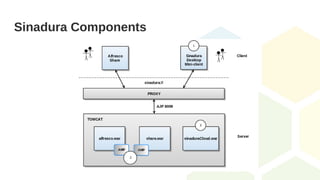
Sinadura Components
Sinadura components
1. Sinadura 5 Desktop (in your local machine):

Sinadura 5 client works with protocol-based signatures, registered in your operating system. The
digital signature protocol (sinadura:// ) is registered during the installation.
2. Alfresco AMPs (in Alfresco server)
3. Sinadura Cloud Services (for example, in Alfresco server):

Sinadura Cloud Service is a 3rd party web application for digital signature (sinaduraCloud.war),
which may be installed as part of your Alfresco installation, or on a different Tomcat container in a
separate machine.
Installation and configuration
In the client:

Download Sinadura 5 Desktop (for Windows or Linux) → http://www.sinadura.net

Install your software certificates or smartcards on your OS

Check that Sinadura Desktop is able to sign locally
In the server:

Install AMPs

Copy sinaduraCloud.war into $ALF_HOME/tomcat/webapps

Restart Alfresco service
Tested on:

Alfresco 201602GA

Alfresco 201702GA

Alfresco 5.0.3 EE

Alfresco 5.1.2 EE
Sign with Sinadura action
[*] Action available for one or multiple files
[*] Any type of document
Position of the visible stamp [*] Only for PDFs
Previews in Alfresco Share [*] Only for PDFs
Contributors
Sinadura addon for Alfresco

Alfredo Sánchez

César Capillas
Sinadura Desktop client and third party services

Alfredo Sánchez

Irune Prado

Gustavo Fernández

https://www.github.com/zylklab/alfresco-sinadura
Video Demo → https://goo.gl/tR5ZBD
Help us to improve the addon!
Fork, share and contribute in github

https://www.github.com/zylklab/alfresco-sinadura
#TODO

Translate Sinadura Desktop → Thanks to Douglas C.R. Paes for Brazilian-Portuguese translation

Make sinaduraCloud services endpoint configurable via properties or config file

Signature evaluators

Clustering mode
Thank you for your attention!
César Capillas <cesar at zylk.net>
@zylknet
http://www.github.com/zylklab/alfresco-sinadura

Sinadura ECM - Protocol-based signatures for Alfresco 5

  • 1.
    Sinadura 5 forAlfresco ”A painless digital signature addon for Alfresco” César Capillas <cesar at zylk.net>
  • 2.
    About me I’m anIT/Solution Architect at zylk.net, an OOTB member working with Alfresco-based solutions during the last 8 years in large organisations. I am one of the authors of a corporate Alfresco Blog, addons developer and a very active user in Alfresco Community. http://www.zylk.net/alfresco-blog https://www.linkedin.com/in/cesarcapillas
  • 3.
    What is Sinadura? “Sinadurameans signature in Basque”  Sinadura is a digital signature tool for Windows and Linux, with advanced features as timestamps, OCSP validation or digital signature profiles.  As you probably know, java applets are not supported in Chrome or Firefox.  Sinadura 5 Desktop adds a mini-client designed for the web, for the replacement of java applet technology, using a protocol-based system registered in your OS http://www.sinadura.net
  • 4.
  • 5.
    What is Sinadura? #smartcards#software-certificates #proxy #profiles
  • 6.
    Features  “Sign with Sinadura”action in Alfresco Share client.  Previews of the digital signatures in Alfresco Share Preview (for PDF only).  Pades signatures for PDF files and Xades for other mimetypes.  Advanced signature properties, such as timestamps (TSA) or digital signature validations (OCSP).  Digital signature profiles, with customized visible stamps in any location of the document (for PDF only).
  • 7.
  • 8.
    Sinadura components 1. Sinadura5 Desktop (in your local machine):  Sinadura 5 client works with protocol-based signatures, registered in your operating system. The digital signature protocol (sinadura:// ) is registered during the installation. 2. Alfresco AMPs (in Alfresco server) 3. Sinadura Cloud Services (for example, in Alfresco server):  Sinadura Cloud Service is a 3rd party web application for digital signature (sinaduraCloud.war), which may be installed as part of your Alfresco installation, or on a different Tomcat container in a separate machine.
  • 9.
    Installation and configuration Inthe client:  Download Sinadura 5 Desktop (for Windows or Linux) → http://www.sinadura.net  Install your software certificates or smartcards on your OS  Check that Sinadura Desktop is able to sign locally In the server:  Install AMPs  Copy sinaduraCloud.war into $ALF_HOME/tomcat/webapps  Restart Alfresco service Tested on:  Alfresco 201602GA  Alfresco 201702GA  Alfresco 5.0.3 EE  Alfresco 5.1.2 EE
  • 10.
    Sign with Sinaduraaction [*] Action available for one or multiple files [*] Any type of document
  • 11.
    Position of thevisible stamp [*] Only for PDFs
  • 12.
    Previews in AlfrescoShare [*] Only for PDFs
  • 13.
    Contributors Sinadura addon forAlfresco  Alfredo Sánchez  César Capillas Sinadura Desktop client and third party services  Alfredo Sánchez  Irune Prado  Gustavo Fernández  https://www.github.com/zylklab/alfresco-sinadura Video Demo → https://goo.gl/tR5ZBD
  • 14.
    Help us toimprove the addon! Fork, share and contribute in github  https://www.github.com/zylklab/alfresco-sinadura #TODO  Translate Sinadura Desktop → Thanks to Douglas C.R. Paes for Brazilian-Portuguese translation  Make sinaduraCloud services endpoint configurable via properties or config file  Signature evaluators  Clustering mode
  • 15.
    Thank you foryour attention! César Capillas <cesar at zylk.net> @zylknet http://www.github.com/zylklab/alfresco-sinadura