Selenium WebDriver
Test automation for web applications
Thomas Sundberg
Stockholm, Sweden
Think Code AB
thomas@thinkcode.se
@thomassundberg
Blog: https://thomassundberg.wordpress.com/
Code: https://github.com/tsundberg/selenium-test-
automation/tree/luxsoft-january-2015
© Think Code AB, http://www.thinkcode.se
TESTING OF WEB APPLICATIONS
© Think Code AB, http://www.thinkcode.se
Testing of web applications
• Introduction to testing
• Manual testing
• Automated testing
• Selenium
© Think Code AB, http://www.thinkcode.se
Introduction
• Why testing?
• What to test?
• When to test?
• How to test?
© Think Code AB, http://www.thinkcode.se
Why testing?
• Create confidence to release
© Think Code AB, http://www.thinkcode.se
Why release?
• Create value
• Reduce waste
• Get feedback from real users
– Was this what they wanted?
© Think Code AB, http://www.thinkcode.se
Create value
• Using the software is the only way our
users/customers can benefit from our work
• This is the only reason why they pay us to
create it
© Think Code AB, http://www.thinkcode.se
Reduce waste
• Waste until it is used
• Unused code is waste
• Unreleased code is unused code
• Waste until it is deployed
© Think Code AB, http://www.thinkcode.se
Feedback from real users
• Is this was what they wanted?
• Release early
• Release often
© Think Code AB, http://www.thinkcode.se
When to test?
• As soon as possible
© Think Code AB, http://www.thinkcode.se
Why?
• Small problems are easy to fix
• Young problems are small
• Catch them before they grow up and become
big problems
– Large, old problems can be catastrophic
© Think Code AB, http://www.thinkcode.se
How to test?
• Manual
• Automated
© Think Code AB, http://www.thinkcode.se
Manual
• Always through the user interface
• Slow
• Inconsistent
• Doesn't scale
• Will find new, interesting bugs
© Think Code AB, http://www.thinkcode.se
Automated
• Different levels
– User interface
– Code
• Faster
• Consistent
• Scales
• Will never find new, interesting bugs
© Think Code AB, http://www.thinkcode.se
Manual vs. Automated
• Manual test
– Understand the problem
– Know the application
• Automated test
– Understand the problem
– Know the application
– Programming
© Think Code AB, http://www.thinkcode.se
SELENIUM
© Think Code AB, http://www.thinkcode.se
Browser automation
• Can be used for tests
• Doesn’t have to be used for testing
© Think Code AB, http://www.thinkcode.se
Where does the name come from?
• Selenium is a chemical element, Se
• Treatment for Mercury poisoning
• Mercury is a closed source web testing tool
• Selenium is a cure for Mercury
© Think Code AB, http://www.thinkcode.se
Tests
• Many frameworks
• Test NG
• Spock
• JUnit
• Others
© Think Code AB, http://www.thinkcode.se
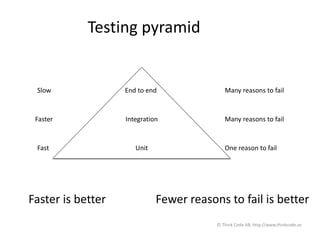
Testing pyramid
End to end
Integration
Unit
Slow
Faster
Fast
Many reasons to fail
One reason to fail
Faster is better Fewer reasons to fail is better
© Think Code AB, http://www.thinkcode.se
End to end
• From the user interface
• Very slow
– It takes forever to start a browser and do
something
• Very fragile
– Lots of reasons why a test will fail
• The database is broken
• The user interface is missing a component
• Many more…
© Think Code AB, http://www.thinkcode.se
Doesn’t scale
• Impossible to test all paths
– 10 entrances from the ui
– 5 paths through the controller
– 7 paths through the model
– 10 * 5 * 7 = 350 paths
– 350 tests
© Think Code AB, http://www.thinkcode.se
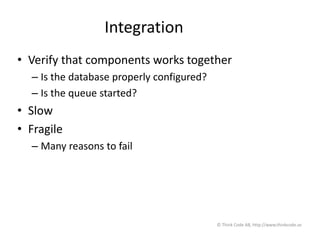
Integration
• Verify that components works together
– Is the database properly configured?
– Is the queue started?
• Slow
• Fragile
– Many reasons to fail
© Think Code AB, http://www.thinkcode.se
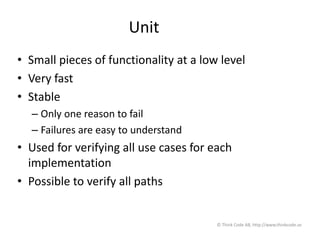
Unit
• Small pieces of functionality at a low level
• Very fast
• Stable
– Only one reason to fail
– Failures are easy to understand
• Used for verifying all use cases for each
implementation
• Possible to verify all paths
© Think Code AB, http://www.thinkcode.se
Good tests
• Must be easy to
– Understand
– Maintain
– Change
– Extend
© Think Code AB, http://www.thinkcode.se
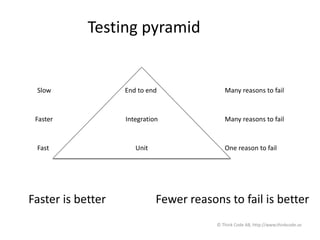
Testing pyramid
End to end
Integration
Unit
Slow
Faster
Fast
Many reasons to fail
One reason to fail
Faster is better Fewer reasons to fail is better
© Think Code AB, http://www.thinkcode.se
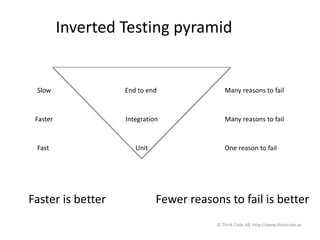
Inverted Testing pyramid
End to end
Integration
Unit
Slow
Faster
Fast
Many reasons to fail
One reason to fail
Faster is better Fewer reasons to fail is better
© Think Code AB, http://www.thinkcode.se
Selenium echo system
• Selenium IDE
• Selenium WebDriver
© Think Code AB, http://www.thinkcode.se
Selenium IDE
• Firefox plugin
• Record and replay
• If you want to
– create quick bug reproduction scripts
– create scripts to aid in automation-aided
exploratory testing
© Think Code AB, http://www.thinkcode.se
Selenium WebDriver
• A programming framework
• Local in any browser you have installed
– Open source
– Anyone can use it
• Many programming languages
– We will use Java
• If you want to
– create robust, browser-based regression automation
suites and tests
– scale and distribute scripts across many environments
© Think Code AB, http://www.thinkcode.se
Selenium WebDriver
• W3C standard
– Not done, but well on its way
• Every W3C browser must support WebDriver
© Think Code AB, http://www.thinkcode.se
Selenium Hub
• Automate a browser remote
• Enable us to do cross browser testing
– Browser
– Operating system
© Think Code AB, http://www.thinkcode.se
WebDriver remote
• Same API as regular WebDriver
– If it works local, you can execute it remote
– SauceLabs
© Think Code AB, http://www.thinkcode.se
SELENIUM IDE
© Think Code AB, http://www.thinkcode.se
Hello, world!
• http://selenium.thinkcode.se
• Find an element and verify the text
© Think Code AB, http://www.thinkcode.se
Fill out a form
• Change password
© Think Code AB, http://www.thinkcode.se
WHAT TO TEST?
© Think Code AB, http://www.thinkcode.se
What should you test?
• Testing theatre
• Test stuff that matters
© Think Code AB, http://www.thinkcode.se
Security theatre
• Not aiming for security
• Aim to make people feel safe
• Security check on airports
– Why do they take you water bottle?
– If it is dangerous, remove it far away so it can't be
dangerous for you
© Think Code AB, http://www.thinkcode.se
Don’t test everything
• Enough to feel safe
© Think Code AB, http://www.thinkcode.se
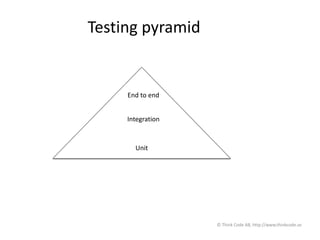
Testing pyramid
End to end
Integration
Unit
© Think Code AB, http://www.thinkcode.se
User interface
• Do not test everything through the user
interface
• Test at the right level
© Think Code AB, http://www.thinkcode.se
End to end
• Can you login?
• Can you fail to log in?
• Can you do a purchase?
– At least place something in the shopping bag
© Think Code AB, http://www.thinkcode.se
Integration
• Connect to the database
• Connect to a queue
© Think Code AB, http://www.thinkcode.se
Unit level
• Password algorithm
© Think Code AB, http://www.thinkcode.se
You must be in control
• Collaborators
• Mock or Stub
© Think Code AB, http://www.thinkcode.se
Database
• Know about the content
• Decide what the content should be
• This makes End to end complicated
© Think Code AB, http://www.thinkcode.se
What should you automate?
• Any test that should be repeated
• At the right level...
© Think Code AB, http://www.thinkcode.se
What should you not automate?
• Expensive tests
– Buying using a credit card
– Probably enough to do one manual test
– Setup a fake server that mimics the payment
service
– http://wiremock.org
© Think Code AB, http://www.thinkcode.se
One off
• If it truly exists
• Automate it the second time
© Think Code AB, http://www.thinkcode.se
SELENIUM WEBDRIVER
© Think Code AB, http://www.thinkcode.se
First WebDriver test
• Export the code from Selenium IDE
– The code is ok
– Not pretty
– Ok to start with
• Good for finding elements
© Think Code AB, http://www.thinkcode.se
Browser tools
• Firebug
• Firepath
• Other favorites?
© Think Code AB, http://www.thinkcode.se
First handmade WebDriver test
• Hello world
• Without page object
• With page object
© Think Code AB, http://www.thinkcode.se
Hand made is better
• You have better control
• You know what you did
• Slower?
– Maybe at first, but not in the long run
© Think Code AB, http://www.thinkcode.se
Page objects
• Separation of navigation logic and test
– Only need to change the page object when the
layout changes
– The tests remain unchanged if the logic is the
same
© Think Code AB, http://www.thinkcode.se
Lazy
• Hard to solve a hard problem
• Better to solve many small
© Think Code AB, http://www.thinkcode.se
One class per page
• Abstracts the page functionality
• Hide the page navigation
© Think Code AB, http://www.thinkcode.se
Simplifies the tests
• The test focus on WHAT the application should
do
• Not on HOW
• Behavior is interesting
© Think Code AB, http://www.thinkcode.se
Supply the browser
• Through the constructor
– Allow you to use the same page object with
different browsers
• Verify that the current page is the right page
– Check title or similar characteristics
• Throw an exception if you can’t verify the
page
© Think Code AB, http://www.thinkcode.se
assertThat
• Signals through exception
• assertThat(actaulTitle, is(expectedTitle));
© Think Code AB, http://www.thinkcode.se
Example - Check boxes
http://selenium.thinkcode.se/selectColor.html
© Think Code AB, http://www.thinkcode.se
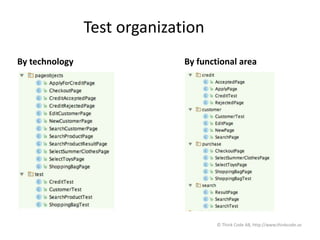
Test organization
By technology By functional area
© Think Code AB, http://www.thinkcode.se
Test organization
• Separate on functional areas
• Do not separate on technology
– A new developer want to find the relevant test
and page objects fast
• All tests and page object for a certain area
should live in the same package
© Think Code AB, http://www.thinkcode.se
Selenium echo system
• Selenium IDE
– Firefox plugin
• WebDriver
– Programming api
• Selenium hub
– Remote
– Different browsers
– Different operating systems
© Think Code AB, http://www.thinkcode.se
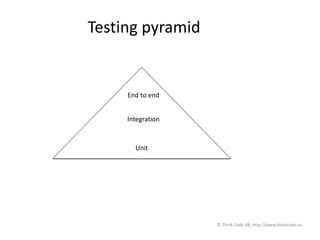
Testing pyramid
End to end
Integration
Unit
© Think Code AB, http://www.thinkcode.se
Test things at the right level
• End to end
• Integration
• Unit
End to end
• Verify that the system is alive
• Most crucial flow
– Buy a product
– Book a trip
• Very slow
• Lots of reasons to fail
© Think Code AB, http://www.thinkcode.se
Integration
• Slow
• Many reasons to fail
• Doesn’t scale
© Think Code AB, http://www.thinkcode.se
Unit
• Fast
• Only one reason to fail
• Algorithms
• Password
© Think Code AB, http://www.thinkcode.se
Testing theater
• Verifying important parts in the system
• Not for satisfying a managers metric
© Think Code AB, http://www.thinkcode.se
WebDriver
• close()
• findElement(By by)
• findElements(By by)
• get(java.lang.String url)
• getCurrentUrl()
• getPageSource()
• getTitle()
• getWindowHandle()
• getWindowHandles()
• manage()
• navigate()
• quit()
• switchTo()
© Think Code AB, http://www.thinkcode.se
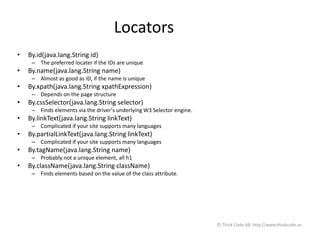
Locators
• By.id(java.lang.String id)
– The preferred locater if the IDs are unique
• By.name(java.lang.String name)
– Almost as good as ID, if the name is unique
• By.xpath(java.lang.String xpathExpression)
– Depends on the page structure
• By.cssSelector(java.lang.String selector)
– Finds elements via the driver's underlying W3 Selector engine.
• By.linkText(java.lang.String linkText)
– Complicated if your site supports many languages
• By.partialLinkText(java.lang.String linkText)
– Complicated if your site supports many languages
• By.tagName(java.lang.String name)
– Probably not a unique element, all h1
• By.className(java.lang.String className)
– Finds elements based on the value of the class attribute.
© Think Code AB, http://www.thinkcode.se
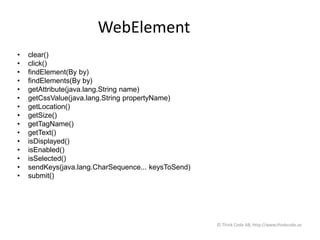
WebElement
• clear()
• click()
• findElement(By by)
• findElements(By by)
• getAttribute(java.lang.String name)
• getCssValue(java.lang.String propertyName)
• getLocation()
• getSize()
• getTagName()
• getText()
• isDisplayed()
• isEnabled()
• isSelected()
• sendKeys(java.lang.CharSequence... keysToSend)
• submit()
© Think Code AB, http://www.thinkcode.se
Page objects
• Separate navigation and logic
• Clearer and easier tests
• Supply the browser
• Verify the correct page
© Think Code AB, http://www.thinkcode.se
Interested in more?
Join me in Timisoara, Romania in April for
A two day, in depth, Selenium course.
http://mozaicworks.com/public-trainings-and-workshops/selenium-webdriver-test-automation-for-web-applications/
© Think Code AB, http://www.thinkcode.se
Thomas Sundberg
Stockholm, Sweden
Think Code AB
thomas@thinkcode.se
@thomassundberg
Blog: https://thomassundberg.wordpress.com/
Code: https://github.com/tsundberg/selenium-test-
automation/tree/luxsoft-january-2015
© Think Code AB, http://www.thinkcode.se

Selenium WebDriver - Test automation for web applications

  • 1.
  • 2.
    Thomas Sundberg Stockholm, Sweden ThinkCode AB thomas@thinkcode.se @thomassundberg Blog: https://thomassundberg.wordpress.com/ Code: https://github.com/tsundberg/selenium-test- automation/tree/luxsoft-january-2015 © Think Code AB, http://www.thinkcode.se
  • 3.
    TESTING OF WEBAPPLICATIONS © Think Code AB, http://www.thinkcode.se
  • 4.
    Testing of webapplications • Introduction to testing • Manual testing • Automated testing • Selenium © Think Code AB, http://www.thinkcode.se
  • 5.
    Introduction • Why testing? •What to test? • When to test? • How to test? © Think Code AB, http://www.thinkcode.se
  • 6.
    Why testing? • Createconfidence to release © Think Code AB, http://www.thinkcode.se
  • 7.
    Why release? • Createvalue • Reduce waste • Get feedback from real users – Was this what they wanted? © Think Code AB, http://www.thinkcode.se
  • 8.
    Create value • Usingthe software is the only way our users/customers can benefit from our work • This is the only reason why they pay us to create it © Think Code AB, http://www.thinkcode.se
  • 9.
    Reduce waste • Wasteuntil it is used • Unused code is waste • Unreleased code is unused code • Waste until it is deployed © Think Code AB, http://www.thinkcode.se
  • 10.
    Feedback from realusers • Is this was what they wanted? • Release early • Release often © Think Code AB, http://www.thinkcode.se
  • 11.
    When to test? •As soon as possible © Think Code AB, http://www.thinkcode.se
  • 12.
    Why? • Small problemsare easy to fix • Young problems are small • Catch them before they grow up and become big problems – Large, old problems can be catastrophic © Think Code AB, http://www.thinkcode.se
  • 13.
    How to test? •Manual • Automated © Think Code AB, http://www.thinkcode.se
  • 14.
    Manual • Always throughthe user interface • Slow • Inconsistent • Doesn't scale • Will find new, interesting bugs © Think Code AB, http://www.thinkcode.se
  • 15.
    Automated • Different levels –User interface – Code • Faster • Consistent • Scales • Will never find new, interesting bugs © Think Code AB, http://www.thinkcode.se
  • 16.
    Manual vs. Automated •Manual test – Understand the problem – Know the application • Automated test – Understand the problem – Know the application – Programming © Think Code AB, http://www.thinkcode.se
  • 17.
    SELENIUM © Think CodeAB, http://www.thinkcode.se
  • 18.
    Browser automation • Canbe used for tests • Doesn’t have to be used for testing © Think Code AB, http://www.thinkcode.se
  • 19.
    Where does thename come from? • Selenium is a chemical element, Se • Treatment for Mercury poisoning • Mercury is a closed source web testing tool • Selenium is a cure for Mercury © Think Code AB, http://www.thinkcode.se
  • 20.
    Tests • Many frameworks •Test NG • Spock • JUnit • Others © Think Code AB, http://www.thinkcode.se
  • 21.
    Testing pyramid End toend Integration Unit Slow Faster Fast Many reasons to fail Many reasons to fail One reason to fail Faster is better Fewer reasons to fail is better © Think Code AB, http://www.thinkcode.se
  • 22.
    End to end •From the user interface • Very slow – It takes forever to start a browser and do something • Very fragile – Lots of reasons why a test will fail • The database is broken • The user interface is missing a component • Many more… © Think Code AB, http://www.thinkcode.se
  • 23.
    Doesn’t scale • Impossibleto test all paths – 10 entrances from the ui – 5 paths through the controller – 7 paths through the model – 10 * 5 * 7 = 350 paths – 350 tests © Think Code AB, http://www.thinkcode.se
  • 24.
    Integration • Verify thatcomponents works together – Is the database properly configured? – Is the queue started? • Slow • Fragile – Many reasons to fail © Think Code AB, http://www.thinkcode.se
  • 25.
    Unit • Small piecesof functionality at a low level • Very fast • Stable – Only one reason to fail – Failures are easy to understand • Used for verifying all use cases for each implementation • Possible to verify all paths © Think Code AB, http://www.thinkcode.se
  • 26.
    Good tests • Mustbe easy to – Understand – Maintain – Change – Extend © Think Code AB, http://www.thinkcode.se
  • 27.
    Testing pyramid End toend Integration Unit Slow Faster Fast Many reasons to fail Many reasons to fail One reason to fail Faster is better Fewer reasons to fail is better © Think Code AB, http://www.thinkcode.se
  • 28.
    Inverted Testing pyramid Endto end Integration Unit Slow Faster Fast Many reasons to fail Many reasons to fail One reason to fail Faster is better Fewer reasons to fail is better © Think Code AB, http://www.thinkcode.se
  • 29.
    Selenium echo system •Selenium IDE • Selenium WebDriver © Think Code AB, http://www.thinkcode.se
  • 30.
    Selenium IDE • Firefoxplugin • Record and replay • If you want to – create quick bug reproduction scripts – create scripts to aid in automation-aided exploratory testing © Think Code AB, http://www.thinkcode.se
  • 31.
    Selenium WebDriver • Aprogramming framework • Local in any browser you have installed – Open source – Anyone can use it • Many programming languages – We will use Java • If you want to – create robust, browser-based regression automation suites and tests – scale and distribute scripts across many environments © Think Code AB, http://www.thinkcode.se
  • 32.
    Selenium WebDriver • W3Cstandard – Not done, but well on its way • Every W3C browser must support WebDriver © Think Code AB, http://www.thinkcode.se
  • 33.
    Selenium Hub • Automatea browser remote • Enable us to do cross browser testing – Browser – Operating system © Think Code AB, http://www.thinkcode.se
  • 34.
    WebDriver remote • SameAPI as regular WebDriver – If it works local, you can execute it remote – SauceLabs © Think Code AB, http://www.thinkcode.se
  • 35.
    SELENIUM IDE © ThinkCode AB, http://www.thinkcode.se
  • 36.
    Hello, world! • http://selenium.thinkcode.se •Find an element and verify the text © Think Code AB, http://www.thinkcode.se
  • 37.
    Fill out aform • Change password © Think Code AB, http://www.thinkcode.se
  • 38.
    WHAT TO TEST? ©Think Code AB, http://www.thinkcode.se
  • 39.
    What should youtest? • Testing theatre • Test stuff that matters © Think Code AB, http://www.thinkcode.se
  • 40.
    Security theatre • Notaiming for security • Aim to make people feel safe • Security check on airports – Why do they take you water bottle? – If it is dangerous, remove it far away so it can't be dangerous for you © Think Code AB, http://www.thinkcode.se
  • 41.
    Don’t test everything •Enough to feel safe © Think Code AB, http://www.thinkcode.se
  • 42.
    Testing pyramid End toend Integration Unit © Think Code AB, http://www.thinkcode.se
  • 43.
    User interface • Donot test everything through the user interface • Test at the right level © Think Code AB, http://www.thinkcode.se
  • 44.
    End to end •Can you login? • Can you fail to log in? • Can you do a purchase? – At least place something in the shopping bag © Think Code AB, http://www.thinkcode.se
  • 45.
    Integration • Connect tothe database • Connect to a queue © Think Code AB, http://www.thinkcode.se
  • 46.
    Unit level • Passwordalgorithm © Think Code AB, http://www.thinkcode.se
  • 47.
    You must bein control • Collaborators • Mock or Stub © Think Code AB, http://www.thinkcode.se
  • 48.
    Database • Know aboutthe content • Decide what the content should be • This makes End to end complicated © Think Code AB, http://www.thinkcode.se
  • 49.
    What should youautomate? • Any test that should be repeated • At the right level... © Think Code AB, http://www.thinkcode.se
  • 50.
    What should younot automate? • Expensive tests – Buying using a credit card – Probably enough to do one manual test – Setup a fake server that mimics the payment service – http://wiremock.org © Think Code AB, http://www.thinkcode.se
  • 51.
    One off • Ifit truly exists • Automate it the second time © Think Code AB, http://www.thinkcode.se
  • 52.
    SELENIUM WEBDRIVER © ThinkCode AB, http://www.thinkcode.se
  • 53.
    First WebDriver test •Export the code from Selenium IDE – The code is ok – Not pretty – Ok to start with • Good for finding elements © Think Code AB, http://www.thinkcode.se
  • 54.
    Browser tools • Firebug •Firepath • Other favorites? © Think Code AB, http://www.thinkcode.se
  • 55.
    First handmade WebDrivertest • Hello world • Without page object • With page object © Think Code AB, http://www.thinkcode.se
  • 56.
    Hand made isbetter • You have better control • You know what you did • Slower? – Maybe at first, but not in the long run © Think Code AB, http://www.thinkcode.se
  • 57.
    Page objects • Separationof navigation logic and test – Only need to change the page object when the layout changes – The tests remain unchanged if the logic is the same © Think Code AB, http://www.thinkcode.se
  • 58.
    Lazy • Hard tosolve a hard problem • Better to solve many small © Think Code AB, http://www.thinkcode.se
  • 59.
    One class perpage • Abstracts the page functionality • Hide the page navigation © Think Code AB, http://www.thinkcode.se
  • 60.
    Simplifies the tests •The test focus on WHAT the application should do • Not on HOW • Behavior is interesting © Think Code AB, http://www.thinkcode.se
  • 61.
    Supply the browser •Through the constructor – Allow you to use the same page object with different browsers • Verify that the current page is the right page – Check title or similar characteristics • Throw an exception if you can’t verify the page © Think Code AB, http://www.thinkcode.se
  • 62.
    assertThat • Signals throughexception • assertThat(actaulTitle, is(expectedTitle)); © Think Code AB, http://www.thinkcode.se
  • 63.
    Example - Checkboxes http://selenium.thinkcode.se/selectColor.html © Think Code AB, http://www.thinkcode.se
  • 64.
    Test organization By technologyBy functional area © Think Code AB, http://www.thinkcode.se
  • 65.
    Test organization • Separateon functional areas • Do not separate on technology – A new developer want to find the relevant test and page objects fast • All tests and page object for a certain area should live in the same package © Think Code AB, http://www.thinkcode.se
  • 66.
    Selenium echo system •Selenium IDE – Firefox plugin • WebDriver – Programming api • Selenium hub – Remote – Different browsers – Different operating systems © Think Code AB, http://www.thinkcode.se
  • 67.
    Testing pyramid End toend Integration Unit © Think Code AB, http://www.thinkcode.se
  • 68.
    Test things atthe right level • End to end • Integration • Unit
  • 69.
    End to end •Verify that the system is alive • Most crucial flow – Buy a product – Book a trip • Very slow • Lots of reasons to fail © Think Code AB, http://www.thinkcode.se
  • 70.
    Integration • Slow • Manyreasons to fail • Doesn’t scale © Think Code AB, http://www.thinkcode.se
  • 71.
    Unit • Fast • Onlyone reason to fail • Algorithms • Password © Think Code AB, http://www.thinkcode.se
  • 72.
    Testing theater • Verifyingimportant parts in the system • Not for satisfying a managers metric © Think Code AB, http://www.thinkcode.se
  • 73.
    WebDriver • close() • findElement(Byby) • findElements(By by) • get(java.lang.String url) • getCurrentUrl() • getPageSource() • getTitle() • getWindowHandle() • getWindowHandles() • manage() • navigate() • quit() • switchTo() © Think Code AB, http://www.thinkcode.se
  • 74.
    Locators • By.id(java.lang.String id) –The preferred locater if the IDs are unique • By.name(java.lang.String name) – Almost as good as ID, if the name is unique • By.xpath(java.lang.String xpathExpression) – Depends on the page structure • By.cssSelector(java.lang.String selector) – Finds elements via the driver's underlying W3 Selector engine. • By.linkText(java.lang.String linkText) – Complicated if your site supports many languages • By.partialLinkText(java.lang.String linkText) – Complicated if your site supports many languages • By.tagName(java.lang.String name) – Probably not a unique element, all h1 • By.className(java.lang.String className) – Finds elements based on the value of the class attribute. © Think Code AB, http://www.thinkcode.se
  • 75.
    WebElement • clear() • click() •findElement(By by) • findElements(By by) • getAttribute(java.lang.String name) • getCssValue(java.lang.String propertyName) • getLocation() • getSize() • getTagName() • getText() • isDisplayed() • isEnabled() • isSelected() • sendKeys(java.lang.CharSequence... keysToSend) • submit() © Think Code AB, http://www.thinkcode.se
  • 76.
    Page objects • Separatenavigation and logic • Clearer and easier tests • Supply the browser • Verify the correct page © Think Code AB, http://www.thinkcode.se
  • 77.
    Interested in more? Joinme in Timisoara, Romania in April for A two day, in depth, Selenium course. http://mozaicworks.com/public-trainings-and-workshops/selenium-webdriver-test-automation-for-web-applications/ © Think Code AB, http://www.thinkcode.se
  • 78.
    Thomas Sundberg Stockholm, Sweden ThinkCode AB thomas@thinkcode.se @thomassundberg Blog: https://thomassundberg.wordpress.com/ Code: https://github.com/tsundberg/selenium-test- automation/tree/luxsoft-january-2015 © Think Code AB, http://www.thinkcode.se

Editor's Notes

  • #37 Show a record and re-play session. Have the participants to do the same thing
  • #38 Record and replay a change password scenario
  • #64 Implement an example and have the participants to do it as well