SELENIUM IDE
Creation of automated test-cases.

Created by: David Mikaelyan
Reviewed by: Vladimir Soghoyan
Ogma Applications
Overview

 Selenium IDE
 Creation of Automated Test-Cases.
 Creation of Automated Test-Suites.
 Using Extensions.

Ogma Applications

2

10/22/2012
Selenium IDE

 Selenium IDE is a Firefox extension that allows you to
record, edit, and debug tests for HTML
 Easy record and playback
 Intelligent field selection
 Auto complete for all common commands
 Walkthrough tests

Ogma Applications

3

10/22/2012
Selenium IDE

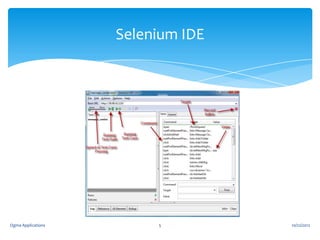
Selenium saves all information in an HTML table format
Command – Tells Selenium what to do using actions or
assertions
Target – Tells Selenium which HTML element a command
refers to
Value – Used for any command that might need a value of
some kind

Ogma Applications

4

10/22/2012
Selenium IDE

Ogma Applications

5

10/22/2012
Creation of Automated Test-Case

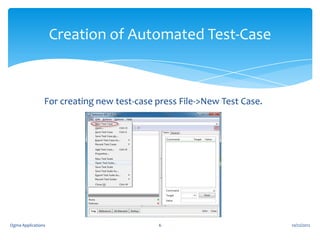
For creating new test-case press File->New Test Case.

Ogma Applications

6

10/22/2012
Creation of Automated Test-Case

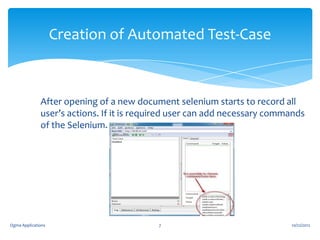
After opening of a new document selenium starts to record all
user’s actions. If it is required user can add necessary commands
of the Selenium.

Ogma Applications

7

10/22/2012
Creation of Automated Test-Suite

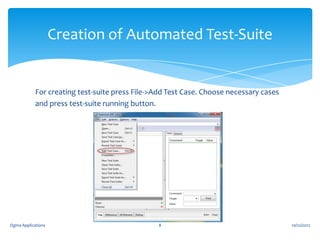
For creating test-suite press File->Add Test Case. Choose necessary cases
and press test-suite running button.

Ogma Applications

8

10/22/2012
Extensions

User extensions are JavaScript files that allow one to
create his or her own customizations and features to add
additional functionality. Often this is in the form of
customized commands although this extensibility is not
limited to additional commands.

Ogma Applications

9

10/22/2012
Adding User Extensions In The
Selenium IDE
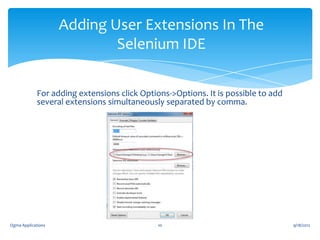
For adding extensions click Options->Options. It is possible to add
several extensions simultaneously separated by comma.

Ogma Applications

10

9/18/2012
User Extensions (example)

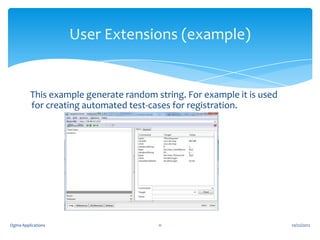
This example generate random string. For example it is used
for creating automated test-cases for registration.

Ogma Applications

11

10/22/2012

Selenium IDE

  • 1.
    SELENIUM IDE Creation ofautomated test-cases. Created by: David Mikaelyan Reviewed by: Vladimir Soghoyan Ogma Applications
  • 2.
    Overview  Selenium IDE Creation of Automated Test-Cases.  Creation of Automated Test-Suites.  Using Extensions. Ogma Applications 2 10/22/2012
  • 3.
    Selenium IDE  SeleniumIDE is a Firefox extension that allows you to record, edit, and debug tests for HTML  Easy record and playback  Intelligent field selection  Auto complete for all common commands  Walkthrough tests Ogma Applications 3 10/22/2012
  • 4.
    Selenium IDE Selenium savesall information in an HTML table format Command – Tells Selenium what to do using actions or assertions Target – Tells Selenium which HTML element a command refers to Value – Used for any command that might need a value of some kind Ogma Applications 4 10/22/2012
  • 5.
  • 6.
    Creation of AutomatedTest-Case For creating new test-case press File->New Test Case. Ogma Applications 6 10/22/2012
  • 7.
    Creation of AutomatedTest-Case After opening of a new document selenium starts to record all user’s actions. If it is required user can add necessary commands of the Selenium. Ogma Applications 7 10/22/2012
  • 8.
    Creation of AutomatedTest-Suite For creating test-suite press File->Add Test Case. Choose necessary cases and press test-suite running button. Ogma Applications 8 10/22/2012
  • 9.
    Extensions User extensions areJavaScript files that allow one to create his or her own customizations and features to add additional functionality. Often this is in the form of customized commands although this extensibility is not limited to additional commands. Ogma Applications 9 10/22/2012
  • 10.
    Adding User ExtensionsIn The Selenium IDE For adding extensions click Options->Options. It is possible to add several extensions simultaneously separated by comma. Ogma Applications 10 9/18/2012
  • 11.
    User Extensions (example) Thisexample generate random string. For example it is used for creating automated test-cases for registration. Ogma Applications 11 10/22/2012