Selenium –Web Browser Automation 
Presented by 
Pakorn Weecharungsan
Test Automation Tool 
• QTP by HP 
• Rational Functional Tester by Rational (IBM) 
• Silk Test by Borland 
• Test Complete by Automated QA 
• Selenium (Open Source) 
• Sahi (Open Source)
Selenium 
• Suite of tools to automate web application. 
• Web test tool that run in the browser it does exactly what user does. 
• Operations are highly flexible, allowing many options to locate UI 
elements and comparing expected test results against actual application 
behavior.
Features 
• Supports cross browser testing, can be run on multiple browsers. 
• Allows scripting in several languages like Java, C#, PHP and Python 
• Assertion statements provide an effective way of comparing expected 
and actual results.
Projects 
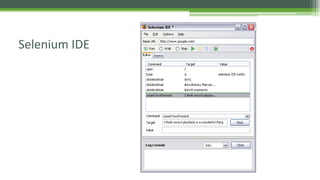
• Selenium IDE 
• Selenium WebDriver
Selenium IDE 
• Create a quick bug reproduction scripts. 
• Create scripts to aid in automation-aided exploratory testing.
Selenium IDE
Selenium WebDriver 
• Create robust, browser-based regression automation. 
• Scale and distribute scripts across many environments.
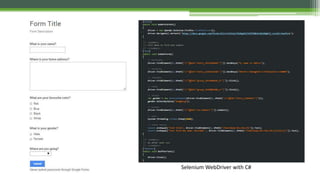
Selenium WebDriver with C#
Summary 
• More information. 
▫ SeleniumHQ (http://www.seleniumhq.org) 
▫ SourceCode (https://github.com/dinobenz/SeleniumLabs)

Selenium – Web Browser Automation

  • 1.
    Selenium –Web BrowserAutomation Presented by Pakorn Weecharungsan
  • 2.
    Test Automation Tool • QTP by HP • Rational Functional Tester by Rational (IBM) • Silk Test by Borland • Test Complete by Automated QA • Selenium (Open Source) • Sahi (Open Source)
  • 3.
    Selenium • Suiteof tools to automate web application. • Web test tool that run in the browser it does exactly what user does. • Operations are highly flexible, allowing many options to locate UI elements and comparing expected test results against actual application behavior.
  • 4.
    Features • Supportscross browser testing, can be run on multiple browsers. • Allows scripting in several languages like Java, C#, PHP and Python • Assertion statements provide an effective way of comparing expected and actual results.
  • 5.
    Projects • SeleniumIDE • Selenium WebDriver
  • 6.
    Selenium IDE •Create a quick bug reproduction scripts. • Create scripts to aid in automation-aided exploratory testing.
  • 7.
  • 8.
    Selenium WebDriver •Create robust, browser-based regression automation. • Scale and distribute scripts across many environments.
  • 9.
  • 10.
    Summary • Moreinformation. ▫ SeleniumHQ (http://www.seleniumhq.org) ▫ SourceCode (https://github.com/dinobenz/SeleniumLabs)

Editor's Notes

  • #3 Lesson descriptions should be brief.
  • #4 Example objectives At the end of this lesson, you will be able to: Save files to the team Web server. Move files to different locations on the team Web server. Share files on the team Web server.