Firewalls
• The primarypurpose of a firewall is to determine whether
requests issued by one computing device to initiate a
connection with another device should be permitted or not
based upon rules configured by the firewall's administrator.
Two types of firewalls:
• software-based personal firewalls - extensions of the
workstation's operating system
• network-based firewalls - are hardware appliances that
physically pass traffic using the same mechanisms as
network routers and switches
3.
Software-based, personal firewalls
Apiece of software that resides on an individual workstation primarily to
protect that workstation.
Objectives of this type of firewall:
• Preventing unknown, external devices from initiating a communication
session with the workstation that is running the firewall software
• Preventing any piece of application software running on the workstation
from making unexpected outbound connections to external devices.
This capability is very useful in preventing your workstation from attacking
or spamming other systems in the event that it is compromised.
4.
Network-based firewalls
• Mostnetwork-based firewalls are network routers enhanced to more
efficiently monitor and take action on network traffic that passes through
it based upon the source of the traffic, its intended destination and the
service that is being requested.
• Firewalls are sold as appliances (i.e., a standalone computer with pre-
installed firewall software) through which network traffic can be passed
among potentially dozens of network segments that are physically
connected to the firewall.
• It is important to note that firewalls only are involved in communications
that travel through the firewall hardware - in one network port, out a
different network port.
5.
Positioning network-based firewalls
Perimeterfirewall - A firewall that is installed between the
Internet and your organization’s network.
Interior firewall - A firewall that is connected to network
segments within your organization, but is not directly
connected to the organization’s internet router.
6.
Trusted zones, untrustedzones and DMZs
A typical setup for a simple firewall for an organization that is
hosting an Internet-accessible web application is to have:
• One firewall port connected to the Internet or other network
segments containing untrusted devices (“untrusted zone”)
• One or more firewall ports that are each connected to a
network segment that connect to institutional servers that hold
private data (“trusted zone”)
• One or more firewall ports that are each connected to web
servers that are accessed by web application users in the
untrusted zone (“demilitarized zone” or “DMZ”)
7.
How network firewallswork
Firewalls allow or block network traffic between devices based upon rules
set up by the firewall administrator.
When the firewall receives a request from a device on one network port to
communicate with a device on another network port, it compares the
following information in the request against each firewall rule sequentially
from top to bottom until a match is found:
• The network address of the device initiating the communication ("source")
is compared against the list of sources contained within the rule
• The network address of the device whose services are requested
("destination") is compared against the list of destinations contained within
the rule
• The service being requested (e.g., Web, mail, file transfer, terminal
session, etc.) is compared against the list of services contained within in
the rule
8.
How network firewallswork
If the source, the destination and the requested service of a
communication request match one of the sources in a firewall rule AND
one of the destinations in the same rule AND one of the requested services
in the same rule, the associated actions specified by the administrator in
the matching rule are taken.
These actions may require the firewall to:
• Allow the communication to occur
• Block the communication without notifying the source
• Block the communication and notify the source
• Ask the user initiating the communication to provide valid authentication
information (e.g., user ID and password, smart token or biometric data)
before allowing the communication
• Set up a Virtual Private Network (VPN) to encrypt the communication
session between the source and the firewall. Note – software must be
installed on the requesting workstation to complete the VPN connection.
9.
How network firewallswork
Other functions that are performed by network firewalls:
• Anti-Spoofing - Detecting when the source of the network traffic is being "spoofed“
Example: when an individual attempts to access a blocked service by altering the
source address in the message header so it matches a different rule that allows
the communication to occur.
• Authentication – Configuring the firewall to allow a specific communication
sessions only after the user successfully logs into the firewall. These firewalls
typically support multiple authentication methods including locally-stored
passwords, directory-based passwords, secure tokens, etc.
• Network Address Translation (NAT) - Changing the network addresses of devices
on any side of the firewall to hide their true addresses from devices on other sides.
This prevents devices outside the network from probing our computers since they
would not be directly addressable. There are two ways NAT is performed:
• One-to-One - where each true address is translated to a unique translated address
• Many-to-One - where the true addresses of all of the devices on one side of a
firewall are translated to a single address, usually the address of the firewall itself
10.
Are Network firewallsnecessary?
A combination of devices and software services can cover many firewall functions:
• Routers, already on the network, can also block traffic based upon source, destination and
requested service using manually entered access control lists
• Anti-spoofing and network address translation can also be performed by most routers
• Servers can be configured to shut down unnecessary services or to screen out specific
sources to specific services
But a firewall does it better:
• Network security functions are housed in a consistent, comprehensive package that is far
easier to use than having to manage a large number of independent devices and to remember
to reapply rules on all applicable devices after one or more are rebuilt
• Being an independent device from your servers and networking devices, a firewall provides an
additional layer of defense against network-based threats, requiring a potential intruder to
bypass an additional device to be successful
• A firewall can also shield servers and workstations that may be running unused, vulnerable
services that may be unknown to the device's administrator
• Available “next generation” firewall technology can provide additional network security services
in a single solution
11.
Intrusion detection and
Intrusionprevention systems
• An Intrusion Detection System (IDS) is a software that can be installed on a
physical or virtual server or can be provided by a vendor as a preprogrammed
appliance that reviews all of the network traffic either passing through it or
through one or more switches to which the IDS is connected in a manner that
allows it to view traffic.
• An IDS relies on a file of malicious traffic patterns or “signatures” that are
stored within the IDS and are automatically updated on a regular basis.
• IDS can detect persistent attacks:
Example:
➢ Brute force attacks
Example: repeated attempts to log in to a target device trying a different
password each time
➢ Probing attacks –
Example: attempts to test whether or not a service is running on any
devices across the network or whether the system has vulnerabilities
have not be addressed
12.
Virtual Private Networks
AVirtual Private Network (VPN) is a communications session
between devices that can safely traverse public networks and
has been made virtually private through the use of encryption
technology.
13.
Virtual Private Networks
Thereare two common ways that VPN technology is
implemented:
• The first method allows many end user computers and mobile devices
to communicate safely from off-campus to an organization's network.
This requires:
• VPN client software being installed and configured on each
workstation that needs to establish a VPN session
• One or more servers hosting the VPN server software that are
deployed on the campus network
• The second VPN solution is a hardware-based solution that is used
primarily by an organization that wants all of its network traffic from one
physical site to another physical site (e.g., a connection to a branch
office, a connection to another organization) to be encrypted
automatically.
14.
Next Generation Firewalls
Thanksto the significant improvements in computer
processing speeds, memory size and storage space, the
newest generation of firewalls now combine some or all of the
following function into a single, integrated solution:
• Firewall
• IDS/IPS
• Anti-virus/anti-malware
• Spam filtering
• VPN
15.
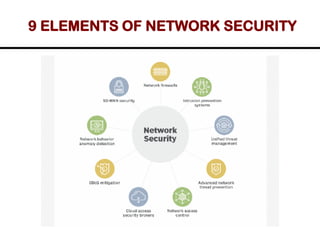
NETWORK SECURITY
• Networksecurity encompasses all the steps taken to protect
the integrity of a computer network and the data within it.
• It keeps sensitive data safe from cyber attacks and ensures
the network is usable and trustworthy.
• Network security involves the use of a variety of software
and hardware tools on a network or as software as a service.
16.
WHY IS NETWORKSECURITY IMPORTANT
• Network security is critical because it prevents
cybercriminals from gaining access to valuable data and
sensitive information.
• When hackers get hold of such data, they can cause a
variety of problems, including identity theft, stolen assets
and reputational harm.
17.
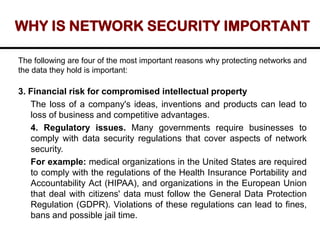
WHY IS NETWORKSECURITY IMPORTANT
The following are four of the most important reasons why protecting networks and
the data they hold is important:
1. Operational risks. An organization without adequate network security
risks disruption of its operations. Business rely on networks for most
internal and external communication.
2. Financial risks for compromised personally identifiable
information (PII). Organizations that handle PII, such as Social
Security numbers and passwords, are required to keep it safe.
Exposure can cost the victims money in fines, restitution and repairing
compromised devices.
18.
WHY IS NETWORKSECURITY IMPORTANT
The following are four of the most important reasons why protecting networks and
the data they hold is important:
3. Financial risk for compromised intellectual property
The loss of a company's ideas, inventions and products can lead to
loss of business and competitive advantages.
4. Regulatory issues. Many governments require businesses to
comply with data security regulations that cover aspects of network
security.
For example: medical organizations in the United States are required
to comply with the regulations of the Health Insurance Portability and
Accountability Act (HIPAA), and organizations in the European Union
that deal with citizens' data must follow the General Data Protection
Regulation (GDPR). Violations of these regulations can lead to fines,
bans and possible jail time.
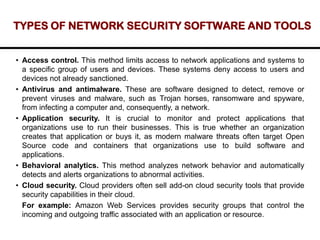
TYPES OF NETWORKSECURITY SOFTWARE AND TOOLS
• Access control. This method limits access to network applications and systems to
a specific group of users and devices. These systems deny access to users and
devices not already sanctioned.
• Antivirus and antimalware. These are software designed to detect, remove or
prevent viruses and malware, such as Trojan horses, ransomware and spyware,
from infecting a computer and, consequently, a network.
• Application security. It is crucial to monitor and protect applications that
organizations use to run their businesses. This is true whether an organization
creates that application or buys it, as modern malware threats often target Open
Source code and containers that organizations use to build software and
applications.
• Behavioral analytics. This method analyzes network behavior and automatically
detects and alerts organizations to abnormal activities.
• Cloud security. Cloud providers often sell add-on cloud security tools that provide
security capabilities in their cloud.
For example: Amazon Web Services provides security groups that control the
incoming and outgoing traffic associated with an application or resource.
21.
TYPES OF NETWORKSECURITY SOFTWARE AND TOOLS
• Data loss prevention (DLP). These tools monitor data in use, in motion and at
rest to detect and prevent data breaches. DLP often classifies the most important
and at-risk data and trains employees in best practices to protect that data.
• Email security. Employees become victims of phishing and malware attacks
when they click on email links that secretly download malicious software. Email is
also an insecure method of sending files and sensitive data that employees
unwittingly engage in.
• Firewall. Firewalls are some of the most widely used security tools. They are
positioned in multiple areas on the network. Next-generation firewalls offer
increased protection against application-layer attacks and advanced malware
defense with inline deep packet inspection.
• Intrusion detection system (IDS). An IDS detects unauthorized access attempts
and flags them as potentially dangerous but does not remove them. An IDS and
an intrusion prevention system (IPS) are often used in combination with a firewall.
• Intrusion prevention system. IPSes are designed to prevent intrusions by
detecting and blocking unauthorized attempts to access a network.
22.
TYPES OF NETWORKSECURITY SOFTWARE AND TOOLS
• Mobile device security. Monitoring and controlling which mobile devices access a
network and what they do once connected to a network is crucial for modern
network security.
• Multifactor authentication (MFA). MFA is an easy-to-employ and increasingly
popular network security solution that requires two or more factors to verify a
user's identity.
Example: Google Authenticator, an app which generates unique security codes
that a user enters alongside their password to verify their identity.
• Network segmentation. Organizations with large networks and network traffic
often use network segmentation to break a network into smaller, easier-to-manage
segments.
• Sandboxing. This approach lets organizations scan for malware by opening a file
in an isolated environment before granting it access to the network. Once opened
in a sandbox, an organization can observe whether the file acts in a malicious way
or shows any indications of malware.
23.
TYPES OF NETWORKSECURITY SOFTWARE AND TOOLS
• Security information and event management (SIEM). This security
management technique logs data from applications and network hardware and
monitors for suspicious behavior. When an anomaly is detected, the SIEM system
alerts the organization and takes other appropriate action.
• Software-defined perimeter (SDP). An SDP is a security method that sits on top
of the network it protects, concealing it from attackers and unauthorized users. It
uses identity criteria to limit access to resources and forms a virtual boundary
around networked resources.
• Virtual private network (VPN). A VPN secures the connection from an endpoint
to an organization's network. It uses tunneling protocols to encrypt information that
is sent over a less secure network. Remote access VPNs let employees access
their company network remotely.
• Web security. This practice controls employee web use on an organization's
network and devices, including blocking certain threats and websites, while also
protecting the integrity of an organization's websites themselves.
24.
TYPES OF NETWORKSECURITY SOFTWARE AND TOOLS
• Wireless security. Wireless networks are one of the riskiest parts of a
network and require stringent protections and monitoring. It's important to
follow wireless security best practices, such as segmenting Wi-Fi users
by service set identifiers, or SSIDs, and using 802.1X authentication.
• Workload security. When organizations balance workloads among
multiple devices across cloud and hybrid environments, they increase the
potential attack surfaces.
• Zero-trust network access. Similar to network access control, zero-
trust network access only grants a user the access they must have do
their job. It blocks all other permissions.
25.
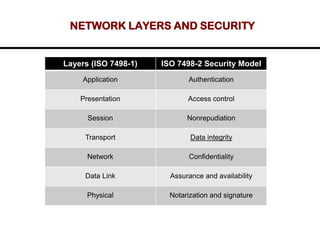
NETWORK LAYERS ANDSECURITY
Layers (ISO 7498-1) ISO 7498-2 Security Model
Application Authentication
Presentation Access control
Session Nonrepudiation
Transport Data integrity
Network Confidentiality
Data Link Assurance and availability
Physical Notarization and signature