Software Engineering
Considering Objects
12/16/23 1
Software Engineering
* Software Engineering 2
What is OO?
• Programming languages are of two types: object oriented and procedural
languages. The procedural languages do not have any hidden data, which
makes the code complex.
• Object-orientation programming languages have certain features that make
the code flexible
• Object-orientation is an approach to software development that organizes
both the problem and its solution as a collection of discrete objects
* Software Engineering 3
Object-Orientation Characteristics
• Abstraction : The ability to represent data at a very conceptual level
without any details.
• Class : A group of objects that share common properties for data part.
• Encapsulation : It means to enclose all the important information in a
capsule and expose all the other selected information to the outside
world.
• Inheritance : The mechanism by which one class can inherit the
properties of another. It allows a hierarchy of classes to be build, moving
from the most general to the most specific
• Polymorphism : It means the ability to take more than one form. For
example, an operation have different behavior in different instances.
Objects and Classes
• Objects : The instances of a class which are used in real
functionality
• An object’s data are called attributes, and its operations are
called methods
– attributes (such as color, size, location)
– operations or behaviors (such as takeoff, land, repair)
• Each object is an instance of a class
• Class: group of objects that have attributes and behaviors in
common
• Method: a specific implementation of an operation for a certain
class
* Software Engineering 4
Objects and Classes (continued)
* Software Engineering 5
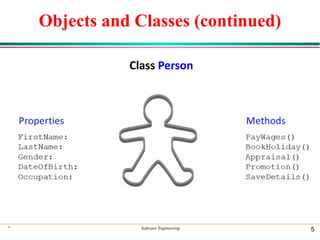
Class Person
Objects and Classes (continued)
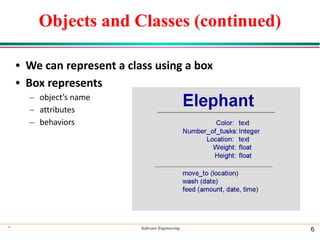
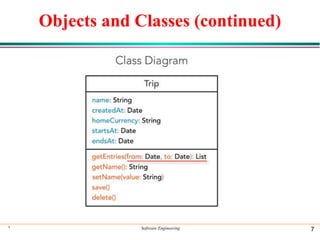
• We can represent a class using a box
• Box represents
– object’s name
– attributes
– behaviors
* Software Engineering 6
Objects and Classes (continued)
* Software Engineering 7
Classes Hierarchy
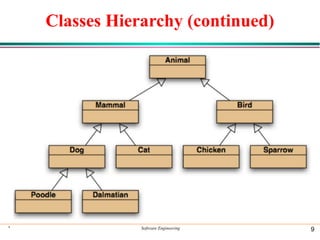
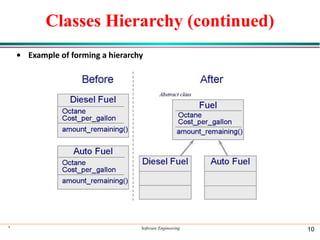
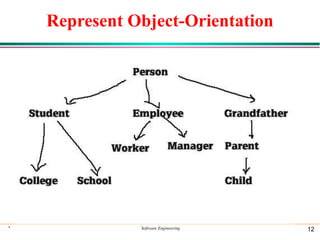
• A class hierarchy is organized according to the sameness
or differences among classes
• Super Class: The class from which the properties are
inherited by the child class.
• Sub Class: The class which inherits the properties from
the parent class.
• Subclasses may inherit the structure as well as the
behavior and attributes of its superclass
* Software Engineering 8
Classes Hierarchy (continued)
* Software Engineering 9
Classes Hierarchy (continued)
• Example of forming a hierarchy
* Software Engineering 10
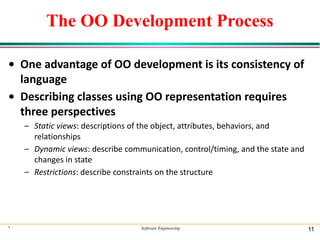
The OO Development Process
• One advantage of OO development is its consistency of
language
• Describing classes using OO representation requires
three perspectives
– Static views: descriptions of the object, attributes, behaviors, and
relationships
– Dynamic views: describe communication, control/timing, and the state and
changes in state
– Restrictions: describe constraints on the structure
* Software Engineering 11
Represent Object-Orientation
* Software Engineering 12
Introduction to UML
• A model is a simplified representation of a
complex reality.
• Complex systems and software cannot be
understood without properly modeling them.
• Today, software are getting complex and
consequently we need to understand them
through modeling.
* Software Engineering 13
Unified Modeling Language
• UML is a complete language for capturing knowledge
about a subject and then expressing that knowledge.
i.e. gathering requirements and then modeling those
requirements.
• Such modeling includes two phases :
•Analysis
•Design
* Software Engineering 14
Use-Case Diagram
• Use Case Diagram is used to describe the
functionalities provided by a system and the users
associated with that system.
• The Use case diagram is used to identify the primary
elements and processes that form the system.
• The primary elements are termed as "actors" and the
processes are called "use cases."
• The Use case diagram shows which actors interact
with each use case.
* Software Engineering 15
Elements of a use-case diagram
• Use-case diagrams contain the following
elements:
• Actors, which represent users of a system,
including human users and other systems.
• Use Cases, which represent functionality or
services provided by a system to users.
* Software Engineering 16
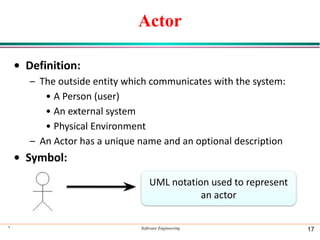
Actor
• Definition:
– The outside entity which communicates with the system:
• A Person (user)
• An external system
• Physical Environment
– An Actor has a unique name and an optional description
• Symbol:
* Software Engineering 17
UML notation used to represent
an actor
Actor (Example)
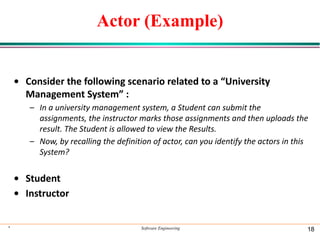
• Consider the following scenario related to a “University
Management System” :
– In a university management system, a Student can submit the
assignments, the instructor marks those assignments and then uploads the
result. The Student is allowed to view the Results.
– Now, by recalling the definition of actor, can you identify the actors in this
System?
• Student
• Instructor
* Software Engineering 18
Use-case
• Represent functionality or services provided by a
system to users.
• It is a description of set of sequence of actions that a
system perform that produces an observable result.
• A use case represents a class of functionality provided
by the system as an event flow.
• Use cases describe the interaction between a primary
actor and the system itself
* Software Engineering 19
Use-case
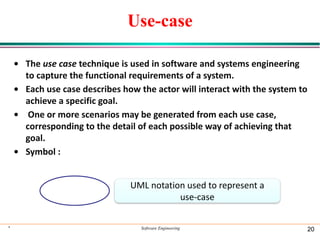
• The use case technique is used in software and systems engineering
to capture the functional requirements of a system.
• Each use case describes how the actor will interact with the system to
achieve a specific goal.
• One or more scenarios may be generated from each use case,
corresponding to the detail of each possible way of achieving that
goal.
• Symbol :
* Software Engineering 20
UML notation used to represent a
use-case
Use-case (Example)
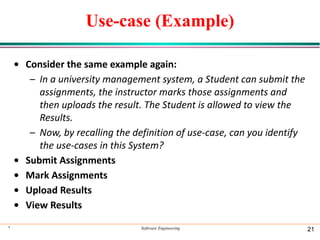
• Consider the same example again:
– In a university management system, a Student can submit the
assignments, the instructor marks those assignments and
then uploads the result. The Student is allowed to view the
Results.
– Now, by recalling the definition of use-case, can you identify
the use-cases in this System?
• Submit Assignments
• Mark Assignments
• Upload Results
• View Results
* Software Engineering 21
Use-case (Example/2)
• The use-cases are linked with the functional
requirements of this system. In this example :
– Student submit the assignments.
– Instructor marks the assignments.
– Instructor upload the marks.
– Student can view the marks.
• It is now clear that how actors are interacting with
different use-cases of this system.
• Now, lets combine actors and use-cases in one
diagram? Easy ?
* Software Engineering 22
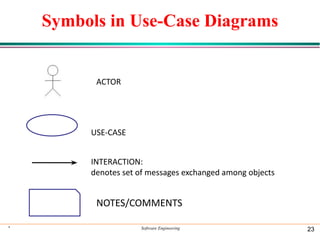
Symbols in Use-Case Diagrams
* Software Engineering 23
ACTOR
USE-CASE
INTERACTION:
denotes set of messages exchanged among objects
NOTES/COMMENTS
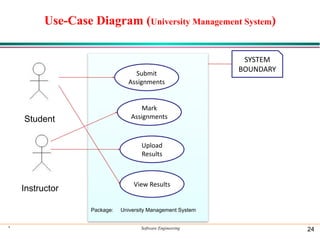
Use-Case Diagram (University Management System)
* Software Engineering 24
Student
Instructor
Submit
Assignments
Mark
Assignments
Upload
Results
View Results
SYSTEM
BOUNDARY
Package: University Management System
Use-Case Associations
• Use case association is the relationship between use
cases
• Important types:
– Include
• A use case uses another use case (“functional
decomposition”)
– Extends
• A use case extends another use case (“optionally“)
* Software Engineering 25
<<Include>>: Functional Decomposition
• A function in the original problem
statement is too complex to be solved
immediately.
• What’s the Solution?
⚫ Describe the function as the aggregation of a set of simpler
functions
⚫ The associated use case is decomposed into smaller use cases
* Software Engineering 26
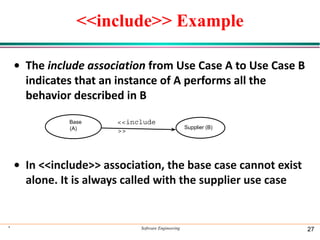
<<include>> Example
• The include association from Use Case A to Use Case B
indicates that an instance of A performs all the
behavior described in B
• In <<include>> association, the base case cannot exist
alone. It is always called with the supplier use case
* Software Engineering 27
<<include
>>
Base
(A) Supplier (B)
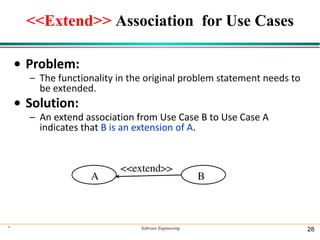
<<Extend>> Association for Use Cases
• Problem:
– The functionality in the original problem statement needs to
be extended.
• Solution:
– An extend association from Use Case B to Use Case A
indicates that B is an extension of A.
* Software Engineering 28
A B
<<extend>>
Example
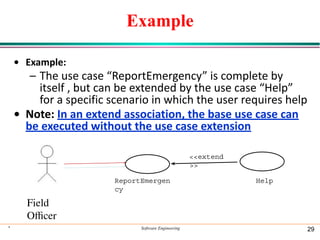
• Example:
– The use case “ReportEmergency” is complete by
itself , but can be extended by the use case “Help”
for a specific scenario in which the user requires help
• Note: In an extend association, the base use case can
be executed without the use case extension
* Software Engineering 29
ReportEmergen
cy
Field
Ocer
<<extend
>>
Help
Example
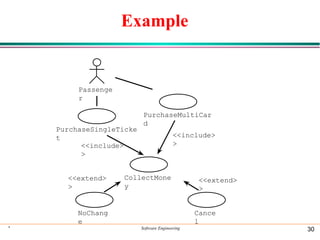
* Software Engineering 30
Passenge
r
PurchaseSingleTicke
t
PurchaseMultiCar
d
NoChang
e
<<extend>
>
Cance
l
<<extend>
>
<<include>
>
CollectMone
y
<<include>
>

SE@@@@@@@@@@@@@@@@@@@@@@@@@@@@@@.ppt.pdf

  • 1.
  • 2.
    * Software Engineering2 What is OO? • Programming languages are of two types: object oriented and procedural languages. The procedural languages do not have any hidden data, which makes the code complex. • Object-orientation programming languages have certain features that make the code flexible • Object-orientation is an approach to software development that organizes both the problem and its solution as a collection of discrete objects
  • 3.
    * Software Engineering3 Object-Orientation Characteristics • Abstraction : The ability to represent data at a very conceptual level without any details. • Class : A group of objects that share common properties for data part. • Encapsulation : It means to enclose all the important information in a capsule and expose all the other selected information to the outside world. • Inheritance : The mechanism by which one class can inherit the properties of another. It allows a hierarchy of classes to be build, moving from the most general to the most specific • Polymorphism : It means the ability to take more than one form. For example, an operation have different behavior in different instances.
  • 4.
    Objects and Classes •Objects : The instances of a class which are used in real functionality • An object’s data are called attributes, and its operations are called methods – attributes (such as color, size, location) – operations or behaviors (such as takeoff, land, repair) • Each object is an instance of a class • Class: group of objects that have attributes and behaviors in common • Method: a specific implementation of an operation for a certain class * Software Engineering 4
  • 5.
    Objects and Classes(continued) * Software Engineering 5 Class Person
  • 6.
    Objects and Classes(continued) • We can represent a class using a box • Box represents – object’s name – attributes – behaviors * Software Engineering 6
  • 7.
    Objects and Classes(continued) * Software Engineering 7
  • 8.
    Classes Hierarchy • Aclass hierarchy is organized according to the sameness or differences among classes • Super Class: The class from which the properties are inherited by the child class. • Sub Class: The class which inherits the properties from the parent class. • Subclasses may inherit the structure as well as the behavior and attributes of its superclass * Software Engineering 8
  • 9.
    Classes Hierarchy (continued) *Software Engineering 9
  • 10.
    Classes Hierarchy (continued) •Example of forming a hierarchy * Software Engineering 10
  • 11.
    The OO DevelopmentProcess • One advantage of OO development is its consistency of language • Describing classes using OO representation requires three perspectives – Static views: descriptions of the object, attributes, behaviors, and relationships – Dynamic views: describe communication, control/timing, and the state and changes in state – Restrictions: describe constraints on the structure * Software Engineering 11
  • 12.
  • 13.
    Introduction to UML •A model is a simplified representation of a complex reality. • Complex systems and software cannot be understood without properly modeling them. • Today, software are getting complex and consequently we need to understand them through modeling. * Software Engineering 13
  • 14.
    Unified Modeling Language •UML is a complete language for capturing knowledge about a subject and then expressing that knowledge. i.e. gathering requirements and then modeling those requirements. • Such modeling includes two phases : •Analysis •Design * Software Engineering 14
  • 15.
    Use-Case Diagram • UseCase Diagram is used to describe the functionalities provided by a system and the users associated with that system. • The Use case diagram is used to identify the primary elements and processes that form the system. • The primary elements are termed as "actors" and the processes are called "use cases." • The Use case diagram shows which actors interact with each use case. * Software Engineering 15
  • 16.
    Elements of ause-case diagram • Use-case diagrams contain the following elements: • Actors, which represent users of a system, including human users and other systems. • Use Cases, which represent functionality or services provided by a system to users. * Software Engineering 16
  • 17.
    Actor • Definition: – Theoutside entity which communicates with the system: • A Person (user) • An external system • Physical Environment – An Actor has a unique name and an optional description • Symbol: * Software Engineering 17 UML notation used to represent an actor
  • 18.
    Actor (Example) • Considerthe following scenario related to a “University Management System” : – In a university management system, a Student can submit the assignments, the instructor marks those assignments and then uploads the result. The Student is allowed to view the Results. – Now, by recalling the definition of actor, can you identify the actors in this System? • Student • Instructor * Software Engineering 18
  • 19.
    Use-case • Represent functionalityor services provided by a system to users. • It is a description of set of sequence of actions that a system perform that produces an observable result. • A use case represents a class of functionality provided by the system as an event flow. • Use cases describe the interaction between a primary actor and the system itself * Software Engineering 19
  • 20.
    Use-case • The usecase technique is used in software and systems engineering to capture the functional requirements of a system. • Each use case describes how the actor will interact with the system to achieve a specific goal. • One or more scenarios may be generated from each use case, corresponding to the detail of each possible way of achieving that goal. • Symbol : * Software Engineering 20 UML notation used to represent a use-case
  • 21.
    Use-case (Example) • Considerthe same example again: – In a university management system, a Student can submit the assignments, the instructor marks those assignments and then uploads the result. The Student is allowed to view the Results. – Now, by recalling the definition of use-case, can you identify the use-cases in this System? • Submit Assignments • Mark Assignments • Upload Results • View Results * Software Engineering 21
  • 22.
    Use-case (Example/2) • Theuse-cases are linked with the functional requirements of this system. In this example : – Student submit the assignments. – Instructor marks the assignments. – Instructor upload the marks. – Student can view the marks. • It is now clear that how actors are interacting with different use-cases of this system. • Now, lets combine actors and use-cases in one diagram? Easy ? * Software Engineering 22
  • 23.
    Symbols in Use-CaseDiagrams * Software Engineering 23 ACTOR USE-CASE INTERACTION: denotes set of messages exchanged among objects NOTES/COMMENTS
  • 24.
    Use-Case Diagram (UniversityManagement System) * Software Engineering 24 Student Instructor Submit Assignments Mark Assignments Upload Results View Results SYSTEM BOUNDARY Package: University Management System
  • 25.
    Use-Case Associations • Usecase association is the relationship between use cases • Important types: – Include • A use case uses another use case (“functional decomposition”) – Extends • A use case extends another use case (“optionally“) * Software Engineering 25
  • 26.
    <<Include>>: Functional Decomposition •A function in the original problem statement is too complex to be solved immediately. • What’s the Solution? ⚫ Describe the function as the aggregation of a set of simpler functions ⚫ The associated use case is decomposed into smaller use cases * Software Engineering 26
  • 27.
    <<include>> Example • Theinclude association from Use Case A to Use Case B indicates that an instance of A performs all the behavior described in B • In <<include>> association, the base case cannot exist alone. It is always called with the supplier use case * Software Engineering 27 <<include >> Base (A) Supplier (B)
  • 28.
    <<Extend>> Association forUse Cases • Problem: – The functionality in the original problem statement needs to be extended. • Solution: – An extend association from Use Case B to Use Case A indicates that B is an extension of A. * Software Engineering 28 A B <<extend>>
  • 29.
    Example • Example: – Theuse case “ReportEmergency” is complete by itself , but can be extended by the use case “Help” for a specific scenario in which the user requires help • Note: In an extend association, the base use case can be executed without the use case extension * Software Engineering 29 ReportEmergen cy Field Officer <<extend >> Help
  • 30.
    Example * Software Engineering30 Passenge r PurchaseSingleTicke t PurchaseMultiCar d NoChang e <<extend> > Cance l <<extend> > <<include> > CollectMone y <<include> >