Who is in the team?
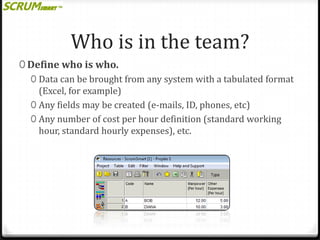
0 Define who is who.
0 Data can be brought from any system with a tabulated format
(Excel, for example)
0 Any fields may be created (e-mails, ID, phones, etc)
0 Any number of cost per hour definition (standard working
hour, standard hourly expenses), etc.
What are their abilities?
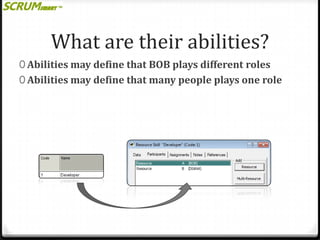
0 Abilities may define that BOB plays different roles
0 Abilities may define that many people plays one role
What is the job to be done?
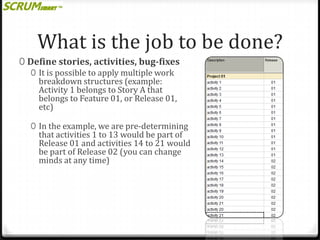
0 Define stories, activities, bug-fixes
0 It is possible to apply multiple work
breakdown structures (example:
Activity 1 belongs to Story A that
belongs to Feature 01, or Release 01,
etc)
0 In the example, we are pre-determining

that activities 1 to 13 would be part of
Release 01 and activities 14 to 21 would
be part of Release 02 (you can change
minds at any time)
Estimate the work and value
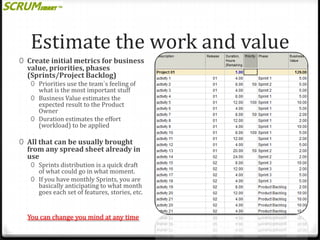
0 Create initial metrics for business

value, priorities, phases
(Sprints/Project Backlog)

0 Priorities use the team´s feeling of
what is the most important stuff
0 Business Value estimates the
expected result to the Product
Owner
0 Duration estimates the effort
(workload) to be applied

0 All that can be usually brought

from any spread sheet already in
use
0 Sprints distribution is a quick draft

of what could go in what moment.
0 If you have monthly Sprints, you are
basically anticipating to what month
goes each set of features, stories, etc.

You can change you mind at any time
Apply resources or
abilities to Activities

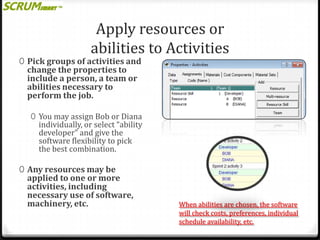
0 Pick groups of activities and

change the properties to
include a person, a team or
abilities necessary to
perform the job.

0 You may assign Bob or Diana

individually, or select “ability
developer” and give the
software flexibility to pick
the best combination.

0 Any resources may be

applied to one or more
activities, including
necessary use of software,
machinery, etc.

When abilities are chosen, the software
will check costs, preferences, individual
schedule availability, etc.
Run the Dynamic
Resource Scheduling

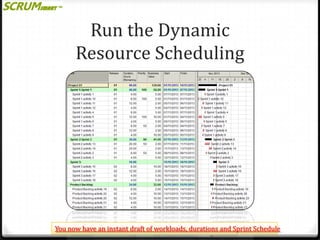
You now have an instant draft of workloads, durations and Sprint Schedule
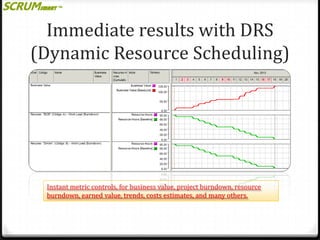
Immediate results with DRS
(Dynamic Resource Scheduling)

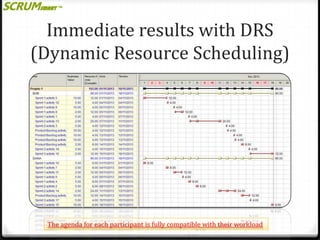
The agenda for each participant is fully compatible with their workload
Immediate results with DRS
(Dynamic Resource Scheduling)

Instant metric controls, for business value, project burndown, resource
burndown, earned value, trends, costs estimates, and many others.
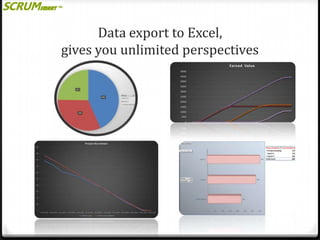
Data export to Excel,
gives you unlimited perspectives
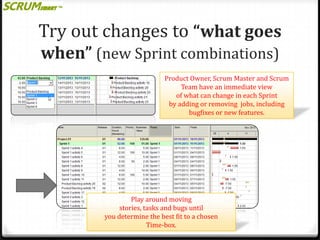
Try out changes to “what goes
when” (new Sprint combinations)
Product Owner, Scrum Master and Scrum
Team have an immediate view
of what can change in each Sprint
by adding or removing jobs, including
bugfixes or new features.

Play around moving
stories, tasks and bugs until
you determine the best fit to a chosen
Time-box.
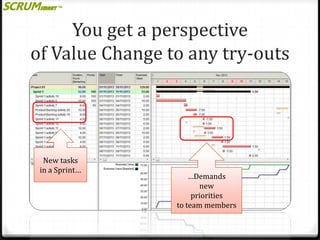
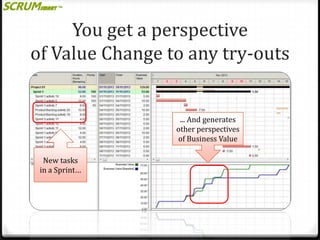
You get a perspective
of Value Change to any try-outs

New tasks
in a Sprint…

…Demands
new
priorities
to team members
You get a perspective
of Value Change to any try-outs

... And generates
other perspectives
of Business Value
New tasks
in a Sprint…
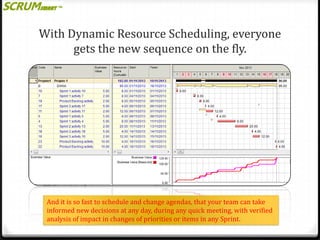
With Dynamic Resource Scheduling, everyone
gets the new sequence on the fly.

And it is so fast to schedule and change agendas, that your team can take
informed new decisions at any day, during any quick meeting, with verified
analysis of impact in changes of priorities or items in any Sprint.
That is not just dynamic.
That is

Break new paradigms and visit us on www.scrumsmart.org

DRS is powered by Spider Project Professional

Scrum Smart

  • 2.
    Who is inthe team? 0 Define who is who. 0 Data can be brought from any system with a tabulated format (Excel, for example) 0 Any fields may be created (e-mails, ID, phones, etc) 0 Any number of cost per hour definition (standard working hour, standard hourly expenses), etc.
  • 3.
    What are theirabilities? 0 Abilities may define that BOB plays different roles 0 Abilities may define that many people plays one role
  • 4.
    What is thejob to be done? 0 Define stories, activities, bug-fixes 0 It is possible to apply multiple work breakdown structures (example: Activity 1 belongs to Story A that belongs to Feature 01, or Release 01, etc) 0 In the example, we are pre-determining that activities 1 to 13 would be part of Release 01 and activities 14 to 21 would be part of Release 02 (you can change minds at any time)
  • 5.
    Estimate the workand value 0 Create initial metrics for business value, priorities, phases (Sprints/Project Backlog) 0 Priorities use the team´s feeling of what is the most important stuff 0 Business Value estimates the expected result to the Product Owner 0 Duration estimates the effort (workload) to be applied 0 All that can be usually brought from any spread sheet already in use 0 Sprints distribution is a quick draft of what could go in what moment. 0 If you have monthly Sprints, you are basically anticipating to what month goes each set of features, stories, etc. You can change you mind at any time
  • 6.
    Apply resources or abilitiesto Activities 0 Pick groups of activities and change the properties to include a person, a team or abilities necessary to perform the job. 0 You may assign Bob or Diana individually, or select “ability developer” and give the software flexibility to pick the best combination. 0 Any resources may be applied to one or more activities, including necessary use of software, machinery, etc. When abilities are chosen, the software will check costs, preferences, individual schedule availability, etc.
  • 7.
    Run the Dynamic ResourceScheduling You now have an instant draft of workloads, durations and Sprint Schedule
  • 8.
    Immediate results withDRS (Dynamic Resource Scheduling) The agenda for each participant is fully compatible with their workload
  • 9.
    Immediate results withDRS (Dynamic Resource Scheduling) Instant metric controls, for business value, project burndown, resource burndown, earned value, trends, costs estimates, and many others.
  • 10.
    Data export toExcel, gives you unlimited perspectives
  • 11.
    Try out changesto “what goes when” (new Sprint combinations) Product Owner, Scrum Master and Scrum Team have an immediate view of what can change in each Sprint by adding or removing jobs, including bugfixes or new features. Play around moving stories, tasks and bugs until you determine the best fit to a chosen Time-box.
  • 12.
    You get aperspective of Value Change to any try-outs New tasks in a Sprint… …Demands new priorities to team members
  • 13.
    You get aperspective of Value Change to any try-outs ... And generates other perspectives of Business Value New tasks in a Sprint…
  • 14.
    With Dynamic ResourceScheduling, everyone gets the new sequence on the fly. And it is so fast to schedule and change agendas, that your team can take informed new decisions at any day, during any quick meeting, with verified analysis of impact in changes of priorities or items in any Sprint.
  • 15.
    That is notjust dynamic. That is Break new paradigms and visit us on www.scrumsmart.org DRS is powered by Spider Project Professional