

Scrubbing your
Active Directory
Squeaky Clean!
Chris Radband
Senior Solutions Consultant
Lets talk about…
• Cleaning up your Active Directory
• What’s happening in your environment today

• Controlling changes in your environment
 eg. user lifecycle management

• Empowering the user with self-service

32

© 2011 NetIQ Corporation. All rights reserved.
2013 NetIQ Corporation. All rights reserved.
Active Directory clean-up
Active Directory Environmental Clean-up
Challenges of an unmanaged Active Directory Estate
•

Inactive Users

•

Disabled Users

•

Locked out users

•

Expired Users

•

Passwords never set to expire

•

Security Groups with no members

•

Nested Security Groups

•

Stale Computer Accounts

•

Mixed-Naming conventions

•

Reducing the number of Power
Users

These illustrate just a few common Security

risks,
Performance impacts and contributors to Audit failures
seen in many environments of all sorts of sizes

44

|

© 2011 NetIQ Corporation. All rights reserved.
2013 NetIQ Corporation. All rights reserved.
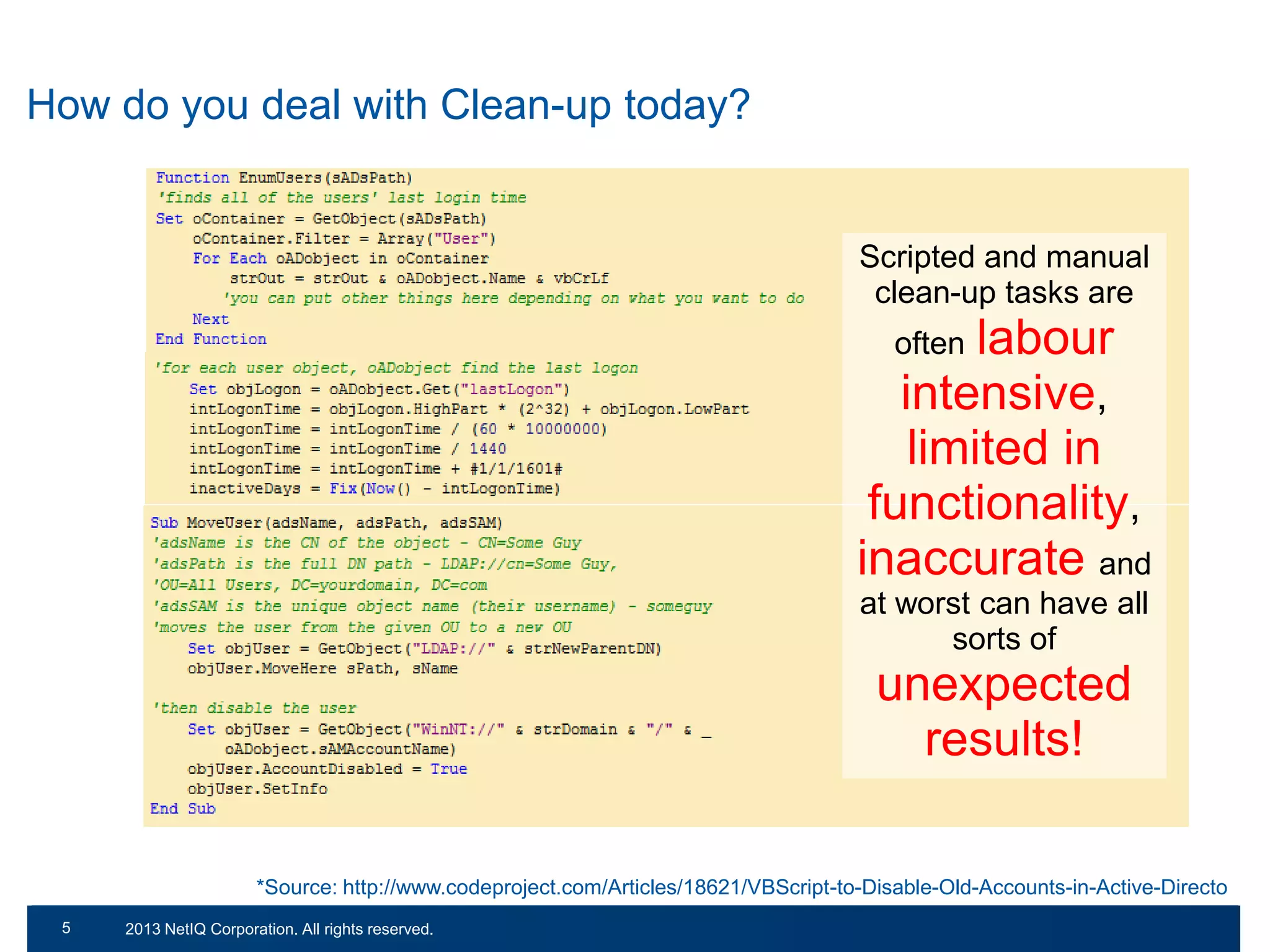
How do you deal with Clean-up today?

Scripted and manual
clean-up tasks are

labour
intensive,
limited in
functionality,
inaccurate and
often

at worst can have all
sorts of

unexpected
results!
*Source: http://www.codeproject.com/Articles/18621/VBScript-to-Disable-Old-Accounts-in-Active-Directo
55

© 2011 NetIQ Corporation. All rights reserved.
2013 NetIQ Corporation. All rights reserved.
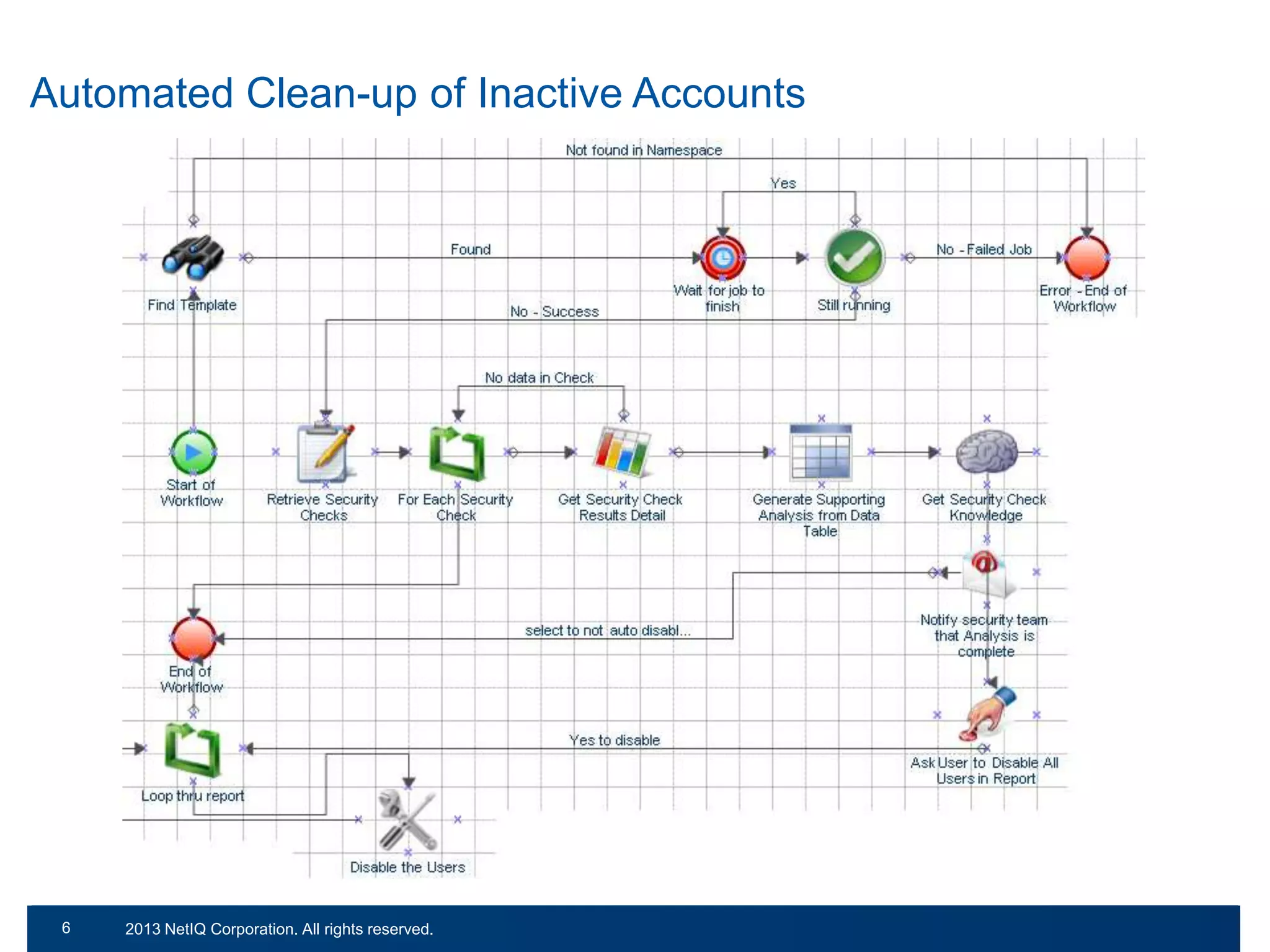
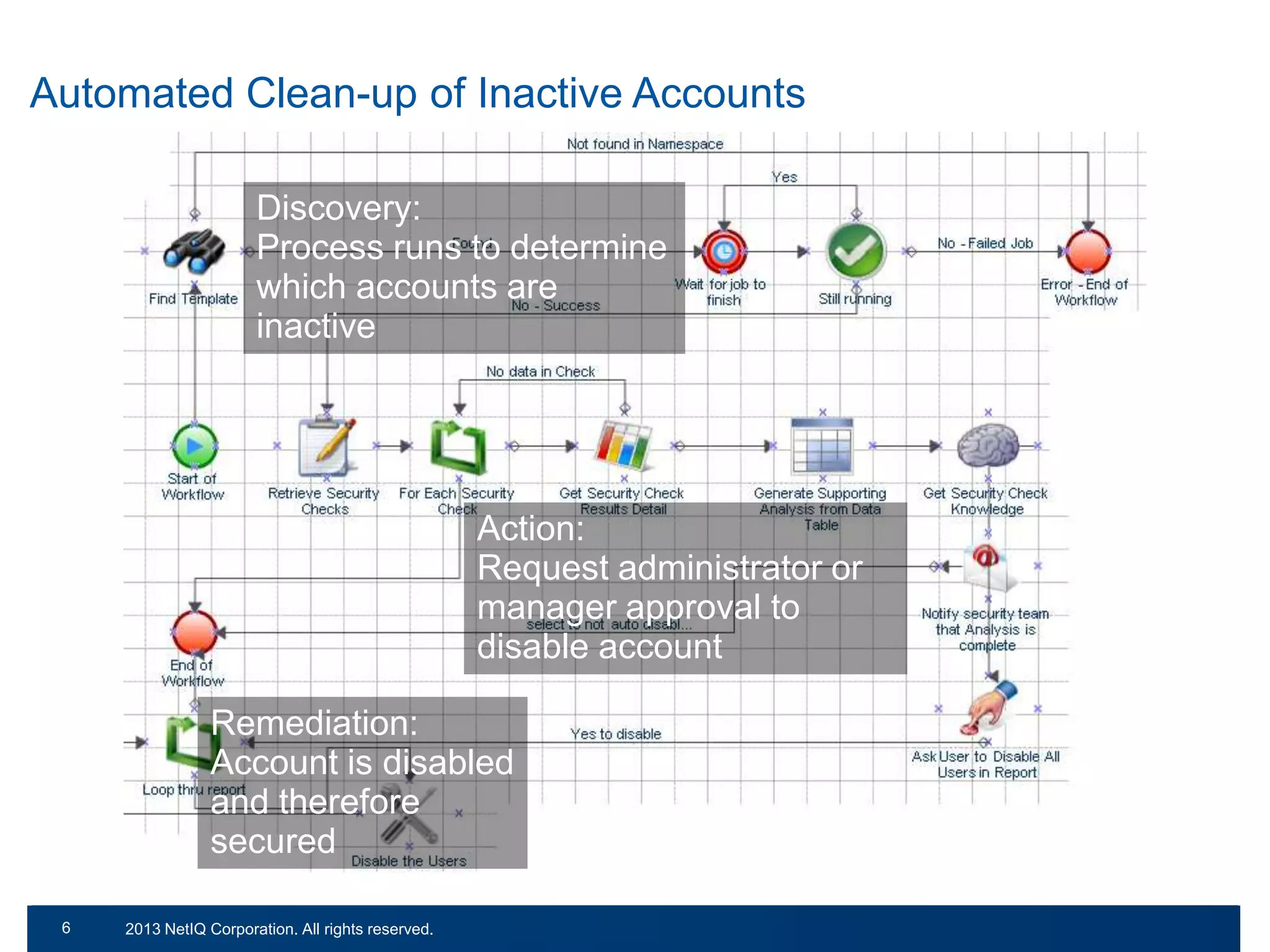
Automated Clean-up of Inactive Accounts

66

© 2011 NetIQ Corporation. All rights reserved.
2013 NetIQ Corporation. All rights reserved.
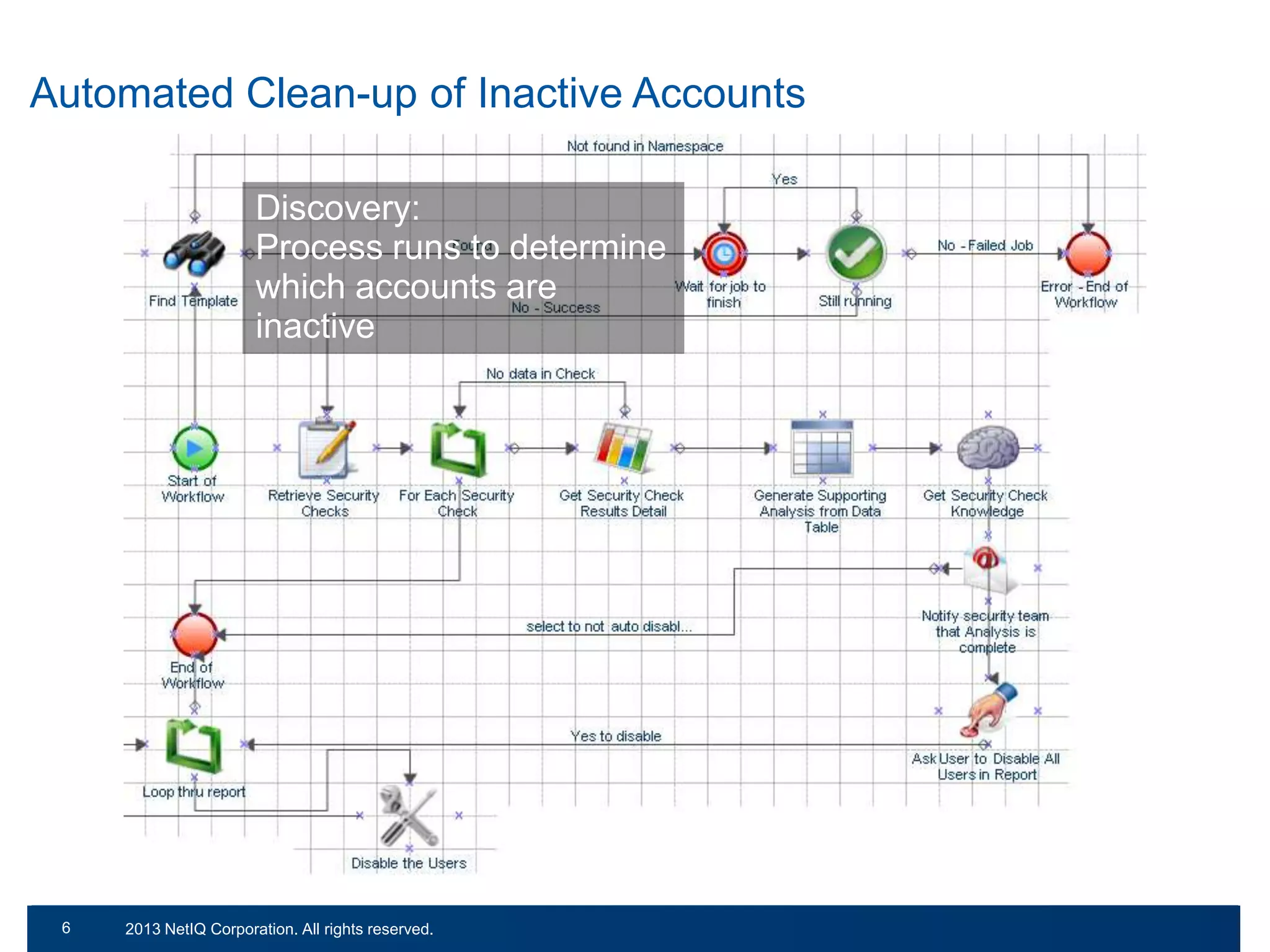
Automated Clean-up of Inactive Accounts
Discovery:
Process runs to determine
which accounts are
inactive

67

© 2011 NetIQ Corporation. All rights reserved.
2013 NetIQ Corporation. All rights reserved.
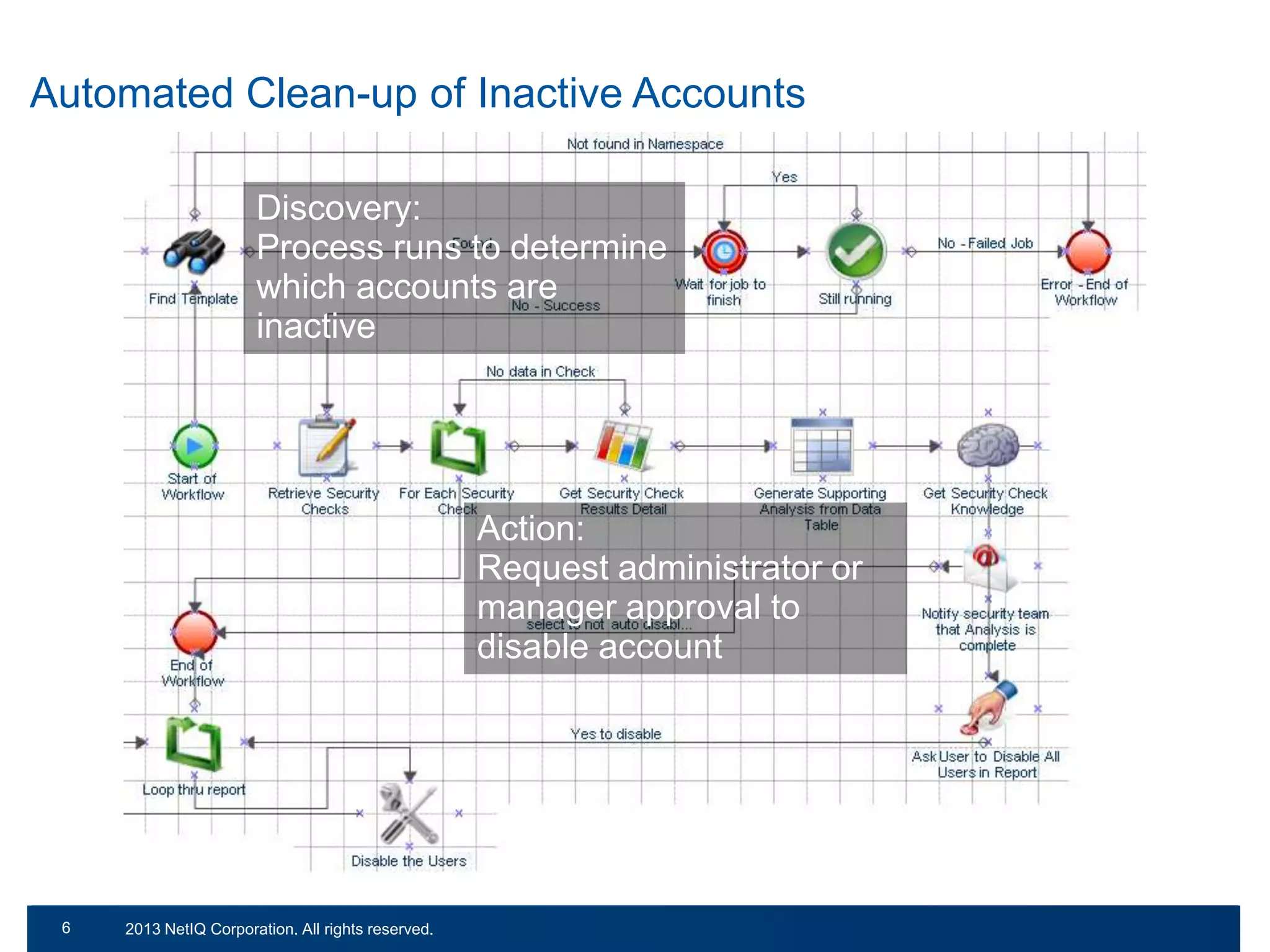
Automated Clean-up of Inactive Accounts
Discovery:
Process runs to determine
which accounts are
inactive

Action:
Request administrator or
manager approval to
disable account

68

© 2011 NetIQ Corporation. All rights reserved.
2013 NetIQ Corporation. All rights reserved.
Automated Clean-up of Inactive Accounts
Discovery:
Process runs to determine
which accounts are
inactive

Action:
Request administrator or
manager approval to
disable account
Remediation:
Account is disabled
and therefore
secured
69

© 2011 NetIQ Corporation. All rights reserved.
2013 NetIQ Corporation. All rights reserved.
What are today’s challenges,
right now?
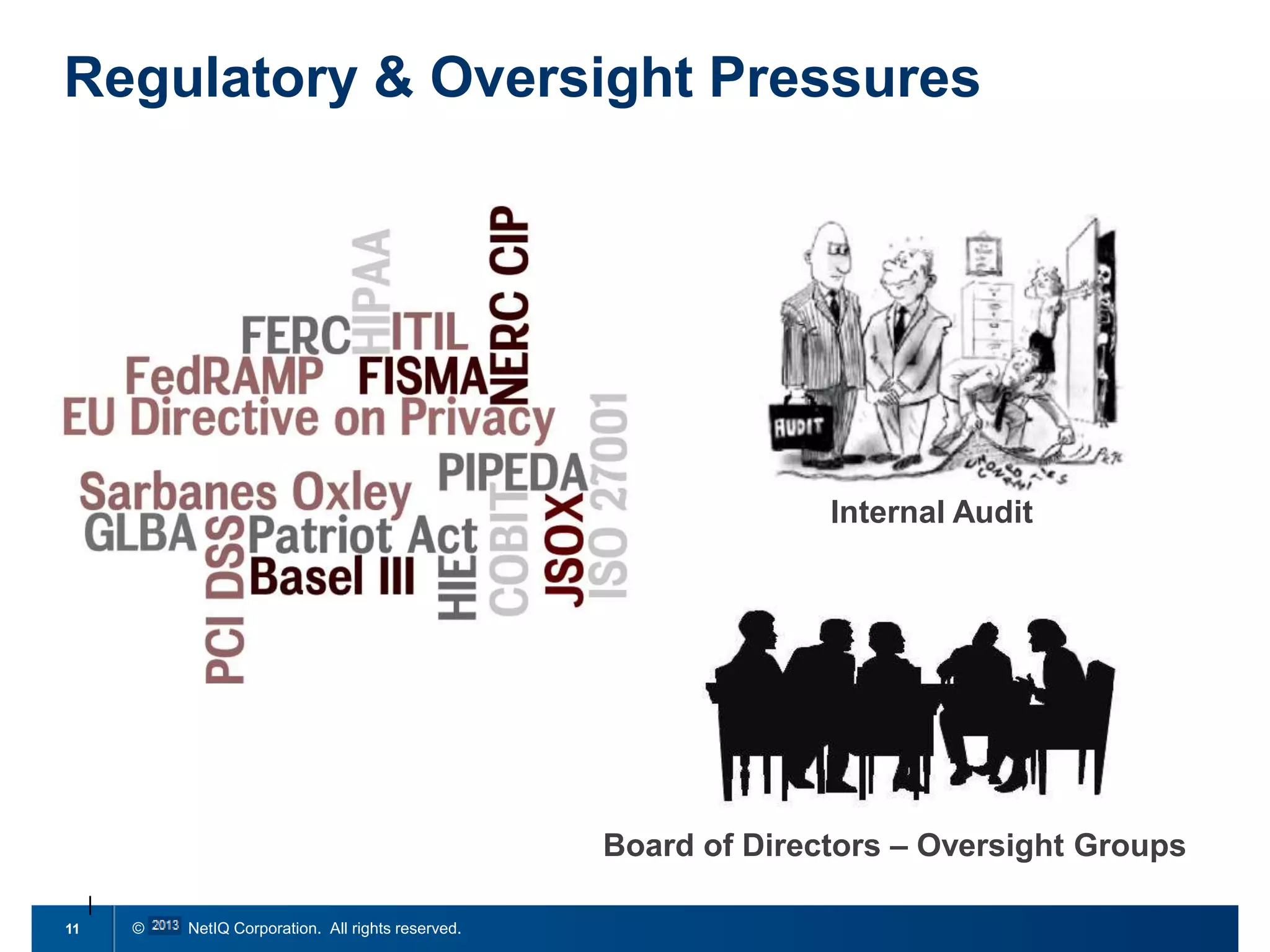
Regulatory & Oversight Pressures

Internal Audit

Board of Directors – Oversight Groups
11

© 2011 NetIQ Corporation. All rights reserved.
Worst case scenario…

http://www.flickr.com/photos/teegardin/6093810333/in/photostream/
12

© 2011 NetIQ Corporation. All rights reserved.
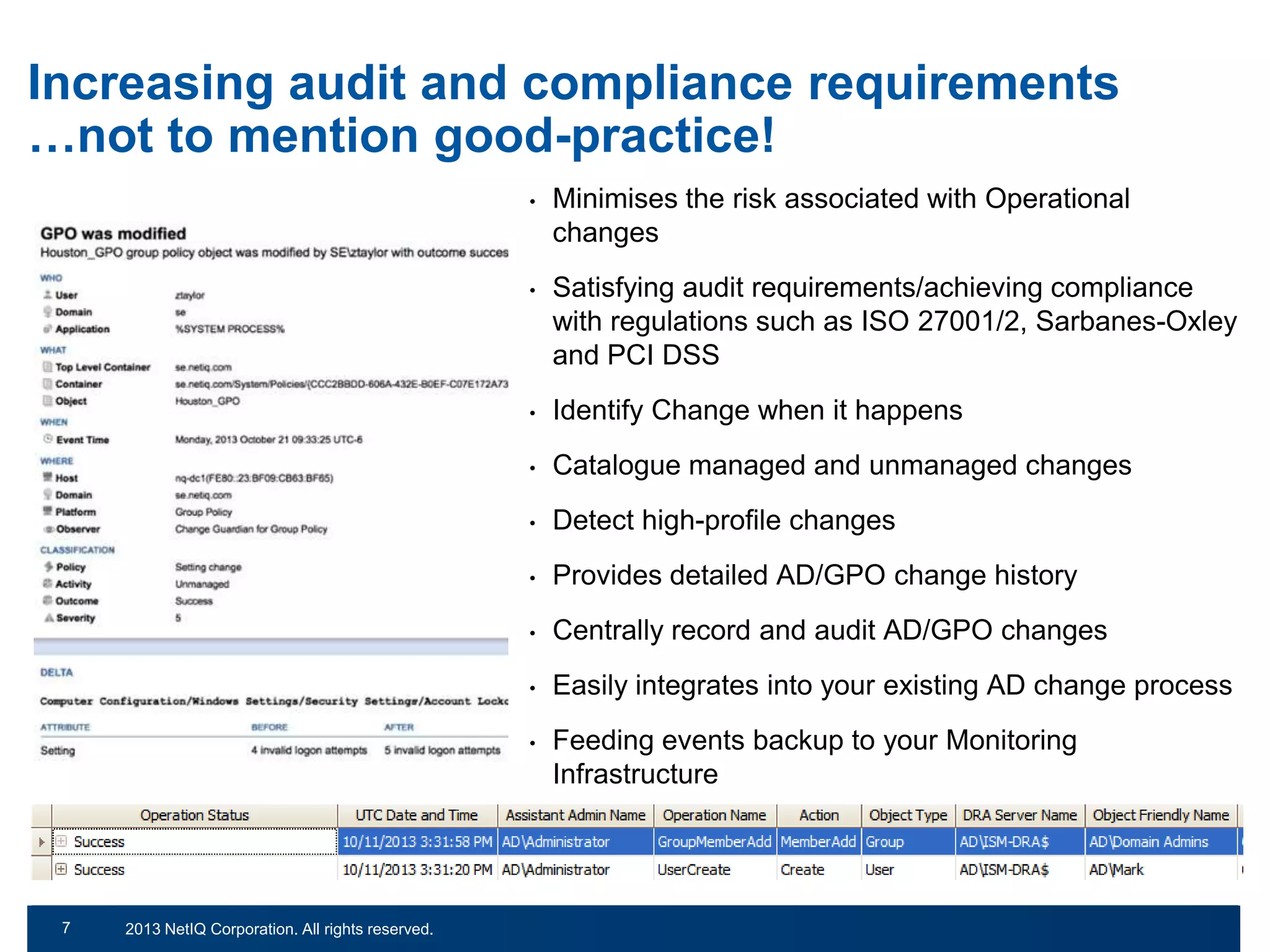
Increasing audit and compliance requirements
…not to mention good-practice!
•

•

Identify Change when it happens

•

Catalogue managed and unmanaged changes

•

Detect high-profile changes

•

Provides detailed AD/GPO change history

•

Centrally record and audit AD/GPO changes

•

Easily integrates into your existing AD change process

•

© 2011 NetIQ Corporation. All rights reserved.
2013 NetIQ Corporation. All rights reserved.

Satisfying audit requirements/achieving compliance
with regulations such as ISO 27001/2, Sarbanes-Oxley
and PCI DSS

•

7
13

Minimises the risk associated with Operational
changes

Feeding events backup to your Monitoring
Infrastructure
14

© 2011 NetIQ Corporation. All rights reserved.
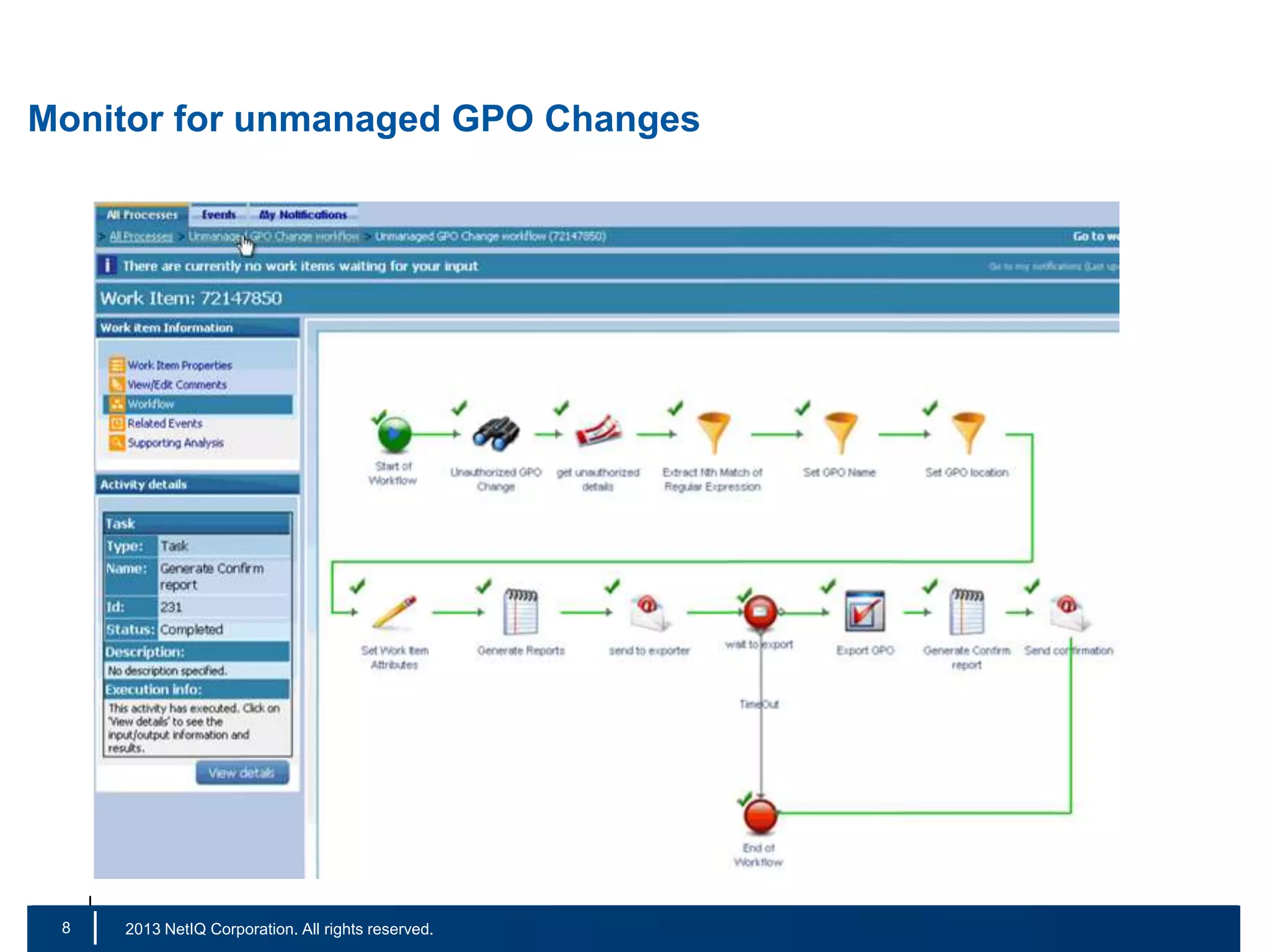
Monitor for unmanaged GPO Changes

8
15

|

© 2011 NetIQ Corporation. All rights reserved.
2013 NetIQ Corporation. All rights reserved.
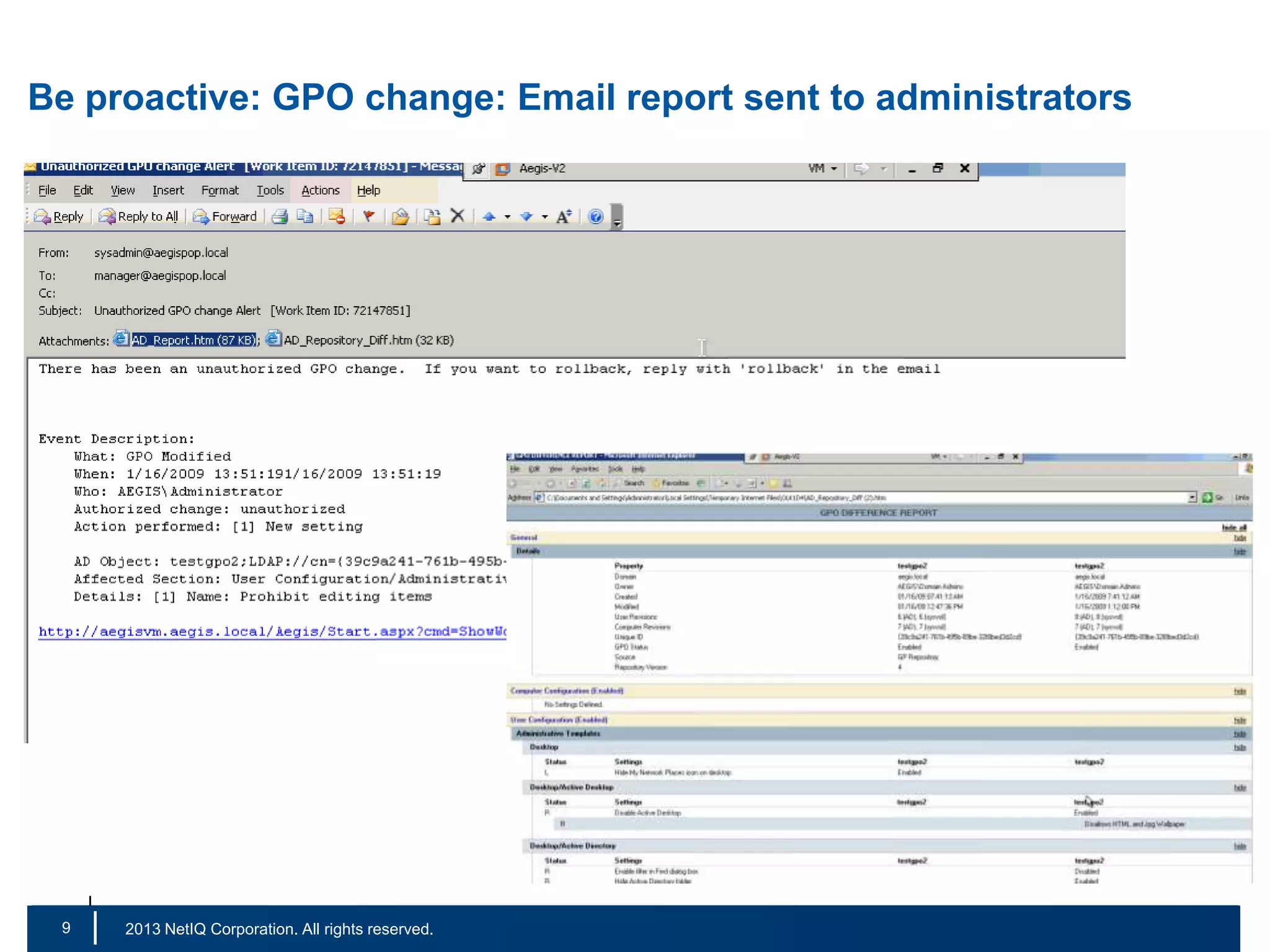
Be proactive: GPO change: Email report sent to administrators

9
16

|

© 2011 NetIQ Corporation. All rights reserved.
2013 NetIQ Corporation. All rights reserved.
Regaining Control…
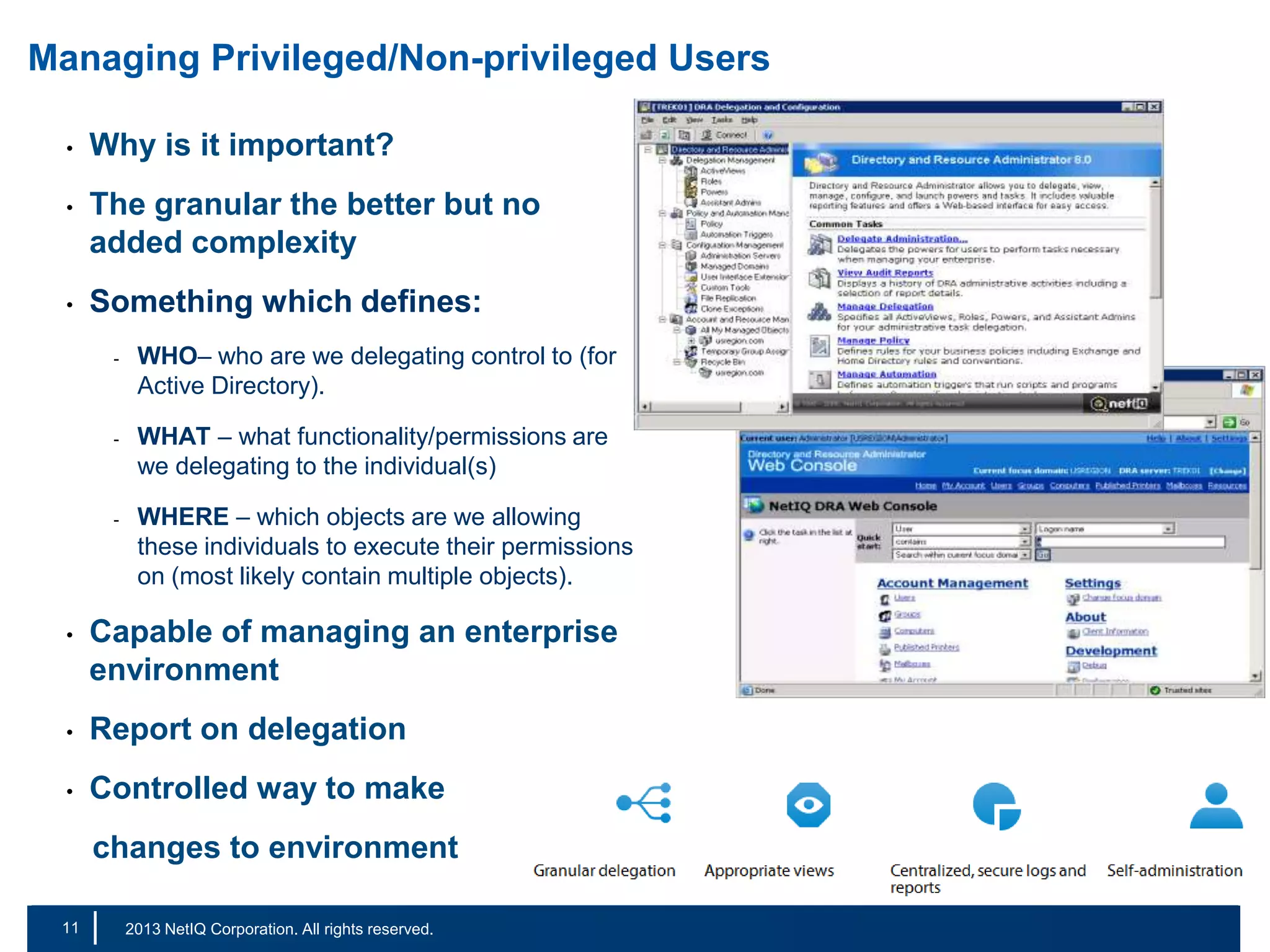
Managing Privileged/Non-privileged Users
•

Why is it important?

•

The granular the better but no
added complexity

•

Something which defines:
-

-

-

WHO– who are we delegating control to (for
Active Directory).
WHAT – what functionality/permissions are
we delegating to the individual(s)
WHERE – which objects are we allowing
these individuals to execute their permissions
on (most likely contain multiple objects).

•

Capable of managing an enterprise
environment

•

Report on delegation

•

Controlled way to make
changes to environment

11
18

|

© 2011 NetIQ Corporation. All rights reserved.
2013 NetIQ Corporation. All rights reserved.
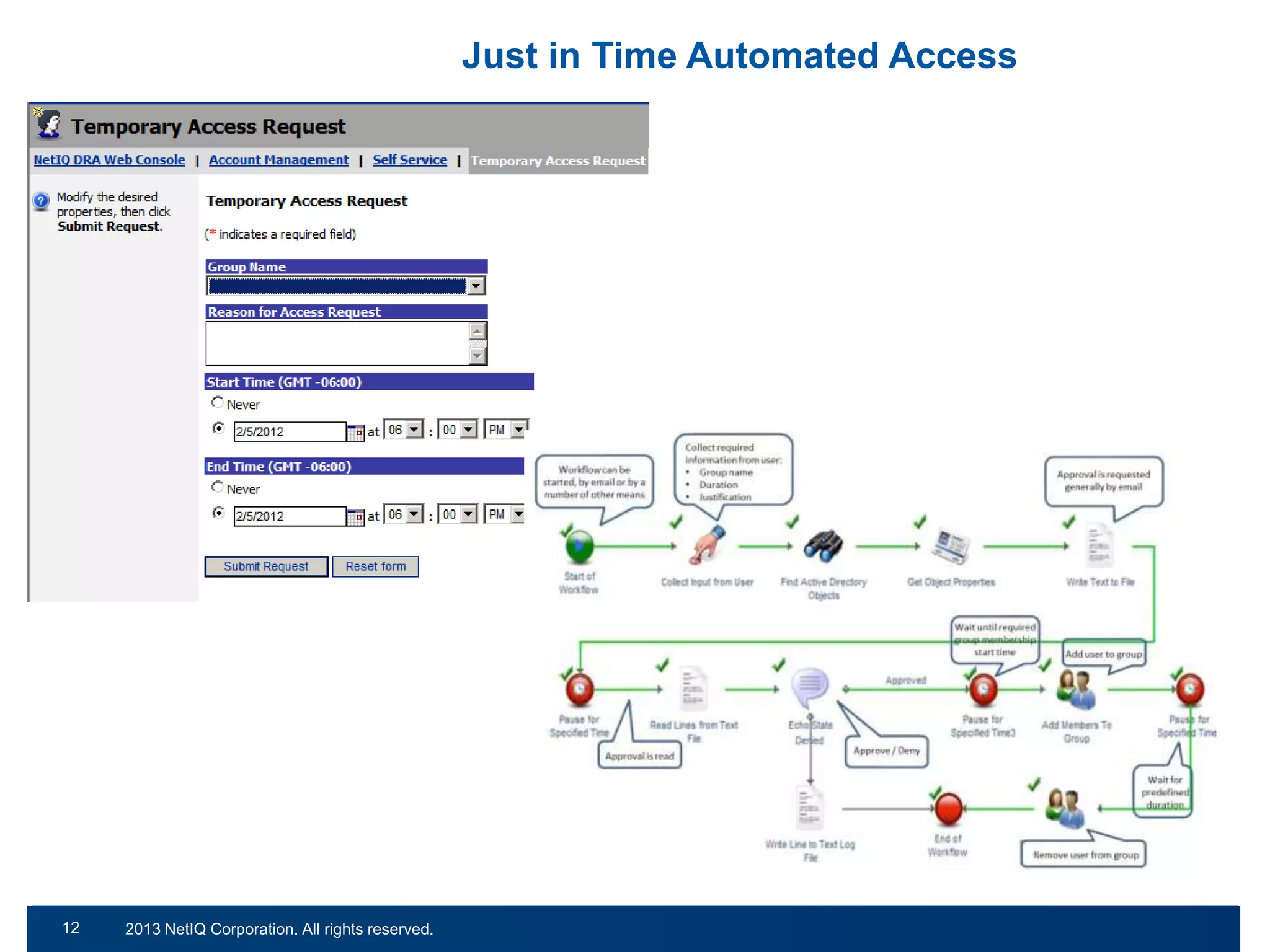
Just in Time Automated Access

12
19

© 2011 NetIQ Corporation. All rights reserved.
2013 NetIQ Corporation. All rights reserved.
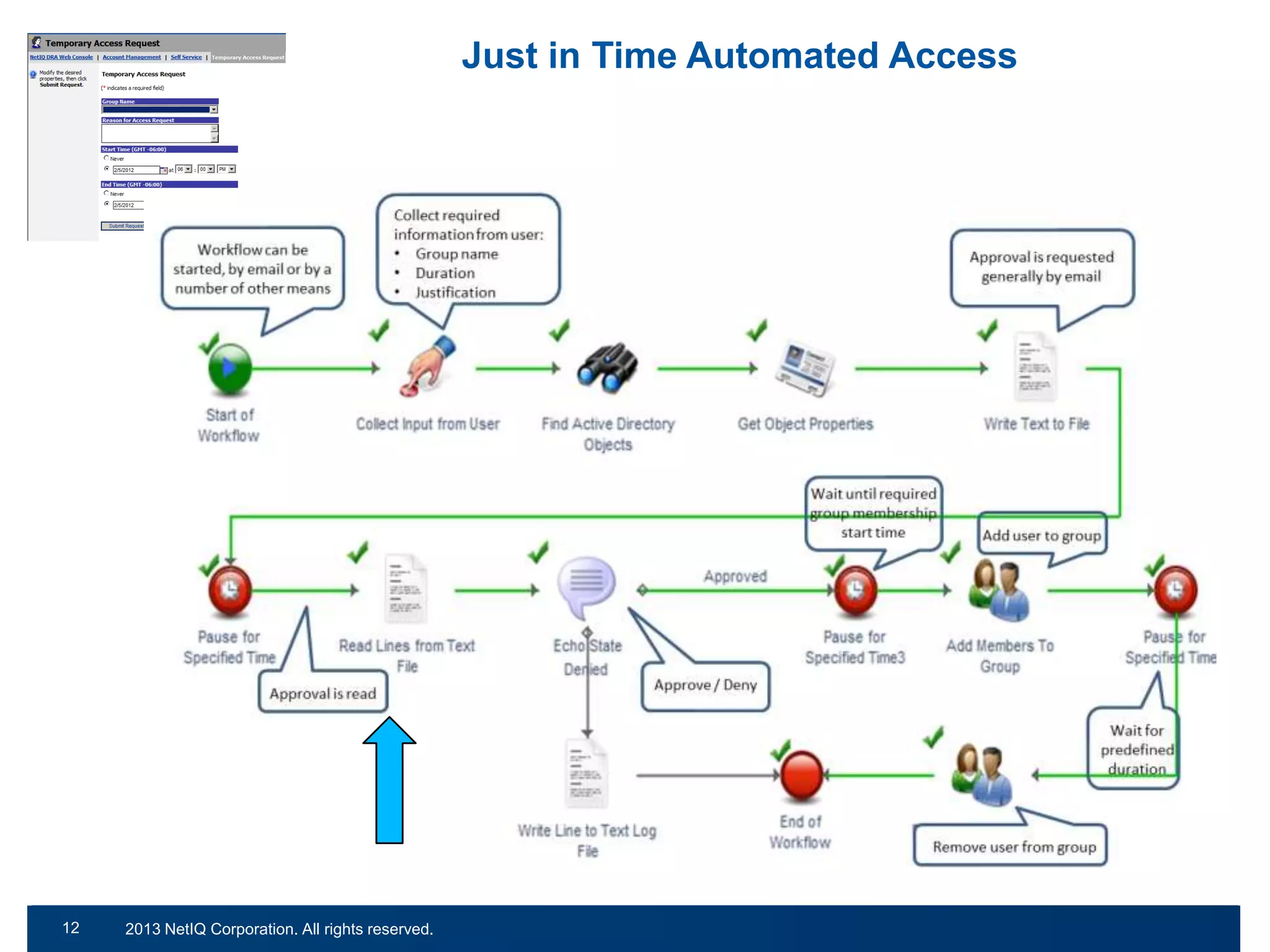
Just in Time Automated Access

12
20

© 2011 NetIQ Corporation. All rights reserved.
2013 NetIQ Corporation. All rights reserved.
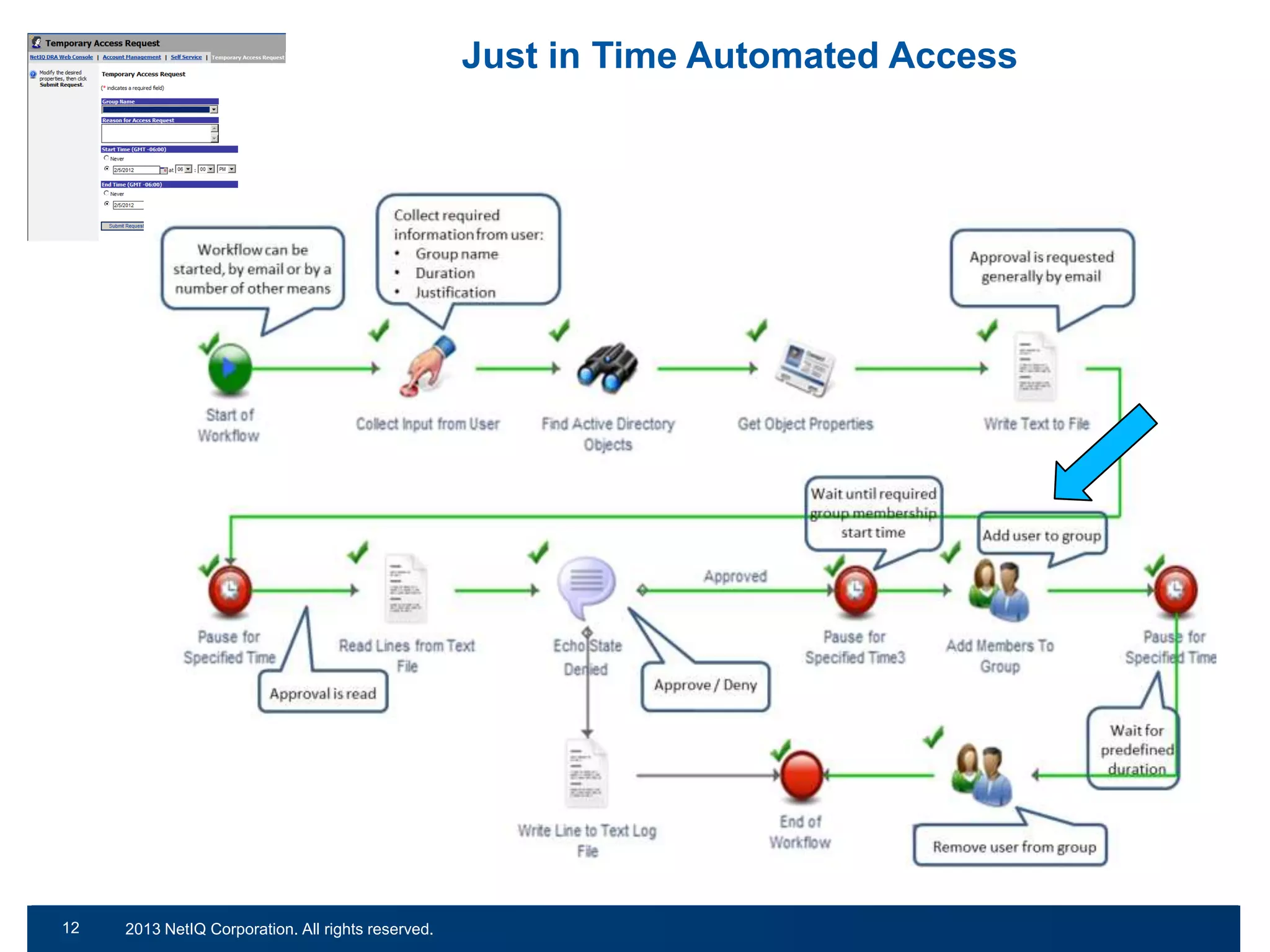
Just in Time Automated Access

12
21

© 2011 NetIQ Corporation. All rights reserved.
2013 NetIQ Corporation. All rights reserved.
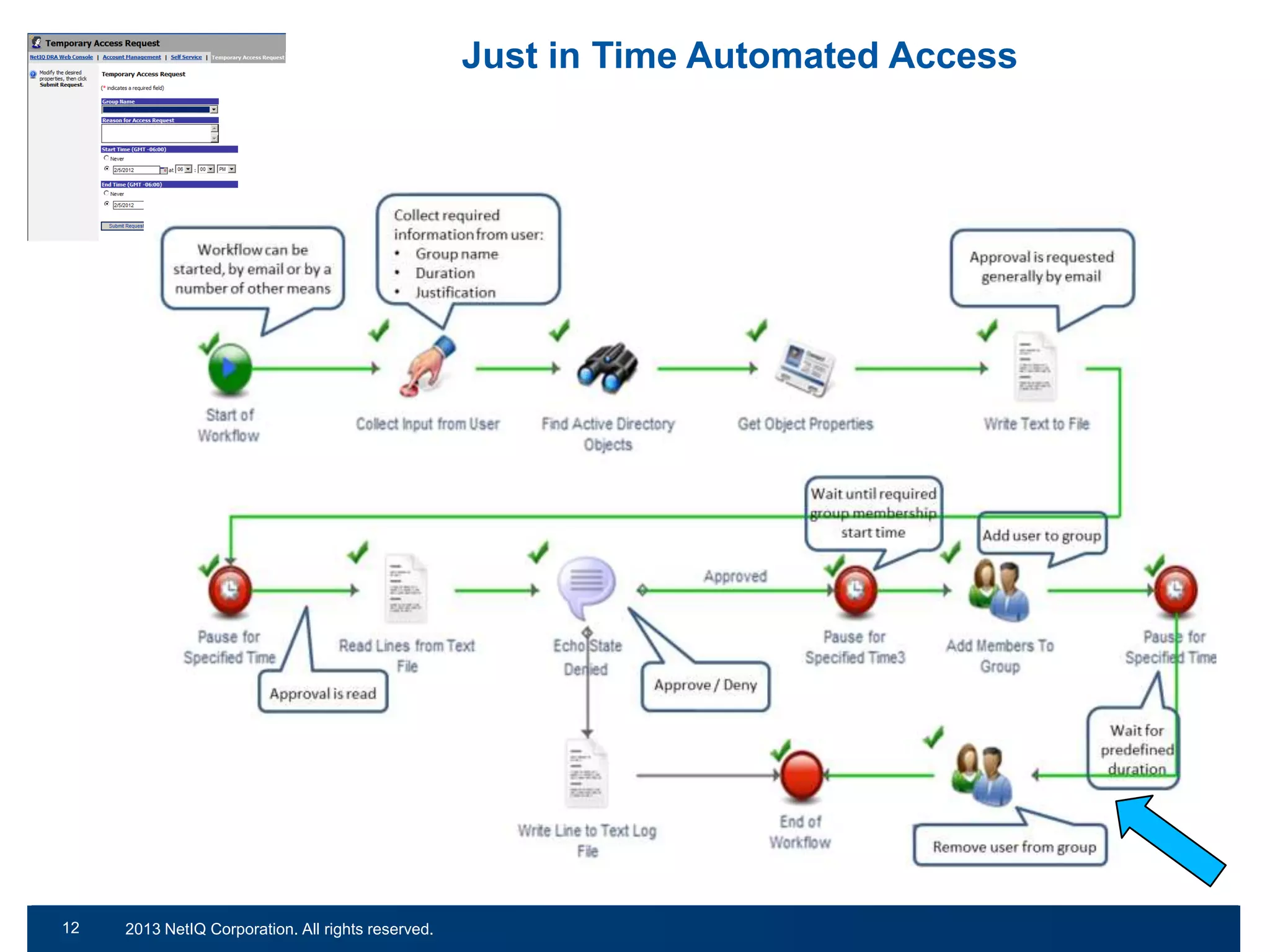
Just in Time Automated Access

12
22

© 2011 NetIQ Corporation. All rights reserved.
2013 NetIQ Corporation. All rights reserved.
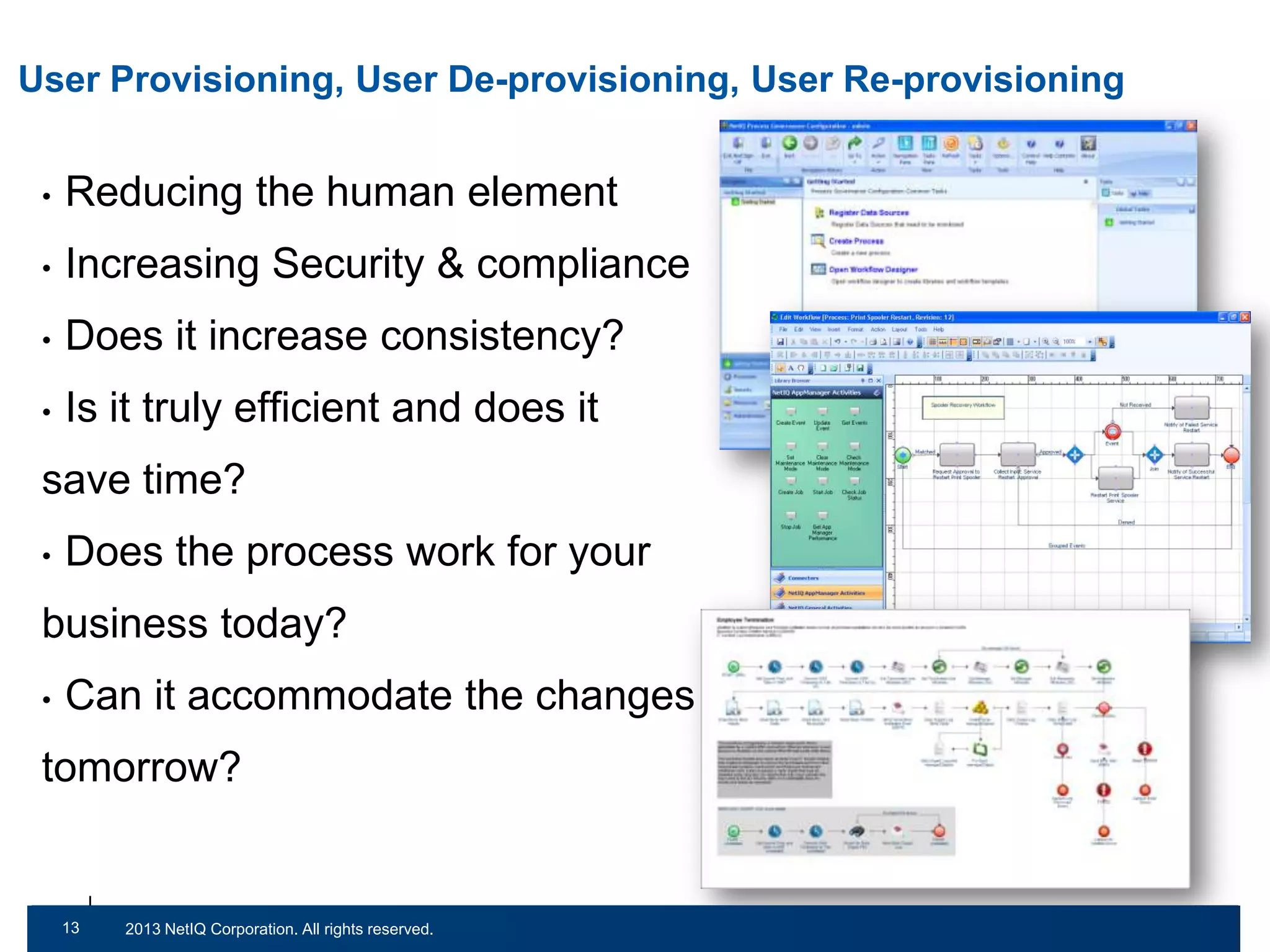
User Provisioning, User De-provisioning, User Re-provisioning
•

Reducing the human element

•

Increasing Security & compliance

•

Does it increase consistency?

•

Is it truly efficient and does it

save time?
•

Does the process work for your

business today?
•

Can it accommodate the changes of

tomorrow?

13
23

© 2011 NetIQ Corporation. All rights reserved.
2013 NetIQ Corporation. All rights reserved.
Empowering the User…
Password Management
•

It may seem straightforward to us but the statistics are
scary!
–
–

65%

–

82%

–

25

64%

76%

© 2011 NetIQ Corporation. All rights reserved.
Password Management
•

It may seem straightforward to us but the statistics are
scary!
–
–

65%

–

82%

–

26

64% - end users that write passwords down

76%

© 2011 NetIQ Corporation. All rights reserved.
Password Management
•

It may seem straightforward to us but the statistics are
scary!
–
–

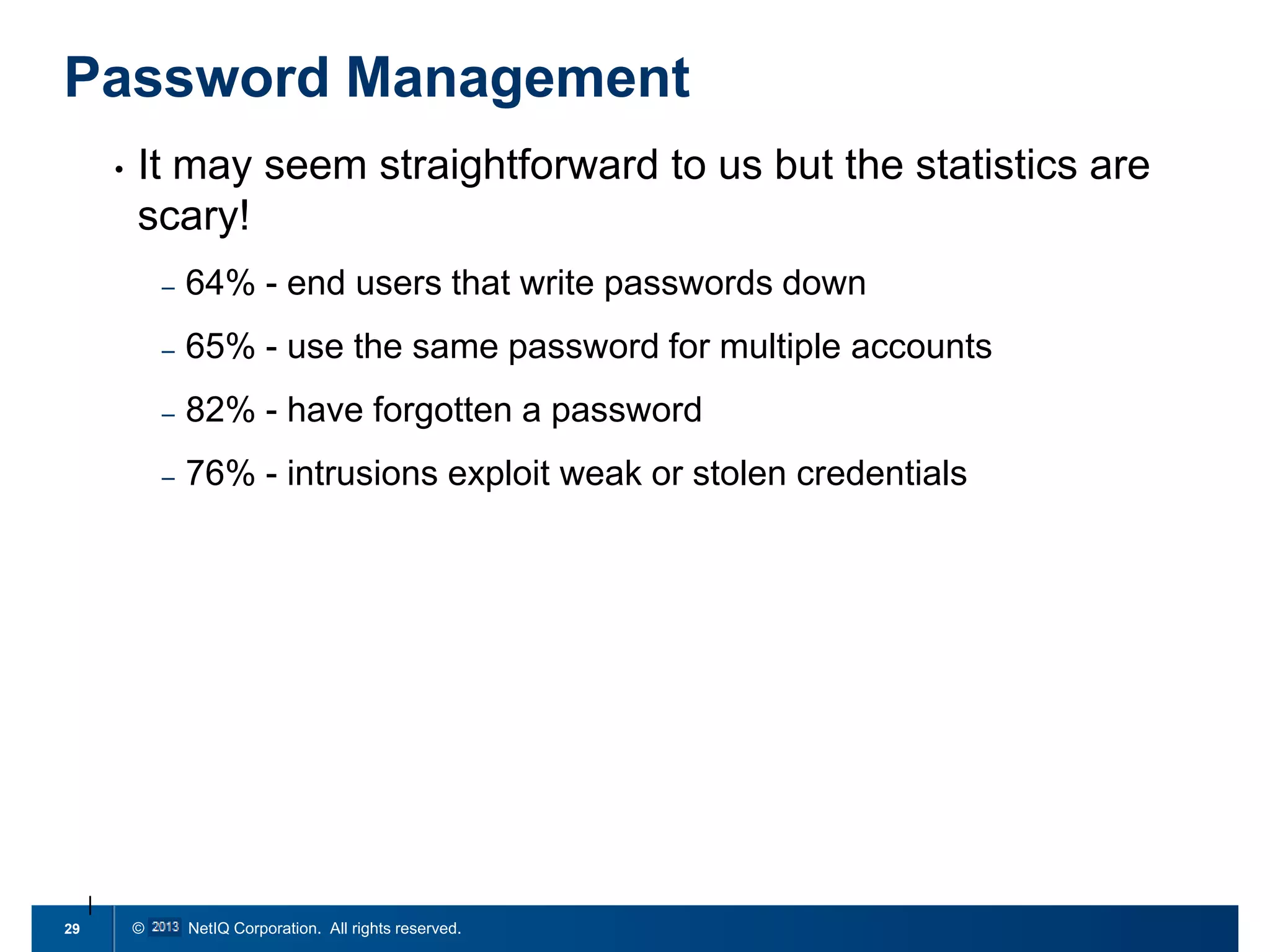
65% - use the same password for multiple accounts

–

82%

–

27

64% - end users that write passwords down

76%

© 2011 NetIQ Corporation. All rights reserved.
Password Management
•

It may seem straightforward to us but the statistics are
scary!
–
–

65% - use the same password for multiple accounts

–

82% - have forgotten a password

–

28

64% - end users that write passwords down

76%

© 2011 NetIQ Corporation. All rights reserved.
Password Management
•

It may seem straightforward to us but the statistics are
scary!
–
–

65% - use the same password for multiple accounts

–

82% - have forgotten a password

–

29

64% - end users that write passwords down

76% - intrusions exploit weak or stolen credentials

© 2011 NetIQ Corporation. All rights reserved.
Password Management
•

It may seem straightforward to us but the statistics are scary!
–
–

65% - use the same password for multiple accounts

–

82% - have forgotten a password

–

•

64% - end users that write passwords down

76% - intrusions exploit weak or stolen credentials

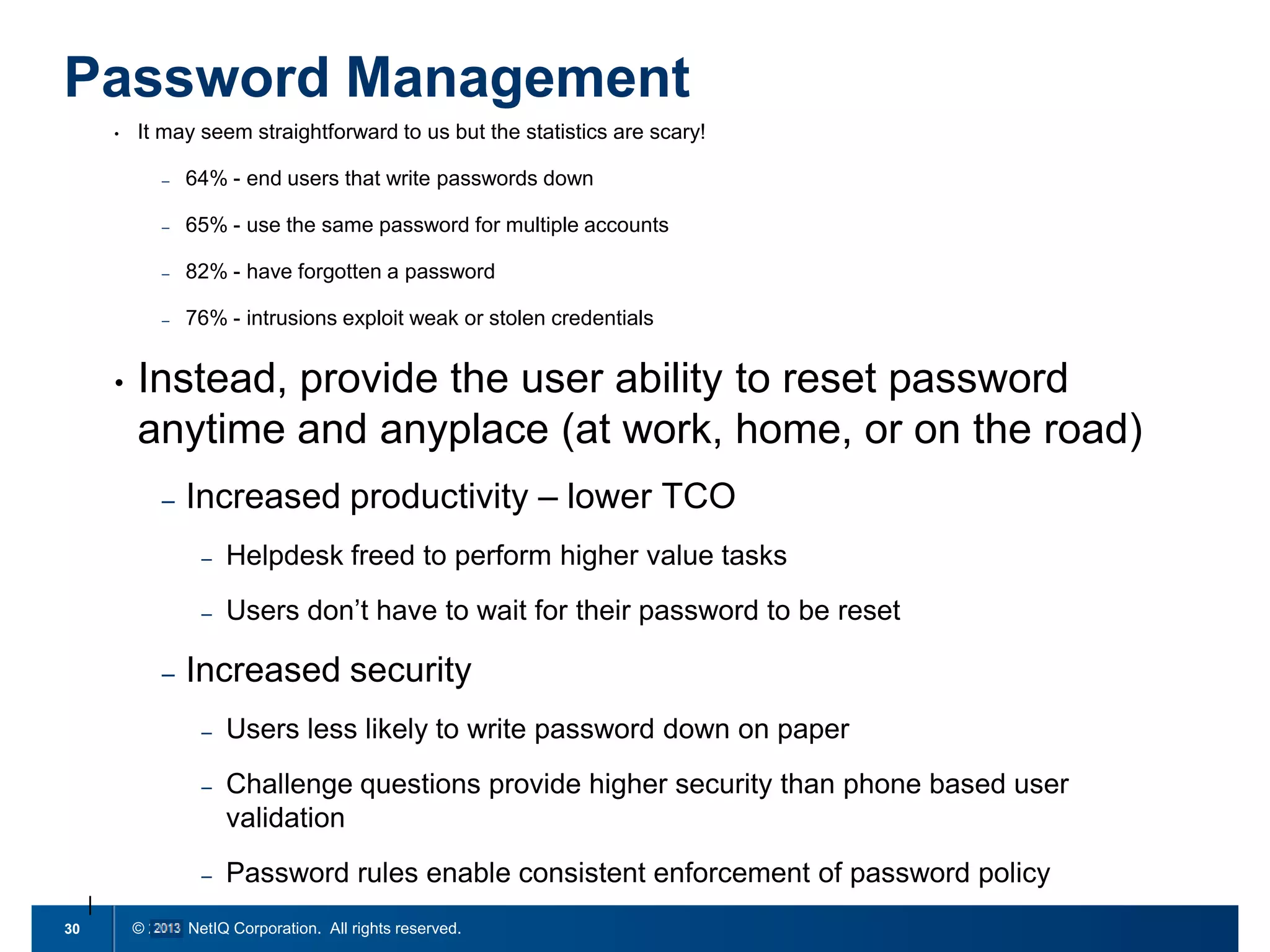
Instead, provide the user ability to reset password
anytime and anyplace (at work, home, or on the road)
–

Increased productivity – lower TCO
–
–

–

Helpdesk freed to perform higher value tasks
Users don’t have to wait for their password to be reset

Increased security
–
–

Challenge questions provide higher security than phone based user
validation

–
30

Users less likely to write password down on paper

Password rules enable consistent enforcement of password policy

© 2011 NetIQ Corporation. All rights reserved.
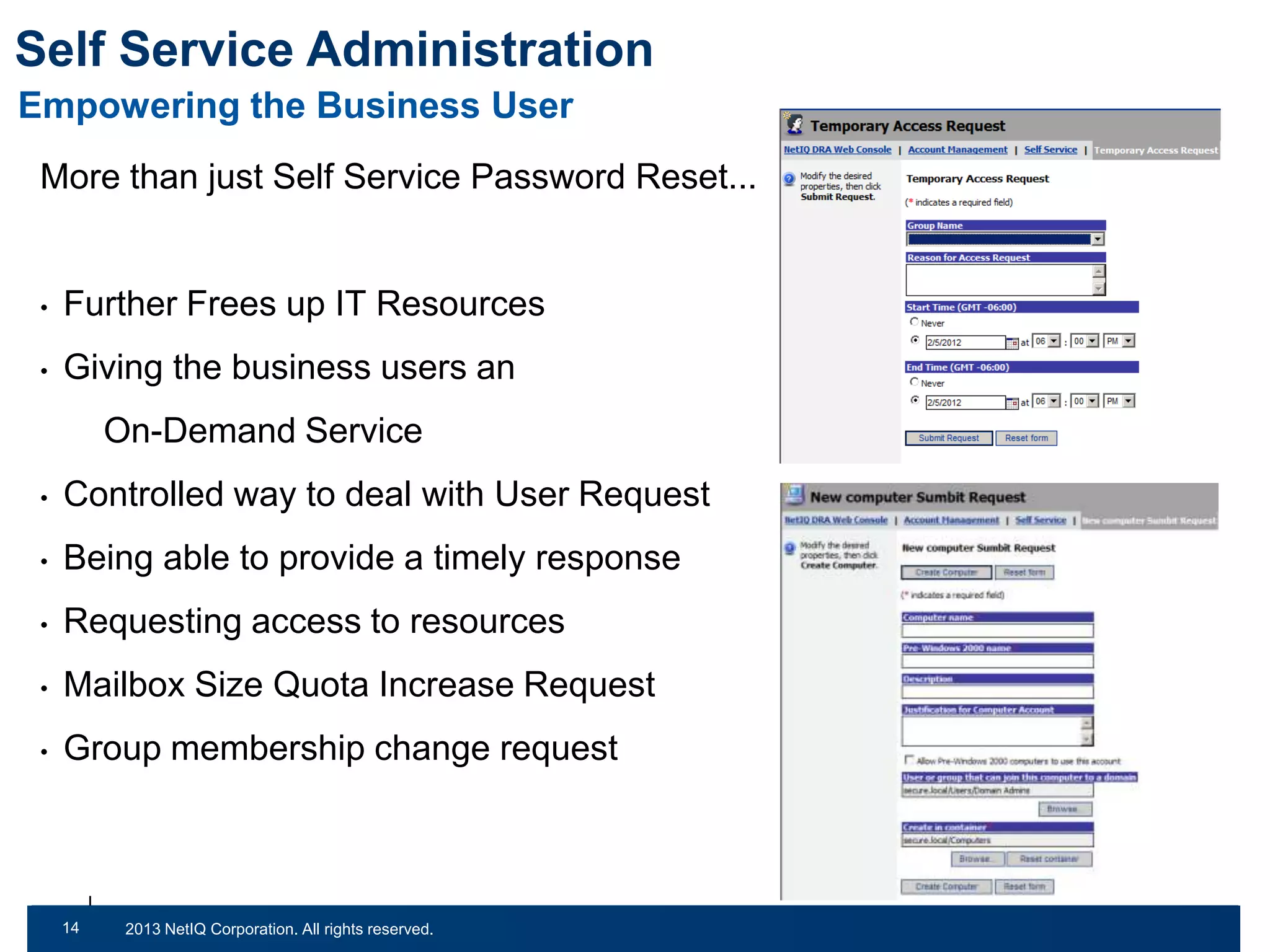
Self Service Administration
Empowering the Business User
More than just Self Service Password Reset...

•

Further Frees up IT Resources

•

Giving the business users an

On-Demand Service
•

Controlled way to deal with User Request

•

Being able to provide a timely response

•

Requesting access to resources

•

Mailbox Size Quota Increase Request

•

Group membership change request

14
31

© 2011 NetIQ Corporation. All rights reserved.
2013 NetIQ Corporation. All rights reserved.
NetIQ Solutions
•

Directory and Resource Administrator

•

Aegis

•

Group Policy Administrator

•

Change Guardian for Active Directory

•

Self-Service Password Reset
See NetIQ.com/Products

16
32

© 2011 NetIQ Corporation. All rights reserved.
2013 NetIQ Corporation. All rights reserved.
Demo
www.netiq.com

Scrubbing Your Active Directory Squeaky Clean

  • 1.
    Scrubbing your Active Directory SqueakyClean! Chris Radband Senior Solutions Consultant
  • 2.
    Lets talk about… •Cleaning up your Active Directory • What’s happening in your environment today • Controlling changes in your environment  eg. user lifecycle management • Empowering the user with self-service 32 © 2011 NetIQ Corporation. All rights reserved. 2013 NetIQ Corporation. All rights reserved.
  • 3.
  • 4.
    Active Directory EnvironmentalClean-up Challenges of an unmanaged Active Directory Estate • Inactive Users • Disabled Users • Locked out users • Expired Users • Passwords never set to expire • Security Groups with no members • Nested Security Groups • Stale Computer Accounts • Mixed-Naming conventions • Reducing the number of Power Users These illustrate just a few common Security risks, Performance impacts and contributors to Audit failures seen in many environments of all sorts of sizes 44 | © 2011 NetIQ Corporation. All rights reserved. 2013 NetIQ Corporation. All rights reserved.
  • 5.
    How do youdeal with Clean-up today? Scripted and manual clean-up tasks are labour intensive, limited in functionality, inaccurate and often at worst can have all sorts of unexpected results! *Source: http://www.codeproject.com/Articles/18621/VBScript-to-Disable-Old-Accounts-in-Active-Directo 55 © 2011 NetIQ Corporation. All rights reserved. 2013 NetIQ Corporation. All rights reserved.
  • 6.
    Automated Clean-up ofInactive Accounts 66 © 2011 NetIQ Corporation. All rights reserved. 2013 NetIQ Corporation. All rights reserved.
  • 7.
    Automated Clean-up ofInactive Accounts Discovery: Process runs to determine which accounts are inactive 67 © 2011 NetIQ Corporation. All rights reserved. 2013 NetIQ Corporation. All rights reserved.
  • 8.
    Automated Clean-up ofInactive Accounts Discovery: Process runs to determine which accounts are inactive Action: Request administrator or manager approval to disable account 68 © 2011 NetIQ Corporation. All rights reserved. 2013 NetIQ Corporation. All rights reserved.
  • 9.
    Automated Clean-up ofInactive Accounts Discovery: Process runs to determine which accounts are inactive Action: Request administrator or manager approval to disable account Remediation: Account is disabled and therefore secured 69 © 2011 NetIQ Corporation. All rights reserved. 2013 NetIQ Corporation. All rights reserved.
  • 10.
    What are today’schallenges, right now?
  • 11.
    Regulatory & OversightPressures Internal Audit Board of Directors – Oversight Groups 11 © 2011 NetIQ Corporation. All rights reserved.
  • 12.
  • 13.
    Increasing audit andcompliance requirements …not to mention good-practice! • • Identify Change when it happens • Catalogue managed and unmanaged changes • Detect high-profile changes • Provides detailed AD/GPO change history • Centrally record and audit AD/GPO changes • Easily integrates into your existing AD change process • © 2011 NetIQ Corporation. All rights reserved. 2013 NetIQ Corporation. All rights reserved. Satisfying audit requirements/achieving compliance with regulations such as ISO 27001/2, Sarbanes-Oxley and PCI DSS • 7 13 Minimises the risk associated with Operational changes Feeding events backup to your Monitoring Infrastructure
  • 14.
    14 © 2011 NetIQCorporation. All rights reserved.
  • 15.
    Monitor for unmanagedGPO Changes 8 15 | © 2011 NetIQ Corporation. All rights reserved. 2013 NetIQ Corporation. All rights reserved.
  • 16.
    Be proactive: GPOchange: Email report sent to administrators 9 16 | © 2011 NetIQ Corporation. All rights reserved. 2013 NetIQ Corporation. All rights reserved.
  • 17.
  • 18.
    Managing Privileged/Non-privileged Users • Whyis it important? • The granular the better but no added complexity • Something which defines: - - - WHO– who are we delegating control to (for Active Directory). WHAT – what functionality/permissions are we delegating to the individual(s) WHERE – which objects are we allowing these individuals to execute their permissions on (most likely contain multiple objects). • Capable of managing an enterprise environment • Report on delegation • Controlled way to make changes to environment 11 18 | © 2011 NetIQ Corporation. All rights reserved. 2013 NetIQ Corporation. All rights reserved.
  • 19.
    Just in TimeAutomated Access 12 19 © 2011 NetIQ Corporation. All rights reserved. 2013 NetIQ Corporation. All rights reserved.
  • 20.
    Just in TimeAutomated Access 12 20 © 2011 NetIQ Corporation. All rights reserved. 2013 NetIQ Corporation. All rights reserved.
  • 21.
    Just in TimeAutomated Access 12 21 © 2011 NetIQ Corporation. All rights reserved. 2013 NetIQ Corporation. All rights reserved.
  • 22.
    Just in TimeAutomated Access 12 22 © 2011 NetIQ Corporation. All rights reserved. 2013 NetIQ Corporation. All rights reserved.
  • 23.
    User Provisioning, UserDe-provisioning, User Re-provisioning • Reducing the human element • Increasing Security & compliance • Does it increase consistency? • Is it truly efficient and does it save time? • Does the process work for your business today? • Can it accommodate the changes of tomorrow? 13 23 © 2011 NetIQ Corporation. All rights reserved. 2013 NetIQ Corporation. All rights reserved.
  • 24.
  • 25.
    Password Management • It mayseem straightforward to us but the statistics are scary! – – 65% – 82% – 25 64% 76% © 2011 NetIQ Corporation. All rights reserved.
  • 26.
    Password Management • It mayseem straightforward to us but the statistics are scary! – – 65% – 82% – 26 64% - end users that write passwords down 76% © 2011 NetIQ Corporation. All rights reserved.
  • 27.
    Password Management • It mayseem straightforward to us but the statistics are scary! – – 65% - use the same password for multiple accounts – 82% – 27 64% - end users that write passwords down 76% © 2011 NetIQ Corporation. All rights reserved.
  • 28.
    Password Management • It mayseem straightforward to us but the statistics are scary! – – 65% - use the same password for multiple accounts – 82% - have forgotten a password – 28 64% - end users that write passwords down 76% © 2011 NetIQ Corporation. All rights reserved.
  • 29.
    Password Management • It mayseem straightforward to us but the statistics are scary! – – 65% - use the same password for multiple accounts – 82% - have forgotten a password – 29 64% - end users that write passwords down 76% - intrusions exploit weak or stolen credentials © 2011 NetIQ Corporation. All rights reserved.
  • 30.
    Password Management • It mayseem straightforward to us but the statistics are scary! – – 65% - use the same password for multiple accounts – 82% - have forgotten a password – • 64% - end users that write passwords down 76% - intrusions exploit weak or stolen credentials Instead, provide the user ability to reset password anytime and anyplace (at work, home, or on the road) – Increased productivity – lower TCO – – – Helpdesk freed to perform higher value tasks Users don’t have to wait for their password to be reset Increased security – – Challenge questions provide higher security than phone based user validation – 30 Users less likely to write password down on paper Password rules enable consistent enforcement of password policy © 2011 NetIQ Corporation. All rights reserved.
  • 31.
    Self Service Administration Empoweringthe Business User More than just Self Service Password Reset... • Further Frees up IT Resources • Giving the business users an On-Demand Service • Controlled way to deal with User Request • Being able to provide a timely response • Requesting access to resources • Mailbox Size Quota Increase Request • Group membership change request 14 31 © 2011 NetIQ Corporation. All rights reserved. 2013 NetIQ Corporation. All rights reserved.
  • 32.
    NetIQ Solutions • Directory andResource Administrator • Aegis • Group Policy Administrator • Change Guardian for Active Directory • Self-Service Password Reset See NetIQ.com/Products 16 32 © 2011 NetIQ Corporation. All rights reserved. 2013 NetIQ Corporation. All rights reserved.
  • 33.
  • 34.