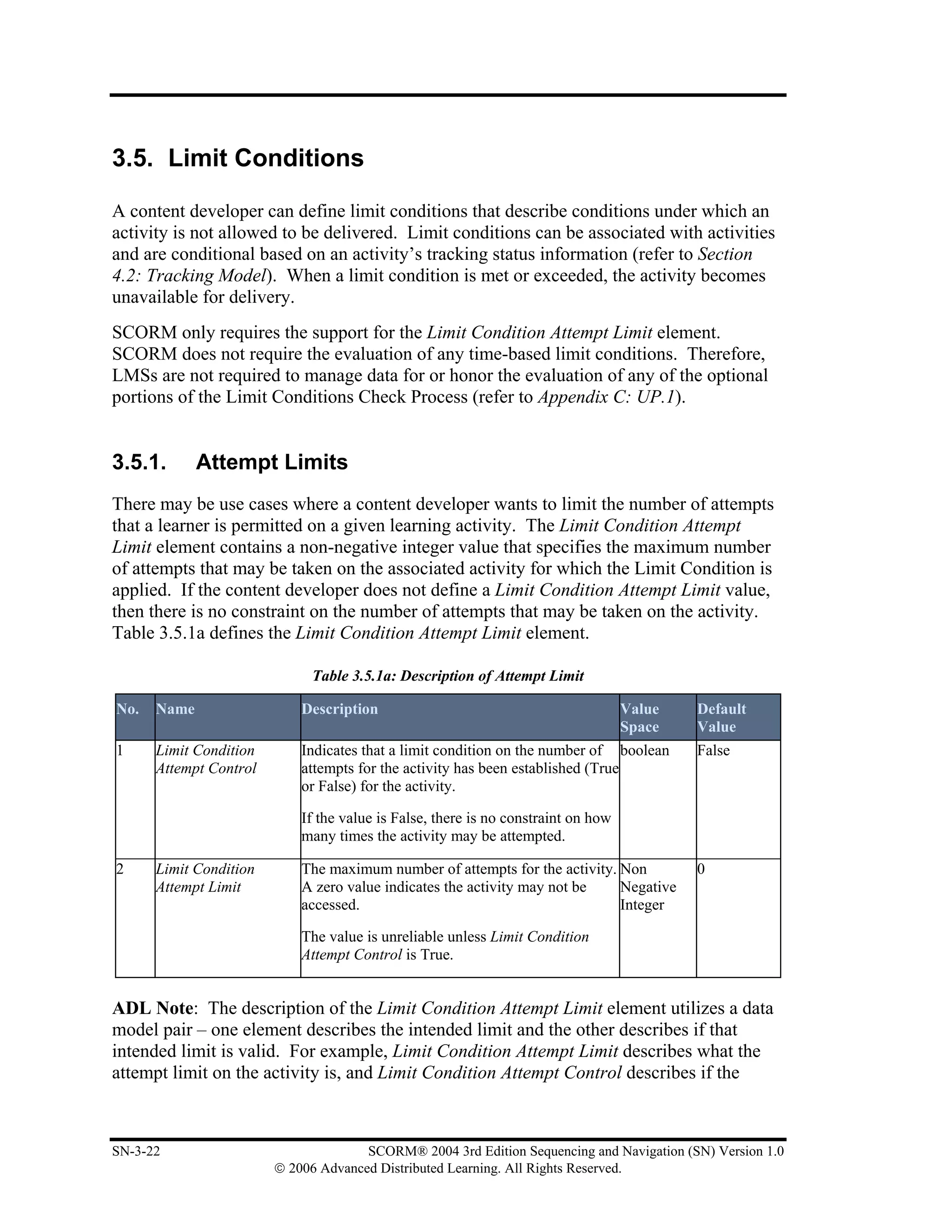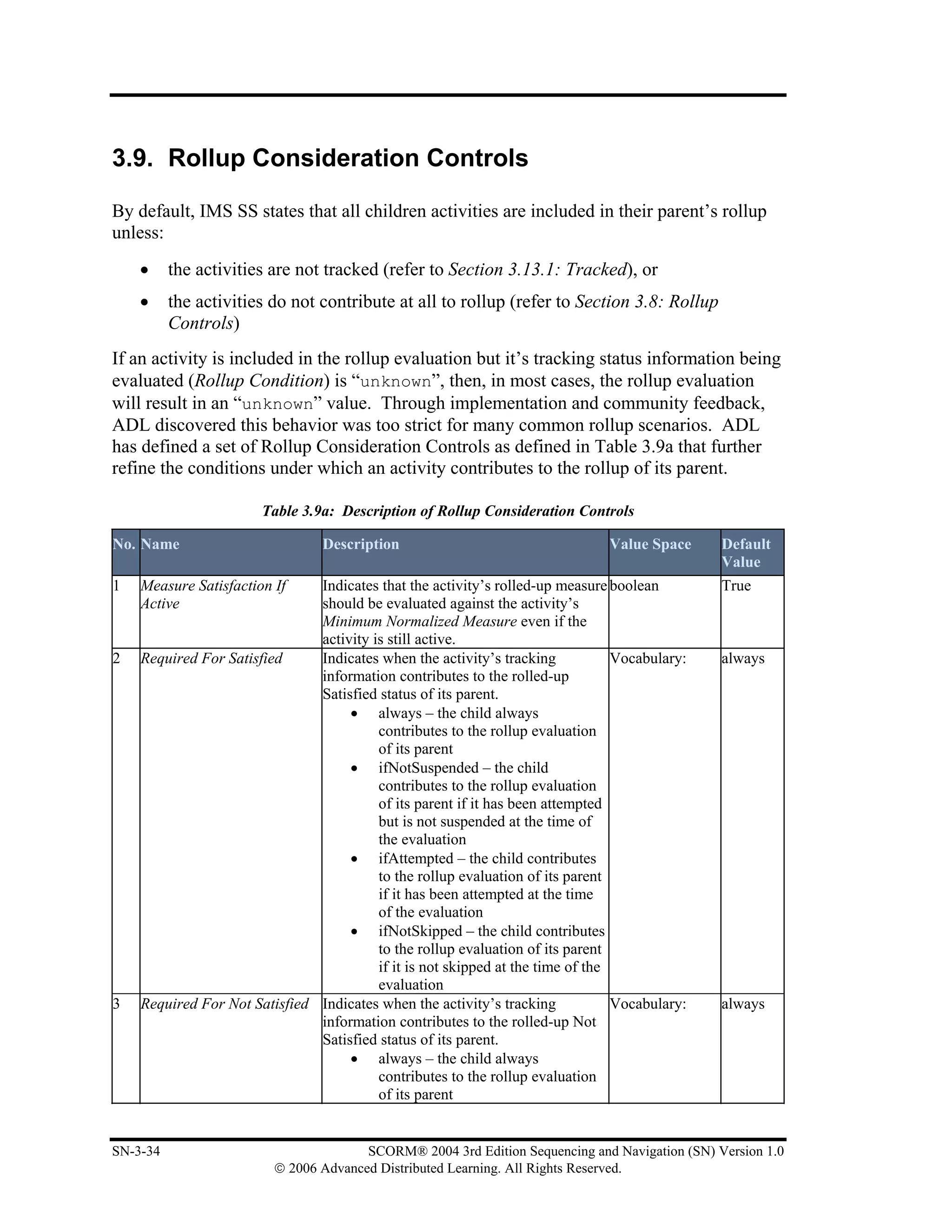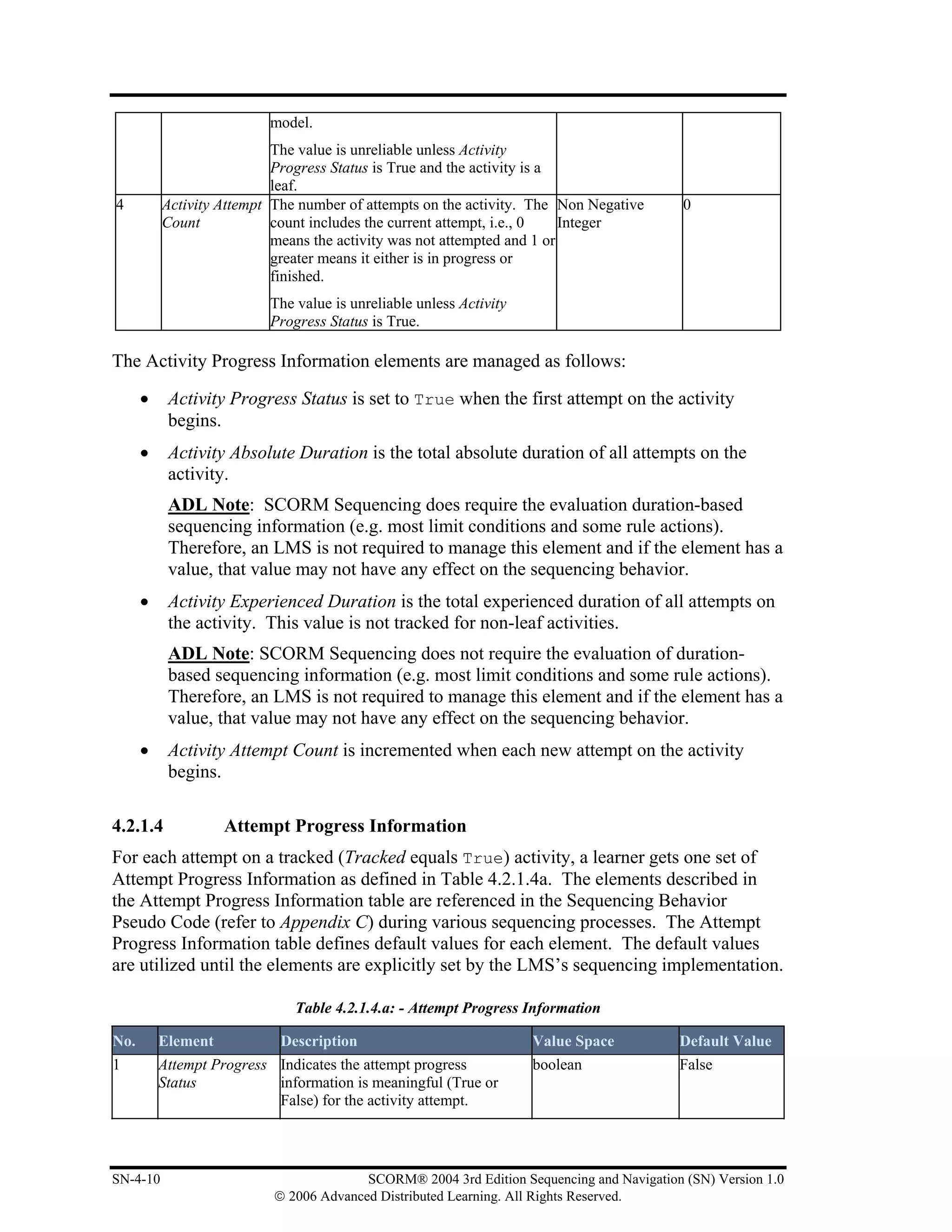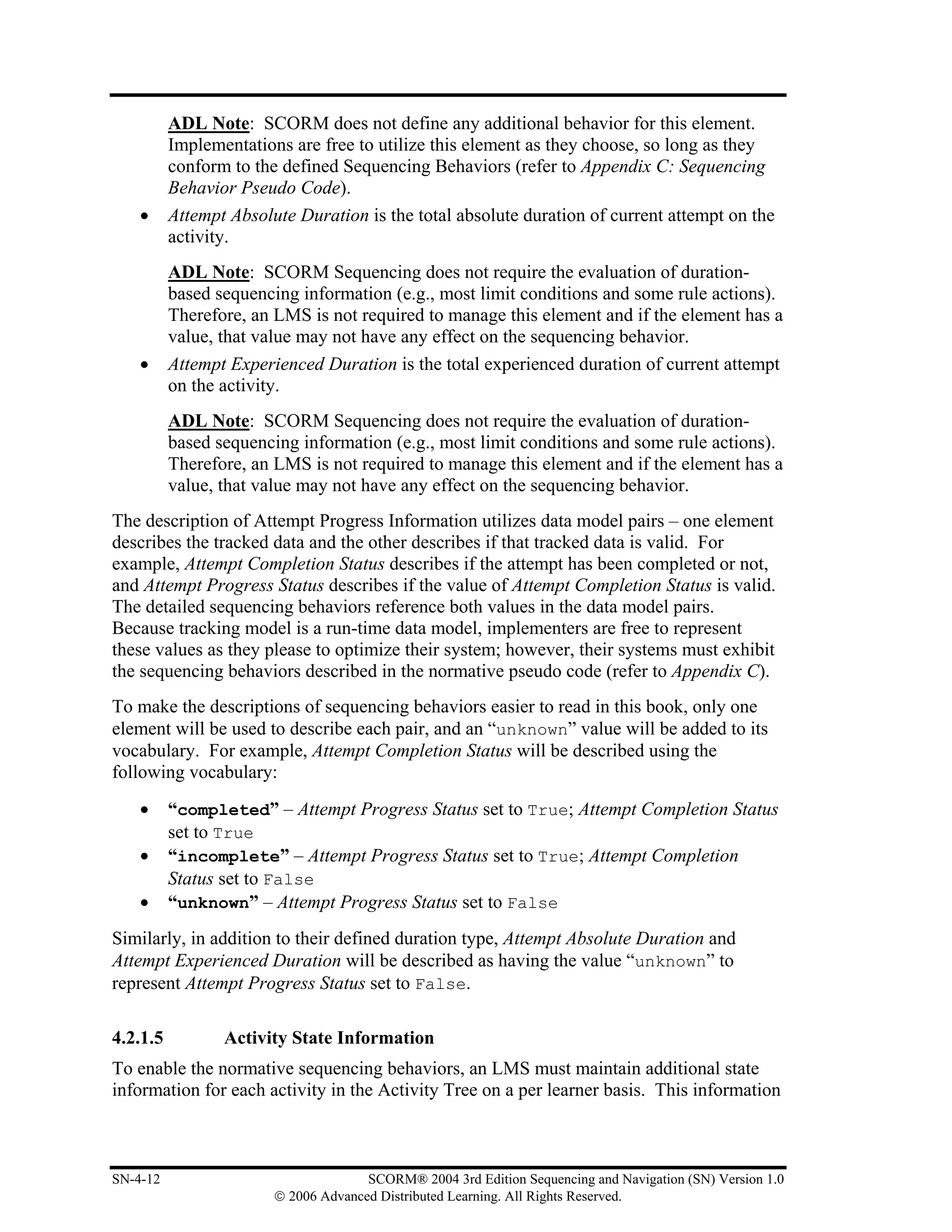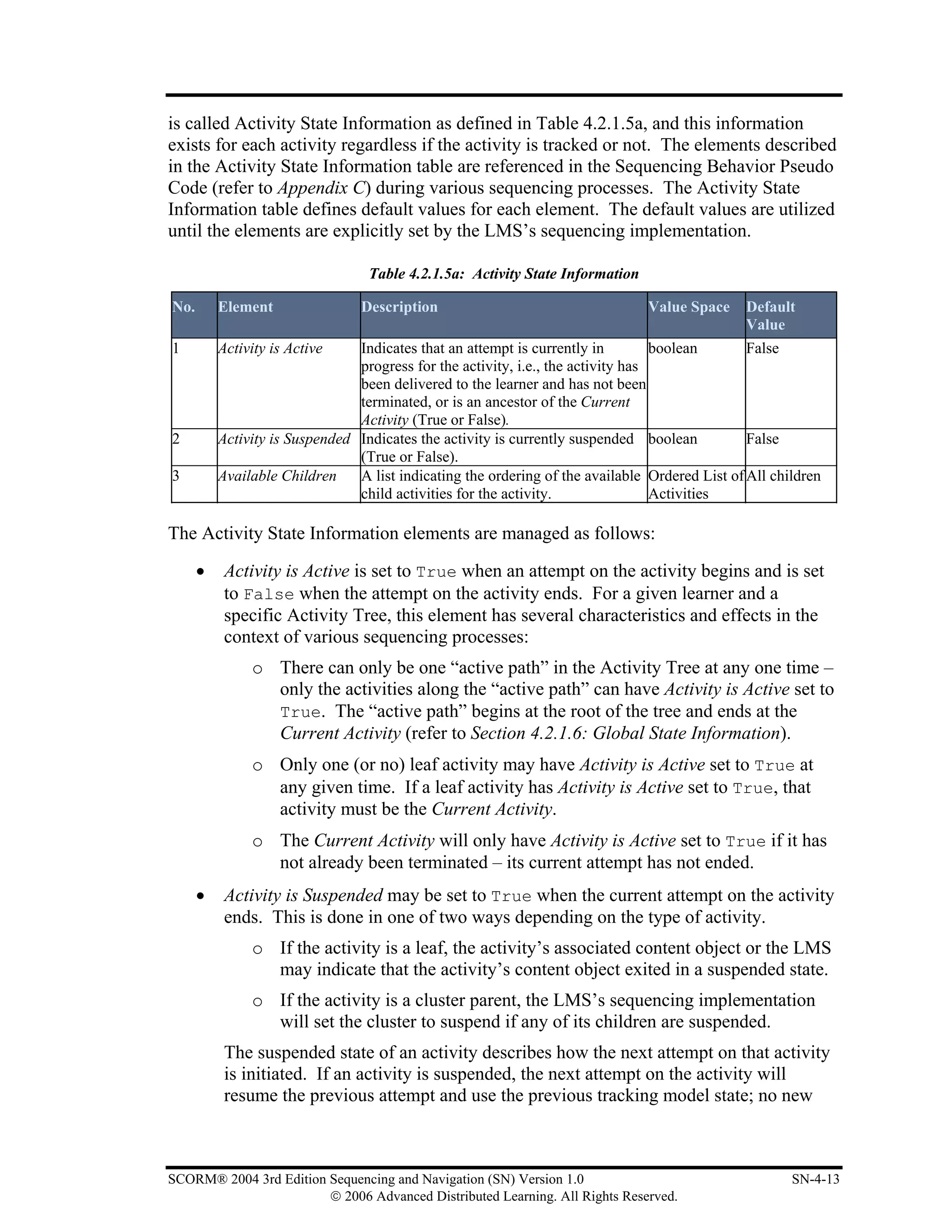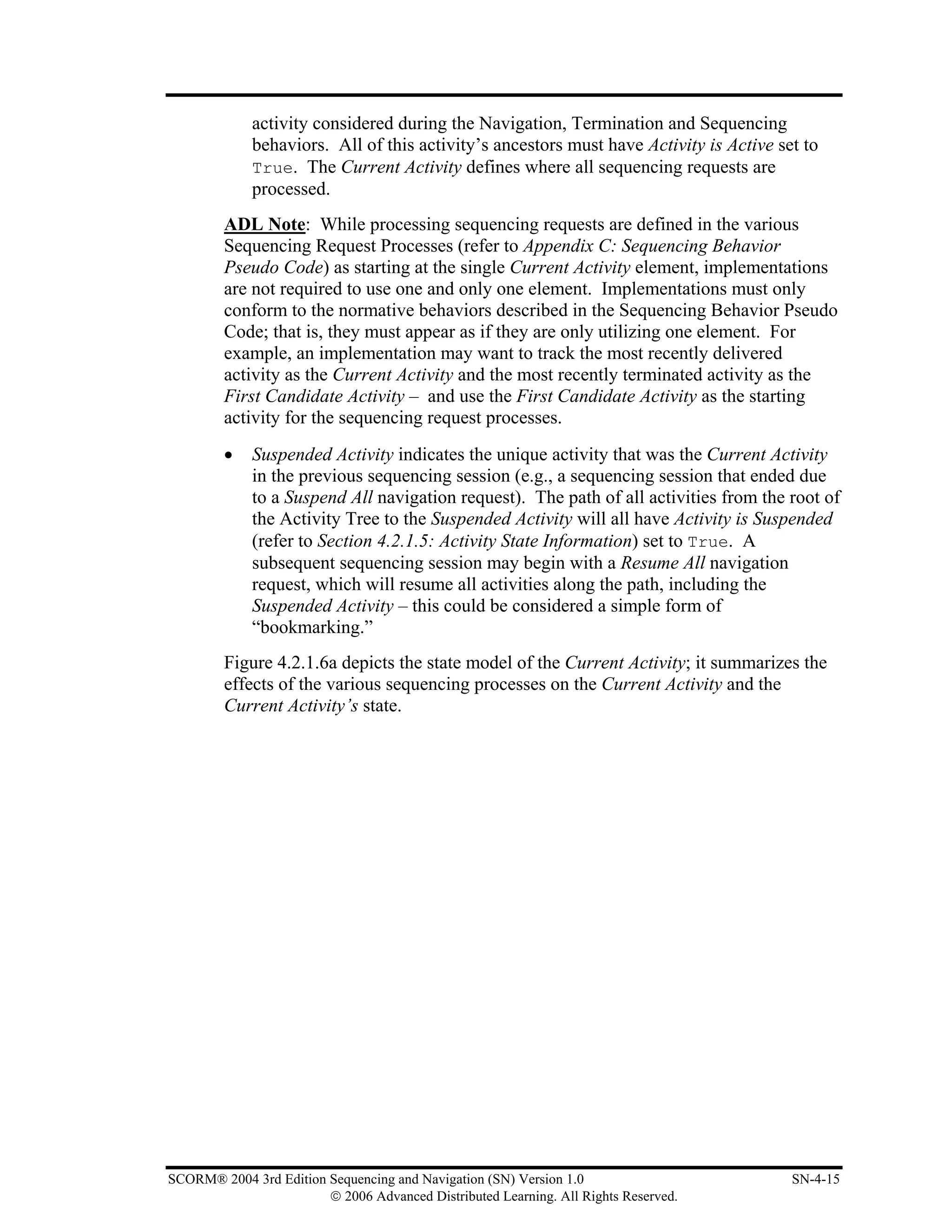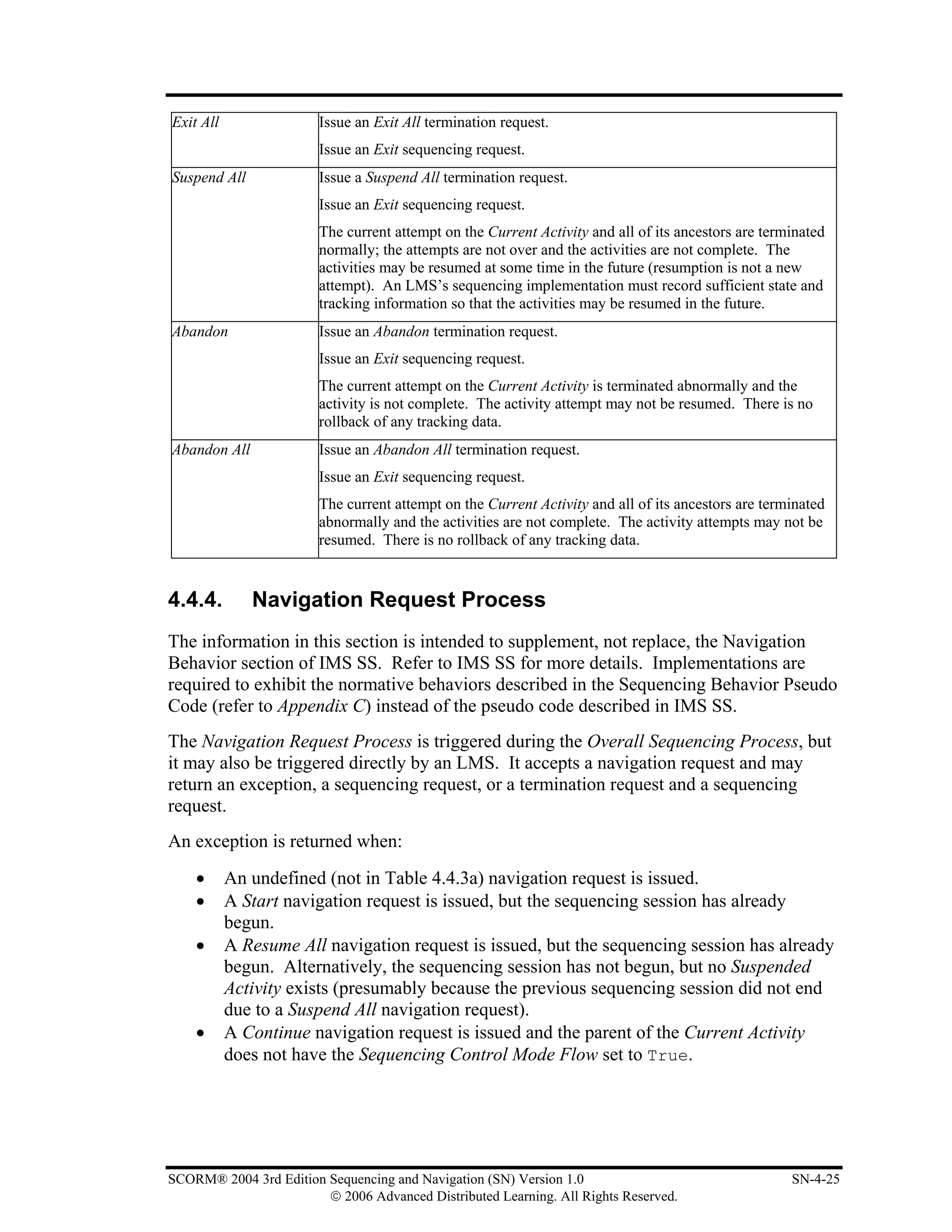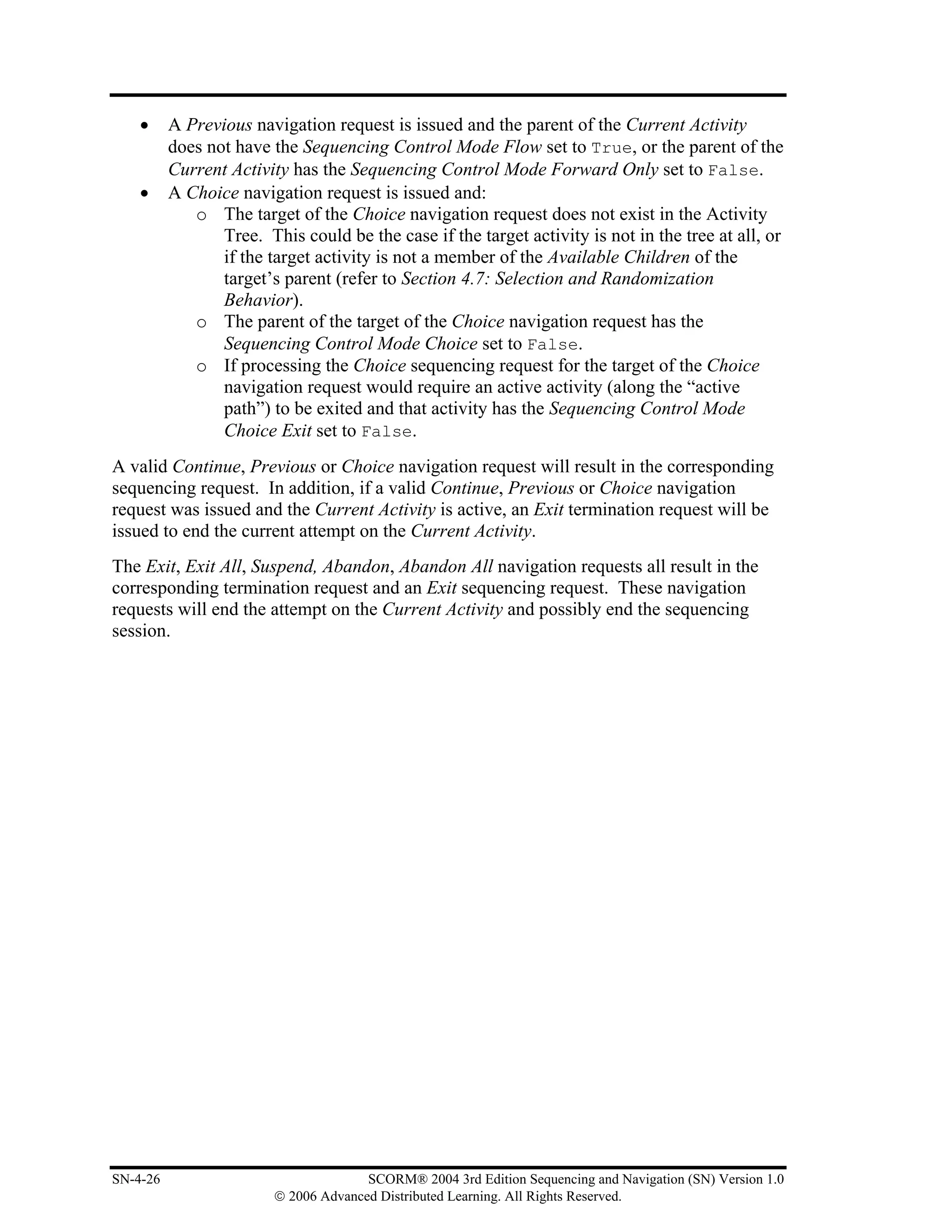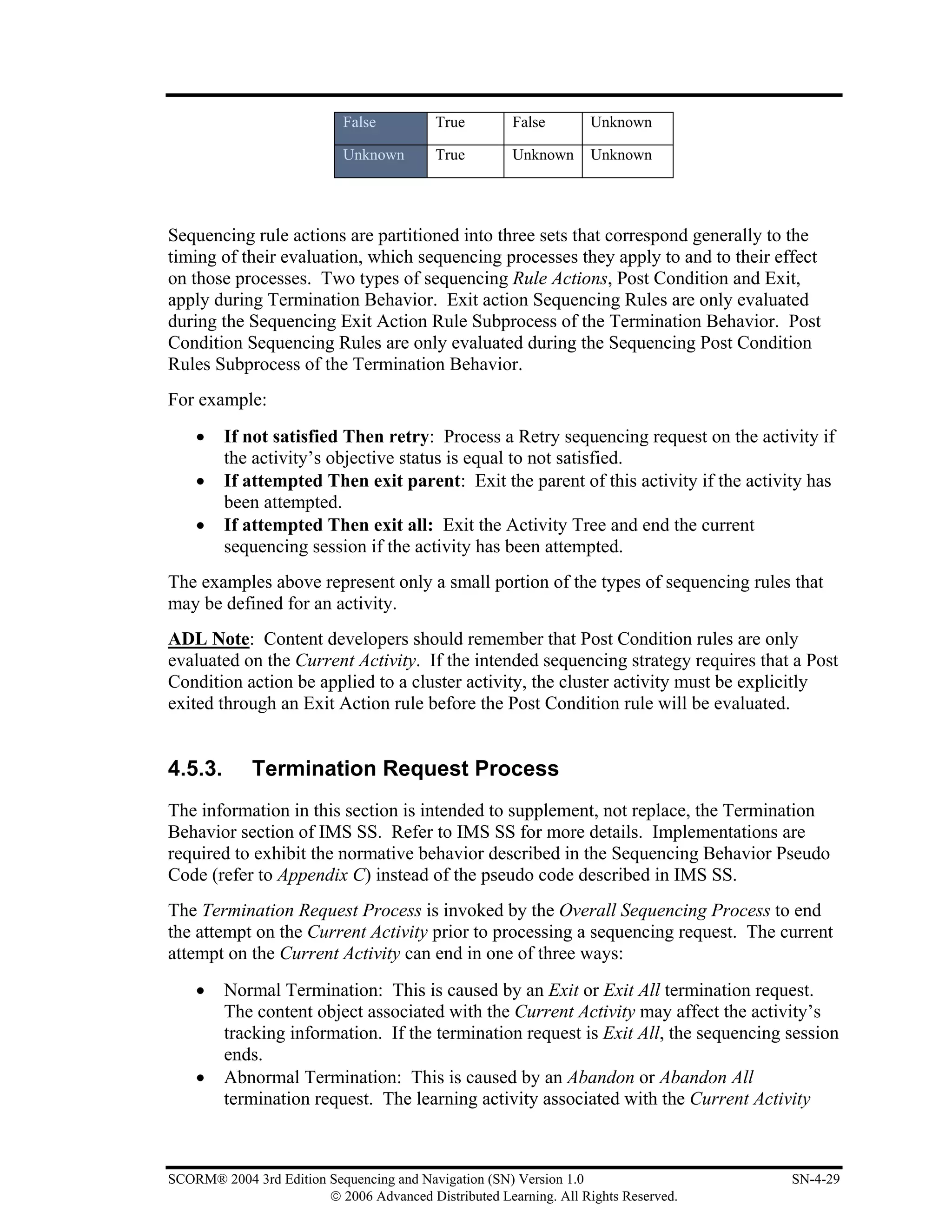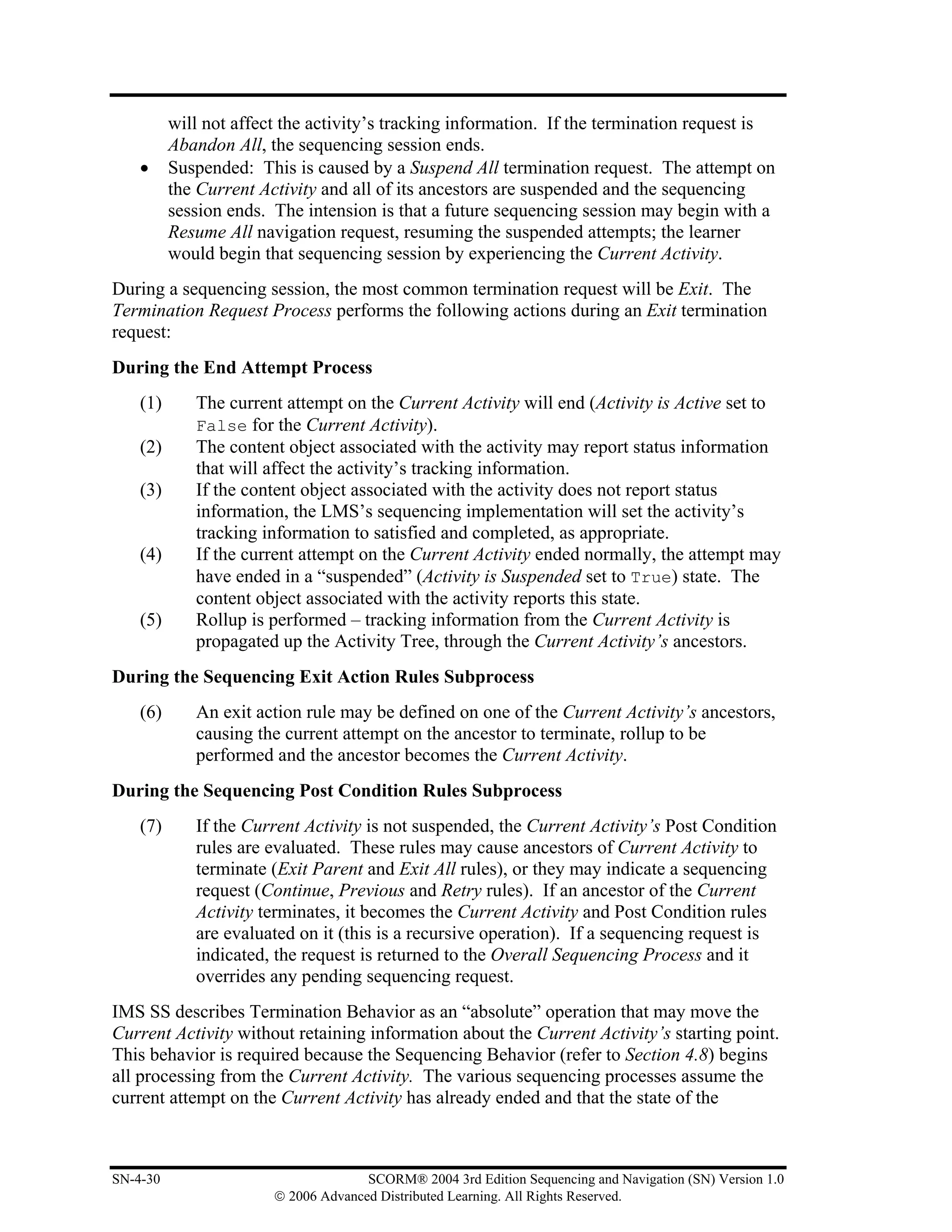




SCORM 2004        ®


3rd EDITION
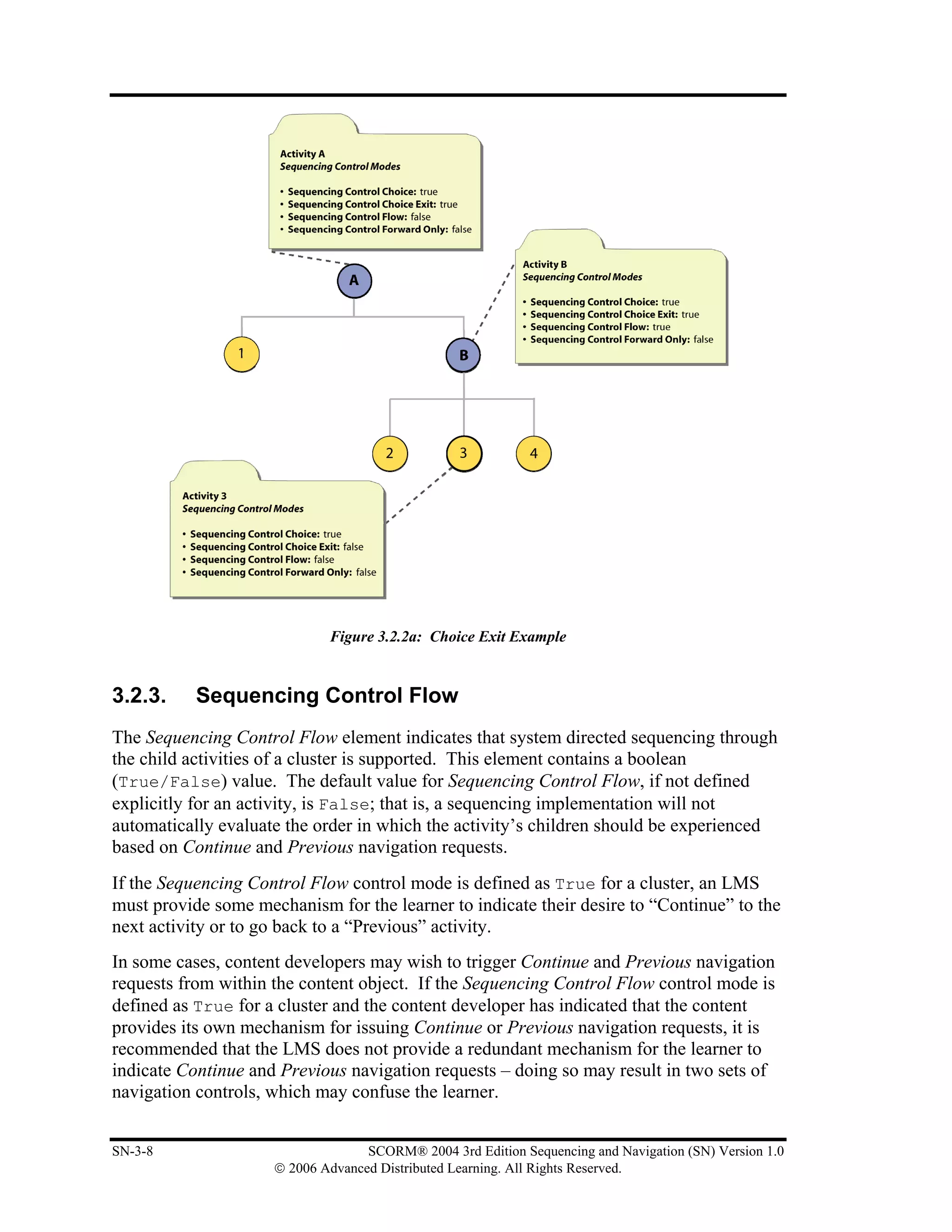
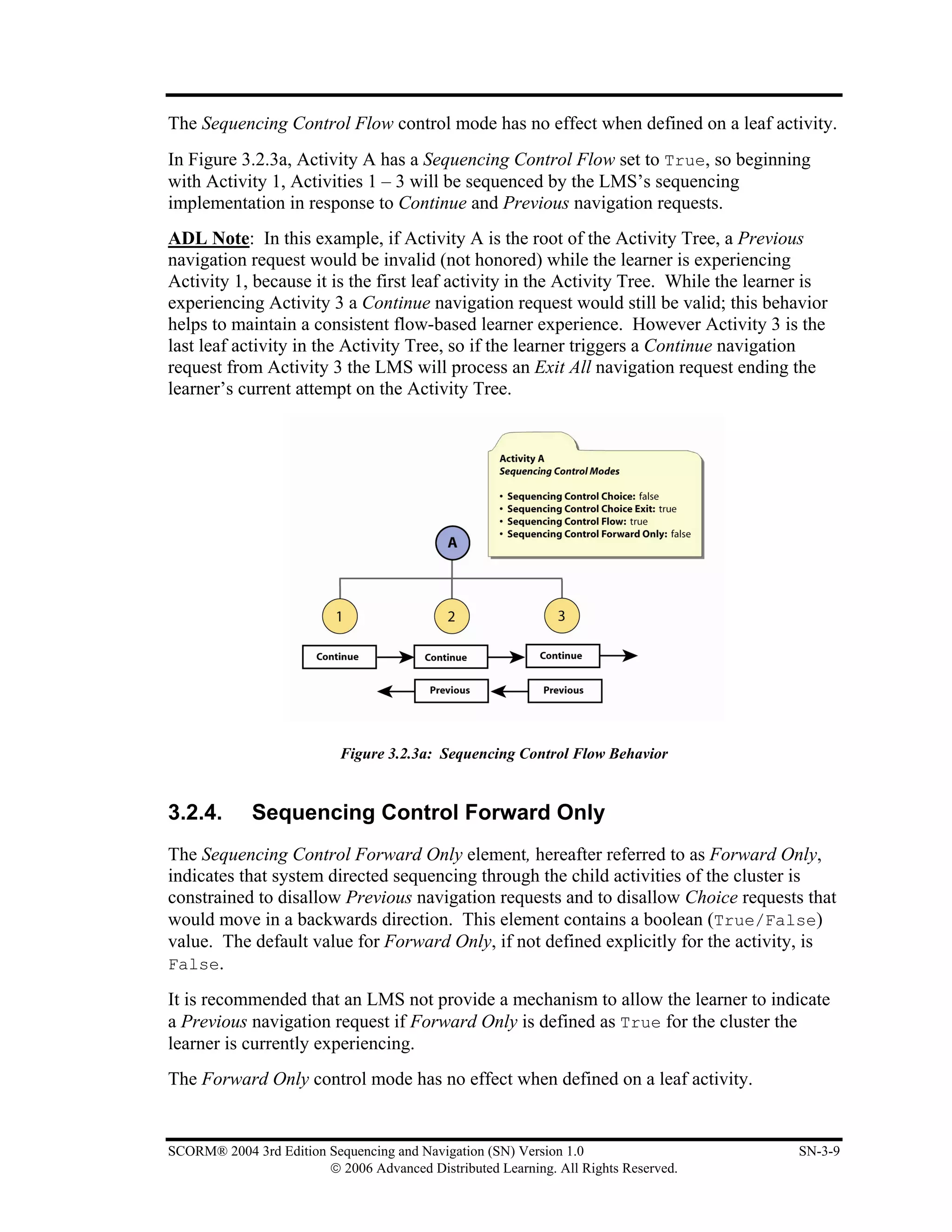
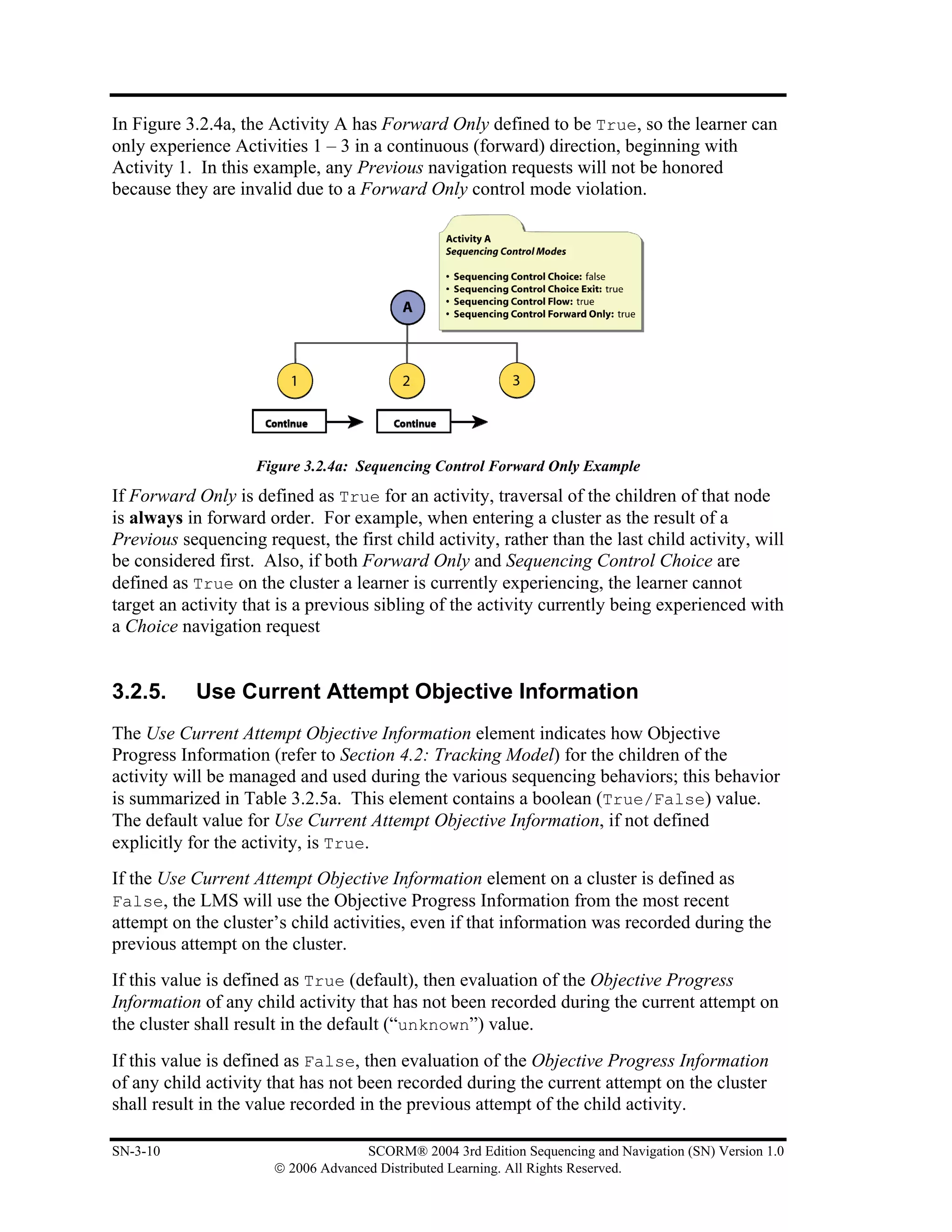
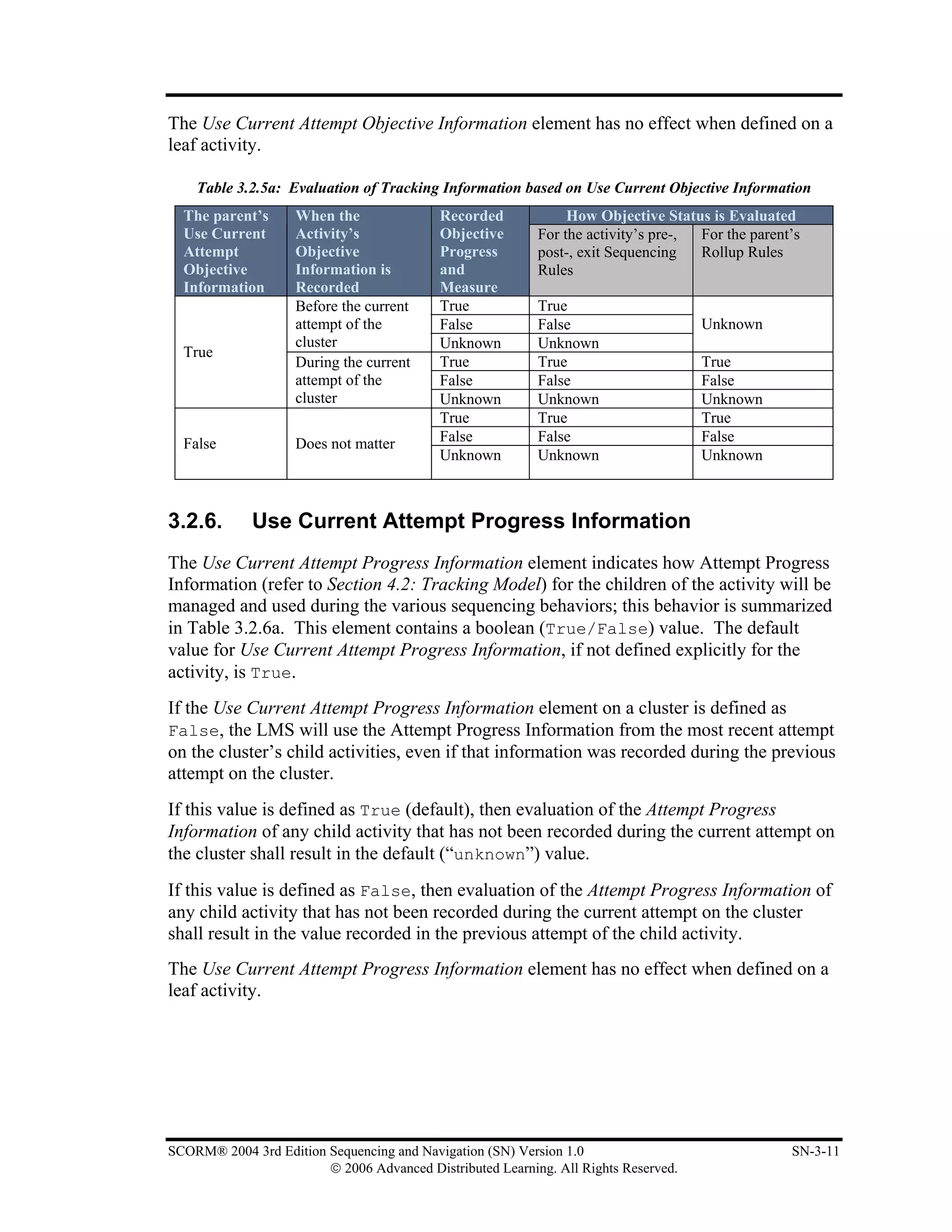
Sharable Content Object Reference Model


Sequencing and Navigation


                                               NOVEMBER 16, 2006
                                                    VERSION 1.0


                                                                                  ®


                           ©2006 Advanced Distributed Learning. All Rights Reserved.
This page intentionally left blank.


© 2006 Advanced Distributed Learning. All Rights Reserved.
Advanced Distributed Learning (ADL)


             SCORM® 2004 3rd Edition
           Sequencing and Navigation (SN)
                    Version 1.0


                           Available at ADLNet.gov


                        For questions and comments visit
                         Ask The Experts at ADLNet.gov


SCORM® 2004 3rd Edition Sequencing and Navigation (SN) Version 1.0                   i
                        © 2006 Advanced Distributed Learning. All Rights Reserved.
This page intentionally left blank.


ii                 SCORM® 2004 3rd Edition Sequencing and Navigation (SN) Version 1.0
     © 2006 Advanced Distributed Learning. All Rights Reserved.
Chief Technical Architect
                                           Philip Dodds


                                             Technical Editor
                                              Angelo Panar


Acknowledgements
ADL would like to thank the following organizations and their members for their
continued commitment to building interoperable e-learning standards and specifications:
                    Alliance of Remote Instructional Authoring & Distribution Networks for
                    Europe (ARIADNE) (http://www.ariadne-eu.org/)

                    Aviation Industry CBT Committee (AICC) (http://www.aicc.org/)

                    Institute of Electrical and Electronics Engineers (IEEE) Learning
                    Technology Standards Committee (LTSC) (http://ltsc.ieee.org/)

                    IMS Global Learning Consortium, Inc. (http://www.imsglobal.org/)

ADL would also like to thank the ADL Community for their commitment and
contribution to the evolution of SCORM.
SCORM® 2004 3rd Edition documentation suite reprinted with permission from IEEE Std. 1484.11.1-2004 IEEE
Standard for Learning Technology – Data Model for Content to Learning Management System Communication,
Copyright 2004, by IEEE; IEEE Std. 1484.11.2-2003 IEEE Standard for Learning Technology – ECMAScript
Application Programming Interface for Content to Runtime Services Communication, Copyright 2003, by IEEE; IEEE
Std. 1484.12.1-2002 IEEE Standard for Learning Object Metadata, Copyright 2002, by IEEE; and IEEE Std.
1484.12.3-2005 IEEE Standard for Learning Technology – Extensible Markup Language (XML) Schema Definition
Language Binding for Learning Object Metadata, Copyright 2005, by IEEE. The IEEE disclaims any responsibility or
liability resulting from the placement and use in the described manner.

SCORM® 2004 3rd Edition documentation suite reprinted with permission from IMS Content Packaging v1.1.4
Copyright 2004, by IMS Global Learning Consortium Inc. and IMS Simple Sequencing v1.0 Copyright 2003, by IMS
Global Learning Consortium Inc. IMS Global Learning Consortium has made no inquiry into whether or not the
implementation of third party material included in this document would infringe upon the intellectual property rights of
any party. Recipients of this document are requested to submit, with their comments, notification of any relevant
patent claims or other intellectual property rights of which they may be aware that might be infringed by any
implementation of the document set forth in this document, and to provide supporting documentation to IMS. This
material is being offered without any warranty whatsoever, and in particular, any warranty of non-infringement is
expressly disclaimed. Any use of this material shall be made entirely at the implementer’s own risk, and neither the
IMS Global Learning Consortium, nor any of its members or submitters, shall have any liability whatsoever to any
implementer or third party for any damages of any nature whatsoever, directly or indirectly, arising from the use of this
material.

.


SCORM® 2004 3rd Edition Sequencing and Navigation (SN) Version 1.0                                                     iii
                        © 2006 Advanced Distributed Learning. All Rights Reserved.
COPYRIGHT

Copyright 2006 Advanced Distributed Learning Initiative (ADL). All rights reserved.


DISTRIBUTION

Permission to distribute this document is granted under the following stipulations:
     1. The use of this document, its images and examples is for non-commercial,
        educational or informational purposes only.
     2. The document, its images and examples are intact, complete and unmodified. The
        complete cover page, as well as the COPYRIGHT, DISTRIBUTION and
        REPRODUCTION sections, are consequently included.


REPRODUCTION

Permission to reproduce this document completely or in part is granted under the
following stipulations:
     1. The reproduction is for non-commercial, educational or informational purposes
        only.
     2. Appropriate citation of the source document is used as follows:
            a. Source: Advanced Distributed Learning (ADL), Sharable Content Object
               Reference Model (SCORM®) 2004 3rd Edition Sequencing and
               Navigation Version 1.0, 2006.


For additional information or questions regarding copyright, distribution and
reproduction, contact:
ADL Co-Laboratory Hub
1901 North Beauregard Street, Suite 600
Alexandria, Virginia 22311
USA
703-575-2000


iv                                  SCORM® 2004 3rd Edition Sequencing and Navigation (SN) Version 1.0
                      © 2006 Advanced Distributed Learning. All Rights Reserved.
Table of Contents
SECTION 1 SCORM® SEQUENCING AND NAVIGATION (SN)...................................................... 1-1
  1.1. INTRODUCTION TO THE SCORM SEQUENCING AND NAVIGATION (SN) BOOK ............................ 1-3
    1.1.1. What is Covered in the SCORM Sequencing and Navigation Book? ................................. 1-3
    1.1.2. Using the SCORM Sequencing and Navigation Book ........................................................ 1-4
    1.1.3. Relationship with other SCORM Books.............................................................................. 1-5
  1.2. SCORM SEQUENCING OVERVIEW ............................................................................................... 1-7
  1.3. SCORM NAVIGATION OVERVIEW ............................................................................................... 1-8
SECTION 2 SEQUENCING CONCEPTS ............................................................................................. 2-1
  2.1. CONTENT STRUCTURE AND THE ACTIVITY TREE ......................................................................... 2-3
    2.1.1. Deriving an Activity Tree from a Content Package............................................................. 2-4
    2.1.2. Using Sequencing Collections............................................................................................. 2-5
    2.1.3. Cluster ................................................................................................................................. 2-6
    2.1.4. Using (Sub) Manifests in a Content Package ...................................................................... 2-7
    2.1.5. Learning Activity................................................................................................................. 2-8
    2.1.6. Attempts .............................................................................................................................. 2-9
  2.2. STARTING AND STOPPING A SEQUENCING SESSION .................................................................... 2-10
  2.3. ACTIVITY STATUS TRACKING .................................................................................................... 2-11
    2.3.1. Communicative and Non-communicative Content............................................................ 2-11
    2.3.2. Suspending and Resuming Activities ................................................................................ 2-11
    2.3.3. Data Persistence................................................................................................................. 2-11
    2.3.4. Learning Objectives........................................................................................................... 2-12
SECTION 3 THE SEQUENCING DEFINITION MODEL .................................................................... 3-1
  3.1. SEQUENCING DEFINITION MODEL OVERVIEW.............................................................................. 3-3
  3.2. SEQUENCING CONTROL MODES ................................................................................................... 3-4
    3.2.1. Sequencing Control Choice ................................................................................................. 3-5
    3.2.2. Sequencing Control Choice Exit ......................................................................................... 3-7
    3.2.3. Sequencing Control Flow .................................................................................................... 3-8
    3.2.4. Sequencing Control Forward Only...................................................................................... 3-9
    3.2.5. Use Current Attempt Objective Information ..................................................................... 3-10
    3.2.6. Use Current Attempt Progress Information ....................................................................... 3-11
  3.3. CONSTRAIN CHOICE CONTROLS ................................................................................................. 3-13
    3.3.1. Constrain Choice ............................................................................................................... 3-13
    3.3.2. Prevent Activation ............................................................................................................. 3-14
  3.4. SEQUENCING RULE DESCRIPTION .............................................................................................. 3-16
    3.4.1. Condition Combination ..................................................................................................... 3-16
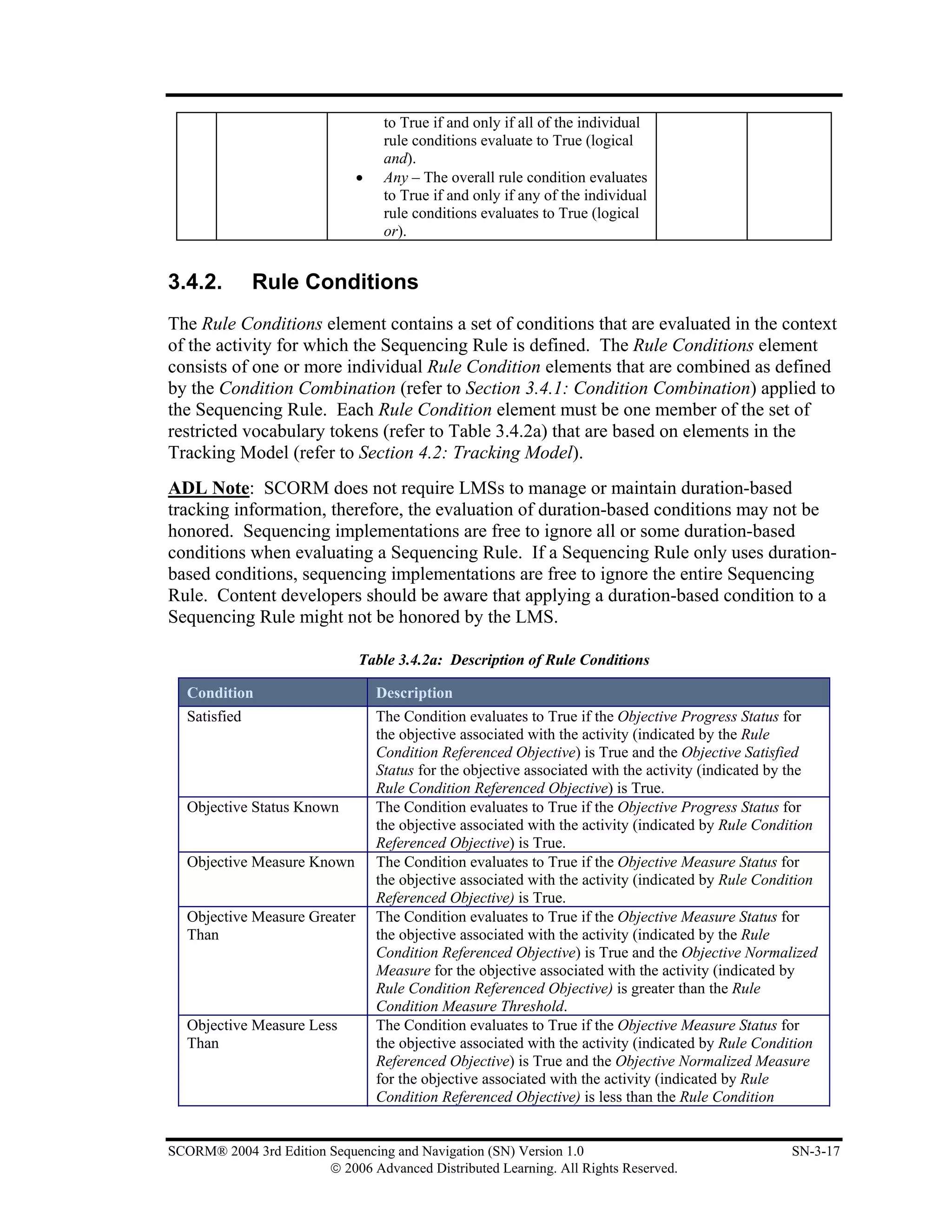
    3.4.2. Rule Conditions ................................................................................................................. 3-17
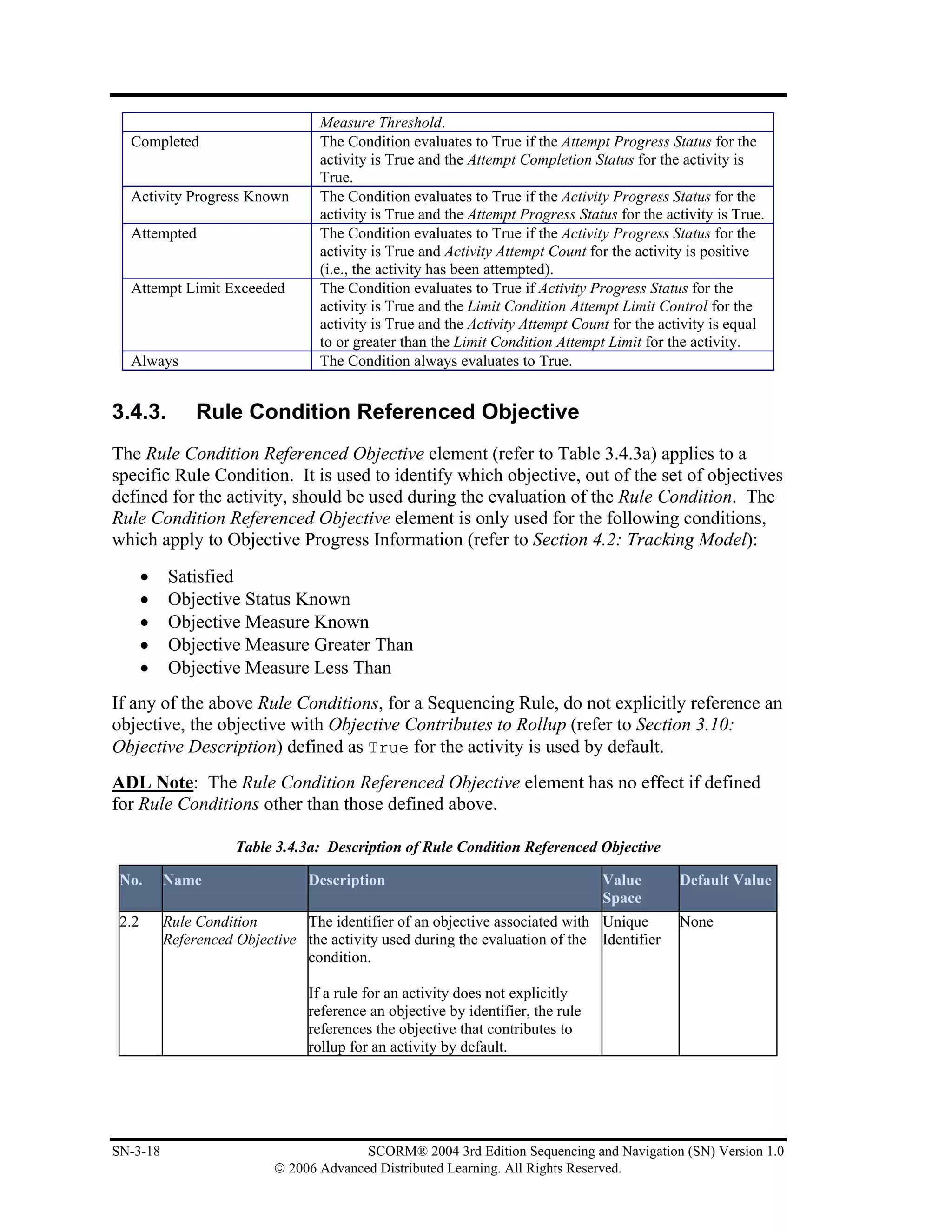
    3.4.3. Rule Condition Referenced Objective ............................................................................... 3-18
    3.4.4. Rule Condition Measure Threshold................................................................................... 3-19
    3.4.5. Rule Condition Operator ................................................................................................... 3-19
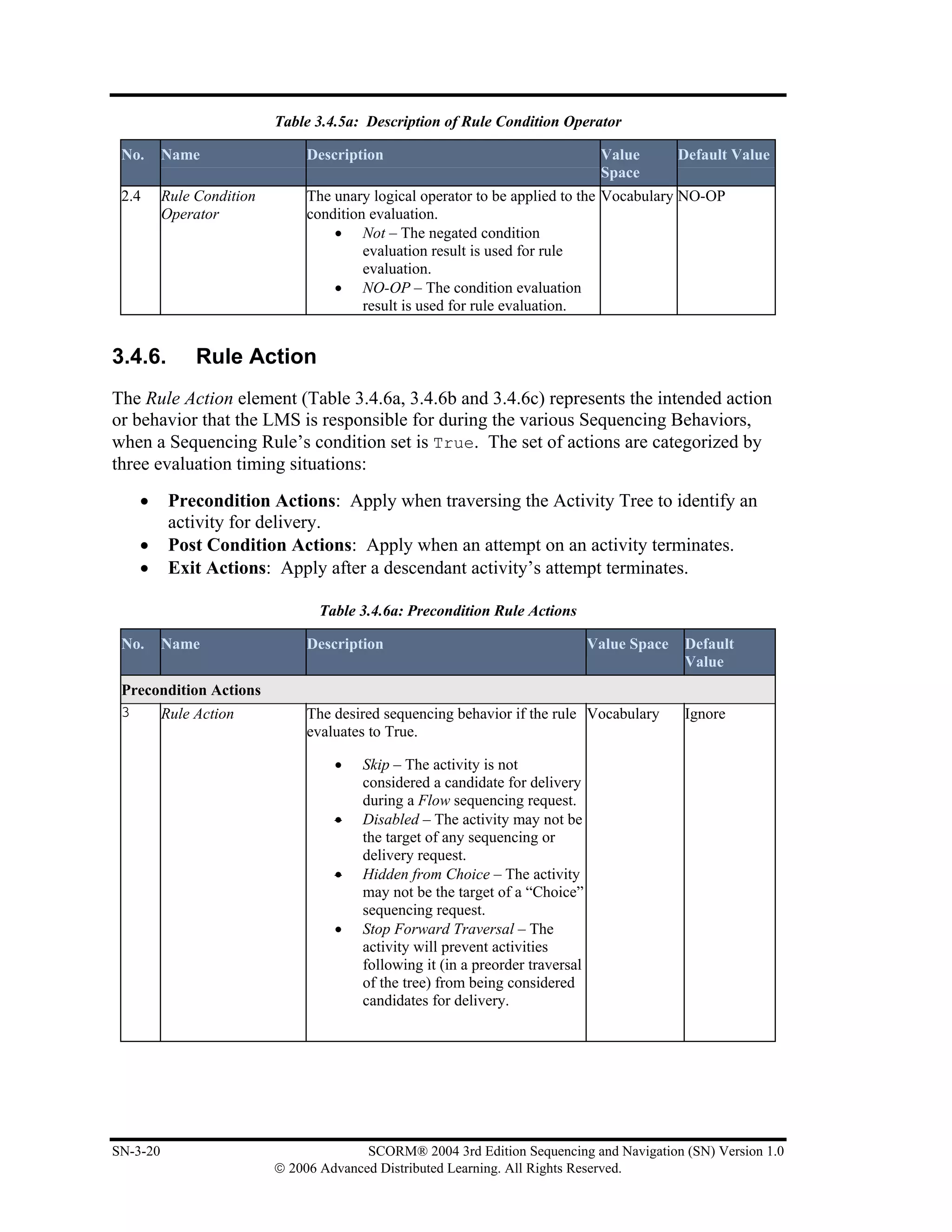
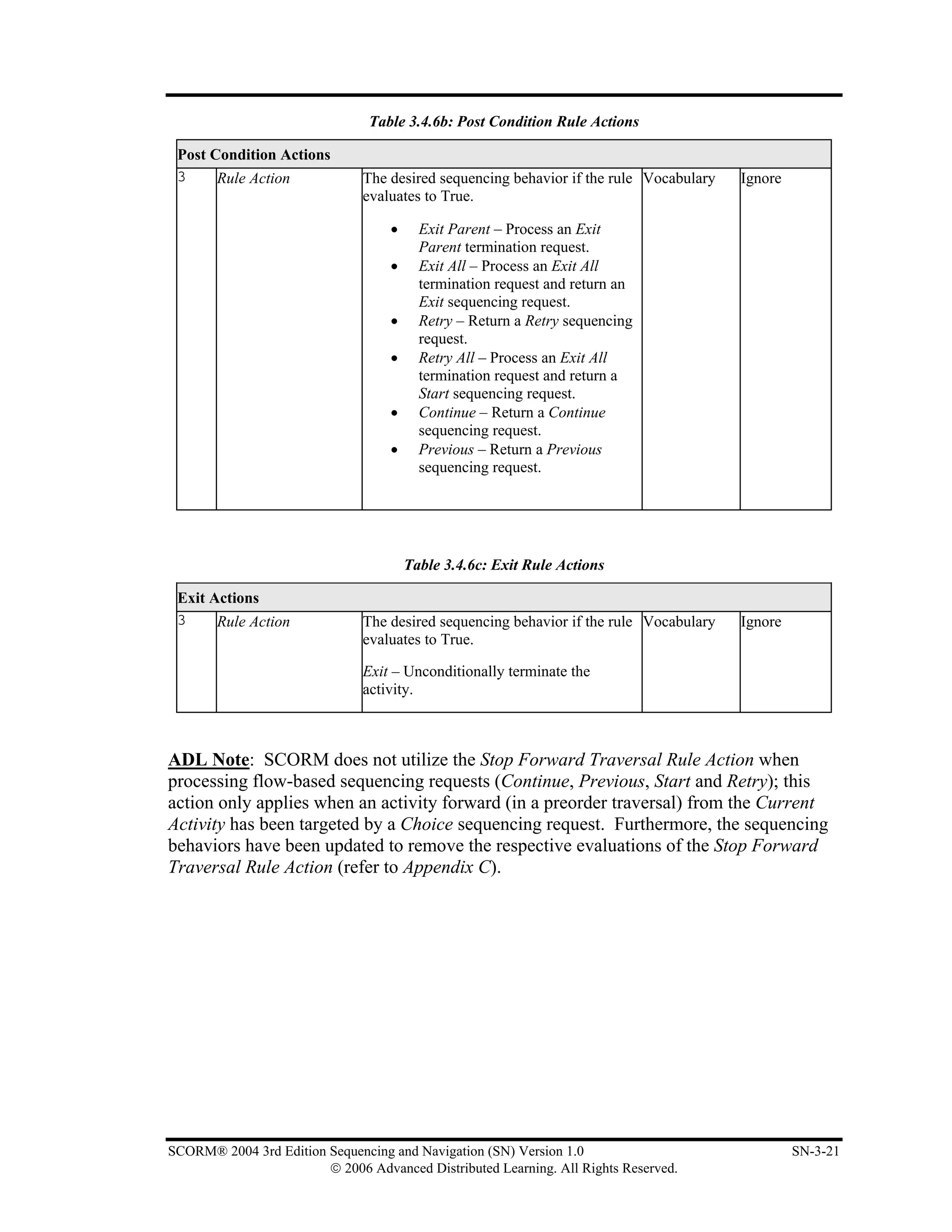
    3.4.6. Rule Action........................................................................................................................ 3-20
  3.5. LIMIT CONDITIONS ..................................................................................................................... 3-22
    3.5.1. Attempt Limits .................................................................................................................. 3-22
    3.5.2. Attempt Absolute Duration ............................................................................................... 3-23
  3.6. AUXILIARY RESOURCES ............................................................................................................. 3-25
  3.7. ROLLUP RULE DESCRIPTION ...................................................................................................... 3-26
    3.7.1. Condition Combination ..................................................................................................... 3-26
    3.7.2. Rollup Conditions.............................................................................................................. 3-27
    3.7.3. Rollup Condition Operator ................................................................................................ 3-28
    3.7.4. Rollup Child Activity Set .................................................................................................. 3-28

SCORM® 2004 3rd Edition Sequencing and Navigation (SN) Version 1.0                                                                                    v
                        © 2006 Advanced Distributed Learning. All Rights Reserved.
3.7.5.   Rollup Actions ................................................................................................................... 3-30
  3.8. ROLLUP CONTROLS .................................................................................................................... 3-32
    3.8.1.   Rollup Objective Satisfied ................................................................................................. 3-32
    3.8.2.   Rollup Objective Measure Weight..................................................................................... 3-32
    3.8.3.   Rollup Progress Completion .............................................................................................. 3-33
  3.9. ROLLUP CONSIDERATION CONTROLS ......................................................................................... 3-34
    3.9.1.   Measure Satisfaction If Active........................................................................................... 3-36
    3.9.2.   Required For Rollup Elements........................................................................................... 3-37
  3.10.    OBJECTIVE DESCRIPTION........................................................................................................ 3-39
    3.10.1. Local Objectives vs. Shared Global Objectives................................................................. 3-41
    3.10.2. Objectives Global to System.............................................................................................. 3-42
    3.10.3. Objective Map ................................................................................................................... 3-43
  3.11.    SELECTION CONTROLS ........................................................................................................... 3-45
  3.12.    RANDOMIZATION CONTROLS.................................................................................................. 3-47
  3.13.    DELIVERY CONTROLS............................................................................................................. 3-48
    3.13.1. Tracked .............................................................................................................................. 3-48
    3.13.2. Completion Set by Content................................................................................................ 3-49
    3.13.3. Objective Set by Content ................................................................................................... 3-49
SECTION 4 SEQUENCING BEHAVIORS ........................................................................................... 4-1
  4.1. SEQUENCING BEHAVIOR OVERVIEW ............................................................................................ 4-3
  4.2. TRACKING MODEL ....................................................................................................................... 4-4
    4.2.1.   Tracking Model Overview................................................................................................... 4-4
  4.3. OVERALL SEQUENCING PROCESS ............................................................................................... 4-19
    4.3.1.   Sequencing Loop ............................................................................................................... 4-21
  4.4. NAVIGATION BEHAVIOR ............................................................................................................. 4-23
    4.4.1.   Navigation Events.............................................................................................................. 4-23
    4.4.2.   Navigation Controls........................................................................................................... 4-23
    4.4.3.   Navigation Requests .......................................................................................................... 4-24
    4.4.4.   Navigation Request Process............................................................................................... 4-25
  4.5. TERMINATION BEHAVIOR ........................................................................................................... 4-27
    4.5.1.   Termination Requests ........................................................................................................ 4-27
    4.5.2.   Evaluating Post Condition and Exit Action Rules ............................................................. 4-28
    4.5.3.   Termination Request Process............................................................................................. 4-29
    4.5.4.   End Attempt Process.......................................................................................................... 4-31
  4.6. ROLLUP BEHAVIOR .................................................................................................................... 4-34
    4.6.1.   Overall Rollup Process ...................................................................................................... 4-35
    4.6.2.   Evaluating Rollup Rules .................................................................................................... 4-36
    4.6.3.   Measure Rollup Process..................................................................................................... 4-38
    4.6.4.   Objective Rollup Process................................................................................................... 4-39
    4.6.5.   Activity Progress Rollup Process....................................................................................... 4-43
  4.7. SELECTION AND RANDOMIZATION BEHAVIOR ............................................................................ 4-46
    4.7.1.   Select Child Process........................................................................................................... 4-46
    4.7.2.   Randomize Children Process ............................................................................................. 4-47
  4.8. SEQUENCING BEHAVIOR ............................................................................................................. 4-48
    4.8.2.   Sequencing Request Process.............................................................................................. 4-49
    4.8.3.   Evaluating Limit Conditions.............................................................................................. 4-50
    4.8.4.   Evaluating Precondition Sequencing Rules ....................................................................... 4-50
    4.8.5.   Flow Subprocess................................................................................................................ 4-51
    4.8.6.   Overall Sequencing Process............................................................................................... 4-53
  4.9. DELIVERY BEHAVIOR ................................................................................................................. 4-56
    4.9.1.   Delivery Request Process .................................................................................................. 4-57
    4.9.2.   Content Delivery Environment Process............................................................................. 4-57
    4.9.3.   Launching a Content Object .............................................................................................. 4-58
SECTION 5 THE SCORM® NAVIGATION MODEL .......................................................................... 5-1
  5.1. NAVIGATION MODEL OVERVIEW ................................................................................................. 5-3


vi                                                SCORM® 2004 3rd Edition Sequencing and Navigation (SN) Version 1.0
                                    © 2006 Advanced Distributed Learning. All Rights Reserved.
5.2. TRIGGERING NAVIGATION REQUESTS .......................................................................................... 5-4
  5.3. PROCESSING NAVIGATION REQUESTS .......................................................................................... 5-7
  5.4. TERMINATION OF A CONTENT OBJECT THROUGH NAVIGATION ................................................... 5-9
  5.5. NAVIGATION AND AUXILIARY RESOURCES ................................................................................ 5-11
  5.6. USER INTERFACE (UI) DEVICES FOR NAVIGATION ..................................................................... 5-12
    5.6.1. Providing UI Devices for Navigation ................................................................................ 5-12
    5.6.2. Using the isvisible Attribute .............................................................................................. 5-12
    5.6.3. Presentation Information Model ........................................................................................ 5-13
    5.6.4. Run-Time Communication of Navigation Requests.......................................................... 5-14
    5.6.5. The SCORM Run-Time Navigation Data Model .............................................................. 5-15
    5.6.6. Request .............................................................................................................................. 5-16
    5.6.7. Request Valid .................................................................................................................... 5-19
APPENDIX A ACRONYM LISTING.................................................................................................... A-1
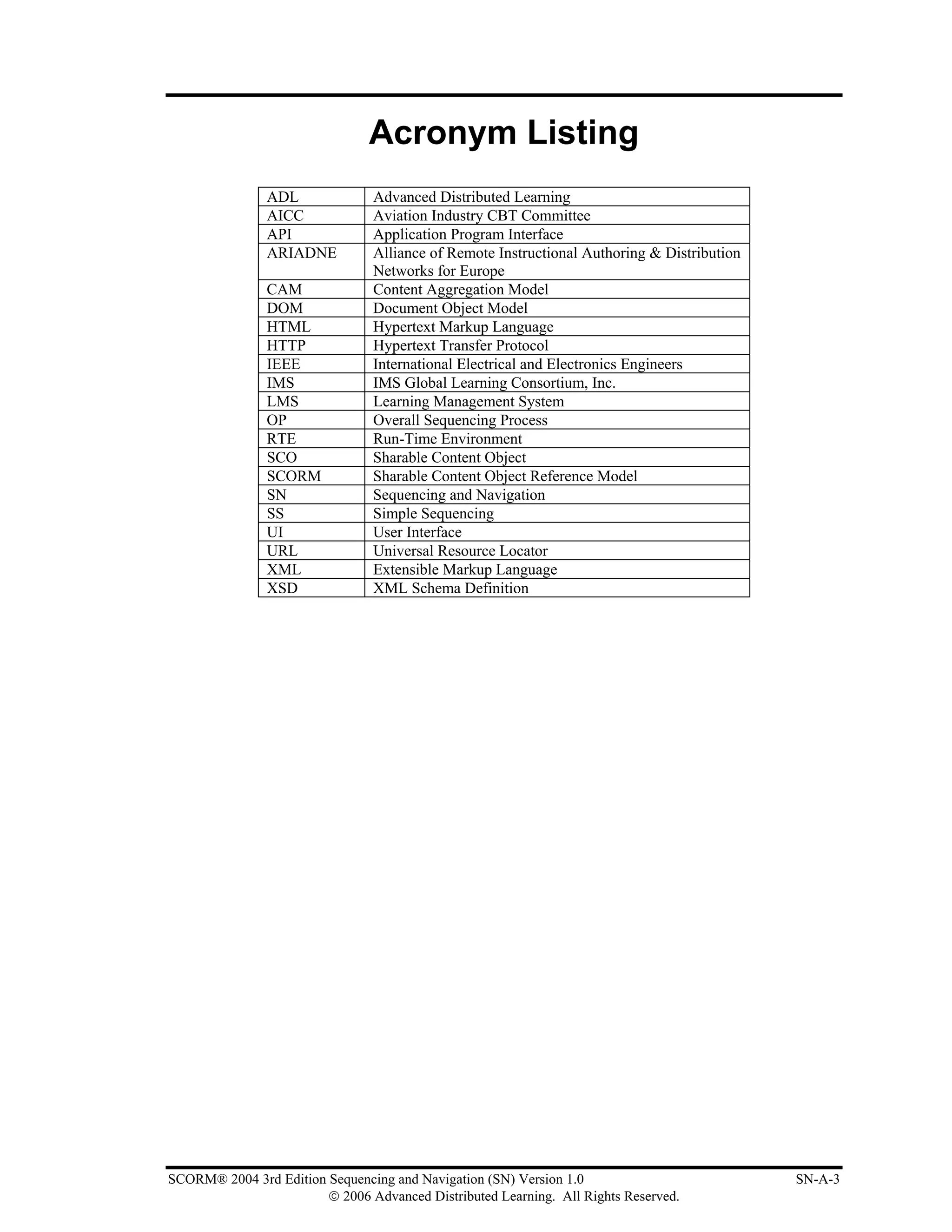
ACRONYM LISTING ............................................................................................................................... A-3
APPENDIX B REFERENCES ..................................................................................................................B-1
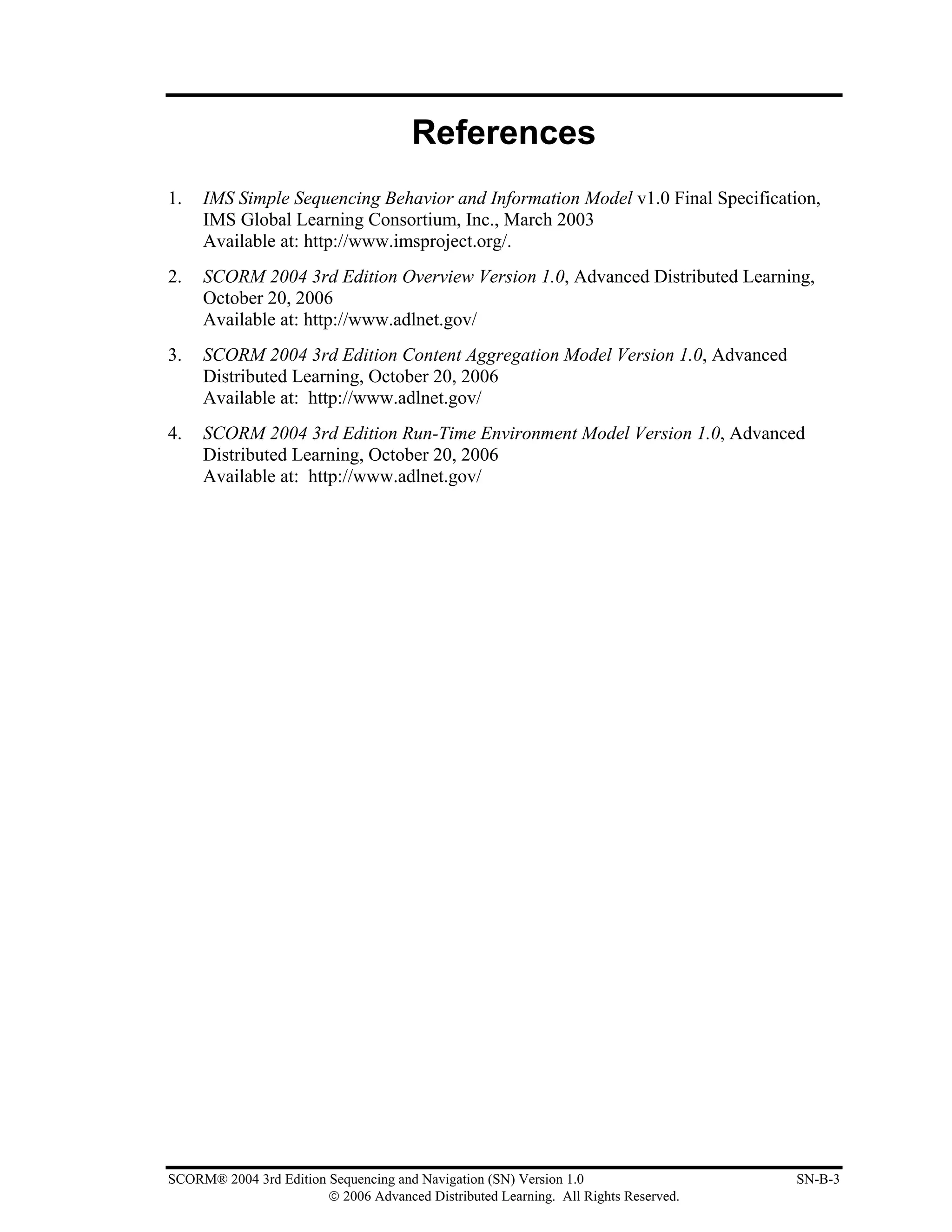
REFERENCES............................................................................................................................................B-3
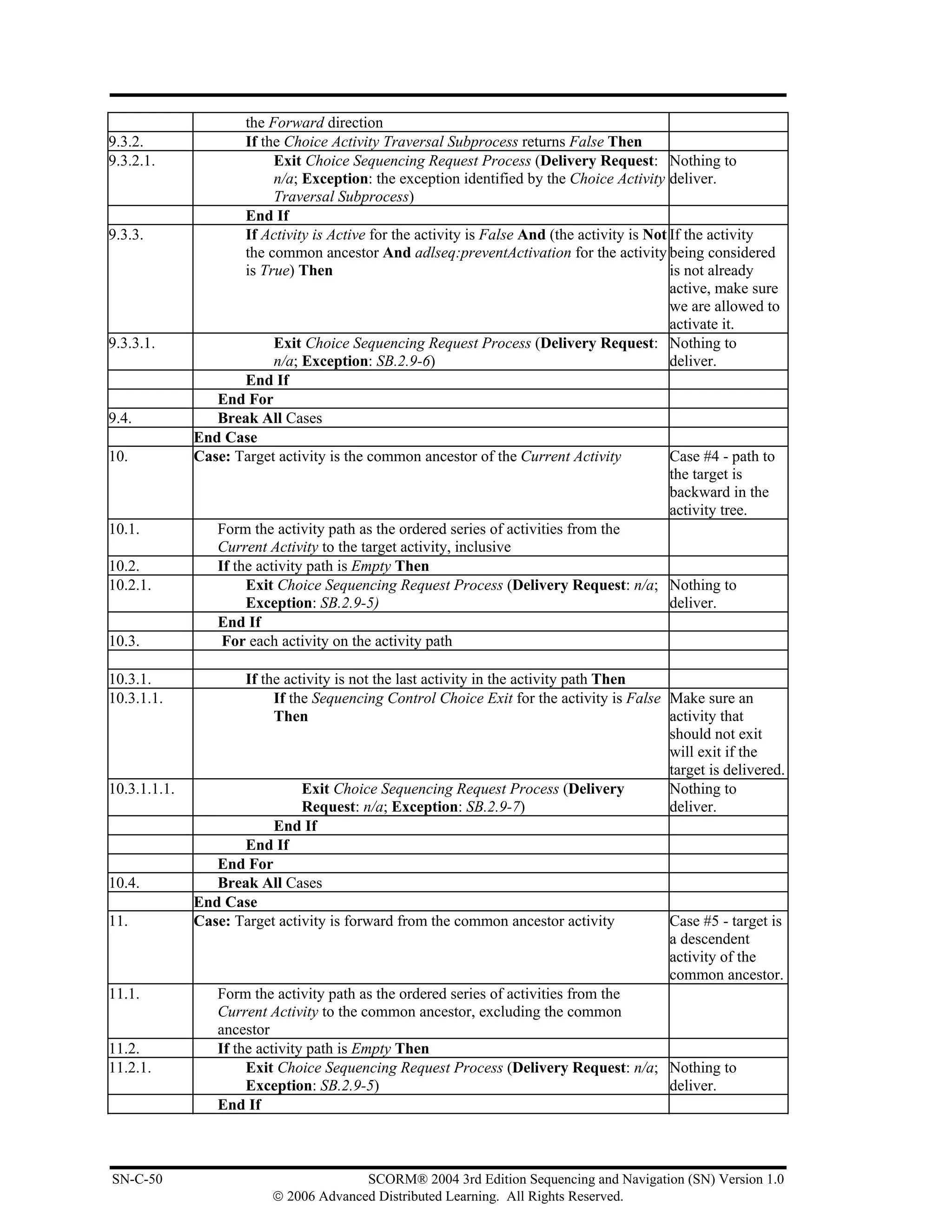
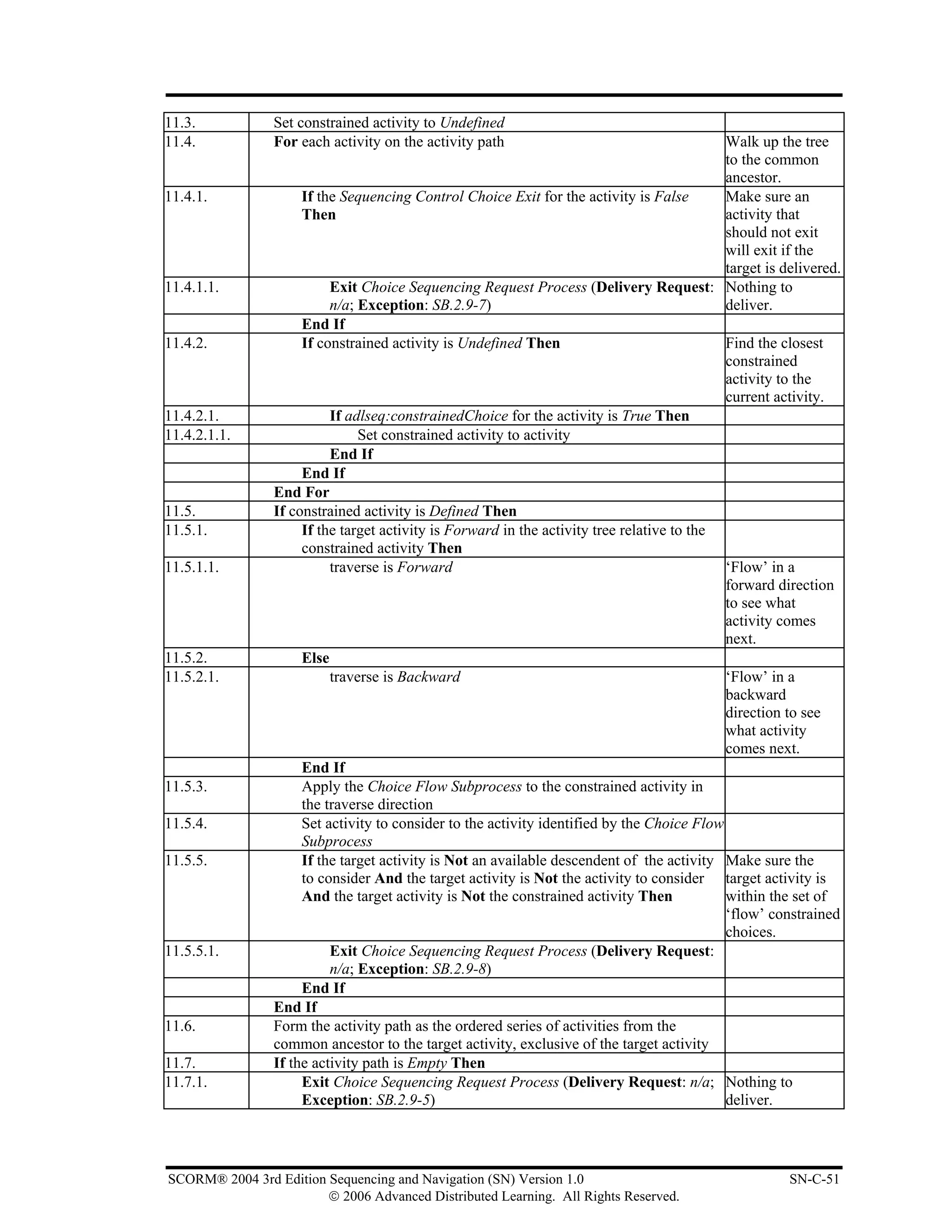
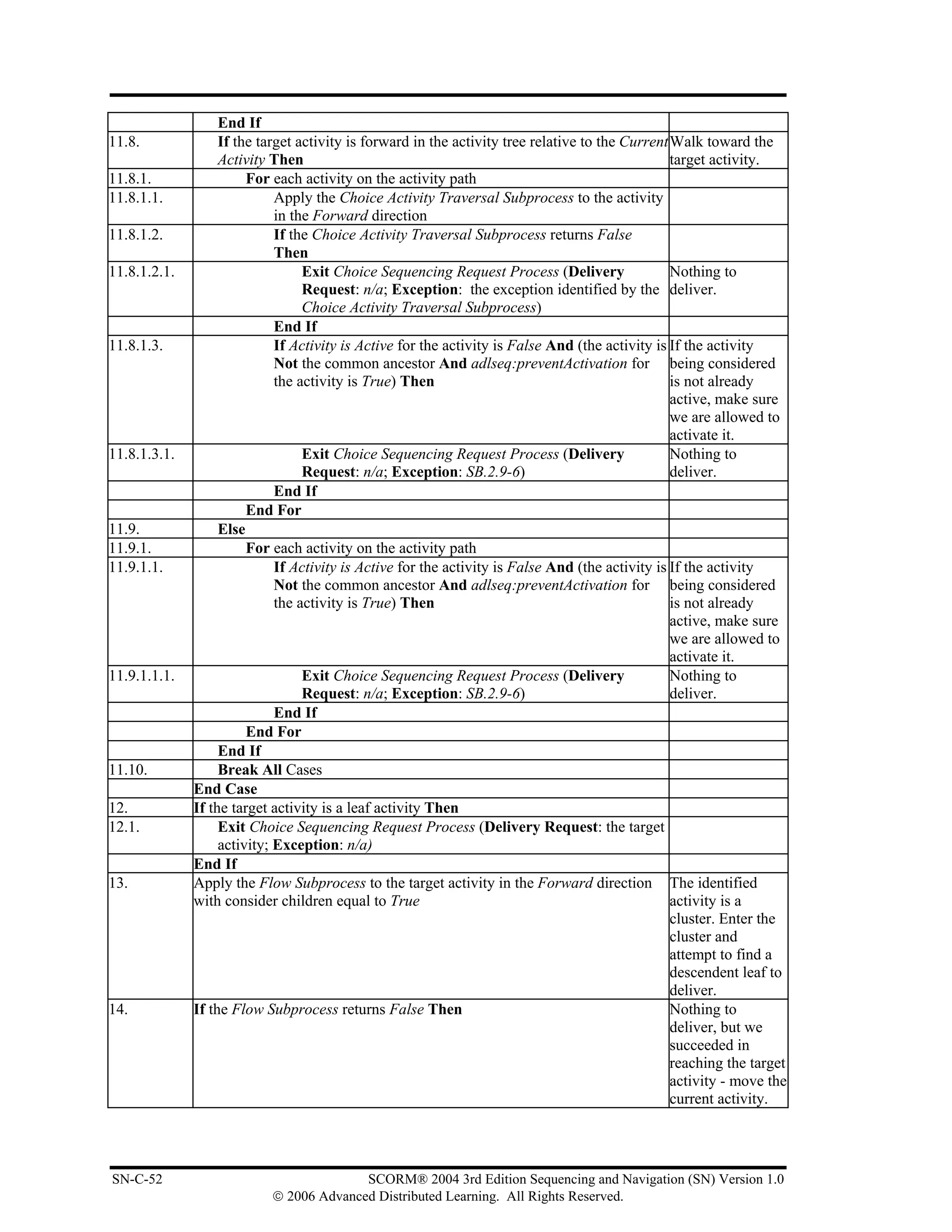
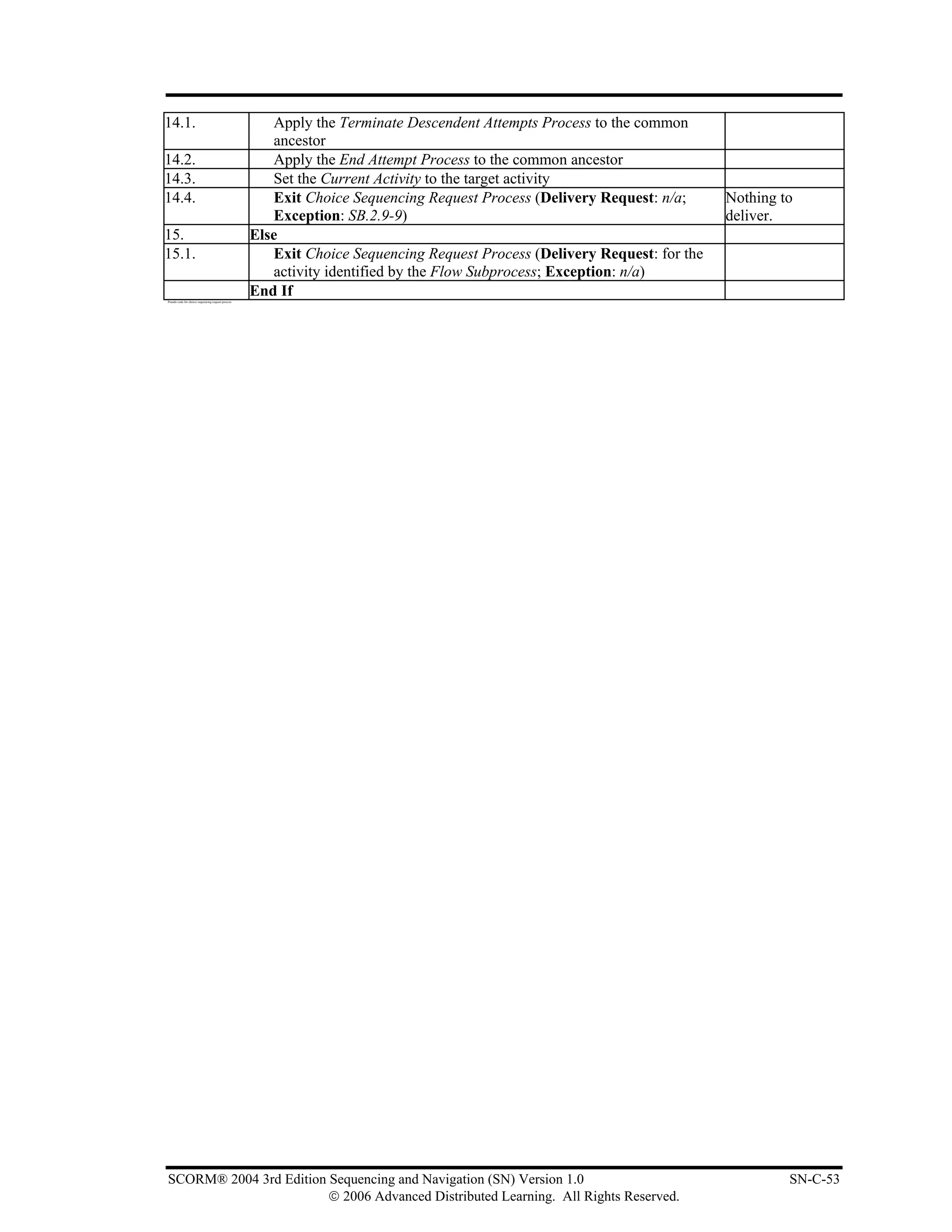
APPENDIX C SEQUENCING BEHAVIOR PSEUDO CODE .................................................................C-5
SEQUENCING BEHAVIOR PSEUDO CODE..........................................................................................C-7
APPENDIX D SEQUENCING EXCEPTION CODES............................................................................ D-1
SEQUENCING EXCEPTION CODES ..................................................................................................... D-3
APPENDIX E DOCUMENT REVISON HISTORY.................................................................................E-1
DOCUMENT REVISION HISTORY ........................................................................................................E-3


                                                 List of Figures
Figure 1.1a The Sequencing and Navigation Book as Part of the SCORM Bookshelf ............................... 1-3
Figure 2.1a: An Example of an Activity Tree ............................................................................................ 2-3
Figure 2.1.1a: Relationship between a Content Organization and an Activity Tree.................................... 2-4
Figure 2.1.2a: Cluster Example .................................................................................................................. 2-7
Figure 2.2a: Sample Learning Activity ...................................................................................................... 2-8
Figure 3.2.1a: Default Sequencing Control Choice Behavior .................................................................... 3-5
Figure 3.2.1b: Choosing a Cluster Activity with Flow Enabled................................................................. 3-6
Figure 3.2.1c: Choosing a Cluster Activity with Flow Disabled................................................................ 3-7
Figure 3.2.2a: Choice Exit Example........................................................................................................... 3-8
Figure 3.2.3a: Sequencing Control Flow Behavior .................................................................................... 3-9
Figure 3.2.4a: Sequencing Control Forward Only Example .................................................................... 3-10
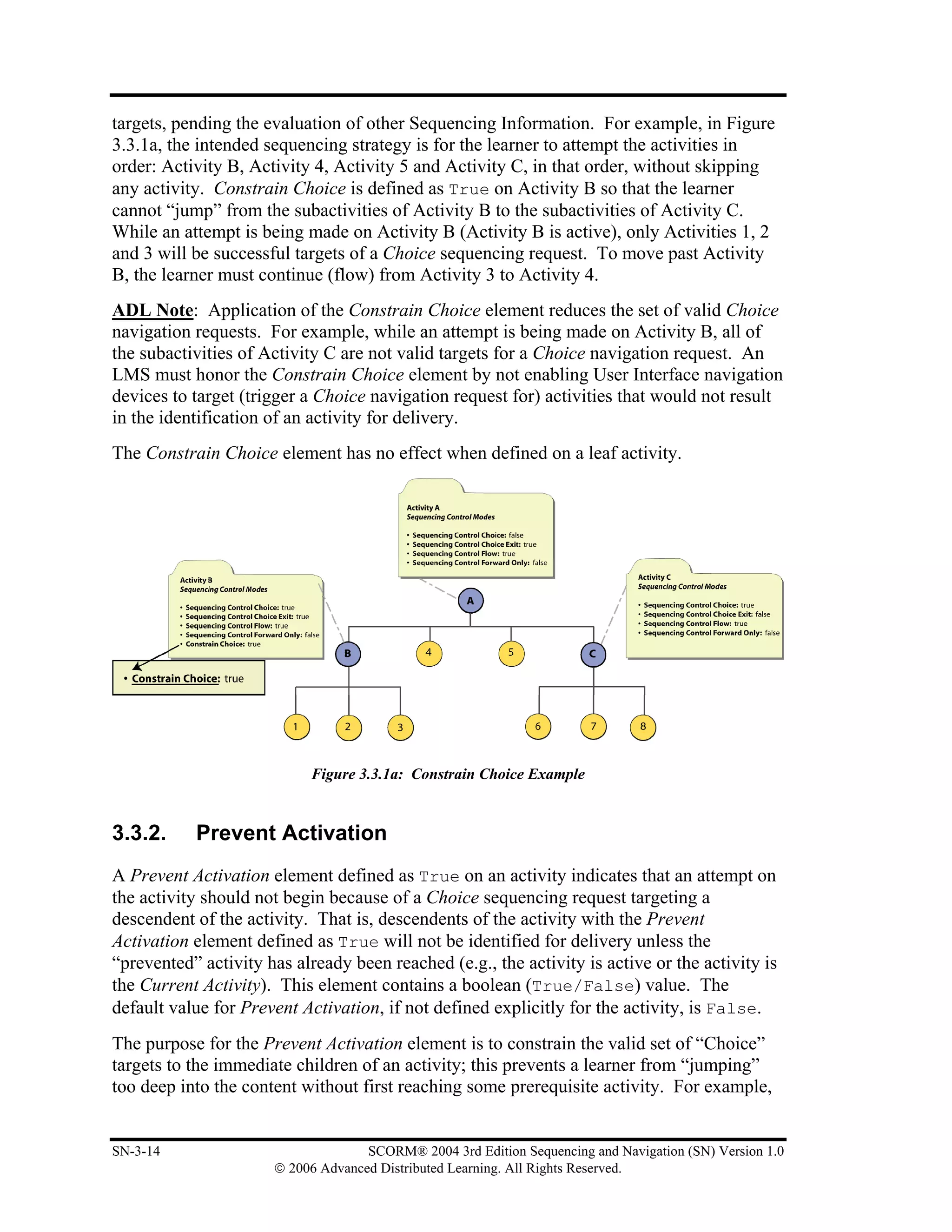
Figure 3.3.1a: Constrain Choice Example................................................................................................ 3-14
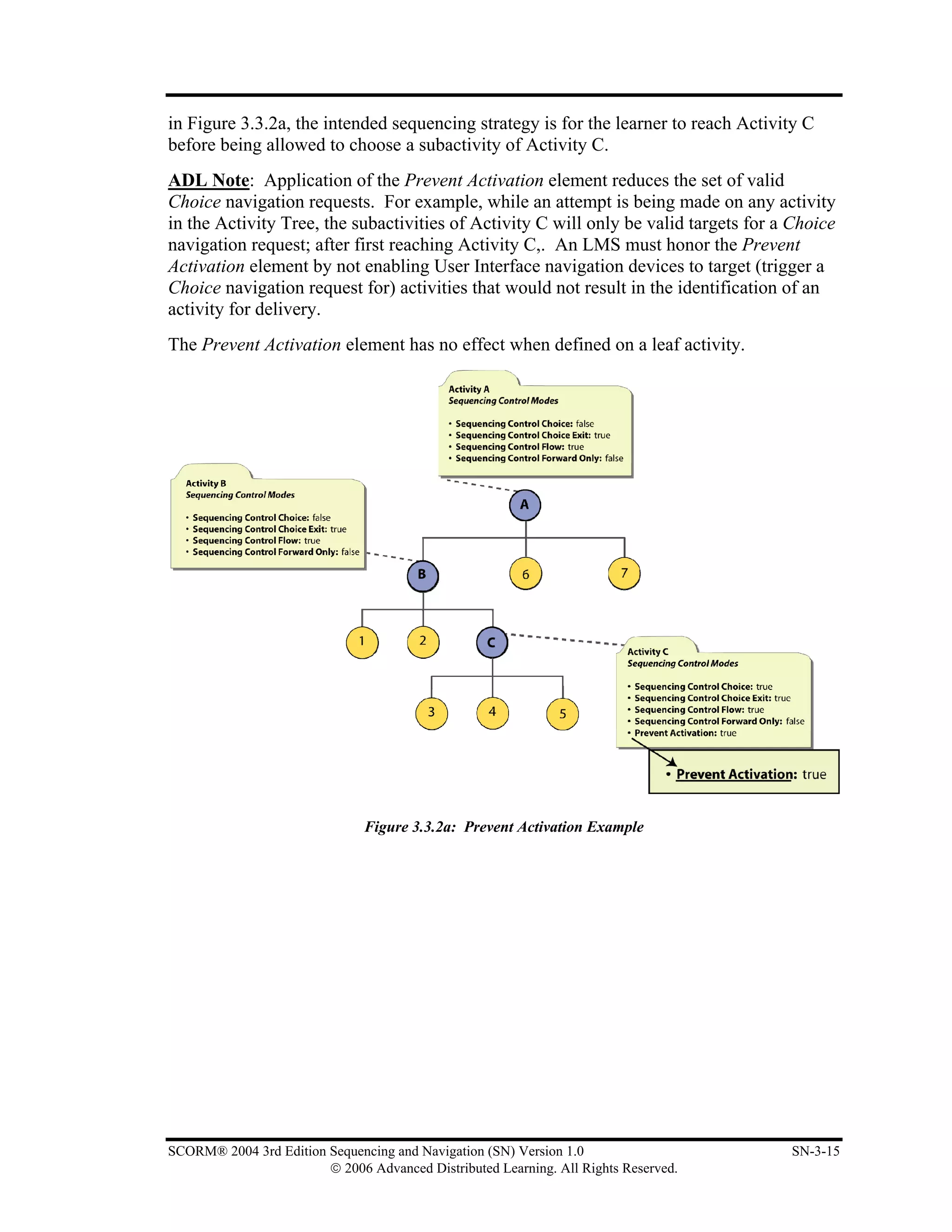
Figure 3.3.2a: Prevent Activation Example.............................................................................................. 3-15
Figure 3.4a: Sequencing Rule Conditions and Actions ............................................................................ 3-16
Figure 3.7a: Rollup Rule Child Activity Set, Conditions and Actions..................................................... 3-26
Figure 3.9.1a: Measure Satisfaction If Active Example........................................................................... 3-36
Figure 3.10a: Objective Description and Objective Progress Information Relationship.......................... 3-40
Figure 3.10.1a: Sharing Objectives Example ........................................................................................... 3-42
Figure 4.2.1a: Relationship between the Run-Time Environment Data Model and the Tracking Model ... 4-5
Figure 4.2.1.1a: Tracking Model................................................................................................................ 4-6
Figure 4.2.6.1a Current Activity State Model ........................................................................................... 4-16
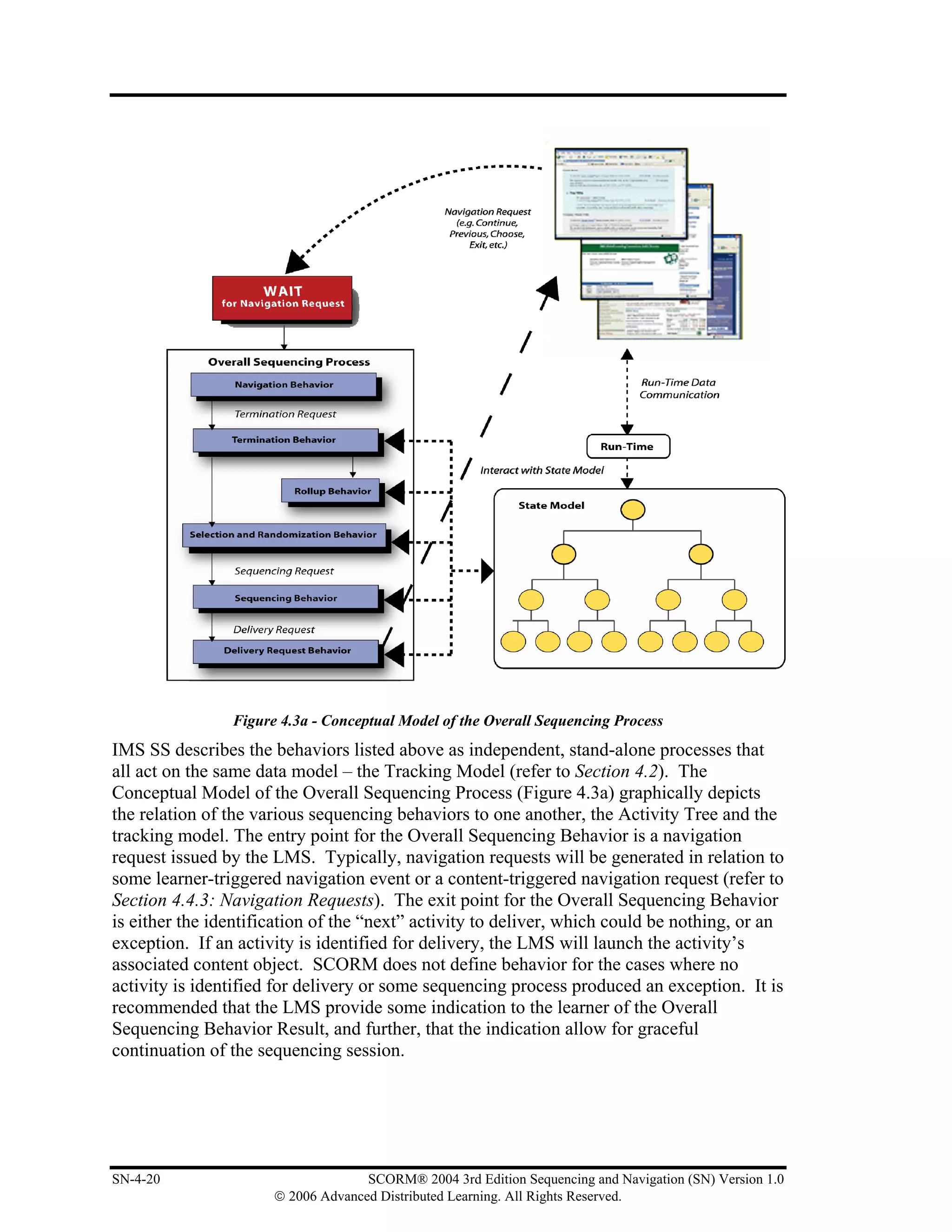
Figure 4.3a - Conceptual Model of the Overall Sequencing Process ........................................................ 4-20
Figure 4.6a: Activity Status Information Used During Rollup................................................................. 4-34
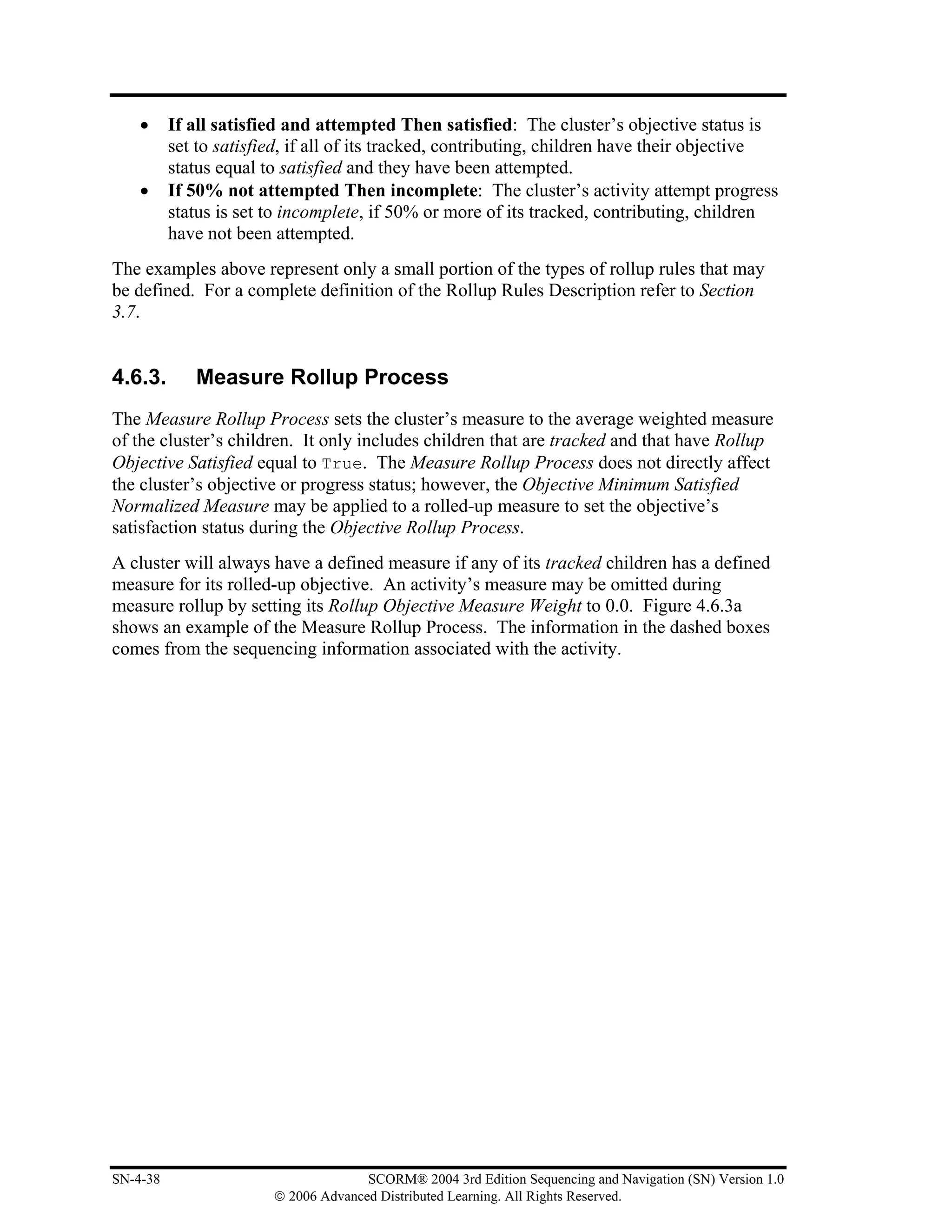
Figure 4.6.3a: Example Of the Measure Rollup Process.......................................................................... 4-39


SCORM® 2004 3rd Edition Sequencing and Navigation (SN) Version 1.0                                                                                   vii
                        © 2006 Advanced Distributed Learning. All Rights Reserved.
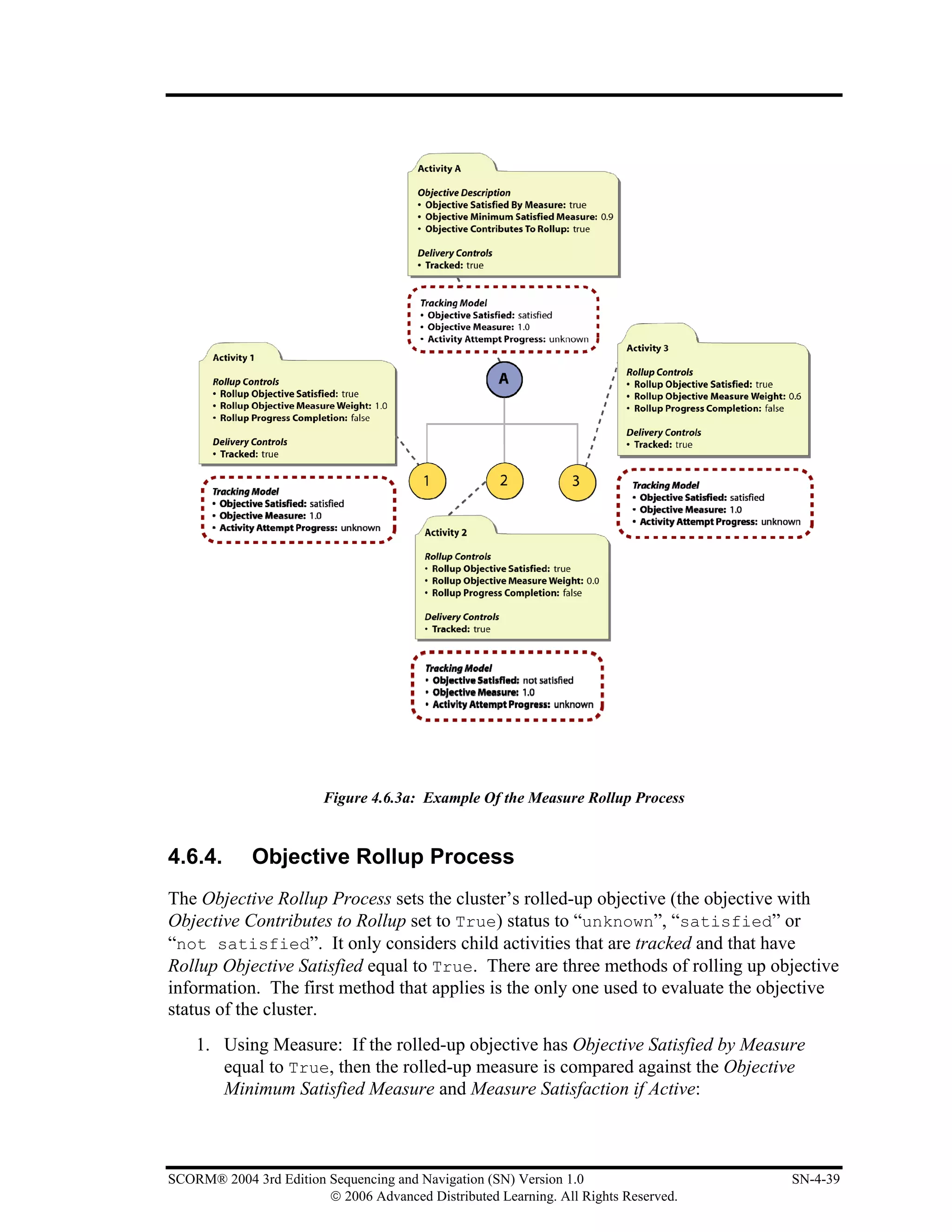
Figure 4.6.4a: Objective Rollup Using Measure ...................................................................................... 4-40
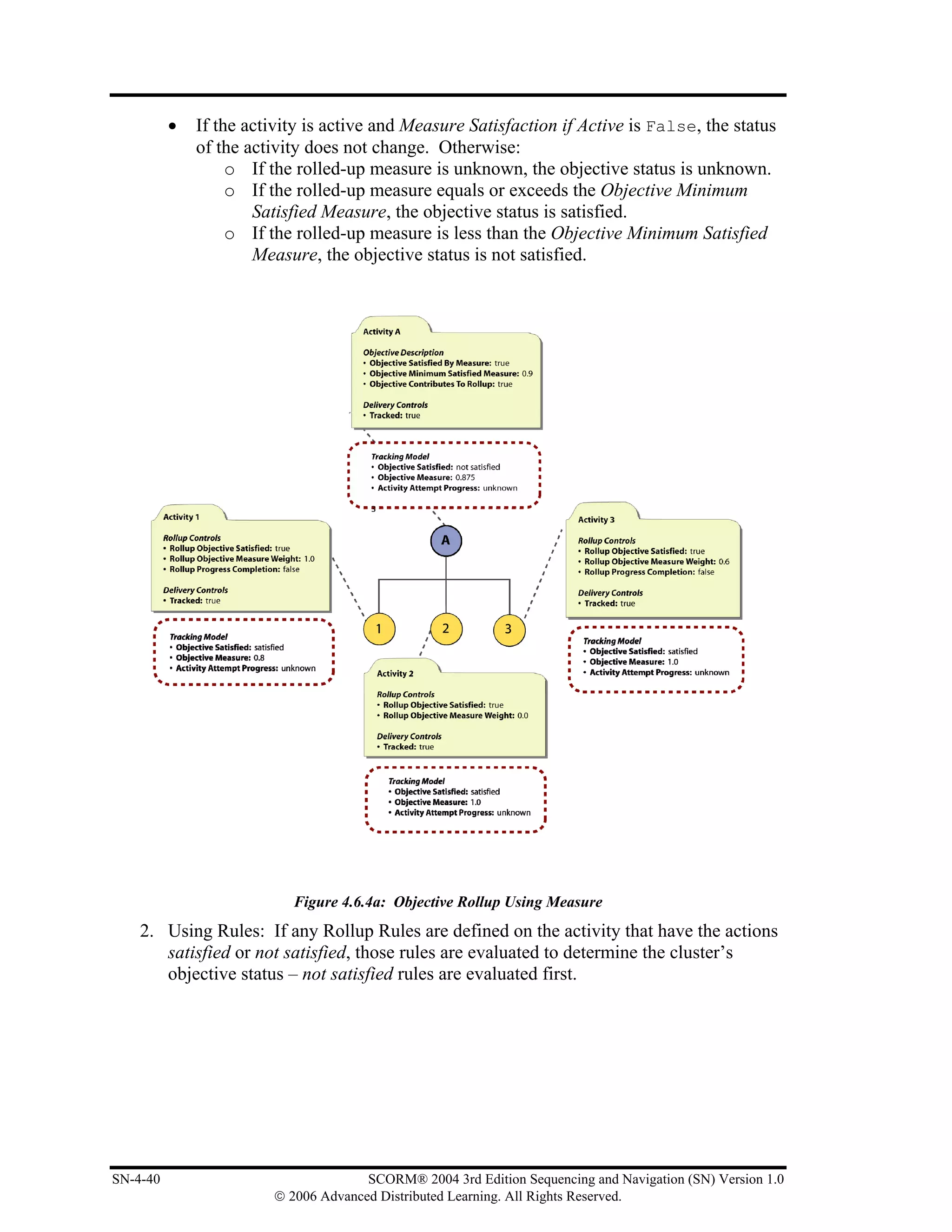
Figure 4.6.4b: Objective Rollup Using Rules........................................................................................... 4-41
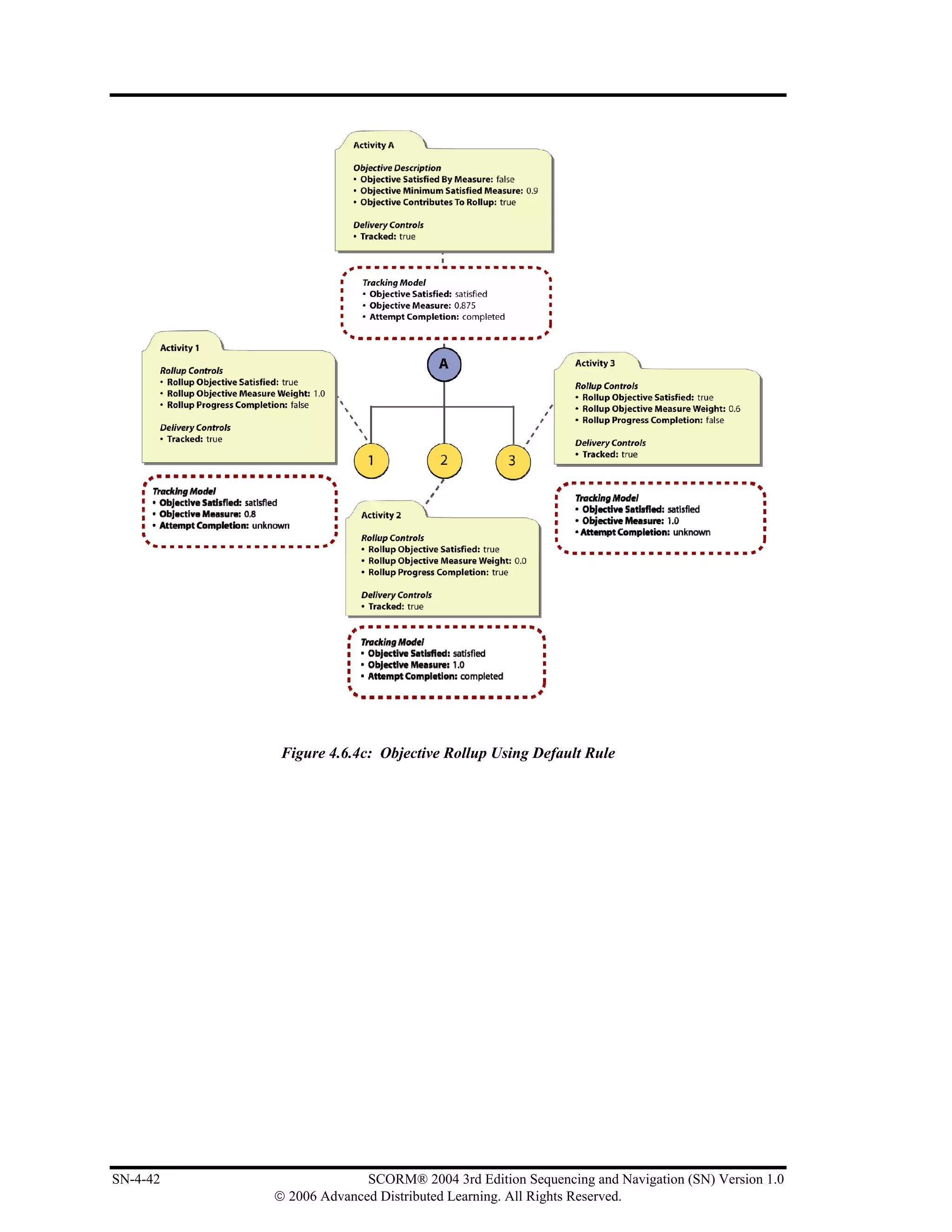
Figure 4.6.4c: Objective Rollup Using Default Rule................................................................................ 4-42
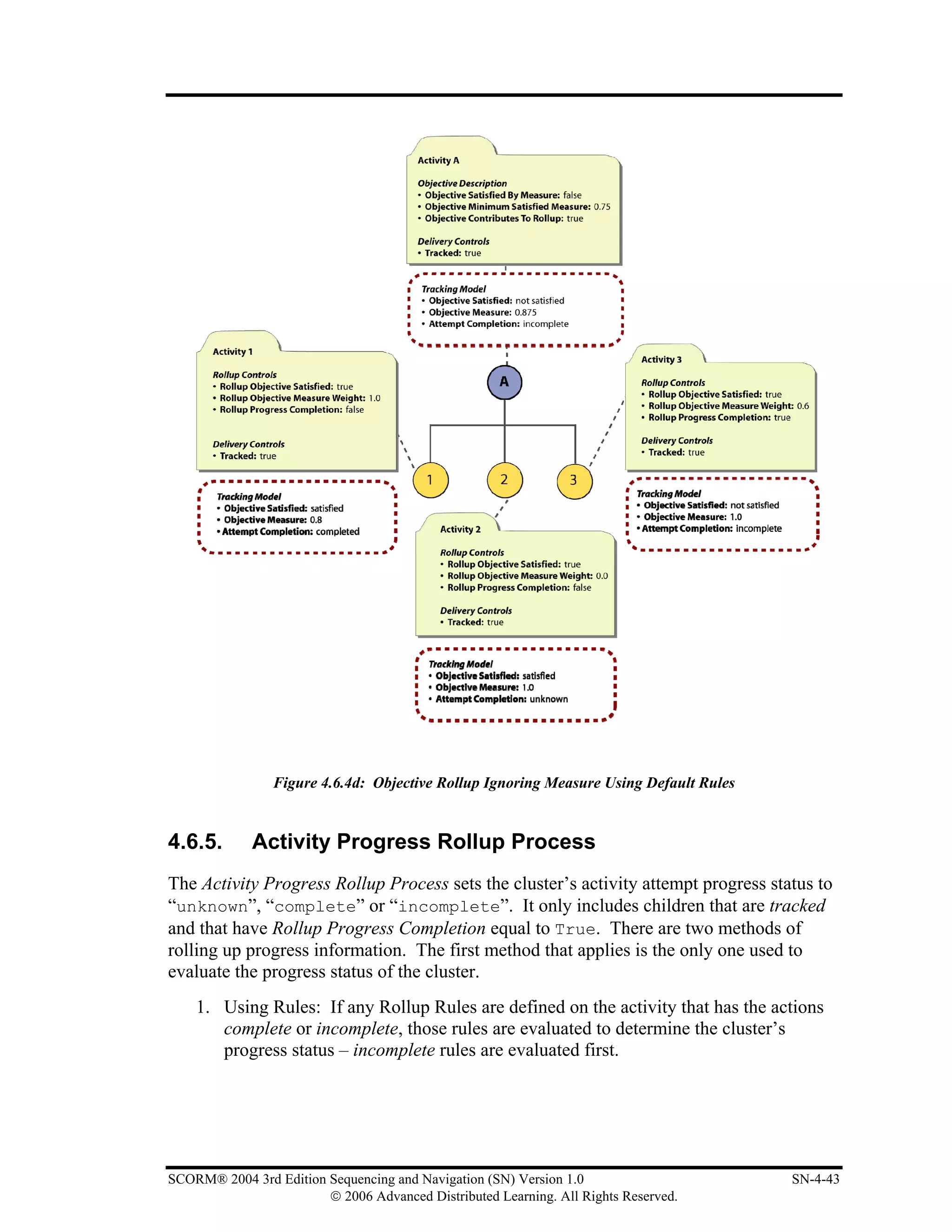
Figure 4.6.4d: Objective Rollup Ignoring Measure Using Default Rules................................................. 4-43
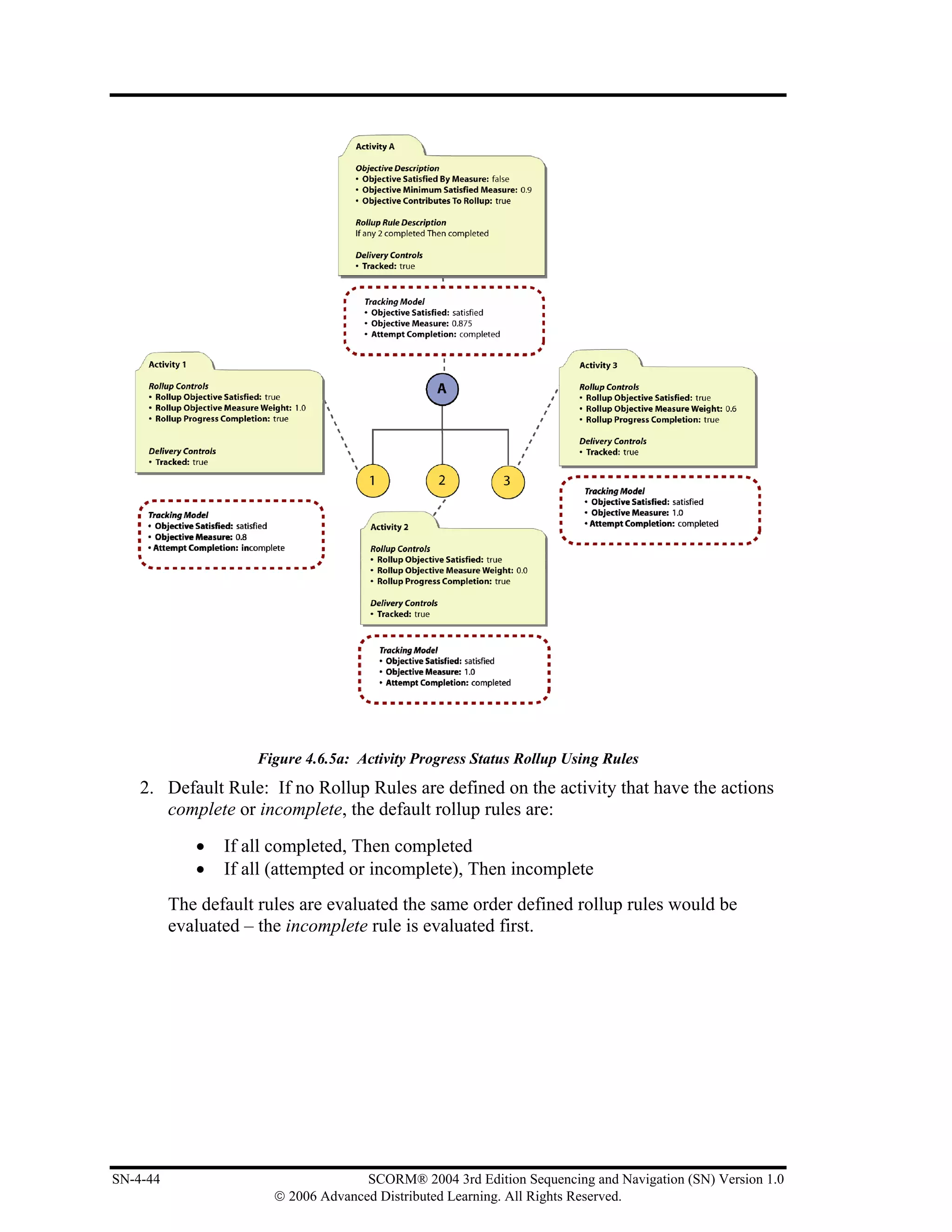
Figure 4.6.5a: Activity Progress Status Rollup Using Rules .................................................................... 4-44
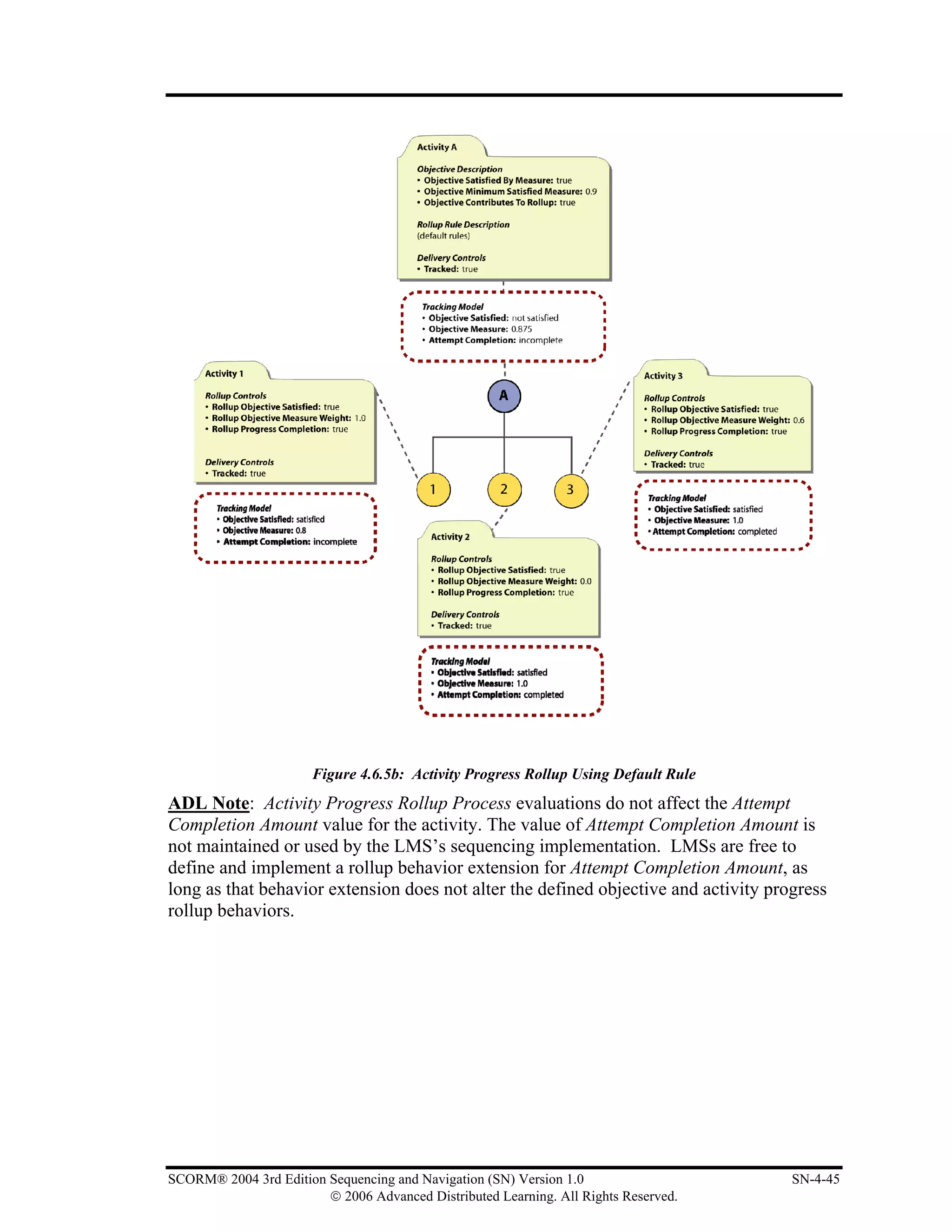
Figure 4.6.5b: Activity Progress Rollup Using Default Rule ................................................................... 4-45
Figure 4.8.5a: Relative Order of “Flowing” Through an Activity Tree.................................................... 4-52
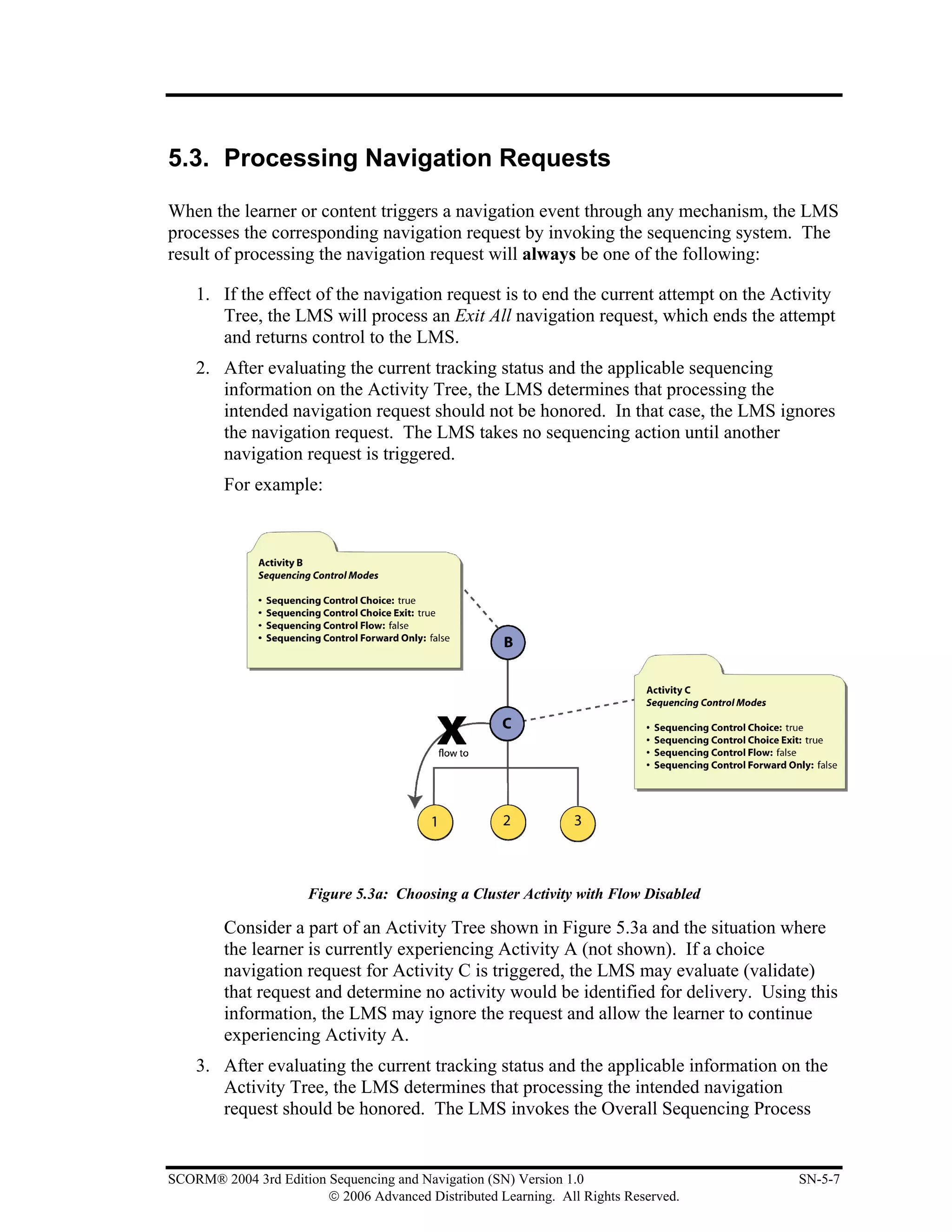
Figure 5.3a: Choosing a Cluster Activity with Flow Disabled ................................................................... 5-7


                                                  List of Tables
Table 3.2a: Description of Sequencing Control Modes.............................................................................. 3-4
Table 3.2.5a: Evaluation of Tracking Information based on Use Current Objective Information............ 3-11
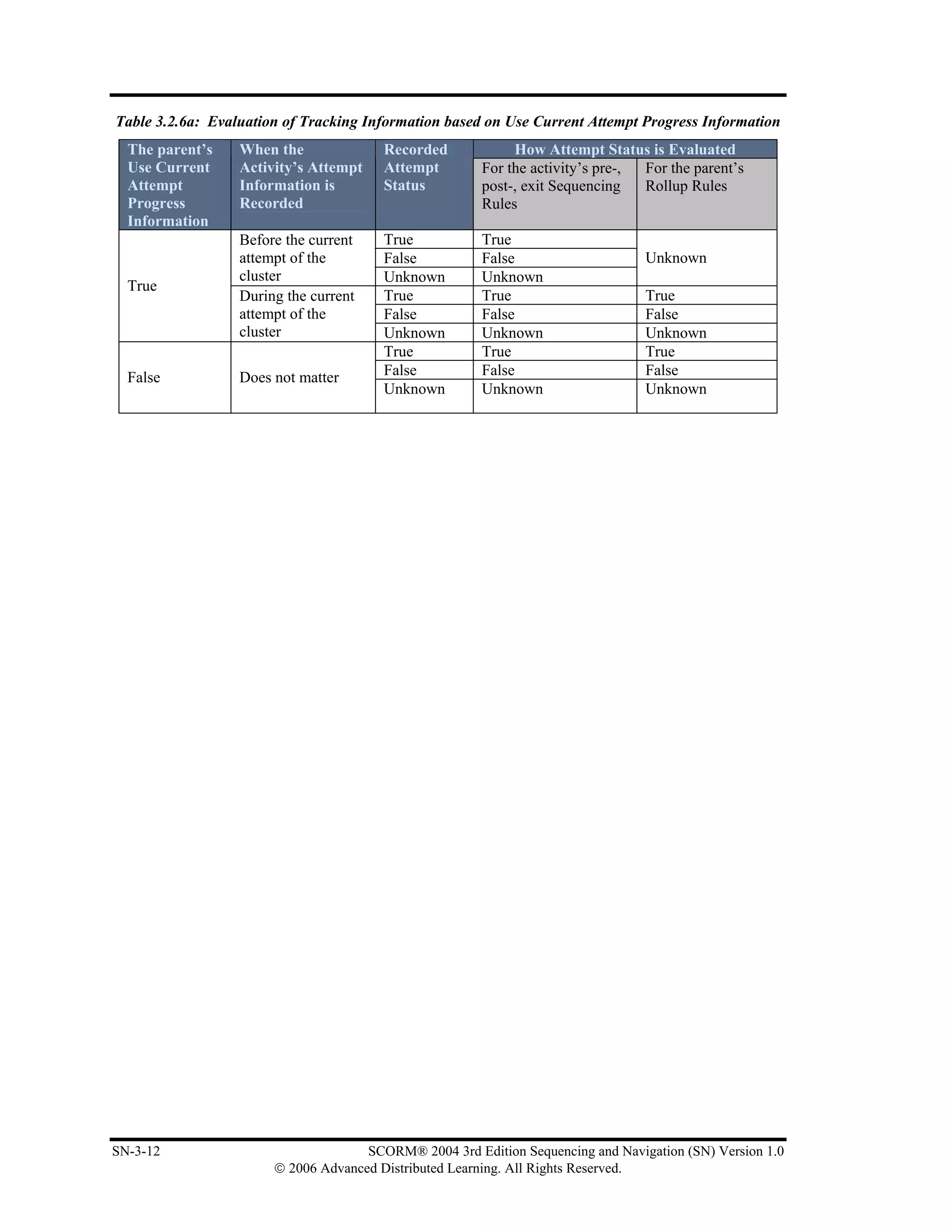
Table 3.2.6a: Evaluation of Tracking Information based on Use Current Attempt Progress Information 3-12
Table 3.3a: Description of Constrain Choice Controls ............................................................................. 3-13
Table 3.4.1a: Condition Combination Description .................................................................................... 3-16
Table 3.4.2a: Description of Rule Conditions .......................................................................................... 3-17
Table 3.4.3a: Description of Rule Condition Referenced Objective......................................................... 3-18
Table 3.4.4a: Description of Rule Condition Measure Threshold ............................................................ 3-19
Table 3.4.5a: Description of Rule Condition Operator............................................................................. 3-20
Table 3.4.6a: Precondition Rule Actions ................................................................................................... 3-20
Table 3.4.6b: Post Condition Rule Actions ............................................................................................... 3-21
Table 3.4.6c: Exit Rule Actions................................................................................................................. 3-21
Table 3.5.1a: Description of Attempt Limit............................................................................................... 3-22
Table 3.5.2a: Description of Attempt Absolute Duration Limit ............................................................... 3-23
Table 3.7.1a: Description of Condition Combination............................................................................... 3-27
Table 3.7.2a: Description of Rollup Conditions ....................................................................................... 3-27
Table 3.7.3a: Description of Rollup Condition Operator........................................................................... 3-28
Table 3.7.4a: Description of Rollup Child Activity Set............................................................................. 3-29
Table 3.7.5a: Description of Rollup Actions ............................................................................................ 3-30
Table 3.8a: Description of Rollup Controls.............................................................................................. 3-32
Table 3.9a: Description of Rollup Consideration Controls....................................................................... 3-34
Table 3.10a: Description of Objective Description .................................................................................. 3-39
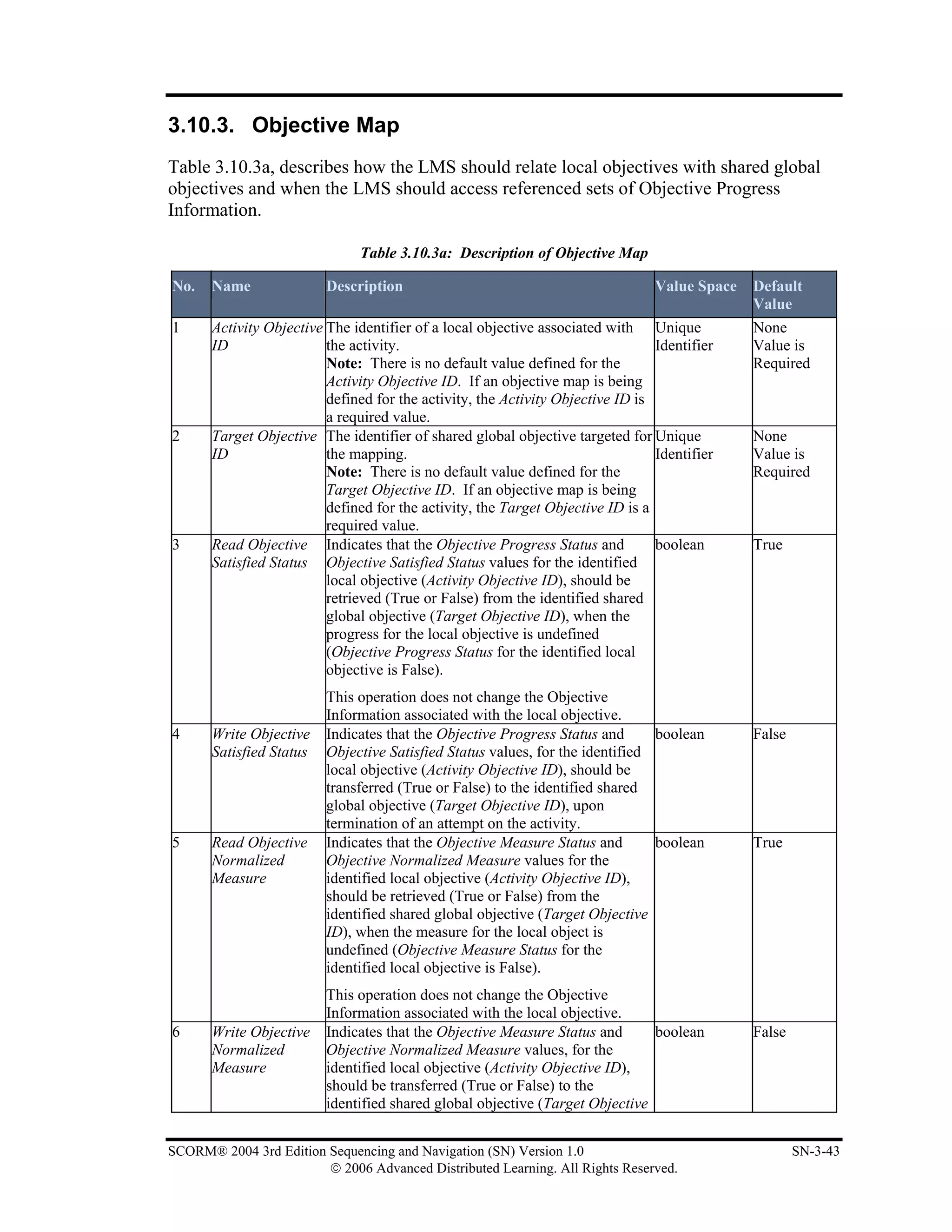
Table 3.10.3a: Description of Objective Map........................................................................................... 3-43
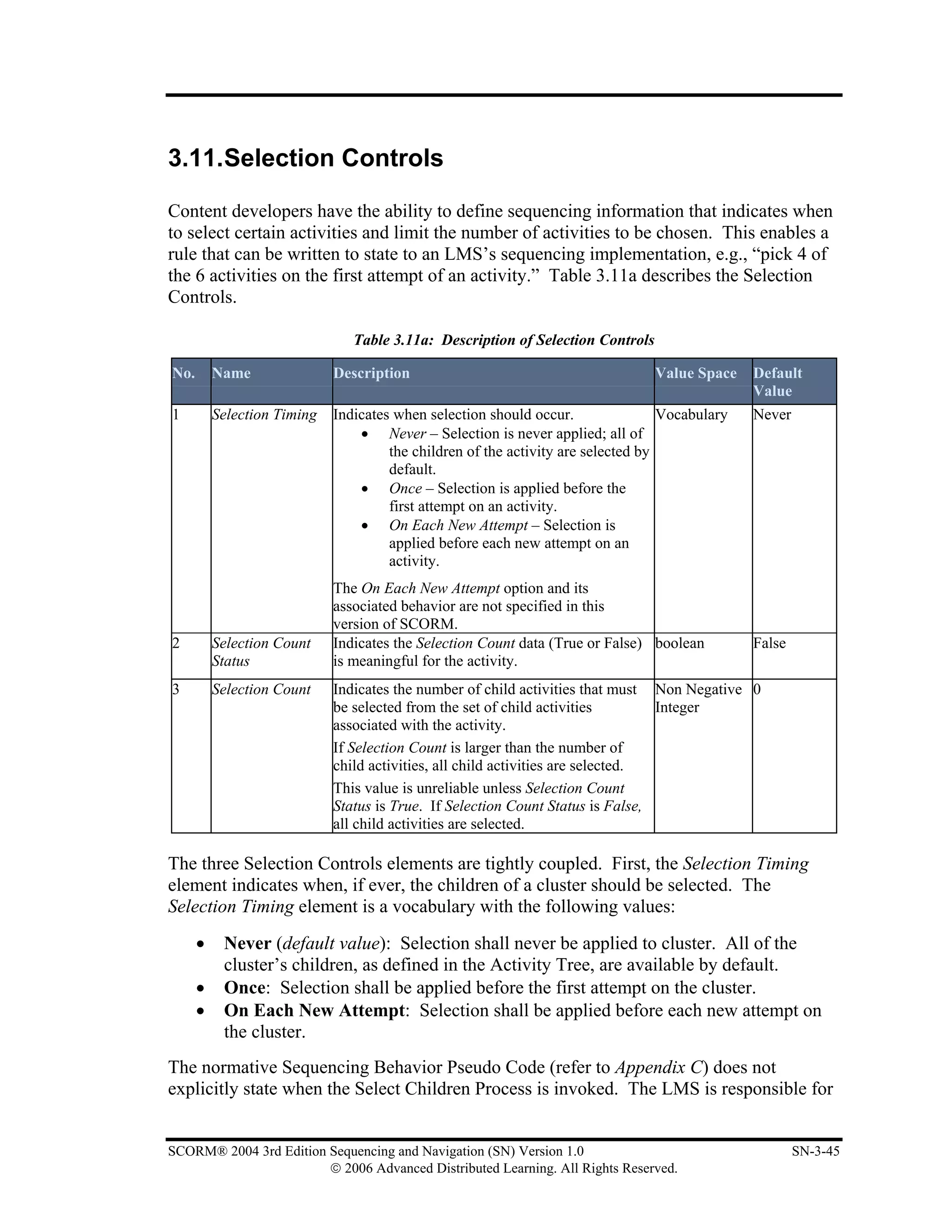
Table 3.11a: Description of Selection Controls........................................................................................ 3-45
Table 3.12a: Description of Randomization Controls .............................................................................. 3-47
Table 3.13a: Description of Delivery Controls......................................................................................... 3-48
Table 4.2.1.2a: Objective Progress Information ......................................................................................... 4-7
Table 4.2.1.3a: Activity Progress Information............................................................................................ 4-9
Table 4.2.1.4.a: - Attempt Progress Information ....................................................................................... 4-10
Table 4.2.1.5a: Activity State Information ............................................................................................... 4-13
Table 4.2.1.6a: Global State Information ................................................................................................. 4-14
Table 4.4.3a: SCORM 2004 Navigation Requests ................................................................................... 4-24
Table 4.5.1a: SCORM 2004 Termination Requests ................................................................................. 4-27
Table 4.5.2a: Post Condition and Exit Action Rules - NOT Truth Table ................................................. 4-28
Table 4.5.2b: Post Condition and Exit Action Rules - AND Truth Table ................................................. 4-28
Table 4.5.2c: Post Condition and Exit Action Rules - OR Truth Table..................................................... 4-28
Table 4.5.4a: Run-Time Data to Sequencing Tracking Data Mapping Summary ..................................... 4-32
Table 4.6.2a: Rollup Rules - NOT Truth Table ........................................................................................ 4-37
Table 4.6.2b: Rollup Rules - AND Truth Table ....................................................................................... 4-37
Table 4.6.2c: Rollup Rules - OR Truth Table........................................................................................... 4-37
Table 4.8.1.1a: SCORM 2004 Sequencing Requests............................................................................... 4-48
Table 4.8.4a: Precondition Rules - NOT Truth Table............................................................................... 4-50

viii                                              SCORM® 2004 3rd Edition Sequencing and Navigation (SN) Version 1.0
                                    © 2006 Advanced Distributed Learning. All Rights Reserved.
Table 4.8.4b: Precondition Rules - AND Truth Table.............................................................................. 4-50
Table 4.8.4b: Precondition Rules - OR Truth Table................................................................................. 4-51
Table 4.9.2a: Sequencing Tracking Data Mapping to SCO Run-Time Data Summary ............................ 4-57
Table 5.2a: Navigation Events and Descriptions........................................................................................ 5-4
Table 5.6.3.a: Presentation Information Model ........................................................................................ 5-13
Table 5.6.3b: Run-Time User Interface Device Vocabulary .................................................................... 5-13
Table 5.6.4a: SCORM Navigation Data Model ........................................................................................ 5-14
Table 5.6.5a: Data Model Element Table Explanation............................................................................. 5-15
Table 5.6.6a: Dot-notation Binding for the Request Data Model Element .............................................. 5-17
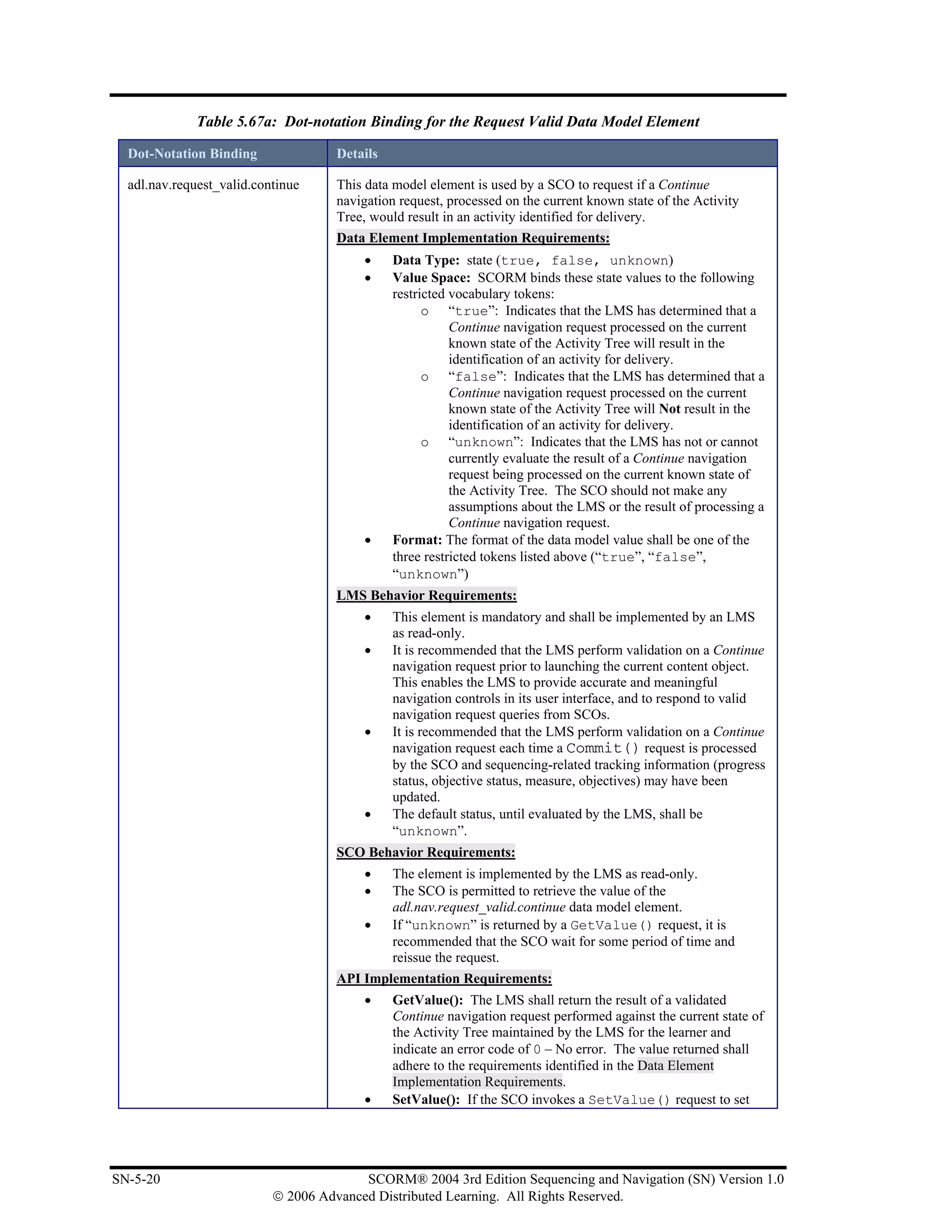
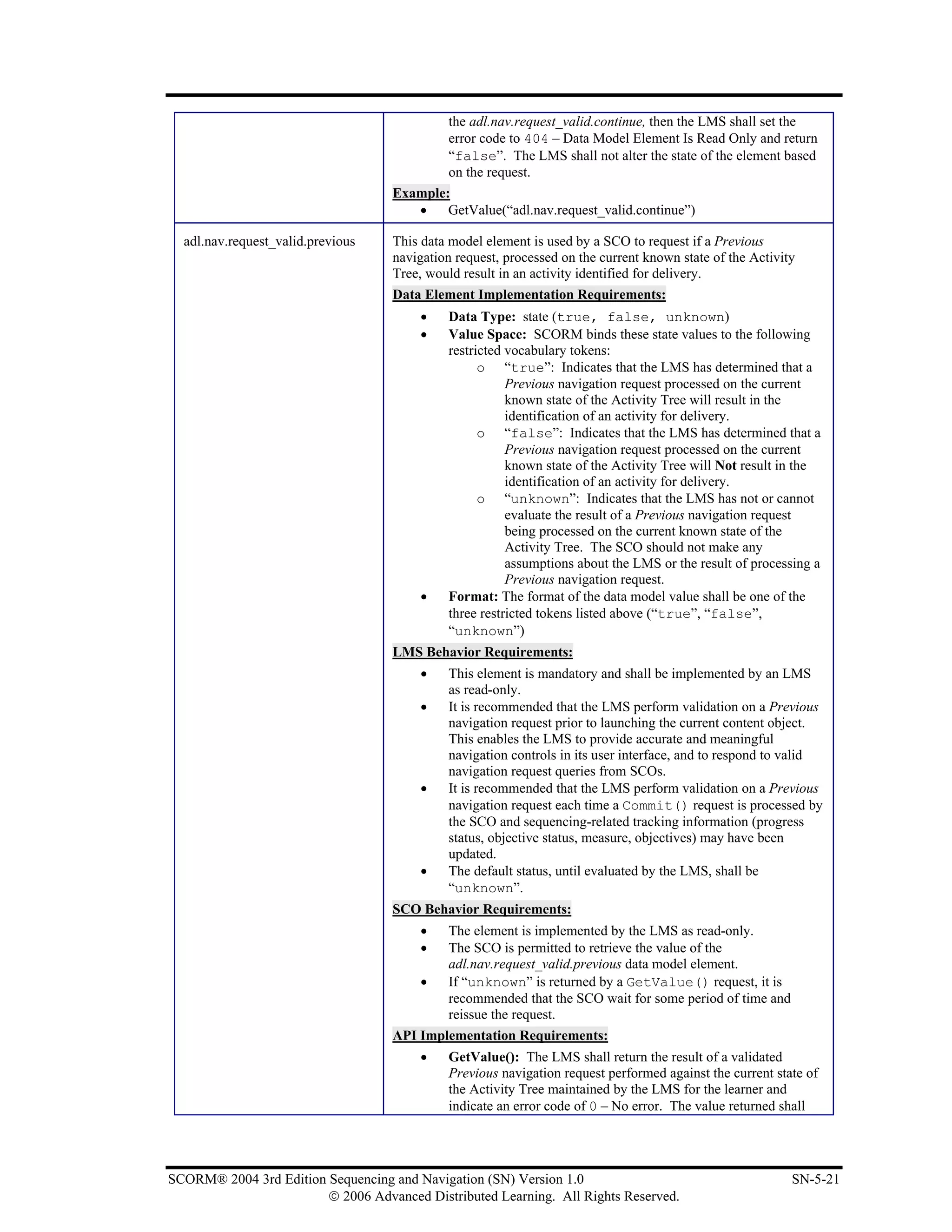
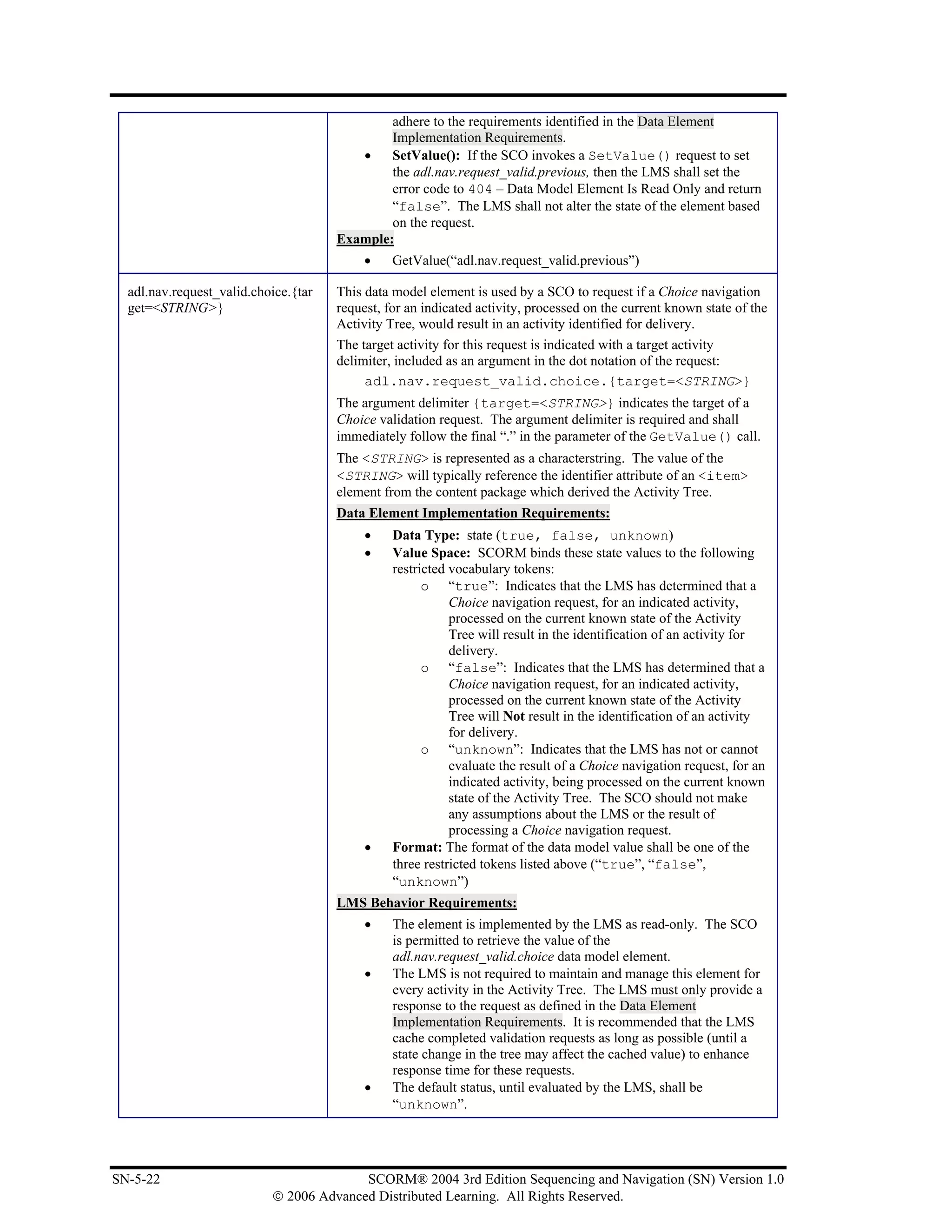
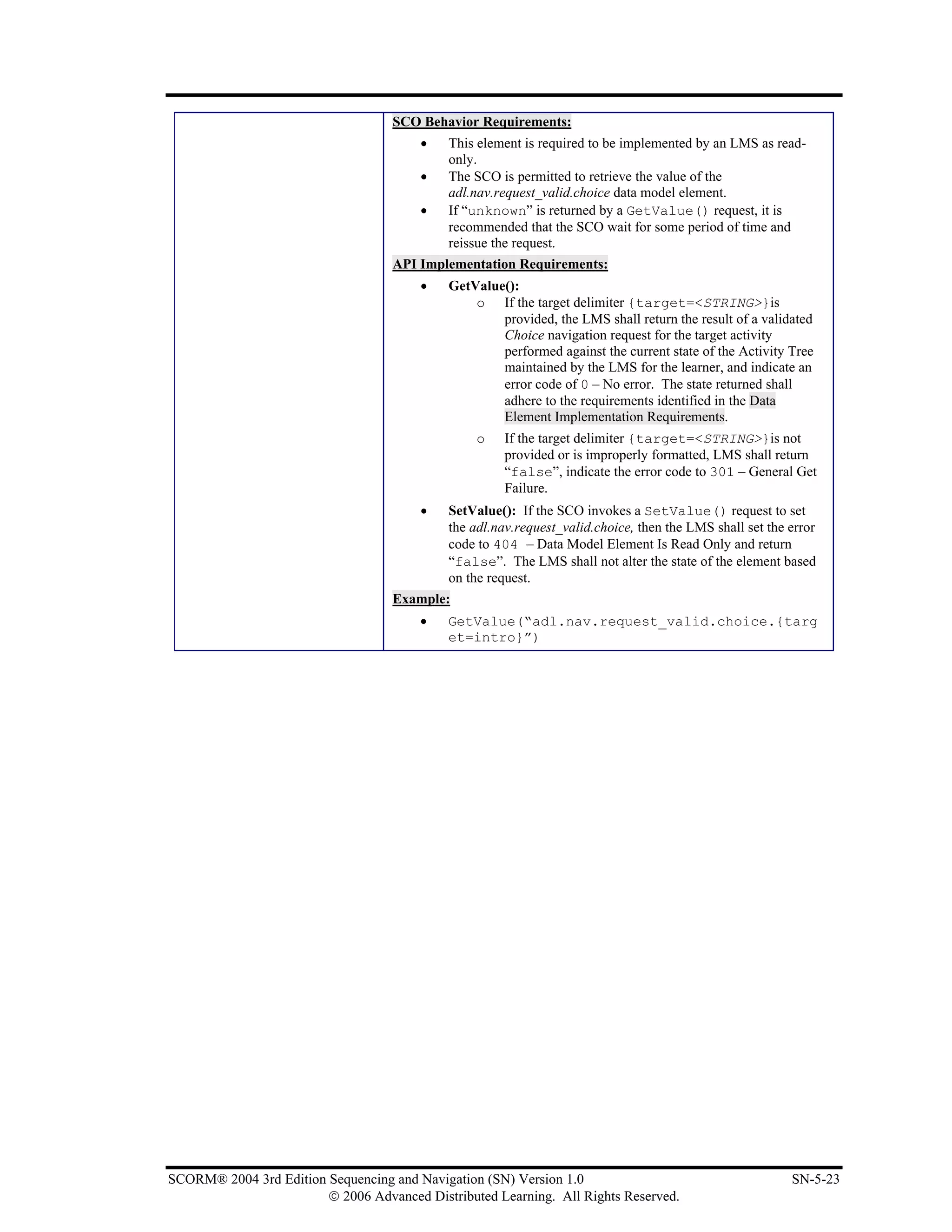
Table 5.67a: Dot-notation Binding for the Request Valid Data Model Element...................................... 5-20
Table Appendix D – Sequencing Behavior Pseudo Code Exceptions........................................................ D-3


SCORM® 2004 3rd Edition Sequencing and Navigation (SN) Version 1.0                                                                      ix
                        © 2006 Advanced Distributed Learning. All Rights Reserved.
This page intentionally left blank.


x                 SCORM® 2004 3rd Edition Sequencing and Navigation (SN) Version 1.0
    © 2006 Advanced Distributed Learning. All Rights Reserved.
SECTION 1
  SCORM® Sequencing and Navigation
              (SN)


From IEEE Std. 1484.11.1-2004 IEEE Standard for Learning Technology – Data Model for Content to Learning Management System
Communication, Copyright 2004 IEEE; IEEE Std. 1484.11.2-2003 IEEE Standard for Learning Technology – ECMAScript
Application Programming Interface for Content to Runtime Services Communication, Copyright 2003 IEEE; IEEE Std. 1484.12.1-
2002 IEEE Standard for Learning Object Metadata, Copyright 2002 IEEE; and IEEE Std. 1484.12.3-2005 IEEE Standard for Learning
Technology – Extensible Markup Language (XML) Schema Definition Language Binding for Learning Object Metadata, Copyright
2005 IEEE. All rights reserved.

From IMS Content Packaging v1.1.4 Copyright 2004, by IMS Global Learning Consortium Inc. and IMS Simple Sequencing v1.0
Copyright 2003, by IMS Global Learning Consortium Inc. All rights reserved.


SCORM® 2004 3rd Edition Sequencing and Navigation (SN) Version 1.0                                                   SN-1-1
                        © 2006 Advanced Distributed Learning. All Rights Reserved.
This page intentionally left blank.


SN-1-2                  SCORM® 2004 3rd Edition Sequencing and Navigatio (SN) Version 1.0
         © 2006 Advanced Distributed Learning. All Rights Reserved.
1.1. Introduction to the SCORM Sequencing and
     Navigation (SN) Book

The Sharable Content Object Reference Model (SCORM) is often described as a set of
books on a bookshelf. The Sequencing and Navigation (SN) book is one of a set of
books (refer to Figure 1.1a: The Sequencing and Navigation Book as Part of the SCORM
Bookshelf). More information on the other SCORM books and their relationships to one
another can be found in the SCORM 2004 3rd Overview book. The SCORM SN book
describes how SCORM conformant content may be sequenced to the learner through a
set of learner or system-initiated navigation events. The branching and flow of that
content may be described by a predefined set of activities.


          Figure 1.1a The Sequencing and Navigation Book as Part of the SCORM Bookshelf


1.1.1.       What is Covered in the SCORM Sequencing and
             Navigation Book?
There are several key concepts that are introduced in the SCORM SN book. The book
covers the essential Learning Management System (LMS) responsibilities for sequencing
content objects (Sharable Content Objects [SCOs] or Assets) during run-time and
allowing SCOs to indicate navigation requests. In addition, guidance is offered for
providing navigation controls to learners. General subjects discussed include:
    •    Sequencing Concepts and Terminology (e.g., Learning Activities, Activity Trees,
         Clusters)
    •    Sequencing Definition Model (i.e., detailed descriptions and requirements of the
         sequencing information that can be applied to learning activities)

SCORM® 2004 3rd Edition Sequencing and Navigation (SN) Version 1.0                        SN-1-3
                        © 2006 Advanced Distributed Learning. All Rights Reserved.
•    Sequencing Behavior Model (i.e., detailed descriptions of LMS behaviors to
         prescribed sequencing information and learner’s experience with learning content)
    •    Navigation Controls and Requirements
    •    Navigation Data Model
Communication between content and LMSs facilitates use of SCORM Sequencing and
Navigation to present content to learners based on learner choices and performance at
run-time. This communication also enables LMSs to track learner completion and
progress while content is presented to the learner. This book describes in detail how
sequencing behaviors are applied to track learner progress.


1.1.2.      Using the SCORM Sequencing and Navigation Book
This book should prove useful to LMS and authoring tool vendors wishing to support
SCORM in their products, and to anyone wishing to understand how sequencing
intentions can be applied to content and the relationship between sequencing intentions
and LMSs, such as SCORM content developers.
Early portions of this book, Section 1: SCORM® Sequencing and Navigation (SN) and
Section 2: Sequencing Concepts, cover the concepts that apply to SCORM Sequencing.
These sections are recommended reading for those seeking an introduction to the
concepts behind SCORM Sequencing and who may not wish to delve into deep technical
details.
Section 3: The Sequencing Definition Model is the first section providing thorough
technical details about Sequencing. This section explains each piece of sequencing
information that may be used to describe sequencing strategies during content
development as well as examples of how they may be used.
Section 4: Sequencing Behaviors describes in detail what information is being tracked for
sequencing purposes and how learner progress with content objects affects the tracking
information. This section covers SCORM sequencing behavior in detail, which includes
specific LMS behavior requirements for applying sequencing information to the tracking
information.
Section 5: The SCORM® Navigation Model describes a run-time data model that enables
content objects to query the LMS for sequencing state and to indicate to the LMS desired
navigation requests. This section also provides guidance to LMSs for providing
appropriate navigation controls to learners.
In addition, Appendix C provides updated and detailed, normative, pseudo code that
explicitly defines SCORM Sequencing Behaviors.


SN-1-4                               SCORM® 2004 3rd Edition Sequencing and Navigatio (SN) Version 1.0
                      © 2006 Advanced Distributed Learning. All Rights Reserved.
1.1.3.       Relationship with other SCORM Books
The SCORM SN book describes the responsibilities of LMSs for sequencing content
objects for a learner at run-time. In the context of SCORM, content objects are either
SCOs, which may communicate during run-time, or Assets that do not communicate
during run-time. The SCORM SN book describes how sequencing information can be
applied to define various sequencing strategies, how sequencing information is
interpreted at run-time to make sequencing evaluations and how navigation requests,
triggered through a learner’s interactions with content objects, are processed to identify
the next content object for delivery (launch). The actual launch of the identified content
object is out of scope of this book, but is described in the SCORM RTE book [4].
The following sections explain the relationships between the SCORM SN book and the
remaining SCORM books. In addition, frequently used terminology will be introduced at
a high level to eliminate the need for the reader to become an expert in the entire
SCORM to understand this book. It is strongly recommended that LMS vendors, content
developers and authoring tool developers read each SCORM book to fully understand the
purpose, details, relationships and advantages of all of the SCORM components.

1.1.3.1           The SCORM Content Aggregation Model (CAM) Book
The SCORM Content Aggregation Model (CAM) book contains information on
Metadata, Content Packages, and ADL Sequencing and Navigation Content Package
extensions. There are several dependencies between the SCORM CAM book and the
SCORM SN book.
Metadata is “data about data.” Simply put, Metadata is information that describes the
different components (Content Aggregations, Content Organizations, Activities, SCOs
and Assets) of the SCORM content model. Metadata is necessary for search and
discovery of content objects. At this time, the SCORM SN book does not define a
relationship with metadata; metadata has no impact on processing navigation requests or
sequencing behaviors.
A Content Package, in a general sense, bundles content objects with a prescribed content
structure. A SCORM Content Package may represent a SCORM course, lesson, module
or may simply be a collection of related content objects that may be stored in a SCORM
repository. All SCORM Content Packages contain the imsmanifest.xml file. This file
describes the contents of the package and may include an optional description of the
content structure.
SCORM Content Packages may include additional information that describes how an
LMS is intended to process the Content Package and manage its contents. Some of the
information is utilized by the SCORM SN book.
    •     Several elements in a SCORM Content Package affect initialization and
          management of a content object’s run-time data model. These elements have no
          effect on the behaviors described in the SCORM SN book.


SCORM® 2004 3rd Edition Sequencing and Navigation (SN) Version 1.0                    SN-1-5
                        © 2006 Advanced Distributed Learning. All Rights Reserved.
•     Other elements in a SCORM Content Package describe initial values for specific
          elements of a content object’s run-time data model. Sequencing only identifies a
          content object for delivery; therefore, these elements have no effect on the
          behaviors described in the SCORM SN book.
    •     Content object launch locations and launch parameters are also described as
          elements in a SCORM Content Package. Again, sequencing only identifies a
          content object for delivery; therefore, these elements have no effect on the
          behaviors described in the SCORM SN book.
    •     When a SCORM Content Package includes a description of content structure,
          sequencing information may be added to define an intended approach to
          sequencing the package’s content objects. The SCORM SN book defines how the
          defined content structure, in the content package, is to be interpreted as an
          Activity Tree – a fundamental structure used for sequencing purposes.
    •     A SCORM Content Package may include User Interface (UI) elements that are
          intended to provide guidance to an LMS on how certain UI navigation controls
          are to be presented, enabled and/or hidden. The sequencing behaviors described
          in the SCORM SN book do not rely on which or how UI navigation controls are
          enabled or triggered (navigation events), it is only concerned with the processing
          of LMS-invoked navigation requests.
To fully understand how sequencing- and navigation-specific elements are specified in a
SCORM Content Package, it will be necessary to reference the SCORM CAM book [3].

1.1.3.2          The SCORM Run-Time Environment (RTE) Book
The SCORM Run-Time Environment (RTE) book describes the responsibilities of LMSs
and content objects during run-time. In the context of SCORM, content objects are either
SCOs, which may communicate during run-time, or Assets that do not communicate
during run-time. The SCORM RTE book describes a common content object launch
mechanism, a common communication mechanism between content objects and LMSs,
and a common data model for tracking a learner’s experience with content objects. These
aspects create an environment where several of the ADL “-ilities” are satisfied. For
example, content objects that communicate through the standardized communication
mechanism can be moved from LMS to LMS without modification to their
communication methods; this increases learning object portability and durability, thereby
lowering the cost of development, installation and maintenance.


SN-1-6                                 SCORM® 2004 3rd Edition Sequencing and Navigatio (SN) Version 1.0
                        © 2006 Advanced Distributed Learning. All Rights Reserved.
1.2. SCORM Sequencing Overview

Parts of the SCORM SN book are based on the IMS Simple Sequencing (SS)
Specification [1] which defines a method for representing the intended behavior of an
authored learning experience such that any LMS will sequence discrete learning activities
in a consistent way. IMS SS is labeled as simple because it defines a limited number of
widely used sequencing behaviors, not because the specification itself is simple. IMS SS
is not all-inclusive. In particular, IMS SS does not address, but does not necessarily
preclude, artificial intelligence-based sequencing, schedule-based sequencing, sequencing
requiring data from closed external systems and services (e.g., sequencing of embedded
simulations), collaborative learning, customized learning or synchronization between
multiple parallel learning activities.
IMS SS recognizes only the role of the learner and does not define sequencing
capabilities that utilize or are dependent on other actors, such as instructors, mentors or
peers. The SCORM SN book does not prohibit usage in contexts involving other actors;
however, it does not define roles of other actors or sequencing behaviors that result from
participation of other actors.
The SCORM SN book defines how IMS SS is applied and is extended in a SCORM
environment. It defines the required behaviors and functionality that SCORM
conformant LMSs must implement to process sequencing information at run-time. More
specifically, it describes the branching and flow of learning activities in terms of an
Activity Tree, based on the results of a learner’s interactions with launched content
objects and an authored sequencing strategy.
SCORM does not place any requirements on an LMS-related to how or when Activity
Trees are created, the internal representation of Activity Trees or the management of
Activity Trees at run-time. However, the SCORM CAM book defines one representation
of sequencing information via extensions to a SCORM Content Package, providing an
interoperable mechanism to exchange content structure and sequencing information
between different run-time components or LMSs.
In summary, SCORM Sequencing depends on: a defined structure of learning activities,
the Activity Tree; a defined sequencing strategy, the Sequencing Definition Model; and
the application of defined behavior to external and system triggered events, SCORM
Sequencing Behaviors.


SCORM® 2004 3rd Edition Sequencing and Navigation (SN) Version 1.0                    SN-1-7
                        © 2006 Advanced Distributed Learning. All Rights Reserved.
1.3. SCORM Navigation Overview

The SCORM SN book also describes how learner- and system-initiated navigation events
can be triggered and processed, resulting in the identification of learning activities for
delivery. Each learning activity identified for delivery will have an associated content
object. The SCORM RTE book [4] (Section 2.1.2: Launching Content Objects describes
how identified content objects are launched. The sequence of launched content objects,
for a given learner and content structure, provides a unique learning experience (learner
interaction with content objects); the SCORM RTE book describes how the LMS
manages the resulting learning experience for SCOs and how that learning experience
may affect the Activity Tree.
Navigation assumes the existence of user interface devices to trigger navigation events.
These devices may be provided by the LMS or embedded in content objects. When a
learner triggers such a device, the LMS translates the event into its corresponding
navigation request, processes the request, and then may indicate the next learning activity
for delivery. The SCORM SN book describes a run-time data model that SCOs may use
to indicate desired navigation requests to the LMS.
The SCORM SN book imposes no requirements on the type or style of the user interface
presented to a learner at run-time, including any user interface devices for navigation or
accessing auxiliary services. The nature of the user interface and the mechanisms for
interaction between the learner and the LMS are intentionally unspecified. Issues such as
look and feel, presentation style and placement of user interface devices or controls are
outside the scope of SCORM. Various recommendations are provided to help reduce
interpretation of the SCORM Navigation Model until a formal navigation (and
presentation) specification or standard is developed. However, an LMS is required to
provide user interface devices that trigger navigation events whose processing would
result in the identification of a deliverable content object.


SN-1-8                               SCORM® 2004 3rd Edition Sequencing and Navigatio (SN) Version 1.0
                      © 2006 Advanced Distributed Learning. All Rights Reserved.
SECTION 2
                             Sequencing Concepts


From IEEE Std. 1484.11.1-2004 IEEE Standard for Learning Technology – Data Model for Content to Learning Management System
Communication, Copyright 2004 IEEE; IEEE Std. 1484.11.2-2003 IEEE Standard for Learning Technology – ECMAScript
Application Programming Interface for Content to Runtime Services Communication, Copyright 2003 IEEE; IEEE Std. 1484.12.1-
2002 IEEE Standard for Learning Object Metadata, Copyright 2002 IEEE; and IEEE Std. 1484.12.3-2005 IEEE Standard for Learning
Technology – Extensible Markup Language (XML) Schema Definition Language Binding for Learning Object Metadata, Copyright
2005 IEEE. All rights reserved.

From IMS Content Packaging v1.1.4 Copyright 2004, by IMS Global Learning Consortium Inc. and IMS Simple Sequencing v1.0
Copyright 2003, by IMS Global Learning Consortium Inc. All rights reserved.


SCORM® 2004 3rd Edition Sequencing and Navigation (SN) Version 1.0                                                   SN-2-1
                        © 2006 Advanced Distributed Learning. All Rights Reserved.
This page intentionally left blank.


SN-2-2                 SCORM® 2004 3rd Edition Sequencing and Navigation (SN) Version 1.0
         © 2006 Advanced Distributed Learning. All Rights Reserved.
2.1. Content Structure and the Activity Tree

A Content Structure diagram is a common tool used by the instructional design
community to describe the hierarchical relationship of a learning experience. IMS SS
defines and utilizes a similar concept called an Activity Tree to describe a structure of
learning activities. The Activity Tree allows the SCORM SN model to describe
informational and processing requirements such as sequencing algorithms and behaviors
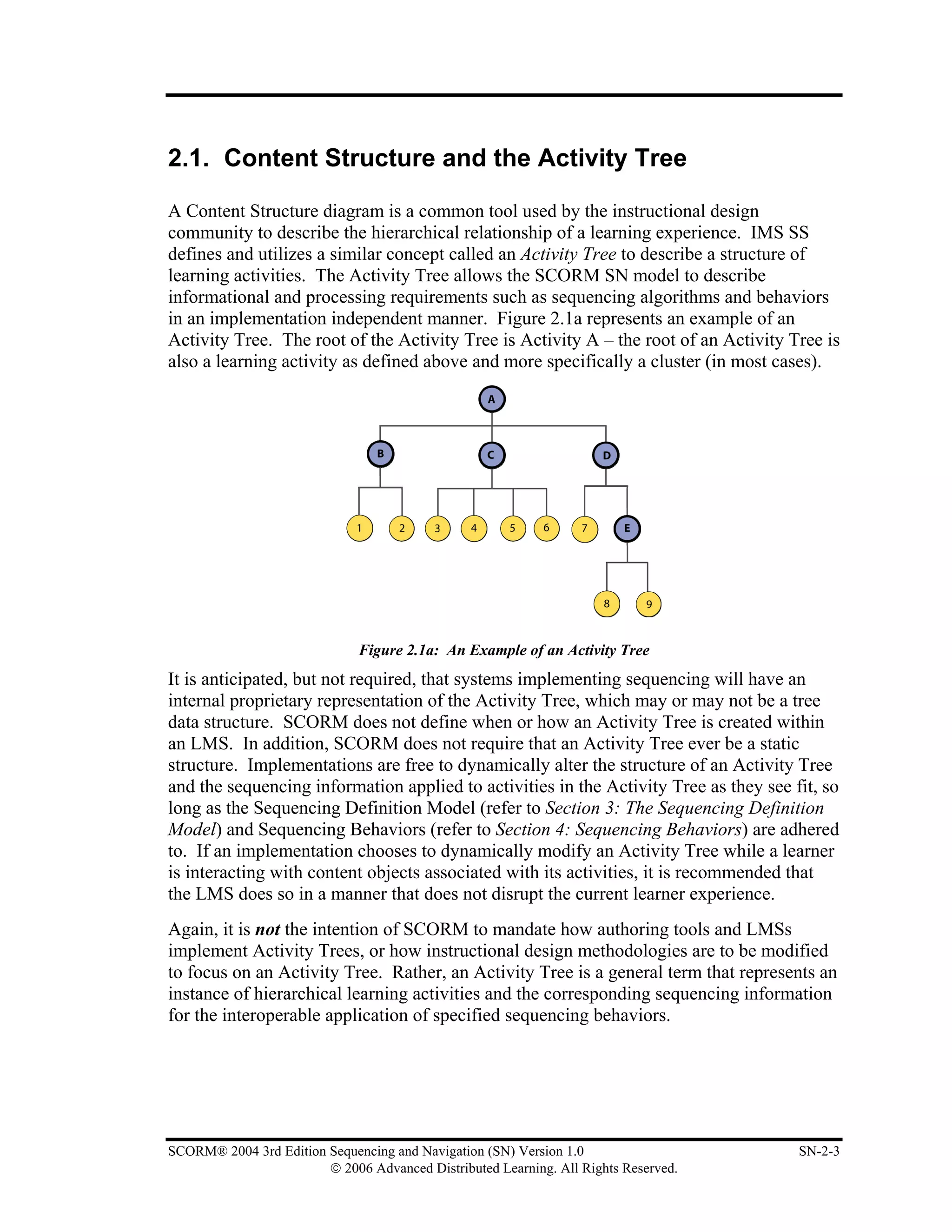
in an implementation independent manner. Figure 2.1a represents an example of an
Activity Tree. The root of the Activity Tree is Activity A – the root of an Activity Tree is
also a learning activity as defined above and more specifically a cluster (in most cases).


                              Figure 2.1a: An Example of an Activity Tree
It is anticipated, but not required, that systems implementing sequencing will have an
internal proprietary representation of the Activity Tree, which may or may not be a tree
data structure. SCORM does not define when or how an Activity Tree is created within
an LMS. In addition, SCORM does not require that an Activity Tree ever be a static
structure. Implementations are free to dynamically alter the structure of an Activity Tree
and the sequencing information applied to activities in the Activity Tree as they see fit, so
long as the Sequencing Definition Model (refer to Section 3: The Sequencing Definition
Model) and Sequencing Behaviors (refer to Section 4: Sequencing Behaviors) are adhered
to. If an implementation chooses to dynamically modify an Activity Tree while a learner
is interacting with content objects associated with its activities, it is recommended that
the LMS does so in a manner that does not disrupt the current learner experience.
Again, it is not the intention of SCORM to mandate how authoring tools and LMSs
implement Activity Trees, or how instructional design methodologies are to be modified
to focus on an Activity Tree. Rather, an Activity Tree is a general term that represents an
instance of hierarchical learning activities and the corresponding sequencing information
for the interoperable application of specified sequencing behaviors.


SCORM® 2004 3rd Edition Sequencing and Navigation (SN) Version 1.0                     SN-2-3
                        © 2006 Advanced Distributed Learning. All Rights Reserved.
2.1.1.     Deriving an Activity Tree from a Content Package
The SCORM CAM [3] defines a structure that provides for the hierarchical organization
of learning content. This is in the form of a Content Organization that is represented in
the content package as a single <organization> element. Each item in the structured
hierarchy represents an instructionally relevant unit of learning. Items can be nested to
any arbitrary depth and can have learning taxonomy labels applied to them. For example,
an item can represent a course, a module, a unit, a lesson, etc. The hierarchical content
structure has traditionally been specified in terms of an organization in a content package
for interchanging content.
Because the SCORM Sequencing Behaviors are defined in terms of structured learning
activities, a meaningful content structure provides the necessary starting point for
deriving an Activity Tree. In terms of sequencing, a Content Organization represents
one, interoperable, structure of an Activity Tree. The Content Organization
(<organization> element) is the root of the Activity Tree and each of its <item>
elements correspond to a learning activity. Sequencing Definition Model Elements can
be applied to items to define a specific sequencing run-time behavior consistent with the
desired learning experience.


          Figure 2.1.1a: Relationship between a Content Organization and an Activity Tree
The relationship between a Content Organization and an Activity Tree is depicted in
Figure 2.1.1a and can be summarized in the following manner:
1. An Activity Tree represents the conceptual content structure that results from the
   content design, authoring and aggregation processes. Ultimately, the Activity Tree is

SN-2-4                               SCORM® 2004 3rd Edition Sequencing and Navigation (SN) Version 1.0
                       © 2006 Advanced Distributed Learning. All Rights Reserved.
represented as a Content Organization (<organization> element) in a SCORM
    Content Package to enable interoperable exchange of sequencing information. For
    example, an authoring tool may implement an internal data structure that represents
    the content hierarchy in a proprietary format. This structure results from an
    instructional design process or method the developer engaged in to define the
    intended learning experience. Upon completion of the development process, the
    authoring tool will translate its proprietary format into the format defined in the
    SCORM CAM to be imported by any system that understands SCORM Content
    Packages; specifically those adhering to the Content Aggregation Packaging
    Application Profile [3].
2. A SCORM conformant LMS translates Content Organizations into Activity Trees.
   An Activity Tree represents the data structure that an LMS implements to reflect the
   hierarchical, internal representation of the defined learning activities, including the
   tracking status information for each activity in the hierarchy on a per learner basis.
3. When a learner chooses to interact with the content represented by an Activity Tree,
   the LMS evaluates sequencing and tracking information to determine the relative
   sequence of learning activities, as well as the eligibility for learning activities to be
   attempted by a learner on a conditional basis. In this context, each learner’s
   experience with the same content structure may be different, based on the sequencing
   information that was defined by the content developer and the learner’s specific
   interactions with experienced content objects.


2.1.2.       Using Sequencing Collections
As described in Deriving an Activity Tree from a Content Package (refer to Section
2.1.1.), the SCORM CAM [3] defines a structure that provides for interchange of
structured learning content. Each node in the structure represents a Learning Activity
that will make up the derived Activity Tree. It is often the case that common sequencing
intentions reoccur throughout an Activity Tree, resulting in patterns of Sequencing
Information. In these cases similar if not identical sets of Sequencing Information will be
applied to multiple Learning Activities within the Activity Tree.
To minimize redundant declaration of Sequencing Information across multiple nodes in a
SCORM Content Package, the SCORM CAM [3] provides a container for declaring this
common set of Sequencing Information. The <sequencingCollection> element allows
identified sets of Sequencing Information to be referenced and reused by multiple nodes
in the content structure.
When deriving the Sequencing Information that applies to a specific Learning Activity,
the following rules apply:

         •   Referenced Sequencing Information from the <sequencingCollection>
             shall be “merged” with any Sequencing Information applied directly to the
             Learning Activity. This “merging” only occurs at the “top-level” IMS SS
             XML elements, e.g., Sequencing Control Modes, Sequencing Rules, Rollup
             Rules, Objectives, etc.

SCORM® 2004 3rd Edition Sequencing and Navigation (SN) Version 1.0                     SN-2-5
                        © 2006 Advanced Distributed Learning. All Rights Reserved.
•   “Top-level” IMS SS XML elements applied directly to a Learning Activity
             (an <item> or <organization>) shall take precedence over identical
             elements defined in the referenced Sequencing Information. That is, if a “top-
             level” XML element occurs in both the node and the Referenced Sequencing
             Information, the referenced element and all of its descendants shall not be
             “merged”.
         •   When Sequencing Information is “merged”, the merged element and all of its
             descendants shall be considered part of the Sequencing Information applied to
             the Learning Activity.
         •   ADL namespace (adlseq and adlnav) extension elements shall be considered
             “top-level” elements and are merged in the same manner as IMS SS XML
             “top-level” elements.


2.1.3.       Cluster
A cluster is a specialized form of a learning activity that has sub-activities; the term is
used in various sequencing behaviors. A cluster includes a single parent activity and its
immediate children, but not the descendants of its children. The children of a cluster are
either leaf activities or other clusters. A leaf activity is not a cluster.
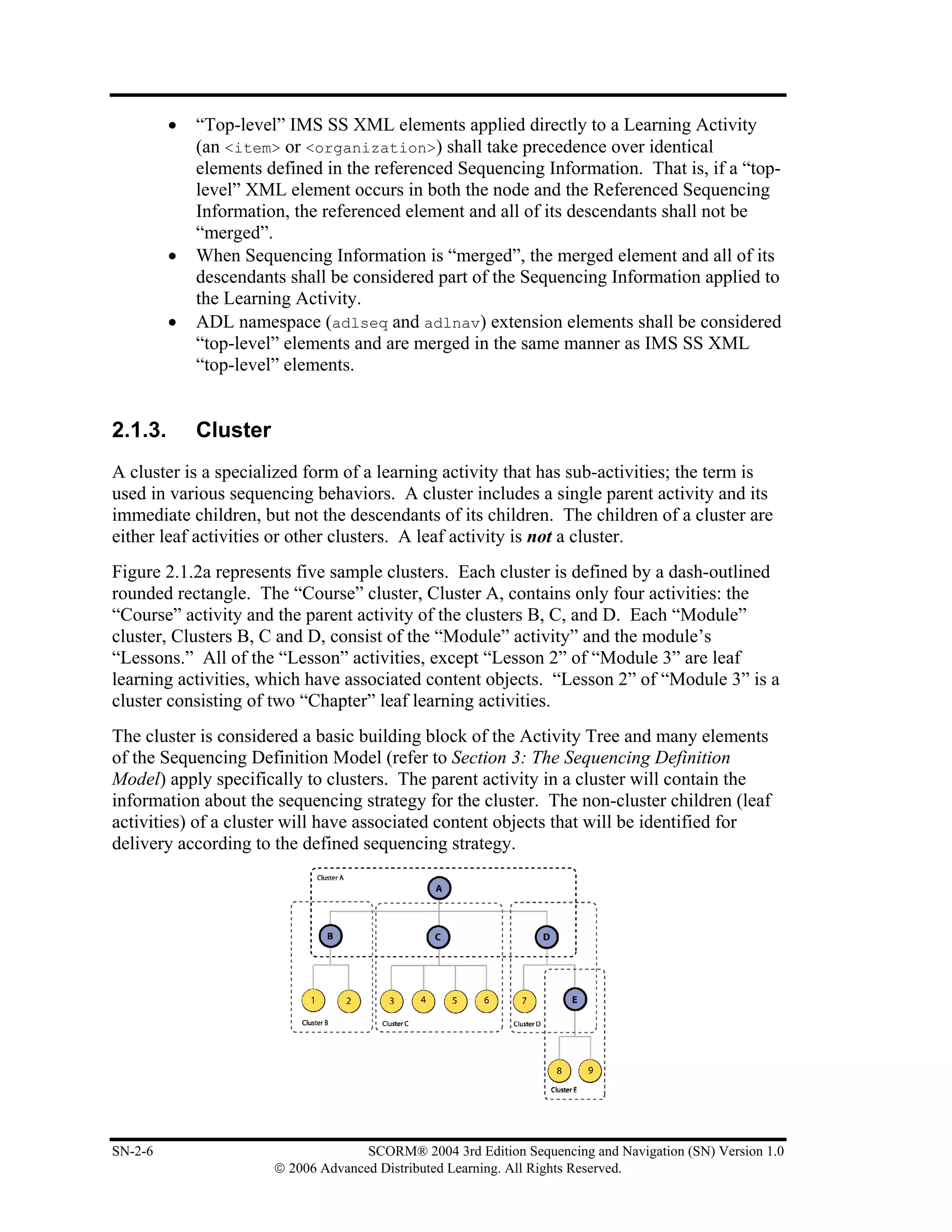
Figure 2.1.2a represents five sample clusters. Each cluster is defined by a dash-outlined
rounded rectangle. The “Course” cluster, Cluster A, contains only four activities: the
“Course” activity and the parent activity of the clusters B, C, and D. Each “Module”
cluster, Clusters B, C and D, consist of the “Module” activity” and the module’s
“Lessons.” All of the “Lesson” activities, except “Lesson 2” of “Module 3” are leaf
learning activities, which have associated content objects. “Lesson 2” of “Module 3” is a
cluster consisting of two “Chapter” leaf learning activities.
The cluster is considered a basic building block of the Activity Tree and many elements
of the Sequencing Definition Model (refer to Section 3: The Sequencing Definition
Model) apply specifically to clusters. The parent activity in a cluster will contain the
information about the sequencing strategy for the cluster. The non-cluster children (leaf
activities) of a cluster will have associated content objects that will be identified for
delivery according to the defined sequencing strategy.


SN-2-6                               SCORM® 2004 3rd Edition Sequencing and Navigation (SN) Version 1.0
                       © 2006 Advanced Distributed Learning. All Rights Reserved.
Figure 2.1.2a: Cluster Example


2.1.4.       Using (Sub) Manifests in a Content Package
The SCORM CAM [3] no longer requires support for (sub)manifests in Content
Packages. Therefore the use of sequencing information in (sub)manifests and the
derivation of Activity Trees from Content Packages that include (sub)manifests is
undefined. It is left to LMS implementations to determine if and how they will support
(sub)manifests.

ADL Note: The IMS Global Consortium, Inc., is working on a new version of the IMS
Content Packaging Specification. One of the major issues that IMS is resolving deals
with (sub)manifests, their use, requirements of use and XML syntax requirements. At
this time, ADL recommends not to use (sub)manifests until completion of the IMS work.
Any questions, concerns or further recommendations on (sub)manifests should be sent to
ADL.


SCORM® 2004 3rd Edition Sequencing and Navigation (SN) Version 1.0                   SN-2-7
                        © 2006 Advanced Distributed Learning. All Rights Reserved.
2.1.5.      Learning Activity
IMS SS relies on the concept of learning activities. A learning activity (Figure 2.2a) may
be loosely described as a meaningful unit of instruction; it is conceptually something the
learner does while progressing through instruction. A learning activity may provide a
learning resource to the learner or it may be composed of several sub-activities.
Throughout this document, the term “activity” is used synonymously with “learning
activity.”


                              Figure 2.2a: Sample Learning Activity
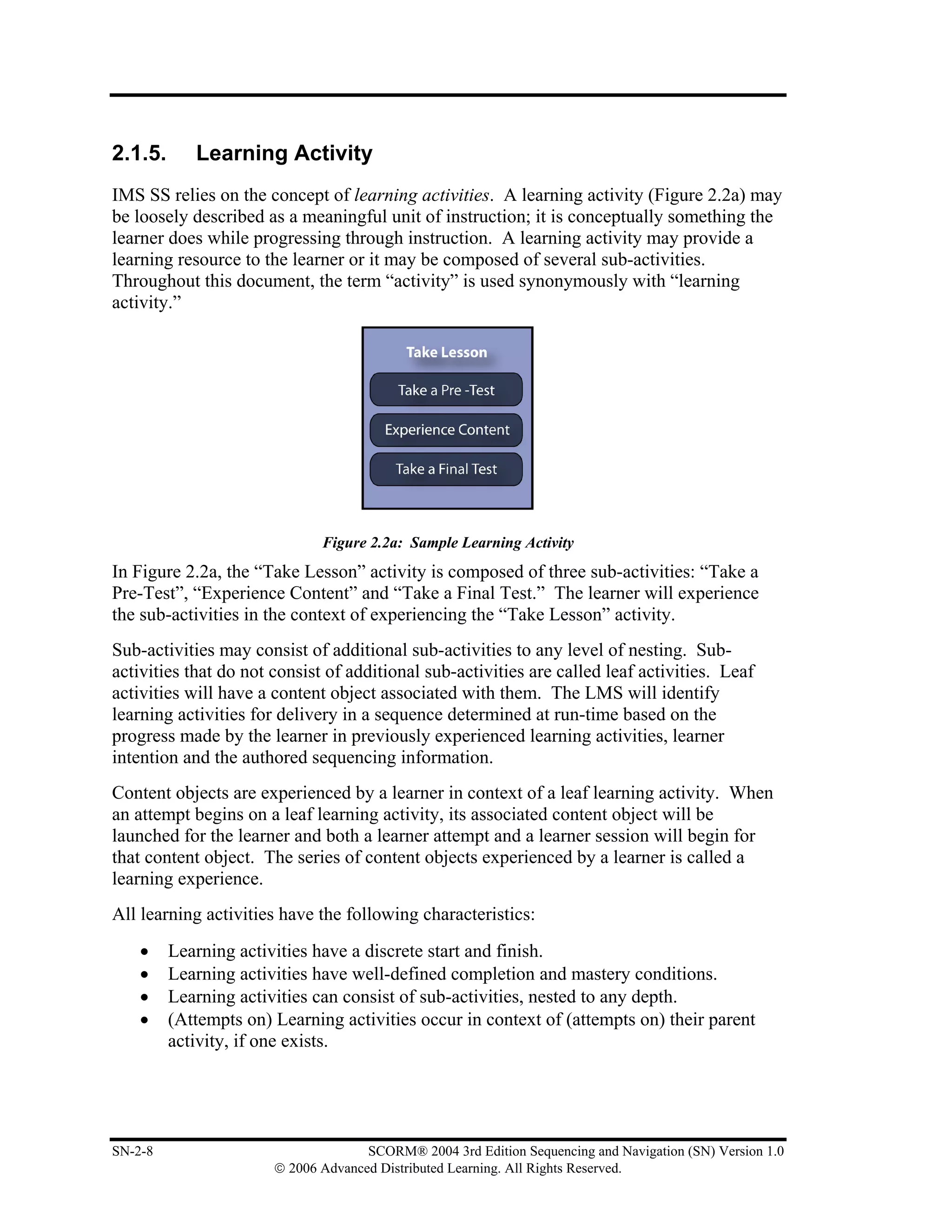
In Figure 2.2a, the “Take Lesson” activity is composed of three sub-activities: “Take a
Pre-Test”, “Experience Content” and “Take a Final Test.” The learner will experience
the sub-activities in the context of experiencing the “Take Lesson” activity.
Sub-activities may consist of additional sub-activities to any level of nesting. Sub-
activities that do not consist of additional sub-activities are called leaf activities. Leaf
activities will have a content object associated with them. The LMS will identify
learning activities for delivery in a sequence determined at run-time based on the
progress made by the learner in previously experienced learning activities, learner
intention and the authored sequencing information.
Content objects are experienced by a learner in context of a leaf learning activity. When
an attempt begins on a leaf learning activity, its associated content object will be
launched for the learner and both a learner attempt and a learner session will begin for
that content object. The series of content objects experienced by a learner is called a
learning experience.
All learning activities have the following characteristics:
    •    Learning activities have a discrete start and finish.
    •    Learning activities have well-defined completion and mastery conditions.
    •    Learning activities can consist of sub-activities, nested to any depth.
    •    (Attempts on) Learning activities occur in context of (attempts on) their parent
         activity, if one exists.


SN-2-8                               SCORM® 2004 3rd Edition Sequencing and Navigation (SN) Version 1.0
                       © 2006 Advanced Distributed Learning. All Rights Reserved.
2.1.6.       Attempts
An attempt is defined as an effort to complete an activity, and during that effort, zero or
more learning objectives may become satisfied. Attempts on activities always occur
within the context of attempts on their parent activity(ies). It is important to note that for
a given Activity Tree one and only one leaf activity can be attempted at any given time
and all attempts on all of the leaf activity’s ancestors (through to the root) will be in
progress while the leaf activity is being attempted. When a leaf activity is being
attempted, it can be assumed that the activity’s corresponding content object has been
launched.
An attempt begins when the activity is identified for delivery and ends while the LMS’s
sequencing implementation attempts to identify the next activity for delivery. An attempt
on an activity is closely related to learner attempt on the activity’s associated content
object; the SCORM RTE book[4] (Section 2.1: Run-Time Environment (RTE)
Management) describes the temporal model for content objects in detail. It may not
always be possible to complete an activity in a single attempt. There are many situations
when a learner may wish to suspend the activity and resume it later. In most cases,
encountering a suspended activity should be a continuation of the current attempt on the
activity rather than a new attempt.
As the result of an attempt on an activity, or through some outside administrative action,
the tracking status for an activity can change (refer to Section 4.2: Tracking Model).
When the tracking status of an activity changes, the tracking status of its ancestors may
be affected – this is called Rollup (refer to Section 4.6: Rollup Behavior).


SCORM® 2004 3rd Edition Sequencing and Navigation (SN) Version 1.0                       SN-2-9
                        © 2006 Advanced Distributed Learning. All Rights Reserved.
2.2. Starting and Stopping a Sequencing Session

A Sequencing Session is the time from when an attempt on the root activity of an
Activity Tree begins until that attempt ends; outside of the context of a Sequencing
Session the Current Activity is considered to be undefined. The SCORM Sequencing
Behaviors only specify which navigation requests can begin a sequencing session, but
they do not specify when or how those navigation requests are triggered. Generally, the
LMS will issue a Start navigation request in recognition of some system event, e.g., a
login, begin course, etc. It is recommended, if the previous sequencing session ended due
to a Suspend All navigation request, the LMS should issue a Resume All navigation
request instead of a Start.
In some cases, neither the Start nor Resume All navigation requests will succeed, only a
valid Choice navigation request will start the sequencing session. It is the LMS’s
responsibility to provide some mechanism to invoke a valid Choice navigation request.
A sequencing session ends when an Exit sequencing request is processed from the root
activity in the Activity Tree. This can be caused by an Exit All or a Suspend All
navigation request, or an exit action sequencing rule (refer to Section 4.5: Termination
Behavior) successfully applied to the root of the Activity Tree.


SN-2-10                            SCORM® 2004 3rd Edition Sequencing and Navigation (SN) Version 1.0
                     © 2006 Advanced Distributed Learning. All Rights Reserved.
2.3. Activity Status Tracking

The SCORM Sequencing Behaviors rely on values within the sequencing Tracking Status
Model (refer to Section 4.2: Tracking Model) to control sequencing behaviors. For each
attempt on an activity by a learner, that activity shall have associated tracking status data.
Learner interactions with a content object may affect the tracking data of the activity to
which the content object is associated. Tracking data is used during the various
sequencing processes to affect their behavior.


2.3.1.       Communicative and Non-communicative Content
SCORM Sequencing differentiates between communicative and non-communicative
content. Communicative content may communicate information about the learner’s
interactions with the content through the SCORM Run-Time Environment Application
Programming Interface (API) [4] (Section 3: Application Programming Interface), while
non-communicative content does not utilize the SCORM Run-Time API. SCORM
Sequencing supports both forms of content on an activity-by-activity basis.
SCOs are responsible for communicating learner progress via the SCORM Run-Time
API and the SCORM Run-Time Environment Data Model [4] (Section 4: SCORM Run-
Time Environment Data Model). The LMS may not make any assumptions about learner
progress information that is not communicated. For assets, the LMS will automatically
assume learner progress information based on defined default values and behaviors.


2.3.2.       Suspending and Resuming Activities
An attempt on an activity may be suspended and later resumed. Resuming a suspended
activity does not count as a new attempt on that activity. Other activities may be
attempted while the activity is suspended. More than one activity may be suspended at
any given time.
Suspending the attempt on the root activity of the Activity Tree causes the LMS to
remember the last activity experienced by the learner in the Activity Tree and end the
sequencing session in a suspended state. The learner may later resume the attempt on the
root of the Activity Tree, at which time the last activity experienced by the learner will
also be resumed.


2.3.3.       Data Persistence
It is necessary to persist control, tracking and state information at least until the current
attempt on the root activity of the Activity Tree ends. Such an attempt may span one or
more sequencing sessions. Neither SCORM nor IMS SS specifies how and where to

SCORM® 2004 3rd Edition Sequencing and Navigation (SN) Version 1.0                      SN-2-11
                        © 2006 Advanced Distributed Learning. All Rights Reserved.
store the data that must persist during an attempt (e.g., sequencing information and
tracking status data). This is also true for data that is persisted during sessions and
between sessions. There is no requirement that control, tracking and state information
persist after an attempt on the root activity of the Activity Tree ends. LMS policies
should govern whether such information is retained for purposes such as, for example,
auditing, analysis or historical records of learner activity. Such policies are beyond the
scope of SCORM.


2.3.4.     Learning Objectives
Learning objectives are separate from learning activities. SCORM does not place any
restrictions on how learning objectives are associated with learning activities nor does it
define how content objects are to use learning objectives. The SCORM Sequencing
Behaviors make no assumption as to how to interpret learning objectives (e.g., is it a
competency, is it a mastery or is it simply a shared value, etc). From a tracking
perspective, a set of objective status information (objective satisfaction status and
objective satisfaction measure) is maintained for each learning objective associated with
a learning activity.
Activities may have more than one objective associated with them. However, the
SCORM SN model makes no assumptions about the semantics or meanings of multiple
objectives associated with an activity. By default, the objective status information
maintained for an activity’s objectives is local to that activity. To share objective status
information, an activity may reference multiple globally shared objectives. Multiple
activities may reference the same global shared objective, thus sharing its objective
status information. Shared global objectives may be shared within a single Activity Tree
or they may be shared across multiple Activity Trees within the LMS. There are two
restrictions on how an activity may reference shared global objectives:
     1. A local objective can obtain (“read”) objective status data from one and only
        one shared global objective.
     2. For the set of local objectives defined for a given activity, no two local
        objectives can set (“write”) objective status data to the same shared global
        objective.


SN-2-12                             SCORM® 2004 3rd Edition Sequencing and Navigation (SN) Version 1.0
                      © 2006 Advanced Distributed Learning. All Rights Reserved.
SECTION 3
          The Sequencing Definition Model


From IEEE Std. 1484.11.1-2004 IEEE Standard for Learning Technology – Data Model for Content to Learning Management System
Communication, Copyright 2004 IEEE; IEEE Std. 1484.11.2-2003 IEEE Standard for Learning Technology – ECMAScript
Application Programming Interface for Content to Runtime Services Communication, Copyright 2003 IEEE; IEEE Std. 1484.12.1-
2002 IEEE Standard for Learning Object Metadata, Copyright 2002 IEEE; and IEEE Std. 1484.12.3-2005 IEEE Standard for Learning
Technology – Extensible Markup Language (XML) Schema Definition Language Binding for Learning Object Metadata, Copyright
2005 IEEE. All rights reserved.

From IMS Content Packaging v1.1.4 Copyright 2004, by IMS Global Learning Consortium Inc. and IMS Simple Sequencing v1.0
Copyright 2003, by IMS Global Learning Consortium Inc. All rights reserved.


SCORM® 2004 3rd Edition Sequencing and Navigation (SN) Version 1.0                                                   SN-3-1
                        © 2006 Advanced Distributed Learning. All Rights Reserved.
This page intentionally left blank.


SN-3-2                 SCORM® 2004 3rd Edition Sequencing and Navigation (SN) Version 1.0
         © 2006 Advanced Distributed Learning. All Rights Reserved.
3.1. Sequencing Definition Model Overview

The SCORM Sequencing Definition Model is an information model derived from the
IMS SS [1]. The IMS SS Sequencing Definition Model defines a set of elements that can
be used to describe and affect various sequencing behaviors. In addition, several
SCORM specific elements have been defined that provide extended, application profile
specific, behaviors and restrictions beyond those currently defined by IMS SS.
The SCORM Sequencing Definition Model defines a set of elements that may be used by
content developers to define intended sequencing behavior. The definition model
elements are applied to learning activities within the context of an Activity Tree. Each
element has a default value that is to be assumed by any sequencing implementation in
the absence of an explicitly defined value. The effects of the SCORM Sequencing
Definition Model elements only apply during the application of SCORM Sequencing
Behaviors (refer to Section 4: Sequencing Behaviors). A SCORM conformant LMS must
support the behaviors that result from the values associated with all of the defined
Sequencing Definition Model elements, including both explicitly declared and default
values. The normative sequencing behavior is detailed in the Sequencing Behavior
Pseudo Code (refer to Appendix C).
SCORM does not require or imply that the values of Sequencing Definition Model
elements applied to an activity are, become or remain static for any period. So long as
the value space of an element is adhered to, an LMS may alter the element’s value as it
desires. However, some groups of Sequencing Definition Model elements are highly
coupled to one another through the SCORM Sequencing Behavior. It is strongly
recommended that LMSs take great care when altering values of SCORM Sequencing
Definition Model elements, especially during an active learner experience.
SCORM does not place any requirements on when or how SCORM Sequencing
Definition Model elements are applied to learning activities. However, the SCORM
CAM book [3] does describe how these elements are applied to a Content Organization
included in a SCORM Content Package. As described in Section 2.1.1: Deriving an
Activity Tree from a Content Package, it is recommended that SCORM Sequencing
Definition Model elements be applied to activities in a derived Activity Tree when the
Content Package is processed. This allows author time declaration of intended
sequencing behaviors to be communicated through a Content Organization so that
sequencing information can be interoperably transferred between systems using SCORM
Content Packages.


SCORM® 2004 3rd Edition Sequencing and Navigation (SN) Version 1.0                   SN-3-3
                        © 2006 Advanced Distributed Learning. All Rights Reserved.
3.2. Sequencing Control Modes

The Sequencing Control Modes allow the content developer to affect how navigation
requests are applied to a cluster and how the cluster’s activities are considered while
processing sequencing requests. Sequencing Control Modes may be applied, as needed,
to constrain a desired learning experience. The control modes are used in the following
ways:
    •    During processing of a navigation request (refer to Section 4.4: Navigation
         Behavior) to determine whether or not the request will translate into a valid
         sequencing request.
    •    During various sequencing request subprocesses (refer to Section 4.8: Sequencing
         Behavior) to affect how activities will be considered for delivery.
    •    During various sequencing behaviors to affect how tracking status information is
         managed (refer to Section 4.2: Tracking Model).
Table 3.2a describes the Sequencing Control Modes that may be applied. Sequencing
Control Modes may be applied to any activity in the Activity Tree, however the
Sequencing Control Choice, Sequencing Control Flow and Sequencing Control Forward
Only modes will have no effect if applied to leaf activities. Multiple modes can be
enabled simultaneously to create combinations of control mode behaviors. In no
circumstances do the Control Modes of one activity affect another activity – Control
Modes are not inherited. If Control Modes are not explicitly defined for an activity, the
default values defined in Table 3.2a will apply.

                         Table 3.2a: Description of Sequencing Control Modes

No. Name                             Description                                     Value Space Default
                                                                                                 Value
1   Sequencing Control Choice      Indicates that a Choice navigation request is     boolean    True
                                   permitted (True or False) to target the
                                   children of the activity.
2   Sequencing Control Choice Exit Indicates whether the activity is permitted to    boolean    True
                                   terminate (True or False) if a Choice
                                   navigation request is processed.
3   Sequencing Control Flow        Indicates the Flow Subprocess may be              boolean    False
                                   applied (True or False) to the children of this
                                   activity.
4   Sequencing Control Forward     Indicates that backward targets (in terms of      boolean    False
    Only                           Activity Tree traversal) are not permitted
                                   (True or False) from the children of this
                                   activity.
5   Use Current Attempt Objective Indicates that the Objective Progress              boolean    True
    Information                    Information for the children of the activity
                                   will only be used (True or False) in rollup if
                                   that information was recorded during the
                                   current attempt on the activity.
6   Use Current Attempt Progress Indicates that the Attempt Progress                 boolean    True
    Information                    Information for the children of the activity


SN-3-4                                 SCORM® 2004 3rd Edition Sequencing and Navigation (SN) Version 1.0
                         © 2006 Advanced Distributed Learning. All Rights Reserved.
will only be used (True or False) in rollup if
                                      that information was recorded during the
                                      current attempt on the activity.


3.2.1.       Sequencing Control Choice
The Sequencing Control Choice element indicates that the learner is free to choose any
activity in a cluster in any order without restriction. This element contains a boolean
(True/False) value. By default, any activity, in the entire Activity Tree whose parent
has Sequencing Control Choice defined to be True is a valid target for a Choice
navigation request. In some cases, a content developer may wish to allow a learner to
choose activities, but only under certain conditions. Valid targets of Choice navigation
requests can be conditionally constrained by applying the Sequencing Control Choice
Exit element (refer to Section 3.2.2: Sequencing Control Choice Exit), elements of the
Constrained Choice Controls (refer to Section 3.3: Constrain Choice Controls) or a
Hidden From Choice Pre Condition Sequencing Rule (refer to Section 3.4: Sequencing
Rule Description).
An LMS must provide some mechanism (user interface navigation control such as a
“menu”, ”map” or “table of contents”) for learners to “choose” activities that would result
in Choice navigation requests for activities who have parent activities in which the parent
activity has Sequencing Control Choice set to True. When the learner chooses an
available activity, the Sequencing Behavior (refer to Section 4.8.6.7: Choice Sequencing
Request Subprocess) attempts to traverse the Activity Tree to the desired activity. The
desired activity will be identified for delivery, unless other sequencing information
prevents it, and the activity’s associated content object will be launched for the learner.
The Sequencing Control Choice control mode has no effect when defined on a leaf
activity.


                      Figure 3.2.1a: Default Sequencing Control Choice Behavior


SCORM® 2004 3rd Edition Sequencing and Navigation (SN) Version 1.0                     SN-3-5
                        © 2006 Advanced Distributed Learning. All Rights Reserved.
Figure 3.2.1a depicts the default behavior of the Sequencing Control Choice element.
Activity A has a Sequencing Control Choice set to True, so Activities 1, 2 and 3 are
valid targets for a Choice navigation request. Activity A would not be a valid target for a
Choice navigation request, unless its parent also has a Sequencing Control Choice set to
True, or it is the root activity in the Activity Tree.

If the learner chooses a cluster that is a valid target of a Choice navigation request, one of
only two results may occur:
    1. As depicted in Figure 3.2.1b, the target of the Choice navigation request (Activity
       B) has a Sequencing Control Flow defined to be True. This requires its children
       activities to be considered, in a preorder tree traversal, until a leaf activity is
       identified for delivery. In this example, Activity 1 is identified for delivery.


                  Figure 3.2.1b: Choosing a Cluster Activity with Flow Enabled
    2. As depicted in Figure 3.2.1c, the target of the Choice navigation request (Activity
       B) has a Sequencing Control Flow defined to be False. In this case, no activity
       can be identified for delivery (clusters cannot be delivered). Because Activity B
       has Sequencing Control Choice defined to be True, an LMS shall provide some
       mechanism for the learner to select (trigger a navigation request for) one of
       Activity B’s children directly, but not Activity B.


SN-3-6                              SCORM® 2004 3rd Edition Sequencing and Navigation (SN) Version 1.0
                      © 2006 Advanced Distributed Learning. All Rights Reserved.
Figure 3.2.1c: Choosing a Cluster Activity with Flow Disabled


3.2.2.       Sequencing Control Choice Exit
The Sequencing Control Choice Exit element, hereafter referred to as Choice Exit,
indicates whether a Choice navigation request can target activities that are not
descendents of the affected activity, thereby causing the affected activity to terminate.
Choice Exit only applies to active activities. This element contains a boolean
(True/False) value. The default value for Choice Exit, if not explicitly defined for the
activity, is True. This indicates that while an activity is active, the learner has the ability
to trigger Choice navigation requests that target non-descendent activities.
For example, in Figure 3.2.2a the learner is currently experiencing Activity 3, which has
Choice Exit defined as False. Although the parent of Activity 3 has Sequencing Control
Choice defined as True, neither sibling of Activity 3 is a valid target of a Choice
navigation request. Allowing either Activity 2 or Activity 4 to be identified for delivery
would result in Activity 3 terminating, violating the intention of the Choice Exit control.
In this example, Activity B also has Sequencing Control Flow (refer to Section 3.2.3:
Sequencing Control Flow) defined as True, so the learner may trigger a Continue or a
Previous navigation request from Activity 3 to progress through the learning experience.
It is recommended that LMSs do not provide enabled mechanisms for learners to
“choose” activities that would result in a Choice Exit control mode violation.


SCORM® 2004 3rd Edition Sequencing and Navigation (SN) Version 1.0                       SN-3-7
                        © 2006 Advanced Distributed Learning. All Rights Reserved.
Figure 3.2.2a: Choice Exit Example


3.2.3.     Sequencing Control Flow
The Sequencing Control Flow element indicates that system directed sequencing through
the child activities of a cluster is supported. This element contains a boolean
(True/False) value. The default value for Sequencing Control Flow, if not defined
explicitly for an activity, is False; that is, a sequencing implementation will not
automatically evaluate the order in which the activity’s children should be experienced
based on Continue and Previous navigation requests.
If the Sequencing Control Flow control mode is defined as True for a cluster, an LMS
must provide some mechanism for the learner to indicate their desire to “Continue” to the
next activity or to go back to a “Previous” activity.
In some cases, content developers may wish to trigger Continue and Previous navigation
requests from within the content object. If the Sequencing Control Flow control mode is
defined as True for a cluster and the content developer has indicated that the content
provides its own mechanism for issuing Continue or Previous navigation requests, it is
recommended that the LMS does not provide a redundant mechanism for the learner to
indicate Continue and Previous navigation requests – doing so may result in two sets of
navigation controls, which may confuse the learner.


SN-3-8                             SCORM® 2004 3rd Edition Sequencing and Navigation (SN) Version 1.0
                     © 2006 Advanced Distributed Learning. All Rights Reserved.
The Sequencing Control Flow control mode has no effect when defined on a leaf activity.
In Figure 3.2.3a, Activity A has a Sequencing Control Flow set to True, so beginning
with Activity 1, Activities 1 – 3 will be sequenced by the LMS’s sequencing
implementation in response to Continue and Previous navigation requests.
ADL Note: In this example, if Activity A is the root of the Activity Tree, a Previous
navigation request would be invalid (not honored) while the learner is experiencing
Activity 1, because it is the first leaf activity in the Activity Tree. While the learner is
experiencing Activity 3 a Continue navigation request would still be valid; this behavior
helps to maintain a consistent flow-based learner experience. However Activity 3 is the
last leaf activity in the Activity Tree, so if the learner triggers a Continue navigation
request from Activity 3 the LMS will process an Exit All navigation request ending the
learner’s current attempt on the Activity Tree.


                           Figure 3.2.3a: Sequencing Control Flow Behavior


3.2.4.       Sequencing Control Forward Only
The Sequencing Control Forward Only element, hereafter referred to as Forward Only,
indicates that system directed sequencing through the child activities of the cluster is
constrained to disallow Previous navigation requests and to disallow Choice requests that
would move in a backwards direction. This element contains a boolean (True/False)
value. The default value for Forward Only, if not defined explicitly for the activity, is
False.

It is recommended that an LMS not provide a mechanism to allow the learner to indicate
a Previous navigation request if Forward Only is defined as True for the cluster the
learner is currently experiencing.
The Forward Only control mode has no effect when defined on a leaf activity.


SCORM® 2004 3rd Edition Sequencing and Navigation (SN) Version 1.0                     SN-3-9
                        © 2006 Advanced Distributed Learning. All Rights Reserved.
In Figure 3.2.4a, the Activity A has Forward Only defined to be True, so the learner can
only experience Activities 1 – 3 in a continuous (forward) direction, beginning with
Activity 1. In this example, any Previous navigation requests will not be honored
because they are invalid due to a Forward Only control mode violation.


                    Figure 3.2.4a: Sequencing Control Forward Only Example
If Forward Only is defined as True for an activity, traversal of the children of that node
is always in forward order. For example, when entering a cluster as the result of a
Previous sequencing request, the first child activity, rather than the last child activity, will
be considered first. Also, if both Forward Only and Sequencing Control Choice are
defined as True on the cluster a learner is currently experiencing, the learner cannot
target an activity that is a previous sibling of the activity currently being experienced with
a Choice navigation request


3.2.5.      Use Current Attempt Objective Information
The Use Current Attempt Objective Information element indicates how Objective
Progress Information (refer to Section 4.2: Tracking Model) for the children of the
activity will be managed and used during the various sequencing behaviors; this behavior
is summarized in Table 3.2.5a. This element contains a boolean (True/False) value.
The default value for Use Current Attempt Objective Information, if not defined
explicitly for the activity, is True.
If the Use Current Attempt Objective Information element on a cluster is defined as
False, the LMS will use the Objective Progress Information from the most recent
attempt on the cluster’s child activities, even if that information was recorded during the
previous attempt on the cluster.
If this value is defined as True (default), then evaluation of the Objective Progress
Information of any child activity that has not been recorded during the current attempt on
the cluster shall result in the default (“unknown”) value.
If this value is defined as False, then evaluation of the Objective Progress Information
of any child activity that has not been recorded during the current attempt on the cluster
shall result in the value recorded in the previous attempt of the child activity.

SN-3-10                              SCORM® 2004 3rd Edition Sequencing and Navigation (SN) Version 1.0
                       © 2006 Advanced Distributed Learning. All Rights Reserved.
The Use Current Attempt Objective Information element has no effect when defined on a
leaf activity.

    Table 3.2.5a: Evaluation of Tracking Information based on Use Current Objective Information
  The parent’s      When the               Recorded             How Objective Status is Evaluated
  Use Current       Activity’s             Objective       For the activity’s pre-, For the parent’s
  Attempt           Objective              Progress        post-, exit Sequencing   Rollup Rules
  Objective         Information is         and             Rules
  Information       Recorded               Measure
                    Before the current     True            True
                    attempt of the         False           False                     Unknown
                    cluster                Unknown         Unknown
  True
                    During the current     True            True                      True
                    attempt of the         False           False                     False
                    cluster                Unknown         Unknown                   Unknown
                                           True            True                      True
  False             Does not matter        False           False                     False
                                           Unknown         Unknown                   Unknown


3.2.6.       Use Current Attempt Progress Information
The Use Current Attempt Progress Information element indicates how Attempt Progress
Information (refer to Section 4.2: Tracking Model) for the children of the activity will be
managed and used during the various sequencing behaviors; this behavior is summarized
in Table 3.2.6a. This element contains a boolean (True/False) value. The default
value for Use Current Attempt Progress Information, if not defined explicitly for the
activity, is True.
If the Use Current Attempt Progress Information element on a cluster is defined as
False, the LMS will use the Attempt Progress Information from the most recent attempt
on the cluster’s child activities, even if that information was recorded during the previous
attempt on the cluster.
If this value is defined as True (default), then evaluation of the Attempt Progress
Information of any child activity that has not been recorded during the current attempt on
the cluster shall result in the default (“unknown”) value.
If this value is defined as False, then evaluation of the Attempt Progress Information of
any child activity that has not been recorded during the current attempt on the cluster
shall result in the value recorded in the previous attempt of the child activity.
The Use Current Attempt Progress Information element has no effect when defined on a
leaf activity.


SCORM® 2004 3rd Edition Sequencing and Navigation (SN) Version 1.0                                SN-3-11
                        © 2006 Advanced Distributed Learning. All Rights Reserved.
Table 3.2.6a: Evaluation of Tracking Information based on Use Current Attempt Progress Information
  The parent’s    When the              Recorded            How Attempt Status is Evaluated
  Use Current     Activity’s Attempt    Attempt        For the activity’s pre-, For the parent’s
  Attempt         Information is        Status         post-, exit Sequencing   Rollup Rules
  Progress        Recorded                             Rules
  Information
                  Before the current    True           True
                  attempt of the        False          False                     Unknown
                  cluster               Unknown        Unknown
  True
                  During the current    True           True                      True
                  attempt of the        False          False                     False
                  cluster               Unknown        Unknown                   Unknown
                                        True           True                      True
  False           Does not matter       False          False                     False
                                        Unknown        Unknown                   Unknown


SN-3-12                              SCORM® 2004 3rd Edition Sequencing and Navigation (SN) Version 1.0
                       © 2006 Advanced Distributed Learning. All Rights Reserved.
3.3. Constrain Choice Controls

By default, IMS SS allows all activities anywhere in the Activity Tree whose parents
have Sequencing Control Choice defined as True to be valid targets of a Choice
navigation request. While this flexibility is useful in some sequencing strategies, it is a
significant problem in others. ADL has defined a set of Constrained Choice Controls
(refer to Table 3.3a) that place further conditions and behaviors on how Choice
sequencing requests are processed.

                          Table 3.3a: Description of Constrain Choice Controls

No. Name                         Description                                    Value Space   Default
                                                                                              Value
1   Constrain Choice             Indicates that a Choice sequencing request boolean           False
                                 should only allow activities that are logically
                                 next in a “flow” from the activity to be
                                 identified for delivery.
2   Prevent Activation           Indicates that a Choice sequencing request boolean           False
                                 should only allow descendents of the activity
                                 to be identified for delivery, if the activity is
                                 already active.


3.3.1.       Constrain Choice
A Constrain Choice element defined as True on an activity indicates that only activities
that are one activity logically “next” and “previous” in the Activity Tree, relative to the
constrained activity, and the descendents of these activities, may be successfully targeted
by a Choice sequencing request. The activity with a Constrain Choice element defined
as True may be encountered on any active ancestor of the Current Activity while
processing a Choice Sequencing Request Subprocess (refer to Section 4.8.6.7: Choice
Sequencing Request Subprocess). Although a Choice navigation request may be allowed
to target any valid activity, an encountered Constrain Choice element defined as True
prevents the target activity from being identified for delivery. This element contains a
boolean (True/False) value. The default value for Constrain Choice, if not defined
explicitly for the activity, is False.
The purpose for the Constrain Choice element is to constrain the valid set of “Choice”
targets to those that are logically next (in either direction) in the Activity Tree from the
“constrained activity” (Constrain Choice equal to True); this prevents a learner from
“jumping” too far into the content without first experiencing some prerequisite activity.
The targets that are logically next from the “constrained activity” can be determined by
processing the Choice Flow Subprocess (refer to Appendix C – SB.2.9.1) in a Forward
and Backward direction from the “constrained activity”. The activities identified by the
Choice Flow Subprocess and their descendents are the only available activities as choice

SCORM® 2004 3rd Edition Sequencing and Navigation (SN) Version 1.0                              SN-3-13
                        © 2006 Advanced Distributed Learning. All Rights Reserved.
targets, pending the evaluation of other Sequencing Information. For example, in Figure
3.3.1a, the intended sequencing strategy is for the learner to attempt the activities in
order: Activity B, Activity 4, Activity 5 and Activity C, in that order, without skipping
any activity. Constrain Choice is defined as True on Activity B so that the learner
cannot “jump” from the subactivities of Activity B to the subactivities of Activity C.
While an attempt is being made on Activity B (Activity B is active), only Activities 1, 2
and 3 will be successful targets of a Choice sequencing request. To move past Activity
B, the learner must continue (flow) from Activity 3 to Activity 4.
ADL Note: Application of the Constrain Choice element reduces the set of valid Choice
navigation requests. For example, while an attempt is being made on Activity B, all of
the subactivities of Activity C are not valid targets for a Choice navigation request. An
LMS must honor the Constrain Choice element by not enabling User Interface navigation
devices to target (trigger a Choice navigation request for) activities that would not result
in the identification of an activity for delivery.
The Constrain Choice element has no effect when defined on a leaf activity.


                            Figure 3.3.1a: Constrain Choice Example


3.3.2.     Prevent Activation
A Prevent Activation element defined as True on an activity indicates that an attempt on
the activity should not begin because of a Choice sequencing request targeting a
descendent of the activity. That is, descendents of the activity with the Prevent
Activation element defined as True will not be identified for delivery unless the
“prevented” activity has already been reached (e.g., the activity is active or the activity is
the Current Activity). This element contains a boolean (True/False) value. The
default value for Prevent Activation, if not defined explicitly for the activity, is False.
The purpose for the Prevent Activation element is to constrain the valid set of “Choice”
targets to the immediate children of an activity; this prevents a learner from “jumping”
too deep into the content without first reaching some prerequisite activity. For example,


SN-3-14                             SCORM® 2004 3rd Edition Sequencing and Navigation (SN) Version 1.0
                      © 2006 Advanced Distributed Learning. All Rights Reserved.
in Figure 3.3.2a, the intended sequencing strategy is for the learner to reach Activity C
before being allowed to choose a subactivity of Activity C.
ADL Note: Application of the Prevent Activation element reduces the set of valid
Choice navigation requests. For example, while an attempt is being made on any activity
in the Activity Tree, the subactivities of Activity C will only be valid targets for a Choice
navigation request; after first reaching Activity C,. An LMS must honor the Prevent
Activation element by not enabling User Interface navigation devices to target (trigger a
Choice navigation request for) activities that would not result in the identification of an
activity for delivery.
The Prevent Activation element has no effect when defined on a leaf activity.


                               Figure 3.3.2a: Prevent Activation Example


SCORM® 2004 3rd Edition Sequencing and Navigation (SN) Version 1.0                    SN-3-15
                        © 2006 Advanced Distributed Learning. All Rights Reserved.
3.4. Sequencing Rule Description

IMS SS employs a rule-based sequencing model. A set of zero or more Sequencing
Rules can be applied to an activity and the rules are evaluated at specified times during
various sequencing behaviors (refer to Appendix C: Sequencing Behavior Pseudo Code).
Each Sequencing Rule consists of a set of conditions and a corresponding action. The
conditions are evaluated using tracking information (refer to Section 4.2: Tracking
Model) associated with the activity. The behavior associated with the rule’s action is
performed if the rule’s condition-set evaluates to True. Figure 3.4a depicts the structure
(if [condition_set] then [action]) of a Sequencing Rule.


                        Figure 3.4a: Sequencing Rule Conditions and Actions


3.4.1.        Condition Combination
Individual conditions can be combined to create a set of conditions for evaluation such
that any one individual condition must be True or all conditions must be True in order
for the resulting action to be triggered. The Condition Combination element is defined in
Table 3.4.1a for Sequencing Rules:

     •    All (default value): The condition set evaluates to True if and only if all of its
          individual conditions evaluate to True. Acts as a logical And.
     •    Any: The condition set evaluates to True if any of the individual conditions
          evaluates to True. Acts as a logical Or.

                          Table 3.4.1a: Condition Combination Description

 No.      Name          Description                                        Value Space Default
                                                                                       Value
 1        Condition     How rule conditions are combined in evaluating the Vocabulary    All
          Combination   rule.
                             • All – The overall rule condition evaluates


SN-3-16                               SCORM® 2004 3rd Edition Sequencing and Navigation (SN) Version 1.0
                        © 2006 Advanced Distributed Learning. All Rights Reserved.
to True if and only if all of the individual
                                    rule conditions evaluate to True (logical
                                    and).
                               •    Any – The overall rule condition evaluates
                                    to True if and only if any of the individual
                                    rule conditions evaluates to True (logical
                                    or).


3.4.2.         Rule Conditions
The Rule Conditions element contains a set of conditions that are evaluated in the context
of the activity for which the Sequencing Rule is defined. The Rule Conditions element
consists of one or more individual Rule Condition elements that are combined as defined
by the Condition Combination (refer to Section 3.4.1: Condition Combination) applied to
the Sequencing Rule. Each Rule Condition element must be one member of the set of
restricted vocabulary tokens (refer to Table 3.4.2a) that are based on elements in the
Tracking Model (refer to Section 4.2: Tracking Model).
ADL Note: SCORM does not require LMSs to manage or maintain duration-based
tracking information, therefore, the evaluation of duration-based conditions may not be
honored. Sequencing implementations are free to ignore all or some duration-based
conditions when evaluating a Sequencing Rule. If a Sequencing Rule only uses duration-
based conditions, sequencing implementations are free to ignore the entire Sequencing
Rule. Content developers should be aware that applying a duration-based condition to a
Sequencing Rule might not be honored by the LMS.

                               Table 3.4.2a: Description of Rule Conditions

   Condition                       Description
   Satisfied                       The Condition evaluates to True if the Objective Progress Status for
                                   the objective associated with the activity (indicated by the Rule
                                   Condition Referenced Objective) is True and the Objective Satisfied
                                   Status for the objective associated with the activity (indicated by the
                                   Rule Condition Referenced Objective) is True.
   Objective Status Known          The Condition evaluates to True if the Objective Progress Status for
                                   the objective associated with the activity (indicated by Rule Condition
                                   Referenced Objective) is True.
   Objective Measure Known         The Condition evaluates to True if the Objective Measure Status for
                                   the objective associated with the activity (indicated by Rule Condition
                                   Referenced Objective) is True.
   Objective Measure Greater       The Condition evaluates to True if the Objective Measure Status for
   Than                            the objective associated with the activity (indicated by the Rule
                                   Condition Referenced Objective) is True and the Objective Normalized
                                   Measure for the objective associated with the activity (indicated by
                                   Rule Condition Referenced Objective) is greater than the Rule
                                   Condition Measure Threshold.
   Objective Measure Less          The Condition evaluates to True if the Objective Measure Status for
   Than                            the objective associated with the activity (indicated by Rule Condition
                                   Referenced Objective) is True and the Objective Normalized Measure
                                   for the objective associated with the activity (indicated by Rule
                                   Condition Referenced Objective) is less than the Rule Condition


SCORM® 2004 3rd Edition Sequencing and Navigation (SN) Version 1.0                                   SN-3-17
                        © 2006 Advanced Distributed Learning. All Rights Reserved.
Measure Threshold.
  Completed                        The Condition evaluates to True if the Attempt Progress Status for the
                                   activity is True and the Attempt Completion Status for the activity is
                                   True.
  Activity Progress Known          The Condition evaluates to True if the Activity Progress Status for the
                                   activity is True and the Attempt Progress Status for the activity is True.
  Attempted                        The Condition evaluates to True if the Activity Progress Status for the
                                   activity is True and Activity Attempt Count for the activity is positive
                                   (i.e., the activity has been attempted).
  Attempt Limit Exceeded           The Condition evaluates to True if Activity Progress Status for the
                                   activity is True and the Limit Condition Attempt Limit Control for the
                                   activity is True and the Activity Attempt Count for the activity is equal
                                   to or greater than the Limit Condition Attempt Limit for the activity.
  Always                           The Condition always evaluates to True.


3.4.3.          Rule Condition Referenced Objective
The Rule Condition Referenced Objective element (refer to Table 3.4.3a) applies to a
specific Rule Condition. It is used to identify which objective, out of the set of objectives
defined for the activity, should be used during the evaluation of the Rule Condition. The
Rule Condition Referenced Objective element is only used for the following conditions,
which apply to Objective Progress Information (refer to Section 4.2: Tracking Model):
       •   Satisfied
       •   Objective Status Known
       •   Objective Measure Known
       •   Objective Measure Greater Than
       •   Objective Measure Less Than
If any of the above Rule Conditions, for a Sequencing Rule, do not explicitly reference an
objective, the objective with Objective Contributes to Rollup (refer to Section 3.10:
Objective Description) defined as True for the activity is used by default.
ADL Note: The Rule Condition Referenced Objective element has no effect if defined
for Rule Conditions other than those defined above.

                      Table 3.4.3a: Description of Rule Condition Referenced Objective

 No.       Name                  Description                                      Value       Default Value
                                                                                  Space
 2.2       Rule Condition       The identifier of an objective associated with Unique         None
           Referenced Objective the activity used during the evaluation of the Identifier
                                condition.

                                 If a rule for an activity does not explicitly
                                 reference an objective by identifier, the rule
                                 references the objective that contributes to
                                 rollup for an activity by default.


SN-3-18                                   SCORM® 2004 3rd Edition Sequencing and Navigation (SN) Version 1.0
                            © 2006 Advanced Distributed Learning. All Rights Reserved.
3.4.4.       Rule Condition Measure Threshold
The Rule Condition Measure Threshold element (refer to Table 3.4.5a) applies to a
specific Rule Condition. It is used in conjunction with the Rule Condition Referenced
Objective element to define a measure threshold used for comparison during the
evaluation of the Rule Condition. This element is only used with the following
conditions:
    •    Objective Measure Greater Than: [objective measure] > [measure threshold]
    •    Objective Measure Less Than: [objective measure] < [measure threshold]
The content developer should keep in mind that the comparisons performed with the Rule
Condition Measure Threshold element are greater than (>) and less than (<). There is no
explicit rule conditions defined that allow the greater than or equal to (>=) or the less
than or equal to (<=) comparison operators, however, these can be performed by negating
(applying the “Not” operator (refer to Section 3.4.5: Rule Condition Operator) to the
appropriate condition.
ADL Note: The Rule Condition Measure Threshold element does not have any affect if
defined for Rule Conditions other than Objective Measure Greater Than and Objective
Measure Less Than.

                    Table 3.4.4a: Description of Rule Condition Measure Threshold

 No.    Name                   Description                                    Value      Default Value
                                                                              Space
 2.3    Rule Condition         The value used as a threshold during measure- Real [-      0
        Measure Threshold      based condition evaluations.                  1.0..1.0]
                                                                             Precision of
                                                                             at least 4
                                                                             significant
                                                                             decimal
                                                                             digits


3.4.5.       Rule Condition Operator
The Rule Condition Operator element is an optional element that may be applied to each
Rule Condition element. It indicates a unary logical operation to be applied after the
evaluation of the Rule Condition. Table 3.4.5a describes the two unary logical operations
supported by IMS SS.
    •    NO-OP (default value): The result of the Rule Condition evaluation should be
         used as is.
    •    Not: The result of the Rule Condition evaluation should be negated before it is
         used.


SCORM® 2004 3rd Edition Sequencing and Navigation (SN) Version 1.0                               SN-3-19
                        © 2006 Advanced Distributed Learning. All Rights Reserved.
Table 3.4.5a: Description of Rule Condition Operator

 No.      Name                  Description                                      Value        Default Value
                                                                                 Space
 2.4      Rule Condition        The unary logical operator to be applied to the Vocabulary NO-OP
          Operator              condition evaluation.
                                    • Not – The negated condition
                                         evaluation result is used for rule
                                         evaluation.
                                    • NO-OP – The condition evaluation
                                         result is used for rule evaluation.


3.4.6.         Rule Action
The Rule Action element (Table 3.4.6a, 3.4.6b and 3.4.6c) represents the intended action
or behavior that the LMS is responsible for during the various Sequencing Behaviors,
when a Sequencing Rule’s condition set is True. The set of actions are categorized by
three evaluation timing situations:
    •      Precondition Actions: Apply when traversing the Activity Tree to identify an
           activity for delivery.
    •      Post Condition Actions: Apply when an attempt on an activity terminates.
    •      Exit Actions: Apply after a descendant activity’s attempt terminates.

                                  Table 3.4.6a: Precondition Rule Actions

 No.      Name                  Description                                     Value Space   Default
                                                                                              Value
 Precondition Actions
 3    Rule Action               The desired sequencing behavior if the rule Vocabulary        Ignore
                                evaluates to True.

                                    •   Skip – The activity is not
                                        considered a candidate for delivery
                                        during a Flow sequencing request.
                                    •   Disabled – The activity may not be
                                        the target of any sequencing or
                                        delivery request.
                                    •   Hidden from Choice – The activity
                                        may not be the target of a “Choice”
                                        sequencing request.
                                    •   Stop Forward Traversal – The
                                        activity will prevent activities
                                        following it (in a preorder traversal
                                        of the tree) from being considered
                                        candidates for delivery.


SN-3-20                                  SCORM® 2004 3rd Edition Sequencing and Navigation (SN) Version 1.0
                           © 2006 Advanced Distributed Learning. All Rights Reserved.
Table 3.4.6b: Post Condition Rule Actions

 Post Condition Actions
 3     Rule Action             The desired sequencing behavior if the rule Vocabulary   Ignore
                               evaluates to True.

                                   •     Exit Parent – Process an Exit
                                         Parent termination request.
                                   •     Exit All – Process an Exit All
                                         termination request and return an
                                         Exit sequencing request.
                                   •     Retry – Return a Retry sequencing
                                         request.
                                   •     Retry All – Process an Exit All
                                         termination request and return a
                                         Start sequencing request.
                                   •     Continue – Return a Continue
                                         sequencing request.
                                   •     Previous – Return a Previous
                                         sequencing request.


                                       Table 3.4.6c: Exit Rule Actions

 Exit Actions
 3     Rule Action             The desired sequencing behavior if the rule Vocabulary   Ignore
                               evaluates to True.

                               Exit – Unconditionally terminate the
                               activity.


ADL Note: SCORM does not utilize the Stop Forward Traversal Rule Action when
processing flow-based sequencing requests (Continue, Previous, Start and Retry); this
action only applies when an activity forward (in a preorder traversal) from the Current
Activity has been targeted by a Choice sequencing request. Furthermore, the sequencing
behaviors have been updated to remove the respective evaluations of the Stop Forward
Traversal Rule Action (refer to Appendix C).


SCORM® 2004 3rd Edition Sequencing and Navigation (SN) Version 1.0                               SN-3-21
                        © 2006 Advanced Distributed Learning. All Rights Reserved.
3.5. Limit Conditions

A content developer can define limit conditions that describe conditions under which an
activity is not allowed to be delivered. Limit conditions can be associated with activities
and are conditional based on an activity’s tracking status information (refer to Section
4.2: Tracking Model). When a limit condition is met or exceeded, the activity becomes
unavailable for delivery.
SCORM only requires the support for the Limit Condition Attempt Limit element.
SCORM does not require the evaluation of any time-based limit conditions. Therefore,
LMSs are not required to manage data for or honor the evaluation of any of the optional
portions of the Limit Conditions Check Process (refer to Appendix C: UP.1).


3.5.1.       Attempt Limits
There may be use cases where a content developer wants to limit the number of attempts
that a learner is permitted on a given learning activity. The Limit Condition Attempt
Limit element contains a non-negative integer value that specifies the maximum number
of attempts that may be taken on the associated activity for which the Limit Condition is
applied. If the content developer does not define a Limit Condition Attempt Limit value,
then there is no constraint on the number of attempts that may be taken on the activity.
Table 3.5.1a defines the Limit Condition Attempt Limit element.

                             Table 3.5.1a: Description of Attempt Limit

No.   Name                  Description                                            Value   Default
                                                                                   Space   Value
1     Limit Condition       Indicates that a limit condition on the number of boolean      False
      Attempt Control       attempts for the activity has been established (True
                            or False) for the activity.

                            If the value is False, there is no constraint on how
                            many times the activity may be attempted.

2     Limit Condition       The maximum number of attempts for the activity. Non           0
      Attempt Limit         A zero value indicates the activity may not be   Negative
                            accessed.                                        Integer

                            The value is unreliable unless Limit Condition
                            Attempt Control is True.


ADL Note: The description of the Limit Condition Attempt Limit element utilizes a data
model pair – one element describes the intended limit and the other describes if that
intended limit is valid. For example, Limit Condition Attempt Limit describes what the
attempt limit on the activity is, and Limit Condition Attempt Control describes if the


SN-3-22                               SCORM® 2004 3rd Edition Sequencing and Navigation (SN) Version 1.0
                        © 2006 Advanced Distributed Learning. All Rights Reserved.
value of Limit Condition Attempt Limit is valid. It is the LMSs responsibility to initialize
and ensure that these two elements remain synchronized.


3.5.2.        Attempt Absolute Duration
There may be scenarios where a content author wants to limit the duration that can be
spent in a single attempt of a learning activity. The Attempt Absolute Duration Limit
element contains a value that specifies the maximum duration that a learner is permitted
to spend on a single attempt on the activity for which this value is specified. This
duration is the period of time from when the LMS starts the attempt on the activity until
the attempt ends, regardless of system or learner actions during that time. If the content
author does not define an Attempt Absolute Duration Limit for a learning activity, then
there is no constraint on how long the learner can spend on the activity.
ADL Note: SCORM does not require the evaluation of duration-based limit conditions.
The Attempt Absolute Duration Limit element is included strictly to enable the activity’s
associated SCO’s cmi.max_time_allowed run-time data model element [4] (Section
4.2.15: Maximum Time Allowed) to be initialized. LMSs are not required to honor the
evaluation of this element during the Limit Conditions Check Process (refer to Appendix
C: UP.1).

                      Table 3.5.2a: Description of Attempt Absolute Duration Limit

No.    Name                   Description                                            Value     Default
                                                                                     Space     Value
1      Limit Condition        Indicates that a limit condition on the maximum        boolean   False
       Attempt Absolute       time duration that a learner is permitted to spend
       Duration Control       on any single attempt on the activity has been
                              established (True or False) for the activity.

                              If the value is False, there is no constraint on how
                              long the learner may spend on the activity.

2      Limit Condition        The maximum time duration that a learner is           Duration – 0.0
       Attempt Absolute       permitted to spend on any single attempt on the Accuracy
       Duration Limit         activity. This limit applies to the time the activity 0.1 second
                              is active – from the time the activity begins until
                              the time the activity ends, including any time the
                              activity was suspended. A zero value indicates the
                              activity may not be accessed.

                              The value is unreliable unless Limit Condition
                              Attempt Absolute Duration Control is True.


ADL Note: The description of Limit Condition Attempt Absolute Duration Limit element
utilizes a data model pair – one element describes the intended limit and the other
describes if that intended limit is valid. For example, Limit Condition Attempt Absolute
Duration Limit describes what the attempt limit on the activity is, and Limit Condition
Attempt Absolute Duration Limit Control describes if the value of Limit Condition

SCORM® 2004 3rd Edition Sequencing and Navigation (SN) Version 1.0                                     SN-3-23
                        © 2006 Advanced Distributed Learning. All Rights Reserved.
Attempt Absolute Duration Limit is valid. It is the LMSs responsibility to initialize and
ensure that these two elements remain synchronized.


SN-3-24                             SCORM® 2004 3rd Edition Sequencing and Navigation (SN) Version 1.0
                      © 2006 Advanced Distributed Learning. All Rights Reserved.
3.6. Auxiliary Resources

An activity may have Auxiliary Resources associated with it that provide the learner with
additional services or resources. IMS SS does not define any semantics or meanings for
these Auxiliary Resources. IMS SS does not define which resource may be made
available or how the resources are used. The only thing that IMS SS provides is a means
for the Auxiliary Resources to be associated with an activity.
SCORM does not require LMSs to support Auxiliary Resources. If an LMS chooses to
implement or provide Auxiliary Resources, there is no guarantee of interoperability.


SCORM® 2004 3rd Edition Sequencing and Navigation (SN) Version 1.0                   SN-3-25
                        © 2006 Advanced Distributed Learning. All Rights Reserved.
3.7. Rollup Rule Description

Cluster activities are not associated with content objects, therefore there is no direct way
for learner progress information to be applied to a cluster activity. IMS SS provides a
way to define how learner progress for cluster activities is to be evaluated. A set of zero
or more Rollup Rules may be applied to a cluster activity and the rules are evaluated
during the Overall Rollup Process (refer to Section 4.6: Rollup Behavior). Each Rollup
Rule consists of a set of child activities to consider, a set of conditions evaluated against
the tracking information of the included child activities, and a corresponding action that
sets the cluster’s tracking status information if the set of conditions evaluates to True.
Figure 3.7a depicts the structure (if [condition_set] True for [child
activity set] then [action]) of a Rollup Rule.

Rollup Rules have no effect when defined on a leaf activity.


                  Figure 3.7a: Rollup Rule Child Activity Set, Conditions and Actions


3.7.1.       Condition Combination
For each activity included in rollup, individual conditions can be combined to create a set
of conditions such that any one individual condition must be True or all conditions must
be True. The result of evaluating the Condition Combination for each activity included
in rollup is evaluated against the Rollup Rule’s defined Child Activity Set to determine if
the resulting action should be triggered. The Condition Combination element is defined
in Table 3.7.1a for Rollup Rules:

    •     All: The condition set evaluates to True if and only if all of its individual
          conditions evaluate to True. Acts as a logical And.
    •     Any (default value): The condition set evaluates to True if any of the individual
          conditions evaluates to True. Acts as a logical Or.


SN-3-26                               SCORM® 2004 3rd Edition Sequencing and Navigation (SN) Version 1.0
                        © 2006 Advanced Distributed Learning. All Rights Reserved.
Table 3.7.1a: Description of Condition Combination

 No.     Name            Description                                            Value Space Default
                                                                                            Value
 1       Condition       How rule conditions are combined in evaluating the Vocabulary         Any
         Combination     rule.
                              • All – The rule condition evaluates to True
                                 if and only if all of the individual rollup
                                 conditions evaluate to True (logical and).
                              • Any – The rule condition evaluates to True
                                 if any of the individual rollup conditions
                                 evaluates to True (logical or).


3.7.2.           Rollup Conditions
The Rollup Conditions element contains a set of conditions that are evaluated in the
context of each activity included in the evaluation of the Rollup Rule. The Rollup
Conditions element consists of one or more individual Rollup Condition elements that are
combined as defined by the Condition Combination (refer to Section 3.7.1 Condition
Combination) applied to the Rollup Rule. Each Rollup Condition element must be one
member of the set of restricted vocabulary tokens (refer to Table 3.7.2a) that are based on
elements in the Tracking Model (refer to Section 4.2: Tracking Model).
ADL Note: SCORM does not require LMSs to manage or maintain duration-based
tracking information, therefore, the evaluation of duration-based conditions may not be
honored. Sequencing implementations are free to ignore all or some duration-based
conditions when evaluating a Rollup Rule. If a Rollup Rule only uses duration-based
conditions, sequencing implementations are free to ignore the entire Rollup Rule, and use
the default Rollup Rules instead (refer to Section 4.6: Rollup Behavior). Content
developers should be aware that applying a duration-based condition to a Rollup Rule
may not be honored by the LMS.

                               Table 3.7.2a: Description of Rollup Conditions

     Condition                     Description
     Satisfied                     The Condition evaluates to True if the Objective Progress Status for
                                   the rolled-up objective associated with the child activity is True and
                                   the Objective Satisfied Status for the rolled-up objective associated
                                   with the child activity is True.
     Objective Status Known        The Condition evaluates to True if the Objective Progress Status for
                                   the rolled-up objective associated with the child activity is True.
     Objective Measure Known       The Condition evaluates to True if the Objective Measure Status for
                                   the rolled-up objective associated with the child activity is True.
     Completed                     The Condition evaluates to True if the Attempt Progress Status for the
                                   child activity is True and the Attempt Completion Status for the child
                                   activity is True.
     Activity Progress Known       The Condition evaluates to True if the Activity Progress Status for the
                                   child activity is True and the Attempt Progress Status for the child
                                   activity is True.
     Attempted                     The Condition evaluates to True if the Activity Progress Status for the
                                   child activity is True and Activity Attempt Count for the child activity

SCORM® 2004 3rd Edition Sequencing and Navigation (SN) Version 1.0                                    SN-3-27
                        © 2006 Advanced Distributed Learning. All Rights Reserved.
is positive (i.e., the child activity has been attempted).
  Attempt Limit Exceeded             The Condition evaluates to True if Activity Progress Status for the
                                     child activity is True and the Limit Condition Attempt Limit Control
                                     for the child activity is True and the Activity Attempt Count for the
                                     child activity is equal to or greater than the Limit Condition Attempt
                                     Limit for the child activity.


3.7.3.         Rollup Condition Operator
The Rollup Condition Operator element is an optional element that may be applied to
each Rollup Condition element. It indicates a unary logical operation to be applied after
the evaluation of the Rollup Condition. Table 3.7.3a describes the two unary logical
operations supported by IMS SS.
    •      NO-OP (default value): The result of the Rollup Condition evaluation should be
           used.
    •      Not: The result of the Rollup Condition evaluation should be negated.

                             Table 3.7.3a: Description of Rollup Condition Operator

 No.      Name                    Description                                     Value        Default Value
                                                                                  Space
 3.2      Rollup Condition        The unary logical operator to be applied to the Vocabulary NO-OP
          Operator                condition evaluation.
                                      • Not – The negated condition
                                           evaluation result is used for rule
                                           evaluation.
                                      • NO-OP – The condition evaluation
                                           result is used for rule evaluation.


3.7.4.         Rollup Child Activity Set
By default, tracking status information for all children of a cluster is considered in the
rollup evaluations of the cluster. A content developer may explicitly restrict how and
when an activity should be included during rollup evaluations:

    •      By defining Tracked (refer to Section 3.13.1: Tracked) to be False: This
           indicates that the activity does not maintain any tracking status information,
           therefore the activity is never included during rollup.
    •      By defining Rollup Objective Satisfied (refer to Section 3.8.1: Rollup Objective
           Satisfied) to be False: This indicates that the activity is not included in the
           evaluation of Rollup Rules having a Satisfied or Not Satisfied Rollup Action.
    •      By defining Rollup Objective Measure Weight (refer to Section 3.8.2: Rollup
           Objective Measure Weight) to be 0.0: This indicates that the activity’s measure
           does not contribute to the average weighted measure of its parent.


SN-3-28                                    SCORM® 2004 3rd Edition Sequencing and Navigation (SN) Version 1.0
                             © 2006 Advanced Distributed Learning. All Rights Reserved.
•    By defining Rollup Progress Completion (refer to Section 3.8.3: Rollup Progress
           Completion) to be False: This indicates that the activity is not included in the
           evaluation of Rollup Rules that have a Completed or Incomplete Rollup Action.
      •    By defining Measure Satisfaction If Active (refer to Section 3.9.1: Measure
           Satisfaction If Active): This element indicates when an activity’s rolled-up
           objective measure will be applied to the rolled-up objective satisfaction.
      •    By defining various Required For Rollup Elements (refer to Section 3.9.2:
           Required For Rollup Elements): These elements indicate, conditionally, when an
           activity is included in the evaluation of Rollup Rules having specified Rollup
           Actions.
The Rollup Conditions are applied to all of the included activities (based on the criteria
described above) during a rollup rule evaluation. The Rollup Child Activity Set element
(refer to Table 3.7.4a) defines how the results of the included activity’s condition
evaluations are used to determine if the Rollup Action applies. The Child Activity Set
consists of a fixed vocabulary describing when the Rollup Action should be applied:
      •    All (default value): If all of the included activities have a Condition Combination
           that evaluates to True, then apply the specified Rollup Action.
      •    Any: If any of the included activities have a Condition Combination that
           evaluates to True, then apply the specified Rollup Action.
      •    None: If none of the included activities has a Condition Combination that
           evaluates to True, then apply the specified Rollup Action.
      •    At Least Count: If at least the number, indicated by the Rollup Minimum Count
           element, of the included activities have a Condition Combination that evaluates to
           True, then apply the specified Rollup Action.
      •    At Least Percent: If at least the percentage, indicated by the Rollup Minimum
           Percent element, of the included activities have a Condition Combination that
           evaluates to True, then apply the specified Rollup Action.

                          Table 3.7.4a: Description of Rollup Child Activity Set

No.       Name           Description                                             Value Space Default
                                                                                             Value
1         Rollup Child   The set of children of the activity whose data values Vocabulary    All
          Activity Set   are used to evaluate the rollup condition.
                              • All - The rollup rule evaluates to True if and
                                  only if all of the children have a rollup
                                  condition (the result of the Condition
                                  Combination) value of True.
                              • Any - The rollup rule condition evaluates to
                                  True if any of the children have a rollup
                                  condition (the result of the Condition
                                  Combination) value of True.
                              • None - The rollup rule condition evaluates to
                                  True if none of the children have a rollup
                                  condition (the result of the Condition
                                  Combination) value of True.


SCORM® 2004 3rd Edition Sequencing and Navigation (SN) Version 1.0                                 SN-3-29
                        © 2006 Advanced Distributed Learning. All Rights Reserved.
•    At Least Count - The rollup rule condition
                                   evaluates to True if at least the number of
                                   children specified by the Rollup Minimum
                                   Count attribute have a rollup condition (the
                                   result of the Condition Combination) value of
                                   True.
                              •    At Least Percent - The rollup rule condition
                                   evaluates to True if at least the percentage of
                                   children specified in the Rollup Minimum
                                   Percent attribute have a rollup condition (the
                                   result of the Condition Combination) value of
                                   True.

When the At Least Count vocabulary is used in describing the Rollup Child Activity Set,
the value of the Rollup Minimum Count element is utilized. The Rollup Minimum Count
element is an integer value indicating the minimum number of activities that must have
the Condition Combination of Rollup Conditions evaluate to True – this functions
similarly to a quorum. The default value of the Rollup Minimum Count element is 0. If
the value is left unspecified, no activities will be required during the rollup evaluation,
forcing the Rollup Action to be applied unconditionally.
When the At Least Percent vocabulary is used in describing the Rollup Child Activity
Set, the value of the Rollup Minimum Percent element is utilized. The Rollup Minimum
Percent element is a real value indicating the minimum percentage, rounded up, of
activities the must have the Condition Combination of Rollup Conditions evaluate to
True. The default value of the Rollup Minimum Percent element is 0.0. If the value is
left unspecified, no activities will be required during the rollup evaluation, forcing the
Rollup Action to be applied unconditionally.


3.7.5.       Rollup Actions
The Rollup Action element describes the desired action that should be applied to the
cluster activity that defines the Rollup Rule. The Rollup Action is applied during the
Rollup Behavior (refer to Section 4.6: Rollup Behavior) if the condition set applies to the
activities included in the rollup evaluation as defined by the rule’s Rollup Child Activity
Set. The Rollup Action may affect the tracking status model (refer to Section 4.2:
Tracking Model) for the activity the Rollup Rule is associated with, as defined in Table
3.7.5a.

                               Table 3.7.5a: Description of Rollup Actions

  Rollup Action                   Description of Action
  Satisfied (default value)       Set the:
                                             Objective Progress Status for the rolled-up objective
                                             associated with the activity to True.
                                             Objective Satisfied Status for the rolled-up objective
                                             associated with the activity to True.
  Not Satisfied                   Set the:
                                             Objective Progress Status for the rolled-up objective

SN-3-30                                 SCORM® 2004 3rd Edition Sequencing and Navigation (SN) Version 1.0
                          © 2006 Advanced Distributed Learning. All Rights Reserved.
associated with the activity to True.
                                             Objective Satisfied Status for the rolled-up objective
                                             associated with the activity is set to False.
  Completed                       Set the:
                                             Attempt Progress Status for the activity to True.
                                             Attempt Completion Status for the activity to True.
  Incomplete                      Set the:
                                             Attempt Progress Status for the activity to True.
                                             Attempt Completion Status for the activity to False.


SCORM® 2004 3rd Edition Sequencing and Navigation (SN) Version 1.0                                    SN-3-31
                        © 2006 Advanced Distributed Learning. All Rights Reserved.
3.8. Rollup Controls

IMS SS enables a content developer to conditionally restrict, at a broad level, if an
activity contributes to its parent’s rollup. Table 3.8a details the three types of tracking
status information (refer to Section 4.2: Tracking Model) that are permitted to be
restricted during rollup.

                              Table 3.8a: Description of Rollup Controls

No.   Name               Description                                           Value Space Default
                                                                                           Value
1     Rollup Objective   Indicates whether the activity contributes to the      boolean        True
      Satisfied          evaluation of its parent’s Satisfied and Not Satisfied
                         Rollup Rules.
2     Rollup Objective   A weighting factor applied to the Objective            Real [0..1]    1.0
      Measure Weight     Normalized Measure for the objective (which has Precision of
                         the Objective Contributes to Rollup equal to True) at least 4
                         associated with the activity used during rollup for significant
                         the parent activity.                                   decimal digits
3     Rollup Progress    Indicates whether the activity contributes to the      Boolean        True
      Completion         evaluation of its parent’s Completed and Incomplete
                         Rollup Rules.


3.8.1.       Rollup Objective Satisfied
The Rollup Objective Satisfied element indicates if the activity’s tracking status
information (refer to Section 4.2: Tracking Model) will be applied to its parent’s Rollup
Rules, having Satisfied and Not Satisfied Rollup Actions. This element contains a
boolean (True/False) value. The default value for Rollup Objective Satisfied, if not
defined explicitly for the activity, is True.
If the Rollup Objective Satisfied on the activity is defined as False, the LMS will not
consider the activity’s tracking status information in any of its parent’s Rollup Rules that
have a Satisfied or Not Satisfied Rollup Action, even if the activity has tracking status
information recorded.


3.8.2.       Rollup Objective Measure Weight
The Rollup Objective Measure Weight element indicates how Objective Normalized
Measure (refer to Section 4.2: Tracking Model) for the activity will be used during the
evaluation of its parent’s Objective Normalized Measure. This element contains a real
number ([0.0..1.0]) value. The default value for Rollup Objective Measure Weight, if not
defined explicitly for the activity, is 1.0.
The Rollup Objective Measure Weight element provides a way for content developers to
specify that the measure attained in one activity is more or less relevant than the measure

SN-3-32                                SCORM® 2004 3rd Edition Sequencing and Navigation (SN) Version 1.0
                         © 2006 Advanced Distributed Learning. All Rights Reserved.
attained in another activity. The Measure Rollup Process (refer to Appendix C: RB.1.1.)
will calculate the weighted average measure of all of a cluster’s children to determine the
normalized measure of the cluster. If the Rollup Objective Measure Weight on the
activity is defined as 0.0, the LMS will not consider the activity’s Objective Normalized
Measure during the Measure Rollup Process, even if the activity has an Objective
Normalized Measure recorded.


3.8.3.       Rollup Progress Completion
The Rollup Progress Completion element indicates if the activity’s tracking status
information (refer to Section 4.2: Tracking Model) will be applied to its parent’s Rollup
Rules, having Completed and Incomplete Rollup Actions. This element contains a
boolean (True/False) value. The default value for Rollup Progress Completion, if not
defined explicitly for the activity, is True.
If the Rollup Progress Completion on the activity is defined as False, the LMS will not
consider the activity’s tracking status information in any of its parent’s Rollup Rules that
have a Completed or Incomplete Rollup Action, even if the activity has tracking status
information recorded.


SCORM® 2004 3rd Edition Sequencing and Navigation (SN) Version 1.0                    SN-3-33
                        © 2006 Advanced Distributed Learning. All Rights Reserved.
3.9. Rollup Consideration Controls

By default, IMS SS states that all children activities are included in their parent’s rollup
unless:
    •     the activities are not tracked (refer to Section 3.13.1: Tracked), or
    •     the activities do not contribute at all to rollup (refer to Section 3.8: Rollup
          Controls)
If an activity is included in the rollup evaluation but it’s tracking status information being
evaluated (Rollup Condition) is “unknown”, then, in most cases, the rollup evaluation
will result in an “unknown” value. Through implementation and community feedback,
ADL discovered this behavior was too strict for many common rollup scenarios. ADL
has defined a set of Rollup Consideration Controls as defined in Table 3.9a that further
refine the conditions under which an activity contributes to the rollup of its parent.

                       Table 3.9a: Description of Rollup Consideration Controls

No. Name                         Description                                   Value Space     Default
                                                                                               Value
1   Measure Satisfaction If    Indicates that the activity’s rolled-up measure boolean         True
    Active                     should be evaluated against the activity’s
                               Minimum Normalized Measure even if the
                               activity is still active.
2   Required For Satisfied     Indicates when the activity’s tracking            Vocabulary:   always
                               information contributes to the rolled-up
                               Satisfied status of its parent.
                                    • always – the child always
                                         contributes to the rollup evaluation
                                         of its parent
                                    • ifNotSuspended – the child
                                         contributes to the rollup evaluation
                                         of its parent if it has been attempted
                                         but is not suspended at the time of
                                         the evaluation
                                    • ifAttempted – the child contributes
                                         to the rollup evaluation of its parent
                                         if it has been attempted at the time
                                         of the evaluation
                                    • ifNotSkipped – the child contributes
                                         to the rollup evaluation of its parent
                                         if it is not skipped at the time of the
                                         evaluation
3   Required For Not Satisfied Indicates when the activity’s tracking            Vocabulary:   always
                               information contributes to the rolled-up Not
                               Satisfied status of its parent.
                                    • always – the child always
                                         contributes to the rollup evaluation
                                         of its parent


SN-3-34                                SCORM® 2004 3rd Edition Sequencing and Navigation (SN) Version 1.0
                         © 2006 Advanced Distributed Learning. All Rights Reserved.
•   ifNotSuspended – the child
                                          contributes to the rollup evaluation
                                          of its parent if it has been attempted
                                          but is not suspended at the time of
                                          the evaluation
                                      • ifAttempted – the child contributes
                                          to the rollup evaluation of its parent
                                          if it has been attempted at the time
                                          of the evaluation
                                      • ifNotSkipped – the child contributes
                                          to the rollup evaluation of its parent
                                          if it is not skipped at the time of the
                                          evaluation
4   Required For Completed       Indicates when the activity’s tracking           Vocabulary:   always
                                 information contributes to the rolled-up
                                 Completed status of its parent.
                                      • always – the child always
                                          contributes to the rollup evaluation
                                          of its parent
                                      • ifNotSuspended – the child
                                          contributes to the rollup evaluation
                                          of its parent if it has been attempted
                                          but is not suspended at the time of
                                          the evaluation
                                      • ifAttempted – the child contributes
                                          to the rollup evaluation of its parent
                                          if it has been attempted at the time
                                          of the evaluation
                                      • ifNotSkipped – the child contributes
                                          to the rollup evaluation of its parent
                                          if it is not skipped at the time of the
                                          evaluation
5   Required For Incomplete      Indicates when the activity’s tracking           Vocabulary:   always
                                 information contributes to the rolled-up
                                 Incomplete status of its parent.
                                      • always – the child always
                                          contributes to the rollup evaluation
                                          of its parent
                                      • ifNotSuspended – the child
                                          contributes to the rollup evaluation
                                          of its parent if it has been attempted
                                          but is not suspended at the time of
                                          the evaluation
                                      • ifAttempted – the child contributes
                                          to the rollup evaluation of its parent
                                          if it has been attempted at the time
                                          of the evaluation
                                      • ifNotSkipped – the child contributes
                                          to the rollup evaluation of its parent
                                          if it is not skipped at the time of the
                                          evaluation


SCORM® 2004 3rd Edition Sequencing and Navigation (SN) Version 1.0                               SN-3-35
                        © 2006 Advanced Distributed Learning. All Rights Reserved.
3.9.1.     Measure Satisfaction If Active
Evaluation of a defined measure threshold (Objective Satisfied by Measure) is
conditional. The Measure Satisfaction If Active element indicates when an activity’s
rolled-up objective measure will be applied to the rolled-up objective satisfaction. This
element is applied whenever the activity’s satisfaction status is required and the status is
determined through a measure threshold evaluation (Objective Satisfied by Measure).
This element contains a boolean (True/False) value. The default value for Measure
Satisfaction If Active, if not defined explicitly for the activity, is True.
If the Measure Satisfaction If Active element is defined as False, the LMS will only
apply the Objective Minimum Satisfied Normalized Measure to the activity’s rolled-up
objective when the attempt on the activity ends and the activity becomes inactive. Until
that time, the satisfaction status of the activity’s rolled-up objective shall be considered
“unknown”.


                      Figure 3.9.1a: Measure Satisfaction If Active Example
An example will illustrate how this value affects the evaluation of an objective’s
satisfaction. Consider the cluster, Activity B, shown in Figure 3.9.1a. As a learner
experiences the children of Activity B, rollup is invoked each time an attempt on a child
of Activity B (Activity 1, Activity 2) or a descendant of Activity C ends. Each child
activity will contribute some amount of measure toward the satisfaction of Activity B’s
objective, thus changing the measure associated with Activity B.
When the rollup process is invoked due to one of Activity B’s child activities ending,
Activity B is still active. If the Measure Satisfaction If Active element is True (the

SN-3-36                             SCORM® 2004 3rd Edition Sequencing and Navigation (SN) Version 1.0
                      © 2006 Advanced Distributed Learning. All Rights Reserved.
default) for Activity B, Activity B’s objective’s rolled-up measure is compared against its
Objective Minimum Satisfied Measure and Activity B’s objective will become Satisfied
or Not Satisfied. In this case, after any one of Activity B’s child activities has been
attempted, Activity B’s objective status cannot be “unknown”. This behavior may not be
desired if the satisfaction of Activity B’s objective is to be based on ALL of its children.
In contrast, if the Measure Satisfaction If Active element is False, the satisfaction of
Activity B’s rolled-up (primary) objective will not be evaluated until Activity B becomes
inactive – it will remain “unknown” regardless of the recorded measures of Activity B’s
children. One way for Activity B to become inactive is for it to be explicitly exited by a
Sequencing Exit action rule applied to Activity B evaluating to True.
When the desired behavior is to exit a cluster once its objective has become Satisfied, but
not to consider the objective Not Satisfied until all of the cluster’s children have been
attempted, the following steps are recommended:
    1. Set the Measure Satisfaction If Active element to False for the activity.
    2. Define the Objective Minimum Satisfaction Measure element for the objective.
    3. Apply a Sequencing Exit action rule with the condition Objective Measure
       Greater Than that has the same value used for the Objective Minimum
       Satisfaction Measure.


3.9.2.       Required For Rollup Elements
The IMS SS Overall Rollup Process does not perform rollup evaluations if any of the
contributing children have a status of “unknown”. This behavior causes several
problems when activities may be or become skipped, suspended or disabled. To enable
content developers to provide more explicit instructions on when to include a child
activity in its parent’s rollup evaluation, four elements have been added:
requiredForSatisfied, requiredForNotSatisfied, requiredForCompleted, and
requiredForIncomplete.
These Required for Rollup elements indicate the circumstances under which the
associated activity will be included in its parent’s rollup evaluation for the Rollup Rule
specified. These elements are evaluated during the Check Child for Rollup Subprocess
(refer to Section 4.6: Rollup Behavior). The values of these elements include:
    •    always (default): The child always contributes to the rollup evaluation of its
         parent.
    •    ifNotSuspended: The child contributes to the rollup evaluation of its parent if it
         has been attempted but is not suspended at the time of the evaluation.
    •    ifAttempted: The child contributes to the rollup evaluation of its parent if it has
         been attempted.


SCORM® 2004 3rd Edition Sequencing and Navigation (SN) Version 1.0                    SN-3-37
                        © 2006 Advanced Distributed Learning. All Rights Reserved.
•     ifNotSkipped: The child contributes to the rollup evaluation of its parent if it is
          not skipped at the time of the evaluation.
The Required for Rollup elements will have no effect on an activity that is explicitly not
included in its parent’s rollup by defining Tracked, Rollup Objective Satisfied or Rollup
Progress Completion to be False.
The Required for Rollup element only affects children that contribute status information
during rollup. The Rollup Child Activity Set, for each evaluated Rollup Rule, defines
how the contributed status information is applied during Rollup Rule evaluation.


SN-3-38                               SCORM® 2004 3rd Edition Sequencing and Navigation (SN) Version 1.0
                        © 2006 Advanced Distributed Learning. All Rights Reserved.
3.10.Objective Description

With the introduction of IMS SS into SCORM, there is a mechanism now in place to
associate learning objective(s) with an activity. An activity may have one or many
learning objectives associated with it. Each learning objective must be described using
the elements shown in Table 3.10a.

                            Table 3.10a: Description of Objective Description

No.    Name                   Description                                    Value Space    Default
                                                                                            Value
1      Objective ID           The identifier of an objective associated with Unique         None
                              the activity.                                  Identifier     Required
                              The ID is a link to the corresponding
                              Objective Progress Information.
2      Objective Satisfied by Indicates that the Objective Minimum Satisfied boolean         False
       Measure                Normalized Measure is to be used (True or
                              False) in place of any other method to
                              determine if the objective associated with the
                              activity has been satisfied.
3      Objective Minimum Indictes the minimum satisfaction measure for Real [-1..1]          1.0
       Satisfied Normalized the objective, normalized between -1..1          Precision of at
       Measure                (inclusive). If the Objective Measure Status least 4
                              for the objective is True and the Objective    significant
                              Normalized Measure for the objective is equal decimal digits
                              to or exceeds this value, the Objective
                              Progress Status is set to True and the
                              Objective Satisfied Status is set to True.
                              If the Objective Measure Status for the
                              objective is True and the Objective
                              Normalized Measure for the objective is less
                              than this value, the Objective Progress Status
                              is set to True and the Objective Satisfied
                              Status is set to False.
                              The value is unreliable unless Objective
                              Satisfied by Measure is True.
4      Objective              Indicates that the Objective Satisfied Status  Boolean         False
       Contributes to Rollup and Objective Normalized Measure for the
                              objective are used (True or False) during
                              rollup.

SCORM does not describe how a learning objective is defined, used or interpreted, but
for sequencing purposes, each learning objective associated with an activity will have a
set of tracking status information that allows learner progress toward the learning
objective to be tracked, thus enabling conditional sequencing decisions. Figure 3.10a
shows the relationship between the Objective Description and the set of Objective
Progress Information associated with the activity’s use of the learning objective.


SCORM® 2004 3rd Edition Sequencing and Navigation (SN) Version 1.0                                   SN-3-39
                        © 2006 Advanced Distributed Learning. All Rights Reserved.
Figure 3.10a: Objective Description and Objective Progress Information Relationship
Each Objective Description consists of the following information:
    •     Objective ID: The Objective ID element acts as a link between the
          corresponding Objective Progress Information and the activity. There is no
          default value defined for the Objective ID element. The Objective ID element is
          only required if an Objective Map (refer to Section 3.10.3: Objective Map) is
          defined for the objective.
          ADL Note: Although the data type for the Objective ID is a globally unique
          identifier, the data type does not imply that Objective IDs must be unique across
          all activities in an Activity Tree, but only unique within the scope the objective
          will be used (accessed). By default, an activity will only be able to access
          Objective Progress Information for the set of learning objectives defined for the
          activity – these are called “local” objectives. For a given activity, all of its
          Objective IDs must be unique to ensure unambiguous resolution of Objective
          Progress Information during sequencing evaluations. Two or more activities
          within the Activity Tree may define an objective with the same Objective ID.
    •     Objective Satisfied by Measure (False – default value): The Objective Satisfied
          by Measure element indicates whether or not the Objective Minimum Satisfied
          Normalized Measure element, along with the objective’s measure (e.g. score),
          should be used to evaluate the objective’s satisfaction, in place of any other
          method to determine if objective is satisfied (refer to Section 4.2.1.2: Objective
          Progress Information).
          If Objective Satisfied By Measure element is True:
              o If the Objective Measure Status for the objective is True and Objective
                 Normalized Measure for the objective equals or exceeds the Objective
                 Minimum Satisfied Normalized Measure, then the Objective Progress
                 Status is set to True and the Objective Satisfied Status is set to True.


SN-3-40                                SCORM® 2004 3rd Edition Sequencing and Navigation (SN) Version 1.0
                         © 2006 Advanced Distributed Learning. All Rights Reserved.
o If the Objective Measure Status for the objective is True and Objective
               Normalized Measure for the objective is less than the Objective Minimum
               Satisfied Normalized Measure, then the Objective Progress Status is set to
               True and the Objective Satisfied Status is set to False.
             o If the Objective Measure Status for the objective is False, the Objective
               Progress Status is set to False.

    •    Objective Minimum Satisfied Normalized Measure(1.0 – default value): The
         Objective Minimum Satisfied Normalized Measure element indicates a threshold
         for attaining satisfaction of the objective. This element contains a real value
         between –1.0 and 1.0, inclusive. The default value for the Objective Minimum
         Satisfied Normalized Measure element, if not defined explicitly for the activity, is
         1.0.
    •    Objective Contributes to Rollup (False – default value): The Objective
         Contributes to Rollup element indicates whether the Objective Normalized
         Measure and Objective Satisfied Status for the objective are used during rollup
         evaluation.
         ADL Note: Although this element is defined in the IMS SS Sequencing
         Definition Model, it cannot be directly set or altered. The XML element
         <primaryObjective> in a SCORM Content Package (see the SCORM CAM
         Book, Section 5.1.7.1: <primaryObjective> Element) is used to indicate the
         single objective that contributes to rollup. For an activity, only the objective
         defined as the <primaryObjective> will contribute to rollup (have Objective
         Contributes to Rollup equal to True).


3.10.1. Local Objectives vs. Shared Global Objectives
Learning objectives represent a set of locally and globally scoped data items, each with a
set of Objective Progress Information (refer to Section 4.2: Tracking Model), and they are
considered separate from learning activities. By default, an activity will only be able to
access Objective Progress Information for the set of learning objectives defined for the
activity – these are called “local” objectives. Other activities cannot directly reference
the Objective Progress Information associated with another activity’s objectives, however
an Objective Map may be defined to relate a local objective to a globally shared
objective. Activities may have more than one associated local objective and may
reference multiple shared global objectives. Multiple activities may reference the same
shared global objective, thus sharing the sets of Objective Progress Information. An
example of this is shown in Figure 3.10; all objectives except Objective 5 are local to
their associated activities; Objective 5 is a shared global objective shared between
Activity B and Activity C.


SCORM® 2004 3rd Edition Sequencing and Navigation (SN) Version 1.0                     SN-3-41
                        © 2006 Advanced Distributed Learning. All Rights Reserved.
Figure 3.10.1a: Sharing Objectives Example


3.10.2. Objectives Global to System
The Objectives Global to System element applies to the Activity Tree and indicates the
scope of shared global objective IDs referenced in the Activity Tree. It also defines the
lifetime of Objective Progress Information (refer to Section 4.2: Tracking Model) for the
shared global objectives associated with an attempt on the Activity Tree. However, it
does not specify how to manage sets of Objective Progress Information or how resolution
of local and shared global objective IDs is performed. This element contains a boolean
(True/False) value. The default value for Objective Global to System, if not defined
explicitly for an Activity Tree, is True; shared global objective information will exist per
learner for the lifetime of the learner in the system.
If the Objectives Global to System element on an Activity Tree is defined as False, the
LMS will maintain and resolve shared global objective IDs scoped to only one attempt on
the Activity Tree. Shared global objective information will exist per learner per attempt
on the Activity Tree.
The Objectives Global to System element has no effect when defined on any activity; it
only applies to an Activity Tree.
ADL Note: When deriving an Activity Tree from a SCORM Content Package (refer to
Section 2.1.1: Deriving an Activity Tree from a Content Package), there will be zero or
one Objectives Global to System element defined on the <organization> element being
used to derive the Activity tree; this element defines the scope of all objective IDs used
within that Activity Tree.


SN-3-42                             SCORM® 2004 3rd Edition Sequencing and Navigation (SN) Version 1.0
                      © 2006 Advanced Distributed Learning. All Rights Reserved.
3.10.3. Objective Map
Table 3.10.3a, describes how the LMS should relate local objectives with shared global
objectives and when the LMS should access referenced sets of Objective Progress
Information.

                               Table 3.10.3a: Description of Objective Map

No.    Name               Description                                            Value Space   Default
                                                                                               Value
1      Activity Objective The identifier of a local objective associated with Unique           None
       ID                 the activity.                                          Identifier    Value is
                          Note: There is no default value defined for the                      Required
                          Activity Objective ID. If an objective map is being
                          defined for the activity, the Activity Objective ID is
                          a required value.
2      Target Objective The identifier of shared global objective targeted for Unique          None
       ID                 the mapping.                                           Identifier    Value is
                          Note: There is no default value defined for the                      Required
                          Target Objective ID. If an objective map is being
                          defined for the activity, the Target Objective ID is a
                          required value.
3      Read Objective Indicates that the Objective Progress Status and           boolean       True
       Satisfied Status Objective Satisfied Status values for the identified
                          local objective (Activity Objective ID), should be
                          retrieved (True or False) from the identified shared
                          global objective (Target Objective ID), when the
                          progress for the local objective is undefined
                          (Objective Progress Status for the identified local
                          objective is False).
                          This operation does not change the Objective
                          Information associated with the local objective.
4      Write Objective    Indicates that the Objective Progress Status and      boolean        False
       Satisfied Status   Objective Satisfied Status values, for the identified
                          local objective (Activity Objective ID), should be
                          transferred (True or False) to the identified shared
                          global objective (Target Objective ID), upon
                          termination of an attempt on the activity.
5      Read Objective     Indicates that the Objective Measure Status and       boolean        True
       Normalized         Objective Normalized Measure values for the
       Measure            identified local objective (Activity Objective ID),
                          should be retrieved (True or False) from the
                          identified shared global objective (Target Objective
                          ID), when the measure for the local object is
                          undefined (Objective Measure Status for the
                          identified local objective is False).
                          This operation does not change the Objective
                          Information associated with the local objective.
6      Write Objective    Indicates that the Objective Measure Status and      boolean         False
       Normalized         Objective Normalized Measure values, for the
       Measure            identified local objective (Activity Objective ID),
                          should be transferred (True or False) to the
                          identified shared global objective (Target Objective


SCORM® 2004 3rd Edition Sequencing and Navigation (SN) Version 1.0                                     SN-3-43
                        © 2006 Advanced Distributed Learning. All Rights Reserved.
ID), upon termination of an attempt on the activity.

ADL Note: In a SCORM Content Package manifest, the Activity Objective ID specified
in Table 3.10.3a is implicitly predefined by the context in which the objective map is
defined. The XML <mapInfo> element is used to define each objective map inside a
<primaryObjective> element or <objective> element. The XML <mapInfo>
element is used to define objective maps in a SCORM Content Package (see the
SCORM CAM Book, Section 5.1.7.1.2: <mapInfo> Element). Each <mapInfo>
element defines one objective map for an objective that will implicitly use the Objective
ID of that objective as its Activity Objective ID.
Each Objective Map defines a mapping of an activity’s local Objective Progress
Information to and from a shared global objective. The Objective Map is the key enabler
for sharing Objective Progress Information between activities. There are several rules
when applying objective maps:
    •     Each activity may have an unlimited number of Objective Maps.
    •     By default, no Objective Progress Information is shared between activities. Each
          activity must define a set of Objective Maps to describe how local objective
          information is mapped to shared global objectives.
    •     The Objective Map is utilized whenever local objective information is altered, as
          described by the Tracking Behavior (refer to Section 4.2.1.7: Tracking Behavior).
    •     For a given activity, each local objective can only “read” objective status and / or
          objective measure from one shared global objective.
    •     For a given activity, multiple local objectives cannot “write” information to the
          same shared global objective.


SN-3-44                               SCORM® 2004 3rd Edition Sequencing and Navigation (SN) Version 1.0
                        © 2006 Advanced Distributed Learning. All Rights Reserved.
3.11.Selection Controls

Content developers have the ability to define sequencing information that indicates when
to select certain activities and limit the number of activities to be chosen. This enables a
rule that can be written to state to an LMS’s sequencing implementation, e.g., “pick 4 of
the 6 activities on the first attempt of an activity.” Table 3.11a describes the Selection
Controls.

                                Table 3.11a: Description of Selection Controls

No.       Name               Description                                         Value Space    Default
                                                                                                Value
1         Selection Timing   Indicates when selection should occur.                Vocabulary   Never
                                 • Never – Selection is never applied; all of
                                      the children of the activity are selected by
                                      default.
                                 • Once – Selection is applied before the
                                      first attempt on an activity.
                                 • On Each New Attempt – Selection is
                                      applied before each new attempt on an
                                      activity.
                             The On Each New Attempt option and its
                             associated behavior are not specified in this
                             version of SCORM.
2         Selection Count    Indicates the Selection Count data (True or False) boolean         False
          Status             is meaningful for the activity.
3         Selection Count    Indicates the number of child activities that must Non Negative 0
                             be selected from the set of child activities         Integer
                             associated with the activity.
                             If Selection Count is larger than the number of
                             child activities, all child activities are selected.
                             This value is unreliable unless Selection Count
                             Status is True. If Selection Count Status is False,
                             all child activities are selected.

The three Selection Controls elements are tightly coupled. First, the Selection Timing
element indicates when, if ever, the children of a cluster should be selected. The
Selection Timing element is a vocabulary with the following values:
      •    Never (default value): Selection shall never be applied to cluster. All of the
           cluster’s children, as defined in the Activity Tree, are available by default.
      •    Once: Selection shall be applied before the first attempt on the cluster.
      •    On Each New Attempt: Selection shall be applied before each new attempt on
           the cluster.
The normative Sequencing Behavior Pseudo Code (refer to Appendix C) does not
explicitly state when the Select Children Process is invoked. The LMS is responsible for


SCORM® 2004 3rd Edition Sequencing and Navigation (SN) Version 1.0                                      SN-3-45
                        © 2006 Advanced Distributed Learning. All Rights Reserved.
ensuring the application of the Select Children Process is consistent with the defined
value of the Selection Timing element, as described in Section 4.7: Selection and
Randomization Behavior.
Second, the Selection Count element indicates how many of the cluster’s children should
be selected. This element contains a non-negative integer value. The default value for
Selection Count, if not defined explicitly for the activity, is 0. If the Selection Count
exceeds the cluster’s number of children, then all of the children will be selected.
Third, the Selection Count Status element indicates whether the value of Selection Count
is valid. This element contains a boolean (True/False) value. The default value for
Selection Count Status, if not defined explicitly for the activity, is False.
ADL Note: For selection of a cluster’s children to occur, regardless of the value of the
Selection Timing element, the Selection Count Status element must be explicitly defined
to be True and Selection Count must explicitly be defined to be some non-zero integer.
Otherwise, all of the cluster’s children, as defined in the Activity Tree, are available by
default.
The Selection Controls elements have no effect when defined on a leaf activity.


SN-3-46                             SCORM® 2004 3rd Edition Sequencing and Navigation (SN) Version 1.0
                      © 2006 Advanced Distributed Learning. All Rights Reserved.
3.12.Randomization Controls

Randomization Controls, Table 3.12a, describe when and what actions the LMS will take
to reorder the available children of encountered cluster activities, while performing the
various sequencing behaviors (refer to Section 4: Sequencing Behavior). Content
developers may apply Randomization Controls to any cluster in the Activity Tree.

                          Table 3.12a: Description of Randomization Controls

No.       Name            Description                                         Value Space   Default
                                                                                            Value
1         Randomization   Indicates when the ordering of the children of the Vocabulary     Never
          Timing          activity should occur.
                               • Never – Randomization is never applied.
                               • Once – Randomization is applied before
                                    the first attempt on the activity.
                               • On Each New Attempt – Randomization is
                                    applied before each new attempt on the
                                    activity.
2         Randomize       Indicates that the order of the child activities is boolean       False
          Children        randomized (True or False).


The two Randomization Controls elements are tightly coupled. First, The Randomization
Timing element indicates when, if ever, the children of a cluster should be reordered. The
Randomization Timing element is a vocabulary with the following values:
      •    Never (default value): Randomization shall never be applied to cluster.
      •    Once: Randomization shall be applied before the first attempt on the cluster.
      •    On Each New Attempt: Randomization shall be applied before each new
           attempt on the cluster.
The normative Sequencing Behavior Pseudo Code (refer to Appendix C) does not
explicitly state when the Randomize Children Process is invoked. The LMS is
responsible for ensuring the application of the Randomize Children Process is consistent
with the defined value of the Randomization Timing element, as described in Section 4.7:
Selection and Randomization Behavior.
Second, the Randomize Children element indicates whether the children of the cluster
should be reordered. This element contains a boolean (True/False) value. The default
value for Randomize Children, if not defined explicitly for the activity, is False.
ADL Note: For any reordering of a cluster’s children to occur, regardless of the value of
the Randomization Timing element, the Randomize Children element must explicitly be
defined as True.
The Randomization Controls elements have no effect when defined on a leaf activity.


SCORM® 2004 3rd Edition Sequencing and Navigation (SN) Version 1.0                                  SN-3-47
                        © 2006 Advanced Distributed Learning. All Rights Reserved.
3.13.Delivery Controls

Delivery Controls, Table 3.13a, describe actions the LMS will take prior to an attempt on
an activity beginning and after the attempt ends. The Delivery Controls shall be used by
LMSs to aid in the management of the activity’s tracking status information. The
elements indicate whether the LMS can expect the SCO associated with the activity to
communicate specific types of tracking information.

                            Table 3.13a: Description of Delivery Controls

No.   Name              Description                                         Value Space   Default
                                                                                          Value
1     Tracked           Indicates that Objective Progress Information and boolean         True
                        Activity/Attempt Progress Information for the
                        attempt should be recorded (True or False) and the
                        data will contribute to the rollup for its parent
                        activity, unless other sequencing information
                        prevents it.
                        How the tracking status information is tracked and
                        recorded is not specified.
2     Completion Set by Indicates whether the Attempt Completion Status boolean           False
      Content           for the activity will be set by the activity’s
                        associated content object.
3     Objective Set by Indicates whether the Objective Satisfied Status for boolean       False
      Content           the activity’s associated objective that has the
                        Objective Contributes to Rollup value of True will
                        be set by the activity’s associated content object.


3.13.1. Tracked
The Tracked element indicates whether any tracking status information (refer to Section
4.2: Tracking Model) is being managed for the activity. This element contains a boolean
(True/False) value. The default value for Tracked, if not defined explicitly for the
activity, is True.
If the Tracked element on an activity is defined as False, the LMS will behave as if it
does not initialize, manage or access any tracking status information for the activity. All
evaluations requiring tracking status information will receive the default (“unknown”)
value. Activities that have the Tracked element defined as False are not included in any
rollup evaluations for their parent.
ADL Note: Content developers should be aware that declaring an activity “not tracked”
(Tracked equals False) will prevent any “read” Objective Maps from being honored for
purposes of sequencing evaluations since the LMS is not managing any state for the “not
tracked” activity. The LMS will return “unknown” for all status evaluations on the “not
tracked” activity. However, if a “read” Objective Map exists then the information will be


SN-3-48                               SCORM® 2004 3rd Edition Sequencing and Navigation (SN) Version 1.0
                        © 2006 Advanced Distributed Learning. All Rights Reserved.
used to initialize the SCO’s Run-Time Environment cmi.objectives collection (refer
to Section 4.2.17: Objectives found in the Run-Time Environment book).
ADL Note: Applying sequencing strategies to an Activity Tree often requires significant
amounts of tracking information to enable the required conditional behavior. Content
developers should be aware that setting an activity’s Tracked element to False restricts
the set of sequencing strategies that may be applied to the activity, and further, to its
ancestors.


3.13.2. Completion Set by Content
The Completion Set by Content element indicates that the content object associated with
the activity is responsible for communicating whether or not the activity is complete; this
information affects the activity’s Attempt Progress Information (refer to Section 4.2:
Tracking Model). This element contains a boolean (True/False) value. The default
value for Completion Set by Content, if not defined explicitly for the activity, is False.
If the Completion Set by Content element on a leaf activity is defined as True, the LMS
will make no assumptions concerning the Attempt Completion Status for the activity; that
is, if the activity’s associated content object does not communicate completion
information, the activity’s completion status will be “unknown” – Attempt Progress
Status will be False.
If the Completion Set by Content element on a leaf activity is defined as False and the
activity’s associated content object does not communicate completion information, the
LMS will assume the activity has been completed when the current attempt on the
activity ends – Attempt Progress Status will be True and Attempt Completion Status will
be True.
ADL Note: The default value of the Completion Set by Content element is False,
enabling noncommunicative content objects (Assets) to take part in sequencing strategies.
Even when the default value is used, information communicated by a content object will
always be used if it exists and the LMS will not change that information. In general, it is
unnecessary for a content developer to explicitly include this element and set it to True
in the specified sequencing information associated with an activity.
The Completion Set by Content element has no effect when defined on a cluster activity.


3.13.3. Objective Set by Content
The Objective Set by Content element indicates that the content object associated with the
activity is responsible for communicating whether or not the activity’s rolled-up objective
is satisfied; this information affects the activity’s Objective Progress Information (refer to
Section 4.2: Tracking Model) associated with the rolled-up objective. This element
contains a boolean (True/False) value. The default value for Objective Set by Content,
if not defined explicitly for the activity, is False.

SCORM® 2004 3rd Edition Sequencing and Navigation (SN) Version 1.0                     SN-3-49
                        © 2006 Advanced Distributed Learning. All Rights Reserved.
If the Objective Set by Content element on a leaf activity is defined as True, the LMS
will make no assumptions concerning the Objective Satisfied Status for the activity’s
rolled-up objective; that is, if the activity’s associated content object does not
communicate success information, the rolled-up objective will be “unknown” –
Objective Progress Status will be False.
If the Objective Set by Content element on a leaf activity is defined as False and the
activity’s associated content object does not communicate success information, the LMS
will assume the activity’s rolled-up objective has been satisfied when the current attempt
on the activity ends – Objective Progress Status will be True and Objective Satisfied
Status will be True.
ADL Note: The default value of the Objective Set by Content element is False,
enabling noncommunicative content objects (Assets) to take part in sequencing strategies.
Even when the default value is used, information communicated by a content object will
always be used if it exists and the LMS will not change that information. In general it is
unnecessary for a content developer to explicitly include this element and set it to True
in the specified sequencing information associated with an activity.
The Objective Set by Content element has no effect when defined on a cluster activity.


SN-3-50                            SCORM® 2004 3rd Edition Sequencing and Navigation (SN) Version 1.0
                     © 2006 Advanced Distributed Learning. All Rights Reserved.
SECTION 4
                            Sequencing Behaviors


From IEEE Std. 1484.11.1-2004 IEEE Standard for Learning Technology – Data Model for Content to Learning Management System
Communication, Copyright 2004 IEEE; IEEE Std. 1484.11.2-2003 IEEE Standard for Learning Technology – ECMAScript
Application Programming Interface for Content to Runtime Services Communication, Copyright 2003 IEEE; IEEE Std. 1484.12.1-
2002 IEEE Standard for Learning Object Metadata, Copyright 2002 IEEE; and IEEE Std. 1484.12.3-2005 IEEE Standard for Learning
Technology – Extensible Markup Language (XML) Schema Definition Language Binding for Learning Object Metadata, Copyright
2005 IEEE. All rights reserved.

From IMS Content Packaging v1.1.4 Copyright 2004, by IMS Global Learning Consortium Inc. and IMS Simple Sequencing v1.0
Copyright 2003, by IMS Global Learning Consortium Inc. All rights reserved.


SCORM® 2004 3rd Edition Sequencing and Navigation (SN) Version 1.0                                                   SN-4-1
                        © 2006 Advanced Distributed Learning. All Rights Reserved.
This page intentionally left blank.


SN-4-2                 SCORM® 2004 3rd Edition Sequencing and Navigation (SN) Version 1.0
         © 2006 Advanced Distributed Learning. All Rights Reserved.
4.1. Sequencing Behavior Overview

This section describes the behaviors associated with the various sequencing processes.
SCORM sequencing processes are derived from those described in IMS SS. The
descriptions that follow are not intended to replace the detailed descriptions included in
IMS SS; instead, they are intended to help distill the primary features and characteristics
of the processes. In some cases, SCORM Sequencing extends or alters an IMS SS
process. For this reason, the Sequencing Behavior Pseudo Code detailed in Appendix C
of this book replaces all of the pseudo code included in IMS SS, and it should be
considered normative for a SCORM conformant LMS.
IMS SS includes two data models that apply to each activity in the Activity Tree – a data
model that maintains the state of an activity, and a data model that describes the content
developer’s sequencing intentions when an activity is processed. In addition, a state
model is defined that maintains the state for each individual activity and the Activity Tree
as a whole. The sequencing processes utilize information from all three models as
defined by the Sequencing Behaviors Pseudo Code (refer to Appendix C). The data
models and their relation to the activities can be summarized:
    •    Tracking Model (refer to Section 4.2: Tracking Model): Captures information
         gathered from a learner’s interaction with the content objects associated with
         activities. This is a dynamic run-time (while the learner is interacting with a
         content object and the LMS) data model.
    •    Activity State Model (refer to Section 4.2.1 5: Activity State Information):
         Manages sequencing state of each activity in the Activity Tree and the global state
         of the Activity Tree. This is a dynamic run-time data model utilized by the
         LMS’s sequencing implementation to manage the state of the Activity Tree
         during a sequencing session.
    •    Sequencing Definition Model (refer to Section 3: Sequencing Definition Model):
         Describes how the various sequencing processes utilize and interpret Tracking
         Model information to sequence activities to provide the defined sequencing
         behaviors. Typically, this is a static data model (defined in a SCORM Content
         Package) describing authored sequencing intentions for a given content
         organization.
The various sequencing behaviors are independent of one another, but they act on the
same three sets of data described above. Each sequencing behavior consists of several
processes and subprocesses that exhibit well-defined behavior, but do not directly rely on
any of the other sequencing behaviors – that is, one sequencing behavior does not directly
invoke another sequencing behavior. The Overall Sequencing Process defines how all of
the sequencing behaviors relate to one another within the context of a sequencing session
and the sequencing loop (refer to Section 4.3.1: Sequencing Loop).


SCORM® 2004 3rd Edition Sequencing and Navigation (SN) Version 1.0                    SN-4-3
                        © 2006 Advanced Distributed Learning. All Rights Reserved.
4.2. Tracking Model

To enable conditional sequencing of activities, information about a learner’s interactions
with launched content objects associated with delivered activities must be maintained and
managed. IMS SS describes tracking information that must be maintained for each
activity in the Activity Tree. The set of data model elements that describe the tracking
information is called the Tracking Model.
SCORM does not impose any implementation requirements on how the tracking model is
represented or managed. Furthermore, there is no requirement that the tracking model
consists of or is limited to the elements described below or that only one set of tracking
information exists at a given time for each activity. Implementations are required to
exhibit the behaviors described in the Sequencing Pseudo Code (Appendix C) “as-if”
they acted on the tracking model described in this section. Implementations are free to
manage and optimize tracking information in any way they see fit to perform “what-if”
evaluations of Activity Tree state. However, when the various sequencing processes are
applied within the context of the Overall Sequencing Process (refer to Section 4.3), the
processes must all utilize the same set of valid tracking information to ensure consistent
application of Sequencing Behaviors.


4.2.1.     Tracking Model Overview
In previous versions of SCORM, the only data model that was specified was the SCORM
Run-Time Environment Data Model. This information was used to track the learner’s
interaction with a SCO. With the addition of sequencing, an additional data model is
specified for an LMS to manage – the Tracking Model. The Tracking Model is a
collection of dynamic sequencing state information associated with each activity in the
Activity Tree for each learner. The initial (default) values for all of the Tracking Model
elements are defined. During a learning experience, Tracking Model elements will be
updated to reflect learner interactions with the currently launched content object.
The SCORM Run-Time Environment Data Model defined in the SCORM RTE book is
used by SCOs to communicate information about a learner’s interaction with that content
object (e.g., status, scores). Some SCORM Run-Time Environment Data Model elements
directly correspond to elements in the Tracking Model. Figure 4.2.1a shows the
conceptual relationship between the Activity Tree, a specific activity’s tracking
information, that activity’s associated content object, and the content object’s set of run-
time data. Specific relationships between elements of the two data models are described
in the following sections. For details on how and when the SCORM Run-Time
Environment Data Model elements map to Tracking Model elements, see the SCORM
Run-Time Environment Data Model [4].


SN-4-4                              SCORM® 2004 3rd Edition Sequencing and Navigation (SN) Version 1.0
                      © 2006 Advanced Distributed Learning. All Rights Reserved.
Figure 4.2.1a: Relationship between the Run-Time Environment Data Model and the Tracking Model


4.2.1.1           Tracking Model
All activities have associated tracking status information specific to each learner that
experiences the activity. Figure 4.2.1.1a shows an example Activity Tree and the
tracking information associated with each activity. It is assumed that an LMS updates
tracking information at run-time because of learner interaction with launched content
objects. For those activities that have associated SCOs, which may communicate, the
LMS shall manage the tracking model based on information communicated by the SCO.
For Assets, which do not communicate, there are some defined requirements in the
following sections to help LMSs manage their associated activity’s tracking information.


SCORM® 2004 3rd Edition Sequencing and Navigation (SN) Version 1.0                        SN-4-5
                        © 2006 Advanced Distributed Learning. All Rights Reserved.
Figure 4.2.1.1a: Tracking Model
Changes in the value of tracking model elements for an activity may affect the value of
the activity’s parent tracking status information. The process of evaluating the tracking
status for an activity based on a change of tracking status of one of its children is referred
to as rollup. The rollup behavior is initiated by the LMS when tracking status
information needs to be updated (refer to Section 4.6: Rollup Behavior).
The Tracking Model describes the information that must be maintained by a system that
delivers “tracked”, Tracked equals True (refer to Section 3.13.1: Tracked), sequenced
learning activities. An LMS must be able to maintain the tracking status information for
each activity defined; and for SCOs, an LMS must be able to map the SCO’s run-time
data to the appropriate tracking model elements [4] (Section 4: SCORM Run-Time
Environment Data Model). For “not tracked” (Tracked equals False) activities, the
LMS shall provide the default value of “unknown” for all requests of tracking status
information.
The tracking model defines the following sets of tracking status information:
    •    Objective Progress Information: Describes the learner’s progress related to a
         learning objective.
    •    Activity Progress Information: Describes a learner’s progress on an activity.
         This information describes the cumulative learner progress across all attempts on
         an activity.
    •    Attempt Progress Information: Describes a learner’s progress on an activity.
    •    Activity State Information: Describes the state of an activity on a per Activity
         Tree per learner basis.


SN-4-6                               SCORM® 2004 3rd Edition Sequencing and Navigation (SN) Version 1.0
                       © 2006 Advanced Distributed Learning. All Rights Reserved.
4.2.1.2           Objective Progress Information
An activity may have one or many learning objectives associated with it. SCORM does
not describe how a learning objective is defined, used or interpreted. For sequencing
purposes, each learning objective associated with an activity has a set of tracking
information that allows learner progress toward learning objectives to be tracked, thus
enabling conditional sequencing decisions.
The sequencing characteristics of each tracked objective are described by the Sequencing
Definition element Objective Description. For each attempt on an activity, a learner gets
one set of Objective Progress Information (Table 4.2.1.2a) for each objective associated
with the activity. The elements described in the Objective Progress Information are
referenced in the Sequencing Behavior Pseudo Code (refer to Appendix C) during various
sequencing processes. The Objective Progress Information table defines default values
for each element. The LMS utilizes the default values until the elements are explicitly set
by the LMS’s sequencing implementation.

                             Table 4.2.1.2a: Objective Progress Information

 No.   Element             Description                                   Value Space      Default Value
 1     Objective Progress Indicates whether the objective currently has boolean           False
       Status             a valid satisfaction value.
 2     Objective Satisfied Indicates the objective is satisfied (True or boolean          False
       Status              False).
                           The determination or meaning of satisfied (or
                           not satisfied) is not defined in this model.
                           The value is unreliable unless Objective
                           Progress Status is True.
 3     Objective Measure Indicates the objective has a measure value     boolean          False
       Status            (True or False).
 4     Objective           The measure (e.g., standardized score) for the Real [-1.0..1.0] 0.0
       Normalized          objective, normalized between -1..1            Precision of at
       Measure             (inclusive).                                   least 4 significant
                           The mechanism to normalize a measure is not decimal digits
                           defined in this model.
                           The value is unreliable unless Objective
                           Measure Status is True.

The description of Objective Progress Information utilizes data model pairs – one
element describes the tracked data and the other describes if that tracked data is valid.
For example, Objective Satisfied Status describes if the objective has been satisfied or
not, and Objective Progress Status describes if the value of Objective Satisfied Status is
valid. The detailed sequencing behaviors reference both values in the data model pairs.
Because the tracking model is a run-time data model, implementers are free to represent
these values as they please to optimize their system; however, their systems must exhibit
the behaviors described in the normative sequencing behavior pseudo code (refer to
Appendix C).


SCORM® 2004 3rd Edition Sequencing and Navigation (SN) Version 1.0                                SN-4-7
                        © 2006 Advanced Distributed Learning. All Rights Reserved.
To make the descriptions of sequencing behaviors easier to read in this book, only one
element will be used to describe each pair, and an “unknown” value will be added to its
set of valid values. For example, Objective Satisfied Status will be described using the
following vocabulary:
    •     “satisfied” – Objective Progress Status set to True; Objective Satisfied Status
          set to True
    •     “not satisfied” – Objective Progress Status set to True; Objective Satisfied
          Status set to False
    •     “unknown” – Objective Progress Status set to False
Similarly, in addition to its normal floating point range, Objective Normalized Measure
will be described as having the value “unknown” to represent Objective Measure Status
set to False.
IMS SS differentiates between local and shared global Objective Progress Information.
By default, the set of Objective Progress Information initialized for each objective for
each attempt on an activity is “local” to that activity. However, the Sequencing
Definition Model element Objective Map links “local” Objective Progress Information to
shared global Objective Progress Information. Resolution of Objective Progress
Information defines what information is retrieved when a sequencing process accesses
the state of an objective.
         1. If the Activity is not tracked (Tracked equals False) the LMS does not manage
            any tracking information, therefore the value of “unknown” (the default
            tracking status) will be retrieved each time any Objective Progress Information
            is required.
         2. If the Objective Satisfied Status is required and a Read Objective Satisfied
            Status objective map is defined that links the local objective to a shared global
            objective that has Objective Progress Status equal to True, then the shared
            global Objective Satisfied Status is retrieved.
         3. If the Objective Satisfied Status is required and no Read Objective Satisfied
            Status objective map is defined that links the local objective to a shared global
            objective or the linked shared global objective has Objective Progress Status
            equal to False, then the local Objective Satisfied Status is retrieved.
         4. If the Objective Normalized Measure is required and a Read Objective
            Normalized Measure objective map is defined that links the local objective to a
            shared global objective that has Objective Measure Status equal to True, then
            the shared global Objective Normalized Measure is retrieved.
         5. If the Objective Normalized Measure is required and no Read Objective
            Normalized Measure objective map is defined that links the local objective to a
            shared global objective or the linked shared global objective has Objective
            Measure Status equal to False, then the local Objective Normalized Measure is
            retrieved.


SN-4-8                                 SCORM® 2004 3rd Edition Sequencing and Navigation (SN) Version 1.0
                         © 2006 Advanced Distributed Learning. All Rights Reserved.
ADL Note: Prior to a SCO being launched, the LMS shall initialize the SCO’s Run-
Time Environment Data (cmi.objectives) with the information maintained by the
activity’s Objective Progress Information if the activity is tracked (Tracked equals True).
Section 4.2.17: Objectives of the SCORM RTE Book [4] describes how this is done.
If Objective Progress Information is retrieved from a shared global objective during a
sequencing process, the state of the local Objective Progress Information is unaltered.
When an attempt on a tracked (Tracked equals True) activity ends, “write” objective
maps are honored. If a Write Objective Satisfied Status and/or Write Objective
Normalized Measure are specified as True (defaults to False), the appropriate portions
of the Objective Progress Information (Objective Progress Status and Objective Satisfied
Status and/or Objective Measure Status and Objective Normalized Measure) are copied
from the local objective to the associated shared global objective(s). Any existing
Objective Progress Information of the shared global objective(s) is unconditionally
overwritten.

4.2.1.3           Activity Progress Information
Each tracked (Tracked equals True) activity has one set of tracking status information
that spans all attempts on that activity; this information is the Activity Progress
Information as defined in Table 4.2.1.3a. The elements described in the Activity
Progress Information table are referenced in the Sequencing Behavior Pseudo Code (refer
to Appendix C) during various sequencing processes. The Activity Progress Information
table defines default values for each element. The default values are utilized until the
elements are explicitly set by the LMS’s sequencing implementation.

                               Table 4.2.1.3a: Activity Progress Information

No.     Element           Description                                      Value Space       Default Value
1       Activity          Indicates the activity progress information is boolean             False
        Progress Status meaningful (True or False) for the activity.
2       Activity Absolute The cumulative duration of all attempts on Duration                0.0
        Duration          the activity, i.e., the time from the initial start Accuracy 0.1
                          of the activity to the end of the activity.         second
                          The mechanism for determining the duration
                          is not defined in this model.
                          The value is unreliable unless Activity
                          Progress Status is True.
3       Activity          The cumulative experienced duration of all Duration                0.0
        Experienced       attempts on the activity, i.e., the time from Accuracy 0.1
        Duration          the initial start of the activity to the end of the second
                          activity, not including any time elapsed while
                          the activity is suspended (i.e., when the
                          activity is not being experienced or is
                          inactive).
                          The mechanism for determining the duration
                          of the suspend time is not defined in this


SCORM® 2004 3rd Edition Sequencing and Navigation (SN) Version 1.0                                   SN-4-9
                        © 2006 Advanced Distributed Learning. All Rights Reserved.
model.
                           The value is unreliable unless Activity
                           Progress Status is True and the activity is a
                           leaf.
4         Activity Attempt The number of attempts on the activity. The Non Negative        0
          Count            count includes the current attempt, i.e., 0   Integer
                           means the activity was not attempted and 1 or
                           greater means it either is in progress or
                           finished.
                          The value is unreliable unless Activity
                          Progress Status is True.

The Activity Progress Information elements are managed as follows:

      •    Activity Progress Status is set to True when the first attempt on the activity
           begins.
      •    Activity Absolute Duration is the total absolute duration of all attempts on the
           activity.
           ADL Note: SCORM Sequencing does require the evaluation duration-based
           sequencing information (e.g. most limit conditions and some rule actions).
           Therefore, an LMS is not required to manage this element and if the element has a
           value, that value may not have any effect on the sequencing behavior.
      •    Activity Experienced Duration is the total experienced duration of all attempts on
           the activity. This value is not tracked for non-leaf activities.
           ADL Note: SCORM Sequencing does not require the evaluation of duration-
           based sequencing information (e.g. most limit conditions and some rule actions).
           Therefore, an LMS is not required to manage this element and if the element has a
           value, that value may not have any effect on the sequencing behavior.
      •    Activity Attempt Count is incremented when each new attempt on the activity
           begins.

4.2.1.4             Attempt Progress Information
For each attempt on a tracked (Tracked equals True) activity, a learner gets one set of
Attempt Progress Information as defined in Table 4.2.1.4a. The elements described in
the Attempt Progress Information table are referenced in the Sequencing Behavior
Pseudo Code (refer to Appendix C) during various sequencing processes. The Attempt
Progress Information table defines default values for each element. The default values
are utilized until the elements are explicitly set by the LMS’s sequencing implementation.

                              Table 4.2.1.4.a: - Attempt Progress Information

No.       Element           Description                             Value Space           Default Value
1         Attempt Progress Indicates the attempt progress           boolean               False
          Status           information is meaningful (True or
                           False) for the activity attempt.


SN-4-10                                  SCORM® 2004 3rd Edition Sequencing and Navigation (SN) Version 1.0
                           © 2006 Advanced Distributed Learning. All Rights Reserved.
2       Attempt            The measure of the completion of the Real [0..1]                 0.0
        Completion         attempt on the activity, normalized      Precision of at least 4
        Amount             between 0..1 (inclusive) where 1 means significant decimal
                           the activity attempt is complete and any digits
                           lesser value means the attempt is not
                           complete.
                           The mechanism to define the
                           completion amount is not defined in
                           this model.
                          The value is unreliable unless Attempt
                          Progress Status is True.
3       Attempt           Indicates the activity attempt is      boolean                   False
        Completion Status completed (True or False).
                           The determination or meaning of
                           completed or incomplete is not defined
                           in this model.
                         The value is unreliable unless Attempt
                         Progress Status is True.
4       Attempt Absolute The duration of the attempt on the         Duration               0.0
        Duration         activity, i.e., time from the start of the Accuracy 0.1 second
                         attempt to the end of the attempt.
                           The mechanism for determining the
                           duration is not defined in this model.
                           The value is unreliable unless Attempt
                           Progress Status is True.
5       Attempt            The experienced duration of the attempt Duration                0.0
        Experienced        on the activity, i.e., the time from the Accuracy 0.1 second
        Duration           start of the attempt to the end of the
                           attempt, not including elapsed time
                           while the activity attempt is suspended
                           (i.e., when the activity attempt is not
                           being experienced or is inactive).
                           The mechanism for determining the
                           duration or the suspend time is not
                           defined in this model.
                           The value is unreliable unless Attempt
                           Progress Status is True.

The Attempt Progress Information elements are managed as follows:

    •    Attempt Progress Status is set to True when some other piece of tracking
         information is recorded for the current attempt on the activity.
    •    Attempt Completion Status describes if the current attempt on the activity is
         complete or not.
    •    Attempt Completion Amount describes the degree of completion of the current
         attempt on the activity. The current version of IMS SS does not utilize the
         Attempt Completion Amount.


SCORM® 2004 3rd Edition Sequencing and Navigation (SN) Version 1.0                                 SN-4-11
                        © 2006 Advanced Distributed Learning. All Rights Reserved.
ADL Note: SCORM does not define any additional behavior for this element.
          Implementations are free to utilize this element as they choose, so long as they
          conform to the defined Sequencing Behaviors (refer to Appendix C: Sequencing
          Behavior Pseudo Code).
    •     Attempt Absolute Duration is the total absolute duration of current attempt on the
          activity.
          ADL Note: SCORM Sequencing does not require the evaluation of duration-
          based sequencing information (e.g., most limit conditions and some rule actions).
          Therefore, an LMS is not required to manage this element and if the element has a
          value, that value may not have any effect on the sequencing behavior.
    •     Attempt Experienced Duration is the total experienced duration of current attempt
          on the activity.
          ADL Note: SCORM Sequencing does not require the evaluation of duration-
          based sequencing information (e.g., most limit conditions and some rule actions).
          Therefore, an LMS is not required to manage this element and if the element has a
          value, that value may not have any effect on the sequencing behavior.
The description of Attempt Progress Information utilizes data model pairs – one element
describes the tracked data and the other describes if that tracked data is valid. For
example, Attempt Completion Status describes if the attempt has been completed or not,
and Attempt Progress Status describes if the value of Attempt Completion Status is valid.
The detailed sequencing behaviors reference both values in the data model pairs.
Because tracking model is a run-time data model, implementers are free to represent
these values as they please to optimize their system; however, their systems must exhibit
the sequencing behaviors described in the normative pseudo code (refer to Appendix C).
To make the descriptions of sequencing behaviors easier to read in this book, only one
element will be used to describe each pair, and an “unknown” value will be added to its
vocabulary. For example, Attempt Completion Status will be described using the
following vocabulary:
    •     “completed” – Attempt Progress Status set to True; Attempt Completion Status
          set to True
    •     “incomplete” – Attempt Progress Status set to True; Attempt Completion
          Status set to False
    •     “unknown” – Attempt Progress Status set to False
Similarly, in addition to their defined duration type, Attempt Absolute Duration and
Attempt Experienced Duration will be described as having the value “unknown” to
represent Attempt Progress Status set to False.

4.2.1.5          Activity State Information
To enable the normative sequencing behaviors, an LMS must maintain additional state
information for each activity in the Activity Tree on a per learner basis. This information


SN-4-12                               SCORM® 2004 3rd Edition Sequencing and Navigation (SN) Version 1.0
                        © 2006 Advanced Distributed Learning. All Rights Reserved.
is called Activity State Information as defined in Table 4.2.1.5a, and this information
exists for each activity regardless if the activity is tracked or not. The elements described
in the Activity State Information table are referenced in the Sequencing Behavior Pseudo
Code (refer to Appendix C) during various sequencing processes. The Activity State
Information table defines default values for each element. The default values are utilized
until the elements are explicitly set by the LMS’s sequencing implementation.

                                  Table 4.2.1.5a: Activity State Information

No.       Element                Description                                   Value Space     Default
                                                                                               Value
1         Activity is Active    Indicates that an attempt is currently in         boolean       False
                                progress for the activity, i.e., the activity has
                                been delivered to the learner and has not been
                                terminated, or is an ancestor of the Current
                                Activity (True or False).
2         Activity is Suspended Indicates the activity is currently suspended boolean           False
                                (True or False).
3         Available Children    A list indicating the ordering of the available Ordered List of All children
                                child activities for the activity.                Activities

The Activity State Information elements are managed as follows:

      •    Activity is Active is set to True when an attempt on the activity begins and is set
           to False when the attempt on the activity ends. For a given learner and a
           specific Activity Tree, this element has several characteristics and effects in the
           context of various sequencing processes:
               o There can only be one “active path” in the Activity Tree at any one time –
                 only the activities along the “active path” can have Activity is Active set to
                 True. The “active path” begins at the root of the tree and ends at the
                 Current Activity (refer to Section 4.2.1.6: Global State Information).
               o Only one (or no) leaf activity may have Activity is Active set to True at
                 any given time. If a leaf activity has Activity is Active set to True, that
                 activity must be the Current Activity.
               o The Current Activity will only have Activity is Active set to True if it has
                 not already been terminated – its current attempt has not ended.
      •    Activity is Suspended may be set to True when the current attempt on the activity
           ends. This is done in one of two ways depending on the type of activity.
               o If the activity is a leaf, the activity’s associated content object or the LMS
                 may indicate that the activity’s content object exited in a suspended state.
               o If the activity is a cluster parent, the LMS’s sequencing implementation
                 will set the cluster to suspend if any of its children are suspended.
           The suspended state of an activity describes how the next attempt on that activity
           is initiated. If an activity is suspended, the next attempt on the activity will
           resume the previous attempt and use the previous tracking model state; no new


SCORM® 2004 3rd Edition Sequencing and Navigation (SN) Version 1.0                                     SN-4-13
                        © 2006 Advanced Distributed Learning. All Rights Reserved.
tracking information will be initialized. For more detail describing how a SCO
           may affect the suspended state of its associated activity, refer to Section 4.2.8:
           Exit, of the SCORM RTE book [4].
      •    Available Children maintains an ordered list of the activity’s children available to
           the LMS’s sequencing implementation while performing sequencing behaviors.
           This element only applies to an activity that represents a cluster. This element is
           implicitly utilized during Navigation Behavior, Termination Behavior, Rollup
           Behavior, Sequencing Behavior, and Delivery Behavior as the set of children to
           be considered for sequencing.
           ADL Note: The LMS’s sequencing implementation must maintain an ordered list
           of author-time defined activities for a cluster. This list is utilized during the
           Selection and Randomization Behaviors to affect the Available Children attribute.

4.2.1.6             Global State Information
The LMS’s sequencing implementation maintains additional state information for the
Activity Tree. This information is called Global State Information as defined in Table
4.2.1.6a. The elements described in the Global State Information table are referenced in
the Sequencing Behavior Pseudo Code (refer to Appendix C) during various sequencing
processes. The Global State Information table defines default values for each element.
The default values are utilized until the elements are explicitly set by the LMS’s
sequencing implementation.

                                   Table 4.2.1.6a: Global State Information

No.       Element             Description                                Value Space      Default Value
1         Current Activity    Indicates the Current Activity.            Activity         None
                              If an activity is being experienced by
                              the learner, the Current Activity is the
                              activity delivered by the most recently
                              completed Content Delivery
                              Environment Process.
                             If an activity is not being experienced
                             by the learner, the Current Activity is
                             the last activity identified to terminate
                             by the most recently completed
                             Terminate Request Process or the
                             undeliverable target activity of the last
                             successful Choice Sequencing Request
                             Process.
2         Suspended Activity Indicates the activity from which a       Activity           None
                             Suspend All navigation request was
                             triggered.

The Global State data model elements are managed as follows:
           •    Current Activity indicates the unique activity in the Activity Tree being
                tracked by the LMS’s sequencing implementation; this activity is the first


SN-4-14                                    SCORM® 2004 3rd Edition Sequencing and Navigation (SN) Version 1.0
                             © 2006 Advanced Distributed Learning. All Rights Reserved.
activity considered during the Navigation, Termination and Sequencing
             behaviors. All of this activity’s ancestors must have Activity is Active set to
             True. The Current Activity defines where all sequencing requests are
             processed.
         ADL Note: While processing sequencing requests are defined in the various
         Sequencing Request Processes (refer to Appendix C: Sequencing Behavior
         Pseudo Code) as starting at the single Current Activity element, implementations
         are not required to use one and only one element. Implementations must only
         conform to the normative behaviors described in the Sequencing Behavior Pseudo
         Code; that is, they must appear as if they are only utilizing one element. For
         example, an implementation may want to track the most recently delivered
         activity as the Current Activity and the most recently terminated activity as the
         First Candidate Activity – and use the First Candidate Activity as the starting
         activity for the sequencing request processes.
         •   Suspended Activity indicates the unique activity that was the Current Activity
             in the previous sequencing session (e.g., a sequencing session that ended due
             to a Suspend All navigation request). The path of all activities from the root of
             the Activity Tree to the Suspended Activity will all have Activity is Suspended
             (refer to Section 4.2.1.5: Activity State Information) set to True. A
             subsequent sequencing session may begin with a Resume All navigation
             request, which will resume all activities along the path, including the
             Suspended Activity – this could be considered a simple form of
             “bookmarking.”
         Figure 4.2.1.6a depicts the state model of the Current Activity; it summarizes the
         effects of the various sequencing processes on the Current Activity and the
         Current Activity’s state.


SCORM® 2004 3rd Edition Sequencing and Navigation (SN) Version 1.0                      SN-4-15
                        © 2006 Advanced Distributed Learning. All Rights Reserved.
Figure 4.2.6.1a Current Activity State Model
    1. The LMS’s sequencing implementation assumes that a content object associated
       with the most recently identified (for delivery) activity has been launched for the
       learner; the delivered activity is the Current Activity – it must be a leaf in the
       Activity Tree and is currently active. All ancestors (along the “active path”) of
       the Current Activity are also active because attempts on an activity occur within
       the context of attempts on the activity’s ancestors.
    2. The state of the Activity Tree remains like this until the LMS invokes the Overall
       Sequencing Process with some learner or content triggered navigation request. If
       the navigation request is valid, the Navigation Request Behavior will result in a
       (Exit) termination request to end the attempt on the Current Activity – its tracking
       information is updated, its Activity State Information element of Activity is Active
       becomes False, and the Overall Rollup Process is invoked. The Current Activity
       does not change yet.


SN-4-16                             SCORM® 2004 3rd Edition Sequencing and Navigation (SN) Version 1.0
                      © 2006 Advanced Distributed Learning. All Rights Reserved.
3. When an attempt on a leaf activity ends, the content may indicate that its learner
       session ended in a suspended state – this is done through the End Attempt
       Process. If the system indicates this, the Activity State Information element
       Activity is Suspended of the Current Activity becomes True – the state of a
       content object’s learner attempt is synchronized with the state of its associated
       learning activity.
    4. During Termination Behavior, Sequencing Exit Action rules are evaluated on all
       of the ancestors of the Current Activity – this is done in the Sequencing Exit
       Action Rule Subprocess. The result of this subprocess will be that either the “just
       terminated” leaf activity remains the Current Activity, or an ancestor of the leaf
       activity becomes the Current Activity. If an ancestor becomes the Current
       Activity, the current attempt on that ancestor ends through the End Attempt
       Process – Activity is Active for the ancestor becomes False and the Overall
       Rollup Process is invoked
    5. During the Termination Behavior, Post Condition Action Rules are evaluated only
       on the Current Activity, which is either the leaf activity or the activity identified
       during the Exit Action Rule Subprocess (refer to Step #4), if that Current Activity
       is not suspended.
    6. The Sequencing Behavior processes any pending sequencing request, which may
       result in a delivery request.
    7. The Delivery Behavior process validates any pending delivery request. If the
       delivery request is validated, the Content Delivery Environment Process is
       invoked. During this process, the identified activity becomes the Current Activity
       and an attempt is started (or resumed) on it – the Current Activity’s Activity State
       attributes of Activity is Active becomes True and Activity is Suspended becomes
       False.
    8. Repeat at Step #1.

4.2.1.7           Tracking Behavior
The information in this section is intended to supplement, not replace, the Tracking
Model Behavior section of IMS SS; please refer to IMS SS for more details.
A SCORM LMS shall adhere to the following requirements when managing Objective
Progress Information:
    1. All objectives defined for an activity, using the Objective Description element of
       the Sequencing Definition Model, will have a set of local Objective Progress
       Information allocated for each learner and each new attempt on the activity.
    2. Shared global objectives will have one set of Objective Progress Information
       allocated for their defined scope for each learner.
    3. Shared global Objective Progress Information is used to evaluate Sequencing and
       Rollup Rules when “read” objective maps are defined and the shared global
       objective has a known state. When no “read” objective maps are defined, local
       Objective Progress Information is used to evaluate Sequencing and Rollup Rules.


SCORM® 2004 3rd Edition Sequencing and Navigation (SN) Version 1.0                     SN-4-17
                        © 2006 Advanced Distributed Learning. All Rights Reserved.
4. To enable multiple activities to reference the same set of Objective Progress
       Information, an Objective Map must be defined for all activities that wish to
       access the information – the referenced set of Objective Progress Information is
       called a “shared global” objective. Each Objective Map defines a relationship
       between the “local” objective and some “shared global” objective.
          There are two kinds of Objective Maps:
             •   A write Objective Map will set the shared global objective’s elements(s)
                 to the corresponding value(s) of the local objective. Whenever local
                 Objective Progress Information changes (usually because a SCO as
                 reported information), write objective maps are enforced. Write
                 objective maps may be applied several times while the activity is active,
                 but they must be applied at least once when an attempt on the activity
                 ends.
                 ADL Note: Multiple local objectives associated with the same activity
                 cannot write information to the same shared global objective; this would
                 create non-deterministic behavior.
             •   A read Objective Map will read the shared global objective element(s)
                 whenever the corresponding local objective element is required by the
                 LMS’s sequencing implementation.
                 ADL Note: A local objective can only read from one shared global
                 objective; otherwise, non-deterministic behavior may result.
    5. If a local objective has Objective Satisfied by Measure equal to True, all attempts
       to access the objective’s Objective Satisfied Status will only use its Objective
       Normalized Measure evaluated against its defined Objective Minimum Satisfied
       Normalized Measure threshold. This evaluation will be performed instead of
       using any available local or shared global Objective Satisfied Status.
          ADL Note: Evaluation of a defined measure threshold (Objective Satisfied by
          Measure) is conditional on the state of the activity and the value of its Measure
          Satisfaction If Active element. If the activity is active (Activity is Active equals
          True) and the Measure Satisfaction If Active is equal to False, no measure
          threshold evaluation shall be performed – the satisfaction status of the activity
          shall be considered “unknown”.

          When this evaluation is performed, an LMS may store the evaluated Objective
          Satisfied Status in the activity’s local Objective Progress Information. Doing so
          should not alter the local Objective Measure.


SN-4-18                                SCORM® 2004 3rd Edition Sequencing and Navigation (SN) Version 1.0
                         © 2006 Advanced Distributed Learning. All Rights Reserved.
4.3. Overall Sequencing Process

The information in this section is intended to supplement, not replace, the Overall
Process Behavior section of IMS SS. Refer to IMS SS for more details.
The Overall Sequencing Process provides the overarching control process for the LMS’s
sequencing implementation. It defines how the various sequencing behaviors are applied
within the context of a sequencing session. The Overall Sequencing Process encapsulates
the following sequencing behaviors:
    •    Navigation Behavior – Describes how a navigation request is validated and
         translated into termination and sequencing requests.
    •    Termination Behavior – Describes how the current attempt on an activity ends,
         how the state of the Activity Tree is updated and if some action should be
         performed due to the attempt ending.
    •    Rollup Behavior – Describes how tracking information for cluster activities is
         derived from the tracking information of its child activities.
    •    Selection and Randomization Behavior – Describes how the activities in a
         cluster should be considered during processing a sequencing request.
    •    Sequencing Behavior – Describes how a sequencing request is processed on an
         Activity Tree in attempt to identify the “next” activity to deliver.
    •    Delivery Behavior – Describes how an activity identified for delivery is validated
         for delivery and how an LMS should handle delivery of a validated activity.


SCORM® 2004 3rd Edition Sequencing and Navigation (SN) Version 1.0                    SN-4-19
                        © 2006 Advanced Distributed Learning. All Rights Reserved.
Figure 4.3a - Conceptual Model of the Overall Sequencing Process
IMS SS describes the behaviors listed above as independent, stand-alone processes that
all act on the same data model – the Tracking Model (refer to Section 4.2). The
Conceptual Model of the Overall Sequencing Process (Figure 4.3a) graphically depicts
the relation of the various sequencing behaviors to one another, the Activity Tree and the
tracking model. The entry point for the Overall Sequencing Behavior is a navigation
request issued by the LMS. Typically, navigation requests will be generated in relation to
some learner-triggered navigation event or a content-triggered navigation request (refer to
Section 4.4.3: Navigation Requests). The exit point for the Overall Sequencing Behavior
is either the identification of the “next” activity to deliver, which could be nothing, or an
exception. If an activity is identified for delivery, the LMS will launch the activity’s
associated content object. SCORM does not define behavior for the cases where no
activity is identified for delivery or some sequencing process produced an exception. It is
recommended that the LMS provide some indication to the learner of the Overall
Sequencing Behavior Result, and further, that the indication allow for graceful
continuation of the sequencing session.


SN-4-20                             SCORM® 2004 3rd Edition Sequencing and Navigation (SN) Version 1.0
                      © 2006 Advanced Distributed Learning. All Rights Reserved.
The Overall Sequencing Process exhibits the behavior of the sequencing loop when a
sequencing session starts and ends. The steps of the sequencing loop are described in
detail below.


4.3.1.       Sequencing Loop
Begin Sequencing Session*
    (1)      The learner initiates access to the LMS (e.g., accesses the system, logs in, etc.)
             and establishes a context within a particular unit of instruction (e.g., selects a
             course, a content organization, etc.).
    (2)      The LMS initiates a sequencing process by issuing a Start, Resume All or
             Choice navigation request. *

             If the previous sequencing session ended due to a Suspend All navigation
             request, then the LMS should attempt to start the sequencing session via a
             Resume All navigation request.

             An LMS shall attempt to begin the sequencing session via a Start or Resume
             All navigation request, even if a Choice navigation request is available.
             *
               Prior to the beginning of a sequencing session, the Current Activity shall be
             considered to be None (or undefined).
    (3)      The Navigation Behavior translates the Start, Resume All or Choice
             navigation request into the appropriate sequencing request and processes it.
             The sequencing session “officially” begins when an activity is identified for
             delivery – one successful pass through the following Sequencing Loop.
             Once the sequencing session has begun, the Suspended Activity shall be
             considered to be None (or undefined).
Start of Sequencing Loop
    (4)      Based on the sequencing request and using the information in the tracking
             status model and the sequencing definition model, the Sequencing Behavior
             traverses the Activity Tree to locate the appropriate activity to deliver to the
             learner. If no activity is identified for delivery, then the Overall Sequencing
             Process stops and waits for another navigation request – Jump to Step #9.
    (5)      The Delivery Behavior determines if the identified activity can be delivered,
             and if so, prepares to launch the activity’s associated content object to the
             learner. If the identified activity cannot be delivered, then the Overall
             Sequencing Process stops and waits for another navigation request – Jump to
             Step #9.
    (6)      The learner interacts with the content object. The sequencing processes are
             idle and waiting for requests while the learner interacts with the content
             object.


SCORM® 2004 3rd Edition Sequencing and Navigation (SN) Version 1.0                      SN-4-21
                        © 2006 Advanced Distributed Learning. All Rights Reserved.
(7)    The content object may report values that update the various tracking model
           elements during the learner’s interactions with it.
    (8)    The learner, content object or system invokes a navigation event, such as
           Continue, Previous, Choose activity X, Abandon, Exit, etc.
    (9)    The LMS informs its sequencing implementation of the navigation event by
           issuing a navigation request.
    (10)   The Navigation Behavior translates the navigation request into a termination
           request and a sequencing request. If the navigation request indicates that the
           learner wants to suspend or end their attempt on the Activity Tree’s root
           activity, the sequencing session ends. The behavior of suspending a
           sequencing session is specified; the behavior of ending a sequencing attempt
           and the persistence of the activity state model after the end of an attempt is
           unspecified and left to the implementation.
    (11)   If the content object triggered the navigation request by terminating, it may
           report additional values that update the Tracking Model. The attempt on the
           activity then ends. The Rollup Behavior is invoked to determine the effects of
           any state changes that occurred because of the learner’s interactions with the
           content object. The Rollup Behavior updates the tracking status model for the
           activity and for any of its ancestor activities within the Activity Tree.
    (12)   The Sequencing Loop repeats, beginning at Step 4, until the sequencing
           session ends**.
           **
              After the sequencing session ends, the Current Activity shall be considered
           to be None (or undefined).
Although the Overall Sequencing Behavior shows how the various sequencing process
are related, implementations are free to invoke the individual sequencing processes at any
time outside of the context of the Overall Sequencing Process. If they do so, they must
provide sufficient state management to ensure the tracking status model for the activities
and the Activity Tree appear as if they exhibit the behavior described by the Overall
Sequencing Process when a navigation request is processed. A common scenario for
invoking sequencing processes outside of the Overall Sequencing Process is to validate
navigation requests, ensuring that only navigation requests that would result in launching
a learning resource are honored, and providing an “intelligent” user interface that only
includes valid navigation controls.
Implementations are free to invoke sequencing behaviors outside of the context of the
Overall Sequencing Process on “dirty” or tentative data (by managing multiple sets of
tracking information, providing additional tracking status model elements, using
rollbacks, etc.), to evaluate “what if” scenarios for various navigation events. For
example, an implementation may provide some navigation control that allows the learner
to trigger a Continue navigation event. If the learner triggers that control, the LMS is free
to process a tentative Continue navigation request to see what would happen. If the
tentative request results in an error or nothing to deliver, the LMS may ignore the
navigation event (not invoking the Overall Sequencing Process), notify the learner, and
throw away the “dirty” state data. If the tentative request succeeds, the LMS may invoke
the Overall Sequencing Process (or optimize some subset of it), deliver the resulting
content object and commit the tentative state data.


SN-4-22                             SCORM® 2004 3rd Edition Sequencing and Navigation (SN) Version 1.0
                      © 2006 Advanced Distributed Learning. All Rights Reserved.
4.4. Navigation Behavior

Navigation behavior is the primary entry point into the Overall Sequencing Process. It
provides the means for learner and system intentions to be communicated to the LMS’s
sequencing implementation. The external events that indicate navigation intention are
called Navigation Events. The means to trigger these events are called Navigation
Controls. The LMS is responsible for processing Navigation Events and invoking its
sequencing implementation with a corresponding navigation request.


4.4.1.       Navigation Events
Navigation Events are external (to the LMS’s sequencing implementation) events that
indicate the learner’s or system’s intention to navigate through content in some manner.
These events are typically triggered by the learner through user interface controls;
however, an LMS is free to trigger navigation events. SCORM does not place any
restrictions on how navigation events are triggered.
When a navigation event is detected, the LMS must respond in one of two ways:
    1. Ignore the event – The LMS must ignore navigation events whose processing
       (through the Overall Sequencing Process) would result in nothing to deliver; this
       is an undesirable system state (experience) for the learner. SCORM does not
       place any requirements on how the LMS determines if a navigation event will
       result in nothing to deliver. For example, if the learner is currently experiencing
       the content object associated with the last leaf of the Activity Tree, the desire to
       continue to the next item would result in nothing being delivered; the LMS must
       ignore the Continue navigation event.
    2. Issue a navigation request – The LMS must translate the navigation event into its
       corresponding navigation request and invoke the Overall Sequencing Process.


4.4.2.       Navigation Controls
Navigation controls are user interface devices that provide the means for a learner to
indicate the desire to navigate away from the Current Activity in a particular manner.
SCORM requires that an LMS provides, at a minimum, navigation controls that trigger
Continue, Previous, and Choice navigation events, when the processing of those events
will result in content identified for delivery to the learner. In addition, SCORM requires
that an LMS not provide navigation controls that trigger Continue, Previous, and Choice
navigation events, when the processing of those events will result in a Sequencing
pseudo-code exception – providing the controls would enable the learner to trigger
navigation events that could disrupt the learner experience. SCORM does not define how


SCORM® 2004 3rd Edition Sequencing and Navigation (SN) Version 1.0                    SN-4-23
                        © 2006 Advanced Distributed Learning. All Rights Reserved.
provided navigation controls are rendered, how they are triggered or what navigation
events they trigger.
SCORM also provides the means (via <adlnav:presentation>) for a content developer
to identify that the content is providing navigation controls within the content. In these
cases, the LMS is required to honor the request of the content and to not provide any
redundant and potentially confusing user interface controls.
Additional information describing navigation events can be found in the SCORM
Navigation Model (refer to Section 5: The SCORM® Navigation Model).


4.4.3.       Navigation Requests
The Overall Sequencing Process begins when a navigation request is issued to the LMS’s
sequencing implementation. Once the navigation request is issued, the behavior as
defined in the Sequencing Pseudo Code (refer to Appendix C) must be applied, beginning
with the Overall Sequencing Process.
SCORM conformant LMSs must accept the following navigation requests and exhibit the
corresponding behavior as defined in Table 4.4.3a.

                         Table 4.4.3a: SCORM 2004 Navigation Requests

Navigation Request   Action
Start                If the Current Activity is undefined, issue a Start sequencing request.
Resume All           If the Current Activity is undefined and the Suspended Activity is defined, issue a
                     Resume All sequencing request.
Continue             If Activity is Active for the Current Activity is True, issue an Exit termination
                     request.
                     Issue a Continue sequencing request.
Previous             If Activity is Active for the Current Activity is True, issue an Exit termination
                     Request.
                     Issue a Previous sequencing request.
Forward              Not specified in this version of SCORM.
Backward             Not specified in this version of SCORM.
Choice               If Activity is Active for the Current Activity is True, issue an Exit termination
                     request.
                     Issue a Choice sequencing request. The request is accompanied by the
                     identification of the target activity.
Exit                 Issue an Exit termination request.
                     Issue an Exit sequencing request.
                     The current attempt on the Current Activity is terminated normally; the attempt is
                     over. The termination of the activity was not the result of any other external
                     navigation event (e.g., Continue, Previous, Choice).


SN-4-24                             SCORM® 2004 3rd Edition Sequencing and Navigation (SN) Version 1.0
                      © 2006 Advanced Distributed Learning. All Rights Reserved.
Exit All                Issue an Exit All termination request.
                        Issue an Exit sequencing request.
Suspend All             Issue a Suspend All termination request.
                        Issue an Exit sequencing request.
                        The current attempt on the Current Activity and all of its ancestors are terminated
                        normally; the attempts are not over and the activities are not complete. The
                        activities may be resumed at some time in the future (resumption is not a new
                        attempt). An LMS’s sequencing implementation must record sufficient state and
                        tracking information so that the activities may be resumed in the future.
Abandon                 Issue an Abandon termination request.
                        Issue an Exit sequencing request.
                        The current attempt on the Current Activity is terminated abnormally and the
                        activity is not complete. The activity attempt may not be resumed. There is no
                        rollback of any tracking data.
Abandon All             Issue an Abandon All termination request.
                        Issue an Exit sequencing request.
                        The current attempt on the Current Activity and all of its ancestors are terminated
                        abnormally and the activities are not complete. The activity attempts may not be
                        resumed. There is no rollback of any tracking data.


4.4.4.        Navigation Request Process
The information in this section is intended to supplement, not replace, the Navigation
Behavior section of IMS SS. Refer to IMS SS for more details. Implementations are
required to exhibit the normative behaviors described in the Sequencing Behavior Pseudo
Code (refer to Appendix C) instead of the pseudo code described in IMS SS.
The Navigation Request Process is triggered during the Overall Sequencing Process, but
it may also be triggered directly by an LMS. It accepts a navigation request and may
return an exception, a sequencing request, or a termination request and a sequencing
request.
An exception is returned when:
    •      An undefined (not in Table 4.4.3a) navigation request is issued.
    •      A Start navigation request is issued, but the sequencing session has already
           begun.
    •      A Resume All navigation request is issued, but the sequencing session has already
           begun. Alternatively, the sequencing session has not begun, but no Suspended
           Activity exists (presumably because the previous sequencing session did not end
           due to a Suspend All navigation request).
    •      A Continue navigation request is issued and the parent of the Current Activity
           does not have the Sequencing Control Mode Flow set to True.


SCORM® 2004 3rd Edition Sequencing and Navigation (SN) Version 1.0                                   SN-4-25
                        © 2006 Advanced Distributed Learning. All Rights Reserved.
•     A Previous navigation request is issued and the parent of the Current Activity
          does not have the Sequencing Control Mode Flow set to True, or the parent of the
          Current Activity has the Sequencing Control Mode Forward Only set to False.
    •     A Choice navigation request is issued and:
             o The target of the Choice navigation request does not exist in the Activity
                 Tree. This could be the case if the target activity is not in the tree at all, or
                 if the target activity is not a member of the Available Children of the
                 target’s parent (refer to Section 4.7: Selection and Randomization
                 Behavior).
             o The parent of the target of the Choice navigation request has the
                 Sequencing Control Mode Choice set to False.
             o If processing the Choice sequencing request for the target of the Choice
                 navigation request would require an active activity (along the “active
                 path”) to be exited and that activity has the Sequencing Control Mode
                 Choice Exit set to False.
A valid Continue, Previous or Choice navigation request will result in the corresponding
sequencing request. In addition, if a valid Continue, Previous or Choice navigation
request was issued and the Current Activity is active, an Exit termination request will be
issued to end the current attempt on the Current Activity.
The Exit, Exit All, Suspend, Abandon, Abandon All navigation requests all result in the
corresponding termination request and an Exit sequencing request. These navigation
requests will end the attempt on the Current Activity and possibly end the sequencing
session.


SN-4-26                                SCORM® 2004 3rd Edition Sequencing and Navigation (SN) Version 1.0
                         © 2006 Advanced Distributed Learning. All Rights Reserved.
4.5. Termination Behavior

Termination Behavior has two intentions: to end the current attempt on the Current
Activity and to ensure the state of the Activity Tree is in the most current valid state.
Termination Behavior acts on a termination request. It may move the Current Activity
and may return a sequencing request.
It is important to distinguish between an activity exiting and the activity’s associated
content object being taken away. How and when an activity’s associated content object
is taken away is out of scope of SCORM; SCORM only requires that SCOs end
communication (by calling Terminate()) prior to exiting. For more information about
taking content objects away, refer to Section 2.1: Run-Time Environment Management
(RTE) in the SCORM RTE book [4]. An activity exits as part of the internal sequencing
representation and behaviors; it is not affected by or affects the content object being taken
away.
More specifically, the Current Activity exits in response to a termination request if the
Current Activity is active. The LMS’s sequencing implementation must ensure that the
Current Activity has exited so that the Activity Tree is in the most current valid state prior
to processing any sequencing requests. However, the activity exiting may (depending on
the LMS implementation) require its associated content object to be forcefully taken
away to ensure the most current valid state information is available to the LMS’s
sequencing implementation.


4.5.1.         Termination Requests
In general, a termination request indicates that the current attempt on the Current Activity
must end – the Current Activity will become inactive. IMS SS defines several types of
termination requests, each of which results in a different behavior; a SCORM conformant
LMS will exhibit these behaviors (Table 4.5.1a).

                           Table 4.5.1a: SCORM 2004 Termination Requests

 Termination Request          Action
 Exit                         The current attempt on the Current Activity is terminated normally; the
                              attempt is over.
 Exit Parent                  The current attempt on the Current Activity’s parent is terminated
                              normally; the attempt is over.
 Exit All                     The current attempts on the active activities (from the root to the Current
                              Activity, inclusive) are terminated normally; the attempts are over.
 Suspend All                  The current attempts on the active activities (from the root to the Current
                              Activity, inclusive) are suspended. The attempt on the Current Activity
                              may be resumed.
 Abandon                      The current attempt on the Current Activity is terminated abnormally and
                              the activity is not complete. The attempt may not be resumed. There is no
                              rollback of any tracking data.


SCORM® 2004 3rd Edition Sequencing and Navigation (SN) Version 1.0                                 SN-4-27
                        © 2006 Advanced Distributed Learning. All Rights Reserved.
Abandon All               The current attempts on the active activities (from the root to the Current
                           Activity, inclusive) are terminated abnormally and the activities are not
                           complete. Attempts on any abandoned activity may not be resumed.
                           There is no rollback of any tracking data.


4.5.2.     Evaluating Post Condition and Exit Action Rules
Activities may have one or more Post Condition and/or Exit action Sequencing Rules
associated with them. Sequencing Rules have the structure:
                                  If [condition set] Then [action]
The [condition set] defines a set of conditions, which are individually evaluated against
the tracking information for the activity. Each condition contributes one value, which
may be negated (Rule Condition Operator equal to “Not”), to the [condition set results].
The Condition Combination is applied to the set of values contained in the [condition set
results] to determine a single result (True / False / Unknown) for the rule evaluation. If
the rule evaluation result is True, then the rule [action] is applied.
Several of the Tracking Model elements are described in pairs – one describing state data
and the other describing the validity of that state data. Sequencing Rules that include
evaluation of these elements may produce unknown values in their [condition set results]
when the underlying tracking information is invalid. Applying the Rule Condition
Operator and the Condition Combination (refer to Appendix C: UP.2.1) to sets that
include unknown values are defined by the following truth tables:

               Table 4.5.2a: Post Condition and Exit Action Rules - NOT Truth Table
                                         True        False      Unknown
                             NOT
                                         False       True       Unknown


               Table 4.5.2b: Post Condition and Exit Action Rules - AND Truth Table
                                         True        False      Unknown
                             AND
                          True           True        False      Unknown

                          False          False       False      False

                          Unknown        Unknown     False      Unknown


                Table 4.5.2c: Post Condition and Exit Action Rules - OR Truth Table
                                        True        False        Unknown
                             OR
                         True           True        True         True


SN-4-28                              SCORM® 2004 3rd Edition Sequencing and Navigation (SN) Version 1.0
                       © 2006 Advanced Distributed Learning. All Rights Reserved.
False          True        False       Unknown

                            Unknown        True        Unknown     Unknown


Sequencing rule actions are partitioned into three sets that correspond generally to the
timing of their evaluation, which sequencing processes they apply to and to their effect
on those processes. Two types of sequencing Rule Actions, Post Condition and Exit,
apply during Termination Behavior. Exit action Sequencing Rules are only evaluated
during the Sequencing Exit Action Rule Subprocess of the Termination Behavior. Post
Condition Sequencing Rules are only evaluated during the Sequencing Post Condition
Rules Subprocess of the Termination Behavior.
For example:
    •    If not satisfied Then retry: Process a Retry sequencing request on the activity if
         the activity’s objective status is equal to not satisfied.
    •    If attempted Then exit parent: Exit the parent of this activity if the activity has
         been attempted.
    •    If attempted Then exit all: Exit the Activity Tree and end the current
         sequencing session if the activity has been attempted.
The examples above represent only a small portion of the types of sequencing rules that
may be defined for an activity.
ADL Note: Content developers should remember that Post Condition rules are only
evaluated on the Current Activity. If the intended sequencing strategy requires that a Post
Condition action be applied to a cluster activity, the cluster activity must be explicitly
exited through an Exit Action rule before the Post Condition rule will be evaluated.


4.5.3.       Termination Request Process
The information in this section is intended to supplement, not replace, the Termination
Behavior section of IMS SS. Refer to IMS SS for more details. Implementations are
required to exhibit the normative behavior described in the Sequencing Behavior Pseudo
Code (refer to Appendix C) instead of the pseudo code described in IMS SS.
The Termination Request Process is invoked by the Overall Sequencing Process to end
the attempt on the Current Activity prior to processing a sequencing request. The current
attempt on the Current Activity can end in one of three ways:
    •    Normal Termination: This is caused by an Exit or Exit All termination request.
         The content object associated with the Current Activity may affect the activity’s
         tracking information. If the termination request is Exit All, the sequencing session
         ends.
    •    Abnormal Termination: This is caused by an Abandon or Abandon All
         termination request. The learning activity associated with the Current Activity


SCORM® 2004 3rd Edition Sequencing and Navigation (SN) Version 1.0                    SN-4-29
                        © 2006 Advanced Distributed Learning. All Rights Reserved.
will not affect the activity’s tracking information. If the termination request is
          Abandon All, the sequencing session ends.
    •     Suspended: This is caused by a Suspend All termination request. The attempt on
          the Current Activity and all of its ancestors are suspended and the sequencing
          session ends. The intension is that a future sequencing session may begin with a
          Resume All navigation request, resuming the suspended attempts; the learner
          would begin that sequencing session by experiencing the Current Activity.
During a sequencing session, the most common termination request will be Exit. The
Termination Request Process performs the following actions during an Exit termination
request:
During the End Attempt Process
    (1)      The current attempt on the Current Activity will end (Activity is Active set to
             False for the Current Activity).
    (2)      The content object associated with the activity may report status information
             that will affect the activity’s tracking information.
    (3)      If the content object associated with the activity does not report status
             information, the LMS’s sequencing implementation will set the activity’s
             tracking information to satisfied and completed, as appropriate.
    (4)      If the current attempt on the Current Activity ended normally, the attempt may
             have ended in a “suspended” (Activity is Suspended set to True) state. The
             content object associated with the activity reports this state.
    (5)      Rollup is performed – tracking information from the Current Activity is
             propagated up the Activity Tree, through the Current Activity’s ancestors.
During the Sequencing Exit Action Rules Subprocess
    (6)      An exit action rule may be defined on one of the Current Activity’s ancestors,
             causing the current attempt on the ancestor to terminate, rollup to be
             performed and the ancestor becomes the Current Activity.
During the Sequencing Post Condition Rules Subprocess
    (7)      If the Current Activity is not suspended, the Current Activity’s Post Condition
             rules are evaluated. These rules may cause ancestors of Current Activity to
             terminate (Exit Parent and Exit All rules), or they may indicate a sequencing
             request (Continue, Previous and Retry rules). If an ancestor of the Current
             Activity terminates, it becomes the Current Activity and Post Condition rules
             are evaluated on it (this is a recursive operation). If a sequencing request is
             indicated, the request is returned to the Overall Sequencing Process and it
             overrides any pending sequencing request.
IMS SS describes Termination Behavior as an “absolute” operation that may move the
Current Activity without retaining information about the Current Activity’s starting point.
This behavior is required because the Sequencing Behavior (refer to Section 4.8) begins
all processing from the Current Activity. The various sequencing processes assume the
current attempt on the Current Activity has already ended and that the state of the


SN-4-30                               SCORM® 2004 3rd Edition Sequencing and Navigation (SN) Version 1.0
                        © 2006 Advanced Distributed Learning. All Rights Reserved.
Activity Tree is up to date. Furthermore, the Delivery Behavior (refer to Section 4.9)
assumes the current attempt on the Current Activity has ended prior to processing any
pending delivery request to launch a content object and begin an attempt on its associated
activity.
Implementations are free to extend the Termination Behavior (or any other Sequencing
Behaviors) to retain information about the Current Activity and to perform “what-if”
termination of the Current Activity. Implementations are free to utilize additional
tracking model elements, additional (sub)processes and extended or altered subprocesses.
The only requirement for a SCORM conformant LMS is that it behaves as described in
the normative Sequencing Behavior Pseudo Code (refer to Appendix C) instead of the
pseudo code described in IMS SS, when the Overall Sequencing Process is invoked.
That is, when an LMS determines that a navigation request should be honored and the
Overall Sequencing Process is invoked, the current attempt on the Current Activity will
appear to end as described in the Termination Behavior, prior to processing any pending
sequencing request.


4.5.4.       End Attempt Process
The End Attempt Process is a utility process that is invoked when an activity exits
normally. This process ensures that state of the terminating (“exiting”) activity is up to
date and that information is propagated through the rest of the Activity Tree. The End
Attempt Process does not change which activity is the Current Activity.
The following actions occur during the End Attempt Process:

    •    If the terminating activity is a leaf and its associated content object is a SCO, the
         SCO may indicate that its most recent learner attempt ended in a “suspended”
         state – the SCO set cmi.exit to suspend. The LMS’s sequencing
         implementation will use this information to “suspend” the current attempt on the
         activity.
    •    If the activity is a cluster, it is “suspended” if any of its children are “suspended”.
         ADL Note: Because attempts on activities only occur within the context of an
         attempt on their parent (ancestor) activities, if any leaf activity in the Activity
         Tree is suspended, the root of the Activity Tree will also be suspended. In this
         situation, a start navigation request would not result in a new attempt on the root
         of the Activity Tree, it would result in the previous attempt “resuming”.
    •    If the terminating activity is a leaf and its associated content object is a SCO, the
         data mapping detailed in Table 4.5.4a, in the prescribed order, occurs immediately
         after Line 1.1. of the End Attempt Process pseudo-code (refer to Appendix C:
         UP.4), prior to continuing the End Attempt Process. For more information
         describing the data mapping, refer to the corresponding sections of the SCORM
         RTE book [4].


SCORM® 2004 3rd Edition Sequencing and Navigation (SN) Version 1.0                        SN-4-31
                        © 2006 Advanced Distributed Learning. All Rights Reserved.
ADL Note: If the attempt on the Current Activity ends due to an Abandon or
          Abandon All Navigation Request, the data mapping described in Table 4.5.4a
          does not occur – an abandoned attempt does not cause the End Attempt Process to
          be invoked and does not affect the state of the activity.

          ADL Note: The objective that contributes to rollup has two potential sources of
          state when a SCO terminates – from the SCO’s objective collection
          (cmi.objectives.xxx) and from the cmi.success_status and
          cmi.score.scaled data model elements. If the SCO only provided information
          from one source (through a call to SetValue()), that data shall be mapped to the
          activity’s objective that contributes to rollup. If the SCO provides information
          from both sources, the data from the cmi.success_status and
          cmi.score.scaled data model elements shall be mapped to the activity’s
          objective that contributes to rollup.

             Table 4.5.4a: Run-Time Data to Sequencing Tracking Data Mapping Summary

           SCO Run-Time Environment Data Model               Sequencing Tracking Data Model
                        Element                                         Element
     1.    cmi.objectives.n.success_status                 Objective Progress Status and Objective
                                                           Satisfied Status for the activity’s objective
                                                           that shares the same ID as
                                                           cmi.objectives.n.id
                unknown                                    Objective Progress Status = false
                                                           Objective Satisfied Status = false
                failed                                     Objective Progress Status = true
                                                           Objective Satisfied Status = false
                passed                                     Objective Progress Status = true
                                                           Objective Satisfied Status = true
     2.    cmi.objectives.n.score.scaled                   Objective Normalized Measure for the
                                                           activity’s objective that shares the same ID
                                                           as cmi.objectives.n.id
                unknown                                    Objective Measure Status = false
                                                           Objective Normalized Measure = 0.0
                Defined between -1.0 to 1.0                Objective Measure Status = true
                                                           Objective Normalized Measure = the
                                                           defined value
     3.    cmi.success_status                              Objective Progress Status and Objective
                                                           Satisfied Status for the activity’s (primary)
                                                           objective that contributes to rollup
                unknown                                    Objective Progress Status = false
                                                           Objective Satisfied Status = false
                failed                                     Objective Progress Status = true
                                                           Objective Satisfied Status = false
                passed                                     Objective Progress Status = true
                                                           Objective Satisfied Status = true
     4.    cmi.score.scaled                                Objective Normalized Measure for the
                                                           activity’s (primary) objective that
                                                           contributes to rollup
                unknown                                    Objective Measure Status = false
                                                           Objective Normalized Measure = 0.0
                Defined between -1.0 to 1.0                Objective Measure Status = true
                                                           Objective Normalized Measure = the
                                                           defined value
     5.    cmi.completion_status                           Attempt Completion Status
                unknown                                    Attempt Progress Status = false


SN-4-32                                SCORM® 2004 3rd Edition Sequencing and Navigation (SN) Version 1.0
                         © 2006 Advanced Distributed Learning. All Rights Reserved.
Attempt Completion Status = false
                 incomplete                                  Attempt Progress Status = true
                                                             Attempt Completion Status = false
                 completed                                   Attempt Progress Status = true
                                                             Attempt Completion Status = true
                 not attempted                               Attempt Progress Status = true
                                                             Attempt Completion Status = false

    •    If the terminating activity is a leaf, the LMS’s sequencing implementation may set
         its rolled-up objective to satisfied and its completion progress may be set to
         completed, if the content object did not provide these values. This is done
         automatically by the LMS’s sequencing implementation based on the values of
         the activity’s Delivery Control values.
    •    The terminating (“exiting”) activity becomes inactive (Activity is Active set to
         False).
    •    The Overall Rollup Process is invoked.


SCORM® 2004 3rd Edition Sequencing and Navigation (SN) Version 1.0                               SN-4-33
                        © 2006 Advanced Distributed Learning. All Rights Reserved.
4.6. Rollup Behavior

A set of tracking status information is associated with each attempt on each activity as
defined by the Tracking Model (refer to Section 4.2). Each leaf activity in the Activity
Tree tracks a learner’s interactions with the activity’s associated content object. SCOs
may communicate status information, which is used to affect the activity’s tracking status
information. Assets do not communicate status information. Sequencing information
can be applied to activities associated with such content objects using either Objective Set
by Content set to False or Completion Set by Content set to False; in these cases, the
LMS’s sequencing implementation will directly set the corresponding activity’s tracking
status information.
Cluster activities can not provide content objects and have no way to directly set their
status information. The status of a cluster activity is based on the status of its children;
the process of evaluating a cluster’s status information is called “rollup.” Figure 4.6a
shows a cluster with three children; this figure will be used throughout this section to
illustrate the various rollup processes. The status information of the cluster activity (A) is
determined, through rollup, from the status information of the cluster’s children (1, 2 and
3).


                   Figure 4.6a: Activity Status Information Used During Rollup
The term “Rollup” is used throughout this section to mean: “The process of determining a
cluster activity’s status information based on its children’s status information” – this
phrase is synonymous with “Apply the Overall Rollup Process.”


SN-4-34                             SCORM® 2004 3rd Edition Sequencing and Navigation (SN) Version 1.0
                      © 2006 Advanced Distributed Learning. All Rights Reserved.
4.6.1.       Overall Rollup Process
The information in this section is intended to supplement, not replace, the Rollup
Behavior section of IMS SS. Refer to IMS SS for more details. Implementations are
required to exhibit the normative behaviors described in the Sequencing Pseudo Code
(refer to Appendix C) instead of the pseudo code described in IMS SS.
The Overall Rollup Process describes how rollup is applied to the Activity Tree from
some initiating activity. The controlling process ensures that all rollup processes are
applied appropriately.
The Overall Rollup Process must be applied in response to two different events:
    1. When an activity terminates explicitly through the End Attempt Process – this is
       the same time defined in the Sequencing Behavior Pseudo Code (refer to
       Appendix C).
    2. When the state of a shared global objective changes – this may also occur in
       conjunction with an activity terminating (refer to event #1).
In both cases the process to evaluate rollup is extended as follows:
    A. Determine all activities that are affected by the change of status. This includes
       the Current Activity and the parent of any activity (read Objective Map) that
       shares a global objective with the Current Activity (write Objective Map) – this is
       the “rollup set”.
    B. Apply the Overall Rollup Process, starting with the deepest activity in the
       Activity Tree.
    C. During the Overall Rollup Process, remove activities from the ”rollup set” that
       are encountered.
    D. Repeat Steps B and C until the “rollup set” is empty.
Activities encountered during the extended rollup process that affect shared global
objectives do not add additional activities to the “rollup set.” The “rollup set” is only
determined once and that occurs prior to any invocation of the Overall Rollup Process.
Other than the two events described above, the LMS is free to invoke rollup at any time.
If an LMS invokes the Overall Rollup Process at any time, the LMS must ensure that the
tracking status information of all activities in the Activity Tree and any associated shared
global objectives are consistent with the defined sequencing behavior. That is, the
tracking status information calculated during rollup must only be “committed” if that
rollup occurred as defined above. To ensure that LMS-triggered, “tentative” rollups do
not adversely affect the tracking status information of the Activity Tree, implementations
may wish to use a second set of tracking status information, “dirty” flags, rollback or
some other means to differentiate the cause of rollup evaluation.
Within the context of sequencing information associated with activities and the other
sequencing behaviors:


SCORM® 2004 3rd Edition Sequencing and Navigation (SN) Version 1.0                    SN-4-35
                        © 2006 Advanced Distributed Learning. All Rights Reserved.
•     Rollup only includes tracked children.
    •     Rollup only includes children that contribute to rollup as defined by their Rollup
          Controls.
    •     Rollup only includes children that satisfy the Rollup Consideration rules.
    •     The Rollup Child Activity Set for a Rollup Rule is applied to the included
          children. The resulting evaluation will determine if there is a status change.
    •     If the number of included children in a rule’s Rollup Child Activity Set is zero (the
          evaluation set is empty), then no status change occurs.
    •     Rollup is performed starting at the leaf activity that triggered rollup (due to a
          status change) to the root of the Activity Tree.
    •     Measure rollup is always performed first, followed by Objective and Activity
          Progress rollup, in any order.
    •     The Measure and Objective Rollup Processes only include Objective Progress
          Information for each child’s unique objective that contributes to rollup.
    •     The result the Objective Rollup Process only affects the cluster’s unique objective
          that contributes to rollup.
    •     The Overall Rollup Process may be stopped when the status of a cluster activity
          does not change.
    •     Rollup rules define how rollup is evaluated for a cluster activity.
    •     The current status (if known) for a cluster activity is not altered by invoking the
          Overall Rollup Process. Only the successful evaluation of a Rollup Rule or the
          Measure and Objective Rollup Process will change the current status of the
          activity.
    •     Rollup rules have no effect if defined on a leaf activity – there is nothing to
          rollup.
    •     Measure rollup is not applied to leaf activities.
    •     Rollup only affects tracking status values of cluster activities; it does not trigger
          any sequencing rule evaluations or cause any side-effect actions.


4.6.2.       Evaluating Rollup Rules
Cluster activities may have one or more Rollup Rules associated with them. Rollup
Rules have the structure:
                      If [child-activity set], [condition set] Then [action]
All of an activity’s children are considered when evaluating the activity’s rollup, but only
those that are tracked and contribute will affect the activity’s rolled-up status. The
[condition set] defines a set of conditions, which are individually evaluated against the
Tracking Status Information for each child activity that contributes to rollup (refer to
Appendix C: RB.1.4.2). Each condition contributes one value, which may be negated
(Rollup Condition Operator equal to “Not”), to the [condition set results]. The Condition
Combination is applied to the set of values contained in the [condition set results] to
determine a single result (True / False / Unknown) for the rule evaluation against each
child activity. The [child-activity set] describes how the set of all rule evaluation results


SN-4-36                               SCORM® 2004 3rd Edition Sequencing and Navigation (SN) Version 1.0
                        © 2006 Advanced Distributed Learning. All Rights Reserved.
(one for each contributing child for a given Rollup Rule) are used to determine if and
how (the [action]) the status of the activity should change.
Several of the Tracking Model elements are described in pairs – one describing state data
and the other describing the validity of that state data. Sequencing Rules that include
evaluation of these elements may produce unknown values in their [condition set results],
when the underlying tracking information is invalid. Applying the Rollup Condition
Operator and the Condition Combination (refer to Appendix C: RB.1.4.1) to sets that
include unknown values are defined by the following truth tables:

                             Table 4.6.2a: Rollup Rules - NOT Truth Table
                                         True        False       Unknown
                              NOT
                                         False       True        Unknown


                             Table 4.6.2b: Rollup Rules - AND Truth Table
                                        True          False          Unknown
                            AND
                         True           True          False          Unknown

                         False          False         False          False

                         Unknown        Unknown       False          Unknown


                                Table 4.6.2c: Rollup Rules - OR Truth Table
                                         True         False           Unknown
                                OR
                          True           True         True            True

                          False          True         False           Unknown

                          Unknown        True         Unknown         Unknown


For example:
    •    If any not satisfied Then not satisfied: The cluster’s objective status is set to
         not satisfied, if any of its tracked, contributing, children has its objective status
         equal to not satisfied.
    •    If 3 satisfied Then satisfied: The cluster’s objective status is set to satisfied, if
         any three, or more, of its tracked, contributing, children has its objective status
         equal to satisfied.
    •    If all satisfied or completed Then completed: The cluster’s activity attempt
         progress status is set to completed, if all of its tracked, contributing, children have
         their objective status equal to satisfied or their activity attempt progress status
         equal to completed.


SCORM® 2004 3rd Edition Sequencing and Navigation (SN) Version 1.0                       SN-4-37
                        © 2006 Advanced Distributed Learning. All Rights Reserved.
•     If all satisfied and attempted Then satisfied: The cluster’s objective status is
          set to satisfied, if all of its tracked, contributing, children have their objective
          status equal to satisfied and they have been attempted.
    •     If 50% not attempted Then incomplete: The cluster’s activity attempt progress
          status is set to incomplete, if 50% or more of its tracked, contributing, children
          have not been attempted.
The examples above represent only a small portion of the types of rollup rules that may
be defined. For a complete definition of the Rollup Rules Description refer to Section
3.7.


4.6.3.       Measure Rollup Process
The Measure Rollup Process sets the cluster’s measure to the average weighted measure
of the cluster’s children. It only includes children that are tracked and that have Rollup
Objective Satisfied equal to True. The Measure Rollup Process does not directly affect
the cluster’s objective or progress status; however, the Objective Minimum Satisfied
Normalized Measure may be applied to a rolled-up measure to set the objective’s
satisfaction status during the Objective Rollup Process.
A cluster will always have a defined measure if any of its tracked children has a defined
measure for its rolled-up objective. An activity’s measure may be omitted during
measure rollup by setting its Rollup Objective Measure Weight to 0.0. Figure 4.6.3a
shows an example of the Measure Rollup Process. The information in the dashed boxes
comes from the sequencing information associated with the activity.


SN-4-38                               SCORM® 2004 3rd Edition Sequencing and Navigation (SN) Version 1.0
                        © 2006 Advanced Distributed Learning. All Rights Reserved.
Figure 4.6.3a: Example Of the Measure Rollup Process


4.6.4.       Objective Rollup Process
The Objective Rollup Process sets the cluster’s rolled-up objective (the objective with
Objective Contributes to Rollup set to True) status to “unknown”, “satisfied” or
“not satisfied”. It only considers child activities that are tracked and that have
Rollup Objective Satisfied equal to True. There are three methods of rolling up objective
information. The first method that applies is the only one used to evaluate the objective
status of the cluster.
    1. Using Measure: If the rolled-up objective has Objective Satisfied by Measure
       equal to True, then the rolled-up measure is compared against the Objective
       Minimum Satisfied Measure and Measure Satisfaction if Active:


SCORM® 2004 3rd Edition Sequencing and Navigation (SN) Version 1.0                   SN-4-39
                        © 2006 Advanced Distributed Learning. All Rights Reserved.
•   If the activity is active and Measure Satisfaction if Active is False, the status
              of the activity does not change. Otherwise:
                   o If the rolled-up measure is unknown, the objective status is unknown.
                   o If the rolled-up measure equals or exceeds the Objective Minimum
                      Satisfied Measure, the objective status is satisfied.
                   o If the rolled-up measure is less than the Objective Minimum Satisfied
                      Measure, the objective status is not satisfied.


                           Figure 4.6.4a: Objective Rollup Using Measure
    2. Using Rules: If any Rollup Rules are defined on the activity that have the actions
       satisfied or not satisfied, those rules are evaluated to determine the cluster’s
       objective status – not satisfied rules are evaluated first.


SN-4-40                               SCORM® 2004 3rd Edition Sequencing and Navigation (SN) Version 1.0
                        © 2006 Advanced Distributed Learning. All Rights Reserved.
Figure 4.6.4b: Objective Rollup Using Rules
    3. Default Rules – If no Rollup Rules are defined on the activity that have the
       actions satisfied or not satisfied, the default rollup rules are:
         •   If all satisfied, Then satisfied
         •   If all (attempted or not satisfied), Then not satisfied
         The default rules are evaluated in the same order defined rollup rules would be
         evaluated – the not satisfied rule is evaluated first.
    ADL Note: If the rolled-up objective has Objective Satisfied by Measure equal to
    False, then the rolled-up measure, the Objective Minimum Satisfied Measure
    element, and the Measure Satisfaction element have no effect on the rolled-up
    objective – only the (default) Rollup Rules will apply.


SCORM® 2004 3rd Edition Sequencing and Navigation (SN) Version 1.0                    SN-4-41
                        © 2006 Advanced Distributed Learning. All Rights Reserved.
Figure 4.6.4c: Objective Rollup Using Default Rule


SN-4-42                 SCORM® 2004 3rd Edition Sequencing and Navigation (SN) Version 1.0
          © 2006 Advanced Distributed Learning. All Rights Reserved.
Figure 4.6.4d: Objective Rollup Ignoring Measure Using Default Rules


4.6.5.       Activity Progress Rollup Process
The Activity Progress Rollup Process sets the cluster’s activity attempt progress status to
“unknown”, “complete” or “incomplete”. It only includes children that are tracked
and that have Rollup Progress Completion equal to True. There are two methods of
rolling up progress information. The first method that applies is the only one used to
evaluate the progress status of the cluster.
    1. Using Rules: If any Rollup Rules are defined on the activity that has the actions
       complete or incomplete, those rules are evaluated to determine the cluster’s
       progress status – incomplete rules are evaluated first.


SCORM® 2004 3rd Edition Sequencing and Navigation (SN) Version 1.0                     SN-4-43
                        © 2006 Advanced Distributed Learning. All Rights Reserved.
Figure 4.6.5a: Activity Progress Status Rollup Using Rules
    2. Default Rule: If no Rollup Rules are defined on the activity that have the actions
       complete or incomplete, the default rollup rules are:
             •   If all completed, Then completed
             •   If all (attempted or incomplete), Then incomplete
          The default rules are evaluated the same order defined rollup rules would be
          evaluated – the incomplete rule is evaluated first.


SN-4-44                               SCORM® 2004 3rd Edition Sequencing and Navigation (SN) Version 1.0
                        © 2006 Advanced Distributed Learning. All Rights Reserved.
Figure 4.6.5b: Activity Progress Rollup Using Default Rule
ADL Note: Activity Progress Rollup Process evaluations do not affect the Attempt
Completion Amount value for the activity. The value of Attempt Completion Amount is
not maintained or used by the LMS’s sequencing implementation. LMSs are free to
define and implement a rollup behavior extension for Attempt Completion Amount, as
long as that behavior extension does not alter the defined objective and activity progress
rollup behaviors.


SCORM® 2004 3rd Edition Sequencing and Navigation (SN) Version 1.0                   SN-4-45
                        © 2006 Advanced Distributed Learning. All Rights Reserved.
4.7. Selection and Randomization Behavior

The information in this section is intended to supplement, not replace, the Selection and
Randomization Behavior section of IMS SS. Refer to IMS SS [1] for more details.
Implementations are required to exhibit the normative behaviors described in the
Sequencing Pseudo Code (refer to Appendix C) instead of the pseudo code described in
IMS SS.
The Selection and Randomization Behavior section describes when some subset (possibly
all) of a cluster’s children are selected and when (if) that subset is reordered. These
processes affect the activities that are available and can be considered during the various
sequencing processes.
The Select Children Process and Randomize Children Process are intended to be invoked
appropriately by the LMS’s sequencing implementation, as defined by activities’
Selection and Randomization Controls (refer to Sections 3.11: Selection Controls and
Section 3.12: Randomization Controls), which may occur during or after Termination
Behavior, during Sequencing Behavior or during Delivery Behavior. Furthermore, if an
LMS performs tentative evaluations of navigation requests, the Selection and
Randomization Processes may be invoked outside of the Overall Sequencing Process.
The only requirement for a SCORM conformant LMS is that the Selection and
Randomization Processes be applied consistently to the timing attributes of their related
Sequencing Definition Model Elements.
          • Never: Never apply the Selection or Randomization Processes. All of the
          child activities will always be considered in the author-time-defined order.
          • Once: Apply the Selection or Randomization Processes once during the
          current sequencing session. This must occur before the cluster’s children can be
          considered during any sequencing behavior process. An LMS will typically apply
          selection and randomization to all activities with this defined timing before
          starting the sequencing session.
          • On Each New Attempt: Apply the Selection and Randomization Processes
          during or prior to a new attempt on the activity. To ensure that accurate and
          consistent sets of available children are utilized during rollup and the various
          Sequencing Behavior processes, an LMS will typically apply selection and
          randomization to an activity with this defined timing prior to the first attempt on
          the activity beginning and immediately after (during the End Attempt Process) an
          attempt on the activity ends.


4.7.1.       Select Child Process
The Selection Children Process enables a content developer to include more activities in
a cluster than are required to meet some learning strategy. This could be done to enable
different learners to potentially experience different learning activities. The content


SN-4-46                               SCORM® 2004 3rd Edition Sequencing and Navigation (SN) Version 1.0
                        © 2006 Advanced Distributed Learning. All Rights Reserved.
developer can define that a subset of a cluster’s activities be presented to a learner. The
selection process selects a defined number of child activities, retaining their relative
order. The selected activities are the only ones available for consideration during the
various sequencing processes.


4.7.2.       Randomize Children Process
The Randomize Children Process enables a content developer to change the order in
which activities are experienced by a learner to enable different learners to experience the
same set of learning resources in different orders. The content developer can define that
the cluster’s available activities (those defined by the content developer or those selected
during the Select Children Process) be reordered randomly. The randomization process
does not alter which activities are contained in the set of available activities, it only
reorders them. The various sequencing processes will consider children of the activity in
the order determined by the Randomize Children Process.


SCORM® 2004 3rd Edition Sequencing and Navigation (SN) Version 1.0                    SN-4-47
                        © 2006 Advanced Distributed Learning. All Rights Reserved.
4.8. Sequencing Behavior

The information in this section is intended to supplement, not replace, the Sequencing
Behavior section of IMS SS. Refer to IMS SS for more details. Implementations are
required to exhibit the normative behaviors described in the Sequencing Behavior Pseudo
Code (refer to Appendix C) instead of the pseudo code described in IMS SS.
The behavior described in this section is fundamental to SCORM Sequencing. The
purpose of sequencing behavior is, given the current state of an Activity Tree, to attempt
to determine the “next” activity to deliver by traversing the Activity Tree in some defined
manner from the Current Activity, or attempt to initiate a new sequencing session by
identifying the first activity to deliver to the learner.
None of the sequencing processes alters the state of the Activity Tree; they do not change
the Current Activity or affect any activity’s tracking status information. The Sequencing
Behavior assumes the state of the Activity Tree is current as of the moment the
Sequencing Request Process is invoked.
If the Sequencing Behavior was invoked as part of the Overall Sequencing Process, it is
possible that the Sequencing Behavior will not identify an activity to deliver. It is left to
the LMS to gracefully handle this condition and manage the learner experience
appropriately.

4.8.1.1             Sequencing Requests
A SCORM conformant LMS must be able to process the following sequencing requests
and exhibit the corresponding behavior as defined in Table 4.8.1.1a.

                          Table 4.8.1.1a: SCORM 2004 Sequencing Requests
           Sequencing Request Sequencing Request Subprocess
           Start                 Start Sequencing Request Subprocess
           Resume All            Resume All Sequencing Request Subprocess
           Continue              Continue Sequencing Request Subprocess
           Previous              Previous Sequencing Request Subprocess
           Choice                Choice Sequencing Request Subprocess
           Retry                 Retry Sequencing Request Subprocess
           Exit                  Exit Sequencing Request Subprocess


Sequencing requests can be grouped into four categories based on their overall behavior:
          Begin the Sequencing Session: Start, Resume All, Choice (before the sequencing
          session has begun). These requests require that the Current Activity is undefined


SN-4-48                                SCORM® 2004 3rd Edition Sequencing and Navigation (SN) Version 1.0
                         © 2006 Advanced Distributed Learning. All Rights Reserved.
(the sequencing session has not begun yet). They attempt to identify the first
         activity the learner will experience in a new sequencing session.
         ADL Note: The successful identification of an activity to delivery does not
         guarantee that activity will be delivered (refer to Section 4.9: Delivery Behavior);
         the sequencing session does not officially begin until the first activity is
         successfully delivered to the learner.
         Traverse the Activity Tree Toward the “Next” Activity: Continue, Previous,
         Choice (after the sequencing session has begun). These requests require that the
         Current Activity is defined (the sequencing session has already begun). They
         begin at the Current Activity and traverse the Activity Tree in a defined manner,
         attempting to find the “next” activity to deliver.
         Repeat the Current Activity: Retry. This request requires that the Current
         Activity is defined (the sequencing session has already begun). It attempts to
         deliver the Current Activity, or its first available child, if the Current Activity is a
         cluster.
         End the Sequencing Session: Exit. This request requires that the Current
         Activity is defined (the sequencing session has already begun). If the Current
         Activity is the root of the Activity Tree, the sequencing session is over – this ends
         the Overall Sequencing Process and returns control to the LMS. If the Current
         Activity is not the root of the Activity Tree, this request does not identify any
         activity for delivery; the LMS’s sequencing implementation must wait until
         another navigation request is issued.


4.8.2.       Sequencing Request Process
The Overall Sequencing Process (refer to Section 4.3) invokes the Sequencing Request
Process with a sequencing request that comes from either the Navigation Behavior or the
Termination Behavior. The result of the Sequencing Request Process may identify the
“next” activity to deliver to the learner; this is called a delivery request. The Sequencing
Request Process invokes the appropriate sequencing subprocess based on the pending
sequencing request. All of the sequencing subprocesses begin processing at the Current
Activity, even those that act only when the Current Activity is undefined (i.e. Start and
Resume All).
Implementations are free to invoke the Sequencing Request Process outside of the
context of the Overall Sequencing Process. In addition, implementations are free to
invoke the various sequencing subprocesses from activities other than the Current
Activity and to track additional exception information, enabling “intelligent” UI controls
and context for sequencing exceptions. However implemented, a SCORM conformant
LMS must exhibit the normative behaviors described in the Sequencing Behavior Pseudo
Code (refer to Appendix C) when Sequencing Behavior is invoked within the context of
the Overall Sequencing Process.


SCORM® 2004 3rd Edition Sequencing and Navigation (SN) Version 1.0                         SN-4-49
                        © 2006 Advanced Distributed Learning. All Rights Reserved.
4.8.3.     Evaluating Limit Conditions
Content developers may define limits on the availability of activities. Limit condition
definitions are defined in the Sequencing Definition Model. SCORM only supports the
Max Attempt Limit limit condition. Evaluation of this limit condition is performed during
the Limit Conditions Check Process.


4.8.4.     Evaluating Precondition Sequencing Rules
Activities may have one or more precondition sequencing rules associated with them.
Sequencing Rules have the structure:
                              If [condition set] Then [action]
The [condition set] defines a set of conditions, which are individually evaluated against
the tracking information for the activity. Each condition contributes one value, which
may be negated (Rule Condition Operator equal to “Not”), to the [condition set results].
The Condition Combination is applied to the set of values contained in the [condition set
results] to determine a single result (True / False / Unknown) for the rule evaluation. If
the rule evaluation result is true, then the rule [action] is applied.
Several of the Tracking Model elements are described in pairs – one describing state data
and the other describing the validity of that state data. Sequencing Rules that include
evaluation of these elements may produce unknown values in their [condition set results],
when the underlying tracking information is invalid. Applying the Rule Condition
Operator and the Condition Combination (refer to Appendix C: UP.2.1) to sets that
include unknown values are defined by the following truth tables:

                      Table 4.8.4a: Precondition Rules - NOT Truth Table
                                 True        False       Unknown
                         NOT
                                 False       True        Unknown


                      Table 4.8.4b: Precondition Rules - AND Truth Table
                                    True         False       Unknown
                         AND
                      True          True         False       Unknown

                      False         False        False       False

                      Unknown       Unknown      False       Unknown


SN-4-50                            SCORM® 2004 3rd Edition Sequencing and Navigation (SN) Version 1.0
                     © 2006 Advanced Distributed Learning. All Rights Reserved.
Table 4.8.4b: Precondition Rules - OR Truth Table
                                         True       False          Unknown
                              OR
                          True           True       True           True

                          False          True       False          Unknown

                          Unknown        True       Unknown        Unknown

Sequencing rule actions are partitioned into three sets that correspond generally to the
timing of their evaluation, which sequencing processes they apply to, and to their affect
on those processes. Precondition Sequencing Rules are evaluated at various times during
the various sequencing request processes.
Precondition Sequencing Rules are evaluated by the Sequencing Rules Check Process.
For example:
    •    If satisfied Then skip: Skip the activity while performing the Flow Subprocess if
         the activity is satisfied.
    •    If attempted Then disable: Disable the activity if the activity has been
         attempted.
    •    If always Then hidden from choice: Never allow a Choice sequencing request
         to target this activity.
The examples above represent only a small portion of the types of sequencing rules that
may be defined for an activity. For a complete definition of the Sequencing Rule
descriptions refer to Section 3.4.


4.8.5.       Flow Subprocess
The Flow Subprocess defines how the LMS’s sequencing implementation will traverse
the Activity Tree from a given activity in a given direction. The Flow Subprocess is used
by a number of sequencing processes (Start, Retry, Choice, Continue, Previous) when the
LMS’s sequencing implementation must control the traversal of the Activity Tree. The
Flow Subprocess only stops at (and attempts to deliver) leaf activities. The Flow
Subprocess will fail if it encounters an activity with Sequencing Control Mode Flow set
to False. Figure 4.8.5a shows the relative order of leaves in an Activity Tree, assuming
flow is enabled for the entire tree.


SCORM® 2004 3rd Edition Sequencing and Navigation (SN) Version 1.0                   SN-4-51
                        © 2006 Advanced Distributed Learning. All Rights Reserved.
Figure 4.8.5a: Relative Order of “Flowing” Through an Activity Tree
The flow process can be summarized as follows:
    1. Obtain a candidate activity by attempting to move away from the indicated
       activity, one activity in the indicated direction (invoke the Sequencing Tree
       Traversal Subprocess).

       Loop
    2. If the Sequencing Control Mode Flow of the parent of the candidate activity is
       False, end the Flow Subprocess, nothing to deliver.
    3. If the candidate activity is skipped, attempt to move away from the indicated
       activity, one activity in the indicated direction (invoke the Flow Tree Traversal
       Subprocess) – loop to Step 2.
    4. Confirm the candidate activity is not disabled. If disabled, end the Flow
       Subprocess, nothing to deliver.
    5. Confirm the candidate activity does not violate limit conditions. If a limit
       condition is violated, End the Flow Subprocess, nothing to deliver.
    6. If the candidate activity is a leaf, the activity is identified in a delivery request –
       End the Flow Subprocess
    7. If the candidate activity is a cluster, enter the cluster in the appropriate direction:
       • If traversing forward, the next activity is the first child.
       • If traversing backward and the cluster has Forward Only set to False, the
       next activity is the last child.
       • If traversing backward and the cluster has Forward Only set to True, the next
            activity is the first child – temporarily (while considering children of the
            cluster), flow forward.
    8. If no activity identified, End the Flow Subprocess, nothing to deliver.


SN-4-52                             SCORM® 2004 3rd Edition Sequencing and Navigation (SN) Version 1.0
                      © 2006 Advanced Distributed Learning. All Rights Reserved.
9. Loop to Step 2.
ADL Note: It is possible to “walk off the Activity Tree” if a forward traversal attempts
to move past the last available leaf in the Activity Tree. During the sequencing session,
any activity in the Activity Tree may become the last leaf relative to the Current Activity
(even the Current Activity) due to various combinations of sequencing information and
Activity Tree state. To ensure interoperable LMS behavior in cases where a sequencing
request results in a traversal that flows “off the tree”, the LMS shall end the current
attempt on root of the Activity Tree and on all active descendents, and end the
sequencing session.


4.8.6.       Overall Sequencing Process
The information in this section is intended to supplement, not replace, the various
sequencing request subprocesses sections of IMS SS. Refer to IMS SS for more details.
Implementations are required to exhibit the normative behaviors described in the
Sequencing Behavior Pseudo Code (refer to Appendix C) instead of the pseudo code
described in IMS SS.

4.8.6.1           Start Sequencing Request Subprocess
The Start Sequencing Request Subprocess requires that the sequencing session has not
begun yet. It attempts to begin a new sequencing session by “flowing” into the root of
the Activity Tree. The process utilizes the Flow Subprocess (refer to Section 4.8.5).
If the Flow Subprocess ends because it encounters an activity with Sequencing Control
Mode Flow set to False, nothing is identified for delivery and the sequencing session
does not begin. In this case, it is recommended that an LMS provide some mechanism to
allow the learner to indicate the desired activity to begin the sequencing session (e.g., a
choice navigation user interface control).

4.8.6.2           Resume All Sequencing Request Subprocess
The Resume All Sequencing Request Subprocess requires that the sequencing session has
not begun yet. It examines the Activity State Information element of Suspended Activity
to determine if the last sequencing session ended due to a Suspend All navigation request.
If it did, the Suspended Activity identifies the activity where to resume the previous
sequencing session.

If Suspended Activity is not defined, the subprocess ends; the sequencing session does not
begin. If Suspended Activity is defined, the Suspended Activity is identified for delivery.


SCORM® 2004 3rd Edition Sequencing and Navigation (SN) Version 1.0                   SN-4-53
                        © 2006 Advanced Distributed Learning. All Rights Reserved.
4.8.6.3        Retry Sequencing Request Subprocess
The Retry Sequencing Request Subprocess is invoked through a Post Condition
sequencing rule evaluated during the Termination Behavior. The subprocess assumes
that the sequencing session has already begun and that the Current Activity is the target to
retry. If the Current Activity is a cluster, the retry process invokes the Flow Subprocess
(refer to Section 4.8.5) to determine what activity the learner should experience next.
ADL Note: The intention of this sequencing request is to begin a new attempt on some
activity, and by implication on some of that activity’s descendents. During the
processing of the sequencing request, an LMS should apply uninitialized (default)
tracking information for evaluations of all activities encountered during the Activity Tree
traversal.

4.8.6.4        Exit Sequencing Request Subprocess
The Exit Sequencing Request Subprocess assumes the sequencing session has already
begun and that the Current Activity is the target to exit. This subprocess does not identify
an activity for delivery. If the Current Activity is the root of the Activity Tree, the Exit
Sequencing Request Subprocess indicates that the sequencing session is ending and that
control should be returned to the LMS.

4.8.6.5        Continue Sequencing Request Subprocess
The Continue Sequencing Request Subprocess assumes the current sequencing session
has already begun. If it has begun and Sequencing Control Mode Flow is True for the
Current Activity, the Flow Subprocess (refer to Section 4.8.5) is invoked from the
Current Activity in a forward direction. If the Flow Subprocess identifies an activity, that
activity is identified for delivery.

4.8.6.6        Previous Sequencing Request Subprocess
The Previous Sequencing Request Subprocess assumes the current sequencing session
has already begun. If it has begun and Sequencing Control Mode Flow is True for the
Current Activity, the Flow Subprocess (refer to Section 4.8.5) is invoked from the
Current Activity in a backward direction. If the Flow Subprocess identifies an activity,
that activity is identified for delivery.

4.8.6.7        Choice Sequencing Request Subprocess
The Choose Sequencing Request Subprocess identifies a learner (or system) identified
activity for delivery. If the sequencing session has already begun, the Choice Sequencing
Request Subprocess attempts to traverse the Activity Tree from the Current Activity to
the target activity. If the sequencing session has not begun, the Choice Sequencing
Request Subprocess attempts to traverse the Activity Tree from its root to the target
activity. If the choice process identifies an activity and that activity is not a leaf, the
Flow Subprocess (refer to Section 4.8.5) is invoked from the activity in a forward


SN-4-54                             SCORM® 2004 3rd Edition Sequencing and Navigation (SN) Version 1.0
                      © 2006 Advanced Distributed Learning. All Rights Reserved.
direction. If the Choice Sequencing Request Subprocess identifies a leaf activity, that
activity is identified for delivery.


SCORM® 2004 3rd Edition Sequencing and Navigation (SN) Version 1.0                   SN-4-55
                        © 2006 Advanced Distributed Learning. All Rights Reserved.
4.9. Delivery Behavior

The information in this section is intended to supplement, not replace, the Delivery
Behavior section of IMS SS. Refer to IMS SS for more details. Implementations are
required to exhibit the normative behaviors described in the Sequencing Behavior Pseudo
Code (refer to Appendix C) instead of the pseudo code described in IMS SS.
Delivery Behavior defines the last step of the Overall Sequencing Process. The purpose
of delivery behavior is, given an identified delivery request, validate that request and if
valid, deliver the appropriate content object. An LMS must determine, using the content
package, the associated content object to deliver for the identified activity. If the
Delivery Behavior was invoked as part of the Overall Sequencing Process, it is possible
that the delivery request will not be validated. It is left to the LMS to gracefully handle
this condition and manage the learner experience appropriately.
Delivery Behavior (Delivery Request Process) may be invoked by an LMS outside of the
context of the Overall Sequencing Process. This may be done to perform “what-if”
evaluations of potential delivery requests. The Delivery Request Process does not affect
any tracking information, therefore, it can be invoked without concern for side effects.
However, it is the implementation’s responsibility to manage any results appropriately.
One of the goals of SCORM is that content objects be reusable and interoperable across
multiple LMS. For this to be possible, there must be a common way to start attempts on
content objects. The Content Delivery Environment Process defines a bridge between the
LMS’s sequencing implementation and SCORM delivery mechanism. It manages the
state of the Activity Tree pending an assumed delivery of a content object and identifies
that learning resource to the SCORM delivery mechanism.
The SCORM delivery mechanism defines a common way for LMSs to start an attempt on
Web-based content objects. This mechanism defines the procedures and responsibilities
for the establishment of communication between the delivered content object and the
LMS. The communication protocols are standardized using a common API. This
common delivery scheme enables consistent content object delivery behavior across
LMSs without specifying the underlying LMS implementation.
ADL Note: In this context, the term “LMS” is used to describe systems that include the
function of managing delivery of learning resources. This delivery scheme addresses
delivery of Web-enabled learning resources in the form of SCOs and launchable Assets
within the context of a learning experience.


SN-4-56                             SCORM® 2004 3rd Edition Sequencing and Navigation (SN) Version 1.0
                      © 2006 Advanced Distributed Learning. All Rights Reserved.
4.9.1.         Delivery Request Process
The Delivery Request Process determines if the activity identified by a delivery request
can be delivered – it validates a pending delivery request. This process walks down the
Activity Tree from its root to the activity identified by the delivery request and confirms
that none of the encountered activities is disabled or violates limit conditions. If any
encountered activity is disabled or violates limit conditions, nothing is delivered and the
Current Activity does not change; the LMS’s sequencing implementation returns control
to the LMS and waits for another navigation request.


4.9.2.         Content Delivery Environment Process
The Content Delivery Environment Process is the final process invoked by the Overall
Sequencing Process. It takes an (assumed valid) delivery request and prepares the
Activity Tree for delivery of the identified activity. This process involves:
    1. Ending the current attempt on all activities that will not be active when the
       identified activity is delivered.
    2. Beginning (or resuming) all attempts on inactive activities that will become active
       when the identified activity is delivered.
    3. Initializing appropriate tracking information for all newly-active activities.
    4. Identifying to the LMS the activity identified for delivery.
Upon conclusion of the Content Delivery Environment Process, the LMS’s sequencing
implementation returns control to the LMS and waits for another navigation request.
The Content Delivery Environment Process should not be invoked outside of the context
of the Overall Sequencing Process; to do so may cause non-conformant and inconsistent
behavior.

ADL Note: When a SCO is associated with the activity identified for launch, the LMS is
responsible to initialize (or update) the SCO’s cmi.objectives data model elements using
the current information found in the activity’s Tracking Data and associated Read
Objective Maps – Table 4.9.2a summarizes the required run-time data updates. Any
additional objectives created by the SCO during a previous learner session will not be
affected by the initialization.

            Table 4.9.2a: Sequencing Tracking Data Mapping to SCO Run-Time Data Summary

           Sequencing Tracking Data Model Element                  SCO Run-Time Environment Data
                                                                          Model Element
      1.     For each objective defined for the activity.       A cmi.objectives element shall be
                                                                initialized that has an ID identical to the
                                                                Objective’s ID.
      2.     For each objective defined for the activity, the   For the SCO’s objective that shares the same
             value of the Objective Progress Status and         ID as the activity’s objective, its
             Objective Satisfied Status for those objectives    cmi.objectives.n.success_status,
             determine the appropriate value to use:            shall be initialized to the following values,
                                                                based on the Objective Progress Status and


SCORM® 2004 3rd Edition Sequencing and Navigation (SN) Version 1.0                                         SN-4-57
                        © 2006 Advanced Distributed Learning. All Rights Reserved.
Objective Satisfied Status:
                 Objective Progress Status = true            failed
                 Objective Satisfied Status = false
                 Objective Progress Status = true            passed
                 Objective Satisfied Status = true
     3.   For each objective defined for the activity, the   For the SCO’s objective that shares the same
          value of the Objective Measure Status and          ID as the activity’s objective, its
          Objective Normalized Measure for those             cmi.objectives.n.score.scaled,
          objectives determine the appropriate value to      shall be initialize to the following values, based
          use:                                               on the Objective Measure Status and the
                                                             Objective Normalized Measure:
                 Objective Measure Status = true             The defined value between -1.0
                 Objective Normalized Measure = the          to 1.0
                 defined value


4.9.3.      Launching a Content Object
The LMS is responsible for preparing and launching the content object associated with
the activity identified for delivery by the Overall Sequencing Process; this behavior is
defined in the SCORM RTE book [4].


SN-4-58                                  SCORM® 2004 3rd Edition Sequencing and Navigation (SN) Version 1.0
                           © 2006 Advanced Distributed Learning. All Rights Reserved.
SECTION 5
           The SCORM® Navigation Model


From IEEE Std. 1484.11.1-2004 IEEE Standard for Learning Technology – Data Model for Content to Learning Management System
Communication, Copyright 2004 IEEE; IEEE Std. 1484.11.2-2003 IEEE Standard for Learning Technology – ECMAScript
Application Programming Interface for Content to Runtime Services Communication, Copyright 2003 IEEE; IEEE Std. 1484.12.1-
2002 IEEE Standard for Learning Object Metadata, Copyright 2002 IEEE; and IEEE Std. 1484.12.3-2005 IEEE Standard for Learning
Technology – Extensible Markup Language (XML) Schema Definition Language Binding for Learning Object Metadata, Copyright
2005 IEEE. All rights reserved.

From IMS Content Packaging v1.1.4 Copyright 2004, by IMS Global Learning Consortium Inc. and IMS Simple Sequencing v1.0
Copyright 2003, by IMS Global Learning Consortium Inc. All rights reserved.


SCORM® 2004 3rd Edition Sequencing and Navigation (SN) Version 1.0                                                   SN-5-1
                        © 2006 Advanced Distributed Learning. All Rights Reserved.
This page intentionally left blank.


SN-5-2                 SCORM® 2004 3rd Edition Sequencing and Navigation (SN) Version 1.0
         © 2006 Advanced Distributed Learning. All Rights Reserved.
5.1. Navigation Model Overview

In the context of SCORM, the learning experience provided to a learner is the series of
learning activities experienced by that learner for a given Activity Tree; that is, the series
of activities identified by the sequencer for delivery and ultimately launched for the
learner. As described in the Sequencing Behavior section (refer to Section 4.3: Overall
Sequencing Process), the LMS’s sequencing implementation is a passive component of
the LMS; it only acts in response to navigation requests issued by the LMS. Navigation
is the process by which a learner and an LMS cooperate to identify navigation requests to
realize a learning experience.
Typically, the LMS will provide some set of user interface devices that the learner may
use to indicate a desired navigation requests. In some cases, content developers may
wish to indicate that the LMS should not provide those user interface devices; instead, the
content will provide them. Sometimes the content may provide user interface devices in
addition to those provided by the LMS. In all cases, navigation requests correspond to
learner or content-directed movement through an Activity Tree.
SCORM imposes no requirements on the type or style of the user interface presented to a
learner at run-time, including any user interface devices for navigation. The nature of the
user interface and the mechanisms for capturing interactions between the learner and the
LMS are intentionally unspecified. Issues such as look and feel, presentation style and
placement of user interface devices or controls are outside the scope of SCORM.


SCORM® 2004 3rd Edition Sequencing and Navigation (SN) Version 1.0                      SN-5-3
                        © 2006 Advanced Distributed Learning. All Rights Reserved.
5.2. Triggering Navigation Requests

The SCORM Navigation Model applies only to navigation between learning activities.
At this time, SCORM does not directly address the ability to define sequencing or
navigation within a SCO. However, SCORM does not preclude the ability for inter-SCO
navigation (this ability is entirely controlled by the SCO). For example, SCORM
navigation does not apply to navigation between individual pages of a multi-page SCO.
The SCORM Navigation Model defines a set of navigation events that can be triggered
by a learner through an LMS and content provided user interface devices or directly by
SCOs. How such events are triggered inside a SCO or through the LMS is not defined by
SCORM. Furthermore, SCORM imposes no requirements on the type or style of the user
interface, including any user interface devices for navigation. The nature of the user
interface and the mechanisms for interactions between the learner and the LMS are
intentionally not specified. Issues such as look and feel, presentation style and placement
of navigation controls are outside the scope of SCORM.
Navigation requests are processed as defined by the SCORM Sequencing Behaviors
(refer to Section 4.4: Navigation Behavior). They provide the learner and content an
interoperable means to indicate a desired approach for moving through an Activity Tree,
such as to choose a particular learning activity, continue to the next activity or go back to
a previous activity.
Table 5.2a describes a set of navigation events and defines how these navigation events
map to navigation requests. In addition, the table defines the source from which each of
the corresponding navigation requests can be triggered.

                           Table 5.2a: Navigation Events and Descriptions

Navigation    Behavior Description                                                           Source
Event
Start         This event indicates a desire to identify the first or “starting” activity     LMS Only
              available in the Activity Tree. This event is typically generated
              automatically by the LMS when the learner begins a new attempt on the
              root activity of the Activity Tree.
              This event results in a Start navigation request.
Resume All    This event indicates a desire to resume a previously suspended attempt on      LMS Only
              the root activity of the Activity Tree. This event is typically generated
              automatically by the LMS when the learner resumes a previously
              suspended attempt on an Activity Tree.
              This event results in a Resume all navigation request.
Continue      This event indicates a desire to identify the “next” (in relation to the       LMS or SCO
              Current Activity) logical learning activity available in the Activity Tree.
              This event results in a Continue navigation request.
Previous      This event indicates a desire to identify the “previous” (in relation to the   LMS or SCO


SN-5-4                               SCORM® 2004 3rd Edition Sequencing and Navigation (SN) Version 1.0
                       © 2006 Advanced Distributed Learning. All Rights Reserved.
Current Activity) logical learning activity available in the Activity Tree.
                This event results in a Previous navigation request.
Choose          This event indicates a desire to “jump” directly to a specific learning       LMS or SCO
                activity in the Activity Tree.
                This event results in a Choice navigation request for a specified target
                activity.
Abandon         This event indicates a desire to prematurely or abnormally terminate the      LMS or SCO
                current attempt on the currently delivered content object with no intent to
                resume later.
                This event ends the current attempt on the Current Activity.
                If the Current Activity has a parent, the attempt on the parent activity
                does not end. Further, Abandon has no immediate effect on any of the
                Current Activity’s ancestors.
                An abandoned attempt is counted as an attempt.
                In no case does Abandon mean that tracking information that has already
                been recorded should be rolled back. For example, if the activity was
                already recorded as passed or completed, then it does not become failed
                or incomplete.
                This event results in an Abandon navigation request.
Abandon All     This event indicates a desire to prematurely or abnormally terminate the      LMS or SCO
                current attempt on the root activity of the Activity Tree with no intent to
                resume later.
                This event ends the current attempt on the Activity Tree’s root activity
                and all active learning activities.
                All abandoned attempts are counted.
                In no case does Abandon All mean that tracking information that has
                already been recorded should be rolled back. For example, if the activity
                was already recorded as passed or completed, then it does not become
                failed or incomplete.
                This event results in an Abandon All navigation request.
Suspend All     This event indicates a desire to pause the current attempt on the root        LMS or SCO
                activity of the Activity Tree.
                This event suspends the current attempt on the Activity Tree’s root
                activity and all active learning activities.
                None of the attempts on the suspended activities end. If the next attempt
                on the root activity of the Activity Tree (beginning of the next sequencing
                session) is initiated with a Resume All event, attempts on all of the
                activities suspended by this event will resume.
                In no case does Suspend All mean that tracking information that has
                already been recorded should be “rolled back.” For example, if the
                activity was already recorded as passed or completed, then it does not
                become failed or incomplete.
                This event results in a Suspend All navigation request.
Unqualified     This event indicates that the current attempt on the currently delivered      LMS or SCO
Exit            activity has finished normally, and that termination was not triggered by


SCORM® 2004 3rd Edition Sequencing and Navigation (SN) Version 1.0                                  SN-5-5
                        © 2006 Advanced Distributed Learning. All Rights Reserved.
another navigation event, such as Continue, Previous, or Choose.
           This event ends the current attempt on the Current Activity.
           This event results in an Exit navigation request.
Exit All   This event indicates that the current attempt on the root activity of the   LMS or SCO
           Activity Tree has finished normally.
           This event ends the current attempt on the Activity Tree’s root activity
           and all active learning activities.
           This event results in an Exit All navigation request.


SN-5-6                            SCORM® 2004 3rd Edition Sequencing and Navigation (SN) Version 1.0
                    © 2006 Advanced Distributed Learning. All Rights Reserved.
5.3. Processing Navigation Requests

When the learner or content triggers a navigation event through any mechanism, the LMS
processes the corresponding navigation request by invoking the sequencing system. The
result of processing the navigation request will always be one of the following:

    1. If the effect of the navigation request is to end the current attempt on the Activity
       Tree, the LMS will process an Exit All navigation request, which ends the attempt
       and returns control to the LMS.
    2. After evaluating the current tracking status and the applicable sequencing
       information on the Activity Tree, the LMS determines that processing the
       intended navigation request should not be honored. In that case, the LMS ignores
       the navigation request. The LMS takes no sequencing action until another
       navigation request is triggered.
        For example:


                      Figure 5.3a: Choosing a Cluster Activity with Flow Disabled

        Consider a part of an Activity Tree shown in Figure 5.3a and the situation where
        the learner is currently experiencing Activity A (not shown). If a choice
        navigation request for Activity C is triggered, the LMS may evaluate (validate)
        that request and determine no activity would be identified for delivery. Using this
        information, the LMS may ignore the request and allow the learner to continue
        experiencing Activity A.
    3. After evaluating the current tracking status and the applicable information on the
       Activity Tree, the LMS determines that processing the intended navigation
       request should be honored. The LMS invokes the Overall Sequencing Process


SCORM® 2004 3rd Edition Sequencing and Navigation (SN) Version 1.0                    SN-5-7
                        © 2006 Advanced Distributed Learning. All Rights Reserved.
(refer to Section 4.3) with the intended navigation request. The result of the
         Overall Sequencing Process will be one of the following:
            a. A learning activity is identified for delivery: The LMS shall prepare
               and launch the identified learning activity’s associated content object
               (refer to the SCORM RTE book [4]).
            b. No learning activity is identified for delivery: In this case, SCORM
               does not place any requirements on LMS behavior. However, it is
               recommended that the LMS provide minimal distraction to the learner.
                For example, as described in the example above, if the LMS honored the
                choice navigation request for Activity C, no activity would be identified
                for delivery. The current learner session on Activity A would end, but the
                subsequent LMS behavior is undefined.
            c. An exception occurs during one of the sequencing processes: In this
               case, SCORM does not place any requirements on LMS behavior.
               However, it is recommended that the LMS gracefully handle the exception
               and provide minimal distraction to the learner.


SN-5-8                               SCORM® 2004 3rd Edition Sequencing and Navigation (SN) Version 1.0
                       © 2006 Advanced Distributed Learning. All Rights Reserved.
5.4. Termination of a Content Object through Navigation

If an LMS provides user interface devices for navigation events, a learner may indicate
their desire to navigate by triggering one or more of these devices. When a learner
indicates the desire to navigate, SCORM assumes the learner is implying that they are
“done” with the currently launched content object, if one exists. If the LMS chooses to
honor the learner-triggered navigation event, the LMS must first take away (unload) the
current launched content object and then process the appropriate navigation request. The
content object must be removed before processing the navigation request to ensure that
the content object has “committed” any learner progress information that may affect
sequencing.
SCOs can communicate navigation intentions directly to the LMS through the SCORM
Navigation Data Model. A SCO must also indicate to the LMS when the LMS should act
on its intensions; this is done by invoking the Terminate() (refer to the SCORM RTE
book [4]). The Terminate() API method indicates that the SCO has completed
communication with the LMS; therefore, if the SCO has completed communication and
indicated a navigation intension, the LMS should act on it.
Once the Terminate() request has been processed, the LMS shall first process any
pending, learner initiated, navigation events. If there is no pending, learner initiated,
navigation event, the LMS shall process the last navigation request communicated by the
SCO (refer to Section 5.6.4: Run-Time Communication of Navigation Requests), if any.
If neither the learner nor the SCO indicates their navigation intentions, the LMS must
wait for the learner to indicate a navigation event.
Consider the scenario where SCO A is launched and then calls Initialize(). While
SCO A is running, the learner chooses another activity using a navigation user interface
control provided by the LMS, for which the corresponding SCO, SCO B, is then
launched in the same browser window, thereby forcing the unloading of the previous
SCO, SCO A. In this case, SCO A must call Terminate() when it detects that it is being
forcefully unloaded. The LMS implementation must terminate the communication
session it had opened for SCO A, even if SCO A failed to call Terminate().
SCO A must implement a handler for the onUnload event that performs any needed
communication with the LMS and then calls Terminate(). SCORM may introduce a
communication mechanism that allows the LMS to notify the SCO before forcefully
terminating the SCO in the future.
Navigation events triggered by the learner always take precedence over the navigation
requests communicated by a SCO. For example, while it is possible in the scenario
described above that SCO A communicated a navigation event to the LMS prior to being
terminated, the LMS discarded that navigation event as soon as another navigation event
was triggered by the learner through the LMS-provided user interface. In the above
scenario, if SCO A communicates a Continue navigation request to the LMS and then is
forced to terminate due to the Choose navigation event, because it was triggered by the


SCORM® 2004 3rd Edition Sequencing and Navigation (SN) Version 1.0                   SN-5-9
                        © 2006 Advanced Distributed Learning. All Rights Reserved.
learner, then the Choose navigation event would be acted upon and the Continue
navigation request indicated by SCO A would be ignored.


SN-5-10                           SCORM® 2004 3rd Edition Sequencing and Navigation (SN) Version 1.0
                    © 2006 Advanced Distributed Learning. All Rights Reserved.
5.5. Navigation and Auxiliary Resources

The IMS SS Specification defines the concept of Auxiliary Resource as a supporting
service provided to learners in conjunction with learning activities. Auxiliary Resources
include glossaries, reference manuals, chat rooms, discussion boards, etc. IMS SS
provides only minimal hooks for Auxiliary Resources, and at this time, SCORM does not
have sufficient community requirements to further define their use in an interoperable
manner. SCORM does not prohibit the use of Auxiliary Resources; however, it is
recommended that content developers and LMS vendors use Auxiliary Resources with
extreme care to ensure future interoperability.


SCORM® 2004 3rd Edition Sequencing and Navigation (SN) Version 1.0                   SN-5-11
                        © 2006 Advanced Distributed Learning. All Rights Reserved.
5.6. User Interface (UI) Devices for Navigation


5.6.1.     Providing UI Devices for Navigation
The LMS must, at a minimum, provide the ability for a learner to trigger navigation
events via UI devices. SCORM imposes no requirements on the type or style of the user
interface presented to a learner at run-time, including any UI devices for navigation. The
nature of the UI and the mechanisms for capturing interactions between the learner and
the LMS are intentionally unspecified. Issues such as look and feel, presentation style
and placement of user interface devices or controls are outside the scope of SCORM.
Although SCORM does not place any requirements on the type or style of UI devices
provided to learners, an LMS must provide triggerable user interface devices for
navigation events from which the LMS would produce a valid navigation request. It is
recommended that the LMS maintain consistent look-and-feel, across all content objects
for provided UI devices. Furthermore, it is recommended that the behaviors (navigation
events) triggered through an LMS-provided UI device be consistent across the learning
experience.
SCOs may optionally implement user interface devices for triggering navigation events.
SCORM specifies how a SCO can indicate and trigger a navigation request and how a
SCO can query the LMS to determine whether a particular navigation request is valid. A
content developer can choose to indicate, on a per content object basis, that the content
object intends to provide certain UI devices provided, and further, that the LMS should
not provide redundant UI devices for the same navigation events. One purpose of this
indication is to avoid confusing the learner with redundant UI devices, such as “previous”
and “continue” buttons that may appear in both the SCO as well as in the UI provided by
the LMS. Other uses of this feature are outside the scope of SCORM.


5.6.2.     Using the isvisible Attribute
The SCORM CAM book [3] describes the use of the isvisible attribute. The
isvisible attribute indicates whether its associated item is displayed when the structure
of the package is displayed or rendered; the value only affects the item for which it is
defined and not the children of the item or a resource associated with an item. An LMS
is required to honor the value of isvisible; invisible items (isvisible equals
False) shall not appear at all in an LMS-provided UI device for Choose navigation
events.
However, the effect of isvisible is strictly limited to presentation of UI devices; it has
no effect on the SCORM Sequencing Behavior related to Choice navigation requests.
Invisible learning activities, those derived from a SCORM Content Package with an
isvisible attribute equal to False, can still be targets of Choice navigation requests.


SN-5-12                            SCORM® 2004 3rd Edition Sequencing and Navigation (SN) Version 1.0
                     © 2006 Advanced Distributed Learning. All Rights Reserved.
Learning activities that are targets of Choice navigation requests may be identified for
delivery and launched; therefore, if a content developer wishes to ensure that a specific
learning activity cannot be identified for delivery through a Choice navigation request, an
“If always then hide from choice” precondition action sequencing rule should be applied
to the learning activity.


5.6.3.       Presentation Information Model
The SCORM Navigation Model defines a minimal presentation model that allows content
developers to indicate certain presentation characteristics of a given content object. A
content developer can choose to indicate, on a per content object basis, that the content
object intends to provide certain UI devices, and further, that the LMS should not provide
redundant UI devices for the same navigation events. Table 5.6.3a defines the structure
used to indicate a content object’s presentation intentions. The presentation model may
be used to indicate other content object presentation characteristics in the future.

                                 Table 5.6.3.a: Presentation Information Model

Nr        Name                    Explanation                         Value          Data Type           Default
                                                                      Space
1         Presentation            Information regarding               -              -
                                  presentation.
1.1       Navigation Interface    Characteristics about the user      -              -
                                  interface controls.
1.1.1     Hide LMS UI             Indicates that the LMS should       Zero or        Open ,              (empty)
                                  not provide specified user          more           extensible
                                  interface devices that enable the   vocabulary     vocabulary, with
                                  learner to trigger the associated   tokens         specific defined
                                  navigation events.                                 tokens (refer to
                                                                                     Table 5.6.3b).

Table 5.6.3b enumerates the set of UI devices that content may wish to provide. An LMS
must honor any requests to hide UI navigation devices, to not provide redundant and
potentially confusing UI navigation devices.

                         Table 5.6.3b: Run-Time User Interface Device Vocabulary

Token               Definition             Explanation
previous            Previous               If this token is specified, the LMS should not display an enabled UI device
                    navigation device      that can trigger a Previous navigation event while the associated content
                                           object is launched.
continue            Continue               If this token is specified, the LMS should not display an enabled UI device
                    navigation device      that can trigger a Continue navigation event while the associated content
                                           object is launched.
exit                Exit navigation        If this token is specified, the LMS should not display an enabled UI device
                    device                 that can trigger an Exit navigation event while the associated content
                                           object is launched.
exitAll             Exit All               If this token is specified, the LMS should not display an enabled UI device
                    navigation device      that can trigger an Exit All navigation event while the associated content
                                           object is launched.
abandon             Abandon                If this token is specified, the LMS should not display an enabled UI device
                    navigation device      that can trigger an Abandon navigation event while the associated content


SCORM® 2004 3rd Edition Sequencing and Navigation (SN) Version 1.0                                            SN-5-13
                        © 2006 Advanced Distributed Learning. All Rights Reserved.
object is launched.
abandonAll             Abandon All         If this token is specified, the LMS should not display an enabled UI device
                       navigation device   that can trigger an Abandon All navigation event while the associated
                                           content object is launched.
suspendAll             Suspend All         If this token is specified, the LMS should not display an enabled UI device
                       navigation device   that can trigger a Suspend All navigation event while the associated
                                           content object is launched.

The information described in the presentation model can only be applied to content
objects. The effects of the presentation model only occur for the time a content object
has been launched until the content object is taken away. The presentation model has no
effect on the LMS when there is no launched content object; at that time the LMS is free
to provide any UI devices it chooses. The SCORM CAM book [3] (Section 5.2:
Presentation/Navigation Information) describes how the presentation model is applied to
content objects included in a SCORM Content Package.


5.6.4.       Run-Time Communication of Navigation Requests
A SCO may or may not contain UI devices that allow the learner to trigger a navigation
request. A SCO may wish to know if a given navigation request would result in the
identification of a learning activity for delivery – is the given navigation request valid?
The SCO can query the LMS for validity of various navigation requests. This
information may be used to provide a more accurate set of enabled UI devices.
Regardless of whether a SCO provides UI devices, a SCO can directly communicate
navigation intentions to the LMS. A SCO can indicate one, and only one, navigation
request for processing by the LMS upon the SCO’s termination. For example, a SCO can
communicate navigation requests such as Previous, Exit and Choose to the LMS. After
the SCO has been taken away, the LMS will process the indicated navigation request and
deliver the identified learning activity.
All communication to the SCORM Navigation Data Model occurs using the SCORM
Run-Time API (refer to the SCORM RTE book [4]). The communication between SCOs
and LMS concerning navigation requests is defined in the table below.

                                 Table 5.6.4a: SCORM Navigation Data Model

  Nr      Name            Explanation                                 Value Space                    Data Type
  1       Navigation      Information regarding navigation            -                              -
                          requests.
  1.1     Request         Information regarding the navigation        “_none_”                       Vocabulary
                          request that the SCO would like the LMS     “continue”                     (Restricted)
                          to process upon its termination.            “previous”
                                                                      “choice {target}”
                                                                      “abandon”
                                                                      “abandonAll”
                                                                      “exit”
                                                                      “exitAll”
                                                                      “suspendAll”
  1.2     Valid           Information indicating whether a certain    -                              -
          Request         navigation request is valid or not.


SN-5-14                                   SCORM® 2004 3rd Edition Sequencing and Navigation (SN) Version 1.0
                            © 2006 Advanced Distributed Learning. All Rights Reserved.
1.2.1   Continue       This element is used to determine if a         “true”                       Vocabulary
                         Continue navigation request would result       “false”                      (Restricted)
                         in the identification of an activity to        “unknown”
                         deliver.
                         ADL : This element can be used by a
                         SCO to determine if the SCO should
                         provide a UI device, such as navigation
                         control that allows the learner to trigger a
                         Continue navigation event.
  1.2.2   Previous       This element is used to determine if a         “true”                       Vocabulary
                         Previous navigation request would result       “false”                      (Restricted)
                         in the identification of an activity to        “unknown”
                         deliver.
                         ADL Note: This element can be used by
                         a SCO to determine if the SCO should
                         provide a UI device, such as navigation
                         control that allows the learner to trigger a
                         Previous navigation event.
  1.2.3   Choice         This element is used to determine if a         “true”                       Vocabulary
          {target}       Choice navigation request for the              “false”                      (Restricted)
                         specified activity would result in the         “unknown”
                         identification of an activity to deliver.
                         ADL Note: This element can be used by
                         a SCO to determine if the SCO should
                         provide a UI device, such as navigation
                         control that allows the learner to trigger a
                         Choice navigation event for the specified
                         activity.


5.6.5.       The SCORM Run-Time Navigation Data Model
The following sections define the requirements for implementation of the SCORM
Navigation Data Model. Each data model element is presented in a new section (i.e.,
5.6.6, 5.6.7, etc.). Each section contains a table that describes the requirements for a
specific data model element. These requirements apply to both LMS and SCO
implementations. Some requirements impact LMS implementations, some impact SCO
implementations and some impact both LMS and SCO implementations.

                           Table 5.6.5a: Data Model Element Table Explanation

  Dot-Notation Binding                           Details

  <dot-notation characterstring                  Data Element Implementation Requirements: This section of the
  representation of the data model element>      table defines the data model element implementation requirements.
                                                 This section outlines those requirements about the data type that
                                                 both and LMS and SCO shall adhere to. The section of the table is
                                                 broken up into three sub-sections Data Type, Value Space and
                                                 Format.
                                                      •    Data Type: Describes the specific data type for the data
                                                           model element. These data types are defined in the Data
                                                           Type section of the SCORM RTE book (refer to Section
                                                           4.1.1.7: SCORM RTE book [4]).
                                                      •    Value Space: Represents the space of values that can be
                                                           held by the data type.


SCORM® 2004 3rd Edition Sequencing and Navigation (SN) Version 1.0                                           SN-5-15
                        © 2006 Advanced Distributed Learning. All Rights Reserved.
• Format: Describes any format restrictions placed on the
                                               value for the data type.
                                        LMS Behavior Requirements:
                                           •   This section describes the set of requirements that an
                                               LMS is required to adhere to.
                                        SCO Behavior Requirements:
                                           •   This section describes the set of requirements that an
                                               SCO is required to adhere to.
                                        API Implementation Requirements:
                                            •   GetValue(): This section outlines the specific behaviors
                                                that an LMS shall adhere to when processing GetValue()
                                                requests for the specified data model element. This
                                                section also outlines the error conditions that could occur
                                                using the specified data model element with a GetValue()
                                                request.
                                            •   SetValue(): This section outlines the specific behaviors
                                                that an LMS shall adhere to when processing SetValue()
                                                requests for the specified data model element. This
                                                section also outlines the error conditions that could occur
                                                using the specified data model element with a SetValue()
                                                request.
                                        Additional Behavior Requirements:
                                             •  This section outlines any additional behavior
                                                requirements that are specific to the data model element.
                                        Example:
                                           •    This section provides examples of valid API method calls
                                           using the data model element.


5.6.6.        Request
A SCO can indicate one, and only one, navigation request for processing by the LMS
upon the SCO’s termination. For example, a SCO can communicate navigation requests
such as Previous, Exit and Choose to the LMS. After the SCO has been taken away, the
LMS will process the indicated navigation request and deliver the identified learning
activity.
Prior to the termination of communications with the LMS, as indicated by a successful
invocation of Terminate(), the navigation request communicated to the LMS via the
adl.nav.request element has no effect. The SCORM Navigation Data Model is only
reliable during one learner session on a SCO. It is managed by the LMS until the SCO
terminates, and is not persisted under any exit condition.
Consider the following scenarios:
    A. During the learning experience, the user encounters learning activity A and is
       presented with SCO A (Learner Session 1 on SCO A), which is associated with
       learning activity A:

          •   SCO A sets adl.nav.request element to “continue”.
          •   Terminate() is invoked by the SCO prior to the learner triggering any
              navigation event. This results in end of communication between the SCO and
              the API Instance.


SN-5-16                              SCORM® 2004 3rd Edition Sequencing and Navigation (SN) Version 1.0
                       © 2006 Advanced Distributed Learning. All Rights Reserved.
The result of scenario A is that a Continue navigation request is processed by the LMS.
    B. Later, during the same learning experience, the user encounters learning activity
       A again, so SCO A is presented to the learner again (Learner Session 2 on SCO
       A):

         •    If SCO A immediately invokes a GetValue(adl.nav.request), “_none_”
              will be returned because no navigation request has been communicated by the
              SCO during this learner session.
         •    During this learner session, the SCO does not set the adl.nav.request
              element.
         •    Terminate() is invoked by the SCO prior to the learner triggering any
              navigation event. This results in end of communication between the SCO and
              the API Instance.
In scenario B, the adl.nav.request data model element was not persisted from Learner
Session 1; it does not contain the previously set value of “continue”. Terminate(), in
this case, would not trigger any navigation request The LMS would wait for a learner
triggered navigation event before processing any navigation requests.
ADL Note: Content developers should be aware that having a SCO invoke the “exit
All”, “abandon All” or “suspend All” navigation requests will limit the reusability of the
SCO.

                    Table 5.6.6a: Dot-notation Binding for the Request Data Model Element

  Dot-Notation Binding                Details

  adl.nav.request                     This data model element is used by a SCO to indicate a desired navigation
                                      request to be processed immediately following the SCO successfully
                                      invoking Terminate().
                                      Data Element Implementation Requirements:
                                          •     Data Type: (restricted) characterstring (continue, previous,
                                                choice, exit, exitAll, abandon, abandonAll, and _none_), and a
                                                potential target delimiter represented as a characterstring.
                                          •     Format: The format of the characterstring shall be the following:
                                                     o {target=<STRING>}<navigation request>
                                          The delimiter {target=<STRING>} indicates the target of a Choice
                                          navigation request. The delimiter is required and shall be the first
                                          series of characters found in parameter_2 of the SetValue() call
                                          (refer to Section 3.1.4.2 of the SCORM RTE Book [4]), if the
                                          navigation request is “choice”. The value of the <STRING> will
                                          typically reference the identifier attribute of an <item> element from
                                          the content package which is derived from the Activity Tree.

                                          All other navigation requests, including this delimiter, will result in an
                                          error.
                                          •    Value Space: SCORM binds the values allowed for the
                                               characterstring to the following restricted vocabulary tokens:
                                                    o “continue”: Indicates to the LMS that the content
                                                         asserts that a Continue navigation request should be
                                                         processed immediately following the SCO’s termination.
                                                    o “previous”: Indicates to the LMS that the content
                                                         asserts that a Previous navigation request should be


SCORM® 2004 3rd Edition Sequencing and Navigation (SN) Version 1.0                                            SN-5-17
                        © 2006 Advanced Distributed Learning. All Rights Reserved.
processed immediately following the SCO’s termination.
                                 o    “choice”: Indicates to the LMS that the content
                                      asserts that a Choice navigation request should be
                                      processed immediately following the SCO’s termination.
                                 o    “exit”: Indicates to the LMS that the content asserts
                                      that an Exit navigation request should be processed
                                      immediately following the SCO’s termination.
                                 o    “exitAll”: Indicates to the LMS that the content
                                      asserts that an Exit All navigation request should be
                                      processed immediately following the SCO’s termination.
                                 o    “abandon”: Indicates to the LMS that the content
                                      asserts that an Abandon navigation request should be
                                      processed immediately following the SCO’s termination.
                                 o    “abandonAll”: Indicates to the LMS that the content
                                      asserts that an Abandon All navigation request should be
                                      processed immediately following the SCO’s termination.
                                 o    “suspendAll”: Indicates to the LMS that the content
                                      asserts that a Suspend All navigation request should be
                                      processed immediately following the SCO’s termination.
                                 o    “_none_”: Indicates to the LMS that the content
                                      asserts that any previous navigation request indicated by
                                      the SCO should not be processed immediately following
                                      the SCO’s termination. Setting this value effectively
                                      clears any pending navigation request.
                    LMS Behavior Requirements:
                        •   This element is mandatory and shall be implemented by an LMS
                            as read/write.
                        •   Normally the learner will indicate their desire to navigation
                            through some navigation user interface control provided by the
                            LMS. However, in some cases, the user interface control may be
                            embedded in a SCO or the SCO may wish to provide a navigation
                            request on behalf of the learner. In the absence of a learner
                            invoked navigation request through an LMS provided UI control,
                            the LMS will process the navigation request identified by the SCO
                            through this element.
                        •   The default navigation request, if not set by the SCO, shall be
                            “_none_”.
                        •   Upon normal termination of a SCO (the SCO set cmi.exit to “” or
                            “normal”) and the absence of a navigation request identified by
                            the learner through an LMS provided UI control, the LMS shall
                            process the navigation request identified by this element on the
                            Activity Tree being managed for the learner.
                    SCO Behavior Requirements:
                        •   The element is implemented by the LMS as read/write. The SCO
                            is permitted to retrieve and store the value of the adl.nav.request
                            data model element.
                    API Implementation Requirements:
                        •   GetValue():
                                o The LMS shall return the associated navigation request
                                    currently maintained by the LMS for the SCO and
                                    indicate an error code of 0 – No error. The
                                    characterstring returned shall adhere to the requirements
                                    identified in the Data Element Implementation
                                    Requirements.
                                o Until the SCO indicates otherwise, the default value of
                                    the adl.nav.request is “_none_”.
                                o If the navigation request currently maintained by the
                                    LMS for the SCO is “choice”, the format of the return
                                    string is:


SN-5-18                 SCORM® 2004 3rd Edition Sequencing and Navigation (SN) Version 1.0
          © 2006 Advanced Distributed Learning. All Rights Reserved.
{target=<STRING>}choice
                                                     Where <STRING> represents the target of the pending
                                                     “choice” navigation request.
                                                     ADL Note: The general syntax of delimiters is defined
                                                     in the SCORM RTE book (refer to Section 4.1.1.6:
                                                     Reserved Delimiters [4]).
                                        •  SetValue():
                                               o    If the SCO invokes a request to set the navigation
                                                   request and the value is not a member of the restricted
                                                   vocabulary tokens described above, the LMS returns
                                                   “false”, and the API Instance’s error code becomes
                                                   406 – Data Model Element Type Mismatch the LMS
                                                   shall not alter the state of the element based on the
                                                   request.
                                               o If the navigation request is choice and the delimiter
                                                   {target=<STRING>} is not provided or is
                                                   improperly formatted, LMS shall return “false”,
                                                   indicate the error code to 406 – Data Model Type
                                                   Mismatch, and not change the current state of the
                                                   element.
                                               o If the navigation request is not “choice” and the
                                                   delimiter {target=<STRING>} is provided, LMS
                                                   shall return “false”, indicate the error code to “406”
                                                   – Data Model Type Mismatch, and not change the
                                                   current state of the element.
                                   Example:
                                        •   GetValue(“adl.nav.request”)
                                        •   SetValue(“adl.nav.request”, “{target=intro}choice”);
                                        •   SetValue(“adl.nav.request”,”continue”)


5.6.7.       Request Valid
When a SCO wishes to provide an embedded user interface device to enable the learner
to trigger navigation events, it may be desirable for the SCO to know if and when it
should enable or disable the devices. This determination should be based on whether the
processing of a navigation request would result in the identification of an activity for
delivery. For example, a content designer may choose to develop SCOs in such a way
that they display a “Continue” or “Next” button only if there is a SCO in logical series.
The SCO itself cannot accurately make any determinations regarding the validity of
navigation requests, however, the LMS does have this information through its sequencing
implementation. The SCO can make calls to the SCORM Navigation Data Model to
query the validity of several navigation requests.
ADL Note: Although the LMS may indicate a particular navigation request is valid, that
indication is based on the most recent information available to the LMS. It is
recommended that a SCO query the LMS for valid navigation requests it is concerned
about each time the SCO sets some aspect of learner progress (i.e., success status, score,
etc.).


SCORM® 2004 3rd Edition Sequencing and Navigation (SN) Version 1.0                                    SN-5-19
                        © 2006 Advanced Distributed Learning. All Rights Reserved.
Table 5.67a: Dot-notation Binding for the Request Valid Data Model Element

  Dot-Notation Binding               Details

  adl.nav.request_valid.continue     This data model element is used by a SCO to request if a Continue
                                     navigation request, processed on the current known state of the Activity
                                     Tree, would result in an activity identified for delivery.
                                     Data Element Implementation Requirements:
                                          •    Data Type: state (true, false, unknown)
                                          •    Value Space: SCORM binds these state values to the following
                                               restricted vocabulary tokens:
                                                     o “true”: Indicates that the LMS has determined that a
                                                          Continue navigation request processed on the current
                                                          known state of the Activity Tree will result in the
                                                          identification of an activity for delivery.
                                                     o “false”: Indicates that the LMS has determined that a
                                                          Continue navigation request processed on the current
                                                          known state of the Activity Tree will Not result in the
                                                          identification of an activity for delivery.
                                                     o “unknown”: Indicates that the LMS has not or cannot
                                                          currently evaluate the result of a Continue navigation
                                                          request being processed on the current known state of
                                                          the Activity Tree. The SCO should not make any
                                                          assumptions about the LMS or the result of processing a
                                                          Continue navigation request.
                                          •    Format: The format of the data model value shall be one of the
                                               three restricted tokens listed above (“true”, “false”,
                                               “unknown”)
                                     LMS Behavior Requirements:
                                          •    This element is mandatory and shall be implemented by an LMS
                                               as read-only.
                                          •    It is recommended that the LMS perform validation on a Continue
                                               navigation request prior to launching the current content object.
                                               This enables the LMS to provide accurate and meaningful
                                               navigation controls in its user interface, and to respond to valid
                                               navigation request queries from SCOs.
                                          •    It is recommended that the LMS perform validation on a Continue
                                               navigation request each time a Commit() request is processed
                                               by the SCO and sequencing-related tracking information (progress
                                               status, objective status, measure, objectives) may have been
                                               updated.
                                          •    The default status, until evaluated by the LMS, shall be
                                               “unknown”.
                                     SCO Behavior Requirements:
                                          •    The element is implemented by the LMS as read-only.
                                          •    The SCO is permitted to retrieve the value of the
                                               adl.nav.request_valid.continue data model element.
                                          •    If “unknown” is returned by a GetValue() request, it is
                                               recommended that the SCO wait for some period of time and
                                               reissue the request.
                                     API Implementation Requirements:
                                          •    GetValue(): The LMS shall return the result of a validated
                                               Continue navigation request performed against the current state of
                                               the Activity Tree maintained by the LMS for the learner and
                                               indicate an error code of 0 – No error. The value returned shall
                                               adhere to the requirements identified in the Data Element
                                               Implementation Requirements.
                                          •    SetValue(): If the SCO invokes a SetValue() request to set


SN-5-20                                  SCORM® 2004 3rd Edition Sequencing and Navigation (SN) Version 1.0
                           © 2006 Advanced Distributed Learning. All Rights Reserved.
the adl.nav.request_valid.continue, then the LMS shall set the
                                           error code to 404 – Data Model Element Is Read Only and return
                                           “false”. The LMS shall not alter the state of the element based
                                           on the request.
                                   Example:
                                      •    GetValue(“adl.nav.request_valid.continue”)

  adl.nav.request_valid.previous   This data model element is used by a SCO to request if a Previous
                                   navigation request, processed on the current known state of the Activity
                                   Tree, would result in an activity identified for delivery.
                                   Data Element Implementation Requirements:
                                        •    Data Type: state (true, false, unknown)
                                        •    Value Space: SCORM binds these state values to the following
                                             restricted vocabulary tokens:
                                                   o “true”: Indicates that the LMS has determined that a
                                                        Previous navigation request processed on the current
                                                        known state of the Activity Tree will result in the
                                                        identification of an activity for delivery.
                                                   o “false”: Indicates that the LMS has determined that a
                                                        Previous navigation request processed on the current
                                                        known state of the Activity Tree will Not result in the
                                                        identification of an activity for delivery.
                                                   o “unknown”: Indicates that the LMS has not or cannot
                                                        evaluate the result of a Previous navigation request
                                                        being processed on the current known state of the
                                                        Activity Tree. The SCO should not make any
                                                        assumptions about the LMS or the result of processing a
                                                        Previous navigation request.
                                        •    Format: The format of the data model value shall be one of the
                                             three restricted tokens listed above (“true”, “false”,
                                             “unknown”)
                                   LMS Behavior Requirements:
                                        •    This element is mandatory and shall be implemented by an LMS
                                             as read-only.
                                        •    It is recommended that the LMS perform validation on a Previous
                                             navigation request prior to launching the current content object.
                                             This enables the LMS to provide accurate and meaningful
                                             navigation controls in its user interface, and to respond to valid
                                             navigation request queries from SCOs.
                                        •    It is recommended that the LMS perform validation on a Previous
                                             navigation request each time a Commit() request is processed by
                                             the SCO and sequencing-related tracking information (progress
                                             status, objective status, measure, objectives) may have been
                                             updated.
                                        •    The default status, until evaluated by the LMS, shall be
                                             “unknown”.
                                   SCO Behavior Requirements:
                                        •    The element is implemented by the LMS as read-only.
                                        •    The SCO is permitted to retrieve the value of the
                                             adl.nav.request_valid.previous data model element.
                                        •    If “unknown” is returned by a GetValue() request, it is
                                             recommended that the SCO wait for some period of time and
                                             reissue the request.
                                   API Implementation Requirements:
                                        •    GetValue(): The LMS shall return the result of a validated
                                             Previous navigation request performed against the current state of
                                             the Activity Tree maintained by the LMS for the learner and
                                             indicate an error code of 0 – No error. The value returned shall


SCORM® 2004 3rd Edition Sequencing and Navigation (SN) Version 1.0                                        SN-5-21
                        © 2006 Advanced Distributed Learning. All Rights Reserved.
adhere to the requirements identified in the Data Element
                                              Implementation Requirements.
                                         •    SetValue(): If the SCO invokes a SetValue() request to set
                                              the adl.nav.request_valid.previous, then the LMS shall set the
                                              error code to 404 – Data Model Element Is Read Only and return
                                              “false”. The LMS shall not alter the state of the element based
                                              on the request.
                                      Example:
                                           •    GetValue(“adl.nav.request_valid.previous”)

  adl.nav.request_valid.choice.{tar   This data model element is used by a SCO to request if a Choice navigation
  get=<STRING>}                       request, for an indicated activity, processed on the current known state of the
                                      Activity Tree, would result in an activity identified for delivery.
                                      The target activity for this request is indicated with a target activity
                                      delimiter, included as an argument in the dot notation of the request:
                                           adl.nav.request_valid.choice.{target=<STRING>}
                                      The argument delimiter {target=<STRING>} indicates the target of a
                                      Choice validation request. The argument delimiter is required and shall
                                      immediately follow the final “.” in the parameter of the GetValue() call.
                                      The <STRING> is represented as a characterstring. The value of the
                                      <STRING> will typically reference the identifier attribute of an <item>
                                      element from the content package which derived the Activity Tree.
                                      Data Element Implementation Requirements:
                                           •    Data Type: state (true, false, unknown)
                                           •    Value Space: SCORM binds these state values to the following
                                                restricted vocabulary tokens:
                                                      o “true”: Indicates that the LMS has determined that a
                                                           Choice navigation request, for an indicated activity,
                                                           processed on the current known state of the Activity
                                                           Tree will result in the identification of an activity for
                                                           delivery.
                                                      o “false”: Indicates that the LMS has determined that a
                                                           Choice navigation request, for an indicated activity,
                                                           processed on the current known state of the Activity
                                                           Tree will Not result in the identification of an activity
                                                           for delivery.
                                                      o “unknown”: Indicates that the LMS has not or cannot
                                                           evaluate the result of a Choice navigation request, for an
                                                           indicated activity, being processed on the current known
                                                           state of the Activity Tree. The SCO should not make
                                                           any assumptions about the LMS or the result of
                                                           processing a Choice navigation request.
                                           •    Format: The format of the data model value shall be one of the
                                                three restricted tokens listed above (“true”, “false”,
                                                “unknown”)
                                      LMS Behavior Requirements:
                                           •    The element is implemented by the LMS as read-only. The SCO
                                                is permitted to retrieve the value of the
                                                adl.nav.request_valid.choice data model element.
                                           •    The LMS is not required to maintain and manage this element for
                                                every activity in the Activity Tree. The LMS must only provide a
                                                response to the request as defined in the Data Element
                                                Implementation Requirements. It is recommended that the LMS
                                                cache completed validation requests as long as possible (until a
                                                state change in the tree may affect the cached value) to enhance
                                                response time for these requests.
                                           •    The default status, until evaluated by the LMS, shall be
                                                “unknown”.


SN-5-22                                  SCORM® 2004 3rd Edition Sequencing and Navigation (SN) Version 1.0
                           © 2006 Advanced Distributed Learning. All Rights Reserved.
SCO Behavior Requirements:
                                        •   This element is required to be implemented by an LMS as read-
                                            only.
                                        •   The SCO is permitted to retrieve the value of the
                                            adl.nav.request_valid.choice data model element.
                                        •   If “unknown” is returned by a GetValue() request, it is
                                            recommended that the SCO wait for some period of time and
                                            reissue the request.
                                   API Implementation Requirements:
                                        •   GetValue():
                                                o If the target delimiter {target=<STRING>}is
                                                    provided, the LMS shall return the result of a validated
                                                    Choice navigation request for the target activity
                                                    performed against the current state of the Activity Tree
                                                    maintained by the LMS for the learner, and indicate an
                                                    error code of 0 – No error. The state returned shall
                                                    adhere to the requirements identified in the Data
                                                    Element Implementation Requirements.
                                                 o    If the target delimiter {target=<STRING>}is not
                                                      provided or is improperly formatted, LMS shall return
                                                      “false”, indicate the error code to 301 – General Get
                                                      Failure.
                                        •   SetValue(): If the SCO invokes a SetValue() request to set
                                            the adl.nav.request_valid.choice, then the LMS shall set the error
                                            code to 404 – Data Model Element Is Read Only and return
                                            “false”. The LMS shall not alter the state of the element based
                                            on the request.
                                   Example:
                                        •   GetValue(“adl.nav.request_valid.choice.{targ
                                            et=intro}”)


SCORM® 2004 3rd Edition Sequencing and Navigation (SN) Version 1.0                                       SN-5-23
                        © 2006 Advanced Distributed Learning. All Rights Reserved.
This page intentionally left blank.


SN-5-24                 SCORM® 2004 3rd Edition Sequencing and Navigation (SN) Version 1.0
          © 2006 Advanced Distributed Learning. All Rights Reserved.
APPENDIX A
                               Acronym Listing


SCORM® 2004 3rd Edition Sequencing and Navigation (SN) Version 1.0                   SN-A-1
                        © 2006 Advanced Distributed Learning. All Rights Reserved.
This page intentionally left blank.


SN-A-2                 SCORM® 2004 3rd Edition Sequencing and Navigation (SN) Version 1.0
         © 2006 Advanced Distributed Learning. All Rights Reserved.
Acronym Listing
               ADL              Advanced Distributed Learning
               AICC             Aviation Industry CBT Committee
               API              Application Program Interface
               ARIADNE          Alliance of Remote Instructional Authoring & Distribution
                                Networks for Europe
               CAM              Content Aggregation Model
               DOM              Document Object Model
               HTML             Hypertext Markup Language
               HTTP             Hypertext Transfer Protocol
               IEEE             International Electrical and Electronics Engineers
               IMS              IMS Global Learning Consortium, Inc.
               LMS              Learning Management System
               OP               Overall Sequencing Process
               RTE              Run-Time Environment
               SCO              Sharable Content Object
               SCORM            Sharable Content Object Reference Model
               SN               Sequencing and Navigation
               SS               Simple Sequencing
               UI               User Interface
               URL              Universal Resource Locator
               XML              Extensible Markup Language
               XSD              XML Schema Definition


SCORM® 2004 3rd Edition Sequencing and Navigation (SN) Version 1.0                          SN-A-3
                        © 2006 Advanced Distributed Learning. All Rights Reserved.
This page intentionally left blank.


SN-A-4                 SCORM® 2004 3rd Edition Sequencing and Navigation (SN) Version 1.0
         © 2006 Advanced Distributed Learning. All Rights Reserved.
APPENDIX B
                                      References


SCORM® 2004 3rd Edition Sequencing and Navigation (SN) Version 1.0                   SN-B-1
                        © 2006 Advanced Distributed Learning. All Rights Reserved.
This page intentionally left blank.


SN-B-2                 SCORM® 2004 3rd Edition Sequencing and Navigation (SN) Version 1.0
         © 2006 Advanced Distributed Learning. All Rights Reserved.
References
1.   IMS Simple Sequencing Behavior and Information Model v1.0 Final Specification,
     IMS Global Learning Consortium, Inc., March 2003
     Available at: http://www.imsproject.org/.
2.   SCORM 2004 3rd Edition Overview Version 1.0, Advanced Distributed Learning,
     October 20, 2006
     Available at: http://www.adlnet.gov/
3.   SCORM 2004 3rd Edition Content Aggregation Model Version 1.0, Advanced
     Distributed Learning, October 20, 2006
     Available at: http://www.adlnet.gov/
4.   SCORM 2004 3rd Edition Run-Time Environment Model Version 1.0, Advanced
     Distributed Learning, October 20, 2006
     Available at: http://www.adlnet.gov/


SCORM® 2004 3rd Edition Sequencing and Navigation (SN) Version 1.0                   SN-B-3
                        © 2006 Advanced Distributed Learning. All Rights Reserved.
This page intentionally left blank.


SN-B-4                 SCORM® 2004 3rd Edition Sequencing and Navigation (SN) Version 1.0
         © 2006 Advanced Distributed Learning. All Rights Reserved.
APPENDIX C
      Sequencing Behavior Pseudo Code


From IEEE Std. 1484.11.1-2004 IEEE Standard for Learning Technology – Data Model for Content to Learning Management System
Communication, Copyright 2004, by IEEE; IEEE Std. 1484.11.2-2003 IEEE Standard for Learning Technology – ECMAScript
Application Programming Interface for Content to Runtime Services Communication, Copyright 2003, by IEEE; IEEE Std. 1484.12.1-
2002 IEEE Standard for Learning Object Metadata, Copyright 2002, and IEEE Std. 1484.12.13-2005 IEEE Standard for Learning
Technology – Extensible Markup Language (XML) Schema Definition Language Binding for Learning Object Metadata, Copyright
2005 IEEE. All rights reserved.

From IMS Content Packaging v1.1.4 Copyright 2004, by IMS Global Learning Consortium Inc. and IMS Simple Sequencing v1.0
Copyright 2003, by IMS Global Learning Consortium Inc. All rights reserved.


SCORM® 2004 3rd Edition Sequencing and Navigation (SN) Version 1.0                                                   SN-C-5
                        © 2006 Advanced Distributed Learning. All Rights Reserved.
This page intentionally left blank.


SN-C-6                 SCORM® 2004 3rd Edition Sequencing and Navigation (SN) Version 1.0
         © 2006 Advanced Distributed Learning. All Rights Reserved.
Sequencing Behavior Pseudo Code
This appendix includes an updated version of all of the IMS SS 1.0 pseudo code [1]. A
SCORM conformant LMS shall implement the sequencing behaviors as described in the
following pseudo code. Content developers should assume the use of Sequencing
Definition Model elements and ADL namespace sequencing extensions shall exhibit the
behaviors detailed in this pseudo code during run-time.


                                                Pseudo Code Index
Overall Sequencing Process [OP.1] ............................................................................................................C-8
Navigation Request Process [NB.2.1] .......................................................................................................C-10
Sequencing Exit Action Rules Subprocess [TB.2.1] .................................................................................C-17
Sequencing Post Condition Rules Subprocess [TB.2.2]............................................................................C-18
Termination Request Process [TB.2.3] .....................................................................................................C-19
Measure Rollup Process [RB.1.1] .............................................................................................................C-23
Objective Rollup Using Measure Process [RB.1.2 a]................................................................................C-25
Objective Rollup Using Rules Process [RB.1.2 b] ....................................................................................C-27
Activity Progress Rollup Process [RB.1.3] ...............................................................................................C-28
Rollup Rule Check Subprocess [RB.1.4] ..................................................................................................C-29
Evaluate Rollup Conditions Subprocess [RB.1.4.1]..................................................................................C-31
Check Child for Rollup Subprocess [RB.1.4.2] ........................................................................................C-32
Overall Rollup Process [RB.1.5] ...............................................................................................................C-34
Select Children Process [SR.1] .................................................................................................................C-35
Randomize Children Process [SR.2] .........................................................................................................C-36
Flow Tree Traversal Subprocess [SB.2.1].................................................................................................C-37
Flow Activity Traversal Subprocess [SB.2.2] ...........................................................................................C-40
Flow Subprocess [SB.2.3] .........................................................................................................................C-42
Choice Activity Traversal Subprocess [SB.2.4]........................................................................................C-43
Start Sequencing Request Process [SB.2.5] ..............................................................................................C-44
Resume All Sequencing Request Process [SB.2.6] ...................................................................................C-45
Continue Sequencing Request Process [SB.2.7] .......................................................................................C-46
Previous Sequencing Request Process [SB.2.8]........................................................................................C-47
Choice Sequencing Request Process [SB.2.9]...........................................................................................C-48
Choice Flow Subprocess [SB.2.9.1]..........................................................................................................C-54
Choice Flow Tree Traversal Subprocess [SB.2.9.2]..................................................................................C-55
Retry Sequencing Request Process [SB.2.10] ...........................................................................................C-56
Exit Sequencing Request Process [SB.2.11] .............................................................................................C-57
Sequencing Request Process [SB.2.12].....................................................................................................C-58
Delivery Request Process [DB.1.1]...........................................................................................................C-60
Content Delivery Environment Process [DB.2] ........................................................................................C-61
Clear Suspended Activity Subprocess [DB.2.1]........................................................................................C-63
Limit Conditions Check Process [UP.1]....................................................................................................C-64
Sequencing Rules Check Process [UP.2] ..................................................................................................C-66
Sequencing Rule Check Subprocess [UP.2.1]...........................................................................................C-67
Terminate Descendent Attempts Process [UP.3].......................................................................................C-68
End Attempt Process [UP.4] .....................................................................................................................C-69
Check Activity Process [UP.5]..................................................................................................................C-71


SCORM® 2004 3rd Edition Sequencing and Navigation (SN) Version 1.0                                                                          SN-C-7
                        © 2006 Advanced Distributed Learning. All Rights Reserved.
Overall Sequencing Process [OP.1]
Reference: Content Delivery Environment Process DB.2; Delivery Request Process DB.1.3; Navigation
Request Process NB.2.1; Sequencing Request Process SB.2.12; Termination Request Process TB.2.3
1.          Loop - Wait for a navigation request
1.1.            Apply the Navigation Request Process to the navigation request
1.2.            If the Navigation Request Process returned navigation request Not
                Valid Then
1.2.1.               Handle the navigation request exception                            Behavior not
                                                                                        specified.
1.2.2.               Continue Loop - wait for the next navigation request
                End If
1.3.            If there is a termination request Then                                  If the current
                                                                                        activity is active,
                                                                                        end the attempt on
                                                                                        the current activity.
1.3.1.               Apply the Termination Request Process to the termination request
1.3.2.               If the Termination Request Process returned termination request
                     Not Valid Then
1.3.2.1.                  Handle the termination request exception                      Behavior not
                                                                                        specified.
1.3.2.2.                  Continue Loop - wait for the next navigation request
                     End If
1.3.3.               If Termination Request Process returned a sequencing request
                     Then
1.3.3.1.                  Replace any pending sequencing request by the sequencing      There can only be
                          request returned by the Termination Request Process           one pending
                                                                                        sequencing request.
                                                                                        Use the one
                                                                                        returned by the
                                                                                        termination request
                                                                                        process, if it exists.
                     End If
                End If
1.4.            If there is a sequencing request Then
1.4.1.               Apply the Sequencing Request Process to the sequencing request
1.4.2.               If the Sequencing Request Process returned sequencing request Not
                     Valid Then
1.4.2.1.                  Handle the sequencing request exception                       Behavior not
                                                                                        specified.
1.4.2.2.                  Continue Loop - wait for the next navigation request
                     End If
1.4.3.               If the Sequencing Request Process returned a request to end the
                     sequencing session Then
1.4.3.1.                  Exit Overall Sequencing Process - the sequencing session has Exiting from the
                          terminated; return control to LTS                             root of the activity
                                                                                        tree ends the
                                                                                        sequencing session;
                                                                                        return control to the
                                                                                        LTS.
                     End If
1.4.4.               If the Sequencing Request Process did not identify an activity for
                     delivery Then
1.4.4.1.                  Continue Loop - wait for the next navigation request


 SN-C-8                                  SCORM® 2004 3rd Edition Sequencing and Navigation (SN) Version 1.0
                           © 2006 Advanced Distributed Learning. All Rights Reserved.
End If
1.4.5.                                               delivery request is for the activity identified by the Sequencing
                                                     Request Process
                                                End If
1.5.                                            If there is a delivery request Then
1.5.1.                                               Apply the Delivery Request Process to the delivery request
1.5.2.                                               If the Delivery Request Process returned delivery request Not Valid
                                                     Then
1.5.2.1.                                                  Handle the delivery request exception                          Behavior not
                                                                                                                         specified.
1.5.2.2.                                                  Continue Loop - wait for the next navigation request
                                                     End If
1.5.3.                                               Apply the Content Delivery Environment Process to the delivery
                                                     request
                                                End If
2.
pseudo code for overall sequencing process
                                             End Loop - wait for the next navigation request


   SCORM® 2004 3rd Edition Sequencing and Navigation (SN) Version 1.0                                                               SN-C-9
                           © 2006 Advanced Distributed Learning. All Rights Reserved.
Navigation Request Process [NB.2.1]
For a navigation request and possibly a specified activity, returns the validity of the navigation request; may
return a termination request, a sequencing request, and/or a target activity; may return an exception code:
Reference: Current Activity AM.1.2; Sequencing Control Choice SM.1; Sequencing Control Choice Exit
SM.1; Sequencing Control Flow SM.1; Sequencing Control Forward Only SM.1; Suspended Activity
AM.1.2
1.              Case: navigation request is Start
1.1.                If the Current Activity is Not Defined Then                              Make sure the
                                                                                             sequencing session
                                                                                             has not already
                                                                                             begun.
1.1.1.                      Exit Navigation Request Process (Navigation Request: Valid;
                            Termination Request: n/a; Sequencing Request: Start;
                            Target Activity: n/a; Exception: n/a)
1.2.                 Else
1.2.1.                      Exit Navigation Request Process (Navigation Request: Not
                            Valid; Termination Request: n/a; Sequencing Request: n/a;
                            Target Activity: n/a; Exception: NB.2.1-1)
                     End If
                End Case
2.              Case: navigation request is Resume All
2.1.                 If the Current Activity is Not Defined Then                             Make sure the
                                                                                             sequencing session
                                                                                             has not already
                                                                                             begun.
2.1.1.                    If the Suspended Activity is Defined Then                          Make sure the
                                                                                             previous
                                                                                             sequencing session
                                                                                             ended with a
                                                                                             suspend all request.
2.1.1.1.                       Exit Navigation Request Process (Navigation Request:
                               Valid; Termination Request: n/a; Sequencing Request:
                               Resume All; Target Activity: n/a; Exception: n/a)
2.1.2.                    Else
2.1.2.1.                       Exit Navigation Request Process (Navigation Request: Not
                               Valid; Termination Request: n/a; Sequencing Request:
                               n/a; Target Activity: n/a; Exception: NB.2.1-3)
                          End If
2.2.                 Else
2.2.1.                    Exit Navigation Request Process (Navigation Request: Not
                          Valid; Termination Request: n/a; Sequencing Request: n/a;
                          Target Activity: n/a; Exception: NB.2.1-1)
                     End If
                End Case
3.              Case: navigation request is Continue
3.1.                 If the Current Activity is Not Defined Then                             Make sure the
                                                                                             sequencing session
                                                                                             has already begun.
3.1.1.                    Exit Navigation Request Process (Navigation Request: Not
                          Valid; Termination Request: n/a; Sequencing Request: n/a;
                          Target Activity: n/a; Exception: NB.2.1-2)
                     End If
3.2.                If the Current Activity is not the root of the activity tree And the     Validate that a


 SN-C-10                                 SCORM® 2004 3rd Edition Sequencing and Navigation (SN) Version 1.0
                           © 2006 Advanced Distributed Learning. All Rights Reserved.
Sequencing Control Flow for the parent of the Current Activity is         ‘flow’ sequencing
                   True Then                                                                 request can be
                                                                                             processed from the
                                                                                             current activity.
3.2.1.                  If the Activity is Active for the Current Activity is True Then      If the current
                                                                                             activity has not
                                                                                             been terminated,
                                                                                             terminate the
                                                                                             current the activity.
3.2.1.1.                   Exit Navigation Request Process (Navigation Request:
                           Valid; Termination Request: Exit; Sequencing Request:
                           Continue; Target Activity: n/a; Exception: n/a)
3.2.2.                  Else
3.2.2.1.                   Exit Navigation Request Process (Navigation Request:
                           Valid; Termination Request: n/a; Sequencing Request:
                           Continue; Target Activity: n/a; Exception: n/a)
                        End If
3.3.                Else
3.3.1.                 Exit Navigation Request Process (Navigation Request: Not              Flow is not enabled
                       Valid; Termination Request: n/a; Sequencing Request: n/a;             or the current
                       Target Activity: n/a; Exception: NB.2.1-4)                            activity is the root
                                                                                             of the activity tree.
                  End If
               End Case
4.             Case: navigation request is Previous
4.1.              If the Current Activity is Not Defined Then                                Make sure the
                                                                                             sequencing session
                                                                                             has already begun.
4.1.1.                   Exit Navigation Request Process (Navigation Request: Not
                         Valid; Termination Request: n/a; Sequencing Request: n/a;
                         Target Activity: n/a; Exception: NB.2.1-2)
                    End If
4.2.                If the Current Activity is not the root of the activity tree Then        There is no activity
                                                                                             logically ‘previous’
                                                                                             to the root of the
                                                                                             activity tree.
4.2.1.                  If the Sequencing Control Flow for the parent of the Current         Validate that a
                        Activity is True And the Sequencing Control Forward Only for ‘flow’ sequencing
                        the parent of the Current Activity is False Then                     request can be
                                                                                             processed from the
                                                                                             current activity.
4.2.1.1.                     If the Activity is Active for the Current Activity is True Then If the current
                                                                                             activity has not
                                                                                             been terminated,
                                                                                             terminate the
                                                                                             current the activity.
4.2.1.1.1.                        Exit Navigation Request Process (Navigation Request:
                                  Valid; Termination Request: Exit; Sequencing
                                  Request: Previous; Target Activity: n/a; Exception:
                                  n/a)
4.2.1.2.                      Else
4.2.1.2.1.                        Exit Navigation Request Process (Navigation Request:
                                  Valid; Termination Request: n/a; Sequencing
                                  Request: Previous; Target Activity: n/a; Exception:


 SCORM® 2004 3rd Edition Sequencing and Navigation (SN) Version 1.0                                     SN-C-11
                         © 2006 Advanced Distributed Learning. All Rights Reserved.
n/a)
                           End If
4.2.2.                Else
4.2.2.1.                 Exit Navigation Request Process (Navigation Request: Not Violates control
                         Valid; Termination Request: n/a; Sequencing Request:     mode.
                         n/a; Target Activity: n/a; Exception: NB.2.1-5)
                      End If
4.3.             Else
4.3.1.              Exit Navigation Request Process (Navigation Request: Not              Cannot move
                    Valid; Termination Request: n/a; Sequencing Request: n/a;             backward from the
                    Target Activity: n/a; Exception: NB.2.1-6)                            root of the activity
                                                                                          tree.
                End If
             End Case
5.           Case: navigation request is Forward                                          Behavior not
                                                                                          defined.
5.1.            Exit Navigation Request Process (Navigation Request: Not Valid;
                Termination Request: n/a; Sequencing Request: n/a; Target
                Activity: n/a; Exception: NB.2.1-7)
             End Case
6.           Case: navigation request is Backward                                         Behavior not
                                                                                          defined.
6.1.            Exit Navigation Request Process (Navigation Request: Not Valid;
                Termination Request: n/a; Sequencing Request: n/a; Target
                Activity: n/a; Exception: NB.2.1-7)
             End Case
7.           Case: navigation request is Choice
7.1.            If the activity specified by the Choice navigation request exists within Make sure the
                the activity tree Then                                                     target activity
                                                                                           exists in the
                                                                                           activity tree.
7.1.1.               If the activity specified by the Choice navigation request is the Validate that a
                     root of the activity tree Or the Sequencing Control Choice for        ‘choice’
                     the parent of the activity specified by the Choice navigation         sequencing request
                     request is True Then                                                  can be processed
                                                                                           on the target
                                                                                           activity.
7.1.1.1.                   If the Current Activity is Not Defined Then                     Attempt to start the
                                                                                           sequencing session
                                                                                           through choice.
7.1.1.1.1.                      Exit Navigation Request Process (Navigation
                                Request: Valid; Termination Request: n/a;
                                Sequencing Request: Choice; Target Activity: the
                                activity specified by the Choice navigation request;
                                Exception: n/a)
                           End If
7.1.1.2.                   If the activity specified by the Choice navigation request is .
                           Not a sibling of the Current Activity Then
7.1.1.2.1.                      Find the common ancestor of the Current Activity and
                                the activity specified by the Choice navigation request
7.1.1.2.2.                      Form the activity path as the ordered series of activities The common
                                from the Current Activity to the common ancestor.          ancestor will not
                                                                                           terminate as a
                                                                                           result of processing


 SN-C-12                              SCORM® 2004 3rd Edition Sequencing and Navigation (SN) Version 1.0
                        © 2006 Advanced Distributed Learning. All Rights Reserved.
the choice
                                                                                            sequencing request,
                                                                                            unless the common
                                                                                            ancestor is the
                                                                                            Current Activity –
                                                                                            the current activity
                                                                                            should always be
                                                                                            included in the
                                                                                            activity path.
7.1.1.2.3.                       If the activity path is Not Empty Then
7.1.1.2.3.1.                          For each activity in the activity path                Make sure that
                                                                                            ‘choosing’ the
                                                                                            target will not force
                                                                                            an active activity to
                                                                                            terminate, if that
                                                                                            activity does not
                                                                                            allow choice to
                                                                                            terminate it.
7.1.1.2.3.1.1.                             If Activity is Active for the activity is True
                                           And the Sequencing Control Choice Exit for
                                           the activity is False Then
7.1.1.2.3.1.1.1.                                Exit Navigation Request Process           Violates control
                                                (Navigation Request: Not Valid;           mode.
                                                Termination Request: n/a; Sequencing
                                                Request: n/a; Target Activity: n/a;
                                                Exception: NB.2.1-8)
                                           End If
                                        End For
7.1.1.2.4.                       Else
7.1.1.2.4.1.                           Exit Navigation Request Process (Navigation
                                       Request: Not Valid; Termination Request: n/a;
                                       Sequencing Request: n/a; Target Activity: n/a;
                                       Exception: NB.2.1-9)
                                  End If
                             End If
7.1.1.3.                     If Activity is Active for the Current Activity is True And the The Choice target
                             Sequencing Control Choice Exit for the Current Activity is is a sibling to the
                             False Then                                                     Current Activity,
                                                                                            check if the Current
                                                                                            Activity is allowed
                                                                                            to exit.
7.1.1.3.1.                        Exit Navigation Request Process (Navigation               Violates control
                                  Request: Not Valid; Termination Request: n/a;             mode.
                                  Sequencing Request: n/a; Target Activity: n/a;
                                  Exception NB.2.1-8)
                             End If
7.1.1.4.                     If the Activity is Active for the Current Activity is True     If the current
                             Then                                                           activity has not
                                                                                            been terminated,
                                                                                            terminate the
                                                                                            current the activity.
7.1.1.4.1.                        Exit Navigation Request Process (Navigation
                                  Request: Valid; Termination Request: Exit;
                                  Sequencing Request: Choice; Target Activity: the
                                  activity specified by the Choice navigation request;


 SCORM® 2004 3rd Edition Sequencing and Navigation (SN) Version 1.0                                    SN-C-13
                         © 2006 Advanced Distributed Learning. All Rights Reserved.
Exception: n/a)
7.1.1.5.                    Else
7.1.1.5.1.                     Exit Navigation Request Process (Navigation
                               Request: Valid; Termination Request: n/a;
                               Sequencing Request: Choice; Target Activity: the
                               activity specified by the Choice navigation request;
                               Exception: n/a)
                            End If
7.1.2.               Else
7.1.2.1.                Exit Navigation Request Process (Navigation Request: Not Violates control
                        Valid; Termination Request: n/a; Sequencing Request: mode.
                        n/a; Target Activity: n/a; Exception: NB.2.1-10)
                     End If
7.2.             Else
7.2.1.               Exit Navigation Request Process (Navigation Request: Not         Target activity does
                     Valid; Sequencing Request: n/a; Termination Request: n/a;        not exist.
                     Target Activity: n/a; Exception: NB.2.1-11)
                 End If
             End Case
8.           Case: navigation request is Exit
8.1.            If the Current Activity is Defined Then                               Make sure the
                                                                                      sequencing session
                                                                                      has already begun.
8.1.1.              If the Activity is Active for the Current Activity is True Then   Make sure the
                                                                                      current activity has
                                                                                      not already been
                                                                                      terminated.
8.1.1.1.                Exit Navigation Request Process (Navigation Request:
                        Valid; Termination Request: Exit; Sequencing Request:
                        Exit; Target Activity: n/a) ; Exception: n/a)
8.1.2.               Else
8.1.2.1.                Exit Navigation Request Process (Navigation Request: Not Activity has
                        Valid; Sequencing Request: n/a; Termination Request:     already terminated.
                        n/a; Target Activity: n/a; Exception: NB.2.1-12)
                     End If
8.2.             Else
8.2.1.               Exit Navigation Request Process (Navigation Request: Not
                     Valid; Sequencing Request: n/a; Termination Request: n/a;
                     Target Activity: n/a; Exception: NB.2.1-2)
                 End If
             End Case
9.           Case: navigation request is Exit All
9.1.            If the Current Activity is Defined Then                               If the sequencing
                                                                                      session has already
                                                                                      begun,
                                                                                      unconditionally
                                                                                      terminate all active
                                                                                      activities.
9.1.1.              Exit Navigation Request Process (Navigation Request: Valid;
                    Termination Request: Exit All; Sequencing Request: Exit;
                    Target Activity: n/a; Exception: n/a)
9.2.             Else
9.2.1.              Exit Navigation Request Process (Navigation Request: Not
                    Valid; Sequencing Request: n/a; Termination Request: n/a;


 SN-C-14                             SCORM® 2004 3rd Edition Sequencing and Navigation (SN) Version 1.0
                       © 2006 Advanced Distributed Learning. All Rights Reserved.
Target Activity: n/a; Exception: NB.2.1-2)
                   End If
               End Case
10.            Case: navigation request is Abandon
10.1.             If the Current Activity is Defined Then                                 Make sure the
                                                                                          sequencing session
                                                                                          has already begun.
10.1.1.                 If the Activity is Active for the Current Activity is True Then   Make sure the
                                                                                          current activity has
                                                                                          not already been
                                                                                          terminated.
10.1.1.1.                  Exit Navigation Request Process (Navigation Request:
                           Valid; Termination Request: Abandon; Sequencing
                           Request: Exit; Target Activity: n/a; Exception: n/a)
10.1.2.                 Else
10.1.2.1.                  Exit Navigation Request Process (Navigation Request: Not
                           Valid; Sequencing Request: n/a; Termination Request:
                           n/a; Target Activity: n/a; Exception: NB.2.1-12)
                        End If
10.2.              Else
10.2.1.                Exit Navigation Request Process (Navigation Request: Not
                       Valid; Sequencing Request: n/a; Termination Request: n/a;
                       Target Activity: n/a; Exception: NB.2.1-2)
                   End If
               End Case
11.            Case: navigation request is Abandon All
11.1.             If the Current Activity is Defined Then                                 If the sequencing
                                                                                          session has already
                                                                                          begun,
                                                                                          unconditionally
                                                                                          abandon all active
                                                                                          activities.
11.1.1.                Exit Navigation Request Process (Navigation Request: Valid;
                       Termination Request: Abandon All; Sequencing Request: Exit;
                       Target Activity: n/a; Exception: n/a)
11.2.              Else
11.2.1.                Exit Navigation Request Process (Navigation Request: Not
                       Valid; Sequencing Request: n/a; Termination Request: n/a;
                       Target Activity: n/a; Exception: NB.2.1-2)
                   End If
               End Case
12.            Case: navigation request is Suspend All
12.1.             If the Current Activity is Defined Then                          If the sequencing
                                                                                   session has already
                                                                                   begun.
12.1.1.                Exit Navigation Request Process (Navigation Request: Valid;
                       Termination Request: Suspend All; Sequencing Request: Exit;
                       Target Activity: n/a; Exception: n/a)
12.2.              Else
12.2.1.                Exit Navigation Request Process (Navigation Request: Not
                       Valid; Sequencing Request: n/a; Termination Request: n/a;
                       Target Activity: n/a; Exception: NB.2.1-2)
                   End If
               End Case


 SCORM® 2004 3rd Edition Sequencing and Navigation (SN) Version 1.0                                  SN-C-15
                         © 2006 Advanced Distributed Learning. All Rights Reserved.
13.                                          Exit Navigation Request Process (Navigation Request: Not Valid;     Undefined
                                             Sequencing Request: n/a; Termination Request: n/a; Target Activity: navigation request.
pseudo code for navigation request process
                                             n/a; Exception: NB.2.1-13)


  SN-C-16                                                            SCORM® 2004 3rd Edition Sequencing and Navigation (SN) Version 1.0
                                                       © 2006 Advanced Distributed Learning. All Rights Reserved.
Sequencing Exit Action Rules Subprocess [TB.2.1]
For the Current Activity; may change the Current Activity:
Reference: Current Activity AM.1.2; End Attempt Process UP.4; Sequencing Rules Check Process UP.2;
Sequencing Rule Description SM.2; Terminate Descendent Attempts Process UP.3
1.             Form the activity path as the ordered series of activities from the root of
               the activity tree to the parent of the Current Activity, inclusive
2.             Initialize exit target to Undefined
3.             For each activity in the activity path                                      Evaluate all exit
                                                                                           rules along the
                                                                                           active path, starting
                                                                                           at the root of the
                                                                                           activity tree.
3.1.                Apply the Sequencing Rules Check Process to the activity and the
                    set of Exit actions
3.2.                If the Sequencing Rules Check Process does not return Nil Then
3.2.1.                   Set the exit target to the activity                               Stop at the first
                                                                                           activity that has an
                                                                                           exit rule evaluating
                                                                                           to true.
3.2.2.                   Break For
                    End If
               End For
4.             If exit target is Not Undefined Then
4.1.                Apply the Terminate Descendent Attempts Process to the exit target End the current
                                                                                           attempt on all
                                                                                           active descendents.
4.2.                Apply the End Attempt Process to the exit target                       End the current
                                                                                           attempt on the
                                                                                           ‘exiting’ activity.
4.3.                Set the Current Activity to the exit target                            Move the current
                                                                                           activity to the
                                                                                           activity that
                                                                                           identified for
                                                                                           termination.
               End If
5.             Exit Sequencing Exit Action Rules Subprocess
pseudo code for sequencing exit action rules subprocess


SCORM® 2004 3rd Edition Sequencing and Navigation (SN) Version 1.0                                     SN-C-17
                        © 2006 Advanced Distributed Learning. All Rights Reserved.
Sequencing Post Condition Rules Subprocess [TB.2.2]
For the Current Activity; may return a termination request and a sequencing request:
Reference: Activity is Suspended AM.1.1; Current Activity AM.1.2; Sequencing Rules Check Process UP.2;
Sequencing Rule Description SM.2
1.           If Activity is Suspended for the Current Activity is True Then              Do not apply post
                                                                                         condition rules to a
                                                                                         suspended activity.
1.1.              Exit Sequencing Post Condition Rules Subprocess
             End If
2.           Apply the Sequencing Rules Check Process to the Current Activity and the Apply the post
             set of Post Condition actions                                               condition rules to
                                                                                         the current activity.
3.           If the Sequencing Rules Check Process does not return Nil Then
3.1.              If the Sequencing Rules Check Process returned Retry, Continue, Or
                  Previous Then
3.1.1.                 Exit Sequencing Post Condition Rules Subprocess (Termination Attempt to override
                       Request: n/a; Sequencing Request: the value returned by the       any pending
                       Sequencing Rules Check Process)                                   sequencing request
                                                                                         with this one.
                  End If
3.2.              If the Sequencing Rules Check Process returned Exit Parent Or Exit All
                  Then
3.2.1.                 Exit Sequencing Post Condition Rules Subprocess (Termination Terminate the
                       Request: the value returned by the Sequencing Rules Check         appropriate
                       Process Sequencing Request: n/a;)                                 activity(ies).
                  End If
3.3.              If the Sequencing Rules Check Process returned Retry All Then
3.3.1.                 Exit Sequencing Post Condition Rules Subprocess (Termination Terminate all
                       Request: Exit All; Sequencing Request: Retry)                     active activities and
                                                                                         move the current
                                                                                         activity to the root
                                                                                         of the activity tree;
                                                                                         then perform an
                                                                                         ‘in-process’ start.
                  End If
             End If
4.           Exit Sequencing Post Condition Rules Subprocess (Termination Request:
             n/a; Sequencing Request: n/a;)
pseudo code for sequencing post condition rules subprocess


 SN-C-18                                                                   SCORM® 2004 3rd Edition Sequencing and Navigation (SN) Version 1.0
                                                             © 2006 Advanced Distributed Learning. All Rights Reserved.
Termination Request Process [TB.2.3]
For a termination request, ends the current attempt on the Current Activity; returns the validity of the
termination request; may return a sequencing request; may return an exception code:
Reference: Activity is Active AM.1.1; Activity is Suspended AM.1.1; Current Activity AM.1.2; End
Attempt Process UP.4; Sequencing Exit Action Rules Subprocess TB.2.1; Sequencing Post Condition Rules
Subprocess TB.2.2; Terminate Descendent Attempts Process UP.3
1.           If the Current Activity is Not Defined Then                                     If the sequencing
                                                                                             session has not
                                                                                             begun, there is
                                                                                             nothing to
                                                                                             terminate.
1.1.              Exit Termination Request Process (Termination Request: Not Valid;
                  Sequencing Request: n/a; Exception: TB.2.3-1)
             End If
2.           If (the termination request is Exit Or Abandon) And Activity is Active for If the current
             the Current Activity is False Then                                              activity has already
                                                                                             been terminated,
                                                                                             there is nothing to
                                                                                             terminate.
2.1.              Exit Termination Request Process (Termination Request: Not Valid;
                  Sequencing Request: n/a; Exception: TB.2.3-2)
             End If
3.           Case: termination request is Exit
3.1.              Apply the End Attempt Process to the Current Activity                      Ensure the state of
                                                                                             the current activity
                                                                                             is up to date.
3.2.              Apply the Sequencing Exit Action Rules Subprocess to the Current           Check if any of the
                  Activity                                                                   current activity’s
                                                                                             ancestors need to
                                                                                             terminate.
3.3.              Repeat
3.3.1.                Set the processed exit to False
3.3.2.                Apply the Sequencing Post Condition Rules Subprocess to the
                      Current Activity
3.3.3.                If the Sequencing Post Condition Rule Subprocess returned a
                      termination request of Exit All Then
3.3.3.1.                   Change the termination request to Exit All
3.3.3.2.                   Break to the next Case                                            Process an Exit All
                                                                                             Termination
                                                                                             Request.
                      End If
3.3.4.                If the Sequencing Post Condition Rule Subprocess returned a            If we exit the
                      termination request of Exit Parent Then                                parent of the
                                                                                             current activity,
                                                                                             move the current
                                                                                             activity to the
                                                                                             parent of the
                                                                                             current activity.
3.3.4.1.                   If the Current Activity is Not the root of the activity tree Then The root of the
                                                                                             activity tree does
                                                                                             not have a parent to
                                                                                             exit.
3.3.4.1.1.                      Set the Current Activity to the parent of the Current


SCORM® 2004 3rd Edition Sequencing and Navigation (SN) Version 1.0                                     SN-C-19
                        © 2006 Advanced Distributed Learning. All Rights Reserved.
Activity
3.3.4.1.2.                     Apply the End Attempt Process to the Current Activity
3.3.4.1.3.                     Set processed exit to True                                  Need to evaluate
                                                                                           post conditions on
                                                                                           the new current
                                                                                           activity.
3.3.4.2.                    Else
3.3.4.2.1.                      Exit Termination Request Process (Termination
                                Request: Not Valid; Sequencing Request: n/a;
                                Exception: TB.2.3-4)
                            End If
3.3.5.               Else
3.3.5.1.                    If the Current Activity is the Root of the Activity Tree And   If the attempt on
                            the sequencing request returned by the Sequencing Post         the root of the
                            Condition Rule Subprocess is Not Retry Then                    Activity Tree is
                                                                                           ending without a
                                                                                           Retry, the
                                                                                           Sequencing
                                                                                           Session also ends.
3.3.5.1.1.                     Exit Termination Request Process (Termination Request:
                               Valid; Sequencing Request: Exit; Exception: n/a)
                           End If
                      End If
3.4.            Until processed exit is False
3.5.            Exit Termination Request Process (Termination Request: Valid;
                Sequencing Request: is the sequencing request returned by the
                Sequencing Post Condition Rule Subprocess, if one exists, otherwise
                n/a; Exception: n/a)
             End Case
4.           Case: termination request is Exit All
4.1.            If Activity is Active for the Current Activity is True Then           Has the completion
                                                                                      subprocess and
                                                                                      rollup been applied
                                                                                      to the current
                                                                                      activity yet?
4.1.1.               Apply the End Attempt Process to the Current Activity
                End If
4.2.            Apply the Terminate Descendent Attempts Process to the root of the
                activity tree
4.3.            Apply the End Attempt Process to the root of the activity tree
4.4.            Set the Current Activity to the root of the activity tree             Move the current
                                                                                      activity to the root
                                                                                      of the activity tree.
4.5.            Exit Termination Request Process (Termination Request: Valid;         Inform the
                Sequencing Request: Exit; Exception: n/a)                             sequencer that the
                                                                                      sequencing session
                                                                                      has ended.
             End Case
5.           Case: termination request is Suspend All
5.1.            If (the Activity is Active for the Current Activity is True) Or (the  If the current
                Activity is Suspended for the Current Activity is True) Then          activity is active or
                                                                                      already suspended,
                                                                                      suspend it and all
                                                                                      of its descendents.


SN-C-20                                   SCORM® 2004 3rd Edition Sequencing and Navigation (SN) Version 1.0
                            © 2006 Advanced Distributed Learning. All Rights Reserved.
5.1.1.              Apply the Overall Rollup Process to the activity                          Ensure that any
                                                                                              status change to
                                                                                              this activity is
                                                                                              propagated through
                                                                                              the entire activity
                                                                                              tree.
5.1.2.              Set the Suspended Activity to the Current Activity
5.2.            Else
5.2.1.               If the Current Activity is not the root of the activity tree Then        Make sure the
                                                                                              current activity is
                                                                                              not the root of the
                                                                                              activity tree.
5.2.1.1.                   Set the Suspended Activity to the parent of the Current Activity
5.2.2.              Else
5.2.2.1.                  Exit Termination Request Process (Termination Request:              Nothing to
                          Not Valid; Sequencing Request: n/a; Exception: TB.2.3-3)            suspend.
                     End If
                End If
5.3.            Form the activity path as the ordered series of all activities from the
                Suspended Activity to the root of the activity tree, inclusive
5.4.            If the activity path is Empty Then
5.4.1.               Exit Termination Request Process (Termination Request: Not               Nothing to
                     Valid; Sequencing Request: n/a; Exception: TB.2.3-5)                     suspend.
                End If
5.5.            For each activity in the activity path
5.5.1.               Set Activity is Active for the activity to False
5.5.2.               Set Activity is Suspended for the activity to True
                End For
5.6.            Set the Current Activity to the root of the activity tree                     Move the current
                                                                                              activity to the root
                                                                                              of the activity tree.
5.7.            Exit Termination Request Process (Termination Request: Valid;                 Inform the
                Sequencing Request: Exit; Exception: n/a)                                     sequencer that the
                                                                                              sequencing session
                                                                                              has ended.
            End Case
6.          Case: termination request is Abandon
6.1.           Set Activity is Active for the Current Activity to False
6.2.           Exit Termination Request Process (Termination Request: Valid;
               Sequencing Request: n/a; Exception: n/a)
            End Case
7.          Case: termination request is Abandon All
7.1.           Form the activity path as the ordered series of all activities from the
               Current Activity to the root of the activity tree, inclusive
7.2.           If the activity path is Empty Then
7.2.1.              Exit Termination Request Process (Termination Request: Not                Nothing to
                    Valid; Sequencing Request: n/a; Exception: TB.2.3-6)                      abandon.
               End If
7.3.           For each activity in the activity path
7.3.1.              Set Activity is Active for the activity to False
               End For
7.4.           Set the Current Activity to the root of the activity tree                      Move the current
                                                                                              activity to the root
                                                                                              of the activity tree.


SCORM® 2004 3rd Edition Sequencing and Navigation (SN) Version 1.0                                         SN-C-21
                        © 2006 Advanced Distributed Learning. All Rights Reserved.
7.5.                                             Exit Termination Request Process (Termination Request: Valid;         Inform the
                                                 Sequencing Request: Exit; Exception: n/a)                             sequencer that the
                                                                                                                       sequencing session
                                                                                                                       has ended.
                                              End Case
8.                                            Exit Termination Request Process (Termination Request: Not Valid;        Undefined
                                              Sequencing Request: n/a; Exception: TB.2.3-7)                            termination
pseudo code for termination request process
                                                                                                                       request.


SN-C-22                                                                 SCORM® 2004 3rd Edition Sequencing and Navigation (SN) Version 1.0
                                                          © 2006 Advanced Distributed Learning. All Rights Reserved.
Measure Rollup Process [RB.1.1]
For an activity; may change the Objective Information for the activity:
Reference: Objective Contributes to Rollup SM.6; Objective Description SM.6; Objective Measure Status
TM.1.1; Objective Normalized Measure TM.1.1; Rollup Objective Measure Weight SM.8; Tracked SM.11
1.             Set the total weighted measure to Zero (0.0)
2.             Set valid data to False
3.             Set the counted measures to Zero (0.0)
4.             Set the target objective to Undefined
5.             For each objective associated with the activity
5.1.                If Objective Contributes to Rollup for the objective is True Then         Find the target
                                                                                              objective for the
                                                                                              rolled-up measure.
5.1.1.                   Set the target objective to the objective
5.1.2.                   Break For
                    End If
               End For
6.             If target objective is Defined Then
6.1.                For each child of the activity
6.1.1.                   If Tracked for the child is True Then                                Only include
                                                                                              tracked children.
6.1.1.1.                      Set rolled-up objective to Undefined
6.1.1.2.                      For each objective associated with the child
6.1.1.2.1.                         If Objective Contributes to Rollup for the objective is
                                   True Then
6.1.1.2.1.1.                             Set rolled-up objective to the objective
6.1.1.2.1.2.                             Break For
                                   End If
                              End For
6.1.1.3.                      If rolled-up objective is Defined Then
6.1.1.3.1.                          Increment counted measures by the Rollup Objective
                                    Measure Weight for the child
6.1.1.3.2.                          If the Objective Measure Status for the rolled-up
                                    objective is True Then
6.1.1.3.2.1.                             Add the product of Objective Normalized Measure
                                         for the rolled-up objective multiplied by the Rollup
                                         Objective Measure Weight for the child to the total
                                         weighted measure
6.1.1.3.2.2                         Set valid data to True
                                    End If
6.1.1.4.                      Else
6.1.1.4.1.                         Exit Measure Rollup Process                                One of the children
                                                                                              does not include a
                                                                                              rolled-up objective.
                              End If
                         End If
                    End For
6.2.                If valid data is False Then
6.2.1.                   Set the Objective Measure Status for the target objective to False No tracking state
                                                                                              rolled-up, cannot
                                                                                              determine the
                                                                                              rolled-up measure.
6.3                 Else


SCORM® 2004 3rd Edition Sequencing and Navigation (SN) Version 1.0                                      SN-C-23
                        © 2006 Advanced Distributed Learning. All Rights Reserved.
6.3.1                                            If counted measures is greater than (>) Zero (0.0) Then          Set the rolled-up
                                                                                                                  measure for the
                                                                                                                  target objective.
6.3.1.1                                             Set the Objective Measure Status for the target objective to
                                                    True
6.3.1.2.                                            Set the Objective Normalized Measure for the target objective
                                                    to the total weighted measure divided by counted measures
6.3.2.                                          Else
6.3.2.1                                             Set the Objective Measure Status for the target objective to  No children
                                                    False                                                         contributed weight.
                                                End If
                                            End If
                                         End If
7.                                       Exit Measure Rollup Process                                              No objective
                                                                                                                  contributes to
                                                                                                                  rollup, so we
                                                                                                                  cannot set
pseudo code for measure rollup process
                                                                                                                  anything.


SN-C-24                                                           SCORM® 2004 3rd Edition Sequencing and Navigation (SN) Version 1.0
                                                    © 2006 Advanced Distributed Learning. All Rights Reserved.
Objective Rollup Using Measure Process [RB.1.2 a]
For an activity; may change the Objective Information for the activity:
Reference: Objective Contributes to Rollup SM.6; Objective Description SM.6; Objective Satisfied by
Measure SM.6; Objective Measure Status TM.1.1; Objective Normalized Measure TM.1.1; Objective
Progress Status TM.1.1; Objective Satisfied Status TM.1.1; Activity is Active AM.1.1;
adlseq:measureSatisfactionIfActive SCORM SN.
1.            Set the target objective to Undefined
2.            For each objective associated with the activity
2.1.               If Objective Contributes to Rollup for the objective is True Then        Identify the
                                                                                            objective that may
                                                                                            be altered based on
                                                                                            the activity’s
                                                                                            children’s rolled-
                                                                                            up measure.
2.1.1.                 Set the target objective to the objective
2.1.2.                 Break For
                   End If
              End For
3.            If target objective is Defined Then
3.1.               If Objective Satisfied by Measure for the target objective is True Then If the objective is
                                                                                            satisfied by
                                                                                            measure, test the
                                                                                            rolled-up measure
                                                                                            against the defined
                                                                                            threshold.
3.1.1.                 If the Objective Measure Status for the target objective is False    No Measure
                       Then                                                                 known, so
                                                                                            objective status is
                                                                                            unreliable.
3.1.1.1.                    Set the Objective Progress Status for the target objective to
                            False
3.1.2.                 Else
3.1.2.1.                    If Activity is Active for the activity is False Or (Activity is
                            Active for the activity is True And
                            adlseq:measureSatisfactionIfActive for the activity is True )
                            Then
3.1.2.1.1.                       If the Objective Normalized Measure for the target
                                 objective is greater than or equal (>=) to the Objective
                                 Minimum Satisfied Normalized Measure for the target
                                 objective Then
3.1.2.1.1.1.                          Set the Objective Progress Status for the target
                                      objective to True
3.1.2.1.1.2.                          Set the Objective Satisfied Status for the target
                                      objective to True
3.1.2.1.2.                       Else
3.1.2.1.2.1.                          Set the Objective Progress Status for the target
                                      objective to True
3.1.2.1.2.2.                          Set the Objective Satisfied Status for the target
                                      objective to False
                                 End If
3.1.2.2.                    Else
3.1.2.2.1.                       Set the Objective Progress Status for the target objective Incomplete
                                 to False                                                   information, do not


SCORM® 2004 3rd Edition Sequencing and Navigation (SN) Version 1.0                                    SN-C-25
                        © 2006 Advanced Distributed Learning. All Rights Reserved.
evaluate objective
                                                                                                                                 status.
                                                                    End If
                                                                End If
                                                            End If
3.2.                                                        Exit Objective Rollup Using Measure Process
4.                                                       Else
4.1.                                                        Exit Objective Rollup Using Measure Process                          No objective
                                                                                                                                 contributes to
                                                                                                                                 rollup, so we
                                                                                                                                 cannot set
                                                                                                                                 anything.
pseudo code for objective rollup using measure process
                                                         End If


SN-C-26                                                                           SCORM® 2004 3rd Edition Sequencing and Navigation (SN) Version 1.0
                                                                    © 2006 Advanced Distributed Learning. All Rights Reserved.
Objective Rollup Using Rules Process [RB.1.2 b]
For an activity; may change the Objective Information for the activity:
Reference: Section: Objective Contributes to Rollup SM.6; Objective Description SM.6; Objective Progress
Status TM.1.1; Objective Satisfied Status TM.1.1; Rollup Rule Check Subprocess RB.1.4; Rollup Action
SM.5
1.            Set the target objective to Undefined
2.                 For each objective associated with the activity
2.1.                    If Objective Contributes to Rollup for the objective is True Then Identify the
                                                                                             objective that may
                                                                                             be altered based on
                                                                                             the activity’s
                                                                                             children’s rolled-up
                                                                                             status.
2.1.1.                       Set the target objective to the objective
2.1.2.                       Break For
                        End If
                   End For
3.            If target objective is Defined Then
3.1.               Apply the Rollup Rule Check Subprocess to the activity and the Not        Process all Not
                   Satisfied rollup action                                                   Satisfied rules first.
3.2.               If the Rollup Rule Check Subprocess returned True Then
3.2.1.                  Set the Objective Progress Status for the target objective to True
3.2.2.                  Set the Objective Satisfied Status for the target objective to False
                   End If
3.3.               Apply the Rollup Rule Check Subprocess to the activity and the            Process all Satisfied
                   Satisfied rollup action                                                   rules last.
3.4.               If the Rollup Rule Check Subprocess returned True Then
3.4.1.                  Set the Objective Progress Status for the target objective to True
3.4.2.                Set the Objective Satisfied Status for the target objective to True
                   End If
3.5.               Exit Objective Rollup Using Rules Process
4.            Else
4.1.               Exit Objective Rollup Using Rules Process                                 No objective
                                                                                             contributes to
                                                                                             rollup, so we
                                                                                             cannot set anything.
              End If
pseudo code for objective rollup using rules process


   SCORM® 2004 3rd Edition Sequencing and Navigation (SN) Version 1.0                                    SN-C-27
                           © 2006 Advanced Distributed Learning. All Rights Reserved.
Activity Progress Rollup Process [RB.1.3]
For an activity; may change the Attempt Information for the activity:
Reference: Attempt Completion Status TM.1.2.2; Attempt Progress Status TM.1.2.2; Rollup Rule Check
Subprocess RB.1.4; Rollup Action SM.5
1.           Apply the Rollup Rule Check Subprocess to the activity and the Incomplete  Process all
             rollup action                                                              Incomplete
                                                                                        rules first.
2.           If the Rollup Rule Check Subprocess returned True Then
2.1.              Set the Attempt Progress Status for the activity to True
2.2.              Set the Attempt Completion Status for the activity to False
             End If
3.           Apply the Rollup Rule Check Subprocess to the activity and the Completed   Process all
             rollup action                                                              Completed
                                                                                        rules last.
4.           If the Rollup Rule Check Subprocess returned True Then
4.1.              Set the Attempt Progress Status for the activity to True
4.2.              Set the Attempt Completion Status for the activity to True
             End If
5.           Exit Activity Progress Rollup Process
pseudo code for activity progress rollup process


SN-C-28                                                          SCORM® 2004 3rd Edition Sequencing and Navigation (SN) Version 1.0
                                                   © 2006 Advanced Distributed Learning. All Rights Reserved.
Rollup Rule Check Subprocess [RB.1.4]
For an activity and a Rollup Action; returns True if the action applies:
Reference: Check Child for Rollup Subprocess RB.1.4.2; Evaluate Rollup Conditions Subprocess RB.1.4.1;
Rollup Action SM.5; Rollup Child Activity Set SM.5; Rollup Minimum Count SM.5; Rollup Minimum
Percent SM.5; Rollup Rule Description SM.5; Tracked SM.11; Tracking Model TM
1.               If the activity includes Rollup Rules with the specified Rollup Action           Make sure the
                 Then                                                                             activity has rules to
                                                                                                  evaluate.
1.1.                  Initialize rules list by selecting the set of Rollup Rules for the activity
                      that have the specified Rollup Actions, maintaining original rule
                      ordering
1.2.                  For each rule in the rules list
1.2.1.                     Initialize contributing children bag as an empty collection
1.2.2.                     For each child of the activity
1.2.2.1.                        If Tracked for the child is True Then
1.2.2.1.1.                           Apply Check Child for Rollup Subprocess to the child Make sure this
                                     and the Rollup Action                                        child contributes to
                                                                                                  the status of its
                                                                                                  parent.
1.2.2.1.2.                           If Check Child for Rollup Subprocess returned True
                                     Then
1.2.2.1.2.1.                               Apply the Evaluate Rollup Conditions Subprocess Evaluate the rollup
                                           to the child, the Condition Combination, and the       conditions on the
                                           Rollup Conditions for the rule                         child activity.
1.2.2.1.2.2.                               If Evaluate Rollup Conditions Subprocess returned Account for a
                                           Unknown Then                                           possible
                                                                                                  “unknown”
                                                                                                  condition
                                                                                                  evaluation.
1.2.2.1.2.2.1.                                  Add an Unknown value to the contributing
                                                children bag
1.2.2.1.2.3.                               Else
1.2.2.1.2.3.1.                                  If Evaluate Rollup Conditions Subprocess
                                                returned True Then
1.2.2.1.2.3.1.1.                                     Add a True value to the contributing
                                                     children bag
1.2.2.1.2.3.2.                                  Else

1.2.2.1.2.3.2.1.                                  Add a False value to the contributing
                                                  children bag
                                              End If
                                         End If
                                    End If
                               End If
                          End For
1.2.3.                    Initialize status change to False                                      Determine if the
                                                                                                 appropriate
                                                                                                 children
                                                                                                 contributed to
                                                                                                 rollup; if they did,
                                                                                                 the status of the
                                                                                                 activity should be
                                                                                                 changed.


SCORM® 2004 3rd Edition Sequencing and Navigation (SN) Version 1.0                                           SN-C-29
                        © 2006 Advanced Distributed Learning. All Rights Reserved.
1.2.4.                                                 Case: the Rollup Child Activity Set is All
1.2.4.1.                                                    If the contributing children bag does not contain a value of
                                                            False Or Unknown Then
1.2.4.1.1.                                                       Set status change to True
                                                            End If
                                                       End Case
1.2.5.                                                 Case: the Rollup Child Activity Set is Any
1.2.5.1.                                                    If the contributing children bag contains a value of True
                                                            Then
1.2.5.1.1.                                                       Set status change to True
                                                            End If
                                                       End Case
1.2.6.                                                 Case: the Rollup Child Activity Set is None
1.2.6.1.                                                    If the contributing children bag does not contain a value of
                                                            True Or Unknown Then
1.2.6.1.1.                                                       Set status change to True
                                                            End If
                                                       End Case
1.2.7.                                                 Case: the Rollup Child Activity Set is At Least Count
1.2.7.1.                                                    If the count of True values contained in the contributing
                                                            children bag equals or exceeds the Rollup Minimum Count
                                                            of the rule Then
1.2.7.1.1.                                                       Set status change to True
                                                            End If
                                                       End Case
1.2.8.                                                 Case: the Rollup Child Activity Set is At Least Percent
1.2.8.1.                                                    If the percentage (normalized between 0..1, inclusive) of
                                                            True values contained in the contributing children bag
                                                            equals or exceeds the Rollup Minimum Percent of the rule
                                                            Then
1.2.8.1.1.                                                       Set status change to True
                                                            End If
                                                       End Case
1.2.9.                                                 If status change is True Then
1.2.9.1.                                                    Exit RollupRule Check Subprocess (Evaluation: True)          Stop at the first rule
                                                                                                                         that evaluates to
                                                                                                                         true - perform the
                                                                                                                         associated action.
                                                       End If
                                                  End For
                                               End If
2.                                             Exit Rollup Rule Check Subprocess (Evaluation: False)                     No rules evaluated
                                                                                                                         to true - do not
pseudo code for rollup rule check subprocess
                                                                                                                         perform any action.


 SN-C-30                                                                SCORM® 2004 3rd Edition Sequencing and Navigation (SN) Version 1.0
                                                          © 2006 Advanced Distributed Learning. All Rights Reserved.
Evaluate Rollup Conditions Subprocess [RB.1.4.1]
For an activity, a Condition Combination, and a set of Rollup Conditions; returns True if the condition(s)
evaluate to True, False if the condition(s) evaluate to False, and Unknown if the condition(s) cannot be
evaluated:
Reference: Section: Condition Combination SM.5; Rollup Condition SM.5; Rollup Condition Operator
SM.5; Tracking Model TM
1.            Initialize rollup condition bag as an Empty collection                       This is used to keep
                                                                                           track of the
                                                                                           evaluation of the
                                                                                           rule’s conditions.
2.            For each Rollup Condition in the set of Rollup Conditions
2.1.               Evaluate the rollup condition by applying the appropriate tracking      Evaluate each
                   information for the activity to the Rollup Condition                    condition against
                                                                                           the activity’s
                                                                                           tracking
                                                                                           information. This
                                                                                           evaluation may
                                                                                           result in
                                                                                           “unknown”.
2.2.               If the Rollup Condition Operator for the Rollup Condition is Not Then Negating
                                                                                           “unknown” results
                                                                                           in “unknown”.
2.2.1.                  Negate the rollup condition
                   End If
2.3.               Add the value of the rollup condition to the rollup condition bag       Add the evaluation
                                                                                           of this condition to
                                                                                           the set of evaluated
                                                                                           conditions.
              End For
3.            If the rollup condition bag is Empty Then                                    If there are no
                                                                                           defined conditions
                                                                                           for the rule, we
                                                                                           cannot determine if
                                                                                           the rule applies.
3.1.               Exit Evaluate Rollup Conditions Subprocess (Evaluation: Unknown)
              End If
4.            Apply the Condition Combination to the rollup condition bag to produce a ‘And’ or ‘Or’ the
              single combined rule evaluation                                              set of evaluated
                                                                                           conditions, based
                                                                                           on the rollup rule
                                                                                           definition.
5.            Exit Evaluate Rollup Conditions Subprocess (Evaluation: the value of
              combined rule evaluation)
pseudo code for evaluate rollup conditions subprocess


   SCORM® 2004 3rd Edition Sequencing and Navigation (SN) Version 1.0                                SN-C-31
                           © 2006 Advanced Distributed Learning. All Rights Reserved.
Check Child for Rollup Subprocess [RB.1.4.2]
For an activity and a Rollup Action; returns True if the activity is included in rollup:
Reference: Rollup Action SM.5; Rollup Objective Satisfied SM.8; Rollup Progress Completion SM.8;
Activity Attempt Count TM.1.2.1; Sequencing Rules Check Process UP.2; adlseq:requiredForSatisfied
SCORM SN; adlseq:requiredForNotSatisfied SCORM SN; adlseq:requiredForCompleted SCORM SN;
adlseq:requiredForIncomplete SCORM SN
1.             Set included to False
2.             If the Rollup Action is Satisfied Or Not Satisfied Then
2.1.                If the Rollup Objective Satisfied value for the activity is True Then    Test the objective
                                                                                             rollup control.
2.1.1.                   Set included to True                                                Default Behavior –
                                                                                             adlseq:requiredFor[
                                                                                             xxx] == always.
2.1.2.                   If (the Rollup Action is Satisfied And adlseq:requiredForSatisfied
                         is ifNotSuspended) Or (the Rollup Action is Not Satisfied And
                         adlseq:requiredForNotSatisfied is ifNotSuspended) Then
2.1.2.1.                      If Activity Progress Status for the activity is False Or
                              (Activity Attempt Count for the activity is greater than (>)
                              Zero (0) And Activity is Suspended for the activity is True)
                              Then
2.1.2.1.1.                          Set included to False
                              End If
2.1.3.                   Else
2.1.3.1.                      If (the Rollup Action is Satisfied And
                              adlseq:requiredForSatisfied is ifAttempted) Or (the Rollup
                              Action is Not Satisfied And adlseq:requiredForNotSatisfied
                              is ifAttempted) Then
2.1.3.1.1.                          If Activity Progress Status for the activity is False Or
                                    Activity Attempt Count for the activity is Zero (0) Then
2.1.3.1.1.1.                             Set included to False
                                    End If
2.1.3.2.                      Else
2.1.3.2.1.                          If (the Rollup Action is Satisfied And
                                    adlseq:requiredForSatisfied is ifNotSkipped) Or (the
                                    Rollup Action is Not Satisfied And
                                    adlseq:requiredForNotSatisfied is ifNotSkipped) Then
2.1.3.2.1.1.                             Apply the Sequencing Rules Check Process to the
                                         activity and its Skip sequencing rules
2.1.3.2.1.2.                             If the Sequencing Rules Check Process does not
                                         return Nil Then
2.1.3.2.1.2.1.                                Set included to False
                                         End If
                                    End If
                              End If
                         End If
                    End If
               End If
3.             If the Rollup Action is Completed Or Incomplete Then
3.1.                If the Rollup Progress Completion value for the activity is True Then Test the progress
                                                                                             rollup control.
3.1.1.                   Set included to True                                                Default Behavior –
                                                                                             adlseq:requiredFor[
                                                                                             xxx] == always.


SN-C-32                                  SCORM® 2004 3rd Edition Sequencing and Navigation (SN) Version 1.0
                           © 2006 Advanced Distributed Learning. All Rights Reserved.
3.1.2.                 If (the Rollup Action is Completed And
                       adlseq:requiredForCompleted is ifNotSuspended) Or (the Rollup
                       Action is Incomplete And adlseq:requiredForIncomplete is
                       ifNotSuspended) Then
3.1.2.1.                    If Activity Progress Status for the activity is False Or
                            (Activity Attempt Count for the activity is greater than (>)
                            Zero (0) And Activity is Suspended for the activity is True)
                            Then
3.1.2.1.1.                       Set included to False
                            End If
3.1.3.                 Else
3.1.3.1.                    If (the Rollup Action is Completed And
                            adlseq:requiredForCompleted is ifAttempted) Or (the Rollup
                            Action is Incomplete And adlseq:requiredForIncomplete is
                            ifAttempted) Then
3.1.3.1.1.                       If Activity Progress Status for the activity is False Or
                                 Activity Attempt Count for the activity is Zero (0) Then
3.1.3.1.1.1.                          Set included to False
                                 End If
3.1.3.2.                    Else
3.1.3.2.1.                       If (the Rollup Action is Completed And
                                 adlseq:requiredForCompleted is ifNotSkipped) Or (the
                                 Rollup Action is Incomplete And
                                 adlseq:requiredForIncomplete is ifNotSkipped) Then
3.1.3.2.1.1.                          Apply the Sequencing Rules Check Process to the
                                      activity and its Skip sequencing rules
3.1.3.2.1.2.                          If the Sequencing Rules Check Process does not
                                      return Nil Then
3.1.3.2.1.2.1.                             Set included to False
                                      End If
                                 End If
                            End If
                       End If
                    End If
               End If
4.             Exit Check Child for Rollup Subprocess (Child is Included in Rollup:
               included)
pseudo code for check child for rollup subprocess


SCORM® 2004 3rd Edition Sequencing and Navigation (SN) Version 1.0                          SN-C-33
                        © 2006 Advanced Distributed Learning. All Rights Reserved.
Overall Rollup Process [RB.1.5]
For an activity; may change the tracking information for the activity and its ancestors:
Reference: Activity Progress Rollup Process RB.1.3; Measure Rollup Process RB.1.1; Objective Rollup
Process RB.1.2; Tracked SM.11; Tracking Model TM
1.                                       Form the activity path as the ordered series of activities from the root of the
                                         activity tree to the activity, inclusive, in reverse order.
2.                                       If the activity path is Empty Then
2.1.                                          Exit Overall Rollup Process                                                Nothing to rollup.
                                         End If
3.                                       For each activity in the activity path
3.1                                           If the activity has children Then                                          Only apply
                                                                                                                         Measure Rollup to
                                                                                                                         non-leaf activities.
3.1.1                                              Apply the Measure Rollup Process to the activity                      Rollup the
                                                                                                                         activity’s measure.
                                              End If
3.2.                                          Apply the appropriate Objective Rollup Process to the activity
3.3.                                          Apply the Activity Progress Rollup Process to the activity
                                         End For
4.
pseudo code for overall rollup process
                                         Exit Overall Rollup Process


  SN-C-34                                                           SCORM® 2004 3rd Edition Sequencing and Navigation (SN) Version 1.0
                                                      © 2006 Advanced Distributed Learning. All Rights Reserved.
Select Children Process [SR.1]
For an activity; may change the Available Children for the activity:
Reference: Activity is Active AM.1.1; Activity is Suspended AM.1.1; Available Children AM.1.1; Activity
Progress Status TM.1.2.1; Selection Count SM.9; Selection Count Status SM.9; Selection Timing SM.9
1.            If the activity does not have children Then                                     Cannot apply
                                                                                              selection to a leaf
                                                                                              activity.
1.1.               Exit Select Children Process
              End If
2.            If Activity is Suspended for the activity is True Or the Activity is Active for Cannot apply
              the activity is True Then                                                       selection to a
                                                                                              suspended or
                                                                                              active activity.
2.1.               Exit Select Children Process
              End If
3.            Case: the Selection Timing for the activity is Never
3.1.               Exit Select Children Process
              End Case
4.            Case: the Selection Timing for the activity is Once
4.1.               If the Activity Progress Status for the activity is False Then             If the activity has
                                                                                              not been attempted
                                                                                              yet.
4.1.1.                  If the Selection Count Status for the activity is True Then
4.1.1.1.                     Initialize child list as an Empty ordered list
4.1.1.2.                     Iterate Selection Count, for the activity, times
4.1.1.2.1.                        Randomly select (without replacement) an activity from
                                  the children of the activity
4.1.1.2.2.                        Add the selected activity to the child list, retaining the
                                  original (from the activity) relative order of activities
                             End Iterate
4.1.1.3.                     Set Available Children for the activity to the child list
                        End If
                   End If
4.2.               Exit Select Children Process
              End Case
5.            Case: the Selection Timing for the activity is On Each New Attempt
5.1.               Exit Select Children Process                                               Undefined
                                                                                              behavior.
              End Case
6.            Exit Select Children Process                                                    Undefined timing
pseudo code for select children process
                                                                                              attribute.


SCORM® 2004 3rd Edition Sequencing and Navigation (SN) Version 1.0                                      SN-C-35
                        © 2006 Advanced Distributed Learning. All Rights Reserved.
Randomize Children Process [SR.2]
For an activity; may change the Available Children for the activity:
Reference: Activity is Active AM.1.1; Activity is Suspended AM.1.1; Available Children AM.1.1; Activity
Progress Status TM.1.2.1; Randomize Children SM.10; Randomization Timing SM.10
1.            If the activity does not have children Then                                      Cannot apply
                                                                                               randomization to a
                                                                                               leaf activity.
1.1.               Exit Randomize Children Process
              End If
2.                 If Activity is Suspended for the activity is True Or the Activity is Active Cannot apply
                   for the activity is True Then                                               randomization to a
                                                                                               suspended or
                                                                                               active activity.
2.1.                    Exit Randomize Children Process
                   End If
3.            Case: the Randomization Timing for the activity is Never
3.1.               Exit Randomize Children Process
              End Case
4.            Case: the Randomization Timing for the activity is Once
4.1.               If the Activity Progress Status for the activity is False Then              If the activity has
                                                                                               not been attempted
                                                                                               yet.
4.1.1.                  If Randomize Children for the activity is True Then
4.1.1.1.                     Randomly reorder the activities contained in Available
                             Children for the activity
                        End If
                   End If
4.2.               Exit Randomize Children Process
              End Case
5.            Case: the Randomization Timing for the activity is On Each New Attempt
5.1.               If Randomize Children for the activity is True Then
5.1.1.                  Randomly reorder the activities contained in Available Children
                        for the activity
                   End If
5.2.               Exit Randomize Children Process
              End Case
6.            Exit Randomize Children Process                                                  Undefined timing
pseudo code for randomize children process
                                                                                               attribute.


SN-C-36                                                    SCORM® 2004 3rd Edition Sequencing and Navigation (SN) Version 1.0
                                             © 2006 Advanced Distributed Learning. All Rights Reserved.
Flow Tree Traversal Subprocess [SB.2.1]
For an activity, a traversal direction, a consider children flag, and a previous traversal direction; returns the
‘next’ activity in directed traversal of the activity tree, may return the traversal direction, may indicate
control be returned to the LTS; and may return an exception code:
Reference: Available Children AM.1.1; Sequencing Control Forward Only SM.1; Terminate Descendent
Attempts Process UP.3; Sequencing Rules Check Process UP.2
1.             Set reversed direction to False
2.             If (previous traversal direction is Defined And is Backward) And the              Test if we have
               activity is the last activity in the activity’s parent’s list of Available        skipped all of the
               Children Then                                                                     children in a
                                                                                                 forward only
                                                                                                 cluster moving
                                                                                                 backward.
2.1.                traversal direction is Backward
2.2.                activity is the first activity in the activity’s parent’s list of Available
                    Children
2.3.                Set reversed direction to True
               End If
3.             If the traversal direction is Forward Then
3.1.                If the activity is the last available activity in a forward preorder tree    Walking off the
                    traversal of the activity tree Or (the activity is the Root of the Activity tree causes the
                    Tree And consider children is False) Then                                    sequencing session
                                                                                                 to end
3.1.1.                   Apply the Terminate Descendent Attempt Process to the root of
                         the activity tree
3.1.2.                   Exit Flow Tree Traversal Subprocess (Next Activity: n/a; End
                         Sequencing Session: True; Exception: n/a)
                    End If
3.2.                If the activity is a leaf Or consider children is False Then
3.2.1.                   If the activity is the last activity in the activity’s parent’s list of
                         Available Children Then
3.2.1.1.                      Apply the Flow Tree Traversal Subprocess to the activity’s Recursion - Move
                              parent in the Forward direction and a previous traversal           to the activity’s
                              direction of n/a with consider children equal to False             parent’s next
                                                                                                 forward sibling.
3.2.1.2.                      Exit Flow Tree Traversal Subprocess (Return the results of Return the result of
                              the recursive Flow Tree Traversal Subprocess)                      the recursion.
3.2.2.                   Else
3.2.2.1.                      Traverse the tree, forward preorder, one activity to the next
                              activity, in the activity’s parent’s list of Available Children
3.2.2.2.                      Exit Flow Tree Traversal Subprocess (Next Activity: the
                              activity identified by the traversal; Traversal Direction:
                              traversal direction; Exception: n/a)
                         End If
3.3.                Else                                                                         Entering a cluster –
                                                                                                 Forward.
3.3.1.                   If the activity’s list of Available Children is Not Empty Then          Make sure this
                                                                                                 activity has a child
                                                                                                 activity.
3.3.1.1.                      Exit Flow Tree Traversal Subprocess (Next Activity: the first
                              activity in the activity’s list of Available Children; Traversal
                              Direction: traversal direction; Exception: n/a )
3.3.2..                  Else


SCORM® 2004 3rd Edition Sequencing and Navigation (SN) Version 1.0                                         SN-C-37
                        © 2006 Advanced Distributed Learning. All Rights Reserved.
3.3.2.1.                    Exit Flow Tree Traversal Subprocess (Next Activity Nil;
                            Traversal Direction: n/a; Exception: SB.2.1-2)
                       End If
                  End If
             End If
4.           If the traversal direction is Backward Then
4.1.              If the activity is the root activity of the tree Then                           Cannot walk off
                                                                                                  the root of the
                                                                                                  activity tree.
4.1.1.               Exit Flow Tree Traversal Subprocess (Next Activity: Nil;
                     Traversal Direction: n/a; Exception: SB.2.1-3)
                End If
4.2.            If the activity is a leaf Or consider children is False Then
4.2.1.               If reversed direction is False Then                                          Only test ‘forward
                                                                                                  only’ if we are not
                                                                                                  going to leave this
                                                                                                  forward only
                                                                                                  cluster.
4.2.1.1.                   If Sequencing Control Forward Only for the parent of the               Test the control
                           activity is True Then                                                  mode before
                                                                                                  traversing.
4.2.1.1.1.                       Exit Flow Tree Traversal Subprocess (Next Activity:
                                 Nil; Traversal Direction: n/a; Exception: SB.2.1-4)
                            End If
                       End If
4.2.2.                 If the activity is the first activity in the activity’s parent’s list of
                       Available Children Then
4.2.2.1.                    Apply the Flow Tree Traversal Subprocess to the activity’s            Recursion - Move
                            parent in the Backward direction and a previous traversal             to the activity’s
                            direction of n/a with consider children equal to False                parent’s next
                                                                                                  backward sibling.
4.2.2.2.                      Exit Flow Tree Traversal Subprocess (Return the results of          Return the result of
                              the recursive Flow Tree Traversal Subprocess)                       the recursion.
4.2.3.                 Else
4.2.3.1.                  Traverse the tree, reverse preorder, one activity to the
                          previous activity, from the activity’s parent’s list of Available
                          Children
4.2.3.2.                  Exit Flow Tree Traversal Subprocess (Next Activity: the
                          activity identified by the traversal; Traversal Direction:
                          traversal direction; Exception: n/a)
                       End If
4.3.            Else                                                                              Entering a cluster –
                                                                                                  Backward.
4.3.1.                 If the activity’s list of Available Children is Not Empty Then             Make sure this
                                                                                                  activity has a child
                                                                                                  activity.
4.3.1.1.                   If Sequencing Control Forward Only for the activity is True
                           Then
4.3.1.1.1.                      Exit Flow Tree Traversal Subprocess (Next Activity: the Start at the
                                first activity in the activity’s list of Available Children; beginning of a
                                Traversal Direction: Forward; Exception: n/a)                forward only
                                                                                             cluster.
4.3.1.2.                   Else
4.3.1.2.1.                      Exit Flow Tree Traversal Subprocess (Next Activity: the Start at the end of


SN-C-38                                  SCORM® 2004 3rd Edition Sequencing and Navigation (SN) Version 1.0
                           © 2006 Advanced Distributed Learning. All Rights Reserved.
last activity in the activity’s list of Available Children;   the cluster if we are
                                                                Traversal Direction: Backward; Exception: n/a)                backing into it.
                                                            End If
4.3.2.                                                  Else
4.3.2.1.                                                    Exit Flow Tree Traversal Subprocess (Next Activity: Nil;
                                                            Traversal Direction: n/a; Exception: SB.2.1-2)
                                                        End If
                                                    End If
pseudo code for flow tree traversal subprocess
                                                 End If


 SCORM® 2004 3rd Edition Sequencing and Navigation (SN) Version 1.0                                                                      SN-C-39
                         © 2006 Advanced Distributed Learning. All Rights Reserved.
Flow Activity Traversal Subprocess [SB.2.2]
For an activity, a traversal direction, and a previous traversal direction; returns the ‘next’ activity in a
directed traversal of the activity tree and True if the activity can be delivered; may indicate control be
returned to the LTS; may return an exception code:
Reference: Check Activity Process UP.5; Flow Activity Traversal Subprocess SB.2.2; Flow Tree Traversal
Subprocess SB.2.1; Sequencing Control Flow SM.1; Sequencing Rules Check Process UP.2
1.            If Sequencing Control Flow for the parent of the activity is False Then          Confirm that
                                                                                               ‘flow’ is enabled.
1.1.               Exit Flow Activity Traversal Subprocess (Deliverable: False; Next
                   Activity: the activity; Exception: SB.2.2-1)
              End If
2.            Apply the Sequencing Rules Check Process to the activity and its Skipped
              sequencing rules
3.            If the Sequencing Rules Check Process does not return Nil Then                   Activity is skipped,
                                                                                               try to go to the
                                                                                               ‘next’ activity.
3.1.               Apply the Flow Tree Traversal Subprocess to the activity in the
                   traversal direction and the previous traversal direction with consider
                   children equal to False
3.2.               If the Flow Tree Traversal Subprocess does not identify an activity
                   Then
3.2.1.                  Exit Flow Activity Traversal Subprocess (Deliverable: False; Next
                        Activity: the activity; End Sequencing Session: as identified by
                        the Flow Tree Traversal Subprocess; Exception: exception
                        identified by the Flow Tree Traversal Subprocess)
3.3.               Else
3.3.1.                  If the previous traversal direction is Backward And the Traversal Make sure the
                        Direction returned by the Flow Tree Traversal Subprocess is            recursive call
                        Backward Then                                                          considers the
                                                                                               correct direction.
3.3.1.1.                      Apply the Flow Activity Traversal Subprocess to the activity Recursive call –
                              identified by the Flow Tree Traversal Subprocess in the          make sure the
                              traversal direction and a previous traversal direction of n/a    ‘next’ activity is
                                                                                               OK.
3.3.2.                   Else
3.3.2.1.                      Apply the Flow Activity Traversal Subprocess to the activity Recursive call –
                              identified by the Flow Tree Traversal Subprocess in the          make sure the
                              traversal direction and a previous traversal direction of        ‘next’ activity is
                              previous traversal direction                                     OK.
                        End If
3.3.3.                  Exit Flow Activity Traversal Subprocess - (Return the results of the Possible exit from
                        recursive Flow Activity Traversal Subprocess)                          recursion.
                   End If
              End If
4.            Apply the Check Activity Process to the activity                                 Make sure the
                                                                                               activity is allowed.
5.            If the Check Activity Process returns True Then
5.1.               Exit Flow Activity Traversal Subprocess (Deliverable: False; Next
                   Activity: the activity; Exception: SB.2.2-2)
              End If
6.            If the activity is not a leaf node in the activity tree Then                     Cannot deliver a
                                                                                               non-leaf activity;
                                                                                               enter the cluster


SN-C-40                                  SCORM® 2004 3rd Edition Sequencing and Navigation (SN) Version 1.0
                           © 2006 Advanced Distributed Learning. All Rights Reserved.
looking for a leaf.
6.1.                                                    Apply the Flow Tree Traversal Subprocess to the activity in the
                                                        traversal direction and a previous traversal direction of n/a with
                                                        consider children equal to True
6.2.                                                    If the Flow Tree Traversal Subprocess does not identify an activity
                                                        Then
6.2.1.                                                       Exit Flow Activity Traversal Subprocess (Deliverable: False; Next
                                                             Activity: the activity; End Sequencing Session: as identified by
                                                             the Flow Tree Traversal Subprocess; Exception: exception
                                                             identified by the Flow Tree Traversal Subprocess)
6.3.                                                    Else
6.3.1.                                                       If the traversal direction is Backward And the traversal direction Check if we are
                                                             returned by the Flow Tree Traversal Subprocess is Forward Then flowing backward
                                                                                                                                through a forward
                                                                                                                                only cluster - must
                                                                                                                                move forward
                                                                                                                                instead.
6.3.1.1.                                                          Apply the Flow Activity Traversal Subprocess to the activity Recursive call –
                                                                  identified by the Flow Tree Traversal Subprocess in the       Make sure the
                                                                  Forward direction with the previous traversal direction of    identified activity
                                                                  Backward                                                      is OK.
6.3.2.                                                        Else
6.3.2.1.                                                          Apply the Flow Activity Traversal Subprocess to the activity Recursive call –
                                                                  identified by the Flow Tree Traversal Subprocess in the       Make sure the
                                                                  traversal direction and a previous traversal direction of n/a identified activity
                                                                                                                                is OK.
                                                              End If
6.3.3.                                                        Exit Flow Activity Traversal Subprocess - (Return the results of Possible exit from
                                                              the recursive Flow Activity Traversal Subprocess)                 recursion.
                                                        End If
                                                     End If
7.                                                   Exit Flow Activity Traversal Subprocess (Deliverable: True; Next           Found a leaf.
pseudo code for flow activity traversal subprocess
                                                     Activity: the activity; Exception: n/a )


SCORM® 2004 3rd Edition Sequencing and Navigation (SN) Version 1.0                                                                         SN-C-41
                        © 2006 Advanced Distributed Learning. All Rights Reserved.
Flow Subprocess [SB.2.3]
For an activity, a traversal direction, and a consider children flag; indicates if the flow was successful and at
what activity the flow stopped; may indicate control be returned to the LTS; may return an exception code:
Reference: Flow Activity Traversal Subprocess SB.2.2; Flow Tree Traversal Subprocess SB.2.1
1.            The candidate activity is the activity                                           The candidate
                                                                                              activity is where
                                                                                              we start ‘flowing’
                                                                                              from.
2.            Apply the Flow Tree Traversal Subprocess to the candidate activity in the Attempt to move
              traversal direction and a previous traversal direction of n/a with consider away from the
              children equal to the consider children flag                                    starting activity,
                                                                                              one activity in the
                                                                                              specified direction.
3.            If the Flow Tree Traversal Subprocess does not identify an activity Then No activity to move
                                                                                              to.
3.1.               Exit Flow Subprocess (Identified Activity: candidate activity;
                   Deliverable: False; End Sequencing Session: as identified by the Flow
                   Tree Traversal Subprocess; Exception: exception identified by the
                   Flow Tree Traversal Subprocess)
4.            Else
4.1.               candidate activity is the activity identified by the Flow Tree Traversal
                   Subprocess
4.2.               Apply the Flow Activity Traversal Subprocess to the candidate activity Validate the
                   in the traversal direction and a previous traversal direction of n/a       candidate activity
                                                                                              and traverse until a
                                                                                              valid leaf is
                                                                                              encountered.
4.3.               Exit Flow Subprocess (Identified Activity: the activity identified by
                   the Flow Activity Traversal Subprocess; Deliverable: as identified by
                   the Flow Activity Traversal Subprocess; End Sequencing Session:
                   value identified by the Flow Activity Traversal Subprocess; Exception:
                   exception identified by the Flow Activity Traversal Subprocess)
              End If
pseudo code for flow subprocess


  SN-C-42                                       SCORM® 2004 3rd Edition Sequencing and Navigation (SN) Version 1.0
                                  © 2006 Advanced Distributed Learning. All Rights Reserved.
Choice Activity Traversal Subprocess [SB.2.4]
For an activity and a traversal direction; returns True if the activity can be reached; may return an exception
code:
Reference: Sequencing Control Forward Only SM.1; Sequencing Rules Check Process UP.2
1.            If the traversal direction is Forward Then
1.1.               Apply the Sequencing Rules Check Process to the activity and the Stop
                   Forward Traversal sequencing rules
1.2.               If the Sequencing Rules Check Process does not return Nil Then
1.2.1.                  Exit Choice Activity Traversal Subprocess (Reachable: False;
                        Exception: SB.2.4-1)
                   End If
1.3.               Exit Choice Activity Traversal Subprocess (Reachable: True;
                   Exception: n/a )
              End If
2.            If the traversal direction is Backward Then
2.1.               If the activity has a parent Then
2.1.1.                  If Sequencing Control Forward Only for the parent of the activity
                        is True Then
2.1.1.1.                     Exit Choice Activity Traversal Subprocess (Reachable: False;
                             Exception: SB.2.4-2)
                        End If
2.2.               Else
2.2.1.                  Exit Choice Activity Traversal Subprocess (Reachable: False;         Cannot walk
                        Exception: SB.2.4-3)                                                 backward from the
                                                                                             root of the activity
                                                                                             tree.
                   End If
2.3.               Exit Choice Activity Traversal Subprocess (Reachable: True;
                   Exception: n/a )
              End If
pseudo code for choice activity traversal subprocess


SCORM® 2004 3rd Edition Sequencing and Navigation (SN) Version 1.0                                      SN-C-43
                        © 2006 Advanced Distributed Learning. All Rights Reserved.
Start Sequencing Request Process [SB.2.5]
May return a delivery request; may indicate control be returned to the LTS; may return an exception code:
Reference: Current Activity AM.1.2; Flow Subprocess SB.2.3
1.           If the Current Activity is Defined Then                                     Make sure the
                                                                                         sequencing session
                                                                                         has not already
                                                                                         begun.
1.1.              Exit Start Sequencing Request Process (Delivery Request: n/a;          Nothing to deliver.
                  Exception: SB.2.5-1)
             End If
2.           If the root of the activity tree is a leaf Then                             Before starting,
                                                                                         make sure the
                                                                                         activity tree
                                                                                         contains more than
                                                                                         one activity.
2.1.              Exit Start Sequencing Request Process (Delivery Request: the root of Only one activity,
                  the activity tree; Exception: n/a)                                     it must be a leaf.
3.           Else
3.1.              Apply the Flow Subprocess to the root of the activity tree in the      Attempt to flow
                  Forward direction with consider children equal to True                 into the activity
                                                                                         tree.
3.2.              If the Flow Subprocess returns False Then
3.2.1.                Exit Start Sequencing Request Process (Delivery Request: n/a;      Nothing to deliver.
                      End Sequencing Session: as identified by the Flow Subprocess;
                      Exception: the exception identified by the Flow Subprocess)
3.3.              Else
3.3.1.                Exit Start Sequencing Request Process (Delivery Request: the
                      activity identified by the Flow Subprocess; Exception: n/a)
                  End If
             End If
pseudo code for start sequencing request process


SN-C-44                                                          SCORM® 2004 3rd Edition Sequencing and Navigation (SN) Version 1.0
                                                   © 2006 Advanced Distributed Learning. All Rights Reserved.
Resume All Sequencing Request Process [SB.2.6]
May return a delivery request; may return an exception code:
Reference: Current Activity AM.1.2; Suspended Activity AM.1.2
1.          If the Current Activity is Defined Then                                                                             Make sure the
                                                                                                                                sequencing session
                                                                                                                                has not already
                                                                                                                                begun.
1.1.                                                         Exit Resume All Sequencing Request Process (Delivery Request: n/a; Nothing to deliver.
                                                             Exception: SB.2.6-1)
                                                        End If
2.                                                      If the Suspended Activity is Not Defined Then                           Make sure there is
                                                                                                                                something to
                                                                                                                                resume.
2.1.                                                         Exit Resume All Sequencing Request Process (Delivery Request: n/a; Nothing to deliver.
                                                             Exception: SB.2.6-2)
                                                        End If
3.                                                      Exit Resume All Sequencing Request Process (Delivery Request: the
pseudo code for resume all sequencing request process
                                                        activity identified by the Suspended Activity; Exception: n/a)


SCORM® 2004 3rd Edition Sequencing and Navigation (SN) Version 1.0                                                                         SN-C-45
                        © 2006 Advanced Distributed Learning. All Rights Reserved.
Continue Sequencing Request Process [SB.2.7]
May return a delivery request; may indicate control be returned to the LTS; may return an exception code:
Reference: Current Activity AM.1.2; Flow Subprocess SB.2.3
1.           If the Current Activity is Not Defined Then                                 Make sure the
                                                                                         sequencing session
                                                                                         has already begun.
1.1.              Exit Continue Sequencing Request Process (Delivery Request: n/a; Nothing to deliver.
                  Exception: SB.2.7-1)
             End If
2.           If the Current Activity is not the root activity of the activity tree Then
2.1.             If Sequencing Control Flow for the parent of the Current Activity is    Confirm a ‘flow’
                 False Then                                                              traversal is allowed
                                                                                         from the activity.
2.1.1.                 Exit Continue Sequencing Request Process (Delivery Request:
                       n/a; Exception: SB.2.7-2 )
                 End If
             End If
3.           Apply the Flow Subprocess to the Current Activity in the Forward            Flow in a forward
             direction with consider children equal to False                             direction to the
                                                                                         next allowed
                                                                                         activity.
4.           If the Flow Subprocess returns False Then
4.1.              Exit Continue Sequencing Request Process (Delivery Request: n/a; Nothing to deliver.
                  End Sequencing Session: as identified by the Flow Subprocess;
                  Exception: the exception identified by the Flow Subprocess)
5.           Else
5.1.              Exit Continue Sequencing Request Process (Delivery Request: the
                  activity identified by the Flow Subprocess; Exception: n/a )
             End If
pseudo code for continue sequencing request process


 SN-C-46                                                            SCORM® 2004 3rd Edition Sequencing and Navigation (SN) Version 1.0
                                                      © 2006 Advanced Distributed Learning. All Rights Reserved.
Previous Sequencing Request Process [SB.2.8]
May return a delivery request; may return an exception code:
Reference: Current Activity AM.1.2; Flow Subprocess SB.2.3
1.            If the Current Activity is Not Defined Then                                                                          Make sure the
                                                                                                                                   sequencing
                                                                                                                                   session has
                                                                                                                                   already begun.
1.1.                                                       Exit Previous Sequencing Request Process (Delivery Request: n/a;        Nothing to
                                                           Exception: SB.2.8-1 )                                                   deliver.
                                                      End If
2.                                                    If the Current Activity is not the root activity of the activity tree Then
2.1.                                                      If Sequencing Control Flow for the parent of the Current Activity is     Confirm a ‘flow’
                                                          False Then                                                               traversal is
                                                                                                                                   allowed from the
                                                                                                                                   activity.
2.1.1.                                                        Exit Previous Sequencing Request Process (Delivery Request:
                                                              n/a; Exception: SB.2.8-2 )
                                                          End If
                                                      End If
3.                                                    Apply the Flow Subprocess to the Current Activity in the Backward            Flow in a
                                                      direction with consider children equal to False                              backward
                                                                                                                                   direction to the
                                                                                                                                   next allowed
                                                                                                                                   activity.
4.                                                    If the Flow Subprocess returns False Then
4.1.                                                       Exit Previous Sequencing Request Process (Delivery Request: n/a;        Nothing to
                                                           Exception: the exception identified by the Flow Subprocess)             deliver.
5.                                                    Else
5.1.                                                       Exit Previous Sequencing Request Process (Delivery Request: the
                                                           activity identified by the Flow Subprocess; Exception: n/a )
pseudo code for previous sequencing request process
                                                      End If


SCORM® 2004 3rd Edition Sequencing and Navigation (SN) Version 1.0                                                                           SN-C-47
                        © 2006 Advanced Distributed Learning. All Rights Reserved.
Choice Sequencing Request Process [SB.2.9]
For a target activity; may return a delivery request; may change the Current Activity; may return an
exception code:
Reference: Activity is Active AM.1.1; Activity is Suspended AM.1.1; Available Children AM.1.1; Check
Activity Process UP.5; Choice Flow Subprocess SB.2.9.1, Choice Activity Traversal Subprocess SB.2.4;
Current Activity AM.1.2; End Attempt Process UP.4; Flow Subprocess SB.2.3; Sequencing Control Mode
Choice SM.1; Sequencing Control Choice Exit SM.1; Sequencing Rules Check Process UP.2; Terminate
Descendent Attempts Process UP.3; adlseq:constrainedChoice SCORM SN; adlseq:preventActivation
SCORM SN
1.            If there is no target activity Then                                           There must be a
                                                                                            target activity for
                                                                                            choice.
1.1.               Exit Choice Sequencing Request Process (Delivery Request: n/a;           Nothing to
                   Exception: SB.2.9-1)                                                     deliver.
              End If
2.            Form the activity path as the ordered series of activities from root of the
              activity tree to the target activity, inclusive
3.            For each activity in the activity path
3.1.               If the activity is Not the root of the activity tree Then
3.1.1.                   If the Available Children for the parent of the activity does not  The activity is
                         contain the activity Then                                          currently not
                                                                                            available.
3.1.1.1.                     Exit Choice Sequencing Request Process (Delivery Request: Nothing to
                             n/a; Exception: SB.2.9-2)                                      deliver.
                         End If
                    End If
3.2.               Apply the Sequencing Rules Check Process to the activity and the Hide Cannot choose
                   from Choice sequencing rules                                             something that is
                                                                                            hidden.
3.3.               If the Sequencing Rules Check Process does not return Nil Then
3.3.1                   Exit Choice Sequencing Request Process (Delivery Request: n/a; Nothing to
                        Exception: SB.2.9-3)                                                deliver.
                   End If                                                                   Cannot choose
                                                                                            something that is
                                                                                            hidden.
              End For
4.            If the target activity is not the root of the activity tree Then
4.1.               If the Sequencing Control Mode Choice for the parent of the target       Confirm that
                   activity is False Then                                                   control mode
                                                                                            allow ‘choice’ of
                                                                                            the target.
4.1.1.                  Exit Choice Sequencing Request Process (Delivery Request: n/a; Nothing to
                        Exception: SB.2.9-4)                                                deliver.
                   End If
              End If
5.            If the Current Activity is Defined Then                                       Has the
                                                                                            sequencing
                                                                                            session already
                                                                                            begun?
5.1.               Find the common ancestor of the Current Activity and the target activity
6.            Else
6.1.               Set common ancestor is the root of the activity tree                     No, choosing the
                                                                                            target will start the


SN-C-48                                  SCORM® 2004 3rd Edition Sequencing and Navigation (SN) Version 1.0
                           © 2006 Advanced Distributed Learning. All Rights Reserved.
sequencing
                                                                                          session.
             End If
7.           Case: Current Activity and target activity are identical                     Case #1 - select
                                                                                          the current
                                                                                          activity.
7.1.            Break All Cases                                                           Nothing to do in
                                                                                          this case.
             End Case
8.           Case: Current Activity and the target activity are siblings                   Case #2 - same
                                                                                           cluster; move
                                                                                           toward the target
                                                                                           activity.
8.1.             Form the activity list as the ordered sequence of activities from the     We are attempting
                 Current Activity to the target activity, exclusive of the target activity to walk toward the
                                                                                           target activity.
                                                                                           Once we reach the
                                                                                           target activity, we
                                                                                           don’t need to test
                                                                                           it.
8.2.             If the activity list is Empty Then                                        Nothing to
                                                                                           choose.
8.2.1.                Exit Choice Sequencing Request Process (Delivery Request: n/a; Nothing to
                      Exception: SB.2.9-5)                                                 deliver.
                 End If
8.3.             If the target activity occurs after the Current Activity in preorder
                 traversal of the activity tree Then
8.3.1.                traverse is Forward
8.4.             Else
8.4.1.                traverse is Backward
                 End If
8.5.             For each activity on the activity list
8.5.1.                Apply the Choice Activity Traversal Subprocess to the activity in
                      the traverse direction
8.5.2.                If the Choice Activity Traversal Subprocess returns False Then
8.5.2.1.                   Exit Choice Sequencing Request Process (Delivery Request: Nothing to
                           n/a; Exception: the exception identified by the Choice Activity deliver.
                           Traversal Subprocess)
                      End If
                 End For
8.6.             Break All Cases
             End Case
9.           Case: Current Activity and common ancestor are the same Or Current            Case #3 - path to
             Activity is Not Defined                                                       the target is
                                                                                           forward in the
                                                                                           activity tree.
9.1.             Form the activity path as the ordered series of activities from the
                 common ancestor to the target activity, exclusive of the target activity
9.2.             If the activity path is Empty Then
9.2.1.                Exit Choice Sequencing Request Process (Delivery Request: n/a; Nothing to
                      Exception: SB.2.9-5)                                                 deliver.
                 End If
9.3.             For each activity on the activity path
9.3.1.                Apply the Choice Activity Traversal Subprocess to the activity in


SCORM® 2004 3rd Edition Sequencing and Navigation (SN) Version 1.0                                   SN-C-49
                        © 2006 Advanced Distributed Learning. All Rights Reserved.
the Forward direction
9.3.2.                If the Choice Activity Traversal Subprocess returns False Then
9.3.2.1.                   Exit Choice Sequencing Request Process (Delivery Request: Nothing to
                           n/a; Exception: the exception identified by the Choice Activity deliver.
                           Traversal Subprocess)
                      End If
9.3.3.                If Activity is Active for the activity is False And (the activity is Not If the activity
                      the common ancestor And adlseq:preventActivation for the activity being considered
                      is True) Then                                                            is not already
                                                                                               active, make sure
                                                                                               we are allowed to
                                                                                               activate it.
9.3.3.1.                   Exit Choice Sequencing Request Process (Delivery Request: Nothing to
                           n/a; Exception: SB.2.9-6)                                           deliver.
                      End If
                 End For
9.4.             Break All Cases
              End Case
10.           Case: Target activity is the common ancestor of the Current Activity             Case #4 - path to
                                                                                               the target is
                                                                                               backward in the
                                                                                               activity tree.
10.1.            Form the activity path as the ordered series of activities from the
                 Current Activity to the target activity, inclusive
10.2.            If the activity path is Empty Then
10.2.1.               Exit Choice Sequencing Request Process (Delivery Request: n/a; Nothing to
                      Exception: SB.2.9-5)                                                     deliver.
                 End If
10.3.             For each activity on the activity path

10.3.1.               If the activity is not the last activity in the activity path Then
10.3.1.1.                  If the Sequencing Control Choice Exit for the activity is False Make sure an
                           Then                                                            activity that
                                                                                           should not exit
                                                                                           will exit if the
                                                                                           target is delivered.
10.3.1.1.1.                     Exit Choice Sequencing Request Process (Delivery           Nothing to
                                Request: n/a; Exception: SB.2.9-7)                         deliver.
                           End If
                      End If
                 End For
10.4.            Break All Cases
              End Case
11.           Case: Target activity is forward from the common ancestor activity           Case #5 - target is
                                                                                           a descendent
                                                                                           activity of the
                                                                                           common ancestor.
11.1.            Form the activity path as the ordered series of activities from the
                 Current Activity to the common ancestor, excluding the common
                 ancestor
11.2.            If the activity path is Empty Then
11.2.1.               Exit Choice Sequencing Request Process (Delivery Request: n/a; Nothing to
                      Exception: SB.2.9-5)                                                 deliver.
                 End If


SN-C-50                                  SCORM® 2004 3rd Edition Sequencing and Navigation (SN) Version 1.0
                           © 2006 Advanced Distributed Learning. All Rights Reserved.
11.3.           Set constrained activity to Undefined
11.4.           For each activity on the activity path                                      Walk up the tree
                                                                                            to the common
                                                                                            ancestor.
11.4.1.              If the Sequencing Control Choice Exit for the activity is False        Make sure an
                     Then                                                                   activity that
                                                                                            should not exit
                                                                                            will exit if the
                                                                                            target is delivered.
11.4.1.1.                 Exit Choice Sequencing Request Process (Delivery Request: Nothing to
                          n/a; Exception: SB.2.9-7)                                         deliver.
                     End If
11.4.2.              If constrained activity is Undefined Then                              Find the closest
                                                                                            constrained
                                                                                            activity to the
                                                                                            current activity.
11.4.2.1.                 If adlseq:constrainedChoice for the activity is True Then
11.4.2.1.1.                    Set constrained activity to activity
                          End If
                     End If
                End For
11.5.           If constrained activity is Defined Then
11.5.1.              If the target activity is Forward in the activity tree relative to the
                     constrained activity Then
11.5.1.1.                 traverse is Forward                                               ‘Flow’ in a
                                                                                            forward direction
                                                                                            to see what
                                                                                            activity comes
                                                                                            next.
11.5.2.              Else
11.5.2.1.                 traverse is Backward                                              ‘Flow’ in a
                                                                                            backward
                                                                                            direction to see
                                                                                            what activity
                                                                                            comes next.
                     End If
11.5.3.              Apply the Choice Flow Subprocess to the constrained activity in
                     the traverse direction
11.5.4.              Set activity to consider to the activity identified by the Choice Flow
                     Subprocess
11.5.5.              If the target activity is Not an available descendent of the activity Make sure the
                     to consider And the target activity is Not the activity to consider target activity is
                     And the target activity is Not the constrained activity Then           within the set of
                                                                                            ‘flow’ constrained
                                                                                            choices.
11.5.5.1.                 Exit Choice Sequencing Request Process (Delivery Request:
                          n/a; Exception: SB.2.9-8)
                     End If
                End If
11.6.           Form the activity path as the ordered series of activities from the
                common ancestor to the target activity, exclusive of the target activity
11.7.           If the activity path is Empty Then
11.7.1.              Exit Choice Sequencing Request Process (Delivery Request: n/a; Nothing to
                     Exception: SB.2.9-5)                                                   deliver.


SCORM® 2004 3rd Edition Sequencing and Navigation (SN) Version 1.0                                     SN-C-51
                        © 2006 Advanced Distributed Learning. All Rights Reserved.
End If
11.8.              If the target activity is forward in the activity tree relative to the Current Walk toward the
                   Activity Then                                                                  target activity.
11.8.1.                 For each activity on the activity path
11.8.1.1.                    Apply the Choice Activity Traversal Subprocess to the activity
                             in the Forward direction
11.8.1.2.                    If the Choice Activity Traversal Subprocess returns False
                             Then
11.8.1.2.1.                       Exit Choice Sequencing Request Process (Delivery                Nothing to
                                  Request: n/a; Exception: the exception identified by the deliver.
                                  Choice Activity Traversal Subprocess)
                             End If
11.8.1.3.                    If Activity is Active for the activity is False And (the activity is If the activity
                             Not the common ancestor And adlseq:preventActivation for being considered
                             the activity is True) Then                                           is not already
                                                                                                  active, make sure
                                                                                                  we are allowed to
                                                                                                  activate it.
11.8.1.3.1.                       Exit Choice Sequencing Request Process (Delivery                Nothing to
                                  Request: n/a; Exception: SB.2.9-6)                              deliver.
                             End If
                        End For
11.9.              Else
11.9.1.                 For each activity on the activity path
11.9.1.1.                    If Activity is Active for the activity is False And (the activity is If the activity
                             Not the common ancestor And adlseq:preventActivation for being considered
                             the activity is True) Then                                           is not already
                                                                                                  active, make sure
                                                                                                  we are allowed to
                                                                                                  activate it.
11.9.1.1.1.                       Exit Choice Sequencing Request Process (Delivery                Nothing to
                                  Request: n/a; Exception: SB.2.9-6)                              deliver.
                             End If
                        End For
                   End If
11.10.             Break All Cases
              End Case
12.           If the target activity is a leaf activity Then
12.1.              Exit Choice Sequencing Request Process (Delivery Request: the target
                   activity; Exception: n/a)
              End If
13.           Apply the Flow Subprocess to the target activity in the Forward direction The identified
              with consider children equal to True                                                activity is a
                                                                                                  cluster. Enter the
                                                                                                  cluster and
                                                                                                  attempt to find a
                                                                                                  descendent leaf to
                                                                                                  deliver.
14.           If the Flow Subprocess returns False Then                                           Nothing to
                                                                                                  deliver, but we
                                                                                                  succeeded in
                                                                                                  reaching the target
                                                                                                  activity - move the
                                                                                                  current activity.


SN-C-52                                  SCORM® 2004 3rd Edition Sequencing and Navigation (SN) Version 1.0
                           © 2006 Advanced Distributed Learning. All Rights Reserved.
14.1.                                                  Apply the Terminate Descendent Attempts Process to the common
                                                       ancestor
14.2.                                                  Apply the End Attempt Process to the common ancestor
14.3.                                                  Set the Current Activity to the target activity
14.4.                                                  Exit Choice Sequencing Request Process (Delivery Request: n/a;      Nothing to
                                                       Exception: SB.2.9-9)                                                deliver.
15.                                                 Else
15.1.                                                  Exit Choice Sequencing Request Process (Delivery Request: for the
                                                       activity identified by the Flow Subprocess; Exception: n/a)
Pseudo code for choice sequencing request process
                                                    End If


SCORM® 2004 3rd Edition Sequencing and Navigation (SN) Version 1.0                                                                  SN-C-53
                        © 2006 Advanced Distributed Learning. All Rights Reserved.
Choice Flow Subprocess [SB.2.9.1]
For an activity and a traversal direction; indicates at what activity the flow stopped:
Reference: Choice Flow Tree Traversal Subprocess SB.2.9.2
1.           Apply the Choice Flow Tree Traversal Subprocess to the activity in the                                Attempt to move
             traversal direction                                                                                   away from the
                                                                                                                   activity, ‘one’
                                                                                                                   activity in the
                                                                                                                   specified direction.
2.                                       If the Choice Flow Tree Traversal Subprocess returned Nil Then
2.1.                                           Exit Choice Flow Subprocess (Identified Activity the activity)
3.                                       Else
3.1.                                           Exit Choice Flow Subprocess (Identified Activity the activity
                                               identified by the Choice Flow Tree Traversal Subprocess)
pseudo code for choice flow subprocess
                                         End If


SN-C-54                                                             SCORM® 2004 3rd Edition Sequencing and Navigation (SN) Version 1.0
                                                      © 2006 Advanced Distributed Learning. All Rights Reserved.
Choice Flow Tree Traversal Subprocess [SB.2.9.2]
For an activity, a traversal direction; returns the ‘next’ activity in directed traversal of the activity tree:
Reference: Available Children AM.1.1, Choice Flow Tree Traversal Subprocess SB.2.9.2
1.             If the traversal direction is Forward Then
1.1.                If the activity is the last available activity in a forward preorder tree   Cannot walk off
                    traversal of the activity tree Or the activity is the Root of the Activity the activity tree.
                    Tree Then
1.1.1.                   Exit Choice Flow Tree Traversal Subprocess (Next Activity: Nil)
                    End If
1.2.                If the activity is the last activity in the activity’s parent’s list of
                    Available Children Then
1.2.1.                   Apply the Choice Flow Tree Traversal Subprocess to the                 Recursion - Move
                         activity’s parent in the Forward direction                             to the activity’s
                                                                                                parent’s next
                                                                                                forward sibling.
1.2.2.                   Exit Choice Flow Tree Traversal Subprocess (Next Activity: the Return the result of
                         results of the recursive Choice Flow Tree Traversal Subprocess) the recursion.
1.3.                Else
1.3.1.                   Traverse the tree, forward preorder, one activity to the next
                         activity, in the activity’s parent’s list of Available Children
1.3.2.                   Exit Choice Flow Tree Traversal Subprocess (Next Activity: the
                         activity identified by the traversal)
                    End If
               End If
2.             If the traversal direction is Backward Then
2.1.                If the activity is the root activity of the tree Then                       Cannot walk off
                                                                                                the root of the
                                                                                                activity tree.
2.1.1.                   Exit Choice Flow Tree Traversal Subprocess (Next Activity: Nil)
                    End If
2.2.                If the activity is the first activity in the activity’s parent’s list of
                    Available Children Then
2.2.1.                   Apply the Choice Flow Tree Traversal Subprocess to the                 Recursion – Move
                         activity’s parent in the Backward direction                            to the activity’s
                                                                                                parent’s next
                                                                                                backward sibling.
2.2.2.                   Exit Choice Flow Tree Traversal Subprocess (Next Activity: the Return the result of
                         results of the recursive Choice Flow Tree Traversal Subprocess) the recursion.
2.3.                Else
2.3.1.                   Traverse the tree, reverse preorder, one activity to the previous
                         activity, from the activity’s parent’s list of Available Children
2.3.2.                   Exit Choice Flow Tree Traversal Subprocess (Next Activity: the
                         activity identified by the traversal)
                    End If
               End If
pseudo code for choice flow tree traversal subprocess


SCORM® 2004 3rd Edition Sequencing and Navigation (SN) Version 1.0                                      SN-C-55
                        © 2006 Advanced Distributed Learning. All Rights Reserved.
Retry Sequencing Request Process [SB.2.10]
May return a delivery request; may return an exception code:
Reference: Activity is Active AM.1.1; Activity is Suspended AM.1.1; Current Activity AM.1.2; Flow
Subprocess SB.2.3
1.           If the Current Activity is Not Defined Then                                   Make sure the
                                                                                           sequencing session
                                                                                           has already begun..
1.1.              Exit Retry Sequencing Request Process (Delivery Request: n/a;            Nothing to deliver.
                  Exception: SB.2.10-1)
             End If
2.           If the Activity is Active for the Current Activity is True Or the Activity is Cannot retry an
             Suspended for the Current Activity is True Then                               activity that is still
                                                                                           active or
                                                                                           suspended.
2.1.              Exit Retry Sequencing Request Process (Delivery Request: n/a;            Nothing to deliver.
                  Exception: SB.2.10-2)
             End If
3.           If the Current Activity is not a leaf Then
3.1.              Apply the Flow Subprocess to the Current Activity in the Forward
                  direction with consider children equal to True
3.2.              If the Flow Subprocess returned False Then
3.2.1.                 Exit Retry Sequencing Request Process (Delivery Request: n/a; Nothing to deliver.
                       Exception: SB.2.10-3)
3.3.              Else
3.3.1.                 Exit Retry Sequencing Request Process (Delivery Request: the
                       activity identified by the Flow Subprocess; Exception: n/a)
                  End If
4.           Else
4.1.              Exit Retry Sequencing Request Process (Delivery Request: the
                  Current Activity; Exception: n/a)
             End If
pseudo code for retry sequencing request process


SN-C-56                                                          SCORM® 2004 3rd Edition Sequencing and Navigation (SN) Version 1.0
                                                   © 2006 Advanced Distributed Learning. All Rights Reserved.
Exit Sequencing Request Process [SB.2.11]
Indicates if the sequencing session has ended; may return an exception code:
Reference: Activity is Active AM.1.1; Current Activity AM.1.2
1.             If the Current Activity is Not Defined Then                                                                Make sure the
                                                                                                                          sequencing
                                                                                                                          session has
                                                                                                                          already begun.
1.1.                                                   Exit Exit Sequencing Request Process (End Sequencing Session:
                                                       False; Exception: SB.2.11-1)
                                                  End If
2.                                                If the Activity is Active for the Current Activity is True Then         Make sure the
                                                                                                                          current activity
                                                                                                                          has already been
                                                                                                                          terminated.
2.1.                                                   Exit Exit Sequencing Request Process (End Sequencing Session:
                                                       False; Exception: SB.2.11-2)
                                                  End If
3.                                                If the Current Activity is the root of the activity tree Then
3.1.                                                   Exit Exit Sequencing Request Process (End Sequencing Session: True; The sequencing
                                                       Exception: n/a)                                                     session has
                                                                                                                           ended, return
                                                                                                                           control to the
                                                                                                                           LTS.
                                                  End If
4.                                                Exit Exit Sequencing Request Process (End Sequencing Session: False;
pseudo code for exit sequencing request process
                                                  Exception: n/a)


SCORM® 2004 3rd Edition Sequencing and Navigation (SN) Version 1.0                                                                 SN-C-57
                        © 2006 Advanced Distributed Learning. All Rights Reserved.
Sequencing Request Process [SB.2.12]
For a sequencing request; validates the sequencing request; may return a delivery request; may indicate
control be returned to the LTS; may return an exception code:
Reference: Choice Sequencing Request Process SB.2.9; Continue Sequencing Request Process SB.2.7; Exit
Sequencing Request Process SB.2.11; Previous Sequencing Request Process SB.2.8; Resume All Sequencing
Request Process SB.2.6; Retry Sequencing Request Process SB.2.10; Start Sequencing Request Process
SB.2.5
1.            Case: sequencing request is Start
1.1.              Apply the Start Sequencing Request Process
1.2.              If the Start Sequencing Request Process returns an exception Then
1.2.1.                 Exit Sequencing Request Process (Sequencing Request: Not
                       Valid; Delivery Request: n/a; End Sequencing Session: n/a;
                       Exception: the exception identified by the Start Sequencing
                       Request Process)
1.3.              Else
1.3.1.                 Exit Sequencing Request Process (Sequencing Request: Valid;
                       Delivery Request: the result of the Start Sequencing Request
                       Process; End Sequencing Session: as identified by the Start
                       Sequencing Request Process; Exception: n/a)
                  End If
              End Case
2.            Case: sequencing request is Resume All
2.1.              Apply the Resume All Sequencing Request Process
2.2.              If the Resume All Sequencing Request Process returns an exception
                  Then
2.2.1.                 Exit Sequencing Request Process (Sequencing Request: Not
                       Valid; Delivery Request: n/a; End Sequencing Session: n/a;
                       Exception: the exception identified by the Resume All Sequencing
                       Request Process)
2.3.              Else
2.3.1.                 Exit Sequencing Request Process (Sequencing Request: Valid;
                       Delivery Request: the result of the Resume All Sequencing
                       Request Process; End Sequencing Session: n/a; Exception: n/a)
                  End If
              End Case
3.            Case: sequencing request is Exit
3.1.              Apply the Exit Sequencing Request Process
3.2.              If the Exit Sequencing Request Process returns an exception Then
3.2.1.                 Exit Sequencing Request Process (Sequencing Request: Not
                       Valid; Delivery Request: n/a; End Sequencing Session: n/a;
                       Exception: the exception identified by the Exit Sequencing Request
                       Process)
3.3.              Else
3.3.1.                 Exit Sequencing Request Process (Sequencing Request: Valid;
                       Delivery Request: n/a; End Sequencing Session: the result of the
                       Exit Sequencing Request Process; Exception: n/a)
                  End If
              End Case
4.            Case: sequencing request is Retry
4.1.              Apply the Retry Sequencing Request Process
4.2.              If the Retry Sequencing Request Process returns an exception Then
4.2.1.                 Exit Sequencing Request Process (Sequencing Request: Not
                       Valid; Delivery Request: n/a; End Sequencing Session: n/a;


SN-C-58                                SCORM® 2004 3rd Edition Sequencing and Navigation (SN) Version 1.0
                         © 2006 Advanced Distributed Learning. All Rights Reserved.
Exception: the exception identified by the Retry Sequencing
                                                       Request Process)
4.3.                                            Else
4.3.1.                                               Exit Sequencing Request Process (Sequencing Request: Valid;
                                                     Delivery Request: the result of the Retry Sequencing Request
                                                     Process; End Sequencing Session: n/a) ; Exception: n/a)
                                                 End If
                                             End Case
5.                                           Case: sequencing request is Continue
5.1.                                            Apply the Continue Sequencing Request Process
5.2.                                            If the Continue Sequencing Request Process returns an exception Then
5.2.1.                                               Exit Sequencing Request Process (Sequencing Request: Not
                                                     Valid; Delivery Request: n/a; End Sequencing Session: n/a;
                                                     Exception: the exception identified by the Continue Sequencing
                                                     Request Process)
5.3.                                            Else
5.3.1.                                               Exit Sequencing Request Process (Sequencing Request: Valid;
                                                     Delivery Request: the result of the Continue Sequencing Request
                                                     Process; End Sequencing Session: as identified by the Continue
                                                     Sequencing Request Process;; Exception: n/a)
                                                 End If
                                             End Case
6.                                           Case: sequencing request is Previous
6.1.                                            Apply the Previous Sequencing Request Process
6.2.                                            If the Previous Sequencing Request Process returns an exception Then
6.2.1.                                               Exit Sequencing Request Process (Sequencing Request: Not
                                                     Valid; Delivery Request: n/a; End Sequencing Session: n/a;
                                                     Exception: the exception identified by the Previous Sequencing
                                                     Request Process)
6.3.                                            Else
6.3.1.                                               Exit Sequencing Request Process (Sequencing Request: Valid;
                                                     Delivery Request: the result of the Previous Sequencing Request
                                                     Process; End Sequencing Session: n/a; Exception: n/a)
                                                 End If
                                             End Case
7.                                           Case: sequencing request is Choice
7.1.                                            Apply the Choice Sequencing Request Process
7.2.                                            If the Choice Sequencing Request Process returns an exception Then
7.2.1.                                               Exit Sequencing Request Process (Sequencing Request: Not
                                                     Valid; Delivery Request: n/a; End Sequencing Session: n/a;
                                                     Exception: the exception identified by the Choice Sequencing
                                                     Request Process)
7.3.                                            Else
7.3.1.                                               Exit Sequencing Request Process (Sequencing Request: Valid;
                                                     Delivery Request: the result of the Choice Sequencing Request
                                                     Process; End Sequencing Session: n/a; Exception: n/a)
                                                 End If
                                             End Case
8.                                           Exit Sequencing Request Process (Sequencing Request: Not Valid;         Invalid sequencing
                                             Delivery Request: n/a; End Sequencing Session: n/a; Exception: SB.2.12- request.
pseudo code for sequencing request process
                                             1)


 SCORM® 2004 3rd Edition Sequencing and Navigation (SN) Version 1.0                                                            SN-C-59
                         © 2006 Advanced Distributed Learning. All Rights Reserved.
Delivery Request Process [DB.1.1]
For a delivery request; returns the validity of the delivery request; may return an exception code:
Reference: Check Activity Process UP.5
1.           If the activity specified by the delivery request is not a leaf Then            Can only deliver
                                                                                             leaf activities.
1.1.              Exit Delivery Request Process (Delivery Request: Not Valid;
                  Exception: DB.1.1-1)
             End If
2.           Form the activity path as the ordered series of activities from the root of the
             activity tree to the activity specified in the delivery request, inclusive
3.           If the activity path is Empty Then                                              Nothing to deliver.
3.1.              Exit Delivery Request Process (Delivery Request: Not Valid;
                  Exception: DB.1.1-2)
             End If
4.           For each activity in the activity path                                          Make sure each
                                                                                             activity along the
                                                                                             path is allowed.
4.1.              Apply the Check Activity Process to the activity
4.2.              If the Check Activity Process returned True Then
4.2.1.                 Exit Delivery Request Process (Delivery Request: Not Valid;
                       Exception: DB.1.1-3)
                  End If
             End For
5.           Exit Delivery Request Process (Delivery Request: Valid; Exception: n/a)
pseudo code for delivery request process


 SN-C-60                                                 SCORM® 2004 3rd Edition Sequencing and Navigation (SN) Version 1.0
                                           © 2006 Advanced Distributed Learning. All Rights Reserved.
Content Delivery Environment Process [DB.2]
For a delivery request; may return an exception code:
Reference: Activity Progress Status TM.1.2.1; Activity Attempt Count TM.1.2.1; Activity is Active
AM.1.1; Activity is Suspended AM.1.1; Attempt Absolute Duration TM.1.2.2; Attempt Experienced
Duration TM.1.2.2; Attempt Progress Information TM.1.2.2; Clear Suspended Activity Subprocess DB.2.1;
Current Activity AM.1.2; Objective Progress Information TM.1.1; Suspended Activity AM.1.2; Terminate
Descendent Attempts Process UP.4; Tracked SM.11
1.           If the Activity is Active for the Current Activity is True Then                 If the attempt on
                                                                                             the current activity
                                                                                             has not been
                                                                                             terminated, we
                                                                                             cannot deliver new
                                                                                             content.
1.1.              Exit Content Delivery Environment Process (Exception: DB.2-1)              Delivery request is
                                                                                             invalid - The
                                                                                             Current Activity
                                                                                             has not been
                                                                                             terminated.
             End If
2.           If the activity identified for delivery is not equal to the Suspended Activity Content is about to
             Then                                                                            be delivered, clear
                                                                                             any existing
                                                                                             suspend all state.
2.1.              Apply the Clear Suspended Activity Subprocess to the activity identified
                  for delivery
             End If
3.           Apply the Terminate Descendent Attempts Process to the activity identified Make sure that all
             for delivery                                                                    attempts that
                                                                                             should end are
                                                                                             terminated.
4.           Form the activity path as the ordered series of activities from the root of the Begin all attempts
             activity tree to the activity identified for delivery, inclusive                required to deliver
                                                                                             the identified
                                                                                             activity.
5.           For each activity in the activity path
5.1.              If Activity is Active for the activity is False Then
5.1.1.                 If Tracked for the activity is True Then
5.1.1.1.                    If Activity is Suspended for the activity is True Then           If the previous
                                                                                             attempt on the
                                                                                             activity ended due
                                                                                             to a suspension,
                                                                                             clear the suspended
                                                                                             state; do not start a
                                                                                             new attempt.
5.1.1.1.1.                       Set Activity is Suspended for the activity to False
5.1.1.2.                    Else
5.1.1.2.1.                       Increment the Activity Attempt Count for the activity       Begin a new
                                                                                             attempt on the
                                                                                             activity.
5.1.1.2.2.                       If Activity Attempt Count for the activity is equal to One Is this the first
                                 (1) Then                                                    attempt on the
                                                                                             activity?
5.1.1.2.2.1.                          Set Activity Progress Status for the activity to True


SCORM® 2004 3rd Edition Sequencing and Navigation (SN) Version 1.0                                      SN-C-61
                        © 2006 Advanced Distributed Learning. All Rights Reserved.
End If
5.1.1.2.3.                                                               Initialize Objective Progress Information and Attempt        Initialize tracking
                                                                         Progress Information required for the new attempt            information for the
                                                                                                                                      new attempt.
                                                                   End If
                                                               End If
5.1.2.                                                         Set Activity is Active for the activity to True
                                                           End If
                                                       End For
6.                                                     Set Current Activity to the activity identified for delivery                   The activity
                                                                                                                                      identified for
                                                                                                                                      delivery becomes
                                                                                                                                      the current activity.
7.                                                     Set Suspended Activity to undefined
8.                                                     Once the delivery of the activity’s content resources and auxiliary resources The delivery
                                                       begins                                                                        environment is
                                                                                                                                     assumed to deliver
                                                                                                                                     the content
                                                                                                                                     resources
                                                                                                                                     associated with the
                                                                                                                                     identified activity.
                                                                                                                                     While the activity
                                                                                                                                     is assumed to be
                                                                                                                                     active, the
                                                                                                                                     sequencer may
                                                                                                                                     track learner status.
8.1.                                                   If Tracked for the activity identified for delivery is False Then
8.1.1.                                                     The Objective and Attempt Progress information for the activity should
                                                           not be recorded during delivery
8.1.2.                                                     The delivery environment begins tracking the Attempt Absolute Duration
                                                           and the Attempt Experienced Duration
                                                       End If
9.
pseudo code for content delivery environment process
                                                       Exit Content Delivery Environment Process (Exception: n/a)


SN-C-62                                                                            SCORM® 2004 3rd Edition Sequencing and Navigation (SN) Version 1.0
                                                                     © 2006 Advanced Distributed Learning. All Rights Reserved.
Clear Suspended Activity Subprocess [DB.2.1]
For an activity; may change the Suspended Activity:
Reference: Activity is Suspended AM.1.1; Suspended Activity AM.1.2
1.            If the Suspended Activity is Defined Then                                   Make sure there is
                                                                                          something to clear.
1.1.            Find the common ancestor of the identified activity and the Suspended
                Activity
1.2.            Form an activity path as the ordered series of activities from the
                Suspended Activity to the common ancestor, inclusive
1.3.            If the activity path is Not Empty Then
1.3.1.               For each activity in the activity path                              Walk down the tree
                                                                                         setting each of the
                                                                                         identified activities
                                                                                         to ‘not suspended’.
1.3.1.1.                  If the activity is a leaf Then
1.3.1.1.1.                     Set Activity is Suspended for the activity to False
1.3.1.2.                  Else
1.3.1.2.1.                     If the activity does not include any child activity whose
                               Activity is Suspended attribute is True Then
1.3.1.2.1.1.                        Set Activity is Suspended for the activity to False
                               End If
                          End If
                     End For
                End If
1.4.            Set Suspended Activity to Undefined                                      Clear the
                                                                                         Suspended Activity
                                                                                         attribute.
             End If
2.           Exit Clear Suspended Activity Subprocess
pseudo code for clear suspended activity subprocess


   SCORM® 2004 3rd Edition Sequencing and Navigation (SN) Version 1.0                                SN-C-63
                           © 2006 Advanced Distributed Learning. All Rights Reserved.
Limit Conditions Check Process [UP.1]
For an activity; returns True if any of the activity’s limit conditions have been violated:
Reference: Activity Attempt Count TM.1.2.1; Activity Progress Status TM.1.2.1; Activity Absolute Duration
TM.1.2.1; Activity Experienced Duration TM.1.2.1; Attempt Progress Status TM.1.2.2; Attempt Absolute
Duration TM.1.2.2; Attempt Experienced Duration TM.1.2.2; Limit Condition Activity Absolute Duration
Control SM.3; Limit Condition Activity Absolute Duration Limit SM.3; Limit Condition Activity
Experienced Duration Control SM.3; Limit Condition Activity Experienced Duration Limit SM.3; Limit
Condition Attempt Absolute Duration Control SM.3; Limit Condition Attempt Absolute Duration Limit
SM.3; Limit Condition Attempt Experienced Duration Control SM.3; Limit Condition Attempt Experienced
Duration Limit SM.3; Limit Condition Attempt Control SM.3; Limit Condition Attempt Limit SM.3; Limit
Condition Begin Time Limit SM.3; Limit Condition Begin Time Limit Control SM.3; Limit Condition End
Time Limit SM.3; Limit Condition End Time Limit Control SM.3; Tracked SM.11
1.            If Tracked for the activity is False Then                                       If the activity is not
                                                                                              tracked, its limit
                                                                                              conditions cannot
                                                                                              be violated.
1.1.               Exit Limit Conditions Check Process (Limit Condition Violated:             Activity is not
                   False)                                                                     tracked, no limit
                                                                                              conditions can be
                                                                                              violated, exit UP.1.
              End If
2.            If the Activity is Active for the activity is True Or the Activity is Suspended Only need to check
              for the activity is True Then                                                   activities that will
                                                                                              begin a new
                                                                                              attempt.
2.1                 Exit Limit Conditions Check Process (Limit Condition Violated:
                    False)
              End If
3.            If the Limit Condition Attempt Control for the activity is True Then
3.1.               If the Activity Progress Status for the activity is True And the Activity
                   Attempt Count for the activity is greater than or equal (>=) to the Limit
                   Condition Attempt Limit for the activity Then
3.1.1.                  Exit Limit Conditions Check Process (Limit Condition Violated: Limit conditions
                        True)                                                                 have been violated.
                   End If
              End If
4.            If the Limit Condition Activity Absolute Duration Control for the activity is
              True Then
4.1.               If the Activity Progress Status for the activity is True And the Activity
                   Absolute Duration for the activity is greater than or equal (>=) to Limit
                   Condition Activity Absolute Duration Limit for the activity Then
4.1.1.                  Exit Limit Conditions Check Process (Limit Condition Violated: Limit conditions
                        True)                                                                 have been violated.
                   End If
              End If
5.            If the Limit Condition Activity Experienced Duration Control for the
              activity is True Then
5.1.               If the Activity Progress Status for the activity is True And the Activity
                   Experienced Duration for the activity is greater than or equal (>=) to
                   the Limit Condition Activity Experienced Duration Limit for the activity
                   Then
5.1.1.                  Exit Limit Conditions Check Process (Limit Condition Violated: Limit conditions
                        True)                                                                 have been violated.


 SN-C-64                                  SCORM® 2004 3rd Edition Sequencing and Navigation (SN) Version 1.0
                            © 2006 Advanced Distributed Learning. All Rights Reserved.
End If
                                                 End If
6.                                               If the Limit Condition Attempt Absolute Duration Control for the activity is
                                                 True Then
6.1.                                                  If the Activity Progress Status for the activity is True And the Attempt
                                                      Progress Status for the activity is True And the Attempt Absolute
                                                      Duration for the activity is greater than or equal (>=) to the Limit
                                                      Condition Attempt Absolute Duration Limit for the activity Then
6.1.1.                                                     Exit Limit Conditions Check Process (Limit Condition Violated: Limit conditions
                                                           True)                                                                have been violated.
                                                      End If
                                                 End If
7.                                               If the Limit Condition Attempt Experienced Duration Control for the
                                                 activity is True Then
7.1.                                                  If the Activity Progress Status for the activity is True And the Attempt
                                                      Progress Status for the activity is True And the Attempt Experienced
                                                      Duration for the activity is greater than or equal (>=) to the Limit
                                                      Condition Attempt Experienced Duration Limit for the activity Then
7.1.1.                                                     Exit Limit Conditions Check Process (Limit Condition Violated: Limit conditions
                                                           True)                                                                have been violated.
                                                      End If
                                                 End If
8.                                               If the Limit Condition Begin Time Limit Control for the activity is True
                                                 Then
8.1.                                                  If the current time point is before the Limit Condition Begin Time Limit
                                                      for the activity Then
8.1.1.                                                     Exit Limit Conditions Check Process (Limit Condition Violated: Limit conditions
                                                           True)                                                                have been violated.
                                                      End If
                                                 End If
9.                                               If the Limit Condition End Time Limit Control for the activity is True Then
9.1.                                                  If the current time point is after the Limit Condition End Time Limit for
                                                      the activity Then
9.1.1.                                                     Exit Limit Conditions Check Process (Limit Condition Violated: Limit conditions
                                                           True)                                                                have been violated.
                                                      End If
                                                 End If
10..                                             Exit Limit Conditions Check Process (Limit Condition Violated: False) No limit conditions
pseudo code for limit conditions check process
                                                                                                                                have been violated.

   ADL Note: Pseudo code in the Limit Conditions Check Process (UP.1) that may be
   optionally supported by an implementation of the SCORM 2004 3rd Edition Sequencing
   and Navigation is identified by gray-highlighted text – for example: this is optional code.


   SCORM® 2004 3rd Edition Sequencing and Navigation (SN) Version 1.0                                                                     SN-C-65
                           © 2006 Advanced Distributed Learning. All Rights Reserved.
Sequencing Rules Check Process [UP.2]
For an activity and a set of Rule Actions; returns the action to apply or Nil:
Reference: Rule Action SM.2; Sequencing Rule Check Subprocess UP.2.1; Sequencing Rule Description
SM.2
1.            If the activity includes Sequencing Rules with any of the specified Rule        Make sure the
              Actions Then                                                                    activity has rules to
                                                                                              evaluate.
1.1.               Initialize rules list by selecting the set of Sequencing Rules for the
                   activity that have any of the specified Rule Actions, maintaining original
                   rule ordering
1.2.               For each rule in the rules list
1.2.1.                  Apply the Sequencing Rule Check Subprocess to the activity and Evaluate each rule,
                        the rule                                                              one at a time.
1.2.2.                  If the Sequencing Rule Check Subprocess returns True Then
1.2.2.1.                     Exit Sequencing Rules Check Process (Action: Rule Action for Stop at the first rule
                             the rule)                                                        that evaluates to
                                                                                              true - perform the
                                                                                              associated action.
                        End If
                   End For
              End If
2.            Exit Sequencing Rules Check Process (Action: Nil)                               No rules evaluated
                                                                                              to true - do not
pseudo code for sequencing rules check process
                                                                                              perform any action.


   SN-C-66                                                     SCORM® 2004 3rd Edition Sequencing and Navigation (SN) Version 1.0
                                                 © 2006 Advanced Distributed Learning. All Rights Reserved.
Sequencing Rule Check Subprocess [UP.2.1]
For an activity and a Sequencing Rule; returns True if the rule applies, False if the rule does not apply, and
Unknown if the condition(s) cannot be evaluated:
Reference: Rule Combination SM.2; Rule Condition SM.2; Rule Condition Operator SM.2; Sequencing
Rule Description SM.2; Tracking Model TM
1.            Initialize rule condition bag as an Empty collection                           This is used to
                                                                                             keep track of the
                                                                                             evaluation of the
                                                                                             rule’s conditions.
2.            For each Rule Condition for the Sequencing Rule for the activity
2.1.               Evaluate the rule condition by applying the appropriate tracking          Evaluate each
                   information for the activity to the Rule Condition                        condition against
                                                                                             the activity’s
                                                                                             tracking
                                                                                             information.
2.2.               If the Rule Condition Operator for the Rule Condition is Not Then
2.2.1.                  Negate the rule condition                                            Negating
                                                                                             “unknown” results
                                                                                             in “unknown”.
                   End If
2.3.               Add the value of rule condition to the rule condition bag                 Add the evaluation
                                                                                             of this condition to
                                                                                             the set of evaluated
                                                                                             conditions.
              End For
3.            If the rule condition bag is Empty Then                                        If there are no
                                                                                             defined conditions
                                                                                             for the rule, the
                                                                                             rule does not apply.
3.1.               Exit Sequencing Rule Check Subprocess (Result: Unknown)                   No rule conditions.
              End If
4.            Apply the Rule Combination for the Sequencing Rule to the rule condition ‘And’ or ‘Or’ the
              bag to produce a single combined rule evaluation                               set of evaluated
                                                                                             conditions, based
                                                                                             on the sequencing
                                                                                             rule definition.
5.            Exit Sequencing Rule Check Subprocess (Result: the value of rule
              evaluation)
pseudo code for sequencing rule check subprocess


SCORM® 2004 3rd Edition Sequencing and Navigation (SN) Version 1.0                                     SN-C-67
                        © 2006 Advanced Distributed Learning. All Rights Reserved.
Terminate Descendent Attempts Process [UP.3]
For an activity:
Reference: Current Activity AM.1.2; End Attempt Process UP.4
1.             Find the activity that is the common ancestor of the Current Activity and
               the identified activity
2.             Form the activity path as the ordered series of activities from the Current The current
               Activity to the common ancestor, exclusive of the Current Activity and the activity must have
               common ancestor                                                             already been
                                                                                           exited.
3.             If the activity path is Not Empty Then                                      There are some
                                                                                           activities that need
                                                                                           to be terminated.
3.1.                For each activity in the activity path
3.1.1.                  Apply the End Attempt Process to the activity                      End the current
                                                                                           attempt on each
                                                                                           activity.
                    End For
               End If
4.             Exit Terminate Descendent Attempts Process
pseudo code for terminate descendent attempts process


SN-C-68                                                               SCORM® 2004 3rd Edition Sequencing and Navigation (SN) Version 1.0
                                                        © 2006 Advanced Distributed Learning. All Rights Reserved.
End Attempt Process [UP.4]
For an activity:
Reference: Activity is Active AM.1.1; Activity is Suspended AM.1.1; Attempt Completion Status
TM.1.2.2; Attempt Progress Status TM.1.2.2; Completion Set by Content SM.11; Objective Contributes to
Rollup SM.6; Objective Progress Status TM.1.1; Objective Satisfied Status TM.1.1; Objective Set by
Content SM.11; Tracked SM.11; Overall Rollup Process RB.1.5
1.               If the activity is a leaf Then
1.1.                  If Tracked for the activity is True Then
1.1.1.                     If the Activity is Suspended for the activity is False Then         The sequencer will
                                                                                               not affect the state
                                                                                               of suspended
                                                                                               activities.
1.1.1.1.                        If the Completion Set by Content for the activity is False     Should the
                                Then                                                           sequencer set the
                                                                                               completion status
                                                                                               of the activity?
1.1.1.1.1.                           If the Attempt Progress Status for the activity is False Did the content
                                     Then                                                      inform the
                                                                                               sequencer of the
                                                                                               activity’s
                                                                                               completion status?
1.1.1.1.1.1.                              Set the Attempt Progress Status for the activity to
                                          True
1.1.1.1.1.2.                              Set the Attempt Completion Status for the activity
                                          to True
                                     End If
                                End If
1.1.1.2.                        If the Objective Set by Content for the activity is False Then Should the
                                                                                               sequencer set the
                                                                                               objective status of
                                                                                               the activity?
1.1.1.2.1.                           For all objectives associated with the activity
1.1.1.2.1.1.                              If the Objective Contributes to Rollup for the
                                          objective is True Then
1.1.1.2.1.1.1.                                 If the Objective Progress Status for the        Did the content
                                               objective is False Then                         inform the
                                                                                               sequencer of the
                                                                                               activity’s rolled-up
                                                                                               objective status?
1.1.1.2.1.1.1.1.                                    Set the Objective Progress Status for the
                                                    objective to True
1.1.1.2.1.1.1.2.                                    Set the Objective Satisfied Status for the
                                                    objective to True
                                               End If
                                          End If
                                     End For
                                End If
                           End If
                      End If
2.               Else                                                                          The activity has
                                                                                               children.
2.1.                  If the activity includes any child activity whose Activity is Suspended The suspended
                      attribute is True Then                                                   status of the parent


SCORM® 2004 3rd Edition Sequencing and Navigation (SN) Version 1.0                                        SN-C-69
                        © 2006 Advanced Distributed Learning. All Rights Reserved.
is dependent on the
                                                                                                                suspended status of
                                                                                                                its children.
2.1.1.                                           Set the Activity is Suspended for the activity to True
2.2.                                      Else
2.2.1.                                         Set the Activity is Suspended for the activity to False
                                          End If
                                      End If
3.                                    Set the Activity is Active for the activity to False                      The current
                                                                                                                attempt on this
                                                                                                                activity has ended.
4.                                    Apply the Overall Rollup Process to the activity                          Ensure that any
                                                                                                                status change to
                                                                                                                this activity is
                                                                                                                propagated through
                                                                                                                the entire activity
                                                                                                                tree.
5.
pseudo code for end attempt process
                                      Exit End Attempt Subprocess


SN-C-70                                                          SCORM® 2004 3rd Edition Sequencing and Navigation (SN) Version 1.0
                                                   © 2006 Advanced Distributed Learning. All Rights Reserved.
Check Activity Process [UP.5]
For an activity; returns True if the activity is disabled or violates any of its limit conditions:
Reference: Disabled Rules SM.2; Limit Conditions Check Process UP.1; Sequencing Rules Check Process
UP.2
1.             Apply the Sequencing Rules Check Process to the activity and the                 Make sure the
               Disabled sequencing rules                                                        activity is not
                                                                                                disabled.
2.             If the Sequencing Rules Check Process does not return Nil Then
2.1.                Exit Check Activity Process (Result: True)
               End If
3.             Apply the Limit Conditions Check Process to the activity                         Make sure the
                                                                                                activity does not
                                                                                                violate any limit
                                                                                                condition.
4.             If the Limit Conditions Check Process returns True Then
4.1.                Exit Check Activity Process (Result: True)
               End If
5.             Exit Check Activity Process (Result: False)                                      Activity is
pseudo code for check activity process
                                                                                                allowed.


SCORM® 2004 3rd Edition Sequencing and Navigation (SN) Version 1.0                                       SN-C-71
                        © 2006 Advanced Distributed Learning. All Rights Reserved.
This page intentionally left blank.


SN-C-72                 SCORM® 2004 3rd Edition Sequencing and Navigation (SN) Version 1.0
          © 2006 Advanced Distributed Learning. All Rights Reserved.
APPENDIX D
             Sequencing Exception Codes


SCORM® 2004 3rd Edition Sequencing and Navigation (SN) Version 1.0                   SN-D-1
                        © 2006 Advanced Distributed Learning. All Rights Reserved.
This page intentionally left blank.


SN-D-2                 SCORM® 2004 3rd Edition Sequencing and Navigation (SN) Version 1.0
         © 2006 Advanced Distributed Learning. All Rights Reserved.
Sequencing Exception Codes
This appendix defines a set of exceptions that may occur during various sequencing
processes as defined in the sequencing pseudo code update (refer to Appendix C).
Exceptions are reported to the LMS through the Overall Sequencing Process (OP). Each
exception is identified by a code that indicates in which sequencing process the exception
occurred – this is the first portion of the exception code, immediately prior to the “-”
character.
The set of exceptions listed below is only intended to enumerate the events that may
occur while processing the normative sequencing pseudo code; it is not an exhaustive set.
In particular, this list does not include any delivery, launch or take-away exceptions,
which may occur after sequencing has identified the next activity for delivery.
An implementation of SCORM sequencing is not required to implement all or any of the
exceptions listed below, and an implementation is free to provide any additional
exceptions as it sees fit. However, it is recommended that an LMS utilize the exceptions
listed below (and any additional ones provided by its implementation) to minimize
interference and distractions to the learning experience.

                   Table Appendix D – Sequencing Behavior Pseudo Code Exceptions
     #      Code                                            Description
1        NB.2.1-1       Current Activity is already defined / Sequencing session has already begun
2        NB.2.1-2       Current Activity is not defined / Sequencing session has not begun
3        NB.2.1-3       Suspended Activity is not defined
4        NB.2.1-4       Flow Sequencing Control Mode violation
5        NB.2.1-5       Flow or Forward Only Sequencing Control Mode violation
6        NB.2.1-6       No activity is “previous” to the root
7        NB.2.1-7       Unsupported navigation request
8        NB.2.1-8       Choice Exit Sequencing Control Mode violation
9        NB.2.1-9       No activities to consider
10       NB.2.1-10      Choice Sequencing Control Mode violation
11       NB.2.1-11      Target activity does not exist
12       NB.2.1-12      Current Activity already terminated
13       NB.2.1-13      Undefined navigation request
14       TB.2.3-1       Current Activity is not defined / Sequencing session has not begun
15       TB.2.3-2       Current Activity already terminated
16       TB.2.3-3       Cannot suspend an inactive root
17       TB.2.3-4       Activity tree root has no parent
18       TB.2.3-5       Nothing to suspend; No active activities
19       TB.2.3-6       Nothing to abandon; No active activities
20       TB.2.3-7       Undefined termination request
21       SB.2.1-1       Last activity in the tree
22       SB.2.1-2       Cluster has no available children
23       SB.2.1-3       No activity is “previous” to the root
24       SB.2.1-4       Forward Only Sequencing Control Mode violation
25       SB.2.2-1       Flow Sequencing Control Mode violation
26       SB.2.2-2       Activity unavailable


SCORM® 2004 3rd Edition Sequencing and Navigation (SN) Version 1.0                                   SN-D-3
                        © 2006 Advanced Distributed Learning. All Rights Reserved.
27       SB.2.4-1    Forward Traversal Blocked
28       SB.2.4-2    Forward Only Sequencing Control Mode violation
29       SB.2.4-3    No activity is “previous” to the root
30       SB.2.5-1    Current Activity is defined / Sequencing session already begun
31       SB.2.6-1    Current Activity is defined / Sequencing session already begun
32       SB.2.6-2    No Suspended Activity defined
33       SB.2.7-1    Current Activity is not defined / Sequencing session has not begun
34       SB.2.7-2    Flow Sequencing Control Mode violation
35       SB.2.8-1    Current Activity is not defined / Sequencing session has not begun
36       SB.2.8-2    Flow Sequencing Control Mode violation
37       SB.2.9-1    No target for Choice
38       SB.2.9-2    Target activity does not exist or is unavailable
39       SB.2.9.3    Target activity hidden from choice
40       SB.2.9-4    Choice Sequencing Control Mode violation
41       SB.2.9-5    No activities to consider
42       SB.2.9-6    Unable to activate target; target is not a child of the Current Activity
43       SB.2.9-7    Choice Exit Sequencing Control Mode violation
44       SB.2.9-8    Unable to choose target activity – constrained choice
45       SB.2.9-9    Choice request prevented by Flow-only activity
46       SB.2.10-1   Current Activity is not defined / Sequencing session has not begun
47       SB.2.10-2   Current Activity is active or suspended
48       SB.2.10-3   Flow Sequencing Control Mode violation
49       SB.2.11-1   Current Activity is not defined / Sequencing session has not begun
50       SB.2.11-2   Current Activity has not been terminated
51       SB.2.12-1   Undefined sequencing request
52       DB.1.1-1    Cannot deliver a non-leaf activity
53       DB.1.1-2    Nothing to deliver
54       DB.1.1-3    Activity unavailable
55       DB.2-1      Identified activity is already active


SN-D-4                              SCORM® 2004 3rd Edition Sequencing and Navigation (SN) Version 1.0
                      © 2006 Advanced Distributed Learning. All Rights Reserved.
APPENDIX E
                 Document Revison History


SCORM® 2004 3rd Edition Sequencing and Navigation (SN) Version 1.0                   SN-E-1
                        © 2006 Advanced Distributed Learning. All Rights Reserved.
This page intentionally left blank.


SN-E-2                 SCORM® 2004 3rd Edition Sequencing and Navigation (SN) Version 1.0
         © 2006 Advanced Distributed Learning. All Rights Reserved.
Document Revision History
     SCORM           Release Date                          Description of Change
     Version
   1.3 Working     22-Oct-2003         Initial draft. Changes include:
   Draft 1
                                           •    Introduction of the IMS Simple Sequencing
                                                Specification Version 1.0 to SCORM.

   SN Version      30-Jan-2004         Changes:
   1.3
                                           •   Updates for SCORM 2004.
                                           •   Additional guidance and requirements on (sub)manifest
                                               processing.
                                          • More requirements and guidance around Measure
                                               Satisfaction If Active element.
                                          • General structure and grammar changes.
   SN Version      22-Jul-2004         Changes:
   1.3.1
                                           •    Updated text describing the Constrained Choice
                                                example (Figure 3.3.1a).
                                           •    Table 3.4.5a: Updated text for Rule Condition
                                                Operator for clarity.
                                           •    Table 3.7.2a: Fixed invalid element reference, updated
                                                narrative text for the conditions for clarity.
                                           •    Table 3.7.3a: Updated narrative text for clarity.
                                           •    Added usage clarification for the Objective ID element
                                                in section 3.10.
                                           •    Added constraint on usage of the Satisfied by Measure
                                                element in section 3.10.
                                           •    Updated Table 3.10.3a. Fixed Objective Mapping
                                                error – ‘read maps’ did not previously use status
                                                information.
                                           •    Updated (section 4.2.1.2) description of mapping
                                                shared global objective information to local objectives.
                                           •    Updated Tracking Behavior (section 4.2.1.7) to add
                                                specific requirements for managing Objective Progress
                                                Information.
                                           •    Updated rule evaluation behavior and added three-
                                                value tables to sections 4.5.2, 4.6.2, and 4.8.4.
                                           •    Added data mapping description and requirements to
                                                End Attempt Process description (section 4.5.4).
                                           •    Updated description of rollup; corrected and added to
                                                the rollup examples in section 4.6.4.
                                           •    In Section changed type of the target delimiter from
                                                URI to STRING.
                                           •    Removed Pseudo Code change history from IMS SS
                                                1.0.
                                           •    Pseudo Code bug fixes. Various minor fixes.

   SCORM           20-Oct-2006         Updates included:
   2004 3rd


SCORM® 2004 3rd Edition Sequencing and Navigation (SN) Version 1.0                                   SN-E-3
                        © 2006 Advanced Distributed Learning. All Rights Reserved.
Edition: SN                    •    Updates to all images used in the document. Changes
   Version 1.0                         included a more common look-n-feel for the color and
                                       images used.
                                  •    Changed all uses of meta-data to metadata. Removed
                                       the hyphen.
                                  •    Added information on handling the “merging” of
                                       sequencing collection information with sequencing
                                       information defined with an activity.
                                  •    Removed language and requirements associated with
                                       (sub)manifests. New language indicates that ADL
                                       does not recommend the use of (sub)manifests until
                                       IMS completes work on the newer version of IMS
                                       Content Packaging. Various ADL Notes were added
                                       throughout the document.
                                  •    Updated Section 2.2 Starting and Stopping a
                                       Sequencing Session, which clarifies that the current
                                       activity is undefined outside of a Sequencing Session.
                                  •    Updated descriptions of the Sequencing information
                                       model based on the IMS Simple Sequencing
                                       Specification. Various tables throughout were updated
                                       to be more reflective of the data found in the IMS
                                       Specification.
                                  •    Updated Section 3.9.1 Measure Satisfaction If Active
                                       and updated the ADL Note found in Section 4.2.1.7
                                       Tracking Behavior.
                                  •    Updated Table 3.10a: Description of Objective
                                       Description. Added more language for Objective
                                       Minimum Satisfied Normalized Measure to assist in
                                       the delineation the case where the normalized measure
                                       for the objective exceeds the minimum normalized
                                       measure and when is less than the value.
                                  •    Updated Section 3.13.1 Tracked to add a not describing
                                       the behaviors when activities are “not tracked”.
                                  •    Updated Section 4.3.1 Sequencing Loop to clarify
                                       when an LMS should set the Global State Information
                                       Current Activity element to None (or undefined).
                                  •    Updated Section 4.5.4 End Attempt Process to add a
                                       table that maps the relevant SCO Run-Time
                                       Environment Data Model elements to the Sequencing
                                       Tracking Data Model Elements.
                                  •    Updated Table 5.2a to change the source of a Suspend
                                       All Navigation Event. Changed from LMS only to
                                       LMS or SCO. Also updated Table 5.6.3b Run-Time
                                       User Interface Device Vocabulary, Table 5.6.4a:
                                       SCORM Navigation Data Model and Table 5.6.6a:
                                       Dot-notation Binding for the Request Data Model
                                       Element to include the suspendAll, exitAll, abandonAll
                                       token.
                                  •    Added a listing of all of the Sequencing Processes in
                                       alphabetical order.
                                  •    Updated Line 7.1.1.2.2 of the Navigation Request
                                       Process to remove the words “excluding the common
                                       ancestor”.
                                  •    Updated the Termination Request Process [TB.2.3].
                                  •    Updated the Measure Rollup Process [RB.1.1] to


SN-E-4                         SCORM® 2004 3rd Edition Sequencing and Navigation (SN) Version 1.0
                 © 2006 Advanced Distributed Learning. All Rights Reserved.
address a reference to a wrong variable.
                                           •    Updated the Check Child for Rollup Subprocess
                                                [RB.1.4.2] to add a missing End If.
                                           •    Updated the Overall Rollup Process [RB.1.5] to add an
                                                if to only apply Measure Rollup to non-leaf activities.
                                           •    Updated the Flow Activity Traversal Subprocess
                                                [SB.2.2] to address a misevaluation of a traversal
                                                direction. Updated line 3.3.1 to add the word previous.
                                           •    Updated the Choice Sequencing Request Process
                                                [SB.2.9] to update how the evaluation of Constrained
                                                Choice is handled.
                                           •    Updated the Choice Flow Tree Traversal Subprocess
                                                [SB.2.9.2] to include the missing word Nil.
                                           •    Updated the Limit Conditions Check Process [UP.1],
                                                updated line 2. to indicate that the limit conditions are
                                                only evaluated for activities that are active or
                                                suspended.
                                           •    Updated version of the document to define this version
                                                as SCORM 2004 3rd Edition. Also updated the
                                                internal version of this document to Version 1.0
                                           •    Updated, where necessary, throughout this document
                                                any information relevant to the change to SCORM
                                                2004 3rd Edition.
                                           •    Updated contact information for the Alexandria ADL
                                                Co-Lab
                                           •    Informative editorial updates throughout the document
                                                (e.g., applied the SCORM registered trademark
                                                consistently throughout).
                                           •    General updates to reflect changes made in other
                                                SCORM documents (i.e., Run-Time Environment and
                                                Content Aggregation Model books).
                                           •    Updated all relevant references to adlnet.org to
                                                adlnet.gov.
                                           •    Updated information regarding the requirements of
                                                providing user interface devices. Added language
                                                requiring LMSs to provide user interface devices that
                                                trigger navigation events, whose processing would
                                                result in the identification of a deliverable content
                                                object.
                                           •    Added a note emphasizing that the use of
                                                (sub)manifests are not recommended at this time. The
                                                IMS Global Consortium, Inc is working an update to
                                                the IMS Content Packaging Specification set that
                                                addresses (sub)manifests.
                                           •    For clarity added a statement that indicates that Control
                                                Modes only affect on activity, they are not inherited
                                                down an activity tree.
                                           •    Updated Figure 3.2.3a to depict a that a Continue
                                                Navigation event is permitted from the last activity in
                                                an activity tree. Also, described the requirements for
                                                how an LMS is required to behave under these
                                                circumstances.
                                           •    Added Table 3.2.5a: Evaluation of Tracking
                                                Information based on Use Current Attempt Objective
                                                Information. This table describes the behavior


SCORM® 2004 3rd Edition Sequencing and Navigation (SN) Version 1.0                                   SN-E-5
                        © 2006 Advanced Distributed Learning. All Rights Reserved.
associated with the Use Current Attempt Objective
                               Information. The Use Current Attempt Objective
                               Information no longer applies to Sequencing Rule
                               evaluations, only Rollup Rule evaluations.
                          •    Added Table 3.2.6a: Evaluation of Tracking
                               Information based on Use Current Attempt Progress
                               Information. This table describes the behavior
                               associated with the Use Current Attempt Progress
                               Information. The Use Current Attempt Progress
                               Information no longer applies to Sequencing Rule
                               evaluations, only Rollup Rule evaluations.
                          •    In order to achieve greater interoperable LMS UI
                               requirements, added stricter language and requirements
                               for LMSs regarding rendering a Table of Contents
                               when Constrained Choice and Prevent Activation
                               elements are applied.
                          •    Added Table 4.9.2a Sequencing Tracking Data
                               Mapping to SCO Run-Time Data Summary that
                               describes how a SCO’s cmi.objectives elements are
                               initialized (updated) at launch of the activity’s
                               associated SCO.
                          •    Updated several sections of p-code to account for
                               boundary conditions within the Activity Tree state and
                               to behave in an interoperable fashion.
                          •    Updated information regarding Constrain Choice as it
                               relates to providing user interface navigation devices.
                               Constrain Choice declarations must be honored by
                               LMS by not enabling UI devices for the activities
                               affected by Constrain Choice.
                          •    Updated the language associated with read maps and
                               global objectives. The processing of read maps from
                               global objectives shall always occur regardless of
                               whether or not the local state of the objective data is
                               know.
                          •    Updated the language associate with Objectives Global
                               to System. If this value is set to false, the state of
                               shared global objectives defined in the associated
                               Activity Tree will be reset (set to unknown) on each
                               new attempt on the Activity Tree.
                          •    Changed language dealing with the Overall Rollup
                               Process. Invoking the Overall Rollup Process does not
                               alter the current local tracking information for a cluster
                               activity.
                          •    Updated Table 4.5.1a: SCORM 2004 Termination
                               Requests to add the Exit Parent request. This was
                               missing from the table.


SN-E-6                 SCORM® 2004 3rd Edition Sequencing and Navigation (SN) Version 1.0
         © 2006 Advanced Distributed Learning. All Rights Reserved.

Scorm_2004_3rdEd_ SeqNav

  • 1.
    SCORM 2004 ® 3rd EDITION Sharable Content Object Reference Model Sequencing and Navigation NOVEMBER 16, 2006 VERSION 1.0 ® ©2006 Advanced Distributed Learning. All Rights Reserved.
  • 2.
    This page intentionallyleft blank. © 2006 Advanced Distributed Learning. All Rights Reserved.
  • 3.
    Advanced Distributed Learning(ADL) SCORM® 2004 3rd Edition Sequencing and Navigation (SN) Version 1.0 Available at ADLNet.gov For questions and comments visit Ask The Experts at ADLNet.gov SCORM® 2004 3rd Edition Sequencing and Navigation (SN) Version 1.0 i © 2006 Advanced Distributed Learning. All Rights Reserved.
  • 4.
    This page intentionallyleft blank. ii SCORM® 2004 3rd Edition Sequencing and Navigation (SN) Version 1.0 © 2006 Advanced Distributed Learning. All Rights Reserved.
  • 5.
    Chief Technical Architect Philip Dodds Technical Editor Angelo Panar Acknowledgements ADL would like to thank the following organizations and their members for their continued commitment to building interoperable e-learning standards and specifications: Alliance of Remote Instructional Authoring & Distribution Networks for Europe (ARIADNE) (http://www.ariadne-eu.org/) Aviation Industry CBT Committee (AICC) (http://www.aicc.org/) Institute of Electrical and Electronics Engineers (IEEE) Learning Technology Standards Committee (LTSC) (http://ltsc.ieee.org/) IMS Global Learning Consortium, Inc. (http://www.imsglobal.org/) ADL would also like to thank the ADL Community for their commitment and contribution to the evolution of SCORM. SCORM® 2004 3rd Edition documentation suite reprinted with permission from IEEE Std. 1484.11.1-2004 IEEE Standard for Learning Technology – Data Model for Content to Learning Management System Communication, Copyright 2004, by IEEE; IEEE Std. 1484.11.2-2003 IEEE Standard for Learning Technology – ECMAScript Application Programming Interface for Content to Runtime Services Communication, Copyright 2003, by IEEE; IEEE Std. 1484.12.1-2002 IEEE Standard for Learning Object Metadata, Copyright 2002, by IEEE; and IEEE Std. 1484.12.3-2005 IEEE Standard for Learning Technology – Extensible Markup Language (XML) Schema Definition Language Binding for Learning Object Metadata, Copyright 2005, by IEEE. The IEEE disclaims any responsibility or liability resulting from the placement and use in the described manner. SCORM® 2004 3rd Edition documentation suite reprinted with permission from IMS Content Packaging v1.1.4 Copyright 2004, by IMS Global Learning Consortium Inc. and IMS Simple Sequencing v1.0 Copyright 2003, by IMS Global Learning Consortium Inc. IMS Global Learning Consortium has made no inquiry into whether or not the implementation of third party material included in this document would infringe upon the intellectual property rights of any party. Recipients of this document are requested to submit, with their comments, notification of any relevant patent claims or other intellectual property rights of which they may be aware that might be infringed by any implementation of the document set forth in this document, and to provide supporting documentation to IMS. This material is being offered without any warranty whatsoever, and in particular, any warranty of non-infringement is expressly disclaimed. Any use of this material shall be made entirely at the implementer’s own risk, and neither the IMS Global Learning Consortium, nor any of its members or submitters, shall have any liability whatsoever to any implementer or third party for any damages of any nature whatsoever, directly or indirectly, arising from the use of this material. . SCORM® 2004 3rd Edition Sequencing and Navigation (SN) Version 1.0 iii © 2006 Advanced Distributed Learning. All Rights Reserved.
  • 6.
    COPYRIGHT Copyright 2006 AdvancedDistributed Learning Initiative (ADL). All rights reserved. DISTRIBUTION Permission to distribute this document is granted under the following stipulations: 1. The use of this document, its images and examples is for non-commercial, educational or informational purposes only. 2. The document, its images and examples are intact, complete and unmodified. The complete cover page, as well as the COPYRIGHT, DISTRIBUTION and REPRODUCTION sections, are consequently included. REPRODUCTION Permission to reproduce this document completely or in part is granted under the following stipulations: 1. The reproduction is for non-commercial, educational or informational purposes only. 2. Appropriate citation of the source document is used as follows: a. Source: Advanced Distributed Learning (ADL), Sharable Content Object Reference Model (SCORM®) 2004 3rd Edition Sequencing and Navigation Version 1.0, 2006. For additional information or questions regarding copyright, distribution and reproduction, contact: ADL Co-Laboratory Hub 1901 North Beauregard Street, Suite 600 Alexandria, Virginia 22311 USA 703-575-2000 iv SCORM® 2004 3rd Edition Sequencing and Navigation (SN) Version 1.0 © 2006 Advanced Distributed Learning. All Rights Reserved.
  • 7.
    Table of Contents SECTION1 SCORM® SEQUENCING AND NAVIGATION (SN)...................................................... 1-1 1.1. INTRODUCTION TO THE SCORM SEQUENCING AND NAVIGATION (SN) BOOK ............................ 1-3 1.1.1. What is Covered in the SCORM Sequencing and Navigation Book? ................................. 1-3 1.1.2. Using the SCORM Sequencing and Navigation Book ........................................................ 1-4 1.1.3. Relationship with other SCORM Books.............................................................................. 1-5 1.2. SCORM SEQUENCING OVERVIEW ............................................................................................... 1-7 1.3. SCORM NAVIGATION OVERVIEW ............................................................................................... 1-8 SECTION 2 SEQUENCING CONCEPTS ............................................................................................. 2-1 2.1. CONTENT STRUCTURE AND THE ACTIVITY TREE ......................................................................... 2-3 2.1.1. Deriving an Activity Tree from a Content Package............................................................. 2-4 2.1.2. Using Sequencing Collections............................................................................................. 2-5 2.1.3. Cluster ................................................................................................................................. 2-6 2.1.4. Using (Sub) Manifests in a Content Package ...................................................................... 2-7 2.1.5. Learning Activity................................................................................................................. 2-8 2.1.6. Attempts .............................................................................................................................. 2-9 2.2. STARTING AND STOPPING A SEQUENCING SESSION .................................................................... 2-10 2.3. ACTIVITY STATUS TRACKING .................................................................................................... 2-11 2.3.1. Communicative and Non-communicative Content............................................................ 2-11 2.3.2. Suspending and Resuming Activities ................................................................................ 2-11 2.3.3. Data Persistence................................................................................................................. 2-11 2.3.4. Learning Objectives........................................................................................................... 2-12 SECTION 3 THE SEQUENCING DEFINITION MODEL .................................................................... 3-1 3.1. SEQUENCING DEFINITION MODEL OVERVIEW.............................................................................. 3-3 3.2. SEQUENCING CONTROL MODES ................................................................................................... 3-4 3.2.1. Sequencing Control Choice ................................................................................................. 3-5 3.2.2. Sequencing Control Choice Exit ......................................................................................... 3-7 3.2.3. Sequencing Control Flow .................................................................................................... 3-8 3.2.4. Sequencing Control Forward Only...................................................................................... 3-9 3.2.5. Use Current Attempt Objective Information ..................................................................... 3-10 3.2.6. Use Current Attempt Progress Information ....................................................................... 3-11 3.3. CONSTRAIN CHOICE CONTROLS ................................................................................................. 3-13 3.3.1. Constrain Choice ............................................................................................................... 3-13 3.3.2. Prevent Activation ............................................................................................................. 3-14 3.4. SEQUENCING RULE DESCRIPTION .............................................................................................. 3-16 3.4.1. Condition Combination ..................................................................................................... 3-16 3.4.2. Rule Conditions ................................................................................................................. 3-17 3.4.3. Rule Condition Referenced Objective ............................................................................... 3-18 3.4.4. Rule Condition Measure Threshold................................................................................... 3-19 3.4.5. Rule Condition Operator ................................................................................................... 3-19 3.4.6. Rule Action........................................................................................................................ 3-20 3.5. LIMIT CONDITIONS ..................................................................................................................... 3-22 3.5.1. Attempt Limits .................................................................................................................. 3-22 3.5.2. Attempt Absolute Duration ............................................................................................... 3-23 3.6. AUXILIARY RESOURCES ............................................................................................................. 3-25 3.7. ROLLUP RULE DESCRIPTION ...................................................................................................... 3-26 3.7.1. Condition Combination ..................................................................................................... 3-26 3.7.2. Rollup Conditions.............................................................................................................. 3-27 3.7.3. Rollup Condition Operator ................................................................................................ 3-28 3.7.4. Rollup Child Activity Set .................................................................................................. 3-28 SCORM® 2004 3rd Edition Sequencing and Navigation (SN) Version 1.0 v © 2006 Advanced Distributed Learning. All Rights Reserved.
  • 8.
    3.7.5. Rollup Actions ................................................................................................................... 3-30 3.8. ROLLUP CONTROLS .................................................................................................................... 3-32 3.8.1. Rollup Objective Satisfied ................................................................................................. 3-32 3.8.2. Rollup Objective Measure Weight..................................................................................... 3-32 3.8.3. Rollup Progress Completion .............................................................................................. 3-33 3.9. ROLLUP CONSIDERATION CONTROLS ......................................................................................... 3-34 3.9.1. Measure Satisfaction If Active........................................................................................... 3-36 3.9.2. Required For Rollup Elements........................................................................................... 3-37 3.10. OBJECTIVE DESCRIPTION........................................................................................................ 3-39 3.10.1. Local Objectives vs. Shared Global Objectives................................................................. 3-41 3.10.2. Objectives Global to System.............................................................................................. 3-42 3.10.3. Objective Map ................................................................................................................... 3-43 3.11. SELECTION CONTROLS ........................................................................................................... 3-45 3.12. RANDOMIZATION CONTROLS.................................................................................................. 3-47 3.13. DELIVERY CONTROLS............................................................................................................. 3-48 3.13.1. Tracked .............................................................................................................................. 3-48 3.13.2. Completion Set by Content................................................................................................ 3-49 3.13.3. Objective Set by Content ................................................................................................... 3-49 SECTION 4 SEQUENCING BEHAVIORS ........................................................................................... 4-1 4.1. SEQUENCING BEHAVIOR OVERVIEW ............................................................................................ 4-3 4.2. TRACKING MODEL ....................................................................................................................... 4-4 4.2.1. Tracking Model Overview................................................................................................... 4-4 4.3. OVERALL SEQUENCING PROCESS ............................................................................................... 4-19 4.3.1. Sequencing Loop ............................................................................................................... 4-21 4.4. NAVIGATION BEHAVIOR ............................................................................................................. 4-23 4.4.1. Navigation Events.............................................................................................................. 4-23 4.4.2. Navigation Controls........................................................................................................... 4-23 4.4.3. Navigation Requests .......................................................................................................... 4-24 4.4.4. Navigation Request Process............................................................................................... 4-25 4.5. TERMINATION BEHAVIOR ........................................................................................................... 4-27 4.5.1. Termination Requests ........................................................................................................ 4-27 4.5.2. Evaluating Post Condition and Exit Action Rules ............................................................. 4-28 4.5.3. Termination Request Process............................................................................................. 4-29 4.5.4. End Attempt Process.......................................................................................................... 4-31 4.6. ROLLUP BEHAVIOR .................................................................................................................... 4-34 4.6.1. Overall Rollup Process ...................................................................................................... 4-35 4.6.2. Evaluating Rollup Rules .................................................................................................... 4-36 4.6.3. Measure Rollup Process..................................................................................................... 4-38 4.6.4. Objective Rollup Process................................................................................................... 4-39 4.6.5. Activity Progress Rollup Process....................................................................................... 4-43 4.7. SELECTION AND RANDOMIZATION BEHAVIOR ............................................................................ 4-46 4.7.1. Select Child Process........................................................................................................... 4-46 4.7.2. Randomize Children Process ............................................................................................. 4-47 4.8. SEQUENCING BEHAVIOR ............................................................................................................. 4-48 4.8.2. Sequencing Request Process.............................................................................................. 4-49 4.8.3. Evaluating Limit Conditions.............................................................................................. 4-50 4.8.4. Evaluating Precondition Sequencing Rules ....................................................................... 4-50 4.8.5. Flow Subprocess................................................................................................................ 4-51 4.8.6. Overall Sequencing Process............................................................................................... 4-53 4.9. DELIVERY BEHAVIOR ................................................................................................................. 4-56 4.9.1. Delivery Request Process .................................................................................................. 4-57 4.9.2. Content Delivery Environment Process............................................................................. 4-57 4.9.3. Launching a Content Object .............................................................................................. 4-58 SECTION 5 THE SCORM® NAVIGATION MODEL .......................................................................... 5-1 5.1. NAVIGATION MODEL OVERVIEW ................................................................................................. 5-3 vi SCORM® 2004 3rd Edition Sequencing and Navigation (SN) Version 1.0 © 2006 Advanced Distributed Learning. All Rights Reserved.
  • 9.
    5.2. TRIGGERING NAVIGATIONREQUESTS .......................................................................................... 5-4 5.3. PROCESSING NAVIGATION REQUESTS .......................................................................................... 5-7 5.4. TERMINATION OF A CONTENT OBJECT THROUGH NAVIGATION ................................................... 5-9 5.5. NAVIGATION AND AUXILIARY RESOURCES ................................................................................ 5-11 5.6. USER INTERFACE (UI) DEVICES FOR NAVIGATION ..................................................................... 5-12 5.6.1. Providing UI Devices for Navigation ................................................................................ 5-12 5.6.2. Using the isvisible Attribute .............................................................................................. 5-12 5.6.3. Presentation Information Model ........................................................................................ 5-13 5.6.4. Run-Time Communication of Navigation Requests.......................................................... 5-14 5.6.5. The SCORM Run-Time Navigation Data Model .............................................................. 5-15 5.6.6. Request .............................................................................................................................. 5-16 5.6.7. Request Valid .................................................................................................................... 5-19 APPENDIX A ACRONYM LISTING.................................................................................................... A-1 ACRONYM LISTING ............................................................................................................................... A-3 APPENDIX B REFERENCES ..................................................................................................................B-1 REFERENCES............................................................................................................................................B-3 APPENDIX C SEQUENCING BEHAVIOR PSEUDO CODE .................................................................C-5 SEQUENCING BEHAVIOR PSEUDO CODE..........................................................................................C-7 APPENDIX D SEQUENCING EXCEPTION CODES............................................................................ D-1 SEQUENCING EXCEPTION CODES ..................................................................................................... D-3 APPENDIX E DOCUMENT REVISON HISTORY.................................................................................E-1 DOCUMENT REVISION HISTORY ........................................................................................................E-3 List of Figures Figure 1.1a The Sequencing and Navigation Book as Part of the SCORM Bookshelf ............................... 1-3 Figure 2.1a: An Example of an Activity Tree ............................................................................................ 2-3 Figure 2.1.1a: Relationship between a Content Organization and an Activity Tree.................................... 2-4 Figure 2.1.2a: Cluster Example .................................................................................................................. 2-7 Figure 2.2a: Sample Learning Activity ...................................................................................................... 2-8 Figure 3.2.1a: Default Sequencing Control Choice Behavior .................................................................... 3-5 Figure 3.2.1b: Choosing a Cluster Activity with Flow Enabled................................................................. 3-6 Figure 3.2.1c: Choosing a Cluster Activity with Flow Disabled................................................................ 3-7 Figure 3.2.2a: Choice Exit Example........................................................................................................... 3-8 Figure 3.2.3a: Sequencing Control Flow Behavior .................................................................................... 3-9 Figure 3.2.4a: Sequencing Control Forward Only Example .................................................................... 3-10 Figure 3.3.1a: Constrain Choice Example................................................................................................ 3-14 Figure 3.3.2a: Prevent Activation Example.............................................................................................. 3-15 Figure 3.4a: Sequencing Rule Conditions and Actions ............................................................................ 3-16 Figure 3.7a: Rollup Rule Child Activity Set, Conditions and Actions..................................................... 3-26 Figure 3.9.1a: Measure Satisfaction If Active Example........................................................................... 3-36 Figure 3.10a: Objective Description and Objective Progress Information Relationship.......................... 3-40 Figure 3.10.1a: Sharing Objectives Example ........................................................................................... 3-42 Figure 4.2.1a: Relationship between the Run-Time Environment Data Model and the Tracking Model ... 4-5 Figure 4.2.1.1a: Tracking Model................................................................................................................ 4-6 Figure 4.2.6.1a Current Activity State Model ........................................................................................... 4-16 Figure 4.3a - Conceptual Model of the Overall Sequencing Process ........................................................ 4-20 Figure 4.6a: Activity Status Information Used During Rollup................................................................. 4-34 Figure 4.6.3a: Example Of the Measure Rollup Process.......................................................................... 4-39 SCORM® 2004 3rd Edition Sequencing and Navigation (SN) Version 1.0 vii © 2006 Advanced Distributed Learning. All Rights Reserved.
  • 10.
    Figure 4.6.4a: ObjectiveRollup Using Measure ...................................................................................... 4-40 Figure 4.6.4b: Objective Rollup Using Rules........................................................................................... 4-41 Figure 4.6.4c: Objective Rollup Using Default Rule................................................................................ 4-42 Figure 4.6.4d: Objective Rollup Ignoring Measure Using Default Rules................................................. 4-43 Figure 4.6.5a: Activity Progress Status Rollup Using Rules .................................................................... 4-44 Figure 4.6.5b: Activity Progress Rollup Using Default Rule ................................................................... 4-45 Figure 4.8.5a: Relative Order of “Flowing” Through an Activity Tree.................................................... 4-52 Figure 5.3a: Choosing a Cluster Activity with Flow Disabled ................................................................... 5-7 List of Tables Table 3.2a: Description of Sequencing Control Modes.............................................................................. 3-4 Table 3.2.5a: Evaluation of Tracking Information based on Use Current Objective Information............ 3-11 Table 3.2.6a: Evaluation of Tracking Information based on Use Current Attempt Progress Information 3-12 Table 3.3a: Description of Constrain Choice Controls ............................................................................. 3-13 Table 3.4.1a: Condition Combination Description .................................................................................... 3-16 Table 3.4.2a: Description of Rule Conditions .......................................................................................... 3-17 Table 3.4.3a: Description of Rule Condition Referenced Objective......................................................... 3-18 Table 3.4.4a: Description of Rule Condition Measure Threshold ............................................................ 3-19 Table 3.4.5a: Description of Rule Condition Operator............................................................................. 3-20 Table 3.4.6a: Precondition Rule Actions ................................................................................................... 3-20 Table 3.4.6b: Post Condition Rule Actions ............................................................................................... 3-21 Table 3.4.6c: Exit Rule Actions................................................................................................................. 3-21 Table 3.5.1a: Description of Attempt Limit............................................................................................... 3-22 Table 3.5.2a: Description of Attempt Absolute Duration Limit ............................................................... 3-23 Table 3.7.1a: Description of Condition Combination............................................................................... 3-27 Table 3.7.2a: Description of Rollup Conditions ....................................................................................... 3-27 Table 3.7.3a: Description of Rollup Condition Operator........................................................................... 3-28 Table 3.7.4a: Description of Rollup Child Activity Set............................................................................. 3-29 Table 3.7.5a: Description of Rollup Actions ............................................................................................ 3-30 Table 3.8a: Description of Rollup Controls.............................................................................................. 3-32 Table 3.9a: Description of Rollup Consideration Controls....................................................................... 3-34 Table 3.10a: Description of Objective Description .................................................................................. 3-39 Table 3.10.3a: Description of Objective Map........................................................................................... 3-43 Table 3.11a: Description of Selection Controls........................................................................................ 3-45 Table 3.12a: Description of Randomization Controls .............................................................................. 3-47 Table 3.13a: Description of Delivery Controls......................................................................................... 3-48 Table 4.2.1.2a: Objective Progress Information ......................................................................................... 4-7 Table 4.2.1.3a: Activity Progress Information............................................................................................ 4-9 Table 4.2.1.4.a: - Attempt Progress Information ....................................................................................... 4-10 Table 4.2.1.5a: Activity State Information ............................................................................................... 4-13 Table 4.2.1.6a: Global State Information ................................................................................................. 4-14 Table 4.4.3a: SCORM 2004 Navigation Requests ................................................................................... 4-24 Table 4.5.1a: SCORM 2004 Termination Requests ................................................................................. 4-27 Table 4.5.2a: Post Condition and Exit Action Rules - NOT Truth Table ................................................. 4-28 Table 4.5.2b: Post Condition and Exit Action Rules - AND Truth Table ................................................. 4-28 Table 4.5.2c: Post Condition and Exit Action Rules - OR Truth Table..................................................... 4-28 Table 4.5.4a: Run-Time Data to Sequencing Tracking Data Mapping Summary ..................................... 4-32 Table 4.6.2a: Rollup Rules - NOT Truth Table ........................................................................................ 4-37 Table 4.6.2b: Rollup Rules - AND Truth Table ....................................................................................... 4-37 Table 4.6.2c: Rollup Rules - OR Truth Table........................................................................................... 4-37 Table 4.8.1.1a: SCORM 2004 Sequencing Requests............................................................................... 4-48 Table 4.8.4a: Precondition Rules - NOT Truth Table............................................................................... 4-50 viii SCORM® 2004 3rd Edition Sequencing and Navigation (SN) Version 1.0 © 2006 Advanced Distributed Learning. All Rights Reserved.
  • 11.
    Table 4.8.4b: PreconditionRules - AND Truth Table.............................................................................. 4-50 Table 4.8.4b: Precondition Rules - OR Truth Table................................................................................. 4-51 Table 4.9.2a: Sequencing Tracking Data Mapping to SCO Run-Time Data Summary ............................ 4-57 Table 5.2a: Navigation Events and Descriptions........................................................................................ 5-4 Table 5.6.3.a: Presentation Information Model ........................................................................................ 5-13 Table 5.6.3b: Run-Time User Interface Device Vocabulary .................................................................... 5-13 Table 5.6.4a: SCORM Navigation Data Model ........................................................................................ 5-14 Table 5.6.5a: Data Model Element Table Explanation............................................................................. 5-15 Table 5.6.6a: Dot-notation Binding for the Request Data Model Element .............................................. 5-17 Table 5.67a: Dot-notation Binding for the Request Valid Data Model Element...................................... 5-20 Table Appendix D – Sequencing Behavior Pseudo Code Exceptions........................................................ D-3 SCORM® 2004 3rd Edition Sequencing and Navigation (SN) Version 1.0 ix © 2006 Advanced Distributed Learning. All Rights Reserved.
  • 12.
    This page intentionallyleft blank. x SCORM® 2004 3rd Edition Sequencing and Navigation (SN) Version 1.0 © 2006 Advanced Distributed Learning. All Rights Reserved.
  • 13.
    SECTION 1 SCORM® Sequencing and Navigation (SN) From IEEE Std. 1484.11.1-2004 IEEE Standard for Learning Technology – Data Model for Content to Learning Management System Communication, Copyright 2004 IEEE; IEEE Std. 1484.11.2-2003 IEEE Standard for Learning Technology – ECMAScript Application Programming Interface for Content to Runtime Services Communication, Copyright 2003 IEEE; IEEE Std. 1484.12.1- 2002 IEEE Standard for Learning Object Metadata, Copyright 2002 IEEE; and IEEE Std. 1484.12.3-2005 IEEE Standard for Learning Technology – Extensible Markup Language (XML) Schema Definition Language Binding for Learning Object Metadata, Copyright 2005 IEEE. All rights reserved. From IMS Content Packaging v1.1.4 Copyright 2004, by IMS Global Learning Consortium Inc. and IMS Simple Sequencing v1.0 Copyright 2003, by IMS Global Learning Consortium Inc. All rights reserved. SCORM® 2004 3rd Edition Sequencing and Navigation (SN) Version 1.0 SN-1-1 © 2006 Advanced Distributed Learning. All Rights Reserved.
  • 14.
    This page intentionallyleft blank. SN-1-2 SCORM® 2004 3rd Edition Sequencing and Navigatio (SN) Version 1.0 © 2006 Advanced Distributed Learning. All Rights Reserved.
  • 15.
    1.1. Introduction tothe SCORM Sequencing and Navigation (SN) Book The Sharable Content Object Reference Model (SCORM) is often described as a set of books on a bookshelf. The Sequencing and Navigation (SN) book is one of a set of books (refer to Figure 1.1a: The Sequencing and Navigation Book as Part of the SCORM Bookshelf). More information on the other SCORM books and their relationships to one another can be found in the SCORM 2004 3rd Overview book. The SCORM SN book describes how SCORM conformant content may be sequenced to the learner through a set of learner or system-initiated navigation events. The branching and flow of that content may be described by a predefined set of activities. Figure 1.1a The Sequencing and Navigation Book as Part of the SCORM Bookshelf 1.1.1. What is Covered in the SCORM Sequencing and Navigation Book? There are several key concepts that are introduced in the SCORM SN book. The book covers the essential Learning Management System (LMS) responsibilities for sequencing content objects (Sharable Content Objects [SCOs] or Assets) during run-time and allowing SCOs to indicate navigation requests. In addition, guidance is offered for providing navigation controls to learners. General subjects discussed include: • Sequencing Concepts and Terminology (e.g., Learning Activities, Activity Trees, Clusters) • Sequencing Definition Model (i.e., detailed descriptions and requirements of the sequencing information that can be applied to learning activities) SCORM® 2004 3rd Edition Sequencing and Navigation (SN) Version 1.0 SN-1-3 © 2006 Advanced Distributed Learning. All Rights Reserved.
  • 16.
    Sequencing Behavior Model (i.e., detailed descriptions of LMS behaviors to prescribed sequencing information and learner’s experience with learning content) • Navigation Controls and Requirements • Navigation Data Model Communication between content and LMSs facilitates use of SCORM Sequencing and Navigation to present content to learners based on learner choices and performance at run-time. This communication also enables LMSs to track learner completion and progress while content is presented to the learner. This book describes in detail how sequencing behaviors are applied to track learner progress. 1.1.2. Using the SCORM Sequencing and Navigation Book This book should prove useful to LMS and authoring tool vendors wishing to support SCORM in their products, and to anyone wishing to understand how sequencing intentions can be applied to content and the relationship between sequencing intentions and LMSs, such as SCORM content developers. Early portions of this book, Section 1: SCORM® Sequencing and Navigation (SN) and Section 2: Sequencing Concepts, cover the concepts that apply to SCORM Sequencing. These sections are recommended reading for those seeking an introduction to the concepts behind SCORM Sequencing and who may not wish to delve into deep technical details. Section 3: The Sequencing Definition Model is the first section providing thorough technical details about Sequencing. This section explains each piece of sequencing information that may be used to describe sequencing strategies during content development as well as examples of how they may be used. Section 4: Sequencing Behaviors describes in detail what information is being tracked for sequencing purposes and how learner progress with content objects affects the tracking information. This section covers SCORM sequencing behavior in detail, which includes specific LMS behavior requirements for applying sequencing information to the tracking information. Section 5: The SCORM® Navigation Model describes a run-time data model that enables content objects to query the LMS for sequencing state and to indicate to the LMS desired navigation requests. This section also provides guidance to LMSs for providing appropriate navigation controls to learners. In addition, Appendix C provides updated and detailed, normative, pseudo code that explicitly defines SCORM Sequencing Behaviors. SN-1-4 SCORM® 2004 3rd Edition Sequencing and Navigatio (SN) Version 1.0 © 2006 Advanced Distributed Learning. All Rights Reserved.
  • 17.
    1.1.3. Relationship with other SCORM Books The SCORM SN book describes the responsibilities of LMSs for sequencing content objects for a learner at run-time. In the context of SCORM, content objects are either SCOs, which may communicate during run-time, or Assets that do not communicate during run-time. The SCORM SN book describes how sequencing information can be applied to define various sequencing strategies, how sequencing information is interpreted at run-time to make sequencing evaluations and how navigation requests, triggered through a learner’s interactions with content objects, are processed to identify the next content object for delivery (launch). The actual launch of the identified content object is out of scope of this book, but is described in the SCORM RTE book [4]. The following sections explain the relationships between the SCORM SN book and the remaining SCORM books. In addition, frequently used terminology will be introduced at a high level to eliminate the need for the reader to become an expert in the entire SCORM to understand this book. It is strongly recommended that LMS vendors, content developers and authoring tool developers read each SCORM book to fully understand the purpose, details, relationships and advantages of all of the SCORM components. 1.1.3.1 The SCORM Content Aggregation Model (CAM) Book The SCORM Content Aggregation Model (CAM) book contains information on Metadata, Content Packages, and ADL Sequencing and Navigation Content Package extensions. There are several dependencies between the SCORM CAM book and the SCORM SN book. Metadata is “data about data.” Simply put, Metadata is information that describes the different components (Content Aggregations, Content Organizations, Activities, SCOs and Assets) of the SCORM content model. Metadata is necessary for search and discovery of content objects. At this time, the SCORM SN book does not define a relationship with metadata; metadata has no impact on processing navigation requests or sequencing behaviors. A Content Package, in a general sense, bundles content objects with a prescribed content structure. A SCORM Content Package may represent a SCORM course, lesson, module or may simply be a collection of related content objects that may be stored in a SCORM repository. All SCORM Content Packages contain the imsmanifest.xml file. This file describes the contents of the package and may include an optional description of the content structure. SCORM Content Packages may include additional information that describes how an LMS is intended to process the Content Package and manage its contents. Some of the information is utilized by the SCORM SN book. • Several elements in a SCORM Content Package affect initialization and management of a content object’s run-time data model. These elements have no effect on the behaviors described in the SCORM SN book. SCORM® 2004 3rd Edition Sequencing and Navigation (SN) Version 1.0 SN-1-5 © 2006 Advanced Distributed Learning. All Rights Reserved.
  • 18.
    Other elements in a SCORM Content Package describe initial values for specific elements of a content object’s run-time data model. Sequencing only identifies a content object for delivery; therefore, these elements have no effect on the behaviors described in the SCORM SN book. • Content object launch locations and launch parameters are also described as elements in a SCORM Content Package. Again, sequencing only identifies a content object for delivery; therefore, these elements have no effect on the behaviors described in the SCORM SN book. • When a SCORM Content Package includes a description of content structure, sequencing information may be added to define an intended approach to sequencing the package’s content objects. The SCORM SN book defines how the defined content structure, in the content package, is to be interpreted as an Activity Tree – a fundamental structure used for sequencing purposes. • A SCORM Content Package may include User Interface (UI) elements that are intended to provide guidance to an LMS on how certain UI navigation controls are to be presented, enabled and/or hidden. The sequencing behaviors described in the SCORM SN book do not rely on which or how UI navigation controls are enabled or triggered (navigation events), it is only concerned with the processing of LMS-invoked navigation requests. To fully understand how sequencing- and navigation-specific elements are specified in a SCORM Content Package, it will be necessary to reference the SCORM CAM book [3]. 1.1.3.2 The SCORM Run-Time Environment (RTE) Book The SCORM Run-Time Environment (RTE) book describes the responsibilities of LMSs and content objects during run-time. In the context of SCORM, content objects are either SCOs, which may communicate during run-time, or Assets that do not communicate during run-time. The SCORM RTE book describes a common content object launch mechanism, a common communication mechanism between content objects and LMSs, and a common data model for tracking a learner’s experience with content objects. These aspects create an environment where several of the ADL “-ilities” are satisfied. For example, content objects that communicate through the standardized communication mechanism can be moved from LMS to LMS without modification to their communication methods; this increases learning object portability and durability, thereby lowering the cost of development, installation and maintenance. SN-1-6 SCORM® 2004 3rd Edition Sequencing and Navigatio (SN) Version 1.0 © 2006 Advanced Distributed Learning. All Rights Reserved.
  • 19.
    1.2. SCORM SequencingOverview Parts of the SCORM SN book are based on the IMS Simple Sequencing (SS) Specification [1] which defines a method for representing the intended behavior of an authored learning experience such that any LMS will sequence discrete learning activities in a consistent way. IMS SS is labeled as simple because it defines a limited number of widely used sequencing behaviors, not because the specification itself is simple. IMS SS is not all-inclusive. In particular, IMS SS does not address, but does not necessarily preclude, artificial intelligence-based sequencing, schedule-based sequencing, sequencing requiring data from closed external systems and services (e.g., sequencing of embedded simulations), collaborative learning, customized learning or synchronization between multiple parallel learning activities. IMS SS recognizes only the role of the learner and does not define sequencing capabilities that utilize or are dependent on other actors, such as instructors, mentors or peers. The SCORM SN book does not prohibit usage in contexts involving other actors; however, it does not define roles of other actors or sequencing behaviors that result from participation of other actors. The SCORM SN book defines how IMS SS is applied and is extended in a SCORM environment. It defines the required behaviors and functionality that SCORM conformant LMSs must implement to process sequencing information at run-time. More specifically, it describes the branching and flow of learning activities in terms of an Activity Tree, based on the results of a learner’s interactions with launched content objects and an authored sequencing strategy. SCORM does not place any requirements on an LMS-related to how or when Activity Trees are created, the internal representation of Activity Trees or the management of Activity Trees at run-time. However, the SCORM CAM book defines one representation of sequencing information via extensions to a SCORM Content Package, providing an interoperable mechanism to exchange content structure and sequencing information between different run-time components or LMSs. In summary, SCORM Sequencing depends on: a defined structure of learning activities, the Activity Tree; a defined sequencing strategy, the Sequencing Definition Model; and the application of defined behavior to external and system triggered events, SCORM Sequencing Behaviors. SCORM® 2004 3rd Edition Sequencing and Navigation (SN) Version 1.0 SN-1-7 © 2006 Advanced Distributed Learning. All Rights Reserved.
  • 20.
    1.3. SCORM NavigationOverview The SCORM SN book also describes how learner- and system-initiated navigation events can be triggered and processed, resulting in the identification of learning activities for delivery. Each learning activity identified for delivery will have an associated content object. The SCORM RTE book [4] (Section 2.1.2: Launching Content Objects describes how identified content objects are launched. The sequence of launched content objects, for a given learner and content structure, provides a unique learning experience (learner interaction with content objects); the SCORM RTE book describes how the LMS manages the resulting learning experience for SCOs and how that learning experience may affect the Activity Tree. Navigation assumes the existence of user interface devices to trigger navigation events. These devices may be provided by the LMS or embedded in content objects. When a learner triggers such a device, the LMS translates the event into its corresponding navigation request, processes the request, and then may indicate the next learning activity for delivery. The SCORM SN book describes a run-time data model that SCOs may use to indicate desired navigation requests to the LMS. The SCORM SN book imposes no requirements on the type or style of the user interface presented to a learner at run-time, including any user interface devices for navigation or accessing auxiliary services. The nature of the user interface and the mechanisms for interaction between the learner and the LMS are intentionally unspecified. Issues such as look and feel, presentation style and placement of user interface devices or controls are outside the scope of SCORM. Various recommendations are provided to help reduce interpretation of the SCORM Navigation Model until a formal navigation (and presentation) specification or standard is developed. However, an LMS is required to provide user interface devices that trigger navigation events whose processing would result in the identification of a deliverable content object. SN-1-8 SCORM® 2004 3rd Edition Sequencing and Navigatio (SN) Version 1.0 © 2006 Advanced Distributed Learning. All Rights Reserved.
  • 21.
    SECTION 2 Sequencing Concepts From IEEE Std. 1484.11.1-2004 IEEE Standard for Learning Technology – Data Model for Content to Learning Management System Communication, Copyright 2004 IEEE; IEEE Std. 1484.11.2-2003 IEEE Standard for Learning Technology – ECMAScript Application Programming Interface for Content to Runtime Services Communication, Copyright 2003 IEEE; IEEE Std. 1484.12.1- 2002 IEEE Standard for Learning Object Metadata, Copyright 2002 IEEE; and IEEE Std. 1484.12.3-2005 IEEE Standard for Learning Technology – Extensible Markup Language (XML) Schema Definition Language Binding for Learning Object Metadata, Copyright 2005 IEEE. All rights reserved. From IMS Content Packaging v1.1.4 Copyright 2004, by IMS Global Learning Consortium Inc. and IMS Simple Sequencing v1.0 Copyright 2003, by IMS Global Learning Consortium Inc. All rights reserved. SCORM® 2004 3rd Edition Sequencing and Navigation (SN) Version 1.0 SN-2-1 © 2006 Advanced Distributed Learning. All Rights Reserved.
  • 22.
    This page intentionallyleft blank. SN-2-2 SCORM® 2004 3rd Edition Sequencing and Navigation (SN) Version 1.0 © 2006 Advanced Distributed Learning. All Rights Reserved.
  • 23.
    2.1. Content Structureand the Activity Tree A Content Structure diagram is a common tool used by the instructional design community to describe the hierarchical relationship of a learning experience. IMS SS defines and utilizes a similar concept called an Activity Tree to describe a structure of learning activities. The Activity Tree allows the SCORM SN model to describe informational and processing requirements such as sequencing algorithms and behaviors in an implementation independent manner. Figure 2.1a represents an example of an Activity Tree. The root of the Activity Tree is Activity A – the root of an Activity Tree is also a learning activity as defined above and more specifically a cluster (in most cases). Figure 2.1a: An Example of an Activity Tree It is anticipated, but not required, that systems implementing sequencing will have an internal proprietary representation of the Activity Tree, which may or may not be a tree data structure. SCORM does not define when or how an Activity Tree is created within an LMS. In addition, SCORM does not require that an Activity Tree ever be a static structure. Implementations are free to dynamically alter the structure of an Activity Tree and the sequencing information applied to activities in the Activity Tree as they see fit, so long as the Sequencing Definition Model (refer to Section 3: The Sequencing Definition Model) and Sequencing Behaviors (refer to Section 4: Sequencing Behaviors) are adhered to. If an implementation chooses to dynamically modify an Activity Tree while a learner is interacting with content objects associated with its activities, it is recommended that the LMS does so in a manner that does not disrupt the current learner experience. Again, it is not the intention of SCORM to mandate how authoring tools and LMSs implement Activity Trees, or how instructional design methodologies are to be modified to focus on an Activity Tree. Rather, an Activity Tree is a general term that represents an instance of hierarchical learning activities and the corresponding sequencing information for the interoperable application of specified sequencing behaviors. SCORM® 2004 3rd Edition Sequencing and Navigation (SN) Version 1.0 SN-2-3 © 2006 Advanced Distributed Learning. All Rights Reserved.
  • 24.
    2.1.1. Deriving an Activity Tree from a Content Package The SCORM CAM [3] defines a structure that provides for the hierarchical organization of learning content. This is in the form of a Content Organization that is represented in the content package as a single <organization> element. Each item in the structured hierarchy represents an instructionally relevant unit of learning. Items can be nested to any arbitrary depth and can have learning taxonomy labels applied to them. For example, an item can represent a course, a module, a unit, a lesson, etc. The hierarchical content structure has traditionally been specified in terms of an organization in a content package for interchanging content. Because the SCORM Sequencing Behaviors are defined in terms of structured learning activities, a meaningful content structure provides the necessary starting point for deriving an Activity Tree. In terms of sequencing, a Content Organization represents one, interoperable, structure of an Activity Tree. The Content Organization (<organization> element) is the root of the Activity Tree and each of its <item> elements correspond to a learning activity. Sequencing Definition Model Elements can be applied to items to define a specific sequencing run-time behavior consistent with the desired learning experience. Figure 2.1.1a: Relationship between a Content Organization and an Activity Tree The relationship between a Content Organization and an Activity Tree is depicted in Figure 2.1.1a and can be summarized in the following manner: 1. An Activity Tree represents the conceptual content structure that results from the content design, authoring and aggregation processes. Ultimately, the Activity Tree is SN-2-4 SCORM® 2004 3rd Edition Sequencing and Navigation (SN) Version 1.0 © 2006 Advanced Distributed Learning. All Rights Reserved.
  • 25.
    represented as aContent Organization (<organization> element) in a SCORM Content Package to enable interoperable exchange of sequencing information. For example, an authoring tool may implement an internal data structure that represents the content hierarchy in a proprietary format. This structure results from an instructional design process or method the developer engaged in to define the intended learning experience. Upon completion of the development process, the authoring tool will translate its proprietary format into the format defined in the SCORM CAM to be imported by any system that understands SCORM Content Packages; specifically those adhering to the Content Aggregation Packaging Application Profile [3]. 2. A SCORM conformant LMS translates Content Organizations into Activity Trees. An Activity Tree represents the data structure that an LMS implements to reflect the hierarchical, internal representation of the defined learning activities, including the tracking status information for each activity in the hierarchy on a per learner basis. 3. When a learner chooses to interact with the content represented by an Activity Tree, the LMS evaluates sequencing and tracking information to determine the relative sequence of learning activities, as well as the eligibility for learning activities to be attempted by a learner on a conditional basis. In this context, each learner’s experience with the same content structure may be different, based on the sequencing information that was defined by the content developer and the learner’s specific interactions with experienced content objects. 2.1.2. Using Sequencing Collections As described in Deriving an Activity Tree from a Content Package (refer to Section 2.1.1.), the SCORM CAM [3] defines a structure that provides for interchange of structured learning content. Each node in the structure represents a Learning Activity that will make up the derived Activity Tree. It is often the case that common sequencing intentions reoccur throughout an Activity Tree, resulting in patterns of Sequencing Information. In these cases similar if not identical sets of Sequencing Information will be applied to multiple Learning Activities within the Activity Tree. To minimize redundant declaration of Sequencing Information across multiple nodes in a SCORM Content Package, the SCORM CAM [3] provides a container for declaring this common set of Sequencing Information. The <sequencingCollection> element allows identified sets of Sequencing Information to be referenced and reused by multiple nodes in the content structure. When deriving the Sequencing Information that applies to a specific Learning Activity, the following rules apply: • Referenced Sequencing Information from the <sequencingCollection> shall be “merged” with any Sequencing Information applied directly to the Learning Activity. This “merging” only occurs at the “top-level” IMS SS XML elements, e.g., Sequencing Control Modes, Sequencing Rules, Rollup Rules, Objectives, etc. SCORM® 2004 3rd Edition Sequencing and Navigation (SN) Version 1.0 SN-2-5 © 2006 Advanced Distributed Learning. All Rights Reserved.
  • 26.
    “Top-level” IMS SS XML elements applied directly to a Learning Activity (an <item> or <organization>) shall take precedence over identical elements defined in the referenced Sequencing Information. That is, if a “top- level” XML element occurs in both the node and the Referenced Sequencing Information, the referenced element and all of its descendants shall not be “merged”. • When Sequencing Information is “merged”, the merged element and all of its descendants shall be considered part of the Sequencing Information applied to the Learning Activity. • ADL namespace (adlseq and adlnav) extension elements shall be considered “top-level” elements and are merged in the same manner as IMS SS XML “top-level” elements. 2.1.3. Cluster A cluster is a specialized form of a learning activity that has sub-activities; the term is used in various sequencing behaviors. A cluster includes a single parent activity and its immediate children, but not the descendants of its children. The children of a cluster are either leaf activities or other clusters. A leaf activity is not a cluster. Figure 2.1.2a represents five sample clusters. Each cluster is defined by a dash-outlined rounded rectangle. The “Course” cluster, Cluster A, contains only four activities: the “Course” activity and the parent activity of the clusters B, C, and D. Each “Module” cluster, Clusters B, C and D, consist of the “Module” activity” and the module’s “Lessons.” All of the “Lesson” activities, except “Lesson 2” of “Module 3” are leaf learning activities, which have associated content objects. “Lesson 2” of “Module 3” is a cluster consisting of two “Chapter” leaf learning activities. The cluster is considered a basic building block of the Activity Tree and many elements of the Sequencing Definition Model (refer to Section 3: The Sequencing Definition Model) apply specifically to clusters. The parent activity in a cluster will contain the information about the sequencing strategy for the cluster. The non-cluster children (leaf activities) of a cluster will have associated content objects that will be identified for delivery according to the defined sequencing strategy. SN-2-6 SCORM® 2004 3rd Edition Sequencing and Navigation (SN) Version 1.0 © 2006 Advanced Distributed Learning. All Rights Reserved.
  • 27.
    Figure 2.1.2a: ClusterExample 2.1.4. Using (Sub) Manifests in a Content Package The SCORM CAM [3] no longer requires support for (sub)manifests in Content Packages. Therefore the use of sequencing information in (sub)manifests and the derivation of Activity Trees from Content Packages that include (sub)manifests is undefined. It is left to LMS implementations to determine if and how they will support (sub)manifests. ADL Note: The IMS Global Consortium, Inc., is working on a new version of the IMS Content Packaging Specification. One of the major issues that IMS is resolving deals with (sub)manifests, their use, requirements of use and XML syntax requirements. At this time, ADL recommends not to use (sub)manifests until completion of the IMS work. Any questions, concerns or further recommendations on (sub)manifests should be sent to ADL. SCORM® 2004 3rd Edition Sequencing and Navigation (SN) Version 1.0 SN-2-7 © 2006 Advanced Distributed Learning. All Rights Reserved.
  • 28.
    2.1.5. Learning Activity IMS SS relies on the concept of learning activities. A learning activity (Figure 2.2a) may be loosely described as a meaningful unit of instruction; it is conceptually something the learner does while progressing through instruction. A learning activity may provide a learning resource to the learner or it may be composed of several sub-activities. Throughout this document, the term “activity” is used synonymously with “learning activity.” Figure 2.2a: Sample Learning Activity In Figure 2.2a, the “Take Lesson” activity is composed of three sub-activities: “Take a Pre-Test”, “Experience Content” and “Take a Final Test.” The learner will experience the sub-activities in the context of experiencing the “Take Lesson” activity. Sub-activities may consist of additional sub-activities to any level of nesting. Sub- activities that do not consist of additional sub-activities are called leaf activities. Leaf activities will have a content object associated with them. The LMS will identify learning activities for delivery in a sequence determined at run-time based on the progress made by the learner in previously experienced learning activities, learner intention and the authored sequencing information. Content objects are experienced by a learner in context of a leaf learning activity. When an attempt begins on a leaf learning activity, its associated content object will be launched for the learner and both a learner attempt and a learner session will begin for that content object. The series of content objects experienced by a learner is called a learning experience. All learning activities have the following characteristics: • Learning activities have a discrete start and finish. • Learning activities have well-defined completion and mastery conditions. • Learning activities can consist of sub-activities, nested to any depth. • (Attempts on) Learning activities occur in context of (attempts on) their parent activity, if one exists. SN-2-8 SCORM® 2004 3rd Edition Sequencing and Navigation (SN) Version 1.0 © 2006 Advanced Distributed Learning. All Rights Reserved.
  • 29.
    2.1.6. Attempts An attempt is defined as an effort to complete an activity, and during that effort, zero or more learning objectives may become satisfied. Attempts on activities always occur within the context of attempts on their parent activity(ies). It is important to note that for a given Activity Tree one and only one leaf activity can be attempted at any given time and all attempts on all of the leaf activity’s ancestors (through to the root) will be in progress while the leaf activity is being attempted. When a leaf activity is being attempted, it can be assumed that the activity’s corresponding content object has been launched. An attempt begins when the activity is identified for delivery and ends while the LMS’s sequencing implementation attempts to identify the next activity for delivery. An attempt on an activity is closely related to learner attempt on the activity’s associated content object; the SCORM RTE book[4] (Section 2.1: Run-Time Environment (RTE) Management) describes the temporal model for content objects in detail. It may not always be possible to complete an activity in a single attempt. There are many situations when a learner may wish to suspend the activity and resume it later. In most cases, encountering a suspended activity should be a continuation of the current attempt on the activity rather than a new attempt. As the result of an attempt on an activity, or through some outside administrative action, the tracking status for an activity can change (refer to Section 4.2: Tracking Model). When the tracking status of an activity changes, the tracking status of its ancestors may be affected – this is called Rollup (refer to Section 4.6: Rollup Behavior). SCORM® 2004 3rd Edition Sequencing and Navigation (SN) Version 1.0 SN-2-9 © 2006 Advanced Distributed Learning. All Rights Reserved.
  • 30.
    2.2. Starting andStopping a Sequencing Session A Sequencing Session is the time from when an attempt on the root activity of an Activity Tree begins until that attempt ends; outside of the context of a Sequencing Session the Current Activity is considered to be undefined. The SCORM Sequencing Behaviors only specify which navigation requests can begin a sequencing session, but they do not specify when or how those navigation requests are triggered. Generally, the LMS will issue a Start navigation request in recognition of some system event, e.g., a login, begin course, etc. It is recommended, if the previous sequencing session ended due to a Suspend All navigation request, the LMS should issue a Resume All navigation request instead of a Start. In some cases, neither the Start nor Resume All navigation requests will succeed, only a valid Choice navigation request will start the sequencing session. It is the LMS’s responsibility to provide some mechanism to invoke a valid Choice navigation request. A sequencing session ends when an Exit sequencing request is processed from the root activity in the Activity Tree. This can be caused by an Exit All or a Suspend All navigation request, or an exit action sequencing rule (refer to Section 4.5: Termination Behavior) successfully applied to the root of the Activity Tree. SN-2-10 SCORM® 2004 3rd Edition Sequencing and Navigation (SN) Version 1.0 © 2006 Advanced Distributed Learning. All Rights Reserved.
  • 31.
    2.3. Activity StatusTracking The SCORM Sequencing Behaviors rely on values within the sequencing Tracking Status Model (refer to Section 4.2: Tracking Model) to control sequencing behaviors. For each attempt on an activity by a learner, that activity shall have associated tracking status data. Learner interactions with a content object may affect the tracking data of the activity to which the content object is associated. Tracking data is used during the various sequencing processes to affect their behavior. 2.3.1. Communicative and Non-communicative Content SCORM Sequencing differentiates between communicative and non-communicative content. Communicative content may communicate information about the learner’s interactions with the content through the SCORM Run-Time Environment Application Programming Interface (API) [4] (Section 3: Application Programming Interface), while non-communicative content does not utilize the SCORM Run-Time API. SCORM Sequencing supports both forms of content on an activity-by-activity basis. SCOs are responsible for communicating learner progress via the SCORM Run-Time API and the SCORM Run-Time Environment Data Model [4] (Section 4: SCORM Run- Time Environment Data Model). The LMS may not make any assumptions about learner progress information that is not communicated. For assets, the LMS will automatically assume learner progress information based on defined default values and behaviors. 2.3.2. Suspending and Resuming Activities An attempt on an activity may be suspended and later resumed. Resuming a suspended activity does not count as a new attempt on that activity. Other activities may be attempted while the activity is suspended. More than one activity may be suspended at any given time. Suspending the attempt on the root activity of the Activity Tree causes the LMS to remember the last activity experienced by the learner in the Activity Tree and end the sequencing session in a suspended state. The learner may later resume the attempt on the root of the Activity Tree, at which time the last activity experienced by the learner will also be resumed. 2.3.3. Data Persistence It is necessary to persist control, tracking and state information at least until the current attempt on the root activity of the Activity Tree ends. Such an attempt may span one or more sequencing sessions. Neither SCORM nor IMS SS specifies how and where to SCORM® 2004 3rd Edition Sequencing and Navigation (SN) Version 1.0 SN-2-11 © 2006 Advanced Distributed Learning. All Rights Reserved.
  • 32.
    store the datathat must persist during an attempt (e.g., sequencing information and tracking status data). This is also true for data that is persisted during sessions and between sessions. There is no requirement that control, tracking and state information persist after an attempt on the root activity of the Activity Tree ends. LMS policies should govern whether such information is retained for purposes such as, for example, auditing, analysis or historical records of learner activity. Such policies are beyond the scope of SCORM. 2.3.4. Learning Objectives Learning objectives are separate from learning activities. SCORM does not place any restrictions on how learning objectives are associated with learning activities nor does it define how content objects are to use learning objectives. The SCORM Sequencing Behaviors make no assumption as to how to interpret learning objectives (e.g., is it a competency, is it a mastery or is it simply a shared value, etc). From a tracking perspective, a set of objective status information (objective satisfaction status and objective satisfaction measure) is maintained for each learning objective associated with a learning activity. Activities may have more than one objective associated with them. However, the SCORM SN model makes no assumptions about the semantics or meanings of multiple objectives associated with an activity. By default, the objective status information maintained for an activity’s objectives is local to that activity. To share objective status information, an activity may reference multiple globally shared objectives. Multiple activities may reference the same global shared objective, thus sharing its objective status information. Shared global objectives may be shared within a single Activity Tree or they may be shared across multiple Activity Trees within the LMS. There are two restrictions on how an activity may reference shared global objectives: 1. A local objective can obtain (“read”) objective status data from one and only one shared global objective. 2. For the set of local objectives defined for a given activity, no two local objectives can set (“write”) objective status data to the same shared global objective. SN-2-12 SCORM® 2004 3rd Edition Sequencing and Navigation (SN) Version 1.0 © 2006 Advanced Distributed Learning. All Rights Reserved.
  • 33.
    SECTION 3 The Sequencing Definition Model From IEEE Std. 1484.11.1-2004 IEEE Standard for Learning Technology – Data Model for Content to Learning Management System Communication, Copyright 2004 IEEE; IEEE Std. 1484.11.2-2003 IEEE Standard for Learning Technology – ECMAScript Application Programming Interface for Content to Runtime Services Communication, Copyright 2003 IEEE; IEEE Std. 1484.12.1- 2002 IEEE Standard for Learning Object Metadata, Copyright 2002 IEEE; and IEEE Std. 1484.12.3-2005 IEEE Standard for Learning Technology – Extensible Markup Language (XML) Schema Definition Language Binding for Learning Object Metadata, Copyright 2005 IEEE. All rights reserved. From IMS Content Packaging v1.1.4 Copyright 2004, by IMS Global Learning Consortium Inc. and IMS Simple Sequencing v1.0 Copyright 2003, by IMS Global Learning Consortium Inc. All rights reserved. SCORM® 2004 3rd Edition Sequencing and Navigation (SN) Version 1.0 SN-3-1 © 2006 Advanced Distributed Learning. All Rights Reserved.
  • 34.
    This page intentionallyleft blank. SN-3-2 SCORM® 2004 3rd Edition Sequencing and Navigation (SN) Version 1.0 © 2006 Advanced Distributed Learning. All Rights Reserved.
  • 35.
    3.1. Sequencing DefinitionModel Overview The SCORM Sequencing Definition Model is an information model derived from the IMS SS [1]. The IMS SS Sequencing Definition Model defines a set of elements that can be used to describe and affect various sequencing behaviors. In addition, several SCORM specific elements have been defined that provide extended, application profile specific, behaviors and restrictions beyond those currently defined by IMS SS. The SCORM Sequencing Definition Model defines a set of elements that may be used by content developers to define intended sequencing behavior. The definition model elements are applied to learning activities within the context of an Activity Tree. Each element has a default value that is to be assumed by any sequencing implementation in the absence of an explicitly defined value. The effects of the SCORM Sequencing Definition Model elements only apply during the application of SCORM Sequencing Behaviors (refer to Section 4: Sequencing Behaviors). A SCORM conformant LMS must support the behaviors that result from the values associated with all of the defined Sequencing Definition Model elements, including both explicitly declared and default values. The normative sequencing behavior is detailed in the Sequencing Behavior Pseudo Code (refer to Appendix C). SCORM does not require or imply that the values of Sequencing Definition Model elements applied to an activity are, become or remain static for any period. So long as the value space of an element is adhered to, an LMS may alter the element’s value as it desires. However, some groups of Sequencing Definition Model elements are highly coupled to one another through the SCORM Sequencing Behavior. It is strongly recommended that LMSs take great care when altering values of SCORM Sequencing Definition Model elements, especially during an active learner experience. SCORM does not place any requirements on when or how SCORM Sequencing Definition Model elements are applied to learning activities. However, the SCORM CAM book [3] does describe how these elements are applied to a Content Organization included in a SCORM Content Package. As described in Section 2.1.1: Deriving an Activity Tree from a Content Package, it is recommended that SCORM Sequencing Definition Model elements be applied to activities in a derived Activity Tree when the Content Package is processed. This allows author time declaration of intended sequencing behaviors to be communicated through a Content Organization so that sequencing information can be interoperably transferred between systems using SCORM Content Packages. SCORM® 2004 3rd Edition Sequencing and Navigation (SN) Version 1.0 SN-3-3 © 2006 Advanced Distributed Learning. All Rights Reserved.
  • 36.
    3.2. Sequencing ControlModes The Sequencing Control Modes allow the content developer to affect how navigation requests are applied to a cluster and how the cluster’s activities are considered while processing sequencing requests. Sequencing Control Modes may be applied, as needed, to constrain a desired learning experience. The control modes are used in the following ways: • During processing of a navigation request (refer to Section 4.4: Navigation Behavior) to determine whether or not the request will translate into a valid sequencing request. • During various sequencing request subprocesses (refer to Section 4.8: Sequencing Behavior) to affect how activities will be considered for delivery. • During various sequencing behaviors to affect how tracking status information is managed (refer to Section 4.2: Tracking Model). Table 3.2a describes the Sequencing Control Modes that may be applied. Sequencing Control Modes may be applied to any activity in the Activity Tree, however the Sequencing Control Choice, Sequencing Control Flow and Sequencing Control Forward Only modes will have no effect if applied to leaf activities. Multiple modes can be enabled simultaneously to create combinations of control mode behaviors. In no circumstances do the Control Modes of one activity affect another activity – Control Modes are not inherited. If Control Modes are not explicitly defined for an activity, the default values defined in Table 3.2a will apply. Table 3.2a: Description of Sequencing Control Modes No. Name Description Value Space Default Value 1 Sequencing Control Choice Indicates that a Choice navigation request is boolean True permitted (True or False) to target the children of the activity. 2 Sequencing Control Choice Exit Indicates whether the activity is permitted to boolean True terminate (True or False) if a Choice navigation request is processed. 3 Sequencing Control Flow Indicates the Flow Subprocess may be boolean False applied (True or False) to the children of this activity. 4 Sequencing Control Forward Indicates that backward targets (in terms of boolean False Only Activity Tree traversal) are not permitted (True or False) from the children of this activity. 5 Use Current Attempt Objective Indicates that the Objective Progress boolean True Information Information for the children of the activity will only be used (True or False) in rollup if that information was recorded during the current attempt on the activity. 6 Use Current Attempt Progress Indicates that the Attempt Progress boolean True Information Information for the children of the activity SN-3-4 SCORM® 2004 3rd Edition Sequencing and Navigation (SN) Version 1.0 © 2006 Advanced Distributed Learning. All Rights Reserved.
  • 37.
    will only beused (True or False) in rollup if that information was recorded during the current attempt on the activity. 3.2.1. Sequencing Control Choice The Sequencing Control Choice element indicates that the learner is free to choose any activity in a cluster in any order without restriction. This element contains a boolean (True/False) value. By default, any activity, in the entire Activity Tree whose parent has Sequencing Control Choice defined to be True is a valid target for a Choice navigation request. In some cases, a content developer may wish to allow a learner to choose activities, but only under certain conditions. Valid targets of Choice navigation requests can be conditionally constrained by applying the Sequencing Control Choice Exit element (refer to Section 3.2.2: Sequencing Control Choice Exit), elements of the Constrained Choice Controls (refer to Section 3.3: Constrain Choice Controls) or a Hidden From Choice Pre Condition Sequencing Rule (refer to Section 3.4: Sequencing Rule Description). An LMS must provide some mechanism (user interface navigation control such as a “menu”, ”map” or “table of contents”) for learners to “choose” activities that would result in Choice navigation requests for activities who have parent activities in which the parent activity has Sequencing Control Choice set to True. When the learner chooses an available activity, the Sequencing Behavior (refer to Section 4.8.6.7: Choice Sequencing Request Subprocess) attempts to traverse the Activity Tree to the desired activity. The desired activity will be identified for delivery, unless other sequencing information prevents it, and the activity’s associated content object will be launched for the learner. The Sequencing Control Choice control mode has no effect when defined on a leaf activity. Figure 3.2.1a: Default Sequencing Control Choice Behavior SCORM® 2004 3rd Edition Sequencing and Navigation (SN) Version 1.0 SN-3-5 © 2006 Advanced Distributed Learning. All Rights Reserved.
  • 38.
    Figure 3.2.1a depictsthe default behavior of the Sequencing Control Choice element. Activity A has a Sequencing Control Choice set to True, so Activities 1, 2 and 3 are valid targets for a Choice navigation request. Activity A would not be a valid target for a Choice navigation request, unless its parent also has a Sequencing Control Choice set to True, or it is the root activity in the Activity Tree. If the learner chooses a cluster that is a valid target of a Choice navigation request, one of only two results may occur: 1. As depicted in Figure 3.2.1b, the target of the Choice navigation request (Activity B) has a Sequencing Control Flow defined to be True. This requires its children activities to be considered, in a preorder tree traversal, until a leaf activity is identified for delivery. In this example, Activity 1 is identified for delivery. Figure 3.2.1b: Choosing a Cluster Activity with Flow Enabled 2. As depicted in Figure 3.2.1c, the target of the Choice navigation request (Activity B) has a Sequencing Control Flow defined to be False. In this case, no activity can be identified for delivery (clusters cannot be delivered). Because Activity B has Sequencing Control Choice defined to be True, an LMS shall provide some mechanism for the learner to select (trigger a navigation request for) one of Activity B’s children directly, but not Activity B. SN-3-6 SCORM® 2004 3rd Edition Sequencing and Navigation (SN) Version 1.0 © 2006 Advanced Distributed Learning. All Rights Reserved.
  • 39.
    Figure 3.2.1c: Choosinga Cluster Activity with Flow Disabled 3.2.2. Sequencing Control Choice Exit The Sequencing Control Choice Exit element, hereafter referred to as Choice Exit, indicates whether a Choice navigation request can target activities that are not descendents of the affected activity, thereby causing the affected activity to terminate. Choice Exit only applies to active activities. This element contains a boolean (True/False) value. The default value for Choice Exit, if not explicitly defined for the activity, is True. This indicates that while an activity is active, the learner has the ability to trigger Choice navigation requests that target non-descendent activities. For example, in Figure 3.2.2a the learner is currently experiencing Activity 3, which has Choice Exit defined as False. Although the parent of Activity 3 has Sequencing Control Choice defined as True, neither sibling of Activity 3 is a valid target of a Choice navigation request. Allowing either Activity 2 or Activity 4 to be identified for delivery would result in Activity 3 terminating, violating the intention of the Choice Exit control. In this example, Activity B also has Sequencing Control Flow (refer to Section 3.2.3: Sequencing Control Flow) defined as True, so the learner may trigger a Continue or a Previous navigation request from Activity 3 to progress through the learning experience. It is recommended that LMSs do not provide enabled mechanisms for learners to “choose” activities that would result in a Choice Exit control mode violation. SCORM® 2004 3rd Edition Sequencing and Navigation (SN) Version 1.0 SN-3-7 © 2006 Advanced Distributed Learning. All Rights Reserved.
  • 40.
    Figure 3.2.2a: ChoiceExit Example 3.2.3. Sequencing Control Flow The Sequencing Control Flow element indicates that system directed sequencing through the child activities of a cluster is supported. This element contains a boolean (True/False) value. The default value for Sequencing Control Flow, if not defined explicitly for an activity, is False; that is, a sequencing implementation will not automatically evaluate the order in which the activity’s children should be experienced based on Continue and Previous navigation requests. If the Sequencing Control Flow control mode is defined as True for a cluster, an LMS must provide some mechanism for the learner to indicate their desire to “Continue” to the next activity or to go back to a “Previous” activity. In some cases, content developers may wish to trigger Continue and Previous navigation requests from within the content object. If the Sequencing Control Flow control mode is defined as True for a cluster and the content developer has indicated that the content provides its own mechanism for issuing Continue or Previous navigation requests, it is recommended that the LMS does not provide a redundant mechanism for the learner to indicate Continue and Previous navigation requests – doing so may result in two sets of navigation controls, which may confuse the learner. SN-3-8 SCORM® 2004 3rd Edition Sequencing and Navigation (SN) Version 1.0 © 2006 Advanced Distributed Learning. All Rights Reserved.
  • 41.
    The Sequencing ControlFlow control mode has no effect when defined on a leaf activity. In Figure 3.2.3a, Activity A has a Sequencing Control Flow set to True, so beginning with Activity 1, Activities 1 – 3 will be sequenced by the LMS’s sequencing implementation in response to Continue and Previous navigation requests. ADL Note: In this example, if Activity A is the root of the Activity Tree, a Previous navigation request would be invalid (not honored) while the learner is experiencing Activity 1, because it is the first leaf activity in the Activity Tree. While the learner is experiencing Activity 3 a Continue navigation request would still be valid; this behavior helps to maintain a consistent flow-based learner experience. However Activity 3 is the last leaf activity in the Activity Tree, so if the learner triggers a Continue navigation request from Activity 3 the LMS will process an Exit All navigation request ending the learner’s current attempt on the Activity Tree. Figure 3.2.3a: Sequencing Control Flow Behavior 3.2.4. Sequencing Control Forward Only The Sequencing Control Forward Only element, hereafter referred to as Forward Only, indicates that system directed sequencing through the child activities of the cluster is constrained to disallow Previous navigation requests and to disallow Choice requests that would move in a backwards direction. This element contains a boolean (True/False) value. The default value for Forward Only, if not defined explicitly for the activity, is False. It is recommended that an LMS not provide a mechanism to allow the learner to indicate a Previous navigation request if Forward Only is defined as True for the cluster the learner is currently experiencing. The Forward Only control mode has no effect when defined on a leaf activity. SCORM® 2004 3rd Edition Sequencing and Navigation (SN) Version 1.0 SN-3-9 © 2006 Advanced Distributed Learning. All Rights Reserved.
  • 42.
    In Figure 3.2.4a,the Activity A has Forward Only defined to be True, so the learner can only experience Activities 1 – 3 in a continuous (forward) direction, beginning with Activity 1. In this example, any Previous navigation requests will not be honored because they are invalid due to a Forward Only control mode violation. Figure 3.2.4a: Sequencing Control Forward Only Example If Forward Only is defined as True for an activity, traversal of the children of that node is always in forward order. For example, when entering a cluster as the result of a Previous sequencing request, the first child activity, rather than the last child activity, will be considered first. Also, if both Forward Only and Sequencing Control Choice are defined as True on the cluster a learner is currently experiencing, the learner cannot target an activity that is a previous sibling of the activity currently being experienced with a Choice navigation request 3.2.5. Use Current Attempt Objective Information The Use Current Attempt Objective Information element indicates how Objective Progress Information (refer to Section 4.2: Tracking Model) for the children of the activity will be managed and used during the various sequencing behaviors; this behavior is summarized in Table 3.2.5a. This element contains a boolean (True/False) value. The default value for Use Current Attempt Objective Information, if not defined explicitly for the activity, is True. If the Use Current Attempt Objective Information element on a cluster is defined as False, the LMS will use the Objective Progress Information from the most recent attempt on the cluster’s child activities, even if that information was recorded during the previous attempt on the cluster. If this value is defined as True (default), then evaluation of the Objective Progress Information of any child activity that has not been recorded during the current attempt on the cluster shall result in the default (“unknown”) value. If this value is defined as False, then evaluation of the Objective Progress Information of any child activity that has not been recorded during the current attempt on the cluster shall result in the value recorded in the previous attempt of the child activity. SN-3-10 SCORM® 2004 3rd Edition Sequencing and Navigation (SN) Version 1.0 © 2006 Advanced Distributed Learning. All Rights Reserved.
  • 43.
    The Use CurrentAttempt Objective Information element has no effect when defined on a leaf activity. Table 3.2.5a: Evaluation of Tracking Information based on Use Current Objective Information The parent’s When the Recorded How Objective Status is Evaluated Use Current Activity’s Objective For the activity’s pre-, For the parent’s Attempt Objective Progress post-, exit Sequencing Rollup Rules Objective Information is and Rules Information Recorded Measure Before the current True True attempt of the False False Unknown cluster Unknown Unknown True During the current True True True attempt of the False False False cluster Unknown Unknown Unknown True True True False Does not matter False False False Unknown Unknown Unknown 3.2.6. Use Current Attempt Progress Information The Use Current Attempt Progress Information element indicates how Attempt Progress Information (refer to Section 4.2: Tracking Model) for the children of the activity will be managed and used during the various sequencing behaviors; this behavior is summarized in Table 3.2.6a. This element contains a boolean (True/False) value. The default value for Use Current Attempt Progress Information, if not defined explicitly for the activity, is True. If the Use Current Attempt Progress Information element on a cluster is defined as False, the LMS will use the Attempt Progress Information from the most recent attempt on the cluster’s child activities, even if that information was recorded during the previous attempt on the cluster. If this value is defined as True (default), then evaluation of the Attempt Progress Information of any child activity that has not been recorded during the current attempt on the cluster shall result in the default (“unknown”) value. If this value is defined as False, then evaluation of the Attempt Progress Information of any child activity that has not been recorded during the current attempt on the cluster shall result in the value recorded in the previous attempt of the child activity. The Use Current Attempt Progress Information element has no effect when defined on a leaf activity. SCORM® 2004 3rd Edition Sequencing and Navigation (SN) Version 1.0 SN-3-11 © 2006 Advanced Distributed Learning. All Rights Reserved.
  • 44.
    Table 3.2.6a: Evaluationof Tracking Information based on Use Current Attempt Progress Information The parent’s When the Recorded How Attempt Status is Evaluated Use Current Activity’s Attempt Attempt For the activity’s pre-, For the parent’s Attempt Information is Status post-, exit Sequencing Rollup Rules Progress Recorded Rules Information Before the current True True attempt of the False False Unknown cluster Unknown Unknown True During the current True True True attempt of the False False False cluster Unknown Unknown Unknown True True True False Does not matter False False False Unknown Unknown Unknown SN-3-12 SCORM® 2004 3rd Edition Sequencing and Navigation (SN) Version 1.0 © 2006 Advanced Distributed Learning. All Rights Reserved.
  • 45.
    3.3. Constrain ChoiceControls By default, IMS SS allows all activities anywhere in the Activity Tree whose parents have Sequencing Control Choice defined as True to be valid targets of a Choice navigation request. While this flexibility is useful in some sequencing strategies, it is a significant problem in others. ADL has defined a set of Constrained Choice Controls (refer to Table 3.3a) that place further conditions and behaviors on how Choice sequencing requests are processed. Table 3.3a: Description of Constrain Choice Controls No. Name Description Value Space Default Value 1 Constrain Choice Indicates that a Choice sequencing request boolean False should only allow activities that are logically next in a “flow” from the activity to be identified for delivery. 2 Prevent Activation Indicates that a Choice sequencing request boolean False should only allow descendents of the activity to be identified for delivery, if the activity is already active. 3.3.1. Constrain Choice A Constrain Choice element defined as True on an activity indicates that only activities that are one activity logically “next” and “previous” in the Activity Tree, relative to the constrained activity, and the descendents of these activities, may be successfully targeted by a Choice sequencing request. The activity with a Constrain Choice element defined as True may be encountered on any active ancestor of the Current Activity while processing a Choice Sequencing Request Subprocess (refer to Section 4.8.6.7: Choice Sequencing Request Subprocess). Although a Choice navigation request may be allowed to target any valid activity, an encountered Constrain Choice element defined as True prevents the target activity from being identified for delivery. This element contains a boolean (True/False) value. The default value for Constrain Choice, if not defined explicitly for the activity, is False. The purpose for the Constrain Choice element is to constrain the valid set of “Choice” targets to those that are logically next (in either direction) in the Activity Tree from the “constrained activity” (Constrain Choice equal to True); this prevents a learner from “jumping” too far into the content without first experiencing some prerequisite activity. The targets that are logically next from the “constrained activity” can be determined by processing the Choice Flow Subprocess (refer to Appendix C – SB.2.9.1) in a Forward and Backward direction from the “constrained activity”. The activities identified by the Choice Flow Subprocess and their descendents are the only available activities as choice SCORM® 2004 3rd Edition Sequencing and Navigation (SN) Version 1.0 SN-3-13 © 2006 Advanced Distributed Learning. All Rights Reserved.
  • 46.
    targets, pending theevaluation of other Sequencing Information. For example, in Figure 3.3.1a, the intended sequencing strategy is for the learner to attempt the activities in order: Activity B, Activity 4, Activity 5 and Activity C, in that order, without skipping any activity. Constrain Choice is defined as True on Activity B so that the learner cannot “jump” from the subactivities of Activity B to the subactivities of Activity C. While an attempt is being made on Activity B (Activity B is active), only Activities 1, 2 and 3 will be successful targets of a Choice sequencing request. To move past Activity B, the learner must continue (flow) from Activity 3 to Activity 4. ADL Note: Application of the Constrain Choice element reduces the set of valid Choice navigation requests. For example, while an attempt is being made on Activity B, all of the subactivities of Activity C are not valid targets for a Choice navigation request. An LMS must honor the Constrain Choice element by not enabling User Interface navigation devices to target (trigger a Choice navigation request for) activities that would not result in the identification of an activity for delivery. The Constrain Choice element has no effect when defined on a leaf activity. Figure 3.3.1a: Constrain Choice Example 3.3.2. Prevent Activation A Prevent Activation element defined as True on an activity indicates that an attempt on the activity should not begin because of a Choice sequencing request targeting a descendent of the activity. That is, descendents of the activity with the Prevent Activation element defined as True will not be identified for delivery unless the “prevented” activity has already been reached (e.g., the activity is active or the activity is the Current Activity). This element contains a boolean (True/False) value. The default value for Prevent Activation, if not defined explicitly for the activity, is False. The purpose for the Prevent Activation element is to constrain the valid set of “Choice” targets to the immediate children of an activity; this prevents a learner from “jumping” too deep into the content without first reaching some prerequisite activity. For example, SN-3-14 SCORM® 2004 3rd Edition Sequencing and Navigation (SN) Version 1.0 © 2006 Advanced Distributed Learning. All Rights Reserved.
  • 47.
    in Figure 3.3.2a,the intended sequencing strategy is for the learner to reach Activity C before being allowed to choose a subactivity of Activity C. ADL Note: Application of the Prevent Activation element reduces the set of valid Choice navigation requests. For example, while an attempt is being made on any activity in the Activity Tree, the subactivities of Activity C will only be valid targets for a Choice navigation request; after first reaching Activity C,. An LMS must honor the Prevent Activation element by not enabling User Interface navigation devices to target (trigger a Choice navigation request for) activities that would not result in the identification of an activity for delivery. The Prevent Activation element has no effect when defined on a leaf activity. Figure 3.3.2a: Prevent Activation Example SCORM® 2004 3rd Edition Sequencing and Navigation (SN) Version 1.0 SN-3-15 © 2006 Advanced Distributed Learning. All Rights Reserved.
  • 48.
    3.4. Sequencing RuleDescription IMS SS employs a rule-based sequencing model. A set of zero or more Sequencing Rules can be applied to an activity and the rules are evaluated at specified times during various sequencing behaviors (refer to Appendix C: Sequencing Behavior Pseudo Code). Each Sequencing Rule consists of a set of conditions and a corresponding action. The conditions are evaluated using tracking information (refer to Section 4.2: Tracking Model) associated with the activity. The behavior associated with the rule’s action is performed if the rule’s condition-set evaluates to True. Figure 3.4a depicts the structure (if [condition_set] then [action]) of a Sequencing Rule. Figure 3.4a: Sequencing Rule Conditions and Actions 3.4.1. Condition Combination Individual conditions can be combined to create a set of conditions for evaluation such that any one individual condition must be True or all conditions must be True in order for the resulting action to be triggered. The Condition Combination element is defined in Table 3.4.1a for Sequencing Rules: • All (default value): The condition set evaluates to True if and only if all of its individual conditions evaluate to True. Acts as a logical And. • Any: The condition set evaluates to True if any of the individual conditions evaluates to True. Acts as a logical Or. Table 3.4.1a: Condition Combination Description No. Name Description Value Space Default Value 1 Condition How rule conditions are combined in evaluating the Vocabulary All Combination rule. • All – The overall rule condition evaluates SN-3-16 SCORM® 2004 3rd Edition Sequencing and Navigation (SN) Version 1.0 © 2006 Advanced Distributed Learning. All Rights Reserved.
  • 49.
    to True ifand only if all of the individual rule conditions evaluate to True (logical and). • Any – The overall rule condition evaluates to True if and only if any of the individual rule conditions evaluates to True (logical or). 3.4.2. Rule Conditions The Rule Conditions element contains a set of conditions that are evaluated in the context of the activity for which the Sequencing Rule is defined. The Rule Conditions element consists of one or more individual Rule Condition elements that are combined as defined by the Condition Combination (refer to Section 3.4.1: Condition Combination) applied to the Sequencing Rule. Each Rule Condition element must be one member of the set of restricted vocabulary tokens (refer to Table 3.4.2a) that are based on elements in the Tracking Model (refer to Section 4.2: Tracking Model). ADL Note: SCORM does not require LMSs to manage or maintain duration-based tracking information, therefore, the evaluation of duration-based conditions may not be honored. Sequencing implementations are free to ignore all or some duration-based conditions when evaluating a Sequencing Rule. If a Sequencing Rule only uses duration- based conditions, sequencing implementations are free to ignore the entire Sequencing Rule. Content developers should be aware that applying a duration-based condition to a Sequencing Rule might not be honored by the LMS. Table 3.4.2a: Description of Rule Conditions Condition Description Satisfied The Condition evaluates to True if the Objective Progress Status for the objective associated with the activity (indicated by the Rule Condition Referenced Objective) is True and the Objective Satisfied Status for the objective associated with the activity (indicated by the Rule Condition Referenced Objective) is True. Objective Status Known The Condition evaluates to True if the Objective Progress Status for the objective associated with the activity (indicated by Rule Condition Referenced Objective) is True. Objective Measure Known The Condition evaluates to True if the Objective Measure Status for the objective associated with the activity (indicated by Rule Condition Referenced Objective) is True. Objective Measure Greater The Condition evaluates to True if the Objective Measure Status for Than the objective associated with the activity (indicated by the Rule Condition Referenced Objective) is True and the Objective Normalized Measure for the objective associated with the activity (indicated by Rule Condition Referenced Objective) is greater than the Rule Condition Measure Threshold. Objective Measure Less The Condition evaluates to True if the Objective Measure Status for Than the objective associated with the activity (indicated by Rule Condition Referenced Objective) is True and the Objective Normalized Measure for the objective associated with the activity (indicated by Rule Condition Referenced Objective) is less than the Rule Condition SCORM® 2004 3rd Edition Sequencing and Navigation (SN) Version 1.0 SN-3-17 © 2006 Advanced Distributed Learning. All Rights Reserved.
  • 50.
    Measure Threshold. Completed The Condition evaluates to True if the Attempt Progress Status for the activity is True and the Attempt Completion Status for the activity is True. Activity Progress Known The Condition evaluates to True if the Activity Progress Status for the activity is True and the Attempt Progress Status for the activity is True. Attempted The Condition evaluates to True if the Activity Progress Status for the activity is True and Activity Attempt Count for the activity is positive (i.e., the activity has been attempted). Attempt Limit Exceeded The Condition evaluates to True if Activity Progress Status for the activity is True and the Limit Condition Attempt Limit Control for the activity is True and the Activity Attempt Count for the activity is equal to or greater than the Limit Condition Attempt Limit for the activity. Always The Condition always evaluates to True. 3.4.3. Rule Condition Referenced Objective The Rule Condition Referenced Objective element (refer to Table 3.4.3a) applies to a specific Rule Condition. It is used to identify which objective, out of the set of objectives defined for the activity, should be used during the evaluation of the Rule Condition. The Rule Condition Referenced Objective element is only used for the following conditions, which apply to Objective Progress Information (refer to Section 4.2: Tracking Model): • Satisfied • Objective Status Known • Objective Measure Known • Objective Measure Greater Than • Objective Measure Less Than If any of the above Rule Conditions, for a Sequencing Rule, do not explicitly reference an objective, the objective with Objective Contributes to Rollup (refer to Section 3.10: Objective Description) defined as True for the activity is used by default. ADL Note: The Rule Condition Referenced Objective element has no effect if defined for Rule Conditions other than those defined above. Table 3.4.3a: Description of Rule Condition Referenced Objective No. Name Description Value Default Value Space 2.2 Rule Condition The identifier of an objective associated with Unique None Referenced Objective the activity used during the evaluation of the Identifier condition. If a rule for an activity does not explicitly reference an objective by identifier, the rule references the objective that contributes to rollup for an activity by default. SN-3-18 SCORM® 2004 3rd Edition Sequencing and Navigation (SN) Version 1.0 © 2006 Advanced Distributed Learning. All Rights Reserved.
  • 51.
    3.4.4. Rule Condition Measure Threshold The Rule Condition Measure Threshold element (refer to Table 3.4.5a) applies to a specific Rule Condition. It is used in conjunction with the Rule Condition Referenced Objective element to define a measure threshold used for comparison during the evaluation of the Rule Condition. This element is only used with the following conditions: • Objective Measure Greater Than: [objective measure] > [measure threshold] • Objective Measure Less Than: [objective measure] < [measure threshold] The content developer should keep in mind that the comparisons performed with the Rule Condition Measure Threshold element are greater than (>) and less than (<). There is no explicit rule conditions defined that allow the greater than or equal to (>=) or the less than or equal to (<=) comparison operators, however, these can be performed by negating (applying the “Not” operator (refer to Section 3.4.5: Rule Condition Operator) to the appropriate condition. ADL Note: The Rule Condition Measure Threshold element does not have any affect if defined for Rule Conditions other than Objective Measure Greater Than and Objective Measure Less Than. Table 3.4.4a: Description of Rule Condition Measure Threshold No. Name Description Value Default Value Space 2.3 Rule Condition The value used as a threshold during measure- Real [- 0 Measure Threshold based condition evaluations. 1.0..1.0] Precision of at least 4 significant decimal digits 3.4.5. Rule Condition Operator The Rule Condition Operator element is an optional element that may be applied to each Rule Condition element. It indicates a unary logical operation to be applied after the evaluation of the Rule Condition. Table 3.4.5a describes the two unary logical operations supported by IMS SS. • NO-OP (default value): The result of the Rule Condition evaluation should be used as is. • Not: The result of the Rule Condition evaluation should be negated before it is used. SCORM® 2004 3rd Edition Sequencing and Navigation (SN) Version 1.0 SN-3-19 © 2006 Advanced Distributed Learning. All Rights Reserved.
  • 52.
    Table 3.4.5a: Descriptionof Rule Condition Operator No. Name Description Value Default Value Space 2.4 Rule Condition The unary logical operator to be applied to the Vocabulary NO-OP Operator condition evaluation. • Not – The negated condition evaluation result is used for rule evaluation. • NO-OP – The condition evaluation result is used for rule evaluation. 3.4.6. Rule Action The Rule Action element (Table 3.4.6a, 3.4.6b and 3.4.6c) represents the intended action or behavior that the LMS is responsible for during the various Sequencing Behaviors, when a Sequencing Rule’s condition set is True. The set of actions are categorized by three evaluation timing situations: • Precondition Actions: Apply when traversing the Activity Tree to identify an activity for delivery. • Post Condition Actions: Apply when an attempt on an activity terminates. • Exit Actions: Apply after a descendant activity’s attempt terminates. Table 3.4.6a: Precondition Rule Actions No. Name Description Value Space Default Value Precondition Actions 3 Rule Action The desired sequencing behavior if the rule Vocabulary Ignore evaluates to True. • Skip – The activity is not considered a candidate for delivery during a Flow sequencing request. • Disabled – The activity may not be the target of any sequencing or delivery request. • Hidden from Choice – The activity may not be the target of a “Choice” sequencing request. • Stop Forward Traversal – The activity will prevent activities following it (in a preorder traversal of the tree) from being considered candidates for delivery. SN-3-20 SCORM® 2004 3rd Edition Sequencing and Navigation (SN) Version 1.0 © 2006 Advanced Distributed Learning. All Rights Reserved.
  • 53.
    Table 3.4.6b: PostCondition Rule Actions Post Condition Actions 3 Rule Action The desired sequencing behavior if the rule Vocabulary Ignore evaluates to True. • Exit Parent – Process an Exit Parent termination request. • Exit All – Process an Exit All termination request and return an Exit sequencing request. • Retry – Return a Retry sequencing request. • Retry All – Process an Exit All termination request and return a Start sequencing request. • Continue – Return a Continue sequencing request. • Previous – Return a Previous sequencing request. Table 3.4.6c: Exit Rule Actions Exit Actions 3 Rule Action The desired sequencing behavior if the rule Vocabulary Ignore evaluates to True. Exit – Unconditionally terminate the activity. ADL Note: SCORM does not utilize the Stop Forward Traversal Rule Action when processing flow-based sequencing requests (Continue, Previous, Start and Retry); this action only applies when an activity forward (in a preorder traversal) from the Current Activity has been targeted by a Choice sequencing request. Furthermore, the sequencing behaviors have been updated to remove the respective evaluations of the Stop Forward Traversal Rule Action (refer to Appendix C). SCORM® 2004 3rd Edition Sequencing and Navigation (SN) Version 1.0 SN-3-21 © 2006 Advanced Distributed Learning. All Rights Reserved.
  • 54.
    3.5. Limit Conditions Acontent developer can define limit conditions that describe conditions under which an activity is not allowed to be delivered. Limit conditions can be associated with activities and are conditional based on an activity’s tracking status information (refer to Section 4.2: Tracking Model). When a limit condition is met or exceeded, the activity becomes unavailable for delivery. SCORM only requires the support for the Limit Condition Attempt Limit element. SCORM does not require the evaluation of any time-based limit conditions. Therefore, LMSs are not required to manage data for or honor the evaluation of any of the optional portions of the Limit Conditions Check Process (refer to Appendix C: UP.1). 3.5.1. Attempt Limits There may be use cases where a content developer wants to limit the number of attempts that a learner is permitted on a given learning activity. The Limit Condition Attempt Limit element contains a non-negative integer value that specifies the maximum number of attempts that may be taken on the associated activity for which the Limit Condition is applied. If the content developer does not define a Limit Condition Attempt Limit value, then there is no constraint on the number of attempts that may be taken on the activity. Table 3.5.1a defines the Limit Condition Attempt Limit element. Table 3.5.1a: Description of Attempt Limit No. Name Description Value Default Space Value 1 Limit Condition Indicates that a limit condition on the number of boolean False Attempt Control attempts for the activity has been established (True or False) for the activity. If the value is False, there is no constraint on how many times the activity may be attempted. 2 Limit Condition The maximum number of attempts for the activity. Non 0 Attempt Limit A zero value indicates the activity may not be Negative accessed. Integer The value is unreliable unless Limit Condition Attempt Control is True. ADL Note: The description of the Limit Condition Attempt Limit element utilizes a data model pair – one element describes the intended limit and the other describes if that intended limit is valid. For example, Limit Condition Attempt Limit describes what the attempt limit on the activity is, and Limit Condition Attempt Control describes if the SN-3-22 SCORM® 2004 3rd Edition Sequencing and Navigation (SN) Version 1.0 © 2006 Advanced Distributed Learning. All Rights Reserved.
  • 55.
    value of LimitCondition Attempt Limit is valid. It is the LMSs responsibility to initialize and ensure that these two elements remain synchronized. 3.5.2. Attempt Absolute Duration There may be scenarios where a content author wants to limit the duration that can be spent in a single attempt of a learning activity. The Attempt Absolute Duration Limit element contains a value that specifies the maximum duration that a learner is permitted to spend on a single attempt on the activity for which this value is specified. This duration is the period of time from when the LMS starts the attempt on the activity until the attempt ends, regardless of system or learner actions during that time. If the content author does not define an Attempt Absolute Duration Limit for a learning activity, then there is no constraint on how long the learner can spend on the activity. ADL Note: SCORM does not require the evaluation of duration-based limit conditions. The Attempt Absolute Duration Limit element is included strictly to enable the activity’s associated SCO’s cmi.max_time_allowed run-time data model element [4] (Section 4.2.15: Maximum Time Allowed) to be initialized. LMSs are not required to honor the evaluation of this element during the Limit Conditions Check Process (refer to Appendix C: UP.1). Table 3.5.2a: Description of Attempt Absolute Duration Limit No. Name Description Value Default Space Value 1 Limit Condition Indicates that a limit condition on the maximum boolean False Attempt Absolute time duration that a learner is permitted to spend Duration Control on any single attempt on the activity has been established (True or False) for the activity. If the value is False, there is no constraint on how long the learner may spend on the activity. 2 Limit Condition The maximum time duration that a learner is Duration – 0.0 Attempt Absolute permitted to spend on any single attempt on the Accuracy Duration Limit activity. This limit applies to the time the activity 0.1 second is active – from the time the activity begins until the time the activity ends, including any time the activity was suspended. A zero value indicates the activity may not be accessed. The value is unreliable unless Limit Condition Attempt Absolute Duration Control is True. ADL Note: The description of Limit Condition Attempt Absolute Duration Limit element utilizes a data model pair – one element describes the intended limit and the other describes if that intended limit is valid. For example, Limit Condition Attempt Absolute Duration Limit describes what the attempt limit on the activity is, and Limit Condition Attempt Absolute Duration Limit Control describes if the value of Limit Condition SCORM® 2004 3rd Edition Sequencing and Navigation (SN) Version 1.0 SN-3-23 © 2006 Advanced Distributed Learning. All Rights Reserved.
  • 56.
    Attempt Absolute DurationLimit is valid. It is the LMSs responsibility to initialize and ensure that these two elements remain synchronized. SN-3-24 SCORM® 2004 3rd Edition Sequencing and Navigation (SN) Version 1.0 © 2006 Advanced Distributed Learning. All Rights Reserved.
  • 57.
    3.6. Auxiliary Resources Anactivity may have Auxiliary Resources associated with it that provide the learner with additional services or resources. IMS SS does not define any semantics or meanings for these Auxiliary Resources. IMS SS does not define which resource may be made available or how the resources are used. The only thing that IMS SS provides is a means for the Auxiliary Resources to be associated with an activity. SCORM does not require LMSs to support Auxiliary Resources. If an LMS chooses to implement or provide Auxiliary Resources, there is no guarantee of interoperability. SCORM® 2004 3rd Edition Sequencing and Navigation (SN) Version 1.0 SN-3-25 © 2006 Advanced Distributed Learning. All Rights Reserved.
  • 58.
    3.7. Rollup RuleDescription Cluster activities are not associated with content objects, therefore there is no direct way for learner progress information to be applied to a cluster activity. IMS SS provides a way to define how learner progress for cluster activities is to be evaluated. A set of zero or more Rollup Rules may be applied to a cluster activity and the rules are evaluated during the Overall Rollup Process (refer to Section 4.6: Rollup Behavior). Each Rollup Rule consists of a set of child activities to consider, a set of conditions evaluated against the tracking information of the included child activities, and a corresponding action that sets the cluster’s tracking status information if the set of conditions evaluates to True. Figure 3.7a depicts the structure (if [condition_set] True for [child activity set] then [action]) of a Rollup Rule. Rollup Rules have no effect when defined on a leaf activity. Figure 3.7a: Rollup Rule Child Activity Set, Conditions and Actions 3.7.1. Condition Combination For each activity included in rollup, individual conditions can be combined to create a set of conditions such that any one individual condition must be True or all conditions must be True. The result of evaluating the Condition Combination for each activity included in rollup is evaluated against the Rollup Rule’s defined Child Activity Set to determine if the resulting action should be triggered. The Condition Combination element is defined in Table 3.7.1a for Rollup Rules: • All: The condition set evaluates to True if and only if all of its individual conditions evaluate to True. Acts as a logical And. • Any (default value): The condition set evaluates to True if any of the individual conditions evaluates to True. Acts as a logical Or. SN-3-26 SCORM® 2004 3rd Edition Sequencing and Navigation (SN) Version 1.0 © 2006 Advanced Distributed Learning. All Rights Reserved.
  • 59.
    Table 3.7.1a: Descriptionof Condition Combination No. Name Description Value Space Default Value 1 Condition How rule conditions are combined in evaluating the Vocabulary Any Combination rule. • All – The rule condition evaluates to True if and only if all of the individual rollup conditions evaluate to True (logical and). • Any – The rule condition evaluates to True if any of the individual rollup conditions evaluates to True (logical or). 3.7.2. Rollup Conditions The Rollup Conditions element contains a set of conditions that are evaluated in the context of each activity included in the evaluation of the Rollup Rule. The Rollup Conditions element consists of one or more individual Rollup Condition elements that are combined as defined by the Condition Combination (refer to Section 3.7.1 Condition Combination) applied to the Rollup Rule. Each Rollup Condition element must be one member of the set of restricted vocabulary tokens (refer to Table 3.7.2a) that are based on elements in the Tracking Model (refer to Section 4.2: Tracking Model). ADL Note: SCORM does not require LMSs to manage or maintain duration-based tracking information, therefore, the evaluation of duration-based conditions may not be honored. Sequencing implementations are free to ignore all or some duration-based conditions when evaluating a Rollup Rule. If a Rollup Rule only uses duration-based conditions, sequencing implementations are free to ignore the entire Rollup Rule, and use the default Rollup Rules instead (refer to Section 4.6: Rollup Behavior). Content developers should be aware that applying a duration-based condition to a Rollup Rule may not be honored by the LMS. Table 3.7.2a: Description of Rollup Conditions Condition Description Satisfied The Condition evaluates to True if the Objective Progress Status for the rolled-up objective associated with the child activity is True and the Objective Satisfied Status for the rolled-up objective associated with the child activity is True. Objective Status Known The Condition evaluates to True if the Objective Progress Status for the rolled-up objective associated with the child activity is True. Objective Measure Known The Condition evaluates to True if the Objective Measure Status for the rolled-up objective associated with the child activity is True. Completed The Condition evaluates to True if the Attempt Progress Status for the child activity is True and the Attempt Completion Status for the child activity is True. Activity Progress Known The Condition evaluates to True if the Activity Progress Status for the child activity is True and the Attempt Progress Status for the child activity is True. Attempted The Condition evaluates to True if the Activity Progress Status for the child activity is True and Activity Attempt Count for the child activity SCORM® 2004 3rd Edition Sequencing and Navigation (SN) Version 1.0 SN-3-27 © 2006 Advanced Distributed Learning. All Rights Reserved.
  • 60.
    is positive (i.e.,the child activity has been attempted). Attempt Limit Exceeded The Condition evaluates to True if Activity Progress Status for the child activity is True and the Limit Condition Attempt Limit Control for the child activity is True and the Activity Attempt Count for the child activity is equal to or greater than the Limit Condition Attempt Limit for the child activity. 3.7.3. Rollup Condition Operator The Rollup Condition Operator element is an optional element that may be applied to each Rollup Condition element. It indicates a unary logical operation to be applied after the evaluation of the Rollup Condition. Table 3.7.3a describes the two unary logical operations supported by IMS SS. • NO-OP (default value): The result of the Rollup Condition evaluation should be used. • Not: The result of the Rollup Condition evaluation should be negated. Table 3.7.3a: Description of Rollup Condition Operator No. Name Description Value Default Value Space 3.2 Rollup Condition The unary logical operator to be applied to the Vocabulary NO-OP Operator condition evaluation. • Not – The negated condition evaluation result is used for rule evaluation. • NO-OP – The condition evaluation result is used for rule evaluation. 3.7.4. Rollup Child Activity Set By default, tracking status information for all children of a cluster is considered in the rollup evaluations of the cluster. A content developer may explicitly restrict how and when an activity should be included during rollup evaluations: • By defining Tracked (refer to Section 3.13.1: Tracked) to be False: This indicates that the activity does not maintain any tracking status information, therefore the activity is never included during rollup. • By defining Rollup Objective Satisfied (refer to Section 3.8.1: Rollup Objective Satisfied) to be False: This indicates that the activity is not included in the evaluation of Rollup Rules having a Satisfied or Not Satisfied Rollup Action. • By defining Rollup Objective Measure Weight (refer to Section 3.8.2: Rollup Objective Measure Weight) to be 0.0: This indicates that the activity’s measure does not contribute to the average weighted measure of its parent. SN-3-28 SCORM® 2004 3rd Edition Sequencing and Navigation (SN) Version 1.0 © 2006 Advanced Distributed Learning. All Rights Reserved.
  • 61.
    By defining Rollup Progress Completion (refer to Section 3.8.3: Rollup Progress Completion) to be False: This indicates that the activity is not included in the evaluation of Rollup Rules that have a Completed or Incomplete Rollup Action. • By defining Measure Satisfaction If Active (refer to Section 3.9.1: Measure Satisfaction If Active): This element indicates when an activity’s rolled-up objective measure will be applied to the rolled-up objective satisfaction. • By defining various Required For Rollup Elements (refer to Section 3.9.2: Required For Rollup Elements): These elements indicate, conditionally, when an activity is included in the evaluation of Rollup Rules having specified Rollup Actions. The Rollup Conditions are applied to all of the included activities (based on the criteria described above) during a rollup rule evaluation. The Rollup Child Activity Set element (refer to Table 3.7.4a) defines how the results of the included activity’s condition evaluations are used to determine if the Rollup Action applies. The Child Activity Set consists of a fixed vocabulary describing when the Rollup Action should be applied: • All (default value): If all of the included activities have a Condition Combination that evaluates to True, then apply the specified Rollup Action. • Any: If any of the included activities have a Condition Combination that evaluates to True, then apply the specified Rollup Action. • None: If none of the included activities has a Condition Combination that evaluates to True, then apply the specified Rollup Action. • At Least Count: If at least the number, indicated by the Rollup Minimum Count element, of the included activities have a Condition Combination that evaluates to True, then apply the specified Rollup Action. • At Least Percent: If at least the percentage, indicated by the Rollup Minimum Percent element, of the included activities have a Condition Combination that evaluates to True, then apply the specified Rollup Action. Table 3.7.4a: Description of Rollup Child Activity Set No. Name Description Value Space Default Value 1 Rollup Child The set of children of the activity whose data values Vocabulary All Activity Set are used to evaluate the rollup condition. • All - The rollup rule evaluates to True if and only if all of the children have a rollup condition (the result of the Condition Combination) value of True. • Any - The rollup rule condition evaluates to True if any of the children have a rollup condition (the result of the Condition Combination) value of True. • None - The rollup rule condition evaluates to True if none of the children have a rollup condition (the result of the Condition Combination) value of True. SCORM® 2004 3rd Edition Sequencing and Navigation (SN) Version 1.0 SN-3-29 © 2006 Advanced Distributed Learning. All Rights Reserved.
  • 62.
    At Least Count - The rollup rule condition evaluates to True if at least the number of children specified by the Rollup Minimum Count attribute have a rollup condition (the result of the Condition Combination) value of True. • At Least Percent - The rollup rule condition evaluates to True if at least the percentage of children specified in the Rollup Minimum Percent attribute have a rollup condition (the result of the Condition Combination) value of True. When the At Least Count vocabulary is used in describing the Rollup Child Activity Set, the value of the Rollup Minimum Count element is utilized. The Rollup Minimum Count element is an integer value indicating the minimum number of activities that must have the Condition Combination of Rollup Conditions evaluate to True – this functions similarly to a quorum. The default value of the Rollup Minimum Count element is 0. If the value is left unspecified, no activities will be required during the rollup evaluation, forcing the Rollup Action to be applied unconditionally. When the At Least Percent vocabulary is used in describing the Rollup Child Activity Set, the value of the Rollup Minimum Percent element is utilized. The Rollup Minimum Percent element is a real value indicating the minimum percentage, rounded up, of activities the must have the Condition Combination of Rollup Conditions evaluate to True. The default value of the Rollup Minimum Percent element is 0.0. If the value is left unspecified, no activities will be required during the rollup evaluation, forcing the Rollup Action to be applied unconditionally. 3.7.5. Rollup Actions The Rollup Action element describes the desired action that should be applied to the cluster activity that defines the Rollup Rule. The Rollup Action is applied during the Rollup Behavior (refer to Section 4.6: Rollup Behavior) if the condition set applies to the activities included in the rollup evaluation as defined by the rule’s Rollup Child Activity Set. The Rollup Action may affect the tracking status model (refer to Section 4.2: Tracking Model) for the activity the Rollup Rule is associated with, as defined in Table 3.7.5a. Table 3.7.5a: Description of Rollup Actions Rollup Action Description of Action Satisfied (default value) Set the: Objective Progress Status for the rolled-up objective associated with the activity to True. Objective Satisfied Status for the rolled-up objective associated with the activity to True. Not Satisfied Set the: Objective Progress Status for the rolled-up objective SN-3-30 SCORM® 2004 3rd Edition Sequencing and Navigation (SN) Version 1.0 © 2006 Advanced Distributed Learning. All Rights Reserved.
  • 63.
    associated with theactivity to True. Objective Satisfied Status for the rolled-up objective associated with the activity is set to False. Completed Set the: Attempt Progress Status for the activity to True. Attempt Completion Status for the activity to True. Incomplete Set the: Attempt Progress Status for the activity to True. Attempt Completion Status for the activity to False. SCORM® 2004 3rd Edition Sequencing and Navigation (SN) Version 1.0 SN-3-31 © 2006 Advanced Distributed Learning. All Rights Reserved.
  • 64.
    3.8. Rollup Controls IMSSS enables a content developer to conditionally restrict, at a broad level, if an activity contributes to its parent’s rollup. Table 3.8a details the three types of tracking status information (refer to Section 4.2: Tracking Model) that are permitted to be restricted during rollup. Table 3.8a: Description of Rollup Controls No. Name Description Value Space Default Value 1 Rollup Objective Indicates whether the activity contributes to the boolean True Satisfied evaluation of its parent’s Satisfied and Not Satisfied Rollup Rules. 2 Rollup Objective A weighting factor applied to the Objective Real [0..1] 1.0 Measure Weight Normalized Measure for the objective (which has Precision of the Objective Contributes to Rollup equal to True) at least 4 associated with the activity used during rollup for significant the parent activity. decimal digits 3 Rollup Progress Indicates whether the activity contributes to the Boolean True Completion evaluation of its parent’s Completed and Incomplete Rollup Rules. 3.8.1. Rollup Objective Satisfied The Rollup Objective Satisfied element indicates if the activity’s tracking status information (refer to Section 4.2: Tracking Model) will be applied to its parent’s Rollup Rules, having Satisfied and Not Satisfied Rollup Actions. This element contains a boolean (True/False) value. The default value for Rollup Objective Satisfied, if not defined explicitly for the activity, is True. If the Rollup Objective Satisfied on the activity is defined as False, the LMS will not consider the activity’s tracking status information in any of its parent’s Rollup Rules that have a Satisfied or Not Satisfied Rollup Action, even if the activity has tracking status information recorded. 3.8.2. Rollup Objective Measure Weight The Rollup Objective Measure Weight element indicates how Objective Normalized Measure (refer to Section 4.2: Tracking Model) for the activity will be used during the evaluation of its parent’s Objective Normalized Measure. This element contains a real number ([0.0..1.0]) value. The default value for Rollup Objective Measure Weight, if not defined explicitly for the activity, is 1.0. The Rollup Objective Measure Weight element provides a way for content developers to specify that the measure attained in one activity is more or less relevant than the measure SN-3-32 SCORM® 2004 3rd Edition Sequencing and Navigation (SN) Version 1.0 © 2006 Advanced Distributed Learning. All Rights Reserved.
  • 65.
    attained in anotheractivity. The Measure Rollup Process (refer to Appendix C: RB.1.1.) will calculate the weighted average measure of all of a cluster’s children to determine the normalized measure of the cluster. If the Rollup Objective Measure Weight on the activity is defined as 0.0, the LMS will not consider the activity’s Objective Normalized Measure during the Measure Rollup Process, even if the activity has an Objective Normalized Measure recorded. 3.8.3. Rollup Progress Completion The Rollup Progress Completion element indicates if the activity’s tracking status information (refer to Section 4.2: Tracking Model) will be applied to its parent’s Rollup Rules, having Completed and Incomplete Rollup Actions. This element contains a boolean (True/False) value. The default value for Rollup Progress Completion, if not defined explicitly for the activity, is True. If the Rollup Progress Completion on the activity is defined as False, the LMS will not consider the activity’s tracking status information in any of its parent’s Rollup Rules that have a Completed or Incomplete Rollup Action, even if the activity has tracking status information recorded. SCORM® 2004 3rd Edition Sequencing and Navigation (SN) Version 1.0 SN-3-33 © 2006 Advanced Distributed Learning. All Rights Reserved.
  • 66.
    3.9. Rollup ConsiderationControls By default, IMS SS states that all children activities are included in their parent’s rollup unless: • the activities are not tracked (refer to Section 3.13.1: Tracked), or • the activities do not contribute at all to rollup (refer to Section 3.8: Rollup Controls) If an activity is included in the rollup evaluation but it’s tracking status information being evaluated (Rollup Condition) is “unknown”, then, in most cases, the rollup evaluation will result in an “unknown” value. Through implementation and community feedback, ADL discovered this behavior was too strict for many common rollup scenarios. ADL has defined a set of Rollup Consideration Controls as defined in Table 3.9a that further refine the conditions under which an activity contributes to the rollup of its parent. Table 3.9a: Description of Rollup Consideration Controls No. Name Description Value Space Default Value 1 Measure Satisfaction If Indicates that the activity’s rolled-up measure boolean True Active should be evaluated against the activity’s Minimum Normalized Measure even if the activity is still active. 2 Required For Satisfied Indicates when the activity’s tracking Vocabulary: always information contributes to the rolled-up Satisfied status of its parent. • always – the child always contributes to the rollup evaluation of its parent • ifNotSuspended – the child contributes to the rollup evaluation of its parent if it has been attempted but is not suspended at the time of the evaluation • ifAttempted – the child contributes to the rollup evaluation of its parent if it has been attempted at the time of the evaluation • ifNotSkipped – the child contributes to the rollup evaluation of its parent if it is not skipped at the time of the evaluation 3 Required For Not Satisfied Indicates when the activity’s tracking Vocabulary: always information contributes to the rolled-up Not Satisfied status of its parent. • always – the child always contributes to the rollup evaluation of its parent SN-3-34 SCORM® 2004 3rd Edition Sequencing and Navigation (SN) Version 1.0 © 2006 Advanced Distributed Learning. All Rights Reserved.
  • 67.
    ifNotSuspended – the child contributes to the rollup evaluation of its parent if it has been attempted but is not suspended at the time of the evaluation • ifAttempted – the child contributes to the rollup evaluation of its parent if it has been attempted at the time of the evaluation • ifNotSkipped – the child contributes to the rollup evaluation of its parent if it is not skipped at the time of the evaluation 4 Required For Completed Indicates when the activity’s tracking Vocabulary: always information contributes to the rolled-up Completed status of its parent. • always – the child always contributes to the rollup evaluation of its parent • ifNotSuspended – the child contributes to the rollup evaluation of its parent if it has been attempted but is not suspended at the time of the evaluation • ifAttempted – the child contributes to the rollup evaluation of its parent if it has been attempted at the time of the evaluation • ifNotSkipped – the child contributes to the rollup evaluation of its parent if it is not skipped at the time of the evaluation 5 Required For Incomplete Indicates when the activity’s tracking Vocabulary: always information contributes to the rolled-up Incomplete status of its parent. • always – the child always contributes to the rollup evaluation of its parent • ifNotSuspended – the child contributes to the rollup evaluation of its parent if it has been attempted but is not suspended at the time of the evaluation • ifAttempted – the child contributes to the rollup evaluation of its parent if it has been attempted at the time of the evaluation • ifNotSkipped – the child contributes to the rollup evaluation of its parent if it is not skipped at the time of the evaluation SCORM® 2004 3rd Edition Sequencing and Navigation (SN) Version 1.0 SN-3-35 © 2006 Advanced Distributed Learning. All Rights Reserved.
  • 68.
    3.9.1. Measure Satisfaction If Active Evaluation of a defined measure threshold (Objective Satisfied by Measure) is conditional. The Measure Satisfaction If Active element indicates when an activity’s rolled-up objective measure will be applied to the rolled-up objective satisfaction. This element is applied whenever the activity’s satisfaction status is required and the status is determined through a measure threshold evaluation (Objective Satisfied by Measure). This element contains a boolean (True/False) value. The default value for Measure Satisfaction If Active, if not defined explicitly for the activity, is True. If the Measure Satisfaction If Active element is defined as False, the LMS will only apply the Objective Minimum Satisfied Normalized Measure to the activity’s rolled-up objective when the attempt on the activity ends and the activity becomes inactive. Until that time, the satisfaction status of the activity’s rolled-up objective shall be considered “unknown”. Figure 3.9.1a: Measure Satisfaction If Active Example An example will illustrate how this value affects the evaluation of an objective’s satisfaction. Consider the cluster, Activity B, shown in Figure 3.9.1a. As a learner experiences the children of Activity B, rollup is invoked each time an attempt on a child of Activity B (Activity 1, Activity 2) or a descendant of Activity C ends. Each child activity will contribute some amount of measure toward the satisfaction of Activity B’s objective, thus changing the measure associated with Activity B. When the rollup process is invoked due to one of Activity B’s child activities ending, Activity B is still active. If the Measure Satisfaction If Active element is True (the SN-3-36 SCORM® 2004 3rd Edition Sequencing and Navigation (SN) Version 1.0 © 2006 Advanced Distributed Learning. All Rights Reserved.
  • 69.
    default) for ActivityB, Activity B’s objective’s rolled-up measure is compared against its Objective Minimum Satisfied Measure and Activity B’s objective will become Satisfied or Not Satisfied. In this case, after any one of Activity B’s child activities has been attempted, Activity B’s objective status cannot be “unknown”. This behavior may not be desired if the satisfaction of Activity B’s objective is to be based on ALL of its children. In contrast, if the Measure Satisfaction If Active element is False, the satisfaction of Activity B’s rolled-up (primary) objective will not be evaluated until Activity B becomes inactive – it will remain “unknown” regardless of the recorded measures of Activity B’s children. One way for Activity B to become inactive is for it to be explicitly exited by a Sequencing Exit action rule applied to Activity B evaluating to True. When the desired behavior is to exit a cluster once its objective has become Satisfied, but not to consider the objective Not Satisfied until all of the cluster’s children have been attempted, the following steps are recommended: 1. Set the Measure Satisfaction If Active element to False for the activity. 2. Define the Objective Minimum Satisfaction Measure element for the objective. 3. Apply a Sequencing Exit action rule with the condition Objective Measure Greater Than that has the same value used for the Objective Minimum Satisfaction Measure. 3.9.2. Required For Rollup Elements The IMS SS Overall Rollup Process does not perform rollup evaluations if any of the contributing children have a status of “unknown”. This behavior causes several problems when activities may be or become skipped, suspended or disabled. To enable content developers to provide more explicit instructions on when to include a child activity in its parent’s rollup evaluation, four elements have been added: requiredForSatisfied, requiredForNotSatisfied, requiredForCompleted, and requiredForIncomplete. These Required for Rollup elements indicate the circumstances under which the associated activity will be included in its parent’s rollup evaluation for the Rollup Rule specified. These elements are evaluated during the Check Child for Rollup Subprocess (refer to Section 4.6: Rollup Behavior). The values of these elements include: • always (default): The child always contributes to the rollup evaluation of its parent. • ifNotSuspended: The child contributes to the rollup evaluation of its parent if it has been attempted but is not suspended at the time of the evaluation. • ifAttempted: The child contributes to the rollup evaluation of its parent if it has been attempted. SCORM® 2004 3rd Edition Sequencing and Navigation (SN) Version 1.0 SN-3-37 © 2006 Advanced Distributed Learning. All Rights Reserved.
  • 70.
    ifNotSkipped: The child contributes to the rollup evaluation of its parent if it is not skipped at the time of the evaluation. The Required for Rollup elements will have no effect on an activity that is explicitly not included in its parent’s rollup by defining Tracked, Rollup Objective Satisfied or Rollup Progress Completion to be False. The Required for Rollup element only affects children that contribute status information during rollup. The Rollup Child Activity Set, for each evaluated Rollup Rule, defines how the contributed status information is applied during Rollup Rule evaluation. SN-3-38 SCORM® 2004 3rd Edition Sequencing and Navigation (SN) Version 1.0 © 2006 Advanced Distributed Learning. All Rights Reserved.
  • 71.
    3.10.Objective Description With theintroduction of IMS SS into SCORM, there is a mechanism now in place to associate learning objective(s) with an activity. An activity may have one or many learning objectives associated with it. Each learning objective must be described using the elements shown in Table 3.10a. Table 3.10a: Description of Objective Description No. Name Description Value Space Default Value 1 Objective ID The identifier of an objective associated with Unique None the activity. Identifier Required The ID is a link to the corresponding Objective Progress Information. 2 Objective Satisfied by Indicates that the Objective Minimum Satisfied boolean False Measure Normalized Measure is to be used (True or False) in place of any other method to determine if the objective associated with the activity has been satisfied. 3 Objective Minimum Indictes the minimum satisfaction measure for Real [-1..1] 1.0 Satisfied Normalized the objective, normalized between -1..1 Precision of at Measure (inclusive). If the Objective Measure Status least 4 for the objective is True and the Objective significant Normalized Measure for the objective is equal decimal digits to or exceeds this value, the Objective Progress Status is set to True and the Objective Satisfied Status is set to True. If the Objective Measure Status for the objective is True and the Objective Normalized Measure for the objective is less than this value, the Objective Progress Status is set to True and the Objective Satisfied Status is set to False. The value is unreliable unless Objective Satisfied by Measure is True. 4 Objective Indicates that the Objective Satisfied Status Boolean False Contributes to Rollup and Objective Normalized Measure for the objective are used (True or False) during rollup. SCORM does not describe how a learning objective is defined, used or interpreted, but for sequencing purposes, each learning objective associated with an activity will have a set of tracking status information that allows learner progress toward the learning objective to be tracked, thus enabling conditional sequencing decisions. Figure 3.10a shows the relationship between the Objective Description and the set of Objective Progress Information associated with the activity’s use of the learning objective. SCORM® 2004 3rd Edition Sequencing and Navigation (SN) Version 1.0 SN-3-39 © 2006 Advanced Distributed Learning. All Rights Reserved.
  • 72.
    Figure 3.10a: ObjectiveDescription and Objective Progress Information Relationship Each Objective Description consists of the following information: • Objective ID: The Objective ID element acts as a link between the corresponding Objective Progress Information and the activity. There is no default value defined for the Objective ID element. The Objective ID element is only required if an Objective Map (refer to Section 3.10.3: Objective Map) is defined for the objective. ADL Note: Although the data type for the Objective ID is a globally unique identifier, the data type does not imply that Objective IDs must be unique across all activities in an Activity Tree, but only unique within the scope the objective will be used (accessed). By default, an activity will only be able to access Objective Progress Information for the set of learning objectives defined for the activity – these are called “local” objectives. For a given activity, all of its Objective IDs must be unique to ensure unambiguous resolution of Objective Progress Information during sequencing evaluations. Two or more activities within the Activity Tree may define an objective with the same Objective ID. • Objective Satisfied by Measure (False – default value): The Objective Satisfied by Measure element indicates whether or not the Objective Minimum Satisfied Normalized Measure element, along with the objective’s measure (e.g. score), should be used to evaluate the objective’s satisfaction, in place of any other method to determine if objective is satisfied (refer to Section 4.2.1.2: Objective Progress Information). If Objective Satisfied By Measure element is True: o If the Objective Measure Status for the objective is True and Objective Normalized Measure for the objective equals or exceeds the Objective Minimum Satisfied Normalized Measure, then the Objective Progress Status is set to True and the Objective Satisfied Status is set to True. SN-3-40 SCORM® 2004 3rd Edition Sequencing and Navigation (SN) Version 1.0 © 2006 Advanced Distributed Learning. All Rights Reserved.
  • 73.
    o If theObjective Measure Status for the objective is True and Objective Normalized Measure for the objective is less than the Objective Minimum Satisfied Normalized Measure, then the Objective Progress Status is set to True and the Objective Satisfied Status is set to False. o If the Objective Measure Status for the objective is False, the Objective Progress Status is set to False. • Objective Minimum Satisfied Normalized Measure(1.0 – default value): The Objective Minimum Satisfied Normalized Measure element indicates a threshold for attaining satisfaction of the objective. This element contains a real value between –1.0 and 1.0, inclusive. The default value for the Objective Minimum Satisfied Normalized Measure element, if not defined explicitly for the activity, is 1.0. • Objective Contributes to Rollup (False – default value): The Objective Contributes to Rollup element indicates whether the Objective Normalized Measure and Objective Satisfied Status for the objective are used during rollup evaluation. ADL Note: Although this element is defined in the IMS SS Sequencing Definition Model, it cannot be directly set or altered. The XML element <primaryObjective> in a SCORM Content Package (see the SCORM CAM Book, Section 5.1.7.1: <primaryObjective> Element) is used to indicate the single objective that contributes to rollup. For an activity, only the objective defined as the <primaryObjective> will contribute to rollup (have Objective Contributes to Rollup equal to True). 3.10.1. Local Objectives vs. Shared Global Objectives Learning objectives represent a set of locally and globally scoped data items, each with a set of Objective Progress Information (refer to Section 4.2: Tracking Model), and they are considered separate from learning activities. By default, an activity will only be able to access Objective Progress Information for the set of learning objectives defined for the activity – these are called “local” objectives. Other activities cannot directly reference the Objective Progress Information associated with another activity’s objectives, however an Objective Map may be defined to relate a local objective to a globally shared objective. Activities may have more than one associated local objective and may reference multiple shared global objectives. Multiple activities may reference the same shared global objective, thus sharing the sets of Objective Progress Information. An example of this is shown in Figure 3.10; all objectives except Objective 5 are local to their associated activities; Objective 5 is a shared global objective shared between Activity B and Activity C. SCORM® 2004 3rd Edition Sequencing and Navigation (SN) Version 1.0 SN-3-41 © 2006 Advanced Distributed Learning. All Rights Reserved.
  • 74.
    Figure 3.10.1a: SharingObjectives Example 3.10.2. Objectives Global to System The Objectives Global to System element applies to the Activity Tree and indicates the scope of shared global objective IDs referenced in the Activity Tree. It also defines the lifetime of Objective Progress Information (refer to Section 4.2: Tracking Model) for the shared global objectives associated with an attempt on the Activity Tree. However, it does not specify how to manage sets of Objective Progress Information or how resolution of local and shared global objective IDs is performed. This element contains a boolean (True/False) value. The default value for Objective Global to System, if not defined explicitly for an Activity Tree, is True; shared global objective information will exist per learner for the lifetime of the learner in the system. If the Objectives Global to System element on an Activity Tree is defined as False, the LMS will maintain and resolve shared global objective IDs scoped to only one attempt on the Activity Tree. Shared global objective information will exist per learner per attempt on the Activity Tree. The Objectives Global to System element has no effect when defined on any activity; it only applies to an Activity Tree. ADL Note: When deriving an Activity Tree from a SCORM Content Package (refer to Section 2.1.1: Deriving an Activity Tree from a Content Package), there will be zero or one Objectives Global to System element defined on the <organization> element being used to derive the Activity tree; this element defines the scope of all objective IDs used within that Activity Tree. SN-3-42 SCORM® 2004 3rd Edition Sequencing and Navigation (SN) Version 1.0 © 2006 Advanced Distributed Learning. All Rights Reserved.
  • 75.
    3.10.3. Objective Map Table3.10.3a, describes how the LMS should relate local objectives with shared global objectives and when the LMS should access referenced sets of Objective Progress Information. Table 3.10.3a: Description of Objective Map No. Name Description Value Space Default Value 1 Activity Objective The identifier of a local objective associated with Unique None ID the activity. Identifier Value is Note: There is no default value defined for the Required Activity Objective ID. If an objective map is being defined for the activity, the Activity Objective ID is a required value. 2 Target Objective The identifier of shared global objective targeted for Unique None ID the mapping. Identifier Value is Note: There is no default value defined for the Required Target Objective ID. If an objective map is being defined for the activity, the Target Objective ID is a required value. 3 Read Objective Indicates that the Objective Progress Status and boolean True Satisfied Status Objective Satisfied Status values for the identified local objective (Activity Objective ID), should be retrieved (True or False) from the identified shared global objective (Target Objective ID), when the progress for the local objective is undefined (Objective Progress Status for the identified local objective is False). This operation does not change the Objective Information associated with the local objective. 4 Write Objective Indicates that the Objective Progress Status and boolean False Satisfied Status Objective Satisfied Status values, for the identified local objective (Activity Objective ID), should be transferred (True or False) to the identified shared global objective (Target Objective ID), upon termination of an attempt on the activity. 5 Read Objective Indicates that the Objective Measure Status and boolean True Normalized Objective Normalized Measure values for the Measure identified local objective (Activity Objective ID), should be retrieved (True or False) from the identified shared global objective (Target Objective ID), when the measure for the local object is undefined (Objective Measure Status for the identified local objective is False). This operation does not change the Objective Information associated with the local objective. 6 Write Objective Indicates that the Objective Measure Status and boolean False Normalized Objective Normalized Measure values, for the Measure identified local objective (Activity Objective ID), should be transferred (True or False) to the identified shared global objective (Target Objective SCORM® 2004 3rd Edition Sequencing and Navigation (SN) Version 1.0 SN-3-43 © 2006 Advanced Distributed Learning. All Rights Reserved.
  • 76.
    ID), upon terminationof an attempt on the activity. ADL Note: In a SCORM Content Package manifest, the Activity Objective ID specified in Table 3.10.3a is implicitly predefined by the context in which the objective map is defined. The XML <mapInfo> element is used to define each objective map inside a <primaryObjective> element or <objective> element. The XML <mapInfo> element is used to define objective maps in a SCORM Content Package (see the SCORM CAM Book, Section 5.1.7.1.2: <mapInfo> Element). Each <mapInfo> element defines one objective map for an objective that will implicitly use the Objective ID of that objective as its Activity Objective ID. Each Objective Map defines a mapping of an activity’s local Objective Progress Information to and from a shared global objective. The Objective Map is the key enabler for sharing Objective Progress Information between activities. There are several rules when applying objective maps: • Each activity may have an unlimited number of Objective Maps. • By default, no Objective Progress Information is shared between activities. Each activity must define a set of Objective Maps to describe how local objective information is mapped to shared global objectives. • The Objective Map is utilized whenever local objective information is altered, as described by the Tracking Behavior (refer to Section 4.2.1.7: Tracking Behavior). • For a given activity, each local objective can only “read” objective status and / or objective measure from one shared global objective. • For a given activity, multiple local objectives cannot “write” information to the same shared global objective. SN-3-44 SCORM® 2004 3rd Edition Sequencing and Navigation (SN) Version 1.0 © 2006 Advanced Distributed Learning. All Rights Reserved.
  • 77.
    3.11.Selection Controls Content developershave the ability to define sequencing information that indicates when to select certain activities and limit the number of activities to be chosen. This enables a rule that can be written to state to an LMS’s sequencing implementation, e.g., “pick 4 of the 6 activities on the first attempt of an activity.” Table 3.11a describes the Selection Controls. Table 3.11a: Description of Selection Controls No. Name Description Value Space Default Value 1 Selection Timing Indicates when selection should occur. Vocabulary Never • Never – Selection is never applied; all of the children of the activity are selected by default. • Once – Selection is applied before the first attempt on an activity. • On Each New Attempt – Selection is applied before each new attempt on an activity. The On Each New Attempt option and its associated behavior are not specified in this version of SCORM. 2 Selection Count Indicates the Selection Count data (True or False) boolean False Status is meaningful for the activity. 3 Selection Count Indicates the number of child activities that must Non Negative 0 be selected from the set of child activities Integer associated with the activity. If Selection Count is larger than the number of child activities, all child activities are selected. This value is unreliable unless Selection Count Status is True. If Selection Count Status is False, all child activities are selected. The three Selection Controls elements are tightly coupled. First, the Selection Timing element indicates when, if ever, the children of a cluster should be selected. The Selection Timing element is a vocabulary with the following values: • Never (default value): Selection shall never be applied to cluster. All of the cluster’s children, as defined in the Activity Tree, are available by default. • Once: Selection shall be applied before the first attempt on the cluster. • On Each New Attempt: Selection shall be applied before each new attempt on the cluster. The normative Sequencing Behavior Pseudo Code (refer to Appendix C) does not explicitly state when the Select Children Process is invoked. The LMS is responsible for SCORM® 2004 3rd Edition Sequencing and Navigation (SN) Version 1.0 SN-3-45 © 2006 Advanced Distributed Learning. All Rights Reserved.
  • 78.
    ensuring the applicationof the Select Children Process is consistent with the defined value of the Selection Timing element, as described in Section 4.7: Selection and Randomization Behavior. Second, the Selection Count element indicates how many of the cluster’s children should be selected. This element contains a non-negative integer value. The default value for Selection Count, if not defined explicitly for the activity, is 0. If the Selection Count exceeds the cluster’s number of children, then all of the children will be selected. Third, the Selection Count Status element indicates whether the value of Selection Count is valid. This element contains a boolean (True/False) value. The default value for Selection Count Status, if not defined explicitly for the activity, is False. ADL Note: For selection of a cluster’s children to occur, regardless of the value of the Selection Timing element, the Selection Count Status element must be explicitly defined to be True and Selection Count must explicitly be defined to be some non-zero integer. Otherwise, all of the cluster’s children, as defined in the Activity Tree, are available by default. The Selection Controls elements have no effect when defined on a leaf activity. SN-3-46 SCORM® 2004 3rd Edition Sequencing and Navigation (SN) Version 1.0 © 2006 Advanced Distributed Learning. All Rights Reserved.
  • 79.
    3.12.Randomization Controls Randomization Controls,Table 3.12a, describe when and what actions the LMS will take to reorder the available children of encountered cluster activities, while performing the various sequencing behaviors (refer to Section 4: Sequencing Behavior). Content developers may apply Randomization Controls to any cluster in the Activity Tree. Table 3.12a: Description of Randomization Controls No. Name Description Value Space Default Value 1 Randomization Indicates when the ordering of the children of the Vocabulary Never Timing activity should occur. • Never – Randomization is never applied. • Once – Randomization is applied before the first attempt on the activity. • On Each New Attempt – Randomization is applied before each new attempt on the activity. 2 Randomize Indicates that the order of the child activities is boolean False Children randomized (True or False). The two Randomization Controls elements are tightly coupled. First, The Randomization Timing element indicates when, if ever, the children of a cluster should be reordered. The Randomization Timing element is a vocabulary with the following values: • Never (default value): Randomization shall never be applied to cluster. • Once: Randomization shall be applied before the first attempt on the cluster. • On Each New Attempt: Randomization shall be applied before each new attempt on the cluster. The normative Sequencing Behavior Pseudo Code (refer to Appendix C) does not explicitly state when the Randomize Children Process is invoked. The LMS is responsible for ensuring the application of the Randomize Children Process is consistent with the defined value of the Randomization Timing element, as described in Section 4.7: Selection and Randomization Behavior. Second, the Randomize Children element indicates whether the children of the cluster should be reordered. This element contains a boolean (True/False) value. The default value for Randomize Children, if not defined explicitly for the activity, is False. ADL Note: For any reordering of a cluster’s children to occur, regardless of the value of the Randomization Timing element, the Randomize Children element must explicitly be defined as True. The Randomization Controls elements have no effect when defined on a leaf activity. SCORM® 2004 3rd Edition Sequencing and Navigation (SN) Version 1.0 SN-3-47 © 2006 Advanced Distributed Learning. All Rights Reserved.
  • 80.
    3.13.Delivery Controls Delivery Controls,Table 3.13a, describe actions the LMS will take prior to an attempt on an activity beginning and after the attempt ends. The Delivery Controls shall be used by LMSs to aid in the management of the activity’s tracking status information. The elements indicate whether the LMS can expect the SCO associated with the activity to communicate specific types of tracking information. Table 3.13a: Description of Delivery Controls No. Name Description Value Space Default Value 1 Tracked Indicates that Objective Progress Information and boolean True Activity/Attempt Progress Information for the attempt should be recorded (True or False) and the data will contribute to the rollup for its parent activity, unless other sequencing information prevents it. How the tracking status information is tracked and recorded is not specified. 2 Completion Set by Indicates whether the Attempt Completion Status boolean False Content for the activity will be set by the activity’s associated content object. 3 Objective Set by Indicates whether the Objective Satisfied Status for boolean False Content the activity’s associated objective that has the Objective Contributes to Rollup value of True will be set by the activity’s associated content object. 3.13.1. Tracked The Tracked element indicates whether any tracking status information (refer to Section 4.2: Tracking Model) is being managed for the activity. This element contains a boolean (True/False) value. The default value for Tracked, if not defined explicitly for the activity, is True. If the Tracked element on an activity is defined as False, the LMS will behave as if it does not initialize, manage or access any tracking status information for the activity. All evaluations requiring tracking status information will receive the default (“unknown”) value. Activities that have the Tracked element defined as False are not included in any rollup evaluations for their parent. ADL Note: Content developers should be aware that declaring an activity “not tracked” (Tracked equals False) will prevent any “read” Objective Maps from being honored for purposes of sequencing evaluations since the LMS is not managing any state for the “not tracked” activity. The LMS will return “unknown” for all status evaluations on the “not tracked” activity. However, if a “read” Objective Map exists then the information will be SN-3-48 SCORM® 2004 3rd Edition Sequencing and Navigation (SN) Version 1.0 © 2006 Advanced Distributed Learning. All Rights Reserved.
  • 81.
    used to initializethe SCO’s Run-Time Environment cmi.objectives collection (refer to Section 4.2.17: Objectives found in the Run-Time Environment book). ADL Note: Applying sequencing strategies to an Activity Tree often requires significant amounts of tracking information to enable the required conditional behavior. Content developers should be aware that setting an activity’s Tracked element to False restricts the set of sequencing strategies that may be applied to the activity, and further, to its ancestors. 3.13.2. Completion Set by Content The Completion Set by Content element indicates that the content object associated with the activity is responsible for communicating whether or not the activity is complete; this information affects the activity’s Attempt Progress Information (refer to Section 4.2: Tracking Model). This element contains a boolean (True/False) value. The default value for Completion Set by Content, if not defined explicitly for the activity, is False. If the Completion Set by Content element on a leaf activity is defined as True, the LMS will make no assumptions concerning the Attempt Completion Status for the activity; that is, if the activity’s associated content object does not communicate completion information, the activity’s completion status will be “unknown” – Attempt Progress Status will be False. If the Completion Set by Content element on a leaf activity is defined as False and the activity’s associated content object does not communicate completion information, the LMS will assume the activity has been completed when the current attempt on the activity ends – Attempt Progress Status will be True and Attempt Completion Status will be True. ADL Note: The default value of the Completion Set by Content element is False, enabling noncommunicative content objects (Assets) to take part in sequencing strategies. Even when the default value is used, information communicated by a content object will always be used if it exists and the LMS will not change that information. In general, it is unnecessary for a content developer to explicitly include this element and set it to True in the specified sequencing information associated with an activity. The Completion Set by Content element has no effect when defined on a cluster activity. 3.13.3. Objective Set by Content The Objective Set by Content element indicates that the content object associated with the activity is responsible for communicating whether or not the activity’s rolled-up objective is satisfied; this information affects the activity’s Objective Progress Information (refer to Section 4.2: Tracking Model) associated with the rolled-up objective. This element contains a boolean (True/False) value. The default value for Objective Set by Content, if not defined explicitly for the activity, is False. SCORM® 2004 3rd Edition Sequencing and Navigation (SN) Version 1.0 SN-3-49 © 2006 Advanced Distributed Learning. All Rights Reserved.
  • 82.
    If the ObjectiveSet by Content element on a leaf activity is defined as True, the LMS will make no assumptions concerning the Objective Satisfied Status for the activity’s rolled-up objective; that is, if the activity’s associated content object does not communicate success information, the rolled-up objective will be “unknown” – Objective Progress Status will be False. If the Objective Set by Content element on a leaf activity is defined as False and the activity’s associated content object does not communicate success information, the LMS will assume the activity’s rolled-up objective has been satisfied when the current attempt on the activity ends – Objective Progress Status will be True and Objective Satisfied Status will be True. ADL Note: The default value of the Objective Set by Content element is False, enabling noncommunicative content objects (Assets) to take part in sequencing strategies. Even when the default value is used, information communicated by a content object will always be used if it exists and the LMS will not change that information. In general it is unnecessary for a content developer to explicitly include this element and set it to True in the specified sequencing information associated with an activity. The Objective Set by Content element has no effect when defined on a cluster activity. SN-3-50 SCORM® 2004 3rd Edition Sequencing and Navigation (SN) Version 1.0 © 2006 Advanced Distributed Learning. All Rights Reserved.
  • 83.
    SECTION 4 Sequencing Behaviors From IEEE Std. 1484.11.1-2004 IEEE Standard for Learning Technology – Data Model for Content to Learning Management System Communication, Copyright 2004 IEEE; IEEE Std. 1484.11.2-2003 IEEE Standard for Learning Technology – ECMAScript Application Programming Interface for Content to Runtime Services Communication, Copyright 2003 IEEE; IEEE Std. 1484.12.1- 2002 IEEE Standard for Learning Object Metadata, Copyright 2002 IEEE; and IEEE Std. 1484.12.3-2005 IEEE Standard for Learning Technology – Extensible Markup Language (XML) Schema Definition Language Binding for Learning Object Metadata, Copyright 2005 IEEE. All rights reserved. From IMS Content Packaging v1.1.4 Copyright 2004, by IMS Global Learning Consortium Inc. and IMS Simple Sequencing v1.0 Copyright 2003, by IMS Global Learning Consortium Inc. All rights reserved. SCORM® 2004 3rd Edition Sequencing and Navigation (SN) Version 1.0 SN-4-1 © 2006 Advanced Distributed Learning. All Rights Reserved.
  • 84.
    This page intentionallyleft blank. SN-4-2 SCORM® 2004 3rd Edition Sequencing and Navigation (SN) Version 1.0 © 2006 Advanced Distributed Learning. All Rights Reserved.
  • 85.
    4.1. Sequencing BehaviorOverview This section describes the behaviors associated with the various sequencing processes. SCORM sequencing processes are derived from those described in IMS SS. The descriptions that follow are not intended to replace the detailed descriptions included in IMS SS; instead, they are intended to help distill the primary features and characteristics of the processes. In some cases, SCORM Sequencing extends or alters an IMS SS process. For this reason, the Sequencing Behavior Pseudo Code detailed in Appendix C of this book replaces all of the pseudo code included in IMS SS, and it should be considered normative for a SCORM conformant LMS. IMS SS includes two data models that apply to each activity in the Activity Tree – a data model that maintains the state of an activity, and a data model that describes the content developer’s sequencing intentions when an activity is processed. In addition, a state model is defined that maintains the state for each individual activity and the Activity Tree as a whole. The sequencing processes utilize information from all three models as defined by the Sequencing Behaviors Pseudo Code (refer to Appendix C). The data models and their relation to the activities can be summarized: • Tracking Model (refer to Section 4.2: Tracking Model): Captures information gathered from a learner’s interaction with the content objects associated with activities. This is a dynamic run-time (while the learner is interacting with a content object and the LMS) data model. • Activity State Model (refer to Section 4.2.1 5: Activity State Information): Manages sequencing state of each activity in the Activity Tree and the global state of the Activity Tree. This is a dynamic run-time data model utilized by the LMS’s sequencing implementation to manage the state of the Activity Tree during a sequencing session. • Sequencing Definition Model (refer to Section 3: Sequencing Definition Model): Describes how the various sequencing processes utilize and interpret Tracking Model information to sequence activities to provide the defined sequencing behaviors. Typically, this is a static data model (defined in a SCORM Content Package) describing authored sequencing intentions for a given content organization. The various sequencing behaviors are independent of one another, but they act on the same three sets of data described above. Each sequencing behavior consists of several processes and subprocesses that exhibit well-defined behavior, but do not directly rely on any of the other sequencing behaviors – that is, one sequencing behavior does not directly invoke another sequencing behavior. The Overall Sequencing Process defines how all of the sequencing behaviors relate to one another within the context of a sequencing session and the sequencing loop (refer to Section 4.3.1: Sequencing Loop). SCORM® 2004 3rd Edition Sequencing and Navigation (SN) Version 1.0 SN-4-3 © 2006 Advanced Distributed Learning. All Rights Reserved.
  • 86.
    4.2. Tracking Model Toenable conditional sequencing of activities, information about a learner’s interactions with launched content objects associated with delivered activities must be maintained and managed. IMS SS describes tracking information that must be maintained for each activity in the Activity Tree. The set of data model elements that describe the tracking information is called the Tracking Model. SCORM does not impose any implementation requirements on how the tracking model is represented or managed. Furthermore, there is no requirement that the tracking model consists of or is limited to the elements described below or that only one set of tracking information exists at a given time for each activity. Implementations are required to exhibit the behaviors described in the Sequencing Pseudo Code (Appendix C) “as-if” they acted on the tracking model described in this section. Implementations are free to manage and optimize tracking information in any way they see fit to perform “what-if” evaluations of Activity Tree state. However, when the various sequencing processes are applied within the context of the Overall Sequencing Process (refer to Section 4.3), the processes must all utilize the same set of valid tracking information to ensure consistent application of Sequencing Behaviors. 4.2.1. Tracking Model Overview In previous versions of SCORM, the only data model that was specified was the SCORM Run-Time Environment Data Model. This information was used to track the learner’s interaction with a SCO. With the addition of sequencing, an additional data model is specified for an LMS to manage – the Tracking Model. The Tracking Model is a collection of dynamic sequencing state information associated with each activity in the Activity Tree for each learner. The initial (default) values for all of the Tracking Model elements are defined. During a learning experience, Tracking Model elements will be updated to reflect learner interactions with the currently launched content object. The SCORM Run-Time Environment Data Model defined in the SCORM RTE book is used by SCOs to communicate information about a learner’s interaction with that content object (e.g., status, scores). Some SCORM Run-Time Environment Data Model elements directly correspond to elements in the Tracking Model. Figure 4.2.1a shows the conceptual relationship between the Activity Tree, a specific activity’s tracking information, that activity’s associated content object, and the content object’s set of run- time data. Specific relationships between elements of the two data models are described in the following sections. For details on how and when the SCORM Run-Time Environment Data Model elements map to Tracking Model elements, see the SCORM Run-Time Environment Data Model [4]. SN-4-4 SCORM® 2004 3rd Edition Sequencing and Navigation (SN) Version 1.0 © 2006 Advanced Distributed Learning. All Rights Reserved.
  • 87.
    Figure 4.2.1a: Relationshipbetween the Run-Time Environment Data Model and the Tracking Model 4.2.1.1 Tracking Model All activities have associated tracking status information specific to each learner that experiences the activity. Figure 4.2.1.1a shows an example Activity Tree and the tracking information associated with each activity. It is assumed that an LMS updates tracking information at run-time because of learner interaction with launched content objects. For those activities that have associated SCOs, which may communicate, the LMS shall manage the tracking model based on information communicated by the SCO. For Assets, which do not communicate, there are some defined requirements in the following sections to help LMSs manage their associated activity’s tracking information. SCORM® 2004 3rd Edition Sequencing and Navigation (SN) Version 1.0 SN-4-5 © 2006 Advanced Distributed Learning. All Rights Reserved.
  • 88.
    Figure 4.2.1.1a: TrackingModel Changes in the value of tracking model elements for an activity may affect the value of the activity’s parent tracking status information. The process of evaluating the tracking status for an activity based on a change of tracking status of one of its children is referred to as rollup. The rollup behavior is initiated by the LMS when tracking status information needs to be updated (refer to Section 4.6: Rollup Behavior). The Tracking Model describes the information that must be maintained by a system that delivers “tracked”, Tracked equals True (refer to Section 3.13.1: Tracked), sequenced learning activities. An LMS must be able to maintain the tracking status information for each activity defined; and for SCOs, an LMS must be able to map the SCO’s run-time data to the appropriate tracking model elements [4] (Section 4: SCORM Run-Time Environment Data Model). For “not tracked” (Tracked equals False) activities, the LMS shall provide the default value of “unknown” for all requests of tracking status information. The tracking model defines the following sets of tracking status information: • Objective Progress Information: Describes the learner’s progress related to a learning objective. • Activity Progress Information: Describes a learner’s progress on an activity. This information describes the cumulative learner progress across all attempts on an activity. • Attempt Progress Information: Describes a learner’s progress on an activity. • Activity State Information: Describes the state of an activity on a per Activity Tree per learner basis. SN-4-6 SCORM® 2004 3rd Edition Sequencing and Navigation (SN) Version 1.0 © 2006 Advanced Distributed Learning. All Rights Reserved.
  • 89.
    4.2.1.2 Objective Progress Information An activity may have one or many learning objectives associated with it. SCORM does not describe how a learning objective is defined, used or interpreted. For sequencing purposes, each learning objective associated with an activity has a set of tracking information that allows learner progress toward learning objectives to be tracked, thus enabling conditional sequencing decisions. The sequencing characteristics of each tracked objective are described by the Sequencing Definition element Objective Description. For each attempt on an activity, a learner gets one set of Objective Progress Information (Table 4.2.1.2a) for each objective associated with the activity. The elements described in the Objective Progress Information are referenced in the Sequencing Behavior Pseudo Code (refer to Appendix C) during various sequencing processes. The Objective Progress Information table defines default values for each element. The LMS utilizes the default values until the elements are explicitly set by the LMS’s sequencing implementation. Table 4.2.1.2a: Objective Progress Information No. Element Description Value Space Default Value 1 Objective Progress Indicates whether the objective currently has boolean False Status a valid satisfaction value. 2 Objective Satisfied Indicates the objective is satisfied (True or boolean False Status False). The determination or meaning of satisfied (or not satisfied) is not defined in this model. The value is unreliable unless Objective Progress Status is True. 3 Objective Measure Indicates the objective has a measure value boolean False Status (True or False). 4 Objective The measure (e.g., standardized score) for the Real [-1.0..1.0] 0.0 Normalized objective, normalized between -1..1 Precision of at Measure (inclusive). least 4 significant The mechanism to normalize a measure is not decimal digits defined in this model. The value is unreliable unless Objective Measure Status is True. The description of Objective Progress Information utilizes data model pairs – one element describes the tracked data and the other describes if that tracked data is valid. For example, Objective Satisfied Status describes if the objective has been satisfied or not, and Objective Progress Status describes if the value of Objective Satisfied Status is valid. The detailed sequencing behaviors reference both values in the data model pairs. Because the tracking model is a run-time data model, implementers are free to represent these values as they please to optimize their system; however, their systems must exhibit the behaviors described in the normative sequencing behavior pseudo code (refer to Appendix C). SCORM® 2004 3rd Edition Sequencing and Navigation (SN) Version 1.0 SN-4-7 © 2006 Advanced Distributed Learning. All Rights Reserved.
  • 90.
    To make thedescriptions of sequencing behaviors easier to read in this book, only one element will be used to describe each pair, and an “unknown” value will be added to its set of valid values. For example, Objective Satisfied Status will be described using the following vocabulary: • “satisfied” – Objective Progress Status set to True; Objective Satisfied Status set to True • “not satisfied” – Objective Progress Status set to True; Objective Satisfied Status set to False • “unknown” – Objective Progress Status set to False Similarly, in addition to its normal floating point range, Objective Normalized Measure will be described as having the value “unknown” to represent Objective Measure Status set to False. IMS SS differentiates between local and shared global Objective Progress Information. By default, the set of Objective Progress Information initialized for each objective for each attempt on an activity is “local” to that activity. However, the Sequencing Definition Model element Objective Map links “local” Objective Progress Information to shared global Objective Progress Information. Resolution of Objective Progress Information defines what information is retrieved when a sequencing process accesses the state of an objective. 1. If the Activity is not tracked (Tracked equals False) the LMS does not manage any tracking information, therefore the value of “unknown” (the default tracking status) will be retrieved each time any Objective Progress Information is required. 2. If the Objective Satisfied Status is required and a Read Objective Satisfied Status objective map is defined that links the local objective to a shared global objective that has Objective Progress Status equal to True, then the shared global Objective Satisfied Status is retrieved. 3. If the Objective Satisfied Status is required and no Read Objective Satisfied Status objective map is defined that links the local objective to a shared global objective or the linked shared global objective has Objective Progress Status equal to False, then the local Objective Satisfied Status is retrieved. 4. If the Objective Normalized Measure is required and a Read Objective Normalized Measure objective map is defined that links the local objective to a shared global objective that has Objective Measure Status equal to True, then the shared global Objective Normalized Measure is retrieved. 5. If the Objective Normalized Measure is required and no Read Objective Normalized Measure objective map is defined that links the local objective to a shared global objective or the linked shared global objective has Objective Measure Status equal to False, then the local Objective Normalized Measure is retrieved. SN-4-8 SCORM® 2004 3rd Edition Sequencing and Navigation (SN) Version 1.0 © 2006 Advanced Distributed Learning. All Rights Reserved.
  • 91.
    ADL Note: Priorto a SCO being launched, the LMS shall initialize the SCO’s Run- Time Environment Data (cmi.objectives) with the information maintained by the activity’s Objective Progress Information if the activity is tracked (Tracked equals True). Section 4.2.17: Objectives of the SCORM RTE Book [4] describes how this is done. If Objective Progress Information is retrieved from a shared global objective during a sequencing process, the state of the local Objective Progress Information is unaltered. When an attempt on a tracked (Tracked equals True) activity ends, “write” objective maps are honored. If a Write Objective Satisfied Status and/or Write Objective Normalized Measure are specified as True (defaults to False), the appropriate portions of the Objective Progress Information (Objective Progress Status and Objective Satisfied Status and/or Objective Measure Status and Objective Normalized Measure) are copied from the local objective to the associated shared global objective(s). Any existing Objective Progress Information of the shared global objective(s) is unconditionally overwritten. 4.2.1.3 Activity Progress Information Each tracked (Tracked equals True) activity has one set of tracking status information that spans all attempts on that activity; this information is the Activity Progress Information as defined in Table 4.2.1.3a. The elements described in the Activity Progress Information table are referenced in the Sequencing Behavior Pseudo Code (refer to Appendix C) during various sequencing processes. The Activity Progress Information table defines default values for each element. The default values are utilized until the elements are explicitly set by the LMS’s sequencing implementation. Table 4.2.1.3a: Activity Progress Information No. Element Description Value Space Default Value 1 Activity Indicates the activity progress information is boolean False Progress Status meaningful (True or False) for the activity. 2 Activity Absolute The cumulative duration of all attempts on Duration 0.0 Duration the activity, i.e., the time from the initial start Accuracy 0.1 of the activity to the end of the activity. second The mechanism for determining the duration is not defined in this model. The value is unreliable unless Activity Progress Status is True. 3 Activity The cumulative experienced duration of all Duration 0.0 Experienced attempts on the activity, i.e., the time from Accuracy 0.1 Duration the initial start of the activity to the end of the second activity, not including any time elapsed while the activity is suspended (i.e., when the activity is not being experienced or is inactive). The mechanism for determining the duration of the suspend time is not defined in this SCORM® 2004 3rd Edition Sequencing and Navigation (SN) Version 1.0 SN-4-9 © 2006 Advanced Distributed Learning. All Rights Reserved.
  • 92.
    model. The value is unreliable unless Activity Progress Status is True and the activity is a leaf. 4 Activity Attempt The number of attempts on the activity. The Non Negative 0 Count count includes the current attempt, i.e., 0 Integer means the activity was not attempted and 1 or greater means it either is in progress or finished. The value is unreliable unless Activity Progress Status is True. The Activity Progress Information elements are managed as follows: • Activity Progress Status is set to True when the first attempt on the activity begins. • Activity Absolute Duration is the total absolute duration of all attempts on the activity. ADL Note: SCORM Sequencing does require the evaluation duration-based sequencing information (e.g. most limit conditions and some rule actions). Therefore, an LMS is not required to manage this element and if the element has a value, that value may not have any effect on the sequencing behavior. • Activity Experienced Duration is the total experienced duration of all attempts on the activity. This value is not tracked for non-leaf activities. ADL Note: SCORM Sequencing does not require the evaluation of duration- based sequencing information (e.g. most limit conditions and some rule actions). Therefore, an LMS is not required to manage this element and if the element has a value, that value may not have any effect on the sequencing behavior. • Activity Attempt Count is incremented when each new attempt on the activity begins. 4.2.1.4 Attempt Progress Information For each attempt on a tracked (Tracked equals True) activity, a learner gets one set of Attempt Progress Information as defined in Table 4.2.1.4a. The elements described in the Attempt Progress Information table are referenced in the Sequencing Behavior Pseudo Code (refer to Appendix C) during various sequencing processes. The Attempt Progress Information table defines default values for each element. The default values are utilized until the elements are explicitly set by the LMS’s sequencing implementation. Table 4.2.1.4.a: - Attempt Progress Information No. Element Description Value Space Default Value 1 Attempt Progress Indicates the attempt progress boolean False Status information is meaningful (True or False) for the activity attempt. SN-4-10 SCORM® 2004 3rd Edition Sequencing and Navigation (SN) Version 1.0 © 2006 Advanced Distributed Learning. All Rights Reserved.
  • 93.
    2 Attempt The measure of the completion of the Real [0..1] 0.0 Completion attempt on the activity, normalized Precision of at least 4 Amount between 0..1 (inclusive) where 1 means significant decimal the activity attempt is complete and any digits lesser value means the attempt is not complete. The mechanism to define the completion amount is not defined in this model. The value is unreliable unless Attempt Progress Status is True. 3 Attempt Indicates the activity attempt is boolean False Completion Status completed (True or False). The determination or meaning of completed or incomplete is not defined in this model. The value is unreliable unless Attempt Progress Status is True. 4 Attempt Absolute The duration of the attempt on the Duration 0.0 Duration activity, i.e., time from the start of the Accuracy 0.1 second attempt to the end of the attempt. The mechanism for determining the duration is not defined in this model. The value is unreliable unless Attempt Progress Status is True. 5 Attempt The experienced duration of the attempt Duration 0.0 Experienced on the activity, i.e., the time from the Accuracy 0.1 second Duration start of the attempt to the end of the attempt, not including elapsed time while the activity attempt is suspended (i.e., when the activity attempt is not being experienced or is inactive). The mechanism for determining the duration or the suspend time is not defined in this model. The value is unreliable unless Attempt Progress Status is True. The Attempt Progress Information elements are managed as follows: • Attempt Progress Status is set to True when some other piece of tracking information is recorded for the current attempt on the activity. • Attempt Completion Status describes if the current attempt on the activity is complete or not. • Attempt Completion Amount describes the degree of completion of the current attempt on the activity. The current version of IMS SS does not utilize the Attempt Completion Amount. SCORM® 2004 3rd Edition Sequencing and Navigation (SN) Version 1.0 SN-4-11 © 2006 Advanced Distributed Learning. All Rights Reserved.
  • 94.
    ADL Note: SCORMdoes not define any additional behavior for this element. Implementations are free to utilize this element as they choose, so long as they conform to the defined Sequencing Behaviors (refer to Appendix C: Sequencing Behavior Pseudo Code). • Attempt Absolute Duration is the total absolute duration of current attempt on the activity. ADL Note: SCORM Sequencing does not require the evaluation of duration- based sequencing information (e.g., most limit conditions and some rule actions). Therefore, an LMS is not required to manage this element and if the element has a value, that value may not have any effect on the sequencing behavior. • Attempt Experienced Duration is the total experienced duration of current attempt on the activity. ADL Note: SCORM Sequencing does not require the evaluation of duration- based sequencing information (e.g., most limit conditions and some rule actions). Therefore, an LMS is not required to manage this element and if the element has a value, that value may not have any effect on the sequencing behavior. The description of Attempt Progress Information utilizes data model pairs – one element describes the tracked data and the other describes if that tracked data is valid. For example, Attempt Completion Status describes if the attempt has been completed or not, and Attempt Progress Status describes if the value of Attempt Completion Status is valid. The detailed sequencing behaviors reference both values in the data model pairs. Because tracking model is a run-time data model, implementers are free to represent these values as they please to optimize their system; however, their systems must exhibit the sequencing behaviors described in the normative pseudo code (refer to Appendix C). To make the descriptions of sequencing behaviors easier to read in this book, only one element will be used to describe each pair, and an “unknown” value will be added to its vocabulary. For example, Attempt Completion Status will be described using the following vocabulary: • “completed” – Attempt Progress Status set to True; Attempt Completion Status set to True • “incomplete” – Attempt Progress Status set to True; Attempt Completion Status set to False • “unknown” – Attempt Progress Status set to False Similarly, in addition to their defined duration type, Attempt Absolute Duration and Attempt Experienced Duration will be described as having the value “unknown” to represent Attempt Progress Status set to False. 4.2.1.5 Activity State Information To enable the normative sequencing behaviors, an LMS must maintain additional state information for each activity in the Activity Tree on a per learner basis. This information SN-4-12 SCORM® 2004 3rd Edition Sequencing and Navigation (SN) Version 1.0 © 2006 Advanced Distributed Learning. All Rights Reserved.
  • 95.
    is called ActivityState Information as defined in Table 4.2.1.5a, and this information exists for each activity regardless if the activity is tracked or not. The elements described in the Activity State Information table are referenced in the Sequencing Behavior Pseudo Code (refer to Appendix C) during various sequencing processes. The Activity State Information table defines default values for each element. The default values are utilized until the elements are explicitly set by the LMS’s sequencing implementation. Table 4.2.1.5a: Activity State Information No. Element Description Value Space Default Value 1 Activity is Active Indicates that an attempt is currently in boolean False progress for the activity, i.e., the activity has been delivered to the learner and has not been terminated, or is an ancestor of the Current Activity (True or False). 2 Activity is Suspended Indicates the activity is currently suspended boolean False (True or False). 3 Available Children A list indicating the ordering of the available Ordered List of All children child activities for the activity. Activities The Activity State Information elements are managed as follows: • Activity is Active is set to True when an attempt on the activity begins and is set to False when the attempt on the activity ends. For a given learner and a specific Activity Tree, this element has several characteristics and effects in the context of various sequencing processes: o There can only be one “active path” in the Activity Tree at any one time – only the activities along the “active path” can have Activity is Active set to True. The “active path” begins at the root of the tree and ends at the Current Activity (refer to Section 4.2.1.6: Global State Information). o Only one (or no) leaf activity may have Activity is Active set to True at any given time. If a leaf activity has Activity is Active set to True, that activity must be the Current Activity. o The Current Activity will only have Activity is Active set to True if it has not already been terminated – its current attempt has not ended. • Activity is Suspended may be set to True when the current attempt on the activity ends. This is done in one of two ways depending on the type of activity. o If the activity is a leaf, the activity’s associated content object or the LMS may indicate that the activity’s content object exited in a suspended state. o If the activity is a cluster parent, the LMS’s sequencing implementation will set the cluster to suspend if any of its children are suspended. The suspended state of an activity describes how the next attempt on that activity is initiated. If an activity is suspended, the next attempt on the activity will resume the previous attempt and use the previous tracking model state; no new SCORM® 2004 3rd Edition Sequencing and Navigation (SN) Version 1.0 SN-4-13 © 2006 Advanced Distributed Learning. All Rights Reserved.
  • 96.
    tracking information willbe initialized. For more detail describing how a SCO may affect the suspended state of its associated activity, refer to Section 4.2.8: Exit, of the SCORM RTE book [4]. • Available Children maintains an ordered list of the activity’s children available to the LMS’s sequencing implementation while performing sequencing behaviors. This element only applies to an activity that represents a cluster. This element is implicitly utilized during Navigation Behavior, Termination Behavior, Rollup Behavior, Sequencing Behavior, and Delivery Behavior as the set of children to be considered for sequencing. ADL Note: The LMS’s sequencing implementation must maintain an ordered list of author-time defined activities for a cluster. This list is utilized during the Selection and Randomization Behaviors to affect the Available Children attribute. 4.2.1.6 Global State Information The LMS’s sequencing implementation maintains additional state information for the Activity Tree. This information is called Global State Information as defined in Table 4.2.1.6a. The elements described in the Global State Information table are referenced in the Sequencing Behavior Pseudo Code (refer to Appendix C) during various sequencing processes. The Global State Information table defines default values for each element. The default values are utilized until the elements are explicitly set by the LMS’s sequencing implementation. Table 4.2.1.6a: Global State Information No. Element Description Value Space Default Value 1 Current Activity Indicates the Current Activity. Activity None If an activity is being experienced by the learner, the Current Activity is the activity delivered by the most recently completed Content Delivery Environment Process. If an activity is not being experienced by the learner, the Current Activity is the last activity identified to terminate by the most recently completed Terminate Request Process or the undeliverable target activity of the last successful Choice Sequencing Request Process. 2 Suspended Activity Indicates the activity from which a Activity None Suspend All navigation request was triggered. The Global State data model elements are managed as follows: • Current Activity indicates the unique activity in the Activity Tree being tracked by the LMS’s sequencing implementation; this activity is the first SN-4-14 SCORM® 2004 3rd Edition Sequencing and Navigation (SN) Version 1.0 © 2006 Advanced Distributed Learning. All Rights Reserved.
  • 97.
    activity considered duringthe Navigation, Termination and Sequencing behaviors. All of this activity’s ancestors must have Activity is Active set to True. The Current Activity defines where all sequencing requests are processed. ADL Note: While processing sequencing requests are defined in the various Sequencing Request Processes (refer to Appendix C: Sequencing Behavior Pseudo Code) as starting at the single Current Activity element, implementations are not required to use one and only one element. Implementations must only conform to the normative behaviors described in the Sequencing Behavior Pseudo Code; that is, they must appear as if they are only utilizing one element. For example, an implementation may want to track the most recently delivered activity as the Current Activity and the most recently terminated activity as the First Candidate Activity – and use the First Candidate Activity as the starting activity for the sequencing request processes. • Suspended Activity indicates the unique activity that was the Current Activity in the previous sequencing session (e.g., a sequencing session that ended due to a Suspend All navigation request). The path of all activities from the root of the Activity Tree to the Suspended Activity will all have Activity is Suspended (refer to Section 4.2.1.5: Activity State Information) set to True. A subsequent sequencing session may begin with a Resume All navigation request, which will resume all activities along the path, including the Suspended Activity – this could be considered a simple form of “bookmarking.” Figure 4.2.1.6a depicts the state model of the Current Activity; it summarizes the effects of the various sequencing processes on the Current Activity and the Current Activity’s state. SCORM® 2004 3rd Edition Sequencing and Navigation (SN) Version 1.0 SN-4-15 © 2006 Advanced Distributed Learning. All Rights Reserved.
  • 98.
    Figure 4.2.6.1a CurrentActivity State Model 1. The LMS’s sequencing implementation assumes that a content object associated with the most recently identified (for delivery) activity has been launched for the learner; the delivered activity is the Current Activity – it must be a leaf in the Activity Tree and is currently active. All ancestors (along the “active path”) of the Current Activity are also active because attempts on an activity occur within the context of attempts on the activity’s ancestors. 2. The state of the Activity Tree remains like this until the LMS invokes the Overall Sequencing Process with some learner or content triggered navigation request. If the navigation request is valid, the Navigation Request Behavior will result in a (Exit) termination request to end the attempt on the Current Activity – its tracking information is updated, its Activity State Information element of Activity is Active becomes False, and the Overall Rollup Process is invoked. The Current Activity does not change yet. SN-4-16 SCORM® 2004 3rd Edition Sequencing and Navigation (SN) Version 1.0 © 2006 Advanced Distributed Learning. All Rights Reserved.
  • 99.
    3. When anattempt on a leaf activity ends, the content may indicate that its learner session ended in a suspended state – this is done through the End Attempt Process. If the system indicates this, the Activity State Information element Activity is Suspended of the Current Activity becomes True – the state of a content object’s learner attempt is synchronized with the state of its associated learning activity. 4. During Termination Behavior, Sequencing Exit Action rules are evaluated on all of the ancestors of the Current Activity – this is done in the Sequencing Exit Action Rule Subprocess. The result of this subprocess will be that either the “just terminated” leaf activity remains the Current Activity, or an ancestor of the leaf activity becomes the Current Activity. If an ancestor becomes the Current Activity, the current attempt on that ancestor ends through the End Attempt Process – Activity is Active for the ancestor becomes False and the Overall Rollup Process is invoked 5. During the Termination Behavior, Post Condition Action Rules are evaluated only on the Current Activity, which is either the leaf activity or the activity identified during the Exit Action Rule Subprocess (refer to Step #4), if that Current Activity is not suspended. 6. The Sequencing Behavior processes any pending sequencing request, which may result in a delivery request. 7. The Delivery Behavior process validates any pending delivery request. If the delivery request is validated, the Content Delivery Environment Process is invoked. During this process, the identified activity becomes the Current Activity and an attempt is started (or resumed) on it – the Current Activity’s Activity State attributes of Activity is Active becomes True and Activity is Suspended becomes False. 8. Repeat at Step #1. 4.2.1.7 Tracking Behavior The information in this section is intended to supplement, not replace, the Tracking Model Behavior section of IMS SS; please refer to IMS SS for more details. A SCORM LMS shall adhere to the following requirements when managing Objective Progress Information: 1. All objectives defined for an activity, using the Objective Description element of the Sequencing Definition Model, will have a set of local Objective Progress Information allocated for each learner and each new attempt on the activity. 2. Shared global objectives will have one set of Objective Progress Information allocated for their defined scope for each learner. 3. Shared global Objective Progress Information is used to evaluate Sequencing and Rollup Rules when “read” objective maps are defined and the shared global objective has a known state. When no “read” objective maps are defined, local Objective Progress Information is used to evaluate Sequencing and Rollup Rules. SCORM® 2004 3rd Edition Sequencing and Navigation (SN) Version 1.0 SN-4-17 © 2006 Advanced Distributed Learning. All Rights Reserved.
  • 100.
    4. To enablemultiple activities to reference the same set of Objective Progress Information, an Objective Map must be defined for all activities that wish to access the information – the referenced set of Objective Progress Information is called a “shared global” objective. Each Objective Map defines a relationship between the “local” objective and some “shared global” objective. There are two kinds of Objective Maps: • A write Objective Map will set the shared global objective’s elements(s) to the corresponding value(s) of the local objective. Whenever local Objective Progress Information changes (usually because a SCO as reported information), write objective maps are enforced. Write objective maps may be applied several times while the activity is active, but they must be applied at least once when an attempt on the activity ends. ADL Note: Multiple local objectives associated with the same activity cannot write information to the same shared global objective; this would create non-deterministic behavior. • A read Objective Map will read the shared global objective element(s) whenever the corresponding local objective element is required by the LMS’s sequencing implementation. ADL Note: A local objective can only read from one shared global objective; otherwise, non-deterministic behavior may result. 5. If a local objective has Objective Satisfied by Measure equal to True, all attempts to access the objective’s Objective Satisfied Status will only use its Objective Normalized Measure evaluated against its defined Objective Minimum Satisfied Normalized Measure threshold. This evaluation will be performed instead of using any available local or shared global Objective Satisfied Status. ADL Note: Evaluation of a defined measure threshold (Objective Satisfied by Measure) is conditional on the state of the activity and the value of its Measure Satisfaction If Active element. If the activity is active (Activity is Active equals True) and the Measure Satisfaction If Active is equal to False, no measure threshold evaluation shall be performed – the satisfaction status of the activity shall be considered “unknown”. When this evaluation is performed, an LMS may store the evaluated Objective Satisfied Status in the activity’s local Objective Progress Information. Doing so should not alter the local Objective Measure. SN-4-18 SCORM® 2004 3rd Edition Sequencing and Navigation (SN) Version 1.0 © 2006 Advanced Distributed Learning. All Rights Reserved.
  • 101.
    4.3. Overall SequencingProcess The information in this section is intended to supplement, not replace, the Overall Process Behavior section of IMS SS. Refer to IMS SS for more details. The Overall Sequencing Process provides the overarching control process for the LMS’s sequencing implementation. It defines how the various sequencing behaviors are applied within the context of a sequencing session. The Overall Sequencing Process encapsulates the following sequencing behaviors: • Navigation Behavior – Describes how a navigation request is validated and translated into termination and sequencing requests. • Termination Behavior – Describes how the current attempt on an activity ends, how the state of the Activity Tree is updated and if some action should be performed due to the attempt ending. • Rollup Behavior – Describes how tracking information for cluster activities is derived from the tracking information of its child activities. • Selection and Randomization Behavior – Describes how the activities in a cluster should be considered during processing a sequencing request. • Sequencing Behavior – Describes how a sequencing request is processed on an Activity Tree in attempt to identify the “next” activity to deliver. • Delivery Behavior – Describes how an activity identified for delivery is validated for delivery and how an LMS should handle delivery of a validated activity. SCORM® 2004 3rd Edition Sequencing and Navigation (SN) Version 1.0 SN-4-19 © 2006 Advanced Distributed Learning. All Rights Reserved.
  • 102.
    Figure 4.3a -Conceptual Model of the Overall Sequencing Process IMS SS describes the behaviors listed above as independent, stand-alone processes that all act on the same data model – the Tracking Model (refer to Section 4.2). The Conceptual Model of the Overall Sequencing Process (Figure 4.3a) graphically depicts the relation of the various sequencing behaviors to one another, the Activity Tree and the tracking model. The entry point for the Overall Sequencing Behavior is a navigation request issued by the LMS. Typically, navigation requests will be generated in relation to some learner-triggered navigation event or a content-triggered navigation request (refer to Section 4.4.3: Navigation Requests). The exit point for the Overall Sequencing Behavior is either the identification of the “next” activity to deliver, which could be nothing, or an exception. If an activity is identified for delivery, the LMS will launch the activity’s associated content object. SCORM does not define behavior for the cases where no activity is identified for delivery or some sequencing process produced an exception. It is recommended that the LMS provide some indication to the learner of the Overall Sequencing Behavior Result, and further, that the indication allow for graceful continuation of the sequencing session. SN-4-20 SCORM® 2004 3rd Edition Sequencing and Navigation (SN) Version 1.0 © 2006 Advanced Distributed Learning. All Rights Reserved.
  • 103.
    The Overall SequencingProcess exhibits the behavior of the sequencing loop when a sequencing session starts and ends. The steps of the sequencing loop are described in detail below. 4.3.1. Sequencing Loop Begin Sequencing Session* (1) The learner initiates access to the LMS (e.g., accesses the system, logs in, etc.) and establishes a context within a particular unit of instruction (e.g., selects a course, a content organization, etc.). (2) The LMS initiates a sequencing process by issuing a Start, Resume All or Choice navigation request. * If the previous sequencing session ended due to a Suspend All navigation request, then the LMS should attempt to start the sequencing session via a Resume All navigation request. An LMS shall attempt to begin the sequencing session via a Start or Resume All navigation request, even if a Choice navigation request is available. * Prior to the beginning of a sequencing session, the Current Activity shall be considered to be None (or undefined). (3) The Navigation Behavior translates the Start, Resume All or Choice navigation request into the appropriate sequencing request and processes it. The sequencing session “officially” begins when an activity is identified for delivery – one successful pass through the following Sequencing Loop. Once the sequencing session has begun, the Suspended Activity shall be considered to be None (or undefined). Start of Sequencing Loop (4) Based on the sequencing request and using the information in the tracking status model and the sequencing definition model, the Sequencing Behavior traverses the Activity Tree to locate the appropriate activity to deliver to the learner. If no activity is identified for delivery, then the Overall Sequencing Process stops and waits for another navigation request – Jump to Step #9. (5) The Delivery Behavior determines if the identified activity can be delivered, and if so, prepares to launch the activity’s associated content object to the learner. If the identified activity cannot be delivered, then the Overall Sequencing Process stops and waits for another navigation request – Jump to Step #9. (6) The learner interacts with the content object. The sequencing processes are idle and waiting for requests while the learner interacts with the content object. SCORM® 2004 3rd Edition Sequencing and Navigation (SN) Version 1.0 SN-4-21 © 2006 Advanced Distributed Learning. All Rights Reserved.
  • 104.
    (7) The content object may report values that update the various tracking model elements during the learner’s interactions with it. (8) The learner, content object or system invokes a navigation event, such as Continue, Previous, Choose activity X, Abandon, Exit, etc. (9) The LMS informs its sequencing implementation of the navigation event by issuing a navigation request. (10) The Navigation Behavior translates the navigation request into a termination request and a sequencing request. If the navigation request indicates that the learner wants to suspend or end their attempt on the Activity Tree’s root activity, the sequencing session ends. The behavior of suspending a sequencing session is specified; the behavior of ending a sequencing attempt and the persistence of the activity state model after the end of an attempt is unspecified and left to the implementation. (11) If the content object triggered the navigation request by terminating, it may report additional values that update the Tracking Model. The attempt on the activity then ends. The Rollup Behavior is invoked to determine the effects of any state changes that occurred because of the learner’s interactions with the content object. The Rollup Behavior updates the tracking status model for the activity and for any of its ancestor activities within the Activity Tree. (12) The Sequencing Loop repeats, beginning at Step 4, until the sequencing session ends**. ** After the sequencing session ends, the Current Activity shall be considered to be None (or undefined). Although the Overall Sequencing Behavior shows how the various sequencing process are related, implementations are free to invoke the individual sequencing processes at any time outside of the context of the Overall Sequencing Process. If they do so, they must provide sufficient state management to ensure the tracking status model for the activities and the Activity Tree appear as if they exhibit the behavior described by the Overall Sequencing Process when a navigation request is processed. A common scenario for invoking sequencing processes outside of the Overall Sequencing Process is to validate navigation requests, ensuring that only navigation requests that would result in launching a learning resource are honored, and providing an “intelligent” user interface that only includes valid navigation controls. Implementations are free to invoke sequencing behaviors outside of the context of the Overall Sequencing Process on “dirty” or tentative data (by managing multiple sets of tracking information, providing additional tracking status model elements, using rollbacks, etc.), to evaluate “what if” scenarios for various navigation events. For example, an implementation may provide some navigation control that allows the learner to trigger a Continue navigation event. If the learner triggers that control, the LMS is free to process a tentative Continue navigation request to see what would happen. If the tentative request results in an error or nothing to deliver, the LMS may ignore the navigation event (not invoking the Overall Sequencing Process), notify the learner, and throw away the “dirty” state data. If the tentative request succeeds, the LMS may invoke the Overall Sequencing Process (or optimize some subset of it), deliver the resulting content object and commit the tentative state data. SN-4-22 SCORM® 2004 3rd Edition Sequencing and Navigation (SN) Version 1.0 © 2006 Advanced Distributed Learning. All Rights Reserved.
  • 105.
    4.4. Navigation Behavior Navigationbehavior is the primary entry point into the Overall Sequencing Process. It provides the means for learner and system intentions to be communicated to the LMS’s sequencing implementation. The external events that indicate navigation intention are called Navigation Events. The means to trigger these events are called Navigation Controls. The LMS is responsible for processing Navigation Events and invoking its sequencing implementation with a corresponding navigation request. 4.4.1. Navigation Events Navigation Events are external (to the LMS’s sequencing implementation) events that indicate the learner’s or system’s intention to navigate through content in some manner. These events are typically triggered by the learner through user interface controls; however, an LMS is free to trigger navigation events. SCORM does not place any restrictions on how navigation events are triggered. When a navigation event is detected, the LMS must respond in one of two ways: 1. Ignore the event – The LMS must ignore navigation events whose processing (through the Overall Sequencing Process) would result in nothing to deliver; this is an undesirable system state (experience) for the learner. SCORM does not place any requirements on how the LMS determines if a navigation event will result in nothing to deliver. For example, if the learner is currently experiencing the content object associated with the last leaf of the Activity Tree, the desire to continue to the next item would result in nothing being delivered; the LMS must ignore the Continue navigation event. 2. Issue a navigation request – The LMS must translate the navigation event into its corresponding navigation request and invoke the Overall Sequencing Process. 4.4.2. Navigation Controls Navigation controls are user interface devices that provide the means for a learner to indicate the desire to navigate away from the Current Activity in a particular manner. SCORM requires that an LMS provides, at a minimum, navigation controls that trigger Continue, Previous, and Choice navigation events, when the processing of those events will result in content identified for delivery to the learner. In addition, SCORM requires that an LMS not provide navigation controls that trigger Continue, Previous, and Choice navigation events, when the processing of those events will result in a Sequencing pseudo-code exception – providing the controls would enable the learner to trigger navigation events that could disrupt the learner experience. SCORM does not define how SCORM® 2004 3rd Edition Sequencing and Navigation (SN) Version 1.0 SN-4-23 © 2006 Advanced Distributed Learning. All Rights Reserved.
  • 106.
    provided navigation controlsare rendered, how they are triggered or what navigation events they trigger. SCORM also provides the means (via <adlnav:presentation>) for a content developer to identify that the content is providing navigation controls within the content. In these cases, the LMS is required to honor the request of the content and to not provide any redundant and potentially confusing user interface controls. Additional information describing navigation events can be found in the SCORM Navigation Model (refer to Section 5: The SCORM® Navigation Model). 4.4.3. Navigation Requests The Overall Sequencing Process begins when a navigation request is issued to the LMS’s sequencing implementation. Once the navigation request is issued, the behavior as defined in the Sequencing Pseudo Code (refer to Appendix C) must be applied, beginning with the Overall Sequencing Process. SCORM conformant LMSs must accept the following navigation requests and exhibit the corresponding behavior as defined in Table 4.4.3a. Table 4.4.3a: SCORM 2004 Navigation Requests Navigation Request Action Start If the Current Activity is undefined, issue a Start sequencing request. Resume All If the Current Activity is undefined and the Suspended Activity is defined, issue a Resume All sequencing request. Continue If Activity is Active for the Current Activity is True, issue an Exit termination request. Issue a Continue sequencing request. Previous If Activity is Active for the Current Activity is True, issue an Exit termination Request. Issue a Previous sequencing request. Forward Not specified in this version of SCORM. Backward Not specified in this version of SCORM. Choice If Activity is Active for the Current Activity is True, issue an Exit termination request. Issue a Choice sequencing request. The request is accompanied by the identification of the target activity. Exit Issue an Exit termination request. Issue an Exit sequencing request. The current attempt on the Current Activity is terminated normally; the attempt is over. The termination of the activity was not the result of any other external navigation event (e.g., Continue, Previous, Choice). SN-4-24 SCORM® 2004 3rd Edition Sequencing and Navigation (SN) Version 1.0 © 2006 Advanced Distributed Learning. All Rights Reserved.
  • 107.
    Exit All Issue an Exit All termination request. Issue an Exit sequencing request. Suspend All Issue a Suspend All termination request. Issue an Exit sequencing request. The current attempt on the Current Activity and all of its ancestors are terminated normally; the attempts are not over and the activities are not complete. The activities may be resumed at some time in the future (resumption is not a new attempt). An LMS’s sequencing implementation must record sufficient state and tracking information so that the activities may be resumed in the future. Abandon Issue an Abandon termination request. Issue an Exit sequencing request. The current attempt on the Current Activity is terminated abnormally and the activity is not complete. The activity attempt may not be resumed. There is no rollback of any tracking data. Abandon All Issue an Abandon All termination request. Issue an Exit sequencing request. The current attempt on the Current Activity and all of its ancestors are terminated abnormally and the activities are not complete. The activity attempts may not be resumed. There is no rollback of any tracking data. 4.4.4. Navigation Request Process The information in this section is intended to supplement, not replace, the Navigation Behavior section of IMS SS. Refer to IMS SS for more details. Implementations are required to exhibit the normative behaviors described in the Sequencing Behavior Pseudo Code (refer to Appendix C) instead of the pseudo code described in IMS SS. The Navigation Request Process is triggered during the Overall Sequencing Process, but it may also be triggered directly by an LMS. It accepts a navigation request and may return an exception, a sequencing request, or a termination request and a sequencing request. An exception is returned when: • An undefined (not in Table 4.4.3a) navigation request is issued. • A Start navigation request is issued, but the sequencing session has already begun. • A Resume All navigation request is issued, but the sequencing session has already begun. Alternatively, the sequencing session has not begun, but no Suspended Activity exists (presumably because the previous sequencing session did not end due to a Suspend All navigation request). • A Continue navigation request is issued and the parent of the Current Activity does not have the Sequencing Control Mode Flow set to True. SCORM® 2004 3rd Edition Sequencing and Navigation (SN) Version 1.0 SN-4-25 © 2006 Advanced Distributed Learning. All Rights Reserved.
  • 108.
    A Previous navigation request is issued and the parent of the Current Activity does not have the Sequencing Control Mode Flow set to True, or the parent of the Current Activity has the Sequencing Control Mode Forward Only set to False. • A Choice navigation request is issued and: o The target of the Choice navigation request does not exist in the Activity Tree. This could be the case if the target activity is not in the tree at all, or if the target activity is not a member of the Available Children of the target’s parent (refer to Section 4.7: Selection and Randomization Behavior). o The parent of the target of the Choice navigation request has the Sequencing Control Mode Choice set to False. o If processing the Choice sequencing request for the target of the Choice navigation request would require an active activity (along the “active path”) to be exited and that activity has the Sequencing Control Mode Choice Exit set to False. A valid Continue, Previous or Choice navigation request will result in the corresponding sequencing request. In addition, if a valid Continue, Previous or Choice navigation request was issued and the Current Activity is active, an Exit termination request will be issued to end the current attempt on the Current Activity. The Exit, Exit All, Suspend, Abandon, Abandon All navigation requests all result in the corresponding termination request and an Exit sequencing request. These navigation requests will end the attempt on the Current Activity and possibly end the sequencing session. SN-4-26 SCORM® 2004 3rd Edition Sequencing and Navigation (SN) Version 1.0 © 2006 Advanced Distributed Learning. All Rights Reserved.
  • 109.
    4.5. Termination Behavior TerminationBehavior has two intentions: to end the current attempt on the Current Activity and to ensure the state of the Activity Tree is in the most current valid state. Termination Behavior acts on a termination request. It may move the Current Activity and may return a sequencing request. It is important to distinguish between an activity exiting and the activity’s associated content object being taken away. How and when an activity’s associated content object is taken away is out of scope of SCORM; SCORM only requires that SCOs end communication (by calling Terminate()) prior to exiting. For more information about taking content objects away, refer to Section 2.1: Run-Time Environment Management (RTE) in the SCORM RTE book [4]. An activity exits as part of the internal sequencing representation and behaviors; it is not affected by or affects the content object being taken away. More specifically, the Current Activity exits in response to a termination request if the Current Activity is active. The LMS’s sequencing implementation must ensure that the Current Activity has exited so that the Activity Tree is in the most current valid state prior to processing any sequencing requests. However, the activity exiting may (depending on the LMS implementation) require its associated content object to be forcefully taken away to ensure the most current valid state information is available to the LMS’s sequencing implementation. 4.5.1. Termination Requests In general, a termination request indicates that the current attempt on the Current Activity must end – the Current Activity will become inactive. IMS SS defines several types of termination requests, each of which results in a different behavior; a SCORM conformant LMS will exhibit these behaviors (Table 4.5.1a). Table 4.5.1a: SCORM 2004 Termination Requests Termination Request Action Exit The current attempt on the Current Activity is terminated normally; the attempt is over. Exit Parent The current attempt on the Current Activity’s parent is terminated normally; the attempt is over. Exit All The current attempts on the active activities (from the root to the Current Activity, inclusive) are terminated normally; the attempts are over. Suspend All The current attempts on the active activities (from the root to the Current Activity, inclusive) are suspended. The attempt on the Current Activity may be resumed. Abandon The current attempt on the Current Activity is terminated abnormally and the activity is not complete. The attempt may not be resumed. There is no rollback of any tracking data. SCORM® 2004 3rd Edition Sequencing and Navigation (SN) Version 1.0 SN-4-27 © 2006 Advanced Distributed Learning. All Rights Reserved.
  • 110.
    Abandon All The current attempts on the active activities (from the root to the Current Activity, inclusive) are terminated abnormally and the activities are not complete. Attempts on any abandoned activity may not be resumed. There is no rollback of any tracking data. 4.5.2. Evaluating Post Condition and Exit Action Rules Activities may have one or more Post Condition and/or Exit action Sequencing Rules associated with them. Sequencing Rules have the structure: If [condition set] Then [action] The [condition set] defines a set of conditions, which are individually evaluated against the tracking information for the activity. Each condition contributes one value, which may be negated (Rule Condition Operator equal to “Not”), to the [condition set results]. The Condition Combination is applied to the set of values contained in the [condition set results] to determine a single result (True / False / Unknown) for the rule evaluation. If the rule evaluation result is True, then the rule [action] is applied. Several of the Tracking Model elements are described in pairs – one describing state data and the other describing the validity of that state data. Sequencing Rules that include evaluation of these elements may produce unknown values in their [condition set results] when the underlying tracking information is invalid. Applying the Rule Condition Operator and the Condition Combination (refer to Appendix C: UP.2.1) to sets that include unknown values are defined by the following truth tables: Table 4.5.2a: Post Condition and Exit Action Rules - NOT Truth Table True False Unknown NOT False True Unknown Table 4.5.2b: Post Condition and Exit Action Rules - AND Truth Table True False Unknown AND True True False Unknown False False False False Unknown Unknown False Unknown Table 4.5.2c: Post Condition and Exit Action Rules - OR Truth Table True False Unknown OR True True True True SN-4-28 SCORM® 2004 3rd Edition Sequencing and Navigation (SN) Version 1.0 © 2006 Advanced Distributed Learning. All Rights Reserved.
  • 111.
    False True False Unknown Unknown True Unknown Unknown Sequencing rule actions are partitioned into three sets that correspond generally to the timing of their evaluation, which sequencing processes they apply to and to their effect on those processes. Two types of sequencing Rule Actions, Post Condition and Exit, apply during Termination Behavior. Exit action Sequencing Rules are only evaluated during the Sequencing Exit Action Rule Subprocess of the Termination Behavior. Post Condition Sequencing Rules are only evaluated during the Sequencing Post Condition Rules Subprocess of the Termination Behavior. For example: • If not satisfied Then retry: Process a Retry sequencing request on the activity if the activity’s objective status is equal to not satisfied. • If attempted Then exit parent: Exit the parent of this activity if the activity has been attempted. • If attempted Then exit all: Exit the Activity Tree and end the current sequencing session if the activity has been attempted. The examples above represent only a small portion of the types of sequencing rules that may be defined for an activity. ADL Note: Content developers should remember that Post Condition rules are only evaluated on the Current Activity. If the intended sequencing strategy requires that a Post Condition action be applied to a cluster activity, the cluster activity must be explicitly exited through an Exit Action rule before the Post Condition rule will be evaluated. 4.5.3. Termination Request Process The information in this section is intended to supplement, not replace, the Termination Behavior section of IMS SS. Refer to IMS SS for more details. Implementations are required to exhibit the normative behavior described in the Sequencing Behavior Pseudo Code (refer to Appendix C) instead of the pseudo code described in IMS SS. The Termination Request Process is invoked by the Overall Sequencing Process to end the attempt on the Current Activity prior to processing a sequencing request. The current attempt on the Current Activity can end in one of three ways: • Normal Termination: This is caused by an Exit or Exit All termination request. The content object associated with the Current Activity may affect the activity’s tracking information. If the termination request is Exit All, the sequencing session ends. • Abnormal Termination: This is caused by an Abandon or Abandon All termination request. The learning activity associated with the Current Activity SCORM® 2004 3rd Edition Sequencing and Navigation (SN) Version 1.0 SN-4-29 © 2006 Advanced Distributed Learning. All Rights Reserved.
  • 112.
    will not affectthe activity’s tracking information. If the termination request is Abandon All, the sequencing session ends. • Suspended: This is caused by a Suspend All termination request. The attempt on the Current Activity and all of its ancestors are suspended and the sequencing session ends. The intension is that a future sequencing session may begin with a Resume All navigation request, resuming the suspended attempts; the learner would begin that sequencing session by experiencing the Current Activity. During a sequencing session, the most common termination request will be Exit. The Termination Request Process performs the following actions during an Exit termination request: During the End Attempt Process (1) The current attempt on the Current Activity will end (Activity is Active set to False for the Current Activity). (2) The content object associated with the activity may report status information that will affect the activity’s tracking information. (3) If the content object associated with the activity does not report status information, the LMS’s sequencing implementation will set the activity’s tracking information to satisfied and completed, as appropriate. (4) If the current attempt on the Current Activity ended normally, the attempt may have ended in a “suspended” (Activity is Suspended set to True) state. The content object associated with the activity reports this state. (5) Rollup is performed – tracking information from the Current Activity is propagated up the Activity Tree, through the Current Activity’s ancestors. During the Sequencing Exit Action Rules Subprocess (6) An exit action rule may be defined on one of the Current Activity’s ancestors, causing the current attempt on the ancestor to terminate, rollup to be performed and the ancestor becomes the Current Activity. During the Sequencing Post Condition Rules Subprocess (7) If the Current Activity is not suspended, the Current Activity’s Post Condition rules are evaluated. These rules may cause ancestors of Current Activity to terminate (Exit Parent and Exit All rules), or they may indicate a sequencing request (Continue, Previous and Retry rules). If an ancestor of the Current Activity terminates, it becomes the Current Activity and Post Condition rules are evaluated on it (this is a recursive operation). If a sequencing request is indicated, the request is returned to the Overall Sequencing Process and it overrides any pending sequencing request. IMS SS describes Termination Behavior as an “absolute” operation that may move the Current Activity without retaining information about the Current Activity’s starting point. This behavior is required because the Sequencing Behavior (refer to Section 4.8) begins all processing from the Current Activity. The various sequencing processes assume the current attempt on the Current Activity has already ended and that the state of the SN-4-30 SCORM® 2004 3rd Edition Sequencing and Navigation (SN) Version 1.0 © 2006 Advanced Distributed Learning. All Rights Reserved.
  • 113.
    Activity Tree isup to date. Furthermore, the Delivery Behavior (refer to Section 4.9) assumes the current attempt on the Current Activity has ended prior to processing any pending delivery request to launch a content object and begin an attempt on its associated activity. Implementations are free to extend the Termination Behavior (or any other Sequencing Behaviors) to retain information about the Current Activity and to perform “what-if” termination of the Current Activity. Implementations are free to utilize additional tracking model elements, additional (sub)processes and extended or altered subprocesses. The only requirement for a SCORM conformant LMS is that it behaves as described in the normative Sequencing Behavior Pseudo Code (refer to Appendix C) instead of the pseudo code described in IMS SS, when the Overall Sequencing Process is invoked. That is, when an LMS determines that a navigation request should be honored and the Overall Sequencing Process is invoked, the current attempt on the Current Activity will appear to end as described in the Termination Behavior, prior to processing any pending sequencing request. 4.5.4. End Attempt Process The End Attempt Process is a utility process that is invoked when an activity exits normally. This process ensures that state of the terminating (“exiting”) activity is up to date and that information is propagated through the rest of the Activity Tree. The End Attempt Process does not change which activity is the Current Activity. The following actions occur during the End Attempt Process: • If the terminating activity is a leaf and its associated content object is a SCO, the SCO may indicate that its most recent learner attempt ended in a “suspended” state – the SCO set cmi.exit to suspend. The LMS’s sequencing implementation will use this information to “suspend” the current attempt on the activity. • If the activity is a cluster, it is “suspended” if any of its children are “suspended”. ADL Note: Because attempts on activities only occur within the context of an attempt on their parent (ancestor) activities, if any leaf activity in the Activity Tree is suspended, the root of the Activity Tree will also be suspended. In this situation, a start navigation request would not result in a new attempt on the root of the Activity Tree, it would result in the previous attempt “resuming”. • If the terminating activity is a leaf and its associated content object is a SCO, the data mapping detailed in Table 4.5.4a, in the prescribed order, occurs immediately after Line 1.1. of the End Attempt Process pseudo-code (refer to Appendix C: UP.4), prior to continuing the End Attempt Process. For more information describing the data mapping, refer to the corresponding sections of the SCORM RTE book [4]. SCORM® 2004 3rd Edition Sequencing and Navigation (SN) Version 1.0 SN-4-31 © 2006 Advanced Distributed Learning. All Rights Reserved.
  • 114.
    ADL Note: Ifthe attempt on the Current Activity ends due to an Abandon or Abandon All Navigation Request, the data mapping described in Table 4.5.4a does not occur – an abandoned attempt does not cause the End Attempt Process to be invoked and does not affect the state of the activity. ADL Note: The objective that contributes to rollup has two potential sources of state when a SCO terminates – from the SCO’s objective collection (cmi.objectives.xxx) and from the cmi.success_status and cmi.score.scaled data model elements. If the SCO only provided information from one source (through a call to SetValue()), that data shall be mapped to the activity’s objective that contributes to rollup. If the SCO provides information from both sources, the data from the cmi.success_status and cmi.score.scaled data model elements shall be mapped to the activity’s objective that contributes to rollup. Table 4.5.4a: Run-Time Data to Sequencing Tracking Data Mapping Summary SCO Run-Time Environment Data Model Sequencing Tracking Data Model Element Element 1. cmi.objectives.n.success_status Objective Progress Status and Objective Satisfied Status for the activity’s objective that shares the same ID as cmi.objectives.n.id unknown Objective Progress Status = false Objective Satisfied Status = false failed Objective Progress Status = true Objective Satisfied Status = false passed Objective Progress Status = true Objective Satisfied Status = true 2. cmi.objectives.n.score.scaled Objective Normalized Measure for the activity’s objective that shares the same ID as cmi.objectives.n.id unknown Objective Measure Status = false Objective Normalized Measure = 0.0 Defined between -1.0 to 1.0 Objective Measure Status = true Objective Normalized Measure = the defined value 3. cmi.success_status Objective Progress Status and Objective Satisfied Status for the activity’s (primary) objective that contributes to rollup unknown Objective Progress Status = false Objective Satisfied Status = false failed Objective Progress Status = true Objective Satisfied Status = false passed Objective Progress Status = true Objective Satisfied Status = true 4. cmi.score.scaled Objective Normalized Measure for the activity’s (primary) objective that contributes to rollup unknown Objective Measure Status = false Objective Normalized Measure = 0.0 Defined between -1.0 to 1.0 Objective Measure Status = true Objective Normalized Measure = the defined value 5. cmi.completion_status Attempt Completion Status unknown Attempt Progress Status = false SN-4-32 SCORM® 2004 3rd Edition Sequencing and Navigation (SN) Version 1.0 © 2006 Advanced Distributed Learning. All Rights Reserved.
  • 115.
    Attempt Completion Status= false incomplete Attempt Progress Status = true Attempt Completion Status = false completed Attempt Progress Status = true Attempt Completion Status = true not attempted Attempt Progress Status = true Attempt Completion Status = false • If the terminating activity is a leaf, the LMS’s sequencing implementation may set its rolled-up objective to satisfied and its completion progress may be set to completed, if the content object did not provide these values. This is done automatically by the LMS’s sequencing implementation based on the values of the activity’s Delivery Control values. • The terminating (“exiting”) activity becomes inactive (Activity is Active set to False). • The Overall Rollup Process is invoked. SCORM® 2004 3rd Edition Sequencing and Navigation (SN) Version 1.0 SN-4-33 © 2006 Advanced Distributed Learning. All Rights Reserved.
  • 116.
    4.6. Rollup Behavior Aset of tracking status information is associated with each attempt on each activity as defined by the Tracking Model (refer to Section 4.2). Each leaf activity in the Activity Tree tracks a learner’s interactions with the activity’s associated content object. SCOs may communicate status information, which is used to affect the activity’s tracking status information. Assets do not communicate status information. Sequencing information can be applied to activities associated with such content objects using either Objective Set by Content set to False or Completion Set by Content set to False; in these cases, the LMS’s sequencing implementation will directly set the corresponding activity’s tracking status information. Cluster activities can not provide content objects and have no way to directly set their status information. The status of a cluster activity is based on the status of its children; the process of evaluating a cluster’s status information is called “rollup.” Figure 4.6a shows a cluster with three children; this figure will be used throughout this section to illustrate the various rollup processes. The status information of the cluster activity (A) is determined, through rollup, from the status information of the cluster’s children (1, 2 and 3). Figure 4.6a: Activity Status Information Used During Rollup The term “Rollup” is used throughout this section to mean: “The process of determining a cluster activity’s status information based on its children’s status information” – this phrase is synonymous with “Apply the Overall Rollup Process.” SN-4-34 SCORM® 2004 3rd Edition Sequencing and Navigation (SN) Version 1.0 © 2006 Advanced Distributed Learning. All Rights Reserved.
  • 117.
    4.6.1. Overall Rollup Process The information in this section is intended to supplement, not replace, the Rollup Behavior section of IMS SS. Refer to IMS SS for more details. Implementations are required to exhibit the normative behaviors described in the Sequencing Pseudo Code (refer to Appendix C) instead of the pseudo code described in IMS SS. The Overall Rollup Process describes how rollup is applied to the Activity Tree from some initiating activity. The controlling process ensures that all rollup processes are applied appropriately. The Overall Rollup Process must be applied in response to two different events: 1. When an activity terminates explicitly through the End Attempt Process – this is the same time defined in the Sequencing Behavior Pseudo Code (refer to Appendix C). 2. When the state of a shared global objective changes – this may also occur in conjunction with an activity terminating (refer to event #1). In both cases the process to evaluate rollup is extended as follows: A. Determine all activities that are affected by the change of status. This includes the Current Activity and the parent of any activity (read Objective Map) that shares a global objective with the Current Activity (write Objective Map) – this is the “rollup set”. B. Apply the Overall Rollup Process, starting with the deepest activity in the Activity Tree. C. During the Overall Rollup Process, remove activities from the ”rollup set” that are encountered. D. Repeat Steps B and C until the “rollup set” is empty. Activities encountered during the extended rollup process that affect shared global objectives do not add additional activities to the “rollup set.” The “rollup set” is only determined once and that occurs prior to any invocation of the Overall Rollup Process. Other than the two events described above, the LMS is free to invoke rollup at any time. If an LMS invokes the Overall Rollup Process at any time, the LMS must ensure that the tracking status information of all activities in the Activity Tree and any associated shared global objectives are consistent with the defined sequencing behavior. That is, the tracking status information calculated during rollup must only be “committed” if that rollup occurred as defined above. To ensure that LMS-triggered, “tentative” rollups do not adversely affect the tracking status information of the Activity Tree, implementations may wish to use a second set of tracking status information, “dirty” flags, rollback or some other means to differentiate the cause of rollup evaluation. Within the context of sequencing information associated with activities and the other sequencing behaviors: SCORM® 2004 3rd Edition Sequencing and Navigation (SN) Version 1.0 SN-4-35 © 2006 Advanced Distributed Learning. All Rights Reserved.
  • 118.
    Rollup only includes tracked children. • Rollup only includes children that contribute to rollup as defined by their Rollup Controls. • Rollup only includes children that satisfy the Rollup Consideration rules. • The Rollup Child Activity Set for a Rollup Rule is applied to the included children. The resulting evaluation will determine if there is a status change. • If the number of included children in a rule’s Rollup Child Activity Set is zero (the evaluation set is empty), then no status change occurs. • Rollup is performed starting at the leaf activity that triggered rollup (due to a status change) to the root of the Activity Tree. • Measure rollup is always performed first, followed by Objective and Activity Progress rollup, in any order. • The Measure and Objective Rollup Processes only include Objective Progress Information for each child’s unique objective that contributes to rollup. • The result the Objective Rollup Process only affects the cluster’s unique objective that contributes to rollup. • The Overall Rollup Process may be stopped when the status of a cluster activity does not change. • Rollup rules define how rollup is evaluated for a cluster activity. • The current status (if known) for a cluster activity is not altered by invoking the Overall Rollup Process. Only the successful evaluation of a Rollup Rule or the Measure and Objective Rollup Process will change the current status of the activity. • Rollup rules have no effect if defined on a leaf activity – there is nothing to rollup. • Measure rollup is not applied to leaf activities. • Rollup only affects tracking status values of cluster activities; it does not trigger any sequencing rule evaluations or cause any side-effect actions. 4.6.2. Evaluating Rollup Rules Cluster activities may have one or more Rollup Rules associated with them. Rollup Rules have the structure: If [child-activity set], [condition set] Then [action] All of an activity’s children are considered when evaluating the activity’s rollup, but only those that are tracked and contribute will affect the activity’s rolled-up status. The [condition set] defines a set of conditions, which are individually evaluated against the Tracking Status Information for each child activity that contributes to rollup (refer to Appendix C: RB.1.4.2). Each condition contributes one value, which may be negated (Rollup Condition Operator equal to “Not”), to the [condition set results]. The Condition Combination is applied to the set of values contained in the [condition set results] to determine a single result (True / False / Unknown) for the rule evaluation against each child activity. The [child-activity set] describes how the set of all rule evaluation results SN-4-36 SCORM® 2004 3rd Edition Sequencing and Navigation (SN) Version 1.0 © 2006 Advanced Distributed Learning. All Rights Reserved.
  • 119.
    (one for eachcontributing child for a given Rollup Rule) are used to determine if and how (the [action]) the status of the activity should change. Several of the Tracking Model elements are described in pairs – one describing state data and the other describing the validity of that state data. Sequencing Rules that include evaluation of these elements may produce unknown values in their [condition set results], when the underlying tracking information is invalid. Applying the Rollup Condition Operator and the Condition Combination (refer to Appendix C: RB.1.4.1) to sets that include unknown values are defined by the following truth tables: Table 4.6.2a: Rollup Rules - NOT Truth Table True False Unknown NOT False True Unknown Table 4.6.2b: Rollup Rules - AND Truth Table True False Unknown AND True True False Unknown False False False False Unknown Unknown False Unknown Table 4.6.2c: Rollup Rules - OR Truth Table True False Unknown OR True True True True False True False Unknown Unknown True Unknown Unknown For example: • If any not satisfied Then not satisfied: The cluster’s objective status is set to not satisfied, if any of its tracked, contributing, children has its objective status equal to not satisfied. • If 3 satisfied Then satisfied: The cluster’s objective status is set to satisfied, if any three, or more, of its tracked, contributing, children has its objective status equal to satisfied. • If all satisfied or completed Then completed: The cluster’s activity attempt progress status is set to completed, if all of its tracked, contributing, children have their objective status equal to satisfied or their activity attempt progress status equal to completed. SCORM® 2004 3rd Edition Sequencing and Navigation (SN) Version 1.0 SN-4-37 © 2006 Advanced Distributed Learning. All Rights Reserved.
  • 120.
    If all satisfied and attempted Then satisfied: The cluster’s objective status is set to satisfied, if all of its tracked, contributing, children have their objective status equal to satisfied and they have been attempted. • If 50% not attempted Then incomplete: The cluster’s activity attempt progress status is set to incomplete, if 50% or more of its tracked, contributing, children have not been attempted. The examples above represent only a small portion of the types of rollup rules that may be defined. For a complete definition of the Rollup Rules Description refer to Section 3.7. 4.6.3. Measure Rollup Process The Measure Rollup Process sets the cluster’s measure to the average weighted measure of the cluster’s children. It only includes children that are tracked and that have Rollup Objective Satisfied equal to True. The Measure Rollup Process does not directly affect the cluster’s objective or progress status; however, the Objective Minimum Satisfied Normalized Measure may be applied to a rolled-up measure to set the objective’s satisfaction status during the Objective Rollup Process. A cluster will always have a defined measure if any of its tracked children has a defined measure for its rolled-up objective. An activity’s measure may be omitted during measure rollup by setting its Rollup Objective Measure Weight to 0.0. Figure 4.6.3a shows an example of the Measure Rollup Process. The information in the dashed boxes comes from the sequencing information associated with the activity. SN-4-38 SCORM® 2004 3rd Edition Sequencing and Navigation (SN) Version 1.0 © 2006 Advanced Distributed Learning. All Rights Reserved.
  • 121.
    Figure 4.6.3a: ExampleOf the Measure Rollup Process 4.6.4. Objective Rollup Process The Objective Rollup Process sets the cluster’s rolled-up objective (the objective with Objective Contributes to Rollup set to True) status to “unknown”, “satisfied” or “not satisfied”. It only considers child activities that are tracked and that have Rollup Objective Satisfied equal to True. There are three methods of rolling up objective information. The first method that applies is the only one used to evaluate the objective status of the cluster. 1. Using Measure: If the rolled-up objective has Objective Satisfied by Measure equal to True, then the rolled-up measure is compared against the Objective Minimum Satisfied Measure and Measure Satisfaction if Active: SCORM® 2004 3rd Edition Sequencing and Navigation (SN) Version 1.0 SN-4-39 © 2006 Advanced Distributed Learning. All Rights Reserved.
  • 122.
    If the activity is active and Measure Satisfaction if Active is False, the status of the activity does not change. Otherwise: o If the rolled-up measure is unknown, the objective status is unknown. o If the rolled-up measure equals or exceeds the Objective Minimum Satisfied Measure, the objective status is satisfied. o If the rolled-up measure is less than the Objective Minimum Satisfied Measure, the objective status is not satisfied. Figure 4.6.4a: Objective Rollup Using Measure 2. Using Rules: If any Rollup Rules are defined on the activity that have the actions satisfied or not satisfied, those rules are evaluated to determine the cluster’s objective status – not satisfied rules are evaluated first. SN-4-40 SCORM® 2004 3rd Edition Sequencing and Navigation (SN) Version 1.0 © 2006 Advanced Distributed Learning. All Rights Reserved.
  • 123.
    Figure 4.6.4b: ObjectiveRollup Using Rules 3. Default Rules – If no Rollup Rules are defined on the activity that have the actions satisfied or not satisfied, the default rollup rules are: • If all satisfied, Then satisfied • If all (attempted or not satisfied), Then not satisfied The default rules are evaluated in the same order defined rollup rules would be evaluated – the not satisfied rule is evaluated first. ADL Note: If the rolled-up objective has Objective Satisfied by Measure equal to False, then the rolled-up measure, the Objective Minimum Satisfied Measure element, and the Measure Satisfaction element have no effect on the rolled-up objective – only the (default) Rollup Rules will apply. SCORM® 2004 3rd Edition Sequencing and Navigation (SN) Version 1.0 SN-4-41 © 2006 Advanced Distributed Learning. All Rights Reserved.
  • 124.
    Figure 4.6.4c: ObjectiveRollup Using Default Rule SN-4-42 SCORM® 2004 3rd Edition Sequencing and Navigation (SN) Version 1.0 © 2006 Advanced Distributed Learning. All Rights Reserved.
  • 125.
    Figure 4.6.4d: ObjectiveRollup Ignoring Measure Using Default Rules 4.6.5. Activity Progress Rollup Process The Activity Progress Rollup Process sets the cluster’s activity attempt progress status to “unknown”, “complete” or “incomplete”. It only includes children that are tracked and that have Rollup Progress Completion equal to True. There are two methods of rolling up progress information. The first method that applies is the only one used to evaluate the progress status of the cluster. 1. Using Rules: If any Rollup Rules are defined on the activity that has the actions complete or incomplete, those rules are evaluated to determine the cluster’s progress status – incomplete rules are evaluated first. SCORM® 2004 3rd Edition Sequencing and Navigation (SN) Version 1.0 SN-4-43 © 2006 Advanced Distributed Learning. All Rights Reserved.
  • 126.
    Figure 4.6.5a: ActivityProgress Status Rollup Using Rules 2. Default Rule: If no Rollup Rules are defined on the activity that have the actions complete or incomplete, the default rollup rules are: • If all completed, Then completed • If all (attempted or incomplete), Then incomplete The default rules are evaluated the same order defined rollup rules would be evaluated – the incomplete rule is evaluated first. SN-4-44 SCORM® 2004 3rd Edition Sequencing and Navigation (SN) Version 1.0 © 2006 Advanced Distributed Learning. All Rights Reserved.
  • 127.
    Figure 4.6.5b: ActivityProgress Rollup Using Default Rule ADL Note: Activity Progress Rollup Process evaluations do not affect the Attempt Completion Amount value for the activity. The value of Attempt Completion Amount is not maintained or used by the LMS’s sequencing implementation. LMSs are free to define and implement a rollup behavior extension for Attempt Completion Amount, as long as that behavior extension does not alter the defined objective and activity progress rollup behaviors. SCORM® 2004 3rd Edition Sequencing and Navigation (SN) Version 1.0 SN-4-45 © 2006 Advanced Distributed Learning. All Rights Reserved.
  • 128.
    4.7. Selection andRandomization Behavior The information in this section is intended to supplement, not replace, the Selection and Randomization Behavior section of IMS SS. Refer to IMS SS [1] for more details. Implementations are required to exhibit the normative behaviors described in the Sequencing Pseudo Code (refer to Appendix C) instead of the pseudo code described in IMS SS. The Selection and Randomization Behavior section describes when some subset (possibly all) of a cluster’s children are selected and when (if) that subset is reordered. These processes affect the activities that are available and can be considered during the various sequencing processes. The Select Children Process and Randomize Children Process are intended to be invoked appropriately by the LMS’s sequencing implementation, as defined by activities’ Selection and Randomization Controls (refer to Sections 3.11: Selection Controls and Section 3.12: Randomization Controls), which may occur during or after Termination Behavior, during Sequencing Behavior or during Delivery Behavior. Furthermore, if an LMS performs tentative evaluations of navigation requests, the Selection and Randomization Processes may be invoked outside of the Overall Sequencing Process. The only requirement for a SCORM conformant LMS is that the Selection and Randomization Processes be applied consistently to the timing attributes of their related Sequencing Definition Model Elements. • Never: Never apply the Selection or Randomization Processes. All of the child activities will always be considered in the author-time-defined order. • Once: Apply the Selection or Randomization Processes once during the current sequencing session. This must occur before the cluster’s children can be considered during any sequencing behavior process. An LMS will typically apply selection and randomization to all activities with this defined timing before starting the sequencing session. • On Each New Attempt: Apply the Selection and Randomization Processes during or prior to a new attempt on the activity. To ensure that accurate and consistent sets of available children are utilized during rollup and the various Sequencing Behavior processes, an LMS will typically apply selection and randomization to an activity with this defined timing prior to the first attempt on the activity beginning and immediately after (during the End Attempt Process) an attempt on the activity ends. 4.7.1. Select Child Process The Selection Children Process enables a content developer to include more activities in a cluster than are required to meet some learning strategy. This could be done to enable different learners to potentially experience different learning activities. The content SN-4-46 SCORM® 2004 3rd Edition Sequencing and Navigation (SN) Version 1.0 © 2006 Advanced Distributed Learning. All Rights Reserved.
  • 129.
    developer can definethat a subset of a cluster’s activities be presented to a learner. The selection process selects a defined number of child activities, retaining their relative order. The selected activities are the only ones available for consideration during the various sequencing processes. 4.7.2. Randomize Children Process The Randomize Children Process enables a content developer to change the order in which activities are experienced by a learner to enable different learners to experience the same set of learning resources in different orders. The content developer can define that the cluster’s available activities (those defined by the content developer or those selected during the Select Children Process) be reordered randomly. The randomization process does not alter which activities are contained in the set of available activities, it only reorders them. The various sequencing processes will consider children of the activity in the order determined by the Randomize Children Process. SCORM® 2004 3rd Edition Sequencing and Navigation (SN) Version 1.0 SN-4-47 © 2006 Advanced Distributed Learning. All Rights Reserved.
  • 130.
    4.8. Sequencing Behavior Theinformation in this section is intended to supplement, not replace, the Sequencing Behavior section of IMS SS. Refer to IMS SS for more details. Implementations are required to exhibit the normative behaviors described in the Sequencing Behavior Pseudo Code (refer to Appendix C) instead of the pseudo code described in IMS SS. The behavior described in this section is fundamental to SCORM Sequencing. The purpose of sequencing behavior is, given the current state of an Activity Tree, to attempt to determine the “next” activity to deliver by traversing the Activity Tree in some defined manner from the Current Activity, or attempt to initiate a new sequencing session by identifying the first activity to deliver to the learner. None of the sequencing processes alters the state of the Activity Tree; they do not change the Current Activity or affect any activity’s tracking status information. The Sequencing Behavior assumes the state of the Activity Tree is current as of the moment the Sequencing Request Process is invoked. If the Sequencing Behavior was invoked as part of the Overall Sequencing Process, it is possible that the Sequencing Behavior will not identify an activity to deliver. It is left to the LMS to gracefully handle this condition and manage the learner experience appropriately. 4.8.1.1 Sequencing Requests A SCORM conformant LMS must be able to process the following sequencing requests and exhibit the corresponding behavior as defined in Table 4.8.1.1a. Table 4.8.1.1a: SCORM 2004 Sequencing Requests Sequencing Request Sequencing Request Subprocess Start Start Sequencing Request Subprocess Resume All Resume All Sequencing Request Subprocess Continue Continue Sequencing Request Subprocess Previous Previous Sequencing Request Subprocess Choice Choice Sequencing Request Subprocess Retry Retry Sequencing Request Subprocess Exit Exit Sequencing Request Subprocess Sequencing requests can be grouped into four categories based on their overall behavior: Begin the Sequencing Session: Start, Resume All, Choice (before the sequencing session has begun). These requests require that the Current Activity is undefined SN-4-48 SCORM® 2004 3rd Edition Sequencing and Navigation (SN) Version 1.0 © 2006 Advanced Distributed Learning. All Rights Reserved.
  • 131.
    (the sequencing sessionhas not begun yet). They attempt to identify the first activity the learner will experience in a new sequencing session. ADL Note: The successful identification of an activity to delivery does not guarantee that activity will be delivered (refer to Section 4.9: Delivery Behavior); the sequencing session does not officially begin until the first activity is successfully delivered to the learner. Traverse the Activity Tree Toward the “Next” Activity: Continue, Previous, Choice (after the sequencing session has begun). These requests require that the Current Activity is defined (the sequencing session has already begun). They begin at the Current Activity and traverse the Activity Tree in a defined manner, attempting to find the “next” activity to deliver. Repeat the Current Activity: Retry. This request requires that the Current Activity is defined (the sequencing session has already begun). It attempts to deliver the Current Activity, or its first available child, if the Current Activity is a cluster. End the Sequencing Session: Exit. This request requires that the Current Activity is defined (the sequencing session has already begun). If the Current Activity is the root of the Activity Tree, the sequencing session is over – this ends the Overall Sequencing Process and returns control to the LMS. If the Current Activity is not the root of the Activity Tree, this request does not identify any activity for delivery; the LMS’s sequencing implementation must wait until another navigation request is issued. 4.8.2. Sequencing Request Process The Overall Sequencing Process (refer to Section 4.3) invokes the Sequencing Request Process with a sequencing request that comes from either the Navigation Behavior or the Termination Behavior. The result of the Sequencing Request Process may identify the “next” activity to deliver to the learner; this is called a delivery request. The Sequencing Request Process invokes the appropriate sequencing subprocess based on the pending sequencing request. All of the sequencing subprocesses begin processing at the Current Activity, even those that act only when the Current Activity is undefined (i.e. Start and Resume All). Implementations are free to invoke the Sequencing Request Process outside of the context of the Overall Sequencing Process. In addition, implementations are free to invoke the various sequencing subprocesses from activities other than the Current Activity and to track additional exception information, enabling “intelligent” UI controls and context for sequencing exceptions. However implemented, a SCORM conformant LMS must exhibit the normative behaviors described in the Sequencing Behavior Pseudo Code (refer to Appendix C) when Sequencing Behavior is invoked within the context of the Overall Sequencing Process. SCORM® 2004 3rd Edition Sequencing and Navigation (SN) Version 1.0 SN-4-49 © 2006 Advanced Distributed Learning. All Rights Reserved.
  • 132.
    4.8.3. Evaluating Limit Conditions Content developers may define limits on the availability of activities. Limit condition definitions are defined in the Sequencing Definition Model. SCORM only supports the Max Attempt Limit limit condition. Evaluation of this limit condition is performed during the Limit Conditions Check Process. 4.8.4. Evaluating Precondition Sequencing Rules Activities may have one or more precondition sequencing rules associated with them. Sequencing Rules have the structure: If [condition set] Then [action] The [condition set] defines a set of conditions, which are individually evaluated against the tracking information for the activity. Each condition contributes one value, which may be negated (Rule Condition Operator equal to “Not”), to the [condition set results]. The Condition Combination is applied to the set of values contained in the [condition set results] to determine a single result (True / False / Unknown) for the rule evaluation. If the rule evaluation result is true, then the rule [action] is applied. Several of the Tracking Model elements are described in pairs – one describing state data and the other describing the validity of that state data. Sequencing Rules that include evaluation of these elements may produce unknown values in their [condition set results], when the underlying tracking information is invalid. Applying the Rule Condition Operator and the Condition Combination (refer to Appendix C: UP.2.1) to sets that include unknown values are defined by the following truth tables: Table 4.8.4a: Precondition Rules - NOT Truth Table True False Unknown NOT False True Unknown Table 4.8.4b: Precondition Rules - AND Truth Table True False Unknown AND True True False Unknown False False False False Unknown Unknown False Unknown SN-4-50 SCORM® 2004 3rd Edition Sequencing and Navigation (SN) Version 1.0 © 2006 Advanced Distributed Learning. All Rights Reserved.
  • 133.
    Table 4.8.4b: PreconditionRules - OR Truth Table True False Unknown OR True True True True False True False Unknown Unknown True Unknown Unknown Sequencing rule actions are partitioned into three sets that correspond generally to the timing of their evaluation, which sequencing processes they apply to, and to their affect on those processes. Precondition Sequencing Rules are evaluated at various times during the various sequencing request processes. Precondition Sequencing Rules are evaluated by the Sequencing Rules Check Process. For example: • If satisfied Then skip: Skip the activity while performing the Flow Subprocess if the activity is satisfied. • If attempted Then disable: Disable the activity if the activity has been attempted. • If always Then hidden from choice: Never allow a Choice sequencing request to target this activity. The examples above represent only a small portion of the types of sequencing rules that may be defined for an activity. For a complete definition of the Sequencing Rule descriptions refer to Section 3.4. 4.8.5. Flow Subprocess The Flow Subprocess defines how the LMS’s sequencing implementation will traverse the Activity Tree from a given activity in a given direction. The Flow Subprocess is used by a number of sequencing processes (Start, Retry, Choice, Continue, Previous) when the LMS’s sequencing implementation must control the traversal of the Activity Tree. The Flow Subprocess only stops at (and attempts to deliver) leaf activities. The Flow Subprocess will fail if it encounters an activity with Sequencing Control Mode Flow set to False. Figure 4.8.5a shows the relative order of leaves in an Activity Tree, assuming flow is enabled for the entire tree. SCORM® 2004 3rd Edition Sequencing and Navigation (SN) Version 1.0 SN-4-51 © 2006 Advanced Distributed Learning. All Rights Reserved.
  • 134.
    Figure 4.8.5a: RelativeOrder of “Flowing” Through an Activity Tree The flow process can be summarized as follows: 1. Obtain a candidate activity by attempting to move away from the indicated activity, one activity in the indicated direction (invoke the Sequencing Tree Traversal Subprocess). Loop 2. If the Sequencing Control Mode Flow of the parent of the candidate activity is False, end the Flow Subprocess, nothing to deliver. 3. If the candidate activity is skipped, attempt to move away from the indicated activity, one activity in the indicated direction (invoke the Flow Tree Traversal Subprocess) – loop to Step 2. 4. Confirm the candidate activity is not disabled. If disabled, end the Flow Subprocess, nothing to deliver. 5. Confirm the candidate activity does not violate limit conditions. If a limit condition is violated, End the Flow Subprocess, nothing to deliver. 6. If the candidate activity is a leaf, the activity is identified in a delivery request – End the Flow Subprocess 7. If the candidate activity is a cluster, enter the cluster in the appropriate direction: • If traversing forward, the next activity is the first child. • If traversing backward and the cluster has Forward Only set to False, the next activity is the last child. • If traversing backward and the cluster has Forward Only set to True, the next activity is the first child – temporarily (while considering children of the cluster), flow forward. 8. If no activity identified, End the Flow Subprocess, nothing to deliver. SN-4-52 SCORM® 2004 3rd Edition Sequencing and Navigation (SN) Version 1.0 © 2006 Advanced Distributed Learning. All Rights Reserved.
  • 135.
    9. Loop toStep 2. ADL Note: It is possible to “walk off the Activity Tree” if a forward traversal attempts to move past the last available leaf in the Activity Tree. During the sequencing session, any activity in the Activity Tree may become the last leaf relative to the Current Activity (even the Current Activity) due to various combinations of sequencing information and Activity Tree state. To ensure interoperable LMS behavior in cases where a sequencing request results in a traversal that flows “off the tree”, the LMS shall end the current attempt on root of the Activity Tree and on all active descendents, and end the sequencing session. 4.8.6. Overall Sequencing Process The information in this section is intended to supplement, not replace, the various sequencing request subprocesses sections of IMS SS. Refer to IMS SS for more details. Implementations are required to exhibit the normative behaviors described in the Sequencing Behavior Pseudo Code (refer to Appendix C) instead of the pseudo code described in IMS SS. 4.8.6.1 Start Sequencing Request Subprocess The Start Sequencing Request Subprocess requires that the sequencing session has not begun yet. It attempts to begin a new sequencing session by “flowing” into the root of the Activity Tree. The process utilizes the Flow Subprocess (refer to Section 4.8.5). If the Flow Subprocess ends because it encounters an activity with Sequencing Control Mode Flow set to False, nothing is identified for delivery and the sequencing session does not begin. In this case, it is recommended that an LMS provide some mechanism to allow the learner to indicate the desired activity to begin the sequencing session (e.g., a choice navigation user interface control). 4.8.6.2 Resume All Sequencing Request Subprocess The Resume All Sequencing Request Subprocess requires that the sequencing session has not begun yet. It examines the Activity State Information element of Suspended Activity to determine if the last sequencing session ended due to a Suspend All navigation request. If it did, the Suspended Activity identifies the activity where to resume the previous sequencing session. If Suspended Activity is not defined, the subprocess ends; the sequencing session does not begin. If Suspended Activity is defined, the Suspended Activity is identified for delivery. SCORM® 2004 3rd Edition Sequencing and Navigation (SN) Version 1.0 SN-4-53 © 2006 Advanced Distributed Learning. All Rights Reserved.
  • 136.
    4.8.6.3 Retry Sequencing Request Subprocess The Retry Sequencing Request Subprocess is invoked through a Post Condition sequencing rule evaluated during the Termination Behavior. The subprocess assumes that the sequencing session has already begun and that the Current Activity is the target to retry. If the Current Activity is a cluster, the retry process invokes the Flow Subprocess (refer to Section 4.8.5) to determine what activity the learner should experience next. ADL Note: The intention of this sequencing request is to begin a new attempt on some activity, and by implication on some of that activity’s descendents. During the processing of the sequencing request, an LMS should apply uninitialized (default) tracking information for evaluations of all activities encountered during the Activity Tree traversal. 4.8.6.4 Exit Sequencing Request Subprocess The Exit Sequencing Request Subprocess assumes the sequencing session has already begun and that the Current Activity is the target to exit. This subprocess does not identify an activity for delivery. If the Current Activity is the root of the Activity Tree, the Exit Sequencing Request Subprocess indicates that the sequencing session is ending and that control should be returned to the LMS. 4.8.6.5 Continue Sequencing Request Subprocess The Continue Sequencing Request Subprocess assumes the current sequencing session has already begun. If it has begun and Sequencing Control Mode Flow is True for the Current Activity, the Flow Subprocess (refer to Section 4.8.5) is invoked from the Current Activity in a forward direction. If the Flow Subprocess identifies an activity, that activity is identified for delivery. 4.8.6.6 Previous Sequencing Request Subprocess The Previous Sequencing Request Subprocess assumes the current sequencing session has already begun. If it has begun and Sequencing Control Mode Flow is True for the Current Activity, the Flow Subprocess (refer to Section 4.8.5) is invoked from the Current Activity in a backward direction. If the Flow Subprocess identifies an activity, that activity is identified for delivery. 4.8.6.7 Choice Sequencing Request Subprocess The Choose Sequencing Request Subprocess identifies a learner (or system) identified activity for delivery. If the sequencing session has already begun, the Choice Sequencing Request Subprocess attempts to traverse the Activity Tree from the Current Activity to the target activity. If the sequencing session has not begun, the Choice Sequencing Request Subprocess attempts to traverse the Activity Tree from its root to the target activity. If the choice process identifies an activity and that activity is not a leaf, the Flow Subprocess (refer to Section 4.8.5) is invoked from the activity in a forward SN-4-54 SCORM® 2004 3rd Edition Sequencing and Navigation (SN) Version 1.0 © 2006 Advanced Distributed Learning. All Rights Reserved.
  • 137.
    direction. If theChoice Sequencing Request Subprocess identifies a leaf activity, that activity is identified for delivery. SCORM® 2004 3rd Edition Sequencing and Navigation (SN) Version 1.0 SN-4-55 © 2006 Advanced Distributed Learning. All Rights Reserved.
  • 138.
    4.9. Delivery Behavior Theinformation in this section is intended to supplement, not replace, the Delivery Behavior section of IMS SS. Refer to IMS SS for more details. Implementations are required to exhibit the normative behaviors described in the Sequencing Behavior Pseudo Code (refer to Appendix C) instead of the pseudo code described in IMS SS. Delivery Behavior defines the last step of the Overall Sequencing Process. The purpose of delivery behavior is, given an identified delivery request, validate that request and if valid, deliver the appropriate content object. An LMS must determine, using the content package, the associated content object to deliver for the identified activity. If the Delivery Behavior was invoked as part of the Overall Sequencing Process, it is possible that the delivery request will not be validated. It is left to the LMS to gracefully handle this condition and manage the learner experience appropriately. Delivery Behavior (Delivery Request Process) may be invoked by an LMS outside of the context of the Overall Sequencing Process. This may be done to perform “what-if” evaluations of potential delivery requests. The Delivery Request Process does not affect any tracking information, therefore, it can be invoked without concern for side effects. However, it is the implementation’s responsibility to manage any results appropriately. One of the goals of SCORM is that content objects be reusable and interoperable across multiple LMS. For this to be possible, there must be a common way to start attempts on content objects. The Content Delivery Environment Process defines a bridge between the LMS’s sequencing implementation and SCORM delivery mechanism. It manages the state of the Activity Tree pending an assumed delivery of a content object and identifies that learning resource to the SCORM delivery mechanism. The SCORM delivery mechanism defines a common way for LMSs to start an attempt on Web-based content objects. This mechanism defines the procedures and responsibilities for the establishment of communication between the delivered content object and the LMS. The communication protocols are standardized using a common API. This common delivery scheme enables consistent content object delivery behavior across LMSs without specifying the underlying LMS implementation. ADL Note: In this context, the term “LMS” is used to describe systems that include the function of managing delivery of learning resources. This delivery scheme addresses delivery of Web-enabled learning resources in the form of SCOs and launchable Assets within the context of a learning experience. SN-4-56 SCORM® 2004 3rd Edition Sequencing and Navigation (SN) Version 1.0 © 2006 Advanced Distributed Learning. All Rights Reserved.
  • 139.
    4.9.1. Delivery Request Process The Delivery Request Process determines if the activity identified by a delivery request can be delivered – it validates a pending delivery request. This process walks down the Activity Tree from its root to the activity identified by the delivery request and confirms that none of the encountered activities is disabled or violates limit conditions. If any encountered activity is disabled or violates limit conditions, nothing is delivered and the Current Activity does not change; the LMS’s sequencing implementation returns control to the LMS and waits for another navigation request. 4.9.2. Content Delivery Environment Process The Content Delivery Environment Process is the final process invoked by the Overall Sequencing Process. It takes an (assumed valid) delivery request and prepares the Activity Tree for delivery of the identified activity. This process involves: 1. Ending the current attempt on all activities that will not be active when the identified activity is delivered. 2. Beginning (or resuming) all attempts on inactive activities that will become active when the identified activity is delivered. 3. Initializing appropriate tracking information for all newly-active activities. 4. Identifying to the LMS the activity identified for delivery. Upon conclusion of the Content Delivery Environment Process, the LMS’s sequencing implementation returns control to the LMS and waits for another navigation request. The Content Delivery Environment Process should not be invoked outside of the context of the Overall Sequencing Process; to do so may cause non-conformant and inconsistent behavior. ADL Note: When a SCO is associated with the activity identified for launch, the LMS is responsible to initialize (or update) the SCO’s cmi.objectives data model elements using the current information found in the activity’s Tracking Data and associated Read Objective Maps – Table 4.9.2a summarizes the required run-time data updates. Any additional objectives created by the SCO during a previous learner session will not be affected by the initialization. Table 4.9.2a: Sequencing Tracking Data Mapping to SCO Run-Time Data Summary Sequencing Tracking Data Model Element SCO Run-Time Environment Data Model Element 1. For each objective defined for the activity. A cmi.objectives element shall be initialized that has an ID identical to the Objective’s ID. 2. For each objective defined for the activity, the For the SCO’s objective that shares the same value of the Objective Progress Status and ID as the activity’s objective, its Objective Satisfied Status for those objectives cmi.objectives.n.success_status, determine the appropriate value to use: shall be initialized to the following values, based on the Objective Progress Status and SCORM® 2004 3rd Edition Sequencing and Navigation (SN) Version 1.0 SN-4-57 © 2006 Advanced Distributed Learning. All Rights Reserved.
  • 140.
    Objective Satisfied Status: Objective Progress Status = true failed Objective Satisfied Status = false Objective Progress Status = true passed Objective Satisfied Status = true 3. For each objective defined for the activity, the For the SCO’s objective that shares the same value of the Objective Measure Status and ID as the activity’s objective, its Objective Normalized Measure for those cmi.objectives.n.score.scaled, objectives determine the appropriate value to shall be initialize to the following values, based use: on the Objective Measure Status and the Objective Normalized Measure: Objective Measure Status = true The defined value between -1.0 Objective Normalized Measure = the to 1.0 defined value 4.9.3. Launching a Content Object The LMS is responsible for preparing and launching the content object associated with the activity identified for delivery by the Overall Sequencing Process; this behavior is defined in the SCORM RTE book [4]. SN-4-58 SCORM® 2004 3rd Edition Sequencing and Navigation (SN) Version 1.0 © 2006 Advanced Distributed Learning. All Rights Reserved.
  • 141.
    SECTION 5 The SCORM® Navigation Model From IEEE Std. 1484.11.1-2004 IEEE Standard for Learning Technology – Data Model for Content to Learning Management System Communication, Copyright 2004 IEEE; IEEE Std. 1484.11.2-2003 IEEE Standard for Learning Technology – ECMAScript Application Programming Interface for Content to Runtime Services Communication, Copyright 2003 IEEE; IEEE Std. 1484.12.1- 2002 IEEE Standard for Learning Object Metadata, Copyright 2002 IEEE; and IEEE Std. 1484.12.3-2005 IEEE Standard for Learning Technology – Extensible Markup Language (XML) Schema Definition Language Binding for Learning Object Metadata, Copyright 2005 IEEE. All rights reserved. From IMS Content Packaging v1.1.4 Copyright 2004, by IMS Global Learning Consortium Inc. and IMS Simple Sequencing v1.0 Copyright 2003, by IMS Global Learning Consortium Inc. All rights reserved. SCORM® 2004 3rd Edition Sequencing and Navigation (SN) Version 1.0 SN-5-1 © 2006 Advanced Distributed Learning. All Rights Reserved.
  • 142.
    This page intentionallyleft blank. SN-5-2 SCORM® 2004 3rd Edition Sequencing and Navigation (SN) Version 1.0 © 2006 Advanced Distributed Learning. All Rights Reserved.
  • 143.
    5.1. Navigation ModelOverview In the context of SCORM, the learning experience provided to a learner is the series of learning activities experienced by that learner for a given Activity Tree; that is, the series of activities identified by the sequencer for delivery and ultimately launched for the learner. As described in the Sequencing Behavior section (refer to Section 4.3: Overall Sequencing Process), the LMS’s sequencing implementation is a passive component of the LMS; it only acts in response to navigation requests issued by the LMS. Navigation is the process by which a learner and an LMS cooperate to identify navigation requests to realize a learning experience. Typically, the LMS will provide some set of user interface devices that the learner may use to indicate a desired navigation requests. In some cases, content developers may wish to indicate that the LMS should not provide those user interface devices; instead, the content will provide them. Sometimes the content may provide user interface devices in addition to those provided by the LMS. In all cases, navigation requests correspond to learner or content-directed movement through an Activity Tree. SCORM imposes no requirements on the type or style of the user interface presented to a learner at run-time, including any user interface devices for navigation. The nature of the user interface and the mechanisms for capturing interactions between the learner and the LMS are intentionally unspecified. Issues such as look and feel, presentation style and placement of user interface devices or controls are outside the scope of SCORM. SCORM® 2004 3rd Edition Sequencing and Navigation (SN) Version 1.0 SN-5-3 © 2006 Advanced Distributed Learning. All Rights Reserved.
  • 144.
    5.2. Triggering NavigationRequests The SCORM Navigation Model applies only to navigation between learning activities. At this time, SCORM does not directly address the ability to define sequencing or navigation within a SCO. However, SCORM does not preclude the ability for inter-SCO navigation (this ability is entirely controlled by the SCO). For example, SCORM navigation does not apply to navigation between individual pages of a multi-page SCO. The SCORM Navigation Model defines a set of navigation events that can be triggered by a learner through an LMS and content provided user interface devices or directly by SCOs. How such events are triggered inside a SCO or through the LMS is not defined by SCORM. Furthermore, SCORM imposes no requirements on the type or style of the user interface, including any user interface devices for navigation. The nature of the user interface and the mechanisms for interactions between the learner and the LMS are intentionally not specified. Issues such as look and feel, presentation style and placement of navigation controls are outside the scope of SCORM. Navigation requests are processed as defined by the SCORM Sequencing Behaviors (refer to Section 4.4: Navigation Behavior). They provide the learner and content an interoperable means to indicate a desired approach for moving through an Activity Tree, such as to choose a particular learning activity, continue to the next activity or go back to a previous activity. Table 5.2a describes a set of navigation events and defines how these navigation events map to navigation requests. In addition, the table defines the source from which each of the corresponding navigation requests can be triggered. Table 5.2a: Navigation Events and Descriptions Navigation Behavior Description Source Event Start This event indicates a desire to identify the first or “starting” activity LMS Only available in the Activity Tree. This event is typically generated automatically by the LMS when the learner begins a new attempt on the root activity of the Activity Tree. This event results in a Start navigation request. Resume All This event indicates a desire to resume a previously suspended attempt on LMS Only the root activity of the Activity Tree. This event is typically generated automatically by the LMS when the learner resumes a previously suspended attempt on an Activity Tree. This event results in a Resume all navigation request. Continue This event indicates a desire to identify the “next” (in relation to the LMS or SCO Current Activity) logical learning activity available in the Activity Tree. This event results in a Continue navigation request. Previous This event indicates a desire to identify the “previous” (in relation to the LMS or SCO SN-5-4 SCORM® 2004 3rd Edition Sequencing and Navigation (SN) Version 1.0 © 2006 Advanced Distributed Learning. All Rights Reserved.
  • 145.
    Current Activity) logicallearning activity available in the Activity Tree. This event results in a Previous navigation request. Choose This event indicates a desire to “jump” directly to a specific learning LMS or SCO activity in the Activity Tree. This event results in a Choice navigation request for a specified target activity. Abandon This event indicates a desire to prematurely or abnormally terminate the LMS or SCO current attempt on the currently delivered content object with no intent to resume later. This event ends the current attempt on the Current Activity. If the Current Activity has a parent, the attempt on the parent activity does not end. Further, Abandon has no immediate effect on any of the Current Activity’s ancestors. An abandoned attempt is counted as an attempt. In no case does Abandon mean that tracking information that has already been recorded should be rolled back. For example, if the activity was already recorded as passed or completed, then it does not become failed or incomplete. This event results in an Abandon navigation request. Abandon All This event indicates a desire to prematurely or abnormally terminate the LMS or SCO current attempt on the root activity of the Activity Tree with no intent to resume later. This event ends the current attempt on the Activity Tree’s root activity and all active learning activities. All abandoned attempts are counted. In no case does Abandon All mean that tracking information that has already been recorded should be rolled back. For example, if the activity was already recorded as passed or completed, then it does not become failed or incomplete. This event results in an Abandon All navigation request. Suspend All This event indicates a desire to pause the current attempt on the root LMS or SCO activity of the Activity Tree. This event suspends the current attempt on the Activity Tree’s root activity and all active learning activities. None of the attempts on the suspended activities end. If the next attempt on the root activity of the Activity Tree (beginning of the next sequencing session) is initiated with a Resume All event, attempts on all of the activities suspended by this event will resume. In no case does Suspend All mean that tracking information that has already been recorded should be “rolled back.” For example, if the activity was already recorded as passed or completed, then it does not become failed or incomplete. This event results in a Suspend All navigation request. Unqualified This event indicates that the current attempt on the currently delivered LMS or SCO Exit activity has finished normally, and that termination was not triggered by SCORM® 2004 3rd Edition Sequencing and Navigation (SN) Version 1.0 SN-5-5 © 2006 Advanced Distributed Learning. All Rights Reserved.
  • 146.
    another navigation event,such as Continue, Previous, or Choose. This event ends the current attempt on the Current Activity. This event results in an Exit navigation request. Exit All This event indicates that the current attempt on the root activity of the LMS or SCO Activity Tree has finished normally. This event ends the current attempt on the Activity Tree’s root activity and all active learning activities. This event results in an Exit All navigation request. SN-5-6 SCORM® 2004 3rd Edition Sequencing and Navigation (SN) Version 1.0 © 2006 Advanced Distributed Learning. All Rights Reserved.
  • 147.
    5.3. Processing NavigationRequests When the learner or content triggers a navigation event through any mechanism, the LMS processes the corresponding navigation request by invoking the sequencing system. The result of processing the navigation request will always be one of the following: 1. If the effect of the navigation request is to end the current attempt on the Activity Tree, the LMS will process an Exit All navigation request, which ends the attempt and returns control to the LMS. 2. After evaluating the current tracking status and the applicable sequencing information on the Activity Tree, the LMS determines that processing the intended navigation request should not be honored. In that case, the LMS ignores the navigation request. The LMS takes no sequencing action until another navigation request is triggered. For example: Figure 5.3a: Choosing a Cluster Activity with Flow Disabled Consider a part of an Activity Tree shown in Figure 5.3a and the situation where the learner is currently experiencing Activity A (not shown). If a choice navigation request for Activity C is triggered, the LMS may evaluate (validate) that request and determine no activity would be identified for delivery. Using this information, the LMS may ignore the request and allow the learner to continue experiencing Activity A. 3. After evaluating the current tracking status and the applicable information on the Activity Tree, the LMS determines that processing the intended navigation request should be honored. The LMS invokes the Overall Sequencing Process SCORM® 2004 3rd Edition Sequencing and Navigation (SN) Version 1.0 SN-5-7 © 2006 Advanced Distributed Learning. All Rights Reserved.
  • 148.
    (refer to Section4.3) with the intended navigation request. The result of the Overall Sequencing Process will be one of the following: a. A learning activity is identified for delivery: The LMS shall prepare and launch the identified learning activity’s associated content object (refer to the SCORM RTE book [4]). b. No learning activity is identified for delivery: In this case, SCORM does not place any requirements on LMS behavior. However, it is recommended that the LMS provide minimal distraction to the learner. For example, as described in the example above, if the LMS honored the choice navigation request for Activity C, no activity would be identified for delivery. The current learner session on Activity A would end, but the subsequent LMS behavior is undefined. c. An exception occurs during one of the sequencing processes: In this case, SCORM does not place any requirements on LMS behavior. However, it is recommended that the LMS gracefully handle the exception and provide minimal distraction to the learner. SN-5-8 SCORM® 2004 3rd Edition Sequencing and Navigation (SN) Version 1.0 © 2006 Advanced Distributed Learning. All Rights Reserved.
  • 149.
    5.4. Termination ofa Content Object through Navigation If an LMS provides user interface devices for navigation events, a learner may indicate their desire to navigate by triggering one or more of these devices. When a learner indicates the desire to navigate, SCORM assumes the learner is implying that they are “done” with the currently launched content object, if one exists. If the LMS chooses to honor the learner-triggered navigation event, the LMS must first take away (unload) the current launched content object and then process the appropriate navigation request. The content object must be removed before processing the navigation request to ensure that the content object has “committed” any learner progress information that may affect sequencing. SCOs can communicate navigation intentions directly to the LMS through the SCORM Navigation Data Model. A SCO must also indicate to the LMS when the LMS should act on its intensions; this is done by invoking the Terminate() (refer to the SCORM RTE book [4]). The Terminate() API method indicates that the SCO has completed communication with the LMS; therefore, if the SCO has completed communication and indicated a navigation intension, the LMS should act on it. Once the Terminate() request has been processed, the LMS shall first process any pending, learner initiated, navigation events. If there is no pending, learner initiated, navigation event, the LMS shall process the last navigation request communicated by the SCO (refer to Section 5.6.4: Run-Time Communication of Navigation Requests), if any. If neither the learner nor the SCO indicates their navigation intentions, the LMS must wait for the learner to indicate a navigation event. Consider the scenario where SCO A is launched and then calls Initialize(). While SCO A is running, the learner chooses another activity using a navigation user interface control provided by the LMS, for which the corresponding SCO, SCO B, is then launched in the same browser window, thereby forcing the unloading of the previous SCO, SCO A. In this case, SCO A must call Terminate() when it detects that it is being forcefully unloaded. The LMS implementation must terminate the communication session it had opened for SCO A, even if SCO A failed to call Terminate(). SCO A must implement a handler for the onUnload event that performs any needed communication with the LMS and then calls Terminate(). SCORM may introduce a communication mechanism that allows the LMS to notify the SCO before forcefully terminating the SCO in the future. Navigation events triggered by the learner always take precedence over the navigation requests communicated by a SCO. For example, while it is possible in the scenario described above that SCO A communicated a navigation event to the LMS prior to being terminated, the LMS discarded that navigation event as soon as another navigation event was triggered by the learner through the LMS-provided user interface. In the above scenario, if SCO A communicates a Continue navigation request to the LMS and then is forced to terminate due to the Choose navigation event, because it was triggered by the SCORM® 2004 3rd Edition Sequencing and Navigation (SN) Version 1.0 SN-5-9 © 2006 Advanced Distributed Learning. All Rights Reserved.
  • 150.
    learner, then theChoose navigation event would be acted upon and the Continue navigation request indicated by SCO A would be ignored. SN-5-10 SCORM® 2004 3rd Edition Sequencing and Navigation (SN) Version 1.0 © 2006 Advanced Distributed Learning. All Rights Reserved.
  • 151.
    5.5. Navigation andAuxiliary Resources The IMS SS Specification defines the concept of Auxiliary Resource as a supporting service provided to learners in conjunction with learning activities. Auxiliary Resources include glossaries, reference manuals, chat rooms, discussion boards, etc. IMS SS provides only minimal hooks for Auxiliary Resources, and at this time, SCORM does not have sufficient community requirements to further define their use in an interoperable manner. SCORM does not prohibit the use of Auxiliary Resources; however, it is recommended that content developers and LMS vendors use Auxiliary Resources with extreme care to ensure future interoperability. SCORM® 2004 3rd Edition Sequencing and Navigation (SN) Version 1.0 SN-5-11 © 2006 Advanced Distributed Learning. All Rights Reserved.
  • 152.
    5.6. User Interface(UI) Devices for Navigation 5.6.1. Providing UI Devices for Navigation The LMS must, at a minimum, provide the ability for a learner to trigger navigation events via UI devices. SCORM imposes no requirements on the type or style of the user interface presented to a learner at run-time, including any UI devices for navigation. The nature of the UI and the mechanisms for capturing interactions between the learner and the LMS are intentionally unspecified. Issues such as look and feel, presentation style and placement of user interface devices or controls are outside the scope of SCORM. Although SCORM does not place any requirements on the type or style of UI devices provided to learners, an LMS must provide triggerable user interface devices for navigation events from which the LMS would produce a valid navigation request. It is recommended that the LMS maintain consistent look-and-feel, across all content objects for provided UI devices. Furthermore, it is recommended that the behaviors (navigation events) triggered through an LMS-provided UI device be consistent across the learning experience. SCOs may optionally implement user interface devices for triggering navigation events. SCORM specifies how a SCO can indicate and trigger a navigation request and how a SCO can query the LMS to determine whether a particular navigation request is valid. A content developer can choose to indicate, on a per content object basis, that the content object intends to provide certain UI devices provided, and further, that the LMS should not provide redundant UI devices for the same navigation events. One purpose of this indication is to avoid confusing the learner with redundant UI devices, such as “previous” and “continue” buttons that may appear in both the SCO as well as in the UI provided by the LMS. Other uses of this feature are outside the scope of SCORM. 5.6.2. Using the isvisible Attribute The SCORM CAM book [3] describes the use of the isvisible attribute. The isvisible attribute indicates whether its associated item is displayed when the structure of the package is displayed or rendered; the value only affects the item for which it is defined and not the children of the item or a resource associated with an item. An LMS is required to honor the value of isvisible; invisible items (isvisible equals False) shall not appear at all in an LMS-provided UI device for Choose navigation events. However, the effect of isvisible is strictly limited to presentation of UI devices; it has no effect on the SCORM Sequencing Behavior related to Choice navigation requests. Invisible learning activities, those derived from a SCORM Content Package with an isvisible attribute equal to False, can still be targets of Choice navigation requests. SN-5-12 SCORM® 2004 3rd Edition Sequencing and Navigation (SN) Version 1.0 © 2006 Advanced Distributed Learning. All Rights Reserved.
  • 153.
    Learning activities thatare targets of Choice navigation requests may be identified for delivery and launched; therefore, if a content developer wishes to ensure that a specific learning activity cannot be identified for delivery through a Choice navigation request, an “If always then hide from choice” precondition action sequencing rule should be applied to the learning activity. 5.6.3. Presentation Information Model The SCORM Navigation Model defines a minimal presentation model that allows content developers to indicate certain presentation characteristics of a given content object. A content developer can choose to indicate, on a per content object basis, that the content object intends to provide certain UI devices, and further, that the LMS should not provide redundant UI devices for the same navigation events. Table 5.6.3a defines the structure used to indicate a content object’s presentation intentions. The presentation model may be used to indicate other content object presentation characteristics in the future. Table 5.6.3.a: Presentation Information Model Nr Name Explanation Value Data Type Default Space 1 Presentation Information regarding - - presentation. 1.1 Navigation Interface Characteristics about the user - - interface controls. 1.1.1 Hide LMS UI Indicates that the LMS should Zero or Open , (empty) not provide specified user more extensible interface devices that enable the vocabulary vocabulary, with learner to trigger the associated tokens specific defined navigation events. tokens (refer to Table 5.6.3b). Table 5.6.3b enumerates the set of UI devices that content may wish to provide. An LMS must honor any requests to hide UI navigation devices, to not provide redundant and potentially confusing UI navigation devices. Table 5.6.3b: Run-Time User Interface Device Vocabulary Token Definition Explanation previous Previous If this token is specified, the LMS should not display an enabled UI device navigation device that can trigger a Previous navigation event while the associated content object is launched. continue Continue If this token is specified, the LMS should not display an enabled UI device navigation device that can trigger a Continue navigation event while the associated content object is launched. exit Exit navigation If this token is specified, the LMS should not display an enabled UI device device that can trigger an Exit navigation event while the associated content object is launched. exitAll Exit All If this token is specified, the LMS should not display an enabled UI device navigation device that can trigger an Exit All navigation event while the associated content object is launched. abandon Abandon If this token is specified, the LMS should not display an enabled UI device navigation device that can trigger an Abandon navigation event while the associated content SCORM® 2004 3rd Edition Sequencing and Navigation (SN) Version 1.0 SN-5-13 © 2006 Advanced Distributed Learning. All Rights Reserved.
  • 154.
    object is launched. abandonAll Abandon All If this token is specified, the LMS should not display an enabled UI device navigation device that can trigger an Abandon All navigation event while the associated content object is launched. suspendAll Suspend All If this token is specified, the LMS should not display an enabled UI device navigation device that can trigger a Suspend All navigation event while the associated content object is launched. The information described in the presentation model can only be applied to content objects. The effects of the presentation model only occur for the time a content object has been launched until the content object is taken away. The presentation model has no effect on the LMS when there is no launched content object; at that time the LMS is free to provide any UI devices it chooses. The SCORM CAM book [3] (Section 5.2: Presentation/Navigation Information) describes how the presentation model is applied to content objects included in a SCORM Content Package. 5.6.4. Run-Time Communication of Navigation Requests A SCO may or may not contain UI devices that allow the learner to trigger a navigation request. A SCO may wish to know if a given navigation request would result in the identification of a learning activity for delivery – is the given navigation request valid? The SCO can query the LMS for validity of various navigation requests. This information may be used to provide a more accurate set of enabled UI devices. Regardless of whether a SCO provides UI devices, a SCO can directly communicate navigation intentions to the LMS. A SCO can indicate one, and only one, navigation request for processing by the LMS upon the SCO’s termination. For example, a SCO can communicate navigation requests such as Previous, Exit and Choose to the LMS. After the SCO has been taken away, the LMS will process the indicated navigation request and deliver the identified learning activity. All communication to the SCORM Navigation Data Model occurs using the SCORM Run-Time API (refer to the SCORM RTE book [4]). The communication between SCOs and LMS concerning navigation requests is defined in the table below. Table 5.6.4a: SCORM Navigation Data Model Nr Name Explanation Value Space Data Type 1 Navigation Information regarding navigation - - requests. 1.1 Request Information regarding the navigation “_none_” Vocabulary request that the SCO would like the LMS “continue” (Restricted) to process upon its termination. “previous” “choice {target}” “abandon” “abandonAll” “exit” “exitAll” “suspendAll” 1.2 Valid Information indicating whether a certain - - Request navigation request is valid or not. SN-5-14 SCORM® 2004 3rd Edition Sequencing and Navigation (SN) Version 1.0 © 2006 Advanced Distributed Learning. All Rights Reserved.
  • 155.
    1.2.1 Continue This element is used to determine if a “true” Vocabulary Continue navigation request would result “false” (Restricted) in the identification of an activity to “unknown” deliver. ADL : This element can be used by a SCO to determine if the SCO should provide a UI device, such as navigation control that allows the learner to trigger a Continue navigation event. 1.2.2 Previous This element is used to determine if a “true” Vocabulary Previous navigation request would result “false” (Restricted) in the identification of an activity to “unknown” deliver. ADL Note: This element can be used by a SCO to determine if the SCO should provide a UI device, such as navigation control that allows the learner to trigger a Previous navigation event. 1.2.3 Choice This element is used to determine if a “true” Vocabulary {target} Choice navigation request for the “false” (Restricted) specified activity would result in the “unknown” identification of an activity to deliver. ADL Note: This element can be used by a SCO to determine if the SCO should provide a UI device, such as navigation control that allows the learner to trigger a Choice navigation event for the specified activity. 5.6.5. The SCORM Run-Time Navigation Data Model The following sections define the requirements for implementation of the SCORM Navigation Data Model. Each data model element is presented in a new section (i.e., 5.6.6, 5.6.7, etc.). Each section contains a table that describes the requirements for a specific data model element. These requirements apply to both LMS and SCO implementations. Some requirements impact LMS implementations, some impact SCO implementations and some impact both LMS and SCO implementations. Table 5.6.5a: Data Model Element Table Explanation Dot-Notation Binding Details <dot-notation characterstring Data Element Implementation Requirements: This section of the representation of the data model element> table defines the data model element implementation requirements. This section outlines those requirements about the data type that both and LMS and SCO shall adhere to. The section of the table is broken up into three sub-sections Data Type, Value Space and Format. • Data Type: Describes the specific data type for the data model element. These data types are defined in the Data Type section of the SCORM RTE book (refer to Section 4.1.1.7: SCORM RTE book [4]). • Value Space: Represents the space of values that can be held by the data type. SCORM® 2004 3rd Edition Sequencing and Navigation (SN) Version 1.0 SN-5-15 © 2006 Advanced Distributed Learning. All Rights Reserved.
  • 156.
    • Format: Describesany format restrictions placed on the value for the data type. LMS Behavior Requirements: • This section describes the set of requirements that an LMS is required to adhere to. SCO Behavior Requirements: • This section describes the set of requirements that an SCO is required to adhere to. API Implementation Requirements: • GetValue(): This section outlines the specific behaviors that an LMS shall adhere to when processing GetValue() requests for the specified data model element. This section also outlines the error conditions that could occur using the specified data model element with a GetValue() request. • SetValue(): This section outlines the specific behaviors that an LMS shall adhere to when processing SetValue() requests for the specified data model element. This section also outlines the error conditions that could occur using the specified data model element with a SetValue() request. Additional Behavior Requirements: • This section outlines any additional behavior requirements that are specific to the data model element. Example: • This section provides examples of valid API method calls using the data model element. 5.6.6. Request A SCO can indicate one, and only one, navigation request for processing by the LMS upon the SCO’s termination. For example, a SCO can communicate navigation requests such as Previous, Exit and Choose to the LMS. After the SCO has been taken away, the LMS will process the indicated navigation request and deliver the identified learning activity. Prior to the termination of communications with the LMS, as indicated by a successful invocation of Terminate(), the navigation request communicated to the LMS via the adl.nav.request element has no effect. The SCORM Navigation Data Model is only reliable during one learner session on a SCO. It is managed by the LMS until the SCO terminates, and is not persisted under any exit condition. Consider the following scenarios: A. During the learning experience, the user encounters learning activity A and is presented with SCO A (Learner Session 1 on SCO A), which is associated with learning activity A: • SCO A sets adl.nav.request element to “continue”. • Terminate() is invoked by the SCO prior to the learner triggering any navigation event. This results in end of communication between the SCO and the API Instance. SN-5-16 SCORM® 2004 3rd Edition Sequencing and Navigation (SN) Version 1.0 © 2006 Advanced Distributed Learning. All Rights Reserved.
  • 157.
    The result ofscenario A is that a Continue navigation request is processed by the LMS. B. Later, during the same learning experience, the user encounters learning activity A again, so SCO A is presented to the learner again (Learner Session 2 on SCO A): • If SCO A immediately invokes a GetValue(adl.nav.request), “_none_” will be returned because no navigation request has been communicated by the SCO during this learner session. • During this learner session, the SCO does not set the adl.nav.request element. • Terminate() is invoked by the SCO prior to the learner triggering any navigation event. This results in end of communication between the SCO and the API Instance. In scenario B, the adl.nav.request data model element was not persisted from Learner Session 1; it does not contain the previously set value of “continue”. Terminate(), in this case, would not trigger any navigation request The LMS would wait for a learner triggered navigation event before processing any navigation requests. ADL Note: Content developers should be aware that having a SCO invoke the “exit All”, “abandon All” or “suspend All” navigation requests will limit the reusability of the SCO. Table 5.6.6a: Dot-notation Binding for the Request Data Model Element Dot-Notation Binding Details adl.nav.request This data model element is used by a SCO to indicate a desired navigation request to be processed immediately following the SCO successfully invoking Terminate(). Data Element Implementation Requirements: • Data Type: (restricted) characterstring (continue, previous, choice, exit, exitAll, abandon, abandonAll, and _none_), and a potential target delimiter represented as a characterstring. • Format: The format of the characterstring shall be the following: o {target=<STRING>}<navigation request> The delimiter {target=<STRING>} indicates the target of a Choice navigation request. The delimiter is required and shall be the first series of characters found in parameter_2 of the SetValue() call (refer to Section 3.1.4.2 of the SCORM RTE Book [4]), if the navigation request is “choice”. The value of the <STRING> will typically reference the identifier attribute of an <item> element from the content package which is derived from the Activity Tree. All other navigation requests, including this delimiter, will result in an error. • Value Space: SCORM binds the values allowed for the characterstring to the following restricted vocabulary tokens: o “continue”: Indicates to the LMS that the content asserts that a Continue navigation request should be processed immediately following the SCO’s termination. o “previous”: Indicates to the LMS that the content asserts that a Previous navigation request should be SCORM® 2004 3rd Edition Sequencing and Navigation (SN) Version 1.0 SN-5-17 © 2006 Advanced Distributed Learning. All Rights Reserved.
  • 158.
    processed immediately followingthe SCO’s termination. o “choice”: Indicates to the LMS that the content asserts that a Choice navigation request should be processed immediately following the SCO’s termination. o “exit”: Indicates to the LMS that the content asserts that an Exit navigation request should be processed immediately following the SCO’s termination. o “exitAll”: Indicates to the LMS that the content asserts that an Exit All navigation request should be processed immediately following the SCO’s termination. o “abandon”: Indicates to the LMS that the content asserts that an Abandon navigation request should be processed immediately following the SCO’s termination. o “abandonAll”: Indicates to the LMS that the content asserts that an Abandon All navigation request should be processed immediately following the SCO’s termination. o “suspendAll”: Indicates to the LMS that the content asserts that a Suspend All navigation request should be processed immediately following the SCO’s termination. o “_none_”: Indicates to the LMS that the content asserts that any previous navigation request indicated by the SCO should not be processed immediately following the SCO’s termination. Setting this value effectively clears any pending navigation request. LMS Behavior Requirements: • This element is mandatory and shall be implemented by an LMS as read/write. • Normally the learner will indicate their desire to navigation through some navigation user interface control provided by the LMS. However, in some cases, the user interface control may be embedded in a SCO or the SCO may wish to provide a navigation request on behalf of the learner. In the absence of a learner invoked navigation request through an LMS provided UI control, the LMS will process the navigation request identified by the SCO through this element. • The default navigation request, if not set by the SCO, shall be “_none_”. • Upon normal termination of a SCO (the SCO set cmi.exit to “” or “normal”) and the absence of a navigation request identified by the learner through an LMS provided UI control, the LMS shall process the navigation request identified by this element on the Activity Tree being managed for the learner. SCO Behavior Requirements: • The element is implemented by the LMS as read/write. The SCO is permitted to retrieve and store the value of the adl.nav.request data model element. API Implementation Requirements: • GetValue(): o The LMS shall return the associated navigation request currently maintained by the LMS for the SCO and indicate an error code of 0 – No error. The characterstring returned shall adhere to the requirements identified in the Data Element Implementation Requirements. o Until the SCO indicates otherwise, the default value of the adl.nav.request is “_none_”. o If the navigation request currently maintained by the LMS for the SCO is “choice”, the format of the return string is: SN-5-18 SCORM® 2004 3rd Edition Sequencing and Navigation (SN) Version 1.0 © 2006 Advanced Distributed Learning. All Rights Reserved.
  • 159.
    {target=<STRING>}choice Where <STRING> represents the target of the pending “choice” navigation request. ADL Note: The general syntax of delimiters is defined in the SCORM RTE book (refer to Section 4.1.1.6: Reserved Delimiters [4]). • SetValue(): o If the SCO invokes a request to set the navigation request and the value is not a member of the restricted vocabulary tokens described above, the LMS returns “false”, and the API Instance’s error code becomes 406 – Data Model Element Type Mismatch the LMS shall not alter the state of the element based on the request. o If the navigation request is choice and the delimiter {target=<STRING>} is not provided or is improperly formatted, LMS shall return “false”, indicate the error code to 406 – Data Model Type Mismatch, and not change the current state of the element. o If the navigation request is not “choice” and the delimiter {target=<STRING>} is provided, LMS shall return “false”, indicate the error code to “406” – Data Model Type Mismatch, and not change the current state of the element. Example: • GetValue(“adl.nav.request”) • SetValue(“adl.nav.request”, “{target=intro}choice”); • SetValue(“adl.nav.request”,”continue”) 5.6.7. Request Valid When a SCO wishes to provide an embedded user interface device to enable the learner to trigger navigation events, it may be desirable for the SCO to know if and when it should enable or disable the devices. This determination should be based on whether the processing of a navigation request would result in the identification of an activity for delivery. For example, a content designer may choose to develop SCOs in such a way that they display a “Continue” or “Next” button only if there is a SCO in logical series. The SCO itself cannot accurately make any determinations regarding the validity of navigation requests, however, the LMS does have this information through its sequencing implementation. The SCO can make calls to the SCORM Navigation Data Model to query the validity of several navigation requests. ADL Note: Although the LMS may indicate a particular navigation request is valid, that indication is based on the most recent information available to the LMS. It is recommended that a SCO query the LMS for valid navigation requests it is concerned about each time the SCO sets some aspect of learner progress (i.e., success status, score, etc.). SCORM® 2004 3rd Edition Sequencing and Navigation (SN) Version 1.0 SN-5-19 © 2006 Advanced Distributed Learning. All Rights Reserved.
  • 160.
    Table 5.67a: Dot-notationBinding for the Request Valid Data Model Element Dot-Notation Binding Details adl.nav.request_valid.continue This data model element is used by a SCO to request if a Continue navigation request, processed on the current known state of the Activity Tree, would result in an activity identified for delivery. Data Element Implementation Requirements: • Data Type: state (true, false, unknown) • Value Space: SCORM binds these state values to the following restricted vocabulary tokens: o “true”: Indicates that the LMS has determined that a Continue navigation request processed on the current known state of the Activity Tree will result in the identification of an activity for delivery. o “false”: Indicates that the LMS has determined that a Continue navigation request processed on the current known state of the Activity Tree will Not result in the identification of an activity for delivery. o “unknown”: Indicates that the LMS has not or cannot currently evaluate the result of a Continue navigation request being processed on the current known state of the Activity Tree. The SCO should not make any assumptions about the LMS or the result of processing a Continue navigation request. • Format: The format of the data model value shall be one of the three restricted tokens listed above (“true”, “false”, “unknown”) LMS Behavior Requirements: • This element is mandatory and shall be implemented by an LMS as read-only. • It is recommended that the LMS perform validation on a Continue navigation request prior to launching the current content object. This enables the LMS to provide accurate and meaningful navigation controls in its user interface, and to respond to valid navigation request queries from SCOs. • It is recommended that the LMS perform validation on a Continue navigation request each time a Commit() request is processed by the SCO and sequencing-related tracking information (progress status, objective status, measure, objectives) may have been updated. • The default status, until evaluated by the LMS, shall be “unknown”. SCO Behavior Requirements: • The element is implemented by the LMS as read-only. • The SCO is permitted to retrieve the value of the adl.nav.request_valid.continue data model element. • If “unknown” is returned by a GetValue() request, it is recommended that the SCO wait for some period of time and reissue the request. API Implementation Requirements: • GetValue(): The LMS shall return the result of a validated Continue navigation request performed against the current state of the Activity Tree maintained by the LMS for the learner and indicate an error code of 0 – No error. The value returned shall adhere to the requirements identified in the Data Element Implementation Requirements. • SetValue(): If the SCO invokes a SetValue() request to set SN-5-20 SCORM® 2004 3rd Edition Sequencing and Navigation (SN) Version 1.0 © 2006 Advanced Distributed Learning. All Rights Reserved.
  • 161.
    the adl.nav.request_valid.continue, thenthe LMS shall set the error code to 404 – Data Model Element Is Read Only and return “false”. The LMS shall not alter the state of the element based on the request. Example: • GetValue(“adl.nav.request_valid.continue”) adl.nav.request_valid.previous This data model element is used by a SCO to request if a Previous navigation request, processed on the current known state of the Activity Tree, would result in an activity identified for delivery. Data Element Implementation Requirements: • Data Type: state (true, false, unknown) • Value Space: SCORM binds these state values to the following restricted vocabulary tokens: o “true”: Indicates that the LMS has determined that a Previous navigation request processed on the current known state of the Activity Tree will result in the identification of an activity for delivery. o “false”: Indicates that the LMS has determined that a Previous navigation request processed on the current known state of the Activity Tree will Not result in the identification of an activity for delivery. o “unknown”: Indicates that the LMS has not or cannot evaluate the result of a Previous navigation request being processed on the current known state of the Activity Tree. The SCO should not make any assumptions about the LMS or the result of processing a Previous navigation request. • Format: The format of the data model value shall be one of the three restricted tokens listed above (“true”, “false”, “unknown”) LMS Behavior Requirements: • This element is mandatory and shall be implemented by an LMS as read-only. • It is recommended that the LMS perform validation on a Previous navigation request prior to launching the current content object. This enables the LMS to provide accurate and meaningful navigation controls in its user interface, and to respond to valid navigation request queries from SCOs. • It is recommended that the LMS perform validation on a Previous navigation request each time a Commit() request is processed by the SCO and sequencing-related tracking information (progress status, objective status, measure, objectives) may have been updated. • The default status, until evaluated by the LMS, shall be “unknown”. SCO Behavior Requirements: • The element is implemented by the LMS as read-only. • The SCO is permitted to retrieve the value of the adl.nav.request_valid.previous data model element. • If “unknown” is returned by a GetValue() request, it is recommended that the SCO wait for some period of time and reissue the request. API Implementation Requirements: • GetValue(): The LMS shall return the result of a validated Previous navigation request performed against the current state of the Activity Tree maintained by the LMS for the learner and indicate an error code of 0 – No error. The value returned shall SCORM® 2004 3rd Edition Sequencing and Navigation (SN) Version 1.0 SN-5-21 © 2006 Advanced Distributed Learning. All Rights Reserved.
  • 162.
    adhere to therequirements identified in the Data Element Implementation Requirements. • SetValue(): If the SCO invokes a SetValue() request to set the adl.nav.request_valid.previous, then the LMS shall set the error code to 404 – Data Model Element Is Read Only and return “false”. The LMS shall not alter the state of the element based on the request. Example: • GetValue(“adl.nav.request_valid.previous”) adl.nav.request_valid.choice.{tar This data model element is used by a SCO to request if a Choice navigation get=<STRING>} request, for an indicated activity, processed on the current known state of the Activity Tree, would result in an activity identified for delivery. The target activity for this request is indicated with a target activity delimiter, included as an argument in the dot notation of the request: adl.nav.request_valid.choice.{target=<STRING>} The argument delimiter {target=<STRING>} indicates the target of a Choice validation request. The argument delimiter is required and shall immediately follow the final “.” in the parameter of the GetValue() call. The <STRING> is represented as a characterstring. The value of the <STRING> will typically reference the identifier attribute of an <item> element from the content package which derived the Activity Tree. Data Element Implementation Requirements: • Data Type: state (true, false, unknown) • Value Space: SCORM binds these state values to the following restricted vocabulary tokens: o “true”: Indicates that the LMS has determined that a Choice navigation request, for an indicated activity, processed on the current known state of the Activity Tree will result in the identification of an activity for delivery. o “false”: Indicates that the LMS has determined that a Choice navigation request, for an indicated activity, processed on the current known state of the Activity Tree will Not result in the identification of an activity for delivery. o “unknown”: Indicates that the LMS has not or cannot evaluate the result of a Choice navigation request, for an indicated activity, being processed on the current known state of the Activity Tree. The SCO should not make any assumptions about the LMS or the result of processing a Choice navigation request. • Format: The format of the data model value shall be one of the three restricted tokens listed above (“true”, “false”, “unknown”) LMS Behavior Requirements: • The element is implemented by the LMS as read-only. The SCO is permitted to retrieve the value of the adl.nav.request_valid.choice data model element. • The LMS is not required to maintain and manage this element for every activity in the Activity Tree. The LMS must only provide a response to the request as defined in the Data Element Implementation Requirements. It is recommended that the LMS cache completed validation requests as long as possible (until a state change in the tree may affect the cached value) to enhance response time for these requests. • The default status, until evaluated by the LMS, shall be “unknown”. SN-5-22 SCORM® 2004 3rd Edition Sequencing and Navigation (SN) Version 1.0 © 2006 Advanced Distributed Learning. All Rights Reserved.
  • 163.
    SCO Behavior Requirements: • This element is required to be implemented by an LMS as read- only. • The SCO is permitted to retrieve the value of the adl.nav.request_valid.choice data model element. • If “unknown” is returned by a GetValue() request, it is recommended that the SCO wait for some period of time and reissue the request. API Implementation Requirements: • GetValue(): o If the target delimiter {target=<STRING>}is provided, the LMS shall return the result of a validated Choice navigation request for the target activity performed against the current state of the Activity Tree maintained by the LMS for the learner, and indicate an error code of 0 – No error. The state returned shall adhere to the requirements identified in the Data Element Implementation Requirements. o If the target delimiter {target=<STRING>}is not provided or is improperly formatted, LMS shall return “false”, indicate the error code to 301 – General Get Failure. • SetValue(): If the SCO invokes a SetValue() request to set the adl.nav.request_valid.choice, then the LMS shall set the error code to 404 – Data Model Element Is Read Only and return “false”. The LMS shall not alter the state of the element based on the request. Example: • GetValue(“adl.nav.request_valid.choice.{targ et=intro}”) SCORM® 2004 3rd Edition Sequencing and Navigation (SN) Version 1.0 SN-5-23 © 2006 Advanced Distributed Learning. All Rights Reserved.
  • 164.
    This page intentionallyleft blank. SN-5-24 SCORM® 2004 3rd Edition Sequencing and Navigation (SN) Version 1.0 © 2006 Advanced Distributed Learning. All Rights Reserved.
  • 165.
    APPENDIX A Acronym Listing SCORM® 2004 3rd Edition Sequencing and Navigation (SN) Version 1.0 SN-A-1 © 2006 Advanced Distributed Learning. All Rights Reserved.
  • 166.
    This page intentionallyleft blank. SN-A-2 SCORM® 2004 3rd Edition Sequencing and Navigation (SN) Version 1.0 © 2006 Advanced Distributed Learning. All Rights Reserved.
  • 167.
    Acronym Listing ADL Advanced Distributed Learning AICC Aviation Industry CBT Committee API Application Program Interface ARIADNE Alliance of Remote Instructional Authoring & Distribution Networks for Europe CAM Content Aggregation Model DOM Document Object Model HTML Hypertext Markup Language HTTP Hypertext Transfer Protocol IEEE International Electrical and Electronics Engineers IMS IMS Global Learning Consortium, Inc. LMS Learning Management System OP Overall Sequencing Process RTE Run-Time Environment SCO Sharable Content Object SCORM Sharable Content Object Reference Model SN Sequencing and Navigation SS Simple Sequencing UI User Interface URL Universal Resource Locator XML Extensible Markup Language XSD XML Schema Definition SCORM® 2004 3rd Edition Sequencing and Navigation (SN) Version 1.0 SN-A-3 © 2006 Advanced Distributed Learning. All Rights Reserved.
  • 168.
    This page intentionallyleft blank. SN-A-4 SCORM® 2004 3rd Edition Sequencing and Navigation (SN) Version 1.0 © 2006 Advanced Distributed Learning. All Rights Reserved.
  • 169.
    APPENDIX B References SCORM® 2004 3rd Edition Sequencing and Navigation (SN) Version 1.0 SN-B-1 © 2006 Advanced Distributed Learning. All Rights Reserved.
  • 170.
    This page intentionallyleft blank. SN-B-2 SCORM® 2004 3rd Edition Sequencing and Navigation (SN) Version 1.0 © 2006 Advanced Distributed Learning. All Rights Reserved.
  • 171.
    References 1. IMS Simple Sequencing Behavior and Information Model v1.0 Final Specification, IMS Global Learning Consortium, Inc., March 2003 Available at: http://www.imsproject.org/. 2. SCORM 2004 3rd Edition Overview Version 1.0, Advanced Distributed Learning, October 20, 2006 Available at: http://www.adlnet.gov/ 3. SCORM 2004 3rd Edition Content Aggregation Model Version 1.0, Advanced Distributed Learning, October 20, 2006 Available at: http://www.adlnet.gov/ 4. SCORM 2004 3rd Edition Run-Time Environment Model Version 1.0, Advanced Distributed Learning, October 20, 2006 Available at: http://www.adlnet.gov/ SCORM® 2004 3rd Edition Sequencing and Navigation (SN) Version 1.0 SN-B-3 © 2006 Advanced Distributed Learning. All Rights Reserved.
  • 172.
    This page intentionallyleft blank. SN-B-4 SCORM® 2004 3rd Edition Sequencing and Navigation (SN) Version 1.0 © 2006 Advanced Distributed Learning. All Rights Reserved.
  • 173.
    APPENDIX C Sequencing Behavior Pseudo Code From IEEE Std. 1484.11.1-2004 IEEE Standard for Learning Technology – Data Model for Content to Learning Management System Communication, Copyright 2004, by IEEE; IEEE Std. 1484.11.2-2003 IEEE Standard for Learning Technology – ECMAScript Application Programming Interface for Content to Runtime Services Communication, Copyright 2003, by IEEE; IEEE Std. 1484.12.1- 2002 IEEE Standard for Learning Object Metadata, Copyright 2002, and IEEE Std. 1484.12.13-2005 IEEE Standard for Learning Technology – Extensible Markup Language (XML) Schema Definition Language Binding for Learning Object Metadata, Copyright 2005 IEEE. All rights reserved. From IMS Content Packaging v1.1.4 Copyright 2004, by IMS Global Learning Consortium Inc. and IMS Simple Sequencing v1.0 Copyright 2003, by IMS Global Learning Consortium Inc. All rights reserved. SCORM® 2004 3rd Edition Sequencing and Navigation (SN) Version 1.0 SN-C-5 © 2006 Advanced Distributed Learning. All Rights Reserved.
  • 174.
    This page intentionallyleft blank. SN-C-6 SCORM® 2004 3rd Edition Sequencing and Navigation (SN) Version 1.0 © 2006 Advanced Distributed Learning. All Rights Reserved.
  • 175.
    Sequencing Behavior PseudoCode This appendix includes an updated version of all of the IMS SS 1.0 pseudo code [1]. A SCORM conformant LMS shall implement the sequencing behaviors as described in the following pseudo code. Content developers should assume the use of Sequencing Definition Model elements and ADL namespace sequencing extensions shall exhibit the behaviors detailed in this pseudo code during run-time. Pseudo Code Index Overall Sequencing Process [OP.1] ............................................................................................................C-8 Navigation Request Process [NB.2.1] .......................................................................................................C-10 Sequencing Exit Action Rules Subprocess [TB.2.1] .................................................................................C-17 Sequencing Post Condition Rules Subprocess [TB.2.2]............................................................................C-18 Termination Request Process [TB.2.3] .....................................................................................................C-19 Measure Rollup Process [RB.1.1] .............................................................................................................C-23 Objective Rollup Using Measure Process [RB.1.2 a]................................................................................C-25 Objective Rollup Using Rules Process [RB.1.2 b] ....................................................................................C-27 Activity Progress Rollup Process [RB.1.3] ...............................................................................................C-28 Rollup Rule Check Subprocess [RB.1.4] ..................................................................................................C-29 Evaluate Rollup Conditions Subprocess [RB.1.4.1]..................................................................................C-31 Check Child for Rollup Subprocess [RB.1.4.2] ........................................................................................C-32 Overall Rollup Process [RB.1.5] ...............................................................................................................C-34 Select Children Process [SR.1] .................................................................................................................C-35 Randomize Children Process [SR.2] .........................................................................................................C-36 Flow Tree Traversal Subprocess [SB.2.1].................................................................................................C-37 Flow Activity Traversal Subprocess [SB.2.2] ...........................................................................................C-40 Flow Subprocess [SB.2.3] .........................................................................................................................C-42 Choice Activity Traversal Subprocess [SB.2.4]........................................................................................C-43 Start Sequencing Request Process [SB.2.5] ..............................................................................................C-44 Resume All Sequencing Request Process [SB.2.6] ...................................................................................C-45 Continue Sequencing Request Process [SB.2.7] .......................................................................................C-46 Previous Sequencing Request Process [SB.2.8]........................................................................................C-47 Choice Sequencing Request Process [SB.2.9]...........................................................................................C-48 Choice Flow Subprocess [SB.2.9.1]..........................................................................................................C-54 Choice Flow Tree Traversal Subprocess [SB.2.9.2]..................................................................................C-55 Retry Sequencing Request Process [SB.2.10] ...........................................................................................C-56 Exit Sequencing Request Process [SB.2.11] .............................................................................................C-57 Sequencing Request Process [SB.2.12].....................................................................................................C-58 Delivery Request Process [DB.1.1]...........................................................................................................C-60 Content Delivery Environment Process [DB.2] ........................................................................................C-61 Clear Suspended Activity Subprocess [DB.2.1]........................................................................................C-63 Limit Conditions Check Process [UP.1]....................................................................................................C-64 Sequencing Rules Check Process [UP.2] ..................................................................................................C-66 Sequencing Rule Check Subprocess [UP.2.1]...........................................................................................C-67 Terminate Descendent Attempts Process [UP.3].......................................................................................C-68 End Attempt Process [UP.4] .....................................................................................................................C-69 Check Activity Process [UP.5]..................................................................................................................C-71 SCORM® 2004 3rd Edition Sequencing and Navigation (SN) Version 1.0 SN-C-7 © 2006 Advanced Distributed Learning. All Rights Reserved.
  • 176.
    Overall Sequencing Process[OP.1] Reference: Content Delivery Environment Process DB.2; Delivery Request Process DB.1.3; Navigation Request Process NB.2.1; Sequencing Request Process SB.2.12; Termination Request Process TB.2.3 1. Loop - Wait for a navigation request 1.1. Apply the Navigation Request Process to the navigation request 1.2. If the Navigation Request Process returned navigation request Not Valid Then 1.2.1. Handle the navigation request exception Behavior not specified. 1.2.2. Continue Loop - wait for the next navigation request End If 1.3. If there is a termination request Then If the current activity is active, end the attempt on the current activity. 1.3.1. Apply the Termination Request Process to the termination request 1.3.2. If the Termination Request Process returned termination request Not Valid Then 1.3.2.1. Handle the termination request exception Behavior not specified. 1.3.2.2. Continue Loop - wait for the next navigation request End If 1.3.3. If Termination Request Process returned a sequencing request Then 1.3.3.1. Replace any pending sequencing request by the sequencing There can only be request returned by the Termination Request Process one pending sequencing request. Use the one returned by the termination request process, if it exists. End If End If 1.4. If there is a sequencing request Then 1.4.1. Apply the Sequencing Request Process to the sequencing request 1.4.2. If the Sequencing Request Process returned sequencing request Not Valid Then 1.4.2.1. Handle the sequencing request exception Behavior not specified. 1.4.2.2. Continue Loop - wait for the next navigation request End If 1.4.3. If the Sequencing Request Process returned a request to end the sequencing session Then 1.4.3.1. Exit Overall Sequencing Process - the sequencing session has Exiting from the terminated; return control to LTS root of the activity tree ends the sequencing session; return control to the LTS. End If 1.4.4. If the Sequencing Request Process did not identify an activity for delivery Then 1.4.4.1. Continue Loop - wait for the next navigation request SN-C-8 SCORM® 2004 3rd Edition Sequencing and Navigation (SN) Version 1.0 © 2006 Advanced Distributed Learning. All Rights Reserved.
  • 177.
    End If 1.4.5. delivery request is for the activity identified by the Sequencing Request Process End If 1.5. If there is a delivery request Then 1.5.1. Apply the Delivery Request Process to the delivery request 1.5.2. If the Delivery Request Process returned delivery request Not Valid Then 1.5.2.1. Handle the delivery request exception Behavior not specified. 1.5.2.2. Continue Loop - wait for the next navigation request End If 1.5.3. Apply the Content Delivery Environment Process to the delivery request End If 2. pseudo code for overall sequencing process End Loop - wait for the next navigation request SCORM® 2004 3rd Edition Sequencing and Navigation (SN) Version 1.0 SN-C-9 © 2006 Advanced Distributed Learning. All Rights Reserved.
  • 178.
    Navigation Request Process[NB.2.1] For a navigation request and possibly a specified activity, returns the validity of the navigation request; may return a termination request, a sequencing request, and/or a target activity; may return an exception code: Reference: Current Activity AM.1.2; Sequencing Control Choice SM.1; Sequencing Control Choice Exit SM.1; Sequencing Control Flow SM.1; Sequencing Control Forward Only SM.1; Suspended Activity AM.1.2 1. Case: navigation request is Start 1.1. If the Current Activity is Not Defined Then Make sure the sequencing session has not already begun. 1.1.1. Exit Navigation Request Process (Navigation Request: Valid; Termination Request: n/a; Sequencing Request: Start; Target Activity: n/a; Exception: n/a) 1.2. Else 1.2.1. Exit Navigation Request Process (Navigation Request: Not Valid; Termination Request: n/a; Sequencing Request: n/a; Target Activity: n/a; Exception: NB.2.1-1) End If End Case 2. Case: navigation request is Resume All 2.1. If the Current Activity is Not Defined Then Make sure the sequencing session has not already begun. 2.1.1. If the Suspended Activity is Defined Then Make sure the previous sequencing session ended with a suspend all request. 2.1.1.1. Exit Navigation Request Process (Navigation Request: Valid; Termination Request: n/a; Sequencing Request: Resume All; Target Activity: n/a; Exception: n/a) 2.1.2. Else 2.1.2.1. Exit Navigation Request Process (Navigation Request: Not Valid; Termination Request: n/a; Sequencing Request: n/a; Target Activity: n/a; Exception: NB.2.1-3) End If 2.2. Else 2.2.1. Exit Navigation Request Process (Navigation Request: Not Valid; Termination Request: n/a; Sequencing Request: n/a; Target Activity: n/a; Exception: NB.2.1-1) End If End Case 3. Case: navigation request is Continue 3.1. If the Current Activity is Not Defined Then Make sure the sequencing session has already begun. 3.1.1. Exit Navigation Request Process (Navigation Request: Not Valid; Termination Request: n/a; Sequencing Request: n/a; Target Activity: n/a; Exception: NB.2.1-2) End If 3.2. If the Current Activity is not the root of the activity tree And the Validate that a SN-C-10 SCORM® 2004 3rd Edition Sequencing and Navigation (SN) Version 1.0 © 2006 Advanced Distributed Learning. All Rights Reserved.
  • 179.
    Sequencing Control Flowfor the parent of the Current Activity is ‘flow’ sequencing True Then request can be processed from the current activity. 3.2.1. If the Activity is Active for the Current Activity is True Then If the current activity has not been terminated, terminate the current the activity. 3.2.1.1. Exit Navigation Request Process (Navigation Request: Valid; Termination Request: Exit; Sequencing Request: Continue; Target Activity: n/a; Exception: n/a) 3.2.2. Else 3.2.2.1. Exit Navigation Request Process (Navigation Request: Valid; Termination Request: n/a; Sequencing Request: Continue; Target Activity: n/a; Exception: n/a) End If 3.3. Else 3.3.1. Exit Navigation Request Process (Navigation Request: Not Flow is not enabled Valid; Termination Request: n/a; Sequencing Request: n/a; or the current Target Activity: n/a; Exception: NB.2.1-4) activity is the root of the activity tree. End If End Case 4. Case: navigation request is Previous 4.1. If the Current Activity is Not Defined Then Make sure the sequencing session has already begun. 4.1.1. Exit Navigation Request Process (Navigation Request: Not Valid; Termination Request: n/a; Sequencing Request: n/a; Target Activity: n/a; Exception: NB.2.1-2) End If 4.2. If the Current Activity is not the root of the activity tree Then There is no activity logically ‘previous’ to the root of the activity tree. 4.2.1. If the Sequencing Control Flow for the parent of the Current Validate that a Activity is True And the Sequencing Control Forward Only for ‘flow’ sequencing the parent of the Current Activity is False Then request can be processed from the current activity. 4.2.1.1. If the Activity is Active for the Current Activity is True Then If the current activity has not been terminated, terminate the current the activity. 4.2.1.1.1. Exit Navigation Request Process (Navigation Request: Valid; Termination Request: Exit; Sequencing Request: Previous; Target Activity: n/a; Exception: n/a) 4.2.1.2. Else 4.2.1.2.1. Exit Navigation Request Process (Navigation Request: Valid; Termination Request: n/a; Sequencing Request: Previous; Target Activity: n/a; Exception: SCORM® 2004 3rd Edition Sequencing and Navigation (SN) Version 1.0 SN-C-11 © 2006 Advanced Distributed Learning. All Rights Reserved.
  • 180.
    n/a) End If 4.2.2. Else 4.2.2.1. Exit Navigation Request Process (Navigation Request: Not Violates control Valid; Termination Request: n/a; Sequencing Request: mode. n/a; Target Activity: n/a; Exception: NB.2.1-5) End If 4.3. Else 4.3.1. Exit Navigation Request Process (Navigation Request: Not Cannot move Valid; Termination Request: n/a; Sequencing Request: n/a; backward from the Target Activity: n/a; Exception: NB.2.1-6) root of the activity tree. End If End Case 5. Case: navigation request is Forward Behavior not defined. 5.1. Exit Navigation Request Process (Navigation Request: Not Valid; Termination Request: n/a; Sequencing Request: n/a; Target Activity: n/a; Exception: NB.2.1-7) End Case 6. Case: navigation request is Backward Behavior not defined. 6.1. Exit Navigation Request Process (Navigation Request: Not Valid; Termination Request: n/a; Sequencing Request: n/a; Target Activity: n/a; Exception: NB.2.1-7) End Case 7. Case: navigation request is Choice 7.1. If the activity specified by the Choice navigation request exists within Make sure the the activity tree Then target activity exists in the activity tree. 7.1.1. If the activity specified by the Choice navigation request is the Validate that a root of the activity tree Or the Sequencing Control Choice for ‘choice’ the parent of the activity specified by the Choice navigation sequencing request request is True Then can be processed on the target activity. 7.1.1.1. If the Current Activity is Not Defined Then Attempt to start the sequencing session through choice. 7.1.1.1.1. Exit Navigation Request Process (Navigation Request: Valid; Termination Request: n/a; Sequencing Request: Choice; Target Activity: the activity specified by the Choice navigation request; Exception: n/a) End If 7.1.1.2. If the activity specified by the Choice navigation request is . Not a sibling of the Current Activity Then 7.1.1.2.1. Find the common ancestor of the Current Activity and the activity specified by the Choice navigation request 7.1.1.2.2. Form the activity path as the ordered series of activities The common from the Current Activity to the common ancestor. ancestor will not terminate as a result of processing SN-C-12 SCORM® 2004 3rd Edition Sequencing and Navigation (SN) Version 1.0 © 2006 Advanced Distributed Learning. All Rights Reserved.
  • 181.
    the choice sequencing request, unless the common ancestor is the Current Activity – the current activity should always be included in the activity path. 7.1.1.2.3. If the activity path is Not Empty Then 7.1.1.2.3.1. For each activity in the activity path Make sure that ‘choosing’ the target will not force an active activity to terminate, if that activity does not allow choice to terminate it. 7.1.1.2.3.1.1. If Activity is Active for the activity is True And the Sequencing Control Choice Exit for the activity is False Then 7.1.1.2.3.1.1.1. Exit Navigation Request Process Violates control (Navigation Request: Not Valid; mode. Termination Request: n/a; Sequencing Request: n/a; Target Activity: n/a; Exception: NB.2.1-8) End If End For 7.1.1.2.4. Else 7.1.1.2.4.1. Exit Navigation Request Process (Navigation Request: Not Valid; Termination Request: n/a; Sequencing Request: n/a; Target Activity: n/a; Exception: NB.2.1-9) End If End If 7.1.1.3. If Activity is Active for the Current Activity is True And the The Choice target Sequencing Control Choice Exit for the Current Activity is is a sibling to the False Then Current Activity, check if the Current Activity is allowed to exit. 7.1.1.3.1. Exit Navigation Request Process (Navigation Violates control Request: Not Valid; Termination Request: n/a; mode. Sequencing Request: n/a; Target Activity: n/a; Exception NB.2.1-8) End If 7.1.1.4. If the Activity is Active for the Current Activity is True If the current Then activity has not been terminated, terminate the current the activity. 7.1.1.4.1. Exit Navigation Request Process (Navigation Request: Valid; Termination Request: Exit; Sequencing Request: Choice; Target Activity: the activity specified by the Choice navigation request; SCORM® 2004 3rd Edition Sequencing and Navigation (SN) Version 1.0 SN-C-13 © 2006 Advanced Distributed Learning. All Rights Reserved.
  • 182.
    Exception: n/a) 7.1.1.5. Else 7.1.1.5.1. Exit Navigation Request Process (Navigation Request: Valid; Termination Request: n/a; Sequencing Request: Choice; Target Activity: the activity specified by the Choice navigation request; Exception: n/a) End If 7.1.2. Else 7.1.2.1. Exit Navigation Request Process (Navigation Request: Not Violates control Valid; Termination Request: n/a; Sequencing Request: mode. n/a; Target Activity: n/a; Exception: NB.2.1-10) End If 7.2. Else 7.2.1. Exit Navigation Request Process (Navigation Request: Not Target activity does Valid; Sequencing Request: n/a; Termination Request: n/a; not exist. Target Activity: n/a; Exception: NB.2.1-11) End If End Case 8. Case: navigation request is Exit 8.1. If the Current Activity is Defined Then Make sure the sequencing session has already begun. 8.1.1. If the Activity is Active for the Current Activity is True Then Make sure the current activity has not already been terminated. 8.1.1.1. Exit Navigation Request Process (Navigation Request: Valid; Termination Request: Exit; Sequencing Request: Exit; Target Activity: n/a) ; Exception: n/a) 8.1.2. Else 8.1.2.1. Exit Navigation Request Process (Navigation Request: Not Activity has Valid; Sequencing Request: n/a; Termination Request: already terminated. n/a; Target Activity: n/a; Exception: NB.2.1-12) End If 8.2. Else 8.2.1. Exit Navigation Request Process (Navigation Request: Not Valid; Sequencing Request: n/a; Termination Request: n/a; Target Activity: n/a; Exception: NB.2.1-2) End If End Case 9. Case: navigation request is Exit All 9.1. If the Current Activity is Defined Then If the sequencing session has already begun, unconditionally terminate all active activities. 9.1.1. Exit Navigation Request Process (Navigation Request: Valid; Termination Request: Exit All; Sequencing Request: Exit; Target Activity: n/a; Exception: n/a) 9.2. Else 9.2.1. Exit Navigation Request Process (Navigation Request: Not Valid; Sequencing Request: n/a; Termination Request: n/a; SN-C-14 SCORM® 2004 3rd Edition Sequencing and Navigation (SN) Version 1.0 © 2006 Advanced Distributed Learning. All Rights Reserved.
  • 183.
    Target Activity: n/a;Exception: NB.2.1-2) End If End Case 10. Case: navigation request is Abandon 10.1. If the Current Activity is Defined Then Make sure the sequencing session has already begun. 10.1.1. If the Activity is Active for the Current Activity is True Then Make sure the current activity has not already been terminated. 10.1.1.1. Exit Navigation Request Process (Navigation Request: Valid; Termination Request: Abandon; Sequencing Request: Exit; Target Activity: n/a; Exception: n/a) 10.1.2. Else 10.1.2.1. Exit Navigation Request Process (Navigation Request: Not Valid; Sequencing Request: n/a; Termination Request: n/a; Target Activity: n/a; Exception: NB.2.1-12) End If 10.2. Else 10.2.1. Exit Navigation Request Process (Navigation Request: Not Valid; Sequencing Request: n/a; Termination Request: n/a; Target Activity: n/a; Exception: NB.2.1-2) End If End Case 11. Case: navigation request is Abandon All 11.1. If the Current Activity is Defined Then If the sequencing session has already begun, unconditionally abandon all active activities. 11.1.1. Exit Navigation Request Process (Navigation Request: Valid; Termination Request: Abandon All; Sequencing Request: Exit; Target Activity: n/a; Exception: n/a) 11.2. Else 11.2.1. Exit Navigation Request Process (Navigation Request: Not Valid; Sequencing Request: n/a; Termination Request: n/a; Target Activity: n/a; Exception: NB.2.1-2) End If End Case 12. Case: navigation request is Suspend All 12.1. If the Current Activity is Defined Then If the sequencing session has already begun. 12.1.1. Exit Navigation Request Process (Navigation Request: Valid; Termination Request: Suspend All; Sequencing Request: Exit; Target Activity: n/a; Exception: n/a) 12.2. Else 12.2.1. Exit Navigation Request Process (Navigation Request: Not Valid; Sequencing Request: n/a; Termination Request: n/a; Target Activity: n/a; Exception: NB.2.1-2) End If End Case SCORM® 2004 3rd Edition Sequencing and Navigation (SN) Version 1.0 SN-C-15 © 2006 Advanced Distributed Learning. All Rights Reserved.
  • 184.
    13. Exit Navigation Request Process (Navigation Request: Not Valid; Undefined Sequencing Request: n/a; Termination Request: n/a; Target Activity: navigation request. pseudo code for navigation request process n/a; Exception: NB.2.1-13) SN-C-16 SCORM® 2004 3rd Edition Sequencing and Navigation (SN) Version 1.0 © 2006 Advanced Distributed Learning. All Rights Reserved.
  • 185.
    Sequencing Exit ActionRules Subprocess [TB.2.1] For the Current Activity; may change the Current Activity: Reference: Current Activity AM.1.2; End Attempt Process UP.4; Sequencing Rules Check Process UP.2; Sequencing Rule Description SM.2; Terminate Descendent Attempts Process UP.3 1. Form the activity path as the ordered series of activities from the root of the activity tree to the parent of the Current Activity, inclusive 2. Initialize exit target to Undefined 3. For each activity in the activity path Evaluate all exit rules along the active path, starting at the root of the activity tree. 3.1. Apply the Sequencing Rules Check Process to the activity and the set of Exit actions 3.2. If the Sequencing Rules Check Process does not return Nil Then 3.2.1. Set the exit target to the activity Stop at the first activity that has an exit rule evaluating to true. 3.2.2. Break For End If End For 4. If exit target is Not Undefined Then 4.1. Apply the Terminate Descendent Attempts Process to the exit target End the current attempt on all active descendents. 4.2. Apply the End Attempt Process to the exit target End the current attempt on the ‘exiting’ activity. 4.3. Set the Current Activity to the exit target Move the current activity to the activity that identified for termination. End If 5. Exit Sequencing Exit Action Rules Subprocess pseudo code for sequencing exit action rules subprocess SCORM® 2004 3rd Edition Sequencing and Navigation (SN) Version 1.0 SN-C-17 © 2006 Advanced Distributed Learning. All Rights Reserved.
  • 186.
    Sequencing Post ConditionRules Subprocess [TB.2.2] For the Current Activity; may return a termination request and a sequencing request: Reference: Activity is Suspended AM.1.1; Current Activity AM.1.2; Sequencing Rules Check Process UP.2; Sequencing Rule Description SM.2 1. If Activity is Suspended for the Current Activity is True Then Do not apply post condition rules to a suspended activity. 1.1. Exit Sequencing Post Condition Rules Subprocess End If 2. Apply the Sequencing Rules Check Process to the Current Activity and the Apply the post set of Post Condition actions condition rules to the current activity. 3. If the Sequencing Rules Check Process does not return Nil Then 3.1. If the Sequencing Rules Check Process returned Retry, Continue, Or Previous Then 3.1.1. Exit Sequencing Post Condition Rules Subprocess (Termination Attempt to override Request: n/a; Sequencing Request: the value returned by the any pending Sequencing Rules Check Process) sequencing request with this one. End If 3.2. If the Sequencing Rules Check Process returned Exit Parent Or Exit All Then 3.2.1. Exit Sequencing Post Condition Rules Subprocess (Termination Terminate the Request: the value returned by the Sequencing Rules Check appropriate Process Sequencing Request: n/a;) activity(ies). End If 3.3. If the Sequencing Rules Check Process returned Retry All Then 3.3.1. Exit Sequencing Post Condition Rules Subprocess (Termination Terminate all Request: Exit All; Sequencing Request: Retry) active activities and move the current activity to the root of the activity tree; then perform an ‘in-process’ start. End If End If 4. Exit Sequencing Post Condition Rules Subprocess (Termination Request: n/a; Sequencing Request: n/a;) pseudo code for sequencing post condition rules subprocess SN-C-18 SCORM® 2004 3rd Edition Sequencing and Navigation (SN) Version 1.0 © 2006 Advanced Distributed Learning. All Rights Reserved.
  • 187.
    Termination Request Process[TB.2.3] For a termination request, ends the current attempt on the Current Activity; returns the validity of the termination request; may return a sequencing request; may return an exception code: Reference: Activity is Active AM.1.1; Activity is Suspended AM.1.1; Current Activity AM.1.2; End Attempt Process UP.4; Sequencing Exit Action Rules Subprocess TB.2.1; Sequencing Post Condition Rules Subprocess TB.2.2; Terminate Descendent Attempts Process UP.3 1. If the Current Activity is Not Defined Then If the sequencing session has not begun, there is nothing to terminate. 1.1. Exit Termination Request Process (Termination Request: Not Valid; Sequencing Request: n/a; Exception: TB.2.3-1) End If 2. If (the termination request is Exit Or Abandon) And Activity is Active for If the current the Current Activity is False Then activity has already been terminated, there is nothing to terminate. 2.1. Exit Termination Request Process (Termination Request: Not Valid; Sequencing Request: n/a; Exception: TB.2.3-2) End If 3. Case: termination request is Exit 3.1. Apply the End Attempt Process to the Current Activity Ensure the state of the current activity is up to date. 3.2. Apply the Sequencing Exit Action Rules Subprocess to the Current Check if any of the Activity current activity’s ancestors need to terminate. 3.3. Repeat 3.3.1. Set the processed exit to False 3.3.2. Apply the Sequencing Post Condition Rules Subprocess to the Current Activity 3.3.3. If the Sequencing Post Condition Rule Subprocess returned a termination request of Exit All Then 3.3.3.1. Change the termination request to Exit All 3.3.3.2. Break to the next Case Process an Exit All Termination Request. End If 3.3.4. If the Sequencing Post Condition Rule Subprocess returned a If we exit the termination request of Exit Parent Then parent of the current activity, move the current activity to the parent of the current activity. 3.3.4.1. If the Current Activity is Not the root of the activity tree Then The root of the activity tree does not have a parent to exit. 3.3.4.1.1. Set the Current Activity to the parent of the Current SCORM® 2004 3rd Edition Sequencing and Navigation (SN) Version 1.0 SN-C-19 © 2006 Advanced Distributed Learning. All Rights Reserved.
  • 188.
    Activity 3.3.4.1.2. Apply the End Attempt Process to the Current Activity 3.3.4.1.3. Set processed exit to True Need to evaluate post conditions on the new current activity. 3.3.4.2. Else 3.3.4.2.1. Exit Termination Request Process (Termination Request: Not Valid; Sequencing Request: n/a; Exception: TB.2.3-4) End If 3.3.5. Else 3.3.5.1. If the Current Activity is the Root of the Activity Tree And If the attempt on the sequencing request returned by the Sequencing Post the root of the Condition Rule Subprocess is Not Retry Then Activity Tree is ending without a Retry, the Sequencing Session also ends. 3.3.5.1.1. Exit Termination Request Process (Termination Request: Valid; Sequencing Request: Exit; Exception: n/a) End If End If 3.4. Until processed exit is False 3.5. Exit Termination Request Process (Termination Request: Valid; Sequencing Request: is the sequencing request returned by the Sequencing Post Condition Rule Subprocess, if one exists, otherwise n/a; Exception: n/a) End Case 4. Case: termination request is Exit All 4.1. If Activity is Active for the Current Activity is True Then Has the completion subprocess and rollup been applied to the current activity yet? 4.1.1. Apply the End Attempt Process to the Current Activity End If 4.2. Apply the Terminate Descendent Attempts Process to the root of the activity tree 4.3. Apply the End Attempt Process to the root of the activity tree 4.4. Set the Current Activity to the root of the activity tree Move the current activity to the root of the activity tree. 4.5. Exit Termination Request Process (Termination Request: Valid; Inform the Sequencing Request: Exit; Exception: n/a) sequencer that the sequencing session has ended. End Case 5. Case: termination request is Suspend All 5.1. If (the Activity is Active for the Current Activity is True) Or (the If the current Activity is Suspended for the Current Activity is True) Then activity is active or already suspended, suspend it and all of its descendents. SN-C-20 SCORM® 2004 3rd Edition Sequencing and Navigation (SN) Version 1.0 © 2006 Advanced Distributed Learning. All Rights Reserved.
  • 189.
    5.1.1. Apply the Overall Rollup Process to the activity Ensure that any status change to this activity is propagated through the entire activity tree. 5.1.2. Set the Suspended Activity to the Current Activity 5.2. Else 5.2.1. If the Current Activity is not the root of the activity tree Then Make sure the current activity is not the root of the activity tree. 5.2.1.1. Set the Suspended Activity to the parent of the Current Activity 5.2.2. Else 5.2.2.1. Exit Termination Request Process (Termination Request: Nothing to Not Valid; Sequencing Request: n/a; Exception: TB.2.3-3) suspend. End If End If 5.3. Form the activity path as the ordered series of all activities from the Suspended Activity to the root of the activity tree, inclusive 5.4. If the activity path is Empty Then 5.4.1. Exit Termination Request Process (Termination Request: Not Nothing to Valid; Sequencing Request: n/a; Exception: TB.2.3-5) suspend. End If 5.5. For each activity in the activity path 5.5.1. Set Activity is Active for the activity to False 5.5.2. Set Activity is Suspended for the activity to True End For 5.6. Set the Current Activity to the root of the activity tree Move the current activity to the root of the activity tree. 5.7. Exit Termination Request Process (Termination Request: Valid; Inform the Sequencing Request: Exit; Exception: n/a) sequencer that the sequencing session has ended. End Case 6. Case: termination request is Abandon 6.1. Set Activity is Active for the Current Activity to False 6.2. Exit Termination Request Process (Termination Request: Valid; Sequencing Request: n/a; Exception: n/a) End Case 7. Case: termination request is Abandon All 7.1. Form the activity path as the ordered series of all activities from the Current Activity to the root of the activity tree, inclusive 7.2. If the activity path is Empty Then 7.2.1. Exit Termination Request Process (Termination Request: Not Nothing to Valid; Sequencing Request: n/a; Exception: TB.2.3-6) abandon. End If 7.3. For each activity in the activity path 7.3.1. Set Activity is Active for the activity to False End For 7.4. Set the Current Activity to the root of the activity tree Move the current activity to the root of the activity tree. SCORM® 2004 3rd Edition Sequencing and Navigation (SN) Version 1.0 SN-C-21 © 2006 Advanced Distributed Learning. All Rights Reserved.
  • 190.
    7.5. Exit Termination Request Process (Termination Request: Valid; Inform the Sequencing Request: Exit; Exception: n/a) sequencer that the sequencing session has ended. End Case 8. Exit Termination Request Process (Termination Request: Not Valid; Undefined Sequencing Request: n/a; Exception: TB.2.3-7) termination pseudo code for termination request process request. SN-C-22 SCORM® 2004 3rd Edition Sequencing and Navigation (SN) Version 1.0 © 2006 Advanced Distributed Learning. All Rights Reserved.
  • 191.
    Measure Rollup Process[RB.1.1] For an activity; may change the Objective Information for the activity: Reference: Objective Contributes to Rollup SM.6; Objective Description SM.6; Objective Measure Status TM.1.1; Objective Normalized Measure TM.1.1; Rollup Objective Measure Weight SM.8; Tracked SM.11 1. Set the total weighted measure to Zero (0.0) 2. Set valid data to False 3. Set the counted measures to Zero (0.0) 4. Set the target objective to Undefined 5. For each objective associated with the activity 5.1. If Objective Contributes to Rollup for the objective is True Then Find the target objective for the rolled-up measure. 5.1.1. Set the target objective to the objective 5.1.2. Break For End If End For 6. If target objective is Defined Then 6.1. For each child of the activity 6.1.1. If Tracked for the child is True Then Only include tracked children. 6.1.1.1. Set rolled-up objective to Undefined 6.1.1.2. For each objective associated with the child 6.1.1.2.1. If Objective Contributes to Rollup for the objective is True Then 6.1.1.2.1.1. Set rolled-up objective to the objective 6.1.1.2.1.2. Break For End If End For 6.1.1.3. If rolled-up objective is Defined Then 6.1.1.3.1. Increment counted measures by the Rollup Objective Measure Weight for the child 6.1.1.3.2. If the Objective Measure Status for the rolled-up objective is True Then 6.1.1.3.2.1. Add the product of Objective Normalized Measure for the rolled-up objective multiplied by the Rollup Objective Measure Weight for the child to the total weighted measure 6.1.1.3.2.2 Set valid data to True End If 6.1.1.4. Else 6.1.1.4.1. Exit Measure Rollup Process One of the children does not include a rolled-up objective. End If End If End For 6.2. If valid data is False Then 6.2.1. Set the Objective Measure Status for the target objective to False No tracking state rolled-up, cannot determine the rolled-up measure. 6.3 Else SCORM® 2004 3rd Edition Sequencing and Navigation (SN) Version 1.0 SN-C-23 © 2006 Advanced Distributed Learning. All Rights Reserved.
  • 192.
    6.3.1 If counted measures is greater than (>) Zero (0.0) Then Set the rolled-up measure for the target objective. 6.3.1.1 Set the Objective Measure Status for the target objective to True 6.3.1.2. Set the Objective Normalized Measure for the target objective to the total weighted measure divided by counted measures 6.3.2. Else 6.3.2.1 Set the Objective Measure Status for the target objective to No children False contributed weight. End If End If End If 7. Exit Measure Rollup Process No objective contributes to rollup, so we cannot set pseudo code for measure rollup process anything. SN-C-24 SCORM® 2004 3rd Edition Sequencing and Navigation (SN) Version 1.0 © 2006 Advanced Distributed Learning. All Rights Reserved.
  • 193.
    Objective Rollup UsingMeasure Process [RB.1.2 a] For an activity; may change the Objective Information for the activity: Reference: Objective Contributes to Rollup SM.6; Objective Description SM.6; Objective Satisfied by Measure SM.6; Objective Measure Status TM.1.1; Objective Normalized Measure TM.1.1; Objective Progress Status TM.1.1; Objective Satisfied Status TM.1.1; Activity is Active AM.1.1; adlseq:measureSatisfactionIfActive SCORM SN. 1. Set the target objective to Undefined 2. For each objective associated with the activity 2.1. If Objective Contributes to Rollup for the objective is True Then Identify the objective that may be altered based on the activity’s children’s rolled- up measure. 2.1.1. Set the target objective to the objective 2.1.2. Break For End If End For 3. If target objective is Defined Then 3.1. If Objective Satisfied by Measure for the target objective is True Then If the objective is satisfied by measure, test the rolled-up measure against the defined threshold. 3.1.1. If the Objective Measure Status for the target objective is False No Measure Then known, so objective status is unreliable. 3.1.1.1. Set the Objective Progress Status for the target objective to False 3.1.2. Else 3.1.2.1. If Activity is Active for the activity is False Or (Activity is Active for the activity is True And adlseq:measureSatisfactionIfActive for the activity is True ) Then 3.1.2.1.1. If the Objective Normalized Measure for the target objective is greater than or equal (>=) to the Objective Minimum Satisfied Normalized Measure for the target objective Then 3.1.2.1.1.1. Set the Objective Progress Status for the target objective to True 3.1.2.1.1.2. Set the Objective Satisfied Status for the target objective to True 3.1.2.1.2. Else 3.1.2.1.2.1. Set the Objective Progress Status for the target objective to True 3.1.2.1.2.2. Set the Objective Satisfied Status for the target objective to False End If 3.1.2.2. Else 3.1.2.2.1. Set the Objective Progress Status for the target objective Incomplete to False information, do not SCORM® 2004 3rd Edition Sequencing and Navigation (SN) Version 1.0 SN-C-25 © 2006 Advanced Distributed Learning. All Rights Reserved.
  • 194.
    evaluate objective status. End If End If End If 3.2. Exit Objective Rollup Using Measure Process 4. Else 4.1. Exit Objective Rollup Using Measure Process No objective contributes to rollup, so we cannot set anything. pseudo code for objective rollup using measure process End If SN-C-26 SCORM® 2004 3rd Edition Sequencing and Navigation (SN) Version 1.0 © 2006 Advanced Distributed Learning. All Rights Reserved.
  • 195.
    Objective Rollup UsingRules Process [RB.1.2 b] For an activity; may change the Objective Information for the activity: Reference: Section: Objective Contributes to Rollup SM.6; Objective Description SM.6; Objective Progress Status TM.1.1; Objective Satisfied Status TM.1.1; Rollup Rule Check Subprocess RB.1.4; Rollup Action SM.5 1. Set the target objective to Undefined 2. For each objective associated with the activity 2.1. If Objective Contributes to Rollup for the objective is True Then Identify the objective that may be altered based on the activity’s children’s rolled-up status. 2.1.1. Set the target objective to the objective 2.1.2. Break For End If End For 3. If target objective is Defined Then 3.1. Apply the Rollup Rule Check Subprocess to the activity and the Not Process all Not Satisfied rollup action Satisfied rules first. 3.2. If the Rollup Rule Check Subprocess returned True Then 3.2.1. Set the Objective Progress Status for the target objective to True 3.2.2. Set the Objective Satisfied Status for the target objective to False End If 3.3. Apply the Rollup Rule Check Subprocess to the activity and the Process all Satisfied Satisfied rollup action rules last. 3.4. If the Rollup Rule Check Subprocess returned True Then 3.4.1. Set the Objective Progress Status for the target objective to True 3.4.2. Set the Objective Satisfied Status for the target objective to True End If 3.5. Exit Objective Rollup Using Rules Process 4. Else 4.1. Exit Objective Rollup Using Rules Process No objective contributes to rollup, so we cannot set anything. End If pseudo code for objective rollup using rules process SCORM® 2004 3rd Edition Sequencing and Navigation (SN) Version 1.0 SN-C-27 © 2006 Advanced Distributed Learning. All Rights Reserved.
  • 196.
    Activity Progress RollupProcess [RB.1.3] For an activity; may change the Attempt Information for the activity: Reference: Attempt Completion Status TM.1.2.2; Attempt Progress Status TM.1.2.2; Rollup Rule Check Subprocess RB.1.4; Rollup Action SM.5 1. Apply the Rollup Rule Check Subprocess to the activity and the Incomplete Process all rollup action Incomplete rules first. 2. If the Rollup Rule Check Subprocess returned True Then 2.1. Set the Attempt Progress Status for the activity to True 2.2. Set the Attempt Completion Status for the activity to False End If 3. Apply the Rollup Rule Check Subprocess to the activity and the Completed Process all rollup action Completed rules last. 4. If the Rollup Rule Check Subprocess returned True Then 4.1. Set the Attempt Progress Status for the activity to True 4.2. Set the Attempt Completion Status for the activity to True End If 5. Exit Activity Progress Rollup Process pseudo code for activity progress rollup process SN-C-28 SCORM® 2004 3rd Edition Sequencing and Navigation (SN) Version 1.0 © 2006 Advanced Distributed Learning. All Rights Reserved.
  • 197.
    Rollup Rule CheckSubprocess [RB.1.4] For an activity and a Rollup Action; returns True if the action applies: Reference: Check Child for Rollup Subprocess RB.1.4.2; Evaluate Rollup Conditions Subprocess RB.1.4.1; Rollup Action SM.5; Rollup Child Activity Set SM.5; Rollup Minimum Count SM.5; Rollup Minimum Percent SM.5; Rollup Rule Description SM.5; Tracked SM.11; Tracking Model TM 1. If the activity includes Rollup Rules with the specified Rollup Action Make sure the Then activity has rules to evaluate. 1.1. Initialize rules list by selecting the set of Rollup Rules for the activity that have the specified Rollup Actions, maintaining original rule ordering 1.2. For each rule in the rules list 1.2.1. Initialize contributing children bag as an empty collection 1.2.2. For each child of the activity 1.2.2.1. If Tracked for the child is True Then 1.2.2.1.1. Apply Check Child for Rollup Subprocess to the child Make sure this and the Rollup Action child contributes to the status of its parent. 1.2.2.1.2. If Check Child for Rollup Subprocess returned True Then 1.2.2.1.2.1. Apply the Evaluate Rollup Conditions Subprocess Evaluate the rollup to the child, the Condition Combination, and the conditions on the Rollup Conditions for the rule child activity. 1.2.2.1.2.2. If Evaluate Rollup Conditions Subprocess returned Account for a Unknown Then possible “unknown” condition evaluation. 1.2.2.1.2.2.1. Add an Unknown value to the contributing children bag 1.2.2.1.2.3. Else 1.2.2.1.2.3.1. If Evaluate Rollup Conditions Subprocess returned True Then 1.2.2.1.2.3.1.1. Add a True value to the contributing children bag 1.2.2.1.2.3.2. Else 1.2.2.1.2.3.2.1. Add a False value to the contributing children bag End If End If End If End If End For 1.2.3. Initialize status change to False Determine if the appropriate children contributed to rollup; if they did, the status of the activity should be changed. SCORM® 2004 3rd Edition Sequencing and Navigation (SN) Version 1.0 SN-C-29 © 2006 Advanced Distributed Learning. All Rights Reserved.
  • 198.
    1.2.4. Case: the Rollup Child Activity Set is All 1.2.4.1. If the contributing children bag does not contain a value of False Or Unknown Then 1.2.4.1.1. Set status change to True End If End Case 1.2.5. Case: the Rollup Child Activity Set is Any 1.2.5.1. If the contributing children bag contains a value of True Then 1.2.5.1.1. Set status change to True End If End Case 1.2.6. Case: the Rollup Child Activity Set is None 1.2.6.1. If the contributing children bag does not contain a value of True Or Unknown Then 1.2.6.1.1. Set status change to True End If End Case 1.2.7. Case: the Rollup Child Activity Set is At Least Count 1.2.7.1. If the count of True values contained in the contributing children bag equals or exceeds the Rollup Minimum Count of the rule Then 1.2.7.1.1. Set status change to True End If End Case 1.2.8. Case: the Rollup Child Activity Set is At Least Percent 1.2.8.1. If the percentage (normalized between 0..1, inclusive) of True values contained in the contributing children bag equals or exceeds the Rollup Minimum Percent of the rule Then 1.2.8.1.1. Set status change to True End If End Case 1.2.9. If status change is True Then 1.2.9.1. Exit RollupRule Check Subprocess (Evaluation: True) Stop at the first rule that evaluates to true - perform the associated action. End If End For End If 2. Exit Rollup Rule Check Subprocess (Evaluation: False) No rules evaluated to true - do not pseudo code for rollup rule check subprocess perform any action. SN-C-30 SCORM® 2004 3rd Edition Sequencing and Navigation (SN) Version 1.0 © 2006 Advanced Distributed Learning. All Rights Reserved.
  • 199.
    Evaluate Rollup ConditionsSubprocess [RB.1.4.1] For an activity, a Condition Combination, and a set of Rollup Conditions; returns True if the condition(s) evaluate to True, False if the condition(s) evaluate to False, and Unknown if the condition(s) cannot be evaluated: Reference: Section: Condition Combination SM.5; Rollup Condition SM.5; Rollup Condition Operator SM.5; Tracking Model TM 1. Initialize rollup condition bag as an Empty collection This is used to keep track of the evaluation of the rule’s conditions. 2. For each Rollup Condition in the set of Rollup Conditions 2.1. Evaluate the rollup condition by applying the appropriate tracking Evaluate each information for the activity to the Rollup Condition condition against the activity’s tracking information. This evaluation may result in “unknown”. 2.2. If the Rollup Condition Operator for the Rollup Condition is Not Then Negating “unknown” results in “unknown”. 2.2.1. Negate the rollup condition End If 2.3. Add the value of the rollup condition to the rollup condition bag Add the evaluation of this condition to the set of evaluated conditions. End For 3. If the rollup condition bag is Empty Then If there are no defined conditions for the rule, we cannot determine if the rule applies. 3.1. Exit Evaluate Rollup Conditions Subprocess (Evaluation: Unknown) End If 4. Apply the Condition Combination to the rollup condition bag to produce a ‘And’ or ‘Or’ the single combined rule evaluation set of evaluated conditions, based on the rollup rule definition. 5. Exit Evaluate Rollup Conditions Subprocess (Evaluation: the value of combined rule evaluation) pseudo code for evaluate rollup conditions subprocess SCORM® 2004 3rd Edition Sequencing and Navigation (SN) Version 1.0 SN-C-31 © 2006 Advanced Distributed Learning. All Rights Reserved.
  • 200.
    Check Child forRollup Subprocess [RB.1.4.2] For an activity and a Rollup Action; returns True if the activity is included in rollup: Reference: Rollup Action SM.5; Rollup Objective Satisfied SM.8; Rollup Progress Completion SM.8; Activity Attempt Count TM.1.2.1; Sequencing Rules Check Process UP.2; adlseq:requiredForSatisfied SCORM SN; adlseq:requiredForNotSatisfied SCORM SN; adlseq:requiredForCompleted SCORM SN; adlseq:requiredForIncomplete SCORM SN 1. Set included to False 2. If the Rollup Action is Satisfied Or Not Satisfied Then 2.1. If the Rollup Objective Satisfied value for the activity is True Then Test the objective rollup control. 2.1.1. Set included to True Default Behavior – adlseq:requiredFor[ xxx] == always. 2.1.2. If (the Rollup Action is Satisfied And adlseq:requiredForSatisfied is ifNotSuspended) Or (the Rollup Action is Not Satisfied And adlseq:requiredForNotSatisfied is ifNotSuspended) Then 2.1.2.1. If Activity Progress Status for the activity is False Or (Activity Attempt Count for the activity is greater than (>) Zero (0) And Activity is Suspended for the activity is True) Then 2.1.2.1.1. Set included to False End If 2.1.3. Else 2.1.3.1. If (the Rollup Action is Satisfied And adlseq:requiredForSatisfied is ifAttempted) Or (the Rollup Action is Not Satisfied And adlseq:requiredForNotSatisfied is ifAttempted) Then 2.1.3.1.1. If Activity Progress Status for the activity is False Or Activity Attempt Count for the activity is Zero (0) Then 2.1.3.1.1.1. Set included to False End If 2.1.3.2. Else 2.1.3.2.1. If (the Rollup Action is Satisfied And adlseq:requiredForSatisfied is ifNotSkipped) Or (the Rollup Action is Not Satisfied And adlseq:requiredForNotSatisfied is ifNotSkipped) Then 2.1.3.2.1.1. Apply the Sequencing Rules Check Process to the activity and its Skip sequencing rules 2.1.3.2.1.2. If the Sequencing Rules Check Process does not return Nil Then 2.1.3.2.1.2.1. Set included to False End If End If End If End If End If End If 3. If the Rollup Action is Completed Or Incomplete Then 3.1. If the Rollup Progress Completion value for the activity is True Then Test the progress rollup control. 3.1.1. Set included to True Default Behavior – adlseq:requiredFor[ xxx] == always. SN-C-32 SCORM® 2004 3rd Edition Sequencing and Navigation (SN) Version 1.0 © 2006 Advanced Distributed Learning. All Rights Reserved.
  • 201.
    3.1.2. If (the Rollup Action is Completed And adlseq:requiredForCompleted is ifNotSuspended) Or (the Rollup Action is Incomplete And adlseq:requiredForIncomplete is ifNotSuspended) Then 3.1.2.1. If Activity Progress Status for the activity is False Or (Activity Attempt Count for the activity is greater than (>) Zero (0) And Activity is Suspended for the activity is True) Then 3.1.2.1.1. Set included to False End If 3.1.3. Else 3.1.3.1. If (the Rollup Action is Completed And adlseq:requiredForCompleted is ifAttempted) Or (the Rollup Action is Incomplete And adlseq:requiredForIncomplete is ifAttempted) Then 3.1.3.1.1. If Activity Progress Status for the activity is False Or Activity Attempt Count for the activity is Zero (0) Then 3.1.3.1.1.1. Set included to False End If 3.1.3.2. Else 3.1.3.2.1. If (the Rollup Action is Completed And adlseq:requiredForCompleted is ifNotSkipped) Or (the Rollup Action is Incomplete And adlseq:requiredForIncomplete is ifNotSkipped) Then 3.1.3.2.1.1. Apply the Sequencing Rules Check Process to the activity and its Skip sequencing rules 3.1.3.2.1.2. If the Sequencing Rules Check Process does not return Nil Then 3.1.3.2.1.2.1. Set included to False End If End If End If End If End If End If 4. Exit Check Child for Rollup Subprocess (Child is Included in Rollup: included) pseudo code for check child for rollup subprocess SCORM® 2004 3rd Edition Sequencing and Navigation (SN) Version 1.0 SN-C-33 © 2006 Advanced Distributed Learning. All Rights Reserved.
  • 202.
    Overall Rollup Process[RB.1.5] For an activity; may change the tracking information for the activity and its ancestors: Reference: Activity Progress Rollup Process RB.1.3; Measure Rollup Process RB.1.1; Objective Rollup Process RB.1.2; Tracked SM.11; Tracking Model TM 1. Form the activity path as the ordered series of activities from the root of the activity tree to the activity, inclusive, in reverse order. 2. If the activity path is Empty Then 2.1. Exit Overall Rollup Process Nothing to rollup. End If 3. For each activity in the activity path 3.1 If the activity has children Then Only apply Measure Rollup to non-leaf activities. 3.1.1 Apply the Measure Rollup Process to the activity Rollup the activity’s measure. End If 3.2. Apply the appropriate Objective Rollup Process to the activity 3.3. Apply the Activity Progress Rollup Process to the activity End For 4. pseudo code for overall rollup process Exit Overall Rollup Process SN-C-34 SCORM® 2004 3rd Edition Sequencing and Navigation (SN) Version 1.0 © 2006 Advanced Distributed Learning. All Rights Reserved.
  • 203.
    Select Children Process[SR.1] For an activity; may change the Available Children for the activity: Reference: Activity is Active AM.1.1; Activity is Suspended AM.1.1; Available Children AM.1.1; Activity Progress Status TM.1.2.1; Selection Count SM.9; Selection Count Status SM.9; Selection Timing SM.9 1. If the activity does not have children Then Cannot apply selection to a leaf activity. 1.1. Exit Select Children Process End If 2. If Activity is Suspended for the activity is True Or the Activity is Active for Cannot apply the activity is True Then selection to a suspended or active activity. 2.1. Exit Select Children Process End If 3. Case: the Selection Timing for the activity is Never 3.1. Exit Select Children Process End Case 4. Case: the Selection Timing for the activity is Once 4.1. If the Activity Progress Status for the activity is False Then If the activity has not been attempted yet. 4.1.1. If the Selection Count Status for the activity is True Then 4.1.1.1. Initialize child list as an Empty ordered list 4.1.1.2. Iterate Selection Count, for the activity, times 4.1.1.2.1. Randomly select (without replacement) an activity from the children of the activity 4.1.1.2.2. Add the selected activity to the child list, retaining the original (from the activity) relative order of activities End Iterate 4.1.1.3. Set Available Children for the activity to the child list End If End If 4.2. Exit Select Children Process End Case 5. Case: the Selection Timing for the activity is On Each New Attempt 5.1. Exit Select Children Process Undefined behavior. End Case 6. Exit Select Children Process Undefined timing pseudo code for select children process attribute. SCORM® 2004 3rd Edition Sequencing and Navigation (SN) Version 1.0 SN-C-35 © 2006 Advanced Distributed Learning. All Rights Reserved.
  • 204.
    Randomize Children Process[SR.2] For an activity; may change the Available Children for the activity: Reference: Activity is Active AM.1.1; Activity is Suspended AM.1.1; Available Children AM.1.1; Activity Progress Status TM.1.2.1; Randomize Children SM.10; Randomization Timing SM.10 1. If the activity does not have children Then Cannot apply randomization to a leaf activity. 1.1. Exit Randomize Children Process End If 2. If Activity is Suspended for the activity is True Or the Activity is Active Cannot apply for the activity is True Then randomization to a suspended or active activity. 2.1. Exit Randomize Children Process End If 3. Case: the Randomization Timing for the activity is Never 3.1. Exit Randomize Children Process End Case 4. Case: the Randomization Timing for the activity is Once 4.1. If the Activity Progress Status for the activity is False Then If the activity has not been attempted yet. 4.1.1. If Randomize Children for the activity is True Then 4.1.1.1. Randomly reorder the activities contained in Available Children for the activity End If End If 4.2. Exit Randomize Children Process End Case 5. Case: the Randomization Timing for the activity is On Each New Attempt 5.1. If Randomize Children for the activity is True Then 5.1.1. Randomly reorder the activities contained in Available Children for the activity End If 5.2. Exit Randomize Children Process End Case 6. Exit Randomize Children Process Undefined timing pseudo code for randomize children process attribute. SN-C-36 SCORM® 2004 3rd Edition Sequencing and Navigation (SN) Version 1.0 © 2006 Advanced Distributed Learning. All Rights Reserved.
  • 205.
    Flow Tree TraversalSubprocess [SB.2.1] For an activity, a traversal direction, a consider children flag, and a previous traversal direction; returns the ‘next’ activity in directed traversal of the activity tree, may return the traversal direction, may indicate control be returned to the LTS; and may return an exception code: Reference: Available Children AM.1.1; Sequencing Control Forward Only SM.1; Terminate Descendent Attempts Process UP.3; Sequencing Rules Check Process UP.2 1. Set reversed direction to False 2. If (previous traversal direction is Defined And is Backward) And the Test if we have activity is the last activity in the activity’s parent’s list of Available skipped all of the Children Then children in a forward only cluster moving backward. 2.1. traversal direction is Backward 2.2. activity is the first activity in the activity’s parent’s list of Available Children 2.3. Set reversed direction to True End If 3. If the traversal direction is Forward Then 3.1. If the activity is the last available activity in a forward preorder tree Walking off the traversal of the activity tree Or (the activity is the Root of the Activity tree causes the Tree And consider children is False) Then sequencing session to end 3.1.1. Apply the Terminate Descendent Attempt Process to the root of the activity tree 3.1.2. Exit Flow Tree Traversal Subprocess (Next Activity: n/a; End Sequencing Session: True; Exception: n/a) End If 3.2. If the activity is a leaf Or consider children is False Then 3.2.1. If the activity is the last activity in the activity’s parent’s list of Available Children Then 3.2.1.1. Apply the Flow Tree Traversal Subprocess to the activity’s Recursion - Move parent in the Forward direction and a previous traversal to the activity’s direction of n/a with consider children equal to False parent’s next forward sibling. 3.2.1.2. Exit Flow Tree Traversal Subprocess (Return the results of Return the result of the recursive Flow Tree Traversal Subprocess) the recursion. 3.2.2. Else 3.2.2.1. Traverse the tree, forward preorder, one activity to the next activity, in the activity’s parent’s list of Available Children 3.2.2.2. Exit Flow Tree Traversal Subprocess (Next Activity: the activity identified by the traversal; Traversal Direction: traversal direction; Exception: n/a) End If 3.3. Else Entering a cluster – Forward. 3.3.1. If the activity’s list of Available Children is Not Empty Then Make sure this activity has a child activity. 3.3.1.1. Exit Flow Tree Traversal Subprocess (Next Activity: the first activity in the activity’s list of Available Children; Traversal Direction: traversal direction; Exception: n/a ) 3.3.2.. Else SCORM® 2004 3rd Edition Sequencing and Navigation (SN) Version 1.0 SN-C-37 © 2006 Advanced Distributed Learning. All Rights Reserved.
  • 206.
    3.3.2.1. Exit Flow Tree Traversal Subprocess (Next Activity Nil; Traversal Direction: n/a; Exception: SB.2.1-2) End If End If End If 4. If the traversal direction is Backward Then 4.1. If the activity is the root activity of the tree Then Cannot walk off the root of the activity tree. 4.1.1. Exit Flow Tree Traversal Subprocess (Next Activity: Nil; Traversal Direction: n/a; Exception: SB.2.1-3) End If 4.2. If the activity is a leaf Or consider children is False Then 4.2.1. If reversed direction is False Then Only test ‘forward only’ if we are not going to leave this forward only cluster. 4.2.1.1. If Sequencing Control Forward Only for the parent of the Test the control activity is True Then mode before traversing. 4.2.1.1.1. Exit Flow Tree Traversal Subprocess (Next Activity: Nil; Traversal Direction: n/a; Exception: SB.2.1-4) End If End If 4.2.2. If the activity is the first activity in the activity’s parent’s list of Available Children Then 4.2.2.1. Apply the Flow Tree Traversal Subprocess to the activity’s Recursion - Move parent in the Backward direction and a previous traversal to the activity’s direction of n/a with consider children equal to False parent’s next backward sibling. 4.2.2.2. Exit Flow Tree Traversal Subprocess (Return the results of Return the result of the recursive Flow Tree Traversal Subprocess) the recursion. 4.2.3. Else 4.2.3.1. Traverse the tree, reverse preorder, one activity to the previous activity, from the activity’s parent’s list of Available Children 4.2.3.2. Exit Flow Tree Traversal Subprocess (Next Activity: the activity identified by the traversal; Traversal Direction: traversal direction; Exception: n/a) End If 4.3. Else Entering a cluster – Backward. 4.3.1. If the activity’s list of Available Children is Not Empty Then Make sure this activity has a child activity. 4.3.1.1. If Sequencing Control Forward Only for the activity is True Then 4.3.1.1.1. Exit Flow Tree Traversal Subprocess (Next Activity: the Start at the first activity in the activity’s list of Available Children; beginning of a Traversal Direction: Forward; Exception: n/a) forward only cluster. 4.3.1.2. Else 4.3.1.2.1. Exit Flow Tree Traversal Subprocess (Next Activity: the Start at the end of SN-C-38 SCORM® 2004 3rd Edition Sequencing and Navigation (SN) Version 1.0 © 2006 Advanced Distributed Learning. All Rights Reserved.
  • 207.
    last activity inthe activity’s list of Available Children; the cluster if we are Traversal Direction: Backward; Exception: n/a) backing into it. End If 4.3.2. Else 4.3.2.1. Exit Flow Tree Traversal Subprocess (Next Activity: Nil; Traversal Direction: n/a; Exception: SB.2.1-2) End If End If pseudo code for flow tree traversal subprocess End If SCORM® 2004 3rd Edition Sequencing and Navigation (SN) Version 1.0 SN-C-39 © 2006 Advanced Distributed Learning. All Rights Reserved.
  • 208.
    Flow Activity TraversalSubprocess [SB.2.2] For an activity, a traversal direction, and a previous traversal direction; returns the ‘next’ activity in a directed traversal of the activity tree and True if the activity can be delivered; may indicate control be returned to the LTS; may return an exception code: Reference: Check Activity Process UP.5; Flow Activity Traversal Subprocess SB.2.2; Flow Tree Traversal Subprocess SB.2.1; Sequencing Control Flow SM.1; Sequencing Rules Check Process UP.2 1. If Sequencing Control Flow for the parent of the activity is False Then Confirm that ‘flow’ is enabled. 1.1. Exit Flow Activity Traversal Subprocess (Deliverable: False; Next Activity: the activity; Exception: SB.2.2-1) End If 2. Apply the Sequencing Rules Check Process to the activity and its Skipped sequencing rules 3. If the Sequencing Rules Check Process does not return Nil Then Activity is skipped, try to go to the ‘next’ activity. 3.1. Apply the Flow Tree Traversal Subprocess to the activity in the traversal direction and the previous traversal direction with consider children equal to False 3.2. If the Flow Tree Traversal Subprocess does not identify an activity Then 3.2.1. Exit Flow Activity Traversal Subprocess (Deliverable: False; Next Activity: the activity; End Sequencing Session: as identified by the Flow Tree Traversal Subprocess; Exception: exception identified by the Flow Tree Traversal Subprocess) 3.3. Else 3.3.1. If the previous traversal direction is Backward And the Traversal Make sure the Direction returned by the Flow Tree Traversal Subprocess is recursive call Backward Then considers the correct direction. 3.3.1.1. Apply the Flow Activity Traversal Subprocess to the activity Recursive call – identified by the Flow Tree Traversal Subprocess in the make sure the traversal direction and a previous traversal direction of n/a ‘next’ activity is OK. 3.3.2. Else 3.3.2.1. Apply the Flow Activity Traversal Subprocess to the activity Recursive call – identified by the Flow Tree Traversal Subprocess in the make sure the traversal direction and a previous traversal direction of ‘next’ activity is previous traversal direction OK. End If 3.3.3. Exit Flow Activity Traversal Subprocess - (Return the results of the Possible exit from recursive Flow Activity Traversal Subprocess) recursion. End If End If 4. Apply the Check Activity Process to the activity Make sure the activity is allowed. 5. If the Check Activity Process returns True Then 5.1. Exit Flow Activity Traversal Subprocess (Deliverable: False; Next Activity: the activity; Exception: SB.2.2-2) End If 6. If the activity is not a leaf node in the activity tree Then Cannot deliver a non-leaf activity; enter the cluster SN-C-40 SCORM® 2004 3rd Edition Sequencing and Navigation (SN) Version 1.0 © 2006 Advanced Distributed Learning. All Rights Reserved.
  • 209.
    looking for aleaf. 6.1. Apply the Flow Tree Traversal Subprocess to the activity in the traversal direction and a previous traversal direction of n/a with consider children equal to True 6.2. If the Flow Tree Traversal Subprocess does not identify an activity Then 6.2.1. Exit Flow Activity Traversal Subprocess (Deliverable: False; Next Activity: the activity; End Sequencing Session: as identified by the Flow Tree Traversal Subprocess; Exception: exception identified by the Flow Tree Traversal Subprocess) 6.3. Else 6.3.1. If the traversal direction is Backward And the traversal direction Check if we are returned by the Flow Tree Traversal Subprocess is Forward Then flowing backward through a forward only cluster - must move forward instead. 6.3.1.1. Apply the Flow Activity Traversal Subprocess to the activity Recursive call – identified by the Flow Tree Traversal Subprocess in the Make sure the Forward direction with the previous traversal direction of identified activity Backward is OK. 6.3.2. Else 6.3.2.1. Apply the Flow Activity Traversal Subprocess to the activity Recursive call – identified by the Flow Tree Traversal Subprocess in the Make sure the traversal direction and a previous traversal direction of n/a identified activity is OK. End If 6.3.3. Exit Flow Activity Traversal Subprocess - (Return the results of Possible exit from the recursive Flow Activity Traversal Subprocess) recursion. End If End If 7. Exit Flow Activity Traversal Subprocess (Deliverable: True; Next Found a leaf. pseudo code for flow activity traversal subprocess Activity: the activity; Exception: n/a ) SCORM® 2004 3rd Edition Sequencing and Navigation (SN) Version 1.0 SN-C-41 © 2006 Advanced Distributed Learning. All Rights Reserved.
  • 210.
    Flow Subprocess [SB.2.3] Foran activity, a traversal direction, and a consider children flag; indicates if the flow was successful and at what activity the flow stopped; may indicate control be returned to the LTS; may return an exception code: Reference: Flow Activity Traversal Subprocess SB.2.2; Flow Tree Traversal Subprocess SB.2.1 1. The candidate activity is the activity The candidate activity is where we start ‘flowing’ from. 2. Apply the Flow Tree Traversal Subprocess to the candidate activity in the Attempt to move traversal direction and a previous traversal direction of n/a with consider away from the children equal to the consider children flag starting activity, one activity in the specified direction. 3. If the Flow Tree Traversal Subprocess does not identify an activity Then No activity to move to. 3.1. Exit Flow Subprocess (Identified Activity: candidate activity; Deliverable: False; End Sequencing Session: as identified by the Flow Tree Traversal Subprocess; Exception: exception identified by the Flow Tree Traversal Subprocess) 4. Else 4.1. candidate activity is the activity identified by the Flow Tree Traversal Subprocess 4.2. Apply the Flow Activity Traversal Subprocess to the candidate activity Validate the in the traversal direction and a previous traversal direction of n/a candidate activity and traverse until a valid leaf is encountered. 4.3. Exit Flow Subprocess (Identified Activity: the activity identified by the Flow Activity Traversal Subprocess; Deliverable: as identified by the Flow Activity Traversal Subprocess; End Sequencing Session: value identified by the Flow Activity Traversal Subprocess; Exception: exception identified by the Flow Activity Traversal Subprocess) End If pseudo code for flow subprocess SN-C-42 SCORM® 2004 3rd Edition Sequencing and Navigation (SN) Version 1.0 © 2006 Advanced Distributed Learning. All Rights Reserved.
  • 211.
    Choice Activity TraversalSubprocess [SB.2.4] For an activity and a traversal direction; returns True if the activity can be reached; may return an exception code: Reference: Sequencing Control Forward Only SM.1; Sequencing Rules Check Process UP.2 1. If the traversal direction is Forward Then 1.1. Apply the Sequencing Rules Check Process to the activity and the Stop Forward Traversal sequencing rules 1.2. If the Sequencing Rules Check Process does not return Nil Then 1.2.1. Exit Choice Activity Traversal Subprocess (Reachable: False; Exception: SB.2.4-1) End If 1.3. Exit Choice Activity Traversal Subprocess (Reachable: True; Exception: n/a ) End If 2. If the traversal direction is Backward Then 2.1. If the activity has a parent Then 2.1.1. If Sequencing Control Forward Only for the parent of the activity is True Then 2.1.1.1. Exit Choice Activity Traversal Subprocess (Reachable: False; Exception: SB.2.4-2) End If 2.2. Else 2.2.1. Exit Choice Activity Traversal Subprocess (Reachable: False; Cannot walk Exception: SB.2.4-3) backward from the root of the activity tree. End If 2.3. Exit Choice Activity Traversal Subprocess (Reachable: True; Exception: n/a ) End If pseudo code for choice activity traversal subprocess SCORM® 2004 3rd Edition Sequencing and Navigation (SN) Version 1.0 SN-C-43 © 2006 Advanced Distributed Learning. All Rights Reserved.
  • 212.
    Start Sequencing RequestProcess [SB.2.5] May return a delivery request; may indicate control be returned to the LTS; may return an exception code: Reference: Current Activity AM.1.2; Flow Subprocess SB.2.3 1. If the Current Activity is Defined Then Make sure the sequencing session has not already begun. 1.1. Exit Start Sequencing Request Process (Delivery Request: n/a; Nothing to deliver. Exception: SB.2.5-1) End If 2. If the root of the activity tree is a leaf Then Before starting, make sure the activity tree contains more than one activity. 2.1. Exit Start Sequencing Request Process (Delivery Request: the root of Only one activity, the activity tree; Exception: n/a) it must be a leaf. 3. Else 3.1. Apply the Flow Subprocess to the root of the activity tree in the Attempt to flow Forward direction with consider children equal to True into the activity tree. 3.2. If the Flow Subprocess returns False Then 3.2.1. Exit Start Sequencing Request Process (Delivery Request: n/a; Nothing to deliver. End Sequencing Session: as identified by the Flow Subprocess; Exception: the exception identified by the Flow Subprocess) 3.3. Else 3.3.1. Exit Start Sequencing Request Process (Delivery Request: the activity identified by the Flow Subprocess; Exception: n/a) End If End If pseudo code for start sequencing request process SN-C-44 SCORM® 2004 3rd Edition Sequencing and Navigation (SN) Version 1.0 © 2006 Advanced Distributed Learning. All Rights Reserved.
  • 213.
    Resume All SequencingRequest Process [SB.2.6] May return a delivery request; may return an exception code: Reference: Current Activity AM.1.2; Suspended Activity AM.1.2 1. If the Current Activity is Defined Then Make sure the sequencing session has not already begun. 1.1. Exit Resume All Sequencing Request Process (Delivery Request: n/a; Nothing to deliver. Exception: SB.2.6-1) End If 2. If the Suspended Activity is Not Defined Then Make sure there is something to resume. 2.1. Exit Resume All Sequencing Request Process (Delivery Request: n/a; Nothing to deliver. Exception: SB.2.6-2) End If 3. Exit Resume All Sequencing Request Process (Delivery Request: the pseudo code for resume all sequencing request process activity identified by the Suspended Activity; Exception: n/a) SCORM® 2004 3rd Edition Sequencing and Navigation (SN) Version 1.0 SN-C-45 © 2006 Advanced Distributed Learning. All Rights Reserved.
  • 214.
    Continue Sequencing RequestProcess [SB.2.7] May return a delivery request; may indicate control be returned to the LTS; may return an exception code: Reference: Current Activity AM.1.2; Flow Subprocess SB.2.3 1. If the Current Activity is Not Defined Then Make sure the sequencing session has already begun. 1.1. Exit Continue Sequencing Request Process (Delivery Request: n/a; Nothing to deliver. Exception: SB.2.7-1) End If 2. If the Current Activity is not the root activity of the activity tree Then 2.1. If Sequencing Control Flow for the parent of the Current Activity is Confirm a ‘flow’ False Then traversal is allowed from the activity. 2.1.1. Exit Continue Sequencing Request Process (Delivery Request: n/a; Exception: SB.2.7-2 ) End If End If 3. Apply the Flow Subprocess to the Current Activity in the Forward Flow in a forward direction with consider children equal to False direction to the next allowed activity. 4. If the Flow Subprocess returns False Then 4.1. Exit Continue Sequencing Request Process (Delivery Request: n/a; Nothing to deliver. End Sequencing Session: as identified by the Flow Subprocess; Exception: the exception identified by the Flow Subprocess) 5. Else 5.1. Exit Continue Sequencing Request Process (Delivery Request: the activity identified by the Flow Subprocess; Exception: n/a ) End If pseudo code for continue sequencing request process SN-C-46 SCORM® 2004 3rd Edition Sequencing and Navigation (SN) Version 1.0 © 2006 Advanced Distributed Learning. All Rights Reserved.
  • 215.
    Previous Sequencing RequestProcess [SB.2.8] May return a delivery request; may return an exception code: Reference: Current Activity AM.1.2; Flow Subprocess SB.2.3 1. If the Current Activity is Not Defined Then Make sure the sequencing session has already begun. 1.1. Exit Previous Sequencing Request Process (Delivery Request: n/a; Nothing to Exception: SB.2.8-1 ) deliver. End If 2. If the Current Activity is not the root activity of the activity tree Then 2.1. If Sequencing Control Flow for the parent of the Current Activity is Confirm a ‘flow’ False Then traversal is allowed from the activity. 2.1.1. Exit Previous Sequencing Request Process (Delivery Request: n/a; Exception: SB.2.8-2 ) End If End If 3. Apply the Flow Subprocess to the Current Activity in the Backward Flow in a direction with consider children equal to False backward direction to the next allowed activity. 4. If the Flow Subprocess returns False Then 4.1. Exit Previous Sequencing Request Process (Delivery Request: n/a; Nothing to Exception: the exception identified by the Flow Subprocess) deliver. 5. Else 5.1. Exit Previous Sequencing Request Process (Delivery Request: the activity identified by the Flow Subprocess; Exception: n/a ) pseudo code for previous sequencing request process End If SCORM® 2004 3rd Edition Sequencing and Navigation (SN) Version 1.0 SN-C-47 © 2006 Advanced Distributed Learning. All Rights Reserved.
  • 216.
    Choice Sequencing RequestProcess [SB.2.9] For a target activity; may return a delivery request; may change the Current Activity; may return an exception code: Reference: Activity is Active AM.1.1; Activity is Suspended AM.1.1; Available Children AM.1.1; Check Activity Process UP.5; Choice Flow Subprocess SB.2.9.1, Choice Activity Traversal Subprocess SB.2.4; Current Activity AM.1.2; End Attempt Process UP.4; Flow Subprocess SB.2.3; Sequencing Control Mode Choice SM.1; Sequencing Control Choice Exit SM.1; Sequencing Rules Check Process UP.2; Terminate Descendent Attempts Process UP.3; adlseq:constrainedChoice SCORM SN; adlseq:preventActivation SCORM SN 1. If there is no target activity Then There must be a target activity for choice. 1.1. Exit Choice Sequencing Request Process (Delivery Request: n/a; Nothing to Exception: SB.2.9-1) deliver. End If 2. Form the activity path as the ordered series of activities from root of the activity tree to the target activity, inclusive 3. For each activity in the activity path 3.1. If the activity is Not the root of the activity tree Then 3.1.1. If the Available Children for the parent of the activity does not The activity is contain the activity Then currently not available. 3.1.1.1. Exit Choice Sequencing Request Process (Delivery Request: Nothing to n/a; Exception: SB.2.9-2) deliver. End If End If 3.2. Apply the Sequencing Rules Check Process to the activity and the Hide Cannot choose from Choice sequencing rules something that is hidden. 3.3. If the Sequencing Rules Check Process does not return Nil Then 3.3.1 Exit Choice Sequencing Request Process (Delivery Request: n/a; Nothing to Exception: SB.2.9-3) deliver. End If Cannot choose something that is hidden. End For 4. If the target activity is not the root of the activity tree Then 4.1. If the Sequencing Control Mode Choice for the parent of the target Confirm that activity is False Then control mode allow ‘choice’ of the target. 4.1.1. Exit Choice Sequencing Request Process (Delivery Request: n/a; Nothing to Exception: SB.2.9-4) deliver. End If End If 5. If the Current Activity is Defined Then Has the sequencing session already begun? 5.1. Find the common ancestor of the Current Activity and the target activity 6. Else 6.1. Set common ancestor is the root of the activity tree No, choosing the target will start the SN-C-48 SCORM® 2004 3rd Edition Sequencing and Navigation (SN) Version 1.0 © 2006 Advanced Distributed Learning. All Rights Reserved.
  • 217.
    sequencing session. End If 7. Case: Current Activity and target activity are identical Case #1 - select the current activity. 7.1. Break All Cases Nothing to do in this case. End Case 8. Case: Current Activity and the target activity are siblings Case #2 - same cluster; move toward the target activity. 8.1. Form the activity list as the ordered sequence of activities from the We are attempting Current Activity to the target activity, exclusive of the target activity to walk toward the target activity. Once we reach the target activity, we don’t need to test it. 8.2. If the activity list is Empty Then Nothing to choose. 8.2.1. Exit Choice Sequencing Request Process (Delivery Request: n/a; Nothing to Exception: SB.2.9-5) deliver. End If 8.3. If the target activity occurs after the Current Activity in preorder traversal of the activity tree Then 8.3.1. traverse is Forward 8.4. Else 8.4.1. traverse is Backward End If 8.5. For each activity on the activity list 8.5.1. Apply the Choice Activity Traversal Subprocess to the activity in the traverse direction 8.5.2. If the Choice Activity Traversal Subprocess returns False Then 8.5.2.1. Exit Choice Sequencing Request Process (Delivery Request: Nothing to n/a; Exception: the exception identified by the Choice Activity deliver. Traversal Subprocess) End If End For 8.6. Break All Cases End Case 9. Case: Current Activity and common ancestor are the same Or Current Case #3 - path to Activity is Not Defined the target is forward in the activity tree. 9.1. Form the activity path as the ordered series of activities from the common ancestor to the target activity, exclusive of the target activity 9.2. If the activity path is Empty Then 9.2.1. Exit Choice Sequencing Request Process (Delivery Request: n/a; Nothing to Exception: SB.2.9-5) deliver. End If 9.3. For each activity on the activity path 9.3.1. Apply the Choice Activity Traversal Subprocess to the activity in SCORM® 2004 3rd Edition Sequencing and Navigation (SN) Version 1.0 SN-C-49 © 2006 Advanced Distributed Learning. All Rights Reserved.
  • 218.
    the Forward direction 9.3.2. If the Choice Activity Traversal Subprocess returns False Then 9.3.2.1. Exit Choice Sequencing Request Process (Delivery Request: Nothing to n/a; Exception: the exception identified by the Choice Activity deliver. Traversal Subprocess) End If 9.3.3. If Activity is Active for the activity is False And (the activity is Not If the activity the common ancestor And adlseq:preventActivation for the activity being considered is True) Then is not already active, make sure we are allowed to activate it. 9.3.3.1. Exit Choice Sequencing Request Process (Delivery Request: Nothing to n/a; Exception: SB.2.9-6) deliver. End If End For 9.4. Break All Cases End Case 10. Case: Target activity is the common ancestor of the Current Activity Case #4 - path to the target is backward in the activity tree. 10.1. Form the activity path as the ordered series of activities from the Current Activity to the target activity, inclusive 10.2. If the activity path is Empty Then 10.2.1. Exit Choice Sequencing Request Process (Delivery Request: n/a; Nothing to Exception: SB.2.9-5) deliver. End If 10.3. For each activity on the activity path 10.3.1. If the activity is not the last activity in the activity path Then 10.3.1.1. If the Sequencing Control Choice Exit for the activity is False Make sure an Then activity that should not exit will exit if the target is delivered. 10.3.1.1.1. Exit Choice Sequencing Request Process (Delivery Nothing to Request: n/a; Exception: SB.2.9-7) deliver. End If End If End For 10.4. Break All Cases End Case 11. Case: Target activity is forward from the common ancestor activity Case #5 - target is a descendent activity of the common ancestor. 11.1. Form the activity path as the ordered series of activities from the Current Activity to the common ancestor, excluding the common ancestor 11.2. If the activity path is Empty Then 11.2.1. Exit Choice Sequencing Request Process (Delivery Request: n/a; Nothing to Exception: SB.2.9-5) deliver. End If SN-C-50 SCORM® 2004 3rd Edition Sequencing and Navigation (SN) Version 1.0 © 2006 Advanced Distributed Learning. All Rights Reserved.
  • 219.
    11.3. Set constrained activity to Undefined 11.4. For each activity on the activity path Walk up the tree to the common ancestor. 11.4.1. If the Sequencing Control Choice Exit for the activity is False Make sure an Then activity that should not exit will exit if the target is delivered. 11.4.1.1. Exit Choice Sequencing Request Process (Delivery Request: Nothing to n/a; Exception: SB.2.9-7) deliver. End If 11.4.2. If constrained activity is Undefined Then Find the closest constrained activity to the current activity. 11.4.2.1. If adlseq:constrainedChoice for the activity is True Then 11.4.2.1.1. Set constrained activity to activity End If End If End For 11.5. If constrained activity is Defined Then 11.5.1. If the target activity is Forward in the activity tree relative to the constrained activity Then 11.5.1.1. traverse is Forward ‘Flow’ in a forward direction to see what activity comes next. 11.5.2. Else 11.5.2.1. traverse is Backward ‘Flow’ in a backward direction to see what activity comes next. End If 11.5.3. Apply the Choice Flow Subprocess to the constrained activity in the traverse direction 11.5.4. Set activity to consider to the activity identified by the Choice Flow Subprocess 11.5.5. If the target activity is Not an available descendent of the activity Make sure the to consider And the target activity is Not the activity to consider target activity is And the target activity is Not the constrained activity Then within the set of ‘flow’ constrained choices. 11.5.5.1. Exit Choice Sequencing Request Process (Delivery Request: n/a; Exception: SB.2.9-8) End If End If 11.6. Form the activity path as the ordered series of activities from the common ancestor to the target activity, exclusive of the target activity 11.7. If the activity path is Empty Then 11.7.1. Exit Choice Sequencing Request Process (Delivery Request: n/a; Nothing to Exception: SB.2.9-5) deliver. SCORM® 2004 3rd Edition Sequencing and Navigation (SN) Version 1.0 SN-C-51 © 2006 Advanced Distributed Learning. All Rights Reserved.
  • 220.
    End If 11.8. If the target activity is forward in the activity tree relative to the Current Walk toward the Activity Then target activity. 11.8.1. For each activity on the activity path 11.8.1.1. Apply the Choice Activity Traversal Subprocess to the activity in the Forward direction 11.8.1.2. If the Choice Activity Traversal Subprocess returns False Then 11.8.1.2.1. Exit Choice Sequencing Request Process (Delivery Nothing to Request: n/a; Exception: the exception identified by the deliver. Choice Activity Traversal Subprocess) End If 11.8.1.3. If Activity is Active for the activity is False And (the activity is If the activity Not the common ancestor And adlseq:preventActivation for being considered the activity is True) Then is not already active, make sure we are allowed to activate it. 11.8.1.3.1. Exit Choice Sequencing Request Process (Delivery Nothing to Request: n/a; Exception: SB.2.9-6) deliver. End If End For 11.9. Else 11.9.1. For each activity on the activity path 11.9.1.1. If Activity is Active for the activity is False And (the activity is If the activity Not the common ancestor And adlseq:preventActivation for being considered the activity is True) Then is not already active, make sure we are allowed to activate it. 11.9.1.1.1. Exit Choice Sequencing Request Process (Delivery Nothing to Request: n/a; Exception: SB.2.9-6) deliver. End If End For End If 11.10. Break All Cases End Case 12. If the target activity is a leaf activity Then 12.1. Exit Choice Sequencing Request Process (Delivery Request: the target activity; Exception: n/a) End If 13. Apply the Flow Subprocess to the target activity in the Forward direction The identified with consider children equal to True activity is a cluster. Enter the cluster and attempt to find a descendent leaf to deliver. 14. If the Flow Subprocess returns False Then Nothing to deliver, but we succeeded in reaching the target activity - move the current activity. SN-C-52 SCORM® 2004 3rd Edition Sequencing and Navigation (SN) Version 1.0 © 2006 Advanced Distributed Learning. All Rights Reserved.
  • 221.
    14.1. Apply the Terminate Descendent Attempts Process to the common ancestor 14.2. Apply the End Attempt Process to the common ancestor 14.3. Set the Current Activity to the target activity 14.4. Exit Choice Sequencing Request Process (Delivery Request: n/a; Nothing to Exception: SB.2.9-9) deliver. 15. Else 15.1. Exit Choice Sequencing Request Process (Delivery Request: for the activity identified by the Flow Subprocess; Exception: n/a) Pseudo code for choice sequencing request process End If SCORM® 2004 3rd Edition Sequencing and Navigation (SN) Version 1.0 SN-C-53 © 2006 Advanced Distributed Learning. All Rights Reserved.
  • 222.
    Choice Flow Subprocess[SB.2.9.1] For an activity and a traversal direction; indicates at what activity the flow stopped: Reference: Choice Flow Tree Traversal Subprocess SB.2.9.2 1. Apply the Choice Flow Tree Traversal Subprocess to the activity in the Attempt to move traversal direction away from the activity, ‘one’ activity in the specified direction. 2. If the Choice Flow Tree Traversal Subprocess returned Nil Then 2.1. Exit Choice Flow Subprocess (Identified Activity the activity) 3. Else 3.1. Exit Choice Flow Subprocess (Identified Activity the activity identified by the Choice Flow Tree Traversal Subprocess) pseudo code for choice flow subprocess End If SN-C-54 SCORM® 2004 3rd Edition Sequencing and Navigation (SN) Version 1.0 © 2006 Advanced Distributed Learning. All Rights Reserved.
  • 223.
    Choice Flow TreeTraversal Subprocess [SB.2.9.2] For an activity, a traversal direction; returns the ‘next’ activity in directed traversal of the activity tree: Reference: Available Children AM.1.1, Choice Flow Tree Traversal Subprocess SB.2.9.2 1. If the traversal direction is Forward Then 1.1. If the activity is the last available activity in a forward preorder tree Cannot walk off traversal of the activity tree Or the activity is the Root of the Activity the activity tree. Tree Then 1.1.1. Exit Choice Flow Tree Traversal Subprocess (Next Activity: Nil) End If 1.2. If the activity is the last activity in the activity’s parent’s list of Available Children Then 1.2.1. Apply the Choice Flow Tree Traversal Subprocess to the Recursion - Move activity’s parent in the Forward direction to the activity’s parent’s next forward sibling. 1.2.2. Exit Choice Flow Tree Traversal Subprocess (Next Activity: the Return the result of results of the recursive Choice Flow Tree Traversal Subprocess) the recursion. 1.3. Else 1.3.1. Traverse the tree, forward preorder, one activity to the next activity, in the activity’s parent’s list of Available Children 1.3.2. Exit Choice Flow Tree Traversal Subprocess (Next Activity: the activity identified by the traversal) End If End If 2. If the traversal direction is Backward Then 2.1. If the activity is the root activity of the tree Then Cannot walk off the root of the activity tree. 2.1.1. Exit Choice Flow Tree Traversal Subprocess (Next Activity: Nil) End If 2.2. If the activity is the first activity in the activity’s parent’s list of Available Children Then 2.2.1. Apply the Choice Flow Tree Traversal Subprocess to the Recursion – Move activity’s parent in the Backward direction to the activity’s parent’s next backward sibling. 2.2.2. Exit Choice Flow Tree Traversal Subprocess (Next Activity: the Return the result of results of the recursive Choice Flow Tree Traversal Subprocess) the recursion. 2.3. Else 2.3.1. Traverse the tree, reverse preorder, one activity to the previous activity, from the activity’s parent’s list of Available Children 2.3.2. Exit Choice Flow Tree Traversal Subprocess (Next Activity: the activity identified by the traversal) End If End If pseudo code for choice flow tree traversal subprocess SCORM® 2004 3rd Edition Sequencing and Navigation (SN) Version 1.0 SN-C-55 © 2006 Advanced Distributed Learning. All Rights Reserved.
  • 224.
    Retry Sequencing RequestProcess [SB.2.10] May return a delivery request; may return an exception code: Reference: Activity is Active AM.1.1; Activity is Suspended AM.1.1; Current Activity AM.1.2; Flow Subprocess SB.2.3 1. If the Current Activity is Not Defined Then Make sure the sequencing session has already begun.. 1.1. Exit Retry Sequencing Request Process (Delivery Request: n/a; Nothing to deliver. Exception: SB.2.10-1) End If 2. If the Activity is Active for the Current Activity is True Or the Activity is Cannot retry an Suspended for the Current Activity is True Then activity that is still active or suspended. 2.1. Exit Retry Sequencing Request Process (Delivery Request: n/a; Nothing to deliver. Exception: SB.2.10-2) End If 3. If the Current Activity is not a leaf Then 3.1. Apply the Flow Subprocess to the Current Activity in the Forward direction with consider children equal to True 3.2. If the Flow Subprocess returned False Then 3.2.1. Exit Retry Sequencing Request Process (Delivery Request: n/a; Nothing to deliver. Exception: SB.2.10-3) 3.3. Else 3.3.1. Exit Retry Sequencing Request Process (Delivery Request: the activity identified by the Flow Subprocess; Exception: n/a) End If 4. Else 4.1. Exit Retry Sequencing Request Process (Delivery Request: the Current Activity; Exception: n/a) End If pseudo code for retry sequencing request process SN-C-56 SCORM® 2004 3rd Edition Sequencing and Navigation (SN) Version 1.0 © 2006 Advanced Distributed Learning. All Rights Reserved.
  • 225.
    Exit Sequencing RequestProcess [SB.2.11] Indicates if the sequencing session has ended; may return an exception code: Reference: Activity is Active AM.1.1; Current Activity AM.1.2 1. If the Current Activity is Not Defined Then Make sure the sequencing session has already begun. 1.1. Exit Exit Sequencing Request Process (End Sequencing Session: False; Exception: SB.2.11-1) End If 2. If the Activity is Active for the Current Activity is True Then Make sure the current activity has already been terminated. 2.1. Exit Exit Sequencing Request Process (End Sequencing Session: False; Exception: SB.2.11-2) End If 3. If the Current Activity is the root of the activity tree Then 3.1. Exit Exit Sequencing Request Process (End Sequencing Session: True; The sequencing Exception: n/a) session has ended, return control to the LTS. End If 4. Exit Exit Sequencing Request Process (End Sequencing Session: False; pseudo code for exit sequencing request process Exception: n/a) SCORM® 2004 3rd Edition Sequencing and Navigation (SN) Version 1.0 SN-C-57 © 2006 Advanced Distributed Learning. All Rights Reserved.
  • 226.
    Sequencing Request Process[SB.2.12] For a sequencing request; validates the sequencing request; may return a delivery request; may indicate control be returned to the LTS; may return an exception code: Reference: Choice Sequencing Request Process SB.2.9; Continue Sequencing Request Process SB.2.7; Exit Sequencing Request Process SB.2.11; Previous Sequencing Request Process SB.2.8; Resume All Sequencing Request Process SB.2.6; Retry Sequencing Request Process SB.2.10; Start Sequencing Request Process SB.2.5 1. Case: sequencing request is Start 1.1. Apply the Start Sequencing Request Process 1.2. If the Start Sequencing Request Process returns an exception Then 1.2.1. Exit Sequencing Request Process (Sequencing Request: Not Valid; Delivery Request: n/a; End Sequencing Session: n/a; Exception: the exception identified by the Start Sequencing Request Process) 1.3. Else 1.3.1. Exit Sequencing Request Process (Sequencing Request: Valid; Delivery Request: the result of the Start Sequencing Request Process; End Sequencing Session: as identified by the Start Sequencing Request Process; Exception: n/a) End If End Case 2. Case: sequencing request is Resume All 2.1. Apply the Resume All Sequencing Request Process 2.2. If the Resume All Sequencing Request Process returns an exception Then 2.2.1. Exit Sequencing Request Process (Sequencing Request: Not Valid; Delivery Request: n/a; End Sequencing Session: n/a; Exception: the exception identified by the Resume All Sequencing Request Process) 2.3. Else 2.3.1. Exit Sequencing Request Process (Sequencing Request: Valid; Delivery Request: the result of the Resume All Sequencing Request Process; End Sequencing Session: n/a; Exception: n/a) End If End Case 3. Case: sequencing request is Exit 3.1. Apply the Exit Sequencing Request Process 3.2. If the Exit Sequencing Request Process returns an exception Then 3.2.1. Exit Sequencing Request Process (Sequencing Request: Not Valid; Delivery Request: n/a; End Sequencing Session: n/a; Exception: the exception identified by the Exit Sequencing Request Process) 3.3. Else 3.3.1. Exit Sequencing Request Process (Sequencing Request: Valid; Delivery Request: n/a; End Sequencing Session: the result of the Exit Sequencing Request Process; Exception: n/a) End If End Case 4. Case: sequencing request is Retry 4.1. Apply the Retry Sequencing Request Process 4.2. If the Retry Sequencing Request Process returns an exception Then 4.2.1. Exit Sequencing Request Process (Sequencing Request: Not Valid; Delivery Request: n/a; End Sequencing Session: n/a; SN-C-58 SCORM® 2004 3rd Edition Sequencing and Navigation (SN) Version 1.0 © 2006 Advanced Distributed Learning. All Rights Reserved.
  • 227.
    Exception: the exceptionidentified by the Retry Sequencing Request Process) 4.3. Else 4.3.1. Exit Sequencing Request Process (Sequencing Request: Valid; Delivery Request: the result of the Retry Sequencing Request Process; End Sequencing Session: n/a) ; Exception: n/a) End If End Case 5. Case: sequencing request is Continue 5.1. Apply the Continue Sequencing Request Process 5.2. If the Continue Sequencing Request Process returns an exception Then 5.2.1. Exit Sequencing Request Process (Sequencing Request: Not Valid; Delivery Request: n/a; End Sequencing Session: n/a; Exception: the exception identified by the Continue Sequencing Request Process) 5.3. Else 5.3.1. Exit Sequencing Request Process (Sequencing Request: Valid; Delivery Request: the result of the Continue Sequencing Request Process; End Sequencing Session: as identified by the Continue Sequencing Request Process;; Exception: n/a) End If End Case 6. Case: sequencing request is Previous 6.1. Apply the Previous Sequencing Request Process 6.2. If the Previous Sequencing Request Process returns an exception Then 6.2.1. Exit Sequencing Request Process (Sequencing Request: Not Valid; Delivery Request: n/a; End Sequencing Session: n/a; Exception: the exception identified by the Previous Sequencing Request Process) 6.3. Else 6.3.1. Exit Sequencing Request Process (Sequencing Request: Valid; Delivery Request: the result of the Previous Sequencing Request Process; End Sequencing Session: n/a; Exception: n/a) End If End Case 7. Case: sequencing request is Choice 7.1. Apply the Choice Sequencing Request Process 7.2. If the Choice Sequencing Request Process returns an exception Then 7.2.1. Exit Sequencing Request Process (Sequencing Request: Not Valid; Delivery Request: n/a; End Sequencing Session: n/a; Exception: the exception identified by the Choice Sequencing Request Process) 7.3. Else 7.3.1. Exit Sequencing Request Process (Sequencing Request: Valid; Delivery Request: the result of the Choice Sequencing Request Process; End Sequencing Session: n/a; Exception: n/a) End If End Case 8. Exit Sequencing Request Process (Sequencing Request: Not Valid; Invalid sequencing Delivery Request: n/a; End Sequencing Session: n/a; Exception: SB.2.12- request. pseudo code for sequencing request process 1) SCORM® 2004 3rd Edition Sequencing and Navigation (SN) Version 1.0 SN-C-59 © 2006 Advanced Distributed Learning. All Rights Reserved.
  • 228.
    Delivery Request Process[DB.1.1] For a delivery request; returns the validity of the delivery request; may return an exception code: Reference: Check Activity Process UP.5 1. If the activity specified by the delivery request is not a leaf Then Can only deliver leaf activities. 1.1. Exit Delivery Request Process (Delivery Request: Not Valid; Exception: DB.1.1-1) End If 2. Form the activity path as the ordered series of activities from the root of the activity tree to the activity specified in the delivery request, inclusive 3. If the activity path is Empty Then Nothing to deliver. 3.1. Exit Delivery Request Process (Delivery Request: Not Valid; Exception: DB.1.1-2) End If 4. For each activity in the activity path Make sure each activity along the path is allowed. 4.1. Apply the Check Activity Process to the activity 4.2. If the Check Activity Process returned True Then 4.2.1. Exit Delivery Request Process (Delivery Request: Not Valid; Exception: DB.1.1-3) End If End For 5. Exit Delivery Request Process (Delivery Request: Valid; Exception: n/a) pseudo code for delivery request process SN-C-60 SCORM® 2004 3rd Edition Sequencing and Navigation (SN) Version 1.0 © 2006 Advanced Distributed Learning. All Rights Reserved.
  • 229.
    Content Delivery EnvironmentProcess [DB.2] For a delivery request; may return an exception code: Reference: Activity Progress Status TM.1.2.1; Activity Attempt Count TM.1.2.1; Activity is Active AM.1.1; Activity is Suspended AM.1.1; Attempt Absolute Duration TM.1.2.2; Attempt Experienced Duration TM.1.2.2; Attempt Progress Information TM.1.2.2; Clear Suspended Activity Subprocess DB.2.1; Current Activity AM.1.2; Objective Progress Information TM.1.1; Suspended Activity AM.1.2; Terminate Descendent Attempts Process UP.4; Tracked SM.11 1. If the Activity is Active for the Current Activity is True Then If the attempt on the current activity has not been terminated, we cannot deliver new content. 1.1. Exit Content Delivery Environment Process (Exception: DB.2-1) Delivery request is invalid - The Current Activity has not been terminated. End If 2. If the activity identified for delivery is not equal to the Suspended Activity Content is about to Then be delivered, clear any existing suspend all state. 2.1. Apply the Clear Suspended Activity Subprocess to the activity identified for delivery End If 3. Apply the Terminate Descendent Attempts Process to the activity identified Make sure that all for delivery attempts that should end are terminated. 4. Form the activity path as the ordered series of activities from the root of the Begin all attempts activity tree to the activity identified for delivery, inclusive required to deliver the identified activity. 5. For each activity in the activity path 5.1. If Activity is Active for the activity is False Then 5.1.1. If Tracked for the activity is True Then 5.1.1.1. If Activity is Suspended for the activity is True Then If the previous attempt on the activity ended due to a suspension, clear the suspended state; do not start a new attempt. 5.1.1.1.1. Set Activity is Suspended for the activity to False 5.1.1.2. Else 5.1.1.2.1. Increment the Activity Attempt Count for the activity Begin a new attempt on the activity. 5.1.1.2.2. If Activity Attempt Count for the activity is equal to One Is this the first (1) Then attempt on the activity? 5.1.1.2.2.1. Set Activity Progress Status for the activity to True SCORM® 2004 3rd Edition Sequencing and Navigation (SN) Version 1.0 SN-C-61 © 2006 Advanced Distributed Learning. All Rights Reserved.
  • 230.
    End If 5.1.1.2.3. Initialize Objective Progress Information and Attempt Initialize tracking Progress Information required for the new attempt information for the new attempt. End If End If 5.1.2. Set Activity is Active for the activity to True End If End For 6. Set Current Activity to the activity identified for delivery The activity identified for delivery becomes the current activity. 7. Set Suspended Activity to undefined 8. Once the delivery of the activity’s content resources and auxiliary resources The delivery begins environment is assumed to deliver the content resources associated with the identified activity. While the activity is assumed to be active, the sequencer may track learner status. 8.1. If Tracked for the activity identified for delivery is False Then 8.1.1. The Objective and Attempt Progress information for the activity should not be recorded during delivery 8.1.2. The delivery environment begins tracking the Attempt Absolute Duration and the Attempt Experienced Duration End If 9. pseudo code for content delivery environment process Exit Content Delivery Environment Process (Exception: n/a) SN-C-62 SCORM® 2004 3rd Edition Sequencing and Navigation (SN) Version 1.0 © 2006 Advanced Distributed Learning. All Rights Reserved.
  • 231.
    Clear Suspended ActivitySubprocess [DB.2.1] For an activity; may change the Suspended Activity: Reference: Activity is Suspended AM.1.1; Suspended Activity AM.1.2 1. If the Suspended Activity is Defined Then Make sure there is something to clear. 1.1. Find the common ancestor of the identified activity and the Suspended Activity 1.2. Form an activity path as the ordered series of activities from the Suspended Activity to the common ancestor, inclusive 1.3. If the activity path is Not Empty Then 1.3.1. For each activity in the activity path Walk down the tree setting each of the identified activities to ‘not suspended’. 1.3.1.1. If the activity is a leaf Then 1.3.1.1.1. Set Activity is Suspended for the activity to False 1.3.1.2. Else 1.3.1.2.1. If the activity does not include any child activity whose Activity is Suspended attribute is True Then 1.3.1.2.1.1. Set Activity is Suspended for the activity to False End If End If End For End If 1.4. Set Suspended Activity to Undefined Clear the Suspended Activity attribute. End If 2. Exit Clear Suspended Activity Subprocess pseudo code for clear suspended activity subprocess SCORM® 2004 3rd Edition Sequencing and Navigation (SN) Version 1.0 SN-C-63 © 2006 Advanced Distributed Learning. All Rights Reserved.
  • 232.
    Limit Conditions CheckProcess [UP.1] For an activity; returns True if any of the activity’s limit conditions have been violated: Reference: Activity Attempt Count TM.1.2.1; Activity Progress Status TM.1.2.1; Activity Absolute Duration TM.1.2.1; Activity Experienced Duration TM.1.2.1; Attempt Progress Status TM.1.2.2; Attempt Absolute Duration TM.1.2.2; Attempt Experienced Duration TM.1.2.2; Limit Condition Activity Absolute Duration Control SM.3; Limit Condition Activity Absolute Duration Limit SM.3; Limit Condition Activity Experienced Duration Control SM.3; Limit Condition Activity Experienced Duration Limit SM.3; Limit Condition Attempt Absolute Duration Control SM.3; Limit Condition Attempt Absolute Duration Limit SM.3; Limit Condition Attempt Experienced Duration Control SM.3; Limit Condition Attempt Experienced Duration Limit SM.3; Limit Condition Attempt Control SM.3; Limit Condition Attempt Limit SM.3; Limit Condition Begin Time Limit SM.3; Limit Condition Begin Time Limit Control SM.3; Limit Condition End Time Limit SM.3; Limit Condition End Time Limit Control SM.3; Tracked SM.11 1. If Tracked for the activity is False Then If the activity is not tracked, its limit conditions cannot be violated. 1.1. Exit Limit Conditions Check Process (Limit Condition Violated: Activity is not False) tracked, no limit conditions can be violated, exit UP.1. End If 2. If the Activity is Active for the activity is True Or the Activity is Suspended Only need to check for the activity is True Then activities that will begin a new attempt. 2.1 Exit Limit Conditions Check Process (Limit Condition Violated: False) End If 3. If the Limit Condition Attempt Control for the activity is True Then 3.1. If the Activity Progress Status for the activity is True And the Activity Attempt Count for the activity is greater than or equal (>=) to the Limit Condition Attempt Limit for the activity Then 3.1.1. Exit Limit Conditions Check Process (Limit Condition Violated: Limit conditions True) have been violated. End If End If 4. If the Limit Condition Activity Absolute Duration Control for the activity is True Then 4.1. If the Activity Progress Status for the activity is True And the Activity Absolute Duration for the activity is greater than or equal (>=) to Limit Condition Activity Absolute Duration Limit for the activity Then 4.1.1. Exit Limit Conditions Check Process (Limit Condition Violated: Limit conditions True) have been violated. End If End If 5. If the Limit Condition Activity Experienced Duration Control for the activity is True Then 5.1. If the Activity Progress Status for the activity is True And the Activity Experienced Duration for the activity is greater than or equal (>=) to the Limit Condition Activity Experienced Duration Limit for the activity Then 5.1.1. Exit Limit Conditions Check Process (Limit Condition Violated: Limit conditions True) have been violated. SN-C-64 SCORM® 2004 3rd Edition Sequencing and Navigation (SN) Version 1.0 © 2006 Advanced Distributed Learning. All Rights Reserved.
  • 233.
    End If End If 6. If the Limit Condition Attempt Absolute Duration Control for the activity is True Then 6.1. If the Activity Progress Status for the activity is True And the Attempt Progress Status for the activity is True And the Attempt Absolute Duration for the activity is greater than or equal (>=) to the Limit Condition Attempt Absolute Duration Limit for the activity Then 6.1.1. Exit Limit Conditions Check Process (Limit Condition Violated: Limit conditions True) have been violated. End If End If 7. If the Limit Condition Attempt Experienced Duration Control for the activity is True Then 7.1. If the Activity Progress Status for the activity is True And the Attempt Progress Status for the activity is True And the Attempt Experienced Duration for the activity is greater than or equal (>=) to the Limit Condition Attempt Experienced Duration Limit for the activity Then 7.1.1. Exit Limit Conditions Check Process (Limit Condition Violated: Limit conditions True) have been violated. End If End If 8. If the Limit Condition Begin Time Limit Control for the activity is True Then 8.1. If the current time point is before the Limit Condition Begin Time Limit for the activity Then 8.1.1. Exit Limit Conditions Check Process (Limit Condition Violated: Limit conditions True) have been violated. End If End If 9. If the Limit Condition End Time Limit Control for the activity is True Then 9.1. If the current time point is after the Limit Condition End Time Limit for the activity Then 9.1.1. Exit Limit Conditions Check Process (Limit Condition Violated: Limit conditions True) have been violated. End If End If 10.. Exit Limit Conditions Check Process (Limit Condition Violated: False) No limit conditions pseudo code for limit conditions check process have been violated. ADL Note: Pseudo code in the Limit Conditions Check Process (UP.1) that may be optionally supported by an implementation of the SCORM 2004 3rd Edition Sequencing and Navigation is identified by gray-highlighted text – for example: this is optional code. SCORM® 2004 3rd Edition Sequencing and Navigation (SN) Version 1.0 SN-C-65 © 2006 Advanced Distributed Learning. All Rights Reserved.
  • 234.
    Sequencing Rules CheckProcess [UP.2] For an activity and a set of Rule Actions; returns the action to apply or Nil: Reference: Rule Action SM.2; Sequencing Rule Check Subprocess UP.2.1; Sequencing Rule Description SM.2 1. If the activity includes Sequencing Rules with any of the specified Rule Make sure the Actions Then activity has rules to evaluate. 1.1. Initialize rules list by selecting the set of Sequencing Rules for the activity that have any of the specified Rule Actions, maintaining original rule ordering 1.2. For each rule in the rules list 1.2.1. Apply the Sequencing Rule Check Subprocess to the activity and Evaluate each rule, the rule one at a time. 1.2.2. If the Sequencing Rule Check Subprocess returns True Then 1.2.2.1. Exit Sequencing Rules Check Process (Action: Rule Action for Stop at the first rule the rule) that evaluates to true - perform the associated action. End If End For End If 2. Exit Sequencing Rules Check Process (Action: Nil) No rules evaluated to true - do not pseudo code for sequencing rules check process perform any action. SN-C-66 SCORM® 2004 3rd Edition Sequencing and Navigation (SN) Version 1.0 © 2006 Advanced Distributed Learning. All Rights Reserved.
  • 235.
    Sequencing Rule CheckSubprocess [UP.2.1] For an activity and a Sequencing Rule; returns True if the rule applies, False if the rule does not apply, and Unknown if the condition(s) cannot be evaluated: Reference: Rule Combination SM.2; Rule Condition SM.2; Rule Condition Operator SM.2; Sequencing Rule Description SM.2; Tracking Model TM 1. Initialize rule condition bag as an Empty collection This is used to keep track of the evaluation of the rule’s conditions. 2. For each Rule Condition for the Sequencing Rule for the activity 2.1. Evaluate the rule condition by applying the appropriate tracking Evaluate each information for the activity to the Rule Condition condition against the activity’s tracking information. 2.2. If the Rule Condition Operator for the Rule Condition is Not Then 2.2.1. Negate the rule condition Negating “unknown” results in “unknown”. End If 2.3. Add the value of rule condition to the rule condition bag Add the evaluation of this condition to the set of evaluated conditions. End For 3. If the rule condition bag is Empty Then If there are no defined conditions for the rule, the rule does not apply. 3.1. Exit Sequencing Rule Check Subprocess (Result: Unknown) No rule conditions. End If 4. Apply the Rule Combination for the Sequencing Rule to the rule condition ‘And’ or ‘Or’ the bag to produce a single combined rule evaluation set of evaluated conditions, based on the sequencing rule definition. 5. Exit Sequencing Rule Check Subprocess (Result: the value of rule evaluation) pseudo code for sequencing rule check subprocess SCORM® 2004 3rd Edition Sequencing and Navigation (SN) Version 1.0 SN-C-67 © 2006 Advanced Distributed Learning. All Rights Reserved.
  • 236.
    Terminate Descendent AttemptsProcess [UP.3] For an activity: Reference: Current Activity AM.1.2; End Attempt Process UP.4 1. Find the activity that is the common ancestor of the Current Activity and the identified activity 2. Form the activity path as the ordered series of activities from the Current The current Activity to the common ancestor, exclusive of the Current Activity and the activity must have common ancestor already been exited. 3. If the activity path is Not Empty Then There are some activities that need to be terminated. 3.1. For each activity in the activity path 3.1.1. Apply the End Attempt Process to the activity End the current attempt on each activity. End For End If 4. Exit Terminate Descendent Attempts Process pseudo code for terminate descendent attempts process SN-C-68 SCORM® 2004 3rd Edition Sequencing and Navigation (SN) Version 1.0 © 2006 Advanced Distributed Learning. All Rights Reserved.
  • 237.
    End Attempt Process[UP.4] For an activity: Reference: Activity is Active AM.1.1; Activity is Suspended AM.1.1; Attempt Completion Status TM.1.2.2; Attempt Progress Status TM.1.2.2; Completion Set by Content SM.11; Objective Contributes to Rollup SM.6; Objective Progress Status TM.1.1; Objective Satisfied Status TM.1.1; Objective Set by Content SM.11; Tracked SM.11; Overall Rollup Process RB.1.5 1. If the activity is a leaf Then 1.1. If Tracked for the activity is True Then 1.1.1. If the Activity is Suspended for the activity is False Then The sequencer will not affect the state of suspended activities. 1.1.1.1. If the Completion Set by Content for the activity is False Should the Then sequencer set the completion status of the activity? 1.1.1.1.1. If the Attempt Progress Status for the activity is False Did the content Then inform the sequencer of the activity’s completion status? 1.1.1.1.1.1. Set the Attempt Progress Status for the activity to True 1.1.1.1.1.2. Set the Attempt Completion Status for the activity to True End If End If 1.1.1.2. If the Objective Set by Content for the activity is False Then Should the sequencer set the objective status of the activity? 1.1.1.2.1. For all objectives associated with the activity 1.1.1.2.1.1. If the Objective Contributes to Rollup for the objective is True Then 1.1.1.2.1.1.1. If the Objective Progress Status for the Did the content objective is False Then inform the sequencer of the activity’s rolled-up objective status? 1.1.1.2.1.1.1.1. Set the Objective Progress Status for the objective to True 1.1.1.2.1.1.1.2. Set the Objective Satisfied Status for the objective to True End If End If End For End If End If End If 2. Else The activity has children. 2.1. If the activity includes any child activity whose Activity is Suspended The suspended attribute is True Then status of the parent SCORM® 2004 3rd Edition Sequencing and Navigation (SN) Version 1.0 SN-C-69 © 2006 Advanced Distributed Learning. All Rights Reserved.
  • 238.
    is dependent onthe suspended status of its children. 2.1.1. Set the Activity is Suspended for the activity to True 2.2. Else 2.2.1. Set the Activity is Suspended for the activity to False End If End If 3. Set the Activity is Active for the activity to False The current attempt on this activity has ended. 4. Apply the Overall Rollup Process to the activity Ensure that any status change to this activity is propagated through the entire activity tree. 5. pseudo code for end attempt process Exit End Attempt Subprocess SN-C-70 SCORM® 2004 3rd Edition Sequencing and Navigation (SN) Version 1.0 © 2006 Advanced Distributed Learning. All Rights Reserved.
  • 239.
    Check Activity Process[UP.5] For an activity; returns True if the activity is disabled or violates any of its limit conditions: Reference: Disabled Rules SM.2; Limit Conditions Check Process UP.1; Sequencing Rules Check Process UP.2 1. Apply the Sequencing Rules Check Process to the activity and the Make sure the Disabled sequencing rules activity is not disabled. 2. If the Sequencing Rules Check Process does not return Nil Then 2.1. Exit Check Activity Process (Result: True) End If 3. Apply the Limit Conditions Check Process to the activity Make sure the activity does not violate any limit condition. 4. If the Limit Conditions Check Process returns True Then 4.1. Exit Check Activity Process (Result: True) End If 5. Exit Check Activity Process (Result: False) Activity is pseudo code for check activity process allowed. SCORM® 2004 3rd Edition Sequencing and Navigation (SN) Version 1.0 SN-C-71 © 2006 Advanced Distributed Learning. All Rights Reserved.
  • 240.
    This page intentionallyleft blank. SN-C-72 SCORM® 2004 3rd Edition Sequencing and Navigation (SN) Version 1.0 © 2006 Advanced Distributed Learning. All Rights Reserved.
  • 241.
    APPENDIX D Sequencing Exception Codes SCORM® 2004 3rd Edition Sequencing and Navigation (SN) Version 1.0 SN-D-1 © 2006 Advanced Distributed Learning. All Rights Reserved.
  • 242.
    This page intentionallyleft blank. SN-D-2 SCORM® 2004 3rd Edition Sequencing and Navigation (SN) Version 1.0 © 2006 Advanced Distributed Learning. All Rights Reserved.
  • 243.
    Sequencing Exception Codes Thisappendix defines a set of exceptions that may occur during various sequencing processes as defined in the sequencing pseudo code update (refer to Appendix C). Exceptions are reported to the LMS through the Overall Sequencing Process (OP). Each exception is identified by a code that indicates in which sequencing process the exception occurred – this is the first portion of the exception code, immediately prior to the “-” character. The set of exceptions listed below is only intended to enumerate the events that may occur while processing the normative sequencing pseudo code; it is not an exhaustive set. In particular, this list does not include any delivery, launch or take-away exceptions, which may occur after sequencing has identified the next activity for delivery. An implementation of SCORM sequencing is not required to implement all or any of the exceptions listed below, and an implementation is free to provide any additional exceptions as it sees fit. However, it is recommended that an LMS utilize the exceptions listed below (and any additional ones provided by its implementation) to minimize interference and distractions to the learning experience. Table Appendix D – Sequencing Behavior Pseudo Code Exceptions # Code Description 1 NB.2.1-1 Current Activity is already defined / Sequencing session has already begun 2 NB.2.1-2 Current Activity is not defined / Sequencing session has not begun 3 NB.2.1-3 Suspended Activity is not defined 4 NB.2.1-4 Flow Sequencing Control Mode violation 5 NB.2.1-5 Flow or Forward Only Sequencing Control Mode violation 6 NB.2.1-6 No activity is “previous” to the root 7 NB.2.1-7 Unsupported navigation request 8 NB.2.1-8 Choice Exit Sequencing Control Mode violation 9 NB.2.1-9 No activities to consider 10 NB.2.1-10 Choice Sequencing Control Mode violation 11 NB.2.1-11 Target activity does not exist 12 NB.2.1-12 Current Activity already terminated 13 NB.2.1-13 Undefined navigation request 14 TB.2.3-1 Current Activity is not defined / Sequencing session has not begun 15 TB.2.3-2 Current Activity already terminated 16 TB.2.3-3 Cannot suspend an inactive root 17 TB.2.3-4 Activity tree root has no parent 18 TB.2.3-5 Nothing to suspend; No active activities 19 TB.2.3-6 Nothing to abandon; No active activities 20 TB.2.3-7 Undefined termination request 21 SB.2.1-1 Last activity in the tree 22 SB.2.1-2 Cluster has no available children 23 SB.2.1-3 No activity is “previous” to the root 24 SB.2.1-4 Forward Only Sequencing Control Mode violation 25 SB.2.2-1 Flow Sequencing Control Mode violation 26 SB.2.2-2 Activity unavailable SCORM® 2004 3rd Edition Sequencing and Navigation (SN) Version 1.0 SN-D-3 © 2006 Advanced Distributed Learning. All Rights Reserved.
  • 244.
    27 SB.2.4-1 Forward Traversal Blocked 28 SB.2.4-2 Forward Only Sequencing Control Mode violation 29 SB.2.4-3 No activity is “previous” to the root 30 SB.2.5-1 Current Activity is defined / Sequencing session already begun 31 SB.2.6-1 Current Activity is defined / Sequencing session already begun 32 SB.2.6-2 No Suspended Activity defined 33 SB.2.7-1 Current Activity is not defined / Sequencing session has not begun 34 SB.2.7-2 Flow Sequencing Control Mode violation 35 SB.2.8-1 Current Activity is not defined / Sequencing session has not begun 36 SB.2.8-2 Flow Sequencing Control Mode violation 37 SB.2.9-1 No target for Choice 38 SB.2.9-2 Target activity does not exist or is unavailable 39 SB.2.9.3 Target activity hidden from choice 40 SB.2.9-4 Choice Sequencing Control Mode violation 41 SB.2.9-5 No activities to consider 42 SB.2.9-6 Unable to activate target; target is not a child of the Current Activity 43 SB.2.9-7 Choice Exit Sequencing Control Mode violation 44 SB.2.9-8 Unable to choose target activity – constrained choice 45 SB.2.9-9 Choice request prevented by Flow-only activity 46 SB.2.10-1 Current Activity is not defined / Sequencing session has not begun 47 SB.2.10-2 Current Activity is active or suspended 48 SB.2.10-3 Flow Sequencing Control Mode violation 49 SB.2.11-1 Current Activity is not defined / Sequencing session has not begun 50 SB.2.11-2 Current Activity has not been terminated 51 SB.2.12-1 Undefined sequencing request 52 DB.1.1-1 Cannot deliver a non-leaf activity 53 DB.1.1-2 Nothing to deliver 54 DB.1.1-3 Activity unavailable 55 DB.2-1 Identified activity is already active SN-D-4 SCORM® 2004 3rd Edition Sequencing and Navigation (SN) Version 1.0 © 2006 Advanced Distributed Learning. All Rights Reserved.
  • 245.
    APPENDIX E Document Revison History SCORM® 2004 3rd Edition Sequencing and Navigation (SN) Version 1.0 SN-E-1 © 2006 Advanced Distributed Learning. All Rights Reserved.
  • 246.
    This page intentionallyleft blank. SN-E-2 SCORM® 2004 3rd Edition Sequencing and Navigation (SN) Version 1.0 © 2006 Advanced Distributed Learning. All Rights Reserved.
  • 247.
    Document Revision History SCORM Release Date Description of Change Version 1.3 Working 22-Oct-2003 Initial draft. Changes include: Draft 1 • Introduction of the IMS Simple Sequencing Specification Version 1.0 to SCORM. SN Version 30-Jan-2004 Changes: 1.3 • Updates for SCORM 2004. • Additional guidance and requirements on (sub)manifest processing. • More requirements and guidance around Measure Satisfaction If Active element. • General structure and grammar changes. SN Version 22-Jul-2004 Changes: 1.3.1 • Updated text describing the Constrained Choice example (Figure 3.3.1a). • Table 3.4.5a: Updated text for Rule Condition Operator for clarity. • Table 3.7.2a: Fixed invalid element reference, updated narrative text for the conditions for clarity. • Table 3.7.3a: Updated narrative text for clarity. • Added usage clarification for the Objective ID element in section 3.10. • Added constraint on usage of the Satisfied by Measure element in section 3.10. • Updated Table 3.10.3a. Fixed Objective Mapping error – ‘read maps’ did not previously use status information. • Updated (section 4.2.1.2) description of mapping shared global objective information to local objectives. • Updated Tracking Behavior (section 4.2.1.7) to add specific requirements for managing Objective Progress Information. • Updated rule evaluation behavior and added three- value tables to sections 4.5.2, 4.6.2, and 4.8.4. • Added data mapping description and requirements to End Attempt Process description (section 4.5.4). • Updated description of rollup; corrected and added to the rollup examples in section 4.6.4. • In Section changed type of the target delimiter from URI to STRING. • Removed Pseudo Code change history from IMS SS 1.0. • Pseudo Code bug fixes. Various minor fixes. SCORM 20-Oct-2006 Updates included: 2004 3rd SCORM® 2004 3rd Edition Sequencing and Navigation (SN) Version 1.0 SN-E-3 © 2006 Advanced Distributed Learning. All Rights Reserved.
  • 248.
    Edition: SN • Updates to all images used in the document. Changes Version 1.0 included a more common look-n-feel for the color and images used. • Changed all uses of meta-data to metadata. Removed the hyphen. • Added information on handling the “merging” of sequencing collection information with sequencing information defined with an activity. • Removed language and requirements associated with (sub)manifests. New language indicates that ADL does not recommend the use of (sub)manifests until IMS completes work on the newer version of IMS Content Packaging. Various ADL Notes were added throughout the document. • Updated Section 2.2 Starting and Stopping a Sequencing Session, which clarifies that the current activity is undefined outside of a Sequencing Session. • Updated descriptions of the Sequencing information model based on the IMS Simple Sequencing Specification. Various tables throughout were updated to be more reflective of the data found in the IMS Specification. • Updated Section 3.9.1 Measure Satisfaction If Active and updated the ADL Note found in Section 4.2.1.7 Tracking Behavior. • Updated Table 3.10a: Description of Objective Description. Added more language for Objective Minimum Satisfied Normalized Measure to assist in the delineation the case where the normalized measure for the objective exceeds the minimum normalized measure and when is less than the value. • Updated Section 3.13.1 Tracked to add a not describing the behaviors when activities are “not tracked”. • Updated Section 4.3.1 Sequencing Loop to clarify when an LMS should set the Global State Information Current Activity element to None (or undefined). • Updated Section 4.5.4 End Attempt Process to add a table that maps the relevant SCO Run-Time Environment Data Model elements to the Sequencing Tracking Data Model Elements. • Updated Table 5.2a to change the source of a Suspend All Navigation Event. Changed from LMS only to LMS or SCO. Also updated Table 5.6.3b Run-Time User Interface Device Vocabulary, Table 5.6.4a: SCORM Navigation Data Model and Table 5.6.6a: Dot-notation Binding for the Request Data Model Element to include the suspendAll, exitAll, abandonAll token. • Added a listing of all of the Sequencing Processes in alphabetical order. • Updated Line 7.1.1.2.2 of the Navigation Request Process to remove the words “excluding the common ancestor”. • Updated the Termination Request Process [TB.2.3]. • Updated the Measure Rollup Process [RB.1.1] to SN-E-4 SCORM® 2004 3rd Edition Sequencing and Navigation (SN) Version 1.0 © 2006 Advanced Distributed Learning. All Rights Reserved.
  • 249.
    address a referenceto a wrong variable. • Updated the Check Child for Rollup Subprocess [RB.1.4.2] to add a missing End If. • Updated the Overall Rollup Process [RB.1.5] to add an if to only apply Measure Rollup to non-leaf activities. • Updated the Flow Activity Traversal Subprocess [SB.2.2] to address a misevaluation of a traversal direction. Updated line 3.3.1 to add the word previous. • Updated the Choice Sequencing Request Process [SB.2.9] to update how the evaluation of Constrained Choice is handled. • Updated the Choice Flow Tree Traversal Subprocess [SB.2.9.2] to include the missing word Nil. • Updated the Limit Conditions Check Process [UP.1], updated line 2. to indicate that the limit conditions are only evaluated for activities that are active or suspended. • Updated version of the document to define this version as SCORM 2004 3rd Edition. Also updated the internal version of this document to Version 1.0 • Updated, where necessary, throughout this document any information relevant to the change to SCORM 2004 3rd Edition. • Updated contact information for the Alexandria ADL Co-Lab • Informative editorial updates throughout the document (e.g., applied the SCORM registered trademark consistently throughout). • General updates to reflect changes made in other SCORM documents (i.e., Run-Time Environment and Content Aggregation Model books). • Updated all relevant references to adlnet.org to adlnet.gov. • Updated information regarding the requirements of providing user interface devices. Added language requiring LMSs to provide user interface devices that trigger navigation events, whose processing would result in the identification of a deliverable content object. • Added a note emphasizing that the use of (sub)manifests are not recommended at this time. The IMS Global Consortium, Inc is working an update to the IMS Content Packaging Specification set that addresses (sub)manifests. • For clarity added a statement that indicates that Control Modes only affect on activity, they are not inherited down an activity tree. • Updated Figure 3.2.3a to depict a that a Continue Navigation event is permitted from the last activity in an activity tree. Also, described the requirements for how an LMS is required to behave under these circumstances. • Added Table 3.2.5a: Evaluation of Tracking Information based on Use Current Attempt Objective Information. This table describes the behavior SCORM® 2004 3rd Edition Sequencing and Navigation (SN) Version 1.0 SN-E-5 © 2006 Advanced Distributed Learning. All Rights Reserved.
  • 250.
    associated with theUse Current Attempt Objective Information. The Use Current Attempt Objective Information no longer applies to Sequencing Rule evaluations, only Rollup Rule evaluations. • Added Table 3.2.6a: Evaluation of Tracking Information based on Use Current Attempt Progress Information. This table describes the behavior associated with the Use Current Attempt Progress Information. The Use Current Attempt Progress Information no longer applies to Sequencing Rule evaluations, only Rollup Rule evaluations. • In order to achieve greater interoperable LMS UI requirements, added stricter language and requirements for LMSs regarding rendering a Table of Contents when Constrained Choice and Prevent Activation elements are applied. • Added Table 4.9.2a Sequencing Tracking Data Mapping to SCO Run-Time Data Summary that describes how a SCO’s cmi.objectives elements are initialized (updated) at launch of the activity’s associated SCO. • Updated several sections of p-code to account for boundary conditions within the Activity Tree state and to behave in an interoperable fashion. • Updated information regarding Constrain Choice as it relates to providing user interface navigation devices. Constrain Choice declarations must be honored by LMS by not enabling UI devices for the activities affected by Constrain Choice. • Updated the language associated with read maps and global objectives. The processing of read maps from global objectives shall always occur regardless of whether or not the local state of the objective data is know. • Updated the language associate with Objectives Global to System. If this value is set to false, the state of shared global objectives defined in the associated Activity Tree will be reset (set to unknown) on each new attempt on the Activity Tree. • Changed language dealing with the Overall Rollup Process. Invoking the Overall Rollup Process does not alter the current local tracking information for a cluster activity. • Updated Table 4.5.1a: SCORM 2004 Termination Requests to add the Exit Parent request. This was missing from the table. SN-E-6 SCORM® 2004 3rd Edition Sequencing and Navigation (SN) Version 1.0 © 2006 Advanced Distributed Learning. All Rights Reserved.