CSSS 科学计量与知识图谱系列
SCI2
中文指南
2017 年 7 月 18 日·北京
参考文献格式:李杰. SCI2 中文指南. http://blog.sciencenet.cn/blog-554179-
1066981.html
尊重版权,合理使用。
李 杰
上海海事大学 安全科学与工程系
上海海事大学 安全科技趋势研究中心
上海海事大学 科技情报研究所
博客:http://blog.sciencenet.cn/u/jerrycueb
邮件:lijie_jerry@126.com
目录
学习资源........................................................................................................................3
第 1 讲 SCI2 软件功能简介...................................................................................4
1.1 软件概况 ........................................................................................................4
1.2 软件下载和安装 ............................................................................................4
1.3 软件界面功能 ................................................................................................7
第 2 讲 WOS 数据的采集....................................................................................17
第 3 讲 SCI2 对数据的预处理.............................................................................19
3.1 记录提取 ......................................................................................................19
3.2 时间切片 ......................................................................................................20
第 4 讲 SCI2 共现知识网络分析.........................................................................21
4.1 共词网络分析 ..............................................................................................21
4.2 作者合作网络 ..............................................................................................23
4.3 文献-论文网络 .............................................................................................28
4.4 文献共被引网络 ..........................................................................................31
4.5 文献耦合网络 ..............................................................................................33
4.6 网络的处理 ..................................................................................................35
4.7 GUESS 网络可视化........................................................................................35
附录 Web of Science 核心集数据格式......................................................................39
CSSS 科学计量与知识图谱系列
3
学习资源
图 0. 1 科学知识图谱学习微信学习社区
 QQ 群 A 303640837
 QQ 群 B 535200942
科学计量与知识图谱指南系列出版物
图 0. 2 已出版
计划待出版
 R 科学计量数据可视化(首都经济贸易大学出版社-2018)
 科学知识图谱原理及应用-VOSviewer 与 CitNetExplorer(高等教育出版社-2017)
已分享在线指南
 CiteSpace 中文版指南
http://blog.sciencenet.cn/blog-554179-1027923.html
 如何使用 CiteSpace 的一组示范及常见问题解答
http://blog.sciencenet.cn/blog-554179-838345.html
知识图谱学习推荐博客:
 陈超美教授:http://blog.sciencenet.cn/u/ChaomeiChen
 李杰博士:http://blog.sciencenet.cn/u/jerrycueb
科学计量学暑期学校
Chinese Summer School for Scientometrics
CSSS 科学计量与知识图谱系列
第1讲 SCI2 软件功能简介
1.1 软件概况
SCI2(sci of sci,简称 sci2)①
是由美国印第安那大学信息与计算学院信息与
图书馆学系在美国科学基金 No. SBE-0738111、IIS-0715303 以及 James S. McDonnell
基金会的支持下开发。Sci2 的主要成员有来自印第安纳大学的 Katy Börner 和
SciTech Strategies 公司的 Kevin W. Boyack。项目具体开发由 Daniel Halsey, Adam
Simpson, Saumya Pandey, Sumit Samant, Vivek Karihaloo, Chin Hua Kong, Steven
Corenflos, Joseph Biberstine, Thomas G. Smith, David M. Coe, Micah W. Linnemeier,
Patrick A. Phillips, Chintan Tank 和 Russell J. Duhon 组 成 的 开 发 团 队 基 于
Cyberinfrastructure Shell 开发。
该团队的负责人 Katy Börner 是世界知名的信息可视化研究学者。
图 1 Katy Börner 个人主页②
1.2 软件下载和安装
登录 SCI2 的主页③
,然后,点击 Download SCI2 Tool 来下载软件。首次下载需
要按照提示注册,并进入下载界面。在下载界面中,能够获知当前最新的 SCI2 的
①
Sci2 Team. (2009). Science of Science (Sci2) Tool. Indiana University and SciTech Strategies,
https://sci2.cns.iu.edu.
②
Katy Börner. http://info.ils.indiana.edu/~katy/
③
Sci2 主页. https://sci2.cns.iu.edu/user/index.php
CSSS 科学计量与知识图谱系列
5
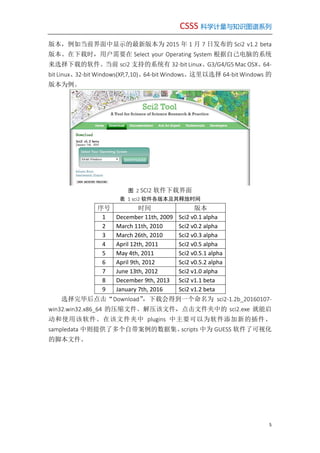
版本,例如当前界面中显示的最新版本为 2015 年 1 月 7 日发布的 Sci2 v1.2 beta
版本。在下载时,用户需要在 Select your Operating System 根据自己电脑的系统
来选择下载的软件。当前 sci2 支持的系统有 32-bit Linux、G3/G4/G5 Mac OSX、64-
bit Linux、32-bit Windows(XP,7,10)、64-bit Windows。这里以选择 64-bit Windows 的
版本为例。
图 2 SCI2 软件下载界面
表 1 sci2 软件各版本及其释放时间
序号 时间 版本
1 December 11th, 2009 Sci2 v0.1 alpha
2 March 11th, 2010 Sci2 v0.2 alpha
3 March 26th, 2010 Sci2 v0.3 alpha
4 April 12th, 2011 Sci2 v0.5 alpha
5 May 4th, 2011 Sci2 v0.5.1 alpha
6 April 9th, 2012 Sci2 v0.5.2 alpha
7 June 13th, 2012 Sci2 v1.0 alpha
8 December 9th, 2013 Sci2 v1.1 beta
9 January 7th, 2016 Sci2 v1.2 beta
选择完毕后点击“Download”,下载会得到一个命名为 sci2-1.2b_20160107-
win32.win32.x86_64 的压缩文件。解压该文件,点击文件夹中的 sci2.exe 就能启
动和使用该软件。在该文件夹中 plugins 中主要可以为软件添加新的插件、
sampledata 中则提供了多个自带案例的数据集、scripts 中为 GUESS 软件了可视化
的脚本文件。
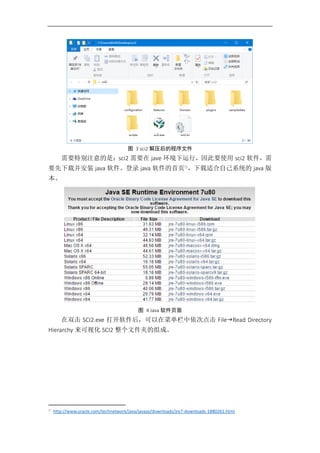
图 3 sci2 解压后的程序文件
需要特别注意的是:sci2 需要在 jave 环境下运行,因此要使用 sci2 软件,需
要先下载并安装 java 软件。登录 java 软件的首页①
,下载适合自己系统的 java 版
本。
图 4 Java 软件页面
在双击 SCI2.exe 打开软件后,可以在菜单栏中依次点击 FileRead Directory
Hierarchy 来可视化 SCI2 整个文件夹的组成。
①
http://www.oracle.com/technetwork/java/javase/downloads/jre7-downloads-1880261.html
CSSS 科学计量与知识图谱系列
7
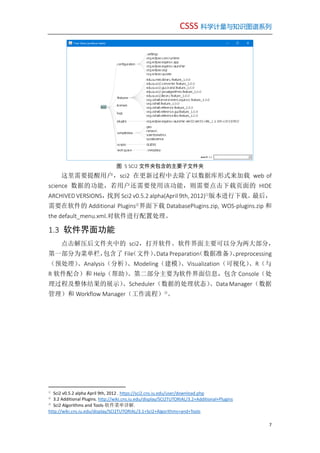
图 5 SCI2 文件夹包含的主要子文件夹
这里需要提醒用户,sci2 在更新过程中去除了以数据库形式来加载 web of
science 数据的功能,若用户还需要使用该功能,则需要点击下载页面的 HIDE
ARCHIVED VERSIONS,找到 Sci2 v0.5.2 alpha(April 9th, 2012)①
版本进行下载。最后,
需要在软件的 Additional Plugins②
界面下载 DatabasePlugins.zip, WOS-plugins.zip 和
the default_menu.xml.对软件进行配置处理。
1.3 软件界面功能
点击解压后文件夹中的 sci2,打开软件。软件界面主要可以分为两大部分,
第一部分为菜单栏,包含了 File(文件)、Data Preparation(数据准备)、preprocessing
(预处理)、Analysis(分析)、Modeling(建模)、Visualization(可视化)、R(与
R 软件配合)和 Help(帮助)。第二部分主要为软件界面信息,包含 Console(处
理过程及整体结果的展示)、Scheduler(数据的处理状态)、Data Manager(数据
管理)和 Workflow Manager(工作流程)③
。
①
Sci2 v0.5.2 alpha April 9th, 2012 . https://sci2.cns.iu.edu/user/download.php
②
3.2 Additional Plugins. http://wiki.cns.iu.edu/display/SCI2TUTORIAL/3.2+Additional+Plugins
③
Sci2 Algorithms and Tools-软件菜单详解.
http://wiki.cns.iu.edu/display/SCI2TUTORIAL/3.1+Sci2+Algorithms+and+Tools
图 6 软件无任务界面
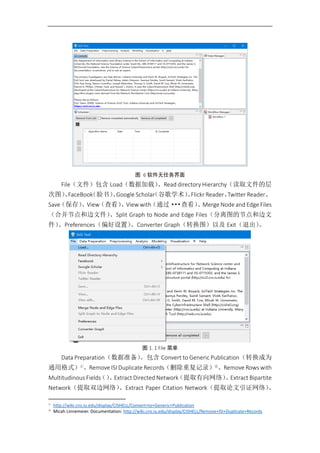
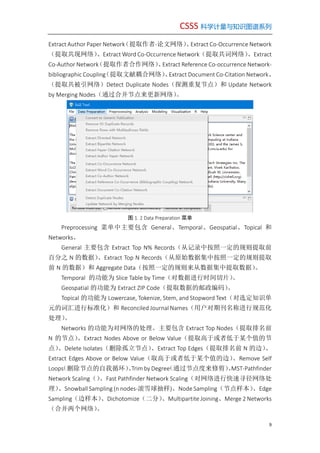
File(文件)包含 Load(数据加载)、Read directory Hierarchy(读取文件的层
次图)、FaceBook(脸书)、Google Scholar(谷歌学术)、Flickr Reader、Twitter Reader、
Save(保存)、View(查看)、View with(通过···查看)、Merge Node and Edge Files
(合并节点和边文件)、Split Graph to Node and Edge Files(分离图的节点和边文
件)、Preferences(偏好设置)、Converter Graph(转换图)以及 Exit(退出)。
图 1. 1 File 菜单
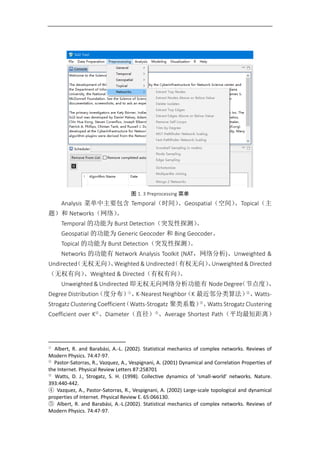
Data Preparation(数据准备)。包含 Convert to Generic Publication(转换成为
通用格式)①
、Remove ISI Duplicate Records(删除重复记录)②
、Remove Rows with
Multitudinous Fields()、Extract Directed Network(提取有向网络)、Extract Bipartite
Network(提取双边网络)、Extract Paper Citation Network(提取论文引证网络)、
①
http://wiki.cns.iu.edu/display/CISHELL/Convert+to+Generic+Publication
②
Micah Linnemeier. Documentation: http://wiki.cns.iu.edu/display/CISHELL/Remove+ISI+Duplicate+Records
CSSS 科学计量与知识图谱系列
9
Extract Author Paper Network(提取作者-论文网络)、Extract Co-Occurrence Network
(提取共现网络)、Extract Word Co-Occurrence Network(提取共词网络)、Extract
Co-Author Network(提取作者合作网络)、Extract Reference Co-occurrence Network-
bibliographic Coupling(提取文献耦合网络)、Extract Document Co-Citation Network、
(提取共被引网络)Detect Duplicate Nodes(探测重复节点)和 Update Network
by Merging Nodes(通过合并节点来更新网络)。
图 1. 2 Data Preparation 菜单
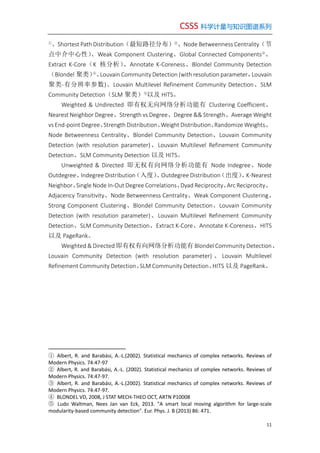
Preprocessing 菜单中主要包含 General、Temporal、Geospatial、Topical 和
Networks。
General 主要包含 Extract Top N% Records(从记录中按照一定的规则提取前
百分之 N 的数据)、Extract Top N Records(从原始数据集中按照一定的规则提取
前 N 的数据)和 Aggregate Data(按照一定的规则来从数据集中提取数据)。
Temporal 的功能为 Slice Table by Time(对数据进行时间切片)。
Geospatial 的功能为 Extract ZIP Code(提取数据的邮政编码)。
Topical 的功能为 Lowercase, Tokenize, Stem, and Stopword Text(对选定知识单
元的词汇进行标准化)和 Reconciled Journal Names(用户对期刊名称进行规范化
处理)。
Networks 的功能为对网络的处理。主要包含 Extract Top Nodes(提取排名前
N 的节点)、Extract Nodes Above or Below Value(提取高于或者低于某个值的节
点)、Delete Isolates(删除孤立节点)、Extract Top Edges(提取排名前 N 的边)、
Extract Edges Above or Below Value(取高于或者低于某个值的边)、Remove Self
Loops(删除节点的自我循环)、Trim by Degree(通过节点度来修剪)、MST-Pathfinder
Network Scaling()、Fast Pathfinder Network Scaling(对网络进行快速寻径网络处
理)、Snowball Sampling (n nodes-滚雪球抽样)、Node Sampling(节点样本)、Edge
Sampling(边样本)、Dichotomize(二分)、Multipartite Joining、Merge 2 Networks
(合并两个网络)。
图 1. 3 Preprocessing 菜单
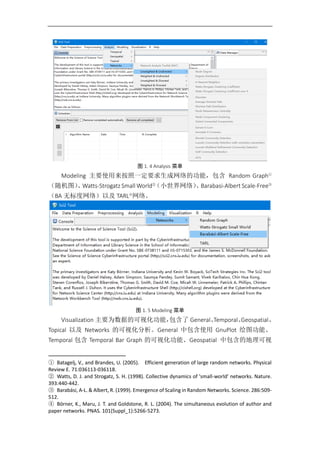
Analysis 菜单中主要包含 Temporal(时间)、Geospatial(空间)、Topical(主
题)和 Networks(网络)。
Temporal 的功能为 Burst Detection(突发性探测)。
Geospatial 的功能为 Generic Geocoder 和 Bing Geocoder。
Topical 的功能为 Burst Detection(突发性探测)。
Networks 的功能有 Network Analysis Toolkit (NAT,网络分析)、Unweighted &
Undirected(无权无向)、Weighted & Undirected(有权无向)、Unweighted & Directed
(无权有向)、Weighted & Directed(有权有向)。
Unweighted & Undirected 即无权无向网络分析功能有 Node Degree(节点度)、
Degree Distribution(度分布)①
、K-Nearest Neighbor(K 最近邻分类算法)②
、Watts-
Strogatz Clustering Coefficient(Watts-Strogatz 聚类系数)③
、Watts Strogatz Clustering
Coefficient over K④
、Diameter(直径)⑤
、Average Shortest Path(平均最短距离)
①
Albert, R. and Barabási, A.-L. (2002). Statistical mechanics of complex networks. Reviews of
Modern Physics. 74:47-97.
②
Pastor-Satorras, R., Vazquez, A., Vespignani, A. (2001) Dynamical and Correlation Properties of
the Internet. Physical Review Letters 87:258701
③
Watts, D. J., Strogatz, S. H. (1998). Collective dynamics of 'small-world' networks. Nature.
393:440-442.
④ Vazquez, A., Pastor-Satorras, R., Vespignani, A. (2002) Large-scale topological and dynamical
properties of Internet. Physical Review E. 65:066130.
⑤ Albert, R. and Barabási, A.-L.(2002). Statistical mechanics of complex networks. Reviews of
Modern Physics. 74:47-97.
CSSS 科学计量与知识图谱系列
11
①
、Shortest Path Distribution(最短路径分布)②
、Node Betweenness Centrality(节
点中介中心性)、Weak Component Clustering、Global Connected Components③
、
Extract K-Core(K 核分析)、Annotate K-Coreness、Blondel Community Detection
(Blondel 聚类)④
、Louvain Community Detection (with resolution parameter,Louvain
聚类-有分辨率参数)、Louvain Multilevel Refinement Community Detection、SLM
Community Detection(SLM 聚类)⑤
以及 HITS。
Weighted & Undirected 即有权无向网络分析功能有 Clustering Coefficient、
Nearest Neighbor Degree、Strength vs Degree、Degree && Strength、Average Weight
vs End-point Degree、Strength Distribution、Weight Distribution、Randomize Weights、
Node Betweenness Centrality、Blondel Community Detection、Louvain Community
Detection (with resolution parameter)、Louvain Multilevel Refinement Community
Detection、SLM Community Detection 以及 HITS。
Unweighted & Directed 即无权有向网络分析功能有 Node Indegree、Node
Outdegree、Indegree Distribution(入度)、Outdegree Distribution(出度)、K-Nearest
Neighbor、Single Node In-Out Degree Correlations、Dyad Reciprocity、Arc Reciprocity、
Adjacency Transitivity、Node Betweenness Centrality、Weak Component Clustering、
Strong Component Clustering、Blondel Community Detection、Louvain Community
Detection (with resolution parameter)、Louvain Multilevel Refinement Community
Detection、SLM Community Detection、Extract K-Core、Annotate K-Coreness、HITS
以及 PageRank。
Weighted & Directed 即有权有向网络分析功能有 Blondel Community Detection、
Louvain Community Detection (with resolution parameter) 、 Louvain Multilevel
Refinement Community Detection、SLM Community Detection、HITS 以及 PageRank。
① Albert, R. and Barabási, A.-L.(2002). Statistical mechanics of complex networks. Reviews of
Modern Physics. 74:47-97
② Albert, R. and Barabási, A.-L. (2002). Statistical mechanics of complex networks. Reviews of
Modern Physics. 74:47-97.
③ Albert, R. and Barabási, A.-L.(2002). Statistical mechanics of complex networks. Reviews of
Modern Physics. 74:47-97.
④ BLONDEL VD, 2008, J STAT MECH-THEO OCT, ARTN P10008
⑤ Ludo Waltman, Nees Jan van Eck, 2013. "A smart local moving algorithm for large-scale
modularity-based community detection". Eur. Phys. J. B (2013) 86: 471.
图 1. 4 Analysis 菜单
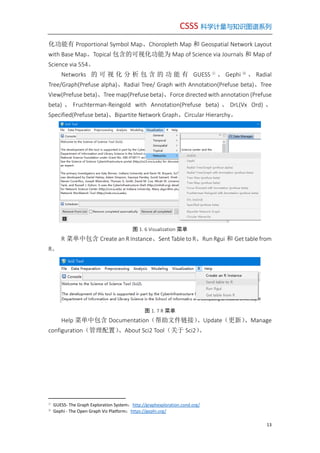
Modeling 主要使用来按照一定要求生成网络的功能,包含 Random Graph①
(随机图)、Watts-Strogatz Small World②
(小世界网络)、Barabasi-Albert Scale-Free③
(BA 无标度网络)以及 TARL④
网络。
图 1. 5 Modeling 菜单
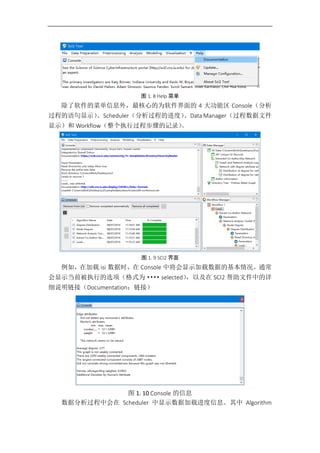
Visualization 主要为数据的可视化功能,包含了 General、Temporal、Geospatial、
Topical 以及 Networks 的可视化分析。General 中包含使用 GnuPlot 绘图功能、
Temporal 包含 Temporal Bar Graph 的可视化功能、Geospatial 中包含的地理可视
① Batagelj, V., and Brandes, U. (2005). Efficient generation of large random networks. Physical
Review E. 71:036113-036118.
② Watts, D. J. and Strogatz, S. H. (1998). Collective dynamics of 'small-world' networks. Nature.
393:440-442.
③ Barabási, A-L. & Albert, R. (1999). Emergence of Scaling in Random Networks. Science. 286:509-
512.
④ Börner, K., Maru, J. T. and Goldstone, R. L. (2004). The simultaneous evolution of author and
paper networks. PNAS. 101(Suppl_1):5266-5273.
CSSS 科学计量与知识图谱系列
13
化功能有 Proportional Symbol Map、Choropleth Map 和 Geospatial Network Layout
with Base Map。Topical 包含的可视化功能为 Map of Science via Journals 和 Map of
Science via 554。
Networks 的 可 视 化 分 析 包 含 的 功 能 有 GUESS ①
、 Gephi ②
、 Radial
Tree/Graph(Prefuse alpha)、Radial Tree/ Graph with Annotation(Prefuse beta)、Tree
View(Prefuse beta)、Tree map(Prefuse beta)、Force directed with annotation (Prefuse
beta) 、 Fruchterman-Reingold with Annotation(Prefuse beta) 、 DrL(Vx Ord) 、
Specified(Prefuse beta)、Bipartite Network Graph、Circular Hierarchy。
图 1. 6 Visualization 菜单
R 菜单中包含 Create an R Instance、Sent Table to R、Run Rgui 和 Get table from
R。
图 1. 7 R 菜单
Help 菜单中包含 Documentation(帮助文件链接)、Update(更新)、Manage
configuration(管理配置)、About Sci2 Tool(关于 Sci2)。
①
GUESS- The Graph Exploration System:http://graphexploration.cond.org/
②
Gephi - The Open Graph Viz Platform:https://gephi.org/
图 1. 8 Help 菜单
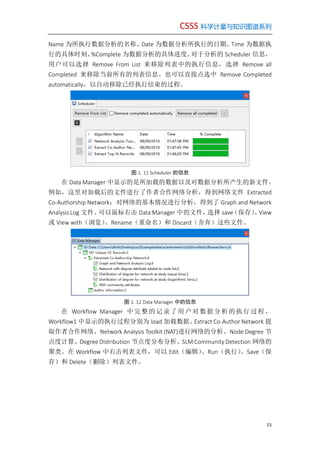
除了软件的菜单信息外,最核心的为软件界面的 4 大功能区 Console(分析
过程的语句显示)、Scheduler(分析过程的进度)、Data Manager(过程数据文件
显示)和 Workflow(整个执行过程步骤的记录)。
图 1. 9 SCI2 界面
例如,在加载 isi 数据时,在 Console 中将会显示加载数据的基本情况。通常
会显示当前被执行的选项(格式为····selected),以及在 SCI2 帮助文件中的详
细说明链接(Documentation:链接)
图 1. 10 Console 的信息
数据分析过程中会在 Scheduler 中显示数据加载进度信息。其中 Algorithm
CSSS 科学计量与知识图谱系列
15
Name 为所执行数据分析的名称、Date 为数据分析所执行的日期、Time 为数据执
行的具体时刻、%Complete 为数据分析的具体进度。对于分析的 Scheduler 信息,
用户可以选择 Remove From List 来移除列表中的执行信息,选择 Remove all
Completed 来移除当前所有的列表信息。也可以直接点选中 Remove Completed
automatically,以自动移除已经执行结束的过程。
图 1. 11 Scheduler 的信息
在 Data Manager 中显示的是所加载的数据以及对数据分析所产生的新文件。
例如,这里对加载后的文件进行了作者合作网络分析,得到网络文件 Extracted
Co-Authorship Network;对网络的基本情况进行分析,得到了 Graph and Network
Analysis Log 文件。可以鼠标右击 Data Manager 中的文件,选择 save(保存)、View
或 View with(浏览)、Rename(重命名)和 Discard(舍弃)这些文件。
图 1. 12 Data Manager 中的信息
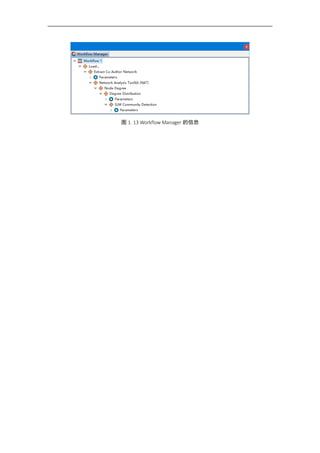
在 Workflow Manager 中完整的记录了用户对数据分析的执行过程。
Workflow1 中显示的执行过程分别为 load 加载数据、Extract Co-Author Network 提
取作者合作网络、Network Analysis Toolkit (NAT)进行网络的分析、Node Degree 节
点度计算、Degree Distribution 节点度分布分析、SLM Community Detection 网络的
聚类。在 Workflow 中右击列表文件,可以 Edit(编辑)、Run(执行)、Save(保
存)和 Delete(删除)列表文件。
图 1. 13 Workflow Manager 的信息
CSSS 科学计量与知识图谱系列
17
第2讲 WOS 数据的采集
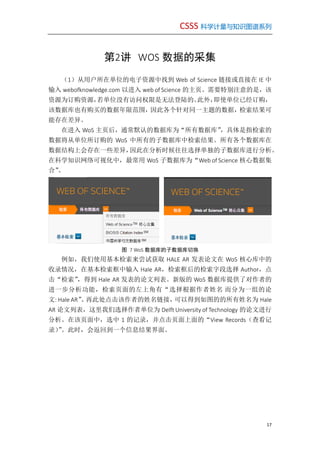
(1)从用户所在单位的电子资源中找到 Web of Science 链接或直接在 IE 中
输入 webofknowledge.com 以进入 web of Science 的主页。需要特别注意的是,该
资源为订购资源,若单位没有访问权限是无法登陆的。此外,即使单位已经订购,
该数据库也有购买的数据年限范围,因此各个针对同一主题的数据,检索结果可
能存在差异。
在进入 WoS 主页后,通常默认的数据库为“所有数据库”,具体是指检索的
数据将从单位所订购的 WoS 中所有的子数据库中检索结果。所有各个数据库在
数据结构上会存在一些差异,因此在分析时候往往选择单独的子数据库进行分析。
在科学知识网络可视化中,最常用 WoS 子数据库为“Web of Science 核心数据集
合”。
图 7 WoS 数据库的子数据库切换
例如,我们使用基本检索来尝试获取 HALE AR 发表论文在 WoS 核心库中的
收录情况,在基本检索框中输入 Hale AR,检索框后的检索字段选择 Author,点
击“检索”,得到 Hale AR 发表的论文列表。新版的 WoS 数据库提供了对作者的
进一步分析功能,检索页面的左上角有“选择根据作者姓名 而分为一组的论
文: Hale AR”。再此处点击该作者的姓名链接,可以得到如图的的所有姓名为 Hale
AR 论文列表,这里我们选择作者单位为 Delft University of Technology 的论文进行
分析。在该页面中,选中 1 的记录,并点击页面上面的“View Records(查看记
录)”。此时,会返回到一个信息结果界面。
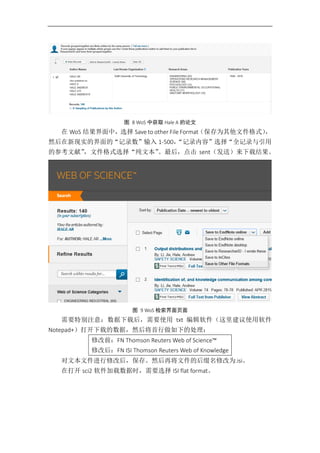
图 8 WoS 中获取 Hale A 的论文
在 WoS 结果界面中,选择 Save to other File Format(保存为其他文件格式),
然后在新现实的界面的“记录数”输入 1-500,“记录内容”选择“全记录与引用
的参考文献”,文件格式选择“纯文本”。最后,点击 sent(发送)来下载结果。
图 9 WoS 检索界面页面
需要特别注意:数据下载后,需要使用 txt 编辑软件(这里建议使用软件
Notepad+)打开下载的数据,然后将首行做如下的处理:
修改前:FN Thomson Reuters Web of Science™
修改后:FN ISI Thomson Reuters Web of Knowledge
对文本文件进行修改后,保存。然后再将文件的后缀名修改为.isi。
在打开 sci2 软件加载数据时,需要选择 ISI flat format。
CSSS 科学计量与知识图谱系列
19
第3讲 SCI2 对数据的预处理
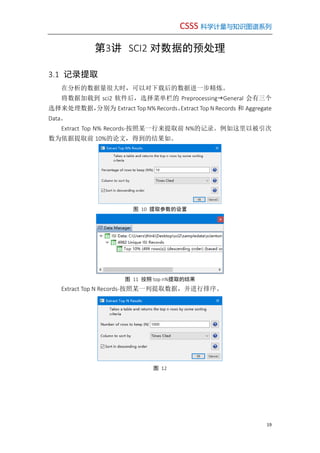
3.1 记录提取
在分析的数据量很大时,可以对下载后的数据进一步精炼。
将数据加载到 sci2 软件后,选择菜单栏的 PreprocessingGeneral 会有三个
选择来处理数据,分别为 Extract Top N% Records、Extract Top N Records 和 Aggregate
Data。
Extract Top N% Records-按照某一行来提取前 N%的记录。例如这里以被引次
数为依据提取前 10%的论文,得到的结果如。
图 10 提取参数的设置
图 11 按照 top n%提取的结果
Extract Top N Records-按照某一列提取数据,并进行排序。
图 12
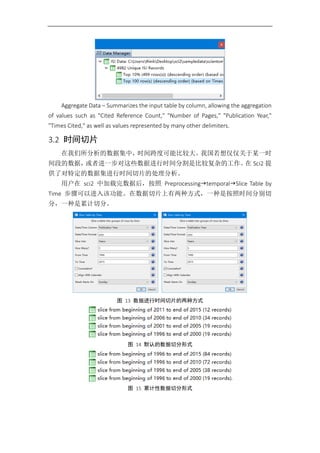
Aggregate Data – Summarizes the input table by column, allowing the aggregation
of values such as "Cited Reference Count," "Number of Pages," "Publication Year,"
"Times Cited," as well as values represented by many other delimiters.
3.2 时间切片
在我们所分析的数据集中,时间跨度可能比较大。我国若想仅仅关于某一时
间段的数据,或者进一步对这些数据进行时间分割是比较复杂的工作。在 Sci2 提
供了对特定的数据集进行时间切片的处理分析。
用户在 sci2 中加载完数据后,按照 PreprocessingtemporalSlice Table by
Time 步骤可以进入该功能。在数据切片上有两种方式,一种是按照时间分别切
分,一种是累计切分。
图 13 数据进行时间切片的两种方式
图 14 默认的数据切分形式
图 15 累计性数据切分形式
CSSS 科学计量与知识图谱系列
21
第4讲 SCI2 共现知识网络分析
4.1 共词网络分析
词共现网络分析的原理是从标题(Title)、作者关键词(Original Keywords)、
新 ISI 关键词(New ISI Keywords)或摘要(Abstract)中来提取反映研究主题关系
网络的方法。
打开 sci2 软件,点击 Fileload 加载 Hale A.isi 案例数据。并等待数据加载完
成。下面以从标题中提取共词网络为例进行说明:
(1)加载数据后,在菜单栏执行 PreprocessingTopicalLowercase, Tokenize,
Stem, and Stopword Text,选择 Abstract、Title 或者 Keyword 等进行标准化处理。
若对 Title 处理,结果会得到一个 with normalized Title 的文件。
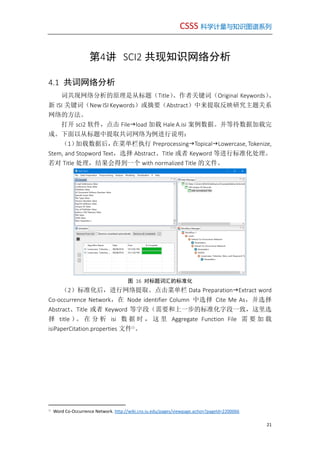
图 16 对标题词汇的标准化
(2)标准化后,进行网络提取。点击菜单栏 Data PreparationExtract word
Co-occurrence Network,在 Node identifier Column 中选择 Cite Me As,并选择
Abstract、Title 或者 Keyword 等字段(需要和上一步的标准化字段一致,这里选
择 title )。 在 分 析 isi 数 据 时 , 这 里 Aggregate Function File 需 要 加 载
isiPaperCitation.properties 文件①
。
①
Word Co-Occurrence Network. http://wiki.cns.iu.edu/pages/viewpage.action?pageId=2200066
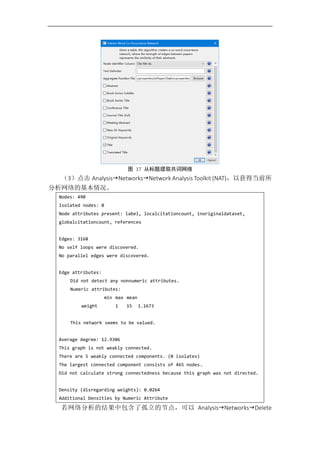
图 17 从标题提取共词网络
(3)点击 AnalysisNetworksNetwork Analysis Toolkit (NAT),以获得当前所
分析网络的基本情况。
Nodes: 490
Isolated nodes: 0
Node attributes present: label, localcitationcount, inoriginaldataset,
globalcitationcount, references
Edges: 3168
No self loops were discovered.
No parallel edges were discovered.
Edge attributes:
Did not detect any nonnumeric attributes.
Numeric attributes:
min max mean
weight 1 15 1.1673
This network seems to be valued.
Average degree: 12.9306
This graph is not weakly connected.
There are 5 weakly connected components. (0 isolates)
The largest connected component consists of 465 nodes.
Did not calculate strong connectedness because this graph was not directed.
Density (disregarding weights): 0.0264
Additional Densities by Numeric Attribute
若网络分析的结果中包含了孤立的节点,可以 AnalysisNetworksDelete
CSSS 科学计量与知识图谱系列
23
isolates 来 删除孤 立 节点。 对 于网络 规 模和密 度 比较大 时 ,可以 先 执行
VisualizationNetworksDrL(Vx ord),对话框参数默认,点击 ok。
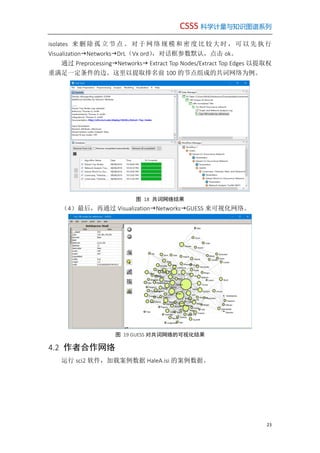
通过 PreprocessingNetworks Extract Top Nodes/Extract Top Edges 以提取权
重满足一定条件的边。这里以提取排名前 100 的节点组成的共词网络为例。
图 18 共词网络结果
(4)最后,再通过 VisualizationNetworksGUESS 来可视化网络。
图 19 GUESS 对共词网络的可视化结果
4.2 作者合作网络
运行 sci2 软件,加载案例数据 HaleA.isi 的案例数据。
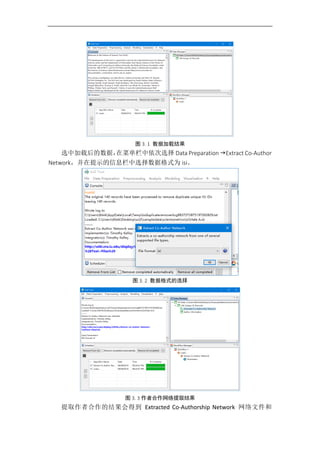
图 3. 1 数据加载结果
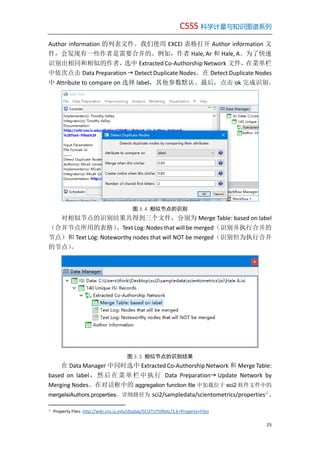
选中加载后的数据,在菜单栏中依次选择 Data Preparation Extract Co-Author
Network,并在提示的信息栏中选择数据格式为 isi。
图 3. 2 数据格式的选择
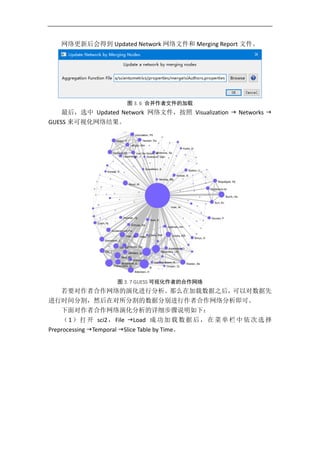
图 3. 3 作者合作网络提取结果
提取作者合作的结果会得到 Extracted Co-Authorship Network 网络文件和
CSSS 科学计量与知识图谱系列
25
Author information 的列表文件。我们使用 EXCEl 表格打开 Author information 文
件,会发现有一些作者是需要合并的。例如,作者 Hale, Ar 和 Hale, A。为了快速
识别出相同和相似的作者,选中 Extracted Co-Authorship Network 文件,在菜单栏
中依次点击 Data Preparation  Detect Duplicate Nodes。在 Detect Duplicate Nodes
中 Attribute to compare on 选择 label,其他参数默认。最后,点击 ok 完成识别。
图 3. 4 相似节点的识别
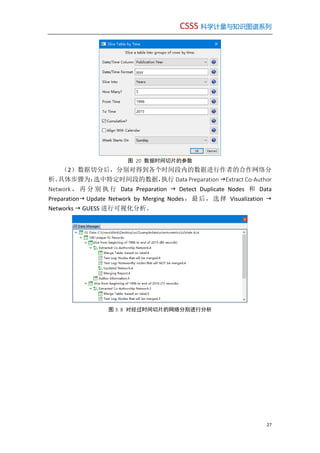
对相似节点的识别结果共得到三个文件,分别为 Merge Table: based on label
(合并节点所用的表格)、Text Log: Nodes that will be merged(识别并执行合并的
节点)和 Text Log: Noteworthy nodes that will NOT be merged(识别但为执行合并
的节点)。
图 3. 5 相似节点的识别结果
在 Data Manager 中同时选中 Extracted Co-Authorship Network 和 Merge Table:
based on label,然后在菜单栏中执行 Data Preparation Update Network by
Merging Nodes。在对话框中的 aggregation function file 中加载位于 sci2 软件文件中的
mergeIsiAuthors.properties。详细路径为 sci2/sampledata/scientometrics/properties①
。
①
Property Files. http://wiki.cns.iu.edu/display/SCI2TUTORIAL/3.6+Property+Files
网络更新后会得到 Updated Network 网络文件和 Merging Report 文件。
图 3. 6 合并作者文件的加载
最后,选中 Updated Network 网络文件,按照 Visualization  Networks 
GUESS 来可视化网络结果。
图 3. 7 GUESS 可视化作者的合作网络
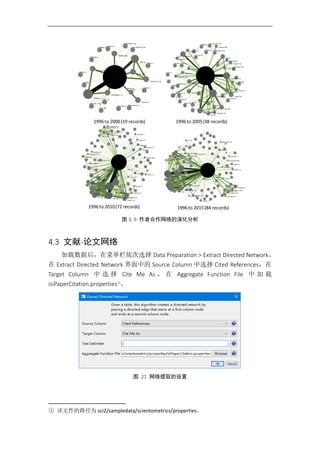
若要对作者合作网络的演化进行分析。那么在加载数据之后,可以对数据先
进行时间分割,然后在对所分割的数据分别进行作者合作网络分析即可。
下面对作者合作网络演化分析的详细步骤说明如下:
(1)打开 sci2,File Load 成功加载数据后,在菜单栏中依次选择
Preprocessing Temporal Slice Table by Time。
CSSS 科学计量与知识图谱系列
27
图 20 数据时间切片的参数
(2)数据切分后,分别对得到各个时间段内的数据进行作者的合作网络分
析。具体步骤为:选中特定时间段的数据,执行 Data Preparation Extract Co-Author
Network , 再 分 别 执 行 Data Preparation  Detect Duplicate Nodes 和 Data
Preparation Update Network by Merging Nodes,最后,选择 Visualization 
Networks  GUESS 进行可视化分析。
图 3. 8 对经过时间切片的网络分别进行分析
图 3. 9 作者合作网络的演化分析
4.3 文献-论文网络
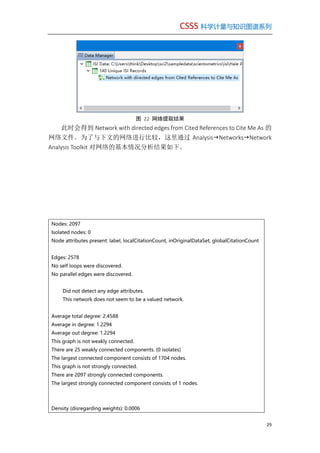
加载数据后,在菜单栏依次选择 Data Preparation > Extract Directed Network。
在 Extract Directed Network 界面中的 Source Column 中选择 Cited References,在
Target Column 中 选 择 Cite Me As , 在 Aggregate Function File 中 加 载
isiPaperCitation.properties①
。
图 21 网络提取的设置
① 该文件的路径为 sci2/sampledata/scientometrics/properties。
1996to 2000(19 records) 1996to 2005(38 records)
1996to 2010(72 records) 1996to 2015(84 records)
CSSS 科学计量与知识图谱系列
29
图 22 网络提取结果
此时会得到 Network with directed edges from Cited References to Cite Me As 的
网络文件。为了与下文的网络进行比较,这里通过 AnalysisNetworksNetwork
Analysis Toolkit 对网络的基本情况分析结果如下。
Nodes: 2097
Isolated nodes: 0
Node attributes present: label, localCitationCount, inOriginalDataSet, globalCitationCount
Edges: 2578
No self loops were discovered.
No parallel edges were discovered.
Did not detect any edge attributes.
This network does not seem to be a valued network.
Average total degree: 2.4588
Average in degree: 1.2294
Average out degree: 1.2294
This graph is not weakly connected.
There are 25 weakly connected components. (0 isolates)
The largest connected component consists of 1704 nodes.
This graph is not strongly connected.
There are 2097 strongly connected components.
The largest strongly connected component consists of 1 nodes.
Density (disregarding weights): 0.0006
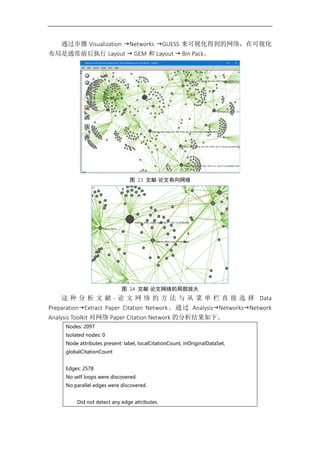
通过步骤 Visualization Networks GUESS 来可视化得到的网络,在可视化
布局是通常前后执行 Layout  GEM 和 Layout  Bin Pack。
图 23 文献-论文有向网络
图 24 文献-论文网络的局部放大
这 种 分 析 文 献 - 论 文 网 络 的 方 法 与 从 菜 单 栏 直 接 选 择 Data
PreparationExtract Paper Citation Network。通过 AnalysisNetworksNetwork
Analysis Toolkit 对网络 Paper Citation Network 的分析结果如下。
Nodes: 2097
Isolated nodes: 0
Node attributes present: label, localCitationCount, inOriginalDataSet,
globalCitationCount
Edges: 2578
No self loops were discovered.
No parallel edges were discovered.
Did not detect any edge attributes.
CSSS 科学计量与知识图谱系列
31
This network does not seem to be a valued network.
Average total degree: 2.4588
Average in degree: 1.2294
Average out degree: 1.2294
This graph is not weakly connected.
There are 25 weakly connected components. (0 isolates)
The largest connected component consists of 1704 nodes.
This graph is not strongly connected.
There are 2097 strongly connected components.
The largest strongly connected component consists of 1 nodes.
Density (disregarding weights): 0.0006
4.4 文献共被引网络
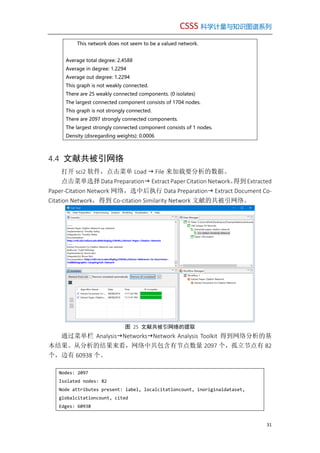
打开 sci2 软件,点击菜单 Load  File 来加载要分析的数据。
点击菜单选择 Data Preparation Extract Paper Citation Network。得到Extracted
Paper-Citation Network 网络,选中后执行 Data Preparation Extract Document Co-
Citation Network,得到 Co-citation Similarity Network 文献的共被引网络。
图 25 文献共被引网络的提取
通过菜单栏 AnalysisNetworksNetwork Analysis Toolkit 得到网络分析的基
本结果。从分析的结果来看,网络中共包含有节点数量 2097 个,孤立节点有 82
个,边有 60938 个。
Nodes: 2097
Isolated nodes: 82
Node attributes present: label, localcitationcount, inoriginaldataset,
globalcitationcount, cited
Edges: 60938
No self loops were discovered.
No parallel edges were discovered.
Edge attributes:
Did not detect any nonnumeric attributes.
Numeric attributes:
min max mean
weight 1 4 1.06605
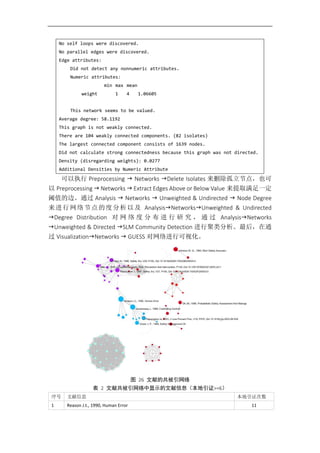
This network seems to be valued.
Average degree: 58.1192
This graph is not weakly connected.
There are 104 weakly connected components. (82 isolates)
The largest connected component consists of 1639 nodes.
Did not calculate strong connectedness because this graph was not directed.
Density (disregarding weights): 0.0277
Additional Densities by Numeric Attribute
可以执行 Preprocessing  Networks Delete Isolates 来删除孤立节点,也可
以 Preprocessing  Networks  Extract Edges Above or Below Value 来提取满足一定
阈值的边。通过 Analysis  Networks  Unweighted & Undirected  Node Degree
来进行网络节点的度分析以及 AnalysisNetworksUnweighted & Undirected
Degree Distribution 对 网 络 度 分 布 进 行 研 究 , 通 过 AnalysisNetworks
Unweighted & Directed SLM Community Detection 进行聚类分析。最后,在通
过 VisualizationNetworks  GUESS 对网络进行可视化。
图 26 文献的共被引网络
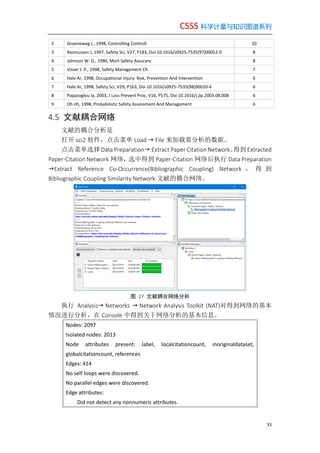
表 2 文献共被引网络中显示的文献信息(本地引证>=6)
序号 文献信息 本地引证次数
1 Reason J.t., 1990, Human Error 11
CSSS 科学计量与知识图谱系列
33
2 Groeneweg J., 1998, Controlling Controll 10
3 Rasmussen J, 1997, Safety Sci, V27, P183, Doi 10.1016/s0925-7535(97)00052-0 8
4 Johnson W. G., 1980, Mort Safety Assuranc 8
5 Visser J. P., 1998, Safety Management Ch 7
6 Hale Ar, 1998, Occupational Injury: Risk, Prevention And Intervention 6
7 Hale Ar, 1998, Safety Sci, V29, P163, Doi 10.1016/s0925-7535(98)00020-4 6
8 Papazoglou Ia, 2003, J Loss Prevent Proc, V16, P575, Doi 10.1016/j.jlp.2003.08.008 6
9 Oh Jih, 1998, Probabilistic Safety Assessment And Management 6
4.5 文献耦合网络
文献的耦合分析是
打开 sci2 软件,点击菜单 Load  File 来加载要分析的数据。
点击菜单选择 Data Preparation Extract Paper Citation Network。得到Extracted
Paper-Citation Network 网络,选中得到 Paper-Citation 网络后执行 Data Preparation
Extract Reference Co-Occurrence(Bibliographic Coupling) Network , 得 到
Bibliographic Coupling Similarity Network 文献的耦合网络。
图 27 文献耦合网络分析
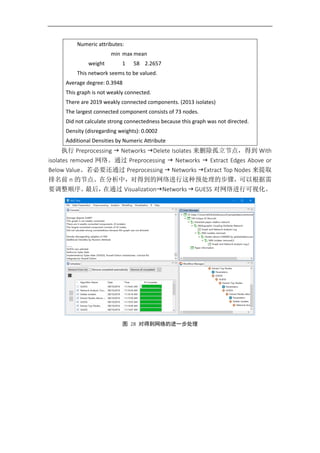
执行 Analysis Networks  Network Analysis Toolkit (NAT)对得到网络的基本
情况进行分析,在 Console 中得到关于网络分析的基本信息。
Nodes: 2097
Isolated nodes: 2013
Node attributes present: label, localcitationcount, inoriginaldataset,
globalcitationcount, references
Edges: 414
No self loops were discovered.
No parallel edges were discovered.
Edge attributes:
Did not detect any nonnumeric attributes.
Numeric attributes:
min max mean
weight 1 58 2.2657
This network seems to be valued.
Average degree: 0.3948
This graph is not weakly connected.
There are 2019 weakly connected components. (2013 isolates)
The largest connected component consists of 73 nodes.
Did not calculate strong connectedness because this graph was not directed.
Density (disregarding weights): 0.0002
Additional Densities by Numeric Attribute
执行 Preprocessing  Networks Delete Isolates 来删除孤立节点,得到 With
isolates removed 网络。通过 Preprocessing  Networks  Extract Edges Above or
Below Value。若必要还通过 Preprocessing  Networks Extract Top Nodes 来提取
排名前 n 的节点。在分析中,对得到的网络进行这种预处理的步骤,可以根据需
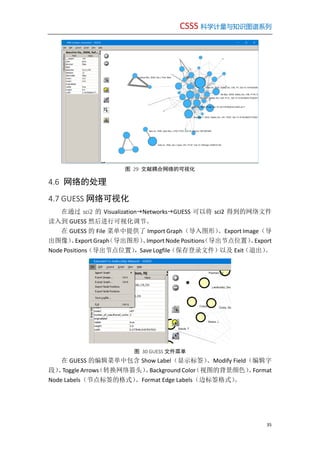
要调整顺序。最后,在通过 VisualizationNetworks  GUESS 对网络进行可视化。
图 28 对得到网络的进一步处理
CSSS 科学计量与知识图谱系列
35
图 29 文献耦合网络的可视化
4.6 网络的处理
4.7 GUESS 网络可视化
在通过 sci2 的 VisualizationNetworksGUESS 可以将 sci2 得到的网络文件
读入到 GUESS 然后进行可视化调节。
在 GUESS 的 File 菜单中提供了 Import Graph(导入图形)、Export Image(导
出图像)、Export Graph(导出图形)、Import Node Positions(导出节点位置)、Export
Node Positions(导出节点位置),Save Logfile(保存登录文件)以及 Exit(退出)。
图 30 GUESS 文件菜单
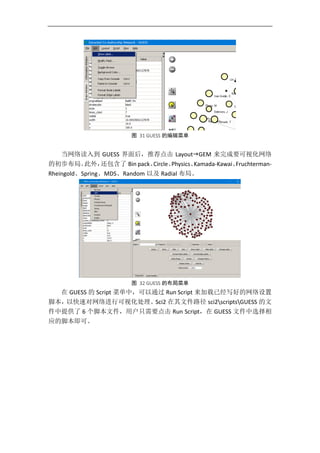
在 GUESS 的编辑菜单中包含 Show Label(显示标签)、Modify Field(编辑字
段)、Toggle Arrows(转换网络箭头)、Background Color(视图的背景颜色)、Format
Node Labels(节点标签的格式)、Format Edge Labels(边标签格式)。
图 31 GUESS 的编辑菜单
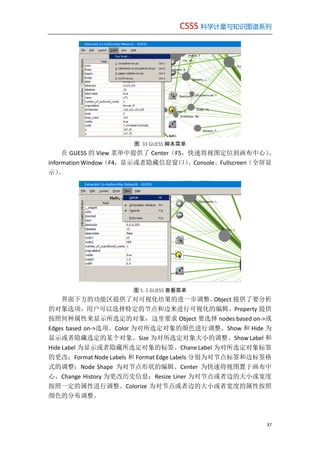
当网络读入到 GUESS 界面后,推荐点击 LayoutGEM 来完成要可视化网络
的初步布局。此外,还包含了 Bin pack、Circle、Physics、Kamada-Kawai、Fruchterman-
Rheingold、Spring、MDS、Random 以及 Radial 布局。
图 32 GUESS 的布局菜单
在 GUESS 的 Script 菜单中,可以通过 Run Script 来加载已经写好的网络设置
脚本,以快速对网络进行可视化处理。Sci2 在其文件路径 sci2scriptsGUESS 的文
件中提供了 6 个脚本文件,用户只需要点击 Run Script,在 GUESS 文件中选择相
应的脚本即可。
CSSS 科学计量与知识图谱系列
37
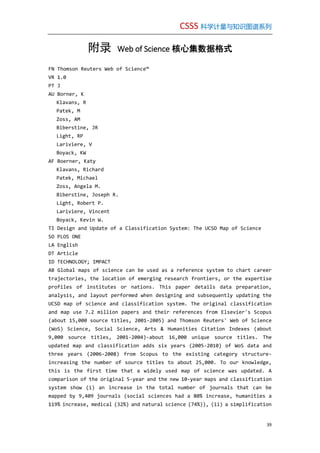
图 33 GUESS 脚本菜单
在 GUESS 的 View 菜单中提供了 Center(F5,快速将视图定位到画布中心)、
Information Window(F4,显示或者隐藏信息窗口)、Console、Fullscreen(全屏显
示)。
图 5. 1 GUESS 查看菜单
界面下方的功能区提供了对可视化结果的进一步调整。Object 提供了要分析
的对象选项,用户可以选择特定的节点和边来进行可视化的编辑。Property 提供
按照何种属性来显示所选定的对象,这里要求 Object 要选择 nodes based on->或
Edges based on->选项。Color 为对所选定对象的颜色进行调整、Show 和 Hide 为
显示或者隐藏选定的某个对象、Size 为对所选定对象大小的调整、Show Label 和
Hide Label 为显示或者隐藏所选定对象的标签、Chane Label 为对所选定对象标签
的更改;Format Node Labels 和 Format Edge Labels 分别为对节点标签和边标签格
式的调整;Node Shape 为对节点形状的编辑、Center 为快速将视图置于画布中
心、Change History 为更改历史信息;Resize Liner 为对节点或者边的大小或宽度
按照一定的属性进行调整、Colorize 为对节点或者边的大小或者宽度的属性按照
颜色的分布调整。
图 5. 2 可视化参数设置
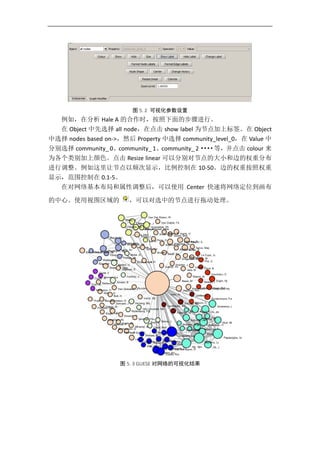
例如,在分析 Hale A 的合作时,按照下面的步骤进行。
在 Object 中先选择 all node,在点击 show label 为节点加上标签。在 Object
中选择 nodes based on->,然后 Property 中选择 community_level_0,在 Value 中
分别选择 community_ 0、community_ 1、community_ 2····等,并点击 colour 来
为各个类别加上颜色。点击 Resize linear 可以分别对节点的大小和边的权重分布
进行调整。例如这里让节点以频次显示,比例控制在 10-50。边的权重按照权重
显示,范围控制在 0.1-5。
在对网络基本布局和属性调整后,可以使用 Center 快速将网络定位到画布
的中心。使用视图区域的 ,可以对选中的节点进行拖动处理。
图 5. 3 GUESE 对网络的可视化结果
CSSS 科学计量与知识图谱系列
39
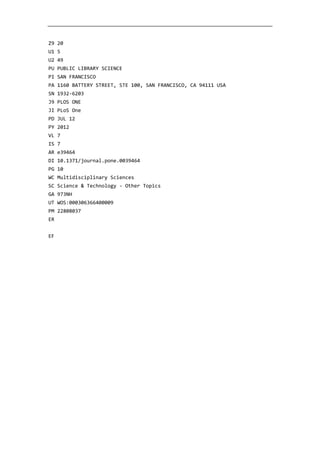
附录 Web of Science 核心集数据格式
FN Thomson Reuters Web of Science™
VR 1.0
PT J
AU Borner, K
Klavans, R
Patek, M
Zoss, AM
Biberstine, JR
Light, RP
Lariviere, V
Boyack, KW
AF Boerner, Katy
Klavans, Richard
Patek, Michael
Zoss, Angela M.
Biberstine, Joseph R.
Light, Robert P.
Lariviere, Vincent
Boyack, Kevin W.
TI Design and Update of a Classification System: The UCSD Map of Science
SO PLOS ONE
LA English
DT Article
ID TECHNOLOGY; IMPACT
AB Global maps of science can be used as a reference system to chart career
trajectories, the location of emerging research frontiers, or the expertise
profiles of institutes or nations. This paper details data preparation,
analysis, and layout performed when designing and subsequently updating the
UCSD map of science and classification system. The original classification
and map use 7.2 million papers and their references from Elsevier's Scopus
(about 15,000 source titles, 2001-2005) and Thomson Reuters' Web of Science
(WoS) Science, Social Science, Arts & Humanities Citation Indexes (about
9,000 source titles, 2001-2004)-about 16,000 unique source titles. The
updated map and classification adds six years (2005-2010) of WoS data and
three years (2006-2008) from Scopus to the existing category structure-
increasing the number of source titles to about 25,000. To our knowledge,
this is the first time that a widely used map of science was updated. A
comparison of the original 5-year and the new 10-year maps and classification
system show (i) an increase in the total number of journals that can be
mapped by 9,409 journals (social sciences had a 80% increase, humanities a
119% increase, medical (32%) and natural science (74%)), (ii) a simplification
of the map by assigning all but five highly interdisciplinary journals to
exactly one discipline, (iii) a more even distribution of journals over the
554 subdisciplines and 13 disciplines when calculating the coefficient of
variation, and (iv) a better reflection of journal clusters when compared
with paper-level citation data. When evaluating the map with a listing of
desirable features for maps of science, the updated map is shown to have
higher mapping accuracy, easier understandability as fewer journals are
multiply classified, and higher usability for the generation of data overlays,
among others.
C1 [Boerner, Katy; Zoss, Angela M.; Biberstine, Joseph R.; Light, Robert
P.; Lariviere, Vincent] Indiana Univ, Sch Lib & Informat Sci,
Cyberinfrastruct Network Sci Ctr, Bloomington, IN 47401 USA.
[Boerner, Katy] Royal Netherlands Acad Arts & Sci KNAW, Amsterdam,
Netherlands.
[Klavans, Richard; Patek, Michael] SciTech Strategies Inc, Berwyn, PA
USA.
[Lariviere, Vincent] Univ Montreal, Ecole Bibliothecon & Sci Informat,
Montreal, PQ, Canada.
[Lariviere, Vincent] Univ Quebec, CIRST, OST, Montreal, PQ H3C 3P8,
Canada.
[Boyack, Kevin W.] SciTech Strategies Inc, Albuquerque, NM USA.
RP Borner, K (reprint author), Indiana Univ, Sch Lib & Informat Sci,
Cyberinfrastruct Network Sci Ctr, Bloomington, IN 47401 USA.
EM katy@indiana.edu
OI Light, Robert/0000-0001-7067-5562; Boyack, Kevin/0000-0001-7814-8951
FU James S. McDonnell Foundation; National Science Foundation
[SBE-0738111]; National Institutes of Health [U24RR029822, U01GM098959];
University of California, San Diego (UCSD)
FX The generation of the 2010 UCSD map of science and classification system
is funded in part by the James S. McDonnell Foundation, the National
Science Foundation under award SBE-0738111, and the National Institutes
of Health under awards U24RR029822 and U01GM098959. Any opinions,
findings, and conclusions or recommendations expressed in this material
are those of the author(s) and do not necessarily reflect the views of
the National Science Foundation. The funders had no role in study
design, data collection and analysis, decision to publish, or
preparation of the manuscript.; The original 2005 UCSD map of science
was created by SciTech Strategies as part of a research contract funded
by the University of California, San Diego (UCSD). UCSD holds the
copyright for both the original classification system and the map, and
has given permission for them to be used in the instantiations mentioned
in this work. We would like to thank Andrea Scharnhorst for detailed
comments on an earlier version of this paper and Thomson Reuters and
Elsevier for their permission to publish the journal name conversion
CSSS 科学计量与知识图谱系列
41
tables.
CR Kosecki S, 2011, SCIENTOMETRICS, V88, P707, DOI 10.1007/s11192-011-0359-
0
[Anonymous], SCI METRIX SCI J ONT
Lewison G, 1998, SCIENTOMETRICS, V41, P17, DOI 10.1007/BF02457963
Klavans R, 2009, J AM SOC INF SCI TEC, V60, P455, DOI 10.1002/asi.20991
Bourke P, 1999, RES POLICY, V28, P489, DOI 10.1016/S0048-7333(99)00009-8
Boyack KW, 2005, SCIENTOMETRICS, V64, P351, DOI 10.1007/s11192-005-0255-
6
Boyack KW, 2009, SCIENTOMETRICS, V79, P27, DOI 10.1007/s11192-009-0402-6
Boyack KW, 2009, SCIENTOMETRICS, V79, P45, DOI 10.1007/s11192-009-0403-5
Small H, 1999, J AM SOC INFORM SCI, V50, P799, DOI 10.1002/(SICI)1097-
4571(1999)50:9<799::AID-ASI9>3.3.CO;2-7
Boyack KW, 2003, J AM SOC INF SCI TEC, V54, P447, DOI 10.1002/asi.10230
Klavans R, 2010, SCIENTOMETRICS, V82, P539, DOI 10.1007/s11192-010-0188-
6
Klavans R, 2011, J AM SOC INF SCI TEC, V62, P1, DOI 10.1002/asi.21444
Lewison G, 1998, GUT, V43, P288
[Anonymous], MACE BROWS CLASS
Leydesdorff L, 2009, J AM SOC INF SCI TEC, V60, P348, DOI
10.1002/asi.20967
Boyack KW, 2002, J AM SOC INF SCI TEC, V53, P764, DOI 10.1002/asi.10066
Borner K, 2003, VISUAL INTERFACES DI
Borner K, 2010, SCI TOOL TOOL SCI SC
Borner K, 2003, ANNU REV INFORM SCI, P179
Borner Katy, 2010, ATLAS SCI VISUALIZIN
Boyack KW, 2011, PLOS ONE, V6, P1
Crane Diana, 1972, INVISIBLE COLL DIFFU
de Nooy W., 2011, EXPLORATORY SOCIAL N
Irvine J, 1984, FORESIGHT SCI PICKIN
Jain A, 1998, SCIENTOMETRICS, V41, P357, DOI 10.1007/BF02459051
Polanco X, 2001, SCIENTOMETRICS, V51, P267, DOI 10.1023/A:1010537316758
Scharnhorst A, 2012, UNDERST COMPLEX SYST, P1, DOI 10.1007/978-3-642-
23068-4
Schwechheimer H, 2001, SCIENTOMETRICS, V51, P311, DOI
10.1023/A:1010541418576
Schwechheimer H, 1999, SCIENTOMETRICS, V44, P547, DOI 10.1007/BF02458495
Shiffrin RM, 2004, PNAS S1, P5183
Shneiderman B., 1996, Proceedings. IEEE Symposium on Visual Languages
(Cat. No.96TB100066), DOI 10.1109/VL.1996.545307
Vargas-Quesada B., 2007, VISUALIZING STRUCTUR
VIVO, EN NAT SCI
NR 33
TC 19
Z9 20
U1 5
U2 49
PU PUBLIC LIBRARY SCIENCE
PI SAN FRANCISCO
PA 1160 BATTERY STREET, STE 100, SAN FRANCISCO, CA 94111 USA
SN 1932-6203
J9 PLOS ONE
JI PLoS One
PD JUL 12
PY 2012
VL 7
IS 7
AR e39464
DI 10.1371/journal.pone.0039464
PG 10
WC Multidisciplinary Sciences
SC Science & Technology - Other Topics
GA 973NH
UT WOS:000306366400009
PM 22808037
ER
EF

Sci2中文指南

  • 1.
    CSSS 科学计量与知识图谱系列 SCI2 中文指南 2017 年7 月 18 日·北京 参考文献格式:李杰. SCI2 中文指南. http://blog.sciencenet.cn/blog-554179- 1066981.html 尊重版权,合理使用。 李 杰 上海海事大学 安全科学与工程系 上海海事大学 安全科技趋势研究中心 上海海事大学 科技情报研究所 博客:http://blog.sciencenet.cn/u/jerrycueb 邮件:lijie_jerry@126.com
  • 2.
    目录 学习资源........................................................................................................................3 第 1 讲SCI2 软件功能简介...................................................................................4 1.1 软件概况 ........................................................................................................4 1.2 软件下载和安装 ............................................................................................4 1.3 软件界面功能 ................................................................................................7 第 2 讲 WOS 数据的采集....................................................................................17 第 3 讲 SCI2 对数据的预处理.............................................................................19 3.1 记录提取 ......................................................................................................19 3.2 时间切片 ......................................................................................................20 第 4 讲 SCI2 共现知识网络分析.........................................................................21 4.1 共词网络分析 ..............................................................................................21 4.2 作者合作网络 ..............................................................................................23 4.3 文献-论文网络 .............................................................................................28 4.4 文献共被引网络 ..........................................................................................31 4.5 文献耦合网络 ..............................................................................................33 4.6 网络的处理 ..................................................................................................35 4.7 GUESS 网络可视化........................................................................................35 附录 Web of Science 核心集数据格式......................................................................39
  • 3.
    CSSS 科学计量与知识图谱系列 3 学习资源 图 0.1 科学知识图谱学习微信学习社区  QQ 群 A 303640837  QQ 群 B 535200942 科学计量与知识图谱指南系列出版物 图 0. 2 已出版 计划待出版  R 科学计量数据可视化(首都经济贸易大学出版社-2018)  科学知识图谱原理及应用-VOSviewer 与 CitNetExplorer(高等教育出版社-2017) 已分享在线指南  CiteSpace 中文版指南 http://blog.sciencenet.cn/blog-554179-1027923.html  如何使用 CiteSpace 的一组示范及常见问题解答 http://blog.sciencenet.cn/blog-554179-838345.html 知识图谱学习推荐博客:  陈超美教授:http://blog.sciencenet.cn/u/ChaomeiChen  李杰博士:http://blog.sciencenet.cn/u/jerrycueb 科学计量学暑期学校 Chinese Summer School for Scientometrics
  • 4.
    CSSS 科学计量与知识图谱系列 第1讲 SCI2软件功能简介 1.1 软件概况 SCI2(sci of sci,简称 sci2)① 是由美国印第安那大学信息与计算学院信息与 图书馆学系在美国科学基金 No. SBE-0738111、IIS-0715303 以及 James S. McDonnell 基金会的支持下开发。Sci2 的主要成员有来自印第安纳大学的 Katy Börner 和 SciTech Strategies 公司的 Kevin W. Boyack。项目具体开发由 Daniel Halsey, Adam Simpson, Saumya Pandey, Sumit Samant, Vivek Karihaloo, Chin Hua Kong, Steven Corenflos, Joseph Biberstine, Thomas G. Smith, David M. Coe, Micah W. Linnemeier, Patrick A. Phillips, Chintan Tank 和 Russell J. Duhon 组 成 的 开 发 团 队 基 于 Cyberinfrastructure Shell 开发。 该团队的负责人 Katy Börner 是世界知名的信息可视化研究学者。 图 1 Katy Börner 个人主页② 1.2 软件下载和安装 登录 SCI2 的主页③ ,然后,点击 Download SCI2 Tool 来下载软件。首次下载需 要按照提示注册,并进入下载界面。在下载界面中,能够获知当前最新的 SCI2 的 ① Sci2 Team. (2009). Science of Science (Sci2) Tool. Indiana University and SciTech Strategies, https://sci2.cns.iu.edu. ② Katy Börner. http://info.ils.indiana.edu/~katy/ ③ Sci2 主页. https://sci2.cns.iu.edu/user/index.php
  • 5.
    CSSS 科学计量与知识图谱系列 5 版本,例如当前界面中显示的最新版本为 2015年 1 月 7 日发布的 Sci2 v1.2 beta 版本。在下载时,用户需要在 Select your Operating System 根据自己电脑的系统 来选择下载的软件。当前 sci2 支持的系统有 32-bit Linux、G3/G4/G5 Mac OSX、64- bit Linux、32-bit Windows(XP,7,10)、64-bit Windows。这里以选择 64-bit Windows 的 版本为例。 图 2 SCI2 软件下载界面 表 1 sci2 软件各版本及其释放时间 序号 时间 版本 1 December 11th, 2009 Sci2 v0.1 alpha 2 March 11th, 2010 Sci2 v0.2 alpha 3 March 26th, 2010 Sci2 v0.3 alpha 4 April 12th, 2011 Sci2 v0.5 alpha 5 May 4th, 2011 Sci2 v0.5.1 alpha 6 April 9th, 2012 Sci2 v0.5.2 alpha 7 June 13th, 2012 Sci2 v1.0 alpha 8 December 9th, 2013 Sci2 v1.1 beta 9 January 7th, 2016 Sci2 v1.2 beta 选择完毕后点击“Download”,下载会得到一个命名为 sci2-1.2b_20160107- win32.win32.x86_64 的压缩文件。解压该文件,点击文件夹中的 sci2.exe 就能启 动和使用该软件。在该文件夹中 plugins 中主要可以为软件添加新的插件、 sampledata 中则提供了多个自带案例的数据集、scripts 中为 GUESS 软件了可视化 的脚本文件。
  • 6.
    图 3 sci2解压后的程序文件 需要特别注意的是:sci2 需要在 jave 环境下运行,因此要使用 sci2 软件,需 要先下载并安装 java 软件。登录 java 软件的首页① ,下载适合自己系统的 java 版 本。 图 4 Java 软件页面 在双击 SCI2.exe 打开软件后,可以在菜单栏中依次点击 FileRead Directory Hierarchy 来可视化 SCI2 整个文件夹的组成。 ① http://www.oracle.com/technetwork/java/javase/downloads/jre7-downloads-1880261.html
  • 7.
    CSSS 科学计量与知识图谱系列 7 图 5SCI2 文件夹包含的主要子文件夹 这里需要提醒用户,sci2 在更新过程中去除了以数据库形式来加载 web of science 数据的功能,若用户还需要使用该功能,则需要点击下载页面的 HIDE ARCHIVED VERSIONS,找到 Sci2 v0.5.2 alpha(April 9th, 2012)① 版本进行下载。最后, 需要在软件的 Additional Plugins② 界面下载 DatabasePlugins.zip, WOS-plugins.zip 和 the default_menu.xml.对软件进行配置处理。 1.3 软件界面功能 点击解压后文件夹中的 sci2,打开软件。软件界面主要可以分为两大部分, 第一部分为菜单栏,包含了 File(文件)、Data Preparation(数据准备)、preprocessing (预处理)、Analysis(分析)、Modeling(建模)、Visualization(可视化)、R(与 R 软件配合)和 Help(帮助)。第二部分主要为软件界面信息,包含 Console(处 理过程及整体结果的展示)、Scheduler(数据的处理状态)、Data Manager(数据 管理)和 Workflow Manager(工作流程)③ 。 ① Sci2 v0.5.2 alpha April 9th, 2012 . https://sci2.cns.iu.edu/user/download.php ② 3.2 Additional Plugins. http://wiki.cns.iu.edu/display/SCI2TUTORIAL/3.2+Additional+Plugins ③ Sci2 Algorithms and Tools-软件菜单详解. http://wiki.cns.iu.edu/display/SCI2TUTORIAL/3.1+Sci2+Algorithms+and+Tools
  • 8.
    图 6 软件无任务界面 File(文件)包含Load(数据加载)、Read directory Hierarchy(读取文件的层 次图)、FaceBook(脸书)、Google Scholar(谷歌学术)、Flickr Reader、Twitter Reader、 Save(保存)、View(查看)、View with(通过···查看)、Merge Node and Edge Files (合并节点和边文件)、Split Graph to Node and Edge Files(分离图的节点和边文 件)、Preferences(偏好设置)、Converter Graph(转换图)以及 Exit(退出)。 图 1. 1 File 菜单 Data Preparation(数据准备)。包含 Convert to Generic Publication(转换成为 通用格式)① 、Remove ISI Duplicate Records(删除重复记录)② 、Remove Rows with Multitudinous Fields()、Extract Directed Network(提取有向网络)、Extract Bipartite Network(提取双边网络)、Extract Paper Citation Network(提取论文引证网络)、 ① http://wiki.cns.iu.edu/display/CISHELL/Convert+to+Generic+Publication ② Micah Linnemeier. Documentation: http://wiki.cns.iu.edu/display/CISHELL/Remove+ISI+Duplicate+Records
  • 9.
    CSSS 科学计量与知识图谱系列 9 Extract AuthorPaper Network(提取作者-论文网络)、Extract Co-Occurrence Network (提取共现网络)、Extract Word Co-Occurrence Network(提取共词网络)、Extract Co-Author Network(提取作者合作网络)、Extract Reference Co-occurrence Network- bibliographic Coupling(提取文献耦合网络)、Extract Document Co-Citation Network、 (提取共被引网络)Detect Duplicate Nodes(探测重复节点)和 Update Network by Merging Nodes(通过合并节点来更新网络)。 图 1. 2 Data Preparation 菜单 Preprocessing 菜单中主要包含 General、Temporal、Geospatial、Topical 和 Networks。 General 主要包含 Extract Top N% Records(从记录中按照一定的规则提取前 百分之 N 的数据)、Extract Top N Records(从原始数据集中按照一定的规则提取 前 N 的数据)和 Aggregate Data(按照一定的规则来从数据集中提取数据)。 Temporal 的功能为 Slice Table by Time(对数据进行时间切片)。 Geospatial 的功能为 Extract ZIP Code(提取数据的邮政编码)。 Topical 的功能为 Lowercase, Tokenize, Stem, and Stopword Text(对选定知识单 元的词汇进行标准化)和 Reconciled Journal Names(用户对期刊名称进行规范化 处理)。 Networks 的功能为对网络的处理。主要包含 Extract Top Nodes(提取排名前 N 的节点)、Extract Nodes Above or Below Value(提取高于或者低于某个值的节 点)、Delete Isolates(删除孤立节点)、Extract Top Edges(提取排名前 N 的边)、 Extract Edges Above or Below Value(取高于或者低于某个值的边)、Remove Self Loops(删除节点的自我循环)、Trim by Degree(通过节点度来修剪)、MST-Pathfinder Network Scaling()、Fast Pathfinder Network Scaling(对网络进行快速寻径网络处 理)、Snowball Sampling (n nodes-滚雪球抽样)、Node Sampling(节点样本)、Edge Sampling(边样本)、Dichotomize(二分)、Multipartite Joining、Merge 2 Networks (合并两个网络)。
  • 10.
    图 1. 3Preprocessing 菜单 Analysis 菜单中主要包含 Temporal(时间)、Geospatial(空间)、Topical(主 题)和 Networks(网络)。 Temporal 的功能为 Burst Detection(突发性探测)。 Geospatial 的功能为 Generic Geocoder 和 Bing Geocoder。 Topical 的功能为 Burst Detection(突发性探测)。 Networks 的功能有 Network Analysis Toolkit (NAT,网络分析)、Unweighted & Undirected(无权无向)、Weighted & Undirected(有权无向)、Unweighted & Directed (无权有向)、Weighted & Directed(有权有向)。 Unweighted & Undirected 即无权无向网络分析功能有 Node Degree(节点度)、 Degree Distribution(度分布)① 、K-Nearest Neighbor(K 最近邻分类算法)② 、Watts- Strogatz Clustering Coefficient(Watts-Strogatz 聚类系数)③ 、Watts Strogatz Clustering Coefficient over K④ 、Diameter(直径)⑤ 、Average Shortest Path(平均最短距离) ① Albert, R. and Barabási, A.-L. (2002). Statistical mechanics of complex networks. Reviews of Modern Physics. 74:47-97. ② Pastor-Satorras, R., Vazquez, A., Vespignani, A. (2001) Dynamical and Correlation Properties of the Internet. Physical Review Letters 87:258701 ③ Watts, D. J., Strogatz, S. H. (1998). Collective dynamics of 'small-world' networks. Nature. 393:440-442. ④ Vazquez, A., Pastor-Satorras, R., Vespignani, A. (2002) Large-scale topological and dynamical properties of Internet. Physical Review E. 65:066130. ⑤ Albert, R. and Barabási, A.-L.(2002). Statistical mechanics of complex networks. Reviews of Modern Physics. 74:47-97.
  • 11.
    CSSS 科学计量与知识图谱系列 11 ① 、Shortest PathDistribution(最短路径分布)② 、Node Betweenness Centrality(节 点中介中心性)、Weak Component Clustering、Global Connected Components③ 、 Extract K-Core(K 核分析)、Annotate K-Coreness、Blondel Community Detection (Blondel 聚类)④ 、Louvain Community Detection (with resolution parameter,Louvain 聚类-有分辨率参数)、Louvain Multilevel Refinement Community Detection、SLM Community Detection(SLM 聚类)⑤ 以及 HITS。 Weighted & Undirected 即有权无向网络分析功能有 Clustering Coefficient、 Nearest Neighbor Degree、Strength vs Degree、Degree && Strength、Average Weight vs End-point Degree、Strength Distribution、Weight Distribution、Randomize Weights、 Node Betweenness Centrality、Blondel Community Detection、Louvain Community Detection (with resolution parameter)、Louvain Multilevel Refinement Community Detection、SLM Community Detection 以及 HITS。 Unweighted & Directed 即无权有向网络分析功能有 Node Indegree、Node Outdegree、Indegree Distribution(入度)、Outdegree Distribution(出度)、K-Nearest Neighbor、Single Node In-Out Degree Correlations、Dyad Reciprocity、Arc Reciprocity、 Adjacency Transitivity、Node Betweenness Centrality、Weak Component Clustering、 Strong Component Clustering、Blondel Community Detection、Louvain Community Detection (with resolution parameter)、Louvain Multilevel Refinement Community Detection、SLM Community Detection、Extract K-Core、Annotate K-Coreness、HITS 以及 PageRank。 Weighted & Directed 即有权有向网络分析功能有 Blondel Community Detection、 Louvain Community Detection (with resolution parameter) 、 Louvain Multilevel Refinement Community Detection、SLM Community Detection、HITS 以及 PageRank。 ① Albert, R. and Barabási, A.-L.(2002). Statistical mechanics of complex networks. Reviews of Modern Physics. 74:47-97 ② Albert, R. and Barabási, A.-L. (2002). Statistical mechanics of complex networks. Reviews of Modern Physics. 74:47-97. ③ Albert, R. and Barabási, A.-L.(2002). Statistical mechanics of complex networks. Reviews of Modern Physics. 74:47-97. ④ BLONDEL VD, 2008, J STAT MECH-THEO OCT, ARTN P10008 ⑤ Ludo Waltman, Nees Jan van Eck, 2013. "A smart local moving algorithm for large-scale modularity-based community detection". Eur. Phys. J. B (2013) 86: 471.
  • 12.
    图 1. 4Analysis 菜单 Modeling 主要使用来按照一定要求生成网络的功能,包含 Random Graph① (随机图)、Watts-Strogatz Small World② (小世界网络)、Barabasi-Albert Scale-Free③ (BA 无标度网络)以及 TARL④ 网络。 图 1. 5 Modeling 菜单 Visualization 主要为数据的可视化功能,包含了 General、Temporal、Geospatial、 Topical 以及 Networks 的可视化分析。General 中包含使用 GnuPlot 绘图功能、 Temporal 包含 Temporal Bar Graph 的可视化功能、Geospatial 中包含的地理可视 ① Batagelj, V., and Brandes, U. (2005). Efficient generation of large random networks. Physical Review E. 71:036113-036118. ② Watts, D. J. and Strogatz, S. H. (1998). Collective dynamics of 'small-world' networks. Nature. 393:440-442. ③ Barabási, A-L. & Albert, R. (1999). Emergence of Scaling in Random Networks. Science. 286:509- 512. ④ Börner, K., Maru, J. T. and Goldstone, R. L. (2004). The simultaneous evolution of author and paper networks. PNAS. 101(Suppl_1):5266-5273.
  • 13.
    CSSS 科学计量与知识图谱系列 13 化功能有 ProportionalSymbol Map、Choropleth Map 和 Geospatial Network Layout with Base Map。Topical 包含的可视化功能为 Map of Science via Journals 和 Map of Science via 554。 Networks 的 可 视 化 分 析 包 含 的 功 能 有 GUESS ① 、 Gephi ② 、 Radial Tree/Graph(Prefuse alpha)、Radial Tree/ Graph with Annotation(Prefuse beta)、Tree View(Prefuse beta)、Tree map(Prefuse beta)、Force directed with annotation (Prefuse beta) 、 Fruchterman-Reingold with Annotation(Prefuse beta) 、 DrL(Vx Ord) 、 Specified(Prefuse beta)、Bipartite Network Graph、Circular Hierarchy。 图 1. 6 Visualization 菜单 R 菜单中包含 Create an R Instance、Sent Table to R、Run Rgui 和 Get table from R。 图 1. 7 R 菜单 Help 菜单中包含 Documentation(帮助文件链接)、Update(更新)、Manage configuration(管理配置)、About Sci2 Tool(关于 Sci2)。 ① GUESS- The Graph Exploration System:http://graphexploration.cond.org/ ② Gephi - The Open Graph Viz Platform:https://gephi.org/
  • 14.
    图 1. 8Help 菜单 除了软件的菜单信息外,最核心的为软件界面的 4 大功能区 Console(分析 过程的语句显示)、Scheduler(分析过程的进度)、Data Manager(过程数据文件 显示)和 Workflow(整个执行过程步骤的记录)。 图 1. 9 SCI2 界面 例如,在加载 isi 数据时,在 Console 中将会显示加载数据的基本情况。通常 会显示当前被执行的选项(格式为····selected),以及在 SCI2 帮助文件中的详 细说明链接(Documentation:链接) 图 1. 10 Console 的信息 数据分析过程中会在 Scheduler 中显示数据加载进度信息。其中 Algorithm
  • 15.
    CSSS 科学计量与知识图谱系列 15 Name 为所执行数据分析的名称、Date为数据分析所执行的日期、Time 为数据执 行的具体时刻、%Complete 为数据分析的具体进度。对于分析的 Scheduler 信息, 用户可以选择 Remove From List 来移除列表中的执行信息,选择 Remove all Completed 来移除当前所有的列表信息。也可以直接点选中 Remove Completed automatically,以自动移除已经执行结束的过程。 图 1. 11 Scheduler 的信息 在 Data Manager 中显示的是所加载的数据以及对数据分析所产生的新文件。 例如,这里对加载后的文件进行了作者合作网络分析,得到网络文件 Extracted Co-Authorship Network;对网络的基本情况进行分析,得到了 Graph and Network Analysis Log 文件。可以鼠标右击 Data Manager 中的文件,选择 save(保存)、View 或 View with(浏览)、Rename(重命名)和 Discard(舍弃)这些文件。 图 1. 12 Data Manager 中的信息 在 Workflow Manager 中完整的记录了用户对数据分析的执行过程。 Workflow1 中显示的执行过程分别为 load 加载数据、Extract Co-Author Network 提 取作者合作网络、Network Analysis Toolkit (NAT)进行网络的分析、Node Degree 节 点度计算、Degree Distribution 节点度分布分析、SLM Community Detection 网络的 聚类。在 Workflow 中右击列表文件,可以 Edit(编辑)、Run(执行)、Save(保 存)和 Delete(删除)列表文件。
  • 16.
    图 1. 13Workflow Manager 的信息
  • 17.
    CSSS 科学计量与知识图谱系列 17 第2讲 WOS数据的采集 (1)从用户所在单位的电子资源中找到 Web of Science 链接或直接在 IE 中 输入 webofknowledge.com 以进入 web of Science 的主页。需要特别注意的是,该 资源为订购资源,若单位没有访问权限是无法登陆的。此外,即使单位已经订购, 该数据库也有购买的数据年限范围,因此各个针对同一主题的数据,检索结果可 能存在差异。 在进入 WoS 主页后,通常默认的数据库为“所有数据库”,具体是指检索的 数据将从单位所订购的 WoS 中所有的子数据库中检索结果。所有各个数据库在 数据结构上会存在一些差异,因此在分析时候往往选择单独的子数据库进行分析。 在科学知识网络可视化中,最常用 WoS 子数据库为“Web of Science 核心数据集 合”。 图 7 WoS 数据库的子数据库切换 例如,我们使用基本检索来尝试获取 HALE AR 发表论文在 WoS 核心库中的 收录情况,在基本检索框中输入 Hale AR,检索框后的检索字段选择 Author,点 击“检索”,得到 Hale AR 发表的论文列表。新版的 WoS 数据库提供了对作者的 进一步分析功能,检索页面的左上角有“选择根据作者姓名 而分为一组的论 文: Hale AR”。再此处点击该作者的姓名链接,可以得到如图的的所有姓名为 Hale AR 论文列表,这里我们选择作者单位为 Delft University of Technology 的论文进行 分析。在该页面中,选中 1 的记录,并点击页面上面的“View Records(查看记 录)”。此时,会返回到一个信息结果界面。
  • 18.
    图 8 WoS中获取 Hale A 的论文 在 WoS 结果界面中,选择 Save to other File Format(保存为其他文件格式), 然后在新现实的界面的“记录数”输入 1-500,“记录内容”选择“全记录与引用 的参考文献”,文件格式选择“纯文本”。最后,点击 sent(发送)来下载结果。 图 9 WoS 检索界面页面 需要特别注意:数据下载后,需要使用 txt 编辑软件(这里建议使用软件 Notepad+)打开下载的数据,然后将首行做如下的处理: 修改前:FN Thomson Reuters Web of Science™ 修改后:FN ISI Thomson Reuters Web of Knowledge 对文本文件进行修改后,保存。然后再将文件的后缀名修改为.isi。 在打开 sci2 软件加载数据时,需要选择 ISI flat format。
  • 19.
    CSSS 科学计量与知识图谱系列 19 第3讲 SCI2对数据的预处理 3.1 记录提取 在分析的数据量很大时,可以对下载后的数据进一步精炼。 将数据加载到 sci2 软件后,选择菜单栏的 PreprocessingGeneral 会有三个 选择来处理数据,分别为 Extract Top N% Records、Extract Top N Records 和 Aggregate Data。 Extract Top N% Records-按照某一行来提取前 N%的记录。例如这里以被引次 数为依据提取前 10%的论文,得到的结果如。 图 10 提取参数的设置 图 11 按照 top n%提取的结果 Extract Top N Records-按照某一列提取数据,并进行排序。 图 12
  • 20.
    Aggregate Data –Summarizes the input table by column, allowing the aggregation of values such as "Cited Reference Count," "Number of Pages," "Publication Year," "Times Cited," as well as values represented by many other delimiters. 3.2 时间切片 在我们所分析的数据集中,时间跨度可能比较大。我国若想仅仅关于某一时 间段的数据,或者进一步对这些数据进行时间分割是比较复杂的工作。在 Sci2 提 供了对特定的数据集进行时间切片的处理分析。 用户在 sci2 中加载完数据后,按照 PreprocessingtemporalSlice Table by Time 步骤可以进入该功能。在数据切片上有两种方式,一种是按照时间分别切 分,一种是累计切分。 图 13 数据进行时间切片的两种方式 图 14 默认的数据切分形式 图 15 累计性数据切分形式
  • 21.
    CSSS 科学计量与知识图谱系列 21 第4讲 SCI2共现知识网络分析 4.1 共词网络分析 词共现网络分析的原理是从标题(Title)、作者关键词(Original Keywords)、 新 ISI 关键词(New ISI Keywords)或摘要(Abstract)中来提取反映研究主题关系 网络的方法。 打开 sci2 软件,点击 Fileload 加载 Hale A.isi 案例数据。并等待数据加载完 成。下面以从标题中提取共词网络为例进行说明: (1)加载数据后,在菜单栏执行 PreprocessingTopicalLowercase, Tokenize, Stem, and Stopword Text,选择 Abstract、Title 或者 Keyword 等进行标准化处理。 若对 Title 处理,结果会得到一个 with normalized Title 的文件。 图 16 对标题词汇的标准化 (2)标准化后,进行网络提取。点击菜单栏 Data PreparationExtract word Co-occurrence Network,在 Node identifier Column 中选择 Cite Me As,并选择 Abstract、Title 或者 Keyword 等字段(需要和上一步的标准化字段一致,这里选 择 title )。 在 分 析 isi 数 据 时 , 这 里 Aggregate Function File 需 要 加 载 isiPaperCitation.properties 文件① 。 ① Word Co-Occurrence Network. http://wiki.cns.iu.edu/pages/viewpage.action?pageId=2200066
  • 22.
    图 17 从标题提取共词网络 (3)点击AnalysisNetworksNetwork Analysis Toolkit (NAT),以获得当前所 分析网络的基本情况。 Nodes: 490 Isolated nodes: 0 Node attributes present: label, localcitationcount, inoriginaldataset, globalcitationcount, references Edges: 3168 No self loops were discovered. No parallel edges were discovered. Edge attributes: Did not detect any nonnumeric attributes. Numeric attributes: min max mean weight 1 15 1.1673 This network seems to be valued. Average degree: 12.9306 This graph is not weakly connected. There are 5 weakly connected components. (0 isolates) The largest connected component consists of 465 nodes. Did not calculate strong connectedness because this graph was not directed. Density (disregarding weights): 0.0264 Additional Densities by Numeric Attribute 若网络分析的结果中包含了孤立的节点,可以 AnalysisNetworksDelete
  • 23.
    CSSS 科学计量与知识图谱系列 23 isolates 来删除孤 立 节点。 对 于网络 规 模和密 度 比较大 时 ,可以 先 执行 VisualizationNetworksDrL(Vx ord),对话框参数默认,点击 ok。 通过 PreprocessingNetworks Extract Top Nodes/Extract Top Edges 以提取权 重满足一定条件的边。这里以提取排名前 100 的节点组成的共词网络为例。 图 18 共词网络结果 (4)最后,再通过 VisualizationNetworksGUESS 来可视化网络。 图 19 GUESS 对共词网络的可视化结果 4.2 作者合作网络 运行 sci2 软件,加载案例数据 HaleA.isi 的案例数据。
  • 24.
    图 3. 1数据加载结果 选中加载后的数据,在菜单栏中依次选择 Data Preparation Extract Co-Author Network,并在提示的信息栏中选择数据格式为 isi。 图 3. 2 数据格式的选择 图 3. 3 作者合作网络提取结果 提取作者合作的结果会得到 Extracted Co-Authorship Network 网络文件和
  • 25.
    CSSS 科学计量与知识图谱系列 25 Author information的列表文件。我们使用 EXCEl 表格打开 Author information 文 件,会发现有一些作者是需要合并的。例如,作者 Hale, Ar 和 Hale, A。为了快速 识别出相同和相似的作者,选中 Extracted Co-Authorship Network 文件,在菜单栏 中依次点击 Data Preparation  Detect Duplicate Nodes。在 Detect Duplicate Nodes 中 Attribute to compare on 选择 label,其他参数默认。最后,点击 ok 完成识别。 图 3. 4 相似节点的识别 对相似节点的识别结果共得到三个文件,分别为 Merge Table: based on label (合并节点所用的表格)、Text Log: Nodes that will be merged(识别并执行合并的 节点)和 Text Log: Noteworthy nodes that will NOT be merged(识别但为执行合并 的节点)。 图 3. 5 相似节点的识别结果 在 Data Manager 中同时选中 Extracted Co-Authorship Network 和 Merge Table: based on label,然后在菜单栏中执行 Data Preparation Update Network by Merging Nodes。在对话框中的 aggregation function file 中加载位于 sci2 软件文件中的 mergeIsiAuthors.properties。详细路径为 sci2/sampledata/scientometrics/properties① 。 ① Property Files. http://wiki.cns.iu.edu/display/SCI2TUTORIAL/3.6+Property+Files
  • 26.
    网络更新后会得到 Updated Network网络文件和 Merging Report 文件。 图 3. 6 合并作者文件的加载 最后,选中 Updated Network 网络文件,按照 Visualization  Networks  GUESS 来可视化网络结果。 图 3. 7 GUESS 可视化作者的合作网络 若要对作者合作网络的演化进行分析。那么在加载数据之后,可以对数据先 进行时间分割,然后在对所分割的数据分别进行作者合作网络分析即可。 下面对作者合作网络演化分析的详细步骤说明如下: (1)打开 sci2,File Load 成功加载数据后,在菜单栏中依次选择 Preprocessing Temporal Slice Table by Time。
  • 27.
    CSSS 科学计量与知识图谱系列 27 图 20数据时间切片的参数 (2)数据切分后,分别对得到各个时间段内的数据进行作者的合作网络分 析。具体步骤为:选中特定时间段的数据,执行 Data Preparation Extract Co-Author Network , 再 分 别 执 行 Data Preparation  Detect Duplicate Nodes 和 Data Preparation Update Network by Merging Nodes,最后,选择 Visualization  Networks  GUESS 进行可视化分析。 图 3. 8 对经过时间切片的网络分别进行分析
  • 28.
    图 3. 9作者合作网络的演化分析 4.3 文献-论文网络 加载数据后,在菜单栏依次选择 Data Preparation > Extract Directed Network。 在 Extract Directed Network 界面中的 Source Column 中选择 Cited References,在 Target Column 中 选 择 Cite Me As , 在 Aggregate Function File 中 加 载 isiPaperCitation.properties① 。 图 21 网络提取的设置 ① 该文件的路径为 sci2/sampledata/scientometrics/properties。 1996to 2000(19 records) 1996to 2005(38 records) 1996to 2010(72 records) 1996to 2015(84 records)
  • 29.
    CSSS 科学计量与知识图谱系列 29 图 22网络提取结果 此时会得到 Network with directed edges from Cited References to Cite Me As 的 网络文件。为了与下文的网络进行比较,这里通过 AnalysisNetworksNetwork Analysis Toolkit 对网络的基本情况分析结果如下。 Nodes: 2097 Isolated nodes: 0 Node attributes present: label, localCitationCount, inOriginalDataSet, globalCitationCount Edges: 2578 No self loops were discovered. No parallel edges were discovered. Did not detect any edge attributes. This network does not seem to be a valued network. Average total degree: 2.4588 Average in degree: 1.2294 Average out degree: 1.2294 This graph is not weakly connected. There are 25 weakly connected components. (0 isolates) The largest connected component consists of 1704 nodes. This graph is not strongly connected. There are 2097 strongly connected components. The largest strongly connected component consists of 1 nodes. Density (disregarding weights): 0.0006
  • 30.
    通过步骤 Visualization NetworksGUESS 来可视化得到的网络,在可视化 布局是通常前后执行 Layout  GEM 和 Layout  Bin Pack。 图 23 文献-论文有向网络 图 24 文献-论文网络的局部放大 这 种 分 析 文 献 - 论 文 网 络 的 方 法 与 从 菜 单 栏 直 接 选 择 Data PreparationExtract Paper Citation Network。通过 AnalysisNetworksNetwork Analysis Toolkit 对网络 Paper Citation Network 的分析结果如下。 Nodes: 2097 Isolated nodes: 0 Node attributes present: label, localCitationCount, inOriginalDataSet, globalCitationCount Edges: 2578 No self loops were discovered. No parallel edges were discovered. Did not detect any edge attributes.
  • 31.
    CSSS 科学计量与知识图谱系列 31 This networkdoes not seem to be a valued network. Average total degree: 2.4588 Average in degree: 1.2294 Average out degree: 1.2294 This graph is not weakly connected. There are 25 weakly connected components. (0 isolates) The largest connected component consists of 1704 nodes. This graph is not strongly connected. There are 2097 strongly connected components. The largest strongly connected component consists of 1 nodes. Density (disregarding weights): 0.0006 4.4 文献共被引网络 打开 sci2 软件,点击菜单 Load  File 来加载要分析的数据。 点击菜单选择 Data Preparation Extract Paper Citation Network。得到Extracted Paper-Citation Network 网络,选中后执行 Data Preparation Extract Document Co- Citation Network,得到 Co-citation Similarity Network 文献的共被引网络。 图 25 文献共被引网络的提取 通过菜单栏 AnalysisNetworksNetwork Analysis Toolkit 得到网络分析的基 本结果。从分析的结果来看,网络中共包含有节点数量 2097 个,孤立节点有 82 个,边有 60938 个。 Nodes: 2097 Isolated nodes: 82 Node attributes present: label, localcitationcount, inoriginaldataset, globalcitationcount, cited Edges: 60938
  • 32.
    No self loopswere discovered. No parallel edges were discovered. Edge attributes: Did not detect any nonnumeric attributes. Numeric attributes: min max mean weight 1 4 1.06605 This network seems to be valued. Average degree: 58.1192 This graph is not weakly connected. There are 104 weakly connected components. (82 isolates) The largest connected component consists of 1639 nodes. Did not calculate strong connectedness because this graph was not directed. Density (disregarding weights): 0.0277 Additional Densities by Numeric Attribute 可以执行 Preprocessing  Networks Delete Isolates 来删除孤立节点,也可 以 Preprocessing  Networks  Extract Edges Above or Below Value 来提取满足一定 阈值的边。通过 Analysis  Networks  Unweighted & Undirected  Node Degree 来进行网络节点的度分析以及 AnalysisNetworksUnweighted & Undirected Degree Distribution 对 网 络 度 分 布 进 行 研 究 , 通 过 AnalysisNetworks Unweighted & Directed SLM Community Detection 进行聚类分析。最后,在通 过 VisualizationNetworks  GUESS 对网络进行可视化。 图 26 文献的共被引网络 表 2 文献共被引网络中显示的文献信息(本地引证>=6) 序号 文献信息 本地引证次数 1 Reason J.t., 1990, Human Error 11
  • 33.
    CSSS 科学计量与知识图谱系列 33 2 GroenewegJ., 1998, Controlling Controll 10 3 Rasmussen J, 1997, Safety Sci, V27, P183, Doi 10.1016/s0925-7535(97)00052-0 8 4 Johnson W. G., 1980, Mort Safety Assuranc 8 5 Visser J. P., 1998, Safety Management Ch 7 6 Hale Ar, 1998, Occupational Injury: Risk, Prevention And Intervention 6 7 Hale Ar, 1998, Safety Sci, V29, P163, Doi 10.1016/s0925-7535(98)00020-4 6 8 Papazoglou Ia, 2003, J Loss Prevent Proc, V16, P575, Doi 10.1016/j.jlp.2003.08.008 6 9 Oh Jih, 1998, Probabilistic Safety Assessment And Management 6 4.5 文献耦合网络 文献的耦合分析是 打开 sci2 软件,点击菜单 Load  File 来加载要分析的数据。 点击菜单选择 Data Preparation Extract Paper Citation Network。得到Extracted Paper-Citation Network 网络,选中得到 Paper-Citation 网络后执行 Data Preparation Extract Reference Co-Occurrence(Bibliographic Coupling) Network , 得 到 Bibliographic Coupling Similarity Network 文献的耦合网络。 图 27 文献耦合网络分析 执行 Analysis Networks  Network Analysis Toolkit (NAT)对得到网络的基本 情况进行分析,在 Console 中得到关于网络分析的基本信息。 Nodes: 2097 Isolated nodes: 2013 Node attributes present: label, localcitationcount, inoriginaldataset, globalcitationcount, references Edges: 414 No self loops were discovered. No parallel edges were discovered. Edge attributes: Did not detect any nonnumeric attributes.
  • 34.
    Numeric attributes: min maxmean weight 1 58 2.2657 This network seems to be valued. Average degree: 0.3948 This graph is not weakly connected. There are 2019 weakly connected components. (2013 isolates) The largest connected component consists of 73 nodes. Did not calculate strong connectedness because this graph was not directed. Density (disregarding weights): 0.0002 Additional Densities by Numeric Attribute 执行 Preprocessing  Networks Delete Isolates 来删除孤立节点,得到 With isolates removed 网络。通过 Preprocessing  Networks  Extract Edges Above or Below Value。若必要还通过 Preprocessing  Networks Extract Top Nodes 来提取 排名前 n 的节点。在分析中,对得到的网络进行这种预处理的步骤,可以根据需 要调整顺序。最后,在通过 VisualizationNetworks  GUESS 对网络进行可视化。 图 28 对得到网络的进一步处理
  • 35.
    CSSS 科学计量与知识图谱系列 35 图 29文献耦合网络的可视化 4.6 网络的处理 4.7 GUESS 网络可视化 在通过 sci2 的 VisualizationNetworksGUESS 可以将 sci2 得到的网络文件 读入到 GUESS 然后进行可视化调节。 在 GUESS 的 File 菜单中提供了 Import Graph(导入图形)、Export Image(导 出图像)、Export Graph(导出图形)、Import Node Positions(导出节点位置)、Export Node Positions(导出节点位置),Save Logfile(保存登录文件)以及 Exit(退出)。 图 30 GUESS 文件菜单 在 GUESS 的编辑菜单中包含 Show Label(显示标签)、Modify Field(编辑字 段)、Toggle Arrows(转换网络箭头)、Background Color(视图的背景颜色)、Format Node Labels(节点标签的格式)、Format Edge Labels(边标签格式)。
  • 36.
    图 31 GUESS的编辑菜单 当网络读入到 GUESS 界面后,推荐点击 LayoutGEM 来完成要可视化网络 的初步布局。此外,还包含了 Bin pack、Circle、Physics、Kamada-Kawai、Fruchterman- Rheingold、Spring、MDS、Random 以及 Radial 布局。 图 32 GUESS 的布局菜单 在 GUESS 的 Script 菜单中,可以通过 Run Script 来加载已经写好的网络设置 脚本,以快速对网络进行可视化处理。Sci2 在其文件路径 sci2scriptsGUESS 的文 件中提供了 6 个脚本文件,用户只需要点击 Run Script,在 GUESS 文件中选择相 应的脚本即可。
  • 37.
    CSSS 科学计量与知识图谱系列 37 图 33GUESS 脚本菜单 在 GUESS 的 View 菜单中提供了 Center(F5,快速将视图定位到画布中心)、 Information Window(F4,显示或者隐藏信息窗口)、Console、Fullscreen(全屏显 示)。 图 5. 1 GUESS 查看菜单 界面下方的功能区提供了对可视化结果的进一步调整。Object 提供了要分析 的对象选项,用户可以选择特定的节点和边来进行可视化的编辑。Property 提供 按照何种属性来显示所选定的对象,这里要求 Object 要选择 nodes based on->或 Edges based on->选项。Color 为对所选定对象的颜色进行调整、Show 和 Hide 为 显示或者隐藏选定的某个对象、Size 为对所选定对象大小的调整、Show Label 和 Hide Label 为显示或者隐藏所选定对象的标签、Chane Label 为对所选定对象标签 的更改;Format Node Labels 和 Format Edge Labels 分别为对节点标签和边标签格 式的调整;Node Shape 为对节点形状的编辑、Center 为快速将视图置于画布中 心、Change History 为更改历史信息;Resize Liner 为对节点或者边的大小或宽度 按照一定的属性进行调整、Colorize 为对节点或者边的大小或者宽度的属性按照 颜色的分布调整。
  • 38.
    图 5. 2可视化参数设置 例如,在分析 Hale A 的合作时,按照下面的步骤进行。 在 Object 中先选择 all node,在点击 show label 为节点加上标签。在 Object 中选择 nodes based on->,然后 Property 中选择 community_level_0,在 Value 中 分别选择 community_ 0、community_ 1、community_ 2····等,并点击 colour 来 为各个类别加上颜色。点击 Resize linear 可以分别对节点的大小和边的权重分布 进行调整。例如这里让节点以频次显示,比例控制在 10-50。边的权重按照权重 显示,范围控制在 0.1-5。 在对网络基本布局和属性调整后,可以使用 Center 快速将网络定位到画布 的中心。使用视图区域的 ,可以对选中的节点进行拖动处理。 图 5. 3 GUESE 对网络的可视化结果
  • 39.
    CSSS 科学计量与知识图谱系列 39 附录 Webof Science 核心集数据格式 FN Thomson Reuters Web of Science™ VR 1.0 PT J AU Borner, K Klavans, R Patek, M Zoss, AM Biberstine, JR Light, RP Lariviere, V Boyack, KW AF Boerner, Katy Klavans, Richard Patek, Michael Zoss, Angela M. Biberstine, Joseph R. Light, Robert P. Lariviere, Vincent Boyack, Kevin W. TI Design and Update of a Classification System: The UCSD Map of Science SO PLOS ONE LA English DT Article ID TECHNOLOGY; IMPACT AB Global maps of science can be used as a reference system to chart career trajectories, the location of emerging research frontiers, or the expertise profiles of institutes or nations. This paper details data preparation, analysis, and layout performed when designing and subsequently updating the UCSD map of science and classification system. The original classification and map use 7.2 million papers and their references from Elsevier's Scopus (about 15,000 source titles, 2001-2005) and Thomson Reuters' Web of Science (WoS) Science, Social Science, Arts & Humanities Citation Indexes (about 9,000 source titles, 2001-2004)-about 16,000 unique source titles. The updated map and classification adds six years (2005-2010) of WoS data and three years (2006-2008) from Scopus to the existing category structure- increasing the number of source titles to about 25,000. To our knowledge, this is the first time that a widely used map of science was updated. A comparison of the original 5-year and the new 10-year maps and classification system show (i) an increase in the total number of journals that can be mapped by 9,409 journals (social sciences had a 80% increase, humanities a 119% increase, medical (32%) and natural science (74%)), (ii) a simplification
  • 40.
    of the mapby assigning all but five highly interdisciplinary journals to exactly one discipline, (iii) a more even distribution of journals over the 554 subdisciplines and 13 disciplines when calculating the coefficient of variation, and (iv) a better reflection of journal clusters when compared with paper-level citation data. When evaluating the map with a listing of desirable features for maps of science, the updated map is shown to have higher mapping accuracy, easier understandability as fewer journals are multiply classified, and higher usability for the generation of data overlays, among others. C1 [Boerner, Katy; Zoss, Angela M.; Biberstine, Joseph R.; Light, Robert P.; Lariviere, Vincent] Indiana Univ, Sch Lib & Informat Sci, Cyberinfrastruct Network Sci Ctr, Bloomington, IN 47401 USA. [Boerner, Katy] Royal Netherlands Acad Arts & Sci KNAW, Amsterdam, Netherlands. [Klavans, Richard; Patek, Michael] SciTech Strategies Inc, Berwyn, PA USA. [Lariviere, Vincent] Univ Montreal, Ecole Bibliothecon & Sci Informat, Montreal, PQ, Canada. [Lariviere, Vincent] Univ Quebec, CIRST, OST, Montreal, PQ H3C 3P8, Canada. [Boyack, Kevin W.] SciTech Strategies Inc, Albuquerque, NM USA. RP Borner, K (reprint author), Indiana Univ, Sch Lib & Informat Sci, Cyberinfrastruct Network Sci Ctr, Bloomington, IN 47401 USA. EM katy@indiana.edu OI Light, Robert/0000-0001-7067-5562; Boyack, Kevin/0000-0001-7814-8951 FU James S. McDonnell Foundation; National Science Foundation [SBE-0738111]; National Institutes of Health [U24RR029822, U01GM098959]; University of California, San Diego (UCSD) FX The generation of the 2010 UCSD map of science and classification system is funded in part by the James S. McDonnell Foundation, the National Science Foundation under award SBE-0738111, and the National Institutes of Health under awards U24RR029822 and U01GM098959. Any opinions, findings, and conclusions or recommendations expressed in this material are those of the author(s) and do not necessarily reflect the views of the National Science Foundation. The funders had no role in study design, data collection and analysis, decision to publish, or preparation of the manuscript.; The original 2005 UCSD map of science was created by SciTech Strategies as part of a research contract funded by the University of California, San Diego (UCSD). UCSD holds the copyright for both the original classification system and the map, and has given permission for them to be used in the instantiations mentioned in this work. We would like to thank Andrea Scharnhorst for detailed comments on an earlier version of this paper and Thomson Reuters and Elsevier for their permission to publish the journal name conversion
  • 41.
    CSSS 科学计量与知识图谱系列 41 tables. CR KoseckiS, 2011, SCIENTOMETRICS, V88, P707, DOI 10.1007/s11192-011-0359- 0 [Anonymous], SCI METRIX SCI J ONT Lewison G, 1998, SCIENTOMETRICS, V41, P17, DOI 10.1007/BF02457963 Klavans R, 2009, J AM SOC INF SCI TEC, V60, P455, DOI 10.1002/asi.20991 Bourke P, 1999, RES POLICY, V28, P489, DOI 10.1016/S0048-7333(99)00009-8 Boyack KW, 2005, SCIENTOMETRICS, V64, P351, DOI 10.1007/s11192-005-0255- 6 Boyack KW, 2009, SCIENTOMETRICS, V79, P27, DOI 10.1007/s11192-009-0402-6 Boyack KW, 2009, SCIENTOMETRICS, V79, P45, DOI 10.1007/s11192-009-0403-5 Small H, 1999, J AM SOC INFORM SCI, V50, P799, DOI 10.1002/(SICI)1097- 4571(1999)50:9<799::AID-ASI9>3.3.CO;2-7 Boyack KW, 2003, J AM SOC INF SCI TEC, V54, P447, DOI 10.1002/asi.10230 Klavans R, 2010, SCIENTOMETRICS, V82, P539, DOI 10.1007/s11192-010-0188- 6 Klavans R, 2011, J AM SOC INF SCI TEC, V62, P1, DOI 10.1002/asi.21444 Lewison G, 1998, GUT, V43, P288 [Anonymous], MACE BROWS CLASS Leydesdorff L, 2009, J AM SOC INF SCI TEC, V60, P348, DOI 10.1002/asi.20967 Boyack KW, 2002, J AM SOC INF SCI TEC, V53, P764, DOI 10.1002/asi.10066 Borner K, 2003, VISUAL INTERFACES DI Borner K, 2010, SCI TOOL TOOL SCI SC Borner K, 2003, ANNU REV INFORM SCI, P179 Borner Katy, 2010, ATLAS SCI VISUALIZIN Boyack KW, 2011, PLOS ONE, V6, P1 Crane Diana, 1972, INVISIBLE COLL DIFFU de Nooy W., 2011, EXPLORATORY SOCIAL N Irvine J, 1984, FORESIGHT SCI PICKIN Jain A, 1998, SCIENTOMETRICS, V41, P357, DOI 10.1007/BF02459051 Polanco X, 2001, SCIENTOMETRICS, V51, P267, DOI 10.1023/A:1010537316758 Scharnhorst A, 2012, UNDERST COMPLEX SYST, P1, DOI 10.1007/978-3-642- 23068-4 Schwechheimer H, 2001, SCIENTOMETRICS, V51, P311, DOI 10.1023/A:1010541418576 Schwechheimer H, 1999, SCIENTOMETRICS, V44, P547, DOI 10.1007/BF02458495 Shiffrin RM, 2004, PNAS S1, P5183 Shneiderman B., 1996, Proceedings. IEEE Symposium on Visual Languages (Cat. No.96TB100066), DOI 10.1109/VL.1996.545307 Vargas-Quesada B., 2007, VISUALIZING STRUCTUR VIVO, EN NAT SCI NR 33 TC 19
  • 42.
    Z9 20 U1 5 U249 PU PUBLIC LIBRARY SCIENCE PI SAN FRANCISCO PA 1160 BATTERY STREET, STE 100, SAN FRANCISCO, CA 94111 USA SN 1932-6203 J9 PLOS ONE JI PLoS One PD JUL 12 PY 2012 VL 7 IS 7 AR e39464 DI 10.1371/journal.pone.0039464 PG 10 WC Multidisciplinary Sciences SC Science & Technology - Other Topics GA 973NH UT WOS:000306366400009 PM 22808037 ER EF