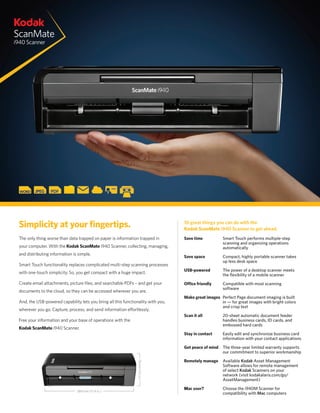
289 mm (11.4 in.)
78mm(3.1in.)
10 great things you can do with the
Kodak ScanMate i940 Scanner to get ahead.
Save time Smart Touch performs multiple-step
scanning and organizing operations
automatically
Save space Compact, highly portable scanner takes
up less desk space
USB-powered The power of a desktop scanner meets
the flexibility of a mobile scanner
Compatible with most scanning
software
Make great images Perfect Page document imaging is built
in — for great images with bright colors
and crisp text
Scan it all 20-sheet automatic document feeder
handles business cards, ID cards, and
embossed hard cards
Stay in contact Easily edit and synchronize business card
information with your contact applications
Get peace of mind The three-year limited warranty supports
our commitment to superior workmanship
Remotely manage Available Kodak Asset Management
Software allows for remote management
of select Kodak Scanners on your
network (visit kodakalaris.com/go/
AssetManagement)
Mac user? Choose the i940M Scanner for
compatibility with Mac computers
Simplicity at your fingertips.
The only thing worse than data trapped on paper is information trapped in
your computer. With the Kodak ScanMate i940 Scanner, collecting, managing,
and distributing information is simple.
Smart Touch functionality replaces complicated multi-step scanning processes
with one-touch simplicity. So, you get compact with a huge impact.
Create email attachments, picture files, and searchable PDFs – and get your
documents to the cloud, so they can be accessed wherever you are.
And, the USB-powered capability lets you bring all this functionality with you,
Free your information and your base of operations with the
Kodak ScanMate i940 Scanner.
ScanMate
i940 Scanner
Service & Support
for Document Imaging Solutions
Technical specifications i940 i940M
Software Support Bundled software: TWAIN, ISIS, WIA drivers; Smart Touch;
and NewSoft Presto! BizCard, Kodak Capture Pro Software
Limited Edition. Fully supported by Kodak Capture Pro
Software and Kodak Asset Management Software
Bundled software: TWAIN driver; NewSoft Presto!
PageManager; and NewSoft Presto! BizCard Xpress
Supported Operating Systems Windows XP SP3 (32-bit and 64-bit), Windows Vista SP1
(32-bit and 64-bit), Windows 7 SP1 (32-bit and 64-bit),
Windows 8 (32-bit and 64-bit), Linux Ubuntu 12.04 (LTS);
Kofax certified
Mac OS X 10.6
Mac OS X 10.7
Mac OS X 10.8
Recommended Daily Volume Up to 500 pages per day
Throughput Speeds
(portrait, letter size)
When AC-powered: black and white/grayscale: up to 20 ppm/40 ipm at 200 dpi; color: up to 15 ppm/30 ipm at 200 dpi
When USB-powered: black and white/grayscale/color: up to 8 ppm/16 ipm at 200 dpi
(Throughput speeds may vary depending on your choice of driver, application software, operating system, and host computer)
Optical Resolution 600 dpi
Max./Min. Document Size 216 mm x 1524 mm (8.5 in. x 60 in.)/80 mm x 52 mm (3.2 in. x 2.1 in.)
Paper Thickness and Weight 30 to 398 g/m2
(8 to 220 lb.) paper; ID card and embossed hard card thickness: up to 1.25 mm (0.05 in.)
Note: with document feeding set for “card” scanning, paper thickness can be up to 995 g/m2
(550 lb.)
Feeder ADF: up to 20 sheets of 80 g/m2
(20 lb.) paper
The feeder can handle a variety of small documents, such as identification cards, business cards, insurance cards,
and embossed hard cards
Connectivity USB 2.0, USB 3.0 compatible
Imaging Features Perfect Page Scanning, iThresholding, automatic image straightening (deskew), auto cropping, image rotation, electronic color
dropout, dual stream scanning, image merge, image edge fill, content-based blank page removal, automatic brightness and contrast
File Format Outputs Single and multi-page TIFF, JPEG, RTF, BMP, single and multi-page PDF, searchable PDF
Limited Warranty Three years (Advanced Unit Replacement)
Electrical Requirements AC power supply and/or USB power via USB connector to the host computer
Environmental Factors Energy Star qualified scanner
Dimensions Height: 78 mm (3.1 in.) with tray closed
Width: 289 mm (11.4 in.) with tray closed
Depth: 107 mm (4.2 in.) with tray closed
Weight: 1.3 kg (2.9 lb.) without power adapter
ScanMate i940 Scanner
Kodak Alaris’ Document Imaging solutions enable customers to capture and consolidate data from digital and
paper sources, understand and extract valuable insight from the contents, and deliver the right information
management software, an expanding range of professional services and industry-leading service and support.
solutions to automate business processes, enhance customer interactions and enable better business decisions.
To learn more: www.kodakalaris.com/go/i940
The Kodak ScanMate i940 Scanner is compatible with
gDocScan and Microsoft SharePoint applications.
© 2014 Kodak Alaris Inc. Kodak Alaris will be the Company’s trade name for its global business. The Kodak trademark and
trade dress are used under license from Eastman Kodak Company.Specifications subject to change without notice.
* Toll free numbers
Contact Kodak at:
Australia 1300-4-56325* Hong Kong +852-2564-9808 Japan +81-3-5577-1380
Singapore 1800-856-3251* South Korea +82-2-3438-2620 Indonesia 001-803-657-008*
Malaysia 1800-806-480* Taiwan +886-2-7737-7000 Thailand 001-800-658-055*
Philippines 1800-1651-0685* New Zealand 0800-456-325* Vietnam +120-65-131
India 1800-228-989* Beijing +86-10-6539-3727 Guangzhou +86-20-3878-8851
Shanghai +86-21-5884-1313
Produced using Kodak Technologies.

Scan matei940 ss_apr_lo

  • 1.
    289 mm (11.4in.) 78mm(3.1in.) 10 great things you can do with the Kodak ScanMate i940 Scanner to get ahead. Save time Smart Touch performs multiple-step scanning and organizing operations automatically Save space Compact, highly portable scanner takes up less desk space USB-powered The power of a desktop scanner meets the flexibility of a mobile scanner Compatible with most scanning software Make great images Perfect Page document imaging is built in — for great images with bright colors and crisp text Scan it all 20-sheet automatic document feeder handles business cards, ID cards, and embossed hard cards Stay in contact Easily edit and synchronize business card information with your contact applications Get peace of mind The three-year limited warranty supports our commitment to superior workmanship Remotely manage Available Kodak Asset Management Software allows for remote management of select Kodak Scanners on your network (visit kodakalaris.com/go/ AssetManagement) Mac user? Choose the i940M Scanner for compatibility with Mac computers Simplicity at your fingertips. The only thing worse than data trapped on paper is information trapped in your computer. With the Kodak ScanMate i940 Scanner, collecting, managing, and distributing information is simple. Smart Touch functionality replaces complicated multi-step scanning processes with one-touch simplicity. So, you get compact with a huge impact. Create email attachments, picture files, and searchable PDFs – and get your documents to the cloud, so they can be accessed wherever you are. And, the USB-powered capability lets you bring all this functionality with you, Free your information and your base of operations with the Kodak ScanMate i940 Scanner. ScanMate i940 Scanner
  • 2.
    Service & Support forDocument Imaging Solutions Technical specifications i940 i940M Software Support Bundled software: TWAIN, ISIS, WIA drivers; Smart Touch; and NewSoft Presto! BizCard, Kodak Capture Pro Software Limited Edition. Fully supported by Kodak Capture Pro Software and Kodak Asset Management Software Bundled software: TWAIN driver; NewSoft Presto! PageManager; and NewSoft Presto! BizCard Xpress Supported Operating Systems Windows XP SP3 (32-bit and 64-bit), Windows Vista SP1 (32-bit and 64-bit), Windows 7 SP1 (32-bit and 64-bit), Windows 8 (32-bit and 64-bit), Linux Ubuntu 12.04 (LTS); Kofax certified Mac OS X 10.6 Mac OS X 10.7 Mac OS X 10.8 Recommended Daily Volume Up to 500 pages per day Throughput Speeds (portrait, letter size) When AC-powered: black and white/grayscale: up to 20 ppm/40 ipm at 200 dpi; color: up to 15 ppm/30 ipm at 200 dpi When USB-powered: black and white/grayscale/color: up to 8 ppm/16 ipm at 200 dpi (Throughput speeds may vary depending on your choice of driver, application software, operating system, and host computer) Optical Resolution 600 dpi Max./Min. Document Size 216 mm x 1524 mm (8.5 in. x 60 in.)/80 mm x 52 mm (3.2 in. x 2.1 in.) Paper Thickness and Weight 30 to 398 g/m2 (8 to 220 lb.) paper; ID card and embossed hard card thickness: up to 1.25 mm (0.05 in.) Note: with document feeding set for “card” scanning, paper thickness can be up to 995 g/m2 (550 lb.) Feeder ADF: up to 20 sheets of 80 g/m2 (20 lb.) paper The feeder can handle a variety of small documents, such as identification cards, business cards, insurance cards, and embossed hard cards Connectivity USB 2.0, USB 3.0 compatible Imaging Features Perfect Page Scanning, iThresholding, automatic image straightening (deskew), auto cropping, image rotation, electronic color dropout, dual stream scanning, image merge, image edge fill, content-based blank page removal, automatic brightness and contrast File Format Outputs Single and multi-page TIFF, JPEG, RTF, BMP, single and multi-page PDF, searchable PDF Limited Warranty Three years (Advanced Unit Replacement) Electrical Requirements AC power supply and/or USB power via USB connector to the host computer Environmental Factors Energy Star qualified scanner Dimensions Height: 78 mm (3.1 in.) with tray closed Width: 289 mm (11.4 in.) with tray closed Depth: 107 mm (4.2 in.) with tray closed Weight: 1.3 kg (2.9 lb.) without power adapter ScanMate i940 Scanner Kodak Alaris’ Document Imaging solutions enable customers to capture and consolidate data from digital and paper sources, understand and extract valuable insight from the contents, and deliver the right information management software, an expanding range of professional services and industry-leading service and support. solutions to automate business processes, enhance customer interactions and enable better business decisions. To learn more: www.kodakalaris.com/go/i940 The Kodak ScanMate i940 Scanner is compatible with gDocScan and Microsoft SharePoint applications. © 2014 Kodak Alaris Inc. Kodak Alaris will be the Company’s trade name for its global business. The Kodak trademark and trade dress are used under license from Eastman Kodak Company.Specifications subject to change without notice. * Toll free numbers Contact Kodak at: Australia 1300-4-56325* Hong Kong +852-2564-9808 Japan +81-3-5577-1380 Singapore 1800-856-3251* South Korea +82-2-3438-2620 Indonesia 001-803-657-008* Malaysia 1800-806-480* Taiwan +886-2-7737-7000 Thailand 001-800-658-055* Philippines 1800-1651-0685* New Zealand 0800-456-325* Vietnam +120-65-131 India 1800-228-989* Beijing +86-10-6539-3727 Guangzhou +86-20-3878-8851 Shanghai +86-21-5884-1313 Produced using Kodak Technologies.