SAP REQRUITMENT NOTES
STEP-1
NAVIGATIONAL PATH
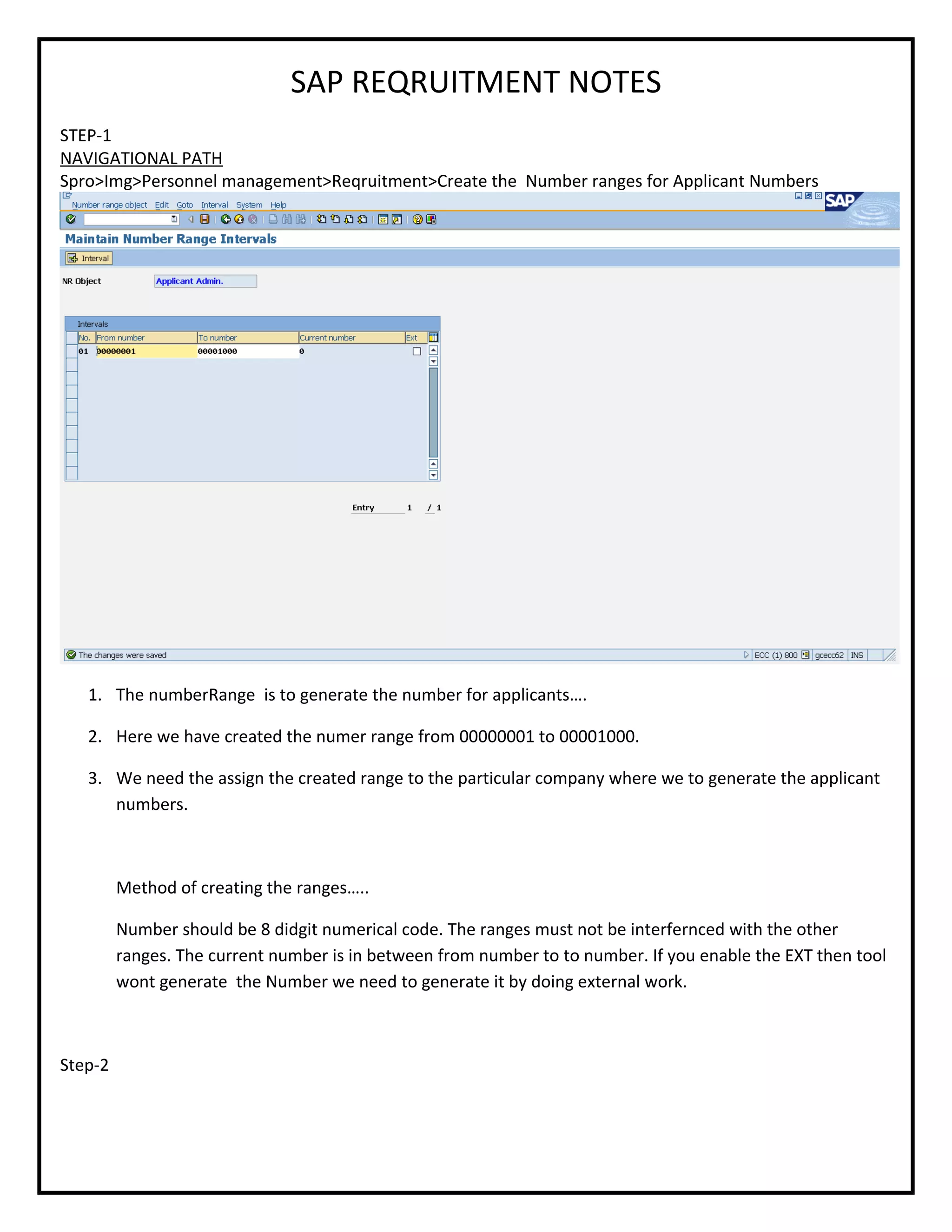
Spro>Img>Personnel management>Reqruitment>Create the Number ranges for Applicant Numbers
1. The numberRange is to generate the number for applicants….
2. Here we have created the numer range from 00000001 to 00001000.
3. We need the assign the created range to the particular company where we to generate the applicant
numbers.
Method of creating the ranges…..
Number should be 8 didgit numerical code. The ranges must not be interfernced with the other
ranges. The current number is in between from number to to number. If you enable the EXT then tool
wont generate the Number we need to generate it by doing external work.
Step-2
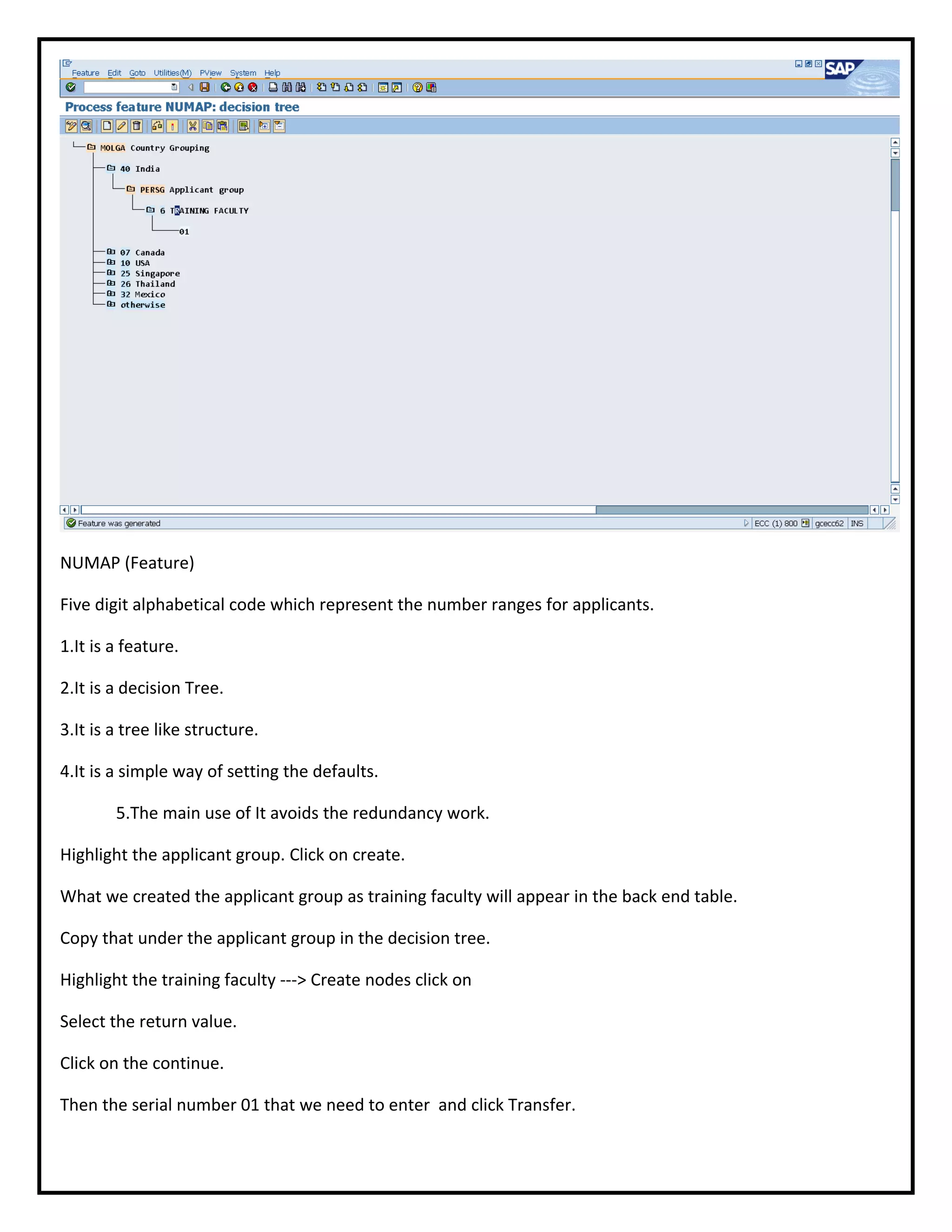
NUMAP (Feature)
Five digit alphabetical code which represent the number ranges for applicants.
1.It is a feature.
2.It is a decision Tree.
3.It is a tree like structure.
4.It is a simple way of setting the defaults.
5.The main use of It avoids the redundancy work.
Highlight the applicant group. Click on create.
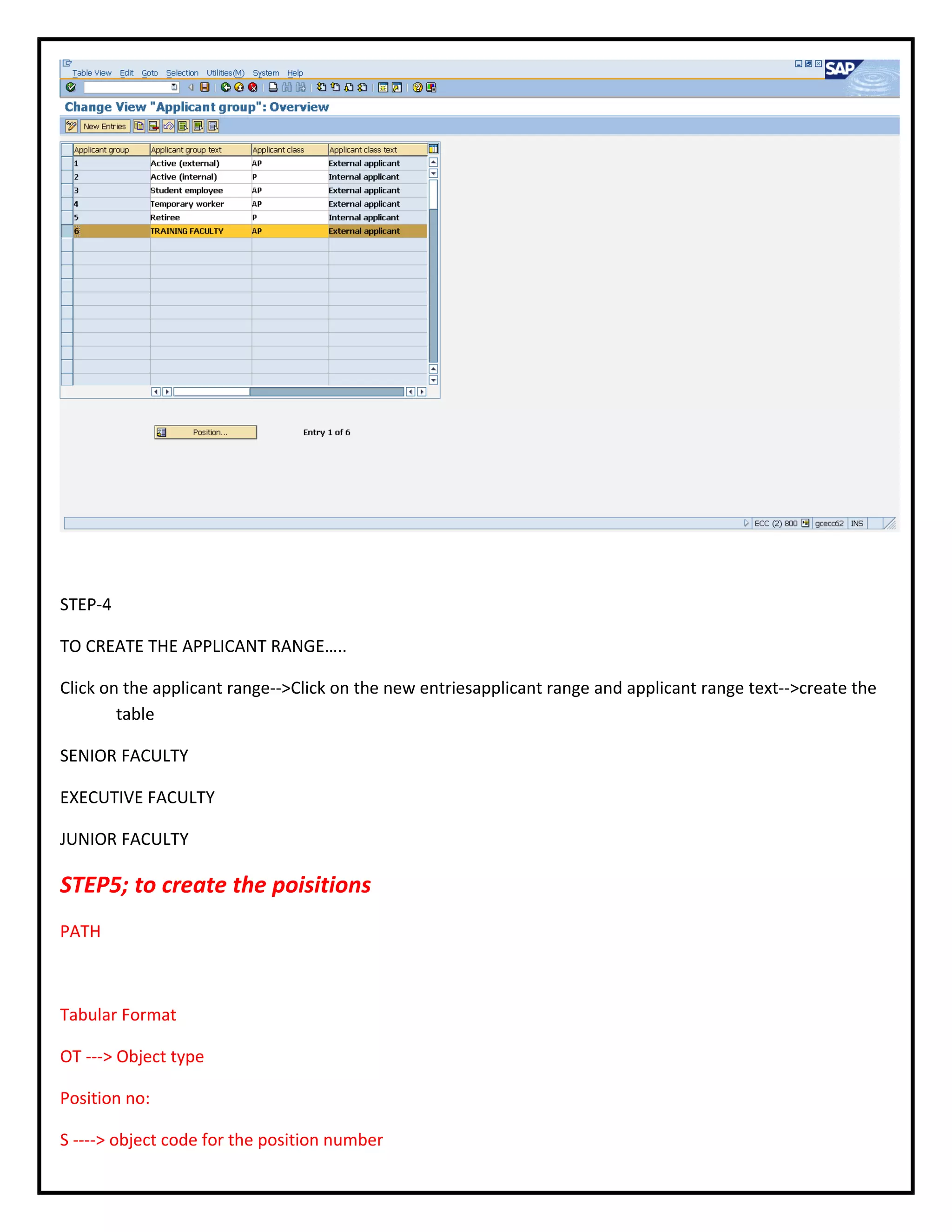
What we created the applicant group as training faculty will appear in the back end table.
Copy that under the applicant group in the decision tree.
Highlight the training faculty ---> Create nodes click on
Select the return value.
Click on the continue.
Then the serial number 01 that we need to enter and click Transfer.
Once you link that, click on the error free of the decision tree.The result should be the decision tree is error
free.
Save that and activate it.
STEP-3
TO CRATE THE APPLICANT GROUP
PATH…
Country code for India is 40 in SAP.
Highlight the MOLGA. Click on the create nodes
For ex: 01 Germany
Select India .Copy it.
India appears under MOLGA.
Highlight India and create region.
Select the option for decision operation.
Click on the right mark.
Select the applicant group on the corner.
PERSG the applicant group.
Once you select the applicant group, click on the transfer.
Applicant group appears below the country code.
Select otherwise and cut it for using cut option.
To create applicant group
AP is external.
P is for internal and save that applicant group.
STEP-4
TO CREATE THE APPLICANT RANGE…..
Click on the applicant range-->Click on the new entriesapplicant range and applicant range text-->create the
table
SENIOR FACULTY
EXECUTIVE FACULTY
JUNIOR FACULTY
STEP5; to create the poisitions
PATH
Tabular Format
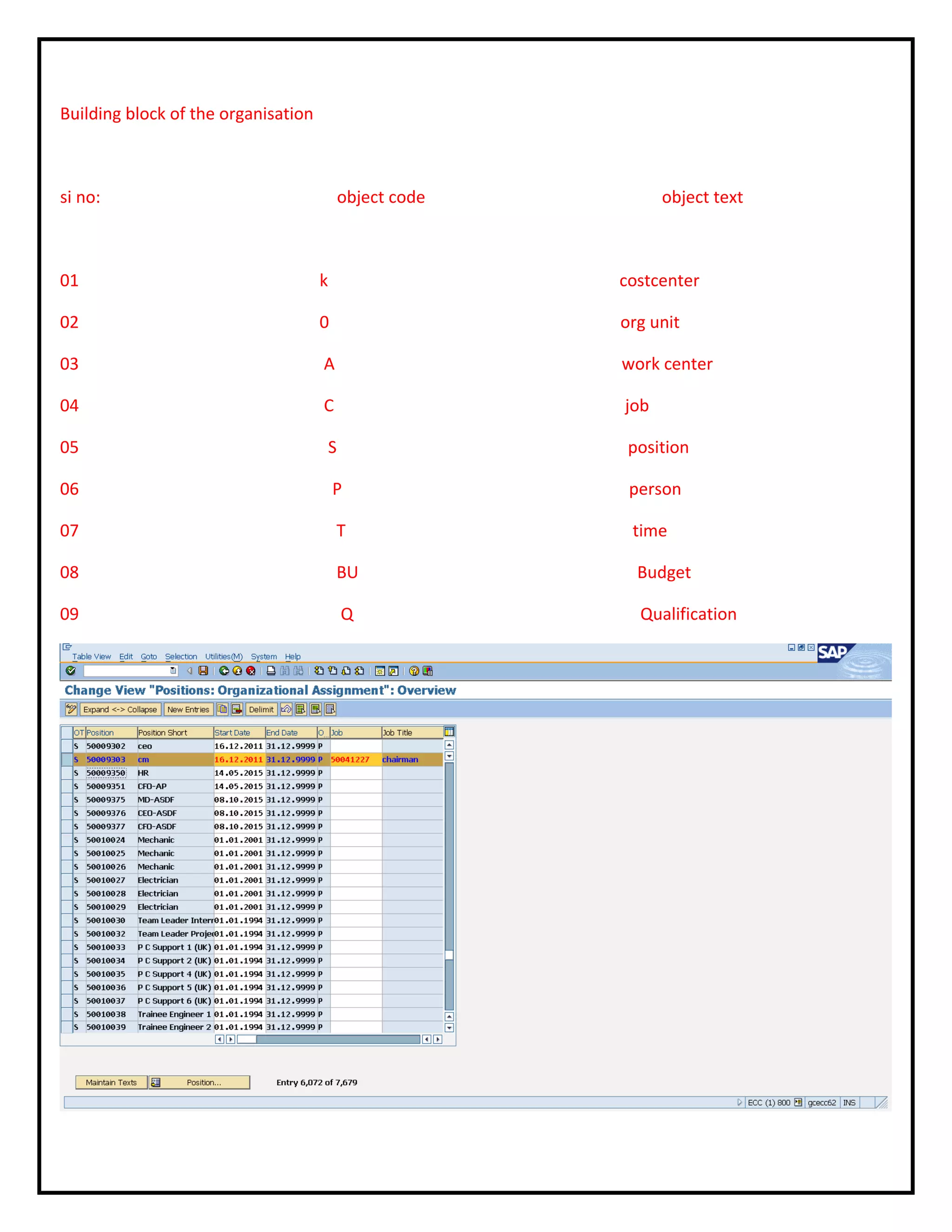
OT ---> Object type
Position no:
S ----> object code for the position number
Position short text is the short description of the position.
Start date and End date of the position.
Job is the general specification of the position.
How to define the job???
How to define the position???
A job is general specification of work ex manager, supervisor, engineer.
Position is particular specification of work.
Supervisor is the job and supervisor for production, sales and marketing are positions.
Should specify the area of work.
How to get the position from the organisation management
The path:
SAP--->Easy access---->Human Resource---->Organisation management------>expert mode-----> simple
maintenance.
Transaction code PR code .
PP OM_OLD is the change.
Double click on that.
Click on the particular company.
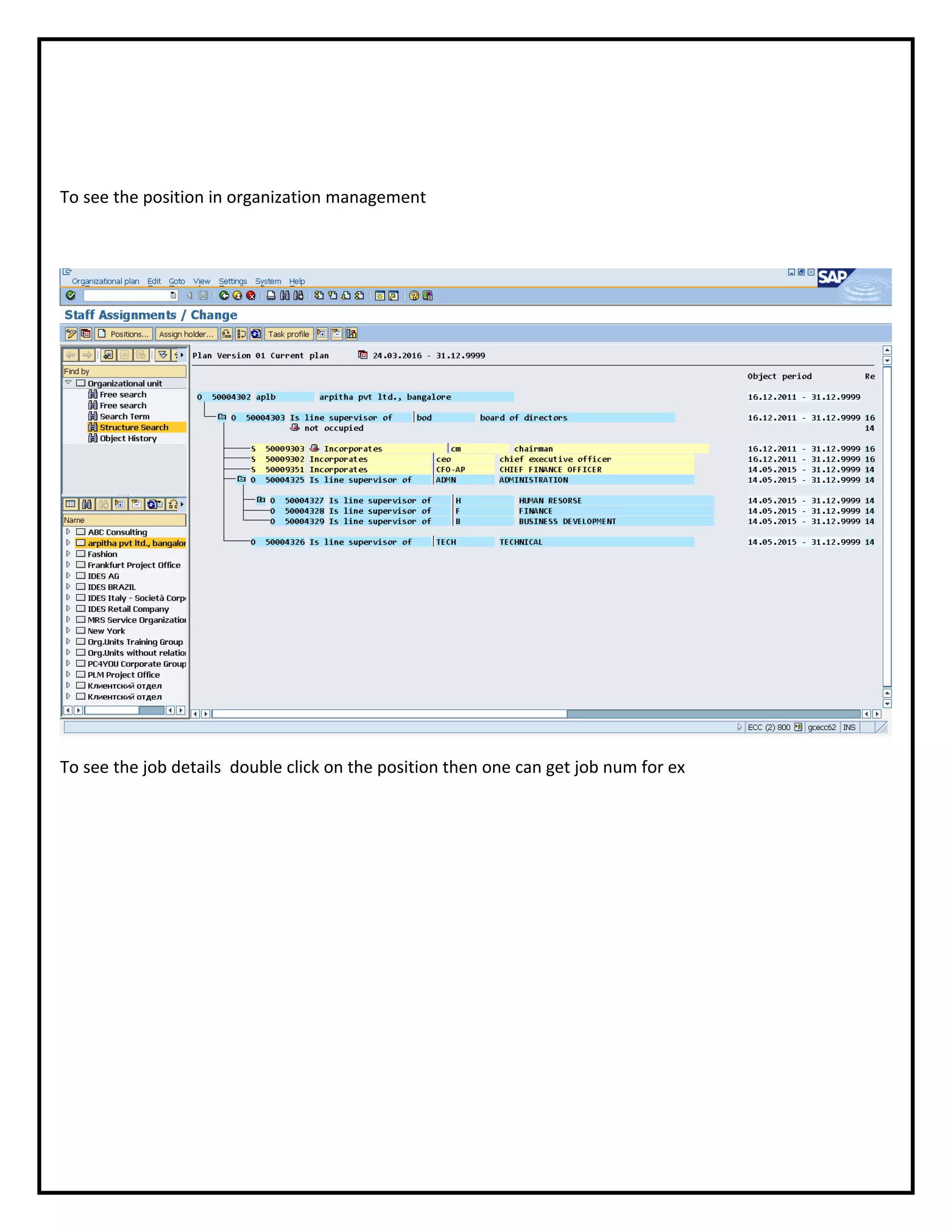
Click on the staff adjustments to see the particular positions. The positions could be represented by object
code S.
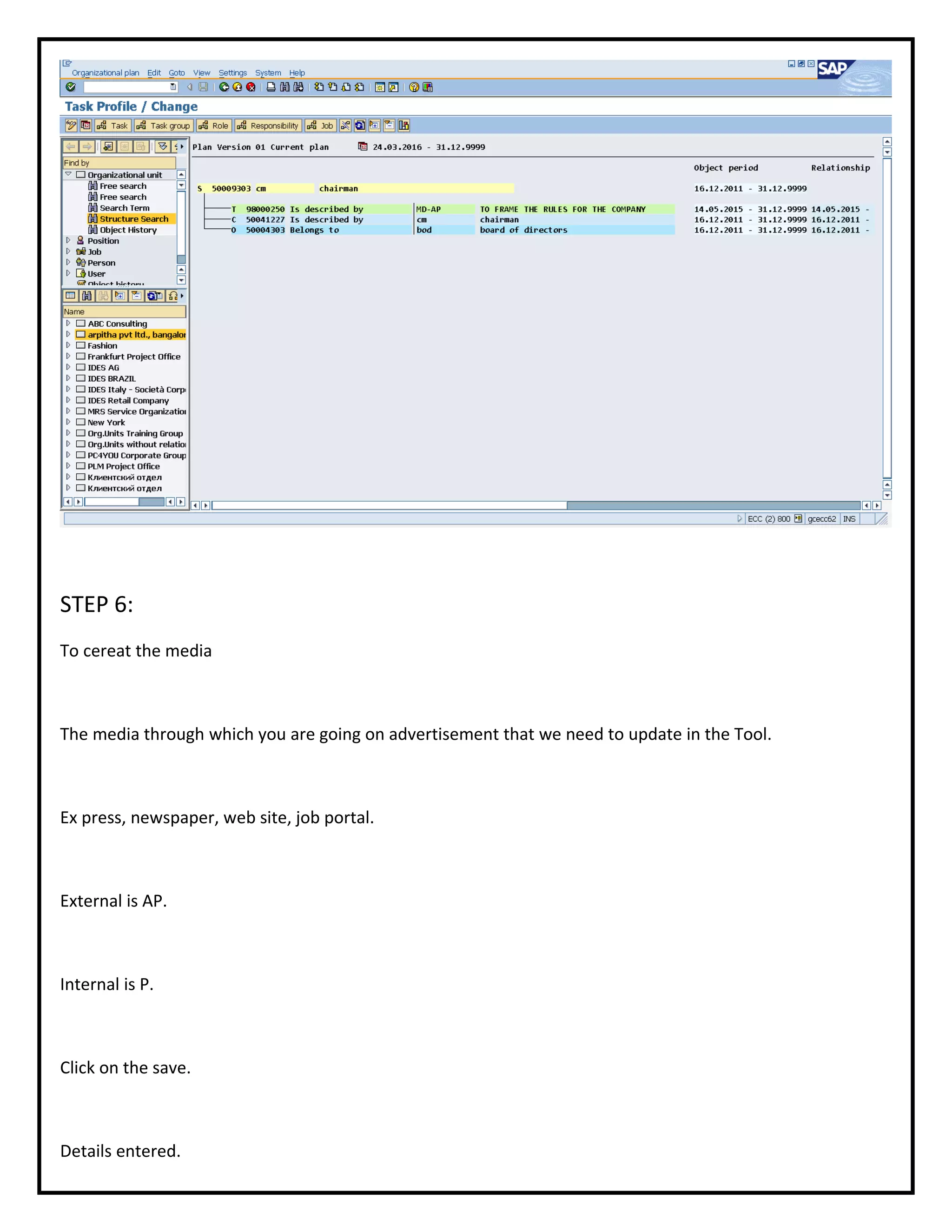
See the job, and double click on the position.
Job is reprsented by object code C.
position no: job no:
S50009303 C50041227
Link the job no to the position no: in the create position interface.
Thats what we do.
Create the position option.
We already know the position number and job number as well.
Click on the position.
Object code is S.
Module integration
Different modules will be integrated in a table T77S0. It can be viewed in the tool transaction code.
SM 30.
Then link it.
Click on the same.
See the position and job are linked.
Chairman is only one, so it could be both job and position.
Similar examples
CEO
CFO
What is an object???
An object is an entity or a thing which could be represented by 8 digit numerical number.
Each object can be represented by different object code in SAP Tool.
Building block of the organisation
si no: object code object text
01 k costcenter
02 0 org unit
03 A work center
04 C job
05 S position
06 P person
07 T time
08 BU Budget
09 Q Qualification
To see the position in organization management
To see the job details double click on the position then one can get job num for ex
STEP 6:
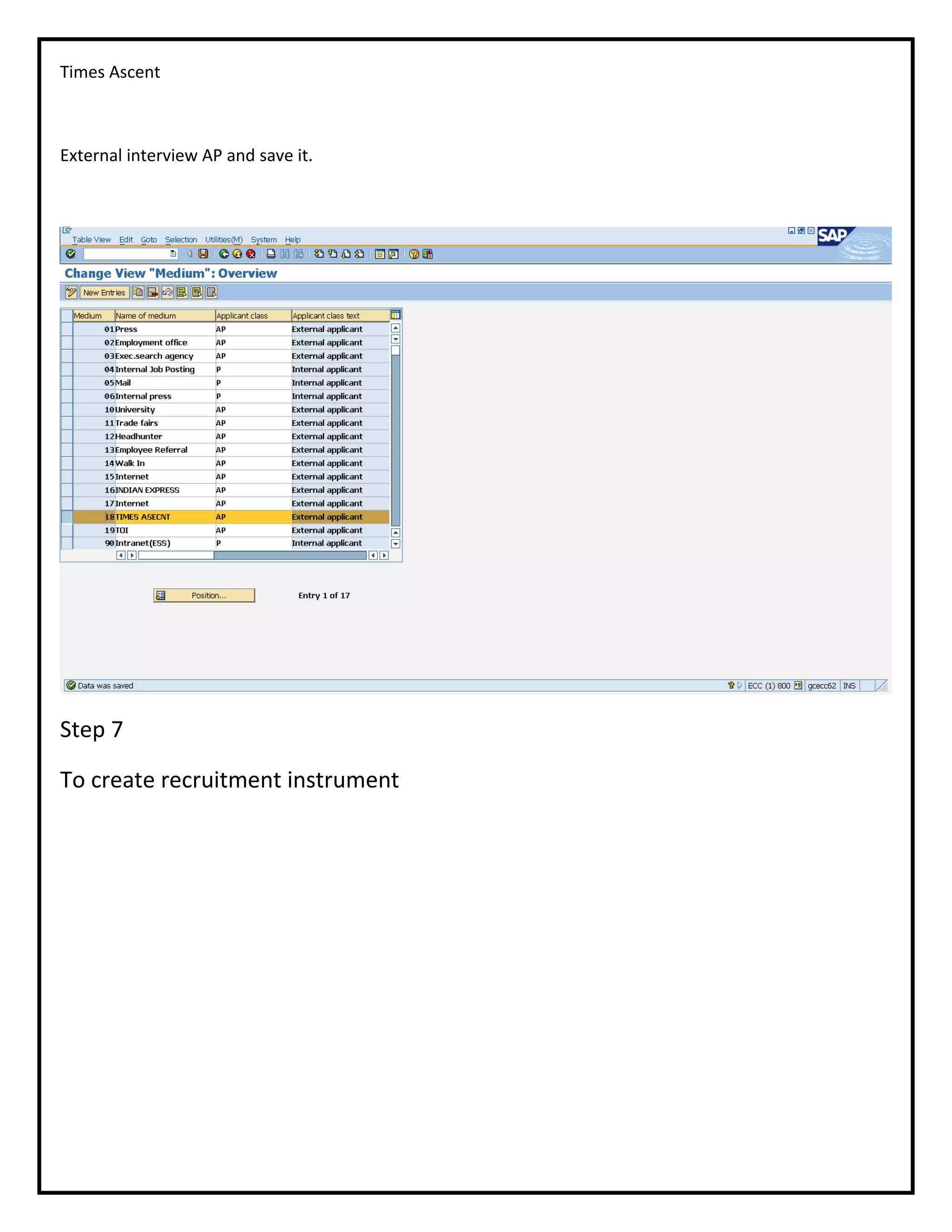
To cereat the media
The media through which you are going on advertisement that we need to update in the Tool.
Ex press, newspaper, web site, job portal.
External is AP.
Internal is P.
Click on the save.
Details entered.
Times Ascent
External interview AP and save it.
Step 7
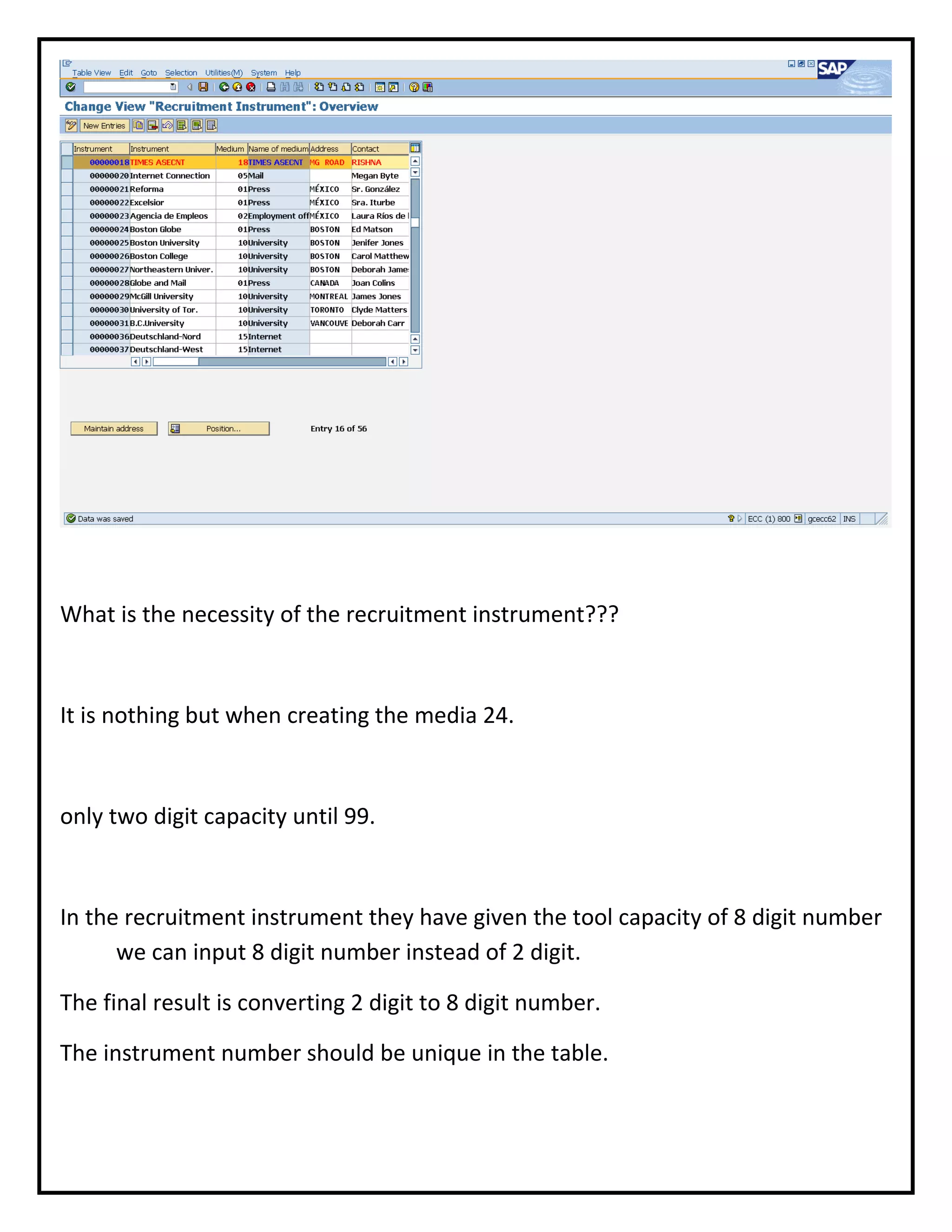
To create recruitment instrument
What is the necessity of the recruitment instrument???
It is nothing but when creating the media 24.
only two digit capacity until 99.
In the recruitment instrument they have given the tool capacity of 8 digit number
we can input 8 digit number instead of 2 digit.
The final result is converting 2 digit to 8 digit number.
The instrument number should be unique in the table.

SAP REQRUITMENT NOTES03

  • 1.
    SAP REQRUITMENT NOTES STEP-1 NAVIGATIONALPATH Spro>Img>Personnel management>Reqruitment>Create the Number ranges for Applicant Numbers 1. The numberRange is to generate the number for applicants…. 2. Here we have created the numer range from 00000001 to 00001000. 3. We need the assign the created range to the particular company where we to generate the applicant numbers. Method of creating the ranges….. Number should be 8 didgit numerical code. The ranges must not be interfernced with the other ranges. The current number is in between from number to to number. If you enable the EXT then tool wont generate the Number we need to generate it by doing external work. Step-2
  • 2.
    NUMAP (Feature) Five digitalphabetical code which represent the number ranges for applicants. 1.It is a feature. 2.It is a decision Tree. 3.It is a tree like structure. 4.It is a simple way of setting the defaults. 5.The main use of It avoids the redundancy work. Highlight the applicant group. Click on create. What we created the applicant group as training faculty will appear in the back end table. Copy that under the applicant group in the decision tree. Highlight the training faculty ---> Create nodes click on Select the return value. Click on the continue. Then the serial number 01 that we need to enter and click Transfer.
  • 3.
    Once you linkthat, click on the error free of the decision tree.The result should be the decision tree is error free. Save that and activate it. STEP-3 TO CRATE THE APPLICANT GROUP PATH… Country code for India is 40 in SAP. Highlight the MOLGA. Click on the create nodes For ex: 01 Germany Select India .Copy it. India appears under MOLGA. Highlight India and create region. Select the option for decision operation. Click on the right mark. Select the applicant group on the corner. PERSG the applicant group. Once you select the applicant group, click on the transfer. Applicant group appears below the country code. Select otherwise and cut it for using cut option. To create applicant group AP is external. P is for internal and save that applicant group.
  • 4.
    STEP-4 TO CREATE THEAPPLICANT RANGE….. Click on the applicant range-->Click on the new entriesapplicant range and applicant range text-->create the table SENIOR FACULTY EXECUTIVE FACULTY JUNIOR FACULTY STEP5; to create the poisitions PATH Tabular Format OT ---> Object type Position no: S ----> object code for the position number
  • 5.
    Position short textis the short description of the position. Start date and End date of the position. Job is the general specification of the position. How to define the job??? How to define the position??? A job is general specification of work ex manager, supervisor, engineer. Position is particular specification of work. Supervisor is the job and supervisor for production, sales and marketing are positions. Should specify the area of work. How to get the position from the organisation management The path: SAP--->Easy access---->Human Resource---->Organisation management------>expert mode-----> simple maintenance. Transaction code PR code . PP OM_OLD is the change.
  • 6.
    Double click onthat. Click on the particular company. Click on the staff adjustments to see the particular positions. The positions could be represented by object code S. See the job, and double click on the position. Job is reprsented by object code C. position no: job no: S50009303 C50041227 Link the job no to the position no: in the create position interface. Thats what we do. Create the position option. We already know the position number and job number as well. Click on the position. Object code is S.
  • 7.
    Module integration Different moduleswill be integrated in a table T77S0. It can be viewed in the tool transaction code. SM 30. Then link it. Click on the same. See the position and job are linked. Chairman is only one, so it could be both job and position. Similar examples CEO CFO What is an object??? An object is an entity or a thing which could be represented by 8 digit numerical number. Each object can be represented by different object code in SAP Tool.
  • 8.
    Building block ofthe organisation si no: object code object text 01 k costcenter 02 0 org unit 03 A work center 04 C job 05 S position 06 P person 07 T time 08 BU Budget 09 Q Qualification
  • 9.
    To see theposition in organization management To see the job details double click on the position then one can get job num for ex
  • 10.
    STEP 6: To cereatthe media The media through which you are going on advertisement that we need to update in the Tool. Ex press, newspaper, web site, job portal. External is AP. Internal is P. Click on the save. Details entered.
  • 11.
    Times Ascent External interviewAP and save it. Step 7 To create recruitment instrument
  • 12.
    What is thenecessity of the recruitment instrument??? It is nothing but when creating the media 24. only two digit capacity until 99. In the recruitment instrument they have given the tool capacity of 8 digit number we can input 8 digit number instead of 2 digit. The final result is converting 2 digit to 8 digit number. The instrument number should be unique in the table.