



Employee Self-Service Portal / ID: 2101
Markus van Kempen – SAP Solutions Architect
E: mvk@ca.ibm.com T: @markusvankempen
Innovating with People and Technology
1
Abstract
 SAP Portal/ESS Pay - From Blueprint and Workshops to
WDA/ABAP Configuration, Security, and Second Level
PIN Authentication to an Employee Self-service Portal
 Session ID: 2101
2
Who is here?
3
Related Session
Additional Session:
 Portal ‒ How to Deal with Role-Based Navigation Models
for Different Countries and Languages
 Thu. 03:00 p.m. - 04:00 p.m.
 Session id: 2213
4
LEARNING POINTS
 ESS /WDA and Portal can be implemented quickly
 Implementation Approach via Prototyping
 Pay attention to Non- functional requirements
5
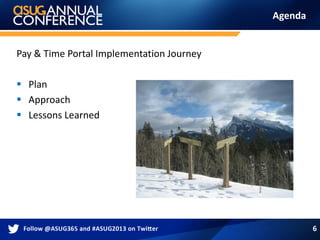
Agenda
Pay & Time Portal Implementation Journey
 Plan
 Approach
 Lessons Learned
6
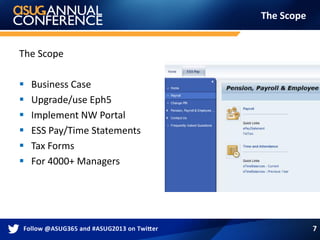
The Scope
The Scope
 Business Case
 Upgrade/use Eph5
 Implement NW Portal
 ESS Pay/Time Statements
 Tax Forms
 For 4000+ Managers
7
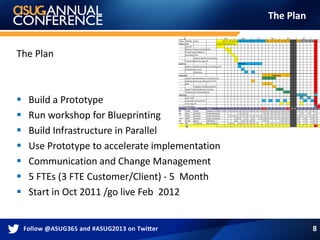
The Plan
The Plan
 Build a Prototype
 Run workshop for Blueprinting
 Build Infrastructure in Parallel
 Use Prototype to accelerate implementation
 Communication and Change Management
 5 FTEs (3 FTE Customer/Client) - 5 Month
 Start in Oct 2011 /go live Feb 2012
8
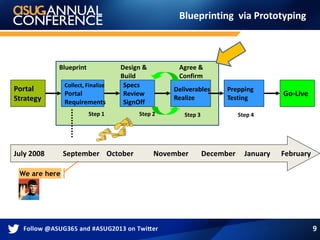
Blueprinting via Prototyping
Portal
Strategy
Collect, Finalize
Portal
Requirements
Blueprint Agree &
Confirm
July 2008 September October November December January February
We are here
Specs
Review
SignOff
Design &
Build
Go-Live
Deliverables
Realize
Step 1 Step 2 Step 3 Step 4
Prepping
Testing
9
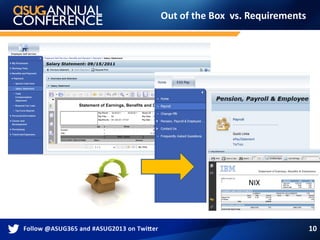
Out of the Box vs. Requirements
10
NIX
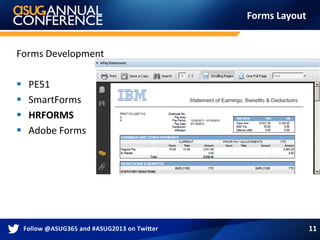
Forms Layout
Forms Development
 PE51
 SmartForms
 HRFORMS
 Adobe Forms
11
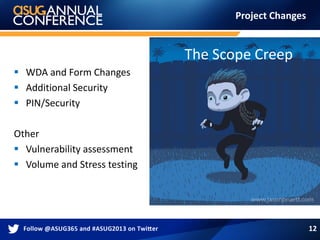
Project Changes
 WDA and Form Changes
 Additional Security
 PIN/Security
Other
 Vulnerability assessment
 Volume and Stress testing
12
The Scope Creep
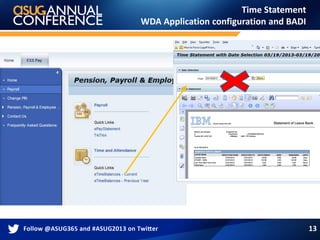
Time Statement
WDA Application configuration and BADI
13
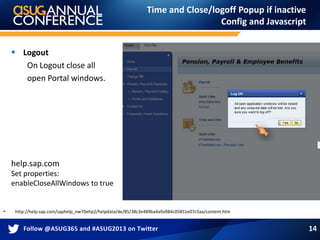
Time and Close/logoff Popup if inactive
Config and Javascript
 http://help.sap.com/saphelp_nw70ehp2/helpdata/de/85/38c3e489ba4a9a984c05851e07c5aa/content.htm
 Logout
On Logout close all
open Portal windows.
help.sap.com
Set properties:
enableCloseAllWindows to true
14
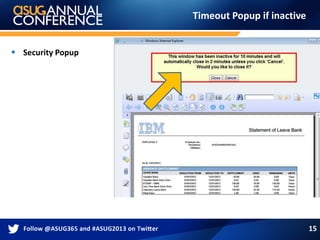
Timeout Popup if inactive
 Security Popup
15
Questions
16
2nd Level Authentication
Additional security for Pay statements.
17
2nd Level Authentication
PIN requirements
 PIN – Personal Identification Number
PIN has
4-8 Digits
PIN does not expire
PIN can be changed
Initial Pin is PerNr(4)+Birthday(2)+BirthMonth(2)
18
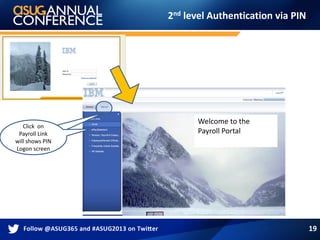
2nd level Authentication via PIN
19
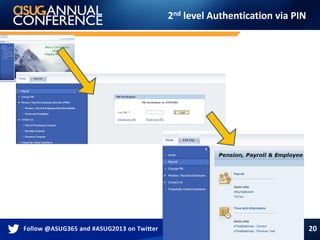
Click on
Payroll Link
will shows PIN
Logon screen
Welcome to the
Payroll Portal
Click on
Payroll Link
will shows PIN
Logon screen
2nd level Authentication via PIN
20
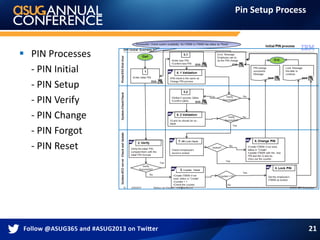
Pin Setup Process
 PIN Processes
- PIN Initial
- PIN Setup
- PIN Verify
- PIN Change
- PIN Forgot
- PIN Reset
21
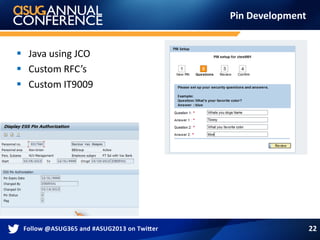
Pin Development
 Java using JCO
 Custom RFC’s
 Custom IT9009
22
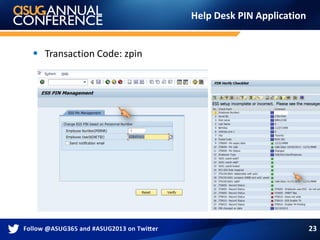
Help Desk PIN Application
 Transaction Code: zpin
23
Questions
24
Non-Functional Requirements
25
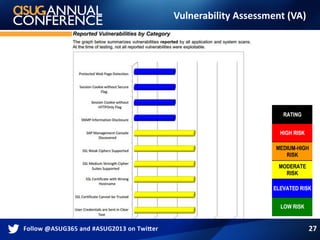
 Vulnerability Assessment (VA)
 Volume and Stress/Load Test (VST)
 Reporting/Statistics
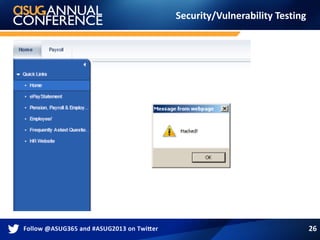
Security/Vulnerability Testing
26
Vulnerability Assessment (VA)
27
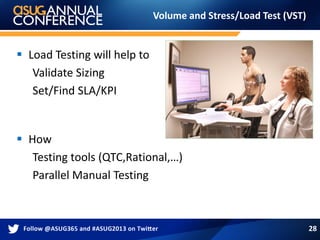
Volume and Stress/Load Test (VST)
 Load Testing will help to
Validate Sizing
Set/Find SLA/KPI
 How
Testing tools (QTC,Rational,…)
Parallel Manual Testing
28
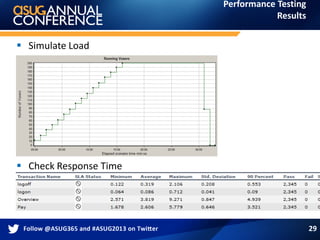
Performance Testing
Results
 Simulate Load
 Check Response Time
29
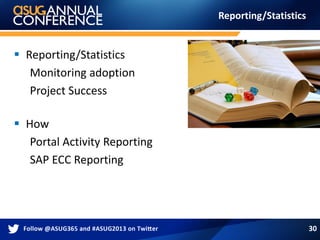
Reporting/Statistics
 Reporting/Statistics
Monitoring adoption
Project Success
 How
Portal Activity Reporting
SAP ECC Reporting
30
Statistics/Reporting
tcode: stad
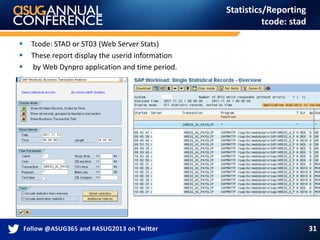
 Tcode: STAD or ST03 (Web Server Stats)
 These report display the userid information
 by Web Dynpro application and time period.

31
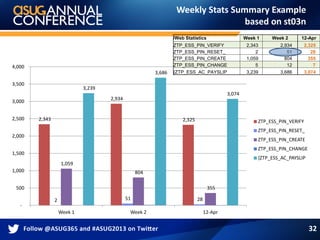
Weekly Stats Summary Example
based on st03n
2,343
2,934
2,325
2 51 28
1,059
804
355
3,239
3,686
3,074
-
500
1,000
1,500
2,000
2,500
3,000
3,500
4,000
Week 1 Week 2 12-Apr
ZTP_ESS_PIN_VERIFY
ZTP_ESS_PIN_RESET_
ZTP_ESS_PIN_CREATE
ZTP_ESS_PIN_CHANGE
{ZTP_ESS_AC_PAYSLIP
/Web Statistics Week 1 Week 2 12-Apr
ZTP_ESS_PIN_VERIFY 2,343 2,934 2,325
ZTP_ESS_PIN_RESET_ 2 51 28
ZTP_ESS_PIN_CREATE 1,059 804 355
ZTP_ESS_PIN_CHANGE 5 12 7
{ZTP_ESS_AC_PAYSLIP 3,239 3,686 3,074
32
Glitches
Lessons Learned
 Initial PIN confusing
 LDAP Passwords vs PIN
 User Printer Setup
 Payroll Run
 IE vs Netscape
33
Questions
34
Related Session
Additional Session:
 Portal ‒ How to Deal with Role-Based Navigation Models
for Different Countries and Languages
 Thu. 03:00 p.m. - 04:00 p.m.
 Session id: 2213
35
THANK YOU FOR PARTICIPATING
Please provide feedback on this session by completing a short
survey via the event mobile application.
SESSION CODE: 2101
Related Session
Please visit also my Portal Session (2213) -
How to Deal with Role-Based Navigation Models for
Different Countries and Languages
36
Thank You
Markus van Kempen – SAP Architect
email: mvk@ca.ibm.com
Twitter: @markusvankempen
Hashtag: #MVK
Innovating with People and Technology
37
Markus van Kempen – SAP Architect
Innovating with People and Technology
email: mvk@ca.ibm.com
Twitter: @markusvankempen
Hashtag: #MVK
Additional
OOPS/OSS notes
 0000791765 Mixed JSESSIONID Cookies from Different Servers
 0001332726 Troubleshooting Wizard 0001472848 Advance delivery of patches or
analysis tools
 0001536782 IPrincipal.toString method reads data from the datasource
0001552337 Security session persistence in T_CHUNK
 0001569773 Security sessions might remain alive after expiration period
0001621149 Memory leak in session management
 0001670179 Deadlock in session management while tracing is enabled
 0001688352 Deadlock in engine session management while stopping an app
0001696132 Deadlock in AS Java Session Management
 0001720677 User Guest granted privileges of a real user
39
VA Assessment
KM/ SAP Management Console
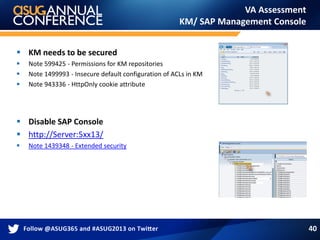
 KM needs to be secured
 Note 599425 - Permissions for KM repositories
 Note 1499993 - Insecure default configuration of ACLs in KM
 Note 943336 - HttpOnly cookie attribute
 Disable SAP Console
 http://Server:5xx13/
 Note 1439348 - Extended security
40
WDA/Config & URL Parameter
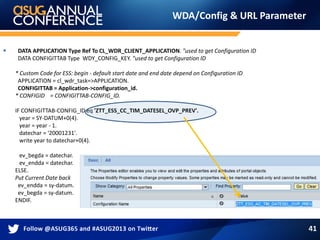
 DATA APPLICATION Type Ref To CL_WDR_CLIENT_APPLICATION. "used to get Configuration ID
DATA CONFIGITTAB Type WDY_CONFIG_KEY. "used to get Configuration ID
* Custom Code for ESS: begin - default start date and end date depend on Configuration ID
APPLICATION = cl_wdr_task=>APPLICATION.
CONFIGITTAB = Application->configuration_id.
* CONFIGID = CONFIGITTAB-CONFIG_ID.
IF CONFIGITTAB-CONFIG_ID eq 'ZTT_ESS_CC_TIM_DATESEL_OVP_PREV'.
year = SY-DATUM+0(4).
year = year - 1.
datechar = '20001231'.
write year to datechar+0(4).
ev_begda = datechar.
ev_endda = datechar.
ELSE.
Put Current Date back
ev_endda = sy-datum.
ev_begda = sy-datum.
ENDIF.
41

SAP Portal and Second Level Authentication Implementation for ESS Paystub

  • 1.
    Employee Self-Service Portal/ ID: 2101 Markus van Kempen – SAP Solutions Architect E: mvk@ca.ibm.com T: @markusvankempen Innovating with People and Technology 1
  • 2.
    Abstract  SAP Portal/ESSPay - From Blueprint and Workshops to WDA/ABAP Configuration, Security, and Second Level PIN Authentication to an Employee Self-service Portal  Session ID: 2101 2
  • 3.
  • 4.
    Related Session Additional Session: Portal ‒ How to Deal with Role-Based Navigation Models for Different Countries and Languages  Thu. 03:00 p.m. - 04:00 p.m.  Session id: 2213 4
  • 5.
    LEARNING POINTS  ESS/WDA and Portal can be implemented quickly  Implementation Approach via Prototyping  Pay attention to Non- functional requirements 5
  • 6.
    Agenda Pay & TimePortal Implementation Journey  Plan  Approach  Lessons Learned 6
  • 7.
    The Scope The Scope Business Case  Upgrade/use Eph5  Implement NW Portal  ESS Pay/Time Statements  Tax Forms  For 4000+ Managers 7
  • 8.
    The Plan The Plan Build a Prototype  Run workshop for Blueprinting  Build Infrastructure in Parallel  Use Prototype to accelerate implementation  Communication and Change Management  5 FTEs (3 FTE Customer/Client) - 5 Month  Start in Oct 2011 /go live Feb 2012 8
  • 9.
    Blueprinting via Prototyping Portal Strategy Collect,Finalize Portal Requirements Blueprint Agree & Confirm July 2008 September October November December January February We are here Specs Review SignOff Design & Build Go-Live Deliverables Realize Step 1 Step 2 Step 3 Step 4 Prepping Testing 9
  • 10.
    Out of theBox vs. Requirements 10 NIX
  • 11.
    Forms Layout Forms Development PE51  SmartForms  HRFORMS  Adobe Forms 11
  • 12.
    Project Changes  WDAand Form Changes  Additional Security  PIN/Security Other  Vulnerability assessment  Volume and Stress testing 12 The Scope Creep
  • 13.
    Time Statement WDA Applicationconfiguration and BADI 13
  • 14.
    Time and Close/logoffPopup if inactive Config and Javascript  http://help.sap.com/saphelp_nw70ehp2/helpdata/de/85/38c3e489ba4a9a984c05851e07c5aa/content.htm  Logout On Logout close all open Portal windows. help.sap.com Set properties: enableCloseAllWindows to true 14
  • 15.
    Timeout Popup ifinactive  Security Popup 15
  • 16.
  • 17.
    2nd Level Authentication Additionalsecurity for Pay statements. 17
  • 18.
    2nd Level Authentication PINrequirements  PIN – Personal Identification Number PIN has 4-8 Digits PIN does not expire PIN can be changed Initial Pin is PerNr(4)+Birthday(2)+BirthMonth(2) 18
  • 19.
    2nd level Authenticationvia PIN 19 Click on Payroll Link will shows PIN Logon screen Welcome to the Payroll Portal Click on Payroll Link will shows PIN Logon screen
  • 20.
  • 21.
    Pin Setup Process PIN Processes - PIN Initial - PIN Setup - PIN Verify - PIN Change - PIN Forgot - PIN Reset 21
  • 22.
    Pin Development  Javausing JCO  Custom RFC’s  Custom IT9009 22
  • 23.
    Help Desk PINApplication  Transaction Code: zpin 23
  • 24.
  • 25.
    Non-Functional Requirements 25  VulnerabilityAssessment (VA)  Volume and Stress/Load Test (VST)  Reporting/Statistics
  • 26.
  • 27.
  • 28.
    Volume and Stress/LoadTest (VST)  Load Testing will help to Validate Sizing Set/Find SLA/KPI  How Testing tools (QTC,Rational,…) Parallel Manual Testing 28
  • 29.
    Performance Testing Results  SimulateLoad  Check Response Time 29
  • 30.
    Reporting/Statistics  Reporting/Statistics Monitoring adoption ProjectSuccess  How Portal Activity Reporting SAP ECC Reporting 30
  • 31.
    Statistics/Reporting tcode: stad  Tcode:STAD or ST03 (Web Server Stats)  These report display the userid information  by Web Dynpro application and time period.  31
  • 32.
    Weekly Stats SummaryExample based on st03n 2,343 2,934 2,325 2 51 28 1,059 804 355 3,239 3,686 3,074 - 500 1,000 1,500 2,000 2,500 3,000 3,500 4,000 Week 1 Week 2 12-Apr ZTP_ESS_PIN_VERIFY ZTP_ESS_PIN_RESET_ ZTP_ESS_PIN_CREATE ZTP_ESS_PIN_CHANGE {ZTP_ESS_AC_PAYSLIP /Web Statistics Week 1 Week 2 12-Apr ZTP_ESS_PIN_VERIFY 2,343 2,934 2,325 ZTP_ESS_PIN_RESET_ 2 51 28 ZTP_ESS_PIN_CREATE 1,059 804 355 ZTP_ESS_PIN_CHANGE 5 12 7 {ZTP_ESS_AC_PAYSLIP 3,239 3,686 3,074 32
  • 33.
    Glitches Lessons Learned  InitialPIN confusing  LDAP Passwords vs PIN  User Printer Setup  Payroll Run  IE vs Netscape 33
  • 34.
  • 35.
    Related Session Additional Session: Portal ‒ How to Deal with Role-Based Navigation Models for Different Countries and Languages  Thu. 03:00 p.m. - 04:00 p.m.  Session id: 2213 35
  • 36.
    THANK YOU FORPARTICIPATING Please provide feedback on this session by completing a short survey via the event mobile application. SESSION CODE: 2101 Related Session Please visit also my Portal Session (2213) - How to Deal with Role-Based Navigation Models for Different Countries and Languages 36
  • 37.
    Thank You Markus vanKempen – SAP Architect email: mvk@ca.ibm.com Twitter: @markusvankempen Hashtag: #MVK Innovating with People and Technology 37
  • 38.
    Markus van Kempen– SAP Architect Innovating with People and Technology email: mvk@ca.ibm.com Twitter: @markusvankempen Hashtag: #MVK
  • 39.
    Additional OOPS/OSS notes  0000791765Mixed JSESSIONID Cookies from Different Servers  0001332726 Troubleshooting Wizard 0001472848 Advance delivery of patches or analysis tools  0001536782 IPrincipal.toString method reads data from the datasource 0001552337 Security session persistence in T_CHUNK  0001569773 Security sessions might remain alive after expiration period 0001621149 Memory leak in session management  0001670179 Deadlock in session management while tracing is enabled  0001688352 Deadlock in engine session management while stopping an app 0001696132 Deadlock in AS Java Session Management  0001720677 User Guest granted privileges of a real user 39
  • 40.
    VA Assessment KM/ SAPManagement Console  KM needs to be secured  Note 599425 - Permissions for KM repositories  Note 1499993 - Insecure default configuration of ACLs in KM  Note 943336 - HttpOnly cookie attribute  Disable SAP Console  http://Server:5xx13/  Note 1439348 - Extended security 40
  • 41.
    WDA/Config & URLParameter  DATA APPLICATION Type Ref To CL_WDR_CLIENT_APPLICATION. "used to get Configuration ID DATA CONFIGITTAB Type WDY_CONFIG_KEY. "used to get Configuration ID * Custom Code for ESS: begin - default start date and end date depend on Configuration ID APPLICATION = cl_wdr_task=>APPLICATION. CONFIGITTAB = Application->configuration_id. * CONFIGID = CONFIGITTAB-CONFIG_ID. IF CONFIGITTAB-CONFIG_ID eq 'ZTT_ESS_CC_TIM_DATESEL_OVP_PREV'. year = SY-DATUM+0(4). year = year - 1. datechar = '20001231'. write year to datechar+0(4). ev_begda = datechar. ev_endda = datechar. ELSE. Put Current Date back ev_endda = sy-datum. ev_begda = sy-datum. ENDIF. 41