Reading
Workshop
Here is where your
presentation begins
Contents of This Template
Here’s what you’ll find in this Slidesgo template:
● A slide structure based on a workshop, which you can easily adapt to your needs. For more info on
how to edit the template, please visit Slidesgo School or read our FAQs.
● An assortment of illustrations that are suitable for use in the presentation can be found in the
alternative resources slide.
● A thanks slide, which you must keep so that proper credits for our design are given.
● A resources slide, where you’ll find links to all the elements used in the template.
● Instructions for use.
● Final slides with:
● The fonts and colors used in the template.
● A selection of illustrations. You can also customize and animate them as you wish with the
online editor. Visit Stories by Freepik to find more.
● More infographic resources, whose size and color can be edited.
● Sets of customizable icons of the following themes: general, business, avatar, creative
process, education, help & support, medical, nature, performing arts, SEO & marketing, and
teamwork.
You can delete this slide when you’re done editing the presentation.
Table of Contents
Theory Lesson
Here you could describe
the topic of the section
Features of the Topic
Here you could describe
the topic of the section
Tips
Here you could describe
the topic of the section
Practical Exercise
Here you could describe
the topic of the section
01
03
02
04
Introduction
Mercury is the closest planet to
the Sun and the smallest one in
the Solar System—it’s only a bit
larger than the Moon
Concepts
Jupiter is a gas giant
and the biggest planet
Neptune is the farthest
planet from the Sun
Concept 1
Concept 2
What Is This Topic About?
Jupiter
It’s a gas giant and
the biggest planet
Venus
It’s terribly hot, even
hotter than Mercury
Mercury
It’s the closest and
also is the smallest
Features of the Topic
Mercury
It’s the closest to the
Sun and the smallest
Mars
Despite being red, is
actually a cold place
Neptune
Neptune is the farthest
planet from the Sun
Jupiter
Jupiter is a gas giant
and the biggest planet
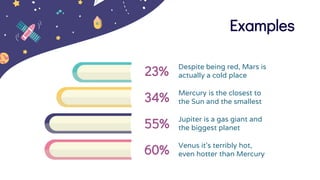
Examples
23% Despite being red, Mars is
actually a cold place
34% Mercury is the closest to
the Sun and the smallest
55% Jupiter is a gas giant and
the biggest planet
60% Venus it’s terribly hot,
even hotter than Mercury
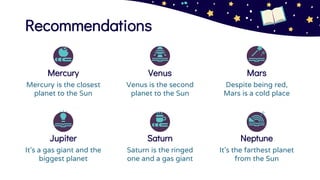
Recommendations
Venus
Venus is the second
planet to the Sun
Mercury
Mercury is the closest
planet to the Sun
Saturn
Saturn is the ringed
one and a gas giant
Jupiter
It’s a gas giant and the
biggest planet
Mars
Despite being red,
Mars is a cold place
Neptune
It’s the farthest planet
from the Sun
Awesome
Words
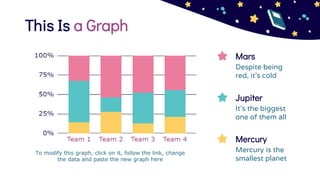
This Is a Graph
Jupiter
It's the biggest
one of them all
Mercury
Mercury is the
smallest planet
Mars
Despite being
red, it’s cold
To modify this graph, click on it, follow the link, change
the data and paste the new graph here
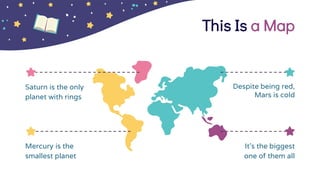
This Is a Map
Mercury is the
smallest planet
Despite being red,
Mars is cold
It's the biggest
one of them all
Saturn is the only
planet with rings
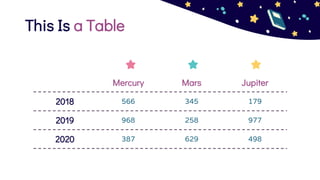
This Is a Table
Mercury Mars Jupiter
2018 566 345 179
2019 968 258 977
2020 387 629 498
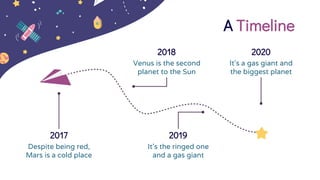
A Timeline
2017
Despite being red,
Mars is a cold place
It’s a gas giant and
the biggest planet
2020
2018
Venus is the second
planet to the Sun
2019
It’s the ringed one
and a gas giant
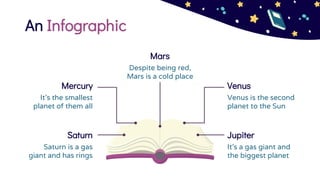
An Infographic
Saturn
Saturn is a gas
giant and has rings
Jupiter
It’s a gas giant and
the biggest planet
Mars
Despite being red,
Mars is a cold place
Mercury
It’s the smallest
planet of them all
Venus
Venus is the second
planet to the Sun
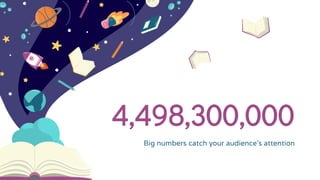
4,498,300,000
Big numbers catch your audience’s attention
Name of the
Section
You could enter a subtitle
here if you need it
01
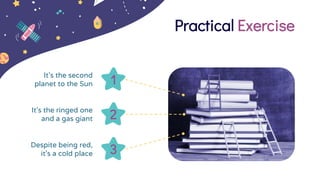
Practical Exercise
3
Despite being red,
it’s a cold place
1
It’s the second
planet to the Sun
2
It’s the ringed one
and a gas giant
You can replace the image on
the screen with your own work.
Just delete this one, add yours
and center it properly
Mockup
CREDITS: This presentation template
was created by Slidesgo, including
icons by Flaticon, and infographics &
images by Freepik
Thanks!
addyouremail@freepik.com
+91 620 421 838
yourcompany.com
Please keep this slide for attribution
Do you have any questions?
Alternative Resources
Resources
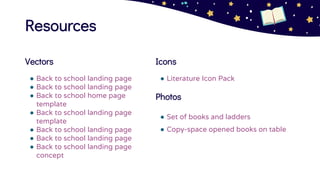
Vectors
● Back to school landing page
● Back to school home page
template
● Back to school landing page
template
● Back to school landing page
concept
Icons
● Literature Icon Pack
Photos
● Set of books and ladders
● Copy-space opened books on table
Instructions for use (free users)
In order to use this template, you must credit Slidesgo by keeping the Thanks slide.
You are allowed to:
● Modify this template.
● Use it for both personal and commercial purposes.
You are not allowed to:
● Sublicense, sell or rent any of Slidesgo Content (or a modified version of Slidesgo Content).
● Distribute this Slidesgo Template (or a modified version of this Slidesgo Template) or include it in a database or in
any other product or service that offers downloadable images, icons or presentations that may be subject to
distribution or resale.
● Use any of the elements that are part of this Slidesgo Template in an isolated and separated way from this
Template.
● Delete the “Thanks” or “Credits” slide.
● Register any of the elements that are part of this template as a trademark or logo, or register it as a work in an
intellectual property registry or similar.
For more information about editing slides, please read our FAQs or visit Slidesgo School:
https://slidesgo.com/faqs and https://slidesgo.com/slidesgo-school
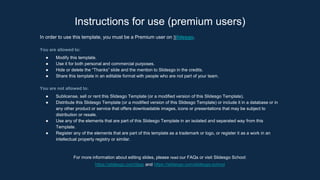
Instructions for use (premium users)
In order to use this template, you must be a Premium user on Slidesgo.
You are allowed to:
● Modify this template.
● Use it for both personal and commercial purposes.
● Hide or delete the “Thanks” slide and the mention to Slidesgo in the credits.
● Share this template in an editable format with people who are not part of your team.
You are not allowed to:
● Sublicense, sell or rent this Slidesgo Template (or a modified version of this Slidesgo Template).
● Distribute this Slidesgo Template (or a modified version of this Slidesgo Template) or include it in a database or in
any other product or service that offers downloadable images, icons or presentations that may be subject to
distribution or resale.
● Use any of the elements that are part of this Slidesgo Template in an isolated and separated way from this
Template.
● Register any of the elements that are part of this template as a trademark or logo, or register it as a work in an
intellectual property registry or similar.
For more information about editing slides, please read our FAQs or visit Slidesgo School:
https://slidesgo.com/faqs and https://slidesgo.com/slidesgo-school
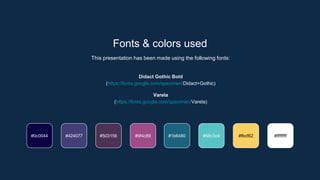
Fonts & colors used
This presentation has been made using the following fonts:
Didact Gothic Bold
(https://fonts.google.com/specimen/Didact+Gothic)
Varela
(https://fonts.google.com/specimen/Varela)
#424077 #503156 #9f4c89
#0c0044 #58c3c4 #fbcf62 #ffffffff
#1b6480
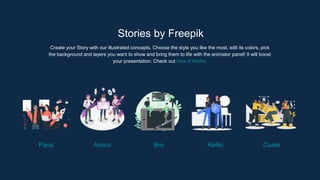
Stories by Freepik
Create your Story with our illustrated concepts. Choose the style you like the most, edit its colors, pick
the background and layers you want to show and bring them to life with the animator panel! It will boost
your presentation. Check out How it Works.
Pana Amico Bro Rafiki Cuate
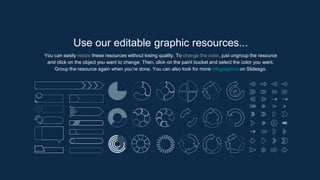
You can easily resize these resources without losing quality. To change the color, just ungroup the resource
and click on the object you want to change. Then, click on the paint bucket and select the color you want.
Group the resource again when you’re done. You can also look for more infographics on Slidesgo.
Use our editable graphic resources...
JANUARY FEBRUARY MARCH APRIL MAY JUNE
PHASE 1
PHASE 2
Task 1
Task 2
Task 1
Task 2
JANUARY FEBRUARY MARCH APRIL
PHASE 1
Task 1
Task 2
...and our sets of editable icons
You can resize these icons without losing quality.
You can change the stroke and fill color; just select the icon and click on the paint bucket/pen.
In Google Slides, you can also use Flaticon’s extension, allowing you to customize and add even more icons.
Educational Icons Medical Icons
Business Icons Teamwork Icons
Help & Support Icons Avatar Icons
Creative Process Icons Performing Arts Icons
Nature Icons
SEO & Marketing Icons
ROTEIRO.pptx

ROTEIRO.pptx

  • 1.
    Reading Workshop Here is whereyour presentation begins
  • 2.
    Contents of ThisTemplate Here’s what you’ll find in this Slidesgo template: ● A slide structure based on a workshop, which you can easily adapt to your needs. For more info on how to edit the template, please visit Slidesgo School or read our FAQs. ● An assortment of illustrations that are suitable for use in the presentation can be found in the alternative resources slide. ● A thanks slide, which you must keep so that proper credits for our design are given. ● A resources slide, where you’ll find links to all the elements used in the template. ● Instructions for use. ● Final slides with: ● The fonts and colors used in the template. ● A selection of illustrations. You can also customize and animate them as you wish with the online editor. Visit Stories by Freepik to find more. ● More infographic resources, whose size and color can be edited. ● Sets of customizable icons of the following themes: general, business, avatar, creative process, education, help & support, medical, nature, performing arts, SEO & marketing, and teamwork. You can delete this slide when you’re done editing the presentation.
  • 3.
    Table of Contents TheoryLesson Here you could describe the topic of the section Features of the Topic Here you could describe the topic of the section Tips Here you could describe the topic of the section Practical Exercise Here you could describe the topic of the section 01 03 02 04
  • 4.
    Introduction Mercury is theclosest planet to the Sun and the smallest one in the Solar System—it’s only a bit larger than the Moon
  • 5.
    Concepts Jupiter is agas giant and the biggest planet Neptune is the farthest planet from the Sun Concept 1 Concept 2
  • 6.
    What Is ThisTopic About? Jupiter It’s a gas giant and the biggest planet Venus It’s terribly hot, even hotter than Mercury Mercury It’s the closest and also is the smallest
  • 7.
    Features of theTopic Mercury It’s the closest to the Sun and the smallest Mars Despite being red, is actually a cold place Neptune Neptune is the farthest planet from the Sun Jupiter Jupiter is a gas giant and the biggest planet
  • 8.
    Examples 23% Despite beingred, Mars is actually a cold place 34% Mercury is the closest to the Sun and the smallest 55% Jupiter is a gas giant and the biggest planet 60% Venus it’s terribly hot, even hotter than Mercury
  • 9.
    Recommendations Venus Venus is thesecond planet to the Sun Mercury Mercury is the closest planet to the Sun Saturn Saturn is the ringed one and a gas giant Jupiter It’s a gas giant and the biggest planet Mars Despite being red, Mars is a cold place Neptune It’s the farthest planet from the Sun
  • 10.
  • 11.
    This Is aGraph Jupiter It's the biggest one of them all Mercury Mercury is the smallest planet Mars Despite being red, it’s cold To modify this graph, click on it, follow the link, change the data and paste the new graph here
  • 12.
    This Is aMap Mercury is the smallest planet Despite being red, Mars is cold It's the biggest one of them all Saturn is the only planet with rings
  • 13.
    This Is aTable Mercury Mars Jupiter 2018 566 345 179 2019 968 258 977 2020 387 629 498
  • 14.
    A Timeline 2017 Despite beingred, Mars is a cold place It’s a gas giant and the biggest planet 2020 2018 Venus is the second planet to the Sun 2019 It’s the ringed one and a gas giant
  • 15.
    An Infographic Saturn Saturn isa gas giant and has rings Jupiter It’s a gas giant and the biggest planet Mars Despite being red, Mars is a cold place Mercury It’s the smallest planet of them all Venus Venus is the second planet to the Sun
  • 16.
    4,498,300,000 Big numbers catchyour audience’s attention
  • 17.
    Name of the Section Youcould enter a subtitle here if you need it 01
  • 18.
    Practical Exercise 3 Despite beingred, it’s a cold place 1 It’s the second planet to the Sun 2 It’s the ringed one and a gas giant
  • 19.
    You can replacethe image on the screen with your own work. Just delete this one, add yours and center it properly Mockup
  • 20.
    CREDITS: This presentationtemplate was created by Slidesgo, including icons by Flaticon, and infographics & images by Freepik Thanks! addyouremail@freepik.com +91 620 421 838 yourcompany.com Please keep this slide for attribution Do you have any questions?
  • 21.
  • 22.
    Resources Vectors ● Back toschool landing page ● Back to school landing page ● Back to school home page template ● Back to school landing page template ● Back to school landing page ● Back to school landing page ● Back to school landing page concept Icons ● Literature Icon Pack Photos ● Set of books and ladders ● Copy-space opened books on table
  • 23.
    Instructions for use(free users) In order to use this template, you must credit Slidesgo by keeping the Thanks slide. You are allowed to: ● Modify this template. ● Use it for both personal and commercial purposes. You are not allowed to: ● Sublicense, sell or rent any of Slidesgo Content (or a modified version of Slidesgo Content). ● Distribute this Slidesgo Template (or a modified version of this Slidesgo Template) or include it in a database or in any other product or service that offers downloadable images, icons or presentations that may be subject to distribution or resale. ● Use any of the elements that are part of this Slidesgo Template in an isolated and separated way from this Template. ● Delete the “Thanks” or “Credits” slide. ● Register any of the elements that are part of this template as a trademark or logo, or register it as a work in an intellectual property registry or similar. For more information about editing slides, please read our FAQs or visit Slidesgo School: https://slidesgo.com/faqs and https://slidesgo.com/slidesgo-school

  • 24.
    Instructions for use(premium users) In order to use this template, you must be a Premium user on Slidesgo. You are allowed to: ● Modify this template. ● Use it for both personal and commercial purposes. ● Hide or delete the “Thanks” slide and the mention to Slidesgo in the credits. ● Share this template in an editable format with people who are not part of your team. You are not allowed to: ● Sublicense, sell or rent this Slidesgo Template (or a modified version of this Slidesgo Template). ● Distribute this Slidesgo Template (or a modified version of this Slidesgo Template) or include it in a database or in any other product or service that offers downloadable images, icons or presentations that may be subject to distribution or resale. ● Use any of the elements that are part of this Slidesgo Template in an isolated and separated way from this Template. ● Register any of the elements that are part of this template as a trademark or logo, or register it as a work in an intellectual property registry or similar. For more information about editing slides, please read our FAQs or visit Slidesgo School: https://slidesgo.com/faqs and https://slidesgo.com/slidesgo-school


  • 25.
    Fonts & colorsused This presentation has been made using the following fonts: Didact Gothic Bold (https://fonts.google.com/specimen/Didact+Gothic) Varela (https://fonts.google.com/specimen/Varela) #424077 #503156 #9f4c89 #0c0044 #58c3c4 #fbcf62 #ffffffff #1b6480
  • 26.
    Stories by Freepik Createyour Story with our illustrated concepts. Choose the style you like the most, edit its colors, pick the background and layers you want to show and bring them to life with the animator panel! It will boost your presentation. Check out How it Works. Pana Amico Bro Rafiki Cuate
  • 27.
    You can easilyresize these resources without losing quality. To change the color, just ungroup the resource and click on the object you want to change. Then, click on the paint bucket and select the color you want. Group the resource again when you’re done. You can also look for more infographics on Slidesgo. Use our editable graphic resources...
  • 30.
    JANUARY FEBRUARY MARCHAPRIL MAY JUNE PHASE 1 PHASE 2 Task 1 Task 2 Task 1 Task 2 JANUARY FEBRUARY MARCH APRIL PHASE 1 Task 1 Task 2
  • 33.
    ...and our setsof editable icons You can resize these icons without losing quality. You can change the stroke and fill color; just select the icon and click on the paint bucket/pen. In Google Slides, you can also use Flaticon’s extension, allowing you to customize and add even more icons.
  • 34.
  • 35.
  • 36.
    Help & SupportIcons Avatar Icons
  • 37.
    Creative Process IconsPerforming Arts Icons
  • 38.
  • 39.