Memory Virtualization
Virtual Memory
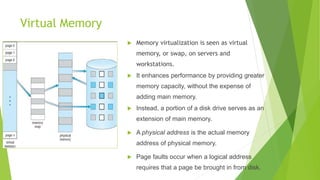
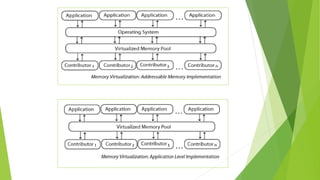
 Memory virtualization is seen as virtual
memory, or swap, on servers and
workstations.
 It enhances performance by providing greater
memory capacity, without the expense of
adding main memory.
 Instead, a portion of a disk drive serves as an
extension of main memory.
 A physical address is the actual memory
address of physical memory.
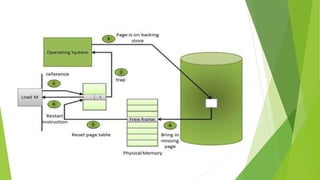
 Page faults occur when a logical address
requires that a page be brought in from disk.
Virtual Memory
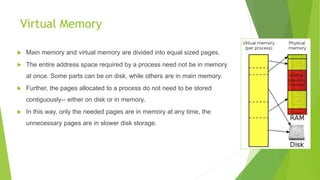
 Main memory and virtual memory are divided into equal sized pages.
 The entire address space required by a process need not be in memory
at once. Some parts can be on disk, while others are in main memory.
 Further, the pages allocated to a process do not need to be stored
contiguously-- either on disk or in memory.
 In this way, only the needed pages are in memory at any time, the
unnecessary pages are in slower disk storage.
Importance of Virtual Memory
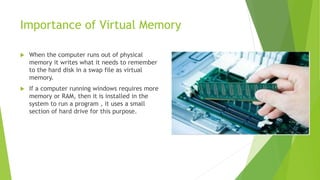
 When the computer runs out of physical
memory it writes what it needs to remember
to the hard disk in a swap file as virtual
memory.
 If a computer running windows requires more
memory or RAM, then it is installed in the
system to run a program , it uses a small
section of hard drive for this purpose.
Example
 A 16 MB program can run in 4 MB space by carefully choosing which 4 MB
to keep in memory at each instance, with pieces of the program being
swapped between disk and memory as needed.
Demand Paged Virtual Memory
 The fundamental approach in implementing virtual memory is paging.
 To facilitate copying virtual memory into real memory, the operating
system divides virtual memory into pages, each of which contains a fixed
number of addresses.
 To accomplish this, the virtual address is divided into two fields: A page
field, and an offset field.
 The page field determines the page location of the address, and the offset
indicates the location of the address within the page.
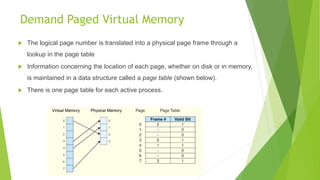
 The logical page number is translated into a physical page frame through a
lookup in the page table
 Information concerning the location of each page, whether on disk or in memory,
is maintained in a data structure called a page table (shown below).
 There is one page table for each active process.
Demand Paged Virtual Memory
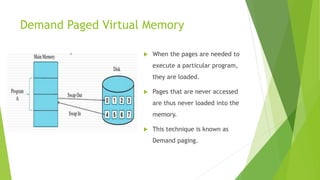
 When the pages are needed to
execute a particular program,
they are loaded.
 Pages that are never accessed
are thus never loaded into the
memory.
 This technique is known as
Demand paging.
Internal Fragmentation
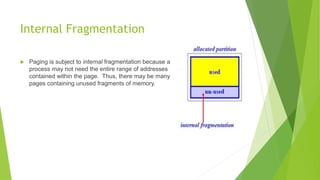
 Paging is subject to internal fragmentation because a
process may not need the entire range of addresses
contained within the page. Thus, there may be many
pages containing unused fragments of memory.
Demand Segmented Virtual Memory
 Memory is divided into variable length segments.
 Each segment has a base physical address and length.
 Used when insufficient hardware is there to implement demand paging.
 Segment descriptor contains a valid bit to indicate whether the segment
is currently in memory.
 If segment is in main memory, access continues,
 If not in memory, segment fault occurs.
Demand Segmented Virtual Memory
 A segment is located through its entry in a segment table, which contains
the segment’s memory location and a bounds limit that indicates its size.
 After a page fault, the operating system searches for a location in memory
large enough to hold the segment that is retrieved from disk.
 Each segment has a page table. This means that a memory address will
have three fields, one for the segment, another for the page, and a third for
the offset.
External Fragmentation
 Both paging and segmentation can cause
fragmentation.
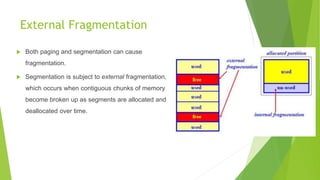
 Segmentation is subject to external fragmentation,
which occurs when contiguous chunks of memory
become broken up as segments are allocated and
deallocated over time.
Thrashing
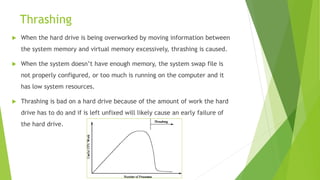
 When the hard drive is being overworked by moving information between
the system memory and virtual memory excessively, thrashing is caused.
 When the system doesn’t have enough memory, the system swap file is
not properly configured, or too much is running on the computer and it
has low system resources.
 Thrashing is bad on a hard drive because of the amount of work the hard
drive has to do and if is left unfixed will likely cause an early failure of
the hard drive.
Advantages
 More applications can run at once.
 Larger applications can run with less real RAM without need to buy more
memory.
 Allows speed gain when only a particular segment of the program is
required for the execution of the program.
 This frees programmers from concern of memory limitations and helps
implementing multiprogramming environment.
Disadvantages
 Applications may run slower.
 It takes more time to switch between applications.
 Less available hard drive space for the user’s use.
 The possibility of Thrashing due to excessive Paging and Page faults
THANK YOU

Memory virtualization

  • 1.
  • 2.
    Virtual Memory  Memoryvirtualization is seen as virtual memory, or swap, on servers and workstations.  It enhances performance by providing greater memory capacity, without the expense of adding main memory.  Instead, a portion of a disk drive serves as an extension of main memory.  A physical address is the actual memory address of physical memory.  Page faults occur when a logical address requires that a page be brought in from disk.
  • 3.
    Virtual Memory  Mainmemory and virtual memory are divided into equal sized pages.  The entire address space required by a process need not be in memory at once. Some parts can be on disk, while others are in main memory.  Further, the pages allocated to a process do not need to be stored contiguously-- either on disk or in memory.  In this way, only the needed pages are in memory at any time, the unnecessary pages are in slower disk storage.
  • 4.
    Importance of VirtualMemory  When the computer runs out of physical memory it writes what it needs to remember to the hard disk in a swap file as virtual memory.  If a computer running windows requires more memory or RAM, then it is installed in the system to run a program , it uses a small section of hard drive for this purpose.
  • 5.
    Example  A 16MB program can run in 4 MB space by carefully choosing which 4 MB to keep in memory at each instance, with pieces of the program being swapped between disk and memory as needed.
  • 7.
    Demand Paged VirtualMemory  The fundamental approach in implementing virtual memory is paging.  To facilitate copying virtual memory into real memory, the operating system divides virtual memory into pages, each of which contains a fixed number of addresses.  To accomplish this, the virtual address is divided into two fields: A page field, and an offset field.  The page field determines the page location of the address, and the offset indicates the location of the address within the page.
  • 8.
     The logicalpage number is translated into a physical page frame through a lookup in the page table  Information concerning the location of each page, whether on disk or in memory, is maintained in a data structure called a page table (shown below).  There is one page table for each active process. Demand Paged Virtual Memory
  • 9.
    Demand Paged VirtualMemory  When the pages are needed to execute a particular program, they are loaded.  Pages that are never accessed are thus never loaded into the memory.  This technique is known as Demand paging.
  • 11.
    Internal Fragmentation  Pagingis subject to internal fragmentation because a process may not need the entire range of addresses contained within the page. Thus, there may be many pages containing unused fragments of memory.
  • 12.
    Demand Segmented VirtualMemory  Memory is divided into variable length segments.  Each segment has a base physical address and length.  Used when insufficient hardware is there to implement demand paging.  Segment descriptor contains a valid bit to indicate whether the segment is currently in memory.  If segment is in main memory, access continues,  If not in memory, segment fault occurs.
  • 13.
    Demand Segmented VirtualMemory  A segment is located through its entry in a segment table, which contains the segment’s memory location and a bounds limit that indicates its size.  After a page fault, the operating system searches for a location in memory large enough to hold the segment that is retrieved from disk.  Each segment has a page table. This means that a memory address will have three fields, one for the segment, another for the page, and a third for the offset.
  • 14.
    External Fragmentation  Bothpaging and segmentation can cause fragmentation.  Segmentation is subject to external fragmentation, which occurs when contiguous chunks of memory become broken up as segments are allocated and deallocated over time.
  • 15.
    Thrashing  When thehard drive is being overworked by moving information between the system memory and virtual memory excessively, thrashing is caused.  When the system doesn’t have enough memory, the system swap file is not properly configured, or too much is running on the computer and it has low system resources.  Thrashing is bad on a hard drive because of the amount of work the hard drive has to do and if is left unfixed will likely cause an early failure of the hard drive.
  • 16.
    Advantages  More applicationscan run at once.  Larger applications can run with less real RAM without need to buy more memory.  Allows speed gain when only a particular segment of the program is required for the execution of the program.  This frees programmers from concern of memory limitations and helps implementing multiprogramming environment.
  • 17.
    Disadvantages  Applications mayrun slower.  It takes more time to switch between applications.  Less available hard drive space for the user’s use.  The possibility of Thrashing due to excessive Paging and Page faults
  • 18.