EX200
Red Hat Certified System Administrator
nugroho.gito@yahoo.com
Exam preparation, compiled from various sources
2
Introduction
Coming from UNIX System V (IBM AIX & Sun Solaris) System Programmer background, I find Linux has
become the defacto choice for many computing workload, from embedded device, mobile phone,
mission critical systems, all the way to the largest Super Computer Cluster in the world.
While Linux has tried to maintain its UNIX design philosophy, its foundation has radically changed
departing its UNIX root (bye init, hi systemd), towards modern Operating Systems which many of its
features have equivalent of its UNIX counterparts - if not better (Linux Container vs AIX WPAR/Solaris
Zones, Solaris ZFS vs Stratis, and many more).
This document is not meant to beat Red Hat comprehensive online manual, instead it was written to help
me memorize many of advanced RHEL features and to help me pass hands on performance based EX200
exam.
This document is compiled from many sources, and written for anyone who would like to learn Red Hat
Enterprise Linux 8, through taking EX200 exam in order to showing off RHCSA title to your friend :D
Happy Learning and may the force be with you!
3
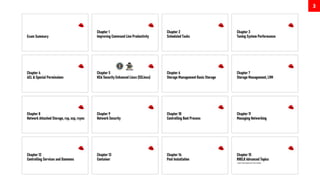
Exam Summary
5
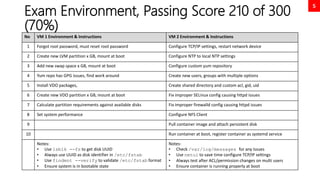
Exam Environment, Passing Score 210 of 300
(70%)
No VM 1 Environment & Instructions VM 2 Environment & Instructions
1 Forgot root password, must reset root password Configure TCP/IP settings, restart network device
2 Create new LVM partition x GB, mount at boot Configure NTP to local NTP settings
3 Add new swap space x GB, mount at boot Configure custom yum repository
4 Yum repo has GPG issues, find work around Create new users, groups with multiple options
5 Install VDO packages, Create shared directory and custom acl, gid, uid
6 Create new VDO partition x GB, mount at boot Fix improper SELinux config causing httpd issues
7 Calculate partition requirements against available disks Fix improper firewalld config causing httpd issues
8 Set system performance Configure NFS Client
9 Pull container image and attach persistent disk
10 Run container at boot, register container as systemd service
Notes:
• Use lsblk --fs to get disk UUID
• Always use UUID as disk identifier in /etc/fstab
• Use findmnt --verify to validate /etc/fstab format
• Ensure system is in bootable state
Notes:
• Check /var/log/messages for any issues
• Use nmtui to save time configure TCP/IP settings
• Always test after ACL/permission changes on multi users
• Ensure container is running properly at boot
6
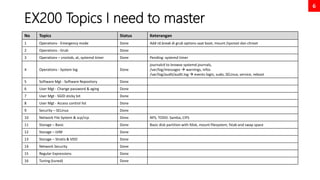
EX200 Topics I need to master
No Topics Status Keterangan
1 Operations - Emergency mode Done Add rd.break di grub options saat boot, mount /sysroot dan chroot
2 Operations - Grub Done
3 Operations – crontab, at, systemd timer Done Pending: systemd timer
4 Operations - System log Done
journalctl to browse systemd journals,
/var/log/messages  warnings, infos
/var/log/audit/audit.log  events login, sudo, SELinux, service, reboot
5 Software Mgt - Software Repository Done
6 User Mgt - Change password & aging Done
7 User Mgt - SGID sticky bit Done
8 User Mgt - Access control list Done
9 Security – SELinux Done
10 Network File System & scp/rcp Done NFS, TODO: Samba, CIFS
11 Storage – Basic Done Basic disk partition with fdisk, mount filesystem, fstab and swap space
12 Storage – LVM Done
13 Storage – Stratis & VDO Done
14 Network Security Done
15 Regular Expressions Done
16 Tuning (tuned) Done
7
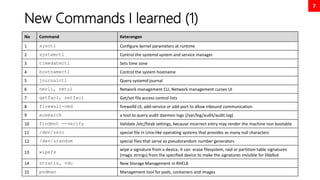
New Commands I learned (1)
No Command Keterangan
1 sysctl Configure kernel parameters at runtime
2 systemctl Control the systemd system and service manager
3 timedatectl Sets time zone
4 hostnamectl Control the system hostname
5 journalctl Query systemd journal
6 nmcli, nmtui Network management CLI, Network management curses UI
7 getfacl, setfacl Get/set file access control lists
8 firewall-cmd firewalld cli, add-service or add-port to allow inbound communication
9 ausearch a tool to query audit daemon logs (/var/log/audit/audit.log)
10 findmnt --verify Validate /etc/fstab settings, because incorrect entry may render the machine non bootable
11 /dev/zero special file in Unix-like operating systems that provides as many null characters
12 /dev/urandom special files that serve as pseudorandom number generators
13 wipefs
wipe a signature from a device, it can erase filesystem, raid or partition-table signatures
(magic strings) from the specified device to make the signatures invisible for libblkid
14 stratis, vdo New Storage Management in RHEL8
15 podman Management tool for pods, containers and images
8
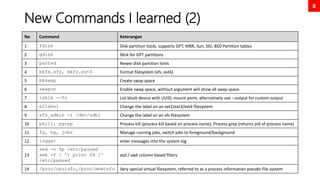
New Commands I learned (2)
No Command Keterangan
1 fdisk Disk partition tools, supports GPT, MBR, Sun, SGI, BSD Partition tables
2 gdisk fdisk for GPT partitions
3 parted Newer disk partition tools
4 mkfs.xfs, mkfs.ext4 Format filesystem (xfs, ext4)
5 mkswap Create swap space
6 swapon Enable swap space, without argument will show all swap space
7 lsblk --fs List block device with UUID, mount point, alternatively use --output for custom output
8 e2label Change the label on an ext2/ext3/ext4 filesystem
9 xfs_admin -l /dev/sdb1 Change the label on an xfs filesystem
10 pkill, pgrep Process kill (process kill based on process name), Process grep (returns pid of process name)
11 fg, bg, jobs Manage running jobs, switch jobs to foreground/background
12 logger enter messages into the system log
13
sed -n 5p /etc/passwd
awk -F : '{ print $4 }'
/etc/passwd
sed / awk column based filters
14 /proc/cpuinfo,/proc/meminfo Very special virtual filesystem, referred to as a process information pseudo-file system
Chapter 1
Improving Command Line
Productivity
10
Bash Comparison and its confusing type
juggling comparison
No Description Commands
1 Numeric comparison
[ 1 -eq 1 ]; echo $? # equal
[ 1 -ne 1 ]; echo $? # not equal
[ 8 -gt 2 ]; echo $? # greater than
[ 2 -ge 2 ]; echo $? # greater equal
[ 2 -lt 2 ]; echo $? # less than
2 String comparison
[ abc = abc ]; echo $?
[ abc == def ]; echo $?
[ abc != def ]; echo $?
3 Unary operators
STRING=‘’ ; [ -z "$STRING" ]; echo $?
STRING='abc'; [ -n "$STRING" ]; echo $?
4 File / Directory existence check
[ -d dirname ]; echo $? # dir check
[ -f filename ]; echo $? # file check
OUT OF SCOPE
Note:
For heavy vi/vim users, I highly recommend to add set -o vi in ~/.bashrc or /etc/bashrc.
It will enable vi keybindings within your shell, and I think it will greatly enhance your shell command editing.
11
Regular Expressions, thou shalt remember
this holy symbols!
OPTION DESCRIPTION
. The period (.) matches any single character.
? The preceding item is optional and will be matched at most once.
* The preceding item will be matched zero or more times.
+ The preceding item will be matched one or more times.
{n} The preceding item is matched exactly n times.
{n,} The preceding item is matched n or more times.
{,m} The preceding item is matched at most m times.
{n,m} The preceding item is matched at least n times, but not more than m times.
[:alnum:] Alphanumeric characters: '[:alpha:]' and '[:digit:]'; in the 'C' locale and ASCII character encoding, this is the same as '[0-9A-Za-z]'.
[:alpha:] Alphabetic characters: '[:lower:]' and '[:upper:]'; in the 'C' locale and ASCII character encoding, this is the same as '[A-Za-z]'.
[:blank:] Blank characters: space and tab.
[:cntrl:] Control characters. In ASCII, these characters have octal codes 000 through 037, and 177 (DEL). In other character sets, these are the equivalent characters, if any.
[:digit:] Digits: 0 1 2 3 4 5 6 7 8 9.
[:graph:] Graphical characters: '[:alnum:]' and '[:punct:]'.
[:lower:] Lower-case letters; in the 'C' locale and ASCII character encoding, this is a b c d e f g h i j k l m n o p q r s t u v w x y z.
[:print:] Printable characters: '[:alnum:]', '[:punct:]', and space.
[:punct:] Punctuation characters; in the 'C' locale and ASCII character encoding, this is! " # $ % & ' ( ) * + , -. /: ; < = > ? @ []^ _ ' { | } ~. In other character sets, these are the equivalent characters, if any.
[:space:] Space characters: in the 'C' locale, this is tab, newline, vertical tab, form feed,carriage return, and space.
[:upper:] Upper-case letters: in the 'C' locale and ASCII character encoding, this is A B C D E F G H I J K L M N O P Q R S T U V W X Y Z.
[:xdigit:] Hexadecimal digits: 0 1 2 3 4 5 6 7 8 9 A B C D E F a b c d e f.
b Match the empty string at the edge of a word.
B Match the empty string provided it is not at the edge of a word.
< Match the empty string at the beginning of word.
> Match the empty string at the end of word.
w Match word constituent. Synonym for '[_[:alnum:]]'.
W Match non-word constituent. Synonym for '[^_[:alnum:]]'.
s Match white space. Synonym for '[[:space:]]'.
S Match non-whitespace. Synonym for '[^[:space:]]'.
OUT OF SCOPE
Chapter 2
Scheduled Tasks
13
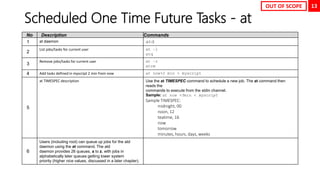
Scheduled One Time Future Tasks - at
No Description Commands
1 at daemon atd
2
List jobs/tasks for current user at –l
atq
3
Remove jobs/tasks for current user at –r
atrm
4 Add tasks defined in myscript 2 min from now at now+2 min < myscript
5
at TIMESPEC description Use the at TIMESPEC command to schedule a new job. The at command then
reads the
commands to execute from the stdin channel.
Sample: at now +5min < myscript
Sample TIMESPEC:
midnight, 00
noon, 12
teatime, 16
now
tomorrow
minutes, hours, days, weeks
6
Users (including root) can queue up jobs for the atd
daemon using the at command. The atd
daemon provides 26 queues, a to z, with jobs in
alphabetically later queues getting lower system
priority (higher nice values, discussed in a later chapter).
OUT OF SCOPE
14
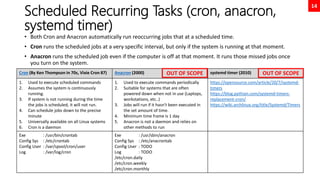
Scheduled Recurring Tasks (cron, anacron,
systemd timer)
• Both Cron and Anacron automatically run reoccurring jobs that at a scheduled time.
• Cron runs the scheduled jobs at a very specific interval, but only if the system is running at that moment.
• Anacron runs the scheduled job even if the computer is off at that moment. It runs those missed jobs once
you turn on the system.
Cron (By Ken Thompson in 70s, Vixie Cron 87) Anacron (2000) systemd timer (2010)
1. Used to execute scheduled commands
2. Assumes the system is continuously
running.
3. If system is not running during the time
the jobs is scheduled, it will not run.
4. Can schedule jobs down to the precise
minute
5. Universally available on all Linux systems
6. Cron is a daemon
1. Used to execute commands periodically
2. Suitable for systems that are often
powered down when not in use (Laptops,
workstations, etc..)
3. Jobs will run if it hasn't been executed in
the set amount of time.
4. Minimum time frame is 1 day
5. Anacron is not a daemon and relies on
other methods to run
https://opensource.com/article/20/7/systemd-
timers
https://blog.pythian.com/systemd-timers-
replacement-cron/
https://wiki.archlinux.org/title/Systemd/Timers
Exe : /usr/bin/crontab
Config Sys : /etc/crontab
Config User : /var/spool/cron/user
Log : /var/log/cron
Exe : /usr/sbin/anacron
Config Sys : /etc/anacrontab
Config User : TODO
Log : TODO
/etc/cron.daily
/etc/cron.weekly
/etc/cron.monthly
OUT OF SCOPE OUT OF SCOPE
15
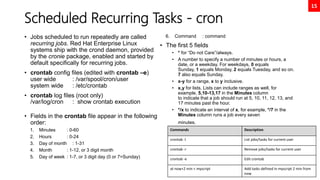
Scheduled Recurring Tasks - cron
• Jobs scheduled to run repeatedly are called
recurring jobs. Red Hat Enterprise Linux
systems ship with the crond daemon, provided
by the cronie package, enabled and started by
default specifically for recurring jobs.
• crontab config files (edited with crontab –e)
user wide : /var/spool/cron/user
system wide : /etc/crontab
• crontab log files (root only)
/var/log/cron : show crontab execution
• Fields in the crontab file appear in the following
order:
1. Minutes : 0-60
2. Hours : 0-24
3. Day of month : 1-31
4. Month : 1-12, or 3 digit month
5. Day of week : 1-7, or 3 digit day (0 or 7=Sunday)
6. Command : command
• The first 5 fields
• * for “Do not Care”/always.
• A number to specify a number of minutes or hours, a
date, or a weekday. For weekdays, 0 equals
Sunday, 1 equals Monday, 2 equals Tuesday, and so on.
7 also equals Sunday.
• x-y for a range, x to y inclusive.
• x,y for lists. Lists can include ranges as well, for
example, 5,10-13,17 in the Minutes column
to indicate that a job should run at 5, 10, 11, 12, 13, and
17 minutes past the hour.
• */x to indicate an interval of x, for example, */7 in the
Minutes column runs a job every seven
minutes.
Commands Description
crontab -l List jobs/tasks for current user
crontab -r Remove jobs/tasks for current user
crontab -e Edit crontab
at now+2 min < myscript Add tasks defined in myscript 2 min from
now
Chapter 3
Tuning System Performance
17
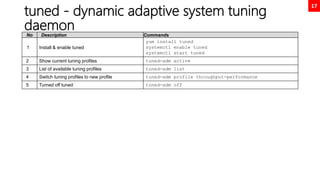
tuned - dynamic adaptive system tuning
daemon
No Description Commands
1 Install & enable tuned
yum install tuned
systemctl enable tuned
systemctl start tuned
2 Show current tuning profiles tuned-adm active
3 List of available tuning profiles tuned-adm list
4 Switch tuning profiles to new profile tuned-adm profile throughput-performance
5 Turned off tuned tuned-adm off
18
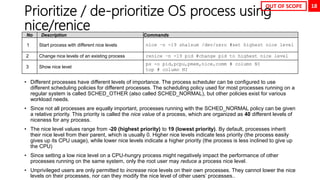
Prioritize / de-prioritize OS process using
nice/renice
• Different processes have different levels of importance. The process scheduler can be configured to use
different scheduling policies for different processes. The scheduling policy used for most processes running on a
regular system is called SCHED_OTHER (also called SCHED_NORMAL), but other policies exist for various
workload needs.
• Since not all processes are equally important, processes running with the SCHED_NORMAL policy can be given
a relative priority. This priority is called the nice value of a process, which are organized as 40 different levels of
niceness for any process.
• The nice level values range from -20 (highest priority) to 19 (lowest priority). By default, processes inherit
their nice level from their parent, which is usually 0. Higher nice levels indicate less priority (the process easily
gives up its CPU usage), while lower nice levels indicate a higher priority (the process is less inclined to give up
the CPU)
• Since setting a low nice level on a CPU-hungry process might negatively impact the performance of other
processes running on the same system, only the root user may reduce a process nice level.
• Unprivileged users are only permitted to increase nice levels on their own processes. They cannot lower the nice
levels on their processes, nor can they modify the nice level of other users’ processes..
No Description Commands
1 Start process with different nice levels nice –n -19 sha1sum /dev/zero #set highest nice level
2 Change nice levels of an existing process renice –n -19 pid #change pid to highest nice level
3 Show nice level
ps -o pid,pcpu,pmem,nice,comm # column NI
top # column NI
OUT OF SCOPE
Chapter 4
ACL & Special Permissions
20
Access Control List
With ACLs, you can grant permissions to multiple users and groups, identified by
user name, group name, UID, or GID, using the same permission flags used with
regular file permissions: read, write, and execute.
These additional users and groups, beyond the file owner and the file's group
affiliation, are called named users and named groups respectively, because they are
named not in a long listing, but rather within an ACL.
Users can set ACLs on files and directories that they own. Privileged users, assigned
the CAP_FOWNER Linux capability, can set ACLs on any file or directory.
New files and subdirectories automatically inherit ACL settings from the parent
directory's default ACL, if they are set. Similar to normal file access rules, the parent
directory hierarchy needs at least the other search (execute) permission set to
enable named users and named groups to have access.
21
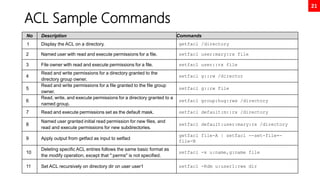
ACL Sample Commands
No Description Commands
1 Display the ACL on a directory. getfacl /directory
2 Named user with read and execute permissions for a file. setfacl user:mary:rx file
3 File owner with read and execute permissions for a file. setfacl user::rx file
4
Read and write permissions for a directory granted to the
directory group owner.
setfacl g::rw /director
5
Read and write permissions for a file granted to the file group
owner.
setfacl g::rw file
6
Read, write, and execute permissions for a directory granted to a
named group.
setfacl group:hug:rwx /directory
7 Read and execute permissions set as the default mask. setfacl default:m::rx /directory
8
Named user granted initial read permission for new files, and
read and execute permissions for new subdirectories.
setfacl default:user:mary:rx /directory
9 Apply output from getfacl as input to setfacl
getfacl file-A | setfacl --set-file=-
file-B
10
Deleting specific ACL entries follows the same basic format as
the modify operation, except that ":perms" is not specified.
setfacl -x u:name,g:name file
11 Set ACL recursively on directory dir on user user1 setfacl -Rdm u:user1:rwx dir
22
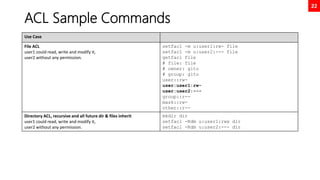
ACL Sample Commands
Use Case
File ACL
user1 could read, write and modify it,
user2 without any permission.
setfacl -m u:user1:rw- file
setfacl -m u:user2:--- file
getfacl file
# file: file
# owner: gito
# group: gito
user::rw-
user:user1:rw-
user:user2:---
group::r--
mask::rw-
other::r--
Directory ACL, recursive and all future dir & files inherit
user1 could read, write and modify it,
user2 without any permission.
mkdir dir
setfacl -Rdm u:user1:rwx dir
setfacl -Rdm u:user2:--- dir
23
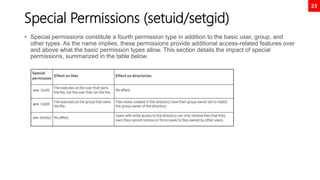
Special Permissions (setuid/setgid)
• Special permissions constitute a fourth permission type in addition to the basic user, group, and
other types. As the name implies, these permissions provide additional access-related features over
and above what the basic permission types allow. This section details the impact of special
permissions, summarized in the table below.
24
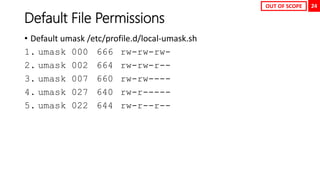
Default File Permissions
• Default umask /etc/profile.d/local-umask.sh
1. umask 000 666 rw-rw-rw-
2. umask 002 664 rw-rw-r--
3. umask 007 660 rw-rw----
4. umask 027 640 rw-r-----
5. umask 022 644 rw-r--r--
OUT OF SCOPE
Chapter 5
NSA Security Enhanced Linux
(SELinux)
26
SELinux (NSA Security-Enhanced Linux)
1. SELinux is an implementation of a flexible mandatory access control architecture in the Linux operating system. The SELinux architecture
provides general support for the enforcement of many kinds of mandatory access control policies, including those based on the concepts
of Type Enforcement®, Role- Based Access Control, and Multi-Level Security.
Background information and technical documentation about SELinux can be found at https://www.nsa.gov/portals/75/documents/what-
we-do/research/selinux/documentation/presentations/2004-ottawa-linux-symposium-bof-presentation.pdf
NSA whitepaper behind the inception of SELinux
https://www.nsa.gov/portals/75/images/resources/everyone/digital-media-center/publications/research-papers/the-inevitability-of-
failure-paper.pdf
2. SELinux provides a critical security purpose in Linux, permitting or denying access to files and other resources that are significantly more
precise than user permissions.
3. File permissions control which users or groups of users can access which specific files. However, a user given read or write access to any
specific file can use that file in any way that user chooses, even if that use is not how the file should be used.
4. For example, with write access to a file, should a structured data file designed to be written to using only a particular program, be allowed
to be opened and modified by other editors that could result in corruption?
5. File permissions cannot stop such undesired access. They were never designed to control how a file is used, but only who is allowed to
read, write, or run a file.
6. SELinux consists of sets of policies, defined by the application developers, that declare exactly what actions and accesses are proper and
allowed for each binary executable, configuration file, and data file used by an application.
This is known as a targeted policy because one policy is written to cover the activities of a single application. Policies declare predefined
labels that are placed on individual programs, files, and network ports.
27
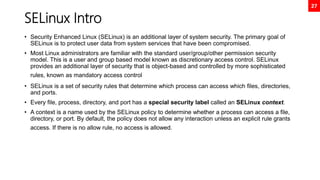
SELinux Intro
• Security Enhanced Linux (SELinux) is an additional layer of system security. The primary goal of
SELinux is to protect user data from system services that have been compromised.
• Most Linux administrators are familiar with the standard user/group/other permission security
model. This is a user and group based model known as discretionary access control. SELinux
provides an additional layer of security that is object-based and controlled by more sophisticated
rules, known as mandatory access control
• SELinux is a set of security rules that determine which process can access which files, directories,
and ports.
• Every file, process, directory, and port has a special security label called an SELinux context.
• A context is a name used by the SELinux policy to determine whether a process can access a file,
directory, or port. By default, the policy does not allow any interaction unless an explicit rule grants
access. If there is no allow rule, no access is allowed.
28
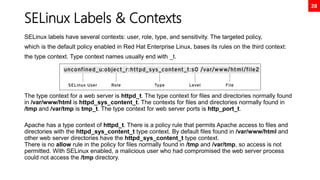
SELinux Labels & Contexts
SELinux labels have several contexts: user, role, type, and sensitivity. The targeted policy,
which is the default policy enabled in Red Hat Enterprise Linux, bases its rules on the third context:
the type context. Type context names usually end with _t.
The type context for a web server is httpd_t. The type context for files and directories normally found
in /var/www/html is httpd_sys_content_t. The contexts for files and directories normally found in
/tmp and /var/tmp is tmp_t. The type context for web server ports is http_port_t.
Apache has a type context of httpd_t. There is a policy rule that permits Apache access to files and
directories with the httpd_sys_content_t type context. By default files found in /var/www/html and
other web server directories have the httpd_sys_content_t type context.
There is no allow rule in the policy for files normally found in /tmp and /var/tmp, so access is not
permitted. With SELinux enabled, a malicious user who had compromised the web server process
could not access the /tmp directory.
29
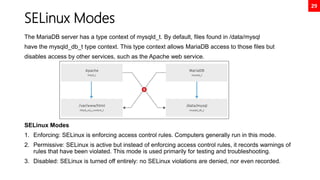
SELinux Modes
The MariaDB server has a type context of mysqld_t. By default, files found in /data/mysql
have the mysqld_db_t type context. This type context allows MariaDB access to those files but
disables access by other services, such as the Apache web service.
SELinux Modes
1. Enforcing: SELinux is enforcing access control rules. Computers generally run in this mode.
2. Permissive: SELinux is active but instead of enforcing access control rules, it records warnings of
rules that have been violated. This mode is used primarily for testing and troubleshooting.
3. Disabled: SELinux is turned off entirely: no SELinux violations are denied, nor even recorded.
30
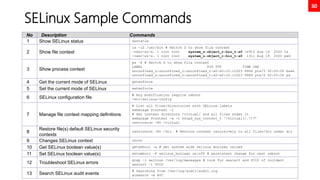
SELinux Sample Commands
No Description Commands
1 Show SELinux status sestatus
2 Show file context
ls –lZ /usr/bin # Switch Z to show file context
-rwxr-xr-x. 1 root root system_u:object_r:bin_t:s0 16912 Aug 19 2020 ls
-rwxr-xr-x. 1 root root system_u:object_r:bin_t:s0 1311 Aug 19 2020 pwd
3 Show process context
ps –Z # Switch Z to show file context
LABEL PID TTY TIME CMD
unconfined_u:unconfined_r:unconfined_t:s0-s0:c0.c1023 8964 pts/0 00:00:00 bash
unconfined_u:unconfined_r:unconfined_t:s0-s0:c0.c1023 9989 pts/0 00:00:00 ps
4 Get the current mode of SELinux getenforce
5 Set the current mode of SELinux setenforce
6 SELinux configuration file
# Any modification require reboot
/etc/selinux/config
7 Manage file context mapping definitions
# List all files/directories with SELinux labels
semanage fcontext –l
# Set context directory /virtual/ and all files under it
semanage fcontext -a -t httpd_sys_content_t '/virtual(/.*)?’
restorecon –Rv /virtual
8
Restore file(s) default SELinux security
contexts
restorecon –Rv /dir # Restore context recursively to all files/dir under dir
9 Changes SELinux context chcon
10 Get SELinux boolean value(s) getsebool –a # get system wide selinux Boolean values
11 Set SELinux boolean value(s) setsebool –P selinux_boolean on|off # persistent change for next reboot
12 Troubleshoot SELinux errors
grep –i selinux /var/log/messages # look for sealert and UUID of incident
sealert –l UUID
13 Search SELinux audit events
# Searching from /var/log/audit/audit.log
ausearch -m AVC
Chapter 6
Storage Management Basic &
LVM
32
Storage Management Summary
No Action LVM Stratis VDO
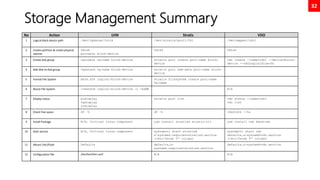
1 Logical block device path /dev/vgdatax/lvolx /dev/stratis/pool1/fs1 /dev/mapper/vdo1
2 Create partition & create physical
volume
fdisk
pvcreate block-device
fdisk fdisk
3 Create disk group vgcreate vg-name block-device stratis pool create pool-name block-
device
vdo create --name=vdo1 --device=block-
device --vdoLogicalSize=5G
4 Add disk to disk group vgextend vg-name block-device stratis pool add-data pool-name block-
device
5 Format File System mkfs.xfs logical-block-device stratis filesystem create pool-name
fs-name
6 Resize File System lvextend logical-block-device –L +xxMB N/A
7 Display status pvdisplay
vgdisplay
Lvdisplay
stratis pool list vdo status --name=vdo1
vdo list
8 Check free space df –h df -h vdostats --hu
9 Install Package N/A, Critical Linux component yum install stratisd stratis-cli yum install vdo kmod-vdo
10 Start service N/A, Critical Linux component systemctl start stratisd
x-systemd.requires=stratisd.service
(/etc/fstab 5th column)
systemctl start vdo
defaults,x-systemd=vdo.service
(/etc/fstab 5th column)
11 Mount /etc/fstab Defaults defaults,x-
systemd.requires=stratisd.service
defaults,x-systemd=vdo.service
12 Configuration file /etc/lvm/lvm.conf N/A N/A
33
Storage Management
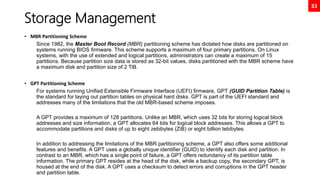
• MBR Partitioning Scheme
Since 1982, the Master Boot Record (MBR) partitioning scheme has dictated how disks are partitioned on
systems running BIOS firmware. This scheme supports a maximum of four primary partitions. On Linux
systems, with the use of extended and logical partitions, administrators can create a maximum of 15
partitions. Because partition size data is stored as 32-bit values, disks partitioned with the MBR scheme have
a maximum disk and partition size of 2 TiB.
• GPT Partitioning Scheme
For systems running Unified Extensible Firmware Interface (UEFI) firmware, GPT (GUID Partition Table) is
the standard for laying out partition tables on physical hard disks. GPT is part of the UEFI standard and
addresses many of the limitations that the old MBR-based scheme imposes.
A GPT provides a maximum of 128 partitions. Unlike an MBR, which uses 32 bits for storing logical block
addresses and size information, a GPT allocates 64 bits for logical block addresses. This allows a GPT to
accommodate partitions and disks of up to eight zebibytes (ZiB) or eight billion tebibytes.
In addition to addressing the limitations of the MBR partitioning scheme, a GPT also offers some additional
features and benefits. A GPT uses a globally unique identifier (GUID) to identify each disk and partition. In
contrast to an MBR, which has a single point of failure, a GPT offers redundancy of its partition table
information. The primary GPT resides at the head of the disk, while a backup copy, the secondary GPT, is
housed at the end of the disk. A GPT uses a checksum to detect errors and corruptions in the GPT header
and partition table.
34
/etc/fstab File Format
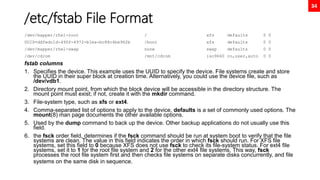
/dev/mapper/rhel-root / xfs defaults 0 0
UUID=ddfedc1d-490f-4972-b1ea-bc88c4be962b /boot xfs defaults 0 0
/dev/mapper/rhel-swap none swap defaults 0 0
/dev/cdrom /mnt/cdrom iso9660 ro,user,auto 0 0
fstab columns
1. Specifies the device. This example uses the UUID to specify the device. File systems create and store
the UUID in their super block at creation time. Alternatively, you could use the device file, such as
/dev/vdb1.
2. Directory mount point, from which the block device will be accessible in the directory structure. The
mount point must exist; if not, create it with the mkdir command.
3. File-system type, such as xfs or ext4.
4. Comma-separated list of options to apply to the device. defaults is a set of commonly used options. The
mount(8) man page documents the other available options.
5. Used by the dump command to back up the device. Other backup applications do not usually use this
field.
6. the fsck order field, determines if the fsck command should be run at system boot to verify that the file
systems are clean. The value in this field indicates the order in which fsck should run. For XFS file
systems, set this field to 0 because XFS does not use fsck to check its file-system status. For ext4 file
systems, set it to 1 for the root file system and 2 for the other ext4 file systems. This way, fsck
processes the root file system first and then checks file systems on separate disks concurrently, and file
systems on the same disk in sequence.
35
Disk Partition GPT Using fdisk
[root@neutrino ~]# fdisk /dev/nvme0n2
Welcome to fdisk (util-linux 2.32.1).
Changes will remain in memory only, until you decide to write them.
Be careful before using the write command.
Command (m for help): n
Partition number (1-128, default 1): 1
First sector (34-20971486, default 2048): 2048
Last sector, +sectors or +size{K,M,G,T,P} (2048-20971486, default
20971486): +1G
Created a new partition 1 of type 'Linux filesystem' and of size 1 GiB.
Command (m for help): w
The partition table has been altered.
Calling ioctl() to re-read partition table.
Syncing disks.
[root@neutrino ~]# mkfs.xfs /dev/nvme0n2p1
meta-data=/dev/nvme0n2p1 isize=512 agcount=4, agsize=65536 blks
= sectsz=512 attr=2, projid32bit=1
= crc=1 finobt=1, sparse=1, rmapbt=0
= reflink=1
data = bsize=4096 blocks=262144, imaxpct=25
= sunit=0 swidth=0 blks
naming =version 2 bsize=4096 ascii-ci=0, ftype=1
log =internal log bsize=4096 blocks=2560, version=2
= sectsz=512 sunit=0 blks, lazy-count=1
realtime =none extsz=4096 blocks=0, rtextents=0
[root@neutrino ~]# mkdir /mnt/test1
[root@neutrino ~]# mount /dev/nvme0n2p1 /mnt/test1
[root@neutrino ~]# df -h
Filesystem Size Used Avail Use% Mounted on
...
/dev/nvme0n2p1 1014M 40M 975M 4% /mnt/test1
[root@neutrino ~]# lsblk --output NAME,UUID,SIZE
NAME UUID SIZE
sr0 2021-05-03-15-21-56-00 9.4G
nvme0n1 20G
├─nvme0n1p1 ddfedc1d-490f-4972-b1ea-bc88c4be962b 1G
└─nvme0n1p2 rAEWPF-o610-hzVC-7nfr-oTFu-3J3k-TMUdNZ 19G
├─rhel-root 473359f4-a4de-474a-b117-2175a81ddaca 17G
└─rhel-swap 079e3b05-d843-4312-8cbd-1105839ad023 2G
nvme0n2 10G
├─nvme0n2p1 d7046b4d-70d9-4f23-a548-03c733cb432e 1G
└─nvme0n2p2 d1c88d5a-4f77-495c-93e4-63e8d9c4126f 1G
nvme0n3 10G
[root@neutrino ~]# echo “UUID=d7046b4d-70d9-4f23-a548-03c733cb432e
/mnt/test1 xfs defaults 0 0” >> /etc/fstab
[root@neutrino ~]# findmnt --verify
Success, no errors or warnings detected
[root@neutrino ~]# reboot
36
Disk Partition GPT Using parted
[root@neutrino ~]# lsblk
NAME MAJ:MIN RM SIZE RO TYPE MOUNTPOINT
sr0 11:0 1 9.4G 0 rom /mnt/cdrom
nvme0n1 259:0 0 20G 0 disk
├─nvme0n1p1 259:1 0 1G 0 part /boot
└─nvme0n1p2 259:2 0 19G 0 part
├─rhel-root 253:0 0 17G 0 lvm /
└─rhel-swap 253:1 0 2G 0 lvm [SWAP]
nvme0n2 259:3 0 10G 0 disk
nvme0n3 259:4 0 10G 0 disk
[root@neutrino ~]# parted /dev/nvme0n2
GNU Parted 3.2
Using /dev/nvme0n2
Welcome to GNU Parted! Type 'help' to view a list of commands.
(parted) mklabel gpt
(parted) print
Model: NVMe Device (nvme)
Disk /dev/nvme0n2: 10.7GB
Sector size (logical/physical): 512B/512B
Partition Table: gpt
Disk Flags:
Number Start End Size File system Name Flags
(parted) mkpart
Partition name? []? disk1
File system type? [ext2]? xfs
Start? 2048s
End? 1000MB
(parted) print
Model: NVMe Device (nvme)
Disk /dev/nvme0n2: 10.7GB
Sector size (logical/physical): 512B/512B
Partition Table: gpt
Disk Flags:
Number Start End Size File system Name Flags
1 1049kB 1000MB 999MB xfs disk1
OUT OF SCOPE
37
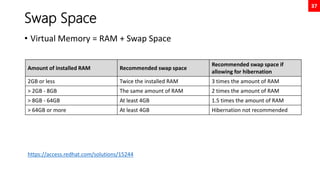
Swap Space
• Virtual Memory = RAM + Swap Space
Amount of installed RAM Recommended swap space
Recommended swap space if
allowing for hibernation
2GB or less Twice the installed RAM 3 times the amount of RAM
> 2GB - 8GB The same amount of RAM 2 times the amount of RAM
> 8GB - 64GB At least 4GB 1.5 times the amount of RAM
> 64GB or more At least 4GB Hibernation not recommended
https://access.redhat.com/solutions/15244
38
Swap Space
[root@neutrino ~]# fdisk /dev/nvme0n2
Welcome to fdisk (util-linux 2.32.1).
Changes will remain in memory only, until you decide to write them.
Be careful before using the write command.
Command (m for help): n
Partition number (3-128, default 3):
First sector (4196352-20971486, default 4196352):
Last sector, +sectors or +size{K,M,G,T,P} (4196352-20971486, default 20971486): +2G
Created a new partition 3 of type 'Linux filesystem' and of size 2 GiB.
Command (m for help): w
The partition table has been altered.
Syncing disks.
[root@neutrino ~]# mkswap /dev/nvme0n2p3
Setting up swapspace version 1, size = 2 GiB (2147479552 bytes)
no label, UUID=b2b9184f-5339-44bc-b756-6f03686be6d0
[root@neutrino ~]# swapon /dev/nvme0n2p3
[root@neutrino ~]# swapon
NAME TYPE SIZE USED PRIO
/dev/dm-1 partition 2G 0B -2
/dev/nvme0n2p3 partition 2G 0B -3
[root@neutrino ~]# echo “UUID=b2b9184f-5339-44bc-b756-6f03686be6d0 swap swap defaults 0 0” >> /etc/fstab
[root@neutrino ~]# findmnt --verify
Success, no errors or warnings detected
39
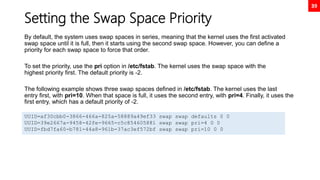
Setting the Swap Space Priority
By default, the system uses swap spaces in series, meaning that the kernel uses the first activated
swap space until it is full, then it starts using the second swap space. However, you can define a
priority for each swap space to force that order.
To set the priority, use the pri option in /etc/fstab. The kernel uses the swap space with the
highest priority first. The default priority is -2.
The following example shows three swap spaces defined in /etc/fstab. The kernel uses the last
entry first, with pri=10. When that space is full, it uses the second entry, with pri=4. Finally, it uses the
first entry, which has a default priority of -2.
UUID=af30cbb0-3866-466a-825a-58889a49ef33 swap swap defaults 0 0
UUID=39e2667a-9458-42fe-9665-c5c854605881 swap swap pri=4 0 0
UUID=fbd7fa60-b781-44a8-961b-37ac3ef572bf swap swap pri=10 0 0
40
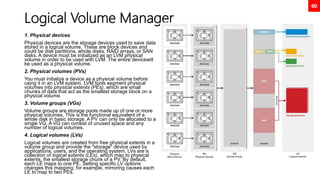
Logical Volume Manager
1. Physical devices
Physical devices are the storage devices used to save data
stored in a logical volume. These are block devices and
could be disk partitions, whole disks, RAID arrays, or SAN
disks. A device must be initialized as an LVM physical
volume in order to be used with LVM. The entire devicewill
be used as a physical volume.
2. Physical volumes (PVs)
You must initialize a device as a physical volume before
using it in an LVM system. LVM tools segment physical
volumes into physical extents (PEs), which are small
chunks of data that act as the smallest storage block on a
physical volume.
3. Volume groups (VGs)
Volume groups are storage pools made up of one or more
physical volumes. This is the functional equivalent of a
whole disk in basic storage. A PV can only be allocated to a
single VG. A VG can consist of unused space and any
number of logical volumes.
4. Logical volumes (LVs)
Logical volumes are created from free physical extents in a
volume group and provide the "storage" device used by
applications, users, and the operating system. LVs are a
collection of logical extents (LEs), which map to physical
extents, the smallest storage chunk of a PV. By default,
each LE maps to one PE. Setting specific LV options
changes this mapping; for example, mirroring causes each
LE to map to two PEs.
41
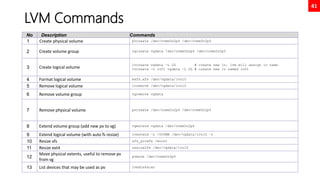
LVM Commands
No Description Commands
1 Create physical volume pvcreate /dev/nvme0n2p4 /dev/nvme0n2p5
2 Create volume group vgcreate vgdata /dev/nvme0n2p4 /dev/nvme0n2p5
3 Create logical volume
lvcreate vgdata –L 2G # create new lv, lvm will assign lv name
lvcreate –n lv01 vgdata –L 2G # create new lv named lv01
4 Format logical volume mkfs.xfs /dev/vgdata/lvol0
5 Remove logical volume lvremove /dev/vgdata/lvol0
6 Remove volume group vgremove vgdata
7 Remove physical volume pvcreate /dev/nvme0n2p4 /dev/nvme0n2p5
8 Extend volume group (add new pv to vg) vgextend vgdata /dev/nvme0n2p6
9 Extend logical volume (with auto fs resize) lvextend –L +500MB /dev/vgdata/lvol0 –r
10 Resize xfs xfs_growfs /mount
11 Resize ext4 resize2fs /dev/vgdata/lvol0
12
Move physical extents, useful to remove pv
from vg
pvmove /dev/nvme0n2p5
13 List devices that may be used as pv lvmdiskscan
Chapter 7
Storage Management VDO,
Stratis
43
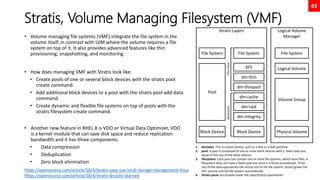
Stratis, Volume Managing Filesystem (VMF)
• Volume managing file systems (VMF) integrate the file system in the
volume itself, in contrast with LVM where the volume requires a file
system on top of it. It also provides advanced features like thin
provisioning, snapshotting, and monitoring.
• How does managing VMF with Stratis look like:
• Create pools of one or several block devices with the stratis pool
create command.
• Add additional block devices to a pool with the stratis pool add-data
command.
• Create dynamic and flexible file systems on top of pools with the
stratis filesystem create command.
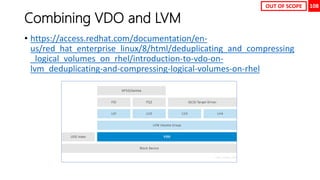
• Another new feature in RHEL 8 is VDO or Virtual Data Optimizer, VDO
is a kernel module that can save disk space and reduce replication
bandwidth and it has three components:
• Data compression
• Deduplication
• Zero block elimination
Logical Volume
Manager
File System
Logical Volume
Volume Group
Physical Volume
https://opensource.com/article/18/4/stratis-easy-use-local-storage-management-linux
https://opensource.com/article/18/4/stratis-lessons-learned
Stratis Layers
File System
Block Device
Pool
File System
Block Device
XFS
dm-thin
dm-thinpool
dm-cache
dm-raid
dm-integrity
Thin
Pool
Backstore
1. blockdev: This is a block device, such as a disk or a disk partition.
2. pool: A pool is composed of one or more block devices with a fixed total size,
equal to the size of the block devices.
3. filesystem: Each pool can contain one or more file systems, which store files. A
filesystem does not have a fixed total size since it is thinly provisioned. If the
size of the data approaches the virtual size of the file system, Stratis grows the
thin volume and the file system automatically.
4. Stratis pools are located under the /dev/stratis/<poolname>
44
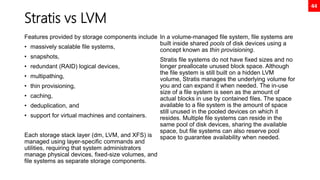
Stratis vs LVM
Features provided by storage components include
• massively scalable file systems,
• snapshots,
• redundant (RAID) logical devices,
• multipathing,
• thin provisioning,
• caching,
• deduplication, and
• support for virtual machines and containers.
Each storage stack layer (dm, LVM, and XFS) is
managed using layer-specific commands and
utilities, requiring that system administrators
manage physical devices, fixed-size volumes, and
file systems as separate storage components.
In a volume-managed file system, file systems are
built inside shared pools of disk devices using a
concept known as thin provisioning.
Stratis file systems do not have fixed sizes and no
longer preallocate unused block space. Although
the file system is still built on a hidden LVM
volume, Stratis manages the underlying volume for
you and can expand it when needed. The in-use
size of a file system is seen as the amount of
actual blocks in use by contained files. The space
available to a file system is the amount of space
still unused in the pooled devices on which it
resides. Multiple file systems can reside in the
same pool of disk devices, sharing the available
space, but file systems can also reserve pool
space to guarantee availability when needed.
45
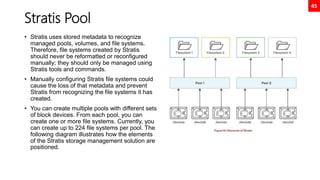
Stratis Pool
• Stratis uses stored metadata to recognize
managed pools, volumes, and file systems.
Therefore, file systems created by Stratis
should never be reformatted or reconfigured
manually; they should only be managed using
Stratis tools and commands.
• Manually configuring Stratis file systems could
cause the loss of that metadata and prevent
Stratis from recognizing the file systems it has
created.
• You can create multiple pools with different sets
of block devices. From each pool, you can
create one or more file systems. Currently, you
can create up to 224 file systems per pool. The
following diagram illustrates how the elements
of the Stratis storage management solution are
positioned.
46
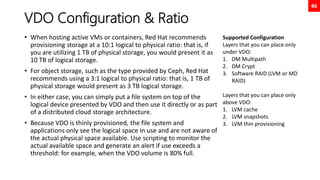
VDO Configuration & Ratio
• When hosting active VMs or containers, Red Hat recommends
provisioning storage at a 10:1 logical to physical ratio: that is, if
you are utilizing 1 TB of physical storage, you would present it as
10 TB of logical storage.
• For object storage, such as the type provided by Ceph, Red Hat
recommends using a 3:1 logical to physical ratio: that is, 1 TB of
physical storage would present as 3 TB logical storage.
• In either case, you can simply put a file system on top of the
logical device presented by VDO and then use it directly or as part
of a distributed cloud storage architecture.
• Because VDO is thinly provisioned, the file system and
applications only see the logical space in use and are not aware of
the actual physical space available. Use scripting to monitor the
actual available space and generate an alert if use exceeds a
threshold: for example, when the VDO volume is 80% full.
Supported Configuration
Layers that you can place only
under VDO:
1. DM Multipath
2. DM Crypt
3. Software RAID (LVM or MD
RAID)
Layers that you can place only
above VDO:
1. LVM cache
2. LVM snapshots
3. LVM thin provisioning
47
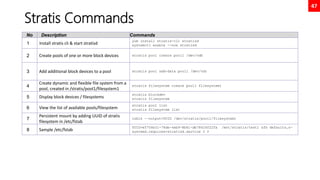
Stratis Commands
No Description Commands
1 Install stratis cli & start stratisd
yum install stratis-cli stratisd
systemctl enable --now stratisd
2 Create pools of one or more block devices stratis pool create pool1 /dev/vdb
3 Add additional block devices to a pool stratis pool add-data pool1 /dev/vdc
4
Create dynamic and flexible file system from a
pool, created in /stratis/pool1/filesystem1
stratis filesystem create pool1 filesystem1
5 Display block devices / filesystems
stratis blockdev
stratis filesystem
6 View the list of available pools/filesystem
stratis pool list
stratis filesystem list
7
Persistent mount by adding UUID of stratis
filesystem in /etc/fstab
lsblk --output=UUID /dev/stratis/pool1/filesystem1
8 Sample /etc/fstab
UUID=e5704e31-78de-4eb9-8b61-db78424f22fa /mnt/stratis/test1 xfs defaults,x-
systemd.requires=stratisd.service 0 0
48
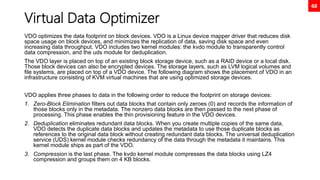
Virtual Data Optimizer
VDO optimizes the data footprint on block devices. VDO is a Linux device mapper driver that reduces disk
space usage on block devices, and minimizes the replication of data, saving disk space and even
increasing data throughput. VDO includes two kernel modules: the kvdo module to transparently control
data compression, and the uds module for deduplication.
The VDO layer is placed on top of an existing block storage device, such as a RAID device or a local disk.
Those block devices can also be encrypted devices. The storage layers, such as LVM logical volumes and
file systems, are placed on top of a VDO device. The following diagram shows the placement of VDO in an
infrastructure consisting of KVM virtual machines that are using optimized storage devices.
VDO applies three phases to data in the following order to reduce the footprint on storage devices:
1. Zero-Block Elimination filters out data blocks that contain only zeroes (0) and records the information of
those blocks only in the metadata. The nonzero data blocks are then passed to the next phase of
processing. This phase enables the thin provisioning feature in the VDO devices.
2. Deduplication eliminates redundant data blocks. When you create multiple copies of the same data,
VDO detects the duplicate data blocks and updates the metadata to use those duplicate blocks as
references to the original data block without creating redundant data blocks. The universal deduplication
service (UDS) kernel module checks redundancy of the data through the metadata it maintains. This
kernel module ships as part of the VDO.
3. Compression is the last phase. The kvdo kernel module compresses the data blocks using LZ4
compression and groups them on 4 KB blocks.
49
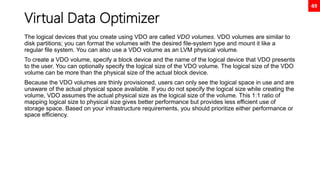
Virtual Data Optimizer
The logical devices that you create using VDO are called VDO volumes. VDO volumes are similar to
disk partitions; you can format the volumes with the desired file-system type and mount it like a
regular file system. You can also use a VDO volume as an LVM physical volume.
To create a VDO volume, specify a block device and the name of the logical device that VDO presents
to the user. You can optionally specify the logical size of the VDO volume. The logical size of the VDO
volume can be more than the physical size of the actual block device.
Because the VDO volumes are thinly provisioned, users can only see the logical space in use and are
unaware of the actual physical space available. If you do not specify the logical size while creating the
volume, VDO assumes the actual physical size as the logical size of the volume. This 1:1 ratio of
mapping logical size to physical size gives better performance but provides less efficient use of
storage space. Based on your infrastructure requirements, you should prioritize either performance or
space efficiency.
50
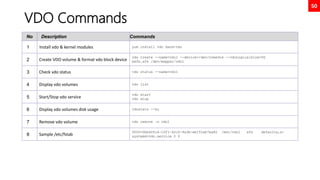
VDO Commands
No Description Commands
1 Install vdo & kernel modules yum install vdo kmod-vdo
2 Create VDO volume & format vdo block device
vdo create --name=vdo1 --device=/dev/nvme0n4 --vdoLogicalSize=5G
mkfs.xfs /dev/mapper/vdo1
3 Check vdo status vdo status --name=vdo1
4 Display vdo volumes vdo list
5 Start/Stop vdo service
vdo start
vdo stop
6 Display vdo volumes disk usage vdostats --hu
7 Remove vdo volume vdo remove –n vdo1
8 Sample /etc/fstab
UUID=0bb40fc4-10f1-42c0-9a3b-eb151eb7ea82 /mnt/vdo1 xfs defaults,x-
systemd=vdo.service 0 0
Chapter 8
Network Attached Storage,
rcp, scp, rsync
52
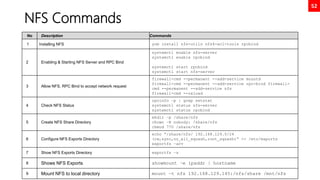
NFS Commands
No Description Commands
1 Installing NFS yum install nfs-utils nfs4-acl-tools rpcbind
2 Enabling & Starting NFS Server and RPC Bind
systemctl enable nfs-server
systemctl enable rpcbind
systemctl start rpcbind
systemctl start nfs-server
3 Allow NFS, RPC Bind to accept network request
firewall-cmd --permanent --add-service mountd
firewall-cmd --permanent --add-service rpc-bind firewall-
cmd --permanent --add-service nfs
firewall-cmd --reload
4 Check NFS Status
rpcinfo –p | grep netstat
systemctl status nfs-server
systemctl status rpcbind
5 Create NFS Share Directory
mkdir –p /share/nfs
chown –R nobody: /share/nfs
chmod 770 /share/nfs
6 Configure NFS Exports Directory
echo “/share/nfs/ 192.168.129.0/24
(rw,sync,no_all_squash,root_squash)” >> /etc/exports
exportfs –arv
7 Show NFS Exports Directory exportfs –s
8 Shows NFS Exports showmount –e ipaddr | hostname
9 Mount NFS to local directory mount –t nfs 192.168.129.145:/nfs/share /mnt/nfs
53
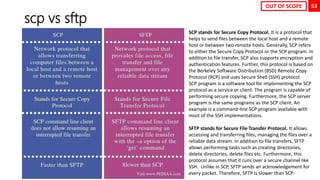
scp vs sftp
SCP stands for Secure Copy Protocol. It is a protocol that
helps to send files between the local host and a remote
host or between two remote hosts. Generally, SCP refers
to either the Secure Copy Protocol or the SCP program. In
addition to file transfer, SCP also supports encryption and
authentication features. Further, this protocol is based on
the Berkeley Software Distribution (BSD) Remote Copy
Protocol (RCP) and uses Secure Shell (SSH) protocol.
SCP program is a software tool for implementing the SCP
protocol as a service or client. The program is capable of
performing secure copying. Furthermore, the SCP server
program is the same programs as the SCP client. An
example is a command-line SCP program available with
most of the SSH implementations.
SFTP stands for Secure File Transfer Protocol. It allows
accessing and transferring files, managing the files over a
reliable data stream. In addition to file transfers, SFTP
allows performing tasks such as creating directories,
delete directories, delete files etc. Furthermore, this
protocol assumes that it runs over a secure channel like
SSH. Unlike in SCP, SFTP sends an acknowledgement for
every packet. Therefore, SFTP is slower than SCP.
OUT OF SCOPE
54
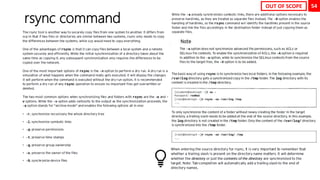
rsync command
OUT OF SCOPE
55
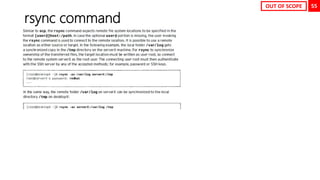
rsync command
OUT OF SCOPE
Chapter 9
Network Security
57
Firewall Architecture Concepts
• The Linux kernel includes netfilter, a framework for network traffic operations such as packet
filtering, network address translation and port translation. By implementing handlers in the kernel
that intercept function calls and messages, netfilter allows other kernel modules to interface directly
with the kernel's networking stack. Firewall software uses these hooks to register filter rules and
packet-modifying functions, allowing every packet going through the network stack to be processed.
Any incoming, outgoing, or forwarded network packet can be inspected, modified, dropped, or
routed programmatically before reaching user space components or applications.
• Netfilter is the primary component in Red Hat Enterprise Linux 8 firewalls.
• The Linux kernel also includes nftables, a new filter and packet classification subsystem that has
enhanced portions of netfilter's code, but retaining the netfilter architecture such as networking
stack hooks, connection tracking system, and the logging facility. The advantages of the nftables
update is faster packet processing, faster ruleset updates, and simultaneous IPv4 and IPv6
processing from the same rules.
• Firewalld is a dynamic firewall manager, a front end to the nftables framework using the nft
command. Until the introduction of nftables, firewalld used the iptables command to configure
netfilter directly, as an improved alternative to the iptables service. In RHEL 8, firewalld remains the
recommended front end, managing firewall rulesets using nft.
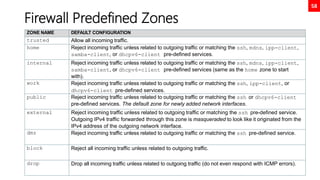
58
Firewall Predefined Zones
ZONE NAME DEFAULT CONFIGURATION
trusted Allow all incoming traffic.
home Reject incoming traffic unless related to outgoing traffic or matching the ssh, mdns, ipp-client,
samba-client, or dhcpv6-client pre-defined services.
internal Reject incoming traffic unless related to outgoing traffic or matching the ssh, mdns, ipp-client,
samba-client, or dhcpv6-client pre-defined services (same as the home zone to start
with).
work Reject incoming traffic unless related to outgoing traffic or matching the ssh, ipp-client, or
dhcpv6-client pre-defined services.
public Reject incoming traffic unless related to outgoing traffic or matching the ssh or dhcpv6-client
pre-defined services. The default zone for newly added network interfaces.
external Reject incoming traffic unless related to outgoing traffic or matching the ssh pre-defined service.
Outgoing IPv4 traffic forwarded through this zone is masqueraded to look like it originated from the
IPv4 address of the outgoing network interface.
dmz Reject incoming traffic unless related to outgoing traffic or matching the ssh pre-defined service.
block Reject all incoming traffic unless related to outgoing traffic.
drop Drop all incoming traffic unless related to outgoing traffic (do not even respond with ICMP errors).
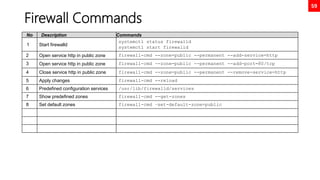
59
Firewall Commands
No Description Commands
1 Start firewalld
systemctl status firewalld
systemctl start firewalld
2 Open service http in public zone firewall-cmd --zone=public --permanent --add-service=http
3 Open service http in public zone firewall-cmd --zone=public --permanent --add-port=80/tcp
4 Close service http in public zone firewall-cmd --zone=public --permanent --remove-service=http
5 Apply changes firewall-cmd --reload
6 Predefined configuration services /usr/lib/firewalld/services
7 Show predefined zones firewall-cmd --get-zones
8 Set default zones firewall-cmd –set-default-zone=public
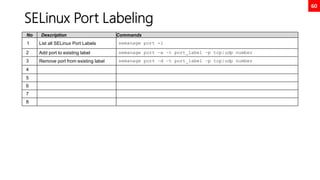
60
SELinux Port Labeling
No Description Commands
1 List all SELinux Port Labels semanage port -l
2 Add port to existing label semanage port –a –t port_label –p tcp|udp number
3 Remove port from existing label semanage port –d –t port_label –p tcp|udp number
4
5
6
7
8
Chapter 10
Controlling Boot Process
62
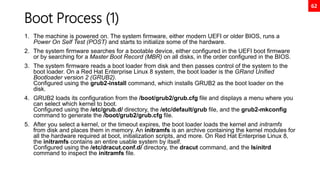
Boot Process (1)
1. The machine is powered on. The system firmware, either modern UEFI or older BIOS, runs a
Power On Self Test (POST) and starts to initialize some of the hardware.
2. The system firmware searches for a bootable device, either configured in the UEFI boot firmware
or by searching for a Master Boot Record (MBR) on all disks, in the order configured in the BIOS.
3. The system firmware reads a boot loader from disk and then passes control of the system to the
boot loader. On a Red Hat Enterprise Linux 8 system, the boot loader is the GRand Unified
Bootloader version 2 (GRUB2).
Configured using the grub2-install command, which installs GRUB2 as the boot loader on the
disk.
4. GRUB2 loads its configuration from the /boot/grub2/grub.cfg file and displays a menu where you
can select which kernel to boot.
Configured using the /etc/grub.d/ directory, the /etc/default/grub file, and the grub2-mkconfig
command to generate the /boot/grub2/grub.cfg file.
5. After you select a kernel, or the timeout expires, the boot loader loads the kernel and initramfs
from disk and places them in memory. An initramfs is an archive containing the kernel modules for
all the hardware required at boot, initialization scripts, and more. On Red Hat Enterprise Linux 8,
the initramfs contains an entire usable system by itself.
Configured using the /etc/dracut.conf.d/ directory, the dracut command, and the lsinitrd
command to inspect the initramfs file.
63
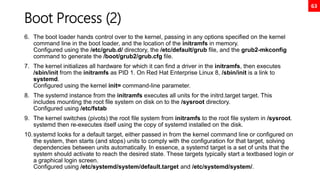
Boot Process (2)
6. The boot loader hands control over to the kernel, passing in any options specified on the kernel
command line in the boot loader, and the location of the initramfs in memory.
Configured using the /etc/grub.d/ directory, the /etc/default/grub file, and the grub2-mkconfig
command to generate the /boot/grub2/grub.cfg file.
7. The kernel initializes all hardware for which it can find a driver in the initramfs, then executes
/sbin/init from the initramfs as PID 1. On Red Hat Enterprise Linux 8, /sbin/init is a link to
systemd.
Configured using the kernel init= command-line parameter.
8. The systemd instance from the initramfs executes all units for the initrd.target target. This
includes mounting the root file system on disk on to the /sysroot directory.
Configured using /etc/fstab
9. The kernel switches (pivots) the root file system from initramfs to the root file system in /sysroot.
systemd then re-executes itself using the copy of systemd installed on the disk.
10.systemd looks for a default target, either passed in from the kernel command line or configured on
the system, then starts (and stops) units to comply with the configuration for that target, solving
dependencies between units automatically. In essence, a systemd target is a set of units that the
system should activate to reach the desired state. These targets typically start a textbased login or
a graphical login screen.
Configured using /etc/systemd/system/default.target and /etc/systemd/system/.
64
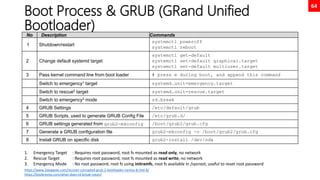
Boot Process & GRUB (GRand Unified
Bootloader)
No Description Commands
1 Shutdown/restart
systemctl poweroff
systemctl reboot
2 Change default systemd target
systemctl get-default
systemctl set-default graphical.target
systemctl set-default multiuser.target
3 Pass kernel command line from boot loader # press e during boot, and append this command
Switch to emergency1 target systemd.unit=emergency.target
Switch to rescue2 target systemd.unit=rescue.target
Switch to emergency3 mode rd.break
4 GRUB Settings /etc/default/grub
5 GRUB Scripts, used to generate GRUB Config File /etc/grub.d/
6 GRUB settings generated from grub2-mkconfig /boot/grub2/grub.cfg
7 Generate a GRUB configuration file grub2-mkconfig -o /boot/grub2/grub.cfg
8 Install GRUB on specific disk grub2-install /dev/sda
https://www.2daygeek.com/recover-corrupted-grub-2-bootloader-centos-8-rhel-8/
https://bookrevise.com/what-does-rd-break-mean/
1. Emergency Target : Requires root password, root fs mounted as read only, no network
2. Rescue Target : Requires root password, root fs mounted as read write, no network
3. Emergency Mode : No root password, root fs using initramfs, root fs available in /sysroot, useful to reset root password
65
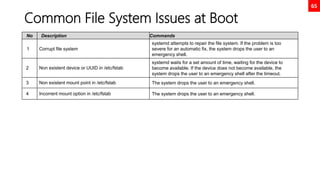
Common File System Issues at Boot
No Description Commands
1 Corrupt file system
systemd attempts to repair the file system. If the problem is too
severe for an automatic fix, the system drops the user to an
emergency shell.
2 Non existent device or UUID in /etc/fstab
systemd waits for a set amount of time, waiting for the device to
become available. If the device does not become available, the
system drops the user to an emergency shell after the timeout.
3 Non existent mount point in /etc/fstab The system drops the user to an emergency shell.
4 Incorrent mount option in /etc/fstab The system drops the user to an emergency shell.
66
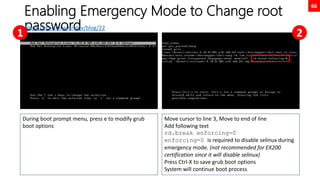
Enabling Emergency Mode to Change root
password
During boot prompt menu, press e to modify grub
boot options
Move cursor to line 3, Move to end of line
Add following text
rd.break enforcing=0
enforcing=0 is required to disable selinux during
emergency mode. (not recommended for EX200
certification since it will disable selinux)
Press Ctrl-X to save grub boot options
System will continue boot process
1 2
https://martinheinz.dev/blog/22
67
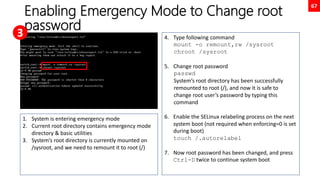
Enabling Emergency Mode to Change root
password
1. System is entering emergency mode
2. Current root directory contains emergency mode
directory & basic utilities
3. System’s root directory is currently mounted on
/sysroot, and we need to remount it to root (/)
4. Type following command
mount -o remount,rw /sysroot
chroot /sysroot
5. Change root password
passwd
System’s root directory has been successfully
remounted to root (/), and now it is safe to
change root user’s password by typing this
command
6. Enable the SELinux relabeling process on the next
system boot (not required when enforcing=0 is set
during boot)
touch /.autorelabel
7. Now root password has been changed, and press
Ctrl-D twice to continue system boot
3
Chapter 11
Managing Networking
69
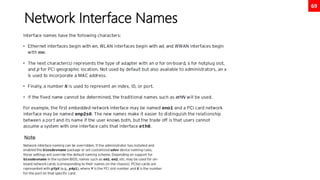
Network Interface Names
70
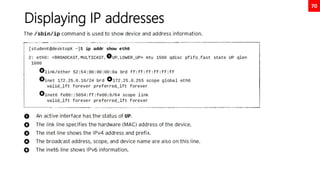
Displaying IP addresses
71
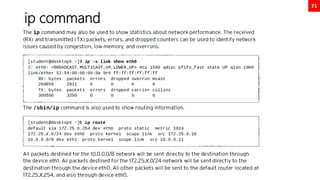
ip command
72
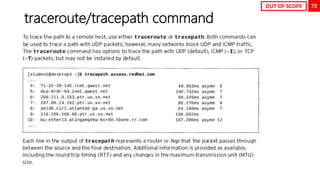
traceroute/tracepath command
OUT OF SCOPE
73
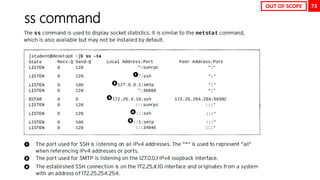
ss command
OUT OF SCOPE
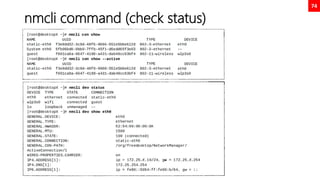
74
nmcli command (check status)
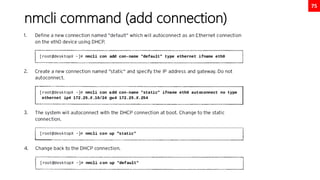
75
nmcli command (add connection)
76
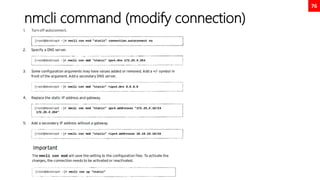
nmcli command (modify connection)
77
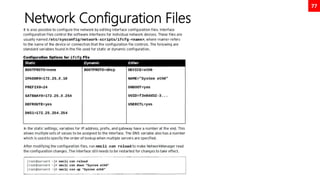
Network Configuration Files
78
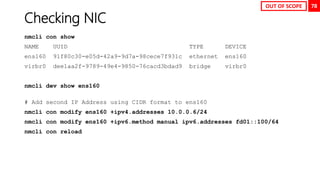
Checking NIC
nmcli con show
NAME UUID TYPE DEVICE
ens160 91f80c30-e05d-42a9-9d7a-98cece7f931c ethernet ens160
virbr0 dee1aa2f-9789-49e4-9850-76cacd3bdad9 bridge virbr0
nmcli dev show ens160
# Add second IP Address using CIDR format to ens160
nmcli con modify ens160 +ipv4.addresses 10.0.0.6/24
nmcli con modify ens160 +ipv6.method manual ipv6.addresses fd01::100/64
nmcli con reload
OUT OF SCOPE
79
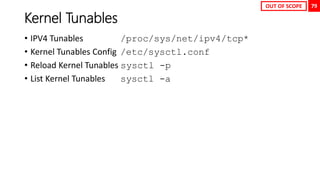
Kernel Tunables
• IPV4 Tunables /proc/sys/net/ipv4/tcp*
• Kernel Tunables Config /etc/sysctl.conf
• Reload Kernel Tunables sysctl -p
• List Kernel Tunables sysctl -a
OUT OF SCOPE
Chapter 12
Controlling Services and
Daemons
81
New init system: system, bye System V init!
In Red Hat Enterprise Linux 7, process ID 1 is systemd, the new init system. A few of
the new features provided by system include:
• Parallelization capabilities, which increase the boot speed of a system.
• On-demand starting of daemons without requiring a separate service.
• Automatic service dependency management, which can prevent long timeouts,
such as by notstarting a network service when the network is not available.
• A method of tracking related processes together by using Linux control groups.
82
systemctl & system units
systemctl command is used to manage different types of systemd objects, called units. Alist of available unit
types can be displayed with systemctl-t help.
Some common unit types are listed below:
1. Service units have a service extension and represent system services. This type of unit is usedto start
frequently accessed daemons, such as a web server.
2. Socket units have a .socket extension and represent inter-process communication (IPC)sockets. Control of
the socket will be passed to a daemon or newly started service when aclient connection is made.
3. Socket units are used to delay the start of a service at boot timeand to start less frequently used services
on demand. These are similar in principle to services which use the xinetd superserver to start on
demand.
4. Path units have a .path extension and are used to delay the activation of a service until a specific file
system change occurs. This is commonly used for services which use spooldirectories, such as a printing
system.
Note
systemctl status NAME command replaces the service NAME status command used in previous versions of
Red Hat Enterprise Linux 6.x
83
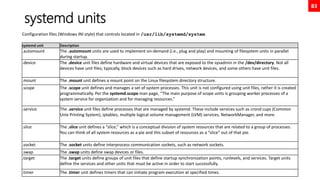
systemd units
Configuration files (Windows INI style) that controls located in /usr/lib/systemd/system
systemd unit Description
.automount The .automount units are used to implement on-demand (i.e., plug and play) and mounting of filesystem units in parallel
during startup.
.device The .device unit files define hardware and virtual devices that are exposed to the sysadmin in the /dev/directory. Not all
devices have unit files; typically, block devices such as hard drives, network devices, and some others have unit files.
.mount The .mount unit defines a mount point on the Linux filesystem directory structure.
.scope The .scope unit defines and manages a set of system processes. This unit is not configured using unit files, rather it is created
programmatically. Per the systemd.scope man page, “The main purpose of scope units is grouping worker processes of a
system service for organization and for managing resources.”
.service The .service unit files define processes that are managed by systemd. These include services such as crond cups (Common
Unix Printing System), iptables, multiple logical volume management (LVM) services, NetworkManager, and more.
.slice The .slice unit defines a “slice,” which is a conceptual division of system resources that are related to a group of processes.
You can think of all system resources as a pie and this subset of resources as a “slice” out of that pie.
.socket The .socket units define interprocess communication sockets, such as network sockets.
.swap The .swap units define swap devices or files.
.target The .target units define groups of unit files that define startup synchronization points, runlevels, and services. Target units
define the services and other units that must be active in order to start successfully.
.timer The .timer unit defines timers that can initiate program execution at specified times.
84
Adding custom systemd service (use case
tomcat)
useradd -r tomcat
chown -R tomcat:tomcat /usr/local/tomcat9
ls -l /usr/local/tomcat9
cat << EOF > /etc/systemd/system/tomcat.service
[Unit]
Description=Apache Tomcat Server
After=syslog.target network.target
[Service]
Type=forking
User=tomcat
Group=tomcat
Environment=CATALINA_PID=/usr/local/tomcat9/temp/tomcat.pid
Environment=CATALINA_HOME=/usr/local/tomcat9
Environment=CATALINA_BASE=/usr/local/tomcat9
ExecStart=/usr/local/tomcat9/bin/catalina.sh start
ExecStop=/usr/local/tomcat9/bin/catalina.sh stop
RestartSec=10
Restart=always
[Install]
WantedBy=multi-user.target
EOF
systemctl daemon-reload
systemctl start tomcat.service
systemctl enable tomcat.service
systemctl status tomcat.service
https://www.tecmint.com/install-apache-tomcat-in-rhel-8/
85
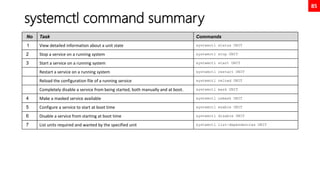
systemctl command summary
No Task Commands
1 View detailed information about a unit state systemctl status UNIT
2 Stop a service on a running system systemctl stop UNIT
3 Start a service on a running system systemctl start UNIT
Restart a service on a running system systemctl restart UNIT
Reload the configuration file of a running service systemctl reload UNIT
Completely disable a service from being started, both manually and at boot. systemctl mask UNIT
4 Make a masked service available systemctl unmask UNIT
5 Configure a service to start at boot time systemctl enable UNIT
6 Disable a service from starting at boot time systemctl disable UNIT
7 List units required and wanted by the specified unit systemctl list-dependencies UNIT
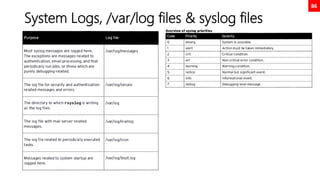
86
System Logs, /var/log files & syslog files
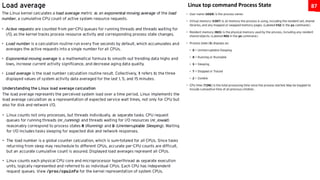
87
Linux top command Process State
Chapter 13
Container
89
Container History
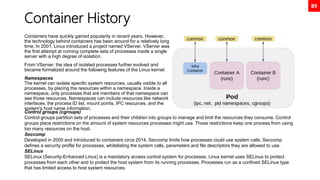
Containers have quickly gained popularity in recent years. However,
the technology behind containers has been around for a relatively long
time. In 2001, Linux introduced a project named VServer. VServer was
the first attempt at running complete sets of processes inside a single
server with a high degree of isolation.
From VServer, the idea of isolated processes further evolved and
became formalized around the following features of the Linux kernel:
Namespaces
The kernel can isolate specific system resources, usually visible to all
processes, by placing the resources within a namespace. Inside a
namespace, only processes that are members of that namespace can
see those resources. Namespaces can include resources like network
interfaces, the process ID list, mount points, IPC resources, and the
system's host name information.
Control groups (cgroups)
Control groups partition sets of processes and their children into groups to manage and limit the resources they consume. Control
groups place restrictions on the amount of system resources processes might use. Those restrictions keep one process from using
too many resources on the host.
Seccomp
Developed in 2005 and introduced to containers circa 2014, Seccomp limits how processes could use system calls. Seccomp
defines a security profile for processes, whitelisting the system calls, parameters and file descriptors they are allowed to use.
SELinux
SELinux (Security-Enhanced Linux) is a mandatory access control system for processes. Linux kernel uses SELinux to protect
processes from each other and to protect the host system from its running processes. Processes run as a confined SELinux type
that has limited access to host system resources.
90
Major Advantage of Using Container
Low hardware footprint
Containers use OS internal features to create an isolated
environment where resources are managed using OS
facilities such as namespaces and cgroups. This approach
minimizes the amount of CPU and memory overhead
compared to a virtual machine hypervisor. Running an
application in a VM is a way to create isolation from the
running environment, but it requires a heavy layer of services
to support the same low hardware footprint isolation provided
by containers.
Environment isolation
Containers work in a closed environment where changes
made to the host OS or other applications do not affect the
container. Because the libraries needed by a container are
selfcontained, the application can run without disruption. For
example, each application can exist in its own container with
its own set of libraries. An update made to one container
does not affect other containers.
Multiple environment deployment
In a traditional deployment scenario using a single host, any
environment differences could break the application. Using
containers, however, all application dependencies and
environment settings are encapsulated in the container
image.
Quick deployment
Containers deploy quickly because there is no need to install
the entire underlying operating system. Normally, to support
the isolation, a new OS installation is required on a physical
host or VM, and any simple update might require a full OS
restart. A container restart does not require stopping any
services on the host OS.
Reusability
The same container can be reused without the need to set
up a full OS. For example, the same database container that
provides a production database service can be used by each
developer to create a development database during
application development. Using containers, there is no
longer a need to maintain separate production and
development database servers. A single container image is
used to create instances of the database service.
91
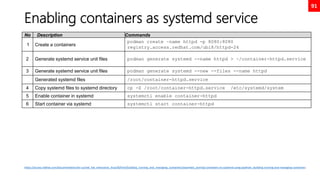
Enabling containers as systemd service
No Description Commands
1 Create a containers
podman create –name httpd -p 8080:8080
registry.access.redhat.com/ubi8/httpd-24
2 Generate systemd service unit files podman generate systemd --name httpd > ~/container-httpd.service
3 Generate systemd service unit files podman generate systemd --new --files --name httpd
Generated systemd files /root/container-httpd.service
4 Copy systemd files to systemd directory cp -Z /root/container-httpd.service /etc/systemd/system
5 Enable container in systemd systemctl enable container-httpd
6 Start container via systemd systemctl start container-httpd
https://access.redhat.com/documentation/en-us/red_hat_enterprise_linux/8/html/building_running_and_managing_containers/assembly_porting-containers-to-systemd-using-podman_building-running-and-managing-containers
92
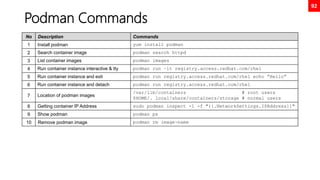
Podman Commands
No Description Commands
1 Install podman yum install podman
2 Search container image podman search httpd
3 List container images podman images
4 Run container instance interactive & tty podman run –it registry.access.redhat.com/rhel
5 Run container instance and exit podman run registry.access.redhat.com/rhel echo “Hello”
6 Run container instance and detach podman run registry.access.redhat.com/rhel
7 Location of podman images
/var/lib/containers # root users
$HOME/. local/share/containers/storage # normal users
8 Getting container IP Address sudo podman inspect -l -f "{{.NetworkSettings.IPAddress}}"
9 Show podman podman ps
10 Remove podman image podman rm image-name
93
Container Image Local Repository
• https://www.techrepublic.com/article/how-to-set-up-a-local-image-
repository-with-podman/
OUT OF SCOPE
94
Rootful vs Rootless Container
• https://infosecadalid.com/2021/08/30/containers-rootful-rootless-
privileged-and-super-privileged/
• https://developers.redhat.com/blog/2020/09/25/rootless-containers-
with-podman-the-basics
• https://www.tutorialworks.com/podman-rootless-volumes/
OUT OF SCOPE
95
Container Networking Interface (CNI)
• https://github.com/containernetworking/cni
• https://github.com/containers/podman/blob/main/docs/tutorials/ba
sic_networking.md
• https://www.redhat.com/sysadmin/container-networking-podman
• https://medium.com/cri-o/podman-dns-and-cni-5ca9cc8cc457
• https://access.redhat.com/documentation/en-
us/red_hat_enterprise_linux/9/html/building_running_and_managin
g_containers/assembly_setting-container-network-modes_building-
running-and-managing-containers
• https://www.redhat.com/sysadmin/podman-new-network-stack
OUT OF SCOPE
Chapter 14
Post Installation
97
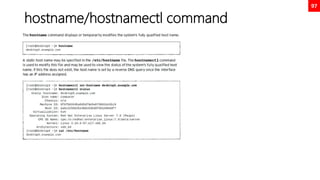
hostname/hostnamectl command
98
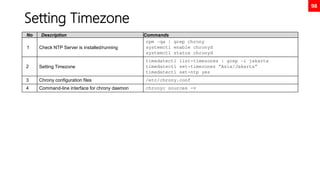
Setting Timezone
No Description Commands
1 Check NTP Server is installed/running
rpm –qa | grep chrony
systemctl enable chronyd
systemctl status chronyd
2 Setting Timezone
timedatectl list-timezones | grep –i jakarta
timedatectl set-timezones “Asia/Jakarta”
timedatectl set-ntp yes
3 Chrony configuration files /etc/chrony.conf
4 Command-line interface for chrony daemon chronyc sources -v
99
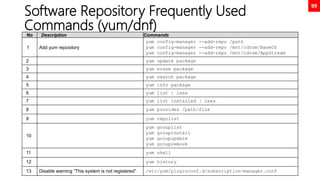
Software Repository Frequently Used
Commands (yum/dnf)
No Description Commands
1 Add yum repository
yum config-manager --add-repo /path
yum config-manager --add-repo /mnt/cdrom/BaseOS
yum config-manager --add-repo /mnt/cdrom/AppStream
2 yum update package
3 yum erase package
4 yum search package
5 yum info package
6 yum list | less
7 yum list installed | less
8 yum provides /path/file
9 yum repolist
10
yum grouplist
yum groupinstall
yum groupupdate
yum groupremove
11 yum shell
12 yum history
13 Disable warning “This system is not registered” /etc/yum/pluginconf.d/subscription-manager.conf
100
Enabling Cockpit – Red Hat Web Console
Sysadmin
No Description Commands
1 Install & enabling cockpit
yum install cockpit
systemctl enable cockpit
systemctl start cockpit
2 Allow firewall for cockpit web console
firewall-cmd --permanent --add-service=cockpit
firewall-cmd --reload
3 Accessing cockpit web console http://hostname:9090/
OUT OF SCOPE
101
Linux Manual Sections (man sections)
Section Description
1 User commands (both executable & shell programs)
2 System calls (kernel routines invoked from user space)
3 Library functions (provided by program libraries)
4 Special files (such as device files)
5 File formats (for
6 Games (historical section for amusing programs)
7 Conventions, standards, and miscellaneous (protocols, file systems)
8 System administration and privileged commands (maintenance tasks)
9 Linux Kernel API (internal kernel calls)
Chapter 15
RHEL8 Advanced Topics
• NOT INCLUDED IN THE EXAM
OUT OF SCOPE
103
What’s New
• https://access.redhat.com/documentation/en-
us/red_hat_enterprise_linux/8/html/8.6_release_notes/new-features
OUT OF SCOPE
104
Kernel Administration Guide
• https://access.redhat.com/documentation/en-
us/red_hat_enterprise_linux/8/html/managing_monitoring_and_upd
ating_the_kernel/index
OUT OF SCOPE
105
Kernel Live Patching
• https://access.redhat.com/documentation/en-
us/red_hat_enterprise_linux/8/html/managing_monitoring_and_upd
ating_the_kernel/applying-patches-with-kernel-live-
patching_managing-monitoring-and-updating-the-kernel
OUT OF SCOPE
106
Understanding systemd
• https://opensource.com/article/20/4/systemd
• https://opensource.com/article/20/5/systemd-startup
• https://access.redhat.com/documentation/en-
us/red_hat_enterprise_linux/8/html/configuring_basic_system_settin
gs/introduction-to-systemd_configuring-basic-system-settings
• https://www.digitalocean.com/community/tutorials/understanding-
systemd-units-and-unit-files
• https://access.redhat.com/documentation/en-
us/red_hat_enterprise_linux/8/html/configuring_basic_system_settin
gs/introduction-to-systemd_configuring-basic-system-settings
OUT OF SCOPE
107
Systemd, rethinking PID 1
Lennart Poettering’s personal blog, the author of systemd (http://0pointer.de/)
• Rethinking PID 1
• systemd for Administrators, Part I
• systemd for Administrators, Part II
• systemd for Administrators, Part III
• systemd for Administrators, Part IV
• systemd for Administrators, Part V
• systemd for Administrators, Part VI
• systemd for Administrators, Part VII
• systemd for Administrators, Part VIII
• systemd for Administrators, Part IX
• systemd for Administrators, Part X
• systemd for Administrators, Part XI
OUT OF SCOPE
108
Combining VDO and LVM
• https://access.redhat.com/documentation/en-
us/red_hat_enterprise_linux/8/html/deduplicating_and_compressing
_logical_volumes_on_rhel/introduction-to-vdo-on-
lvm_deduplicating-and-compressing-logical-volumes-on-rhel
OUT OF SCOPE

RHCSA EX200 - Summary

  • 1.
    EX200 Red Hat CertifiedSystem Administrator nugroho.gito@yahoo.com Exam preparation, compiled from various sources
  • 2.
    2 Introduction Coming from UNIXSystem V (IBM AIX & Sun Solaris) System Programmer background, I find Linux has become the defacto choice for many computing workload, from embedded device, mobile phone, mission critical systems, all the way to the largest Super Computer Cluster in the world. While Linux has tried to maintain its UNIX design philosophy, its foundation has radically changed departing its UNIX root (bye init, hi systemd), towards modern Operating Systems which many of its features have equivalent of its UNIX counterparts - if not better (Linux Container vs AIX WPAR/Solaris Zones, Solaris ZFS vs Stratis, and many more). This document is not meant to beat Red Hat comprehensive online manual, instead it was written to help me memorize many of advanced RHEL features and to help me pass hands on performance based EX200 exam. This document is compiled from many sources, and written for anyone who would like to learn Red Hat Enterprise Linux 8, through taking EX200 exam in order to showing off RHCSA title to your friend :D Happy Learning and may the force be with you!
  • 3.
  • 4.
  • 5.
    5 Exam Environment, PassingScore 210 of 300 (70%) No VM 1 Environment & Instructions VM 2 Environment & Instructions 1 Forgot root password, must reset root password Configure TCP/IP settings, restart network device 2 Create new LVM partition x GB, mount at boot Configure NTP to local NTP settings 3 Add new swap space x GB, mount at boot Configure custom yum repository 4 Yum repo has GPG issues, find work around Create new users, groups with multiple options 5 Install VDO packages, Create shared directory and custom acl, gid, uid 6 Create new VDO partition x GB, mount at boot Fix improper SELinux config causing httpd issues 7 Calculate partition requirements against available disks Fix improper firewalld config causing httpd issues 8 Set system performance Configure NFS Client 9 Pull container image and attach persistent disk 10 Run container at boot, register container as systemd service Notes: • Use lsblk --fs to get disk UUID • Always use UUID as disk identifier in /etc/fstab • Use findmnt --verify to validate /etc/fstab format • Ensure system is in bootable state Notes: • Check /var/log/messages for any issues • Use nmtui to save time configure TCP/IP settings • Always test after ACL/permission changes on multi users • Ensure container is running properly at boot
  • 6.
    6 EX200 Topics Ineed to master No Topics Status Keterangan 1 Operations - Emergency mode Done Add rd.break di grub options saat boot, mount /sysroot dan chroot 2 Operations - Grub Done 3 Operations – crontab, at, systemd timer Done Pending: systemd timer 4 Operations - System log Done journalctl to browse systemd journals, /var/log/messages  warnings, infos /var/log/audit/audit.log  events login, sudo, SELinux, service, reboot 5 Software Mgt - Software Repository Done 6 User Mgt - Change password & aging Done 7 User Mgt - SGID sticky bit Done 8 User Mgt - Access control list Done 9 Security – SELinux Done 10 Network File System & scp/rcp Done NFS, TODO: Samba, CIFS 11 Storage – Basic Done Basic disk partition with fdisk, mount filesystem, fstab and swap space 12 Storage – LVM Done 13 Storage – Stratis & VDO Done 14 Network Security Done 15 Regular Expressions Done 16 Tuning (tuned) Done
  • 7.
    7 New Commands Ilearned (1) No Command Keterangan 1 sysctl Configure kernel parameters at runtime 2 systemctl Control the systemd system and service manager 3 timedatectl Sets time zone 4 hostnamectl Control the system hostname 5 journalctl Query systemd journal 6 nmcli, nmtui Network management CLI, Network management curses UI 7 getfacl, setfacl Get/set file access control lists 8 firewall-cmd firewalld cli, add-service or add-port to allow inbound communication 9 ausearch a tool to query audit daemon logs (/var/log/audit/audit.log) 10 findmnt --verify Validate /etc/fstab settings, because incorrect entry may render the machine non bootable 11 /dev/zero special file in Unix-like operating systems that provides as many null characters 12 /dev/urandom special files that serve as pseudorandom number generators 13 wipefs wipe a signature from a device, it can erase filesystem, raid or partition-table signatures (magic strings) from the specified device to make the signatures invisible for libblkid 14 stratis, vdo New Storage Management in RHEL8 15 podman Management tool for pods, containers and images
  • 8.
    8 New Commands Ilearned (2) No Command Keterangan 1 fdisk Disk partition tools, supports GPT, MBR, Sun, SGI, BSD Partition tables 2 gdisk fdisk for GPT partitions 3 parted Newer disk partition tools 4 mkfs.xfs, mkfs.ext4 Format filesystem (xfs, ext4) 5 mkswap Create swap space 6 swapon Enable swap space, without argument will show all swap space 7 lsblk --fs List block device with UUID, mount point, alternatively use --output for custom output 8 e2label Change the label on an ext2/ext3/ext4 filesystem 9 xfs_admin -l /dev/sdb1 Change the label on an xfs filesystem 10 pkill, pgrep Process kill (process kill based on process name), Process grep (returns pid of process name) 11 fg, bg, jobs Manage running jobs, switch jobs to foreground/background 12 logger enter messages into the system log 13 sed -n 5p /etc/passwd awk -F : '{ print $4 }' /etc/passwd sed / awk column based filters 14 /proc/cpuinfo,/proc/meminfo Very special virtual filesystem, referred to as a process information pseudo-file system
  • 9.
    Chapter 1 Improving CommandLine Productivity
  • 10.
    10 Bash Comparison andits confusing type juggling comparison No Description Commands 1 Numeric comparison [ 1 -eq 1 ]; echo $? # equal [ 1 -ne 1 ]; echo $? # not equal [ 8 -gt 2 ]; echo $? # greater than [ 2 -ge 2 ]; echo $? # greater equal [ 2 -lt 2 ]; echo $? # less than 2 String comparison [ abc = abc ]; echo $? [ abc == def ]; echo $? [ abc != def ]; echo $? 3 Unary operators STRING=‘’ ; [ -z "$STRING" ]; echo $? STRING='abc'; [ -n "$STRING" ]; echo $? 4 File / Directory existence check [ -d dirname ]; echo $? # dir check [ -f filename ]; echo $? # file check OUT OF SCOPE Note: For heavy vi/vim users, I highly recommend to add set -o vi in ~/.bashrc or /etc/bashrc. It will enable vi keybindings within your shell, and I think it will greatly enhance your shell command editing.
  • 11.
    11 Regular Expressions, thoushalt remember this holy symbols! OPTION DESCRIPTION . The period (.) matches any single character. ? The preceding item is optional and will be matched at most once. * The preceding item will be matched zero or more times. + The preceding item will be matched one or more times. {n} The preceding item is matched exactly n times. {n,} The preceding item is matched n or more times. {,m} The preceding item is matched at most m times. {n,m} The preceding item is matched at least n times, but not more than m times. [:alnum:] Alphanumeric characters: '[:alpha:]' and '[:digit:]'; in the 'C' locale and ASCII character encoding, this is the same as '[0-9A-Za-z]'. [:alpha:] Alphabetic characters: '[:lower:]' and '[:upper:]'; in the 'C' locale and ASCII character encoding, this is the same as '[A-Za-z]'. [:blank:] Blank characters: space and tab. [:cntrl:] Control characters. In ASCII, these characters have octal codes 000 through 037, and 177 (DEL). In other character sets, these are the equivalent characters, if any. [:digit:] Digits: 0 1 2 3 4 5 6 7 8 9. [:graph:] Graphical characters: '[:alnum:]' and '[:punct:]'. [:lower:] Lower-case letters; in the 'C' locale and ASCII character encoding, this is a b c d e f g h i j k l m n o p q r s t u v w x y z. [:print:] Printable characters: '[:alnum:]', '[:punct:]', and space. [:punct:] Punctuation characters; in the 'C' locale and ASCII character encoding, this is! " # $ % & ' ( ) * + , -. /: ; < = > ? @ []^ _ ' { | } ~. In other character sets, these are the equivalent characters, if any. [:space:] Space characters: in the 'C' locale, this is tab, newline, vertical tab, form feed,carriage return, and space. [:upper:] Upper-case letters: in the 'C' locale and ASCII character encoding, this is A B C D E F G H I J K L M N O P Q R S T U V W X Y Z. [:xdigit:] Hexadecimal digits: 0 1 2 3 4 5 6 7 8 9 A B C D E F a b c d e f. b Match the empty string at the edge of a word. B Match the empty string provided it is not at the edge of a word. < Match the empty string at the beginning of word. > Match the empty string at the end of word. w Match word constituent. Synonym for '[_[:alnum:]]'. W Match non-word constituent. Synonym for '[^_[:alnum:]]'. s Match white space. Synonym for '[[:space:]]'. S Match non-whitespace. Synonym for '[^[:space:]]'. OUT OF SCOPE
  • 12.
  • 13.
    13 Scheduled One TimeFuture Tasks - at No Description Commands 1 at daemon atd 2 List jobs/tasks for current user at –l atq 3 Remove jobs/tasks for current user at –r atrm 4 Add tasks defined in myscript 2 min from now at now+2 min < myscript 5 at TIMESPEC description Use the at TIMESPEC command to schedule a new job. The at command then reads the commands to execute from the stdin channel. Sample: at now +5min < myscript Sample TIMESPEC: midnight, 00 noon, 12 teatime, 16 now tomorrow minutes, hours, days, weeks 6 Users (including root) can queue up jobs for the atd daemon using the at command. The atd daemon provides 26 queues, a to z, with jobs in alphabetically later queues getting lower system priority (higher nice values, discussed in a later chapter). OUT OF SCOPE
  • 14.
    14 Scheduled Recurring Tasks(cron, anacron, systemd timer) • Both Cron and Anacron automatically run reoccurring jobs that at a scheduled time. • Cron runs the scheduled jobs at a very specific interval, but only if the system is running at that moment. • Anacron runs the scheduled job even if the computer is off at that moment. It runs those missed jobs once you turn on the system. Cron (By Ken Thompson in 70s, Vixie Cron 87) Anacron (2000) systemd timer (2010) 1. Used to execute scheduled commands 2. Assumes the system is continuously running. 3. If system is not running during the time the jobs is scheduled, it will not run. 4. Can schedule jobs down to the precise minute 5. Universally available on all Linux systems 6. Cron is a daemon 1. Used to execute commands periodically 2. Suitable for systems that are often powered down when not in use (Laptops, workstations, etc..) 3. Jobs will run if it hasn't been executed in the set amount of time. 4. Minimum time frame is 1 day 5. Anacron is not a daemon and relies on other methods to run https://opensource.com/article/20/7/systemd- timers https://blog.pythian.com/systemd-timers- replacement-cron/ https://wiki.archlinux.org/title/Systemd/Timers Exe : /usr/bin/crontab Config Sys : /etc/crontab Config User : /var/spool/cron/user Log : /var/log/cron Exe : /usr/sbin/anacron Config Sys : /etc/anacrontab Config User : TODO Log : TODO /etc/cron.daily /etc/cron.weekly /etc/cron.monthly OUT OF SCOPE OUT OF SCOPE
  • 15.
    15 Scheduled Recurring Tasks- cron • Jobs scheduled to run repeatedly are called recurring jobs. Red Hat Enterprise Linux systems ship with the crond daemon, provided by the cronie package, enabled and started by default specifically for recurring jobs. • crontab config files (edited with crontab –e) user wide : /var/spool/cron/user system wide : /etc/crontab • crontab log files (root only) /var/log/cron : show crontab execution • Fields in the crontab file appear in the following order: 1. Minutes : 0-60 2. Hours : 0-24 3. Day of month : 1-31 4. Month : 1-12, or 3 digit month 5. Day of week : 1-7, or 3 digit day (0 or 7=Sunday) 6. Command : command • The first 5 fields • * for “Do not Care”/always. • A number to specify a number of minutes or hours, a date, or a weekday. For weekdays, 0 equals Sunday, 1 equals Monday, 2 equals Tuesday, and so on. 7 also equals Sunday. • x-y for a range, x to y inclusive. • x,y for lists. Lists can include ranges as well, for example, 5,10-13,17 in the Minutes column to indicate that a job should run at 5, 10, 11, 12, 13, and 17 minutes past the hour. • */x to indicate an interval of x, for example, */7 in the Minutes column runs a job every seven minutes. Commands Description crontab -l List jobs/tasks for current user crontab -r Remove jobs/tasks for current user crontab -e Edit crontab at now+2 min < myscript Add tasks defined in myscript 2 min from now
  • 16.
  • 17.
    17 tuned - dynamicadaptive system tuning daemon No Description Commands 1 Install & enable tuned yum install tuned systemctl enable tuned systemctl start tuned 2 Show current tuning profiles tuned-adm active 3 List of available tuning profiles tuned-adm list 4 Switch tuning profiles to new profile tuned-adm profile throughput-performance 5 Turned off tuned tuned-adm off
  • 18.
    18 Prioritize / de-prioritizeOS process using nice/renice • Different processes have different levels of importance. The process scheduler can be configured to use different scheduling policies for different processes. The scheduling policy used for most processes running on a regular system is called SCHED_OTHER (also called SCHED_NORMAL), but other policies exist for various workload needs. • Since not all processes are equally important, processes running with the SCHED_NORMAL policy can be given a relative priority. This priority is called the nice value of a process, which are organized as 40 different levels of niceness for any process. • The nice level values range from -20 (highest priority) to 19 (lowest priority). By default, processes inherit their nice level from their parent, which is usually 0. Higher nice levels indicate less priority (the process easily gives up its CPU usage), while lower nice levels indicate a higher priority (the process is less inclined to give up the CPU) • Since setting a low nice level on a CPU-hungry process might negatively impact the performance of other processes running on the same system, only the root user may reduce a process nice level. • Unprivileged users are only permitted to increase nice levels on their own processes. They cannot lower the nice levels on their processes, nor can they modify the nice level of other users’ processes.. No Description Commands 1 Start process with different nice levels nice –n -19 sha1sum /dev/zero #set highest nice level 2 Change nice levels of an existing process renice –n -19 pid #change pid to highest nice level 3 Show nice level ps -o pid,pcpu,pmem,nice,comm # column NI top # column NI OUT OF SCOPE
  • 19.
    Chapter 4 ACL &Special Permissions
  • 20.
    20 Access Control List WithACLs, you can grant permissions to multiple users and groups, identified by user name, group name, UID, or GID, using the same permission flags used with regular file permissions: read, write, and execute. These additional users and groups, beyond the file owner and the file's group affiliation, are called named users and named groups respectively, because they are named not in a long listing, but rather within an ACL. Users can set ACLs on files and directories that they own. Privileged users, assigned the CAP_FOWNER Linux capability, can set ACLs on any file or directory. New files and subdirectories automatically inherit ACL settings from the parent directory's default ACL, if they are set. Similar to normal file access rules, the parent directory hierarchy needs at least the other search (execute) permission set to enable named users and named groups to have access.
  • 21.
    21 ACL Sample Commands NoDescription Commands 1 Display the ACL on a directory. getfacl /directory 2 Named user with read and execute permissions for a file. setfacl user:mary:rx file 3 File owner with read and execute permissions for a file. setfacl user::rx file 4 Read and write permissions for a directory granted to the directory group owner. setfacl g::rw /director 5 Read and write permissions for a file granted to the file group owner. setfacl g::rw file 6 Read, write, and execute permissions for a directory granted to a named group. setfacl group:hug:rwx /directory 7 Read and execute permissions set as the default mask. setfacl default:m::rx /directory 8 Named user granted initial read permission for new files, and read and execute permissions for new subdirectories. setfacl default:user:mary:rx /directory 9 Apply output from getfacl as input to setfacl getfacl file-A | setfacl --set-file=- file-B 10 Deleting specific ACL entries follows the same basic format as the modify operation, except that ":perms" is not specified. setfacl -x u:name,g:name file 11 Set ACL recursively on directory dir on user user1 setfacl -Rdm u:user1:rwx dir
  • 22.
    22 ACL Sample Commands UseCase File ACL user1 could read, write and modify it, user2 without any permission. setfacl -m u:user1:rw- file setfacl -m u:user2:--- file getfacl file # file: file # owner: gito # group: gito user::rw- user:user1:rw- user:user2:--- group::r-- mask::rw- other::r-- Directory ACL, recursive and all future dir & files inherit user1 could read, write and modify it, user2 without any permission. mkdir dir setfacl -Rdm u:user1:rwx dir setfacl -Rdm u:user2:--- dir
  • 23.
    23 Special Permissions (setuid/setgid) •Special permissions constitute a fourth permission type in addition to the basic user, group, and other types. As the name implies, these permissions provide additional access-related features over and above what the basic permission types allow. This section details the impact of special permissions, summarized in the table below.
  • 24.
    24 Default File Permissions •Default umask /etc/profile.d/local-umask.sh 1. umask 000 666 rw-rw-rw- 2. umask 002 664 rw-rw-r-- 3. umask 007 660 rw-rw---- 4. umask 027 640 rw-r----- 5. umask 022 644 rw-r--r-- OUT OF SCOPE
  • 25.
    Chapter 5 NSA SecurityEnhanced Linux (SELinux)
  • 26.
    26 SELinux (NSA Security-EnhancedLinux) 1. SELinux is an implementation of a flexible mandatory access control architecture in the Linux operating system. The SELinux architecture provides general support for the enforcement of many kinds of mandatory access control policies, including those based on the concepts of Type Enforcement®, Role- Based Access Control, and Multi-Level Security. Background information and technical documentation about SELinux can be found at https://www.nsa.gov/portals/75/documents/what- we-do/research/selinux/documentation/presentations/2004-ottawa-linux-symposium-bof-presentation.pdf NSA whitepaper behind the inception of SELinux https://www.nsa.gov/portals/75/images/resources/everyone/digital-media-center/publications/research-papers/the-inevitability-of- failure-paper.pdf 2. SELinux provides a critical security purpose in Linux, permitting or denying access to files and other resources that are significantly more precise than user permissions. 3. File permissions control which users or groups of users can access which specific files. However, a user given read or write access to any specific file can use that file in any way that user chooses, even if that use is not how the file should be used. 4. For example, with write access to a file, should a structured data file designed to be written to using only a particular program, be allowed to be opened and modified by other editors that could result in corruption? 5. File permissions cannot stop such undesired access. They were never designed to control how a file is used, but only who is allowed to read, write, or run a file. 6. SELinux consists of sets of policies, defined by the application developers, that declare exactly what actions and accesses are proper and allowed for each binary executable, configuration file, and data file used by an application. This is known as a targeted policy because one policy is written to cover the activities of a single application. Policies declare predefined labels that are placed on individual programs, files, and network ports.
  • 27.
    27 SELinux Intro • SecurityEnhanced Linux (SELinux) is an additional layer of system security. The primary goal of SELinux is to protect user data from system services that have been compromised. • Most Linux administrators are familiar with the standard user/group/other permission security model. This is a user and group based model known as discretionary access control. SELinux provides an additional layer of security that is object-based and controlled by more sophisticated rules, known as mandatory access control • SELinux is a set of security rules that determine which process can access which files, directories, and ports. • Every file, process, directory, and port has a special security label called an SELinux context. • A context is a name used by the SELinux policy to determine whether a process can access a file, directory, or port. By default, the policy does not allow any interaction unless an explicit rule grants access. If there is no allow rule, no access is allowed.
  • 28.
    28 SELinux Labels &Contexts SELinux labels have several contexts: user, role, type, and sensitivity. The targeted policy, which is the default policy enabled in Red Hat Enterprise Linux, bases its rules on the third context: the type context. Type context names usually end with _t. The type context for a web server is httpd_t. The type context for files and directories normally found in /var/www/html is httpd_sys_content_t. The contexts for files and directories normally found in /tmp and /var/tmp is tmp_t. The type context for web server ports is http_port_t. Apache has a type context of httpd_t. There is a policy rule that permits Apache access to files and directories with the httpd_sys_content_t type context. By default files found in /var/www/html and other web server directories have the httpd_sys_content_t type context. There is no allow rule in the policy for files normally found in /tmp and /var/tmp, so access is not permitted. With SELinux enabled, a malicious user who had compromised the web server process could not access the /tmp directory.
  • 29.
    29 SELinux Modes The MariaDBserver has a type context of mysqld_t. By default, files found in /data/mysql have the mysqld_db_t type context. This type context allows MariaDB access to those files but disables access by other services, such as the Apache web service. SELinux Modes 1. Enforcing: SELinux is enforcing access control rules. Computers generally run in this mode. 2. Permissive: SELinux is active but instead of enforcing access control rules, it records warnings of rules that have been violated. This mode is used primarily for testing and troubleshooting. 3. Disabled: SELinux is turned off entirely: no SELinux violations are denied, nor even recorded.
  • 30.
    30 SELinux Sample Commands NoDescription Commands 1 Show SELinux status sestatus 2 Show file context ls –lZ /usr/bin # Switch Z to show file context -rwxr-xr-x. 1 root root system_u:object_r:bin_t:s0 16912 Aug 19 2020 ls -rwxr-xr-x. 1 root root system_u:object_r:bin_t:s0 1311 Aug 19 2020 pwd 3 Show process context ps –Z # Switch Z to show file context LABEL PID TTY TIME CMD unconfined_u:unconfined_r:unconfined_t:s0-s0:c0.c1023 8964 pts/0 00:00:00 bash unconfined_u:unconfined_r:unconfined_t:s0-s0:c0.c1023 9989 pts/0 00:00:00 ps 4 Get the current mode of SELinux getenforce 5 Set the current mode of SELinux setenforce 6 SELinux configuration file # Any modification require reboot /etc/selinux/config 7 Manage file context mapping definitions # List all files/directories with SELinux labels semanage fcontext –l # Set context directory /virtual/ and all files under it semanage fcontext -a -t httpd_sys_content_t '/virtual(/.*)?’ restorecon –Rv /virtual 8 Restore file(s) default SELinux security contexts restorecon –Rv /dir # Restore context recursively to all files/dir under dir 9 Changes SELinux context chcon 10 Get SELinux boolean value(s) getsebool –a # get system wide selinux Boolean values 11 Set SELinux boolean value(s) setsebool –P selinux_boolean on|off # persistent change for next reboot 12 Troubleshoot SELinux errors grep –i selinux /var/log/messages # look for sealert and UUID of incident sealert –l UUID 13 Search SELinux audit events # Searching from /var/log/audit/audit.log ausearch -m AVC
  • 31.
  • 32.
    32 Storage Management Summary NoAction LVM Stratis VDO 1 Logical block device path /dev/vgdatax/lvolx /dev/stratis/pool1/fs1 /dev/mapper/vdo1 2 Create partition & create physical volume fdisk pvcreate block-device fdisk fdisk 3 Create disk group vgcreate vg-name block-device stratis pool create pool-name block- device vdo create --name=vdo1 --device=block- device --vdoLogicalSize=5G 4 Add disk to disk group vgextend vg-name block-device stratis pool add-data pool-name block- device 5 Format File System mkfs.xfs logical-block-device stratis filesystem create pool-name fs-name 6 Resize File System lvextend logical-block-device –L +xxMB N/A 7 Display status pvdisplay vgdisplay Lvdisplay stratis pool list vdo status --name=vdo1 vdo list 8 Check free space df –h df -h vdostats --hu 9 Install Package N/A, Critical Linux component yum install stratisd stratis-cli yum install vdo kmod-vdo 10 Start service N/A, Critical Linux component systemctl start stratisd x-systemd.requires=stratisd.service (/etc/fstab 5th column) systemctl start vdo defaults,x-systemd=vdo.service (/etc/fstab 5th column) 11 Mount /etc/fstab Defaults defaults,x- systemd.requires=stratisd.service defaults,x-systemd=vdo.service 12 Configuration file /etc/lvm/lvm.conf N/A N/A
  • 33.
    33 Storage Management • MBRPartitioning Scheme Since 1982, the Master Boot Record (MBR) partitioning scheme has dictated how disks are partitioned on systems running BIOS firmware. This scheme supports a maximum of four primary partitions. On Linux systems, with the use of extended and logical partitions, administrators can create a maximum of 15 partitions. Because partition size data is stored as 32-bit values, disks partitioned with the MBR scheme have a maximum disk and partition size of 2 TiB. • GPT Partitioning Scheme For systems running Unified Extensible Firmware Interface (UEFI) firmware, GPT (GUID Partition Table) is the standard for laying out partition tables on physical hard disks. GPT is part of the UEFI standard and addresses many of the limitations that the old MBR-based scheme imposes. A GPT provides a maximum of 128 partitions. Unlike an MBR, which uses 32 bits for storing logical block addresses and size information, a GPT allocates 64 bits for logical block addresses. This allows a GPT to accommodate partitions and disks of up to eight zebibytes (ZiB) or eight billion tebibytes. In addition to addressing the limitations of the MBR partitioning scheme, a GPT also offers some additional features and benefits. A GPT uses a globally unique identifier (GUID) to identify each disk and partition. In contrast to an MBR, which has a single point of failure, a GPT offers redundancy of its partition table information. The primary GPT resides at the head of the disk, while a backup copy, the secondary GPT, is housed at the end of the disk. A GPT uses a checksum to detect errors and corruptions in the GPT header and partition table.
  • 34.
    34 /etc/fstab File Format /dev/mapper/rhel-root/ xfs defaults 0 0 UUID=ddfedc1d-490f-4972-b1ea-bc88c4be962b /boot xfs defaults 0 0 /dev/mapper/rhel-swap none swap defaults 0 0 /dev/cdrom /mnt/cdrom iso9660 ro,user,auto 0 0 fstab columns 1. Specifies the device. This example uses the UUID to specify the device. File systems create and store the UUID in their super block at creation time. Alternatively, you could use the device file, such as /dev/vdb1. 2. Directory mount point, from which the block device will be accessible in the directory structure. The mount point must exist; if not, create it with the mkdir command. 3. File-system type, such as xfs or ext4. 4. Comma-separated list of options to apply to the device. defaults is a set of commonly used options. The mount(8) man page documents the other available options. 5. Used by the dump command to back up the device. Other backup applications do not usually use this field. 6. the fsck order field, determines if the fsck command should be run at system boot to verify that the file systems are clean. The value in this field indicates the order in which fsck should run. For XFS file systems, set this field to 0 because XFS does not use fsck to check its file-system status. For ext4 file systems, set it to 1 for the root file system and 2 for the other ext4 file systems. This way, fsck processes the root file system first and then checks file systems on separate disks concurrently, and file systems on the same disk in sequence.
  • 35.
    35 Disk Partition GPTUsing fdisk [root@neutrino ~]# fdisk /dev/nvme0n2 Welcome to fdisk (util-linux 2.32.1). Changes will remain in memory only, until you decide to write them. Be careful before using the write command. Command (m for help): n Partition number (1-128, default 1): 1 First sector (34-20971486, default 2048): 2048 Last sector, +sectors or +size{K,M,G,T,P} (2048-20971486, default 20971486): +1G Created a new partition 1 of type 'Linux filesystem' and of size 1 GiB. Command (m for help): w The partition table has been altered. Calling ioctl() to re-read partition table. Syncing disks. [root@neutrino ~]# mkfs.xfs /dev/nvme0n2p1 meta-data=/dev/nvme0n2p1 isize=512 agcount=4, agsize=65536 blks = sectsz=512 attr=2, projid32bit=1 = crc=1 finobt=1, sparse=1, rmapbt=0 = reflink=1 data = bsize=4096 blocks=262144, imaxpct=25 = sunit=0 swidth=0 blks naming =version 2 bsize=4096 ascii-ci=0, ftype=1 log =internal log bsize=4096 blocks=2560, version=2 = sectsz=512 sunit=0 blks, lazy-count=1 realtime =none extsz=4096 blocks=0, rtextents=0 [root@neutrino ~]# mkdir /mnt/test1 [root@neutrino ~]# mount /dev/nvme0n2p1 /mnt/test1 [root@neutrino ~]# df -h Filesystem Size Used Avail Use% Mounted on ... /dev/nvme0n2p1 1014M 40M 975M 4% /mnt/test1 [root@neutrino ~]# lsblk --output NAME,UUID,SIZE NAME UUID SIZE sr0 2021-05-03-15-21-56-00 9.4G nvme0n1 20G ├─nvme0n1p1 ddfedc1d-490f-4972-b1ea-bc88c4be962b 1G └─nvme0n1p2 rAEWPF-o610-hzVC-7nfr-oTFu-3J3k-TMUdNZ 19G ├─rhel-root 473359f4-a4de-474a-b117-2175a81ddaca 17G └─rhel-swap 079e3b05-d843-4312-8cbd-1105839ad023 2G nvme0n2 10G ├─nvme0n2p1 d7046b4d-70d9-4f23-a548-03c733cb432e 1G └─nvme0n2p2 d1c88d5a-4f77-495c-93e4-63e8d9c4126f 1G nvme0n3 10G [root@neutrino ~]# echo “UUID=d7046b4d-70d9-4f23-a548-03c733cb432e /mnt/test1 xfs defaults 0 0” >> /etc/fstab [root@neutrino ~]# findmnt --verify Success, no errors or warnings detected [root@neutrino ~]# reboot
  • 36.
    36 Disk Partition GPTUsing parted [root@neutrino ~]# lsblk NAME MAJ:MIN RM SIZE RO TYPE MOUNTPOINT sr0 11:0 1 9.4G 0 rom /mnt/cdrom nvme0n1 259:0 0 20G 0 disk ├─nvme0n1p1 259:1 0 1G 0 part /boot └─nvme0n1p2 259:2 0 19G 0 part ├─rhel-root 253:0 0 17G 0 lvm / └─rhel-swap 253:1 0 2G 0 lvm [SWAP] nvme0n2 259:3 0 10G 0 disk nvme0n3 259:4 0 10G 0 disk [root@neutrino ~]# parted /dev/nvme0n2 GNU Parted 3.2 Using /dev/nvme0n2 Welcome to GNU Parted! Type 'help' to view a list of commands. (parted) mklabel gpt (parted) print Model: NVMe Device (nvme) Disk /dev/nvme0n2: 10.7GB Sector size (logical/physical): 512B/512B Partition Table: gpt Disk Flags: Number Start End Size File system Name Flags (parted) mkpart Partition name? []? disk1 File system type? [ext2]? xfs Start? 2048s End? 1000MB (parted) print Model: NVMe Device (nvme) Disk /dev/nvme0n2: 10.7GB Sector size (logical/physical): 512B/512B Partition Table: gpt Disk Flags: Number Start End Size File system Name Flags 1 1049kB 1000MB 999MB xfs disk1 OUT OF SCOPE
  • 37.
    37 Swap Space • VirtualMemory = RAM + Swap Space Amount of installed RAM Recommended swap space Recommended swap space if allowing for hibernation 2GB or less Twice the installed RAM 3 times the amount of RAM > 2GB - 8GB The same amount of RAM 2 times the amount of RAM > 8GB - 64GB At least 4GB 1.5 times the amount of RAM > 64GB or more At least 4GB Hibernation not recommended https://access.redhat.com/solutions/15244
  • 38.
    38 Swap Space [root@neutrino ~]#fdisk /dev/nvme0n2 Welcome to fdisk (util-linux 2.32.1). Changes will remain in memory only, until you decide to write them. Be careful before using the write command. Command (m for help): n Partition number (3-128, default 3): First sector (4196352-20971486, default 4196352): Last sector, +sectors or +size{K,M,G,T,P} (4196352-20971486, default 20971486): +2G Created a new partition 3 of type 'Linux filesystem' and of size 2 GiB. Command (m for help): w The partition table has been altered. Syncing disks. [root@neutrino ~]# mkswap /dev/nvme0n2p3 Setting up swapspace version 1, size = 2 GiB (2147479552 bytes) no label, UUID=b2b9184f-5339-44bc-b756-6f03686be6d0 [root@neutrino ~]# swapon /dev/nvme0n2p3 [root@neutrino ~]# swapon NAME TYPE SIZE USED PRIO /dev/dm-1 partition 2G 0B -2 /dev/nvme0n2p3 partition 2G 0B -3 [root@neutrino ~]# echo “UUID=b2b9184f-5339-44bc-b756-6f03686be6d0 swap swap defaults 0 0” >> /etc/fstab [root@neutrino ~]# findmnt --verify Success, no errors or warnings detected
  • 39.
    39 Setting the SwapSpace Priority By default, the system uses swap spaces in series, meaning that the kernel uses the first activated swap space until it is full, then it starts using the second swap space. However, you can define a priority for each swap space to force that order. To set the priority, use the pri option in /etc/fstab. The kernel uses the swap space with the highest priority first. The default priority is -2. The following example shows three swap spaces defined in /etc/fstab. The kernel uses the last entry first, with pri=10. When that space is full, it uses the second entry, with pri=4. Finally, it uses the first entry, which has a default priority of -2. UUID=af30cbb0-3866-466a-825a-58889a49ef33 swap swap defaults 0 0 UUID=39e2667a-9458-42fe-9665-c5c854605881 swap swap pri=4 0 0 UUID=fbd7fa60-b781-44a8-961b-37ac3ef572bf swap swap pri=10 0 0
  • 40.
    40 Logical Volume Manager 1.Physical devices Physical devices are the storage devices used to save data stored in a logical volume. These are block devices and could be disk partitions, whole disks, RAID arrays, or SAN disks. A device must be initialized as an LVM physical volume in order to be used with LVM. The entire devicewill be used as a physical volume. 2. Physical volumes (PVs) You must initialize a device as a physical volume before using it in an LVM system. LVM tools segment physical volumes into physical extents (PEs), which are small chunks of data that act as the smallest storage block on a physical volume. 3. Volume groups (VGs) Volume groups are storage pools made up of one or more physical volumes. This is the functional equivalent of a whole disk in basic storage. A PV can only be allocated to a single VG. A VG can consist of unused space and any number of logical volumes. 4. Logical volumes (LVs) Logical volumes are created from free physical extents in a volume group and provide the "storage" device used by applications, users, and the operating system. LVs are a collection of logical extents (LEs), which map to physical extents, the smallest storage chunk of a PV. By default, each LE maps to one PE. Setting specific LV options changes this mapping; for example, mirroring causes each LE to map to two PEs.
  • 41.
    41 LVM Commands No DescriptionCommands 1 Create physical volume pvcreate /dev/nvme0n2p4 /dev/nvme0n2p5 2 Create volume group vgcreate vgdata /dev/nvme0n2p4 /dev/nvme0n2p5 3 Create logical volume lvcreate vgdata –L 2G # create new lv, lvm will assign lv name lvcreate –n lv01 vgdata –L 2G # create new lv named lv01 4 Format logical volume mkfs.xfs /dev/vgdata/lvol0 5 Remove logical volume lvremove /dev/vgdata/lvol0 6 Remove volume group vgremove vgdata 7 Remove physical volume pvcreate /dev/nvme0n2p4 /dev/nvme0n2p5 8 Extend volume group (add new pv to vg) vgextend vgdata /dev/nvme0n2p6 9 Extend logical volume (with auto fs resize) lvextend –L +500MB /dev/vgdata/lvol0 –r 10 Resize xfs xfs_growfs /mount 11 Resize ext4 resize2fs /dev/vgdata/lvol0 12 Move physical extents, useful to remove pv from vg pvmove /dev/nvme0n2p5 13 List devices that may be used as pv lvmdiskscan
  • 42.
  • 43.
    43 Stratis, Volume ManagingFilesystem (VMF) • Volume managing file systems (VMF) integrate the file system in the volume itself, in contrast with LVM where the volume requires a file system on top of it. It also provides advanced features like thin provisioning, snapshotting, and monitoring. • How does managing VMF with Stratis look like: • Create pools of one or several block devices with the stratis pool create command. • Add additional block devices to a pool with the stratis pool add-data command. • Create dynamic and flexible file systems on top of pools with the stratis filesystem create command. • Another new feature in RHEL 8 is VDO or Virtual Data Optimizer, VDO is a kernel module that can save disk space and reduce replication bandwidth and it has three components: • Data compression • Deduplication • Zero block elimination Logical Volume Manager File System Logical Volume Volume Group Physical Volume https://opensource.com/article/18/4/stratis-easy-use-local-storage-management-linux https://opensource.com/article/18/4/stratis-lessons-learned Stratis Layers File System Block Device Pool File System Block Device XFS dm-thin dm-thinpool dm-cache dm-raid dm-integrity Thin Pool Backstore 1. blockdev: This is a block device, such as a disk or a disk partition. 2. pool: A pool is composed of one or more block devices with a fixed total size, equal to the size of the block devices. 3. filesystem: Each pool can contain one or more file systems, which store files. A filesystem does not have a fixed total size since it is thinly provisioned. If the size of the data approaches the virtual size of the file system, Stratis grows the thin volume and the file system automatically. 4. Stratis pools are located under the /dev/stratis/<poolname>
  • 44.
    44 Stratis vs LVM Featuresprovided by storage components include • massively scalable file systems, • snapshots, • redundant (RAID) logical devices, • multipathing, • thin provisioning, • caching, • deduplication, and • support for virtual machines and containers. Each storage stack layer (dm, LVM, and XFS) is managed using layer-specific commands and utilities, requiring that system administrators manage physical devices, fixed-size volumes, and file systems as separate storage components. In a volume-managed file system, file systems are built inside shared pools of disk devices using a concept known as thin provisioning. Stratis file systems do not have fixed sizes and no longer preallocate unused block space. Although the file system is still built on a hidden LVM volume, Stratis manages the underlying volume for you and can expand it when needed. The in-use size of a file system is seen as the amount of actual blocks in use by contained files. The space available to a file system is the amount of space still unused in the pooled devices on which it resides. Multiple file systems can reside in the same pool of disk devices, sharing the available space, but file systems can also reserve pool space to guarantee availability when needed.
  • 45.
    45 Stratis Pool • Stratisuses stored metadata to recognize managed pools, volumes, and file systems. Therefore, file systems created by Stratis should never be reformatted or reconfigured manually; they should only be managed using Stratis tools and commands. • Manually configuring Stratis file systems could cause the loss of that metadata and prevent Stratis from recognizing the file systems it has created. • You can create multiple pools with different sets of block devices. From each pool, you can create one or more file systems. Currently, you can create up to 224 file systems per pool. The following diagram illustrates how the elements of the Stratis storage management solution are positioned.
  • 46.
    46 VDO Configuration &Ratio • When hosting active VMs or containers, Red Hat recommends provisioning storage at a 10:1 logical to physical ratio: that is, if you are utilizing 1 TB of physical storage, you would present it as 10 TB of logical storage. • For object storage, such as the type provided by Ceph, Red Hat recommends using a 3:1 logical to physical ratio: that is, 1 TB of physical storage would present as 3 TB logical storage. • In either case, you can simply put a file system on top of the logical device presented by VDO and then use it directly or as part of a distributed cloud storage architecture. • Because VDO is thinly provisioned, the file system and applications only see the logical space in use and are not aware of the actual physical space available. Use scripting to monitor the actual available space and generate an alert if use exceeds a threshold: for example, when the VDO volume is 80% full. Supported Configuration Layers that you can place only under VDO: 1. DM Multipath 2. DM Crypt 3. Software RAID (LVM or MD RAID) Layers that you can place only above VDO: 1. LVM cache 2. LVM snapshots 3. LVM thin provisioning
  • 47.
    47 Stratis Commands No DescriptionCommands 1 Install stratis cli & start stratisd yum install stratis-cli stratisd systemctl enable --now stratisd 2 Create pools of one or more block devices stratis pool create pool1 /dev/vdb 3 Add additional block devices to a pool stratis pool add-data pool1 /dev/vdc 4 Create dynamic and flexible file system from a pool, created in /stratis/pool1/filesystem1 stratis filesystem create pool1 filesystem1 5 Display block devices / filesystems stratis blockdev stratis filesystem 6 View the list of available pools/filesystem stratis pool list stratis filesystem list 7 Persistent mount by adding UUID of stratis filesystem in /etc/fstab lsblk --output=UUID /dev/stratis/pool1/filesystem1 8 Sample /etc/fstab UUID=e5704e31-78de-4eb9-8b61-db78424f22fa /mnt/stratis/test1 xfs defaults,x- systemd.requires=stratisd.service 0 0
  • 48.
    48 Virtual Data Optimizer VDOoptimizes the data footprint on block devices. VDO is a Linux device mapper driver that reduces disk space usage on block devices, and minimizes the replication of data, saving disk space and even increasing data throughput. VDO includes two kernel modules: the kvdo module to transparently control data compression, and the uds module for deduplication. The VDO layer is placed on top of an existing block storage device, such as a RAID device or a local disk. Those block devices can also be encrypted devices. The storage layers, such as LVM logical volumes and file systems, are placed on top of a VDO device. The following diagram shows the placement of VDO in an infrastructure consisting of KVM virtual machines that are using optimized storage devices. VDO applies three phases to data in the following order to reduce the footprint on storage devices: 1. Zero-Block Elimination filters out data blocks that contain only zeroes (0) and records the information of those blocks only in the metadata. The nonzero data blocks are then passed to the next phase of processing. This phase enables the thin provisioning feature in the VDO devices. 2. Deduplication eliminates redundant data blocks. When you create multiple copies of the same data, VDO detects the duplicate data blocks and updates the metadata to use those duplicate blocks as references to the original data block without creating redundant data blocks. The universal deduplication service (UDS) kernel module checks redundancy of the data through the metadata it maintains. This kernel module ships as part of the VDO. 3. Compression is the last phase. The kvdo kernel module compresses the data blocks using LZ4 compression and groups them on 4 KB blocks.
  • 49.
    49 Virtual Data Optimizer Thelogical devices that you create using VDO are called VDO volumes. VDO volumes are similar to disk partitions; you can format the volumes with the desired file-system type and mount it like a regular file system. You can also use a VDO volume as an LVM physical volume. To create a VDO volume, specify a block device and the name of the logical device that VDO presents to the user. You can optionally specify the logical size of the VDO volume. The logical size of the VDO volume can be more than the physical size of the actual block device. Because the VDO volumes are thinly provisioned, users can only see the logical space in use and are unaware of the actual physical space available. If you do not specify the logical size while creating the volume, VDO assumes the actual physical size as the logical size of the volume. This 1:1 ratio of mapping logical size to physical size gives better performance but provides less efficient use of storage space. Based on your infrastructure requirements, you should prioritize either performance or space efficiency.
  • 50.
    50 VDO Commands No DescriptionCommands 1 Install vdo & kernel modules yum install vdo kmod-vdo 2 Create VDO volume & format vdo block device vdo create --name=vdo1 --device=/dev/nvme0n4 --vdoLogicalSize=5G mkfs.xfs /dev/mapper/vdo1 3 Check vdo status vdo status --name=vdo1 4 Display vdo volumes vdo list 5 Start/Stop vdo service vdo start vdo stop 6 Display vdo volumes disk usage vdostats --hu 7 Remove vdo volume vdo remove –n vdo1 8 Sample /etc/fstab UUID=0bb40fc4-10f1-42c0-9a3b-eb151eb7ea82 /mnt/vdo1 xfs defaults,x- systemd=vdo.service 0 0
  • 51.
    Chapter 8 Network AttachedStorage, rcp, scp, rsync
  • 52.
    52 NFS Commands No DescriptionCommands 1 Installing NFS yum install nfs-utils nfs4-acl-tools rpcbind 2 Enabling & Starting NFS Server and RPC Bind systemctl enable nfs-server systemctl enable rpcbind systemctl start rpcbind systemctl start nfs-server 3 Allow NFS, RPC Bind to accept network request firewall-cmd --permanent --add-service mountd firewall-cmd --permanent --add-service rpc-bind firewall- cmd --permanent --add-service nfs firewall-cmd --reload 4 Check NFS Status rpcinfo –p | grep netstat systemctl status nfs-server systemctl status rpcbind 5 Create NFS Share Directory mkdir –p /share/nfs chown –R nobody: /share/nfs chmod 770 /share/nfs 6 Configure NFS Exports Directory echo “/share/nfs/ 192.168.129.0/24 (rw,sync,no_all_squash,root_squash)” >> /etc/exports exportfs –arv 7 Show NFS Exports Directory exportfs –s 8 Shows NFS Exports showmount –e ipaddr | hostname 9 Mount NFS to local directory mount –t nfs 192.168.129.145:/nfs/share /mnt/nfs
  • 53.
    53 scp vs sftp SCPstands for Secure Copy Protocol. It is a protocol that helps to send files between the local host and a remote host or between two remote hosts. Generally, SCP refers to either the Secure Copy Protocol or the SCP program. In addition to file transfer, SCP also supports encryption and authentication features. Further, this protocol is based on the Berkeley Software Distribution (BSD) Remote Copy Protocol (RCP) and uses Secure Shell (SSH) protocol. SCP program is a software tool for implementing the SCP protocol as a service or client. The program is capable of performing secure copying. Furthermore, the SCP server program is the same programs as the SCP client. An example is a command-line SCP program available with most of the SSH implementations. SFTP stands for Secure File Transfer Protocol. It allows accessing and transferring files, managing the files over a reliable data stream. In addition to file transfers, SFTP allows performing tasks such as creating directories, delete directories, delete files etc. Furthermore, this protocol assumes that it runs over a secure channel like SSH. Unlike in SCP, SFTP sends an acknowledgement for every packet. Therefore, SFTP is slower than SCP. OUT OF SCOPE
  • 54.
  • 55.
  • 56.
  • 57.
    57 Firewall Architecture Concepts •The Linux kernel includes netfilter, a framework for network traffic operations such as packet filtering, network address translation and port translation. By implementing handlers in the kernel that intercept function calls and messages, netfilter allows other kernel modules to interface directly with the kernel's networking stack. Firewall software uses these hooks to register filter rules and packet-modifying functions, allowing every packet going through the network stack to be processed. Any incoming, outgoing, or forwarded network packet can be inspected, modified, dropped, or routed programmatically before reaching user space components or applications. • Netfilter is the primary component in Red Hat Enterprise Linux 8 firewalls. • The Linux kernel also includes nftables, a new filter and packet classification subsystem that has enhanced portions of netfilter's code, but retaining the netfilter architecture such as networking stack hooks, connection tracking system, and the logging facility. The advantages of the nftables update is faster packet processing, faster ruleset updates, and simultaneous IPv4 and IPv6 processing from the same rules. • Firewalld is a dynamic firewall manager, a front end to the nftables framework using the nft command. Until the introduction of nftables, firewalld used the iptables command to configure netfilter directly, as an improved alternative to the iptables service. In RHEL 8, firewalld remains the recommended front end, managing firewall rulesets using nft.
  • 58.
    58 Firewall Predefined Zones ZONENAME DEFAULT CONFIGURATION trusted Allow all incoming traffic. home Reject incoming traffic unless related to outgoing traffic or matching the ssh, mdns, ipp-client, samba-client, or dhcpv6-client pre-defined services. internal Reject incoming traffic unless related to outgoing traffic or matching the ssh, mdns, ipp-client, samba-client, or dhcpv6-client pre-defined services (same as the home zone to start with). work Reject incoming traffic unless related to outgoing traffic or matching the ssh, ipp-client, or dhcpv6-client pre-defined services. public Reject incoming traffic unless related to outgoing traffic or matching the ssh or dhcpv6-client pre-defined services. The default zone for newly added network interfaces. external Reject incoming traffic unless related to outgoing traffic or matching the ssh pre-defined service. Outgoing IPv4 traffic forwarded through this zone is masqueraded to look like it originated from the IPv4 address of the outgoing network interface. dmz Reject incoming traffic unless related to outgoing traffic or matching the ssh pre-defined service. block Reject all incoming traffic unless related to outgoing traffic. drop Drop all incoming traffic unless related to outgoing traffic (do not even respond with ICMP errors).
  • 59.
    59 Firewall Commands No DescriptionCommands 1 Start firewalld systemctl status firewalld systemctl start firewalld 2 Open service http in public zone firewall-cmd --zone=public --permanent --add-service=http 3 Open service http in public zone firewall-cmd --zone=public --permanent --add-port=80/tcp 4 Close service http in public zone firewall-cmd --zone=public --permanent --remove-service=http 5 Apply changes firewall-cmd --reload 6 Predefined configuration services /usr/lib/firewalld/services 7 Show predefined zones firewall-cmd --get-zones 8 Set default zones firewall-cmd –set-default-zone=public
  • 60.
    60 SELinux Port Labeling NoDescription Commands 1 List all SELinux Port Labels semanage port -l 2 Add port to existing label semanage port –a –t port_label –p tcp|udp number 3 Remove port from existing label semanage port –d –t port_label –p tcp|udp number 4 5 6 7 8
  • 61.
  • 62.
    62 Boot Process (1) 1.The machine is powered on. The system firmware, either modern UEFI or older BIOS, runs a Power On Self Test (POST) and starts to initialize some of the hardware. 2. The system firmware searches for a bootable device, either configured in the UEFI boot firmware or by searching for a Master Boot Record (MBR) on all disks, in the order configured in the BIOS. 3. The system firmware reads a boot loader from disk and then passes control of the system to the boot loader. On a Red Hat Enterprise Linux 8 system, the boot loader is the GRand Unified Bootloader version 2 (GRUB2). Configured using the grub2-install command, which installs GRUB2 as the boot loader on the disk. 4. GRUB2 loads its configuration from the /boot/grub2/grub.cfg file and displays a menu where you can select which kernel to boot. Configured using the /etc/grub.d/ directory, the /etc/default/grub file, and the grub2-mkconfig command to generate the /boot/grub2/grub.cfg file. 5. After you select a kernel, or the timeout expires, the boot loader loads the kernel and initramfs from disk and places them in memory. An initramfs is an archive containing the kernel modules for all the hardware required at boot, initialization scripts, and more. On Red Hat Enterprise Linux 8, the initramfs contains an entire usable system by itself. Configured using the /etc/dracut.conf.d/ directory, the dracut command, and the lsinitrd command to inspect the initramfs file.
  • 63.
    63 Boot Process (2) 6.The boot loader hands control over to the kernel, passing in any options specified on the kernel command line in the boot loader, and the location of the initramfs in memory. Configured using the /etc/grub.d/ directory, the /etc/default/grub file, and the grub2-mkconfig command to generate the /boot/grub2/grub.cfg file. 7. The kernel initializes all hardware for which it can find a driver in the initramfs, then executes /sbin/init from the initramfs as PID 1. On Red Hat Enterprise Linux 8, /sbin/init is a link to systemd. Configured using the kernel init= command-line parameter. 8. The systemd instance from the initramfs executes all units for the initrd.target target. This includes mounting the root file system on disk on to the /sysroot directory. Configured using /etc/fstab 9. The kernel switches (pivots) the root file system from initramfs to the root file system in /sysroot. systemd then re-executes itself using the copy of systemd installed on the disk. 10.systemd looks for a default target, either passed in from the kernel command line or configured on the system, then starts (and stops) units to comply with the configuration for that target, solving dependencies between units automatically. In essence, a systemd target is a set of units that the system should activate to reach the desired state. These targets typically start a textbased login or a graphical login screen. Configured using /etc/systemd/system/default.target and /etc/systemd/system/.
  • 64.
    64 Boot Process &GRUB (GRand Unified Bootloader) No Description Commands 1 Shutdown/restart systemctl poweroff systemctl reboot 2 Change default systemd target systemctl get-default systemctl set-default graphical.target systemctl set-default multiuser.target 3 Pass kernel command line from boot loader # press e during boot, and append this command Switch to emergency1 target systemd.unit=emergency.target Switch to rescue2 target systemd.unit=rescue.target Switch to emergency3 mode rd.break 4 GRUB Settings /etc/default/grub 5 GRUB Scripts, used to generate GRUB Config File /etc/grub.d/ 6 GRUB settings generated from grub2-mkconfig /boot/grub2/grub.cfg 7 Generate a GRUB configuration file grub2-mkconfig -o /boot/grub2/grub.cfg 8 Install GRUB on specific disk grub2-install /dev/sda https://www.2daygeek.com/recover-corrupted-grub-2-bootloader-centos-8-rhel-8/ https://bookrevise.com/what-does-rd-break-mean/ 1. Emergency Target : Requires root password, root fs mounted as read only, no network 2. Rescue Target : Requires root password, root fs mounted as read write, no network 3. Emergency Mode : No root password, root fs using initramfs, root fs available in /sysroot, useful to reset root password
  • 65.
    65 Common File SystemIssues at Boot No Description Commands 1 Corrupt file system systemd attempts to repair the file system. If the problem is too severe for an automatic fix, the system drops the user to an emergency shell. 2 Non existent device or UUID in /etc/fstab systemd waits for a set amount of time, waiting for the device to become available. If the device does not become available, the system drops the user to an emergency shell after the timeout. 3 Non existent mount point in /etc/fstab The system drops the user to an emergency shell. 4 Incorrent mount option in /etc/fstab The system drops the user to an emergency shell.
  • 66.
    66 Enabling Emergency Modeto Change root password During boot prompt menu, press e to modify grub boot options Move cursor to line 3, Move to end of line Add following text rd.break enforcing=0 enforcing=0 is required to disable selinux during emergency mode. (not recommended for EX200 certification since it will disable selinux) Press Ctrl-X to save grub boot options System will continue boot process 1 2 https://martinheinz.dev/blog/22
  • 67.
    67 Enabling Emergency Modeto Change root password 1. System is entering emergency mode 2. Current root directory contains emergency mode directory & basic utilities 3. System’s root directory is currently mounted on /sysroot, and we need to remount it to root (/) 4. Type following command mount -o remount,rw /sysroot chroot /sysroot 5. Change root password passwd System’s root directory has been successfully remounted to root (/), and now it is safe to change root user’s password by typing this command 6. Enable the SELinux relabeling process on the next system boot (not required when enforcing=0 is set during boot) touch /.autorelabel 7. Now root password has been changed, and press Ctrl-D twice to continue system boot 3
  • 68.
  • 69.
  • 70.
  • 71.
  • 72.
  • 73.
  • 74.
  • 75.
  • 76.
  • 77.
  • 78.
    78 Checking NIC nmcli conshow NAME UUID TYPE DEVICE ens160 91f80c30-e05d-42a9-9d7a-98cece7f931c ethernet ens160 virbr0 dee1aa2f-9789-49e4-9850-76cacd3bdad9 bridge virbr0 nmcli dev show ens160 # Add second IP Address using CIDR format to ens160 nmcli con modify ens160 +ipv4.addresses 10.0.0.6/24 nmcli con modify ens160 +ipv6.method manual ipv6.addresses fd01::100/64 nmcli con reload OUT OF SCOPE
  • 79.
    79 Kernel Tunables • IPV4Tunables /proc/sys/net/ipv4/tcp* • Kernel Tunables Config /etc/sysctl.conf • Reload Kernel Tunables sysctl -p • List Kernel Tunables sysctl -a OUT OF SCOPE
  • 80.
  • 81.
    81 New init system:system, bye System V init! In Red Hat Enterprise Linux 7, process ID 1 is systemd, the new init system. A few of the new features provided by system include: • Parallelization capabilities, which increase the boot speed of a system. • On-demand starting of daemons without requiring a separate service. • Automatic service dependency management, which can prevent long timeouts, such as by notstarting a network service when the network is not available. • A method of tracking related processes together by using Linux control groups.
  • 82.
    82 systemctl & systemunits systemctl command is used to manage different types of systemd objects, called units. Alist of available unit types can be displayed with systemctl-t help. Some common unit types are listed below: 1. Service units have a service extension and represent system services. This type of unit is usedto start frequently accessed daemons, such as a web server. 2. Socket units have a .socket extension and represent inter-process communication (IPC)sockets. Control of the socket will be passed to a daemon or newly started service when aclient connection is made. 3. Socket units are used to delay the start of a service at boot timeand to start less frequently used services on demand. These are similar in principle to services which use the xinetd superserver to start on demand. 4. Path units have a .path extension and are used to delay the activation of a service until a specific file system change occurs. This is commonly used for services which use spooldirectories, such as a printing system. Note systemctl status NAME command replaces the service NAME status command used in previous versions of Red Hat Enterprise Linux 6.x
  • 83.
    83 systemd units Configuration files(Windows INI style) that controls located in /usr/lib/systemd/system systemd unit Description .automount The .automount units are used to implement on-demand (i.e., plug and play) and mounting of filesystem units in parallel during startup. .device The .device unit files define hardware and virtual devices that are exposed to the sysadmin in the /dev/directory. Not all devices have unit files; typically, block devices such as hard drives, network devices, and some others have unit files. .mount The .mount unit defines a mount point on the Linux filesystem directory structure. .scope The .scope unit defines and manages a set of system processes. This unit is not configured using unit files, rather it is created programmatically. Per the systemd.scope man page, “The main purpose of scope units is grouping worker processes of a system service for organization and for managing resources.” .service The .service unit files define processes that are managed by systemd. These include services such as crond cups (Common Unix Printing System), iptables, multiple logical volume management (LVM) services, NetworkManager, and more. .slice The .slice unit defines a “slice,” which is a conceptual division of system resources that are related to a group of processes. You can think of all system resources as a pie and this subset of resources as a “slice” out of that pie. .socket The .socket units define interprocess communication sockets, such as network sockets. .swap The .swap units define swap devices or files. .target The .target units define groups of unit files that define startup synchronization points, runlevels, and services. Target units define the services and other units that must be active in order to start successfully. .timer The .timer unit defines timers that can initiate program execution at specified times.
  • 84.
    84 Adding custom systemdservice (use case tomcat) useradd -r tomcat chown -R tomcat:tomcat /usr/local/tomcat9 ls -l /usr/local/tomcat9 cat << EOF > /etc/systemd/system/tomcat.service [Unit] Description=Apache Tomcat Server After=syslog.target network.target [Service] Type=forking User=tomcat Group=tomcat Environment=CATALINA_PID=/usr/local/tomcat9/temp/tomcat.pid Environment=CATALINA_HOME=/usr/local/tomcat9 Environment=CATALINA_BASE=/usr/local/tomcat9 ExecStart=/usr/local/tomcat9/bin/catalina.sh start ExecStop=/usr/local/tomcat9/bin/catalina.sh stop RestartSec=10 Restart=always [Install] WantedBy=multi-user.target EOF systemctl daemon-reload systemctl start tomcat.service systemctl enable tomcat.service systemctl status tomcat.service https://www.tecmint.com/install-apache-tomcat-in-rhel-8/
  • 85.
    85 systemctl command summary NoTask Commands 1 View detailed information about a unit state systemctl status UNIT 2 Stop a service on a running system systemctl stop UNIT 3 Start a service on a running system systemctl start UNIT Restart a service on a running system systemctl restart UNIT Reload the configuration file of a running service systemctl reload UNIT Completely disable a service from being started, both manually and at boot. systemctl mask UNIT 4 Make a masked service available systemctl unmask UNIT 5 Configure a service to start at boot time systemctl enable UNIT 6 Disable a service from starting at boot time systemctl disable UNIT 7 List units required and wanted by the specified unit systemctl list-dependencies UNIT
  • 86.
    86 System Logs, /var/logfiles & syslog files
  • 87.
    87 Linux top commandProcess State
  • 88.
  • 89.
    89 Container History Containers havequickly gained popularity in recent years. However, the technology behind containers has been around for a relatively long time. In 2001, Linux introduced a project named VServer. VServer was the first attempt at running complete sets of processes inside a single server with a high degree of isolation. From VServer, the idea of isolated processes further evolved and became formalized around the following features of the Linux kernel: Namespaces The kernel can isolate specific system resources, usually visible to all processes, by placing the resources within a namespace. Inside a namespace, only processes that are members of that namespace can see those resources. Namespaces can include resources like network interfaces, the process ID list, mount points, IPC resources, and the system's host name information. Control groups (cgroups) Control groups partition sets of processes and their children into groups to manage and limit the resources they consume. Control groups place restrictions on the amount of system resources processes might use. Those restrictions keep one process from using too many resources on the host. Seccomp Developed in 2005 and introduced to containers circa 2014, Seccomp limits how processes could use system calls. Seccomp defines a security profile for processes, whitelisting the system calls, parameters and file descriptors they are allowed to use. SELinux SELinux (Security-Enhanced Linux) is a mandatory access control system for processes. Linux kernel uses SELinux to protect processes from each other and to protect the host system from its running processes. Processes run as a confined SELinux type that has limited access to host system resources.
  • 90.
    90 Major Advantage ofUsing Container Low hardware footprint Containers use OS internal features to create an isolated environment where resources are managed using OS facilities such as namespaces and cgroups. This approach minimizes the amount of CPU and memory overhead compared to a virtual machine hypervisor. Running an application in a VM is a way to create isolation from the running environment, but it requires a heavy layer of services to support the same low hardware footprint isolation provided by containers. Environment isolation Containers work in a closed environment where changes made to the host OS or other applications do not affect the container. Because the libraries needed by a container are selfcontained, the application can run without disruption. For example, each application can exist in its own container with its own set of libraries. An update made to one container does not affect other containers. Multiple environment deployment In a traditional deployment scenario using a single host, any environment differences could break the application. Using containers, however, all application dependencies and environment settings are encapsulated in the container image. Quick deployment Containers deploy quickly because there is no need to install the entire underlying operating system. Normally, to support the isolation, a new OS installation is required on a physical host or VM, and any simple update might require a full OS restart. A container restart does not require stopping any services on the host OS. Reusability The same container can be reused without the need to set up a full OS. For example, the same database container that provides a production database service can be used by each developer to create a development database during application development. Using containers, there is no longer a need to maintain separate production and development database servers. A single container image is used to create instances of the database service.
  • 91.
    91 Enabling containers assystemd service No Description Commands 1 Create a containers podman create –name httpd -p 8080:8080 registry.access.redhat.com/ubi8/httpd-24 2 Generate systemd service unit files podman generate systemd --name httpd > ~/container-httpd.service 3 Generate systemd service unit files podman generate systemd --new --files --name httpd Generated systemd files /root/container-httpd.service 4 Copy systemd files to systemd directory cp -Z /root/container-httpd.service /etc/systemd/system 5 Enable container in systemd systemctl enable container-httpd 6 Start container via systemd systemctl start container-httpd https://access.redhat.com/documentation/en-us/red_hat_enterprise_linux/8/html/building_running_and_managing_containers/assembly_porting-containers-to-systemd-using-podman_building-running-and-managing-containers
  • 92.
    92 Podman Commands No DescriptionCommands 1 Install podman yum install podman 2 Search container image podman search httpd 3 List container images podman images 4 Run container instance interactive & tty podman run –it registry.access.redhat.com/rhel 5 Run container instance and exit podman run registry.access.redhat.com/rhel echo “Hello” 6 Run container instance and detach podman run registry.access.redhat.com/rhel 7 Location of podman images /var/lib/containers # root users $HOME/. local/share/containers/storage # normal users 8 Getting container IP Address sudo podman inspect -l -f "{{.NetworkSettings.IPAddress}}" 9 Show podman podman ps 10 Remove podman image podman rm image-name
  • 93.
    93 Container Image LocalRepository • https://www.techrepublic.com/article/how-to-set-up-a-local-image- repository-with-podman/ OUT OF SCOPE
  • 94.
    94 Rootful vs RootlessContainer • https://infosecadalid.com/2021/08/30/containers-rootful-rootless- privileged-and-super-privileged/ • https://developers.redhat.com/blog/2020/09/25/rootless-containers- with-podman-the-basics • https://www.tutorialworks.com/podman-rootless-volumes/ OUT OF SCOPE
  • 95.
    95 Container Networking Interface(CNI) • https://github.com/containernetworking/cni • https://github.com/containers/podman/blob/main/docs/tutorials/ba sic_networking.md • https://www.redhat.com/sysadmin/container-networking-podman • https://medium.com/cri-o/podman-dns-and-cni-5ca9cc8cc457 • https://access.redhat.com/documentation/en- us/red_hat_enterprise_linux/9/html/building_running_and_managin g_containers/assembly_setting-container-network-modes_building- running-and-managing-containers • https://www.redhat.com/sysadmin/podman-new-network-stack OUT OF SCOPE
  • 96.
  • 97.
  • 98.
    98 Setting Timezone No DescriptionCommands 1 Check NTP Server is installed/running rpm –qa | grep chrony systemctl enable chronyd systemctl status chronyd 2 Setting Timezone timedatectl list-timezones | grep –i jakarta timedatectl set-timezones “Asia/Jakarta” timedatectl set-ntp yes 3 Chrony configuration files /etc/chrony.conf 4 Command-line interface for chrony daemon chronyc sources -v
  • 99.
    99 Software Repository FrequentlyUsed Commands (yum/dnf) No Description Commands 1 Add yum repository yum config-manager --add-repo /path yum config-manager --add-repo /mnt/cdrom/BaseOS yum config-manager --add-repo /mnt/cdrom/AppStream 2 yum update package 3 yum erase package 4 yum search package 5 yum info package 6 yum list | less 7 yum list installed | less 8 yum provides /path/file 9 yum repolist 10 yum grouplist yum groupinstall yum groupupdate yum groupremove 11 yum shell 12 yum history 13 Disable warning “This system is not registered” /etc/yum/pluginconf.d/subscription-manager.conf
  • 100.
    100 Enabling Cockpit –Red Hat Web Console Sysadmin No Description Commands 1 Install & enabling cockpit yum install cockpit systemctl enable cockpit systemctl start cockpit 2 Allow firewall for cockpit web console firewall-cmd --permanent --add-service=cockpit firewall-cmd --reload 3 Accessing cockpit web console http://hostname:9090/ OUT OF SCOPE
  • 101.
    101 Linux Manual Sections(man sections) Section Description 1 User commands (both executable & shell programs) 2 System calls (kernel routines invoked from user space) 3 Library functions (provided by program libraries) 4 Special files (such as device files) 5 File formats (for 6 Games (historical section for amusing programs) 7 Conventions, standards, and miscellaneous (protocols, file systems) 8 System administration and privileged commands (maintenance tasks) 9 Linux Kernel API (internal kernel calls)
  • 102.
    Chapter 15 RHEL8 AdvancedTopics • NOT INCLUDED IN THE EXAM OUT OF SCOPE
  • 103.
  • 104.
    104 Kernel Administration Guide •https://access.redhat.com/documentation/en- us/red_hat_enterprise_linux/8/html/managing_monitoring_and_upd ating_the_kernel/index OUT OF SCOPE
  • 105.
    105 Kernel Live Patching •https://access.redhat.com/documentation/en- us/red_hat_enterprise_linux/8/html/managing_monitoring_and_upd ating_the_kernel/applying-patches-with-kernel-live- patching_managing-monitoring-and-updating-the-kernel OUT OF SCOPE
  • 106.
    106 Understanding systemd • https://opensource.com/article/20/4/systemd •https://opensource.com/article/20/5/systemd-startup • https://access.redhat.com/documentation/en- us/red_hat_enterprise_linux/8/html/configuring_basic_system_settin gs/introduction-to-systemd_configuring-basic-system-settings • https://www.digitalocean.com/community/tutorials/understanding- systemd-units-and-unit-files • https://access.redhat.com/documentation/en- us/red_hat_enterprise_linux/8/html/configuring_basic_system_settin gs/introduction-to-systemd_configuring-basic-system-settings OUT OF SCOPE
  • 107.
    107 Systemd, rethinking PID1 Lennart Poettering’s personal blog, the author of systemd (http://0pointer.de/) • Rethinking PID 1 • systemd for Administrators, Part I • systemd for Administrators, Part II • systemd for Administrators, Part III • systemd for Administrators, Part IV • systemd for Administrators, Part V • systemd for Administrators, Part VI • systemd for Administrators, Part VII • systemd for Administrators, Part VIII • systemd for Administrators, Part IX • systemd for Administrators, Part X • systemd for Administrators, Part XI OUT OF SCOPE
  • 108.
    108 Combining VDO andLVM • https://access.redhat.com/documentation/en- us/red_hat_enterprise_linux/8/html/deduplicating_and_compressing _logical_volumes_on_rhel/introduction-to-vdo-on- lvm_deduplicating-and-compressing-logical-volumes-on-rhel OUT OF SCOPE