1
Resource Reservation Protocol
1. Terminology
It was originally devised as a scheme to create bandwitdh reservation for individual traffic
flows in networks. Here are a few consequences of the explicit routing properties of RSVP:
▪ First of all, it is a signaling protocol, not a routing protocol. It is purpose is to establish
LSPs by allocating labels, and to detect failures along the path.
▪ The path does not necessarily follow the IGP best path. RSVP signaled is a key
component of MPLS-TE, so you can control the LSPs as you wish.
▪ The path is not restricted to a single IGP instance, which means different autonom
systems run separate IGPs.
▪ The ingress router has control over the path taken by the LSPs, calling this features is
explicit routing, either by specifying the entire path or by specifying particular nodes
that the LSP must pass through.
▪ Periodic message exchange
▪ Makes resource reservations for unidirectional data flows.
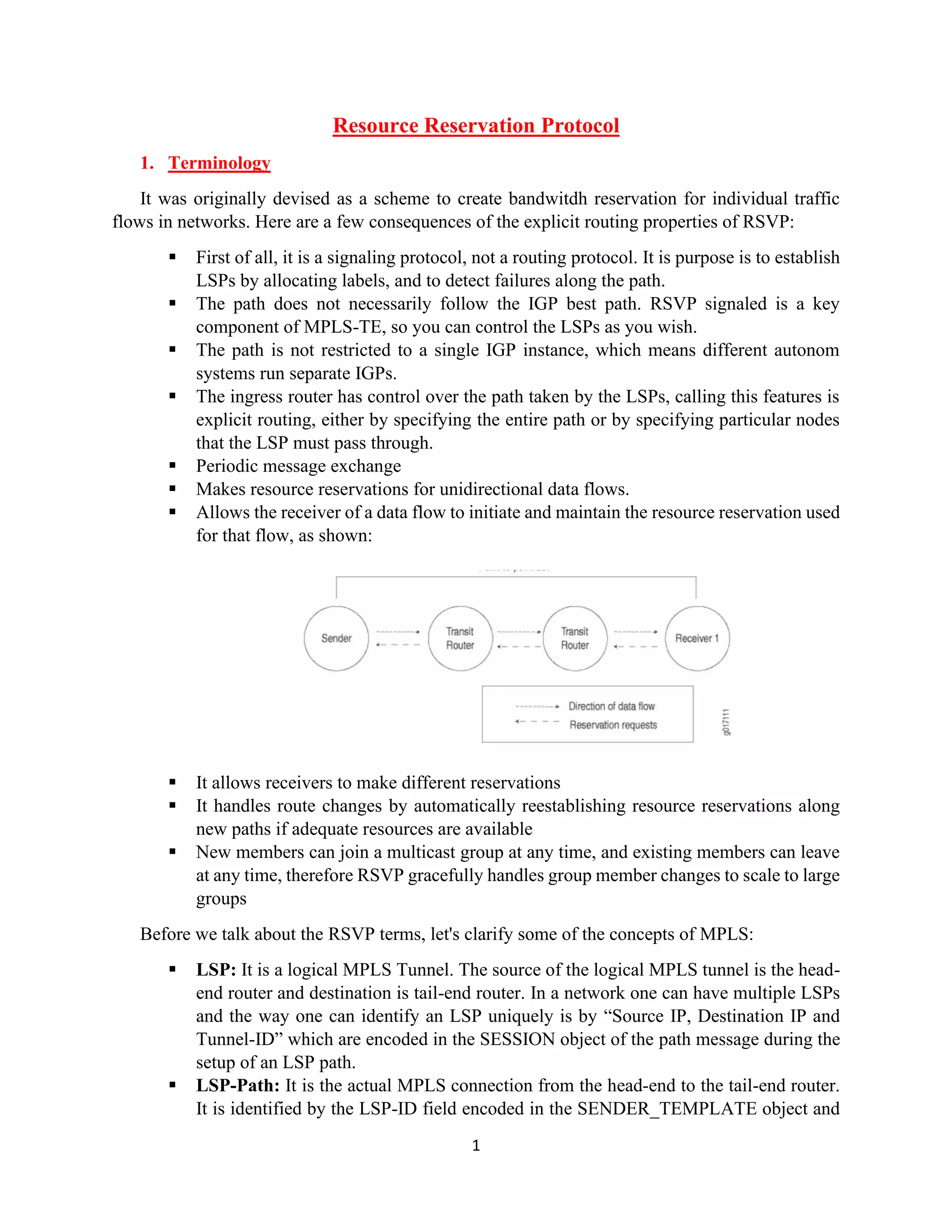
▪ Allows the receiver of a data flow to initiate and maintain the resource reservation used
for that flow, as shown:
▪ It allows receivers to make different reservations
▪ It handles route changes by automatically reestablishing resource reservations along
new paths if adequate resources are available
▪ New members can join a multicast group at any time, and existing members can leave
at any time, therefore RSVP gracefully handles group member changes to scale to large
groups
Before we talk about the RSVP terms, let's clarify some of the concepts of MPLS:
▪ LSP: It is a logical MPLS Tunnel. The source of the logical MPLS tunnel is the head-
end router and destination is tail-end router. In a network one can have multiple LSPs
and the way one can identify an LSP uniquely is by “Source IP, Destination IP and
Tunnel-ID” which are encoded in the SESSION object of the path message during the
setup of an LSP path.
▪ LSP-Path: It is the actual MPLS connection from the head-end to the tail-end router.
It is identified by the LSP-ID field encoded in the SENDER_TEMPLATE object and
2
is composed of series of RSVP sessions on each hop along the path. It is an end-to-end
representation of the RSVP sessions along each hop.
▪ Path: It is a logical entity containing a list of IP hops. When an LSP is associated with
a path, the path regulates the LSP as to which route it must take. A path can be
associated with any LSPs to control their routes.
1.1.How to be an Unique LSP-Path
In the RSVP domain, an LSP is identified by the tunnel-id (which is usually a number) and
Extend-tunnel-id (which is usually the IP of head-end) fields which are present in the SESSION
Object. All LSPs that belong to the same LSP have the same SESSION object, therefore they have
the same tunnel-id/extended-tunnel-id.
There are two objects required to uniquely identify an LSP-PATH within an LSP:
▪ Tunnel-ID: This is shared by all LSP-Paths belonging to the same LSP. Its part of
SESSION Object.
▪ LSP-ID: Each individual LSP-Path has its own LSP-ID. The LSP-ID is located in the
SENDER_TEMPLATE Object.
Below is an example of Active and Standby LSP-Paths with the same SESSION Object but
different LSP-IDs.
1.2.Messages and Objects
There are two fundamental RSVP message types: Resv and Path. Each RSVP sender host
transmits RSVP "Path" messages downstream along the routes provided by the IGP, following the
paths of the data. These Path messages store "path state" in each node along the way. Each receiver
host sends RSVP reservation request (Resv) messages upstream towards the senders. These
messages must follow exactly the reverse of the path the data packets will use, upstream to all the
sender hosts included in the sender selection. They create and maintain "reservation state" in each
node along the path.
3
All RSVP messages share a common header that includes a field for identifiying the message
type. Also the message is comprised of this common header following the RSVP Object. These
RSVP messages as may collect under the 3 subsequence. The transfer operations of the relevant
message types on their general properties and network topology are shown through the image
below:
1. When its handeling LSP setup and label distiribution
▪ Path Message
❖ Request for an LSP to be created or periodic for when time arrives the
refresh value
❖ Send by the ingress router
▪ Resv Message
❖ Reserve resources for selecting LSP by Path message
❖ Also including the label assignment
2. For tearing down existing LSPs
▪ PathTear Message
❖ Remove path and corresponding reservation state from routers that
recieve them
❖ It is originated by the sender, or by a router whose path state has timed
out
❖ It always travels downstream toward the receiver
▪ ResvTear Message
❖ Removes the reservation state following the opposite direction of
PathTear message, which it always travels upstream toward the sender
4
3. When an occurs error
▪ PathErr
❖ Report errors in processing the path messages
❖ It travel upstream toward the ingress along the reverse route of path
message
▪ ResvErr
❖ Report errors in processing the resv messages
❖ It travel hop by hop downstream toward the egress
When RSVP will create an LSP, it first perfoms on ingress router initiates the process by the
sending a path messages which includes label request object, also every reservation is assigned a
unique “Session ID” value. Then it takes the path message is forwarded towards the egress router
to creating a state in every router as it traverses the along path. In line with the above information,
let's take the process from the topologies above.
First of all, the path message is sent with the router-alert bit, so every router in the path will be
able to examine it, create a path state block and modify it as needed before sending towards. Also,
the path message can include a number of RSVP Objects, and which are common ones:
▪ SESSION: Defines the address of the egress router, and contains the Tunnel ID value
associated with the LSP
▪ RSVP-HOP: Each node sending a path message will set this object to the IP address
of the outgoing interface.
▪ LABEL REQUEST: Request for label from the downstream router.
▪ RECORD-ROUTE: List of addresses of all interfaces traversed by the path message.
Contains the actual path of the LSP through the network. Used for lop detection and
prevention process. I will examine the more details it following pages.
▪ EXPLICIT ROUTE OBJECT: Defines the requested path of the LSP through the
network. List of “Strict” or “Loose” hops that path message must traverse. I will
examine the more details it following pages.
Once the path message reaches the egress router, a recv message, which includes the allocated
label is sent back towards the ingress router following the same route of the path message. Each
transit router receiving a resv message allocates a new local label, relay it upstream, and install a
new entry in the LIB. The actual MPLS label allocation process starts with this resv message.
Since resv message has almost the same objects as in the path message, no detail will be given
here. In the following pages, applications of objects that are already important will be done.
5
1.3.Explicit Route Object
It specifies when path message originating on the ingress router can control the path through
which LSP is established, by default RSVP messages follow a path that is determined by the
network IGP's shortest path. You can think about an ERO as a list of hops that the LSP should be
traversing, or a list of path constraints that the LSP needs to verify.
EROs consist of two types of instructions:
1. Loose: When a loose hop is configured, it identifies one or more transit LSRs through
which the LSP must be routed. The network IGP determines the exact route from the
inbound router to the first loose hop, or from one loose hop to the next. The loose hop
specifies only that a particular LSR be included in the LSP.
2. Strict: When a strict hop is configured, it identifies an exact path through which the
LSP must be routed. Strict-hop EROs specify the exact order of the routers through
which the RSVP messages are sent.
Let's show step by step how the ERO object is handled in the path message on the topology
above:
1. In order to facilitate the operations, path metric values for IGP are given as shown
above. First, IGP is directed from PE-1 to P1 according to the best path.
2. The next router, which is P1, examines the ERO object in the path message. If it is not
P3 (calling an ERO Loose Constraint Process), which is determine in the ERO, it just
creates a path state and forwards the path message on, by following the IGP best path
which is goes to path P3. Also, the path state keeps track of who the previous was,
which in this case PE-1. This process is so important in the reservation process.
3. The next router, which is P3, examines the ERO object in the path message. If a router
can verify (calling an ERO Loose Verification Process) the constaint of the top of the
ERO object, the constraint removed when transfering the next router.
4. Same process will examine it like a Step 3.
5. If a router, which is P4, receives a path message with an ERO which has a strict hop at
the top, there are two possible cases here:
▪ If P4 can verify it, then the constraint is removed and the path message is
followed on.
▪ If P4 cannot verfiy it, a PathErr message is sent back towards the ingress router,
which is PE-1, and the LSP setup process fails.
6
In the other words, a strict hop in ERO is used to determine the next-hop a LSP should
go through, it does not allow for intermediate routers in the path.
6. Once the path message reaches the egress router, which is PE-2, the tail-end router
sends back a resv message which includes label information. Also, resv message
follows the path state (i.e. Step 2.) as every router in kept track “Session-ID” and the
associated “RSVP-Hop” object.
The practice I have shown so far is only about the visualization of the theoretical part of the
work. In the following pages, the results obtained by making applications on these concepts will
be detailed.
1.4.Record Route Object
It keeps track of the actual path an LSP is traversing. Every node adds to the RRO the address
of the interface on which the path message has been received. After the path message reaches the
egress router, the complete RRO objects is sent back towards the ingress using the resv message.
So, that all LSRs have full visibility of the path taken by the LSP as it traverses the network.
Therefore, it detects of possible forwarding loops.
Let's show step by step how the RRO object is handled in the path message on the topology
above:
1. The packet creates RRO objects as shown in green on topology on the paths it will take
until it reaches the P4 router. The steps up to this point will not be shown as they are
explained in detail about ERO.
2. So, P4 receive a path message thorugh P3. It will add to the RRO, and forward to the
path message towards P2.
3. P2 will add to the RRO, and forward path message back towards P4.
4. P4 will detect one of its own addresses in the RRO and abort the process. After that,
P4 sending back an PathErr message towards the ingress router. The PathErr message
will contain an error object which specifies the interface (P4 facing P3) on which the
loop has been detected.
The practice I have shown so far is only about the visualization of the theoretical part of the
work. In the following pages, the results obtained by making applications on these concepts will
be detailed.
7
2. Example Series
2.1.Example of Unidirection LSP
Considering the network topology below, I will perform RSVP configuration on the MPLS
network. Here, the following topology was performed by creating different “Logical System” on
a single physical MX104 router.
Since my purpose in this documentation is to analyze the working logic of RSVP, I will not be
concerned with the configurations of the CE routers and PE routers on the customer-facing
interfaces. In addition, OSPF was used as an IGP protocol on the MPLS network.
RSVP does not automatically advertise FEC’s like LDP does. Rather, RSVP works on a
’Downstream on Demand’ basis, meaning that you are required to configure each LSP that you
need. Junos then uses RSVP to signal the path, and then labels are distributed from the tail-end PE
back to the head-end PE.
Before you create your first tunnel, you need to ensure that your IGP is extended to advertise
the traffic-engineering extensions. Traffic-engineering information is advertised in OSPF type-10
LSAs. These are opaque LSAs and have area flooding scope, which is why you cannot have TE
tunnels running through multiple areas.
8
Simply telling Junos to follow the TE database to 1.1.1.1, as a result, this LSP should follow
the IGP path to 1.1.1.1. First verify that the LSP is up:
LSP path is defined in the area marked with black color in the above picture. The important
thing here is the value I specify with the IP address of the egress point of the LSP. This will be
installed into inet.3 table as a prefix /32. Also, you can see that there is only a single LSP here.
PE1 is the ingress PE for this LSP and hence you see one RSVP ingress session on this router. The
state is also Up.
Other things that LSPs are unidirectional. Just because you have an LSP from PE1 to P1 does
not mean you have an LSP from P1 to PE1. Currently from P1’s perspective, there is not an LSP
to PE1, so it will just see the route to PE1’s loopback as an IGP route:
As can be seen from the above output, LSP was established unilaterally. If a similar path is
created through P1 after this step, LSP will run successfully. Another thing that I want to mention
that the “Label-Out” value is empty because P1 is the egress router of LSP, which was creat “PE1-
to-P1” path.
9
In the example above, I showed what the concepts Path and Resv messages actually do in the
RSVP protocol. When an LSP is set up on the head-end PE, it calculates a path to the egress PE
and sends an RSVP path message towards the egress PE. This RSVP path message also has the
router-alert message set, which causes each router along the path to inspect the packet. If the
alert option was not set, other routers in the path would simply consider the packet to be a regular
transit packet and not set up the reservation. Once the packet gets all the way to the egress PE, and
the path setup is successful, the egress PE sends an RSVP reservation packet back to the previous
MPLS router. Included with this packet is a label to use for this LSP. Once a router receives a Resv
message with label, it generates its own Resv message with label to the previous MPLS router
right up until it gets to the head-end router again.
NOTE: I will remove the LSP configurations I have created for this section before starting the next examples. I
kindly ask you to consider this for other examples I will show.
2.2.Tracing the Labels
In this section, I will detail both label analysis and BW reservation process on an LSP that
I have created from end to end. Therefore, LSPs were created as follows, with full-mesh on PE
routers on the MPLS network, which is PEs and Ps routers:
## Configuration of PE-1 Router ##
root@ATAKAN_TEST:LS11-PE1> show configuration | match label-switched-path | display set
set logical-systems LS11-PE1 protocols mpls label-switched-path PE1-to-PE2 to 12.12.12.12
set logical-systems LS11-PE1 protocols mpls label-switched-path PE1-to-PE3 to 13.13.13.13
## Configuration of PE-2 Router ##
root@ATAKAN_TEST:LS12-PE2> show configuration | match label-switched-path | display set
set logical-systems LS12-PE2 protocols mpls label-switched-path PE2-to-PE1 to 11.11.11.11
set logical-systems LS12-PE2 protocols mpls label-switched-path PE2-to-PE3 to 13.13.13.13
## Configuration of PE-3 Router ##
root@ATAKAN_TEST:LS13-PE3> show configuration | match label-switched-path | display set
set logical-systems LS13-PE3 protocols mpls label-switched-path PE3-to-PE1 to 11.11.11.11
set logical-systems LS13-PE3 protocols mpls label-switched-path PE3-to-PE2 to 12.12.12.12
Reference to the above configurations, I can examine the configurations of the PE1-to-PE3
LSP from end to end. First, let’s verify that the routes of loopbacks of PE1 and PE3 routers are
advertised by IGP:
10
PE3 has a regular OSPF route as well as a labeled next-hop in inet.3. The route in inet.3
shows that when PE3 sends a labeled packet to PE1, it sends it through label-switched-path PE3-
to-PE1. Unlike LDP, Junos won’t show you the label imposed in this output.
Let's examine in the picture above. The important point here is when PE3 wants to transmit
the packet to PE1, it imposes the label 299856 onto the frame, and sends out lt-0/0/0.12 towards
P3. Also, as I mentioned in the previous pages, I marked “LSP-ID” and “SESSION-ID”, which
are the unique values of each LSP created, on the above picture.
The P3 router is now transit router, meaning it should swap the above transport label and
send it towards upstream router, which is P1. Let’s verify:
11
The P1 router is now the penultimate router, meaning it should pop the above transport
label and send it towards egress router, which is PE1. Let’s verify:
Finally, with the below output, you can verify that the end-to-end LSP is working and how
the respective label values are changed:
2.3.Explicit and Record Route Object
In the previous section of objects, which are ERO and RRO, belonging to RSVP messages
was explained in detail. Here, I will only show you how to manipulate the path through the
example. Before starting, you can see the ERO and RRO records of the preferred path for the
current LSP, which is PE3-to-PE1, on PE3 as follows. If we examine the following output in detail,
we can observe the related objects as follows;
▪ Explicit Route Object
❖ P3 – P1 – PE1
▪ Record Route Object
❖ <self> – P3 – P1 – PE1
12
After this stage, let's make the change for the current LSP as follows. You can also find the
relevant outputs from now on, below:
Essentially a strict hop means that the next-hop needs to be directly connected to the next
router in the path. Loose means you can follow the IGP to the next IP address in the path and it
can be multiple hops away. If we examine the following output in detail, we can observe the related
objects as follows;
▪ Explicit Route Object
❖ P3 – P2 – P1 – PE1
▪ Record Route Object
❖ <self> – P3 – P2 – P1 – PE1
13
In the output of the above command, you can get detailed output including the errors and
the information about the processes that occurred during the creation of RRO and ERO objects. In
this case, the CSPF detected a some route issue, such as “No route toward 11.11.11.11”, due to
incorrect configuration of the ERO object. You can also observe how the current LSP changes as
a result of manipulation in the ERO object.
14
3. References
While creating this document, I took the articles and books below as a reference:
▪ https://www.juniper.net/documentation/en_US/junos/topics/topic-map/rsvp-overview.html
▪ https://networklessons.com/mpls
▪ https://packetpushers.net/?s=rsvp
▪ https://tools.ietf.org/html/rfc7570
▪ https://tools.ietf.org/html/rfc2205
▪ https://tools.ietf.org/html/rfc4561
▪ Day One: MPLS for Enterprise Engineers – Juniper Networks
▪ Day One: Routing the Internet Protocol – Juniper Networks
▪ IPexpert's Multiprotocol Label Switching (MPLS) Operation and Troubleshooting – Terry
Vinson
▪ MPLS-Enabled Applications: Emerging Developments And New Technologies – Ina
Minei, Julian Lucek
▪ Advanced MPLS Design and Implementation – Vivek Alwayn

Resource reservation protocol

  • 1.
    1 Resource Reservation Protocol 1.Terminology It was originally devised as a scheme to create bandwitdh reservation for individual traffic flows in networks. Here are a few consequences of the explicit routing properties of RSVP: ▪ First of all, it is a signaling protocol, not a routing protocol. It is purpose is to establish LSPs by allocating labels, and to detect failures along the path. ▪ The path does not necessarily follow the IGP best path. RSVP signaled is a key component of MPLS-TE, so you can control the LSPs as you wish. ▪ The path is not restricted to a single IGP instance, which means different autonom systems run separate IGPs. ▪ The ingress router has control over the path taken by the LSPs, calling this features is explicit routing, either by specifying the entire path or by specifying particular nodes that the LSP must pass through. ▪ Periodic message exchange ▪ Makes resource reservations for unidirectional data flows. ▪ Allows the receiver of a data flow to initiate and maintain the resource reservation used for that flow, as shown: ▪ It allows receivers to make different reservations ▪ It handles route changes by automatically reestablishing resource reservations along new paths if adequate resources are available ▪ New members can join a multicast group at any time, and existing members can leave at any time, therefore RSVP gracefully handles group member changes to scale to large groups Before we talk about the RSVP terms, let's clarify some of the concepts of MPLS: ▪ LSP: It is a logical MPLS Tunnel. The source of the logical MPLS tunnel is the head- end router and destination is tail-end router. In a network one can have multiple LSPs and the way one can identify an LSP uniquely is by “Source IP, Destination IP and Tunnel-ID” which are encoded in the SESSION object of the path message during the setup of an LSP path. ▪ LSP-Path: It is the actual MPLS connection from the head-end to the tail-end router. It is identified by the LSP-ID field encoded in the SENDER_TEMPLATE object and
  • 2.
    2 is composed ofseries of RSVP sessions on each hop along the path. It is an end-to-end representation of the RSVP sessions along each hop. ▪ Path: It is a logical entity containing a list of IP hops. When an LSP is associated with a path, the path regulates the LSP as to which route it must take. A path can be associated with any LSPs to control their routes. 1.1.How to be an Unique LSP-Path In the RSVP domain, an LSP is identified by the tunnel-id (which is usually a number) and Extend-tunnel-id (which is usually the IP of head-end) fields which are present in the SESSION Object. All LSPs that belong to the same LSP have the same SESSION object, therefore they have the same tunnel-id/extended-tunnel-id. There are two objects required to uniquely identify an LSP-PATH within an LSP: ▪ Tunnel-ID: This is shared by all LSP-Paths belonging to the same LSP. Its part of SESSION Object. ▪ LSP-ID: Each individual LSP-Path has its own LSP-ID. The LSP-ID is located in the SENDER_TEMPLATE Object. Below is an example of Active and Standby LSP-Paths with the same SESSION Object but different LSP-IDs. 1.2.Messages and Objects There are two fundamental RSVP message types: Resv and Path. Each RSVP sender host transmits RSVP "Path" messages downstream along the routes provided by the IGP, following the paths of the data. These Path messages store "path state" in each node along the way. Each receiver host sends RSVP reservation request (Resv) messages upstream towards the senders. These messages must follow exactly the reverse of the path the data packets will use, upstream to all the sender hosts included in the sender selection. They create and maintain "reservation state" in each node along the path.
  • 3.
    3 All RSVP messagesshare a common header that includes a field for identifiying the message type. Also the message is comprised of this common header following the RSVP Object. These RSVP messages as may collect under the 3 subsequence. The transfer operations of the relevant message types on their general properties and network topology are shown through the image below: 1. When its handeling LSP setup and label distiribution ▪ Path Message ❖ Request for an LSP to be created or periodic for when time arrives the refresh value ❖ Send by the ingress router ▪ Resv Message ❖ Reserve resources for selecting LSP by Path message ❖ Also including the label assignment 2. For tearing down existing LSPs ▪ PathTear Message ❖ Remove path and corresponding reservation state from routers that recieve them ❖ It is originated by the sender, or by a router whose path state has timed out ❖ It always travels downstream toward the receiver ▪ ResvTear Message ❖ Removes the reservation state following the opposite direction of PathTear message, which it always travels upstream toward the sender
  • 4.
    4 3. When anoccurs error ▪ PathErr ❖ Report errors in processing the path messages ❖ It travel upstream toward the ingress along the reverse route of path message ▪ ResvErr ❖ Report errors in processing the resv messages ❖ It travel hop by hop downstream toward the egress When RSVP will create an LSP, it first perfoms on ingress router initiates the process by the sending a path messages which includes label request object, also every reservation is assigned a unique “Session ID” value. Then it takes the path message is forwarded towards the egress router to creating a state in every router as it traverses the along path. In line with the above information, let's take the process from the topologies above. First of all, the path message is sent with the router-alert bit, so every router in the path will be able to examine it, create a path state block and modify it as needed before sending towards. Also, the path message can include a number of RSVP Objects, and which are common ones: ▪ SESSION: Defines the address of the egress router, and contains the Tunnel ID value associated with the LSP ▪ RSVP-HOP: Each node sending a path message will set this object to the IP address of the outgoing interface. ▪ LABEL REQUEST: Request for label from the downstream router. ▪ RECORD-ROUTE: List of addresses of all interfaces traversed by the path message. Contains the actual path of the LSP through the network. Used for lop detection and prevention process. I will examine the more details it following pages. ▪ EXPLICIT ROUTE OBJECT: Defines the requested path of the LSP through the network. List of “Strict” or “Loose” hops that path message must traverse. I will examine the more details it following pages. Once the path message reaches the egress router, a recv message, which includes the allocated label is sent back towards the ingress router following the same route of the path message. Each transit router receiving a resv message allocates a new local label, relay it upstream, and install a new entry in the LIB. The actual MPLS label allocation process starts with this resv message. Since resv message has almost the same objects as in the path message, no detail will be given here. In the following pages, applications of objects that are already important will be done.
  • 5.
    5 1.3.Explicit Route Object Itspecifies when path message originating on the ingress router can control the path through which LSP is established, by default RSVP messages follow a path that is determined by the network IGP's shortest path. You can think about an ERO as a list of hops that the LSP should be traversing, or a list of path constraints that the LSP needs to verify. EROs consist of two types of instructions: 1. Loose: When a loose hop is configured, it identifies one or more transit LSRs through which the LSP must be routed. The network IGP determines the exact route from the inbound router to the first loose hop, or from one loose hop to the next. The loose hop specifies only that a particular LSR be included in the LSP. 2. Strict: When a strict hop is configured, it identifies an exact path through which the LSP must be routed. Strict-hop EROs specify the exact order of the routers through which the RSVP messages are sent. Let's show step by step how the ERO object is handled in the path message on the topology above: 1. In order to facilitate the operations, path metric values for IGP are given as shown above. First, IGP is directed from PE-1 to P1 according to the best path. 2. The next router, which is P1, examines the ERO object in the path message. If it is not P3 (calling an ERO Loose Constraint Process), which is determine in the ERO, it just creates a path state and forwards the path message on, by following the IGP best path which is goes to path P3. Also, the path state keeps track of who the previous was, which in this case PE-1. This process is so important in the reservation process. 3. The next router, which is P3, examines the ERO object in the path message. If a router can verify (calling an ERO Loose Verification Process) the constaint of the top of the ERO object, the constraint removed when transfering the next router. 4. Same process will examine it like a Step 3. 5. If a router, which is P4, receives a path message with an ERO which has a strict hop at the top, there are two possible cases here: ▪ If P4 can verify it, then the constraint is removed and the path message is followed on. ▪ If P4 cannot verfiy it, a PathErr message is sent back towards the ingress router, which is PE-1, and the LSP setup process fails.
  • 6.
    6 In the otherwords, a strict hop in ERO is used to determine the next-hop a LSP should go through, it does not allow for intermediate routers in the path. 6. Once the path message reaches the egress router, which is PE-2, the tail-end router sends back a resv message which includes label information. Also, resv message follows the path state (i.e. Step 2.) as every router in kept track “Session-ID” and the associated “RSVP-Hop” object. The practice I have shown so far is only about the visualization of the theoretical part of the work. In the following pages, the results obtained by making applications on these concepts will be detailed. 1.4.Record Route Object It keeps track of the actual path an LSP is traversing. Every node adds to the RRO the address of the interface on which the path message has been received. After the path message reaches the egress router, the complete RRO objects is sent back towards the ingress using the resv message. So, that all LSRs have full visibility of the path taken by the LSP as it traverses the network. Therefore, it detects of possible forwarding loops. Let's show step by step how the RRO object is handled in the path message on the topology above: 1. The packet creates RRO objects as shown in green on topology on the paths it will take until it reaches the P4 router. The steps up to this point will not be shown as they are explained in detail about ERO. 2. So, P4 receive a path message thorugh P3. It will add to the RRO, and forward to the path message towards P2. 3. P2 will add to the RRO, and forward path message back towards P4. 4. P4 will detect one of its own addresses in the RRO and abort the process. After that, P4 sending back an PathErr message towards the ingress router. The PathErr message will contain an error object which specifies the interface (P4 facing P3) on which the loop has been detected. The practice I have shown so far is only about the visualization of the theoretical part of the work. In the following pages, the results obtained by making applications on these concepts will be detailed.
  • 7.
    7 2. Example Series 2.1.Exampleof Unidirection LSP Considering the network topology below, I will perform RSVP configuration on the MPLS network. Here, the following topology was performed by creating different “Logical System” on a single physical MX104 router. Since my purpose in this documentation is to analyze the working logic of RSVP, I will not be concerned with the configurations of the CE routers and PE routers on the customer-facing interfaces. In addition, OSPF was used as an IGP protocol on the MPLS network. RSVP does not automatically advertise FEC’s like LDP does. Rather, RSVP works on a ’Downstream on Demand’ basis, meaning that you are required to configure each LSP that you need. Junos then uses RSVP to signal the path, and then labels are distributed from the tail-end PE back to the head-end PE. Before you create your first tunnel, you need to ensure that your IGP is extended to advertise the traffic-engineering extensions. Traffic-engineering information is advertised in OSPF type-10 LSAs. These are opaque LSAs and have area flooding scope, which is why you cannot have TE tunnels running through multiple areas.
  • 8.
    8 Simply telling Junosto follow the TE database to 1.1.1.1, as a result, this LSP should follow the IGP path to 1.1.1.1. First verify that the LSP is up: LSP path is defined in the area marked with black color in the above picture. The important thing here is the value I specify with the IP address of the egress point of the LSP. This will be installed into inet.3 table as a prefix /32. Also, you can see that there is only a single LSP here. PE1 is the ingress PE for this LSP and hence you see one RSVP ingress session on this router. The state is also Up. Other things that LSPs are unidirectional. Just because you have an LSP from PE1 to P1 does not mean you have an LSP from P1 to PE1. Currently from P1’s perspective, there is not an LSP to PE1, so it will just see the route to PE1’s loopback as an IGP route: As can be seen from the above output, LSP was established unilaterally. If a similar path is created through P1 after this step, LSP will run successfully. Another thing that I want to mention that the “Label-Out” value is empty because P1 is the egress router of LSP, which was creat “PE1- to-P1” path.
  • 9.
    9 In the exampleabove, I showed what the concepts Path and Resv messages actually do in the RSVP protocol. When an LSP is set up on the head-end PE, it calculates a path to the egress PE and sends an RSVP path message towards the egress PE. This RSVP path message also has the router-alert message set, which causes each router along the path to inspect the packet. If the alert option was not set, other routers in the path would simply consider the packet to be a regular transit packet and not set up the reservation. Once the packet gets all the way to the egress PE, and the path setup is successful, the egress PE sends an RSVP reservation packet back to the previous MPLS router. Included with this packet is a label to use for this LSP. Once a router receives a Resv message with label, it generates its own Resv message with label to the previous MPLS router right up until it gets to the head-end router again. NOTE: I will remove the LSP configurations I have created for this section before starting the next examples. I kindly ask you to consider this for other examples I will show. 2.2.Tracing the Labels In this section, I will detail both label analysis and BW reservation process on an LSP that I have created from end to end. Therefore, LSPs were created as follows, with full-mesh on PE routers on the MPLS network, which is PEs and Ps routers: ## Configuration of PE-1 Router ## root@ATAKAN_TEST:LS11-PE1> show configuration | match label-switched-path | display set set logical-systems LS11-PE1 protocols mpls label-switched-path PE1-to-PE2 to 12.12.12.12 set logical-systems LS11-PE1 protocols mpls label-switched-path PE1-to-PE3 to 13.13.13.13 ## Configuration of PE-2 Router ## root@ATAKAN_TEST:LS12-PE2> show configuration | match label-switched-path | display set set logical-systems LS12-PE2 protocols mpls label-switched-path PE2-to-PE1 to 11.11.11.11 set logical-systems LS12-PE2 protocols mpls label-switched-path PE2-to-PE3 to 13.13.13.13 ## Configuration of PE-3 Router ## root@ATAKAN_TEST:LS13-PE3> show configuration | match label-switched-path | display set set logical-systems LS13-PE3 protocols mpls label-switched-path PE3-to-PE1 to 11.11.11.11 set logical-systems LS13-PE3 protocols mpls label-switched-path PE3-to-PE2 to 12.12.12.12 Reference to the above configurations, I can examine the configurations of the PE1-to-PE3 LSP from end to end. First, let’s verify that the routes of loopbacks of PE1 and PE3 routers are advertised by IGP:
  • 10.
    10 PE3 has aregular OSPF route as well as a labeled next-hop in inet.3. The route in inet.3 shows that when PE3 sends a labeled packet to PE1, it sends it through label-switched-path PE3- to-PE1. Unlike LDP, Junos won’t show you the label imposed in this output. Let's examine in the picture above. The important point here is when PE3 wants to transmit the packet to PE1, it imposes the label 299856 onto the frame, and sends out lt-0/0/0.12 towards P3. Also, as I mentioned in the previous pages, I marked “LSP-ID” and “SESSION-ID”, which are the unique values of each LSP created, on the above picture. The P3 router is now transit router, meaning it should swap the above transport label and send it towards upstream router, which is P1. Let’s verify:
  • 11.
    11 The P1 routeris now the penultimate router, meaning it should pop the above transport label and send it towards egress router, which is PE1. Let’s verify: Finally, with the below output, you can verify that the end-to-end LSP is working and how the respective label values are changed: 2.3.Explicit and Record Route Object In the previous section of objects, which are ERO and RRO, belonging to RSVP messages was explained in detail. Here, I will only show you how to manipulate the path through the example. Before starting, you can see the ERO and RRO records of the preferred path for the current LSP, which is PE3-to-PE1, on PE3 as follows. If we examine the following output in detail, we can observe the related objects as follows; ▪ Explicit Route Object ❖ P3 – P1 – PE1 ▪ Record Route Object ❖ <self> – P3 – P1 – PE1
  • 12.
    12 After this stage,let's make the change for the current LSP as follows. You can also find the relevant outputs from now on, below: Essentially a strict hop means that the next-hop needs to be directly connected to the next router in the path. Loose means you can follow the IGP to the next IP address in the path and it can be multiple hops away. If we examine the following output in detail, we can observe the related objects as follows; ▪ Explicit Route Object ❖ P3 – P2 – P1 – PE1 ▪ Record Route Object ❖ <self> – P3 – P2 – P1 – PE1
  • 13.
    13 In the outputof the above command, you can get detailed output including the errors and the information about the processes that occurred during the creation of RRO and ERO objects. In this case, the CSPF detected a some route issue, such as “No route toward 11.11.11.11”, due to incorrect configuration of the ERO object. You can also observe how the current LSP changes as a result of manipulation in the ERO object.
  • 14.
    14 3. References While creatingthis document, I took the articles and books below as a reference: ▪ https://www.juniper.net/documentation/en_US/junos/topics/topic-map/rsvp-overview.html ▪ https://networklessons.com/mpls ▪ https://packetpushers.net/?s=rsvp ▪ https://tools.ietf.org/html/rfc7570 ▪ https://tools.ietf.org/html/rfc2205 ▪ https://tools.ietf.org/html/rfc4561 ▪ Day One: MPLS for Enterprise Engineers – Juniper Networks ▪ Day One: Routing the Internet Protocol – Juniper Networks ▪ IPexpert's Multiprotocol Label Switching (MPLS) Operation and Troubleshooting – Terry Vinson ▪ MPLS-Enabled Applications: Emerging Developments And New Technologies – Ina Minei, Julian Lucek ▪ Advanced MPLS Design and Implementation – Vivek Alwayn