Prepared By:- Rana M.ALI
Raspberry pi board Hardware and
Software setup for Embedded system
design
Objective
To setup Raspberry pi board, its Operating system, boot loading and VNC server setting.
Introduction
The Raspberry Pi is a series of small single-board computers developed Raspberry Pi
Foundation to promote the teaching of basic computer science in schools and in developing
countries. A Raspberry pi is a mini computer with IO pins so we can interface devices to
develop an embedded board.
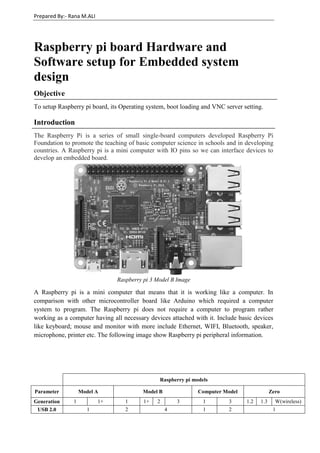
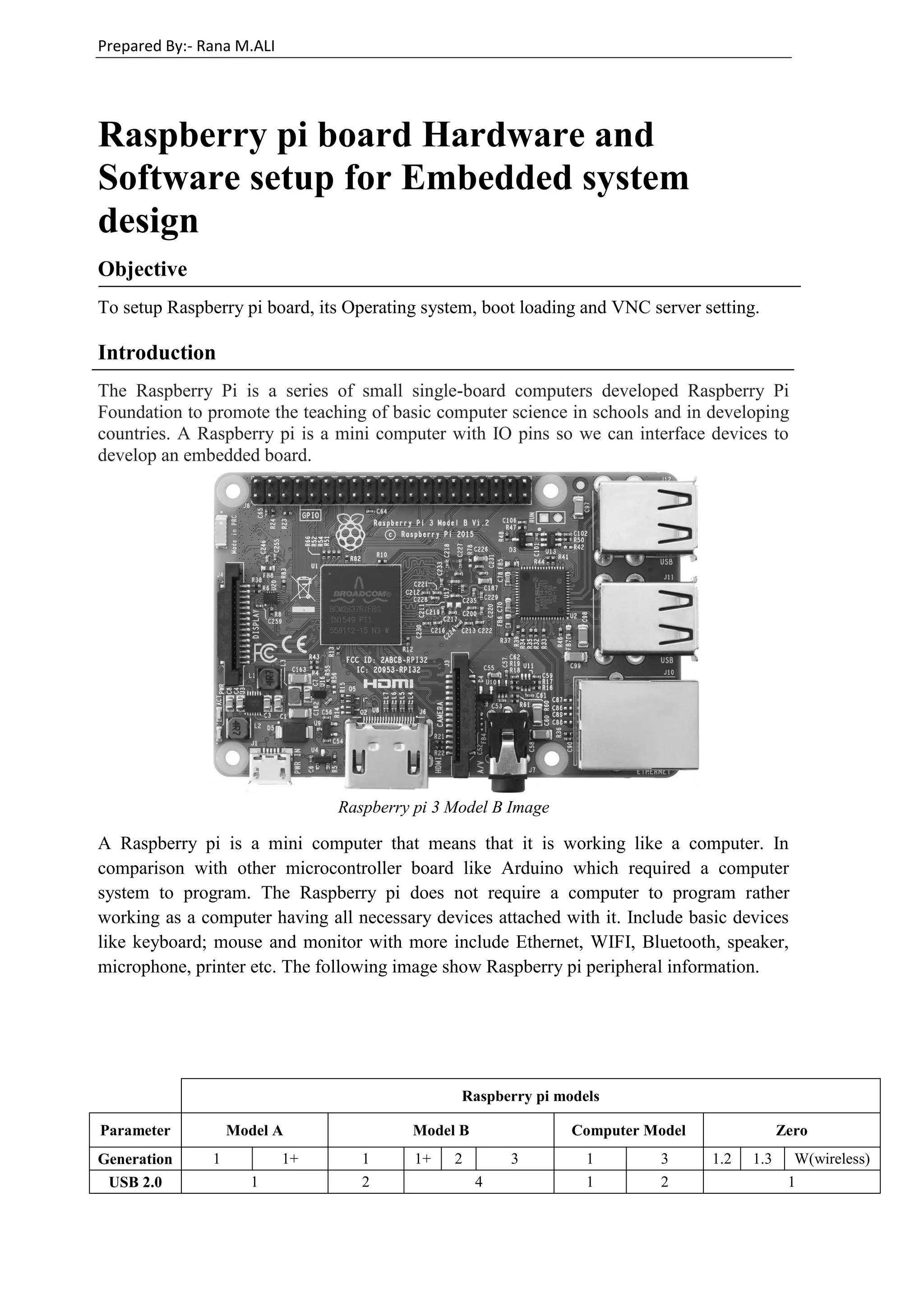
Raspberry pi 3 Model B Image
A Raspberry pi is a mini computer that means that it is working like a computer. In
comparison with other microcontroller board like Arduino which required a computer
system to program. The Raspberry pi does not require a computer to program rather
working as a computer having all necessary devices attached with it. Include basic devices
like keyboard; mouse and monitor with more include Ethernet, WIFI, Bluetooth, speaker,
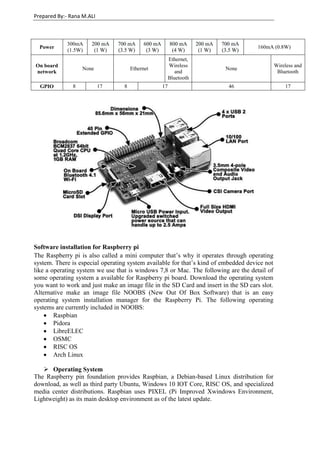
microphone, printer etc. The following image show Raspberry pi peripheral information.
Raspberry pi models
Parameter Model A Model B Computer Model Zero
Generation 1 1+ 1 1+ 2 3 1 3 1.2 1.3 W(wireless)
USB 2.0 1 2 4 1 2 1
Prepared By:- Rana M.ALI
Software installation for Raspberry pi
The Raspberry pi is also called a mini computer that’s why it operates through operating
system. There is especial operating system available for that’s kind of embedded device not
like a operating system we use that is windows 7,8 or Mac. The following are the detail of
some operating system a available for Raspberry pi board. Download the operating system
you want to work and just make an image file in the SD Card and insert in the SD cars slot.
Alternative make an image file NOOBS (New Out Of Box Software) that is an easy
operating system installation manager for the Raspberry Pi. The following operating
systems are currently included in NOOBS:
 Raspbian
 Pidora
 LibreELEC
 OSMC
 RISC OS
 Arch Linux
 Operating System
The Raspberry pin foundation provides Raspbian, a Debian-based Linux distribution for
download, as well as third party Ubuntu, Windows 10 IOT Core, RISC OS, and specialized
media center distributions. Raspbian uses PIXEL (Pi Improved Xwindows Environment,
Lightweight) as its main desktop environment as of the latest update.
Power
300mA
(1.5W)
200 mA
(1 W)
700 mA
(3.5 W)
600 mA
(3 W)
800 mA
(4 W)
200 mA
(1 W)
700 mA
(3.5 W)
160mA (0.8W)
On board
network
None Ethernet
Ethernet,
Wireless
and
Bluetooth
None
Wireless and
Bluetooth
GPIO 8 17 8 17 46 17
Prepared By:- Rana M.ALI
 Raspbian
Raspbian is a Debian-based computer operating system for
Raspberry Pi. It is officially provided by the Raspberry Pi
Foundation, as the primary operating system for the family
of Raspberry Pi single-board computers.
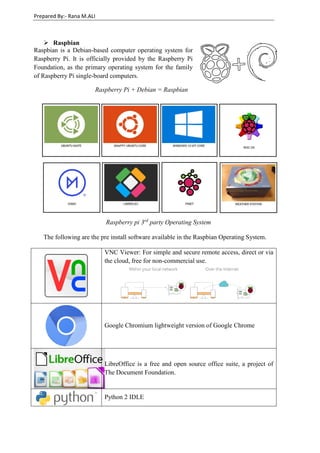
Raspberry Pi + Debian = Raspbian
Raspberry pi 3rd
party Operating System
The following are the pre install software available in the Raspbian Operating System.
VNC Viewer: For simple and secure remote access, direct or via
the cloud, free for non-commercial use.
Google Chromium lightweight version of Google Chrome
LibreOffice is a free and open source office suite, a project of
The Document Foundation.
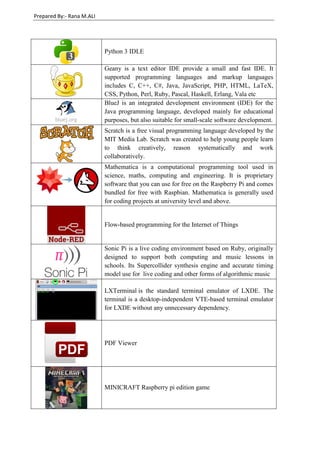
Python 2 IDLE
Prepared By:- Rana M.ALI
Python 3 IDLE
Geany is a text editor IDE provide a small and fast IDE. It
supported programming languages and markup languages
includes C, C++, C#, Java, JavaScript, PHP, HTML, LaTeX,
CSS, Python, Perl, Ruby, Pascal, Haskell, Erlang, Vala etc
BlueJ is an integrated development environment (IDE) for the
Java programming language, developed mainly for educational
purposes, but also suitable for small-scale software development.
Scratch is a free visual programming language developed by the
MIT Media Lab. Scratch was created to help young people learn
to think creatively, reason systematically and work
collaboratively.
Mathematica is a computational programming tool used in
science, maths, computing and engineering. It is proprietary
software that you can use for free on the Raspberry Pi and comes
bundled for free with Raspbian. Mathematica is generally used
for coding projects at university level and above.
Flow-based programming for the Internet of Things
Sonic Pi is a live coding environment based on Ruby, originally
designed to support both computing and music lessons in
schools. Its Supercollider synthesis engine and accurate timing
model use for live coding and other forms of algorithmic music
LXTerminal is the standard terminal emulator of LXDE. The
terminal is a desktop-independent VTE-based terminal emulator
for LXDE without any unnecessary dependency.
PDF Viewer
MINICRAFT Raspberry pi edition game
Prepared By:- Rana M.ALI
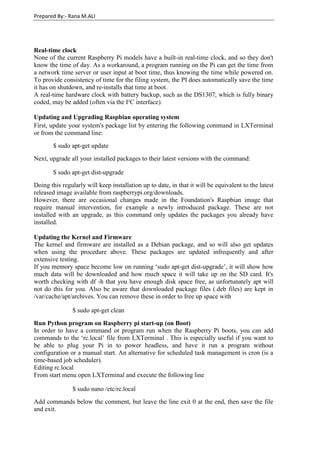
Real-time clock
None of the current Raspberry Pi models have a built-in real-time clock, and so they don't
know the time of day. As a workaround, a program running on the Pi can get the time from
a network time server or user input at boot time, thus knowing the time while powered on.
To provide consistency of time for the filing system, the PI does automatically save the time
it has on shutdown, and re-installs that time at boot.
A real-time hardware clock with battery backup, such as the DS1307, which is fully binary
coded, may be added (often via the I²C interface).
Updating and Upgrading Raspbian operating system
First, update your system's package list by entering the following command in LXTerminal
or from the command line:
$ sudo apt-get update
Next, upgrade all your installed packages to their latest versions with the command:
$ sudo apt-get dist-upgrade
Doing this regularly will keep installation up to date, in that it will be equivalent to the latest
released image available from raspberrypi.org/downloads.
However, there are occasional changes made in the Foundation's Raspbian image that
require manual intervention, for example a newly introduced package. These are not
installed with an upgrade, as this command only updates the packages you already have
installed.
Updating the Kernel and Firmware
The kernel and firmware are installed as a Debian package, and so will also get updates
when using the procedure above. These packages are updated infrequently and after
extensive testing.
If you memory space become low on running ‘sudo apt-get dist-upgrade’, it will show how
much data will be downloaded and how much space it will take up on the SD card. It's
worth checking with df -h that you have enough disk space free, as unfortunately apt will
not do this for you. Also be aware that downloaded package files (.deb files) are kept in
/var/cache/apt/archives. You can remove these in order to free up space with
$ sudo apt-get clean
Run Python program on Raspberry pi start-up (on Boot)
In order to have a command or program run when the Raspberry Pi boots, you can add
commands to the ‘rc.local’ file from LXTerminal . This is especially useful if you want to
be able to plug your Pi in to power headless, and have it run a program without
configuration or a manual start. An alternative for scheduled task management is cron (is a
time-based job scheduler).
Editing rc.local
From start menu open LXTerminal and execute the following line
$ sudo nano /etc/rc.local
Add commands below the comment, but leave the line exit 0 at the end, then save the file
and exit.
Prepared By:- Rana M.ALI
fi
python file_destination / python_file_name.py
exit 0
WARNING
If your program runs continuously (perhaps runs an infinite loop) or is likely not to exit, you
must be sure to split the process by adding an ampersand (&) to the end of the command,
like so:
python /home/pi/myscript.py &
Otherwise, the script will not end and the Pi will not boot. The ampersand allows the
command to run in a separate process and continue booting with the process running.
Also, be sure to reference absolute filenames rather than relative to your home folder; for
example, /home/pi/myscript.py rather than myscript.py.
Example:
The ampersand sign ‘&’ write after both files The ampersand sign ‘&’ write after first file only
fi
python file_destination /
python_file_1.py &
python file_destination /
python_file_2.py &
exit 0
fi
python file_destination /
python_file_1.py
python file_destination /
python_file_2.py &
exit 0
The python_file_1.py and python_file_2.py will
run simultaneously on start up
First python_file_1.py will run on start up and
when it execution complete python_file_2.py
will run
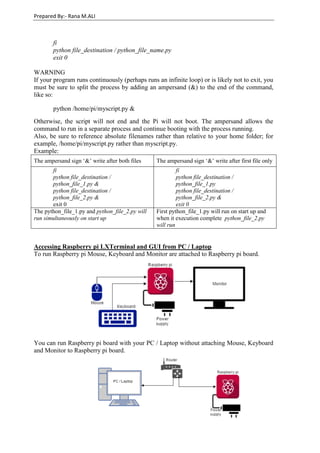
Accessing Raspberry pi LXTerminal and GUI from PC / Laptop
To run Raspberry pi Mouse, Keyboard and Monitor are attached to Raspberry pi board.
You can run Raspberry pi board with your PC / Laptop without attaching Mouse, Keyboard
and Monitor to Raspberry pi board.
Prepared By:- Rana M.ALI
VNC Server: In computing, Virtual Network Computing (VNC) is a graphical desktop
sharing system that uses the Remote Frame Buffer protocol (RFB) to remotely control
another computer. It transmits the keyboard and mouse events from one computer to
another, relaying the graphical screen updates back in the other direction, over a network.
PUTTY Software: PuTTY is a free and open-source terminal emulator; serial console and
network file transfer application. It supports several network protocols, including SCP, SSH,
Telnet, rlogin, and raw socket connection. It can also connect to a serial port.
Steps to connect Raspberry pi board with your PC / Laptop
1) Find IP address of Raspberry pi board using command
$ ifconfig
2) Open Putty software and write the IP Address of Raspberry pi board in Host Name
(or IP address)
3) After click on open button a command prompt window open asking for Login and
password for Raspberry pi board. The default user name is ‘pi’ and default password
is ‘raspberry’.
Login as: pi
pi@(ip address)’s password: raspberry
4) After successful login the LXTerminal of Raspberry pi is open on PC/Laptop screen.
Now to access the GUI window install VNC Server in raspberry pi
$ sudo apt-get install tightvncserver
5) In installation process it required a password which is use later to login VNC Server.
6) After installing Tight VNC Server run it
$ tightvncserver
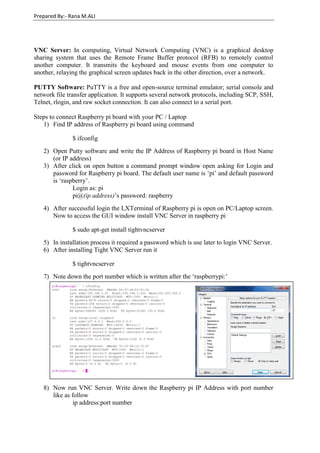
7) Note down the port number which is written after the ‘raspberrypi:’
8) Now run VNC Server. Write down the Raspberry pi IP Address with port number
like as follow
ip address:port number
Prepared By:- Rana M.ALI
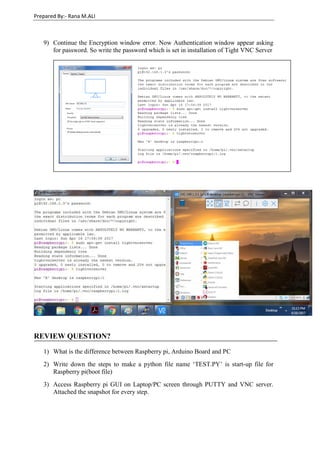
9) Continue the Encryption window error. Now Authentication window appear asking
for password. So write the password which is set in installation of Tight VNC Server
REVIEW QUESTION?
1) What is the difference between Raspberry pi, Arduino Board and PC
2) Write down the steps to make a python file name ‘TEST.PY’ is start-up file for
Raspberry pi(boot file)
3) Access Raspberry pi GUI on Laptop/PC screen through PUTTY and VNC server.
Attached the snapshot for every step.

Raspberry pi Board Hardware & Software Setup

  • 1.
    Prepared By:- RanaM.ALI Raspberry pi board Hardware and Software setup for Embedded system design Objective To setup Raspberry pi board, its Operating system, boot loading and VNC server setting. Introduction The Raspberry Pi is a series of small single-board computers developed Raspberry Pi Foundation to promote the teaching of basic computer science in schools and in developing countries. A Raspberry pi is a mini computer with IO pins so we can interface devices to develop an embedded board. Raspberry pi 3 Model B Image A Raspberry pi is a mini computer that means that it is working like a computer. In comparison with other microcontroller board like Arduino which required a computer system to program. The Raspberry pi does not require a computer to program rather working as a computer having all necessary devices attached with it. Include basic devices like keyboard; mouse and monitor with more include Ethernet, WIFI, Bluetooth, speaker, microphone, printer etc. The following image show Raspberry pi peripheral information. Raspberry pi models Parameter Model A Model B Computer Model Zero Generation 1 1+ 1 1+ 2 3 1 3 1.2 1.3 W(wireless) USB 2.0 1 2 4 1 2 1
  • 2.
    Prepared By:- RanaM.ALI Software installation for Raspberry pi The Raspberry pi is also called a mini computer that’s why it operates through operating system. There is especial operating system available for that’s kind of embedded device not like a operating system we use that is windows 7,8 or Mac. The following are the detail of some operating system a available for Raspberry pi board. Download the operating system you want to work and just make an image file in the SD Card and insert in the SD cars slot. Alternative make an image file NOOBS (New Out Of Box Software) that is an easy operating system installation manager for the Raspberry Pi. The following operating systems are currently included in NOOBS:  Raspbian  Pidora  LibreELEC  OSMC  RISC OS  Arch Linux  Operating System The Raspberry pin foundation provides Raspbian, a Debian-based Linux distribution for download, as well as third party Ubuntu, Windows 10 IOT Core, RISC OS, and specialized media center distributions. Raspbian uses PIXEL (Pi Improved Xwindows Environment, Lightweight) as its main desktop environment as of the latest update. Power 300mA (1.5W) 200 mA (1 W) 700 mA (3.5 W) 600 mA (3 W) 800 mA (4 W) 200 mA (1 W) 700 mA (3.5 W) 160mA (0.8W) On board network None Ethernet Ethernet, Wireless and Bluetooth None Wireless and Bluetooth GPIO 8 17 8 17 46 17
  • 3.
    Prepared By:- RanaM.ALI  Raspbian Raspbian is a Debian-based computer operating system for Raspberry Pi. It is officially provided by the Raspberry Pi Foundation, as the primary operating system for the family of Raspberry Pi single-board computers. Raspberry Pi + Debian = Raspbian Raspberry pi 3rd party Operating System The following are the pre install software available in the Raspbian Operating System. VNC Viewer: For simple and secure remote access, direct or via the cloud, free for non-commercial use. Google Chromium lightweight version of Google Chrome LibreOffice is a free and open source office suite, a project of The Document Foundation. Python 2 IDLE
  • 4.
    Prepared By:- RanaM.ALI Python 3 IDLE Geany is a text editor IDE provide a small and fast IDE. It supported programming languages and markup languages includes C, C++, C#, Java, JavaScript, PHP, HTML, LaTeX, CSS, Python, Perl, Ruby, Pascal, Haskell, Erlang, Vala etc BlueJ is an integrated development environment (IDE) for the Java programming language, developed mainly for educational purposes, but also suitable for small-scale software development. Scratch is a free visual programming language developed by the MIT Media Lab. Scratch was created to help young people learn to think creatively, reason systematically and work collaboratively. Mathematica is a computational programming tool used in science, maths, computing and engineering. It is proprietary software that you can use for free on the Raspberry Pi and comes bundled for free with Raspbian. Mathematica is generally used for coding projects at university level and above. Flow-based programming for the Internet of Things Sonic Pi is a live coding environment based on Ruby, originally designed to support both computing and music lessons in schools. Its Supercollider synthesis engine and accurate timing model use for live coding and other forms of algorithmic music LXTerminal is the standard terminal emulator of LXDE. The terminal is a desktop-independent VTE-based terminal emulator for LXDE without any unnecessary dependency. PDF Viewer MINICRAFT Raspberry pi edition game
  • 5.
    Prepared By:- RanaM.ALI Real-time clock None of the current Raspberry Pi models have a built-in real-time clock, and so they don't know the time of day. As a workaround, a program running on the Pi can get the time from a network time server or user input at boot time, thus knowing the time while powered on. To provide consistency of time for the filing system, the PI does automatically save the time it has on shutdown, and re-installs that time at boot. A real-time hardware clock with battery backup, such as the DS1307, which is fully binary coded, may be added (often via the I²C interface). Updating and Upgrading Raspbian operating system First, update your system's package list by entering the following command in LXTerminal or from the command line: $ sudo apt-get update Next, upgrade all your installed packages to their latest versions with the command: $ sudo apt-get dist-upgrade Doing this regularly will keep installation up to date, in that it will be equivalent to the latest released image available from raspberrypi.org/downloads. However, there are occasional changes made in the Foundation's Raspbian image that require manual intervention, for example a newly introduced package. These are not installed with an upgrade, as this command only updates the packages you already have installed. Updating the Kernel and Firmware The kernel and firmware are installed as a Debian package, and so will also get updates when using the procedure above. These packages are updated infrequently and after extensive testing. If you memory space become low on running ‘sudo apt-get dist-upgrade’, it will show how much data will be downloaded and how much space it will take up on the SD card. It's worth checking with df -h that you have enough disk space free, as unfortunately apt will not do this for you. Also be aware that downloaded package files (.deb files) are kept in /var/cache/apt/archives. You can remove these in order to free up space with $ sudo apt-get clean Run Python program on Raspberry pi start-up (on Boot) In order to have a command or program run when the Raspberry Pi boots, you can add commands to the ‘rc.local’ file from LXTerminal . This is especially useful if you want to be able to plug your Pi in to power headless, and have it run a program without configuration or a manual start. An alternative for scheduled task management is cron (is a time-based job scheduler). Editing rc.local From start menu open LXTerminal and execute the following line $ sudo nano /etc/rc.local Add commands below the comment, but leave the line exit 0 at the end, then save the file and exit.
  • 6.
    Prepared By:- RanaM.ALI fi python file_destination / python_file_name.py exit 0 WARNING If your program runs continuously (perhaps runs an infinite loop) or is likely not to exit, you must be sure to split the process by adding an ampersand (&) to the end of the command, like so: python /home/pi/myscript.py & Otherwise, the script will not end and the Pi will not boot. The ampersand allows the command to run in a separate process and continue booting with the process running. Also, be sure to reference absolute filenames rather than relative to your home folder; for example, /home/pi/myscript.py rather than myscript.py. Example: The ampersand sign ‘&’ write after both files The ampersand sign ‘&’ write after first file only fi python file_destination / python_file_1.py & python file_destination / python_file_2.py & exit 0 fi python file_destination / python_file_1.py python file_destination / python_file_2.py & exit 0 The python_file_1.py and python_file_2.py will run simultaneously on start up First python_file_1.py will run on start up and when it execution complete python_file_2.py will run Accessing Raspberry pi LXTerminal and GUI from PC / Laptop To run Raspberry pi Mouse, Keyboard and Monitor are attached to Raspberry pi board. You can run Raspberry pi board with your PC / Laptop without attaching Mouse, Keyboard and Monitor to Raspberry pi board.
  • 7.
    Prepared By:- RanaM.ALI VNC Server: In computing, Virtual Network Computing (VNC) is a graphical desktop sharing system that uses the Remote Frame Buffer protocol (RFB) to remotely control another computer. It transmits the keyboard and mouse events from one computer to another, relaying the graphical screen updates back in the other direction, over a network. PUTTY Software: PuTTY is a free and open-source terminal emulator; serial console and network file transfer application. It supports several network protocols, including SCP, SSH, Telnet, rlogin, and raw socket connection. It can also connect to a serial port. Steps to connect Raspberry pi board with your PC / Laptop 1) Find IP address of Raspberry pi board using command $ ifconfig 2) Open Putty software and write the IP Address of Raspberry pi board in Host Name (or IP address) 3) After click on open button a command prompt window open asking for Login and password for Raspberry pi board. The default user name is ‘pi’ and default password is ‘raspberry’. Login as: pi pi@(ip address)’s password: raspberry 4) After successful login the LXTerminal of Raspberry pi is open on PC/Laptop screen. Now to access the GUI window install VNC Server in raspberry pi $ sudo apt-get install tightvncserver 5) In installation process it required a password which is use later to login VNC Server. 6) After installing Tight VNC Server run it $ tightvncserver 7) Note down the port number which is written after the ‘raspberrypi:’ 8) Now run VNC Server. Write down the Raspberry pi IP Address with port number like as follow ip address:port number
  • 8.
    Prepared By:- RanaM.ALI 9) Continue the Encryption window error. Now Authentication window appear asking for password. So write the password which is set in installation of Tight VNC Server REVIEW QUESTION? 1) What is the difference between Raspberry pi, Arduino Board and PC 2) Write down the steps to make a python file name ‘TEST.PY’ is start-up file for Raspberry pi(boot file) 3) Access Raspberry pi GUI on Laptop/PC screen through PUTTY and VNC server. Attached the snapshot for every step.