


Utilize Quartz to Implement Scheduling Service
Overview
❏ Quartz
❏ Components of Quartz
❏ Job
❏ Trigger
❏ Explanation of Trigger Types
❏ CRON Expression
❏ Scheduler
❏ Implementation
❏ Implementation Process
❏ The Quartz API
❏ Add the Quartz Libraries to the Project
❏ Create a Job Class
❏ Define a Trigger & Scheduler in main Method
❏ Start the Scheduler
❏ Q & A
Quartz
What is Quartz?
➢ A job scheduling library that can be integrated into a wide variety of Java applications.
➢ This can be used to create simple or complex schedules for executing tens, hundreds, or even
tens-of-thousands of jobs; jobs whose tasks are defined as standard Java components or EJBs;
jobs whose tasks are defined as standard java components that may execute virtually
anything you may program them to do.
➢ Quartz is freely usable, licensed under the Apache 2.0 license.
Components of Quartz
1. Job
2. Trigger
3. Scheduler
1. Job
What is a Job?
➢ In here Job is a task that we want to execute in our application.
Example:
● Display current date and time
● Display a message
● Insert data to the database etc.
2. Trigger
What is a Trigger?
➢ In here Trigger is a stored-program which will be fired at a given time.
➢ There are 2 types of triggers,
I) Simple Trigger
II) Cron Trigger
2. Explanation of Trigger Types
➢ Simple Trigger :
● This has only one life time.
● Once it fired then go to the dead state.
➢ Cron Trigger :
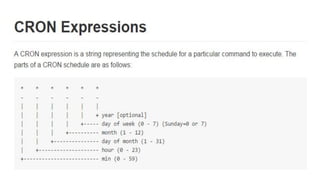
● “cron” is a UNIX tool that has been around for a long time, so its scheduling
capabilities are powerful and proven.
● This able to create firing schedules.
Example:
● At 8:00am every Monday through Friday.
● At 1:30am every last Friday of the month.
3. Scheduler
What is a Scheduler?
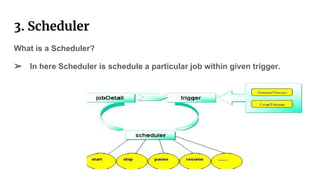
➢ In here Scheduler is schedule a particular job within given trigger.
Implementation
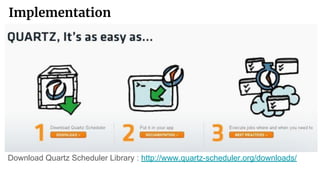
Download Quartz Scheduler Library : http://www.quartz-scheduler.org/downloads/
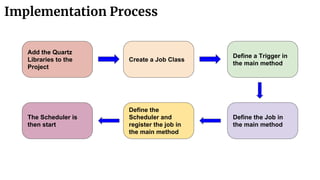
Implementation Process
Add the Quartz
Libraries to the
Project
Create a Job Class
Define a Trigger in
the main method
Define the Job in
the main method
Define the
Scheduler and
register the job in
the main method
The Scheduler is
then start
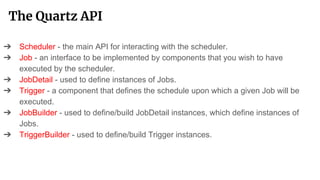
The Quartz API
➔ Scheduler - the main API for interacting with the scheduler.
➔ Job - an interface to be implemented by components that you wish to have
executed by the scheduler.
➔ JobDetail - used to define instances of Jobs.
➔ Trigger - a component that defines the schedule upon which a given Job will be
executed.
➔ JobBuilder - used to define/build JobDetail instances, which define instances of
Jobs.
➔ TriggerBuilder - used to define/build Trigger instances.
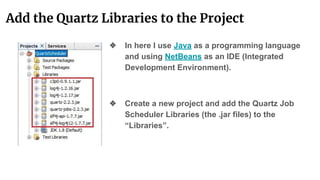
Add the Quartz Libraries to the Project
❖ In here I use Java as a programming language
and using NetBeans as an IDE (Integrated
Development Environment).
❖ Create a new project and add the Quartz Job
Scheduler Libraries (the .jar files) to the
“Libraries”.
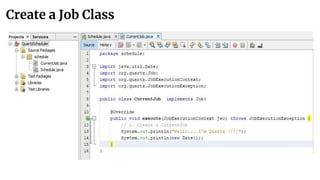
Create a Job Class
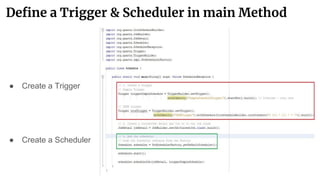
Define a Trigger & Scheduler in main Method
● Create a Trigger
● Create a Scheduler
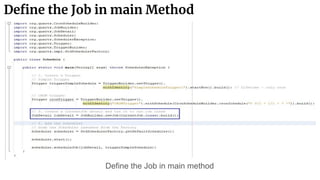
Define the Job in main Method
Define the Job in main method
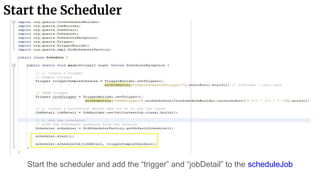
Start the Scheduler
Start the scheduler and add the “trigger” and “jobDetail” to the scheduleJob
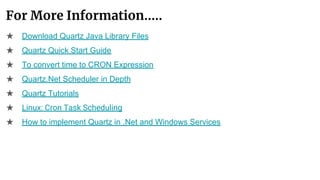
For More Information…..
★ Download Quartz Java Library Files
★ Quartz Quick Start Guide
★ To convert time to CRON Expression
★ Quartz.Net Scheduler in Depth
★ Quartz Tutorials
★ Linux: Cron Task Scheduling
★ How to implement Quartz in .Net and Windows Services
Quartz to Implement Scheduling Service

Quartz to Implement Scheduling Service

  • 1.
    Utilize Quartz toImplement Scheduling Service
  • 2.
    Overview ❏ Quartz ❏ Componentsof Quartz ❏ Job ❏ Trigger ❏ Explanation of Trigger Types ❏ CRON Expression ❏ Scheduler ❏ Implementation ❏ Implementation Process ❏ The Quartz API ❏ Add the Quartz Libraries to the Project ❏ Create a Job Class ❏ Define a Trigger & Scheduler in main Method ❏ Start the Scheduler ❏ Q & A
  • 3.
    Quartz What is Quartz? ➢A job scheduling library that can be integrated into a wide variety of Java applications. ➢ This can be used to create simple or complex schedules for executing tens, hundreds, or even tens-of-thousands of jobs; jobs whose tasks are defined as standard Java components or EJBs; jobs whose tasks are defined as standard java components that may execute virtually anything you may program them to do. ➢ Quartz is freely usable, licensed under the Apache 2.0 license.
  • 4.
    Components of Quartz 1.Job 2. Trigger 3. Scheduler
  • 5.
    1. Job What isa Job? ➢ In here Job is a task that we want to execute in our application. Example: ● Display current date and time ● Display a message ● Insert data to the database etc.
  • 6.
    2. Trigger What isa Trigger? ➢ In here Trigger is a stored-program which will be fired at a given time. ➢ There are 2 types of triggers, I) Simple Trigger II) Cron Trigger
  • 7.
    2. Explanation ofTrigger Types ➢ Simple Trigger : ● This has only one life time. ● Once it fired then go to the dead state. ➢ Cron Trigger : ● “cron” is a UNIX tool that has been around for a long time, so its scheduling capabilities are powerful and proven. ● This able to create firing schedules. Example: ● At 8:00am every Monday through Friday. ● At 1:30am every last Friday of the month.
  • 9.
    3. Scheduler What isa Scheduler? ➢ In here Scheduler is schedule a particular job within given trigger.
  • 10.
    Implementation Download Quartz SchedulerLibrary : http://www.quartz-scheduler.org/downloads/
  • 11.
    Implementation Process Add theQuartz Libraries to the Project Create a Job Class Define a Trigger in the main method Define the Job in the main method Define the Scheduler and register the job in the main method The Scheduler is then start
  • 12.
    The Quartz API ➔Scheduler - the main API for interacting with the scheduler. ➔ Job - an interface to be implemented by components that you wish to have executed by the scheduler. ➔ JobDetail - used to define instances of Jobs. ➔ Trigger - a component that defines the schedule upon which a given Job will be executed. ➔ JobBuilder - used to define/build JobDetail instances, which define instances of Jobs. ➔ TriggerBuilder - used to define/build Trigger instances.
  • 13.
    Add the QuartzLibraries to the Project ❖ In here I use Java as a programming language and using NetBeans as an IDE (Integrated Development Environment). ❖ Create a new project and add the Quartz Job Scheduler Libraries (the .jar files) to the “Libraries”.
  • 14.
  • 15.
    Define a Trigger& Scheduler in main Method ● Create a Trigger ● Create a Scheduler
  • 16.
    Define the Jobin main Method Define the Job in main method
  • 17.
    Start the Scheduler Startthe scheduler and add the “trigger” and “jobDetail” to the scheduleJob
  • 18.
    For More Information….. ★Download Quartz Java Library Files ★ Quartz Quick Start Guide ★ To convert time to CRON Expression ★ Quartz.Net Scheduler in Depth ★ Quartz Tutorials ★ Linux: Cron Task Scheduling ★ How to implement Quartz in .Net and Windows Services