would	
  like	
  to	
  thank	
  our	
  sponsors	
  of	
  this	
  event:	
  
Python	
  Programming	
  for	
  GIS	
  
MAC	
  URISA	
  
Spring	
  2014	
  
Introduction	
  
•  John	
  Reiser	
  
Rowan	
  University	
  Geospa=al	
  Research	
  Lab	
  
reiser@rowan.edu	
  
•  New	
  Jersey	
  Geographer	
  blog	
  
jreiser@njgeo.org	
  
•  TwiIer	
  -­‐	
  @johnjreiser	
  
•  GitHub	
  -­‐	
  johnreiser	
  
•  Working	
  in	
  Python	
  since	
  2007	
  
Today's	
  Agenda	
  
•  Now	
  un=l	
  10:30	
  –	
  
– Intro	
  to	
  Python	
  &	
  why	
  you	
  should	
  be	
  using	
  it	
  
– Basics	
  of	
  Python	
  language	
  
– Learning	
  resources	
  available	
  to	
  you	
  
•  10:45	
  un=l	
  Noon	
  –	
  	
  
– Working	
  with	
  Python	
  and	
  ArcGIS	
  
– Moving	
  from	
  ModelBuilder	
  to	
  Python	
  
– Extending	
  GIS	
  beyond	
  what’s	
  in	
  ArcToolbox	
  
•  A[er	
  Lunch	
  –	
  
– Review	
  of	
  some	
  Python	
  projects	
  
– Ques=on	
  and	
  Answer	
  
Why	
  program?	
  
•  Desktop	
  GIS	
  includes	
  a	
  considerable	
  array	
  of	
  tools	
  
and	
  components	
  to	
  help	
  you	
  perform	
  analysis	
  and	
  
manage	
  your	
  data.	
  	
  
•  The	
  ability	
  to	
  chain	
  together	
  tools	
  in	
  series,	
  or	
  adapt	
  
the	
  tools	
  to	
  sa=sfy	
  your	
  specific	
  needs	
  can	
  improve	
  
your	
  efficiency	
  or	
  extend	
  your	
  capabili=es.	
  	
  
•  If	
  you’re	
  performing	
  the	
  same	
  tasks	
  repeatedly,	
  or	
  
you	
  find	
  yourself	
  performing	
  manual	
  fixes,	
  you	
  likely	
  
can	
  reduce	
  your	
  effort	
  though	
  custom	
  code.	
  
Why	
  Python?	
  
Brief	
  History	
  
•  Ini=ally	
  created	
  by	
  Guido	
  van	
  Rossum	
  (BDFL).	
  
•  First	
  public	
  release:	
  February	
  1991.	
  
•  2.0	
  released	
  in	
  2000.	
  3.0	
  released	
  in	
  2008.	
  
•  Designed	
  from	
  the	
  start	
  to	
  be	
  extensible.	
  
•  Community	
  driven	
  development.	
  
•  Adopted	
  by	
  the	
  geospa=al	
  so[ware	
  community.	
  
– ArcGIS	
  
– QGIS	
  
– PostGIS	
  
– Countless	
  libraries	
  to	
  work	
  with	
  spa=al	
  data	
  
Why	
  program	
  in	
  Python?	
  
•  Extensible	
  nature	
  of	
  the	
  language	
  gives	
  you	
  the	
  
flexibility	
  to	
  change	
  it	
  as	
  you	
  see	
  fit.	
  
•  Conversely,	
  others	
  may	
  have	
  already	
  worked	
  on	
  a	
  
similar	
  problem	
  and	
  released	
  their	
  solu=ons	
  on	
  the	
  
web	
  for	
  you	
  to	
  incorporate.	
  	
  
•  Support	
  for	
  various	
  OSs	
  and	
  GISs	
  means	
  that	
  your	
  
tools	
  can	
  be	
  easily	
  migrated	
  to	
  other	
  plaiorms	
  and	
  
maintained	
  as	
  GIS	
  evolves.	
  
•  A	
  strong	
  community	
  supports	
  the	
  so[ware	
  and	
  its	
  
con=nued	
  development.	
  
From	
  the	
  ArcGIS	
  perspective	
  
•  You	
  might	
  have	
  already	
  used	
  Python	
  within	
  ArcGIS.	
  
•  Python	
  can	
  work	
  within	
  ArcGIS	
  –	
  	
  
– Custom	
  field	
  calculator	
  func=ons	
  
– Scripts	
  within	
  ArcToolbox	
  and	
  Python	
  Toolboxes	
  
– Interac=vely	
  through	
  the	
  Python	
  prompt	
  
•  Python	
  can	
  extend	
  ArcGIS	
  func=onality	
  –	
  
– Enable	
  scheduled	
  tasks	
  
– Improve	
  upon	
  ETL	
  tasks	
  
– Talk	
  to	
  other	
  so[ware	
  or	
  components	
  
A	
  Whirlwind	
  Tour	
  
Python	
  Interfaces	
  
•  Python	
  Shell	
  –	
  running	
  'python'	
  from	
  the	
  Command	
  
Line	
  or	
  the	
  Python	
  panel	
  in	
  ArcGIS.	
  
•  More	
  commonly	
  you’ll	
  work	
  within	
  an	
  IDE	
  –	
  
integrated	
  development	
  environment.	
  
•  IDLE	
  –	
  a	
  cross-­‐plaiorm	
  Python	
  development	
  
environment.	
  
•  PythonWin	
  –	
  a	
  Windows	
  only	
  interface	
  to	
  Python.	
  
•  Eclipse,	
  PyCharm,	
  and	
  Wing	
  are	
  other	
  IDEs	
  that	
  
support	
  Python.	
  
•  Find	
  the	
  setup	
  that	
  works	
  best	
  for	
  you.	
  
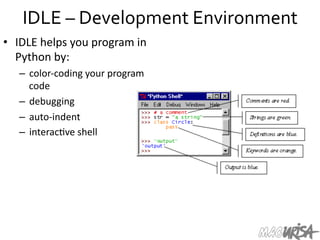
IDLE	
  –	
  Development	
  Environment	
  
•  IDLE	
  helps	
  you	
  program	
  in	
  
Python	
  by:	
  
–  color-­‐coding	
  your	
  program	
  
code	
  
–  debugging	
  
–  auto-­‐indent	
  
–  interac=ve	
  shell	
  
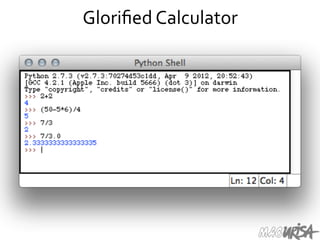
Glorified	
  Calculator	
  
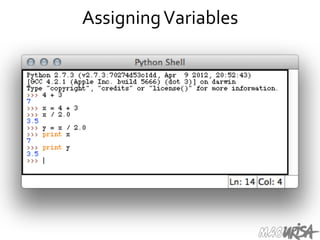
Assigning	
  Variables	
  
More	
  than	
  just	
  printing	
  
•  Python	
  is	
  an	
  object	
  oriented	
  language.	
  
•  Prac=cally	
  everything	
  can	
  be	
  treated	
  as	
  an	
  object.	
  
•  Objects	
  have	
  specific	
  types,	
  such	
  as	
  integers	
  or	
  
strings.	
  	
  
•  "hello	
  world"	
  is	
  a	
  string.	
  
•  Strings	
  are	
  delimited	
  using	
  matching	
  single	
  or	
  
double	
  quotes.	
  
•  Strings,	
  as	
  objects,	
  have	
  methods	
  that	
  return	
  the	
  
result	
  of	
  a	
  func=on	
  on	
  the	
  string.	
  
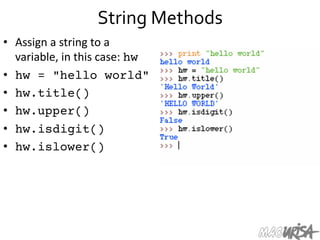
String	
  Methods	
  
•  Assign	
  a	
  string	
  to	
  a	
  
variable,	
  in	
  this	
  case:	
  hw
•  hw = "hello world"
•  hw.title()
•  hw.upper()
•  hw.isdigit()
•  hw.islower()
String	
  Methods	
  
•  The	
  string	
  held	
  in	
  your	
  variable	
  remains	
  the	
  same.	
  
•  The	
  method	
  returns	
  an	
  altered	
  string.	
  
•  Changing	
  the	
  variable	
  requires	
  reassignment:	
  
– hw = hw.upper()
– hw	
  now	
  equals	
  "HELLO	
  WORLD"	
  
Other	
  Python	
  Objects	
  
•  Lists	
  (mutable	
  sets	
  of	
  strings):	
  
– var = [] # create list
– var = ['one', 2, 'three', 'banana']
•  Tuples	
  (immutable	
  sets):	
  
– var = ('one', 2, 'three', 'banana')
•  Dic=onaries	
  (associa=ve	
  arrays	
  or	
  "hashes"):	
  
– var = {} # create dictionary
– var = { 'lat': 40.20547,
'lon': -74.76322 }
– var['lat'] = 40.2054
•  Each	
  has	
  its	
  own	
  set	
  of	
  methods.	
  
Lists	
  
•  Think	
  of	
  a	
  list	
  as	
  a	
  stack	
  of	
  cards,	
  on	
  which	
  your	
  
informa=on	
  is	
  wriIen.	
  
•  The	
  informa=on	
  stays	
  in	
  the	
  order	
  you	
  place	
  it	
  in	
  
un=l	
  you	
  modify	
  that	
  order.	
  
•  Methods	
  return	
  a	
  string	
  or	
  subset	
  of	
  the	
  list	
  or	
  
modify	
  the	
  list	
  to	
  add	
  or	
  remove	
  components.	
  
•  WriIen	
  as	
  var[index],	
  index	
  refers	
  to	
  order	
  within	
  
set	
  (think	
  card	
  number,	
  star=ng	
  at	
  0).	
  
•  You	
  can	
  step	
  through	
  lists	
  as	
  part	
  of	
  a	
  loop.	
  
List	
  Methods	
  
•  Adding	
  to	
  the	
  List	
  
– var[n] = object
•  replaces	
  n	
  with	
  object	
  
– var.append(object)
•  adds	
  object	
  to	
  the	
  end	
  of	
  the	
  list	
  
•  Removing	
  from	
  the	
  List	
  
– var[n] = []
•  emp=es	
  contents	
  of	
  card,	
  but	
  preserves	
  order	
  
– var.remove(n)
•  removes	
  card	
  at	
  n	
  
– var.pop(n)
•  removes	
  n	
  and	
  returns	
  its	
  value	
  
Lists	
  in	
  ArcToolbox	
  
You	
  will	
  create	
  lists:	
  
•  Layers	
  as	
  inputs	
  
•  AIributes	
  to	
  match	
  
•  Arrays	
  of	
  objects	
  
You	
  will	
  work	
  with	
  lists:	
  
•  List	
  of	
  field	
  names	
  
•  List	
  of	
  selected	
  features	
  
•  "Mul=value"	
  in	
  ArcToolbox	
  
or	
  ModelBuilder	
  is	
  a	
  list	
  of	
  
values.	
  	
  
List	
  Manipulation	
  
•  Using	
  array	
  slices,	
  you	
  can	
  
iden=fy	
  a	
  subset	
  of	
  a	
  list	
  for	
  
manipula=on	
  or	
  copying.	
  
•  a = [100, 101, 102]
•  print a[1:]
•  >>> [101, 102]
•  Strings	
  act	
  as	
  lists	
  of	
  
individual	
  characters,	
  so	
  
array	
  slicing	
  can	
  be	
  used	
  for	
  
string	
  subselec=on.	
  
Tuples	
  
•  Like	
  a	
  list,	
  tuples	
  are	
  iterable	
  arrays	
  of	
  objects.	
  
•  Tuples	
  are	
  immutable	
  –	
  once	
  created,	
  they	
  are	
  
unchangeable.	
  
•  To	
  add	
  or	
  remove	
  items,	
  you	
  must	
  redeclare	
  them.	
  
•  Example	
  uses	
  of	
  tuples:	
  
– County	
  Names	
  
– Land	
  Use	
  Codes	
  
– Ordered	
  set	
  of	
  func=ons	
  	
  
Dictionaries	
  
•  Dic=onaries	
  are	
  sets	
  of	
  key	
  &	
  value	
  pairs.	
  
•  Allows	
  you	
  to	
  iden=fy	
  values	
  by	
  a	
  descrip=ve	
  name	
  
instead	
  of	
  order	
  in	
  a	
  list.	
  
•  Keys	
  are	
  unordered	
  unless	
  explicitly	
  sorted.	
  
•  Keys	
  are	
  unique:	
  
– var['item'] = "apple"
– var['item'] = "banana"
– print var['item'] prints	
  only	
  "banana"	
  
– the	
  value	
  for	
  key	
  'item'	
  was	
  overwriIen	
  
Indentation	
  and	
  Blocks	
  
•  Python	
  uses	
  whitespace	
  and	
  indents	
  to	
  denote	
  
blocks	
  of	
  code.	
  
•  Lines	
  of	
  code	
  that	
  begin	
  a	
  block	
  end	
  in	
  a	
  colon:	
  
•  Lines	
  within	
  the	
  code	
  block	
  are	
  indented	
  at	
  the	
  
same	
  level.	
  
•  To	
  end	
  a	
  code	
  block,	
  remove	
  the	
  indenta=on.	
  
•  Define	
  blocks	
  of	
  code	
  that	
  run	
  only	
  when	
  certain	
  
condi=ons	
  are	
  met.	
  
•  Func=ons	
  are	
  defined	
  in	
  a	
  similar	
  fashion.	
  
Conditional	
  Branching	
  
•  if	
  and	
  else	
  -­‐	
  
if variable == condition:

 
#do something based on v == c
else:


#do something based on v != c
•  elif	
  allows	
  for	
  addi=onal	
  branching	
  
if x:

code runs if x evaluates to true
elif y:

code runs if y evaluates to true
else: #none of the above
code runs if neither x nor y are true
Looping	
  with	
  For	
  
•  For	
  allows	
  you	
  to	
  loop	
  over	
  a	
  block	
  of	
  code	
  a	
  
set	
  number	
  of	
  =mes	
  
•  For	
  is	
  great	
  for	
  manipula=ng	
  lists:	
  
	
  a = ['cat', 'window', 'defenestrate']
for x in a:

 
print x, len(x)
	
  Results:	
  
cat	
  3	
  
window	
  6	
  
defenestrate	
  12	
  
Looping	
  with	
  For	
  
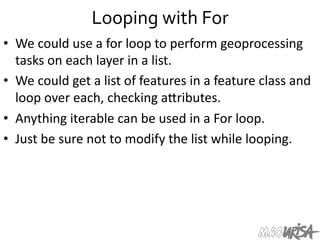
•  We	
  could	
  use	
  a	
  for	
  loop	
  to	
  perform	
  geoprocessing	
  
tasks	
  on	
  each	
  layer	
  in	
  a	
  list.	
  
•  We	
  could	
  get	
  a	
  list	
  of	
  features	
  in	
  a	
  feature	
  class	
  and	
  
loop	
  over	
  each,	
  checking	
  aIributes.	
  
•  Anything	
  iterable	
  can	
  be	
  used	
  in	
  a	
  For	
  loop.	
  	
  
•  Just	
  be	
  sure	
  not	
  to	
  modify	
  the	
  list	
  while	
  looping.	
  
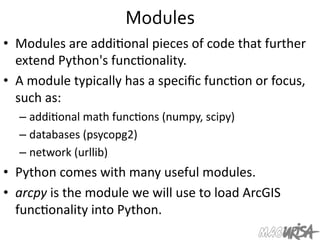
Modules	
  
•  Modules	
  are	
  addi=onal	
  pieces	
  of	
  code	
  that	
  further	
  
extend	
  Python's	
  func=onality.	
  
•  A	
  module	
  typically	
  has	
  a	
  specific	
  func=on	
  or	
  focus,	
  
such	
  as:	
  
– addi=onal	
  math	
  func=ons	
  (numpy,	
  scipy)	
  
– databases	
  (psycopg2)	
  
– network	
  (urllib)	
  
•  Python	
  comes	
  with	
  many	
  useful	
  modules.	
  
•  arcpy	
  is	
  the	
  module	
  we	
  will	
  use	
  to	
  load	
  ArcGIS	
  
func=onality	
  into	
  Python.	
  
Modules	
  
•  Modules	
  are	
  accessed	
  using	
  import	
  
– import	
  sys,	
  os	
  #	
  imports	
  two	
  modules	
  
•  Modules	
  can	
  have	
  subsets	
  of	
  func=ons	
  
– os.path	
  is	
  a	
  subset	
  within	
  os	
  
•  Modules	
  are	
  then	
  addressed	
  by	
  
modulename.func=on()	
  
– sys.argv	
  #	
  list	
  of	
  arguments	
  
– filename	
  =	
  os.path.splitext("points.txt")	
  
– filename[1]	
  #	
  equals	
  ".txt"	
  
•  Documenta=on	
  on	
  modules	
  and	
  the	
  import	
  
keyword	
  shows	
  the	
  power	
  of	
  modulariza=on.	
  
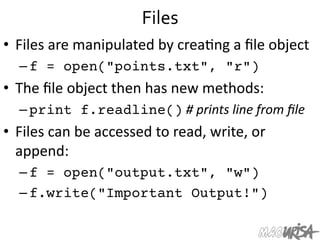
Files	
  
•  Files	
  are	
  manipulated	
  by	
  crea=ng	
  a	
  file	
  object	
  
– f = open("points.txt", "r")
•  The	
  file	
  object	
  then	
  has	
  new	
  methods:	
  
– print f.readline()	
  #	
  prints	
  line	
  from	
  file	
  
•  Files	
  can	
  be	
  accessed	
  to	
  read,	
  write,	
  or	
  
append:	
  
– f = open("output.txt", "w")
– f.write("Important Output!")
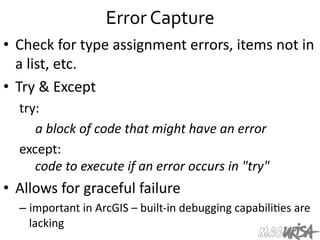
Error	
  Capture	
  
•  Check	
  for	
  type	
  assignment	
  errors,	
  items	
  not	
  in	
  
a	
  list,	
  etc.	
  
•  Try	
  &	
  Except	
  
try:	


  a	
  block	
  of	
  code	
  that	
  might	
  have	
  an	
  error	
  
except:	
  
	
  code	
  to	
  execute	
  if	
  an	
  error	
  occurs	
  in	
  "try"	
  
•  Allows	
  for	
  graceful	
  failure	
  
– important	
  in	
  ArcGIS	
  –	
  built-­‐in	
  debugging	
  capabili=es	
  are	
  
lacking	
  
Resources	
  
Books	
  
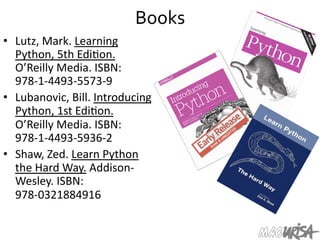
•  Lutz,	
  Mark.	
  Learning	
  
Python,	
  5th	
  Edi=on.	
  
O’Reilly	
  Media.	
  ISBN:	
  
978-­‐1-­‐4493-­‐5573-­‐9	
  
•  Lubanovic,	
  Bill.	
  Introducing	
  
Python,	
  1st	
  Edi=on.	
  
O’Reilly	
  Media.	
  ISBN:	
  
978-­‐1-­‐4493-­‐5936-­‐2	
  
•  Shaw,	
  Zed.	
  Learn	
  Python	
  
the	
  Hard	
  Way.	
  Addison-­‐
Wesley.	
  ISBN:	
  
978-­‐0321884916	
  
Online	
  Tutorials	
  
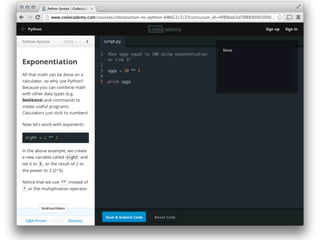
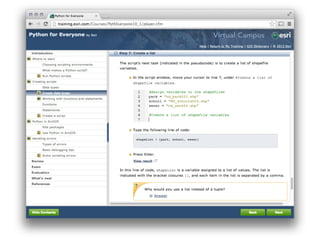
•  Learning	
  Python:	
  
– Code.org	
  
– Codecademy	
  
•  ESRI	
  Training	
  offerings:	
  
– Python	
  for	
  Everyone	
  -­‐	
  
hIp://training.esri.com/gateway/index.cfm?
fa=catalog.webcoursedetail&courseid=2520	
  
– Using	
  Python	
  in	
  ArcGIS	
  Desktop	
  10	
  -­‐	
  
hIp://training.esri.com/gateway/index.cfm?
fa=catalog.webCourseDetail&courseID=1868	
  
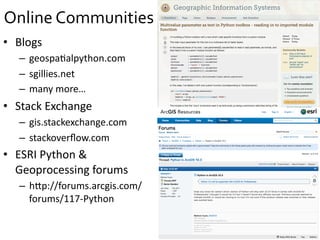
Online	
  Communities	
  
•  Blogs	
  
–  geospa=alpython.com	
  
–  sgillies.net	
  
–  many	
  more…	
  
•  Stack	
  Exchange	
  
–  gis.stackexchange.com	
  
–  stackoverflow.com	
  
•  ESRI	
  Python	
  &	
  
Geoprocessing	
  forums	
  
–  hIp://forums.arcgis.com/
forums/117-­‐Python	
  
Break	
  
Incorporating	
  Python	
  
into	
  ArcGIS	
  
Python	
  within	
  ArcGIS	
  
•  Python	
  is	
  integrated	
  with	
  the	
  ArcGIS	
  Desktop	
  
so[ware	
  and	
  can	
  be	
  accessed	
  in	
  several	
  ways:	
  
– Field	
  calculator	
  
– ArcGIS	
  Toolbox	
  scripts	
  &	
  Python	
  Toolboxes	
  
– Python	
  Add-­‐ins	
  
– Interac=ve	
  Prompt	
  
•  Understanding	
  Python	
  can	
  help	
  with	
  many	
  
opera=ons.	
  
•  Your	
  level	
  of	
  knowledge	
  can	
  vary;	
  expanding	
  your	
  
knowledge	
  will	
  only	
  open	
  up	
  more	
  opportuni=es.	
  
The	
  Field	
  Calculator	
  
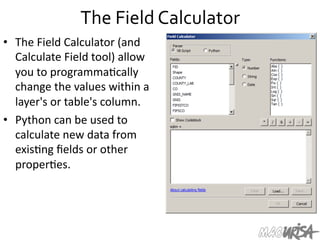
•  The	
  Field	
  Calculator	
  (and	
  
Calculate	
  Field	
  tool)	
  allow	
  
you	
  to	
  programma=cally	
  
change	
  the	
  values	
  within	
  a	
  
layer's	
  or	
  table's	
  column.	
  
•  Python	
  can	
  be	
  used	
  to	
  
calculate	
  new	
  data	
  from	
  
exis=ng	
  fields	
  or	
  other	
  
proper=es.	
  	
  
Referencing	
  Other	
  Fields	
  
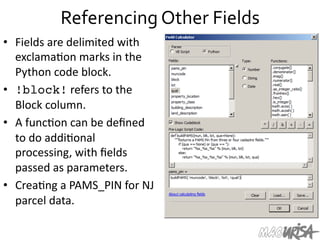
•  Fields	
  are	
  delimited	
  with	
  
exclama=on	
  marks	
  in	
  the	
  
Python	
  code	
  block.	
  
•  !block!	
  refers	
  to	
  the	
  
Block	
  column.	
  	
  
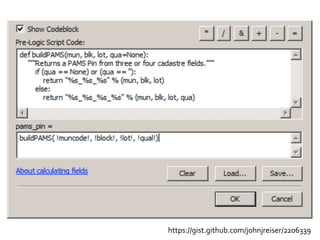
•  A	
  func=on	
  can	
  be	
  defined	
  
to	
  do	
  addi=onal	
  
processing,	
  with	
  fields	
  
passed	
  as	
  parameters.	
  
•  Crea=ng	
  a	
  PAMS_PIN	
  for	
  NJ	
  
parcel	
  data.	
  	
  
https://gist.github.com/johnjreiser/2206339	
  
The	
  SHAPE	
  Field	
  
•  The	
  SHAPE	
  field	
  has	
  several	
  methods	
  that	
  can	
  be	
  
accessed	
  within	
  Field	
  Calculator	
  to	
  retrieve	
  
aIributes	
  of	
  the	
  record's	
  geometry.	
  	
  
•  !shape.area!, !shape.length!
•  Unit	
  type	
  is	
  modifiable:	
  	
  
!shape.area@SQUAREYARDS!
•  !shape.partCount!
•  !shape.pointCount!
Moving	
  from	
  ModelBuilder	
  
to	
  Python	
  
ModelBuilder	
  
•  If	
  you've	
  used	
  ModelBuilder	
  in	
  the	
  past,	
  you	
  may	
  
have	
  no=ced	
  that	
  MB	
  provides	
  export	
  to	
  Python	
  
func=onality.	
  
•  Python	
  scripts	
  generated	
  by	
  ModelBuilder	
  can	
  then	
  
be	
  used	
  and	
  modified	
  outside	
  of	
  ArcGIS.	
  
•  You	
  will	
  likely	
  need	
  to	
  make	
  modifica=ons	
  to	
  your	
  
exported	
  scripts:	
  
– MB-­‐generated	
  Python	
  code	
  is	
  not	
  always	
  clear.	
  
– References	
  to	
  Layers	
  or	
  data	
  via	
  rela=ve	
  paths	
  will	
  need	
  
to	
  be	
  modified.	
  
Great	
  Starting	
  Point	
  
•  Expor=ng	
  from	
  ModelBuilder	
  is	
  a	
  great	
  star=ng	
  
point	
  for	
  many	
  projects.	
  
•  Declare	
  variables/layers/workspaces	
  using	
  
ModelBuilder	
  UI.	
  Start	
  to	
  put	
  the	
  pieces	
  together.	
  	
  
•  Export	
  an	
  incomplete	
  model	
  to	
  Python	
  for	
  final	
  
development.	
  	
  
•  The	
  shell	
  will	
  be	
  there	
  –	
  it	
  will	
  produce	
  a	
  valid	
  
(though	
  poten=ally	
  nonfunc=onal)	
  arcpy	
  script.	
  
•  You	
  can	
  then	
  complete	
  and	
  extend	
  the	
  func=onality.	
  
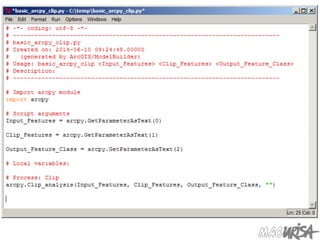
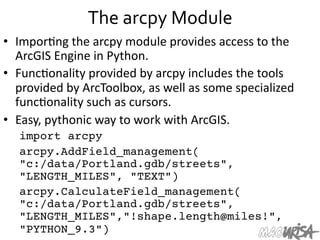
The	
  arcpy	
  Module	
  
•  Impor=ng	
  the	
  arcpy	
  module	
  provides	
  access	
  to	
  the	
  
ArcGIS	
  Engine	
  in	
  Python.	
  
•  Func=onality	
  provided	
  by	
  arcpy	
  includes	
  the	
  tools	
  
provided	
  by	
  ArcToolbox,	
  as	
  well	
  as	
  some	
  specialized	
  
func=onality	
  such	
  as	
  cursors.	
  	
  
•  Easy,	
  pythonic	
  way	
  to	
  work	
  with	
  ArcGIS.	
  
import arcpy
arcpy.AddField_management(
"c:/data/Portland.gdb/streets",
"LENGTH_MILES", "TEXT")
arcpy.CalculateField_management(
"c:/data/Portland.gdb/streets",
"LENGTH_MILES","!shape.length@miles!",
"PYTHON_9.3")
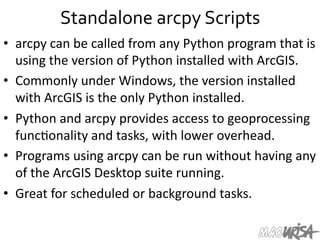
Standalone	
  arcpy	
  Scripts	
  
•  arcpy	
  can	
  be	
  called	
  from	
  any	
  Python	
  program	
  that	
  is	
  
using	
  the	
  version	
  of	
  Python	
  installed	
  with	
  ArcGIS.	
  	
  
•  Commonly	
  under	
  Windows,	
  the	
  version	
  installed	
  
with	
  ArcGIS	
  is	
  the	
  only	
  Python	
  installed.	
  	
  
•  Python	
  and	
  arcpy	
  provides	
  access	
  to	
  geoprocessing	
  
func=onality	
  and	
  tasks,	
  with	
  lower	
  overhead.	
  	
  
•  Programs	
  using	
  arcpy	
  can	
  be	
  run	
  without	
  having	
  any	
  
of	
  the	
  ArcGIS	
  Desktop	
  suite	
  running.	
  	
  
•  Great	
  for	
  scheduled	
  or	
  background	
  tasks.	


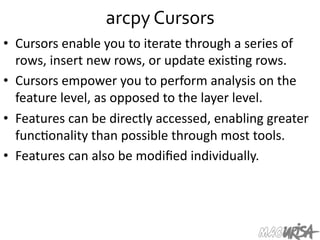
arcpy	
  Cursors	
  
•  Cursors	
  enable	
  you	
  to	
  iterate	
  through	
  a	
  series	
  of	
  
rows,	
  insert	
  new	
  rows,	
  or	
  update	
  exis=ng	
  rows.	
  	
  
•  Cursors	
  empower	
  you	
  to	
  perform	
  analysis	
  on	
  the	
  
feature	
  level,	
  as	
  opposed	
  to	
  the	
  layer	
  level.	
  	
  
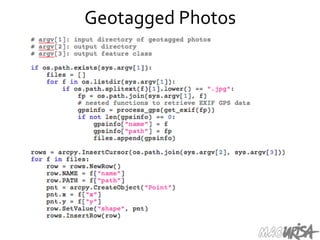
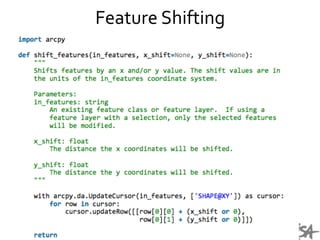
•  Features	
  can	
  be	
  directly	
  accessed,	
  enabling	
  greater	
  
func=onality	
  than	
  possible	
  through	
  most	
  tools.	
  
•  Features	
  can	
  also	
  be	
  modified	
  individually.	
  
Geotagged	
  Photos	
  
Feature	
  Shifting	
  
Extending	
  ArcGIS	
  tools	
  
using	
  Python	
  
Python	
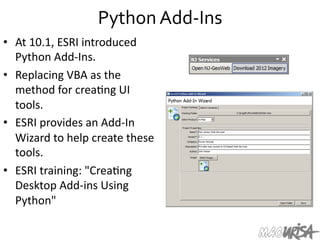
  Add-­‐Ins	
  
•  At	
  10.1,	
  ESRI	
  introduced	
  
Python	
  Add-­‐Ins.	
  
•  Replacing	
  VBA	
  as	
  the	
  
method	
  for	
  crea=ng	
  UI	
  
tools.	
  
•  ESRI	
  provides	
  an	
  Add-­‐In	
  
Wizard	
  to	
  help	
  create	
  these	
  
tools.	
  	
  
•  ESRI	
  training:	
  "Crea=ng	
  
Desktop	
  Add-­‐ins	
  Using	
  
Python"	
  
Download	
  Imagery	
  
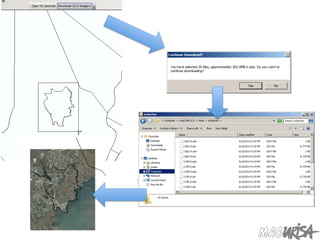
•  NJ	
  OIT-­‐OGIS's	
  WMS	
  services	
  are	
  great,	
  but	
  what	
  if	
  
you	
  want	
  the	
  source	
  =les?	
  
•  Python	
  Add-­‐Ins	
  allow	
  you	
  to	
  pull	
  the	
  data	
  down,	
  
extract	
  it	
  and	
  load	
  it	
  into	
  ArcGIS.	
  	
  
•  Allows	
  for	
  interac=ve	
  selec=on	
  within	
  a	
  your	
  map	
  
frame,	
  with	
  the	
  data	
  automa=cally	
  added	
  to	
  the	
  
map	
  once	
  the	
  download	
  is	
  complete.	
  	
  
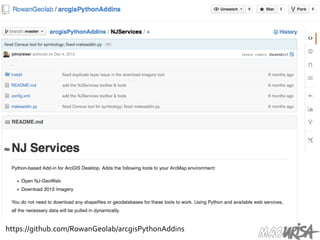
https://github.com/RowanGeolab/arcgisPythonAddins	
  
Moving	
  Beyond	
  ArcGIS	
  
	
  using	
  Python	
  
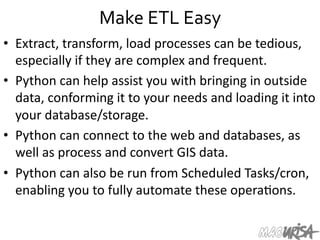
Make	
  ETL	
  Easy	
  
•  Extract,	
  transform,	
  load	
  processes	
  can	
  be	
  tedious,	
  
especially	
  if	
  they	
  are	
  complex	
  and	
  frequent.	
  
•  Python	
  can	
  help	
  assist	
  you	
  with	
  bringing	
  in	
  outside	
  
data,	
  conforming	
  it	
  to	
  your	
  needs	
  and	
  loading	
  it	
  into	
  
your	
  database/storage.	
  	
  
•  Python	
  can	
  connect	
  to	
  the	
  web	
  and	
  databases,	
  as	
  
well	
  as	
  process	
  and	
  convert	
  GIS	
  data.	
  
•  Python	
  can	
  also	
  be	
  run	
  from	
  Scheduled	
  Tasks/cron,	
  
enabling	
  you	
  to	
  fully	
  automate	
  these	
  opera=ons.	
  	
  
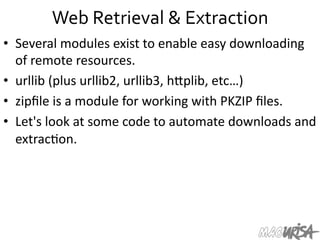
Web	
  Retrieval	
  &	
  Extraction	
  
•  Several	
  modules	
  exist	
  to	
  enable	
  easy	
  downloading	
  
of	
  remote	
  resources.	
  
•  urllib	
  (plus	
  urllib2,	
  urllib3,	
  hIplib,	
  etc…)	
  
•  zipfile	
  is	
  a	
  module	
  for	
  working	
  with	
  PKZIP	
  files.	
  
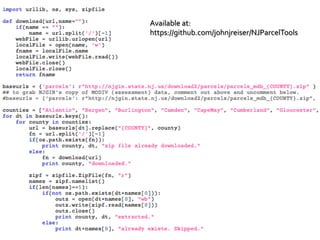
•  Let's	
  look	
  at	
  some	
  code	
  to	
  automate	
  downloads	
  and	
  
extrac=on.	
  
Available	
  at:	
  
https://github.com/johnjreiser/NJParcelTools	
  
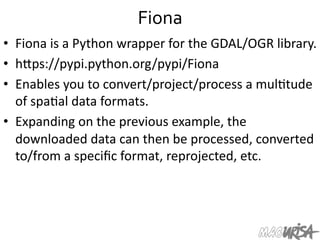
Fiona	
  
•  Fiona	
  is	
  a	
  Python	
  wrapper	
  for	
  the	
  GDAL/OGR	
  library.	
  
•  hIps://pypi.python.org/pypi/Fiona	
  
•  Enables	
  you	
  to	
  convert/project/process	
  a	
  mul=tude	
  
of	
  spa=al	
  data	
  formats.	
  
•  Expanding	
  on	
  the	
  previous	
  example,	
  the	
  
downloaded	
  data	
  can	
  then	
  be	
  processed,	
  converted	
  
to/from	
  a	
  specific	
  format,	
  reprojected,	
  etc.	


psycopg2	
  
•  psycopg2	
  module	
  provides	
  a	
  Pythonic	
  way	
  of	
  
querying	
  a	
  PostgreSQL	
  database.	
  
•  PostgreSQL-­‐specific,	
  enables	
  accessing	
  ArcSDE	
  or	
  
PostGIS-­‐formaIed	
  data.	
  
•  Full,	
  secure	
  access	
  to	
  your	
  databases.	
  
•  Very	
  easy	
  to	
  use	
  the	
  records	
  returned	
  from	
  a	
  
database	
  query	
  in	
  your	
  Python	
  programs.	
  
Unconventional	
  Exporting	
  
•  Python	
  can	
  help	
  with	
  report	
  genera=on,	
  producing	
  
CSV,	
  XLS,	
  and/or	
  PDF	
  files.	
  
•  CSVs	
  are	
  very	
  easy	
  to	
  read	
  and	
  write.	
  
•  xlrd	
  and	
  xlwt	
  enable	
  reading	
  and	
  wri=ng	
  of	
  Excel	
  
files.	
  	
  
•  Python	
  makes	
  tedious	
  tasks	
  easy.	
  	
  
•  Do	
  you	
  want	
  to	
  make	
  1,600	
  Excel	
  files?	
  
https://gist.github.com/johnjreiser/4ea959704f686e3b17f6	
  
Lunch	
  
Some	
  Custom	
  Tools	
  
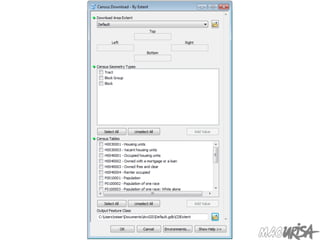
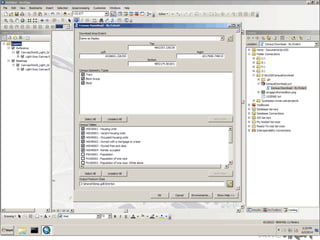
Census	
  
Python	
  Toolbox	
  
•  New	
  in	
  ArcGIS	
  10.1,	
  Python	
  Toolboxes	
  are	
  pure-­‐
Python	
  files	
  that	
  appear	
  as	
  ArcToolbox	
  toolboxes.	
  	
  
•  Tools	
  are	
  defined	
  as	
  subclasses.	
  	
  
•  A	
  toolbox	
  containing	
  several	
  independent	
  tools	
  can	
  
exist	
  as	
  one	
  text-­‐based	
  file.	
  
•  Great	
  format	
  for	
  transparency	
  and	
  version	
  control.	
  
•  Uses	
  .pyt	
  as	
  a	
  file	
  extension.	
  
chupaESRI	
  
Q	
  &	
  A	
  
Thanks	
  for	
  attending!	
  
•  MAC	
  URISA	
  Spring	
  2014	
  materials:	
  
hIp://macurisa.org/spring2014	
  
•  MAC	
  URISA	
  2014	
  Conference:	
  
October	
  22	
  –	
  24,	
  2014	
  
Resorts,	
  Atlan=c	
  City,	
  NJ	
  
hIp://macurisa.org/2014	
  
•  Feel	
  free	
  to	
  follow	
  up	
  with	
  ques=ons:	
  
jreiser@njgeo.org	
  
@johnjreiser	
  on	
  TwiIer	
  

Python Programming and GIS

  • 1.
    would  like  to  thank  our  sponsors  of  this  event:  
  • 2.
    Python  Programming  for  GIS   MAC  URISA   Spring  2014  
  • 3.
    Introduction   •  John  Reiser   Rowan  University  Geospa=al  Research  Lab   reiser@rowan.edu   •  New  Jersey  Geographer  blog   jreiser@njgeo.org   •  TwiIer  -­‐  @johnjreiser   •  GitHub  -­‐  johnreiser   •  Working  in  Python  since  2007  
  • 4.
    Today's  Agenda   • Now  un=l  10:30  –   – Intro  to  Python  &  why  you  should  be  using  it   – Basics  of  Python  language   – Learning  resources  available  to  you   •  10:45  un=l  Noon  –     – Working  with  Python  and  ArcGIS   – Moving  from  ModelBuilder  to  Python   – Extending  GIS  beyond  what’s  in  ArcToolbox   •  A[er  Lunch  –   – Review  of  some  Python  projects   – Ques=on  and  Answer  
  • 5.
    Why  program?   • Desktop  GIS  includes  a  considerable  array  of  tools   and  components  to  help  you  perform  analysis  and   manage  your  data.     •  The  ability  to  chain  together  tools  in  series,  or  adapt   the  tools  to  sa=sfy  your  specific  needs  can  improve   your  efficiency  or  extend  your  capabili=es.     •  If  you’re  performing  the  same  tasks  repeatedly,  or   you  find  yourself  performing  manual  fixes,  you  likely   can  reduce  your  effort  though  custom  code.  
  • 6.
  • 7.
    Brief  History   • Ini=ally  created  by  Guido  van  Rossum  (BDFL).   •  First  public  release:  February  1991.   •  2.0  released  in  2000.  3.0  released  in  2008.   •  Designed  from  the  start  to  be  extensible.   •  Community  driven  development.   •  Adopted  by  the  geospa=al  so[ware  community.   – ArcGIS   – QGIS   – PostGIS   – Countless  libraries  to  work  with  spa=al  data  
  • 8.
    Why  program  in  Python?   •  Extensible  nature  of  the  language  gives  you  the   flexibility  to  change  it  as  you  see  fit.   •  Conversely,  others  may  have  already  worked  on  a   similar  problem  and  released  their  solu=ons  on  the   web  for  you  to  incorporate.     •  Support  for  various  OSs  and  GISs  means  that  your   tools  can  be  easily  migrated  to  other  plaiorms  and   maintained  as  GIS  evolves.   •  A  strong  community  supports  the  so[ware  and  its   con=nued  development.  
  • 10.
    From  the  ArcGIS  perspective   •  You  might  have  already  used  Python  within  ArcGIS.   •  Python  can  work  within  ArcGIS  –     – Custom  field  calculator  func=ons   – Scripts  within  ArcToolbox  and  Python  Toolboxes   – Interac=vely  through  the  Python  prompt   •  Python  can  extend  ArcGIS  func=onality  –   – Enable  scheduled  tasks   – Improve  upon  ETL  tasks   – Talk  to  other  so[ware  or  components  
  • 11.
  • 12.
    Python  Interfaces   • Python  Shell  –  running  'python'  from  the  Command   Line  or  the  Python  panel  in  ArcGIS.   •  More  commonly  you’ll  work  within  an  IDE  –   integrated  development  environment.   •  IDLE  –  a  cross-­‐plaiorm  Python  development   environment.   •  PythonWin  –  a  Windows  only  interface  to  Python.   •  Eclipse,  PyCharm,  and  Wing  are  other  IDEs  that   support  Python.   •  Find  the  setup  that  works  best  for  you.  
  • 13.
    IDLE  –  Development  Environment   •  IDLE  helps  you  program  in   Python  by:   –  color-­‐coding  your  program   code   –  debugging   –  auto-­‐indent   –  interac=ve  shell  
  • 14.
  • 15.
  • 16.
    More  than  just  printing   •  Python  is  an  object  oriented  language.   •  Prac=cally  everything  can  be  treated  as  an  object.   •  Objects  have  specific  types,  such  as  integers  or   strings.     •  "hello  world"  is  a  string.   •  Strings  are  delimited  using  matching  single  or   double  quotes.   •  Strings,  as  objects,  have  methods  that  return  the   result  of  a  func=on  on  the  string.  
  • 17.
    String  Methods   • Assign  a  string  to  a   variable,  in  this  case:  hw •  hw = "hello world" •  hw.title() •  hw.upper() •  hw.isdigit() •  hw.islower()
  • 18.
    String  Methods   • The  string  held  in  your  variable  remains  the  same.   •  The  method  returns  an  altered  string.   •  Changing  the  variable  requires  reassignment:   – hw = hw.upper() – hw  now  equals  "HELLO  WORLD"  
  • 19.
    Other  Python  Objects   •  Lists  (mutable  sets  of  strings):   – var = [] # create list – var = ['one', 2, 'three', 'banana'] •  Tuples  (immutable  sets):   – var = ('one', 2, 'three', 'banana') •  Dic=onaries  (associa=ve  arrays  or  "hashes"):   – var = {} # create dictionary – var = { 'lat': 40.20547, 'lon': -74.76322 } – var['lat'] = 40.2054 •  Each  has  its  own  set  of  methods.  
  • 20.
    Lists   •  Think  of  a  list  as  a  stack  of  cards,  on  which  your   informa=on  is  wriIen.   •  The  informa=on  stays  in  the  order  you  place  it  in   un=l  you  modify  that  order.   •  Methods  return  a  string  or  subset  of  the  list  or   modify  the  list  to  add  or  remove  components.   •  WriIen  as  var[index],  index  refers  to  order  within   set  (think  card  number,  star=ng  at  0).   •  You  can  step  through  lists  as  part  of  a  loop.  
  • 21.
    List  Methods   • Adding  to  the  List   – var[n] = object •  replaces  n  with  object   – var.append(object) •  adds  object  to  the  end  of  the  list   •  Removing  from  the  List   – var[n] = [] •  emp=es  contents  of  card,  but  preserves  order   – var.remove(n) •  removes  card  at  n   – var.pop(n) •  removes  n  and  returns  its  value  
  • 22.
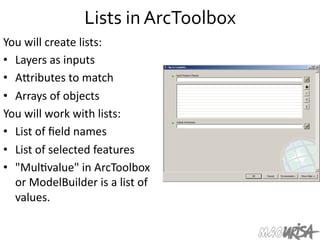
    Lists  in  ArcToolbox   You  will  create  lists:   •  Layers  as  inputs   •  AIributes  to  match   •  Arrays  of  objects   You  will  work  with  lists:   •  List  of  field  names   •  List  of  selected  features   •  "Mul=value"  in  ArcToolbox   or  ModelBuilder  is  a  list  of   values.    
  • 23.
    List  Manipulation   • Using  array  slices,  you  can   iden=fy  a  subset  of  a  list  for   manipula=on  or  copying.   •  a = [100, 101, 102] •  print a[1:] •  >>> [101, 102] •  Strings  act  as  lists  of   individual  characters,  so   array  slicing  can  be  used  for   string  subselec=on.  
  • 24.
    Tuples   •  Like  a  list,  tuples  are  iterable  arrays  of  objects.   •  Tuples  are  immutable  –  once  created,  they  are   unchangeable.   •  To  add  or  remove  items,  you  must  redeclare  them.   •  Example  uses  of  tuples:   – County  Names   – Land  Use  Codes   – Ordered  set  of  func=ons    
  • 25.
    Dictionaries   •  Dic=onaries  are  sets  of  key  &  value  pairs.   •  Allows  you  to  iden=fy  values  by  a  descrip=ve  name   instead  of  order  in  a  list.   •  Keys  are  unordered  unless  explicitly  sorted.   •  Keys  are  unique:   – var['item'] = "apple" – var['item'] = "banana" – print var['item'] prints  only  "banana"   – the  value  for  key  'item'  was  overwriIen  
  • 26.
    Indentation  and  Blocks   •  Python  uses  whitespace  and  indents  to  denote   blocks  of  code.   •  Lines  of  code  that  begin  a  block  end  in  a  colon:   •  Lines  within  the  code  block  are  indented  at  the   same  level.   •  To  end  a  code  block,  remove  the  indenta=on.   •  Define  blocks  of  code  that  run  only  when  certain   condi=ons  are  met.   •  Func=ons  are  defined  in  a  similar  fashion.  
  • 27.
    Conditional  Branching   • if  and  else  -­‐   if variable == condition: #do something based on v == c else: #do something based on v != c •  elif  allows  for  addi=onal  branching   if x: code runs if x evaluates to true elif y: code runs if y evaluates to true else: #none of the above code runs if neither x nor y are true
  • 28.
    Looping  with  For   •  For  allows  you  to  loop  over  a  block  of  code  a   set  number  of  =mes   •  For  is  great  for  manipula=ng  lists:    a = ['cat', 'window', 'defenestrate'] for x in a: print x, len(x)  Results:   cat  3   window  6   defenestrate  12  
  • 29.
    Looping  with  For   •  We  could  use  a  for  loop  to  perform  geoprocessing   tasks  on  each  layer  in  a  list.   •  We  could  get  a  list  of  features  in  a  feature  class  and   loop  over  each,  checking  aIributes.   •  Anything  iterable  can  be  used  in  a  For  loop.     •  Just  be  sure  not  to  modify  the  list  while  looping.  
  • 30.
    Modules   •  Modules  are  addi=onal  pieces  of  code  that  further   extend  Python's  func=onality.   •  A  module  typically  has  a  specific  func=on  or  focus,   such  as:   – addi=onal  math  func=ons  (numpy,  scipy)   – databases  (psycopg2)   – network  (urllib)   •  Python  comes  with  many  useful  modules.   •  arcpy  is  the  module  we  will  use  to  load  ArcGIS   func=onality  into  Python.  
  • 31.
    Modules   •  Modules  are  accessed  using  import   – import  sys,  os  #  imports  two  modules   •  Modules  can  have  subsets  of  func=ons   – os.path  is  a  subset  within  os   •  Modules  are  then  addressed  by   modulename.func=on()   – sys.argv  #  list  of  arguments   – filename  =  os.path.splitext("points.txt")   – filename[1]  #  equals  ".txt"   •  Documenta=on  on  modules  and  the  import   keyword  shows  the  power  of  modulariza=on.  
  • 32.
    Files   •  Files  are  manipulated  by  crea=ng  a  file  object   – f = open("points.txt", "r") •  The  file  object  then  has  new  methods:   – print f.readline()  #  prints  line  from  file   •  Files  can  be  accessed  to  read,  write,  or   append:   – f = open("output.txt", "w") – f.write("Important Output!")
  • 33.
    Error  Capture   • Check  for  type  assignment  errors,  items  not  in   a  list,  etc.   •  Try  &  Except   try:      a  block  of  code  that  might  have  an  error   except:    code  to  execute  if  an  error  occurs  in  "try"   •  Allows  for  graceful  failure   – important  in  ArcGIS  –  built-­‐in  debugging  capabili=es  are   lacking  
  • 34.
  • 35.
    Books   •  Lutz,  Mark.  Learning   Python,  5th  Edi=on.   O’Reilly  Media.  ISBN:   978-­‐1-­‐4493-­‐5573-­‐9   •  Lubanovic,  Bill.  Introducing   Python,  1st  Edi=on.   O’Reilly  Media.  ISBN:   978-­‐1-­‐4493-­‐5936-­‐2   •  Shaw,  Zed.  Learn  Python   the  Hard  Way.  Addison-­‐ Wesley.  ISBN:   978-­‐0321884916  
  • 36.
    Online  Tutorials   • Learning  Python:   – Code.org   – Codecademy   •  ESRI  Training  offerings:   – Python  for  Everyone  -­‐   hIp://training.esri.com/gateway/index.cfm? fa=catalog.webcoursedetail&courseid=2520   – Using  Python  in  ArcGIS  Desktop  10  -­‐   hIp://training.esri.com/gateway/index.cfm? fa=catalog.webCourseDetail&courseID=1868  
  • 39.
    Online  Communities   • Blogs   –  geospa=alpython.com   –  sgillies.net   –  many  more…   •  Stack  Exchange   –  gis.stackexchange.com   –  stackoverflow.com   •  ESRI  Python  &   Geoprocessing  forums   –  hIp://forums.arcgis.com/ forums/117-­‐Python  
  • 40.
  • 41.
  • 42.
    Python  within  ArcGIS   •  Python  is  integrated  with  the  ArcGIS  Desktop   so[ware  and  can  be  accessed  in  several  ways:   – Field  calculator   – ArcGIS  Toolbox  scripts  &  Python  Toolboxes   – Python  Add-­‐ins   – Interac=ve  Prompt   •  Understanding  Python  can  help  with  many   opera=ons.   •  Your  level  of  knowledge  can  vary;  expanding  your   knowledge  will  only  open  up  more  opportuni=es.  
  • 43.
    The  Field  Calculator   •  The  Field  Calculator  (and   Calculate  Field  tool)  allow   you  to  programma=cally   change  the  values  within  a   layer's  or  table's  column.   •  Python  can  be  used  to   calculate  new  data  from   exis=ng  fields  or  other   proper=es.    
  • 44.
    Referencing  Other  Fields   •  Fields  are  delimited  with   exclama=on  marks  in  the   Python  code  block.   •  !block!  refers  to  the   Block  column.     •  A  func=on  can  be  defined   to  do  addi=onal   processing,  with  fields   passed  as  parameters.   •  Crea=ng  a  PAMS_PIN  for  NJ   parcel  data.    
  • 45.
  • 46.
    The  SHAPE  Field   •  The  SHAPE  field  has  several  methods  that  can  be   accessed  within  Field  Calculator  to  retrieve   aIributes  of  the  record's  geometry.     •  !shape.area!, !shape.length! •  Unit  type  is  modifiable:     !shape.area@SQUAREYARDS! •  !shape.partCount! •  !shape.pointCount!
  • 47.
  • 48.
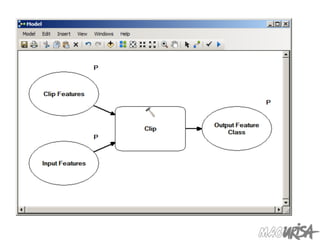
    ModelBuilder   •  If  you've  used  ModelBuilder  in  the  past,  you  may   have  no=ced  that  MB  provides  export  to  Python   func=onality.   •  Python  scripts  generated  by  ModelBuilder  can  then   be  used  and  modified  outside  of  ArcGIS.   •  You  will  likely  need  to  make  modifica=ons  to  your   exported  scripts:   – MB-­‐generated  Python  code  is  not  always  clear.   – References  to  Layers  or  data  via  rela=ve  paths  will  need   to  be  modified.  
  • 49.
    Great  Starting  Point   •  Expor=ng  from  ModelBuilder  is  a  great  star=ng   point  for  many  projects.   •  Declare  variables/layers/workspaces  using   ModelBuilder  UI.  Start  to  put  the  pieces  together.     •  Export  an  incomplete  model  to  Python  for  final   development.     •  The  shell  will  be  there  –  it  will  produce  a  valid   (though  poten=ally  nonfunc=onal)  arcpy  script.   •  You  can  then  complete  and  extend  the  func=onality.  
  • 52.
    The  arcpy  Module   •  Impor=ng  the  arcpy  module  provides  access  to  the   ArcGIS  Engine  in  Python.   •  Func=onality  provided  by  arcpy  includes  the  tools   provided  by  ArcToolbox,  as  well  as  some  specialized   func=onality  such  as  cursors.     •  Easy,  pythonic  way  to  work  with  ArcGIS.   import arcpy arcpy.AddField_management( "c:/data/Portland.gdb/streets", "LENGTH_MILES", "TEXT") arcpy.CalculateField_management( "c:/data/Portland.gdb/streets", "LENGTH_MILES","!shape.length@miles!", "PYTHON_9.3")
  • 53.
    Standalone  arcpy  Scripts   •  arcpy  can  be  called  from  any  Python  program  that  is   using  the  version  of  Python  installed  with  ArcGIS.     •  Commonly  under  Windows,  the  version  installed   with  ArcGIS  is  the  only  Python  installed.     •  Python  and  arcpy  provides  access  to  geoprocessing   func=onality  and  tasks,  with  lower  overhead.     •  Programs  using  arcpy  can  be  run  without  having  any   of  the  ArcGIS  Desktop  suite  running.     •  Great  for  scheduled  or  background  tasks.        
  • 54.
    arcpy  Cursors   • Cursors  enable  you  to  iterate  through  a  series  of   rows,  insert  new  rows,  or  update  exis=ng  rows.     •  Cursors  empower  you  to  perform  analysis  on  the   feature  level,  as  opposed  to  the  layer  level.     •  Features  can  be  directly  accessed,  enabling  greater   func=onality  than  possible  through  most  tools.   •  Features  can  also  be  modified  individually.  
  • 55.
  • 56.
  • 57.
    Extending  ArcGIS  tools   using  Python  
  • 58.
    Python  Add-­‐Ins   • At  10.1,  ESRI  introduced   Python  Add-­‐Ins.   •  Replacing  VBA  as  the   method  for  crea=ng  UI   tools.   •  ESRI  provides  an  Add-­‐In   Wizard  to  help  create  these   tools.     •  ESRI  training:  "Crea=ng   Desktop  Add-­‐ins  Using   Python"  
  • 59.
    Download  Imagery   • NJ  OIT-­‐OGIS's  WMS  services  are  great,  but  what  if   you  want  the  source  =les?   •  Python  Add-­‐Ins  allow  you  to  pull  the  data  down,   extract  it  and  load  it  into  ArcGIS.     •  Allows  for  interac=ve  selec=on  within  a  your  map   frame,  with  the  data  automa=cally  added  to  the   map  once  the  download  is  complete.    
  • 61.
  • 62.
    Moving  Beyond  ArcGIS    using  Python  
  • 63.
    Make  ETL  Easy   •  Extract,  transform,  load  processes  can  be  tedious,   especially  if  they  are  complex  and  frequent.   •  Python  can  help  assist  you  with  bringing  in  outside   data,  conforming  it  to  your  needs  and  loading  it  into   your  database/storage.     •  Python  can  connect  to  the  web  and  databases,  as   well  as  process  and  convert  GIS  data.   •  Python  can  also  be  run  from  Scheduled  Tasks/cron,   enabling  you  to  fully  automate  these  opera=ons.    
  • 64.
    Web  Retrieval  &  Extraction   •  Several  modules  exist  to  enable  easy  downloading   of  remote  resources.   •  urllib  (plus  urllib2,  urllib3,  hIplib,  etc…)   •  zipfile  is  a  module  for  working  with  PKZIP  files.   •  Let's  look  at  some  code  to  automate  downloads  and   extrac=on.  
  • 65.
  • 66.
    Fiona   •  Fiona  is  a  Python  wrapper  for  the  GDAL/OGR  library.   •  hIps://pypi.python.org/pypi/Fiona   •  Enables  you  to  convert/project/process  a  mul=tude   of  spa=al  data  formats.   •  Expanding  on  the  previous  example,  the   downloaded  data  can  then  be  processed,  converted   to/from  a  specific  format,  reprojected,  etc.    
  • 67.
    psycopg2   •  psycopg2  module  provides  a  Pythonic  way  of   querying  a  PostgreSQL  database.   •  PostgreSQL-­‐specific,  enables  accessing  ArcSDE  or   PostGIS-­‐formaIed  data.   •  Full,  secure  access  to  your  databases.   •  Very  easy  to  use  the  records  returned  from  a   database  query  in  your  Python  programs.  
  • 68.
    Unconventional  Exporting   • Python  can  help  with  report  genera=on,  producing   CSV,  XLS,  and/or  PDF  files.   •  CSVs  are  very  easy  to  read  and  write.   •  xlrd  and  xlwt  enable  reading  and  wri=ng  of  Excel   files.     •  Python  makes  tedious  tasks  easy.     •  Do  you  want  to  make  1,600  Excel  files?  
  • 71.
  • 72.
  • 73.
  • 74.
  • 77.
    Python  Toolbox   • New  in  ArcGIS  10.1,  Python  Toolboxes  are  pure-­‐ Python  files  that  appear  as  ArcToolbox  toolboxes.     •  Tools  are  defined  as  subclasses.     •  A  toolbox  containing  several  independent  tools  can   exist  as  one  text-­‐based  file.   •  Great  format  for  transparency  and  version  control.   •  Uses  .pyt  as  a  file  extension.  
  • 81.
  • 85.
  • 86.
    Thanks  for  attending!   •  MAC  URISA  Spring  2014  materials:   hIp://macurisa.org/spring2014   •  MAC  URISA  2014  Conference:   October  22  –  24,  2014   Resorts,  Atlan=c  City,  NJ   hIp://macurisa.org/2014   •  Feel  free  to  follow  up  with  ques=ons:   jreiser@njgeo.org   @johnjreiser  on  TwiIer