Download as PDF, PPTX
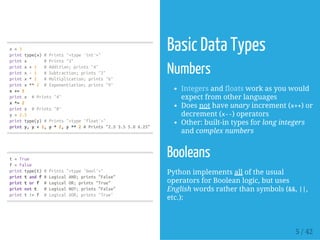
![xs=[3,1,2] #Createalist
printxs,xs[2] #Prints"[3,1,2]2"
printxs[-1] #Negativeindicescountfromtheendofthelist;prints"2"
xs[2]='foo' #Listscancontainelementsofdifferenttypes
printxs #Prints"[3,1,'foo']"
xs.append('bar')#Addanewelementtotheendofthelist
printxs #Prints
x=xs.pop() #Removeandreturnthelastelementofthelist
printx,xs #Prints"bar[3,1,'foo']"
Container Types
Python includes several built-in container
types: lists, dictionaries, sets, and tuples.
Lists
A list is the Python equivalent of an array,
but is resizeable and can contain elements
of different types.
7 / 42](https://image.slidesharecdn.com/10-py-tut-151109070434-lva1-app6891/85/Python-Tutorial-7-320.jpg)
![Containers
Lists - Slicing
In addition to accessing list elements one at
a time, Python provides concise syntax to
access sublists; this is known as slicing
Lists - Looping
You can loop over the elements of a list.
If you want access to the index of each
element within the body of a loop, use the
built-in enumeratefunction.
nums=range(5) #rangeisabuilt-infunctionthatcreates
printnums #Prints"[0,1,2,3,4]"
printnums[2:4] #Getaslicefromindex2to4(exclusive)
printnums[2:] #Getaslicefromindex2totheend;prin
printnums[:2] #Getaslicefromthestarttoindex2(ex
printnums[:] #Getasliceofthewholelist;prints["0
printnums[:-1] #Sliceindicescanbenegative;prints["0
nums[2:4]=[8,9]#Assignanewsublisttoaslice
printnums #Prints"[0,1,8,9,4]"
animals=['cat','dog','monkey']
foranimalinanimals:
printanimal
#Prints"cat","dog","monkey",eachonitsownline.
#------
animals=['cat','dog','monkey']
foridx,animalinenumerate(animals):
print'#%d:%s'%(idx+1,animal)
#Prints"#1:cat","#2:dog","#3:monkey",eachonitsownl
8 / 42](https://image.slidesharecdn.com/10-py-tut-151109070434-lva1-app6891/85/Python-Tutorial-8-320.jpg)
![nums=[0,1,2,3,4]
squares=[]
forxinnums:
squares.append(x**2)
printsquares #Prints[0,1,4,9,16]
nums=[0,1,2,3,4]
squares=[x**2forxinnums]
printsquares #Prints[0,1,4,9,16]
nums=[0,1,2,3,4]
even_squares=[x**2forxinnumsifx%2==0]
printeven_squares #Prints"[0,4,16]"
Containers
Lists - List Comprehensions
When programming, frequently we want
to transform one type of data into another -
> LC.
List comprehensions can also contain
conditions.
9 / 42](https://image.slidesharecdn.com/10-py-tut-151109070434-lva1-app6891/85/Python-Tutorial-9-320.jpg)
![Containers
Dictionaries
A dictionary stores (key, value) pairs,
similar to a Mapin Java or an objectin
Javascript.
Dicts - Looping
It is easy to iterate over the keys in a
dictionary.
If you want access to keys and their
corresponding values, use the iteritems
method.
d={'cat':'cute','dog':'furry'} #Createanewdictionary
printd['cat'] #Getanentryfromadictionary;prints
print'cat'ind #Checkifadictionaryhasagivenkey;
d['fish']='wet' #Setanentryinadictionary
printd['fish'] #Prints"wet"
#printd['monkey'] #KeyError:'monkey'notakeyofd
printd.get('monkey','N/A') #Getanelementwithadefault;
printd.get('fish','N/A') #Getanelementwithadefault;
deld['fish'] #Removeanelementfromadictionary
printd.get('fish','N/A')#"fish"isnolongerakey;prints
d={'chicken':2,'cat':4,'spider':8}
foranimalind:
legs=d[animal]
print'A%shas%dlegs'%(animal,legs)
#Prints"Achickenhas2legs","Aspiderhas8legs","Acat
d={'chicken':2,'cat':4,'spider':8}
foranimal,legsind.iteritems():
print'A%shas%dlegs'%(animal,legs)
#Prints"Achickenhas2legs","Aspiderhas8legs","Acat
10 / 42](https://image.slidesharecdn.com/10-py-tut-151109070434-lva1-app6891/85/Python-Tutorial-10-320.jpg)
![nums=[0,1,2,3,4]
even_num_to_square={x:x**2forxinnumsifx%2==0}
printeven_num_to_square #Prints"{0:0,2:4,4:16}"
Containers
Dicts - Dictionary Comprehensions
These are similar to list comprehensions,
but allow you to easily construct
dictionaries.
11 / 42](https://image.slidesharecdn.com/10-py-tut-151109070434-lva1-app6891/85/Python-Tutorial-11-320.jpg)
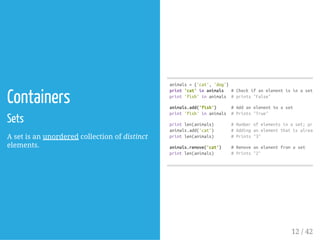
![animals={'cat','dog','fish'}
foridx,animalinenumerate(animals):
print'#%d:%s'%(idx+1,animal)
#Prints"#1:fish","#2:dog","#3:cat"
frommathimportsqrt
nums={int(sqrt(x))forxinrange(30)}
printnums #Prints"set([0,1,2,3,4,5])"
Containers
Sets - Looping
Iterating over a set has the same syntax as
iterating over a list; however since sets are
unordered, you cannot make assumptions
about the order in which you visit the
elements of the set.
Sets - Set Comprehensions
Like lists and dictionaries, we can easily
construct sets using set comprehensions.
13 / 42](https://image.slidesharecdn.com/10-py-tut-151109070434-lva1-app6891/85/Python-Tutorial-13-320.jpg)
![Containers
Tuples
A tuple is an (immutable) ordered list of
values. A tuple is in many ways similar to a
list.
One of the most important differences is
that tuples can be used as keys in
dictionaries and as elements of sets, while
lists cannot.
d={(x,x+1):xforxinrange(10)} #Createadictionary
t=(5,6) #Createatuple
printtype(t) #Prints"<type'tuple'>"
printd[t] #Prints"5"
printd[(1,2)] #Prints"1"
14 / 42](https://image.slidesharecdn.com/10-py-tut-151109070434-lva1-app6891/85/Python-Tutorial-14-320.jpg)
![defsign(x):
ifx>0:
return'positive'
elifx<0:
return'negative'
else:
return'zero'
forxin[-1,0,1]:printsign(x)
#Prints"negative","zero","positive"
defhello(name,loud=False):
ifloud:
print'HELLO,%s'%name.upper()
else:
print'Hello,%s!'%name
hello('Bob')#Prints"Hello,Bob"
hello('Fred',loud=True) #Prints"HELLO,FRED!"
Functions
Python functions are defined using the def
keyword.
We will often define functions to take
optional keyword arguments.
15 / 42](https://image.slidesharecdn.com/10-py-tut-151109070434-lva1-app6891/85/Python-Tutorial-15-320.jpg)
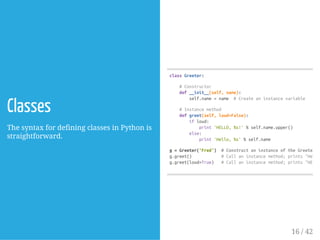

![importnumpyasnp
a=np.array([1,2,3]) #Createarank1array
printtype(a) #Prints"<type'numpy.ndarray'>"
printa.shape #Prints"(3,)"
printa[0],a[1],a[2] #Prints"123"
a[0]=5 #Changeanelementofthearray
printa #Prints"[5,2,3]"
b=np.array([[1,2,3],[4,5,6]]) #Createarank2array
printb.shape #Prints"(2,3)"
printb[0,0],b[0,1],b[1,0] #Prints"124"
#-----
a=np.zeros((2,2)) #Createanarrayofallzeros
printa #Prints"[[0. 0.]
# [0. 0.]]"
b=np.ones((1,2)) #Createanarrayofallones
printb #Prints"[[1. 1.]]"
c=np.full((2,2),7)#Createaconstantarray
printc #Prints"[[7. 7.]
# [7. 7.]]"
d=np.eye(2) #Createa2x2identitymatrix
printd #Prints"[[1. 0.]
# [0. 1.]]"
e=np.random.random((2,2))#Createanarrayfilledwithrandomvalues
printe #Mightprint"[[0.91940167 0.08143941]
# [0.68744134 0.87236687]]"
Numpy
Numpy is the core library for scientific
computing in Python. It provides a high-
performance multidimensional array
object (MATLAB style), and tools for
working with these arrays.
Arrays
A numpy array is a grid of values, all
of the same type, and is indexed by a
tuple of nonnegative integers.
The number of dimensions is the rank
of the array; the shape of an array is a
tuple of integers giving the size of the
array along each dimension.
We can initialize numpy arrays from
nested Python lists, and access
elements using square brackets.
Numpy also provides many functions
to create arrays.
19 / 42](https://image.slidesharecdn.com/10-py-tut-151109070434-lva1-app6891/85/Python-Tutorial-19-320.jpg)
![Numpy
Array Indexing - Slicing
Numpy offers several ways to index into
arrays.
Similar to Python lists, numpy arrays can
be sliced.
Since arrays may be multidimensional, you
must specify a slice for each dimension of
the array.
importnumpyasnp
#Createthefollowingrank2arraywithshape(3,4)
#[[1 2 3 4]
# [5 6 7 8]
# [9101112]]
a=np.array([[1,2,3,4],[5,6,7,8],[9,10,11,12]])
#Useslicingtopulloutthesubarrayconsistingofthefirst
#andcolumns1and2;bisthefollowingarrayofshape(2,2
#[[23]
# [67]]
b=a[:2,1:3]
#Asliceofanarrayisaviewintothesamedata,somodifyi
#willmodifytheoriginalarray.
printa[0,1] #Prints"2"
b[0,0]=77 #b[0,0]isthesamepieceofdataasa[0,1]
printa[0,1] #Prints"77"
20 / 42](https://image.slidesharecdn.com/10-py-tut-151109070434-lva1-app6891/85/Python-Tutorial-20-320.jpg)
![importnumpyasnp
#Createthefollowingrank2arraywithshape(3,4)
#[[1 2 3 4]
# [5 6 7 8]
# [9101112]]
a=np.array([[1,2,3,4],[5,6,7,8],[9,10,11,12]])
#Twowaysofaccessingthedatainthemiddlerowofthearray.
#Mixingintegerindexingwithslicesyieldsanarrayoflowerrank,
#whileusingonlyslicesyieldsanarrayofthesamerankasthe
#originalarray:
row_r1=a[1,:] #Rank1viewofthesecondrowofa
row_r2=a[1:2,:] #Rank2viewofthesecondrowofa
printrow_r1,row_r1.shape #Prints"[5678](4,)"
printrow_r2,row_r2.shape #Prints"[[5678]](1,4)"
#Wecanmakethesamedistinctionwhenaccessingcolumnsofanarray:
col_r1=a[:,1]
col_r2=a[:,1:2]
printcol_r1,col_r1.shape #Prints"[2 610](3,)"
printcol_r2,col_r2.shape #Prints"[[2]
# [6]
# [10]](3,1)"
Numpy
Array Indexing - Slicing
You can also mix integer indexing with
slice indexing.
However, doing so will yield an array of
lower rank than the original array.
Note that this is quite different from the
way that MATLAB handles array slicing.
21 / 42](https://image.slidesharecdn.com/10-py-tut-151109070434-lva1-app6891/85/Python-Tutorial-21-320.jpg)
![Numpy
Array Indexing - Integer Array
Indexing
When you index into numpy arrays using
slicing, the resulting array view will
always be a subarray of the original array.
In contrast, integer array indexing allows
you to construct arbitrary arrays using the
data from another array.
importnumpyasnp
a=np.array([[1,2],[3,4],[5,6]])
#Anexampleofintegerarrayindexing.
#Thereturnedarraywillhaveshape(3,)and
printa[[0,1,2],[0,1,0]] #Prints"[145]"
#Theaboveexampleofintegerarrayindexingisequivalentto
printnp.array([a[0,0],a[1,1],a[2,0]]) #Prints"[145]
#Whenusingintegerarrayindexing,youcanreusethesame
#elementfromthesourcearray:
printa[[0,0],[1,1]] #Prints"[22]"
#Equivalenttothepreviousintegerarrayindexingexample
printnp.array([a[0,1],a[0,1]]) #Prints"[22]"
22 / 42](https://image.slidesharecdn.com/10-py-tut-151109070434-lva1-app6891/85/Python-Tutorial-22-320.jpg)
![importnumpyasnp
a=np.array([[1,2],[3,4],[5,6]])
bool_idx=(a>2) #Findtheelementsofathatarebiggerthan2;
#thisreturnsanumpyarrayofBooleansofthesame
#shapeasa,whereeachslotofbool_idxtells
#whetherthatelementofais>2.
printbool_idx #Prints"[[FalseFalse]
# [True True]
# [True True]]"
#Weusebooleanarrayindexingtoconstructarank1array
#consistingoftheelementsofacorrespondingtotheTruevalues
#ofbool_idx
printa[bool_idx] #Prints"[3456]"
#---
#Wecandoalloftheaboveinasingleconcisestatement:
printa[a>2] #Prints"[3456]"
Numpy
Array Indexing - Boolean Array
Indexing
Boolean array indexing lets you pick out
arbitrary elements of an array.
Frequently this type of indexing is used to
select the elements of an array that satisfy
some condition.
23 / 42](https://image.slidesharecdn.com/10-py-tut-151109070434-lva1-app6891/85/Python-Tutorial-23-320.jpg)
![Numpy
Datatypes
Every numpy array is a grid of elements of
the same type.
Numpy provides a large set of numeric
datatypes that you can use to construct
arrays.
Numpy tries to guess a datatype when you
create an array, but functions that
construct arrays usually also include an
optional argument to explicitly specify the
datatype.
importnumpyasnp
x=np.array([1,2]) #Letnumpychoosethedatatype
printx.dtype #Prints"int64"
x=np.array([1.0,2.0]) #Letnumpychoosethedatatype
printx.dtype #Prints"float64"
x=np.array([1,2],dtype=np.int64) #Forceaparticulardat
printx.dtype #Prints"int64"
24 / 42](https://image.slidesharecdn.com/10-py-tut-151109070434-lva1-app6891/85/Python-Tutorial-24-320.jpg)
![importnumpyasnp
x=np.array([[1,2],[3,4]],dtype=np.float64)
y=np.array([[5,6],[7,8]],dtype=np.float64)
#Elementwisesum;bothproducethearray
#[[6.0 8.0]
# [10.012.0]]
printx+y
printnp.add(x,y)
#Elementwisedifference;bothproducethearray
#[[-4.0-4.0]
# [-4.0-4.0]]
printx-y
printnp.subtract(x,y)
#Elementwiseproduct;bothproducethearray
#[[5.012.0]
# [21.032.0]]
printx*y
printnp.multiply(x,y)
#Elementwisedivision;bothproducethearray
#[[0.2 0.33333333]
# [0.42857143 0.5 ]]
printx/y
printnp.divide(x,y)
#Elementwisesquareroot;producesthearray
#[[1. 1.41421356]
# [1.73205081 2. ]]
printnp.sqrt(x)
Numpy
Array Math
Basic mathematical functions operate
elementwise on arrays, and are available
both as operator overloads and as
functions in the numpy module
25 / 42](https://image.slidesharecdn.com/10-py-tut-151109070434-lva1-app6891/85/Python-Tutorial-25-320.jpg)
![Numpy
Array Math
Note that unlike MATLAB, *is elementwise
multiplication, not matrix multiplication.
We instead use the dot function to compute
inner products of vectors, to multiply a
vector by a matrix, and to multiply
matrices.
dot is available both as a function in the
numpy module and as an instance method
of array objects
importnumpyasnp
x=np.array([[1,2],[3,4]])
y=np.array([[5,6],[7,8]])
v=np.array([9,10])
w=np.array([11,12])
#Innerproductofvectors;bothproduce219
printv.dot(w)
printnp.dot(v,w)
#Matrix/vectorproduct;bothproducetherank1array[296
printx.dot(v)
printnp.dot(x,v)
#Matrix/matrixproduct;bothproducetherank2array
#[[1922]
# [4350]]
printx.dot(y)
printnp.dot(x,y)
26 / 42](https://image.slidesharecdn.com/10-py-tut-151109070434-lva1-app6891/85/Python-Tutorial-26-320.jpg)
![importnumpyasnp
x=np.array([[1,2],[3,4]])
printnp.sum(x) #Computesumofallelements;prints"10"
printnp.sum(x,axis=0) #Computesumofeachcolumn;prints"[46]"
printnp.sum(x,axis=1) #Computesumofeachrow;prints"[37]"
importnumpyasnp
x=np.array([[1,2],[3,4]])
printx #Prints"[[12]
# [34]]"
printx.T #Prints"[[13]
# [24]]"
#Notethattakingthetransposeofarank1arraydoesnothing:
v=np.array([1,2,3])
printv #Prints"[123]"
printv.T #Prints"[123]"
Numpy
Array Math
Numpy provides many useful functions for
performing computations on arrays; one of
the most useful is sum.
Apart from computing mathematical
functions using arrays, we frequently need
to reshape or otherwise manipulate data in
arrays.
The simplest example of this type of
operation is transposing a matrix; to
transpose a matrix, simply use the T
attribute of an array object.
27 / 42](https://image.slidesharecdn.com/10-py-tut-151109070434-lva1-app6891/85/Python-Tutorial-27-320.jpg)
![Numpy
Broadcasting
Broadcasting is a powerful mechanism that
allows numpy to work with arrays of
different shapes when performing
arithmetic operations.
Frequently we have a smaller array and a
larger array, and we want to use the
smaller array multiple times to perform
some operation on the larger array.
For example, suppose that we want to add
a constant vector to each row of a matrix ...
importnumpyasnp
#Wewilladdthevectorvtoeachrowofthematrixx,
#storingtheresultinthematrixy
x=np.array([[1,2,3],[4,5,6],[7,8,9],[10,11,12]])
v=np.array([1,0,1])
y=np.empty_like(x) #Createanemptymatrixwiththesame
#Addthevectorvtoeachrowofthematrixxwithanexplici
foriinrange(4):
y[i,:]=x[i,:]+v
#Nowyisthefollowing
#[[2 2 4]
# [5 5 7]
# [8 810]
# [111113]]
printy
28 / 42](https://image.slidesharecdn.com/10-py-tut-151109070434-lva1-app6891/85/Python-Tutorial-28-320.jpg)
![importnumpyasnp
#Wewilladdthevectorvtoeachrowofthematrixx,
#storingtheresultinthematrixy
x=np.array([[1,2,3],[4,5,6],[7,8,9],[10,11,12]])
v=np.array([1,0,1])
vv=np.tile(v,(4,1)) #Stack4copiesofvontopofeachother
printvv #Prints"[[101]
# [101]
# [101]
# [101]]"
y=x+vv #Addxandvvelementwise
printy #Prints"[[2 2 4]
# [5 5 7]
# [8 810]
# [111113]]"
Numpy
Broadcasting
This works... however when the matrix xis
very large, computing an explicit loop in
Python could be slow.
Note that adding the vector vto each row
of the matrix xis equivalent to forming a
matrix vvby stacking multiple copies of v
vertically, then performing elementwise
summation of xand vv.
29 / 42](https://image.slidesharecdn.com/10-py-tut-151109070434-lva1-app6891/85/Python-Tutorial-29-320.jpg)
![Numpy
Broadcasting
Numpy broadcasting allows us to perform
this computation without actually creating
multiple copies of v. Consider this version,
using broadcasting.
The line y=x+vworks even though xhas
shape (4, 3) and vhas shape (3,) due to
broadcasting.
This line works as if vactually had shape
(4, 3), where each row was a copy of v, and
the sum was performed elementwise.
importnumpyasnp
#Wewilladdthevectorvtoeachrowofthematrixx,
#storingtheresultinthematrixy
x=np.array([[1,2,3],[4,5,6],[7,8,9],[10,11,12]])
v=np.array([1,0,1])
y=x+v #Addvtoeachrowofxusingbroadcasting
printy #Prints"[[2 2 4]
# [5 5 7]
# [8 810]
# [111113]]"
30 / 42](https://image.slidesharecdn.com/10-py-tut-151109070434-lva1-app6891/85/Python-Tutorial-30-320.jpg)
![importnumpyasnp
#Computeouterproductofvectors
v=np.array([1,2,3]) #vhasshape(3,)
w=np.array([4,5]) #whasshape(2,)
#Tocomputeanouterproduct,wefirstreshapevtobeacolumn
#vectorofshape(3,1);wecanthenbroadcastitagainstwtoyield
#anoutputofshape(3,2),whichistheouterproductofvandw:
#[[4 5]
# [810]
# [1215]]
printnp.reshape(v,(3,1))*w
#Addavectortoeachrowofamatrix
x=np.array([[1,2,3],[4,5,6]])
#xhasshape(2,3)andvhasshape(3,)sotheybroadcastto(2,3),
#givingthefollowingmatrix:
#[[246]
# [579]]
printx+v
#.....
Broadcasting two arrays together follows
these rules:
If the arrays do not have the same
rank, prepend the shape of the lower
rank array with 1s until both shapes
have the same length.
The two arrays are said to be
compatible in a dimension if they have
the same size in the dimension, or if
one of the arrays has size 1 in that
dimension.
The arrays can be broadcast together if
they are compatible in all dimensions.
After broadcasting, each array behaves
as if it had shape equal to the
elementwise maximum of shapes of
the two input arrays.
In any dimension where one array had
size 1 and the other array had size
greater than 1, the first array behaves
as if it were copied along that
dimension.
31 / 42](https://image.slidesharecdn.com/10-py-tut-151109070434-lva1-app6891/85/Python-Tutorial-31-320.jpg)
![Numpy
Broadcasting
Functions that support broadcasting are
known as universal functions.
Broadcasting typically makes your code
more concise and faster, so you should
strive to use it where possible.
#.....
#Addavectortoeachcolumnofamatrix
#xhasshape(2,3)andwhasshape(2,).
#Ifwetransposexthenithasshape(3,2)andcanbebroadc
#againstwtoyieldaresultofshape(3,2);transposingthi
#yieldsthefinalresultofshape(2,3)whichisthematrix
#thevectorwaddedtoeachcolumn.Givesthefollowingmatri
#[[5 6 7]
# [91011]]
print(x.T+w).T
#Anothersolutionistoreshapewtobearowvectorofshape
#wecanthenbroadcastitdirectlyagainstxtoproducethes
#output.
printx+np.reshape(w,(2,1))
#Multiplyamatrixbyaconstant:
#xhasshape(2,3).Numpytreatsscalarsasarraysofshape
#thesecanbebroadcasttogethertoshape(2,3),producingt
#followingarray:
#[[2 4 6]
# [81012]]
printx*2
32 / 42](https://image.slidesharecdn.com/10-py-tut-151109070434-lva1-app6891/85/Python-Tutorial-32-320.jpg)

![fromscipy.miscimportimread,imsave,imresize
#ReadanJPEGimageintoanumpyarray
img=imread('assets/cat.jpg')
printimg.dtype,img.shape #Prints"uint8(400,248,3)"
#Wecantinttheimagebyscalingeachofthecolorchannels
#byadifferentscalarconstant.Theimagehasshape(400,248,3);
#wemultiplyitbythearray[1,0.95,0.9]ofshape(3,);
#numpybroadcastingmeansthatthisleavestheredchannelunchanged,
#andmultipliesthegreenandbluechannelsby0.95and0.9
#respectively.
img_tinted=img*[1,0.95,0.9]
#Resizethetintedimagetobe300by300pixels.
img_tinted=imresize(img_tinted,(300,300))
#Writethetintedimagebacktodisk
imsave('assets/cat_tinted.jpg',img_tinted)
SciPy
Numpy provides a high-performance
multidimensional array and basic tools to
compute with and manipulate these
arrays.
SciPy builds on this, and provides a large
number of functions that operate on numpy
arrays and are useful for different types of
scientific and engineering applications.
Image Operations
SciPy provides some basic functions to
work with images.
For example, it has functions to read
images from disk into numpy arrays, to
write numpy arrays to disk as images, and
to resize images.
35 / 42](https://image.slidesharecdn.com/10-py-tut-151109070434-lva1-app6891/85/Python-Tutorial-35-320.jpg)
![SciPy
MATLAB Files
The functions scipy.io.loadmatand
scipy.io.savematallow you to read and
write MATLAB files.
Distance between Points
SciPy defines some useful functions for
computing distances between sets of
points.
The function scipy.spatial.distance.pdist
computes the distance between all pairs of
points in a given set.
A similar function
(scipy.spatial.distance.cdist) computes
the distance between all pairs across two
sets of points.
importnumpyasnp
fromscipy.spatial.distanceimportpdist,squareform
#Createthefollowingarraywhereeachrowisapointin2Ds
#[[01]
# [10]
# [20]]
x=np.array([[0,1],[1,0],[2,0]])
printx
#ComputetheEuclideandistancebetweenallrowsofx.
#d[i,j]istheEuclideandistancebetweenx[i,:]andx[j,:
#anddisthefollowingarray:
#[[0. 1.41421356 2.23606798]
# [1.41421356 0. 1. ]
# [2.23606798 1. 0. ]]
d=squareform(pdist(x,'euclidean'))
printd
36 / 42](https://image.slidesharecdn.com/10-py-tut-151109070434-lva1-app6891/85/Python-Tutorial-36-320.jpg)

![importnumpyasnp
importmatplotlib.pyplotasplt
#Computethexandycoordinatesforpointsonasinecurve
x=np.arange(0,3*np.pi,0.1)
y=np.sin(x)
#Plotthepointsusingmatplotlib
plt.plot(x,y)
plt.show() #Youmustcallplt.show()tomakegraphicsappear.
importnumpyasnp
importmatplotlib.pyplotasplt
#Computethexandycoordinatesforpointsonsineandcosinecurves
x=np.arange(0,3*np.pi,0.1)
y_sin=np.sin(x)
y_cos=np.cos(x)
#Plotthepointsusingmatplotlib
plt.plot(x,y_sin)
plt.plot(x,y_cos)
plt.xlabel('xaxislabel')
plt.ylabel('yaxislabel')
plt.title('SineandCosine')
plt.legend(['Sine','Cosine'])
plt.show()
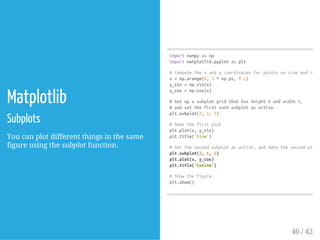
Matplotlib
Matplotlib is a plotting library.
In this section give a brief introduction to
the matplotlib.pyplotmodule, which
provides a plotting system similar to that
of MATLAB.
Plotting
The most important function in matplotlib
is plot, which allows you to plot 2D data.
With just a little bit of extra work we can
easily plot multiple lines at once, and add a
title, legend, and axis labels.
39 / 42](https://image.slidesharecdn.com/10-py-tut-151109070434-lva1-app6891/85/Python-Tutorial-39-320.jpg)
![importnumpyasnp
fromscipy.miscimportimread,imresize
importmatplotlib.pyplotasplt
img=imread('assets/cat.jpg')
img_tinted=img*[1,0.95,0.9]
#Showtheoriginalimage
plt.subplot(1,2,1)
plt.imshow(img)
#Showthetintedimage
plt.subplot(1,2,2)
#Aslightgotchawithimshowisthatitmightgivestrangeresults
#ifpresentedwithdatathatisnotuint8.Toworkaroundthis,we
#explicitlycasttheimagetouint8beforedisplayingit.
plt.imshow(np.uint8(img_tinted))
plt.show()
Matplotlib
Images
You can use the imshowfunction to show
images.
41 / 42](https://image.slidesharecdn.com/10-py-tut-151109070434-lva1-app6891/85/Python-Tutorial-41-320.jpg)


This document provides an overview of NumPy, the core library for scientific computing in Python. It discusses NumPy arrays, which provide a grid of values that are all of the same type and indexed by tuples of integers. NumPy arrays can be initialized from nested lists and accessed using square brackets. NumPy also provides functions to create arrays filled with zeros, ones, random values, or a constant. The document covers slicing NumPy arrays to extract subarrays, and integer array indexing to construct arbitrary arrays from another array's data. It demonstrates how slicing returns views into the original data, while integer indexing allows selecting elements in any order.


