TRAINING PYTHON
INTRODUCTION TO PYTHON
                (BASIC LEVEL)
Editor: Nguyễn Đức Minh Khôi
@HCMC University of Technology, September 2011
9/2/2011            Training Python Chapte 0: Introduction to Python   1


   TRAINING PYTHON
   Chapter 0: INTRODUCTION TO PYTHON
9/2/2011          Training Python Chapte 0: Introduction to Python   2


CONTENTS

           Python in general

            How Python program runs?

           How to run Python?
9/2/2011                    Training Python Chapte 0: Introduction to Python   3


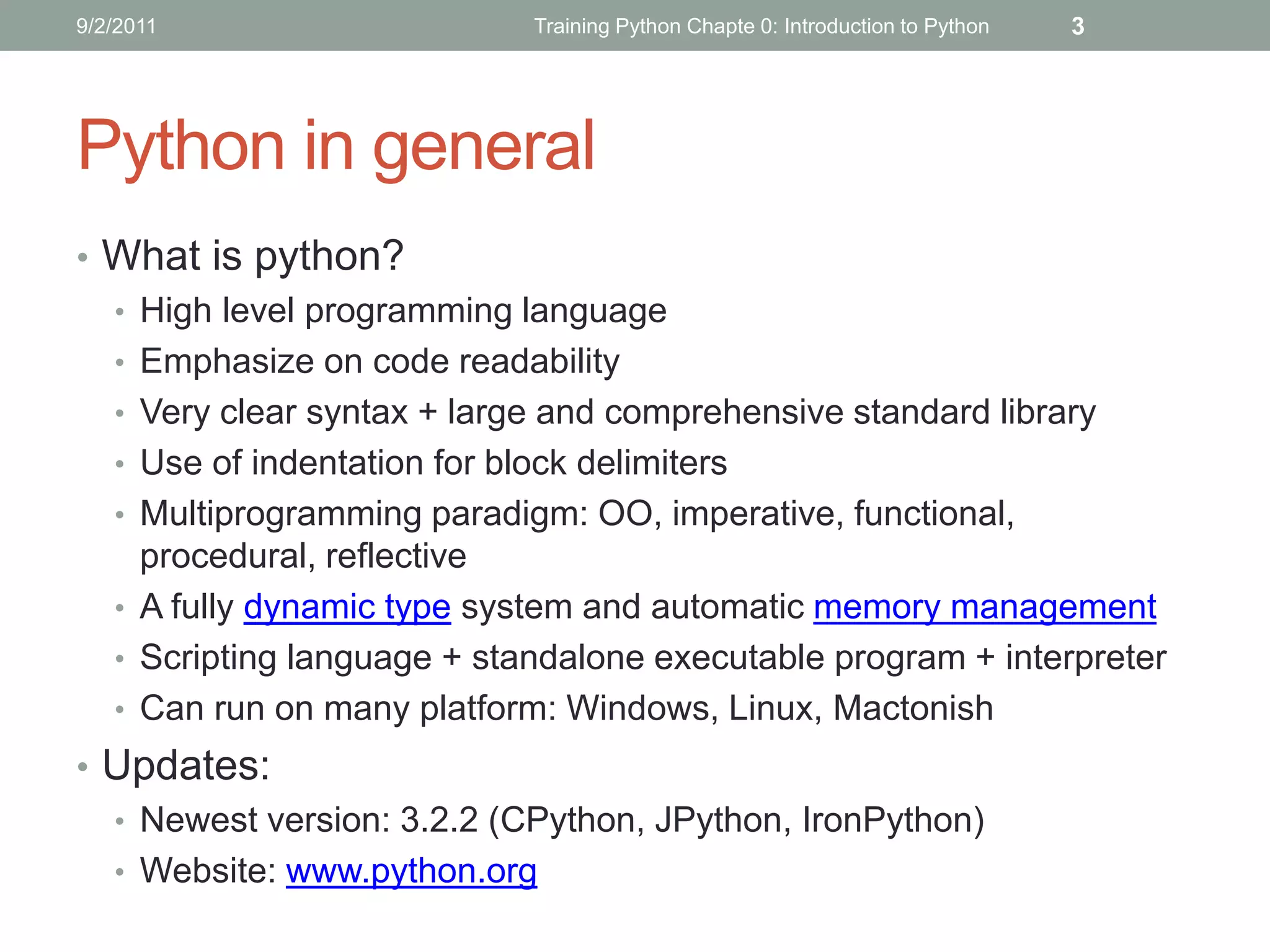
Python in general
• What is python?
  • High level programming language
  • Emphasize on code readability
  • Very clear syntax + large and comprehensive standard library
  • Use of indentation for block delimiters
  • Multiprogramming paradigm: OO, imperative, functional,
    procedural, reflective
  • A fully dynamic type system and automatic memory management
  • Scripting language + standalone executable program + interpreter
  • Can run on many platform: Windows, Linux, Mactonish
• Updates:
  • Newest version: 3.2.2 (CPython, JPython, IronPython)
  • Website: www.python.org
9/2/2011                     Training Python Chapte 0: Introduction to Python   4


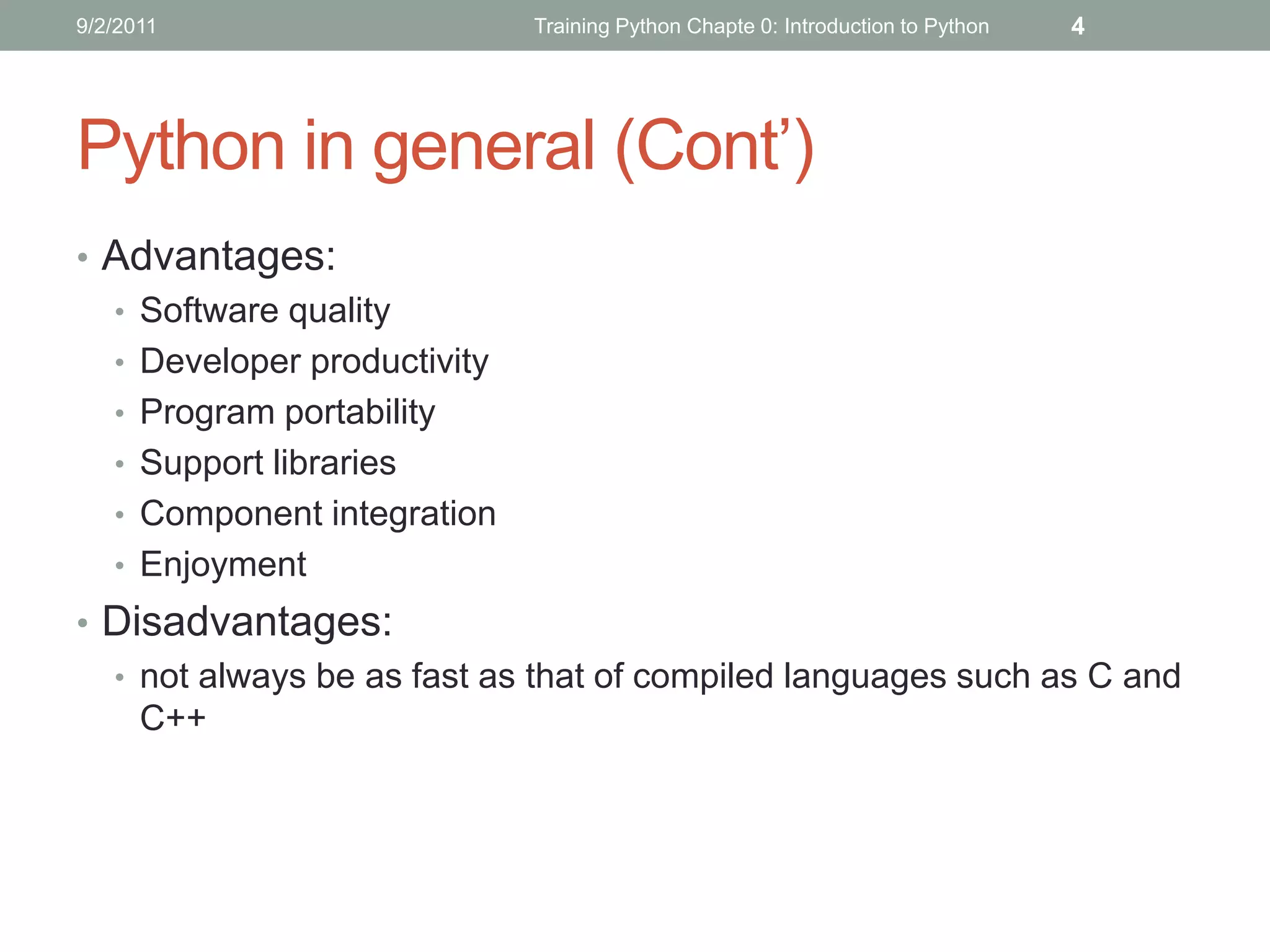
Python in general (Cont’)
• Advantages:
  • Software quality
  • Developer productivity
  • Program portability
  • Support libraries
  • Component integration
  • Enjoyment
• Disadvantages:
  • not always be as fast as that of compiled languages such as C and
    C++
9/2/2011                    Training Python Chapte 0: Introduction to Python   5


Python in general (Cont’)
• Applications of python:
9/2/2011                   Training Python Chapte 0: Introduction to Python   6


Python in general (Cont’)
• Python’s Capability:
  • System Programming
  • GUI
  • Internet Scripting
  • Component Integration
  • Database Programming
  • Rapid Prototyping
  • Numeric and Scientific Programming
  • Gaming, Images, Serial Ports, XML, Robots, and More
9/2/2011                        Training Python Chapte 0: Introduction to Python   7


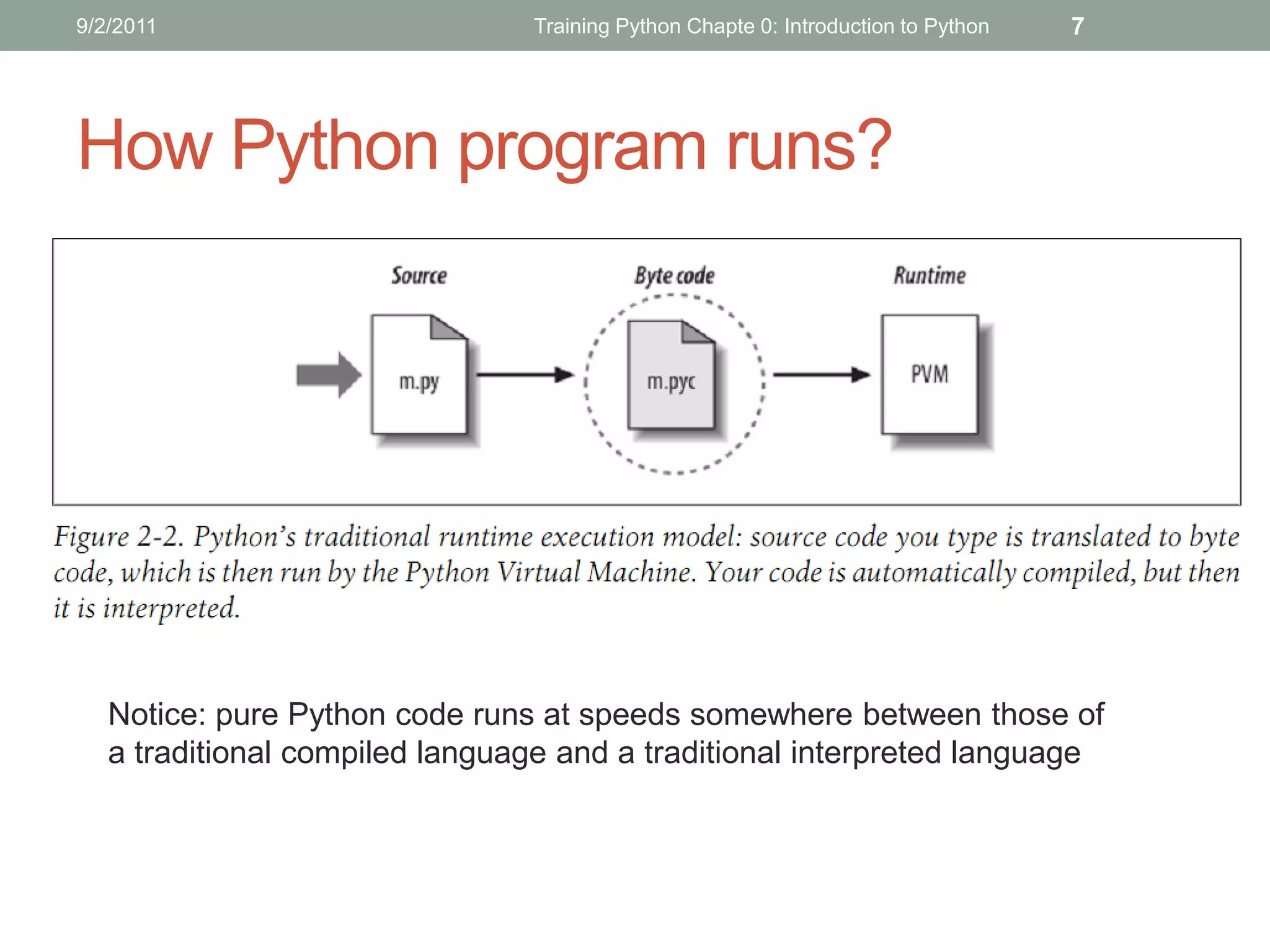
How Python program runs?


   Notice: pure Python code runs at speeds somewhere between those of
   a traditional compiled language and a traditional interpreted language
9/2/2011                        Training Python Chapte 0: Introduction to Python   8


 How to run Python?
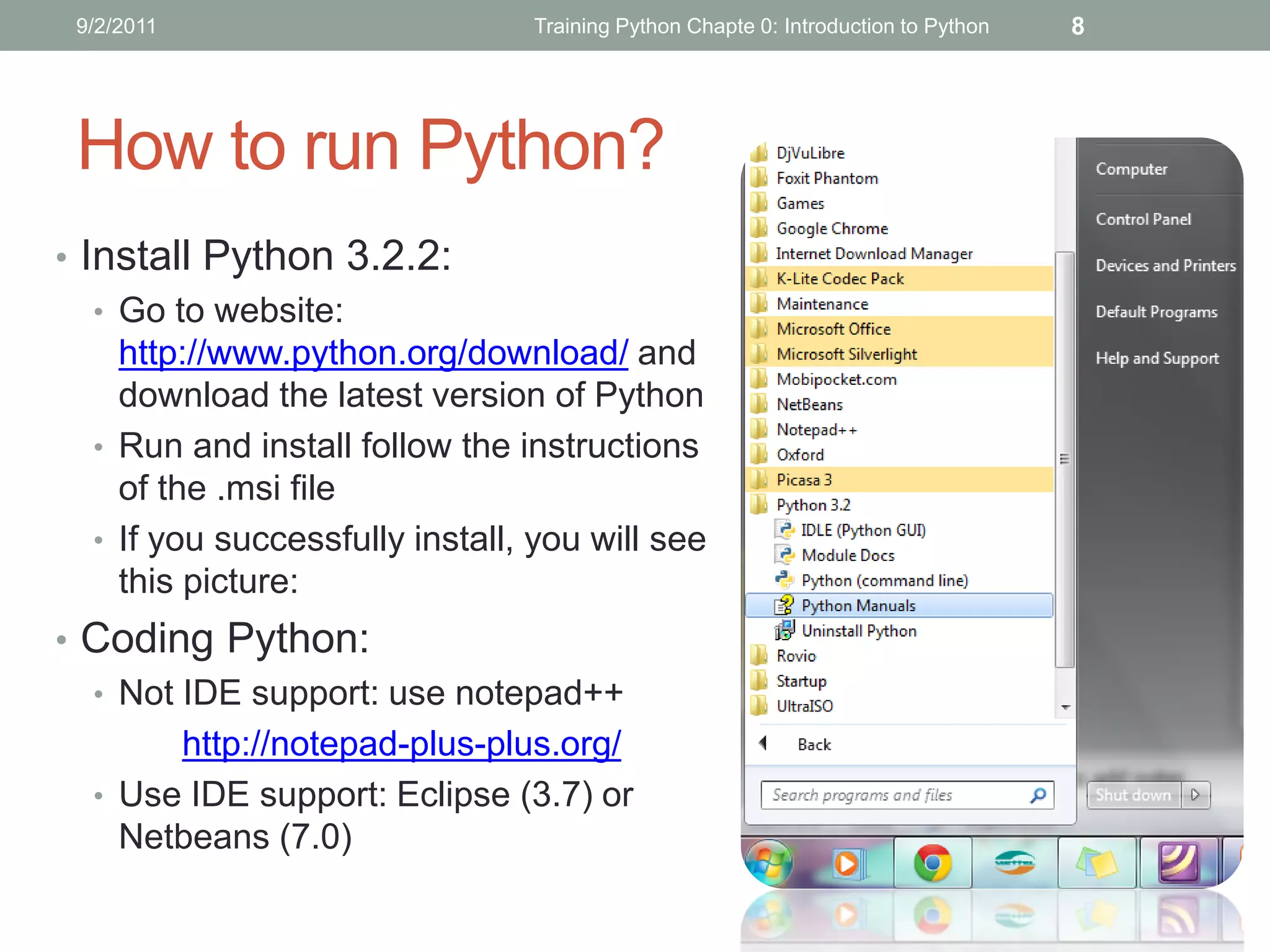
• Install Python 3.2.2:
   • Go to website:
     http://www.python.org/download/ and
     download the latest version of Python
   • Run and install follow the instructions
     of the .msi file
   • If you successfully install, you will see
     this picture:
• Coding Python:
  • Not IDE support: use notepad++
        http://notepad-plus-plus.org/
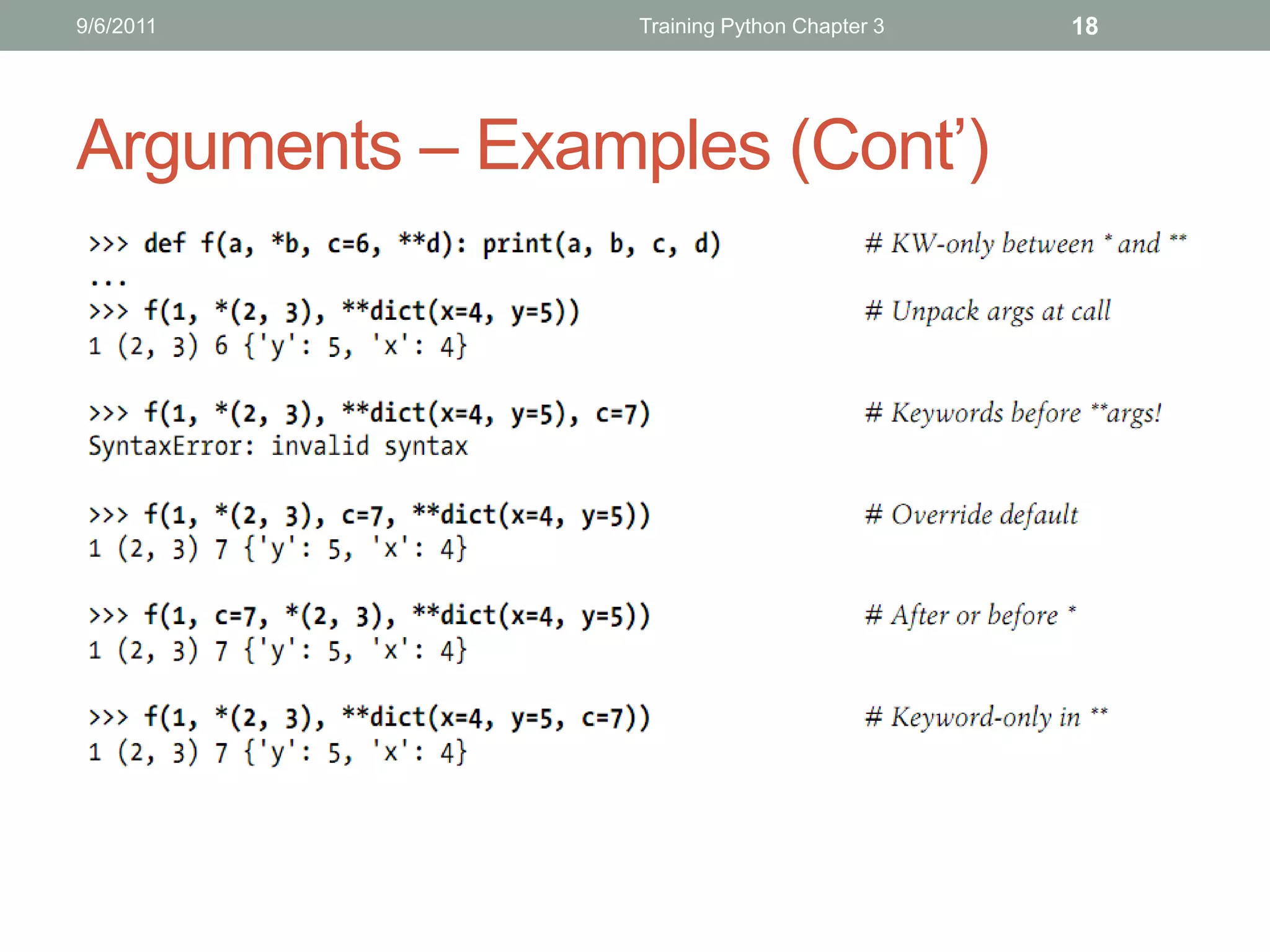
  • Use IDE support: Eclipse (3.7) or
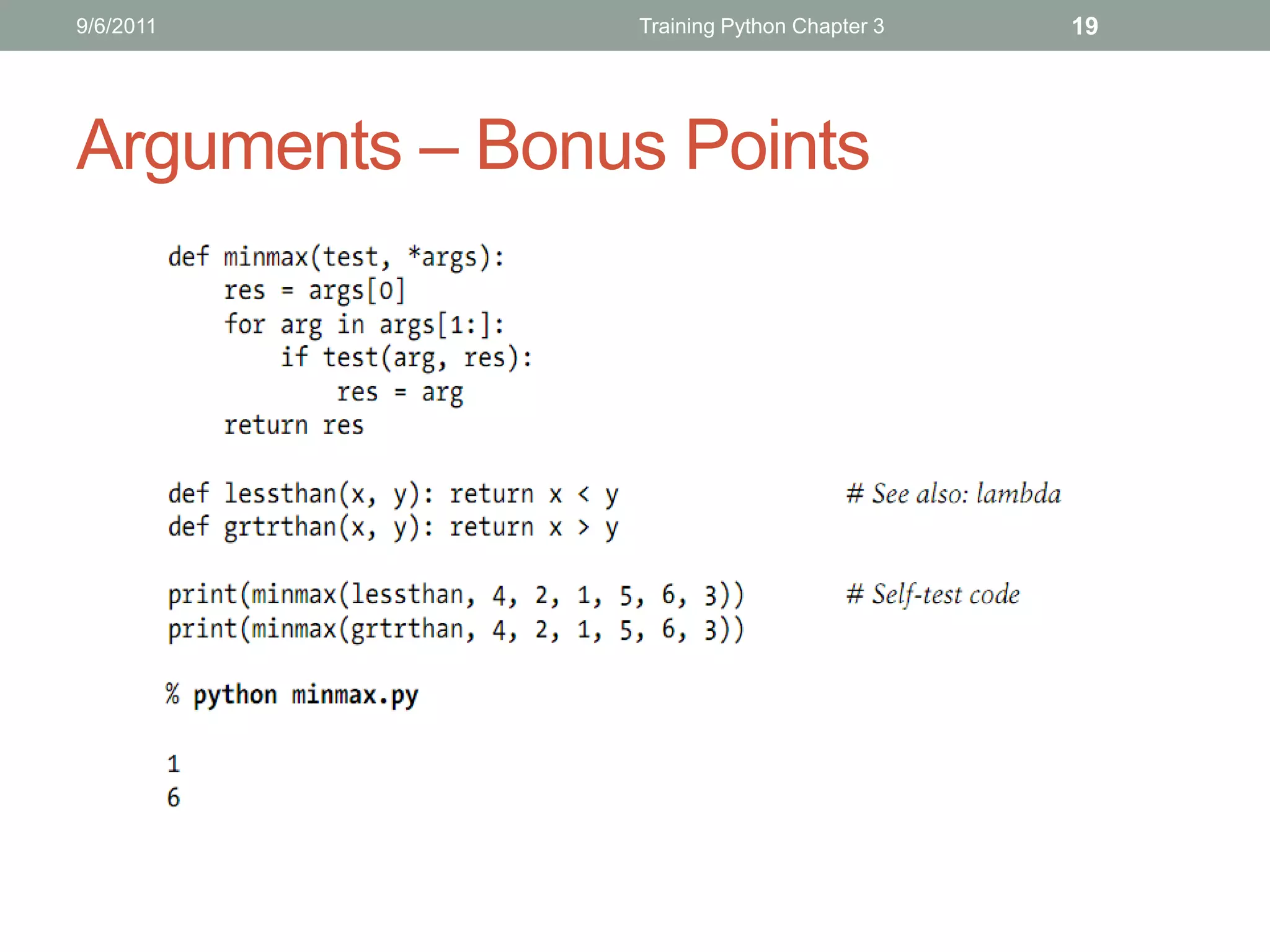
    Netbeans (7.0)
9/2/2011                    Training Python Chapte 0: Introduction to Python   9


 How to run Python? (Cont’)
• Install Eclipse: follow the instructions from this website:
   http://wiki.eclipse.org/FAQ_Where_do_I_get_and_install_Eclipse%3F
   (you should download the Eclipse Classics version)
• Install Pydev plugin for eclipse: follow this instruction:
   http://pydev.org/manual_101_install.html
9/2/2011               Training Python Chapte 0: Introduction to Python   10


   THANKS FOR LISTENING
   Editor: Nguyễn Đức Minh Khôi
   Contact: nguyenducminhkhoi@gmail.com
   Main reference: Part I – Getting Started
   Learning Python – O’reilly
TRAINING PYTHON
CHAPTER 1: TYPES AND OPERATIONS
CONTENTS
 Lists

    Dictionaries

         Tuples

         Files

         Numeric Typing

    Dynamic Typing

 Summary
5/22/2011                         Training Python     3


Lists
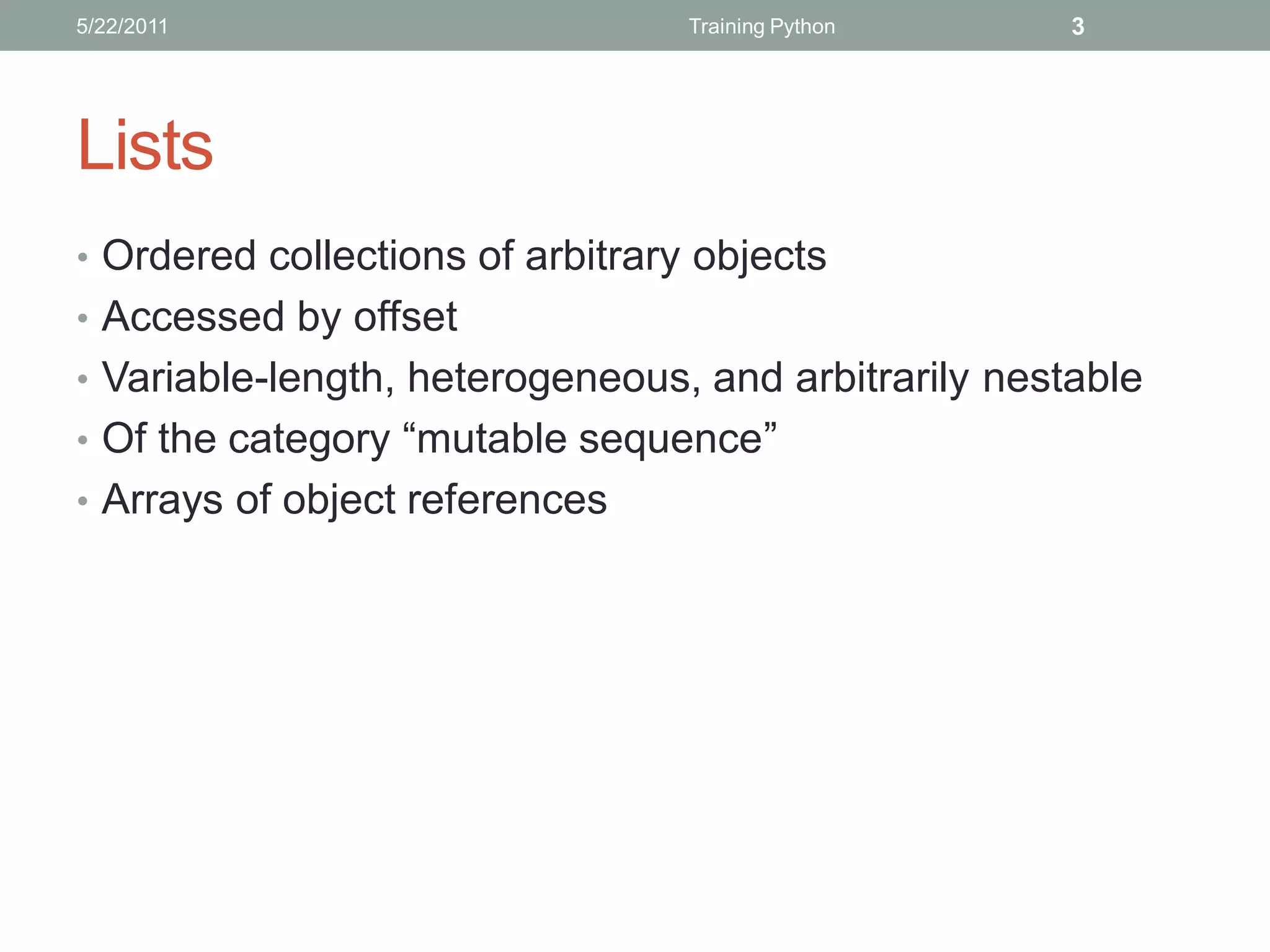
• Ordered collections of arbitrary objects
• Accessed by offset
• Variable-length, heterogeneous, and arbitrarily nestable
• Of the category “mutable sequence”
• Arrays of object references
5/22/2011             Training Python   4


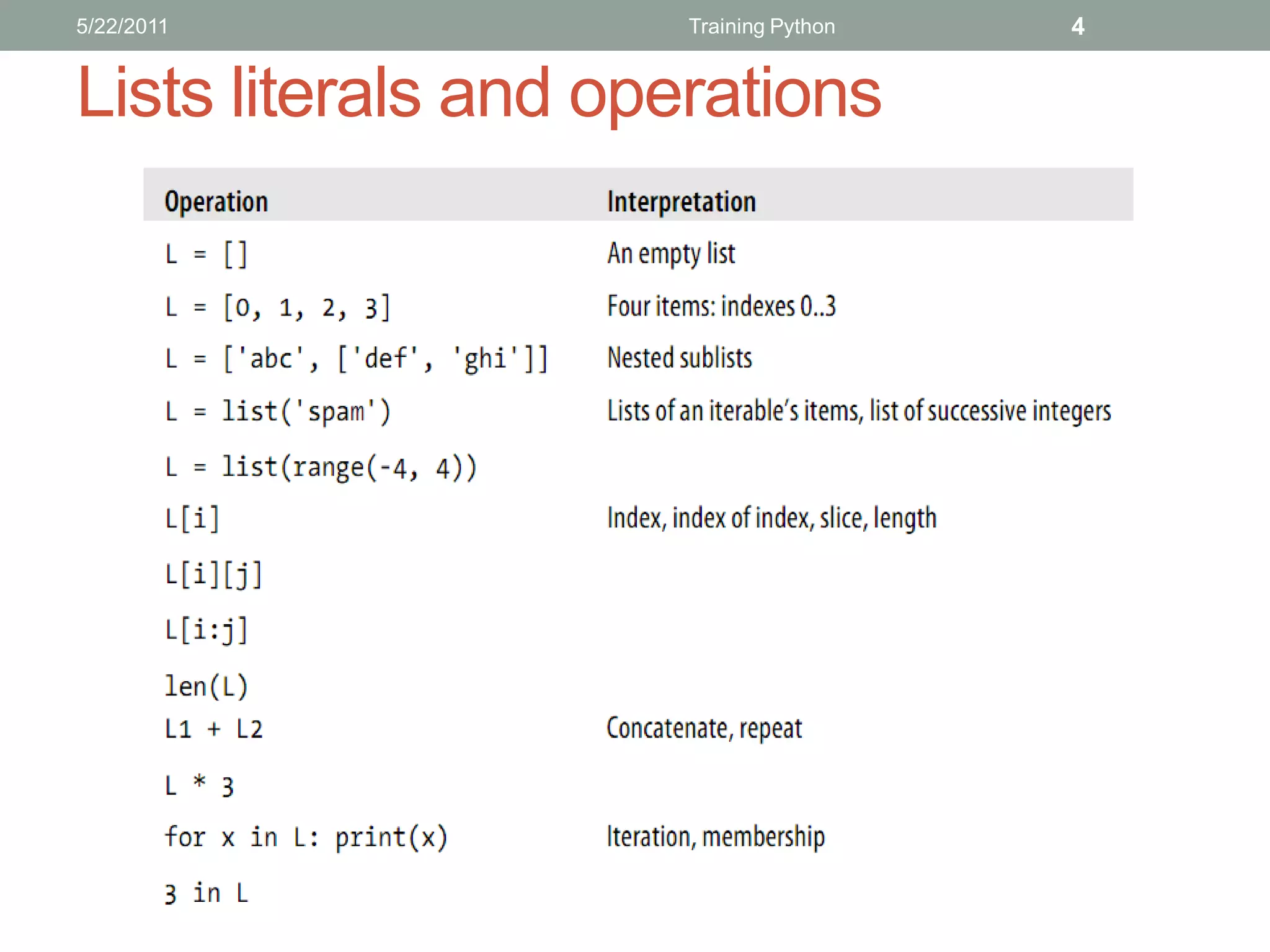
Lists literals and operations
5/22/2011             Training Python   5


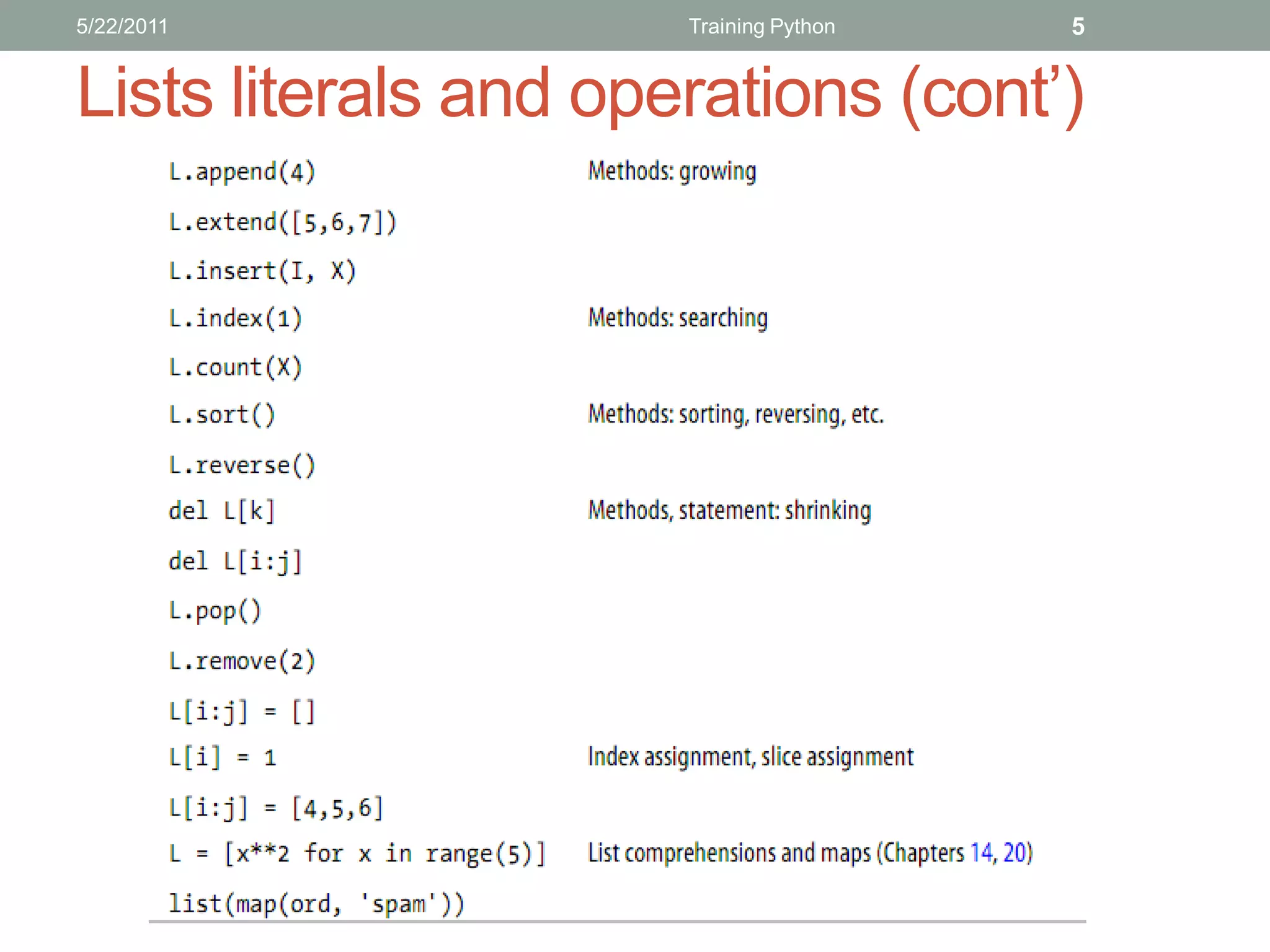
Lists literals and operations (cont’)
5/22/2011                        Training Python      6


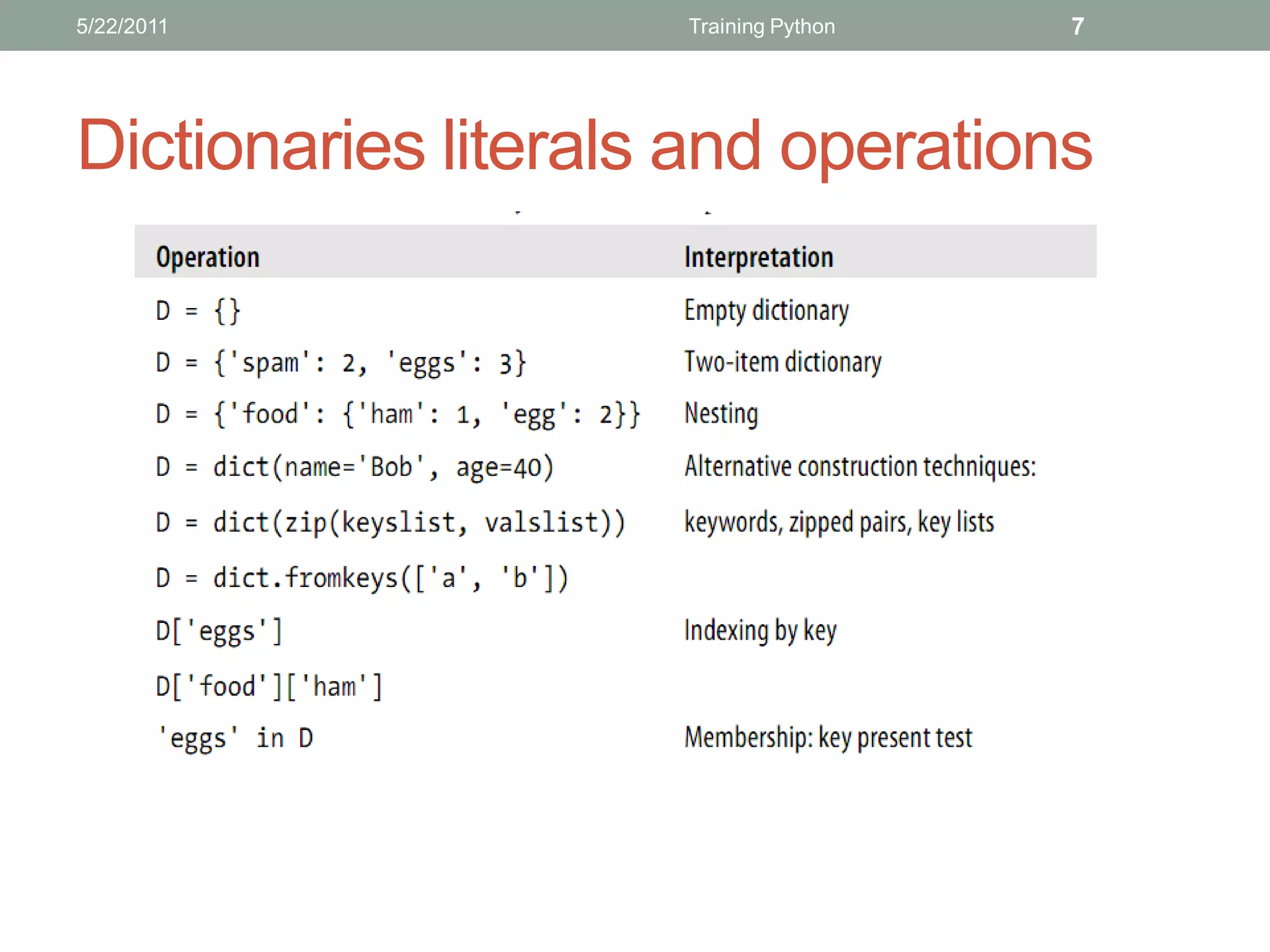
Dictionaries
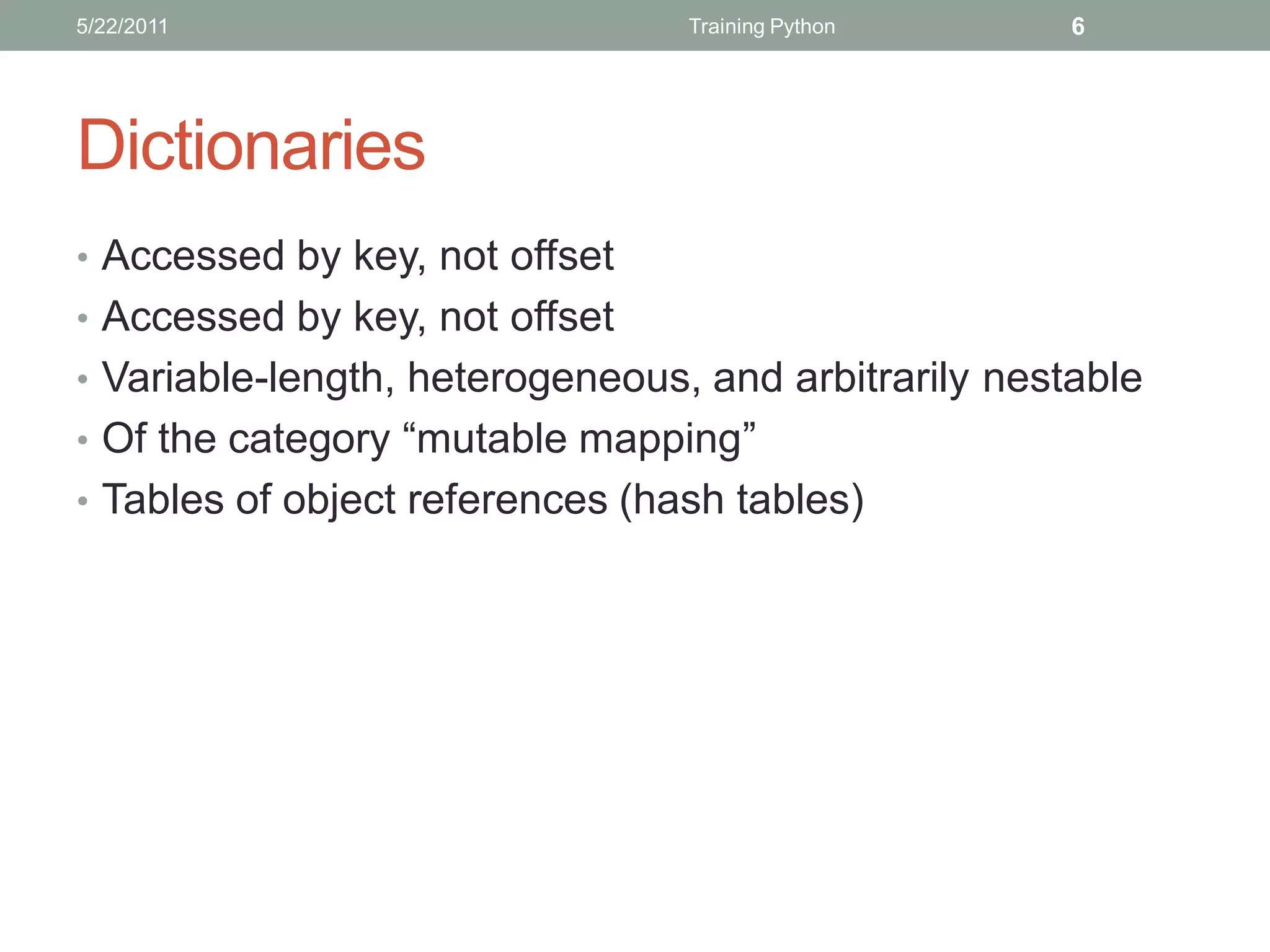
• Accessed by key, not offset
• Variable-length, heterogeneous, and arbitrarily nestable
• Of the category “mutable mapping”
• Tables of object references (hash tables)
5/22/2011            Training Python   7


Dictionaries literals and operations
5/22/2011             Training Python   8


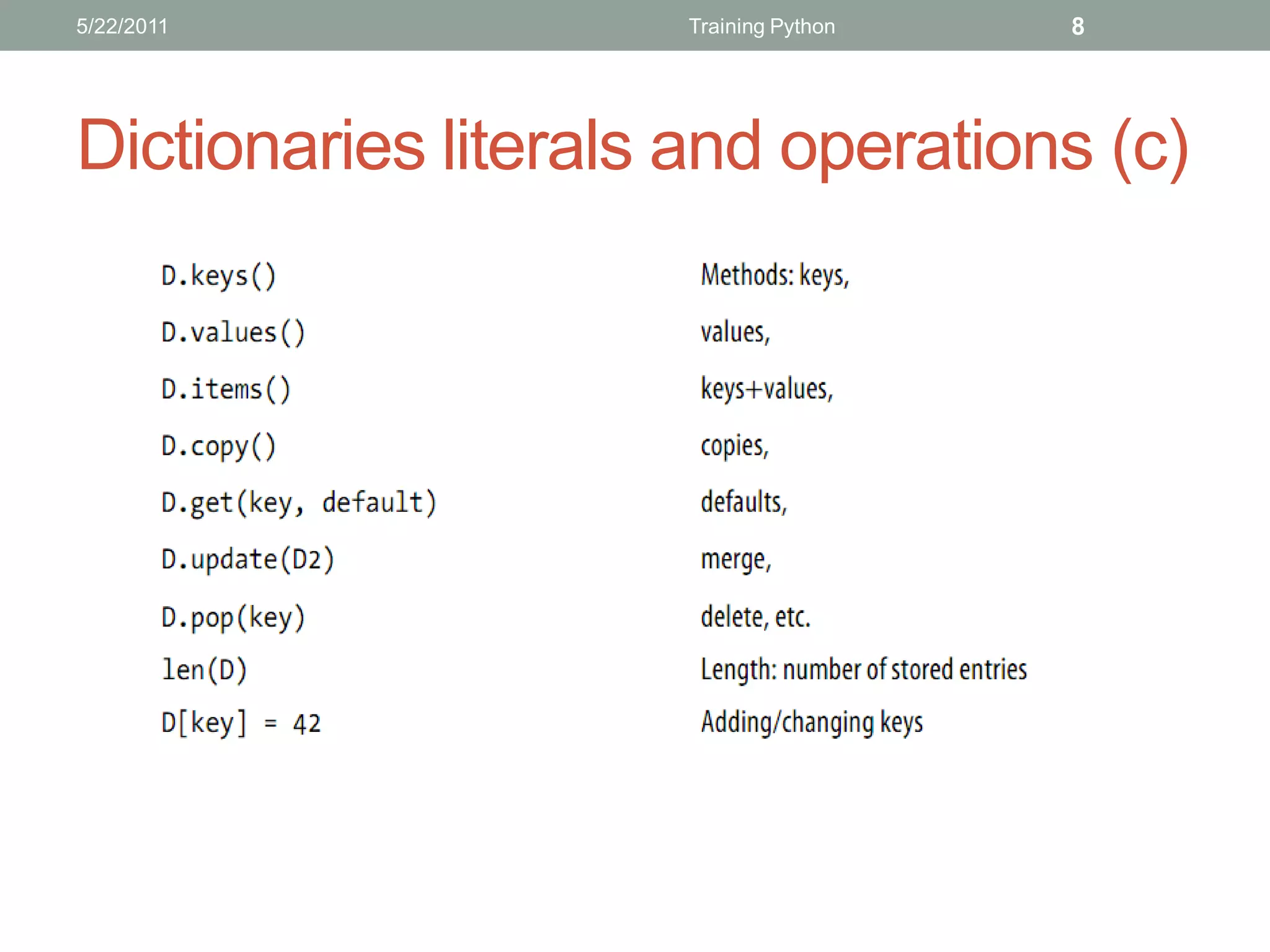
Dictionaries literals and operations (c)
5/22/2011                         Training Python    9


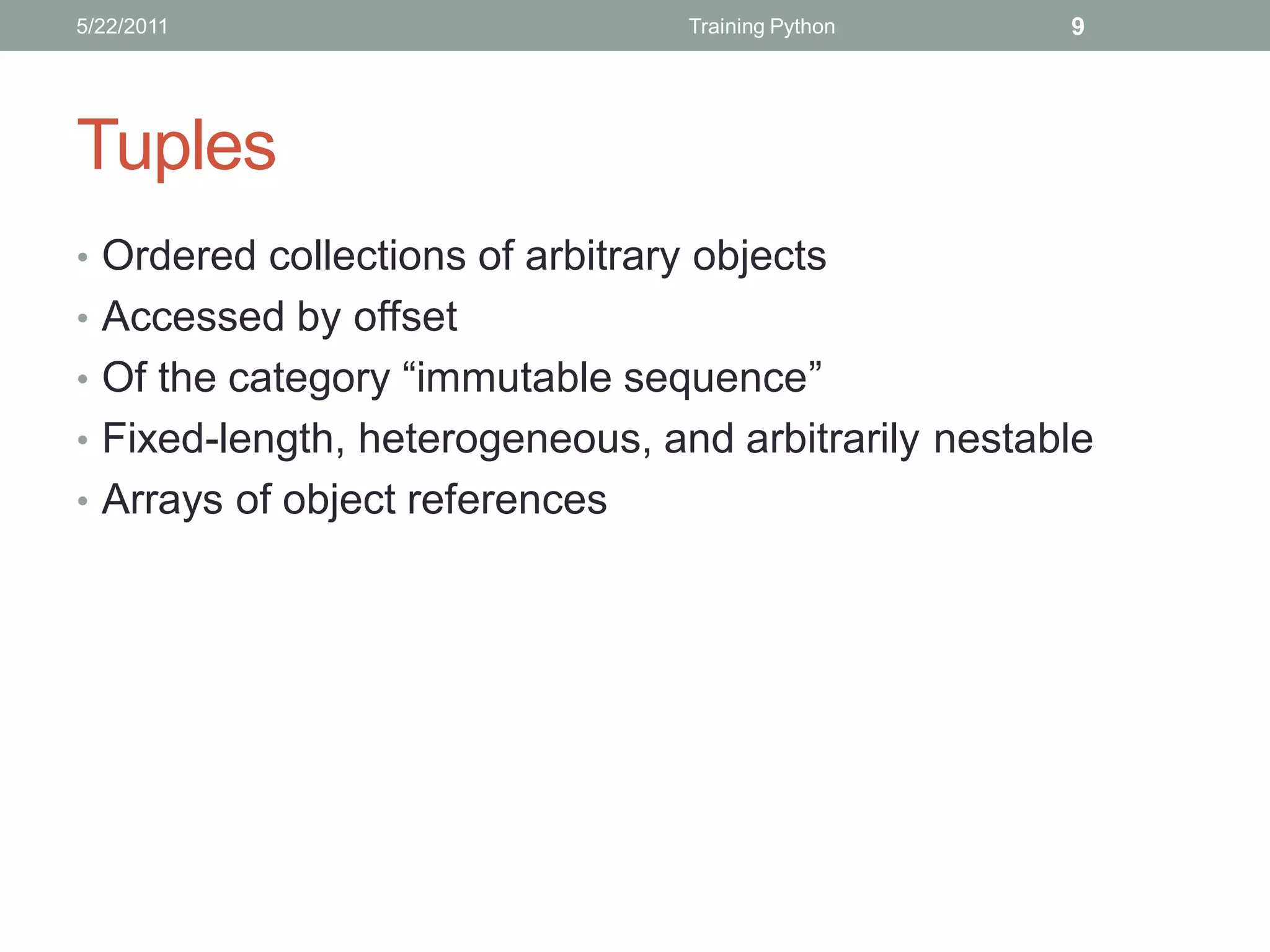
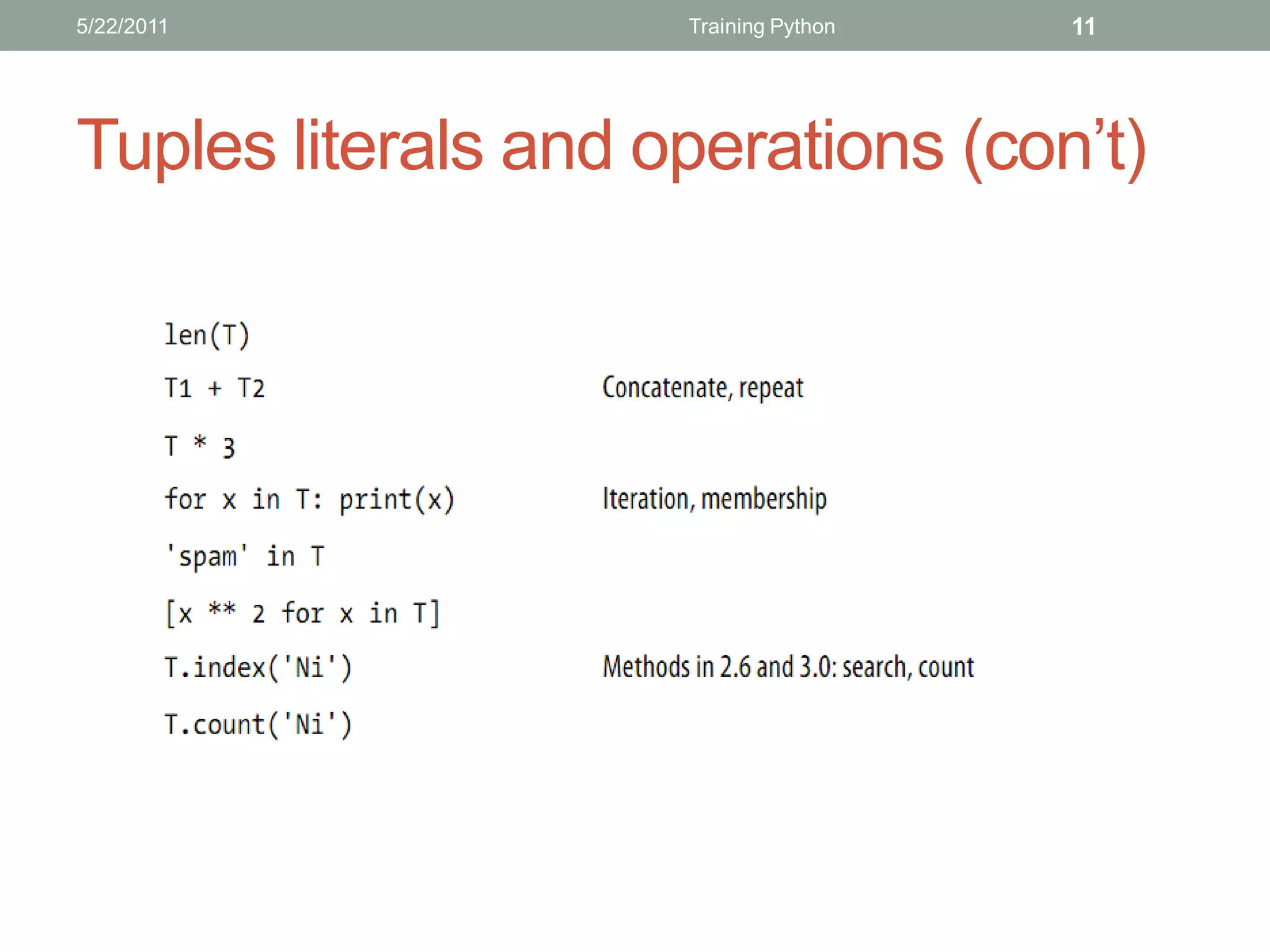
Tuples
• Ordered collections of arbitrary objects
• Accessed by offset
• Of the category “immutable sequence”
• Fixed-length, heterogeneous, and arbitrarily nestable
• Arrays of object references
5/22/2011            Training Python   10


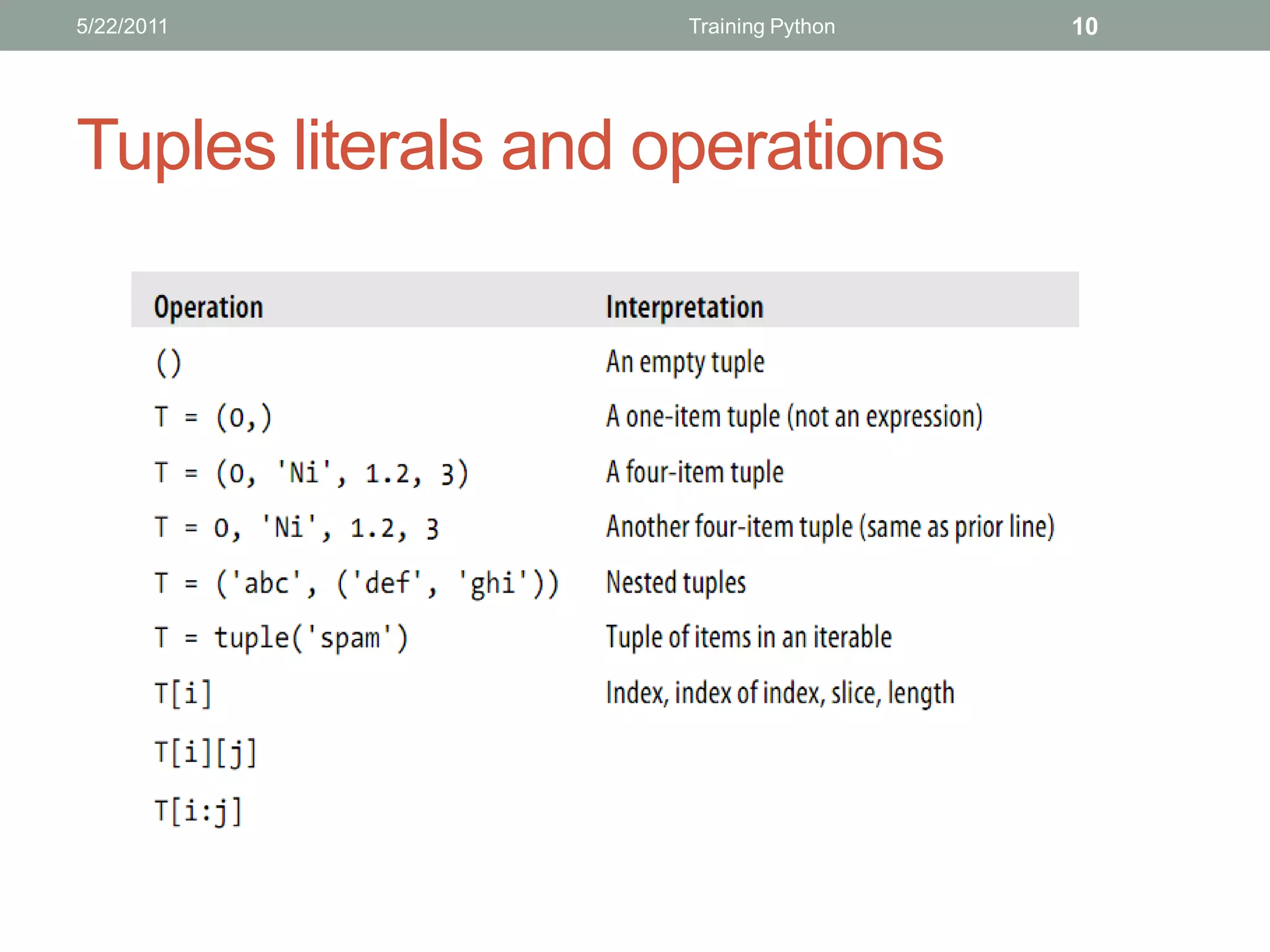
Tuples literals and operations
5/22/2011            Training Python   11


Tuples literals and operations (con’t)
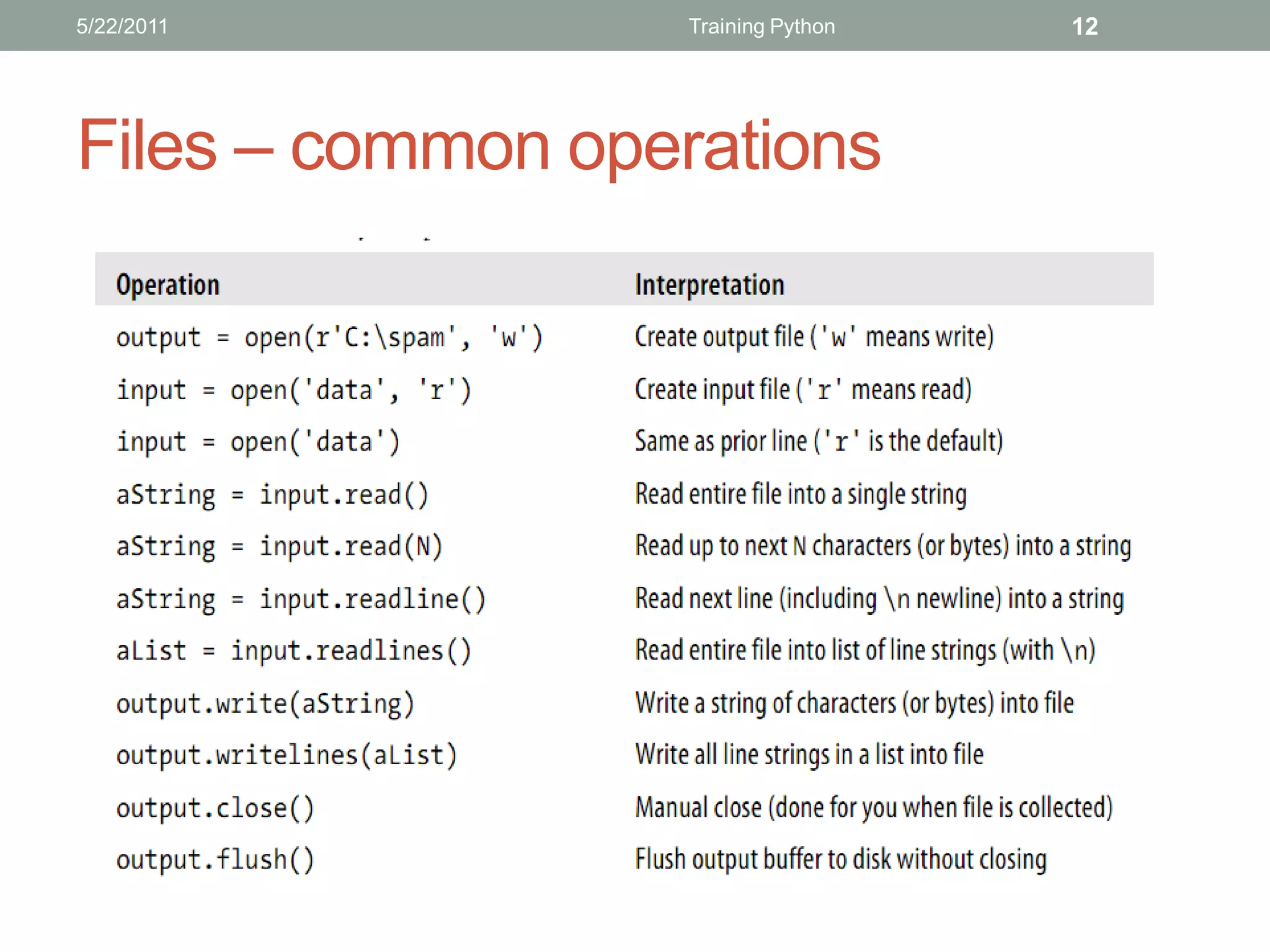
5/22/2011         Training Python   12


Files – common operations
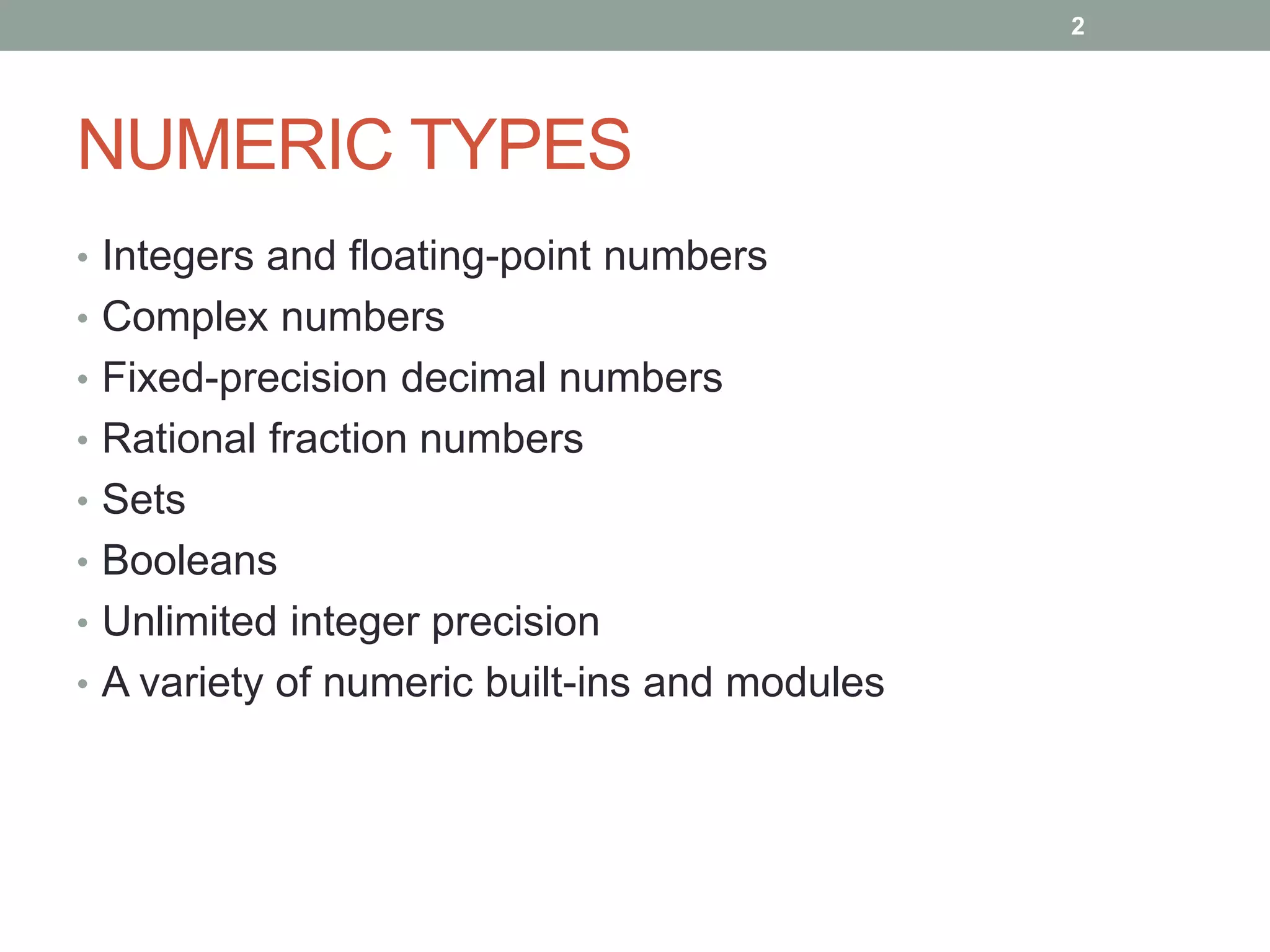
2


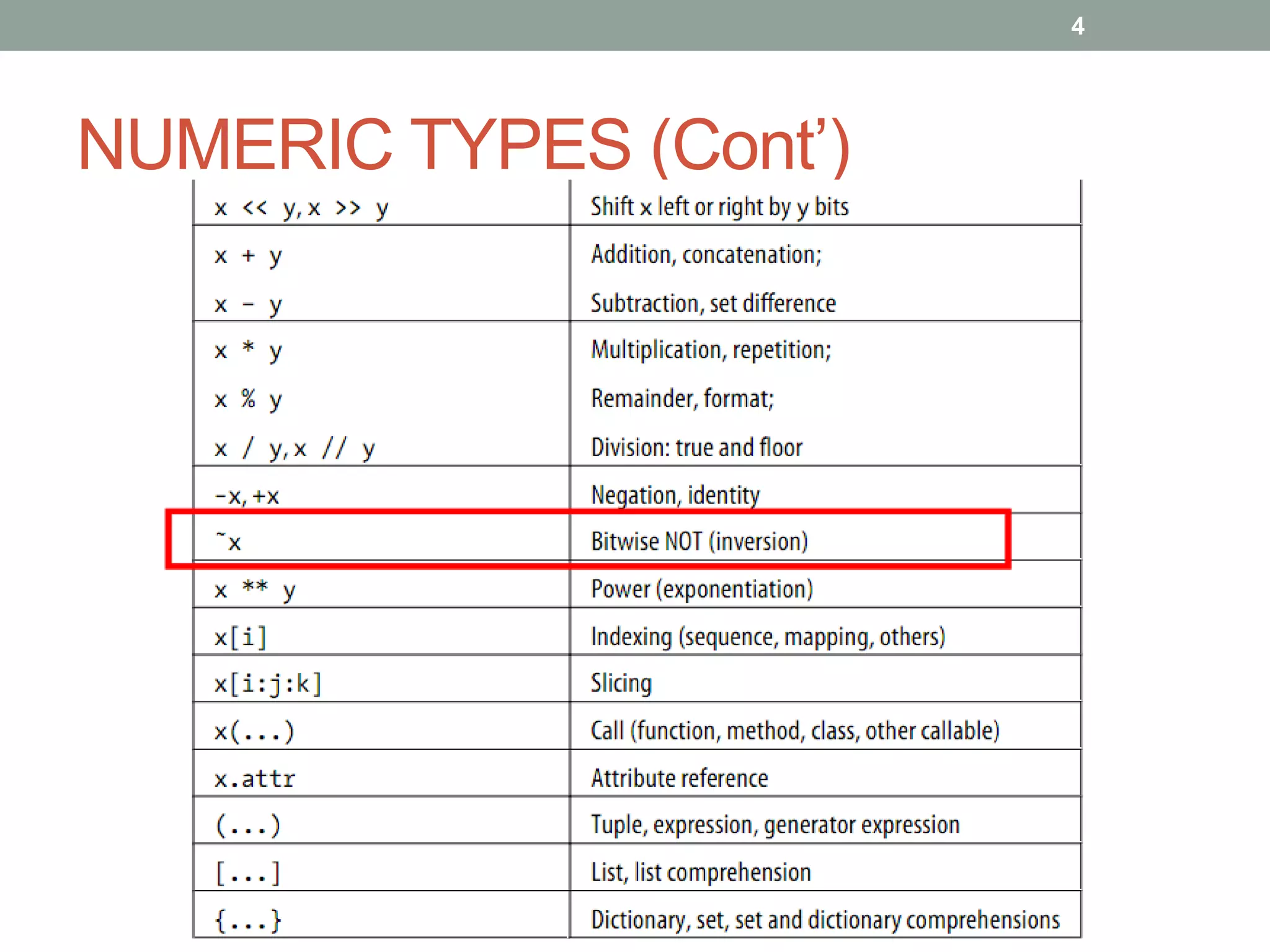
NUMERIC TYPES
• Integers and floating-point numbers
• Complex numbers
• Fixed-precision decimal numbers
• Rational fraction numbers
• Sets
• Booleans
• Unlimited integer precision
• A variety of numeric built-ins and modules
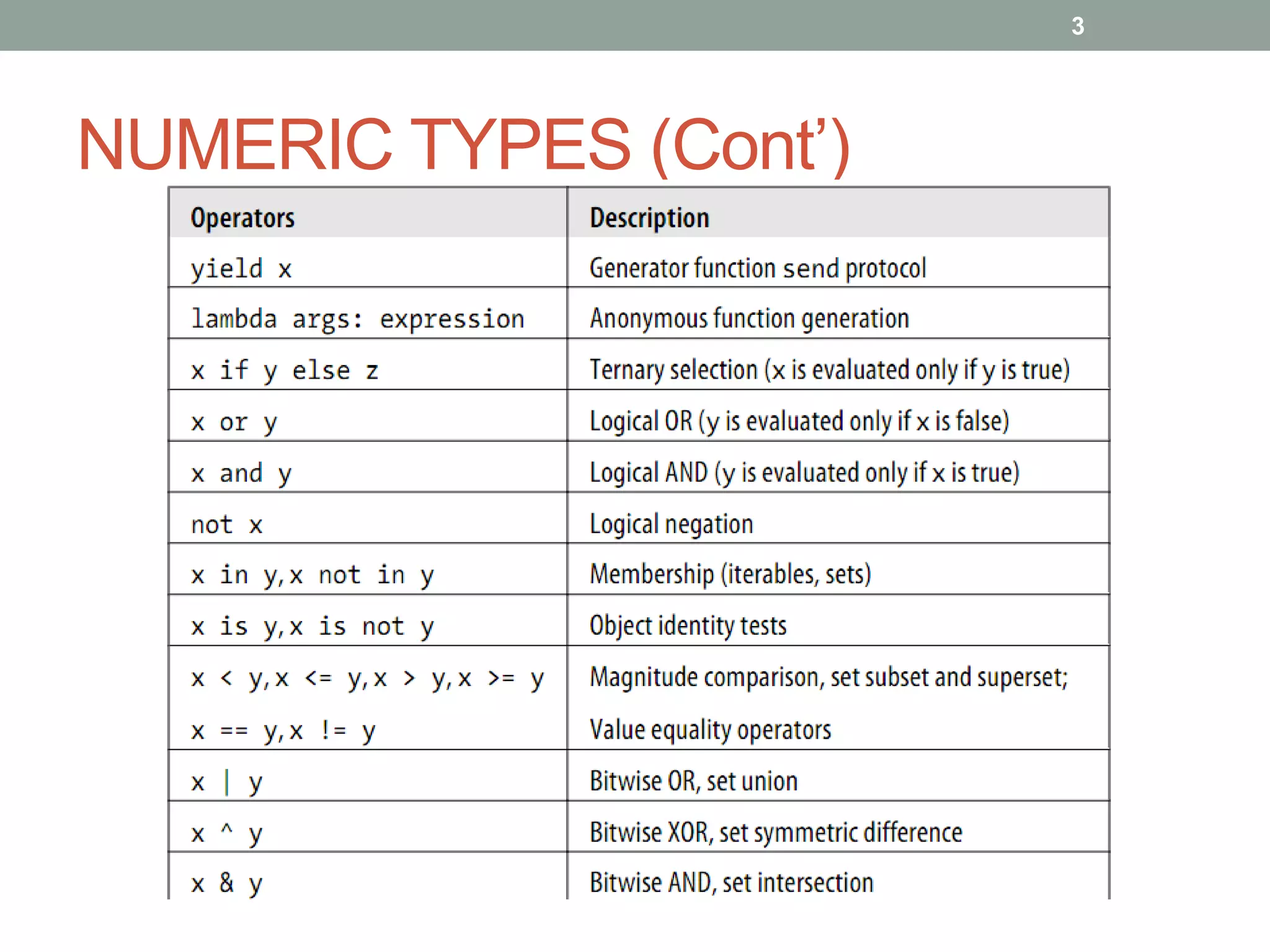
3


NUMERIC TYPES (Cont’)
4


NUMERIC TYPES (Cont’)
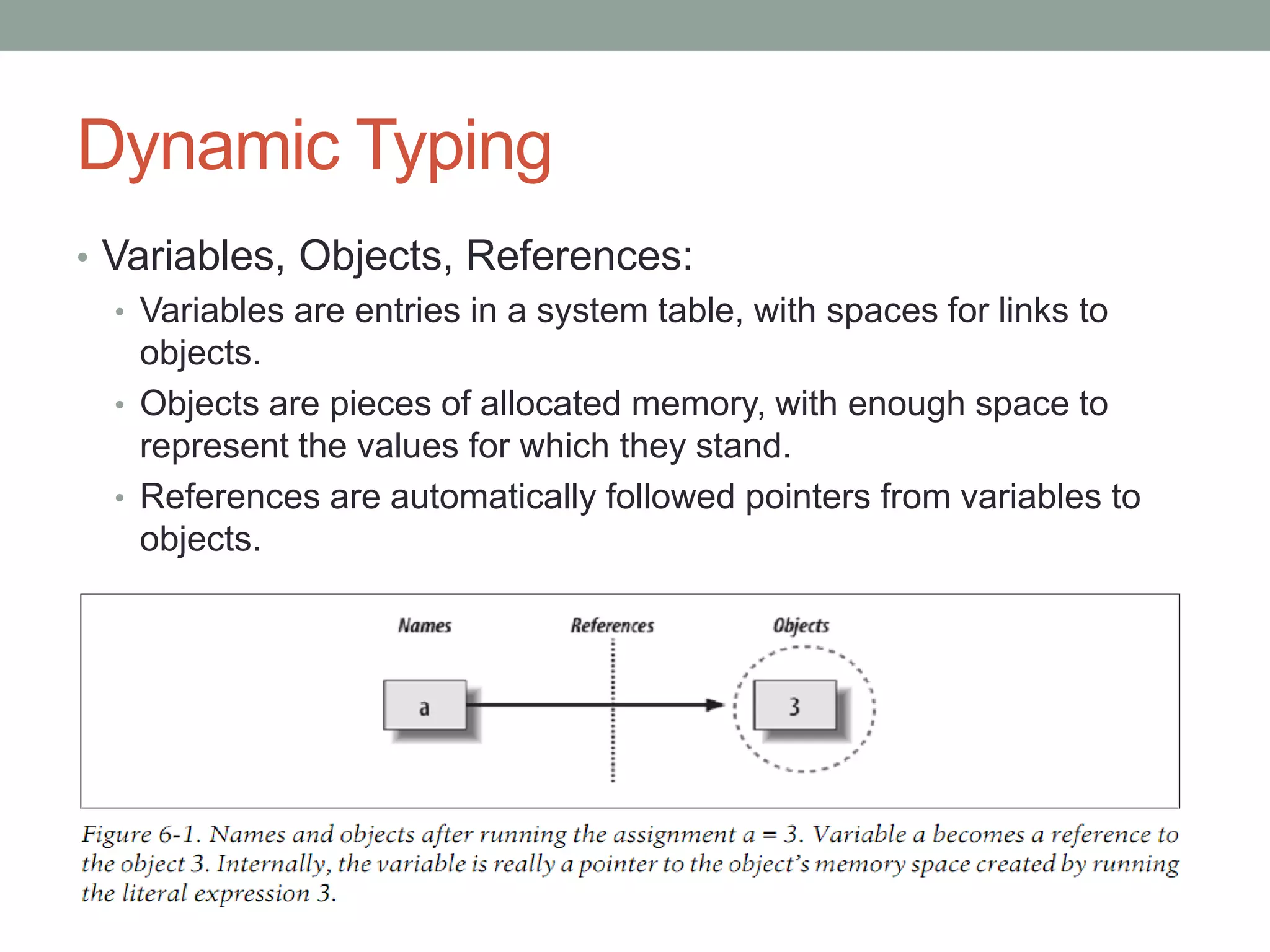
Dynamic Typing
• Variables, Objects, References:
   • Variables are entries in a system table, with spaces for links to
     objects.
   • Objects are pieces of allocated memory, with enough space to
     represent the values for which they stand.
   • References are automatically followed pointers from variables to
     objects.
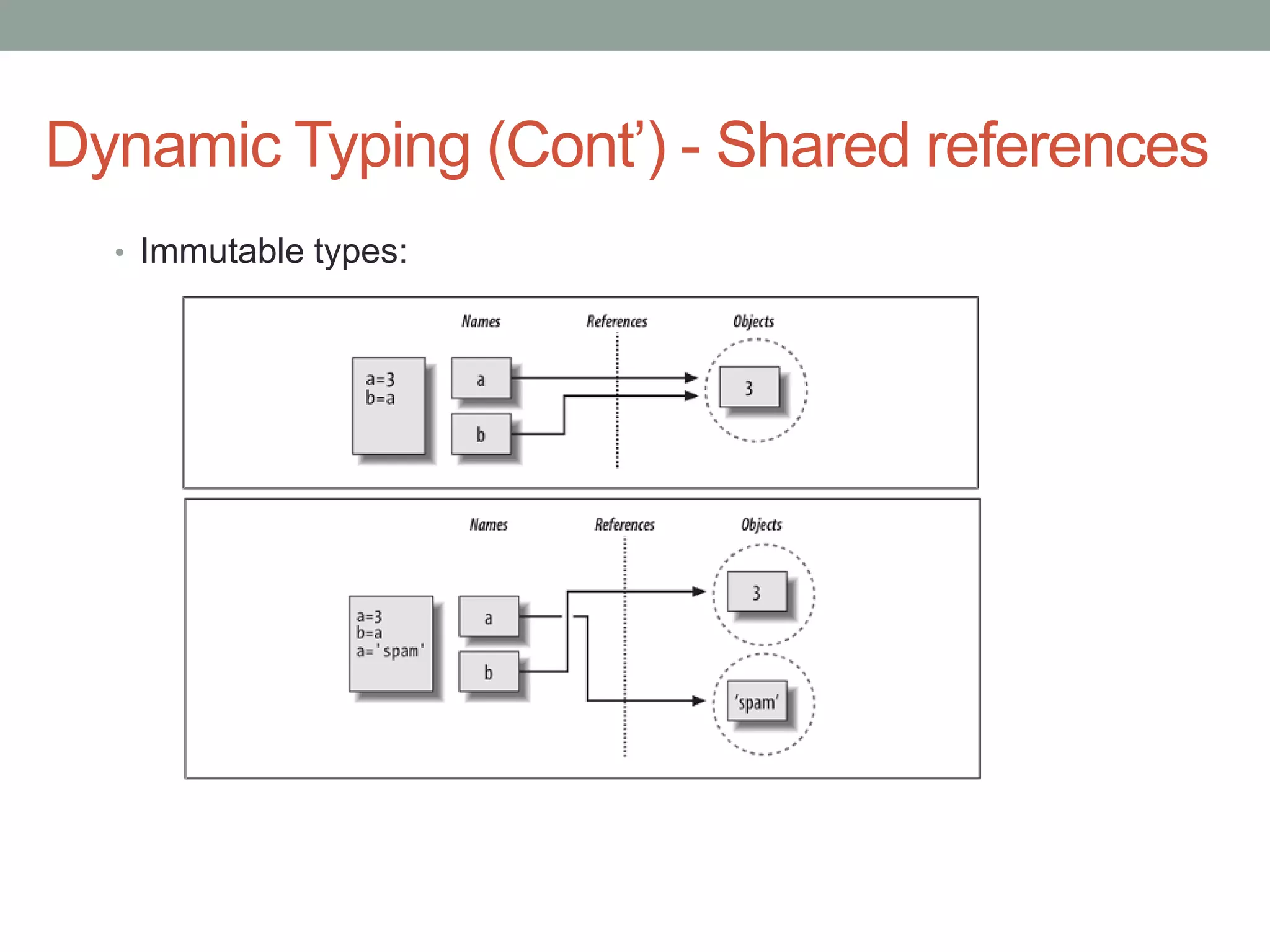
Dynamic Typing (Cont’) - Shared references
  • Immutable types:
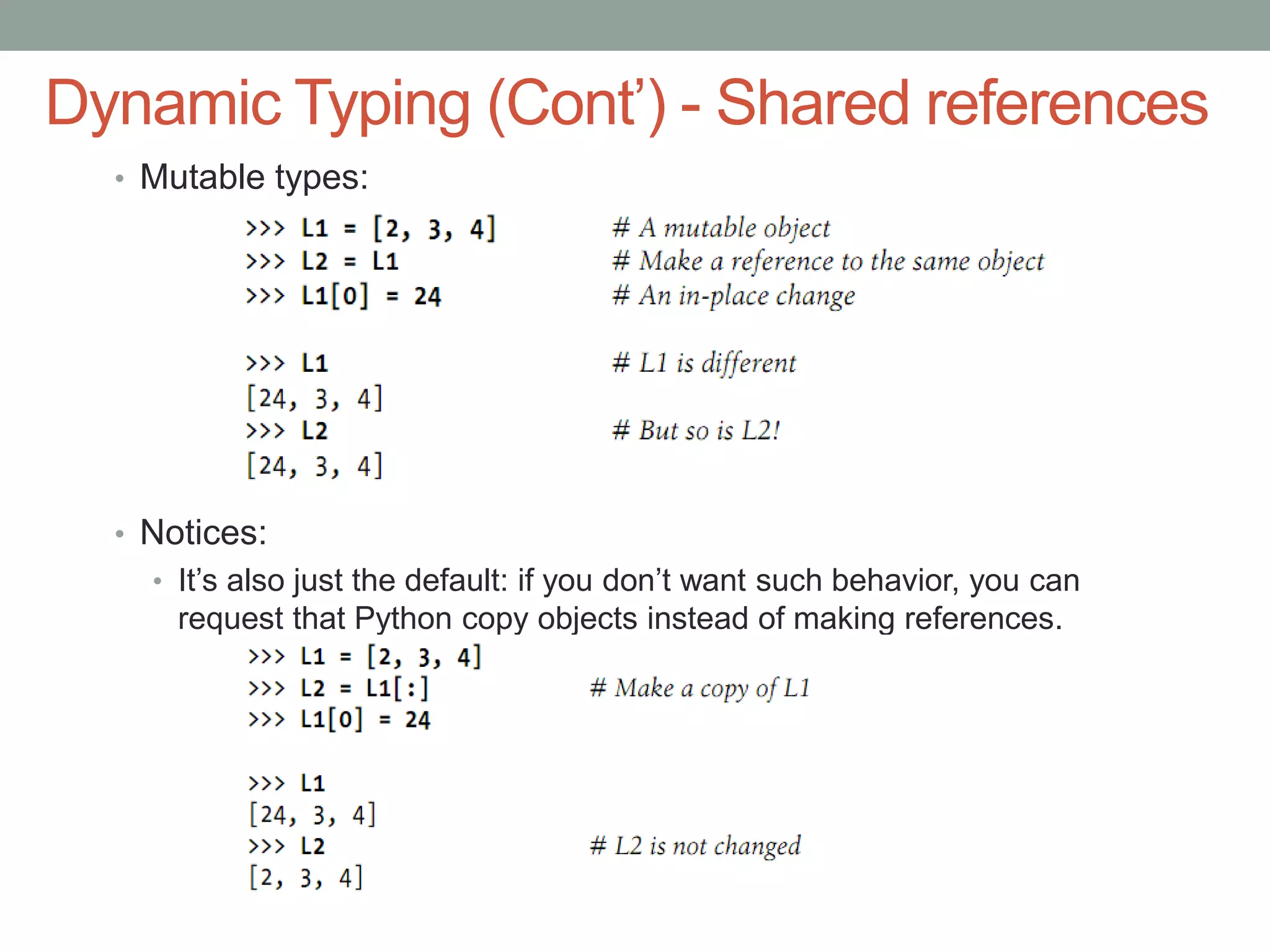
Dynamic Typing (Cont’) - Shared references
  • Mutable types:


  • Notices:
    • It’s also just the default: if you don’t want such behavior, you can
      request that Python copy objects instead of making references.
Dynamic Typing (Cont’) - Shared references
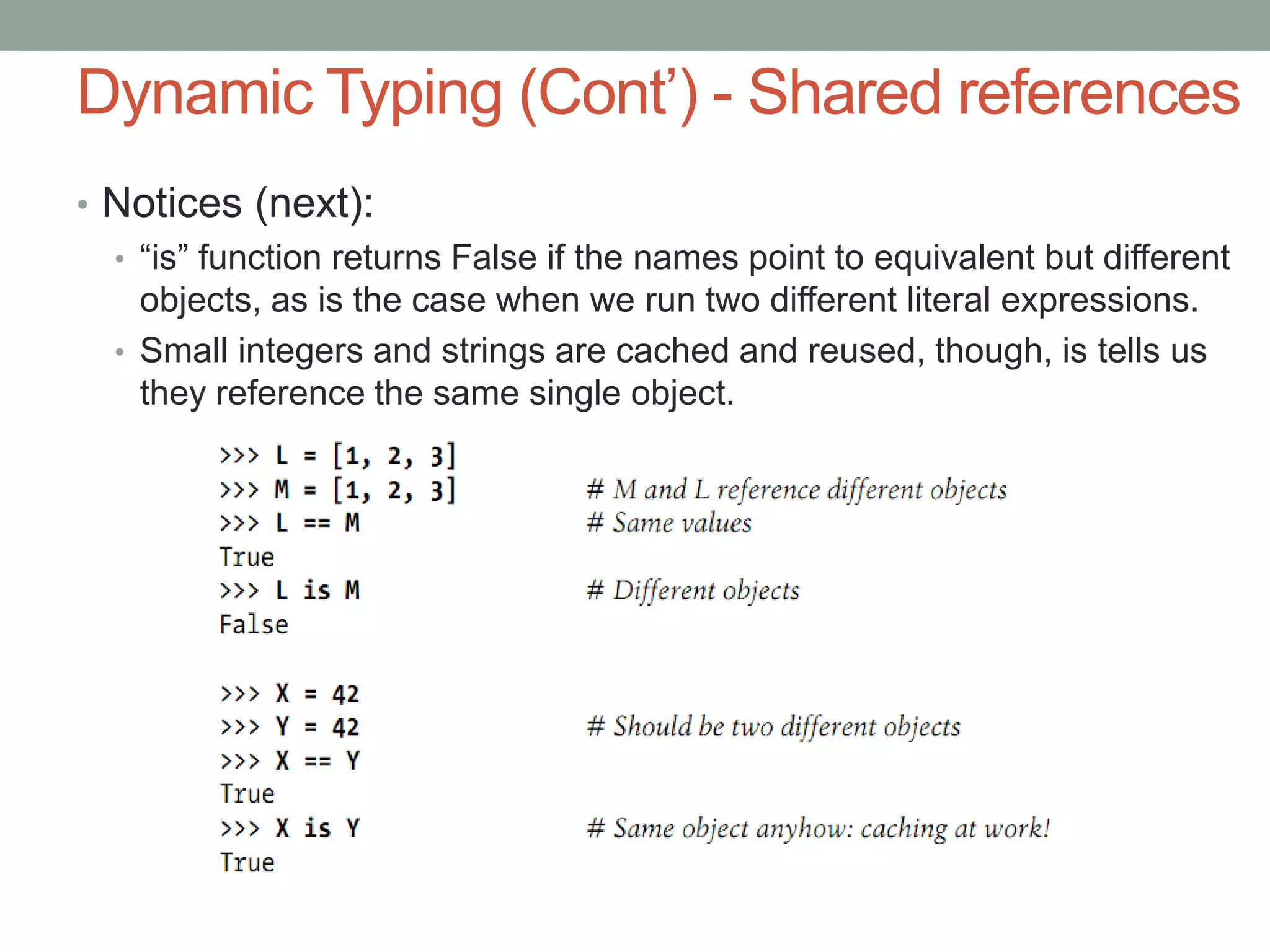
• Notices (next):
  • “is” function returns False if the names point to equivalent but different
    objects, as is the case when we run two different literal expressions.
  • Small integers and strings are cached and reused, though, is tells us
    they reference the same single object.
5/22/2011                      Training Python   13


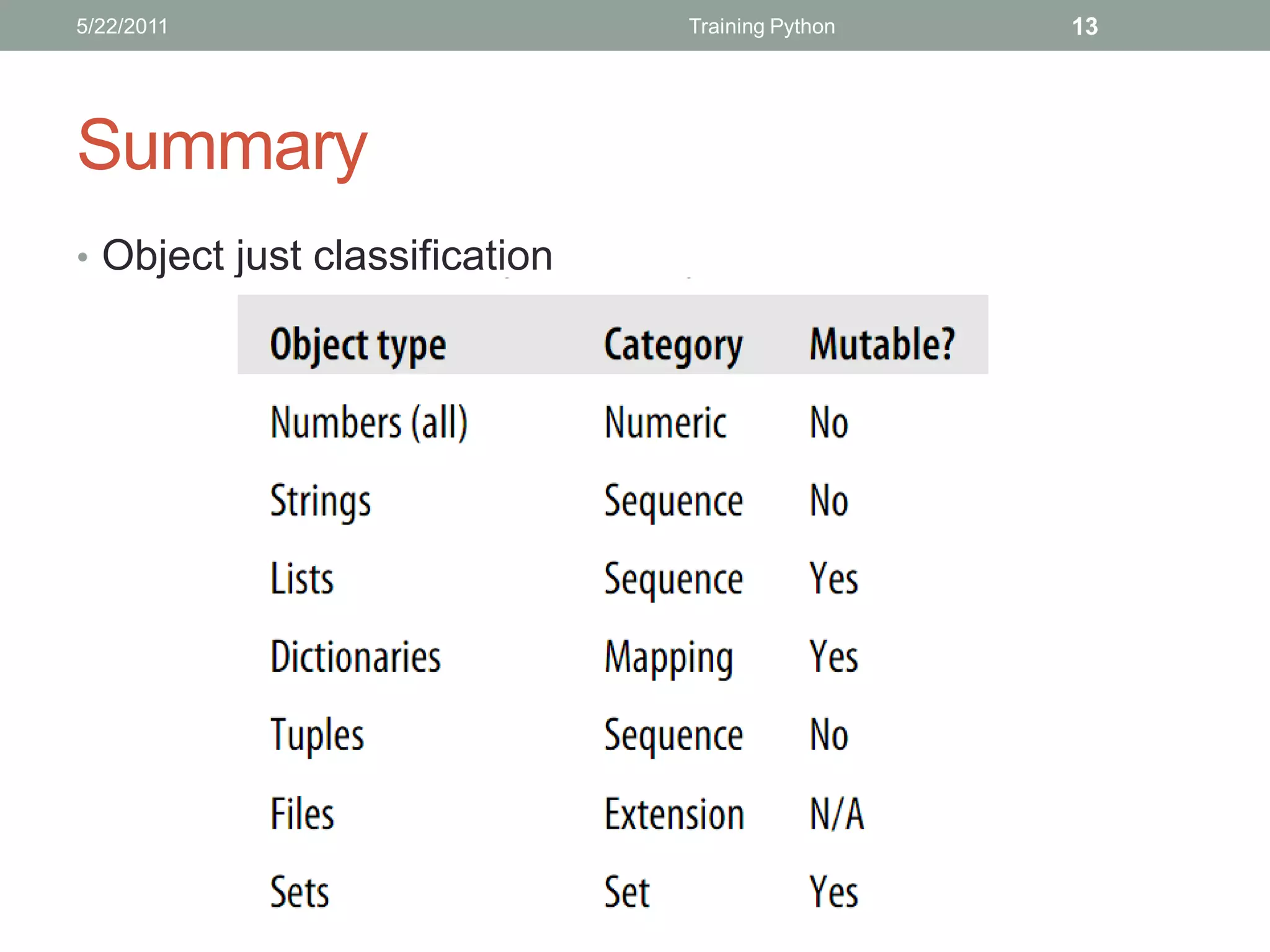
Summary
• Object just classification
5/22/2011                                Training Python           14


Summary (con’t)
• Object Flexibility
  • Lists, dictionaries, and tuples can hold any kind of object.
  • Lists, dictionaries, and tuples can be arbitrarily nested.
  • Lists and dictionaries can dynamically grow and shrink.
• Object copy
  • Slice expressions with empty limits (L[:]) copy sequences.
  • The dictionary and set copy method (X.copy()) copies a dictionary
  or set.
  • Some built-in functions, such as list, make copies (list(L)).
  • The copy standard library module makes full copies.
9/2/2011                      Learning Python Chapter 1   1


   THANKS FOR LISTENING
   Editor: Nguy n Đ c Minh Khôi
   Contact: nguyenducminhkhoi@gmail.com
   Main reference: Part II – Types and Operations
   Learning Python – O’reilly
9/2/2011         Learning Python Chapter 2   1


   TRAINING PYTHON
   STATEMENTS AND SYNTAX
9/2/2011                   Learning Python Chapter 2   2


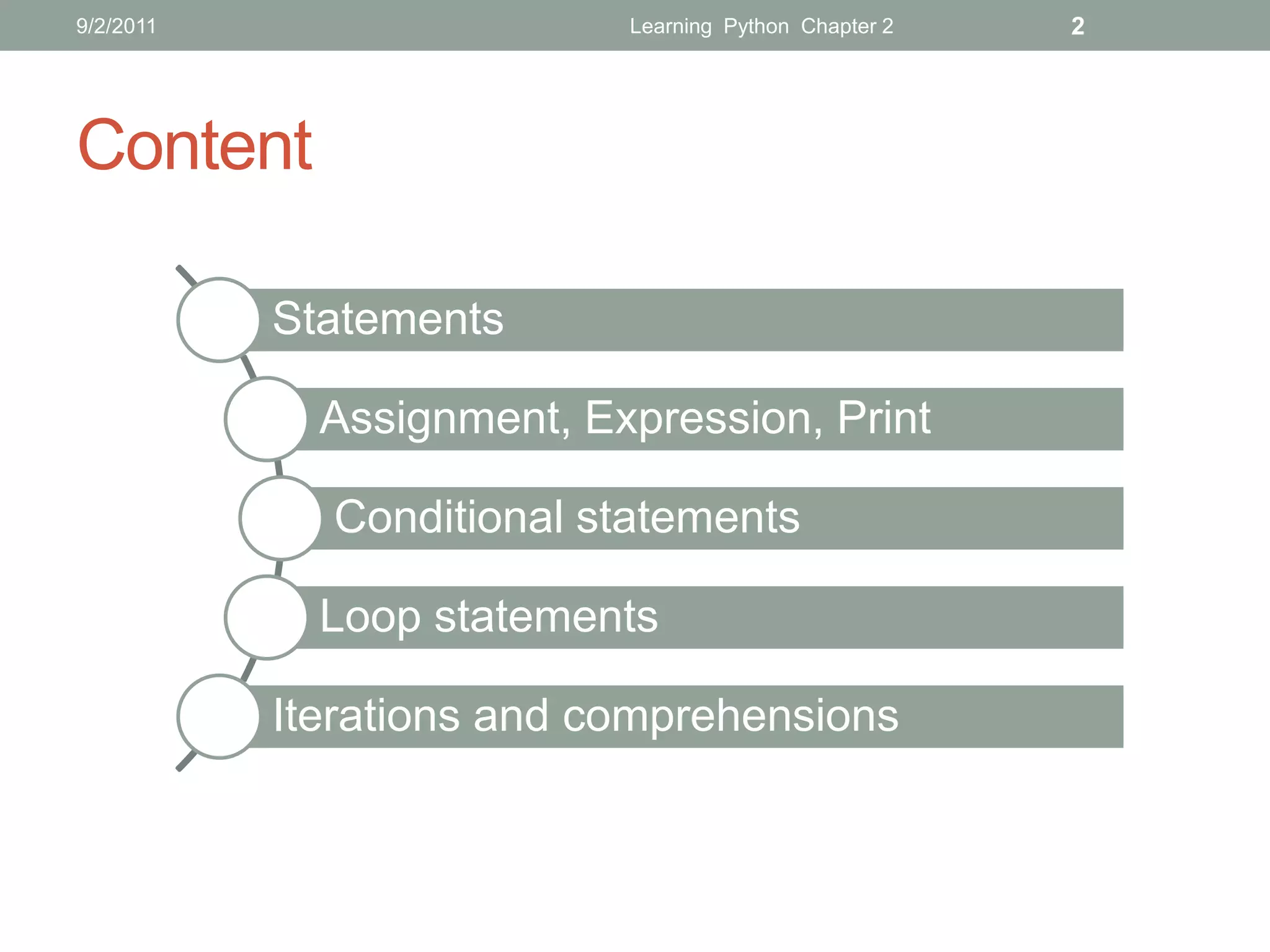
Content

           Statements

             Assignment, Expression, Print

             Conditional statements

             Loop statements

           Iterations and comprehensions
9/2/2011                    Learning Python Chapter 2   3


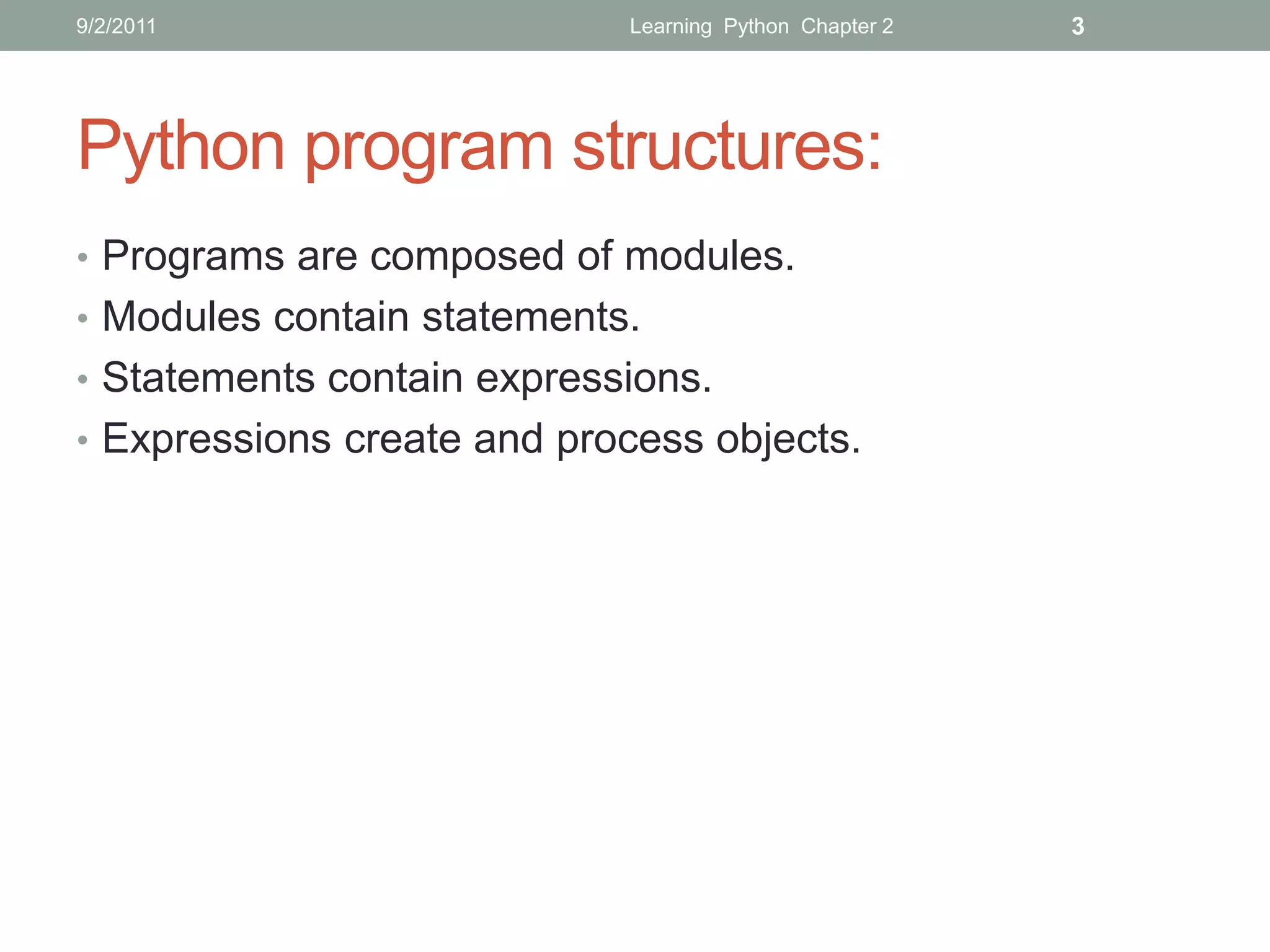
Python program structures:
• Programs are composed of modules.
• Modules contain statements.
• Statements contain expressions.
• Expressions create and process objects.
9/2/2011        Learning Python Chapter 2   4


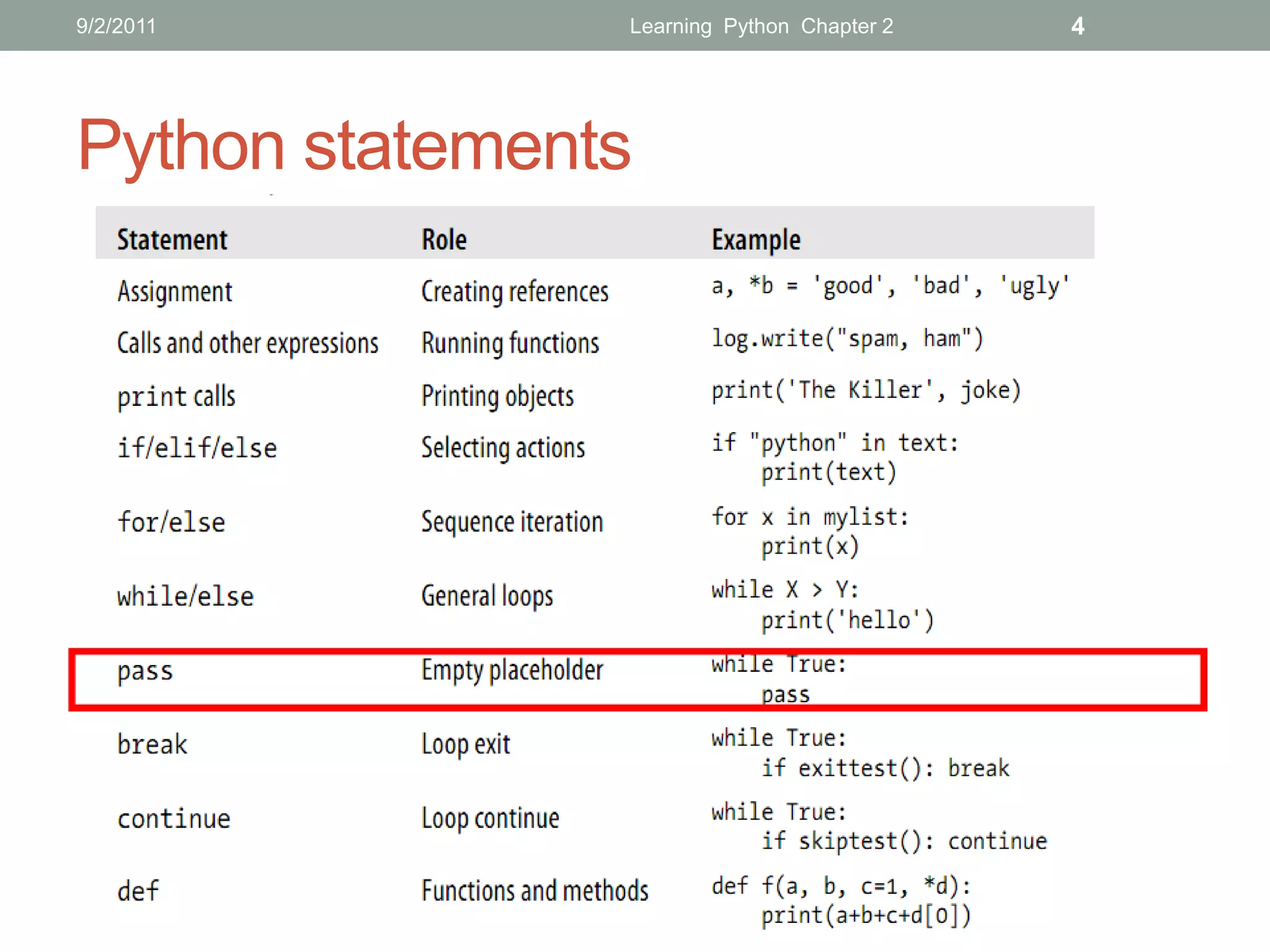
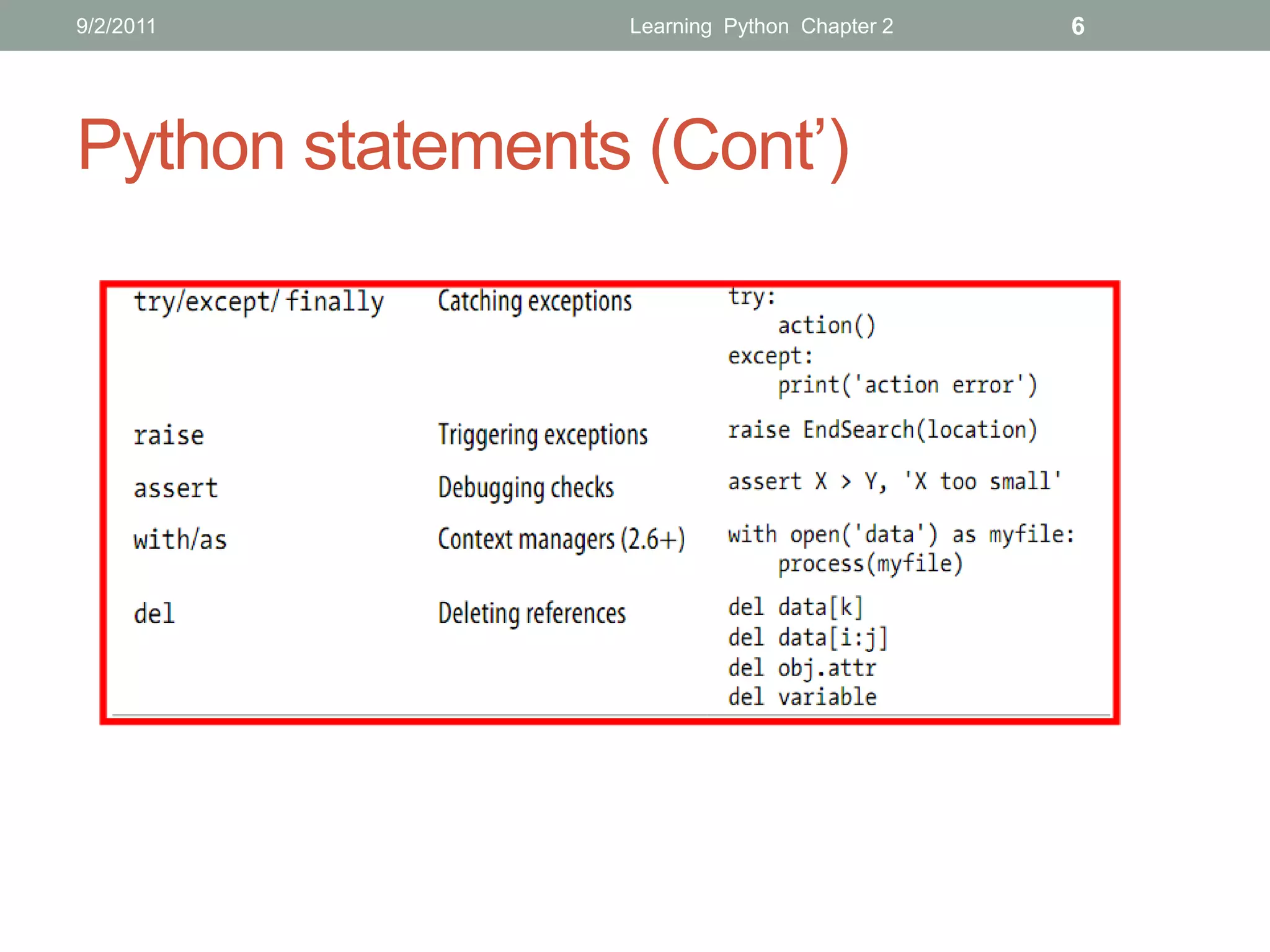
Python statements
9/2/2011         Learning Python Chapter 2   5


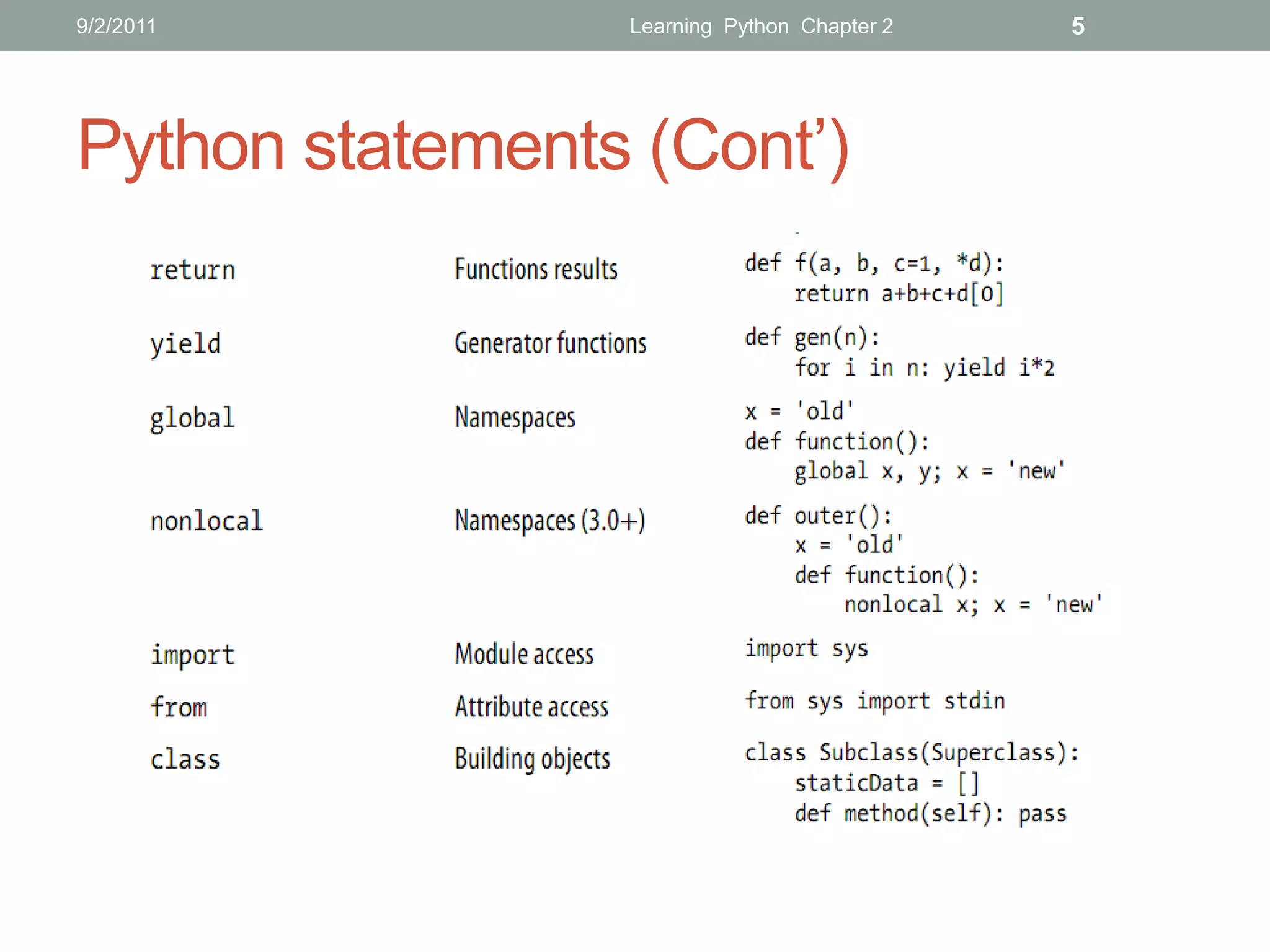
Python statements (Cont’)
9/2/2011         Learning Python Chapter 2   6


Python statements (Cont’)
9/2/2011                          Learning Python Chapter 2   7


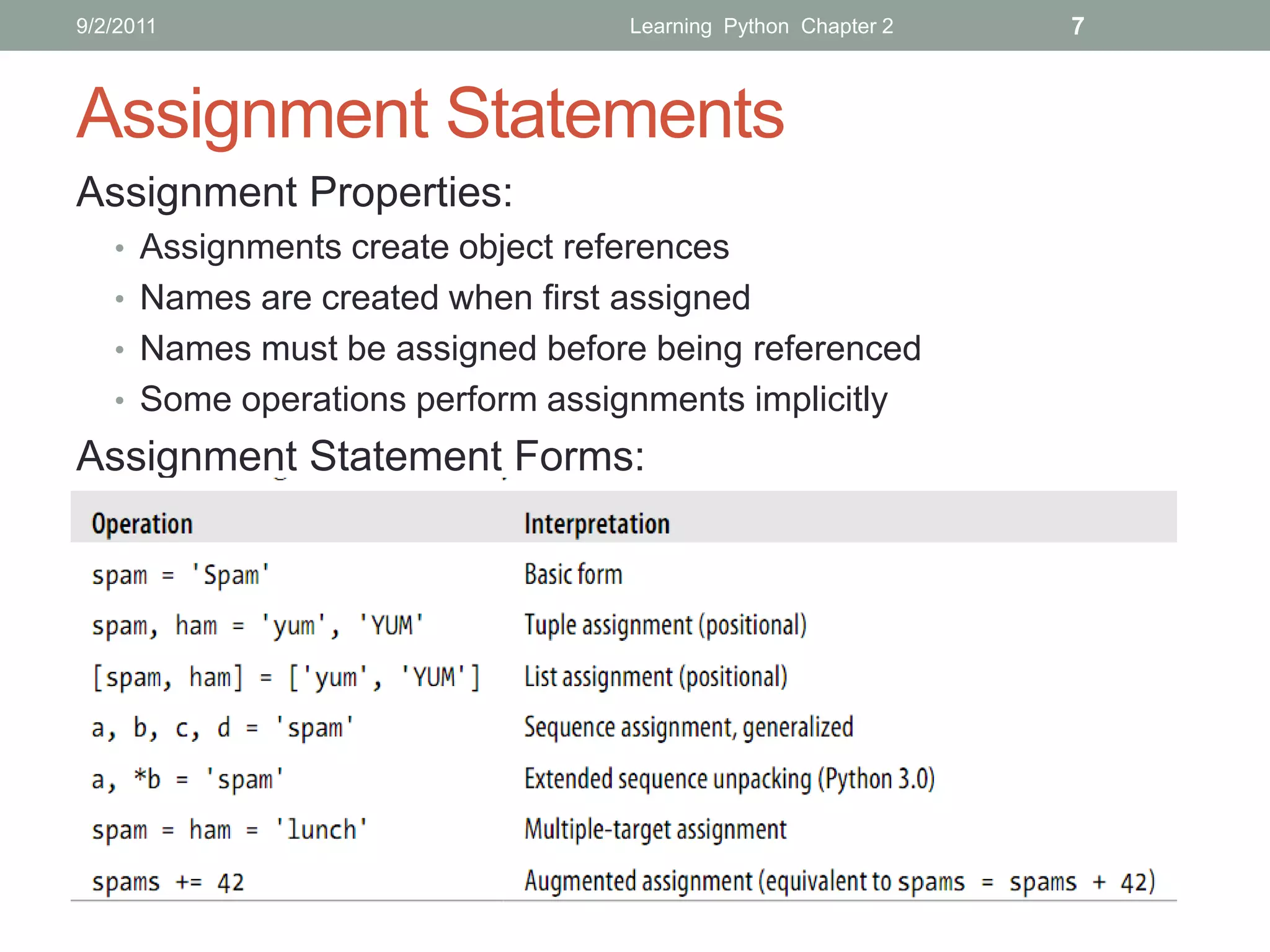
Assignment Statements
Assignment Properties:
   • Assignments create object references
   • Names are created when first assigned
   • Names must be assigned before being referenced
   • Some operations perform assignments implicitly
Assignment Statement Forms:
9/2/2011                      Learning Python Chapter 2   8


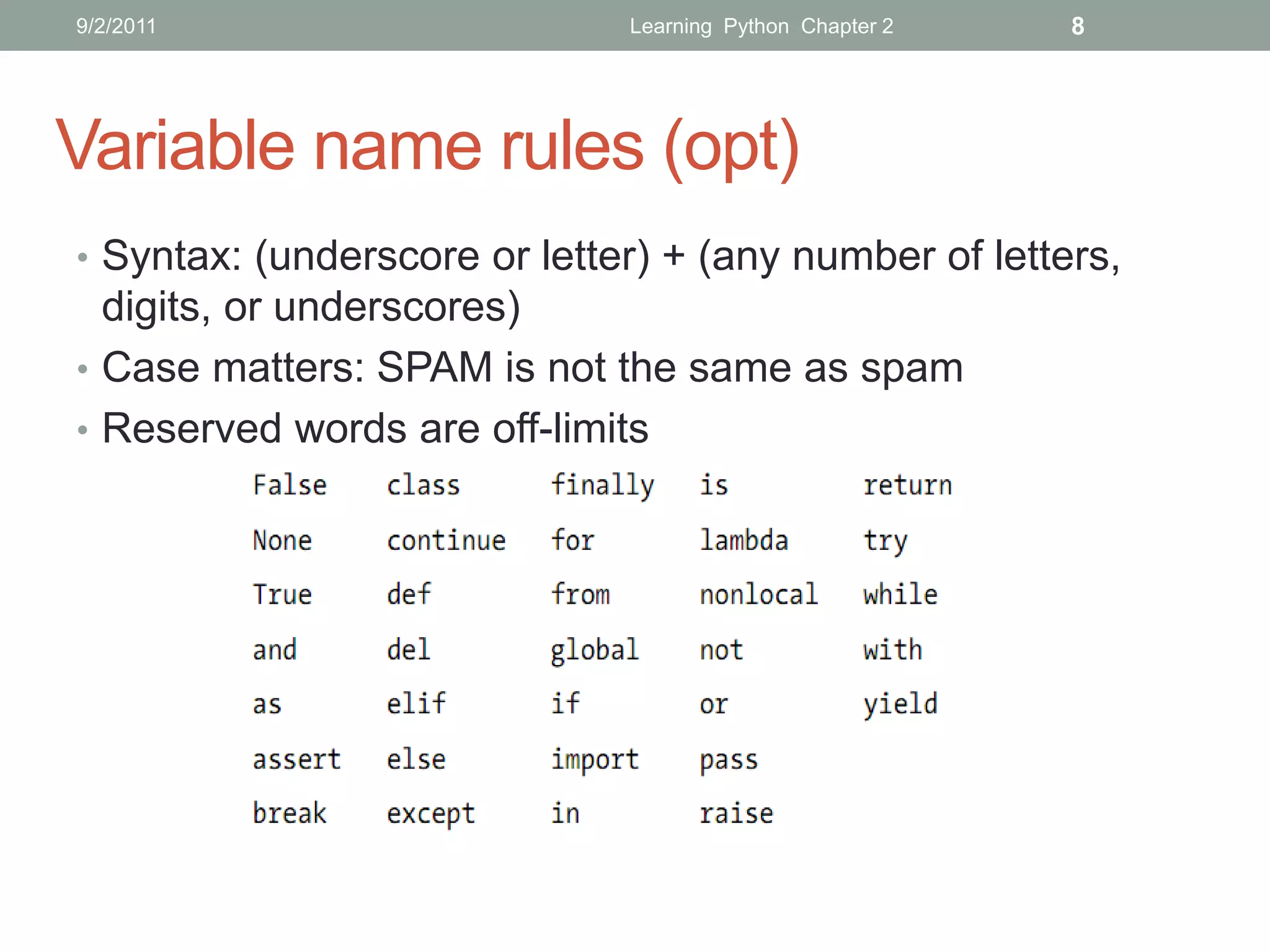
Variable name rules (opt)
• Syntax: (underscore or letter) + (any number of letters,
  digits, or underscores)
• Case matters: SPAM is not the same as spam
• Reserved words are off-limits
9/2/2011        Learning Python Chapter 2   9


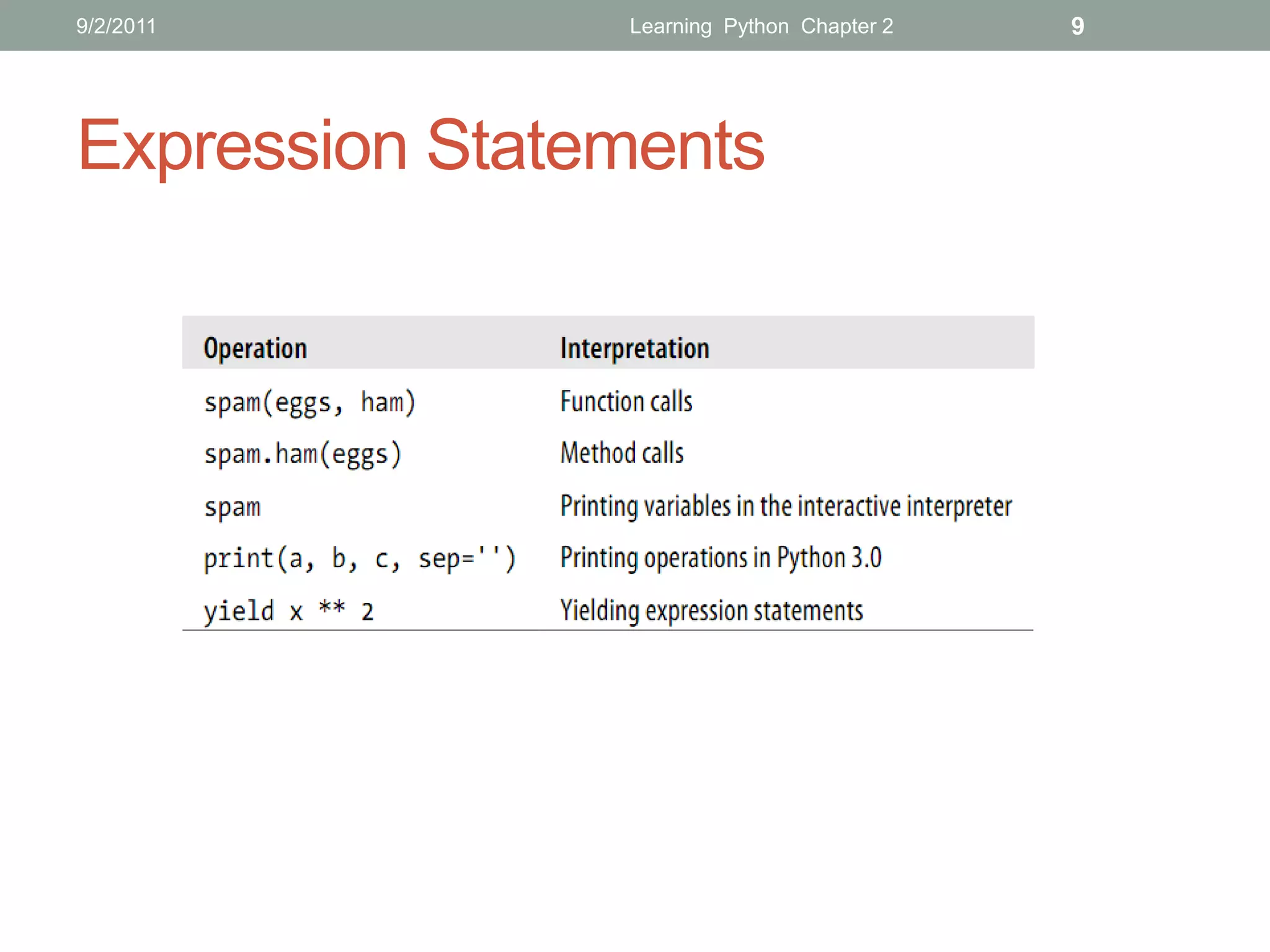
Expression Statements
9/2/2011           Learning Python Chapter 2   10


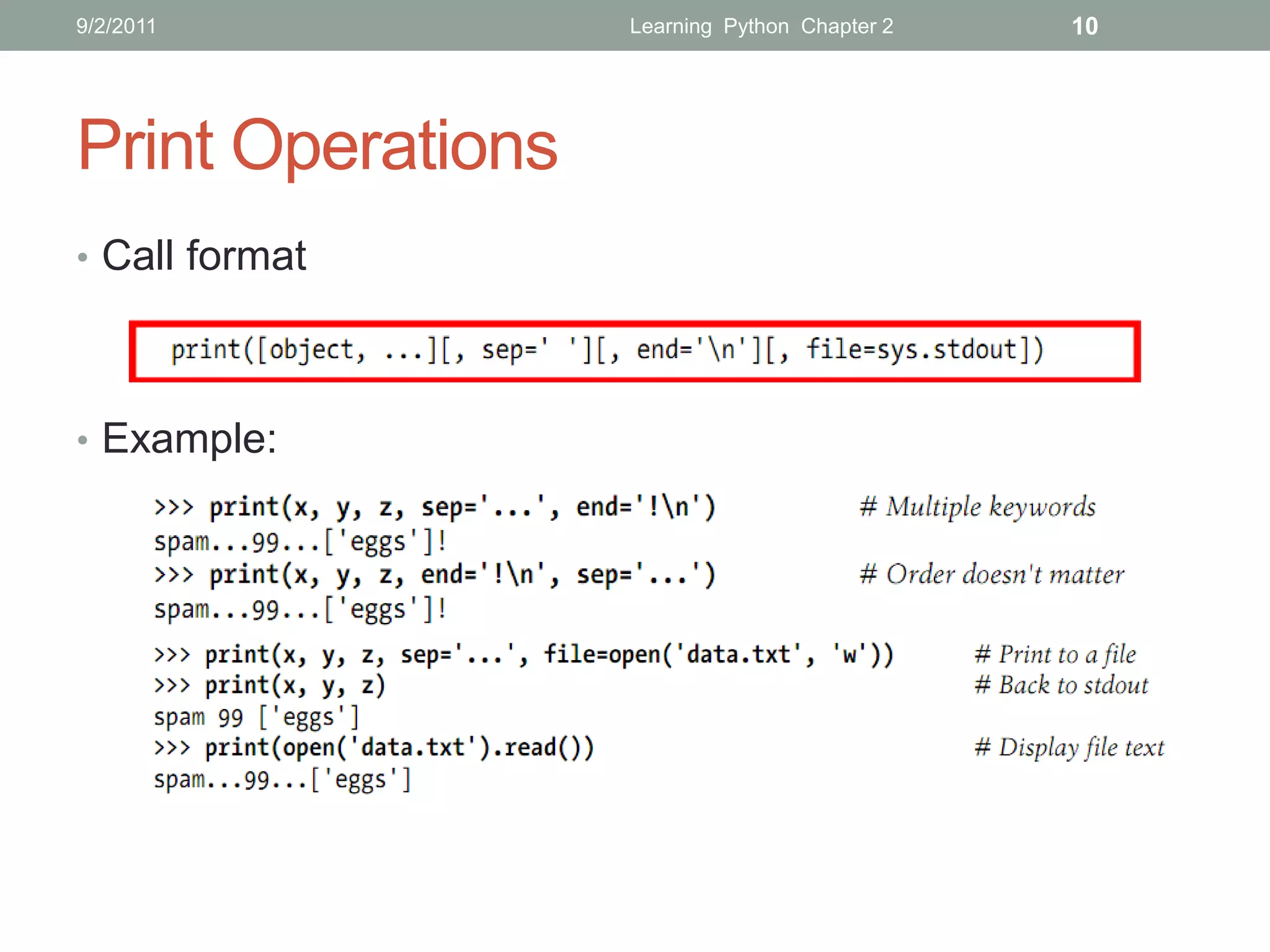
Print Operations
• Call format


• Example:
9/2/2011                      Learning Python Chapter 2   11


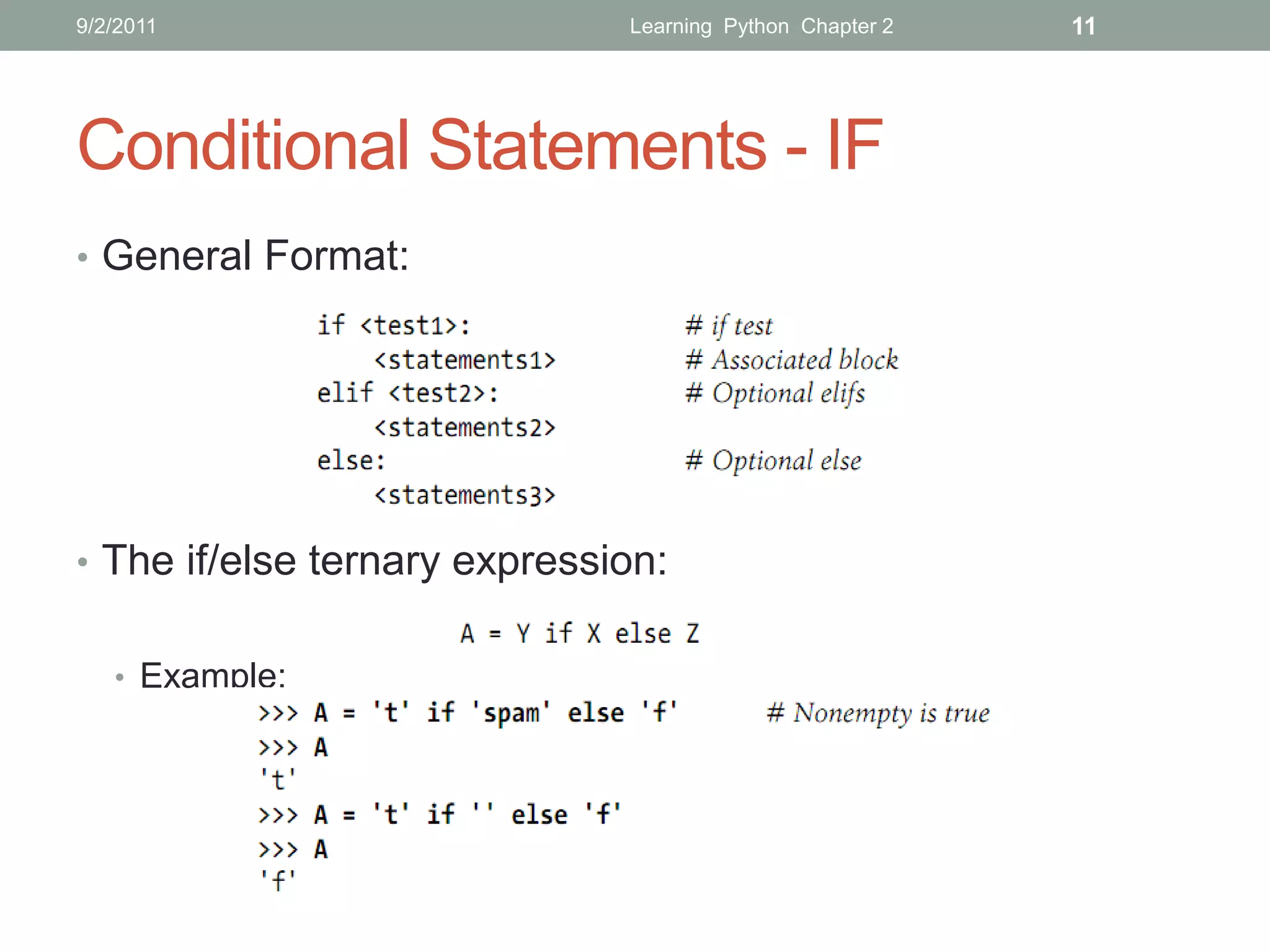
Conditional Statements - IF
• General Format:


• The if/else ternary expression:


   • Example:
9/2/2011                          Learning Python Chapter 2   12


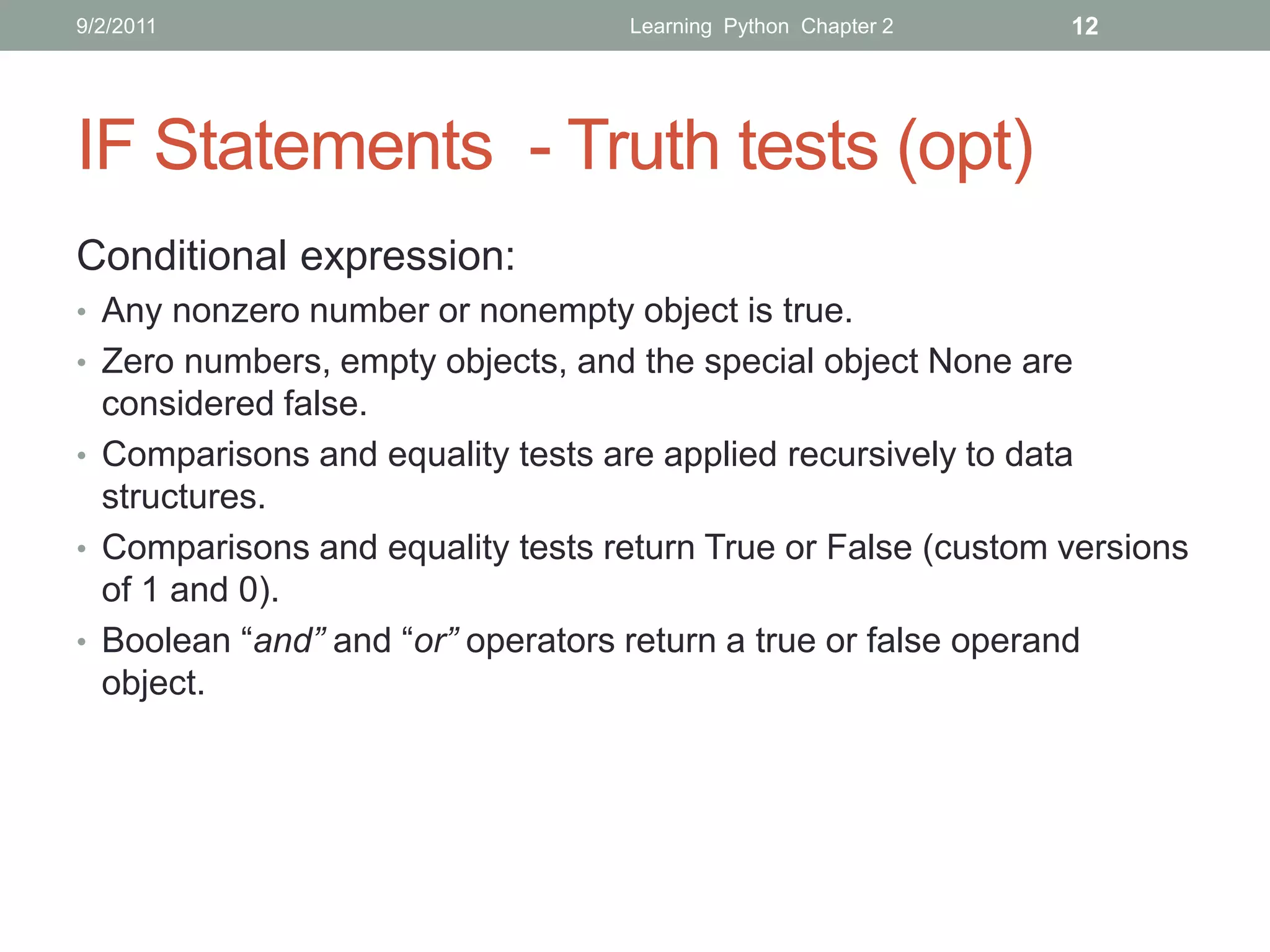
IF Statements - Truth tests (opt)
Conditional expression:
• Any nonzero number or nonempty object is true.
• Zero numbers, empty objects, and the special object None are
  considered false.
• Comparisons and equality tests are applied recursively to data
  structures.
• Comparisons and equality tests return True or False (custom versions
  of 1 and 0).
• Boolean “and” and “or” operators return a true or false operand
  object.
9/2/2011                     Learning Python Chapter 2   13


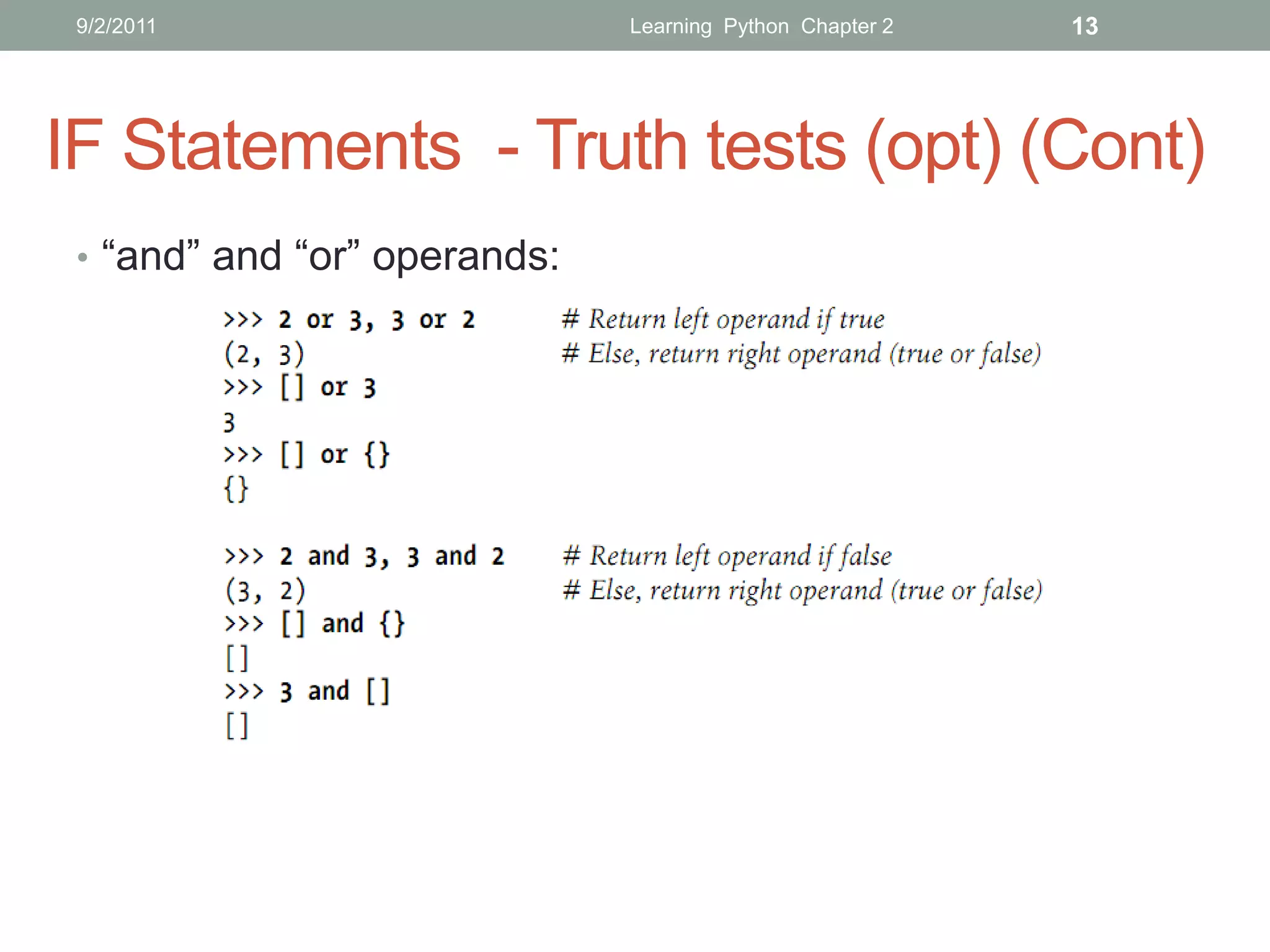
IF Statements - Truth tests (opt) (Cont)
 • “and” and “or” operands:
9/2/2011                  Learning Python Chapter 2   14


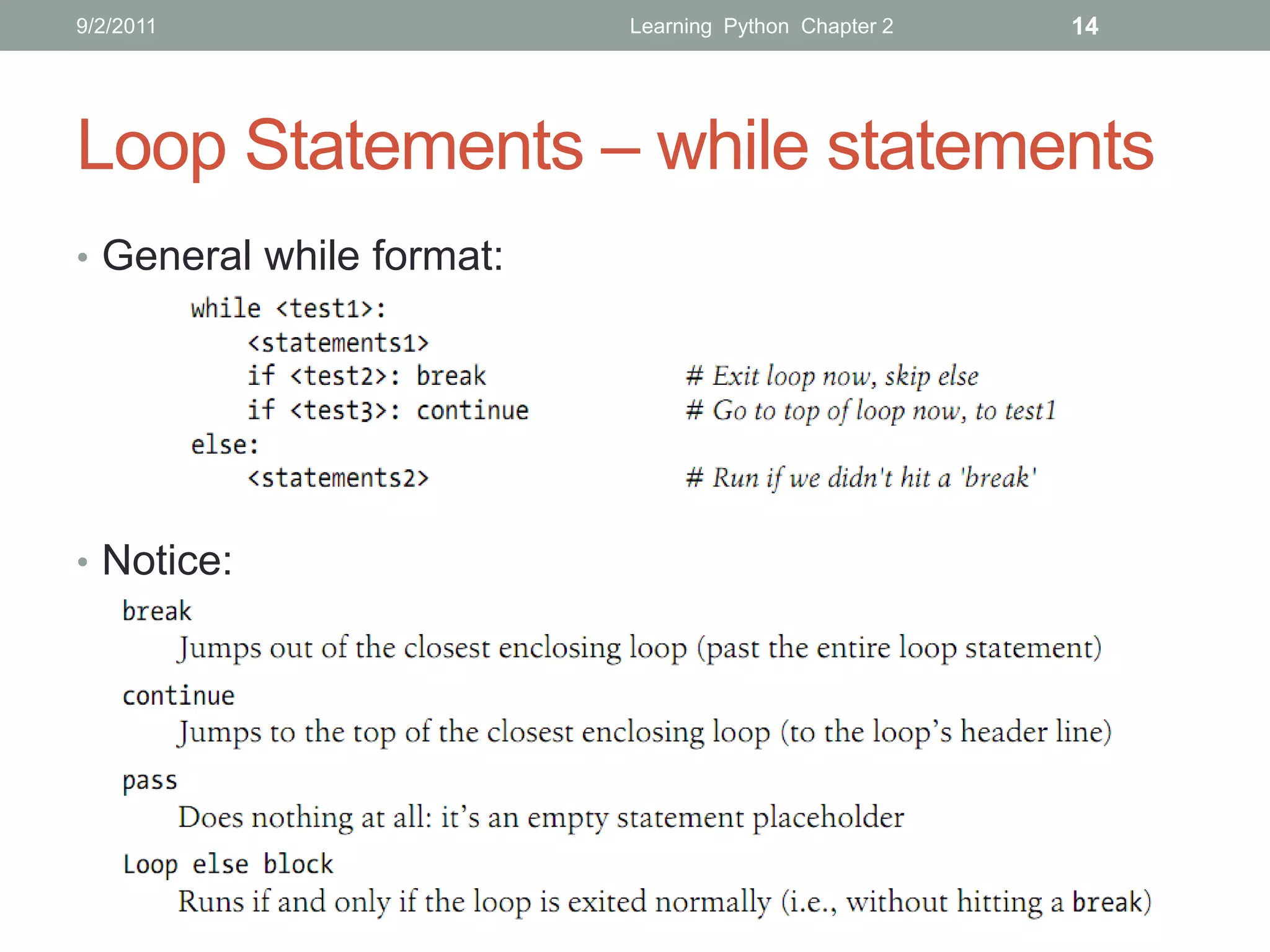
Loop Statements – while statements
• General while format:


• Notice:
9/2/2011                             Learning Python Chapter 2    15


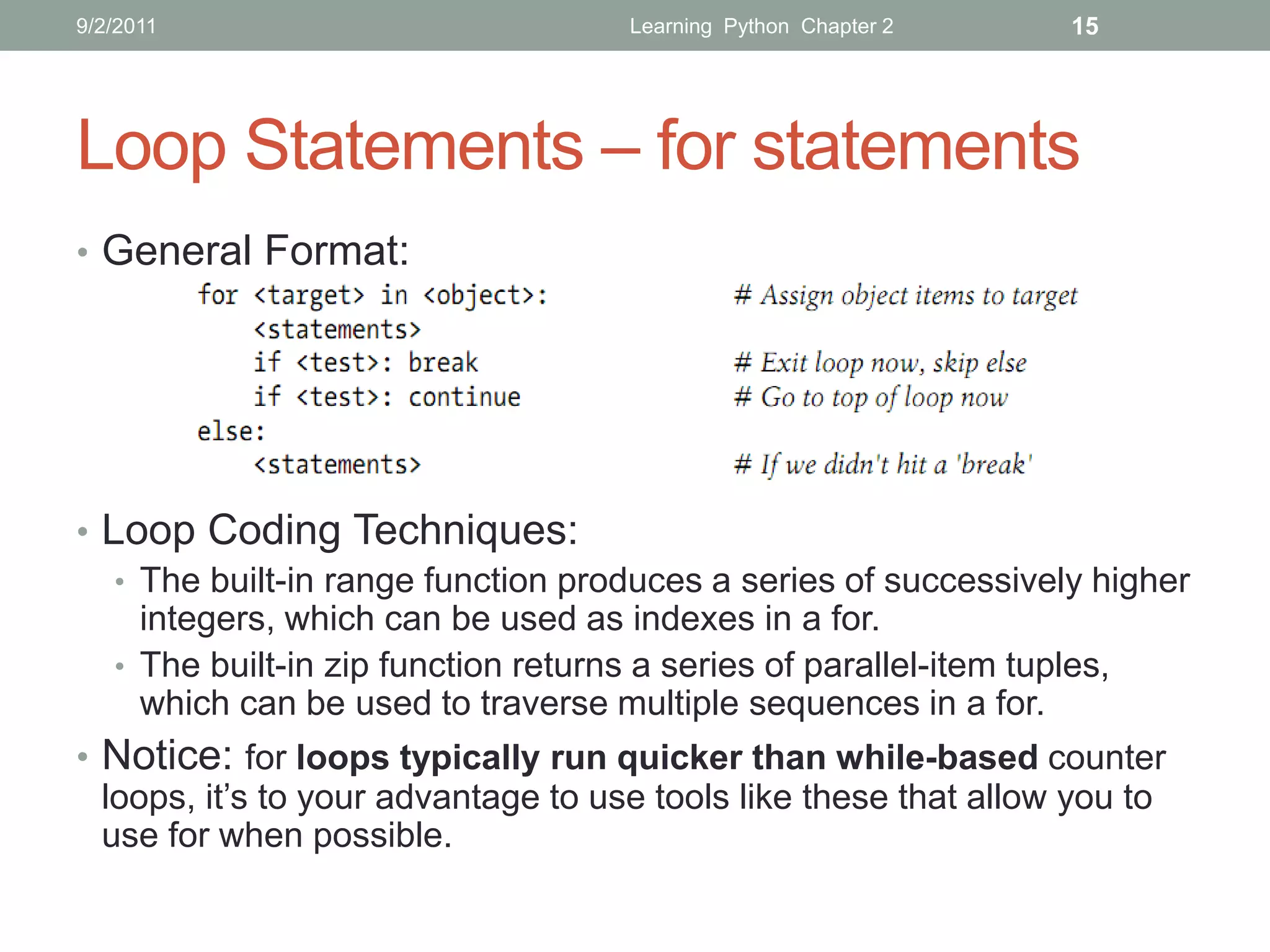
Loop Statements – for statements
• General Format:


• Loop Coding Techniques:
   • The built-in range function produces a series of successively higher
     integers, which can be used as indexes in a for.
   • The built-in zip function returns a series of parallel-item tuples,
     which can be used to traverse multiple sequences in a for.
• Notice: for loops typically run quicker than while-based counter
  loops, it’s to your advantage to use tools like these that allow you to
  use for when possible.
9/2/2011         Learning Python Chapter 2   16


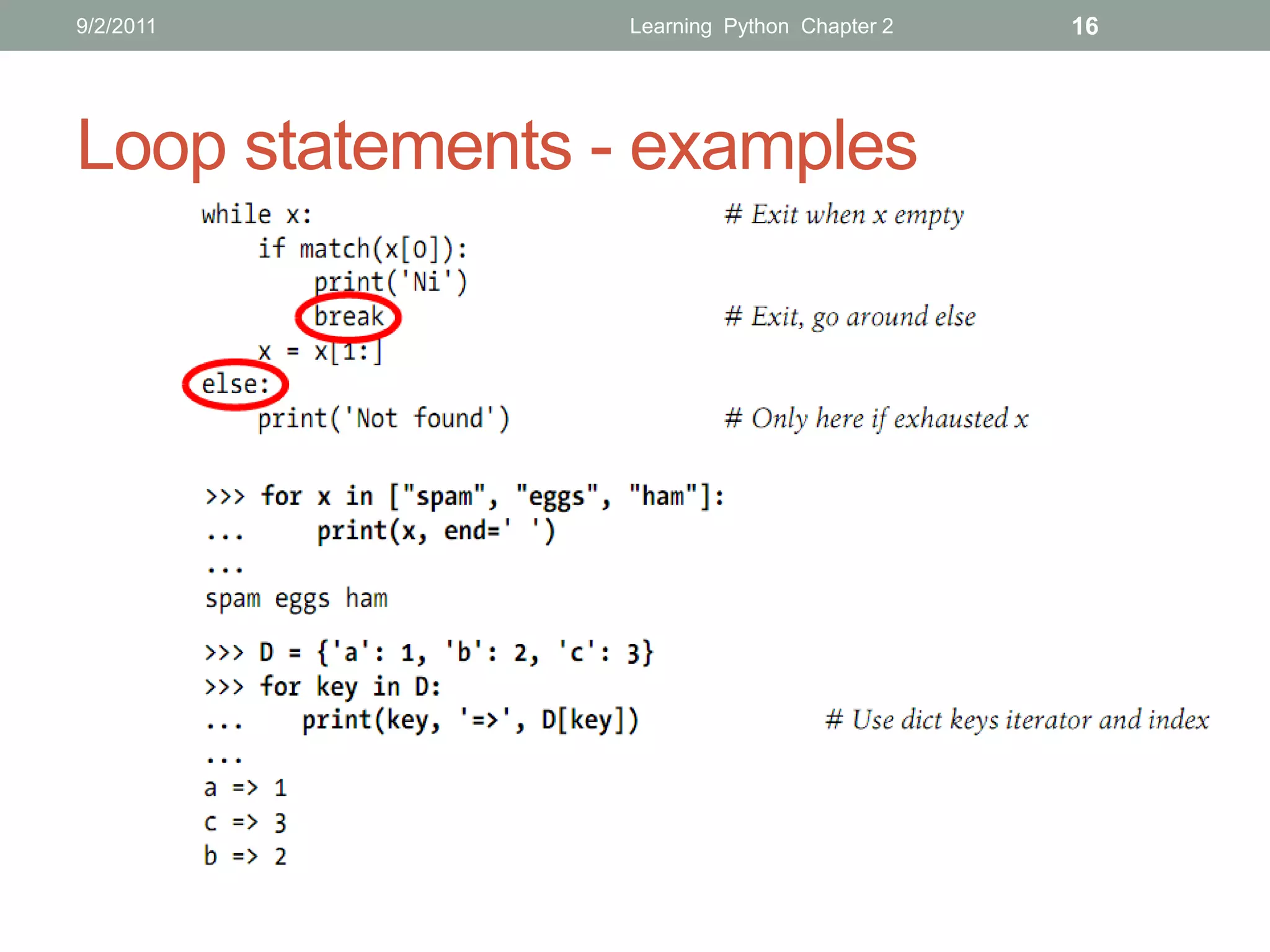
Loop statements - examples
9/2/2011                              Learning Python Chapter 2      17


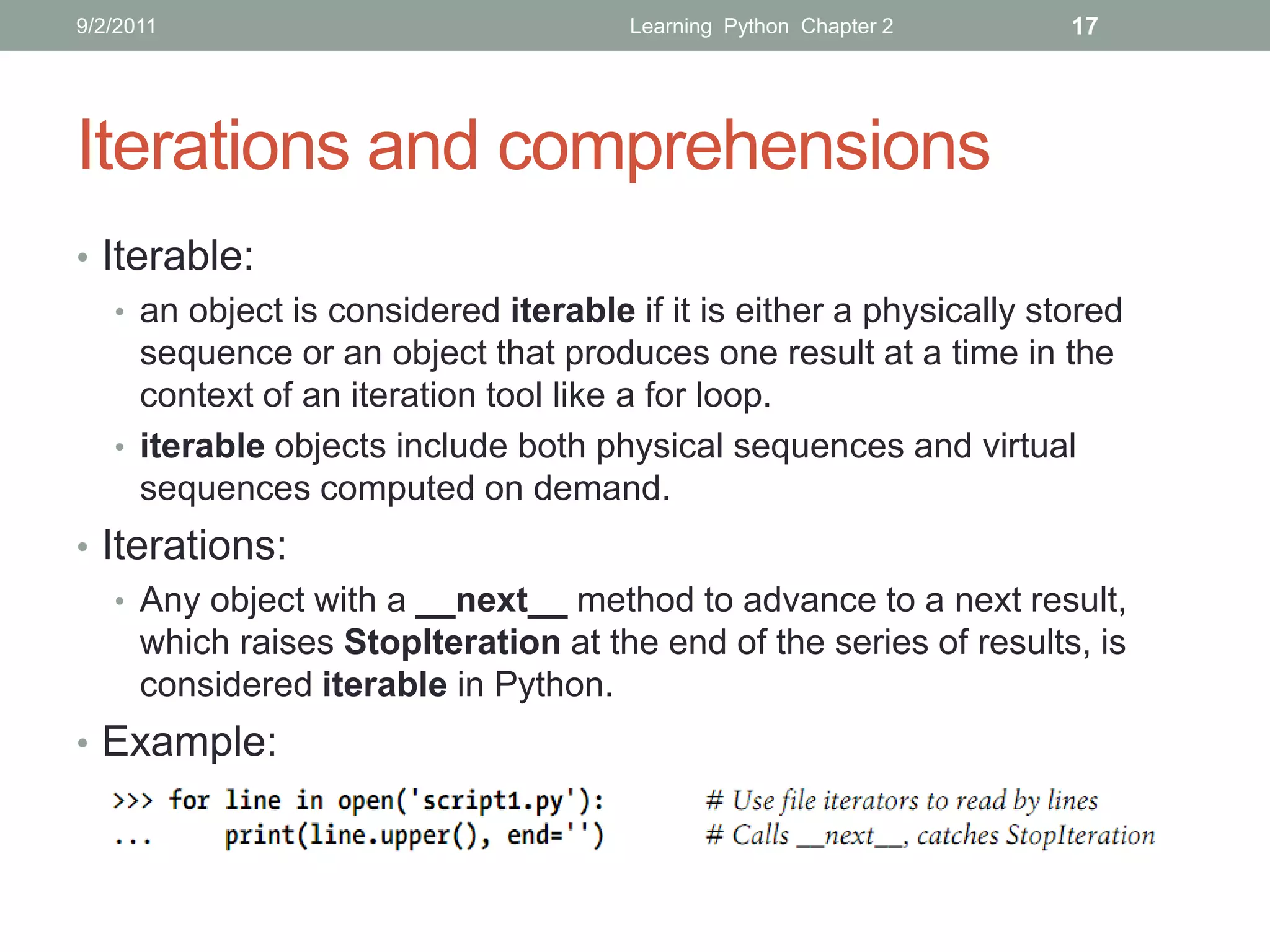
Iterations and comprehensions
• Iterable:
   • an object is considered iterable if it is either a physically stored
     sequence or an object that produces one result at a time in the
     context of an iteration tool like a for loop.
   • iterable objects include both physical sequences and virtual
     sequences computed on demand.
• Iterations:
   • Any object with a __next__ method to advance to a next result,
     which raises StopIteration at the end of the series of results, is
     considered iterable in Python.
• Example:
9/2/2011                             Learning Python Chapter 2   18


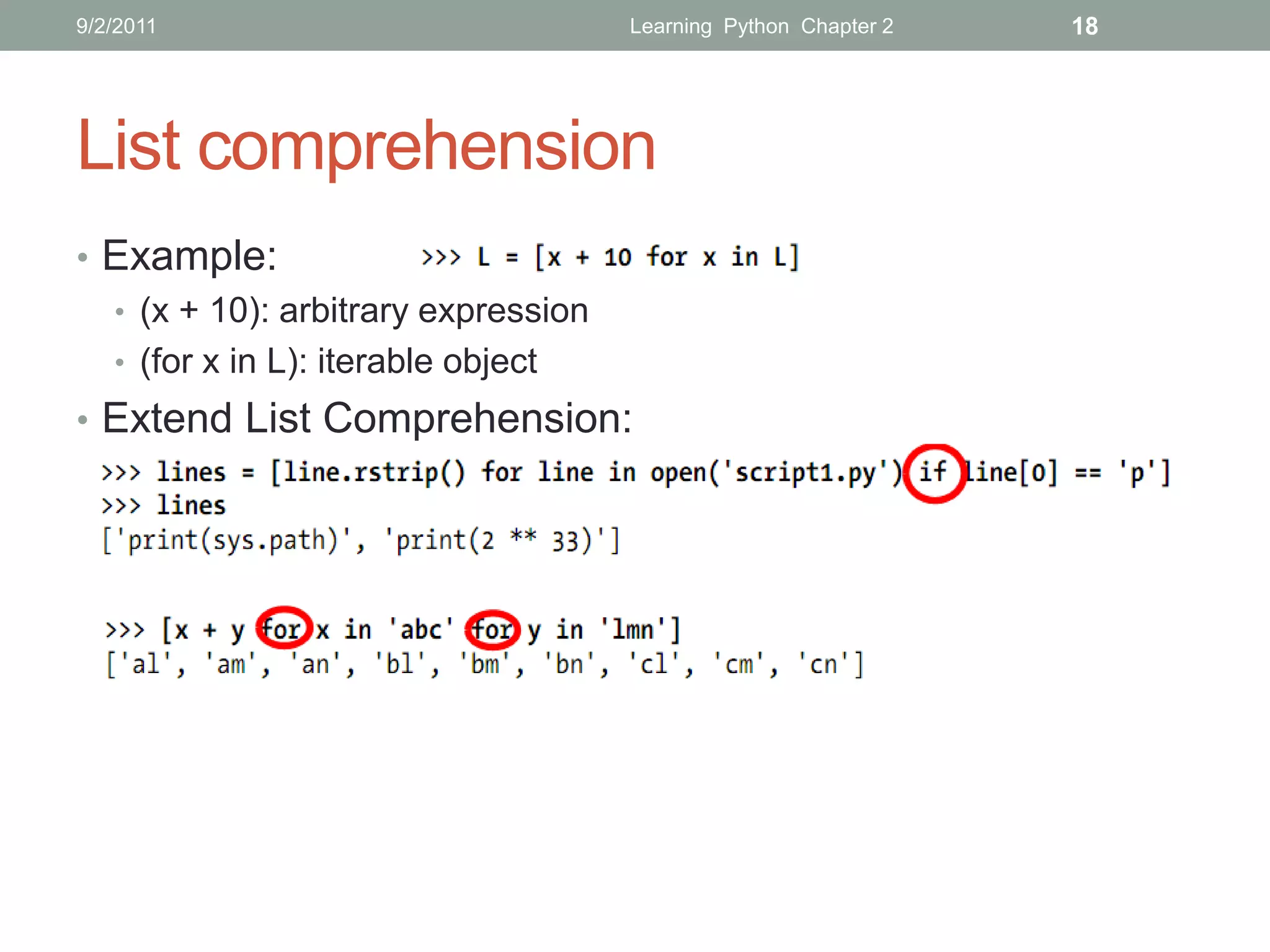
List comprehension
• Example:
  • (x + 10): arbitrary expression
  • (for x in L): iterable object
• Extend List Comprehension:
9/2/2011                               Learning Python Chapter 2       19


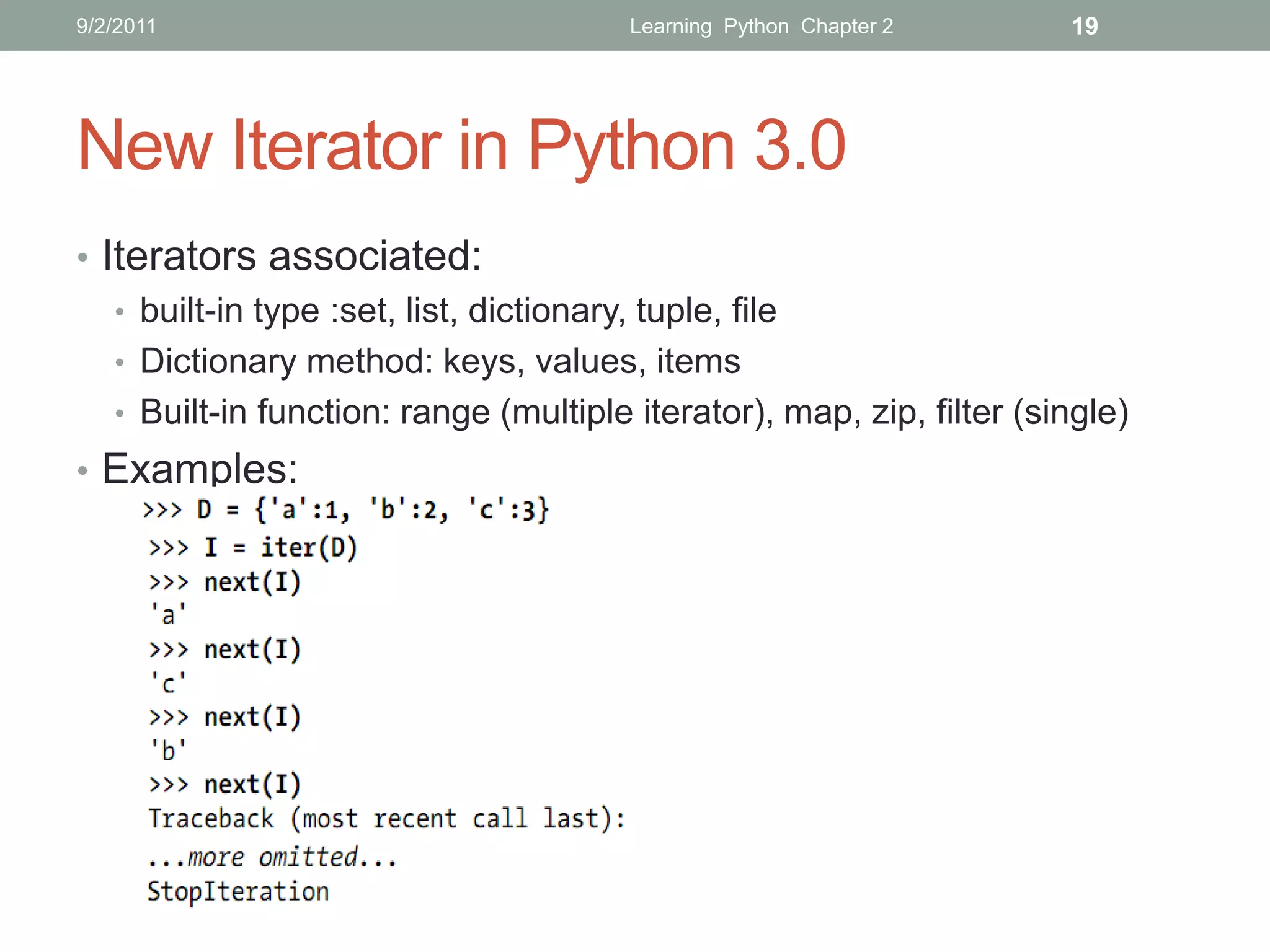
New Iterator in Python 3.0
• Iterators associated:
   • built-in type :set, list, dictionary, tuple, file
   • Dictionary method: keys, values, items
   • Built-in function: range (multiple iterator), map, zip, filter (single)
• Examples:
9/2/2011           Learning Python Chapter 2   20


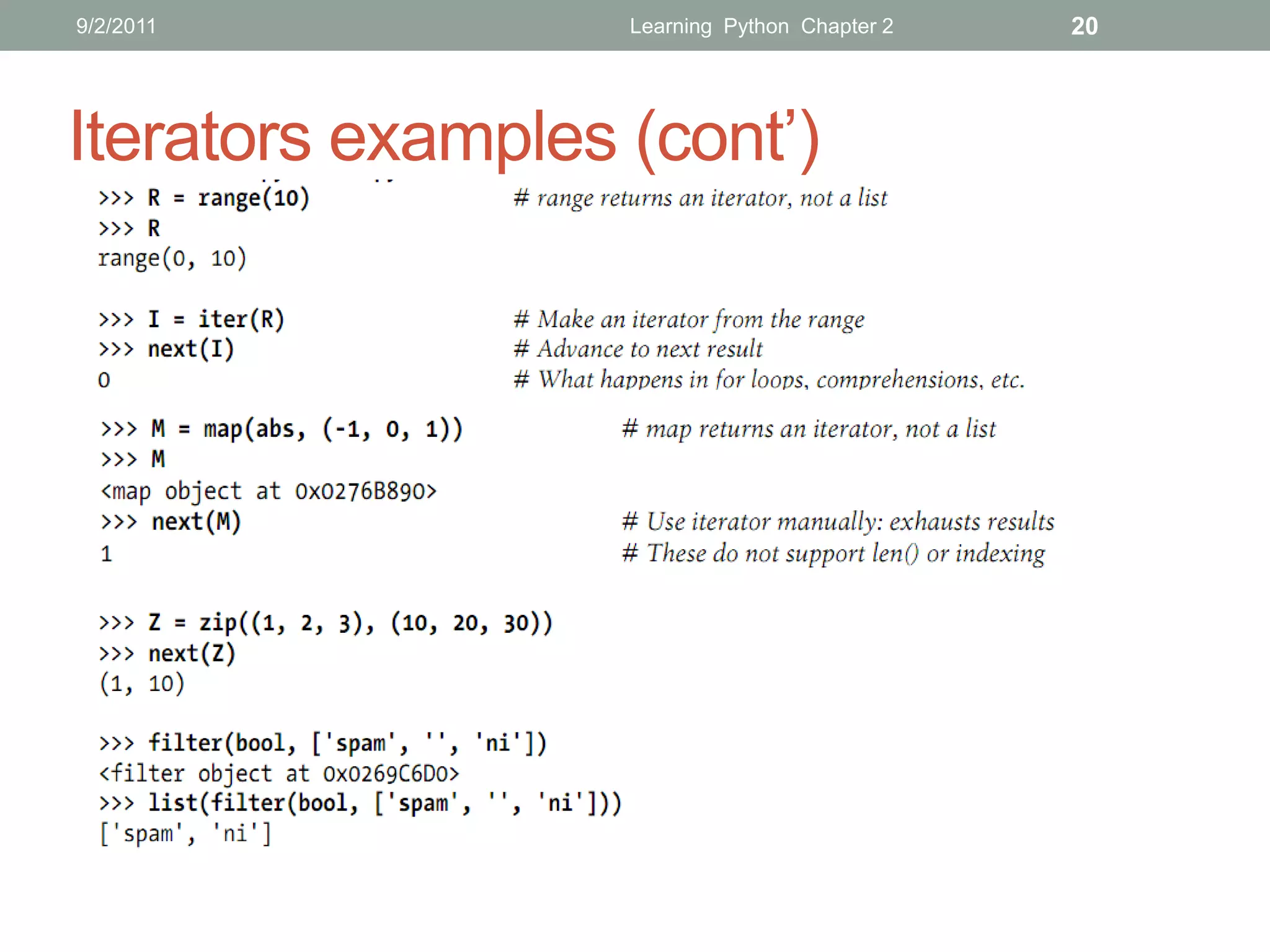
Iterators examples (cont’)
9/2/2011                      Learning Python Chapter 2   21


   THANKS FOR LISTENING
   Editor: Nguyễn Đức Minh Khôi
   Contact: nguyenducminhkhoi@gmail.com
   Main reference: Part III – Statements and Syntax
   Learning Python – O’reilly
9/6/2011            Training Python Chapter 3   1


   TRAINING PYTHON
   Chapter 3: FUNCTION
9/6/2011                     Training Python Chapter 3   2


CONTENTS

           Function Basics

             Scope

              Arguments

             Function Advanced

           Iterations and Comprehension Advanced
9/6/2011                          Training Python Chapter 3   3


Function Basics
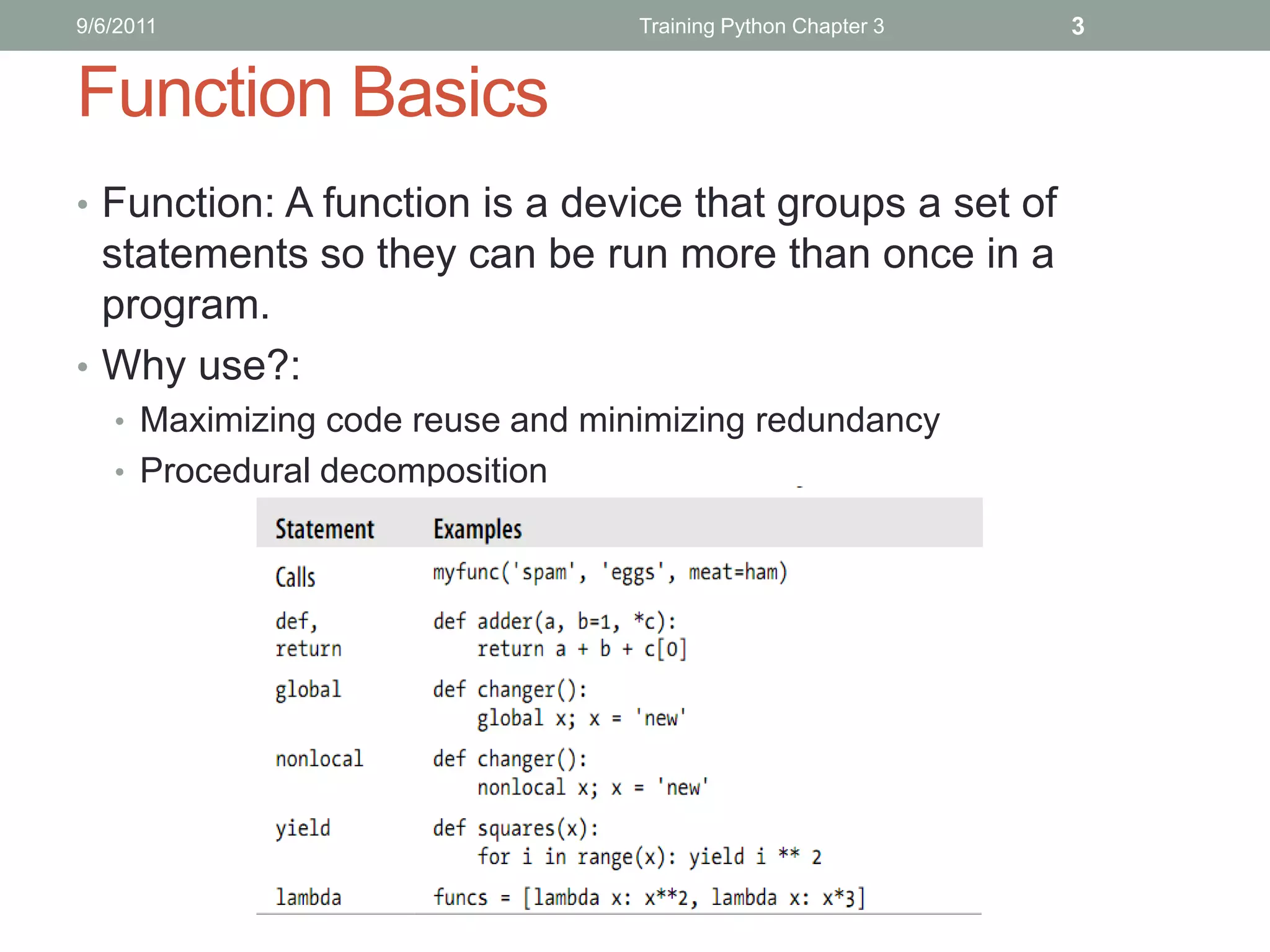
• Function: A function is a device that groups a set of
  statements so they can be run more than once in a
  program.
• Why use?:
   • Maximizing code reuse and minimizing redundancy
   • Procedural decomposition
9/6/2011                  Training Python Chapter 3   4


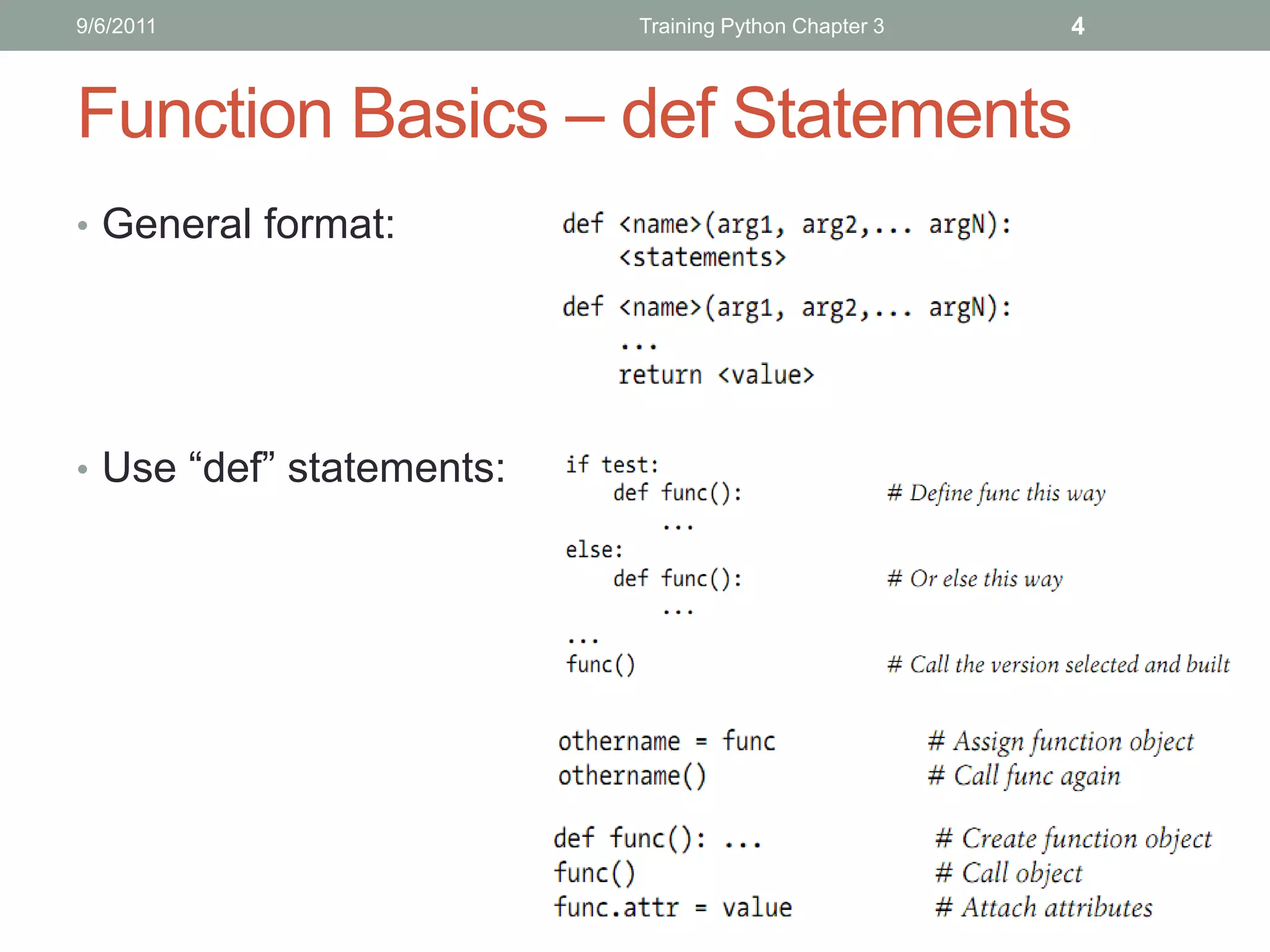
Function Basics – def Statements
• General format:


• Use “def” statements:
9/6/2011         Training Python Chapter 3   5


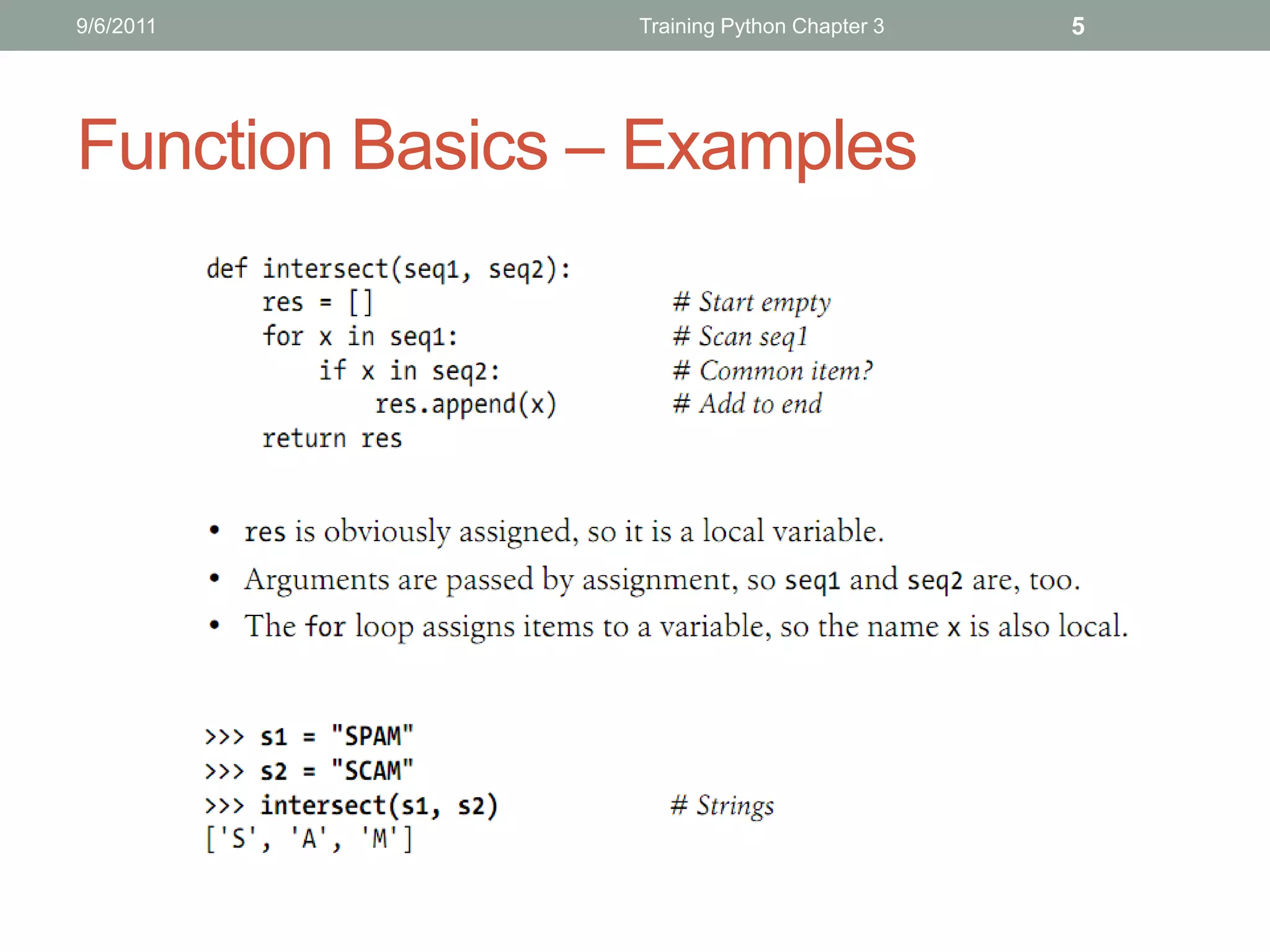
Function Basics – Examples
9/6/2011                                Training Python Chapter 3      6


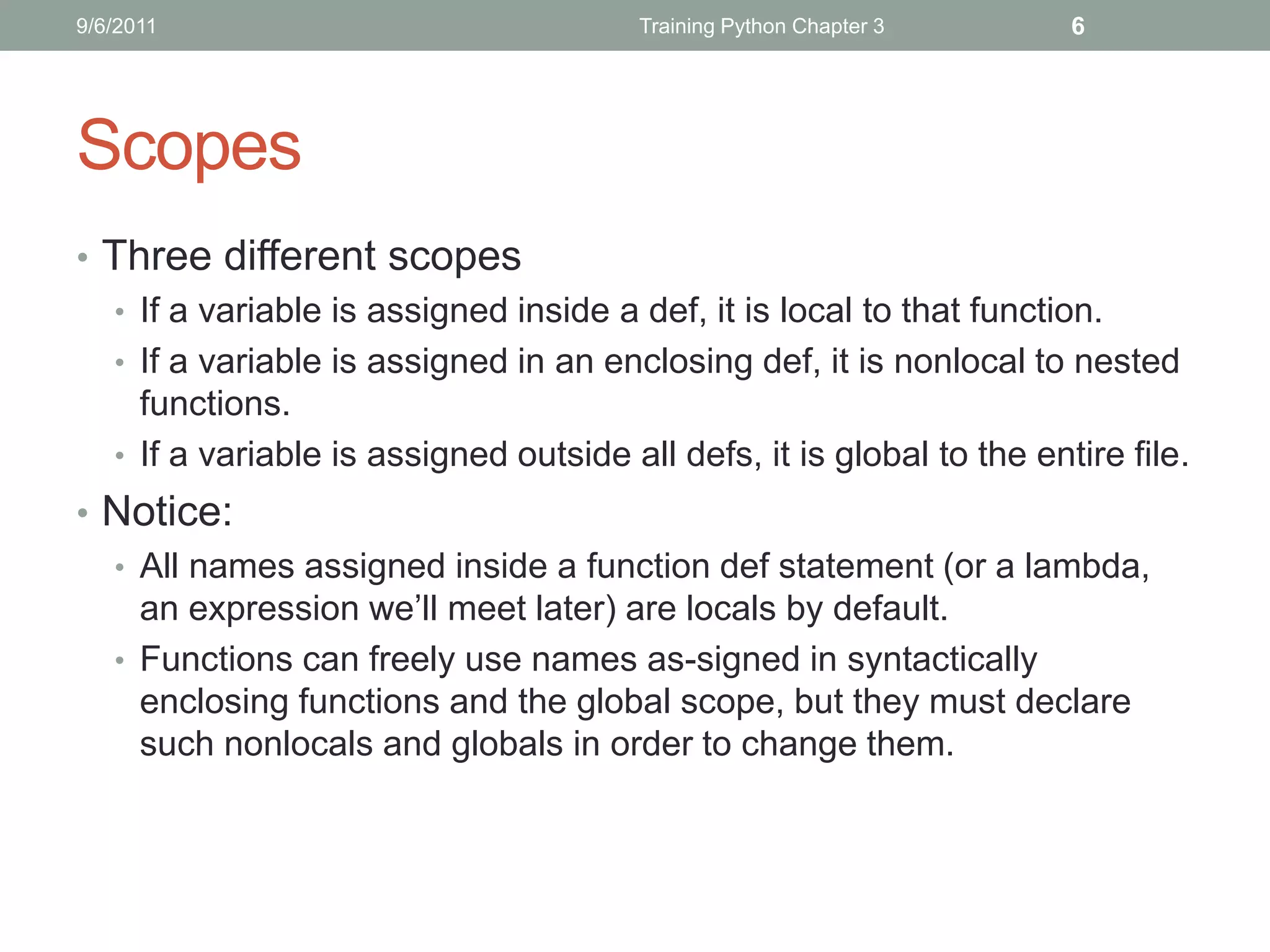
Scopes
• Three different scopes
  • If a variable is assigned inside a def, it is local to that function.
  • If a variable is assigned in an enclosing def, it is nonlocal to nested
    functions.
  • If a variable is assigned outside all defs, it is global to the entire file.
• Notice:
  • All names assigned inside a function def statement (or a lambda,
    an expression we’ll meet later) are locals by default.
  • Functions can freely use names as-signed in syntactically
    enclosing functions and the global scope, but they must declare
    such nonlocals and globals in order to change them.
9/6/2011         Training Python Chapter 3   7


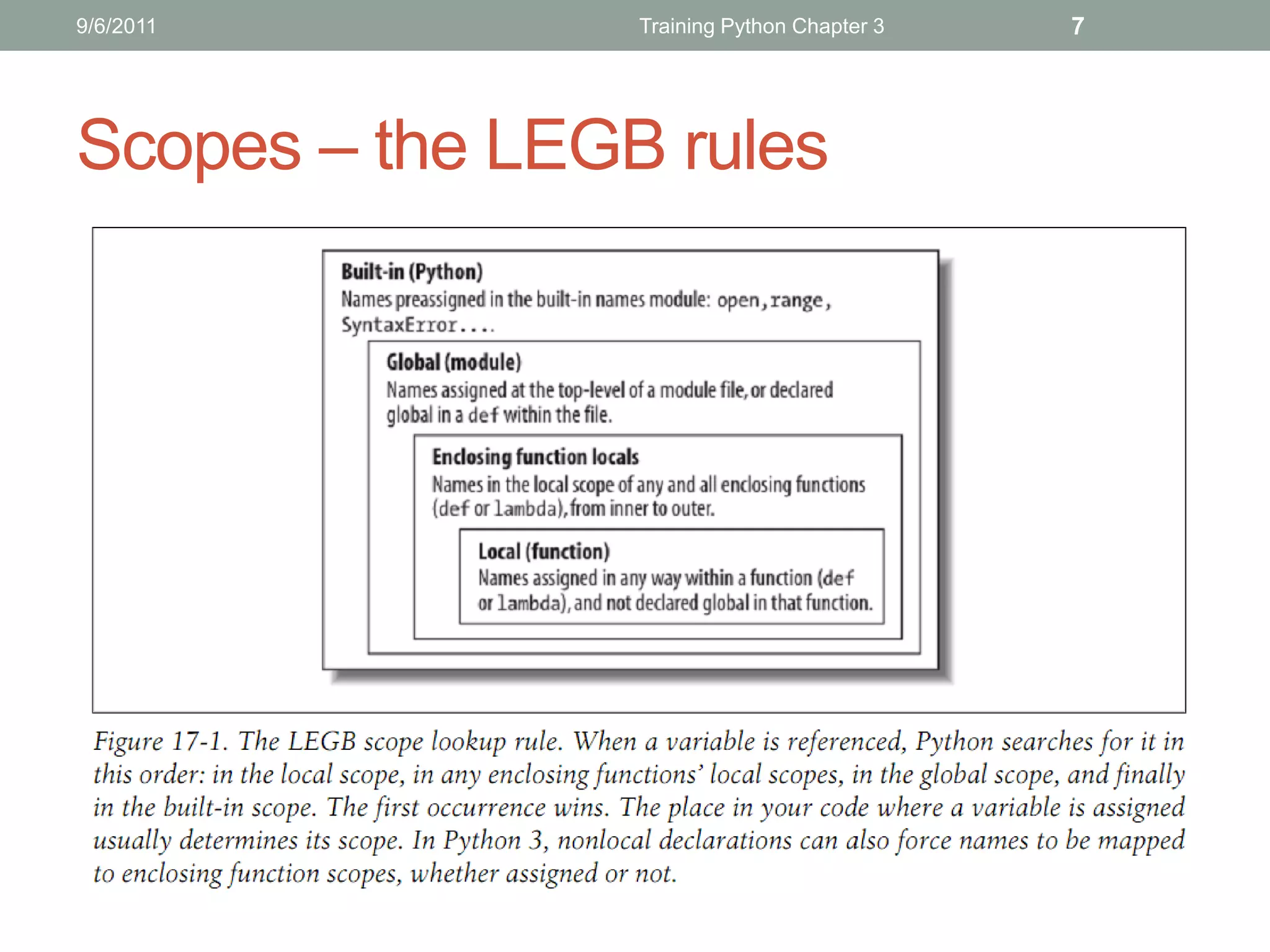
Scopes – the LEGB rules
9/6/2011                   Training Python Chapter 3             8


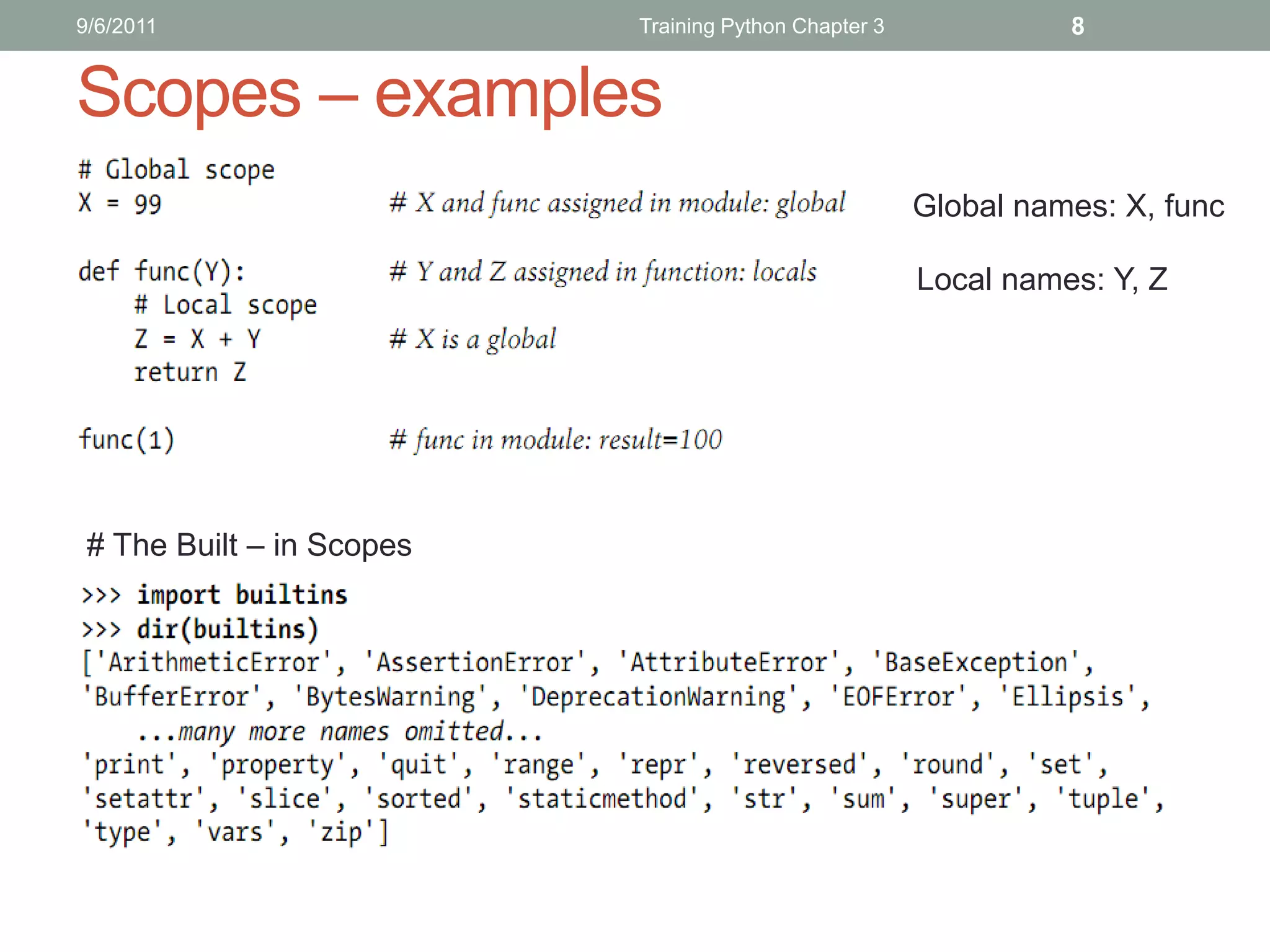
Scopes – examples
                                                       Global names: X, func

                                                       Local names: Y, Z


 # The Built – in Scopes
9/6/2011                     Training Python Chapter 3   9


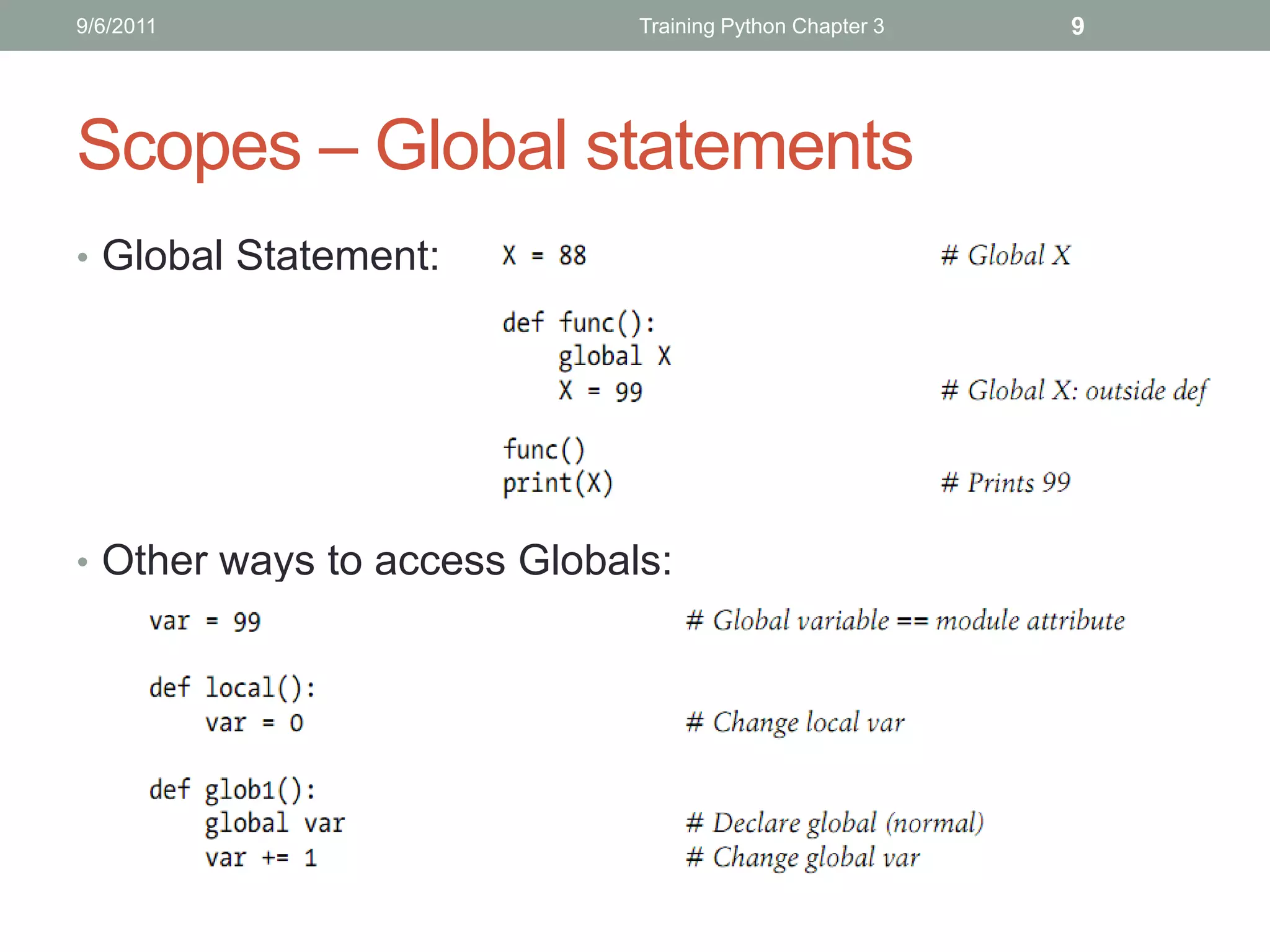
Scopes – Global statements
• Global Statement:


• Other ways to access Globals:
9/6/2011         Training Python Chapter 3   10


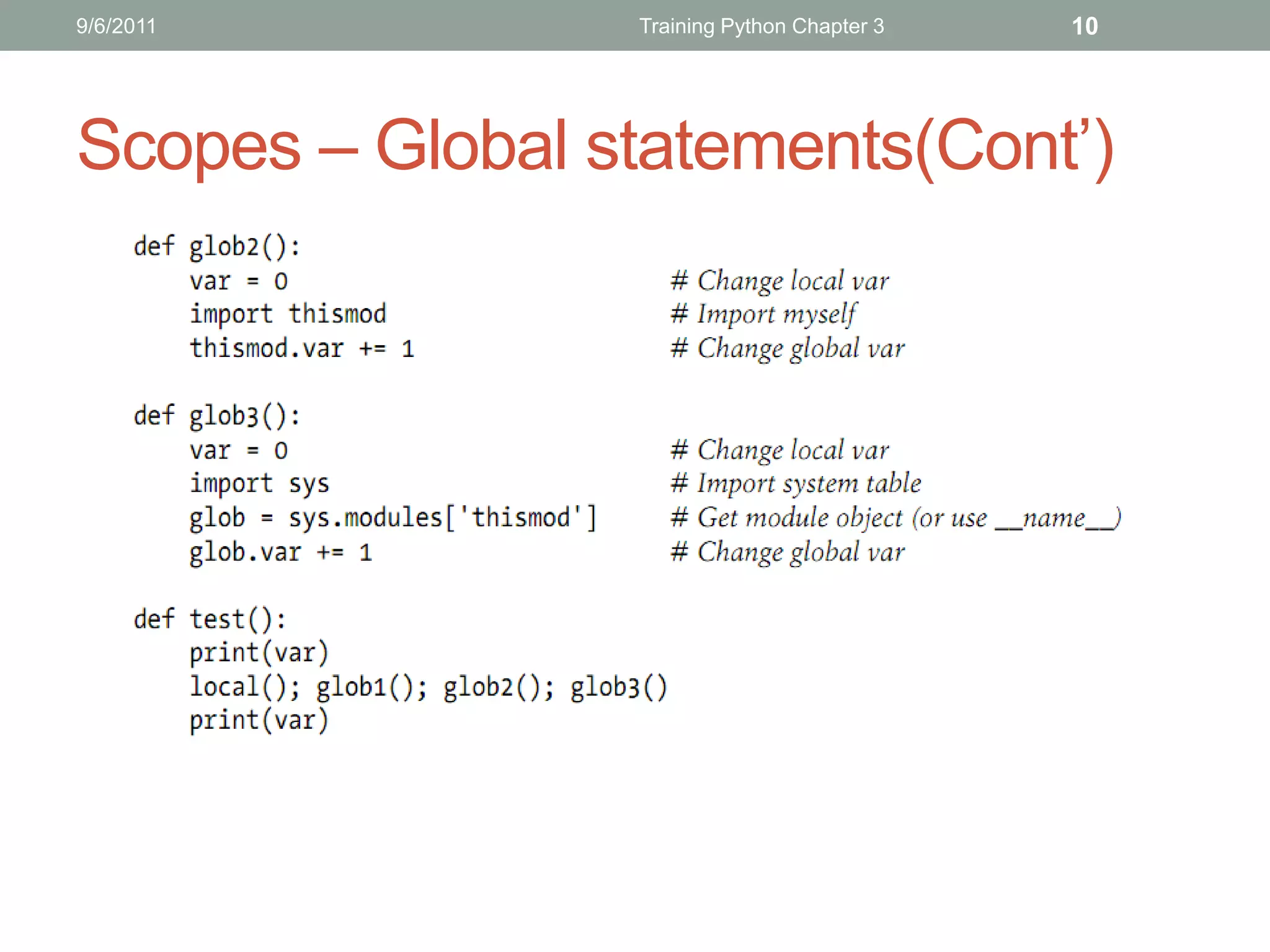
Scopes – Global statements(Cont’)
9/6/2011                                 Training Python Chapter 3     11


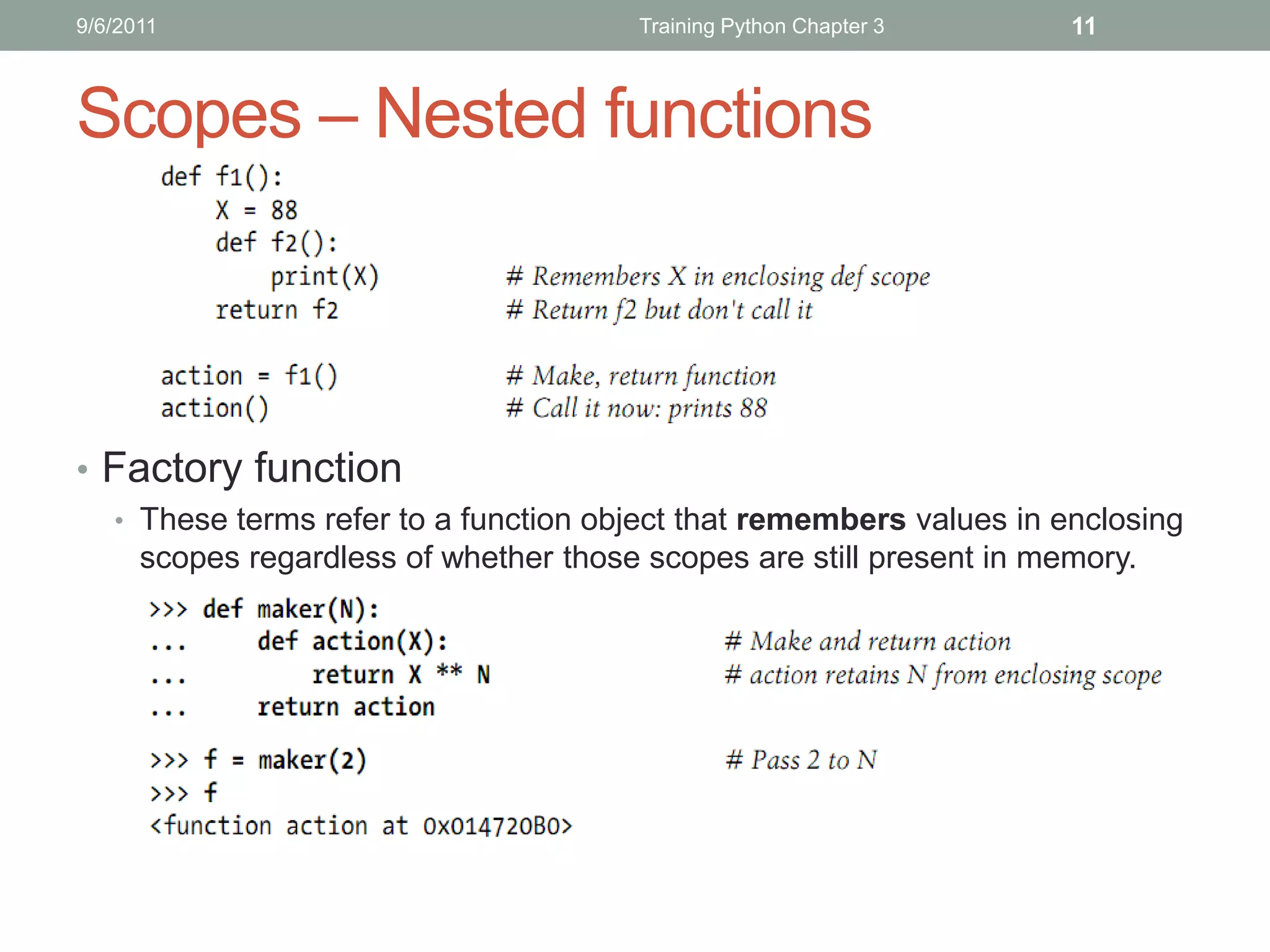
Scopes – Nested functions


• Factory function
   • These terms refer to a function object that remembers values in enclosing
      scopes regardless of whether those scopes are still present in memory.
9/6/2011                     Training Python Chapter 3   12


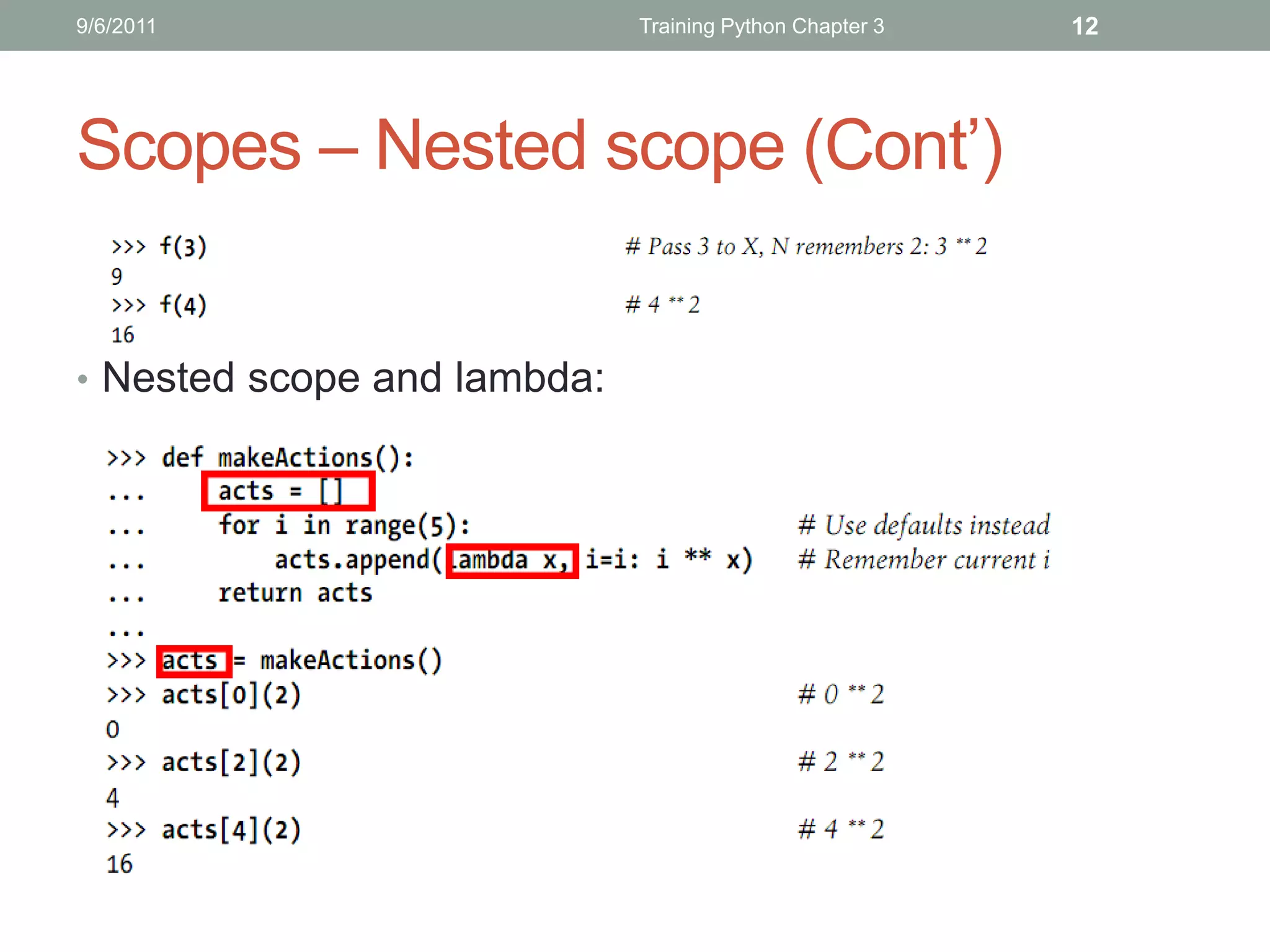
Scopes – Nested scope (Cont’)


• Nested scope and lambda:
9/6/2011                                 Training Python Chapter 3       13


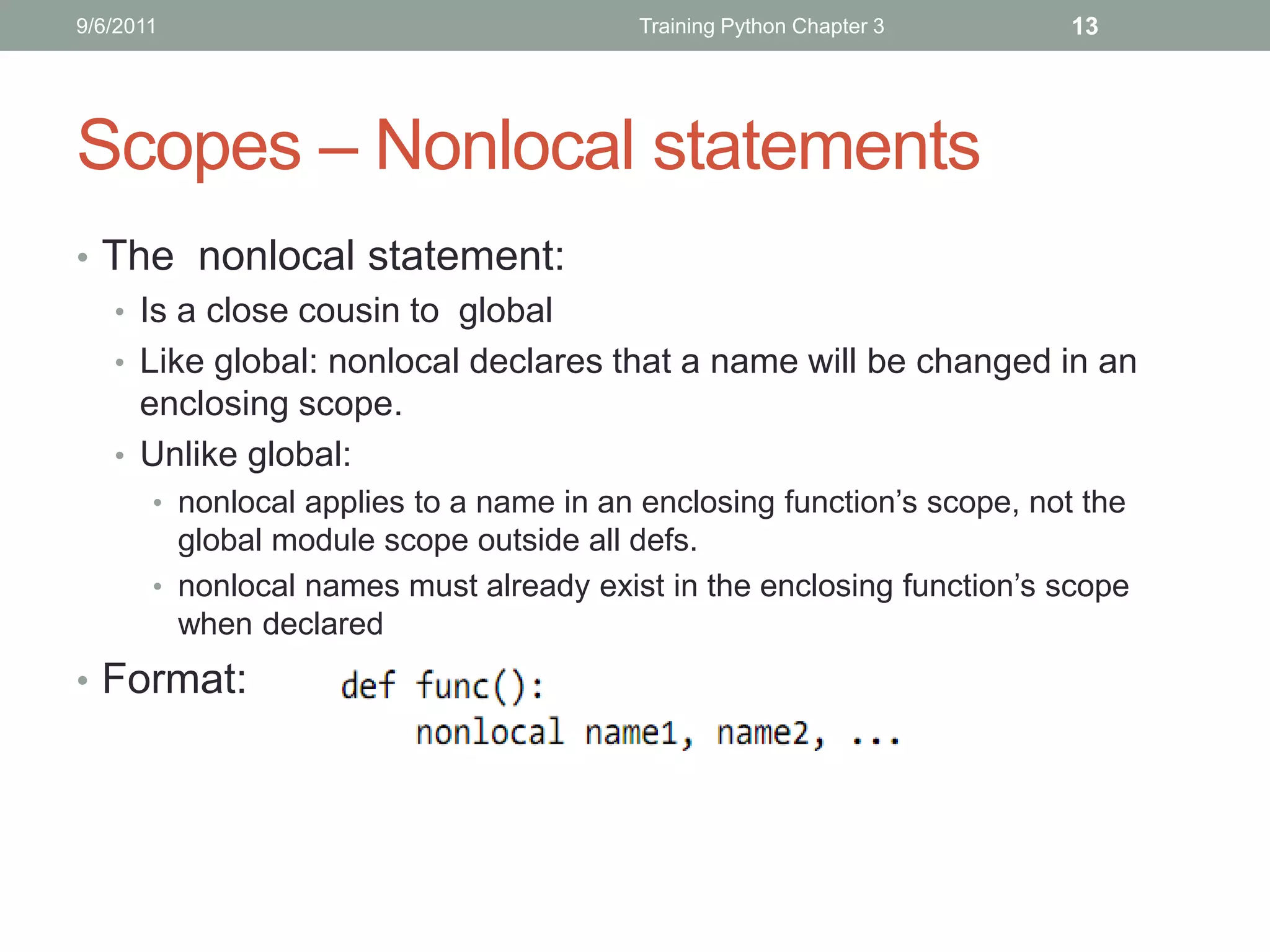
Scopes – Nonlocal statements
• The nonlocal statement:
  • Is a close cousin to global
  • Like global: nonlocal declares that a name will be changed in an
    enclosing scope.
  • Unlike global:
       • nonlocal applies to a name in an enclosing function’s scope, not the
         global module scope outside all defs.
       • nonlocal names must already exist in the enclosing function’s scope
         when declared
• Format:
9/6/2011          Training Python Chapter 3   14


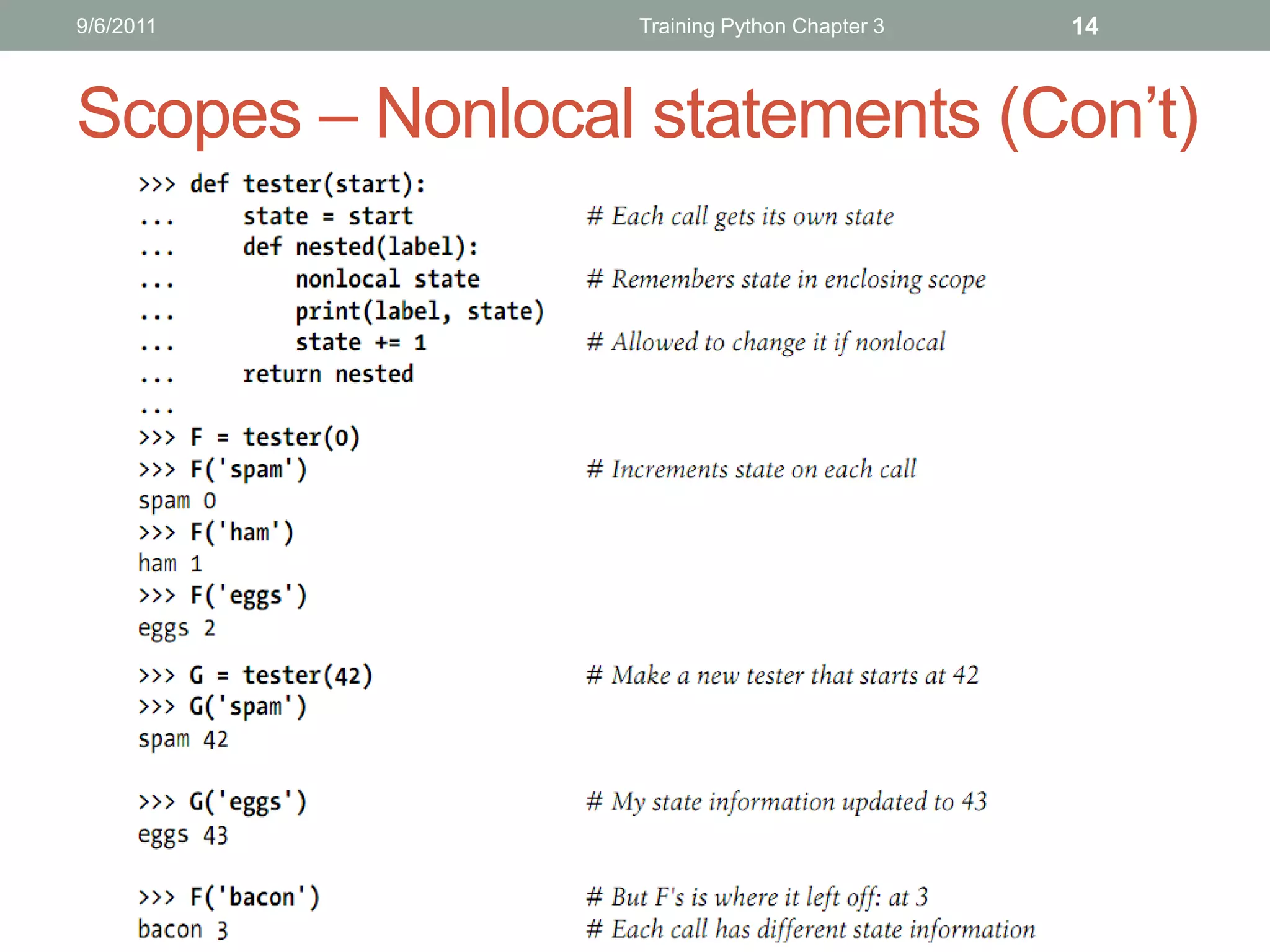
Scopes – Nonlocal statements (Con’t)
9/6/2011                             Training Python Chapter 3   15


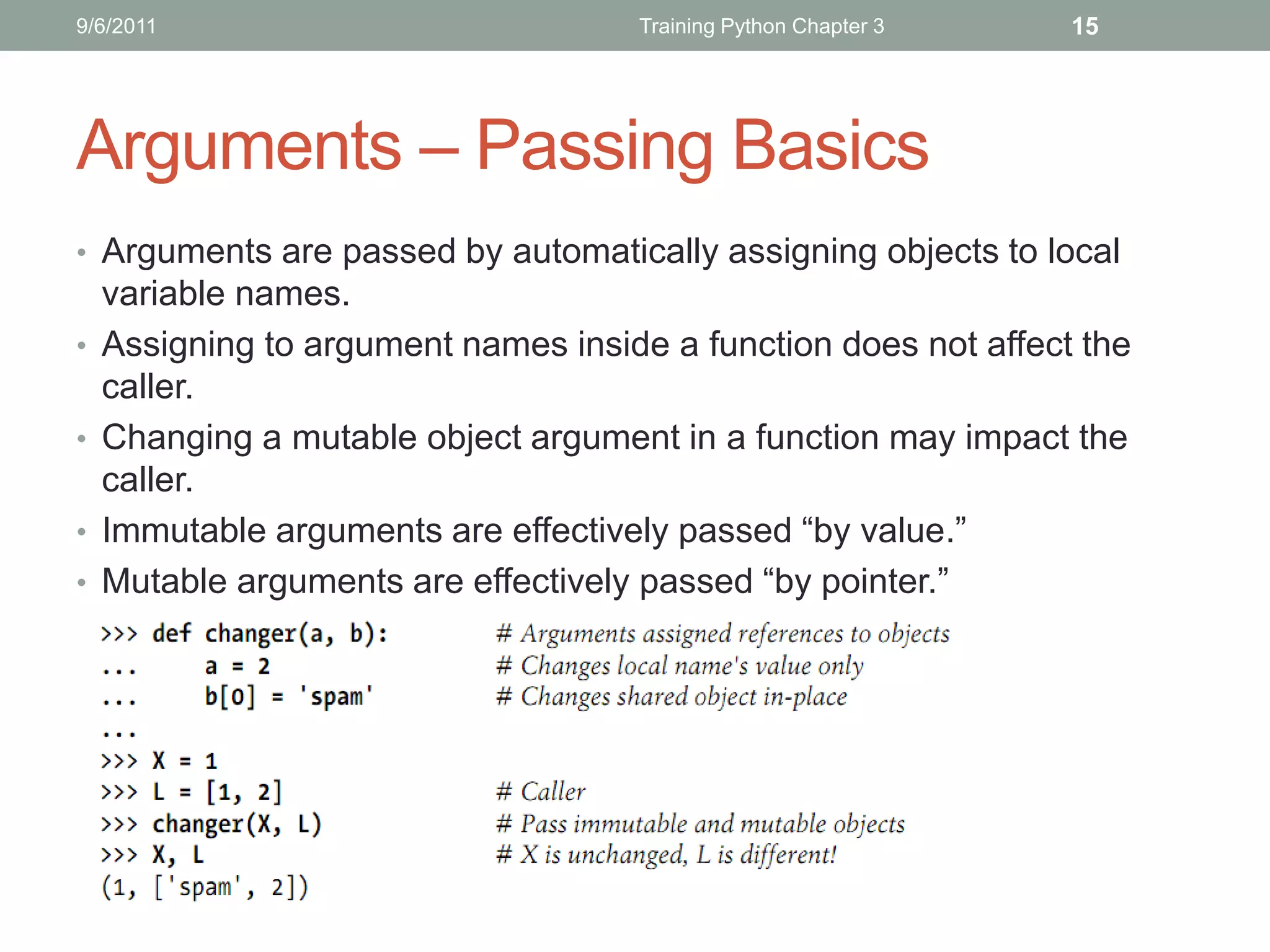
Arguments – Passing Basics
• Arguments are passed by automatically assigning objects to local
    variable names.
•   Assigning to argument names inside a function does not affect the
    caller.
•   Changing a mutable object argument in a function may impact the
    caller.
•   Immutable arguments are effectively passed “by value.”
•   Mutable arguments are effectively passed “by pointer.”
9/6/2011                              Training Python Chapter 3   16


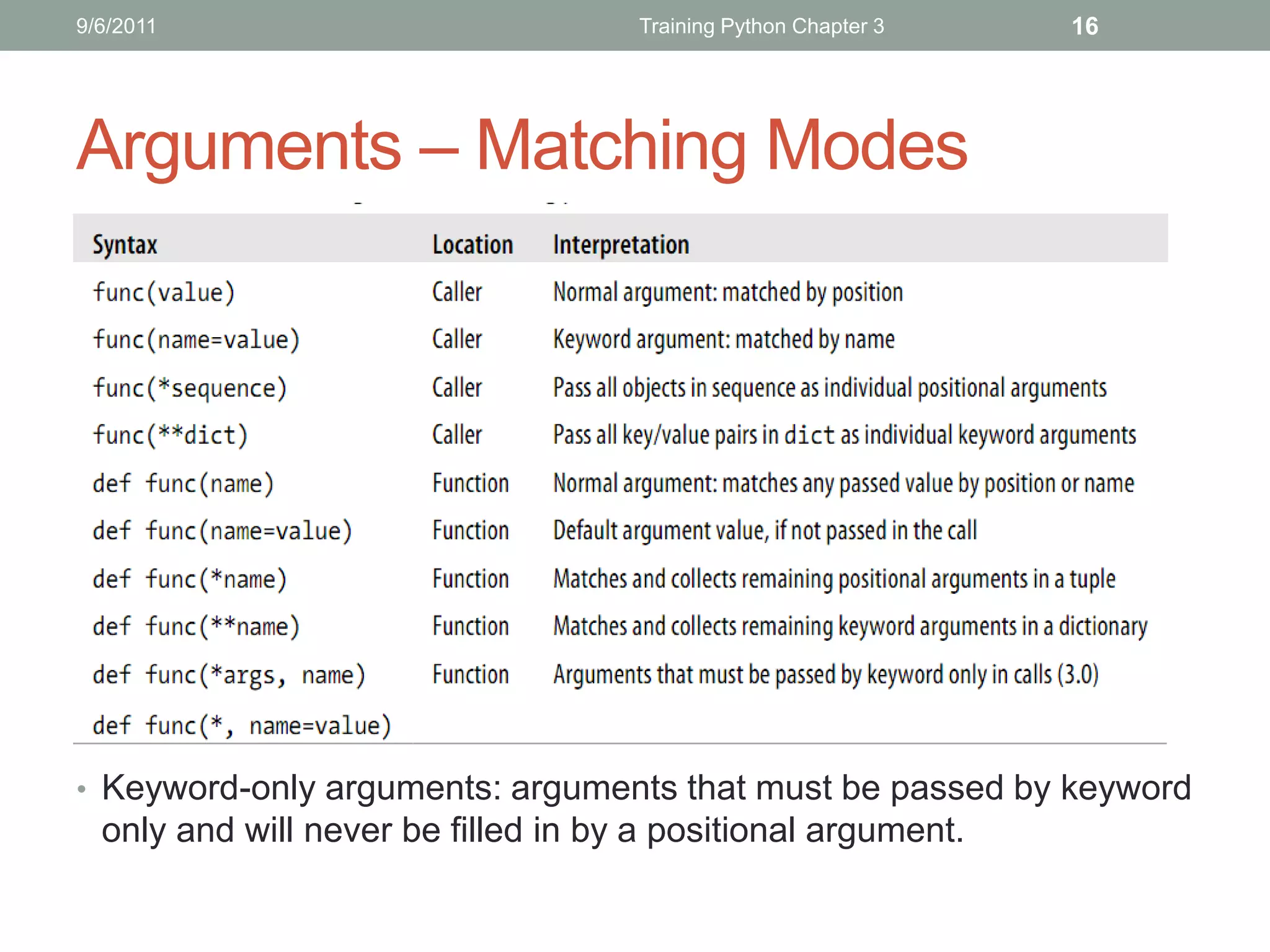
Arguments – Matching Modes


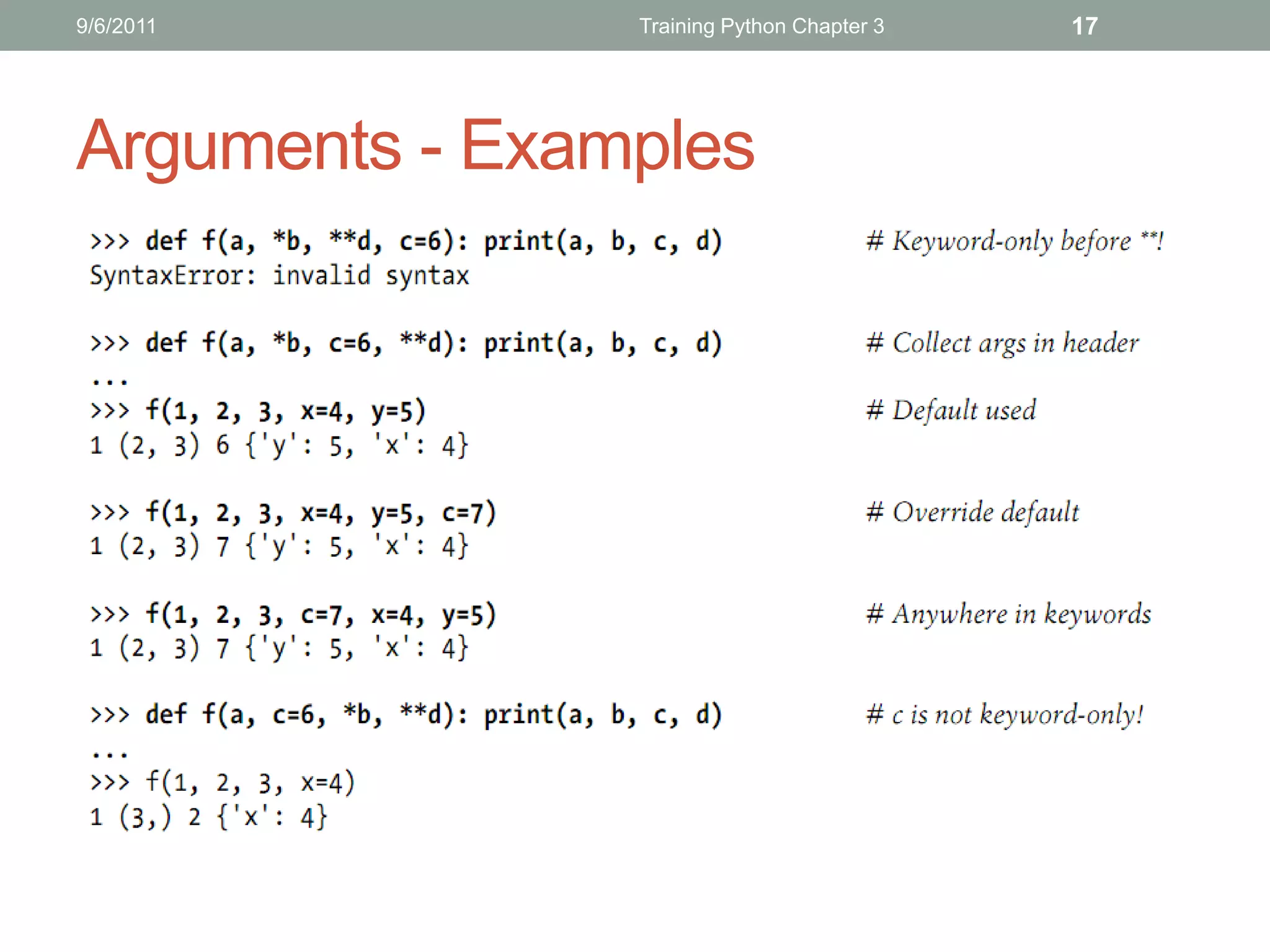
• Keyword-only arguments: arguments that must be passed by keyword
  only and will never be filled in by a positional argument.
9/6/2011        Training Python Chapter 3   17


Arguments - Examples
9/6/2011         Training Python Chapter 3   18


Arguments – Examples (Cont’)
9/6/2011        Training Python Chapter 3   19


Arguments – Bonus Points
9/6/2011                            Training Python Chapter 3    20


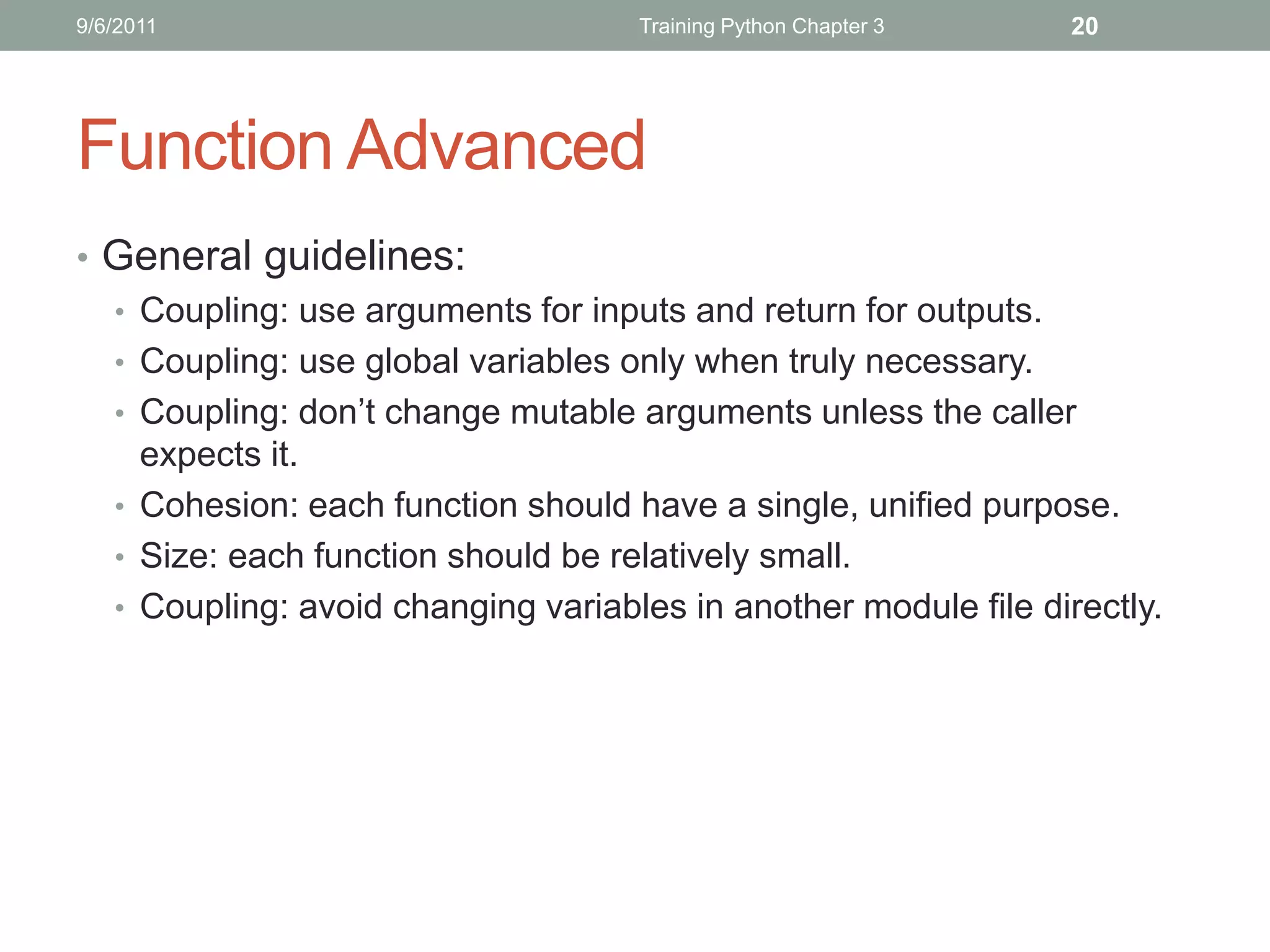
Function Advanced
• General guidelines:
  • Coupling: use arguments for inputs and return for outputs.
  • Coupling: use global variables only when truly necessary.
  • Coupling: don’t change mutable arguments unless the caller
    expects it.
  • Cohesion: each function should have a single, unified purpose.
  • Size: each function should be relatively small.
  • Coupling: avoid changing variables in another module file directly.
9/6/2011         Training Python Chapter 3   21


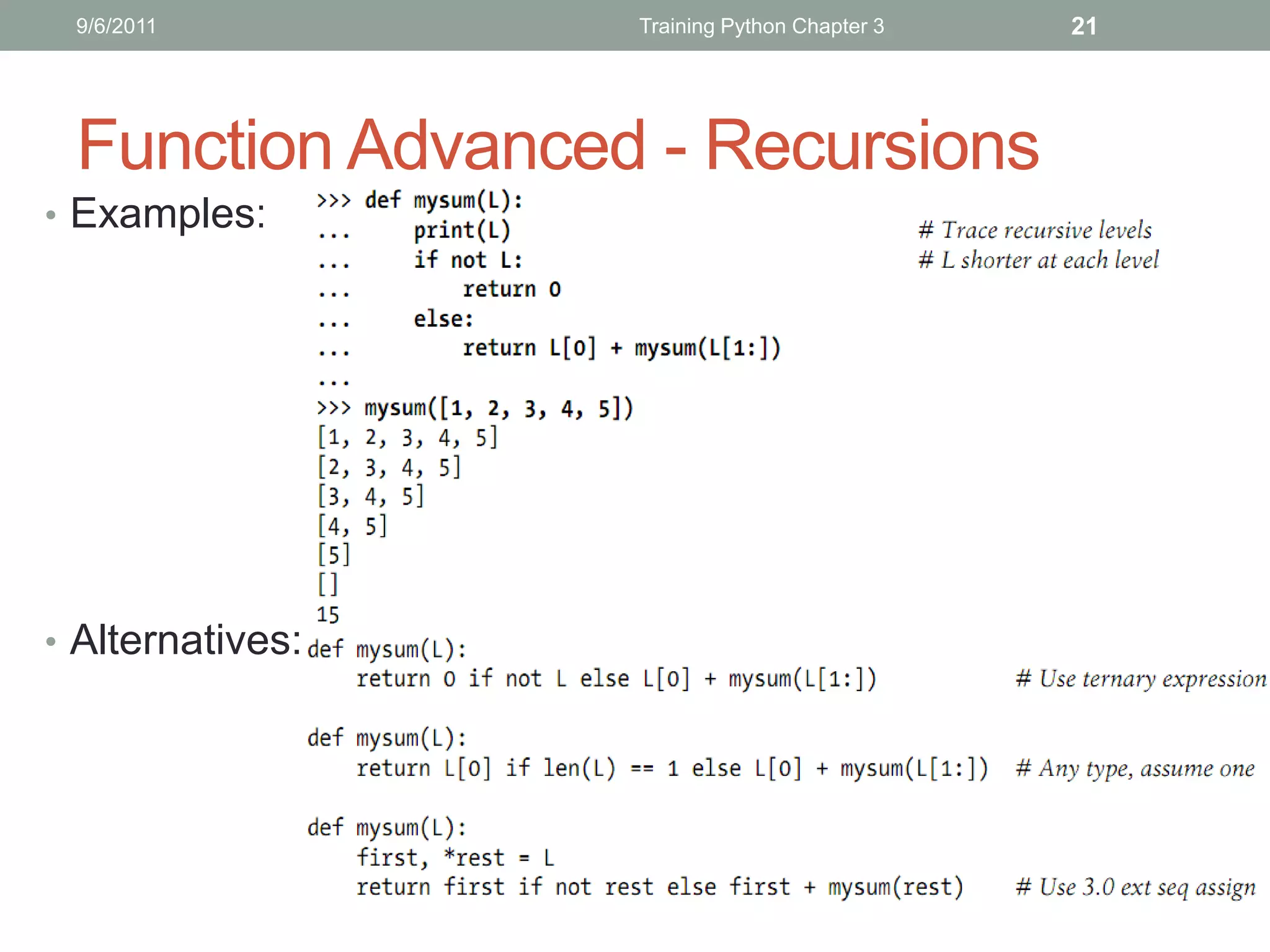
 Function Advanced - Recursions
• Examples:


• Alternatives:
9/6/2011                                  Training Python Chapter 3      22


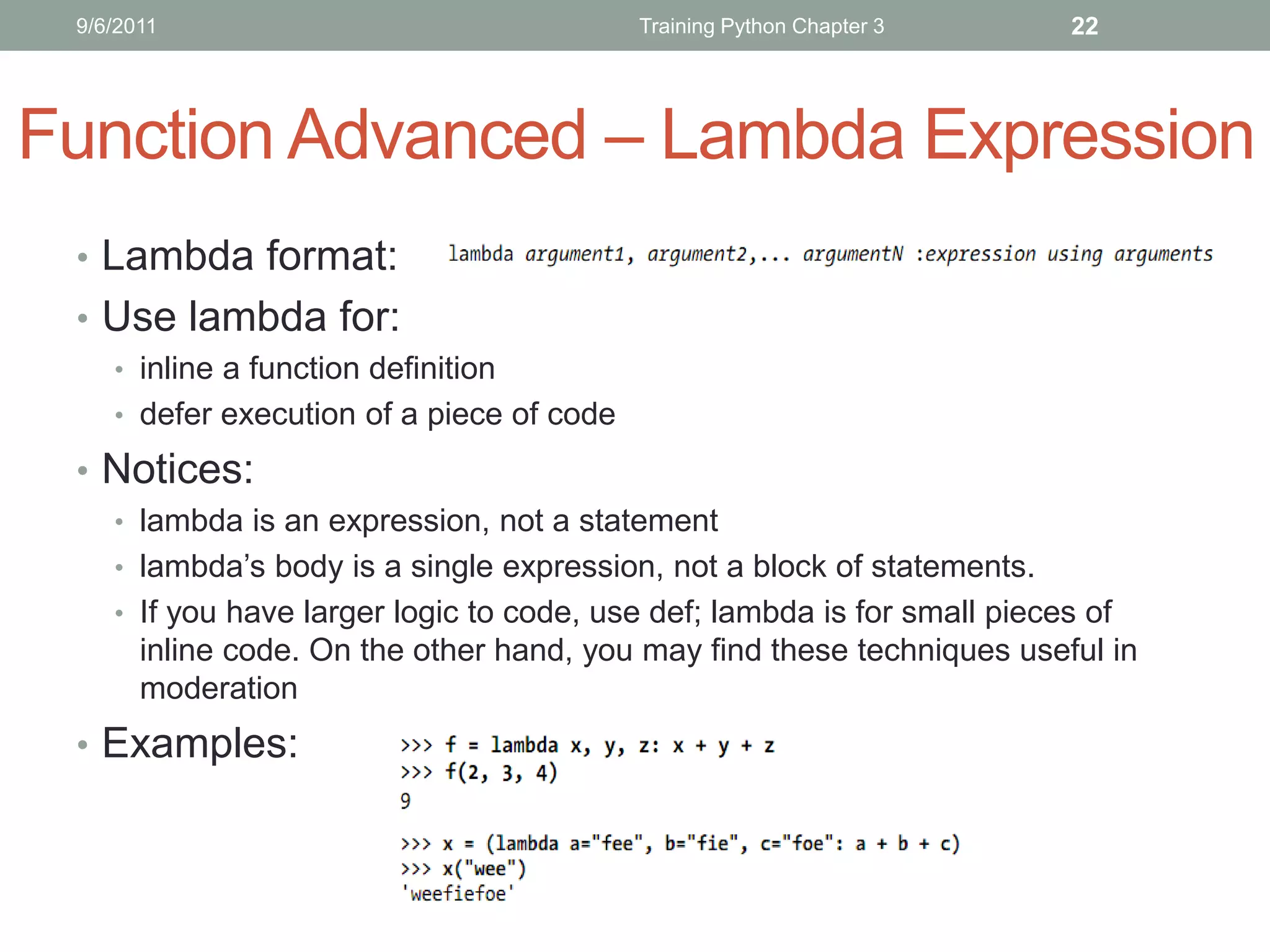
Function Advanced – Lambda Expression
 • Lambda format:
 • Use lambda for:
    • inline a function definition
    • defer execution of a piece of code

 • Notices:
    • lambda is an expression, not a statement
    • lambda’s body is a single expression, not a block of statements.
    • If you have larger logic to code, use def; lambda is for small pieces of
       inline code. On the other hand, you may find these techniques useful in
       moderation
 • Examples:
9/6/2011                          Training Python Chapter 3   23


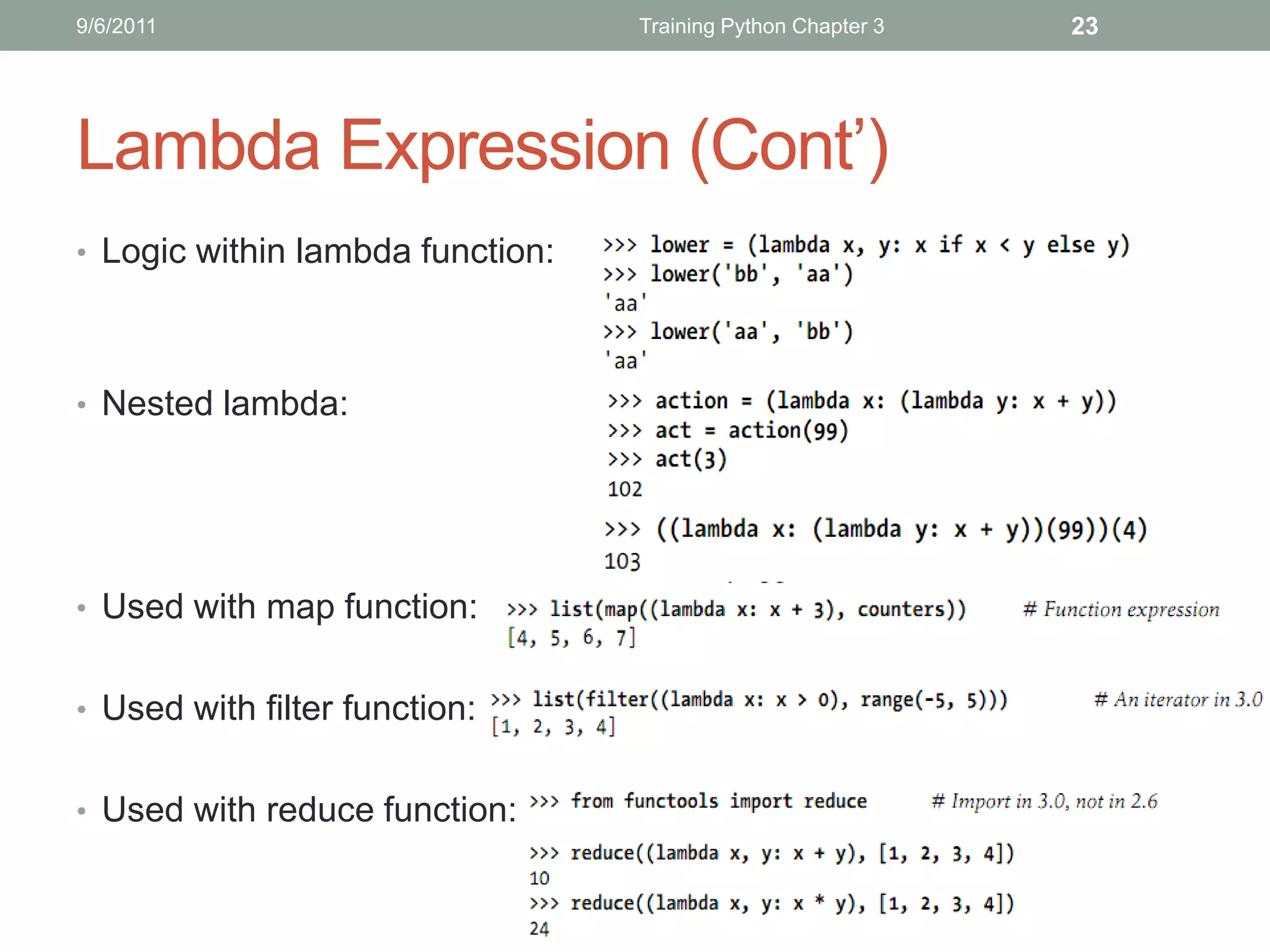
Lambda Expression (Cont’)
• Logic within lambda function:


• Nested lambda:


• Used with map function:


• Used with filter function:


• Used with reduce function:
9/6/2011                Training Python Chapter 3   24


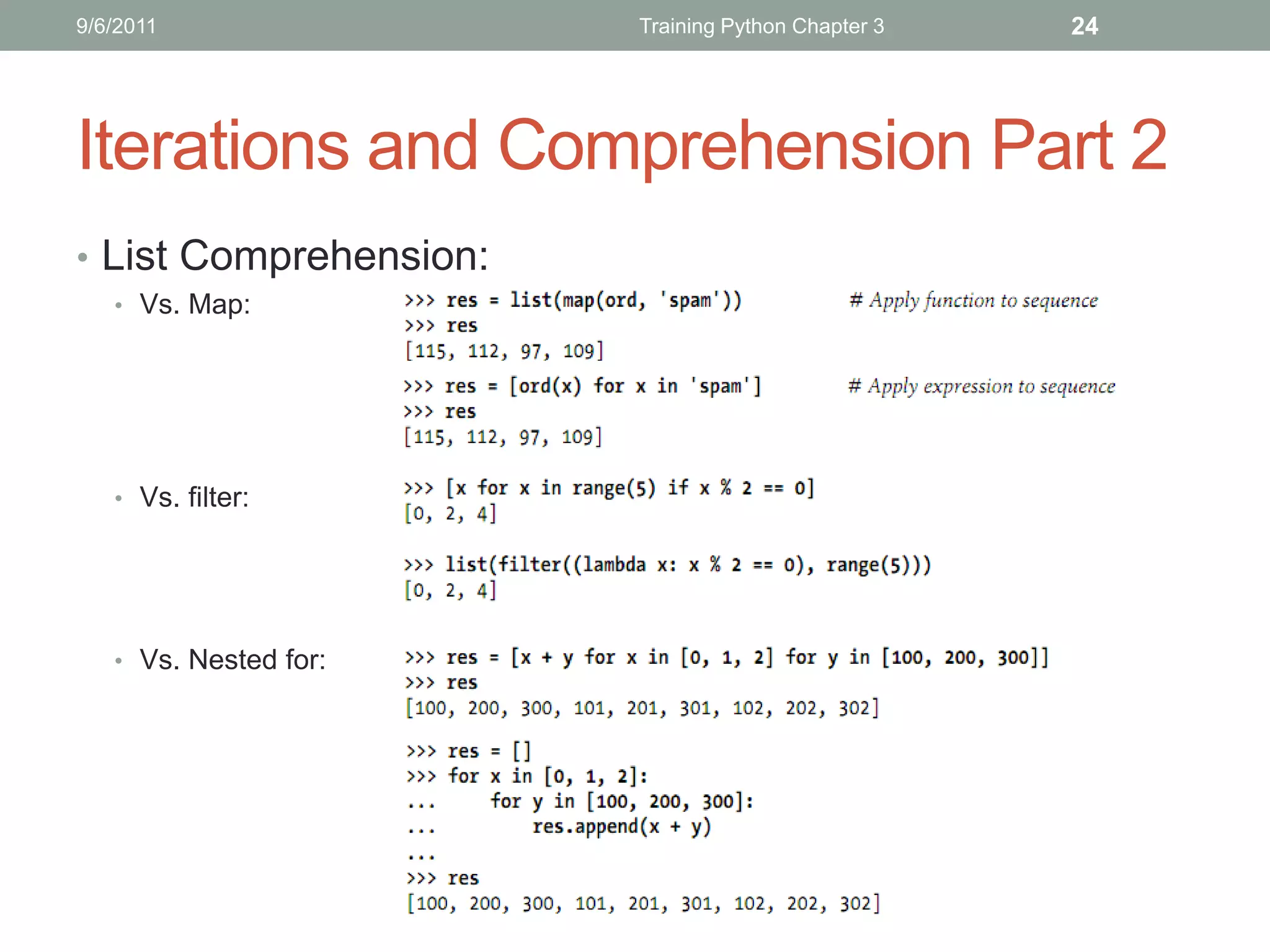
Iterations and Comprehension Part 2
• List Comprehension:
   • Vs. Map:


   • Vs. filter:


   • Vs. Nested for:
9/6/2011                            Training Python Chapter 3    25


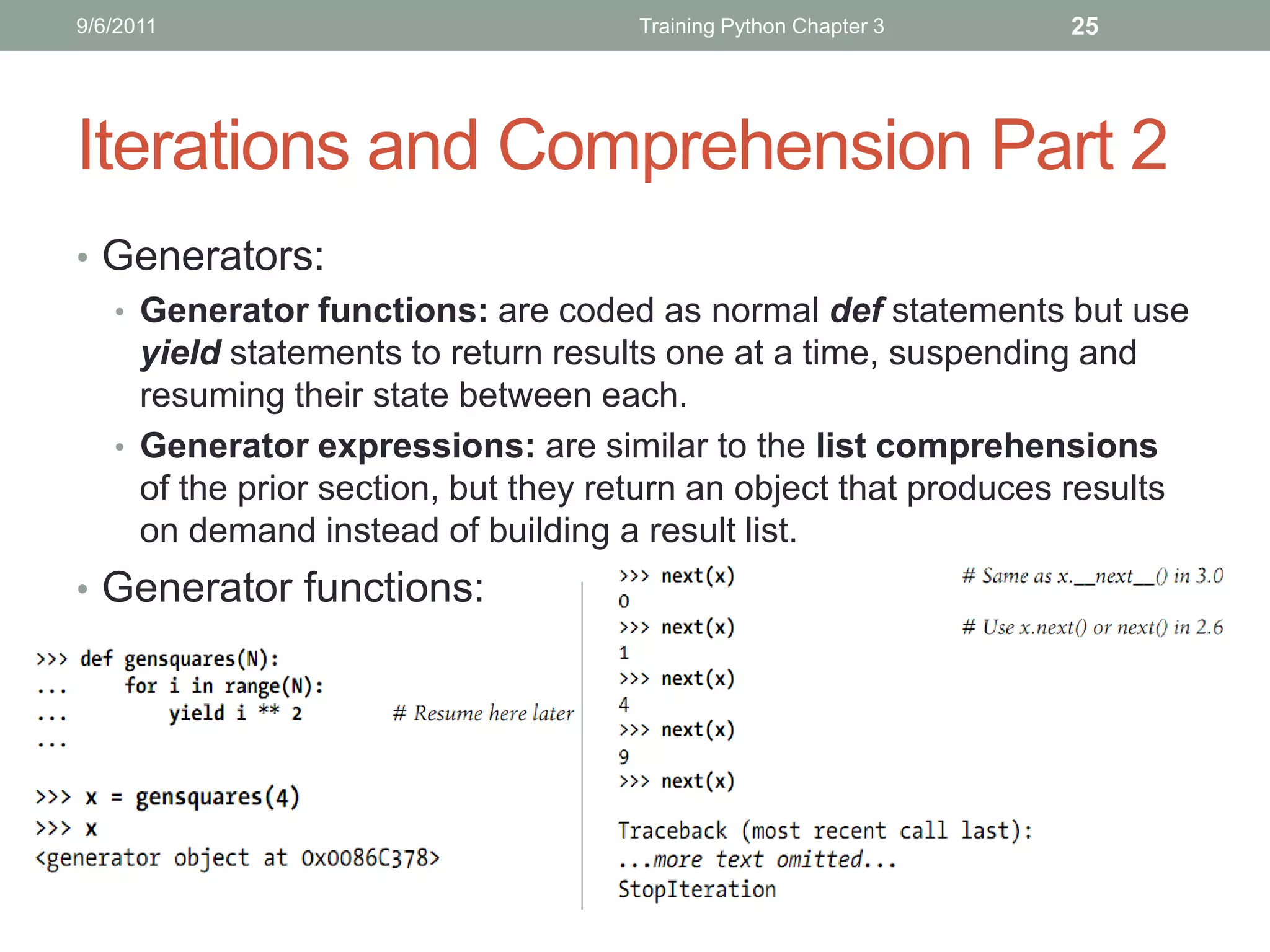
Iterations and Comprehension Part 2
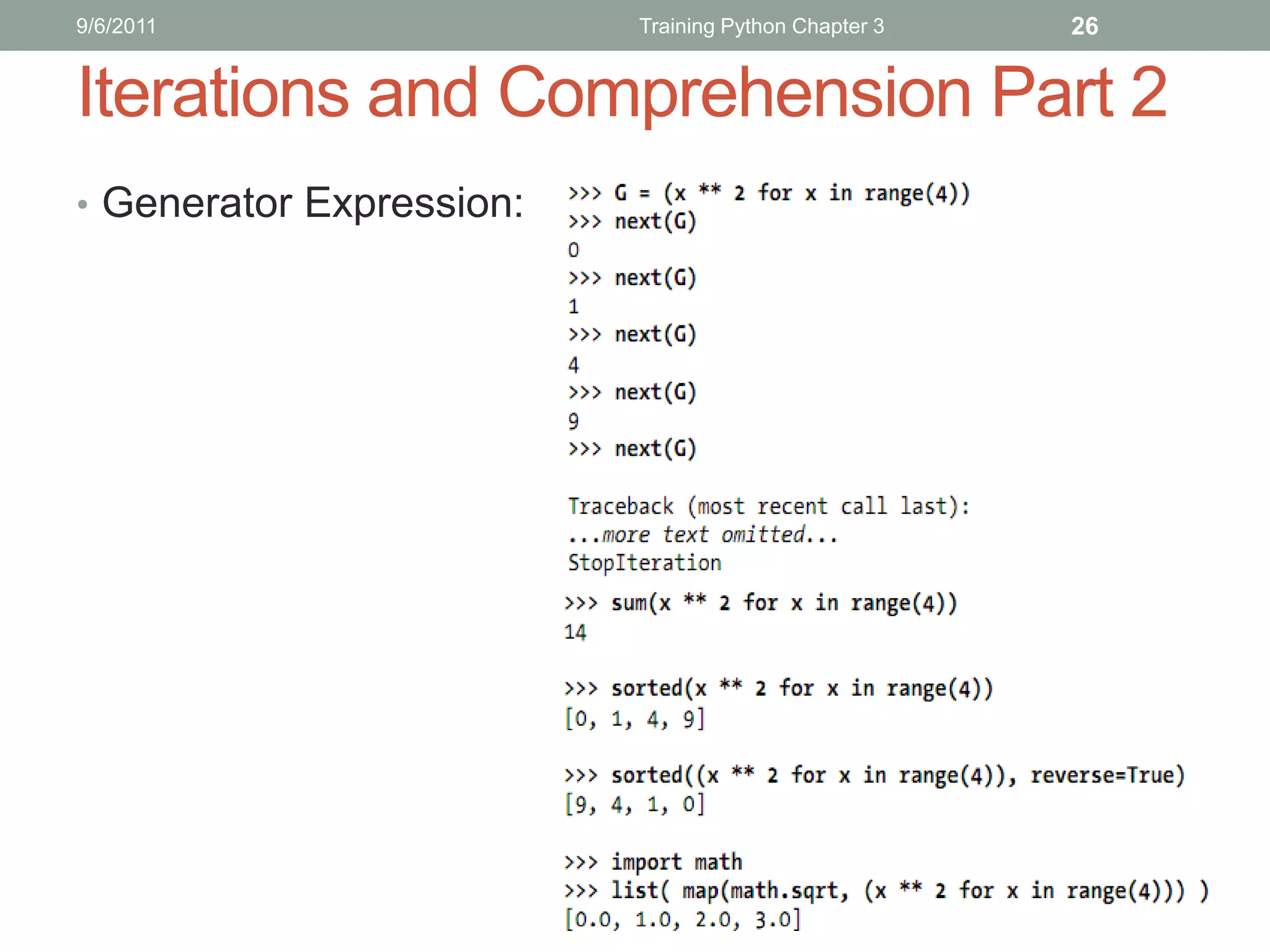
• Generators:
  • Generator functions: are coded as normal def statements but use
    yield statements to return results one at a time, suspending and
    resuming their state between each.
  • Generator expressions: are similar to the list comprehensions
    of the prior section, but they return an object that produces results
    on demand instead of building a result list.
• Generator functions:
9/6/2011                  Training Python Chapter 3   26


Iterations and Comprehension Part 2
• Generator Expression:
9/6/2011        Training Python Chapter 3   27


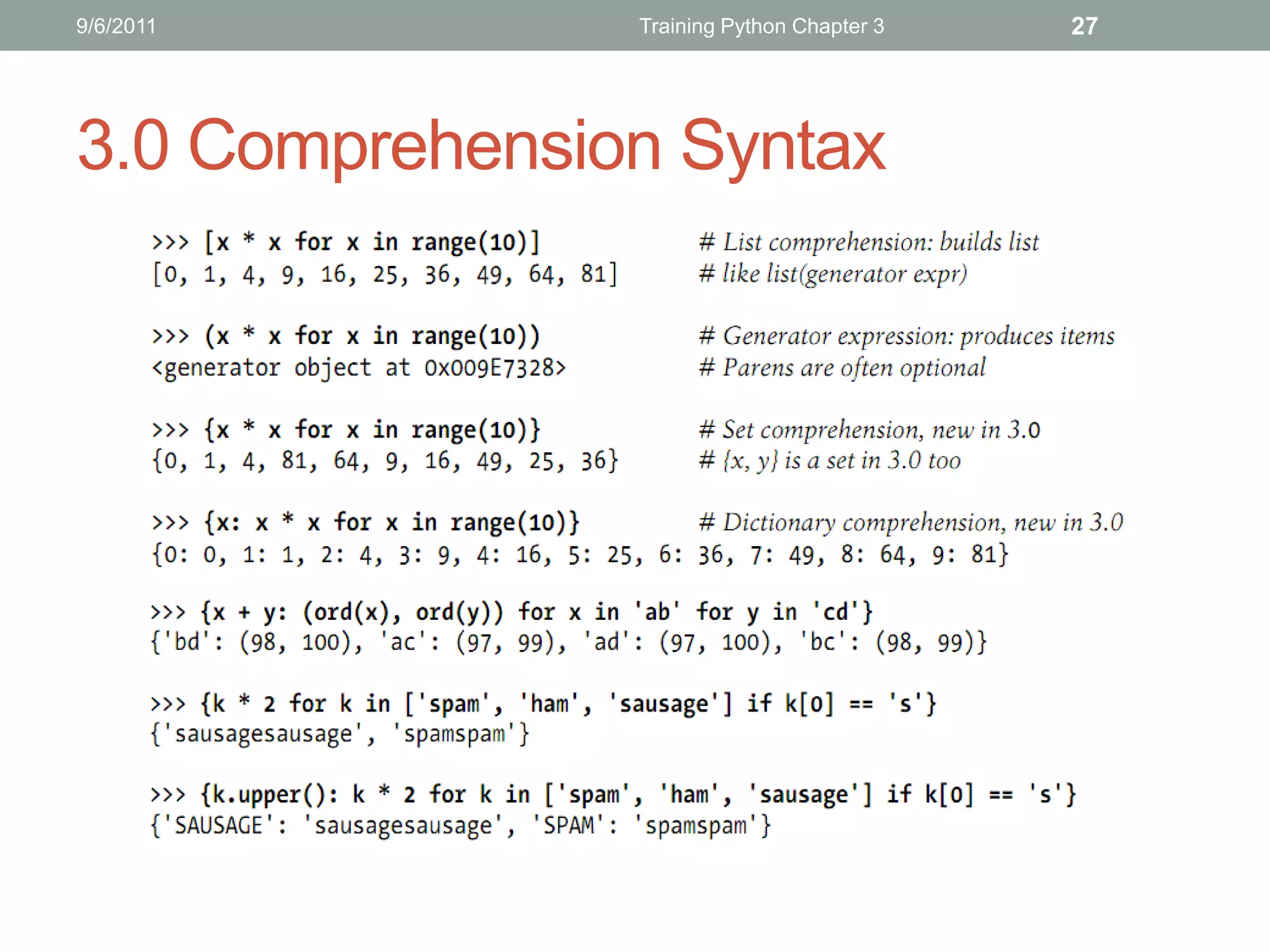
3.0 Comprehension Syntax
9/6/2011                             Training Python Chapter 3    28


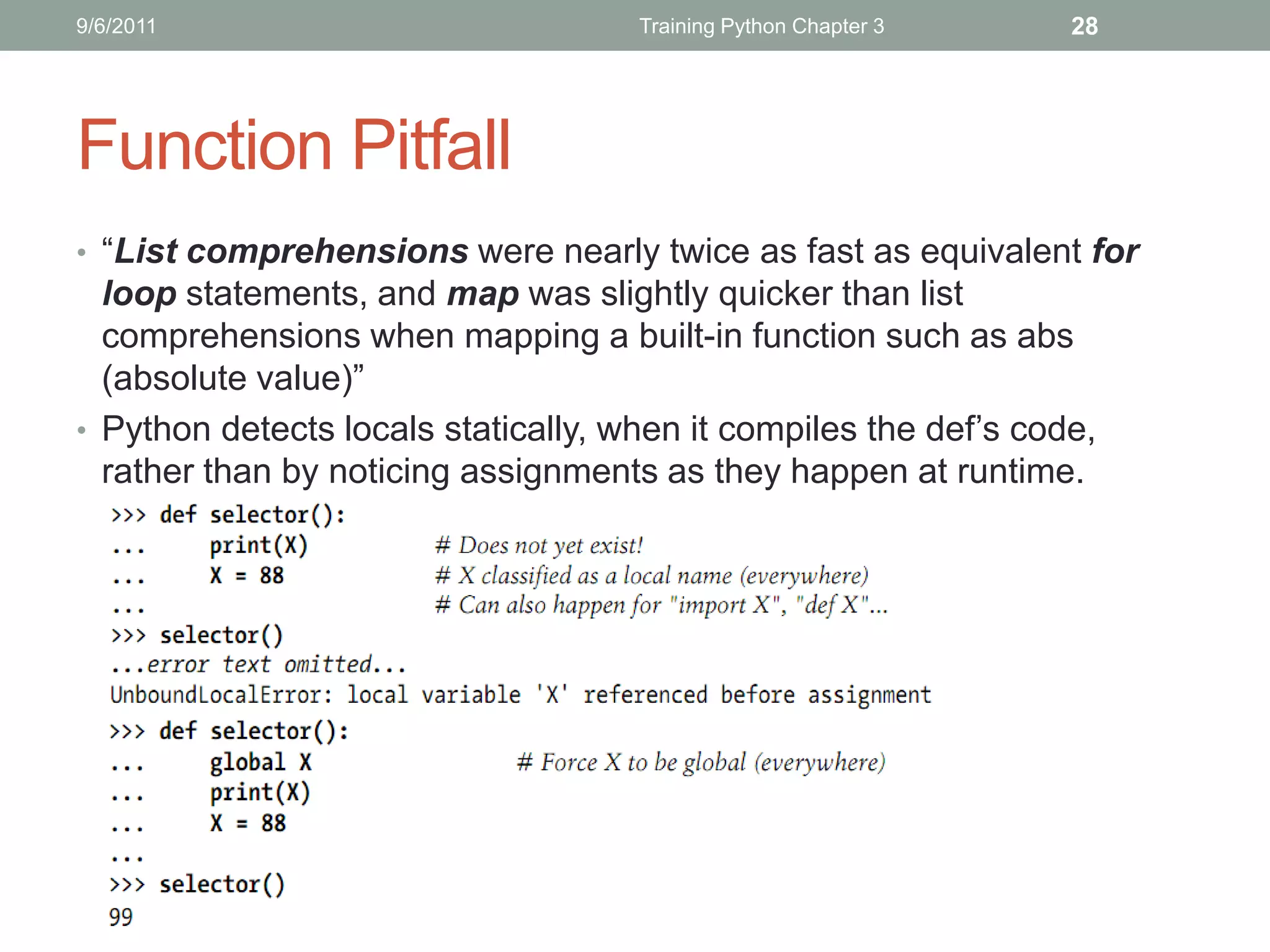
Function Pitfall
• “List comprehensions were nearly twice as fast as equivalent for
  loop statements, and map was slightly quicker than list
  comprehensions when mapping a built-in function such as abs
  (absolute value)”
• Python detects locals statically, when it compiles the def’s code,
  rather than by noticing assignments as they happen at runtime.
9/6/2011                       Learning Python Chapter 2   29


   THANKS FOR LISTENING
   Editor: Nguyễn Đức Minh Khôi
   Contact: nguyenducminhkhoi@gmail.com
   Main reference: Part IV – Functions
   Learning Python 4th Edition – O’reilly 2010
TRAINING PYTHON
Chapter 4: MODULES
9/15/2011          Training Python Chapter 4   2


Contents


            Modules Basics

             Modules Package

            Modules in advance
9/15/2011                           Training Python Chapter 4   3


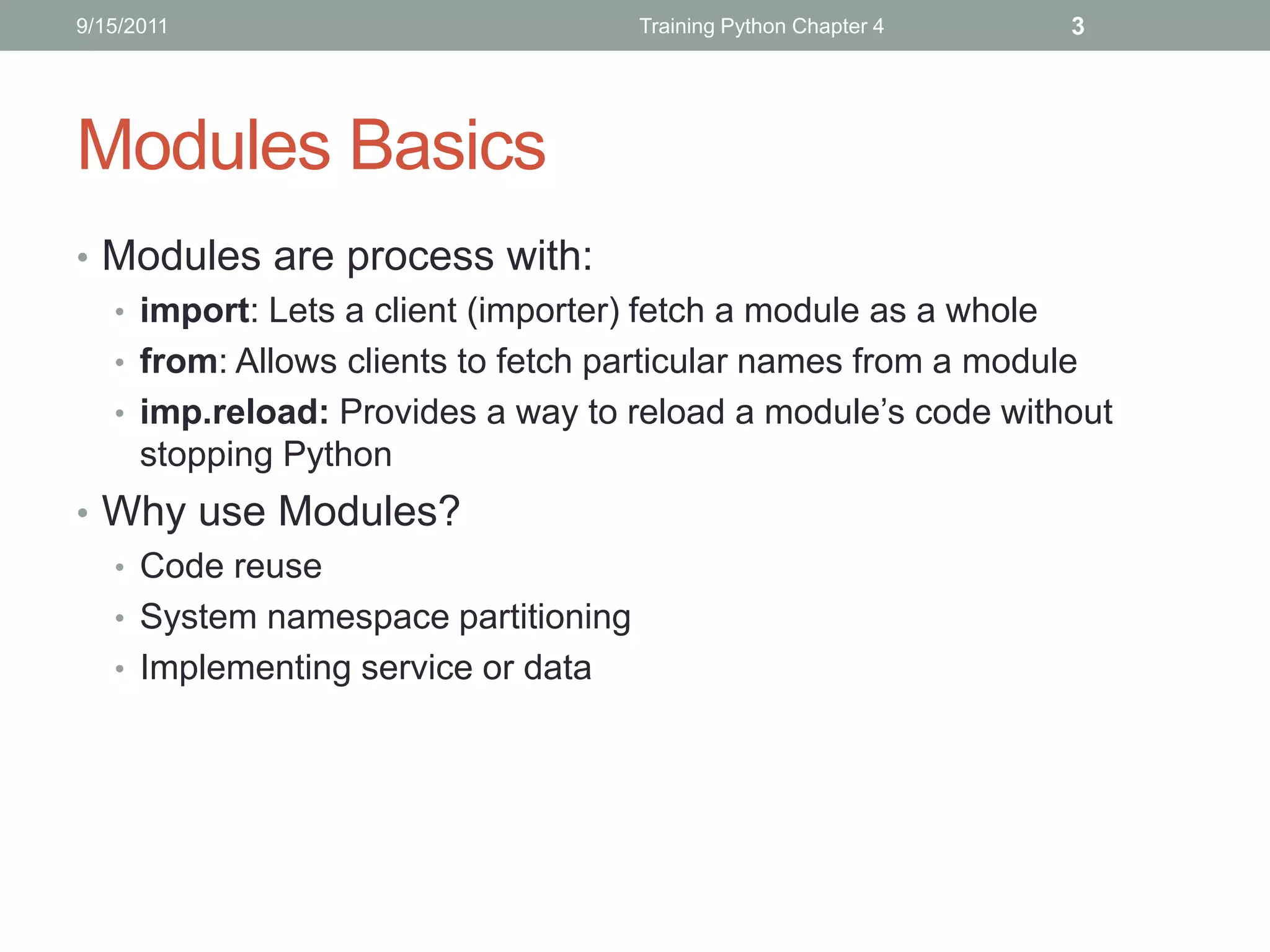
Modules Basics
• Modules are process with:
  • import: Lets a client (importer) fetch a module as a whole
  • from: Allows clients to fetch particular names from a module
  • imp.reload: Provides a way to reload a module’s code without
    stopping Python
• Why use Modules?
  • Code reuse
  • System namespace partitioning
  • Implementing service or data
9/15/2011                             Training Python Chapter 4   4


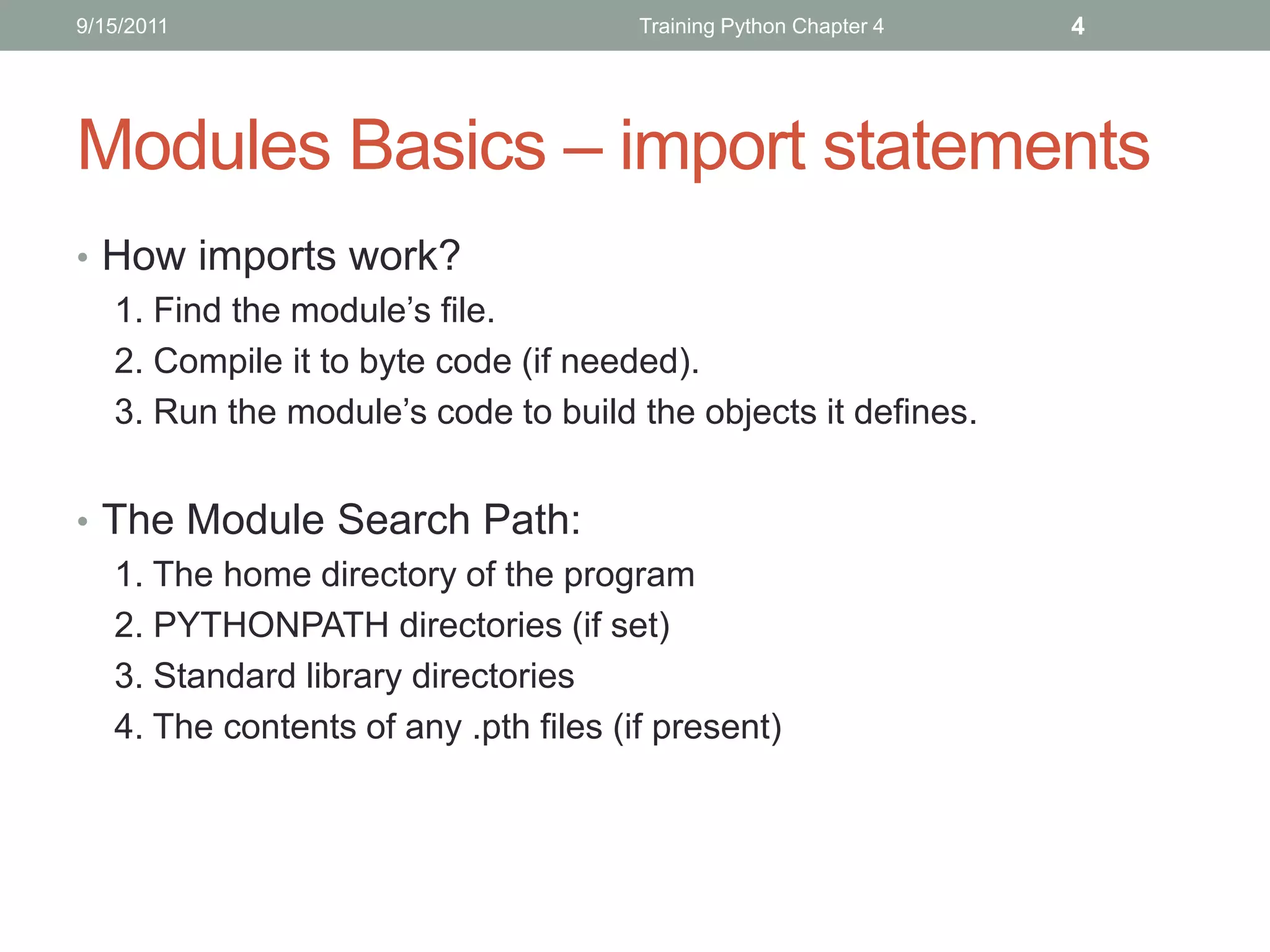
Modules Basics – import statements
• How imports work?
  1. Find the module’s file.
  2. Compile it to byte code (if needed).
  3. Run the module’s code to build the objects it defines.


• The Module Search Path:
  1. The home directory of the program
  2. PYTHONPATH directories (if set)
  3. Standard library directories
  4. The contents of any .pth files (if present)
9/15/2011                             Training Python Chapter 4   5


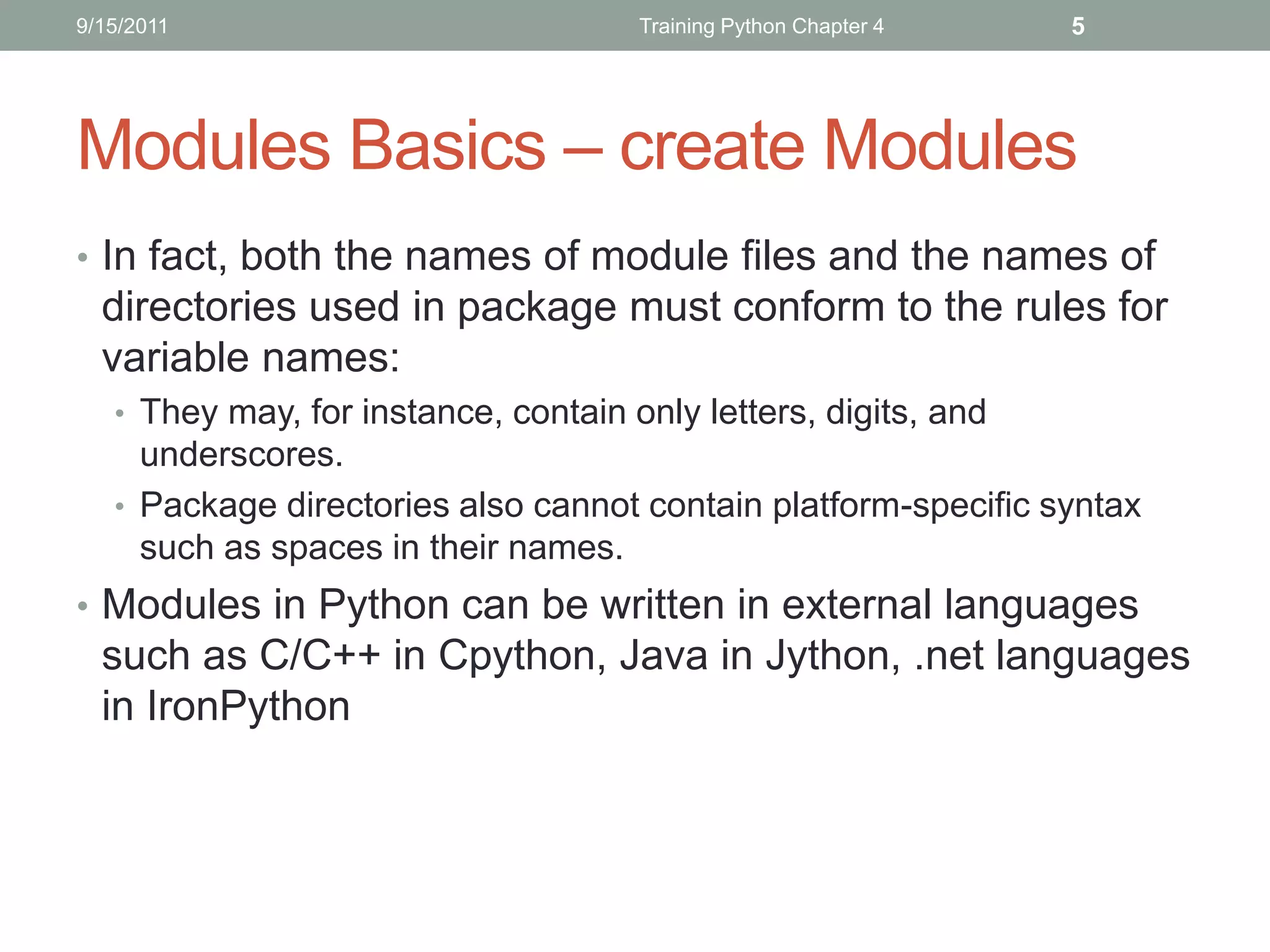
Modules Basics – create Modules
• In fact, both the names of module files and the names of
  directories used in package must conform to the rules for
  variable names:
   • They may, for instance, contain only letters, digits, and
     underscores.
   • Package directories also cannot contain platform-specific syntax
     such as spaces in their names.
• Modules in Python can be written in external languages
  such as C/C++ in Cpython, Java in Jython, .net languages
  in IronPython
9/15/2011                   Training Python Chapter 4   6


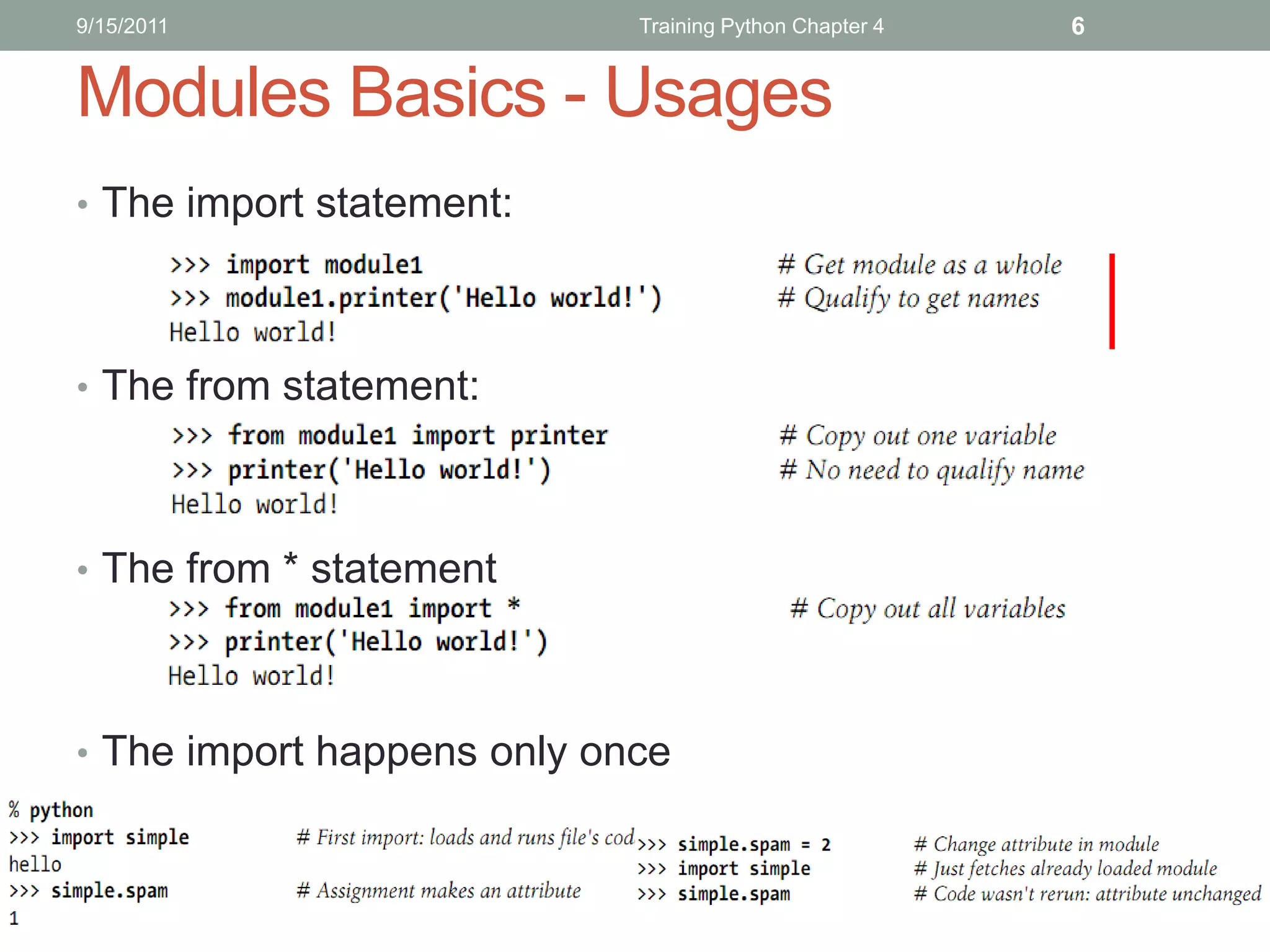
Modules Basics - Usages
• The import statement:


• The from statement:


• The from * statement


• The import happens only once
9/15/2011                           Training Python Chapter 4   7


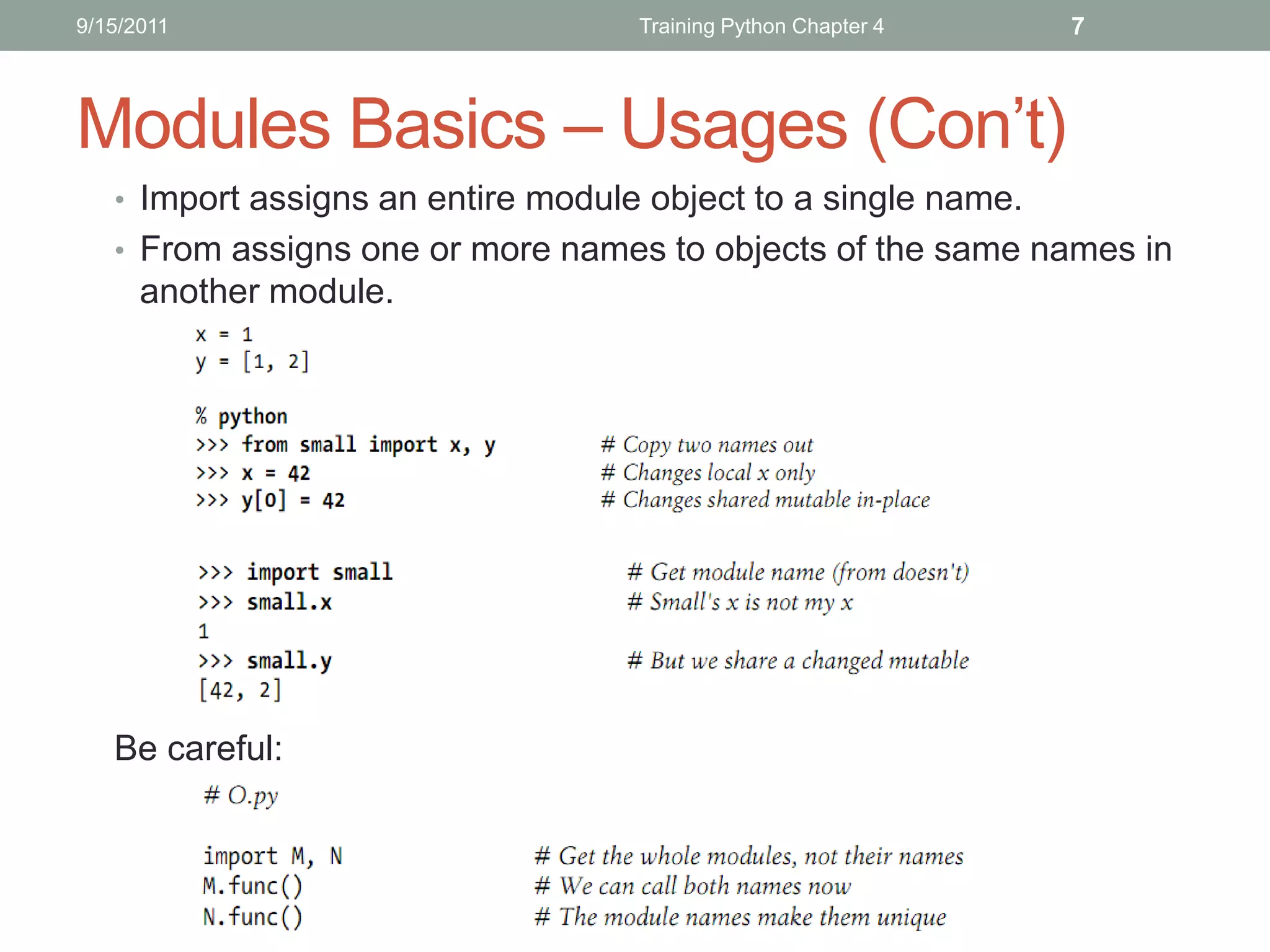
Modules Basics – Usages (Con’t)
   • Import assigns an entire module object to a single name.
   • From assigns one or more names to objects of the same names in
      another module.


   Be careful:
9/15/2011                         Training Python Chapter 4   8


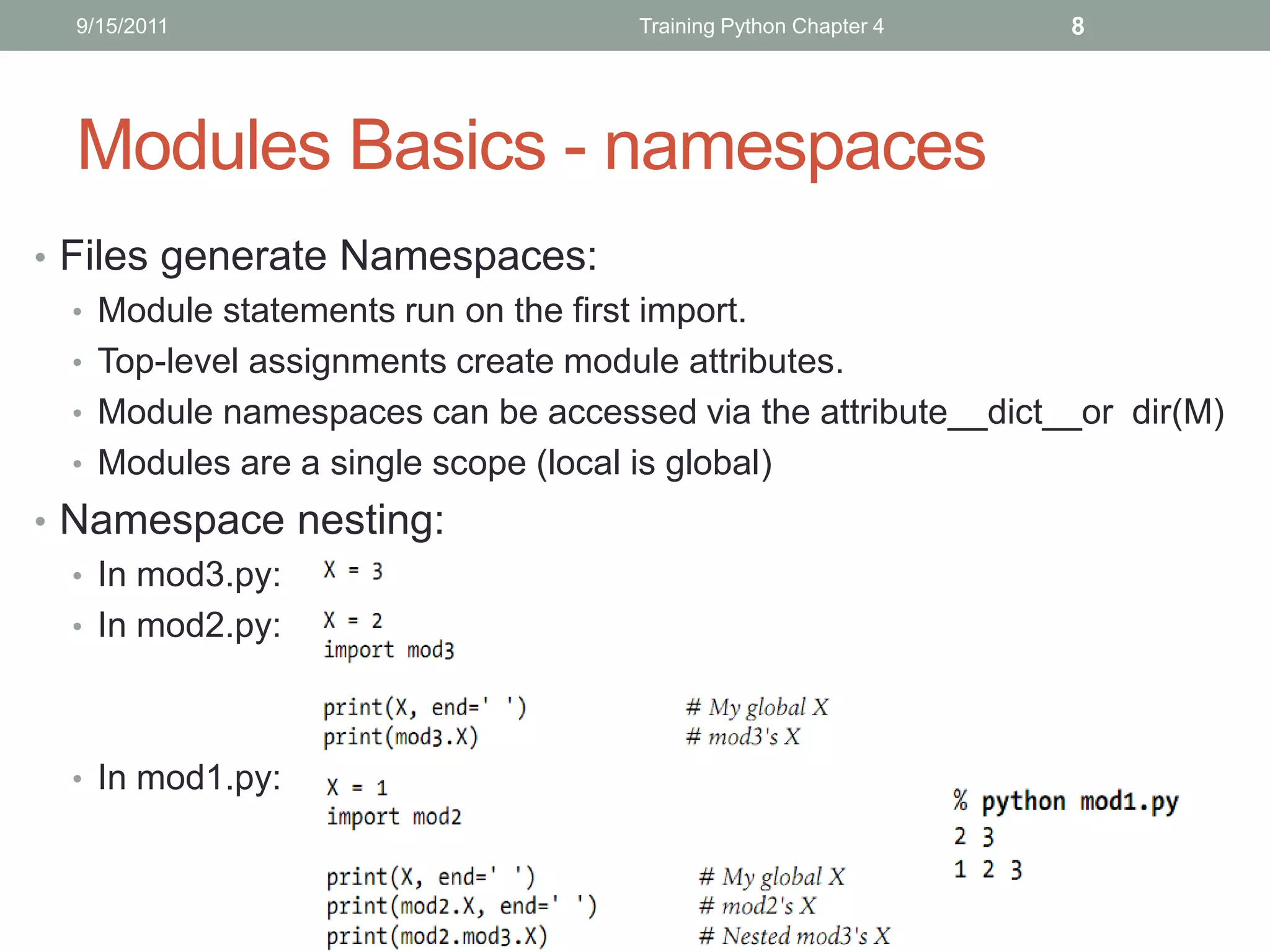
  Modules Basics - namespaces
• Files generate Namespaces:
  • Module statements run on the first import.
  • Top-level assignments create module attributes.
  • Module namespaces can be accessed via the attribute__dict__or dir(M)
  • Modules are a single scope (local is global)
• Namespace nesting:
  • In mod3.py:
  • In mod2.py:


  • In mod1.py:
9/15/2011                           Training Python Chapter 4   9


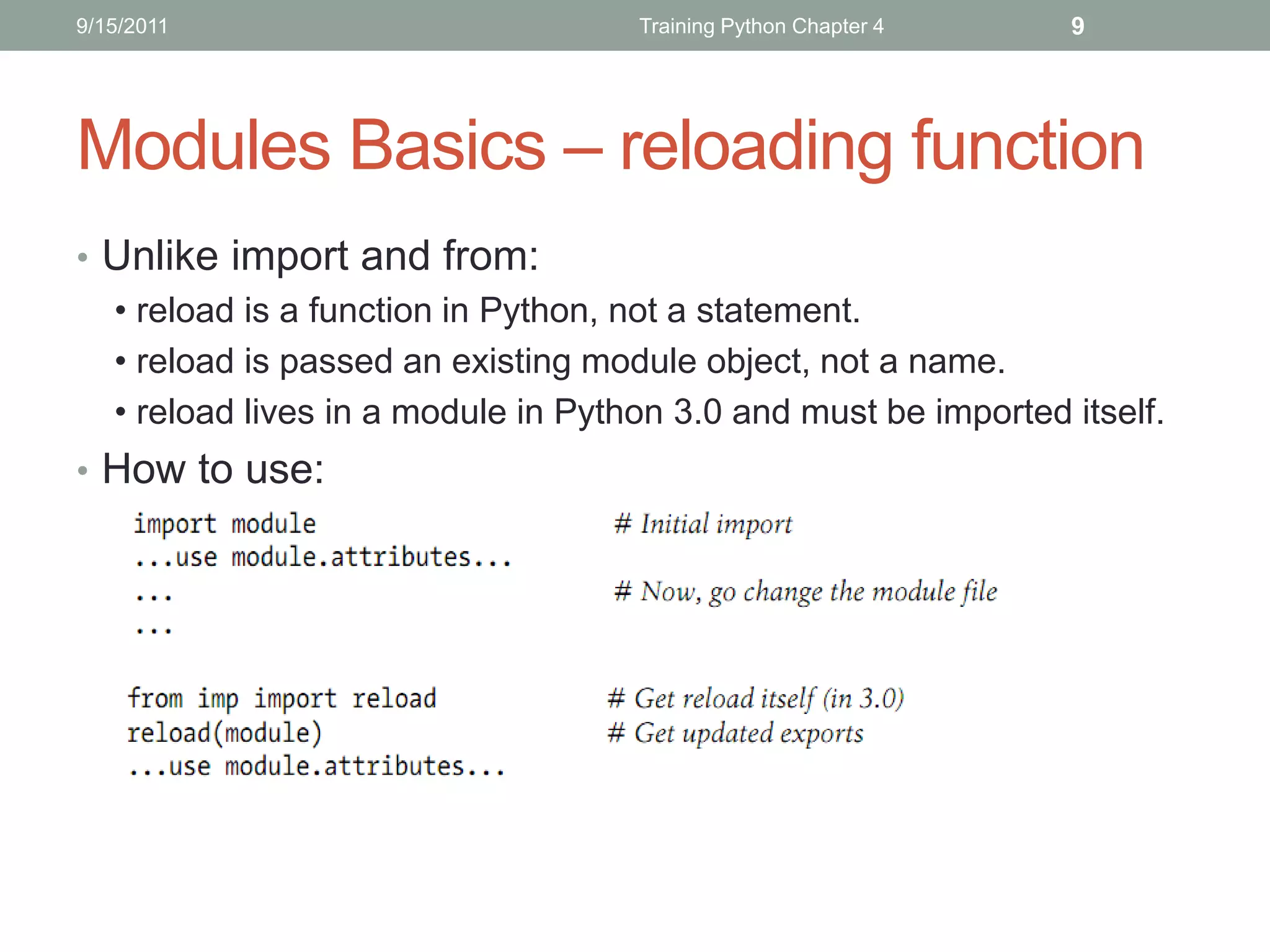
Modules Basics – reloading function
• Unlike import and from:
  • reload is a function in Python, not a statement.
  • reload is passed an existing module object, not a name.
  • reload lives in a module in Python 3.0 and must be imported itself.
• How to use:
9/15/2011                         Training Python Chapter 4   10


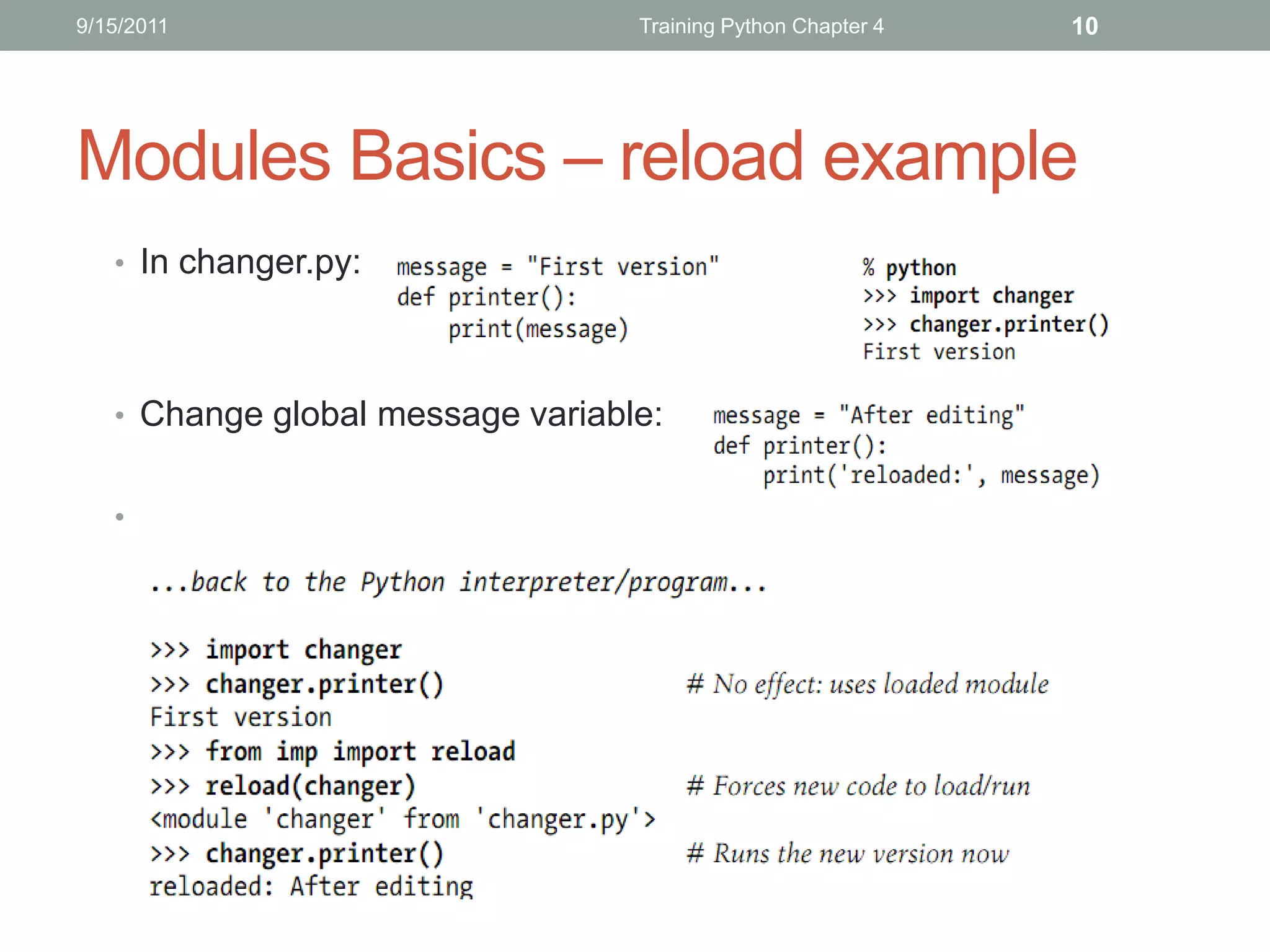
Modules Basics – reload example
   • In changer.py:


   • Change global message variable:


   •
9/15/2011                                  Training Python Chapter 4        11


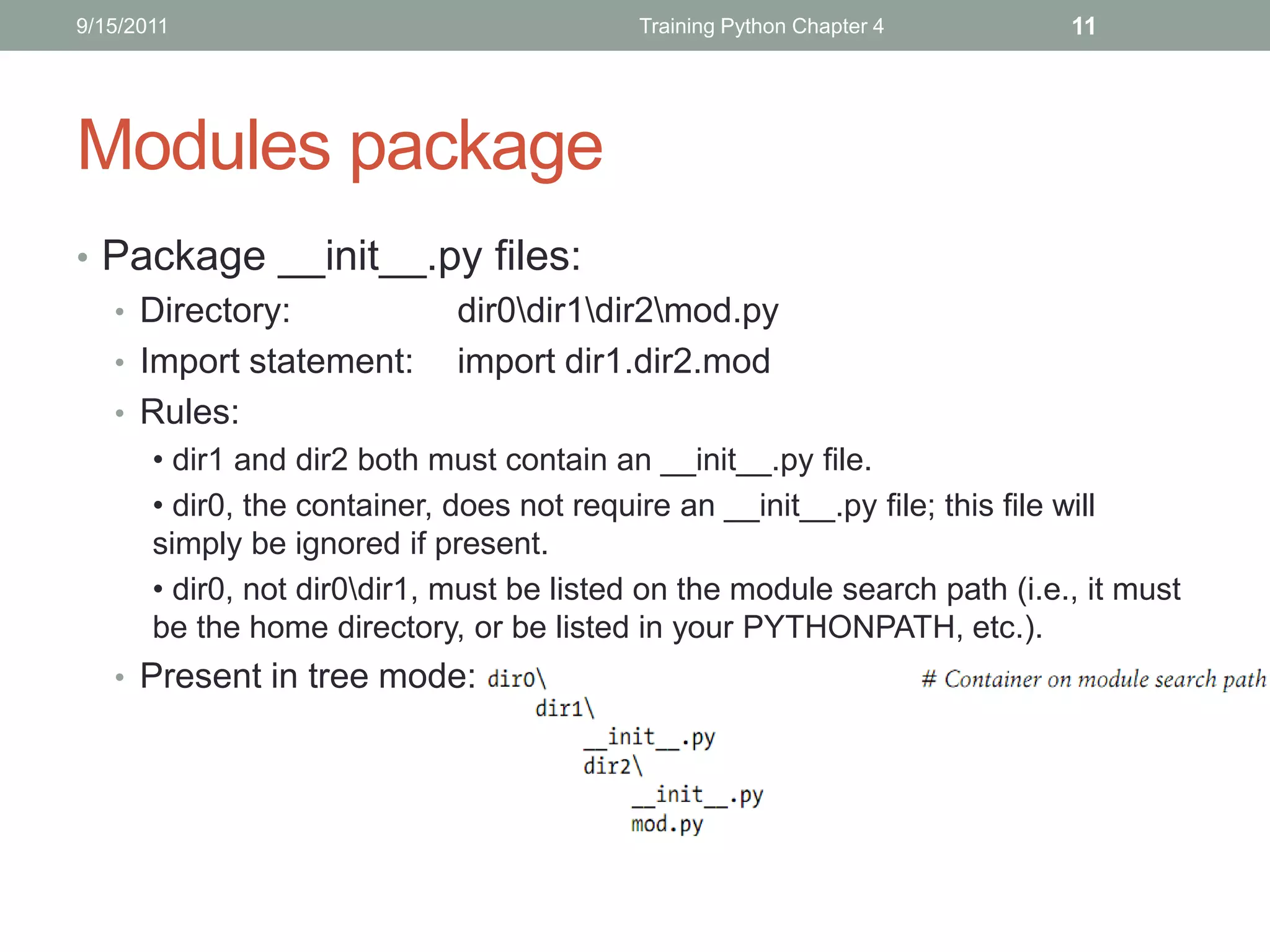
Modules package
• Package __init__.py files:
  • Directory:        dir0dir1dir2mod.py
  • Import statement: import dir1.dir2.mod
  • Rules:
       • dir1 and dir2 both must contain an __init__.py file.
       • dir0, the container, does not require an __init__.py file; this file will
       simply be ignored if present.
       • dir0, not dir0dir1, must be listed on the module search path (i.e., it must
       be the home directory, or be listed in your PYTHONPATH, etc.).
   • Present in tree mode:
9/15/2011                            Training Python Chapter 4   12


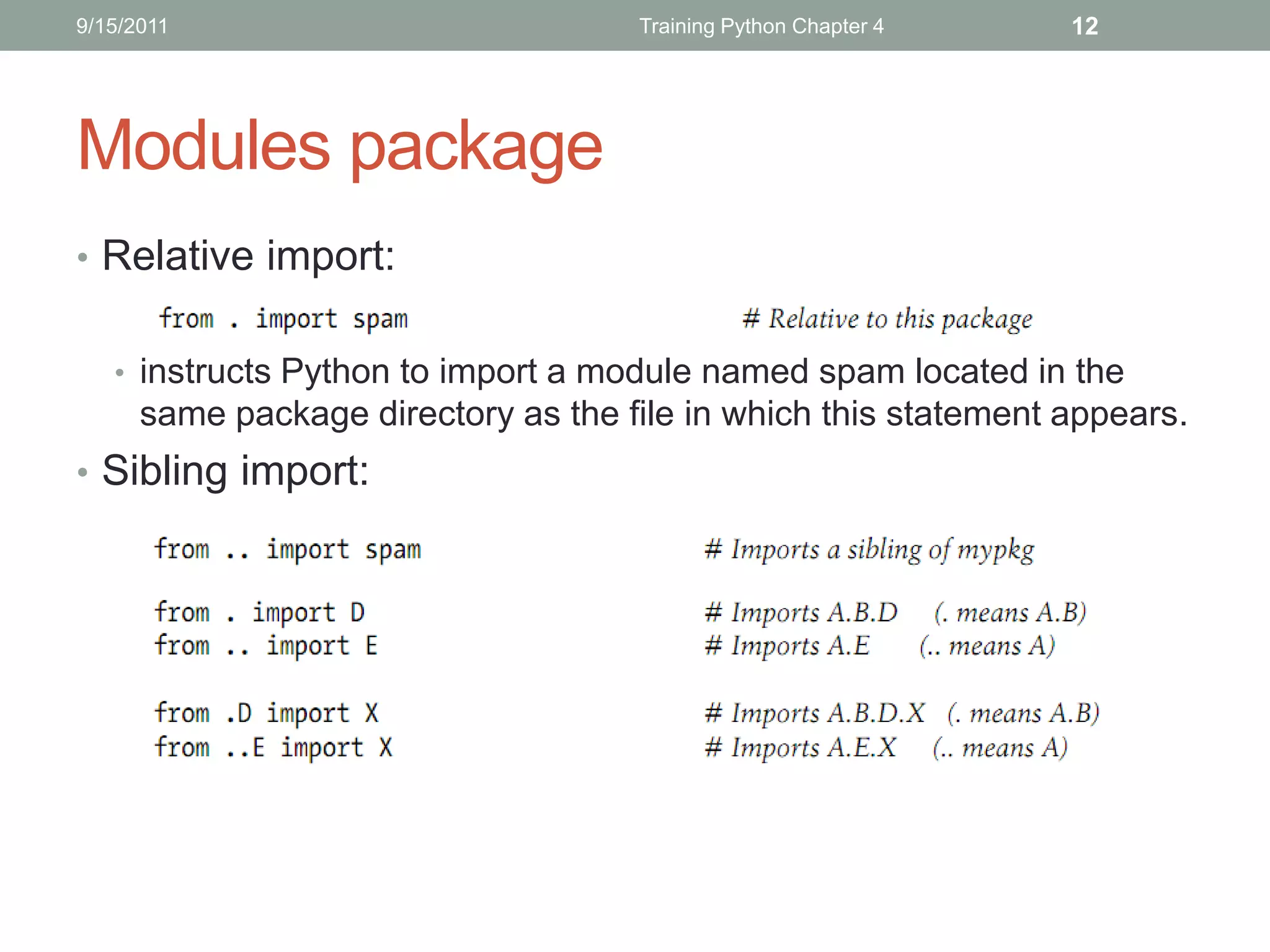
Modules package
• Relative import:


   • instructs Python to import a module named spam located in the
      same package directory as the file in which this statement appears.
• Sibling import:
9/15/2011                            Training Python Chapter 4    13


Modules In Advance – Data Hiding
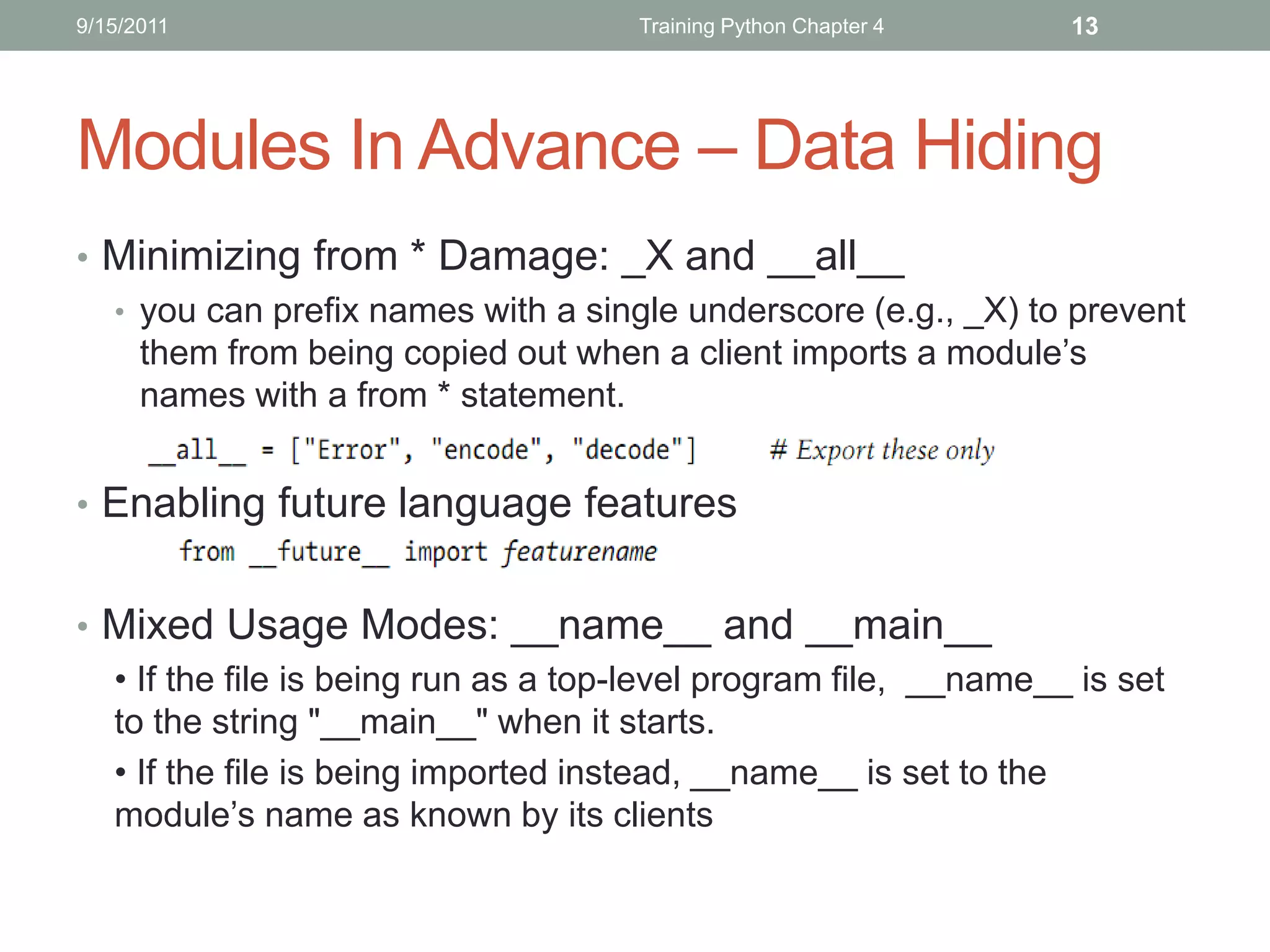
• Minimizing from * Damage: _X and __all__
  • you can prefix names with a single underscore (e.g., _X) to prevent
    them from being copied out when a client imports a module’s
    names with a from * statement.


• Enabling future language features


• Mixed Usage Modes: __name__ and __main__
  • If the file is being run as a top-level program file, __name__ is set
  to the string "__main__" when it starts.
  • If the file is being imported instead, __name__ is set to the
  module’s name as known by its clients
9/15/2011                             Training Python Chapter 4    14


Modules in Advance (Cont’)
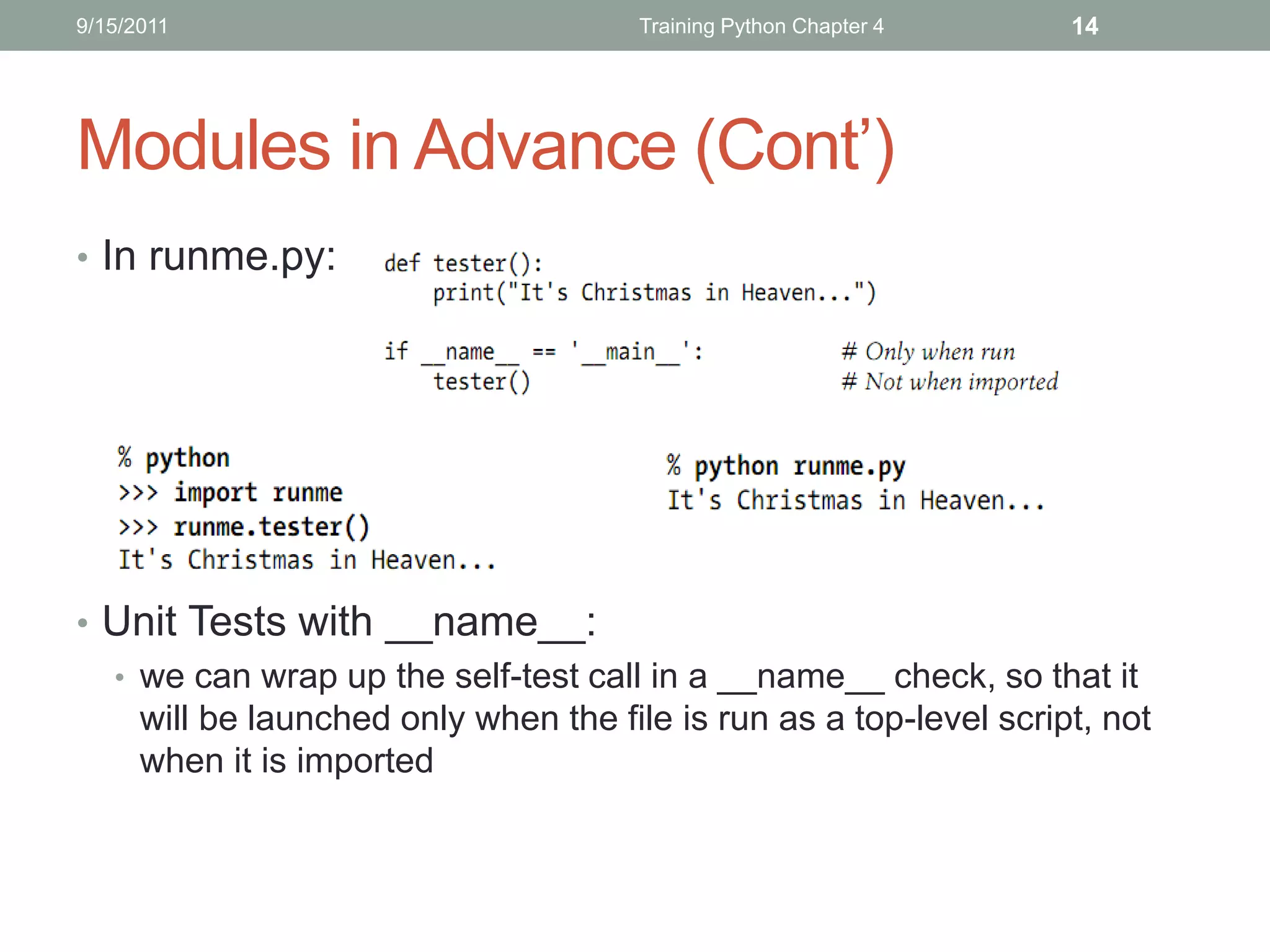
• In runme.py:


• Unit Tests with __name__:
  • we can wrap up the self-test call in a __name__ check, so that it
    will be launched only when the file is run as a top-level script, not
    when it is imported
9/15/2011                    Training Python Chapter 4   15


Modules in Advance (Cont’)
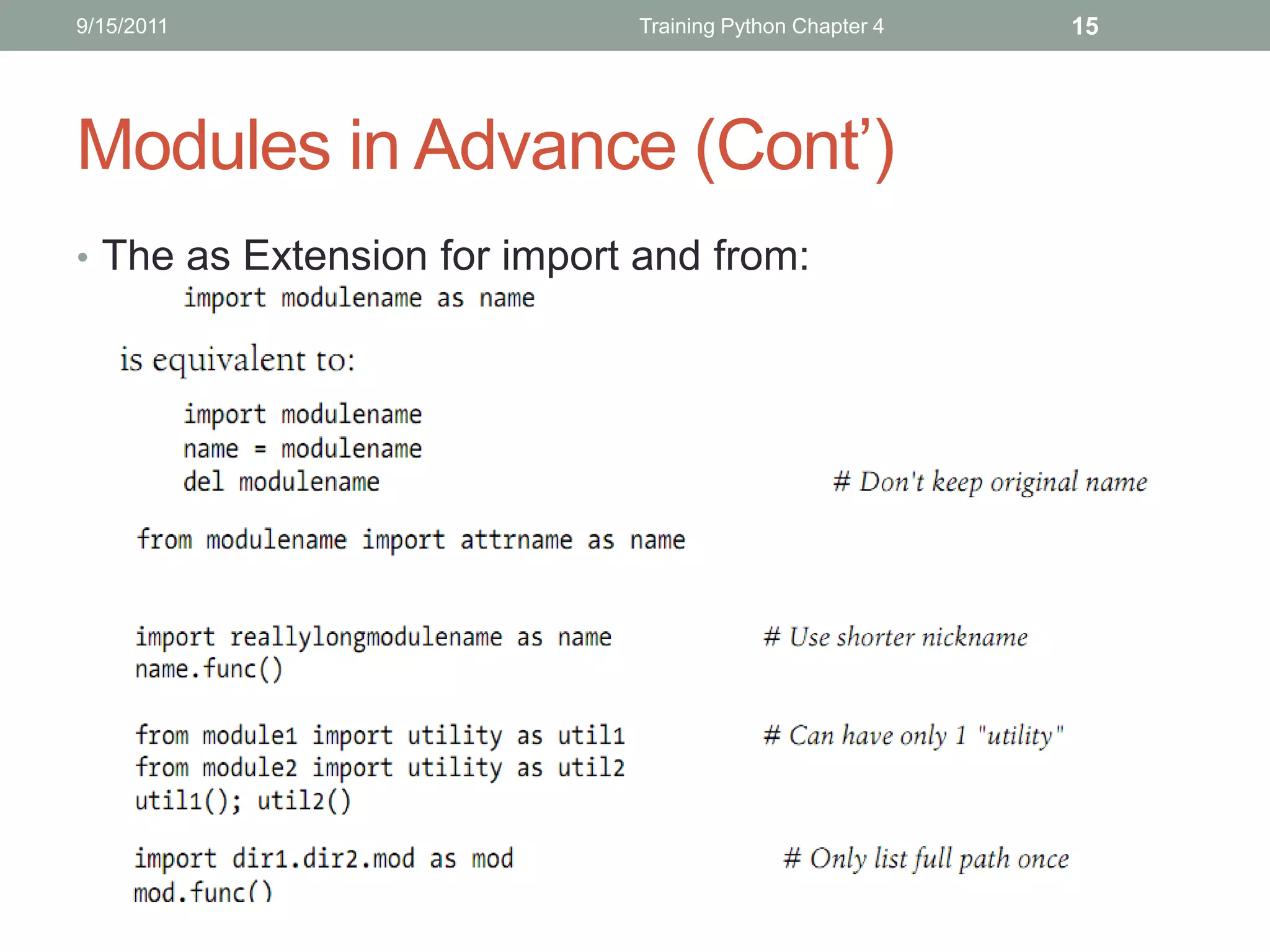
• The as Extension for import and from:
9/15/2011                           Training Python Chapter 4   16


Module Gotchas
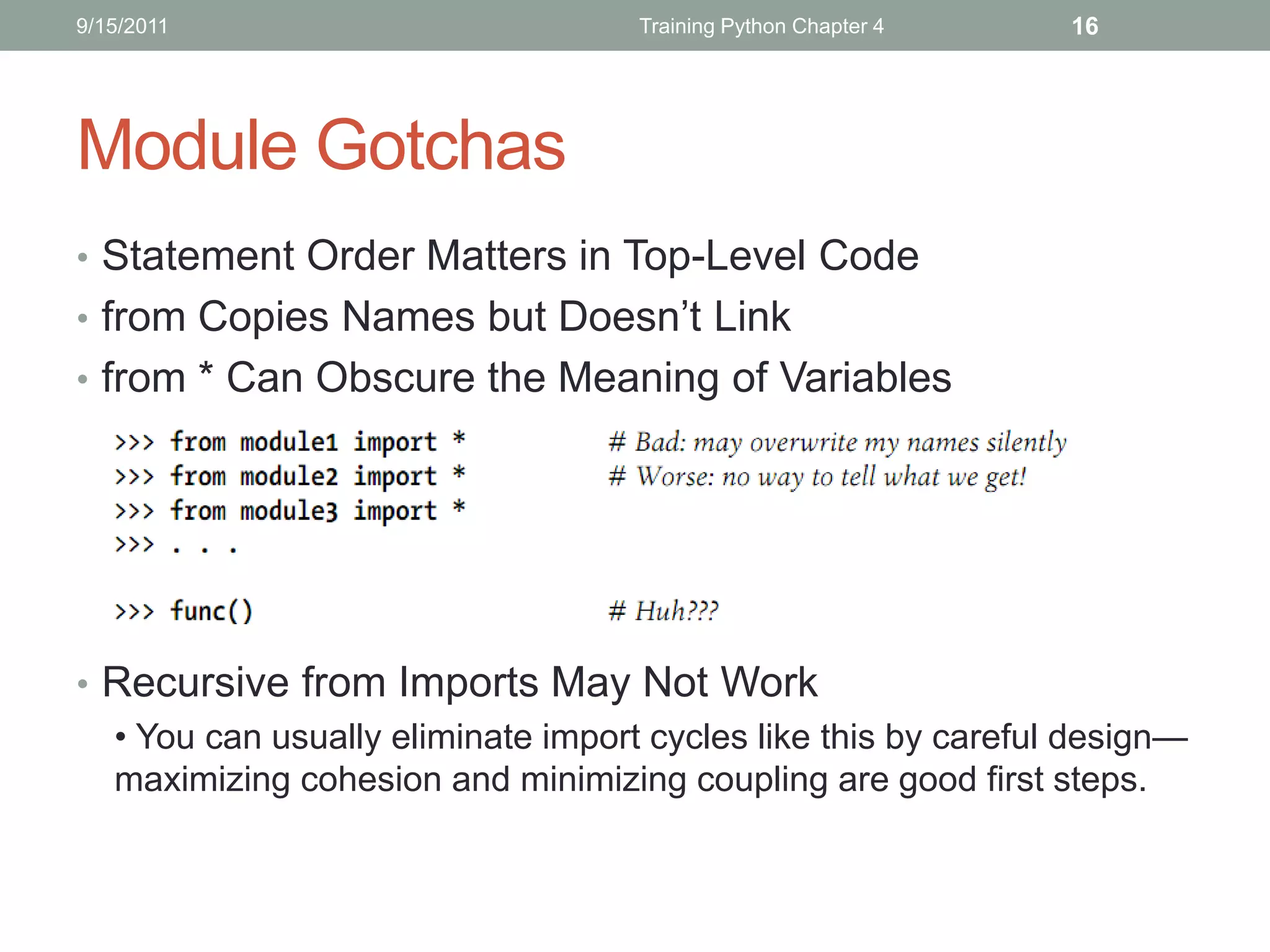
• Statement Order Matters in Top-Level Code
• from Copies Names but Doesn’t Link
• from * Can Obscure the Meaning of Variables


• Recursive from Imports May Not Work
  • You can usually eliminate import cycles like this by careful design—
  maximizing cohesion and minimizing coupling are good first steps.
THANKS FOR LISTENING
Editor: Nguyễn Đức Minh Khôi
Contact: nguyenducminhkhoi@gmail.com
Main reference: Part V – Modules
Learning Python 4th Edition – O’reilly 2010
TRAINING PYTHON
Chapter 5: CLASSES AND   OOP
9/18/2011         Training Python Chapter 5: Classes and OOP   2


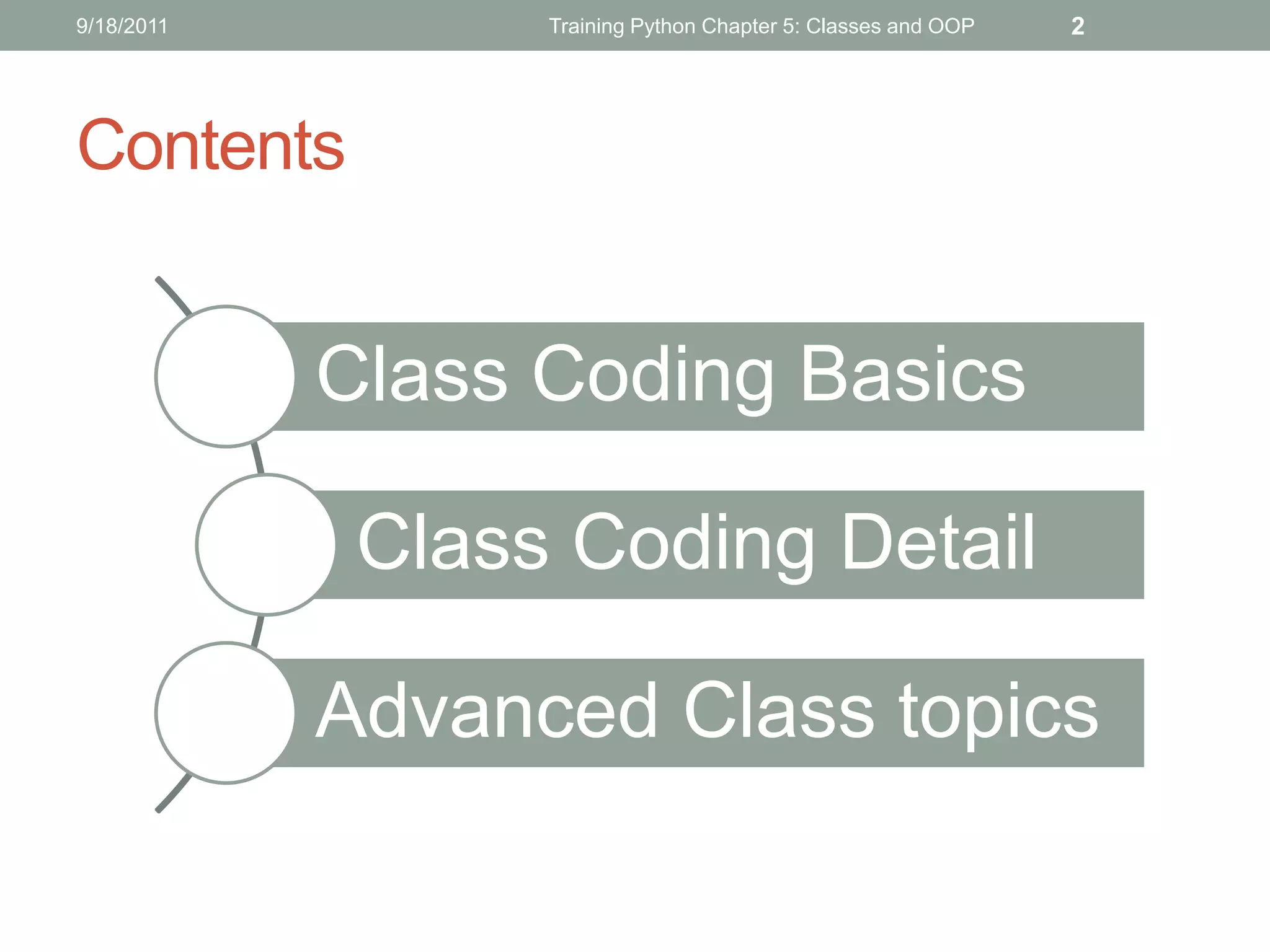
Contents


            Class Coding Basics

             Class Coding Detail

            Advanced Class topics
9/18/2011                    Training Python Chapter 5: Classes and OOP   3


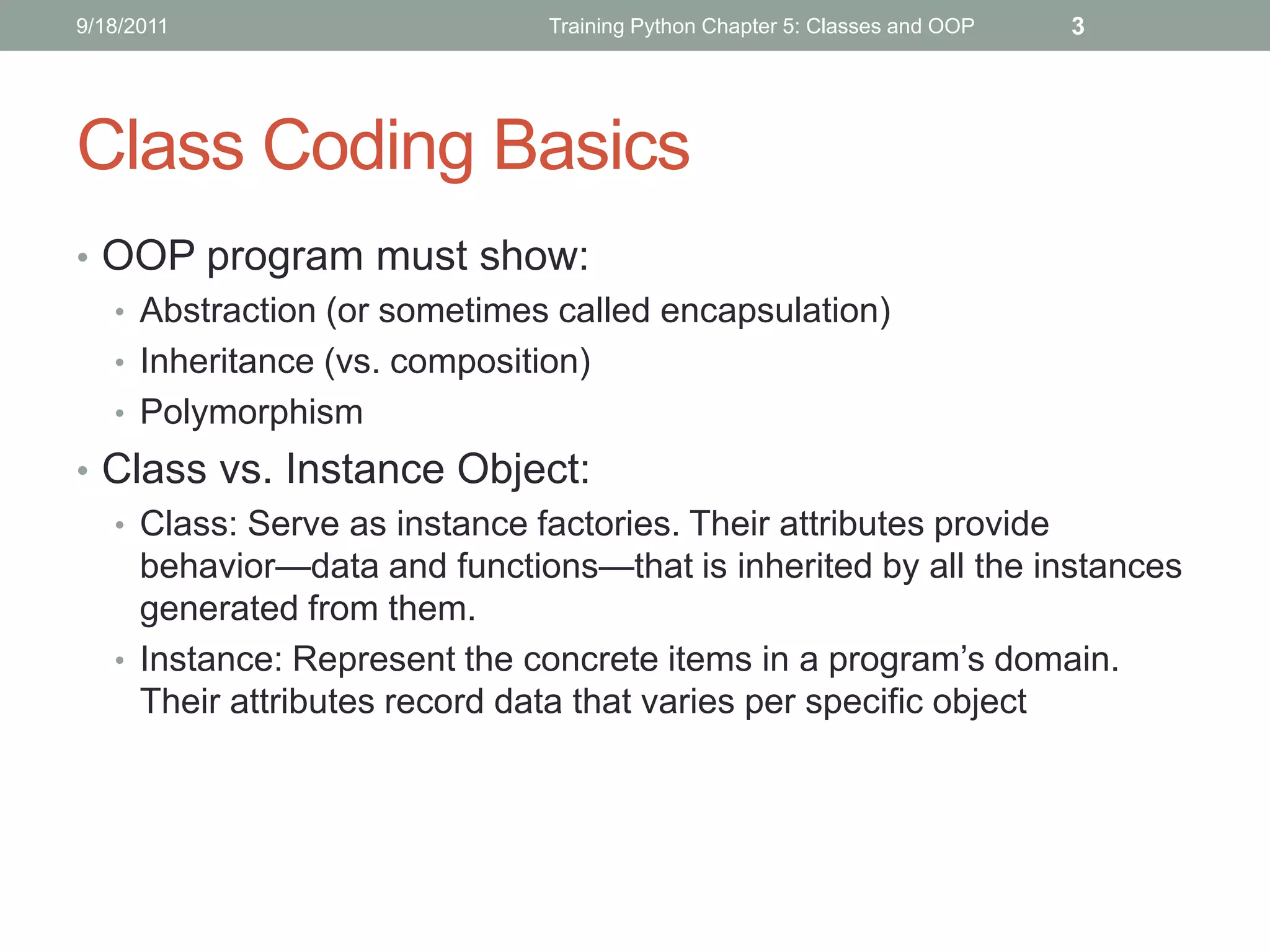
Class Coding Basics
• OOP program must show:
  • Abstraction (or sometimes called encapsulation)
  • Inheritance (vs. composition)
  • Polymorphism
• Class vs. Instance Object:
  • Class: Serve as instance factories. Their attributes provide
    behavior—data and functions—that is inherited by all the instances
    generated from them.
  • Instance: Represent the concrete items in a program’s domain.
    Their attributes record data that varies per specific object
9/18/2011                         Training Python Chapter 5: Classes and OOP   4


 Class Coding Basics (Cont’)


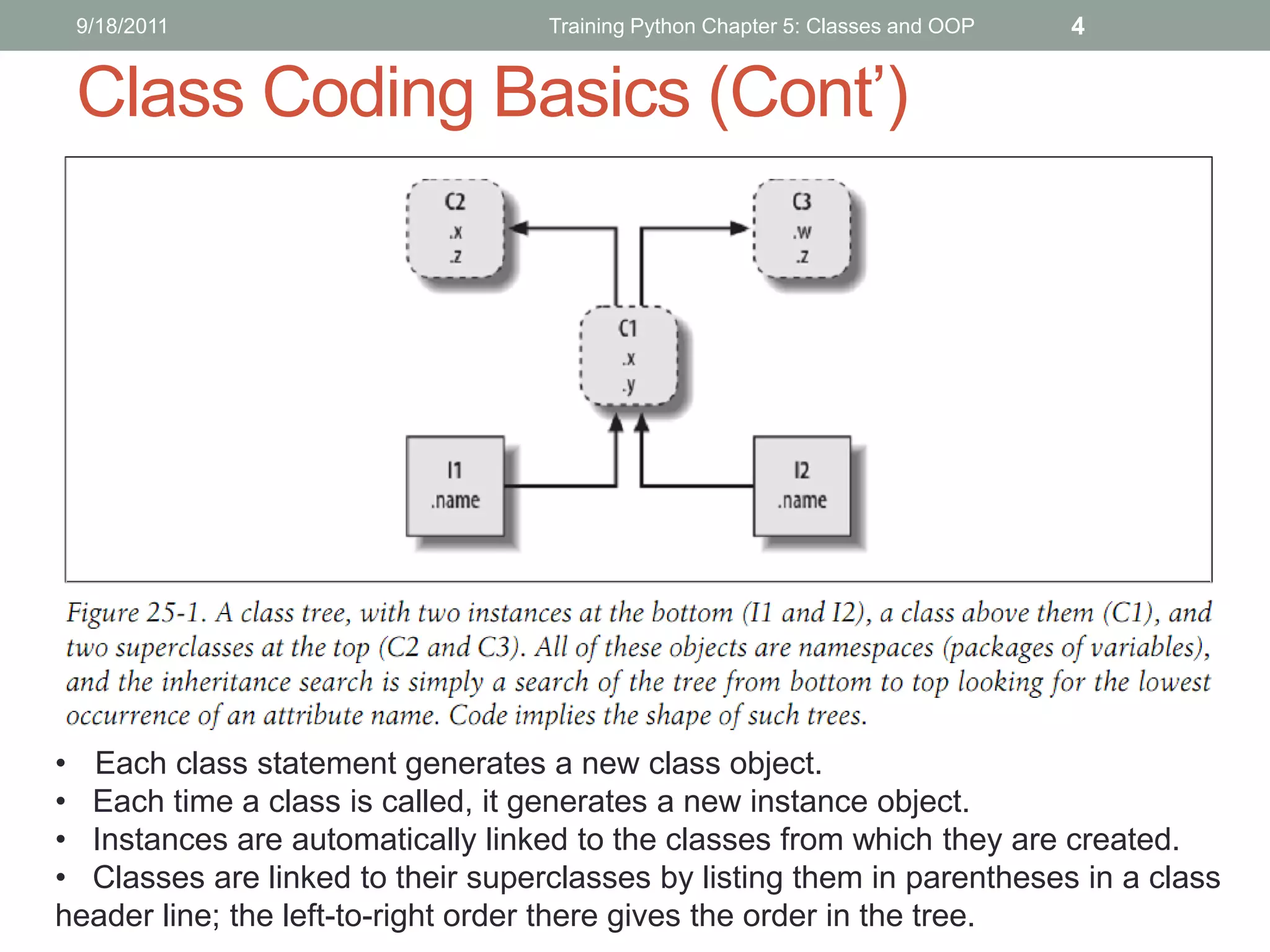
• Each class statement generates a new class object.
• Each time a class is called, it generates a new instance object.
• Instances are automatically linked to the classes from which they are created.
• Classes are linked to their superclasses by listing them in parentheses in a class
header line; the left-to-right order there gives the order in the tree.
9/18/2011                     Training Python Chapter 5: Classes and OOP   5


Class Coding Basics – Class trees


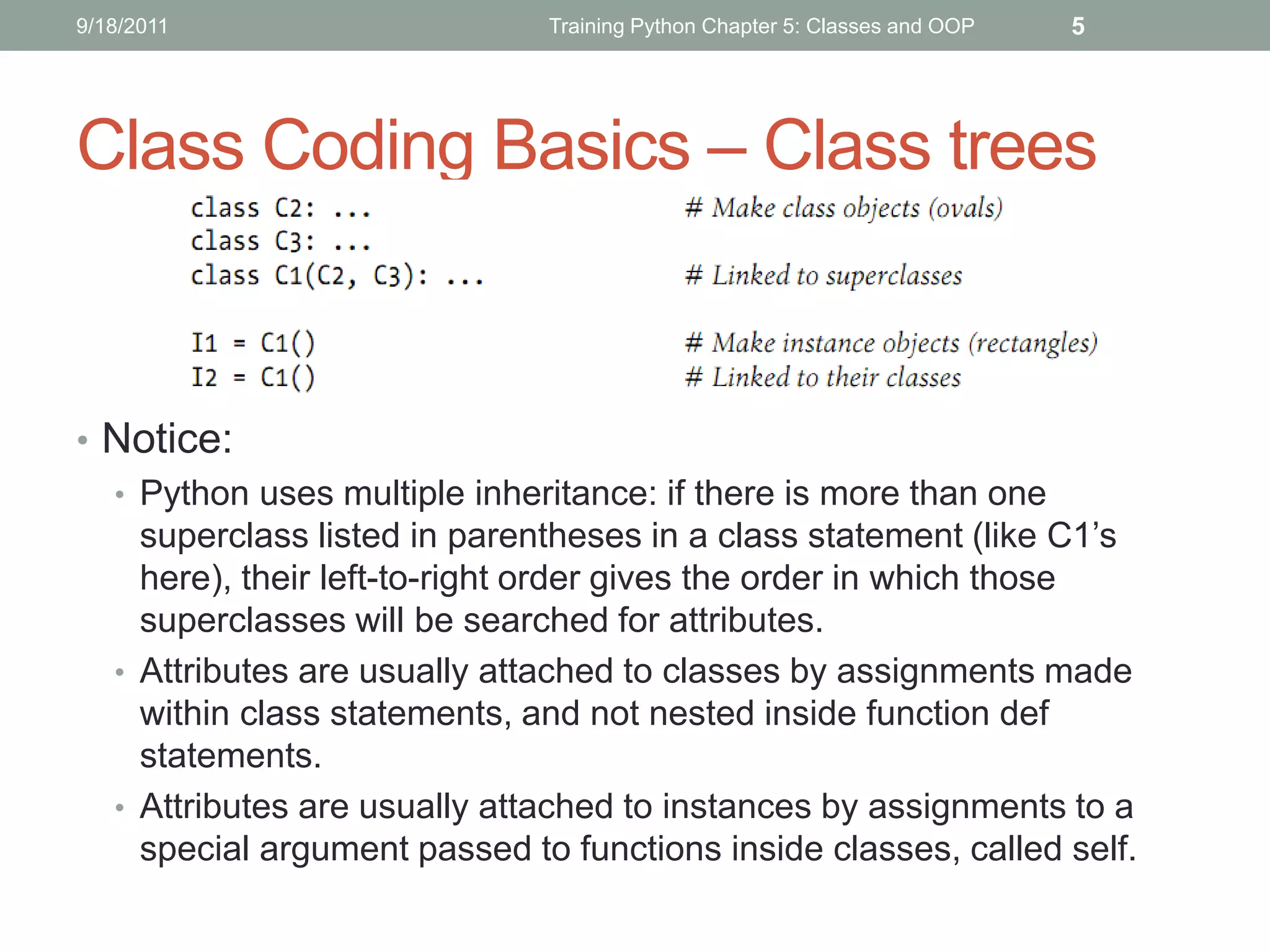
• Notice:
  • Python uses multiple inheritance: if there is more than one
    superclass listed in parentheses in a class statement (like C1’s
    here), their left-to-right order gives the order in which those
    superclasses will be searched for attributes.
  • Attributes are usually attached to classes by assignments made
    within class statements, and not nested inside function def
    statements.
  • Attributes are usually attached to instances by assignments to a
    special argument passed to functions inside classes, called self.
9/18/2011                      Training Python Chapter 5: Classes and OOP   6


Class Coding Basics - Class vs. Instance
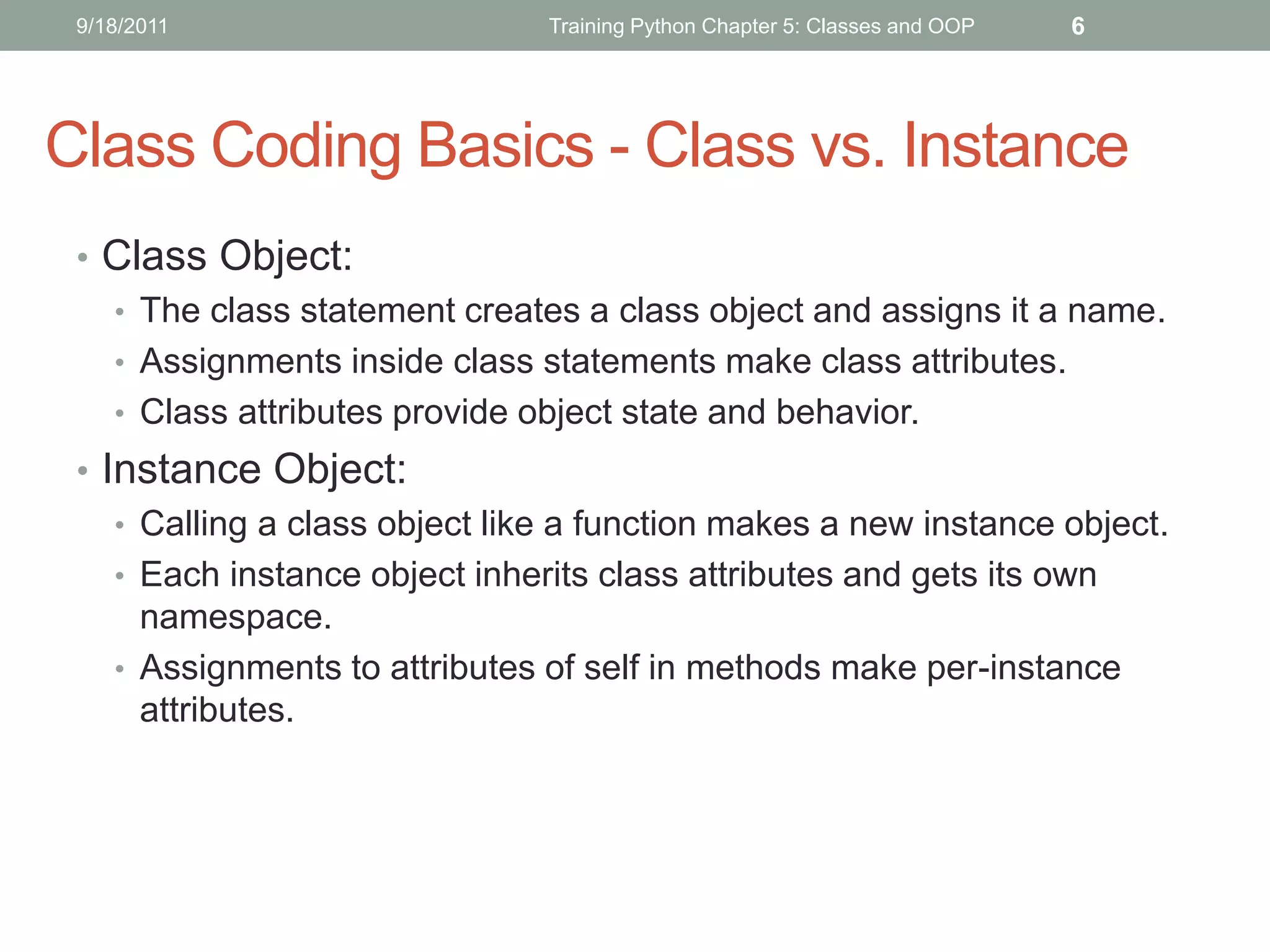
 • Class Object:
   • The class statement creates a class object and assigns it a name.
   • Assignments inside class statements make class attributes.
   • Class attributes provide object state and behavior.
 • Instance Object:
    • Calling a class object like a function makes a new instance object.
    • Each instance object inherits class attributes and gets its own
      namespace.
    • Assignments to attributes of self in methods make per-instance
      attributes.
9/18/2011          Training Python Chapter 5: Classes and OOP   7


Class Coding Basics ©
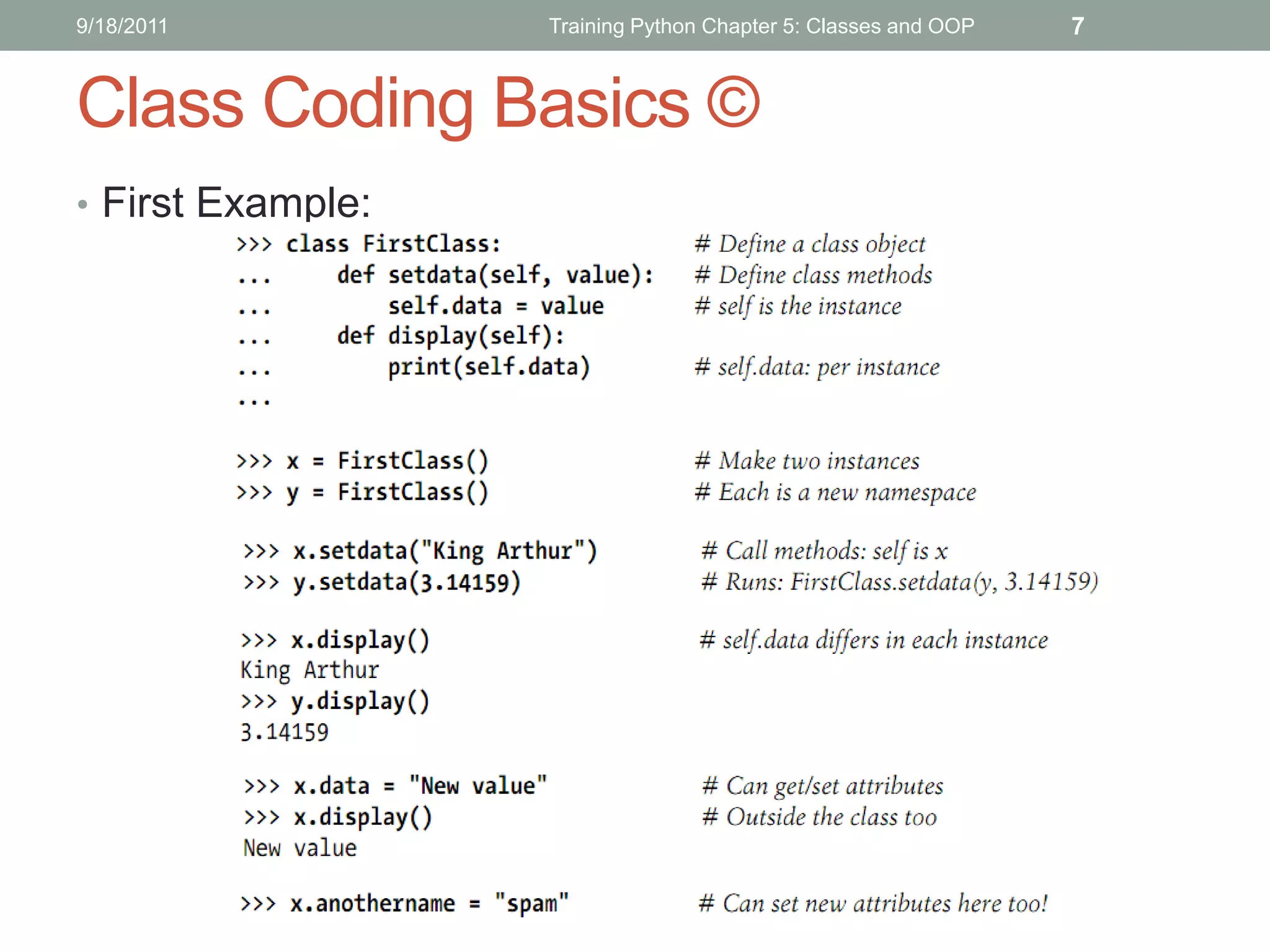
• First Example:
9/18/2011                    Training Python Chapter 5: Classes and OOP   8


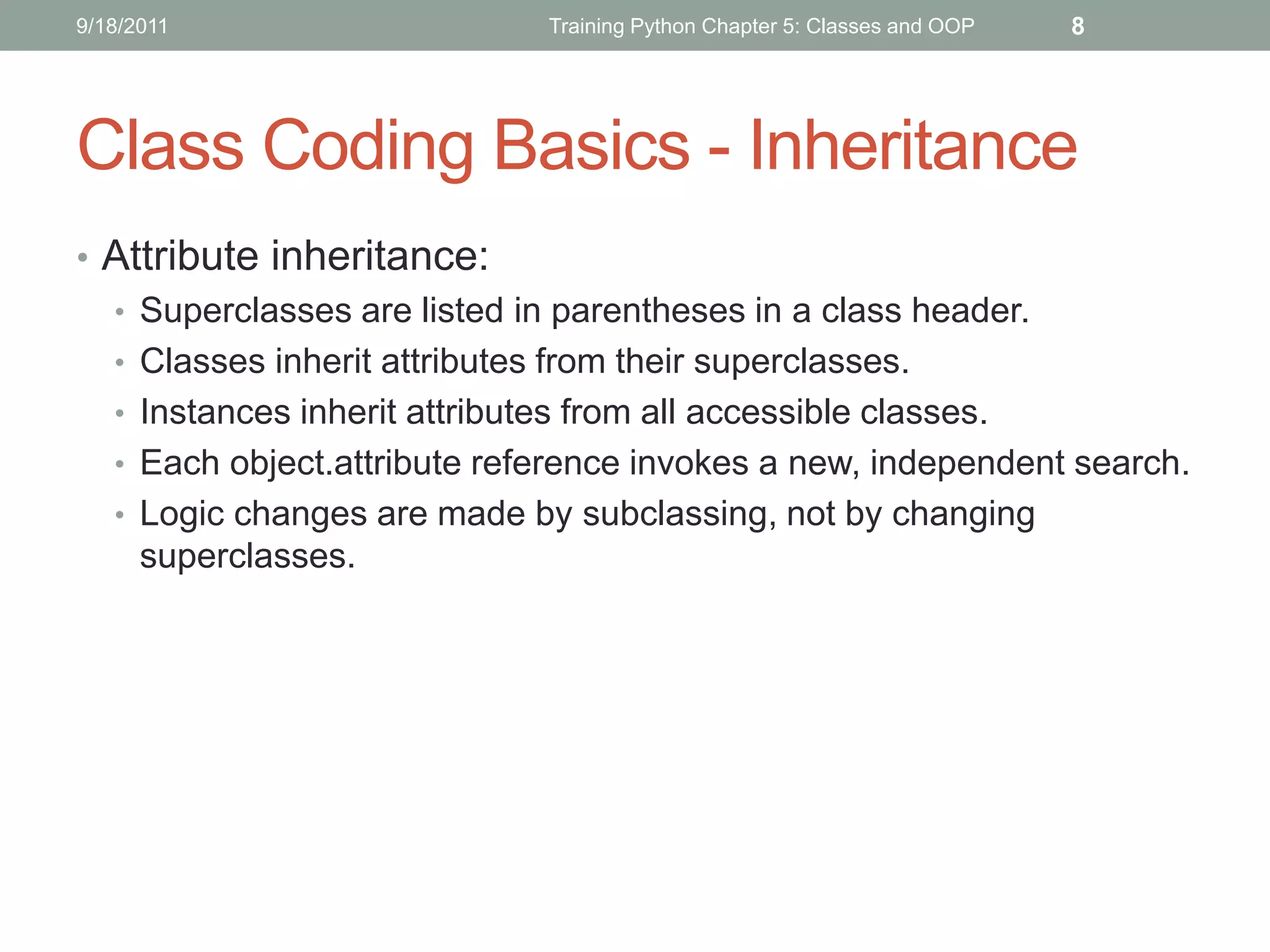
Class Coding Basics - Inheritance
• Attribute inheritance:
  • Superclasses are listed in parentheses in a class header.
  • Classes inherit attributes from their superclasses.
  • Instances inherit attributes from all accessible classes.
  • Each object.attribute reference invokes a new, independent search.
  • Logic changes are made by subclassing, not by changing
    superclasses.
9/18/2011           Training Python Chapter 5: Classes and OOP   9


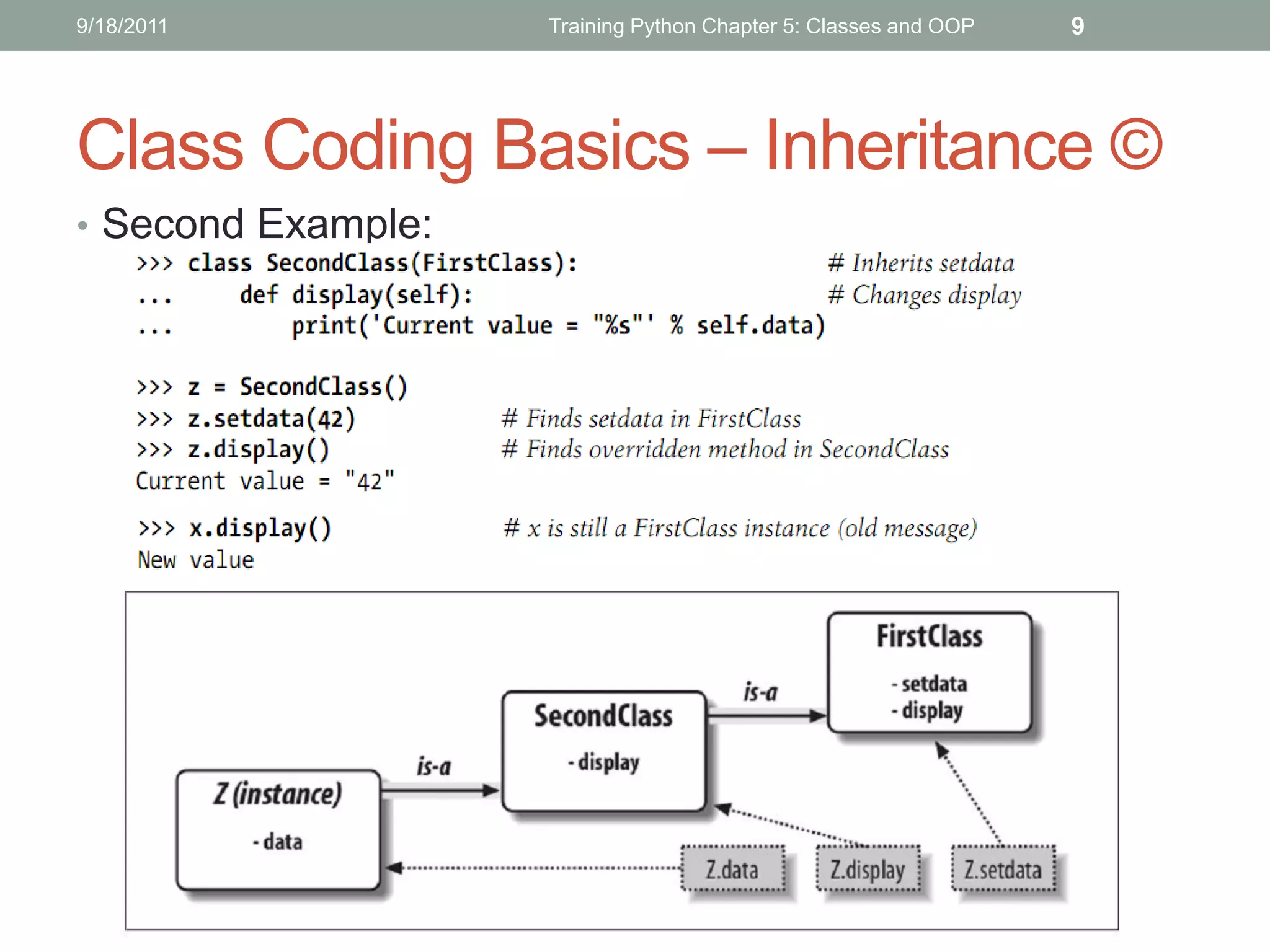
Class Coding Basics – Inheritance ©
• Second Example:
9/18/2011                           Training Python Chapter 5: Classes and OOP   10


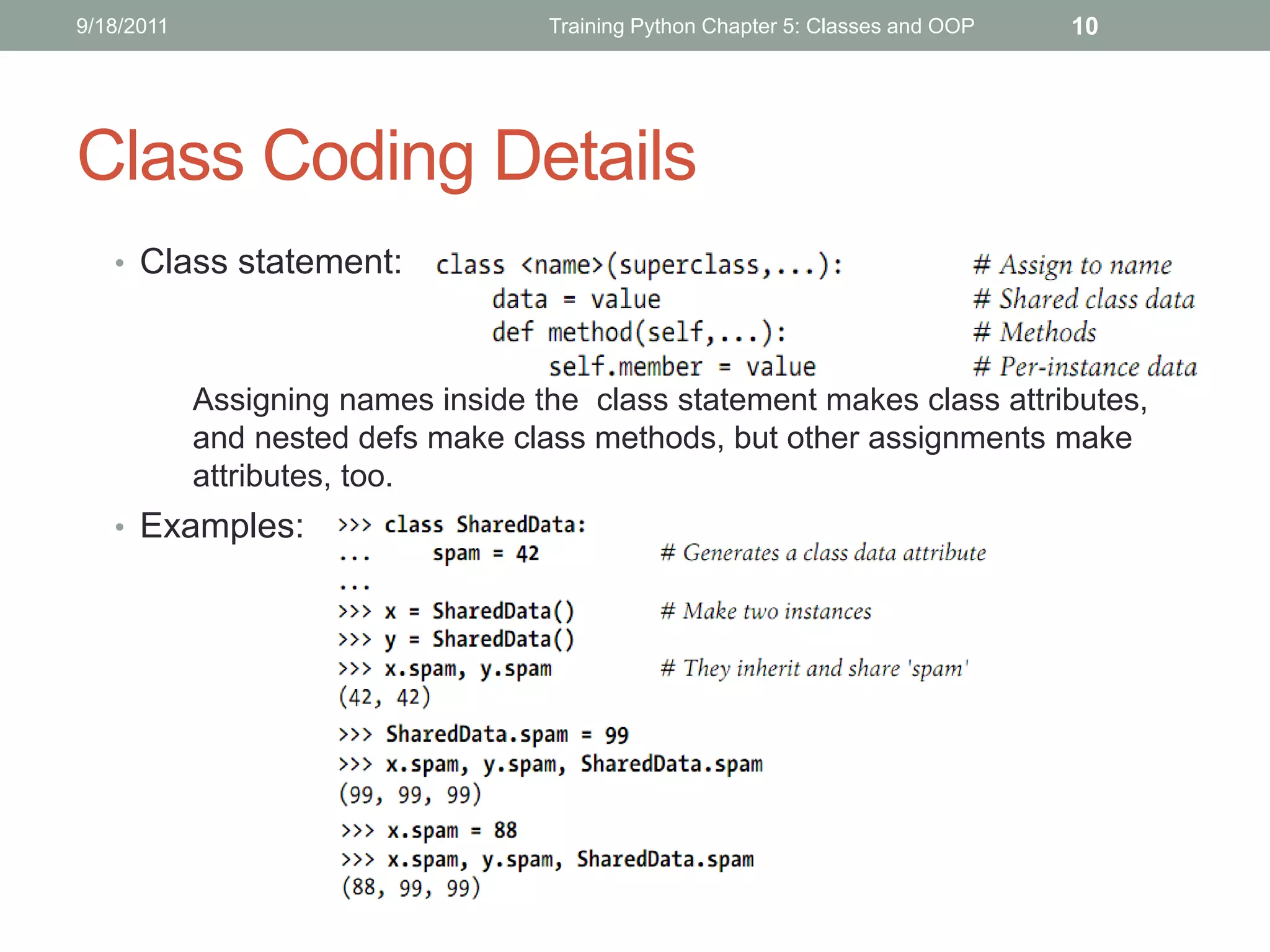
Class Coding Details
   • Class statement:


            Assigning names inside the class statement makes class attributes,
            and nested defs make class methods, but other assignments make
            attributes, too.
   • Examples:
9/18/2011           Training Python Chapter 5: Classes and OOP   11


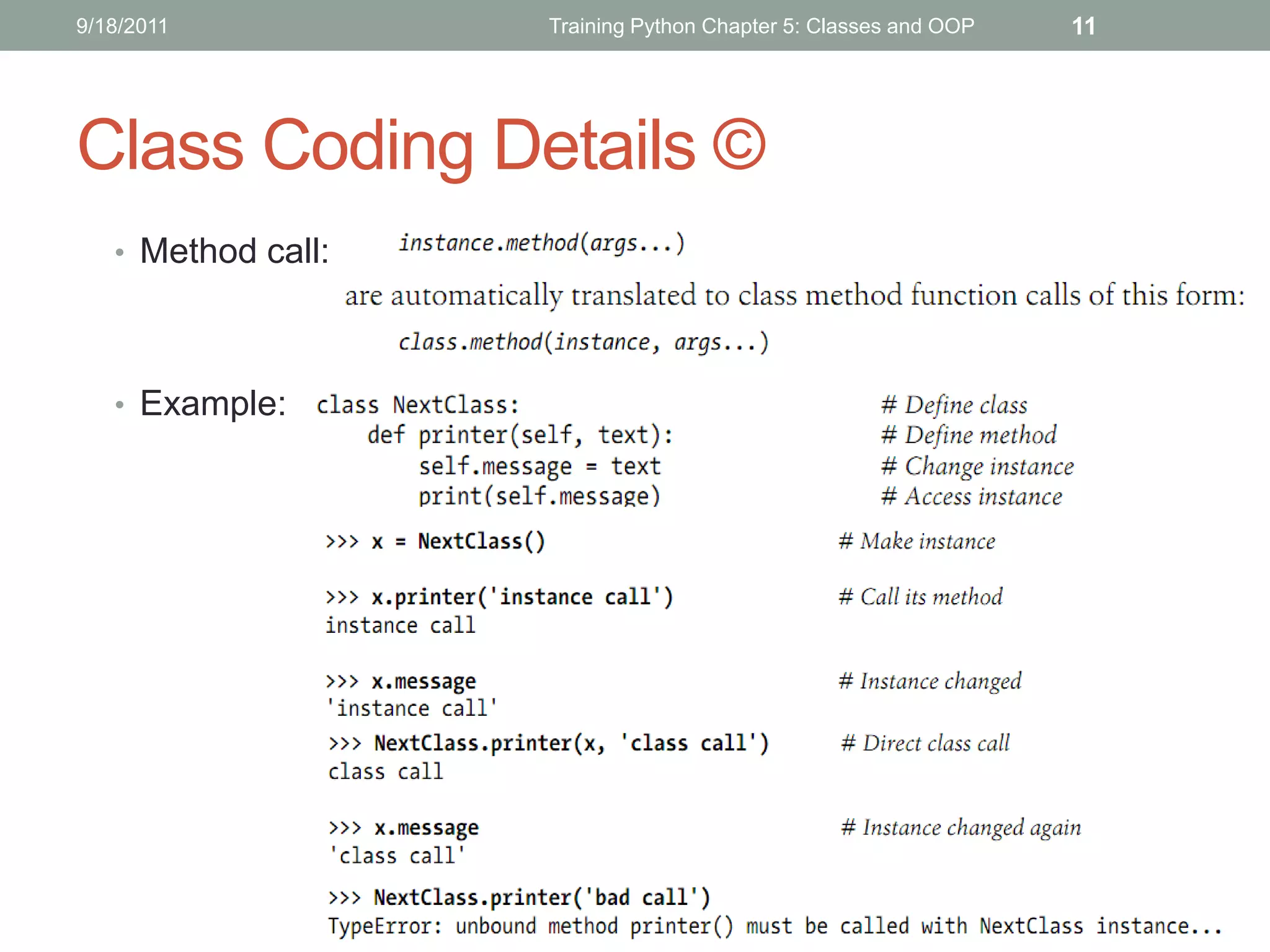
Class Coding Details ©
   • Method call:


   • Example:
9/18/2011      Training Python Chapter 5: Classes and OOP   12


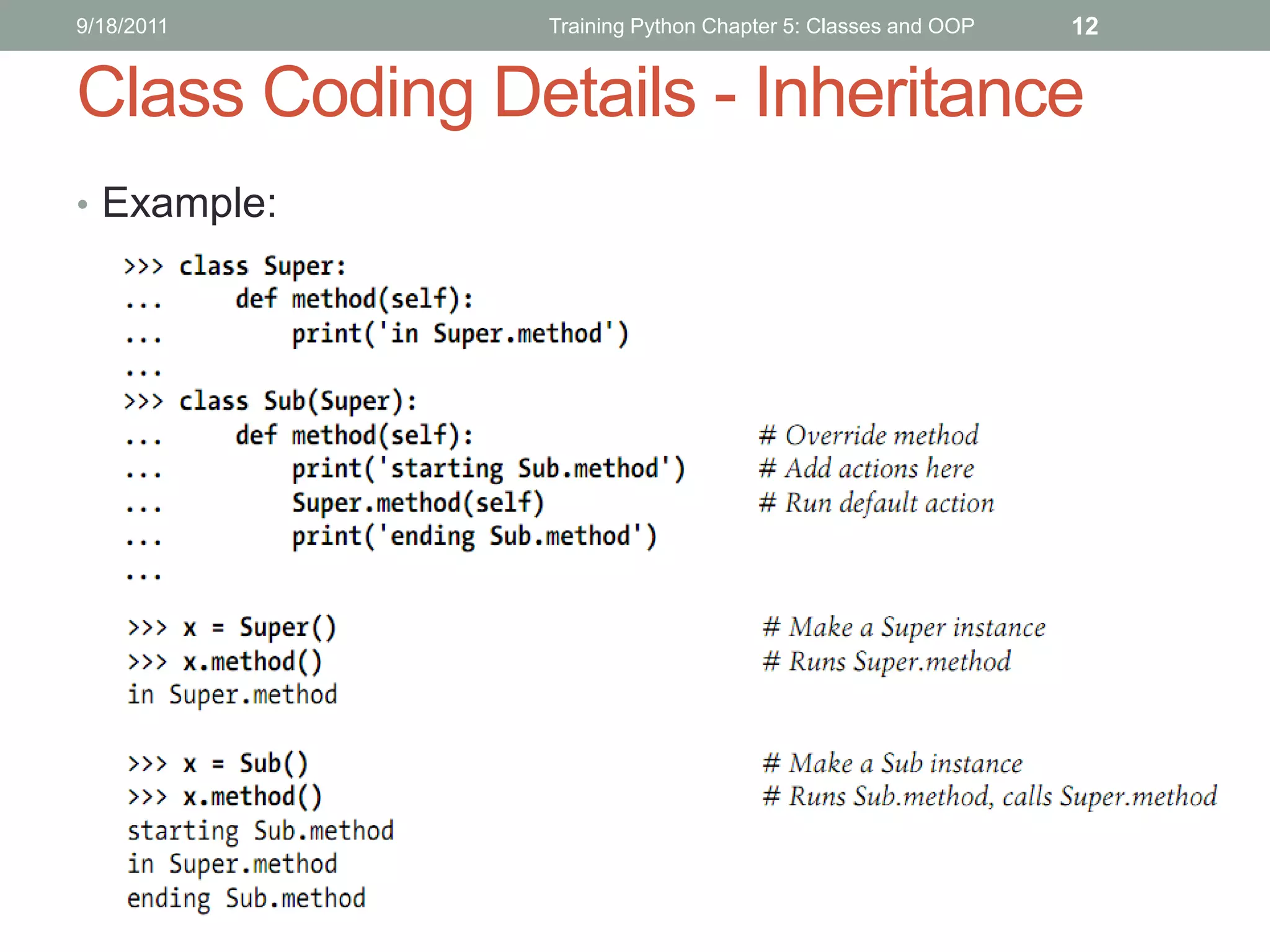
Class Coding Details - Inheritance
• Example:
9/18/2011                Training Python Chapter 5: Classes and OOP   13


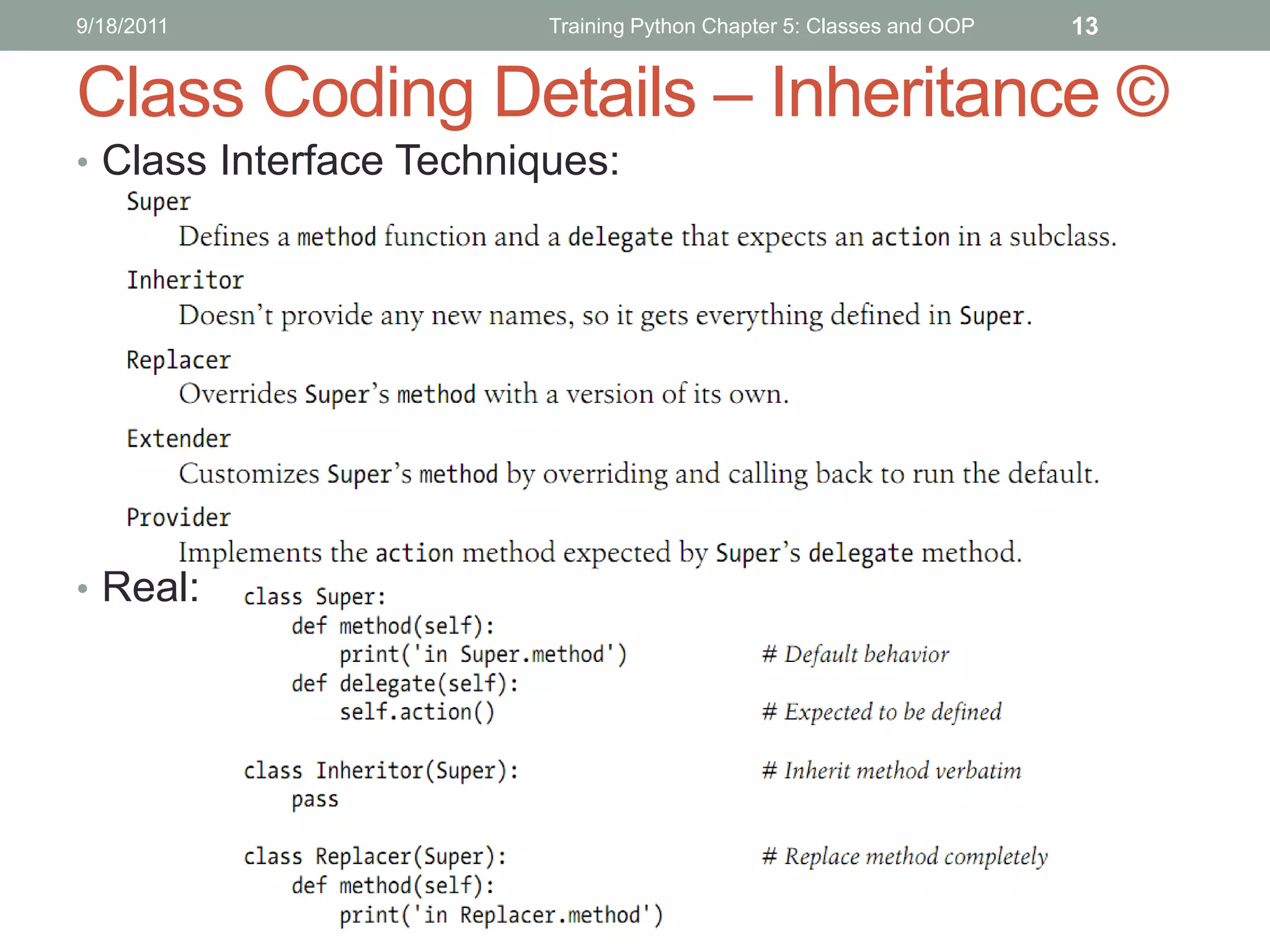
Class Coding Details – Inheritance ©
• Class Interface Techniques:


• Real:
9/18/2011      Training Python Chapter 5: Classes and OOP   14


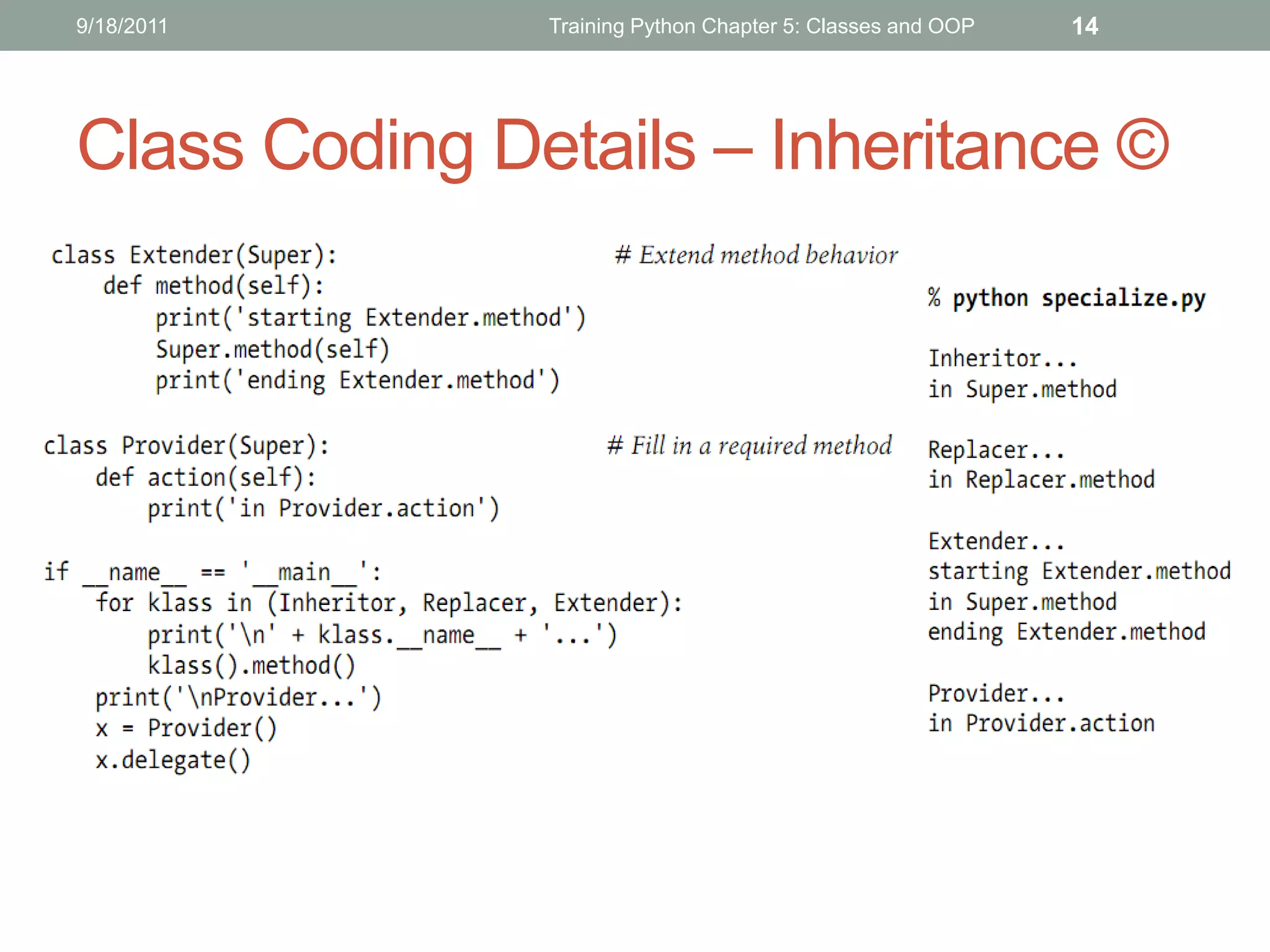
Class Coding Details – Inheritance ©
9/18/2011                Training Python Chapter 5: Classes and OOP   15


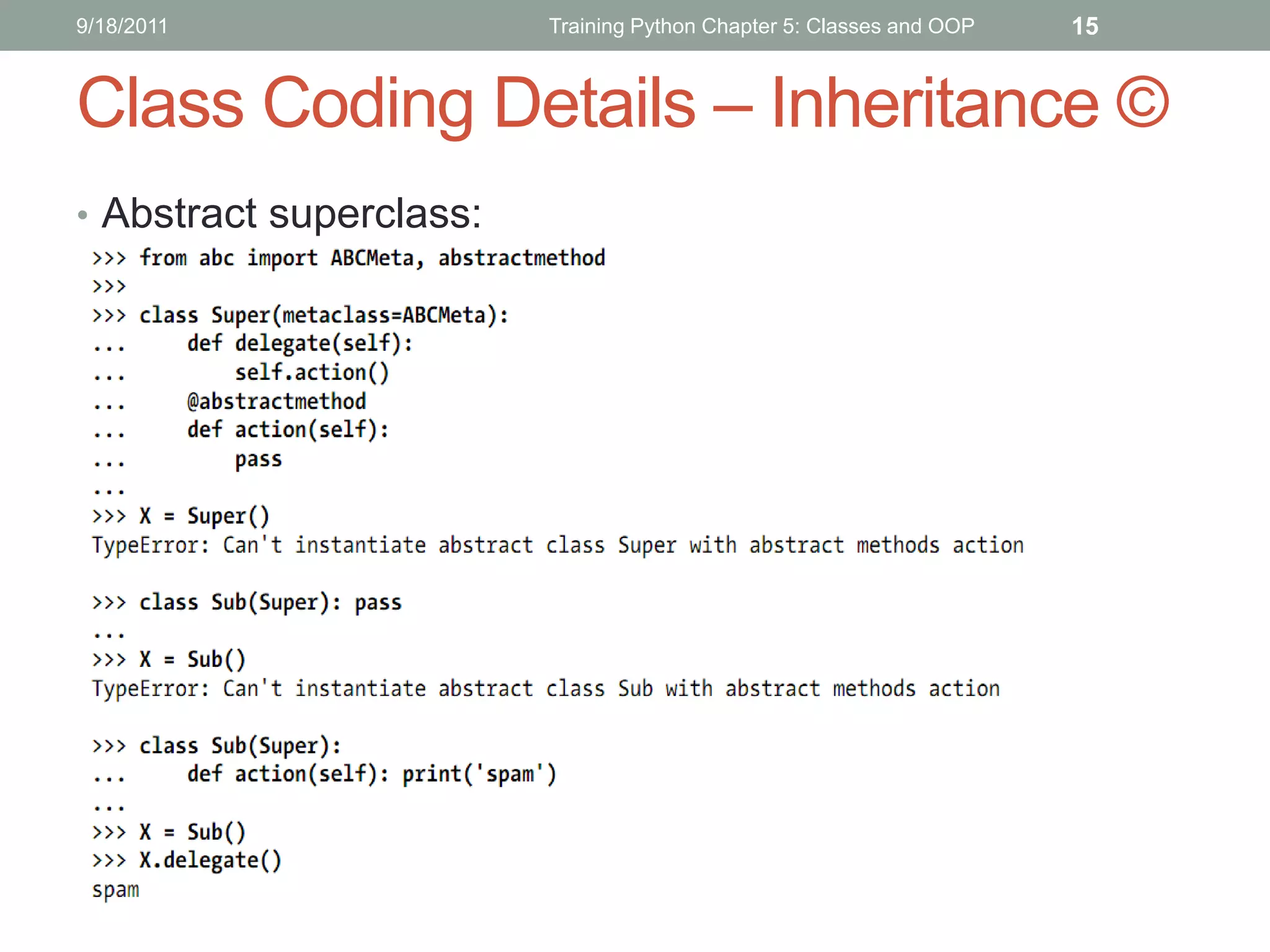
Class Coding Details – Inheritance ©
• Abstract superclass:
9/18/2011             Training Python Chapter 5: Classes and OOP   16

Class Coding Details ©
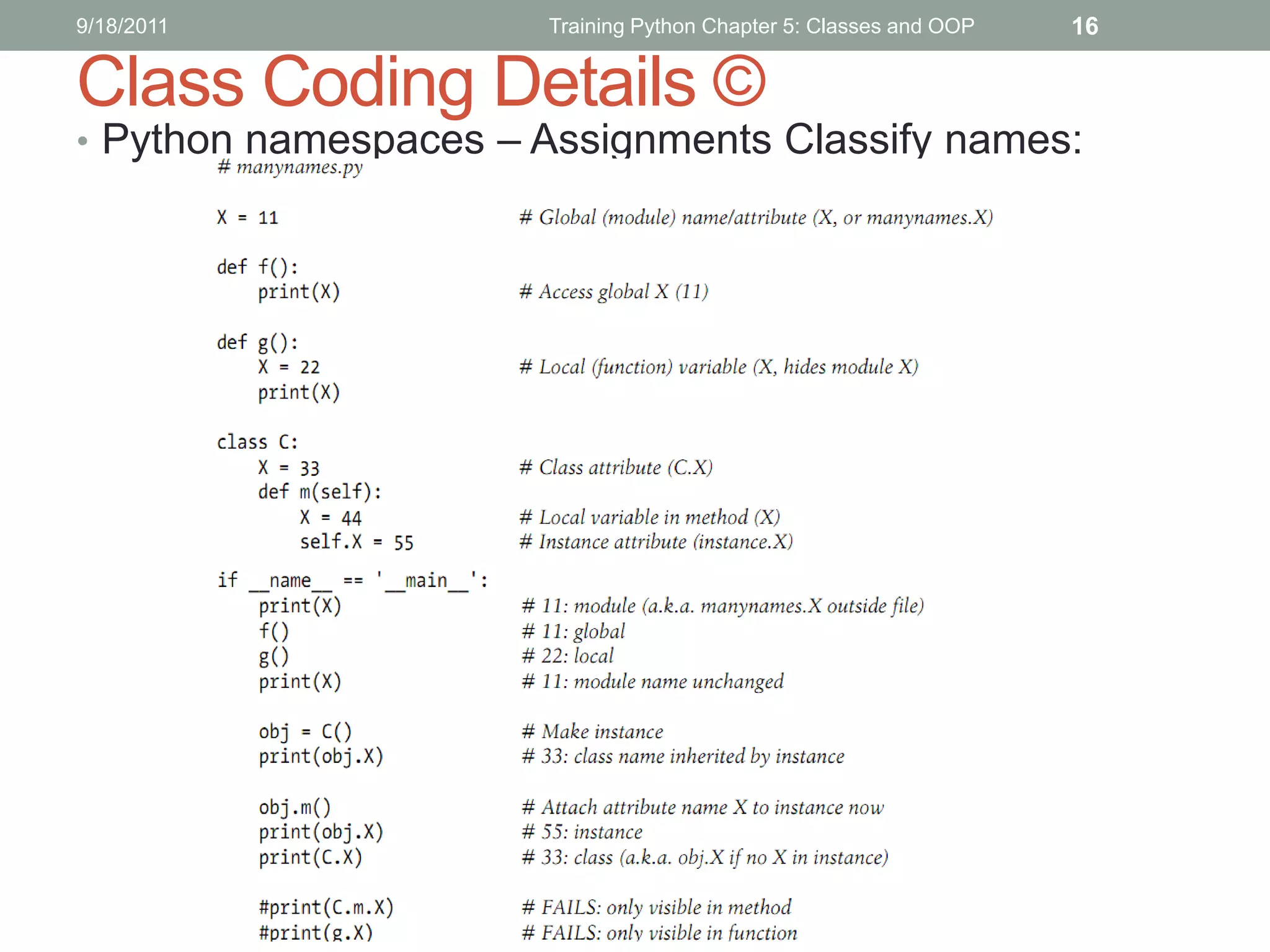
• Python namespaces – Assignments Classify names:
9/18/2011              Training Python Chapter 5: Classes and OOP   17

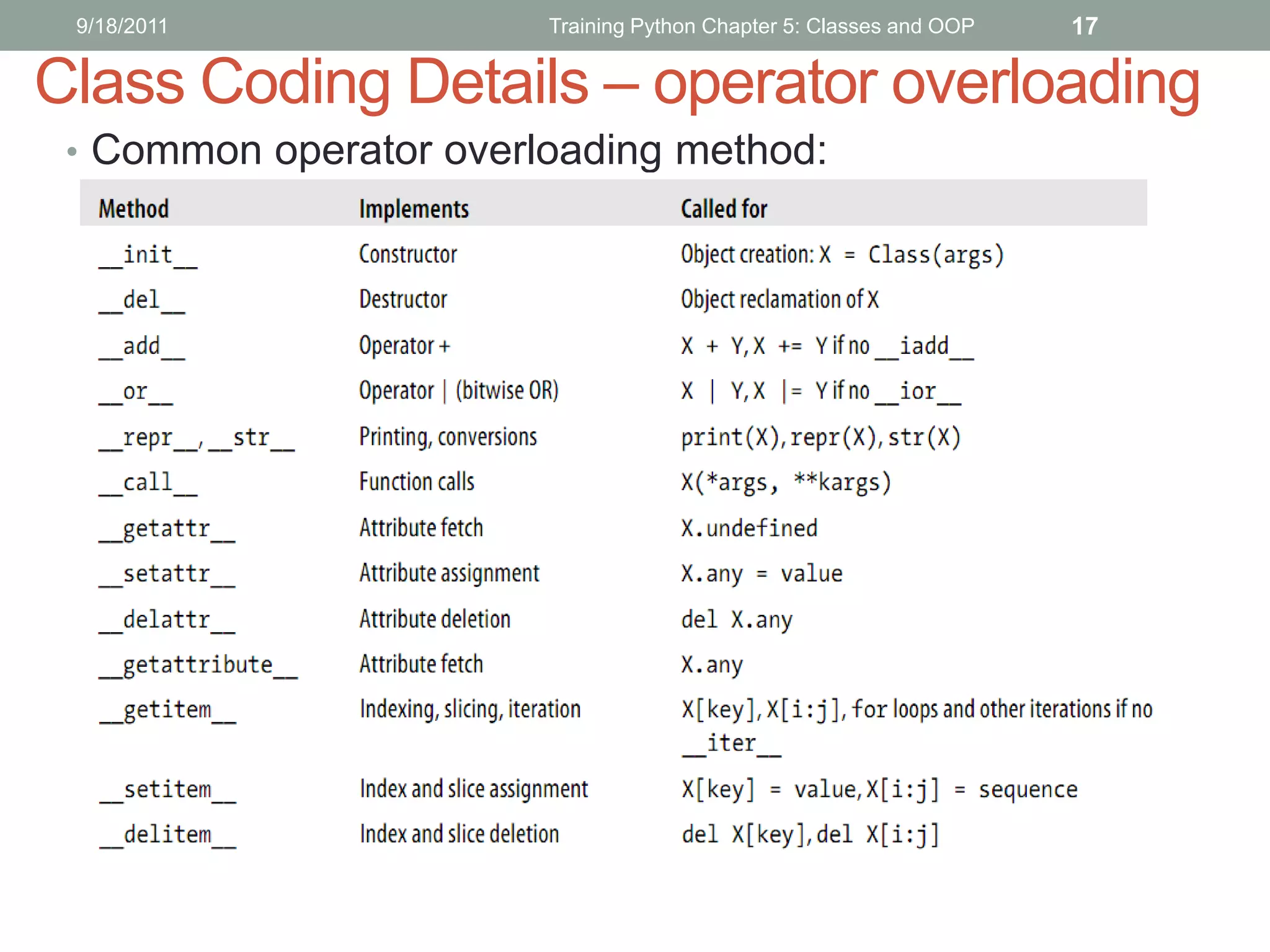
Class Coding Details – operator overloading
 • Common operator overloading method:
9/18/2011         Training Python Chapter 5: Classes and OOP   18


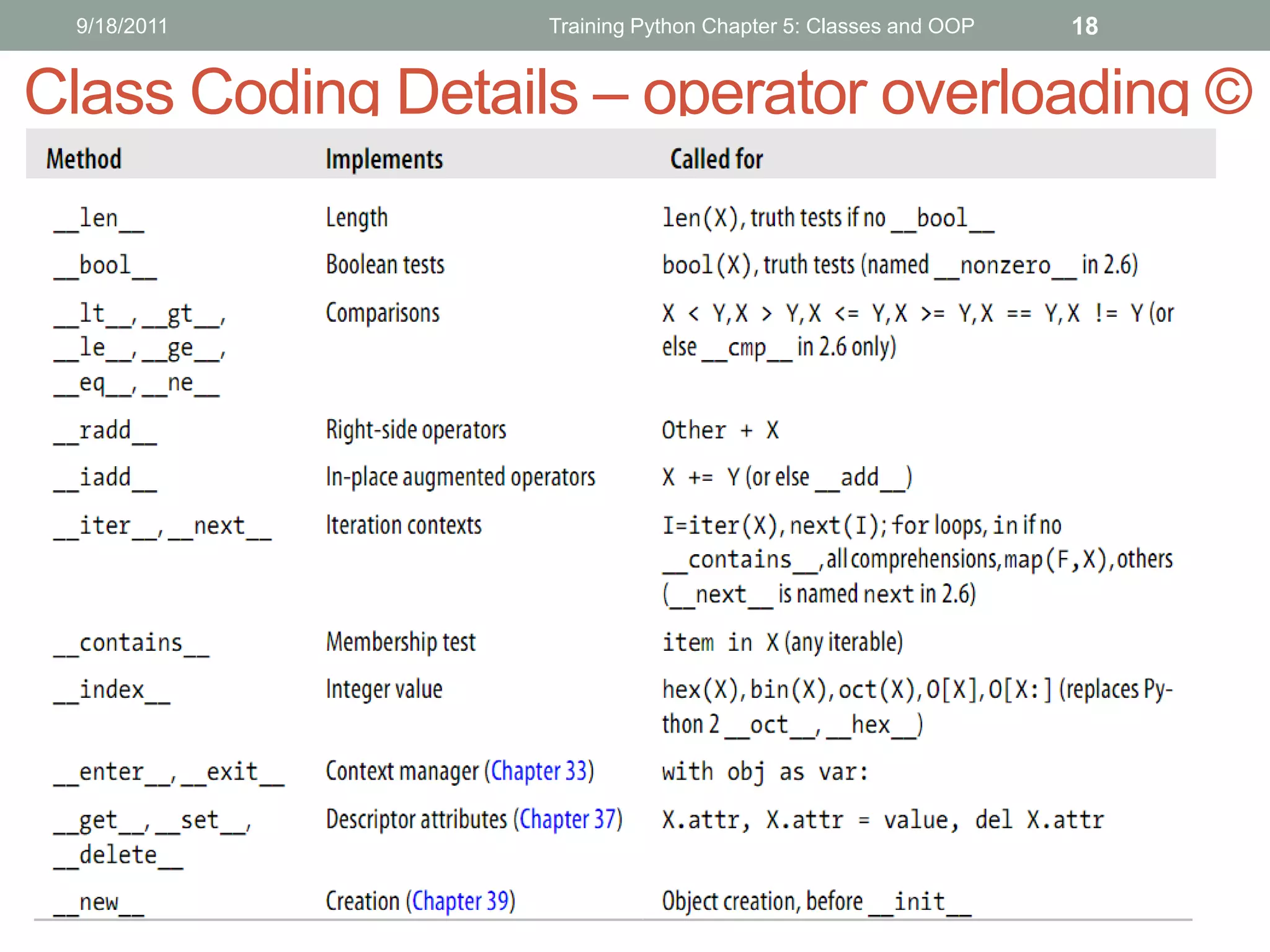
Class Coding Details – operator overloading ©
9/18/2011                  Training Python Chapter 5: Classes and OOP   19

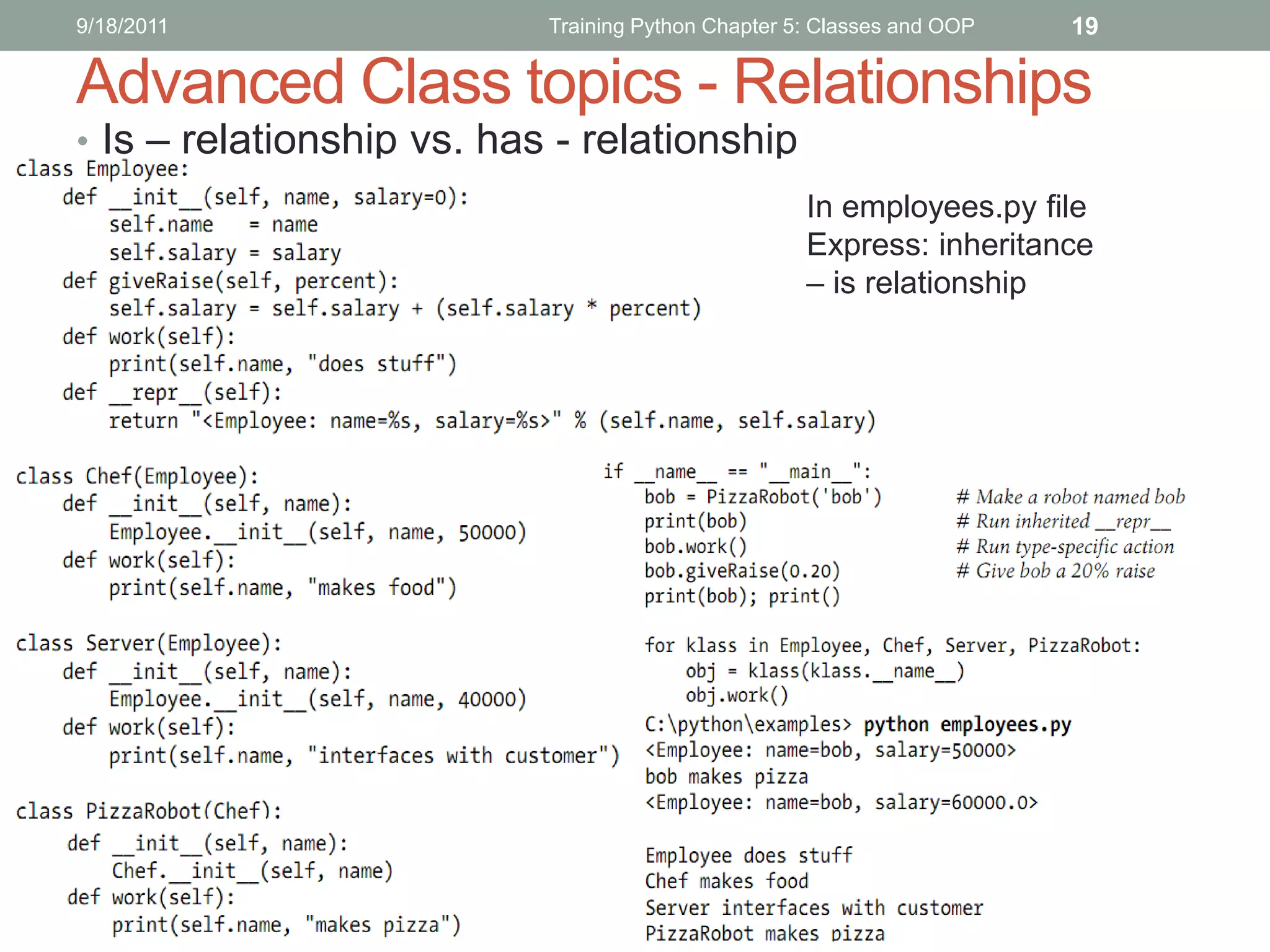
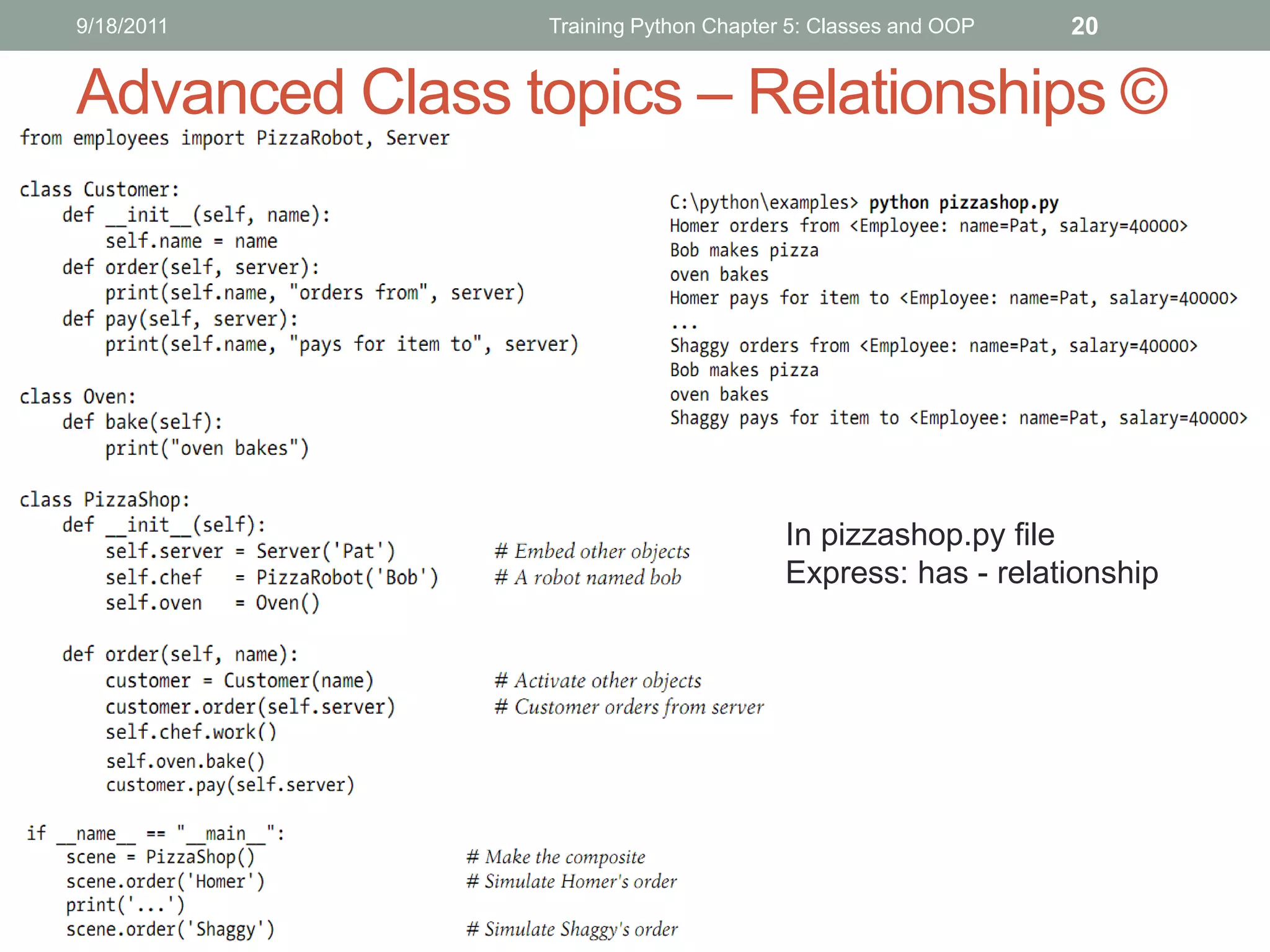
Advanced Class topics - Relationships
• Is – relationship vs. has - relationship
                                                    In employees.py file
                                                    Express: inheritance
                                                    – is relationship
9/18/2011       Training Python Chapter 5: Classes and OOP   20


Advanced Class topics – Relationships ©


                                       In pizzashop.py file
                                       Express: has - relationship
9/18/2011           Training Python Chapter 5: Classes and OOP   21

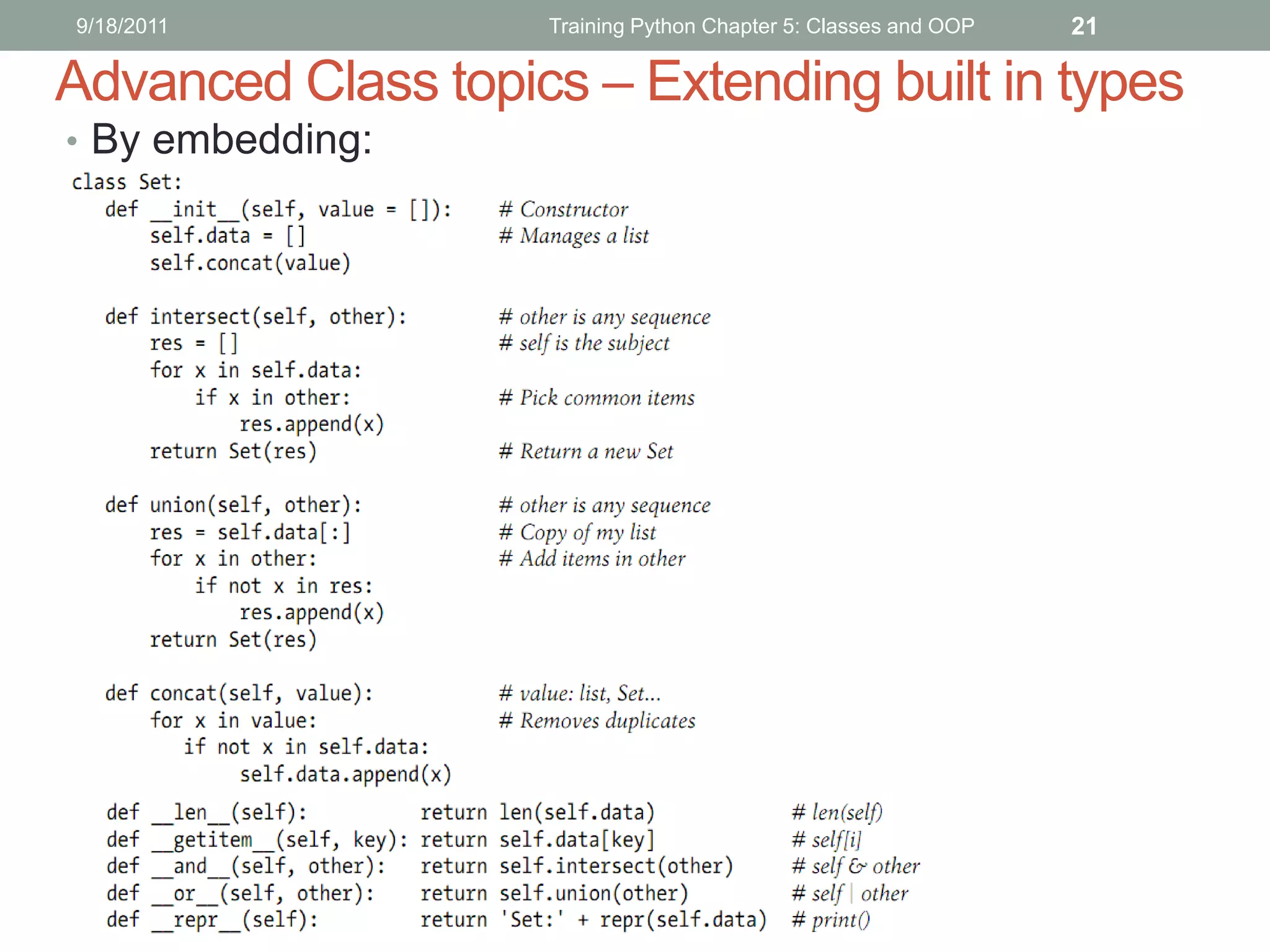
Advanced Class topics – Extending built in types
• By embedding:
9/18/2011           Training Python Chapter 5: Classes and OOP   22


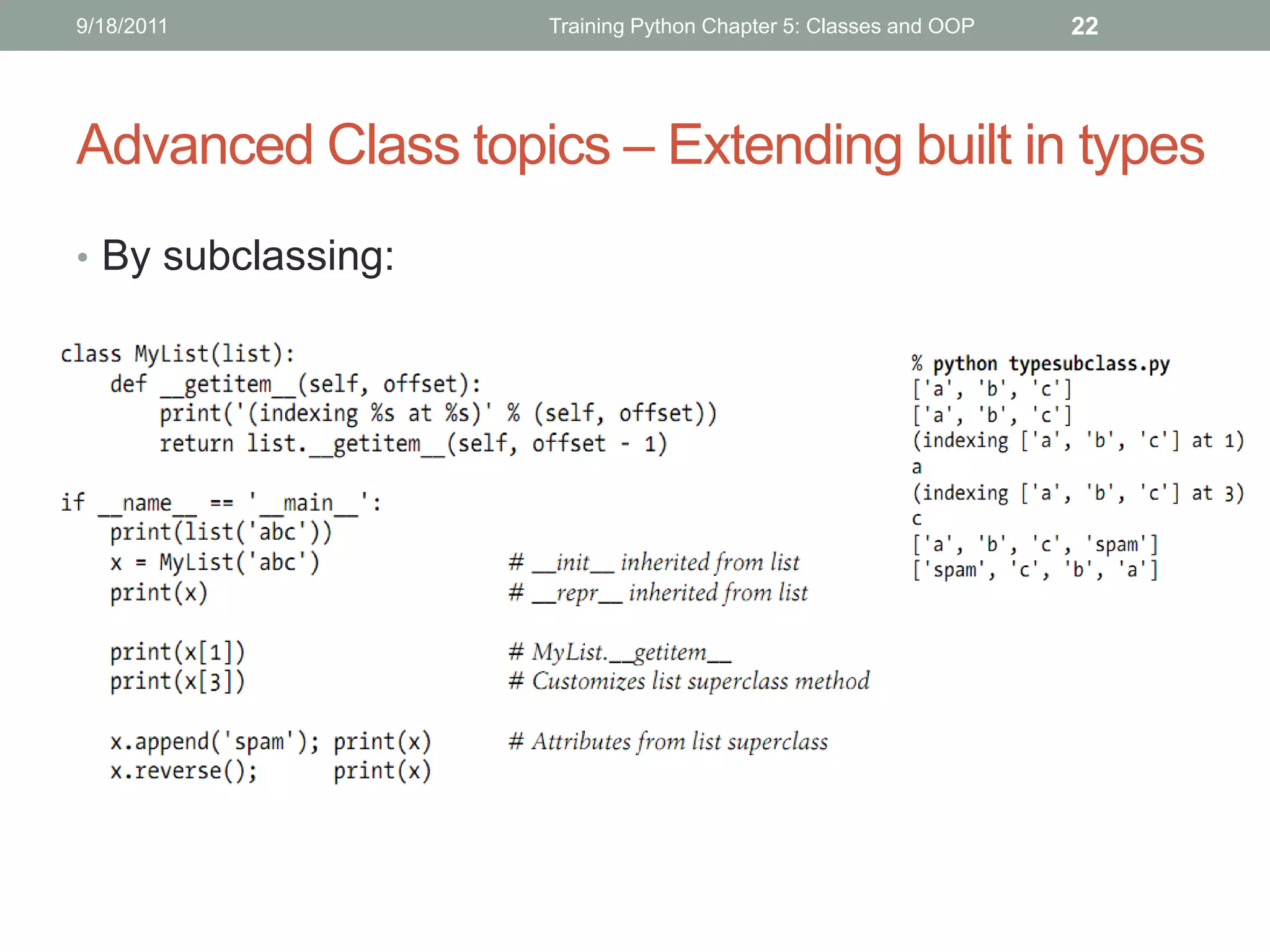
Advanced Class topics – Extending built in types
• By subclassing:
9/18/2011                     Training Python Chapter 5: Classes and OOP   23


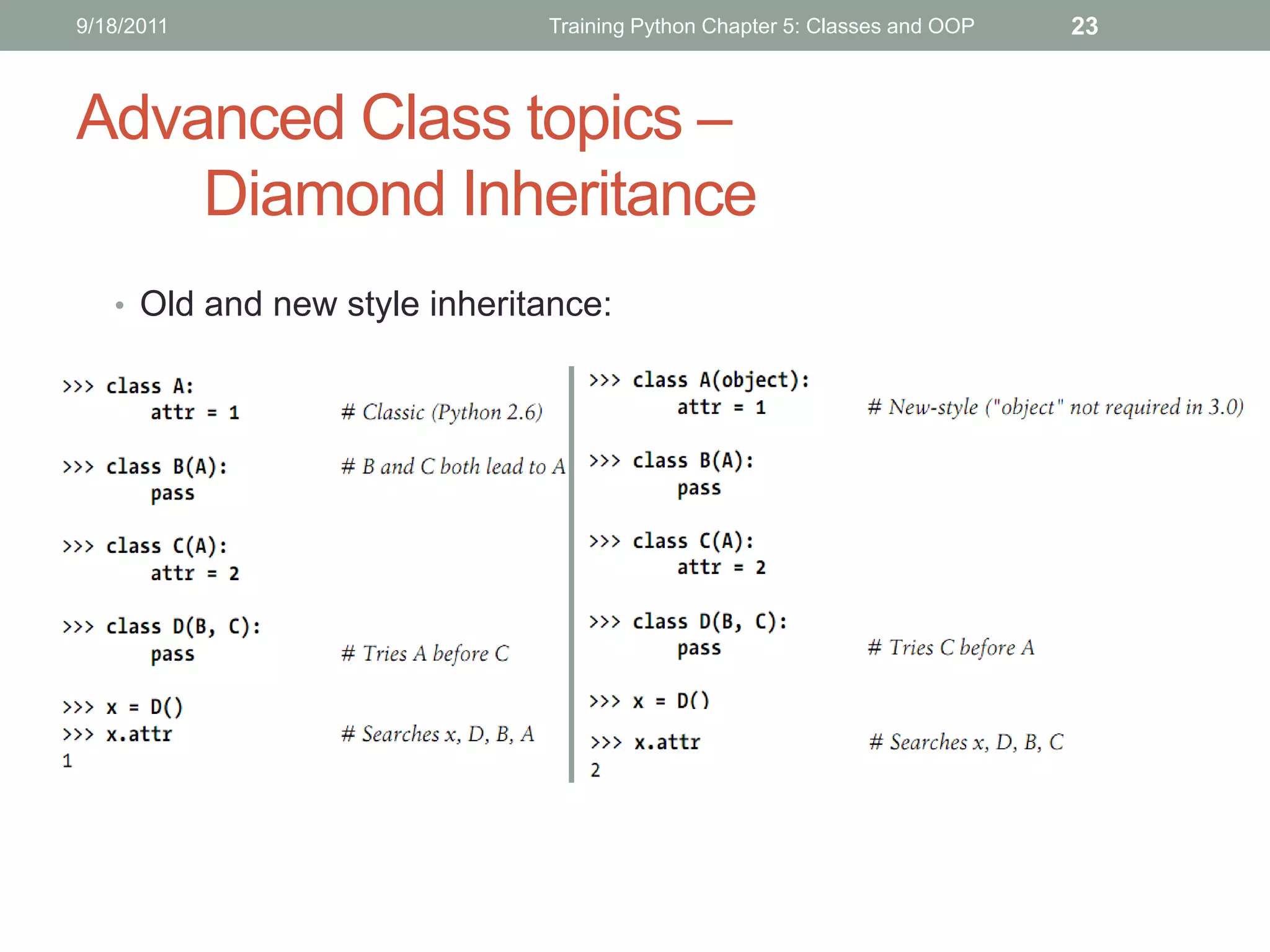
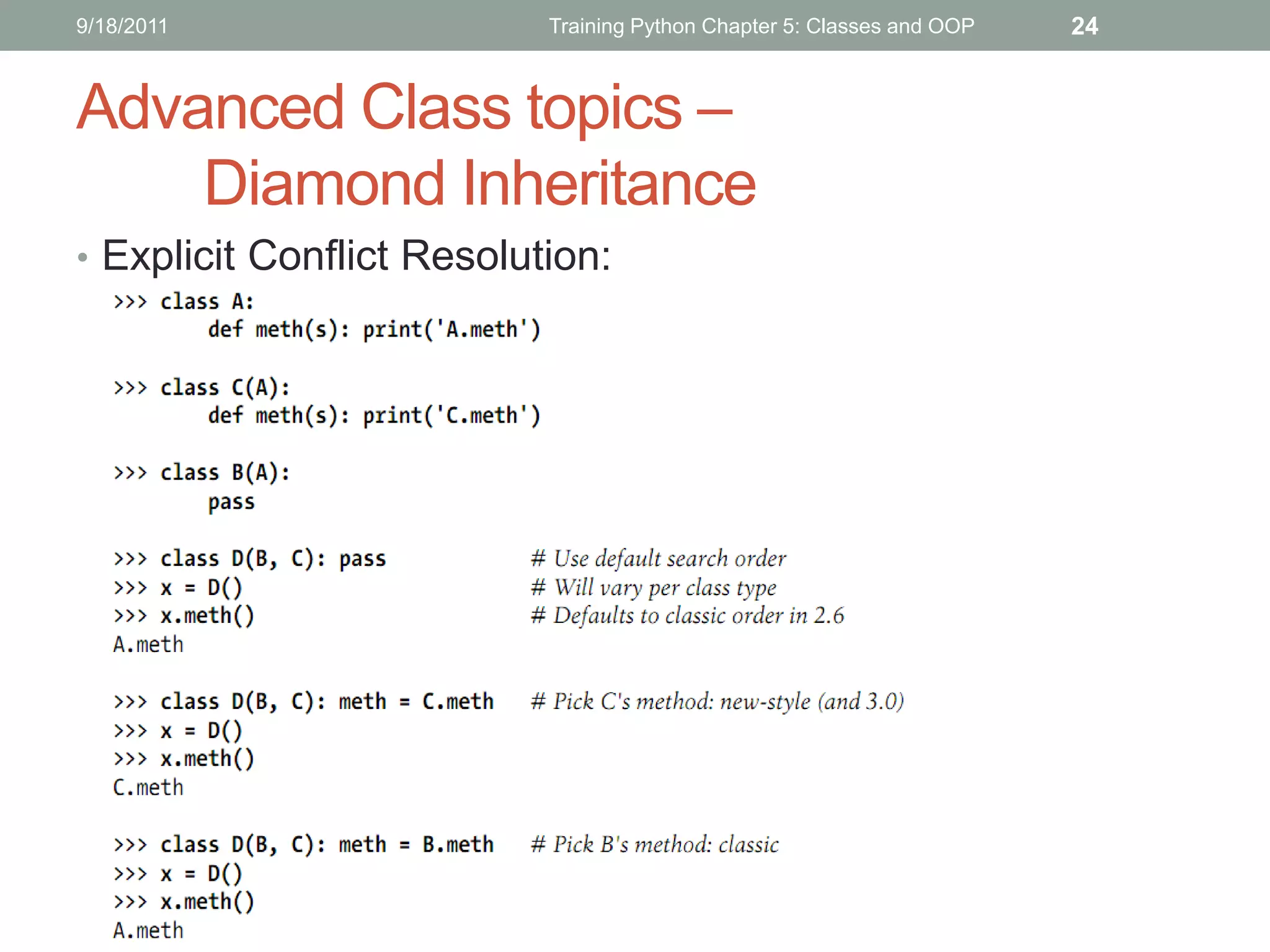
Advanced Class topics –
    Diamond Inheritance
   • Old and new style inheritance:
9/18/2011                  Training Python Chapter 5: Classes and OOP   24


Advanced Class topics –
    Diamond Inheritance
• Explicit Conflict Resolution:
9/18/2011       Training Python Chapter 5: Classes and OOP   25


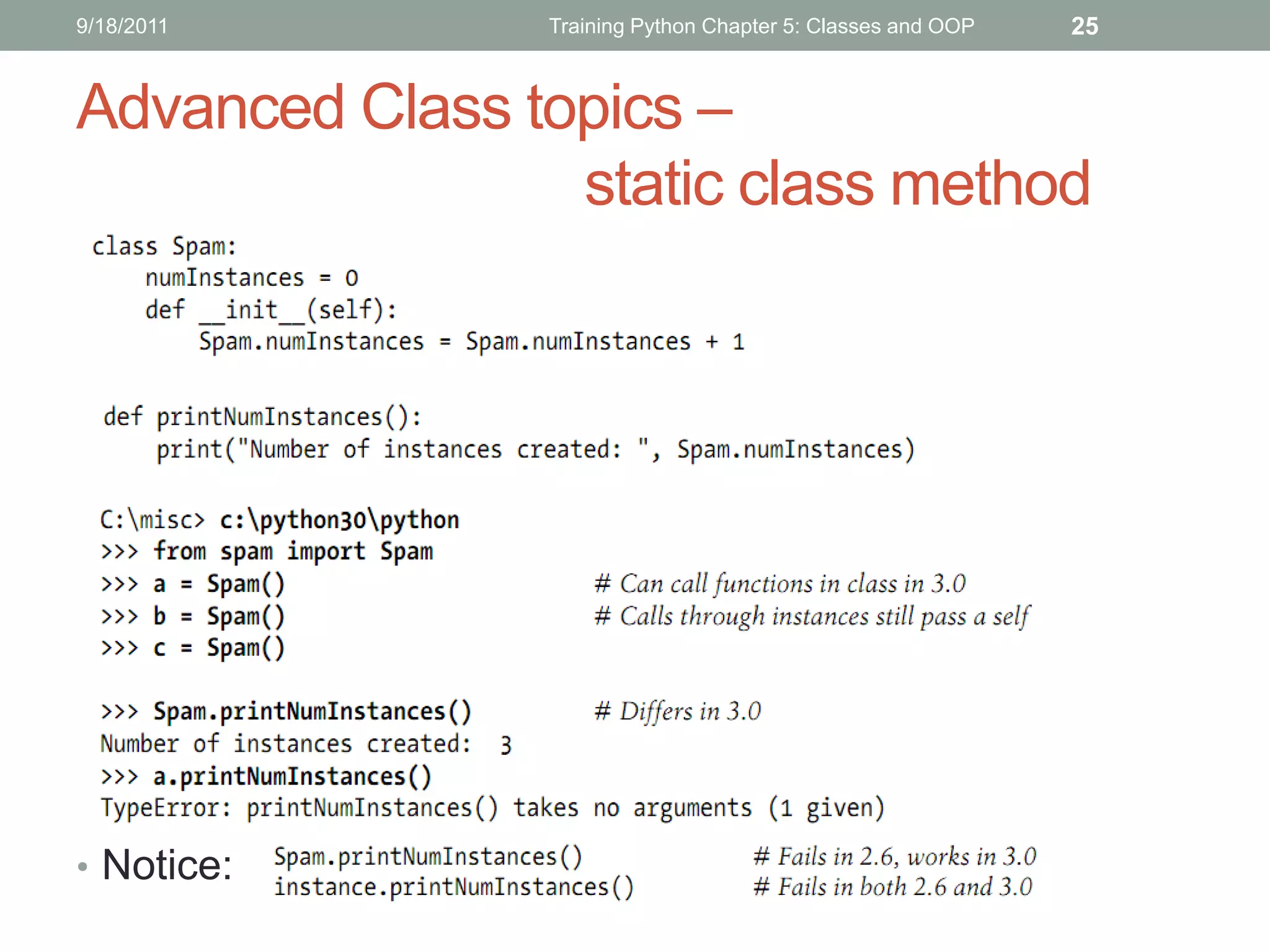
Advanced Class topics –
                 static class method


• Notice:
9/18/2011       Training Python Chapter 5: Classes and OOP   26


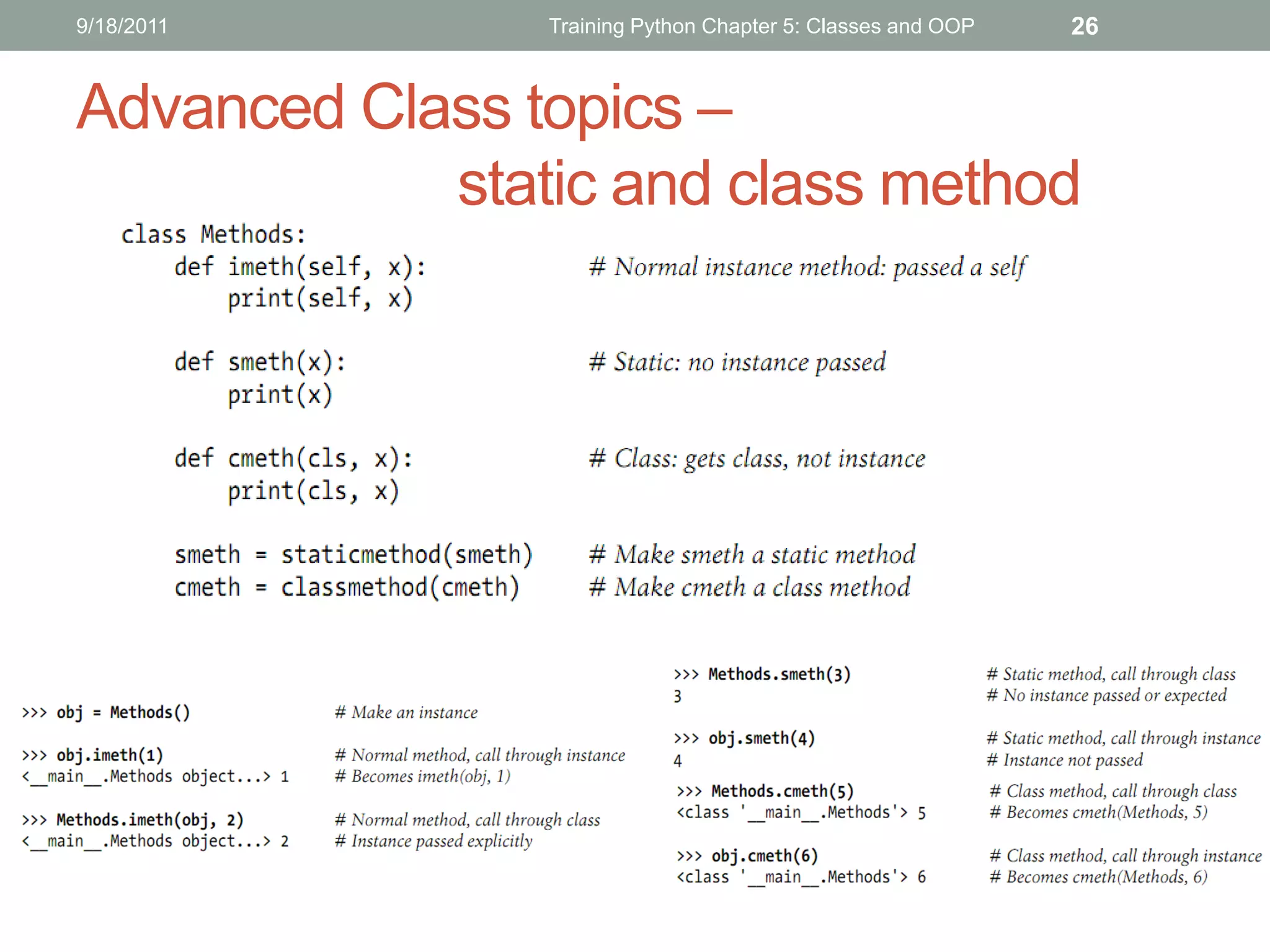
Advanced Class topics –
            static and class method
9/18/2011                      Training Python Chapter 5: Classes and OOP   27


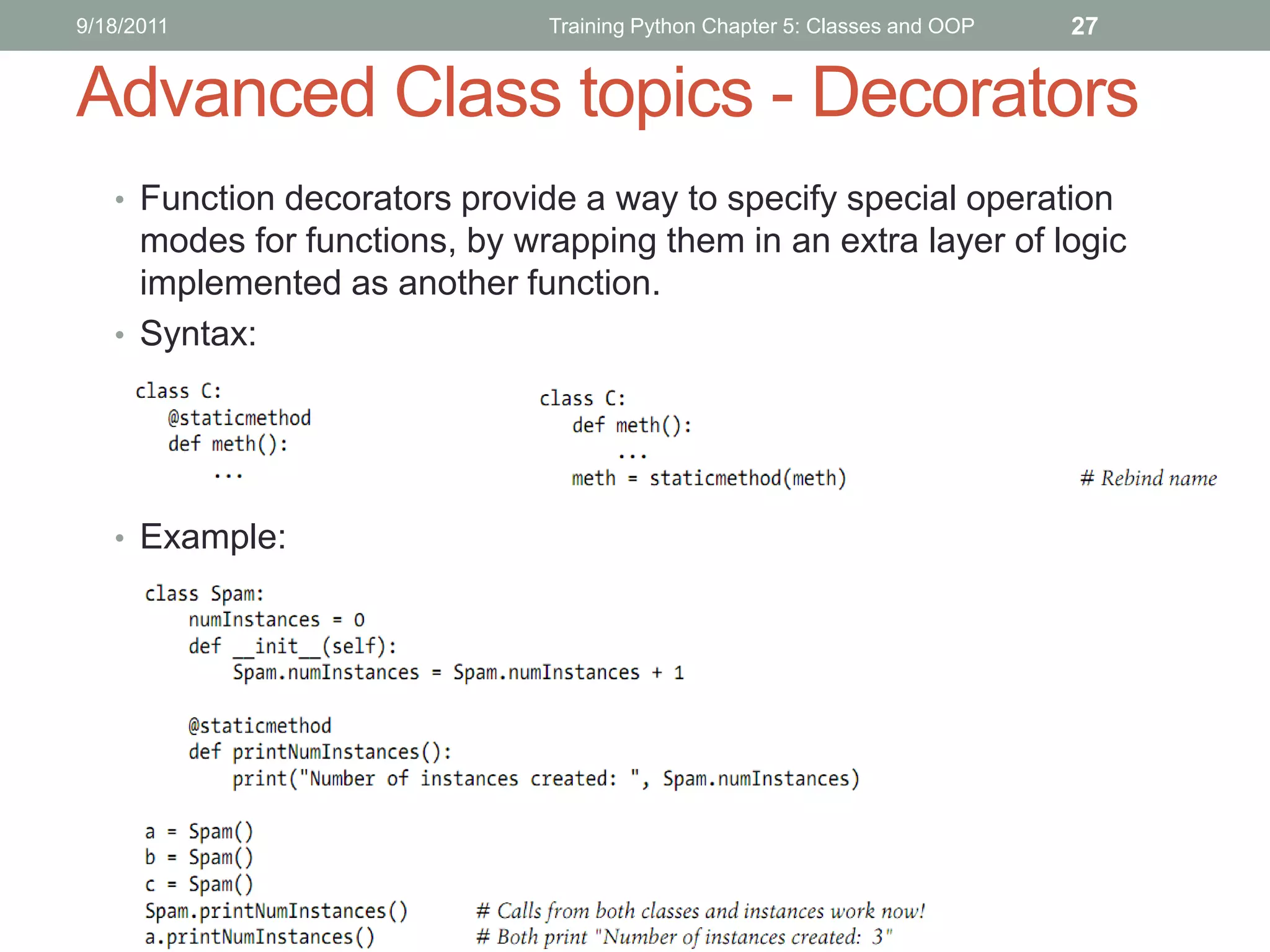
Advanced Class topics - Decorators
   • Function decorators provide a way to specify special operation
     modes for functions, by wrapping them in an extra layer of logic
     implemented as another function.
   • Syntax:


   • Example:
9/18/2011                      Training Python Chapter 5: Classes and OOP   28


Advanced Class topics – Decorators ©
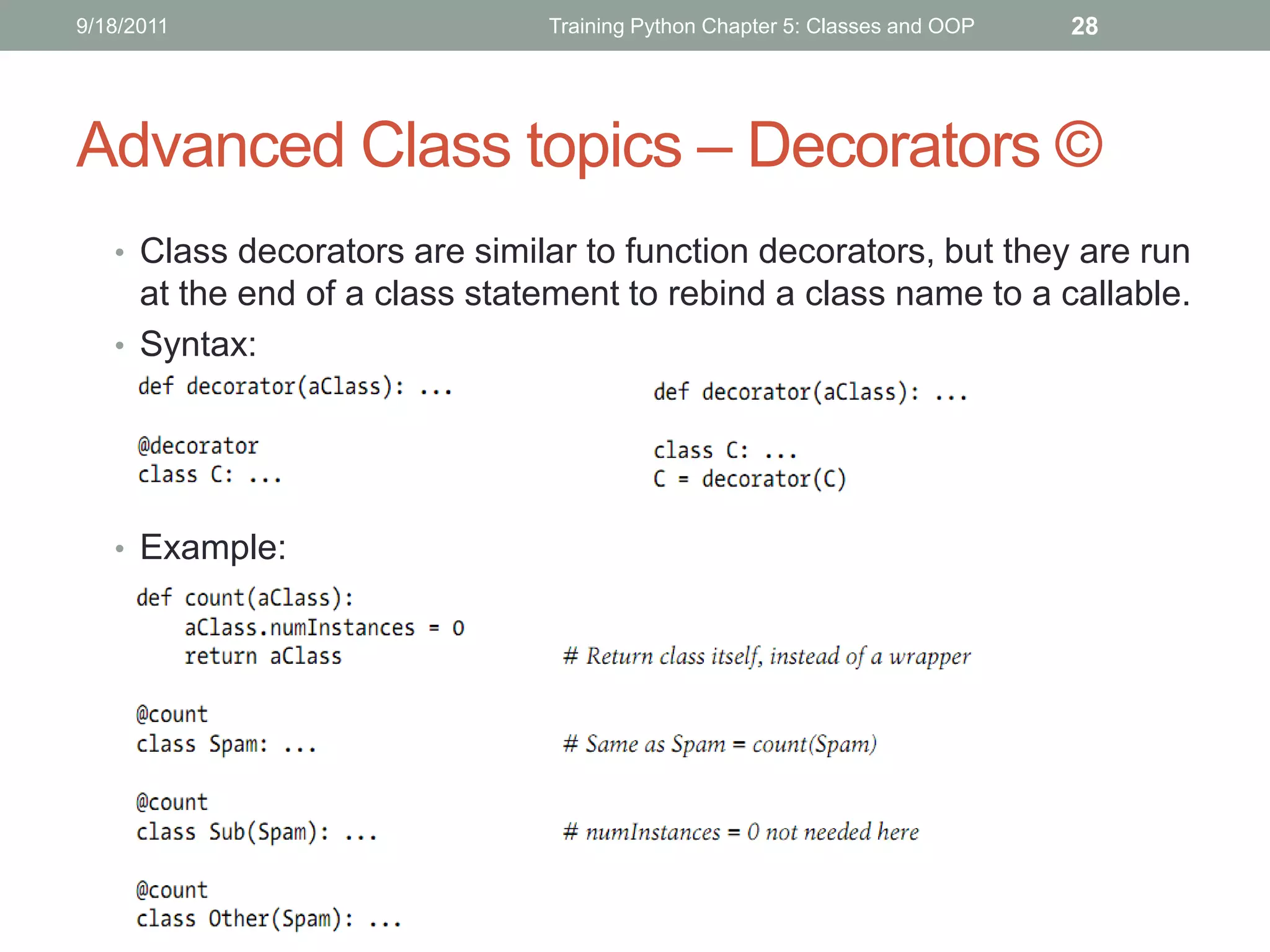
   • Class decorators are similar to function decorators, but they are run
     at the end of a class statement to rebind a class name to a callable.
   • Syntax:


   • Example:
9/18/2011                      Training Python Chapter 5: Classes and OOP   29


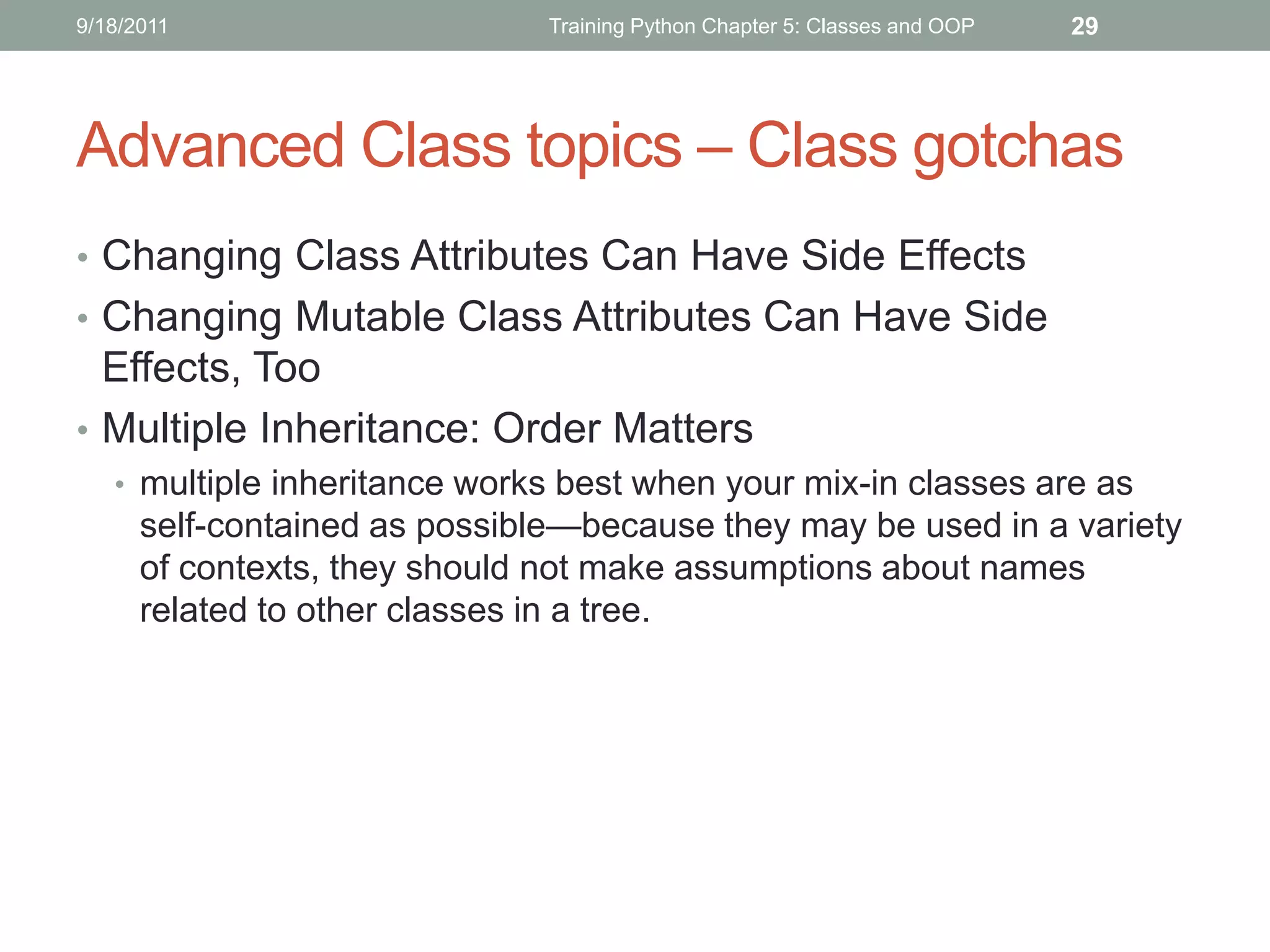
Advanced Class topics – Class gotchas
• Changing Class Attributes Can Have Side Effects
• Changing Mutable Class Attributes Can Have Side
  Effects, Too
• Multiple Inheritance: Order Matters
   • multiple inheritance works best when your mix-in classes are as
      self-contained as possible—because they may be used in a variety
      of contexts, they should not make assumptions about names
      related to other classes in a tree.
THANKS FOR LISTENING
Editor: Nguyễn Đức Minh Khôi
Contact: nguyenducminhkhoi@gmail.com
Main reference: Part VI – Classes and OOP
Learning Python 4th Edition – O’reilly 2010

Python - the basics

  • 1.
    TRAINING PYTHON INTRODUCTION TOPYTHON (BASIC LEVEL) Editor: Nguyễn Đức Minh Khôi @HCMC University of Technology, September 2011
  • 2.
    9/2/2011 Training Python Chapte 0: Introduction to Python 1 TRAINING PYTHON Chapter 0: INTRODUCTION TO PYTHON
  • 3.
    9/2/2011 Training Python Chapte 0: Introduction to Python 2 CONTENTS Python in general How Python program runs? How to run Python?
  • 4.
    9/2/2011 Training Python Chapte 0: Introduction to Python 3 Python in general • What is python? • High level programming language • Emphasize on code readability • Very clear syntax + large and comprehensive standard library • Use of indentation for block delimiters • Multiprogramming paradigm: OO, imperative, functional, procedural, reflective • A fully dynamic type system and automatic memory management • Scripting language + standalone executable program + interpreter • Can run on many platform: Windows, Linux, Mactonish • Updates: • Newest version: 3.2.2 (CPython, JPython, IronPython) • Website: www.python.org
  • 5.
    9/2/2011 Training Python Chapte 0: Introduction to Python 4 Python in general (Cont’) • Advantages: • Software quality • Developer productivity • Program portability • Support libraries • Component integration • Enjoyment • Disadvantages: • not always be as fast as that of compiled languages such as C and C++
  • 6.
    9/2/2011 Training Python Chapte 0: Introduction to Python 5 Python in general (Cont’) • Applications of python:
  • 7.
    9/2/2011 Training Python Chapte 0: Introduction to Python 6 Python in general (Cont’) • Python’s Capability: • System Programming • GUI • Internet Scripting • Component Integration • Database Programming • Rapid Prototyping • Numeric and Scientific Programming • Gaming, Images, Serial Ports, XML, Robots, and More
  • 8.
    9/2/2011 Training Python Chapte 0: Introduction to Python 7 How Python program runs? Notice: pure Python code runs at speeds somewhere between those of a traditional compiled language and a traditional interpreted language
  • 9.
    9/2/2011 Training Python Chapte 0: Introduction to Python 8 How to run Python? • Install Python 3.2.2: • Go to website: http://www.python.org/download/ and download the latest version of Python • Run and install follow the instructions of the .msi file • If you successfully install, you will see this picture: • Coding Python: • Not IDE support: use notepad++ http://notepad-plus-plus.org/ • Use IDE support: Eclipse (3.7) or Netbeans (7.0)
  • 10.
    9/2/2011 Training Python Chapte 0: Introduction to Python 9 How to run Python? (Cont’) • Install Eclipse: follow the instructions from this website: http://wiki.eclipse.org/FAQ_Where_do_I_get_and_install_Eclipse%3F (you should download the Eclipse Classics version) • Install Pydev plugin for eclipse: follow this instruction: http://pydev.org/manual_101_install.html
  • 11.
    9/2/2011 Training Python Chapte 0: Introduction to Python 10 THANKS FOR LISTENING Editor: Nguyễn Đức Minh Khôi Contact: nguyenducminhkhoi@gmail.com Main reference: Part I – Getting Started Learning Python – O’reilly
  • 12.
    TRAINING PYTHON CHAPTER 1:TYPES AND OPERATIONS
  • 13.
    CONTENTS Lists Dictionaries Tuples Files Numeric Typing Dynamic Typing Summary
  • 14.
    5/22/2011 Training Python 3 Lists • Ordered collections of arbitrary objects • Accessed by offset • Variable-length, heterogeneous, and arbitrarily nestable • Of the category “mutable sequence” • Arrays of object references
  • 15.
    5/22/2011 Training Python 4 Lists literals and operations
  • 16.
    5/22/2011 Training Python 5 Lists literals and operations (cont’)
  • 17.
    5/22/2011 Training Python 6 Dictionaries • Accessed by key, not offset • Accessed by key, not offset • Variable-length, heterogeneous, and arbitrarily nestable • Of the category “mutable mapping” • Tables of object references (hash tables)
  • 18.
    5/22/2011 Training Python 7 Dictionaries literals and operations
  • 19.
    5/22/2011 Training Python 8 Dictionaries literals and operations (c)
  • 20.
    5/22/2011 Training Python 9 Tuples • Ordered collections of arbitrary objects • Accessed by offset • Of the category “immutable sequence” • Fixed-length, heterogeneous, and arbitrarily nestable • Arrays of object references
  • 21.
    5/22/2011 Training Python 10 Tuples literals and operations
  • 22.
    5/22/2011 Training Python 11 Tuples literals and operations (con’t)
  • 23.
    5/22/2011 Training Python 12 Files – common operations
  • 24.
    2 NUMERIC TYPES • Integersand floating-point numbers • Complex numbers • Fixed-precision decimal numbers • Rational fraction numbers • Sets • Booleans • Unlimited integer precision • A variety of numeric built-ins and modules
  • 25.
  • 26.
  • 27.
    Dynamic Typing • Variables,Objects, References: • Variables are entries in a system table, with spaces for links to objects. • Objects are pieces of allocated memory, with enough space to represent the values for which they stand. • References are automatically followed pointers from variables to objects.
  • 28.
    Dynamic Typing (Cont’)- Shared references • Immutable types:
  • 29.
    Dynamic Typing (Cont’)- Shared references • Mutable types: • Notices: • It’s also just the default: if you don’t want such behavior, you can request that Python copy objects instead of making references.
  • 30.
    Dynamic Typing (Cont’)- Shared references • Notices (next): • “is” function returns False if the names point to equivalent but different objects, as is the case when we run two different literal expressions. • Small integers and strings are cached and reused, though, is tells us they reference the same single object.
  • 31.
    5/22/2011 Training Python 13 Summary • Object just classification
  • 32.
    5/22/2011 Training Python 14 Summary (con’t) • Object Flexibility • Lists, dictionaries, and tuples can hold any kind of object. • Lists, dictionaries, and tuples can be arbitrarily nested. • Lists and dictionaries can dynamically grow and shrink. • Object copy • Slice expressions with empty limits (L[:]) copy sequences. • The dictionary and set copy method (X.copy()) copies a dictionary or set. • Some built-in functions, such as list, make copies (list(L)). • The copy standard library module makes full copies.
  • 33.
    9/2/2011 Learning Python Chapter 1 1 THANKS FOR LISTENING Editor: Nguy n Đ c Minh Khôi Contact: nguyenducminhkhoi@gmail.com Main reference: Part II – Types and Operations Learning Python – O’reilly
  • 34.
    9/2/2011 Learning Python Chapter 2 1 TRAINING PYTHON STATEMENTS AND SYNTAX
  • 35.
    9/2/2011 Learning Python Chapter 2 2 Content Statements Assignment, Expression, Print Conditional statements Loop statements Iterations and comprehensions
  • 36.
    9/2/2011 Learning Python Chapter 2 3 Python program structures: • Programs are composed of modules. • Modules contain statements. • Statements contain expressions. • Expressions create and process objects.
  • 37.
    9/2/2011 Learning Python Chapter 2 4 Python statements
  • 38.
    9/2/2011 Learning Python Chapter 2 5 Python statements (Cont’)
  • 39.
    9/2/2011 Learning Python Chapter 2 6 Python statements (Cont’)
  • 40.
    9/2/2011 Learning Python Chapter 2 7 Assignment Statements Assignment Properties: • Assignments create object references • Names are created when first assigned • Names must be assigned before being referenced • Some operations perform assignments implicitly Assignment Statement Forms:
  • 41.
    9/2/2011 Learning Python Chapter 2 8 Variable name rules (opt) • Syntax: (underscore or letter) + (any number of letters, digits, or underscores) • Case matters: SPAM is not the same as spam • Reserved words are off-limits
  • 42.
    9/2/2011 Learning Python Chapter 2 9 Expression Statements
  • 43.
    9/2/2011 Learning Python Chapter 2 10 Print Operations • Call format • Example:
  • 44.
    9/2/2011 Learning Python Chapter 2 11 Conditional Statements - IF • General Format: • The if/else ternary expression: • Example:
  • 45.
    9/2/2011 Learning Python Chapter 2 12 IF Statements - Truth tests (opt) Conditional expression: • Any nonzero number or nonempty object is true. • Zero numbers, empty objects, and the special object None are considered false. • Comparisons and equality tests are applied recursively to data structures. • Comparisons and equality tests return True or False (custom versions of 1 and 0). • Boolean “and” and “or” operators return a true or false operand object.
  • 46.
    9/2/2011 Learning Python Chapter 2 13 IF Statements - Truth tests (opt) (Cont) • “and” and “or” operands:
  • 47.
    9/2/2011 Learning Python Chapter 2 14 Loop Statements – while statements • General while format: • Notice:
  • 48.
    9/2/2011 Learning Python Chapter 2 15 Loop Statements – for statements • General Format: • Loop Coding Techniques: • The built-in range function produces a series of successively higher integers, which can be used as indexes in a for. • The built-in zip function returns a series of parallel-item tuples, which can be used to traverse multiple sequences in a for. • Notice: for loops typically run quicker than while-based counter loops, it’s to your advantage to use tools like these that allow you to use for when possible.
  • 49.
    9/2/2011 Learning Python Chapter 2 16 Loop statements - examples
  • 50.
    9/2/2011 Learning Python Chapter 2 17 Iterations and comprehensions • Iterable: • an object is considered iterable if it is either a physically stored sequence or an object that produces one result at a time in the context of an iteration tool like a for loop. • iterable objects include both physical sequences and virtual sequences computed on demand. • Iterations: • Any object with a __next__ method to advance to a next result, which raises StopIteration at the end of the series of results, is considered iterable in Python. • Example:
  • 51.
    9/2/2011 Learning Python Chapter 2 18 List comprehension • Example: • (x + 10): arbitrary expression • (for x in L): iterable object • Extend List Comprehension:
  • 52.
    9/2/2011 Learning Python Chapter 2 19 New Iterator in Python 3.0 • Iterators associated: • built-in type :set, list, dictionary, tuple, file • Dictionary method: keys, values, items • Built-in function: range (multiple iterator), map, zip, filter (single) • Examples:
  • 53.
    9/2/2011 Learning Python Chapter 2 20 Iterators examples (cont’)
  • 54.
    9/2/2011 Learning Python Chapter 2 21 THANKS FOR LISTENING Editor: Nguyễn Đức Minh Khôi Contact: nguyenducminhkhoi@gmail.com Main reference: Part III – Statements and Syntax Learning Python – O’reilly
  • 55.
    9/6/2011 Training Python Chapter 3 1 TRAINING PYTHON Chapter 3: FUNCTION
  • 56.
    9/6/2011 Training Python Chapter 3 2 CONTENTS Function Basics Scope Arguments Function Advanced Iterations and Comprehension Advanced
  • 57.
    9/6/2011 Training Python Chapter 3 3 Function Basics • Function: A function is a device that groups a set of statements so they can be run more than once in a program. • Why use?: • Maximizing code reuse and minimizing redundancy • Procedural decomposition
  • 58.
    9/6/2011 Training Python Chapter 3 4 Function Basics – def Statements • General format: • Use “def” statements:
  • 59.
    9/6/2011 Training Python Chapter 3 5 Function Basics – Examples
  • 60.
    9/6/2011 Training Python Chapter 3 6 Scopes • Three different scopes • If a variable is assigned inside a def, it is local to that function. • If a variable is assigned in an enclosing def, it is nonlocal to nested functions. • If a variable is assigned outside all defs, it is global to the entire file. • Notice: • All names assigned inside a function def statement (or a lambda, an expression we’ll meet later) are locals by default. • Functions can freely use names as-signed in syntactically enclosing functions and the global scope, but they must declare such nonlocals and globals in order to change them.
  • 61.
    9/6/2011 Training Python Chapter 3 7 Scopes – the LEGB rules
  • 62.
    9/6/2011 Training Python Chapter 3 8 Scopes – examples Global names: X, func Local names: Y, Z # The Built – in Scopes
  • 63.
    9/6/2011 Training Python Chapter 3 9 Scopes – Global statements • Global Statement: • Other ways to access Globals:
  • 64.
    9/6/2011 Training Python Chapter 3 10 Scopes – Global statements(Cont’)
  • 65.
    9/6/2011 Training Python Chapter 3 11 Scopes – Nested functions • Factory function • These terms refer to a function object that remembers values in enclosing scopes regardless of whether those scopes are still present in memory.
  • 66.
    9/6/2011 Training Python Chapter 3 12 Scopes – Nested scope (Cont’) • Nested scope and lambda:
  • 67.
    9/6/2011 Training Python Chapter 3 13 Scopes – Nonlocal statements • The nonlocal statement: • Is a close cousin to global • Like global: nonlocal declares that a name will be changed in an enclosing scope. • Unlike global: • nonlocal applies to a name in an enclosing function’s scope, not the global module scope outside all defs. • nonlocal names must already exist in the enclosing function’s scope when declared • Format:
  • 68.
    9/6/2011 Training Python Chapter 3 14 Scopes – Nonlocal statements (Con’t)
  • 69.
    9/6/2011 Training Python Chapter 3 15 Arguments – Passing Basics • Arguments are passed by automatically assigning objects to local variable names. • Assigning to argument names inside a function does not affect the caller. • Changing a mutable object argument in a function may impact the caller. • Immutable arguments are effectively passed “by value.” • Mutable arguments are effectively passed “by pointer.”
  • 70.
    9/6/2011 Training Python Chapter 3 16 Arguments – Matching Modes • Keyword-only arguments: arguments that must be passed by keyword only and will never be filled in by a positional argument.
  • 71.
    9/6/2011 Training Python Chapter 3 17 Arguments - Examples
  • 72.
    9/6/2011 Training Python Chapter 3 18 Arguments – Examples (Cont’)
  • 73.
    9/6/2011 Training Python Chapter 3 19 Arguments – Bonus Points
  • 74.
    9/6/2011 Training Python Chapter 3 20 Function Advanced • General guidelines: • Coupling: use arguments for inputs and return for outputs. • Coupling: use global variables only when truly necessary. • Coupling: don’t change mutable arguments unless the caller expects it. • Cohesion: each function should have a single, unified purpose. • Size: each function should be relatively small. • Coupling: avoid changing variables in another module file directly.
  • 75.
    9/6/2011 Training Python Chapter 3 21 Function Advanced - Recursions • Examples: • Alternatives:
  • 76.
    9/6/2011 Training Python Chapter 3 22 Function Advanced – Lambda Expression • Lambda format: • Use lambda for: • inline a function definition • defer execution of a piece of code • Notices: • lambda is an expression, not a statement • lambda’s body is a single expression, not a block of statements. • If you have larger logic to code, use def; lambda is for small pieces of inline code. On the other hand, you may find these techniques useful in moderation • Examples:
  • 77.
    9/6/2011 Training Python Chapter 3 23 Lambda Expression (Cont’) • Logic within lambda function: • Nested lambda: • Used with map function: • Used with filter function: • Used with reduce function:
  • 78.
    9/6/2011 Training Python Chapter 3 24 Iterations and Comprehension Part 2 • List Comprehension: • Vs. Map: • Vs. filter: • Vs. Nested for:
  • 79.
    9/6/2011 Training Python Chapter 3 25 Iterations and Comprehension Part 2 • Generators: • Generator functions: are coded as normal def statements but use yield statements to return results one at a time, suspending and resuming their state between each. • Generator expressions: are similar to the list comprehensions of the prior section, but they return an object that produces results on demand instead of building a result list. • Generator functions:
  • 80.
    9/6/2011 Training Python Chapter 3 26 Iterations and Comprehension Part 2 • Generator Expression:
  • 81.
    9/6/2011 Training Python Chapter 3 27 3.0 Comprehension Syntax
  • 82.
    9/6/2011 Training Python Chapter 3 28 Function Pitfall • “List comprehensions were nearly twice as fast as equivalent for loop statements, and map was slightly quicker than list comprehensions when mapping a built-in function such as abs (absolute value)” • Python detects locals statically, when it compiles the def’s code, rather than by noticing assignments as they happen at runtime.
  • 83.
    9/6/2011 Learning Python Chapter 2 29 THANKS FOR LISTENING Editor: Nguyễn Đức Minh Khôi Contact: nguyenducminhkhoi@gmail.com Main reference: Part IV – Functions Learning Python 4th Edition – O’reilly 2010
  • 84.
  • 85.
    9/15/2011 Training Python Chapter 4 2 Contents Modules Basics Modules Package Modules in advance
  • 86.
    9/15/2011 Training Python Chapter 4 3 Modules Basics • Modules are process with: • import: Lets a client (importer) fetch a module as a whole • from: Allows clients to fetch particular names from a module • imp.reload: Provides a way to reload a module’s code without stopping Python • Why use Modules? • Code reuse • System namespace partitioning • Implementing service or data
  • 87.
    9/15/2011 Training Python Chapter 4 4 Modules Basics – import statements • How imports work? 1. Find the module’s file. 2. Compile it to byte code (if needed). 3. Run the module’s code to build the objects it defines. • The Module Search Path: 1. The home directory of the program 2. PYTHONPATH directories (if set) 3. Standard library directories 4. The contents of any .pth files (if present)
  • 88.
    9/15/2011 Training Python Chapter 4 5 Modules Basics – create Modules • In fact, both the names of module files and the names of directories used in package must conform to the rules for variable names: • They may, for instance, contain only letters, digits, and underscores. • Package directories also cannot contain platform-specific syntax such as spaces in their names. • Modules in Python can be written in external languages such as C/C++ in Cpython, Java in Jython, .net languages in IronPython
  • 89.
    9/15/2011 Training Python Chapter 4 6 Modules Basics - Usages • The import statement: • The from statement: • The from * statement • The import happens only once
  • 90.
    9/15/2011 Training Python Chapter 4 7 Modules Basics – Usages (Con’t) • Import assigns an entire module object to a single name. • From assigns one or more names to objects of the same names in another module. Be careful:
  • 91.
    9/15/2011 Training Python Chapter 4 8 Modules Basics - namespaces • Files generate Namespaces: • Module statements run on the first import. • Top-level assignments create module attributes. • Module namespaces can be accessed via the attribute__dict__or dir(M) • Modules are a single scope (local is global) • Namespace nesting: • In mod3.py: • In mod2.py: • In mod1.py:
  • 92.
    9/15/2011 Training Python Chapter 4 9 Modules Basics – reloading function • Unlike import and from: • reload is a function in Python, not a statement. • reload is passed an existing module object, not a name. • reload lives in a module in Python 3.0 and must be imported itself. • How to use:
  • 93.
    9/15/2011 Training Python Chapter 4 10 Modules Basics – reload example • In changer.py: • Change global message variable: •
  • 94.
    9/15/2011 Training Python Chapter 4 11 Modules package • Package __init__.py files: • Directory: dir0dir1dir2mod.py • Import statement: import dir1.dir2.mod • Rules: • dir1 and dir2 both must contain an __init__.py file. • dir0, the container, does not require an __init__.py file; this file will simply be ignored if present. • dir0, not dir0dir1, must be listed on the module search path (i.e., it must be the home directory, or be listed in your PYTHONPATH, etc.). • Present in tree mode:
  • 95.
    9/15/2011 Training Python Chapter 4 12 Modules package • Relative import: • instructs Python to import a module named spam located in the same package directory as the file in which this statement appears. • Sibling import:
  • 96.
    9/15/2011 Training Python Chapter 4 13 Modules In Advance – Data Hiding • Minimizing from * Damage: _X and __all__ • you can prefix names with a single underscore (e.g., _X) to prevent them from being copied out when a client imports a module’s names with a from * statement. • Enabling future language features • Mixed Usage Modes: __name__ and __main__ • If the file is being run as a top-level program file, __name__ is set to the string "__main__" when it starts. • If the file is being imported instead, __name__ is set to the module’s name as known by its clients
  • 97.
    9/15/2011 Training Python Chapter 4 14 Modules in Advance (Cont’) • In runme.py: • Unit Tests with __name__: • we can wrap up the self-test call in a __name__ check, so that it will be launched only when the file is run as a top-level script, not when it is imported
  • 98.
    9/15/2011 Training Python Chapter 4 15 Modules in Advance (Cont’) • The as Extension for import and from:
  • 99.
    9/15/2011 Training Python Chapter 4 16 Module Gotchas • Statement Order Matters in Top-Level Code • from Copies Names but Doesn’t Link • from * Can Obscure the Meaning of Variables • Recursive from Imports May Not Work • You can usually eliminate import cycles like this by careful design— maximizing cohesion and minimizing coupling are good first steps.
  • 100.
    THANKS FOR LISTENING Editor:Nguyễn Đức Minh Khôi Contact: nguyenducminhkhoi@gmail.com Main reference: Part V – Modules Learning Python 4th Edition – O’reilly 2010
  • 101.
  • 102.
    9/18/2011 Training Python Chapter 5: Classes and OOP 2 Contents Class Coding Basics Class Coding Detail Advanced Class topics
  • 103.
    9/18/2011 Training Python Chapter 5: Classes and OOP 3 Class Coding Basics • OOP program must show: • Abstraction (or sometimes called encapsulation) • Inheritance (vs. composition) • Polymorphism • Class vs. Instance Object: • Class: Serve as instance factories. Their attributes provide behavior—data and functions—that is inherited by all the instances generated from them. • Instance: Represent the concrete items in a program’s domain. Their attributes record data that varies per specific object
  • 104.
    9/18/2011 Training Python Chapter 5: Classes and OOP 4 Class Coding Basics (Cont’) • Each class statement generates a new class object. • Each time a class is called, it generates a new instance object. • Instances are automatically linked to the classes from which they are created. • Classes are linked to their superclasses by listing them in parentheses in a class header line; the left-to-right order there gives the order in the tree.
  • 105.
    9/18/2011 Training Python Chapter 5: Classes and OOP 5 Class Coding Basics – Class trees • Notice: • Python uses multiple inheritance: if there is more than one superclass listed in parentheses in a class statement (like C1’s here), their left-to-right order gives the order in which those superclasses will be searched for attributes. • Attributes are usually attached to classes by assignments made within class statements, and not nested inside function def statements. • Attributes are usually attached to instances by assignments to a special argument passed to functions inside classes, called self.
  • 106.
    9/18/2011 Training Python Chapter 5: Classes and OOP 6 Class Coding Basics - Class vs. Instance • Class Object: • The class statement creates a class object and assigns it a name. • Assignments inside class statements make class attributes. • Class attributes provide object state and behavior. • Instance Object: • Calling a class object like a function makes a new instance object. • Each instance object inherits class attributes and gets its own namespace. • Assignments to attributes of self in methods make per-instance attributes.
  • 107.
    9/18/2011 Training Python Chapter 5: Classes and OOP 7 Class Coding Basics © • First Example:
  • 108.
    9/18/2011 Training Python Chapter 5: Classes and OOP 8 Class Coding Basics - Inheritance • Attribute inheritance: • Superclasses are listed in parentheses in a class header. • Classes inherit attributes from their superclasses. • Instances inherit attributes from all accessible classes. • Each object.attribute reference invokes a new, independent search. • Logic changes are made by subclassing, not by changing superclasses.
  • 109.
    9/18/2011 Training Python Chapter 5: Classes and OOP 9 Class Coding Basics – Inheritance © • Second Example:
  • 110.
    9/18/2011 Training Python Chapter 5: Classes and OOP 10 Class Coding Details • Class statement: Assigning names inside the class statement makes class attributes, and nested defs make class methods, but other assignments make attributes, too. • Examples:
  • 111.
    9/18/2011 Training Python Chapter 5: Classes and OOP 11 Class Coding Details © • Method call: • Example:
  • 112.
    9/18/2011 Training Python Chapter 5: Classes and OOP 12 Class Coding Details - Inheritance • Example:
  • 113.
    9/18/2011 Training Python Chapter 5: Classes and OOP 13 Class Coding Details – Inheritance © • Class Interface Techniques: • Real:
  • 114.
    9/18/2011 Training Python Chapter 5: Classes and OOP 14 Class Coding Details – Inheritance ©
  • 115.
    9/18/2011 Training Python Chapter 5: Classes and OOP 15 Class Coding Details – Inheritance © • Abstract superclass:
  • 116.
    9/18/2011 Training Python Chapter 5: Classes and OOP 16 Class Coding Details © • Python namespaces – Assignments Classify names:
  • 117.
    9/18/2011 Training Python Chapter 5: Classes and OOP 17 Class Coding Details – operator overloading • Common operator overloading method:
  • 118.
    9/18/2011 Training Python Chapter 5: Classes and OOP 18 Class Coding Details – operator overloading ©
  • 119.
    9/18/2011 Training Python Chapter 5: Classes and OOP 19 Advanced Class topics - Relationships • Is – relationship vs. has - relationship In employees.py file Express: inheritance – is relationship
  • 120.
    9/18/2011 Training Python Chapter 5: Classes and OOP 20 Advanced Class topics – Relationships © In pizzashop.py file Express: has - relationship
  • 121.
    9/18/2011 Training Python Chapter 5: Classes and OOP 21 Advanced Class topics – Extending built in types • By embedding:
  • 122.
    9/18/2011 Training Python Chapter 5: Classes and OOP 22 Advanced Class topics – Extending built in types • By subclassing:
  • 123.
    9/18/2011 Training Python Chapter 5: Classes and OOP 23 Advanced Class topics – Diamond Inheritance • Old and new style inheritance:
  • 124.
    9/18/2011 Training Python Chapter 5: Classes and OOP 24 Advanced Class topics – Diamond Inheritance • Explicit Conflict Resolution:
  • 125.
    9/18/2011 Training Python Chapter 5: Classes and OOP 25 Advanced Class topics – static class method • Notice:
  • 126.
    9/18/2011 Training Python Chapter 5: Classes and OOP 26 Advanced Class topics – static and class method
  • 127.
    9/18/2011 Training Python Chapter 5: Classes and OOP 27 Advanced Class topics - Decorators • Function decorators provide a way to specify special operation modes for functions, by wrapping them in an extra layer of logic implemented as another function. • Syntax: • Example:
  • 128.
    9/18/2011 Training Python Chapter 5: Classes and OOP 28 Advanced Class topics – Decorators © • Class decorators are similar to function decorators, but they are run at the end of a class statement to rebind a class name to a callable. • Syntax: • Example:
  • 129.
    9/18/2011 Training Python Chapter 5: Classes and OOP 29 Advanced Class topics – Class gotchas • Changing Class Attributes Can Have Side Effects • Changing Mutable Class Attributes Can Have Side Effects, Too • Multiple Inheritance: Order Matters • multiple inheritance works best when your mix-in classes are as self-contained as possible—because they may be used in a variety of contexts, they should not make assumptions about names related to other classes in a tree.
  • 130.
    THANKS FOR LISTENING Editor:Nguyễn Đức Minh Khôi Contact: nguyenducminhkhoi@gmail.com Main reference: Part VI – Classes and OOP Learning Python 4th Edition – O’reilly 2010