Keep Calm and Code Python

Let’s Python

Department of Computing!
Faculty of Science!
Silpakorn University
Keep Calm and Code Python

Let’s Python

Department of Computing!
Faculty of Science!
Silpakorn University
Keep Calm and Code Python

Let’s Python

Department of Computing!
Faculty of Science!
Silpakorn University
Keep Calm and Code Python

Who am I ?
Kiattisak Anoochitarom!
Graduated from Computer Science at SU, 2013!
Software Developer at Charged Concept Co, LTD.!

!

Skill Sets: iOS, Rails, Node.js, Ruby, Python, Javascript, !
C++, C, Java, Badminton!

!

Contacts:!
macbaszii@gmail.com!
Twitter: @iMacbaszii!
http://www.facebook.com/baszii!
http://www.macbaszii.com!
Who Invented ?

❖

Guido van Rossum!

❖

Dutch!

❖

2005 - 2012 at Google inc.!

❖

2013 at Dropbox inc.
Langauge Characteristic
❖

Open Source (Python Software Foundation)
Langauge Characteristic
❖

Open Source (Python Software Foundation)

❖

Rapid Development
Langauge Characteristic
❖

Open Source (Python Software Foundation)

❖

Rapid Development

❖

Short and Readable Code
Langauge Characteristic
❖

Open Source (Python Software Foundation)

❖

Rapid Development

❖

Short and Readable Code

❖

Indentation!
Langauge Characteristic
❖

Open Source (Python Software Foundation)

❖

Rapid Development

❖

Short and Readable Code

❖

Indentation!

❖

Strong and Dynamic Typing
Langauge Characteristic
❖

Open Source (Python Software Foundation)

❖

Rapid Development

❖

Short and Readable Code

❖

Indentation!

❖

Strong and Dynamic Typing

❖

Interpreter Style
PEP - 8
Python Coding Style Guide
http://www.python.org/dev/peps/pep-0008/
Input & Output
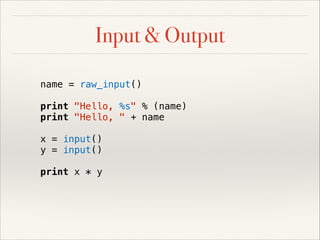
Input & Output
name = raw_input()
print "Hello, %s" % (name)
print "Hello, " + name
x = input()
y = input()
print x * y
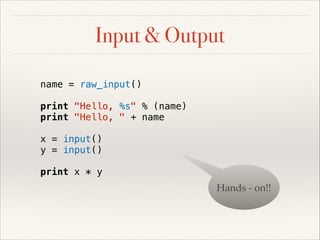
Input & Output
name = raw_input()
print "Hello, %s" % (name)
print "Hello, " + name
x = input()
y = input()
print x * y

Hands - on!!
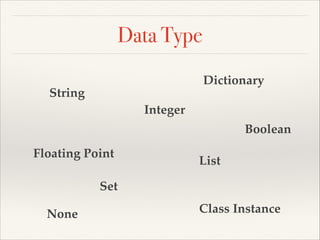
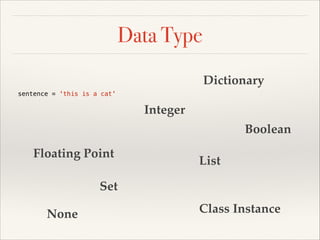
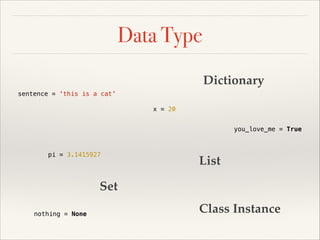
Data Type
Dictionary

String
Integer

Boolean
Floating Point

List

Set
None

Class Instance
Data Type
Dictionary
sentence = 'this is a cat'

Integer
Boolean
Floating Point

List

Set
None

Class Instance
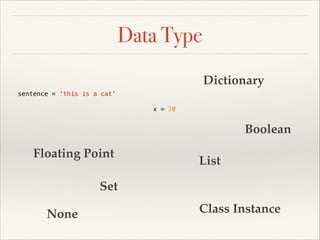
Data Type
Dictionary
sentence = 'this is a cat'
x = 20

Boolean
Floating Point

List

Set
None

Class Instance
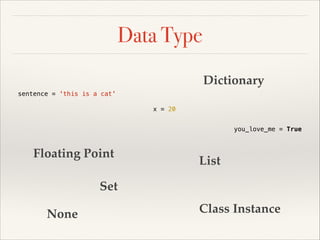
Data Type
Dictionary
sentence = 'this is a cat'
x = 20
you_love_me = True

Floating Point

List

Set
None

Class Instance
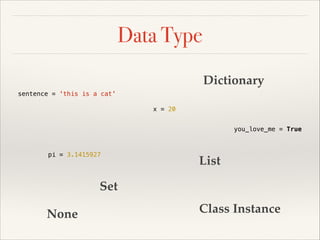
Data Type
Dictionary
sentence = 'this is a cat'
x = 20
you_love_me = True

pi = 3.1415927

List

Set
None

Class Instance
Data Type
Dictionary
sentence = 'this is a cat'
x = 20
you_love_me = True

pi = 3.1415927

List

Set
nothing = None

Class Instance
Data Type
Dictionary
sentence = 'this is a cat'
x = 20
you_love_me = True

pi = 3.1415927

even_numbers = [2, 4, 6, 8, 10]

Set
nothing = None

Class Instance
Data Type
Dictionary
sentence = 'this is a cat'
x = 20
you_love_me = True

pi = 3.1415927

even_numbers = [2, 4, 6, 8, 10]

odd_numbers = {1, 3, 5, 7, 9}

nothing = None

Class Instance
Data Type
profile = { 'name': 'Bas',
'email': 'macbaszii@gmail.com'}
sentence = 'this is a cat'
x = 20
you_love_me = True

pi = 3.1415927

even_numbers = [2, 4, 6, 8, 10]

odd_numbers = {1, 3, 5, 7, 9}

nothing = None

Class Instance
Data Type
profile = { 'name': 'Bas',
'email': 'macbaszii@gmail.com'}
sentence = 'this is a cat'
x = 20
you_love_me = True

pi = 3.1415927

even_numbers = [2, 4, 6, 8, 10]

odd_numbers = {1, 3, 5, 7, 9}

nothing = None

my_car = Car('Lamborghini',
'Aventador LP 700-4', 'White')
Data Type
profile = { 'name': 'Bas',
'email': 'macbaszii@gmail.com'}
sentence = 'this is a cat'
x = 20
you_love_me = True

pi = 3.1415927

even_numbers = [2, 4, 6, 8, 10]

odd_numbers = {1, 3, 5, 7, 9}

nothing = None

my_car = Car('Lamborghini',
'Aventador LP 700-4', 'White')
Operator
Math Operator
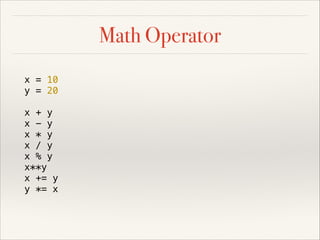
Math Operator
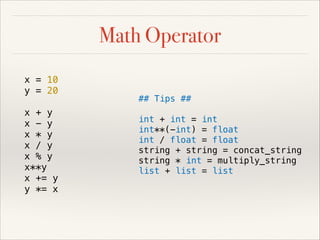
x = 10
y = 20
x + y
x - y
x * y
x / y
x % y
x**y
x += y
y *= x
Math Operator
x = 10
y = 20
x + y
x - y
x * y
x / y
x % y
x**y
x += y
y *= x

## Tips ##
int + int = int
int**(-int) = float
int / float = float
string + string = concat_string
string * int = multiply_string
list + list = list
Comparison Operator
Comparison Operator
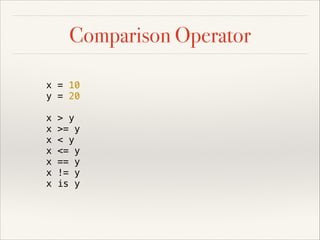
x = 10
y = 20
x
x
x
x
x
x
x

> y
>= y
< y
<= y
== y
!= y
is y
Comparison Operator
x = 10
y = 20
x
x
x
x
x
x
x

> y
>= y
< y
<= y
== y
!= y
is y

# Chain Comparison
5 < x < y
1 < y < 100
# Contains Operator
prime = [2, 3, 5, 7, 11]
9 in prime # False
sentence = 'this is a cat'
'cat' in sentence # True
Logical Operator
Logical Operator
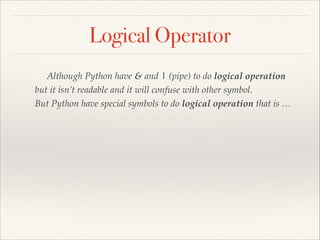
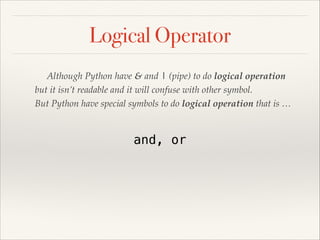
Although Python have & and | (pipe) to do logical operation !
but it isn’t readable and it will confuse with other symbol. !
But Python have special symbols to do logical operation that is …
Logical Operator
Although Python have & and | (pipe) to do logical operation !
but it isn’t readable and it will confuse with other symbol. !
But Python have special symbols to do logical operation that is …

and, or
Range and Lazy Generator
range(10)
# [0, 1, 2, 3, 4, 5, 6, 7, 8, 9]
range(3, 10)
# [3, 4, 5, 6, 7, 8, 9]
range(1, 20, 3)
# [1, 4, 7, 10, 13, 16, 19]
xrange(10)
xrange(3, 10)
xrange(1, 20, 3)
Control Statement
Conditional Statement
if
Conditional Statement
if
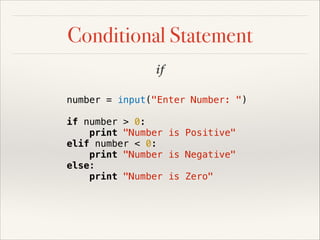
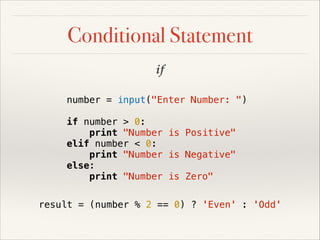
number = input("Enter Number: ")
if number > 0:
print "Number is Positive"
elif number < 0:
print "Number is Negative"
else:
print "Number is Zero"
Conditional Statement
if
number = input("Enter Number: ")
if number > 0:
print "Number is Positive"
elif number < 0:
print "Number is Negative"
else:
print "Number is Zero"
result = (number % 2 == 0) ? 'Even' : 'Odd'
Conditional Statement
if
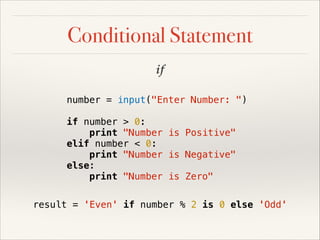
number = input("Enter Number: ")
if number > 0:
print "Number is Positive"
elif number < 0:
print "Number is Negative"
else:
print "Number is Zero"
result = 'Even' if number % 2 is 0 else 'Odd'
Conditional Statement
if
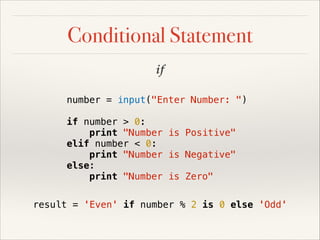
number = input("Enter Number: ")
if number > 0:
print "Number is Positive"
elif number < 0:
print "Number is Negative"
else:
print "Number is Zero"
result = 'Even' if number % 2 is 0 else 'Odd'
Iteration Statement
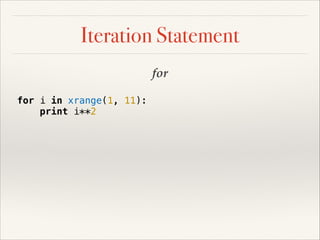
for
Iteration Statement
for
for i in xrange(1, 11):
print i**2
Iteration Statement
for
for i in xrange(1, 11):
print i**2
socials = ['Facebook', 'Twitter']
for social in socials:
print 'I played %s' % social
Iteration Statement
for
for i in xrange(1, 11):
print i**2
socials = ['Facebook', 'Twitter']
for social in socials:
print 'I played %s' % social
message = 'Hello, CPSU'
for letter in message:
print letter
Iteration Statement
for
for i in xrange(1, 11):
print i**2
socials = ['Facebook', 'Twitter']
for social in socials:
print 'I played %s' % social
message = 'Hello, CPSU'
for letter in message:
print letter

# Endless Loop #
while True:
# Do something
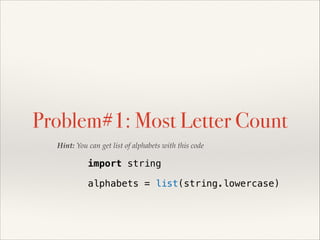
Problem#1: Most Letter Count
Hint: You can get list of alphabets with this code

import string
!

alphabets = list(string.lowercase)
Function
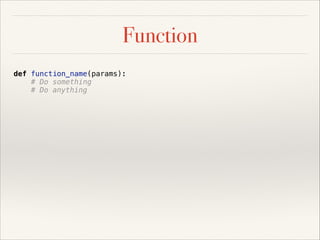
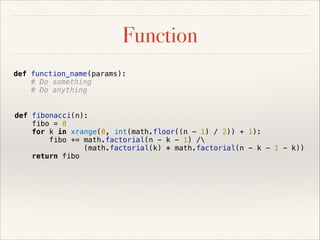
Function
def function_name(params):
# Do something
# Do anything
Function
def function_name(params):
# Do something
# Do anything
def fibonacci(n):
fibo = 0
for k in xrange(0, int(math.floor((n - 1) / 2)) + 1):
fibo += math.factorial(n - k - 1) /
(math.factorial(k) * math.factorial(n - k - 1 - k))
return fibo
Function
def function_name(params):
# Do something
# Do anything
def fibonacci(n):
fibo = 0
for k in xrange(0, int(math.floor((n - 1) / 2)) + 1):
fibo += math.factorial(n - k - 1) /
(math.factorial(k) * math.factorial(n - k - 1 - k))
return fibo
def colorMultiply(r, g=0, b=0):
return [ r * 3.14159,
g * 1.414,
b * 3.27 ]
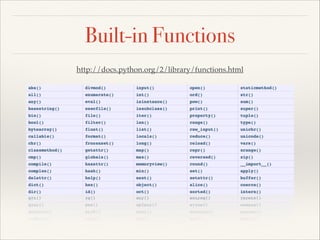
Built-in Functions
http://docs.python.org/2/library/functions.html
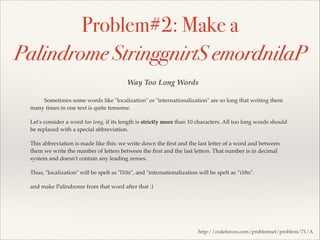
Problem#2: Make a
Palindrome StringgnirtS emordnilaP
Way Too Long Words
Sometimes some words like "localization" or "internationalization" are so long that writing them
many times in one text is quite tiresome.!
Let's consider a word too long, if its length is strictly more than 10 characters. All too long words should
be replaced with a special abbreviation.!
This abbreviation is made like this: we write down the first and the last letter of a word and between
them we write the number of letters between the first and the last letters. That number is in decimal
system and doesn't contain any leading zeroes.!
Thus, "localization" will be spelt as "l10n", and "internationalization will be spelt as “i18n".!
and make Palindrome from that word after that :)

http://codeforces.com/problemset/problem/71/A
Indexing and Slice
Indexing and Slice
message = 'Hello, world'
message[0] # H
message[len(message) - 1] # d
message[-1] # d
Indexing and Slice
message = 'Hello, world'
message[0] # H
message[len(message) - 1] # d
message[-1] # d
fibo = [1, 1, 2, 3, 5, 8, 13, 21, 34]
fibo[:5] # [1, 1, 2, 3, 5]
fibo[2:] # [2, 3, 5, 8, 13, 21, 34]
fibo[3:6] # [3, 5, 8, 13]
fibo[::2] # [1, 2, 5, 13, 34]
Indexing and Slice
message = 'Hello, world'
message[0] # H
message[len(message) - 1] # d
message[-1] # d
fibo = [1, 1, 2, 3, 5, 8, 13, 21, 34]
fibo[:5] # [1, 1, 2, 3, 5]
fibo[2:] # [2, 3, 5, 8, 13, 21, 34]
fibo[3:6] # [3, 5, 8, 13]
fibo[::2] # [1, 2, 5, 13, 34]
fibo[::-1] # ???
message[::-1] # ???
String and Collections methods

Demo!
List Comprehensive
The Other way to create and manipulation Python’s List
List Comprehensive
The Other way to create and manipulation Python’s List

[0, 1, 4, 9, 16, 25, 36, 49, 64, 81]
List Comprehensive
The Other way to create and manipulation Python’s List

[0, 1, 4, 9, 16, 25, 36, 49, 64, 81]
squares = []
for x in range(10):
squares.append(x**2)
List Comprehensive
The Other way to create and manipulation Python’s List

[0, 1, 4, 9, 16, 25, 36, 49, 64, 81]
squares = [x**2 for x in range(10)]
List Comprehensive
The Other way to create and manipulation Python’s List

[0, 1, 4, 9, 16, 25, 36, 49, 64, 81]
squares = [x**2 for x in range(10)]

set1 = [1, 2, 3]
set2 = [3, 1, 4]
List Comprehensive
The Other way to create and manipulation Python’s List

[0, 1, 4, 9, 16, 25, 36, 49, 64, 81]
squares = [x**2 for x in range(10)]

set1 = [1, 2, 3]
set2 = [3, 1, 4]
combs = []
for x in set1:
for y in set2:
if x != y:
comb.append((x, y))
List Comprehensive
The Other way to create and manipulation Python’s List

[0, 1, 4, 9, 16, 25, 36, 49, 64, 81]
squares = [x**2 for x in range(10)]

set1 = [1, 2, 3]
set2 = [3, 1, 4]
combs = [(x, y) for x in set1 for y in set2 if x != y]
[(1, 3), (1, 4), (2, 3), (2, 1), (2, 4), (3, 1), (3, 4)]
List Comprehensive
The Other way to create and manipulation Python’s List

[0, 1, 4, 9, 16, 25, 36, 49, 64, 81]
squares = [x**2 for x in range(10)]

set1 = [1, 2, 3]
set2 = [3, 1, 4]
combs = [(x, y) for x in set1 for y in set2 if x != y]
[(1, 3), (1, 4), (2, 3), (2, 1), (2, 4), (3, 1), (3, 4)]
List Comprehensive
The Other way to create and manipulation Python’s List

[0, 1, 4, 9, 16, 25, 36, 49, 64, 81]
squares = [x**2 for x in range(10)]

set1 = [1, 2, 3]
set2 = [3, 1, 4]
combs = [(x, y) for x in set1 for y in set2 if x != y]
[(1, 3), (1, 4), (2, 3), (2, 1), (2, 4), (3, 1), (3, 4)]
List Comprehensive
The Other way to create and manipulation Python’s List

[0, 1, 4, 9, 16, 25, 36, 49, 64, 81]
squares = [x**2 for x in range(10)]

set1 = [1, 2, 3]
set2 = [3, 1, 4]
combs = [(x, y) for x in set1 for y in set2 if x != y]
[(1, 3), (1, 4), (2, 3), (2, 1), (2, 4), (3, 1), (3, 4)]
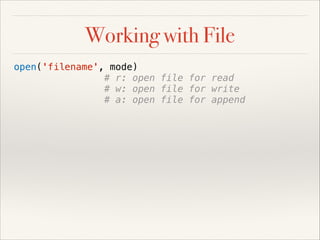
Working with File
Working with File
open('filename', mode)
# r: open file for read
# w: open file for write
# a: open file for append
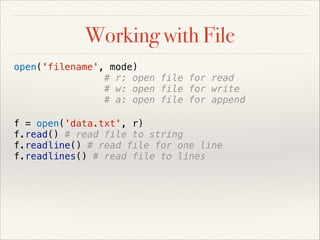
Working with File
open('filename', mode)
# r: open file for read
# w: open file for write
# a: open file for append
f = open('data.txt', r)
f.read() # read file to string
f.readline() # read file for one line
f.readlines() # read file to lines
Working with File
open('filename', mode)
# r: open file for read
# w: open file for write
# a: open file for append
f = open('data.txt', r)
f.read() # read file to string
f.readline() # read file for one line
f.readlines() # read file to lines
f.write('this is a cat') # write string to file
f.writelines([list of line]) # write lines to file
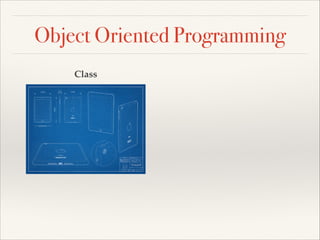
Object Oriented Programming
Class
Object Oriented Programming
Class

Instance
Object Oriented Programming
class Book:
def __init__(self, name, size):
self.name = name
self.size = size
class BookStack:
def __init__(self):
self.books = []
self.top = 0
def push(self, book):
self.books.append(book)
self.top += 1
def pop(self):
self.top -= 1
return self.books.pop()

!
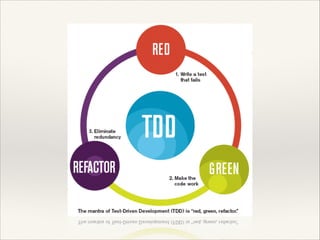
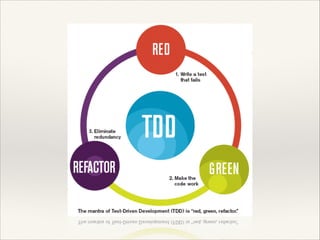
Test Driven Development
Unit Test
import unittest

! TestBookStack(unittest.TestCase):
class

# when book is created, it can return name, size
def test_book_created(self):
hunger_book = Book('The Hunger Games', 4)
self.assertEqual(hunger_book.name, 'The Hunger Games')
self.assertEqual(hunger_book.size, 4)
# when Book Stack is created / top is 0
def test_book_stack_created(self):
book_stack = BookStack()
self.assertEqual(book_stack.top, 0)
self.assertEqual(book_stack.books, [])
# when push book / top increase by one
def test_book_stack_push(self):
hunger_book = Book('The Hunger Games', 4)
book_stack = BookStack()
book_stack.push(hunger_book)
self.assertEqual(book_stack.top, 1)
self.assertEqual(book_stack.books[0].name, 'The Hunger Games')
book_stack.push(hunger_book)
self.assertEqual(book_stack.top, 2)
# when pop book / top decrease by one
def test_book_stack_pop(self):
hunger_book = Book('The Hunger Games', 4)
harry_book = Book('Harry Potter', 3)
book_stack = BookStack()
book_stack.push(hunger_book)
book_stack.push(harry_book)
present_size = book_stack.top
poped_book = book_stack.pop()
self.assertEqual(book_stack.top, present_size - 1)
self.assertEqual(poped_book.name, 'Harry Potter')

if __name__ == '__main__':
unittest.main()
Keep Calm and Code Python

Problem#3: Books
Instruction:!
!
- Using TDD!!
!
- Each Book have a name, size!
!
- Books have size and all of book!

!
Test case:!
!
- paste the new book on top!
!
- pick a book at top of books!
!
- when paste new book you must take a
larger book to below!
!
- program can tell a present Books size
Migrate to Python 3

❖

print is function instead of
statement!

❖

input()!

❖

range instead of xrange!

❖

more usage on lazy generator

Python slide

  • 4.
    Keep Calm andCode Python Let’s Python Department of Computing! Faculty of Science! Silpakorn University
  • 5.
    Keep Calm andCode Python Let’s Python Department of Computing! Faculty of Science! Silpakorn University
  • 6.
    Keep Calm andCode Python Let’s Python Department of Computing! Faculty of Science! Silpakorn University
  • 7.
    Keep Calm andCode Python Who am I ? Kiattisak Anoochitarom! Graduated from Computer Science at SU, 2013! Software Developer at Charged Concept Co, LTD.! ! Skill Sets: iOS, Rails, Node.js, Ruby, Python, Javascript, ! C++, C, Java, Badminton! ! Contacts:! macbaszii@gmail.com! Twitter: @iMacbaszii! http://www.facebook.com/baszii! http://www.macbaszii.com!
  • 8.
    Who Invented ? ❖ Guidovan Rossum! ❖ Dutch! ❖ 2005 - 2012 at Google inc.! ❖ 2013 at Dropbox inc.
  • 9.
  • 10.
    Langauge Characteristic ❖ Open Source(Python Software Foundation)
  • 11.
    Langauge Characteristic ❖ Open Source(Python Software Foundation) ❖ Rapid Development
  • 12.
    Langauge Characteristic ❖ Open Source(Python Software Foundation) ❖ Rapid Development ❖ Short and Readable Code
  • 13.
    Langauge Characteristic ❖ Open Source(Python Software Foundation) ❖ Rapid Development ❖ Short and Readable Code ❖ Indentation!
  • 14.
    Langauge Characteristic ❖ Open Source(Python Software Foundation) ❖ Rapid Development ❖ Short and Readable Code ❖ Indentation! ❖ Strong and Dynamic Typing
  • 15.
    Langauge Characteristic ❖ Open Source(Python Software Foundation) ❖ Rapid Development ❖ Short and Readable Code ❖ Indentation! ❖ Strong and Dynamic Typing ❖ Interpreter Style
  • 16.
    PEP - 8 PythonCoding Style Guide http://www.python.org/dev/peps/pep-0008/
  • 17.
  • 18.
    Input & Output name= raw_input() print "Hello, %s" % (name) print "Hello, " + name x = input() y = input() print x * y
  • 19.
    Input & Output name= raw_input() print "Hello, %s" % (name) print "Hello, " + name x = input() y = input() print x * y Hands - on!!
  • 20.
  • 21.
    Data Type Dictionary sentence ='this is a cat' Integer Boolean Floating Point List Set None Class Instance
  • 22.
    Data Type Dictionary sentence ='this is a cat' x = 20 Boolean Floating Point List Set None Class Instance
  • 23.
    Data Type Dictionary sentence ='this is a cat' x = 20 you_love_me = True Floating Point List Set None Class Instance
  • 24.
    Data Type Dictionary sentence ='this is a cat' x = 20 you_love_me = True pi = 3.1415927 List Set None Class Instance
  • 25.
    Data Type Dictionary sentence ='this is a cat' x = 20 you_love_me = True pi = 3.1415927 List Set nothing = None Class Instance
  • 26.
    Data Type Dictionary sentence ='this is a cat' x = 20 you_love_me = True pi = 3.1415927 even_numbers = [2, 4, 6, 8, 10] Set nothing = None Class Instance
  • 27.
    Data Type Dictionary sentence ='this is a cat' x = 20 you_love_me = True pi = 3.1415927 even_numbers = [2, 4, 6, 8, 10] odd_numbers = {1, 3, 5, 7, 9} nothing = None Class Instance
  • 28.
    Data Type profile ={ 'name': 'Bas', 'email': 'macbaszii@gmail.com'} sentence = 'this is a cat' x = 20 you_love_me = True pi = 3.1415927 even_numbers = [2, 4, 6, 8, 10] odd_numbers = {1, 3, 5, 7, 9} nothing = None Class Instance
  • 29.
    Data Type profile ={ 'name': 'Bas', 'email': 'macbaszii@gmail.com'} sentence = 'this is a cat' x = 20 you_love_me = True pi = 3.1415927 even_numbers = [2, 4, 6, 8, 10] odd_numbers = {1, 3, 5, 7, 9} nothing = None my_car = Car('Lamborghini', 'Aventador LP 700-4', 'White')
  • 30.
    Data Type profile ={ 'name': 'Bas', 'email': 'macbaszii@gmail.com'} sentence = 'this is a cat' x = 20 you_love_me = True pi = 3.1415927 even_numbers = [2, 4, 6, 8, 10] odd_numbers = {1, 3, 5, 7, 9} nothing = None my_car = Car('Lamborghini', 'Aventador LP 700-4', 'White')
  • 31.
  • 32.
  • 33.
    Math Operator x =10 y = 20 x + y x - y x * y x / y x % y x**y x += y y *= x
  • 34.
    Math Operator x =10 y = 20 x + y x - y x * y x / y x % y x**y x += y y *= x ## Tips ## int + int = int int**(-int) = float int / float = float string + string = concat_string string * int = multiply_string list + list = list
  • 35.
  • 36.
    Comparison Operator x =10 y = 20 x x x x x x x > y >= y < y <= y == y != y is y
  • 37.
    Comparison Operator x =10 y = 20 x x x x x x x > y >= y < y <= y == y != y is y # Chain Comparison 5 < x < y 1 < y < 100 # Contains Operator prime = [2, 3, 5, 7, 11] 9 in prime # False sentence = 'this is a cat' 'cat' in sentence # True
  • 38.
  • 39.
    Logical Operator Although Pythonhave & and | (pipe) to do logical operation ! but it isn’t readable and it will confuse with other symbol. ! But Python have special symbols to do logical operation that is …
  • 40.
    Logical Operator Although Pythonhave & and | (pipe) to do logical operation ! but it isn’t readable and it will confuse with other symbol. ! But Python have special symbols to do logical operation that is … and, or
  • 41.
    Range and LazyGenerator
  • 42.
    Range and LazyGenerator range(10) # [0, 1, 2, 3, 4, 5, 6, 7, 8, 9] range(3, 10) # [3, 4, 5, 6, 7, 8, 9] range(1, 20, 3) # [1, 4, 7, 10, 13, 16, 19] xrange(10) xrange(3, 10) xrange(1, 20, 3)
  • 43.
  • 44.
  • 45.
    Conditional Statement if number =input("Enter Number: ") if number > 0: print "Number is Positive" elif number < 0: print "Number is Negative" else: print "Number is Zero"
  • 46.
    Conditional Statement if number =input("Enter Number: ") if number > 0: print "Number is Positive" elif number < 0: print "Number is Negative" else: print "Number is Zero" result = (number % 2 == 0) ? 'Even' : 'Odd'
  • 47.
    Conditional Statement if number =input("Enter Number: ") if number > 0: print "Number is Positive" elif number < 0: print "Number is Negative" else: print "Number is Zero" result = 'Even' if number % 2 is 0 else 'Odd'
  • 48.
    Conditional Statement if number =input("Enter Number: ") if number > 0: print "Number is Positive" elif number < 0: print "Number is Negative" else: print "Number is Zero" result = 'Even' if number % 2 is 0 else 'Odd'
  • 49.
  • 50.
    Iteration Statement for for iin xrange(1, 11): print i**2
  • 51.
    Iteration Statement for for iin xrange(1, 11): print i**2 socials = ['Facebook', 'Twitter'] for social in socials: print 'I played %s' % social
  • 52.
    Iteration Statement for for iin xrange(1, 11): print i**2 socials = ['Facebook', 'Twitter'] for social in socials: print 'I played %s' % social message = 'Hello, CPSU' for letter in message: print letter
  • 53.
    Iteration Statement for for iin xrange(1, 11): print i**2 socials = ['Facebook', 'Twitter'] for social in socials: print 'I played %s' % social message = 'Hello, CPSU' for letter in message: print letter # Endless Loop # while True: # Do something
  • 54.
    Problem#1: Most LetterCount Hint: You can get list of alphabets with this code import string ! alphabets = list(string.lowercase)
  • 55.
  • 56.
  • 57.
    Function def function_name(params): # Dosomething # Do anything def fibonacci(n): fibo = 0 for k in xrange(0, int(math.floor((n - 1) / 2)) + 1): fibo += math.factorial(n - k - 1) / (math.factorial(k) * math.factorial(n - k - 1 - k)) return fibo
  • 58.
    Function def function_name(params): # Dosomething # Do anything def fibonacci(n): fibo = 0 for k in xrange(0, int(math.floor((n - 1) / 2)) + 1): fibo += math.factorial(n - k - 1) / (math.factorial(k) * math.factorial(n - k - 1 - k)) return fibo def colorMultiply(r, g=0, b=0): return [ r * 3.14159, g * 1.414, b * 3.27 ]
  • 59.
  • 60.
    Problem#2: Make a PalindromeStringgnirtS emordnilaP Way Too Long Words Sometimes some words like "localization" or "internationalization" are so long that writing them many times in one text is quite tiresome.! Let's consider a word too long, if its length is strictly more than 10 characters. All too long words should be replaced with a special abbreviation.! This abbreviation is made like this: we write down the first and the last letter of a word and between them we write the number of letters between the first and the last letters. That number is in decimal system and doesn't contain any leading zeroes.! Thus, "localization" will be spelt as "l10n", and "internationalization will be spelt as “i18n".! and make Palindrome from that word after that :) http://codeforces.com/problemset/problem/71/A
  • 61.
  • 62.
    Indexing and Slice message= 'Hello, world' message[0] # H message[len(message) - 1] # d message[-1] # d
  • 63.
    Indexing and Slice message= 'Hello, world' message[0] # H message[len(message) - 1] # d message[-1] # d fibo = [1, 1, 2, 3, 5, 8, 13, 21, 34] fibo[:5] # [1, 1, 2, 3, 5] fibo[2:] # [2, 3, 5, 8, 13, 21, 34] fibo[3:6] # [3, 5, 8, 13] fibo[::2] # [1, 2, 5, 13, 34]
  • 64.
    Indexing and Slice message= 'Hello, world' message[0] # H message[len(message) - 1] # d message[-1] # d fibo = [1, 1, 2, 3, 5, 8, 13, 21, 34] fibo[:5] # [1, 1, 2, 3, 5] fibo[2:] # [2, 3, 5, 8, 13, 21, 34] fibo[3:6] # [3, 5, 8, 13] fibo[::2] # [1, 2, 5, 13, 34] fibo[::-1] # ??? message[::-1] # ???
  • 65.
  • 66.
    List Comprehensive The Otherway to create and manipulation Python’s List
  • 67.
    List Comprehensive The Otherway to create and manipulation Python’s List [0, 1, 4, 9, 16, 25, 36, 49, 64, 81]
  • 68.
    List Comprehensive The Otherway to create and manipulation Python’s List [0, 1, 4, 9, 16, 25, 36, 49, 64, 81] squares = [] for x in range(10): squares.append(x**2)
  • 69.
    List Comprehensive The Otherway to create and manipulation Python’s List [0, 1, 4, 9, 16, 25, 36, 49, 64, 81] squares = [x**2 for x in range(10)]
  • 70.
    List Comprehensive The Otherway to create and manipulation Python’s List [0, 1, 4, 9, 16, 25, 36, 49, 64, 81] squares = [x**2 for x in range(10)] set1 = [1, 2, 3] set2 = [3, 1, 4]
  • 71.
    List Comprehensive The Otherway to create and manipulation Python’s List [0, 1, 4, 9, 16, 25, 36, 49, 64, 81] squares = [x**2 for x in range(10)] set1 = [1, 2, 3] set2 = [3, 1, 4] combs = [] for x in set1: for y in set2: if x != y: comb.append((x, y))
  • 72.
    List Comprehensive The Otherway to create and manipulation Python’s List [0, 1, 4, 9, 16, 25, 36, 49, 64, 81] squares = [x**2 for x in range(10)] set1 = [1, 2, 3] set2 = [3, 1, 4] combs = [(x, y) for x in set1 for y in set2 if x != y] [(1, 3), (1, 4), (2, 3), (2, 1), (2, 4), (3, 1), (3, 4)]
  • 73.
    List Comprehensive The Otherway to create and manipulation Python’s List [0, 1, 4, 9, 16, 25, 36, 49, 64, 81] squares = [x**2 for x in range(10)] set1 = [1, 2, 3] set2 = [3, 1, 4] combs = [(x, y) for x in set1 for y in set2 if x != y] [(1, 3), (1, 4), (2, 3), (2, 1), (2, 4), (3, 1), (3, 4)]
  • 74.
    List Comprehensive The Otherway to create and manipulation Python’s List [0, 1, 4, 9, 16, 25, 36, 49, 64, 81] squares = [x**2 for x in range(10)] set1 = [1, 2, 3] set2 = [3, 1, 4] combs = [(x, y) for x in set1 for y in set2 if x != y] [(1, 3), (1, 4), (2, 3), (2, 1), (2, 4), (3, 1), (3, 4)]
  • 75.
    List Comprehensive The Otherway to create and manipulation Python’s List [0, 1, 4, 9, 16, 25, 36, 49, 64, 81] squares = [x**2 for x in range(10)] set1 = [1, 2, 3] set2 = [3, 1, 4] combs = [(x, y) for x in set1 for y in set2 if x != y] [(1, 3), (1, 4), (2, 3), (2, 1), (2, 4), (3, 1), (3, 4)]
  • 76.
  • 77.
    Working with File open('filename',mode) # r: open file for read # w: open file for write # a: open file for append
  • 78.
    Working with File open('filename',mode) # r: open file for read # w: open file for write # a: open file for append f = open('data.txt', r) f.read() # read file to string f.readline() # read file for one line f.readlines() # read file to lines
  • 79.
    Working with File open('filename',mode) # r: open file for read # w: open file for write # a: open file for append f = open('data.txt', r) f.read() # read file to string f.readline() # read file for one line f.readlines() # read file to lines f.write('this is a cat') # write string to file f.writelines([list of line]) # write lines to file
  • 80.
  • 81.
  • 82.
  • 83.
    Object Oriented Programming classBook: def __init__(self, name, size): self.name = name self.size = size class BookStack: def __init__(self): self.books = [] self.top = 0 def push(self, book): self.books.append(book) self.top += 1 def pop(self): self.top -= 1 return self.books.pop() !
  • 84.
  • 87.
    Unit Test import unittest !TestBookStack(unittest.TestCase): class # when book is created, it can return name, size def test_book_created(self): hunger_book = Book('The Hunger Games', 4) self.assertEqual(hunger_book.name, 'The Hunger Games') self.assertEqual(hunger_book.size, 4) # when Book Stack is created / top is 0 def test_book_stack_created(self): book_stack = BookStack() self.assertEqual(book_stack.top, 0) self.assertEqual(book_stack.books, []) # when push book / top increase by one def test_book_stack_push(self): hunger_book = Book('The Hunger Games', 4) book_stack = BookStack() book_stack.push(hunger_book) self.assertEqual(book_stack.top, 1) self.assertEqual(book_stack.books[0].name, 'The Hunger Games') book_stack.push(hunger_book) self.assertEqual(book_stack.top, 2) # when pop book / top decrease by one def test_book_stack_pop(self): hunger_book = Book('The Hunger Games', 4) harry_book = Book('Harry Potter', 3) book_stack = BookStack() book_stack.push(hunger_book) book_stack.push(harry_book) present_size = book_stack.top poped_book = book_stack.pop() self.assertEqual(book_stack.top, present_size - 1) self.assertEqual(poped_book.name, 'Harry Potter') if __name__ == '__main__': unittest.main()
  • 88.
    Keep Calm andCode Python Problem#3: Books Instruction:! ! - Using TDD!! ! - Each Book have a name, size! ! - Books have size and all of book! ! Test case:! ! - paste the new book on top! ! - pick a book at top of books! ! - when paste new book you must take a larger book to below! ! - program can tell a present Books size
  • 89.
    Migrate to Python3 ❖ print is function instead of statement! ❖ input()! ❖ range instead of xrange! ❖ more usage on lazy generator