Naming and Using Variables
 When you’re using variables in Python, you need to adhere to a
few rules and guidelines.
 Breaking some of these rules will cause errors.
 Be sure to keep the following rules in mind when working with
variables:
1. Variable names can contain only letters, numbers, and
underscores. They can start with a letter or an underscore, but
not with a number. For instance, you can call a variable
message_1 but not 1_message.
2. Spaces are not allowed in variable names, but underscores
can be used to separate words in variable names. For example,
greeting_message works but greeting message will cause errors.
Naming and Using Variables
3. Avoid using Python keywords and function names as
variable names. For example, do not use the word print as a
variable name; Python has reserved it for a particular
programmatic purpose.
4. Variable names should be short but descriptive. For
example, name is better than n, student_name is better than
s_n, and name_length is better than length_of_persons_name.
Note: The Python variables you’re using at this point should be
lowercase. You won’t get errors if you use uppercase letters, but
uppercase letters in variable names have special meanings that
we’ll discuss in later chapters
Strings
 The first data type we’ll look at is the string. Strings are
quite simple at first glance, but you can use them in many
different ways.
 A string is a series of characters. Anything inside quotes
is considered a string in Python, and you can use single or
double quotes around your strings like this:
"This is a string.“
'This is also a string’.
 This flexibility allows you to use quotes and apostrophes
within your strings.
Order of operations
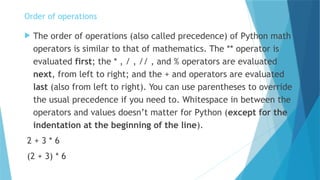
 The order of operations (also called precedence) of Python math
operators is similar to that of mathematics. The ** operator is
evaluated first; the * , / , // , and % operators are evaluated
next, from left to right; and the + and operators are evaluated
last (also from left to right). You can use parentheses to override
the usual precedence if you need to. Whitespace in between the
operators and values doesn’t matter for Python (except for the
indentation at the beginning of the line).
2 + 3 * 6
(2 + 3) * 6
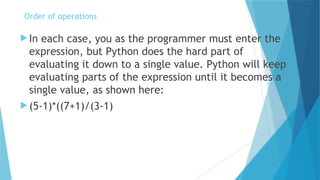
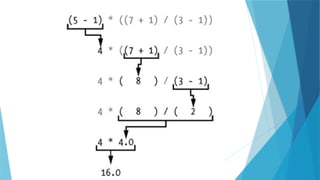
 In each case, you as the programmer must enter the
expression, but Python does the hard part of
evaluating it down to a single value. Python will keep
evaluating parts of the expression until it becomes a
single value, as shown here:
 (5-1)*((7+1)/(3-1)
Order of operations
How Do You Write Comments?
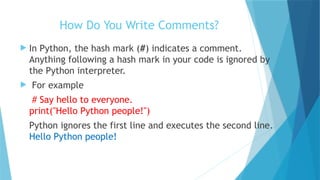
 In Python, the hash mark (#) indicates a comment.
Anything following a hash mark in your code is ignored by
the Python interpreter.
 For example
# Say hello to everyone.
print("Hello Python people!")
Python ignores the first line and executes the second line.
Hello Python people!
What Kinds of Comments Should You Write?
 The main reason to write comments is to explain what your
code is supposed to do and how you are making it work.
When you’re in the middle of working on a project, you
understand how all of the pieces fit together. But when you
return to a project after some time away, you’ll likely have
forgotten some of the details.
 You can always study your code for a while and figure out how
segments were supposed to work, but writing good comments
can save you time by summarizing your overall approach
clearly.
 If you want to become a professional programmer or
collaborate with other programmers, you should write
meaningful comments. Today, most software is written
collaboratively, whether by a group of employees at one
company or a group of people working together on an open
source project.
 Skilled programmers expect to see comments in code, so it’s
best to start adding descriptive comments to your programs
now. Writing clear, concise comments in your code is one of
the most beneficial habits you can form as a new
programmer.
What Kinds of Comments Should You Write?
Multi-Line comment
 In Python, you can write multiple lines of
comments using triple quotes (""" for multi-line
strings).
 Here's an example:
""" This is a multi-line comment that spans
multiple lines. It is enclosed in triple quotes."""
PYTHON Rules - Introduction to Python .pptx

  • 1.
    Naming and UsingVariables  When you’re using variables in Python, you need to adhere to a few rules and guidelines.  Breaking some of these rules will cause errors.  Be sure to keep the following rules in mind when working with variables: 1. Variable names can contain only letters, numbers, and underscores. They can start with a letter or an underscore, but not with a number. For instance, you can call a variable message_1 but not 1_message. 2. Spaces are not allowed in variable names, but underscores can be used to separate words in variable names. For example, greeting_message works but greeting message will cause errors.
  • 2.
    Naming and UsingVariables 3. Avoid using Python keywords and function names as variable names. For example, do not use the word print as a variable name; Python has reserved it for a particular programmatic purpose. 4. Variable names should be short but descriptive. For example, name is better than n, student_name is better than s_n, and name_length is better than length_of_persons_name. Note: The Python variables you’re using at this point should be lowercase. You won’t get errors if you use uppercase letters, but uppercase letters in variable names have special meanings that we’ll discuss in later chapters
  • 3.
    Strings  The firstdata type we’ll look at is the string. Strings are quite simple at first glance, but you can use them in many different ways.  A string is a series of characters. Anything inside quotes is considered a string in Python, and you can use single or double quotes around your strings like this: "This is a string.“ 'This is also a string’.  This flexibility allows you to use quotes and apostrophes within your strings.
  • 4.
    Order of operations The order of operations (also called precedence) of Python math operators is similar to that of mathematics. The ** operator is evaluated first; the * , / , // , and % operators are evaluated next, from left to right; and the + and operators are evaluated last (also from left to right). You can use parentheses to override the usual precedence if you need to. Whitespace in between the operators and values doesn’t matter for Python (except for the indentation at the beginning of the line). 2 + 3 * 6 (2 + 3) * 6
  • 5.
     In eachcase, you as the programmer must enter the expression, but Python does the hard part of evaluating it down to a single value. Python will keep evaluating parts of the expression until it becomes a single value, as shown here:  (5-1)*((7+1)/(3-1) Order of operations
  • 7.
    How Do YouWrite Comments?  In Python, the hash mark (#) indicates a comment. Anything following a hash mark in your code is ignored by the Python interpreter.  For example # Say hello to everyone. print("Hello Python people!") Python ignores the first line and executes the second line. Hello Python people!
  • 8.
    What Kinds ofComments Should You Write?  The main reason to write comments is to explain what your code is supposed to do and how you are making it work. When you’re in the middle of working on a project, you understand how all of the pieces fit together. But when you return to a project after some time away, you’ll likely have forgotten some of the details.  You can always study your code for a while and figure out how segments were supposed to work, but writing good comments can save you time by summarizing your overall approach clearly.
  • 9.
     If youwant to become a professional programmer or collaborate with other programmers, you should write meaningful comments. Today, most software is written collaboratively, whether by a group of employees at one company or a group of people working together on an open source project.  Skilled programmers expect to see comments in code, so it’s best to start adding descriptive comments to your programs now. Writing clear, concise comments in your code is one of the most beneficial habits you can form as a new programmer. What Kinds of Comments Should You Write?
  • 10.
    Multi-Line comment  InPython, you can write multiple lines of comments using triple quotes (""" for multi-line strings).  Here's an example: """ This is a multi-line comment that spans multiple lines. It is enclosed in triple quotes."""