UNIT 2
DATA,
EXPRESSIONS,
STATEMENTS
Dr. S. SELVAKANMANI,
ASSOCIATE PROFESSOR,
DEPARTMENT OF CSE,
VELAMMAL I TECH
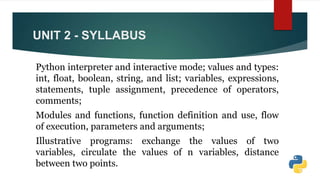
UNIT 2 - SYLLABUS
Python interpreter and interactive mode; values and types:
int, float, boolean, string, and list; variables, expressions,
statements, tuple assignment, precedence of operators,
comments;
Modules and functions, function definition and use, flow
of execution, parameters and arguments;
Illustrative programs: exchange the values of two
variables, circulate the values of n variables, distance
between two points.
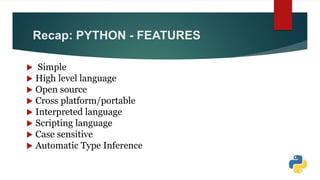
Recap: PYTHON - FEATURES
 Simple
 High level language
 Open source
 Cross platform/portable
 Interpreted language
 Scripting language
 Case sensitive
 Automatic Type Inference
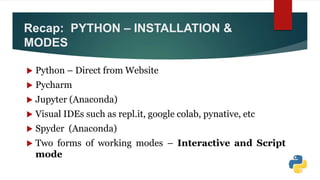
Recap: PYTHON – INSTALLATION &
MODES
 Python – Direct from Website
 Pycharm
 Jupyter (Anaconda)
 Visual IDEs such as repl.it, google colab, pynative, etc
 Spyder (Anaconda)
 Two forms of working modes – Interactive and Script
mode
Recap: PYTHON - SYNTAX
 Keywords
 Indents
 Statements
 Comments
 Input and Output
 Variable
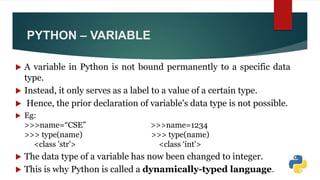
PYTHON – VARIABLE
 A variable in Python is not bound permanently to a specific data
type.
 Instead, it only serves as a label to a value of a certain type.
 Hence, the prior declaration of variable's data type is not possible.
 Eg:
>>>name=“CSE” >>>name=1234
>>> type(name) >>> type(name)
<class 'str'> <class ‘int'>
 The data type of a variable has now been changed to integer.
 This is why Python is called a dynamically-typed language.
PYTHON – VARIABLE : NAMING
CONVERSIONS
Any suitable identifier can be used as a name of a variable, based
on the following rules:
 The name of the variable should start with either an alphabet
letter (lower or upper case) or an underscore (_), but it cannot
start with a digit.
 More than one alpha-numeric characters or underscores may
follow.
 The variable name can consist of alphabet letter(s), number(s)
and underscore(s) only.
PYTHON – VARIABLE : NAMING
CONVERSIONS
 For example, myVar, MyVar, _myVar, MyVar123 are valid
variable names but m*var, my-var, 1myVar are invalid variable
names.
 Identifiers in Python are case sensitive.
 So, NAME, name, nAME, and nAmE are treated as different
variable names.
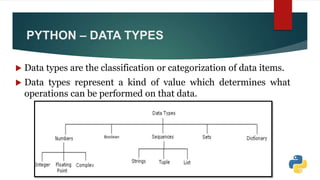
PYTHON – DATA TYPES
 Data types are the classification or categorization of data items.
 Data types represent a kind of value which determines what
operations can be performed on that data.
PYTHON – DATA TYPES
Contd…
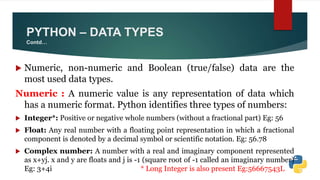
 Numeric, non-numeric and Boolean (true/false) data are the
most used data types.
Numeric : A numeric value is any representation of data which
has a numeric format. Python identifies three types of numbers:
 Integer*: Positive or negative whole numbers (without a fractional part) Eg: 56
 Float: Any real number with a floating point representation in which a fractional
component is denoted by a decimal symbol or scientific notation. Eg: 56.78
 Complex number: A number with a real and imaginary component represented
as x+yj. x and y are floats and j is -1 (square root of -1 called an imaginary number)
Eg: 3+4i * Long Integer is also present Eg:56667543L
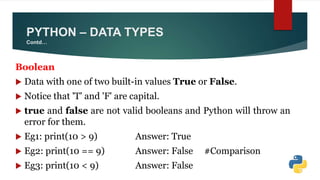
Boolean
 Data with one of two built-in values True or False.
 Notice that 'T' and 'F' are capital.
 true and false are not valid booleans and Python will throw an
error for them.
 Eg1: print(10 > 9) Answer: True
 Eg2: print(10 == 9) Answer: False #Comparison
 Eg3: print(10 < 9) Answer: False
PYTHON – DATA TYPES
Contd…
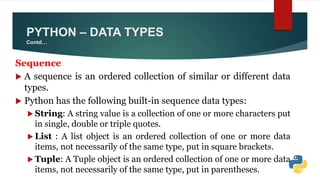
Sequence
 A sequence is an ordered collection of similar or different data
types.
 Python has the following built-in sequence data types:
 String: A string value is a collection of one or more characters put
in single, double or triple quotes.
 List : A list object is an ordered collection of one or more data
items, not necessarily of the same type, put in square brackets.
 Tuple: A Tuple object is an ordered collection of one or more data
items, not necessarily of the same type, put in parentheses.
PYTHON – DATA TYPES
Contd…
Dictionary
 A dictionary object is an unordered collection of data in a
key:value pair form.
 A collection of such pairs is enclosed in curly brackets.
 For example: {1:"Steve", 2:"Bill", 3:"Ram", 4: "Faizal"}
type() function
 Python has an in-built function type() to ascertain the data type of a
certain value.
 For example, enter type(1234) in Python shell and it will
return <class 'int'>, which means 1234 is an integer value.
PYTHON – DATA TYPES
Contd…
Mutable and Immutable Objects
 Data objects of the above types are stored in a computer's memory
for processing.
 Some of these values can be modified during processing, but
contents of others can't be altered once they are created in the
memory.
 Number values, strings, and tuple are immutable, which means their
contents can't be altered after creation.
 Whereas, collection of items in a List or Dictionary object can be
modified. It is possible to add, delete, insert, and rearrange items in a
list or dictionary. Hence, they are mutable objects.
PYTHON – DATA TYPES
Contd…
 Python includes three numeric types to represent numbers:
integer, float, and complex.
Integer:
 Zero, positive and negative whole numbers without a fractional
part and having unlimited precision, e.g. 1234, 0, -456.
Float:
 Positive and negative real numbers with a fractional part
denoted by the decimal symbol or the scientific notation using E
or e, e.g. 1234.56, 3.142, -1.55, 0.23.
PYTHON – NUMBER TYPES
Contd…
 Scientific notation is used as a short representation to express
floats having many digits.
For example:
 345600000000 is represented as 3.456e11 or 3.456E11
 345.56789 is represented as 3.4556789e2 or 3.4556789E2
Complex:
 A complex number is a number with real and imaginary
components.
 For example, 5 + 6j is a complex number where 5 is the real
component and 6 multiplied by j is an imaginary component.
 Examples: 1+2j, 10-5.5J, 5.55+2.33j, 3.11e-6+4j
PYTHON – NUMBER TYPES
Contd…
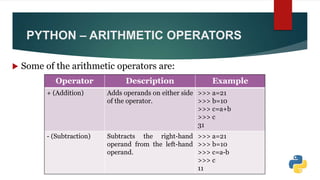
 Some of the arithmetic operators are:
PYTHON – ARITHMETIC OPERATORS
Operator Description Example
+ (Addition) Adds operands on either side
of the operator.
>>> a=21
>>> b=10
>>> c=a+b
>>> c
31
- (Subtraction) Subtracts the right-hand
operand from the left-hand
operand.
>>> a=21
>>> b=10
>>> c=a-b
>>> c
11
PYTHON – ARITHMETIC OPERATORS
Contd..
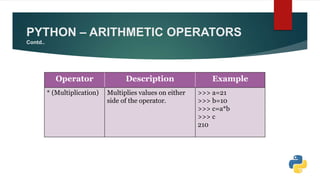
Operator Description Example
* (Multiplication) Multiplies values on either
side of the operator.
>>> a=21
>>> b=10
>>> c=a*b
>>> c
210
PYTHON – ARITHMETIC OPERATORS
Contd..
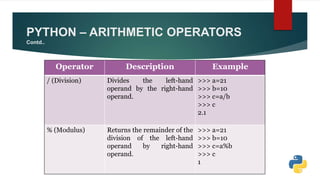
Operator Description Example
/ (Division) Divides the left-hand
operand by the right-hand
operand.
>>> a=21
>>> b=10
>>> c=a/b
>>> c
2.1
% (Modulus) Returns the remainder of the
division of the left-hand
operand by right-hand
operand.
>>> a=21
>>> b=10
>>> c=a%b
>>> c
1
PYTHON – ARITHMETIC OPERATORS
Contd..
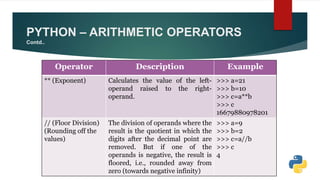
Operator Description Example
** (Exponent) Calculates the value of the left-
operand raised to the right-
operand.
>>> a=21
>>> b=10
>>> c=a**b
>>> c
16679880978201
// (Floor Division)
(Rounding off the
values)
The division of operands where the
result is the quotient in which the
digits after the decimal point are
removed. But if one of the
operands is negative, the result is
floored, i.e., rounded away from
zero (towards negative infinity)
>>> a=9
>>> b=2
>>> c=a//b
>>> c
4
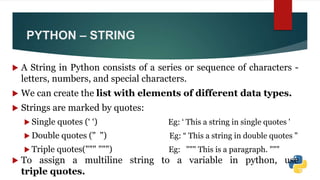
 A String in Python consists of a series or sequence of characters -
letters, numbers, and special characters.
 We can create the list with elements of different data types.
 Strings are marked by quotes:
 Single quotes (‘ ‘) Eg: ‘ This a string in single quotes '
 Double quotes (" ") Eg: “ This a string in double quotes "
 Triple quotes(""" """) Eg: """ This is a paragraph. """
 To assign a multiline string to a variable in python, use
triple quotes.
PYTHON – STRING
 A sequence is defined as an ordered collection of element. Hence, a
string is an ordered collection of characters.
 The sequence uses an index (starting with zero) to fetch a certain
element (a character in case of a string) from it.
 >>> String1='hello'
>>> String1[0]
'h'
>>> String1[1]
'e'
>>> String1[4]
'o'
PYTHON – STRING
Contd…
 Remember: The string is an immutable object.
 Hence, it is not possible to modify it. The attempt to assign
different characters at a certain index results in errors.
 Eg:
>>>String1[1]='a'
TypeError: 'str' object does not support item assignment
 String Operators: Arithmetic operators don't operate on strings.
 However, there are special operators for string processing.
PYTHON – STRING
Contd…
PYTHON – STRING OPERATORS
Operator Description Example
+
[Concatenation]
Appends the second string to
the first
>>> a='hello'
>>> b='world'
>>> a+b
'helloworld'
*
[Repetition]
Concatenates multiple copies of
the same string
>>> a='hello'
>>> a*3
'hellohellohello'
PYTHON – STRING OPERATORS
Contd…
Operator Description Example
[ ]
Indexing
Returns the character at the
given index
>>> a = 'Python Tutorials'
>>> a[7]
T
[ : ]
Slicing
Fetches the characters in
the range specified by two
index operands separated
by the : symbol
>>> a = 'Python Tutorials'
>>> a[7:15]
'Tutorial'
PYTHON – STRING OPERATORS
Contd…
Operator Description Example
in
[Membership
Operator]
Returns true if a character
exists in the given string
>>> a = 'Python Tutorials'
>>> 'X' in a
False
>>> 'Python' in a
True
>>> 'python' in a
False
not in
[Membership
Operator]
Returns true if a character
does not exist in the given
string
>>> a = 'Python Tutorials'
>>> 'X' not in a
True
>>> 'Python' not in a
False
PYTHON – LIST
 In Python, the list is a collection of elements of different data
types. It is an ordered sequence of elements.
 A list object contains one or more elements, not necessarily of
the same type, which are separated by comma and enclosed in
square brackets [].
 Syntax:
list = [value1, value2, value3,...valueN]
 Eg: a = [1,2,3,4]
PYTHON – LIST
Contd…
 The following declares a list type variable.
>>> names=["Jeff", "Bill", "Steve", "Mohan"]
 A list can also contain elements of different types.
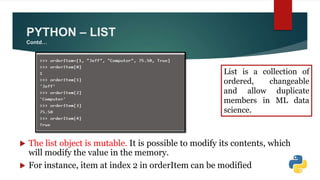
>>> orderItem=[1, "Jeff", "Computer", 75.50, True]
 The above list orderItem includes five elements. Each
individual element in the sequence is accessed by the index in
the square brackets [].
 W.K.T An index starts with “zero”.
PYTHON – LIST
Contd…
 The list object is mutable. It is possible to modify its contents, which
will modify the value in the memory.
 For instance, item at index 2 in orderItem can be modified
List is a collection of
ordered, changeable
and allow duplicate
members in ML data
science.
PYTHON – LIST
Contd…
 It will throw an error "index out of range" if the element at the
specified index does not exist.
 Lists are generally used to store homogenous collections, i.e.
items of similar types.
Eg: >>> languages=['Python', 'Java', 'C#', 'PHP']
>>> temperatures=[56, 65, 78]
PYTHON – LIST
Contd…
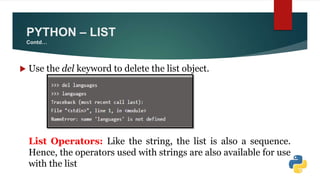
 Use the del keyword to delete the list object.
List Operators: Like the string, the list is also a sequence.
Hence, the operators used with strings are also available for use
with the list
PYTHON – LIST OPERATORS
Operator Description Example
+
[Concatenation]
Returns a list containing all the
elements of the first and the
second list.
>>> L1=[1,2,3]
>>> L2=[4,5,6]
>>> L1+L2
[1, 2, 3, 4, 5, 6]
*
[Repetition]
Concatenates multiple copies of
the same list.
>>> L1*4
[1, 2, 3, 1, 2, 3, 1,
2, 3, 1, 2, 3]
PYTHON – LIST OPERATORS Contd…
Operator Description Example
[ ]
Indexing
Returns the character at the given
index
>>> a = 'Python
Tutorials'
>>> a[7]
T
[ : ]
Slicing
Fetches items in the range specified
by the two index operands separated
by : symbol.
If the first operand is omitted, the
range starts from the zero index. If
the second operand is omitted, the
range goes up to the end of the list.
>>> L1=[1, 2, 3, 4, 5, 6]
>>> L1[1:4]
[2, 3, 4]
>>> L1[3:]
[4, 5, 6]
>>> L1[:3]
[1, 2, 3]
PYTHON – LIST OPERATORS Contd…
Operator Description Example
in
[Membership
Operator]
Returns true if an item exists
in the given list.
>>> L1=[1, 2, 3, 4, 5, 6]
>>> 4 in L1
True
>>> 10 in L1
False
not in
[Membership
Operator]
Returns true if an item does
not exist in the given list.
>>> L1=[1, 2, 3, 4, 5, 6]
>>> 5 not in L1
False
>>> 10 not in L1
True
PYTHON – LIST - BUILT – IN METHODS
Operator Description Example
len()
The len() method returns the
number of elements in the
list.
>>> L1=[1, 2, 3, 4, 5, 6]
>>> len(L1)
6
max() The max() method returns
the largest number, if the list
contains numbers.
If the list contains strings,
the one that comes last in
alphabetical order will be
returned.
>>> L1=[12,45,43,8,35]
>>> max(L1)
45
>>> L2=['Python', 'Java',
'C++']
>>> max(L2)
'Python'
PYTHON – LIST BUILT – IN METHODS
Contd…
Operator Description Example
min()
The min() method returns the
smallest number, if the list
contains numbers.
If the list contains strings, the one
that comes first in alphabetical
order will be returned.
>>> L1=[12, 45, 43, 8, 35]
>>> min(L1)
8
>>> L2=['Python', 'Java',
'C++']
>>> min(L2)
'C++'
append() Adds an item at the end of the list. >>> L2=['Python', 'Java',
'C++']
>>> L2.append('PHP')
>>> L2
['Python', 'Java', 'C++', 'PHP']
PYTHON – LIST BUILT – IN METHODS
Contd…
Operator Description Example
insert()
Inserts an item in a list at the
specified index.
>>> L2=['Python', 'Java', 'C++']
>>> L2.insert(1,'Perl')
>>> L2
['Python', 'Perl', 'Java', 'C++']
remove() Removes a specified object
from the list.
>>> L2=['Python', 'Perl', 'Java', 'C++']
>>> L2.remove('Java')
>>> L2
['Python', 'Perl', 'C++‘]
pop() Removes and returns the last
object in the list.
>>> L2=['Python', 'Perl', 'Java', 'C++']
>>> L2.pop()
'C++'
>>> L2
['Python', 'Perl', 'Java']
PYTHON – LIST BUILT – IN METHODS
Contd…
Operator Description Example
reverse()
Reverses the order of the
items in a list.
>>> L2=['Python', 'Perl', 'Java', 'C++']
>>> L2.reverse()
>>> L2
['C++', 'Java', 'Perl', 'Python']
sort() Rearranges the items in the
list according to the
alphabetical order. Default is
the ascending order. For
descending order,
put reverse=True as an
argument in the function
bracket.
>>> L2=['Python', 'C++', 'Java', 'Ruby']
>>> L2.sort()
>>> L2
['C++', 'Java', 'Python', 'Ruby']
>>> L2.sort(reverse=True)
>>> L2
['Ruby', 'Python', 'Java', 'C++']
ANY
QUERIES???
THANK
YOU

Python PPT2

  • 1.
    UNIT 2 DATA, EXPRESSIONS, STATEMENTS Dr. S.SELVAKANMANI, ASSOCIATE PROFESSOR, DEPARTMENT OF CSE, VELAMMAL I TECH
  • 2.
    UNIT 2 -SYLLABUS Python interpreter and interactive mode; values and types: int, float, boolean, string, and list; variables, expressions, statements, tuple assignment, precedence of operators, comments; Modules and functions, function definition and use, flow of execution, parameters and arguments; Illustrative programs: exchange the values of two variables, circulate the values of n variables, distance between two points.
  • 3.
    Recap: PYTHON -FEATURES  Simple  High level language  Open source  Cross platform/portable  Interpreted language  Scripting language  Case sensitive  Automatic Type Inference
  • 4.
    Recap: PYTHON –INSTALLATION & MODES  Python – Direct from Website  Pycharm  Jupyter (Anaconda)  Visual IDEs such as repl.it, google colab, pynative, etc  Spyder (Anaconda)  Two forms of working modes – Interactive and Script mode
  • 5.
    Recap: PYTHON -SYNTAX  Keywords  Indents  Statements  Comments  Input and Output  Variable
  • 6.
    PYTHON – VARIABLE A variable in Python is not bound permanently to a specific data type.  Instead, it only serves as a label to a value of a certain type.  Hence, the prior declaration of variable's data type is not possible.  Eg: >>>name=“CSE” >>>name=1234 >>> type(name) >>> type(name) <class 'str'> <class ‘int'>  The data type of a variable has now been changed to integer.  This is why Python is called a dynamically-typed language.
  • 7.
    PYTHON – VARIABLE: NAMING CONVERSIONS Any suitable identifier can be used as a name of a variable, based on the following rules:  The name of the variable should start with either an alphabet letter (lower or upper case) or an underscore (_), but it cannot start with a digit.  More than one alpha-numeric characters or underscores may follow.  The variable name can consist of alphabet letter(s), number(s) and underscore(s) only.
  • 8.
    PYTHON – VARIABLE: NAMING CONVERSIONS  For example, myVar, MyVar, _myVar, MyVar123 are valid variable names but m*var, my-var, 1myVar are invalid variable names.  Identifiers in Python are case sensitive.  So, NAME, name, nAME, and nAmE are treated as different variable names.
  • 9.
    PYTHON – DATATYPES  Data types are the classification or categorization of data items.  Data types represent a kind of value which determines what operations can be performed on that data.
  • 10.
    PYTHON – DATATYPES Contd…  Numeric, non-numeric and Boolean (true/false) data are the most used data types. Numeric : A numeric value is any representation of data which has a numeric format. Python identifies three types of numbers:  Integer*: Positive or negative whole numbers (without a fractional part) Eg: 56  Float: Any real number with a floating point representation in which a fractional component is denoted by a decimal symbol or scientific notation. Eg: 56.78  Complex number: A number with a real and imaginary component represented as x+yj. x and y are floats and j is -1 (square root of -1 called an imaginary number) Eg: 3+4i * Long Integer is also present Eg:56667543L
  • 11.
    Boolean  Data withone of two built-in values True or False.  Notice that 'T' and 'F' are capital.  true and false are not valid booleans and Python will throw an error for them.  Eg1: print(10 > 9) Answer: True  Eg2: print(10 == 9) Answer: False #Comparison  Eg3: print(10 < 9) Answer: False PYTHON – DATA TYPES Contd…
  • 12.
    Sequence  A sequenceis an ordered collection of similar or different data types.  Python has the following built-in sequence data types:  String: A string value is a collection of one or more characters put in single, double or triple quotes.  List : A list object is an ordered collection of one or more data items, not necessarily of the same type, put in square brackets.  Tuple: A Tuple object is an ordered collection of one or more data items, not necessarily of the same type, put in parentheses. PYTHON – DATA TYPES Contd…
  • 13.
    Dictionary  A dictionaryobject is an unordered collection of data in a key:value pair form.  A collection of such pairs is enclosed in curly brackets.  For example: {1:"Steve", 2:"Bill", 3:"Ram", 4: "Faizal"} type() function  Python has an in-built function type() to ascertain the data type of a certain value.  For example, enter type(1234) in Python shell and it will return <class 'int'>, which means 1234 is an integer value. PYTHON – DATA TYPES Contd…
  • 14.
    Mutable and ImmutableObjects  Data objects of the above types are stored in a computer's memory for processing.  Some of these values can be modified during processing, but contents of others can't be altered once they are created in the memory.  Number values, strings, and tuple are immutable, which means their contents can't be altered after creation.  Whereas, collection of items in a List or Dictionary object can be modified. It is possible to add, delete, insert, and rearrange items in a list or dictionary. Hence, they are mutable objects. PYTHON – DATA TYPES Contd…
  • 15.
     Python includesthree numeric types to represent numbers: integer, float, and complex. Integer:  Zero, positive and negative whole numbers without a fractional part and having unlimited precision, e.g. 1234, 0, -456. Float:  Positive and negative real numbers with a fractional part denoted by the decimal symbol or the scientific notation using E or e, e.g. 1234.56, 3.142, -1.55, 0.23. PYTHON – NUMBER TYPES Contd…
  • 16.
     Scientific notationis used as a short representation to express floats having many digits. For example:  345600000000 is represented as 3.456e11 or 3.456E11  345.56789 is represented as 3.4556789e2 or 3.4556789E2 Complex:  A complex number is a number with real and imaginary components.  For example, 5 + 6j is a complex number where 5 is the real component and 6 multiplied by j is an imaginary component.  Examples: 1+2j, 10-5.5J, 5.55+2.33j, 3.11e-6+4j PYTHON – NUMBER TYPES Contd…
  • 17.
     Some ofthe arithmetic operators are: PYTHON – ARITHMETIC OPERATORS Operator Description Example + (Addition) Adds operands on either side of the operator. >>> a=21 >>> b=10 >>> c=a+b >>> c 31 - (Subtraction) Subtracts the right-hand operand from the left-hand operand. >>> a=21 >>> b=10 >>> c=a-b >>> c 11
  • 18.
    PYTHON – ARITHMETICOPERATORS Contd.. Operator Description Example * (Multiplication) Multiplies values on either side of the operator. >>> a=21 >>> b=10 >>> c=a*b >>> c 210
  • 19.
    PYTHON – ARITHMETICOPERATORS Contd.. Operator Description Example / (Division) Divides the left-hand operand by the right-hand operand. >>> a=21 >>> b=10 >>> c=a/b >>> c 2.1 % (Modulus) Returns the remainder of the division of the left-hand operand by right-hand operand. >>> a=21 >>> b=10 >>> c=a%b >>> c 1
  • 20.
    PYTHON – ARITHMETICOPERATORS Contd.. Operator Description Example ** (Exponent) Calculates the value of the left- operand raised to the right- operand. >>> a=21 >>> b=10 >>> c=a**b >>> c 16679880978201 // (Floor Division) (Rounding off the values) The division of operands where the result is the quotient in which the digits after the decimal point are removed. But if one of the operands is negative, the result is floored, i.e., rounded away from zero (towards negative infinity) >>> a=9 >>> b=2 >>> c=a//b >>> c 4
  • 21.
     A Stringin Python consists of a series or sequence of characters - letters, numbers, and special characters.  We can create the list with elements of different data types.  Strings are marked by quotes:  Single quotes (‘ ‘) Eg: ‘ This a string in single quotes '  Double quotes (" ") Eg: “ This a string in double quotes "  Triple quotes(""" """) Eg: """ This is a paragraph. """  To assign a multiline string to a variable in python, use triple quotes. PYTHON – STRING
  • 22.
     A sequenceis defined as an ordered collection of element. Hence, a string is an ordered collection of characters.  The sequence uses an index (starting with zero) to fetch a certain element (a character in case of a string) from it.  >>> String1='hello' >>> String1[0] 'h' >>> String1[1] 'e' >>> String1[4] 'o' PYTHON – STRING Contd…
  • 23.
     Remember: Thestring is an immutable object.  Hence, it is not possible to modify it. The attempt to assign different characters at a certain index results in errors.  Eg: >>>String1[1]='a' TypeError: 'str' object does not support item assignment  String Operators: Arithmetic operators don't operate on strings.  However, there are special operators for string processing. PYTHON – STRING Contd…
  • 24.
    PYTHON – STRINGOPERATORS Operator Description Example + [Concatenation] Appends the second string to the first >>> a='hello' >>> b='world' >>> a+b 'helloworld' * [Repetition] Concatenates multiple copies of the same string >>> a='hello' >>> a*3 'hellohellohello'
  • 25.
    PYTHON – STRINGOPERATORS Contd… Operator Description Example [ ] Indexing Returns the character at the given index >>> a = 'Python Tutorials' >>> a[7] T [ : ] Slicing Fetches the characters in the range specified by two index operands separated by the : symbol >>> a = 'Python Tutorials' >>> a[7:15] 'Tutorial'
  • 26.
    PYTHON – STRINGOPERATORS Contd… Operator Description Example in [Membership Operator] Returns true if a character exists in the given string >>> a = 'Python Tutorials' >>> 'X' in a False >>> 'Python' in a True >>> 'python' in a False not in [Membership Operator] Returns true if a character does not exist in the given string >>> a = 'Python Tutorials' >>> 'X' not in a True >>> 'Python' not in a False
  • 27.
    PYTHON – LIST In Python, the list is a collection of elements of different data types. It is an ordered sequence of elements.  A list object contains one or more elements, not necessarily of the same type, which are separated by comma and enclosed in square brackets [].  Syntax: list = [value1, value2, value3,...valueN]  Eg: a = [1,2,3,4]
  • 28.
    PYTHON – LIST Contd… The following declares a list type variable. >>> names=["Jeff", "Bill", "Steve", "Mohan"]  A list can also contain elements of different types. >>> orderItem=[1, "Jeff", "Computer", 75.50, True]  The above list orderItem includes five elements. Each individual element in the sequence is accessed by the index in the square brackets [].  W.K.T An index starts with “zero”.
  • 29.
    PYTHON – LIST Contd… The list object is mutable. It is possible to modify its contents, which will modify the value in the memory.  For instance, item at index 2 in orderItem can be modified List is a collection of ordered, changeable and allow duplicate members in ML data science.
  • 30.
    PYTHON – LIST Contd… It will throw an error "index out of range" if the element at the specified index does not exist.  Lists are generally used to store homogenous collections, i.e. items of similar types. Eg: >>> languages=['Python', 'Java', 'C#', 'PHP'] >>> temperatures=[56, 65, 78]
  • 31.
    PYTHON – LIST Contd… Use the del keyword to delete the list object. List Operators: Like the string, the list is also a sequence. Hence, the operators used with strings are also available for use with the list
  • 32.
    PYTHON – LISTOPERATORS Operator Description Example + [Concatenation] Returns a list containing all the elements of the first and the second list. >>> L1=[1,2,3] >>> L2=[4,5,6] >>> L1+L2 [1, 2, 3, 4, 5, 6] * [Repetition] Concatenates multiple copies of the same list. >>> L1*4 [1, 2, 3, 1, 2, 3, 1, 2, 3, 1, 2, 3]
  • 33.
    PYTHON – LISTOPERATORS Contd… Operator Description Example [ ] Indexing Returns the character at the given index >>> a = 'Python Tutorials' >>> a[7] T [ : ] Slicing Fetches items in the range specified by the two index operands separated by : symbol. If the first operand is omitted, the range starts from the zero index. If the second operand is omitted, the range goes up to the end of the list. >>> L1=[1, 2, 3, 4, 5, 6] >>> L1[1:4] [2, 3, 4] >>> L1[3:] [4, 5, 6] >>> L1[:3] [1, 2, 3]
  • 34.
    PYTHON – LISTOPERATORS Contd… Operator Description Example in [Membership Operator] Returns true if an item exists in the given list. >>> L1=[1, 2, 3, 4, 5, 6] >>> 4 in L1 True >>> 10 in L1 False not in [Membership Operator] Returns true if an item does not exist in the given list. >>> L1=[1, 2, 3, 4, 5, 6] >>> 5 not in L1 False >>> 10 not in L1 True
  • 35.
    PYTHON – LIST- BUILT – IN METHODS Operator Description Example len() The len() method returns the number of elements in the list. >>> L1=[1, 2, 3, 4, 5, 6] >>> len(L1) 6 max() The max() method returns the largest number, if the list contains numbers. If the list contains strings, the one that comes last in alphabetical order will be returned. >>> L1=[12,45,43,8,35] >>> max(L1) 45 >>> L2=['Python', 'Java', 'C++'] >>> max(L2) 'Python'
  • 36.
    PYTHON – LISTBUILT – IN METHODS Contd… Operator Description Example min() The min() method returns the smallest number, if the list contains numbers. If the list contains strings, the one that comes first in alphabetical order will be returned. >>> L1=[12, 45, 43, 8, 35] >>> min(L1) 8 >>> L2=['Python', 'Java', 'C++'] >>> min(L2) 'C++' append() Adds an item at the end of the list. >>> L2=['Python', 'Java', 'C++'] >>> L2.append('PHP') >>> L2 ['Python', 'Java', 'C++', 'PHP']
  • 37.
    PYTHON – LISTBUILT – IN METHODS Contd… Operator Description Example insert() Inserts an item in a list at the specified index. >>> L2=['Python', 'Java', 'C++'] >>> L2.insert(1,'Perl') >>> L2 ['Python', 'Perl', 'Java', 'C++'] remove() Removes a specified object from the list. >>> L2=['Python', 'Perl', 'Java', 'C++'] >>> L2.remove('Java') >>> L2 ['Python', 'Perl', 'C++‘] pop() Removes and returns the last object in the list. >>> L2=['Python', 'Perl', 'Java', 'C++'] >>> L2.pop() 'C++' >>> L2 ['Python', 'Perl', 'Java']
  • 38.
    PYTHON – LISTBUILT – IN METHODS Contd… Operator Description Example reverse() Reverses the order of the items in a list. >>> L2=['Python', 'Perl', 'Java', 'C++'] >>> L2.reverse() >>> L2 ['C++', 'Java', 'Perl', 'Python'] sort() Rearranges the items in the list according to the alphabetical order. Default is the ascending order. For descending order, put reverse=True as an argument in the function bracket. >>> L2=['Python', 'C++', 'Java', 'Ruby'] >>> L2.sort() >>> L2 ['C++', 'Java', 'Python', 'Ruby'] >>> L2.sort(reverse=True) >>> L2 ['Ruby', 'Python', 'Java', 'C++']
  • 39.
  • 40.