An Introduction To Software
Development Using Python
Spring Semester, 2015
Class #22:
Dictionaries
What Is A Dictionary?
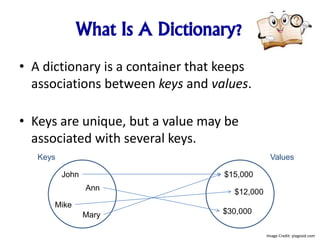
• A dictionary is a container that keeps
associations between keys and values.
• Keys are unique, but a value may be
associated with several keys.
John
Mike
Ann
Mary
$15,000
$12,000
$30,000
Keys Values
Image Credit: pixgood.com
What Is A Dictionary?
• The dictionary structure is also known as a
map because it maps a unique key to a value.
• It stores the keys, values, and the associations
between them.
Image Credit: www.clipartpanda.com
Creating Dictionaries
• Each key/value pair is separated by a colon.
• You enclose the key/value pairs in braces,
just as you would when forming a set.
• When the braces contain key/value pairs, they
denote a dictionary, not a set.
• The only ambiguous case is an empty {}. By convention, it denotes an
empty dictionary, not an empty set.
• You can create a duplicate copy of a dictionary using the dict function:
oldSalaries = dict(salaries)
salaries = { “John": 15000, “Ann": 30000, “Mike": 12000, “Mary": 15000 }
Image Credit: www.clipartpal.com
Accessing Dictionary Values
• The subscript operator [] is used to return the value associated with a key.
• The statement:
print(“Ann’s salary is", salaries[“Ann"])
prints 30000
• Note that the dictionary is not a sequence-type container like a list.
• Even though the subscript operator is used with a dictionary, you cannot
access the items by index or position.
• A value can only be accessed using its associated key
Image Credit: www.clker.com
Searching For Keys
• The key supplied to the subscript operator must be a valid key
in the dictionary or a KeyError exception will be raised.
• To find out whether a key is present in the dictionary, use the
in (or not in) operator:
if “Ann" in salaries :
print(“Ann’s salary is", salaries[“Ann”])
else :
print(“Ann’s salary is not in my list.”)
Image Credit: www.clipartpanda.com
Default Value
• Often, you want to use a default value if a key is not present.
For example, if there is no salary for Mike, you want to get an
average salary instead.
• Instead of using the in operator, you can simply call the get
method and pass the key and a default value. The default
value is returned if there is no matching key.
number = salaries.get(“Mike", 17000)
print(“Salary: " + number)
Image Credit: www.clker.com
Adding and Modifying Items
• You can change a dictionary’s contents after it has been
created.
• You can add a new item using the subscript operator [] much
as you would with a list:
salaries["Lisa"] = 25000
• To change the value associated with a given key, set a new
value using the [] operator on an existing key:
salaries["Lisa"] = 17000
Image Credit: www.articulate.com
Another Way To Create
A Dictionary
• Sometimes you may not know which items will be contained
in the dictionary when it’s created.
• You can create an empty dictionary like this:
salaries = {}
• and add new items as needed:
salaries["John"] = 15000
salaries["Ann"] = 30000
salaries["Mike"] = 12000
salaries["Mary"] = 15000
Image Credit: www.clipartof.com
Removing Items
• To remove an item from a dictionary, call the pop method
with the key as the argument:
salaries.pop(“Mike")
• This removes the entire item, both the key and its associated
value.
• The pop method returns the value of the item being removed,
so you can use it or store it in a variable:
mikesSalary = salaries.pop(“Mike")
Image Credit: imgbuddy.com
Avoiding Removal Errors
• If the key is not in the dictionary, the pop method raises a
KeyError exception.
• To prevent the exception from being raised, you can test for
the key in the dictionary:
if "Mike" in salaries :
contacts.pop("Mike")
Image Credit: pixabay.com
Traversing a Dictionary
• You can iterate over the individual keys in a dictionary using a
for loop:
print(“Salaries:")
for key in salaries :
print(key)
• The result of this code fragment is shown below:
Salaries:
John
Ann
Mike
Mary
• Note that the dictionary stores its items in an order that is optimized for
efficiency, which may not be the order in which they were added.
Image Credit: tebelrpg.wordpress.com
Different Ways Of Doing
The Same Thing
• Lists
– prerequisites = [“COP 2271c”, “Introduction to Computation
and Programming”, 3]
– print(values[5]) # Prints the element at index 5
• Sets
– cheesePizza = {“Creamy garlic”, “Parmesan sauce”,
“Cheese”, “Toasted Parmesan”}
– if "Toasted Parmesan" in cheesePizza :
• Dictionaries
– salaries = {"John": 15000, "Ann": 30000, "Mike": 12000,
"Mary": 15000 }
– print("Ann’s salary is", salaries["Ann"])
Image Credit: www.clipartillustration.com
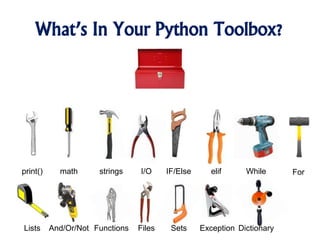
What’s In Your Python Toolbox?
print() math strings I/O IF/Else elif While For
DictionaryLists And/Or/Not Functions Files ExceptionSets
What We Covered Today
1. Creating Dictionaries
2. Accessing Dictionaries
3. Searching Dictionaries
4. Removing Items
Image Credit: http://www.tswdj.com/blog/2011/05/17/the-grooms-checklist/
What We’ll Be Covering Next Time
1. External Libraries
Image Credit: http://merchantblog.thefind.com/2011/01/merchant-newsletter/resolve-to-take-advantage-of-these-5-e-commerce-trends/attachment/crystal-ball-fullsize/

An Introduction To Python - Dictionaries

  • 1.
    An Introduction ToSoftware Development Using Python Spring Semester, 2015 Class #22: Dictionaries
  • 2.
    What Is ADictionary? • A dictionary is a container that keeps associations between keys and values. • Keys are unique, but a value may be associated with several keys. John Mike Ann Mary $15,000 $12,000 $30,000 Keys Values Image Credit: pixgood.com
  • 3.
    What Is ADictionary? • The dictionary structure is also known as a map because it maps a unique key to a value. • It stores the keys, values, and the associations between them. Image Credit: www.clipartpanda.com
  • 4.
    Creating Dictionaries • Eachkey/value pair is separated by a colon. • You enclose the key/value pairs in braces, just as you would when forming a set. • When the braces contain key/value pairs, they denote a dictionary, not a set. • The only ambiguous case is an empty {}. By convention, it denotes an empty dictionary, not an empty set. • You can create a duplicate copy of a dictionary using the dict function: oldSalaries = dict(salaries) salaries = { “John": 15000, “Ann": 30000, “Mike": 12000, “Mary": 15000 } Image Credit: www.clipartpal.com
  • 5.
    Accessing Dictionary Values •The subscript operator [] is used to return the value associated with a key. • The statement: print(“Ann’s salary is", salaries[“Ann"]) prints 30000 • Note that the dictionary is not a sequence-type container like a list. • Even though the subscript operator is used with a dictionary, you cannot access the items by index or position. • A value can only be accessed using its associated key Image Credit: www.clker.com
  • 6.
    Searching For Keys •The key supplied to the subscript operator must be a valid key in the dictionary or a KeyError exception will be raised. • To find out whether a key is present in the dictionary, use the in (or not in) operator: if “Ann" in salaries : print(“Ann’s salary is", salaries[“Ann”]) else : print(“Ann’s salary is not in my list.”) Image Credit: www.clipartpanda.com
  • 7.
    Default Value • Often,you want to use a default value if a key is not present. For example, if there is no salary for Mike, you want to get an average salary instead. • Instead of using the in operator, you can simply call the get method and pass the key and a default value. The default value is returned if there is no matching key. number = salaries.get(“Mike", 17000) print(“Salary: " + number) Image Credit: www.clker.com
  • 8.
    Adding and ModifyingItems • You can change a dictionary’s contents after it has been created. • You can add a new item using the subscript operator [] much as you would with a list: salaries["Lisa"] = 25000 • To change the value associated with a given key, set a new value using the [] operator on an existing key: salaries["Lisa"] = 17000 Image Credit: www.articulate.com
  • 9.
    Another Way ToCreate A Dictionary • Sometimes you may not know which items will be contained in the dictionary when it’s created. • You can create an empty dictionary like this: salaries = {} • and add new items as needed: salaries["John"] = 15000 salaries["Ann"] = 30000 salaries["Mike"] = 12000 salaries["Mary"] = 15000 Image Credit: www.clipartof.com
  • 10.
    Removing Items • Toremove an item from a dictionary, call the pop method with the key as the argument: salaries.pop(“Mike") • This removes the entire item, both the key and its associated value. • The pop method returns the value of the item being removed, so you can use it or store it in a variable: mikesSalary = salaries.pop(“Mike") Image Credit: imgbuddy.com
  • 11.
    Avoiding Removal Errors •If the key is not in the dictionary, the pop method raises a KeyError exception. • To prevent the exception from being raised, you can test for the key in the dictionary: if "Mike" in salaries : contacts.pop("Mike") Image Credit: pixabay.com
  • 12.
    Traversing a Dictionary •You can iterate over the individual keys in a dictionary using a for loop: print(“Salaries:") for key in salaries : print(key) • The result of this code fragment is shown below: Salaries: John Ann Mike Mary • Note that the dictionary stores its items in an order that is optimized for efficiency, which may not be the order in which they were added. Image Credit: tebelrpg.wordpress.com
  • 13.
    Different Ways OfDoing The Same Thing • Lists – prerequisites = [“COP 2271c”, “Introduction to Computation and Programming”, 3] – print(values[5]) # Prints the element at index 5 • Sets – cheesePizza = {“Creamy garlic”, “Parmesan sauce”, “Cheese”, “Toasted Parmesan”} – if "Toasted Parmesan" in cheesePizza : • Dictionaries – salaries = {"John": 15000, "Ann": 30000, "Mike": 12000, "Mary": 15000 } – print("Ann’s salary is", salaries["Ann"]) Image Credit: www.clipartillustration.com
  • 14.
    What’s In YourPython Toolbox? print() math strings I/O IF/Else elif While For DictionaryLists And/Or/Not Functions Files ExceptionSets
  • 15.
    What We CoveredToday 1. Creating Dictionaries 2. Accessing Dictionaries 3. Searching Dictionaries 4. Removing Items Image Credit: http://www.tswdj.com/blog/2011/05/17/the-grooms-checklist/
  • 16.
    What We’ll BeCovering Next Time 1. External Libraries Image Credit: http://merchantblog.thefind.com/2011/01/merchant-newsletter/resolve-to-take-advantage-of-these-5-e-commerce-trends/attachment/crystal-ball-fullsize/

Editor's Notes

  • #2 New name for the class I know what this means Technical professionals are who get hired This means much more than just having a narrow vertical knowledge of some subject area. It means that you know how to produce an outcome that I value. I’m willing to pay you to do that.