PUPPET MODULES:
                         A HOLISTIC APPROACH
                            PuppetCamp Geneva 2012

                              Alessandro Franceschi


Wednesday, July 11, 12
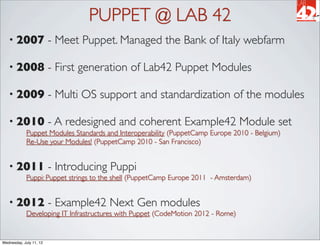
PUPPET @ LAB 42
   • 2007                - Meet Puppet. Managed the Bank of Italy webfarm

   • 2008                - First generation of Lab42 Puppet Modules

   • 2009                - Multi OS support and standardization of the modules

   • 2010                - A redesigned and coherent Example42 Module set
             Puppet Modules Standards and Interoperability (PuppetCamp Europe 2010 - Belgium)
             Re-Use your Modules! (PuppetCamp 2010 - San Francisco)


   • 2011                - Introducing Puppi
             Puppi: Puppet strings to the shell (PuppetCamp Europe 2011 - Amsterdam)


   • 2012                - Example42 Next Gen modules
             Developing IT Infrastructures with Puppet (CodeMotion 2012 - Rome)


Wednesday, July 11, 12
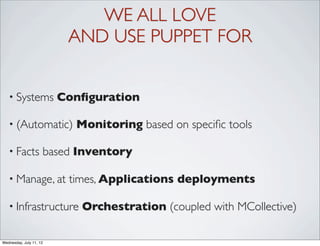
WE ALL LOVE
                          AND USE PUPPET FOR


   • Systems             Configuration

   • (Automatic)           Monitoring based on specific tools

   • Facts           based Inventory

   • Manage, at           times, Applications deployments

   • Infrastructure         Orchestration (coupled with MCollective)

Wednesday, July 11, 12
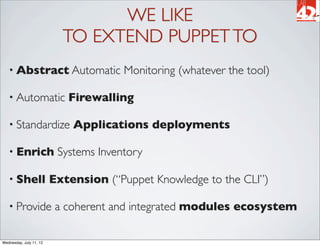
WE LIKE
                           TO EXTEND PUPPET TO
   • Abstract Automatic                Monitoring (whatever the tool)

   • Automatic              Firewalling

   • Standardize             Applications deployments

   • Enrich               Systems Inventory

   • Shell               Extension (“Puppet Knowledge to the CLI”)

   • Provide              a coherent and integrated modules ecosystem

Wednesday, July 11, 12
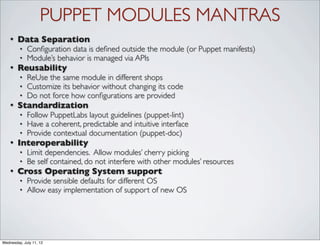
PUPPET MODULES MANTRAS
    •   Data Separation
         •   Configuration data is defined outside the module (or Puppet manifests)
         •   Module’s behavior is managed via APIs
    •   Reusability
         •   ReUse the same module in different shops
         •   Customize its behavior without changing its code
         •   Do not force how configurations are provided
    •   Standardization
         •   Follow PuppetLabs layout guidelines (puppet-lint)
         •   Have a coherent, predictable and intuitive interface
         •   Provide contextual documentation (puppet-doc)
    •   Interoperability
         •   Limit dependencies. Allow modules’ cherry picking
         •   Be self contained, do not interfere with other modules’ resources
    •   Cross Operating System support
         •   Provide sensible defaults for different OS
         •   Allow easy implementation of support of new OS


Wednesday, July 11, 12
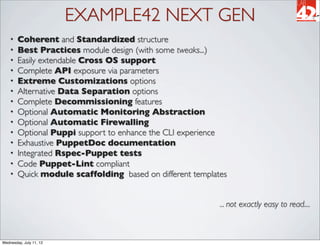
EXAMPLE42 NEXT GEN
    •   Coherent and Standardized structure
    •   Best Practices module design (with some tweaks...)
    •   Easily extendable Cross OS support
    •   Complete API exposure via parameters
    •   Extreme Customizations options
    •   Alternative Data Separation options
    •   Complete Decommissioning features
    •   Optional Automatic Monitoring Abstraction
    •   Optional Automatic Firewalling
    •   Optional Puppi support to enhance the CLI experience
    •   Exhaustive PuppetDoc documentation
    •   Integrated Rspec-Puppet tests
    •   Code Puppet-Lint compliant
    •   Quick module scaffolding based on different templates


                                                           ... not exactly easy to read....


Wednesday, July 11, 12
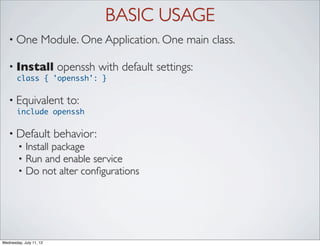
BASIC USAGE
   • One            Module. One Application. One main class.

   • Install             openssh with default settings:
       class { 'openssh': }

   • Equivalent            to:
       include openssh

   • Default             behavior:
        •   Install package
        •   Run and enable service
        •   Do not alter configurations


Wednesday, July 11, 12
DATA INPUT ALTERNATIVES
   • Set         (Top Scope/ENC) variables and include classes:
       $::openssh_template = 'site/openssh/openssh.conf.erb'
       include openssh


   • Use           Hiera:
       hiera(‘openssh_template’)
       include openssh


   • Use           Parametrized Classes:
       class { 'openssh':
          template => 'site/openssh/openssh.conf.erb',
       }

   • Happily             mix different patterns:
       $::monitor = true
       $::monitor_tool = [ 'nagios' , 'munin' , 'puppi' ]
       class { 'openssh':
          template => 'site/openssh/openssh.conf.erb',
       }
Wednesday, July 11, 12
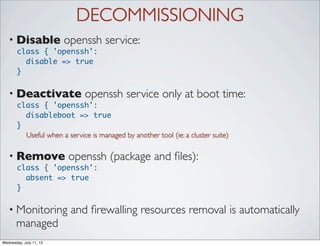
DECOMMISSIONING
   • Disable             openssh service:
       class { 'openssh':
         disable => true
       }


   • Deactivate               openssh service only at boot time:
       class { 'openssh':
         disableboot => true
       }
         Useful when a service is managed by another tool (ie: a cluster suite)

   • Remove              openssh (package and files):
       class { 'openssh':
         absent => true
       }

   • Monitoring           and firewalling resources removal is automatically
       managed
Wednesday, July 11, 12
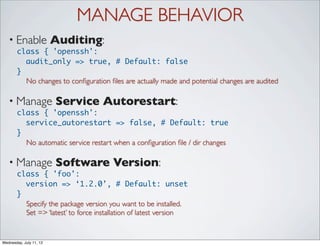
MANAGE BEHAVIOR
   • Enable              Auditing:
       class { 'openssh':
         audit_only => true, # Default: false
       }
         No changes to configuration files are actually made and potential changes are audited

   • Manage              Service Autorestart:
       class { 'openssh':
         service_autorestart => false, # Default: true
       }
         No automatic service restart when a configuration file / dir changes

   • Manage              Software Version:
       class { 'foo':
         version => ‘1.2.0’, # Default: unset
       }
         Specify the package version you want to be installed.
         Set => ‘latest’ to force installation of latest version


Wednesday, July 11, 12
CUSTOMIZE: CONFIGURATION FILE
   • Provide             Main Configuration as a static file ...
       class { 'openssh':
         source => ‘puppet:///modules/site/ssh/sshd.conf’,
       }

   • an        array of files looked up on a first match logic ...
       class { 'openssh':
         source => ["puppet:///modules/site/ssh/sshd.conf-${fqdn}",
                    "puppet:///modules/site/ssh/openssh.conf"],
       }

   • As        an erb template:
       class { 'openssh':
         template => ‘site/ssh/sshd.conf.erb’,
       }

   • Config               File Path is defined in params.pp (can be overriden):
            config_file = >’/etc/ssh/sshd_config’,

Wednesday, July 11, 12
CUSTOM OPTIONS
    •   With templates you can provide an hash of custom options:
          class { 'openssh':
            template => ‘site/ssh/sshd.conf.erb’,
            options => {
               'LogLevel' => 'INFO',
               'UsePAM'   => 'yes',
            },
          }

    •   Alternative ways to use the options hash in an erb template:
         •   Direct but not safe (you must always provide all the used options)
          UsePAM <%= options['UsePAM'] %>

         •   Failsafe with defaults (verbose but safe)
          <% if scope.lookupvar("openssh::options['UsePAM']") then -%>
          UsePAM <%= options['UsePAM'] %>
          <% else -%>
          UsePAM no
          <% end -%>

         •   Show what you have (useful for config files has defaults for every option)
          <% scope.lookupvar("openssh::options").sort_by {|key, value| key}.each do |key,
          value| -%>
          <%= key %> <%= value %>
          <% end -%>


Wednesday, July 11, 12
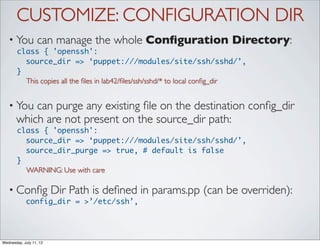
CUSTOMIZE: CONFIGURATION DIR
   • You          can manage the whole Configuration Directory:
       class { 'openssh':
         source_dir => ‘puppet:///modules/site/ssh/sshd/’,
       }
         This copies all the files in lab42/files/ssh/sshd/* to local config_dir


   • You   can purge any existing file on the destination config_dir
       which are not present on the source_dir path:
       class { 'openssh':
         source_dir => ‘puppet:///modules/site/ssh/sshd/’,
         source_dir_purge => true, # default is false
       }
         WARNING: Use with care

   • Config               Dir Path is defined in params.pp (can be overriden):
            config_dir = >’/etc/ssh’,


Wednesday, July 11, 12
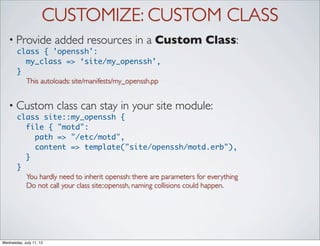
CUSTOMIZE: CUSTOM CLASS
   • Provide             added resources in a Custom Class:
       class { 'openssh':
         my_class => ‘site/my_openssh’,
       }
         This autoloads: site/manifests/my_openssh.pp


   • Custom              class can stay in your site module:
       class site::my_openssh {
         file { "motd":
           path => "/etc/motd",
           content => template("site/openssh/motd.erb"),
         }
       }
         You hardly need to inherit openssh: there are parameters for everything
         Do not call your class site::openssh, naming collisions could happen.


Wednesday, July 11, 12
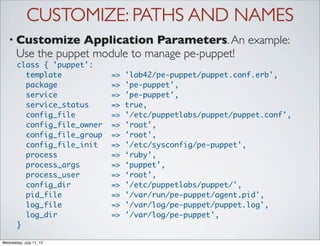
CUSTOMIZE: PATHS AND NAMES
   • Customize      Application Parameters. An example:
       Use the puppet module to manage pe-puppet!
       class { 'puppet':
         template            =>   'lab42/pe-puppet/puppet.conf.erb',
         package             =>   'pe-puppet',
         service             =>   'pe-puppet',
         service_status      =>   true,
         config_file         =>   '/etc/puppetlabs/puppet/puppet.conf',
         config_file_owner   =>   'root',
         config_file_group   =>   'root',
         config_file_init    =>   '/etc/sysconfig/pe-puppet',
         process             =>   ‘ruby’,
         process_args        =>   ‘puppet’,
         process_user        =>   ‘root’,
         config_dir          =>   '/etc/puppetlabs/puppet/',
         pid_file            =>   '/var/run/pe-puppet/agent.pid',
         log_file            =>   '/var/log/pe-puppet/puppet.log',
         log_dir             =>   '/var/log/pe-puppet',
       }

Wednesday, July 11, 12
EXTEND: MONITOR
   • Manage              Abstract Automatic Monitoring:
       class { 'openssh':
         monitor      => true,
         monitor_tool => [ ‘nagios’,‘puppi’,‘monit’ ],
         monitor_target => $::ip_addess # Default
       }


   • Monitoring            is based on these parameters defined in params.pp:
            port                =>   ‘22’,
            protocol            =>   ‘tcp’,
            service             =>   ‘ssh[d]’, # According to OS
            process             =>   ‘sshd’,
            process_args        =>   ‘‘,
            process_user        =>   ‘root‘,
            pid_file            =>   ‘/var/run/sshd.pid’,


   • Abstraction            is managed in the Example42 monitor module
             Here “connectors” for different monitoring tools are defined and can be added (also using 3rd
             party modules).
Wednesday, July 11, 12
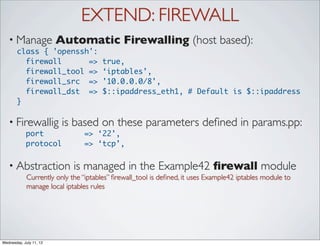
EXTEND: FIREWALL
   • Manage              Automatic Firewalling (host based):
       class { 'openssh':
         firewall      =>             true,
         firewall_tool =>             ‘iptables’,
         firewall_src =>              '10.0.0.0/8',
         firewall_dst =>              $::ipaddress_eth1, # Default is $::ipaddress
       }

   • Firewallig           is based on these parameters defined in params.pp:
            port                => ‘22’,
            protocol            => ‘tcp’,


   • Abstraction             is managed in the Example42 firewall module
             Currently only the “iptables” firewall_tool is defined, it uses Example42 iptables module to
             manage local iptables rules


Wednesday, July 11, 12
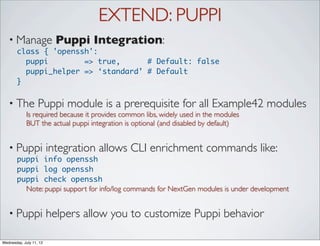
EXTEND: PUPPI
   • Manage                Puppi Integration:
       class { 'openssh':
         puppi        => true,      # Default: false
         puppi_helper => ‘standard’ # Default
       }

   • The           Puppi module is a prerequisite for all Example42 modules
             Is required because it provides common libs, widely used in the modules
             BUT the actual puppi integration is optional (and disabled by default)


   • Puppi               integration allows CLI enrichment commands like:
       puppi info openssh
       puppi log openssh
       puppi check openssh
         Note: puppi support for info/log commands for NextGen modules is under development


   • Puppi               helpers allow you to customize Puppi behavior

Wednesday, July 11, 12
PARAMS_LOOKUP EVERYWHERE
    •   Each parameter on a NextGen class is passed via the params_lookup function
    class openssh (
    [...] # openssh module specific parameters ...
      $my_class            = params_lookup( 'my_class' ),
      $source              = params_lookup( 'source' ),
      $source_dir          = params_lookup( 'source_dir' ),
      $source_dir_purge    = params_lookup( 'source_dir_purge' ),
      $template            = params_lookup( 'template' ),
      $service_autorestart = params_lookup( 'service_autorestart' , 'global' ),
      $options             = params_lookup( 'options' ),
      $version             = params_lookup( 'version' ),
      $absent              = params_lookup( 'absent' ),
      $disable             = params_lookup( 'disable' ),
      $disableboot         = params_lookup( 'disableboot' ),
      $monitor             = params_lookup( 'monitor' , 'global' ),
      $monitor_tool        = params_lookup( 'monitor_tool' , 'global' ),
      $monitor_target      = params_lookup( 'monitor_target' , 'global' ),
    [...] # Other common parameters
      ) inherits openssh::params {
    [...]
    }
    •   Each class provides a set of different kind of params that:
         •   Are module specific (no one defined in this openssh module)
         •   Allow customizations (my_class, source, template ...)
         •   Affect module’s behavior (absent, disable, service_autorestart, audit_only ...)
         •   Manage extensions (monitor, monitor_tool, firewall, puppi ...)
         •   Define application parameters (port, config_file, process, package ... )


Wednesday, July 11, 12
DEFAULTS IN PARAMS.PP
    •   Each module has a params class where defaults are set for different OS
    class openssh::params {
      ### Application related parameters
      $package = $::operatingsystem ? {
        default => 'openssh-server',
      }
      $service = $::operatingsystem ? {
        /(?i:Debian|Ubuntu|Mint)/ => 'ssh',
        default                   => 'sshd',
      }
      $process = $::operatingsystem ? {
        default => 'sshd',
      }
      [...]
      $port = '22'
      $protocol = 'tcp'

      # General Settings
      $my_class = ''
      $source = ''
      $source_dir = ''
      $source_dir_purge = ''
      [...]

      ### General module variables that can have a site or per module default
      $monitor = false
      $monitor_tool = ''
      $monitor_target = $::ipaddress
      $firewall = false
      $firewall_tool = ''
      $firewall_src = '0.0.0.0/0'
      [...]

    }
Wednesday, July 11, 12
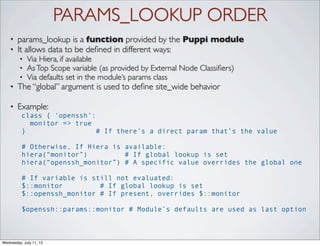
PARAMS_LOOKUP ORDER
    •   params_lookup is a function provided by the Puppi module
    •   It allows data to be defined in different ways:
         •   Via Hiera, if available
         •   As Top Scope variable (as provided by External Node Classifiers)
         •   Via defaults set in the module’s params class
    •   The “global” argument is used to define site_wide behavior

    •   Example:
          class { ‘openssh’:
            monitor => true
          }                  # If there’s a direct param that’s the value

          # Otherwise, If Hiera is available:
          hiera(“monitor”)         # If global lookup is set
          hiera(“openssh_monitor”) # A specific value overrides the global one

          # If variable is still not evaluated:
          $::monitor         # If global lookup is set
          $::openssh_monitor # If present, overrides $::monitor

          $openssh::params::monitor # Module’s defaults are used as last option


Wednesday, July 11, 12
DOWNLOAD               • Example42 Puppet Modules Site:
                          http://www.example42.com

                         • GitHub   repositories:
                          http://github.com/example42

                         • Git   Download:
                          git clone -r http://github.com/
                          example42/puppet-modules-nextgen

                         • Note   on GitHub repos:
                           • puppet-modules-nextgen contains only
                             NextGen modules (as git submodules)
                           • puppet-modules contains both
                             NextGen and older modules
                           • puppet-* are the single NextGen
                             modules

Wednesday, July 11, 12
ONE MORE THING...
   • How                 to make a NextGen module
       git clone -r http://github.com/example42/puppet-modules-nextgen
       cd puppet-modules-nextgen
       Example42-tools/module_clone.sh
       This script creates a skeleton for a new module based on different Example42 foo module
       templates. Run it from the directory that contains the foo module (moduledir).
       By default it uses the "foo" module as template.
       Specify -t <source_module> to use a different template.
       Example:
       Example42-tools/module_clone.sh -t foo_webapp

       Source module template is foo
       Enter the name of the new module based on foo:                            mynewmodule
             E d i t my n e w m o d u l e / m a n i fe s t s / p a r a m s . p p t o m a n a g e s u p p o r t fo r d i f fe r e n t O S

   •A  new, basic, NextGen module based on the foo standard
     template is done.
   • Add features and application specific resources to enrich it


Wednesday, July 11, 12
Graphics:
                         www.tatlin.net

Wednesday, July 11, 12
ad maiora
                           Questions?
                                          Graphics:
         @alvagante                     www.tatlin.net

Wednesday, July 11, 12
Graphics:
                         www.tatlin.net

Wednesday, July 11, 12

Puppet modules: A Holistic Approach - Geneva

  • 1.
    PUPPET MODULES: A HOLISTIC APPROACH PuppetCamp Geneva 2012 Alessandro Franceschi Wednesday, July 11, 12
  • 2.
    PUPPET @ LAB42 • 2007 - Meet Puppet. Managed the Bank of Italy webfarm • 2008 - First generation of Lab42 Puppet Modules • 2009 - Multi OS support and standardization of the modules • 2010 - A redesigned and coherent Example42 Module set Puppet Modules Standards and Interoperability (PuppetCamp Europe 2010 - Belgium) Re-Use your Modules! (PuppetCamp 2010 - San Francisco) • 2011 - Introducing Puppi Puppi: Puppet strings to the shell (PuppetCamp Europe 2011 - Amsterdam) • 2012 - Example42 Next Gen modules Developing IT Infrastructures with Puppet (CodeMotion 2012 - Rome) Wednesday, July 11, 12
  • 3.
    WE ALL LOVE AND USE PUPPET FOR • Systems Configuration • (Automatic) Monitoring based on specific tools • Facts based Inventory • Manage, at times, Applications deployments • Infrastructure Orchestration (coupled with MCollective) Wednesday, July 11, 12
  • 4.
    WE LIKE TO EXTEND PUPPET TO • Abstract Automatic Monitoring (whatever the tool) • Automatic Firewalling • Standardize Applications deployments • Enrich Systems Inventory • Shell Extension (“Puppet Knowledge to the CLI”) • Provide a coherent and integrated modules ecosystem Wednesday, July 11, 12
  • 5.
    PUPPET MODULES MANTRAS • Data Separation • Configuration data is defined outside the module (or Puppet manifests) • Module’s behavior is managed via APIs • Reusability • ReUse the same module in different shops • Customize its behavior without changing its code • Do not force how configurations are provided • Standardization • Follow PuppetLabs layout guidelines (puppet-lint) • Have a coherent, predictable and intuitive interface • Provide contextual documentation (puppet-doc) • Interoperability • Limit dependencies. Allow modules’ cherry picking • Be self contained, do not interfere with other modules’ resources • Cross Operating System support • Provide sensible defaults for different OS • Allow easy implementation of support of new OS Wednesday, July 11, 12
  • 6.
    EXAMPLE42 NEXT GEN • Coherent and Standardized structure • Best Practices module design (with some tweaks...) • Easily extendable Cross OS support • Complete API exposure via parameters • Extreme Customizations options • Alternative Data Separation options • Complete Decommissioning features • Optional Automatic Monitoring Abstraction • Optional Automatic Firewalling • Optional Puppi support to enhance the CLI experience • Exhaustive PuppetDoc documentation • Integrated Rspec-Puppet tests • Code Puppet-Lint compliant • Quick module scaffolding based on different templates ... not exactly easy to read.... Wednesday, July 11, 12
  • 7.
    BASIC USAGE • One Module. One Application. One main class. • Install openssh with default settings: class { 'openssh': } • Equivalent to: include openssh • Default behavior: • Install package • Run and enable service • Do not alter configurations Wednesday, July 11, 12
  • 8.
    DATA INPUT ALTERNATIVES • Set (Top Scope/ENC) variables and include classes: $::openssh_template = 'site/openssh/openssh.conf.erb' include openssh • Use Hiera: hiera(‘openssh_template’) include openssh • Use Parametrized Classes: class { 'openssh':  template => 'site/openssh/openssh.conf.erb', } • Happily mix different patterns: $::monitor = true $::monitor_tool = [ 'nagios' , 'munin' , 'puppi' ] class { 'openssh':  template => 'site/openssh/openssh.conf.erb', } Wednesday, July 11, 12
  • 9.
    DECOMMISSIONING • Disable openssh service: class { 'openssh': disable => true } • Deactivate openssh service only at boot time: class { 'openssh': disableboot => true } Useful when a service is managed by another tool (ie: a cluster suite) • Remove openssh (package and files): class { 'openssh': absent => true } • Monitoring and firewalling resources removal is automatically managed Wednesday, July 11, 12
  • 10.
    MANAGE BEHAVIOR • Enable Auditing: class { 'openssh': audit_only => true, # Default: false } No changes to configuration files are actually made and potential changes are audited • Manage Service Autorestart: class { 'openssh': service_autorestart => false, # Default: true } No automatic service restart when a configuration file / dir changes • Manage Software Version: class { 'foo': version => ‘1.2.0’, # Default: unset } Specify the package version you want to be installed. Set => ‘latest’ to force installation of latest version Wednesday, July 11, 12
  • 11.
    CUSTOMIZE: CONFIGURATION FILE • Provide Main Configuration as a static file ... class { 'openssh': source => ‘puppet:///modules/site/ssh/sshd.conf’, } • an array of files looked up on a first match logic ... class { 'openssh': source => ["puppet:///modules/site/ssh/sshd.conf-${fqdn}", "puppet:///modules/site/ssh/openssh.conf"], } • As an erb template: class { 'openssh': template => ‘site/ssh/sshd.conf.erb’, } • Config File Path is defined in params.pp (can be overriden): config_file = >’/etc/ssh/sshd_config’, Wednesday, July 11, 12
  • 12.
    CUSTOM OPTIONS • With templates you can provide an hash of custom options: class { 'openssh': template => ‘site/ssh/sshd.conf.erb’, options => { 'LogLevel' => 'INFO', 'UsePAM' => 'yes', }, } • Alternative ways to use the options hash in an erb template: • Direct but not safe (you must always provide all the used options) UsePAM <%= options['UsePAM'] %> • Failsafe with defaults (verbose but safe) <% if scope.lookupvar("openssh::options['UsePAM']") then -%> UsePAM <%= options['UsePAM'] %> <% else -%> UsePAM no <% end -%> • Show what you have (useful for config files has defaults for every option) <% scope.lookupvar("openssh::options").sort_by {|key, value| key}.each do |key, value| -%> <%= key %> <%= value %> <% end -%> Wednesday, July 11, 12
  • 13.
    CUSTOMIZE: CONFIGURATION DIR • You can manage the whole Configuration Directory: class { 'openssh': source_dir => ‘puppet:///modules/site/ssh/sshd/’, } This copies all the files in lab42/files/ssh/sshd/* to local config_dir • You can purge any existing file on the destination config_dir which are not present on the source_dir path: class { 'openssh': source_dir => ‘puppet:///modules/site/ssh/sshd/’, source_dir_purge => true, # default is false } WARNING: Use with care • Config Dir Path is defined in params.pp (can be overriden): config_dir = >’/etc/ssh’, Wednesday, July 11, 12
  • 14.
    CUSTOMIZE: CUSTOM CLASS • Provide added resources in a Custom Class: class { 'openssh': my_class => ‘site/my_openssh’, } This autoloads: site/manifests/my_openssh.pp • Custom class can stay in your site module: class site::my_openssh { file { "motd": path => "/etc/motd", content => template("site/openssh/motd.erb"), } } You hardly need to inherit openssh: there are parameters for everything Do not call your class site::openssh, naming collisions could happen. Wednesday, July 11, 12
  • 15.
    CUSTOMIZE: PATHS ANDNAMES • Customize Application Parameters. An example: Use the puppet module to manage pe-puppet! class { 'puppet': template => 'lab42/pe-puppet/puppet.conf.erb', package => 'pe-puppet', service => 'pe-puppet', service_status => true, config_file => '/etc/puppetlabs/puppet/puppet.conf', config_file_owner => 'root', config_file_group => 'root', config_file_init => '/etc/sysconfig/pe-puppet', process => ‘ruby’, process_args => ‘puppet’, process_user => ‘root’, config_dir => '/etc/puppetlabs/puppet/', pid_file => '/var/run/pe-puppet/agent.pid', log_file => '/var/log/pe-puppet/puppet.log', log_dir => '/var/log/pe-puppet', } Wednesday, July 11, 12
  • 16.
    EXTEND: MONITOR • Manage Abstract Automatic Monitoring: class { 'openssh': monitor => true, monitor_tool => [ ‘nagios’,‘puppi’,‘monit’ ], monitor_target => $::ip_addess # Default } • Monitoring is based on these parameters defined in params.pp: port => ‘22’, protocol => ‘tcp’, service => ‘ssh[d]’, # According to OS process => ‘sshd’, process_args => ‘‘, process_user => ‘root‘, pid_file => ‘/var/run/sshd.pid’, • Abstraction is managed in the Example42 monitor module Here “connectors” for different monitoring tools are defined and can be added (also using 3rd party modules). Wednesday, July 11, 12
  • 17.
    EXTEND: FIREWALL • Manage Automatic Firewalling (host based): class { 'openssh': firewall => true, firewall_tool => ‘iptables’, firewall_src => '10.0.0.0/8', firewall_dst => $::ipaddress_eth1, # Default is $::ipaddress } • Firewallig is based on these parameters defined in params.pp: port => ‘22’, protocol => ‘tcp’, • Abstraction is managed in the Example42 firewall module Currently only the “iptables” firewall_tool is defined, it uses Example42 iptables module to manage local iptables rules Wednesday, July 11, 12
  • 18.
    EXTEND: PUPPI • Manage Puppi Integration: class { 'openssh': puppi => true, # Default: false puppi_helper => ‘standard’ # Default } • The Puppi module is a prerequisite for all Example42 modules Is required because it provides common libs, widely used in the modules BUT the actual puppi integration is optional (and disabled by default) • Puppi integration allows CLI enrichment commands like: puppi info openssh puppi log openssh puppi check openssh Note: puppi support for info/log commands for NextGen modules is under development • Puppi helpers allow you to customize Puppi behavior Wednesday, July 11, 12
  • 19.
    PARAMS_LOOKUP EVERYWHERE • Each parameter on a NextGen class is passed via the params_lookup function class openssh ( [...] # openssh module specific parameters ...   $my_class = params_lookup( 'my_class' ),   $source = params_lookup( 'source' ),   $source_dir = params_lookup( 'source_dir' ),   $source_dir_purge = params_lookup( 'source_dir_purge' ),   $template = params_lookup( 'template' ),   $service_autorestart = params_lookup( 'service_autorestart' , 'global' ),   $options = params_lookup( 'options' ),   $version = params_lookup( 'version' ),   $absent = params_lookup( 'absent' ),   $disable = params_lookup( 'disable' ),   $disableboot = params_lookup( 'disableboot' ),   $monitor = params_lookup( 'monitor' , 'global' ),   $monitor_tool = params_lookup( 'monitor_tool' , 'global' ),   $monitor_target = params_lookup( 'monitor_target' , 'global' ), [...] # Other common parameters   ) inherits openssh::params { [...] } • Each class provides a set of different kind of params that: • Are module specific (no one defined in this openssh module) • Allow customizations (my_class, source, template ...) • Affect module’s behavior (absent, disable, service_autorestart, audit_only ...) • Manage extensions (monitor, monitor_tool, firewall, puppi ...) • Define application parameters (port, config_file, process, package ... ) Wednesday, July 11, 12
  • 20.
    DEFAULTS IN PARAMS.PP • Each module has a params class where defaults are set for different OS class openssh::params { ### Application related parameters   $package = $::operatingsystem ? {     default => 'openssh-server',   }   $service = $::operatingsystem ? {     /(?i:Debian|Ubuntu|Mint)/ => 'ssh',     default => 'sshd',   }   $process = $::operatingsystem ? {     default => 'sshd',   } [...] $port = '22'   $protocol = 'tcp' # General Settings   $my_class = ''   $source = ''   $source_dir = ''   $source_dir_purge = '' [...] ### General module variables that can have a site or per module default   $monitor = false   $monitor_tool = ''   $monitor_target = $::ipaddress   $firewall = false   $firewall_tool = ''   $firewall_src = '0.0.0.0/0' [...] } Wednesday, July 11, 12
  • 21.
    PARAMS_LOOKUP ORDER • params_lookup is a function provided by the Puppi module • It allows data to be defined in different ways: • Via Hiera, if available • As Top Scope variable (as provided by External Node Classifiers) • Via defaults set in the module’s params class • The “global” argument is used to define site_wide behavior • Example: class { ‘openssh’: monitor => true } # If there’s a direct param that’s the value # Otherwise, If Hiera is available: hiera(“monitor”) # If global lookup is set hiera(“openssh_monitor”) # A specific value overrides the global one # If variable is still not evaluated: $::monitor # If global lookup is set $::openssh_monitor # If present, overrides $::monitor $openssh::params::monitor # Module’s defaults are used as last option Wednesday, July 11, 12
  • 22.
    DOWNLOAD • Example42 Puppet Modules Site: http://www.example42.com • GitHub repositories: http://github.com/example42 • Git Download: git clone -r http://github.com/ example42/puppet-modules-nextgen • Note on GitHub repos: • puppet-modules-nextgen contains only NextGen modules (as git submodules) • puppet-modules contains both NextGen and older modules • puppet-* are the single NextGen modules Wednesday, July 11, 12
  • 23.
    ONE MORE THING... • How to make a NextGen module git clone -r http://github.com/example42/puppet-modules-nextgen cd puppet-modules-nextgen Example42-tools/module_clone.sh This script creates a skeleton for a new module based on different Example42 foo module templates. Run it from the directory that contains the foo module (moduledir). By default it uses the "foo" module as template. Specify -t <source_module> to use a different template. Example: Example42-tools/module_clone.sh -t foo_webapp Source module template is foo Enter the name of the new module based on foo: mynewmodule E d i t my n e w m o d u l e / m a n i fe s t s / p a r a m s . p p t o m a n a g e s u p p o r t fo r d i f fe r e n t O S •A new, basic, NextGen module based on the foo standard template is done. • Add features and application specific resources to enrich it Wednesday, July 11, 12
  • 24.
    Graphics: www.tatlin.net Wednesday, July 11, 12
  • 25.
    ad maiora Questions? Graphics: @alvagante www.tatlin.net Wednesday, July 11, 12
  • 26.
    Graphics: www.tatlin.net Wednesday, July 11, 12