Esta presentación contiene
narración, encienda las
bocinas de su computadora.
SICI 4008 Principios de Procesamiento
de Datos en los Negocios
El trabajo de
la propuesta de 11 páginas
2.
1. Set LanguageEnglish
Word 2003 [CTRL]+[a] Tools… Language… Set Language…
Word 2007 [CTRL]+[a] Review… Set Language…
3.
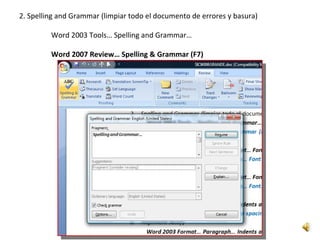
2. Spelling andGrammar (limpiar todo el documento de errores y basura)
Word 2003 Tools… Spelling and Grammar…
Word 2007 Review… Spelling & Grammar (F7)
4.
3. Pt. Size12
Word 2003 [CTRL]+[a] Format… Font… Size…
Word 2007 [CTRL]+[a] Home… Font Size…
5.
4. Times NewRoman
Word 2003 [CTRL]+[a] Format… Font…
Word 2007 [CTRL]+[a] Home… Font…
6.
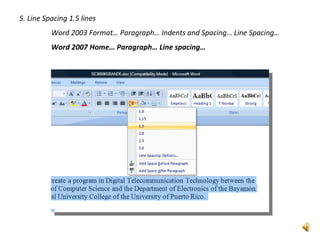
5. Line Spacing1.5 lines
Word 2003 Format… Paragraph… Indents and Spacing… Line Spacing…
Word 2007 Home… Paragraph… Line spacing…
7.
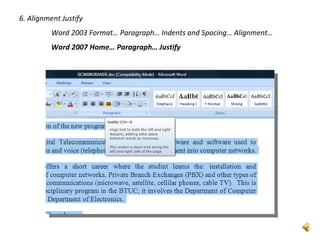
6. Alignment Justify
Word 2003 Format… Paragraph… Indents and Spacing… Alignment…
Word 2007 Home… Paragraph… Justify
8.
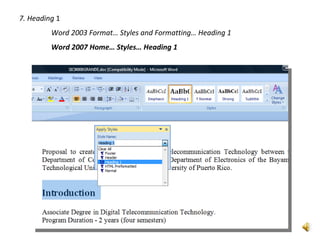
7. Heading 1
Word 2003 Format… Styles and Formatting… Heading 1
Word 2007 Home… Styles… Heading 1
9.
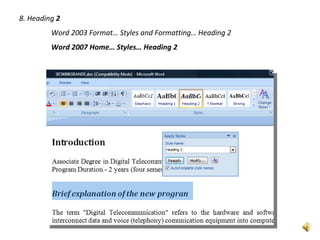
8. Heading 2
Word 2003 Format… Styles and Formatting… Heading 2
Word 2007 Home… Styles… Heading 2
10.
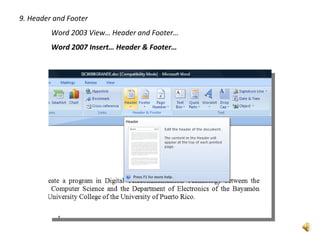
9. Header andFooter
Word 2003 View… Header and Footer…
Word 2007 Insert… Header & Footer…
11.
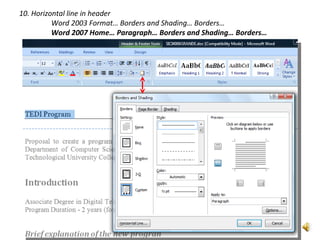
10. Horizontal linein header
Word 2003 Format… Borders and Shading… Borders…
Word 2007 Home… Paragraph… Borders and Shading… Borders…
12.
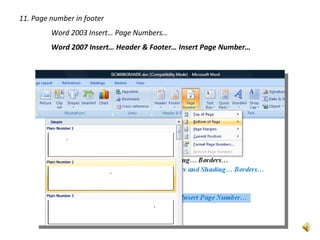
11. Page numberin footer
Word 2003 Insert… Page Numbers…
Word 2007 Insert… Header & Footer… Insert Page Number…
13.
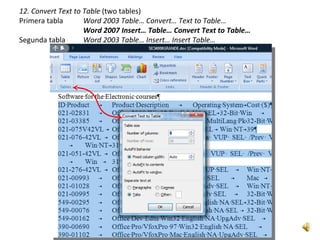
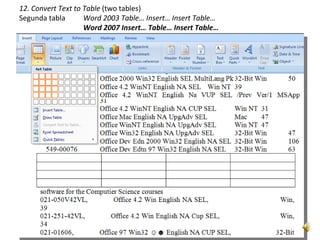
12. Convert Textto Table (two tables)
Primera tabla Word 2003 Table… Convert… Text to Table…
Word 2007 Insert… Table… Convert Text to Table…
Segunda tabla Word 2003 Table… Insert… Insert Table…
Word 2007 Insert… Table… Insert Table…
14.
12. Convert Textto Table (two tables)
Segunda tabla Word 2003 Table… Insert… Insert Table…
Word 2007 Insert… Table… Insert Table…
15.
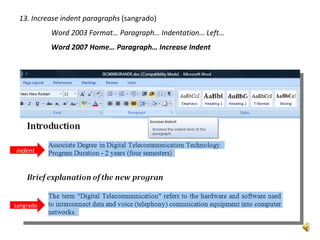
13. Increase indentparagraphs (sangrado)
Word 2003 Format… Paragraph… Indentation… Left…
Word 2007 Home… Paragraph… Increase Indent
indent
sangrado
16.
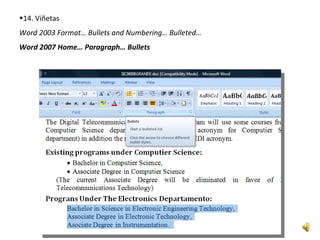
•14. Viñetas
Word 2003Format… Bullets and Numbering… Bulleted…
Word 2007 Home… Paragraph… Bullets
17.
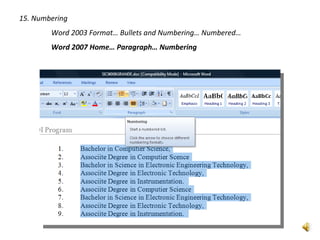
15. Numbering
Word 2003 Format… Bullets and Numbering… Numbered…
Word 2007 Home… Paragraph… Numbering
18.
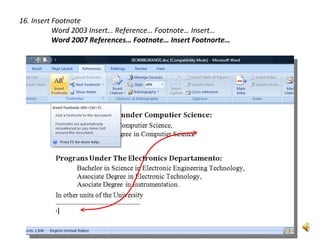
16. Insert Footnote
Word 2003 Insert… Reference… Footnote… Insert…
Word 2007 References… Footnote… Insert Footnorte…
19.
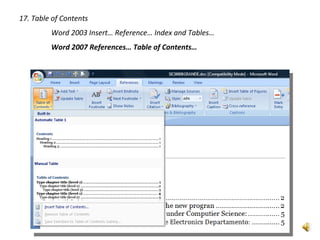
17. Table ofContents
Word 2003 Insert… Reference… Index and Tables…
Word 2007 References… Table of Contents…
20.
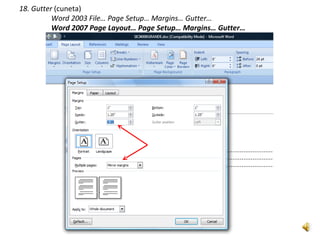
18. Gutter (cuneta)
Word 2003 File… Page Setup… Margins… Gutter…
Word 2007 Page Layout… Page Setup… Margins… Gutter…
21.
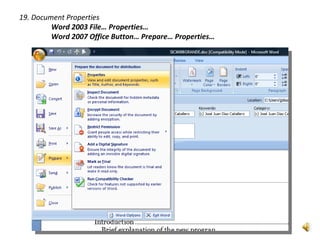
19. Document Properties
Word 2003 File… Properties…
Word 2007 Office Button… Prepare… Properties…
22.
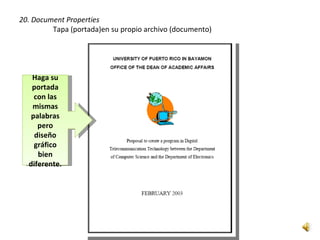
20. Document Properties
Tapa (portada)en su propio archivo (documento)
Haga su
portada
con las
mismas
palabras
pero
diseño
gráfico
bien
diferente.
23.
SICI 4008 Principiosde Procesamiento
de Datos en los Negocios
El trabajo de
la propuesta de 11 páginas
FIN

![1. Set Language English
Word 2003 [CTRL]+[a] Tools… Language… Set Language…
Word 2007 [CTRL]+[a] Review… Set Language…](https://image.slidesharecdn.com/propuestanarration-120312131601-phpapp02/85/Propuesta-narration-2-320.jpg)
![3. Pt. Size 12
Word 2003 [CTRL]+[a] Format… Font… Size…
Word 2007 [CTRL]+[a] Home… Font Size…](https://image.slidesharecdn.com/propuestanarration-120312131601-phpapp02/85/Propuesta-narration-4-320.jpg)
![4. Times New Roman
Word 2003 [CTRL]+[a] Format… Font…
Word 2007 [CTRL]+[a] Home… Font…](https://image.slidesharecdn.com/propuestanarration-120312131601-phpapp02/85/Propuesta-narration-5-320.jpg)