Principles of object oriented programming, object-oriented programming paradigm. Applications of OOPs. OOPs
1.
AGURCHAND MANMULL JAINCOLLEGE
(A Unit of Sri. S.S. Jain Educational Society)
MEENAMBAKKAM, CHENNAI – 600 114.
CO-EDUCATION
A Jain Minority Institution Affiliated to the University of Madras
NAAC Reaccredited
(SHIFT II )
C PROGRAMMING LANGUAGE
UNIT I
2.
C PROGRAMMING LANGUAGE
LearningMaterial Prepared by
Name of the Staff : Ms. Vijayamalini V MCA,SET,MBA
Department : Software Applications
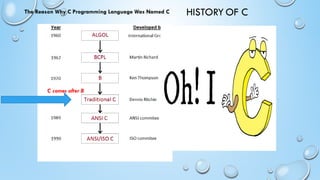
HISTORY OF C
TheReason Why C Programming Language Was Named C
C comes after B
5.
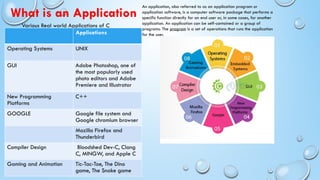
Various Real worldApplications of C
Applications
Operating Systems UNIX
GUI Adobe Photoshop, one of
the most popularly used
photo editors and Adobe
Premiere and Illustrator
New Programming
Platforms
C++
GOOGLE Google file system and
Google chromium browser
Mozilla Firefox and
Thunderbird
Compiler Design Bloodshed Dev-C, Clang
C, MINGW, and Apple C
Gaming and Animation Tic-Tac-Toe, The Dino
game, The Snake game
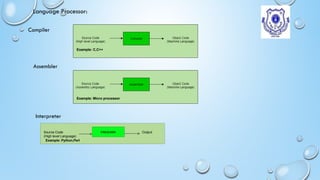
What is an Application
An application, also referred to as an application program or
application software, is a computer software package that performs a
specific function directly for an end user or, in some cases, for another
application. An application can be self-contained or a group of
programs. The program is a set of operations that runs the application
for the user.
6.
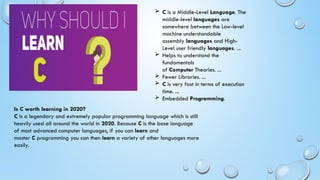
C isa Middle-Level Language. The
middle-level languages are
somewhere between the Low-level
machine understandable
assembly languages and High-
Level user friendly languages. ...
Helps to understand the
fundamentals
of Computer Theories. ...
Fewer Libraries. ...
C is very fast in terms of execution
time. ...
Embedded Programming.
Is C worth learning in 2020?
C is a legendary and extremely popular programming language which is still
heavily used all around the world in 2020. Because C is the base language
of most advanced computer languages, if you can learn and
master C programming you can then learn a variety of other languages more
easily.
7.
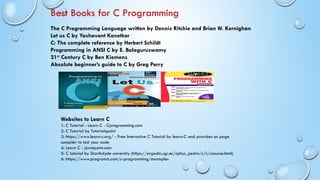
Best Books forC Programming
The C Programming Language written by Dennis Ritchie and Brian W. Kernighan
Let us C by Yashavant Kanetkar
C: The complete reference by Herbert Schildt
Programming in ANSI C by E. Balaguruswamy
21st
Century C by Ben Kiemens
Absolute beginner’s guide to C by Greg Perry
Websites to Learn C
1: C Tutorial - Learn C - Cprogramming.com
2: C Tutorial by Tutorialspoint
3: https://www.learn-c.org/ - Free Interactive C Tutorial by learn-C and provides on page
compiler to test your code
4: Learn C - javatpoint.com
5: C tutorial by Starthclyde university (https://ergodic.ugr.es/cphys_pedro/c/c/ccourse.html)
6: https://www.programiz.com/c-programming/examples
8.
UNIT- I
INTRODUCTION:
WHAT ISLANGUAGE?
WHAT IS COMPUTER LANGUAGE?
WHY WE NEED COMPUTER LANGUAGE?
WHAT IS AN INTERFACE?
TYPE OF COMPUTER LANGUAGES
PROBLEM SOLVING TECHNIQUES
9.
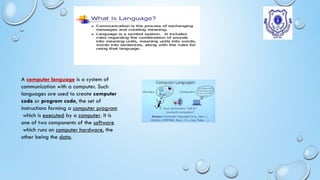
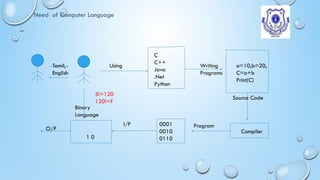
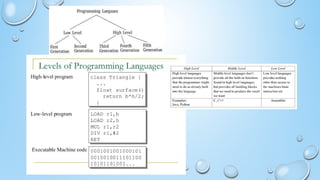
A computer languageis a system of
communication with a computer. Such
languages are used to create computer
code or program code, the set of
instructions forming a computer program
which is executed by a computer. It is
one of two components of the software
which runs on computer hardware, the
other being the data.
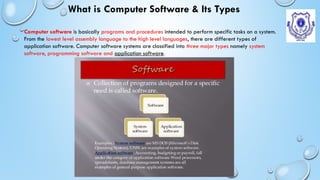
What is ComputerSoftware & Its Types
Computer software is basically programs and procedures intended to perform specific tasks on a system.
From the lowest level assembly language to the high level languages, there are different types of
application software. Computer software systems are classified into three major types namely system
software, programming software and application software.
16.
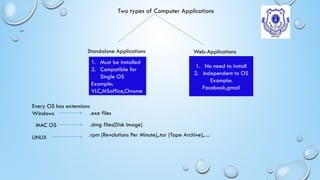
Two types ofComputer Applications
Standalone Applications Web-Applications
1. Must be installed
2. Compatible for
Single OS
Example:
VLC,MSoffice,Chrome
1. No need to install
2. Independent to OS
Example:
Facebook,gmail
Every OS has extensions
Windows .exe files
MAC OS .dmg files(Disk Image)
LINUX .rpm (Revolutions Per Minute),.tar (Tape Archive),…
17.
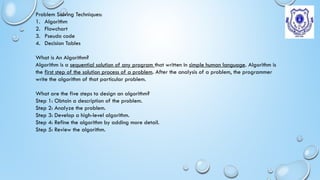
Problem Solving Techniques:
1.Algorithm
2. Flowchart
3. Pseudo code
4. Decision Tables
What is An Algorithm?
Algorithm is a sequential solution of any program that written in simple human language. Algorithm is
the first step of the solution process of a problem. After the analysis of a problem, the programmer
write the algorithm of that particular problem.
What are the five steps to design an algorithm?
Step 1: Obtain a description of the problem.
Step 2: Analyze the problem.
Step 3: Develop a high-level algorithm.
Step 4: Refine the algorithm by adding more detail.
Step 5: Review the algorithm.
18.
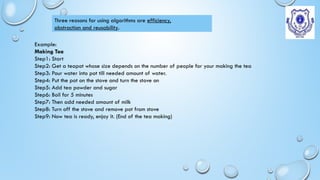
Example:
Making Tea
Step1: Start
Step2:Get a teapot whose size depends on the number of people for your making the tea
Step3: Pour water into pot till needed amount of water.
Step4: Put the pot on the stove and turn the stove on
Step5: Add tea powder and sugar
Step6: Boil for 5 minutes
Step7: Then add needed amount of milk
Step8: Turn off the stove and remove pot from stove
Step9: Now tea is ready, enjoy it. (End of the tea making)
Three reasons for using algorithms are efficiency,
abstraction and reusability.
19.
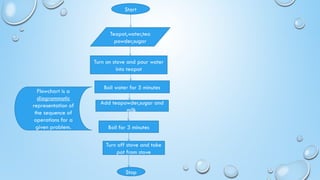
Start
Teapot,water,tea
powder,sugar
Turn on stoveand pour water
into teapot
Boil water for 5 minutes
Add teapowder,sugar and
milk
Boil for 3 minutes
Turn off stove and take
pot from stove
Stop
Flowchart is a
diagrammatic
representation of
the sequence of
operations for a
given problem.
20.
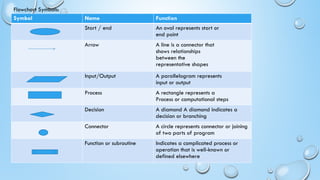
Flowchart Symbols:
Symbol NameFunction
Start / end An oval represents start or
end point
Arrow A line is a connector that
shows relationships
between the
representative shapes
Input/Output A parallelogram represents
input or output
Process A rectangle represents a
Process or computational steps
Decision A diamond A diamond indicates a
decision or branching
Connector A circle represents connector or joining
of two parts of program
Function or subroutine Indicates a complicated process or
operation that is well-known or
defined elsewhere
C FUNDAMENTALS
HISTORY OFC
FEATURES OF C
HOW TO INSTALL C SOFTWARE?
WHAT IS PLATFORM DEPENDENCY?
STRUCTURE OF C PROGRAM
23.
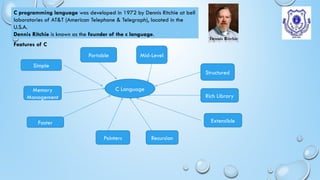
Features of C
Cprogramming language was developed in 1972 by Dennis Ritchie at bell
laboratories of AT&T (American Telephone & Telegraph), located in the
U.S.A.
Dennis Ritchie is known as the founder of the c language.
C Language
Simple
Portable Mid-Level
Structured
Faster
Pointers Recursion
Rich Library
Extensible
Memory
Management
24.
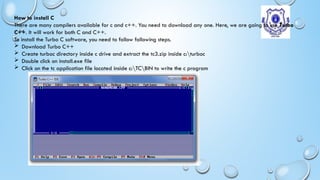
How to installC
There are many compilers available for c and c++. You need to download any one. Here, we are going to use Turbo
C++. It will work for both C and C++.
To install the Turbo C software, you need to follow following steps.
Download Turbo C++
Create turboc directory inside c drive and extract the tc3.zip inside c:turboc
Double click on install.exe file
Click on the tc application file located inside c:TCBIN to write the c program
25.
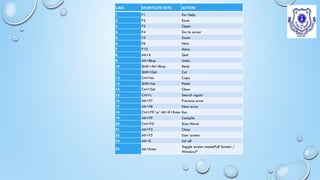
S.NO. SHORTCUTS KEYSACTION
1 F1 For Help
2. F2 Save
3. F3 Open
4. F4 Go to cursor
5. F5 Zoom
6. F6 Next
7. F10 Menu
8. Alt+X Quit
9. Alt+Bksp Undo
10. Shift+Alt+Bksp Redo
11. Shift+Del Cut
12. Ctrl+Ins Copy
13. Shift+Ins Paste
14. Ctrl+Del Clear
15. Ctrl+L Search again
16. Alt+F7 Previous error
17. Alt+F8 Next error
18. Ctrl+F9 'or' Alt+R+Enter Run
19. Alt+F9 Compile
20. Ctrl+F5 Size/Move
21. Alt+F3 Close
22. Alt+F5 User screen
23. Alt+0 List all
24. Alt+Enter
Toggle screen mode(Full Screen /
Window)*
26.
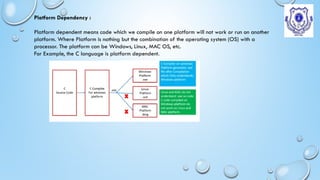
Platform Dependency :
Platformdependent means code which we compile on one platform will not work or run on another
platform. Where Platform is nothing but the combination of the operating system (OS) with a
processor. The platform can be Windows, Linux, MAC OS, etc.
For Example, the C language is platform dependent.
27.
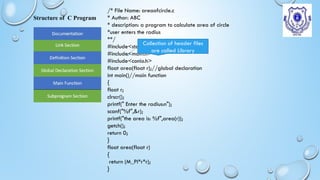
Structure of CProgram
/* File Name: areaofcircle.c
* Author: ABC
* description: a program to calculate area of circle
*user enters the radius
**/
#include<stdio.h>
#include<math.h>
#include<conio.h>
float area(float r);//global declaration
int main()//main function
{
float r;
clrscr();
printf(" Enter the radius:n");
scanf("%f",&r);
printf("the area is: %f",area(r));
getch();
return 0;
}
float area(float r)
{
return (M_PI*r*r);
}
Collection of header files
are called Library
28.
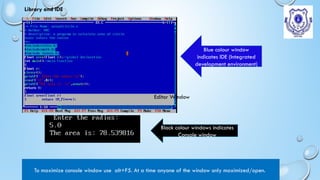
Blue colour window
indicatesIDE (Integrated
development environment)
Black colour windows indicates
Console window
To maximize console window use alt+F5. At a time anyone of the window only maximized/open.
Library and IDE
Editor Window
29.
Errors in C
Typesof Errors
Syntax Errors
Runtime
Errors
Linker
Error
Logical
Errors
Semantic Errors
// C program to illustrate
// syntax error
#include<stdio.h>
void main()
{
int x = 10;
int y = 15;
printf("%d", (x, y)) // semicolon
missed
}
Error:
error: expected ';' before '}' token
// C program to illustrate
// run-time error
#include<stdio.h>
void main()
{
int n = 9, div = 0;
// wrong logic
// number is divided
by 0,
// so this program
abnormally terminates
div = n/0;
printf("resut = %d",
div);
}
Error:
warning: division by zero
[-Wdiv-by-zero]
div = n/0;
// C program to
illustrate
// linker error
#include<stdio.h>
void Main() // Here
Main() should be
main()
{
int a = 10;
printf("%d", a);
}
Error:
(.text+0x20):
undefined reference
to `main'
// C program to
illustrate
// logical error
int main()
{
int i = 0;
// logical error : a
semicolon after loop
for(i = 0; i < 3; i++);
{
printf("loop ");
continue;
}
getchar();
return 0;
}
No output
// C program to illustrate
// semantic error
void main()
{
int a, b, c;
a + b = c; //semantic
error
}
Error
error: lvalue required as
left operand of assignment
a + b = c; //semantic
error
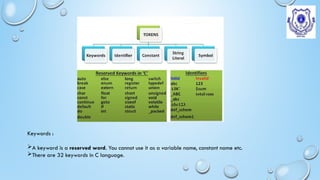
Keywords :
A keywordis a reserved word. You cannot use it as a variable name, constant name etc.
There are 32 keywords in C language.
32.
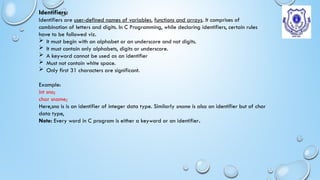
Identifiers:
Identifiers are user-definednames of variables, functions and arrays. It comprises of
combination of letters and digits. In C Programming, while declaring identifiers, certain rules
have to be followed viz.
It must begin with an alphabet or an underscore and not digits.
It must contain only alphabets, digits or underscore.
A keyword cannot be used as an identifier
Must not contain white space.
Only first 31 characters are significant.
Example:
int sno;
char sname;
Here,sno is is an identifier of integer data type. Similarly sname is also an identifier but of char
data type,
Note: Every word in C program is either a keyword or an identifier.
33.
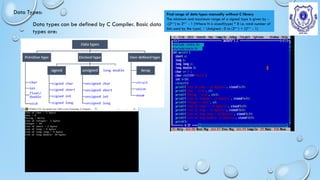
Data Types:
Data typescan be defined by C Compiler. Basic data
types are:
Find range of data types manually without C library
The minimum and maximum range of a signed type is given by -
-(2N-1
) to 2N-1
- 1 (Where N is sizeof(type) * 8 i.e. total number of
bits used by the type) Unsigned : 0 to (2N-1
) + (2N-1
- 1)
34.
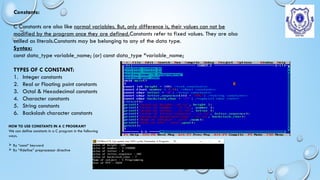
Constants:
C Constants arealso like normal variables. But, only difference is, their values can not be
modified by the program once they are defined.Constants refer to fixed values. They are also
called as literals.Constants may be belonging to any of the data type.
Syntax:
const data_type variable_name; (or) const data_type *variable_name;
TYPES OF C CONSTANT:
1. Integer constants
2. Real or Floating point constants
3. Octal & Hexadecimal constants
4. Character constants
5. String constants
6. Backslash character constants
HOW TO USE CONSTANTS IN A C PROGRAM?
We can define constants in a C program in the following
ways.
By “const” keyword
By “#define” preprocessor directive
35.
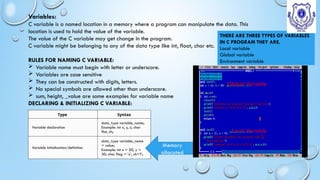
Variables:
C variable isa named location in a memory where a program can manipulate the data. This
location is used to hold the value of the variable.
The value of the C variable may get change in the program.
C variable might be belonging to any of the data type like int, float, char etc.
RULES FOR NAMING C VARIABLE:
Variable name must begin with letter or underscore.
Variables are case sensitive
They can be constructed with digits, letters.
No special symbols are allowed other than underscore.
sum, height, _value are some examples for variable name
DECLARING & INITIALIZING C VARIABLE:
Type Syntax
Variable declaration
data_type variable_name;
Example: int x, y, z; char
flat, ch;
Variable initialization/definition
data_type variable_name
= value;
Example: int x = 50, y =
30; char flag = ‘x’, ch=’l’;
Memory
allocated
THERE ARE THREE TYPES OF VARIABLES
IN C PROGRAM THEY ARE,
Local variable
Global variable
Environment variable
Global Variable
Local Variable
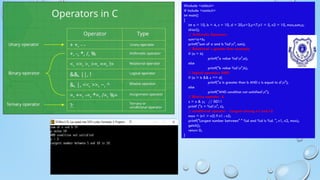
36.
#include <stdio.h>
# include<conio.h>
int main()
{
int a = 10, b = 4, c = 10, d = 20,x=3,y=7,n1 = 5, n2 = 10, max,sum,z;
clrscr();
// Arithmetic Operators
sum=a+b;
printf("sum of a and b %dn", sum);
// Relational ---greater than example
if (a > b)
printf("a value %dn",a);
else
printf("b value %dn",b);
// logical operators AND
if (a > b && c == d)
printf("a is greater than b AND c is equal to dn");
else
printf("AND condition not satisfiedn");
// Bitwise operator &
z = x & y; // 0011
printf ("z = %dn", z);
// conditional operator - Largest among n1 and n2
max = (n1 > n2) ? n1 : n2;
printf("Largest number between" " %d and %d is %d. ", n1, n2, max);
getch();
return 0;
}
37.
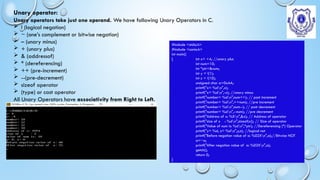
Unary operator:
Unary operatorstake just one operand. We have following Unary Operators in C.
! (logical negation)
~ (one’s complement or bitwise negation)
– (unary minus)
+ (unary plus)
& (addressof)
* (dereferencing)
++ (pre-increment)
--(pre-decrement)
sizeof operator
(type) or cast operator
All Unary Operators have associativity from Right to Left.
#include <stdio.h>
#include <conio.h>
int main()
{ int x= +4; //unary plus
int num=10;
int *ptr=#
int y = !(1);
int z = !(10);
unsigned char a=0xAA;
printf("x= %dn",x);
printf("x= %dn",-x); //unary minus
printf("number= %dn",num++); // post increment
printf("number= %dn",++num); //pre increment
printf("number= %dn",num--); // post decrement
printf("number= %dn",--num); //pre decrement
printf("Address of x: %Xn",&x); // Address of operator
printf("size of x : %dn",sizeof(x)); // Size of operator
printf("Value of num is: %dn",*ptr); //Dereferencing (*) Operator
printf("y= %d, z= %dn",y,z); //logical not
printf("Before negation value of a: %02Xn",a);//Bitwise NOT
a=~a;
printf("After negation value of a: %02Xn",a);
getch();
return 0;
}
38.
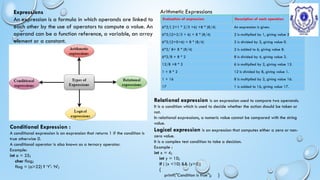
Expressions
An expression isa formula in which operands are linked to
each other by the use of operators to compute a value. An
operand can be a function reference, a variable, an array
element or a constant.
Arithmetic Expressions
Evaluation of expression Description of each operation
6*2/( 2+1 * 2/3 +6) +8 * (8/4) An expression is given.
6*2/(2+2/3 + 6) + 8 * (8/4) 2 is multiplied by 1, giving value 2.
6*2/(2+0+6) + 8 * (8/4) 2 is divided by 3, giving value 0.
6*2/ 8+ 8 * (8/4) 2 is added to 6, giving value 8.
6*2/8 + 8 * 2 8 is divided by 4, giving value 2.
12/8 +8 * 2 6 is multiplied by 2, giving value 12.
1 + 8 * 2 12 is divided by 8, giving value 1.
1 + 16 8 is multiplied by 2, giving value 16.
17 1 is added to 16, giving value 17.
Conditional Expression :
A conditional expression is an expression that returns 1 if the condition is
true otherwise 0.
A conditional operator is also known as a ternary operator.
Example:
int a = 25;
char flag;
flag = (a>22) ? ‘Y': ‘N';
Relational expression is an expression used to compare two operands.
It is a condition which is used to decide whether the action should be taken or
not.
In relational expressions, a numeric value cannot be compared with the string
value.
Logical expression is an expression that computes either a zero or non-
zero value.
It is a complex test condition to take a decision.
Example :
int x = 4;
int y = 10;
if ( (x <10) && (y>5))
{
printf("Condition is true"); }
39.
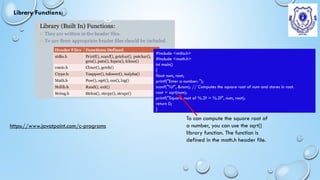
Library Functions:
#include <stdio.h>
#include<math.h>
int main()
{
float num, root;
printf("Enter a number: ");
scanf("%f", &num); // Computes the square root of num and stores in root.
root = sqrt(num);
printf("Square root of %.2f = %.2f", num, root);
return 0;
}
To can compute the square root of
a number, you can use the sqrt()
library function. The function is
defined in the math.h header file.
https://www.javatpoint.com/c-programs
40.
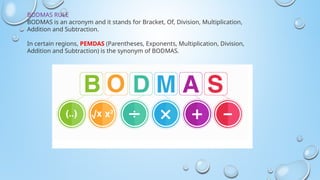
BODMAS RULE
BODMAS isan acronym and it stands for Bracket, Of, Division, Multiplication,
Addition and Subtraction.
In certain regions, PEMDAS (Parentheses, Exponents, Multiplication, Division,
Addition and Subtraction) is the synonym of BODMAS.

![Errors in C
Types of Errors
Syntax Errors
Runtime
Errors
Linker
Error
Logical
Errors
Semantic Errors
// C program to illustrate
// syntax error
#include<stdio.h>
void main()
{
int x = 10;
int y = 15;
printf("%d", (x, y)) // semicolon
missed
}
Error:
error: expected ';' before '}' token
// C program to illustrate
// run-time error
#include<stdio.h>
void main()
{
int n = 9, div = 0;
// wrong logic
// number is divided
by 0,
// so this program
abnormally terminates
div = n/0;
printf("resut = %d",
div);
}
Error:
warning: division by zero
[-Wdiv-by-zero]
div = n/0;
// C program to
illustrate
// linker error
#include<stdio.h>
void Main() // Here
Main() should be
main()
{
int a = 10;
printf("%d", a);
}
Error:
(.text+0x20):
undefined reference
to `main'
// C program to
illustrate
// logical error
int main()
{
int i = 0;
// logical error : a
semicolon after loop
for(i = 0; i < 3; i++);
{
printf("loop ");
continue;
}
getchar();
return 0;
}
No output
// C program to illustrate
// semantic error
void main()
{
int a, b, c;
a + b = c; //semantic
error
}
Error
error: lvalue required as
left operand of assignment
a + b = c; //semantic
error](https://image.slidesharecdn.com/ctutorial-uniti-250821031151-c60f62d7/85/Principles-of-object-oriented-programming-object-oriented-programming-paradigm-Applications-of-OOPs-OOPs-29-320.jpg)



![Human Reproduction [ Reproductive System ] Notes @irfanullah_mehar Irfanullah...](https://cdn.slidesharecdn.com/ss_thumbnails/humanreproductionreproductivesystemnotesirfanullahmeharirfanullahmeharjanantantra-260111172350-56e85778-thumbnail.jpg?width=640&height=640&fit=bounds)


