C++ Unit Test with GoogleTest
Raihan Masud,
Senior Software Engineer,
Micro Systems Engineering
What
C++ code test with unit testing framework
Why
GUI/Integration test can’t do code/unit testing
Code Coverage
How
By using unit testing framework in C++
Googletest - Google C++ testing framework
Chrome browser, OS and LLVM Compliers
CPP Unit
C++ port of Junit, has basic unit testing, only one level of assertion
Boost Test
Huge, preferable if you are already using boost libraries, no mocking
GoogleTest
Assertion rich, cross platform, mocking, customizable logging/reports
C++ Unit Test Frameworks
Basic Unit testing – assert, double, string test
Fatal/Non Fatal Assertion, Exception Assertion
Test/ Fixture Setup/Teardown
Test Result Reporting – xml
Auto Identifying tests by Google Test Framework – setup and running is easy
Use Shared Resources in test
Death Test -> Program Termination, segmentation fault, etc
Customize tests/test run with test flags - randomize test run, repeat same tests
Enable/Disable Test
Type assertion - run same test for multiple types
Use Reflection -> better test description, Test Name/Info
Extending, customizing test runs on Event Listeners
Parameterized/data-driven test - run same test for multiple test inputs/data
Distribute test over multiple machines
GoogleTest Features
Writing Tests using GoogleTest
Download and Compile GoogleTest Framework Library
https://code.google.com/p/googletest/
Create Tests using Visual Studio
Add references to googletest and project under test, and
additional include directories
DEMO USING VISUAL STUDIO
Template Project
TEST
ASSERT_EQ, EXPECT_EQ, EXPECT_STR_EQ, EXPECT_TRUE
TEST_F :public::testing::test
Add AvOpt reference
Exception assertion
static void SetUpTestCase(){}, static void TearDownTestCase(){}
virtual void SetUp(){} TearDown(){}
GUI for GoogleTest
Filters/Customize test run – shuffle tests
Enable/Disable DISABLED_TestName
Test result
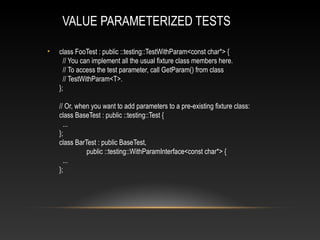
VALUE PARAMETERIZED TESTS
• class FooTest : public ::testing::TestWithParam<const char*> {
// You can implement all the usual fixture class members here.
// To access the test parameter, call GetParam() from class
// TestWithParam<T>.
};
// Or, when you want to add parameters to a pre-existing fixture class:
class BaseTest : public ::testing::Test {
...
};
class BarTest : public BaseTest,
public ::testing::WithParamInterface<const char*> {
...
};
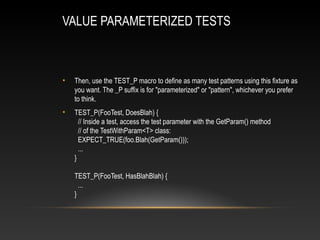
VALUE PARAMETERIZED TESTS
• Then, use the TEST_P macro to define as many test patterns using this fixture as
you want. The _P suffix is for "parameterized" or "pattern", whichever you prefer
to think.
• TEST_P(FooTest, DoesBlah) {
// Inside a test, access the test parameter with the GetParam() method
// of the TestWithParam<T> class:
EXPECT_TRUE(foo.Blah(GetParam()));
...
}
TEST_P(FooTest, HasBlahBlah) {
...
}

Presentation_C++UnitTest

  • 1.
    C++ Unit Testwith GoogleTest Raihan Masud, Senior Software Engineer, Micro Systems Engineering What C++ code test with unit testing framework Why GUI/Integration test can’t do code/unit testing Code Coverage How By using unit testing framework in C++ Googletest - Google C++ testing framework Chrome browser, OS and LLVM Compliers
  • 2.
    CPP Unit C++ portof Junit, has basic unit testing, only one level of assertion Boost Test Huge, preferable if you are already using boost libraries, no mocking GoogleTest Assertion rich, cross platform, mocking, customizable logging/reports C++ Unit Test Frameworks
  • 3.
    Basic Unit testing– assert, double, string test Fatal/Non Fatal Assertion, Exception Assertion Test/ Fixture Setup/Teardown Test Result Reporting – xml Auto Identifying tests by Google Test Framework – setup and running is easy Use Shared Resources in test Death Test -> Program Termination, segmentation fault, etc Customize tests/test run with test flags - randomize test run, repeat same tests Enable/Disable Test Type assertion - run same test for multiple types Use Reflection -> better test description, Test Name/Info Extending, customizing test runs on Event Listeners Parameterized/data-driven test - run same test for multiple test inputs/data Distribute test over multiple machines GoogleTest Features
  • 4.
    Writing Tests usingGoogleTest Download and Compile GoogleTest Framework Library https://code.google.com/p/googletest/ Create Tests using Visual Studio Add references to googletest and project under test, and additional include directories
  • 5.
    DEMO USING VISUALSTUDIO Template Project TEST ASSERT_EQ, EXPECT_EQ, EXPECT_STR_EQ, EXPECT_TRUE TEST_F :public::testing::test Add AvOpt reference Exception assertion static void SetUpTestCase(){}, static void TearDownTestCase(){} virtual void SetUp(){} TearDown(){} GUI for GoogleTest Filters/Customize test run – shuffle tests Enable/Disable DISABLED_TestName Test result
  • 6.
    VALUE PARAMETERIZED TESTS •class FooTest : public ::testing::TestWithParam<const char*> { // You can implement all the usual fixture class members here. // To access the test parameter, call GetParam() from class // TestWithParam<T>. }; // Or, when you want to add parameters to a pre-existing fixture class: class BaseTest : public ::testing::Test { ... }; class BarTest : public BaseTest, public ::testing::WithParamInterface<const char*> { ... };
  • 7.
    VALUE PARAMETERIZED TESTS •Then, use the TEST_P macro to define as many test patterns using this fixture as you want. The _P suffix is for "parameterized" or "pattern", whichever you prefer to think. • TEST_P(FooTest, DoesBlah) { // Inside a test, access the test parameter with the GetParam() method // of the TestWithParam<T> class: EXPECT_TRUE(foo.Blah(GetParam())); ... } TEST_P(FooTest, HasBlahBlah) { ... }