BASICS OF PYTHON
PGDCA
INTRODUCTION
• Python is an interpretive language.
• This means that your code is not directly run by the hardware. It is instead passed to a
virtual machine, which is just another programme that reads and interprets your code. If
your code used the ‘+’ operation, this would be recognised by the interpreter at run time,
which would then call its own internal function ‘add(a,b)’, which would then execute the
machine code ‘ADD’.
• This is in contrast to compiled languages, where your code is translated into native
machine instructions, which are then directly executed by the hardware. Here, the ‘+’ in
your code would be translated directly in the ‘ADD’ machine code.
ADVANTAGES OF PYTHON
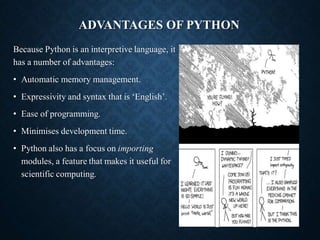
Because Python is an interpretive language, it
has a number of advantages:
• Automatic memory management.
• Expressivity and syntax that is ‘English’.
• Ease of programming.
• Minimises development time.
• Python also has a focus on importing
modules, a feature that makes it useful for
scientific computing.
DISADVANTAGES
• Interpreted languages are slower than compiled languages.
• The modules that you import are developed in a
decentralised manner; this can cause issues based upon
individual assumptions.
• Multi-threading is hard in Python.
VERSIONS OF PYTHON
• There are currently two versions of Python in use; Python 2 and
Python 3.
• Python 3 is not backward compatible with Python 2.
• A lot of the imported modules were only available in Python 2
for quite some time, leading to a slow adoption of Python 3.
However, this not really an issue anymore.
• Support for Python 2 will end in 2020.
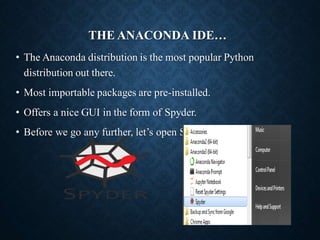
THE ANACONDA IDE…
• The Anaconda distribution is the most popular Python
distribution out there.
• Most importable packages are pre-installed.
• Offers a nice GUI in the form of Spyder.
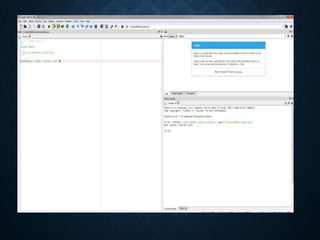
• Before we go any further, let’s open Spyder:
KEYWORDS
Python keywords are special reserved words that have
specific meanings and purposes and can’t be used for anything
but those specific purposes. These keywords are always
available—you’ll never have to import them into your code.
Python keywords are different from Python’s built-in
functions and types. The built-in functions and types are also
always available, but they aren’t as restrictive as the keywords in
their usage. As of Python 3.8, there are thirty-five keywords in
Python.
VARIABLES
• Variables in python can contain alphanumerical characters and
some special characters.
• By convention, it is common to have variable names that start
with lower case letters and have class names beginning with a
capital letter; but you can do whatever you want.
• Some keywords are reserved and cannot be used as variable
names due to them serving an in-built Python function; i.e. and,
continue, break. Your IDE will let you know if you try to use
one of these.
• Python is dynamically typed; the type of the variable is derived
from the value it is assigned.
VARIABLE TYPES
• Integer (int)
• Float (float)
• String (str)
• Boolean (bool)
• Complex (complex)
• […]
• User defined
(classes)
• A variable is assigned using the =
operator; i.e:
In: Out:
• The print() function is used to print
something to the screen.
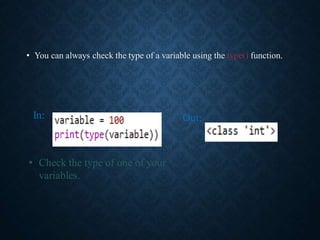
• You can always check the type of a variable using the type() function.
In: Out:
• Check the type of one of your
variables.
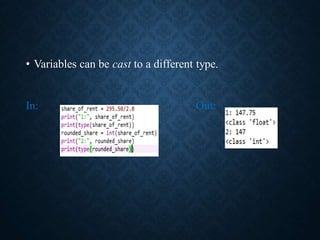
• Variables can be cast to a different type.
In: Out:
OPERATORS
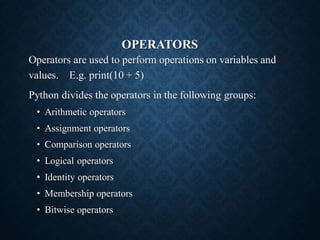
Operators are used to perform operations on variables and
values. E.g. print(10 + 5)
Python divides the operators in the following groups:
• Arithmetic operators
• Assignment operators
• Comparison operators
• Logical operators
• Identity operators
• Membership operators
• Bitwise operators
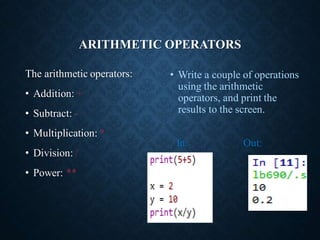
ARITHMETIC OPERATORS
The arithmetic operators:
• Addition: +
• Subtract: -
• Multiplication: *
• Division: /
• Power: **
• Write a couple of operations
using the arithmetic
operators, and print the
results to the screen.
In: Out:
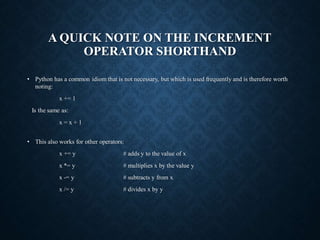
A QUICK NOTE ON THE INCREMENT
OPERATOR SHORTHAND
• Python has a common idiom that is not necessary, but which is used frequently and is therefore worth
noting:
x += 1
Is the same as:
x = x + 1
• This also works for other operators:
x += y # adds y to the value of x
x *= y # multiplies x by the value y
x -= y # subtracts y from x
x /= y # divides x by y
BOOLEAN OPERATORS
Boolean operators are useful when making
conditional statements, we will cover these in-
depth later.
• and
• or
• not
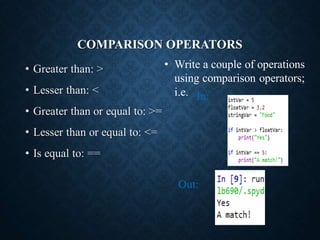
COMPARISON OPERATORS
• Greater than: >
• Lesser than: <
• Greater than or equal to: >=
• Lesser than or equal to: <=
• Is equal to: ==
In:
Out:
• Write a couple of operations
using comparison operators;
i.e.

ppt notes for python language variable data types

  • 1.
  • 2.
    INTRODUCTION • Python isan interpretive language. • This means that your code is not directly run by the hardware. It is instead passed to a virtual machine, which is just another programme that reads and interprets your code. If your code used the ‘+’ operation, this would be recognised by the interpreter at run time, which would then call its own internal function ‘add(a,b)’, which would then execute the machine code ‘ADD’. • This is in contrast to compiled languages, where your code is translated into native machine instructions, which are then directly executed by the hardware. Here, the ‘+’ in your code would be translated directly in the ‘ADD’ machine code.
  • 3.
    ADVANTAGES OF PYTHON BecausePython is an interpretive language, it has a number of advantages: • Automatic memory management. • Expressivity and syntax that is ‘English’. • Ease of programming. • Minimises development time. • Python also has a focus on importing modules, a feature that makes it useful for scientific computing.
  • 4.
    DISADVANTAGES • Interpreted languagesare slower than compiled languages. • The modules that you import are developed in a decentralised manner; this can cause issues based upon individual assumptions. • Multi-threading is hard in Python.
  • 5.
    VERSIONS OF PYTHON •There are currently two versions of Python in use; Python 2 and Python 3. • Python 3 is not backward compatible with Python 2. • A lot of the imported modules were only available in Python 2 for quite some time, leading to a slow adoption of Python 3. However, this not really an issue anymore. • Support for Python 2 will end in 2020.
  • 6.
    THE ANACONDA IDE… •The Anaconda distribution is the most popular Python distribution out there. • Most importable packages are pre-installed. • Offers a nice GUI in the form of Spyder. • Before we go any further, let’s open Spyder:
  • 8.
    KEYWORDS Python keywords arespecial reserved words that have specific meanings and purposes and can’t be used for anything but those specific purposes. These keywords are always available—you’ll never have to import them into your code. Python keywords are different from Python’s built-in functions and types. The built-in functions and types are also always available, but they aren’t as restrictive as the keywords in their usage. As of Python 3.8, there are thirty-five keywords in Python.
  • 9.
    VARIABLES • Variables inpython can contain alphanumerical characters and some special characters. • By convention, it is common to have variable names that start with lower case letters and have class names beginning with a capital letter; but you can do whatever you want. • Some keywords are reserved and cannot be used as variable names due to them serving an in-built Python function; i.e. and, continue, break. Your IDE will let you know if you try to use one of these. • Python is dynamically typed; the type of the variable is derived from the value it is assigned.
  • 10.
    VARIABLE TYPES • Integer(int) • Float (float) • String (str) • Boolean (bool) • Complex (complex) • […] • User defined (classes) • A variable is assigned using the = operator; i.e: In: Out: • The print() function is used to print something to the screen.
  • 11.
    • You canalways check the type of a variable using the type() function. In: Out: • Check the type of one of your variables.
  • 12.
    • Variables canbe cast to a different type. In: Out:
  • 13.
    OPERATORS Operators are usedto perform operations on variables and values. E.g. print(10 + 5) Python divides the operators in the following groups: • Arithmetic operators • Assignment operators • Comparison operators • Logical operators • Identity operators • Membership operators • Bitwise operators
  • 14.
    ARITHMETIC OPERATORS The arithmeticoperators: • Addition: + • Subtract: - • Multiplication: * • Division: / • Power: ** • Write a couple of operations using the arithmetic operators, and print the results to the screen. In: Out:
  • 15.
    A QUICK NOTEON THE INCREMENT OPERATOR SHORTHAND • Python has a common idiom that is not necessary, but which is used frequently and is therefore worth noting: x += 1 Is the same as: x = x + 1 • This also works for other operators: x += y # adds y to the value of x x *= y # multiplies x by the value y x -= y # subtracts y from x x /= y # divides x by y
  • 16.
    BOOLEAN OPERATORS Boolean operatorsare useful when making conditional statements, we will cover these in- depth later. • and • or • not
  • 17.
    COMPARISON OPERATORS • Greaterthan: > • Lesser than: < • Greater than or equal to: >= • Lesser than or equal to: <= • Is equal to: == In: Out: • Write a couple of operations using comparison operators; i.e.