Lesson 13 Databases Unit 2—Using the Computer
Objectives Define the purpose and function of database software. Identify uses of databases. Identify and define the components of a database. Plan a database. Create a table using a wizard.
Objectives (cont.) Enter records in a table. Add a form using a wizard. Create a query using a wizard. Create a report using a wizard.
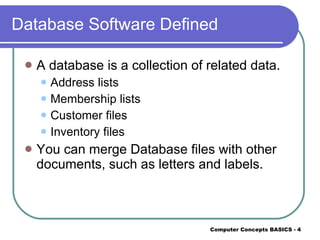
Database Software Defined A database is a collection of related data. Address lists Membership lists Customer files Inventory files You can merge Database files with other documents, such as letters and labels.
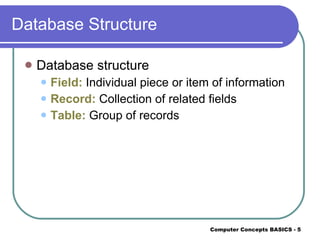
Database Structure Database structure  Field:  Individual piece or item of information Record:  Collection of related fields Table:  Group of records
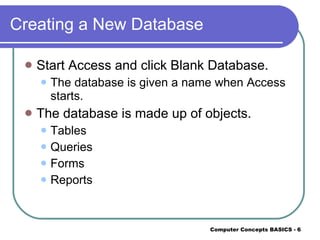
Creating a New Database Start Access and click Blank Database. The database is given a name when Access starts. The database is made up of objects. Tables Queries Forms Reports
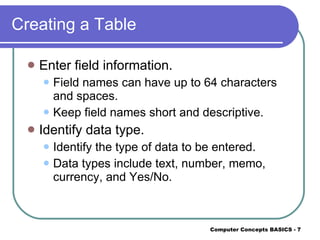
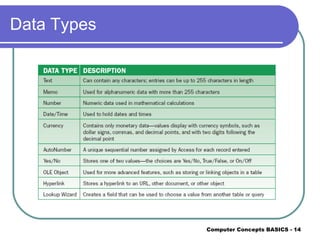
Creating a Table Enter field information. Field names can have up to 64 characters and spaces. Keep field names short and descriptive. Identify data type. Identify the type of data to be entered. Data types include text, number, memo, currency, and Yes/No.
Creating a Table (cont.) Include a description. Describe information in the field; a description is not always necessary. Complete the Field Properties items. This section is for any special formatting that may   be needed, such as the size of the field.
Creating a Table (cont.) Identify the primary key field. This uniquely identifies a field for each record. Save the table.
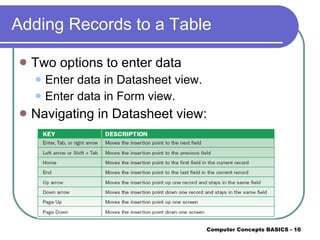
Adding Records to a Table Two options to enter data Enter data in Datasheet view. Enter data in Form view. Navigating in Datasheet view:
Printing a Table Print from Datasheet view. Print in landscape orientation. Print all records or selected records.
Sorting a Table Arrange records in order. Ascending order arranges records from A to Z or smallest to largest. Descending order arranges records from Z to A or largest to smallest.
Modifying the Table Structure Insert or delete fields. When a field is deleted, all data in the field is deleted. Change formatting features. Change data types.
Data Types
Creating and Using Forms A form is an object you use to input, maintain, view, and print records in a database one record at a time. You can format a form with graphics.
Querying a Database A query is a question you ask about data stored in a database. Search for specific records that meet given criteria. Comparison operators are used to match criteria.
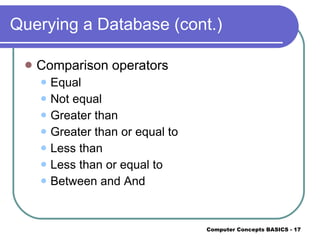
Querying a Database (cont.) Comparison operators Equal Not equal Greater than Greater than or equal to Less than Less than or equal to Between and And
Creating and Using a Report Reports provide the contents of a database in customized formats. Reports summarize data. Reports may include all or selected records.
Summary Databases allow for organizing, storing, maintaining, retrieving, and sorting data. The components of a database are objects. These include tables, queries, forms, and reports. You should plan the database structure first and then create it.
Summary (cont.) After the table structure is created, you add records to the table. Records can be sorted in ascending or descending order. You can create a form to enter records in a table. Forms are designed to simplify data entry.
Summary (cont.) You can design a query to find records that meet specified criteria. A report is a formatted display of table records. In a report, you can organize, summarize, and print all or a portion of the data.

Ppt Lesson 13

  • 1.
    Lesson 13 DatabasesUnit 2—Using the Computer
  • 2.
    Objectives Define thepurpose and function of database software. Identify uses of databases. Identify and define the components of a database. Plan a database. Create a table using a wizard.
  • 3.
    Objectives (cont.) Enterrecords in a table. Add a form using a wizard. Create a query using a wizard. Create a report using a wizard.
  • 4.
    Database Software DefinedA database is a collection of related data. Address lists Membership lists Customer files Inventory files You can merge Database files with other documents, such as letters and labels.
  • 5.
    Database Structure Databasestructure Field: Individual piece or item of information Record: Collection of related fields Table: Group of records
  • 6.
    Creating a NewDatabase Start Access and click Blank Database. The database is given a name when Access starts. The database is made up of objects. Tables Queries Forms Reports
  • 7.
    Creating a TableEnter field information. Field names can have up to 64 characters and spaces. Keep field names short and descriptive. Identify data type. Identify the type of data to be entered. Data types include text, number, memo, currency, and Yes/No.
  • 8.
    Creating a Table(cont.) Include a description. Describe information in the field; a description is not always necessary. Complete the Field Properties items. This section is for any special formatting that may be needed, such as the size of the field.
  • 9.
    Creating a Table(cont.) Identify the primary key field. This uniquely identifies a field for each record. Save the table.
  • 10.
    Adding Records toa Table Two options to enter data Enter data in Datasheet view. Enter data in Form view. Navigating in Datasheet view:
  • 11.
    Printing a TablePrint from Datasheet view. Print in landscape orientation. Print all records or selected records.
  • 12.
    Sorting a TableArrange records in order. Ascending order arranges records from A to Z or smallest to largest. Descending order arranges records from Z to A or largest to smallest.
  • 13.
    Modifying the TableStructure Insert or delete fields. When a field is deleted, all data in the field is deleted. Change formatting features. Change data types.
  • 14.
  • 15.
    Creating and UsingForms A form is an object you use to input, maintain, view, and print records in a database one record at a time. You can format a form with graphics.
  • 16.
    Querying a DatabaseA query is a question you ask about data stored in a database. Search for specific records that meet given criteria. Comparison operators are used to match criteria.
  • 17.
    Querying a Database(cont.) Comparison operators Equal Not equal Greater than Greater than or equal to Less than Less than or equal to Between and And
  • 18.
    Creating and Usinga Report Reports provide the contents of a database in customized formats. Reports summarize data. Reports may include all or selected records.
  • 19.
    Summary Databases allowfor organizing, storing, maintaining, retrieving, and sorting data. The components of a database are objects. These include tables, queries, forms, and reports. You should plan the database structure first and then create it.
  • 20.
    Summary (cont.) Afterthe table structure is created, you add records to the table. Records can be sorted in ascending or descending order. You can create a form to enter records in a table. Forms are designed to simplify data entry.
  • 21.
    Summary (cont.) Youcan design a query to find records that meet specified criteria. A report is a formatted display of table records. In a report, you can organize, summarize, and print all or a portion of the data.