Virtual Machines Measure Up John Staton Karsten Steinhaeuser University of Notre Dame December 15, 2005 Graduate Operating Systems, Fall 2005 Final Project Presentation
Outline Problem Description Virtual Machine (VM) Overview Timing and Benchmarking Micro-Benchmarks Macro-Benchmarks Experimental Results Analysis & Conclusion
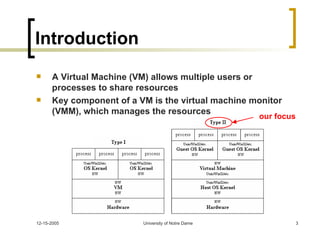
Introduction A Virtual Machine (VM) allows multiple users or processes to share resources Key component of a VM is the virtual machine monitor (VMM), which manages the resources our focus
Problem Description Different VMs were designed with different goals in mind Trade-offs between performance, flexibility, and portability Weaknesses rarely exposed because authors (obviously) point out strengths Little effort to systematically combine best features for improved VM design
The Solution Perform a case study of different available VM implementations Qualitative Comparison – platforms, usability Micro-Benchmarks – system calls, file I/O ops Macro-Benchmarks – CPU-intensive tasks Identify design features that lead to good (and bad) performance Combine into an improved design
VMWare Workstation 5.0 Commercial product from VMWare, Inc Easy to install VMWare itself GUI for VM management and host operating system installation Great documentation and support Method of Operation: Virtualization Host OS: Windows, Linux Guest OS: Any
User Mode Linux (UML) Open-Source project by Jeff Dike Included in Linux source (version 2.5+) Easy to install UML itself Requires disk image to run (download) Good documentation for open-source Method of Operation: kernel port Host OS: Linux Guest OS: Linux
Bochs Open-Source project by Kevin Lawton Installation has several pre-requisites Requires disk image to run (download) Setup using configuration file .bochsrc Limited documentation describing config file Method of Operation: emulation Host OS: Windows, Linux, OS X Guest OS: Windows, Linux, xBSD
QEMU Open-Source project by Fabrice Bellard Installation of QEMU is straightforward Requires disk image to run (download) Good support for hosting on Linux, poor support for hosting on Windows Method of Operation: dynamic re-compilation Host OS: Windows, Linux, OS X Guest OS: Any
Xen Academic Research Project, open source Installation of Xen is quite difficult Documentation is available but not helpful Configuration / Use resulted in unsolved problems Included in RedHat Fedora Core 4 Method of Operation: Paravirtualization Requires modification to host OS Host OS: Linux, NetBSD Guest OS: Windows XP, Linux, NetBSD
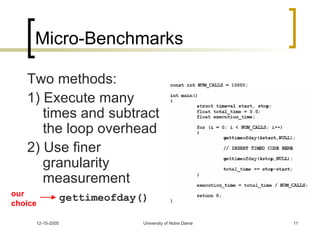
Micro-Benchmarks Two methods: 1) Execute many times and subtract the loop overhead 2) Use finer granularity measurement gettimeofday() our choice
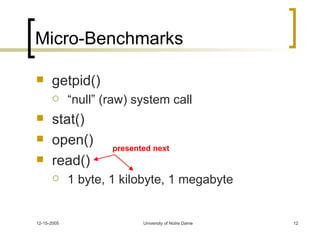
Micro-Benchmarks getpid() “null” (raw) system call  stat() open() read() 1 byte, 1 kilobyte, 1 megabyte presented next
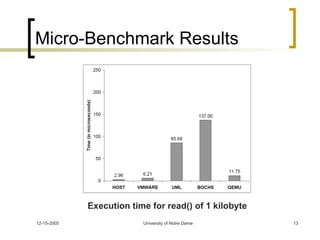
Micro-Benchmark Results Execution time for read() of 1 kilobyte
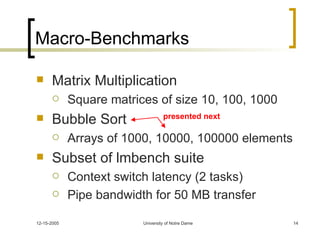
Macro-Benchmarks Matrix Multiplication Square matrices of size 10, 100, 1000 Bubble Sort Arrays of 1000, 10000, 100000 elements Subset of lmbench suite Context switch latency (2 tasks) Pipe bandwidth for 50 MB transfer presented next
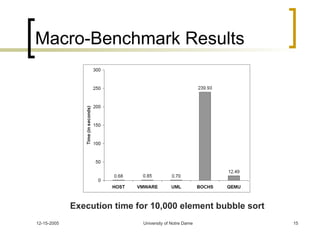
Macro-Benchmark Results Execution time for 10,000 element bubble sort
Analysis I Why is Bochs so slow? And why is VMWare so fast? Bochs’ mode of operation (full emulation) is outdated and requires excessive overhead; each instruction from the guest OS is explicitly translated for physical hardware VMWare takes advantage of two more recently developed techniques: virtualization, an optimized abstraction of resources, and modifications to the host OS for I/O by installing a special driver (VMDriver)
Analysis II What makes QEMU perform so well? QEMU uses a portable dynamic translator, which can recompile parts of a program during execution (“dynamic compilation”). This allows the generation of code specific to the environment using information that would generally not be available to a compiler. Actually, QEMU’s performance can be improved further by borrowing VMWare’s idea of modifying the operating system. A prototype called KQEMU has recently been implemented and early results indicate performance competitive with VMWare.
Conclusion Selection of a VM If cost isn’t an issue, use VMWare for the best available performance If cost is an issue, QEMU is a competitive open-source alternative Designing a VM Virtualize most used I/O devices Emulation is portable, but slow Modifications to the host OS
Questions… ???

ppt

  • 1.
    Virtual Machines MeasureUp John Staton Karsten Steinhaeuser University of Notre Dame December 15, 2005 Graduate Operating Systems, Fall 2005 Final Project Presentation
  • 2.
    Outline Problem DescriptionVirtual Machine (VM) Overview Timing and Benchmarking Micro-Benchmarks Macro-Benchmarks Experimental Results Analysis & Conclusion
  • 3.
    Introduction A VirtualMachine (VM) allows multiple users or processes to share resources Key component of a VM is the virtual machine monitor (VMM), which manages the resources our focus
  • 4.
    Problem Description DifferentVMs were designed with different goals in mind Trade-offs between performance, flexibility, and portability Weaknesses rarely exposed because authors (obviously) point out strengths Little effort to systematically combine best features for improved VM design
  • 5.
    The Solution Performa case study of different available VM implementations Qualitative Comparison – platforms, usability Micro-Benchmarks – system calls, file I/O ops Macro-Benchmarks – CPU-intensive tasks Identify design features that lead to good (and bad) performance Combine into an improved design
  • 6.
    VMWare Workstation 5.0Commercial product from VMWare, Inc Easy to install VMWare itself GUI for VM management and host operating system installation Great documentation and support Method of Operation: Virtualization Host OS: Windows, Linux Guest OS: Any
  • 7.
    User Mode Linux(UML) Open-Source project by Jeff Dike Included in Linux source (version 2.5+) Easy to install UML itself Requires disk image to run (download) Good documentation for open-source Method of Operation: kernel port Host OS: Linux Guest OS: Linux
  • 8.
    Bochs Open-Source projectby Kevin Lawton Installation has several pre-requisites Requires disk image to run (download) Setup using configuration file .bochsrc Limited documentation describing config file Method of Operation: emulation Host OS: Windows, Linux, OS X Guest OS: Windows, Linux, xBSD
  • 9.
    QEMU Open-Source projectby Fabrice Bellard Installation of QEMU is straightforward Requires disk image to run (download) Good support for hosting on Linux, poor support for hosting on Windows Method of Operation: dynamic re-compilation Host OS: Windows, Linux, OS X Guest OS: Any
  • 10.
    Xen Academic ResearchProject, open source Installation of Xen is quite difficult Documentation is available but not helpful Configuration / Use resulted in unsolved problems Included in RedHat Fedora Core 4 Method of Operation: Paravirtualization Requires modification to host OS Host OS: Linux, NetBSD Guest OS: Windows XP, Linux, NetBSD
  • 11.
    Micro-Benchmarks Two methods:1) Execute many times and subtract the loop overhead 2) Use finer granularity measurement gettimeofday() our choice
  • 12.
    Micro-Benchmarks getpid() “null”(raw) system call stat() open() read() 1 byte, 1 kilobyte, 1 megabyte presented next
  • 13.
    Micro-Benchmark Results Executiontime for read() of 1 kilobyte
  • 14.
    Macro-Benchmarks Matrix MultiplicationSquare matrices of size 10, 100, 1000 Bubble Sort Arrays of 1000, 10000, 100000 elements Subset of lmbench suite Context switch latency (2 tasks) Pipe bandwidth for 50 MB transfer presented next
  • 15.
    Macro-Benchmark Results Executiontime for 10,000 element bubble sort
  • 16.
    Analysis I Whyis Bochs so slow? And why is VMWare so fast? Bochs’ mode of operation (full emulation) is outdated and requires excessive overhead; each instruction from the guest OS is explicitly translated for physical hardware VMWare takes advantage of two more recently developed techniques: virtualization, an optimized abstraction of resources, and modifications to the host OS for I/O by installing a special driver (VMDriver)
  • 17.
    Analysis II Whatmakes QEMU perform so well? QEMU uses a portable dynamic translator, which can recompile parts of a program during execution (“dynamic compilation”). This allows the generation of code specific to the environment using information that would generally not be available to a compiler. Actually, QEMU’s performance can be improved further by borrowing VMWare’s idea of modifying the operating system. A prototype called KQEMU has recently been implemented and early results indicate performance competitive with VMWare.
  • 18.
    Conclusion Selection ofa VM If cost isn’t an issue, use VMWare for the best available performance If cost is an issue, QEMU is a competitive open-source alternative Designing a VM Virtualize most used I/O devices Emulation is portable, but slow Modifications to the host OS
  • 19.