INSTRUCTIONS FOR USE
EDITIN POWERPOINT®
Click on the button under the presentation
preview that says "Download as PowerPoint
template". You will get a .pptx file that you can
edit in PowerPoint.
Remember to download and install the fonts used
in this presentation (you’ll find the links to the
font files needed in the Presentation design slide)
EDIT IN GOOGLE SLIDES
Click on the button under the presentation
preview that says "Use as Google Slides Theme".
You will get a copy of this document on your
Google Drive and will be able to edit, add or
delete slides.
You have to be signed in to your Google
account.
More info on how to use this template at www.slidescarnival.com/help-use-presentation-template
This template is free to use under Creative Commons Attribution license. You can keep the Credits slide or
mention SlidesCarnival and other resources used in a slide footer.
2
3.
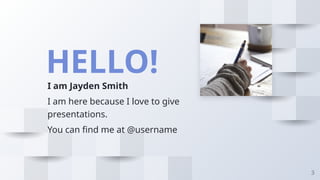
HELLO!
I am JaydenSmith
I am here because I love to give
presentations.
You can find me at @username
3
THIS IS ASLIDE TITLE
❑ Here you have a list of items
❑ And some text
❑ But remember not to overload your slides with content
Your audience will listen to you or read the content, but won’t
do both.
6
7.
BIG CONCEPT
Bring theattention of your audience over a key
concept using icons or illustrations
7
8.
White
Is the colorof milk and fresh
snow, the color produced by
the combination of all the
colors of the visible spectrum.
YOU CAN ALSO SPLIT YOUR
CONTENT
Black
Is the color of coal, ebony,
and of outer space. It is the
darkest color, the result of the
absence of or complete
absorption of light.
8
9.
IN TWO ORTHREE COLUMNS
Yellow
Is the color of gold,
butter and ripe lemons.
In the spectrum of
visible light, yellow is
found between green
and orange.
Blue
Is the colour of the clear
sky and the deep sea. It
is located between
violet and green on the
optical spectrum.
Red
Is the color of blood,
and because of this it
has historically been
associated with
sacrifice, danger and
courage.
9
10.
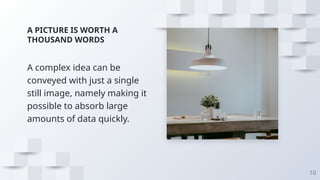
A PICTURE ISWORTH A
THOUSAND WORDS
A complex idea can be
conveyed with just a single
still image, namely making it
possible to absorb large
amounts of data quickly.
10
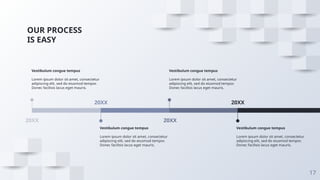
OUR PROCESS
IS EASY
17
20XX
Vestibulumcongue tempus
Lorem ipsum dolor sit amet, consectetur
adipiscing elit, sed do eiusmod tempor.
Donec facilisis lacus eget mauris.
20XX
Vestibulum congue tempus
Lorem ipsum dolor sit amet, consectetur
adipiscing elit, sed do eiusmod tempor.
Donec facilisis lacus eget mauris.
20XX
Vestibulum congue tempus
Lorem ipsum dolor sit amet, consectetur
adipiscing elit, sed do eiusmod tempor.
Donec facilisis lacus eget mauris.
20XX
Vestibulum congue tempus
Lorem ipsum dolor sit amet, consectetur
adipiscing elit, sed do eiusmod tempor.
Donec facilisis lacus eget mauris.
18.
LET’S REVIEW SOMECONCEPTS
Yellow
Is the color of gold, butter and
ripe lemons. In the spectrum of
visible light, yellow is found
between green and orange.
Blue
Is the colour of the clear sky and
the deep sea. It is located
between violet and green on the
optical spectrum.
Red
Is the color of blood, and
because of this it has historically
been associated with sacrifice,
danger and courage.
18
Yellow
Is the color of gold, butter and
ripe lemons. In the spectrum of
visible light, yellow is found
between green and orange.
Blue
Is the colour of the clear sky and
the deep sea. It is located
between violet and green on the
optical spectrum.
Red
Is the color of blood, and
because of this it has historically
been associated with sacrifice,
danger and courage.
CREDITS
Special thanks toall the people who made and
released these awesome resources for free:
❑ Presentation template by SlidesCarnival
❑ Photographs by Unsplash
24
25.
PRESENTATION DESIGN
This presentationuses the following typographies:
❑ Titles: Poppins
❑ Body copy: Montserrat
Download for free at:
https://www.fontsquirrel.com/fonts/poppins
https://www.fontsquirrel.com/fonts/montserrat
You don’t need to keep this slide in your presentation. It’s only here to serve you as a design
guide if you need to create new slides or download the fonts to edit the presentation in
PowerPoint®
25
26.
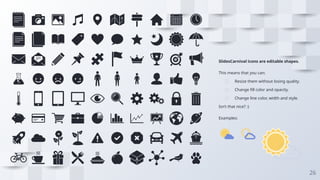
SlidesCarnival icons areeditable shapes.
This means that you can:
❑ Resize them without losing quality.
❑ Change fill color and opacity.
❑ Change line color, width and style.
Isn’t that nice? :)
Examples:
26
27.
💃
🏃
💑
❤ 😂 😉😋 😒 😭 👶
😸 🐟 🍒🍔
❤😂😉😋😒😭😸
✋👆👉👍 👪
🐟
💣🌏 and many more...
�
�
27
You can also use any emoji as an icon!
And of course it resizes without losing quality.
How? Follow Google instructions
https://twitter.com/googledocs/status/730087240156643328