PostCSS
Jason
Agenda
● CSS Preprocessor
● CSS Postprocessor
● PostCSS
autoprefixer
postcss-cssnext
precss
postcss-sorting
postcss-sprites
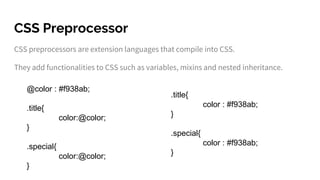
CSS Preprocessor
CSS preprocessors are extension languages that compile into CSS.
They add functionalities to CSS such as variables, mixins and nested inheritance.
.title{
color : #f938ab;
}
.special{
color : #f938ab;
}
@color : #f938ab;
.title{
color:@color;
}
.special{
color:@color;
}
CSS Postprocessor
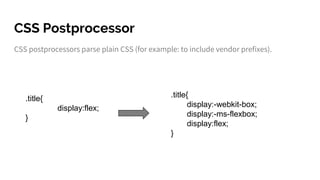
CSS postprocessors parse plain CSS (for example: to include vendor prefixes).
.title{
display:-webkit-box;
display:-ms-flexbox;
display:flex;
}
.title{
display:flex;
}
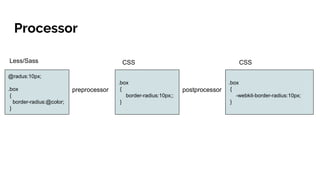
Processor
@radus:10px;
.box
{
border-radius:@color;
}
.box
{
border-radius:10px;;
}
.box
{
-webkit-border-radius:10px;
}
preprocessor postprocessor
Less/Sass CSS CSS
PostCSS
PostCSS is a tool for transforming CSS with JS plugins.
These plugins can support variables and mixins, transpile future CSS syntax, inline
images, and more.
Autoprefixer
●PostCSS plugin to parse CSS and add vendor prefixes to CSS rules using values from
Can I Use.
●Working with Autoprefixer is simple: just forget about vendor prefixes and write
normal CSS according to the latest W3C specs.
●You don’t need a special language (like Sass) or remember where you must use
mixins.
Autoprefixer
Write Pure CSS
a {
display: flex;
}
a {
display: -webkit-box;
display: -webkit-flex;
display: -ms-flexbox;
display: flex
}
Autoprefixer
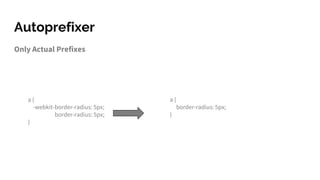
Only Actual Prefixes
a {
-webkit-border-radius: 5px;
border-radius: 5px;
}
a {
border-radius: 5px;
}
Postcss-cssnext
● PostCSS-cssnext is a PostCSS plugin that helps you to use the latest CSS syntax
today.
● It transforms new CSS specs into more compatible CSS so you don't need to wait for
browser support.
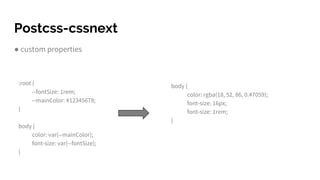
Postcss-cssnext
● custom properties
:root {
--fontSize: 1rem;
--mainColor: #12345678;
}
body {
color: var(--mainColor);
font-size: var(--fontSize);
}
body {
color: rgba(18, 52, 86, 0.47059);
font-size: 16px;
font-size: 1rem;
}
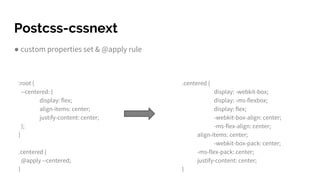
Postcss-cssnext
● custom properties set & @apply rule
:root {
--centered: {
display: flex;
align-items: center;
justify-content: center;
};
}
.centered {
@apply --centered;
}
.centered {
display: -webkit-box;
display: -ms-flexbox;
display: flex;
-webkit-box-align: center;
-ms-flex-align: center;
align-items: center;
-webkit-box-pack: center;
-ms-flex-pack: center;
justify-content: center;
}
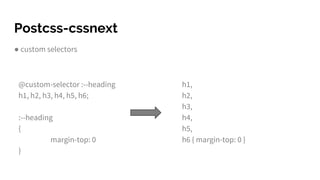
Postcss-cssnext
● custom selectors
@custom-selector :--heading
h1, h2, h3, h4, h5, h6;
:--heading
{
margin-top: 0
}
h1,
h2,
h3,
h4,
h5,
h6 { margin-top: 0 }
PreCSS
● PreCSS is a tool that allows you to use Sass-like markup in your CSS files.
● Enjoy a familiar syntax with variables, mixins, conditionals, and other goodies.
PreCSS
● Variables
$blue: #056ef0;
$column: 200px;
.menu_link {
background: $blue;
width: $column;
}
.menu_link {
background: #056ef0;
width: 200px;
}
PreCSS
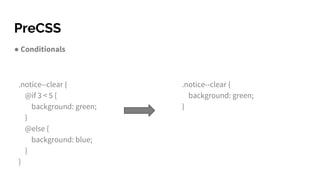
● Conditionals
.notice--clear {
@if 3 < 5 {
background: green;
}
@else {
background: blue;
}
}
.notice--clear {
background: green;
}
PreCSS
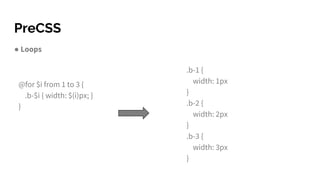
● Loops
@for $i from 1 to 3 {
.b-$i { width: $(i)px; }
}
.b-1 {
width: 1px
}
.b-2 {
width: 2px
}
.b-3 {
width: 3px
}
PreCSS
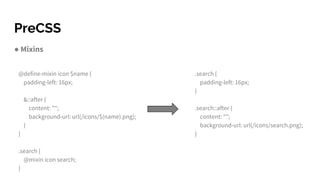
● Mixins
@define-mixin icon $name {
padding-left: 16px;
&::after {
content: "";
background-url: url(/icons/$(name).png);
}
}
.search {
@mixin icon search;
}
.search {
padding-left: 16px;
}
.search::after {
content: "";
background-url: url(/icons/search.png);
}
Postcss-sorting
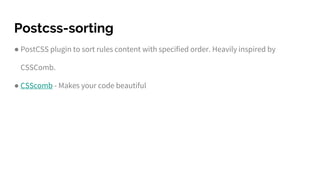
● PostCSS plugin to sort rules content with specified order. Heavily inspired by
CSSComb.
● CSScomb - Makes your code beautiful
Postcss-sorting
● Declarations
Example: { "sort-order": [ "margin", "padding" ] }
p {
padding: 0;
margin: 0;
}
p {
margin: 0;
padding: 0;
}
Postcss-sorting
● Grouping
Example: { "sort-order": [ [ "margin", "padding" ], [ "border", "background" ] ] }
p {
background: none;
border: 0;
margin: 0;
padding: 0;
}
p {
margin: 0;
padding: 0;
border: 0;
background: none;
}
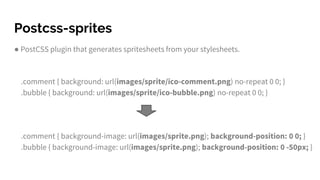
Postcss-sprites
● PostCSS plugin that generates spritesheets from your stylesheets.
.comment { background: url(images/sprite/ico-comment.png) no-repeat 0 0; }
.bubble { background: url(images/sprite/ico-bubble.png) no-repeat 0 0; }
.comment { background-image: url(images/sprite.png); background-position: 0 0; }
.bubble { background-image: url(images/sprite.png); background-position: 0 -50px; }
CSS Modules
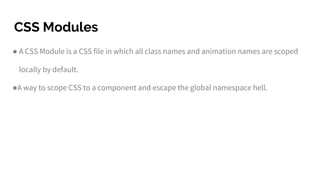
● A CSS Module is a CSS file in which all class names and animation names are scoped
locally by default.
●A way to scope CSS to a component and escape the global namespace hell.
CSS Modules
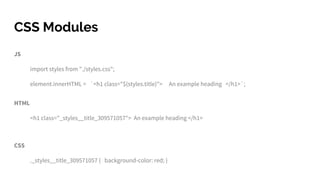
JS
import styles from "./styles.css";
element.innerHTML = `<h1 class="${styles.title}"> An example heading </h1>`;
HTML
<h1 class="_styles__title_309571057"> An example heading </h1>
CSS
._styles__title_309571057 { background-color: red; }
Reference
PostCSS
https://github.com/postcss/postcss
http://api.postcss.org/
CSSComb
http://csscomb.com/
CSSnext
http://cssnext.io/

PostCss

Editor's Notes

  • #11 http://cssnext.io/playground/ https://drafts.csswg.org/css-extensions/#custom-selectors
  • #15 https://jonathantneal.github.io/precss/
  • #24 https://www.sitepoint.com/understanding-css-modules-methodology/
  • #25 https://www.sitepoint.com/understanding-css-modules-methodology/