Download free for 30 days
Sign in
Upload
Language (EN)
Support
Business
Mobile
Social Media
Marketing
Technology
Art & Photos
Career
Design
Education
Presentations & Public Speaking
Government & Nonprofit
Healthcare
Internet
Law
Leadership & Management
Automotive
Engineering
Software
Recruiting & HR
Retail
Sales
Services
Science
Small Business & Entrepreneurship
Food
Environment
Economy & Finance
Data & Analytics
Investor Relations
Sports
Spiritual
News & Politics
Travel
Self Improvement
Real Estate
Entertainment & Humor
Health & Medicine
Devices & Hardware
Lifestyle
Change Language
Language
English
Español
Português
Français
Deutsche
Cancel
Save
EN
Uploaded by
Yosuke Onoue
1,155 views
Polymerやってみた
Polymerやってみました
Technology
◦
Read more
0
Save
Share
Embed
Embed presentation
Download
Download to read offline
1
/ 13
2
/ 13
3
/ 13
4
/ 13
5
/ 13
6
/ 13
7
/ 13
8
/ 13
9
/ 13
10
/ 13
11
/ 13
12
/ 13
13
/ 13
More Related Content
PDF
ひとりアドベントカレンダーのご紹介
by
Kazuhiro Hara
PDF
Cryogenでサイトつくろーじぇん
by
Kazuhiro Hara
PDF
(IDEユーザのための) ClojureのEmacs開発環境について
by
Kazuhiro Hara
PDF
sgvizler
by
Fumihiro Kato
PDF
Introduction and benchmarking of MeCab.jl #JapanR
by
Aki Ariga
PDF
Let's react
by
YasuhiroSakai3
PDF
One-time Binding & $digest
by
Hayashi Yuichi
PDF
Gws 20141024 gradle_intro
by
Nobuhiro Sue
ひとりアドベントカレンダーのご紹介
by
Kazuhiro Hara
Cryogenでサイトつくろーじぇん
by
Kazuhiro Hara
(IDEユーザのための) ClojureのEmacs開発環境について
by
Kazuhiro Hara
sgvizler
by
Fumihiro Kato
Introduction and benchmarking of MeCab.jl #JapanR
by
Aki Ariga
Let's react
by
YasuhiroSakai3
One-time Binding & $digest
by
Hayashi Yuichi
Gws 20141024 gradle_intro
by
Nobuhiro Sue
Viewers also liked
PDF
AngularJSでデータビジュアライゼーションがしたい
by
Yosuke Onoue
PDF
Angular 2のRenderer
by
Yosuke Onoue
PDF
GDG DevFest Kobe Firebaseハンズオン勉強会
by
Yosuke Onoue
PDF
CUDA 6の話@関西GPGPU勉強会#5
by
Yosuke Onoue
PDF
アニメーション(のためのパフォーマンス)の基礎知識
by
Yosuke Onoue
PDF
GPGPU Seminar (PyCUDA)
by
智啓 出川
PPTX
PyCUDAの紹介
by
Yosuke Onoue
KEY
GPGPU deいろんな問題解いてみた
by
Ryo Sakamoto
PPTX
x86x64 SSE4.2 POPCNT
by
takesako
PDF
AVX2時代の正規表現マッチング 〜半群でぐんぐん!〜
by
Ryoma Sin'ya
PDF
Popcntによるハミング距離計算
by
Norishige Fukushima
PDF
GPUが100倍速いという神話をぶち殺せたらいいな ver.2013
by
Ryo Sakamoto
PPTX
Jetson TK1でSemi-Global Matching
by
Ryo Sakamoto
PPTX
教育機関でのJetsonの活用の可能性
by
智啓 出川
PPT
Rsa暗号で彼女が出来るらしい
by
Yosuke Onoue
KEY
PyOpenCLによるGPGPU入門 Tokyo.SciPy#4 編
by
Yosuke Onoue
PDF
Cuda fortranの利便性を高めるfortran言語の機能
by
智啓 出川
PDF
GPGPU Education at Nagaoka University of Technology: A Trial Run
by
智啓 出川
PDF
GPGPU Seminar (Accelerataion of Lattice Boltzmann Method using CUDA Fortran)
by
智啓 出川
PDF
社会的決定とAHP
by
Yosuke Onoue
AngularJSでデータビジュアライゼーションがしたい
by
Yosuke Onoue
Angular 2のRenderer
by
Yosuke Onoue
GDG DevFest Kobe Firebaseハンズオン勉強会
by
Yosuke Onoue
CUDA 6の話@関西GPGPU勉強会#5
by
Yosuke Onoue
アニメーション(のためのパフォーマンス)の基礎知識
by
Yosuke Onoue
GPGPU Seminar (PyCUDA)
by
智啓 出川
PyCUDAの紹介
by
Yosuke Onoue
GPGPU deいろんな問題解いてみた
by
Ryo Sakamoto
x86x64 SSE4.2 POPCNT
by
takesako
AVX2時代の正規表現マッチング 〜半群でぐんぐん!〜
by
Ryoma Sin'ya
Popcntによるハミング距離計算
by
Norishige Fukushima
GPUが100倍速いという神話をぶち殺せたらいいな ver.2013
by
Ryo Sakamoto
Jetson TK1でSemi-Global Matching
by
Ryo Sakamoto
教育機関でのJetsonの活用の可能性
by
智啓 出川
Rsa暗号で彼女が出来るらしい
by
Yosuke Onoue
PyOpenCLによるGPGPU入門 Tokyo.SciPy#4 編
by
Yosuke Onoue
Cuda fortranの利便性を高めるfortran言語の機能
by
智啓 出川
GPGPU Education at Nagaoka University of Technology: A Trial Run
by
智啓 出川
GPGPU Seminar (Accelerataion of Lattice Boltzmann Method using CUDA Fortran)
by
智啓 出川
社会的決定とAHP
by
Yosuke Onoue
More from Yosuke Onoue
PDF
asm.jsとWebAssemblyって実際なんなの?
by
Yosuke Onoue
PDF
AngularFireで楽々バックエンド
by
Yosuke Onoue
PDF
AngularJSとD3.jsによるインタラクティブデータビジュアライゼーション
by
Yosuke Onoue
PDF
AngularJSでの非同期処理の話
by
Yosuke Onoue
PDF
Anaconda & NumbaPro 使ってみた
by
Yosuke Onoue
PDF
PythonistaがOCamlを実用する方法
by
Yosuke Onoue
KEY
What's New In Python 3.3をざっと眺める
by
Yosuke Onoue
KEY
PyOpenCLによるGPGPU入門
by
Yosuke Onoue
PPTX
数理最適化とPython
by
Yosuke Onoue
PPTX
201010ksmap
by
Yosuke Onoue
asm.jsとWebAssemblyって実際なんなの?
by
Yosuke Onoue
AngularFireで楽々バックエンド
by
Yosuke Onoue
AngularJSとD3.jsによるインタラクティブデータビジュアライゼーション
by
Yosuke Onoue
AngularJSでの非同期処理の話
by
Yosuke Onoue
Anaconda & NumbaPro 使ってみた
by
Yosuke Onoue
PythonistaがOCamlを実用する方法
by
Yosuke Onoue
What's New In Python 3.3をざっと眺める
by
Yosuke Onoue
PyOpenCLによるGPGPU入門
by
Yosuke Onoue
数理最適化とPython
by
Yosuke Onoue
201010ksmap
by
Yosuke Onoue
Polymerやってみた
1.
2015/08/30 ng-kyoto Angular
Meetup #2 Polymerやってみた おのうえ(@_likr) 1
2.
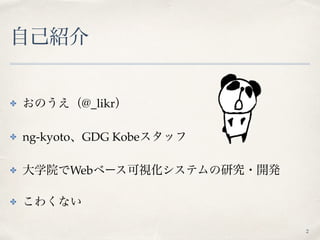
自己紹介 ✤ おのうえ(@_likr) ✤ ng-kyoto、GDG
Kobeスタッフ ✤ 大学院でWebベース可視化システムの研究・開発 ✤ こわくない 2
3.
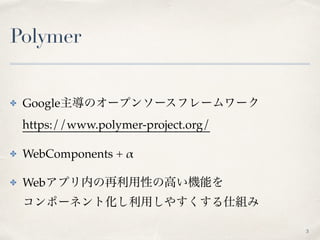
Polymer ✤ Google主導のオープンソースフレームワーク https://www.polymer-project.org/ ✤ WebComponents
+ α ✤ Webアプリ内の再利用性の高い機能を コンポーネント化し利用しやすくする仕組み 3
4.
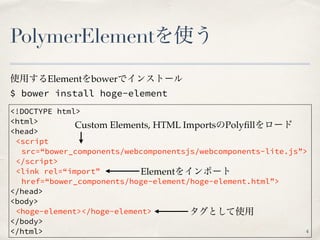
PolymerElementを使う $ bower install
hoge-element <!DOCTYPE html> <html> <head> <script src=“bower_components/webcomponentsjs/webcomponents-lite.js”> </script> <link rel=“import” href=“bower_components/hoge-element/hoge-element.html”> </head> <body> <hoge-element></hoge-element> </body> </html> 使用するElementをbowerでインストール タグとして使用 Custom Elements, HTML ImportsのPolyfillをロード Elementをインポート 4
5.
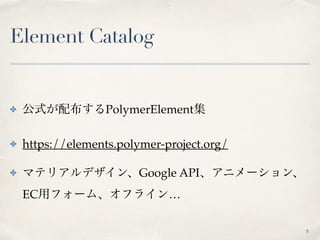
Element Catalog ✤ 公式が配布するPolymerElement集 ✤
https://elements.polymer-project.org/ ✤ マテリアルデザイン、Google API、アニメーション、 EC用フォーム、オフライン… 5
6.
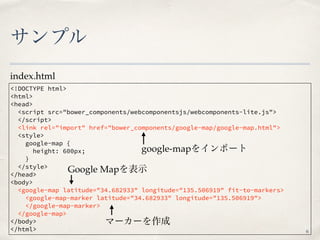
サンプル <!DOCTYPE html> <html> <head> <script src="bower_components/webcomponentsjs/webcomponents-lite.js"> </script> <link
rel="import" href="bower_components/google-map/google-map.html"> <style> google-map { height: 600px; } </style> </head> <body> <google-map latitude="34.682933" longitude="135.506919" fit-to-markers> <google-map-marker latitude="34.682933" longitude="135.506919"> </google-map-marker> </google-map> </body> </html> index.html 6 google-mapをインポート Google Mapを表示 マーカーを作成
7.
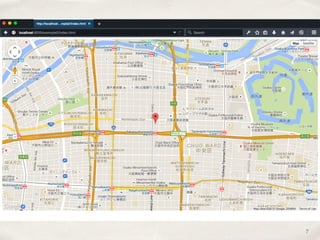
7
8.
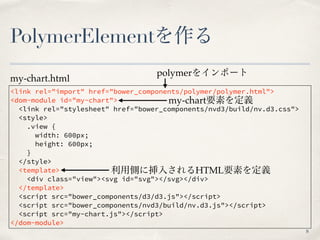
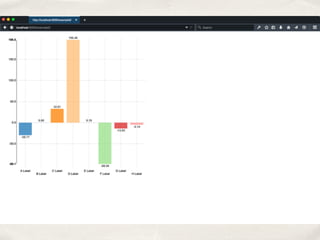
PolymerElementを作る <link rel="import" href="bower_components/polymer/polymer.html"> <dom-module
id="my-chart"> <link rel="stylesheet" href="bower_components/nvd3/build/nv.d3.css"> <style> .view { width: 600px; height: 600px; } </style> <template> <div class="view"><svg id="svg"></svg></div> </template> <script src="bower_components/d3/d3.js"></script> <script src="bower_components/nvd3/build/nv.d3.js"></script> <script src="my-chart.js"></script> </dom-module> my-chart.html 8 polymerをインポート 利用側に挿入されるHTML要素を定義 my-chart要素を定義
9.
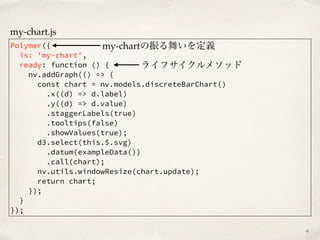
Polymer({ is: 'my-chart', ready: function
() { nv.addGraph(() => { const chart = nv.models.discreteBarChart() .x((d) => d.label) .y((d) => d.value) .staggerLabels(true) .tooltips(false) .showValues(true); d3.select(this.$.svg) .datum(exampleData()) .call(chart); nv.utils.windowResize(chart.update); return chart; }); } }); my-chart.js 9 my-chartの振る舞いを定義 ライフサイクルメソッド
10.
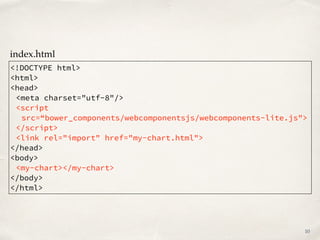
<!DOCTYPE html> <html> <head> <meta charset="utf-8"/> <script src=“bower_components/webcomponentsjs/webcomponents-lite.js"> </script> <link
rel="import" href="my-chart.html"> </head> <body> <my-chart></my-chart> </body> </html> index.html 10
12.
AngularJSから使う <!DOCTYPE html> <html> <head> <script src="bower_components/angular/angular.js"></script> <script
src=“bower_components/webcomponentsjs/webcomponents-lite.js"></script> <link rel="import" href="my-chart.html"> </head> <body ng-app="app"> <div ng-controller="MainController"> <span>{{hoge}}</span> <my-chart></my-chart> </div> <script> angular.module('app', []) .controller('MainController', function ($scope) { $scope.hoge = 'hoge'; }); </script> </body> </html> index.html 12 テンプレートの中でそのまま使える!
13.
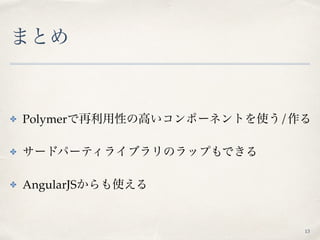
まとめ ✤ Polymerで再利用性の高いコンポーネントを使う/作る ✤ サードパーティライブラリのラップもできる ✤
AngularJSからも使える 13
Download


![AngularJSから使う
<!DOCTYPE html>
<html>
<head>
<script src="bower_components/angular/angular.js"></script>
<script src=“bower_components/webcomponentsjs/webcomponents-lite.js"></script>
<link rel="import" href="my-chart.html">
</head>
<body ng-app="app">
<div ng-controller="MainController">
<span>{{hoge}}</span>
<my-chart></my-chart>
</div>
<script>
angular.module('app', [])
.controller('MainController', function ($scope) {
$scope.hoge = 'hoge';
});
</script>
</body>
</html>
index.html
12
テンプレートの中でそのまま使える!](https://image.slidesharecdn.com/20150830ngkyoto-150830051338-lva1-app6892/85/Polymer-12-320.jpg)