What is Pipelining
A technique used in advanced microprocessors
where the microprocessor begins executing a
second instruction before the first has been
completed.
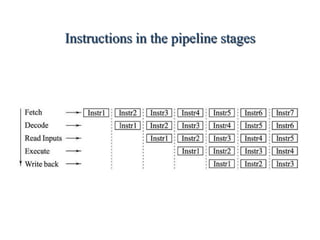
- A Pipeline is a series of stages, where some
work is done at each stage. The work is not
finished until it has passed through all stages.
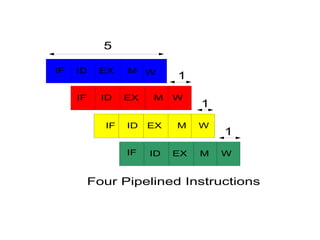
With pipelining, the computer architecture allows
the next instructions to be fetched while the
processor is performing arithmetic operations,
holding them in a buffer close to the processor
until each instruction operation can performed.
3.
How Pipeline Works
The pipeline is divided into segments and each
segment can execute it operation concurrently
with the other segments.
Once a segment completes an operations, it
passes the result to the next segment in the
pipeline and fetches the next operations from
the preceding segment.
4.
Pipeline
A commonanalogue for a pipeline is a factory
assembly line. Assume that there are three
stages:
1. Welding
2. Painting
3. Polishing
For simplicity, assume that each task takes one
hour.
5.
Characteristics Of Pipelining
If the stages of a pipeline are not balanced and
one stage is slower than another, the entire
throughput of the pipeline is affected.
In terms of a pipeline within a CPU, each
instruction is broken up into different stages.
Ideally if each stage is balanced (all stages are
ready to start at the same time and take an
equal amount of time to execute.) the time
taken per instruction (pipelined) is defined as:
Time per instruction (unpipelined) / Number of
stages
6.
Contd..
The previousexpression is ideal. We will see
later that there are many ways in which a
pipeline cannot function in a perfectly balanced
fashion.
In terms of a CPU, the implementation of
pipelining has the effect of reducing the average
instruction time, therefore reducing the average
CPI.
EX: If each instruction in a microprocessor
takes 5 clock cycles (unpipelined) and we have a
4 stage pipeline, the ideal average CPI with the
pipeline will be 1.25 .
Instruction Fetch
Theinstruction Fetch (IF) stage is responsible
for obtaining the requested instruction from
memory. The instruction and the program
counter (which is incremented to the next
instruction) are stored in the IF/ID pipeline
register as temporary storage so that may be
used in the next stage at the start of the next
clock cycle.
10.
Instruction Decode
TheInstruction Decode (ID) stage is responsible
for decoding the instruction and sending out the
various control lines to the other parts of the
processor. The instruction is sent to the control
unit where it is decoded and the registers are
fetched from the register file.
11.
Execution
The Execution(EX) stage is where any
calculations are performed. The main
component in this stage is the ALU. The ALU is
made up of arithmetic, logic units.
12.
Memory and IO
The Memory and IO (MEM) stage is responsible
for storing and loading values to and from
memory. It is also responsible for input or
output from the processor.
13.
Write Back
TheWrite Back (WB) stage is responsible for
writing the result of a calculation, memory
access or input into the register file.
14.
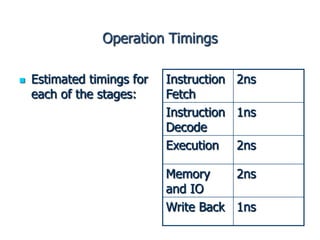
Operation Timings
Estimatedtimings for
each of the stages:
Instruction
Fetch
2ns
Instruction
Decode
1ns
Execution 2ns
Memory
and IO
2ns
Write Back 1ns
15.
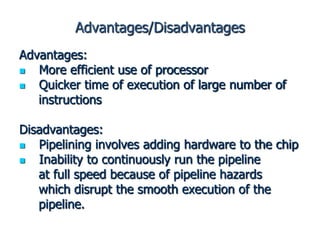
Advantages/Disadvantages
Advantages:
More efficientuse of processor
Quicker time of execution of large number of
instructions
Disadvantages:
Pipelining involves adding hardware to the chip
Inability to continuously run the pipeline
at full speed because of pipeline hazards
which disrupt the smooth execution of the
pipeline.