SUBHASIS NAYAK CMC PHP, MYSQL
What we will discuss ? Here we will discuss what PHP is all about? PHP MySql Apache installation PHP basics. Variables & data types Flow controls Functions
What php is all about? PHP is hugely popular, and mostly used programming language for website’s backend process.  IT is a programming language that was designed for making dynamic websites. he name PHP is a recursive acronym that stands for PHP: Hypertext Preprocessor.  Hi! I am not with time to describe more about PHP. So go the site  http://php.net  and check it out.
Continue ….. The PHP language is flexible and easy to learn quickly even if you have not done any programming in the past. If you have done any programming language like c, c++, java then you can learn PHP in one night.
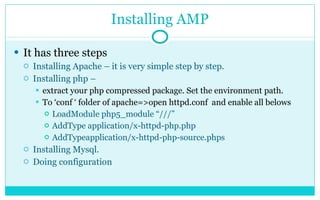
Installing AMP It has three steps Installing Apache – it is very simple step by step. Installing php –  extract your php compressed package. Set the environment path. To ‘conf ‘ folder of apache=>open httpd.conf  and enable all belows LoadModule php5_module “///” AddType application/x-httpd-php.php AddTypeapplication/x-httpd-php-source.phps Installing Mysql. Doing configuration
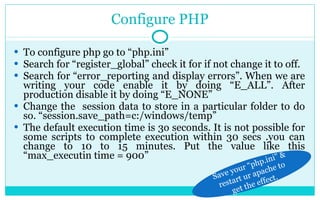
Configure PHP To configure php go to “php.ini” Search for “register_global” check it for if not change it to off. Search for “error_reporting and display errors”. When we are writing your code enable it by doing “E_ALL”. After production disable it by doing “E_NONE” Change the  session data to store in a particular folder to do so. “session.save_path=c:/windows/temp” The default execution time is 3o seconds. It is not possible for some scripts to complete execution within 30 secs .you can change to 10 to 15 minutes. Put the value like this “max_executin time = 900” Save your “php.ini” & restart ur apache to get the effect.
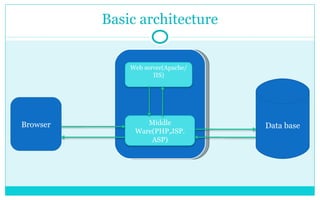
Basic architecture Browser Data base Middle Ware(PHP,JSP. ASP) Web server(Apache/IIS)
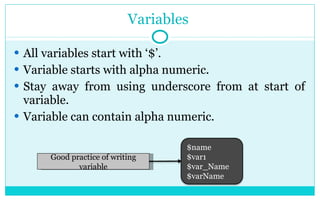
Variables  All variables start with ‘$’. Variable starts with alpha numeric. Stay away from using underscore from at start of variable. Variable can contain alpha numeric. Good practice of writing variable $name $var1 $var_Name $varName
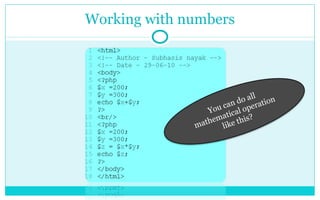
Working with numbers You can do all mathematical operation like this?
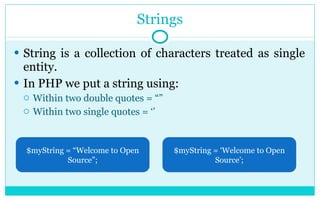
Strings String is a collection of characters treated as single entity. In PHP we put a string using: Within two double quotes = “” Within two single quotes = ‘’ $myString = “Welcome to Open Source”; $myString = ‘Welcome to Open Source’;
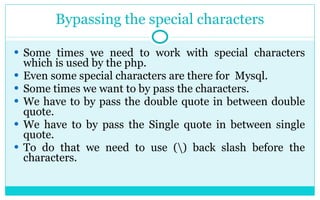
Bypassing the special characters Some times we need to work with special characters which is used by the php. Even some special characters are there for  Mysql. Some times we want to by pass the characters. We have to by pass the double quote in between double quote. We have to by pass the Single quote in between single quote. To do that we need to use (\) back slash before the characters.
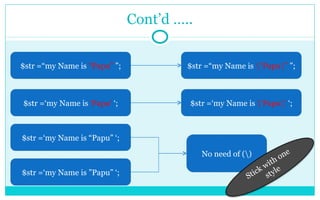
Cont’d ….. $str =“my Name is  “Papu”  ”; $str =“my Name is  \“Papu\”  ”; $str =‘my Name is  ‘Papu’  ‘; $str =‘my Name is  \’Papu\’  ‘; $str =‘my Name is “Papu” ‘; $str =‘my Name is ”Papu” ‘; No need of (\) Stick with one style
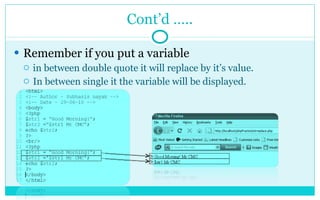
Cont’d ….. Remember if you put a variable  in between double quote it will replace by it’s value. In between single it the variable will be displayed.
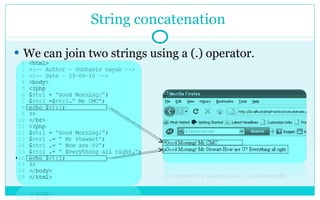
String concatenation  We can join two strings using a (.) operator.
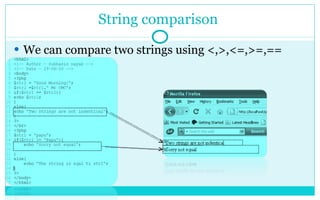
String comparison  We can compare two strings using <,>,<=,>=,==
 

Php, mysq lpart1

  • 1.
  • 2.
    What we willdiscuss ? Here we will discuss what PHP is all about? PHP MySql Apache installation PHP basics. Variables & data types Flow controls Functions
  • 3.
    What php isall about? PHP is hugely popular, and mostly used programming language for website’s backend process. IT is a programming language that was designed for making dynamic websites. he name PHP is a recursive acronym that stands for PHP: Hypertext Preprocessor. Hi! I am not with time to describe more about PHP. So go the site http://php.net and check it out.
  • 4.
    Continue ….. ThePHP language is flexible and easy to learn quickly even if you have not done any programming in the past. If you have done any programming language like c, c++, java then you can learn PHP in one night.
  • 5.
    Installing AMP Ithas three steps Installing Apache – it is very simple step by step. Installing php – extract your php compressed package. Set the environment path. To ‘conf ‘ folder of apache=>open httpd.conf and enable all belows LoadModule php5_module “///” AddType application/x-httpd-php.php AddTypeapplication/x-httpd-php-source.phps Installing Mysql. Doing configuration
  • 6.
    Configure PHP Toconfigure php go to “php.ini” Search for “register_global” check it for if not change it to off. Search for “error_reporting and display errors”. When we are writing your code enable it by doing “E_ALL”. After production disable it by doing “E_NONE” Change the session data to store in a particular folder to do so. “session.save_path=c:/windows/temp” The default execution time is 3o seconds. It is not possible for some scripts to complete execution within 30 secs .you can change to 10 to 15 minutes. Put the value like this “max_executin time = 900” Save your “php.ini” & restart ur apache to get the effect.
  • 7.
    Basic architecture BrowserData base Middle Ware(PHP,JSP. ASP) Web server(Apache/IIS)
  • 8.
    Variables Allvariables start with ‘$’. Variable starts with alpha numeric. Stay away from using underscore from at start of variable. Variable can contain alpha numeric. Good practice of writing variable $name $var1 $var_Name $varName
  • 9.
    Working with numbersYou can do all mathematical operation like this?
  • 10.
    Strings String isa collection of characters treated as single entity. In PHP we put a string using: Within two double quotes = “” Within two single quotes = ‘’ $myString = “Welcome to Open Source”; $myString = ‘Welcome to Open Source’;
  • 11.
    Bypassing the specialcharacters Some times we need to work with special characters which is used by the php. Even some special characters are there for Mysql. Some times we want to by pass the characters. We have to by pass the double quote in between double quote. We have to by pass the Single quote in between single quote. To do that we need to use (\) back slash before the characters.
  • 12.
    Cont’d ….. $str=“my Name is “Papu” ”; $str =“my Name is \“Papu\” ”; $str =‘my Name is ‘Papu’ ‘; $str =‘my Name is \’Papu\’ ‘; $str =‘my Name is “Papu” ‘; $str =‘my Name is ”Papu” ‘; No need of (\) Stick with one style
  • 13.
    Cont’d ….. Rememberif you put a variable in between double quote it will replace by it’s value. In between single it the variable will be displayed.
  • 14.
    String concatenation We can join two strings using a (.) operator.
  • 15.
    String comparison We can compare two strings using <,>,<=,>=,==
  • 16.