Pemprograman Perangkat
Seluler
Merancang Mobile Interface
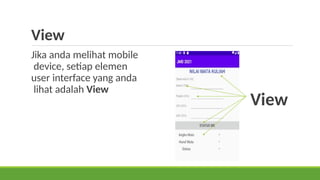
View
View
Jika anda melihat mobile
device, setiap elemen
user interface yang anda
lihat adalah View
View
Apa itu view ?
View adalah basic android user interface
 Display text (TextView, Edit Text)
 button (Button, other controls)
 scrollable (ScrollView, Recycler View)
 show images (Image View)
View memiliki properties
 Warna, dimensi, posisi
 respon user click
 terlihat atau tidak
 etc.
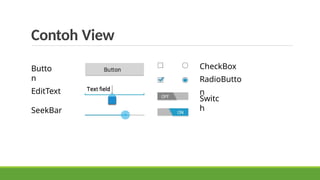
Contoh View
Butto
n
EditText
SeekBar
CheckBox
RadioButto
n
Switc
h
Creating & Laying out views
 Graphically within Android Studio
 XML Files
 Programmatically
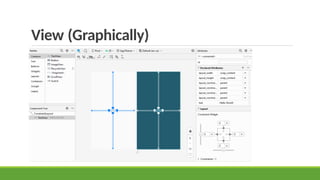
View (Graphically)
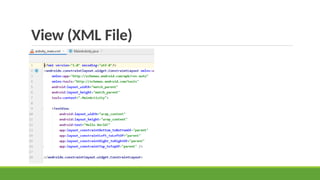
View (XML File)
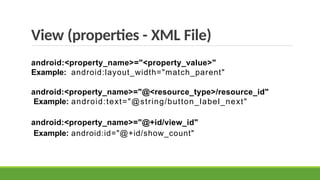
View (properties - XML File)
android:<property_name>="<property_value>"
Example: android:layout_width="match_parent"
android:<property_name>="@<resource_type>/resource_id"
Example: android:text="@string/button_label_next"
android:<property_name>="@+id/view_id"
Example: android:id="@+id/show_count"
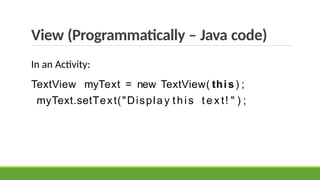
View (Programmatically – Java code)
In an Activity:
TextView myText = new TextView( this) ;
myText.setText("Displa y this t e x t! " ) ;
View Group & View Hierarchy
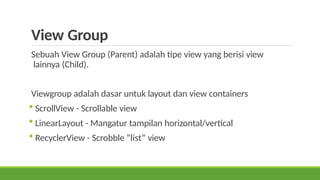
View Group
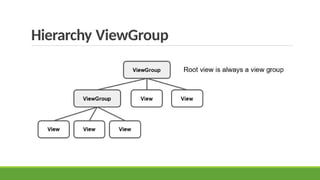
Sebuah View Group (Parent) adalah tipe view yang berisi view
lainnya (Child).
Viewgroup adalah dasar untuk layout dan view containers
 ScrollView - Scrollable view
 LinearLayout - Mangatur tampilan horizontal/vertical
 RecyclerView - Scrobble “list” view
Hierarchy ViewGroup
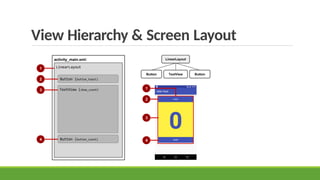
View Hierarchy & Screen Layout
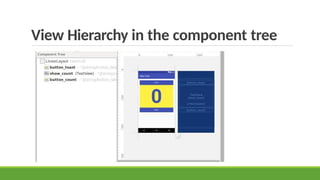
View Hierarchy in the component tree
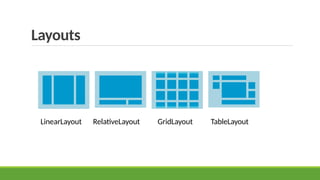
Layouts
Layouts
 Jenis ViewGroup tertentu
 Subclass dari ViewGroup
 Berisi View Child
 Bisa dalam bentuk baris, kolom, grid, table
Layouts
LinearLayout RelativeLayout GridLayout TableLayout
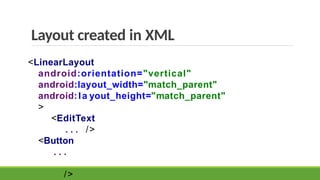
Layout created in XML
<LinearLayout
android:orientation="vertical"
android:layout_width="match_parent"
android:la yout_height="match_parent"
>
<EditText
. . . />
<Button
. . .
/>
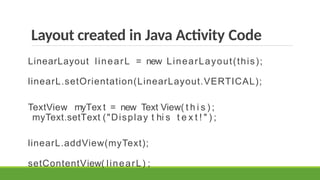
Layout created in Java Activity Code
LinearLayout linearL = new LinearLayout(this);
linearL.setOrientation(LinearLayout.VERTICAL);
TextView myTex t = new Text View( t h i s ) ;
myText.setText ("Display t hi s t e x t ! " ) ;
linearL.addView(myText);
setContentView( linearL) ;
Event Handling
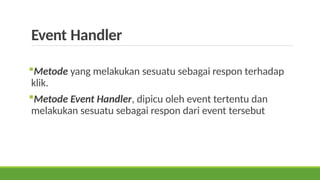
Event Handler
Metode yang melakukan sesuatu sebagai respon terhadap
klik.
Metode Event Handler, dipicu oleh event tertentu dan
melakukan sesuatu sebagai respon dari event tersebut
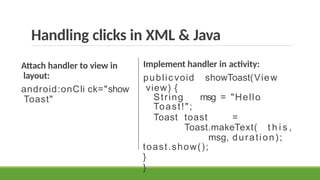
Handling clicks in XML & Java
Attach handler to view in
layout:
android:onCli ck="show
Toast"
Implement handler in activity:
public void showToast(View
view) {
String msg = "Hello
Toast!";
Toast toast =
Toast.makeText( t h i s ,
msg, duration);
toast.show();
}
}
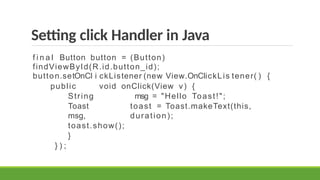
Setting click Handler in Java
f i n a l Button button = (Button)
findViewById(R.id.button_id);
button.setOnCl i ckListener (new View.OnClickLis tener( ) {
public void onClick(View v) {
String msg = "Hello Toast!";
Toast toast = Toast.makeText(this,
msg, duration);
toast.show();
}
} ) ;
TERIMA KASIH

Pertemuan 3 Merancang Mobile Interface.pptx

  • 1.
  • 2.
  • 3.
    View Jika anda melihatmobile device, setiap elemen user interface yang anda lihat adalah View View
  • 4.
    Apa itu view? View adalah basic android user interface  Display text (TextView, Edit Text)  button (Button, other controls)  scrollable (ScrollView, Recycler View)  show images (Image View)
  • 5.
    View memiliki properties Warna, dimensi, posisi  respon user click  terlihat atau tidak  etc.
  • 6.
  • 7.
    Creating & Layingout views  Graphically within Android Studio  XML Files  Programmatically
  • 8.
  • 9.
  • 10.
    View (properties -XML File) android:<property_name>="<property_value>" Example: android:layout_width="match_parent" android:<property_name>="@<resource_type>/resource_id" Example: android:text="@string/button_label_next" android:<property_name>="@+id/view_id" Example: android:id="@+id/show_count"
  • 11.
    View (Programmatically –Java code) In an Activity: TextView myText = new TextView( this) ; myText.setText("Displa y this t e x t! " ) ;
  • 12.
    View Group &View Hierarchy
  • 13.
    View Group Sebuah ViewGroup (Parent) adalah tipe view yang berisi view lainnya (Child). Viewgroup adalah dasar untuk layout dan view containers  ScrollView - Scrollable view  LinearLayout - Mangatur tampilan horizontal/vertical  RecyclerView - Scrobble “list” view
  • 14.
  • 15.
    View Hierarchy &Screen Layout
  • 16.
    View Hierarchy inthe component tree
  • 17.
  • 18.
    Layouts  Jenis ViewGrouptertentu  Subclass dari ViewGroup  Berisi View Child  Bisa dalam bentuk baris, kolom, grid, table
  • 19.
  • 20.
    Layout created inXML <LinearLayout android:orientation="vertical" android:layout_width="match_parent" android:la yout_height="match_parent" > <EditText . . . /> <Button . . . />
  • 21.
    Layout created inJava Activity Code LinearLayout linearL = new LinearLayout(this); linearL.setOrientation(LinearLayout.VERTICAL); TextView myTex t = new Text View( t h i s ) ; myText.setText ("Display t hi s t e x t ! " ) ; linearL.addView(myText); setContentView( linearL) ;
  • 22.
  • 23.
    Event Handler Metode yangmelakukan sesuatu sebagai respon terhadap klik. Metode Event Handler, dipicu oleh event tertentu dan melakukan sesuatu sebagai respon dari event tersebut
  • 24.
    Handling clicks inXML & Java Attach handler to view in layout: android:onCli ck="show Toast" Implement handler in activity: public void showToast(View view) { String msg = "Hello Toast!"; Toast toast = Toast.makeText( t h i s , msg, duration); toast.show(); } }
  • 25.
    Setting click Handlerin Java f i n a l Button button = (Button) findViewById(R.id.button_id); button.setOnCl i ckListener (new View.OnClickLis tener( ) { public void onClick(View v) { String msg = "Hello Toast!"; Toast toast = Toast.makeText(this, msg, duration); toast.show(); } } ) ;
  • 26.