PAYROLL PROCEDURES TRAINING
TRANSPORTATION SERVICES
Table of
Content
Daily Process
Exception
Tickets
Fieldtrips
Route
Assignment
Sheets
Salary
Questionnaires
Daily
Process
Clear missed
punches, Enter in
leave time,
Completeness
check, and Approve
time.
Make sure Exception
tickets are on the
commons and all
Fieldtrips & Training
sign-in sheets are
submitted
Send Confirmation of
completeness via
E-mail to Payroll
Clerk
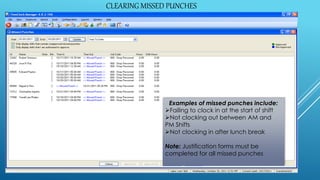
CLEARING MISSED PUNCHES
Examples of missed punches include:
Failing to clock in at the start of shift
Not clocking out between AM and
PM Shifts
Not clocking in after lunch break
Note: Justification forms must be
completed for all missed punches
CLEARING MISSED PUNCHES
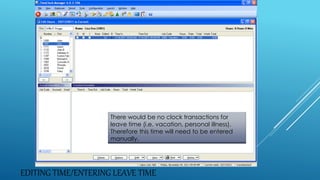
EDITING TIME/ENTERING LEAVE TIME
There would be no clock transactions for
leave time (i.e. vacation, personal illness).
Therefore this time will need to be entered
manually.
COMPLETENESS CHECK
Completeness
Check
Are all my
drivers
accounted
for?
Is all the
sick time/
leave time
Accounted
for?
Do all my
drivers
have 2
Segments?
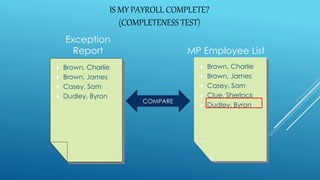
IS MY PAYROLL COMPLETE?
(COMPLETENESS TEST)
Exception
Report MP Employee List
 Brown, Charlie
 Brown, James
 Casey, Sam
 Clue, Sherlock
 Dudley, Byron
 Brown, Charlie
 Brown, James
 Casey, Sam
 Dudley, Byron
COMPARE
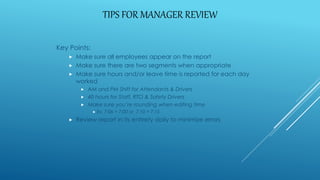
TIPS FOR MANAGER REVIEW
Key Points:
 Make sure all employees appear on the report
 Make sure there are two segments when appropriate
 Make sure hours and/or leave time is reported for each day
worked
 AM and PM Shift for Attendants & Drivers
 40 hours for Staff, RTO & Safety Drivers
 Make sure you’re rounding when editing time
 Ex. 7:06 = 7:00 or 7:10 = 7:15
 Review report in its entirety daily to minimize errors
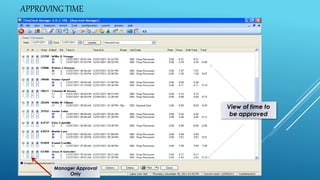
APPROVING TIME
View of time to
be approved
Manager Approval
Only
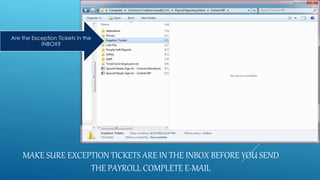
MAKE SURE EXCEPTION TICKETS ARE IN THE INBOX BEFORE YOU SEND
THE PAYROLL COMPLETE E-MAIL
Are the Exception Tickets in the
INBOX?
SEND E-MAIL TO YOUR PAYROLL CLERK AND ALL OTHERS
WHEN PAYROLL IS COMPLETE
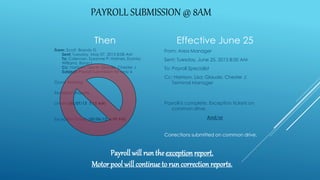
PAYROLL SUBMISSION @ 8AM
Then
From: Scott, Brandy D
Sent: Tuesday, May 07, 2013 8:08 AM
To: Coleman, Susanne P; Holmes, Exania;
Williams, Byron L
Cc: Harrison, Lisa N; Glaude, Chester J
Subject: Payroll Submission for May 6
Good Morning
Exception Reports:
Drivers-(05/07/13 7:15 AM)
Exception Tickets-(05/06/13 6:49 PM)
Effective June 25
From: Area Manager
Sent: Tuesday, June 25, 2013 8:00 AM
To: Payroll Specialist
Cc: Harrison, Lisa; Glaude, Chester J;
Terminal Manager
Payroll is complete. Exception tickets on
common drive.
And/or
Corrections submitted on common drive.
Payroll will runthe exception report.
Motor pool will continue to runcorrection reports.
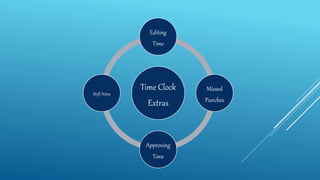
Time Clock
Extras
Editing
Time
Missed
Punches
Approving
Time
Shift Notes
EDITING TIME IN TIME
CLOCK
Editing time for
Fieldtrips or
Training Classes
When you edit a drivers
time after payroll has been
submitted
The Gift Of a Shift Note
EDIT HOURS
Revising:
 Only when necessary
 Try to maintain actual
clocked time
THE GIFT OF A “SHIFT NOTE”
 Straight time
 No school
 Accident review
 Fieldtrip (if the employee clocks in)
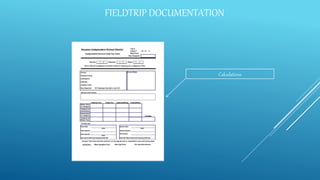
FIELDTRIP DOCUMENTATION
Calculations
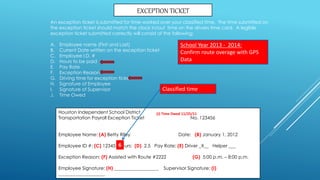
Houston Independent School District
Transportation Payroll Exception Ticket No. 123456
Employee Name: (A) Betty Riley Date: (B) January 1, 2012
Employee ID #: (C) 12345 Hours: (D) 2.5 Pay Rate: (E) Driver _X__ Helper ___
Exception Reason: (F) Assisted with Route #2222 (G) 5:00 p.m. – 8:00 p.m.
Employee Signature: (H) ___________________ Supervisor Signature: (I)
____________________
EXCEPTION TICKET
An exception ticket is submitted for time worked over your classified time. The time submitted on
the exception ticket should match the clock in/out time on the drivers time card. A legible
exception ticket submitted correctly will consist of the following:
A. Employee name (First and Last)
B. Current Date written on the exception ticket
C. Employee I.D. #
D. Hours to be paid
E. Pay Rate
F. Exception Reason
G. Driving time for exception ticket
H. Signature of Employee
I. Signature of Supervisor
J. Time Owed
(J) Time Owed 11/25/11
6
Classified time
School Year 2013 - 2014:
Confirm route overage with GPS
Data
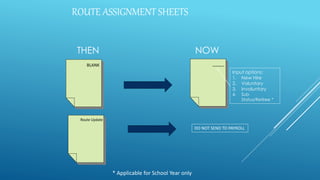
ROUTE ASSIGNMENT SHEETS
THEN NOW
BLANK _____
Input options:
1. New Hire
2. Voluntary
3. Involuntary
4. Sub
Status/Retiree *
Route Update
DO NOT SEND TO PAYROLL
* Applicable for School Year only
ROUTE ASSIGNMENT SHEETS
THEN NOW
VOID
DO NOT SEND TO PAYROLL
ROUTE ASSIGNMENT SHEETS
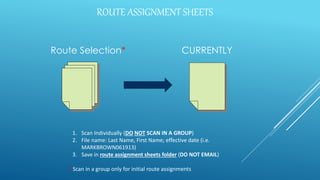
Route Selection* CURRENTLY
1. Scan Individually (DO NOT SCAN IN A GROUP)
2. File name: Last Name, First Name; effective date (i.e.
MARKBROWN061913)
3. Save in route assignment sheets folder (DO NOT EMAIL)
* Scan in a group only for initial route assignments
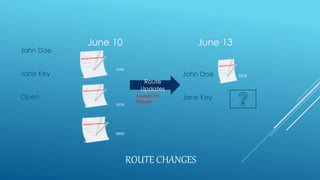
ROUTE CHANGES
June 10
John Doe
Jane Key
Open
June 13
John Doe
Jane Key
1234
5678
9999
Route
Updates
Route#1234
Deleted
5678
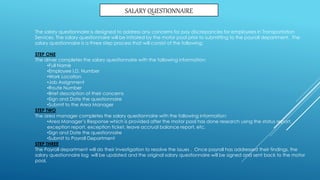
SALARY QUESTIONNAIRE
The salary questionnaire is designed to address any concerns for pay discrepancies for employees in Transportation
Services. The salary questionnaire will be initiated by the motor pool prior to submitting to the payroll department. The
salary questionnaire is a three step process that will consist of the following:
STEP ONE
The driver completes the salary questionnaire with the following information:
•Full Name
•Employee I.D. Number
•Work Location
•Job Assignment
•Route Number
•Brief description of their concerns
•Sign and Date the questionnaire
•Submit to the Area Manager
STEP TWO
The area manager completes the salary questionnaire with the following information:
•Area Manager’s Response which is provided after the motor pool has done research using the status report,
exception report, exception ticket, leave accrual balance report, etc.
•Sign and Date the questionnaire
•Submit to Payroll Department
STEP THREE
The Payroll department will do their investigation to resolve the issues . Once payroll has addressed their findings, the
salary questionnaire log will be updated and the original salary questionnaire will be signed and sent back to the motor
pool.

PAYROLL PROCEDURES TRAINING TRANSPORTATION SERVICES

  • 1.
  • 2.
  • 3.
    Daily Process Clear missed punches, Enterin leave time, Completeness check, and Approve time. Make sure Exception tickets are on the commons and all Fieldtrips & Training sign-in sheets are submitted Send Confirmation of completeness via E-mail to Payroll Clerk
  • 4.
    CLEARING MISSED PUNCHES Examplesof missed punches include: Failing to clock in at the start of shift Not clocking out between AM and PM Shifts Not clocking in after lunch break Note: Justification forms must be completed for all missed punches CLEARING MISSED PUNCHES
  • 5.
    EDITING TIME/ENTERING LEAVETIME There would be no clock transactions for leave time (i.e. vacation, personal illness). Therefore this time will need to be entered manually.
  • 6.
    COMPLETENESS CHECK Completeness Check Are allmy drivers accounted for? Is all the sick time/ leave time Accounted for? Do all my drivers have 2 Segments?
  • 7.
    IS MY PAYROLLCOMPLETE? (COMPLETENESS TEST) Exception Report MP Employee List  Brown, Charlie  Brown, James  Casey, Sam  Clue, Sherlock  Dudley, Byron  Brown, Charlie  Brown, James  Casey, Sam  Dudley, Byron COMPARE
  • 8.
    TIPS FOR MANAGERREVIEW Key Points:  Make sure all employees appear on the report  Make sure there are two segments when appropriate  Make sure hours and/or leave time is reported for each day worked  AM and PM Shift for Attendants & Drivers  40 hours for Staff, RTO & Safety Drivers  Make sure you’re rounding when editing time  Ex. 7:06 = 7:00 or 7:10 = 7:15  Review report in its entirety daily to minimize errors
  • 9.
    APPROVING TIME View oftime to be approved Manager Approval Only
  • 10.
    MAKE SURE EXCEPTIONTICKETS ARE IN THE INBOX BEFORE YOU SEND THE PAYROLL COMPLETE E-MAIL Are the Exception Tickets in the INBOX?
  • 11.
    SEND E-MAIL TOYOUR PAYROLL CLERK AND ALL OTHERS WHEN PAYROLL IS COMPLETE
  • 12.
    PAYROLL SUBMISSION @8AM Then From: Scott, Brandy D Sent: Tuesday, May 07, 2013 8:08 AM To: Coleman, Susanne P; Holmes, Exania; Williams, Byron L Cc: Harrison, Lisa N; Glaude, Chester J Subject: Payroll Submission for May 6 Good Morning Exception Reports: Drivers-(05/07/13 7:15 AM) Exception Tickets-(05/06/13 6:49 PM) Effective June 25 From: Area Manager Sent: Tuesday, June 25, 2013 8:00 AM To: Payroll Specialist Cc: Harrison, Lisa; Glaude, Chester J; Terminal Manager Payroll is complete. Exception tickets on common drive. And/or Corrections submitted on common drive. Payroll will runthe exception report. Motor pool will continue to runcorrection reports.
  • 13.
  • 14.
    EDITING TIME INTIME CLOCK Editing time for Fieldtrips or Training Classes When you edit a drivers time after payroll has been submitted The Gift Of a Shift Note
  • 15.
    EDIT HOURS Revising:  Onlywhen necessary  Try to maintain actual clocked time
  • 16.
    THE GIFT OFA “SHIFT NOTE”  Straight time  No school  Accident review  Fieldtrip (if the employee clocks in)
  • 17.
  • 18.
    Houston Independent SchoolDistrict Transportation Payroll Exception Ticket No. 123456 Employee Name: (A) Betty Riley Date: (B) January 1, 2012 Employee ID #: (C) 12345 Hours: (D) 2.5 Pay Rate: (E) Driver _X__ Helper ___ Exception Reason: (F) Assisted with Route #2222 (G) 5:00 p.m. – 8:00 p.m. Employee Signature: (H) ___________________ Supervisor Signature: (I) ____________________ EXCEPTION TICKET An exception ticket is submitted for time worked over your classified time. The time submitted on the exception ticket should match the clock in/out time on the drivers time card. A legible exception ticket submitted correctly will consist of the following: A. Employee name (First and Last) B. Current Date written on the exception ticket C. Employee I.D. # D. Hours to be paid E. Pay Rate F. Exception Reason G. Driving time for exception ticket H. Signature of Employee I. Signature of Supervisor J. Time Owed (J) Time Owed 11/25/11 6 Classified time School Year 2013 - 2014: Confirm route overage with GPS Data
  • 19.
    ROUTE ASSIGNMENT SHEETS THENNOW BLANK _____ Input options: 1. New Hire 2. Voluntary 3. Involuntary 4. Sub Status/Retiree * Route Update DO NOT SEND TO PAYROLL * Applicable for School Year only
  • 20.
    ROUTE ASSIGNMENT SHEETS THENNOW VOID DO NOT SEND TO PAYROLL
  • 21.
    ROUTE ASSIGNMENT SHEETS RouteSelection* CURRENTLY 1. Scan Individually (DO NOT SCAN IN A GROUP) 2. File name: Last Name, First Name; effective date (i.e. MARKBROWN061913) 3. Save in route assignment sheets folder (DO NOT EMAIL) * Scan in a group only for initial route assignments
  • 22.
    ROUTE CHANGES June 10 JohnDoe Jane Key Open June 13 John Doe Jane Key 1234 5678 9999 Route Updates Route#1234 Deleted 5678
  • 23.
    SALARY QUESTIONNAIRE The salaryquestionnaire is designed to address any concerns for pay discrepancies for employees in Transportation Services. The salary questionnaire will be initiated by the motor pool prior to submitting to the payroll department. The salary questionnaire is a three step process that will consist of the following: STEP ONE The driver completes the salary questionnaire with the following information: •Full Name •Employee I.D. Number •Work Location •Job Assignment •Route Number •Brief description of their concerns •Sign and Date the questionnaire •Submit to the Area Manager STEP TWO The area manager completes the salary questionnaire with the following information: •Area Manager’s Response which is provided after the motor pool has done research using the status report, exception report, exception ticket, leave accrual balance report, etc. •Sign and Date the questionnaire •Submit to Payroll Department STEP THREE The Payroll department will do their investigation to resolve the issues . Once payroll has addressed their findings, the salary questionnaire log will be updated and the original salary questionnaire will be signed and sent back to the motor pool.