Python packages
Date and time
Regular Expressions
 A package is a collection of Python modules: while a module is a
single Python file, a package is a directory of Python
modules containing an additional __init__.py file,
to distinguish a package from a directory that just happens to contain
a bunch of Python scripts.
 Suppose you have developed a very large application that includes
many modules. As the number of modules grows, it becomes difficult
to keep track of them all if they are dumped into one location. This is
particularly so if they have similar names or functionality. You might
wish for a means of grouping and organizing them.
 Packages allow for a hierarchical structuring of the module
namespace using dot notation. In the same way that modules help
avoid collisions between global variable names, packages help avoid
collisions between module names.
 Creating a package is quite straightforward, since it makes use of the
operating system’s inherent hierarchical file structure
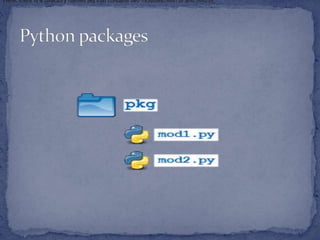
Here, there is a directory named pkg that contains two modules, mod1.py and mod2.py.
 Here, there is a directory named pkg that contains two
modules, mod1.py and mod2.py.
 import <module_name>[, <module_name> ...]
 from <module_name> import <name(s)>
 from <module_name> import <name> as <alt_name>
You can import modules with these
statements as well:
 from <package_name> import
<modules_name>[, <module_name> ...]
 from <package_name> import
<module_name> as <alt_name>
 We can technically import the package as well.
 But this is of little avail. Though this is, strictly speaking, a
syntactically correct Python statement, it doesn’t do much
of anything useful. In particular, it does not place any of the
modules in pkg into the local namespace.
 Package Initialization:If a file named __init__.py is
present in a package directory, it is invoked when the
package or a module in the package is imported. This can
be used for execution of package initialization code, such
as initialization of package-level data.
 For example, consider the following __init__.py file:
 A module in the package can access the global variable by
importing it in turn.
 __init__.py can also be used to effect automatic importing
of modules from a package. For example, earlier you saw
that the statement import pkg only places the name pkg in
the caller’s local symbol table and doesn’t import any
modules. But if __init__.py in the pkg directory contains
the following:
 __init__.py
 print(f'Invoking __init__.py for {__name__}') import
pkg.mod1, pkg.mod2
 then when you execute import pkg,
modules mod1 and mod2 are imported automatically:
 Note: Much of the Python documentation states that
an __init__.py file must be present in the package
directory when creating a package. This was once true.
It used to be that the very presence
of __init__.py signified to Python that a package was
being defined. The file could contain initialization
code or even be empty, but it had to be present.
 Starting with Python 3.3, Implicit Namespace
Packages were introduced. These allow for the creation
of a package without any __init__.py file. Of course,
it can still be present if package initialization is
needed. But it is no longer required.
 Importing * From a Package :
 You have already seen that when import * is used for
a module, all objects from the module are imported
into the local symbol table, except those whose names
begin with an underscore, as always.
 from <package_name> import *
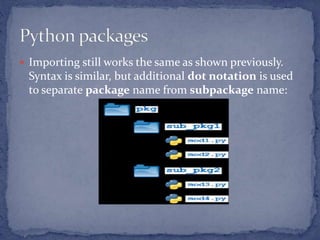
 Subpackages:Packages can contain
nested subpackages to arbitrary depth.
 Importing still works the same as shown previously.
Syntax is similar, but additional dot notation is used
to separate package name from subpackage name:
 Python provides the datetime module work with real
dates and times. In real-world applications, we need to
work with the date and time. Python enables us to
schedule our Python script to run at a particular
timing.
 In Python, the date is not a data type, but we can work
with the date objects by importing the module named
with datetime, time, and calendar.
 The datetime classes are classified in the six main classes.
 date - It is a naive ideal date. It consists of the year, month, and
day as attributes.
 time - It is a perfect time, assuming every day has precisely
24*60*60 seconds. It has hour, minute, second, microsecond,
and tzinfo as attributes.
 datetime - It is a grouping of date and time, along with the
attributes year, month, day, hour, minute, second, microsecond,
and tzinfo.
 timedelta - It represents the difference between two dates, time
or datetime instances to microsecond resolution.
 tzinfo - It provides time zone information objects.
 timezone - It is included in the new version of Python. It is the
class that implements the tzinfo abstract base class.
 Tick
 In Python, the time instants are counted since 12 AM, 1st
January 1970. The function time() of the module time
returns the total number of ticks spent since 12 AM, 1st
January 1970. A tick can be seen as the smallest unit to
measure the time.
 get the current time : The localtime() functions of the time
module are used to get the current time tuple.
 Getting formatted time
 The time can be formatted by using the asctime() function
of the time module. It returns the formatted time for the
time tuple being passed.

 sleep time : The sleep() method of time module is
used to stop the execution of the script for a given
amount of time. The output will be delayed for the
number of seconds provided as the float.
 datetime Module :The datetime module enables us
to create the custom date objects, perform various
operations on dates like the comparison, etc.
 To work with dates as date objects, we have to
import the datetime module into the python source
code.
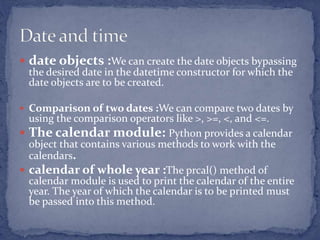
 date objects :We can create the date objects bypassing
the desired date in the datetime constructor for which the
date objects are to be created.
 Comparison of two dates :We can compare two dates by
using the comparison operators like >, >=, <, and <=.
 The calendar module: Python provides a calendar
object that contains various methods to work with the
calendars.
 calendar of whole year :The prcal() method of
calendar module is used to print the calendar of the entire
year. The year of which the calendar is to be printed must
be passed into this method.
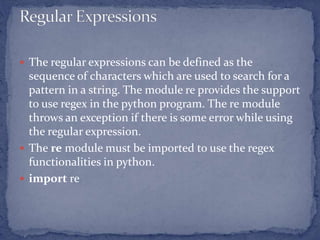
 The regular expressions can be defined as the
sequence of characters which are used to search for a
pattern in a string. The module re provides the support
to use regex in the python program. The re module
throws an exception if there is some error while using
the regular expression.
 The re module must be imported to use the regex
functionalities in python.
 import re
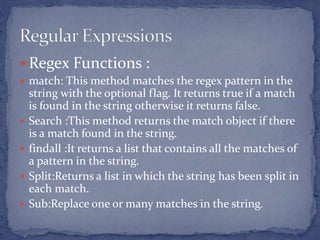
 Regex Functions :
 match: This method matches the regex pattern in the
string with the optional flag. It returns true if a match
is found in the string otherwise it returns false.
 Search :This method returns the match object if there
is a match found in the string.
 findall :It returns a list that contains all the matches of
a pattern in the string.
 Split:Returns a list in which the string has been split in
each match.
 Sub:Replace one or many matches in the string.
Metacharacter Description Example
[] It represents the set of
characters.
"[a-z]"
 It represents the special
sequence.
"r"
. It signals that any character is
present at some specific place.
"Ja.v."
^ It represents the pattern
present at the beginning of the
string.
"^Java"
$ It represents the pattern
present at the end of the
string.
"point"
* It represents zero or more
occurrences of a pattern in the
string.
"hello*"
+ It represents one or more
occurrences of a pattern in the
string.
"hello+"
{} The specified number of
occurrences of a pattern the
string.
"java{2}"
| It represents either this or that
character is present.
"java|point"
() Capture and group
 Special Sequences :Special sequences are the sequences containing  followed
by one of the characters.
 A :It returns a match if the specified characters are present at the beginning of
the string.
 b :It returns a match if the specified characters are present at the beginning or
the end of the string.
 B :It returns a match if the specified characters are present at the beginning of
the string but not at the end.
 d:It returns a match if the string contains digits [0-9].
 D:It returns a match if the string doesn't contain the digits [0-9].
 s:It returns a match if the string contains any white space character.
 S:It returns a match if the string doesn't contain any white space character.
 w:It returns a match if the string contains any word characters.
 W:It returns a match if the string doesn't contain any word.
 Z:Returns a match if the specified characters are at the end of the string.
 Sets
 A set is a group of characters given inside a pair of square brackets. It
represents the special meaning.
 [arn] : Returns a match if the string contains any of the specified
characters in the set.
 [a-n] : Returns a match if the string contains any of the characters
between a to n.
 [^arn] : Returns a match if the string contains the characters except a, r,
and n.
 [0123]:Returns a match if the string contains any of the specified digits.
 [0-9] : Returns a match if the string contains any digit between 0 and 9.
 [0-5][0-9] :Returns a match if the string contains any digit between 00
and 59.
 [a-zA-Z] : Returns a match if the string contains any alphabet (lower-
case or upper-case).
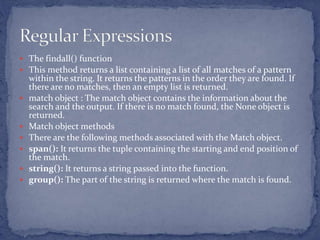
 The findall() function
 This method returns a list containing a list of all matches of a pattern
within the string. It returns the patterns in the order they are found. If
there are no matches, then an empty list is returned.
 match object : The match object contains the information about the
search and the output. If there is no match found, the None object is
returned.
 Match object methods
 There are the following methods associated with the Match object.
 span(): It returns the tuple containing the starting and end position of
the match.
 string(): It returns a string passed into the function.
 group(): The part of the string is returned where the match is found.
 Function compile()
Regular expressions are compiled into pattern objects, which have methods for
various operations such as searching for pattern matches or performing string
substitutions.
 Function split()
Split string by the occurrences of a character or a pattern, upon finding that
pattern, the remaining characters from the string are returned as part of the
resulting list.
Syntax : re.split(pattern, string, maxsplit=0, flags=0)The First parameter,
pattern denotes the regular expression, string is the given string in which
pattern will be searched for and in which splitting occurs, maxsplit if not
provided is considered to be zero ‘0’, and if any nonzero value is provided, then
at most that many splits occurs. If maxsplit = 1, then the string will split once
only, resulting in a list of length 2. The flags are very useful and can help to
shorten code, they are not necessary parameters, eg: flags = re.IGNORECASE,
In this split, case will be ignored.
 sub() Function
 The sub() function replaces the matches with the text

packages.pptx

  • 1.
    Python packages Date andtime Regular Expressions
  • 2.
     A packageis a collection of Python modules: while a module is a single Python file, a package is a directory of Python modules containing an additional __init__.py file, to distinguish a package from a directory that just happens to contain a bunch of Python scripts.  Suppose you have developed a very large application that includes many modules. As the number of modules grows, it becomes difficult to keep track of them all if they are dumped into one location. This is particularly so if they have similar names or functionality. You might wish for a means of grouping and organizing them.  Packages allow for a hierarchical structuring of the module namespace using dot notation. In the same way that modules help avoid collisions between global variable names, packages help avoid collisions between module names.  Creating a package is quite straightforward, since it makes use of the operating system’s inherent hierarchical file structure
  • 3.
    Here, there isa directory named pkg that contains two modules, mod1.py and mod2.py. Here, there is a directory named pkg that contains two modules, mod1.py and mod2.py. Here, there is a directory named pkg that contains two modules, mod1.py and mod2.py. Here, there is a directory named pkg that contains two modules, mod1.py and mod2.py. Here, there is a directory named pkg that contains two modules, mod1.py and mod2.py. Here, there is a directory named pkg that contains two modules, mod1.py and mod2.py. Here, there is a directory named pkg that contains two modules, mod1.py and mod2.py. Here, there is a directory named pkg that contains two modules, mod1.py and mod2.py. Here, there is a directory named pkg that contains two modules, mod1.py and mod2.py. Here, there is a directory named pkg that contains two modules, mod1.py and mod2.py. Here, there is a directory named pkg that contains two modules, mod1.py and mod2.py. Here, there is a directory named pkg that contains two modules, mod1.py and mod2.py. Here, there is a directory named pkg that contains two modules, mod1.py and mod2.py.
  • 4.
     Here, thereis a directory named pkg that contains two modules, mod1.py and mod2.py.  import <module_name>[, <module_name> ...]  from <module_name> import <name(s)>  from <module_name> import <name> as <alt_name> You can import modules with these statements as well:  from <package_name> import <modules_name>[, <module_name> ...]  from <package_name> import <module_name> as <alt_name>
  • 5.
     We cantechnically import the package as well.  But this is of little avail. Though this is, strictly speaking, a syntactically correct Python statement, it doesn’t do much of anything useful. In particular, it does not place any of the modules in pkg into the local namespace.  Package Initialization:If a file named __init__.py is present in a package directory, it is invoked when the package or a module in the package is imported. This can be used for execution of package initialization code, such as initialization of package-level data.  For example, consider the following __init__.py file:
  • 6.
     A modulein the package can access the global variable by importing it in turn.  __init__.py can also be used to effect automatic importing of modules from a package. For example, earlier you saw that the statement import pkg only places the name pkg in the caller’s local symbol table and doesn’t import any modules. But if __init__.py in the pkg directory contains the following:  __init__.py  print(f'Invoking __init__.py for {__name__}') import pkg.mod1, pkg.mod2  then when you execute import pkg, modules mod1 and mod2 are imported automatically:
  • 7.
     Note: Muchof the Python documentation states that an __init__.py file must be present in the package directory when creating a package. This was once true. It used to be that the very presence of __init__.py signified to Python that a package was being defined. The file could contain initialization code or even be empty, but it had to be present.  Starting with Python 3.3, Implicit Namespace Packages were introduced. These allow for the creation of a package without any __init__.py file. Of course, it can still be present if package initialization is needed. But it is no longer required.
  • 8.
     Importing *From a Package :  You have already seen that when import * is used for a module, all objects from the module are imported into the local symbol table, except those whose names begin with an underscore, as always.  from <package_name> import *  Subpackages:Packages can contain nested subpackages to arbitrary depth.
  • 9.
     Importing stillworks the same as shown previously. Syntax is similar, but additional dot notation is used to separate package name from subpackage name:
  • 10.
     Python providesthe datetime module work with real dates and times. In real-world applications, we need to work with the date and time. Python enables us to schedule our Python script to run at a particular timing.  In Python, the date is not a data type, but we can work with the date objects by importing the module named with datetime, time, and calendar.
  • 11.
     The datetimeclasses are classified in the six main classes.  date - It is a naive ideal date. It consists of the year, month, and day as attributes.  time - It is a perfect time, assuming every day has precisely 24*60*60 seconds. It has hour, minute, second, microsecond, and tzinfo as attributes.  datetime - It is a grouping of date and time, along with the attributes year, month, day, hour, minute, second, microsecond, and tzinfo.  timedelta - It represents the difference between two dates, time or datetime instances to microsecond resolution.  tzinfo - It provides time zone information objects.  timezone - It is included in the new version of Python. It is the class that implements the tzinfo abstract base class.
  • 12.
     Tick  InPython, the time instants are counted since 12 AM, 1st January 1970. The function time() of the module time returns the total number of ticks spent since 12 AM, 1st January 1970. A tick can be seen as the smallest unit to measure the time.  get the current time : The localtime() functions of the time module are used to get the current time tuple.  Getting formatted time  The time can be formatted by using the asctime() function of the time module. It returns the formatted time for the time tuple being passed. 
  • 13.
     sleep time: The sleep() method of time module is used to stop the execution of the script for a given amount of time. The output will be delayed for the number of seconds provided as the float.  datetime Module :The datetime module enables us to create the custom date objects, perform various operations on dates like the comparison, etc.  To work with dates as date objects, we have to import the datetime module into the python source code.
  • 14.
     date objects:We can create the date objects bypassing the desired date in the datetime constructor for which the date objects are to be created.  Comparison of two dates :We can compare two dates by using the comparison operators like >, >=, <, and <=.  The calendar module: Python provides a calendar object that contains various methods to work with the calendars.  calendar of whole year :The prcal() method of calendar module is used to print the calendar of the entire year. The year of which the calendar is to be printed must be passed into this method.
  • 15.
     The regularexpressions can be defined as the sequence of characters which are used to search for a pattern in a string. The module re provides the support to use regex in the python program. The re module throws an exception if there is some error while using the regular expression.  The re module must be imported to use the regex functionalities in python.  import re
  • 16.
     Regex Functions:  match: This method matches the regex pattern in the string with the optional flag. It returns true if a match is found in the string otherwise it returns false.  Search :This method returns the match object if there is a match found in the string.  findall :It returns a list that contains all the matches of a pattern in the string.  Split:Returns a list in which the string has been split in each match.  Sub:Replace one or many matches in the string.
  • 17.
    Metacharacter Description Example []It represents the set of characters. "[a-z]" It represents the special sequence. "r" . It signals that any character is present at some specific place. "Ja.v." ^ It represents the pattern present at the beginning of the string. "^Java" $ It represents the pattern present at the end of the string. "point" * It represents zero or more occurrences of a pattern in the string. "hello*" + It represents one or more occurrences of a pattern in the string. "hello+" {} The specified number of occurrences of a pattern the string. "java{2}" | It represents either this or that character is present. "java|point" () Capture and group
  • 18.
     Special Sequences:Special sequences are the sequences containing followed by one of the characters.  A :It returns a match if the specified characters are present at the beginning of the string.  b :It returns a match if the specified characters are present at the beginning or the end of the string.  B :It returns a match if the specified characters are present at the beginning of the string but not at the end.  d:It returns a match if the string contains digits [0-9].  D:It returns a match if the string doesn't contain the digits [0-9].  s:It returns a match if the string contains any white space character.  S:It returns a match if the string doesn't contain any white space character.  w:It returns a match if the string contains any word characters.  W:It returns a match if the string doesn't contain any word.  Z:Returns a match if the specified characters are at the end of the string.
  • 19.
     Sets  Aset is a group of characters given inside a pair of square brackets. It represents the special meaning.  [arn] : Returns a match if the string contains any of the specified characters in the set.  [a-n] : Returns a match if the string contains any of the characters between a to n.  [^arn] : Returns a match if the string contains the characters except a, r, and n.  [0123]:Returns a match if the string contains any of the specified digits.  [0-9] : Returns a match if the string contains any digit between 0 and 9.  [0-5][0-9] :Returns a match if the string contains any digit between 00 and 59.  [a-zA-Z] : Returns a match if the string contains any alphabet (lower- case or upper-case).
  • 20.
     The findall()function  This method returns a list containing a list of all matches of a pattern within the string. It returns the patterns in the order they are found. If there are no matches, then an empty list is returned.  match object : The match object contains the information about the search and the output. If there is no match found, the None object is returned.  Match object methods  There are the following methods associated with the Match object.  span(): It returns the tuple containing the starting and end position of the match.  string(): It returns a string passed into the function.  group(): The part of the string is returned where the match is found.
  • 21.
     Function compile() Regularexpressions are compiled into pattern objects, which have methods for various operations such as searching for pattern matches or performing string substitutions.  Function split() Split string by the occurrences of a character or a pattern, upon finding that pattern, the remaining characters from the string are returned as part of the resulting list. Syntax : re.split(pattern, string, maxsplit=0, flags=0)The First parameter, pattern denotes the regular expression, string is the given string in which pattern will be searched for and in which splitting occurs, maxsplit if not provided is considered to be zero ‘0’, and if any nonzero value is provided, then at most that many splits occurs. If maxsplit = 1, then the string will split once only, resulting in a list of length 2. The flags are very useful and can help to shorten code, they are not necessary parameters, eg: flags = re.IGNORECASE, In this split, case will be ignored.  sub() Function  The sub() function replaces the matches with the text