JAVA concepts
Packages and interfaces
Exception handling
Accessing
classes from
package
Naming
conventions
API
packages
Creating
packages
Packages and interfaces
Packages
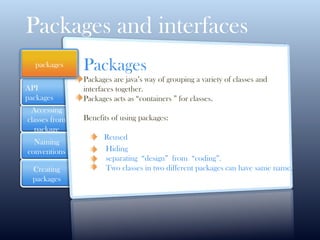
Packages are java’s way of grouping a variety of classes and
interfaces together.
Packages acts as “containers ” for classes.
Benefits of using packages:
Reused
Hiding
separating “design” from “coding”.
Two classes in two different packages can have same name.
packages
Packages and interfaces
Java
API
Packages
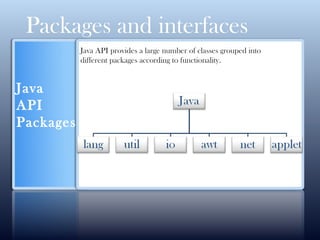
Java API provides a large number of classes grouped into
different packages according to functionality.
Packages and interfaces
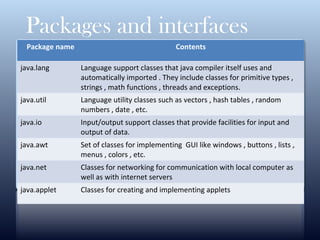
Package name Contents
java.lang Language support classes that java compiler itself uses and
automatically imported . They include classes for primitive types ,
strings , math functions , threads and exceptions.
java.util Language utility classes such as vectors , hash tables , random
numbers , date , etc.
java.io Input/output support classes that provide facilities for input and
output of data.
java.awt Set of classes for implementing GUI like windows , buttons , lists ,
menus , colors , etc.
java.net Classes for networking for communication with local computer as
well as with internet servers
java.applet Classes for creating and implementing applets
Packages and interfaces
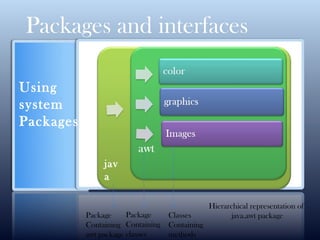
Using
system
Packages
jav
a
Package
Containing
awt package
Package
Containing
classes
Classes
Containing
methods
Hierarchical representation of
java.awt package
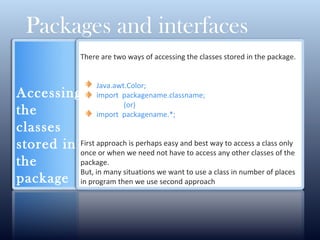
There are two ways of accessing the classes stored in the package.
Java.awt.Color;
import packagename.classname;
(or)
import packagename.*;
First approach is perhaps easy and best way to access a class only
once or when we need not have to access any other classes of the
package.
But, in many situations we want to use a class in number of places
in program then we use second approach
Packages and interfaces
Accessing
the
classes
stored in
the
package
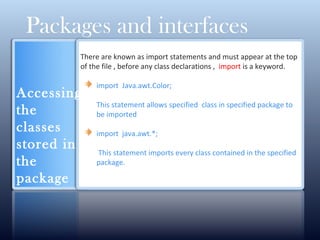
There are known as import statements and must appear at the top
of the file , before any class declarations , import is a keyword.
import Java.awt.Color;
This statement allows specified class in specified package to
be imported
import java.awt.*;
This statement imports every class contained in the specified
package.
Packages and interfaces
Accessing
the
classes
stored in
the
package
Naming
conventio
ns
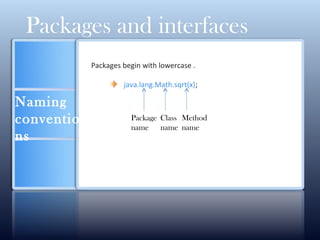
Packages begin with lowercase .
java.lang.Math.sqrt(x);
Packages and interfaces
Package
name
Class
name
Method
name
Packages and interfaces
CLICK HERE FOR MORE INFO
Creating packages
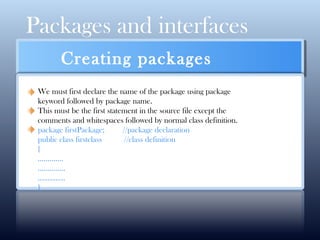
We must first declare the name of the package using package
keyword followed by package name.
This must be the first statement in the source file except the
comments and whitespaces followed by normal class definition.
package firstPackage; //package declaration
public class firstclass //class definition
{
………….
…………..
…………..
}
Packages and interfaces
CLICK HERE FOR MORE INFO
Creating packages
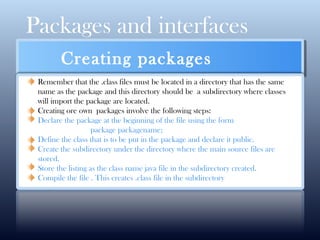
Remember that the .class files must be located in a directory that has the same
name as the package and this directory should be a subdirectory where classes
will import the package are located.
Creating ore own packages involve the following steps:
Declare the package at the beginning of the file using the form
package packagename;
Define the class that is to be put in the package and declare it public.
Create the subdirectory under the directory where the main source files are
stored.
Store the listing as the class name java file in the subdirectory created.
Compile the file . This creates .class file in the subdirectory
Packages and interfaces
Accessing a package
import package1 [.package2] [.package3].classname;
Packages and interfaces
Adding a class to a package
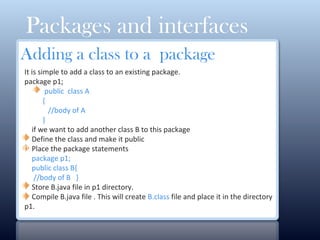
It is simple to add a class to an existing package.
package p1;
public class A
{
//body of A
}
if we want to add another class B to this package
Define the class and make it public
Place the package statements
package p1;
public class B{
//body of B }
Store B.java file in p1 directory.
Compile B.java file . This will create B.class file and place it in the directory
p1.
0
Implementing
interface
Naming
conventions
Extending
interface
Creating
packages
Packages and interfaces
Why do we need Interfaces?
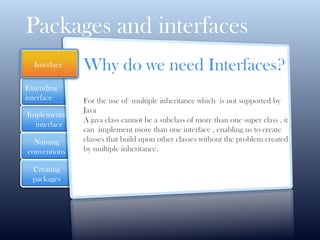
For the use of multiple inheritance which is not supported by
Java
A java class cannot be a subclass of more than one super class , it
can implement more than one interface , enabling us to create
classes that build upon other classes without the problem created
by multiple inheritance.
Interface
Packages and interfaces
Defining
interfaces
An interface is
basically a kind
of class
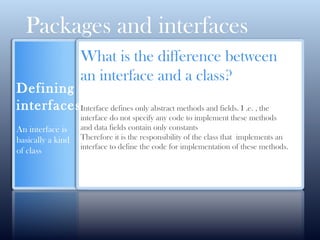
What is the difference between
an interface and a class?
Interface defines only abstract methods and fields. I .e. , the
interface do not specify any code to implement these methods
and data fields contain only constants
Therefore it is the responsibility of the class that implements an
interface to define the code for implementation of these methods.
Packages and interfaces
Syntax
for
interface
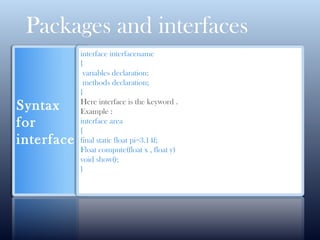
interface interfacename
{
variables declaration;
methods declaration;
}
Here interface is the keyword .
Example :
interface area
{
final static float pi=3.14f;
Float compute(float x , float y)
void show();
}
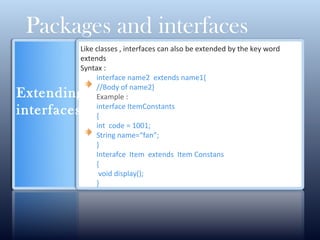
Like classes , interfaces can also be extended by the key word
extends
Syntax :
interface name2 extends name1{
//Body of name2}
Example :
interface ItemConstants
{
int code = 1001;
String name=“fan”;
}
Interafce Item extends Item Constans
{
void display();
}
Packages and interfaces
Extending
interfaces
Impleme
nting
interfaces
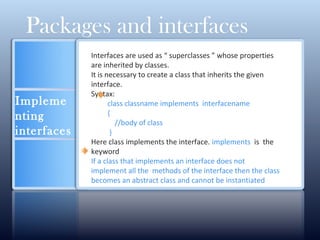
Interfaces are used as “ superclasses ” whose properties
are inherited by classes.
It is necessary to create a class that inherits the given
interface.
Syntax:
class classname implements interfacename
{
//body of class
}
Here class implements the interface. implements is the
keyword
If a class that implements an interface does not
implement all the methods of the interface then the class
becomes an abstract class and cannot be instantiated
Packages and interfaces
Impleme
nting
interface
with an
example
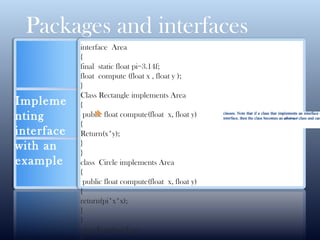
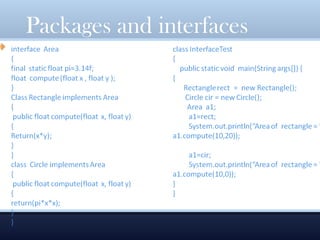
interface Area
{
final static float pi=3.14f;
float compute (float x , float y );
}
Class Rectangle implements Area
{
public float compute(float x, float y)
{
Return(x*y);
}
}
class Circle implements Area
{
public float compute(float x, float y)
{
return(pi*x*x);
}
}
class InterfaceTest
Packages and interfaces
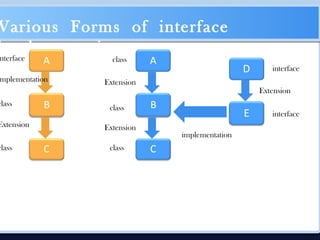
Various Forms of interface
implementation
nterface
mplementation
class
Extension
class
class
class
class
Extension
Extension
interface
interface
implementation
Extension
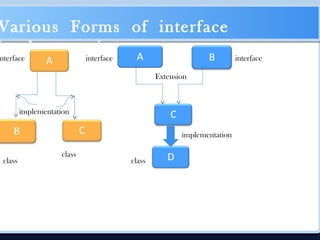
Various Forms of interface
implementation
nterface
implementation
class
class class
Extension
interface interface
implementation
Accessing
interface
variable
Packages and interfaces
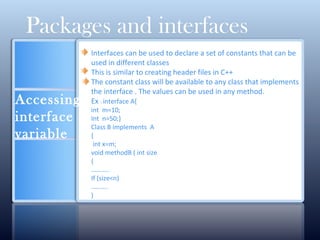
Interfaces can be used to declare a set of constants that can be
used in different classes
This is similar to creating header files in C++
The constant class will be available to any class that implements
the interface . The values can be used in any method.
Ex : interface A{
int m=10;
Int n=50;}
Class B implements A
{
int x=m;
void methodB ( int size
{
………..
If (size<n)
……….
)
Thank
you

Packages,interfaces and exceptions

  • 1.
    JAVA concepts Packages andinterfaces Exception handling
  • 2.
    Accessing classes from package Naming conventions API packages Creating packages Packages andinterfaces Packages Packages are java’s way of grouping a variety of classes and interfaces together. Packages acts as “containers ” for classes. Benefits of using packages: Reused Hiding separating “design” from “coding”. Two classes in two different packages can have same name. packages
  • 3.
    Packages and interfaces Java API Packages JavaAPI provides a large number of classes grouped into different packages according to functionality.
  • 4.
    Packages and interfaces Packagename Contents java.lang Language support classes that java compiler itself uses and automatically imported . They include classes for primitive types , strings , math functions , threads and exceptions. java.util Language utility classes such as vectors , hash tables , random numbers , date , etc. java.io Input/output support classes that provide facilities for input and output of data. java.awt Set of classes for implementing GUI like windows , buttons , lists , menus , colors , etc. java.net Classes for networking for communication with local computer as well as with internet servers java.applet Classes for creating and implementing applets
  • 5.
    Packages and interfaces Using system Packages jav a Package Containing awtpackage Package Containing classes Classes Containing methods Hierarchical representation of java.awt package
  • 6.
    There are twoways of accessing the classes stored in the package. Java.awt.Color; import packagename.classname; (or) import packagename.*; First approach is perhaps easy and best way to access a class only once or when we need not have to access any other classes of the package. But, in many situations we want to use a class in number of places in program then we use second approach Packages and interfaces Accessing the classes stored in the package
  • 7.
    There are knownas import statements and must appear at the top of the file , before any class declarations , import is a keyword. import Java.awt.Color; This statement allows specified class in specified package to be imported import java.awt.*; This statement imports every class contained in the specified package. Packages and interfaces Accessing the classes stored in the package
  • 8.
    Naming conventio ns Packages begin withlowercase . java.lang.Math.sqrt(x); Packages and interfaces Package name Class name Method name
  • 9.
    Packages and interfaces CLICKHERE FOR MORE INFO Creating packages We must first declare the name of the package using package keyword followed by package name. This must be the first statement in the source file except the comments and whitespaces followed by normal class definition. package firstPackage; //package declaration public class firstclass //class definition { …………. ………….. ………….. }
  • 10.
    Packages and interfaces CLICKHERE FOR MORE INFO Creating packages Remember that the .class files must be located in a directory that has the same name as the package and this directory should be a subdirectory where classes will import the package are located. Creating ore own packages involve the following steps: Declare the package at the beginning of the file using the form package packagename; Define the class that is to be put in the package and declare it public. Create the subdirectory under the directory where the main source files are stored. Store the listing as the class name java file in the subdirectory created. Compile the file . This creates .class file in the subdirectory
  • 11.
    Packages and interfaces Accessinga package import package1 [.package2] [.package3].classname;
  • 12.
    Packages and interfaces Addinga class to a package It is simple to add a class to an existing package. package p1; public class A { //body of A } if we want to add another class B to this package Define the class and make it public Place the package statements package p1; public class B{ //body of B } Store B.java file in p1 directory. Compile B.java file . This will create B.class file and place it in the directory p1. 0
  • 13.
    Implementing interface Naming conventions Extending interface Creating packages Packages and interfaces Whydo we need Interfaces? For the use of multiple inheritance which is not supported by Java A java class cannot be a subclass of more than one super class , it can implement more than one interface , enabling us to create classes that build upon other classes without the problem created by multiple inheritance. Interface
  • 14.
    Packages and interfaces Defining interfaces Aninterface is basically a kind of class What is the difference between an interface and a class? Interface defines only abstract methods and fields. I .e. , the interface do not specify any code to implement these methods and data fields contain only constants Therefore it is the responsibility of the class that implements an interface to define the code for implementation of these methods.
  • 15.
    Packages and interfaces Syntax for interface interfaceinterfacename { variables declaration; methods declaration; } Here interface is the keyword . Example : interface area { final static float pi=3.14f; Float compute(float x , float y) void show(); }
  • 16.
    Like classes ,interfaces can also be extended by the key word extends Syntax : interface name2 extends name1{ //Body of name2} Example : interface ItemConstants { int code = 1001; String name=“fan”; } Interafce Item extends Item Constans { void display(); } Packages and interfaces Extending interfaces
  • 17.
    Impleme nting interfaces Interfaces are usedas “ superclasses ” whose properties are inherited by classes. It is necessary to create a class that inherits the given interface. Syntax: class classname implements interfacename { //body of class } Here class implements the interface. implements is the keyword If a class that implements an interface does not implement all the methods of the interface then the class becomes an abstract class and cannot be instantiated Packages and interfaces
  • 18.
    Impleme nting interface with an example interface Area { finalstatic float pi=3.14f; float compute (float x , float y ); } Class Rectangle implements Area { public float compute(float x, float y) { Return(x*y); } } class Circle implements Area { public float compute(float x, float y) { return(pi*x*x); } } class InterfaceTest Packages and interfaces
  • 19.
  • 20.
    Various Forms ofinterface implementation nterface mplementation class Extension class class class class Extension Extension interface interface implementation Extension
  • 21.
    Various Forms ofinterface implementation nterface implementation class class class Extension interface interface implementation
  • 22.
    Accessing interface variable Packages and interfaces Interfacescan be used to declare a set of constants that can be used in different classes This is similar to creating header files in C++ The constant class will be available to any class that implements the interface . The values can be used in any method. Ex : interface A{ int m=10; Int n=50;} Class B implements A { int x=m; void methodB ( int size { ……….. If (size<n) ………. )
  • 23.