1.1 Silberschatz, Galvin and Gagne ©2013
Operating System Concepts – 9th
Edition
Course Introduction
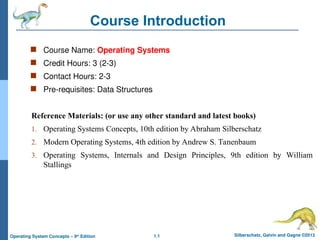
 Course Name: Operating Systems
 Credit Hours: 3 (2-3)
 Contact Hours: 2-3
 Pre-requisites: Data Structures
Reference Materials: (or use any other standard and latest books)
1. Operating Systems Concepts, 10th edition by Abraham Silberschatz
2. Modern Operating Systems, 4th edition by Andrew S. Tanenbaum
3. Operating Systems, Internals and Design Principles, 9th edition by William
Stallings
1.2 Silberschatz, Galvin and Gagne ©2013
Operating System Concepts – 9th
Edition
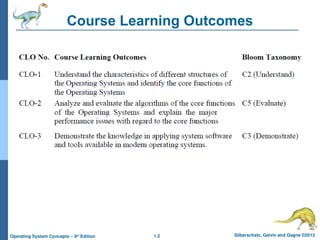
Course Learning Outcomes
Silberschatz, Galvin and Gagne ©2013
Operating System Concepts – 9th
Edit9on
Chapter 1: Introduction
1.4 Silberschatz, Galvin and Gagne ©2013
Operating System Concepts – 9th
Edition
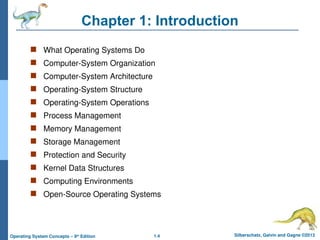
Chapter 1: Introduction
 What Operating Systems Do
 Computer-System Organization
 Computer-System Architecture
 Operating-System Structure
 Operating-System Operations
 Process Management
 Memory Management
 Storage Management
 Protection and Security
 Kernel Data Structures
 Computing Environments
 Open-Source Operating Systems
1.5 Silberschatz, Galvin and Gagne ©2013
Operating System Concepts – 9th
Edition
Objectives
 To describe the basic organization of computer systems
 To provide a grand tour of the major components of operating systems
 To give an overview of the many types of computing environments
 To explore several open-source operating systems
1.6 Silberschatz, Galvin and Gagne ©2013
Operating System Concepts – 9th
Edition
What is an Operating System?
 An operating system manages a computer’s hardware.
It also provides a basis for application programs and acts
as an intermediary between the computer user and the
computer hardware
 Operating system goals:
 Execute user programs and make solving user problems easier
 Make the computer system convenient to use
 Use the computer hardware in an efficient manner
1.7 Silberschatz, Galvin and Gagne ©2013
Operating System Concepts – 9th
Edition
What is an Operating System?
 An operating system is large and complex, it must be
created piece by piece.
 Each of these pieces should be a well-delineated portion
of the system, with carefully defined inputs, outputs, and
functions.
1.8 Silberschatz, Galvin and Gagne ©2013
Operating System Concepts – 9th
Edition
Computer System Structure
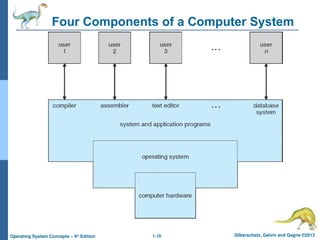
 Computer system can be divided into four components:
1. Hardware – provides basic computing resources
CPU
Memory
I/O devices
2. Operating system
Controls and coordinates use of hardware among
various applications and users
1.9 Silberschatz, Galvin and Gagne ©2013
Operating System Concepts – 9th
Edition
Computer System Structure
3. Application programs – define the ways in which the
system resources are used to solve the computing
problems of the users
– Word processors
– Compilers
– web browsers
– Database systems
– Video games
4. Users
People, machines, other computers
1.10 Silberschatz, Galvin and Gagne ©2013
Operating System Concepts – 9th
Edition
Four Components of a Computer System
1.11 Silberschatz, Galvin and Gagne ©2013
Operating System Concepts – 9th
Edition
What Operating Systems Do: User View
 On Personal Computer (PC) Users want
convenience, ease of use
 Don’t care about resource utilization
 But shared computer such as mainframe or
minicomputer must keep all users happy. The
operating system in such cases is designed to
maximize resource utilization
1.12 Silberschatz, Galvin and Gagne ©2013
Operating System Concepts – 9th
Edition
What Operating Systems Do: User View
 Users of dedicate systems such as workstations have
dedicated resources but frequently use shared resources
from servers. Therefore, their operating system is
designed to compromise between individual usability and
resource utilization.
 Handheld computers are resource poor, optimized for
usability and battery life
 Some computers have little or no user interface, such as
embedded computers in devices and automobiles
1.13 Silberschatz, Galvin and Gagne ©2013
Operating System Concepts – 9th
Edition
Operating System Definition: System View
 OS is a resource allocator
 Manages all resources
 Decides between conflicting requests for efficient and
fair resource use
 OS is a control program
 Controls execution of programs to prevent errors and
improper use of the computer
1.14 Silberschatz, Galvin and Gagne ©2013
Operating System Concepts – 9th
Edition
Operating System Definition (Cont.)
 No universally accepted definition
 “Everything a vendor ships when you order an operating
system” is good approximation
 But varies wildly
 “The one program running at all times on the computer” is
the kernel. Everything else is either a system program
(ships with the operating system) or an application
program.
1.15 Silberschatz, Galvin and Gagne ©2013
Operating System Concepts – 9th
Edition
Computer Startup
 bootstrap program is loaded at power-up or reboot
 Typically stored in ROM or EPROM, generally known
as firmware
 Initializes all aspects of system
 Loads operating system kernel and starts execution
1.16 Silberschatz, Galvin and Gagne ©2013
Operating System Concepts – 9th
Edition
Computer System Organization
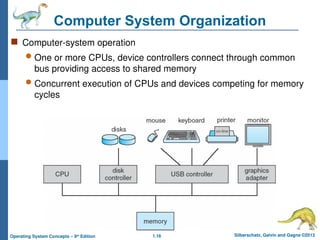
 Computer-system operation
 One or more CPUs, device controllers connect through common
bus providing access to shared memory
 Concurrent execution of CPUs and devices competing for memory
cycles
1.17 Silberschatz, Galvin and Gagne ©2013
Operating System Concepts – 9th
Edition
Computer-System Operation
 I/O devices and the CPU can execute concurrently
 Each device controller is in charge of a particular
device type
 Each device controller has a local buffer
1.18 Silberschatz, Galvin and Gagne ©2013
Operating System Concepts – 9th
Edition
Computer-System Operation
 CPU moves data from/to main memory to/from local
buffers
 I/O is from the device to local buffer of controller
 Device controller informs CPU that it has finished its
operation by causing an interrupt
1.19 Silberschatz, Galvin and Gagne ©2013
Operating System Concepts – 9th
Edition
Common Functions of Interrupts
 Interrupt transfers control to the interrupt service routine
generally, through the interrupt vector, which contains the
addresses of all the service routines
 Interrupt architecture must save the address of the interrupted
instruction
 A trap or exception is a software-generated interrupt caused
either by an error or a user request
 An operating system is interrupt driven
1.20 Silberschatz, Galvin and Gagne ©2013
Operating System Concepts – 9th
Edition
Interrupt Handling
 The operating system preserves the state of the CPU
by storing registers and the program counter
 Determines which type of interrupt has occurred:
 polling
 vectored interrupt system
 Separate segments of code determine what action
should be taken for each type of interrupt
1.21 Silberschatz, Galvin and Gagne ©2013
Operating System Concepts – 9th
Edition
I/O Structure
 After I/O starts, control returns to user program only upon
I/O completion
 Wait instruction idles the CPU until the next interrupt
 Wait loop (contention for memory access)
 At most one I/O request is outstanding at a time, no
simultaneous I/O processing
1.22 Silberschatz, Galvin and Gagne ©2013
Operating System Concepts – 9th
Edition
I/O Structure
 After I/O starts, control returns to user program without
waiting for I/O completion
 System call – request to the OS to allow user to wait
for I/O completion
 Device-status table contains entry for each I/O
device indicating its type, address, and state
 OS indexes into I/O device table to determine device
status and to modify table entry to include interrupt
1.23 Silberschatz, Galvin and Gagne ©2013
Operating System Concepts – 9th
Edition
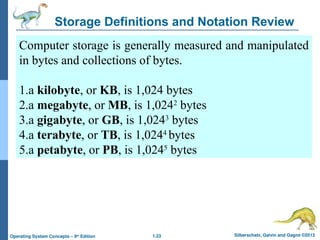
Storage Definitions and Notation Review
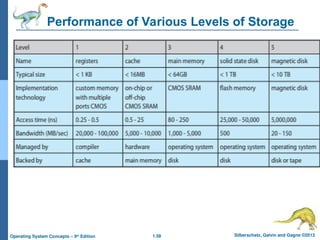
Computer storage is generally measured and manipulated
in bytes and collections of bytes.
1.a kilobyte, or KB, is 1,024 bytes
2.a megabyte, or MB, is 1,0242
bytes
3.a gigabyte, or GB, is 1,0243
bytes
4.a terabyte, or TB, is 1,0244
bytes
5.a petabyte, or PB, is 1,0245
bytes
1.24 Silberschatz, Galvin and Gagne ©2013
Operating System Concepts – 9th
Edition
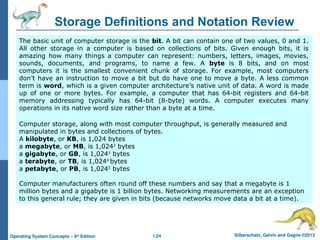
Storage Definitions and Notation Review
The basic unit of computer storage is the bit. A bit can contain one of two values, 0 and 1.
All other storage in a computer is based on collections of bits. Given enough bits, it is
amazing how many things a computer can represent: numbers, letters, images, movies,
sounds, documents, and programs, to name a few. A byte is 8 bits, and on most
computers it is the smallest convenient chunk of storage. For example, most computers
don’t have an instruction to move a bit but do have one to move a byte. A less common
term is word, which is a given computer architecture’s native unit of data. A word is made
up of one or more bytes. For example, a computer that has 64-bit registers and 64-bit
memory addressing typically has 64-bit (8-byte) words. A computer executes many
operations in its native word size rather than a byte at a time.
Computer storage, along with most computer throughput, is generally measured and
manipulated in bytes and collections of bytes.
A kilobyte, or KB, is 1,024 bytes
a megabyte, or MB, is 1,0242
bytes
a gigabyte, or GB, is 1,0243
bytes
a terabyte, or TB, is 1,0244
bytes
a petabyte, or PB, is 1,0245
bytes
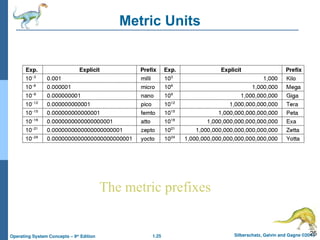
Computer manufacturers often round off these numbers and say that a megabyte is 1
million bytes and a gigabyte is 1 billion bytes. Networking measurements are an exception
to this general rule; they are given in bits (because networks move data a bit at a time).
1.25 Silberschatz, Galvin and Gagne ©2013
Operating System Concepts – 9th
Edition
25
Metric Units
The metric prefixes
1.26 Silberschatz, Galvin and Gagne ©2013
Operating System Concepts – 9th
Edition
Direct Memory Access Structure
 Used for high-speed I/O devices able to transmit
information at close to memory speeds
 Device controller transfers blocks of data from buffer
storage directly to main memory without CPU intervention
 Only one interrupt is generated per block, rather than the
one interrupt per byte
1.27 Silberschatz, Galvin and Gagne ©2013
Operating System Concepts – 9th
Edition
Storage Structure
 Main memory – only large storage media that the CPU
can access directly
 Random access
 Typically volatile
 Secondary storage – extension of main memory that
provides large nonvolatile storage capacity
1.28 Silberschatz, Galvin and Gagne ©2013
Operating System Concepts – 9th
Edition
Storage Structure
 Magnetic disks – rigid metal or glass platters covered
with magnetic recording material
 Disk surface is logically divided into tracks, which are
subdivided into sectors
 The disk controller determines the logical interaction between
the device and the computer
 Solid-state disks – faster than magnetic disks,
nonvolatile
 Various technologies
 Becoming more popular
1.29 Silberschatz, Galvin and Gagne ©2013
Operating System Concepts – 9th
Edition
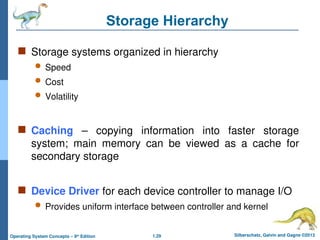
Storage Hierarchy
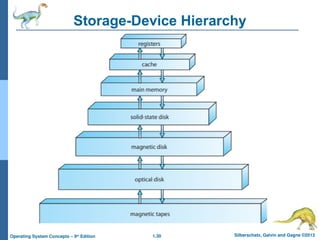
 Storage systems organized in hierarchy
 Speed
 Cost
 Volatility
 Caching – copying information into faster storage
system; main memory can be viewed as a cache for
secondary storage
 Device Driver for each device controller to manage I/O
 Provides uniform interface between controller and kernel
1.30 Silberschatz, Galvin and Gagne ©2013
Operating System Concepts – 9th
Edition
Storage-Device Hierarchy
1.31 Silberschatz, Galvin and Gagne ©2013
Operating System Concepts – 9th
Edition
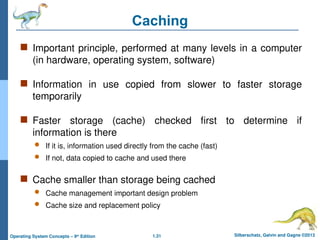
Caching
 Important principle, performed at many levels in a computer
(in hardware, operating system, software)
 Information in use copied from slower to faster storage
temporarily
 Faster storage (cache) checked first to determine if
information is there
 If it is, information used directly from the cache (fast)
 If not, data copied to cache and used there
 Cache smaller than storage being cached
 Cache management important design problem
 Cache size and replacement policy
1.32 Silberschatz, Galvin and Gagne ©2013
Operating System Concepts – 9th
Edition
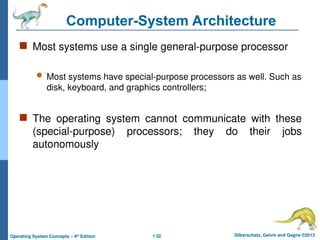
Computer-System Architecture
 Most systems use a single general-purpose processor
 Most systems have special-purpose processors as well. Such as
disk, keyboard, and graphics controllers;
 The operating system cannot communicate with these
(special-purpose) processors; they do their jobs
autonomously
1.33 Silberschatz, Galvin and Gagne ©2013
Operating System Concepts – 9th
Edition
Computer-System Architecture
 Multiprocessors: Such systems have two or more
processors in close communication, sharing the computer
bus and sometimes the clock, memory, and peripheral
devices
 Multiprocessor systems first appeared prominently appeared
in servers and have since migrated to
1. Desktop
2. Laptop systems
3. Mobile devices
4. Smartphones and Tablet computers
1.34 Silberschatz, Galvin and Gagne ©2013
Operating System Concepts – 9th
Edition
Computer-System Architecture
 Multiprocessors systems growing in use and importance
 Also known as parallel systems, tightly-coupled systems
 Advantages include:
1. Increased throughput
2. Economy of scale
3. Increased reliability – graceful degradation or fault tolerance
 The ability to continue providing service proportional to the
level of surviving hardware is called graceful degradation.
Some systems go beyond graceful degradation and are
called fault tolerant, because they can suffer a failure of
any single component and still continue operation
1.35 Silberschatz, Galvin and Gagne ©2013
Operating System Concepts – 9th
Edition
Computer-System Architecture
 Multiprocessing systems are of two types:
1. Asymmetric Multiprocessing: the relationship
between multicore processors (heterogeneous or
homogeneous) of asymmetric multiprocessing is a
master-slave relationship
2. Symmetric Multiprocessing: All processors of
same type (may be either heterogeneous or
homogeneous) of symmetric multiprocessing are
peers;
1.36 Silberschatz, Galvin and Gagne ©2013
Operating System Concepts – 9th
Edition
Computer-System Architecture
More specifically, each CPU in symmetric multiprocessing
runs the same copy of the OS, while in asymmetric
multiprocessing, they split responsibilities typically,
therefore each may have specialized (different) software
and roles.
1.37 Silberschatz, Galvin and Gagne ©2013
Operating System Concepts – 9th
Edition
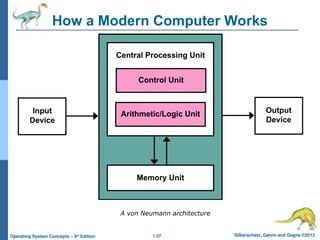
How a Modern Computer Works
A von Neumann architecture
1.38 Silberschatz, Galvin and Gagne ©2013
Operating System Concepts – 9th
Edition
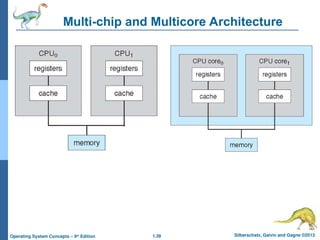
Multi-chip and Multicore Architecture
1.39 Silberschatz, Galvin and Gagne ©2013
Operating System Concepts – 9th
Edition
A Dual-Core Design
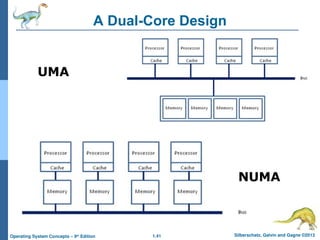
 Uniform memory access (UMA) is a shared
memory architecture used in parallel computers.
 All the processors in the UMA model share the physical
memory uniformly.
 In a UMA architecture, access time to a memory location
is independent of which processor makes the request or
which memory chip contains the transferred data.
1.40 Silberschatz, Galvin and Gagne ©2013
Operating System Concepts – 9th
Edition
A Dual-Core Design
 Non-uniform memory access (NUMA) is a computer
memory design used in multiprocessing, where the
memory access time depends on the memory location
relative to the processor.
 Under NUMA, a processor can access its own local
memory faster than non-local memory (memory local to
another processor or memory shared between
processors).
1.41 Silberschatz, Galvin and Gagne ©2013
Operating System Concepts – 9th
Edition
A Dual-Core Design
NUMA
UMA
1.42 Silberschatz, Galvin and Gagne ©2013
Operating System Concepts – 9th
Edition
A Dual-Core Design
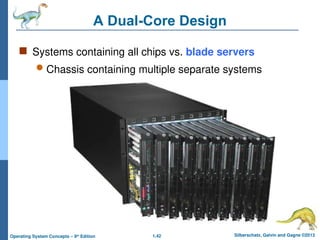
 Systems containing all chips vs. blade servers
 Chassis containing multiple separate systems
1.43 Silberschatz, Galvin and Gagne ©2013
Operating System Concepts – 9th
Edition
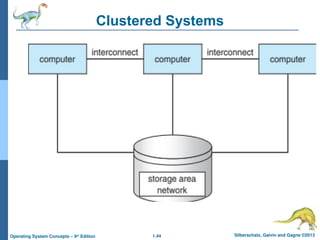
Clustered Systems
 They are composed of two or more individual systems—or
nodes—joined together.
 Like multiprocessor systems, but multiple systems working
together
 Usually sharing storage via a storage-area network (SAN)
 Provides a high-availability service which survives failures
 Some clusters are for high-performance computing (HPC)
 Some have distributed lock manager (DLM) to avoid conflicting
operations
1.44 Silberschatz, Galvin and Gagne ©2013
Operating System Concepts – 9th
Edition
Clustered Systems
1.45 Silberschatz, Galvin and Gagne ©2013
Operating System Concepts – 9th
Edition
Operating System Structure
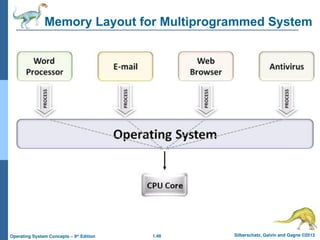
 Multiprogramming is needed for efficiency.
 Multiprogramming is also the ability of an operating
system to execute more than one program on a single
processor machine.
 More than one task/program/job/process can reside into
the main memory at one point of time.
 A computer running excel and firefox browser
simultaneously is an example of multiprogramming.
1.46 Silberschatz, Galvin and Gagne ©2013
Operating System Concepts – 9th
Edition
Operating System Structure
1.47 Silberschatz, Galvin and Gagne ©2013
Operating System Concepts – 9th
Edition
Operating System Structure
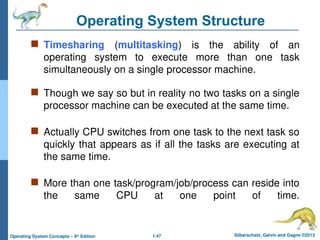
 Timesharing (multitasking) is the ability of an
operating system to execute more than one task
simultaneously on a single processor machine.
 Though we say so but in reality no two tasks on a single
processor machine can be executed at the same time.
 Actually CPU switches from one task to the next task so
quickly that appears as if all the tasks are executing at
the same time.
 More than one task/program/job/process can reside into
the same CPU at one point of time.
1.48 Silberschatz, Galvin and Gagne ©2013
Operating System Concepts – 9th
Edition
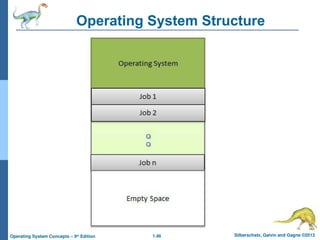
Memory Layout for Multiprogrammed System
1.49 Silberschatz, Galvin and Gagne ©2013
Operating System Concepts – 9th
Edition
Operating System Structure
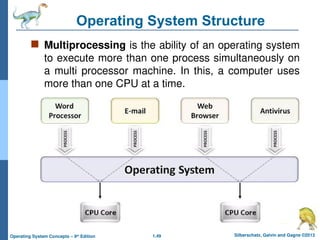
 Multiprocessing is the ability of an operating system
to execute more than one process simultaneously on
a multi processor machine. In this, a computer uses
more than one CPU at a time.
1.50 Silberschatz, Galvin and Gagne ©2013
Operating System Concepts – 9th
Edition
Operating-System Operations
 Interrupt driven by hardware
 Software error or request creates exception or trap
 Division by zero, request for operating system
service, infinite loop, processes modifying each
other or the operating system
 Dual-mode operation allows OS to protect itself and
other system components
 User mode and kernel mode
1.51 Silberschatz, Galvin and Gagne ©2013
Operating System Concepts – 9th
Edition
Operating-System Operations
 Mode bit provided by hardware
Provides ability to distinguish when system is
running user code or kernel code
Some instructions designated as privileged,
only executable in kernel mode
System call changes mode to kernel, return from
call resets it to user
1.52 Silberschatz, Galvin and Gagne ©2013
Operating System Concepts – 9th
Edition
Process Management
 A process is a program in execution. It is a unit of work within
the system. Program is a passive entity, process is an active
entity.
 Process needs resources to accomplish its task
 CPU, memory, I/O, files
 Initialization data
 Process termination requires reclaim of any reusable
resources
 Single-threaded process has one program counter specifying
location of next instruction to execute
 Process executes instructions sequentially, one at a time,
until completion
1.53 Silberschatz, Galvin and Gagne ©2013
Operating System Concepts – 9th
Edition
Process Management
 Multi-threaded process has one program counter per
thread
 Typically system has many processes, some user,
some operating system running concurrently on one or
more CPUs
 Concurrency by multiplexing the CPUs among the
processes / threads
1.54 Silberschatz, Galvin and Gagne ©2013
Operating System Concepts – 9th
Edition
Process Management Activities
The operating system is responsible for the following
activities in connection with process management:
1.Creating and deleting both user and system processes
2.Suspending and resuming processes
3.Providing mechanisms for process synchronization
4.Providing mechanisms for process communication
5.Providing mechanisms for deadlock handling
1.55 Silberschatz, Galvin and Gagne ©2013
Operating System Concepts – 9th
Edition
Memory Management
 All data in memory before and after processing
 All instructions in memory in order to execute
 Memory management determines what is in memory
when
 Optimizing CPU utilization and computer response to
users
1.56 Silberschatz, Galvin and Gagne ©2013
Operating System Concepts – 9th
Edition
Memory Management
 Memory management activities
 Keeping track of which parts of memory are currently
being used and by whom
 Deciding which processes (or parts thereof) and data
to move into and out of memory
 Allocating and deallocating memory space as needed
1.57 Silberschatz, Galvin and Gagne ©2013
Operating System Concepts – 9th
Edition
Storage Management
 File-System management
 Files usually organized into directories
 Access control on most systems to determine who can
access what
 OS activities include
Creating and deleting files and directories
Primitives to manipulate files and dirs
Mapping files onto secondary storage
Backup files onto stable (non-volatile) storage media
1.58 Silberschatz, Galvin and Gagne ©2013
Operating System Concepts – 9th
Edition
Performance of Various Levels of Storage
1.59 Silberschatz, Galvin and Gagne ©2013
Operating System Concepts – 9th
Edition
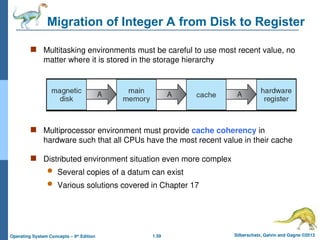
Migration of Integer A from Disk to Register
 Multitasking environments must be careful to use most recent value, no
matter where it is stored in the storage hierarchy
 Multiprocessor environment must provide cache coherency in
hardware such that all CPUs have the most recent value in their cache
 Distributed environment situation even more complex
 Several copies of a datum can exist
 Various solutions covered in Chapter 17
1.60 Silberschatz, Galvin and Gagne ©2013
Operating System Concepts – 9th
Edition
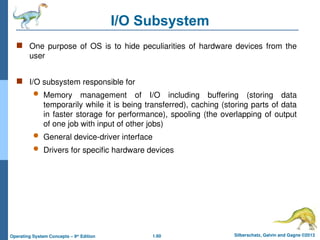
I/O Subsystem
 One purpose of OS is to hide peculiarities of hardware devices from the
user
 I/O subsystem responsible for
 Memory management of I/O including buffering (storing data
temporarily while it is being transferred), caching (storing parts of data
in faster storage for performance), spooling (the overlapping of output
of one job with input of other jobs)
 General device-driver interface
 Drivers for specific hardware devices
1.61 Silberschatz, Galvin and Gagne ©2013
Operating System Concepts – 9th
Edition
Protection and Security
 Protection – any mechanism for controlling access of
processes or users to resources defined by the OS
 Security – defense of the system against internal and
external attacks
 Huge range, including denial-of-service, worms,
viruses, identity theft, theft of service
1.62 Silberschatz, Galvin and Gagne ©2013
Operating System Concepts – 9th
Edition
 Write answers to exercise question from 1.1 to 1.11
 Only handwritten neat and clean homework will be
accepted.
 Page size and page quality through out the
course should remain the same.
 Throughout this course, homework should be
submitted to CR in next class after the class
attendance.
Homework
Silberschatz, Galvin and Gagne ©2013
Operating System Concepts – 9th
Edit9on
End of Chapter 1

"Overview of Operating Systems: Functions, Types, Evolution, and Management"

  • 1.
    1.1 Silberschatz, Galvinand Gagne ©2013 Operating System Concepts – 9th Edition Course Introduction  Course Name: Operating Systems  Credit Hours: 3 (2-3)  Contact Hours: 2-3  Pre-requisites: Data Structures Reference Materials: (or use any other standard and latest books) 1. Operating Systems Concepts, 10th edition by Abraham Silberschatz 2. Modern Operating Systems, 4th edition by Andrew S. Tanenbaum 3. Operating Systems, Internals and Design Principles, 9th edition by William Stallings
  • 2.
    1.2 Silberschatz, Galvinand Gagne ©2013 Operating System Concepts – 9th Edition Course Learning Outcomes
  • 3.
    Silberschatz, Galvin andGagne ©2013 Operating System Concepts – 9th Edit9on Chapter 1: Introduction
  • 4.
    1.4 Silberschatz, Galvinand Gagne ©2013 Operating System Concepts – 9th Edition Chapter 1: Introduction  What Operating Systems Do  Computer-System Organization  Computer-System Architecture  Operating-System Structure  Operating-System Operations  Process Management  Memory Management  Storage Management  Protection and Security  Kernel Data Structures  Computing Environments  Open-Source Operating Systems
  • 5.
    1.5 Silberschatz, Galvinand Gagne ©2013 Operating System Concepts – 9th Edition Objectives  To describe the basic organization of computer systems  To provide a grand tour of the major components of operating systems  To give an overview of the many types of computing environments  To explore several open-source operating systems
  • 6.
    1.6 Silberschatz, Galvinand Gagne ©2013 Operating System Concepts – 9th Edition What is an Operating System?  An operating system manages a computer’s hardware. It also provides a basis for application programs and acts as an intermediary between the computer user and the computer hardware  Operating system goals:  Execute user programs and make solving user problems easier  Make the computer system convenient to use  Use the computer hardware in an efficient manner
  • 7.
    1.7 Silberschatz, Galvinand Gagne ©2013 Operating System Concepts – 9th Edition What is an Operating System?  An operating system is large and complex, it must be created piece by piece.  Each of these pieces should be a well-delineated portion of the system, with carefully defined inputs, outputs, and functions.
  • 8.
    1.8 Silberschatz, Galvinand Gagne ©2013 Operating System Concepts – 9th Edition Computer System Structure  Computer system can be divided into four components: 1. Hardware – provides basic computing resources CPU Memory I/O devices 2. Operating system Controls and coordinates use of hardware among various applications and users
  • 9.
    1.9 Silberschatz, Galvinand Gagne ©2013 Operating System Concepts – 9th Edition Computer System Structure 3. Application programs – define the ways in which the system resources are used to solve the computing problems of the users – Word processors – Compilers – web browsers – Database systems – Video games 4. Users People, machines, other computers
  • 10.
    1.10 Silberschatz, Galvinand Gagne ©2013 Operating System Concepts – 9th Edition Four Components of a Computer System
  • 11.
    1.11 Silberschatz, Galvinand Gagne ©2013 Operating System Concepts – 9th Edition What Operating Systems Do: User View  On Personal Computer (PC) Users want convenience, ease of use  Don’t care about resource utilization  But shared computer such as mainframe or minicomputer must keep all users happy. The operating system in such cases is designed to maximize resource utilization
  • 12.
    1.12 Silberschatz, Galvinand Gagne ©2013 Operating System Concepts – 9th Edition What Operating Systems Do: User View  Users of dedicate systems such as workstations have dedicated resources but frequently use shared resources from servers. Therefore, their operating system is designed to compromise between individual usability and resource utilization.  Handheld computers are resource poor, optimized for usability and battery life  Some computers have little or no user interface, such as embedded computers in devices and automobiles
  • 13.
    1.13 Silberschatz, Galvinand Gagne ©2013 Operating System Concepts – 9th Edition Operating System Definition: System View  OS is a resource allocator  Manages all resources  Decides between conflicting requests for efficient and fair resource use  OS is a control program  Controls execution of programs to prevent errors and improper use of the computer
  • 14.
    1.14 Silberschatz, Galvinand Gagne ©2013 Operating System Concepts – 9th Edition Operating System Definition (Cont.)  No universally accepted definition  “Everything a vendor ships when you order an operating system” is good approximation  But varies wildly  “The one program running at all times on the computer” is the kernel. Everything else is either a system program (ships with the operating system) or an application program.
  • 15.
    1.15 Silberschatz, Galvinand Gagne ©2013 Operating System Concepts – 9th Edition Computer Startup  bootstrap program is loaded at power-up or reboot  Typically stored in ROM or EPROM, generally known as firmware  Initializes all aspects of system  Loads operating system kernel and starts execution
  • 16.
    1.16 Silberschatz, Galvinand Gagne ©2013 Operating System Concepts – 9th Edition Computer System Organization  Computer-system operation  One or more CPUs, device controllers connect through common bus providing access to shared memory  Concurrent execution of CPUs and devices competing for memory cycles
  • 17.
    1.17 Silberschatz, Galvinand Gagne ©2013 Operating System Concepts – 9th Edition Computer-System Operation  I/O devices and the CPU can execute concurrently  Each device controller is in charge of a particular device type  Each device controller has a local buffer
  • 18.
    1.18 Silberschatz, Galvinand Gagne ©2013 Operating System Concepts – 9th Edition Computer-System Operation  CPU moves data from/to main memory to/from local buffers  I/O is from the device to local buffer of controller  Device controller informs CPU that it has finished its operation by causing an interrupt
  • 19.
    1.19 Silberschatz, Galvinand Gagne ©2013 Operating System Concepts – 9th Edition Common Functions of Interrupts  Interrupt transfers control to the interrupt service routine generally, through the interrupt vector, which contains the addresses of all the service routines  Interrupt architecture must save the address of the interrupted instruction  A trap or exception is a software-generated interrupt caused either by an error or a user request  An operating system is interrupt driven
  • 20.
    1.20 Silberschatz, Galvinand Gagne ©2013 Operating System Concepts – 9th Edition Interrupt Handling  The operating system preserves the state of the CPU by storing registers and the program counter  Determines which type of interrupt has occurred:  polling  vectored interrupt system  Separate segments of code determine what action should be taken for each type of interrupt
  • 21.
    1.21 Silberschatz, Galvinand Gagne ©2013 Operating System Concepts – 9th Edition I/O Structure  After I/O starts, control returns to user program only upon I/O completion  Wait instruction idles the CPU until the next interrupt  Wait loop (contention for memory access)  At most one I/O request is outstanding at a time, no simultaneous I/O processing
  • 22.
    1.22 Silberschatz, Galvinand Gagne ©2013 Operating System Concepts – 9th Edition I/O Structure  After I/O starts, control returns to user program without waiting for I/O completion  System call – request to the OS to allow user to wait for I/O completion  Device-status table contains entry for each I/O device indicating its type, address, and state  OS indexes into I/O device table to determine device status and to modify table entry to include interrupt
  • 23.
    1.23 Silberschatz, Galvinand Gagne ©2013 Operating System Concepts – 9th Edition Storage Definitions and Notation Review Computer storage is generally measured and manipulated in bytes and collections of bytes. 1.a kilobyte, or KB, is 1,024 bytes 2.a megabyte, or MB, is 1,0242 bytes 3.a gigabyte, or GB, is 1,0243 bytes 4.a terabyte, or TB, is 1,0244 bytes 5.a petabyte, or PB, is 1,0245 bytes
  • 24.
    1.24 Silberschatz, Galvinand Gagne ©2013 Operating System Concepts – 9th Edition Storage Definitions and Notation Review The basic unit of computer storage is the bit. A bit can contain one of two values, 0 and 1. All other storage in a computer is based on collections of bits. Given enough bits, it is amazing how many things a computer can represent: numbers, letters, images, movies, sounds, documents, and programs, to name a few. A byte is 8 bits, and on most computers it is the smallest convenient chunk of storage. For example, most computers don’t have an instruction to move a bit but do have one to move a byte. A less common term is word, which is a given computer architecture’s native unit of data. A word is made up of one or more bytes. For example, a computer that has 64-bit registers and 64-bit memory addressing typically has 64-bit (8-byte) words. A computer executes many operations in its native word size rather than a byte at a time. Computer storage, along with most computer throughput, is generally measured and manipulated in bytes and collections of bytes. A kilobyte, or KB, is 1,024 bytes a megabyte, or MB, is 1,0242 bytes a gigabyte, or GB, is 1,0243 bytes a terabyte, or TB, is 1,0244 bytes a petabyte, or PB, is 1,0245 bytes Computer manufacturers often round off these numbers and say that a megabyte is 1 million bytes and a gigabyte is 1 billion bytes. Networking measurements are an exception to this general rule; they are given in bits (because networks move data a bit at a time).
  • 25.
    1.25 Silberschatz, Galvinand Gagne ©2013 Operating System Concepts – 9th Edition 25 Metric Units The metric prefixes
  • 26.
    1.26 Silberschatz, Galvinand Gagne ©2013 Operating System Concepts – 9th Edition Direct Memory Access Structure  Used for high-speed I/O devices able to transmit information at close to memory speeds  Device controller transfers blocks of data from buffer storage directly to main memory without CPU intervention  Only one interrupt is generated per block, rather than the one interrupt per byte
  • 27.
    1.27 Silberschatz, Galvinand Gagne ©2013 Operating System Concepts – 9th Edition Storage Structure  Main memory – only large storage media that the CPU can access directly  Random access  Typically volatile  Secondary storage – extension of main memory that provides large nonvolatile storage capacity
  • 28.
    1.28 Silberschatz, Galvinand Gagne ©2013 Operating System Concepts – 9th Edition Storage Structure  Magnetic disks – rigid metal or glass platters covered with magnetic recording material  Disk surface is logically divided into tracks, which are subdivided into sectors  The disk controller determines the logical interaction between the device and the computer  Solid-state disks – faster than magnetic disks, nonvolatile  Various technologies  Becoming more popular
  • 29.
    1.29 Silberschatz, Galvinand Gagne ©2013 Operating System Concepts – 9th Edition Storage Hierarchy  Storage systems organized in hierarchy  Speed  Cost  Volatility  Caching – copying information into faster storage system; main memory can be viewed as a cache for secondary storage  Device Driver for each device controller to manage I/O  Provides uniform interface between controller and kernel
  • 30.
    1.30 Silberschatz, Galvinand Gagne ©2013 Operating System Concepts – 9th Edition Storage-Device Hierarchy
  • 31.
    1.31 Silberschatz, Galvinand Gagne ©2013 Operating System Concepts – 9th Edition Caching  Important principle, performed at many levels in a computer (in hardware, operating system, software)  Information in use copied from slower to faster storage temporarily  Faster storage (cache) checked first to determine if information is there  If it is, information used directly from the cache (fast)  If not, data copied to cache and used there  Cache smaller than storage being cached  Cache management important design problem  Cache size and replacement policy
  • 32.
    1.32 Silberschatz, Galvinand Gagne ©2013 Operating System Concepts – 9th Edition Computer-System Architecture  Most systems use a single general-purpose processor  Most systems have special-purpose processors as well. Such as disk, keyboard, and graphics controllers;  The operating system cannot communicate with these (special-purpose) processors; they do their jobs autonomously
  • 33.
    1.33 Silberschatz, Galvinand Gagne ©2013 Operating System Concepts – 9th Edition Computer-System Architecture  Multiprocessors: Such systems have two or more processors in close communication, sharing the computer bus and sometimes the clock, memory, and peripheral devices  Multiprocessor systems first appeared prominently appeared in servers and have since migrated to 1. Desktop 2. Laptop systems 3. Mobile devices 4. Smartphones and Tablet computers
  • 34.
    1.34 Silberschatz, Galvinand Gagne ©2013 Operating System Concepts – 9th Edition Computer-System Architecture  Multiprocessors systems growing in use and importance  Also known as parallel systems, tightly-coupled systems  Advantages include: 1. Increased throughput 2. Economy of scale 3. Increased reliability – graceful degradation or fault tolerance  The ability to continue providing service proportional to the level of surviving hardware is called graceful degradation. Some systems go beyond graceful degradation and are called fault tolerant, because they can suffer a failure of any single component and still continue operation
  • 35.
    1.35 Silberschatz, Galvinand Gagne ©2013 Operating System Concepts – 9th Edition Computer-System Architecture  Multiprocessing systems are of two types: 1. Asymmetric Multiprocessing: the relationship between multicore processors (heterogeneous or homogeneous) of asymmetric multiprocessing is a master-slave relationship 2. Symmetric Multiprocessing: All processors of same type (may be either heterogeneous or homogeneous) of symmetric multiprocessing are peers;
  • 36.
    1.36 Silberschatz, Galvinand Gagne ©2013 Operating System Concepts – 9th Edition Computer-System Architecture More specifically, each CPU in symmetric multiprocessing runs the same copy of the OS, while in asymmetric multiprocessing, they split responsibilities typically, therefore each may have specialized (different) software and roles.
  • 37.
    1.37 Silberschatz, Galvinand Gagne ©2013 Operating System Concepts – 9th Edition How a Modern Computer Works A von Neumann architecture
  • 38.
    1.38 Silberschatz, Galvinand Gagne ©2013 Operating System Concepts – 9th Edition Multi-chip and Multicore Architecture
  • 39.
    1.39 Silberschatz, Galvinand Gagne ©2013 Operating System Concepts – 9th Edition A Dual-Core Design  Uniform memory access (UMA) is a shared memory architecture used in parallel computers.  All the processors in the UMA model share the physical memory uniformly.  In a UMA architecture, access time to a memory location is independent of which processor makes the request or which memory chip contains the transferred data.
  • 40.
    1.40 Silberschatz, Galvinand Gagne ©2013 Operating System Concepts – 9th Edition A Dual-Core Design  Non-uniform memory access (NUMA) is a computer memory design used in multiprocessing, where the memory access time depends on the memory location relative to the processor.  Under NUMA, a processor can access its own local memory faster than non-local memory (memory local to another processor or memory shared between processors).
  • 41.
    1.41 Silberschatz, Galvinand Gagne ©2013 Operating System Concepts – 9th Edition A Dual-Core Design NUMA UMA
  • 42.
    1.42 Silberschatz, Galvinand Gagne ©2013 Operating System Concepts – 9th Edition A Dual-Core Design  Systems containing all chips vs. blade servers  Chassis containing multiple separate systems
  • 43.
    1.43 Silberschatz, Galvinand Gagne ©2013 Operating System Concepts – 9th Edition Clustered Systems  They are composed of two or more individual systems—or nodes—joined together.  Like multiprocessor systems, but multiple systems working together  Usually sharing storage via a storage-area network (SAN)  Provides a high-availability service which survives failures  Some clusters are for high-performance computing (HPC)  Some have distributed lock manager (DLM) to avoid conflicting operations
  • 44.
    1.44 Silberschatz, Galvinand Gagne ©2013 Operating System Concepts – 9th Edition Clustered Systems
  • 45.
    1.45 Silberschatz, Galvinand Gagne ©2013 Operating System Concepts – 9th Edition Operating System Structure  Multiprogramming is needed for efficiency.  Multiprogramming is also the ability of an operating system to execute more than one program on a single processor machine.  More than one task/program/job/process can reside into the main memory at one point of time.  A computer running excel and firefox browser simultaneously is an example of multiprogramming.
  • 46.
    1.46 Silberschatz, Galvinand Gagne ©2013 Operating System Concepts – 9th Edition Operating System Structure
  • 47.
    1.47 Silberschatz, Galvinand Gagne ©2013 Operating System Concepts – 9th Edition Operating System Structure  Timesharing (multitasking) is the ability of an operating system to execute more than one task simultaneously on a single processor machine.  Though we say so but in reality no two tasks on a single processor machine can be executed at the same time.  Actually CPU switches from one task to the next task so quickly that appears as if all the tasks are executing at the same time.  More than one task/program/job/process can reside into the same CPU at one point of time.
  • 48.
    1.48 Silberschatz, Galvinand Gagne ©2013 Operating System Concepts – 9th Edition Memory Layout for Multiprogrammed System
  • 49.
    1.49 Silberschatz, Galvinand Gagne ©2013 Operating System Concepts – 9th Edition Operating System Structure  Multiprocessing is the ability of an operating system to execute more than one process simultaneously on a multi processor machine. In this, a computer uses more than one CPU at a time.
  • 50.
    1.50 Silberschatz, Galvinand Gagne ©2013 Operating System Concepts – 9th Edition Operating-System Operations  Interrupt driven by hardware  Software error or request creates exception or trap  Division by zero, request for operating system service, infinite loop, processes modifying each other or the operating system  Dual-mode operation allows OS to protect itself and other system components  User mode and kernel mode
  • 51.
    1.51 Silberschatz, Galvinand Gagne ©2013 Operating System Concepts – 9th Edition Operating-System Operations  Mode bit provided by hardware Provides ability to distinguish when system is running user code or kernel code Some instructions designated as privileged, only executable in kernel mode System call changes mode to kernel, return from call resets it to user
  • 52.
    1.52 Silberschatz, Galvinand Gagne ©2013 Operating System Concepts – 9th Edition Process Management  A process is a program in execution. It is a unit of work within the system. Program is a passive entity, process is an active entity.  Process needs resources to accomplish its task  CPU, memory, I/O, files  Initialization data  Process termination requires reclaim of any reusable resources  Single-threaded process has one program counter specifying location of next instruction to execute  Process executes instructions sequentially, one at a time, until completion
  • 53.
    1.53 Silberschatz, Galvinand Gagne ©2013 Operating System Concepts – 9th Edition Process Management  Multi-threaded process has one program counter per thread  Typically system has many processes, some user, some operating system running concurrently on one or more CPUs  Concurrency by multiplexing the CPUs among the processes / threads
  • 54.
    1.54 Silberschatz, Galvinand Gagne ©2013 Operating System Concepts – 9th Edition Process Management Activities The operating system is responsible for the following activities in connection with process management: 1.Creating and deleting both user and system processes 2.Suspending and resuming processes 3.Providing mechanisms for process synchronization 4.Providing mechanisms for process communication 5.Providing mechanisms for deadlock handling
  • 55.
    1.55 Silberschatz, Galvinand Gagne ©2013 Operating System Concepts – 9th Edition Memory Management  All data in memory before and after processing  All instructions in memory in order to execute  Memory management determines what is in memory when  Optimizing CPU utilization and computer response to users
  • 56.
    1.56 Silberschatz, Galvinand Gagne ©2013 Operating System Concepts – 9th Edition Memory Management  Memory management activities  Keeping track of which parts of memory are currently being used and by whom  Deciding which processes (or parts thereof) and data to move into and out of memory  Allocating and deallocating memory space as needed
  • 57.
    1.57 Silberschatz, Galvinand Gagne ©2013 Operating System Concepts – 9th Edition Storage Management  File-System management  Files usually organized into directories  Access control on most systems to determine who can access what  OS activities include Creating and deleting files and directories Primitives to manipulate files and dirs Mapping files onto secondary storage Backup files onto stable (non-volatile) storage media
  • 58.
    1.58 Silberschatz, Galvinand Gagne ©2013 Operating System Concepts – 9th Edition Performance of Various Levels of Storage
  • 59.
    1.59 Silberschatz, Galvinand Gagne ©2013 Operating System Concepts – 9th Edition Migration of Integer A from Disk to Register  Multitasking environments must be careful to use most recent value, no matter where it is stored in the storage hierarchy  Multiprocessor environment must provide cache coherency in hardware such that all CPUs have the most recent value in their cache  Distributed environment situation even more complex  Several copies of a datum can exist  Various solutions covered in Chapter 17
  • 60.
    1.60 Silberschatz, Galvinand Gagne ©2013 Operating System Concepts – 9th Edition I/O Subsystem  One purpose of OS is to hide peculiarities of hardware devices from the user  I/O subsystem responsible for  Memory management of I/O including buffering (storing data temporarily while it is being transferred), caching (storing parts of data in faster storage for performance), spooling (the overlapping of output of one job with input of other jobs)  General device-driver interface  Drivers for specific hardware devices
  • 61.
    1.61 Silberschatz, Galvinand Gagne ©2013 Operating System Concepts – 9th Edition Protection and Security  Protection – any mechanism for controlling access of processes or users to resources defined by the OS  Security – defense of the system against internal and external attacks  Huge range, including denial-of-service, worms, viruses, identity theft, theft of service
  • 62.
    1.62 Silberschatz, Galvinand Gagne ©2013 Operating System Concepts – 9th Edition  Write answers to exercise question from 1.1 to 1.11  Only handwritten neat and clean homework will be accepted.  Page size and page quality through out the course should remain the same.  Throughout this course, homework should be submitted to CR in next class after the class attendance. Homework
  • 63.
    Silberschatz, Galvin andGagne ©2013 Operating System Concepts – 9th Edit9on End of Chapter 1