1
1
1
ORACLE APPS R12
FINANCIAL
2
2
2
R12 Features – Finance
Payables
3
3
3
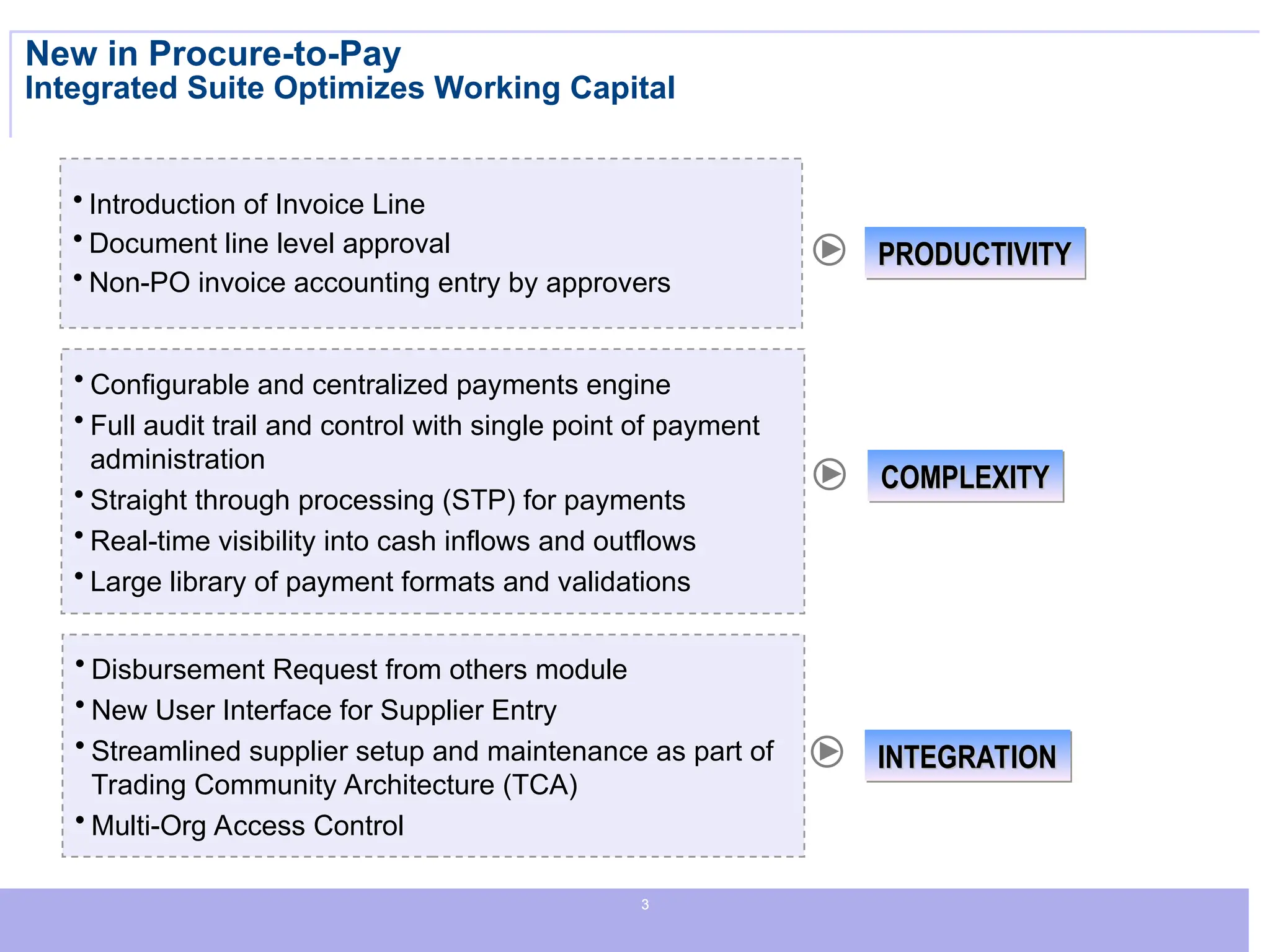
New in Procure-to-Pay
Integrated Suite Optimizes Working Capital
PRODUCTIVITY
PRODUCTIVITY
INTEGRATION
INTEGRATION
• Introduction of Invoice Line
• Document line level approval
• Non-PO invoice accounting entry by approvers
• Disbursement Request from others module
• New User Interface for Supplier Entry
• Streamlined supplier setup and maintenance as part of
Trading Community Architecture (TCA)
• Multi-Org Access Control
• Configurable and centralized payments engine
• Full audit trail and control with single point of payment
administration
• Straight through processing (STP) for payments
• Real-time visibility into cash inflows and outflows
• Large library of payment formats and validations
COMPLEXITY
COMPLEXITY
4
4
4
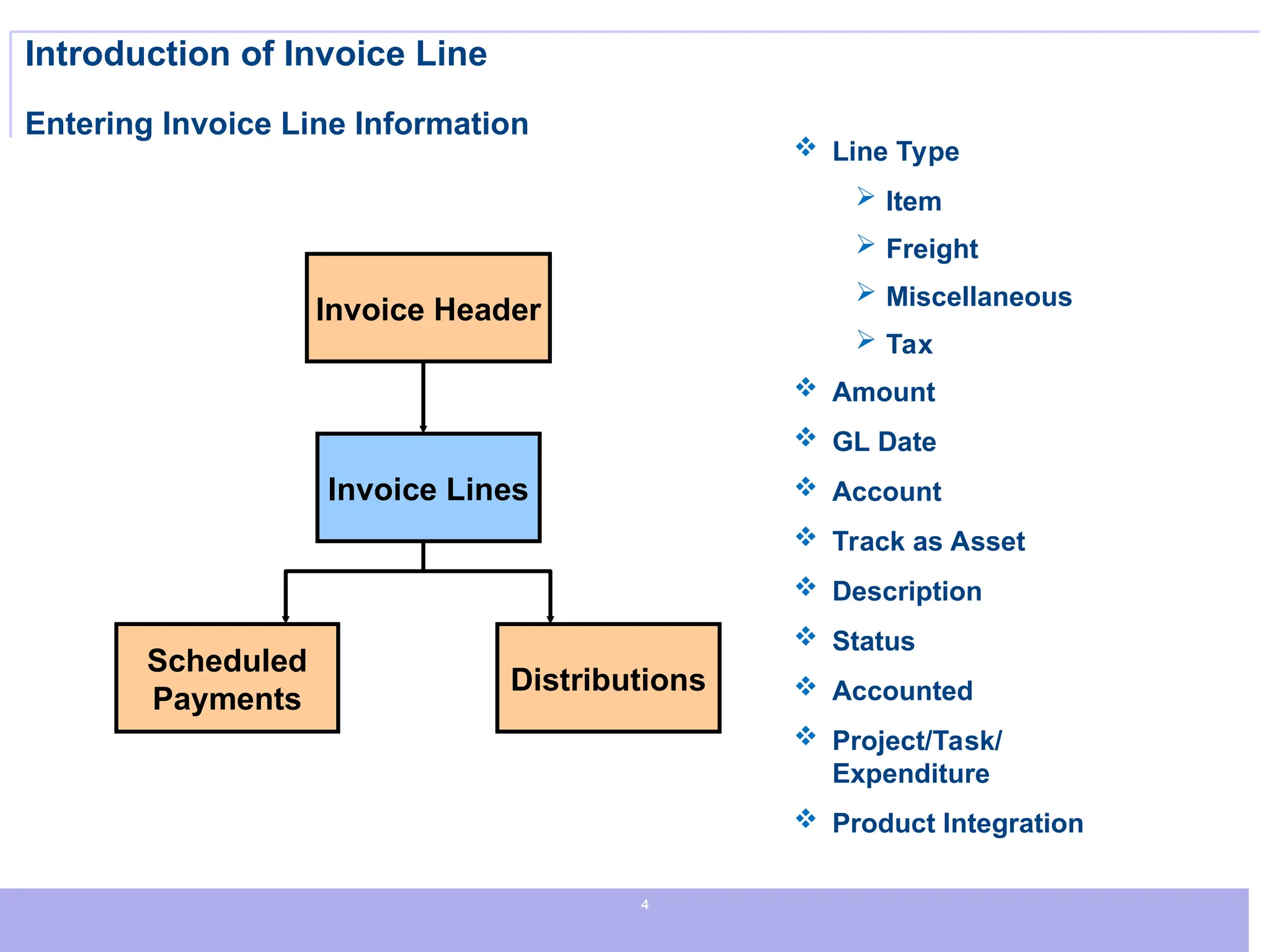
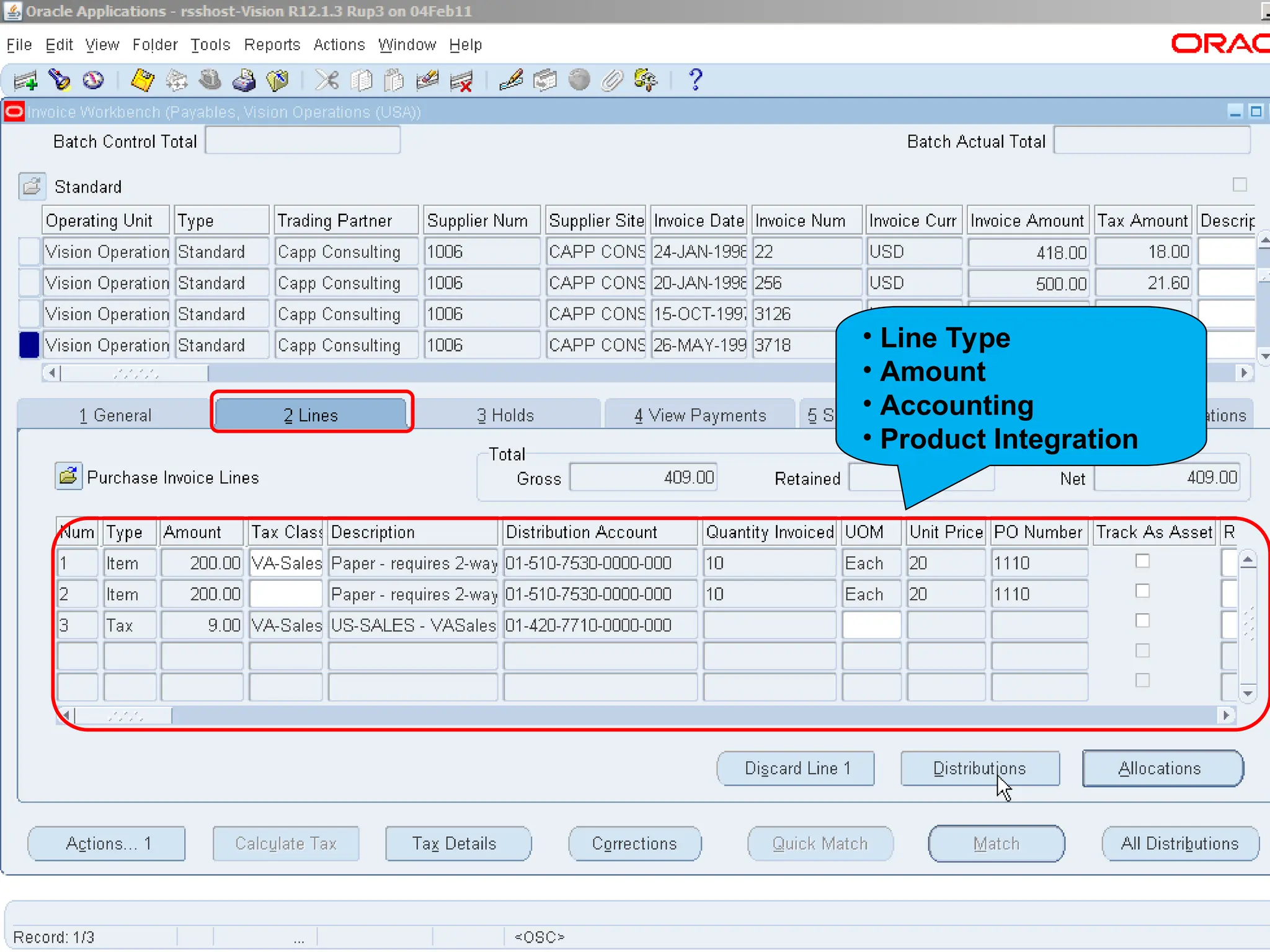
Introduction of Invoice Line
Entering Invoice Line Information
 Line Type
 Item
 Freight
 Miscellaneous
 Tax
 Amount
 GL Date
 Account
 Track as Asset
 Description
 Status
 Accounted
 Project/Task/
Expenditure
 Product Integration
Scheduled
Payments
Distributions
Invoice Header
Invoice Lines
5
5
5
• Line Type
• Amount
• Accounting
• Product Integration
6
6
6
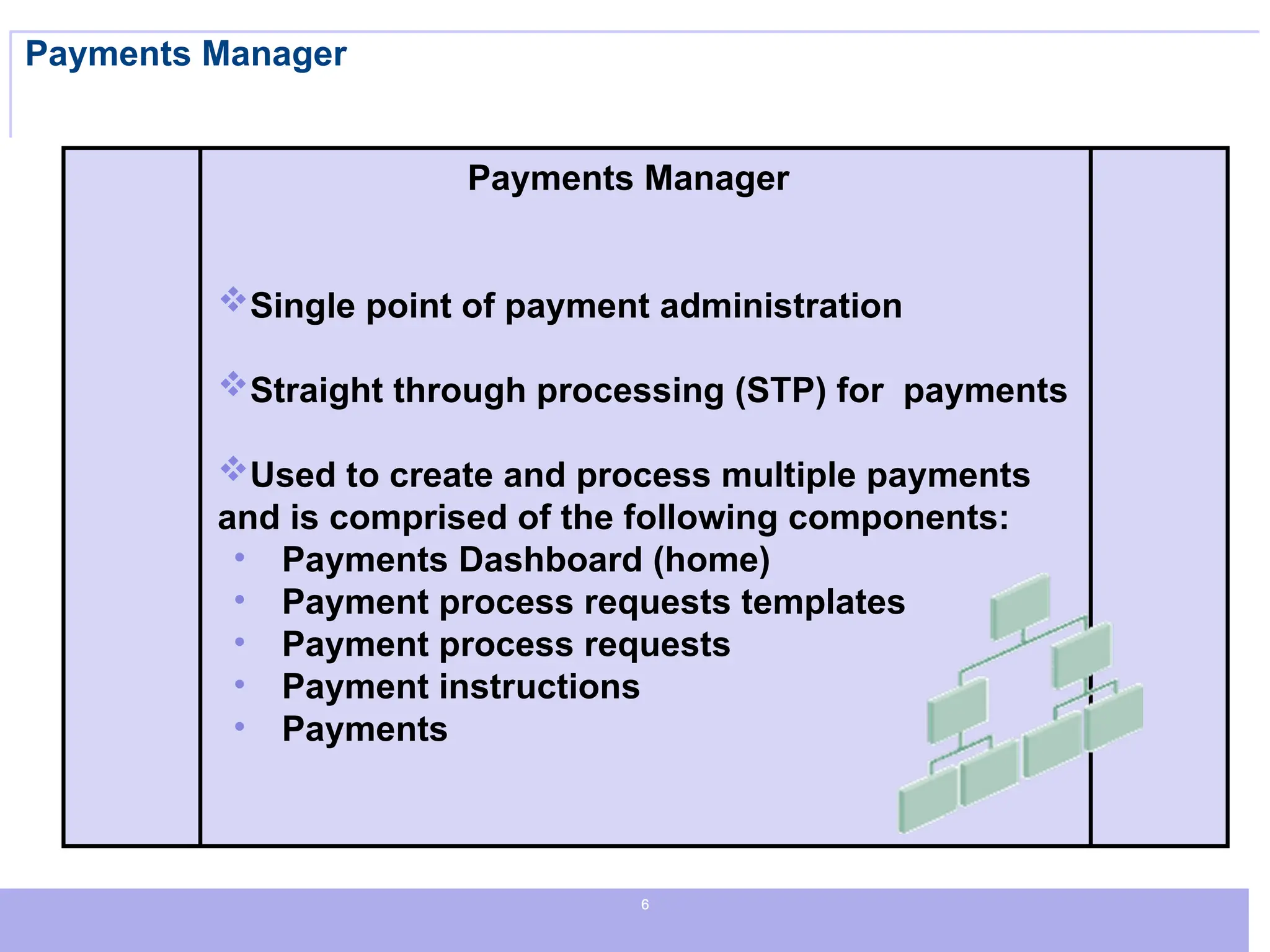
Payments Manager
Payments Manager
Single point of payment administration
Straight through processing (STP) for payments
Used to create and process multiple payments
and is comprised of the following components:
• Payments Dashboard (home)
• Payment process requests templates
• Payment process requests
• Payment instructions
• Payments
7
7
7
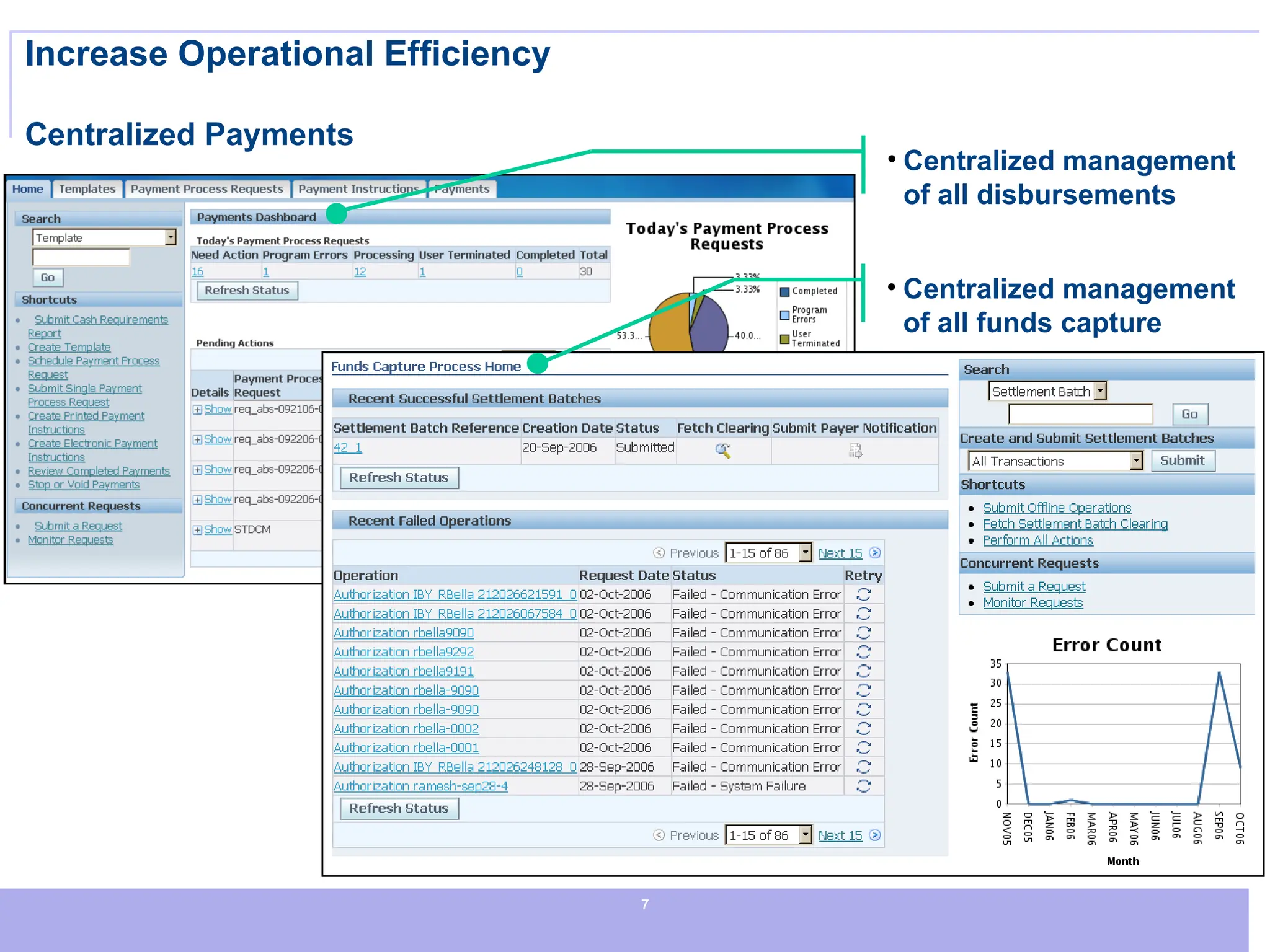
Increase Operational Efficiency
Centralized Payments
• Centralized management
of all disbursements
• Centralized management
of all funds capture
8
8
8
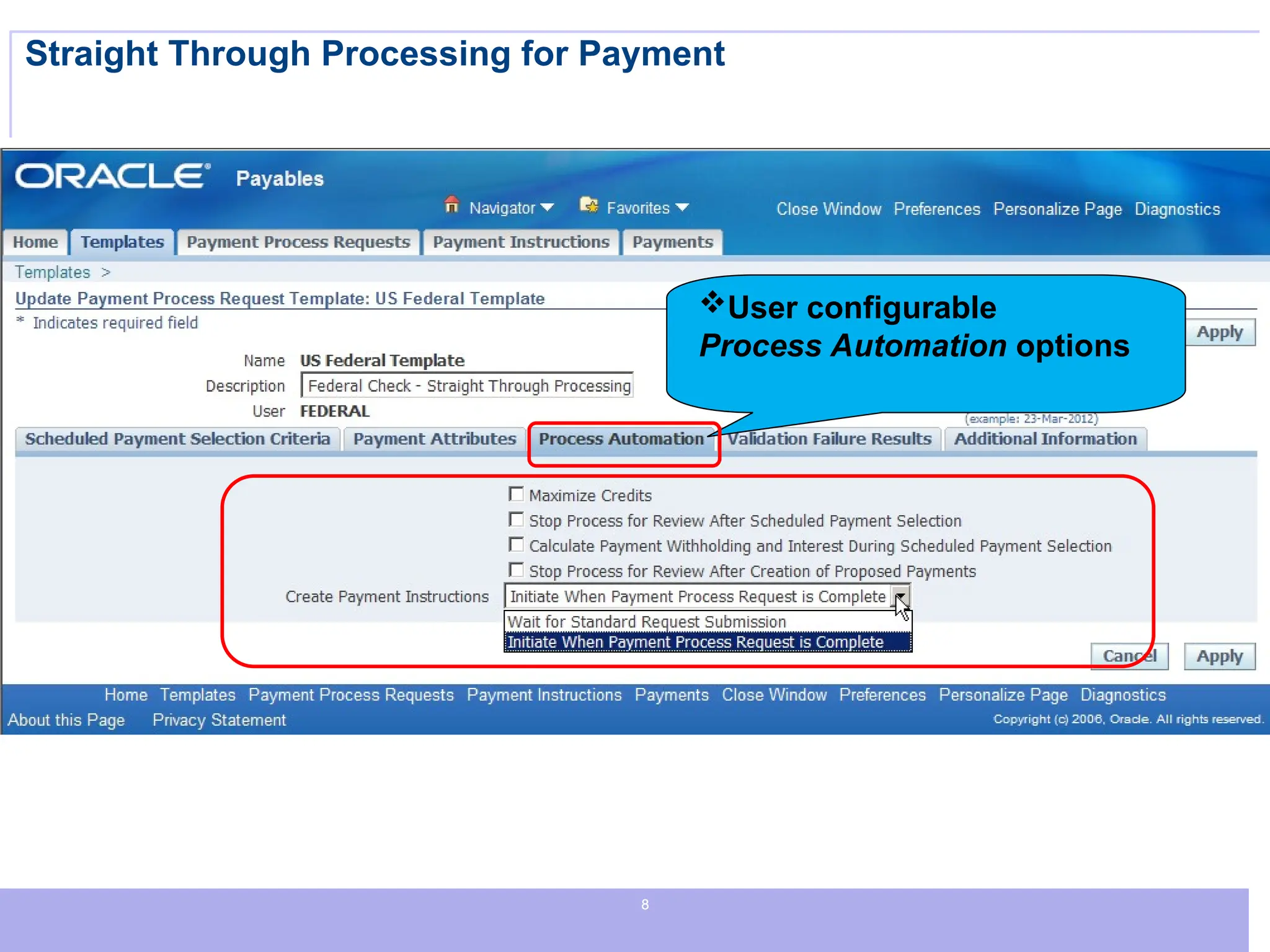
Straight Through Processing for Payment
User configurable
Process Automation options
9
9
9
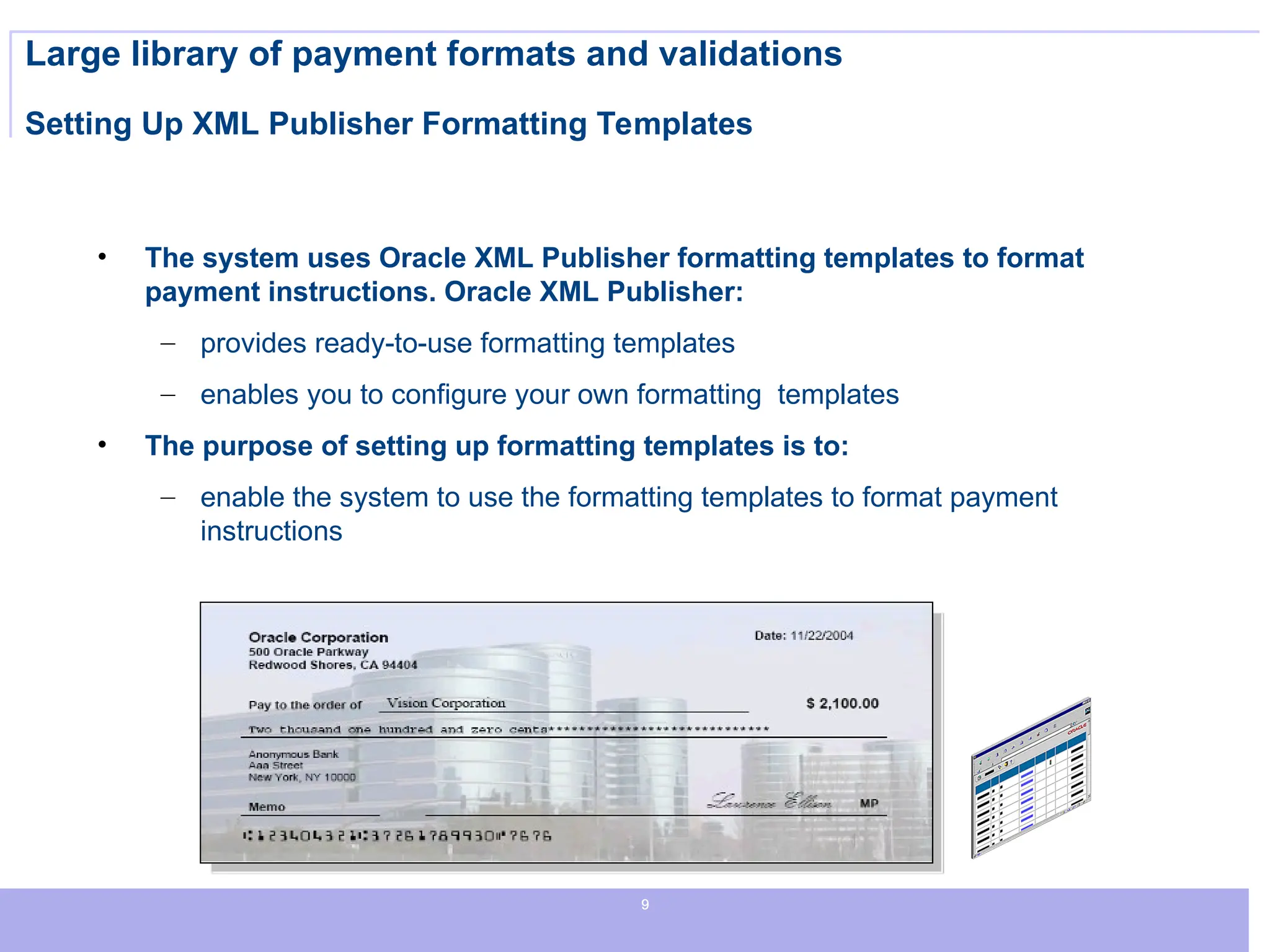
Large library of payment formats and validations
Setting Up XML Publisher Formatting Templates
• The system uses Oracle XML Publisher formatting templates to format
payment instructions. Oracle XML Publisher:
– provides ready-to-use formatting templates
– enables you to configure your own formatting templates
• The purpose of setting up formatting templates is to:
– enable the system to use the formatting templates to format payment
instructions
10
10
10
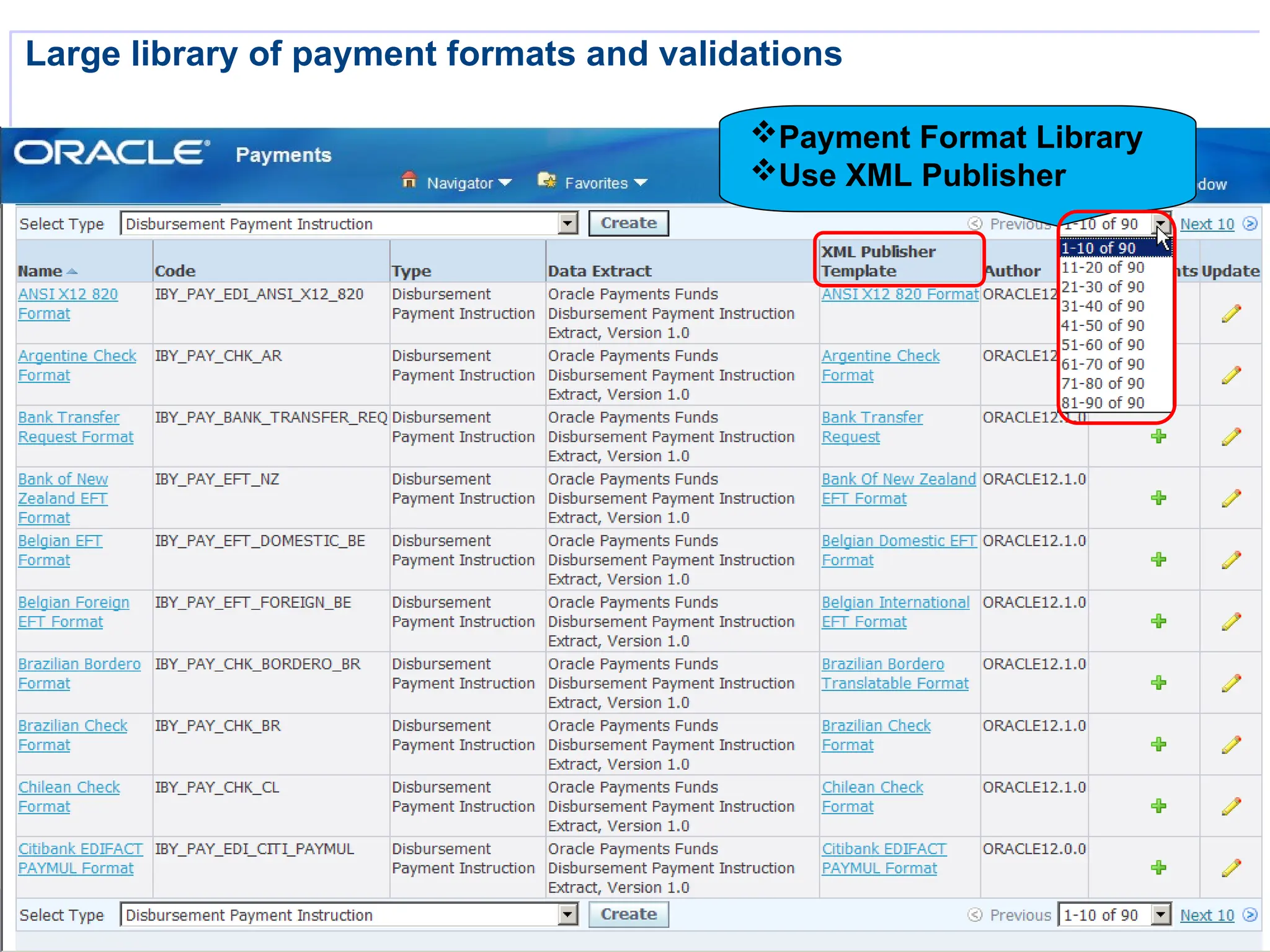
Large library of payment formats and validations
Payment Format Library
Use XML Publisher
11
11
11
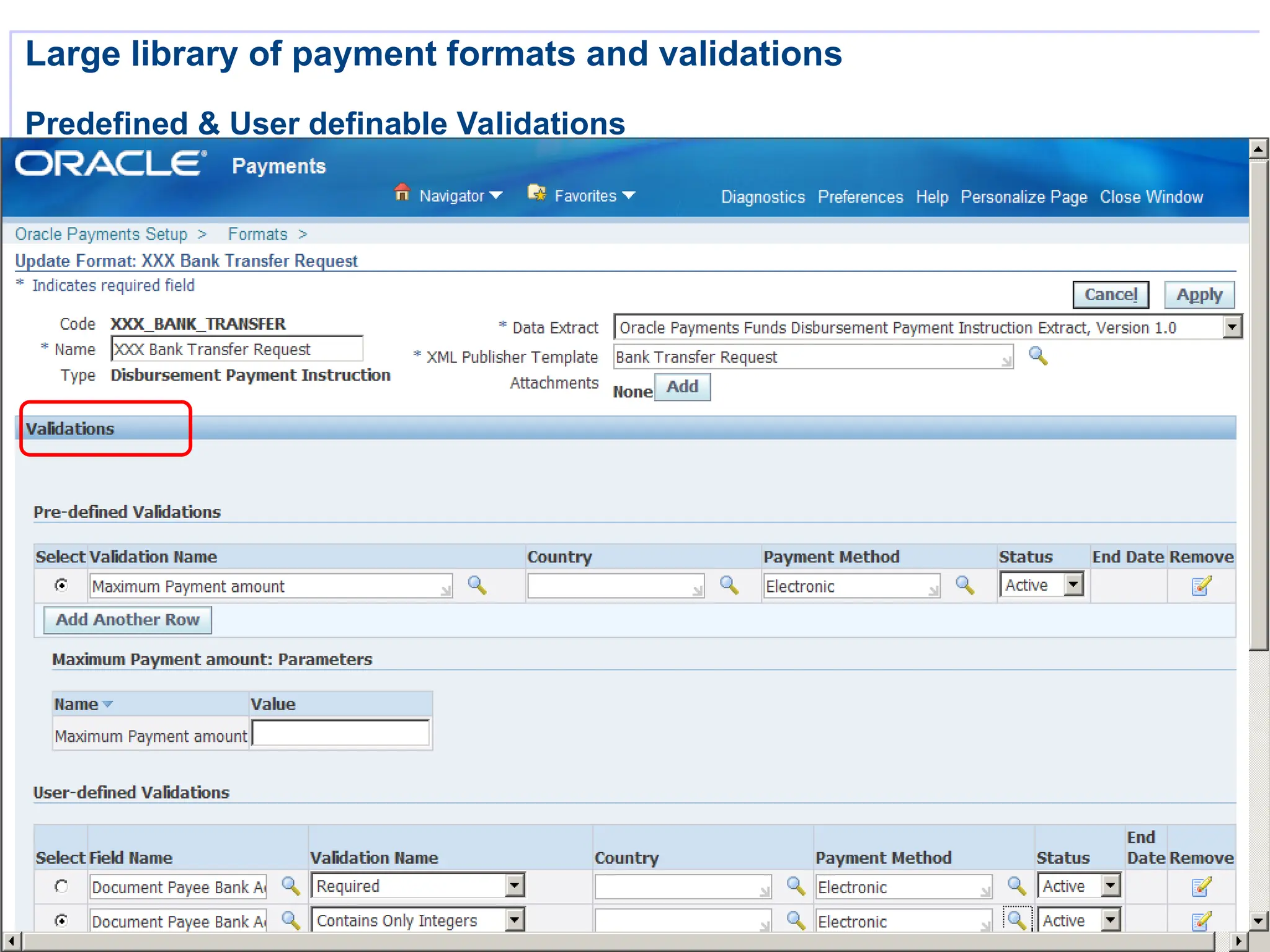
Large library of payment formats and validations
Predefined & User definable Validations
12
12
12
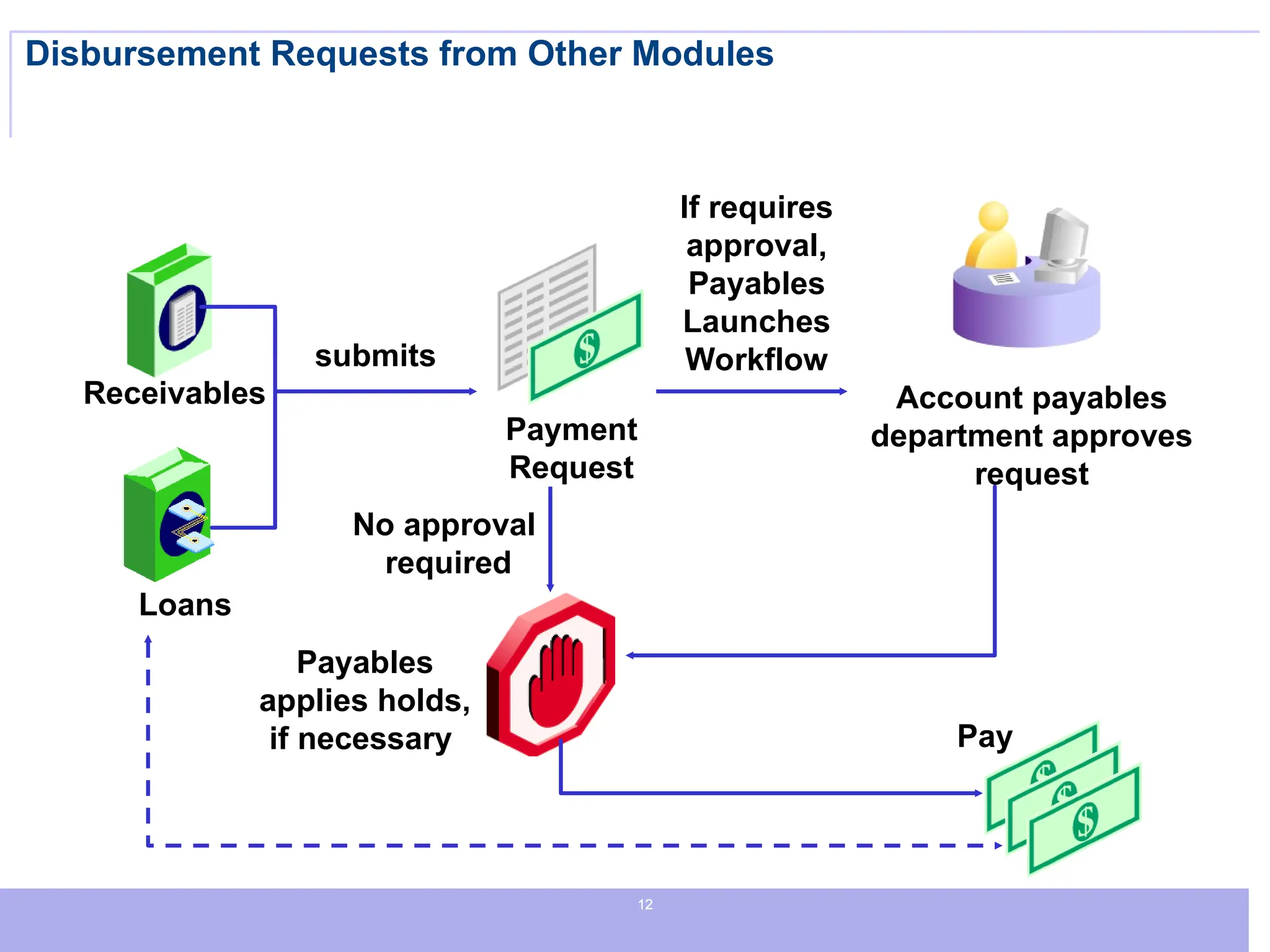
Disbursement Requests from Other Modules
Receivables
Loans
Payment
Request
Account payables
department approves
request
submits
If requires
approval,
Payables
Launches
Workflow
Payables
applies holds,
if necessary Pay
No approval
required
13
13
13
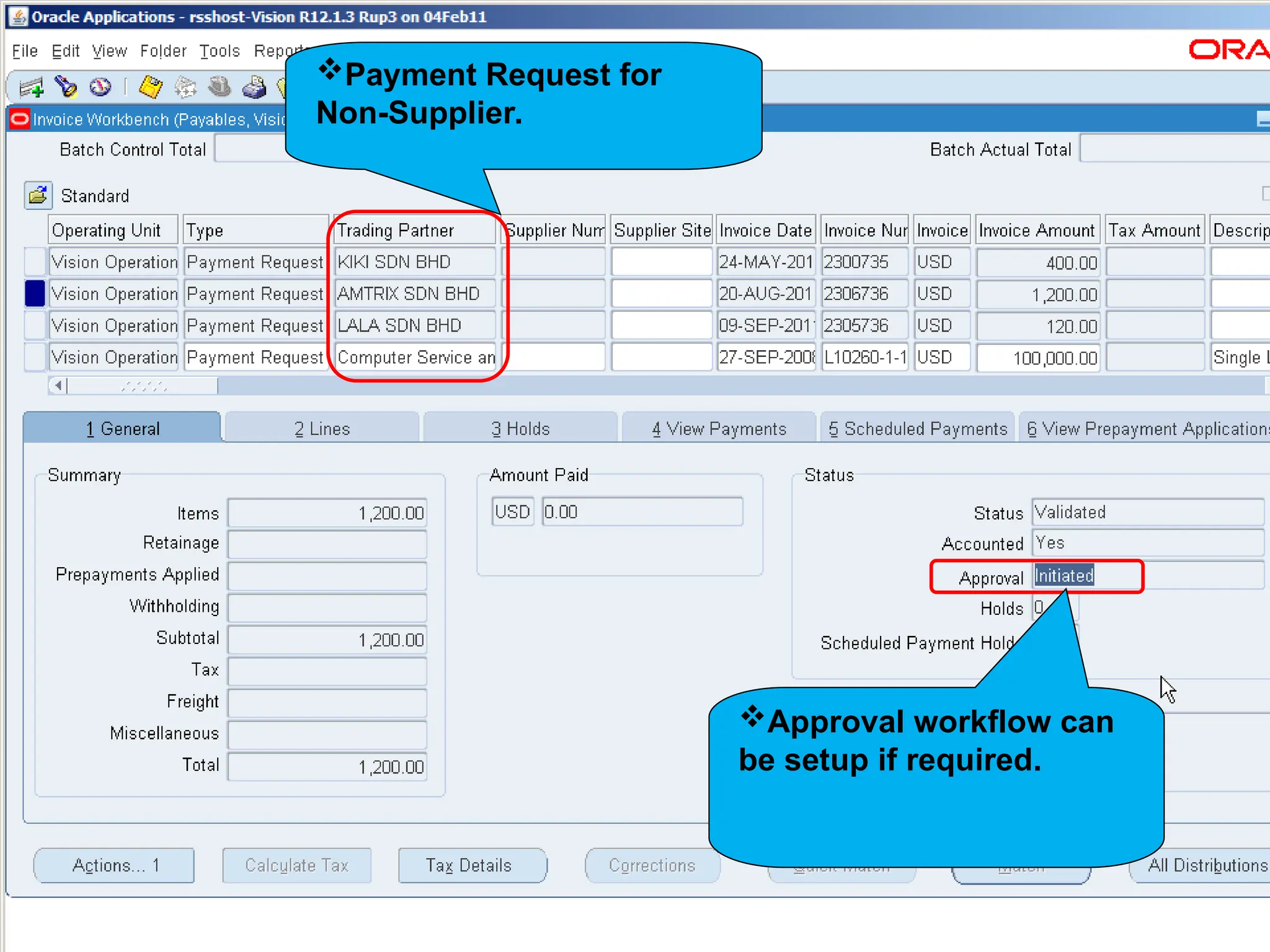
Approval workflow can
be setup if required.
Payment Request for
Non-Supplier.
14
14
14
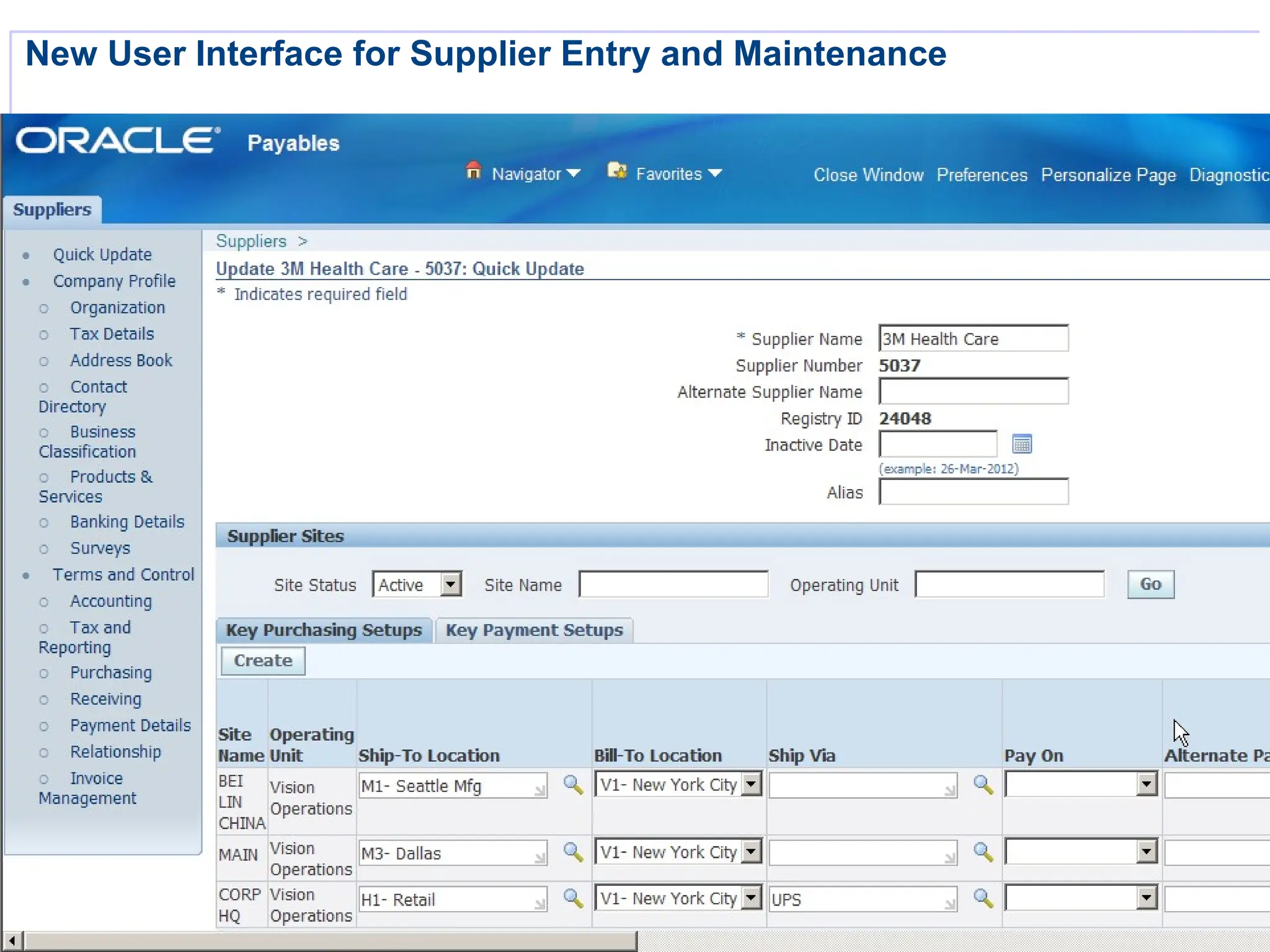
New User Interface for Supplier Entry and Maintenance
15
15
15
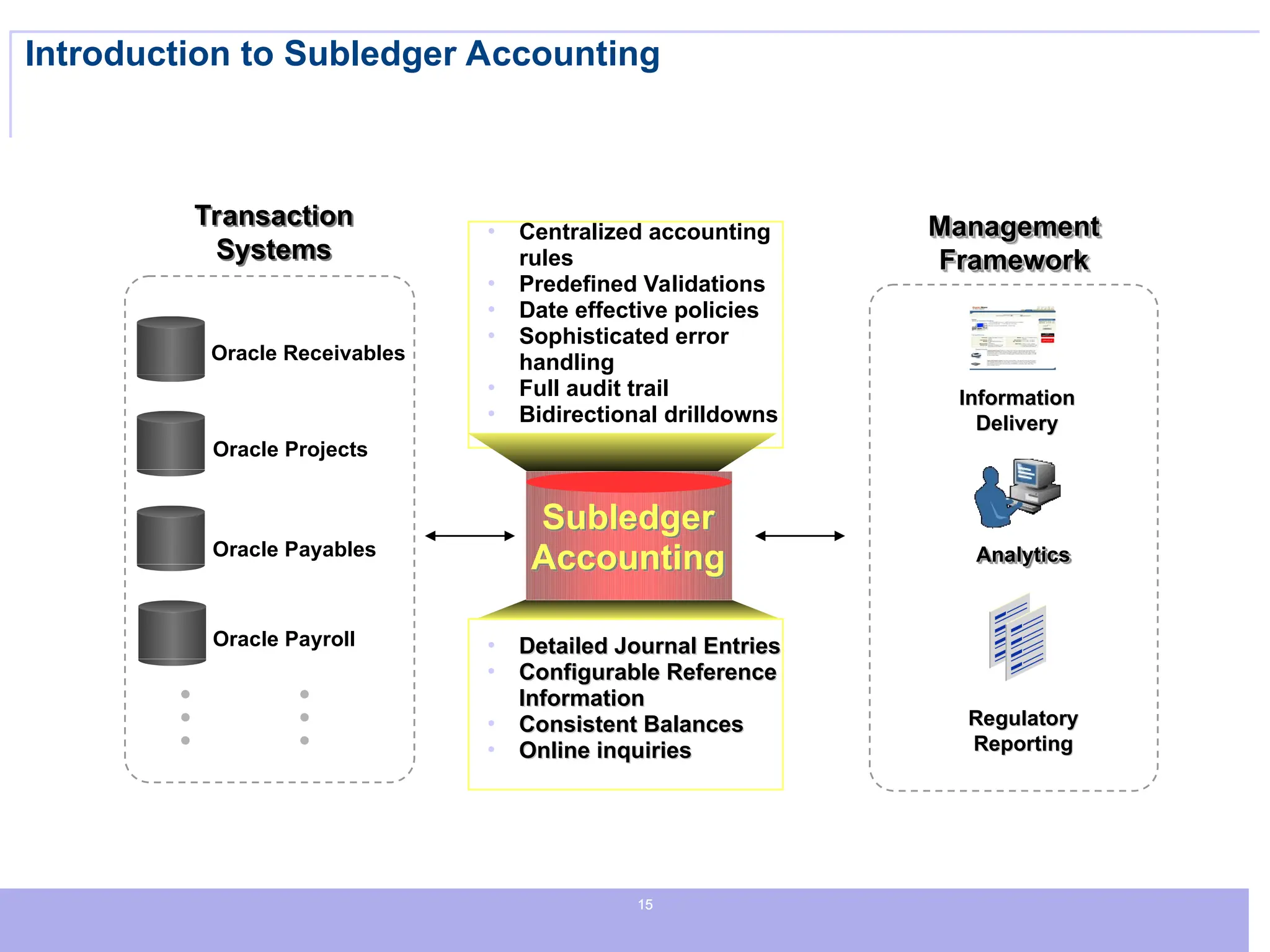
Introduction to Subledger Accounting
Management
Management
Framework
Framework
Information
Information
Delivery
Delivery
Regulatory
Regulatory
Reporting
Reporting
Subledger
Accounting
Transaction
Systems
Oracle Payroll
Oracle Projects
Oracle Payables
Oracle Receivables
• Centralized accounting
rules
• Predefined Validations
• Date effective policies
• Sophisticated error
handling
• Full audit trail
• Bidirectional drilldowns
• Detailed Journal Entries
Detailed Journal Entries
• Configurable Reference
Configurable Reference
Information
Information
• Consistent Balances
Consistent Balances
• Online inquiries
Online inquiries
Analytics
Analytics
16
16
16
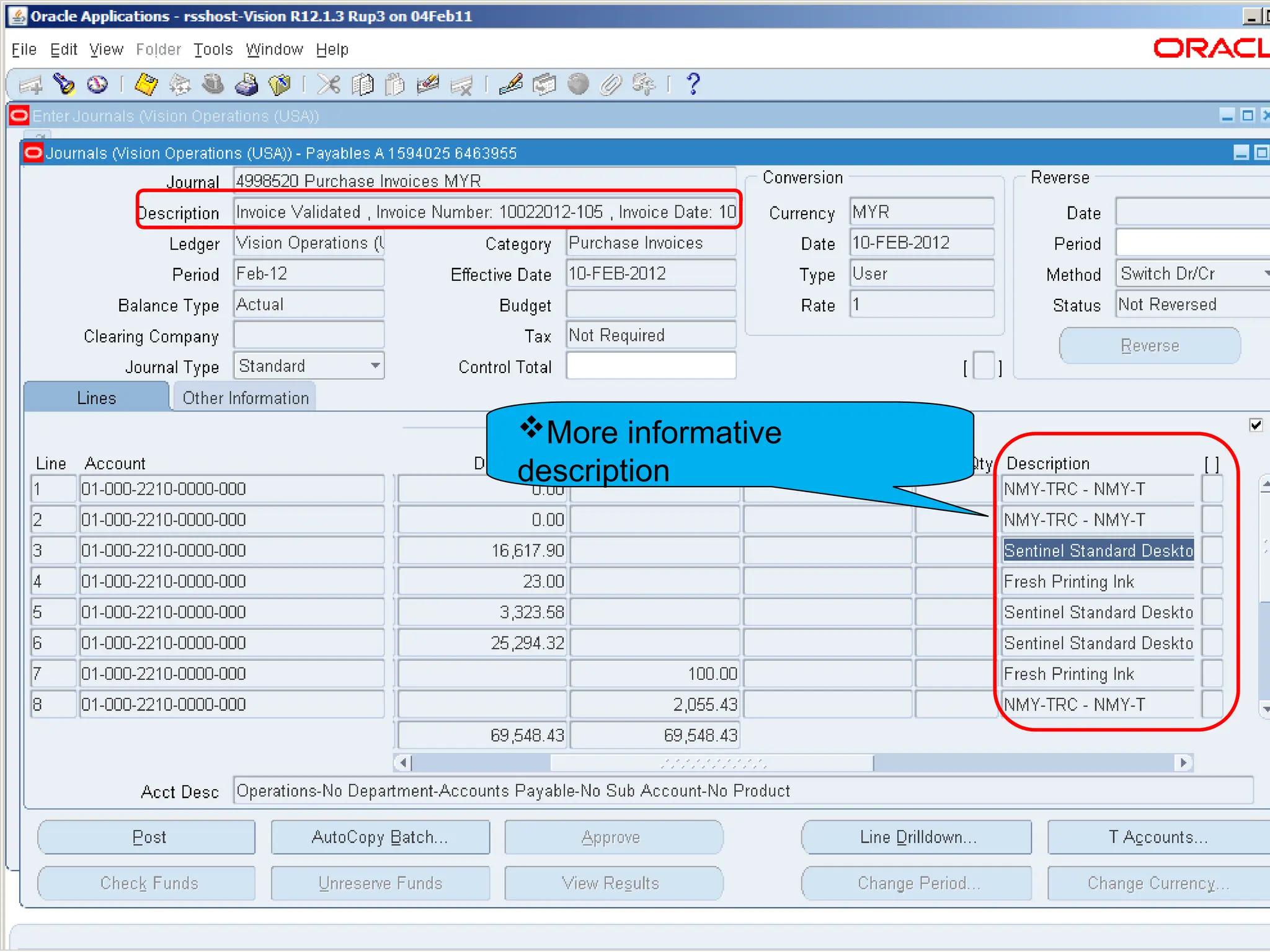
More informative
description
17
17
17
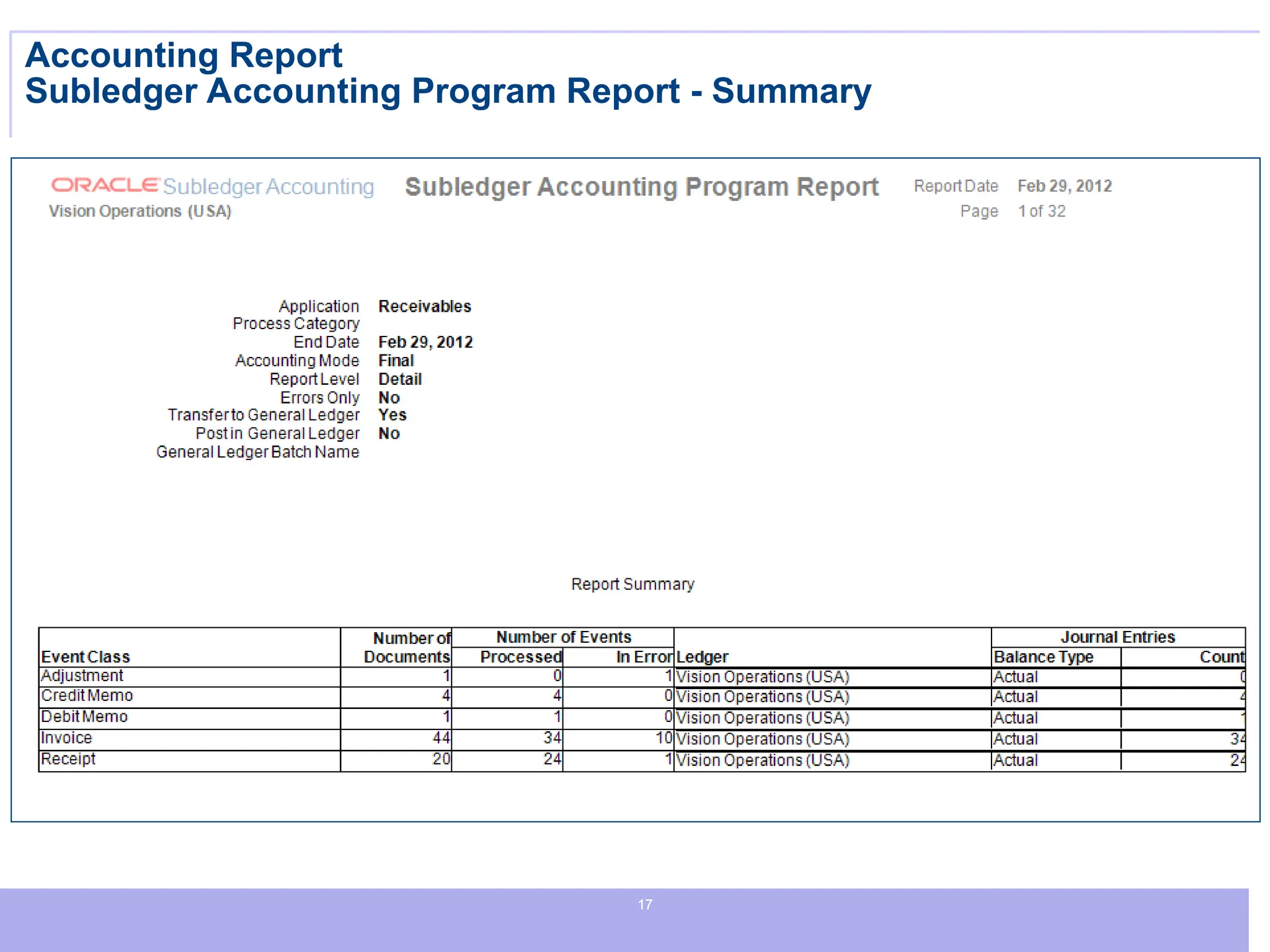
Accounting Report
Subledger Accounting Program Report - Summary
18
18
18
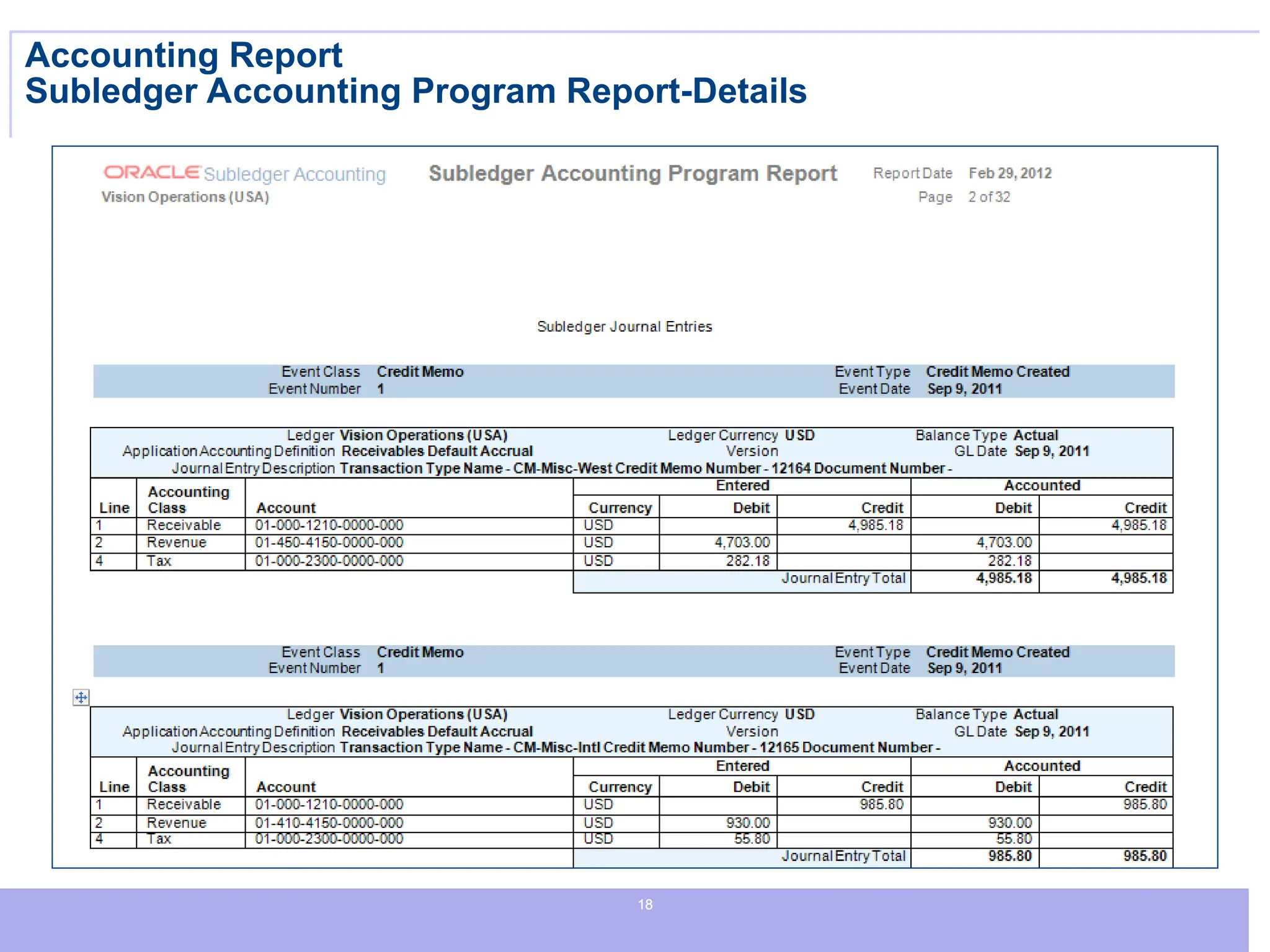
Accounting Report
Subledger Accounting Program Report-Details

Oracle Apps PPT Oracle Apps Oracle Finance

  • 1.
  • 2.
    2 2 2 R12 Features –Finance Payables
  • 3.
    3 3 3 New in Procure-to-Pay IntegratedSuite Optimizes Working Capital PRODUCTIVITY PRODUCTIVITY INTEGRATION INTEGRATION • Introduction of Invoice Line • Document line level approval • Non-PO invoice accounting entry by approvers • Disbursement Request from others module • New User Interface for Supplier Entry • Streamlined supplier setup and maintenance as part of Trading Community Architecture (TCA) • Multi-Org Access Control • Configurable and centralized payments engine • Full audit trail and control with single point of payment administration • Straight through processing (STP) for payments • Real-time visibility into cash inflows and outflows • Large library of payment formats and validations COMPLEXITY COMPLEXITY
  • 4.
    4 4 4 Introduction of InvoiceLine Entering Invoice Line Information  Line Type  Item  Freight  Miscellaneous  Tax  Amount  GL Date  Account  Track as Asset  Description  Status  Accounted  Project/Task/ Expenditure  Product Integration Scheduled Payments Distributions Invoice Header Invoice Lines
  • 5.
    5 5 5 • Line Type •Amount • Accounting • Product Integration
  • 6.
    6 6 6 Payments Manager Payments Manager Singlepoint of payment administration Straight through processing (STP) for payments Used to create and process multiple payments and is comprised of the following components: • Payments Dashboard (home) • Payment process requests templates • Payment process requests • Payment instructions • Payments
  • 7.
    7 7 7 Increase Operational Efficiency CentralizedPayments • Centralized management of all disbursements • Centralized management of all funds capture
  • 8.
    8 8 8 Straight Through Processingfor Payment User configurable Process Automation options
  • 9.
    9 9 9 Large library ofpayment formats and validations Setting Up XML Publisher Formatting Templates • The system uses Oracle XML Publisher formatting templates to format payment instructions. Oracle XML Publisher: – provides ready-to-use formatting templates – enables you to configure your own formatting templates • The purpose of setting up formatting templates is to: – enable the system to use the formatting templates to format payment instructions
  • 10.
    10 10 10 Large library ofpayment formats and validations Payment Format Library Use XML Publisher
  • 11.
    11 11 11 Large library ofpayment formats and validations Predefined & User definable Validations
  • 12.
    12 12 12 Disbursement Requests fromOther Modules Receivables Loans Payment Request Account payables department approves request submits If requires approval, Payables Launches Workflow Payables applies holds, if necessary Pay No approval required
  • 13.
    13 13 13 Approval workflow can besetup if required. Payment Request for Non-Supplier.
  • 14.
    14 14 14 New User Interfacefor Supplier Entry and Maintenance
  • 15.
    15 15 15 Introduction to SubledgerAccounting Management Management Framework Framework Information Information Delivery Delivery Regulatory Regulatory Reporting Reporting Subledger Accounting Transaction Systems Oracle Payroll Oracle Projects Oracle Payables Oracle Receivables • Centralized accounting rules • Predefined Validations • Date effective policies • Sophisticated error handling • Full audit trail • Bidirectional drilldowns • Detailed Journal Entries Detailed Journal Entries • Configurable Reference Configurable Reference Information Information • Consistent Balances Consistent Balances • Online inquiries Online inquiries Analytics Analytics
  • 16.
  • 17.
  • 18.

Editor's Notes

  • #3 Productivity: Seamless integration and real-time status of purchasing contract T&C’s and invoicing activity in Oracle Payables and Purchasing Improved invoice approval and dispute management Document line entry and approval Efficient and controlled resolution of issues Verification of invoices and fast, controlled resolution of issues is a top priority for Payables and Purchasing departments Non-PO Invoice Accounting Entry by Approvers Approvers reviewing invoices where a purchase order is not present can enter or adjust GL Accounts and further distribute line item amounts. Invoice Dispute Management Invoices that are on hold due to differences between the purchase order or discrepancies identified by approvers for non-PO invoices can be negotiated with the supplier through email notifications or online via iSupplier Portal. The negotiation process is tracked and updates are made real-time providing immediate information for suppliers, approvers, auditors, and Payables users. Cost Savings: Self Service Entry extended to receipt matched, complex Work Purchase Orders, and non-PO invoices Self Service users entering Invoices against purchase orders designated with Receipt Match Option lines can choose from receipts to successfully submit their invoice. Invoices being entered against a complex work project will have advances or contract financing automatically applied and Retainage automatically withheld. Self Service invoice entry has been extended to include transactions where a purchase order has not been obtained upfront. The user chooses the buying company, enters details about the purchase, and adjusts calculated tax to match their invoice. Since these invoices are not planned, they are treated as invoice requests until reviewed and approved yet are always visible to the Payables department. Approvers enter or adjust GL accounts or distribute the amounts to additional GL accounts. This new user interface presents a clear distinction between the supplier’s company details and terms and controls for the trading relationship. Managing the attributes specific to particular functional areas such as Oracle Payables, Purchasing and Receiving can be controlled with the use of Function Security. Adding new locations or relationships with additional operating units is streamlined. Additional tax and legal registrations provide key information to meet your reporting and compliance needs. Tailor a quick update page with those values most often updated for even faster maintenance. Integration: As part of the standardization, banks and branches are represented as parties in TCA. The new Supplier UI allows you to tie bank account to the party for reuse in other relationships with that trading partner.
  • #4 Entering Invoice Line Information – Line Types (N) Invoices > Entry > Invoices (T) Lines The Lines tab of the Invoices window allows you to enter and review the details for an invoice. You can enter four possible line types: Item, Freight, Miscellaneous, and Tax. Other line types, such as withholding lines are automatically generated by the system. Item Lines Item lines capture the details of the goods and services billed on your invoice. Freight and Miscellaneous Lines Freight lines capture the details of your freight charges. Freight charges can be allocated to Item lines as required. Miscellaneous lines capture the details of other charges on your invoices such as installation or service. Like Freight lines, Miscellaneous lines can be allocated to Item lines. Tax lines Payables integrates with Oracle E-Business Tax to automatically determine and calculate the applicable tax lines for your invoices. E-Business Tax uses your tax setup, plus fields on the invoice header and lines, known as tax drivers, to determine which taxes should be applied to the invoice, to calculate the tax using the appropriate tax rates, and to determine whether or not the tax is recoverable or non-recoverable. In general, E-Business tax creates the necessary tax lines and distributions for the invoice and allocates tax; however, if your tax setup permits, you can update the tax lines or manually enter tax lines. Amount The amount of the invoice line.
  • #6 Using the Payments Manager Using the Payments Manager, you can complete a pay run from start to finish. A pay run is the process by which a group of invoices is selected and processed for payment. Note: A pay run is roughly equivalent to the Release 11i concept of a payment batch. The Payments Manager enables you to perform the following payment actions: Create payment process request templates by specifying invoice selection criteria. Use templates to automatically select invoices to pay that meet the criteria for payment. Schedule pay runs. Modify invoice selection and payment amounts. Automatically submit invoices for processing and payment by scheduling payment process requests. Initiate payment instructions. View the status of payments. Void or record stop payments.
  • #7 And by centralizing payments we’re able to provide dashboards to give you visibility into disbursements and funds capture increasing visibility and operational efficiency across your enterprise.
  • #9 Setting Up XML Publisher Formatting Templates Oracle Payments Payment Administrator responsibility (N) Oracle Payments Setup > Click Go to Task icon for XML Publisher Format Templates > Templates page > (B) Create Template > Create Template page You can create new formatting templates or modify existing ones by using Microsoft Word. Oracle XML Publisher enables you to create formatting templates in the following output: PDF eText Oracle XML Publisher's eText feature is used to create fixed position and delimited payment formats.
  • #11 PAGE ERROR, DO NOT CLICK APPLY during DEMO
  • #12 Payment Requests You can use Payables to disburse funds to a party (a payee) who is not defined as a trading partner in your supplier master. E-Business Suite products, such as Oracle Receivables and Oracle Loans, can submit disbursement requests to Payables, where you can disburse the funds and manage the payment process using the payment management features that are available in Payables. When a disbursement request is submitted to Payables, it is recorded as a payment request. Using payment requests you can: Approve payment requests using the Invoice Approval Workflow Account for payment requests, through Payables' integration with Oracle Subledger Accounting Calculate and manage tax, through Payables' integration with Oracle E-Business Tax Pay and report on payment requests You can submit a payment request from another application, for example, from Receivables to pay a customer for an On Account Credit Memo, or from Loans to disburse funds for a loan, and Payables will verify, account, tax, and approve the payment request. You can track the progress of the payment request in the originating application. Once the payment request is approved, you can report and audit the payment request in Payables. You can only submit a payment request from other applications; you cannot enter a payment request for a payee directly in Payables. The payment request process is as follows: 1. Submit a request to disburse funds from another application, such as Receivables or Loans. Note that you cannot submit a payment request in Payables. 2. Payables automatically creates a payment request, in real-time. 3. Once the payment request is created, you can search for it just as you would search for an invoice. Enter Payment Request in the Type field and enter the payee name in the Trading Partner field. Note that because the payee is not a supplier, do not enter a Supplier Number. 4. If the payment request requires approval, use the Invoice Approval Workflow to approve payment requests. 5. Payables applies holds to the payment request if there are any exceptions. 6. Once the holds are released and the payment request is approved, it can be paid as a single payment or as part of a payment batch. Once the payment request is paid, your auditors can view the request to disburse funds in the originating application and the payment request in Payables. Once you enter a payment request, you cannot delete the payment request or update the payment request fields. If necessary, you can cancel the payment request or void the payment, just as you would for an invoice. Payables notifies the originating application to respond to these actions.