OpenStack and Windows
Alessandro Pilotti
@cloudbaseit
Agenda
• Windows as a guest
• Windows hypervisor (hyper-v)
• How to integrate with DevStack
• How to integrate with RDO
• Heat
• Heat templates
Windows as a guest
• Can be executed on any hypervisor used in
Nova
• No differences compared to Linux for image
handling (glance etc)
• Images are tipically sysprepped
– Why?
– It can be avoided to speed up boot times
Synthetic drivers
• Modern Hypervisors provide drivers to replace
emulated devices with synthetic ones
– Network adapters, etc
• Hyper-V
– Integration components / LIS
• KVM
– VirtIO
• VMWare
– VMWare Tools
• XenServer / XCP
– XenServer Tools
Guest initialization
• Linux:
– cloud-init
– GPL
• Windows:
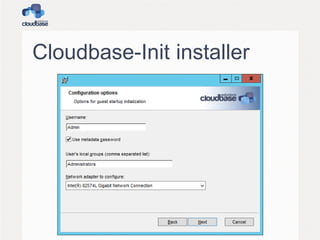
– cloudbase-init
– https://github.com/cloudbase/cloudbase-init
– Apache 2
• Why 2 separate projects?
– cloud-init is currently too couple with Linux
– merging the 2 projects is still on the TODO 
Cloudbase-Init
• 100% Python code
• Wrapped in a Windows service
• Plugin based architecture:
– Each plugin can be executed once or more
times at boot
– Status for each plugin is mantained in the
registry
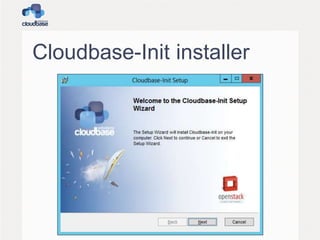
Cloudbase-Init installer
Sysprep
• Prepares a Windows image to be
distributed
– Typically on large scales
• Run before distributing any Windows image
• OOBE
– Out of the box experience
– Normally used to let the user customize the
system
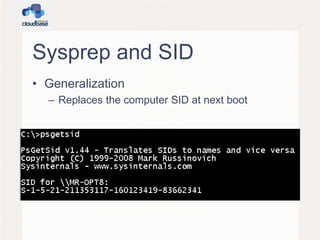
Sysprep and SID
• Generalization
– Replaces the computer SID at next boot
Is a new SID necessary?
• Not really:
– http://blogs.technet.com/b/markrussinovich/archive/2
009/11/03/3291024.aspx
• Thinking that AD will use the SID to distinguish
hosts is wrong!
– So technically, generalization can be avoided
• Can we avoid Sysprep?
– Some services like WSUS rely on it
– Microsoft support policy requires it
• http://support.microsoft.com/kb/314828
Automate OOBE
• Sysprep uses the same unattended XML
used during the first setup
• It can be fully automated
• Note in particular:
– <PersistAllDeviceInstalls>true</PersistAllDe
viceInstalls>
– This is needed to preserve drivers including
VMWare Tools or XenServer Tools
OOBE and host name
• During OOBE the host name is set
• We are testing a way to get the hostname
from the OpenStack metadata
– This avoids the subsequent reboot during
Cloudbase-Init execution
Metadata
• OpenStack metadata can be obtained in
multiple ways
– HTTP metadata. The classic 169.254.169.254
IP
– ConfigDrive
– EC2 style HTTP metadata
• All those are supported by Cloudbase-Init
Most important plugins
• CreateUser
• SetUserPassword
• SetHostName
– Requires a reboot
• SSHPublicKeys
• ExtendVolumes
– Useful for different flavors / resizes
• User data
– Including multipart: Heat!!
User creation
• The CreateUser plugin creates a user and
adds it to the local administrators group
– A random password is used at this stage as it’s
needed to create the user profile
• Options:
– username (default “Admin”)
– groups (default “[Administrators]”)
Password management
• Unlike Linux, Windows does not support
ssh public key logins
• A password can be:
– Passed during boot:
• --meta admin_pass xxxx
• Bad idea, security wise
– Generated by the guest (better)
User’s password 1
• Done by the SetUserPassword plugin
• Checks if the “admin_pass” metadata field
is present and the “inject_user_password”
is set
• If not, a random password is generated
User’s password 2
• The password is then encrypted with the
SSH keypair’s public key
• POSTed to the metadada service
– HTTP only, no ConfigDrive
• Can be retrieved using the private key:
– nova get-password vm ~/.ssh/id_rsa_key1
Userdata format
• Windows Batch
• Powershell
• Bash
• Multi-part (Havana)
– Heat support
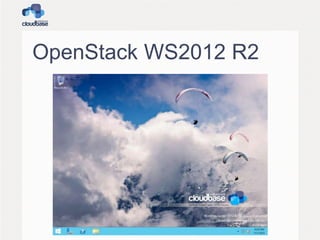
OpenStack WS2012 R2
OpenStack WS2012 R2
• Complete with:
– Drivers / tools:
• VirtIO, etc
– Cloudbase-Init
– Sysprepped
• Eval edition can be upgraded with a simple
uder_data script:
– DISM /online /Set-Edition:ServerStandard
/ProductKey:XXXXX-XXXXX-XXXXX-XXXXX-XXXXX
/AcceptEula
– Make sure to respect the eval license!!
How to build an image?
• Windows has the equivalent of a kickstart /
preseed
– https://github.com/cloudbase/windows-
openstack-imaging-tools
• We get lots of questions about how to build
those images
• This project automates the entire process
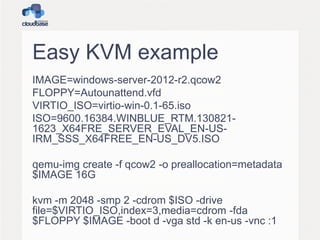
Easy KVM example
IMAGE=windows-server-2012-r2.qcow2
FLOPPY=Autounattend.vfd
VIRTIO_ISO=virtio-win-0.1-65.iso
ISO=9600.16384.WINBLUE_RTM.130821-
1623_X64FRE_SERVER_EVAL_EN-US-
IRM_SSS_X64FREE_EN-US_DV5.ISO
qemu-img create -f qcow2 -o preallocation=metadata
$IMAGE 16G
kvm -m 2048 -smp 2 -cdrom $ISO -drive
file=$VIRTIO_ISO,index=3,media=cdrom -fda
$FLOPPY $IMAGE -boot d -vga std -k en-us -vnc :1
SSH Equivalent?
• It exists: WSMan / WinRM
• Execute remote command via HTTP / HTTPS
• Can be used for remote PowerShell or from
Linux
• Configuration example:
– https://github.com/cloudbase/unattended-setup-
scripts/blob/master/SetupWinRMAccess.ps1
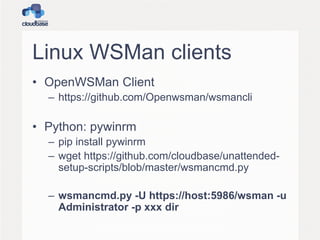
Linux WSMan clients
• OpenWSMan Client
– https://github.com/Openwsman/wsmancli
• Python: pywinrm
– pip install pywinrm
– wget https://github.com/cloudbase/unattended-
setup-scripts/blob/master/wsmancmd.py
– wsmancmd.py -U https://host:5986/wsman -u
Administrator -p xxx dir
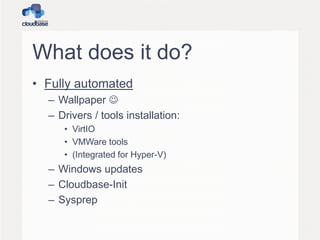
What does it do?
• Fully automated
– Wallpaper 
– Drivers / tools installation:
• VirtIO
• VMWare tools
• (Integrated for Hyper-V)
– Windows updates
– Cloudbase-Init
– Sysprep
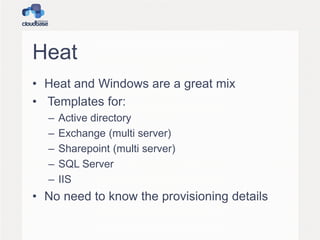
Heat
• Heat and Windows are a great mix
• Templates for:
– Active directory
– Exchange (multi server)
– Sharepoint (multi server)
– SQL Server
– IIS
• No need to know the provisioning details
Test Environment
• OpenStack is a complex environment
• PoCs and development scenarios must
replicate the complexities of a production
one
• All-In-One solutions are tipycally not
enough
DevStack
• Perfect for developers
• Based on the latest cutting edge code
• Easy to deploy
– stack.sh / unstack.sh
• Does not persists data between reboots
• Does not register OpenStack components
as demons
• Not to be used for PoCs
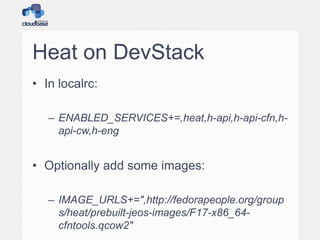
Heat on DevStack
• In localrc:
– ENABLED_SERVICES+=,heat,h-api,h-api-cfn,h-
api-cw,h-eng
• Optionally add some images:
– IMAGE_URLS+=",http://fedorapeople.org/group
s/heat/prebuilt-jeos-images/F17-x86_64-
cfntools.qcow2"
RDO
• Great solution
• Puppet bases
• Simple to deploy and automate
• Great for PoCs as it’s based on stable
releases
• https://github.com/cloudbase/unattended-
setup-scripts/blob/master/configure-rdo.sh
RDO + Heat on Havana
• yum install -y "openstack-heat-*" python-
heatclient
• Configuration requires:
– heat-db-setup
– keystone configuration
– enable and start daemons
• https://github.com/cloudbase/unattended-
setup-scripts/blob/master/configure-rdo-heat.sh
Simple Heat template 1
"KeyName" : {
"Description" : "Name of an existing EC2 KeyPair to encrypt the Admin password",
"Type" : "String"
},
"InstanceType" : {
"Description" : "EC2 instance type",
"Type" : "String",
"Default" : "m1.small",
"AllowedValues" : [ "m1.sminy", "m1.small", "m1.medium", "m1.large", "m1.xlarge"
],
"ConstraintDescription" : "must be a valid EC2 instance type."
},
"OSImage": {
"Default": "Windows Server 2012 R2 Std Eval",
"Description" : "Windows image of choice",
"Type": "String",
"AllowedValues" : [ "Windows Server 2012 R2 Std Eval" ]
},
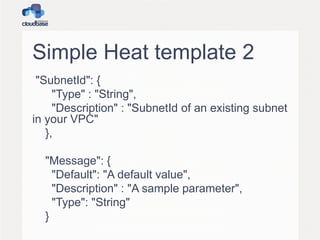
Simple Heat template 2
"SubnetId": {
"Type" : "String",
"Description" : "SubnetId of an existing subnet
in your VPC"
},
"Message": {
"Default": "A default value",
"Description" : "A sample parameter",
"Type": "String"
}
Simple Heat template 3
"Resources" : {
"SampleServer": {
"Type": "AWS::EC2::Instance",
"Properties": {
"ImageId" : { "Ref" : "OSImage" },
"InstanceType" : { "Ref" : "InstanceType" },
"SubnetId" : { "Ref" : "SubnetId" },
"KeyName" : { "Ref" : "KeyName" },
"UserData" : { "Fn::Base64" : { "Fn::Join" : ["", [
"#ps1_sysnativen",
"$ErrorActionPreference = 'Stop'n",
"Set-Content -path C:message.txt -value", { "Ref" : "Message" }, "')n"
]]}}
}
}
}
Hyper-V
• Setup is very easy
• Our Nova driver is at it’s 3rd release!
– Folsom, Grizzly, Havana
• Support for Hyper-V 2012 R2
• VHDX support
• Ceilometer support
• more…
Hyper-V 2012 availability
• FREE edition
– Full Hypervisor
– Minimum OS support
• Minimum impact on security updates, etc
• Windows Server 2012
– Just enable the related role
• Windows 8
– For workstation / testing / development usage
Hyper-V in OpenStack
• The only commercial product that includes
Hyper-V deployment is currently SUSE
Cloud 2.0 (based on Crowbar)
• As an alternative, Hyper-V can be easily
integrated in any OpenStack deployment
• Just run the installer, Puppet, etc, and the
compute node will be added to the stack
Hyper-V / Windows
Openstack components
• Nova Compute driver
• Quantum plugin
• Cinder Volume driver
• Windows Cloud-Init
• Ceilometer Agent (Havana)
Hyper-V Nova Compute
• Python Application installed as an
application/service on the Hyper-V node.
• OpenStack compute utilizes key features
baked into the Hyper-V Virtualization
Platform
• Does not require windows clustering
services
• Does not require shared storage
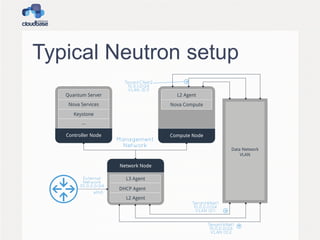
Neutron
• Hyper-V plugin is part of Quantum since Jan
2013
– Project renamed in Neutron since Havana
• Supported network types:
– VLAN
– Flat
– Local
– NVGRE (Icehouse)
• Plugin / agent model
– Plugin runs in quantum-server (controller)
– Agent runs on each Hyper-V compute node
Typical Neutron setup
Neutron OVS interop
• Quantum plugin / agent AMQP RPC protocol is
compatible with OpenVSwitch!
• You can use the OVS plugin with Hyper-V
agents (or vice versa)
– Limited to compatible L2 protocols: Flat / VLAN
• You can use the L3 and DHCP agents with the
Hyper-V plugin
– Using the OVS L2 agent on the networking nodes
• Supports ML2 plugin!
Hyper-V OpenVSwitch!
We are officially porting
OpenVSwitch to Windows!
Beta release plan: Dec 2013
Please come to our booth for a
demo!
Why OpenVSwitch?
• De facto standard for SDN
• Great interoperability
– Hyper-V / KVM / etc
• OpenFlow
• Tunnelling
– VXLAN
– GRE
• Quantum OVS plugin
– No need for a different one
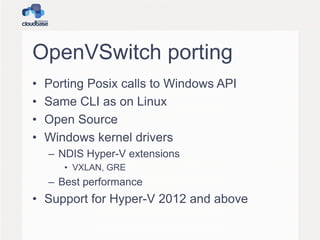
OpenVSwitch porting
• Porting Posix calls to Windows API
• Same CLI as on Linux
• Open Source
• Windows kernel drivers
– NDIS Hyper-V extensions
• VXLAN, GRE
– Best performance
• Support for Hyper-V 2012 and above
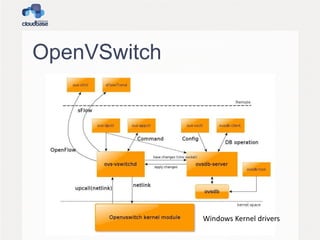
OpenVSwitch
Windows Kernel drivers
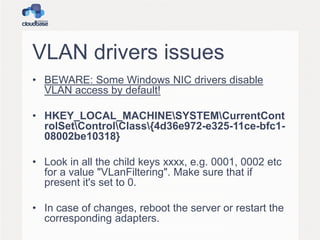
VLAN drivers issues
• BEWARE: Some Windows NIC drivers disable
VLAN access by default!
• HKEY_LOCAL_MACHINESYSTEMCurrentCont
rolSetControlClass{4d36e972-e325-11ce-bfc1-
08002be10318}
• Look in all the child keys xxxx, e.g. 0001, 0002 etc
for a value "VLanFiltering". Make sure that if
present it's set to 0.
• In case of changes, reboot the server or restart the
corresponding adapters.
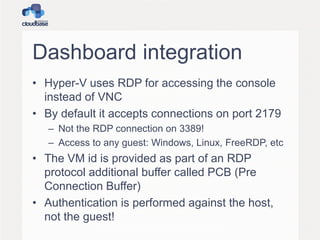
Dashboard integration
• Hyper-V uses RDP for accessing the console
instead of VNC
• By default it accepts connections on port 2179
– Not the RDP connection on 3389!
– Access to any guest: Windows, Linux, FreeRDP, etc
• The VM id is provided as part of an RDP
protocol additional buffer called PCB (Pre
Connection Buffer)
• Authentication is performed against the host,
not the guest!
FreeRDP
• FreeRDP is an amazing RDP open source
client.
– Apache 2 license
– Multiplatform
• Linux
• Mac OS X
• Windows
• It provides support for the PCB parameter
required by Hyper-V
• We are using it as a standalone client on the
free Hyper-V server and on Linux, Mac OS X
FreeRDP-WebConnect
• An HTML5 RDP client based on canvas and
websockets
– Similar to NoVNC
• Uses a C++ demon (wsgate) to handle
websocket connections and connect to the
RDP server
– Better performance compared to the Python
proxy used by NoVNC
• We provided support for Hyper-V
Nova Compute Installer
• Independent Python environment to avoid
conflicts with existing applications
• Installs and registers all the required
dependencies
• Generates dynamically a nova.conf file based
on the parameters provided by the user
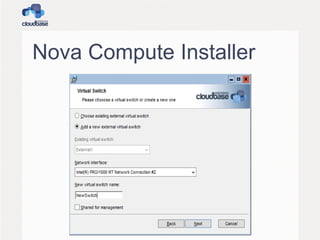
Nova Compute Installer
• Creates a new Hyper-V external switch if
required
• Registers nova-compute as a service and
starts it
• Registers quantum-hyperv-agent as a service
and starts it (optional)
• Enables the Microsoft iSCSI Initiator service
(optional)
Nova Compute Installer
• Enables and configures Hyper-V Live Migration
(optional )
• FreeRDP for Hyper-V console access
• Installs a command prompt shortcut in the
applications menu for a ready made
OpenStack prompt (optional)
• Can be executed fully unattended and
automated
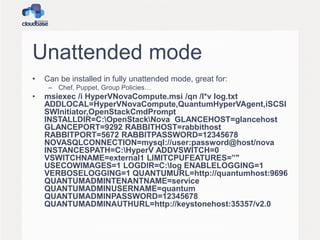
Unattended mode
• Can be installed in fully unattended mode, great for:
– Chef, Puppet, Group Policies…
• msiexec /i HyperVNovaCompute.msi /qn /l*v log.txt
ADDLOCAL=HyperVNovaCompute,QuantumHyperVAgent,iSCSI
SWInitiator,OpenStackCmdPrompt
INSTALLDIR=C:OpenStackNova GLANCEHOST=glancehost
GLANCEPORT=9292 RABBITHOST=rabbithost
RABBITPORT=5672 RABBITPASSWORD=12345678
NOVASQLCONNECTION=mysql://user:password@host/nova
INSTANCESPATH=C:HyperV ADDVSWITCH=0
VSWITCHNAME=external1 LIMITCPUFEATURES=”"
USECOWIMAGES=1 LOGDIR=C:log ENABLELOGGING=1
VERBOSELOGGING=1 QUANTUMURL=http://quantumhost:9696
QUANTUMADMINTENANTNAME=service
QUANTUMADMINUSERNAME=quantum
QUANTUMADMINPASSWORD=12345678
QUANTUMADMINAUTHURL=http://keystonehost:35357/v2.0
Nova Compute Installer
From our web site 
Puppet and Chef
• Hyper-V compute nodes can be installed
via Puppet or Chef as well
• Puppet
– https://github.com/openstack-hyper-v/puppet-
openstack_hyper_v
• Chef
– https://github.com/cloudbase/barclamp-hyperv-
compute
Crowbar
• Big part of Dell’s cloud strategy
• Bare-metal deployment
• vendor independent
• PXE booting
– Sledgehammer image boots and gets
configuration
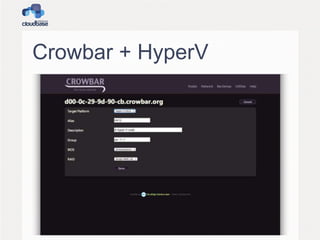
• Provisioning via Crowbar web site
• Barclams
– Configuration
– Chef recipes
Crowbar + HyperV
Q&A

OpenStack Summit 2013 Hong Kong - OpenStack and Windows

  • 1.
  • 2.
    Agenda • Windows asa guest • Windows hypervisor (hyper-v) • How to integrate with DevStack • How to integrate with RDO • Heat • Heat templates
  • 3.
    Windows as aguest • Can be executed on any hypervisor used in Nova • No differences compared to Linux for image handling (glance etc) • Images are tipically sysprepped – Why? – It can be avoided to speed up boot times
  • 4.
    Synthetic drivers • ModernHypervisors provide drivers to replace emulated devices with synthetic ones – Network adapters, etc • Hyper-V – Integration components / LIS • KVM – VirtIO • VMWare – VMWare Tools • XenServer / XCP – XenServer Tools
  • 5.
    Guest initialization • Linux: –cloud-init – GPL • Windows: – cloudbase-init – https://github.com/cloudbase/cloudbase-init – Apache 2 • Why 2 separate projects? – cloud-init is currently too couple with Linux – merging the 2 projects is still on the TODO 
  • 6.
    Cloudbase-Init • 100% Pythoncode • Wrapped in a Windows service • Plugin based architecture: – Each plugin can be executed once or more times at boot – Status for each plugin is mantained in the registry
  • 7.
  • 8.
  • 9.
    Sysprep • Prepares aWindows image to be distributed – Typically on large scales • Run before distributing any Windows image • OOBE – Out of the box experience – Normally used to let the user customize the system
  • 10.
    Sysprep and SID •Generalization – Replaces the computer SID at next boot
  • 11.
    Is a newSID necessary? • Not really: – http://blogs.technet.com/b/markrussinovich/archive/2 009/11/03/3291024.aspx • Thinking that AD will use the SID to distinguish hosts is wrong! – So technically, generalization can be avoided • Can we avoid Sysprep? – Some services like WSUS rely on it – Microsoft support policy requires it • http://support.microsoft.com/kb/314828
  • 12.
    Automate OOBE • Sysprepuses the same unattended XML used during the first setup • It can be fully automated • Note in particular: – <PersistAllDeviceInstalls>true</PersistAllDe viceInstalls> – This is needed to preserve drivers including VMWare Tools or XenServer Tools
  • 13.
    OOBE and hostname • During OOBE the host name is set • We are testing a way to get the hostname from the OpenStack metadata – This avoids the subsequent reboot during Cloudbase-Init execution
  • 14.
    Metadata • OpenStack metadatacan be obtained in multiple ways – HTTP metadata. The classic 169.254.169.254 IP – ConfigDrive – EC2 style HTTP metadata • All those are supported by Cloudbase-Init
  • 15.
    Most important plugins •CreateUser • SetUserPassword • SetHostName – Requires a reboot • SSHPublicKeys • ExtendVolumes – Useful for different flavors / resizes • User data – Including multipart: Heat!!
  • 16.
    User creation • TheCreateUser plugin creates a user and adds it to the local administrators group – A random password is used at this stage as it’s needed to create the user profile • Options: – username (default “Admin”) – groups (default “[Administrators]”)
  • 17.
    Password management • UnlikeLinux, Windows does not support ssh public key logins • A password can be: – Passed during boot: • --meta admin_pass xxxx • Bad idea, security wise – Generated by the guest (better)
  • 18.
    User’s password 1 •Done by the SetUserPassword plugin • Checks if the “admin_pass” metadata field is present and the “inject_user_password” is set • If not, a random password is generated
  • 19.
    User’s password 2 •The password is then encrypted with the SSH keypair’s public key • POSTed to the metadada service – HTTP only, no ConfigDrive • Can be retrieved using the private key: – nova get-password vm ~/.ssh/id_rsa_key1
  • 20.
    Userdata format • WindowsBatch • Powershell • Bash • Multi-part (Havana) – Heat support
  • 21.
  • 22.
    OpenStack WS2012 R2 •Complete with: – Drivers / tools: • VirtIO, etc – Cloudbase-Init – Sysprepped • Eval edition can be upgraded with a simple uder_data script: – DISM /online /Set-Edition:ServerStandard /ProductKey:XXXXX-XXXXX-XXXXX-XXXXX-XXXXX /AcceptEula – Make sure to respect the eval license!!
  • 23.
    How to buildan image? • Windows has the equivalent of a kickstart / preseed – https://github.com/cloudbase/windows- openstack-imaging-tools • We get lots of questions about how to build those images • This project automates the entire process
  • 24.
    Easy KVM example IMAGE=windows-server-2012-r2.qcow2 FLOPPY=Autounattend.vfd VIRTIO_ISO=virtio-win-0.1-65.iso ISO=9600.16384.WINBLUE_RTM.130821- 1623_X64FRE_SERVER_EVAL_EN-US- IRM_SSS_X64FREE_EN-US_DV5.ISO qemu-imgcreate -f qcow2 -o preallocation=metadata $IMAGE 16G kvm -m 2048 -smp 2 -cdrom $ISO -drive file=$VIRTIO_ISO,index=3,media=cdrom -fda $FLOPPY $IMAGE -boot d -vga std -k en-us -vnc :1
  • 25.
    SSH Equivalent? • Itexists: WSMan / WinRM • Execute remote command via HTTP / HTTPS • Can be used for remote PowerShell or from Linux • Configuration example: – https://github.com/cloudbase/unattended-setup- scripts/blob/master/SetupWinRMAccess.ps1
  • 26.
    Linux WSMan clients •OpenWSMan Client – https://github.com/Openwsman/wsmancli • Python: pywinrm – pip install pywinrm – wget https://github.com/cloudbase/unattended- setup-scripts/blob/master/wsmancmd.py – wsmancmd.py -U https://host:5986/wsman -u Administrator -p xxx dir
  • 27.
    What does itdo? • Fully automated – Wallpaper  – Drivers / tools installation: • VirtIO • VMWare tools • (Integrated for Hyper-V) – Windows updates – Cloudbase-Init – Sysprep
  • 28.
    Heat • Heat andWindows are a great mix • Templates for: – Active directory – Exchange (multi server) – Sharepoint (multi server) – SQL Server – IIS • No need to know the provisioning details
  • 29.
    Test Environment • OpenStackis a complex environment • PoCs and development scenarios must replicate the complexities of a production one • All-In-One solutions are tipycally not enough
  • 30.
    DevStack • Perfect fordevelopers • Based on the latest cutting edge code • Easy to deploy – stack.sh / unstack.sh • Does not persists data between reboots • Does not register OpenStack components as demons • Not to be used for PoCs
  • 31.
    Heat on DevStack •In localrc: – ENABLED_SERVICES+=,heat,h-api,h-api-cfn,h- api-cw,h-eng • Optionally add some images: – IMAGE_URLS+=",http://fedorapeople.org/group s/heat/prebuilt-jeos-images/F17-x86_64- cfntools.qcow2"
  • 32.
    RDO • Great solution •Puppet bases • Simple to deploy and automate • Great for PoCs as it’s based on stable releases • https://github.com/cloudbase/unattended- setup-scripts/blob/master/configure-rdo.sh
  • 33.
    RDO + Heaton Havana • yum install -y "openstack-heat-*" python- heatclient • Configuration requires: – heat-db-setup – keystone configuration – enable and start daemons • https://github.com/cloudbase/unattended- setup-scripts/blob/master/configure-rdo-heat.sh
  • 34.
    Simple Heat template1 "KeyName" : { "Description" : "Name of an existing EC2 KeyPair to encrypt the Admin password", "Type" : "String" }, "InstanceType" : { "Description" : "EC2 instance type", "Type" : "String", "Default" : "m1.small", "AllowedValues" : [ "m1.sminy", "m1.small", "m1.medium", "m1.large", "m1.xlarge" ], "ConstraintDescription" : "must be a valid EC2 instance type." }, "OSImage": { "Default": "Windows Server 2012 R2 Std Eval", "Description" : "Windows image of choice", "Type": "String", "AllowedValues" : [ "Windows Server 2012 R2 Std Eval" ] },
  • 35.
    Simple Heat template2 "SubnetId": { "Type" : "String", "Description" : "SubnetId of an existing subnet in your VPC" }, "Message": { "Default": "A default value", "Description" : "A sample parameter", "Type": "String" }
  • 36.
    Simple Heat template3 "Resources" : { "SampleServer": { "Type": "AWS::EC2::Instance", "Properties": { "ImageId" : { "Ref" : "OSImage" }, "InstanceType" : { "Ref" : "InstanceType" }, "SubnetId" : { "Ref" : "SubnetId" }, "KeyName" : { "Ref" : "KeyName" }, "UserData" : { "Fn::Base64" : { "Fn::Join" : ["", [ "#ps1_sysnativen", "$ErrorActionPreference = 'Stop'n", "Set-Content -path C:message.txt -value", { "Ref" : "Message" }, "')n" ]]}} } } }
  • 37.
    Hyper-V • Setup isvery easy • Our Nova driver is at it’s 3rd release! – Folsom, Grizzly, Havana • Support for Hyper-V 2012 R2 • VHDX support • Ceilometer support • more…
  • 38.
    Hyper-V 2012 availability •FREE edition – Full Hypervisor – Minimum OS support • Minimum impact on security updates, etc • Windows Server 2012 – Just enable the related role • Windows 8 – For workstation / testing / development usage
  • 39.
    Hyper-V in OpenStack •The only commercial product that includes Hyper-V deployment is currently SUSE Cloud 2.0 (based on Crowbar) • As an alternative, Hyper-V can be easily integrated in any OpenStack deployment • Just run the installer, Puppet, etc, and the compute node will be added to the stack
  • 40.
    Hyper-V / Windows Openstackcomponents • Nova Compute driver • Quantum plugin • Cinder Volume driver • Windows Cloud-Init • Ceilometer Agent (Havana)
  • 41.
    Hyper-V Nova Compute •Python Application installed as an application/service on the Hyper-V node. • OpenStack compute utilizes key features baked into the Hyper-V Virtualization Platform • Does not require windows clustering services • Does not require shared storage
  • 42.
    Neutron • Hyper-V pluginis part of Quantum since Jan 2013 – Project renamed in Neutron since Havana • Supported network types: – VLAN – Flat – Local – NVGRE (Icehouse) • Plugin / agent model – Plugin runs in quantum-server (controller) – Agent runs on each Hyper-V compute node
  • 43.
  • 44.
    Neutron OVS interop •Quantum plugin / agent AMQP RPC protocol is compatible with OpenVSwitch! • You can use the OVS plugin with Hyper-V agents (or vice versa) – Limited to compatible L2 protocols: Flat / VLAN • You can use the L3 and DHCP agents with the Hyper-V plugin – Using the OVS L2 agent on the networking nodes • Supports ML2 plugin!
  • 45.
    Hyper-V OpenVSwitch! We areofficially porting OpenVSwitch to Windows! Beta release plan: Dec 2013 Please come to our booth for a demo!
  • 46.
    Why OpenVSwitch? • Defacto standard for SDN • Great interoperability – Hyper-V / KVM / etc • OpenFlow • Tunnelling – VXLAN – GRE • Quantum OVS plugin – No need for a different one
  • 47.
    OpenVSwitch porting • PortingPosix calls to Windows API • Same CLI as on Linux • Open Source • Windows kernel drivers – NDIS Hyper-V extensions • VXLAN, GRE – Best performance • Support for Hyper-V 2012 and above
  • 48.
  • 49.
    VLAN drivers issues •BEWARE: Some Windows NIC drivers disable VLAN access by default! • HKEY_LOCAL_MACHINESYSTEMCurrentCont rolSetControlClass{4d36e972-e325-11ce-bfc1- 08002be10318} • Look in all the child keys xxxx, e.g. 0001, 0002 etc for a value "VLanFiltering". Make sure that if present it's set to 0. • In case of changes, reboot the server or restart the corresponding adapters.
  • 50.
    Dashboard integration • Hyper-Vuses RDP for accessing the console instead of VNC • By default it accepts connections on port 2179 – Not the RDP connection on 3389! – Access to any guest: Windows, Linux, FreeRDP, etc • The VM id is provided as part of an RDP protocol additional buffer called PCB (Pre Connection Buffer) • Authentication is performed against the host, not the guest!
  • 51.
    FreeRDP • FreeRDP isan amazing RDP open source client. – Apache 2 license – Multiplatform • Linux • Mac OS X • Windows • It provides support for the PCB parameter required by Hyper-V • We are using it as a standalone client on the free Hyper-V server and on Linux, Mac OS X
  • 52.
    FreeRDP-WebConnect • An HTML5RDP client based on canvas and websockets – Similar to NoVNC • Uses a C++ demon (wsgate) to handle websocket connections and connect to the RDP server – Better performance compared to the Python proxy used by NoVNC • We provided support for Hyper-V
  • 53.
    Nova Compute Installer •Independent Python environment to avoid conflicts with existing applications • Installs and registers all the required dependencies • Generates dynamically a nova.conf file based on the parameters provided by the user
  • 54.
    Nova Compute Installer •Creates a new Hyper-V external switch if required • Registers nova-compute as a service and starts it • Registers quantum-hyperv-agent as a service and starts it (optional) • Enables the Microsoft iSCSI Initiator service (optional)
  • 55.
    Nova Compute Installer •Enables and configures Hyper-V Live Migration (optional ) • FreeRDP for Hyper-V console access • Installs a command prompt shortcut in the applications menu for a ready made OpenStack prompt (optional) • Can be executed fully unattended and automated
  • 56.
    Unattended mode • Canbe installed in fully unattended mode, great for: – Chef, Puppet, Group Policies… • msiexec /i HyperVNovaCompute.msi /qn /l*v log.txt ADDLOCAL=HyperVNovaCompute,QuantumHyperVAgent,iSCSI SWInitiator,OpenStackCmdPrompt INSTALLDIR=C:OpenStackNova GLANCEHOST=glancehost GLANCEPORT=9292 RABBITHOST=rabbithost RABBITPORT=5672 RABBITPASSWORD=12345678 NOVASQLCONNECTION=mysql://user:password@host/nova INSTANCESPATH=C:HyperV ADDVSWITCH=0 VSWITCHNAME=external1 LIMITCPUFEATURES=”" USECOWIMAGES=1 LOGDIR=C:log ENABLELOGGING=1 VERBOSELOGGING=1 QUANTUMURL=http://quantumhost:9696 QUANTUMADMINTENANTNAME=service QUANTUMADMINUSERNAME=quantum QUANTUMADMINPASSWORD=12345678 QUANTUMADMINAUTHURL=http://keystonehost:35357/v2.0
  • 57.
  • 58.
    From our website 
  • 59.
    Puppet and Chef •Hyper-V compute nodes can be installed via Puppet or Chef as well • Puppet – https://github.com/openstack-hyper-v/puppet- openstack_hyper_v • Chef – https://github.com/cloudbase/barclamp-hyperv- compute
  • 60.
    Crowbar • Big partof Dell’s cloud strategy • Bare-metal deployment • vendor independent • PXE booting – Sledgehammer image boots and gets configuration • Provisioning via Crowbar web site • Barclams – Configuration – Chef recipes
  • 61.
  • 62.