1
Learning Objectives
 This chapter examine OpenStack architecture and how to
install OpenStack. By the time you finish this chapter, you
will be able to do the following :
 Describe OpenStack architecture
 Understand OpenStack components
 How to install OpenStack Liberty
2
Outline
 虛擬化技術介紹
 Introduction to OpenStack
 Components of OpenStack
 OpenStack install
3
虛擬化技術
 現今雲端運算上的虛擬化技術,主要是將原本運作在實際伺
服器上的伺服器作業系統,變成在虛擬化的軟體上執行,因
此在硬體故障時,這些伺服器系統便可以很容易地移轉到另
外一台已設置好虛擬化軟體的硬體上,系統不需要重新安裝
與設定,新硬體與舊硬體也不必是相同規格,可以大幅簡化
伺服器的管理。
 開放原始碼上主流的虛擬化技術大致上分兩種:
 硬體虛擬化(Hardware Virtualization)
 作業系統層級的虛擬化技術(Operating System-level Virtualization)
4
參考資料:
http://www.netadmin.com.tw/article_content.aspx?sn=141
2020002
硬體虛擬化技術
 硬體虛擬化的架構是用軟體建立一個模擬真實電腦硬體的
虛擬機器(Virtual Machine),而原本執行在實際電腦硬
體的作業系統,則運作執行在這個虛擬機器上,虛擬機器
內運行的作業系統與實際的電腦硬體之間,會有軟體介面
隔離控制這些虛擬機器對硬體的存取。
 進行硬體虛擬化的系統軟體則被稱作Hypervisor或虛擬機
器管理員(Virtual Machine Manager),Hypervisor因為
主要是在控制虛擬機器的運作,又被稱為虛擬機器監視器
(Virtual Machine Monitor),縮寫為VMM。
 OpenSource:KVM、Xen
5
參考資料:
http://www.netadmin.com.tw/article_content.aspx?sn=141
2020002
虛擬化實現方式
6
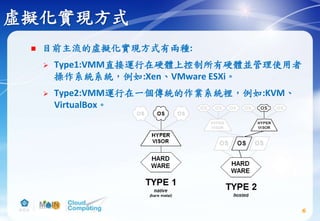
 目前主流的虛擬化實現方式有兩種:
 Type1:VMM直接運行在硬體上控制所有硬體並管理使用者
操作系統系統,例如:Xen、VMware ESXi。
 Type2:VMM運行在一個傳統的作業系統裡,例如:KVM、
VirtualBox。
作業系統層級的虛擬化技術
 作業系統層級虛擬化技術的架構,則是藉由讓作業系統核
心可以建立多個隔離的使用者空間運作實體技術來達成,
使用者在這些隔離的使用者空間中運作,感覺就像在實際
獨立的環境內運作一樣,而這些隔離的使用者空間運作實
體又被稱為容器(Containers)、虛擬化引擎(
Virtualization Engines,VE)、虛擬私有伺服器(Virtual
Private Servers,VPS)或叫囚室(jails)。
 作業系統核心同時也提供管理這些運作實體使用資源的機
制,避免單一運作實體使用系統資源過度,而影響到其他
運作實體。
 OpenSource:Docker、OpenVZ
7
參考資料:
http://www.netadmin.com.tw/article_content.aspx?sn=141
2020002
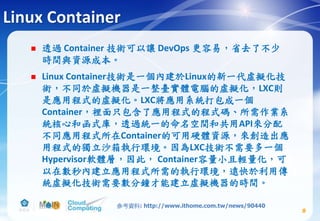
Linux Container
 透過 Container 技術可以讓 DevOps 更容易,省去了不少
時間與資源成本。
 Linux Container技術是一個內建於Linux的新一代虛擬化技
術,不同於虛擬機器是一整臺實體電腦的虛擬化,LXC則
是應用程式的虛擬化。LXC將應用系統打包成一個
Container,裡面只包含了應用程式的程式碼、所需作業系
統核心和函式庫,透過統一的命名空間和共用API來分配
不同應用程式所在Container的可用硬體資源,來創造出應
用程式的獨立沙箱執行環境。因為LXC技術不需要多一個
Hypervisor軟體層,因此, Container容量小且輕量化,可
以在數秒內建立應用程式所需的執行環境,遠快於利用傳
統虛擬化技術需要數分鐘才能建立虛擬機器的時間。
8
參考資料: http://www.ithome.com.tw/news/90440
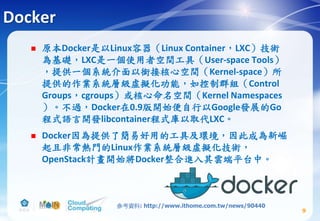
Docker
 原本Docker是以Linux容器(Linux Container,LXC)技術
為基礎,LXC是一個使用者空間工具(User-space Tools)
,提供一個系統介面以銜接核心空間(Kernel-space)所
提供的作業系統層級虛擬化功能,如控制群組(Control
Groups,cgroups)或核心命名空間(Kernel Namespaces
)。不過,Docker在0.9版開始便自行以Google發展的Go
程式語言開發libcontainer程式庫以取代LXC。
 Docker因為提供了簡易好用的工具及環境,因此成為新崛
起且非常熱門的Linux作業系統層級虛擬化技術,
OpenStack計畫開始將Docker整合進入其雲端平台中。
9
參考資料: http://www.ithome.com.tw/news/90440
雲端界中的Linux-OpenStack
 OpenStack允許讓使用者快速部屬雲端的基礎設施環境
(IaaS)叢集,不同於Hadoop 這類針對特定功能取向的PaaS
,OpenStack提供的是完整的底層資源與環境部屬,能夠
提供商業IaaS的大老:Amazon Elastic Compute
Cloud(Amazon EC2) 的功能。
10
Amazon EC2
 Amazon Elastic Compute Cloud(Amazon EC2) ,由亞馬遜公
司提供的web服務,是一個讓使用者可以租用雲端電腦運
行所需應用的系統。EC2藉由提供web服務的方式讓使用
者可以彈性地運行自己的Amazon機器映像檔,使用者將
可以在這個虛擬機器上運行任何自己想要的軟體或應用程
式。 使用者可以隨時創建、執行、終止自己的虛擬伺服
器,使用多少時間算多少錢,也因此這個系統是"彈性"使
用的。
11
參考資料:
https://www.openfoundry.org/tw/resourcecatalog/Cloud-
Computing/Infrastructure-Layer/Computing/Amazon-EC2
OpenStack簡介
 OpenStack 專案已經有五年的時間了,從 2010 年 7 月開
始開發,原先是由 NASA 主導的專案 Nebula。後來 NASA
與雲端服務廠商 Rackspace 合作,演變成現在熟知的雲端
運算平臺 OpenStack。
 由於 OpenStack 採用開放原始碼授權,Apache 授權協議
,相較 GPL 類授權比較寬鬆,因此不少企業選擇
OpenStack 節省成本。OpenStack 也讓擴大服務能量成為
可能,很容易就橫向擴展(Horizontal Scaling)規模。
12
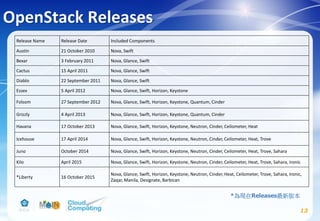
OpenStack Releases
Release Name Release Date Included Components
Austin 21 October 2010 Nova, Swift
Bexar 3 February 2011 Nova, Glance, Swift
Cactus 15 April 2011 Nova, Glance, Swift
Diablo 22 September 2011 Nova, Glance, Swift
Essex 5 April 2012 Nova, Glance, Swift, Horizon, Keystone
Folsom 27 September 2012 Nova, Glance, Swift, Horizon, Keystone, Quantum, Cinder
Grizzly 4 April 2013 Nova, Glance, Swift, Horizon, Keystone, Quantum, Cinder
Havana 17 October 2013 Nova, Glance, Swift, Horizon, Keystone, Neutron, Cinder, Ceilometer, Heat
Icehouse 17 April 2014 Nova, Glance, Swift, Horizon, Keystone, Neutron, Cinder, Ceilometer, Heat, Trove
Juno October 2014 Nova, Glance, Swift, Horizon, Keystone, Neutron, Cinder, Ceilometer, Heat, Trove, Sahara
Kilo April 2015 Nova, Glance, Swift, Horizon, Keystone, Neutron, Cinder, Ceilometer, Heat, Trove, Sahara, Ironic
*Liberty 16 October 2015
Nova, Glance, Swift, Horizon, Keystone, Neutron, Cinder, Heat, Ceilometer, Trove, Sahara, Ironic,
Zaqar, Manila, Designate, Barbican
13
*為現在Releases最新版本
OpenStack產業界應用(一)
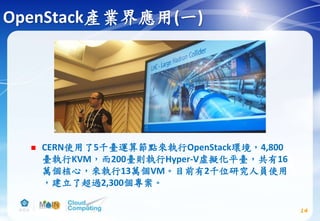
 CERN使用了5千臺運算節點來執行OpenStack環境,4,800
臺執行KVM,而200臺則執行Hyper-V虛擬化平臺,共有16
萬個核心,來執行13萬個VM。目前有2千位研究人員使用
,建立了超過2,300個專案。
14
OpenStack產業界應用(二)
 日本發生地震後,在數十秒內,日本雅虎資料中心的網路
流量瞬間暴增為平時尖峰的3倍,如何事先打造出一套可
以應付這種瞬間爆量的基礎架構,是日本雅虎資料中心面
臨的一大挑戰。
 由於OpenStack軟體上的效能改進,單櫃伺服器所能執行
的虛擬機器,也從400個提高到單櫃2,000個。
 日本雅虎目前部署了超過20個OpenStack叢集,總儲存容
量達20PB(10的15次方byte),可用性能達到99.996%。
15參考資料: http://www.ithome.com.tw/news/98304
OpenStack users
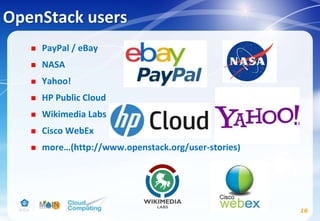
 PayPal / eBay
 NASA
 Yahoo!
 HP Public Cloud
 Wikimedia Labs
 Cisco WebEx
 more…(http://www.openstack.org/user-stories)
16
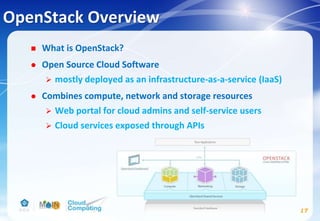
OpenStack Overview
 What is OpenStack?
 Open Source Cloud Software
 mostly deployed as an infrastructure-as-a-service (IaaS)
 Combines compute, network and storage resources
 Web portal for cloud admins and self-service users
 Cloud services exposed through APIs
17
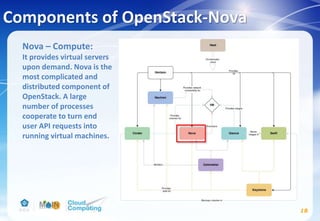
Components of OpenStack-Nova
18
Nova – Compute:
It provides virtual servers
upon demand. Nova is the
most complicated and
distributed component of
OpenStack. A large
number of processes
cooperate to turn end
user API requests into
running virtual machines.
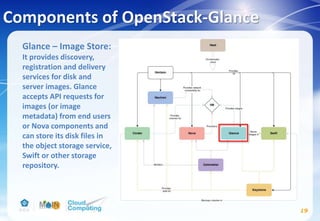
Components of OpenStack-Glance
19
Glance – Image Store:
It provides discovery,
registration and delivery
services for disk and
server images. Glance
accepts API requests for
images (or image
metadata) from end users
or Nova components and
can store its disk files in
the object storage service,
Swift or other storage
repository.
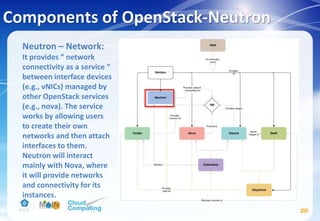
Components of OpenStack-Neutron
20
Neutron – Network:
It provides “ network
connectivity as a service ”
between interface devices
(e.g., vNICs) managed by
other OpenStack services
(e.g., nova). The service
works by allowing users
to create their own
networks and then attach
interfaces to them.
Neutron will interact
mainly with Nova, where
it will provide networks
and connectivity for its
instances.
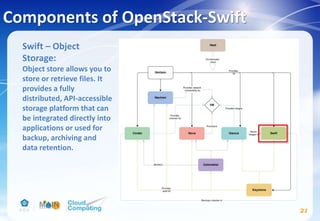
Components of OpenStack-Swift
21
Swift – Object
Storage:
Object store allows you to
store or retrieve files. It
provides a fully
distributed, API-accessible
storage platform that can
be integrated directly into
applications or used for
backup, archiving and
data retention.
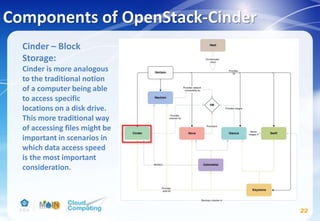
Components of OpenStack-Cinder
22
Cinder – Block
Storage:
Cinder is more analogous
to the traditional notion
of a computer being able
to access specific
locations on a disk drive.
This more traditional way
of accessing files might be
important in scenarios in
which data access speed
is the most important
consideration.
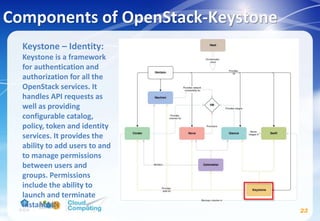
Components of OpenStack-Keystone
23
Keystone – Identity:
Keystone is a framework
for authentication and
authorization for all the
OpenStack services. It
handles API requests as
well as providing
configurable catalog,
policy, token and identity
services. It provides the
ability to add users to and
to manage permissions
between users and
groups. Permissions
include the ability to
launch and terminate
instances.
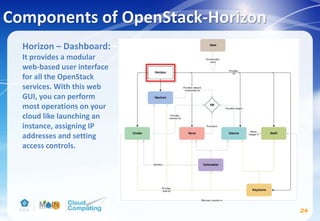
Components of OpenStack-Horizon
24
Horizon – Dashboard:
It provides a modular
web-based user interface
for all the OpenStack
services. With this web
GUI, you can perform
most operations on your
cloud like launching an
instance, assigning IP
addresses and setting
access controls.
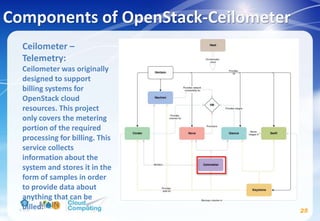
Components of OpenStack-Ceilometer
25
Ceilometer –
Telemetry:
Ceilometer was originally
designed to support
billing systems for
OpenStack cloud
resources. This project
only covers the metering
portion of the required
processing for billing. This
service collects
information about the
system and stores it in the
form of samples in order
to provide data about
anything that can be
billed.
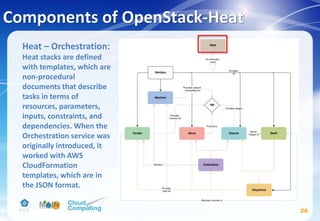
Components of OpenStack-Heat
26
Heat – Orchestration:
Heat stacks are defined
with templates, which are
non-procedural
documents that describe
tasks in terms of
resources, parameters,
inputs, constraints, and
dependencies. When the
Orchestration service was
originally introduced, it
worked with AWS
CloudFormation
templates, which are in
the JSON format.
 Sahara - Data Processing
 Trove - Database as a Service
 Ironic - Bare Metal
 Zaqar - Message service
 Barbican - Key management
 Designate DNS - DNS
 Manila - Shared Filesystems
 Magnum - Containers service
 Murano - Application catalog
27
Components of OpenStack-Others
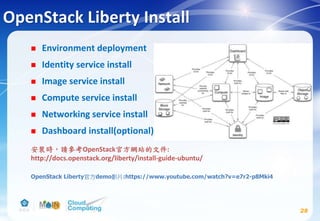
OpenStack Liberty Install
 Environment deployment
 Identity service install
 Image service install
 Compute service install
 Networking service install
 Dashboard install(optional)
28
安裝時,請參考OpenStack官方網站的文件:
http://docs.openstack.org/liberty/install-guide-ubuntu/
OpenStack Liberty官方demo影片:https://www.youtube.com/watch?v=e7r2-p8Mki4
Environment deployment
 Environment deployment
 Identity service install
 Image service install
 Compute service install
 Networking service install
 Dashboard install(optional)
29
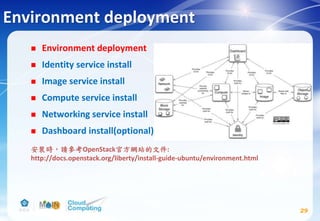
安裝時,請參考OpenStack官方網站的文件:
http://docs.openstack.org/liberty/install-guide-ubuntu/environment.html
Environment-虛擬機軟體選擇
30
下載網址:https://www.vmware.com/tw/products/workstation/workstation-evaluation.html
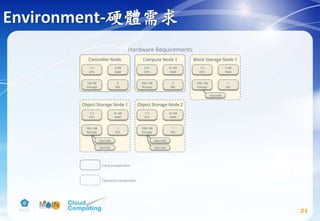
Environment-硬體需求
31
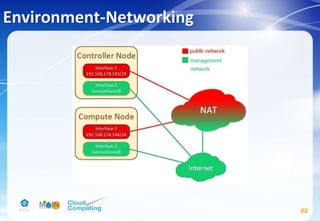
Environment-Networking
32
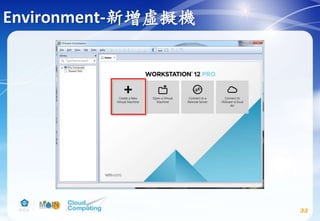
Environment-新增虛擬機
33
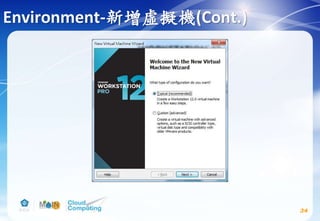
Environment-新增虛擬機(Cont.)
34
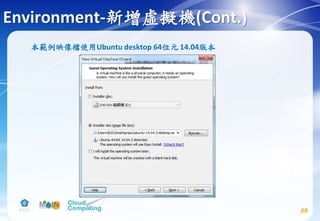
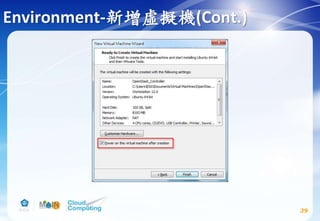
本範例映像檔使用Ubuntu desktop 64位元 14.04版本
Environment-新增虛擬機(Cont.)
35
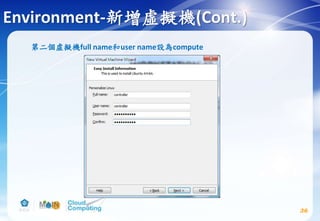
第二個虛擬機full name和user name設為compute
Environment-新增虛擬機(Cont.)
36
Environment-新增虛擬機(Cont.)
37
Environment-新增虛擬機(Cont.)
38
Environment-新增虛擬機(Cont.)
39
Environment-Networking(Cont.)
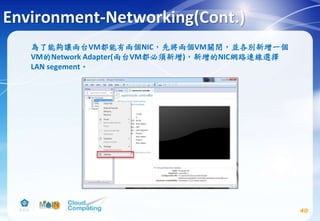
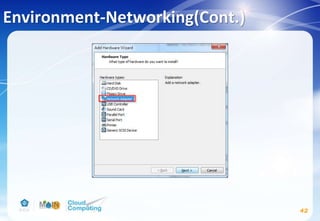
為了能夠讓兩台VM都能有兩個NIC,先將兩個VM關閉,並各別新增一個
VM的Network Adapter(兩台VM都必須新增),新增的NIC網路連線選擇
LAN segement。
40
另外要將兩台VM的硬體資源做調整
Controller node memory調成4G以上,Compute node memory調成2G以上
Controller/Compute node processors 2顆以上
然後再按Add…
Environment-Networking(Cont.)
41
Environment-Networking(Cont.)
42
Environment-Networking(Cont.)
43
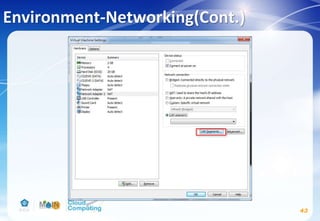
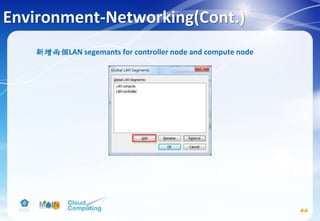
新增兩個LAN segemants for controller node and compute node
Environment-Networking(Cont.)
44
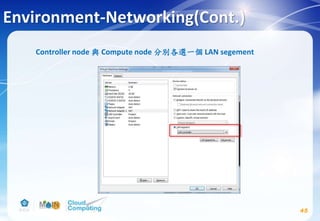
Controller node 與 Compute node 分別各選一個 LAN segement
Environment-Networking(Cont.)
45
Environment-Networking(Cont.)
46
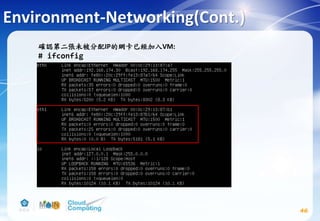
確認第二張未被分配IP的網卡已經加入VM:
# ifconfig
Environment-Networking(Cont.)
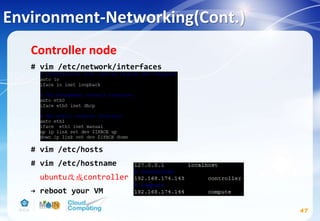
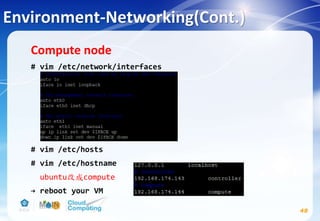
Controller node
# vim /etc/network/interfaces
# vim /etc/hosts
# vim /etc/hostname
ubuntu改成controller
→ reboot your VM
47
Environment-Networking(Cont.)
Compute node
# vim /etc/network/interfaces
# vim /etc/hosts
# vim /etc/hostname
ubuntu改成compute
→ reboot your VM
48
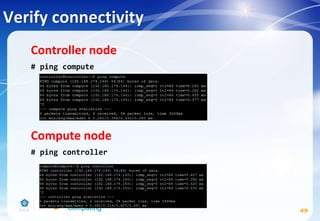
Verify connectivity
Controller node
# ping compute
Compute node
# ping controller
49
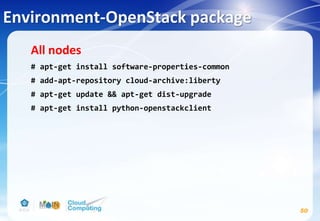
Environment-OpenStack package
All nodes
# apt-get install software-properties-common
# add-apt-repository cloud-archive:liberty
# apt-get update && apt-get dist-upgrade
# apt-get install python-openstackclient
50
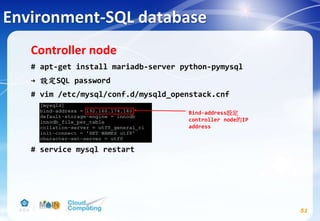
Environment-SQL database
Controller node
# apt-get install mariadb-server python-pymysql
→ 設定SQL password
# vim /etc/mysql/conf.d/mysqld_openstack.cnf
# service mysql restart
51
Bind-address設定
controller node的IP
address
Environment-Message queue
Controller node
# apt-get install rabbitmq-server
# rabbitmqctl add_user openstack RABBIT_PASS
Replace RABBIT_PASS with a suitable password.
# rabbitmqctl set_permissions openstack ".*" ".*" ".*"
52
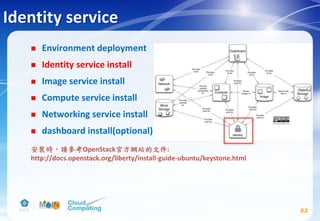
Identity service
 Environment deployment
 Identity service install
 Image service install
 Compute service install
 Networking service install
 dashboard install(optional)
53
安裝時,請參考OpenStack官方網站的文件:
http://docs.openstack.org/liberty/install-guide-ubuntu/keystone.html
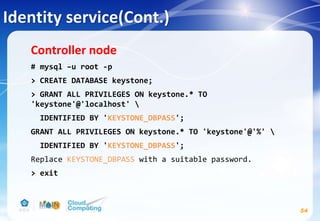
Identity service(Cont.)
54
Controller node
# mysql –u root -p
> CREATE DATABASE keystone;
> GRANT ALL PRIVILEGES ON keystone.* TO
'keystone'@'localhost' 
IDENTIFIED BY 'KEYSTONE_DBPASS';
GRANT ALL PRIVILEGES ON keystone.* TO 'keystone'@'%' 
IDENTIFIED BY 'KEYSTONE_DBPASS';
Replace KEYSTONE_DBPASS with a suitable password.
> exit
Identity service(Cont.)
55
# openssl rand -hex 10
→ 記下這個random value
# echo "manual" > /etc/init/keystone.override
# apt-get install keystone apache2 libapache2-mod-wsgi 
memcached python-memcache
# vim /etc/keystone/keystone.conf
Replace ADMIN_TOKEN with the random value that you
generated in a previous step.
[DEFAULT]
...
admin_token = ADMIN_TOKEN
verbose = True
Identity service(Cont.)
56
Replace KEYSTONE_DBPASS with the password you chose for
the database.
# su -s /bin/sh -c "keystone-manage db_sync" keystone
[database]
...
connection = mysql+pymysql://keystone:KEYSTONE_DBPASS@controller/keystone
[memcache]
...
servers = localhost:11211
[token]
...
provider = uuid
driver = memcache
[revoke]
...
driver = sql
Identity service(Cont.)
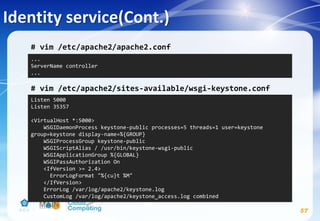
# vim /etc/apache2/apache2.conf
# vim /etc/apache2/sites-available/wsgi-keystone.conf
57
...
ServerName controller
...
Listen 5000
Listen 35357
<VirtualHost *:5000>
WSGIDaemonProcess keystone-public processes=5 threads=1 user=keystone
group=keystone display-name=%{GROUP}
WSGIProcessGroup keystone-public
WSGIScriptAlias / /usr/bin/keystone-wsgi-public
WSGIApplicationGroup %{GLOBAL}
WSGIPassAuthorization On
<IfVersion >= 2.4>
ErrorLogFormat "%{cu}t %M"
</IfVersion>
ErrorLog /var/log/apache2/keystone.log
CustomLog /var/log/apache2/keystone_access.log combined
Identity service(Cont.)
58
<Directory /usr/bin>
<IfVersion >= 2.4>
Require all granted
</IfVersion>
<IfVersion < 2.4>
Order allow,deny
Allow from all
</IfVersion>
</Directory>
</VirtualHost>
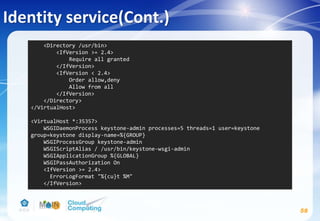
<VirtualHost *:35357>
WSGIDaemonProcess keystone-admin processes=5 threads=1 user=keystone
group=keystone display-name=%{GROUP}
WSGIProcessGroup keystone-admin
WSGIScriptAlias / /usr/bin/keystone-wsgi-admin
WSGIApplicationGroup %{GLOBAL}
WSGIPassAuthorization On
<IfVersion >= 2.4>
ErrorLogFormat "%{cu}t %M"
</IfVersion>
Identity service(Cont.)
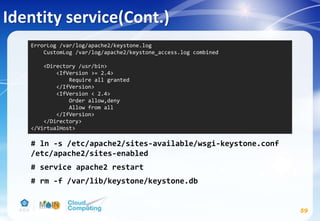
# ln -s /etc/apache2/sites-available/wsgi-keystone.conf
/etc/apache2/sites-enabled
# service apache2 restart
# rm -f /var/lib/keystone/keystone.db
59
ErrorLog /var/log/apache2/keystone.log
CustomLog /var/log/apache2/keystone_access.log combined
<Directory /usr/bin>
<IfVersion >= 2.4>
Require all granted
</IfVersion>
<IfVersion < 2.4>
Order allow,deny
Allow from all
</IfVersion>
</Directory>
</VirtualHost>
Identity service(Cont.)
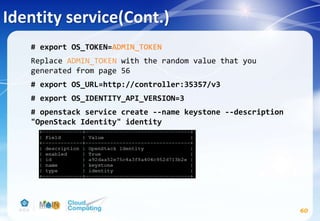
# export OS_TOKEN=ADMIN_TOKEN
Replace ADMIN_TOKEN with the random value that you
generated from page 56
# export OS_URL=http://controller:35357/v3
# export OS_IDENTITY_API_VERSION=3
# openstack service create --name keystone --description
"OpenStack Identity" identity
60
Identity service(Cont.)
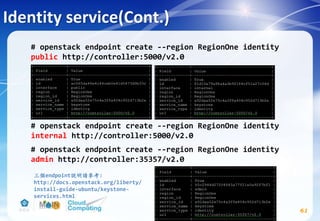
# openstack endpoint create --region RegionOne identity
public http://controller:5000/v2.0
# openstack endpoint create --region RegionOne identity
internal http://controller:5000/v2.0
# openstack endpoint create --region RegionOne identity
admin http://controller:35357/v2.0
61
三個endpoint說明請參考:
http://docs.openstack.org/liberty/
install-guide-ubuntu/keystone-
services.html
Identity service(Cont.)
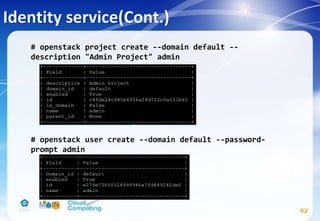
# openstack project create --domain default --
description "Admin Project" admin
# openstack user create --domain default --password-
prompt admin
62
Identity service(Cont.)
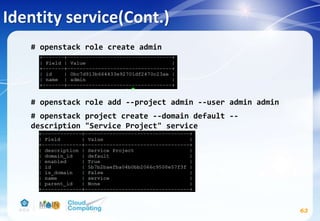
# openstack role create admin
# openstack role add --project admin --user admin admin
# openstack project create --domain default --
description "Service Project" service
63
Identity service(Cont.)
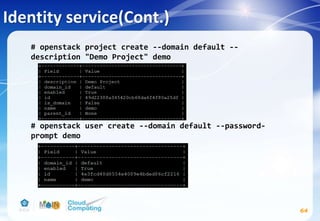
# openstack project create --domain default --
description "Demo Project" demo
# openstack user create --domain default --password-
prompt demo
64
Identity service(Cont.)
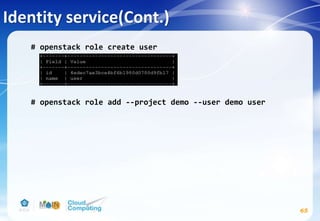
# openstack role create user
# openstack role add --project demo --user demo user
65
Identity service-Verify operation
66
# vim /etc/keystone/keystone-paste.ini
remove admin_token_auth from the [pipeline:public_api],
[pipeline:admin_api], and [pipeline:api_v3] sections.
Identity service-Verify operation(Cont.)
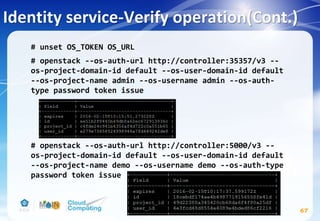
# unset OS_TOKEN OS_URL
# openstack --os-auth-url http://controller:35357/v3 --
os-project-domain-id default --os-user-domain-id default
--os-project-name admin --os-username admin --os-auth-
type password token issue
# openstack --os-auth-url http://controller:5000/v3 --
os-project-domain-id default --os-user-domain-id default
--os-project-name demo --os-username demo --os-auth-type
password token issue
67
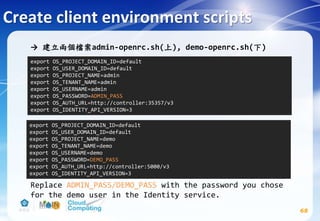
→ 建立兩個檔案admin-openrc.sh(上), demo-openrc.sh(下)
Replace ADMIN_PASS/DEMO_PASS with the password you chose
for the demo user in the Identity service.
Create client environment scripts
68
export OS_PROJECT_DOMAIN_ID=default
export OS_USER_DOMAIN_ID=default
export OS_PROJECT_NAME=admin
export OS_TENANT_NAME=admin
export OS_USERNAME=admin
export OS_PASSWORD=ADMIN_PASS
export OS_AUTH_URL=http://controller:35357/v3
export OS_IDENTITY_API_VERSION=3
export OS_PROJECT_DOMAIN_ID=default
export OS_USER_DOMAIN_ID=default
export OS_PROJECT_NAME=demo
export OS_TENANT_NAME=demo
export OS_USERNAME=demo
export OS_PASSWORD=DEMO_PASS
export OS_AUTH_URL=http://controller:5000/v3
export OS_IDENTITY_API_VERSION=3
Using the scripts
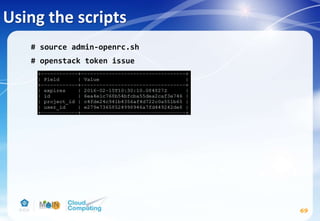
# source admin-openrc.sh
# openstack token issue
69
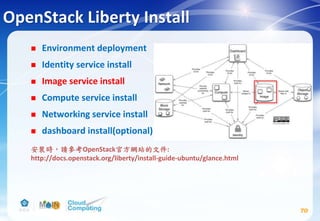
OpenStack Liberty Install
 Environment deployment
 Identity service install
 Image service install
 Compute service install
 Networking service install
 dashboard install(optional)
70
安裝時,請參考OpenStack官方網站的文件:
http://docs.openstack.org/liberty/install-guide-ubuntu/glance.html
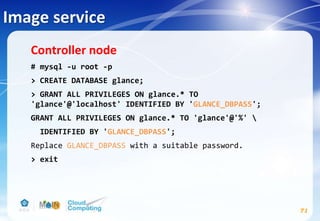
Image service
71
Controller node
# mysql -u root -p
> CREATE DATABASE glance;
> GRANT ALL PRIVILEGES ON glance.* TO
'glance'@'localhost' IDENTIFIED BY 'GLANCE_DBPASS';
GRANT ALL PRIVILEGES ON glance.* TO 'glance'@'%' 
IDENTIFIED BY 'GLANCE_DBPASS';
Replace GLANCE_DBPASS with a suitable password.
> exit
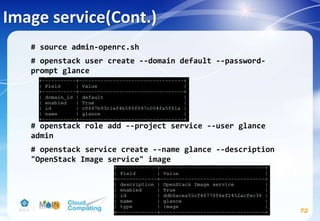
Image service(Cont.)
72
# source admin-openrc.sh
# openstack user create --domain default --password-
prompt glance
# openstack role add --project service --user glance
admin
# openstack service create --name glance --description
"OpenStack Image service" image
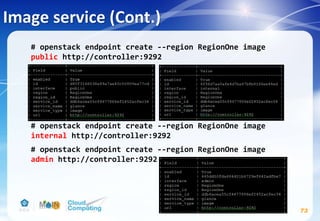
Image service (Cont.)
# openstack endpoint create --region RegionOne image
public http://controller:9292
# openstack endpoint create --region RegionOne image
internal http://controller:9292
# openstack endpoint create --region RegionOne image
admin http://controller:9292
73
Image service(Cont.)
74
# apt-get install glance python-glanceclient
# vim /etc/glance/glance-api.conf
Replace GLANCE_DBPASS with the password you chose for the
Image service database & Replace GLANCE_PASS with the
password you chose for the glance user in the Identity
service.
[database]
...
connection = mysql+pymysql://glance:GLANCE_DBPASS@controller/glance
[keystone_authtoken] #註解掉[keystone_authtoken] section中其他設定
...
auth_uri = http://controller:5000
auth_url = http://controller:35357
auth_plugin = password
project_domain_id = default
user_domain_id = default
project_name = service
username = glance
password = GLANCE_PASS
Image service(Cont.)
75
[paste_deploy]
...
flavor = keystone
[glance_store]
...
default_store = file
filesystem_store_datadir = /var/lib/glance/images/
[DEFAULT]
...
notification_driver = noop
verbose = True
Image service(Cont.)
76
# vim /etc/glance/glance-registry.conf
Replace GLANCE_DBPASS with the password you chose for the
Image service database & Replace GLANCE_PASS with the
password you chose for the glance user in the Identity
service.
[database]
...
connection = mysql+pymysql://glance:GLANCE_DBPASS@controller/glance
[keystone_authtoken] #註解掉[keystone_authtoken] section中其他設定
...
auth_uri = http://controller:5000
auth_url = http://controller:35357
auth_plugin = password
project_domain_id = default
user_domain_id = default
project_name = service
username = glance
password = GLANCE_PASS
# su -s /bin/sh -c "glance-manage db_sync" glance
# service glance-registry restart
# service glance-api restart
# rm -f /var/lib/glance/glance.sqlite
Image service(Cont.)
77
[paste_deploy]
...
flavor = keystone
[DEFAULT]
...
notification_driver = noop
verbose = True
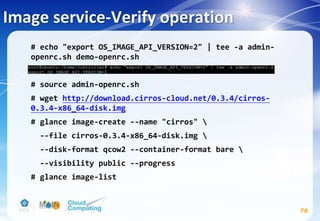
Image service-Verify operation
# echo "export OS_IMAGE_API_VERSION=2" | tee -a admin-
openrc.sh demo-openrc.sh
# source admin-openrc.sh
# wget http://download.cirros-cloud.net/0.3.4/cirros-
0.3.4-x86_64-disk.img
# glance image-create --name "cirros" 
--file cirros-0.3.4-x86_64-disk.img 
--disk-format qcow2 --container-format bare 
--visibility public --progress
# glance image-list
78
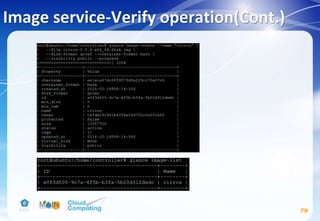
Image service-Verify operation(Cont.)
79
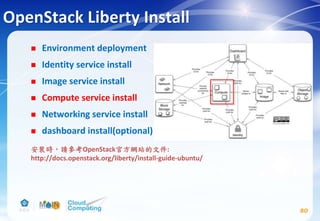
OpenStack Liberty Install
 Environment deployment
 Identity service install
 Image service install
 Compute service install
 Networking service install
 dashboard install(optional)
80
安裝時,請參考OpenStack官方網站的文件:
http://docs.openstack.org/liberty/install-guide-ubuntu/
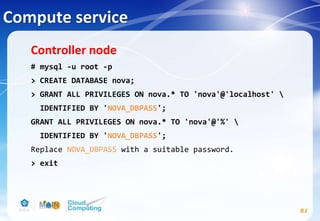
Compute service
81
Controller node
# mysql -u root -p
> CREATE DATABASE nova;
> GRANT ALL PRIVILEGES ON nova.* TO 'nova'@'localhost' 
IDENTIFIED BY 'NOVA_DBPASS';
GRANT ALL PRIVILEGES ON nova.* TO 'nova'@'%' 
IDENTIFIED BY 'NOVA_DBPASS';
Replace NOVA_DBPASS with a suitable password.
> exit
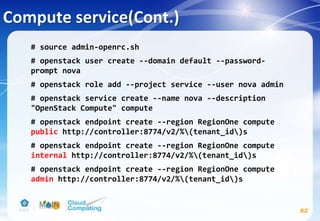
Compute service(Cont.)
82
# source admin-openrc.sh
# openstack user create --domain default --password-
prompt nova
# openstack role add --project service --user nova admin
# openstack service create --name nova --description
"OpenStack Compute" compute
# openstack endpoint create --region RegionOne compute
public http://controller:8774/v2/%(tenant_id)s
# openstack endpoint create --region RegionOne compute
internal http://controller:8774/v2/%(tenant_id)s
# openstack endpoint create --region RegionOne compute
admin http://controller:8774/v2/%(tenant_id)s
Compute service(Cont.)
83
# apt-get install nova-api nova-cert nova-conductor nova-
consoleauth nova-novncproxy nova-scheduler python-
novaclient
# vim /etc/nova/nova.conf
CONTROLLER_IP_ADDRESS在本投影片範例應設為192.168.174.143
參考投影片 p.33 網路環境
[DEFAULT]
...
rpc_backend = rabbit
auth_strategy = keystone
my_ip = CONTROLLER_IP_ADDRESS
network_api_class = nova.network.neutronv2.api.API
security_group_api = neutron
linuxnet_interface_driver =
nova.network.linux_net.NeutronLinuxBridgeInterfaceDriver
firewall_driver = nova.virt.firewall.NoopFirewallDriver
enabled_apis=osapi_compute,metadata
verbose = True
Compute service(Cont.)
84
Replace NOVA_DBPASS with the password you chose for the
Compute database.
Replace RABBIT_PASS with the password you chose for the
openstack account in RabbitMQ.
[database]
...
connection = mysql+pymysql://nova:NOVA_DBPASS@controller/nova
[oslo_messaging_rabbit]
...
rabbit_host = controller
rabbit_userid = openstack
rabbit_password = RABBIT_PASS
Compute service(Cont.)
85
Replace NOVA_PASS with the password you chose for the
nova user in the Identity service.
[keystone_authtoken] #註解掉[keystone_authtoken] section中其他設定
...
auth_uri = http://controller:5000
auth_url = http://controller:35357
auth_plugin = password
project_domain_id = default
user_domain_id = default
project_name = service
username = nova
password = NOVA_PASS
[vnc]
...
vncserver_listen = $my_ip
vncserver_proxyclient_address = $my_ip
Compute service(Cont.)
86
# su -s /bin/sh -c "nova-manage db sync" nova
# service nova-api restart
# service nova-cert restart
# service nova-consoleauth restart
# service nova-scheduler restart
# service nova-conductor restart
# service nova-novncproxy restart
# rm -f /var/lib/nova/nova.sqlite
[glance]
...
host = controller
[oslo_concurrency]
...
lock_path = /var/lib/nova/tmp
Compute service(Cont.)
87
Compute node
# apt-get install nova-compute sysfsutils
# vim /etc/nova/nova.conf
COMPUTE_IP_ADDRESS在本投影片範例應設為192.168.174.144
(參考投影片 p.33 網路環境)
[DEFAULT]
...
rpc_backend = rabbit
auth_strategy = keystone
my_ip = COMPUTE_IP_ADDRESS
network_api_class = nova.network.neutronv2.api.API
security_group_api = neutron
linuxnet_interface_driver =
nova.network.linux_net.NeutronLinuxBridgeInterfaceDriver
firewall_driver = nova.virt.firewall.NoopFirewallDriver
verbose = True
Compute service(Cont.)
88
Replace RABBIT_PASS with the password you chose for the
openstack account in RabbitMQ.
Replace NOVA_PASS with the password you chose for the
nova user in the Identity service.
[oslo_messaging_rabbit]
...
rabbit_host = controller
rabbit_userid = openstack
rabbit_password = RABBIT_PASS
[keystone_authtoken] #註解掉[keystone_authtoken] section中其他設定
...
auth_uri = http://controller:5000
auth_url = http://controller:35357
auth_plugin = password
project_domain_id = default
user_domain_id = default
project_name = service
username = nova
password = NOVA_PASS
Compute service(Cont.)
89
[vnc]
...
enabled = True
vncserver_listen = 0.0.0.0
vncserver_proxyclient_address = $my_ip
novncproxy_base_url = http://controller:6080/vnc_auto.html
[glance]
...
host = controller
[oslo_concurrency]
...
lock_path = /var/lib/nova/tmp
Compute service(Cont.)
# egrep -c '(vmx|svm)' /proc/cpuinfo
→若輸出數值大於等於1則不需做額外設定,若數值等於0:
# vim /etc/nova/nova-compute.conf
kvm改為qemu
# service nova-compute restart
# rm -f /var/lib/nova/nova.sqlite
90
[DEFAULT]
compute_driver=libvirt.LibvirtDriver
[libvirt]
virt_type=kvm
Compute service-Verify operation
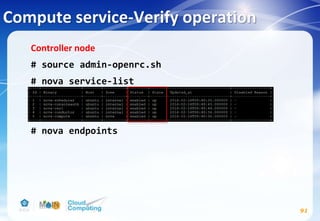
Controller node
# source admin-openrc.sh
# nova service-list
# nova endpoints
91
Compute service-Verify operation(Cont.)
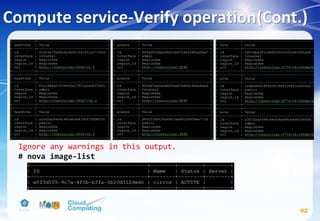
92
Ignore any warnings in this output.
# nova image-list
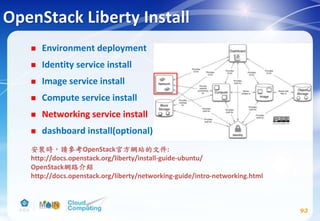
OpenStack Liberty Install
 Environment deployment
 Identity service install
 Image service install
 Compute service install
 Networking service install
 dashboard install(optional)
93
安裝時,請參考OpenStack官方網站的文件:
http://docs.openstack.org/liberty/install-guide-ubuntu/
OpenStack網路介紹
http://docs.openstack.org/liberty/networking-guide/intro-networking.html
Networking service
94
Controller node
# mysql -u root -p
> CREATE DATABASE neutron;
> GRANT ALL PRIVILEGES ON neutron.* TO
'neutron'@'localhost' IDENTIFIED BY 'NEUTRON_DBPASS';
GRANT ALL PRIVILEGES ON neutron.* TO 'neutron'@'%'
IDENTIFIED BY 'NEUTRON_DBPASS';
Replace NEUTRON_DBPASS with a suitable password.
> exit
Networking service(Cont.)
95
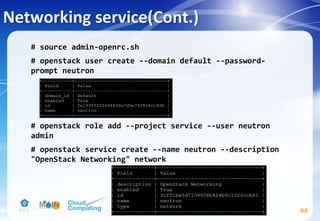
# source admin-openrc.sh
# openstack user create --domain default --password-
prompt neutron
# openstack role add --project service --user neutron
admin
# openstack service create --name neutron --description
"OpenStack Networking" network
Networking service(Cont.)
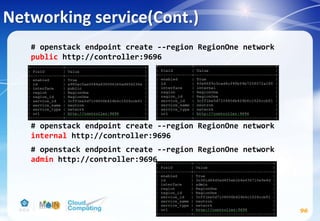
# openstack endpoint create --region RegionOne network
public http://controller:9696
# openstack endpoint create --region RegionOne network
internal http://controller:9696
# openstack endpoint create --region RegionOne network
admin http://controller:9696
96
Networking service(Cont.)
Configure networking options
1. Provider networks: deploys the simplest possible
architecture that only supports attaching instances to
public (provider) networks. No self-service networks,
routers, or floating IP addresses. Only the admin or other
privileged user can manage provider networks.
2. Self-service networks: augments option 1 with layer-3
services that support attaching instances to self-service
(private) networks. The demo or other unprivileged user can
manage self-service networks including routers that provide
connectivity between self-service and provider networks.
Additionally, floating IP addresses provide connectivity to
instances using self-service networks from external networks
such as the Internet.
97
Networking service(Cont.)
98
Controller node
# apt-get install neutron-server neutron-plugin-ml2
neutron-plugin-linuxbridge-agent neutron-l3-agent
neutron-dhcp-agent neutron-metadata-agent python-
neutronclient conntrack
# vim /etc/neutron/neutron.conf
[DEFAULT]
...
core_plugin = ml2
service_plugins = router
allow_overlapping_ips = True
rpc_backend = rabbit
auth_strategy = keystone
notify_nova_on_port_status_changes = True
notify_nova_on_port_data_changes = True
nova_url = http://controller:8774/v2
verbose = True
Networking service(Cont.)
99
Replace NEUTRON_PASS with the password you chose for the
neutron user in the Identity service.
[keystone_authtoken] #註解掉[keystone_authtoken] section中其他設定
...
auth_uri = http://controller:5000
auth_url = http://controller:35357
auth_plugin = password
project_domain_id = default
user_domain_id = default
project_name = service
username = neutron
password = NEUTRON_PASS
Networking service(Cont.)
100
Replace NEUTRON_DBPASS with the password you chose for
the database.
Replace NOVA_PASS with the password you chose for the
nova user in the Identity service.
[database]
...
connection = mysql+pymysql://neutron:NEUTRON_DBPASS@controller/neutron
[nova]
...
auth_url = http://controller:35357
auth_plugin = password
project_domain_id = default
user_domain_id = default
region_name = RegionOne
project_name = service
username = nova
password = NOVA_PASS
Networking service(Cont.)
101
Replace RABBIT_PASS with the password you chose for the
openstack account in RabbitMQ.
[oslo_messaging_rabbit]
...
rabbit_host = controller
rabbit_userid = openstack
rabbit_password = RABBIT_PASS
Networking service(Cont.)
102
# vim /etc/neutron/plugins/ml2/ml2_conf.ini
[ml2]
...
type_drivers = flat,vlan,vxlan
tenant_network_types = vxlan
mechanism_drivers = linuxbridge,l2population
extension_drivers = port_security
[ml2_type_flat]
...
flat_networks = public
[securitygroup]
...
enable_ipset = True
[ml2_type_vxlan]
...
vni_ranges = 1:1000
Networking service(Cont.)
103
# vim /etc/neutron/plugins/ml2/linuxbridge_agent.ini
Replace PUBLIC_INTERFACE_NAME with the name of the
underlying physical public network interface.
PUBLIC_INTERFACE_NAME在本投影片範例應設為 eth0 (參考投影片
p.33 網路環境)
Replace PUBLIC_INTERFACE_IP_ADDRESS with the name of the
underlying physical public network interface.
PUBLIC_INTERFACE_IP_ADDRESS在本投影片範例應設為
192.168.174.143 (參考投影片 p.33 網路環境)
[linux_bridge]
...
physical_interface_mappings = public:PUBLIC_INTERFACE_NAME
[vxlan]
enable_vxlan = True
local_ip = OVERLAY_INTERFACE_IP_ADDRESS
l2_population = True
Networking service(Cont.)
104
[agent]
...
prevent_arp_spoofing = True
[securitygroup]
...
enable_security_group = True
firewall_driver = neutron.agent.linux.iptables_firewall.IptablesFirewallDriver
Networking service(Cont.)
105
# vim /etc/neutron/l3_agent.ini
# vim /etc/neutron/dhcp_agent.ini
# vim /etc/neutron/dnsmasq-neutron.conf
[DEFAULT]
...
verbose = True
interface_driver = neutron.agent.linux.interface.BridgeInterfaceDriver
dhcp_driver = neutron.agent.linux.dhcp.Dnsmasq
enable_isolated_metadata = True
dnsmasq_config_file = /etc/neutron/dnsmasq-neutron.conf
[DEFAULT]
...
interface_driver = neutron.agent.linux.interface.BridgeInterfaceDriver
external_network_bridge =
verbose = True
dhcp-option-force=26,1450
Networking service(Cont.)
106
# vim /etc/neutron/metadata_agent.ini
Replace NEUTRON_PASS with the password you chose for the
neutron user in the Identity service & Replace
METADATA_SECRET with a suitable secret for the metadata
proxy.
[DEFAULT]
...
auth_uri = http://controller:5000
auth_url = http://controller:35357
auth_region = RegionOne
auth_plugin = password
project_domain_id = default
user_domain_id = default
project_name = service
username = neutron
password = NEUTRON_PASS
nova_metadata_ip = controller
metadata_proxy_shared_secret = METADATA_SECRET
verbose = True
Networking service(Cont.)
107
# vim /etc/nova/nova.conf
Replace NEUTRON_PASS with the password you chose for the
neutron user in the Identity service & Replace
METADATA_SECRET with the secret you chose for the
metadata proxy.
[neutron]
...
url = http://controller:9696
auth_url = http://controller:35357
auth_plugin = password
project_domain_id = default
user_domain_id = default
region_name = RegionOne
project_name = service
username = neutron
password = NEUTRON_PASS
service_metadata_proxy = True
metadata_proxy_shared_secret = METADATA_SECRET
Networking service(Cont.)
108
# su -s /bin/sh -c "neutron-db-manage --config-file
/etc/neutron/neutron.conf --config-file
/etc/neutron/plugins/ml2/ml2_conf.ini upgrade head"
neutron
# service nova-api restart
# service neutron-server restart
# service neutron-plugin-linuxbridge-agent restart
# service neutron-dhcp-agent restart
# service neutron-metadata-agent restart
# service neutron-l3-agent restart
# rm -f /var/lib/neutron/neutron.sqlite
Networking service
109
Compute node
# apt-get install neutron-plugin-linuxbridge-agent
conntrack
# vim /etc/neutron/neutron.conf
In the [database] section, comment out any connection
options because compute nodes do not directly access the
database.
[DEFAULT]
...
rpc_backend = rabbit
auth_strategy = keystone
verbose = True
Networking service(Cont.)
110
Replace RABBIT_PASS with the password you chose for the
openstack account in RabbitMQ & Replace NEUTRON_PASS with
the password you chose for the neutron user in the
Identity service.
[oslo_messaging_rabbit]
...
rabbit_host = controller
rabbit_userid = openstack
rabbit_password = RABBIT_PASS
[keystone_authtoken] #註解掉[keystone_authtoken] section中其他設定
...
auth_uri = http://controller:5000
auth_url = http://controller:35357
auth_plugin = password
project_domain_id = default
user_domain_id = default
project_name = service
username = neutron
password = NEUTRON_PASS
Networking service(Cont.)
111
# vim /etc/neutron/plugins/ml2/linuxbridge_agent.ini
Replace PUBLIC_INTERFACE_NAME with the name of the
underlying physical public network interface.
PUBLIC_INTERFACE_NAME在本投影片範例應設為 eth0 (參考投影片
p.33 網路環境)
Replace OVERLAY_INTERFACE_IP_ADDRESS with the name of the
underlying physical public network interface.
PUBLIC_INTERFACE_IP_ADDRESS在本投影片範例應設為
192.168.174.144 (參考投影片 p.33 網路環境)
[linux_bridge]
...
physical_interface_mappings = public:PUBLIC_INTERFACE_NAME
[vxlan]
enable_vxlan = True
local_ip = OVERLAY_INTERFACE_IP_ADDRESS
l2_population = True
Networking service(Cont.)
112
[agent]
...
prevent_arp_spoofing = True
[securitygroup]
...
enable_security_group = True
firewall_driver = neutron.agent.linux.iptables_firewall.IptablesFirewallDriver
Networking service(Cont.)
113
# vim /etc/nova/nova.conf
Replace NEUTRON_PASS with the password you chose for the
neutron user in the Identity service.
# service nova-compute restart
# service neutron-plugin-linuxbridge-agent restart
[neutron]
...
url = http://controller:9696
auth_url = http://controller:35357
auth_plugin = password
project_domain_id = default
user_domain_id = default
region_name = RegionOne
project_name = service
username = neutron
password = NEUTRON_PASS
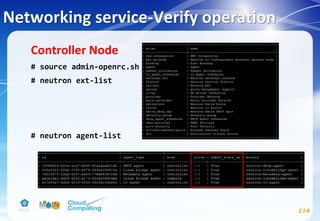
Networking service-Verify operation
114
Controller Node
# source admin-openrc.sh
# neutron ext-list
# neutron agent-list
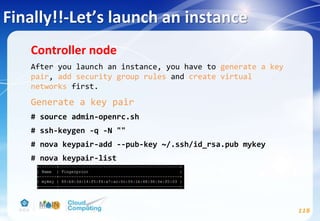
Finally!!-Let’s launch an instance
115
Controller node
After you launch an instance, you have to generate a key
pair, add security group rules and create virtual
networks first.
Generate a key pair
# source admin-openrc.sh
# ssh-keygen -q -N ""
# nova keypair-add --pub-key ~/.ssh/id_rsa.pub mykey
# nova keypair-list
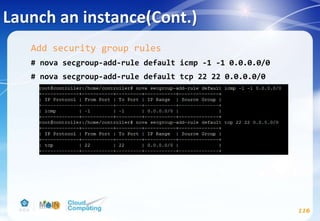
Launch an instance(Cont.)
116
Add security group rules
# nova secgroup-add-rule default icmp -1 -1 0.0.0.0/0
# nova secgroup-add-rule default tcp 22 22 0.0.0.0/0
Launch an instance(Cont.)
117
Create virtual networks
This section creates the necessary virtual networks to support
launching one more instances. Networking option 1 includes one
public virtual network and one instance that uses it.
Networking option 2 includes one public virtual network, one
private virtual network, and one instance that uses each
network. The instructions in this section use command-line
interface (CLI) tools on the controller node.
Create virtual networks for the networking option that you
chose at Page.98. If you chose option 1(Provider networks),
create only the public virtual network. If you chose option
2(Self-service networks), create the public and private virtual
networks.
Launch an instance(Cont.)
118
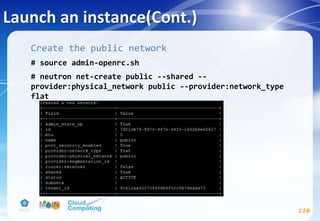
Create the public network
# source admin-openrc.sh
# neutron net-create public --shared --
provider:physical_network public --provider:network_type
flat
Launch an instance(Cont.)
119
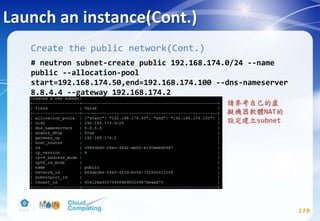
Create the public network(Cont.)
# neutron subnet-create public 192.168.174.0/24 --name
public --allocation-pool
start=192.168.174.50,end=192.168.174.100 --dns-nameserver
8.8.4.4 --gateway 192.168.174.2
請參考自己的虛
擬機器軟體NAT的
設定建立subnet
Launch an instance(Cont.)
120
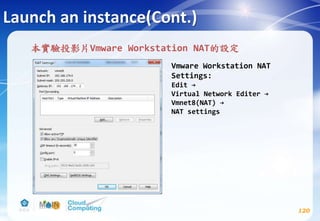
本實驗投影片Vmware Workstation NAT的設定
Vmware Workstation NAT
Settings:
Edit →
Virtual Network Editer →
Vmnet8(NAT) →
NAT settings
Launch an instance(Cont.)
121
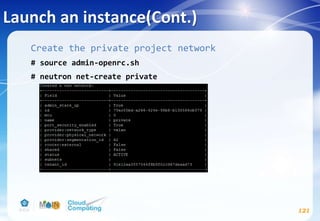
Create the private project network
# source admin-openrc.sh
# neutron net-create private
Launch an instance(Cont.)
122
Create the private project network(Cont.)
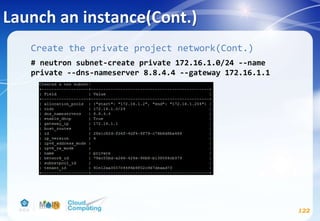
# neutron subnet-create private 172.16.1.0/24 --name
private --dns-nameserver 8.8.4.4 --gateway 172.16.1.1
Launch an instance(Cont.)
123
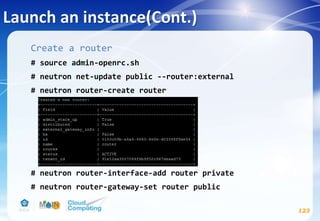
Create a router
# source admin-openrc.sh
# neutron net-update public --router:external
# neutron router-create router
# neutron router-interface-add router private
# neutron router-gateway-set router public
Launch an instance(Cont.)
124
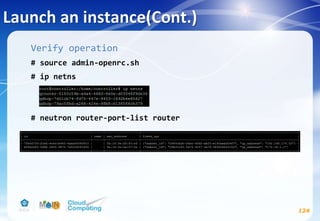
Verify operation
# source admin-openrc.sh
# ip netns
# neutron router-port-list router
Launch an instance(Cont.)
125
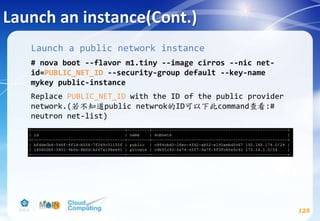
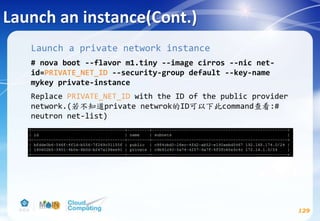
Launch a public network instance
# nova boot --flavor m1.tiny --image cirros --nic net-
id=PUBLIC_NET_ID --security-group default --key-name
mykey public-instance
Replace PUBLIC_NET_ID with the ID of the public provider
network.(若不知道public netwrok的ID可以下此command查看:#
neutron net-list)
Launch an instance(Cont.)
126
Launch a public network instance(Cont.)
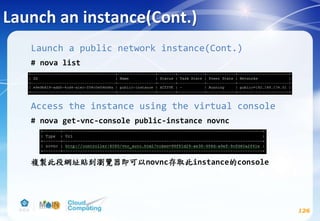
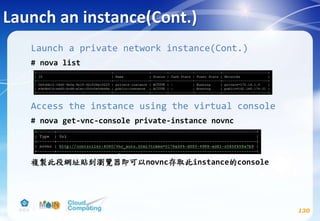
# nova list
Access the instance using the virtual console
# nova get-vnc-console public-instance novnc
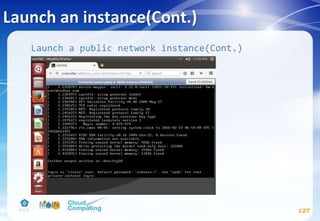
複製此段網址貼到瀏覽器即可以novnc存取此instance的console
Launch an instance(Cont.)
127
Launch a public network instance(Cont.)
Launch an instance(Cont.)
128
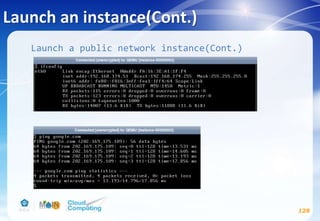
Launch a public network instance(Cont.)
Launch an instance(Cont.)
129
Launch a private network instance
# nova boot --flavor m1.tiny --image cirros --nic net-
id=PRIVATE_NET_ID --security-group default --key-name
mykey private-instance
Replace PRIVATE_NET_ID with the ID of the public provider
network.(若不知道private netwrok的ID可以下此command查看:#
neutron net-list)
Launch an instance(Cont.)
130
Launch a private network instance(Cont.)
# nova list
Access the instance using the virtual console
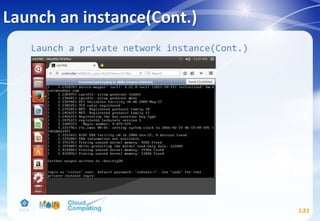
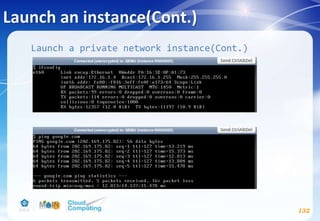
# nova get-vnc-console private-instance novnc
複製此段網址貼到瀏覽器即可以novnc存取此instance的console
Launch an instance(Cont.)
131
Launch a private network instance(Cont.)
Launch an instance(Cont.)
132
Launch a private network instance(Cont.)
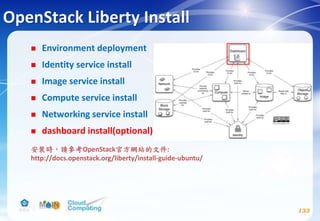
OpenStack Liberty Install
 Environment deployment
 Identity service install
 Image service install
 Compute service install
 Networking service install
 dashboard install(optional)
133
安裝時,請參考OpenStack官方網站的文件:
http://docs.openstack.org/liberty/install-guide-ubuntu/
Dashboard(optional)
134
Controller node
# apt-get install openstack-dashboard
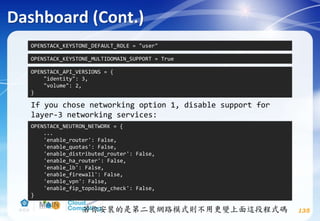
# vim /etc/openstack-dashboard/local_settings.py
Comment out any other session storage configuration.
OPENSTACK_HOST = "controller"
ALLOWED_HOSTS = ['*', ]
CACHES = {
'default': {
'BACKEND': 'django.core.cache.backends.memcached.MemcachedCache',
'LOCATION': '127.0.0.1:11211',
}
}
Dashboard (Cont.)
135
OPENSTACK_KEYSTONE_DEFAULT_ROLE = "user"
OPENSTACK_KEYSTONE_MULTIDOMAIN_SUPPORT = True
OPENSTACK_API_VERSIONS = {
"identity": 3,
"volume": 2,
}
OPENSTACK_NEUTRON_NETWORK = {
...
'enable_router': False,
'enable_quotas': False,
'enable_distributed_router': False,
'enable_ha_router': False,
'enable_lb': False,
'enable_firewall': False,
'enable_vpn': False,
'enable_fip_topology_check': False,
}
If you chose networking option 1, disable support for
layer-3 networking services:
若你安裝的是第二裝網路模式則不用更變上面這段程式碼
Dashboard (Cont.)
136
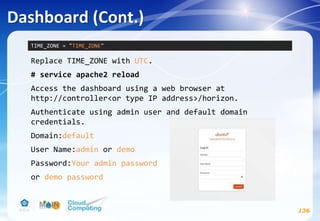
Replace TIME_ZONE with UTC.
# service apache2 reload
Access the dashboard using a web browser at
http://controller<or type IP address>/horizon.
Authenticate using admin user and default domain
credentials.
Domain:default
User Name:admin or demo
Password:Your admin password
or demo password
TIME_ZONE = "TIME_ZONE"
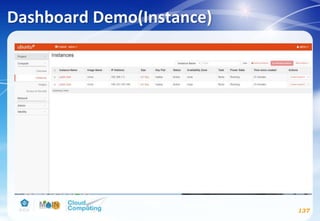
Dashboard Demo(Instance)
137
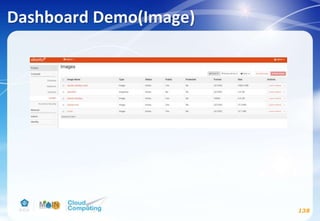
Dashboard Demo(Image)
138
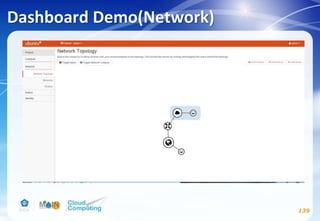
Dashboard Demo(Network)
139
Resources
 OpenStack Documentation
http://docs.openstack.org/
 OpenStack facebook Taiwan
https://www.facebook.com/groups/openstack.tw/?fref=ts
 Ask.OpenStack
https://ask.openstack.org/en/questions/
140
References
 OpenStack Documentation
http://docs.openstack.org/
 OpenStack GitBook
https://kairen.gitbooks.io/openstack/content/
141
Any Question?

Openstack Installation (ver. liberty)

  • 1.
  • 2.
    Learning Objectives  Thischapter examine OpenStack architecture and how to install OpenStack. By the time you finish this chapter, you will be able to do the following :  Describe OpenStack architecture  Understand OpenStack components  How to install OpenStack Liberty 2

  • 3.
    Outline  虛擬化技術介紹  Introductionto OpenStack  Components of OpenStack  OpenStack install 3
  • 4.
  • 5.
    硬體虛擬化技術  硬體虛擬化的架構是用軟體建立一個模擬真實電腦硬體的 虛擬機器(Virtual Machine),而原本執行在實際電腦硬 體的作業系統,則運作執行在這個虛擬機器上,虛擬機器 內運行的作業系統與實際的電腦硬體之間,會有軟體介面 隔離控制這些虛擬機器對硬體的存取。 進行硬體虛擬化的系統軟體則被稱作Hypervisor或虛擬機 器管理員(Virtual Machine Manager),Hypervisor因為 主要是在控制虛擬機器的運作,又被稱為虛擬機器監視器 (Virtual Machine Monitor),縮寫為VMM。  OpenSource:KVM、Xen 5 參考資料: http://www.netadmin.com.tw/article_content.aspx?sn=141 2020002
  • 6.
  • 7.
    作業系統層級的虛擬化技術  作業系統層級虛擬化技術的架構,則是藉由讓作業系統核 心可以建立多個隔離的使用者空間運作實體技術來達成, 使用者在這些隔離的使用者空間中運作,感覺就像在實際 獨立的環境內運作一樣,而這些隔離的使用者空間運作實 體又被稱為容器(Containers)、虛擬化引擎( Virtualization Engines,VE)、虛擬私有伺服器(Virtual PrivateServers,VPS)或叫囚室(jails)。  作業系統核心同時也提供管理這些運作實體使用資源的機 制,避免單一運作實體使用系統資源過度,而影響到其他 運作實體。  OpenSource:Docker、OpenVZ 7 參考資料: http://www.netadmin.com.tw/article_content.aspx?sn=141 2020002
  • 8.
    Linux Container  透過Container 技術可以讓 DevOps 更容易,省去了不少 時間與資源成本。  Linux Container技術是一個內建於Linux的新一代虛擬化技 術,不同於虛擬機器是一整臺實體電腦的虛擬化,LXC則 是應用程式的虛擬化。LXC將應用系統打包成一個 Container,裡面只包含了應用程式的程式碼、所需作業系 統核心和函式庫,透過統一的命名空間和共用API來分配 不同應用程式所在Container的可用硬體資源,來創造出應 用程式的獨立沙箱執行環境。因為LXC技術不需要多一個 Hypervisor軟體層,因此, Container容量小且輕量化,可 以在數秒內建立應用程式所需的執行環境,遠快於利用傳 統虛擬化技術需要數分鐘才能建立虛擬機器的時間。 8 參考資料: http://www.ithome.com.tw/news/90440
  • 9.
    Docker  原本Docker是以Linux容器(Linux Container,LXC)技術 為基礎,LXC是一個使用者空間工具(User-spaceTools) ,提供一個系統介面以銜接核心空間(Kernel-space)所 提供的作業系統層級虛擬化功能,如控制群組(Control Groups,cgroups)或核心命名空間(Kernel Namespaces )。不過,Docker在0.9版開始便自行以Google發展的Go 程式語言開發libcontainer程式庫以取代LXC。  Docker因為提供了簡易好用的工具及環境,因此成為新崛 起且非常熱門的Linux作業系統層級虛擬化技術, OpenStack計畫開始將Docker整合進入其雲端平台中。 9 參考資料: http://www.ithome.com.tw/news/90440
  • 10.
  • 11.
    Amazon EC2  AmazonElastic Compute Cloud(Amazon EC2) ,由亞馬遜公 司提供的web服務,是一個讓使用者可以租用雲端電腦運 行所需應用的系統。EC2藉由提供web服務的方式讓使用 者可以彈性地運行自己的Amazon機器映像檔,使用者將 可以在這個虛擬機器上運行任何自己想要的軟體或應用程 式。 使用者可以隨時創建、執行、終止自己的虛擬伺服 器,使用多少時間算多少錢,也因此這個系統是"彈性"使 用的。 11 參考資料: https://www.openfoundry.org/tw/resourcecatalog/Cloud- Computing/Infrastructure-Layer/Computing/Amazon-EC2
  • 12.
    OpenStack簡介  OpenStack 專案已經有五年的時間了,從2010 年 7 月開 始開發,原先是由 NASA 主導的專案 Nebula。後來 NASA 與雲端服務廠商 Rackspace 合作,演變成現在熟知的雲端 運算平臺 OpenStack。  由於 OpenStack 採用開放原始碼授權,Apache 授權協議 ,相較 GPL 類授權比較寬鬆,因此不少企業選擇 OpenStack 節省成本。OpenStack 也讓擴大服務能量成為 可能,很容易就橫向擴展(Horizontal Scaling)規模。 12
  • 13.
    OpenStack Releases Release NameRelease Date Included Components Austin 21 October 2010 Nova, Swift Bexar 3 February 2011 Nova, Glance, Swift Cactus 15 April 2011 Nova, Glance, Swift Diablo 22 September 2011 Nova, Glance, Swift Essex 5 April 2012 Nova, Glance, Swift, Horizon, Keystone Folsom 27 September 2012 Nova, Glance, Swift, Horizon, Keystone, Quantum, Cinder Grizzly 4 April 2013 Nova, Glance, Swift, Horizon, Keystone, Quantum, Cinder Havana 17 October 2013 Nova, Glance, Swift, Horizon, Keystone, Neutron, Cinder, Ceilometer, Heat Icehouse 17 April 2014 Nova, Glance, Swift, Horizon, Keystone, Neutron, Cinder, Ceilometer, Heat, Trove Juno October 2014 Nova, Glance, Swift, Horizon, Keystone, Neutron, Cinder, Ceilometer, Heat, Trove, Sahara Kilo April 2015 Nova, Glance, Swift, Horizon, Keystone, Neutron, Cinder, Ceilometer, Heat, Trove, Sahara, Ironic *Liberty 16 October 2015 Nova, Glance, Swift, Horizon, Keystone, Neutron, Cinder, Heat, Ceilometer, Trove, Sahara, Ironic, Zaqar, Manila, Designate, Barbican 13 *為現在Releases最新版本
  • 14.
  • 15.
  • 16.
    OpenStack users  PayPal/ eBay  NASA  Yahoo!  HP Public Cloud  Wikimedia Labs  Cisco WebEx  more…(http://www.openstack.org/user-stories) 16
  • 17.
    OpenStack Overview  Whatis OpenStack?  Open Source Cloud Software  mostly deployed as an infrastructure-as-a-service (IaaS)  Combines compute, network and storage resources  Web portal for cloud admins and self-service users  Cloud services exposed through APIs 17
  • 18.
    Components of OpenStack-Nova 18 Nova– Compute: It provides virtual servers upon demand. Nova is the most complicated and distributed component of OpenStack. A large number of processes cooperate to turn end user API requests into running virtual machines.
  • 19.
    Components of OpenStack-Glance 19 Glance– Image Store: It provides discovery, registration and delivery services for disk and server images. Glance accepts API requests for images (or image metadata) from end users or Nova components and can store its disk files in the object storage service, Swift or other storage repository.
  • 20.
    Components of OpenStack-Neutron 20 Neutron– Network: It provides “ network connectivity as a service ” between interface devices (e.g., vNICs) managed by other OpenStack services (e.g., nova). The service works by allowing users to create their own networks and then attach interfaces to them. Neutron will interact mainly with Nova, where it will provide networks and connectivity for its instances.
  • 21.
    Components of OpenStack-Swift 21 Swift– Object Storage: Object store allows you to store or retrieve files. It provides a fully distributed, API-accessible storage platform that can be integrated directly into applications or used for backup, archiving and data retention.
  • 22.
    Components of OpenStack-Cinder 22 Cinder– Block Storage: Cinder is more analogous to the traditional notion of a computer being able to access specific locations on a disk drive. This more traditional way of accessing files might be important in scenarios in which data access speed is the most important consideration.
  • 23.
    Components of OpenStack-Keystone 23 Keystone– Identity: Keystone is a framework for authentication and authorization for all the OpenStack services. It handles API requests as well as providing configurable catalog, policy, token and identity services. It provides the ability to add users to and to manage permissions between users and groups. Permissions include the ability to launch and terminate instances.
  • 24.
    Components of OpenStack-Horizon 24 Horizon– Dashboard: It provides a modular web-based user interface for all the OpenStack services. With this web GUI, you can perform most operations on your cloud like launching an instance, assigning IP addresses and setting access controls.
  • 25.
    Components of OpenStack-Ceilometer 25 Ceilometer– Telemetry: Ceilometer was originally designed to support billing systems for OpenStack cloud resources. This project only covers the metering portion of the required processing for billing. This service collects information about the system and stores it in the form of samples in order to provide data about anything that can be billed.
  • 26.
    Components of OpenStack-Heat 26 Heat– Orchestration: Heat stacks are defined with templates, which are non-procedural documents that describe tasks in terms of resources, parameters, inputs, constraints, and dependencies. When the Orchestration service was originally introduced, it worked with AWS CloudFormation templates, which are in the JSON format.
  • 27.
     Sahara -Data Processing  Trove - Database as a Service  Ironic - Bare Metal  Zaqar - Message service  Barbican - Key management  Designate DNS - DNS  Manila - Shared Filesystems  Magnum - Containers service  Murano - Application catalog 27 Components of OpenStack-Others
  • 28.
    OpenStack Liberty Install Environment deployment  Identity service install  Image service install  Compute service install  Networking service install  Dashboard install(optional) 28 安裝時,請參考OpenStack官方網站的文件: http://docs.openstack.org/liberty/install-guide-ubuntu/ OpenStack Liberty官方demo影片:https://www.youtube.com/watch?v=e7r2-p8Mki4
  • 29.
    Environment deployment  Environmentdeployment  Identity service install  Image service install  Compute service install  Networking service install  Dashboard install(optional) 29 安裝時,請參考OpenStack官方網站的文件: http://docs.openstack.org/liberty/install-guide-ubuntu/environment.html
  • 30.
  • 31.
  • 32.
  • 33.
  • 34.
  • 35.
    本範例映像檔使用Ubuntu desktop 64位元14.04版本 Environment-新增虛擬機(Cont.) 35
  • 36.
  • 37.
  • 38.
  • 39.
  • 40.
  • 41.
    另外要將兩台VM的硬體資源做調整 Controller node memory調成4G以上,Computenode memory調成2G以上 Controller/Compute node processors 2顆以上 然後再按Add… Environment-Networking(Cont.) 41
  • 42.
  • 43.
  • 44.
    新增兩個LAN segemants forcontroller node and compute node Environment-Networking(Cont.) 44
  • 45.
    Controller node 與Compute node 分別各選一個 LAN segement Environment-Networking(Cont.) 45
  • 46.
  • 47.
    Environment-Networking(Cont.) Controller node # vim/etc/network/interfaces # vim /etc/hosts # vim /etc/hostname ubuntu改成controller → reboot your VM 47
  • 48.
    Environment-Networking(Cont.) Compute node # vim/etc/network/interfaces # vim /etc/hosts # vim /etc/hostname ubuntu改成compute → reboot your VM 48
  • 49.
    Verify connectivity Controller node #ping compute Compute node # ping controller 49
  • 50.
    Environment-OpenStack package All nodes #apt-get install software-properties-common # add-apt-repository cloud-archive:liberty # apt-get update && apt-get dist-upgrade # apt-get install python-openstackclient 50
  • 51.
    Environment-SQL database Controller node #apt-get install mariadb-server python-pymysql → 設定SQL password # vim /etc/mysql/conf.d/mysqld_openstack.cnf # service mysql restart 51 Bind-address設定 controller node的IP address
  • 52.
    Environment-Message queue Controller node #apt-get install rabbitmq-server # rabbitmqctl add_user openstack RABBIT_PASS Replace RABBIT_PASS with a suitable password. # rabbitmqctl set_permissions openstack ".*" ".*" ".*" 52
  • 53.
    Identity service  Environmentdeployment  Identity service install  Image service install  Compute service install  Networking service install  dashboard install(optional) 53 安裝時,請參考OpenStack官方網站的文件: http://docs.openstack.org/liberty/install-guide-ubuntu/keystone.html
  • 54.
    Identity service(Cont.) 54 Controller node #mysql –u root -p > CREATE DATABASE keystone; > GRANT ALL PRIVILEGES ON keystone.* TO 'keystone'@'localhost' IDENTIFIED BY 'KEYSTONE_DBPASS'; GRANT ALL PRIVILEGES ON keystone.* TO 'keystone'@'%' IDENTIFIED BY 'KEYSTONE_DBPASS'; Replace KEYSTONE_DBPASS with a suitable password. > exit
  • 55.
    Identity service(Cont.) 55 # opensslrand -hex 10 → 記下這個random value # echo "manual" > /etc/init/keystone.override # apt-get install keystone apache2 libapache2-mod-wsgi memcached python-memcache # vim /etc/keystone/keystone.conf Replace ADMIN_TOKEN with the random value that you generated in a previous step. [DEFAULT] ... admin_token = ADMIN_TOKEN verbose = True
  • 56.
    Identity service(Cont.) 56 Replace KEYSTONE_DBPASSwith the password you chose for the database. # su -s /bin/sh -c "keystone-manage db_sync" keystone [database] ... connection = mysql+pymysql://keystone:KEYSTONE_DBPASS@controller/keystone [memcache] ... servers = localhost:11211 [token] ... provider = uuid driver = memcache [revoke] ... driver = sql
  • 57.
    Identity service(Cont.) # vim/etc/apache2/apache2.conf # vim /etc/apache2/sites-available/wsgi-keystone.conf 57 ... ServerName controller ... Listen 5000 Listen 35357 <VirtualHost *:5000> WSGIDaemonProcess keystone-public processes=5 threads=1 user=keystone group=keystone display-name=%{GROUP} WSGIProcessGroup keystone-public WSGIScriptAlias / /usr/bin/keystone-wsgi-public WSGIApplicationGroup %{GLOBAL} WSGIPassAuthorization On <IfVersion >= 2.4> ErrorLogFormat "%{cu}t %M" </IfVersion> ErrorLog /var/log/apache2/keystone.log CustomLog /var/log/apache2/keystone_access.log combined
  • 58.
    Identity service(Cont.) 58 <Directory /usr/bin> <IfVersion>= 2.4> Require all granted </IfVersion> <IfVersion < 2.4> Order allow,deny Allow from all </IfVersion> </Directory> </VirtualHost> <VirtualHost *:35357> WSGIDaemonProcess keystone-admin processes=5 threads=1 user=keystone group=keystone display-name=%{GROUP} WSGIProcessGroup keystone-admin WSGIScriptAlias / /usr/bin/keystone-wsgi-admin WSGIApplicationGroup %{GLOBAL} WSGIPassAuthorization On <IfVersion >= 2.4> ErrorLogFormat "%{cu}t %M" </IfVersion>
  • 59.
    Identity service(Cont.) # ln-s /etc/apache2/sites-available/wsgi-keystone.conf /etc/apache2/sites-enabled # service apache2 restart # rm -f /var/lib/keystone/keystone.db 59 ErrorLog /var/log/apache2/keystone.log CustomLog /var/log/apache2/keystone_access.log combined <Directory /usr/bin> <IfVersion >= 2.4> Require all granted </IfVersion> <IfVersion < 2.4> Order allow,deny Allow from all </IfVersion> </Directory> </VirtualHost>
  • 60.
    Identity service(Cont.) # exportOS_TOKEN=ADMIN_TOKEN Replace ADMIN_TOKEN with the random value that you generated from page 56 # export OS_URL=http://controller:35357/v3 # export OS_IDENTITY_API_VERSION=3 # openstack service create --name keystone --description "OpenStack Identity" identity 60
  • 61.
    Identity service(Cont.) # openstackendpoint create --region RegionOne identity public http://controller:5000/v2.0 # openstack endpoint create --region RegionOne identity internal http://controller:5000/v2.0 # openstack endpoint create --region RegionOne identity admin http://controller:35357/v2.0 61 三個endpoint說明請參考: http://docs.openstack.org/liberty/ install-guide-ubuntu/keystone- services.html
  • 62.
    Identity service(Cont.) # openstackproject create --domain default -- description "Admin Project" admin # openstack user create --domain default --password- prompt admin 62
  • 63.
    Identity service(Cont.) # openstackrole create admin # openstack role add --project admin --user admin admin # openstack project create --domain default -- description "Service Project" service 63
  • 64.
    Identity service(Cont.) # openstackproject create --domain default -- description "Demo Project" demo # openstack user create --domain default --password- prompt demo 64
  • 65.
    Identity service(Cont.) # openstackrole create user # openstack role add --project demo --user demo user 65
  • 66.
    Identity service-Verify operation 66 #vim /etc/keystone/keystone-paste.ini remove admin_token_auth from the [pipeline:public_api], [pipeline:admin_api], and [pipeline:api_v3] sections.
  • 67.
    Identity service-Verify operation(Cont.) #unset OS_TOKEN OS_URL # openstack --os-auth-url http://controller:35357/v3 -- os-project-domain-id default --os-user-domain-id default --os-project-name admin --os-username admin --os-auth- type password token issue # openstack --os-auth-url http://controller:5000/v3 -- os-project-domain-id default --os-user-domain-id default --os-project-name demo --os-username demo --os-auth-type password token issue 67
  • 68.
    → 建立兩個檔案admin-openrc.sh(上), demo-openrc.sh(下) ReplaceADMIN_PASS/DEMO_PASS with the password you chose for the demo user in the Identity service. Create client environment scripts 68 export OS_PROJECT_DOMAIN_ID=default export OS_USER_DOMAIN_ID=default export OS_PROJECT_NAME=admin export OS_TENANT_NAME=admin export OS_USERNAME=admin export OS_PASSWORD=ADMIN_PASS export OS_AUTH_URL=http://controller:35357/v3 export OS_IDENTITY_API_VERSION=3 export OS_PROJECT_DOMAIN_ID=default export OS_USER_DOMAIN_ID=default export OS_PROJECT_NAME=demo export OS_TENANT_NAME=demo export OS_USERNAME=demo export OS_PASSWORD=DEMO_PASS export OS_AUTH_URL=http://controller:5000/v3 export OS_IDENTITY_API_VERSION=3
  • 69.
    Using the scripts #source admin-openrc.sh # openstack token issue 69
  • 70.
    OpenStack Liberty Install Environment deployment  Identity service install  Image service install  Compute service install  Networking service install  dashboard install(optional) 70 安裝時,請參考OpenStack官方網站的文件: http://docs.openstack.org/liberty/install-guide-ubuntu/glance.html
  • 71.
    Image service 71 Controller node #mysql -u root -p > CREATE DATABASE glance; > GRANT ALL PRIVILEGES ON glance.* TO 'glance'@'localhost' IDENTIFIED BY 'GLANCE_DBPASS'; GRANT ALL PRIVILEGES ON glance.* TO 'glance'@'%' IDENTIFIED BY 'GLANCE_DBPASS'; Replace GLANCE_DBPASS with a suitable password. > exit
  • 72.
    Image service(Cont.) 72 # sourceadmin-openrc.sh # openstack user create --domain default --password- prompt glance # openstack role add --project service --user glance admin # openstack service create --name glance --description "OpenStack Image service" image
  • 73.
    Image service (Cont.) #openstack endpoint create --region RegionOne image public http://controller:9292 # openstack endpoint create --region RegionOne image internal http://controller:9292 # openstack endpoint create --region RegionOne image admin http://controller:9292 73
  • 74.
    Image service(Cont.) 74 # apt-getinstall glance python-glanceclient # vim /etc/glance/glance-api.conf Replace GLANCE_DBPASS with the password you chose for the Image service database & Replace GLANCE_PASS with the password you chose for the glance user in the Identity service. [database] ... connection = mysql+pymysql://glance:GLANCE_DBPASS@controller/glance [keystone_authtoken] #註解掉[keystone_authtoken] section中其他設定 ... auth_uri = http://controller:5000 auth_url = http://controller:35357 auth_plugin = password project_domain_id = default user_domain_id = default project_name = service username = glance password = GLANCE_PASS
  • 75.
    Image service(Cont.) 75 [paste_deploy] ... flavor =keystone [glance_store] ... default_store = file filesystem_store_datadir = /var/lib/glance/images/ [DEFAULT] ... notification_driver = noop verbose = True
  • 76.
    Image service(Cont.) 76 # vim/etc/glance/glance-registry.conf Replace GLANCE_DBPASS with the password you chose for the Image service database & Replace GLANCE_PASS with the password you chose for the glance user in the Identity service. [database] ... connection = mysql+pymysql://glance:GLANCE_DBPASS@controller/glance [keystone_authtoken] #註解掉[keystone_authtoken] section中其他設定 ... auth_uri = http://controller:5000 auth_url = http://controller:35357 auth_plugin = password project_domain_id = default user_domain_id = default project_name = service username = glance password = GLANCE_PASS
  • 77.
    # su -s/bin/sh -c "glance-manage db_sync" glance # service glance-registry restart # service glance-api restart # rm -f /var/lib/glance/glance.sqlite Image service(Cont.) 77 [paste_deploy] ... flavor = keystone [DEFAULT] ... notification_driver = noop verbose = True
  • 78.
    Image service-Verify operation #echo "export OS_IMAGE_API_VERSION=2" | tee -a admin- openrc.sh demo-openrc.sh # source admin-openrc.sh # wget http://download.cirros-cloud.net/0.3.4/cirros- 0.3.4-x86_64-disk.img # glance image-create --name "cirros" --file cirros-0.3.4-x86_64-disk.img --disk-format qcow2 --container-format bare --visibility public --progress # glance image-list 78
  • 79.
  • 80.
    OpenStack Liberty Install Environment deployment  Identity service install  Image service install  Compute service install  Networking service install  dashboard install(optional) 80 安裝時,請參考OpenStack官方網站的文件: http://docs.openstack.org/liberty/install-guide-ubuntu/
  • 81.
    Compute service 81 Controller node #mysql -u root -p > CREATE DATABASE nova; > GRANT ALL PRIVILEGES ON nova.* TO 'nova'@'localhost' IDENTIFIED BY 'NOVA_DBPASS'; GRANT ALL PRIVILEGES ON nova.* TO 'nova'@'%' IDENTIFIED BY 'NOVA_DBPASS'; Replace NOVA_DBPASS with a suitable password. > exit
  • 82.
    Compute service(Cont.) 82 # sourceadmin-openrc.sh # openstack user create --domain default --password- prompt nova # openstack role add --project service --user nova admin # openstack service create --name nova --description "OpenStack Compute" compute # openstack endpoint create --region RegionOne compute public http://controller:8774/v2/%(tenant_id)s # openstack endpoint create --region RegionOne compute internal http://controller:8774/v2/%(tenant_id)s # openstack endpoint create --region RegionOne compute admin http://controller:8774/v2/%(tenant_id)s
  • 83.
    Compute service(Cont.) 83 # apt-getinstall nova-api nova-cert nova-conductor nova- consoleauth nova-novncproxy nova-scheduler python- novaclient # vim /etc/nova/nova.conf CONTROLLER_IP_ADDRESS在本投影片範例應設為192.168.174.143 參考投影片 p.33 網路環境 [DEFAULT] ... rpc_backend = rabbit auth_strategy = keystone my_ip = CONTROLLER_IP_ADDRESS network_api_class = nova.network.neutronv2.api.API security_group_api = neutron linuxnet_interface_driver = nova.network.linux_net.NeutronLinuxBridgeInterfaceDriver firewall_driver = nova.virt.firewall.NoopFirewallDriver enabled_apis=osapi_compute,metadata verbose = True
  • 84.
    Compute service(Cont.) 84 Replace NOVA_DBPASSwith the password you chose for the Compute database. Replace RABBIT_PASS with the password you chose for the openstack account in RabbitMQ. [database] ... connection = mysql+pymysql://nova:NOVA_DBPASS@controller/nova [oslo_messaging_rabbit] ... rabbit_host = controller rabbit_userid = openstack rabbit_password = RABBIT_PASS
  • 85.
    Compute service(Cont.) 85 Replace NOVA_PASSwith the password you chose for the nova user in the Identity service. [keystone_authtoken] #註解掉[keystone_authtoken] section中其他設定 ... auth_uri = http://controller:5000 auth_url = http://controller:35357 auth_plugin = password project_domain_id = default user_domain_id = default project_name = service username = nova password = NOVA_PASS [vnc] ... vncserver_listen = $my_ip vncserver_proxyclient_address = $my_ip
  • 86.
    Compute service(Cont.) 86 # su-s /bin/sh -c "nova-manage db sync" nova # service nova-api restart # service nova-cert restart # service nova-consoleauth restart # service nova-scheduler restart # service nova-conductor restart # service nova-novncproxy restart # rm -f /var/lib/nova/nova.sqlite [glance] ... host = controller [oslo_concurrency] ... lock_path = /var/lib/nova/tmp
  • 87.
    Compute service(Cont.) 87 Compute node #apt-get install nova-compute sysfsutils # vim /etc/nova/nova.conf COMPUTE_IP_ADDRESS在本投影片範例應設為192.168.174.144 (參考投影片 p.33 網路環境) [DEFAULT] ... rpc_backend = rabbit auth_strategy = keystone my_ip = COMPUTE_IP_ADDRESS network_api_class = nova.network.neutronv2.api.API security_group_api = neutron linuxnet_interface_driver = nova.network.linux_net.NeutronLinuxBridgeInterfaceDriver firewall_driver = nova.virt.firewall.NoopFirewallDriver verbose = True
  • 88.
    Compute service(Cont.) 88 Replace RABBIT_PASSwith the password you chose for the openstack account in RabbitMQ. Replace NOVA_PASS with the password you chose for the nova user in the Identity service. [oslo_messaging_rabbit] ... rabbit_host = controller rabbit_userid = openstack rabbit_password = RABBIT_PASS [keystone_authtoken] #註解掉[keystone_authtoken] section中其他設定 ... auth_uri = http://controller:5000 auth_url = http://controller:35357 auth_plugin = password project_domain_id = default user_domain_id = default project_name = service username = nova password = NOVA_PASS
  • 89.
    Compute service(Cont.) 89 [vnc] ... enabled =True vncserver_listen = 0.0.0.0 vncserver_proxyclient_address = $my_ip novncproxy_base_url = http://controller:6080/vnc_auto.html [glance] ... host = controller [oslo_concurrency] ... lock_path = /var/lib/nova/tmp
  • 90.
    Compute service(Cont.) # egrep-c '(vmx|svm)' /proc/cpuinfo →若輸出數值大於等於1則不需做額外設定,若數值等於0: # vim /etc/nova/nova-compute.conf kvm改為qemu # service nova-compute restart # rm -f /var/lib/nova/nova.sqlite 90 [DEFAULT] compute_driver=libvirt.LibvirtDriver [libvirt] virt_type=kvm
  • 91.
    Compute service-Verify operation Controllernode # source admin-openrc.sh # nova service-list # nova endpoints 91
  • 92.
    Compute service-Verify operation(Cont.) 92 Ignoreany warnings in this output. # nova image-list
  • 93.
    OpenStack Liberty Install Environment deployment  Identity service install  Image service install  Compute service install  Networking service install  dashboard install(optional) 93 安裝時,請參考OpenStack官方網站的文件: http://docs.openstack.org/liberty/install-guide-ubuntu/ OpenStack網路介紹 http://docs.openstack.org/liberty/networking-guide/intro-networking.html
  • 94.
    Networking service 94 Controller node #mysql -u root -p > CREATE DATABASE neutron; > GRANT ALL PRIVILEGES ON neutron.* TO 'neutron'@'localhost' IDENTIFIED BY 'NEUTRON_DBPASS'; GRANT ALL PRIVILEGES ON neutron.* TO 'neutron'@'%' IDENTIFIED BY 'NEUTRON_DBPASS'; Replace NEUTRON_DBPASS with a suitable password. > exit
  • 95.
    Networking service(Cont.) 95 # sourceadmin-openrc.sh # openstack user create --domain default --password- prompt neutron # openstack role add --project service --user neutron admin # openstack service create --name neutron --description "OpenStack Networking" network
  • 96.
    Networking service(Cont.) # openstackendpoint create --region RegionOne network public http://controller:9696 # openstack endpoint create --region RegionOne network internal http://controller:9696 # openstack endpoint create --region RegionOne network admin http://controller:9696 96
  • 97.
    Networking service(Cont.) Configure networkingoptions 1. Provider networks: deploys the simplest possible architecture that only supports attaching instances to public (provider) networks. No self-service networks, routers, or floating IP addresses. Only the admin or other privileged user can manage provider networks. 2. Self-service networks: augments option 1 with layer-3 services that support attaching instances to self-service (private) networks. The demo or other unprivileged user can manage self-service networks including routers that provide connectivity between self-service and provider networks. Additionally, floating IP addresses provide connectivity to instances using self-service networks from external networks such as the Internet. 97
  • 98.
    Networking service(Cont.) 98 Controller node #apt-get install neutron-server neutron-plugin-ml2 neutron-plugin-linuxbridge-agent neutron-l3-agent neutron-dhcp-agent neutron-metadata-agent python- neutronclient conntrack # vim /etc/neutron/neutron.conf [DEFAULT] ... core_plugin = ml2 service_plugins = router allow_overlapping_ips = True rpc_backend = rabbit auth_strategy = keystone notify_nova_on_port_status_changes = True notify_nova_on_port_data_changes = True nova_url = http://controller:8774/v2 verbose = True
  • 99.
    Networking service(Cont.) 99 Replace NEUTRON_PASSwith the password you chose for the neutron user in the Identity service. [keystone_authtoken] #註解掉[keystone_authtoken] section中其他設定 ... auth_uri = http://controller:5000 auth_url = http://controller:35357 auth_plugin = password project_domain_id = default user_domain_id = default project_name = service username = neutron password = NEUTRON_PASS
  • 100.
    Networking service(Cont.) 100 Replace NEUTRON_DBPASSwith the password you chose for the database. Replace NOVA_PASS with the password you chose for the nova user in the Identity service. [database] ... connection = mysql+pymysql://neutron:NEUTRON_DBPASS@controller/neutron [nova] ... auth_url = http://controller:35357 auth_plugin = password project_domain_id = default user_domain_id = default region_name = RegionOne project_name = service username = nova password = NOVA_PASS
  • 101.
    Networking service(Cont.) 101 Replace RABBIT_PASSwith the password you chose for the openstack account in RabbitMQ. [oslo_messaging_rabbit] ... rabbit_host = controller rabbit_userid = openstack rabbit_password = RABBIT_PASS
  • 102.
    Networking service(Cont.) 102 # vim/etc/neutron/plugins/ml2/ml2_conf.ini [ml2] ... type_drivers = flat,vlan,vxlan tenant_network_types = vxlan mechanism_drivers = linuxbridge,l2population extension_drivers = port_security [ml2_type_flat] ... flat_networks = public [securitygroup] ... enable_ipset = True [ml2_type_vxlan] ... vni_ranges = 1:1000
  • 103.
    Networking service(Cont.) 103 # vim/etc/neutron/plugins/ml2/linuxbridge_agent.ini Replace PUBLIC_INTERFACE_NAME with the name of the underlying physical public network interface. PUBLIC_INTERFACE_NAME在本投影片範例應設為 eth0 (參考投影片 p.33 網路環境) Replace PUBLIC_INTERFACE_IP_ADDRESS with the name of the underlying physical public network interface. PUBLIC_INTERFACE_IP_ADDRESS在本投影片範例應設為 192.168.174.143 (參考投影片 p.33 網路環境) [linux_bridge] ... physical_interface_mappings = public:PUBLIC_INTERFACE_NAME [vxlan] enable_vxlan = True local_ip = OVERLAY_INTERFACE_IP_ADDRESS l2_population = True
  • 104.
    Networking service(Cont.) 104 [agent] ... prevent_arp_spoofing =True [securitygroup] ... enable_security_group = True firewall_driver = neutron.agent.linux.iptables_firewall.IptablesFirewallDriver
  • 105.
    Networking service(Cont.) 105 # vim/etc/neutron/l3_agent.ini # vim /etc/neutron/dhcp_agent.ini # vim /etc/neutron/dnsmasq-neutron.conf [DEFAULT] ... verbose = True interface_driver = neutron.agent.linux.interface.BridgeInterfaceDriver dhcp_driver = neutron.agent.linux.dhcp.Dnsmasq enable_isolated_metadata = True dnsmasq_config_file = /etc/neutron/dnsmasq-neutron.conf [DEFAULT] ... interface_driver = neutron.agent.linux.interface.BridgeInterfaceDriver external_network_bridge = verbose = True dhcp-option-force=26,1450
  • 106.
    Networking service(Cont.) 106 # vim/etc/neutron/metadata_agent.ini Replace NEUTRON_PASS with the password you chose for the neutron user in the Identity service & Replace METADATA_SECRET with a suitable secret for the metadata proxy. [DEFAULT] ... auth_uri = http://controller:5000 auth_url = http://controller:35357 auth_region = RegionOne auth_plugin = password project_domain_id = default user_domain_id = default project_name = service username = neutron password = NEUTRON_PASS nova_metadata_ip = controller metadata_proxy_shared_secret = METADATA_SECRET verbose = True
  • 107.
    Networking service(Cont.) 107 # vim/etc/nova/nova.conf Replace NEUTRON_PASS with the password you chose for the neutron user in the Identity service & Replace METADATA_SECRET with the secret you chose for the metadata proxy. [neutron] ... url = http://controller:9696 auth_url = http://controller:35357 auth_plugin = password project_domain_id = default user_domain_id = default region_name = RegionOne project_name = service username = neutron password = NEUTRON_PASS service_metadata_proxy = True metadata_proxy_shared_secret = METADATA_SECRET
  • 108.
    Networking service(Cont.) 108 # su-s /bin/sh -c "neutron-db-manage --config-file /etc/neutron/neutron.conf --config-file /etc/neutron/plugins/ml2/ml2_conf.ini upgrade head" neutron # service nova-api restart # service neutron-server restart # service neutron-plugin-linuxbridge-agent restart # service neutron-dhcp-agent restart # service neutron-metadata-agent restart # service neutron-l3-agent restart # rm -f /var/lib/neutron/neutron.sqlite
  • 109.
    Networking service 109 Compute node #apt-get install neutron-plugin-linuxbridge-agent conntrack # vim /etc/neutron/neutron.conf In the [database] section, comment out any connection options because compute nodes do not directly access the database. [DEFAULT] ... rpc_backend = rabbit auth_strategy = keystone verbose = True
  • 110.
    Networking service(Cont.) 110 Replace RABBIT_PASSwith the password you chose for the openstack account in RabbitMQ & Replace NEUTRON_PASS with the password you chose for the neutron user in the Identity service. [oslo_messaging_rabbit] ... rabbit_host = controller rabbit_userid = openstack rabbit_password = RABBIT_PASS [keystone_authtoken] #註解掉[keystone_authtoken] section中其他設定 ... auth_uri = http://controller:5000 auth_url = http://controller:35357 auth_plugin = password project_domain_id = default user_domain_id = default project_name = service username = neutron password = NEUTRON_PASS
  • 111.
    Networking service(Cont.) 111 # vim/etc/neutron/plugins/ml2/linuxbridge_agent.ini Replace PUBLIC_INTERFACE_NAME with the name of the underlying physical public network interface. PUBLIC_INTERFACE_NAME在本投影片範例應設為 eth0 (參考投影片 p.33 網路環境) Replace OVERLAY_INTERFACE_IP_ADDRESS with the name of the underlying physical public network interface. PUBLIC_INTERFACE_IP_ADDRESS在本投影片範例應設為 192.168.174.144 (參考投影片 p.33 網路環境) [linux_bridge] ... physical_interface_mappings = public:PUBLIC_INTERFACE_NAME [vxlan] enable_vxlan = True local_ip = OVERLAY_INTERFACE_IP_ADDRESS l2_population = True
  • 112.
    Networking service(Cont.) 112 [agent] ... prevent_arp_spoofing =True [securitygroup] ... enable_security_group = True firewall_driver = neutron.agent.linux.iptables_firewall.IptablesFirewallDriver
  • 113.
    Networking service(Cont.) 113 # vim/etc/nova/nova.conf Replace NEUTRON_PASS with the password you chose for the neutron user in the Identity service. # service nova-compute restart # service neutron-plugin-linuxbridge-agent restart [neutron] ... url = http://controller:9696 auth_url = http://controller:35357 auth_plugin = password project_domain_id = default user_domain_id = default region_name = RegionOne project_name = service username = neutron password = NEUTRON_PASS
  • 114.
    Networking service-Verify operation 114 ControllerNode # source admin-openrc.sh # neutron ext-list # neutron agent-list
  • 115.
    Finally!!-Let’s launch aninstance 115 Controller node After you launch an instance, you have to generate a key pair, add security group rules and create virtual networks first. Generate a key pair # source admin-openrc.sh # ssh-keygen -q -N "" # nova keypair-add --pub-key ~/.ssh/id_rsa.pub mykey # nova keypair-list
  • 116.
    Launch an instance(Cont.) 116 Addsecurity group rules # nova secgroup-add-rule default icmp -1 -1 0.0.0.0/0 # nova secgroup-add-rule default tcp 22 22 0.0.0.0/0
  • 117.
    Launch an instance(Cont.) 117 Createvirtual networks This section creates the necessary virtual networks to support launching one more instances. Networking option 1 includes one public virtual network and one instance that uses it. Networking option 2 includes one public virtual network, one private virtual network, and one instance that uses each network. The instructions in this section use command-line interface (CLI) tools on the controller node. Create virtual networks for the networking option that you chose at Page.98. If you chose option 1(Provider networks), create only the public virtual network. If you chose option 2(Self-service networks), create the public and private virtual networks.
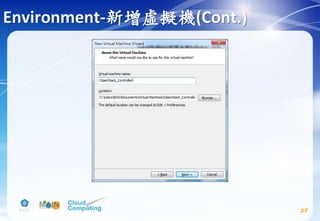
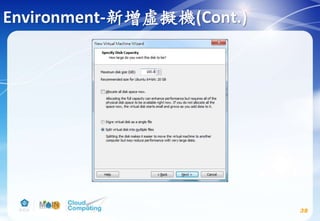
  • 118.
    Launch an instance(Cont.) 118 Createthe public network # source admin-openrc.sh # neutron net-create public --shared -- provider:physical_network public --provider:network_type flat
  • 119.
    Launch an instance(Cont.) 119 Createthe public network(Cont.) # neutron subnet-create public 192.168.174.0/24 --name public --allocation-pool start=192.168.174.50,end=192.168.174.100 --dns-nameserver 8.8.4.4 --gateway 192.168.174.2 請參考自己的虛 擬機器軟體NAT的 設定建立subnet
  • 120.
    Launch an instance(Cont.) 120 本實驗投影片VmwareWorkstation NAT的設定 Vmware Workstation NAT Settings: Edit → Virtual Network Editer → Vmnet8(NAT) → NAT settings
  • 121.
    Launch an instance(Cont.) 121 Createthe private project network # source admin-openrc.sh # neutron net-create private
  • 122.
    Launch an instance(Cont.) 122 Createthe private project network(Cont.) # neutron subnet-create private 172.16.1.0/24 --name private --dns-nameserver 8.8.4.4 --gateway 172.16.1.1
  • 123.
    Launch an instance(Cont.) 123 Createa router # source admin-openrc.sh # neutron net-update public --router:external # neutron router-create router # neutron router-interface-add router private # neutron router-gateway-set router public
  • 124.
    Launch an instance(Cont.) 124 Verifyoperation # source admin-openrc.sh # ip netns # neutron router-port-list router
  • 125.
    Launch an instance(Cont.) 125 Launcha public network instance # nova boot --flavor m1.tiny --image cirros --nic net- id=PUBLIC_NET_ID --security-group default --key-name mykey public-instance Replace PUBLIC_NET_ID with the ID of the public provider network.(若不知道public netwrok的ID可以下此command查看:# neutron net-list)
  • 126.
    Launch an instance(Cont.) 126 Launcha public network instance(Cont.) # nova list Access the instance using the virtual console # nova get-vnc-console public-instance novnc 複製此段網址貼到瀏覽器即可以novnc存取此instance的console
  • 127.
    Launch an instance(Cont.) 127 Launcha public network instance(Cont.)
  • 128.
    Launch an instance(Cont.) 128 Launcha public network instance(Cont.)
  • 129.
    Launch an instance(Cont.) 129 Launcha private network instance # nova boot --flavor m1.tiny --image cirros --nic net- id=PRIVATE_NET_ID --security-group default --key-name mykey private-instance Replace PRIVATE_NET_ID with the ID of the public provider network.(若不知道private netwrok的ID可以下此command查看:# neutron net-list)
  • 130.
    Launch an instance(Cont.) 130 Launcha private network instance(Cont.) # nova list Access the instance using the virtual console # nova get-vnc-console private-instance novnc 複製此段網址貼到瀏覽器即可以novnc存取此instance的console
  • 131.
    Launch an instance(Cont.) 131 Launcha private network instance(Cont.)
  • 132.
    Launch an instance(Cont.) 132 Launcha private network instance(Cont.)
  • 133.
    OpenStack Liberty Install Environment deployment  Identity service install  Image service install  Compute service install  Networking service install  dashboard install(optional) 133 安裝時,請參考OpenStack官方網站的文件: http://docs.openstack.org/liberty/install-guide-ubuntu/
  • 134.
    Dashboard(optional) 134 Controller node # apt-getinstall openstack-dashboard # vim /etc/openstack-dashboard/local_settings.py Comment out any other session storage configuration. OPENSTACK_HOST = "controller" ALLOWED_HOSTS = ['*', ] CACHES = { 'default': { 'BACKEND': 'django.core.cache.backends.memcached.MemcachedCache', 'LOCATION': '127.0.0.1:11211', } }
  • 135.
    Dashboard (Cont.) 135 OPENSTACK_KEYSTONE_DEFAULT_ROLE ="user" OPENSTACK_KEYSTONE_MULTIDOMAIN_SUPPORT = True OPENSTACK_API_VERSIONS = { "identity": 3, "volume": 2, } OPENSTACK_NEUTRON_NETWORK = { ... 'enable_router': False, 'enable_quotas': False, 'enable_distributed_router': False, 'enable_ha_router': False, 'enable_lb': False, 'enable_firewall': False, 'enable_vpn': False, 'enable_fip_topology_check': False, } If you chose networking option 1, disable support for layer-3 networking services: 若你安裝的是第二裝網路模式則不用更變上面這段程式碼
  • 136.
    Dashboard (Cont.) 136 Replace TIME_ZONEwith UTC. # service apache2 reload Access the dashboard using a web browser at http://controller<or type IP address>/horizon. Authenticate using admin user and default domain credentials. Domain:default User Name:admin or demo Password:Your admin password or demo password TIME_ZONE = "TIME_ZONE"
  • 137.
  • 138.
  • 139.
  • 140.
    Resources  OpenStack Documentation http://docs.openstack.org/ OpenStack facebook Taiwan https://www.facebook.com/groups/openstack.tw/?fref=ts  Ask.OpenStack https://ask.openstack.org/en/questions/ 140
  • 141.
    References  OpenStack Documentation http://docs.openstack.org/ OpenStack GitBook https://kairen.gitbooks.io/openstack/content/ 141
  • 142.