Adam Johnson @adjohn
slideshare.com/adjohn
OpenStack Networking and Automation
Outline
1
• OpenStack Intro
• Network Virtualization Evolution
• OS Networking History
• OVS Overview
• ML2
• MidoNet Overview
• Automate Virtual Network with Heat
• Automate Physical Networks
• Q&A
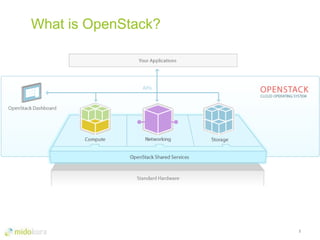
What is OpenStack?
2
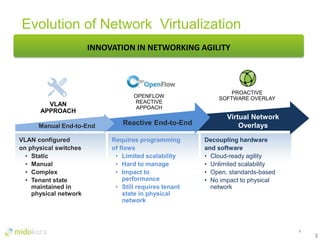
Evolution of Network Virtualization
3
Virtual Network
Overlays
Decoupling hardware
and software
• Cloud-ready agility
• Unlimited scalability
• Open, standards-based
• No impact to physical
network
PROACTIVE
SOFTWARE OVERLAY
INNOVATION IN NETWORKING AGILITY
Reactive End-to-End
Requires programming
of flows
• Limited scalability
• Hard to manage
• Impact to
performance
• Still requires tenant
state in physical
network
OPENFLOW
REACTIVE
APPOACH
VLAN configured
on physical switches
• Static
• Manual
• Complex
• Tenant state
maintained in
physical network
Manual End-to-End
VLAN
APPROACH
3
4
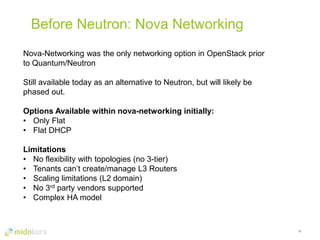
Before Neutron: Nova Networking
Nova-Networking was the only networking option in OpenStack prior
to Quantum/Neutron
Still available today as an alternative to Neutron, but will likely be
phased out.
Options Available within nova-networking initially:
• Only Flat
• Flat DHCP
Limitations
• No flexibility with topologies (no 3-tier)
• Tenants can’t create/manage L3 Routers
• Scaling limitations (L2 domain)
• No 3rd party vendors supported
• Complex HA model
5
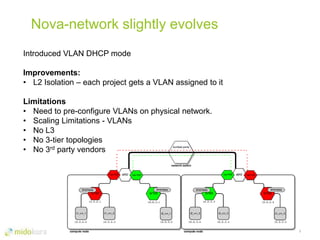
Nova-network slightly evolves
Introduced VLAN DHCP mode
Improvements:
• L2 Isolation – each project gets a VLAN assigned to it
Limitations
• Need to pre-configure VLANs on physical network.
• Scaling Limitations - VLANs
• No L3
• No 3-tier topologies
• No 3rd party vendors
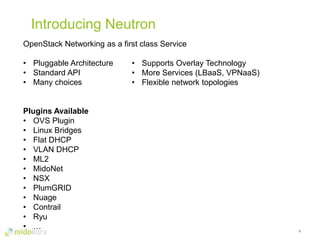
Introducing Neutron
6
OpenStack Networking as a first class Service
• Pluggable Architecture
• Standard API
• Many choices
Plugins Available
• OVS Plugin
• Linux Bridges
• Flat DHCP
• VLAN DHCP
• ML2
• MidoNet
• NSX
• PlumGRID
• Nuage
• Contrail
• Ryu
• …
• Supports Overlay Technology
• More Services (LBaaS, VPNaaS)
• Flexible network topologies
7
OVS Plugin Overview
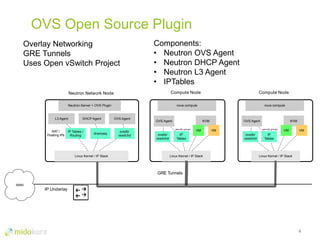
OVS Open Source Plugin
8
Overlay Networking
GRE Tunnels
Uses Open vSwitch Project
Components:
• Neutron OVS Agent
• Neutron DHCP Agent
• Neutron L3 Agent
• IPTables
Neutron Network Node
Neutron-Server + OVS Plugin
L3 Agent DHCP Agent OVS Agent
NAT /
Floating IPs
IP Tables /
Routing
dnsmasq
ovsdb/
vswitchd
Linux Kernel / IP Stack
Compute Node
nova compute
OVS Agent KVM
VM VM
Linux Kernel / IP Stack
ovsdb/
vswitchd
IP
Tables
Compute Node
nova compute
OVS Agent KVM
VM VM
Linux Kernel / IP Stack
ovsdb/
vswitchd
IP
Tables
GRE Tunnels
IP Underlay
WAN
security groups security groups
OVS Open Source Plugin
9
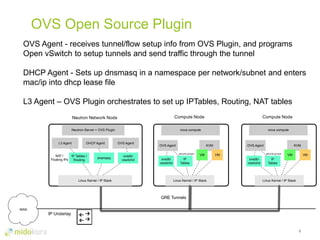
OVS Agent - receives tunnel/flow setup info from OVS Plugin, and programs
Open vSwitch to setup tunnels and send traffic through the tunnel
DHCP Agent - Sets up dnsmasq in a namespace per network/subnet and enters
mac/ip into dhcp lease file
L3 Agent – OVS Plugin orchestrates to set up IPTables, Routing, NAT tables
Neutron Network Node
Neutron-Server + OVS Plugin
L3 Agent DHCP Agent OVS Agent
NAT /
Floating IPs
IP Tables /
Routing
dnsmasq
ovsdb/
vswitchd
Linux Kernel / IP Stack
Compute Node
nova compute
OVS Agent KVM
VM VM
Linux Kernel / IP Stack
ovsdb/
vswitchd
IP
Tables
Compute Node
nova compute
OVS Agent KVM
VM VM
Linux Kernel / IP Stack
ovsdb/
vswitchd
IP
Tables
GRE Tunnels
IP Underlay
WAN
security groups security groups
Challenges with OVS Plugin
10
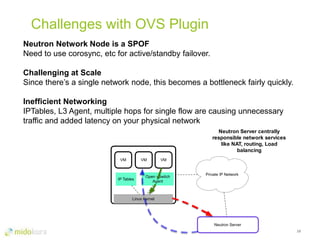
Neutron Network Node is a SPOF
Need to use corosync, etc for active/standby failover.
Challenging at Scale
Since there’s a single network node, this becomes a bottleneck fairly quickly.
Inefficient Networking
IPTables, L3 Agent, multiple hops for single flow are causing unnecessary
traffic and added latency on your physical network
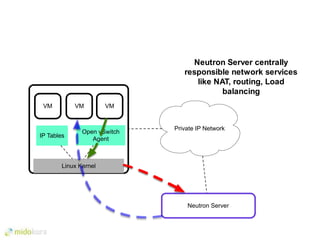
Private IP Network
Neutron Server
Neutron Server centrally
responsible network services
like NAT, routing, Load
balancing
Linux Kernel
Open vSwitch
Agent
VM
IP Tables
VM VM
11
ML2 Plugin Architecture
Modular Layer 2 (ML2)
12
Mix and Match Networking Plugins
Previously, plugins were monolithic
Driver Model
Implement network types and mechanisms
Multiple mechanisms can be used simultaneously to access different ports
across the network.
Limitations
Not everything is pluggable yet (started with just L2)
13
Example 3rd Party Plugin
14
v
Any Application
MidoNet Network Virtualization Platform
Logical L2
Any Network Hardware
Any Cloud Management Platform
Logical
Firewall
Logical Layer 4
Load Balancer
Logical L3
Logical
NAT
Any Hypervisor
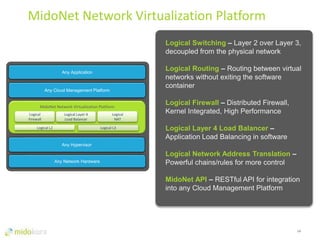
Logical Switching – Layer 2 over Layer 3,
decoupled from the physical network
Logical Routing – Routing between virtual
networks without exiting the software
container
Logical Firewall – Distributed Firewall,
Kernel Integrated, High Performance
Logical Layer 4 Load Balancer –
Application Load Balancing in software
Logical Network Address Translation –
Powerful chains/rules for more control
MidoNet API – RESTful API for integration
into any Cloud Management Platform
MidoNet Network Virtualization Platform
Private IP Network
Network State Database
Internet
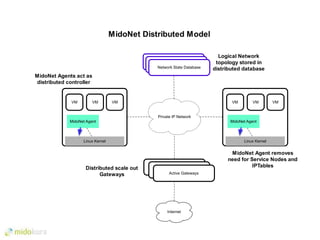
MidoNet Agents act as
distributed controller
MidoNet Distributed Model
Network State Database
Linux Kernel
MidoNet Agent
VMVM VM
Linux Kernel
MidoNet Agent
VMVM VM
Active Gateway
Active Gateway
Active Gateways
Distributed scale out
Gateways
Logical Network
topology stored in
distributed database
MidoNet Agent removes
need for Service Nodes and
IPTables
Private IP Network
Neutron Server
Neutron Server centrally
responsible network services
like NAT, routing, Load
balancing
Linux Kernel
Open vSwitch
Agent
VM
IP Tables
VM VM
Private IP Network
Network State Database
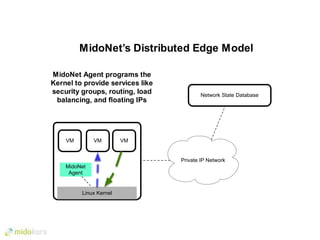
MidoNet Agent programs the
Kernel to provide services like
security groups, routing, load
balancing, and floating IPs
Linux Kernel
VMVM VM
MidoNet’s Distributed Edge Model
MidoNet
Agent
Private IP Network
SDN Controller
Active Gateway Standby Gateway
Internet
Linux Kernel
Open vSwitch
Agent
VM
IP Tables
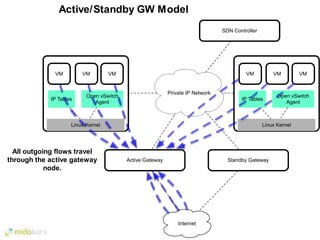
All outgoing flows travel
through the active gateway
node.
VM VM
Linux Kernel
Open vSwitch
Agent
VM
IP Tables
VM VM
Active/Standby GW Model
Private IP Network
Active Gateway 1
Active Gateway 2
Internet
Linux Kernel
Open vSwitch
Agent
VM
IP Tables
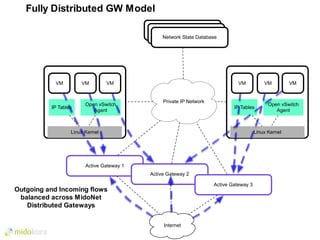
Outgoing and Incoming flows
balanced across MidoNet
Distributed Gateways
VM VM
Linux Kernel
Open vSwitch
Agent
VM
IP Tables
VM VM
Active Gateway 3
Network State Database
Fully Distributed GW Model
20
Automating the Virtual
Network
Heat Orchestration
21
Introduced in Grizzly, usable in Havana
What is it?
Allows you to pre-define a set of compute, network, storage requirements to
provide a specific service and deploy it with ease.
Compatible with CloudFormations
How it works:
• Template describes the infrastructure of a cloud app
• Can be version controlled, diffed
• Human Readable
• Can Describe
• Servers, FIPs, Volumes, Sec Groups, Users, Networks, etc
• Can Specify Relationships: volume connects to server
• Heat turns template into API calls
• Integrates easily with config management like Chef, Puppet, etc.
22
{
"AWSTemplateFormatVersion" : "2010-09-09",
"Description" : "Sample Heat template that
spins up multiple instances and a private
network (JSON)",
"Resources" : {
"heat_network_01" : {
"Type" : "OS::Neutron::Net",
"Properties" : {
"name" : "heat-network-01"
}
},
"heat_subnet_01" : {
"Type" : "OS::Neutron::Subnet",
"Properties" : {
"name" : "heat-subnet-01",
"cidr" : "10.10.10.0/24",
"dns_nameservers" : ["172.16.1.11",
"172.16.1.6"],
"enable_dhcp" : "True",
"gateway_ip" : "10.10.10.254",
"network_id" : { "Ref" :
"heat_network_01" }
}
},
Example Snippet (Cloud Formation Template)
"heat_router_01" : {
"Type" : "OS::Neutron::Router",
"Properties" : {
"admin_state_up" : "True",
"name" : "heat-router-01"
}
},
23
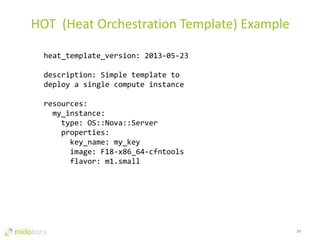
HOT (Heat Orchestration Template) Example
heat_template_version: 2013-05-23
description: Simple template to
deploy a single compute instance
resources:
my_instance:
type: OS::Nova::Server
properties:
key_name: my_key
image: F18-x86_64-cfntools
flavor: m1.small
24
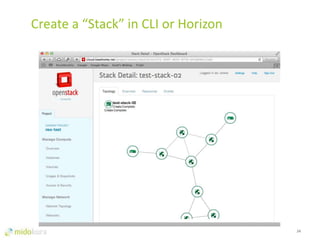
Create a “Stack” in CLI or Horizon
25
Automate the Physical
Network
26
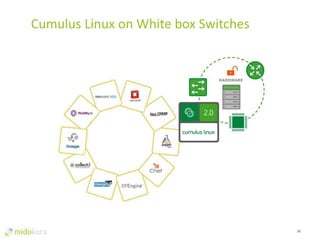
Cumulus Linux on White box Switches
Q&A
27
Thank You
Adam Johnson
@adjohn
slideshare.com/adjohn
28

OpenStack Networking and Automation

  • 1.
  • 2.
    Outline 1 • OpenStack Intro •Network Virtualization Evolution • OS Networking History • OVS Overview • ML2 • MidoNet Overview • Automate Virtual Network with Heat • Automate Physical Networks • Q&A
  • 3.
  • 4.
    Evolution of NetworkVirtualization 3 Virtual Network Overlays Decoupling hardware and software • Cloud-ready agility • Unlimited scalability • Open, standards-based • No impact to physical network PROACTIVE SOFTWARE OVERLAY INNOVATION IN NETWORKING AGILITY Reactive End-to-End Requires programming of flows • Limited scalability • Hard to manage • Impact to performance • Still requires tenant state in physical network OPENFLOW REACTIVE APPOACH VLAN configured on physical switches • Static • Manual • Complex • Tenant state maintained in physical network Manual End-to-End VLAN APPROACH 3
  • 5.
    4 Before Neutron: NovaNetworking Nova-Networking was the only networking option in OpenStack prior to Quantum/Neutron Still available today as an alternative to Neutron, but will likely be phased out. Options Available within nova-networking initially: • Only Flat • Flat DHCP Limitations • No flexibility with topologies (no 3-tier) • Tenants can’t create/manage L3 Routers • Scaling limitations (L2 domain) • No 3rd party vendors supported • Complex HA model
  • 6.
    5 Nova-network slightly evolves IntroducedVLAN DHCP mode Improvements: • L2 Isolation – each project gets a VLAN assigned to it Limitations • Need to pre-configure VLANs on physical network. • Scaling Limitations - VLANs • No L3 • No 3-tier topologies • No 3rd party vendors
  • 7.
    Introducing Neutron 6 OpenStack Networkingas a first class Service • Pluggable Architecture • Standard API • Many choices Plugins Available • OVS Plugin • Linux Bridges • Flat DHCP • VLAN DHCP • ML2 • MidoNet • NSX • PlumGRID • Nuage • Contrail • Ryu • … • Supports Overlay Technology • More Services (LBaaS, VPNaaS) • Flexible network topologies
  • 8.
  • 9.
    OVS Open SourcePlugin 8 Overlay Networking GRE Tunnels Uses Open vSwitch Project Components: • Neutron OVS Agent • Neutron DHCP Agent • Neutron L3 Agent • IPTables Neutron Network Node Neutron-Server + OVS Plugin L3 Agent DHCP Agent OVS Agent NAT / Floating IPs IP Tables / Routing dnsmasq ovsdb/ vswitchd Linux Kernel / IP Stack Compute Node nova compute OVS Agent KVM VM VM Linux Kernel / IP Stack ovsdb/ vswitchd IP Tables Compute Node nova compute OVS Agent KVM VM VM Linux Kernel / IP Stack ovsdb/ vswitchd IP Tables GRE Tunnels IP Underlay WAN security groups security groups
  • 10.
    OVS Open SourcePlugin 9 OVS Agent - receives tunnel/flow setup info from OVS Plugin, and programs Open vSwitch to setup tunnels and send traffic through the tunnel DHCP Agent - Sets up dnsmasq in a namespace per network/subnet and enters mac/ip into dhcp lease file L3 Agent – OVS Plugin orchestrates to set up IPTables, Routing, NAT tables Neutron Network Node Neutron-Server + OVS Plugin L3 Agent DHCP Agent OVS Agent NAT / Floating IPs IP Tables / Routing dnsmasq ovsdb/ vswitchd Linux Kernel / IP Stack Compute Node nova compute OVS Agent KVM VM VM Linux Kernel / IP Stack ovsdb/ vswitchd IP Tables Compute Node nova compute OVS Agent KVM VM VM Linux Kernel / IP Stack ovsdb/ vswitchd IP Tables GRE Tunnels IP Underlay WAN security groups security groups
  • 11.
    Challenges with OVSPlugin 10 Neutron Network Node is a SPOF Need to use corosync, etc for active/standby failover. Challenging at Scale Since there’s a single network node, this becomes a bottleneck fairly quickly. Inefficient Networking IPTables, L3 Agent, multiple hops for single flow are causing unnecessary traffic and added latency on your physical network Private IP Network Neutron Server Neutron Server centrally responsible network services like NAT, routing, Load balancing Linux Kernel Open vSwitch Agent VM IP Tables VM VM
  • 12.
  • 13.
    Modular Layer 2(ML2) 12 Mix and Match Networking Plugins Previously, plugins were monolithic Driver Model Implement network types and mechanisms Multiple mechanisms can be used simultaneously to access different ports across the network. Limitations Not everything is pluggable yet (started with just L2)
  • 14.
  • 15.
    14 v Any Application MidoNet NetworkVirtualization Platform Logical L2 Any Network Hardware Any Cloud Management Platform Logical Firewall Logical Layer 4 Load Balancer Logical L3 Logical NAT Any Hypervisor Logical Switching – Layer 2 over Layer 3, decoupled from the physical network Logical Routing – Routing between virtual networks without exiting the software container Logical Firewall – Distributed Firewall, Kernel Integrated, High Performance Logical Layer 4 Load Balancer – Application Load Balancing in software Logical Network Address Translation – Powerful chains/rules for more control MidoNet API – RESTful API for integration into any Cloud Management Platform MidoNet Network Virtualization Platform
  • 16.
    Private IP Network NetworkState Database Internet MidoNet Agents act as distributed controller MidoNet Distributed Model Network State Database Network State Database Linux Kernel MidoNet Agent VMVM VM Linux Kernel MidoNet Agent VMVM VM Active Gateway Active Gateway Active Gateways Distributed scale out Gateways Logical Network topology stored in distributed database MidoNet Agent removes need for Service Nodes and IPTables
  • 17.
    Private IP Network NeutronServer Neutron Server centrally responsible network services like NAT, routing, Load balancing Linux Kernel Open vSwitch Agent VM IP Tables VM VM
  • 18.
    Private IP Network NetworkState Database MidoNet Agent programs the Kernel to provide services like security groups, routing, load balancing, and floating IPs Linux Kernel VMVM VM MidoNet’s Distributed Edge Model MidoNet Agent
  • 19.
    Private IP Network SDNController Active Gateway Standby Gateway Internet Linux Kernel Open vSwitch Agent VM IP Tables All outgoing flows travel through the active gateway node. VM VM Linux Kernel Open vSwitch Agent VM IP Tables VM VM Active/Standby GW Model
  • 20.
    Private IP Network ActiveGateway 1 Active Gateway 2 Internet Linux Kernel Open vSwitch Agent VM IP Tables Outgoing and Incoming flows balanced across MidoNet Distributed Gateways VM VM Linux Kernel Open vSwitch Agent VM IP Tables VM VM Active Gateway 3 Network State Database Network State Database Network State Database Fully Distributed GW Model
  • 21.
  • 22.
    Heat Orchestration 21 Introduced inGrizzly, usable in Havana What is it? Allows you to pre-define a set of compute, network, storage requirements to provide a specific service and deploy it with ease. Compatible with CloudFormations How it works: • Template describes the infrastructure of a cloud app • Can be version controlled, diffed • Human Readable • Can Describe • Servers, FIPs, Volumes, Sec Groups, Users, Networks, etc • Can Specify Relationships: volume connects to server • Heat turns template into API calls • Integrates easily with config management like Chef, Puppet, etc.
  • 23.
    22 { "AWSTemplateFormatVersion" : "2010-09-09", "Description": "Sample Heat template that spins up multiple instances and a private network (JSON)", "Resources" : { "heat_network_01" : { "Type" : "OS::Neutron::Net", "Properties" : { "name" : "heat-network-01" } }, "heat_subnet_01" : { "Type" : "OS::Neutron::Subnet", "Properties" : { "name" : "heat-subnet-01", "cidr" : "10.10.10.0/24", "dns_nameservers" : ["172.16.1.11", "172.16.1.6"], "enable_dhcp" : "True", "gateway_ip" : "10.10.10.254", "network_id" : { "Ref" : "heat_network_01" } } }, Example Snippet (Cloud Formation Template) "heat_router_01" : { "Type" : "OS::Neutron::Router", "Properties" : { "admin_state_up" : "True", "name" : "heat-router-01" } },
  • 24.
    23 HOT (Heat OrchestrationTemplate) Example heat_template_version: 2013-05-23 description: Simple template to deploy a single compute instance resources: my_instance: type: OS::Nova::Server properties: key_name: my_key image: F18-x86_64-cfntools flavor: m1.small
  • 25.
    24 Create a “Stack”in CLI or Horizon
  • 26.
  • 27.
    26 Cumulus Linux onWhite box Switches
  • 28.
  • 29.

Editor's Notes

  • #2 Show of hands: Show of hands for who knows about OpenStack? Who is running OpenStack Now?
  • #3 So what does it take to pull off Network Virtualization?
  • #4 Cloud platform Launched in 2010 by NASA and Rackspace Apache License Has a modular architecture (codenames: Swift, Horizon, Nova, Keystone, Cinder… Neutron) We’ll be focusing on Neutron networking
  • #5 VLANs require changing configuration of physical hardware - Runs into scaling issues at 4096 VLANs, some cheaper networking gear runs into problems at 100 vlans - Lose mobility OpenFlow proved difficult to scale, since virtual workloads are very dynamic, it required reprogramming physical boxes Overlays are software only, no changes made to the physical network required, fully decoupling the virtual from the physical
  • #7 DHCP and default gateway is provided by dnsmasq(DHCP) and IPTables+routing stack for floating ips/security groups
  • #8 Neutron is beautiful and scary at the same time Started out with Nova-networking, it was not flexible at all. Very rigid. Had problems Neutron was a re-architecture to a more modular design became a core project in Folsom release, we’re now on the Icehouse release. Now there are tons of choices in Neutron, it can be daunting. OVS is the most deployed plugin according to the latest user survey, so we’ll cover this one along with MidoNet (since I work for Midokura)
  • #11 GRE Tunnels between hosts
  • #12 HA is not available out of the box, this is something you need to get via a third party distro, or build it yourself. Proposals for the next couple of releases (Juno/K) around making the L3 agent more HA.
  • #14 HA is not available out of the box, this is something you need to get via a third party distro, or build it yourself. Proposals for the next couple of releases (Juno/K) around making the L3 agent more HA.
  • #16 L4 Load Balancing
  • #17 Replacing OVS user space agent, IPTables, Neutron Server L3 Agent, and Linux Routing Stack with MidoNet Agent. Added Capabilities, l2-4 distributed.
  • #18 Back to this diagram for review, many hops for east/west traffic
  • #19 MidoNet Agent reduces complexity, adding performance and efficiency
  • #21 L4 Load Balancing Highlight Many choices for plugins, happy to talk after this in more detail if you’d like
  • #24 JSON based Compat with AWS CloudForms
  • #25 New Template format will become the native format over time. YAML based Replaces previous Cloud Formations format Will offer more functionality over CloudFormations over time
  • #29 Stop by our booth , I’ll post this on slideshare and tweet the link after this.
  • #30 Stop by our booth , I’ll post this on slideshare and tweet the link after this.
  • #32 HA is not available out of the box, this is something you need to get via a third party distro, or build it yourself. Proposals for the next couple of releases (Juno/K) around making the L3 agent more HA.