Project Report on Online National Polling System
ABSTRACT 
•The word “vote” means to choose from a list, to elect or to determine. The main goal of voting (in a scenario involving the citizens of a given country) is to come up with leaders of the people’s choice. 
•Most countries, India not an exception have problems when it comes to voting. Some of the problems involved include ridging votes during election, insecure or inaccessible polling stations, inadequate polling materials and also inexperienced personnel. 
•This online voting/polling system seeks to address the above issues. It should be noted that with this system in place, the users, citizens in this case shall be given ample time during the voting period. They shall also be trained on how to vote online before the election time 
SarthakCSEC226
INTRODUCTION TO ONLINE VOTING SYSTEM 
•“ONLINE VOTING SYSTEM” is an online voting website. In this system people who have citizenship of India and whose age is above 18 years of age and any sex can give hisher vote online without going to any physical polling station. There is a database which is maintained in which all the names of voters with complete information is stored. 
•In “ONLINE VOTING SYSTEM” a voter can use hisher voting right online without any difficulty. HeShe has to be registered first for him/her to vote. Registration is mainly done by the system administrator for security reasons. The system Administrator registers the voters on a special site of the system visited by him only by simply filling a registration form to register voter. Citizens seeking registration are expected to contact the system administrator to submit their details. After the validity of them being citizens of India has been confirmed by the system administrator by comparing their details submitted with those in existing databases such as those as the Registrar of Persons, the citizen is then registered as a voter. 
SarthakCSEC226
Objectives Of The PROJECT 
•Reviewing the existing/current voting process or approach in India. 
• Coming up with an automated voting system in India. 
•Implementing a an automated/online voting system 
•Validating the system to ensure that only legible voters are allowed to vote. 
SarthakCSEC226
Project justification 
•The ONLINE VOTING SYSTEM-INDIA shall reduce the time spend making long queues at the polling stations during voting. 
•It shall also enable the voters to vote from any part of the globe as explained since this is an online application available on the internet. 
•. Cases of vote miscounts shall also be solved since at the backend of this system resides a well developed database using MYSQL that can provide the correct data once it’s correctly queried. 
SarthakCSEC226
Technologies Used: 
•Server Side : Java(JDK1.8),Servlet, JSP2.0, EL, JSTL 
•Client Side : HTML5, CSS 
•Database : MySQL 5.0 
•Framework : Jakarta Struts Framework(Struts Tiles framework). 
•IDE : NetBeans 7.4, Dreamweaver8, MySQL GUI Tool5.0 
SarthakCSEC226
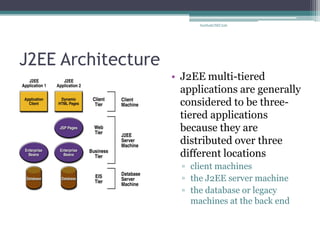
J2EE Architecture 
•J2EE multi-tiered applications are generally considered to be three- tiered applications because they are distributed over three different locations 
▫client machines 
▫the J2EE server machine 
▫the database or legacy machines at the back end 
SarthakCSEC226
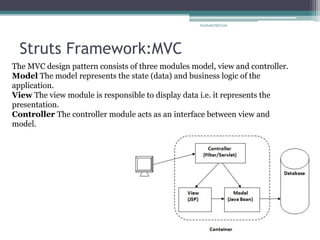
Struts Framework:MVC 
The MVC design pattern consists of three modules model, view and controller. Model The model represents the state (data) and business logic of the application. View The view module is responsible to display data i.e. it represents the presentation. Controller The controller module acts as an interface between view and model. 
SarthakCSEC226
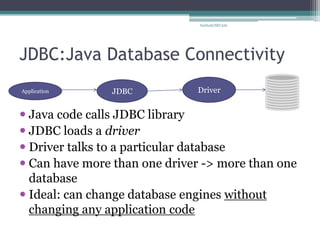
JDBC:Java Database Connectivity 
Java code calls JDBC library 
JDBC loads a driver 
Driver talks to a particular database 
Can have more than one driver -> more than one database 
Ideal: can change database engines without changing any application code 
Application 
JDBC 
Driver 
SarthakCSEC226
JSP:Java Server Pages 
•JSP technology is used to create web application just like Servlet technology. It can be thought of as an extension to servlet because it provides more functionality than servlet such as expression language, jstl etc. 
•A JSP page consists of HTML tags and JSP tags. The jsp pages are easier to maintain than servlet because we can separate designing and development. It provides some additional features such as Expression Language, Custom Tag etc. 
•Advantage of JSP over Servlet: 
1.Extension to Servlet 
2.Easy to maintain 
3.Fast Development: No need to recompile and redeploy 
4.Less code than Servlet 
SarthakCSEC226
Struts :Tiles Framework 
•A web page can contain many parts (known as tile) such as header, left pane, right pane, body part, footer etc. In tiles framework, we manage all the tile by ourLayout Manager page. 
•Advantage of tiles framework 
•There are following advantages of tiles framework: 
•Customization by centralized page We can customize the layout of all the pages by single page (centralized page) only. 
•Code reusability A single part e.g. header or footer can be used in many pages. So it saves coding. 
•Easy to modify If any part (tile) is modified, we don't need to change many pages. 
•Easy to remove If any part (tile) of the page is removed, we don't need to remove the code from all the pages. We can remove the tile from our layout manager page. 
SarthakCSEC226
Tiles framework:continue…… 
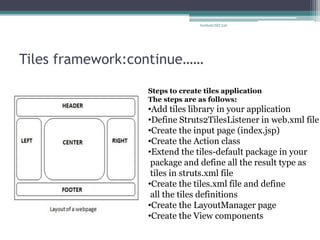
Steps to create tiles application The steps are as follows: 
•Add tiles library in your application 
•Define Struts2TilesListener in web.xml file 
•Create the input page (index.jsp) 
•Create the Action class 
•Extend the tiles-default package in your package and define all the result type as tiles in struts.xml file 
•Create the tiles.xml file and define all the tiles definitions 
•Create the LayoutManager page 
•Create the View components 
SarthakCSEC226
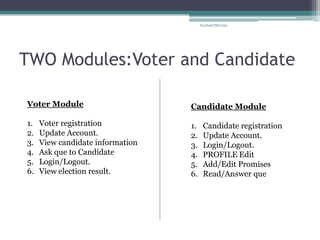
TWO Modules:Voter and Candidate 
Voter Module 
1.Voter registration 
2.Update Account. 
3.View candidate information 
4.Ask que to Candidate 
5.Login/Logout. 
6.View election result. 
Candidate Module 
1.Candidate registration 
2.Update Account. 
3.Login/Logout. 
4.PROFILE Edit 
5.Add/Edit Promises 
6.Read/Answer que 
SarthakCSEC226
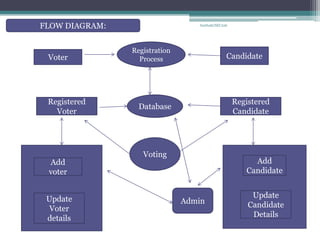
Registration Process 
Candidate 
Voter 
Registered 
Voter 
Registered 
Candidate 
Database 
Voting 
Add 
voter 
Update 
Voter details 
Add 
Candidate 
Update 
Candidate 
Details 
Admin 
FLOW DIAGRAM: 
SarthakCSEC226
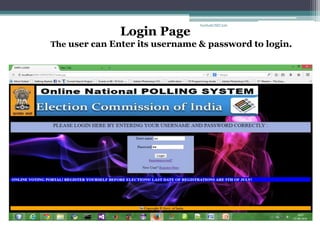
Login Page 
The user can Enter its username & password to login. 
SarthakCSEC226
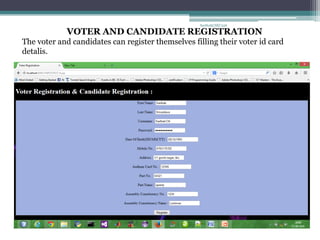
VOTER AND CANDIDATE REGISTRATION 
The voter and candidates can register themselves filling their voter id card detalis. 
SarthakCSEC226
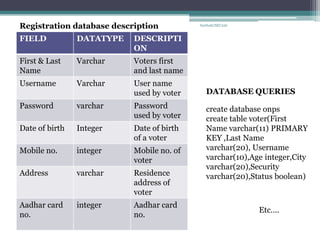
FIELD 
DATATYPE 
DESCRIPTION 
First & Last Name 
Varchar 
Voters first and last name 
Username 
Varchar 
User name used by voter 
Password 
varchar 
Password used by voter 
Date of birth 
Integer 
Date of birth of a voter 
Mobile no. 
integer 
Mobile no. of voter 
Address 
varchar 
Residence address of voter 
Aadhar card no. 
integer 
Aadhar card no. 
Registration database description 
create database onps 
create table voter(First Name varchar(11) PRIMARY KEY ,Last Name varchar(20), Username varchar(10),Age integer,City varchar(20),Security varchar(20),Status boolean) 
DATABASE QUERIES 
Etc…. 
SarthakCSEC226
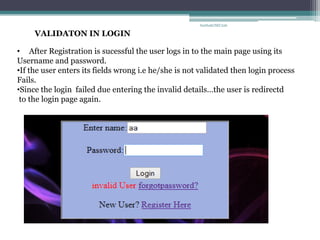
•After Registration is sucessful the user logs in to the main page using its Username and password. 
•If the user enters its fields wrong i.e he/she is not validated then login process Fails. 
•Since the login failed due entering the invalid details…the user is redirectd to the login page again. 
VALIDATON IN LOGIN 
SarthakCSEC226
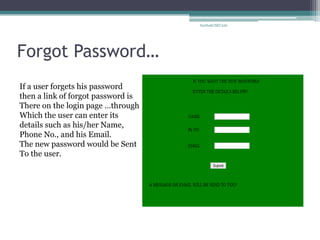
Forgot Password… 
If a user forgets his password 
then a link of forgot password is 
There on the login page …through 
Which the user can enter its 
details such as his/her Name, 
Phone No., and his Email. 
The new password would be Sent 
To the user. 
SarthakCSEC226
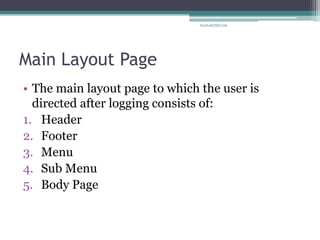
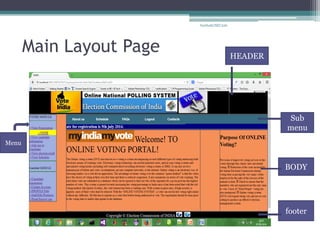
Main Layout Page 
•The main layout page to which the user is directed after logging consists of: 
1.Header 
2.Footer 
3.Menu 
4.Sub Menu 
5.Body Page 
SarthakCSEC226
Main Layout Page 
HEADER 
Sub menu 
BODY 
footer 
Menu 
SarthakCSEC226
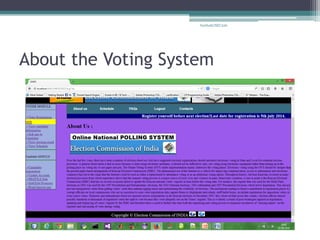
About the Voting System 
SarthakCSEC226
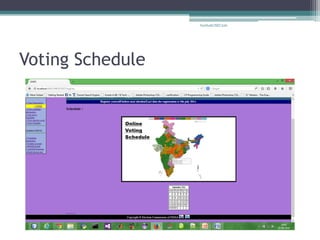
Voting Schedule 
SarthakCSEC226
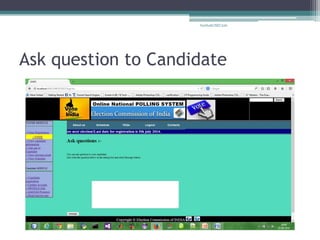
Ask question to Candidate 
SarthakCSEC226
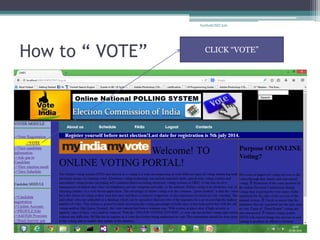
How to “ VOTE” 
CLICK “VOTE” 
SarthakCSEC226
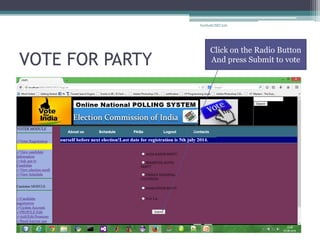
VOTE FOR PARTY 
Click on the Radio Button 
And press Submit to vote 
SarthakCSEC226
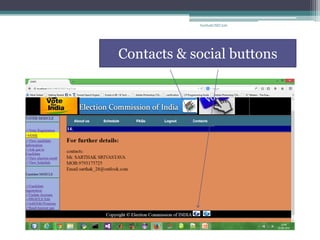
Contacts & social buttons 
SarthakCSEC226
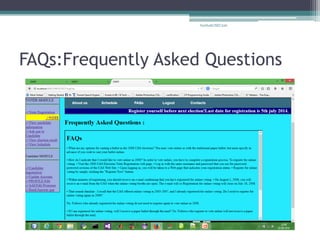
FAQs:Frequently Asked Questions 
SarthakCSEC226
Conclusion 
•A ONLINE VOTING PORTAL can save time 
spent in voting on the booths. 
•Online voting reduces paper work. 
•It is Non Expensive And less Time consuming 
SarthakCSEC226
THANK You…..!!! 
SarthakCSEC226

Online Voting System-using Advanced Java

  • 1.
    Project Report onOnline National Polling System
  • 2.
    ABSTRACT •The word“vote” means to choose from a list, to elect or to determine. The main goal of voting (in a scenario involving the citizens of a given country) is to come up with leaders of the people’s choice. •Most countries, India not an exception have problems when it comes to voting. Some of the problems involved include ridging votes during election, insecure or inaccessible polling stations, inadequate polling materials and also inexperienced personnel. •This online voting/polling system seeks to address the above issues. It should be noted that with this system in place, the users, citizens in this case shall be given ample time during the voting period. They shall also be trained on how to vote online before the election time SarthakCSEC226
  • 3.
    INTRODUCTION TO ONLINEVOTING SYSTEM •“ONLINE VOTING SYSTEM” is an online voting website. In this system people who have citizenship of India and whose age is above 18 years of age and any sex can give hisher vote online without going to any physical polling station. There is a database which is maintained in which all the names of voters with complete information is stored. •In “ONLINE VOTING SYSTEM” a voter can use hisher voting right online without any difficulty. HeShe has to be registered first for him/her to vote. Registration is mainly done by the system administrator for security reasons. The system Administrator registers the voters on a special site of the system visited by him only by simply filling a registration form to register voter. Citizens seeking registration are expected to contact the system administrator to submit their details. After the validity of them being citizens of India has been confirmed by the system administrator by comparing their details submitted with those in existing databases such as those as the Registrar of Persons, the citizen is then registered as a voter. SarthakCSEC226
  • 4.
    Objectives Of ThePROJECT •Reviewing the existing/current voting process or approach in India. • Coming up with an automated voting system in India. •Implementing a an automated/online voting system •Validating the system to ensure that only legible voters are allowed to vote. SarthakCSEC226
  • 5.
    Project justification •TheONLINE VOTING SYSTEM-INDIA shall reduce the time spend making long queues at the polling stations during voting. •It shall also enable the voters to vote from any part of the globe as explained since this is an online application available on the internet. •. Cases of vote miscounts shall also be solved since at the backend of this system resides a well developed database using MYSQL that can provide the correct data once it’s correctly queried. SarthakCSEC226
  • 6.
    Technologies Used: •ServerSide : Java(JDK1.8),Servlet, JSP2.0, EL, JSTL •Client Side : HTML5, CSS •Database : MySQL 5.0 •Framework : Jakarta Struts Framework(Struts Tiles framework). •IDE : NetBeans 7.4, Dreamweaver8, MySQL GUI Tool5.0 SarthakCSEC226
  • 7.
    J2EE Architecture •J2EEmulti-tiered applications are generally considered to be three- tiered applications because they are distributed over three different locations ▫client machines ▫the J2EE server machine ▫the database or legacy machines at the back end SarthakCSEC226
  • 8.
    Struts Framework:MVC TheMVC design pattern consists of three modules model, view and controller. Model The model represents the state (data) and business logic of the application. View The view module is responsible to display data i.e. it represents the presentation. Controller The controller module acts as an interface between view and model. SarthakCSEC226
  • 9.
    JDBC:Java Database Connectivity Java code calls JDBC library JDBC loads a driver Driver talks to a particular database Can have more than one driver -> more than one database Ideal: can change database engines without changing any application code Application JDBC Driver SarthakCSEC226
  • 10.
    JSP:Java Server Pages •JSP technology is used to create web application just like Servlet technology. It can be thought of as an extension to servlet because it provides more functionality than servlet such as expression language, jstl etc. •A JSP page consists of HTML tags and JSP tags. The jsp pages are easier to maintain than servlet because we can separate designing and development. It provides some additional features such as Expression Language, Custom Tag etc. •Advantage of JSP over Servlet: 1.Extension to Servlet 2.Easy to maintain 3.Fast Development: No need to recompile and redeploy 4.Less code than Servlet SarthakCSEC226
  • 11.
    Struts :Tiles Framework •A web page can contain many parts (known as tile) such as header, left pane, right pane, body part, footer etc. In tiles framework, we manage all the tile by ourLayout Manager page. •Advantage of tiles framework •There are following advantages of tiles framework: •Customization by centralized page We can customize the layout of all the pages by single page (centralized page) only. •Code reusability A single part e.g. header or footer can be used in many pages. So it saves coding. •Easy to modify If any part (tile) is modified, we don't need to change many pages. •Easy to remove If any part (tile) of the page is removed, we don't need to remove the code from all the pages. We can remove the tile from our layout manager page. SarthakCSEC226
  • 12.
    Tiles framework:continue…… Stepsto create tiles application The steps are as follows: •Add tiles library in your application •Define Struts2TilesListener in web.xml file •Create the input page (index.jsp) •Create the Action class •Extend the tiles-default package in your package and define all the result type as tiles in struts.xml file •Create the tiles.xml file and define all the tiles definitions •Create the LayoutManager page •Create the View components SarthakCSEC226
  • 13.
    TWO Modules:Voter andCandidate Voter Module 1.Voter registration 2.Update Account. 3.View candidate information 4.Ask que to Candidate 5.Login/Logout. 6.View election result. Candidate Module 1.Candidate registration 2.Update Account. 3.Login/Logout. 4.PROFILE Edit 5.Add/Edit Promises 6.Read/Answer que SarthakCSEC226
  • 14.
    Registration Process Candidate Voter Registered Voter Registered Candidate Database Voting Add voter Update Voter details Add Candidate Update Candidate Details Admin FLOW DIAGRAM: SarthakCSEC226
  • 15.
    Login Page Theuser can Enter its username & password to login. SarthakCSEC226
  • 16.
    VOTER AND CANDIDATEREGISTRATION The voter and candidates can register themselves filling their voter id card detalis. SarthakCSEC226
  • 17.
    FIELD DATATYPE DESCRIPTION First & Last Name Varchar Voters first and last name Username Varchar User name used by voter Password varchar Password used by voter Date of birth Integer Date of birth of a voter Mobile no. integer Mobile no. of voter Address varchar Residence address of voter Aadhar card no. integer Aadhar card no. Registration database description create database onps create table voter(First Name varchar(11) PRIMARY KEY ,Last Name varchar(20), Username varchar(10),Age integer,City varchar(20),Security varchar(20),Status boolean) DATABASE QUERIES Etc…. SarthakCSEC226
  • 18.
    •After Registration issucessful the user logs in to the main page using its Username and password. •If the user enters its fields wrong i.e he/she is not validated then login process Fails. •Since the login failed due entering the invalid details…the user is redirectd to the login page again. VALIDATON IN LOGIN SarthakCSEC226
  • 19.
    Forgot Password… Ifa user forgets his password then a link of forgot password is There on the login page …through Which the user can enter its details such as his/her Name, Phone No., and his Email. The new password would be Sent To the user. SarthakCSEC226
  • 20.
    Main Layout Page •The main layout page to which the user is directed after logging consists of: 1.Header 2.Footer 3.Menu 4.Sub Menu 5.Body Page SarthakCSEC226
  • 21.
    Main Layout Page HEADER Sub menu BODY footer Menu SarthakCSEC226
  • 22.
    About the VotingSystem SarthakCSEC226
  • 23.
  • 24.
    Ask question toCandidate SarthakCSEC226
  • 25.
    How to “VOTE” CLICK “VOTE” SarthakCSEC226
  • 26.
    VOTE FOR PARTY Click on the Radio Button And press Submit to vote SarthakCSEC226
  • 27.
    Contacts & socialbuttons SarthakCSEC226
  • 28.
  • 29.
    Conclusion •A ONLINEVOTING PORTAL can save time spent in voting on the booths. •Online voting reduces paper work. •It is Non Expensive And less Time consuming SarthakCSEC226
  • 30.