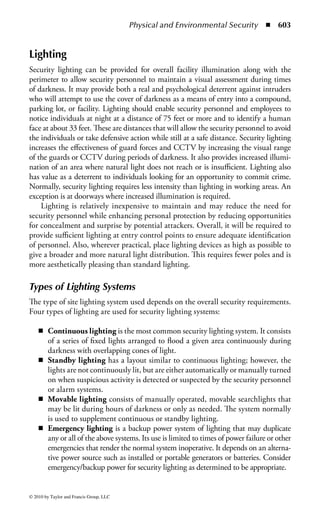

OFFICIAL (ISC)2
                           GUIDE TO THE
                           CISSP CBK
                           SECOND E D I T I O N


© 2010 by Taylor and Francis Group, LLC
27+(5 %22.6 ,1 7+( ,6
Š 35(66 6(5,(6


   2I¿FLDO ,6
Š *XLGH WR WKH ,663Š,66$3Š %.Š
   +DUROG ) 7LSWRQ (GLWRU
   ,6%1 

   2I¿FLDO ,6
Š *XLGH WR WKH ,663Š %.Š 6HFRQG (GLWLRQ
   +DUROG ) 7LSWRQ (GLWRU
   ,6%1 

   ,62 /HDGHUVKLS (VVHQWLDO 3ULQFLSOHV IRU 6XFFHVV
   7RGG )LW]JHUDOG DQG 0LFNL .UDXVH (GLWRUV
   ,6%1 ;

   2I¿FLDO ,6
Š *XLGH WR WKH 663Š %.Š
   'LDQD/QQ RQWHVWL 'RXJODV $QGUH (ULF :D[YLN
   3DXO $ +HQU DQG %RQQLH $ *RLQV
   ,6%1 

   %XLOGLQJ DQG ,PSOHPHQWLQJ D 6HFXULW HUWL¿FDWLRQ DQG $FFUHGLWDWLRQ
   3URJUDP 2I¿FLDO ,6
Š *XLGH WR WKH $3Š %.Š
   3DWULFN ' +RZDUG
   ,6%1 

   2I¿FLDO ,6
Š *XLGH WR WKH ,663Š,66(3Š %.Š
   6XVDQ +DQVFKH
   ,6%1 ;


© 2010 by Taylor and Francis Group, LLC
OFFICIAL (ISC) 2
                           GUIDE T O T H E
                           CISSP® CBK
                           SECOND E D I T I O N


                           Edited by
                           Harold F. Tipton, CISSP-ISSAP, ISSMP

                           Contributors
                           Paul Baker, Ph.D., CPP • Stephen Fried, CISSP
                           Micki Krause, CISSP • Tyson Macaulay, CISSP
                           G a r y M c l n t y r e , CISSP • Kelley O k o l i t a , M B C P
                           Keith Pasley, CISSP • Marcus K. Rogers, Ph.D., CISSP
                           Ken M. S h a u r e t t e , CISSP • R o b e r t M. Slade, CISSP


                                                       (ISC)'
                                SECURITY TRANSCENDS TECHNOLOGY*


                                          (g)         CRC Press
                                                      Taylor  Francis Group
                                                      Boca Raton London New York

                                          CRC Press is an imprint of the
                                          Taylor  Francis Group, an informa business
                                          AN AUERBACH              BOOK


© 2010 by Taylor and Francis Group, LLC
Auerbach Publications
Taylor  Francis Group
6000 Broken Sound Parkway NW, Suite 300
Boca Raton, FL 33487-2742

© 2010 by Taylor and Francis Group, LLC
Auerbach Publications is an imprint of Taylor  Francis Group, an Informa business

No claim to original U.S. Government works

Printed in the United States of America on acid-free paper
10 9 8 7 6 5 4 3 2 1

International Standard Book Number: 978-1-4398-0959-4 (Hardback)
This book contains information obtained from authentic and highly regarded sources. Reasonable efforts
have been made to publish reliable data and information, but the author and publisher cannot assume
responsibility for the validity of all materials or the consequences of their use. The authors and publishers
have attempted to trace the copyright holders of all material reproduced in this publication and apologize to
copyright holders if permission to publish in this form has not been obtained. If any copyright material has
not been acknowledged please write and let us know so we may rectify in any future reprint.

Except as permitted under U.S. Copyright Law, no part of this book may be reprinted, reproduced, transmit-
ted, or utilized in any form by any electronic, mechanical, or other means, now known or hereafter invented,
including photocopying, microfilming, and recording, or in any information storage or retrieval system,
without written permission from the publishers.

For permission to photocopy or use material electronically from this work, please access www.copyright.
com (http://www.copyright.com/) or contact the Copyright Clearance Center, Inc. (CCC), 222 Rosewood
Drive, Danvers, MA 01923, 978-750-8400. CCC is a not-for-profit organization that provides licenses and
registration for a variety of users. For organizations that have been granted a photocopy license by the CCC,
a separate system of payment has been arranged.

Trademark Notice: Product or corporate names may be trademarks or registered trademarks, and are used
only for identification and explanation without intent to infringe.

                               Library of Congress Cataloging-in-Publication Data

          Official (ISC)2 guide to the CISSP CBK / edited by Harold F. Tipton. -- 2nd ed.
                p. cm.
            Includes bibliographical references and index.
            ISBN 978-1-4398-0959-4
            1. Electronic data processing personnel--Certification. 2. Computer
          security--Examinations--Study guides. 3. Computer networks--Examinations--Study
          guides. I. Tipton, Harold F. II. Title.

          QA76.3.T565 2009
          005.8--dc22                                                                 2009024445


Visit the Taylor  Francis Web site at
http://www.taylorandfrancis.com

and the Auerbach Web site at
http://www.auerbach-publications.com


 © 2010 by Taylor and Francis Group, LLC
Contents

Foreword .......................................................................................................vii
Introduction ...................................................................................................xi
Editor ..........................................................................................................xvii
Contributors .................................................................................................xix

  1 Access Control ........................................................................................1
         JAMES S. TILLER, CISSP; REVISED BY STEPHEN FRIED, CISSP

  2 Application Security ...........................................................................157
         ROBERT M. SLADE, CISSP

  3 Business Continuity and Disaster Recovery Planning .......................261
         KELLEY OKOLITA, MBCP

  4 Cryptography .....................................................................................309
         KEVIN HENRY, CISSP; REVISED BY
         KEITH PASLEY, CISSP, CISA, ITIL, GSNA

  5 Information Security Governance and Risk Management .................401
         TODD FITZGERALD, CISSP, BONNIE GOINS, CISSP, AND
         REBECCA HEROLD, CISSP; REVISED BY KEN M. SHAURETTE, CISSP

  6 Legal, Regulations, Investigations, and Compliance .........................503
         MARCUS K. ROGERS, PH.D., CISSP, CCCI-ADVANCED

  7 Operations Security............................................................................539
         GARY MCINTYRE, CISSP

  8 Physical and Environmental Security ................................................579
         PAUL BAKER, PH.D., CPP

  9 Security Architecture and Design ......................................................667
         GARY MCINTYRE, CISSP AND MICKI KRAUSE, CISSP

                                                                                                                   v


© 2010 by Taylor and Francis Group, LLC
vi ◾        Contents


10 Telecommunications and Network Security ......................................731
         ALEC BASS, CISSP AND PETER BERLICH, CISSP-ISSMP;
         REVISED BY TYSON MACAULAY, CISSP

Appendix Answers to Practice Questions.................................................853


© 2010 by Taylor and Francis Group, LLC
Foreword

Foreword to CBK Study Guide 2009
In today’s connected world, business, government, and consumers all want the ability
to access information, communicate, and execute transactions immediately with
the assurance of real-world security. However, every advance in connectivity and
convenience also brings new threats to privacy and security in the global virtual
environment. That’s why information security has become critical to mitigating
risks that can destroy a company’s reputation, violate a consumer’s privacy, compromise
intellectual property, and, in some cases, endanger lives.
     Most organizations now understand that technology alone cannot secure their
data. In ever-increasing numbers, they are seeking seasoned professionals who can
create and implement a comprehensive information security program, obtain sup-
port and funding for the program, and make every employee a security-conscious
citizen, all while meeting necessary regulatory standards.
     Educating and certifying the knowledge and experience of information
security professionals has been the mission of the International Information
Systems Security Certification Consortium [(ISC)2] since its inception. Formed
in 1989 by multiple IT associations to develop an accepted industry standard
for the practice of information security, (ISC)2 created the fi rst and only CBK,
a continuously updated compendium of knowledge areas critical to being a pro-
fessional. (ISC)2 has certified security professionals and practitioners in more
than 130 countries across the globe. It is the largest body of information security
professionals in the world.
     Information security only continues to grow in size and significance and has
become a business imperative for organizations of all sizes. With the increasing
importance of security, educated, qualified, and experienced information security
professionals are viewed as the answer to an organization’s security challenges.
     Responsibilities are increasing as well—information security professionals are
under increasing pressure to secure not only the perimeter of the organization, but
all the data and systems within the organization. Whether researching new tech-
nologies or implementing information risk management initiatives, information


                                                                                    vii


© 2010 by Taylor and Francis Group, LLC
viii ◾        Foreword


security professionals are being held to even more stringent standards than ever
before and the need for specialized training continues to increase.
     To ensure that professionals meet these high standards, (ISC)2 offers a suite of
information security education materials, certifications, and concentrations that
cover each discipline within the information security field, whether it is planning,
design, execution, or management.
     Although requirements vary from certification to certification, such as minimum
number of years of relevant work experience and areas of domain knowledge,
all candidates applying for (ISC)2 certifications must pass a rigorous exam, be
endorsed by a current (ISC)2 credential holder (member), adhere to the (ISC)2 Code
of Ethics, and obtain annual continuing professional education credits to maintain
certification.
     (ISC)2’s certifications are vendor-neutral, which means they are not tied to a
specific vendor or product, but instead encompass a broad scope of knowledge.
These certifications provide organizations with the assurance that its staff has been
tested on understanding industry best practices, possessing a broad knowledge of
the field, and demonstrating sound professional judgment.
     (ISC)2’s core credentials are accredited by the International Organization
for Standardizations (ISO) United States representative, the American National
Standards Institute (ANSI) under ANSI/ISO/IEC Standard 17024, a national
and global benchmark for the certification of personnel. In fact, the Certified
Information Systems Security Professional (CISSP) certification was the first
technology-related credential to earn such accreditation, making it the Gold
Standard within the information security industry. The CISSP is an invaluable
tool that independently validates a candidate’s expertise in developing information
security policies, standards, and procedures as well as managing implementation
across the enterprise.
     The Official (ISC)2 Guide to the CISSP CBK is the only document that addresses
all of the topics and subtopics contained in the CISSP CBK. The authors and edi-
tor of this new, comprehensive edition have provided an extensive supplement to
the CBK review seminars that are designed to help candidates prepare for CISSP
certification.
     Earning your CISSP is a deserving achievement and makes you a member of an
elite network of professionals that enjoy such benefits as access to leading industry con-
ference registrations worldwide, access to a Career Center with current job listings,
subscription to (ISC)2’s members-only digital magazine—InfoSecurity Professional, a
“live” help desk to address your questions and issues, and much more. You will also
be a member of a highly respected organization that is constantly working to raise
the profile of the profession through community goodwill programs such as children’s
security awareness programs, an information security career guide for high-school


© 2010 by Taylor and Francis Group, LLC
Foreword      ◾ ix


and college-aged students, and academic scholarships for students researching new
techniques and theories in the field.
    We wish you success in your journey to becoming a CISSP.

                                                                         W. Hord Tipton
                  International Information System Security Certification Consortium, Inc.


© 2010 by Taylor and Francis Group, LLC
Introduction

Introduction to the Official (ISC)2
Guide to the CISSP CBK Textbook
This marks the second edition of the Official Guide to the CISSP CBK and includes
many important updates and revisions. Recognized as one of the best tools available
to the information security professional, and especially to the candidate studying
for the (ISC)2 CISSP examination, this edition reflects the latest developments in
the ever-changing and exciting field of information security, and the most up-to-date
review of the CBK available.
     (ISC)2 has a long history of educating and certifying information security
professionals, from its first days as a volunteer organization defining the scope of
information security, to its current position as the global leader in information secu-
rity. As every modern organization and government depends on stable and secure
systems, the relevance and importance of a highly skilled and educated workforce
becomes more and more critical. For this reason, (ISC)2 is pleased to bring you
another great tool in your arsenal that is sure to assist in your daily responsibilities
and long-term objectives.
     Information security professionals are key elements in securing, stabilizing,
and advancing the mission of the business they support, regardless of whether
that business is a commercial enterprise, a military organization, or a government.
Information security plays a leading role in allowing an organization to leverage
the benefits of new technologies and venture into new lines of business. Long gone
are the days of information security being an obstacle to business and locked into
a narrow focus on technology and restrictive procedures. The information security
professional must be a business manager first and seek out the creative and cost-effective
measures needed to identify and address risks, ensure business continuity, and meet
legal requirements.
     To write this valuable reference, skilled authors, who are experts in their field,
were chosen to contribute to, and update the various chapters as well as share their
passion for their areas of expertise. This book is an authoritative reference that
can be used to gain a solid understanding of the CISSP CBK and as a valuable

                                                                                       xi


© 2010 by Taylor and Francis Group, LLC
xii    ◾     Introduction


reference, holding a prominent position on every information security profession-
al’s bookshelf.
     The (ISC)2 CISSP CBK is a taxonomy—a collection of topics relevant to infor-
mation security professionals around the world. The CISSP CBK establishes a
common framework of information security terms and principles that allow infor-
mation security professionals around the world to discuss, debate, and resolve mat-
ters pertaining to the profession through a common understanding and standard
terminology. Understanding the CBK allows intelligent discussion with peers on
information security issues.
     The CISSP CBK is continuously evolving. Every year the (ISC)2 CBK commit-
tee reviews the content of the CBK and updates it with a consensus of best prac-
tices from an in-depth job analysis survey of CISSPs around the world. These best
practices may address implementing new technologies, dealing with new threats,
incorporating new security tools, and, of course, managing the human factor of
security. (ISC)2 also represents the changes and trends in the industry through the
award-winning CISSP CBK review seminars and educational programs.
     The following list represents the 10 current domains of the CBK and the high-level
topics contained in each domain. A comprehensive list can be obtained by requesting
the Candidate Information Bulletin from the (ISC)2 Web site at www.isc2.org.

Access Control
Access control is the collection of mechanisms that permits managers of a sys-
tem to exercise a directing or restraining influence over the behavior, use, and
content of a system. It permits management to specify what users can do, which
resources they can access, and what operations they can perform on a system.
The candidate should fully understand access control concepts, methodologies,
and implementations within centralized and decentralized environments across
the enterprise’s computer systems. Access control techniques, and detective and
corrective measures should be studied to understand the potential risks, vulner-
abilities, and exposures.

Application Development Security
Application development security refers to the controls that are included within
system and application software and the steps used in their development.
Applications refer to agents, applets, software, databases, data warehouses, and
knowledge-based systems. These applications may be used in distributed or cen-
tralized environments. The candidate should fully understand the security and
controls of the systems development process, system life cycle, application con-
trols, change controls, data warehousing, data mining, knowledge-based systems,
program interfaces, and concepts used to ensure data and application integrity,
security, and availability.


© 2010 by Taylor and Francis Group, LLC
Introduction ◾ xiii


Business Continuity and Disaster Recovery Planning
The business continuity and disaster recovery planning domain addresses the pres-
ervation of the business in the face of major disruptions to normal business opera-
tions. Business continuity plans (BCPs) and disaster recovery plans (DRPs) involve
the preparation, testing, and updating of specific actions to protect critical business
processes from the effect of major system and network failures. BCPs counteract
interruptions to business activities and should be available to protect critical business
processes from the effects of major failures or disasters. It deals with the natural and
man-made events and the consequences if not dealt with promptly and effectively.
DRPs contain procedures for emergency response, extended backup operation, and
post-disaster recovery should a computer installation experience a partial or total
loss of computer resources and physical facilities. The primary objective of the DRP
is to provide the capability to process mission-essential applications, in a degraded
mode, and return to normal mode of operation within a reasonable amount of
time. The candidate will be expected to know the difference between business con-
tinuity planning and disaster recovery; business continuity planning in terms of
project scope and planning, business impact analysis, recovery strategies, recovery
plan development, and implementation. The candidate should understand disaster
recovery in terms of recovery plan development, implementation, and restoration.

Cryptography
The cryptography domain addresses the principles, means, and methods of disguising
information to ensure its integrity, confidentiality, and authenticity. The candidate
will be expected to know basic concepts within cryptography; public and private key
algorithms in terms of their applications and uses; algorithm construction, key distri-
bution and management, and methods of attack; and the applications, construction,
and use of digital signatures to provide authenticity of electronic transactions, and
non-repudiation of the parties involved.

Information Security Governance and Risk Management
Information security governance and risk management entails the identification
of an organization’s information assets and the development, documentation, and
implementation of policies, standards, procedures, and guidelines that ensure con-
fidentiality, integrity, and availability. Management tools such as data classification,
risk assessment, and risk analysis are used to identify the threats, classify assets, and
to rate their vulnerabilities so that effective security controls can be implemented.
Risk management is the identification, measurement, control, and minimization
of loss associated with uncertain events or risks. It includes overall security review,
risk analysis, selection and evaluation of safeguards, cost–benefit analysis, manage-
ment decision, safeguard implementation, and effectiveness review. The candidate
will be expected to understand the planning, organization, and roles of individuals


© 2010 by Taylor and Francis Group, LLC
xiv     ◾     Introduction


in identifying and securing an organization’s information assets; the development
and use of policies stating management’s views and position on particular topics
and the use of guidelines, standards, and procedures to support the policies; security-
awareness training to make employees aware of the importance of information
security, its significance, and the specific security-related requirements relative to
their position; the importance of confidentiality, proprietary, and private informa-
tion; employment agreements; employee hiring and termination practices; and risk
management practices and tools to identify, rate, and reduce the risk to specific
resources.

Legal, Regulations, Compliance, and Investigations
Legal, regulations, compliance, and investigations domain addresses computer
crimelaws and regulations; the investigative measures and techniques that can
be used to determine if a crime has been committed, and methods to gather
evidence. Incident handling provides the ability to react quickly and efficiently
to malicious technical threats or incidents. The candidate will be expected to
know the methods for determining whether a computer crime has been com-
mitted; the laws that would be applicable for the crime; laws prohibiting spe-
cific types of computer crimes; methods to gather and preserve evidence of a
computer crime, and investigative methods and techniques; and ways to address
compliance.

Operations Security
Operations security is used to identify the controls over hardware, media, and the
operators with access privileges to any of these resources. Audit and monitoring
is the mechanisms, tools, and facilities that permit the identification of security
events and subsequent actions to identify the key elements and report the pertinent
information to the appropriate individual, group, or process. The candidate will be
expected to know the resources that must be protected, the privileges that must be
restricted, the control mechanisms available, the potential for abuse of access, the
appropriate controls, and the principles of good practice.

Physical (Environmental) Security
The physical (environmental) security domain addresses the threats, vulnerabilities,
and countermeasures that can be utilized to physically protect an enterprise’s resources
and sensitive information. These resources include people, the facility in which they
work, and the data, equipment, support systems, media, and supplies they utilize. The
candidate will be expected to know the elements involved in choosing a secure site, its
design and configuration, and the methods for securing the facility against unauthor-
ized access, theft of equipment and information, and the environmental and safety
measures needed to protect people, the facility, and its resources.


© 2010 by Taylor and Francis Group, LLC
Introduction ◾ xv


Security Architecture and Design
The security architecture and design domain contains the concepts, principles,
structures, and standards used to design, implement, monitor, and secure operat-
ing systems, equipment, networks, applications, and those controls used to enforce
various levels of confidentiality, integrity, and availability. The candidate should
understand security models in terms of confidentiality, integrity, information flow;
system models in terms of the common criteria; technical platforms in terms of hardware,
firmware, and software; and system security techniques in terms of preventive,
detective, and corrective controls.

Telecommunications and Network Security
The telecommunications and network security domain encompasses the structures,
transmission methods, transport formats, and security measures used to provide
integrity, availability, authentication, and confidentiality for transmissions over pri-
vate and public communication networks and media. The candidate is expected
to demonstrate an understanding of communications and network security as it
relates to voice communications; data communications in terms of local area, wide
area, and remote access; Internet/intranet/extranet in terms of firewalls, routers,
and TCP/IP; and communications security management and techniques in terms
of preventive, detective, and corrective measures. In today’s global marketplace, the
ability to communicate with others is a mandatory requirement.

This textbook has been developed to help information security professionals who
want to better understand the knowledge requirements of their professions and
have that knowledge validated by the CISSP certification. Since few professionals
have significant work experience in all 10 domains, the authors highly recommend
attending a CBK review seminar to identify those areas where more concentrated
study is necessary. This textbook and the CBK review seminar complement each
other perfectly in providing a multi-vectored approach to learning and understanding
the breadth of this ever-changing field.
    This composition required a tremendous amount of work from the authors, the
editors, and the printing firm. We extend our heartfelt thanks to each one of them,
along with a very appreciative compliment for a task well done.
    Enjoy your studying, and may the experience of preparing for the examination
and the exploring of all the many facets of this industry continue to ignite your
passion and satisfaction in working in the field of information security.


© 2010 by Taylor and Francis Group, LLC
Editor

Hal Tipton, currently an independent consultant, was a past president of the
International Information System Security Certification Consortium and a direc-
tor of computer security for Rockwell International Corporation for about 15 years.
He initiated the Rockwell computer and data security program in 1977 and then
continued to administer, develop, enhance, and expand the program to accom-
modate the control needs produced by technological advances until his retirement
from Rockwell in 1994.
    Tipton has been a member of the Information Systems Security Association
(ISSA) since 1982. He was the president of the Los Angeles Chapter in 1984, and
the president of the national organization of ISSA (1987–1989). He was added to
the ISSA Hall of Fame and the ISSA Honor Role in 2000.
    Tipton was a member of the National Institute for Standards and Technology
(NIST), the Computer and Telecommunications Security Council, and the National
Research Council Secure Systems Study Committee (for the National Academy of
Science). He received his BS in engineering from the U.S. Naval Academy and
his MA in personnel administration from George Washington University; he also
received his certificate in computer science from the University of California at
Irvine. He is a certified information system security professional (CISSP), ISSAP,
 ISSMP.

He has published several papers on information security issues for
        Auerbach Publishers—Handbook of Information Security Management
                                   Data Security Management
                                   Information Security Journal
        National Academy of Sciences—Computers at Risk
        Data Pro Reports
        Elsevier
        ISSA “Access” Magazine

He has been a speaker at all the major information security conferences including
the following: Computer Security Institute, the ISSA Annual Working Conference,

                                                                               xvii


© 2010 by Taylor and Francis Group, LLC
xviii ◾         Editor


the Computer Security Workshop, MIS Conferences, AIS Security for Space
Operations, DOE Computer Security Conference, National Computer Security
Conference, IIA Security Conference, EDPAA, UCCEL Security  Audit Users
Conference, and Industrial Security Awareness Conference.
    He has conducted/participated in information security seminars for (ISC)2,
Frost  Sullivan, UCI, CSULB, System Exchange Seminars, and the Institute for
International Research. He participated in the Ernst  Young video “Protecting
Information Assets.” He is currently serving as the editor of the Handbook of
Information Security Management (Auerbach publications). He chairs the (ISC)2
CBK Committees and the QA Committee. He received the Computer Security
Institute’s Lifetime Achievement Award in 1994 and the (ISC)2’s Hal Tipton Award
in 2001.


© 2010 by Taylor and Francis Group, LLC
Contributors

Paul Baker, Ph.D, CPP, is a security manager with more than 30 years of exten-
sive and comprehensive experience in all phases of law enforcement and industrial
security. He holds a doctorate in strategic leadership from Regent University along
with a master of science in criminal justice from Troy University. Dr. Baker began
his security management journey in the U.S. Marine Corps and continued as a
Maryland State Trooper working extensively on narcotics and intelligence. After
his retirement in 2001, he embarked on the next phase of his security career, work-
ing as a physical security supervisor for the MITRE Corporation in Washington,
D.C. He is currently employed as a security manager for Capital One Bank.
Dr. Baker has been involved in numerous security assessment projects and has
designed complete physical protection systems for a multitude of facilities.

Alec Bass, CISSP, is a senior security specialist in the Boston area. During his 25
year career, Alec has developed solutions that significantly reduce risk to the digi-
tal assets of high-profile manufacturing, communications, home entertainment,
financial, research, and federal organizations. He has helped enterprises enhance
their network’s security posture, performed penetration testing, and administered
client firewalls for an application service provider.
    Before devoting his career to information security, Alec supported the IT infra-
structure for a multinational Fortune 200 company and fi xed operating system
bugs for a leading computer firm.

Peter Berlich, CISSP-ISSMP, is working as an IT security manager on a large
outsourcing account at IBM Integrated Technology Services, coming from a pro-
gression of IT security- and compliance-related roles in IBM. Before joining IBM,
he was global information security manager at ABB, after a succession of technical
and project management roles with a focus on network security management. Peter
is a member of the (ISC)2 European Advisory Board and the Information Security
Forum Council. He is the author of various articles on the subject of security and
privacy management in publications such as Infosecurity Today.


                                                                                 xix


© 2010 by Taylor and Francis Group, LLC
xx ◾ Contributors


Todd Fitzgerald, CISSP, CISA, CISM, is the director of information systems secu-
rity and a systems security officer for United Government Services, LLC (UGS),
Milwaukee, Wisconsin. Todd has written articles on information security for
publications such as The Information Security Management Handbook, The HIPAA
Program Reference Book, Managing an Information Security and Privacy Awareness
and Training Program (Auerbach Publications) and magazines such as Information
Security. Todd is frequently called upon to present at national and local confer-
ences, and has received several security industry leadership awards.

Stephen Fried, CISSP, CISM, is a seasoned information security professional with
over 25 years experience in information technology. For the last 12 years, Stephen
has concentrated his efforts on providing effective information security leadership
to large organizations. Stephen has led the creation of security programs for two
Fortune 500 companies and has an extensive background in such diverse security
issues as risk assessment and management, security policy development, security
architecture, infrastructure and perimeter security design, outsource relationship
security, offshore development, intellectual property protection, security technol-
ogy development, business continuity, secure e-business design, and information
technology auditing. A frequent speaker at conferences, Stephen is also active in
many security industry organizations. He is a contributing author to the Information
Security Management Handbook, and has also been quoted in magazines such as
Secure Enterprise and CIO Decisions.

Bonnie A. Goins, CISSP, NSA IAM, GIAC, CISM, ISS, PCI QSA, is a nationally
recognized subject matter expert in information security management. With over
17 years of experience in management consulting, and information technology and
security, Bonnie is chosen by executive management for her depth of knowledge
and experience in information technology and security strategy development and
refinement; risk and security assessment methods; security program design, devel-
opment, and implementation; regulatory compliance initiatives, such as HIPAA,
Sarbanes–Oxley, PCI, GLBA, NERC/FERC, FISMA, and others; policy, proce-
dure, and plan creation; technology and business process reengineering; secure
network infrastructure design and implementation; business continuity and inci-
dent response initiatives; application security methods; and security/technology/
regulatory training. Her experience extends over multiple verticals and includes
healthcare, financial services, government, utilities, retail, higher education, tele-
communications, manufacturing, public health, pharmaceuticals/biotech, and
manufacturing.

Kevin Henry, CISSP-ISSEP, ISSMP, CAP, SSCP, is a well-known speaker and con-
sultant in the field of information security and business continuity planning. He
provides educational and consulting services to organizations throughout the world
and is an official instructor for (ISC)2. He is responsible for course development and


© 2010 by Taylor and Francis Group, LLC
Contributors     ◾   xxi


delivery for several (ISC)2 programs. Kevin has a broad range of experience in both
technology and management of information technology and information security
programs. He has worked for clients ranging from the largest telecommunications
firms in the world to governments, military, and small home-based operations. He
is a highly respected presenter at conferences, seminars, and educational programs
worldwide. With over 20 years of telecommunications and government experience,
he brings a relevant and interesting approach to information security and provides
practical and meaningful solutions to the information security challenges, threats,
and regulations we face today.

Rebecca Herold, CISSP, CISM, CISA, FLMI, is an information privacy, security,
and compliance consultant, author, and instructor with over 16 years of experience
assisting organizations of all sizes in all industries throughout the world. Rebecca
has written numerous books, including Managing an Information Security and
Privacy Awareness and Training Program (Auerbach Publications) and The Privacy
Management Toolkit (Information Shield), along with dozens of book chapters and
hundreds of published articles. Rebecca speaks often at conferences, and develops
and teaches workshops for the Computer Security Institute. Rebecca is a resident
editor for the IT Compliance Community and also an adjunct professor for the
Norwich University master of science in information assurance program.

Micki Krause, CISSP, has held positions in the information security profession for
the last 20 years. She is currently the chief information security officer at Pacific
Life Insurance Company in Newport Beach, California. Micki has held several
leadership roles in industry-influential groups including the ISSA and the (ISC)2
and is a long-term advocate for professional security education and certification. In
2003, Krause received industry recognition as a recipient of the “Women of Vision”
award given by Information Security magazine. In 2002, Krause was honored as
the second recipient of the Harold F. Tipton Award in recognition of sustained
career excellence and outstanding contributions to the profession. She is a reputed
speaker, published author, and coeditor of the Information Security Management
Handbook series.

Tyson Macaulay, the security liaison officer for Bell Canada, is responsible for
technical and operational risk management solutions for Bell’s largest enterprise
clients. Tyson leads security initiatives addressing large, complex, technology solu-
tions including physical and logical (IT) assets, and regulatory/legal compliance
requirements. In this role, he leads worldwide engagements involving multinational
companies and international governments. Tyson’s leadership encompasses a broad
range of industry sectors from the defense industry to high-tech start-ups. His
expertise includes large-scale security implementations in both public and private
sector institutions, working on projects from conception through development to
implementation. Tyson is a respected thought leader with publications dating from


© 2010 by Taylor and Francis Group, LLC
xxii ◾         Contributors


1993. His work has covered authorship of peer-reviewed white papers, IT security
governance programs, technical and integration services, and incident management
processes.

Kelley Okolita, MBCP, is currently the program manager for business continu-
ity and disaster recovery for the Hanover Insurance Group. Widely recognized
as an industry expert with more than 25 years experience, Kelley developed and
implemented programs that were put to the test and proved successful for a vari-
ety of recoveries both large and small including from the events of September 11,
2001 and Hurricane Katrina. Kelley is sought after as a speaker and subject-matter
expert by organizations such as Gartner, Sungard, and IBM. She has published
articles in professional magazines and journals and was selected by (ISC)2 to be the
expert to rewrite Chapter 3 for their CISSP study guide and ISSAP study guide.
Kelley has had a 10-year affiliation with DRI International (DRII)—six years on
the Certification Commission for DRII, two as a chair and two as a member of
their board of directors. She continues to serve on various committees. She is also
an alternate on the NFPA 1600 Technical Committee. She has spoken at confer-
ences from North America to Australia to Singapore and is currently completing
her book on enterprise-wide business continuity planning, which is to be published
by Taylor  Francis.

Keith Pasley, CISSP, CISA, ITIL, GSNA, is an information security professional
specializing in helping companies understand information security requirements,
regulatory compliance to help maximize security technology to reduce costs and
complexity. Keith has over 20 years of hands-on experience in the information tech-
nology industry, and has spent the last 13 years specializing in information security.
    In various roles, Keith has designed security architectures and implemented
security strategies for government, education, and commercial sectors. Keith is a
security researcher and a contributing author to such publications as the Information
Security Management Handbook and the HIPAA Program Reference (both published
by Auerbach Publications). Keith has also published online and in-print articles on
various security-related subjects.

Marcus K. Rogers, Ph.D, CISSP, CCCI, is the director of the Cyber Forensics
Program in the Department of Computer and Information Technology at Purdue
University. He is a professor, a faculty scholar, and a research faculty member at
the Center for Education and Research in Information Assurance and Security.
Dr. Rogers is a member of the quality assurance board for (ISC)2’s SCCP designa-
tion; the international chair of the Law, Regulations, Compliance and Investigation
Domain of the Common Body of Knowledge (CBK) committee; the chair of the
Ethics Committee Digital  Multimedia Sciences Section—American Academy of
Forensic Sciences; and the chair of the Certification Committee Digital Forensics
Certification Board. Dr. Rogers is the editor in chief of the Journal of Digital


© 2010 by Taylor and Francis Group, LLC
Contributors      ◾   xxiii


Forensic Practice and serves on the editorial board of several other professional jour-
nals. He is the author of numerous book chapters and journal publications in the
field of digital forensics and applied psychological analysis.

Ken M. Shaurette, CISSP, CISA, CISM, is an experienced security and audit pro-
fessional with a strong understanding of complex computing environments, legisla-
tive and regulatory requirements, and security solutions. He is a founding member
and a past president of the Western Wisconsin InfraGard Chapter; a past president
of ISSA-Milwaukee (International Systems Security Association); the current presi-
dent and founding member of ISSA-Madison; a past chairman MATC Milwaukee
Security Specialist Curriculum Advisory Committee; a member of Herzing
University’s Department of Homeland Security Degree; and a member of the
Western Wisconsin Association of Computer Crime Investigators. Ken has pub-
lished security information in several books and trade magazines. In his spare time,
he finds time to work as a director of IT services for Financial Institution Products
Corporation (FIPCO®), a subsidiary of the Wisconsin Bankers Association. He
can be reached via e-mail at kshaurette@charter.net.

Robert M. Slade is an information security and management consultant from
North Vancouver, British Columbia, Canada. Initial research into computer viral
programs developed into the writing and reviewing of security books, and eventu-
ally into conducting review seminars for CISSP candidates. Slade also promotes the
Community Security Education project, attempting to increase security awareness
for the general public as a means of reducing overall information security threats.
More information than anyone would want to know about him is available at http://
victoria.tc.ca/techrev/rms.htm or http://en.wikipedia.org/wiki/Robert_Slade. It is next
to impossible to get him to take “bio” writing seriously.

James S. Tiller, CISSP, CISA, is an accomplished executive with over 14 years of
information security and information technology experience and leadership. He
has provided comprehensive, forward-thinking solutions encompassing a broad
spectrum of challenges and industries. Jim has spent much of his career assist-
ing organizations throughout North America, Europe, and most recently Asia, in
meeting their security goals and objectives. He is the author of The Ethical Hack:
Framework for Business Value Penetration Testing and A Technical Guide to IPsec
Virtual Private Networks (Auerbach Publications). Jim has been a contributing
author to the Information Security Management Handbook for the last five years,
in addition to several other publications. Currently, Jim is the vice president of
Security North America for BT Global Services.


© 2010 by Taylor and Francis Group, LLC
Chapter 1

Access Control
James S. Tiller, CISSP;
Revised by Stephen Fried, CISSP

Contents
Introduction ..........................................................................................................1
   CISSP Expectations ..........................................................................................2
Key Access Control Concepts ................................................................................3
Access Control Principles ....................................................................................11
Information Classification ...................................................................................16
Access Control Requirements ..............................................................................25
Access Control Categories ...................................................................................29
Access Control Types .......................................................................................... 34
System Access Control Strategies .........................................................................53
Identity Management ..........................................................................................92
Access Control Technologies................................................................................99
Data Access Controls......................................................................................... 116
Intrusion Detection and Intrusion Prevention Systems ......................................124
Threats ..............................................................................................................132
Summary and Conclusion ................................................................................. 153
Review Questions ..............................................................................................154


Introduction
The field of information security is complex, dynamic, and infinitely challenging.
This single discipline contains elements of advanced technology, human behavior,


                                                                                                                      1


© 2010 by Taylor and Francis Group, LLC
2    ◾     Official (ISC)2 Guide to the CISSP CBK


business strategy, statistical analysis, mathematics, and a host of other technical
and personal skills. In fact, the field can be so complex that to categorize it for the
CBK® takes ten distinct domains, each with its own unique skill and knowledge
requirements. Despite all this complexity, however, the fundamental purpose of all
information security efforts remains the same; to protect the confidentiality, integ-
rity, and availability of information assets. Furthermore, the most fundamental
way of doing this is to ensure that only those who have a specific need for an asset,
combined with specific authoritative permission, will be able to access that asset.
     That, in a nutshell, is access control.
     Access control provides the basic building blocks for enabling information secu-
rity and is the foundation upon which all security efforts, including the other nine
CBK domains, are based. The ability to develop and implement an effective and
comprehensive access control strategy will lay the groundwork toward establishing
an effective overall security program for the organization. Likewise, an ineffective,
incomplete, or haphazard access control strategy will do nothing to assist the orga-
nization’s security efforts and may, in fact, hinder those efforts considerably.
     This chapter introduces the security professional to all aspects of access control,
from the theoretical to the highly detailed. The reader will be given the definitions
and basic concepts necessary to understand access control processes and will be
shown various methods of providing access control functionality in a variety of
physical and technical situations. Finally, detailed technical discussions of various
access control technologies will demonstrate the large number of options available
for addressing specific access control needs.

CISSP Expectations
According to the (ISC)2 Candidate Information Bulletin, an information security pro-
fessional should fully understand access control concepts, methodologies, and imple-
mentation within centralized and decentralized environments across the enterprise’s
computer systems. Access control techniques and detective and corrective measures
should be studied to understand the potential risks, vulnerabilities, and exposures.
    Key areas of knowledge are
    ◾ Control access by applying the following concepts, methodologies, and
      techniques
       − Policies
       − Types of controls: preventive, detective, corrective, etc.
       − Techniques, e.g., nondiscretionary, discretionary, and mandatory
       − Identification and authentication
       − Decentralized and distributed access control techniques
       − Authorization mechanisms
       − Logging and monitoring
    ◾ Understand access control attacks
    ◾ Assess effectiveness of access controls


© 2010 by Taylor and Francis Group, LLC
Access Control          ◾   3


Key Access Control Concepts
Before beginning a complete dissection of the access control domain, it is important
to have an understanding of some key concepts that will be important throughout
the chapter. These concepts form the basis for understanding how access control
works, why it is a key security discipline, and how each individual component to be
discussed in this chapter relates to the overall access control universe.
    The most basic and important piece of knowledge to understand is a precise
definition of what is meant by the term “access control.” For the rest of this chapter,
indeed for the rest of this book, the following definition will be used:

         Access control is the process of allowing only authorized users, programs,
         or other computer systems (i.e. networks) to observe, modify, or otherwise
         take possession of the resources of a computer system. It is also a mechanism
         for limiting the use of some resources to authorized users.

In short, access controls are the collection of mechanisms that work together to pro-
tect the assets of the enterprise. They help protect against threats and vulnerabilities
by reducing exposure to unauthorized activities and providing access to informa-
tion and systems to only those who have been approved. Although access control is
a single domain within the CISSP Common Body of Knowledge (CBK), it is the
most pervasive and omnipresent aspect of information security. Access controls
encompass all operational levels of an organization:

    ◾ Facilities: Access controls protect entry to, and movement around, an orga-
      nization’s physical locations to protect personnel, equipment, information,
      and, other assets inside that facility.
    ◾ Support systems: Access to support systems (such as power, heating, ventilation
      and air conditioning (HVAC) systems; water; and fire suppression controls)
      must be controlled so that a malicious intruder is not able to compromise
      these systems and cause harm to the organization’s personnel or the ability to
      support critical systems.
    ◾ Information systems: Multiple layers of access controls are present in most
      modern information systems and networks to protect those systems, and the
      information they contain, from harm or misuse.
    ◾ Personnel: Management, end users, customers, business partners, and nearly
      everyone else associated with an organization should be subject to some form
      of access control to ensure that the right people have the ability to interface
      with each other, and not interfere with the people with whom they do not
      have any legitimate business.

Additionally, all physical and logical entry points to the organization need some
type of access control. Given the pervasive nature and importance of access controls


© 2010 by Taylor and Francis Group, LLC
4    ◾     Official (ISC)2 Guide to the CISSP CBK


throughout the practice of security, it is necessary to understand the four key attri-
butes of access control that enable good security management. Specifically, access
controls enable management to

    1.   Specify which users can access a system
    2.   Specify what resources those users can access
    3.   Specify what operations those users can perform
    4.   Enforce accountability for those users’ actions

Each of these four areas, although interrelated, represents an established and indi-
vidual approach to defining an effective access control strategy. The information in
this chapter will assist the security professional in determining the proper course of
action to satisfy each of the attributes as it applies to a particular system, process,
or facility.
Joining the C-I-A: The common thread among all good information security
objectives is that they address at least one (if not all three) of the core security prin-
ciples: confidentiality, integrity, and availability (more commonly referred to as the
C-I-A). Confidentiality refers to efforts made to prevent unauthorized disclosure of
information to those who do not have the need, or right, to see it. Integrity refers
to efforts made to prevent unauthorized or improper modification of systems and
information. It also refers to the amount of trust that can be placed in a system
and the accuracy of information within that system. For example, many systems
and applications will check data that come into the system for syntactic and seman-
tic accuracy to ensure that incoming data do not introduce operational or process-
ing errors, thus affecting its overall integrity. Availability refers to efforts made to
prevent disruption of service and productivity. The goals of information security are
to ensure the continued C-I-A of an organization’s assets. This includes both physi-
cal assets (such as buildings, equipment, and, of course, people) and information
assets (such as company data and information systems.)
    Access controls play a key role in ensuring the confidentiality of systems and
information. Managing access to physical and information assets is fundamental
to preventing exposure of data by controlling who can see, use, modify, or destroy
those assets. In addition, managing an entity’s admittance and rights to specific
enterprise resources ensures that valuable data and services are not abused, misap-
propriated, or stolen. It is also a key factor for many organizations that are required
to protect personal information in order to be compliant with appropriate legisla-
tion and industry compliance requirements.
    The act of controlling access inherently provides features and benefits that pro-
tect the integrity of business assets. By preventing unauthorized or inappropriate
access, organizations can achieve greater confidence in data and system integrity.
Without controls to manage who has access to specific resources, and what actions
they are permitted to perform, there are a few alternate controls that ensure that


© 2010 by Taylor and Francis Group, LLC
Access Control       ◾ 5


information and systems are not modified by unwanted influences. Moreover,
access controls (more specifically, records of access activity) offer greater visibility
into determining who or what may have altered data or system information, poten-
tially affecting the integrity of those assets. Access controls can be used to match
an entity (such as a person or a computer system) with the actions that entity takes
against valuable assets, allowing organizations to have a better understanding of the
state of their security posture.
     Finally, access control processes go hand in hand with efforts to ensure the avail-
ability of resources within an organization. One of the most basic rules to embrace
for any valuable asset, especially an asset whose criticality requires that it must be
available for use over elongated periods of time, is that only people with a need to
use that particular asset should be allowed access to that asset. Taking this stance
ensures that the resource is not blocked or congested by people who have no busi-
ness using it. This is why most organizations only allow their employees and other
trusted individuals into their facilities or onto their corporate networks. In addi-
tion, restricting access to only those who need to use a resource reduces the likeli-
hood that malicious agents can gain access and cause damage to the asset or that
nonmalicious individuals with unnecessary access can cause accidental damage.
Determining a Default Stance: An organization’s access control strategy is directly
influenced by its overall approach and philosophy concerning information security.
For example, educational institutions and public social organizations generally pro-
mote more open and unfettered access to systems and information. They would
most likely have fewer restrictions and controls on what information and services
users can access. Their philosophy is based on allowing access to any information
unless there is a specific need to restrict that access. Such an access philosophy is
often referred to as allow-by-default. More formally, this philosophy dictates that
any access that is not specifically denied is permitted. Even though such an orga-
nization may have security measures in place (like firewalls, for example), those
devices are configured to allow access to a resource unless a specific resource is
defined as requiring more restricted access. This approach provides a much more
open environment for sharing information and resources, but at the potential cost
of losing control over the confidentiality, integrity, and availability of the informa-
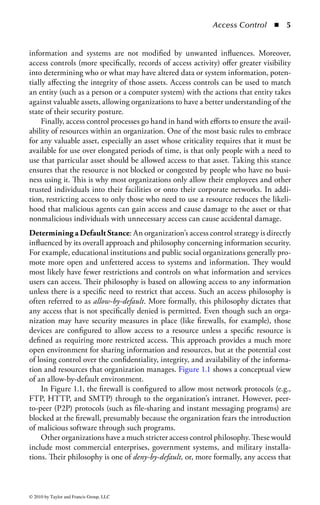
tion and resources that organization manages. Figure 1.1 shows a conceptual view
of an allow-by-default environment.
    In Figure 1.1, the firewall is configured to allow most network protocols (e.g.,
FTP, HTTP, and SMTP) through to the organization’s intranet. However, peer-
to-peer (P2P) protocols (such as file-sharing and instant messaging programs) are
blocked at the firewall, presumably because the organization fears the introduction
of malicious software through such programs.
    Other organizations have a much stricter access control philosophy. These would
include most commercial enterprises, government systems, and military installa-
tions. Their philosophy is one of deny-by-default, or, more formally, any access that


© 2010 by Taylor and Francis Group, LLC
6    ◾     Official (ISC)2 Guide to the CISSP CBK


                              FTP


                              HTTP
                                               Is the
                                              protocol       Intranet
                              SMTP            denied?


                              P2P


Figure 1.1        Conceptual view of an allow-by-default environment.

is not specifically permitted is denied. In contrast to the allow-by-default approach,
deny-by-default will block all attempts to access information and resources unless
that access is specifically permitted. This approach provides an environment that
protects information resources much more strongly, but at a cost of requiring much
greater management and administration of those resources. In addition, workers in
a deny-by-default environment may find that access to, and sharing of, information
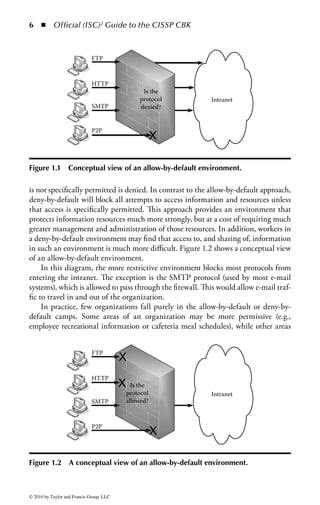
in such an environment is much more difficult. Figure 1.2 shows a conceptual view
of an allow-by-default environment.
     In this diagram, the more restrictive environment blocks most protocols from
entering the intranet. The exception is the SMTP protocol (used by most e-mail
systems), which is allowed to pass through the firewall. This would allow e-mail traf-
fic to travel in and out of the organization.
     In practice, few organizations fall purely in the allow-by-default or deny-by-
default camps. Some areas of an organization may be more permissive (e.g.,
employee recreational information or cafeteria meal schedules), while other areas


                              FTP


                              HTTP
                                            Is the
                                          protocol           Intranet
                              SMTP        allowed?


                              P2P


Figure 1.2         A conceptual view of an allow-by-default environment.


© 2010 by Taylor and Francis Group, LLC
Access Control   ◾   7


will be much more restrictive (such as employee health and salary information or
company financial records.) Nevertheless, most organizations will have one or the
other of these core philosophies as their underlying guiding principle. Defining
your core philosophy will be very important to your access control strategy, as it sets
the tone for all other access control decisions to follow.
Defense in Depth: The practice of implementing appropriate access control mech-
anisms is also the first line of defense in an organization’s defense-in-depth strategy.
Defense in depth is the practice of applying multiple layers of security protection
between an information resource and a potential attacker. If one of those layers
should fail the successive layers will continue to function and protect the resource
against compromise. A sound access control strategy provides the first layer of
protection. By carefully managing all attempts to access a resource and blocking
those that are not preauthorized, it ensures that all the other layers protecting that
resource have a much greater chance of successfully protecting it.
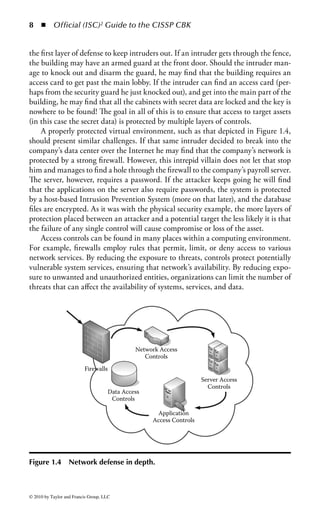
    Defense in depth is applicable to both the physical and virtual environments.
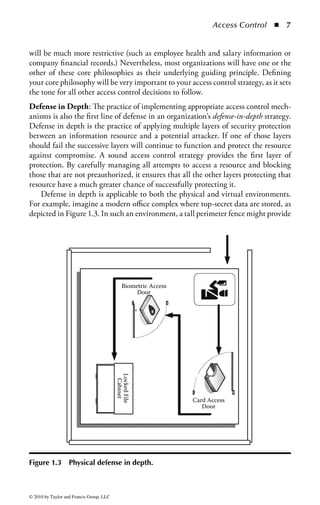
For example, imagine a modern office complex where top-secret data are stored, as
depicted in Figure 1.3. In such an environment, a tall perimeter fence might provide


                                              Biometric Access
                                                   Door
                                          Locked File
                                           Cabinet


                                                                 Card Access
                                                                    Door


Figure 1.3         Physical defense in depth.


© 2010 by Taylor and Francis Group, LLC
8    ◾     Official (ISC)2 Guide to the CISSP CBK


the first layer of defense to keep intruders out. If an intruder gets through the fence,
the building may have an armed guard at the front door. Should the intruder man-
age to knock out and disarm the guard, he may find that the building requires an
access card to get past the main lobby. If the intruder can find an access card (per-
haps from the security guard he just knocked out), and get into the main part of the
building, he may find that all the cabinets with secret data are locked and the key is
nowhere to be found! The goal in all of this is to ensure that access to target assets
(in this case the secret data) is protected by multiple layers of controls.
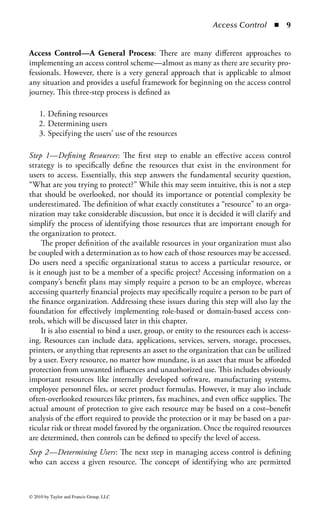
     A properly protected virtual environment, such as that depicted in Figure 1.4,
should present similar challenges. If that same intruder decided to break into the
company’s data center over the Internet he may find that the company’s network is
protected by a strong firewall. However, this intrepid villain does not let that stop
him and manages to find a hole through the firewall to the company’s payroll server.
The server, however, requires a password. If the attacker keeps going he will find
that the applications on the server also require passwords, the system is protected
by a host-based Intrusion Prevention System (more on that later), and the database
files are encrypted. As it was with the physical security example, the more layers of
protection placed between an attacker and a potential target the less likely it is that
the failure of any single control will cause compromise or loss of the asset.
     Access controls can be found in many places within a computing environment.
For example, firewalls employ rules that permit, limit, or deny access to various
network services. By reducing the exposure to threats, controls protect potentially
vulnerable system services, ensuring that network’s availability. By reducing expo-
sure to unwanted and unauthorized entities, organizations can limit the number of
threats that can affect the availability of systems, services, and data.


                                              Network Access
                                                 Controls
                          Firewalls
                                                                     Server Access
                                                                       Controls
                                     Data Access
                                      Controls

                                                    Application
                                                   Access Controls


Figure 1.4         Network defense in depth.


© 2010 by Taylor and Francis Group, LLC
Access Control        ◾   9


Access Control—A General Process: There are many different approaches to
implementing an access control scheme—almost as many as there are security pro-
fessionals. However, there is a very general approach that is applicable to almost
any situation and provides a useful framework for beginning on the access control
journey. This three-step process is defined as

    1. Defining resources
    2. Determining users
    3. Specifying the users’ use of the resources

Step 1—Defining Resources: The first step to enable an effective access control
strategy is to specifically define the resources that exist in the environment for
users to access. Essentially, this step answers the fundamental security question,
“What are you trying to protect?” While this may seem intuitive, this is not a step
that should be overlooked, nor should its importance or potential complexity be
underestimated. The definition of what exactly constitutes a “resource” to an orga-
nization may take considerable discussion, but once it is decided it will clarify and
simplify the process of identifying those resources that are important enough for
the organization to protect.
     The proper definition of the available resources in your organization must also
be coupled with a determination as to how each of those resources may be accessed.
Do users need a specific organizational status to access a particular resource, or
is it enough just to be a member of a specific project? Accessing information on a
company’s benefit plans may simply require a person to be an employee, whereas
accessing quarterly financial projects may specifically require a person to be part of
the finance organization. Addressing these issues during this step will also lay the
foundation for effectively implementing role-based or domain-based access con-
trols, which will be discussed later in this chapter.
     It is also essential to bind a user, group, or entity to the resources each is access-
ing. Resources can include data, applications, services, servers, storage, processes,
printers, or anything that represents an asset to the organization that can be utilized
by a user. Every resource, no matter how mundane, is an asset that must be afforded
protection from unwanted influences and unauthorized use. This includes obviously
important resources like internally developed software, manufacturing systems,
employee personnel files, or secret product formulas. However, it may also include
often-overlooked resources like printers, fax machines, and even office supplies. The
actual amount of protection to give each resource may be based on a cost–benefit
analysis of the effort required to provide the protection or it may be based on a par-
ticular risk or threat model favored by the organization. Once the required resources
are determined, then controls can be defined to specify the level of access.
Step 2—Determining Users: The next step in managing access control is defining
who can access a given resource. The concept of identifying who are permitted


© 2010 by Taylor and Francis Group, LLC
10     ◾     Official (ISC)2 Guide to the CISSP CBK


access and providing the credentials necessary for their role is fundamental to secu-
rity and ancient in practice. In early tribal cultures, a right of passage consisted of
obtaining a specific garment, marking, or even a scar signifying you were approved
for various activities within the tribe, which translated to access. As populations
grew and became more sophisticated, new methods were developed to provide
access to an approved community. Over 4000 years ago, the Egyptians developed
the first lock-and-key systems. Wooden locks were operated by a wooden key that
controlled pins to disengage a bolt and permit access to the protected object. The
key would be provided only to those who had been identified as needing access.
Although seemingly primitive by today’s standards (after all, how long would a
wooden lock protect a modern file cabinet?), the technology and social conventions
of the day allowed this to be quite an effective mechanism in ancient Egypt. Today
security professionals continue the tradition of using the latest in available technol-
ogy to protect valuable assets.
    A typical environment must manage employees, contractors, consultants, part-
ners, clients, or even, on occasion, competitors that organizations need to identify
as requiring access of one kind or another. The act of specifying which users can
have access to a system is typically driven by an operational demand, such as pro-
viding access to an accounting system so that users in the financial department can
record and pay bills. Access control decisions are often based on organizational,
social, or political considerations as well. One’s personal or functional status within
the organization may dictate the type or scope of access to organizational assets
that may be allotted. A company CEO is rarely denied access to any organizational
asset he may request, despite the fact that his explicit need to have that information
may not be readily apparent. While this may not be the preferable method of deter-
mining access rights, a real-world information security manager should be prepared
to deal with such situations.
    The most significant aspect of determining which users will be provided access
is a clear understanding of the needs of the user and the level of trust given to
that person or entity. An identification process must exist that takes into consider-
ation the validity of the access need in the light of business needs, organizational
policy, legal requirements, information sensitivity, and security risk. It is impor-
tant to understand that with each new user or community, the threat profile of an
organization changes. For example, an organization may determine that one of its
partners needs access to a given system. Upon providing that access, the potential
threats to the organization now include that partner organization. Not only must
the relationship be founded on trust, established by legal or other mechanisms
between the two entities, but it must also now consider the increase in the number
of users, thereby increasing the potential sources of threat.
    The more sophisticated the access control system, the greater the number of
options to support various access demands in a secure fashion. It is not uncommon
for organizations to have several different access control strategies to accommodate
various needs, resulting in the provisioning of multiple unique access solutions.
However, this is not considered as a security best practice, and the objective is to

© 2010 by Taylor and Francis Group, LLC
Access Control       ◾   11


have a consistent access control strategy to avoid too much complexity. The more
the complexity that exists in any system, including access control systems, the more
likely it is that unexpected interactions will cause security flaws to be exposed.
Simplicity is the key to any effective security system. The overall goal, then, is to
strike an effective balance between the need to manage the complex access needs of
an organization and the need to keep the access control system as simple as possible
to understand and manage.
Step 3—Specifying Use: The final step in the access control process is to specify
the level of use for a given resource and the permitted user actions on that resource.
Take, for example, the files and data resident on a typical computer. Most file systems
provide multiple levels of permissions, such as read, write, and execute. Depending
on the file system used to store data, there may be methods of permitting much more
granular controls. These may include the ability to provide access to a specific user,
but only permitting him or her to perform a certain task. For example, a user with
the role of “data backup” will be allowed to perform administrative functions such
as “copy to tape,” but not to erase or alter the information. (Access permissions will
be covered in greater detail later in this chapter.) Additionally, a user may have the
need to run an application, and therefore be provided execute privileges. However,
he may not have write privileges, to ensure that he cannot modify the application.
     The same philosophy can be applied to any resource, and access controls should
be used to support an organization’s business functionality. For example, you may
wish to restrict the users’ ability to access specific printers based on a particular
organizational structure. This would, as an example, allow a department to restrict
high-cost color printing to only the members of the graphics or marketing depart-
ments. Not only would this properly restrict access to valuable and expensive
resources, it might also aid the organization’s cost allocation efforts by ensuring
that charges for those expensive resources are allocated only to those who must
use them. As another example, an organization that needs to restrict printing and
duplication of sensitive or classified documents may allow any user to send a print
job to a particular printer, but require another level of approval from an authorized
official to actually print the document in order to avoid policy violations.
     Ultimately, once a user is identified and authenticated, an access control system
must be sensitive to the level of authorization for that user to use the identified
resources. Therefore, it is not enough to simply identify and authenticate a user in
order to access resources. It is also necessary to control what actions are permitted
for a specified resource based on the user’s role (unless, of course, “unlimited access”
is the organizational policy).


Access Control Principles
Access Control Policy: The first element of an effective access control program
is to establish an access control policy and associated standards and procedures.
An access control policy specifies the guidelines for how users are identified and

© 2010 by Taylor and Francis Group, LLC
12 ◾         Official (ISC)2 Guide to the CISSP CBK


authenticated and the level of access granted to resources. The existence of an access
control policy ensures that decisions governing the access to enterprise assets are
based on a formalized organizational directive. The absence of a policy will result
in inconsistencies in provisioning, management, and administration of access con-
trols. The policy will provide the framework for the definition of necessary proce-
dures, guidelines, standards, and best practices concerning the oversight of access
management.
Separation of Duties: It is often possible to enable effective access controls by
altering the way people perform their work functions. The primary objective of
separation of duties is the prevention of fraud and errors. This objective is achieved
by distributing the tasks and associated privileges for a specific process among mul-
tiple people. It acts as a deterrent to fraud or concealment because collusion with
another individual is required to complete a fraudulent act, ensuring that no indi-
vidual acting alone can compromise the security of a system or gain unauthorized
access to data. Of course, just because separation of duties is established for a given
process does not mean that fraud is impossible to carry out; it just means that it is
more difficult. People are generally averse to include others in the planning of crim-
inal acts, so forcing collusion to happen in order to carry out such an act reduces
the overall risk of its occurrence.
    The first action to employ separation of duties in a process or work function is
defining the individual elements of that process. Processes are typically a collection
of tasks that must be performed to achieve an objective. Examples of common pro-
cesses include performing backups, copying files, or granting system access. Work
functions can also encompass highly complex and potentially vital (or dangerous)
business elements that should not be in the control of any one person. A common
example is the process of creating and approving requisitions for purchasing expen-
sive items. The person who requests the expenditure should not also be allowed to
approve the expenditure. This prevents a single person from creating and receiving
fraudulent payments. A less common, though more dangerous, example from the
military is the ability to launch nuclear missiles. One person may have the ability
to arm the missile but not execute the launch sequence. Another person may have
the ability to launch the missile but not arm its payload. Finally, neither person
can do anything without receiving proper authorization from the President. In this
case, all three people are needed in order to successfully launch an armed missile.
This safeguard ensures that a single person with a political agenda (or just having a
particularly bad day) will not be able to start a global nuclear war.
    To determine the applicability of separation of duties, two distinct factors must
be addressed: the sensitivity of the function under consideration and the elements
within a process that lend themselves to distribution. Sensitivity of the function
takes into consideration the criticality of the job performed and potential exposure
to fraud, misuse, or negligence. It will be necessary to evaluate the importance
of a given transaction and its relationship to enterprise security risk, operations,


© 2010 by Taylor and Francis Group, LLC
Access Control        ◾   13


and, of course, C-I-A factors. It is important to be aware that seemingly mundane
tasks may also sometimes require separation of duties practices. For example, a
single user performing both backup and restore procedures would have the ability
to manipulate or destroy the backup data to cover unauthorized activity, change
information, or destroy valuable resources undetected.
    There are other activities within an organization that are not only important when
considering separation of duties, but their technical and procedural architecture also
assists in establishing these controls as well. For example, in application development
there are typically separate development, testing, and production environments. The
integrity of libraries used for the development is critical, and it is important that live
systems and proprietary information should not be used within the testing environ-
ment to mitigate the risk of exposing sensitive information. Therefore, the develop-
ment environment needs to follow strict separation of duties throughout the process
in order to ensure that code and data follow strict change management processes and
access by personnel between these areas is restricted. This reduces the risk of changes
being made to the code once it has been tested and ensures the integrity of the tested
code and that the production code is maintained.
    The second factor when determining the applicability of separation of duties
is understanding what elements within a function are prone to abuse, which ones
are easily segmented without significantly disrupting operations, and what skills
are available to the pool of users performing the different elements of the function.
These can be summarized as

    ◾ Element identification, importance, and criticality
    ◾ Operational considerations
    ◾ User skills and availability

Element identification, importance, and criticality: Each function will have one or
more elements that must be performed to complete the transaction. Some elements
within a function, known as milestone elements, may lend themselves to offer oppor-
tunities for fraud or abuse. Such cases would then require a different user with
unique privileges to complete that element. To ensure that a process runs as effi-
ciently as possible within a separation of duties environment, it may be possible to
collect different elements into groups that together represent a milestone element.
The key is to evaluate each element and the role it plays in performing the function.
Once each element is assessed against the potential for abuse, they can begin to be
distributed to various users.
    In the event that a collection of elements within a function does not offer a clear
point of segmentation, it may be necessary to incorporate a new milestone element
as a validation and approval point within the function. For example, at a specific
point in a process, a manager can send an e-mail, apply a digital signature, or add
a validation mark to the data. That additional notification or mark must be present
for the primary user to continue the remaining processes.


© 2010 by Taylor and Francis Group, LLC
14     ◾     Official (ISC)2 Guide to the CISSP CBK


     Operational considerations: One of the key attributes of a successful security pro-
gram is integrating effectively within the business or operational goals of the orga-
nization. When considering separation of duties, the impact to the function and its
role in the business are essential to overall success. When implemented poorly, or
without taking overall business goals into account, security-related processes like
separation of duties can hinder the process and make it prone to circumvention.
The impact to the operations must be taken into account whenever establishing
separation of duties practices for a function. The security manager must consider
the impact to the efficient operation of the function as well as the meaningful alter-
native options in the event there is a system failure or outage. It is important not to
sacrifice security, but rather to have alternate compensating controls that can meet
the objectives for security.
     In addition, the cost of implementing separation of duties within a business
process must be weighed against the overall risk that process represents to the orga-
nization and whether the benefits of separation outweigh the time and effort costs
to the organization. In the separation of duties example of arming and launching
nuclear missiles, it can be nearly universally agreed that the cost of implementing
separation in such a circumstance is greatly outweighed by the risk and poten-
tial harm that could come from a non-separated nuclear environment. Conversely,
most would agree that implementing separation of duties in a cafeteria’s tuna sand-
wich-making process would not make a great deal of sense. While it is true that a
malevolent sandwich maker could intentionally inflict illness or even death upon
unsuspecting patrons, the actual incidence of such an occurrence is relatively low
and the addition of the extra personnel required for such a low-risk situation would
be very costly to the organization.
    User skills and availability: Clearly, separation of duties requires multiple partici-
pants, and each of those participants must have the appropriate skills and training to
perform the specific element of a given function. Additionally, there must be enough
personnel to perform all the elements that have been distributed. In organizations that
have small staffs, pure separation of duties may not be feasible. For example, a com-
mon separation practice is to ensure that those who develop software programs should
not have access to the production environments where those programs are run. Those
who run and maintain the production environment should be a separate and distinct
group from the development team. This separation prevents a rogue developer from
introducing malicious code directly into a production system. Unfortunately, many
small development shops and start-up companies cannot afford the extra personnel
that such a separation environment requires. Staffing those extra positions may just
mean the difference between a successful business and bankruptcy. Given the trade-
off between the benefits of separation (prevention against malicious code) and the
cost of separation (double the salary expense), a reasonable business owner might opt
against separation, preferring instead to instill other mitigating controls to reduce the
risk, such as a strong change management process and code reviews.


© 2010 by Taylor and Francis Group, LLC
Access Control       ◾ 15


Least Privilege: The principle of least privilege is one of the most fundamental char-
acteristics of access control for meeting security objectives. Least privilege requires
that a user or process be given no more access privilege than necessary to perform
a job, task, or function. The objective is to limit users and processes to access only
resources and tools necessary to perform assigned functions. Th is often requires
limits not only on what resources can be accessed, but also includes limiting the
actions that can be performed by the user even if they have authorized access to
the resource. For example, a user may be restricted to only read-only, update, and
execute permission on a system without the ability to create or delete files and
databases. Ensuring least privilege requires identifying what the user’s job is, deter-
mining the minimum set of privileges required to perform that job, and restricting
the user to a domain with those privileges and nothing more. Denying users access
privileges that are not necessary for the performance of their duties ensures that
those privileges cannot be used to circumvent the organization’s security policy.
Need to Know: A companion concept to least privilege is the notion of need to
know. If the goal of least privilege is to reduce access to a bare minimum, need
to know defines that minimum as a need for that access based on job or business
requirements. For example, although the CIO in an organization has the appropri-
ate rank in the organization to view upcoming quarterly financial forecasts, the
organization’s comptroller may decide that the CIO does not have a need to know
that information and, thus, restrict access to it. Need to know is also used heavily in
situations where operational secrecy is a key concern, such as in military operations.
Military leaders often keep operational plans on a need to know basis to reduce the
number of people who know about the plans and reduce the risk that someone will
leak that information to the enemy.
Compartmentalization: Finally, compartmentalization completes the least privi-
lege picture. Compartmentalization is the process of separating groups of people
and information such that each group is isolated from the others and information
does not flow between groups. For example, an organization might compartmen-
talize (both logically and physically) a team working on mergers and acquisitions so
that the information that team is working on will not leak to the general employee
population and lead to a potential insider trading problem. Compartmentalization
is helpful in situations where information needs to stay contained within a single
group or area and strong protections need to be taken to keep that information
from leaking outside the area.
Security Domain: A security domain is an area where common processes and secu-
rity controls work to separate all entities involved in these processes from other
entities or security domains. For example, all systems and users managing financial
information might be separated into their own security domain, and all systems
involved in e-commerce activity might get their own security domain. A security
domain is based on trust between resources or services in areas or systems that share


© 2010 by Taylor and Francis Group, LLC
16 ◾         Official (ISC)2 Guide to the CISSP CBK


                                           High
                                          security
                                          network


                High clearance            Medium
                     user                 security
                                          network

                                                          Medium clearance
                                                               user

                                            Low
                                          security
                 Low clearance
                                          network
                     user


Figure 1.5 Three distinct and separate security domains exist on the server.
Only those individuals or subjects authorized can have access to the information
on a particular domain.


a single security policy and a single management structure. The trust is the unique
context in which a program is operating. There may be multiple security domains
within an organization and an entity may, at times, belong to more than one secu-
rity domain based on its responsibilities and functions at any given time. The sepa-
ration between domains can be either physically or logically managed. Security
domains support a hierarchical relationship where subjects can access objects in
equal or lower domains; therefore, domains with higher privileges are protected
from domains with lesser privileges.
    In Figure 1.5, three distinct and separate security domains exist on the server,
and only those individuals or subjects authorized can have access to the informa-
tion on a particular domain.
    A subject’s domain, which contains all of the objects that the subject can access,
is kept isolated. Shared objects may have more than one access by subjects, and this
allows this concept to work. For example, if a hundred subjects have access to the
same object, that object has to appear in a hundred different domains to allow this
isolation.


Information Classification
Many organizations have thousands, or even millions, of data files containing valu-
able information on all aspects of the organization’s business. Information is created

© 2010 by Taylor and Francis Group, LLC
Access Control        ◾    17


in great volumes on a daily basis from a variety of transactional systems, as well
as aggregated into databases and data warehouses to provide decision-making sup-
port. The information is stored on backup tapes, copied to portable USB drives, and
burned to CDs and DVDs for portability. Information is stored on portable comput-
ers and network drives, and in e-mail systems to support the sharing of information.
The same information is printed and filed, and stored off site for business continuity
and disaster recovery purposes. A file will typically have multiple versions, will be
stored in multiple locations, and is capable of being accessed by different individuals
in each of these locations. Fundamental security questions are raised in this type of
environment. Where is the organization’s information? How should the information
be handled and protected? Who should have access to it? Who owns the informa-
tion? Who makes the decisions around these parameters? These questions form the
impetus for implementing an information classification strategy.
     Information classification is the practice of evaluating the risk level of the organiza-
tion’s information to ensure that the information receives the appropriate level of pro-
tection. The application of security controls to information has a cost of time, people,
hardware, software, and ongoing maintenance resources that must be considered.
Applying the same level of control to all of the company’s assets wastes resources and
money by overprotecting some information and underprotecting other information.
In an effort to simplify security budget management, security dollars are often spent
uniformly to protect all assets at the same level. Not all assets have the same value or
need the same level of protection. The budget could be better allocated, and the secu-
rity of the organization better managed, by providing only basic protection to assets
of little value and providing increased protection to those assets considered to be of
greater value or higher sensitivity. By applying protection controls to the information
based upon the classification, the organization gains efficiencies and thus reduces the
overall cost of information security. The primary objective of information classifica-
tion, therefore, is to group an organization’s information assets by levels of sensitivity
and criticality. Once this is done, the organization then applies the appropriate level of
protection controls to each asset in accordance with the classification assigned to it.

Information Classification Benefits: There are many benefits in classifying infor-
mation within an organization. First, classification helps to establish ownership of
the information, which provides a central point of control for all aspects of security
and access to the information. This increases the likelihood that the information will
be used in the proper context and those accessing the information will be properly
authorized. Information classification also increases the confidentiality, integrity, and
availability of information by focusing an organization’s limited security funds on the
resources requiring the highest level of protection and providing lesser controls for the
information with less risk of loss. By understanding the information and its location,
the organization can identify areas that may need higher levels of protection.
    Information classification can also have a positive effect on the knowledge and
awareness of security within an organization. A classification program allows for
greater understanding of the value of the information to be protected, and provides


© 2010 by Taylor and Francis Group, LLC
18 ◾         Official (ISC)2 Guide to the CISSP CBK


a clearer direction for the handling of sensitive information. In addition, a periodic
review of the classification scheme and controls helps personnel maintain awareness
of the importance of protecting information. Finally, the process itself helps create a
greater organizational awareness of the need to protect company information.
    Information classification can also have an operational benefit to the organiza-
tion. Critical information can be identified to support business recovery scenarios
by focusing the recovery efforts on the most critical areas. Placement of information
with higher levels of classification on more reliable storage and backup mecha-
nisms helps reduce recovery times. Finally, an organization can reduce the expense
of inefficient storage for nonsensitive information in data storage or physical file
cabinets.
Establishing an Information Classification Program: Establishing an informa-
tion classification strategy and developing plans for implementation may seem a bit
onerous for an organization that has never had such a program before. However,
once the work of defining the classification levels and determining the classification
of the individual information has been completed, the value to the organization is
well worth the effort. The following sections walk through the steps of establishing
and sustaining an information classification program. Although the exact path each
organization takes may be a bit different, the steps identified are a good representa-
tion of the major steps involved in programs of this type. The exact sequence or the
steps included may also vary or be combined, depending upon the size, complexity,
and culture of the organization. The basic steps are

   1.    Determine information classification program objectives.
   2.    Establish organizational support.
   3.    Develop an information classification policy and supporting procedures.
   4.    Develop information classification process flows and procedures.
   5.    Develop tools to support the process.
   6.    Identify process or application owners.
   7.    Identify information owners and delegates.
   8.    Distribute standard templates.
   9.    Classify information and applications.
  10.    Develop auditing procedures.
  11.    Load classification information into a central repository.
  12.    Train users.
  13.    Periodically review and update information classifications.

Step 1—Determine Information Classification Program Objectives: It is helpful to
document the specific program objectives to give the program a clear vision of
its goals and to help define and explain the program to others in the organiza-
tion. Defining clear objectives also helps to contain the scope of the effort and
determine when deliverables are completed, so that these accomplishments may be
celebrated to sustain those involved in later phases of the project. The objectives are


© 2010 by Taylor and Francis Group, LLC
Access Control       ◾   19


also important for obtaining the support of those needed to both endorse and carry
out the program.
    It is very important when defining the overall program objectives to clearly
establish that information classification is a program, not a project. A project is a
series of tasks that lead to a known end state. A program, on the other hand, is
a change in organization process and behavior that will have long-term lasting
impact to the organization. Implementing information classification in an organi-
zation will change the way the organization thinks about and manages information
permanently and, thus, has no defined end state to speak of. It is truly a program in
all meaningful respects and should always be referred to as such.
Step 2—Establish Organizational Support: Senior management support is essential
to the start-up and continued operation of the information classification program.
There may be a perception within the organization that all information should be
treated as confidential and is adequately secured by physical barriers to the facility,
firewalls, and other security controls protecting the environment. This view pro-
motes the concept that all information should be protected equally. Unfortunately,
the reality is that information resources should be given the appropriate protection
based on their overall risk and threat profile: no more and no less. The security
professional should work through the cost/benefit discussion with senior manage-
ment to illustrate how the appropriate application of security controls is the most
effective approach to benefit the business.
    Although security professionals understand the importance of information
classification, without the proper positioning of the effort, the organization’s senior
management and end users may perceive the effort as another project requiring
their resources, with little payback to individual departments. The program should
be socialized with senior management by using business-focused benefits, as well
as highlighting enhancements to the effectiveness of the organization. Examples of
such benefits include

    ◾ Ensuring confidentiality of information by restricting who can access or copy
      the information
    ◾ Increased accuracy and integrity of information by controlling who can mod-
      ify or update the information
    ◾ Increased availability of information by restricting the ability to overwrite or
      erase important or critical data
    ◾ Avoiding damage to the organization’s reputation by reducing the risk of
      unauthorized disclosures
    ◾ Reduction in costs of overprotection
    ◾ Ability for managers to enforce accountability
    ◾ Protection of intellectual property and trade secrets
    ◾ Protection of customer or consumer confidential information
    ◾ Compliance with industry regulation or legal requirements to protect person-
      ally identifiable information


© 2010 by Taylor and Francis Group, LLC
20 ◾         Official (ISC)2 Guide to the CISSP CBK


Step 3—Develop an Information Classification Policy and Supporting Procedures: The
information classification policy communicates the requirement to the organiza-
tion to classify the information assets. The policy also communicates the primary
purpose of information classification, which is to ensure that the appropriate pro-
tections are applied according to the level of sensitivity, risk, and criticality. The
policy statement is a description of the requirement, including the scope of users
and systems to which the policy applies, as well as what is expected of those affected
by the program. The policy should describe the overall information classification
framework and the meaning of each level or categorization within the framework.
The policy may also indicate the responsibilities of users and management in han-
dling the information.
    Policies are generally written at a high level, with the details reserved for sup-
porting procedures. The procedures communicate how to determine the classifi-
cation of a particular information item, as well as how that information should
be subsequently handled and protected. Involvement with business or application
owners, as well as the IT department, is important in determining the various
procedure and control matrices. This establishes business owners buy-in to the
procedures, and provides an operational perspective for determining how the
information should be managed.
Step 4—Develop Information Classification Process Flow and Procedures: Documented
procedures assist in the ongoing operation of classifying information. Because the
organization may have many files that have not been looked at through the infor-
mation classification lens, the start-up effort to develop these flows and procedures
may require a large amount of resources. Ongoing efforts will also require that the
information is reviewed and updated on a periodic basis. The initial gathering of the
information classifications and the process utilized must be driven by a documented
procedure so that all of the parties involved in the effort are aware of their individual
roles and requirements to complete the classification. Flowcharts in addition to the
documented written processes can be helpful, as individuals receive and retain infor-
mation through different means. The documentation of the process also helps ensure
that the classification process is handled uniformly throughout the organization.
Step 5—Develop Tools to Support Process: Various tools, such as word processing
documents, spreadsheets, databases, and presentations, support the collection pro-
cess. Standardized templates facilitate collection as well as the ability to gener-
ate reports by data type to ensure that the designations are consistent across the
enterprise and follow the prescribed information classification policy and associated
standards. Once the spreadsheets are distributed to the individuals completing the
information, the results can be exported to a database for consolidation, review, and
ongoing maintenance.
Step 6—Identify Process or Application Owners: The business owner of each applica-
tion provides the functional requirements for what data is necessary for the business.


© 2010 by Taylor and Francis Group, LLC
Access Control       ◾ 21


The owner will have the most intimate knowledge of the data and how they are
used. Apart from the business owner, the systems or information technology owner
may act primarily as a data custodian of the information and will understand the
processing, technical, storage, and security protections of the information. Both
individuals contribute to an understanding of the classification requirements and
should be identified as part of the process.
Step 7—Identify Information Owners and Delegates: Information owners are those
people in the organization who understand the information in their area of the busi-
ness and have the ultimate responsibility for making decisions about the usage of
the information. They may manage the responsibility or assign designees or infor-
mation delegates that are empowered to make the day-to-day operational decisions
as to who is allowed to read, modify, or delete the business information. The owners
and delegates are the primary individuals who are involved in the classification pro-
cess, as they have the greatest business knowledge of the information in question.
Step 8—Distribute Standard Templates: Providing standard information classifica-
tion templates to data owners promotes uniform data gathering and makes the sub-
sequent tasks of tracking and analysis of the information much easier. The templates
may be part of the tools developed in Step 5. These templates should be distributed
to the information owners or delegates to collect the classification information on
the data managed by their departments.
Step 9—Classify Information and Applications: Once the templates have been dis-
tributed, the data owners (or their delegates) use the information classification pol-
icy and standards to classify the information. Typically there are three to four levels
of information classification used by most organizations:

    ◾ Public: Information that may be disclosed to the general public without
      concern for harming the company, employees, or business partners. No
      special protections are required, and information in this category is some-
      times referred to as unclassified. For example, information that is posted to
      a company’s public Internet site, publicly released announcements, market-
      ing materials, cafeteria menus, and any internal documents that would not
      present harm to the company if they were disclosed would be classified as
      public.
    ◾ Internal use only: Information that could be disclosed within the company,
      but could harm the company if disclosed externally. Information such as
      customer lists, vendor pricing, organizational policies, standards and pro-
      cedures, and internal organization announcements would need baseline
      security protections, but do not rise to the level of protection as confidential
      information.
    ◾ Confidential: Information that, if released or disclosed outside of the orga-
      nization, would create severe problems for the organization. For example,


© 2010 by Taylor and Francis Group, LLC
22 ◾         Official (ISC)2 Guide to the CISSP CBK


      information that provides a competitive advantage is important to the tech-
      nical or financial success (like trade secrets, intellectual property, or research
      designs), or protects the privacy of individuals would be considered confi-
      dential. Information may include payroll information, health records, credit
      information, formulas, technical designs, restricted regulatory information,
      senior management internal correspondence, or business strategies or plans.
      These may also be called top secret, privileged, personal, sensitive, or highly
      confidential.
    ◾ Restricted: Information that requires the utmost protection or, if discovered
      by unauthorized personnel, would cause irreparable harm to the organization
      would have the highest level of classification. There may be very few pieces of
      information like this within an organization, but data classified at this level
      requires all the access control and protection mechanisms available to the
      organization. Even when information classified at this level exists, there will
      be few copies of it around, and tracking who has this information, when they
      received it, and when they returned it are extremely important. Information
      of this type includes merger and acquisition information, financial forecasts,
      or anything that (if publicly known) would materially affect the market status
      or stock price of the company.

An important point to consider is that this process may take a long (a very, very
long) time to complete, especially if you are analyzing and classifying a large
environment with complex data relationships. When faced with such a seemingly
daunting task, data owners will often react by arguing against the process based on
the cost of the analysis alone or relegating the project to back-burner status where it
will receive little, if any, attention. It is important to work with all the data owners
and senior management to ensure that the program remains on track.
    There are some steps you can take to reduce the amount of time required for
the initial classification effort. For example, a data owner may have a database with
thousands of intermingled data elements fitting into all three classification levels.
Rather than classifying each individual data element and applying appropriate con-
trols at the element level, the owner may elect to reorganize the database into public
and nonpublic data sets and apply the appropriate controls in aggregate to each
data set. While the process of such aggregation may lead to the oversimplification
problem mentioned earlier, if applied judiciously it can lead to enormous time sav-
ings during the classification process and cost savings during the implementation
of protection controls.
    During the planning and design of the classification program some consider-
ation should be given to the classification of aggregate data. This is information
that would not be considered sensitive when taken alone, but, when combined with
other data, suddenly becomes sensitive and worthy of additional protection. For
example, a bank routing number (the number found at the bottom of a check that
uniquely identifies a U.S. financial institution) by itself would not be considered


© 2010 by Taylor and Francis Group, LLC
Access Control       ◾ 23


particularly sensitive by a data owner. Routing numbers are public information
easily found through a simple Internet search. However, when that routing number
is combined with an individual account number at that bank, the combination of
the two suddenly becomes very sensitive, because a thief can use that combina-
tion to access that individual’s bank account. Data owners need to be aware of the
dangers of aggregate data and account for them during the classification of their
information.
     In many circumstances one organization will be managing information on
behalf of another organization. For example, many companies outsource their
payroll processing to third parties and many banks outsource their IT systems
(including account management) to third-party service providers. In these cases,
the company that owns the information and the service provider may each have
its own classification systems. It is important that each party understand the other’s
classification system and the information owner must ensure that the classification
assigned to its information by the service provider (as well as the underlying protec-
tion mechanisms for that classification) meets its needs for adequate information
protection.
Step 10—Develop Auditing Procedures: Once information is classified, classifica-
tions rarely change unless the information has been misclassified, the information
that previously required protection is now public knowledge, or time has made
wider disclosure of the information less harmful to the organization. In most cases,
if there was a reason to protect the information initially to a certain level, then the
information will continue to be protected at this same level through its useful life.
However, new data are always being generated and needs to be classified. Existing
data should also be periodically reviewed to ensure that the classifications are cor-
rect. Information classification auditing is the process of reviewing the classifica-
tions to ensure the accuracy of the information, thus ensuring that the appropriate
security protections continue to be applied. An information classification audit
often relies on performing “spot” tests such as observations of sensitive information
left unprotected in work spaces (also known as a clean desk/clear screen check) and
checking of trash receptacles for discarded sensitive information as a method to
measure compliance with the information classification policy.
Step 11—Load Classification Information into a Central Repository: The classification
information obtained through the classification procedures and templates is loaded
into a central repository to support the analysis of the collections, as well as to serve
as the database for the ongoing updating of the classifications. A database tool pro-
vides the ability to examine the information from multiple perspectives, such as list-
ing all of the data types owned by a particular data owner, all of the data types of a
particular classification level, or what data types are associated with which applica-
tions. Depending on the amount of assets being classified and the complexity of the
classification scheme, the database may grow to considerable size. Careful planning
is important to ensure adequate space and processing capacity for the future.


© 2010 by Taylor and Francis Group, LLC
24     ◾     Official (ISC)2 Guide to the CISSP CBK


Step 12—Train Users: If the end user or employee does not understand what infor-
mation is public, internal user only, or confidential, or if the user does not under-
stand the requirements and differences in how to handle each type of information,
then the investment in information classification will have limited success. It is
critical that the user community gets proper training in the classification pro-
gram because they (the users) are the ones who will work with the program on a
daily basis. The training program must convey the purpose and importance of the
program and provide the proper motivation for users to support the classification
effort. Training should include information on the overall policies and the various
classification levels the organization will use. Most importantly, the training should
give practical examples of different types of information the users will come in con-
tact with and how to properly handle and protect that information using the official
standards and protection controls.
Step 13—Periodically Review and Update Information Classifications: Information
within an organization rarely remains static. To ensure that the organization con-
tinues to match current threats with appropriate information protections, the clas-
sifications assigned to information must be reviewed on a periodic basis. It is most
likely that the classifications will not change dramatically, but adjustments may be
needed. Scheduling auditing procedures on a periodic basis increases the quality of
the information classification program, as does providing the capability to update
and add new information classifications outside of the normal cycle.
Labeling and Marking: The labeling and marking of media with classification lev-
els provides the ability to manage the information contained within the media with
the handling instructions appropriate to the respective classification. For example,
a backup tape may be labeled with a serial number and “Company Confidential”
to indicate how the information should be treated. Organizations may decide not
to label individual information, but rather control all the information within a
business area or location according to restrictions based upon a single classifica-
tion type. For example, all backup tapes in the tape library may be classified as
“Confidential” and have appropriate controls placed on the whole library.
    Labeling and marking information also apply to all forms of systems and media
that manage or display classified information. This includes application displays,
printouts, and reports generated from organization systems. All these must have the
appropriate classification verbiage displayed or printed alongside the information to
ensure that all who come in contact with that information know the classification
level and are able to take the appropriate protective measures.
Information Classification Assurance: Periodically testing the information clas-
sifications provides assurance that the activities are being properly performed. The
audit procedures will uncover those data types that need to be added or reclassified.
Random audits of user areas, such as checking desktops for confidential documents
not returned to file drawers, information left overnight in open shredding bins, files


© 2010 by Taylor and Francis Group, LLC
Access Control       ◾   25


in electronic file folders accessible by anyone within the organization, confidential
information posted to a public Web site, or information left on copiers, printers,
and fax machines, can provide information regarding organizational compliance.
Encouraging end users to report security incidents related to mishandling of classi-
fied information can also be a source to provide assurance.
    The information security manager should work closely with the organization’s
internal audit manager to establish information classification reviews as part of the
standard audit program. In this way, the audit group can assist in ensuring the con-
tinual monitoring of the classification program including the assurance that new
information is classified appropriately as it enters the environment.


Access Control Requirements
As simple as it may seem, implementing an effective access control system—whether
for a single application or for an entire enterprise—takes careful planning, research,
foresight, and (of course) a great deal of persuasive skill to bring together all the
disparate interests in the organization to agree on the best way to move forward.
However, none of this can proceed without first considering the basic requirements
that any access control system must meet. While each enterprise or application
will have its own specific access control needs, there are some basic considerations
that all security professionals must look for in an access control system, process, or
technology. This section will discuss several of those requirements.
Reliability: First and foremost, any access control system under consideration must
be reliable enough to give consistent results every time. The reliability of a system
has both physical and logical components. Both are important to consider when
determining the best path for an organization to take.
    An access control system must operate within the same physical environmental
constraints under which its users operate. This means that all the environ-
mental factors that assist or hinder its users will have the same effect on the access
control system. Factors such as heat, humidity, complexity, wear and tear on com-
ponents, and user attitude will all have an effect on the long-term viability of the
environment. For example, if a badge reading system is used in a busy area (like
a hospital emergency room or fire house) it will most likely be subject to physical
abuse as users hurry to swipe their cards through the reader, perhaps knocking or
banging it repeatedly in the process. It will get heavily abused as frustrated and busy
users take out their frustration on the reader. Likewise, an access control system
located at a boat marina or at a military facility in the desert will be subject to heat
and moisture extremes that must be considered and tested before final acceptance.
    While the physical aspects of reliability are important, they can usually be
addressed by better material selection, manufacturing quality, and testing. What is
often more difficult to determine during the research and product selection stage


© 2010 by Taylor and Francis Group, LLC
26 ◾ Official (ISC)2 Guide to the CISSP CBK


is the product’s ability to work reliably and accurately over a long period of time.
The product must have the ability to minimize false positives and negatives, make
accurate authentication and authorization decisions, follow organizational policies
(as defined within the product) unambiguously, and function predictably accord-
ing to the expectations of the organization. Reliability of the system is a fundamen-
tal requirement, for without it the organization cannot place any confidence in the
system or its results. An access control system that fails may even cause a complete
denial of service to the organization. The inability to trust in the accuracy and reli-
ability of an access control system will cause the entire access control infrastructure
to collapse.
Transparency: Security (more specifically, the implementation of most security
controls) has long been a sore point with users who are subject to security controls.
Historically, security controls have been very intrusive to users, forcing them to
interrupt their work flow and remember arcane codes or processes (like long pass-
words or access codes), and have generally been seen as an obstacle to getting work
done. In recent years, much work has been done to remove that stigma of security
controls as a detractor from the work process adding nothing but time and money.
When developing access control, the system must be as transparent as possible to
the end user. The users should be required to interact with the system as little as
possible, and the process around using the control should be engineered so as to
involve little effort on the part of the user.
    For example, requiring a user to swipe an access card through a reader is an
effective way to ensure a person is authorized to enter a room. However, implement-
ing a technology (such as RFID) that will automatically scan the badge as the user
approaches the door is more transparent to the user and will do less to impede the
movement of personnel in a busy area. In another example, asking a user to under-
stand what applications and data sets will be required when requesting a system ID
and then specifically requesting access to those resources may allow for a great deal
of granularity when provisioning access, but it can hardly be seen as transparent.
A more transparent process would be for the access provisioning system to have a
role-based structure, where the user would simply specify the role he or she has in
the organization and the system would know the specific resources that user needs
to access based on that role. This requires less work and interaction on the part of
the user and will lead to more accurate and secure access control decisions because
access will be based on predefined need, not user preference.
    When developing and implementing an access control system or process—
indeed when establishing any type of security control—special care should be taken
to ensure that the control is as transparent to the end user as possible and interrupts
his work flow as little as possible.
Scalability: Setting up an access control system for five people can be hard. Setting
up an access control system for 5,000—or 50,000—people is really hard. Ensuring
the same system originally developed for five will work just as well for 50,000 can


© 2010 by Taylor and Francis Group, LLC
Access Control      ◾ 27


be next to impossible. When establishing an access control system, the security
professional should always assume that the system will grow way beyond origi-
nal expectations and ensure the capacity of the technology and the process scales
accordingly. A good rule of thumb is the Double Comma rule of estimation. The
double comma rule states:

         When estimating capacity for any new technology, start with an accurate
         estimate of the number of units (for example, people, packets, or badges)
         that will reasonably be required. Then, take that number, double it, then
         add enough trailing zeroes to force the addition of another comma in the
         final number.

So, for example, if an administrator needs to size a password database for 100
users, enough space should be allocated in the password database for 2000 users.
If calculated estimates indicate that an access control system will need to process
20,000 access requests an hour, the system should be sized to handle 4,000,000
requests per hour. Of course, the double comma rule will need to be adjusted for a
particular implementation based on available budget and technology limitations.
For instance, the security professional should consider if any access technology can
process 4,000,000 requests per hour, if the organization can afford the equipment
required for that capacity, and if the network infrastructure is capable of handling
that volume of traffic. The results of those considerations will adjust the final capac-
ity estimate for the technology. Nevertheless, the concept should be clear. Initial
capacity estimates may suffice for a project’s original needs and purposes, but the
security professional should assume that the system will grow well beyond original
estimates and should plan, as much as reasonably possible, to ensure that any given
solution has the ability to scale with that growth.
Integrity: Integrity was generally defined earlier in the chapter as the ability to
ensure that systems and information have not been altered in any unauthorized way.
When applied to an access control system, the system should have adequate tech-
nology, process, and audit features to ensure that the system consistently performs
accurately and within stated specifications so that the organization can be assured
that the system provides accurate access control decisions at all times. Maintaining
the integrity of the system includes many facets. Most notably it includes assuring
that only authorized personnel have access to the administrative functions of the
system. An attacker gaining the ability to manage the configuration of the access
control system would have the ability to establish valid user credentials, alter or
erase log and audit data, cause denial-of-service situations, or establish operational
rules to selectively allow or deny users access to the protected system. Ensuring that
only authorized personnel have access to administer the system goes a long way
toward ensuring the integrity of the access control function.
    Regular testing of the access control function will ensure that the service main-
tains its integrity over time. As the system remains in continuous use it may begin


© 2010 by Taylor and Francis Group, LLC
28 ◾ Official (ISC)2 Guide to the CISSP CBK


to lose sensitivity, components may begin to wear out, or continuous administra-
tive updates may introduce conflicts or obsolescence in the access rule set. Regular
administrative care and testing will ensure that the system continues to operate
within expected functional parameters and that any deviations from those param-
eters are caught early and corrected.
Maintainability: The access control system should require a minimum of mainte-
nance to function properly over an extended period of time. Naturally, the physical
components of the system may wear out over time, such as card readers, keypads,
or support systems, and the cost and effort to maintain these components should
be calculated into the overall business case for the system. However, the person-
nel effort to maintain the system should not be underestimated or overlooked.
Depending on the type of technology in use, the administrative effort required to
keep the system in proper working order can be considerable or require specialized
skills that may be expensive to acquire or maintain.
    Overall, however, an effective access control system is one that requires a mini-
mum of maintenance oversight or continuous tuning. Administrative effort and fine
tuning should be concentrated on updating rule sets, managing user populations,
and policy development. The management of these functions should also require
as little effort as possible. The administrative controls over the system should be
straightforward to understand and simple to operate. A system that is overly com-
plicated to understand or difficult to maintain is one that will either quickly fall
into disorder or be replaced with a system that is easier to manage.
Authentication Data Security: Equally as important as the access control system
is to an organization are the controls that protect the authentication data itself.
The authentication data include user identities, passwords, biometric information,
access capabilities, and a host of other sensitive information which, if obtained
by an attacker, would provide a roadmap for infiltrating and navigating around
an organization’s information systems. The protections around the authentication
database should be researched and tested before the system is implemented. Data
encryption should be in place, system- and file-level access controls should be pres-
ent, and strong authentication for administrative functions should be investigated.
Auditability: Even if the access control system operates perfectly within expected
parameters and there are no apparent instances of system failure or unauthorized
access, a complete audit trail of system activities is necessary to provide documented
assurance that the system is functioning properly. The system should have the abil-
ity to provide a complete record of all access control activity. This includes authen-
tication requests, data access attempts, changes to privilege levels, and exercise of
administrative capabilities. It is extremely important that this activity is recorded for
successful activity as well as failures. Too often, systems record only failed instances
of the above activity. Unfortunately, if an attacker succeeds in gaining authorized


© 2010 by Taylor and Francis Group, LLC
Access Control       ◾   29


access to the system, or if an authorized insider attempts to perform nefarious acts,
the system that only records event failures will fail to capture the activity of these
individuals. This will lead to an inability to understand precisely what these indi-
viduals did within the system and a failure to properly investigate and prosecute
(organizationally or legally) their activities.


Access Control Categories
In the development of an access control architecture for an enterprise, it is necessary
to fully understand the different categories and types of potential controls. This
section will describe those different categories and discuss how each fits into the
overall access control universe. This will also establish a foundation for later discus-
sion on access control technology, practices, and processes.
    There are literally hundreds of different access approaches, control methods,
and technologies, both in the physical world and in the virtual electronic world.
Each method addresses a different type of access control or a specific access need.
For example, access control solutions may incorporate identification and authen-
tication mechanisms, filters, rules, rights, logging and monitoring, policy, and a
plethora of other controls. However, despite the diversity of access control methods,
all access control systems can be categorized into seven primary categories. The
seven main categories of access control are

    1. Directive: Controls designed to specify acceptable rules of behavior within an
       organization
    2. Deterrent: controls designed to discourage people from violating security
       directives.
    3. Preventive: controls implemented to prevent a security incident or informa-
       tion breach
    4. Compensating: controls implemented to substitute for the loss of primary con-
       trols and mitigate risk down to an acceptable level
    5. Detective: controls designed to signal a warning when a security control has
       been breached
    6. Corrective: controls implemented to remedy circumstance, mitigate damage,
       or restore controls
    7. Recovery: controls implemented to restore conditions to normal after a secu-
       rity incident

Figure 1.6 shows a continuum of controls relative to the time line of a security
incident:
Directive Controls: Directive controls, sometimes referred to as administrative
controls, provide guidance to personnel as to the expected behavior with respect to


© 2010 by Taylor and Francis Group, LLC
30     ◾ Official (ISC)2 Guide to the CISSP CBK


     Level of Threat
     to Organization
            HIGH


                                                                  Detective
                                                                  controls


                                                                              Corrective
            Medium


                                                                               controls
                                  Compensating
                                    controls                                               Recovery
                                                                                           controls
                                Preventative
                                  controls
            Low


                     Directive
                     controls
                                          Establish               Discovery and     Adjust and
                      Planning            defenses    INCIDENT!
                                                                     reaction        regroup
                                                          Time


Figure 1.6 Continuum of controls relative to the time line of a security incident.

security within the organization. Directive controls provide users with the general
guidelines they must follow if they are to be permitted access to information or
systems. Directive controls are not only applicable to an organization’s employees
but contractors, guests, vendors, and anyone else who will have access to the orga-
nization’s information systems must additionally abide by them.
    The most common examples of directive controls are the organization’s security
policies and procedures. These documents provide the basis for information secu-
rity throughout the organization and provide personnel with the model that must
be adhered to as they perform their work. Although directive controls are gener-
ally implemented in the form of documented statements of organizational intent,
they should not be considered optional or modifiable by organization personnel.
Directive controls have the weight of law within the organization and should be as
strongly followed as any technical or procedural limitation.
    Many organizations compile their directive controls into a single acceptable use
policy (AUP). The AUP provides a concise listing of the proper (and, in many cases
improper) procedures, behaviors, and processes that all personnel must follow in order
to gain and maintain access to information and systems within the organization. It is
considered a best practice for all employees to agree to and sign the AUP before being
granted access to any organizational resource. If the employee is unable (or unwill-
ing) to abide by the terms of the AUP, no access will be granted. Many organizations
require their employees to sign the AUP annually, either as part of the regular security
awareness training or as part of the annual performance review process.


© 2010 by Taylor and Francis Group, LLC
Access Control       ◾    31


Deterrent Controls: Access controls act as a deterrent to threats and attacks by the
simple fact that the existence of the control is enough to keep some potential attackers
from attempting to circumvent the control. This is often because the effort required
to circumvent the control is far greater than the potential reward if the attacker is suc-
cessful, or, conversely, the negative implications of a failed attack (or getting caught)
outweigh the benefits of success. For example, by forcing the identification and
authentication of a user, service, or application, and all that it implies, the potential
for incidents associated with the system is significantly reduced because an attacker
will fear association with the incident. If there are no controls for a given access path,
the number of incidents and the potential impact become infinite. Controls inher-
ently reduce exposure to risk by applying oversight for a process. This oversight acts as
a deterrent, curbing an attacker’s appetite in the face of probable repercussions.
    The best example of a deterrent control is demonstrated by employees and their
propensity to intentionally perform unauthorized functions, leading to unwanted
events. When users begin to understand that by authenticating into a system to
perform a function, their activities are logged and monitored, and it reduces the
likelihood they will attempt such an action. Many threats are based on the ano-
nymity of the threat agent, and any potential for identification and association
with their actions is avoided at all costs. It is this fundamental reason why access
controls are the key target of circumvention by attackers. Deterrents also take the
form of potential punishment if users do something unauthorized. For example,
if the organization policy specifies that an employee installing an unauthorized
wireless access point will be fired, that will deter most employees from installing
wireless access points.
    The effect deterrent controls have on a potential attacker will vary with both the
type of control and the motivation of the attacker. For example, many organiza-
tions post a warning message to computer users during the login process indicating
that their activities may be monitored. While this may deter a casual user from
performing unauthorized activities, it will not stop a determined attacker from
his goals. Likewise, implementing a multifactor authentication mechanism on an
application will greatly reduce system compromises through such mechanisms as
password guessing, but a sophisticated attacker may then turn to the use of a vul-
nerability scanning tool to determine if the system can be compromised through
a host or network vulnerability. As the sophistication and the determination of an
attacker rises, so does the sophistication and cost of an effective deterrent to prevent
that attacker from attempting his attack.
Preventative Controls: Preventative access controls keep a user from performing
some activity or function. Preventative controls differ from deterrent controls in
that the control is not optional and cannot (easily) be bypassed. Deterrent controls
work on the theory that it is easier to obey the control rather than to risk the conse-
quences of bypassing the control. In other words, the power for action resides with
the user (or the attacker). Preventative controls place the power of action with the
system—obeying the control is not optional. The only way to bypass the control is
to find a flaw in the control’s implementation.

© 2010 by Taylor and Francis Group, LLC
32 ◾         Official (ISC)2 Guide to the CISSP CBK


    There are many examples of preventative controls in common use. Firewalls
are preventative controls because they block (prevent) all traffic except that which
is specifically allowed. Authentication methods are preventative controls because
they prevent all except authorized users into a system. Door locks are a preventative
control because a person cannot go through the door unless he or she has the appro-
priate key. Some might say that door locks are a deterrent mechanism because an
attacker can always pick the lock, but such an act would constitute “finding a flaw
in the control’s mechanism” and, thus, fall squarely in the preventative camp.
    This last example, however, brings up an interesting point about the relation-
ship between deterrent and preventative controls. In reality, there is a fine line
between the two, and the distinction is not always clear. What some may consider
preventative control would be for most people merely a deterrent to a sophisti-
cated or accomplished attacker. This brings into clear focus the notion that all
access control—indeed, all security measures—must take into account the level of
sophistication of the potential attacker. Once that is understood, the appropriate
sophistication of the security controls can be established.
Compensating Controls: Compensating controls are introduced when the existing
capabilities of a system do not support the requirement of a policy. Compensating
controls can be technical, procedural, or managerial. Although an existing system
may not support the required controls, there may exist other technology or processes
that can supplement the existing environment, closing the gap in controls, meeting
policy requirements, and reducing overall risk. For example, the access control policy
may state that the authentication process must be encrypted when performed over the
Internet. Adjusting an application to natively support encryption for authentication
purposes may be too costly. Secure Socket Layer (SSL), an encryption protocol, can
be employed and layered on top of the authentication process to support the policy
statement. Other examples include a separation of duties environment, which offers
the capability to isolate certain tasks to compensate for technical limitations in the
system and ensure the security of transactions. In addition, management processes,
such as authorization, supervision, and administration, can be used to compensate for
gaps in the access control environment. Keep in mind that it may not be possible to
completely eliminate the risk in a given area. The use of compensating controls allows
you to reduce that risk down to a level that is acceptable, or at least more manageable.
    Finally, compensating controls can be temporary solutions to accommodate a
short-term change, or support the evolution of a new application, business develop-
ment, or major project. Changes and temporary additions to access controls may
be necessary for application testing, data center consolidation efforts, or even to
support a brief business relationship with another company.
    The critical points to consider when addressing compensating controls are

    ◾ Do not compromise stated policy requirements.
    ◾ Ensure that the compensating controls do not adversely affect risk or increase
      exposure to threats.


© 2010 by Taylor and Francis Group, LLC
Access Control       ◾    33


    ◾ Manage all compensating controls in accordance with established practices
      and policies.
    ◾ Compensating controls designated as temporary should be removed after they have
      served their purpose and another, more permanent control should be established.

Detective Controls: Detective controls are those that provide notification to appro-
priate personnel if the deterrent, preventative, and compensating controls are not
able to thwart an attack. Detective controls warn when something has happened,
and are the earliest point in the post-incident timeline.
    Access controls are a deterrent to threats and can be aggressively utilized to prevent
harmful incidents through the application of least privilege. However, the detective
nature of access controls can provide significant visibility into the access environment
and help organizations manage their access strategy and related security risk.
    As mentioned previously, strongly managed access privileges provided to an
authenticated user offer the ability to reduce the risk exposure of the enterprise’s
assets by limiting the capabilities that authenticated user has. However, there are
few options to control what a user can perform once privileges are provided. For
example, if a user is provided write access to a file and that file is damaged, altered,
or otherwise negatively impacted (either deliberately or unintentionally), the use of
applied access controls will offer visibility into the transaction. The control environ-
ment can be established to log activity regarding the identification, authentication,
authorization, and use of privileges on a system. This can be used to detect the
occurrence of errors, the attempts to perform an unauthorized action, or to validate
when provided credentials were exercised. The logging system as a detective device
provides evidence of actions (both successful and unsuccessful) and tasks that were
executed by authorized users.
    Detection aspects of access control can range from evidentiary, such as post-
incident investigations, to real-time alerting of inappropriate activities. This philos-
ophy can be applied to many different characteristics of the security environment.
Access detection can be triggered by intrusion detection systems (IDSs), virus
controls, applications, Web filtering, network operations, administration, logs and
audit trails, and security management systems. Visibility into the environment is a
key factor in ensuring a comprehensive security posture and the ability to promptly
detect problems in the environment.
Corrective Controls: When a security incident occurs, elements within the secu-
rity infrastructure may require corrective actions. Corrective controls are actions
that seek to alter the security posture of an environment to correct any deficiencies
and return the environment to a secure state. A security incident signals the failure
of one or more directive, deterrent, preventative, or compensating controls. The
detective controls may have triggered an alarm or notification, but now the correc-
tive controls must work to stop the incident in its tracks.
    Corrective controls can take many forms, all depending on the particular situ-
ation at hand or the particular security failure that needs to be dealt with. The


© 2010 by Taylor and Francis Group, LLC
34 ◾ Official (ISC)2 Guide to the CISSP CBK


sheer number of corrective actions possible makes them difficult to successfully
quantify. They can range from “quick fi x” changes like new firewall rules, router
access control list updates, and access policy changes to more long-term infrastruc-
ture changes like the introduction of certificates for wireless 802.1x authentication,
movement from single-factor to multifactor authentication for remote access, or the
introduction of smart cards for authentication. The difficulty in quantification is
founded on the fact that access controls are universal throughout the environment.
Nevertheless, it is important that a consistent and comprehensive management
capability exists that can coordinate and employ corrective changes throughout the
enterprise to enable policy compliance.
Recovery Controls: Any changes to the access control environment, whether in
the face of a security incident or to offer temporary compensating controls, need to
be accurately reinstated and returned to normal operations.
    There are several situations that may affect access controls, their applicability,
status, or management. Events can include system outages, attacks, project changes,
technical demands, administrative gaps, and full-blown disaster situations. For
example, if an application is not correctly installed or deployed, it may adversely
affect controls placed on system files or even have default administrative accounts
unknowingly implemented upon install. Additionally, an employee may be trans-
ferred, quit, or be on temporary leave that may affect policy requirements regarding
separation of duties. An attack on systems may have resulted in the implantation of
a Trojan horse program, potentially exposing private user information, such as credit
card information and financial data. In all of these cases, an undesirable situation
must be rectified as quickly as possible and controls returned to normal operations.


Access Control Types
The access control categories discussed in the previous section serve to classify differ-
ent access control methods based on where they fit into the access control time con-
tinuum shown in Figure 1.6. However, another way to classify and categorize access
controls is by their method of implementation. For any of the access control catego-
ries, the controls in those categories can be implemented in one of three ways:

    ◾ Administrative Controls: Sometimes called Management Controls, these are
      procedures implemented to define the roles, responsibilities, policies, and
      administrative functions needed to manage the control environment.
    ◾ Technical (Logical) Controls: These are electronic hardware and software solutions
      implemented to control access to information and information networks.
    ◾ Physical Controls: These are controls to protect the organization’s people and
      physical environment, such as locks, fire management, gates, and guards.

The categories discussed earlier can be mapped against these three access control
types to demonstrate various control examples and options as shown in Figure 1.7.

© 2010 by Taylor and Francis Group, LLC
Directive   Deterrent   Preventative   Detective    Corrective    Recovery   Compensating

  Administrative              Policy        Policy      User           Review      Termination    DR Plan    Supervision
                                                        registration   violation
                                                        procedure      reports

                                                                                                             Job rotation

                                                                                                             Logging

  Technical                   Config        Warning     Password       Logs        Unplug,        Backups    CCTV
                              Standards     Banner      based login                isolate, 
                                                                                   terminate
                                                                                   connection

                                                        IPS            IDS

                                                                                                             Keystroke
                                                                                                             monitoring

  Physical                    Authorized    Beware of   Fence          Sentry      Fire           Rebuild    Layerd defense
                              Personel      Dog sign                               extinguisher


                                                                                                                              Access Control
                              Only Signs,
                              Traffic
                              Lights

                                                                       CCTV


                                                                                                                              ◾
Figure 1.7         Control examples for types and categories.


                                                                                                                              35
© 2010 by Taylor and Francis Group, LLC
36 ◾ Official (ISC)2 Guide to the CISSP CBK


The figure shows how elements of an access control solution or device can be repre-
sented in the form of categories to ensure that all aspects that define the capabilities
of access control are met. The value of this matrix is that it can be applied to the
entire organization, a specific domain within the environment, or a single access
path, such as employee remote access.
Administrative Controls: Administrative controls represent all the actions, poli-
cies, processes, and management of the control system. These include any aspect of
the access control environment that is necessary to oversee and manage the confi-
dentiality, availability, and integrity of the access controls, and manage the people
who use it, set policy on use, and define standards for operations.
    Administrative controls can be broad and can vary depending on organiza-
tional needs, industry, and legal implications. Nevertheless, they can be broken
into six major groups:

    ◾    Operational policies and procedures
    ◾    Personnel security, evaluation, and clearances
    ◾    Security policies
    ◾    Monitoring
    ◾    User management
    ◾    Privilege management

Operational Policies and Procedures: The first aspect of administrative oversight is
the operations management of the control environment and how it should align
with the enterprise architecture. Access control is realized by aligning the capa-
bilities of many systems and processes, collaborating to ensure that threats are
reduced and incidents prevented. Therefore, other operational elements of the
environment must be addressed in some fashion within the access control strat-
egy. These include

    ◾    Change control
    ◾    Business continuity and disaster recovery
    ◾    Performance
    ◾    Configuration management
    ◾    Vulnerability management and patch management
    ◾    Product life-cycle management
    ◾    Network management

When changes to the environment are required to accommodate a need, they must
be defined, approved, tested, applied, verified, deployed, audited, and documented.
Changes can be minor, such as a static route being added to a network, or more sig-
nificant, such as the redesign of a storage solution. Every organization must have a
change control process to ensure that there is a formalized methodology for making
and documenting changes to the environment. Given the scope of access control, it


© 2010 by Taylor and Francis Group, LLC
Access Control       ◾   37


is important that the change control process includes aspects of the access strategy
and policy. In some cases, this is obvious, such as adding a new virtual private net-
work (VPN) gateway for remote access. Clearly this will affect the access control
environment. Some changes, such as network redesign, which can affect various
established access paths to information, are much less obvious, but can have signifi-
cant impacts to access controls.
     Many organizations have business continuity and disaster recovery (BCP/DRP)
plans to ensure that the organization can maintain critical operations in case of a
catastrophic event or failure. BCP/DRP plans can be simplistic, such as ensuring
there are regular backups performed, or highly complex solutions incorporating
multiple data centers. The scope and complexity of the BCP/DRP plan are typically
defined by the business environment, risks, and system criticality.
     Regardless of the type of BCP/DRP plan, the availability of access controls
during an event is essential and must be incorporated into the plan. For example,
if a system failure occurs and an alternate system is temporarily employed without
the expected, original controls, the exposure to critical data can be significant. All
too often, security is a secondary consideration in disaster recovery operations. If
an event was to occur, a company could have its most valuable assets completely
exposed. However, critical systems are most important in the context of BCP/DRP.
Therefore, a system included in the BCP/DRP plan is important and the informa-
tion on that system is valuable.
     One of the first steps to ensure security incorporated into the BCP/DRP plan is
defining the access controls for the temporary systems, services, and applications to
be used during disaster recovery. This includes the access control system itself. For
example, a RADIUS server may seem unimportant on the surface, but its absence
in a disaster could be detrimental to security. In addition, a disaster scenario, by
definition, is an unusual event with many extenuating arrangements that will need
to be made to enable the organization to continue its work. Subsequently, there
may be different access needs defined than what the organization would normally
have in place. The notion of “acceptable security” may be very different during a
disaster than it would be under ordinary circumstances, so proper planning and
consideration of alternative access control needs and methods must be considered
and incorporated into the BCP/DRP plan.
     Traditional networks and applications are typically engineered to provide a high
level of performance to users, systems, and services. The network is the cardiovas-
cular system of most companies, and if its performance is low, the productivity of
the organization will suffer.
     The same holds true for the access control environment. If it takes a user an
excessive amount of time to log-on, this could have a negative impact to operations
and potentially encourage users to find ways to bypass the access control system. To
reduce the time associated with access controls, the performance optimization pro-
cesses for the network and system environments should include the performance of
controls overseeing authentication and access.


© 2010 by Taylor and Francis Group, LLC
38     ◾ Official (ISC)2 Guide to the CISSP CBK


    Like change control, configuration management represents the administrative
tasks performed on a system or device to ensure optimal operations. Configurations
can be temporary or permanent to address a multitude of the organization’s opera-
tions and security needs, and configuration management of devices, systems, ser-
vices, and applications can greatly affect the access control environment. Changes
to a system’s configuration must take into account what, if any, impacts on user
access may occur after the configuration is modified. Given the common separa-
tion of the security group from the IT group, it is not uncommon for the IT group
to make a seemingly innocuous modification to a system configuration and impact
the access controls associated with that system. Therefore, it is important to ensure
that the resources responsible for configuration management, such as network
administrators, system owners, and application developers, are aware of the secu-
rity control environment and the importance of their domain of influence on the
security of the organization. This often ties in closely with any change management
processes an organization might have in place, so it is a natural fit for processes to
be enacted that tie in access control considerations as part of any change manage-
ment or configuration management program.
    Vulnerability management will typically include activities such as identifying
system vulnerabilities, recommending potential remediation, and implementing
system patches to accommodate a security issue, update a system service, or add
features to a system or application. When patches are installed, there may be key
system modifications that can negatively affect the security of the system, server,
or application. Patches must be applied through the change control system to pro-
vide a comprehensive record of system modifications and accurate documentation.
Ensuring that the current state of a system is well documented allows organiza-
tions to gain more visibility into the status of their environment in the event a new
vulnerability is published. This promotes rapid assessments to evaluate potential
risks in the face of an attack or vulnerability. In addition, data from the change
control system utilized during the application of patches offer documentation of
the current state of a system that can be consulted prior to applying new patches or
installing new software.
    A key attribute of vulnerability management is the importance of minimiz-
ing the time for deploying patches or other system updates in order to mitigate a
vulnerability. Vulnerabilities surface in a multitude of ways. For example, a vul-
nerability may be published by a vendor who has discovered a security issue and
provides a patch. Usually, at this point, both attackers and organizations are made
aware of the vulnerability. While companies are exercising due diligence in apply-
ing fi xes, attackers are developing methods and tools to exploit the vulnerability. In
contrast, an incident may have occurred that exposes the vulnerability in a system
and constitutes an immediate threat. The most dangerous example of this kind of
threat is zero day attacks, where an attacker identifies and exploits the vulnerability
before that vulnerability is known to the vendor or the general user community.
The attackers can exploit the vulnerability on a massive scale, understanding that


© 2010 by Taylor and Francis Group, LLC
Access Control      ◾ 39


time is on their side. It is very common for attackers to discover a vulnerability,
develop tools and tactics to exploit it, then execute those exploits before anyone
knows of the vulnerability or how to defend against it. Vulnerable organizations
must find alternative measures to compensate for the threat while vendors rush to
produce a patch, each consuming time as the attacks expand.
     Given the complexity of each potential scenario, time is always a critical ele-
ment in protecting assets. The ability to use time effectively to deploy a patch or
employ compensating controls until a patch is published directly corresponds to
the level of risk and the overall security posture of the organization. Emphasis on
efficient testing and deployment of system patches or compensating controls should
be the core of any vulnerability management program.
     However, time must be balanced against effective deployment. Initially, the
documentation provided by the configuration management and change control
processes can be investigated to determine which systems are vulnerable and repre-
sent the greatest risk, then prioritized accordingly. As the process continues, other
affected systems are addressed by a manual or automated (or combination) patch
management process that is used to deploy the update throughout the organiza-
tion. The vulnerability management program must then verify that the patch was,
in fact, implemented as expected. Although this may seem inherent to the objec-
tive, it cannot be assumed. In the case of manual deployment, users and system
owners may not respond accordingly or in a timely fashion. Even if timely deploy-
ment is executed, the patch may have failed. This is somewhat compensated for in
automated deployment; nevertheless, both scenarios require validation of an effec-
tive installation.
     The installation of a patch or control does, by itself, represent the complete
mitigation of an identified vulnerability. Many systems are unique to a specific
environment, representing the potential that a change mitigating one vulnerability
unintentionally introduces another. Or, in some cases, it is assumed that the imple-
mentation of a patch or control eliminated the vulnerability altogether. Therefore,
a vulnerability management system must not only address the testing, deployment,
and verification that the patch was implemented as expected, but also include test-
ing to ensure that the target vulnerability was mitigated and new problems were
not introduced by the process. In the final analysis, vulnerability management is
a comprehensive and integral process that every security program must develop,
maintain, and test regularly.
     In every organization there comes a time to upgrade or replace devices and
systems. Reasons for the upgrade vary, but can include product obsolescence, the
availability of newer technology with previously unavailable desirable features, or
the need for advanced operational capabilities. Baselines must be established within
the access control architecture that define the minimum access control require-
ments for all new systems to ensure that appropriate and acceptable controls are
established. By doing so, the organization has a clear foundation by which to evalu-
ate products for implementation without sacrificing security or expected controls.


© 2010 by Taylor and Francis Group, LLC
40     ◾     Official (ISC)2 Guide to the CISSP CBK


Do not assume that all new products have the security capabilities the organization
needs. Each organization’s needs vary and each environment may be different from
that for which the product was designed. It is important to test all new products for
access control functionality.
     Finally, many networks are supported by a separate management network that
allows administrators to manage devices without affecting the production environ-
ment. This is another form of separation of duties, where the production network
and the management network have separate purposes, separate network connec-
tivity, and separate access and control requirements. Given the ability to change
aspects of the network environment, it is necessary to have strong access controls
established on the management network to reduce risk to systems and network
devices. If network management is performed using the same network as general
production traffic, strong authentication and authorization are required to ensure
that unauthorized personnel cannot modify network devices.
     Personnel Security, Evaluation, and Clearances: One of the more overlooked
aspects of access control is a review of the requirements of people requesting access
to a resource. Prior to granting access of any kind, the credentials of the person
requesting the access should be checked for validity and his need for access thor-
oughly evaluated. This does not mean that every user needs to have a complete
background check prior to checking her e-mail. Clearly, the level of validation of
an individual should be directly proportional to the sensitivity of the assets and the
level of permissions available to the user. Nevertheless, it is critical that processes
exist to evaluate users and ensure that they are worthy of the level of trust that is
requested and, ultimately, granted.
     First and foremost, security requirements—at some level—should be included
in all defined job roles and responsibilities. Job roles defined by the organization
should have alignment to defined policies and be documented appropriately. They
should include any general responsibilities for adhering to security policies, as well
as any specific responsibilities concerning the protection of particular assets related
to the given role.
     Once the security requirements for a role are defined and clearly documented,
the process for validation of individuals to obtain credentials for a role can be defined
and exercised. The definition of a screening process is typically related to the sen-
sitivity of the assets being accessed. However, there may be contractual demands,
regulatory compliance issues, and industry standards that define how a person is
screened to reach a certain level of access. The best example of this type of screening
comes from the military and the allocation of clearances. Depending on the clear-
ance level requested, a person may be subjected to intense background checks, friend
and family interviews, credit checks, employment history, medical history, polygraph
examinations, and a plethora of other potentially unpleasant probing. Of course, once
attained, the clearance translates to a level of trustworthiness and, therefore, access.
     A typical organization will need only a standard process and some additional fac-
tors in the light of applicable legal requirements or regulations. These may include a
credit check and criminal background checks that simply assure management that

© 2010 by Taylor and Francis Group, LLC
Access Control       ◾   41


an applicant has not falsified information during the application process. Typical
aspects of staff verification may include

    ◾    Satisfactory character references
    ◾    Confirmation of claimed academic and professional qualifications
    ◾    Independent identity validation, such as a passport
    ◾    A credit check for those requiring access to financial systems
    ◾    Federal, state, and local law enforcement records check

The relevance of credit checks and other personal history can be valuable in deter-
mining a person’s propensity for unlawful acts. Personal or financial problems,
changes in behavior or lifestyle, recurring absences, and evidence of stress or depres-
sion might lead an employee to fraud, theft, error, or other security implications.
The type of background check performed may vary based on the type of employee
and his or her placement in the organization. For example, a file clerk or recep-
tionist may need only a basic background check, whereas an applicant for a senior
officer position may require a more extensive background investigation.
     In the event the employee is temporary, the access provided must take into
consideration the potential exposure of proprietary information given the transient
position. Organizations that use staffing agencies to supply temporary help should
require those agencies to perform employee validation checks and provide a reliabil-
ity report on the temporary workers supplied to the organization. The requirements
for background checks should be incorporated into the underlying contract with the
staffing agency and its implementation should be reviewed and audited on a regular
basis. Management should also evaluate the supervision and provisioning of access
to new or inexperienced staff. It should not be necessary to provide a new employee
with the keys to the kingdom until he or she has satisfied a probationary period.
     Employees should also be periodically reevaluated to ensure that significant
changes to key elements about them or their lives have not occurred that would
alter their security worthiness. Also, it is important to remember that all infor-
mation collected about an individual is private and confidential and should be
afforded security controls like any other sensitive material. Finally, confidentiality
or nondisclosure agreements should be read and signed annually by all employees
to ensure there is no doubt on the part of employees that the information they will
have access to is confidential, secret, protected, and valuable to the organization.
     Security Policies: The organization’s requirements for access control should be
defined and documented in its security policies. Access rules and rights for each
user or group of users should be clearly stated in an access policy statement. The
access control policy should consider

    ◾ Statements of general security principles and their applicability to the
      organization
    ◾ Security requirements of individual enterprise applications, systems, and
      services

© 2010 by Taylor and Francis Group, LLC
42     ◾     Official (ISC)2 Guide to the CISSP CBK


     ◾ Consistency between the access control and information classification poli-
       cies of different systems and networks
     ◾ Contractual obligations or regulatory compliance regarding protection of
       assets
     ◾ Standards defining user access profiles for organizational roles
     ◾ Details regarding the management of the access control system

Monitoring: The ability to monitor the access control environment effectively is
essential to the overall success and management of the security program. It is one
thing to apply controls, but it is another to validate their effectiveness and ongoing
status. The capacity for ensuring that controls are properly employed and work-
ing effectively and for being aware of unauthorized activity is enabled by the exis-
tence of monitoring and logging within the environment. This is not unique to
access controls, security, or even IT: it is an essential aspect of business to monitor
activity.
    Systems should be monitored to detect any deviation from established access
control policies and record all successful and unsuccessful authentication pro-
cesses, credential assertion, user management, rights usage, and access attempts.
The procedures and technology should also monitor the ongoing status of controls
to ensure conformity to policies and expectations. This last point is typically over-
looked and represents a significant potential to mask or hide unauthorized activi-
ties. For example, if the control activities are monitored, yet the status of controls
is not, attackers can disable various controls, grant themselves access, and then re-
enable the controls without detection. The logging and monitoring of the activities
will then not raise any suspicion because they are now valid operations, thanks to
the attacker.
    Systems and activity logs are (typically) electronic records of any activity
that has occurred within a system or application. They provide the documented
record of what has happened and can be extremely useful when investigating an
operational or security incident. Logs and their contents are important to security
management and maintenance of an effective access control solution. A log can
include

     ◾ User IDs used on systems, services, or applications.
     ◾ Dates and times for log-on and log-off.
     ◾ System identities, such as IP address, host name, or media access control
       (MAC) address. It may also be possible to determine the network location
       of a device through local area network (LAN) logging, wireless access point
       identification, or remote-access system identification, if applicable.
     ◾ Logging of both successful and rejected authentication and access attempts.
       Knowing when and where people are utilizing their rights can be very helpful
       to determine if those rights are necessary for a job role or function. It is also


© 2010 by Taylor and Francis Group, LLC
Access Control        ◾ 43


         helpful to know where access rights are denied to have a better understanding
         of what a user is trying to do. This can help determine if you have a user who
         does not have adequate rights to perform his or her job.

Audit logs should be retained for a specified period, as defined by organizational
need and (potentially) regulatory requirements. In the latter case, this is preor-
dained and not open to interpretation. However, there are cases where no legal or
regulatory demands exist. If this is the case, the retention time will probably be
defined by organizational policy and the size of available storage. The security of
the logs is critical. If a log can be altered to erase unauthorized activity, there is little
chance for discovery, and if discovered, there may be no evidence. Logs must also
be protected from unauthorized reading as well as writing, as they can contain sen-
sitive information such as passwords (for instance, when users accidentally type the
password into a user ID prompt). Log security is also critical if the logs are needed
as evidence in a legal or disciplinary proceeding. If logs are not secure and can be
proven as such before, during, and after an event, the logs may not be accepted as
valid legal evidence due to the potential for tampering. The fundamental approach
to logs is that they must be an accurate reflection of system activity and, as such,
must be secured and maintained for an appropriate period of time in order to pro-
vide a reference point for future investigative activity.
     Once the events are properly logged, it is necessary to periodically review the
logs to evaluate the impact of a given event. Typically, system logs are voluminous,
making it difficult to isolate and identify a given event for identification and inves-
tigation. To preserve potential evidence, many organizations will make a copy of
the log (preserving the original) and use suitable utilities and tools to perform auto-
mated interrogation and analysis of the log data. There are several tools available
that can be very helpful in analyzing a log file to assist administrators in identifying
and isolating activity. Once again, separation of duties plays an important role in
reviewing logs. Logs should never be initially reviewed or analyzed by the “subject”
of the logs. For example, a system administrator should not perform the log review
for a system he manages. Otherwise, it may be possible for the person to “overlook”
evidence of her unauthorized activity or intentionally manipulate the logs to elimi-
nate that evidence. Therefore, it is necessary to separate those being monitored from
those performing the review.
     User Access Management: An organization must have a formal procedure to
control the allocation of credentials and access rights to information systems and
services. The procedure should cover all stages in the life cycle of user access, from
the initial registration of new users to the final decommissioning of accounts that
are no longer required.
     To provide access to resources, the organization must first establish a process
for creating, changing, and removing users from systems and applications. These
activities should be controlled through a formal process, based on policy, which


© 2010 by Taylor and Francis Group, LLC
44     ◾     Official (ISC)2 Guide to the CISSP CBK


defines the administrative requirements for managing user accounts. The process
should define expectations, tasks, and standards concerning the user management.
For example, elements of the process should include

     ◾ Approval of user access, including information from human resources, the
       user’s manager, or a business unit that has approved the creation of the user
       account. The owner of the system who is providing information or services
       should concur with the approval request. Approval processes should also
       address the modification of user accounts and their removal.
     ◾ Standards defining unique user IDs, their format, and any application-specific
       information. Additionally, information about the user should be included in
       the credential management system to ensure the person is clearly bound to
       the user ID defined within the system.
     ◾ A process for checking that the level of access provided is appropriate to
       the role and job purpose within the organization and does not compromise
       defined segregation of duties requirements. This is especially important when
       a user’s role and job function change. A process must exist to evaluate existing
       privileges compared to the new role of the user and ensure changes are made
       accordingly.
     ◾ Defining and requiring users to sign a written statement indicating that they
       understand the conditions associated with being granted access and any asso-
       ciated liabilities or responsibilities. It is important to understand that user
       confirmation should occur whenever there is a change in rights and privi-
       leges, not simply upon creation of the account.
     ◾ A documentation process to capture system changes and act as a record of the
       transaction. Keeping a log of the administrative process and relative technical
       information is essential to an effective access control system. The informa-
       tion will be used in assessments, audits, change requests, and as evidence for
       investigative purposes.
     ◾ Access modification and revocation procedures to ensure that users who have
       left the organization or changed job roles have their previously held access
       privileges immediately removed to ensure elimination of duplications and
       removal of dormant accounts.
     ◾ Specific actions that may be taken by management if unauthorized access is
       attempted by a user or other forms of access abuse are identified. This must be
       approved by the organization’s human resources and legal departments.

A more in-depth look at user management will be found later in this chapter when
identity management is discussed.
    In addition to overall user management, it is necessary to define policies, proce-
dures, and controls regarding passwords. The use of passwords is a common prac-
tice for validating a user’s identity during the authentication process. Given that,
in most traditional authentication solutions, the password is the only secret in the


© 2010 by Taylor and Francis Group, LLC
Access Control      ◾   45


transaction, great care should be considered in how passwords are created and man-
aged by users and systems.
    A process governing user password should consider the following:

    ◾ Users should be required to sign a statement agreeing to keep their pass-
      words safe and confidential and to not share, distribute, or write down their
      passwords.
    ◾ All temporary passwords should be permitted to be used only once—to reset
      the user’s password to something that only he or she knows.
    ◾ Passwords should never be stored unprotected and in clear text.
    ◾ Passwords should have a minimum and maximum length and require the
      use of various characters and formats to increase their complexity and reduce
      their susceptibility to brute force and guessing attacks.
    ◾ Passwords should be changed regularly.
    ◾ Accounts should be locked if excessive failed password attempts occur (typi-
      cally within three to five tries).
    ◾ A history of passwords should be maintained to prevent users from repeating
      old passwords as they are changed.
    ◾ Passwords should not be disclosed to support personnel, and those personnel
      should not ask users for their passwords.

There is some debate over the security realized by a username and password com-
bination used for authentication. For example, depending on the system, a longer,
more complex password can actually make it more prone to compromise if it results
in the user writing it down. The potential for exposure of passwords, poor password
selection by users, and the sheer number of passwords most users need to track lay
the foundation for potential compromises.
    However, alternatives to passwords (such as will be examined later in this
chapter) can be expensive, cumbersome, and annoying to end users, potentially
negating any security or business benefit they may provide. Before moving away
from the use of passwords toward an alternative technology or method, the secu-
rity professional must always consider the value of the information or system that
the passwords are protecting. Current password technology and processes (includ-
ing the use of minimum complexity standards, lockouts, and reuse restrictions)
will provide the organization with a certain level of security protection. If, in the
opinion of the organization, that level of protection is sufficient to protect the
resources behind the password, then password technology is sufficient. If, however,
the organization feels that password protection does not adequately protect the
resources behind the password, then it must seek out alternative authentication
methodologies.
    Nevertheless, and despite all the negative connotations passwords have in the
security space, passwords are today’s standard. The best approach to ensure consis-
tency and control is


© 2010 by Taylor and Francis Group, LLC
46       ◾ Official (ISC)2 Guide to the CISSP CBK


     ◾   Clearly defined password policies
     ◾   Well-implemented system controls
     ◾   Understanding of the technical considerations
     ◾   Comprehensive user training
     ◾   Continuous auditing

     Privilege Management: The importance of access privileges demands that their
allocation, administration, and use should have specific processes and consider-
ations. The lack of effective privilege management can result in core failures in
otherwise sophisticated access control systems. Many organizations will focus
exclusively on identification, authentication, and modes of access. Although all
these are critical and important to deterring threats and preventing incidents, the
provisioning of rights within the system is the next layer of control. The typical
cause of problems in the allocation of rights is due primarily to the vast number of
access options available to administrators and managers. The complexity of poten-
tial access configurations leads to inadequate and inconsistent security. This aspect
of privilege management demands clear processes and documentation that defines
and guides the allocation of system rights.
     In the development of procedures for privilege management, careful consider-
ation should be given to the identification and documentation of privileges asso-
ciated with each system, service, or application, and the defined roles within the
organization to which they apply. This involves identifying and understanding the
available access rights that can be allocated within a system, aligning those to func-
tions within the system, and defining user roles that require the use of those func-
tions. Finally, user roles need to be associated with job requirements. A user may
have several job requirements, forcing the assignment of several roles and result in
a collection of rights within the system. Be careful, however, of the consequences
of aggregate access rights. Many systems have rules of precedence that dictate how
access rules are applied. Should a rule that restricts access conflict with, and be
overridden by, a rule that allows access, the unintended consequence is that the user
will be granted more access permission than was intended. Remember the primary
mantra of least privilege: only rights required to perform a job should be provided
to a user, group, or role.
     An authorization process and a record of all privileges allocated should be main-
tained. Privileges should not be granted until the authorization process is complete
and validated. If any significant or special privileges are needed for intermittent
job functions, these should be performed using an account specifically allocated
for such a task, as opposed to those used for normal system and user activity. This
enables the access privileges assigned to the special account to be tailored to the
needs of the special function rather than simply extending the access privileges
associated with the user’s normal work functions. For example, an administrator
of a UNIX system might have three accounts: one for daily routines, another for


© 2010 by Taylor and Francis Group, LLC
Access Control      ◾ 47


specific job requirements, and “root” (the all-omniscient access ID on UNIX sys-
tems) for rare occurrences where complete system access must be utilized.
Technical (Logical) Controls: Technical controls are those mechanisms employed
within the digital and electronic infrastructure of an organization that enforce
that organization’s security policy. Given the pervasive nature of technology, tech-
nical access controls may take on a wide variety of forms and implementations.
Technology controls can include elements such as firewalls, filters, operating sys-
tems, applications, and even routing protocols. Technology controls can be broadly
categorized in the following groups:

    ◾    Network access
    ◾    Remote access
    ◾    System access
    ◾    Application access
    ◾    Malware control
    ◾    Encryption

    Network Access: Network access controls are those employed within the commu-
nication infrastructure to restrict who may connect to, and use, that infrastructure.
Usually, this is implemented through access control lists, remote-access solutions,
virtual local area networks (VLANs), access control protocols, and security devices
like firewalls and intrusion detection or intrusion prevention systems. The role of
network access controls is usually to limit communications between two networks
or resources. For example, a firewall will limit what protocols and protocol features
are permitted from a given source to a defined destination.
    However, there are other network-level controls that can be used to employ
security services that increase the level of access management in the environment.
The most common example is a proxy system: a device or service that is located in
the middle of the communication between a user and an application and employs
controls that monitor and regulate the traffic between the user and the application.
Proxy systems can apply specific logic in managing service-level communications
within the network. For example, a proxy system may control access to Web-based
services via the hypertext transfer protocol (HTTP). Just as a firewall would block
specific ports, a proxy system would block or control certain aspects of the HTTP
session to limit exposure. Many proxy systems are used to authenticate sessions for
internal users attempting to access the Internet and potentially filter out unwanted
Web site activity, such as Java applets, active server page (ASP) code, plug-ins, or
access to inappropriate Web sites.
    VLANs can be utilized to segment traffic and limit the interaction from one
network to another. VLANs are used in situations where many systems are on
the same physical network but they need to be logically separated to enforce the
access control requirements of the organization. Conversely, VLANs can be used


© 2010 by Taylor and Francis Group, LLC
48     ◾ Official (ISC)2 Guide to the CISSP CBK


to virtually connect systems in multiple physical locations to appear as if they are
all on the same logical network segment.
     Wireless networks can also employ several access control mechanisms, such as
MAC filtering, multiple forms of authentication, encryption, and limitations on
network access.
     One of the more recent interesting aspects of network access control is the abil-
ity to restrict access to systems based on network-wide policy. The current industry
term for this is network access control (NAC). Prior to allowing a system to join the
network, the NAC service queries the system to ensure it is adhering to established
policies. Policies can be as simple as ensuring an antivirus package is present on the
system and as complex as validating the system is up to date with security patches.
In the event the system does not meet security policy, it may be denied access or
redirected to a secure area of the network for further testing or to allow the user to
implement the necessary changes required prior to gaining full access the network.
     Remote Access: In today’s environment, users working from outside the tradi-
tional office space make up a significant portion of the user community. Remote-
access solutions offer services to remote users requiring access to systems and data.
One of the more commonly utilized technical solutions is the virtual private network
(VPN). VPNs allow users to authenticate themselves and establish a secure com-
munications channel over an insecure medium like the Internet. Typically, a VPN
device is placed on the organization’s Internet connection or behind a firewall to
allow remote users to access the network, authenticate, and establish a protected
session with various internal systems.
     VPN access controls typically use authentication mechanisms in combina-
tion with encryption methods. For example, a VPN solution can be configured
to permit access by users with the appropriate specific (company branded) client
software or version of a browser, limit access to certain portions of the network,
limit the types of services permissible, and control session time windows. In addi-
tion, because the connection is occurring over an insecure and publicly accessible
network like the Internet, most VPN solutions employ multifactor authentication
to positively identify the user. Multifactor authentication will be covered in more
detail later in the chapter.
     System Access: The term “system” comprises a wide variety of technologies and
components, but the definition most often used is one or more computers that pro-
vide a service or assist in a process. When most people think of a system they think
of their personal computer, and that provides a good model for discussing system
access controls.
     The most prevalent system access control is the user ID and password combina-
tion. Almost all modern systems have this unless it has been specifically disabled
for a particular reason. The user ID/password combination may be replaced in some
systems by other forms of authentication, such as a smartcard or a one-time pass-
word token. Nevertheless, all these methods serve the same purpose: to restrict
system access to authorized users.


© 2010 by Taylor and Francis Group, LLC
Access Control       ◾ 49


     All computer systems have an underlying operating system that controls all its
functions and regulates how the various components of the system interact. There
are literally hundreds of different operating systems, but most users (including
security professionals) work primarily in one of the three major publicly available
operating systems: Microsoft Windows®, Apple’s MacOS, and UNIX (including
the many variants of Linux and, ironically, later versions of MacOS). Each of these
operating systems has internal controls and layers built in that manage access con-
trol between components of the system. In particular, they all tightly control pro-
grams that directly access the hardware components of the system, such as the
kernel (the part of the system that interfaces between the OS and the system hard-
ware) and various device drivers that allow application programs to use devices like
keyboards and printers. The ability to directly manipulate the system hardware is
a powerful tool and must be tightly controlled by the operating system to prevent
misuse by malicious programs.
     Finally, almost all operating systems have some sort of file system to store infor-
mation for later retrieval. The file system will also have controls to restrict who
may access various files and directories. Some of these controls are imposed by the
operating system itself, while others may be assigned by individual users to protect
their personal files. These controls are very important to ensure that information is
not disclosed to unauthorized individuals who may have access to the system.
     Application Access: Applications will usually employ user and system access
controls to deter threats and reduce exposure to security vulnerabilities. However,
applications can also incorporate mechanisms to supplement other controls and
ensure secure operations. For example, applications can monitor user sessions,
apply inactivity time-outs, validate data entry, and limit access to specific services
or modules based on user rights and defined user roles. Moreover, the application
itself can be designed and developed to reduce exposure to buffer overflows, race
conditions (where two or more processes are waiting for the same resource), and
loss of system integrity.
     The architecture of an application plays a significant role in its ability to thwart
attack. Object-oriented programming, multitiered architectures, and even database
security are important to controlling what services are provided to users and what
tasks can be performed. Access controls associated with all aspects of an applica-
tion are important to sound security. Many applications are complicated and offer a
wide range of services and access to potentially sensitive information. Additionally,
applications may be critical to the operational needs of the business. Therefore,
their sensitivity to disruption must be considered when designing or using the
access control features of the application.
     Applications can also be segmented into modules or layers to further enforce
access control policies. For example, a typical e-mail application can be segmented
into modules for composing a message, managing address book information, con-
necting to network resources, and managing mail delivery and retrieval. Doing this
allows the application designer to specify how each module can be accessed, what


© 2010 by Taylor and Francis Group, LLC
50     ◾     Official (ISC)2 Guide to the CISSP CBK


services each module will present to the user and to other applications, and what
privileges each provides to the user. For example, the address book management
module may be accessible from an e-mail application but not by any other applica-
tion to prevent the possibility of a virus examining and using a user’s address book.
It is important to manage the interaction between application modules within an
application as well as the interaction between these modules and other applica-
tions to ensure that malicious users or programs do not try to use them to perform
unauthorized activities. A more detailed discussion of application security issues is
found in Chapter 2.
     Malware Control: Malicious code, such as viruses, worms, Trojans, spyware, and
even spam, represent potential security threats to the enterprise. Weaknesses in sys-
tems, applications, and services offer opportunities for worms and viruses to infil-
trate an organization, causing outages or damage to critical systems and information.
Technical controls can be applied to reduce the likelihood of impact from such mali-
cious programs. The most prevalent of these controls are antivirus systems that can
be employed on the network perimeter, servers, and end-user systems to detect and
potentially eliminate viruses, worms, or other malicious programs. Other technical
solutions include file integrity checks and intrusion prevention systems that can detect
when a system service or file is modified, representing a risk to the environment.
     Cryptography: Although covered in greater detail in the cryptography domain in
the CBK, encryption has an important role in the access control domain. Encryption
can be used to ensure the confidentiality of information or authenticate informa-
tion to ensure integrity. These two characteristics are highly leveraged in the identi-
fication and authentication processes associated with access control. Authentication
protocols will employ encryption to protect the session from exposure to intruders,
passwords are typically hashed (put through a one-way mathematical function that
cannot be reversed) to protect them from disclosure, and session information may
be encrypted to support the continued association of the user to the system and ser-
vices used. Encryption can also be used to validate a session. For example, a server
can be configured such that if session information is not encrypted, the resulting
communication is denied. The most predominant aspect of cryptography in access
control is the employment of cryptographic mechanisms to ensure the integrity of
authentication protocols and processes.
     Encryption can also be used as a compensating control to improve security
when the available access control functions are not granular enough to provide
adequate security. For example, it may be necessary for several employees of a com-
pany to share a particularly sensitive financial spreadsheet. Unfortunately, all of
these people are located in different offices in different parts of the country, and the
only way for them to share this file is to use the company’s general shared drive that
was set up for all employees to transfer information between offices. While access to
the drive is restricted to only internal company users, there is no way to specify that
only particular users can access a specific file. In this case, the file can be encrypted
and the key to decrypt the file can be disclosed only to the employees who need to


© 2010 by Taylor and Francis Group, LLC
Access Control       ◾   51


see the spreadsheet. This will allow the file to be placed on the general shared drive
while still restricting access to only those who need to see the file.
    As will be seen in more detail in Chapter 2, cryptography is commonly used
within applications to protect sensitive data. Information such as credit card num-
bers may be encoded so that they are not visible (except perhaps the last few digits)
to personnel who do not need to see the entire number. Examples of this may be
seen in reports or printouts, in the storage of such information in a database, or in
the layout of a screen that is displayed to the user. Consider the use of encryption in
those situations where the available access controls are not sufficient to provide the
appropriate granularity of protection for sensitive information.

Physical Controls: Physical security covers a broad spectrum of controls to protect
the physical assets (primarily the people) in an organization. These controls range
from doors, locks, and windows to environment controls, construction standards,
and guards. Typically, physical security is based on the notion of establishing secu-
rity zones or concentric areas within a facility that require increased security as you
get closer to the valuable assets inside the facility. Security zones are the physical
representation of the defense-in-depth principle discussed earlier in this chapter.
Typically, security zones are associated with rooms, offices, floors, or smaller ele-
ments, such as a cabinet or storage locker. The design of the physical security con-
trols within the facility must take into account the protection of the asset as well as
the individuals working in that area. For example, the fire control and suppression
systems must account for the health safety of personnel in potential fire zones. One
must consider fires, floods, explosions, civil unrest, or other man-made or natural
disasters when planning the physical layout of a facility. Emergency strategies must
be included in the physical controls to accommodate the safe exiting of personnel
and adherence to safety standards or regulations. Adequate exits and emergency
evacuation routes must be available in all areas and sensitive areas or information
must be able to be secured quickly in case those areas must be evacuated. Human
safety is the priority in all decisions of physical security.
     The physical access controls in each zone should commensurate with the level
of security required for that zone. For example, an employee may work in the data
center of a large financial institution—a very sensitive area. The employee may have
a special badge to access the parking lot and the main entrance where guards are
posted and recording access. To access the specific office area, he or she may need a
different badge and PIN to disengage the door lock. Finally, to enter the data cen-
ter, the card and PIN are combined with a biometric device that must be employed
to gain access. As one gets closer and closer to the valuable asset—the data center—
the protections get progressively stronger.
     The most prevalent and visible aspect of physical security is often the perimeter
of a facility. A typical perimeter should be without gaps or areas that can be eas-
ily broken into or entered undetected. The perimeter starts with the surrounding
grounds. Hills, ditches, retention walls, fences, concrete posts, and high curbs can


© 2010 by Taylor and Francis Group, LLC
52 ◾         Official (ISC)2 Guide to the CISSP CBK


all act as deterrents to attack. Depending on the sensitivity of the facility, guards,
attack dogs, and other aggressive measures can be applied. The construction of
the facility may include special walls, reinforced barriers, and even certain foliage
strategically placed near doors, windows, and utilities. All this can be augmented
by cameras, alarms, locks, and other essential controls.
    However, security is not the only consideration when designing a facility. The
overall design of the facility must balance function of the building with the security
needs of the organization. For example, a company’s headquarters building will
need good security to protect private areas, stored records, and personnel against
malicious acts. But it must also serve as the company’s face to the public and pres-
ent a welcoming atmosphere to visitors. Protections at such a facility might include
guards at the front desk (unarmed), locked doors, and badge readers to restrict
entry. However, the company’s data center facility would most likely have much
more stringent measures to keep intruders out, such as a tall razor-wire fence, armed
guards, biometric entry controls, and mantrap doors. As with all architecture, form
follows function.
    If an organization leases space in a facility (as opposed to owning the facility)
there may be limits on what modifications can be made to accommodate the com-
pany’s security needs. Any special security requirements must be negotiated with the
facility’s owner before the lease agreement is signed. If the organization is sharing the
facility with other tenants, additional thought must be given to security and access
control measures, since much of the facility (those portions not occupied by the
organization) will be accessible to non-organization personnel. Areas of special con-
cern to the information security professional will include heating ventilation and air
conditioning (HVAC) equipment, electrical power panels and wiring closets—all of
which may be readily accessible to contractors and other tenants of the facility.
    Finally, the oversight of physical controls must adhere to the same basic princi-
ples of other forms of controls: separation of duties and least privilege. For example,
it may be necessary to segment the job role of various guards to ensure that no single
point of failure or collusion potentially allows threat agents to enter unchecked.
    Physical Entry: Secure areas should be protected by appropriate entry controls
to ensure that only authorized personnel are allowed access. The provisioning of
credentials must take into consideration the needs of the individual, his or her
job function, and the zone accessed. As discussed previously, the person requiring
access must successfully pass an investigative process prior to being provided access.
In defining physical entry controls, the following should be considered:

    ◾ Visitors should be appropriately cleared prior to entry and supervised while
      on the premises. Moreover, the date, time, and escort should be recorded
      and validated with a signature. Visitors should only be provided access to the
      areas that do not contain sensitive information or technologies and should
      be provided with instructions concerning security actions and emergency
      procedures.


© 2010 by Taylor and Francis Group, LLC
Access Control       ◾   53


    ◾ Access to controlled areas, such as information processing centers and where
      sensitive data may reside, should be restricted to authorized persons only.
      Authentication controls, such as badges, swipe cards, smart cards, proxim-
      ity cards, PINs, and (potentially) biometric devices, should be employed to
      restrict access.
    ◾ Everyone within the controlled perimeter must wear some form of identi-
      fication and should be encouraged to challenge others not wearing visible
      identification. Be aware, however, that most cultures encourage politeness
      and deference in social interactions, particularly where strangers are involved.
      Challenging an unknown person does not come easily to many people and
      this may be a large culture change for most organizations. Awareness and
      education programs on this topic are advised.
    ◾ Different styles of identification should be employed to allow others to
      quickly ascertain the role of an individual. For example, employees may be
      given white badges and visitors given blue badges. This makes it easier to
      identify who is an employee and who is not to ensure that all nonemploy-
      ees are escorted in the building. In another example, a red ID badge may
      signify access to the fourth floor of an office building. If someone appeared
      on the fourth floor wearing a blue badge, others would be able to determine
      appropriate actions. Action may include verifying they are escorted, notifying
      security, or escorting them to the nearest exit.
    ◾ All access rights and privileges should be regularly reviewed and audited.
      This should include random checks on seemingly authorized users, control
      devices, approval processes, and training of employees responsible for physi-
      cal security.

There may be occasional need for temporary facility access to sensitive areas for visi-
tors, contractors, or maintenance personnel. Preparations and procedures should
be defined in advance for these situations, special identification should be required
for all temporary personnel, and they should be escorted by facility personnel at all
times. This will make it easier for regular facility personnel to identify the tempo-
rary visitors in unauthorized areas and ensure that they are not able to cause any
damage to the facility or obtain any confidential information.


System Access Control Strategies
To this point the chapter has focused on access control principles and the threats to
the control environment. The section that follows covers details regarding specific
access controls and essential control strategies. Areas include

    ◾ Identification, authentication, and authorization
    ◾ Access control services


© 2010 by Taylor and Francis Group, LLC
54 ◾         Official (ISC)2 Guide to the CISSP CBK


    ◾ Identity management
    ◾ Access control technologies

Identification, Authentication, and Authorization: Identification is the assertion
of a unique identity for a person or system and is the starting point of all access
control. Without proper identification it is impossible to determine to whom or
what to apply the appropriate controls. Identification is a critical first step in apply-
ing access controls because all activities and controls are tied to the identity of a
particular user or entity.
    The downstream effects of proper identification include accountability (with
a protected audit trail) and the ability to trace activities to individuals. They also
include the provisioning of rights and privileges, system profiles, and availability
of system information, applications, and services. The objective of identification is
to bind a user to the appropriate controls based on that unique user instance. For
example, once the unique user is identified and validated through authentication,
his or her identity within the infrastructure will be used to allocate resources based
on predefined privileges.
    Authentication is the process of verifying the identity of the user. Upon request-
ing access and presenting unique user identification, the user will provide some set
of private data that only the user should have access to or knowledge of. The com-
bination of the identity and information only known by, or only in the possession
of, the user acts to verify that the user identity is being used by the expected and
assigned entity (e.g., a person). This, then, establishes trust between the user and the
system for the allocation of privileges.
    Authorization is the final step in the process. Once a user has been identified and
properly authenticated, the resources that user is allowed to access must be defined
and monitored. Authorization is the process of defining the specific resources a user
needs and determining the type of access to those resources the user may have. For
example, Deanna, Jennifer, and Matthew may all be identified and authenticated
into the same system, but Deanna is only authorized to access the payroll informa-
tion, Jennifer is only authorized to access product source code, and Matthew is only
authorized to view the company’s internal Web sites.
    The relationship between these three important concepts is simple:

    ◾ Identification provides uniqueness
    ◾ Authentication provides validity
    ◾ Authorization provides control

Identification Methods: The most common form of identification is a simple user
name, user ID, account number, or personal identification number (PIN). These
are used as a point of assignment and association to a user entity within a system.
However, identification may not be limited to human users and may include soft-
ware and hardware services that may need to access objects, modules, databases,


© 2010 by Taylor and Francis Group, LLC
Access Control       ◾   55


or other applications to provide a full suite of services. In an effort to ensure that
the application is authorized to make the requests to potentially sensitive resources,
the system can use digital identification, such as a certificate or one-time session
identifier to identify the application. There are several common forms of identifica-
tion used by organizations, and the type used may vary depending on the process
or the situation.
     Identification Badges: An identification badge is the most common form of
physical identification and authorization in organizations. The badge represents
that the badge holder is officially recognized and has some status within the orga-
nization. Most badges contain the name or logo of the organization, the name of
the badge holder, and a picture of the holder printed on the face. In some cases,
because of the cost of badge printing, organizations will print personalized badges
only for employees. Visitors or temporary personnel will be given a generic badge,
perhaps in a different color, to signify that they are permitted on the premises but
do not belong to the organization.
     The typical process behind an ID badge requires that the user wear the badge
at all times while on company premises. Employees and security personnel will be
able to observe the badge, check the picture on the badge against the badge wearer,
and then make a determination as to whether the person legitimately belongs on
the premises or not. If the name, picture, and badge holder do not all match, the
employee should summon security or escort the badge holder off the premises.
Unfortunately, this process fails all too often. Most people, even security guards,
fail to make a very close comparison of the badge against the holder. During the
morning rush into a facility most employees simply wave the badge in the air to
indicate they have one and are allowed to pass. While this is not a universal problem—
government and military facilities generally pay close attention to badge holders
and their credentials—it is common enough to conclude that identification badges
are not a foolproof security mechanism.
     Another type of badge, the access badge, provides a much stronger security
mechanism. Access badges are used to enter secured areas of a facility and are used
in conjunction with a badge reader to read information stored on the badge. A
central monitoring facility will read the badge information, match that information
against a list of authorized personnel for that area, and make a determination for
or against access. A failing of access badges is that, because they are not physically
tied with a specific person, employees often share their badges with others who
may need temporary access to a secured area. While certainly not endorsed by the
organization, and most often directly counter to security policy, this practice is
widespread. To counter this problem, many organizations combine the identifica-
tion badge with the access badge to provide a stronger tie between the badge holder
and the individual ID card.
     User ID: The common user ID—the standard entry point to most information
systems—provides the system with a way of uniquely identifying a particular user
amongst all the users of that system. No two users on a single system can have


© 2010 by Taylor and Francis Group, LLC
56 ◾ Official (ISC)2 Guide to the CISSP CBK


the same user ID, as that would cause confusion for the access control system and
remove the ability to track any activity to an individual. It is important to note that
the user ID should only be used as a system identifier, not an authenticator. The user
ID simply tells the system that this user wants to be identified by that ID, not that
this user has the legitimate right to access the system under that ID or be given
access to any system resources. It is only when the user ID is combined with some
other authentication mechanism, such as a password, security token, or a digital
certificate, that a judgment can be made as to the legitimacy of the user and access
can be permitted or denied.
    Account Number/PIN: Much like a user ID, an account number provides a
unique identity for a particular user within a system or an enterprise. Most ordi-
nary users will encounter account numbers as part of a financial services applica-
tion or transaction. In such transactions, the personal identification number (PIN),
provides the authentication information needed to determine whether the user has
the legitimate right to use that account number and access the information under
that account.
    MAC Address: All computers that participate in a network must have some
method of uniquely identifying themselves to that network so that information can
be sent to and from the network connection associated with the proper computer.
The most common form of machine address in use today is the media access control
(MAC) address. The MAC address is a 48-bit number (typically represented in
hexadecimal format) that is supposed to be globally unique, meaning that every
network device in the world is supposed to have a unique MAC address. In the
early days of network computing, the MAC address was embedded into the hard-
ware of the device during its manufacture and was not changeable by end users (or
attackers). When that was the case, the MAC address was a good way to identify
(and authenticate) particular devices with a high degree of certainty. Unfortunately,
most modern network-enabled devices allow the MAC address to be set in soft-
ware, meaning that anyone with administrative access to the device can alter the
MAC address of that device to anything of his choosing. Thus, the MAC address is
no longer considered a strong identifier or authenticator.
    IP Address: Computers using the TCP/IP network protocol are also assigned
an internet protocol (IP) address. Whereas the MAC address provides a way of
identifying the physical location of a system, the IP address gives the logical loca-
tion of a device on the IP network. IP addresses are organized into logical groups
called subnetworks or subnets. A device’s IP address must be unique among all the
systems on that device’s same subnet, but there are circumstances where devices
on different subnets can have identical IP addresses. As was the case with MAC
addresses, a device’s IP address is assigned in software by the administrator of a
system. As such, IP address is not a very strong indicator of a system’s identity. It
is possible to use the IP address as one data point amongst many to narrow down
a system’s unique network location or identity, but it should not be used alone for
such purposes.


© 2010 by Taylor and Francis Group, LLC
Access Control       ◾ 57


     Radio Frequency Identification (RFID): In recent years, a great deal of research
has been done to determine ways to uniquely identify objects and be able to read
that identification without physically interacting with the object itself. This can be
very useful in cases where it is advantageous to identify items quickly or without
the need for physical inspection. The most popular technology to come out of this
research is the radio frequency identification (RFID), tag. The RFID tag is a small
label that can be embedded in almost any object, including product shipping pal-
lets, passports, consumer goods, and even human beings. The tag contains identify-
ing information for the object, such as a UPC code or a person’s name. When the
tag comes in the proximity of an RFID reader, the reader reads the information
from the tag and determines the identity of the object. RFID tags are extremely
small, so they add no discernable size or weight to the object being tagged, and
because they can be read from a distance of several feet the reader does not need
close physical contact with the tagged object.
     The use of RFID in some applications has raised some privacy concerns for some
people. For instance, RFID tags are now included in all newly issued passports for
several countries such as the U.S. and Australia. Unfortunately, because the tags
can be read from a distance, many fear that their private passport information can
be taken from the tag without their consent. In addition, many are advocating the
injection of RFID tags into humans to allow authorities to positively identify those
people if they are kidnapped or killed. Again, privacy advocates fear that RFID-
injected people can have their personal tag information read without their consent
by an intruder with a tag reader in a crowded public place, raising identity theft
concerns. In the final analysis, RFID technology has been a big breakthrough in
the manufacturing and consumer goods industries where it is helping to reduce
inventory and product tracking costs. As for its beneficial use to store and manage
personal information for humans, the jury is still out.
     E-Mail Address: The use of a person’s e-mail address as an identification mecha-
nism or user ID has become increasingly popular in recent years, particularly for
Internet e-commerce and portal sites. Part of the reason for this is that an e-mail
address is globally unique. If a user’s e-mail address is janet@jmail.com, nobody else
can legitimately use that address to send or receive e-mail. Based on that assump-
tion, many Web sites use the user’s e-mail address as the unique user ID and allow
the user to select a password for authentication. Web sites using this convention will
additionally use that e-mail address to send correspondence to the user for admin-
istrative or informational purposes. One common mechanism in current use is to
have a new user to register on the site to enter his e-mail address as a user ID. The
site will then send a confirmation e-mail to that address and wait for a reply from
the user before completing the registration process. The theory behind this process
is that if a user has access to the e-mail account specified by the entered address
there is a high degree of certainty that the user is legitimate.
     However, this assumption may not be valid in many situations. The unique-
ness of an e-mail address is enforced solely by convention. There are no technical


© 2010 by Taylor and Francis Group, LLC
58     ◾ Official (ISC)2 Guide to the CISSP CBK


restrictions preventing the use of another person’s e-mail address as an identifier
and, the aforementioned verification mechanism notwithstanding, there is no way
to formally verify the legitimacy of a particular e-mail address or that a particular
individual is the owner of that address. In addition, it is a simple matter to spoof
(or falsify) the sender’s e-mail address in most common e-mail systems in use today,
and spammers, fraudsters, and phishing perpetrators regularly use this method as a
way of masking the true origin of their attacks. It is convenient for a person to use an
e-mail address as identification because it is easy to remember, but if an organiza-
tion wishes to use this as an identification method it should not place absolute trust
in its legitimacy and should certainly use other authentication methods to tie the
use of that address to a particular user.
    User Identification Guidelines: There are three essential security characteristics
regarding identities: uniqueness, nondescriptiveness, and secure issuance. First and
foremost, user identification must be unique so that each entity on a system can be
unambiguously identified. Although it is possible for a user to have many unique
identifiers, each must be distinctive within an access control environment. In the
event there are several disparate access control environments that do not interact,
share information, or provide access to the same resources, duplication is possible.
For example, a user’s ID at work may be “mary_t,” allowing her to be identified
and authenticated within the corporate infrastructure. She may also have a per-
sonal e-mail account with her Internet service provider (ISP) with the user ID of
“mary_t.” This is possible because the corporate access control environment does
not interact with the ISP’s access control environment. However, there are potential
dangers with using the same ID on multiple systems. Users are prone to duplicating
certain attributes, such as passwords, to minimize their effort. If an attacker discov-
ers Mary’s ISP ID and password, he or she may rightly conclude that she is using
the same ID and password at work. Therefore, any duplication, although possible in
certain circumstances, represents a fundamental risk to the enterprise.
    User identification should generally be nondescriptive and should try as much
as possible to disclose as little as possible about the user. The ID should also not
expose the associated role or job function of the user. Common practice is to issue
user IDs that are a variant of the user’s name, for example, “bsmith” or “bob.smith.”
Once this scheme is identified by an attacker it becomes easy to begin enumerating
through possible variations on the theme to discover other valid user IDs in the
organization. In addition, a person’s job function should never be used as the basis
for a user ID. If a user ID were to be named “cfo,” an attacker would be able to focus
energy on that user alone based on the assumption that he is the CFO of the com-
pany and would probably have privileged access to critical systems. However, this
is practiced quite often. It is very common to have user IDs of “admin,” “finance,”
“shipment,” “Web master,” or other representations of highly descriptive IDs. The
naming of these IDs is voluntary and self-imposed by the organization.
    There are some IDs, however, that cannot be easily changed. The most predomi-
nant is the username “root.” It is the name given to the administrative account with


© 2010 by Taylor and Francis Group, LLC
Access Control       ◾ 59


unlimited access rights on a UNIX system. Everyone, including attackers, knows
what the username “root” represents, and it is for this very reason that attaining
root’s password is so desirable. Unfortunately, in most UNIX systems, changing
the user or masking that role is impossible. In Microsoft operating systems it is
possible to change the username of the default “administrator” account (nearly the
equivalent of “root” in UNIX) to some other nondescriptive name, and should be
considered a best practice.
    Clearly, any highly privileged system account, such as “root” and “adminis-
trator,” represents a target for attackers, and it can be difficult to mask its role.
However, traditional users, who may have a broad set of privileges throughout the
enterprise, can be more difficult for attackers to isolate as a target. Therefore, estab-
lishing a user ID that is independent of the user’s name, job function, or role will
act to mask the true privileges of the user. Ideally, user IDs should be randomly
assigned or include some randomized elements to prevent ID guessing and enu-
meration by attackers.
    Finally, the process of issuing identifiers must be secure and well documented.
The quality of the identifier is in part based on the quality of how it is issued.
If an identity can be inappropriately issued, the entire security system can break
down. The identifier is the first, and arguably the most important, step in acquiring
access. An organization must establish a secure process for issuing IDs, including
the proper documentation and approval for all ID requests. The process must also
account for notification of the user’s management and any system owners for sys-
tems the user may have access to. The organization must deliver the user ID to the
end user in a secure manner. This can be as simple as delivery in a sealed envelope or
as complicated as using digitally signed and encrypted communications channels.
Finally, the entire process must be logged and documented properly to ensure that
the process can be verified and audited.

Authentication Methods: There are three fundamental types of authentication:

    ◾ Authentication by knowledge—something a person knows
    ◾ Authentication by possession—something a person has
    ◾ Authentication by characteristic—something a person is

Technical controls related to these types are called “factors.” Something you know
can be a password or PIN, something you have can be a token fob or smart card,
and something you are is usually some form of biometrics. Single-factor authentica-
tion is the employment of one of these factors, two-factor authentication is using two
of the three factors, and three-factor authentication is the combination of all three
factors. The general term for the use of more than one factor during authentication
is multifactor authentication.
    Single-factor authentication is typically implemented with a user ID and password
combination. Note that in this case the password is the relevant “factor,” not the user


© 2010 by Taylor and Francis Group, LLC
60     ◾     Official (ISC)2 Guide to the CISSP CBK


ID. The user ID is merely an identifier to allow the system to know who is trying to
authenticate. General security industry consensus is that single-factor authentication
using only a password does not provide a high level of security because the typical
reusable (static) password is easily compromised and, therefore, provides very limited
security. There are a plethora of technical solutions that provide the framework to
authenticate users based on passwords. Given the broad use of passwords, most tech-
nical solutions will provide this service, and the universal acceptance and historical
foundation for the use of passwords as an authenticator means it will remain a staple
of authentication mechanisms for a long time to come.
    Two-factor authentication usually introduces an additional level of technical
controls that the user must have in his possession in the form of a physical or pro-
grammatic device. Typically, this is a token, fob, or smart device that substanti-
ates the user’s identity by being incorporated into the authentication process. The
incorporation can include one-time (or “single use”) passwords, such as a time-
sensitive number generators, or the existence of a digital certificate and private
encryption key.
    Three-factor authentication will include elements of all three factors and, as
such, will include something about the user, such as a biometric feature. Available
biometrics include a number of options, such as fingerprints, retina scanning, hand
geometry, facial features, or even body temperature. This will typically involve the
use of a device that interfaces with a person during the authentication process.
    In recent years a potential fourth authentication factor has made an appearance
on the landscape: geolocation or somewhere you are. Current network and mobile
technology enables the identification of the apparent geographic source of a com-
munication based on its IP address or (in some cases) GPS coordinates. This helps
detect attackers using credentials from unexpected locations, such as outside of the
corporate network or in a foreign country. The term “apparent location” is used
because the use of IP address is not a foolproof method of geographic identifica-
tion. IP addresses can be easily spoofed (or falsified) to mask the real source of a
communication. Alternatively, a non-malicious user can be working on a remote
network (say, for example, in Mumbai) using IP address space assigned to the com-
pany’s headquarters in Milwaukee. Nevertheless, geolocation is being increasingly
seen as a contender for an additional factor to increase the assurance applied to an
authentication.
    Authentication by Knowledge: A representation of single-factor authentication,
what a person knows, is typically used in conjunction with a user ID or other
unique identifier. As discussed previously, in common use this is predominantly a
password. A password is typically a short (5–15 characters) string of characters that
the user must remember to authenticate against their unique identifier. Passwords
can be simple words or a combination of two or more easily remembered words,
include numbers or special characters, and range in length and complexity. The
more diverse or complicated the password is, the more difficult it will be for an
attacker to guess or crack. Given that password crackers will typically start with a


© 2010 by Taylor and Francis Group, LLC
Access Control       ◾ 61


common language or technical dictionary or a predefined collection of words, the
use of common words as passwords has grown significantly less secure. What was
once feasible as a password is now considered a vulnerability.
    Standard words, perhaps with some capitalization, are not considered secure by
today’s standards: BoB, Phoenix, airplane, doGWalk are examples of basic words.
Unfortunately, passwords of this type represent the most common forms used.
Good system administrators are now incorporating password complexity require-
ments into the password creation process so that the system will not accept such
simple passwords. However, applying this type of administrative control is not
always possible.
    Combination passwords mix dictionary words to create a password that is easy
for the user to remember: Air0ZiPPEr, Bean77Kelp, and OcEaNTaBlE12 are
examples of combination passwords. The inclusion of numbers can help add some
complexity to the password. This example represents what a user will create to meet
the system requirements for passwords, but these are still somewhat easy for a pass-
word cracker to discover.
    Complex passwords include many different types of characters to introduce a
significant level of complexity: Z(1@vi|2, Al!eN-H9z, and W@!k|nGD2w*ˆ are
examples of complex passwords. Unfortunately, these examples can be difficult for
the average user to remember, potentially forcing them to write the password down
where it can be discovered.
    There are several practices to help users produce strong passwords that can be
easily remembered. These can be as simple as remembering a keyboard pattern or
replacing common letters with numbers and special characters, or characters that
represent words that start with the letter being entered. For example, “password”
can be P@zS|W0r$. Although not recommended, this password does meet most
system requirements; it is over eight characters and uses lower- and uppercase let-
ters, numbers, and special characters.
    A good alternative to passwords is a passphrase. They are longer to enter but typi-
cally easier to remember and harder to attack. A passphrase will support all types of
characters and spaces, allowing the user to create an easier to remember password
without sacrificing integrity. Once a phrase is identified, it is simple to incorporate
special characters to replace letters, furthering the complexity. Examples include

    ◾ A list of names: “Bobby CarolAnn Stuart Martha Mark” is an example of a
      33-character passphrase that is very easy for the user to remember, but can be
      difficult for a password cracker to discover.
    ◾ A song or phrase: “A long time ago in a galaxy far, far away …”
    ◾ The initial letters of an easily remembered phrase: “The screen door slams,
      Mary’s dress waves” becomes “Tsds,m’sdw.”

The confidentiality of the password or passphrase is critical. Passwords must never
be sent over a network or stored in cleartext. Unfortunately, old services such as file


© 2010 by Taylor and Francis Group, LLC
62     ◾     Official (ISC)2 Guide to the CISSP CBK


transfer protocol (FTP) and telnet do not protect the password from exposure dur-
ing authentication. It is important to ensure that applications and network-enabled
services apply various controls to ensure passwords are not exposed. If the protocol
or service does not have encryption capabilities, there are alternative services and
protocols that add a layer of encryption to help protect the application. Additionally,
the storage of passwords must be protected. Password crackers can be used to attack
a password file offline and unbeknownst to the system owner. Therefore, the secu-
rity of the system maintaining the user credentials is paramount.
    To protect passwords on a system from being exposed, they are typically hashed.
A hash function takes an arbitrary amount of data as input and, through the use
of a mathematical algorithm, will produce a unique, fi xed-length representation
of the data as output. The most important aspect of the hash function is that it is
considered a one-way function. This means that a hash result cannot be deciphered
to produce the original data. Although there are several types of attacks that can
be performed to take advantage of weaknesses in various hash algorithms or how
they are employed, in nearly all cases the hash cannot be directly manipulated to
produce the original data. Of course, password cracking programs can hash dif-
ferent passwords until a match with the original password hash in a file is found.
This is not a weakness of the philosophical attributes of hashing data. It is simply
performing an act that a normal system operation would perform, just thousands
or potentially millions of times. However, the time to discovery of a password by
means of a password cracker is directly related to the complexity of the user’s pass-
word and the employment of the hashing algorithm. During a brute force attack,
longer and more complex passwords will take longer to discover than simple short
passwords.
    Graphical Passwords: As the methods of infiltrating end-user systems to steal
information have gotten more complex, many organizations are looking for ways
to stay ahead of these attacks to provide more security for end users. A common
threat for end users is the keystroke logger. As the name implies, keystroke loggers
record every key typed on the victim’s computer, including any IDs or passwords
the user may enter to log into various information systems. A keystroke logger may
be a small hardware device inserted between the keyboard and the computer or it
may be a piece of software secretly installed on the user’s system.
    In an effort to combat this threat, many sites are turning to graphical passwords.
In a graphical password system, the system displays a picture, image, or other visual
device rather than requiring the user to enter their password into the keyboard.
The most common example of this is the use of a graphical keyboard displayed on
the screen during the login process. To enter a password the user will click on the
appropriate “keys” on the keyboard image to simulate the entry of the password at
the keyboard. Many keystroke loggers will record only that the mouse was clicked
but not be able to capture specifically what information the click represents. In
other implementations, a user is presented with a series of random images, one of
which has been preselected by the user. If the user selects the correct image during


© 2010 by Taylor and Francis Group, LLC
Access Control   ◾ 63


the authentication process the authentication passes. A keystroke logger on a system
will not know what image was clicked and, thus, cannot capture this information.
    Graphic passwords are a good step forward in the effort to keep users’ identifi-
cation and authentication information secure. However, keystroke loggers continue
to advance and the latest ones have the ability to identify the image or data that
was selected by the user. They use screen location information and screen captures
to record specifically what the user has selected. Based on this, graphical passwords
are a good step forward in the fight to keep user information secure, but they must
constantly keep evolving in order to keep up with the latest attack methods.
    Authentication by Possession: In addition to a unique identity, a user may be pro-
vided a token or some form of physical device that can be used in lieu of, or in addi-
tion to, a traditional password. The objective is to add another layer of confidence
that the user is who he or she claims to be by the assurance a physical device offers.
The added security comes from the fact that the user must have possession of the
device in order to complete the authentication. There are two basic authentication-
by-possession methods: asynchronous and synchronous.
    An asynchronous token device is a challenge–response technology. A dialogue
is established between the authentication service and the remote entity trying
to authenticate. Without possession of the asynchronous token device, a correct
answer to the challenge cannot be generated.
    As demonstrated in Figure 1.8, the user makes a request for access to a system
or service. The system sends a “challenge” back to the user, which is typically a


                                                1) Client requests access

                                                2) Server sends challenge

                                                 6) Response sent to server

                                               7) Server sends access decision

         3) User
            enters                         5) User
            challenge                         enters
            ( PIN)                           response
            into token                        into client


                     4) Token calculates
                        response


Figure 1.8         Asynchronous authentication.


© 2010 by Taylor and Francis Group, LLC
64     ◾     Official (ISC)2 Guide to the CISSP CBK


number that must be entered into the token. The user enters the number along with
a PIN or some other code (“something you know”) to go along with the device’s
“something you have” and the device calculates a response to the challenge. The
user enters the response and sends it back to the system. The system, for its part,
knows what response it is expecting because it sent the original challenge, it knows
the user’s PIN, and it performs the same calculation the device performs. If the
user’s response matches the calculated response the authentication passes.
    Although very similar to asynchronous authentication, synchronous token authen-
tication is based on an event, location, or time-based synchronization between the
requestor and authenticator. The most common and widely adopted version is time-
based, although smart cards and smart tokens can store special credentials that
promote event and location authentication schemes (covered in more detail later).
Figure 1.9 shows the synchronous authentication process.
    In a time-based model, a user will be issued a token or smart device that utilizes
an embedded key to produce a unique number or string of characters in a given
timeframe, such as every 60 seconds. The key is based on a combination of the time
and a random number called a “seed.” When the user makes a request for authen-
tication, he or she is challenged to enter his or her user ID and the information
(typically a number) that is currently displayed on the token. The system may also
require the use of a password or PIN to enhance the authentication. The authenti-
cating system will know which token is issued to that user and, based on the timing
of the authentication request will know the data that should appear on the device.
If the data entered by the user are the same as that expected by the system, the
authentication is valid and the user is allowed to pass.


                                                   Time            Client
                  Server                  Sync            Sync
                                     Time

                         Current
                         Code
                         Calc
                         (82635)
                                                                   User
                                                                   enters PIN
                                                                   in token

                                 Compare                            Token
                                                           8263
                                                               5    calculates
                             82635        82635                     code


                                 Match???


Figure 1.9         Synchronous authentication.


© 2010 by Taylor and Francis Group, LLC
Access Control      ◾   65


    Static Authentication Devices: There are physical devices, in addition to tradi-
tional number-generation tokens, that can contain credentials for authentication.
The credentials, which exist only on the device, are used during the authentication
process and their use count as proof the user has possession of the device. There
are two forms of such authentication devices; memory cards and smart cards. The
main difference between memory cards and smart cards is the availability of pro-
cessing power. A memory card holds information, but cannot process information.
A smart card holds information, but also has the necessary hardware and logic to
actually process information.
    Memory Cards: A memory card holds a user’s authentication information, so
that this user needs only type in a user ID or PIN and presents the memory card
to the system. If the entered information and the stored information match and
are approved by an authentication service, the user is successfully authenticated.
A common example of a memory card is a swipe card used to provide entry to a
building. The user enters a PIN and swipes the memory card through a card reader.
If this is the correct combination, the reader flashes green and the individual can
open the door and enter the building.
    Memory cards can also be used with computers, but they require a reader to
process the information. The reader adds cost to the process, especially when one
is needed for every computer. Additionally, the overhead of PIN and card genera-
tion adds additional overhead and complexity to the whole authentication process.
However, a memory card provides a more secure authentication method than using
only a password because the attacker would need to obtain the card and know the
correct PIN. Administrators and management need to weigh the costs and benefits
of a memory card implementation as well as the security needs of the organization
to determine if it is the right authentication mechanism for their environment.
    One of the most prevalent weaknesses of memory cards is that data stored on
the card are not protected. Unencrypted data on the card (or stored on the magnetic
strip) can be extracted or copied. Unlike a smart card, where security controls and
logic are embedded in the integrated circuit, memory cards do not employ an inher-
ent mechanism to protect the data from exposure. Therefore, very little trust can be
associated with confidentiality and integrity of information on the memory cards.
    Smart Cards: A smart card is a credit card-size plastic card that has an embedded
semiconductor chip that accepts, stores, and sends information. It can hold more
data than memory cards. The term “smart card” is somewhat ambiguous and can
be used in a multitude of ways. The International Organization for Standardization
(ISO) uses the term integrated circuit card (ICC) to encompass all those devices
where an integrated circuit (IC) is contained within an ISO 1 identification card
piece of plastic. The card is 85.6 × 53.98 × 0.76 mm and is essentially the same
as a bank or credit card. The IC embedded is, in part, a memory chip that stores
data and provides a mechanism to write and retrieve data. Moreover, small appli-
cations can be incorporated into the memory to provide various functions. The
semiconductor chip can be either a memory chip with nonprogrammable logic or


© 2010 by Taylor and Francis Group, LLC
66 ◾ Official (ISC)2 Guide to the CISSP CBK


a microprocessor with internal memory. In an increasingly online environment,
where critical information and transactions are exchanged over open networks,
security is critical. New technologies allow smart cards, readers, and tools incor-
porating public key infrastructure (PKI) technologies to provide everything from
authentication to network and information security functions on a single card plat-
form. Some of the more common uses for smart cards today include

    ◾    Secure log-on
    ◾    Secure e-mail/digital signatures
    ◾    Secure Web access/remote access
    ◾    Virtual private networks (VPNs)
    ◾    Hard disk encryption

Information on a smart card can be divided into several sections:

    ◾    Information that is read only
    ◾    Information that is added only
    ◾    Information that is updated only
    ◾    Information with no access available

Typically, to use a smart card for accessing computer and network resources, a user
inserts the smart card into a reader and enters the PIN associated with that card to
unlock the card’s services. In such a scenario, the first factor of security is providing
something you have—a smart card. The second factor in this case is providing some-
thing you know—the PIN. With a smart card, there is an added level of integrity.
The PIN provides access to the information on the card (not simply displayed, as
with a token), and the key on the device is used during the authentication process.
When used in combination with digital certificates, the system can participate in
a larger enterprise infrastructure to provide integrity of the authentication process.
A major advantage to smart cards is that the log-on process is done by the reader
instead of at the host. Therefore, the identifier and password are not exposed to
attackers while in transit to the host.
    This last point is very important because it highlights the concept of a trusted
path. A trusted path is a communications channel through which all information
passing is assumed to be secure. The longer the trusted path, or the more links in
the communication chain along the trusted path, the more opportunity there is
for the security of that path to be compromised. Reducing the length of the path,
or the number of links in the path, reduces the opportunity for security failures
along the path. Therefore, by managing the authentication process within the smart
card reader instead of sending the information to a remote authentication server,
the trusted path for authentication is reduced and the opportunity for an attacker
to compromise user information between the reader and a remote authentication
service is eliminated.


© 2010 by Taylor and Francis Group, LLC
Access Control       ◾ 67


    There are different types of security mechanisms used in smart cards. Access
to the information contained in a smart card can be controlled based on iden-
tity (e.g., everybody, only the cardholder, or a specific third party) and how the
information can be accessed (e.g., read only, add only, modifiable, or erasable).
    There are several memory types, some of which can be implemented into a
smart card, for example:

    ◾ read-only memory (ROM): ROM, or, more specifically, the data contained
      within ROM, is predetermined by the manufacturer and is unchangeable.
      Although ROM was used early in the evolution of smart cards, the inability
      to change the information in the memory makes it far too restrictive for
      today’s requirements.
    ◾ programmable read-only memory (PROM): This type of memory can be
      modified, but requires the application of high voltages to enact fusible links
      in the IC. The high voltage requirements made it unusable for an ICC, but
      many have tried.
    ◾ erasable programmable read-only memory (EPROM): EPROM was widely
      used in early smart cards, but the architecture of the IC operates in a one-
      time programmable mode (OTP), restricting the services offered by the ICC.
      Moreover, it requires ultraviolet light for erasing the memory, making it dif-
      ficult for the typical organization to manage cards.
    ◾ electrically erasable programmable read-only memory (EEPROM): EEPROM
      is the current IC of choice because it provides user access and the ability to be
      rewritten, in some cases, up to a million times. This provides the capabilities
      smart cards need to be usable in today’s environment. Typically, the amount
      of memory will range from 8 to 256 KB.
    ◾ random-access memory (RAM): Unlike ROM-based memory, whose data
      remains in tact when power is removed, RAM-based memory loses its data
      when not powered. For some smart cards that have their own power source,
      RAM may be used to offer greater storage and speed. However, at some point
      the data will be lost—this can be an advantage or disadvantage, depending
      on your perspective. If a loss of electrical power might indicate a sign of attack
      or danger, losing the information on a smart card might be considered a pru-
      dent security measure.

Memory alone does not make a card “smart.” In the implementation of an IC, a
microcontroller (or central processing unit) is integrated into the chip, effectively
managing the data in memory. Control logic is embedded into the memory con-
troller providing various services, including security. Therefore, one of the most
interesting aspects for smart cards, and their use in security-related applications,
is the fact that controls associated with the data are intrinsic to the construction
of the IC.


© 2010 by Taylor and Francis Group, LLC
68     ◾     Official (ISC)2 Guide to the CISSP CBK


    To demonstrate, when power is applied to the smart card, the processor can
apply logic in an effort to perform services and control access to the EEPROM.
The logic controlling access to the memory ensures that data, such as a private
key, are not exposed outside the card. Smart cards can be configured to only permit
certain types of data (such as public key certificates and private keys) to be stored
on the device but never accessed directly by external applications. For example, a
user may request a certificate and a corresponding public and private key pair from
his organization. Once the keys and certificate are provided to the user, the user
may store the certificate and private key on the smart card. In such situations, some
organizations will establish a certificate policy that only allows the private key to be
exported once. Therefore, the private key is stored permanently on the smart card.
However, smart cards will typically contain all the logic necessary to generate the
keys during a certificate request process. In this scenario, the user initiates a certifi-
cate request and chooses the smart card as the cryptographic service provider. Once
the client system negotiates programmatically with the certificate authority, the
private key is generated and stored directly on the smart card in a secure fashion.
When organizations select this strategy, the keys are not exportable outside the card
and are forever tied to the owner of the card.
    A very similar process is utilized to leverage the private key material for private
key processes, such as digitally signing documents. Data are prepared by the system
and issued to the smart card for processing. This allows the system and user to lever-
age the key material without exposing the sensitive information, permitting it to
remain in a protective state on the smart card. To allow these functions and ensure
the protection of the data, programs are embedded in portions of the memory that
the processor utilizes to offer advanced services.
    It is important to understand that a smart card is effectively a computer, with
many of the same operational challenges. The IC incorporates the processor and
memory, the logic embedded in the processor supports various services, applications
built into the processor and housed on the EEPROM are available for on-demand
use, protocol management interfaces with other systems, and data are managed on
the card. All these and more exist in a very small substrate hidden in the card and
will only become more complex as technology advances.
    In order to exchange data with systems and services, the card must interface
with a reader. There are two basic types of smart cards, and the difference is
based on how they interact with other systems—contact cards, which use physi-
cal contact to communicate with systems, or contactless cards, which interface
using proximity technology. Figure 1.10 illustrates the two types of available card
technologies.
    Contact cards are fairly self-explanatory. Based on ISO 7816-2, a contact ICC
provides for eight electrical contacts (only six are currently used) to interact with
other systems or devices. The contacts on a smart card, as shown in Figure 1.11,
provide access to different elements of the embedded IC. Figure 1.12 explains the
uses for each contact.


© 2010 by Taylor and Francis Group, LLC
Access Control      ◾ 69


                                                                                Card body
                                                                                 (Back)
         Card Body
                                          Chip
                                                                     Chip

                                            Module
                                           (Contacts)                       Antenna
                                                        Card body
                                                         (Front)


Figure 1.10 There are two types of available card technologies: contact and
contactless cards.


                Vcc                                                             GND


                RST                                                             VPP


               CLK                                                              I/O


               RFU                                                              RFU


Figure 1.11         Smart card contact plate.


    In contrast to contact cards, contactless cards do not require the user to place
the card into a reader. Instead, the user simply holds the card in close proximity to
the reader and the reader can detect the card and the information stored on it. For
this reason, contactless cards are often called proximity cards. They are increasing
in adoption because of durability, number of applications in use, speed, and conve-
nience. They eliminate the need to physically interact with the reader, reducing the
exposure and damage that contact cards have with the plate or magnetic strip on
the card. Finally, a contactless card offers a multitude of uses and opportunity for
integration, such as with cell phones or PDAs.
    Other possession-based authentication devices are beginning to appear on the
market as well. Many of these devices can attach to the universal serial bus (USB)


© 2010 by Taylor and Francis Group, LLC
70     ◾     Official (ISC)2 Guide to the CISSP CBK


     Contact Designation                                              Use

     Vcc                                  Power connection through which operating power is
                                          supplied to the microprocessor chip in the card.

     RST                                  Reset line through which the interface device (IFD) can
                                          signal to the smart card’s microprocessor chip to initiate
                                          its reset sequence of instructions.

     CLK                                  Clock signal line through which a clock signal can be
                                          provided to the microprocessor chip. This line controls
                                          the operation speed and provides a common framework
                                          for data communication between the IFD and the ICC.

     RFU                                  Reserved for future use.

     GND                                  Ground line providing common electrical ground between
                                          the IFD and the ICC.

     Vpp                                  Programming power connection used to program
                                          EEPROM of first-generation ICCs.

     I/O                                  Input/output line that provides a half-duplex
                                          communication channel between the reader and the smart
                                          card.

     RFU                                  Reserved for future use


Figure 1.12 Smart card pinouts.


port on most modern computers. These devices can contain many of the same data
elements as smart cards, such as user IDs, passwords, access credentials, encryption
keys, and other private information. When the device is inserted into the USB slot
on a computer, the system or application takes the information it needs directly
from the device. For additional two-factor security it may also require the user to
enter some information from the keyboard.
    These devices also have benefits beyond initial authentication. For example,
they can be periodically polled or queried by the system to ensure it is still pres-
ent. If it is not, the system can assume that the user has moved to another place
and the system or application can lock itself until the user returns and rein-
serts the device. In addition, because many of these devices have data storage
capabilities, systems or applications can also store credentials or confidential
user information on them for later use. For this reason, care should be taken to
protect the devices against loss or unauthorized use. These devices often have
built-in encryption capabilities to protect the information from extraction by
unauthorized persons.


© 2010 by Taylor and Francis Group, LLC
Access Control       ◾   71


    Authentication by Characteristic (Biometrics): The ability to authenticate a user
based on physical attributes or other characteristics unique to that person is possible
due to biometric technology. Biometrics is the use of specific biological indicators of
the human body or behavioral characteristics that can be used to calculate unique-
ness. There are two types of biometrics: physiological and behavioral.
    A physiological biometric uses information about a unique physical attribute
of the user, such as a fingerprint. The user interfaces with a biometric scanning
device to provide the information. The device performs a measurement (potentially
several times), makes a final determination as to the validity and ownership of the
biometrics, and compares the results with the information stored in the control sys-
tem. There are several biometrics that are more commonly used, the most common
being human fingerprints. Fingerprints are unique to each person and have been
used for years by law enforcement agencies to identify people. One of the earli-
est forms of easily accessible biometric systems was based on fingerprint analysis.
Today, fingerprint biometric thumb readers can be easily purchased and quickly
utilized with standard PCs. Moreover, the technology has become so commonplace
that USB memory fobs have incorporated fingerprint readers into the data stick to
authenticate its use.
    Hand geometry techniques attempt to discern several attributes about the size,
shape, and layout of a person’s hand to gather enough information to draw conclu-
sions about the person’s identity. The system may measure tension in the tendons in
the hand, temperature, finger length, bone length, and hand width, among other
aspects. Palm or hand scans can be best described as a combination of the capabili-
ties of both hand geometry and fingerprint analysis. The user’s hand is typically
placed flat on a special surface where, again, several points of information are col-
lected and combined to make a determination on the user’s identity.
    Not all biometric information resides in the hands, however. The face and eyes
offer other aspects of individuality that can be harnessed by a biometric device to
determine and authenticate identity. There are two primary aspects of the human
eye that can be investigated: the retina and the iris. Each is unique to an individual
and to each eye. The retina, located in the back of the eye, has blood vessels that
can be scanned to identify distinctive patterns. The iris is the colored material
surrounding the pupil that governs the amount of light permitted to enter the
eye. Again, each one has granularity characteristics that can uniquely identify the
individual. Finally, the entire face can be used by a system to visually verify facial
geometry and heat signatures that correspond to a person’s skull structure and tis-
sue density. Because each face is unique (even for identical twins) the layout and
other facial characteristics make unique identification possible.
    Vascular Scans: Another method of incorporating unique physical characteris-
tics to enhance the authentication process is the use of vascular scanning technol-
ogy. In a vascular scan, the scanning device studies the veins in the user’s hands
or face. The scanner will examine and analyze the patterns and thickness of the
veins, which are believed to be unique for each person. The advantage of vascular


© 2010 by Taylor and Francis Group, LLC
72 ◾ Official (ISC)2 Guide to the CISSP CBK


scanning is that it is relatively nonintrusive to the end user, requiring only the
placement of the hand near a scanning device. The disadvantage is that physical
injury or deformity to the hands can render the system unable to accurately scan or
analyze a particular hand. Vascular scanning technology is still relatively new, but
it is gaining some acceptance in some high-security areas.
     Unlike physiological characteristics, which attempt to establish identity by
matching physical characteristics of a person, behavioral characteristics measure
the way a person acts and performs in various situations. The act of determining
unique characteristics about a person from patterns in their actions has emerged as
one of the more viable approaches to biometrics. One common behavioral charac-
teristic currently in use is the analysis of a person’s voice pattern. Voice patterns and
voice recognition are regularly used for identification and authentication. Voice
pattern matching investigates how a user speaks. In recent history, advancements in
speech recognition technology have increased the technology’s viability. Typically,
a user will enroll in a voice recognition system by speaking several different words
or phrases, including the user’s name. The system will attempt to determine the
unique sounds produced by that particular human during speech. During subse-
quent authentication, the user repeats the phrases again and the system matches the
results with the expected pattern recorded and analyzed from the original user.
     With the addition of voice recognition, the system can identify what is said as
well as how it is spoken. Therefore, a passphrase can be used in combination with
a person’s name to authenticate on multiple levels. Again, as with other forms of
multifactor authentication, other elements may be used, such as a PIN, smart card,
swipe card, or even another biometric system, such as fingerprint input.
     Another of the more promising new methods of behavioral authentication is
keystroke dynamics. Keystroke pattern analysis is based on the fact that each per-
son has a unique and distinguishable typing pattern and these patterns can be
measured and identified during the entry of other authentication information. For
example, a user is prompted for a traditional username and password. He enters the
information, but in addition to checking the validity of the entered password, the
system also measures how the user typed the password. If the password is correct,
but the typing pattern is wrong, he may be denied access.
     Signature dynamics has also emerged as an effective biometric solution. Much like
voice patterns, a biometric system can measure the visual layout of the signature as
well as the stroke speed, acceleration and deceleration, and pen pressure. Law enforce-
ment and forensics experts have been leveraging the science of handwriting dynamics
for many years. They inspect the physical nature of the signature to identify known
characteristics that indicate forgeries. For example, if the paper (or material) shows
signs that intense pressure was applied, it could indicate a copy or extreme intensity,
representative of someone uncomfortable during the signing (a rarity for normal sign-
ing processes.) Moreover, pauses or slow movement in specific areas typically associ-
ated with fast or light areas of the signature can be identified by an investigator: again,
signs of a forgery. These same principles are utilized by a pressure-sensitive digital
interface to detect a divergence from expected signing practices.

© 2010 by Taylor and Francis Group, LLC
Access Control       ◾ 73


    Biometric Accuracy: For all the advancements in biometric technology in recent
years, and its promise to offer advanced identification and authentication tech-
niques, it is still far from perfect. Ironically, the biggest imperfection comes from
the variability of the humans (and their surrounding environment) that biometrics
seek to measure. Technical measures, like passwords, tokens, and smart devices,
offer a high degree of accuracy and confidence in the transaction based on the lim-
ited variability in their measurement. A password can be hashed and verified, and
the measurement process (the algorithm) is static. Tokens, especially synchronous
tokens, are based on the strict measurement of time. When an error occurs in token-
based authentication, it is typically because the time synchronization between the
token and the server has shifted. This is a common and sometimes expected error,
and the authentication failure tends toward denial of access. In the case with smart
cards, there is no measurement dynamic and the card adheres to established techni-
cal and physical standards.
    In stark contrast, the field of biometrics is essentially a technical and mathemati-
cal estimation. The measurement and subsequent analysis of biometric informa-
tion collected by a scanning device can be affected by hundreds of environmental
variables. Temperature, humidity, pressure, and even the medical or mental condi-
tion of the individual can cause significant physiological changes to the body that
the measurement process must try to cope with. If a person is ill or a woman is
pregnant, biometric results from those individuals may vary significantly from pre-
established norms and iris scans, facial recognition, and hand geometry may fail.
Therefore, the accuracy of the biometric mechanism—its ability to separate authentic
users from imposters—is essential to understanding the risk of its use for any given
application.
    There are three categories of biometric accuracy measurement (all represented
as percentages):

    ◾ False Reject Rate (a Type I Error): When authorized users are falsely rejected as
      unidentified or unverified.
    ◾ False Accept Rate (a Type II Error): When unauthorized persons or imposters
      are falsely accepted as authentic.
    ◾ Crossover Error Rate (CER): The point at which the false rejection rates and
      the false acceptance rates are equal. The smaller the value of the CER, the
      more accurate the system.

As demonstrated in Figure 1.13, the sensitivity level of the biometric system trans-
lates into varying levels of false rejection and false acceptance. The lower the sen-
sitivity, the more prone the system is to false acceptance. With low sensitivity, the
system may offer a broad margin of error or disparity in the determination of the
measured metrics. The low sensitivity also may not enable the system to acquire
enough meaningful data to discern the authorized user from the unauthorized user.
On the other hand, if the system is overly sensitive, it may apply too much granu-
larity to the process, resulting in a level of investigation that is highly susceptible

© 2010 by Taylor and Francis Group, LLC
74 ◾         Official (ISC)2 Guide to the CISSP CBK


                           False Accept Rate                                 False Reject Rate


             Error
             Rate
                                                         Crossover
                                                         Error Rate


                                                Sensitivity


Figure 1.13 Crossover error rate is one of three categories of biometric accuracy
measurements.


to environmental changes or minor biological changes in the person and increase
the false rejection rate. A good balance between the two is difficult to obtain. Not
sensitive enough, and everyone will be authorized; too sensitive, and no one gets
through. Neutrality is achieved by tuning the system sensitivity so that the rates
intersect at a midpoint. The lower the intersection point between the two rates, the
more accurate the system is overall.
     It is very important to understand the relationships and measurements between
the two rates, because the trends in either direction are not mathematically consis-
tent. Using the example chart in Figure 1.14, if the lowest attainable intersection
has an error rate of 20%, regardless of sensitivity adjustments, the system is clearly
failing consistently at an unacceptable level. In this case, 1 in 5 people are getting
through the system improperly. Also, the key to proper tuning of the system is
to attain the lowest possible intersection rate at the greatest possible sensitivity.
However, there are other factors that must be taken into consideration as well.


                           False Accept Rate                              False Reject Rate


                                          Less Optimal                 Optimal
             Error                         Crossover                  Crossover
             Rate                          Error Rate                 Error Rate


                                           Sensitivity                       Acceptable Delta


Figure 1.14 Comparison of crossover error rates.


© 2010 by Taylor and Francis Group, LLC
Access Control       ◾   75


     It would appear that the crossover rate on the lower left side of the figure would
be optimal, since it has the lowest error rate of the two crossover points shown.
However, this low CER is achieved by tuning the system to a relatively low sensitiv-
ity. At this setting, it is likely that the system may not be sensitive enough to detect
changes in body condition or environmental factors. However, the figure shows
that by adjusting the sensitivity upward by nearly a third, the CER is raised only
slightly. Therefore, the truly optimal CER location is in the bottom right of the
graph. The amount to adjust the sensitivity and the maximum acceptable level of
change in the CER is something the organization will need to determine based on
its overall risk tolerance.
     The correct conclusion here is that the ability to tune the system and make
determinations on what is optimal for a specific solution is directly relative to the
level of risk and the importance of the controls. In short, the crossover error rate
must always be appropriate to the application and to the desired acceptable risk
level of the organization.
     Biometric Considerations: In addition to the access control elements of a biomet-
ric system, there are several other considerations that are important to the integrity
of the control environment. These are

    ◾    Resistance to counterfeiting
    ◾    Data storage requirements
    ◾    User acceptance
    ◾    Reliability and accuracy
    ◾    Target user and approach

First and foremost, biometric systems must be resistant to counterfeiting. Unlike in
the movies, where the villain can use a severed finger to gain unauthorized access to
a super-secure room, most biometric systems employ simple metrics, such as heat,
blood pressure, or pulse rate to add further confidence in the process and resist such
forgery attempts. However, a very popular activity is the mimicking of a human
thumb to fool a fingerprint reader. The perpetrator can place a thin layer of gummy
bear jelly modified with the image of a valid fingerprint on his finger to gain unau-
thorized access. The thin coating, with the fingerprint of the authorized user incor-
porated, allows heat, pressure, and other simple metrics to be fooled because there
is a real finger behind the coating. If the imposter knows the user’s PIN and has his
or her physical credentials, success is possible, if somewhat unlikely.
     Nonetheless, a highly determined and sophisticated attacker could identify bio-
metric weaknesses and take advantage of them by counterfeiting what is measured.
Although arguably very complicated, it is feasible and, therefore, must be consid-
ered. Beyond the tuning of the system to the upper, optimal range and adding
other identification and authentication requirements, an organization implement-
ing a biometric system is at the mercy of the biometric product vendor to incorpo-
rate added investigative controls.


© 2010 by Taylor and Francis Group, LLC
76 ◾         Official (ISC)2 Guide to the CISSP CBK


    A biometric system must be trained for a given user during enrollment (also
called association). For example, a user may have to talk into a microphone, look
into a scanner, or provide a fingerprint several times before the system can obtain
enough data to make future decisions. During this process, the system is gathering
highly sensitive and private information about the physical attributes of the user.
Information gathered by biometric systems will be either an electronic representa-
tion (e.g., an image or picture) of the face, hand, eye, finger, or some other physical
characteristic of a person, or a mathematical representation of the data gathered.
The security of data storage here is paramount. Not unlike securing the hashed
passwords on a system so that it does not fall into the hands of an attacker with
a password cracker, the biometric information about a user’s physical attributes
can be used against the system or even the user. An attacker gaining access to the
biometric data in the storage system would potentially have the ability to use those
images to somehow gain access to the system or the facility. At the very least, the
privacy and personal security of the users enrolled in the biometric system will be
threatened. When designing and implementing a biometric system the security
professional must pay careful attention to the security of the system’s information
database to protect the system, the organization, and the user’s privacy.
    User acceptance can also be a significant barrier to meaningful adoption of
biometrics. People have understandable concerns about lasers scanning the insides
of their eyes and the potential exposure of very private information, such as health
status. For example, a biometric system may be able to detect a drug addiction,
disease, or pregnancy, perhaps even before the user is aware of these conditions. The
ability to detect this private information is a concern to potential users. In some
scenarios, the process is a requirement of a job position or role within an organiza-
tion, so that any user concerns are irrelevant (that is, if the user desires to remain
employed by that organization.) In other cases, attempts to incorporate biometric
systems to simplify customer interaction, such as with automated teller machines,
where the participation is optional, have met with limited success and poor user
adoption, in part because of the aforementioned concerns. Finally, user acceptance
may be hindered by the intrusiveness of the system. Some people may not find it
intrusive to place their thumb on a reader, while others may be uncomfortable
with perceptions of the sanitary condition of such a device. Placing your hand on a
device or looking into a system requires close personal interaction that may exceed
an individual’s threshold of personal space.
    In addition to accuracy, the reliability of the system is important. For example,
passport control points in airports, theme park admissions, or other areas that can
utilize biometrics for the public often have these systems operating in locations that
expose the system to the elements. For example, Sea World in Florida uses hand
geometry biometrics for annual members. Members receive a picture identification
card that is swiped at the entry point, and they insert their hand into the reader.
The system will be used by thousands of people in a given year, and these devices
are outside, exposed to the hot, humid air. The reliability of the system to perform,
and perform at an acceptable level of accuracy, must be considered.

© 2010 by Taylor and Francis Group, LLC
Access Control       ◾   77


    The speed of the solution is another important factor to consider. The standard
enrollment process should take no more than two minutes per person and a system
should be able to reliably obtain enough information in that time period for future
authentication requirements. In the event the system takes longer, it may affect user
acceptance, raise questions of capability, and reduce user confidence in the system.
Moreover, the average authentication rate—speed and throughput—is six to ten
seconds. A reliable system should be able to attain these levels of performance or its
use should be reconsidered.
    When considering the role of biometrics, its close interactions with people, and
the privacy and sensitivity of the information collected, the inability to revoke the
physical attribute of the credential becomes a major concern. A token, fob, or smart
card can be confiscated or the device assigned to a user can be changed. In con-
trast, a person cannot get new fingerprints or retinas if the authentication system is
compromised. This limitation requires significant trust in the biometric system. If
a user’s biometric information were to be captured in transit or counterfeited via a
falsified reader, there are few options to the organization to detect that the attack
has occurred and revoke the physical credential. The binding of the authentication
process to the physical characteristics of the user can complicate the revocation or
decommissioning processes.
    Finally, biometric technology in practice excels in authentication-based applica-
tions, such as building access. This is because the data points gathered during the
biometric process are easily compared against the same data points collected during
the enrollment process. The results are deterministic and leave relatively little room
for chance or interpretation. In contrast, biometrics do not yet work extraordinarily
well in applications where identification is the primary purpose, such as scanning
the faces in a crowd for suspected terrorists. This is because the variability in the
scan data (such as changing light sources, hair and makeup changes, and position
relative to the camera) leave too much room for interpretation and make positive
matching much more difficult.
    Authentication Method Summary: This section has covered a large amount of
information about identification and authentication techniques, technology, and
processes. However, how do these solutions compare? As demonstrated in Figure
1.15, the capabilities and level of confidence increases as more factors and tech-
niques are included in the identification and authentication process.
    The strength of individual authentication methods will vary, but generally, bio-
metrics tends to provide higher security than any of the others. “Strength” can be
defined as the assurance that the authentication produced by the method is valid.
The best way to interpret Figure 1.15 is to simply understand that as you move from
left to right, you increase the strength provided by the authentication method.
Something you are provides more security than something you know because it is
much harder to impersonate or duplicate something you are.
    In the end, however, authentication is but a single part of the overall access
control (and security) picture. There are many trade-offs involved with identifying
and implementing a particular authentication method and chances are that a large

© 2010 by Taylor and Francis Group, LLC
78        ◾                        Official (ISC)2 Guide to the CISSP CBK


                                                                                              Fingerprint: Voiceprint:
                                                                                              Iris/Retinal scan     Private Key in
                                                                           Cryptographic      Access                  Smart Card
                                                                         Functions in Smart                          Secret Key in
                                   Normal Web Browser                      Card or Token
                                                                                                                      Smart Card
                                                                           Private Key in                          Biometric Access
       Strength of Authenticator


                                                                           Smart Card or                               Control
                                               PKI Private Key in s/w;         Token
                                                PKI Private Key in         Two-Factor           Signature     Fingerprint: Voiceprint:
                                                Shared Smart Card         Authentication       Acceleration       Iris/Retina Scan
                                                                                               and Pressure
                                                   Software Token;       Challenge Response
                                                   Secret Key in s/w
                                                                         Token     Token
                                                                         Shared   One-time
                                                  Hardware Dongle:       Secret   Passcode
                                       One Time
                                       Password
                                                                                     RSA Security
                                                                                      USB Token
                                   Password
                                                   S/key
                                                           Strength of Authentication Method
                                   Something      Something you          Something you         Something       Something you are
                                   you know        have on your           have in your           you do
                                                     machine               possession


Figure 1.15 Comparison of authentication methods. The capabilities and level of
confidence increases as more factors and techniques are included in the identifi-
cation and authentication process.

enterprise will select several to fit various needs within the organization. Some of
the more prevalent considerations include

     ◾ The value of the protected asset. An asset with higher value will require a more
       complex (and expensive) authentication method. Assets with lesser value can
       suffice with more basic methods.
     ◾ The level of threat to the asset. There may be many threats, both real and
       perceived, against the asset in question. The security manager must make an
       assessment to determine the actual threats of concern.
     ◾ Potential countermeasures. Once the level of threat is determined, possible
       countermeasures to address that threat must be considered. Each counter-
       measure will reduce the threat in some way, and the best method (or combi-
       nation of methods) must be determined.
     ◾ The cost of countermeasures. Adjusting the authentication method may be
       one countermeasure to reduce the risk to the asset, but there may be others to
       consider. Each will have its own associated cost that must be weighed as part
       of an overall risk management solution.
     ◾ Feasibility and inconvenience to users. As has been shown, each method
       entails a certain level of participation (and annoyance) to its users. The secu-
       rity manager must weigh inconvenience, potential work flow disruption, and
       resulting user resistance when determining the best authentication method
       for an organization.


© 2010 by Taylor and Francis Group, LLC
Access Control       ◾   79


Authentication is an important step in an organization’s overall access control strat-
egy. As such, the method used must be chosen carefully and thoughtfully to ensure
it is the best fit for the organization.
Accountability: Accountability is the ability for the organization to hold people
responsible for their actions. As mentioned previously, access controls (and their
associated audit trails) can provide crucial material related to incident investiga-
tions, providing evidence to prove or disprove a user’s involvement in a given
event.
    A comprehensive access control strategy will include the monitoring and secure
logging of identification, authentication, and authorization processes. It should also
include a log of actions taken by, or on behalf of, the user (both successful and
unsuccessful) with all the appropriate and pertinent information associated with
the transaction. Moreover, a properly configured system will also log attempted
actions by an authenticated user who does not have the necessary privileges for
the requested task. Therefore, when properly employed, an access control system
can provide substantiation of user activities, linking a user to a transaction or an
attempt to access, modify, or delete information.
    Logs store essential information about system activity and can also trace the
steps that an attacker took to compromise a system. Therefore, the security of logs
is important to ensure the integrity of the information; this is especially true if the
information is going to be used for forensics investigations or legal proceedings.
Logs have to be protected against unauthorized access and changes. If an attacker
is able to manipulate or erase log data, successfully investigating an incident would
be impossible. Likewise, if an attacker is able to access and read the system or appli-
cation logs he or she will be able to determine what, if any, of his or her activities
are known by the target and adjust his or her methods accordingly. Therefore, the
security of the storage and archive systems used to store log data is critical to the
integrity of the information collected.
    A big issue to face when setting up logging and auditing in an environment is
the volume of data that need to be managed. Depending on the extent of the log-
ging, the system could easily fill up gigabytes or terabytes daily. The expected data
volume needs to be anticipated in order to ensure that adequate space is available.
In addition, the audit logs on a busy system may well exceed the administrative
time and skills necessary to review and investigate events that seem suspicious.
Therefore, it may be necessary to use some type of event filtering or “clipping level”
to properly determine the amount of log detail captured.
    After a certain threshold of log data is reached, the amount of information in
the logging management system will be too great to review or analyze manually.
There are automated tools available that can be used to process and analyze log
information. Many of these also perform correlation of the logs from multiple sys-
tems to help determine relationships between systems to better determine exactly
what was performed during an attack.


© 2010 by Taylor and Francis Group, LLC
80     ◾     Official (ISC)2 Guide to the CISSP CBK


   Following are some best practices to consider when establishing a log collection
and management process:

     ◾ Control the volume of data. Log as much as is necessary and feasible, but
       be mindful of available storage and processing capacity, including analytical
       staffing requirements.
     ◾ Do not allow rollover of logs. Rollover is the act of erasing the earliest entries in
       a log when the log is full to make room for newer entries. Rollover is favored by
       administrators because it prevents the logs from filling up and consuming all
       available storage. Unfortunately, erasing log entries may result in losing valu-
       able data. Ensure that logs are copied to permanent storage then cleared on a
       regular basis to ensure that there is always enough disk space for log storage.
     ◾ Evaluate and implement auditing tools to reduce the complex task of log
       analysis.
     ◾ Establish log review and investigative procedures in advance.
     ◾ Train personnel in pertinent log review.
     ◾ Protect the audit logs from unauthorized access and changes. Ensure the stor-
       age and archive process and facilities are secure.

Audit Trail Monitoring: An audit trail is the data collected from various systems’
event logging activity. The purpose of an audit trail is to have enough information
to faithfully reconstruct events that happened on the system and to be able to pres-
ent that reconstructed record as legal evidence. It is a record of system activities that
can be investigated to determine if network devices, systems, applications, services,
or any computer system that produces a log is operating within expected param-
eters. Virtually any system can be configured to produce a log of system activities.
Of course, not all possible events that can be logged are applicable to security.
However, there are many system attributes that can be very helpful for collecting
information and gaining awareness of the system and overall infrastructure status.
    The function of audit trails is to alert staff of suspicious activity for further
investigation. For example, an administrator may see evidence of a user unexpect-
edly logging into a mission-critical system outside of normal working hours. Upon
further investigation, by checking the logs from other devices, the administrator
may determine that the access came from a VPN connection over the Internet. This
collection of information can be used to validate whether the access was legitimate
or expected. Moreover, the investigation can look at other logs produced from the
system in question to determine if other questionable actions were performed by
that same user.
    The audit trail can also provide details on the extent of intruder activity. During
a typical attack, the attacker will often traverse several systems, such as routers, fire-
walls, and applications, potentially leaving behind a record of activity. This informa-
tion can be used to reconstruct the path of the attack, what tools may have been used,
the actions of the attacker, and the effects of the attack. If the information is properly


© 2010 by Taylor and Francis Group, LLC
Access Control       ◾ 81


collected and secured, and a chain of custody of log data can be accurately managed,
the information can be used for legal proceedings to help prove guilt or innocence.
    Audit Event Types: There are many event types that can be audited given the
diversity and broad spectrum of technology employed in a typical organization.
However, with respect to information security and access controls, there are five
key types that are the foundation of security auditing:

    ◾ Network events: The network can play a critical role during attacks. As use-
      ful as the network is to an organization in performing business processes,
      it is equally valuable to threat agents: it is the common field of operations
      providing opportunity to all users. Devices responsible for supporting com-
      munications can also provide ample information about events or activities on
      the network. Network layer information can be helpful in determining and
      isolating threat activity, such as a worm or a denial-of-service (DoS) attack. It
      can also be helpful in detecting whether users are using software or services
      not permitted by policy, such as instant messaging programs or peer-to-peer
      applications. Network logs can show the source and destination address of
      network traffic, what application the traffic was using, whether or not pack-
      ets were allowed or blocked by the network devices, and how much traffic a
      system received in a give time period.
    ◾ System events: System events are an important part of the audit trail as they
      provide a clear understanding of the system activity. These can include report-
      ing when files are deleted, changed, or added, when software is installed, or
      when privileges are changed. System logs can also help determine if a worm
      or virus is present through evidence of unexpected activity on the system. In
      addition, any changes to the configuration of a system should be reported.
      If the organization has a strong change management process those change
      events should correspond to changes approved through that process. If they
      do not, that may be an indication of unauthorized activity on the system.
    ◾ Application events: Application events encompass a broad range of possibilities
      for monitoring activity. Many of these are dependent on the specific services
      offered by an application. For example, it may be possible to determine if
      a Web server is being attacked through evidence of URL manipulation in the
      Web server logs. Given the diversity of applications and possible attributes of
      each that can be audited and logged, the objective is to audit activities that
      help isolate key functions to at least gain an initial perspective of applica-
      tion activity. The person reviewing application logs will need to have a deep
      understanding of each application and the potential problems that may show
      up in the logs. If an organization builds its own applications it might be pos-
      sible to have the development team build specific security-oriented log entries
      into the application.
    ◾ User actions: User event logs are an extremely important resource needed to
      understand the user activity and behavior in a system. User activity lies at the


© 2010 by Taylor and Francis Group, LLC
82 ◾         Official (ISC)2 Guide to the CISSP CBK


      heart of almost all system events, so understanding what a user on a system
      has done is essential to reconstructing events during an incident investiga-
      tion. Information such as log-on and log-off times, use of privileged access,
      applications executed, and data files accessed are some of the essential basics
      of user monitoring.
    ◾ Keystroke activity: Logging the keystrokes a user enters on a system can be
      extraordinarily helpful in investigating suspicious activity, as it provides a
      clear record of all information typed into the computer, including IDs and
      passwords, system commands, and application data. However, keystroke
      logging can also be controversial in some environments and employees may
      become upset at what they perceive to be an invasion of their privacy (even if
      company policy allows it).


A lot of information about user activities can also be found from command history
files found on some operating systems. Although not technically keystroke logging,
these files will give a running account of the commands a user entered into the sys-
tem. On UNIX systems, these files are found in the user’s $HOME directory and
will have names like “.history,” “.sh_history,” or “.bash_history.”
Vulnerability Assessment: When seeking to determine the security position of
an organization, the security professional will eventually turn to a vulnerability
assessment to help identify specific areas of weakness that need to be addressed.
A vulnerability assessment is the use of various tools and analysis methodologies
to determine where a particular system or process may be susceptible to attack
or misuse. Most vulnerability assessments concentrate on technical vulnerabilities
in systems or applications, but the assessment process is equally as effective when
examining nontechnical business processes.
    To begin the vulnerability process the security analyst must have a good under-
standing of the system or application to be assessed. While it is possible to simply run
an automated tool against the target system to produce a list of potential problems,
understanding first what the system does and its relationship to the overall business
process will assist the analyst in determining the overall risk of any discovered vul-
nerabilities. In addition, the security analyst must have a good understanding of the
known and potential threats to the system as specifically identified by the business or
by the analyst’s general knowledge of the security landscape. A vulnerability in the
absence of a validated threat will rate lower on the criticality scale when compared to
a vulnerability that has a known threat poised to strike against it.
    Threat and vulnerability information can come from many sources. The first
place to begin is by discussing the system with the appropriate business owners
and other interested stakeholders. They are the closest to both the system and the
business landscape the system operates in, and will have a good understanding of
security issues they have had previously or similar problems that competitors or
others in the industry may have faced. In addition, including appropriate business


© 2010 by Taylor and Francis Group, LLC
Access Control       ◾   83


stakeholders in the vulnerability assessment process will build a better sense of
partnership between the business group and the security team. Once the business
aspect of the system has been addressed, the analyst can turn to various sources of
security industry information, including known vulnerability databases (like the
CVE database www.cve.mitre.org), published vendor vulnerability information,
and security mailing lists. If the analyst is using one or more automated tools, those
tools will include many known vulnerabilities as part of their internal scanning
database.
    The next step is to examine the existing controls in place to protect the system
or process. This includes any directive, preventative, deterrent, and detective con-
trols that are in place in the organization. These controls may be specific to the
system or business function or may be part of the organization’s general control
environment, such as security policies and standards, firewalls, antivirus systems,
intrusion detection/prevention systems, and available authentication and access
controls. The analyst will then match these existing controls against the known
threats previously identified to determine if the existing control systems counteract
the identified threats. Whatever gaps remain after this analysis will need to be
addressed.
    In most situations, the security analyst will turn to the use of a variety of auto-
mated tools to assist in the vulnerability assessment process. These tools contain
extensive databases of specific known vulnerabilities as well as the ability to analyze
system and network configuration information to predict where a particular system
might be vulnerable to different types of attacks. There are many different types of
tools currently available to address a wide variety of vulnerability assessment needs.
Some tools will examine a system from the viewpoint of the network, seeking to
determine if a system can be compromised by a remote attacker exploiting available
services on a particular host system. These tools will test for open ports listening
for connections, known vulnerabilities in common services, and known operating
system exploits. These tools will also often attempt to determine if a system has the
latest security patches in place. Other tools will examine individual applications
to determine if they are susceptible to application exploits like buffer overflow,
improper input handling, database manipulation attacks, or common Web-based
vulnerabilities. Because the vulnerability landscape is constantly evolving as new
exploits are discovered and others are patched, the security manager must establish
a process to ensure that any scanning tools used for vulnerability analysis are kept
up to date so as to always have the latest information against which to test.
    Once the vulnerability scanning is complete the security analyst must examine
the results for accuracy. It is rare that the results from a scanning tool are com-
pletely accurate. False positives are common because the tool may have incorrectly
identified a target system or incorrectly analyzed the result data from the probes
it performed. In addition, the analyst must match the scan results against what
is already known about the business function of the system being analyzed. For
example, many testing tools will report the use of the anonymous FTP service as


© 2010 by Taylor and Francis Group, LLC
84 ◾         Official (ISC)2 Guide to the CISSP CBK


a vulnerability, as this can be seen as a potential security problem. However, if the
system in question is being officially operated as an anonymous FTP server for the
organization, that result, although correct, would not be considered a vulnerability
to the organization. The security analyst must combine the information gathered
during the discussions with the business areas with the information obtained from
the scanning tools to make a final analysis of the actual vulnerabilities that must
be addressed by the organization. It is also common to rate those vulnerabilities on
some type of criticality scale (high/medium/low or 1–5 ratings are common) to give
the organization a sense of the level of concern and immediacy to place on each
particular finding. Many organizations will also establish time limits for remedia-
tion actions—shorter time limits for more critical vulnerabilities and longer ones
for less critical problems.
     Once the final analysis is complete the analyst should discuss the findings with
the business area to determine the appropriate course of remediation action to take.
The actions should be based on the criticality of each reported vulnerability, the
cost to remediate, the potential compensating controls that can be enacted, and
the impact the remediation will have on the system and the business function that
the system serves. In some circumstances the business group may elect to accept the
risk of continued operation with the known vulnerability due to the cost of cor-
rective measures or other business considerations. No matter what the resolution
is, the security analyst should ensure that all concerned understand—and agree
to—the remediation plan. Assuming that an application or system group will always
address all items in the report in a timely manner is a mistake. The system group
will have a multitude of projects and deadlines they need to address, of which the
vulnerability report is but one. The security analyst should continuously follow up
with the system group to ensure they are addressing the vulnerabilities as agreed.
     Vulnerability analysis is an important part of the security management process,
and one that many organizations do not address consistently or effectively. It is a
key component in the risk management process and, if performed effectively, can
dramatically reduce the organization’s overall risk and susceptibility to current, and
future, security problems.
Penetration Testing: The next level in vulnerability assessments seeks to exploit
existing vulnerabilities to determine the true nature and impact of a given vulnera-
bility. Penetration testing goes by many names, such as ethical hacking, tiger teaming,
and vulnerability testing. It is the use of exploitive techniques to determine the level
of risk associated with a vulnerability or collection of vulnerabilities in an applica-
tion or system. The primary goal of penetration testing is to simulate an attack on
a system or network to evaluate the risk profile of an environment. This includes
understanding the level of skill required, the time needed to exploit a given vulner-
ability, and the level of impact, such as depth of access and attainable privileges.
    Penetration testing can be employed against any system or service. However,
because of the time, expense, and resources required to properly execute a penetration


© 2010 by Taylor and Francis Group, LLC
Access Control       ◾   85


test, most companies seek penetration testing to focus on Internet systems and ser-
vices, remote-access solutions, and critical applications.
     The key to successful and valuable penetration testing is clearly defined objec-
tives, scope, stated goals, agreed-upon limitations, and acceptable activities. For
example, it may be acceptable to attack an FTP server, but not to the point where
the system is rendered useless or data are damaged. Having a clear framework and
management oversight during a test is essential to ensure that the test does not have
adverse effects on the target company and the most value is gained from the test.
     Penetration Test Strategies: Strategies for penetration testing, based on specific
objectives to be achieved, are a combination of the source of the test, how the
company’s assets are targeted, and the information (or lack thereof) provided to the
tester. One of the first steps in establishing the rules of engagement for a penetra-
tion test is determining the amount of information to provide the tester about the
target. No matter the scope or scale of a test, how information flows initially will
set in motion other attributes of planning, ultimately defining factors by which the
value of the test will be measured. Usually some form of information is provided by
the target, and only in the most extreme cases is absolutely no information offered.
Some cannot be avoided, such as the name of the company, while others can be eas-
ily kept from the testers without totally impeding the mechanics of the test.
     External testing refers to attacks on the organization’s network perimeter using
procedures performed from outside the organization’s systems, for example, from
the Internet. To conduct the test, the testing team begins by targeting the com-
pany’s externally visible servers or devices, such as the domain name server (DNS),
e-mail server, Web server, or firewall.
     Internal testing is performed from within the organization’s technology envi-
ronment. The focus is to understand what could happen if the network perimeter
was successfully penetrated, or what an organization insider could do to penetrate
specific information resources within the organization’s network.
     In a blind testing strategy, the testing team is provided with only limited infor-
mation concerning the organization’s information systems configuration. The pen-
etration testing team must use publicly available information (such as the company
Web site, domain name registry, and Internet discussion boards) to gather informa-
tion about the target and conduct its penetration tests. Blind testing can provide
information about the organization that may have been otherwise unknown, but
it can also be more time-consuming and expensive than other types of penetration
testing (such as targeted testing) because of the effort required by the penetration

testing team to research the target. However, in blind testing the “attackers” (the
test team) have little or no knowledge about the target company but the “defend-
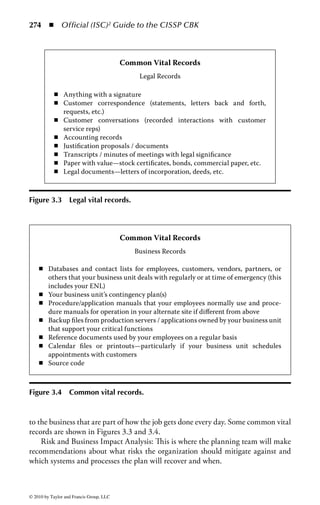
ers” (the company’s IT and security teams) know the attack is coming and are
prepared to defend against it.
     Double-blind testing presents a more real-life attack scenario because the orga-
nization’s IT and security teams are not notified or informed before the test and
are “blind” to the planned testing activities. In addition to testing the strength


© 2010 by Taylor and Francis Group, LLC
86 ◾ Official (ISC)2 Guide to the CISSP CBK


of a network or application, double-blind testing can test the organization’s secu-
rity monitoring and incident identification, escalation, and response procedures.
In double-blind testing engagements, very few people within the organization are
made aware of the testing, perhaps only the project sponsor, and double-blind test-
ing requires careful monitoring by the project sponsor to ensure that the testing
procedures and the organization’s incident response procedures can be terminated
when the objectives of the test have been achieved or the test threatens to affect
production systems or networks.
     In a targeted testing environment (often referred to as the “ lights on” approach)
both the organization’s IT team and the penetration testing team are made aware
of the testing activities and are provided with information concerning the target
and the network design. A targeted testing approach may be more efficient and
cost-effective when the objective of the test is focused more on the technical setting,
or on the design of the network, than on the organization’s incident response and
other operational procedures. A targeted test typically takes less time and effort to
complete than blind testing, but may not provide as complete a picture of an orga-
nization’s security vulnerabilities and response capabilities.
     There are three basic categories of penetration test separated by how much infor-
mation is provided to the tester or test team: zero knowledge, partial knowledge,
and full knowledge. In zero knowledge testing the tester is provided no information
about the target’s network or environment. The tester is simply left to his abilities
to discover information about the company and use it to gain some form of access.
This is also called black box or closed testing, depending on who is scoping the
test. Zero knowledge testing is particularly appropriate when executing a test from
outside the organization, as this is the position most attackers will be in when they
start to attack an organization.
     In a partial knowledge test scenario, the tester is provided with some knowledge
about the environment. The information provided is high-level public (or near-
pubic) information that would be trivial for a real attacker to find without much
effort, including phone numbers and IP addresses to be tested, domain informa-
tion, and application names. It is assumed that a competent attacker would be
able to obtain this level of information rather quickly, so this information is given
to the tester to speed up the testing process a bit. The interesting aspect of getting
some information and not all is the assumption of scope. Organizations can use
limited information to define boundaries of the test, as opposed to simply providing
all the initial data to support the test. For example, exposing the organization’s IP
address range is an attempt to speed up the gathering of easily obtained informa-
tion, while exposing the fact that the network has intrusion detection systems can
shape the way the tester goes about performing the test.
     Full knowledge testing provides every possible piece of information about the
environment to the tester. This type of test is typically employed when there is
greater focus on what can be done, as opposed to what can be discovered. The
assumption is that an attacker can easily discover what is in the environment and


© 2010 by Taylor and Francis Group, LLC
Access Control       ◾   87


the test needs to focus on how much damage can be done with that informa-
tion. This is particularly appropriate when testing for internal penetrations. In that
situation, the tester is taking the role of an informed insider (e.g., an employee or
contractor) with existing inside knowledge of the environment, architecture, and
information paths. The insider has all the knowledge he or she needs to find the
target. The question the tester needs to answer is whether the target’s defenses will
withstand such an attack.
     The organization must determine the area of the organization or the service
to be tested. This is important when defining the scope of the test, because it will
determine the boundaries and limits of acceptable testing practices. More than one
target may be defined for a test, but each must be well defined and clearly under-
stood by all involved.
     Application Security Testing: The objective of application security testing is to
evaluate the controls within an application and its information process flow. Topics
to be evaluated may include the application’s use of encryption to protect the con-
fidentiality and integrity of information, the authentication of users, the integrity
of the Internet user’s session with the host application, and the management of
the current processing state between parts of the application. Application testing
will test the flow of information through the application and its susceptibility to
interception or alteration. It will also test how the application handles input data
and determine if user input can harm or crash the application. Finally, application
testing will test for a wide range of common (as well as some uncommon) attack
scenarios to gauge the level of resistance an application has to attacks of varying
levels of sophistication.
     Denial-of-Service (DoS) Testing: The goal of DoS testing is to evaluate the sys-
tem’s susceptibility to attacks that will render it inoperable or unable to provide
needed services to the organization or external users. Decisions regarding the extent
of DoS testing to be incorporated into a penetration testing exercise will depend
on the relative importance of ongoing, continued availability of the information
systems and related processing activities. When deciding to perform DoS testing,
it is critical to ensure that these tests are not performed on live production sys-
tems unless that is a specific objective of the test and all system and information
owners know about, and approve, this course of action. The potential for system
disruption beyond a simple crash is very high with DoS testing, potentially leading
to extended down time, angry customers, or lost revenue. In addition, make sure
that everyone knows that a DoS test is being performed so that nobody (including
system owners, users, and help desk staff ) is caught unaware. Because DoS testing
presents such a risk to systems, many testers will perform the attack steps leading
up to the DoS but stop short of actually crashing the system. This saves a great deal
of response and recovery time while still exposing a potentially risky situation on
the system.
     War Dialing: War dialing is a technique for systematically calling a range of
telephone numbers in an attempt to identify modems, remote-access devices, and


© 2010 by Taylor and Francis Group, LLC
88 ◾         Official (ISC)2 Guide to the CISSP CBK


maintenance connections for computers that may exist within an organization’s net-
work. Well-meaning users can inadvertently expose the organization to significant
vulnerability by connecting a modem to the organization’s information systems or
network devices. Once a modem or other access device has been identified, analysis
and exploitation techniques are performed to assess whether this connection can be
used to penetrate the organization’s information systems network. In the Internet
age, it may be difficult to understand that modems are still a primary source of
network connectivity for many purposes, but they are still out there and there are
plenty of them, very often connected to administrative ports on equipment for use
by system administrators for emergency access, maintenance, or recovery purposes.
Organizations would be wise not to underestimate their reach into the infrastruc-
ture or their potential for creating vulnerabilities in the environment.
    Wireless Network Testing: The introduction of wireless networks, whether
through formal, approved network architecture or the inadvertent actions of well-
meaning users, creates additional security exposures. Sometimes referred to as war
driving, attackers have become proficient in identifying wireless network access
points within an organization simply by driving by, or walking around, office
buildings with their wireless network equipment. The goal of wireless network test-
ing is to identify security gaps or flaws in the design, implementation, or operation
of the organization’s wireless network. War driving also provides an advantage to
attackers, who may be able to access and penetrate a network through the wireless
connection even though they are not on the property of the organization they are
breaking in to. Some security experts have likened the existence of a wireless on a
corporate network to the equivalent of having a live network jack in the parking lot
of the company.
    Social Engineering: Often used in conjunction with blind and double-blind test-
ing, social engineering refers to techniques using social interaction, typically with
the organization’s employees, suppliers, and contractors, to gather enough informa-
tion to be able to penetrate the organization’s physical premises or systems. Such
techniques could include posing as a representative of the IT department’s help desk
and asking users to divulge their user account and password information, posing
as an employee and gaining physical access to restricted areas that may house sensi-
tive information, or intercepting mail, courier packages, or even searching through
trash for sensitive information on printed materials (also known as dumpster div-
ing). Social engineering activities can test a less technical, but equally important,
security component: the ability of the organization’s people to contribute to (or
prevent) unauthorized access to information and information systems.
    PBX and IP Telephony Testing: Beyond war dialing, phone systems (traditional
“POTS” service, corporate ISDN, and new IP-based telephone services) have tra-
ditionally been a highly vulnerable, yet often overlooked, method of gaining access
to corporate resources. Attackers can gain access to voice mail systems to gather
information and monitor activity. Moreover, phone systems can be manipulated
to permit an attacker to make long-distance calls free and undetected, potentially


© 2010 by Taylor and Francis Group, LLC
Access Control       ◾ 89


furthering an attack on other organizations. It is also not uncommon for security
services to leave secret information (e.g., passwords and account information) on
voice mail systems, relying on the authentication mechanisms of the voice mail
service to provide protection. If an attacker compromises the voice mail service all
that information can be lost.
    IP telephony, or voice-over-IP (VoIP), is the use of traditional Internet protocol
(IP) data networks to handle voice traffic. It can also include the integration of
phone systems with network applications, databases, and other services, such as
e-mail or workflow collaboration systems. While IP telephony systems share many
of the same security vulnerabilities as traditional phone services, their integra-
tion with the IP protocol gives them an additional susceptibility to network-level
attacks. Tests can be performed against these technologies to gain a better under-
standing of the risks the organization may face when combining voice and data on
a single network, or whether a DoS attack on the data network would also render
the VoIP system inoperable. The potential threat profile represented by combining
the threats associated with IP networks and those of telephone systems is one any
organization should take seriously.
Penetration Test Methodology: A methodology is an established collection of pro-
cesses that are performed in a predetermined order to ensure the job, function, or, in
this case, security test is accurately executed. There are many ways of performing a
penetration test, perhaps as many as there are testers. However, there is a basic and
logical methodology that has become best practice for performing such tests:

    1. Reconnaissance/discovery: Identify and document information about the
       target.
    2. Enumeration: Gain more information with intrusive methods.
    3. Vulnerability analysis: Map the environment profile to known vulnerabilities.
    4. Execution: Attempt to gain user and privileged access.
    5. Document findings: Document the results of the test

Step 1—Reconnaissance: As is the case with most military and espionage campaigns,
penetration tests typically begin with a reconnaissance phase. Reconnaissance is the
search for any available information on the target to assist in planning or executing
the test. The search can include quick ping sweeps to see what IP addresses on a net-
work will respond, scouring news groups on the Internet in search of disgruntled
employees divulging useful information, or rummaging through the trash to find
inside information on the business or the technical environment (also known as
dumpster diving.) The ultimate goal of the reconnaissance phase is to gather as much
information on the target as possible. This may include physical and virtual lay-
outs, building and network topography, organizational strengths and weaknesses,
operational patterns, technology in use, and practically anything else the tester may
think will be useful in the coming attack. Reconnaissance can also include theft,


© 2010 by Taylor and Francis Group, LLC
90 ◾         Official (ISC)2 Guide to the CISSP CBK


lying to people, monitoring networks, impersonations, or even leveraging falsified
friendships to collect data about a target. The search for information is only limited
by the extremes to which a company and the tester are willing to go. The rule of
thumb in the reconnaissance phase is that no piece of information is too small to
be useful.
Step 2—Enumeration: Also known as network or vulnerability discovery, enumera-
tion is the process of obtaining information directly from the target systems, appli-
cations, and networks. An interesting point to understand is that the enumeration
phase represents a point within the penetration testing project where the line
between a passive attack and an active attack begins to blur. At this point the tester
is not just gathering information any more; he or she is sending network probes
or otherwise communicating with systems and network devices in order to gather
more information. Some of these devices may be fragile or susceptible to even the
slightest nudge from the tester. When setting up the test parameters, the enumera-
tion phase should be thoroughly reviewed with the operations, support, and secu-
rity teams to ensure there are no surprise alerts generated as a result of the test.
    To build an accurate picture of a company’s environment, there are several tools
and techniques available to compile a list of information obtained from the systems.
Most notably, port scanning is the most common and easily executed basic test
to start with. A port scan is the manipulation of the basic communication setup
between two networked systems to determine what services are being offered on
the target system. Collecting information about available systems and services is
the first step in formulating an attack plan. From here, the tester can build on the
information found during the reconnaissance phase and define a path to attempt
to compromise the system.
Step 3—Vulnerability Analysis: The information gathered by the reconnaissance and
enumeration phases will yield a great deal of valuable information about the target
environment. The next step is to analyze that data to determine potential vulner-
abilities that may be exploited to successfully attack the target. This calls for a logi-
cal and pragmatic approach to analyzing data. During the enumeration phase, the
tester performs an interpretation of the information collected (or provided), look-
ing for relationships between systems, networks, and applications that may lead
to exposures that can be exploited. The vulnerability analysis phase is a practical
process of comparing the information collected with known vulnerabilities.
    Most information about potential vulnerabilities can be collected from openly
available sources, such as the Internet, public Web sites, hacker periodicals and
mailing lists, news groups, vendor bug and patch data, and even the personal expe-
rience of the tester. These can be used to analyze information gleaned from the
target to seek options for exploitation. All this information, properly analyzed, can
be used to formulate a successful attack.
    Because each organization and environment is different, the tester (and the
attacker) must analyze the information carefully to identify potential avenues of


© 2010 by Taylor and Francis Group, LLC
Access Control       ◾    91


attack that will work against that potential environment. The use of easily-obtained
reconnaissance and analysis tools can help this effort a great deal. Such tools will
systematically explore and analyze multiple categories of potential vulnerabilities,
such as Web exploits, data handling exploits, buffer overflows, mis-configured
systems, trust relationships, authentication errors, even missing patches or system
updates. The analysis of potential vulnerabilities is critical, as it will pinpoint pre-
cise areas of weakness in the environment and optimize the tester’s time when
attempting to penetrate a system.
Step 4—Execution: A great deal of planning and evaluation are performed during
the earlier testing phases to ensure that the test focuses on the areas of greatest
vulnerability and criticality, ensuring ultimately that core business systems can be
better protected. Of course, all of this planning must lead to the actual execution
of some form of attack scenarios. Exploiting systems and applications can be as easy
as running an automated tool or as intricate as manually executing specific steps to
get a desired result. No matter the level of difficultly of the test, good testers follow
a specific pattern during the exploitation phase of a test to ensure consistent and
successful results.
    During a penetration test, the details considered in the planning, reconnais-
sance, and analysis phases come to fruition and affect the outcome of every action
taken by the tester. A sound methodology is needed to translate all the planning
into an attack scenario to meet the objectives within the specified period and within
the defined scope. The attack process is typically broken up into multiple threads of
execution and groups of test scenarios. A thread is a collection of tasks that must be
performed in a specific order to achieve a specific attack goal. Threads can be a sin-
gle step or multiple steps used to gain access or compromise a system. Every thread
is different, but many have similar steps that they share in common. Therefore,
threads can be combined into groups to create a collection of access strategies.
Groups are then reviewed, compared, and optimized to support a comprehensive
attack strategy using different threads in a structured manner.
    Each test is evaluated at multiple points throughout the process to ensure that
the expected outcome is met. Occasionally during a test the tester will need to
diverge from the established plan due to unexpected circumstances or an unex-
pected reaction from the target. Each divergence from plan is appraised to make
two fundamental determinations:

    ◾ Are the test objectives of the thread or group not being met or are the test’s
      results conflicting with the company’s assumptions and stated goals? The
      objective is to ensure that each test falls within the bounds of what was estab-
      lished and agreed upon. On the other hand, if the test begins to produce results
      that were not considered during the planning, enumeration, and vulnerability
      analysis phases, the engagement needs to be reconsidered, or at minimum, the
      planning phase needs to be revisited. Meeting expectations is a primary goal


© 2010 by Taylor and Francis Group, LLC
92       ◾   Official (ISC)2 Guide to the CISSP CBK


       of testing, and in the world of ethical hacking, it can represent a fundamental
       challenge when not planned properly or not executed to the plan.
     ◾ Is a system reacting in an unexpected manner, which is having an impact
       on the test? Live systems in a dynamic environment do not always react as
       predicted or expected. Keeping alert for unexpected responses from systems
       ensures that the target has not been negatively affected and the set scope and
       boundaries of the test have not been exceeded.

Step 5—Document Findings: The goal of penetration testing is to gain awareness
and a detailed understanding of the state of the security environment. Information
is collected throughout the test, producing information that can be used to draw
conclusions and articulate findings. The tester will need to collate and analyze that
information, document findings in a clear and concise manner, and provide an
analysis of the results that can be used to improve the overall security profile of the
environment. The goal of the document is to clearly present the findings, tactics
used, and tools employed, and to produce an analysis of information collected from
the test. Specific areas to cover in the documentation and analysis include

     ◾   Vulnerabilities discovered in the target system(s)
     ◾   Gaps in security measures
     ◾   Intrusion detection and response capabilities
     ◾   Observation of log activity and analysis
     ◾   Suggested countermeasures

Although penetration testing is complex and potentially expensive to perform, it is
well worth the effort to an organization that is serious about improving its security
and maintaining strong controls against attack.


Identity Management
Identity management is a much-used term that refers to a set of technologies
intended to offer greater efficiency in the management of a diverse user and techni-
cal environment. Modern enterprises must deal with the difficulties of managing
the identity and access restrictions of employees, contractors, customers, partners,
and vendors in a highly complex and dynamic organization. Identity management
systems are designed to centralize and streamline the management of user identity,
authentication, and authorization data.
    Identity management addresses all aspects of controlling access, with a core
focus on centralized management. Given the complexity of modern organizations
and the diversity of business requirements, many access control infrastructures
grow convoluted and difficult to manage. They manage multiple independent
access control systems, often one per application. Rarely are they all integrated; at


© 2010 by Taylor and Francis Group, LLC
Access Control         ◾ 93


best there may be pockets of integration between several applications. Along with
this multiplicity of access control systems comes a complex web of administra-
tive responsibilities, making the administrator’s job even more complex with each
new application. Enterprises operate a vast array of IT infrastructure components,
including:

    ◾    Network operating systems
    ◾    Multiple servers running multiple operating systems
    ◾    User directories
    ◾    Human resources, payroll, and contract management systems
    ◾    A variety of line-of-business applications
    ◾    Customer relationship management (CRM) systems
    ◾    Electronic commerce applications
    ◾    Enterprise resource management systems planning (ERP)

As shown in Figure 1.16, almost every system must track valid users and control
their permissions for a given system. The diversity of these systems—each with its
own administration software, and management processes—and the fact that users
typically access multiple systems, makes managing this user data difficult at best,
and a financial and operational burden to most organizations.
     One of the primary tasks within an identity management infrastructure is the
need to provision, maintain, and manage user IDs. This includes gathering the ini-
tial account information to populate the system and create an account record for


                                                        Marketing     Customers       IT      Former
    Supply      Distribution Executives     Sales
   Partners      Partners                 Employees     Employees                  Employees Employees


                           Help                                                   Help
                           Desk                        Call                       Desk
                                                      Center


        Network      Exchange and         CRM              Human          Main Frame           ERP
                        Active                            Resources
                       Directory                           System


Figure 1.16 In complex environments, almost every system must track valid
users and control their permissions for a given system.


© 2010 by Taylor and Francis Group, LLC
94 ◾ Official (ISC)2 Guide to the CISSP CBK


that user. The information may be submitted by the user through filling out a
standard form or an in-person interview, or it may come directly from the user as
part of a self-help service. Once account information is gathered, the system must
be able to account for the granting and revocation of access rights as the user (and
the associated IDs) goes through its natural life cycle.
    Efficiency in this process is a key performance factor. The goal of an identity
management system is to consolidate access rights into an easily managed record of
identity and access for each user in the system. This will work to reduce errors and
increase control over IDs and access in the organization. It will also eliminate redun-
dant and unnecessary access. “Once and done” is the mantra for this activity. Setting
up user access on multiple systems is repetitive. Doing so with the individual tools
provided with each system is needlessly costly. Therefore, all design and develop-
ment for the identity management system should be aimed at reducing redundancy
and streamlining the provisioning and management processes as much as possible.
    Timeliness of the process is important to the business. If there is too much of
a time lag during the front-end provisioning and management processes, that will
translate directly to lost user productivity. If there is a time lag during the access
removal or decommissioning stages, that will translate into increased security risk
to the organization. Identity management systems promote timeliness by centrally
managing the identity and access control for distributed systems throughout the
enterprise.
Identity Management Challenges: Typically, when an employee is hired, a new
user profile is created and stored in a human resources database and a request
for access to various systems and applications is created. If the organization has
predefined roles associated with particular jobs the new user request will be com-
pared to a company’s role authorization policies. If the organization does not have
such a role-based system, a management-defined list of access rights will be created.
The request is then routed for the necessary approval, and (if approval is granted)
sent to the IT department. Finally, the IT department submits the approved request
to various system administrators to provision user access rights. The user is provi-
sioned, and the approval is recorded in a history file or log file. It is just that easy!
    This scenario assumes, of course, the best of all possible worlds, where processes
work perfectly every time and all participants are prepared to do their part at any
time. In actual practice, there are a number of problems that can arise during the
identity management process:

    ◾ Requests for access rights can be backlogged, halting user productivity. There
      will be a limited number of people to process these requests and often this
      is not an individual’s (or a group’s) full-time job. As a result, these requests
      are often delayed or held until enough requests are pending for someone to
      allocate time to process them.
    ◾ Cumbersome policies cause errors. If the requested access involves different
      systems and complex levels of access there is a high likelihood that there will be

© 2010 by Taylor and Francis Group, LLC
Access Control       ◾   95


         errors in the implementation of the request. This will result in delayed access
         (at best) or the assignment of inappropriate access to the user (at worst).
    ◾    Request forms are not fully completed. This can cause numerous delays in
         processing. Very often, the forms are not clear or the requestor is confused as
         to specifically what they need to request.
    ◾    The number of resources across the enterprise may be growing. This may lead
         to an increasing number of access requests continually flowing into the pro-
         cessing system. Given the chronic resource shortage in most organizations,
         this will become a perpetual problem.
    ◾    Precise audit trails of requests and approvals are rarely maintained. If there
         is a question about what access was requested, who approved it, or what was
         ultimately granted, an audit trail is the only definitive method of determining
         this. Unfortunately, many organizations do not keep accurate records of this
         process, particularly during the approval stages.
    ◾    Many system profiles and users are dormant or associated with departed
         employees, making them invalid. The process of removing access when no
         longer needed is just as important as granting it in the first place. However,
         many organizations fail to implement processes to regularly review existing
         access to determine if it is still needed.
    ◾    Some people in the organization, particularly those in the upper levels of
         management, often bypass defined processes and protocols put in place to
         manage the flow of provisioning requests in an attempt to get their requests
         implemented more quickly. Even employees at lower levels in the organiza-
         tion may attempt to call a helpful friend in IT rather than go through the
         standard process. If allowed to continue, this practice leads to inaccurate
         record keeping as some provisioning will not be properly recorded.

Key management challenges regarding identity management solutions also
include

    ◾ Consistency: User profile data entered into different systems should be con-
      sistent. This includes name, user ID, contact information, termination date,
      etc. The fact that each system has its own user profile management system
      makes this difficult.
    ◾ Usability: When users access multiple systems, they need to manage multiple
      user IDs, multiple passwords, and multiple sign-on screens. This complexity
      is burdensome to users, who consequently have problems accessing systems
      and incur productivity and support costs.
    ◾ Reliability: User profile data should be reliable, especially if it is used to con-
      trol access to sensitive data or resources. Too often the process used to update
      user information on every system does not produce data that are complete,
      timely, and accurate.
    ◾ Scalability: Enterprises manage user profile data for large numbers of peo-
      ple. There are typically tens of thousands of internal users and hundreds or

© 2010 by Taylor and Francis Group, LLC
96     ◾ Official (ISC)2 Guide to the CISSP CBK


         thousands of partners or clients. Many identity management systems cannot
         scale to support the data volumes and peak transaction rates produced by
         large user populations.

The need for more effective identity management is clear given the chronic limita-
tions of existing system storage and processing capacity, increasing cost for manag-
ing growing user populations, and burgeoning inefficiencies that stem from growing
business demands on existing systems. The potential negative impacts include loss
of business productivity and increasing security risk.
     Identity management systems can also help an organization to meet its obliga-
tions to comply with the seemingly endless (and expanding) laws, regulations, and
customer requirements with respect to proper security management. While no cur-
rent legislation mandates the implementation of an “identity management system,”
most laws that cover (at least in part) security and privacy issues have as a basic
requirement that organizations will do what they can to manage access privileges
across the enterprise and ensure that access to data (particularly private consumer
data) is restricted to only those that need it. The ability to accurately manage user
IDs, control their life cycle, and remove access accurately and quickly goes a long
way toward demonstrating compliance with appropriate legislative, industry, and
customer requirements.
     Finally, all organizations must manage IDs for a variety of constituents, poten-
tially including employees, contractors, business partners, customers, maintenance
personnel, and visitors. An effective identity management system allows the orga-
nization to appropriately segment these various user populations and assign the
appropriate type and level of access to each group. Access can be managed on a
group basis to enforce organizational policies that may restrict the systems or ser-
vices nonemployees may access. A comprehensive identity management strategy
and implementation allows for tight control over access while also allowing for
granularity and flexibility in managing such access.
Centralized Identity Management: One of the basic decisions an organization
will need to make when establishing an identity management program is whether
to enforce centralized or decentralized identity and access control management. In a
centralized system, all access decisions, provisioning, management, and technology
is concentrated in a central location (physically or virtually). One entity (an indi-
vidual, a department, or a management system) manages the service for the entire
enterprise and that entity sets all the policies, standards, and operational param-
eters. From a technology standpoint, all authentication and authorization requests
are sent to the central service. Examples of centralized access control systems include
RADIUS and TACACS+. Figure 1.17 shows a conceptual diagram of how a central-
ized identity management and access control model might be configured.
    The benefits of such a scheme stem primarily from the ability of the single team
to enforce uniform, organization-wide control over the allocation and use of IDs


© 2010 by Taylor and Francis Group, LLC
Access Control       ◾   97


                  Central
               Authentication
                  Server


                                                          Local
                                    Local                Services
                                   Services


Figure 1.17         Centralized access control model.


across the organization. This promotes consistency of policy and use no matter
where in the organization a particular user may reside or operate. Changes in the
system can happen quickly and be distributed uniformly to all points using the
service, limiting the risk exposure that may exist when a user is removed from one
part of the system but removal from other areas is delayed. In a compliance-driven
organization, a centralized service also demonstrates uniform control over all enter-
prise access processes.
Decentralized Identity Management: The primary drawback to a centralized sys-
tem is that many organizations (particularly large international firms) just cannot
operate a central service on the scale that is required by such an enterprise. The
access needs of each local or regional office may differ substantially enough that a
central policy may not be the most effective way to manage the process. In addi-
tion, political or legal considerations may dictate that each office or region maintain
some level of control over the access administration for that area. In such situations,
a decentralized identity and access management system may be called for.
    In a decentralized control model, ID management, authentication, and authoriza-
tion decisions are spread throughout the environment to local organizations. “Local” is


© 2010 by Taylor and Francis Group, LLC
98     ◾ Official (ISC)2 Guide to the CISSP CBK


a subjective term depending on the organization, but it typically refers a single office, a
group of offices in a single region, or an individual business unit. In this model, control
decisions are distributed to the people closer to the resources or processes users need to
access, for example, department managers or system owners who are then responsible
for implementing the appropriate access controls on their systems.
     The benefit of a decentralized model is that it allows access decisions to be made
by the people or organizations that are closest to the assets needing protection and can
much better address local access policies and requirements. Local management and
administrators typically have a much better sense of the requirements of their local
users and will be in a much better position to understand who really needs access to
their resources. Thus, they will be able to better define and manage the system based
on those requirements. The drawback to a decentralized system is that it becomes
harder to enforce enterprise-wide policies and standards for ID and access manage-
ment. Unless a clear policy and process defining who has ultimate responsibility for
setting, managing, and following organization access policies and standards is set a
decentralized system may quickly lead to an inconsistent patchwork of access con-
trols, standards, and processes. A decentralized system may also be more expensive
for the organization, since multiple systems and technology components will have
to be purchased and managed within the organization. Another potential problem
is that a decentralized model may lead to overlapping or conflicting rights between
resources, which may expose gaps in security controls. Figure 1.18 shows a conceptual
diagram of how a decentralized access control model might be configured.

                   Local
               Authentication
                  Server


                                                                       Local
                                                                   Authentication
                                                                      Server


                  Local
              Authentication
                 Server


Figure 1.18         Decentralized access control model.


© 2010 by Taylor and Francis Group, LLC
Access Control       ◾   99


Access Control Technologies
Once the policies, standards, and processes for access control have been defined the
next step is to implement the various technology components that will support the
organization’s access control needs. This section describes the access control tech-
nology options that an organization needs to create for an effective access control
management service.
    Identity management technologies attempt to simplify the administration of
distributed, overlapping, and sometimes conflicting data about the users of an
organization’s information technology systems. The foundation of a comprehensive
identity management solution is the implementation of appropriate processes and
technologies to consolidate and streamline the management of user IDs, authenti-
cation, and access information consistently across multiple systems. A typical enter-
prise will have many users with various access requirements for a diverse collection
of data and application services. To bind the user to established policies, processes,
and privileges throughout the infrastructure, several types of technologies are uti-
lized to ensure consistency and oversight. Technologies utilized in identity manage-
ment solutions include

    ◾    Password management
    ◾    Account management
    ◾    Profile management
    ◾    Directory management
    ◾    Single sign-on

Password Management: Passwords are the most common authentication technol-
ogy in use today, so password management should be a primary concern for an
organization. The complexity and use of passwords was discussed previously in this
chapter, but the policies, standards, and complexity need to be managed consis-
tently throughout the organization. Because passwords may be compromised over
time, it is prudent for users to periodically change their passwords. Most modern
systems can be configured to require users to change their password at defined
intervals. The reason for this is that if a password is compromised this will limit the
amount of damage that can be done through that compromised ID to the amount
of time left before the next change interval. Most enterprise organizations enforce
a password change interval ranging from 30 to 90 days. A shorter length is better
for security reasons, but a longer period of time is more convenient for users and
does not force them to re-memorize their password as often. As with most security
issues, the optimal time to expire a password will be an individual organizational
compromise between business needs and security needs.
    When users have multiple passwords, on multiple disparate systems, all expir-
ing on different dates, they tend to write them down, store them insecurely (e.g., in
a “password.txt” file on the desktop or on a sticky note underneath their keyboard),


© 2010 by Taylor and Francis Group, LLC
100 ◾          Official (ISC)2 Guide to the CISSP CBK


or replicate the same password across multiple systems. In the absence of a password
management system incorporated into an organization-wide identity management
solution, a user may set the same password for several systems as a matter of conve-
nience or simply rotate a set of three or four, making it very easy to remember, but
equally easy for an attacker to guess and exploit.
    To protect against an attacker trying to guess a password multiple times, many
systems incorporate a password lockout mechanism for excessive invalid attempts.
In such a system, if a user unsuccessfully tries to log into a system multiple times
(three to five attempts are common) the ID is locked and the user has to contact
support personnel to get it unlocked. The benefits of this process is that it limits the
amount of damage password guessing can have on a user’s login. The drawback is
that users are notorious for forgetting their password and end up calling the help
desk often, especially if they have been away from the computer for an extended
period of time (perhaps on vacation, where remembering a password is the last
thing on a person’s mind.) In fact, password reset calls are almost always the single
largest category of calls for most help desk services. Any process or technology that
can dramatically reduce the number of password reset calls to the help desk will
have the added benefit of saving a lot of money for the organization.
    A password management system is designed to manage passwords consistently
across the enterprise. This is usually achieved by a central tool synchronizing pass-
words across multiple systems. However, other features might include assisting users
with routine password management tasks. For example, users who forget their pass-
word or trigger a lockout from too many failed attempts may be offered alternative
authentication mechanisms to gain specific access to utilities to reset their password. It
is not uncommon for an organization to issue multifactor authentication tokens to be
used, in part, for providing access to utilities so users can self-manage their accounts
and passwords on other, potentially older or nonintegrated systems. Other alternative
methods include voice response units for resetting passwords, the use of personal ques-
tions to validate a user’s identity, or in-person verification. In the event that an alterna-
tive authentication mechanism does not exist, password management systems typically
allow administrators or support staff to quickly reset forgotten or disabled passwords.
    Another common feature of a password management system, and regularly
employed on large Internet sites, is a self-registration process that incorporates per-
sonal data questions whose answers are private to that user, allowing him to man-
age his account and reset the password without the intervention of an administrator
or help desk staffer.
Account Management: One of most costly, time-consuming, and potentially risk-
laden aspects of access control is the creation, modification, and decommissioning
of user accounts. Many organizations consume inordinate amounts of resources to
ensure the timely creation of new system access, the adjustments of user privileges
to reflect changes in responsibilities, and the termination of access once a user
leaves the organization.


© 2010 by Taylor and Francis Group, LLC
Access Control      ◾   101


    Although Web-based access management tools address this problem for a Web-
based environment, most enterprises are heterogeneous, with multiple types and
versions of systems and applications, each with potentially different account man-
agement strategies, capabilities, and tools. For example, ERP systems, operating
systems, network devices, mainframes, and database servers typically all have diffi-
culty in interacting with a single centralized account directory. Moreover, for those
that can achieve such integration, there may be limitations to the degree of control
available within the system.
    As a result, account management processes must typically be performed on each
system directly. Account management systems attempt to streamline the adminis-
tration of user identity across multiple systems. They normally include one or more
of the following features to ensure a central, cross-platform security administration
capability:

    ◾ A central facility for managing user access to multiple systems simultane-
      ously. This ensures consistency between all systems and eases the administra-
      tive burden of managing access on these systems separately. This also reduces
      the risk of erroneous manual entry of user data, potentially resulting in the
      provisioning of inappropriate access.
    ◾ A workflow system where users can submit requests for new, changed, or
      terminated systems access, and these requests are automatically routed to the
      appropriate people for approval. Approved requests then trigger the creation
      of accounts and the allocation of other resources.
    ◾ Automatic replication of data, particularly user records, between multiple
      systems and directories. This ensures that user access permissions are propa-
      gated uniformly and promptly throughout the environment and reduces the
      likelihood of error through manual replication.
    ◾ A facility for loading batch changes to user directories. There are often occa-
      sions where large numbers of user changes need to be loaded in the database.
      This may come as a result of organizational restructuring, large employee hires,
      or large-scale employee terminations. The ability to load these changes in bulk
      will save time and increase accuracy over loading these changes individually.
    ◾ Automatic creation, change, or removal of access to system resources based
      on policies, and triggered by changes to information elsewhere (e.g., in an
      HR system or corporate directory.) By eliminating human intervention and
      manual processing, changes can happen more rapidly and reduce the window
      of opportunity for obsolete access permissions to be exploited.

One of the biggest obstacles to the implementation of an account management
system is the time and cost of full-scale deployment. Some systems can take liter-
ally years to deploy fully in a large enterprise. The complexity of account manage-
ment systems can also overwhelm project teams as they struggle to determine the


© 2010 by Taylor and Francis Group, LLC
102 ◾          Official (ISC)2 Guide to the CISSP CBK


best method for deploying the system. Implementation teams should start small
and gain experience and success on a smaller scale before proceeding to full-scale
deployment.
    Interface issues can also be a big project killer for many organizations. A fully
automated account management system must interface with each system, applica-
tion, and directory in the enterprise (sometimes numbering in the hundreds), each
based on its own technology platform and almost none of which will be designed
to interface with the account management service. The process of building all those
interfaces will be a daunting, time-consuming, and costly task to overcome and
will require the resources of a dedicated team of programmers.
Profile Management: Profiles are a collection of information associated with a
particular identity or group. In addition to the user ID and password, a user profile
may include personal information, such as name, telephone number, e-mail address,
home address, date of birth, etc. A profile can also contain information related to
privileges and rights on specific systems. However, any information specific to a
user is going to change over time, and the process to manage that change is an
important component of an overall identity management process. When a change
is required to a profile, the process should be easy to manage and be automati-
cally propagated to key systems, such as the corporate directory and the individual
systems a user logs into. Most customer relationship management (CRM) systems
include some facility to manage user profiles, either administratively or using a
self-service method. This capability is also available in some access management
systems and password management systems. It is helpful to allow users to enter and
manage those parts of their own profiles where new data are either not sensitive or
do not have to be validated. This helps to reduce the cost and time to implement
these changes and increase their accuracy.
Directory Management: A corporate directory is a comprehensive database
designed to centralize the management of data about an assortment of company
entities. A typical directory will contain a hierarchy of objects storing information
about users, groups, systems, servers, printers, etc. The directory is stored on one
or more servers that may replicate the data, in part or in whole, to other directory
servers to ensure scalability and availability. Applications will normally access data
stored in a directory by means of a standard directory protocol.
     The primary benefit of a directory service is that it provides a centralized col-
lection of user data that can be used by many applications to avoid replication
of information and simplify the architecture. Using directories, it is possible to
configure several applications to share data about users, rather than having each
system manage its own list of users, authentication data, etc. This simplifies the
overall management of user data, improves the consistency of user data as it is used
between systems, and promotes uniform security control in the environment.
     A key limitation of directories and their role in simplifying identity management
is the difficulty of integration with legacy systems. Mainframes, older applications,


© 2010 by Taylor and Francis Group, LLC
Access Control      ◾   103


and outdated systems often do not natively support the use of an external system to
manage their own users without the development of interface facilities or transla-
tion code. These interfaces can be difficult and expensive to develop and, in some
cases, technically impossible, limiting their effectiveness, and reducing the ability
to use a directory service to manage enterprise-wide resources.
Directory Technologies: When considering the use of a centralized directory ser-
vice for the enterprise, there are a number of technologies that should be considered.
These technologies are all supported by international standards and most products
that require directory services will be able to interface natively with one or more
of them. The three most common directory standards are X.500, the Lightweight
Directory Access Protocol (LDAP), Active Directory, and X.400.
    X.500: The X.500 set of communications protocols was developed by the
International Telecommunications Union (ITU-T) in the late 1980s. It is also
known as ISO/IEC 9594. The protocol suite was developed by telecommunications
companies to facilitate a standard method of developing electronic directories for
use over telecommunications networks. The suite was originally developed to work
with the OSI network communications model, although most current implementa-
tions allow it to operate over TCP/IP as well.
    X.500 actually consists of four separate protocols:

    ◾ The directory access protocol (DAP). This is the primary protocol for access
      information in an X.500 directory.
    ◾ The directory system protocol (DSP)
    ◾ The directory information shadowing protocol (DISP)
    ◾ The directory operational bindings management protocol (DOP)

Information in an X.500 directory is organized as a hierarchical database of infor-
mation. The key field in the database is called the distinguished name (DN). The
DN provides the full path through the X.500 database where a particular entry
may be found. X.500 also supports the concept of a relative distinguished name
(RDN). The RDN provides the name of a specific entry without the full path
component attached.
    LDAP: Although it is a comprehensive suite of protocols for managing directory
information, X.500 can be complex to implement and complicated to administer.
It also originally required the implementation of the OSI protocol stack for opera-
tion. For that reason, organizations wanted a simpler directory protocol that could
operate in a TCP/IP environment. In the early 1990s, the lightweight directory access
protocol (LDAP) was developed. Based on X.500’s DAP, LDAP provides a simpler
implementation of directory services for enterprises.
    LDAP uses a hierarchical tree structure for directory entries. Like X.500,
LDAP entries support the DN and RDN concepts. DN attributes are typi-
cally based on an entity’s DNS name. Each entry in the database has a series of


© 2010 by Taylor and Francis Group, LLC
104 ◾          Official (ISC)2 Guide to the CISSP CBK


name/value pairs to denote the various attributes associated with each entry.
Common attributes for an LDAP entry include the following:

    ◾    DN: distinguished name
    ◾    CN: common name
    ◾    DC: domain component
    ◾    OU: organizational unit

LDAP operates in a client/server architecture. Clients make requests for access to
LDAP servers and the server responds back to the client with results of that request.
Standard requests the client can make include connecting and disconnecting to the
LDAP service, searching a directory entry, comparing information in the directory,
and adding, deleting, or modifying directory information.
    LDAP typically runs over unsecured network connections using TCP port 389
for communications. If advanced security is required, version 3 of the LDAP proto-
col supports the use of TLS to encrypt communications. Alternately, many imple-
mentations run LDAP over an SSL connection via TCP port 636.
    Active Directory: Active Directory, commonly referred to simply as AD, is an
implementation of the LDAP protocol for Microsoft-based environments. Through
the use of additional plug-in services, LDAP directories can also be utilized by
many other systems, including UNIX, Linux, and even mainframe environments.
AD provides central authentication and authorization capabilities for users and sys-
tem services on an enterprise-wide level. AD implementations also have the ability
to enforce organizational security and configuration policies across an enterprise.
For that reason, many organizations use their AD implementations to enforce user-
and system-level security policies in a uniform and highly auditable manner.
    AD uses LDAP for its naming structure. Like LDAP, AD uses a hierarchical
framework to store information. AD directories are organized into forests and trees.
A forest is a collection of all the objects and their associated attributes, and trees are
logical groupings of one or more AD security domains within a forest. Domains in
AD are identified by their DNS name. Objects in an AD database are grouped by
Organizational Units.
    X.400: X.400 is a set of ITU-T guidelines for the exchange of e-mail, known
in X.400 parlance as Message Handling Systems (MHS). X.400 was originally devel-
oped in the early 80s and designed to run on OSI-based networks. As with X.500,
most X.400 systems currently in use have the ability to run in TCP/IP-based envi-
ronments as well.
    The X.400 protocol supports two primary functions: message transfer and mes-
sage storage. X.400 addresses consist of a series of name/value pairs separated by
semicolons. Typical elements of an address specification include

    ◾ O (organization name)
    ◾ OU (organizational unit names)
    ◾ G (given name)


© 2010 by Taylor and Francis Group, LLC
Access Control      ◾   105


    ◾ I (initials)
    ◾ S (surname)
    ◾ C (country name)

The implementation of security features was an early part of the X.400 specifica-
tion, and early implementations included features related to message privacy and
message integrity. These features were implemented in X.400 far earlier than in
the next most common messaging protocol, SMTP. However, while X.400-based
systems initially became popular in many parts of the world, they have been largely
supplanted in recent years by SMTP-based e-mail systems.
Single Sign-On: Single sign-on (SSO) is a term used to describe a unified login
experience (from the viewpoint of the end user) when accessing one or more sys-
tems. Single sign-on is often referred to as reduced sign-on or federated ID manage-
ment. Some network enterprise systems provide users with access to many different
computer systems or applications for their daily work. This wide range of access
may require the user to have a user ID and password for each available resource.
Users who often log into many systems will prefer to sign into one master system,
and thereafter be able to access other systems without being repeatedly prompted to
identify and authenticate themselves. There are numerous technical solutions that
offer SSO to users, but most are associated with the centralization of user data, such
as a centralized directory service. As previously discussed, many legacy systems do
not support an external means to identify and authenticate users. Therefore, a SSO
solution for these systems will need to store the credentials outside of the various
applications and have them automatically entered on behalf of the user when an
application is launched.
    Figure 1.19 shows the architecture for a typical SSO system.
    Classic single sign-on systems provide a central repository of user credentials,
such as user IDs and passwords associated with a suite of applications. Users launch
various applications through the SSO client software, which opens the appropriate
application program and sends the appropriate keystrokes to that program, thus
simulating the user to type his own user ID and password. However, there are some
limitations and challenges presented by the use of a legacy SSO solution. First,
given that the applications are completely unaware of the “slight of hand” used
by most SSO systems, when a user must change his or her password within the
application, it must also be changed in the SSO system. The user must change the
stored password in the application, but because the systems are not synchronized,
the changed password must then be stored in the SSO system to maintain the syn-
chronization between the two.
    Today, many of these solutions utilize a smart card, secured by a PIN, to store
the user’s array of credentials in the memory of the card. The smart card loaded
with user credentials is coupled with system software that detects when the user is
prompted for authentication information. Upon detection, the user may be asked
whether to learn the authentication data for the new application or ignore it in the


© 2010 by Taylor and Francis Group, LLC
106      ◾     Official (ISC)2 Guide to the CISSP CBK


      SSO Server                                                    Back-end
     authenticates                                                authentication
         user
        Stores                                                                     Applications receive
      database of                                                                  user’s ID  password
      application                                                                   from SSO database
      passwords
                         Initial
                         Login


                                          Access

                                             Requests

              User enters                          User tries to log into
                ID and                              local applications
               password


Figure 1.19         Architecture for a typical single sign-on (SSO) system.


future. If the system is told to learn it, it collects the identification and authentica-
tion information for that application from the user, stores it securely on the smart
card, and populates the fields in the application on behalf of the user. From that
point forward, the user must only remember the main SSO passphrase to unlock
the smart card, so that the system can gain access to the collection of identifica-
tion and authorization materials for that application. There are also solutions that
store the user’s credentials on a central system or directory. Once authenticated to
the primary SSO system, the user credentials are provided to the end system for
downstream use.
    There are many advantages to SSO solutions:

    ◾ Efficient log-on process: Users require fewer passwords to remember and are
      interrupted less when performing their job.
    ◾ No need for multiple passwords: The introduction of a SSO system translates
      into a single-use credential for users. While individual systems still require
      unique passwords, to the user there is only one master SSO password.
    ◾ Users may create stronger passwords: With the reduced number of passwords to
      remember, users can remember a single, very strong password or passphrase
      that can also be changed often.
    ◾ Standards can be enforced across entire SSO system: Access control policies and
      standards, such as inactivity time-outs and attempt thresholds, are easier to


© 2010 by Taylor and Francis Group, LLC
Access Control       ◾   107


      enforce through an SSO system because the system manages the enforcement
      across all applications. Inactivity time-outs are used to protect against a user
      being away from his workstation but still logged on for an extended period,
      thereby leaving the workstation available to an intruder to continue with
      the user’s session. Attempt thresholds are used to protect against an intruder
      attempting to obtain an authentic user ID and password combination by
      brute force (trying all combinations). After a certain number of invalid access
      attempts (typically three to five) the account is locked.
    ◾ Centralized administration: Most SSO solutions offer administrators a central
      administrative interface to support the enterprise.

Cost is a limiting factor in SSO development. The price of smart devices or simply
the SSO software itself can become cost-prohibitive for a large or complex environ-
ment. If the solution is based on a centralized SSO system that users log into to
collect their IDs and passwords, there are additional costs to ensure continuous
availability of the system. If the entire user population utilizes the SSO system to
gain access to enterprise applications and it was to fail (a classic single point of fail-
ure example), activity would come to a rapid halt.
    One of the more prevalent concerns with centralized SSO systems is the fact
that all of a user’s credentials are protected by a single password: the SSO password.
If someone was to crack that user’s SSO password, they would effectively have all
the keys to that user’s kingdom. Likewise, many SSO systems store all the user cre-
dential and authentication information in a single database. Therefore, it is of criti-
cal importance that the SSO system be as hardened as possible against attack. In
addition, strong monitoring and detection capabilities need to be implemented for
the SSO systems to ensure that any problems are caught and addressed as quickly
as possible.
    Inclusion of unique platforms may also be challenging: SSO is complex and
requires significant integration to be effective. It is not uncommon for a large
enterprise to utilize hundreds, if not thousands, of applications running on a wide
variety of operating systems, each with their own approach to user management.
Therefore, significant planning and analysis should be performed prior to embark-
ing on developing and deploying an SSO solution.
Script-Based Single Sign-On: If an integrated SSO solution is not available or
practical, or if there are a lot of customized applications in use within the organiza-
tion, an organization can implement its own solution by developing an array of cus-
tomized scripts. These scripts manipulate the applications, interacting with them
as if they were the user, and injecting user ID, password, and other authentication
information as needed. The scripts manage all the login and authentication interac-
tion with the application on behalf of the user. This approach may be advantageous
for an organization that wants, or needs, SSO functionality but whose options are
limited by the pervasiveness of legacy technology or highly customized applications


© 2010 by Taylor and Francis Group, LLC
108      ◾     Official (ISC)2 Guide to the CISSP CBK


to which modern SSO systems will not interface. By developing its own system, the
organization can create highly customized service specifically tailored to its needs.
Unfortunately the cost of developing such a system, as well as the ongoing mainte-
nance of the system, can be extremely high. In addition, such systems become very
complex, adding to the maintenance problem.

Kerberos: The name Kerberos comes from Greek mythology: it is the three-headed
dog that guarded the entrance to Hades. The Kerberos security system guards a
network with three elements: authentication, authorization, and auditing. Kerberos
is essentially a network authentication protocol. It is designed to provide strong
authentication for client/server applications by using secret key cryptography.
    Kerberos is effective in open, distributed environments where users must have a
unique ID for each application on a network. Kerberos verifies that users are who
they claim to be and the network services they use are contained within their per-
mission profile. It has four basic requirements for access control:

    ◾ Security: A network eavesdropper should not be able to obtain information
      that can be used to impersonate a user.
    ◾ Reliability: Resources must be available for users when they are needed.
    ◾ Transparency: Users should not be aware of the authentication process, and it
      should be as nonintrusive as possible.
    ◾ Scalability: The service must support a large number of clients and servers.

The Kerberos Process: Kerberos is based on interaction between three systems: the
requesting system (or the principal), the endpoint destination server (where the
application or information resource resides), and the Kerberos Distribution Server
(KDS). A principal is any entity that interacts with the Kerberos server, such as a
user workstation, an application, or a service. The KDS will serve two functions
during the authentication transaction—as an authentication server (AS) and as a
ticket-granting server (TGS).
     Kerberos is based on symmetrical encryption and a secret key shared amongst
the participants: the KDS maintains a database of the secret keys of all the princi-
pals on the network. While acting as the AS, it will authenticate a principal via a
pre-exchanged secret key. Once a principal is authenticated, the KDS operates as a
TGS, providing a ticket—a piece of electronic data validated by the TGS—to the
principal to establish trusted relationships between principals on the network. For
example, a KDS maintains the secret keys for two principles on a network, a server
and a workstation, both of which trust the KDS. When a user on the workstation
authenticates to the AS and receives a ticket, that ticket will be accepted by the
server because of the trust relationship between the server and the KDS.
     Principals are preregistered with a secret key in the KDS, a process typically
achieved through registration. When a user or system is added to the Kerberos realm,
it is provided the realm key, a common key used for initial trusted communications.


© 2010 by Taylor and Francis Group, LLC
Access Control          ◾ 109


During the introduction into the realm, a unique key is created to support future
communications with the KDS. For example, when a Windows workstation joins a
domain (or a realm) or a user joins the domain, a unique key is created and shared
via the realm’s key, which is managed by the KDS. In the case of a user, it is com-
mon for Kerberos to utilize a hash of the user’s password as the unique user key.
    Once the user is incorporated into the Kerberos realm, he or she can then be
authenticated by the AS. At this point, the system authenticates the user and the
TGS provides him or her with a ticket-granting ticket (TGT). Possession of the
TGT indicates that the client has successfully completed authentication and has
the right to request service tickets (STs) on the KDS network. TGTs are valid for a
certain period, typically between eight and ten hours, after which they expire and
the user must reauthenticate to the KDS. However, once the TGT has been issued,
there is no further use of passwords or other log-on factors when interacting with
other systems within the Kerberos realm.
    As demonstrated in Figure 1.20, a client (the workstation or application a user
is working on) will request authentication from the AS. Once the client is authen-
ticated, it will receive a TGT and a session encryption key. Later, the client may
request access to an application server by requesting a ticket from the TGS. The cli-
ent will need to produce the ticket received during the authentication process—the


                                                                                                                                 Client
                                                                                                                                 (User)

                                                                Client requests authentication

                                                             AS sends ticket and session key
     Kerberos Distribution Server (KDS)


                                                                                                   et
                                                                                                ick
                                          Authentication                                     nt                       Application access
                                                                                         tio          ket
                                             Server                                  lica          tic                     granted
                                                                               s app         t ion           Client requests
                                                                          e st           lica
                                                                       qu             pp
                                                                  t re             sa                       application access
                                                            Cli
                                                                en            urn
                                                                         ret
                                                                   T GS


                                          Ticket Granting                                                          Application
                                              Server                                                                 Server


Figure 1.20                                    The Kerberos architecture.


© 2010 by Taylor and Francis Group, LLC
110 ◾          Official (ISC)2 Guide to the CISSP CBK


TGT—in order to receive a ticket to the application server. Upon validating the
TGT, the TGS will generate a unique session key to be used between the client and
the application server and will encrypt the session key with both the client’s secret
key and the application server’s secret key. The KDS will pack up the data in a ST
and send it to the client. If the client is legitimate, it will be able to decrypt the session
 key and send it, along with the encrypted application server’s key, to the applica-
tion server. The application server will receive the ticket from the client and decrypt
the session key. Once all this is complete, the client and the application server are
authenticated and now have the shared session key that can be used for encrypted
communications between them.
     Given that the client and the application server have established secret keys
with the KDS, the KDS can generate unique session keys and encrypt them with
its stored secret keys from the systems requesting secure interactions. The client is
sent the service ticket first to avoid DoS attacks against the application server; oth-
erwise, the server could be overloaded with encrypted session requests. The session
key is effectively encrypted twice, once with the client’s secret key and once with
application server’s secret key. This forces both systems to authenticate themselves
(by possession of the correct secret key) to obtain the unique session key. Once each
has the session key, each now has matching key material that can be used in follow-
on symmetrical encrypted communications.
     There are a few key points to remember about Kerberos tickets:

    ◾ The user is authenticated once via a traditional log-on process and verified by
      means of message encryption to request and acquire service tickets. The user
      does not have to reauthenticate as long as the TGT is valid.
    ◾ When the user is authenticated to the AS, it simply receives a TGT. This,
      in and of itself, does not permit access. This is analogous to possession of a
      passport, which certifies that you are a legal citizen of your country but does
      not necessarily automatically grant you the ability to enter another country.
      Therefore, when the user obtains a TGT that only allows him to legitimately
      request access to a resource. It does not automatically mean he will receive
      that access.
    ◾ The TGT allows the user to request a service ticket from the TGS, authenti-
      cating the user through encryption processes and building a ST for the user
      to present to the target resource system.
    ◾ The possession of the ST signifies that the user has been authenticated and
      can be provided access (assuming the user passes the application server’s
      authorization criteria).

The primary goal of Kerberos is to ensure private communications between systems
over a network. However, in managing the encryption keys, it acts to authenticate
each of the principals in the communication based on the possession of the secret
key, which allows access to the session key. Kerberos is an elegant solution and used
in many platforms as the basis for broad authentication processes.


© 2010 by Taylor and Francis Group, LLC
Access Control       ◾ 111


    However, no solution is perfect, and there are some issues related to the use of
Kerberos. For starters, the security of the whole system depends on careful imple-
mentation: enforcing limited lifetimes for authentication credentials minimizes the
threats of replayed credentials, the KDC must be physically secured, and it should
be hardened, not permitting any non-Kerberos activity.
    More importantly, the KDC can be a single point of failure, and therefore
should be supported by backup and continuity plans. It is not uncommon for there
to be several KDCs in a Kerberos architecture, each sharing principal information,
such as keys, to support the infrastructure if one of the systems were to fail.
    The length of the keys (secret and session) is very important. For example, if the
key is too short, it is vulnerable to brute-force attacks. If it is too long, systems can
be overloaded with encrypting and decrypting tickets and network data. Finally, the
Achilles’ heal of Kerberos is the fact that encryption processes are ultimately based
on passwords. Therefore, it can fall victim to traditional password-guessing attacks.
    One of the biggest roadblocks to implementing Kerberos in a processing envi-
ronment is the need to embed Kerberos system calls into any application that needs
to use the system. This process, known as “Kerberizing” an application, allows
the application to attach to the Kerberos environment, exchange encryption keys
and tickets, and communicate securely with other Kerberos-enabled devices and
services. The system calls needed are part of the Kerberos library that must be com-
piled into every application, and that may cause a problem for some applications.
While adding Kerberos library calls to source code may be possible with custom-
developed applications, it is not practical in environments that rely on commercial,
off-the-shelf (also known as COTS) software. If an organization does not have the
ability to embed Kerberos calls into its applications its ability to use Kerberos will
be limited.
Secure European System for Applications in a Multi-Vendor Environment
(SESAME): SESAME is a European research and development project, funded by
the European Commission and developed to address some of the weaknesses found
in Kerberos. The primary weakness was the limitation to Kerberos’ scalability due
to the need to manage symmetric keys across the environment. The more entities
that exist in a Kerberos environment, the more keys that need to be managed. As
the environment grows larger the key management problems become more and
more complex. The second weakness in Kerberos has to do with the storage of user
privilege information on the server a user wishes to use. Again, as the environment
grows larger those access permissions need to be located on each server the user
needs to access.
    SESAME is actually an extension of Kerberos, but overcomes these two pri-
mary limitations by offering single sign-on services (like Kerberos) with distributed
access controls across the environment. This alleviates the need to replicate authori-
zation data between servers. In addition, SESAME uses both symmetric and asym-
metric cryptographic techniques for protection of interchanged data, alleviating
some of Kerberos’ key management issues. Key attributes of SESAME include


© 2010 by Taylor and Francis Group, LLC
112 ◾ Official (ISC)2 Guide to the CISSP CBK


    ◾ Single Sign-On with added distributed access controls using symmetric and
      asymmetric cryptographic techniques for protecting interchanged data
    ◾ Role-based access control
    ◾ The use of a privileged attribute certificate (PAC), similar in functionality to a
      Kerberos ticket
    ◾ The use of the Kerberos V5 protocol to access SESAME components
    ◾ The use of public key cryptography for the distribution of secret keys

Perimeter-Based Web Portal Access: If an organization has a directory such as
LDAP in place, it is possible to quickly leverage the directory data to manage user
identity, authentication, and authorization data on multiple Web-based applications
using a Web portal tied to a web access management (WAM) solution. These solu-
tions replace the sign-on process in affiliated Web applications, typically by using
a plug-in service on the Web server hosting the portal to the member applications.
When users authenticate for the first time into the Web portal environment, the
portal (more specifically, the WAM) maintains that user’s authentication state as
the user navigates between applications. Moreover, these systems normally also
allow for the definition of user groups and the ability to manage access privileges
by group on the managed systems.
    These systems provide effective user management and single sign-on in Web
environments. They do not, in general, support comprehensive management of the
entire access control environment or legacy systems. Nevertheless, WAM has offered
a meaningful solution for Web environments to help organizations manage multiple
Internet users accessing a collection of Web-based applications. For this reason, WAM
tools have been rapidly adopted by organizations seeking more efficient methods for
managing a large number of users for a select group of applications.

Federated Identity Management: Single sign-on services are a great productiv-
ity boon to both users and organizations. When implemented properly they can
also improve the application security of the organization implementing the service.
However, most SSO implementations typically involve the management of users
across multiple applications within a single enterprise, where the users are all part
of the same organization and their identity and access privileges can be verified
and managed by a single security infrastructure. A single organization manages the
identity and authenticity information for each of its users and takes responsibility
for the security and integrity of that process.
    However, it is becoming more common that multiple organizations have the
need to share the same applications and users between them. For example, an auto-
mobile manufacturer and a parts supplier may need to share each other’s systems
and information. Users from the manufacturer will need access to the supplier to
check inventory levels, place orders, and check on order status. Users from the sup-
plier will need to access the manufacturer’s systems to check on part requirements,
update order status information, and manage contract provisions. To provide this


© 2010 by Taylor and Francis Group, LLC
Access Control       ◾   113


type of access each company would normally have to manage the authentication
and verification of the other company’s users’ identity before provisioning their
access to internal systems. Unfortunately, each company does not have access to
the other company’s employee records (nor should they) and cannot easily track
the employee life cycle of the other company to determine whether or not the user
is still a valid company employee.
     The solution to problems such as this is the use of a federated identity manage-
ment infrastructure. In a federated environment each organization in the federation
subscribes to a common set of policies, standards, and procedures for the provi-
sioning and management of user identification, authentication, and authorization
information, as well as a common process for access control for systems these users
must access. Each participating organization then establishes a trust relationship
with the other organizations such that users from any of the organizations—once
authenticated—can access resources from any of the other organization’s systems
that participate in the federation. They can do this because all the organizations
share an agreed-upon standard for security and access control provisioning. Each
organization trusts that the other will hold up their end of the process and that
users from a “foreign” organization go through the same rigorous vetting process
that users from the “home” organization must go through.
     Federated ID management systems use one of two basic processes for linking
the member organizations’ processes together. The first is a cross-certification model.
In this model, each organization must individually certify that every other par-
ticipating organization is worthy of its trust. The organizations review each other’s
processes and standards and their due diligence efforts determine whether the other
organizations meet or exceed their own standards. Once this verification and certi-
fication process is complete the organizations can then begin to trust other organi-
zations’ users. Figure 1.21 shows a graphical representation of a cross-certification
trust model.
     While the cross-certification model may be sufficient for some organizations,
there are some drawbacks that must be considered before implementing such a
plan. The first issue is that once the number of participating organizations goes
beyond a few, the number of trust relationships that must be managed grows rap-
idly. For example, a cross-certification between two companies (A and B) requires
that two trust relationships must be managed (A trusts B and B trusts A). If three
companies participate (A, B, and C) the number of trust relationships grows to six
(A trusts B, B trusts A, A trusts C, C trusts A, B trusts C and C trusts B). Once the
number of participants grows to five there are twenty trust relationships that must
be managed (the reason for this is left as a mathematical exercise for the reader).
Along with this comes the process for verifying the trustworthiness of the other
participating organizations. The process must be thorough and can take consider-
able time and resources to accomplish. Thus, once the number of participants in
a cross-certification model grows beyond a small number, the complexity of the
model may grow too burdensome or expensive to manage for many organizations.


© 2010 by Taylor and Francis Group, LLC
114 ◾          Official (ISC)2 Guide to the CISSP CBK


                                                  Company A


               Company                                               Company
                                          Trust             Trust
                  B                                                     C


                                                    Trust


Figure 1.21 The cross-certification trust model.


     An alternative to the cross-certification model is the trusted third party or
bridge model. In this model, each of the participating organizations subscribe to
the standards and practices of a third party that manages the verification and due
diligence process for all participating companies. Once that third party has veri-
fied the participating organization, they are automatically considered trustworthy
by all the other participants. Later, when a user from a one of the participants
attempts to access a resource from another participant, that organization only
needs to check that the user has been certified by the trusted third party before
access is allowed. The third party, in effect, acts as a bridge between the participat-
ing organizations for identity verification purposes. The trusted third-party model
is a good solution for organizations that need to enter into a federation with a large
number of other organizations. Figure 1.22 shows a diagram of a typical third-
party certification model.
Once In-Unlimited Access: Some organizations do not need to tightly manage user
access or restrict resources in a very granular manner. For example, a public service
organization may have several services or Web sites that contributors are allowed to
access. Alternatively, an organization may have a special area of their intranet that is
available to all employees without the need to identify or authenticate to each appli-
cation individually. Some of the affected applications may not require authentica-
tion at all. In such a circumstance, the organization may employ a once in-unlimited
access (OIUA) model. In this model, the user authenticates once, then has access


© 2010 by Taylor and Francis Group, LLC
Access Control      ◾ 115


                    Trusted Third Party


                                          Trust


                                           Trust
                          Trust


Figure 1.22 A typical third-party certification model.


to all the resources participating in the model. This differs from a pure SSO model
in that SSO typically manages authentication and access control behind the scenes
from the user. In a OIUA model, the systems behind the initial authentication do
not have any authentication mechanism to speak of. The fact that the user is able to
access the system in the first place means that the user is authorized. How that initial
authentication is managed varies with each implementation. In some cases it is as
simple as having access to the organization’s intranet, the assumption being that if
the user got on the network in the first place he was authorized to be there.
    The OIUA model suffers from one obvious drawback: the assumption on the
part of each participating system that the user identification and authentication was
properly handled before the user accesses the system. In many OIUA systems, there
is no certificate or token that is passed between the authentication service and the
back-end applications, and so true verification of the user’s legitimacy is lacking. An
unauthorized individual, such as a contractor or support person, accessing the orga-
nization’s intranet can access the OIUA systems just as easily as a regular employee
can. For some organizations, and depending on the type of systems affected by this
model, that may not be a concern. Nevertheless, the security professional would be
wise to thoroughly check the information contained in each participating system
and the type of organizational resources those systems allow users to access before
approving the use of a OIUA model. If the model serves a legitimate business pur-
pose, the participating systems should be strongly isolated from the OIUA systems
(logically and physically) before proceeding to offer this service to users.


© 2010 by Taylor and Francis Group, LLC
116      ◾ Official (ISC)2 Guide to the CISSP CBK


Data Access Controls
Thus far in the chapter the discussion of access controls has been relegated to the
processes and technology used to identify, authenticate, and authorize users and
applications. However, all this must translate into specific controls associated with
the security of data. In a defense-in-depth environment each layer of defense requires
its own access controls and security capabilities. Defining security controls for the
systems and applications that host data is a good start, but special attention must
also be paid to methods of organizing and protecting the data itself. This section
will discuss various methods of providing data-based protection.
Discretionary and Mandatory Access Controls: One of the most fundamental
data access control decisions an organization must make is the amount of control it
will give system and data owners to specify the level of access users of that data will
have. In every organization there is a balancing point between the access controls
enforced by organization and system policy and the ability for information owners
to determine who can have access based on specific business requirements. The pro-
cess of translating that balance into a workable access control model can be defined
by three general access frameworks:

    ◾ Discretionary access control
    ◾ Mandatory access control
    ◾ Nondiscretionary access control

    Discretionary access controls (DACs) are those controls placed on data by the
owner of the data. The owner determines who has access to the data and what privi-
leges they have. Discretionary controls represent a very early form of access control
and were widely employed in VAX, VMS, UNIX, and other minicomputers in uni-
versities and other organizations prior to the evolution of personal computers. Today,
DACs are widely employed to allow users to manage their own data and the security
of that information, and nearly every mainstream operating system, from Microsoft
and Macintosh to Solaris and Linux supports DAC. The advantage of a DAC-based
system is that it is very user-centric. The data owner has the power to determine who
can (and cannot) access that data based on the business requirements and constraints
affecting that owner. While the owner never has the ability to ignore or contradict
the organization’s access control policies, he or she has the ability to interpret those
policies to fit the specific needs of his or her system and his or her users.
    Mandatory access controls (MACs) are those controls determined by the system
and based primarily on organization policy. The system applies controls based on
the clearance of a user and the classification of an object or data. With DACs the
user is free to apply controls at their discretion, not based on the overall value
or classification of the data. In contrast, MAC requires the system itself to man-
age access controls in accordance with the organization’s security policies. MACs
are typically used for systems and data that are highly sensitive and where system


© 2010 by Taylor and Francis Group, LLC
Access Control      ◾    117


owners do not want to allow users to potentially contradict or bypass organization-
ally mandated access controls. Assigning the security controls of an object based
on its classification and the clearance of subjects provides for a secure system that
accommodates multilayered information processing.
    MAC is based on cooperative interaction between the system and the infor-
mation owner. The system’s decision controls access and the owner provides the
need-to-know control. Not everyone who is cleared should have access, only those
cleared and with a need to know. Even if the owner determines a user has the need
to know, the system must ascertain that the user is cleared or no access will be
allowed. To accomplish this, data need to be labeled as to its classification, allowing
specific controls to be applied based on that classification.
    As demonstrated in Figure 1.23, access permissions are applied to an object
based on the level of clearance given to a subject. The example provided represents
only a few of the possible permissions that can be assigned to an object. For exam-
ple, “list” is a permission seen in common operating systems that permits users to
only list the files in a directory, not read, delete, modify, or execute those files.
    Moreover, a single object can have multiple access permissions depending on
the user or group that needs to access that object. As demonstrated in Figure 1.24,


                       Access Capabilities

  No Access                     No access permission
                                granted

  Read (R)                      Read but make no changes

  Write (W)                     Write to file. Includes
                                change capability                   Access Permissions

  Execute (X)                   Execute a program               Public     R–L

  Delete (D)                    Delete a file                   Group      R–X

  Change (C)                    Read, write, execute, and       Owner      R–W–X–D
                                delete. May not change file     Admins     FC
                                permission.
                                                                System     FC
  List (L)                      List the files in a directory

  Full Control (FC)             All abilities. Includes
                                changing access control
                                permissions.


Figure 1.23 An example of access permissions. Access permissions are applied
to an object based on the level of clearance given to a subject.


© 2010 by Taylor and Francis Group, LLC
118      ◾     Official (ISC)2 Guide to the CISSP CBK


 ACCESS CONTROL LIST
 Mary:
 UserMary Directory - FullControl
 UserBob Directory - Write                     ACCESS CONTROL LIST
 UserBruce Directory - Write                   (Continued)
 Printer 001 – Execute                         Group Administrators:
                                                  Members- Ted, Alice
 Bob:                                             UserBruce Directory - Full Control
 UserMary Directory - Read                        UserSally Directory - Full Control
 UserBob Directory - Full Control                 UserBob Directory - Full Control
 UserBruce Directory - Write                      UserMary Directory - Full Control
 Printer 001 – Execute                         Group Printer Users:
                                                  Members – Bruce, Sally, Bob
 Bruce:
                                                  UserBruce Directory – No Access
 UserMary Directory - No Access
                                                  UserSally Directory - No Access
 User Bob Directory - Write
                                                  UserBob Directory - No Access
 UserBruce Directory - Full Control
                                                  PrinterDevice P1 – Print
 Printer 001 – Execute
                                                  PrinterDevice P2 – Print
 Sally:                                           PrinterDevice P3 – Print
 UserMary Directory - No Access
 UserBob Directory - No Access
 UserBruce Directory - No Access
 Printer 001 - No Access


Figure 1.24 Access permissions and group roles. Users can be assigned to groups,
such as Administrators or PrinterUsers. Anyone in the group Administrators has
full control over the user directories for Bruce, Sally, and Bob. However, users
in the PrinterUsers group can only access local printers but not any of the user
directories.


users can be assigned to groups, such as administrators or printerusers. Anyone in
the group administrators has full control over the user directories for Bruce, Sally,
and Bob. However, users in the printerusers group can only access local printers but
not any of the user directories.
    The third access control framework, nondiscretionary access control, is also based
on the assignment of permissions to read, write, and execute files on a system.
However, unlike discretionary access control, which allows the file owner to specify
those permissions, nondiscretionary access control requires the administrator of a
system to define and tightly control the access rules for files in the system.
Data Access Controls: Data access controls can be implemented in a number
of different ways depending on the access needs, organization requirements, and


© 2010 by Taylor and Francis Group, LLC
Access Control   ◾ 119


available technology capabilities. This section will discuss the more common meth-
ods of implementing effective data access control.
    The term access control list (ACL) is used in many forms to communicate how a
collection of controls is assigned based on a particular set of parameters. ACLs will
typically have two basic pieces of data: a keyword pattern and an action to take if the
keyword is matched. The pattern of the keyword will vary based on the application.
For example, if the ACL is located in a network router the keyword will be an IP
address or network designation and the action will consist of instructions on whether
to block the traffic from (or to) that network or allow it to pass through. If the ACL is
attached to a file on a server, the keyword will be a user ID or system group and the
action will be an indication of whether that user or group will be allowed to access
the requested file. There will be many such keyword/action pairs in an ACL and the
system will continue searching down the list until it finds a match. If no match is
found, all ACL systems include a default action (usually “block” or “permit”). That
default action will be based primarily on the organization’s overall security stance. In
other words, whether it belongs to the “deny by default” or “allow by default” school
of security will determine the ultimate fate of unspecified actions.
    ACLs are often used in the provisioning of permissions within a system based
on organization policy. In most cases, ACLs within a system are applied to actions
by the user, but they can also be tied to group permission. For example, an admin-
istrator may create a set of users, assign them to a group, and apply a set of files
and directory permissions to that group. Within the system that information is
translated into an ACL that is then employed when access to that file or directory is
requested. Figure 1.20 shows how such an access system might be specified.
Access Control Matrix: An access control matrix (ACM) is an ACL in the form
of a table. Subjects and objects are identified and the permissions applied to each
subject/object combination are specified in the matrix. As shown in Figure 1.25, an


                            Subject A     B   C   D   E   F   G H   I    J   K   X
                                  1
                                  2
                                  3
                                  4
                                  5
                                  6
                                  7


Figure 1.25 An Access Control Matrix (ACM) is an ACL in the form of a table.
Subjects and objects are identified and the permissions applied to each subject/
object combination are specified in the matrix. Here, an ACM can be used to
quickly summarize what permissions a subject has for various system objects. This
is a simple example. In large environments an ACM can become quite complex.


© 2010 by Taylor and Francis Group, LLC
120      ◾     Official (ISC)2 Guide to the CISSP CBK


ACM can be used to quickly summarize what permissions a subject has for various
system objects. This is a simple example, and in large environments an ACM can
become quite complex. But, it can be extremely helpful during system or applica-
tion design to ensure that security is applied properly to all subjects and objects
throughout the application.
Rule-Based Access Control: In a rule-based system, access is based on a list of
predefined rules that determine what accesses should be granted. The rules, created
or authorized by system owners, specify the privileges granted to users (e.g., read,
write, and execute) when the specific condition of a rule is met. For example, a
standard ACL may specify simply that user Bob is allowed to access the file labeled
“Financial Forecast,” but a rule-based system would additionally specify that Bob
can only access that file between 9:00 AM and 5:00 PM Monday through Friday. A
mediation mechanism enforces the rules to ensure only authorized access by inter-
cepting every request, comparing it to user authorizations, and making a decision
based on the appropriate rule. Rule-based controls are most commonly a form of
DAC, because the system owner typically develops the rules based on organization
or processing needs.
Role-Based Access Control: A role-based access control (RBAC) model, as shown in
Figure 1.26, bases the access control authorizations on the roles (or functions) that


                                                      Application 1
   Non-RBAC                                                                   • Users are mapped to
   Management                                         Application 2             applications.


                                                                              • Users are mapped to
                                          Application 1       Role A            application roles.
  Limited RBAC                            Application 2       Role B          • However, users are also
   Management                                                                   mapped to applications
                                          Application 3
                                                                                that have not developed
                                                                                role based access.
                                                                              • Users are mapped to
                                                                                multi-application roles
                                                            Application 1
                                          Role A                              • However, only
   Hybrid RBAC                                              Application 2       selected application
   Management
                                            Application 3       Role B          access rights are
                                                                                moved to the multi-
                                                                                application role

                                                              Application 1   • Users are
    Full RBAC
   Management                             Role A              Application 2     mapped to
                                                              Application 3     enterprise roles


Figure 1.26 Role-based access control architecture.


© 2010 by Taylor and Francis Group, LLC
Access Control      ◾ 121


the user is assigned within an organization. The determination of what roles have
access to a resource can be governed by the owner of the data, as with DACs, or
applied based on policy, as with MACs.
    Access control decisions are based on job function, previously defined and gov-
erned by policy, and each role (job function) will have its own access capabilities.
Objects associated with a role will inherit privileges assigned to that role. This is
also true for groups of users, allowing administrators to simplify access control
strategies by assigning users to groups and groups to roles.
    There are several approaches to RBAC. As with many system controls, there are
variations on how they can be applied within a computer system. As demonstrated
in Figure 1.26, there are four basic RBAC architectures:

    ◾ Non-RBAC: Non-RBAC is simply a user-granted access to data or an applica-
      tion by traditional mapping, such as with ACLs. There are no formal “roles”
      associated with the mappings, other than any identified by the particular user.
    ◾ Limited RBAC: Limited RBAC is achieved when users are mapped to roles
      within a single application rather than through an organization-wide role
      structure. Users in a limited RBAC system are also able to access non-RBAC-
      based applications or data. For example, a user may be assigned to multiple
      roles within several applications and, in addition, have direct access to another
      application or system independent of his or her assigned role. The key attri-
      bute of limited RBAC is that the role for that user is defined within an appli-
      cation and not necessarily based on the user’s organizational job function.
    ◾ Hybrid RBAC: Hybrid RBAC introduces the use of a role that is applied to
      multiple applications or systems based on a user’s specific role within the orga-
      nization. That role is then applied to applications or systems that subscribe to
      the organization’s role-based model. However, as the term “hybrid” suggests,
      there are instances where the subject may also be assigned to roles defined
      solely within specific applications, complimenting (or, perhaps, contradicting)
      the larger, more encompassing organizational role used by other systems.
    ◾ Full RBAC: Full RBAC systems are controlled by roles defined by the orga-
      nization’s policy and access control infrastructure and then applied to appli-
      cations and systems across the enterprise. The applications, systems, and
      associated data apply permissions based on that enterprise definition, and not
      one defined by a specific application or system.

The primary benefit of an RBAC-based access system is that it is easily modeled after
the organization’s own organization or functional structure. Just as employees have
roles within the political hierarchy of the organization, so, too, do they have roles
in the functional hierarchy of an information system. In addition, accounting for
the movement of personnel around an organization and adjusting their information
access accordingly is greatly simplified in an RBAC-based system. The administrator
simply removes the old role designation from the user (instantly removing access to


© 2010 by Taylor and Francis Group, LLC
122      ◾     Official (ISC)2 Guide to the CISSP CBK


all information the old role required) and assigns that user to a new role, automati-
cally granting that user access to all the information assigned to that new role.
Content-Dependent Access Control: Some access control decisions are affected
by the actual content of the data rather than on overall organizational policy. For
example, consider the typical payroll database where personnel from multiple lev-
els require access. Managers should be able to view payroll information for their
own staff but not for their peers or any other employees. Th is means that even
though the user may be able to access the database in question, their ability to view
the data within the database may be restricted according to the value of the data—
in other words they may only be able to see records with the same department
number as the department they belong to. The typical role-based functions may
be applied to the database (e.g., manager, employee, administrator, etc.) but the
logical structure of the data will be constantly changing. Personnel move between
departments, managers change assignments (and staff ) and company reorganiza-
tions often mean that personnel can move from one division to another rapidly. In
that type of environment the roles “manager” and “worker” may be valid, but the
personnel that fall into those categories may change often over time. For that rea-
son, some systems use content-dependent access control. Content-dependent access
control is based on the actual content of the data rather than on general role defi-
nitions. It requires the access control mechanism (via an arbiter program within
the software application or system used to access the data) to investigate the data
to make decisions on how to apply the access rules in the system. With a content-
dependent model the policy and access rules do not change, but the actual data a
user may be able to see as a result of applying those changes may change over time
as the data itself changes.
Constrained User Interface: Another method for controlling access is by restrict-
ing users to specific functions based on their role in the system. This is typically
implemented by limiting available menus, data views, encryption, or by physically
constraining the user interfaces. This is common on devices such as an automated
teller machine (ATM). In the previously mentioned payroll database example,
someone in an “employee” role would only have options for “view paycheck” and
“change tax info,” whereas a manager using the same system might be give the
additional options of “grant a raise” and “promote employee” (but not for himself,
of course!) The advantage of a constrained user interface is that it limits potential
avenues of attack and system failure by restricting the processing options that are
available to the user. On an ATM machine, if a user does not have a checking
account with the bank he or she will not be shown the “Withdraw money from
checking” option. Likewise, an information system might have an “Add/Remove
Users” menu option for administrators, but if a normal, non-administrative user
logs in he or she will not even see that menu option. By not even identifying poten-
tial options for non-qualifying users, the system limits the potentially harmful
execution of unauthorized system or application commands.


© 2010 by Taylor and Francis Group, LLC
Access Control   ◾ 123


    Many database management systems have the concept of “views.” A data-
base view is an extract of the data stored in the database that is filtered based on
predefined user or system criteria. This permits multiple users to access the same
database while only having the ability to access data they need (or are allowed to
have) and not data for another user. The use of database views is another example
of a constrained user interface.
Capability Tables: Capability tables are used to match subjects (like users or pro-
cesses) and their capabilities (like read, write, and update) against system objects
(like files, directories, and devices) and the ability to use those capabilities on those
objects. Figure 1.27 shows a good example of how this works. Each row in the table
holds the capabilities for a specific subject (like a process or a user). Each column
represents an object in the environment. As you move across the columns for a
particular row you can see what capability each subject can apply to each particular
object. For example, Process A (subject) has read-only access to File X and read/
write capability to File Y. Joe, on the other hand, can execute Process A and write
to File X but has no ability to access File Y.
Temporal (Time-Based) Isolation: There are often times when certain activities
on a system are considered either acceptable or unacceptable based not on who
performs those activities, but rather on when they are performed. Temporal or
timed-based access controls are those employed at a given time for a predetermined
duration. If a request is made for access to data or a resource outside the defined
time window, the access is denied. For example, a bank may want its employees to
only access its loan application system during business hours (when, presumably,
they are in the office) and not at night or on the weekends (when they would be
at home or elsewhere). Likewise, an organization could establish their information
processing service such that only confidential data will be processed in the morn-
ing, when all their workers possessing a “Confidential” clearance are scheduled to


                          Subject         Procedure A   File X     File Y

                        Process A                       Read     Read/Write

                        Joe                Execute      Write


Figure 1.27 A good example of a capability table works. Each row in the table
holds the capabilities for a specific subject (like a process or a user). Each column
represents an object in the environment. As you move across the columns for a
particular row you can see what capability each subject can apply to each par-
ticular object. For example, Process A (subject) has read-only access to File X and
read/write capability to File Y. Joe, on the other hand, can execute Process A and
write to File X but has no ability to access File Y.


© 2010 by Taylor and Francis Group, LLC
124      ◾ Official (ISC)2 Guide to the CISSP CBK


work. All secret data will then be processed in the afternoon, when workers with a
“Secret” clearance are on the schedule. Attempts to access confidential data in the
afternoon or secret data in the morning would be denied.
    This concept can also extend to system processing, where certain types of jobs
may only be run during certain parts of the day or on certain days of the year. For
example, a business would not want its end-of-month processing to be run in the
middle of the month, so it may restrict access to that process such that it can only
be run from the 1st to the 5th days of any month. There is one important caveat
to using temporal access controls: if the organization is spread across several time
zones care must be taken to ensure that the time differences between locations are
accounted for in both the process and the supporting technology. For example, if
an organization defines “secret” access as being available only between 8:00 AM
and 11:00 AM and has offices in both New York and Hong Kong the organization
must define which location will serve as the reference point. Otherwise, it is pos-
sible that secret information will be accessible for a total of six hours (three in New
York and three in Hong Kong) rather than the intended three.


Intrusion Detection and Intrusion
Prevention Systems
In the classic defense-in-depth model, a complete and secure access control environ-
ment employs multiple layers of policy, technology, and process working together to
ensure that the desired security posture is maintained. Although firewalls, remote-
access devices, applications, and innumerable other technical solutions play an
integral role in access control, intrusion detection and prevention systems provide
another important layer in a defense-in-depth strategy.
    An intrusion detection system (IDS) is a technology that alerts organizations to
adverse or unwanted activity. An IDS can be implemented as part of a network
device, such as a router, switch, or firewall, or it can be a dedicated IDS device
monitoring traffic as it traverses the network. When used in this way, it is referred
to as a network IDS, or NIDS. IDS can also be used on individual host systems to
monitor and report on file, disk, and process activity on that host. When used in
this way it is referred to as a host-based IDS, or HIDS.
    IDS attempts to detect activities on the network or host that which are evi-
dence of an attack, and warn administrators or incident-response personnel of the
discovery, but does not take any action on the problems found. An organization
may want more proactive response when unusual traffic or activity is identified. The
automated response capabilities of an IDS may vary based on its placement in the
infrastructure and the existence and integration of other access control technolo-
gies. An IDS is informative by nature and provides real-time information when
suspicious activities are identified. It is primarily a detective device and, acting in
this traditional role, is not used to directly prevent the suspected attack.


© 2010 by Taylor and Francis Group, LLC
Access Control       ◾   125


     In contrast, an intrusion prevention system (IPS), is a technology that monitors
activity like an IDS but will automatically take proactive preventative action if it
detects unacceptable activity. An IPS permits a predetermined set of functions and
actions to occur on a network or system; anything that is not permitted is consid-
ered unwanted activity and blocked. IPS is engineered specifically to respond in
real time to an event at the system or network layer. By proactively enforcing policy,
IPS can thwart not only attackers, but also authorized users attempting to perform
an action that is not within policy. Fundamentally, IPS is considered an access
control and policy enforcement technology, whereas IDS is considered network
monitoring and audit technology.
     It is important to understand that the distinction between IDS and IPS is grow-
ing thinner. Some IDS solutions are adopting preventative capabilities that allow
them to act more proactively in the event of policy infringement. IPS systems are
incorporating detection techniques to augment the policy enforcement capabilities.
In fact, for many of today’s product offerings the move from IDS functions to IPS
capabilities is as simple as selecting the “block” option when specifying activities of
interest in the device.
     A critical operational requirement for establishing IDS capabilities is the need to
tune IDS to the unique traffic patterns generated by the organization. For example,
without proper tuning the activity associated with a company’s custom-developed
application may appear to an IDS as unwanted or suspicious activity, forcing the
generation of multiple alerts. It is equally problematic if the IDS is not tuned to
notice the difference between a custom application’s activities and those of a real
attack, producing no alerts. Tuning an IDS is somewhat of an art form and can
become a significant gap in security if not performed correctly, potentially render-
ing the system worthless. It then becomes a noisy box people begin to ignore, or
it sits quietly as networks and systems are attacked. Given the complexity that
tuning represents and the potential for excessive false positives or false negatives,
automated responses generated from IDS alerts represent an operational risk many
organizations deem unacceptable.
Network Intrusion Detection System Architecture: NIDS are usually incorpo-
rated into the network in a passive architecture, taking advantage of promiscuous
mode access to the network. This means that it has visibility into every packet tra-
versing the network segment. This allows the system to inspect packets and monitor
sessions without impacting the network or the systems and applications utilizing
the network.
     Typically, a passive NIDS is implemented by installing a network tap, attaching
it to a hub, or mirroring ports on a switch to a NIDS dedicated port. Given that the
NIDS is monitoring all the traffic traveling through that device, the NIDS must be
able to handle traffic throughput equivalent to (or greater than) the combined traf-
fic load for all the ports on that device or it will begin to drop packets. For example,
if a 100-MB, 10-port switch is used and all the ports are mirrored to a single-GB


© 2010 by Taylor and Francis Group, LLC
126      ◾ Official (ISC)2 Guide to the CISSP CBK


port for the NIDS, the NIDS device must have the capacity to monitor and inves-
tigate GB traffic or else it will begin to lose information.
     NIDS can also fail to provide adequate monitoring if the traffic it is monitoring
is encrypted. The same encryption employed to ensure confidentiality of commu-
nication greatly reduces the ability for IDS to inspect the packet. The amount and
granularity of information that can be investigated from an encrypted packet is
related to the way the packet is encrypted. In most cases, only the data portion of a
packet is encrypted leaving the packet headers in cleartext. Therefore, the IDS can
gain some visibility into the communication participants, session information, pro-
tocol, ports, and other basic attributes. However, if the IDS needs to dig deeper into
the packet to perform data analysis, it will eventually fail due to the encryption.
     Because a NIDS analyzes a copy of each packet to analyze the contents and
its role in a session, it does not interfere with existing communications and can
perform various investigative functions against the collected data. On those occa-
sions when an IDS detects an unwanted communication stream and is enabled to
perform automated responses, it can attempt to terminate the connection. This
can be accomplished in a multitude of ways. For example, it can start blocking
any packets coming from the source of the traffic, or it can utilize features of the
TCP protocol and inject reset packets into the network, forcing the remote system
to cancel the communications. In lieu of directly terminating the session, many
IDS solutions can be integrated with firewalls, routers, and switches to facilitate
dynamic rule changes to block specific protocols, ports, or IP addresses associated
with the unwanted communications.
Host-Based Intrusion Detection System (HIDS): HIDS is the implementation of
IDS capabilities at the host level. Its most significant difference from NIDS is that
related processes are limited to the boundaries of a single-host system. However,
this presents advantages in effectively detecting objectionable activities because the
IDS process is running directly on the host system, not just observing it from the
network. This offers unfettered access to system logs, processes, system information,
and device information, and virtually eliminates limits associated with encryption.
The level of integration represented by HIDS increases the level of visibility and
control at the disposal of the HIDS application.
    There are also multihost IDSs that identify and respond to data from multiple
hosts. The multihost HIDS architecture allows systems to share policy information
and real-time attack data. For example, if a system were to experience an attack, the
signature of the attack and associated remediation actions can be shared with other
systems automatically in an attempt to establish a defensive posture.
    The biggest drawback of HIDS, and the reason many organizations resist its
use, is that it can be very invasive to the host operating system. HIDS must have
the capability to monitor all processes and activities on the host system and this can
sometimes interfere with normal system processing. HIDS can consume inordinate
amounts of CPU and memory to function effectively, especially during an event.


© 2010 by Taylor and Francis Group, LLC
Access Control      ◾ 127


Although today’s server platforms are powerful, diminishing some of these per-
formance issues, workstations and laptops (good candidates for HIDS) may suffer
from the overhead of performing analysis on all system activities.
IDS Analysis Engine Methods: Several analysis methods can be employed by an
IDS, each with its own strengths and weaknesses, and their applicability to any
given situation should be carefully considered. There are two basic IDS analysis
methods: pattern matching (also called signature analysis) and anomaly detection.
Some of the first IDS products used signature analysis as their detection method
and simply looked for known characteristics of an attack (such as specific packet
sequences or text in the data stream) to produce an alert if that pattern was detected.
For example, an attacker manipulating an FTP server may use a tool that sends a
specially constructed packet. If that particular packet pattern is known, it can be
represented in the form of a signature that IDS can then compare to incoming
packets. Pattern-based IDS will have a database of hundreds, if not thousands, of
signatures that are compared to traffic streams. As new attack signatures are pro-
duced, the system is updated, much like antivirus solutions.
    There are some drawbacks to pattern-based IDS. Most importantly, signatures
can only exist for known attacks. If a new or different attack vector is used, it
will not match a known signature and, thus, slip past the IDS. Additionally, if an
attacker knows that the IDS is present, he or she can alter his or her methods to
avoid detection. Changing packets and data streams, even slightly, from known
signatures can cause an IDS to miss the attack. As with some antivirus systems,
the IDS is only as good as the latest signature database on the system. Therefore,
regular updates are required to ensure that the IDS has the most recent signatures.
This is especially critical for newly discovered attacks.
    Alternately, anomaly detection uses behavioral characteristics of a system’s
operation or network traffic to draw conclusions on whether the traffic represents a
risk to the network or host. Anomalies may include

    ◾    Multiple failed log-on attempts
    ◾    Users logging in at strange hours
    ◾    Unexplained changes to system clocks
    ◾    Unusual error messages
    ◾    Unexplained system shutdowns or restarts
    ◾    Attempts to access restricted files

An anomaly-based IDS tends to produce more data because anything outside of
the expected behavior is reported. Thus, they tend to report more false positives as
expected behavior patterns change. An advantage to anomaly-based IDS is that,
because they are based on behavior identification and not specific patterns of traffic,
they are often able to detect new attacks that may be overlooked by a signature-
based system.


© 2010 by Taylor and Francis Group, LLC
128      ◾     Official (ISC)2 Guide to the CISSP CBK


     Stateful Matching Intrusion Detection: Stateful matching takes pattern matching
to the next level. It scans for attack signatures in the context of a stream of traffic or
overall system behavior rather than the individual packets or discrete system activi-
ties. For example, an attacker may use a tool that sends a volley of valid packets
to a targeted system. Because all the packets are valid, pattern matching is nearly
useless. However, the fact that a large volume of the packets was seen may, itself,
represent a known or potential attack pattern. To evade attack, then, the attacker
may send the packets from multiple locations with long wait periods between each
transmission to either confuse the signature detection system or exhaust its session
timing window. If the IDS service is tuned to record and analyze traffic over a long
period of time it may detect such an attack. Because stateful matching also uses
signatures, it too must be updated regularly and, thus, has some of the same limita-
tions as pattern matching.
     Statistical Anomaly-Based Intrusion Detection: The statistical anomaly-based IDS
analyzes event data by comparing it to typical, known, or predicted traffic profiles
in an effort to find potential security breaches. It attempts to identify suspicious
behavior by analyzing event data and identifying patterns of entries that deviate
from a predicted norm.
     This type of detection method can be very effective and, at a very high level,
begins to take on characteristics seen in IPS by establishing an expected base-
line of behavior and acting on divergence from that baseline. However, there are
some potential issues that may surface with a statistical IDS. Tuning the IDS can
be challenging and, if not performed regularly, the system will be prone to false
positives. Also, the definition of normal traffic can be open to interpretation and
does not preclude an attacker from using normal activities to penetrate systems.
Additionally, in a large, complex, dynamic corporate environment, it can be dif-
ficult, if not impossible, to clearly define “normal” traffic.
     The value of statistical analysis is that the system has the potential to detect pre-
viously unknown attacks. This is a huge departure from the limitation of matching
previously known signatures. Therefore, when combined with signature matching
technology, the statistical anomaly-based IDS can be very effective.
     Protocol Anomaly-Based Intrusion Detection: A protocol anomaly-based IDS iden-
tifies any unacceptable deviation from expected behavior based on known network
protocols. For example, if the IDS is monitoring an HTTP session and the traffic
contains attributes that deviate from established HTTP session protocol standards,
the IDS may view that as a malicious attempt to manipulate the protocol, penetrate
a firewall, or exploit a vulnerability.
     The value of this method is directly related to the use of well-known or well-
defined protocols within an environment. If an organization primarily uses well-
known protocols (such as HTTP, FTP, or telnet) this can be an effective method
of performing intrusion detection. In the face of custom or nonstandard protocols,
however, the system will have more difficulty or be completely unable to determine
the proper packet format. Interestingly, this type of method is prone to the same


© 2010 by Taylor and Francis Group, LLC
Access Control       ◾ 129


challenges faced by signature-based IDSs. For example, specific protocol analysis
modules may have to be added or customized to deal with unique or new pro-
tocols or unusual use of standard protocols. Nevertheless, having an IDS that is
intimately aware of valid protocol use can be very powerful when an organization
employs standard implementations of common protocols.
    Traffic Anomaly-Based Intrusion Detection: A traffic anomaly-based IDS identifies
any unacceptable deviation from expected behavior based on actual traffic struc-
ture. When a session is established between systems, there is typically an expected
pattern and behavior to the traffic transmitted in that session. That traffic can be
compared to expected traffic conduct based on the understandings of traditional
system interaction for that type of connection.
    Like the other types of anomaly-based IDS, traffic anomaly-based IDS relies on
the ability to establish “normal” patterns of traffic and expected modes of behavior
in systems, networks, and applications. In a highly dynamic environment it may be
difficult, if not impossible, to clearly define these parameters.
Intrusion Response: Upon detection of an adverse event or suspicious activity, the
IDS or IPS can begin, if permitted to and configured accordingly, to interact with
the system (or systems) to restrict or block traffic and collaborate with other IDS
devices or logical access control systems.
    Early versions of IDS integration for automated intrusion responses tied the
IDS to the firewall, allowing it to instruct the firewall to implement specific rules
targeted at the questionable traffic. This practice is still employed today and used
when the attack can be clearly quantified and the proposed rules do not conflict
with normal business operations. On the surface, injecting a rule in a firewall to
stop an attack seems logical. However, firewalls may have hundreds of rules, and
the positioning of the new rule in the rule set can have a negative impact on normal,
mission-critical communications. Moreover, some firewall platforms will share all
or portions of their rules with other firewalls in the organization. Therefore, an
attack affecting the Internet connection to headquarters may be blocked without
affecting local traffic, but when that change is replicated to firewalls at remote sites,
the results can be catastrophic.
    Much like firewall rule set modification, the IDS can also inject new access con-
trol lists in routers, VPN gateways, or VLAN switches to block or restrict traffic.
Again, the placement of the rule in the system’s existing ACL can have repercus-
sions to other communications. Nevertheless, in some cases these concerns can be
quelled by tuning the interaction between the IDS and other filtering devices and
predefining acceptable rules and default placement. Finally, because an attack can
potentially cause large losses to confidentiality, integrity, and availability, as well
as lost productivity or revenue, temporary loss of other communications may be
deemed an acceptable risk in the face of an aggressive attack.
    Finally, in some cases, the IDS can be used in combination with custom appli-
cations to enact changes in systems logically distant from the attack. For example,


© 2010 by Taylor and Francis Group, LLC
130      ◾     Official (ISC)2 Guide to the CISSP CBK


a script can be activated by an alert from an IDS that temporarily disables a user
account, increases the level of auditing on certain systems, or suspends an applica-
tion from accepting new connections.
    Alarms and Signals: The impetus for the use of IDS is to gain visibility into the
activities on the network and alert administrators to potentially harmful behavior.
The core capability of IDS is to produce alarms and signals that work to notify
people and systems to adverse events. There are three fundamental components of
an alarm capability:

    ◾ Sensor
    ◾ Control and communication
    ◾ Enunciator

A sensor is the detection mechanism that identifies an event and produces the
appropriate notification. The notification can be informational, simply alerting an
administrator of the event, or it can be active, triggering a specific response activity
to deal with the problem. Tuning sensors to the appropriate sensitivity is important.
If it is not sensitive enough events will be missed, and if it is too sensitive there will
be too many false alarms. In addition, there may be different types of sensors used
for different purposes. A sensor tuned to monitor network traffic will be different
than one monitoring CPU activity on a server.
     Control and communication refers to the mechanism of handling alert informa-
tion. For example, an alert may be sent as an e-mail, instant message, pager mes-
sage, text message, or even an audible message to a phone or voice mail.
     The enunciator is essentially a relay system. It may be necessary to notify local
resources immediately and remote resources later. Also, the enunciator is the system
that can employ business logic, such as determining the specific business unit that
is affected by an event and alerting the management of that unit. In addition, the
enunciator can construct the message to accommodate different delivery mecha-
nisms. For example, it may have to truncate the message to send to a pager, format
to support a specific type of e-mail system, compile a special text-to-voice message,
or send a fax.
     Establishing who within an organization receives an alert, as well as the tim-
ing and delivery mechanism, is critical. Once the appropriate people are identified,
determining what types of alerts they should receive and the level of urgency for
those alerts must be determined. For example, if an alert occurs and a message
containing sensitive material needs to be delivered to the CSO, the security of that
information must be considered. Therefore, the type of technology used for delivery
can have a bearing on the amount and type of data sent. To further complicate the
issue of secure delivery, when one communication transaction fails and a secondary
method is attempted, the message format as well as the information it contains may
need to be changed. For example, the CSO may determine that the most secure
mode of notification during working hours is his or her private fax machine in his


© 2010 by Taylor and Francis Group, LLC
Access Control      ◾ 131


or her office. If acknowledgment is not received in a predetermined timeframe, the
next mode of communication is a message to his or her cell phone. Given this, the
format of the message must be adjusted to accommodate not only the receiving
device, but the security of that device as well.
IDS Management: As IDS became an accepted enterprise security technology and
adopted more readily, it began to suffer from ill-founded perceptions. Many orga-
nizations felt that it was simply a technology investment that needed little or no
ongoing maintenance. Nothing is further from the truth. The success of an effec-
tive IDS or IPS service depends as much on the implementation and maintenance
of the service as on the technology used.
     IDS is designed to alert an administrator in the event something is detected. If
it is not implemented properly, tuned accordingly, and the appropriate personnel
trained, the organization will get little or no value from its investment. In a typical
corporate IDS implementation, what at first appears as simply a product investment
quickly turns into a full technology management process, including the services of
a full-time IDS administrator. Soon after, investments are needed for managing the
data output from the systems, and technology for storage, retention, and security.
Finally, with added awareness of what is occurring on the network, many organiza-
tions are motivated to acquire additional technology, such as more IDSs, correla-
tion engines, and other security controls to address the onslaught. If not properly
managed, an IDS or IPS system can quickly become a gravity well of time, effort,
and money. IDS requires expert administration and overall management of the
solution and the technology’s success within the enterprise is directly proportional
to the support of management to maximize the value of their investment. Upon
implementing IDS, organizations must ensure they have a knowledgeable resource
to select, install, configure, operate, and maintain the system. Management pro-
cesses and procedures must be developed and employed to ensure that the system is
regularly updated with signatures, evaluated for suspicious activities, and the IDS
itself is not vulnerable to direct attack.
     One of the more important, but overlooked, aspects of IDS is managing
the output from the system. Many organizations employ IDS to gain a bet-
ter understanding of what may be occurring on their networks and systems.
Once the IDS detects an event, it is necessary for the organization to have an
incident response process. Although an IDS can be configured to perform some
automated functions to thwart an attack, complete reliance on the system is
not realistic. IDS is designed to detect and, if possible, identify an attack. It
is up to the people in the organization to work within their environment to
follow through with the process of managing an incident. Therefore, though
it is an effective technology, IDS is simply the tip of the security management
and incident response spear. Physically implementing an IDS is the fi rst step in
orchestrating a comprehensive incident management infrastructure designed to
deal with potentially harmful events.


© 2010 by Taylor and Francis Group, LLC
132      ◾ Official (ISC)2 Guide to the CISSP CBK


     In summary, the following are needed to ensure an effective IDS:

    ◾ Employ a technically knowledgeable person to select, install, configure, oper-
      ate, and maintain the IDS.
    ◾ Regularly update the system with new signature attacks and evaluate expected
      behavior profiles.
    ◾ Be aware that the IDS may be vulnerable to attacks and protect it
      accordingly.
    ◾ Intruders may try to disable the IDS with false information or overload the
      system.


Threats
Access control threats are the agents that have a direct negative impact on the
confidentiality, integrity, and availability of information assets. Threats are the pro-
verbial Forces of Evil that are out to attack the networks, systems, and applications
that store and process an organization’s data. In the absence of validated threats,
an organization need not worry about protecting itself, since there would be noth-
ing to protect against. Unfortunately, a world without threats does not exist, so
information security professionals need to understand the various types of threats
that are out there and how they work in order to understand and formulate the best
defenses possible to protect against them. The objective for this section is to explain
the most prominent threats to access controls the security professional will face.
These can be best represented within the CBK as

    ◾    Denial of service
    ◾    Buffer overflows
    ◾    Mobile code
    ◾    Malicious software
    ◾    Password crackers
    ◾    Spoofing/masquerading
    ◾    Sniffers
    ◾    Eavesdropping
    ◾    Emanations
    ◾    Shoulder surfing
    ◾    Tapping
    ◾    Object reuse
    ◾    Data remnants
    ◾    Unauthorized targeted data mining
    ◾    Dumpster diving
    ◾    Backdoor/trapdoor


© 2010 by Taylor and Francis Group, LLC
Access Control      ◾   133


    ◾ Theft
    ◾ Intruders
    ◾ Social engineering

Denial of Service: Denial-of-Service (DoS) attacks represents one of the leading
threats to the secure operation of an organization’s technology infrastructure. DoS
attacks can range from the consumption of specific system resources, preventing use-
ful processing, and interruption of network resources to preventing communication,
rendering a system service or application unusable, or a complete system outage.
    In the early 1990s, DoS attacks were mostly relegated to protocol manipulation
within the TCP/IP protocol. Known as SYN floods, attackers would make an over-
whelming number of session initiation requests (SYN packets) to a server without
ever completing the proper session setup sequence, consuming all available system
resources and effectively making it impossible for a valid user or application to gain
access to the server. This was an effective basic attack because it did not require any
knowledge of specific applications or services running on the system, only the fact
that the system was running the TCP/IP protocol.
    Soon, attackers began to identify weaknesses in specific system services, allow-
ing them to make specially formatted requests to these services that would force
an error, resulting in the complete loss of the service. For example, one early attack
called Teardrop exploited the way many operating systems managed fragmented IP
packets. Teardrop employed a tool to manufacture overlapping fragmented packets
that would exploit the flaw in the system, thus shutting it down.
    In the late 1990s and into the twenty-first century, distributed denial of service
(DDoS), became a significant threat to operations. Rather than that which attack a
server from a single location (and risk being detected and blocked), DDoS attacks tar-
get a server from hundreds or thousands of locations. Attackers build vast networks of
commandeered systems (also known as botnets) by infecting vulnerable machines with
software agents known as zombies. The zombies react to commands relayed over IRC
channels from the botherder and, when instructed, simultaneously make numerous
requests to a single system or application, such as a Web site. The zombie systems make
millions of requests to the Web site at once, completely flooding the target system to
the point where others cannot access it, or until it simply fails and shuts down.
    DoS attacks are one of the oldest tools used by attackers and are still used quite
often today. DoS methods are often used during spoofing attacks (discussed later
in this chapter) to make a system unavailable so the attacker could assume that sys-
tem’s identity. Since the DoS victim cannot, in effect, “speak up,” the attacker can
launch attacks on other systems without fear of being discovered by impersonating
the victim.
    DoS attacks can also be used as a method of circumventing access controls.
Using the last example, an attacker can launch a DoS attack against a system
and then impersonate that system to other systems. If those systems have a trust


© 2010 by Taylor and Francis Group, LLC
134 ◾          Official (ISC)2 Guide to the CISSP CBK


relationship with the machine suffering the DoS attack the attacker may not ask
for additional authentication before being given access. In addition, some forms
of DoS attack leave the system in a depleted state and allow access without the
usual network- and system-based controls in place. Finally, successful DoS attacks
prevent access to the system by other users, threatening availability to the system’s
resources.
Buffer Overflows: A buff er is a portion of system memory that is used to temporar-
ily store information for processing. Buffers are essential to computer operations for
managing data input and output at all levels of system interaction. A buff er overflow
is an attack that manipulates the system’s ability to manage its buffers, causing
system failures and outages, the failure to control an application state, the inability
to control a running program, or the execution of code of an attacker’s choosing.
Buffer overflows can also be used to inject malicious software for processing on
behalf of the attacker. In addition, because memory buffers are used in network
interfaces, video systems, traditional RAM, or virtual memory on hard disks, all
those areas are potentially vulnerable to a buffer overflow. Buffer overflows are
often used to gain unauthorized access or to escalate privileges from an authorized
account.
     Buffer overflows are typically the result of poor application or system memory
management. This can be related to poor coding of the application, services, BIOS
(Basic input–output system: the basic, low-level machine instructions that manage
computers) or operating system code managing the allocation and manipulation of
memory. Buffer overflows are one of the oldest and most common forms of system
exploit in use today. Ironically, they are also one of the simplest problems in all of
security to prevent. Strict attention to the allocation and management of memory
when developing an application, including the transfer of information into and out
of system buffers, will ensure that any changes to memory buffers are checked for
overflow conditions. Improved application testing in the development process can
also result in a dramatic decrease in buffer overflow exposure.
     Buffer overflows have important access control consequences because they
can be used to bypass a system’s built-in access control mechanisms. A specifically
crafted piece of code can be inserted into a system or application’s buffer, halt
normal processing, and force the system to execute code of the attacker’s choosing.
This could result in the attacker gaining access to restricted system files or escalat-
ing his access rights to those of a system administrator.
Mobile Code: Mobile code is software that is transmitted across a network from
a remote source to a local system and is then executed on that local system, often
requiring little or no explicit action on the part of the user. The local system is often
a personal computer, but can also be a PDA, mobile phone, Internet appliance, or
some other “smart” device. Mobile code differs from traditional software in that it
need not be installed or executed explicitly by the user. Examples of mobile code
include ActiveX controls, Java applets, JavaScript code run from a Web page, and


© 2010 by Taylor and Francis Group, LLC
Access Control      ◾   135


HTML-based e-mail. Mobile code is also known as downloadable code or active
content, especially in the context of Web sites and e-mail systems.
     The security implications of mobile code are significant because of the distribu-
tion capabilities, limited user awareness, and potential for harm. Mobile code is
designed to be provided to an end-user device (such as a browser of a mobile phone)
to perform a function on behalf of that user. If a device is not configured properly,
it can be fooled into running mobile code designed to alter, infect, or otherwise
manipulate the system. Mobile code, if left unchecked, can be used to track user
activity, access vital information, or install other applications without alerting the
user. The problems are multiplied if the user is accessing corporate resources. Data
can be copied to the local system, exposing it to unwanted threats, access creden-
tials may be captured and later used by an attacker, or the device can be used to
inject malicious software into the organization. The effects of mobile code can
range from a simple nuisance, such as Web sites tracking Internet activity, to highly
problematic situations, such as spyware that can be used for identify theft.
     Mobile code is not entirely without security controls, however. Many of the
current mobile code technologies have tried to embed security controls within their
architectures with mixed success. The Java security model is probably the most
advanced of the group, having been designed into the base Java architecture from
its inception. Java constrains its executing code within a security model called the
sandbox. When a Java application executes, it is tightly limited in its capabilities
for accessing network resources and local data files, attempting to reduce the risk
that a malicious Java application can be used to spread a malicious attack to other
systems. There have been several security flaws discovered in various implementa-
tions of Java, but by and large it has lived up to its promise of effective security for
mobile applications.
     Microsoft’s ActiveX technology relies on digital code signatures as its base secu-
rity mechanism. Each ActiveX control must be digitally signed by the author. The
browser verifies the validity of the signature and asks the user to make a judgment
on whether or not the developer is trustworthy. Unfortunately, most end users do
not have the security or technical knowledge to make an informed decision in such
a circumstance, and most simply bypass the code and allow the control to execute.
In addition, ActiveX controls execute on the user’s local system with all the access
privileges and restrictions that user may have. If the user has administrative rights
on the machine the ActiveX control will have those rights as well. This makes
it much easier for ActiveX controls to perform malicious activity on a system or
network.
     Mobile code represents a threat to access control because it can bypass the access
control mechanisms of a system or device based on the actions of the individual
user rather than being subject to organizational policy or system restrictions. Once
this control is bypassed there can be numerous threats to confidentiality, integrity,
and availability. This, of course, assumes that the mobile code is malicious. There
are many legitimate reasons to use mobile code in a system environment. Examples


© 2010 by Taylor and Francis Group, LLC
136      ◾ Official (ISC)2 Guide to the CISSP CBK


include common browser plug-ins to view files of differing formats or online semi-
nars that require ActiveX applications to produce sound and present information.
However, an organization should make its users aware of the dangers inherent with
mobile code installation and employ the appropriate policies and technologies to
restrict its installation on end-user systems.
Malicious Software: Malicious software, commonly referred to as malware, is a
term used to describe software, applications, applets, scripts, or any digital mate-
rial that is deliberately designed to perform undesirable functions. There was a
time when the term was limited to the general category of viruses, Trojan horse
programs, and spyware. However, it is now typically used to cover just about any-
thing that can be run on a computer system that represents a threat to the system,
information, or other applications.
    There are generally four major classes of malicious code that fall under the gen-
eral definition of malware:

    ◾ Virus: Parasitic code that requires human action or insertion, or which attaches
      itself to another program to facilitate replication and distribution. Virus-
      infected containers can range from e-mail, documents, and data file macros
      to boot sectors, partitions, and memory fobs. Viruses were the first itera-
      tion of malware and were typically transferred by floppy disks (also known
      as “sneakernet”) and injected into memory when the disk was accessed or
      infected files were transferred from system to system.
    ◾ Worm: Self-propagating code that exploits system or application vulnerabili-
      ties to replicate. Once on a system, it may execute embedded routines to alter,
      destroy, or monitor the system on which it is running, then move on to the
      next system. A worm is effectively a virus that does not require human inter-
      action or other programs to infect systems.
    ◾ Trojan horse: Named after the Trojan horse of Greek mythology (and serving
      a very similar function), a Trojan horse is a general term referring to programs
      that appear desirable, but actually contain something harmful. A Trojan horse
      purports to do one thing that the user wants while secretly performing other
      potentially malicious actions. For example, a user may download a game file,
      install it, and begin playing the game. Unbeknownst to the user, the applica-
      tion may also install a virus, launch a worm, or install a utility allowing an
      attacker to gain unauthorized access to the system remotely, all without the
      user’s knowledge.
    ◾ Spyware: Prior to its use in malicious activity, spyware was typically a hidden
      application injected through poor browser security by companies seeking to
      gain more information about a user’s Internet activity. Today, those meth-
      ods are used to deploy other malware, collect private data, send advertising
      or commercial messages to a system, or monitor system input, such as key-
      strokes or mouse clicks.


© 2010 by Taylor and Francis Group, LLC
Access Control      ◾ 137


The line between the different types of malicious code is growing thinner every day.
Many threats have surfaced that combine the capabilities of the different malicious
software types to make for significant security challenges. The various categories
within the mobile code taxonomy (virus, worm, Trojan, malware, spyware, etc.)
are an attempt to assign a definition to a highly dynamic threat. Attackers do not
operate within the same construct. Spam can lead to spyware, which can help the
proliferation of worms exploiting vulnerabilities to implant their payload of Trojan
devices.
    The idea that malicious software represents a significant threat to access controls
cannot be overstated. Clearly, the exposure of information, loss of system integrity,
and potential exposure of user credentials to unknown entities undermine the con-
trol environment. Malicious software often uses access control-circumventing tech-
niques to attach itself to an end user’s system, and then uses its embedded position
to undermine the access control capabilities of that system and other systems to
which it can spread. Malicious software can also expose administrator and system
credentials stored on that system to an attacker.
Password Crackers: Assuming a user does not share it with another person, a pass-
word combined with a user name offers basic (very basic) authentication. However,
as any security professional should know, passwords are prone to discovery, and
thereby the strategy of providing security based solely on username and password
combinations is weak. Given the fact that the typical password will range from 5 to
15 characters on average, there is a limit to the combination of characters available
to use as a password. Add in the fact that some characters are rarely used (when was
the last time anyone used the tilde “∼” in a password?) and the number of practical
combinations is smaller still. Of course, the size of the available character set influ-
ences the number of possibilities.
    Passwords are typically stored by means of a one-way hash (an algorithm that
produces a unique numeric representation of the password). When a password is
entered into a system during authentication, the system hashes the entered data
using the same algorithm employed during the initial creation of the password
and compares it to the hash already on file. If they match, there is a high degree of
certainty the password provided is the same as the one on file and, thus, the user is
legitimate. In most cases, the password itself is never stored or saved in its plaintext
(or unhashed) form. When a user sets a new password, it is immediately hashed
and only the new hash is saved. Figure 1.28 shows the process of comparing a user’s
password against the password database.
    The key factor in this scheme is the saving of the hashed password, and that is
where password crackers come into play. If a file containing the hashed password is
obtained by an attacker, he can perform brute-force attacks by comparing thou-
sands of possible password combinations against the hash. Password crackers are
tools that will use a predefined list (or create one dynamically) of possible combina-
tions, hash them, and compare the hash to the one stored in the file.


© 2010 by Taylor and Francis Group, LLC
138      ◾     Official (ISC)2 Guide to the CISSP CBK


                                                                   Password File
                                                     Used ID    Password Hash

                                                     Bob        44DDBC41509CFE992387E6A4C40F58C3

                                                     Carol      77DE685F8B5D9537BE99F7FE47DCE756

                                                     Ted        0482E0615B976DA8F1BB7A7EAFFDF5D8

             Used ID:       Alice                    Alice      BBA16610F94C711D96C32D73FA0159EA
                                                     Juan       DBE530B4B9E899DDD31FE6B0A5E12288
             Password: ********
                                                     Eileen     9DD806A20F896D5C72BCAEF7CF1F793B

                                                     Simone     776ED5399C5C397AB369639EBF0C03A0

                                                     Bruce      EB1AB5BE6672E1D19B0CB34ECB502D55
                                                     Pat        0BBA592C27466800858F03FE4697AA28

                Hash Function                        Mei        FF7A505A98B6929A3B999C060F72DF19


                                 Compare calculated hash with stored hash
                            BBA16610F94C711D96        BBA16610F94C711D96
                            C32D73FA0159EA            C32D73FA0159EA


                                              Pass or fail???


Figure 1.28 The process of comparing a user’s password against the password
database.


    With most password cracking attempts, it is only a matter of time before all
possible character combinations are tested and the password is exposed. Of course,
depending on the length and complexity of the password, the process could take
minutes or years. However, human nature dictates that most people use passwords
that are easily remembered, and, therefore, easily guessed by the system, reducing
the required time for the tool to run successfully.
    Password crackers are one of the few tools that are equally effective for secu-
rity administrators and attackers alike. If the tool can discover the password, an
attacker using the tool can use the password to break into the system. If an admin-
istrator is using the tool, he or she can issue a password change request to the user
to get them to use a stronger password. Although there is much debate over the
security of usernames and passwords, the role of the password cracker as a tool for
the security administrator is well established as a mechanism to increase the secu-
rity of the system.
    Putting aside the administrative use of password crackers as a tool, the threat
they represent to access controls is very high. Simply put, passwords, for some
organizations, are the keys to the kingdom. If the access control strategy is based
on passwords, their exposure would mean the demise of the control environment,


© 2010 by Taylor and Francis Group, LLC
Access Control      ◾ 139


rendering it useless. Moreover, the monitoring aspects of the control environment
will not be very helpful in exposing the activity because, if performed discreetly, the
attacker will be using stolen accounts of legitimate system users.
    Early in the evolution of password crackers, the process of creating the hashes
for a list of all potential passwords and then comparing them to the stolen collec-
tion of hashed passwords was very time-consuming. In 1980, Martin Hellman,
best known for his work with Whitfield Diffie on the development of public
key cryptography, discovered a method to save time by performing an exhaus-
tive search of the hashed passwords and loading the results into memory, taking
advantage of the close interaction between memory and the processor. Th is is
possible because many popular operating systems generate password hashes by
encrypting a fi xed plaintext with the user’s password as the key and storing the
result as the password hash. If the password hashing scheme is poorly designed,
the plaintext and the encryption method will be the same for all passwords.
Th is technique was improved by Ron Rivest by 1982 with the introduction of
a method to drastically reduce the number of memory lookups during crypta-
nalysis by organizing the resulting hashes in chains, with only the first and last
elements loaded into memory. The results were a significant reduction in the
time of processing passwords through optimizing the pre-calculated chains in
memory. In 2003 Philippe Oechslin developed a faster method of organizing
the hash chains. The new chain structure developed from this method is called
a rainbow chain or a rainbow table. To demonstrate the significance of rainbow
table attacks, Oechslin successfully cracked 99.9% of 1.4 GB of alphanumeric
password hashes in 13.6 seconds, whereas previous processes would do the same
in 101 seconds. The rainbow table attack has revolutionized password cracking
and is being rapidly adopted by tool creators.
Spoofing/Masquerading: Spoofing or masquerading is the act of appearing to a
system as if a communication from an attacker is actually coming from a known
and trusted source. Early versions of spoofing were performed by manipulating the
packets of data used in the IP protocol, the protocol used for Internet communica-
tions. Because IP provides little in the way of authentication or integrity checking,
it is trivial to alter the source IP address of a transmission to appear as if it were
coming from somewhere else. Attackers send packets to a server with the source
address of a known (and trusted) system in the packet header. This would fool any
filtering devices that were configured to permit activity to and from the server only
for specific, trusted addresses and networks.
     Because the TCP/IP protocol uses a specific sequence of packet transmissions to
establish a connection and communicate between systems (the so-called three-way
handshake of SYN-SYN/ACK-ACK packets), the difficult part is for the attacker
to predict the response to the target server that would normally come from the host
whose identity is being utilized. Session identifiers, such as TCP sequence numbers,
have to be predetermined by the attacker to avoid detection by the target server.


© 2010 by Taylor and Francis Group, LLC
140 ◾          Official (ISC)2 Guide to the CISSP CBK


    In the 1980s, hacker Kevin Mitnick popularized the technique of IP spoofing,
(originally identified by Steve Bellovin several years prior) as an attack method that
used weaknesses within Internet network protocols to gain access to systems whose
access controls are based on IP addresses and inherent trust relationships. Mitnick
used this technique, along with social engineering, to gain access to systems to
obtain various application source codes, including the source codes for the operat-
ing system running in the most popular cellular phones at that time.
    Quickly, systems and firewalls learned to defeat and compensate for such an
attack, making it much less common in today’s computing environment. However,
there are a multitude of other spoofing methods available to manipulate systems,
allowing attackers to appear as valid participants within the network. For example,
“phishing” is a process of fooling people to believe that an e-mail requesting a
password change or request for personal information is coming from (for instance)
a bank and not realize that it comes from an attacker masquerading as the trusted
source. There are examples of attackers spoofing domain name servers to redirect
Internet users to malicious sites engineered to inject malware or obtain informa-
tion. Spoofing is also an effective technique used in part for man-in-the-middle
attacks. In such an attack, a user may believe he or she is interacting with the
expected destination, when in fact his or her communications are being redirected
through an intermediary, impersonating each side of the communication to the
other and collecting information from both sides.
    Spoofing and masquerading have a profound effect on access control systems
because they remove the assurance that a person is dealing with a trusted entity. To
a target system, the attacking system looks, acts, and communicates like the actual
trusted system. As such, the target system is likely to provide all the access rights
and privileges that it would normally grant to a trusted system.
Sniffers, Eavesdropping, and Tapping: All communications, whether wired
or wireless, need to travel from point to point over some medium, whether that
medium is copper wire, fiber optic cable, or radio waves. These various transmission
media all represent the potential for exposure. In the event an attacker was to insert
a “listening point” into the communication medium, he could potentially collect
all layers of the communication. The act of using such a listening point is called
sniffing or eavesdropping.
     Sniffers are typically devices that can collect information from a communication
medium, such as a network. These devices can range from specialized equipment
to basic workstations with customized software. A sniffer can collect information
about most, if not all, attributes of the communication. The most common method
of sniffing is to plug a sniffer into an existing network device like a hub or switch.
A hub (which is designed to relay all traffic passing through it to all of its ports) will
automatically begin sending all the traffic on that network segment to the sniffing
device. On the other hand, a switch (which is designed to limit what traffic gets
sent to which port) will have to be specially configured to send all traffic to the


© 2010 by Taylor and Francis Group, LLC
Access Control      ◾ 141


port where the sniffer is plugged in. Another method for sniffing is to use a network
tap—a device that literally splits a network transmission into two identical streams;
one going to the original network destination and the other going to the sniffing
device. Each of these methods has its advantages and disadvantages, including cost,
feasibility, and the desire to maintain the secrecy of the sniffing activity.
    Interestingly, the same capability and methods are used by intrusion detection
systems to monitor communications. So, like most things in security, sniffing is an
activity that can be used for good and for evil. A protocol analyzer, for instance,
is used by network maintenance technicians to identify network problems, but
it allows the viewing of network traffic and can expose confidential information,
such as logon routines. Accordingly, its use should be restricted to authorized tech-
nicians for maintenance purposes only. One thing is clear, however, and that is
that sniffing bypasses any access control mechanisms on a system or application by
seeing information passing between machines on a network. The attacker will let
the two systems (or users) manage all the connection and authentication processes
legitimately, and then monitor the traffic free of the need to identify or authenticate
himself.
    The best protection against sniffing, eavesdropping, and tapping is to encrypt
transmissions between devices. If an attacker is listening to encrypted traffic, and
assuming he or she does not have the decryption keys, he or she will be unable to
determine the information that is passing through the sniffer. Of course, encrypt-
ing every transmission and communications link throughout even a moderately
sized enterprise is neither practical nor inexpensive. However, all enterprises have
a few links that often carry sensitive or confidential information. It may be worth
the effort and expense to add encryption to those specific network links. Likewise,
many applications have the ability to enable encryption as part of their network
transmissions. If this option is available for a particular application and the security
personnel in the organization fear that eavesdropping on that application may be a
problem, they should investigate and implement encryption for that application.
Emanations: Every electronic device gives off its own unique electromagnetic sig-
nals. Emanation is the proliferation or propagation of those signals. By intercept-
ing and interpreting the emanations coming from a particular device, an attacker
can often reconstruct the information that is being displayed or processed on that
device. Given the electromagnetic properties of some devices, there is the potential
to acquire data from great distances. For example, sophisticated electromagnetic
loops can be generated near communication lines to eavesdrop on communications
without physically interacting with the wire. It is well known that various govern-
ments used this method to tap transoceanic communication lines during the Cold
War. Other examples include utilizing sensitive devices to acquire signals propagat-
ing from computer monitors from other buildings or from the streets below to see
what a user is doing. The technology even exists to use focused lasers to sense the
vibrations from a building’s exterior windows to listen to the conversations going


© 2010 by Taylor and Francis Group, LLC
142 ◾ Official (ISC)2 Guide to the CISSP CBK


on in that room. There are stories (potentially urban legend) of acquiring com-
munication signals from underground pipes that pass close to the communication
line. The U.S. and U.K. governments began a program in the late 1960s, called
TEMPEST, to study compromising emanations and research ways to limit them.
Today, electronics manufacturers can submit their products for TEMPEST testing
to determine if those products produce potentially compromising emanations. This
is usually accomplished by shielding the cables, keyboards, and screens to prevent
electromagnetic leakage.
    The threat to access controls is very similar to that from the use of sniffers and
taps. The attacker can obtain private information or gain better awareness of the
communication architecture for further attacks without needing to go through
any authentication or authorization processes and effectively bypassing all access
control measures, both logical and physical. Defending against the threat from
emanations can be difficult, but not impossible. Wireless antennae come in many
formats with different irradiation patterns that can be utilized in different ways
to reduce signal propagation or force the emanations to have a particular shape or
pattern. There are three basic types of antennae: omnidirectional, semidirectional,
and highly directional. Within these three basic groups there are several different
antenna subtypes, such as mast, pillar, ground plate, patch, panel, sectorized, yagi,
parabolic, and grid. Each type and subtype represents options for the designers of
wireless networks to reduce exposure by focusing the signal.
    Finally, there are materials that restrict the ability for radio waves to propagate
through them. This involves the use of special paint on walls and special window
coverings that can be placed on windows or other weak spots (electromagnetically
speaking) to further disrupt the emanation of electromagnetic signals. The protec-
tion against emanations often is based on the principle of the penetration index
which is the weakening of the emanations as the receiver is farther away from the
source. For this reason, equipment that is processing very sensitive data should be
located in the center of a building or ship and possibly protected by a Faraday cage
which wraps the communications room in a wire mesh that will restrict signal
leakage.
Shoulder Surfing: Shoulder surfing is the act of surreptitiously gathering informa-
tion from a user by means of direct observation of the user’s activity, typically (as
the name suggests) by looking over their shoulder as they perform some action.
A good example is watching someone type in their password while talking about
what they did over the weekend or watching someone type in their telephone credit
card number into a pay phone. People who travel frequently often spend a great
deal of time in airports and hotel lobbies, filling the time by checking their e-mail
or working on business documents. Shoulder surfing is a particularly prevalent in
these environments, because people are often in close proximity to each other and
the sensitive information on their screen is easily observed. There are many themes
to this type of attack, ranging from watching people perform tasks to listening


© 2010 by Taylor and Francis Group, LLC
Access Control       ◾ 143


in on conversations. Essentially, this is a form of social engineering and seeks the
opportunity to gain information through personal observation.
    The impact to access controls is simply the exposure of potentially sensitive
information to an unauthorized person. If an attacker were to see a user enter his
ID and password, it would be trivial for that attacker to use that information to
log in as that user later on. The most effective defense against shoulder surfing is
to watch where you are and who is around you when performing sensitive actions.
In some circumstances, organizations have employed multifactor authentication,
making it much more difficult to acquire passwords. To avoid someone shoulder
surfing a laptop user, screen filters are available that require a person to either look
into the display directly (not from an angle) to see the contents or wear special
glasses to depolarize the display stream. An organization should make the threat of
shoulder surfing an important part of their employee security awareness program.
Object Reuse: Object reuse refers to the allocation or reallocation of system resources
to a user or, more appropriately, to an application or process. Applications and services
on a computer system may create or use objects in memory and in storage to per-
form programmatic functions. In some cases, it is necessary to share these resources
between various system applications. However, some objects may be employed by an
application to perform privileged tasks on behalf of an authorized user or upstream
application. If object usage is not controlled or the data in those objects is not erased
after use, they may become available to unauthorized users or processes.
    There are two areas of concern with application object reuse: the direct employ-
ment of the object or the use of data input or output from the object. In the case of
object use, it is necessary for the system managing the object to verify the request-
ing entity is authorized to use that object. In the event of object data use, the system
should clear all residual data from the object prior to assigning the object to another
process, ensuring that no process intentionally or unintentionally inherits or reads
the data from another process.
    More specifically, proper access control requires the controlled sharing of these
resources between processes. For example, the printing process on a system needs to
be controlled so that it prints only one user’s output at a time. It may be a security
violation if one user’s secret output were mixed in with that of another user’s public
data and printed on the same physical sheet of paper. Fortunately, keeping print
jobs separate is relatively simple. In addition, flushing (emptying) print queues and
clearing printer device storage after a print job is complete is important to prevent
similar data leakage from someone looking at the printer’s storage area.
    However, the controlled sharing of memory is more difficult to manage. Many
systems allow several processes to execute in memory simultaneously. Sections of
memory may be allocated to one process for a while, then de-allocated, then reallo-
cated to another process. The constant reallocation of memory is a potential security
vulnerability, because residual information may remain when a section of memory is
reassigned to a new process after a previous process is completed. It is necessary for


© 2010 by Taylor and Francis Group, LLC
144      ◾     Official (ISC)2 Guide to the CISSP CBK


the operating system to erase the memory upon release and before being allocated to
another process. However, good secure application programming practice calls for
the application to specifically erase memory both when it is initially allocated and
when it is no longer needed, not just leaving it for the operating system to do.
    Object reuse is also applicable to system media, such as hard drives, magnetic
media, RAM-based devices, or other forms of data storage. It is not uncommon for
old media to be reassigned to a new system. When media is reused, it is considered
a best practice to clean all data from the device prior to reassignment and preferably
before it is removed from the old device in the first place. Removing all data from
the storage device reduces the likelihood of exposing proprietary or confidential
information. Degaussing and writing over media are examples of standard meth-
ods for handling object reuse to prevent unauthorized access to sensitive data when
media is reassigned.
    The threat to access controls is significant. Commonly available tools can be
employed by an attacker to obtain nonzeroed, unallocated memory objects, effec-
tively exposing information or allowing the assumption of privileges of the previ-
ous process without proper identification, authentication, and authorization. The
threats associated with media are easily understandable. In the event devices are not
degaussed or overwritten to eliminate the data, there is a significant risk to exposing
sensitive information to unauthorized users.
Data Remanence: It is becoming increasingly commonplace for people to buy used
computer equipment, such as a hard drive, or router, and find information on the
device left there by the previous owner; information they thought had been deleted.
This is a classic example of data remanence: the remains of partial or even the entire
data set of digital information. Normally, this refers to the data that remain on
media after they are written over or degaussed. Data remanence is most common
in storage systems but can also occur in memory.
    Hard drives are typically made up of magnetic platters organized into sectors
(the smallest unit of accessible space on a hard drive) and clusters (groups of sectors).
When a file is written to a hard drive, the file system will place the file in one or
more sectors on the drive. Once a single sector in a cluster is written to, the operat-
ing system will allocate the entire cluster to that file. As data is written to a disk, it
will be spread out to several clusters. Each cluster is reserved for a given file. Even
if the actual data to be stored requires less storage than the cluster size, an entire
cluster is still allocated for the file. The unused space in the cluster after the data
are called the slack space. The file allocation table (FAT) on the drive maintains the
physical location information for each file for later retrieval. Figure 1.29 illustrates
the use of sectors and clusters on a disk.
    There are several scenarios that may occur in this scheme that can lead to data
exposure. Deleting a file through the operating system’s “delete” command typi-
cally does not remove it from the system. The process simply removes the informa-
tion from the FAT, signifying to the system that those clusters are now available
for use, but it leaves the actual data still physically on the drive. To the operating


© 2010 by Taylor and Francis Group, LLC
Access Control   ◾   145


                           Cluster
                           (Shaded Area)
                                                                     Sectors


Figure 1.29 The use of sectors and clusters on a disk.


system it appears as if the data are gone, but in reality it is still sitting on the drive
waiting to be found or until a new set of data is written to that space. The same
basic principles apply during a disk format. The format process effectively clears the
file allocation table but not the physical data.
     Another potential source of data exposure comes from the slack space at the end
of a file. In early computer systems, the slack space was filled with random portions
of data pulled from memory. Soon, many came to realize that confidential infor-
mation, including passwords stored in memory, could be found on the hard drive’s
slack space, even after the drive was supposedly formatted. In addition, when a
sensitive data file is “deleted” and a new file is written to a portion of the reallocated
cluster for that file, a portion of the original file will remain in the slack space until
the cluster is completely overwritten. Figure 1.30 demonstrates the dangers of data
remaining in slack space.
     Slack space can also be used by an attacker. Tools are available that can write
data across multiple clusters using only the slack space from available file clusters.
The data are completely hidden from the user and the operating system unless

                            Data               Slack   Data       Slack


                                   Cluster 1                  Cluster 2


Figure 1.30          The dangers of data remaining in slack space.


© 2010 by Taylor and Francis Group, LLC
146      ◾     Official (ISC)2 Guide to the CISSP CBK


forensics tools are used to identify and extract the information. Attackers will
use this capability to store information, tools, or malicious code on a victim’s sys-
tem. Depending on the frequency of data writes and deletes to the hard drive, the
unwanted information may remain on the system for extended periods of time.
    There are utilities that can be used to securely wipe the data from the hard drive
by overwriting the file information with bytes of 1s or 0s, or a random combination
of both. This wiping includes the unused slack space in clusters assigned to allo-
cated files. However, some of these tools will not overwrite the file header, allowing
someone to see the size, date, and location information of a file. This is another
classic example of a security trade-off. The information that a file resided in that
space is available, yielding some intelligence to an attacker. But the actual data are
gone, preserving the confidentiality of the data. To ensure that the data are fully
erased, make sure that the tool used to erase the file removes both the data, the file’s
directory entry, and the file’s FAT entry.
    The most effective mechanism to destroy data, either a single file or an entire
disk—short of grinding the disk into little pieces, which is still no guarantee—is
to overwrite the data several times. This accomplishes two things: (1) it ensures
enough randomization to avoid statistical analysis of the data, and (2) each write
works to further mask the remnants of any electromagnetic representation of the
original information. The more passes made through the disk with such a utility
the harder it becomes to extract the information remaining on the disk. However,
disk drives work by magnetically charging the surface of the disk to store informa-
tion. Even if a portion of the disk is overwritten with new information (thus chang-
ing its magnetic properties) a portion of the original information still remains. As
you successively overwrite the disk those original remnants get weaker and weaker,
but advanced electromagnetic investigation (such as that available to some govern-
ment agencies, if they are very interested in seeing the data) may still be able to read
the original information.
    As operating systems and application programs write to a drive, data are scat-
tered all over the disk and data files may also be stored in the operating system’s
swap space (an area of the disk used as additional temporary memory for the operat-
ing system). Confidential data may also appear in other areas, such as the sent mail
folder of an e-mail program, or previously deleted versions of data in slack space
throughout the disk. To reduce exposure, remnants from all these areas should be
identified and cleaned. There are several publicly available tools that identify these
areas and keep them clean of remnant data.
    The existence of data on a drive even after attempts have been made to erase it
threatens the confidentiality and integrity of that data. Clearly, the exposure of data,
even small parts, can represent an enormous risk to the organization, and the integ-
rity of information can be affected by the manipulation of data physically on the
disk. It is important to realize that the security controls applied to a file are several
layers above disk operations. This means that even if the appropriate access controls
are set within the operating system and the application, disk management tools


© 2010 by Taylor and Francis Group, LLC
Access Control      ◾   147


can manipulate the hard disk directly to get at the data. Tools are readily available
and can be easily employed to circumvent existing operating system and file system
access controls at the hardware layer to change, obtain, or remove sensitive data.
Unauthorized Targeted Data Mining: Data mining is the act of collecting and
analyzing large quantities of information to determine patterns of use or behavior
and use those patterns to form conclusions about past, current, or future behav-
ior. Data mining is typically used by large organizations with large databases of
customer or consumer behavior. Retail and credit companies will use data mining
to identify buying patterns or trends in geographies, age groups, products, or ser-
vices. Data mining is essentially the statistical analysis of general information in the
absence of specific data.
     Attackers will typically perform reconnaissance against their target in an effort
to collect as much information as possible to draw conclusions on operations, prac-
tices, technical architecture, and business cycles. This reconnaissance gathers small
amounts of data which, by themselves, seem unimportant or nonsensitive, and it
is for this reason that it is often easy to collect this information over the Internet
or the phone. However, when combined in different ways and analyzed by a deter-
mined individual (a process known as aggregation), vulnerabilities or behavior pat-
terns may surface in the data that can be exploited or used as the basis for an attack
strategy. In the early days of the Internet, organizations rushed to put as much
information about their companies as possible on their Web site to attract poten-
tial customers. This included information about the executive staff, manufacturing
practices, financial data, locations, technical solutions, and other data that could
be used to guide attackers. Although this is much less prominent in today’s com-
munication practices, highly capable search engines, such as Google™, can be used
to gather significant information about a target.
     An effective access control strategy can limit the exposure of potentially harm-
ful information. The security group within an organization should start by working
closely with the marketing group to ensure public information placed on Web sites
cannot be used against the company. Organizations must understand the potential
impacts associated with data mining by unethically inclined entities.
Dumpster Diving: In the early days of computer crime, when the Internet was
not as prevalent and there was not as much readily available access to informa-
tion as there is today, dumpster diving was the primary tactic used by information
thieves to get corporate proprietary data, credit card numbers, and other personal
information that could be gleaned from what people and companies throw away.
Dumpster diving is simply the act of taking what people assume is trash and using
that information, sometimes in combination with other data, to formulate conclu-
sions or refine strategies for an attack.
    This is especially problematic for companies who may throw away copies of
proprietary data or other seemingly benign data that, when in the hands of an
attacker, can provide substantial and valuable information. Many companies


© 2010 by Taylor and Francis Group, LLC
148 ◾          Official (ISC)2 Guide to the CISSP CBK


destroy documentation when it is no longer needed to mitigate the risk of exposing
information. Conversely, many companies (misunderstanding the value of their
intellectual property) assume there is little risk of disclosing proprietary informa-
tion or simply ignore the risk and toss valuable business and employee information
into the trash, increasing the exposure to a very basic and easily exploited vulner-
ability. Information commonly found in dumpsters ranges from phone numbers
and e-mail lists to communication bills that have the service provider name and
account details. A bill receipt containing account information can be used to help
authenticate an attacker calling the service provider.
    Even with sophisticated word processors and a computer on everyone’s desk,
people still print volumes of documentation, sometimes several times, to share with
others or read later, only to throw it away without concern for the sensitivity of the
data. It is not uncommon to find network designs, equipment purchase receipts,
phone bills, phone books, human resource information, internal communications,
configuration documentation, software documentation, project plans, and project
proposals in a trash can or a dumpster in back of the building.
    Most attackers do not want to risk physical contact with their target and the
potential exposure of going through an organization’s trash. The ability to go to
the location, at the right time, and get information from the garbage exposes the
attacker to a certain level of personal risk. But for those willing to take that risk the
rewards can be substantial.
    The ability for an unauthorized person to get near the trash repository of a site
also shows a weakness in the physical access controls of that facility. As unglamor-
ous as it may seem, even the garbage areas of a site need to be protected with proper
access restrictions. In addition, the interior design of a facility needs to take steps to
protect discarded information from falling into the wrong hands. Many organiza-
tions use special locked receptacles for personnel to discard proprietary informa-
tion. These receptacles allow someone to place information into the receptacle but
do not allow anyone to remove it once it is in there. Post office mail boxes work on
the same principle. All this should be accompanied by a strong awareness campaign
to educate employees on the importance of using these receptacles to protect dis-
carded information.
    Shredders play another important role in protecting confidential information.
Organization policy should require the shredding of all physical information that is
no longer needed, including paper, CD-ROMs, and DVD-ROMs. Many organiza-
tions will also specify this in their contracts with their suppliers. There are two basic
types of shredders: strip cut and cross cut. As the name implies, strip cut shredders
cut paper into long strips. While somewhat effective, it is possible for an information
thief to piece the strips back together to see the original information. The more effec-
tive type of shredder is the cross cut shredder. In addition to cutting the paper into
strips, a cross cut shredder will also cut the strips into smaller, confetti-like pieces,
making it much harder for a thief to piece the original information back together.


© 2010 by Taylor and Francis Group, LLC
Access Control      ◾   149


Backdoors and Trapdoors: During the development of an application, the creator
or programmer has the ability to include special access capabilities hidden within
the application. Referred to as backdoors or trap doors, applications may have hard-
coded instructions that allow complete and unfettered access to those who know
the existence of the backdoor. Often these are allegedly installed for support pur-
poses, enabling the programmer to access the system by bypassing the front-end
security controls in cases where the system fails, locking everyone out.
    The most common method of backdoor access is the use of hidden accounts
built within the application. These accounts can be used to gain authorized access
without the knowledge of the system owner. Sometimes this occurs because the
developer is attempting to support broad system functions and may not realize that
the account can be used to gain access. For example, in 2003 Oracle released a new
version of its software that had at least five privileged accounts created upon instal-
lation without the administrator’s knowledge.
    There are other cases where system integrators will create special rules or cre-
dentials that allow them to gain complete access to systems they have installed
to support their customers. Unfortunately, these practices typically mean that the
same methods, including the username and password combinations, are used for
each customer. If the information was to be exposed or an employee was to leave
with the information, every customer that has the backdoor implemented would
be exposed to a plethora of threats. However, backdoors are seen primarily in inde-
pendently developed applications and not in software or systems from established
vendors. The threat to access controls from backdoors and trap doors is based on
the existence of unknown credentials or configurations that will allow someone to
circumvent established controls and gain full access to a system.
Logic Bombs: Attacks are typically thought of as real-time events, in that an
attacker launches an attack and the results can be immediately seen or, at least, the
effects take hold as soon as the attack is launched. There are some attacks, however,
where the results of the attacks can be delayed for days, weeks, or even years. These
attacks are called logic bombs because they rely on a logical progression of events
before they unleash their aggression. Logic bombs are typically implemented as
hidden code paths in application or system software. Typical attacks include con-
tinuously checking to see if a certain employee is removed from the HR database
(thus indicating he has been fired) and, if that event occurs, wiping out the source
code directories to the company’s main product. Another example is to program
a system such that if it does not receive a specific signal or code from an employee
(one, perhaps, who is about to ask for a raise or promotion), stop all processing on
the system and shut down the machine.
    Logic bombs can be very difficult to find, particularly if they have been placed
there by someone with intimate knowledge of the system or its source code. The
best way to defend against logic bombs is to include a thorough code review on all
software deployed throughout the enterprise. In true separation-of-duties fashion,


© 2010 by Taylor and Francis Group, LLC
150 ◾ Official (ISC)2 Guide to the CISSP CBK


the review should not be performed by the same person or team that wrote the
original code, to reduce the likelihood of a conspiracy to overlook the logic bomb
during the review. In addition, strong change management and release manage-
ment processes must be enforced to reduce the likelihood that someone can insert
the malicious code into the system after it is already in production.
Theft: Theft is a simple concept anyone can grasp. However, as the digital interac-
tion between people and businesses expands, the exposure of valuable information
continues to exceed the traditional physical notion of the term theft.
     Physical theft includes anything of value an unauthorized entity can remove.
Computers, documents, books, phones, keys, and any other material that can be
moved can be stolen. It can also include theft of a service, such as power, cable
television, or phone service. Physical theft of assets carries the risk that the owner of
the asset will quickly notice it is missing. Digital theft, on the other hand, is typi-
cally less noticeable because, unless the thief has destroyed the information during
the act of stealing it, the original data are still there even though the thief has a
complete and perfect stolen copy.
     Personal and private information about individuals and companies is shared,
sold, transferred, and collected by other people and organizations for legitimate and
illegitimate activities. Regardless of intent, as information is passed from entity to
entity, the security of that data will grow weaker with each transfer. Even if the
data are passed legitimately from entity to entity, it is difficult for the original data
owner to ensure the proper access controls will be enforced as the data moves fur-
ther and further down the line away from its original purpose and associated access
controls.
     While theft of products or services from organizations has been a traditional
problem, recent years have seen a dramatic rise in theft of consumers’ personal infor-
mation. Many organizations store this information as a byproduct of their business
processes, but many of these do not take the time or care to enact appropriate access
controls and information protection controls. It is becoming increasingly common
for attackers to gain access to an e-commerce site not to steal products or services,
but rather the customers’ credit card information and other personal information.
     Theft and access controls are intertwined, as theft typically represents the fail-
ure of access control mechanisms. The fact that a theft was able to occur typically
means that the access controls on that information were not sufficient to address
the potential threat or the thief was somehow able to circumvent the access control
mechanisms.
Social Engineering: Social engineering is the oldest form of attack used to bypass
access controls and commit theft or fraud. Social engineering is the practice of
misdirection to obtain information through social contact. Social engineering can
take many forms, ranging from telephone calls to e-mail to face-to-face interaction.
Additionally, the degree of personal interaction needed is variable. For example,
a determined attacker may apply for a job that allows access to the establishment


© 2010 by Taylor and Francis Group, LLC
Access Control       ◾ 151


for on-site reconnaissance. Attackers may also assume the identity of employees or
their colleagues to lure others into providing information.
    On the other hand, an attacker may simply send an e-mail to a target (or thou-
sands of targets) hoping for a response. E-mail is a potent medium that can be used
effectively to extract information. It can be easy to obtain names of employees at a
target company and deduce their e-mail address. If the target employee has published
writings or documents on the Internet it is relatively easy to find subjects that interest
the target and establish communication based on a common theme. For instance, if a
network administrator has made a lot of postings to various news groups or personal
Web logs, an attacker may be able to ascertain specific topics that interest him or
her and determine his or her willingness to share information. Through subsequent
e-mail interaction, the attacker may be able to gain insightful characteristics about
the internal network he or she manages and other related security information.
    A more prevalent approach used by attackers, and thankfully growing more
difficult due to security awareness, is calling a company’s help desk and asking for
a password reset on an account. However, even with improved security practices,
such as asking for an employee ID number or a mother’s maiden name, it remains
a simple barrier for a minimally skilled social engineer to overcome.
    The best, and perhaps only, prevention against social engineering is an effective
and continuous security awareness and education effort to all personnel within the
organization. They must be continuously reminded of the threat of social engineer-
ing and armed with knowledge of some of the more common methods used to gain
information. In addition, information about actual social engineering attempts
made against the organization should be circulated amongst the staff so they will
be better prepared if the attacker tries the same method again against a different
employee.

E-Mail Social Engineering: E-mail can be a powerful persuasion device for
attackers and con artists alike. E-mail has become a basic mode of communication
for many people and is considered crucial for many companies to run a successful
business. People have grown so accustomed to e-mail that they rarely question the
integrity of an e-mail’s source or content. To add to the problem, many people do
not understand how e-mail is routed from one system to another, and eventually
the technology and science take a back seat to magic, leaving people to assume if
the sender is “dad@aol.com” it must actually be from Dad. Given that the general
public is trusting of their e-mail and the direct access to people that e-mail service
provides, e-mail is used over and over again under false pretenses to spread worms
and viruses, commit theft or fraud, or just spread bad information.
    It is a trivial task to make an e-mail appear as though it came from a known
or trusted source. This can be especially powerful, for example, when sending an
e-mail to someone from his or her management requesting the updated design for
an executive presentation about the changes to security controls that are in prog-
ress. E-mails can be crafted to, for example, obtain remote-access phone numbers


© 2010 by Taylor and Francis Group, LLC
152 ◾ Official (ISC)2 Guide to the CISSP CBK


or gather information on applications in use. E-mail social engineering presents
many problems to effective access control, but the primary problem is that it can
be used to obtain enough personal or system information from a victim that the
attacker can subsequently obtain or bypass legitimate authentication and authori-
zation information. Either the social engineering will provide the attacker directly
with a user ID or password, or he will gather enough information to charm his way
past any support, technical, or business personnel standing in his way to get access
to the systems or information he seeks.
Help Desk Fraud: Finally, one of the more common and classic types of social
engineering is calling the help desk posing as an employee in need of help. The tra-
ditional goal of a help desk attack is for the attacker to get a valid ID and password
to an internal system. Fortunately, this technique is becoming harder and harder
to use, because help desk employees are usually trained to follow a specific protocol
for resetting and providing passwords, and many of these protocols do not include
furnishing passwords over the phone.
    A typical help desk will provide its employees with a predefined list of questions
and actions to be executed by the help desk attendant to ensure the caller is authentic.
In many cases, there are several options to the help desk employee to deal with dif-
ferent scenarios. For example, if the caller cannot retrieve e-mail to get the updated
password, the help desk may be directed to use the caller’s voice mail. Despite this,
however, many social engineering attacks still include calls to the help desk seeking
to obtain unauthorized information, and they still get results. Either the help desk
employee does not follow the prescribed protocol or is simply fooled into thinking he
or she has the necessary information to prove the identity of the caller.
    A common tactic for the accomplished social engineer is the use of misdirection
and controlled confusion during a conversation, such as introducing discussion
items that are not part of the standard help desk protocol script. The attacker may
take on the persona of an angry executive, pretend he or she is a complete neophyte
to the computer, or begin asking the help desk employee random questions all in
an attempt to confuse the employee into disclosing the information. Beyond trying
to get passwords, which can be difficult, obtaining remote-access phone numbers
or IP addresses of VPN devices can be helpful as well, and many help desk employ-
ees do not see the need to authenticate the caller to provide this seemingly useless
information.
    Nevertheless, well-trained help desks are usually prepared for controlling the
provisioning of information and applications, but it is for this very reason that
they can be an attractive target for social engineering attacks. They get calls asking
for similar information all day long and are expected to provide answers using the
predefined protocol, which can be weak. Additionally, for large help desks or com-
panies that provide outsourced help desk services, there is usually a high degree of
employee turnover, resulting in unfamiliarity with the protocol or security issues,


© 2010 by Taylor and Francis Group, LLC
Access Control      ◾ 153


introducing even more opportunities to glean information. The access control
threats of help desk fraud are straightforward. The attacker will use social engi-
neering techniques to either get enough information from the help desk to allow
legitimate system access or trick the help desk staff into providing the access infor-
mation directly.


Summary and Conclusion
There is a lot more that can be discussed here, and such a discussion could fill
an entire reference book alone. Nevertheless, this chapter has explored the most
important facets of access control. Specifically, the following key themes should be
impressed upon the security professional:

    ◾ Access controls enable the confidentiality, integrity, and availability of an
      organization’s assets.
    ◾ Access control is the first line of defense in a defense-in-depth strategy.
    ◾ Least privilege and separation of duties are effective means to enforce access
      controls.
    ◾ Information classification enables the organization to apply specific access
      controls based on the criticality and sensitivity of the asset.
    ◾ The seven access control categories address specific points of risk to the orga-
      nization that change over time.
    ◾ Access controls can be administrative, technical, or physical.
    ◾ Identification provides uniqueness, authentication provides validity, and
      authorization provides control
    ◾ The three authentication factors—something you know, something you
      have, and something you are—applied in various combinations enable strong
      access control mechanisms.
    ◾ Vulnerability assessments can indicate where a system may be weak, while
      penetration testing validates that assessment.
    ◾ Effective identity management can be a strong boost for effective access
      controls.
    ◾ The security professional must keep up with knowledge on the latest threat
      and attack techniques, as well as the latest available preventative and detective
      technologies.

As stated in the introduction, access control provides the foundation to the start
of an effective and well-managed information security program. The information
contained in this chapter will give the information security professional the ideas
and approaches that are necessary to start building such a program.


© 2010 by Taylor and Francis Group, LLC
154 ◾ Official (ISC)2 Guide to the CISSP CBK


Review Questions
    1. A preliminary step in managing resources is
       a. Conducting a risk analysis
       b. Defining who can access a given system or information
       c. Performing a business impact analysis
       d. Obtaining top management support
    2. Which best describes access controls?
       a. Access controls are a collection of technical controls that permit access to
          authorized users, systems, and applications.
       b. Access controls help protect against threats and vulnerabilities by reduc-
          ing exposure to unauthorized activities and providing access to informa-
          tion and systems to only those who have been approved.
       c. Access control is the employment of encryption solutions to protect
          authentication information during log-on.
       d. Access controls help protect against vulnerabilities by controlling unau-
          thorized access to systems and information by employees, partners, and
          customers.
    3. _____ requires that a user or process be granted access to only those resources
       necessary to perform assigned functions.
       a. Discretionary access control
       b. Separation of duties
       c. Least privilege
       d. Rotation of duties
    4. What are the seven main categories of access control?
       a. Detective, corrective, monitoring, logging, recovery, classification, and
          directive
       b. Directive, deterrent, preventative, detective, corrective, compensating,
          and recovery
       c. Authorization, identification, factor, corrective, privilege, detective, and
          directive
       d. Identification, authentication, authorization, detective, corrective, recovery,
          and directive
    5. What are the three types of access control?
       a. Administrative, physical, and technical
       b. Identification, authentication, and authorization
       c. Mandatory, discretionary, and least privilege
       d. Access, management, and monitoring
    6. Which approach revolutionized the process of cracking passwords?
       a. Brute force
       b. Rainbow table attack
       c. Memory tabling
       d. One-time hashing


© 2010 by Taylor and Francis Group, LLC
Access Control      ◾ 155


   7. What best describes two-factor authentication?
      a. Something you know
      b. Something you have
      c. Something you are
      d. A combination of two listed above
   8. A potential vulnerability of the Kerberos authentication server is
      a. Single point of failure
      b. Asymmetric key compromise
      c. Use of dynamic passwords
      d. Limited lifetimes for authentication credentials
   9. In mandatory access control the system controls access and the owner determines
      a. Validation
      b. Need to know
      c. Consensus
      d. Verification
  10. Which is the least significant issue when considering biometrics?
      a. Resistance to counterfeiting
      b. Technology type
      c. User acceptance
      d. Reliability and accuracy
  11. Which is a fundamental disadvantage of biometrics?
      a. Revoking credentials
      b. Encryption
      c. Communications
      d. Placement
  12. Role-based access control       .
      a. Is unique to mandatory access control
      b. Is independent of owner input
      c. Is based on user job functions
      d. Can be compromised by inheritance
  13. Identity management is
      a. Another name for access controls
      b. A set of technologies and processes intended to offer greater efficiency in
          the management of a diverse user and technical environment
      c. A set of technologies and processes focused on the provisioning and
          decommissioning of user credentials
      d. A set of technologies and processes used to establish trust relationships
          with disparate systems
  14. A disadvantage of single sign-on is
      a. Consistent time-out enforcement across platforms
      b. A compromised password exposes all authorized resources
      c. Use of multiple passwords to remember
      d. Password change control


© 2010 by Taylor and Francis Group, LLC
156 ◾ Official (ISC)2 Guide to the CISSP CBK


   15. Which of the following is incorrect when considering privilege management?
       a. Privileges associated with each system, service, or application, and the
          defined roles within the organization to which they are needed, should
          be identified and clearly documented.
       b. Privileges should be managed based on least privilege. Only rights
          required to perform a job should be provided to a user, group, or role.
       c. An authorization process and a record of all privileges allocated should
          be maintained. Privileges should not be granted until the authorization
          process is complete and validated.
       d. Any privileges that are needed for intermittent job functions should be
          assigned to multiple user accounts, as opposed to those for normal system
          activity related to the job function.


© 2010 by Taylor and Francis Group, LLC
Chapter 2

Application Security
Robert M. Slade, CISSP

Contents
Domain Description and Introduction ..............................................................160
  Current Threats and Levels ...........................................................................160
  Application Development Security Outline .................................................. 161
  Expectation of an Information Security Professional
  in This Domain ............................................................................................162
Applications Development and Programming Concepts
and Protection ...................................................................................................164
  Current Software Environment .....................................................................164
  Open Source .................................................................................................165
     Full Disclosure .........................................................................................166
  Programming ................................................................................................167
     Process and Elements ...............................................................................167
     The Programming Procedure ....................................................................168
  The Software Environment ........................................................................... 174
     Threats in the Software Environment ....................................................... 174
  Application Development Security Protections and Controls ........................179
     System Life Cycle and Systems Development ...........................................180
     Systems Development Life Cycle (SDLC) ................................................ 181


                                                                                                               157


© 2010 by Taylor and Francis Group, LLC
158      ◾ Official (ISC)2 Guide to the CISSP CBK


     Software Development Methods ..............................................................187
     Java Security .............................................................................................191
     Object-Oriented Technology and Programming .......................................193
     Object-Oriented Security .........................................................................195
     Distributed Object-Oriented Systems ......................................................196
  Software Protection Mechanisms ..................................................................197
     Security Kernels .......................................................................................198
     Processor Privilege States ..........................................................................198
     Security Controls for Buffer Overflows.................................................... 200
     Controls for Incomplete Parameter Check and Enforcement................... 200
     Memory Protection ..................................................................................201
     Covert Channel Controls .........................................................................202
     Cryptography ...........................................................................................202
     Password Protection Techniques ...............................................................202
     Inadequate Granularity of Controls ..........................................................203
     Control and Separation of Environments .................................................203
     Time of Check/Time of Use (TOC/TOU).............................................. 204
     Social Engineering................................................................................... 204
     Backup Controls ..................................................................................... 206
     Software Forensics ................................................................................... 206
     Mobile Code Controls ............................................................................ 208
     Programming Language Support ..............................................................210
Audit and Assurance Mechanisms .....................................................................210
  Information Integrity ....................................................................................210
  Information Accuracy ................................................................................... 211
  Information Auditing ................................................................................... 211
  Certification and Accreditation ..................................................................... 211
  Information Protection Management ............................................................212
  Change Management ....................................................................................212
  Configuration Management..........................................................................213
Malicious Software (Malware) ........................................................................... 214
  Malware Types ..............................................................................................216
     Viruses .....................................................................................................216
     Worms .....................................................................................................220
     Hoaxes .....................................................................................................220
     Trojans .....................................................................................................221
     DDoS Zombies ........................................................................................223
     Logic Bombs ............................................................................................224
     Spyware and Adware ................................................................................224


© 2010 by Taylor and Francis Group, LLC
Application Security                ◾ 159


     Pranks ......................................................................................................225
     Botnets.....................................................................................................225
  Malware Protection...................................................................................... 226
     Scanners ...................................................................................................227
     Activity Monitors .....................................................................................227
     Change Detection ................................................................................... 228
     Antimalware Policies ............................................................................... 228
  Malware Assurance .......................................................................................230
The Database and Data Warehousing Environment...........................................230
  DBMS Architecture ......................................................................................231
     Hierarchical Database Management Model ..............................................233
     Network Database Management Model ...................................................233
     Relational Database Management Model .................................................233
     Object-Oriented Database Model ............................................................237
  Database Interface Languages .......................................................................237
     Open Database Connectivity (ODBC) ....................................................238
     Java Database Connectivity (JDBC).........................................................238
     eXtensible Markup Language (XML) .......................................................239
     Object Linking and Embedding Database (OLE DB) ..............................239
     Accessing Databases through the Internet.................................................240
  Data Warehousing ........................................................................................241
     Metadata ..................................................................................................243
     Online Analytical Processing (OLAP) ..................................................... 244
     Data Mining ............................................................................................244
  Database Vulnerabilities and Threats .............................................................245
  DBMS Controls ...........................................................................................248
     Lock Controls ..........................................................................................248
     Other DBMS Access Controls .................................................................249
     View-Based Access Controls .....................................................................250
     Grant and Revoke Access Controls ...........................................................250
     Security for Object-Oriented (OO) Databases .........................................250
     Metadata Controls ...................................................................................251
     Data Contamination Controls .................................................................251
     Online Transaction Processing (OLTP) ....................................................251
  Knowledge Management ..............................................................................252
Web Application Environment ..........................................................................254
  Web Application Threats and Protection .......................................................255
Summary...........................................................................................................256
Review Questions ..............................................................................................257


© 2010 by Taylor and Francis Group, LLC
160 ◾ Official (ISC)2 Guide to the CISSP CBK


Domain Description and Introduction
Application security involves processes and activities regarding the planning,
programming, and management of software and systems. Somewhat recur-
sively, the field also deals with those controls that may be installed within soft-
ware systems to ensure the confidentiality, integrity, and availability of either the
software or the data under processing. In addition, this domain concentrates
on concepts involved in databases and database management, and Web appli-
cations because database applications are a major and unique field of applica-
tions and systems, and the World Wide Web is a ubiquitous and widely used
interface to all manner of systems, and is particularly widely used for access to
a variety of public database applications. As well as discussing the proper and
secure means of designing and controlling applications, we also review maliciously
created software, or malware.


Current Threats and Levels
Although information security has traditionally emphasized system-level access
controls, recent history has focused attention on applications since a great many
information security incidents now involve software vulnerabilities in one form
or another. Application vulnerabilities also allow an entry point to attack systems,
sometimes at a very deep level. (Web application vulnerabilities have been frequently
used in this manner.) Evidence is increasing that malware is much more than a
mere nuisance: it is now a major security risk.
    Major consultancies and information technology publications and groups are
noting that software security is a major problem. Development of in-house systems,
commercial and off-the-shelf software, and controls on the choice, maintenance,
and configuration of applications must be given greater attention than has been the
case in the past. Fortunately, a number of books in the security literature field have
started to address this topic.
    Unfortunately, too few security professionals have a significant programming
or systems development background. At the same time, training in programming
and development tends to emphasize speed and productivity over quality, let alone
considerations of security. From the perspective of many developers, security is an
impediment and a roadblock. This perception is changing, but slowly, and in the
current development environment, the security professional needs to take care not
to be seen as a problem to be avoided.
    The CISSP® candidate who looks back over the past few years will recall many
security incidents. When examined, most major problems will be found to involve
software vulnerabilities in some way. Software is increasingly large and complex,
offering many opportunities for difficulty simply on the basis of random chance
alone. In addition, applications software is becoming standardized, both in terms of


© 2010 by Taylor and Francis Group, LLC
Application Security       ◾   161


the programs and code used and in regard to the protocols and interfaces involved.
Although this provides benefits in training and productivity, it also means that
a troublesome characteristic may affect the computing and business environment
quite broadly. Also, we are finding that legacy code and design decisions taken
decades ago are still involved in current systems and interact with new technolo-
gies and operations in ways that may open additional vulnerabilities.
     A recent FBI computer crime survey examined the costs of various categories
of events. It found not only that malware presented a significant cost to business
but also that malware accounted for fully a third of the total cost to business of
all reported incidents. This was in spite of the fact that antivirus and antispyware
protection was used almost universally throughout the surveyed companies.


Application Development Security Outline
This chapter addresses the important security concepts that apply during software
development, operation, and maintenance processes. Software includes both operating
system software and application software.
    The computing environment is layered. The foundation is the hardware of
the computer system and the functions that are built into that hardware. In some
cases, a layer of microcode or firmware is implemented to generate or ease the use
of certain common operations. The operating system provides management of all
computer hardware resources, as well as a number of software and data resources
required for proper operation. In addition, the operating system manages a variety
of utilities and functions that are necessary for overall system security and audit.
The applications sit on top of the operating system and associated utilities. The user
interacts with data and the network resources through applications. In some cases,
there are additional layers, very often in terms of the interface either with the user
or between systems. Of late this layering has become increasingly complex, includ-
ing hardware, firmware, operating system software (including associated utilities),
network operating system software, application engines (such as database engines
or Web server software), middleware (between server engines and applications),
applications, application programming interfaces (APIs), enhancement utilities,
and client software. In addition, these systems may now be built on a distributed
basis, with portions or aspects of the programming running on a variety of different
machines.
    In considering applications security, one must remember the applications that
the users use to do their jobs and interact with the operating system. However,
also be aware that the fundamental concepts of application development also apply
to the operating system software development, even though most users purchase
an existing operating system. Thus, although most enterprises do not develop an
operating system code, they do design, develop, operate, and maintain proprietary
applications relevant to their business needs. Analysis and mitigation of software


© 2010 by Taylor and Francis Group, LLC
162      ◾ Official (ISC)2 Guide to the CISSP CBK


vulnerabilities use similar concepts in both cases, although the significance of vul-
nerabilities in the operating system software is greater.
    Throughout this chapter, examples are given regarding software security-related
problems that can and do occur during the operations of a computer system. The
environment where software is designed and developed is also critical in providing
security for the system. The environment, itself, comprises and is based on soft-
ware tools; so security concerns cascade recursively throughout all of computer and
information system operations.
    Therefore, this chapter can never be exhaustive, and as with the material on
security management, we encourage readers to thoughtfully apply these concepts
to the specifics of their own company or situation. Software must be considered
both an asset, to be assessed early in the risk management process, and a tool, with
vulnerabilities that may require the addition of mitigation or specific controls and
safeguards to the system.
    Operating system and application software consist of increasingly complex
computer programs. Without this software, it would be impossible to operate the
computer for the purposes we currently require of it. In the early days of computers,
users had to write code for each activity to be undertaken using a language native to
the specific machine. To improve productivity, sets or libraries of code were devel-
oped that would implement many of the more common instructions. These stan-
dard files of functions, along with utilities to ease their use, became the forerunners
of what we now know as programming languages. In that early environment, the
programmers would have been intimately familiar with those standard libraries,
and likely would have created most of them themselves. In the current situation,
developers frequently use utilities and libraries with functionality that exceeds that
immediately required, and programmers may not fully understand the internal
structure and operations of the tools, utilities, and modules that comprise a given
structure.
    The development of programming languages has been referred to in terms
of generations. There are specific concerns at each level of this progression, but
particularly in more recent environments, where the tendency has been to have
functions and operations masked from the user and handled by the system in the
background. Reliance on the programming environment and code libraries may
prevent the developer from fully understanding the dependencies and vulnerabilities
included in the final structure.


Expectation of an Information Security
Professional in This Domain
According to the (ISC)2 CISSP Candidate Information Bulletin, an information
security professional should fully understand the security and controls of the systems
development process, system life cycle, application controls, change controls, data


© 2010 by Taylor and Francis Group, LLC
Application Security      ◾   163


warehousing, data mining, knowledge-based systems, program interfaces, and concepts
used to ensure data and application integrity, security, and availability. Key areas
of knowledge include

    ◾ Understand and apply security in the system life cycle
      − Systems Development Life Cycle (SDLC)
      − Maturity models
      − Operation and maintenance
      − Change management
      − Perform risk analysis
    ◾ Understand the application environment and security controls
      − Security of the application environment
      − Security issues of programming languages
      − Security issues in source code, e.g., buffer overflow
      − Configuration management
    ◾ Assess the effectiveness of application security
      − Certification and accreditation
      − Auditing and logging
      − Corrective actions

It should be noted that the CISSP is not required to be an expert programmer
or know the inner workings of developing application software code, like the
FORTRAN programming language, or how to develop Web applet code using
Java. It is not even necessary that the CISSP know detailed security-specific coding
practices such as the major divisions of buffer overflow exploits or the reason for
preferring str(n)cpy to strcpy in the C language (although all such knowledge is,
of course, helpful). Because the CISSP may be the person responsible for ensuring
that security is included in such developments, the CISSP should know the basic
procedures and concepts involved during the design and development of software
programming. That is, in order for the CISSP to monitor the software development
process and verify that security is included, the CISSP must understand the fun-
damental concepts of programming developments and the security strengths and
weaknesses of various application development processes.
    This chapter could be arranged in many ways, such as by specific threat or the
different types of applications. It begins with the general process of development:
outlining the needs for the protection of software and systems; the programming
and development process itself, and the role the software plays in the functioning
of the computer; some of the protection mechanisms that can be used to overcome
the threats and vulnerabilities to software, such as using an SDLC methodology;
and methods of assurance that the functional security requirements are properly
implemented and operated. System assurance is an indispensable, and all too often
disregarded, part of information systems security, and thus will be underscored in a
major section of its own. In a similar fashion, we then examine issues specific to the


© 2010 by Taylor and Francis Group, LLC
164      ◾ Official (ISC)2 Guide to the CISSP CBK


topic of malware, and the countermeasures against it. A third major section covers
database concepts, management systems, safeguards, and the particular aspects of
data warehousing and data mining. Due to its increasing importance in the cur-
rent application environment, the security of Web applications will be dedicated a
section as well.


Applications Development and Programming
Concepts and Protection
The security of data and information is one of the most important elements of
information system security. It is through software mechanisms that we process
and access the data on the system. In addition, almost all technical controls are
implemented in software, and the interfaces to all technical countermeasures are
managed through software. The objective of information security is to make sure
that the system and its resources are available when needed, that the integrity of
the processing of the data and the data itself is ensured, and that the confidentiality
of the data is protected. All of these purposes rely upon secure, consistent, reliable,
and properly operating software.
     Application development procedures are absolutely vital to the integrity of sys-
tems. If applications are not developed properly, data may be processed in such
a way that the integrity of either the original data or the processed results is cor-
rupted. In addition, the integrity of both application and operating system software
itself must be maintained, in terms of both change control and attack from mali-
cious software such as viruses. If special protection requirements (such as confi-
dentiality) for the data controlled by a system are required, protective mechanisms
and safeguards (like encryption) should be designed and built into the system and
coded from the beginning, and not added on as an afterthought. Because operating
system software is also responsible for many of the controls on access to data and
systems, it is vital that these areas of programming be tightly protected.


Current Software Environment
Information systems are becoming more distributed, with a substantial increase
in open protocols, interfaces, and source code, as well as sharing of resources.
Increased sharing requires that all resources be protected against unauthorized
access. Many of these safeguards are provided through software controls, especially
operating system mechanisms. The operating system must offer controls that pro-
tect the computer’s resources. In addition, the relationship between applications
and the operating system is also important. Controls must be included in operating
systems so that applications cannot damage or circumvent the operating system con-
trols. A lack of software protection mechanisms can leave the operating system and
critical computer resources open to corruption and attack.


© 2010 by Taylor and Francis Group, LLC
Application Security      ◾ 165


    Note also that information systems are becoming much more complex.
Originally a given application might have been the only application running on
a specific machine, aside from the hardwired functions resident in the central
processing unit (CPU). Today an application may involve the hardware platform,
CPU microcode, virtual machine server, operating system, network operating
system and utilities, remote procedure calls, object request broker, engine serv-
ers (such as database and Web servers), engine application, multiple interface
applications, interface utilities, API libraries, and multiple entities involved in a
remote client interface. While many of these levels have been added in the name
of interoperability and standardization, note that the complexity introduced does
make assurance of security and compliance more difficult.
    Some of the main security requirements for applications and databases are to
ensure that only valid, authorized, and authenticated users can access the data; that
permissions related to use of the data can be controlled and managed; that the system
or software provides some type of granularity for controlling such permissions; that
encryption or other appropriate logical controls are available for protecting sensitive
information such as password storage; and that audit trails, sufficient to provide
assurance of the functional security controls, can be implemented and reviewed.
    It is becoming increasingly evident that many problems in access control,
networking, and operations security are related to the development of software
and systems. Whether caused by an improper system development, sloppy pro-
gramming practices, or a lack of rigorous testing, it is clear that a number of
vulnerabilities are present, and continue to be created, in the software that is in
widespread use.
    Essentially, security in operating systems, applications, and databases focuses
on the ability of the software to enforce controls over the storage and transfer of
information in and between objects. Remember that the underlying foundation
of the software security controls is the organization’s security policy. The security
policy reflects the security requirements of the organization. Therefore, if the secu-
rity policy requires that only one set of users can access information, the software
must have the capability to limit access to that specific group of users. Keep in mind
that the ability to refer to a system as secure is based upon the reliable enforcement
of the organization’s security policy.


Open Source
The term open source has a number of competing definitions. However, most advo-
cates would agree to the basic condition that the vendor releases the software source
code so that users may modify the software either to suit their own situation or for
further development. When the source is open, this also means that others can com-
ment on or assist in debugging the code. Traditionally, vendors have relied on the
secrecy of their proprietary code to protect the intellectual property of their prod-
uct: hiding the source code and releasing only an executable version in machine


© 2010 by Taylor and Francis Group, LLC
166      ◾     Official (ISC)2 Guide to the CISSP CBK


or object code. There is a trend toward open-source codes in commercial software
houses, and many successful business models support this activity, but most soft-
ware companies still keep their source code secret, relying on proprietary code to
prevent others from producing competing products.
     Advocates of open-source software believe that security can be improved when
the source code is available to the public. This is expressed in Linus’s law: With
sufficiently many eyeballs looking at the code, all bugs will become apparent. Let
other developers and programmers review the code and help to find the security
vulnerabilities. The idea is that this openness will lead to quick identification and
repair of any issues, including those involved with security.
     Other developers disagree. Will other programmers be able to find all of the
security vulnerabilities? Just releasing the source code does not ensure that all secu-
rity bugs will be found, and the automatic assumption of reliability can lead to a
false sense of security.
     Devotees of proprietary systems note that dishonest programmers may find
security vulnerabilities but not disclose the problem, or at least not until they have
exploited it. There have been instances where those in the black hat community
tried to blackmail software vendors when they found problems.
     A final determination on this issue has not yet been made. However, in general,
it is known that “security by obscurity” — the idea that if a system is little known,
there is less likelihood that someone will find out how to break into it — does not
work. Whether programs are available in source or only executable versions, it is
known that observation, reverse engineering, disassembly, trial and error, and
random chance may be able to find security vulnerabilities.
     (Turning to another field of security, cryptography, this abjuration against
obscurity is formalized in Kerckhoffs’ principle, which states that reliance upon
secrecy of the cryptographic algorithm used is false security.)


Full Disclosure
A related issue, frequently tied to the idea of the open-source model, is full dis-
closure. Full disclosure means that individuals who find security vulnerabilities
will publicly disseminate the information, possibly including code fragments or
programs that might exploit the problem. Many models of partial disclosure exist,
such as first contacting the vendor of the software and asking that the vulnerability
and a subsequent fi x be released to the public, or the release only of information of
the vulnerability and possible workaround solutions.
    Rather than making policy regarding the purchase of open-source or propri-
etary software, for security purposes it may be better to look at how the software
was designed. Was security included as an initial consideration when decisions were
made about such issues as programming languages, features, programming style,
and tests and evaluations?


© 2010 by Taylor and Francis Group, LLC
Application Security      ◾   167


Programming
In the development phase, programmers have the option of writing code in several dif-
ferent programming languages. A programming language is a set of rules telling the
computer what operations to perform. Programming languages have evolved in gen-
erations, and each language is characterized into one of the generations. Those in the
lower level are closer in form to the binary language of the computer. Both machine
and assembly languages are considered low-level languages. As the languages become
easier and more similar to the language people use to communicate, they become
higher level. High-level languages are easier to use than low-level languages and can
be used to produce programs more quickly. In addition, high-level languages may
be said to be beneficial because they enforce coding standards and can provide more
security. On the other hand, higher level languages automate certain functions, and
provide complicated operations for the program, implemented by the programming
environment or tool, the internal details of which may be poorly understood by the
programmer. Therefore, it is possible that high-level languages may introduce security
vulnerabilities in ways that are not apparent to the developer.
    Programming languages are frequently referred to by generations. The first gen-
eration is generally held to be the machine language, opcodes (operating codes), and
object code used by the computer itself. These are very simple instructions that can
be executed directly by the CPU of a computer. Each type of computer has its own
machine language. However, the blizzard of hexadecimal or binary code is difficult for
people to understand, and so a second generation of assembly language was created,
which uses symbols as abbreviations for major instructions. The third generation,
usually known as high-level language, uses meaningful words (generally English) as
the commands. COBOL, FORTRAN, BASIC, and C are examples of this type.
    Above this point there may be disagreement on definitions. Fourth-generation
languages, sometimes known as very high-level languages, are represented by query
languages, report generators, and application generators. Fifth-generation lan-
guages, or natural language interfaces, require expert systems and artificial intel-
ligence. The intent is to eliminate the need for programmers to learn a specific
vocabulary, grammar, or syntax. The text of a natural language statement very
closely resembles human speech.

Process and Elements
Most of those working in the information systems security profession are not
experienced programmers. Therefore, the following is a very quick and simplistic
explanation of the concepts and processes of different types of programming. It
is provided purely for background understanding for the other material in this
domain. Those who have experience with programming can skip this section.
    I need to start out by making a point that will be completely and simplistically
obvious to those familiar with machine language programming—and totally


© 2010 by Taylor and Francis Group, LLC
168 ◾ Official (ISC)2 Guide to the CISSP CBK


bizarre to those who are not. Machine language does not consist of the type of
commands we see in higher level languages. Higher level languages use words from
normal human languages, and so, while a given program probably looks odd to
the nonprogrammer, nevertheless we see recognizable words such as print, if, load,
case, and so forth, which give us some indication of what might be going on in the
program. This is not true of machine language.
    Machine language is, as we frequently say of other aspects of computing and
data communications, all just ones and zeroes. The patterns of ones and zeroes are
directions to the computer. The directive patterns, called opcodes, are the actual
commands that the computer uses. Opcodes are very short—in most desktop
microcomputers generally only a single byte (8 bits) in length, or possibly two.
Opcodes may also have a byte or two of data associated with them, but the entire
string of command and argument is usually no more than 4 bytes, or 32 bits, alto-
gether. This is the equivalent of a word of no more than four letters.
    Almost all computers in use today are based on what is termed the von
Neumann architecture (named after John von Neumann). One of the funda-
mental aspects of von Neumann architecture is that there is no inherent differ-
ence between data and programming in the memory of the computer. Therefore,
in isolation, we cannot tell whether the pattern 4Eh (00101110) is the letter N
or a decrement opcode. Similarly, the pattern 72h (01110010) may be the letter
r or the fi rst byte of the “jump if below” opcode. Therefore, when we look at
the contents of a program fi le, as we do in Figure 2.1, we will be faced with an
initially confusing agglomeration of random letters and symbols and incompre-
hensible garbage.
    Ultimately, understanding this chaotic blizzard of symbols is going to be of
the greatest use to machine language programmers or software forensic specialists.
Source code may be available, particularly in cases where we are dealing with script,
macro, or other interpreted programming. To explain some of those objects, we
need to examine the process of programming itself.


The Programming Procedure
In the beginning, programmers created object (machine or binary) files directly.
(Some programmers have retained this skill. It is possible to enter data directly
from the keyboard of a common desktop computer, using only printable characters,
and create a usable program. However, this activity is now relegated to the level
of a game and bears little relation to modern, commercial software development.)
The operating instructions (opcodes) for the computer and any necessary argu-
ments or data were presented to the machine in the form that was needed to get
it to process properly. Assembly language was produced to help with this process:
Although there is a fairly direct correspondence between the assembly mnemonics
and specific opcodes, at least the assembly files are formatted in a way that is rela-
tively easy for humans to read, rather than being strings of hexadecimal or binary


© 2010 by Taylor and Francis Group, LLC
Application Security     ◾ 169


    –d ds:100 11f
    B8 19 06 BA CF 03 05 FA-0A 3B 06 02 00 72 1B B4
    .........;...r..
    09 BA 18 01 CD 21 CD 20–4E 6F 74 20 65 6E 6F 75 .....!. Not
    enou
    –u ds:100 11f
    0AEA:0100 B81906 MOV AX,0619
    0AEA:0103 BACF03 MOV DX,03CF
    0AEA:0106 05FA0A ADD AX,0AFA
    0AEA:0109 3B060200 CMP AX,[0002]
    0AEA:010D 721B JB 012A
    0AEA:010F B409 MOV AH,09
    0AEA:0111 BA1801 MOV DX,0118
    0AEA:0114 CD21 INT 21
    0AEA:0116 CD20 INT 20
    0AEA:0118 4E DEC SI
    0AEA:0119 6F DB 6F
    0AEA:011A 7420 JZ 013C
    0AEA:011C 65 DB 65
    0AEA:011D 6E DB 6E
    0AEA:011E 6F DB 6F
    0AEA:011F 7567 JNZ 0188


Figure 2.1 Display of the same section of a program file, first as data and then
as an assembly language listing.


numbers. You will notice in the second part of Figure 2.1 a column of codes that
might almost be words: MOV (move), CMP (compare), DEC (decrement), and
ADD. Assembly language added these mnemonics because “MOV to register AX”
makes more sense to a programmer than simply B8h or 10111000. An assembler
program also takes care of details regarding addressing in memory so that every
time a minor change is made to a program, all the memory references and locations
do not have to be manually changed.


© 2010 by Taylor and Francis Group, LLC
170      ◾     Official (ISC)2 Guide to the CISSP CBK


    With the advent of high-level (or at least higher level) languages (the so-called
third generation), programming language systems split into two types. High-level
languages are those where the source code is somewhat more comprehensible to
people. Those who work with C or APL may dispute this assertion, of course: These
languages, in the hands of skilled programmers, can produce highly functional
programs from very little source code, but at the expense of legibility. The much
maligned COBOL is possibly the best example. As you can see in Figure 2.2, the
general structure of a COBOL program should be evident from the source code,
even for those not trained in the language.
    Compiled languages involve two separate processes before a program is ready for
execution. The application must be programmed in the source (the text or human-
readable) code, and then the source must be compiled into object code that the com-
puter can understand: the strings of opcodes. Those who actually do programming
will know that I am radically simplifying a process that generally involves linkers and
a number of other utilities, but the point is that the source code for languages like
FORTRAN and Modula cannot be run directly; it must be compiled first.


    OPEN INPUT RESPONSE-FILE
      OUTPUT REPORT-FILE
      INITIALIZE SURVEY-RESPONSES
      PERFORM UNTIL NO-MORE-RECORDS
      READ RESPONSE-FILE
      AT END
      SET NO-MORE-RECORDS TO TRUE
      NOT AT END
      PERFORM 100-PROCESS-SURVEY
      END-READ
      END-PERFORM


      begin.
      display “My parents went to Vancouver and all they got”
      display “for me was this crummy COBOL program!”.


Figure 2.2 Two sections of code from different COBOL programs. Note that the
intention of the program is reasonably clear, as opposed to Figure 2.1.


© 2010 by Taylor and Francis Group, LLC
Application Security      ◾   171


    Interpreted languages shorten the process. Once the source code for the program
has been written, it can be run, with the help of the interpreter. The interpreter
translates the source code into object code “on the fly,” rendering it into a form
that the computer can use. There is a cost in performance and speed for this con-
venience: compiled programs are native, or natural, for the CPU to use directly
(with some mediation from the operating system) and so run considerably faster. In
addition, compilers tend to perform some level of optimization on the programs,
choosing the best set of functions for a given situation.
    However, interpreted languages have an additional advantage: because the
language is translated on the machine where the program is run, a given interpreted
program can be run on a variety of different computers, as long as an interpreter
for that language is available. Scripting languages, used on a variety of platforms,
are of this type.
    JavaScript is a language most commonly used in Web pages. However, it is
not Java and has no relation to Java. It was originally named LiveScript and was
renamed as a marketing strategy. It is interpreted by the user’s Web browser and
allows control over most of the features of the Web browser. It has access to most
of the contents of the Hypertext Markup Language (HTML) document and has
full interaction with the displayed content. Depending upon the browser, it may
have significant access to the system itself. As opposed to Java, which has sandbox
restrictions for applets and an extensive security model, security management in
JavaScript is minimal; it is either enabled or disabled.
    JavaScript applets, such as the example in Figure 2.3, may be embedded in
Web pages and then run in browsers that support the language regardless of the
underlying computer architecture or operating system. (JavaScript is probably a
bad example to use when talking about cross-platform operation, because a given
JavaScript program may not even run on a new version of the same software com-
pany’s browser, let alone one from another vendor or for another platform. But, it is
supposed to work across platforms.)
    As with most other technologies where two options are present, there are hybrid
systems that attempt to provide the best of both worlds. Java, for example, com-
piles source code into a sort of pseudo-object code called bytecode. The bytecode
is then processed by the interpreter (called the Java Virtual Machine, or JVM)
for the CPU to run. Because the bytecode is already fairly close to object code,
the interpretation process is much faster than for other interpreted languages.
And because bytecode is still undergoing an interpretation, a given Java program
will run on any machine that has a JVM. (Java does have a provision for direct
compilation into object code, as do a number of implementations for interpreted
languages such as BASIC.)
    Java provides examples of a number of other points related to the security of
software and development. At the time the bytecode is interpreted, Java checks the
use of variables and memory by the application. This check can be a good thing for
security, or a bad thing. In general it is good, since we want to ensure that programs


© 2010 by Taylor and Francis Group, LLC
172 ◾          Official (ISC)2 Guide to the CISSP CBK


    html
    head
    title
    Adding input
    /title
    !–– This script writes three lines on the page ––
    script
    document.write (”Hello, “);
    document.write (”class.brThis line “);
    document.write                  (”is   written   by   the   JavaScript   in   the
     header.”);
    document.write                  (”brbut   appears    in   the   body   of   the
     page,”);
    /script


    body
    !–– The following line is HTML, giving a line break and
    text ––
    brThis line is the first line that is written by HTML
    itself.p
    Notice that this is the last line that appears until after
    the new
    input is obtained.p


    !–– This script asks for input in a new window ––
    !–– Note that window, like document, is an object with
    methods ––
    script
    // Note that within scripts we use C++ style comments


Figure 2.3 A JavaScript applet that will work in all browsers. Note that this
script uses much more internal commenting than is usually the case.


© 2010 by Taylor and Francis Group, LLC
Application Security       ◾ 173


    // We declare a variable, studentName
    var studentName;
    // Then we get some input
    studentName = window.prompt (”What is your name?” “student
                                                     ,
     name”);


    /* Although we can use C style
    multi-line comments */
    /script


    !–– This script writes a single line of text ––
    script
    document.write                    (”Thank   you   for     your    input,       “     +
     studentName);
    /script


    /body
    /html


Figure 2.3 (continued)


use memory properly, and do not exceed set bounds. However, overreliance on
such functions, by lazy developers, may result in sloppy practices that lead to other
security problems.
    For example, Java is usually held to be very good at garbage collection, the
automatic review of memory locations, and the de-allocation of memory areas that
are no longer required. This is good in that it ensures the program does not fill all
available memory and then run into problems. However, the language has no way
of determining the sensitivity of the information that might be stored in those
memory locations. Therefore, it may be possible for sensitive information to be
improperly disclosed. Languages that do not provide this garbage collection service
require that the programmer make a conscious choice about memory allocation,
and this choice may prompt the programmer to consider overwriting the memory
location before returning it to the pool of available memory.


© 2010 by Taylor and Francis Group, LLC
174      ◾ Official (ISC)2 Guide to the CISSP CBK


The Software Environment
The situation in which software operates is fundamental to computer operations. This
environment begins with the standard model of hardware resources, with items such
as the central processing unit (CPU), memory, input/output (I/O) requests, and stor-
age devices. The operating system is responsible for controlling these resources and
providing security mechanisms to protect them, as well as providing resource access
permissions and safeguards against misuse. The applications employed by the end
users make requests or calls to the operating system, or sometimes directly to devices,
to provide the required computer services. In some applications, security features
are built into the software that allow the users more control over their information,
such as access controls or auditing capabilities. Vulnerabilities can be introduced in
the application, such as when a buffer overflow attack takes advantage of improper
parameter checking within the application. Note that because of layering in the soft-
ware, protections imposed at one level may be bypassed by functions at another.
    In addition, many applications now include some form of distributed computing.
There are many varieties, levels, and forms of distribution you may encounter, rang-
ing from simple cooperation of programs to standard interfacing, message passing (in
object environments), layering (as noted above, in more extensive forms), middleware
(particularly in database applications), clustering, or virtual machines. Distributed
applications provide a particular challenge in terms of security due to the complexity of
the information flow model. We will examine some of these models later in this chapter.
Details of others may be found in the chapter on Security Architecture and Design.


Threats in the Software Environment
There are many threats to software during design, development, and operation.
Most of these fall into standard patterns, and we briefly examine the most common
ones here.
     Note that the threats are not mutually exclusive, and that many overlap to a
greater or lesser extent. A given threat may belong to more than one category, and
it is important to identify all relevant characteristics. This is particularly important
in regard to malware, as we will see later.


Buffer Overflow
The buffer overflow problem is one of the oldest and most common problems in
software development and programming, dating back to the introduction of interac-
tive computing. It can result when a program fills up the assigned buffer of memory
with more data than its buffer can hold. When the program begins to write beyond the
end of the buffer, the program’s execution path can be changed, or data can be written
into areas used by the operating system itself. This can lead to the insertion of malicious
code that can be used to gain administrative privileges on the program or system.


© 2010 by Taylor and Francis Group, LLC
Application Security      ◾ 175


    Buffer overflows can be created or exploited in a wide variety of ways, but the
following is a general example of how a buffer overflow works. A program that is
the target of an attack is provided with more data than the application was intended
or expected to handle. This can be done by diverse means such as entering too
much text into a dialog box, submitting a Web address that is far too long, or creat-
ing a network packet much larger than is necessary. The attacked program (target)
overruns the memory allocated for input data and writes the excess data into the
system memory. The excess data can contain machine language instructions so that
when the next step is executed, the attack code, like a Trojan horse or other type of
malicious code, is run. (Frequently, the early part of the excess data contains char-
acters that are read by the CPU as “perform no operation,” forming a “no-op sled.”
The malicious code is usually at the end of the excess data.)
    An actual attack method is far more detailed and is highly dependent on the
target operating system and hardware architecture. The desired result is to put into
memory the attack instructions. These instructions usually do something such as
patch the kernel in such a way as to execute another program at an elevated privilege
level. Sometimes the malicious code will call other programs, even download them
over the network.


Citizen Programmers
Because desktop and personal computers (and even applications, now) come equipped
with scripting and programming tools, allowing all computer users to create their
own utilities is a common practice that can have extremely harmful consequences
and may violate the principle of separation of duties. If this type of unsupervised
programming is allowed, then a single user may have complete control over an appli-
cation or process. While programmers traditionally have little or no training in secu-
rity requirements, they will at least have basic understandings of issues of software
quality, reliability, and interoperability. Casual users have no such training, and may
create applications with both security and reliability problems. Visual Basic, included
in the Microsoft Office suite, is often used by citizen programmers to develop their
applications or extend existing ones. Citizen, or casual, programmers are unlikely to
be trained in, or bound by, system development practices that involve proper applica-
tion design, change control, and support for the application. Therefore, application
development in such a manner is likely to be chaotic and lacks any form of assurance
in regard to security. It should be addressed as a matter of policy.


Covert Channel
A covert channel or confinement problem is an information flow issue. It is a
communication channel that allows two cooperating processes to transfer informa-
tion in such a way that it violates the system’s security policy. Even though there


© 2010 by Taylor and Francis Group, LLC
176      ◾ Official (ISC)2 Guide to the CISSP CBK


are protection mechanisms in place, if unauthorized information can be transferred
using a signaling mechanism via entities or objects not normally considered to be
able to communicate, then a covert channel may exist. In simplified terms, it is any
flow of information, intentional or inadvertent, that enables an observer, not autho-
rized to have the information, to infer what it is or that it exists. This is primarily a
concern in systems containing highly sensitive information.
    There are two commonly defined types of covert channels: storage and timing.
A covert storage channel involves the direct or indirect reading of a storage loca-
tion by one process and a direct or indirect reading of the same storage location by
another process. Typically, a covert storage channel involves a finite resource, such
as a memory location or sector on a disk that is shared by two subjects at different
security levels.
    A covert timing channel depends upon being able to influence the rate that
some other process is able to acquire resources, such as the CPU, memory, or I/O
devices. The variation in rate may be used to pass signals. Essentially, the process
signals information to another by modulating its own use of system resources in
such a way that this manipulation affects the real response time observed by the
second process. Timing channels are normally considerably less efficient than stor-
age channels, because they have a reduced bandwidth, but they are usually harder
to detect and control.
    These examples relate only to a situation in which an insider is attempting to
provide information to an outsider and is very restricted in application. In order to
have a complete view of covert channels, we should envisage a broader concept that
includes, for example, unintentional covert channels that enable an uncleared or
unauthorized person to observe a system activity that enables the inference of facts
of which that person should not be aware.


Malicious Software (Malware)
Malware comes in many varieties and is written for different operating systems and
applications, as well as for different machines. It will be examined in more detail in
the next major section.


Malformed Input Attacks
A number of attacks employing input from the user are currently known, and
various systems detect and protect against such attacks. Therefore, a number of
new attacks rely on confi guring that input in unusual ways. For example, an
attack that redirected a Web browser to an alternate site might be caught by a
firewall by detecting the Uniform Resource Locator (URL) of an inappropriate
site. If, however, the URL was expressed in a Unicode format, rather than ASCII,
the firewall would likely fail to recognize the content, whereas the Web browser
would convert the information without difficulty. In another case, many Web sites


© 2010 by Taylor and Francis Group, LLC
Application Security       ◾   177


allow query access to databases, but place filters on the requests to control access.
When requests using the Structure Query Language (SQL) are allowed, the use of
certain syntactical structures in the query can fool the filters into seeing the query
as a comment, whereupon the query may be submitted to the database engine and
retrieve more information than the owners intended. In another instance, a site
that allows users to input information for later retrieval by other users, such as a
blog, may fail to detect when such input comes in the form of active scripting. This
is the basis of cross-site scripting attacks. (Buffer overflows, mentioned at the begin-
ning of this section, are also a form of malformed input.)


Memory Reuse (Object Reuse)
Memory management involves sections of memory allocated to one process for
a while, then deallocated, then reallocated to another process. Because residual
information may remain when a section of memory is reassigned to a new process
after a previous process is finished with it, a security violation may occur. When
memory is reallocated, the operating system should ensure that memory is zeroed
out completely or overwritten completely before it can be accessed by a new pro-
cess. Thus, there is no residual information in memory carrying over from one
process to another. While memory locations are of primary concern in this regard,
developers should also be careful with the reuse of other resources that can contain
information, such as disk space. The paging or swap file on the disk is frequently
left unprotected and may contain an enormous amount of sensitive information if
care is not taken to prevent this occurrence. (Note that memory or object reuse may
be a form of covert channel, as discussed earlier.)


Executable Content/Mobile Code
Executable content, or mobile code, is software that is transmitted across a network
from a remote source to a local system and is then executed on that local system.
The code is transferred by user actions and, in some cases, without the explicit
action of the user. The code can arrive to the local system as attachments to e-mail
messages or through Web pages.
    The concepts of mobile code have been called many names: mobile agents,
mobile code, downloadable code, executable content, active capsules, remote code,
etc. Even though the terms seem the same, there are slight differences. For example,
mobile agents are programs that can migrate from host to host in a network, at
times and to places of their own choosing. They have a high degree of autonomy,
rather than being directly controlled from a central point. Mobile agents differ
from applets, which are programs downloaded as the result of a user action, then
executed from beginning to end on one host. Examples include ActiveX controls,
Java applets, and scripts run within the browser. All of these deal with the local
execution of remotely sourced code.


© 2010 by Taylor and Francis Group, LLC
178      ◾     Official (ISC)2 Guide to the CISSP CBK


    One way of looking at mobile code is in terms of current security architectures.
Typically, security in the operating system could answer the question “Can subject
X use object Y?” The challenge with mobile code is how to resolve when one subject may
be acting on behalf of another, or may be acting on its own behalf. Thus, security
mechanisms must be put into place that resolve whether these requests should be
allowed or denied.
    Many of the issues of mobile code are tightly connected to problems of malware,
and therefore, we will leave the details of this discussion for that section.


Social Engineering
One method of compromising a system is to befriend users to gain information;
especially vulnerable are individuals with system administrator access. Social
engineering is the art of getting people to divulge sensitive information to others
either in a friendly manner, as an attempt to be “helpful,” or through intimidation.
It is sometimes referred to as people hacking because it relies on vulnerabilities in
people rather than those found in software or hardware. While social engineering
has many proper uses in management and training, in regard to information security
social engineering is really only a fancy name for lying.
     Social engineering comes in many forms, but they are all based on the principle
of representing oneself as someone who needs or deserves the information to gain
access to the system. For example, one method is for attackers to pretend they are
new to the system and need assistance with gaining access. Another method is
when attackers pretend to be a system staff member and try to gain information by
helping to fi x a computer problem, even though there is not a problem.
     Typically, therefore, social engineering is not considered to be a concern of
software development and management. However, there are two major areas where
social engineering should be considered in system development and management.
     The first is in regard to the user interface and human factors engineering. It
has frequently, and sadly, been the case where users have misunderstood the intent
of the programmer with regard to the operation of certain commands or buttons,
and sometimes the misunderstanding has had fatal results. (In one famous case,
a correction to dosage levels on the input screen of a medical radiation treatment
machine did not change the radiation-level settings, and dozens of patients suffered
fatal overdoses before the problem was found and rectified.)
     The second issue of social engineering is in regard to its use in malicious software.
Most malware will have some kind of fraudulent component, in an attempt to get the
user to run the program, so that the malicious payload can perform undetected.


Time of Check/Time of Use (TOC/TOU)
This is a common type of attack that occurs when some control changes between
the time the system security functions check the contents of variables and the time


© 2010 by Taylor and Francis Group, LLC
Application Security       ◾ 179


the variables actually are used during operations. (A broader term for similar types
of situations is a race condition, where multiple, independent processes are proceed-
ing, but the ultimate results will be determined by which process completes first.
In this state of affairs the program may behave inconsistently, with arbitrary and
erroneous results.) For instance, a user logs on to a system in the morning and later
is fired. As a result of the termination, the security administrator removes the user
from the user database. Because the user did not log off, he still has access to the
system and might try to get even.
     In another situation, a connection between two machines may drop. If an
attacker manages to attach to one of the ports used for this link before the failure
is detected, the invader can hijack the session by pretending to be the trusted
machine. (A way to prevent this is to have some form of authentication performed
constantly on the line.)


Between-the-Lines Attack
Another similar attack is a between-the-lines entry. This occurs when the telecom-
munication lines used by an authorized user are tapped into and data falsely inserted.
To avoid this, the telecommunication lines should be physically secured and users
should not leave telecommunication lines open when they are not being used.


Trapdoor/Backdoor
A trapdoor or backdoor is a hidden mechanism that bypasses access control measures.
It is an entry point into a program that is inserted in software by programmers
during the program’s development to provide a method of gaining access into the
program for modification if the access control mechanism malfunctions and locks
them out. (In this situation, it may also be called a maintenance hook.) They can be
useful for error correction, but they are dangerous opportunities for unauthorized
access if left in a production system. A programmer or someone who knows about
the backdoor can exploit the trapdoor as a covert means of access after the program
has been implemented in the system. An unauthorized user may also discover the
entry point while trying to penetrate the system.
     This list of software threats is to be used as a reminder of the types of threats
that developers and managers of software development should be aware. It is not
intended to be an inclusive list, as there are new threats developed every day.

Application Development Security Protections
and Controls
Having noted the environment in regard to applications development, and the security
requirements (and threats) in regard to it, we will now look at various protection mecha-
nisms that can be used to overcome the threats and vulnerabilities to software.


© 2010 by Taylor and Francis Group, LLC
180 ◾          Official (ISC)2 Guide to the CISSP CBK


   While there are a number of useful technologies in this regard, possibly the best
protection to use is to recall the lessons taught in pretty much every course in pro-
gramming and software development. The best tools are those requiring attention
and thought to the process, such as using an SDLC methodology, or structured
programming.


System Life Cycle and Systems Development
Software development and maintenance is the dominant expenditure in information
systems. At the Third World Congress on Computers and Education, the keynote
speaker foresaw a future in which only 1% of the population actually created com-
puters: the rest of the population would be needed for programming. Because of
the expenses associated with early software development, industry research began
to provide the best methods for reducing costs, which subsequently led to the
discipline of software engineering. Software engineering simply stated that soft-
ware products had to be planned, designed, constructed, and released according
to engineering principles. It included software metrics, modeling, methods, and
techniques associated with the designing of the system before it was developed,
tracking project progress through the entire development process.
     Software development faces numerous problems that could result in higher
costs and lower quality. Budget and schedule overruns are two of the largest prob-
lems for software development. Remember that Windows 95 was released about 18
months late, and it is estimated that the budget was exceeded by 25%. Software
projects continue to escalate. Subsequent to Windows 95, Windows NT required 4
million lines of code, whereas Windows XP was estimated at 70 million.
     On the other side, if software development is rushed and software developers
are expected to complete projects within a shortened time frame, the quality of
the software product could be reduced. In its 4 million lines of code, Windows
NT was estimated to contain approximately 64,000 bugs, many of which would
have security implications. Recently, industry analysts have fastened on software
vulnerabilities as the greatest current issue to be addressed in the whole field of
information security.
     Software development is a project. In many cases, it is a very large project.
Like any other large project, software development benefits from a formal project
management structure: a life cycle of systems development. A great many such
structures have been proposed. No single management structure will equally ben-
efit all possible programming projects, but the common elements of organization,
design, communications, assessment, and testing will aid any project.
     The Software Engineering Institute released the Capability Maturity Model
for Software (CMM or SW-CMM) in 1991. The CMM focuses on quality man-
agement processes and has five maturity levels that contain several key practices
within each maturity level. The five levels describe an evolutionary path from cha-
otic processes to mature, disciplined software processes. The result of using CMM


© 2010 by Taylor and Francis Group, LLC
Application Security      ◾ 181


is intended to be higher quality software products produced by more competitive
companies.
     The CMM framework establishes a basis for evaluation of the reliability of the
development environment. At an initial level, it is assumed that good practices
can be repeated. If an activity is not repeated, there is no reason to improve it.
Organizations must commit to having policies, procedures, and practices and to
using them so that the organization can perform in a consistent manner. Next, it
is hoped that best practices are repeatable, and can be rapidly transferred across
groups. Practices need to be defined in such a manner as to allow for transfer across
project boundaries. This can provide for standardization for the entire organization.
At the penultimate level, quantitative objectives are established for tasks. Measures
are established, done, and maintained to form a baseline from which an assessment
is possible. This can ensure that the best practices are followed and deviations are
reduced. At the final level, practices are continuously improved to enhance capabil-
ity (optimizing).
     The similarity to the levels of the CMM should be evident. The CMM has been
used to address a variety of fields, including security and systems integration.
     When followed, the CMM provides a means of determining the current matu-
rity of an organization, and key practices to improve the ability of organizations to
meet goals for cost, schedule, functionality, and product quality in order to move
to the next level. The model establishes a yardstick against which it is possible to
judge, in a repeatable way, the maturity of an organization’s software process and
also compare it to the state of the practice of the industry. The model can also be
used by an organization to plan improvements to its software process.
     The International Organization for Standardization (ISO) has included soft-
ware development in its ISO 9000 quality standards. Both the ISO and SEI efforts
are intended to reduce software development failures, improve cost estimates, meet
schedules, and produce a higher quality product.


Systems Development Life Cycle (SDLC)
A project management tool used to plan, execute, and control a software devel-
opment project is the systems development life cycle (SDLC). The SDLC is a
process that includes systems analysts, software engineers, programmers, and end
users in the project design and development. Because there is no industry-wide
SDLC, an organization can use any one or a combination of SDLC methods.
The SDLC simply provides a framework for the phases of a software development
project from defining the functional requirements to implementation. Regardless
of the method used, the SDLC outlines the essential phases, which can be shown
together or as separate elements. The model chosen should be based on the proj-
ect. For example, some models work better with long-term, complex projects,
while others are more suited for short-term projects. The key element is that a
formalized SDLC is utilized.


© 2010 by Taylor and Francis Group, LLC
182 ◾          Official (ISC)2 Guide to the CISSP CBK


   The number of phases can range from three basic phases (concept, design, and
implement) on up. The basic phases of SDLC are

    Project initiation and planning
    Functional requirements definition
    System design specifications
    Development and implementation
    Documentation and common program controls
    Testing and evaluation control, certification and accreditation
    Transition to production (implementation)

The system life cycle (SLC) extends beyond the SDLC to include two additional
phases:

    Operations and maintenance support (post-installation)
    Revisions and system replacement


Project Initiation and Planning
In the beginning comes the idea. Th is may address particular business needs
(functional requirements) along with a proposed technical solution. Th is infor-
mation is contained in a document that outlines the project’s objectives, scope,
strategies, and other factors, such as an estimate of cost or schedule. Management
approval for the project is based on this project plan document.
    During this phase, security should also be considered. Note that security activi-
ties should be done in parallel with project initiation activities and, indeed, with
every task throughout the project.
    The security professional’s mental checklist during the project initiation phase
should include topics such as

    ◾ Does particular information have special value or sensitivity, and therefore
      require special protection?
    ◾ Even if the original data is of low sensitivity, does the resultant information
      have higher value?
    ◾ Has the system owner determined the information’s value?
    ◾ What are the assigned classifications?
    ◾ Will application operation risk exposure of sensitive information?
    ◾ Will control of output displays or reports require special measures?
    ◾ Will data be generated in public or semipublic places?
    ◾ Are controlled areas required for operation?
    ◾ What will this system do to the operations and culture of the organization?
    ◾ Could the company become dependent upon it, and will the system require
      special support in terms of the business’s continuity of operations?


© 2010 by Taylor and Francis Group, LLC
Application Security      ◾ 183


This should be readily recognizable as the usual process of risk management, and all
of the answers to these questions should have been determined in that procedure.

Functional Requirements Definition
The project management and systems development teams will conduct a compre-
hensive analysis of current and possible future functional requirements to ensure
that the new system will meet end-user needs. The teams also review the documents
from the project initiation phase and make any revisions or updates as needed. For
smaller projects, this phase is often subsumed in the project initiation phase. At this
point security requirements should be formalized as well.

System Design Specifications
This phase includes all activities related to designing the system and software.
In this phase, the system architecture, system outputs, and system interfaces are
designed. Data input, data flow, and output requirements are established and secu-
rity features are designed, generally based on the overall security architecture for
the company.

Development and Implementation
During this phase, the source code is generated, test scenarios and test cases are
developed, unit and integration testing is conducted, and the program and sys-
tem are documented for maintenance and for turnover to acceptance testing and
production.
    As well as general care for software quality, reliability, and consistency of
operation, particular care should be taken to ensure that the code is analyzed to
eliminate common vulnerabilities that might lead to security exploits and other
risks.

Documentation and Common Program Controls
These are controls used when editing the data within the program, the types of
logging the program should be doing, and how the program versions should be
stored. A large number of such controls may be needed, including tests and integrity
checks for

    Program/application
    Operating instructions/procedures
    Utilities
    Privileged functions
    Job and system documentation
    Components—hardware, software, files, databases, reports, users


© 2010 by Taylor and Francis Group, LLC
184 ◾ Official (ISC)2 Guide to the CISSP CBK


    Restart and recovery procedures
    Common program controls
    Edits such as syntax, reasonableness (sanity), range checks, and check digits
    Logs (who, what, when)
    Time stamps
    Before and after images
    Counts—useful for process integrity checks; includes total transactions, batch
       totals, hash totals, and balances
    Internal checks—checks for data integrity within the program from when it gets
       the data to when it is done with the data
    Parameter ranges and data types
    Valid and legal address references
    Completion codes
    Peer review—the process of having peers of the programmer review the code
    Program or data library when developing software applications
        − Automated control system
        − Current versions—programs and documentation
        − Record of changes made
            ◾ By whom, when authorized by, what changed
        − Test data verifying changes
        − User sign-offs indicating correct testing
    A librarian ensures program or data library is controlled in accordance with
       policy and procedures
        − Controls all copies of data dictionaries, programs, load modules, and
           documentation and can provide version controls
    Change control/management—ensures no programs are added unless properly
       tested and authorized
    Erroneous/invalid transactions detected are written to a report and reviewed by
       developers and management


Acceptance
In the acceptance phase, an independent group develops test data and tests the code
to ensure that it will function within the organization’s environment and that it
meets all the functional and security requirements. It is essential that an indepen-
dent group test the code during all applicable stages of development to prevent a
separation of duties issue. The goal of security testing is to ensure that the application
meets its security requirements and specifications.
    The security testing should uncover all design and implementation flaws that
would allow a user to violate the software security policy and requirements. To
ensure test validity, the application should be tested in an environment that sim-
ulates the production environment. This should include a security certification


© 2010 by Taylor and Francis Group, LLC
Application Security      ◾ 185


package and any user documentation. This is the first phase of what is commonly
referred to as the certification and accreditation (CA) process, which we will
detail shortly.


Testing and Evaluation Controls
During the test and evaluation phase, the following guidelines can be included as
appropriate to the environment:
    Test data should include data at the ends of the acceptable data ranges, various
points in between, and data beyond the expected and allowable data points. Some
data should be chosen randomly to uncover off-the-wall problems. However, some
data should specifically be chosen on a fuzzy basis (that is, close to expected proper
or problem values) to concentrate on particular areas.

    Test with known good data, although never with live production data.
    Data validation: Before and after each test, review the data to ensure that data
      has not been modified inadvertently.
    Bounds checking: Field size, time, date, etc. Bounds checking prevents buffer
      overflows.

Sanitize test data to ensure that sensitive production data is not exposed through
the test process. Test data should not be production data until preparing for final
user acceptance tests, at which point special precautions should be taken to ensure
that actions are not taken as a result of test runs.
    When designing testing controls, make sure to test all changes. The program
or media librarian should maintain implementation test data used to test modifica-
tions, and should retain copies that are used for particular investigations. Testing
done in parallel with production requires that a separate copy of production data
be utilized for the assessment. Use copies of master files, not production versions,
and ensure either that the data has been sanitized or that the output of the test
cannot generate production transactions. Management should be informed of, and
acknowledge, the results of the test.


Certification and Accreditation
Certification is the process of evaluating the security stance of the software or sys-
tem against a predetermined set of security standards or policies. Certification also
involves how well the system performs its intended functional requirements. The
certification or evaluation document should contain an analysis of the technical
and nontechnical security features and countermeasures and the extent to which
the software or system meets the security requirements for its mission and opera-
tional environment. A certifying officer then verifies that the software has been


© 2010 by Taylor and Francis Group, LLC
186 ◾          Official (ISC)2 Guide to the CISSP CBK


tested and meets all applicable policies, regulations, and standards for securing
information systems. Any exceptions are noted for the accreditation officer.
    Security activities verify that the data conversion and data entry are controlled,
and only those who need to have access are allowed on the system. Also, an accept-
able level of risk is determined. Additionally, appropriate controls must be in place
to reconcile and validate the accuracy of information after it is entered into the
system. It should also test the ability to substantiate processing. The acceptance of
risk is based on the identified risks and operational needs of the application to meet
the organization’s mission.
    The management, after reviewing the certification, authorizes the software
or system to be implemented in a production status, in a specific environment,
for a specific period. There are two types of accreditation: provisional and full.
Provisional accreditation is for a specific period and outlines required changes
to the applications, system, or accreditation documentation. Full accreditation
implies that no changes are required for making the accreditation decision.
    Note that the management may choose to accredit a system that has failed certifica-
tion, or may refuse to accredit a system even if it has been certified correct. Certification
and accreditation are related, but not simply two steps in a single process.


Transition to Production (Implementation)
During this phase, the new system is transitioned from the acceptance phase into
the live production environment. Activities during this phase include obtaining
security accreditation, if not included in the system accreditation process; training
the new users according to the implementation and training schedules; implement-
ing the system, including installation and data conversions; and, if necessary, con-
ducting any parallel operations.


Operations and Maintenance Support (Postinstallation)
During this phase, the system is in general use throughout the organization. The
activities involve monitoring the performance of the system and ensuring conti-
nuity of operations. This includes detecting defects or weaknesses, managing and
preventing system problems, recovering from system problems, and implementing
system changes.
     The operating security activities during this phase include testing backup and
recovery procedures, ensuring proper controls for data and report handling, and
ensuring the effectiveness of security processes.
     During the maintenance phase, periodic risk analysis and recertification of sen-
sitive applications are required when significant changes occur. Significant changes
include a change in data sensitivity or criticality, relocation or major change to
the physical environment, new equipment, new external interfaces, new operat-
ing system software, and new application software. Throughout the operation and


© 2010 by Taylor and Francis Group, LLC
Application Security      ◾ 187


maintenance phase, it is important to verify that any changes to procedures or
functionality do not disable or circumvent the security features. Also, someone
should be assigned the task of verifying compliance with applicable service-level
agreements according to the initial operational and security baselines.


Revisions and System Replacement
As systems are in production mode, the hardware and software baselines should
be subject to periodic evaluations and audits. In some instances, problems with the
application may not be defects or flaws, but rather additional functions not currently
developed in the application. Any changes to the application must follow the same
SDLC and be recorded in a change management system. Change management is a
formal process similar to the SDLC, and will be covered later in the chapter.
    Revision reviews should include security planning and procedures to avoid
future problems. Periodic application audits should be conducted and include doc-
umenting security incidents when problems occur. Documenting system failures is
a valuable resource for justifying future system enhancements.


Software Development Methods
Several software development methods have evolved to satisfy different requirements.


Waterfall
The traditional waterfall life-cycle method is the oldest method for developing soft-
ware systems. It was developed in the early 1970s and provided a sense of order to
the process. Each phase—concept, requirements definition, design, etc.—contains
a list of activities that must be performed and documented before the next phase
begins. From the perspective of business in general, the disadvantage of the water-
fall model is that it demands a heavy overhead in planning and administration, and
requires patience in the early stages of a project. These same factors are considered
an advantage, in the security community, since they force deliberate consideration
and planning. Because each phase must be completed before the next, it can inhibit
a development team from pursuing concurrent phases or activities. This limit slows
initial development, but ensures that ad hoc additions are minimized. Usually, this
method is not good for projects that must be developed in quick turnaround time
periods (generally less than 6 months). The waterfall model is considered to be the
paradigm for the following styles, known as noniterative models. From the perspec-
tive of security, noniterative models are preferred for systems development.

Structured Programming Development—This is a method that programmers
use to write programs allowing considerable influence on the quality of the fin-
ished products in terms of coherence, comprehensibility, freedom from faults, and


© 2010 by Taylor and Francis Group, LLC
188 ◾          Official (ISC)2 Guide to the CISSP CBK


security. It is one of the most widely known programming development models,
and versions are taught in almost all academic systems development courses. The
methodology promotes discipline, allows introspection, and provides controlled
flexibility. It requires defined processes and modular development, and each phase
is subject to reviews and approvals. It also allows for security to be added in a for-
malized, structured approach.

Spiral Method—The spiral model is a sort of nested version of the waterfall
method. The development of each phase is carefully designed using the waterfall
model. A distinguishing feature of the spiral model is that in each phase of the
waterfall there are four substages, based on the common Deming PDCA (Plan-Do-
Check-Act) model; in particular, a risk assessment review (Check). The estimated
costs to complete and the schedules are revised each time the risk assessment is per-
formed. Based on the results of the risk assessment, a decision is made to continue
or cancel the project.

Cleanroom—Cleanroom was developed in the 1990s as an engineering process for
the development of high-quality software. It is named after the process of cleaning
electronic wafers in a wafer fabrication plant. (Instead of testing for and cleaning
contaminants from the wafer after it has been made, the objective is to prevent
pollutants from getting into the fabrication environment.) In software application
development, it is a method of controlling defects (bugs) in the software. The goal
is to write the code correctly the first time, rather than trying to find the problems
once they are there. Essentially, cleanroom software development focuses on defect
prevention rather than defect removal. To achieve this, more time is spent in the
early phases, relying on the assumption that the time spent in other phases, such
as testing, is reduced. (Quality is achieved through design, rather than testing and
remediation.) Because testing can often consume the majority of a project timeline,
the time saved during the testing phase can be substantial. In terms of security, if
risk considerations are addressed up front, security becomes an integral part of the
system, rather than an add-on.


Iterative Development
The pure waterfall model is highly structured and does not allow for changes once
the project is started, or revisiting a stage in light of discoveries made in a later
phase. Iterative models allow for successive refinements of requirements, design,
and coding.
    Allowing refinements during the process requires that a change control mecha-
nism be implemented. Also, the scope of the project may be exceeded if clients change
requirements after each point of development. Iterative models also make it very dif-
ficult to ensure that security provisions are still valid in a changing environment.


© 2010 by Taylor and Francis Group, LLC
Application Security      ◾ 189


Prototyping—The prototyping method was formally introduced in the early
1980s to combat the perceived weaknesses of the waterfall model in regard to the
speed of development. The objective is to build a simplified version (prototype) of
the application, release it for review, and use the feedback from the users’ review
(or clients) to build a second, better version. Th is is repeated until the users are
satisfied with the product. It is a four-step process: initial concept, design and
implement initial prototype, refine prototype until acceptable, and complete and
release final version.

Modified Prototype Model (MPM)—This is a form of prototyping that is ideal
for Web application development. It allows for the basic functionality of a desired
system or component to be formally deployed in a quick time frame. The mainte-
nance phase is set to begin after the deployment. The goal is to have the process
be flexible enough so the application is not based on the state of the organization
at any given time. As the organization grows and the environment changes, the
application evolves with it, rather than being frozen in time.

Rapid Application Development (RAD)—RAD is a form of rapid prototyping
that requires strict time limits on each phase and relies on tools that enable quick
development. This may be a disadvantage if decisions are made so rapidly that it
leads to poor design.

Joint Analysis Development (JAD)—JAD was originally invented to enhance
the development of large mainframe systems. Recently, JAD facilitation tech-
niques have become an integral part of R AD, Web development, and other
methods. It is a management process that helps developers to work directly
with users to develop a working application. The success of JAD is based on
having key players communicating at critical phases of the project. The focus is
on having the people who actually perform the job (they usually have the best
knowledge of the job) work together with those who have the best understand-
ing of the technologies available to design a solution. JAD facilitation techniques
bring together a team of users, expert systems developers, and technical experts
throughout the development life cycle. While input from the users may result
in a more functional program, the involvement of large numbers may lead to
political pressures that militate against security considerations.

Exploratory Model—This is a set of requirements built with what is currently
available. Assumptions are made as to how the system might work, and further
insights and suggestions are combined to create a usable system. Because of the lack
of structure, security requirements may take second place to enhancements which
may be added on an ad hoc basis.


© 2010 by Taylor and Francis Group, LLC
190      ◾ Official (ISC)2 Guide to the CISSP CBK


Other Methods and Models
There are other software development methods that do not rely on the iterate/do
not iterate division, such as the following.

Computer-Aided Software Engineering (CASE)—This is the technique of using
computers and computer utilities to help with the systematic analysis, design, devel-
opment, implementation, and maintenance of software. It was designed in the 1970s,
but has evolved to include visual programming tools and object-oriented program-
ming. It is most often used on large, complex projects involving multiple software
components and many people. It may provide mechanisms for planners, designers,
code writers, testers, and managers to share a common view of where a software proj-
ect is at each phase of the life-cycle process. By having an organized approach, code
and design can be reused, which can reduce costs and improve quality. The CASE
approach requires building and maintaining software tools and training for the devel-
opers who use them. It is difficult to make definitive statements about CASE methods
since a variety of tools and approaches may be involved.

Component-Based Development—This is the process of using standardized
building blocks to assemble, rather than develop, an application. The components
are encapsulated sets of standardized data and standardized methods of processing
data, together offering economic and scheduling benefits to the development pro-
cess. From a security perspective, the advantage is (or can be) that components have
previously been tested for security. This is similar to object-oriented programming
(OOP) where objects and classes may be designed with security methods initially,
and then instantiated.

Reuse Model—In this model, an application is built from existing components.
The reuse model is best suited for projects using object-oriented development
because objects can be exported, reused, or modified. Again, the components may
be chosen on the basis of known security characteristics.

Extreme Programming—This is a discipline of software development that is
based on values of simplicity, communication, and feedback. Despite the name,
extreme programming is a fairly structured approach, relying on subprojects of
limited and defined scope and programmers working in pairs. The team produces
the software in a series of small, fully integrated releases that fulfill the customer-
defined needs for the software. Those who have worked with the method say that it
works best with small teams: around a dozen programmers in total.


Model Choice Considerations and Combinations
Depending on the application project and the organization, models can be com-
bined to fit the specific design and development process. For example, an application


© 2010 by Taylor and Francis Group, LLC
Application Security        ◾   191


may need a certain set of activities to take place to achieve success, or the organiza-
tion may require certain standards or processes to meet industry or government
requirements.
    When deciding on the programming model, security must be a consideration.
Many developers focus on functionality and not security; thus, it is important to
educate those individuals responsible for the development and the managers who
oversee the projects. If developers are brought into the project knowing there is
a focus on security, they may better understand the importance of coding both
functionality and security.


Java Security
The Java programming language implements some specific security provisions.
Some of these have been added to subsequent programming languages.
   The three parts (sometimes referred to as layers) of the Java security approach are

    1. Verifier (or interpreter), which helps to ensure type safety. It is primarily
       responsible for memory and bounds checking.
    2. Class loader, which loads and unloads classes dynamically from the Java
       runtime environment.
    3. Security manager, which acts as a security gatekeeper protecting against
       rogue functionality.

The verifier is responsible for scrutinizing the bytecode (regardless of how it was
created) before it can run on a local Java VM. Because many programs written in
Java are intended to be downloaded from the network, the Java verifier acts as a
buffer between the computer and the downloaded program. Because the computer
is actually running the verifier, which is executing the downloaded program, the
verifier can protect the computer from dangerous actions that can be caused by the
downloaded program. The verifier is built into the Java VM and by design cannot
be accessed by programmers or users.
    The verifier can check bytecode at a number of different levels. The simplest
check ensures that the format of a code fragment is correct. The verifier also applies
a built-in theorem prover to each code fragment. The theorem prover can ensure
that the bytecode does not have rogue code, such as the ability to forge pointers,
violate access restrictions, or access objects using incorrect type information. If
the verifier discovers rogue code within a class file, it executes an exception and the
class file is not executed.
    A criticism of the Java verifier is the length of time it takes to verify the bytecodes.
Although the delay time is minimal, Web business owners thought that any delay,
such as 10 to 20 s, would prevent customers from using their sites. This could be
viewed as an example of a technology that is not quite ready for the argument
(trade-off ) between functionality and security.


© 2010 by Taylor and Francis Group, LLC
192 ◾          Official (ISC)2 Guide to the CISSP CBK


    In most Java implementations, when the bytecode arrives at the Java VM, the
class loader forms it into a class, which the verifier automatically examines. The
class loader is responsible for loading the mobile code and determining when and
how classes can be added to a running Java environment. For security purposes,
the class loaders ensure that important parts of the Java runtime environment are
not replaced by impostor code (known as class spoofing). Also for security pur-
poses, class loaders typically divide classes into distinct namespaces according to
origin. This is an important security element—to keep local classes distinct from
external classes. However, a weakness was discovered in the class loader—in some
instances, it was possible for the namespaces to overlap. This has subsequently been
protected with an additional security class loader.
    The third part of the model is the security manager, which is responsible for
restricting the ways an applet uses visible interfaces (Java API calls). It is a single
Java object that performs runtime checks on dangerous operations. Essentially,
code in the Java library consults the security manager whenever a potentially
dangerous operation is attempted. The security manager has veto authority and
can generate a security exception. A standard browser security manager will dis-
allow most operations when they are requested by untrusted code, and will allow
trusted code to perform all of its operations. It is the responsibility of the security
manager to make all final decisions as to whether a particular operation is permit-
ted or rejected.
    Java was originally designed for a distributed application environment, and
so the security model implemented a sandbox that imposed strict controls on
what distributed Java programs can and cannot do. An alternative to the sandbox
approach of handling mobile code is to run only the code that is trusted. For exam-
ple, ActiveX controls should be run only when you completely trust the entity that
signed the control. Unfortunately, there have been problems with both the design
and implementation of the ActiveX system. ActiveX has no sandbox restrictions on
the activity of an ActiveX control: it can perform any action or function available
to any executable program. There is no runtime check on the reliability or bounds
restriction of the program.
    In the Java sandbox model, the Web browser defines and implements a security
policy for running downloaded Java code, such as an applet. A Java-enabled Web
browser includes a Java verifier and runtime library along with classes (in Java, all
objects belong to classes) to implement a security manager. The security manager
controls the access to critical system resources and ensures that the Web browser’s
version of the security manager is implemented correctly. In the extreme, if a Java-
enabled Web browser did not install a system security manager, an applet would
have the same access as a local Java application.
    The sandbox is not the only example of the operation of the security manager.
Any Java application or environment can implement, and tune, a specific security
manager and particular restrictions, making additional controls possible for specialized
environments or applications.


© 2010 by Taylor and Francis Group, LLC
Application Security      ◾ 193


    A weakness of the three-part model is that if any of the three parts fail to
operate, the security model may be completely compromised. Since Java’s intro-
duction, several additional security features have been released, including the
Java security package. Th is package is an API that includes both a cryptographic
provider interface and APIs for common cryptographic algorithms. It provides
the ability to implement cryptography and manage or modify default security
protections for a specific application. Th is provides additional application secu-
rity, but only if the developer chooses to implement it.
    Other new Java releases focusing on security include

    ◾ Java Certification Path API for building and validating certification paths
      and managing certificate revocation lists.
    ◾ Java GSS-API for securely exchanging messages between communication
      applications using Kerberos. Support for single sign-on using Kerberos is also
      included.
    ◾ Java Authentication and Authorization Service (JASS), which enables services
      to authenticate and enforce access controls upon users.
    ◾ Java Cryptography Extension (JCE) provides a framework and implementation
      for encryption, key generation, key agreement, and message authentication
      code (MAC) algorithms.
    ◾ Java Secure Socket Extension (JSSE) enables secure Internet connec-
      tions. It implements a Java version of the Secure Sockets Layer (SSL) and
      Transport Layer Security (TLS) protocols and includes functionality for
      data encryption, server authentication, message integrity, and optional cli-
      ent authentication.


Object-Oriented Technology and Programming
Object-oriented programming (OOP) is considered by some to be a revolutionary
concept that changed the rules in computer program development. It is organized
around objects rather than linear procedures. OOP is a programming method that
makes a self-sufficient object. The object is a block of preassembled programming
code in a self-contained module, although it operates differently, and more inde-
pendently, than a function or procedure in a procedural language. The module
encapsulates both data and the processing instructions that may be called to pro-
cess the data. Once a block of programming code is written, it can be reused in any
number of programs. Examples of object-oriented languages are Eiffel, Smalltalk
(one of the first), Ruby, Java (one of the most popular today), C++ (also one of the
most popular today), Python, Perl, and Visual Basic. A number of recent object-
oriented languages are, themselves, built on top of other, previous object-oriented
languages, and may extend them in specialized ways.
    When defining an object-oriented language, the following are some of the key
characteristics.


© 2010 by Taylor and Francis Group, LLC
194      ◾ Official (ISC)2 Guide to the CISSP CBK


Encapsulation (Also Known as Data Hiding)
A class defines only the data it needs to be concerned with. When an instance of
that class (i.e., an object) is run, the code will not be able to accidentally access other
data, which is generally seen as positive in terms of security.


Inheritance
The concept of a data class makes it possible to define subclasses of data objects that
share some or all of the main (or super) class characteristics. If security is properly
implemented in the high-level class, then subclasses should inherit that security.
The same is true of objects derived not from a class, but from another object.


Polymorphism
Objects may be processed differently depending on their data type. Instantiating
an object from a prior object ensures that the new object inherits attributes and
methods from the original. Changing attributes and aspects of an object created in
such a way may change the operation of the modified object. Unfortunately, this
has implications for security that must be carefully assessed, since secure methods
may be lost by polymorphism.


Polyinstantiation
Specific objects, instantiated from a higher class, may vary their behavior depend-
ing upon the data they contain. Therefore, it may be difficult to verify that inher-
ited security properties are valid for all objects. However, polyinstantiation can also
be used to prevent inference attacks against databases, because it allows different
versions of the same information to exist at different classification levels.
    Within an OOP environment, all predefined types are objects. A data type
in a programming language is a set of data with values having predefined char-
acteristics, such as integer, character, string, and pointer. In most programming
languages, a limited number of such data types are built into the language. The
programming language usually specifies the range of values for a given data type,
how the values are processed by the computer, and how they are stored. In OOP, all
user-defined types are also objects.
    The first step in OOP is to identify all the objects you want to manipulate and
how they relate to each other; this is often known as data modeling. Once the
object is identified, it is generalized as a class of objects and defined as the kind of
data it contains and as any logic sequences that can manipulate it. Each distinct
logic sequence is known as a method. A real instance of a class is called an object or
an instance of a class, and this is what is run in the computer. The object’s methods
provide computer instructions, and the class object characteristics provide relevant


© 2010 by Taylor and Francis Group, LLC
Application Security       ◾ 195


data. Communication with objects, and objects communication with each other, is
established through interfaces called messages.
    When building traditional programs, the programmers must write every line
of code from the beginning. With OOP, programmers can use the predetermined
blocks of code (objects). Consequently, an object can be used repeatedly in different
applications and by different programmers. This reuse reduces development time
and thus reduces programming costs.


Object-Oriented Security
In object-oriented systems, objects are encapsulated. Encapsulation protects the
object by denying direct access to view or interact with what is located inside
the object—it is not possible to see what is contained in the object because it is
encapsulated. Encapsulation of the object does provide protection of private data
from outside access. For security purposes, no object should be able to access
another object’s internal data. On the other hand, it could be difficult for system
administrators to apply the proper policies to an object if they cannot identify what
the object contains.
     Some of the security issues can be found in the use of polyinstantiation,
polymorphism, and inheritance. Polyinstantiation allows for iteratively producing
a more defined version of an object by replacing variables with values (or other
variables). Thus, multiple distant differences between data within objects are done
to discourage low-level objects from gaining information at a high level of security.
It is also the technique used to avoid covert channels based on inference by causing
the same information to exist at different classification levels. Therefore, users at a
lower classification level do not know of the existence of a higher classification level.
Covert channels are further explained in Chapter 5.
     In object-oriented programming, polymorphism refers to a programming
language’s ability to process objects differently depending on their data type. The
term is sometimes used to describe a variable that may refer to objects whose class
is not known at compile time, but will respond at runtime according to the actual
class of the object to which they refer. Even though polymorphism seems straight-
forward, if used incorrectly, it can lead to security problems.
     One of the basic activities of an object-oriented design is establishing relation-
ships between classes. One fundamental way to relate classes is through inheri-
tance. This is when a class of objects is defined; any subclass that is defined can
inherit the definitions of the general (or super) class. Inheritance allows a pro-
grammer to build a new class similar to an existing class without duplicating
all the code. The new class inherits the old class’s definitions and adds to them.
Essentially, for the programmer, an object in a subclass need not have its own
definitions of data and methods that are generic to the class it is a part of. This can
help decrease program development time—what works for the superclass will also
work for the subclass.


© 2010 by Taylor and Francis Group, LLC
196 ◾ Official (ISC)2 Guide to the CISSP CBK


    Multiple inheritances can introduce complexity and may result in security
breaches for object accesses. Issues such as name clashes and ambiguities must be
resolved by the programming language to avoid a subclass inheriting inappropriate
privileges from a superclass.


Distributed Object-Oriented Systems
As the age of mainframe-based applications began to wane, the new era of dis-
tributed computing emerged. Distributed development architectures allow applica-
tions to be divided into pieces that are called components, and each component
can exist in different locations. This development paradigm allows programs to
download code from remote machines onto a user’s local host in a manner that is
seamless to the user.
     Applications today are constructed with software systems that are based on
distributed objects, such as the Common Object Request Broker Architecture
(CORBA), Java Remote Method Invocation (JRMI), Enterprise JavaBean (EJB),
and Distributed Component Object Model (DCOM, restricted to Microsoft
Windows). A distributed object-oriented system allows parts of the system to be
located on separate computers within an enterprise network. The object system
itself is a compilation of reusable self-contained objects of code designed to perform
specific business functions.
     How objects communicate with one another is complex, especially because
objects may not reside on the same machine, but may be located across machines on
the network. To standardize this process, the Object Management Group (OMG)
created a standard for finding objects, initiating objects, and sending requests to
the objects. The standard is the Object Request Broker (ORB), which is part of the
Common Object Request Broker Architecture (CORBA).


Common Object Request Broker Architecture (CORBA)
CORBA is a set of standards that address the need for interoperability between
hardware and software products. CORBA allows applications to communicate
with one another regardless of where they are stored. The ORB is the middleware
that establishes a client–server relationship between objects. Using an ORB, a client
can transparently locate and activate a method on a server object either on the same
machine or across a network. The ORB operates regardless of the processor type or
programming language.
    Not only does the ORB handle all the requests on the system, but it also enforces
the system’s security policy. The policy describes what the users (and the system) are
allowed to do and also what user (or system) actions will be restricted. The security
provided by the ORB should be transparent to the user’s applications. The CORBA
security service supports four types of policies: access control, data protection, non-
repudiation, and auditing.


© 2010 by Taylor and Francis Group, LLC
Application Security      ◾ 197


    The client application (through an object) sends a request (message) to the target
object.

    1. The message is sent through the ORB security system. Inside the ORB security
       system is the policy enforcement code, which contains the organization’s policy
       regarding objects.
    2. If the policy allows the requester to access the targeted object, the request is
       then forwarded to the target object for processing.

When reviewing CORBA implementations, consider the following:

    ◾ The specific CORBA security features that are supported
    ◾ The implementation of CORBA security building blocks, such as cryptography
      blocks or support for Kerberos systems
    ◾ The ease by which system administrators can use the CORBA interfaces to
      set up the organization’s security policies
    ◾ Types of access control mechanisms that are supported
    ◾ Types, granularity, and tools for capturing and reviewing audit logs
    ◾ Any technical evaluations (i.e., Common Criteria)

CORBA is not the only method for securing distributed application environ-
ments. Java’s Remote Method Invocation (RMI) and Enterprise JavaBean (EJB) are
similar.
     EJB is a Sun Microsystems model providing an API specification for building
scalable, distributed, multitier, component-based applications. EJB uses Java’s RMI
implementations for communications. The EJB server provides a standard set of
services for transactions, security, and resource sharing. One of the security advan-
tages is the EJB allows the person assembling the components to control access.
Instead of a component developer hard coding the security policies, the end user
(i.e., system administrator or security officer) can specify the policy. Other security
features are also available to the end user. A vulnerability of EJB is the noted weak-
ness of the RMI. For example, the RMI is typically configured to allow clients to
download code automatically from the server when it is not present. Thus, before
the client can make a secure connection, it can still download code or a malicious
attacker could masquerade as the client to the server and download code. Although
improvements have been made to increase the security of RMI, all implementations
must be reviewed for security features.


Software Protection Mechanisms
This section provides a brief overview of many of the software protection controls
that can be made part of applications, to ameliorate some of the problems previously
mentioned.


© 2010 by Taylor and Francis Group, LLC
198      ◾ Official (ISC)2 Guide to the CISSP CBK


Security Kernels
A security kernel is responsible for enforcing a security policy. It is a strict imple-
mentation of a reference monitor mechanism. The architecture of a kernel operat-
ing system is typically layered, and the kernel should be at the lowest and most
primitive level. It is a small portion of the operating system through which all
references to information and all changes to authorizations must pass. In theory,
the kernel implements access control and information flow control between imple-
mented objects according to the security policy.
    To be secure, the kernel must meet three basic conditions: completeness (all
accesses to information must go through the kernel), isolation (the kernel itself
must be protected from any type of unauthorized access), and verifiability (the
kernel must be proven to meet design specifications).
    The reference monitor, as noted previously, is an abstraction, but there may be a
reference validator, which usually runs inside the security kernel and is responsible
for performing security access checks on objects, manipulating privileges, and gen-
erating any resulting security audit messages.
    A term associated with security kernels and the reference monitor is the trusted
computing base (TCB). The TCB is the portion of a computer system that contains
all elements of the system responsible for supporting the security policy and the
isolation of objects. The security capabilities of products for use in the TCB can be
verified through various evaluation criteria, such as the earlier Trusted Computer
System Evaluation Criteria and the current Common Criteria standard.
    Many of these security terms—reference monitor, security kernel, TCB—are
defined very loosely by vendors for purposes of marketing literature. Thus, it is
necessary for security professionals to read the small print between the lines to fully
understand what the vendor is offering in regard to security features. For more
details on these concepts, see Chapter 9.


Processor Privilege States
The processor privilege states protect the processor and the activities that it per-
forms. The earliest method of doing this was to record the processor state in a
register that could only be altered when the processor was operating in a privileged
state. Instructions such as I/O requests were designed to include a reference to this
register. If the register was not in a privileged state, the instructions were aborted.
The hardware typically controls entry into the privilege mode. For example, the
Intel 486 processor defines four privilege rings to protect system code and data
from being overwritten, although these protections are seldom directly used. The
privilege-level mechanism should prevent memory access (programs or data) from
less privileged to more privileged levels, but only if the controls are invoked and
properly managed in software. The privileged levels are typically referenced in a
ring structure.


© 2010 by Taylor and Francis Group, LLC
Application Security        ◾ 199


     To illustrate this point, many operating systems use two processor access modes:
user (or process, problem, or program) mode and kernel (or supervisor) mode. User
application code runs in user mode, and operating system code runs in kernel mode.
The privileged processor mode is called kernel mode. The kernel mode allows the
processor access to all system memory, resources, and all CPU instructions.
     The application code should run in a non-privileged mode (the user mode) and
have a limited set of interfaces available, limited access to system data, and no direct
access to hardware resources. An advantage of the operating system having a higher
privilege level than the application software is that problematic application soft-
ware cannot disrupt the system’s functioning. A major security failure in modern
desktop processing is that operating systems and applications may be most effective
if run in supervisor or kernel mode at all times.
     When a user mode program calls a system service (such as reading a document
from storage), the processor catches the call and switches the calling request to ker-
nel mode. When the call is complete, the operating system switches the call back to
user mode and allows the user mode program to continue.
     Under the most secure operating policy, the operating system and device drivers
operate at ring level 0, also known as kernel-level or system-level privilege. At this
privilege level, there are no restrictions on what a program can do. Because pro-
grams at this level have unlimited access, users should be concerned about the
source of device drivers for machines that contain sensitive information.
     Applications and services should operate at ring level 3, also known as user-level
or application-level privilege. Note that if an application or service fails at this level,
a trap screen will appear (also known as a general protection fault) that can be dis-
missed and the operating system does not care. The decision to have services run at
the same privilege level as regular applications is based on the idea that if the service
traps, the operating system should continue to operate.
     As a side note, Windows 2000 is considered to be a monolithic operating sys-
tem. A monolithic operating system exists as a large program consisting of a set of
procedures; there are no restrictions on what procedures may be called by any other
procedures. In the Windows 2000 model, this means that the majority of the oper-
ating system and device driver codes share the kernel mode protected memory space.
Once in kernel mode, the operating system and the device driver code have complete
access to system space memory and can bypass Windows 2000 security to access
objects. Because most of the Windows 2000 operating system code runs in kernel
mode, it is critical that kernel mode components be carefully designed to ensure
they do not violate security features. If a system administrator installs a third-party
device driver, it operates in kernel mode and then has access to all operating system
data. If the device driver installation software also contains malicious code, that
code will also be installed and could open the system to unauthorized accesses.
     In fact, in the Windows model, any window, including user programs, can
send a message to any other window, including those running in kernel mode. An
exploit called Shatter used this fact to submit system-level commands even from


© 2010 by Taylor and Francis Group, LLC
200       ◾    Official (ISC)2 Guide to the CISSP CBK


heavily restricted accounts. Under the Windows Vista version there are new filters
on messages between windows, but the fundamental policy of default unrestricted
access remains.
    A privileged state failure can occur if an application program fails. The safest
place for an application to fail is to a system halt. For example, if an application has
an error, it will fail to the operating system program, and the user can then use the
operating system to recover the application and data. This vulnerability could also
be exploited by allowing an attacker to crash an application to get to the operating
system with the identity and privileges of the person who started the application.


Security Controls for Buffer Overflows
Another issue with privilege states is called ineffective parameter checking, which
causes buffer overflows. A buffer overflow is caused by improper (or lacking) bounds
checking on input to a program. Essentially, the program fails to see if too much
data is provided for an allocated space of memory. Because programs are loaded
into memory when run, when there is an overflow, the data has to go somewhere.
If that data happens to be executable malicious code that is loaded, it may run as if
it were the program, or make other changes to the execution environment that can
be exploited by an attacker.
    Buffer overflows must be corrected by the programmer or by directly patching
system memory. They can be detected and fi xed by reverse engineering (disassem-
bling programs) and looking at the operations of the application. Hardware states
and other hardware controls can make buffer overflows impossible, although enter-
prises seldom specify hardware at this level. Bounds enforcement and proper error
checking will also stop buffer overflows.

Controls for Incomplete Parameter Check
and Enforcement
A security risk exists when all parameters have not been fully checked for accuracy
and consistency by the operating systems. The lack of parameter checking can lead to
buffer overflow attacks. A recent parameter check attack involved an e-mail attach-
ment with a name longer than 64 K in length. Because the application required
attachment names to be less than 64 K, attachments that had longer names would
overwrite program instructions.
    To counter the vulnerability, operating systems should offer some type of
buffer management. Parameter checking is implemented by the programmer and
involves checking the input data for disallowed characters, length, data type, and
format. Certain programming commands or styles are preferable and should be
encouraged or mandated. Other technologies to protect against buffer overflows
include canaries (the use and monitoring of indicator data values at the end of
buffer areas).


© 2010 by Taylor and Francis Group, LLC
Application Security      ◾ 201


Memory Protection
Memory protection is concerned with controlling access to main memory. When
several processes are running at the same time, it is necessary to protect the memory
used by one process from unauthorized access by another. Thus, it is necessary
to partition memory to ensure processes cannot interfere with each other’s local
memory and to ensure common memory areas are protected against unauthorized
access. This extends beyond applications executing in the main computer memory:
an operating system may use secondary memory (storage devices) to give the
illusion of a larger main memory, or it may partition the main memory among
users so that each user sees a virtual machine that has memory smaller than that on
the real machine. Additional controls may be required in these situations.
    The memory used by the operating system needs to be protected to maintain
the integrity of privileged code and data. Because memory protection deals with
addressing, many protection mechanisms protect memory by placing it outside the
address space available to a process. Using Windows 2000 as an example, there are
four methods Windows 2000 uses to provide memory protection so that no user
process can inadvertently or deliberately corrupt the address space of another pro-
cess or the operating system itself.
    The first method ensures all system-wide data structures and memory pools used
by kernel mode system components can be accessed only while in kernel mode. Thus,
user mode requests cannot access these pages. If they attempt to do so, the hardware
will generate a fault, and then the memory manager will create an access violation. In
early Windows operating systems, such as Windows 95 and Windows 98, some pages
in the system address space were writable from user mode, thus allowing an errant
application to corrupt key system data structures and crash the system.
    Second, each process has a separate, private address space protected from being
accessed by any request belonging to another process, with a few exceptions. Each
time a request references an address, the virtual memory hardware, in conjunc-
tion with the memory manager, intervenes and translates the virtual address into a
physical one. Because Windows 2000 controls how virtual addresses are translated,
requests running in one process do not inappropriately access a page belonging to
another process.
    Third, most modern processors provide some form of hardware-controlled
memory protection, such as read or write access. The type of protection offered
depends on the processor. For example, a memory protection option is page_noaccess.
If an attempt is made to read from, write to, or execute the code in this region, an
access violation will occur.
    The fourth protection mechanism uses access control lists to protect shared
memory objects, and they are checked when processes attempt to open them.
Another security feature involves access to mapped files. To map to a file, the object
(or user) performing the request must have at least read access to the underlying file
object or the operation will fail.


© 2010 by Taylor and Francis Group, LLC
202      ◾ Official (ISC)2 Guide to the CISSP CBK


Covert Channel Controls
A covert channel or confinement problem is an information flow that is not con-
trolled by a security control. It is a communication channel allowing two cooper-
ating processes to transfer information in a way that violates the system’s security
policy. Even though there are protection mechanisms in place, if unauthorized
information can be transferred using a signaling mechanism or other objects, then
a covert channel may exist. The standard example used in application security is
a situation where a process can be started and stopped by one program, and the
existence of the process can be detected by another application. Thus, the existence
of the process can be used, over time, to signal information.
    The only channels of interest are those breaching the security policy; those channels
that parallel legitimate communications paths are not of concern. Although there are
differences for each type of covert channel, there is a common condition—the trans-
mitting and receiving objects over the channel must have access to a shared resource.
    The first step is to identify any potential covert channels; the second is to ana-
lyze these channels to determine whether a channel actually exists. The next steps
are based on manual inspection and appropriate testing techniques to verify if the
channel creates security concerns.


Cryptography
Cryptographic techniques protect information by transforming the data through
encryption schemes. They are used to protect the confidentiality and integrity of
information. Most cryptographic techniques are used in telecommunications sys-
tems; however, because of the increase in distributed systems, they are becoming
increasingly used in operating systems.
    Encryption algorithms can be used to encrypt specific files located within the
operating system. For example, database files that contain user information, such
as group rights, are encrypted using one-way hashing algorithms to ensure a higher
protection of the data.


Password Protection Techniques
Operating system and application software use passwords as a convenient mecha-
nism to authenticate users. Typically, operating systems use passwords to authenti-
cate the user and establish access controls for resources, including the system, files,
or applications.
    Password protections offered by the operating system include controls on how
the password is selected and how complex the password is, password time limits,
and password length.
    Password files stored within a computer system must be secured by the pro-
tection mechanisms of the operating system. Because password files are prone to


© 2010 by Taylor and Francis Group, LLC
Application Security       ◾ 203


unauthorized access, the most common solution is to encrypt password files using
one-way encryption algorithms (hashing). These, however, are very susceptible to a
dictionary attack if the passwords chosen appear in any dictionary.
    Another feature offered by an operating system for password security involves
an overstrike or password-masking feature. This prevents others from reading the
typed password through shoulder surfing.

Inadequate Granularity of Controls
If there is not enough granularity of security, users will get more access permission
than needed. If the user is unable to access object A, but the user has access to a
program that can access object A, then the security mechanisms could be bypassed.
If the security controls are granular enough to address both program and user, then
we can prevent the disclosure.
    Inadequate granularity of controls can be addressed by properly implementing
the concept of least privilege, setting reasonable limits on the user. Also, the separa-
tion of duties and functions should be covered. Programmers should never be sys-
tem administrators or users of the application. Grant users only those permissions
necessary to do their job.
    Users should have no access to computer rooms or legacy programs; programmers
and system analysts should not have write access to production programs, allowing
them to change the installed program code. Programmers should have no ongoing
direct access to production programs. Access to fi x crashed applications should be
limited to the time required to repair the problem causing the failure. Mainframe
operators should not be allowed to do programming. Maintenance programmers
should not have access to programs under development. Assignment of system
privileges must be tightly controlled and a shared responsibility.
    More specifically, granularity addresses the issue of fine control. As far as the
operating system is concerned, an object is a file, not a structure within that file.
Therefore, users granted access to a file can read the whole file. If we wish to restrict
access to certain parts of the file, such as records or fields within a database, we must
build additional controls into the database access application which will ensure that
we are able to protect the areas of concern.

Control and Separation of Environments
The following environmental types can exist in software development:

    ◾ Development environment
    ◾ Quality assurance environment
    ◾ Application (production) environment

The security issue is to control how each environment can access the application and
the data and then provide mechanisms to keep them separate. For example, systems


© 2010 by Taylor and Francis Group, LLC
204       ◾    Official (ISC)2 Guide to the CISSP CBK


analysts and programmers write, compile, and perform initial testing of the appli-
cation’s implementation and functionality in the development environment. As the
application reaches maturity and moves toward production readiness, users and quality
assurance people perform functional testing within the quality assurance environment.
The quality assurance configuration should simulate the production environment as
closely as possible. Once the user community has accepted the application, it is moved
into the production environment. Blended environments combine one or more of
these individual environments and are generally the most difficult to control.
    Control measures protecting the various environments include physical isola-
tion of environment, physical or temporal separation of data for each environment,
access control lists, content-dependent access controls, role-based constraints, role
definition stability, accountability, and separation of duties.


Time of Check/Time of Use (TOC/TOU)
If there are multiple threads of execution at the same time, a TOC/TOU is possible.
The most common TOC/TOU hazards are file-based race conditions that occur
when there is a check on some property of the file that precedes the use of that file.
     To avoid TOC/TOU problems, especially file-based issues, the programmer
should avoid any file system call that takes a filename for an input, instead of a file
handle or a file descriptor. When using file descriptors, it is possible to ensure that
the file used does not change after it is first called. In addition, files that are to be
used should be kept in their own directory, where the directory is only accessible
by the universal ID (UID) of the program performing the file operation. In this
manner, even when using symbolic names, attackers are not able to exploit a race
condition unless they already have the proper UID.
     If they have a proper UID, there is, of course, no reason to deliberately exploit
the race condition. However, race conditions of all types should still be considered,
since they result in inconsistencies in output. Race conditions in distributed systems,
or those platforms using multiple processors or multicore processor architectures
are of particular concern.
     Race conditions are not the only TOC/TOU situations, and some applications
may require periodic or continual authentication, depending upon security and
policy requirements.


Social Engineering
Some of the ways in which attackers can try to use social influence over users in
order to subvert normal processes and technical controls for their own gain include
subtle intimidation, bluster, pulling rank, exploiting guilt, pleading for special
treatment, exploiting a natural desire to be helpful, or appealing to an underling’s
subversive streak. Social engineering in software, particularly malicious software,
tends to be more simplistic, but all forms should be noted.


© 2010 by Taylor and Francis Group, LLC
Application Security     ◾ 205


    In regard to protection against social engineering attacks, users and help desk
staff need a proper framework to work. The staff needs a good understanding of
what the rules actually are, what their responsibilities are, and what recourse they
have in the event of a grievance or problem. They also need to know that when they
have a run-in with a difficult user, they will have the backing of management, as
long as they conform to policy.
    Social engineering attracts such a range of definitions, covering such a variety
of activities (from password stealing to scavenging through garbage and waste for
useful information to spreading malicious misinformation) as to be confusing at
best. The question is, do accepted definitions of social engineering meet the needs
of those tasked with addressing this class of threat? The term originally derives from
the social sciences, but even there, it seems to have several shades of meaning.
    Here are a number of definitions of social engineering from a more vandal-oriented
perspective:

         “Deceptive practices that attempt to obtain information from people
         using social, business or technical discourse”.
                                                          —SRI International
         “social engineering n. Term used among crackers and samurai (hack-
         ers for hire) for techniques that rely on weaknesses in wetware (people)
         rather than hardware or software”.
                                                                  —Jargon File
         “The use of non-technical methods to obtain information”.
                                                                 —Ira Winkler
         “Psychological manipulation of an individual or set of individuals to
         produce a desired effect on their behavior”.
                                                               —David Harley

Some examples of the use of social engineering in malware are instructive. Eugene
Kaspersky wrote a fi x for the original version of Concept in the form of a Word
template. The author of WM/Nuclear uploaded a version of the same document
infected with the new virus. The infected file was quickly removed, as we remem-
ber, but collectors had already taken copies that were soon freely available on VX
sites, though Nuclear’s spread was far more restricted than Concept’s.
    Hare-infected files were posted to Usenet on 26 and 29 June, 1996, and spread
from there. The posts were forged, and the files posted were an assortment of alleged
utilities. Warez Web sites and bulletin boards (where pirate software is to be found)
and newsgroups that allow the posting of binary files (pirated and legitimate, por-
nographic or otherwise) have often been the injection site for malicious software.


© 2010 by Taylor and Francis Group, LLC
206 ◾          Official (ISC)2 Guide to the CISSP CBK


    The best method of preventing social engineering is to make users aware of the
threat and give them the proper procedures for handling unusual or what may seem
usual requests for information. For example, if a user were to receive a phone call
from a “system administrator” asking for their password, users should be aware of
social engineering threats and ask that the system administrator come to their office
to discuss the problems in a face-to-face format. Even if the user is 100% sure that
the person on the phone is the system administrator and the phone line could not
be tampered with, it is almost impossible to imagine a situation under which a user
should give a password to anyone else, particularly using the phone lines.

Backup Controls
Backing up operating system and application software is a method of ensuring pro-
ductivity in the event of a system crash. Operation copies of software should be
available in the event of a system crash. Also, storing copies of software in an off-site
location can be useful if the building is no longer available. Data, programs, docu-
mentation, computing, and communications equipment redundancy can ensure
that information is available in the event of an emergency. Requiring that the source
code for custom-designed software is kept in escrow ensures that if the software ven-
dor were to go out of business, the source code would be available to use or give to
another vendor in the event upgrades or assistance is needed. Contingency planning
documents help to provide a plan for returning operations to normal in the event of
an emergency. Disk mirroring, redundant array of independent disks (RAID), etc.,
provide protection for information in the event of a production server crashing.


Software Forensics
Software, particularly malicious software, has traditionally been seen in terms of a
tool for the attacker. The only value that has been seen in the study of such software
is in regard to protection against malicious code. However, experience in the virus
research field, and more recent studies in detecting plagiarism, indicates that we
can obtain evidence of intention, and cultural and individual identity, from the
examination of software itself. Although most would see software forensics strictly
as a tool for assurance, in software development and acquisition, it has a number of
uses in protective procedures.
     Outside of virus research, forensic programming is a little known field. However,
the larger computer science world is starting to take note of software forensics. It involves
the analysis of program code, generally object or machine language code, to make a
determination of or provide evidence for the intent or authorship of a program.
     Software forensics has a number of possible uses. In analyzing software sus-
pected of being malicious, it can be used to determine whether a problem is a
result of carelessness or was deliberately introduced as a payload. Information can
be obtained about authorship and the culture behind a given programmer, and the


© 2010 by Taylor and Francis Group, LLC
Application Security         ◾ 207


sequence in which related programs were written. This can be used to provide evi-
dence about a suspected author of a program or to determine intellectual property
issues. The techniques behind software forensics can sometimes also be used to
recover source code that has been lost.
    Software forensics generally deals with two different types of code. The first is source
code, which is relatively legible to people. Analysis of source code is often referred to
as code analysis and is closely related to literary analysis. The second, analysis of
object, or machine, code, is generally referred to as forensic programming.
    Literary analysis has contributed much to code analysis and is an older and
more mature field. It is referred to, variously, as authorship analysis, stylistics, sty-
lometry, forensic linguistics, or forensic stylistics.
    Stylistic or stylometric analysis of messages and text may provide information
and evidence that can be used for identification or confirmation of identity.
    Physical fingerprint evidence frequently does not help us identify a perpetrator
in terms of finding the person once we have a fingerprint. However, a fingerprint
can confirm an identity or place a person at the scene of a crime, once we have a sus-
pect. In the same way, the evidence we gather from analyzing the text of a message,
or a body of messages, may help to confirm that a given individual or suspect is the
person who created the fraudulent postings. Both the content and the syntactical
structure of text can provide evidence that relates to an individual.
    Some of the evidence that we discover may not relate to individuals. Some
information, particularly that relating to the content or phrasing of the text, may
relate to a group of people who work together, influence each other, or are influ-
enced from a single outside source. This data can still be of use to us, in that it will
provide us with clues in regard to a group that the author may be associated with,
and may be helpful in building a profile of the writer.
    Groups may also use common tools. Various types of tools, such as word proces-
sors or databases, may be commonly used by groups and provide similar evidence.
    In software analysis, we can find indications of languages, specific compilers,
and other development tools. Compilers leave definite traces in programs and can
be specifically identified. Languages leave indications in the types of functions and
structures supported. Other types of software development tools may contribute to
the structural architecture of the program or the regularity and reuse of modules.
    In regard to programming, it is possible to trace indications of cultures and
styles in programming. A very broad example is the difference between design of
programs in the Microsoft Windows environment and the UNIX environment.
Windows programs tend to be large and monolithic, with the most complete set
of functions possible built into the main program, large central program files, and
calls to related application function libraries. UNIX programs tend to be individu-
ally small, with calls to a number of single-function utilities.
    Evidence of cultural influences exists right down to the machine-code level. Those
who work with assembler and machine code know that a given function can be coded
in a variety of ways, and that there may be a number of algorithms to accomplish the


© 2010 by Taylor and Francis Group, LLC
208       ◾    Official (ISC)2 Guide to the CISSP CBK


same end. It is possible, for example, to note, for a given function, whether the pro-
gramming was intended to accomplish the task in a minimum amount of memory
space (tight code), a minimum number of machine cycles (high-performance code),
or a minimal effort on the part of the programmer (sloppy code).
    The syntax of text tends to be characteristic. Does the author always use simple
sentences? Always use compound sentences? Have a specific preference when a mix
of forms is used? Syntactical patterns have been used in programs that detect plagia-
rism in written papers. The same kind of analysis can be applied to source code for
programs, finding identity between the overall structure of code even when func-
tional units are not considered. A number of such plagiarism detection programs are
available, and the methods that they use can assist with this type of forensic study.
    Errors in the text or program can be extremely helpful in our analysis and
should be identified for further study.
    When dealing with authorship analysis, it may be important to distinguish between
issues of style and stylometry. Literary critics, and anyone with a writing background,
may be prejudiced against technologies that ignore content and concentrate on other
factors. Although techniques such as cusum analysis have been proven to work in prac-
tice, they still engender unreasoning opposition from many who fail to understand
that material can contain features quite apart from the content and meaning.
    It may seem strange to use meaningless features as evidence. However, Richard
Forsyth reported on studies and experiments that found that short substrings of
letter sequences can be effective in identifying authors. Even a relative count of the
use of single letters can be characteristic of authors.
    Certain message formats may provide us with additional information. A number
of Microsoft e-mail systems include a data block with every message that is sent. To
most readers, this block contains meaningless garbage. However, it may include a
variety of information, such as part of the structure of the file system on the sender’s
machine, the sender’s registered identity, programs in use, and so forth.
    Other programs may add information that can be used. Microsoft’s word
processing program, Word, for example, is frequently used to create documents
sent by e-mail. Word documents include information about fi le system structure,
the author’s name (and possibly company), and a global user ID. Th is ID was
analyzed as evidence in the case of the Melissa virus. MS Word can provide us
with even more data: comments and “deleted” sections of text may be retained in
Word fi les and simply marked as hidden to prevent them from being displayed.
Simple utility tools can recover this information from the fi le itself.


Mobile Code Controls
The concept of attaching programs to Web pages has very real security implications.
However, through the use of appropriate technical controls, the user does not have
to consider the security consequences of viewing the page. Rather, the controls
determine if the user can view the page. Secured systems should limit mobile code


© 2010 by Taylor and Francis Group, LLC
Application Security       ◾   209


(applets) access to system resources such as the file system, the CPU, the network,
the graphics display, and the browser’s internal state. Additionally, the system should
garbage-collect memory to prevent both malicious and accidental memory leakage.
The system must manage system calls and other methods that allow applets to
affect each other as well as the environment beyond the browser.
    Fundamentally, the issue of safe execution of code comes down to a concern with
access to system resources. Any running program has to access system resources
to perform its task. Traditionally, that access has been given to all normal user
resources. Mobile code must have restricted access to resources for safety. However,
it must be allowed some access to perform its required functions.
    When creating a secure environment for an executable program, such as mobile
code, it is important to identify the resources the program needs and then pro-
vide certain types of limited access to these resources to protect against threats.
Examples of threats to resources include

    ◾ Disclosure of information about a user or the host machine
    ◾ Denial-of-service (DoS) attacks that make a resource unavailable for legiti-
      mate purposes
    ◾ Damaging or modifying data
    ◾ Annoyance attacks, such as displaying obscene pictures on a user’s screen

Some resources are clearly more dangerous to give full access to than others. For
example, it is hard to imagine any security policy where an unknown program
should be given full access to the file system. On the other hand, most security poli-
cies would not limit a program from almost full access to the monitor display. Thus,
one of the key issues in providing for safe execution of mobile code is determining
which resources a particular piece of code is allowed access. That is, there is a need
for a security policy that specifies what type of access any mobile code can have.
    Two basic mechanisms can be used to limit the risk to the user:
    Attempt to run code in a restricted environment where it cannot do harm, such
as in a sandbox.
    Cryptographic authentication can be used to attempt to show the user who is
responsible for the code.

Sandbox
One of the control mechanisms for mobile code is the sandbox. The sandbox provides a
protective area for program execution. Limits are placed on the amount of memory
and processor resources the program can consume. If the program exceeds these
limits, the Web browser terminates the process and logs an error code. This can
ensure the safety of the browser’s performance. A sandbox can be created on the
client side to protect the resource usage from Java applets.
    In the Java sandbox security model, there is an option to provide an area for the
Java code to do what it needs to do, including restricting the bounds of this area.


© 2010 by Taylor and Francis Group, LLC
210      ◾ Official (ISC)2 Guide to the CISSP CBK


A sandbox cannot confine code and its behavior without some type of enforcement
mechanism. In the Java arena, the Java security manager makes sure all restricted
code stays in the sandbox. Trusted code resides outside the sandbox; untrusted code
is confined within it. By default, Java applications live outside the sandbox and Java
applets are confined within. The sandbox ensures that an untrusted application
cannot gain access to system resources.
    Th is confined area is needed for applet security. As an example, if a user is
viewing an applet showing an environmental picture show of endangered dolphins,
the applet could also, unbeknownst to the user, search the hard drive for private
information. A sandbox can prevent this type of intrusion by controlling the
boundaries or limits of the program.

Programming Language Support
A method of providing safe execution of programs is to use a type-safe programming
language (also known as strong typing), such as Java. A type-safe language or safe
language is a program that will never go wrong in certain ways. These ensure that
arrays stay in bounds, the pointers are always valid, and code cannot violate vari-
able typing (such as placing code in a string and then executing it). From a security
perspective, the absence of pointers is important. Memory access through pointers
is one of the main causes for weaknesses (bugs) and security problems in C or C++.
Java does an internal check, called static type checking, which examines whether the
arguments an operand may get during execution are always of the correct type.


Audit and Assurance Mechanisms
Although it may be felt that this section is a mere review of what has already been
covered, assurance is a major, and all too often neglected, part of information sys-
tems security. Therefore, we are emphasizing the importance of audit and assurance
by making this a major section.
    Software is frequently delivered with vulnerabilities that are not discovered
until after the software has been installed and is operational. Both UNIX and
Microsoft products have numerous security weaknesses that have been discovered
after their release. However, this is not a new problem. Early operating systems
also had security vulnerabilities. Because this is an ongoing problem, organizations
must implement policies and procedures to limit the vulnerabilities that are inher-
ent in the software by expeditious implementation of applicable vendor patches. We
will examine the issue of patch management in more detail in a later section.

Information Integrity
Procedures should be applied to compare or reconcile what was processed against
what was supposed to be processed. For example, controls can compare totals or


© 2010 by Taylor and Francis Group, LLC
Application Security       ◾ 211


check sequence numbers. This would check whether the right operation was per-
formed on the right data.


Information Accuracy
To check input accuracy, data validation and verification checks should be incor-
porated into appropriate applications. Character checks compare input characters
against the expected type of characters, such as numbers or letters. This is some-
times also known as sanity checking. Range checks verify input data against prede-
termined upper and lower limits. Relationship checks compare input data to data
on a master record file. Reasonableness checks compare input data to an expected
standard—another form of sanity checking. Transaction limits check input data
against administratively set ceilings on specified transactions.


Information Auditing
Because vulnerabilities exist in the software life cycle, there is a likelihood that
attacks will occur. Auditing procedures assist in detecting any abnormal activities.
A secure information system must provide authorized personnel with the ability to
audit any action that can potentially cause access to, damage to, or in some way
affect the release of sensitive information. The level and type of auditing is depen-
dent on the auditing requirements of the installed software and the sensitivity of
data that is processed and stored on the system. The key element is that the audit
data provides information on what types of unauthorized activities have taken place
and who or what processes took the action.
    The system resources should be protected when they are available for use. If
security software or security features of software are disabled in any way, notification
should be given to appropriate individuals. The ability to bypass security features
must be limited to only those individuals who need that level of access, such as sys-
tem administrators or information system security officers. Hardware and software
should be evaluated for compatibility with existing or complementary systems.


Certification and Accreditation
In the United States, federal agencies are mandated to conduct security certification
of systems that process sensitive information or perform critical support functions.
Certification is the technical evaluation of security compliance of the informa-
tion system within its operational environment: the endorsement by the users and
managers that the system/application meets their functional requirements. The
certification process is followed by accreditation. The accreditation process reviews
the certification information and grants the official authorization to place the infor-
mation system into operational use: it is the formal approval by senior management.
The U.S. National Institute of Standards and Technology (NIST) has developed a


© 2010 by Taylor and Francis Group, LLC
212 ◾ Official (ISC)2 Guide to the CISSP CBK


document (SP 800-37) that recommends a certification and accreditation process
and procedures. Every new system and application that goes into production should
go through a process of certification and accreditation prior to implementation.
     There are vulnerabilities associated with certification. The first is that organiza-
tions and users cannot count on the certified product being free of security flaws.
Because new vulnerabilities are always being discovered, no product is ever com-
pletely secure. Second, most software products must be securely configured to meet
certain protection mechanisms. For example, even though the Windows NT 4.0
operating system offers auditing capabilities, the auditing is not enabled by default.
Thus, the system administrator needs to enable and configure the auditing capa-
bilities. Another issue is that certifications are not the definitive answer to security.
Information system security depends on more than just technical software protec-
tion mechanisms, such as personnel and physical security measures.
     Certification is generally considered to be the testing phase, and is the respon-
sibility of the development team or the information security office. Accreditation is
the formal acceptance of the system by management. Note that there is a subtle dis-
tinction between this and the use of the terms in the Common Criteria (discussed
further in Chapter 9), where certification is testing, but accreditation is the issuance
of the report.


Information Protection Management
If software is shared, it should be protected from unauthorized modification by
ensuring that policies, developmental controls, and life-cycle controls are in place.
In addition, users should be trained in security policies and procedures.
    Software controls and policies should require procedures for changing, accept-
ing, and testing software prior to implementation. These controls and policies
require management approval for any software changes and compliance with
change control procedures.


Change Management
To ensure the integrity of our applications, in the process of maintenance of soft-
ware, care must be taken to ensure that the application is not changed in a gratu-
itous or negligent manner. Most particularly, there must be controls in place to
ensure that users cannot request changes that will breach security policies, and
developers cannot implement modifications to the software with unknown effects.
Change controls must be sufficient to protect against accidental or deliberate intro-
duction of variations in code that would allow system failures, security intrusions,
corruption of data, or improper disclosure of information.
    The change management process should have a formal cycle, in the same man-
ner as the SDLC. There should be a formal change request, an assessment of impact
and resource requirements and approval decision, implementation (programming)


© 2010 by Taylor and Francis Group, LLC
Application Security      ◾ 213


and testing, implementation in production, and a review and verification in the
production environment. The key points of change management are that there is
a rigorous process that addresses quality assurance, changes must be submitted,
approved, tested, and recorded, and there should be a backout plan in case the
change is not successful.
    The same process should be applied to patch management, when vendors supply
patches, hot fi xes, and service packs to commercial software. In addition, it should
be noted that patches are frequently released to address security vulnerabilities, so
they should be applied in a timely manner. This is particularly important given the
evidence that black hat groups study released patches to craft new exploits.
    A strategy should be developed for patch management and should be kept in
place as part of the software maintenance infrastructure. A team, responsible for
the patch management process, should research (and authenticate) announcements
and related information from vendor Web sites. Research should also be conducted
in other areas, such as user groups where other experience with the patch may be
reported. (As this chapter is being written, a vendor has released a patch that has
negative consequences only for an unusual subset of systems, and only under a
particular set of conditions. It has taken the combined technical community three
days to determine the details of the matter. A final solution has not yet been issued
by the vendor, although user groups have been able to find a range of remediative
measures.) This requirement may need to be addressed for various systems and
applications. Analysis should be conducted balancing the implications of the vul-
nerability addressed, the need for timely application, and the need for thorough
testing.
    Test the patch, and then deploy it into production. The test environment should
mirror the production environment as far as possible. A fallback position should be
prepared so that the patch or system can be “rolled back” to a previous stage if the
patch creates unforeseen problems. Patch less sensitive systems first, to ensure that
an error in the patch does not immediately affect critical systems.


Configuration Management
For software, configuration management refers to monitoring and managing
changes to a program or documentation. The goal is to guarantee integrity, avail-
ability, and usage of the correct version of all system components such as the soft-
ware code, design documents, documentation, and control files.
    Configuration management consists of reviewing every change made to a
system. This includes identifying, controlling, accounting for, and auditing all
changes. The first step is to identify any changes that are made. The control task
occurs when every change is subject to some type of documentation that must be
reviewed and approved by an authorized individual. Accounting refers to recording
and reporting on the configuration of the software or hardware throughout any
change procedures. Finally, the auditing task allows the completed change to be


© 2010 by Taylor and Francis Group, LLC
214      ◾ Official (ISC)2 Guide to the CISSP CBK


verified, especially ensuring that any changes did not affect the security policy or
protection mechanisms that are implemented.
    The best method of controlling changes is to have a configuration manage-
ment plan that ensures that changes are performed in an agreed upon manner. Any
deviations from the plan could change the configuration of the entire system and
could essentially void any certification that it is a secure, trusted system.
    In a project, configuration management often refers to the controlling of
changes to the scope or requirements of the project. Often called scope creep, a
lack of configuration management can lead to a project never being completed or
structured, because its requirements are continuously changing.


Malicious Software (Malware)
Malware is a relatively new term in the security field. It was created to address the
need to discuss software or programs that are intentionally designed to include
functions for penetrating a system, breaking security policies, or carrying mali-
cious or damaging payloads. Because this type of software has started to develop
a bewildering variety of forms—such as backdoors, data diddlers, DDoS, hoax
warnings, logic bombs, pranks, RATs, Trojans, viruses, worms, zombies, etc.—the
term malware has come to be used for the collective class of malicious software.
However, the term is often used very loosely simply as a synonym for virus, in the
same way that virus is often used simply as a description of any type of computer
problem. This section will attempt to define the problem more accurately and to
describe the various types of malware.
    Viruses are the largest class of malware, in terms of both numbers of known
entities and impact in the current computing environment. Viruses will therefore
be given primary emphasis in this discussion, but will not be the only malware type
examined.
    Given the range of types of malware, and the sometimes subtle distinctions
between them, some take the position that we should dispense with differentiations
by category, as users are not inclined to understand fine peculiarities. In fact, the
opposite is true: we should be very careful to discern the classes, because the varia-
tions are characterized by functional differences, and these distinctions inform our
detection and protection of systems.
    Programming bugs or errors are generally not included in the definition of mal-
ware, although it is sometimes difficult to make a hard and fast distinction between
malware and bugs. For example, if a programmer left a buffer overflow in a system
and it creates a loophole that can be used as a backdoor or a maintenance hook, did
he do it deliberately? This question cannot be answered technically, although we
might be able to guess at it, given the relative ease of use of a given vulnerability.
    In addition, it should be noted that malware is not just a collection of utilities
for the attacker. Once launched, malware can continue an attack without reference


© 2010 by Taylor and Francis Group, LLC
Application Security      ◾   215


to the author or user, and in some cases will expand the attack to other systems.
There is a qualitative difference between malware and the attack tools, kits, or
scripts that have to operate under an attacker’s control, and which are not consid-
ered to fall within the definition of malware. There are gray areas in this aspect as
well, because RATs and DDoS zombies provide unattended access to systems, but
need to be commanded to deliver a payload.
    Malware can attack and destroy system integrity in a number of ways. Viruses
are often defined in terms of their ability to attach to programs (or to objects con-
sidered to be programmable) and so must, in some way, compromise the integrity
of applications. Many viruses or other forms of malware contain payloads (such
as data diddlers) that may either erase data files or interfere with application data
over time in such a way that data integrity is compromised and data may become
completely useless.
    In considering malware, there is an additional type of attack on integrity. As
with attacks where the intruder takes control of your system and uses it to explore
or assail further systems, to hide his own identity, malware (viruses and DDoS
zombies in particular) are designed to use your system as a platform to continue
further assaults, even without the intervention of the original author or attacker.
This can create problems within domains and intranets where equivalent systems
“trust” each other, and can also create “badwill” when those you do business with
find out that your system is sending viruses or probes to theirs.
    As noted, malware can compromise programs and data to the point where they
are no longer available. In addition, malware generally uses the resources of the sys-
tem it has attacked and can, in extreme cases, exhaust CPU cycles, available processes
(process numbers, tables, etc.), memory, communications links and bandwidth, open
ports, disk space, mail queues, and so forth. Sometimes this can be a direct DoS
attack, and sometimes it is a side effect of the activity of the malware.
    Malware such as backdoors and RATs are intended to make intrusion and pen-
etration easier. Viruses such as Klez and SirCam send data files from your system
to others (in these particular cases, seemingly as a side effect of the process of
reproduction and spread). Malware can be written to do directed searches and send
confidential data to specific parties, and can also be used to open covert channels
of other types.
    The fact that you are infected with viruses, or compromised by other types of
malware, can become quite evident to others. This compromises confidentiality
by providing indirect evidence of your level of security, and may also create public
relations problems.
    It has long been known that the number of variants of viruses or other forms
of malware is directly connected to the number of instances of a given platform.
The success of a given piece of malware is also related to the relative proportion of
a given platform in the overall computing environment.
    The modern computing environment is one of extreme consistency. The Intel
platform has extreme dominance in hardware, and Microsoft has a near monopoly


© 2010 by Taylor and Francis Group, LLC
216      ◾     Official (ISC)2 Guide to the CISSP CBK


on the desktop. In addition, compatible application software (and the addition of
functional programming capabilities in those applications) can mean that mal-
ware from one hardware and operating system environment can work perfectly
well in another. The functionality added to application macro and script languages
has given them the capability to either directly address computer hardware and
resources or easily call upon utilities or processes that have such access. This means
that objects previously considered to be data, and therefore immune to malicious
programming, must now be checked for malicious functions or payloads.
    In addition, these languages are very simple to learn and use, and the various
instances of malware carry their own source codes, in plaintext and sometimes
commented, making it simple for individuals wanting to learn how to craft an
attack to gather templates and examples of how to do so, without even knowing
how the technology actually works. This expands the range of authors of such soft-
ware enormously.
    In the modern computing environment, everything, including many suppos-
edly isolated mainframes, is next to everything else. Where older trojans relied on
limited spread for as long as users on bulletin board systems could be fooled, and
early-generation viruses required disk exchange via sneakernet to spread, current
versions of malware use network functions. For distribution, there can be e-mailing
of executable content in attachments, compromise of active content on Web pages,
and even direct attacks on server software.
    Attack payloads can attempt to compromise objects accessible via the net, can
deny resource services by exhausting them, can corrupt publicly available data on
Web sites, or spread plausible but misleading misinformation.


Malware Types
Viruses are not the only form of malicious software. Other forms include worms,
Trojans, zombies, logic bombs, and hoaxes. Each of these has its own characteris-
tics, which we will discuss below. Some forms of malware combine characteristics
of more than one class, and it can be difficult to draw hard and fast distinctions
with regard to individual examples or entities, but it can be important to keep the
specific attributes in mind.
    It should be noted that we are increasingly seeing convergence in malware.
Viruses and Trojans are being used to spread and plant RATs, and RATs are being
used to install zombies. In some cases, hoax virus warnings are being used to spread
viruses. Virus and Trojan payloads may contain logic bombs and data diddlers.


Viruses
A computer virus is a program written with functions and intent to copy and dis-
perse itself without the knowledge and cooperation of the owner or user of the
computer. A final definition has not yet been agreed upon by all researchers. A


© 2010 by Taylor and Francis Group, LLC
Application Security        ◾ 217


common definition is “a program that modifies other programs to contain a possibly
altered version of itself.” This definition is generally attributed to Fred Cohen from
his seminal research in the mid-1980s, although Dr. Cohen’s actual definition is
in mathematical form. The term computer virus was first defined by Dr. Cohen in
his graduate thesis in 1984. Cohen credits a suggestion from his advisor, Leonard
Adleman (of RSA fame), for the use of the term.
    Cohen’s definition is specific to programs that attach themselves to other programs
as their vector of infection. However, common usage now holds viruses to consist of a
set of coded instructions that are designed to attach to an object capable of containing
the material, without knowledgeable user intervention. This object may be an e-mail
message, program file, document, floppy disk, CD-ROM, short message system (SMS)
message on cellular telephones, or any similar information medium.
    A virus is defined by its ability to reproduce and spread. A virus is not just
anything that goes wrong with a computer, and virus is not simply another name for
malware. Trojan horse programs and logic bombs do not reproduce themselves.
    A worm, which is sometimes seen as a specialized type of virus, is currently
distinguished from a virus because a virus generally requires an action on the part
of the user to trigger or aid reproduction and spread, while a worm spreads on its
own. The action on the part of the user is generally a common function, and the
user generally does not realize the danger of the action, or the fact that he or she is
assisting the virus.
    The only requirement that defines a program as a virus is that it reproduces.
There is no necessity that the virus carries a payload, although a number of viruses
do. In many cases (in most cases of successful viruses), the payload is limited to
some kind of message.
    A deliberately damaging payload, such as erasure of the disk or system files, usually
restricts the ability of the virus to spread, because the virus uses the resources of the
host system. In some cases, a virus may carry a logic bomb or time bomb that triggers
a damaging payload on a certain date or under a specific, often delayed, condition.


Types of Viruses
There are a number of functionally different types of viruses, such as a file infector,
boot sector infector (BSI), system infector, e-mail virus, multipartite, macro virus,
and script virus. These terms do not necessarily indicate a strict division. A file
infector may also be a system infector. A script virus that infects other script files
may be considered a file infector, although this type of activity, while theoretically
possible, is unusual in practice. There are also difficulties in drawing a hard distinc-
tion between macro and script viruses.

File Infectors—A file infector infects program (object) files. System infectors that
infect operating system program files (such as COMMAND.COM in DOS) are
also file infectors. File infectors can attach to the front of the object file (prependers),


© 2010 by Taylor and Francis Group, LLC
218      ◾     Official (ISC)2 Guide to the CISSP CBK


attach to the back of the file and create a jump at the front of the file to the virus
code (appenders), or overwrite the file or portions of it (overwriters). A classic is
Jerusalem. A bug in early versions caused it to add itself over and over again to files,
making the increase in file length detectable. (This has given rise to the persistent
myth that it is characteristic of a virus to eventually fill up all disk space: by far, the
majority of file infectors add minimally to file lengths.)

Boot Sector Infectors—Boot sector infectors (BSIs) attach to or replace the mas-
ter boot record, system boot record, or other boot records and blocks on physical
disks. (The structure of these blocks varies, but the first physical sector on a disk
generally has some special significance in most operating systems, and usually is
read and executed at some point in the boot process.) BSIs usually copy the existing
boot sector to another unused sector, and then copy themselves into the physical
first sector, ending with a call to the original programming. Examples are Brain,
Stoned, and Michelangelo.

System Infectors—System infector is a somewhat vague term. The phrase is often
used to indicate viruses that infect operating system files, or boot sectors, in such
a way that the virus is called at boot time and has or may have preemptive con-
trol over some functions of the operating system. (The Lehigh virus infected only
COMMAND.COM on MS-DOS machines: recent viruses in the Windows envi-
ronment sometimes preferentially infect utility files in the system directory.) In
other usage, a system infector modifies other system structures, such as the linking
pointers in directory tables or the MS Windows system registry, in order to be
called first when programs are invoked on the host computer. An example of direc-
tory table linking is the DIR virus family. Many e-mail viruses target the registry:
MTX and Magistr can be very difficult to eradicate.

Companion Virus—Some viral programs do not physically touch the target file
at all. One method is quite simple, and may take advantage of precedence in the
system. In MS-DOS, for example, when a command is given, the system checks
first for internal commands, then .COM, .EXE, and .BAT files, in that order, .EXE
files can be infected by writing a .COM file in the same directory with the same file-
name. This type of virus is most commonly known as a companion virus, although
the term spawning virus is also used.

E-Mail Virus—An e-mail virus specifically, rather than accidentally, uses the
e-mail system to spread. Although virus-infected files may be accidentally sent
as e-mail attachments, e-mail viruses are aware of e-mail system functions. They
generally target a specific type of e-mail system, harvest e-mail addresses from
various sources, and may append copies of themselves to all e-mail sent, or may
generate e-mail messages containing copies of themselves as attachments. Some
e-mail viruses may monitor all network traffic and follow up legitimate messages


© 2010 by Taylor and Francis Group, LLC
Application Security        ◾   219


with messages that they generate. Most e-mail viruses are technically considered
to be worms, because they often do not infect other program files on the target
computer, but this is not a hard and fast distinction. There are known examples
of e-mail viruses that are file infectors, macro viruses, script viruses, and worms.
Melissa, Loveletter, Hybris, and SirCam are all widespread current examples, and
the CHRISTMA exec is an older example of the same type of activity.
    E-mail viruses have made something of a change to the epidemiology of viruses.
Traditionally, viruses took many months to spread, but stayed around for many
years in the computing environment. Many e-mail viruses have become “fast burn-
ers” that can spread around the world, infecting hundreds of thousands or even
millions of machines within hours. However, once characteristic indicators of these
viruses become known, they die off almost immediately as users stop running the
attachments.

Multipartite— Originally the term multipartite was used to indicate a virus that
was able to infect both boot sectors and program files. (This ability is the origin
of the alternate term dual infector.) Current usage tends to mean a virus that can
infect more than one type of object, or that infects or reproduces in more than one
way. Examples of traditional multipartites are Telefonica, One Half, and Junkie,
but these programs have not been very successful. In contrast, Nimda was quite
successful, spreading as a classic worm, a file infector, using network shares and
other means.

Macro Virus—A macro virus uses macro programming of an application such
as a word processor. (Most known macro viruses use Visual Basic for Applications
in Microsoft Word: some are able to cross between applications and function in,
for example, a PowerPoint presentation and a Word document, but this ability is
rare.) Macro viruses infect data files and tend to remain resident in the application
itself by infecting a configuration template such as MS Word’s NORMAL.DOT.
Although macro viruses infect data files, they are not generally considered to be
file infectors: a distinction is made between program and data files. Macro viruses
can operate across hardware or operating system platforms as long as the required
application platform is present. (For example, many MS Word macro viruses can
operate on both the Windows and Macintosh versions of MS Word.) Examples are
Concept and CAP. Melissa is also a macro virus, in addition to being an e-mail
virus: it mailed itself around as an infected document.

Script Virus—Script viruses are generally differentiated from macro viruses in
that they are usually stand-alone files that can be executed by an interpreter, such
as Microsoft’s Windows Script Host (.vbs files). A script virus file can be seen as a
data file in that it is generally a simple text file, but it usually does not contain other
data, and often has some indicator (such as the.vbs extension) that it is executable.
Loveletter is a script virus.


© 2010 by Taylor and Francis Group, LLC
220 ◾          Official (ISC)2 Guide to the CISSP CBK


Worms
A worm reproduces and spreads, like a virus, and unlike other forms of malware.
Worms are distinct from viruses, though they may have similar results. Most simply,
a worm may be thought of as a virus with the capacity to propagate independent of
user action. In other words, they do not rely on (usually) human-initiated transfer
of data between systems for propagation, but instead spread across networks of their
own accord, primarily by exploiting known vulnerabilities in common software.
    The lack of requirement for user involvement means that worms have a sig-
nificant speed advantage in spread. Even fast burner viruses have required times
measured in days to spread around the world, where worms can travel worldwide
in hours, or even minutes.
    Originally, the distinction was made that worms used networks and commu-
nications links to spread, and that a worm, unlike a virus, did not directly attach
to an executable file. In early research into computer viruses, the terms worm and
virus tended to be used synonymously, it being felt that the technical distinction
was unimportant to most users.
    The first worm to garner significant attention was the Internet Worm of 1988.
Recently, many of the most prolific virus infections have not been strictly viruses,
but have used a combination of viral and worm techniques to spread more rap-
idly and effectively. LoveLetter was an example of this convergence of reproductive
technologies. Although infected e-mail attachments were perhaps the most widely
publicized vector of infection, LoveLetter also spread by actively scanning attached
network drives, infecting a variety of common file types. This convergence of tech-
nologies will be an increasing problem in the future. Code Red and a number
of Linux programs (such as Lion) are modern examples of worms. (Nimda is an
example of a worm, but it also spreads in a number of other ways, so it could be
considered to be an e-mail virus and multipartite as well.)


Hoaxes
Hoax virus warnings or alerts have an odd double relation to viruses. First, hoaxes
are usually warnings about new viruses: new viruses that do not, of course, exist.
Second, hoaxes generally carry a directive to the user to forward the warning to all
addresses available to him. Thus, these descendants of chain letters form a kind of
self-perpetuating spam.
     Hoaxes use an odd kind of social engineering, relying on people’s naturally gre-
garious nature and desire to communicate, and on a sense of urgency and impor-
tance, using the ambition that people have to be the first to provide important new
information.
     It is wisest, in the current environment, to doubt all virus warnings, unless they
come from a known and historically accurate source, such as a vendor with a proven
record of providing reliable and accurate virus alert information, or preferably an


© 2010 by Taylor and Francis Group, LLC
Application Security      ◾ 221


independent researcher or group. It is best to check any warnings received against
known virus encyclopedia sites. It is best to check more than one such site: in the
initial phases of a fast burner attack, some sites may not have had time to analyze
samples to their own satisfaction, and the better sites will not post information they
are not sure about.
    A recent example of a hoax, referring to SULFNBK.EXE, got a number of
people to clear this legitimate utility off their machines. The origin was likely the
fact that the Magistr virus targets Windows system software, and someone with an
infection did not realize that the file is actually present on all Windows 98 systems.
Thus, a new class of malicious hoax message has started to appear, attempting to
make users actually cripple their own machines.


Trojans
Trojans, or trojan horse programs, are the largest class of malware, aside from
viruses. However, use of the term is subject to much confusion, particularly in
relation to computer viruses.
    A trojan is a program that pretends to do one thing while performing another,
unwanted action. The extent of the pretense may vary greatly. Many of the early
PC Trojans merely used the filename and a description on a bulletin board. Log-in
trojans, popular among university student mainframe users, mimicked the screen
display and the prompts of the normal log-in program and could in fact pass the
username and password along to the valid log-in program at the same time as they
stole the user data. Some trojans may contain actual code that does what it is
supposed to while performing additional nasty acts.
    Some data security writers consider a virus to simply be a specific example of
the class of trojan horse programs. There is some validity to this usage because
a virus is an unknown quantity that is hidden and transmitted along with a
legitimate disk or program, and any program can be turned into a trojan by
infecting it with a virus. However, the term virus more properly refers to the
added, infectious code rather than the virus/target combination. Therefore, the
term trojan refers to a deliberately misleading or modified program that does
not reproduce itself.
    An additional confusion with viruses involves trojan horse programs that may
be spread by e-mail. In years past, a trojan program had to be posted on an elec-
tronic bulletin board system or a file archive site. Because of the static posting, a
malicious program would soon be identified and eliminated. More recently, trojan
programs have been distributed by mass e-mail campaigns, by posting on Usenet
newsgroup discussion groups, or through automated distribution agents (bots) on
Internet Relay Chat (IRC) channels. Because source identification in these com-
munications channels can be easily hidden, trojan programs can be redistributed
in a number of disguises, and specific identification of a malicious program has
become much more difficult.


© 2010 by Taylor and Francis Group, LLC
222 ◾          Official (ISC)2 Guide to the CISSP CBK


Social Engineering
A major aspect of trojan design is the social engineering component. Trojan programs
are advertised (in some sense) as having a positive component. The term positive can
be in dispute, because a great many trojans promise pornography or access to por-
nography, and this still seems to be depressingly effective. However, other promises
can be made as well. A recent e-mail virus, in generating its messages, carried a list
of a huge variety of subject lines, promising pornography, humor, virus information,
an antivirus program, and information about abuse of the recipient’s e-mail account.
Sometimes the message is simply vague and relies on curiosity.
     It is instructive to examine some classic social engineering techniques.
Formalizing the problem makes it easier to move on to working toward effective
solutions, making use of realistic, pragmatic policies. Effective implementation of
such policies, however good they are, is not possible without a considered user
education program and cooperation from management.
     Social engineering really is nothing more than a fancy name for the type of
fraud and confidence games that have existed since snakes started selling apples.
Security types tend to prefer a more academic-sounding definition, such as the
use of nontechnical means to circumvent security policies and procedures. Social
engineering can range from simple lying (such as a false description of the function
of a file), to bullying and intimidation (to pressure a low-level employee into disclos-
ing information), to association with a trusted source (such as the username from
an infected machine), to dumpster diving (to find potentially valuable information
people have carelessly discarded), to shoulder surfing (to find out personal identifi-
cation numbers and passwords).
     A recent entry to the list of malicious entities aimed at computer users is the prac-
tice of phishing. Phishing attempts to get the user to provide information that will be
useful for identity theft-type frauds. Although phishing messages frequently use Web
sites and try to confuse the origin and ownership of those sites, very little programming,
malicious or otherwise, may be involved. Phishing is unadulterated social engineer-
ing or deception. However, some recent phishing attacks have incorporated technical
aspects, such as the creation of unframed browser windows in order to overlay areas in
the browser frame and recreate “browser chrome,” such as the padlock symbol denot-
ing a site certificate and authentication/encryption via the SSL protocol.


Remote-Access Trojans (RATs)
Remote-access trojans are programs designed to be installed, usually remotely, after
systems are installed and working (and not in development, as is the case with logic
bombs and backdoors). Their authors would generally like to have the programs
referred to as remote administration tools, to convey a sense of legitimacy.
    All networking software can, in a sense, be considered remote-access tools:
we have fi le transfer sites and clients, World Wide Web servers and browsers,


© 2010 by Taylor and Francis Group, LLC
Application Security      ◾ 223


and terminal emulation software that allows a microcomputer user to log on to
a distant computer and use it as if he were on-site. The RATs considered to be in
the malware camp tend to fall somewhere in the middle of the spectrum. Once
a client, such as Back Orifice, Netbus, Bionet, or SubSeven, is installed on the
target computer, the controlling computer is able to obtain information about
the target computer. The master computer will be able to download fi les from
and upload fi les to the target. The control computer will also be able to submit
commands to the victim, which basically allows the distant operator to do pretty
much anything to the prey. One other function is quite important: all of this
activity goes on without any alert being given to the owner or operator of the
targeted computer.
    When a RAT program has been run on a computer, it will install itself in such a
way as to be active every time the computer is started subsequent to the installation.
Information is sent back to the controlling computer (sometimes via an anonymous
channel such as IRC) noting that the system is active. The user of the command
computer is now able to explore the target, escalate access to other resources, and
install other software, such as DDoS zombies, if so desired.
    Once more, it should be noted that remote-access tools are not viral. When
the software is active, the master computer can submit commands to have the
installation program sent on, via network transfer or e-mail, to other machines. In
addition, RATs can be installed as a payload from a virus or Trojan. Many RATs
now operate in very specialized ways, making the affected computer part of a bot-
net (robot network). Botnets use large numbers of computers to perform functions
such as distributing spam messages, increasing the number of messages that can be
sent, and isolating the actual sender from the targets of the messages. Recently it
has been demonstrated that certain viruses have carried RAT programming pay-
loads to set up spam botnets, and that such spam botnets have also been used to
seed the release of new viruses.
    Rootkits, containing software that can subvert or replace normal operating system
software, have been around for some time. RATs differ from rootkits in that a working
account must be either subverted or created on the target computer to use a rootkit.
RATs, once installed by a virus or Trojan, do not require access to an account.


DDoS Zombies
DDoS (distributed denial of service) is a modified DoS attack. DoS attacks do not
attempt to destroy or corrupt data, but attempt to use up a computing resource
to the point where normal work cannot proceed. The structure of a DDoS attack
requires a master computer to control the attack, a target of the attack, and a
number of computers in the middle that the master computer uses to generate the
attack. These computers in between the master and the target are variously called
agents or clients, but are usually referred to as running zombie programs. As you
can see, DDoS is a specialized type of RAT or botnet.


© 2010 by Taylor and Francis Group, LLC
224 ◾          Official (ISC)2 Guide to the CISSP CBK


     Again, note that DDoS programs are not viral, but checking for zombie software
not only protects your system, but also prevents attacks on others. However, it is still
in your best interest to ensure that no zombie programs are active. If your computers
are used to launch an assault on some other system, you could be liable for damages.
     The efficacy of this platform was demonstrated in early 2000, when a couple of
teenagers successfully paralyzed various prominent online players in quick succes-
sion, including Yahoo, Amazon, and eBay. DDoS is generally considered to be the
first instance of the botnet concept to work in an effective manner.


Logic Bombs
Logic bombs are software modules set up to run in a quiescent state, but to monitor
a specific condition or set of conditions and to activate their payload under those
conditions. A logic bomb is generally implanted in or coded as part of an applica-
tion under development or maintenance. Unlike a RAT or trojan, it is difficult to
implant a logic bomb after the fact. There are numerous examples of this type of
activity, usually based upon actions taken by a programmer to deprive a company
of needed resources if employment was terminated.
     A trojan or a virus may contain a logic bomb as part of the payload. A logic
bomb involves no reproduction and no social engineering.
     A variant on the concept of logic bombs involves what is known as the salami
scam. The basic idea involves the siphoning off of small amounts of money (in some
versions, fractions of a cent) credited to a specific account, over a large number of
transactions. In most discussions of this type of activity, it is explained as the action
of an individual, or small group, defrauding a corporation. However, a search of the
RISKS-FORUM archives, for example, will find only one story about a fast food
clerk who diddled the display on a drive-through window and collected an extra
dime or quarter from most customers. Other examples of the scheme are cited, but
it is instructive to note that these narratives, in opposition to the classic salami scam
anecdote, almost always are examples of fraudulent corporate activity, typically
collecting improper amounts from customers.


Spyware and Adware
It is extremely difficult to define which spyware and adware entities are malicious
and which are legitimate marketing tools. Originally, many of the programs now
known as spyware were intended to support the development of certain programs
by providing advertising or marketing services. These were generally included with
shareware, but were installed as a separate function or program that generated
advertising screens or reported on user activities, such as other installed programs
and user Web-surfing activities. Over time, a number of these programs became
more and more intrusive, and frequently now have functions that will install without
the user’s knowledge, and in the absence of any other utility being obtained.


© 2010 by Taylor and Francis Group, LLC
Application Security      ◾ 225


    Companies involved with spyware and adware have been quite active in
promoting the confusion of definitions and terms. Vendors and developers of anti-
spyware programs have frequently found themselves targets of lawsuits alleging
that the identification of programs as spyware is defamation.


Pranks
Pranks are very much a part of the computer culture, so much so that you can
now buy commercially produced joke packages that allow you to perform “stupid
Mac (or PC or Windows) tricks.” There are numerous pranks available as share-
ware. Some make the computer appear to insult the user; some use sound effects
or voices; some use special visual effects. A fairly common thread running through
most pranks is that the computer is, in some way, nonfunctional. Many pretend to
have detected some kind of fault in the computer (and some pretend to rectify such
faults, of course making things worse). One entry in the virus field is PARASCAN,
the paranoid scanner. It pretends to find large numbers of infected files, although it
does not actually check for any infections.
    Generally speaking, pranks that create some kind of announcement are not
malware: viruses that generate a screen or audio display are actually quite rare. The
distinction between jokes and trojans is harder to make, but pranks are intended
for amusement. Joke programs may, of course, result in a DoS if people find the
prank message frightening.
    One specific type of joke is the Easter egg, a function hidden in a program and
generally accessible only by some arcane sequence of commands. These may be seen
as harmless, but note that they do consume resources, even if only disk space, and
also make the task of ensuring program integrity much more difficult.


Botnets
A botnet is a network of automated systems or processes (robots or bots) performing
a specific function. A botnet is also dedicated to some form of malicious activity.
     Botnets have greatly magnified the power and speed of malicious operations,
and have allowed for tuning and directing of operations in a way that was not
possible with viral programs alone. The distributed nature of botnets, and related
technologies such as fast-flux domain and IP (Internet Protocol) address reassign-
ment (rapidly rotating domain names and IP addresses), have made it much more
difficult to detect, analyze, and remove botnets and botnet activity.
     Bot agent software can be installed on user machines in any number of ways.
Trojan horse programs may be mailed, and the user incited, or socially engineered,
to infect their own machine. This may or may not be associated with a virus car-
rier. Worms may examine machines for server software with specific vulnerabili-
ties. Drive-by downloads, peer-to-peer file sharing software, and instant messaging
clients all have functions that may allow remote submission of files and invocation


© 2010 by Taylor and Francis Group, LLC
226      ◾     Official (ISC)2 Guide to the CISSP CBK


of commands or programs. Once any of these methods can be made to work, any
further desired software may be placed on the user machine and set in operation.
Generally speaking, once botnet software has been installed on the infected machine
it no longer requires personal intervention by the botherder, but will respond to
automated communications through the command and control channel directed
at a number of computers in the botnet. Latterly, this includes promotion into, and
demotion out of, the control channel itself.
    In the earliest days of botnets, IRC was the command and control channel of
choice. IRC provided a one-to-many communications channel that did not require
either that the attacker contact each machine individually, or that the infected
computers regularly establish a connection with a central location, such as a Web
server, for instructions. IRC also provided a measure of anonymity for the attacker
or botherder. A system of codes or passwords could be used to ensure that the bot-
herder retained control of the botnet without losing it to someone else.
    IRC is far from the only control channel that can be used. Peer-to-peer (P2P)
networking and file transfer systems have the same decentralization and anony-
mization functions that made IRC so suitable, as well as built-in functions that
can be used for updating and access to new systems. Instant messaging (IM) is
another highly functional means that can be used for malicious control, generally
with means to evade normal firewall restrictions. Even basic Internet management
protocols, such as the Domain Name System (DNS) can be used to pass informa-
tion in a distributed and generally anonymous manner.


Malware Protection
In almost any recent work on security, there will be a list of signs to watch for
to determine a virus infection. Unfortunately, all such catalogs seem to have
extremely limited utility. The characteristics mentioned tend to refer to older mal-
ware instances, and may also relate to a number of conditions that do not involve
any malicious programming.
    Training and explicit policies can greatly reduce the danger to users. Some
guidelines that can really help in the current environment are

    Do not double-click on attachments.
    When sending attachments, provide a clear and specific description as to the
      content of the attachment.
    Do not blindly use the most widely used products as a company standard.
    Disable Windows Script Host, ActiveX, VBScript, and JavaScript. Do not send
      HTML-formatted e-mail.
    Use more than one scanner, and scan everything.

Whether these guidelines are acceptable in a specific environment is a business
decision based upon the level of acceptable risk. But remember, whether risks are


© 2010 by Taylor and Francis Group, LLC
Application Security        ◾ 227


evaluated and whether policies are explicitly developed, every environment has a set
of policies (some are explicit, while some are implicit) and every business accepts
risk. The distinction is that some companies are aware of the risks that they choose
to accept.
    All antivirus software is essentially reactive, that is, it exists only because viruses
and other programmed threats existed first. It is common to distinguish between
virus-specific scanning or known virus scanning (KVS) on the one hand and
generic measures on the other. We prefer to consider the technological aspects of
antivirus software in terms of three main approaches.
    Protective tools in the malware area are generally limited to antivirus soft-
ware. To this day there are three major types, fi rst discussed by Fred Cohen
in his research: known signature scanning, activity monitoring, and change
detection. These basic types of detection systems can be compared with the
common intrusion detection system (IDS) types, although the correspondence
is not exact. A scanner is like a signature-based IDS. An activity monitor is like
a rule-based IDS or an anomaly-based IDS. A change detection system is like a
statistical-based IDS.


Scanners
Scanners, also known as signature scanners or known virus scanners, look for search
strings whose presence is characteristic of a known virus. They frequently have
capabilities to remove the virus from an infected object. However, some objects
cannot be repaired. Even where an object can be repaired, it is often preferable (in fact,
safer) to replace the object rather than repair it, and some scanners are very selective
about which objects they repair.


Activity Monitors
An activity monitor performs a task very similar to an automated form of traditional
auditing: it watches for suspicious activity. It may, for example, check for any calls
to format a disk or attempts to alter or delete a program file while a program other
than the operating system is in control. It may be more sophisticated and check
for any program that performs direct activities with hardware, without using the
standard system calls.
     It is very hard to tell the diff erence between a word processor updating a
fi le and a virus infecting a fi le. Activity monitoring programs may be more
trouble than they are worth because they can continually ask for confi rmation
of valid activities. The annals of computer virus research are littered with sug-
gestions for virus-proof computers and systems that basically all boil down to
the same thing: if the operations that a computer can perform are restricted,
viral programs can be eliminated. Unfortunately, so is most of the usefulness
of the computer.


© 2010 by Taylor and Francis Group, LLC
228 ◾          Official (ISC)2 Guide to the CISSP CBK


Heuristic Scanners
A recent addition to scanners is intelligent analysis of unknown code, currently referred
to as heuristic scanning. It should be noted that heuristic scanning does not represent
a new type of antiviral software. More closely akin to activity monitoring functions
than traditional signature scanning, this looks for suspicious sections of code that
are generally found in viral programs. Although it is possible for normal programs
to try to “go resident,” look for other program files, or even modify their own code,
such activities are telltale signs that can help an informed user come to some decision
about the advisability of running or installing a given new and unknown program.
Heuristics, however, may generate a lot of false alarms and may either scare novice
users, or give them a false sense of security after “wolf” has been cried too often.


Change Detection
Change detection software examines system or program files and configuration,
stores the information, and compares it against the actual configuration at a later
time. Most of these programs perform a checksum or cyclic redundancy check
(CRC) that will detect changes to a file even if the length is unchanged. Some
programs will even use sophisticated encryption techniques to generate a signature
that is, if not absolutely immune to malicious attack, prohibitively expensive, in
processing terms, from the point of view of a piece of malware.
    Change detection software should also note the addition of completely new
entities to a system. It has been noted that some programs have not done this and
allowed the addition of virus infections or malware.
    Change detection software is also often referred to as integrity-checking software,
but this term may be somewhat misleading. The integrity of a system may have
been compromised before the establishment of the initial baseline of comparison.
    A sufficiently advanced change detection system, which takes all factors, includ-
ing system areas of the disk and the computer memory, into account, has the best
chance of detecting all current and future viral strains. However, change detection
also has the highest probability of false alarms, because it will not know whether a
change is viral or valid. The addition of intelligent analysis of the changes detected
may assist with this failing.


Antimalware Policies
Creating policies or educating users in safe practices can reduce the risk of becom-
ing infected, even when a virus enters the organization. There are many possible
preemptive measures, such as avoiding the use of applications that are particularly
vulnerable and denying entry to mail attachments that are likely to be vectors for
inbound viruses. Such measures can be very effective at addressing aspects of anti-
virus damage that reactive antivirus software does not deal with very well.


© 2010 by Taylor and Francis Group, LLC
Application Security       ◾ 229


     You can use access control software suites to minimize the possibility of a virus
or Trojan gaining entry, by enforcing authentication of program files, disks, users, or
any combination of the three. This approach is sometimes combined with virus-
specific or generic scanning. Applying such a multilayered strategy can be much
more effective than using only one of these approaches, but the strategy’s success
in avoiding threats has to be balanced against the probable impairment of perfor-
mance that multilayering entails.
     We should note a significant difference between access control as it is used in
malware control and access control as it is often understood by systems administra-
tors. Access control systems determine the appropriate allocation of access privi-
leges to individuals and grant systems access to authenticated individuals. In other
words, if the system recognizes an individual, he or she is allowed to use that system
to the extent that the user’s privileges allow. Authenticating the individual is not
enough in the malware arena, because viruses and worms are usually spread (unwit-
tingly) by trusted individuals. Confirming the identity of the individual does not
tell us anything about his or her good intentions, though we would usually hope
that the human resources department has applied the appropriate checks. It tells us
still less about the individual’s competence at following security guidelines, or the
currency and acuity of his or her antivirus measures.
     There is some software that the use of places you at higher risk of virus infection.
This is a simple fact. As has been noted, the more widely an operating system is
used, the more likely it is that someone has written a virus for it. The same is true for
application platforms, such as e-mail programs or word processors. There are other
factors that can increase or decrease risk. What you choose to use is, of course, up to
you, but certain software designs are more dangerous than others. Specific strategic
factors render Windows more vulnerable than it needs to be. Many users resent the
restrictions that a highly secure environment imposes on the pursuit of business
aims. Management often pays lip service to the importance of security in meetings
and reports, but cuts corners on implementation. Computer users frequently resent
the obtrusiveness of most security measures. (In this regard, it should also be noted
that draconian security policies will frequently be ignored or circumvented. This
will tend to diminish the enthusiasm for security measures overall, so harsh strate-
gies should be avoided where possible.)
     The basic types of antivirus programs have a great many variations. You can run
antiviral software as manual utilities (on demand) or set them up to be memory
resident and scan automatically as potentially infected objects are accessed
(on-access or real-time scanning). There are tens of thousands of PC viruses and
variants known. When a scanner checks for all those viruses and variants, checking
for every byte of viral code each time would impose a huge processing overhead.
To keep this overhead to a minimum, scanners check for the shortest search strings
they can afford and deduce the presence of a given virus accordingly. Scanners may
apply a number of heuristics according to the virus type. Therefore, on-access scan-
ners, as well as those based on firewalls and network gateways, always have poorer


© 2010 by Taylor and Francis Group, LLC
230 ◾          Official (ISC)2 Guide to the CISSP CBK


detection capabilities than their on-demand, or manual, counterparts, and this
difference sometimes accounts for as much as a 20% disparity in performance and
accuracy. The memory resident and on-demand components of a modern antivirus
suite may use the same definitions database and still not score identical results with
the identical test set.


Malware Assurance
Have policies in place that will effectively protect against common malware and
malware vectors, without unduly restricting operations. Explain to users the rea-
sons for the control measures and the specific exploits that they protect against.
Policies and education are your most useful protections against malware, regardless
of malware scanning and restriction technologies.
    For your technical antimalware systems, regularly review their effectiveness.
If you use on-demand or server-based scanners, have regular check scans with a
manual scanner in addition to the automated scanning. Note that disinfection is
not always effective or possible, and have a policy to prefer deletion of malware and
replacement of infected items from an uncompromised backup.
    Monitor activity, especially communications. Check for open ports and scan
outgoing, as well as incoming, e-mail. This will not protect your system from infec-
tion, but it will provide a means of detecting various malware-related activities
should some problem get past your defenses. It also acts as a check on botnet activi-
ties, and is not affected by rootkit or stealth capabilities in malware.


The Database and Data Warehousing
Environment
Database systems have always been a major class of computer applications and have
specific security requirements all their own. Indeed, some aspects of database secu-
rity have proven quite intractable and still present unique challenges.
     In the early history of information systems, data processing occurred on stand-
alone systems that used separate applications that contained their own sets of data
files. As systems expanded and more applications were run on the same machine,
redundant files were gathered. Several complexities and conflicts also arose, mainly
the possibility of having duplicate information within each application contained
on the same system. For example, an employee’s address might be duplicated in
several application systems within the organization, once in the payroll system and
again in the personnel system. This duplication of information not only wasted stor-
age space, but also led to the possibility of inconsistency in the data. If an employee
moved and notified payroll (to make sure the payroll check still arrived), only the
database in payroll would be updated. If the personnel department needed to send
something to the employee, the address contained within its application would not


© 2010 by Taylor and Francis Group, LLC
Application Security       ◾   231


show the change. Another danger might occur if the personnel department saw the
change in the payroll system, considered it to be an error, and overwrote the newer
payroll data with data from the personnel files.
    To resolve the potential inconsistencies of having information replicated in
several files on a system, databases were developed to incorporate the informa-
tion from multiple sources. They are an attempt to integrate and manage the data
required for several applications into a common storage area that will support an
organization’s business needs.


DBMS Architecture
Organizations tend to collect data from many separate databases into one large
database system, where it is available for viewing, updating, and processing by
either programs or users. A database management system (DBMS) is a suite of
application programs that typically manage large structured sets of persistent data.
It stores, maintains, and provides access to data using ad hoc query capabilities. The
DBMS provides the structure for the data and some type of language for accessing
and manipulating the data. The primary objective is to store data and allow users to
view the data. DBMSs have transformed greatly since their introduction in the late
1960s. The earliest file access systems were limited based on the storage technology
of the time: primarily tape. These later evolved into network databases in the 1970s.
In the 1980s, relational databases became dominant. Most recently, in the 1990s,
object-oriented databases have emerged. Because companies have become increas-
ingly dependent upon the successful operation of the DBMS, it is anticipated that
future demands will drive more innovations and product improvements.
     Typically, a DBMS has four major elements: the database engine itself, the
hardware platform, application software (such as record input interfaces and pre-
pared queries), and users. The database element is one (or more) large, structured
sets or tables of persistent data. Databases are usually associated with another ele-
ment, the software that updates and queries the data. In a simple database, a single
file may contain several records that contain the same set of fields and each field is a
certain fi xed width. The DBMS uses software programs that allow it to manage the
large, structured sets of data and provide access to the data for multiple, concurrent
users while at the same time maintaining the integrity of the data. The applications
and data reside on hardware and are displayed to the user via some sort of display
unit, like a monitor.
     The major elements may be supported by a number of additional components.
These may include virtual machine platforms, interfaces or middleware between
the applications and the database engine itself, utilities in support of applications,
and, increasingly, Web access as a front end. Remember that increasing the items
involved increases complexity, at a possible cost to security.
     The data consists of individual entities and entities with relationships linking
them together. The mapping or organization of the data entities is based on a


© 2010 by Taylor and Francis Group, LLC
232 ◾          Official (ISC)2 Guide to the CISSP CBK


database model. The database model describes the relationship between the data
elements and provides a framework for organizing the data. The data model is fun-
damental to the design because it provides a mechanism for representing the data
and any correlations between the data.
    The database model should provide for

    Transaction persistence: The state of the database is the same after a transaction
       (process) has occurred as it was prior to the transaction, and the transaction
       should be durable.
    Fault tolerance and recovery: In the event of a hardware or software failure,
       the data should remain in its original state. Two types of recovery systems
       available are rollback and shadowing. Rollback recovery is when incomplete
       or invalid transactions are backed out. Shadow recovery occurs when trans-
       actions are reapplied to a previous version of the database. Shadow recovery
       requires the use of transaction logging to identify the last good transaction.
    Sharing by multiple users: The data should be available to multiple users at the
       same time without endangering the integrity of the data; that is, locking of
       data.
    Security controls: Examples include access controls, integrity checking, and
       view definitions.

DBMSs may operate on hardware that has been implemented to run only databases
and often only specific database systems. This allows hardware designers to increase
the number and speed of network connections, incorporate multiple processors and
storage disks to increase the speed of searching for information, and also increase
the amount of memory and cache.
    When an organization is designing a database, the first step is to understand the
requirements for the database and then design a system that meets those require-
ments. This includes what information will be stored, who is allowed access, and
estimating how many people will need to access the data at the same time. The
structuring of the database may also depend upon minimizing duplication of attri-
butes and keys, maximizing flexibility, and balancing those demands against the
need to reduce accesses in order to increase performance. Thus the design may be
a nontrivial task.
    In most database developments, the database design is usually done by either a
database design specialist or a combination of database administrators and software
analysts. The database designers produce a schema that defines what and how the
data is stored, how it relates to other data, and who can access, add, and modify
the data.
    The data in a database can be structured in several different ways, depending
upon the types of information stored. Different data storage techniques can exist
on practically any machine level, from a PC to mainframe, and in various architec-
tures, such as stand-alone, distributed, or client/server.


© 2010 by Taylor and Francis Group, LLC
Application Security      ◾   233


Hierarchical Database Management Model
The hierarchical model is the oldest of the database models and is derived from
the information management systems of the 1950s and 1960s. Even today, there
are hierarchical legacy systems that are still being operated by banks, insurance
companies, government agencies, and hospitals. This model stores data in a series
of records that have field values attached. It collects all the instances of a specific
record together as a record type. These record types are the equivalent of tables
in the relational model, with the individual records being the equivalent of rows.
To create links between the record types, the hierarchical model uses parent/child
relationships through the use of trees. A weakness is that the hierarchical model
is only able to cope with a single tree and is not able to link between branches or
over multiple layers. For example, an organization could have several divisions and
several subtrees that represent employees, facilities, and products. If an employee
worked for several divisions, the hierarchical model would not be able to provide a
link between the two divisions for one employee. The hierarchical model is no lon-
ger used in current commercially available DBMS products; however, these models
still exist in legacy systems.


Network Database Management Model
The network database management model, introduced in 1971, is an extended form
of the hierarchical data structure. It does not refer to the fact that the database is
stored on the network, but rather to the method of how data is linked to other data.
The network model represents its data in the form of a network of records and sets
that are related to each other, forming a network of links. Records are sets of related
data values and are the equivalent of rows in the relational model. They store the
name of the record type, the attributes associated with it, and the format for these
attributes. For example, an employee record type could contain the last name, first
name, address, etc., of the employee. Record types are sets of records of the same
type. These are the equivalent of tables in the relational model. Set types are the
relationships between two record types, such as an organization’s division and the
employees in that division. The set types allow the network model to run some
queries faster; however, it does not offer the flexibility of a relational model. The
network model is not commonly used today to design database systems; however,
there are some legacy systems remaining.


Relational Database Management Model
The majority of organizations use software based on the relational database
management model. The relational database has become so dominant in data-
base management systems that many people consider it to be the only form
of database. (Th is may create problems when dealing with other table-oriented


© 2010 by Taylor and Francis Group, LLC
234      ◾     Official (ISC)2 Guide to the CISSP CBK


database systems that do not provide the integrity functions required in a true
relational database.) The relational model is based on set theory and predicate
logic and provides a high level of abstraction. The use of set theory allows data
to be structured in a series of tables that have columns representing the variables
and rows that contain specific instances of data. These tables are organized using
normal forms. The relational model outlines how programmers should design
the DBMS so that different database systems used by the organization can
communicate with each other.
    For our purposes, the basic relational model consists of three elements:

    1. Data structures that are called either tables or relations
    2. Integrity rules on allowable values and combinations of values in tables
    3. Data manipulation agents that provide the relational mathematical basis and
       an assignment operator

Each table or relation in the relational model consists of a set of attributes and a
set of tuples or entries in the table. Attributes correspond to a column in a table.
Attributes are unordered left to right, and thus are referenced by name and not by
position. All data values in the relational model are atomic. Atomic values mean
that at every row/column position in every table there is always exactly one data
value and never a set of values. There are no links or pointers connecting tables;
thus, the representation of relationships is contained as data in another table.
     A tuple of a table corresponds to a row in the table. Tuples are unordered top to
bottom because a relation is a mathematical set and not a list. Also, because tuples
are based on tables that are mathematical sets, there are no duplicate tuples in a
table (sets in mathematics by definition do not include duplicate elements).
     The primary key is an attribute or set of attributes that uniquely identifies a
specific instance of an entity. Each table in a database must have a primary key
that is unique to that table. It is a subset of the candidate key. Any key that could
be a primary key is called a candidate key. The candidate key is an attribute that
is a unique identifier within a given table. One of the candidate keys is chosen to
be the primary key, and the others are called alternate keys. Primary keys provide
the sole tuple-level addressing mechanism within the relational model. They are
the only guaranteed method of pinpointing an individual tuple; therefore, they
are fundamental to the operation of the overall relational model. Because they are
critical to the relational model, the primary keys cannot contain a null value and
cannot change or become null during the life of each entity. When the primary
key of one relation is used as an attribute in another relation, it is the foreign key
in that relation.
     The foreign key in a relational model is different from the primary key. The
foreign key value represents a reference to an entry in some other table. If an attri-
bute (value) in one table matches those of the primary key of some other relation,
it is considered the foreign key. The link (or matches) between the foreign and


© 2010 by Taylor and Francis Group, LLC
Application Security       ◾ 235


primary keys represents the relationships between tuples. Thus, the matches repre-
sent references and allow one table to be referenced to another table. The primary
key and foreign key links are the binding factors that holds the database together.
Foreign keys also provide a method for maintaining referential integrity in the data
and for navigating between different instances of an entity.


Integrity Constraints in Relational Databases
To solve the problems of concurrency and security within a database, the database
must provide some integrity. The user’s program may carry out many operations
on the data retrieved from the database, but the DBMS is only concerned about
what data is read/written from or to the database—the transaction. Users sub-
mit transactions and view each transaction as occurring by itself. Concurrency
occurs when the DBMS interleaves actions (reads/writes of database objects) of
various transactions. For concurrency to be secure, each transaction must leave
the database in a consistent state if the database is consistent when the transac-
tion begins.
    The DBMS does not really understand the semantics of the data; that is, it
does not understand how an operation on data occurs, such as when interest on
a bank account is computed. A transaction might commit after completing all its
actions, or it could abort (or be aborted by the DBMS) after executing some actions.
A very important property guaranteed by the DBMS for all transactions is that they
are atomic. Atomic implies that a user can think of X as always executing all its
actions in one step, or not executing any actions at all. To help with concurrency,
the DBMS logs all actions so that it can undo the actions of aborted transactions.
The security issues of concurrency can occur if several users who are attempting to
query data from the database interfere with each other’s requests.
    The two integrity rules of the relational model are entity integrity and refer-
ential integrity. The two rules apply to every relational model and focus on the
primary and foreign keys. These rules actually derive from the Clark and Wilson
integrity model discussed in the security architecture and design domain.
    In the entity integrity model, the tuple must have a unique and non-null value
in the primary key. This guarantees that the tuple is uniquely identified by the
primary key value.
    The referential integrity model states that for any foreign key value, the refer-
enced relation must have a tuple with the same value for its primary key. Essentially,
every table relation or join must be accomplished by coincidence of the primary keys
or of a primary key and the foreign key that is the primary key of the other table.
Each table participating in the join must demonstrate entity integrity and in the ref-
erenced relation must have a similar primary key/foreign key relationship. Another
example of the loss of referential integrity is to assign a tuple to a nonexistent attri-
bute. If this occurs, the tuple could not be referenced, and with no attribute, it would
be impossible to know what it represented.


© 2010 by Taylor and Francis Group, LLC
236      ◾ Official (ISC)2 Guide to the CISSP CBK


    Note that null values in non-key attributes are not a formal matter of integrity
for relational databases, even though semantically they may be a problem for the
database itself.


Structured Query Language (SQL)
The relational model also has several standardized languages. One is called the
Structured Query Language (SQL), in which users may issue commands. An
advantage of having a standard language is that organizations can switch between
different database engine vendor systems without having to rewrite all of its appli-
cation software or retrain staff.
    SQL was developed by IBM and is an International Organization for
Standardization (ISO) and American National Standards Institute (ANSI) stan-
dard. (ANSI is a private, nonprofit organization that administers and coordinates
the U.S. voluntary standardization and conformity assessment system.) Because
SQL is a standard, the commands for most systems are similar. There are several
different types of queries, such as those for predesigned reports (included in appli-
cations) and ad hoc queries (usually done by database experts).
    The main components of a database using SQL are

    Schemas: Describes the structure of the database, including any access controls
       limiting how the users will view the information contained in the tables.
    Tables: The columns and rows of the data are contained in tables.
    Views: Defines what information a user can view in the tables—the view can be
       customized so that an entire table may be visible or a user may be limited to
       only being able to see just a row or a column. Views are created dynamically
       by the system for each user and provide access control granularity.

The simplicity of SQL is achieved by giving the users a high-level view of the data.
A view is a feature that allows for virtual tables in a database; these virtual tables
are created from one or more real tables in the database. For example, a view can be
set up for each user (or group of users) on the system so that the user can then only
view those virtual tables (or views). In addition, access can be restricted so that only
rows or columns are visible in the view. The value of views is to have control over
what users can see. For example, we can allow users to see their information in an
employee database, but not the other employee salaries unless they have sufficient
authorization.
    This view removes many of the technical aspects of the system from the users,
and instead places the technical burden on the DBMS software applications. As
an example, assume that all employees in the personnel department have the same
boss, the director of personnel. To avoid repeating the data for each employee, this
type of data would be stored in a separate table. This saves storage space and reduces
the time it would take for queries to execute.


© 2010 by Taylor and Francis Group, LLC
Application Security      ◾ 237


    SQL actually consists of three sublanguages. The data definition language
(DDL) is used to create databases, tables, views, and indices (keys) specifying the
links between tables. Because it is administrative in nature, users of SQL rarely
utilize DDL commands.
    DDL also has nothing to do with the population of use of the database, which
is accomplished by data manipulation language (DML), used to query and extract
data, insert new records, delete old records, and update existing records. System
and database administrators utilize data control language (DCL) to control access
to data. It provides the security aspects of SQL and is therefore our primary area
of concern. Some of the DCL commands are COMMIT (saves work that has been
done), SAVEPOINT (identifies a location in a transaction to which you can later
roll back, if necessary), ROLLBACK (restores the database to its state at the last
COMMIT), and SET TRANSACTION (changes transaction options such as
what rollback segment to use).
    There are other scripting and query languages that can be used in similar ways
to create database interface applications that rely on an underlying database engine
for function.


Object-Oriented Database Model
The object-oriented (OO) database model is one of the most recent database
models. Similar to OO programming languages, the OO database model stores
data as objects. The OO objects are a collection of public and private data items and
the set of operations that can be executed on the data. Because the data objects con-
tain their own operations, any call to data potentially has the full range of database
functions available. The object-oriented model does not necessarily require a high-
level language like SQL, because the functions (or methods) are contained within
the objects. An advantage of not having a query language allows the OO DBMS to
interact with applications without the language overhead.
    Relational models are starting to add object-oriented functions and interfaces,
to create an object-relational model. An object-relational database system is a hybrid
system: a relational DBMS that has an object-oriented interface built on top of the
original software. This can be accomplished either by a separate interface or by add-
ing additional commands to the current system. The hybrid model allows organiza-
tions to maintain their current relational database software and, at the same time,
provide an upgrade path for future technologies.


Database Interface Languages
The existence of legacy databases has proven a difficult challenge for managing new
database access requirements. To provide an interface that combines newer sys-
tems and legacy systems, several standardized access methods have evolved, such as
Open Database Connectivity (ODBC), Object Linking and Embedding Database


© 2010 by Taylor and Francis Group, LLC
238 ◾          Official (ISC)2 Guide to the CISSP CBK


(OLE DB), ActiveX Data Objects (ADO), Java Database Connectivity (JDBC),
and eXtensible Markup Language (XML). These systems provide a gateway to the
data contained in the legacy systems as well as the newer systems.


Open Database Connectivity (ODBC)
ODBC is the dominant means of standardized data access. It is a standard devel-
oped and maintained by Microsoft. Almost all database vendors use it as an inter-
face method to allow an application to communicate with a database either locally
or remotely over a network. It is an API that is used to provide a connection between
applications and databases. It was designed so that databases could connect without
having to use specific database commands and features.
    ODBC commands are used in application programs, which translate them into
the commands required by the specific database system. This allows programs to be
linked between DBMSs with a minimum of code changes. It allows users to specify
which database is being used, and can be easily updated as new database technolo-
gies enter the market.
    ODBC is a powerful tool; however, because it operates as a system entity, it can
be exploited. The following are issues with ODBC security:
    The username and password for the database are stored in plaintext. To prevent
disclosure of this information, the files should be protected. For example, if an
HTML document was calling an ODBC data source, the HTML source must be
protected to ensure that the username and password in plaintext cannot be read.
(The HTML should call a common gateway interface (CGI) that has the authenti-
cation details, because HTML can be viewed in a browser.)
    The actual call and the returned data are sent as cleartext over the network.
    Verification of the access level of the user using the ODBC application may be
substandard.
    Calling applications must be checked to ensure they do not attempt to combine
data from multiple data sources, thus allowing data aggregation.
    Calling applications must be checked to ensure they do not attempt to exploit
the ODBC drivers and gain elevated system access.


Java Database Connectivity (JDBC)
JDBC is an API from Sun Microsystems used to connect Java programs to data-
bases. It is used to connect a Java program to a database either directly or by con-
necting through ODBC, depending on whether the database vendor has created
the necessary drivers for Java.
    Regardless of the interface used to connect the user to the database, security
items to consider include how and where the user will be authenticated, controlling
user access, and auditing user actions. Fortunately, Java has a number of provisions


© 2010 by Taylor and Francis Group, LLC
Application Security       ◾     239


for security, but these must be deliberately implemented in order to secure the
database calls and applications.


eXtensible Markup Language (XML)
XML is a World Wide Web Consortium (W3C) standard for structuring data in
a text file so that both the format of the data and the data can be shared on intra-
nets and the Web. A markup language, such as the Hypertext Markup Language
(HTML), is simply a system of symbols and rules to identify structures (format)
in a document. XML is called extensible because the symbols are unlimited and
can be defined by the user or author. The format for XML can represent data in a
neutral format that is independent of the database, application, and the underly-
ing DBMS.
    XML became a W3C standard in 1998, and many believe it will become the
de facto standard for integrating data and content during the next few years. It offers
the ability to exchange data and bridge different technologies, such as object
models and programming languages. Because of this advantage, XML is expected
to transform data and documents of current DBMSs and data access standards (i.e.,
ODBC, JDBC, etc.) by Web-enabling these standards and providing a common
data format. Another, and probably more important, advantage is the ability to cre-
ate one underlying XML document and display it in a variety of different ways and
devices. The Wireless Markup Language (WML) is an example of an XML-based
language that delivers content to devices such as cell phones, pagers, and personal
digital assistants (PDAs).
    As with any of the other programs used to make database interface calls, XML
applications must also be reviewed for how authentication of users is established,
access controls are implemented, auditing of user actions is implemented and stored,
and confidentiality of sensitive data can be achieved.


Object Linking and Embedding Database (OLE DB)
Object Linking and Embedding (OLE) is a Microsoft technology that allows an
object, such as an Excel spreadsheet, to be embedded or linked to the inside of
another object, such as a Word document. The Component Object Model (COM)
is the protocol that allows OLE to work.
     Microsoft Web site support defines OLE as allowing

         users to share a single source of data for a particular object. The document
         contains the name of the file containing the data, along with a picture of
         the data. When the source is updated, all the documents using the data are
         updated as well. On the other hand, with object embedding, one appli-
         cation (the source) provides data or an image that will be contained in
         the document of another application (the destination). The destination


© 2010 by Taylor and Francis Group, LLC
240 ◾ Official (ISC)2 Guide to the CISSP CBK


         application contains the data or graphic image, but does not understand it
         or have the ability to edit it. It simply displays, prints, or plays the embed-
         ded item. To edit or update the embedded object, it must be opened in
         the source application that created it. This occurs automatically when you
         double-click the item or choose the appropriate edit command while the
         object is highlighted.

OLE DB is a low-level interface designed by Microsoft to link data across vari-
ous DBMSs. It is an open specification that is designed to build on the success of
ODBC by providing an open standard for accessing all kinds of data. It enables
organizations to easily take advantage of information contained not only in data
within a DBMS, but also when accessing data from other types of data sources.
(Note, however, that because it is based on OLE, OLE DB is restricted to Windows
interface applications.)
    Essentially, the OLE DB interfaces are designed to provide access to all data,
regardless of type, format, or location. For example, in some enterprise environ-
ments, the organization’s critical information is located outside of traditional pro-
duction databases, and instead is stored in containers such as Microsoft Access,
spreadsheets, project management planners, or Web applications. The OLE DB
interfaces are based on the Component Object Model (COM), and they provide
applications with uniform access to data regardless of the information source. The
OLE DB separates the data into interoperable components that can run as mid-
dleware on a client or server across a wide variety of applications. The OLE DB
architecture provides for components such as direct data access interfaces, query
engines, cursor engines, optimizers, business rules, and transaction managers.
    When developing databases and determining how data may be linked through
applications, whether through an ODBC interface or an OLE DB interface, secu-
rity must be considered during the development stage. If OLE DB is considered,
there are optional OLE DB interfaces that can be implemented to support the
administration of security information. OLE DB interfaces allow for authenticated
and authorized access to data among components and applications. The OLE DB
can provide a unified view of the security mechanisms that are supported by the
operating system and the database components.


Accessing Databases through the Internet
Many database developers are supporting the use of the Internet and corporate
intranets to allow users to access the centralized back-end servers. Several types
of APIs can be used to connect the end-user applications to the back-end data-
base. Although we will highlight a couple of APIs that are available, ActiveX Data
Objects (ADO) and Java Database Connectivity (JDBC), there are several security
issues about any of the API technologies that must be reviewed. These include
authentication of users, authorizations of users, encryption, protection of the data


© 2010 by Taylor and Francis Group, LLC
Application Security       ◾   241


from unauthorized entry, accountability and auditing, and availability of current
data. The use of SQL, which we just discussed, as an interface and access from Web
sites is of particular concern, and will be dealt with further in the later section on
the Web.
    One approach for Internet access is to create a tiered application approach that
manages data in layers. There can be any number of layers; however, the most
typical architecture is to use a three-tier approach: presentation layer, business logic
layer, and data layer. This is sometimes referred to as the Internet computing model
because the browser is used to connect to an application server that then connects
to a database.
    Depending on the implementation, it can be good or bad for security. The tier
approach can add to security because the users do not connect directly to the data.
Instead, they connect to a middle layer, the business logic layer, which connects
directly to the database on behalf of the users. The bad side of security is that if the
database provides security features, they may be lost in the translation through the
middle layer. Thus, when looking at providing security, it is important to analyze
not only how the security features are implemented, but also where they are imple-
mented and how the configuration of the application with the back-end database
affects the security features. Additional concerns for security are user authenti-
cation, user access control, auditing of user actions, protecting data as it travels
between the tiers, managing identities across the tiers, scalability of the system,
and setting privileges for the different tiers.


ActiveX Data Objects (ADO)
ADO is a Microsoft high-level interface for all kinds of data. It can be used to
create a front-end database client or a middle-tier business object using an applica-
tion, tool, or Internet browser. Developers can simplify the development of OLE
DB by using ADO.
    Objects can be the building blocks of Java, JavaScript, Visual Basic, and other
object-oriented languages. By using common and reusable data access components
(Component Object Model (COM) ), different applications can access all data
regardless of data location or data format. ADO can support typical client/server
applications, HTML tables, spreadsheets, and mail engine information. Note that
many security professionals are concerned about the use of ActiveX, because there
are no configurable restrictions on its access to the underlying system.


Data Warehousing
A data warehouse is a repository for information collected from a variety of data
sources. Because of the compilation of information from many sources, data ware-
houses eliminate the organization’s original information structures and access
controls to enable sharing of that information to more levels of employees.


© 2010 by Taylor and Francis Group, LLC
242 ◾ Official (ISC)2 Guide to the CISSP CBK


     The data stored in a data warehouse is not used for operational tasks, but rather
for analytical purposes. The data warehouse combines all of the data from various
databases into one large data container. Because the data is collected into one cen-
tral location for analysis, instead of several smaller databases, the combined data
can be used by executives to make business decisions.
     A current term associated with data warehouses is data marts. Data marts are
smaller versions of data warehouses. While a data warehouse is meant to contain
all of an organization’s information, a data mart may contain the information from
just a division or only about a specific topic. In most instances, the creation of a data
mart is less time-consuming, and thus the data can be available for analysis sooner
than if a data warehouse was created.
     The following tasks illustrate a simplified process of building a data
warehouse:

    ◾ Feed all data into a large, high-availability, and high-integrity database that
      resides at the confidentiality level of the most sensitive data.
    ◾ Normalize the data. Regardless of how the data is characterized in each sys-
      tem, it must be structured the same when moved into the data warehouse.
      For example, one database could categorize birth date as “month/day/year,”
      another as “day/month/year,” and still another as “year/month/day.” The data
      warehouse must normalize the various data categories into only one category.
      Normalization will also remove redundancies in the data.
    ◾ Mine the data for correlations to produce metadata.
    ◾ Sanitize and export the metadata, results of analysis of the data, to its intended
      users.
    ◾ Feed all new incoming data and the metadata into the data warehouse.

In traditional database administration, rules and policies are implemented to
ensure the confidentiality and integrity of the database, such as defining user views
and setting access permissions. Security is even more critical for data warehouses.
Rules and policies must be in place to control access to the data. This includes
items such as defining the user groups and the type of data each group can access
and outlining the user’s security responsibilities and procedures. Another danger
of data warehouses is if the physical or logical security perimeter of the database
servers were breached, the unauthorized user could gain access to all of the orga-
nization’s data.
    In addition to confidentiality controls, security for the data also includes the
integrity and availability of the information. For example, if the data warehouse
were accidentally or intentionally destroyed, a valuable repository of the organiza-
tion’s historical and compiled data would also be destroyed. To avoid such a total
loss, appropriate plans for backups must be implemented and maintained, as well
as recovery options for hardware and software applications.


© 2010 by Taylor and Francis Group, LLC
Application Security        ◾ 243


Metadata
The information about the data, called metadata (literally data about data or knowl-
edge about data), provides a systematic method for describing resources and improv-
ing the retrieval of information. The objective is to help users search through a wide
range of sources with better precision. It includes the data associated with either an
information system or an information object for the purposes of description, admin-
istration, legal requirements, technical functionality, usage, and preservation. It is
considered the key component for exploiting and using a data warehouse.
    Metadata is useful because it provides

    ◾ Valuable information about the unseen relationships between data
    ◾ The ability to correlate data that was previously considered unrelated
    ◾ The keys to unlocking critical or highly important data inside the data
      warehouse

Note that the data warehouse is usually at the highest classification level possible.
However, users of the metadata are usually not at that level, and therefore, any
data that should not be publicly available must be removed from the metadata.
Generally this involves abstracting the correlations, but not the underlying data
that the correlations came from.
    The Dublin Core metadata element set was developed during the first meta-
data workshop in Dublin, OH, in 1995 and 1996. It was a response to the need to
improve retrieval of information resources, especially on the Web. It continues to
be developed by an international working group as a generic metadata standard for
use by libraries, archives, governments, and publishers of online information. The
Dublin Core standard has received widespread acceptance among the electronic
information community and has become the de facto Internet metadata standard.
    The Dublin Core Web site posts several proposals that are open for comment
and review from the community. A current security proposal that the Dublin Core
metadata group is working on is for access controls. The need is stated as follows:

         A user, particularly in a government information situation, may be looking
         specifically for items only available to a particular user group, or denied to
         a user group. Another user finds that by searching a reference to a resource,
         it cannot access the resource, but it can see who can.

The proposal states that security classification and access rights are not the same.
Security classification deals with any official security stamp to give a particular sta-
tus to the resource. Only some resources will have such a stamp. Access rights do not
need official stamps and can be used more loosely for the handling of the resource;
for example, a resource marked “public” in a content management system can be


© 2010 by Taylor and Francis Group, LLC
244 ◾          Official (ISC)2 Guide to the CISSP CBK


published, and a resource marked “not public” will not be published, although
metadata about the resource could be published. The nature of the two qualifiers is
different, but the values could be related; for example, if the security classification is
“top secret,” then access rights should contain a value reflecting this. The difference
between access rights and audience is that audience contains values stating which
segment of the user group the information in the resource is created for. Access
rights state which user group has permission to access the resource; it does not say
anything about the content (which audience does).
    The proposed solution: “For full implementation of this refinement, a namespace
is needed. Inclusion in DC will mean the availability of a practical, usable namespace.”
For further information, refer to the Dublin Core metadata Web site.
    Data contained in a data warehouse is typically accessed through front-end
analysis tools such as online analytical processing (OLAP) or knowledge discov-
ery in databases (KDD) methods (which will be discussed in more detail in the
“Knowledge management” section).


Online Analytical Processing (OLAP)
OLAP technologies provide an analyst with the ability to formulate queries and,
based on the outcome of the queries, define further queries. The analyst can col-
lect information by roaming through the data. The collected information is then
presented to management. Because the data analyst interprets aspects of the data,
the data analyst should possess in-depth knowledge about the organization and also
what type of knowledge the organization needs to adequately retrieve information
that can be useful for decision making.
    For example, a retail chain may have several locations that locally capture prod-
uct sales. If the management decided to review data on a specific promotional item
without a data warehouse, there would be no easy method of capturing sales for all
stores on the one item. However, a data warehouse could effectively combine the data
from each store into one central repository. The analyst could then query the data
warehouse for specific information on the promotional item and present the results
to those people in the management who are responsible for promotional items.


Data Mining
In addition to OLAP, data mining is another process (or tool) of discovering infor-
mation in data warehouses by running queries on the data. A large repository of
data is required to perform data mining. Data mining is used to reveal hidden rela-
tionships, patterns, and trends in the data warehouse. Data mining is a decision-
making technique that is based on a series of analytical techniques taken from the
fields of mathematics, statistics, cybernetics, and genetics. The techniques are used
independently and in cooperation with one another to uncover information from
data warehouses.


© 2010 by Taylor and Francis Group, LLC
Application Security      ◾   245


    There are several advantages to using data-mining techniques, including the
ability to provide better information to managers that outlines the organization’s
trends, its customers, and the competitive marketplace for its industry. There are
also disadvantages, especially for security. The detailed data about individuals
obtained by data mining might risk a violation of privacy. The danger increases
when private information is stored on the Web or an unprotected area of the net-
work, and thus becomes available to unauthorized users. In addition, the integrity
of the data may be at risk. Because a large amount of data must be collected, the
chance of errors through human data entry may result in inaccurate relationships
or patterns. These errors are also referred to as data contamination.
    One positive security function of data mining is to use the tools to review audit
logs for intrusion attempts. Because audit logs usually contain thousands of entries,
data-mining tools can help to discover abnormal events by drilling down into the
data for specific trends or unusual behaviors. Information system security officers
can use a data-mining tool in a testing environment to try to view unauthorized
data. For example, testers could log in with the rights assigned to a general user,
then use a data-mining tool to access various levels of data. If during this test envi-
ronment, they are able to successfully view sensitive or unauthorized data, appro-
priate security controls, such as limiting views, could be implemented. Note that
these tools and utilities should be used carefully for the purposes of audit log reduc-
tion or the establishment of clipping levels: make attempts to ensure that valuable
information is not lost as a result.
    Data mining is still an evolving technology; thus, standards and procedures
need to be formalized so that organizations will be able to use their data for a
variety of business decisions and uses. The challenge will be to provide the business
need and yet still comply with security requirements that will protect the data from
unauthorized users.


Database Vulnerabilities and Threats
One of the primary concerns for the DBMS is the confidentiality of sensitive data.
A major concern for most people is that many databases contain health and finan-
cial information, both of which are protected by privacy laws in many countries.
Another primary concern for the DBMS is enforcing the controls to ensure the
continued integrity of the data. A compromise of data integrity through an invalid
input or an incorrect definition could jeopardize the entire viability of the database.
In such an instance, the work required to restore the database or manually write
queries to correct the data could have a serious impact on operations.
    The threats to a DBMS include:

    Aggregation: The ability to combine nonsensitive data from separate sources to
      create sensitive information. For example, a user takes two or more unclassi-
      fied pieces of data and combines them to form a classified piece of data that


© 2010 by Taylor and Francis Group, LLC
246 ◾          Official (ISC)2 Guide to the CISSP CBK


      then becomes unauthorized for that user. Thus, the combined data sensitivity
      can be greater than the classification of individual parts. For years, mathema-
      ticians have been struggling unsuccessfully with the problem of determining
      when the aggregation of data results in data at a higher classification.
    Bypass attacks: Users attempt to bypass controls at the front end of the data-
      base application to access information. If the query engine contains security
      controls, the engine may have complete access to the information; thus, users
      may try to bypass the query engine and directly access and manipulate the
      data.
    Compromising database views used for access control: A view restricts the data
      a user can see or request from a database. One of the threats is that users may
      try to access restricted views or modify an existing view. Another problem
      with view-based access control is the difficulty in verifying how the software
      performs the view processing. Because all objects must have a security label
      identifying the sensitivity of the information in the database, the software
      used to classify the information must also have a mechanism to verify the
      sensitivity of the information. Combining this with a query language adds
      even more complexity. Also, the view just limits the data the user sees; it does
      not limit the operations that may be performed on the views. An additional
      problem is that the layered model frequently used in database interface design
      may provide multiple alternative routes to the same data, not all of which may
      be protected. A given user may be able to access information through the
      view provided, through a direct query to the database itself, or even via direct
      system access to the underlying data files. Further, any standard views set up
      for security controls must be carefully prepared in terms of the granularity of
      the control. Views can restrict access to information down to a field, and even
      content-based, level, and modifications to these regulations can significantly
      change the degree of material provided.
    Concurrency: When actions or processes run at the same time, they are said to
      be concurrent. Problems with concurrency include running processes that
      use old data, updates that are inconsistent, or having a deadlock occur.
    Data contamination: The corruption of data integrity by input data errors or
      erroneous processing. This can occur in a file, report, or a database.
    Deadlocking: Occurs when two users try to access the information at the same
      time and both are denied. In a database, deadlocking occurs when two user
      processes have locks on separate objects and each process is trying to acquire
      a lock on the object that the other process has. (Deadlock is also sometimes
      known as deadly embrace.) When this happens, the database should end the
      deadlock by automatically choosing and aborting one process, allowing the
      other process to continue. The aborted transaction is rolled back and an error
      message is sent to the user of the aborted process. Generally, the transaction
      that requires the least amount of overhead to roll back is the transaction that
      is aborted. Deadlock can be viewed as a special issue of concurrency.


© 2010 by Taylor and Francis Group, LLC
Application Security      ◾ 247


    Denial of service: Any type of attack or actions that could prevent authorized
       users from gaining access to the information. Often this can happen through
       a poorly designed application or query that locks up the table and requires
       intensive processing (such as a table scan where every row in the table must
       be examined to return the requested data to the calling application). This can
       be partially prevented by limiting the number of rows of data returned from
       any one query.
    Improper modification of information: Unauthorized or authorized users may
       intentionally or accidentally modify information incorrectly.
    Inference: The ability to deduce (infer) sensitive or restricted information from
       observing available information. Essentially, users may be able to determine
       unauthorized information from what information they can access and may
       never need to directly access unauthorized data. For example, if a user is
       reviewing authorized information about patients, such as the medications
       they have been prescribed, the user may be able to determine the illness.
       Inference is one of the hardest threats to control.
    Interception of data: If dial-up or some other type of remote access is allowed,
       the threat of interception of the session and modification of the data in transit
       must be controlled.
    Query attacks: Users try to use query tools to access data not normally allowed
       by the trusted front end (e.g., those views controlled by the query applica-
       tion). Elsewhere we have noted the possibility of malformed queries using
       SQL or Unicode in such a way as to bypass security controls; there are many
       other instances where improper or incomplete checks on query or submission
       parameters can be used in a similar way to bypass access controls.
    Server access: The server where the database resides must be protected not only
       from unauthorized logical access, but also from unauthorized physical access
       to prevent the disabling of logical controls.
    Time of check/time of use (TOC/TOU): TOC/TOU can also occur in data-
       bases. An example is when some type of malicious code or privileged access
       could change data between the time that a user’s query was approved and the
       time the data is displayed to the user.
    Web security: Many DBMSs allow access to data through Web technologies.
       Static Web pages (HTML or XML files) are methods of displaying data stored
       on a server. One method is when an application queries information from the
       database and the HTML page displays the data. Another is through dynamic
       Web pages that are stored on the Web server with a template for the query
       and HTML display code, but no actual data is stored. When the Web page is
       accessed, the query is dynamically created and executed and the information
       is displayed within the HTML display. If the source for the page is viewed,
       all information, including restricted data, may be visible. Providing security
       control includes measures for protecting against unauthorized access during
       a log-in process, protecting the information while it is transferred from the


© 2010 by Taylor and Francis Group, LLC
248 ◾          Official (ISC)2 Guide to the CISSP CBK


      server to the Web server, and protecting the information from being stored
      on or downloaded to the user’s machine.
    Unauthorized access: Allowing the release of information either intentionally or
      accidentally to unauthorized users.


DBMS Controls
The future of the database environment is becoming more technically complex.
Organizations must find solutions to easily and quickly support their end users’ require-
ments. This includes user-friendly interfaces to access data stored in different DBMSs,
from many different locations, and on a variety of platforms. Additionally, users want
to manipulate the data from their own workstation using their own software tools
and then transmit updates to other locations in the network environment.
    In addition, it is depressing to note that many of the most significant problems
specific to the database environment, such as aggregation and inference attacks,
have proven intractable to solutions. Database security is a very specific, and
sometimes esoteric, field of study.
    The challenge for both the security and database managers is to retain control
over the organization’s data and ensure business rules are consistently applied when
core data is accessed or manipulated. The DBMS provides security controls in a
variety of forms—both to prevent unauthorized access and to prevent authorized
users from accessing data simultaneously or accidentally or intentionally overwriting
information.
    As a first line of security to prevent unauthorized users from accessing the sys-
tem, the DBMS should use identification, authentication, authorization, and other
forms of access controls. Most databases have some type of log-on and password
authentication control that limits access to tables in the database based on a user
account. Another initial step is to assign permissions to the authorized users, such
as the ability to read, write, update, query, and delete data in the database.
    Typically, there are fewer users with add or update privileges than users with read
and query privileges. For example, in an organization’s personnel database, general
users would be allowed to change their own mailing address, office number, etc., but
only personnel officers would be allowed to change an employee’s job title or salary.
    We will concentrate on these basic controls, as they do provide effective pro-
tection against the most common threats in the database environment. We will
not examine the more advanced levels of database security research in this book,
because those topics are generally beyond the requirements for the CISSP.


Lock Controls
The DBMS can control who is able to read and write data through the use of locks.
Locks are used for read and write access to specific rows of data in relational systems,
or objects in object-oriented systems.


© 2010 by Taylor and Francis Group, LLC
Application Security       ◾ 249


     In a multiuser system, if two or more people wish to modify a piece of data
at the same time, a deadlock occurs. A deadlock is when two transactions try to
access the same resource; however, the resource cannot handle two requests simul-
taneously without an integrity problem. The system will not release the resource to
either transaction, thereby refusing to process both of the transactions. To prevent a
deadlock so that no one can access the data, the access controls lock part of the data
so that only one user can access the data. Lock controls can also be more granular, so
that locking can be accomplished by table, row or record, or even field.
     By using locks, only one user at a time can perform an action on the data. For
example, in an airline reservation system, there may be two requests to book the last
remaining seat on the airplane. If the DBMS allowed more than one user (or pro-
cess) to write information to a row at the same time, then both transactions could
occur simultaneously. To prevent this, the DBMS takes both transactions and gives
one transaction a write lock on the account. Once the first transaction has finished,
it releases its lock and then the other transaction, which has been held in a queue,
can acquire the lock and make its action or, in this example, be denied the action.
     These and related requirements are known as the ACID test, which stands for
atomicity, consistency, isolation, and durability.
     Atomicity is when all the parts of a transaction’s execution are either all
committed or all rolled back—do it all or not at all. Essentially, all changes take
effect, or none do. Atomicity ensures there is no erroneous data in the system or
data that does not correspond to other data as it should.
     Consistency occurs when the database is transformed from one valid state to
another valid state. A transaction is allowed only if it follows user-defined integrity
constraints. Illegal transactions are not allowed, and if an integrity constraint can-
not be satisfied, the transaction is rolled back to its previously valid state and the
user is informed that the transaction has failed.
     Isolation is the process guaranteeing the results of a transaction are invisible to
other transactions until the transaction is complete.
     Durability ensures the results of a completed transaction are permanent and
can survive future system and media failures, that is, once they are done, they cannot
be undone. Again, this is similar to transaction persistence.
     For access control, the relational and object-oriented database models use either
discretionary access control (DAC) or mandatory access control (MAC). Refer to
Chapter 1 for more information.


Other DBMS Access Controls
Security for databases can be implemented either at the user level, by restricting
the operations (views) available to a user or placing permissions on each individual
data item, or in an object-oriented database, the object. Objects can be tables, views
of tables, and the columns in those tables, or views. For example, in the SQL 92
standard, rights to objects can be individually assigned. However, not all databases


© 2010 by Taylor and Francis Group, LLC
250 ◾          Official (ISC)2 Guide to the CISSP CBK


provide this capability, as outlined in SQL 92. The types of actions available in
SQL include select (allows the reading of data), insert (allows adding new data to
a table), delete (allows removing data from a table), and update (allows changing
data in a table). Thus, it is possible to grant a set of actions to a particular table for
a specific object.


View-Based Access Controls
In some DBMSs, security can be achieved through the appropriate use and manip-
ulation of views. A trusted front end is built to control assignment of views to users.
View-based access control allows the database to be logically divided into pieces
that allow sensitive data to be hidden from unauthorized users. It is important that
controls are in place so that a user cannot bypass the front end and directly access
and manipulate the data.
    The database manager can set up a view for each type of user, and then each
user can only access the view that is assigned to that user. Some database views
allow the restriction of both rows and columns, while others allow for views that
can write and update data as well as read (not just read-only).


Grant and Revoke Access Controls
Grant and revoke statements allow users who have “grant authority” permission
to grant permission and revoke permission to other users. In a grant and revoke
system, if a user is granted permission without the grant option, the user should not
be able to pass grant authority to other users. This is, in a sense, a modification of
discretionary access control. However, the security risk is that a user granted access,
but not grant authority, could make a complete copy of the relation and subvert the
system. Because the user, who is not the owner, created a copy, the user (now the
owner of the copy) could provide grant authority over the copy to other users, lead-
ing to unauthorized users being able to access the same information contained in
the original relation. Although the copy is not updated with the original relation,
the user making the copy could continue making similar copies of the relation, and
continue to provide the same data to other users.
    The revoke statement functions like the grant statement. One of the charac-
teristics of the revoke statement is its cascading effect. When the rights previously
granted to a user are subsequently revoked, all similar rights are revoked for all users
who may have been granted access by the newly revoked user.


Security for Object-Oriented (OO) Databases
Most of the models for securing databases have been designed for relational data-
bases. Because of the complexity of object-oriented databases, the security models
for object-oriented databases are also more complex. Adding to this complexity,


© 2010 by Taylor and Francis Group, LLC
Application Security      ◾ 251


the views of the object-oriented model differ; therefore, each security model has
to make some assumptions about the object-oriented model used for its particular
database.
    Because several models for secure object-oriented databases have been proposed,
we briefly mention a few. If you will be working with database security in your pro-
fession, it is recommended that you review books specifically related to database
security. Keep in mind that the security models differ in their capabilities and
protections. The differences are based on how the security problem is defined, how
a secure database is defined, and what is the basis of the object-oriented model.


Metadata Controls
In addition to facilitating the effective retrieving of information, metadata can also
manage restricted access to information. Metadata can serve as a gatekeeper func-
tion to filter access and thus provide security controls.
     One specialized form of metadata is the data dictionary, a central repository of
information regarding the various databases that may be used within an enterprise.
The data dictionary does not provide direct control of the databases, or access con-
trol functions, but does give the administrator a full picture of the various bodies
of information around the company, potentially including the sensitivity and clas-
sification of material held in different objects. Therefore, the data dictionary can be
used in risk management and direction of protective resources.


Data Contamination Controls
To ensure the integrity of data, there are two types of controls: input and output
controls. Input controls consist of transaction counts, dollar counts, hash totals,
error detection, error correction, resubmission, self-checking digits, control totals,
and label processing. Output controls include the validation of transactions through
reconciliation, physical-handling procedures, authorization controls, verification
with expected results, and audit trails.


Online Transaction Processing (OLTP)
OLTP is designed to record all of the business transactions of an organization as
they occur. It is a data processing system facilitating and managing transaction-
oriented applications. These are characterized as a system used by many concurrent
users who are actively adding and modifying data to effectively change real-time
data. OLTP environments are frequently found in the finance, telecommunica-
tions, insurance, retail, transportation, and travel industries. For example, airline
ticket agents enter data in the database in real-time by creating and modifying
travel reservations, and these are increasingly joined by users directly making their
own reservations and purchasing tickets through airline company Web sites as well


© 2010 by Taylor and Francis Group, LLC
252      ◾ Official (ISC)2 Guide to the CISSP CBK


as discount travel Web site portals. Therefore, millions of people may be accessing
the same flight database every day, and dozens of people may be looking at a spe-
cific flight at the same time.
     The security concerns for OLTP systems are concurrency and atomicity.
Concurrency controls ensure that two users cannot simultaneously change the
same data, or that one user cannot make changes before another user is finished
with it. In an airline ticket system, it is critical for an agent processing a reservation
to complete the transaction, especially if it is the last seat available on the plane.
Atomicity ensures that all of the steps involved in the transaction complete success-
fully. If one step should fail, then the other steps should not be able to complete.
Again, in an airline ticketing system, if the agent does not enter a name into the
name data field correctly, the transaction should not be able to complete.
     OLTP systems should act as a monitoring system and detect when individual
processes abort, automatically restart an aborted process, back out of a transac-
tion if necessary, allow distribution of multiple copies of application servers across
machines, and perform dynamic load balancing.
     A security feature uses transaction logs to record information on a transac-
tion before it is processed, and then mark it as processed after it is done. If the
system fails during the transaction, the transaction can be recovered by reviewing
the transaction logs. Checkpoint restart is the process of using the transaction logs
to restart the machine by running through the log to the last checkpoint or good
transaction. All transactions following the last checkpoint are applied before allow-
ing users to access the data again.


Knowledge Management
Knowledge management involves several existing research areas tied together by
their common application environment, that is, the enterprise. Some topics listed
under the knowledge management category are workflow management, business
process modeling, document management, databases and information systems,
knowledge-based systems, and several methodologies to model diverse aspects rel-
evant to the knowledge in an enterprise environment. A key feature of knowledge
management is application of artificial intelligence techniques to decision support.
    A key term for knowledge management is corporate memory or organizational
memory, because knowledge management systems frequently make use of data
warehousing. The memory serves for storing the enterprise knowledge that has to
be managed. Corporate memory contains several kinds of information stored in
databases, including employee knowledge, lists of customers, suppliers, and prod-
ucts, and specific documents relating to the organization. Essentially, it is all of the
information, data, and knowledge about an organization that can be obtained from
several different sources.
    For data to be helpful, it must have meaning. The interpretation of the data into
meaning requires knowledge. This knowledge is an integral aspect of interpreting


© 2010 by Taylor and Francis Group, LLC
Application Security      ◾ 253


the data. When an organization attempts to understand the raw data from various
sources, it can have a knowledgeable employee attempt to interpret the data into some
meaning for the organization. To automate this process, knowledge-based systems
(KBSs) are used by problem-solving methods for inference. In the first case, the user
knows or learns something, whereas in the KBS, the system contains the knowledge.
     Knowledge discovery in databases (KDD) is a mathematical, statistical, and
visualization method of identifying valid and useful patterns in data. It is an evolv-
ing field of study to provide automated analysis solutions. The knowledge discovery
process takes the data from data mining and accurately transforms it into use-
ful and understandable information. This information is usually not retrievable
through standard retrieval techniques, but is uncovered through the use of artificial
intelligence (AI) techniques.
     There are many approaches to KDD. A probabilistic method uses graphical
representation models to compare different knowledge representations. The models
are based on probabilities and data independencies. The probabilistic models are
useful for applications involving uncertainty such as those used in planning and
control systems. A statistical approach uses rule discovery and is based on data
relationships. A learning algorithm can automatically select useful data relationship
paths and attributes. These paths and attributes are then used to construct rules for
discovering meaningful information. This approach is used to generalize patterns
in the data and to construct rules from the noted patterns. An example of the sta-
tistical approach is OLAP. Classification groups data according to similarities. One
example is a pattern discovery and data-cleaning model that reduces a large database
to only a few specific records. By eliminating redundant and nonimportant data,
the discovery of patterns in the data is simplified. Deviation and trend analysis uses
filtering techniques to detect patterns. An example is an intrusion detection system
that filters a large volume of data so that only the pertinent data is analyzed.
     Neural networks are specific AI methods used to develop classification, regres-
sion, association, and segmentation models based on the way neurons work in the
human brain. A neural net method organizes data into nodes that are arranged
in layers, and links between the nodes have specific weighting classifications. The
neural net is helpful in detecting the associations among the input patterns or rela-
tionships. It is also considered a learning system because new information is auto-
matically incorporated into the system. However, the value and relevance of the
decisions made by the neural network are only as good as the experience it is given.
The greater the experience, the better the decision. Note that neural nets have a
specific problem in terms of an individual’s ability to substantiate processing in
that the neural nets are subject to superstitious knowledge, which is a tendency to
identify relations when no relations actually exist. More sophisticated neural nets
are less subject to this problem. The expert system uses a knowledge base (a collec-
tion of all the data, or knowledge, on a particular matter) and a set of algorithms or
rules that infer new facts from knowledge and incoming data. The knowledge base
could be the human experience that is available in an organization. Because the


© 2010 by Taylor and Francis Group, LLC
254      ◾     Official (ISC)2 Guide to the CISSP CBK


system reacts to a set of rules, if the rules are faulty, the response will also be faulty.
Also, because human decision is removed from the point of action, if an error were
to occur, the reaction time from a human would be longer. As always, a hybrid
approach could combine more than one system, which provides a more powerful
and useful system.
    Security controls include

    ◾ Protecting the knowledge base as you would any database
    ◾ Routinely verifying the decisions based on what outcomes are expected from
      specific inputs
    ◾ If using a rule-based approach, changes to the rules must go through a change
      control process
    ◾ If the data output seems suspicious or out of the ordinary, perform additional
      and different queries to verify the information
    ◾ Making risk management decisions because decisions that are based on data
      warehouse analysis techniques may be incorrect
    ◾ Developing a baseline of expected performance from the analytical tool


Web Application Environment
We have briefly noted, in other examples, some of the ways in which Web applica-
tions can provide unauthorized access to data, but there are many other examples
of insecurity in the Web environment. Web sites are prime targets for attacks these
days. For one thing, Web pages are the most visible part of the enterprise, because
they are designed to be seen from the outside. Therefore, they attract vandals, who
delight in the manifest defacement of a public Web site. Even if the Web pages are
not modified, it is likely that the invader can create a DoS attack.
    Because Web sites are also the primary interface for e-commerce, there is also the
potential for fraud, or even outright theft. In some cases, this may simply be access
to information or resources that should have a charge associated with their use, but
some situations may allow attackers to order goods without payment, or even trans-
fer funds. In some cases, transaction data is kept on the Web server, thus allowing
the attacker direct access to information that may contain details about either the
activities of the company or customer particulars, such as credit card numbers.
    Because Web-based systems are tied to production or internal systems, for ease
of maintenance, access to database information, or transaction processing, Web
sites may also offer a vector for intrusion into the private networks themselves. If
the Web server machine can be compromised, it offers the attacker a semi-trusted
platform from which to mount probes or other activities. Again, such access may
provide the interloper with intelligence about corporate sales and projects, but can
also provide an avenue to the enterprise’s proprietary intellectual property.
    Most attacks are conducted at the application level, either against the Web
server application itself, in-house scripts, or common front-end applications used for


© 2010 by Taylor and Francis Group, LLC
Application Security       ◾   255


e-commerce. The pace of change is quite rapid for this type of software, and qual-
ity checks do not always uncover vulnerabilities and security problems. Therefore,
attacks on the application software are much more likely to succeed than attacks
on the underlying platforms. (Once the application has been breached, an attack on
the operating system is generally also possible.)
    There are additional factors common to Web sites that make them vulnerable.
For one thing, Web sites are designed to be widely accessible and are frequently
heavily advertised as well. Therefore, a very large number of people will have infor-
mation about the site’s addresses. Web server software does make provisions for log-
ging of traffic, but many administrators either turn off logging altogether or reduce
the logging to minimal levels. The standard security tools of firewalls and intrusion
detection systems can be applied, but are not particularly well suited to protecting
such public sites. In the case of firewalls, a Web site must have a standard port or
ports open for requests to be made. Intrusion detection systems must be very care-
fully tuned and maintained to provide any useful information out of a flood of data:
Web sites will see all kinds of traffic, from all kinds of sites, requesting connections,
Web pages, submitting form information, or even updating search engine facts.


Web Application Threats and Protection
In essence, Web applications are subject to all of the threats and protection mecha-
nisms discussed elsewhere. However, Web applications are specifically vulnerable
because of their accessibility. Therefore, additional efforts and precautions should
be taken with this type of programming and implementation.
    Specific protections that may be helpful include having a particular assurance
sign-off process for Web servers, hardening the operating system used on such serv-
ers (removing default configurations and accounts, configuring permissions and
privileges correctly, and keeping up to date with vendor patches), extending Web
and network vulnerability scans prior to deployment, passively assessing intrusion
detection system (IDS) and advanced intrusion prevention system (IPS) technol-
ogy, using application proxy firewalls, and disabling any unnecessary documenta-
tion and libraries.
    In regard to administrative interfaces, ensure that they are removed or secured
appropriately. Only allow access from authorized hosts or networks, and then use
strong (possibly multifactor) user authentication. Do not hard code the authentica-
tion credentials into the application itself, and ensure the security of the credentials.
Use account lockout and extended logging and audit, and protect all authentication
traffic with encryption. Ensure that the interface is at least as secure as the rest of
the application, and most often secure it at a higher level.
    Because of the accessibility of Web systems and applications, input validation is
critical. Application proxy firewalls are appropriate in this regard, but ensure that
the proxies are able to deal with problems of buffer overflows, authentication issues,
scripting, submission of commands to the underlying platform (which includes


© 2010 by Taylor and Francis Group, LLC
256      ◾ Official (ISC)2 Guide to the CISSP CBK


issues related to database engines, such as SQL commands), encoding issues (such
as Unicode), and URL encoding and translation. In particular, the proxy firewall
may have to address issues of data submission to in-house and custom software,
ensuring validation of input to those systems. (This level of protection will have to
be custom programmed for the application.)
    In regard to sessions, remember that HTTP (Hypertext Transfer Protocol) is
a stateless technology, and, therefore, periods of apparent attachment to the server
are controlled by other technologies, such as cookies or URL data, which must be
both protected and validated. If using cookies, always encrypt them. You may wish
to have time validation included in the session data. Do not use sequential, calcu-
lable, or predictable cookies, session numbers, or URL data for these purposes: use
random and unique indicators.
    Again, protection for Web applications is the same as for other programming.
Use the same protections: validate all input and output, fail secure (closed), make
your application or system as simple as possible, use secure network design, and
use defense in depth. Specific points to consider in a Web system are not to cache
secure pages, confirm that all encryption used meets industry standards, moni-
tor your code vendors for security alerts, log any and all critical transactions and
milestones, handle exceptions properly, do not trust any data from the client, and
do not automatically trust data from other servers, partners, or other parts of the
application.


Summary
When implementing security in an application program environment, it is impor-
tant to consider security throughout the entire life-cycle process, especially in the
conceptual, requirements, and design phases.
    In their book Building Secure Software, John Viega and Gary McGraw provide
the following 10 items as a 90/10 strategy: you can avoid 90% of the potential prob-
lems by following these 10 guidelines. This list is a good guide for security overall,
so keep it in mind when approaching system development and acquisition.

    1.   Secure the weakest link
    2.   Practice defense in depth
    3.   Fail securely
    4.   Follow the principle of least privilege
    5.   Compartmentalize
    6.   Keep it simple
    7.   Promote privacy
    8.   Remember that hiding secrets is hard
    9.   Be reluctant to trust
   10.   Use your community resources


© 2010 by Taylor and Francis Group, LLC
Application Security      ◾ 257


Review Questions
    1. The key objective of application security is to ensure
       a. that the software is hacker proof
       b. the confidentiality, integrity and availability of data
       c. accountability of software and user activity
       d. prevent data theft
    2. For an application security program to be effective within your organization,
       it is critical to
       a. identify regulatory and compliance requirements.
       b. educate the software development organization the impact of insecure
             programming.
       c. develop the security policy that can be enforced.
       d. properly test all the software that is developed by your organization for
             security vulnerabilities.
    3. There is no inherent difference the representation of data and programming
       in computer memory can lead to injection attacks, characterized by executing
       data as instructions. This is the fundamental aspect of which of the following
       computer architecture?
       a. Von Neumann
       b. Linus’ Law
       c. Clark and Wilson
       d. Bell LaPadula
    4. An important characteristic of bytecode is that it
       a. has increased secure inherently due to sandboxing
       b. manages memory operations automatically
       c. is more difficult to reverse engineer
       d. is faster than interpreted languages
    5. Two cooperating processes that simultaneously compete for a shared resource, in
       such a way that they violate the system’s security policy, is commonly known as
       a. Covert channel
       b. Denial of Service
       c. Overt channel
       d. Object reuse
    6. Your organization has a website with a guest book feature, where visitors
       to your web site can input their names and comments about your website.
       You notice that each time the guest book web page loads, a message box is
       prompted with the message ‘You have been Crossed’ followed by redirection
       to a different website. Analysis reveal that the no input validation or output
       encoding is being performed in the web application. This is the basis for the
       following type of attack?
       a. Denial of Service
       b. Cross-site Scripting (XSS)


© 2010 by Taylor and Francis Group, LLC
258 ◾          Official (ISC)2 Guide to the CISSP CBK


      c. Malicious File Execution
      d. Injection Flaws
   7. The art of influencing people to divulge sensitive information about them-
      selves or their organization by either coercion or masquerading as a valid
      entity is known as
      a. Dumpster diving
      b. Shoulder surfing
      c. Phishing
      d. Social engineering
   8. Your audit logs indicate that an employee that you terminated in the morning
      was still able to access certain sensitive resources on his system, on your inter-
      nal network, that afternoon. The logs indicate that the employee had logged
      on successfully before he was terminated but there is no record of him logging
      off before he was terminated. This is an example of this type of attack?
      a. Time of Check/Time of Use (TOC/TOU)
      b. Logic Bomb
      c. Remote-access trojans (RATS)
      d. Phishing
   9. The most effective defense against a buffer overflow attack is
      a. disallow dynamic construction of queries
      b. bounds checking
      c. encode the output
      d. forced garbage collection
  10. It is extremely important that as one follows a software development project,
      security activities are performed
      a. before release to production, so that the project is not delayed
      b. if a vulnerability is detected in your software
      c. in each stage of the life cycle
      d. when management mandates it
  11. Audit logs are what type of control?
      a. Preventive
      b. Detective
      c. Compensating
      d. Corrective
  12. Who can ensure and enforce the separation of duties by ensuring that pro-
      grammers don’t have access to production code?
      a. Operations personnel
      b. Software librarian
      c. Management
      d. Quality assurance personnel


© 2010 by Taylor and Francis Group, LLC
Application Security      ◾   259


  13. Technical evaluation of assurance to ensure that security requirements have
      been met is known as?
      a. Accreditation
      b. Certification
      c. Validation
      d. Verification
  14. Defect prevention rather than defect removal is characteristic of which of the
      following software development methodology?
      a. Computer Aided Software Engineering (CASE)
      b. Spiral
      c. Waterfall
      d. Cleanroom
  15. A security protection mechanism in which untrusted code, which is not
      signed, is restricted from accessing system resources is known as?
      a. Sandboxing
      b. Non-repudiation
      c. Separation of Duties
      d. Obfuscation
  16. A program that does not reproduce itself but pretends to be performing a
      legitimate action, while acting performing malicious operations in the back-
      ground is the characteristic of which of the following?
      a. Worms
      b. Trapdoor
      c. Virus
      d. Trojan
  17. A plot to take insignificant pennies from a user’s bank account and move
      them to the attacker’s bank account is an example of
      a. Social Engineering
      b. Salami Scam
      c. Pranks
      d. Hoaxes
  18. Role-based access control to protect confidentiality of data in databases can
      be achieved by which of the following?
      a. Views
      b. Encryption
      c. Hashing
      d. Masking
  19. The two most common forms of attacks against databases are
      a. Injection and scripting
      b. Session hijacking and cookie poisoning


© 2010 by Taylor and Francis Group, LLC
260      ◾ Official (ISC)2 Guide to the CISSP CBK


      c. Aggregation and inference
      d. Bypassing authentication and insecure cryptography
  20. A property that ensures only valid or legal transactions that do not violate any
      user-defined integrity constraints in DBMS technologies is known as ?
      a. Atomicity
      b. Consistency
      c. Isolation
      d. Durability
  21. Expert systems are comprised of a knowledge base comprising modeled
      human experience and which of the following?
      a. Inference engine
      b. Statistical models
      c. Neural networks
      d. Roles
  22. The best defense against session hijacking and man-in-the-middle (MITM)
      attacks is to use the following in the development of your software?
      a. Unique and random identification
      b. Use prepared statements and procedures
      c. Database views
      d. Encryption


© 2010 by Taylor and Francis Group, LLC
Chapter 3

Business Continuity
and Disaster
Recovery Planning
Kelley Okolita, MBCP

Contents
Project Initiation and Management ...................................................................263
Senior Leadership Support ................................................................................265
Hidden Benefits of the Planning Process .......................................................... 266
Defining the Scope of the Planning Effort .........................................................267
Company Policy or Standard ............................................................................ 268
Legal and Regulatory Requirements ................................................................. 268
The Ten Professional Practice Areas .................................................................. 268
   Project Initiation and Management.............................................................. 268
   Risk Evaluation and Control.........................................................................269
   Business Impact Analysis ..............................................................................269
   Developing Business Continuity Strategies ...................................................269
   Emergency Response and Operations ...........................................................269
   Developing and Implementing Business Continuity Plans ............................269
   Awareness and Training Programs .................................................................269
   Maintaining and Exercising Business Continuity Plans .................................269


                                                                                                       261


© 2010 by Taylor and Francis Group, LLC
262      ◾     Official (ISC)2 Guide to the CISSP CBK


   Public Relations and Crisis Communication .................................................269
   Coordination with Public Authorities ...........................................................270
Regulations for Financial Institutions ................................................................270
   Sarbanes–Oxley—Section 404 Management Assessment of
   Internal Controls ..........................................................................................271
Legal Standards .................................................................................................272
Resource Requirements .....................................................................................272
Understanding the Organization .......................................................................275
   Risk Assessment ............................................................................................275
Business Impact Analysis ...................................................................................277
Selecting a Recovery Strategy .............................................................................282
Documenting the Plan ......................................................................................285
Managing Recovery Communications ...............................................................290
   Employee Notification ..................................................................................290
Testing the Plan.................................................................................................293
Training and Awareness Programs .....................................................................298
Update and Maintenance of the Plan ................................................................299
Transitioning from Project to Program ..............................................................299
Roles and Responsibilities ................................................................................ 304
   Business Continuity and Other Risk Areas................................................... 306
Sample Questions............................................................................................. 306


The business continuity planning (BCP) and disaster recovery planning (DRP)
domain addresses the preparation, processes, and practices required to ensure the
preservation of the business in the face of major disruptions to normal business
operations. BCP and DRP involve the identification, selection, implementation,
testing, and updating of processes and specific actions necessary to prudently pro-
tect critical business processes from the effects of major system and network dis-
ruptions and to ensure the timely restoration of business operations if significant
disruptions occur.
    This chapter provides the reader with the knowledge and tools to build a pro-
gram in any enterprise, large or small, public or private, as well as to prepare the
student to sit for the Certified Information Systems Security Professional (CISSP)
exam and be able to demonstrate acceptable knowledge and understanding of this
domain.
    According to the (ISC)2 Candidate Information Bulletin, a CISSP candidate
is expected to know the difference between BCP and disaster recovery (DR); and
BCP in terms of project scope and planning, business impact analysis (BIA), recov-
ery strategies, recovery plan development, and implementation. A candidate should
understand DR in terms of recovery plan development, implementation, and resto-
ration. Key areas of knowledge are


© 2010 by Taylor and Francis Group, LLC
Business Continuity and Disaster Recovery Planning ◾        263


    ◾ Understand business continuity requirements
       − Develop and document project scope and plan
    ◾ Conduct BIA
       − Identify and prioritize critical business functions
       − Determine maximum tolerable downtime (MTD) and other criteria
       − Assess exposure to outages, e.g., local, regional, global
       − Define recovery objectives
    ◾ Develop a recovery strategy
       − Implement a backup storage strategy, e.g., offsite storage, electronic
          vaulting, tape rotation
       − Recovery site strategies
    ◾ Understand DR process
       − Response
       − Personnel
       − Communications
       − Assessment
       − Restoration
    ◾ Provide training
    ◾ Test, update, assess and maintain the plan, e.g., version control, distribution

Th is chapter describes a process for building an enterprise-wide BC program.
It discusses the evolution of the industry and industry regulations that have
influenced or in some cases mandated that organizations build programs within
their business that will ensure their continuation of their business “no matter
what.”
    Finally, it discusses the interrelationship between information security and BC
and other risk management areas such as physical security, records management,
vendor management, internal audit, financial risk management, operational risk
management, and regulatory compliance (legal and regulatory risk) in the context
of the overall risk management framework shown in Figure 3.1.


Project Initiation and Management
The first step in building the BC program is project initiation and management.
During this phase, the following activities will occur:

    ◾ Obtain senior management support to go forward with the project
    ◾ Define a project scope, the objectives to be achieved, and the planning
      assumptions
    ◾ Estimate the project resources needed to be successful, both human resources
      and financial resources
    ◾ Define a timeline and major deliverables of the project


© 2010 by Taylor and Francis Group, LLC
Risk Management Framework


                                                                                                                                                                            264
                                                                                                                                                                            ◾
                    Strategic                     Financial              Organizational           Technology             Operational            Legal/regulatory


                                                                                                                                                                            Official (ISC)2 Guide to the CISSP CBK
                Risks that are an                                      Risks that are part     Risks associated with                            Risks relating to
                inherent part of                                    of a unit’s environment     the use of systems and                           enforceability of
                  the business                                        relating to people,      technology, including                                contracts,
                environment and                                              culture,          availability, capacity                           interpretation of
                have an effect on                                        organizational        integrity, operational                          laws, compliance
               business objectives                                   structure, and values     support, functionality                         with law and impact
                and performance                                         that can impact        systems integration,                               of regulation
                                                                     overall organization      and change manage-
                                                                          effectiveness        ment


              Liquidity, cap,
                                                   Credit                     Market                  People                Process                         Events
               and funding


                                               Exposure to loss
         Inability to raise debt             relating to a change                                  The risk of loss
          or equity capital as            in the credit-worthiness      The uncertainty in                                 The risk of loss
                                                                                                   resulting from                                       The risk of loss
           needed for short-                  of a counter-party,        the future market                                  resulting from
                                                                                                       people                                            resulting from
            term liquidity or               collateral, customer,       value of a portfolio                                inadequate or
                                             or partner that may                                                                                      an unexpected event
          long-term growth,                                               of assets and/or                                 failed processes
                                             impact the counter-                                                                                         that interferes
         as well as uncertainty                                               liabilities
                                           party’s ability to fulfill                                                                                     with normal
           in pricing or sales                                                                                                                              business
                                           its obligations under a
               of assets or
                                           contractual agreement
                liabilities


        Figure 3.1 Risk management framework.


© 2010 by Taylor and Francis Group, LLC
Business Continuity and Disaster Recovery Planning ◾ 265


In this phase, the program will be managed like a project, and a project manager should
be assigned to the BC and DR domain. Once the project is complete, the domain will
transition to a program in order to maintain the viability of the recovery.


Senior Leadership Support
Before the project can even start, it must have total senior management support.
Without that support, this project will fail. To convince leadership that the organi-
zation needs to build an enterprise-wide BC and DR plan, the planner must sell the
importance of the program to the leadership.
     Senior leadership in any organization has two major goals: grow the business
and protect the brand. Business continuity and DR have little to do with growing
the business and everything to do with protecting the brand. It is still a hard sell
because unless the organization actually has a disaster; the value of the time, money
and people resources to build the plan are going to be suspect because it takes away
from goal number one, grow the business.
     So, why do we need BC and DR?
     It all started in the data center. Once computers became part of the business
landscape, even before the introduction of personal computers on individual desks,
it quickly became clear that we could not return to our manual processes if our
computers failed. The business model changed. The work that people did with
manual general ledgers in ledger books or with their hands in a manufacturing
environment were now done more consistently, with fewer errors and many times
faster by computers. If those computer systems failed, there were not enough people
to do the work nor did the people in the business still have the skill to do it manu-
ally anymore. This was the start of the DR industry. Still today, the term “disaster
recovery” commonly means recovery of the technology environment.
     It took some time, and for many industries not until after the events of September
11, 2001, to realize that it really did not matter if it recovered the data center if there
were no business people to use it. That is when the term BC began to replace DR as
a more accurate reflection of the goal of the industry—to continue the business.
     Most organizations still first focus their recovery planning efforts on the technol-
ogy that runs the business. Without the technology, the business could not function.
It is easier to convince leadership of the business impact to a loss of application systems
because most business operations have experienced a loss of an application for a short
time due to something other than a disaster, such as a new hardware installation that
failed or a software upgrade that was less than successful.
     To convince leadership of the need to build a viable DR and BCP, the planner
needs to help them understand the risk they are accepting by not having one and
the cost to the corporation if a disaster were to occur. The risks to the corporation
are found in three areas; financial (how much money the corporation stands to
lose), reputational (how badly the corporation will be perceived by its customers


© 2010 by Taylor and Francis Group, LLC
266      ◾     Official (ISC)2 Guide to the CISSP CBK


and its shareholders), and regulatory (fines or penalties incurred, lawsuits filed
against them). There is also the potential that the leaders of the organization could
be held personally liable, financially and even criminally, if it is determined that
they did not use due care to adequately protect the corporation.
     Financial risks can be quantified in many cases and are generally used to help
determine how much should be spent on the recovery program. One of the ways finan-
cial risk can be calculated is using the formula P * M = C. Probability of harm (P):
the chance that a damaging event will occur times the magnitude of harm (M): the
amount of financial damage that would occur should a disaster happen = cost of pre-
vention (C): the price of putting in place a countermeasure preventing the disaster’s
effects. The cost of countermeasures should not be more than the cost of the event.
     Reputational risk is harder to quantify but in today’s world in many industries
it is a fact that the industry competition is just a click away. If the company cannot
satisfy the needs of its customers when required, it is not hard for the customer to
find someone else who will. Reputational risk is about how the company is per-
ceived by its customers and stockholders. There are many examples of a negative
impact to stock price in the wake of a crisis that is not managed properly. Effective
BC and DR programs can be the difference between a company surviving an event
and a company ceasing to exist.
     Regulatory risk is clearly defined by the industry the organization is a part of and
the specifics will be discussed later in the chapter, however, no matter what industry
the planner is in, what is commonly referred to as the Prudent Man Rule applies:
exercise the same care in managing company affairs as in managing one’s own affairs.

Hidden Benefits of the Planning Process
At any company, contingency planning is a necessity that has turned out to be
beneficial in more ways than ever expected. We all know that contingency plan-
ning greatly helps to ensure a business function’s viability during and following a
disaster. What we have also discovered is that the contingency planning effort has
led to significant improvements in the daily operations of many businesses.
     While researching and documenting contingency plans, hundreds of single
points of failures (SPOFs) have been found. A SPOF is any single input to a process
that, if missing, would cause the process or several processes to be unable to func-
tion. Once identified, these SPOFs can often easily be eliminated or at least have
their damaging potential reduced. Many companies have also witnessed process
improvements as a direct result of their contingency planning efforts, particularly
while exercising their DR and BCPs.
     There are many more benefits to contingency planning. No other process really
makes a data center or a business function think about what they do, how they do
it, and how to make it better than when they start thinking about how to recover
it in a new environment, operate when they are out of their building, missing half
their staff, without connectivity or some equally detrimental situation.


© 2010 by Taylor and Francis Group, LLC
Business Continuity and Disaster Recovery Planning ◾          267


Defining the Scope of the Planning Effort
When getting senior leadership approval, it is important to gain agreement
on the scope of the planning effort. Will the plan cover just the technology
recovery or will it cover the business operations as well? Will it address only
the technology in the data center or will it address all the technology used to
run the business? Will it address recovery of the main office only or will all the
offices be considered?
    Every company needs a technology recovery plan. Whether the company is a
small business that conducts all of its business on a laptop or a major corporation
with multiple data centers, technology is an integral part of how business is con-
ducted in today’s world. Without the technology, it is unlikely that most business
operations could survive for long.
    Planning for the recovery of the business operations is also key to the survivabil-
ity of the business. Both the technology recovery and the business recovery enable
the business to continue in the wake of an unexpected event.
    Another type of planning to consider is some type of workforce impairment
event such as a pandemic, a labor strike, transportation issues, etc., where the build-
ing is fine, the data center is fine but for some reason, the workforce is unable or
unwilling to come to work.
    The planner will need to agree with leadership on the scope of the planning
effort as that will define the project resources the planner will need, the timeline
to complete the project, and the deliverables the leadership team can expect as the
project progresses.
    A general timeline for building a plan where none currently exists within a
medium size company with an experienced planner running with the program and
a commitment from leadership to support the effort is as follows:

    ◾ Emergency notification list—1 month
       − To respond to an emergency situation at all, the planner must first be
          able to reach the people in the planner organization who can and will
          respond.
    ◾ Vital records backup and recovery—within the first 6 months
       − To be able to recover from a disaster situation, the planner must have
          access to all records needed to operate the business.
    ◾ Business impact analysis—first 6 months
       − Identify business functions, the capabilities of each business unit to handle
          outages, and the priority and sequence of functions and applications to
          be recovered, identify resources required for recovery of those areas and
          interdependencies
    ◾ Strategy development—6 to 9 months
       − Assessing various available strategies, performing cost benefit analysis,
          and making recommendations to leadership for approval


© 2010 by Taylor and Francis Group, LLC
268      ◾ Official (ISC)2 Guide to the CISSP CBK


    ◾ Alternate site selection—9 to 12 months
       − Preparing RFP’s, performing site surveys, selecting vendor and/or build
          out and equip of internal site, negotiating contracts
    ◾ Contingency plan development—12 months
       − Including: emergency response, restoring of critical systems, and business
          functions to normal business operations
    ◾ Testing, plan maintenance, periodic audit—ongoing


Company Policy or Standard
Senior leadership must support a corporate policy requiring compliance with the
BCP/DRP development program to facilitate getting resources assigned from the
various areas of the organization that will need to participate. The policy should
state the following: The senior leaders of each functional area of the company are
responsible for ensuring that a BCP exists for their area of responsibility, for the
contents of the plan itself, and for affirming their concurrence with the plan annu-
ally by signing off on the plan document.


Legal and Regulatory Requirements
The legal or regulatory requirements that the organization is subject to are very indus-
try specific and the number of regulations in this area have increased substantially
since the events of September 11, 2001. Two of the most recent regulations intro-
duced are Title IX of the Implementing the 9/11 Commission Recommendations Act
of 2007 and British Standard, BS25999.
    Title IX of “The Implementing The 9/11 Commission Recommendations Act Of
2007”(Public Law 110–53) addresses a diversity of other national security issues as
well. It was signed into law by the U.S. President on August 3, 2007. The intent of the
law is to implement the findings of the 9/11 Commission Report. The law recommends
that private sector organizations validate their readiness to recover by comparing their
programs against an as yet unnamed standard. NFPA 1600 was recommended by
the 911 Commission for a Standard but the law does not specify that standard as the
only standard to be used. The DRII Professional Practices shown in Section “The Ten
Professional Practice Areas” are the basis for BCP in NFPA 1600. Will it become a
standard? That is unknown as of this writing. Today, it is voluntary.


The Ten Professional Practice Areas
Project Initiation and Management
Establish the need for a BCP, including obtaining management support and orga-
nizing and managing the BCP project to completion.


© 2010 by Taylor and Francis Group, LLC
Business Continuity and Disaster Recovery Planning ◾ 269


Risk Evaluation and Control
Determine the events and environmental surroundings that can adversely affect an
organization, the damage that such events can cause, and the controls needed to
prevent or minimize the effects of potential loss.


Business Impact Analysis
Identify the impacts that result from disruptions that can affect the organization
and the techniques that can be used to quantify and qualify such impacts.


Developing Business Continuity Strategies
Determine and guide the selection of alternative business recovery operating strategies
to be used to maintain the organization’s critical functions.


Emergency Response and Operations
Develop and implement procedures to respond to and stabilize the situation follow-
ing an incident or event.


Developing and Implementing Business Continuity Plans
Design, develop, and implement the BCP.


Awareness and Training Programs
Prepare a program to create an organizational awareness and enhance the skills required
to develop, implement, maintain, and execute the BCP.


Maintaining and Exercising Business Continuity Plans
Preplan, coordinate, evaluate, test and exercise the plan, and document the results.
Develop processes to maintain the currency of the plan in accordance with the
strategic direction of the organization.


Public Relations and Crisis Communication
Develop, coordinate, evaluate, implement, and exercise public relations and crisis
communication plans.


© 2010 by Taylor and Francis Group, LLC
270 ◾          Official (ISC)2 Guide to the CISSP CBK


Coordination with Public Authorities
Establish applicable procedures and policies for coordinating response, continuity,
and restoration activities with local authorities while ensuring compliance with
applicable statutes or regulations.
    BS 25999 Part 1 is an extension of PAS56 which provides guidance and
is nonperformance based. Part 2 has a certification body and specific require-
ments and is auditable. The intention is to create the ability to demonstrate com-
pliance with the standard. Stage 1 is an audit including a desktop review and must
be completed before moving to stage 2. Stage 2 is a conformance and certifica-
tion audit where the planner must demonstrate implementation. If the company
fails, it requires corrective action which must be agreed upon. If the planner suc-
cessfully completes stages 1 and 2, the company can then apply for BS 25999
certification.


Regulations for Financial Institutions
Federal Financial Institutions Examination Council (FFIEC) BCP Booklet.
Th is document specifies, among other things, that BCP is about maintaining,
resuming, and recovering the business, not just the recovery of the technology
and that the planning process should be conducted on an enterprise-wide basis.
It also stipulates that a thorough BIA and risk assessment are the foundation of
an effective BCP, that the effectiveness can be validated only through testing
or practical application and that the BCP and test results should be subjected
to an independent audit and reviewed by the board of directors. In addition,
appendix D of the FFIEC states that a company should be aware of BCP of its
third-party providers, key suppliers, and business partners. When a company
outsources information, transaction processing, and settlement activities, the
company should review and understand service providers’ BCP and ensure criti-
cal services can be restored within acceptable timeframes based upon the needs of
the institution. If possible, it recommends the institution consider participating
in their provider’s testing process.
    NASD Rule 3510 requires a BCP that addresses, at a minimum, that

    ◾ Data backup and recovery (hard copy and electronic) exists for mission criti-
      cal systems.
    ◾ Financial and operational assessments are performed.
    ◾ Alternate communications between customers and the firm, and employees
      and the firm, have been identified and implemented.
    ◾ Business constituent, bank and counter-party impact are documented.
    ◾ Regulatory reporting and communications with regulators would continue.


© 2010 by Taylor and Francis Group, LLC
Business Continuity and Disaster Recovery Planning ◾         271


NYSE Rule 446 requires a written BCP and yearly review.
  Additional regulations on financial firms include but are not limited to
     National Association of Insurance Commissioners (NAIC)
     National Futures Association Compliance Rule 2–38
    Electronic Funds Transfer Act—“reasonable” standard of care (the care that a
reasonable man would exercise under the circumstances; the standard for determining
legal duty.)
     Basel Committee—Banks should have in place contingency and BCPs
     NYS Circular Letter 7
     Other Regulations or Standards are
     The Australian Prudential Standard—April 2005 “Business continuity management
(BCM) describes a whole business approach to ensure critical business functions can be
maintained, or restored in a timely fashion.”
     Monetary Authority of Singapore—June 2003 “Business Continuity
Management (“BCM”) is an over-arching framework that aims to minimize the
impact to businesses due to operational disruptions. It not only addresses the res-
toration of information technology (“IT”) infrastructure, but also focuses on the
rapid recovery and resumption of critical business functions for the fulfillment of
business obligations.”
     Standard for Business Continuity/Disaster Recovery Service Providers (SS507)—
Singapore is the first country in the world to introduce a Standard and Certification
program for BC/DR service providers. Developed by the Infocomm Development
Authority of Singapore and the IT Standards Committee (ITSC), the standard spec-
ifies the stringent requirements for BC/DR service providers. These requirements
benchmark against the top practices in the region and stipulate the operating, the
monitoring, and the up-keeping of BC/DR services offered.
     TR19—Technical Reference 19 aims to help Singapore-based enterprises build
competence, capacity, resilience, and readiness to respond to and recover from
events that threaten to disrupt normal business operations.
     HIPAA requires a data backup plan, a disaster recovery plan, and an emergency
mode operations plan as well as more familiar components regarding privacy and
portability of health insurance.

Sarbanes–Oxley—Section 404 Management
Assessment of Internal Controls
RULES REQUIRED—The Commission shall prescribe rules requiring each
annual report required by Section 13(a) or 15(d) of the Securities Exchange Act
of 1934 (15 U.S.C. 78m or 78o(d) ) to contain an internal control report, which
shall—(1) state the responsibility of management for establishing and maintaining


© 2010 by Taylor and Francis Group, LLC
272 ◾          Official (ISC)2 Guide to the CISSP CBK


an adequate internal control structure and procedures for financial reporting;
and (2) contain an assessment, as of the end of the most recent fiscal year of the
issuer, of the effectiveness of the internal control structure and procedures of the
issuer for financial reporting. (b) INTERNAL CONTROL EVALUATION AND
REPORTING—With respect to the internal control assessment required by sub-
section (a), each registered public accounting firm that prepares or issues the audit
report for the issuer shall attest to, and report on, the assessment made by the
management of the issuer. An attestation made under this subsection shall be made
in accordance with standards for attestation engagements issued or adopted by the
Board. Any such attestation shall not be the subject of a separate engagement.
    So is there BCP in Sarbanes–Oxley? PCAOB (Public Company Accounting
Oversight Board)
    “Furthermore, management’s plans that could potentially aff ect financial reporting
in future periods are not controls. For example, a company’s business continuity or con-
tingency planning has no eff ect on the company’s current abilities to initiate, authorize,
record, process, or report financial data. Therefore, a company’s business continuity or
contingency planning is not part of internal control over financial reporting.”


Legal Standards
Legal standards to be considered include the liability of corporations, liability of
corporate executives, liability to outside parties, standard of negligence, standard of
care, prudent man doctrine, informed business judgment vs. gross negligence.
     There is significant case law in these areas including Blake vs. Woodford
Bank  Trust Co. (1977)—Foreseeable workload—failure to prepare, Sun Cattle
Company, Inc. vs. Miners Bank (1974)—Computer System Failure—Foreseeable
Computer Failure, Uniform Commercial Code—Preparing for foreseeable busi-
ness disruption (9/11), US vs Carroll Towing Company (1947), which used the for-
mula P * M = C as a measure of whether the company invested a sufficient amount
of money in mitigating the risk of an event and “Negligent Standard to Plan or
Prepare (pandemic) 2003”—Canadian nurses who filed suit saying the federal gov-
ernment was negligent in not preparing for the second wave after the disease was
first identified.


Resource Requirements
Once the scope of the planning effort has been agreed to, the resource requirements
needed to accomplish developing the plan can be determined. The planning team
needs to have representatives from both the business operations and from the tech-
nology areas. The business people will determine the applications that need to be


© 2010 by Taylor and Francis Group, LLC
Business Continuity and Disaster Recovery Planning ◾ 273


recovered and the timeframe they need to be recovered in. The technology people
will then determine what technology needs to be recovered to support that business
requirement. The individuals on the planning team need to be the same individuals
who would execute the recovery if it happened for real.
    The planning team will have tasks to complete in support of the project. The
initial time the planning team will have to spend on the project will be in under-
standing the business processes within their area and the impact to the firm if those
processes got interrupted by an unexpected event. Additional tasks will follow as
the planning process continues.
    Financial resources will also need to be defined for the planning process. Monies
may be spent hiring outside consultants to help facilitate the planning in the initial
stages or for software tools to assist in data collection and plan development. Travel
may need to be budgeted for the lead BC planner to go to each site to work with the
planning teams in each site.
    The lead planner should develop a project plan outlining each phase of the plan-
ning process, the resource requirements needed for each, the amount of time each
phase will take to complete and the deliverables to be produced from each phase of
the planning process.
    When developing a new plan or updating a significantly old plan, the following
phases are recommended.
    Planning Team and Critical Staff: The planner will need to identify and build
contact lists for the planning team, leadership and critical staff. See a sample
Emergency Notification List (ENL) in Figure 3.2.
    Vital Records: Validating that all the records needed to rebuild the business are
stored offsite in a secure location that will be accessible following a disaster. This
includes backups of the electronic data as well as paper records. Most companies
are pretty good about their traditional vital records but the planner will most also
consider things like procedure manuals, forms, letterhead—things that are unique


                         Emergency Management Team—Home Office
                                                                          Page/Cell
     Title                     Name        Home Phone     Work Phone       Phoner

     Emergency              John          508–555–3546   508–855–1234   508–555–3452
     mgmt team              Smith
     leader

     Human                  Mary          508–555–6765   508–855–2779   508–555–9876
     resource               Flounder
     team leader


Figure 3.2         Sample emergency notification list.


© 2010 by Taylor and Francis Group, LLC
274 ◾ Official (ISC)2 Guide to the CISSP CBK


                                          Common Vital Records
                                              Legal Records

            ◾ Anything with a signature
            ◾ Customer correspondence (statements, letters back and forth,
              requests, etc.)
            ◾ Customer conversations (recorded interactions with customer
              service reps)
            ◾ Accounting records
            ◾ Justification proposals / documents
            ◾ Transcripts / minutes of meetings with legal significance
            ◾ Paper with value—stock certificates, bonds, commercial paper, etc.
            ◾ Legal documents—letters of incorporation, deeds, etc.


Figure 3.3         Legal vital records.


                                          Common Vital Records
                                             Business Records

    ◾ Databases and contact lists for employees, customers, vendors, partners, or
      others that your business unit deals with regularly or at time of emergency (this
      includes your ENL)
    ◾ Your business unit’s contingency plan(s)
    ◾ Procedure/application manuals that your employees normally use and proce-
      dure manuals for operation in your alternate site if different from above
    ◾ Backup fi les from production servers / applications owned by your business unit
      that support your critical functions
    ◾ Reference documents used by your employees on a regular basis
    ◾ Calendar fi les or printouts—particularly if your business unit schedules
      appointments with customers
    ◾ Source code


Figure 3.4         Common vital records.


to the business that are part of how the job gets done every day. Some common vital
records are shown in Figures 3.3 and 3.4.
    Risk and Business Impact Analysis: This is where the planning team will make
recommendations about what risks the organization should mitigate against and
which systems and processes the plan will recover and when.


© 2010 by Taylor and Francis Group, LLC
Business Continuity and Disaster Recovery Planning ◾ 275


    Strategy Development: In this phase the planner will review the different types
of strategies for the recovery of business areas and technology based on the recov-
ery time frame identified for each, do a cost benefit analysis on the viable strate-
gies to be selected and make a proposal to leadership to implement the selected
strategies.
    Alternate Site Selection and Implementation: In this phase the planner will
select and build out the alternate sites used to recover the areas of the business or
technology.
    Documenting the Plan: This phase is where all the information collected up to
this point is combined into a plan document. The plan will include documented
procedures for each site where the company performs business and for each type of
technology and/or application to be recovered.
    Testing, Maintenance, and Update: This final phase is where the planner will
validate the recovery strategies implemented through testing and establish a main-
tenance schedule for the plan and an update schedule for the plan documentation.
    Each of these phases as well as other components of the planning process will
be discussed in greater detail later in the chapter.


Understanding the Organization
Risk Assessment
As part of the planning process, the planner will need to perform a risk assessment
to determine which threats the organization has and where the planner will recom-
mend spending mitigating dollars to attempt to reduce the impact of a threat.
     There are three elements of risk: threats, assets, and mitigating factors. The first
is threats themselves. A threat is an event or situation that if it occurred, would
prevent the business from operating in its normal manner, if at all. Threats are mea-
sured in probabilities such as “may happen 1 time in 10 years” and have duration
of time where the impact is felt.
     The most common threat that impacts a business’s ability to function normally
is power. Power outages cause more business interruption events than any other
type of event. The second most common type of event is water, either too much
water (flooding, plumbing leak, broken pipes, and leaky roof) or not enough (water
main break). Other common events are severe weather, cable cuts resulting in net-
work outages, fires, labor disputes, transportation mishaps, and for the data cen-
ter, hardware failures. In fact 35% of one alternate site vendor total declarations
through 2003 were related to hardware failures compared to 10% weather related
declarations and 17% power related declarations.
     Refer to the threat matrix in Figure 3.5. As you look through the list of threats,
you will notice that some of them are events that are fairly localized and others, like
a hurricane, have a more regional impact. Threats to be considered include both


© 2010 by Taylor and Francis Group, LLC
276 ◾          Official (ISC)2 Guide to the CISSP CBK


                                          Potential Threats
          ◾ Earthquake                            ◾ Fire
          ◾ Hurricane                             ◾ Smoke
          ◾ Tornado                               ◾ Denial of access from
                                                    contamination
          ◾   Volcanic eruption                   ◾ Civil disorder
          ◾   Flood                               ◾ Water damage
          ◾   Power outage                        ◾ Bomb threats
          ◾   Falling aircraft                    ◾ Sabotage/Vandalism
          ◾   Transportation mishap               ◾ Mechanical breakdown
              − Rail                              ◾ Hardware failure
              − Road                              ◾ Software failure
              − Boat                              ◾ Computer virus/worm
          ◾   Labor strike                        ◾ Breach of confidential info
          ◾   Workforce illness (Pandemic)        ◾ Sudden loss or death of key leaders
          ◾   Scandal
          ◾   Severe weather
          ◾   Workplace violence


Figure 3.5         Potential threats.


natural hazards such as tornados, earthquakes and hurricanes as well as man-made
hazards such as transportation mishaps, chemical spills, and sabotage.
     The second element of risk is assets. If the company does not own anything,
then it would not be concerned about risks because it would have little or noth-
ing to lose. The more assets the company has that would be impacted by an
event, the more the organization will be concerned about how to manage the
threats to those assets. Assets are comprised of many elements, information
assets, fi nancial assets, physical assets, human assets and when considering the
impact of a risk, the planner will must also consider additional costs to recover,
fi nes or penalties the organization may incur and lost goodwill or competitive
advantage.
     The third element of risk is mitigating factors. Mitigating factors are the con-
trols or safeguards the planner will put in place to reduce the impact of a threat.
The planner cannot eliminate a threat. Nothing can prevent power outages from
occurring. The planner can, however, mitigate the impact of a power outage on
the organization by implementing battery backup UPS (uninterruptible power
supply) systems and generators to provide power until the utility company returns
street power. The planner cannot eliminate the criminal element in society but


© 2010 by Taylor and Francis Group, LLC
Business Continuity and Disaster Recovery Planning ◾            277


the organization can prevent them from working for the company by performing
background investigations and make it harder for them to gain access to a build-
ing by implementing access control systems. These are all examples of mitigating
factors.
    When the planner identifies a risk, the planner will need to make recommendations
about how to respond to that risk. The planner can accept the risk, transfer the risk, or
mitigate the risk.
    The planner can recommend accepting it. If the risk of occurrence is so small
or the impact so minimal or the cost to mitigate it so substantial, the planner can
recommend that the organization simply choose to accept the risk.
    The planner can recommend transferring it. This is where insurance comes into
play. If a risk to too costly to mitigate against but too big to just accept, the planner
can choose to recommend transferring the risk by purchasing an insurance policy.
Similar to car insurance, business interruption insurance is often used to transfer
the risk of an event, which cannot be mitigated either because of cost or some other
factor.
    The planner can recommend mitigation against the risk. Preventing a disaster
is always better than trying to recover from one. If the planner can recommend
controls to be put in place to prevent the most likely of risks from having an impact
on the organization’s ability to do business, then the planner will have fewer actual
events to recover from. Risks are from both natural hazards such as hurricanes,
earthquakes and tornados; man made risks such as human error, sabotage, arson;
and workplace violence and technology risks such as hardware failures, mechanical
failures, and software failures. The ones the planner will mitigate against are the
ones most likely to occur. The planner would probably not choose to anchor equip-
ment to a desktop or wall to mitigate against an earthquake if the organization is
not located in a region where earthquakes are a common threat.
    A BC and DR plan is one type of mitigation. In fact, a BC and DR plan is
what we implement when all other mitigating factors fail. No matter how hardened
an organization makes a facility, the building itself is still a SPOF. Despite all the
controls put in place to mitigate against a disaster, a disaster can still occur and the
organization needs a plan to recover its important technology and business opera-
tions so the business can continue. What the organization recovers and when is
determined during the next phase of the planning process.


Business Impact Analysis
The next step in the planning process is to have the planning team perform a
BIA. The BIA is what is going to help the company decide what needs to be
recovered and how quickly it needs to be recovered. I dislike the use of the term
“critical” or “essential” in defining the processes or people during this phase of
the planning. I prefer to use the term “time sensitive.”


© 2010 by Taylor and Francis Group, LLC
278      ◾     Official (ISC)2 Guide to the CISSP CBK


     Generally speaking, organizations do not hire staff to perform nonessential
tasks. Every function has a purpose but some are more time sensitive than others
when there is limited time or resources available to perform them. A bank that has
suffered a building fire could easily stop its marketing campaign but would not be
able to stop check processing and deposits made by its customers. The organiza-
tion needs to look at every function in this same light. How long can the company
not perform this function without causing significant financial losses, significant
customer unhappiness or losses or significant penalties or fines from regulators or
lawsuits?
     All business functions and the technology that supports them need to be classi-
fied based on their recovery priority. Recovery time frames for business operations
are driven by the consequences of not performing the function. The consequences
may be the result of business lost during the down period; contractual commitments
not met resulting in fines or lawsuits, lost goodwill with customers, etc. Figure 3.6
is a simple BIA form for classifying functions and determining their time sensitivity
code, which is shown in Figure 3.7. To use this form, the planner will need to adjust
the factors to reflect the business being evaluated. The planner will need to define
for the planning team what a low, medium, or high impact is in that business in
each of the impact areas as well as the time before impact is realized.
     Once all the business functions have been identified and a recovery time frame
determined, the planning team then needs to identify all the resources necessary
to perform each of those functions. Resources include applications systems, mini-
mum staff requirements, phone requirements, desktop requirements, internal and
external interdependencies, etc.
     The recovery priority for application systems is identified during this process.
It is the business that decides what application systems need to come back and
when based on the recovery priority of the business functions those applications
support.
     This technology review process is sometimes difficult for the business to perform.
The basic average desktop user knows they click on this icon and this application
system launches. They have little comprehension of where the application resides
(mainframe, midrange, server, desktop), where the data resides (central storage, a
network server, or the desktop) or where the executable resides.
     These are important considerations in building a recovery plan. If the application
is colocated with the business, then the recovery for that application must be part of
the site recovery plan for that site. If it is not, then recovery could mean only provid-
ing network access to the application at the alternate site.
     All applications, like all business functions, need to be classified as to their time
sensitivity for recovery even if those applications do not support business functions
that are time sensitive. For applications, this is commonly referred to as Recovery
Time Objective (RTO) or MTD. This is the amount of time the business can func-
tion without that application before significant business impact occurs.


© 2010 by Taylor and Francis Group, LLC
BIA Form
                                                                                                                                        Recovery
                                                                                                                                          Time
      Functional         Function                         Risk        Time before     Customer    Regulatory     Financial    Rating    Sensitivity


                                                                                                                                                                   Business Continuity and Disaster Recovery Planning ◾ 279
        Area              Name            Mailzone        Code           Impact         Impact      Impact        Impact      Total       Code        Alt. site
                                                     F = Financial 0 = week 2 or     0 = none    0 = none      0 = none     Sum of 1
                                                     C = Customer more               1 = Low     1 = Low       1 = 0 to 10K through 4
                                                     R = Regulatory 1 = week 1       3 = Med     3 = Med       2 = 10K
                                                                    5 = up to        5 = High    5 = High      but  100K
                                                                    three days                                 3 = 100K
                                                                    10 = day 1                                 but 500K
                                                                    20 = 4 hours                               4 =  500K
                                                                    40 = immediate                             but  1 Mil
                                                                                                               5 =  1 Mil
      Customer         Call center          Z 45     CF           40                5           1             3               49         AAA         Surviving
      service                                                                                                                                         sites then
                                                                                                                                                      Smith
                                                                                                                                                      Road
      Customer         Customer             Z 37     C             1                 3           0             0                4         D           Work
      service          account                                                                                                                        from
                       maint                                                                                                                          Home
      Customer         Customer             Z 38     CFR         10                3           3             4              20          A           Smith
      service          monetrary                                                                                                                      Road


     Figure 3.6         Sample BIA form.


© 2010 by Taylor and Francis Group, LLC
280       ◾    Official (ISC)2 Guide to the CISSP CBK


                    Business Function Recovery Time Sensitivity Codes
    Rating total of 45 or more =
    AAA Immediate Recovery
    Must be performed in at least two geographically dispersed locations that are fully
    equipped and staffed.
    Rating total of 25 to 44 =
    AA Up to 4 hours to recover
    Must have a viable alternate site that can be staffed and functioning within the four
    hour timeframe required.
    Rating total of 15 to 24 =
    A Same Day Recovery
    Must be operational the same business day and must therefore have a viable alternate
    site that can be staffed and functioning within the same business day.
    Rating total of 10 to 14 =
    B up to 3 days
    Can be suspended for up to 3 business days, but must have a viable alternate site
    that can be staffed and functioning by the fourth business day.
    Rating total of 7 to 10 =
    C week 1
    Can be suspended for up to a week, but must have a viable alternate site that can be
    staffed and functioning the second week following an interruption.
    Rating total of 0 to 6 =
    D week 2 or greater downtime allowable. Can be suspended for greater than one
    week. A maximum number of days should be identified for this function.


Figure 3.7         Time sensitivity codes.


    For both business functions and applications, the business also needs to deter-
mine the amount of work in process that can be at risk in an event. The data that
are on employee’s desks when a fire occurs would be lost forever if that information
was not backed up somewhere else. The information stored in file cabinets, incom-
ing mail in the mailroom, the backup tapes that have not yet left the building all
are at risk.
    The planning team needs to make decisions about all types of data because data
are what runs the business. How much data are it acceptable to lose? A minute’s
worth? An hour’s worth? A whole business day? This is commonly referred to as the
recovery point objective or RPO. The point in time that the planner will recover
to. Backup policies and procedures for electronic data and hard copy data need to
comply with the RPO established by the business.


© 2010 by Taylor and Francis Group, LLC
Business Continuity and Disaster Recovery Planning ◾ 281


    Backup strategies for data used to restore technology are varied and are driven
by the RTO and the RPO needed to support the business requirements. Some
organizations have begun tiering data based on its importance to the business and
frequency of use. The more time sensitive data are replicated offsite either synchro-
nously or asynchronously to ensure its availability and its currency. Other data are
backed up to tape and sent offsite once or more a day.
    If the backup tapes are stored somewhere else besides your alternate site, then
the time it takes to pack and transport those tapes must be included in the RTO.
Depending on how many tapes are required, this could increase the time to recovery
by hours or even days. To reduce the recovery time from 3 to 5 days minimum to
24 hours or less, the data that will be used to recover your systems and applications
must be stored in the recovery site.
    It is vital that the data that are stored offsite include not only the application
data but also the application source code, hardware and software images for the
servers and end user desktops, utility software, license keys, etc.
    Most companies, no matter what strategy they employ for storing data offsite,
start by performing full backups of all their data followed by periodic incremental
backups. Incremental backups take copies of only the files that have changed since
the last full or incremental backup was taken and then set the archive bit to “0.” The
other common option is to take a differential backup. A differential backup copies
only the files that have had their data change since the last full backup and does not
change the archive bit value.
    If a company wants the backup and recovery strategy to be as simple as pos-
sible, then they should only use full backups. They take more time and hard drive
space to perform but they are the most efficient in recovery. If that option is not
viable, a differential backup can be restored in just two steps; by first laying down
the full backup first, then the differential backup on top of it. Remember the
differential backs up every piece of data in a fi le that has changed since the last
full backup.
    An incremental backup takes the most time in restoration because you must lay
down the full backup first and then every incremental backup taken since the last
full backup. If you take daily incremental backups but only monthly full backups,
and you are recovering on the 26th day of the month, you will have to perform your
full backup restore first and then 26 incremental backups must be laid on top in the
same order that they were taken in. You can see how the backup method you use
could have a significant impact on your recovery timeline.
    Interdependencies, both internal and external need to be understood and docu-
mented. Interdependencies include all the inputs to a function or application and
where they come from and all the outputs to a function or application and where
they go to. They include external dependencies such as network service provid-
ers and the post office and internal dependencies such as firewalls and local area
networks.


© 2010 by Taylor and Francis Group, LLC
282      ◾     Official (ISC)2 Guide to the CISSP CBK


   The RTO or MTD for a business process or for an application is going to
determine the recovery strategy for the process or application. The more time
that can elapse before the recovery needs to occur, the more recovery options are
available. The more time sensitive an application or function is, the fewer options
you will have in selecting a recovery strategy.


Selecting a Recovery Strategy
Recovery strategies are driven by the recovery timeframe required by the function
or application to be recovered. Some strategies the planner may consider for business
operations are as follows:

    ◾ Surviving site—A surviving site strategy is implemented so that while service
      levels may drop, a function never ceases to be performed because it operates
      in at least two geographically dispersed buildings that are fully equipped and
      staffed.
    ◾ Self-service—A business can transfer work to another of its own locations,
      which has available facilities and/or staff to manage the time sensitive workload
      until the interruption is over.
    ◾ Internal arrangement—Training rooms, cafeterias, conference rooms, etc.,
      may be equipped to support business functions while staff from the impacted
      site travels to another site and resumes business.
    ◾ Reciprocal agreements/Mutual aid agreements—Other similar businesses
      may be able to accommodate those affected. For example, one law firm may
      be able to provide office space to another in the event of an outage. This could
      involve the temporary suspension of non-time sensitive functions at the busi-
      ness operations not affected by the outage.
    ◾ Dedicated alternate sites—Built by the company to accommodate business
      function or technology recovery.
    ◾ Works from home—Many businesses today have the capability to have
      employees work from locations that are remote from a physical office
      environment.
    ◾ External suppliers—A number of external companies offer facilities covering a
      wide range of business recovery needs from full data centers with a wide range
      of platforms, alternate site space in physical facilities, mobile units that can be
      transported to the company site, and temporary staff to provide services when
      the employees cannot.
    ◾ No arrangement—For low priority business functions or applications it may
      not be cost justified to plan at a detailed level. The minimum requirement
      would be to record a description of the functions, the maximum allowable
      lapse time for recovery, and a list of the resources required.


© 2010 by Taylor and Francis Group, LLC
Business Continuity and Disaster Recovery Planning ◾ 283


Depending on how much downtime you have before the technology recovery must
be complete, recovery strategies selected for the technology environment could be
one of the following:

    ◾ Dual data center—This strategy is employed for applications, which cannot
      accept any downtime without impacting business. The applications are split
      between two geographically dispersed data centers and either load balanced
      between the two centers or hot swapped between to the two centers. The sur-
      viving data center must have enough head room to carry the full production
      load in either case.
    ◾ Internal hot site—This site is standby ready with all necessary technology
      and equipment necessary to run the applications recovered there. The planner
      will be able to effectively restart an application in a hot site recovery without
      having to perform any bare metal recovery of servers. If this is an internal
      solution, then often the business will run non-time sensitive processes there
      such as development or test environments, which will be pushed aside for
      recovery of production when needed. When employing this strategy, it is
      important that the two environments be kept as close to identical as possible
      to avoid problems with O/S levels, hardware differences, capacity differences,
      etc., from preventing or delaying recovery.
    ◾ External hot site—This strategy has equipment on the floor waiting for recov-
      ery but the environment must be rebuilt for the recovery. These are services con-
      tracted through a recovery service provider. Again, it is important that the two
      environments be kept as close to identical as possible to avoid problems with
      O/S levels, hardware differences, capacity differences, etc., from preventing or
      delaying recovery. Hot site vendors tend to have the most commonly used hard-
      ware and software products to attract the largest number of customers to utilize
      the site. Unique equipment or software would generally need to be provided by
      the organization either at time of disaster or stored there.
    ◾ Warm site—A leased or rented facility that is usually partially configured with
      some equipment, but not the actual computers. It will generally have all the cool-
      ing, cabling, and networks in place to accommodate the recovery but the actual
      servers, mainframe, etc., equipment are delivered to the site at time of disaster.
    ◾ Cold site—A cold site is a shell or empty data center space with no technol-
      ogy on the floor. All technology must be purchased or acquired at the time
      of disaster.

There are advantages and disadvantages for each of these recovery strategies.
   Advantages of a dual data center:

    ◾ Little or no downtime
    ◾ Ease of maintenance
    ◾ No recovery required


© 2010 by Taylor and Francis Group, LLC
284 ◾          Official (ISC)2 Guide to the CISSP CBK


Disadvantages of a dual data center:

    ◾ Most expensive option
    ◾ Requires redundant hardware, networks, staffing
    ◾ Distance limitations

Advantages of internal or external hot site:

    ◾ Allows recovery to be tested
    ◾ Highly available
    ◾ Site can be operational within hours

Disadvantages of internal or external hot site:

    ◾ Expensive—Internal solution more expensive than external
    ◾ Hardware and software compatibility issues in external sites

Advantages of warm and cold site:

    ◾ Less expensive
    ◾ Available for longer recoveries

Disadvantages of warm and cold site:

    ◾ Not immediately available
    ◾ Not testable

Each of these strategies can be considered for the business and technology recovery.
Those which are recommended need to have a cost/benefit analysis (CBA) per-
formed to determine if the costs of the strategy being recommended fits within the
amount of risk or business loss the business is trying to avoid. The company would
not spend $1,000,000 a year on a recovery strategy to protect $100,000 of income.
Every business does not need a dual data center recovery strategy. The strategy
selected must fit the business need.
    The cost of implementing the recovery strategy recommended needs to include
the initial costs associated with building out the strategy as well as ongoing costs to
maintain the recovery solution and where applicable, the cost of periodic testing of
the solution to ensure it remains viable.
    Once the strategy has been agreed to and funded, the planner must then imple-
ment the various strategies approved. This may involve negotiating with vendors to
provide recovery services for business or technology, doing site surveys of existing
sites to determine excess capacity, wiring conference rooms or cafeterias to support
business functions, buying recovery technology, installing remote replication soft-
ware, installing networks for voice and data recovery, assigning alternate site seats
to the various business areas and the like.


© 2010 by Taylor and Francis Group, LLC
Business Continuity and Disaster Recovery Planning ◾           285


Documenting the Plan
Once recovery strategies have been developed and implemented for each area, the
next step is to document the plan itself. The plan includes plan activation proce-
dures, the recovery strategies to be used, how recovery efforts will be managed, how
human resource issues will be handled, how recovery costs will be documented and
paid for, how recovery communications to internal and external stakeholders will
be handled, and detailed actions plans for each team and each team member. The
plan then needs to be distributed to everyone who has a role.
    The documentation for recovery of the technology environment needs to
be detailed enough that a person with a similar skill set, having never executed
the procedures before could use them to perform the recovery. Documentation
tends to be a task that no one really likes to perform; however, there is no
guarantee that the people who perform this function in the production envi-
ronment or the person who restored the infrastructure and application at the
last test is going to be available at the time of disaster. In addition, disasters
tend to be chaotic times where many demands are happening at once. Without
the proper documentation, a practiced recovery strategy can fall apart and add
to the chaos. Restoring an application can be challenging, restoring an entire
data center just destroyed by a tornado can be overwhelming if not impossible
without good documentation.
    The documentation needs to be stored at the recovery facility and every time the
recovery is tested, the documentation should be used by the recovery participants
and updated as needed. Once the level of confidence is high on the documentation,
have someone who has never performed the procedure attempt it with the expert
over their shoulder. It may slightly delay the recovery time at that particular test but
once complete, confidence in the documentation will be strong.
    In addition to the actual recovery procedures, the planner also needs to docu-
ment the process that will be used to manage the recovery in any type of event.
See Figure 3.8 for the goals of an event management process and Figure 3.9 for the
requirements of an event management process. Event management is about com-
munication and response and because those two things are needed even when the
problem is not to the level of a disaster, event management can become part of the
fabric of an organization and how it manages problems that arise.
    The event management process has to have a trigger, something that causes
the process to begin. The trigger is an event. An event is defined as anything that
happens that either already has or has the potential to cause a significant business
interruption. A hardware failure, a power outage, a network failure, a building
evacuation are all examples of events.
    Once an event is identified, it must be reported to a central communications
group who will then be responsible for initiating the communications to those
who must respond to the event and to those who are impacted by the event. The
group that gets this initial report from the problem finder needs to operate 7 × 24


© 2010 by Taylor and Francis Group, LLC
286      ◾     Official (ISC)2 Guide to the CISSP CBK


                                  Event Management Requirements
                            ◾ Strategy must be consistent regardless of event
                            ◾ Need to establish an assessment process
                            ◾ Event ownership needs to be defined
                            ◾ Management teams identified
                            ◾ Response teams identified
                            ◾ Process for gathering of key decision makers
                            ◾ Methods of communication need to be defined


Figure 3.8 The goals of an event management process.


                                          Goals of Event Management
                     ◾    Single source of information
                     ◾    Triage
                     ◾    Rapid escalation
                     ◾    Consistent problem management
                     ◾    Rumor control
                     ◾    Make sure everyone who needs to know does
                     ◾    Allow the problem solvers room to solve
                     ◾    Playbook which documents key roles and responsibilities


Figure 3.9         The requirements of an event management process.


because problems happen 7 × 24. Everyone in the organization should have this
central number available to them to report problems. Commonly, these commu-
nications would go to an organization’s help desk, technology operations center,
physical security staff, or whoever in the organization is responsible for alarm
monitoring.
    In support of this communication, emergency notification lists are built by
event type because different events have different event owners. A facility event
such as a power failure, a water leak, or a fire would be owned by the facility staff,
whereas a network outage would be owned by the network communication staff.
In addition, each event would impact different business people depending on their
physical location or the technology they used.
    Any event that occurs would first be reported to an assessment team. The assess-
ment team’s sole purpose is to determine if the problem requires further escalation


© 2010 by Taylor and Francis Group, LLC
Business Continuity and Disaster Recovery Planning ◾        287


and if so, who else needs to know about this event and who else needs to help fi x
the problem.
    If it is determined that the event requires further escalation and communica-
tion, the first escalation team for that event type would be contacted. The first
escalation team consists of the event owner, the event responders, and anyone else
who has determined that when this type of disruption occurs, it directly and imme-
diately impacts their ability to execute the business done in that space.
    In programs I have built, we manage this communication through the use of a
conference call. The conference call acts as a virtual command center to manage the
communications and response to the event. One conference bridge can be for man-
aging the responders, the people responsible for fi xing the problem and another
conference bridge meeting is held where the event owner can communicate to those
impacted by the event. They communicate what the problem is, the current status
of the problem, how long it should be before it is resolved, what is impacted and if
necessary, when the next update will be provided and how.
    My experience has been that what matters most in any type of event is how well
communications are managed so that people can manage the impacts and response
to those impacts effectively within their own space. That includes both internal and
external communications.
    The leadership team generally does not need to be a part of the initial response
to an issue but often needs or wants to be made aware that the issue exists and if
the problem persists or has a significant impact, that they may be called in to make
decisions on how to manage the business impacts caused by the event and to coor-
dinate the larger scale response.
    Every event that the firm has can and should be managed through this process.
From a small event such as a plumbing leak that has impacted workstations on the
floor below to large events such as September 11th and Katrina. If the planner will
do that, then it is not something that is used only in a disaster but becomes part of
the fabric of the business. Everyone understands how they will be communicated to
and where to go to get the right information or help that they need when a disaster
occurs. Event management takes practice and a disaster is a really, really big event.
    The event management plan is part of the BC and DR plan. Making a deci-
sion to execute the BCP or DR plan is one possible response to an event. The event
management plan needs to identify who is authorized to declare a disaster, how a
declaration is done, and when the decision to “declare” is made, how it will be com-
municated to the teams that need to respond.
    The executive emergency management team is a team that consists of the
senior executives within the company who have an overall responsibility for the
recovery of the business and services to others. As needed during the emergency,
these individuals will participate in the command centers, virtual or physical,
established for the recovery efforts and in the execution of the plan. The plan
documents both a formal integrated response process for management and on-
site coverage and support in emergency situations.


© 2010 by Taylor and Francis Group, LLC
288 ◾          Official (ISC)2 Guide to the CISSP CBK


     The executive team does not directly manage the day-to-day operations of the orga-
nization under normal circumstances and is not expected to have day-to-day respon-
sibilities in managing the recovery efforts from the emergency situation. However, the
executive team will respond to and assist in the resolution of issues which need their
direction. They will be the spokesperson for the organization to the media and make
decisions on how the organization will manage the business impacts of the event.
     The executives of most organizations are concerned with strategic issues, not
with tactical delivery. While the next team, the emergency management team,
needs to be held accountable for the tactical response from the event; the executive
team needs to focus on the strategic response. It is the executive team that will lead
the organization through the crisis, not manage the crisis itself. Figure 3.10 shows
the difference between crisis management and crisis leadership.
     The emergency management team is comprised of individuals who would report
directly to the command center and have responsibility to oversee the recovery
and restoration process being executed by the emergency response teams. They are
responsible for communicating the recovery status to the executive management
team and making the necessary management decisions to support the recovery
efforts. The emergency management team leader has overall responsibility for the
recovery team and communications with the executive management team.
     The objectives and the functions of this team are

    ◾ Make a preliminary assessment of the damage.
    ◾ Notify senior management on the current status, impact to business and plan
      of action.
    ◾ Declare the disaster if necessary.
    ◾ Initiate the plan during the emergency situation.
    ◾ Organize and control the command centers as a central point of control of
      the recovery efforts.


                                            Crisis management vs.
                                              Crisis leadership
                                          Managing     vs.   Leading

                                          React              Anticipate

                                          Short-term         Long-term

                                          Process            Principles

                                          Narrow             Wide focus

                                          Tactical           Strategic


Figure 3.10         Crisis management vs crisis leadership.


© 2010 by Taylor and Francis Group, LLC
Business Continuity and Disaster Recovery Planning ◾          289


    ◾ Organize and provide administrative support to the recovery effort.
    ◾ Administer and direct the problem management function.

Emergency response teams are comprised of individuals who are responsible for
executing the recovery processes necessary for the continuity or recovery of critical
business functions in that site. These individuals report to the alternate sites for
their critical functions to execute the recovery process. They report to the emer-
gency management team through emergency response team leaders who have over-
all responsibility for the response teams’ efforts in those locations. The response
teams may be broken into sub-teams, each with their own leader to facilitate the
recovery effort.
    The primary responsibilities of the members of these teams are as follows:

    ◾ Retrieve offsite records and recovery information from offsite storage.
    ◾ Report to the alternate site identified in their procedures.
    ◾ Execute the business recovery procedures for their area of responsibilities in
      the order of priority identified.
    ◾ Communicate the status of the recovery to the command centers as needed.
    ◾ Identify issues or problems to be escalated to the management team for
      resolution.
    ◾ Establish shifts for recovery team members to support the recovery effort 7 × 24.
    ◾ Establish liaison with alternate site personnel if needed.
    ◾ Support efforts to return to normal operations.
    ◾ Reestablish support operations affected by the disaster
    ◾ Identify replacement equipment/software needed for the recovery effort and
      to return to normal operations.

Command centers are set up as a central location for communications and decision
making during an emergency situation. Command centers are set up in response to
the disaster and are equipped with a copy of the plan document and other resources
which may be needed in a disaster.
    One common factor left out of many plans is human resource issues. Disasters
are human events and it is important that the plan document the responsibility of
the firm to the employees participating in the recovery. Companies need to rec-
ognize that to respond to the company’s needs in a disaster situation, it must also
recognize the hardships placed on the families of its response team. To be able to
give the best to the company at the time when it is needed most, employees need
to have a level of comfort that their family members are safe and the employee’s
absence during the recovery effort will not place undue hardship on them.
    The level of support to team members will be clearly defined by the nature
of the disaster itself. In the case of natural disaster where the employee’s family
may be at risk, it may provide for a temporary relocation of family members or
allowing the family to accompany the employee to the recovery site. It may range


© 2010 by Taylor and Francis Group, LLC
290       ◾ Official (ISC)2 Guide to the CISSP CBK


from facilitating dependent care services, company-paid travel for employees to
return home for a visit or for family members to travel to recovery locations, or cash
advances to provide for family needs. This section of the plan also needs to docu-
ment how the company will handle the injury or death of an employee that occurs
during an event.
    Do not forget to include administrative support as part of the recovery team.
Planners do not often think of administrative support staff as being “time sensitive”
but they are welcome additions in a recovery. They do things no one else has the
time to do—answering phones, sending communications as requested to communi-
cate to recovery staff, making travel arrangements for recovery staff, ordering food at
recovery locations, keeping minutes of the status meetings, making copies, arranging
courier service, keeping track of the locations of employees, and the like.
    For insurance purposes, it is important that costs associated with the recovery
effort be tracked as well as payment for purchases of needed supplies and replace-
ment equipment be expedited. Procedures for handling finance issues must also be
included in the plan.


Managing Recovery Communications
Employee Notification
Employees who are members of an emergency notification list will be contacted
directly in the event of an emergency situation by the responsible management
team member. The planner will need to document the process of how the organi-
zation will communicate with the remaining employees about the event and the
recovery efforts.
    A common method of doing this is having a contingency information line
established for the general employee population to get information about what hap-
pened and the progress of the recovery. To keep this number handy, I have put it on
a sticker on the back of their employee badges and also on a magnet the employee
is supposed to take home and put on their refrigerator. This same number can be
used by the company to communicate office closures and early release or late start
notifications in the event of severe weather.
    The plan needs to document how the organization communications to all the
stakeholders (Table 3.1) will be managed.
    Employees who talk with customers and or clients as a part of their normal
business day should be provided with a statement or list of statements regarding the
recovery effort. It is important that EVERYONE tell the same story. Any customer
or vendor not satisfied with the response provided should be referred to manage-
ment or the corporate communications staff.
    As the recovery progresses, the company will need to provide recovery sta-
tus updates to all the stakeholders. It is important that the statements be honest
and concise. It is also important to consider each stakeholder’s various needs and


© 2010 by Taylor and Francis Group, LLC
Business Continuity and Disaster Recovery Planning ◾ 291


          Table 3.1          Potential Stakeholders
             Employees and Their Families                      Customers

             Contractors and business partners        Government regulators
                                                      and politicians

             Facility and site managers               Competitors

             Staff managers (HR, IT, etc.)            Media representatives

             Senior managers; board of directors      Unions

             Institutional investors and              Communities
             shareholders

             Insurance representatives                Internet users or bloggers

             Suppliers and distributors               Industry activist groups


concerns. Employees may be worried about their jobs, where stockholders may be
more worried about the impact to the company stock and customers just want to
know that their product or service will be there when they need it.
     The planner will need to document a process for reporting and managing prob-
lems that will occur during the recovery. Even if the plan was tested yesterday and
everything worked perfectly, unexpected problems may happen during the recovery.
There needs to be a process in the plan to document them, triage them, escalate them,
fix them, and report on them. If the company already has a formal problem manage-
ment/change management process, use that in the plan. If not, invent one to use in a
recovery and test the problem management process when you test your recovery.
     If your process for managing problems day to day is to have the problem reported
to a central group and a ticket opened and assigned to a responder, use that process
in recovery. Even during alternate site tests when business users come to validate
alternate site readiness or during a data center recovery exercise, make people call
in a ticket before a problem is addressed.
     During the course of the recovery efforts it may be helpful to establish confer-
ence bridges to communicate recovery issues and to coordinate communications
between the different recovery locations. Multiple conference bridges can be used
for different parts of the recovery. I find it is best to keep the discussions between
the technical groups and the business partners separate because they simply do not
speak the same language.
     If there are multiple locations for your business, there needs to be an initial
response plan for each site where the organization conducts business. That plan will
document the following:

    ◾ What business or technology operates at that site
    ◾ The recovery strategy in place for the business or technology


© 2010 by Taylor and Francis Group, LLC
292      ◾     Official (ISC)2 Guide to the CISSP CBK


    ◾    Who the decision makers are
    ◾    Where everyone should go if they cannot get back into the building
    ◾    The declaration process for declaring a disaster for that site
    ◾    The location of the alternate site
    ◾    Travel directions to get to the alternate site
    ◾    Seat assignments at the alternate site
    ◾    Hotels, transportation services, and caterers near the alternate site

For each recovery strategy, detail execution procedures need to be documented on
how to execute the recovery strategy at the time of disaster. Again, these procedures
need to be written in such a way that someone with a similar skill set or back-
ground, having never done them before, would be able to pick up the procedure
and execute it.
    When documenting the plan, do not forget some of the simple things that we
take for granted when business is normal. Some of the lessons I learned during the
recovery from the events of September 11th were things such as planning for deliv-
ery of office supplies to the alternate site, setting up a package delivery account for
the alternate site like UPS or Airborne, having a postage meter for the alternate site,
and knowing where the post office is located.
    If the company uses some type of mail zone for internal delivery of mail between
sites, make sure the plan sets one up for the alternate site as well. Be prepared to
have a “switchboard operator” at the alternate site until the company can publish a
new phone directory for the employees working from the alternate site. This opera-
tor would manage a central phone number that can published quickly to the appro-
priate stakeholders until the new phone numbers for individuals can be published.
    The final parts of the documented plan are about restoration of the primary
environment and transition back to normal operations. While other parts of the
organization are focusing on the resumption of business in the alternate site, part of
the staff needs to focus on what needs to be done to restore the production environ-
ment of the primary facility.
    Ownership of this process is dependent on what was impacted by the event but
in most cases, it will be a coordinated effort between the facilities staff to restore
the building to its original state or acquire and build out new space, the technology
staff to repair or replace technology hardware, software or network components
impacted, and records management to recover lost or damaged records.
    The organization’s legal staff and insurance agent will play a role in the restora-
tion and recovery from the event. No recovery efforts should begin until both have
been contacted but the area of impact should be secured from further loss and,
where possible, pictures taken of the damage before anything is removed, repaired,
or replaced.
    The transition back to normal operations is easier than the recovery for the
simple fact that it is a planned event. The plan can be to return all at once or the
plan can move operations back over time to control issues that may arise from


© 2010 by Taylor and Francis Group, LLC
Business Continuity and Disaster Recovery Planning ◾             293


the transition and prevent yet another event. General transition plans should be
documented about the process to move back but detailed plans will need to be
written to respond to the specific issues of the transition that results from the type
of event that the organization is in recovery for. Moving a business operation back
to its primary space is challenging but is usually easier than moving a data center.
If your data center was impacted by this event, then you need to manage the transi-
tion project like a data center move.
    My organization was located in alternate sites for 15 months following the events
of September 11th and for two months following the event of Hurricane Katrina.
After 9 weeks in the September 11th alternate site, an interim transition plan was
executed where employees were distributed between two interim sites while the
primary site was repaired and built out. The interim sites used spare equipment and
furniture from storage and other sites to populate the space. When it was time to
re-populate the data center, asset swaps were used vs. moving the technology that
was used in the alternate sites. Assets swaps are when you negotiate with the vendor
to provide you with the equipment to populate the new or restored data center.
This allows the ability to burn in and test the new equipment and the building
infrastructure before the actual move. After the move back is completed, the equip-
ment in the alternate site was given back to the appropriate vendor, moved back to
storage, or sold.


Testing the Plan
Once the plan has been completed and the recovery strategies fully implemented, it
is important to test all parts of the plan to validate that it would work in a real event.
It is often wise to stop using the word “test” for this and begin to use the word exer-
cise. The reason to call them exercises is because when the word “test” is used, people
think pass or fail. In fact, there is no way to fail a contingency test. If the planners
knew that it all worked, they would not bother to test it. The reason to test is to find
out what does not work so it can be fixed it before it happens for real.
     There are many different types of exercises that the planner can conduct. Some
will take minutes, others hours or days. The amount of exercise planning needed
is entirely dependent on the type of exercise, the length of the exercise, and the
scope of the exercise the planner will plan to conduct. The most common types of
exercises are call exercises, walkthrough exercises, simulated or actual exercises, and
compact exercises.
     A call exercise shown in Figure 3.11 is where the planner takes the emergency
notification list and attempts to call everyone on it to see how long it takes to reach
them and to see if they are prepared to respond.
     Call exercises can be conducted using the method of one person calling five
people who each in turn call five people and so forth, or the organization can use
some type of automated system for making calls. If the planner has an automated


© 2010 by Taylor and Francis Group, LLC
294      ◾     Official (ISC)2 Guide to the CISSP CBK


           What to do:

        Call everyone on your emergency notification list and validate their phone
      numbers are accurate and that your team is prepared to respond

           How to do it:

           Call their cell phone

           Call them at home

         Page them. If they do not respond within a certain timeframe, try again or
      try reaching the backup. Require a response

           Page them and have them call into a conference bridge

           Why to do it:

           Validate the phone numbers are accurate

           Find out how long it takes to reach everyone

           Determine what percentage of people are unavailable

           Exercise call notification procedure


Figure 3.11         Sample call notification exercise.


system, it is important to periodically use the old way to reach out to people just in
case the automated system is not working at the time of a real event.
    When conducting call exercises, it is common to have the participants reached
to call into a conference bridge to acknowledge receipt of the communication and
so that the team can communicate with each other as they would if this event was
real. It is an opportunity to have people talk to each other and validate the teams’
readiness to respond.
    The next type of exercise is a tabletop or walkthrough exercise as shown in
Figure 3.12. When the organization has a new plan, the best type of tabletop exer-
cise to do is a walkthrough of the actual plan document with everyone who has a
role in the plan. Even the planning team is unlikely to read the entire document
and walking through the plan helps to ensure that everyone knows the whole story
and everyone’s role. Walking through the plan with the team will help to identify
gaps in the plan so that they can be addressed.
    Once the planner has conducted that type of walkthrough, they can begin
scenario-based tabletop exercises. These exercises are where the planner will gather
the team in a meeting and pretend that something has happened and the team
members are supposed to respond as if it is a real event. The planner could pretend
that there is a power outage and based on what is backed up by alternate power


© 2010 by Taylor and Francis Group, LLC
Business Continuity and Disaster Recovery Planning ◾            295


         What to do

         Walkthrough all or a portion or your recovery procedures with your teams

         How to do it

         Set up meeting date and time

         Contact team members and invite them

         Walkthrough the plan with the team members

         Take notes of comments, action items

         Why to do it

         Use as training and awareness for team members

         Identify plan weaknesses or deficiencies

         Improve recovery capabilities


Figure 3.12 Sample walkthrough exercise.

sources such as UPS and generators and what is not, how the technology or busi-
ness would be impacted, and how the team would exercise the portions of the plan
to address that scenario.
     Tabletop exercises are used to validate the plan within an actual scenario with-
out having to actually execute the recovery procedures. The planner will “talk
through” what the team would do, they will not do it. These types of exercises are
especially helpful in working through the decision processes that will occur for
the leadership team when faced with an event and for other teams to talk through
recovery options based on the scenario being presented for the exercise.
     The next type of exercise is a simulated or actual exercise shown Figure 3.13.
The only difference between a simulated exercise and an actual exercise is that the
first rule of testing is the planner will never create a disaster by testing for one. The
planner must make every effort to make certain that what is being tested will not
impact the production environment whether business or technical. For example,
the first time we test the routing of call center calls from a primary site to an alter-
nate site, we do not take live calls. We wait till the call center is closed or we set up
a dummy 800 number and only route that one to test the routing, the messaging,
the queues and overflows, etc. at the alternate site. In that way, we limit the pos-
sibility of a live customer call coming into the alternate site or worse yet not going
anywhere but getting lost in the cloud during a test.
     The purpose of this type of exercise is to validate alternate site readiness,
whether this is the alternate site for technology recovery or for business opera-
tions, or both. The planner should run this exercise as much as possible the way it


© 2010 by Taylor and Francis Group, LLC
296      ◾ Official (ISC)2 Guide to the CISSP CBK


       What to do

       Simulate execution or actually execute recovery procedures at the alternate site

       How to do it

       Create test scenario

       Obtain management approval

       Team members respond to scenario by executing recovery procedures

       Take notes of comments, action items

       Why to do it

       Use as training and awareness for team members

       Identify plan weaknesses or deficiencies

       Improve recovery capabilities

       Validate alternate site readiness


Figure 3.13 Sample simulated or actual exercise.


would happen if it happened for real. Clearly because exercises are planned events,
the planner will have an opportunity to reduce the actual timeline by pre-staging
certain things that the planner could not do if this were an unplanned event.
Examples include things such as pulling backup tapes or hard copy information
from offsite storage and having it delivered to the alternate site and ready for use
on the day of the exercise. What the planner should not do as part of the planning
is plan for success. Remember, the reason we test is to find out what does not work
so we can fi x it before it happens for real.
    An actual exercise should be considered successful if the required resources,
equipment, and connectivity of voice and data are recovered to the satisfaction of
the business unit at the designated alternate site within the timeframe required. An
actual exercise should be considered successful if the above did not happen so the
planner can fi x it before a real incident. There truly is no way to fail a contingency
plan exercise. The only time the planner will fail is if it happens for real and the
business does not recover. See Figures 3.14 and 3.15 for some mandatory and highly
recommended test strategies.
    The final exercise is a compact exercise. This is where the planner will begin
with a call exercise and continue right through an actual exercise. These are some-
times done as surprise exercises where very few people know in advance when they
are going to happen. I once conducted a compact exercise, which began with an
unannounced evacuation of over 4000 employees from three buildings on the same


© 2010 by Taylor and Francis Group, LLC
Business Continuity and Disaster Recovery Planning ◾ 297


                                          Simulated/actual exercise
          What to do:
           ◾ Simulate execution or actually execute recovery procedures at the
               alternate site
          How to do it:
            ◾ Create test scenario
            ◾ Obtain Management approval
            ◾ Team members respond to scenario by executing recovery procedures
            ◾ Take notes of comments, action items
          Why to do it:
            ◾ Use as training and awareness for team members
            ◾ Identify plan weaknesses or deficiencies
            ◾ Improve recovery capabilities
            ◾ Validate alternate site readiness


Figure 3.14 Simulated exercise strategies.


                   Highly recommended alternate site test components
    ◾ Was your management team, critical vendors, and interdependencies notified at
      time of test and did they participate?
    ◾ Was your problem mangement strategy tested during the test?
    ◾ Was the Production Network available on time and with sufficient bandwidth
      (for external sites)?
    ◾ Was network response time acceptable?
    ◾ Was all information required for recovery available and did backups have good
      data?
    ◾ Were all platforms and applications restored?
    ◾ Was the desktop image complete and current and restored in time required?
    ◾ Was the business able to print?
    ◾ Were end-user directions provided?
    ◾ Were there sufficient number of phones, inbound and outbound trunks avail-
      able and tested?
    ◾ Was voice recording tested? (if applicable).
    ◾ Were phone instructions provided to the business users?
    ◾ Was voice mail available at the alternate site?


Figure 3.15         Highly-recommended alternate site test components.


© 2010 by Taylor and Francis Group, LLC
298 ◾ Official (ISC)2 Guide to the CISSP CBK


campus. The general employee population was allowed to go back into the building
but the BC and DR teams were not allowed back into the space. They had to gather
their leadership team, get them to make a “decision” to go to the alternate site,
assemble their teams, go to the alternate site, and then “execute” their recovery.
    The local police, fire, and EMTs participated in the exercise with us. We had
some folks pretending to be injured. We even had one person walking around with
a movie camera pretending to be the media. We learned a lot from that exercise and
not everything went the way we expected.
    After every exercise the planner conducts, the exercise results need to be published
and action items identified to address the issues that were uncovered by the exercise.
Action items should be tracked until they have been resolved and, where appropriate,
the plan updated. It is very unfortunate when an organization has the same issue in
subsequent tests simply because someone did not update the plan.


Training and Awareness Programs
It does not matter how good the plan is if no one knows what is in it. It is important
that every single person in the firm be able to know what to do in an emergency.
Business continuity needs to be imbedded in the culture of the organization. To
accomplish that, the planner must introduce training and awareness programs that
involve all the stakeholders.
    The type of training needed is different for different populations of the organi-
zation. The leadership team needs crisis management training. Their role in a recov-
ery is not to execute the recovery but to lead the organization back to business as
normal. The technical teams need to know not just the procedures for executing the
recovery but also the logistics of where they are going and how they will get there.
    The planner will need to design awareness programs for different audiences.
Various vehicles for the delivery of training and awareness programs can be utilized
depending on the audience that needs to hear the message. The intranet portion of
the corporate Web site is a good vehicle for communicating the plan to the general
employee population.
    The customers of an organization may want to know that the company has a plan
and will be there for them no matter what. They should be aware of the planned course
of action in the event of a disaster, alternate contact numbers and any changes in opera-
tional procedures they may expect. The corporate Web site available to the public may
be a good means of communicating information to the customers of an organization.
    The employees need to know basic information about the plan and their role
in the plan. This includes assembly areas following evacuation, who the leadership
team is, how they will be communicated to after an event, alternate site location
including directions to get there and when they should report to the alternate site.
    Conducting exercises are also a form of training for those who have a direct
role in the recovery. Whether the exercise is a tabletop exercise, an actual exercise at
the alternate site or just a call notification exercise, the team will practice their role


© 2010 by Taylor and Francis Group, LLC
Business Continuity and Disaster Recovery Planning ◾            299


during the exercises. The more the plan is exercised the more confident the recovery
team will be if or when it happens for real.
    Putting a section on the BCP program in a new employee orientation session
is a great vehicle for introducing the program when an employee starts with the
organization. The information provided can explain the overall scope of the plan,
what they should expect if a disaster were to happen, and where they can go to get
additional information on the program.


Update and Maintenance of the Plan
All team members have an obligation to participate in the change control process.
The plan document and all related procedures will need to be updated on an on-going
basis such as after each exercise and after each material change to the production, IT,
or business environment. The procedures should be reviewed every three months and
the formal audit of the procedures should be conducted annually. The exercise reports
produced following each exercise should be provided to internal audit and internal
audit should include review of the plan documentation and test results as part of their
regular audit cycle. A sample data center exercise report in included in Figure 3.16.
    Note the data center exercise report contains the following information on each
platform and application recovered:

    ◾    The name of the technology or application restored
    ◾    The RTO for the application
    ◾    The date last tested
    ◾    Whether the application was recovered in the RTO during that test
    ◾    Whether the application was recovered at all even if it did not meet the RTO
    ◾    Whether current documented repeatable processes for recovery are stored offsite
    ◾    If the application had a batch cycle, was it run and was it successful
    ◾    Application owner

The plan needs to have version control numbers on it to make sure everyone is using
the current version of the plan. The plan needs to be published to everyone who has
a role and also needs to be stored in a secure offsite location that not only survives
the disaster but is accessible immediately following the disaster.


Transitioning from Project to Program
The contingency planning program is an ongoing process. All of the tasks defined
to originally build the program need to be repeated on a regular basis to ensure that
the plan stays current with the business and technology environment of the company
through the years. In support of that, the program has annual requirements that need
to be completed by the planning team in order to remain in compliance with the
program. See the sample report card in Figure 3.17.


© 2010 by Taylor and Francis Group, LLC
300 ◾
                                                         June 2008 Disaster Recovery Exercise Report

                                                         Documented   Recovery                     End
        Application/                             Last       Plan        met       Recovered       User        Batch 1      Batch 2


                                                                                                                                                       Official (ISC)2 Guide to the CISSP CBK
        Platform                          RTO   Tested     Offsite      RTO      Successfully   Validation   Successful   Successful   Support Team
        APPLICATIONS
        Call Center                 24 Hours    Jun-08                                                          NA           NA        Joe Smith
         Application
        Corp. Fin. - ABC            72 Hours    Jun-08                                                          NA           NA        Dave Brown
        Corp. Fin. -                72 Hours    Jun-08                                                          NA           NA        Linda Jones
         Peoplesoft GL
        Corp. Fin. -                72 Hours    Jun-08                                                          NA           NA        Mark Sawin
         Peoplesoft AP
        Corp. Fin. -                72 Hours    Jun-08                                                          NA           NA        Scott Gray
         Treasury Ops
        Account                     24 Hours    Jun-08                                                                                 Mike Beta
         Applications
        Corp. Serv. -               72 Hours    Jun-08                                                          NA           NA        Michael Green
         Employee
         Database
        INFRA-
         STRUCTURE
        AS400                       24 Hours    Nov-07                                                          NA           NA        Joe Myer
        CAT Switch                  12 Hours    Nov-07                                             NA           NA           NA        Bob Gerawn
        CICS                        12 Hours    Nov-07                                             NA           NA           NA        Chris Alpha


© 2010 by Taylor and Francis Group, LLC
Business Continuity and Disaster Recovery Planning ◾
                                                        June 2008 Disaster Recovery Exercise Report

                                                        Documented   Recovery                     End
       Application/                             Last       Plan        met       Recovered       User        Batch 1      Batch 2
       Platform                       RTO      Tested     Offsite      RTO      Successfully   Validation   Successful   Successful    Support Team
       Cisco Routers                12 Hours   Nov-07                                             NA           NA           NA        John Crank
       Cleartrust                   24 Hours   Nov-07                                             NA           NA           NA        Tom Skye
       DB2                          12 Hours   Nov-07                                             NA           NA           NA        Lucy James
       DNS/DHCP                     12 Hours   Nov-07                                             NA           NA           NA        Ned Young
        Gateway
       DS3                          12 Hours   Nov-07                                             NA           NA           NA        Dave Anderson
       LAN                          12 Hours   Nov-07                                             NA           NA           NA        Sam Okra
       LINUX                        24 Hours   Nov-07                                             NA           NA           NA        Frank Perry
       Mainframe IPL                12 Hours   Nov-07                                             NA           NA           NA        Mike Knight
       RS6000                       24 Hours   Nov-07                                             NA           NA           NA        Jim Dyer
       SUN                          24 Hours   Nov-07                                             NA           NA           NA        Liz Harris
       Alt Site Network             2 Hours    Nov-07                                             NA           NA           NA        Mike O’Toole
       Windows                      24 Hours   Nov-07                                             NA           NA           NA        Lucas Kerry


      Figure 3.16          A sample data center exercise report.


                                                                                                                                                         301
© 2010 by Taylor and Francis Group, LLC
302 ◾
                                                         Business Continuity Program Status Report


                                                                                                                                                         Official (ISC)2 Guide to the CISSP CBK
       Home Office                 BCP                Identity      Alt Site    Technology   Interdepend-   Published   Call   Walthrough   Alternate
       Business Area               Appt        ENL   Functions   Requirements     Review         encies       Plan      Test      Test       Site test

       DC                    Dave Caster
       Operations
       Help Desk             Mike Lamp
       Facilities            Priscilla Jones
       Finance               Jen Katto
       Operations            Pam Halperb
       Process               Jennifer Potts
       Support
       Mail Room             Joe Kalin
       Office General Linda Logan
       Council
       Human                 Steve Franklin
       Resources
       Audit                 Mary French


     Figure 3.17          Sample report card.


© 2010 by Taylor and Francis Group, LLC
Business Continuity and Disaster Recovery Planning ◾ 303


     The following is a brief explanation of the contingency planning program and
its components.
     The contingency planning program is designed to serve as an aid in developing
and maintaining viable business function contingency plans.
     The corporate contingency planning program provides for the continuation of
the company’s critical business functions in the event of a business interruption.
The corporate program assists and prepares the various areas of the company to
document and exercise emergency response and recovery plans.
     The senior manager of each operating area has the responsibility for ensur-
ing the company’s survival. To help facilitate this, each senior manager will
appoint a business contingency planner to coordinate the contingency planning
and response efforts of the business functions performed by that functional
area.
     The emergency management organization (EMO) is formed to provide both a
formal response process for management; and on-site coverage, support and exper-
tise during large-scale emergencies. The EMO ensures that all locations and operat-
ing areas will receive an appropriate, coordinated response in the event of a serious
outage of any type.
     The EMO management team is the decision-making body of the EMO and is
usually comprised of areas within the company that play a key role in responding to
emergency situations including the following areas:

    Security
    Real estate
    Systems
    Human resources
    Corporate communications
    Compliance
    Risk and insurance management
    Corporate contingency planning

Each of these groups has specific responsibilities in the event of an emergency,
including:

    ◾    Responding to incidents and emergencies
    ◾    Determining the extent of the impending or actual emergency situation
    ◾    Establishing and maintaining communication with senior management
    ◾    Communicating with employees and customers
    ◾    Managing media communications, security, systems, facilities
    ◾    Coordinating and integrating business contingency planners

The corporate emergency operations center (EOC) has been established to provide
a location, equipped with all of the necessary resources to manage the business
resumption process whenever the EMO is activated.


© 2010 by Taylor and Francis Group, LLC
304 ◾ Official (ISC)2 Guide to the CISSP CBK


Roles and Responsibilities
The corporate contingency planning group develops, implements, and maintains
a worldwide business contingency planning program for the company. This group
provides leadership and guidance in maintaining integrated continuity of critical
business functions, and assists management in achieving timely recovery of business
operations in the event of business interruption.
   The roles and responsibilities of the group are

    ◾ Setting strategic direction and plans for all business units to ensure BC and
      effective emergency management.
    ◾ Integrating the contingency planning process across business units when the
      nature of the business requires it.
    ◾ Providing consulting services and direction to senior level contingency
      managers.
    ◾ Coordinating and integrating the activation of emergency response organizations
      with the business units.
    ◾ Providing periodic management reporting and status.
    ◾ Ensuring executive management compliance with the contingency planning
      program.
    ◾ Ensuring the identification and maintenance of all critical business functions,
      and requirements.
    ◾ Procuring and managing the alternate sites used to support recovery of the
      operations of the company whether technical or business.
    ◾ Developing, implementing, and maintaining policy and guidelines for all
      business units to follow.
    ◾ Developing and maintaining testing and maintenance programs for all
      contingency planning organizations.
    ◾ Providing training, maintenance, and support for approved contingency
      planning tools.

The Business contingency planners act as a focal point for their company in any
situation involving contingency planning or emergency response. The BCP plans
the integration of a series of tasks, procedures, and information that direct actions
at the time of a business interruption in order to reduce confusion, improve com-
munications, and achieve a timely continuation/resumption of business. The roles
and responsibilities of the BCP include

    ◾ Provide primary contact for their functional area to handle coordination
      response during a business interruption.
    ◾ Act as a resource for contingency planning efforts within their area of
      responsibility.


© 2010 by Taylor and Francis Group, LLC
Business Continuity and Disaster Recovery Planning ◾ 305


    ◾ Secure appointment, training, and backup of all contingency planning and
      response teams.
    ◾ Assist in the design and maintenance of alternate sites.
    ◾ Maintain currency of all contingency planning documentation including all
      deliverables listed in Figure 3.18.

                                          Program Requirements
  Current BCP Deliverable                            Description/Specifics             Due Date
    1. Management                         ◾ Appoint BCP                                On going
       engagement                         ◾ Established Goal for BCP
                                          ◾ Present to president
    2. BCP engagement                     ◾ Attend monthly BCP meetings                On going
                                          ◾ Participates in training conferences
                                          ◾ Actively work BCP deliverables list
    3. Pagers/cell phones                 ◾ Maintains event management listings        On going
       for key employees
    4. Published ENL                      ◾ Publish and distribute emergency notifi- Quarterly
                                            cation listings to key personnel
    5. Conference bridge                  ◾ Establish and distribute emergency Annual
       procedures                           conference call number and call in
                                            procedure to key personnel
    6. Identify business                  ◾ ID all functions the group performs     Twice per
       functions and time                 ◾ ID on core or mission critical function year
       sensitivity                          although the rating may be below A.
    7. Alternate site                     ◾ Document systems and personnel needed Twice per
       requirements defined                 to perform functions                  year
    8. Perform technology                 ◾ Inventory and assess hardware and soft- Annually
       review                               ware used by business function
                                          ◾ Participate in validating technology
                                            recovery
    9. Interdependencies                  ◾ ID any internal or external dependencies   Annually
       defined
  10. Published plan                      ◾ Signed off by senior leadership            Annually
  11. Call notification                   ◾ Report results                             Twice per
      exercise                                                                         year
  12. Walkthrough/                        ◾ Report results                             Once per
      Tabletop exercise                                                                year
  13. Alternate site                      ◾ Report results                             Twice per
      exercise                                                                         year


Figure 3.18 List of contingency planning documentation.


© 2010 by Taylor and Francis Group, LLC
306 ◾          Official (ISC)2 Guide to the CISSP CBK


Business Continuity and Other Risk Areas
There is a significant interrelationship between information security and BC and
other risk management areas such as physical security, records management, vendor
management, internal audit, financial risk management, operational risk manage-
ment, and regulatory compliance (legal/regulatory risk) in the context of the overall
risk management framework shown in Figure 3.1.
    It does not matter how strong the firewall is or how good the password enforce-
ment is if the physical security practices are so poor that unauthorized individuals
can easily gain access to the company space. It does not matter if the company
has an alternate site if the records management practices are so poor that the data
needed to recover the business is not available offsite.
    All of these efforts are enterprise-wide in scope, they intersect each other at
various points and the extent to which we do one well and another area poorly
can impact all the other areas. Each of these areas needs to work collaboratively to
effectively manage risk.
    In summary, the BC and DR domain is comprised of the process for determining
risks, adopting counter measures to mitigate those risks and developing real, tested
and executable plans for continuing the business if the disaster occurs anyway.

Sample Questions
    1. Which phrase best defines a business continuity/disaster recovery plan?
       a. A set of plans for preventing a disaster.
       b. An approved set of preparations and sufficient procedures for responding
          to a disaster.
       c. A set of preparations and procedures for responding to a disaster without
          management approval.
       d. The adequate preparations and procedures for the continuation of all busi-
          ness functions.
    2. Regardless of industry, which element of legal and regulatory requirements
       are all industries subject to?
       a. Sarbanes–Oxley
       b. HIPAA
       c. Prudent Man Rule
       d. BS25999
    3. Which of the following statements best describes the extent to which an orga-
       nization should address business continuity or disaster recovery planning?
       a. Continuity planning is a significant corporate issue and should include all
          parts or functions of the company.
       b. Continuity planning is a significant technology issue and the recovery of
          technology should be its primary focus.


© 2010 by Taylor and Francis Group, LLC
Business Continuity and Disaster Recovery Planning ◾ 307


       c. Continuity planning is required only where there is complexity in voice
          and data communications.
       d. Continuity planning is a significant management issue and should include
          the primary functions specified by management.
    4. Business impact analysis is performed to identify:
       a. The impacts of a threat to the business operations.
       b. The exposures to loss to the organization.
       c. The impacts of a risk on the company.
       d. The way to eliminate threats.
    5. During the risk analysis phase of the planning, which of the following actions
       could manage threats or mitigate the effects of an event?
       a. Modifying the exercise scenario.
       b. Developing recovery procedures.
       c. Increasing reliance on key individuals
       d. Implementing procedural controls.
    6. The reason to implement additional controls or safeguards is to:
       a. deter or remove the risk.
       b. remove the risk and eliminate the threat.
       c. reduce the impact of the threat.
       d. identify the risk and the threat.
    7. Which of the following statements most accurately describes business impact
       analysis?
       a. Risk analysis and business impact analysis are two different terms describ-
          ing the same project effort.
       b. A business impact analysis calculates the probability of disruptions to the
          organization.
       c. A business impact analysis is critical to development of a business continu-
          ity plan.
       d. A business impact analysis establishes the effect of disruptions on the
          organization.
    8. The term disaster recovery commonly refers to:
       a. The recovery of the business operations
       b. The recovery of the technology environment
       c. The recovery of the manufacturing environment
       d. The recovery of the business and technology environments
    9. Which of the following terms best describes the effort to determine the con-
       sequences of disruptions that could result from a disaster?
       a. Business impact analysis.
       b. Risk analysis.
       c. Risk assessment.
       d. Project problem definition


© 2010 by Taylor and Francis Group, LLC
308 ◾          Official (ISC)2 Guide to the CISSP CBK


  10. A key advantage of using a cold site as a recovery option is that it ___
      a. is a less expensive recovery option.
      b. can be configured and made operational for any business function.
      c. is preconfigured for communications and can be customized for business
         functions.
      d. is the most available option for testing server and communications
         restorations.
  11. The elements of risk are as follows:
      a. Natural disasters and man made disasters
      b. Threats, assets and mitigating controls
      c. Risk and business impact analysis
  12. The term RTO means
      a. Return To Order
      b. Resumption Time Order
      c. Recovery Time Objective
  13. If a company wants the most efficient restore from tape back-up
      a. Full backup
      b. Incremental Backup
      c. Partial Backup
      d. Differential backup
  14. One of the advantages of a hot site recovery solution is
      a. Less expensive
      b. Highly available
      c. No downtime
      d. No maintenance required
  15. Which of the following methods is not acceptable for exercising the business
      continuity plan?
      a. Table-top exercise.
      b. Call exercise.
      c. Simulated exercise.
      d. Halting a production application or function.
  16. Which of the following is the primary desired result of any well-planned
      business continuity exercise?
      a. Identifies plan strengths and weaknesses.
      b. Satisfies management requirements.
      c. Complies with auditor’s requirements.
      d. Maintains shareholder confidence
  17. A business continuity plan should be updated and maintained:
      a. immediately following an exercise.
      b. following a major change in personnel.
      c. after installing new software.
      d. All of the above.


© 2010 by Taylor and Francis Group, LLC
Chapter 4

Cryptography
Kevin Henry, CISSP; Revised by
Keith Pasley, CISSP, CISA, ITIL, GSNA

Contents
Introduction ......................................................................................................312
   Information Security Professional Expectations.............................................312
   Core Information Security Principles: Confidentiality,
   Integrity, and Availability ..............................................................................313
Key Concepts and Definitions ........................................................................... 314
   The History of Cryptography........................................................................ 316
      The Early (Manual) Era ............................................................................ 317
      The Mechanical Era.................................................................................. 317
      The Modern Era ....................................................................................... 318
   Emerging Technology ................................................................................... 318
      Quantum Cryptography .......................................................................... 318
   Protecting Information ................................................................................. 319
      Data Storage ............................................................................................ 319
      Data Transmission ....................................................................................320
   Uses of Cryptography ...................................................................................320
      Availability ...............................................................................................320
      Confidentiality .........................................................................................321
      Integrity ...................................................................................................321
   Additional Features of Cryptographic Systems ..............................................321
      Nonrepudiation .......................................................................................322
      Authentication .........................................................................................322
      Access Control .........................................................................................322

                                                                                                                309


© 2010 by Taylor and Francis Group, LLC
310      ◾ Official (ISC)2 Guide to the CISSP CBK


  Methods of Cryptography ............................................................................322
     Stream-Based Ciphers ..............................................................................322
     Block Ciphers ..........................................................................................324
     Initialization Vectors—Why Needed ........................................................324
Encryption Systems ...........................................................................................327
  Null Cipher ..................................................................................................327
  Substitution Ciphers .....................................................................................327
     Playfair Cipher .........................................................................................327
     Transposition Ciphers ..............................................................................328
     Monoalphabetic and Polyalphabetic Ciphers ............................................329
     Modular Mathematics and the Running
     Key Cipher...............................................................................................331
     One-Time Pads ........................................................................................333
     Steganography ..........................................................................................334
     Watermarking ..........................................................................................334
     Code Words .............................................................................................334
  Symmetric Ciphers .......................................................................................335
     Examples of Symmetric Algorithms..........................................................336
     Advantages and Disadvantages of Symmetric
     Algorithms ............................................................................................... 351
  Asymmetric Algorithms ................................................................................ 351
     Confidential Messages ..............................................................................352
     Open Message ..........................................................................................352
     Confidential Messages with Proof of Origin .............................................352
     RSA .........................................................................................................353
     Diffie–Hellmann Algorithm .....................................................................356
     El Gamal ..................................................................................................357
     Elliptic Curve Cryptography (ECC).........................................................357
     Advantages and Disadvantages of Asymmetric
     Key Algorithms ........................................................................................358
     Hybrid Cryptography ..............................................................................358
Message Integrity Controls ................................................................................359
  Checksums .................................................................................................. 360
  Hash Function ............................................................................................. 360
     Simple Hash Functions ............................................................................361
     MD5 Message Digest Algorithm ..............................................................361
     Secure Hash Algorithm (SHA) and SHA-1 ..............................................361
     SHA-3 .....................................................................................................362
     HAVAL ....................................................................................................362
     RIPEMD-160 ..........................................................................................362
     Attacks on Hashing Algorithms and Message
     Authentication Codes...............................................................................362


© 2010 by Taylor and Francis Group, LLC
Cryptography              ◾ 311


   Message Authentication Code ...................................................................... 364
       HMAC ....................................................................................................364
Digital Signatures ..............................................................................................365
   Digital Signature Standard (DSS) .................................................................365
   Uses of Digital Signatures ............................................................................ 366
Encryption Management .................................................................................. 366
   Key Management......................................................................................... 366
       Advances in Key Management..................................................................367
       Operational Issues—Segregation of Duties ...............................................371
       Creation of Keys ......................................................................................374
       Automated Key Generation......................................................................374
       Truly Random ..........................................................................................374
       Random ...................................................................................................374
       Key Length ..............................................................................................376
       Asymmetric Key Length ...........................................................................376
       Key Wrapping and Key Encrypting Keys..................................................377
       Storing and Changing Keys ......................................................................377
       Cost of Certificate Replacement/Revocation.............................................380
       Key Recovery ...........................................................................................381
       Key Distribution Centers .........................................................................382
   Standards for Financial Institutions...............................................................382
   Public Key Infrastructure ..............................................................................382
       Cross-Certification ...................................................................................385
   Issues Surrounding Cryptography .................................................................386
       Misuse of Encryption ...............................................................................386
       High Work Factor ....................................................................................387
       Implementation Issues..............................................................................387
Cryptanalysis and Attacks..................................................................................389
   Ciphertext-Only Attack ................................................................................389
   Known Plaintext Attack ................................................................................389
   Chosen Plaintext Attack ...............................................................................389
   Chosen Ciphertext Attack.............................................................................390
   Social Engineering ........................................................................................390
   Brute Force ...................................................................................................390
   Differential Cryptanalysis .............................................................................390
   Linear Cryptanalysis .....................................................................................391
   Algebraic.......................................................................................................391
   Rainbow Table ..............................................................................................391
Statistical Analysis .............................................................................................391
   Frequency Analysis .......................................................................................391
   Birthday Attack ............................................................................................392
   Dictionary Attack .........................................................................................392


© 2010 by Taylor and Francis Group, LLC
312 ◾ Official (ISC)2 Guide to the CISSP CBK


  Replay Attack ...............................................................................................392
  Factoring Attacks ..........................................................................................392
  Reverse Engineering......................................................................................392
  Attacking the Random Number Generators..................................................392
  Temporary Files ............................................................................................393
Encryption Usage ..............................................................................................393
  E-Mail Security Using Cryptography ............................................................393
  Protocols and Standards ................................................................................393
     Privacy Enhanced Mail (PEM) .................................................................393
  Pretty Good Privacy (PGP) ...........................................................................394
  Secure/Multipurpose Internet Mail Extension ...............................................394
  Internet Security ...........................................................................................395
     Remote Access..........................................................................................395
  Virtual Private Networks...............................................................................395
  E-Commerce ................................................................................................396
  Tools.............................................................................................................396
     IPSec ........................................................................................................396
     SSL/TLS ..................................................................................................397
Sample Questions..............................................................................................397


Introduction
Cryptography is perhaps the most fascinating domain in the CISSP® CBK®. No other
domain has the history, challenge, and technological advancements that cryptogra-
phy enjoys. Throughout history, cryptography has been a crucial factor in military
victories or failures, treason, espionage, and business advantage.
    Cryptography is both an art and a science—the use of deception and math-
ematics, to hide data, as in steganography, to render data unintelligible through the
transformation of data into an unreadable state, and to ensure that a message has
not been altered in transit. Another feature of some cryptographic systems is the
ability to provide assurance of who sent the message, authentication of source, and
proof of delivery.


Information Security Professional Expectations
According to the (ISC)2 Candidate Information Bulletin, a CISSP candidate
will be expected to know basic concepts within cryptography; public and pri-
vate key algorithms in terms of their applications and uses; algorithm con-
struction, key distribution and management, and methods of attack; and the
applications, construction, and use of digital signatures to provide authenticity


© 2010 by Taylor and Francis Group, LLC
Cryptography      ◾ 313


of electronic transactions, and nonrepudiation of the parties involved. Key areas
of knowledge are
    ◾ Understand the application and use of cryptography
      − Data at rest, e.g., hard drive
      − Data in transit, e.g., “On the wire”
    ◾ Understand encryption concepts
      − Foundational concepts
      − Symmetric cryptography
      − Asymmetric cryptography
      − Hybrid cryptography
      − Message digests
      − Hashing
    ◾ Understand key management processes
      − Creation and distribution
      − Storage and destruction
      − Recovery
      − Key escrow
    ◾ Understand digital signatures
    ◾ Understand nonrepudiation
    ◾ Understand methods of cryptanalytic attacks
      − Chosen plaintext
      − Social engineering for key discovery
      − Brute force
      − Ciphertext only
      − Known plaintext
      − Frequency analysis
      − Chosen ciphertext
      − Implementation attacks
    ◾ Employ cryptography in network security
    ◾ Use cryptography to maintain e-mail security
    ◾ Understand public key infrastructure (PKI)
    ◾ Understand certificate related issues
    ◾ Understand information hiding alternatives, e.g., steganography, watermarking


Core Information Security Principles: Confidentiality,
Integrity, and Availability
The cryptography domain addresses the principles, means, and methods of disguis-
ing information to ensure its integrity, confidentiality, and authenticity. Unlike
the other domains, cryptography does not completely support the standard of
availability.


© 2010 by Taylor and Francis Group, LLC
314 ◾          Official (ISC)2 Guide to the CISSP CBK


Key Concepts and Definitions
Key clustering is when different encryption keys generate the same ciphertext from
the same plaintext message.
     Synchronous: Each encryption or decryption request is performed immediately.
     Asynchronous: Encrypt/ Decrypt requests are processed in queues. A key benefit
of asynchronous cryptography is utilization of hardware devices and multiproces-
sor systems for cryptographic acceleration.
     A hash function is a one-way mathematical procedure that reduces a message or
data file into a smaller fi xed length output, or hash value. By comparing the hash
value computed by the sender with the hash value computed by the receiver over
the original file, unauthorized changes to the file can be detected, assuming they
both used the same hash function.
     Digital signatures are used to provide authentication of a sender and integrity of
a sender’s message. A message is input into a hash function. Then the hash value is
encrypted using the private key of the sender. The result of these two steps yields
a digital signature. The receiver can verify the digital signature by decrypting the
hash value using the signers public key, then perform the same hash computation
over the message, and then compare the hash values for an exact match. If the hash
values are the same then the signature is valid.
     Asymmetric is a term used in cryptography in which two different but math-
ematically related keys are used where one key is used to encrypt and another is
used to decrypt.
     A digital certificate is an electronic document that contains the name of an orga-
nization or individual, the business address, the digital signature of the certificate
authority issuing the certificate, the certificate holder’s public key, a serial number,
and the expiration date. The certificate is used to identify the certificate holder
when conducting electronic transactions.
     Certificate authority (CA) is an entity trusted by one or more users as an author-
ity in a network that issues, revokes, and manages digital certificates.
     Registration authority (RA) performs certificate registration services on behalf
of a CA. The RA, typically a single purpose server, is responsible for the accuracy
of the information contained in a certificate request. The RA is also expected to
perform user validation before issuing a certificate request.
     Plaintext or cleartext is the message in its natural format. Plaintext would be
readable to an attacker.
     Ciphertext or cryptogram is the message once altered, so as to be unreadable
for anyone except the intended recipients. An attacker seeing ciphertext would be
unable to read the message or to determine its content.
     The cryptosystem represents the entire cryptographic operation. This includes the
algorithm, the key, and key management functions.
     Encryption is the process of converting the message from its plaintext to cipher-
text. It is also referred to as enciphering. The two terms are used interchangeably in
the literature and have similar meanings.


© 2010 by Taylor and Francis Group, LLC
Cryptography   ◾ 315


    Decryption is the reverse process from encryption. It is the process of converting
a ciphertext message into plaintext through the use of the cryptographic algorithm
and key that was used to do the original encryption. This term is also used inter-
changeably with the term decipher.
    The key or cryptovariable is the sequence that controls the operation of the
cryptographic algorithm. It determines the behavior of the algorithm and per-
mits the reliable encryption and decryption of the message. There are both secret
and public keys used in cryptographic algorithms, as will be seen later in this
chapter.
    Nonrepudiation is a security service by which evidence is maintained so that
the sender and the recipient of data cannot deny having participated in the com-
munication. Individually, it is referred to as the nonrepudiation of origin and non-
repudiation of receipt.
    An algorithm is a mathematical function that is used in the encryption and
decryption processes. It may be quite simple or extremely complex.
    Cryptanalysis is the study of techniques for attempting to defeat cryptographic
techniques and, more generally, information security services.
    Cryptology is the science that deals with hidden, disguised, or encrypted commu-
nications. It embraces communications security and communications intelligence.
    Collision occurs when a hash function generates the same output for different
inputs.
    Key space represents the total number of possible values of keys in a crypto-
graphic algorithm or other security measure, such as a password. For example, a
20-bit key would have a key space of 1,048,576.
    Work factor represents the time and effort required to break a protective
measure.
    An initialization vector (IV) is a nonsecret binary vector used as the initializing
input algorithm for the encryption of a plaintext block sequence to increase secu-
rity by introducing additional cryptographic variance and to synchronize crypto-
graphic equipment.
    Encoding is the action of changing a message into another format through the
use of a code. This is often done by taking a plaintext message and converting it
into a format that can be transmitted via radio or some other medium, and is usu-
ally used for message integrity instead of secrecy. An example would be to convert
a message to Morse code.
    Decoding is the reverse process from encoding—converting the encoded mes-
sage back into its plaintext format.
    Transposition or permutation is the process of reordering the plaintext to hide
the message. Transposition may look like this:

                      Plaintext            Transposition Algorithm   Ciphertext

                      HIDE                REORDER SEQUENCE 2143        IHED


© 2010 by Taylor and Francis Group, LLC
316 ◾ Official (ISC)2 Guide to the CISSP CBK


Substitution is the process of exchanging one letter or byte for another. This opera-
tion may look like this:


                       Plaintext             Substitution Process       Ciphertext
                        HIDE              Shift alphabet three places     KLGH


The SP-network is the process described by Claude Shannon used in most block
ciphers to increase their strength. SP stands for substitution and permutation (trans-
position), and most block ciphers do a series of repeated substitutions and permu-
tations to add confusion and diff usion to the encryption process. An SP-network
uses a series of S-boxes to handle the substitutions of the blocks of data. Breaking
a plaintext block into a subset of smaller S-boxes makes it easier to handle the
computations.
    Confusion is provided by mixing (changing) the key values used during the
repeated rounds of encryption. When the key is modified for each round, it pro-
vides added complexity that the attacker would encounter.
    Diff usion is provided by mixing up the location of the plaintext throughout the
ciphertext. Through transposition, the location of the first character of the plaintext
may change several times during the encryption process, and this makes the cryp-
tanalysis process much more difficult.
    The avalanche eff ect is an important consideration in all cryptography used to
design algorithms where a minor change in either the key or the plaintext will have
a significant change in the resulting ciphertext. This is also a feature of a strong-
hashing algorithm.


The History of Cryptography
Cryptography has been around for many years, and yet the basic principles of cryp-
tography have not changed. The core principle of most cryptographic systems is
that they take a plaintext message and, through a series of transpositions or substi-
tutions, convert it to ciphertext, as shown in Figure 4.1.


             Plaintext                       Cryptographic system            Ciphertext

                                                                           GGotte ladve f
                                                 Encryption                ditile
             This is plaintext


Figure 4.1         The cryptographic process.


© 2010 by Taylor and Francis Group, LLC
Cryptography   ◾   317


The Early (Manual) Era
There is evidence of cryptographic-type operations going back thousands of years.
In one case, there is an example in Egypt of one set of hieroglyphics that were
encrypted with a simple substitution algorithm.
    The Spartans were known for the Spartan scytale—a method of transmit-
ting a message by wrapping a leather belt around a tapered dowel. Written
across the dowel, the message would be undecipherable once it was unwrapped
from the dowel. The belt could then be carried to the recipient, who would be
able to read the message as long as he had a dowel of the same diameter and
taper.
    There are further examples of the use and development of cryptographic meth-
ods throughout the past two centuries. Julius Caesar used the Caesar cipher—a
simple substitution cipher that shifted the alphabet three positions.
    Developments in cryptographic science continued throughout the middle
ages with the work of Leon Battista Alberti, who invented the idea of a crypto-
graphic key in 1466, and the enhanced use of polyalphabetic ciphers by Blais de
Vigenère. We will look at their work in more detail when we review the methods
of cryptography.


The Mechanical Era
From a paper-and-pencil world, cryptography developed into the mechanical era
with the advent of cipher disks and rotors to simplify the manual processes of
cryptography. Devices developed during this era were in regular use well into the
twentieth century. These include the German Enigma machine, the Confederate
Army’s CipherDisk, and the Japanese Red and Purple machines.
    During this era, tools and machines were developed that greatly increased the
complexity of cryptographic operations, as well as enabling the use of much more
robust algorithms. Many of these devices introduced a form of randomization to
the cryptographic operations and made the use of cryptographic devices available
to nontechnical people.
    One core concept developed in this era was the performance of the algorithm
on the numerical value of a letter, rather than the letter itself. This was a natural
transition into the electronic era, where cryptographic operations are normally per-
formed on binary or hex values of letters, rather than on the written letter.
    For example, we could write the alphabet as follows:

                                    A = 0,   B = 1,   C = 3 . . . Z = 25

This was especially integral to the one-time pad and other cipher methods that were
developed during this era.


© 2010 by Taylor and Francis Group, LLC
318 ◾          Official (ISC)2 Guide to the CISSP CBK


The Modern Era
Today’s cryptography is far more advanced than the cryptosystems of yesterday. We
are able to both encrypt and break ciphers that could not even have been imagined
before we had the power of computers.
    Today’s cryptosystems operate in a manner so that anyone with a computer
can use cryptography without even understanding cryptographic operations, algo-
rithms, and advanced mathematics. However, as we will review later, it is still
important to implement a cryptosystem in a secure manner. In fact, we could state
that most attacks against cryptosystems are not the result of weaknesses in crypto-
graphic algorithms, but rather poor or mismanaged implementations.
    As we look at the cryptographic algorithms in use today, we will see many of the
advances of yesterday built into the functions of today—randomization, transposi-
tion, and cryptographic keys.


Emerging Technology
Quantum Cryptography*
A fundamental difference between traditional cryptography and quantum cryptog-
raphy is that traditional cryptography primarily uses difficult mathematical tech-
niques as its fundamental mechanism. Quantum cryptography, on the other hand,
uses physics to secure data. Whereas traditional cryptography stands firm due to
strong math, quantum cryptography has a radically different premise in that the
security should be based on known physical laws rather than on mathematical
difficulties.
    Quantum cryptography (also known as quantum key distribution, or QKD) is
built on quantum physics. Perhaps the most well-known aspect of quantum phys-
ics is the uncertainty principle of Werner Heisenberg. His basic claim is that we
cannot know both a particle’s position and momentum with unlimited accuracy at
the same time.
    Specifically, quantum cryptography is a set of protocols, systems, and proce-
dures by which it is possible to create and distribute secret keys. Quantum cryptog-
raphy can be used to generate and distribute secret keys, which can then be used
together with traditional crypto algorithms and protocols to encrypt and transfer
data. It is important to note that quantum cryptography is not used to encrypt
data, transfer encrypted data, or store encrypted data.
    As noted early, the need for asymmetric key systems arose from the issue of key
distribution. The quagmire is that you needed a secure channel to set up a secure
channel. Quantum cryptography solves the key distribution problem by allowing

* Ben Rothke, An overview of quantum cryptography, in Information Security Management
  Handbook, 3rd ed., Vol. 3, Tipton, Harold F. and Krause, Micki, Eds., Auerbach Publications,
  New York, 2006, pp. 380–381.


© 2010 by Taylor and Francis Group, LLC
Cryptography       ◾   319


the exchange of a cryptographic key between two remote parties with complete
security, as dictated via the laws of physics. Once the key exchange takes place,
conventional cryptographic algorithms are used. For that reason, many prefer the
term QKD to quantum cryptography.
     When used in a commercial setting, the following is a basic and overly simplis-
tic setup of how quantum cryptography can be used:

    1. Two remote parties need to exchange data electronically in a highly secure
       manner.
    2. They choose standard crypto algorithms, protocols, systems, and transport
       technologies to exchange the data in an encrypted form.
    3. They use a quantum cryptography channel to generate and exchange the
       secret keys needed by the algorithms.
    4. They use the secret keys generated with quantum cryptography and the clas-
       sical algorithms to encrypt the data.
    5. They exchange the encrypted data using the chosen classical protocols and
       transfer technologies.

Within quantum cryptography, there are two unique channels. One is used for
the transmission of the quantum key material via single-photon light pulses. The
other channel carries all message traffic, including the cryptographic protocols,
encrypted user traffic, and more.
    Within the laws of quantum physics, once a photon has been observed, its state
is changed. This makes quantum cryptography perfect for security because any time
that someone tries to eavesdrop on a secure channel, this will cause a disturbance to
the flow of the photons. This can easily be identified to provide extra security.
    Quantum algorithms are orders of magnitude better than current systems. It is
estimated that quantum factorization can factor a number a million times longer
than that used for RSA in a millionth of the time. In addition, it can crack a DES
cipher in less than four minutes. The increased speed of a quantum computer comes
from forming a superposition of numbers. Quantum computers are able to perform
calculations on various superpositions simultaneously, which creates the effect of a
massive parallel computation.


Protecting Information
Data Storage
The protection of stored data is a key requirement. Backup tapes, off-site storage,
password files, and many other types of confidential information need to be pro-
tected from disclosure or undetected alteration. This is done through the use of
cryptographic algorithms that limit access to the data to those that hold the proper
encryption (and decryption) keys. (Note: Because password files are hashed instead of


© 2010 by Taylor and Francis Group, LLC
320      ◾     Official (ISC)2 Guide to the CISSP CBK


encrypted, there are no keys to decrypt them.) Some modern cryptographic tools also
permit the condensing of messages, saving both transmission and storage space.

Data Transmission
One of the primary purposes throughout history has been to move messages across
various types of media. The intent was to prevent the contents of the message from
being revealed even if the message itself was intercepted in transit. Whether the
message is sent manually, over a voice network, or via the Internet, modern cryp-
tography provides secure and confidential methods to transmit data and allows the
verification of the integrity of the message, so that any changes to the message itself
can be detected. Advances in quantum cryptography also allow the detection of
whether a message has even been read in transit.

Link Encryption
Data are encrypted on a network using either link or end-to-end encryption. In
general, link encryption is performed by service providers, such as a data commu-
nications provider on a Frame Relay network. Link encryption encrypts all of the
data along a communications path (e.g., a satellite link, telephone circuit, or T-1
line). Because link encryption also encrypts routing data, communications nodes
need to decrypt the data to continue routing. The data packet is decrypted and re-
encrypted at each point in the communications channel. It is theoretically possible
that an attacker compromising a node in the network may see the message in the
clear. Because link encryption also encrypts the routing information, it provides
traffic confidentiality better than end-to-end encryption. Traffic confidentiality
hides the addressing information from an observer, preventing an inference attack
based on the existence of traffic between two parties.


End-to-End Encryption
End-to-end encryption is generally performed by the end-user organization.
The data are encrypted at the start of the communications channel and remains
encrypted until it is decrypted at the remote end. Although data remain encrypted
when passed through a network, routing information remains visible. It is possible
to combine both types of encryption (NIST SP 800-12). See Figure 4.2.


Uses of Cryptography
Availability
Cryptography supports all three of the core principles of information security. Many
access control systems use cryptography to limit access to systems through the use
of passwords. Many token-based authentication systems use cryptographic-based hash


© 2010 by Taylor and Francis Group, LLC
Cryptography   ◾   321


                                                    PSN


                                          PSN               PSN


                                                   PSN


                                                 Comparison of link and
                                                 end to end encryption

                        End to end
                        Encryption device

                        Link encryption device


Figure 4.2 Comparison of link and end-to-end encryption.


algorithms to compute one-time passwords. Denying unauthorized access prevents
an attacker from entering and damaging the system or network, thereby denying access
to authorized users.


Confidentiality
Cryptography provides confidentiality through altering or hiding a message so that
it cannot be understood by anyone except the intended recipient.


Integrity
Cryptographic tools provide integrity checks that allow a recipient to verify that a
message has not been altered. Cryptographic tools cannot prevent a message from
being altered, but they are effective to detect either intentional or accidental modi-
fication of the message.


Additional Features of Cryptographic Systems
In addition to the three core principles of information security listed above, crypto-
graphic tools provide several more benefits.


© 2010 by Taylor and Francis Group, LLC
322      ◾     Official (ISC)2 Guide to the CISSP CBK


Nonrepudiation
In a trusted environment, the authentication of the origin can be provided through
the simple control of the keys. The receiver has a level of assurance that the mes-
sage was encrypted by the sender, and the sender has trust that the message was
not altered once it was received. However, in a more stringent, less trustworthy
environment, it may be necessary to provide assurance via a third party of who sent
a message and that the message was indeed delivered to the right recipient. This is
accomplished through the use of digital signatures and public key encryption. As
shown later in this chapter, the use of these tools provides a level of nonrepudiation
of origin that can be verified by a third party.
    Once a message has been received, what is to prevent the recipient from chang-
ing the message and contesting that the altered message was the one sent by the
sender? The nonrepudiation of delivery prevents a recipient from changing the mes-
sage and falsely claiming that the message is in its original state. This is also accom-
plished through the use of public key cryptography and digital signatures and is
verifiable by a trusted third party.


Authentication
Authentication is the ability to determine who has sent a message. This is primar-
ily done through the control of the keys, because only those with access to the key
are able to encrypt a message. This is not as strong as the nonrepudiation of origin,
which will be reviewed shortly.
    Cryptographic functions use several methods to ensure that a message has not
been changed or altered. These include hash functions, digital signatures, and mes-
sage authentication codes (MACs). All of these will be reviewed in more detail
through this chapter. The main thing is that the recipient is able to detect any
change that has been made to a message, whether accidentally or intentionally.


Access Control
Through the use of cryptographic tools, many forms of access control are sup-
ported—from log-ins via passwords and passphrases to the prevention of access to
confidential files or messages. In all cases, access would only be possible for those
individuals that had access to the correct cryptographic keys.


Methods of Cryptography
Stream-Based Ciphers
There are two primary methods of encrypting data: the stream and block methods.
When a cryptosystem performs its encryption on a bit-by-bit basis, it is called a
stream-based cipher.


© 2010 by Taylor and Francis Group, LLC
Cryptography     ◾   323


               Plaintext                      Encryption keystream            Ciphertext

               A                  XOR randomly generated keystream                $

               0101 0001                           0111 0011                  = 0010 0010


Figure 4.3         Cryptographic operation for a stream-based cipher.

     This is the method most commonly associated with streaming applications, such
as voice or video transmission Wireless Equivalent Privacy, or WEP, uses a streaming
cipher, RC4, but is not considered secure due to number of weaknesses that expose
the encryption key to an attacker, weak key size among other well-known vulnerabili-
ties in WEP implementation. Newer wireless cryptography implements block ciphers
such as Advanced Encryption Standard (AES), discussed later, which provide stronger
security. The cryptographic operation for a stream-based cipher is to mix the plaintext
with a keystream that is generated by the cryptosystem. The mixing operation is usu-
ally an exclusive-or (XOR) operation—a very fast mathematical operation.
     As seen in Figure 4.3, the plaintext is XORed with a seemingly random key-
stream to generate ciphertext. We refer to it as seemingly random because the
generation of the keystream is usually controlled by the key. If the key could not
produce the same keystream for the purposes of decryption of the ciphertext, then
it would be impossible to ever decrypt the message.
     The exclusive-or process is a key part of many cryptographic algorithms. It is
a simple binary operation that adds two values together. If the two values are the
same, 0 + 0 or 1 + 1, then the output is always a 0; however, if the two values are
different, 1 + 0 or 0 + 1, then the output is a 1.
     From the example above, we can see this in the following operation:

                                          Input plaintext      0101 0001
                                          Keystream            0111 0011
                                          Output of XOR        0010 0010

A stream-based cipher relies primarily on substitution—the substitution of one
character or bit for another in a manner governed by the cryptosystem and con-
trolled by the cipher key.
    For a stream-based cipher to operate securely, it is necessary to follow certain
rules for the operation and implementation of the cipher:

    1. Keystream should not be linearly related to the cryptovariable—Knowledge
       of the keystream output value does not disclose the cryptovariable (encryp-
       tion/decryption key).


© 2010 by Taylor and Francis Group, LLC
324      ◾     Official (ISC)2 Guide to the CISSP CBK


    2. Statistically unpredictable—given n successive bits from the keystream it is
       not possible to predict the n + 1st bit with a probability different from 1/2.
    3. Statistically unbiased—there should be as many 0’s as 1’s, as many 00s as 01s,
       10s, 11s, etc.
    4. Long periods without repetition.
    5. Functional complexity—each keystream bit should depend on most or all of
       the cryptovariable bits.

The keystream must be strong enough to not be easily guessed or predictable. In
time, the keystream will repeat, and that period (or length of the repeating segment
of the keystream) must be long enough to be difficult to calculate. If a keystream
is too short, then it is susceptible to frequency analysis or other language-specific
attacks.
    The implementation of the stream-based cipher is probably the most important
factor in the strength of the cipher—this applies to nearly every crypto product
and, in fact, to security overall. Some important factors in the implementation
are to ensure that the key management processes are secure and cannot be readily
compromised or intercepted by an attacker.


Block Ciphers
A block cipher operates on blocks or chunks of text. As plaintext is fed into the
cryptosystem, it is divided into blocks of a preset size—often a multiple of the
ASCII character size—64, 128, 192 bits, etc.
    Most block ciphers use a combination of substitution and transposition to
perform their operations. This makes a block cipher relatively stronger than most
stream-based ciphers, but more computationally intensive and usually more expen-
sive to implement. This is also why many stream-based ciphers are implemented in
hardware, whereas a block-based cipher is implemented in software.


Initialization Vectors—Why Needed
Because messages may be of any length, and because encrypting the same plaintext
using the same key always produces the same ciphertext as described below, several
“modes of operation” have been invented, which allow block ciphers to provide
confidentiality for messages of arbitrary length (See Table 4.1 for block cipher mode
descriptions). The use of various modes answers the need for unpredictability into
the keystream such that even if the same key is used to encrypt the same message
the ciphertext will still be different each time. The mechanism for providing this
capability was defined earlier in the chapter and is called an IV.
    To illustrate why an IV is needed when using block ciphers we will consider how
they are used in various modes of operation using block ciphers. The simplest mode


© 2010 by Taylor and Francis Group, LLC
Cryptography     ◾     325


Table 4.1         Basic Block Cipher Modes
  Mode                                    How It Works                     Usage

  Electronic                   In ECB mode, each block is         Very short messages
  Code Book                    encrypted independently,           (less than 64 bits in
  (ECB)                        allowing randomly accessed         length), such as
                               files to be encrypted and still    transmission of a DES
                               accessed without having to         key.
                               process the file in a linear
                               encryption fashion.

  Cipher Block                 In CBC mode, the result of         Authentication
  Chaining (CBC)               encrypting one block of data is
                               fed back into the process to
                               encrypt the next block of data.

  Cipher                       In CFB mode, each bit              Authentication
  Feedback (CFB)               produced in the keystream is
                               the result of a predetermined
                               number of fixed ciphertext bits.

  Output                       In OFB mode, the keystream is      Authentication
  Feedback                     generated independently of
  (OFB)                        the message

  Counter (CTR)                In CTR mode, a counter—a           Used in high-speed
                               64-bit random data block—is        applications such as
                               used as the first initialization   IPSec and Asynchronous
                               vector.                            Transfer Mode (ATM)

Source: Tiller, J.S., Message authentication, in Information Security Management
        Handbook, 5th ed., Tipton, H.F. and Krause, M., Eds., Auerbach
        Publications, New York, 2004. With permission.


is the Electronic Code Book (ECB) mode where the plaintext is divided into blocks
and each block is encrypted separately. However, in the Cipher-Block Chaining
(CBC) mode, each block of plaintext is XORed with the previous ciphertext block
before being encrypted. In the ECB mode, the same plaintext will encrypt to same
ciphertext for the same key. This reveals patterns in the code.
     In the CBC mode, each block is XORed with the result of the encryption of
the previous block. This hides patterns. However, two similar plaintexts that have
been encrypted using the same key will yield the same ciphertext up to the block
containing the first difference. This problem can be avoided by adding an IV block,
which starts the keystream randomization process for the first real block, to the


© 2010 by Taylor and Francis Group, LLC
326      ◾ Official (ISC)2 Guide to the CISSP CBK


plaintext. This will make each ciphertext unique, even when similar plaintext is
encrypted with the same key in the CBC mode. There is no need for the IV to be
secret, in most cases, but it is important that it is never reused with the same key.
Reusing an IV leaks some information about the first block of plaintext, and about
any common prefi x shared by the two messages. Therefore, the IV must be ran-
domly generated at encryption time.


Key Length
Key length is another important aspect of key management to consider when
generating cryptographic keys. Key length is the size of a key, usually measured
in bits or bytes, which a cryptographic algorithm used in ciphering or decipher-
ing protected information. As discussed earlier, keys are used to control how an
algorithm operates so that only the correct key can decipher the information.
The resistance to successful attack against the key and the algorithm, aspects of
their cryptographic security, is of concern when choosing key lengths. An algo-
rithm’s key length is distinct from its cryptographic security. Cryptographic
security is a logarithmic measure of the fastest known computational attack
on the algorithm, also measured in bits. The security of an algorithm cannot
exceed its key length. Therefore, it is possible to have a very long key and yet
it provides low security. As an example, three-key (56 bits per key) Triple DES
(i.e., Triple Data Encryption Algorithm aka TDEA) can have a key length of
168 bits but, due to the meet-in-the-middle attack (discussed later), the effec-
tive security that it provides is at most 112 bits. However, most symmetric
algorithms are designed to have security equal to their key length. A natural
inclination is to use the longest key possible, which may make the key more dif-
ficult to break. However, the longer the key, the more computationally expen-
sive the encrypting and decrypting process can be. The goal is to make breaking
the key cost more (in terms of effort, time, and resources) than the worth of
the information being protected and, if possible, not a penny more (to do more
would not be economically sound).


Block Size
The block size of a block cipher, like key length, has a direct bearing on the secu-
rity of the key. Block ciphers produce a fi xed length block of ciphertext. However,
since the data being encrypted are arbitrary number of bytes, the ciphertext
block size, may not come out to be a full block. Th is is solved by padding the
plaintext up to the block size before encryption and unpadding after decryption.
The padding algorithm is to calculate the smallest nonzero number of bytes,
say N, which must be suffi xed to the plaintext to bring it up to a multiple of the
block size.


© 2010 by Taylor and Francis Group, LLC
Cryptography       ◾ 327


Encryption Systems
Null Cipher
A null cipher option may be used in cases where the use of encryption is not neces-
sary but yet the fact that no encryption is needed must be configured in order for
the system to work. In such cryptographic systems, various encryption options are
configurable including the option to not use encryption. Null cipher is used when
testing/debugging, low security is needed, or when using authentication-only com-
munications. For example, certain implementations of cryptographic schemes such
as IPSec and SSL may offer the choice to authenticate only and not encrypt.
     The term null cipher is also a reference to an ancient form of ciphering where
the plaintext is mixed together with non-cipher material. Today it is regarded as
a type of steganography, discussed later, which can be used to hide ciphertext. A
simple example is
     “Interesting Home Addition to Expand behind Eastern Dairy Transport
Intersection Meanwhile Everything.”
     If you take the first letter of each word, the message decodes into the secret mes-
sage “I Hate Bed Time.”
     Null ciphers can of course be used in more complex systems but are mainly
used today as a cipher “place holder” in configurations that offer this option when
encryption is not needed.
     This historical definition of null cipher is also a form of what is known as “con-
cealment cipher.” Concealment ciphers include the plaintext within the ciphertext.
The recipient must know which letters or symbols to exclude from the ciphertext in
order to yield the plaintext. Another example of concealment cipher “technology”
is invisible ink where a message is concealed and can only be disclosed by a special
light or solution. The security of the message is completely tied to the secrecy of
concealment method. Concealment ciphers, while fun to play with and analyze, are
not used for any serious ciphering today.

Substitution Ciphers
The substitution cipher is something many of us have used. It involves the simple process
of substituting one letter for another based upon a cryptovariable. Typically, substitu-
tion involves shifting positions in the alphabet of a defined number of characters. Many
old ciphers were based on substitution, including the Caesar cipher and ROT-13.*

Playfair Cipher
The playfair cipher was used well into the twentieth century and was a key element
of the cryptographic systems used by the Allies in the Second World War.

* Chris Hare, Cryptography 101, Data Security Management, 2002.


© 2010 by Taylor and Francis Group, LLC
328      ◾     Official (ISC)2 Guide to the CISSP CBK


    The sender and the receiver agreed on a key word, for example, Triumph.
    A table was then constructed using that word and then the rest of the alphabet—
skipping over the letters already appearing in the key, and using I and J as the same
letter. For the sake of clarity, the key word is highlighted in the table so that it can
be easily found.


                                          T   R   I/J   U   M

                                          P   H   A     B   C

                                          D   E   F     G   K

                                          L   N   O     Q   S

                                          V   W   X     Y   Z


If the sender wanted to encrypt the message “Do not accept offer,” it would be
encrypted by first grouping the plaintext in two letter blocks and spacing the repeated
letters in the plaintext with a filler letter, e.g., X.
     The plaintext would then be:
     DO NO TA CX CX EP TO FX FX ER
    The table is read by looking at where the two letters of the block intersect. For
example, if we took the first block, DO, and made it a rectangle, the letters at the
other two corners of the rectangle would be FL, that is, the ciphertext for the block
DO. The box created by the letters DO is in a border for clarity.
    The next plaintext block is NO, and because both of those letters are on the
same row, we would use the ciphertext of the next letters—in this case, NO would
be encrypted as OQ. If the input block had been OS, then the row would wrap and
the output ciphertext would be QL, using the next letter after the O, and the next
letter after the S being the L from the beginning of the row.
    The letters FX fall in the same column, and we would do the same as for letters
that fall in the same row—use the next lower letter and wrap to the top of the col-
umn if necessary. The block FX would be encrypted as either OI or OJ.


Transposition Ciphers
All of the above cryptosystems are based on the principle of substitution, that is,
to substitute or exchange one value or letter for another. Now we will look at the
cryptosystems that use transposition or permutation.
    These systems rely on concealing the message through the transposing of or
interchanging the order of the letters.


© 2010 by Taylor and Francis Group, LLC
Cryptography   ◾ 329


The Rail Fence
In the simple transposition cipher known as the rail fence, the message is writ-
ten and read in two or more lines. Let us say that we want to send the message
“Purchase gold and oil stocks.”
    We could write the message in alternating diagonal rows as shown:

                         P     R     H    S   G L     A   D   I   S O K
                               U     C    A   E   O   D N     O   L   T   C S

The ciphertext would read as follows:
     PRHSGLADIGOKUCAEODNOLTCS
    The problem with such a system is that because the letters are the same as the
plaintext, no substitution has taken place, just a reordering of the letters; the cipher-
text is still susceptible to frequency analysis and other cryptographic attacks.

Rectangular Substitution Tables
The use of rectangular substitution tables was an early form of cryptography. The
sender and receiver decided on the size and structure of a table to hold the message,
and then the order in which to read the message.
    Let us use the same plaintext as the previous example (“Purchase gold and oil
stocks”), but place it in a rectangular substitution block.

                                              P   U R C       H
                                              A   S   E   G O
                                              L   D A N D
                                              O I     L   S   T
                                              O C K S

Reading the table in a top-down manner would produce the following ciphertext:
     PALOOUSDICREALKCGNSSHODT
   Of course, the sender and receiver could agree on reading the table any way—
bottom up, diagonally—that suited them.


Monoalphabetic and Polyalphabetic Ciphers
We looked at the Caesar cipher earlier—a simple substitution algorithm that merely
shifted the plaintext over three places to create the ciphertext. This was a monoal-
phabetic system—the substitution was one alphabet letter for another. In the case
of the Caesar cipher, the replacement alphabet was offset by three places:


© 2010 by Taylor and Francis Group, LLC
330 ◾          Official (ISC)2 Guide to the CISSP CBK


                          A    B        C D             E       F G H I         J       K       …       Z
                          D E           F       G       H       I   J   K   L M         N       …       C

There is also the scrambled alphabet. In this case, the substitution alphabet is a
scrambled version of the alphabet. It could look like this, for example:
                          A     B       C D E                   F G     H   I       J   K       …       Z
                          M G P                 U W I               R   L   O V D …                     K

Using the scrambled alphabet above, the plaintext of BAKE would be substituted
as GMDW. The problem with monoalphabetic ciphers, however, is that they are
still subject to the characteristics of the plaintext language—an E, for example,
would be substituted as a W throughout the ciphertext. That would mean the letter
W in the ciphertext would appear as frequently as an E in plaintext. That makes a
cryptanalytic attack of a monoalphabetic system fairly simple.
     The use of several alphabets for substituting the plaintext is called polyalpha-
betic ciphers. It is designed to make the breaking of a cipher by frequency analysis
more difficult. Instead of substituting one alphabet for another, the ciphertext is
generated from several possible substitution alphabets.
     We show an example here:

         Plaintext                  A       B       C       D       E   F   G       H       I       J       K   …   Z
         Substitution 1             M       G P             U       W I     R       L       O       V       D   …   K
         Substitution 2             V       K       P       O       I   U   Y       T       J       H       S   …   A
         Substitution 3             L       P       O       I       J   M K         H       G       T       U   …   F
         Substitution 4             N       B       V       C       X   Z   A       S       D       E       Y   …   W

Using this table, we could substitute the plaintext FEED as IIJC, if we used the
substitution alphabets in sequence. We see the power of using multiple alphabets in
this example, as we see that the repeated E in the plaintext is substituted for different
results in the ciphertext. We also note that the ciphertext has a repeated I, and yet
that is for different plaintext values.

Blais de Vigenère
Blais de Vigenère, a Frenchman, developed the polyalphabetic cipher using a key
word and 26 alphabets, each one offset by one place.* We can show this in the
following table. The top row of the table would be the plaintext values and the first
column of the table the substitution alphabets.

* Please note that the author has agreed with the assertion of William Stallings in regard to
  Vigenère. Ross Anderson alleges that Vigenère’s work was based on modular mathematics, not
  on substitution tables.


© 2010 by Taylor and Francis Group, LLC
Cryptography                ◾ 331


                   A        B       C       D       E       F       G   H   I       J       K       L       …   Z
           A       A        B       C       D       E       F       G   H   I       J       K       L       …   Z
           B       B        C       D       E       F       G       H   I   J       K       L       M       …   A
           C       C        D       E       F       G       H       I   J   K       L       M       N       …   B
           D       D        E       F       G       H       I       J   K   L       M       N       O       …   C
           E       E        F       G       H       I       J       K   L   M       N       O       P       …   D
           F       F        G       H       I       J       K       L   M   N       O       P       Q       …   E
           G       G        H       I       J       K       L       M   N   O       P       Q       R       …   F
           H       H        I       J       K       L       M       N   O   P       Q       R       S       …   G
           I       I        J       K       L       M       N       O   P   Q       R       S       T       …   H
           J       J        K       L       M       N       O       P   Q   R       S       T       U       …   I
           K       K        L       M       N       O       P       Q   R   S       T       U       V       …   J
           L       L        M       N       O       P       Q       R   S   T       U       V       W       …   K
           …       …        …       …       …       …       …       …   …   …       …       …       …       …   …
           Z       Z        A       B       C       D       E       F   G   H       I       J       K       …   Y

The sender and the receiver of the message would agree on a key to use for the
message—in this case we could use the word FICKLE, as the key. Just as in the running
cipher shown below, we would repeat the key for the length of the plaintext.
    If we wanted to encrypt the message “HIKE BACK,” it would be constructed
as follows:

                       Plaintext                H       I           K   E       B       A       C       K

                       Key                      F       I           C   K       L       E       F       I

                       Ciphertext               M       Q           M   O       M       E       H       S


The ciphertext is found by finding where the H of the plaintext—the top row of
the table—intersects with the F row of the ciphertext. For the first letter we have
highlighted that cell.
    Again, we see the power of a polyalphabetic system where repeated values in the
plaintext do not necessarily give the same ciphertext values, and repeated ciphertext
values correspond to different plaintext inputs.


Modular Mathematics and the Running Key Cipher
The use of modular mathematics and the representation of each letter by its numeri-
cal place in the alphabet are the key to many modern ciphers:

       A B C D                  E       F   G H I               J   K   L   M       N       O       P       Q   … Z
       0       1   2    3       4       5   6   7       8       9 10 11 12 13 14 15 16 … 25


© 2010 by Taylor and Francis Group, LLC
332 ◾ Official (ISC)2 Guide to the CISSP CBK


    The English alphabet would be calculated as mod 26 because there are 26 let-
ters in the English alphabet. The use of mod 26 means that whenever the result of a
mathematical operation is equal to or greater than 26, we subtract the 26 from the
total as often as we need to until it is less than 26.
    Using the above values, the cryptographic operation operates as follows:
                                 Ciphertext = plaintext + key (mod 26).
This is written as C = P + K (mod 26). Ciphertext is the value of the plaintext + the
value of the key (mod 26).
    For example, the plaintext letter N has a value of 13 (it is the 13th letter in the alpha-
bet using the table above). If the key to be used to encrypt the plaintext is a Q with a
value of 16, the ciphertext would be 13 + 16, or the 29th letter of the alphabet. Because
there is no 29th letter in the English alphabet, we subtract 26 (hence the term mod 26)
and the ciphertext becomes the letter corresponding to the number 3, a D.

Running Key Cipher
In the example below, we demonstrate the use of a running key cipher. In a running
key cipher the key is repeated (or runs) for the same length as the plaintext input.
Here we selected the key of FEED to encrypt the plaintext CHEEK. We repeat the
key as long as necessary to match the length of the plaintext input.
    Let us demonstrate the encryption of the word CHEEK using the table above
and the key of FEED. Remember, the numbers under the letters represent the value
or position of that letter in the alphabet.

                                     Plaintext:
                                     CHEEK        C       H       E   E   K
                                                  2       7       4   4   10
                                     Key:
                                     FEED         F       E       E   D   F
                                                  5       4       4   3   5

The key is repeated for the length of the plaintext.
   The ciphertext would be computed as follows:

                             Plaintext key            C       H       E   E    K

                                                      F       E       E   D    F

                             Value of plaintext       2       7       4   4    10

                             Value of key             5       4       4   3    5

                             Ciphertext value         7       11      8   7    15

                             Ciphertext               H       L       I   H    P


© 2010 by Taylor and Francis Group, LLC
Cryptography      ◾ 333


One-Time Pads
Now we will look at the only cipher system that we can assert is unbreakable, that
is,
OOO
OOO
OOO
OOO
OOO
OOO
OOO
OOO
OOO
OOO
OOO
OOO
OOO
OOO
OOO
OOO
OOO
OOO
OOO
OOO
OOO
OOO
OOO
OOO
OOO
OOO
OOO
OOO
OOO
OOO
OOO
OOO
OOO
OOO
OOO
OOO
OOO
OOO
OOO
OOO
OOO
OOO
OOO
OOO
OOO
OOO
OOO
OOO
OOO
OOO
OOO
OOO
OOO
OOO
OOO
OOO
OOO
OOO
OOO
OOO
OOO
OOO
OOO
OOO
OOO
OOO
OOO
OOO
OOO
OOO
OOO
OOO
OOO
OOO
OOO
OOO
OOO
OOO
OOO
OOO
OOO
OOO
OOO
OOO
OOO
OOO
OOO
OOO
OOO
OOO
OOO
OOO
OOO
OOO
OOO
OOO
OOO
OOO
OOO
OOO
OOO
OOO
OOO
OOO
OOO
OOO
OOO
OOO
OOO
OOO
OOO
OOO
OOO
OOO
OOO
OOO
OOO
OOO
OOO
OOO
OOO
OOO
OOO
OOO
OOO
OOO
OOO
OOO
OOO
OOO
OOO
OOO
OOO
OOO
OOO
OOO
OOO
OOO
OOO
OOO
OOO
OOO
OOO
OOO
OOO
OOO
OOO
OOO
OOO
OOO
OOO
OOO
OOO
OOO
OOO
OOO
OOO
OOO
OOO
OOO
OOO
OOO
OOO
OOO
OOO
OOO
OOO
OOO
OOO
OOO
OOO
OOO
OOO
OOO
OOO
OOO
OOO
OOO
OOO
OOO
OOO
OOO
OOO
OOO
OOO
OOO
OOO
OOO
OOO
OOO
OOO
OOO
OOO
OOO
OOO
OOO
OOO
OOO
OOO
OOO
OOO
OOO
OOO
OOO
OOO
OOO
OOO
OOO
OOO
OOO
OOO
OOO
OOO
OOO
OOO
OOO
OOO
OOO
OOO
OOO
OOO
OOO
OOO
OOO
OOO
OOO
OOO
OOO
OOO
OOO
OOO
OOO
OOO
OOO
OOO
OOO
OOO
OOO
OOO
OOO
OOO
OOO
OOO
OOO
OOO
OOO
OOO
OOO
OOO
OOO
OOO
OOO
OOO
OOO
OOO
OOO
OOO
OOO
OOO
OOO
OOO
OOO
OOO
OOO
OOO
OOO
OOO
OOO
OOO
OOO
OOO
OOO
OOO
OOO
OOO
OOO
OOO
OOO
OOO
OOO
OOO
OOO
OOO
OOO
OOO
OOO
OOO
OOO
OOO
OOO
OOO
OOO
OOO
OOO
OOO
OOO
OOO
OOO
OOO
OOO
OOO
OOO
OOO
OOO
OOO
OOO
OOO
OOO
OOO
OOO
OOO
OOO
OOO
OOO
OOO
OOO
OOO
OOO
OOO
OOO
OOO
OOO
OOO
OOO
OOO
OOO
OOO
OOO
OOO
OOO
OOO
OOO
OOO
OOO
OOO
OOO
OOO
OOO
OOO
OOO
OOO
OOO
OOO
OOO
OOO
OOO
OOO
OOO
OOO
OOO
OOO
OOO
OOO
OOO
OOO
OOO
OOO
OOO
OOO
OOO
OOO
OOO
OOO
OOO
OOO
OOO
OOO
OOO
OOO
OOO
OOO
OOO
OOO
OOO
OOO
OOO
OOO
OOO
OOO
OOO
OOO
OOO
OOO
OOO
OOO
OOO
OOO
OOO
OOO
OOO
OOO
OOO
OOO
OOO
OOO
OOO
OOO
OOO
OOO
OOO
OOO
OOO
OOO
OOO
OOO
OOO
OOO
OOO
OOO
OOO
OOO
OOO
OOO
OOO
OOO
OOO
OOO
OOO
OOO
OOO
OOO
OOO
OOO
OOO
OOO
OOO
OOO
OOO
OOO
OOO
OOO
OOO
OOO
OOO
OOO
OOO
OOO
OOO
OOO
OOO
OOO
OOO
OOO
OOO
OOO
OOO
OOO
OOO
OOO
OOO
OOO
OOO
OOO
OOO
OOO
OOO
OOO
OOO
OOO
OOO
OOO
OOO
OOO
OOO
OOO
OOO
OOO
OOO
OOO
OOO
OOO
OOO
OOO
OOO
OOO
OOO
OOO
OOO
OOO
OOO
OOO
OOO
OOO
OOO
OOO
OOO
OOO
OOO
OOO
OOO
OOO
OOO
OOO
OOO
OOO
OOO
OOO
OOO
OOO
OOO
OOO
OOO
OOO
OOO
OOO
OOO
OOO
OOO
OOO
OOO
OOO
OOO
OOO
OOO
OOO
OOO
OOO
OOO
OOO
OOO
OOO
OOO
OOO
OOO
OOO
OOO
OOO
OOO
OOO
OOO
OOO
OOO
OOO
OOO
OOO
OOO
OOO
OOO
OOO
OOO
OOO
OOO
OOO
OOO
OOO
OOO
OOO
OOO
OOO
OOO
OOO
OOO
OOO
OOO
OOO
OOO
OOO
OOO
OOO
OOO
OOO
OOO
OOO
OOO
OOO
OOO
OOO
OOO
OOO
OOO

OOO

  • 1.
    OFFICIAL (ISC)2 GUIDE TO THE CISSP CBK SECOND E D I T I O N © 2010 by Taylor and Francis Group, LLC
  • 2.
  • 3.
    Š 35(66 6(5,(6 2I¿FLDO ,6
  • 4.
    Š *XLGH WRWKH ,663Š,66$3Š %.Š +DUROG ) 7LSWRQ (GLWRU ,6%1 2I¿FLDO ,6
  • 5.
    Š *XLGH WRWKH ,663Š %.Š 6HFRQG (GLWLRQ +DUROG ) 7LSWRQ (GLWRU ,6%1 ,62 /HDGHUVKLS (VVHQWLDO 3ULQFLSOHV IRU 6XFFHVV 7RGG )LW]JHUDOG DQG 0LFNL .UDXVH (GLWRUV ,6%1 ; 2I¿FLDO ,6
  • 6.
    Š *XLGH WRWKH 663Š %.Š 'LDQD/QQ RQWHVWL 'RXJODV $QGUH (ULF :D[YLN 3DXO $ +HQU DQG %RQQLH $ *RLQV ,6%1 %XLOGLQJ DQG ,PSOHPHQWLQJ D 6HFXULW HUWL¿FDWLRQ DQG $FFUHGLWDWLRQ 3URJUDP 2I¿FLDO ,6
  • 7.
    Š *XLGH WRWKH $3Š %.Š 3DWULFN ' +RZDUG ,6%1 2I¿FLDO ,6
  • 8.
    Š *XLGH WRWKH ,663Š,66(3Š %.Š 6XVDQ +DQVFKH ,6%1 ; © 2010 by Taylor and Francis Group, LLC
  • 9.
    OFFICIAL (ISC) 2 GUIDE T O T H E CISSP® CBK SECOND E D I T I O N Edited by Harold F. Tipton, CISSP-ISSAP, ISSMP Contributors Paul Baker, Ph.D., CPP • Stephen Fried, CISSP Micki Krause, CISSP • Tyson Macaulay, CISSP G a r y M c l n t y r e , CISSP • Kelley O k o l i t a , M B C P Keith Pasley, CISSP • Marcus K. Rogers, Ph.D., CISSP Ken M. S h a u r e t t e , CISSP • R o b e r t M. Slade, CISSP (ISC)' SECURITY TRANSCENDS TECHNOLOGY* (g) CRC Press Taylor Francis Group Boca Raton London New York CRC Press is an imprint of the Taylor Francis Group, an informa business AN AUERBACH BOOK © 2010 by Taylor and Francis Group, LLC
  • 10.
    Auerbach Publications Taylor Francis Group 6000 Broken Sound Parkway NW, Suite 300 Boca Raton, FL 33487-2742 © 2010 by Taylor and Francis Group, LLC Auerbach Publications is an imprint of Taylor Francis Group, an Informa business No claim to original U.S. Government works Printed in the United States of America on acid-free paper 10 9 8 7 6 5 4 3 2 1 International Standard Book Number: 978-1-4398-0959-4 (Hardback) This book contains information obtained from authentic and highly regarded sources. Reasonable efforts have been made to publish reliable data and information, but the author and publisher cannot assume responsibility for the validity of all materials or the consequences of their use. The authors and publishers have attempted to trace the copyright holders of all material reproduced in this publication and apologize to copyright holders if permission to publish in this form has not been obtained. If any copyright material has not been acknowledged please write and let us know so we may rectify in any future reprint. Except as permitted under U.S. Copyright Law, no part of this book may be reprinted, reproduced, transmit- ted, or utilized in any form by any electronic, mechanical, or other means, now known or hereafter invented, including photocopying, microfilming, and recording, or in any information storage or retrieval system, without written permission from the publishers. For permission to photocopy or use material electronically from this work, please access www.copyright. com (http://www.copyright.com/) or contact the Copyright Clearance Center, Inc. (CCC), 222 Rosewood Drive, Danvers, MA 01923, 978-750-8400. CCC is a not-for-profit organization that provides licenses and registration for a variety of users. For organizations that have been granted a photocopy license by the CCC, a separate system of payment has been arranged. Trademark Notice: Product or corporate names may be trademarks or registered trademarks, and are used only for identification and explanation without intent to infringe. Library of Congress Cataloging-in-Publication Data Official (ISC)2 guide to the CISSP CBK / edited by Harold F. Tipton. -- 2nd ed. p. cm. Includes bibliographical references and index. ISBN 978-1-4398-0959-4 1. Electronic data processing personnel--Certification. 2. Computer security--Examinations--Study guides. 3. Computer networks--Examinations--Study guides. I. Tipton, Harold F. II. Title. QA76.3.T565 2009 005.8--dc22 2009024445 Visit the Taylor Francis Web site at http://www.taylorandfrancis.com and the Auerbach Web site at http://www.auerbach-publications.com © 2010 by Taylor and Francis Group, LLC
  • 11.
    Contents Foreword .......................................................................................................vii Introduction ...................................................................................................xi Editor..........................................................................................................xvii Contributors .................................................................................................xix 1 Access Control ........................................................................................1 JAMES S. TILLER, CISSP; REVISED BY STEPHEN FRIED, CISSP 2 Application Security ...........................................................................157 ROBERT M. SLADE, CISSP 3 Business Continuity and Disaster Recovery Planning .......................261 KELLEY OKOLITA, MBCP 4 Cryptography .....................................................................................309 KEVIN HENRY, CISSP; REVISED BY KEITH PASLEY, CISSP, CISA, ITIL, GSNA 5 Information Security Governance and Risk Management .................401 TODD FITZGERALD, CISSP, BONNIE GOINS, CISSP, AND REBECCA HEROLD, CISSP; REVISED BY KEN M. SHAURETTE, CISSP 6 Legal, Regulations, Investigations, and Compliance .........................503 MARCUS K. ROGERS, PH.D., CISSP, CCCI-ADVANCED 7 Operations Security............................................................................539 GARY MCINTYRE, CISSP 8 Physical and Environmental Security ................................................579 PAUL BAKER, PH.D., CPP 9 Security Architecture and Design ......................................................667 GARY MCINTYRE, CISSP AND MICKI KRAUSE, CISSP v © 2010 by Taylor and Francis Group, LLC
  • 12.
    vi ◾ Contents 10 Telecommunications and Network Security ......................................731 ALEC BASS, CISSP AND PETER BERLICH, CISSP-ISSMP; REVISED BY TYSON MACAULAY, CISSP Appendix Answers to Practice Questions.................................................853 © 2010 by Taylor and Francis Group, LLC
  • 13.
    Foreword Foreword to CBKStudy Guide 2009 In today’s connected world, business, government, and consumers all want the ability to access information, communicate, and execute transactions immediately with the assurance of real-world security. However, every advance in connectivity and convenience also brings new threats to privacy and security in the global virtual environment. That’s why information security has become critical to mitigating risks that can destroy a company’s reputation, violate a consumer’s privacy, compromise intellectual property, and, in some cases, endanger lives. Most organizations now understand that technology alone cannot secure their data. In ever-increasing numbers, they are seeking seasoned professionals who can create and implement a comprehensive information security program, obtain sup- port and funding for the program, and make every employee a security-conscious citizen, all while meeting necessary regulatory standards. Educating and certifying the knowledge and experience of information security professionals has been the mission of the International Information Systems Security Certification Consortium [(ISC)2] since its inception. Formed in 1989 by multiple IT associations to develop an accepted industry standard for the practice of information security, (ISC)2 created the fi rst and only CBK, a continuously updated compendium of knowledge areas critical to being a pro- fessional. (ISC)2 has certified security professionals and practitioners in more than 130 countries across the globe. It is the largest body of information security professionals in the world. Information security only continues to grow in size and significance and has become a business imperative for organizations of all sizes. With the increasing importance of security, educated, qualified, and experienced information security professionals are viewed as the answer to an organization’s security challenges. Responsibilities are increasing as well—information security professionals are under increasing pressure to secure not only the perimeter of the organization, but all the data and systems within the organization. Whether researching new tech- nologies or implementing information risk management initiatives, information vii © 2010 by Taylor and Francis Group, LLC
  • 14.
    viii ◾ Foreword security professionals are being held to even more stringent standards than ever before and the need for specialized training continues to increase. To ensure that professionals meet these high standards, (ISC)2 offers a suite of information security education materials, certifications, and concentrations that cover each discipline within the information security field, whether it is planning, design, execution, or management. Although requirements vary from certification to certification, such as minimum number of years of relevant work experience and areas of domain knowledge, all candidates applying for (ISC)2 certifications must pass a rigorous exam, be endorsed by a current (ISC)2 credential holder (member), adhere to the (ISC)2 Code of Ethics, and obtain annual continuing professional education credits to maintain certification. (ISC)2’s certifications are vendor-neutral, which means they are not tied to a specific vendor or product, but instead encompass a broad scope of knowledge. These certifications provide organizations with the assurance that its staff has been tested on understanding industry best practices, possessing a broad knowledge of the field, and demonstrating sound professional judgment. (ISC)2’s core credentials are accredited by the International Organization for Standardizations (ISO) United States representative, the American National Standards Institute (ANSI) under ANSI/ISO/IEC Standard 17024, a national and global benchmark for the certification of personnel. In fact, the Certified Information Systems Security Professional (CISSP) certification was the first technology-related credential to earn such accreditation, making it the Gold Standard within the information security industry. The CISSP is an invaluable tool that independently validates a candidate’s expertise in developing information security policies, standards, and procedures as well as managing implementation across the enterprise. The Official (ISC)2 Guide to the CISSP CBK is the only document that addresses all of the topics and subtopics contained in the CISSP CBK. The authors and edi- tor of this new, comprehensive edition have provided an extensive supplement to the CBK review seminars that are designed to help candidates prepare for CISSP certification. Earning your CISSP is a deserving achievement and makes you a member of an elite network of professionals that enjoy such benefits as access to leading industry con- ference registrations worldwide, access to a Career Center with current job listings, subscription to (ISC)2’s members-only digital magazine—InfoSecurity Professional, a “live” help desk to address your questions and issues, and much more. You will also be a member of a highly respected organization that is constantly working to raise the profile of the profession through community goodwill programs such as children’s security awareness programs, an information security career guide for high-school © 2010 by Taylor and Francis Group, LLC
  • 15.
    Foreword ◾ ix and college-aged students, and academic scholarships for students researching new techniques and theories in the field. We wish you success in your journey to becoming a CISSP. W. Hord Tipton International Information System Security Certification Consortium, Inc. © 2010 by Taylor and Francis Group, LLC
  • 16.
    Introduction Introduction to theOfficial (ISC)2 Guide to the CISSP CBK Textbook This marks the second edition of the Official Guide to the CISSP CBK and includes many important updates and revisions. Recognized as one of the best tools available to the information security professional, and especially to the candidate studying for the (ISC)2 CISSP examination, this edition reflects the latest developments in the ever-changing and exciting field of information security, and the most up-to-date review of the CBK available. (ISC)2 has a long history of educating and certifying information security professionals, from its first days as a volunteer organization defining the scope of information security, to its current position as the global leader in information secu- rity. As every modern organization and government depends on stable and secure systems, the relevance and importance of a highly skilled and educated workforce becomes more and more critical. For this reason, (ISC)2 is pleased to bring you another great tool in your arsenal that is sure to assist in your daily responsibilities and long-term objectives. Information security professionals are key elements in securing, stabilizing, and advancing the mission of the business they support, regardless of whether that business is a commercial enterprise, a military organization, or a government. Information security plays a leading role in allowing an organization to leverage the benefits of new technologies and venture into new lines of business. Long gone are the days of information security being an obstacle to business and locked into a narrow focus on technology and restrictive procedures. The information security professional must be a business manager first and seek out the creative and cost-effective measures needed to identify and address risks, ensure business continuity, and meet legal requirements. To write this valuable reference, skilled authors, who are experts in their field, were chosen to contribute to, and update the various chapters as well as share their passion for their areas of expertise. This book is an authoritative reference that can be used to gain a solid understanding of the CISSP CBK and as a valuable xi © 2010 by Taylor and Francis Group, LLC
  • 17.
    xii ◾ Introduction reference, holding a prominent position on every information security profession- al’s bookshelf. The (ISC)2 CISSP CBK is a taxonomy—a collection of topics relevant to infor- mation security professionals around the world. The CISSP CBK establishes a common framework of information security terms and principles that allow infor- mation security professionals around the world to discuss, debate, and resolve mat- ters pertaining to the profession through a common understanding and standard terminology. Understanding the CBK allows intelligent discussion with peers on information security issues. The CISSP CBK is continuously evolving. Every year the (ISC)2 CBK commit- tee reviews the content of the CBK and updates it with a consensus of best prac- tices from an in-depth job analysis survey of CISSPs around the world. These best practices may address implementing new technologies, dealing with new threats, incorporating new security tools, and, of course, managing the human factor of security. (ISC)2 also represents the changes and trends in the industry through the award-winning CISSP CBK review seminars and educational programs. The following list represents the 10 current domains of the CBK and the high-level topics contained in each domain. A comprehensive list can be obtained by requesting the Candidate Information Bulletin from the (ISC)2 Web site at www.isc2.org. Access Control Access control is the collection of mechanisms that permits managers of a sys- tem to exercise a directing or restraining influence over the behavior, use, and content of a system. It permits management to specify what users can do, which resources they can access, and what operations they can perform on a system. The candidate should fully understand access control concepts, methodologies, and implementations within centralized and decentralized environments across the enterprise’s computer systems. Access control techniques, and detective and corrective measures should be studied to understand the potential risks, vulner- abilities, and exposures. Application Development Security Application development security refers to the controls that are included within system and application software and the steps used in their development. Applications refer to agents, applets, software, databases, data warehouses, and knowledge-based systems. These applications may be used in distributed or cen- tralized environments. The candidate should fully understand the security and controls of the systems development process, system life cycle, application con- trols, change controls, data warehousing, data mining, knowledge-based systems, program interfaces, and concepts used to ensure data and application integrity, security, and availability. © 2010 by Taylor and Francis Group, LLC
  • 18.
    Introduction ◾ xiii BusinessContinuity and Disaster Recovery Planning The business continuity and disaster recovery planning domain addresses the pres- ervation of the business in the face of major disruptions to normal business opera- tions. Business continuity plans (BCPs) and disaster recovery plans (DRPs) involve the preparation, testing, and updating of specific actions to protect critical business processes from the effect of major system and network failures. BCPs counteract interruptions to business activities and should be available to protect critical business processes from the effects of major failures or disasters. It deals with the natural and man-made events and the consequences if not dealt with promptly and effectively. DRPs contain procedures for emergency response, extended backup operation, and post-disaster recovery should a computer installation experience a partial or total loss of computer resources and physical facilities. The primary objective of the DRP is to provide the capability to process mission-essential applications, in a degraded mode, and return to normal mode of operation within a reasonable amount of time. The candidate will be expected to know the difference between business con- tinuity planning and disaster recovery; business continuity planning in terms of project scope and planning, business impact analysis, recovery strategies, recovery plan development, and implementation. The candidate should understand disaster recovery in terms of recovery plan development, implementation, and restoration. Cryptography The cryptography domain addresses the principles, means, and methods of disguising information to ensure its integrity, confidentiality, and authenticity. The candidate will be expected to know basic concepts within cryptography; public and private key algorithms in terms of their applications and uses; algorithm construction, key distri- bution and management, and methods of attack; and the applications, construction, and use of digital signatures to provide authenticity of electronic transactions, and non-repudiation of the parties involved. Information Security Governance and Risk Management Information security governance and risk management entails the identification of an organization’s information assets and the development, documentation, and implementation of policies, standards, procedures, and guidelines that ensure con- fidentiality, integrity, and availability. Management tools such as data classification, risk assessment, and risk analysis are used to identify the threats, classify assets, and to rate their vulnerabilities so that effective security controls can be implemented. Risk management is the identification, measurement, control, and minimization of loss associated with uncertain events or risks. It includes overall security review, risk analysis, selection and evaluation of safeguards, cost–benefit analysis, manage- ment decision, safeguard implementation, and effectiveness review. The candidate will be expected to understand the planning, organization, and roles of individuals © 2010 by Taylor and Francis Group, LLC
  • 19.
    xiv ◾ Introduction in identifying and securing an organization’s information assets; the development and use of policies stating management’s views and position on particular topics and the use of guidelines, standards, and procedures to support the policies; security- awareness training to make employees aware of the importance of information security, its significance, and the specific security-related requirements relative to their position; the importance of confidentiality, proprietary, and private informa- tion; employment agreements; employee hiring and termination practices; and risk management practices and tools to identify, rate, and reduce the risk to specific resources. Legal, Regulations, Compliance, and Investigations Legal, regulations, compliance, and investigations domain addresses computer crimelaws and regulations; the investigative measures and techniques that can be used to determine if a crime has been committed, and methods to gather evidence. Incident handling provides the ability to react quickly and efficiently to malicious technical threats or incidents. The candidate will be expected to know the methods for determining whether a computer crime has been com- mitted; the laws that would be applicable for the crime; laws prohibiting spe- cific types of computer crimes; methods to gather and preserve evidence of a computer crime, and investigative methods and techniques; and ways to address compliance. Operations Security Operations security is used to identify the controls over hardware, media, and the operators with access privileges to any of these resources. Audit and monitoring is the mechanisms, tools, and facilities that permit the identification of security events and subsequent actions to identify the key elements and report the pertinent information to the appropriate individual, group, or process. The candidate will be expected to know the resources that must be protected, the privileges that must be restricted, the control mechanisms available, the potential for abuse of access, the appropriate controls, and the principles of good practice. Physical (Environmental) Security The physical (environmental) security domain addresses the threats, vulnerabilities, and countermeasures that can be utilized to physically protect an enterprise’s resources and sensitive information. These resources include people, the facility in which they work, and the data, equipment, support systems, media, and supplies they utilize. The candidate will be expected to know the elements involved in choosing a secure site, its design and configuration, and the methods for securing the facility against unauthor- ized access, theft of equipment and information, and the environmental and safety measures needed to protect people, the facility, and its resources. © 2010 by Taylor and Francis Group, LLC
  • 20.
    Introduction ◾ xv SecurityArchitecture and Design The security architecture and design domain contains the concepts, principles, structures, and standards used to design, implement, monitor, and secure operat- ing systems, equipment, networks, applications, and those controls used to enforce various levels of confidentiality, integrity, and availability. The candidate should understand security models in terms of confidentiality, integrity, information flow; system models in terms of the common criteria; technical platforms in terms of hardware, firmware, and software; and system security techniques in terms of preventive, detective, and corrective controls. Telecommunications and Network Security The telecommunications and network security domain encompasses the structures, transmission methods, transport formats, and security measures used to provide integrity, availability, authentication, and confidentiality for transmissions over pri- vate and public communication networks and media. The candidate is expected to demonstrate an understanding of communications and network security as it relates to voice communications; data communications in terms of local area, wide area, and remote access; Internet/intranet/extranet in terms of firewalls, routers, and TCP/IP; and communications security management and techniques in terms of preventive, detective, and corrective measures. In today’s global marketplace, the ability to communicate with others is a mandatory requirement. This textbook has been developed to help information security professionals who want to better understand the knowledge requirements of their professions and have that knowledge validated by the CISSP certification. Since few professionals have significant work experience in all 10 domains, the authors highly recommend attending a CBK review seminar to identify those areas where more concentrated study is necessary. This textbook and the CBK review seminar complement each other perfectly in providing a multi-vectored approach to learning and understanding the breadth of this ever-changing field. This composition required a tremendous amount of work from the authors, the editors, and the printing firm. We extend our heartfelt thanks to each one of them, along with a very appreciative compliment for a task well done. Enjoy your studying, and may the experience of preparing for the examination and the exploring of all the many facets of this industry continue to ignite your passion and satisfaction in working in the field of information security. © 2010 by Taylor and Francis Group, LLC
  • 21.
    Editor Hal Tipton, currentlyan independent consultant, was a past president of the International Information System Security Certification Consortium and a direc- tor of computer security for Rockwell International Corporation for about 15 years. He initiated the Rockwell computer and data security program in 1977 and then continued to administer, develop, enhance, and expand the program to accom- modate the control needs produced by technological advances until his retirement from Rockwell in 1994. Tipton has been a member of the Information Systems Security Association (ISSA) since 1982. He was the president of the Los Angeles Chapter in 1984, and the president of the national organization of ISSA (1987–1989). He was added to the ISSA Hall of Fame and the ISSA Honor Role in 2000. Tipton was a member of the National Institute for Standards and Technology (NIST), the Computer and Telecommunications Security Council, and the National Research Council Secure Systems Study Committee (for the National Academy of Science). He received his BS in engineering from the U.S. Naval Academy and his MA in personnel administration from George Washington University; he also received his certificate in computer science from the University of California at Irvine. He is a certified information system security professional (CISSP), ISSAP, ISSMP. He has published several papers on information security issues for Auerbach Publishers—Handbook of Information Security Management Data Security Management Information Security Journal National Academy of Sciences—Computers at Risk Data Pro Reports Elsevier ISSA “Access” Magazine He has been a speaker at all the major information security conferences including the following: Computer Security Institute, the ISSA Annual Working Conference, xvii © 2010 by Taylor and Francis Group, LLC
  • 22.
    xviii ◾ Editor the Computer Security Workshop, MIS Conferences, AIS Security for Space Operations, DOE Computer Security Conference, National Computer Security Conference, IIA Security Conference, EDPAA, UCCEL Security Audit Users Conference, and Industrial Security Awareness Conference. He has conducted/participated in information security seminars for (ISC)2, Frost Sullivan, UCI, CSULB, System Exchange Seminars, and the Institute for International Research. He participated in the Ernst Young video “Protecting Information Assets.” He is currently serving as the editor of the Handbook of Information Security Management (Auerbach publications). He chairs the (ISC)2 CBK Committees and the QA Committee. He received the Computer Security Institute’s Lifetime Achievement Award in 1994 and the (ISC)2’s Hal Tipton Award in 2001. © 2010 by Taylor and Francis Group, LLC
  • 23.
    Contributors Paul Baker, Ph.D,CPP, is a security manager with more than 30 years of exten- sive and comprehensive experience in all phases of law enforcement and industrial security. He holds a doctorate in strategic leadership from Regent University along with a master of science in criminal justice from Troy University. Dr. Baker began his security management journey in the U.S. Marine Corps and continued as a Maryland State Trooper working extensively on narcotics and intelligence. After his retirement in 2001, he embarked on the next phase of his security career, work- ing as a physical security supervisor for the MITRE Corporation in Washington, D.C. He is currently employed as a security manager for Capital One Bank. Dr. Baker has been involved in numerous security assessment projects and has designed complete physical protection systems for a multitude of facilities. Alec Bass, CISSP, is a senior security specialist in the Boston area. During his 25 year career, Alec has developed solutions that significantly reduce risk to the digi- tal assets of high-profile manufacturing, communications, home entertainment, financial, research, and federal organizations. He has helped enterprises enhance their network’s security posture, performed penetration testing, and administered client firewalls for an application service provider. Before devoting his career to information security, Alec supported the IT infra- structure for a multinational Fortune 200 company and fi xed operating system bugs for a leading computer firm. Peter Berlich, CISSP-ISSMP, is working as an IT security manager on a large outsourcing account at IBM Integrated Technology Services, coming from a pro- gression of IT security- and compliance-related roles in IBM. Before joining IBM, he was global information security manager at ABB, after a succession of technical and project management roles with a focus on network security management. Peter is a member of the (ISC)2 European Advisory Board and the Information Security Forum Council. He is the author of various articles on the subject of security and privacy management in publications such as Infosecurity Today. xix © 2010 by Taylor and Francis Group, LLC
  • 24.
    xx ◾ Contributors ToddFitzgerald, CISSP, CISA, CISM, is the director of information systems secu- rity and a systems security officer for United Government Services, LLC (UGS), Milwaukee, Wisconsin. Todd has written articles on information security for publications such as The Information Security Management Handbook, The HIPAA Program Reference Book, Managing an Information Security and Privacy Awareness and Training Program (Auerbach Publications) and magazines such as Information Security. Todd is frequently called upon to present at national and local confer- ences, and has received several security industry leadership awards. Stephen Fried, CISSP, CISM, is a seasoned information security professional with over 25 years experience in information technology. For the last 12 years, Stephen has concentrated his efforts on providing effective information security leadership to large organizations. Stephen has led the creation of security programs for two Fortune 500 companies and has an extensive background in such diverse security issues as risk assessment and management, security policy development, security architecture, infrastructure and perimeter security design, outsource relationship security, offshore development, intellectual property protection, security technol- ogy development, business continuity, secure e-business design, and information technology auditing. A frequent speaker at conferences, Stephen is also active in many security industry organizations. He is a contributing author to the Information Security Management Handbook, and has also been quoted in magazines such as Secure Enterprise and CIO Decisions. Bonnie A. Goins, CISSP, NSA IAM, GIAC, CISM, ISS, PCI QSA, is a nationally recognized subject matter expert in information security management. With over 17 years of experience in management consulting, and information technology and security, Bonnie is chosen by executive management for her depth of knowledge and experience in information technology and security strategy development and refinement; risk and security assessment methods; security program design, devel- opment, and implementation; regulatory compliance initiatives, such as HIPAA, Sarbanes–Oxley, PCI, GLBA, NERC/FERC, FISMA, and others; policy, proce- dure, and plan creation; technology and business process reengineering; secure network infrastructure design and implementation; business continuity and inci- dent response initiatives; application security methods; and security/technology/ regulatory training. Her experience extends over multiple verticals and includes healthcare, financial services, government, utilities, retail, higher education, tele- communications, manufacturing, public health, pharmaceuticals/biotech, and manufacturing. Kevin Henry, CISSP-ISSEP, ISSMP, CAP, SSCP, is a well-known speaker and con- sultant in the field of information security and business continuity planning. He provides educational and consulting services to organizations throughout the world and is an official instructor for (ISC)2. He is responsible for course development and © 2010 by Taylor and Francis Group, LLC
  • 25.
    Contributors ◾ xxi delivery for several (ISC)2 programs. Kevin has a broad range of experience in both technology and management of information technology and information security programs. He has worked for clients ranging from the largest telecommunications firms in the world to governments, military, and small home-based operations. He is a highly respected presenter at conferences, seminars, and educational programs worldwide. With over 20 years of telecommunications and government experience, he brings a relevant and interesting approach to information security and provides practical and meaningful solutions to the information security challenges, threats, and regulations we face today. Rebecca Herold, CISSP, CISM, CISA, FLMI, is an information privacy, security, and compliance consultant, author, and instructor with over 16 years of experience assisting organizations of all sizes in all industries throughout the world. Rebecca has written numerous books, including Managing an Information Security and Privacy Awareness and Training Program (Auerbach Publications) and The Privacy Management Toolkit (Information Shield), along with dozens of book chapters and hundreds of published articles. Rebecca speaks often at conferences, and develops and teaches workshops for the Computer Security Institute. Rebecca is a resident editor for the IT Compliance Community and also an adjunct professor for the Norwich University master of science in information assurance program. Micki Krause, CISSP, has held positions in the information security profession for the last 20 years. She is currently the chief information security officer at Pacific Life Insurance Company in Newport Beach, California. Micki has held several leadership roles in industry-influential groups including the ISSA and the (ISC)2 and is a long-term advocate for professional security education and certification. In 2003, Krause received industry recognition as a recipient of the “Women of Vision” award given by Information Security magazine. In 2002, Krause was honored as the second recipient of the Harold F. Tipton Award in recognition of sustained career excellence and outstanding contributions to the profession. She is a reputed speaker, published author, and coeditor of the Information Security Management Handbook series. Tyson Macaulay, the security liaison officer for Bell Canada, is responsible for technical and operational risk management solutions for Bell’s largest enterprise clients. Tyson leads security initiatives addressing large, complex, technology solu- tions including physical and logical (IT) assets, and regulatory/legal compliance requirements. In this role, he leads worldwide engagements involving multinational companies and international governments. Tyson’s leadership encompasses a broad range of industry sectors from the defense industry to high-tech start-ups. His expertise includes large-scale security implementations in both public and private sector institutions, working on projects from conception through development to implementation. Tyson is a respected thought leader with publications dating from © 2010 by Taylor and Francis Group, LLC
  • 26.
    xxii ◾ Contributors 1993. His work has covered authorship of peer-reviewed white papers, IT security governance programs, technical and integration services, and incident management processes. Kelley Okolita, MBCP, is currently the program manager for business continu- ity and disaster recovery for the Hanover Insurance Group. Widely recognized as an industry expert with more than 25 years experience, Kelley developed and implemented programs that were put to the test and proved successful for a vari- ety of recoveries both large and small including from the events of September 11, 2001 and Hurricane Katrina. Kelley is sought after as a speaker and subject-matter expert by organizations such as Gartner, Sungard, and IBM. She has published articles in professional magazines and journals and was selected by (ISC)2 to be the expert to rewrite Chapter 3 for their CISSP study guide and ISSAP study guide. Kelley has had a 10-year affiliation with DRI International (DRII)—six years on the Certification Commission for DRII, two as a chair and two as a member of their board of directors. She continues to serve on various committees. She is also an alternate on the NFPA 1600 Technical Committee. She has spoken at confer- ences from North America to Australia to Singapore and is currently completing her book on enterprise-wide business continuity planning, which is to be published by Taylor Francis. Keith Pasley, CISSP, CISA, ITIL, GSNA, is an information security professional specializing in helping companies understand information security requirements, regulatory compliance to help maximize security technology to reduce costs and complexity. Keith has over 20 years of hands-on experience in the information tech- nology industry, and has spent the last 13 years specializing in information security. In various roles, Keith has designed security architectures and implemented security strategies for government, education, and commercial sectors. Keith is a security researcher and a contributing author to such publications as the Information Security Management Handbook and the HIPAA Program Reference (both published by Auerbach Publications). Keith has also published online and in-print articles on various security-related subjects. Marcus K. Rogers, Ph.D, CISSP, CCCI, is the director of the Cyber Forensics Program in the Department of Computer and Information Technology at Purdue University. He is a professor, a faculty scholar, and a research faculty member at the Center for Education and Research in Information Assurance and Security. Dr. Rogers is a member of the quality assurance board for (ISC)2’s SCCP designa- tion; the international chair of the Law, Regulations, Compliance and Investigation Domain of the Common Body of Knowledge (CBK) committee; the chair of the Ethics Committee Digital Multimedia Sciences Section—American Academy of Forensic Sciences; and the chair of the Certification Committee Digital Forensics Certification Board. Dr. Rogers is the editor in chief of the Journal of Digital © 2010 by Taylor and Francis Group, LLC
  • 27.
    Contributors ◾ xxiii Forensic Practice and serves on the editorial board of several other professional jour- nals. He is the author of numerous book chapters and journal publications in the field of digital forensics and applied psychological analysis. Ken M. Shaurette, CISSP, CISA, CISM, is an experienced security and audit pro- fessional with a strong understanding of complex computing environments, legisla- tive and regulatory requirements, and security solutions. He is a founding member and a past president of the Western Wisconsin InfraGard Chapter; a past president of ISSA-Milwaukee (International Systems Security Association); the current presi- dent and founding member of ISSA-Madison; a past chairman MATC Milwaukee Security Specialist Curriculum Advisory Committee; a member of Herzing University’s Department of Homeland Security Degree; and a member of the Western Wisconsin Association of Computer Crime Investigators. Ken has pub- lished security information in several books and trade magazines. In his spare time, he finds time to work as a director of IT services for Financial Institution Products Corporation (FIPCO®), a subsidiary of the Wisconsin Bankers Association. He can be reached via e-mail at kshaurette@charter.net. Robert M. Slade is an information security and management consultant from North Vancouver, British Columbia, Canada. Initial research into computer viral programs developed into the writing and reviewing of security books, and eventu- ally into conducting review seminars for CISSP candidates. Slade also promotes the Community Security Education project, attempting to increase security awareness for the general public as a means of reducing overall information security threats. More information than anyone would want to know about him is available at http:// victoria.tc.ca/techrev/rms.htm or http://en.wikipedia.org/wiki/Robert_Slade. It is next to impossible to get him to take “bio” writing seriously. James S. Tiller, CISSP, CISA, is an accomplished executive with over 14 years of information security and information technology experience and leadership. He has provided comprehensive, forward-thinking solutions encompassing a broad spectrum of challenges and industries. Jim has spent much of his career assist- ing organizations throughout North America, Europe, and most recently Asia, in meeting their security goals and objectives. He is the author of The Ethical Hack: Framework for Business Value Penetration Testing and A Technical Guide to IPsec Virtual Private Networks (Auerbach Publications). Jim has been a contributing author to the Information Security Management Handbook for the last five years, in addition to several other publications. Currently, Jim is the vice president of Security North America for BT Global Services. © 2010 by Taylor and Francis Group, LLC
  • 28.
    Chapter 1 Access Control JamesS. Tiller, CISSP; Revised by Stephen Fried, CISSP Contents Introduction ..........................................................................................................1 CISSP Expectations ..........................................................................................2 Key Access Control Concepts ................................................................................3 Access Control Principles ....................................................................................11 Information Classification ...................................................................................16 Access Control Requirements ..............................................................................25 Access Control Categories ...................................................................................29 Access Control Types .......................................................................................... 34 System Access Control Strategies .........................................................................53 Identity Management ..........................................................................................92 Access Control Technologies................................................................................99 Data Access Controls......................................................................................... 116 Intrusion Detection and Intrusion Prevention Systems ......................................124 Threats ..............................................................................................................132 Summary and Conclusion ................................................................................. 153 Review Questions ..............................................................................................154 Introduction The field of information security is complex, dynamic, and infinitely challenging. This single discipline contains elements of advanced technology, human behavior, 1 © 2010 by Taylor and Francis Group, LLC
  • 29.
    2 ◾ Official (ISC)2 Guide to the CISSP CBK business strategy, statistical analysis, mathematics, and a host of other technical and personal skills. In fact, the field can be so complex that to categorize it for the CBK® takes ten distinct domains, each with its own unique skill and knowledge requirements. Despite all this complexity, however, the fundamental purpose of all information security efforts remains the same; to protect the confidentiality, integ- rity, and availability of information assets. Furthermore, the most fundamental way of doing this is to ensure that only those who have a specific need for an asset, combined with specific authoritative permission, will be able to access that asset. That, in a nutshell, is access control. Access control provides the basic building blocks for enabling information secu- rity and is the foundation upon which all security efforts, including the other nine CBK domains, are based. The ability to develop and implement an effective and comprehensive access control strategy will lay the groundwork toward establishing an effective overall security program for the organization. Likewise, an ineffective, incomplete, or haphazard access control strategy will do nothing to assist the orga- nization’s security efforts and may, in fact, hinder those efforts considerably. This chapter introduces the security professional to all aspects of access control, from the theoretical to the highly detailed. The reader will be given the definitions and basic concepts necessary to understand access control processes and will be shown various methods of providing access control functionality in a variety of physical and technical situations. Finally, detailed technical discussions of various access control technologies will demonstrate the large number of options available for addressing specific access control needs. CISSP Expectations According to the (ISC)2 Candidate Information Bulletin, an information security pro- fessional should fully understand access control concepts, methodologies, and imple- mentation within centralized and decentralized environments across the enterprise’s computer systems. Access control techniques and detective and corrective measures should be studied to understand the potential risks, vulnerabilities, and exposures. Key areas of knowledge are ◾ Control access by applying the following concepts, methodologies, and techniques − Policies − Types of controls: preventive, detective, corrective, etc. − Techniques, e.g., nondiscretionary, discretionary, and mandatory − Identification and authentication − Decentralized and distributed access control techniques − Authorization mechanisms − Logging and monitoring ◾ Understand access control attacks ◾ Assess effectiveness of access controls © 2010 by Taylor and Francis Group, LLC
  • 30.
    Access Control ◾ 3 Key Access Control Concepts Before beginning a complete dissection of the access control domain, it is important to have an understanding of some key concepts that will be important throughout the chapter. These concepts form the basis for understanding how access control works, why it is a key security discipline, and how each individual component to be discussed in this chapter relates to the overall access control universe. The most basic and important piece of knowledge to understand is a precise definition of what is meant by the term “access control.” For the rest of this chapter, indeed for the rest of this book, the following definition will be used: Access control is the process of allowing only authorized users, programs, or other computer systems (i.e. networks) to observe, modify, or otherwise take possession of the resources of a computer system. It is also a mechanism for limiting the use of some resources to authorized users. In short, access controls are the collection of mechanisms that work together to pro- tect the assets of the enterprise. They help protect against threats and vulnerabilities by reducing exposure to unauthorized activities and providing access to informa- tion and systems to only those who have been approved. Although access control is a single domain within the CISSP Common Body of Knowledge (CBK), it is the most pervasive and omnipresent aspect of information security. Access controls encompass all operational levels of an organization: ◾ Facilities: Access controls protect entry to, and movement around, an orga- nization’s physical locations to protect personnel, equipment, information, and, other assets inside that facility. ◾ Support systems: Access to support systems (such as power, heating, ventilation and air conditioning (HVAC) systems; water; and fire suppression controls) must be controlled so that a malicious intruder is not able to compromise these systems and cause harm to the organization’s personnel or the ability to support critical systems. ◾ Information systems: Multiple layers of access controls are present in most modern information systems and networks to protect those systems, and the information they contain, from harm or misuse. ◾ Personnel: Management, end users, customers, business partners, and nearly everyone else associated with an organization should be subject to some form of access control to ensure that the right people have the ability to interface with each other, and not interfere with the people with whom they do not have any legitimate business. Additionally, all physical and logical entry points to the organization need some type of access control. Given the pervasive nature and importance of access controls © 2010 by Taylor and Francis Group, LLC
  • 31.
    4 ◾ Official (ISC)2 Guide to the CISSP CBK throughout the practice of security, it is necessary to understand the four key attri- butes of access control that enable good security management. Specifically, access controls enable management to 1. Specify which users can access a system 2. Specify what resources those users can access 3. Specify what operations those users can perform 4. Enforce accountability for those users’ actions Each of these four areas, although interrelated, represents an established and indi- vidual approach to defining an effective access control strategy. The information in this chapter will assist the security professional in determining the proper course of action to satisfy each of the attributes as it applies to a particular system, process, or facility. Joining the C-I-A: The common thread among all good information security objectives is that they address at least one (if not all three) of the core security prin- ciples: confidentiality, integrity, and availability (more commonly referred to as the C-I-A). Confidentiality refers to efforts made to prevent unauthorized disclosure of information to those who do not have the need, or right, to see it. Integrity refers to efforts made to prevent unauthorized or improper modification of systems and information. It also refers to the amount of trust that can be placed in a system and the accuracy of information within that system. For example, many systems and applications will check data that come into the system for syntactic and seman- tic accuracy to ensure that incoming data do not introduce operational or process- ing errors, thus affecting its overall integrity. Availability refers to efforts made to prevent disruption of service and productivity. The goals of information security are to ensure the continued C-I-A of an organization’s assets. This includes both physi- cal assets (such as buildings, equipment, and, of course, people) and information assets (such as company data and information systems.) Access controls play a key role in ensuring the confidentiality of systems and information. Managing access to physical and information assets is fundamental to preventing exposure of data by controlling who can see, use, modify, or destroy those assets. In addition, managing an entity’s admittance and rights to specific enterprise resources ensures that valuable data and services are not abused, misap- propriated, or stolen. It is also a key factor for many organizations that are required to protect personal information in order to be compliant with appropriate legisla- tion and industry compliance requirements. The act of controlling access inherently provides features and benefits that pro- tect the integrity of business assets. By preventing unauthorized or inappropriate access, organizations can achieve greater confidence in data and system integrity. Without controls to manage who has access to specific resources, and what actions they are permitted to perform, there are a few alternate controls that ensure that © 2010 by Taylor and Francis Group, LLC
  • 32.
    Access Control ◾ 5 information and systems are not modified by unwanted influences. Moreover, access controls (more specifically, records of access activity) offer greater visibility into determining who or what may have altered data or system information, poten- tially affecting the integrity of those assets. Access controls can be used to match an entity (such as a person or a computer system) with the actions that entity takes against valuable assets, allowing organizations to have a better understanding of the state of their security posture. Finally, access control processes go hand in hand with efforts to ensure the avail- ability of resources within an organization. One of the most basic rules to embrace for any valuable asset, especially an asset whose criticality requires that it must be available for use over elongated periods of time, is that only people with a need to use that particular asset should be allowed access to that asset. Taking this stance ensures that the resource is not blocked or congested by people who have no busi- ness using it. This is why most organizations only allow their employees and other trusted individuals into their facilities or onto their corporate networks. In addi- tion, restricting access to only those who need to use a resource reduces the likeli- hood that malicious agents can gain access and cause damage to the asset or that nonmalicious individuals with unnecessary access can cause accidental damage. Determining a Default Stance: An organization’s access control strategy is directly influenced by its overall approach and philosophy concerning information security. For example, educational institutions and public social organizations generally pro- mote more open and unfettered access to systems and information. They would most likely have fewer restrictions and controls on what information and services users can access. Their philosophy is based on allowing access to any information unless there is a specific need to restrict that access. Such an access philosophy is often referred to as allow-by-default. More formally, this philosophy dictates that any access that is not specifically denied is permitted. Even though such an orga- nization may have security measures in place (like firewalls, for example), those devices are configured to allow access to a resource unless a specific resource is defined as requiring more restricted access. This approach provides a much more open environment for sharing information and resources, but at the potential cost of losing control over the confidentiality, integrity, and availability of the informa- tion and resources that organization manages. Figure 1.1 shows a conceptual view of an allow-by-default environment. In Figure 1.1, the firewall is configured to allow most network protocols (e.g., FTP, HTTP, and SMTP) through to the organization’s intranet. However, peer- to-peer (P2P) protocols (such as file-sharing and instant messaging programs) are blocked at the firewall, presumably because the organization fears the introduction of malicious software through such programs. Other organizations have a much stricter access control philosophy. These would include most commercial enterprises, government systems, and military installa- tions. Their philosophy is one of deny-by-default, or, more formally, any access that © 2010 by Taylor and Francis Group, LLC
  • 33.
    6 ◾ Official (ISC)2 Guide to the CISSP CBK FTP HTTP Is the protocol Intranet SMTP denied? P2P Figure 1.1 Conceptual view of an allow-by-default environment. is not specifically permitted is denied. In contrast to the allow-by-default approach, deny-by-default will block all attempts to access information and resources unless that access is specifically permitted. This approach provides an environment that protects information resources much more strongly, but at a cost of requiring much greater management and administration of those resources. In addition, workers in a deny-by-default environment may find that access to, and sharing of, information in such an environment is much more difficult. Figure 1.2 shows a conceptual view of an allow-by-default environment. In this diagram, the more restrictive environment blocks most protocols from entering the intranet. The exception is the SMTP protocol (used by most e-mail systems), which is allowed to pass through the firewall. This would allow e-mail traf- fic to travel in and out of the organization. In practice, few organizations fall purely in the allow-by-default or deny-by- default camps. Some areas of an organization may be more permissive (e.g., employee recreational information or cafeteria meal schedules), while other areas FTP HTTP Is the protocol Intranet SMTP allowed? P2P Figure 1.2 A conceptual view of an allow-by-default environment. © 2010 by Taylor and Francis Group, LLC
  • 34.
    Access Control ◾ 7 will be much more restrictive (such as employee health and salary information or company financial records.) Nevertheless, most organizations will have one or the other of these core philosophies as their underlying guiding principle. Defining your core philosophy will be very important to your access control strategy, as it sets the tone for all other access control decisions to follow. Defense in Depth: The practice of implementing appropriate access control mech- anisms is also the first line of defense in an organization’s defense-in-depth strategy. Defense in depth is the practice of applying multiple layers of security protection between an information resource and a potential attacker. If one of those layers should fail the successive layers will continue to function and protect the resource against compromise. A sound access control strategy provides the first layer of protection. By carefully managing all attempts to access a resource and blocking those that are not preauthorized, it ensures that all the other layers protecting that resource have a much greater chance of successfully protecting it. Defense in depth is applicable to both the physical and virtual environments. For example, imagine a modern office complex where top-secret data are stored, as depicted in Figure 1.3. In such an environment, a tall perimeter fence might provide Biometric Access Door Locked File Cabinet Card Access Door Figure 1.3 Physical defense in depth. © 2010 by Taylor and Francis Group, LLC
  • 35.
    8 ◾ Official (ISC)2 Guide to the CISSP CBK the first layer of defense to keep intruders out. If an intruder gets through the fence, the building may have an armed guard at the front door. Should the intruder man- age to knock out and disarm the guard, he may find that the building requires an access card to get past the main lobby. If the intruder can find an access card (per- haps from the security guard he just knocked out), and get into the main part of the building, he may find that all the cabinets with secret data are locked and the key is nowhere to be found! The goal in all of this is to ensure that access to target assets (in this case the secret data) is protected by multiple layers of controls. A properly protected virtual environment, such as that depicted in Figure 1.4, should present similar challenges. If that same intruder decided to break into the company’s data center over the Internet he may find that the company’s network is protected by a strong firewall. However, this intrepid villain does not let that stop him and manages to find a hole through the firewall to the company’s payroll server. The server, however, requires a password. If the attacker keeps going he will find that the applications on the server also require passwords, the system is protected by a host-based Intrusion Prevention System (more on that later), and the database files are encrypted. As it was with the physical security example, the more layers of protection placed between an attacker and a potential target the less likely it is that the failure of any single control will cause compromise or loss of the asset. Access controls can be found in many places within a computing environment. For example, firewalls employ rules that permit, limit, or deny access to various network services. By reducing the exposure to threats, controls protect potentially vulnerable system services, ensuring that network’s availability. By reducing expo- sure to unwanted and unauthorized entities, organizations can limit the number of threats that can affect the availability of systems, services, and data. Network Access Controls Firewalls Server Access Controls Data Access Controls Application Access Controls Figure 1.4 Network defense in depth. © 2010 by Taylor and Francis Group, LLC
  • 36.
    Access Control ◾ 9 Access Control—A General Process: There are many different approaches to implementing an access control scheme—almost as many as there are security pro- fessionals. However, there is a very general approach that is applicable to almost any situation and provides a useful framework for beginning on the access control journey. This three-step process is defined as 1. Defining resources 2. Determining users 3. Specifying the users’ use of the resources Step 1—Defining Resources: The first step to enable an effective access control strategy is to specifically define the resources that exist in the environment for users to access. Essentially, this step answers the fundamental security question, “What are you trying to protect?” While this may seem intuitive, this is not a step that should be overlooked, nor should its importance or potential complexity be underestimated. The definition of what exactly constitutes a “resource” to an orga- nization may take considerable discussion, but once it is decided it will clarify and simplify the process of identifying those resources that are important enough for the organization to protect. The proper definition of the available resources in your organization must also be coupled with a determination as to how each of those resources may be accessed. Do users need a specific organizational status to access a particular resource, or is it enough just to be a member of a specific project? Accessing information on a company’s benefit plans may simply require a person to be an employee, whereas accessing quarterly financial projects may specifically require a person to be part of the finance organization. Addressing these issues during this step will also lay the foundation for effectively implementing role-based or domain-based access con- trols, which will be discussed later in this chapter. It is also essential to bind a user, group, or entity to the resources each is access- ing. Resources can include data, applications, services, servers, storage, processes, printers, or anything that represents an asset to the organization that can be utilized by a user. Every resource, no matter how mundane, is an asset that must be afforded protection from unwanted influences and unauthorized use. This includes obviously important resources like internally developed software, manufacturing systems, employee personnel files, or secret product formulas. However, it may also include often-overlooked resources like printers, fax machines, and even office supplies. The actual amount of protection to give each resource may be based on a cost–benefit analysis of the effort required to provide the protection or it may be based on a par- ticular risk or threat model favored by the organization. Once the required resources are determined, then controls can be defined to specify the level of access. Step 2—Determining Users: The next step in managing access control is defining who can access a given resource. The concept of identifying who are permitted © 2010 by Taylor and Francis Group, LLC
  • 37.
    10 ◾ Official (ISC)2 Guide to the CISSP CBK access and providing the credentials necessary for their role is fundamental to secu- rity and ancient in practice. In early tribal cultures, a right of passage consisted of obtaining a specific garment, marking, or even a scar signifying you were approved for various activities within the tribe, which translated to access. As populations grew and became more sophisticated, new methods were developed to provide access to an approved community. Over 4000 years ago, the Egyptians developed the first lock-and-key systems. Wooden locks were operated by a wooden key that controlled pins to disengage a bolt and permit access to the protected object. The key would be provided only to those who had been identified as needing access. Although seemingly primitive by today’s standards (after all, how long would a wooden lock protect a modern file cabinet?), the technology and social conventions of the day allowed this to be quite an effective mechanism in ancient Egypt. Today security professionals continue the tradition of using the latest in available technol- ogy to protect valuable assets. A typical environment must manage employees, contractors, consultants, part- ners, clients, or even, on occasion, competitors that organizations need to identify as requiring access of one kind or another. The act of specifying which users can have access to a system is typically driven by an operational demand, such as pro- viding access to an accounting system so that users in the financial department can record and pay bills. Access control decisions are often based on organizational, social, or political considerations as well. One’s personal or functional status within the organization may dictate the type or scope of access to organizational assets that may be allotted. A company CEO is rarely denied access to any organizational asset he may request, despite the fact that his explicit need to have that information may not be readily apparent. While this may not be the preferable method of deter- mining access rights, a real-world information security manager should be prepared to deal with such situations. The most significant aspect of determining which users will be provided access is a clear understanding of the needs of the user and the level of trust given to that person or entity. An identification process must exist that takes into consider- ation the validity of the access need in the light of business needs, organizational policy, legal requirements, information sensitivity, and security risk. It is impor- tant to understand that with each new user or community, the threat profile of an organization changes. For example, an organization may determine that one of its partners needs access to a given system. Upon providing that access, the potential threats to the organization now include that partner organization. Not only must the relationship be founded on trust, established by legal or other mechanisms between the two entities, but it must also now consider the increase in the number of users, thereby increasing the potential sources of threat. The more sophisticated the access control system, the greater the number of options to support various access demands in a secure fashion. It is not uncommon for organizations to have several different access control strategies to accommodate various needs, resulting in the provisioning of multiple unique access solutions. However, this is not considered as a security best practice, and the objective is to © 2010 by Taylor and Francis Group, LLC
  • 38.
    Access Control ◾ 11 have a consistent access control strategy to avoid too much complexity. The more the complexity that exists in any system, including access control systems, the more likely it is that unexpected interactions will cause security flaws to be exposed. Simplicity is the key to any effective security system. The overall goal, then, is to strike an effective balance between the need to manage the complex access needs of an organization and the need to keep the access control system as simple as possible to understand and manage. Step 3—Specifying Use: The final step in the access control process is to specify the level of use for a given resource and the permitted user actions on that resource. Take, for example, the files and data resident on a typical computer. Most file systems provide multiple levels of permissions, such as read, write, and execute. Depending on the file system used to store data, there may be methods of permitting much more granular controls. These may include the ability to provide access to a specific user, but only permitting him or her to perform a certain task. For example, a user with the role of “data backup” will be allowed to perform administrative functions such as “copy to tape,” but not to erase or alter the information. (Access permissions will be covered in greater detail later in this chapter.) Additionally, a user may have the need to run an application, and therefore be provided execute privileges. However, he may not have write privileges, to ensure that he cannot modify the application. The same philosophy can be applied to any resource, and access controls should be used to support an organization’s business functionality. For example, you may wish to restrict the users’ ability to access specific printers based on a particular organizational structure. This would, as an example, allow a department to restrict high-cost color printing to only the members of the graphics or marketing depart- ments. Not only would this properly restrict access to valuable and expensive resources, it might also aid the organization’s cost allocation efforts by ensuring that charges for those expensive resources are allocated only to those who must use them. As another example, an organization that needs to restrict printing and duplication of sensitive or classified documents may allow any user to send a print job to a particular printer, but require another level of approval from an authorized official to actually print the document in order to avoid policy violations. Ultimately, once a user is identified and authenticated, an access control system must be sensitive to the level of authorization for that user to use the identified resources. Therefore, it is not enough to simply identify and authenticate a user in order to access resources. It is also necessary to control what actions are permitted for a specified resource based on the user’s role (unless, of course, “unlimited access” is the organizational policy). Access Control Principles Access Control Policy: The first element of an effective access control program is to establish an access control policy and associated standards and procedures. An access control policy specifies the guidelines for how users are identified and © 2010 by Taylor and Francis Group, LLC
  • 39.
    12 ◾ Official (ISC)2 Guide to the CISSP CBK authenticated and the level of access granted to resources. The existence of an access control policy ensures that decisions governing the access to enterprise assets are based on a formalized organizational directive. The absence of a policy will result in inconsistencies in provisioning, management, and administration of access con- trols. The policy will provide the framework for the definition of necessary proce- dures, guidelines, standards, and best practices concerning the oversight of access management. Separation of Duties: It is often possible to enable effective access controls by altering the way people perform their work functions. The primary objective of separation of duties is the prevention of fraud and errors. This objective is achieved by distributing the tasks and associated privileges for a specific process among mul- tiple people. It acts as a deterrent to fraud or concealment because collusion with another individual is required to complete a fraudulent act, ensuring that no indi- vidual acting alone can compromise the security of a system or gain unauthorized access to data. Of course, just because separation of duties is established for a given process does not mean that fraud is impossible to carry out; it just means that it is more difficult. People are generally averse to include others in the planning of crim- inal acts, so forcing collusion to happen in order to carry out such an act reduces the overall risk of its occurrence. The first action to employ separation of duties in a process or work function is defining the individual elements of that process. Processes are typically a collection of tasks that must be performed to achieve an objective. Examples of common pro- cesses include performing backups, copying files, or granting system access. Work functions can also encompass highly complex and potentially vital (or dangerous) business elements that should not be in the control of any one person. A common example is the process of creating and approving requisitions for purchasing expen- sive items. The person who requests the expenditure should not also be allowed to approve the expenditure. This prevents a single person from creating and receiving fraudulent payments. A less common, though more dangerous, example from the military is the ability to launch nuclear missiles. One person may have the ability to arm the missile but not execute the launch sequence. Another person may have the ability to launch the missile but not arm its payload. Finally, neither person can do anything without receiving proper authorization from the President. In this case, all three people are needed in order to successfully launch an armed missile. This safeguard ensures that a single person with a political agenda (or just having a particularly bad day) will not be able to start a global nuclear war. To determine the applicability of separation of duties, two distinct factors must be addressed: the sensitivity of the function under consideration and the elements within a process that lend themselves to distribution. Sensitivity of the function takes into consideration the criticality of the job performed and potential exposure to fraud, misuse, or negligence. It will be necessary to evaluate the importance of a given transaction and its relationship to enterprise security risk, operations, © 2010 by Taylor and Francis Group, LLC
  • 40.
    Access Control ◾ 13 and, of course, C-I-A factors. It is important to be aware that seemingly mundane tasks may also sometimes require separation of duties practices. For example, a single user performing both backup and restore procedures would have the ability to manipulate or destroy the backup data to cover unauthorized activity, change information, or destroy valuable resources undetected. There are other activities within an organization that are not only important when considering separation of duties, but their technical and procedural architecture also assists in establishing these controls as well. For example, in application development there are typically separate development, testing, and production environments. The integrity of libraries used for the development is critical, and it is important that live systems and proprietary information should not be used within the testing environ- ment to mitigate the risk of exposing sensitive information. Therefore, the develop- ment environment needs to follow strict separation of duties throughout the process in order to ensure that code and data follow strict change management processes and access by personnel between these areas is restricted. This reduces the risk of changes being made to the code once it has been tested and ensures the integrity of the tested code and that the production code is maintained. The second factor when determining the applicability of separation of duties is understanding what elements within a function are prone to abuse, which ones are easily segmented without significantly disrupting operations, and what skills are available to the pool of users performing the different elements of the function. These can be summarized as ◾ Element identification, importance, and criticality ◾ Operational considerations ◾ User skills and availability Element identification, importance, and criticality: Each function will have one or more elements that must be performed to complete the transaction. Some elements within a function, known as milestone elements, may lend themselves to offer oppor- tunities for fraud or abuse. Such cases would then require a different user with unique privileges to complete that element. To ensure that a process runs as effi- ciently as possible within a separation of duties environment, it may be possible to collect different elements into groups that together represent a milestone element. The key is to evaluate each element and the role it plays in performing the function. Once each element is assessed against the potential for abuse, they can begin to be distributed to various users. In the event that a collection of elements within a function does not offer a clear point of segmentation, it may be necessary to incorporate a new milestone element as a validation and approval point within the function. For example, at a specific point in a process, a manager can send an e-mail, apply a digital signature, or add a validation mark to the data. That additional notification or mark must be present for the primary user to continue the remaining processes. © 2010 by Taylor and Francis Group, LLC
  • 41.
    14 ◾ Official (ISC)2 Guide to the CISSP CBK Operational considerations: One of the key attributes of a successful security pro- gram is integrating effectively within the business or operational goals of the orga- nization. When considering separation of duties, the impact to the function and its role in the business are essential to overall success. When implemented poorly, or without taking overall business goals into account, security-related processes like separation of duties can hinder the process and make it prone to circumvention. The impact to the operations must be taken into account whenever establishing separation of duties practices for a function. The security manager must consider the impact to the efficient operation of the function as well as the meaningful alter- native options in the event there is a system failure or outage. It is important not to sacrifice security, but rather to have alternate compensating controls that can meet the objectives for security. In addition, the cost of implementing separation of duties within a business process must be weighed against the overall risk that process represents to the orga- nization and whether the benefits of separation outweigh the time and effort costs to the organization. In the separation of duties example of arming and launching nuclear missiles, it can be nearly universally agreed that the cost of implementing separation in such a circumstance is greatly outweighed by the risk and poten- tial harm that could come from a non-separated nuclear environment. Conversely, most would agree that implementing separation of duties in a cafeteria’s tuna sand- wich-making process would not make a great deal of sense. While it is true that a malevolent sandwich maker could intentionally inflict illness or even death upon unsuspecting patrons, the actual incidence of such an occurrence is relatively low and the addition of the extra personnel required for such a low-risk situation would be very costly to the organization. User skills and availability: Clearly, separation of duties requires multiple partici- pants, and each of those participants must have the appropriate skills and training to perform the specific element of a given function. Additionally, there must be enough personnel to perform all the elements that have been distributed. In organizations that have small staffs, pure separation of duties may not be feasible. For example, a com- mon separation practice is to ensure that those who develop software programs should not have access to the production environments where those programs are run. Those who run and maintain the production environment should be a separate and distinct group from the development team. This separation prevents a rogue developer from introducing malicious code directly into a production system. Unfortunately, many small development shops and start-up companies cannot afford the extra personnel that such a separation environment requires. Staffing those extra positions may just mean the difference between a successful business and bankruptcy. Given the trade- off between the benefits of separation (prevention against malicious code) and the cost of separation (double the salary expense), a reasonable business owner might opt against separation, preferring instead to instill other mitigating controls to reduce the risk, such as a strong change management process and code reviews. © 2010 by Taylor and Francis Group, LLC
  • 42.
    Access Control ◾ 15 Least Privilege: The principle of least privilege is one of the most fundamental char- acteristics of access control for meeting security objectives. Least privilege requires that a user or process be given no more access privilege than necessary to perform a job, task, or function. The objective is to limit users and processes to access only resources and tools necessary to perform assigned functions. Th is often requires limits not only on what resources can be accessed, but also includes limiting the actions that can be performed by the user even if they have authorized access to the resource. For example, a user may be restricted to only read-only, update, and execute permission on a system without the ability to create or delete files and databases. Ensuring least privilege requires identifying what the user’s job is, deter- mining the minimum set of privileges required to perform that job, and restricting the user to a domain with those privileges and nothing more. Denying users access privileges that are not necessary for the performance of their duties ensures that those privileges cannot be used to circumvent the organization’s security policy. Need to Know: A companion concept to least privilege is the notion of need to know. If the goal of least privilege is to reduce access to a bare minimum, need to know defines that minimum as a need for that access based on job or business requirements. For example, although the CIO in an organization has the appropri- ate rank in the organization to view upcoming quarterly financial forecasts, the organization’s comptroller may decide that the CIO does not have a need to know that information and, thus, restrict access to it. Need to know is also used heavily in situations where operational secrecy is a key concern, such as in military operations. Military leaders often keep operational plans on a need to know basis to reduce the number of people who know about the plans and reduce the risk that someone will leak that information to the enemy. Compartmentalization: Finally, compartmentalization completes the least privi- lege picture. Compartmentalization is the process of separating groups of people and information such that each group is isolated from the others and information does not flow between groups. For example, an organization might compartmen- talize (both logically and physically) a team working on mergers and acquisitions so that the information that team is working on will not leak to the general employee population and lead to a potential insider trading problem. Compartmentalization is helpful in situations where information needs to stay contained within a single group or area and strong protections need to be taken to keep that information from leaking outside the area. Security Domain: A security domain is an area where common processes and secu- rity controls work to separate all entities involved in these processes from other entities or security domains. For example, all systems and users managing financial information might be separated into their own security domain, and all systems involved in e-commerce activity might get their own security domain. A security domain is based on trust between resources or services in areas or systems that share © 2010 by Taylor and Francis Group, LLC
  • 43.
    16 ◾ Official (ISC)2 Guide to the CISSP CBK High security network High clearance Medium user security network Medium clearance user Low security Low clearance network user Figure 1.5 Three distinct and separate security domains exist on the server. Only those individuals or subjects authorized can have access to the information on a particular domain. a single security policy and a single management structure. The trust is the unique context in which a program is operating. There may be multiple security domains within an organization and an entity may, at times, belong to more than one secu- rity domain based on its responsibilities and functions at any given time. The sepa- ration between domains can be either physically or logically managed. Security domains support a hierarchical relationship where subjects can access objects in equal or lower domains; therefore, domains with higher privileges are protected from domains with lesser privileges. In Figure 1.5, three distinct and separate security domains exist on the server, and only those individuals or subjects authorized can have access to the informa- tion on a particular domain. A subject’s domain, which contains all of the objects that the subject can access, is kept isolated. Shared objects may have more than one access by subjects, and this allows this concept to work. For example, if a hundred subjects have access to the same object, that object has to appear in a hundred different domains to allow this isolation. Information Classification Many organizations have thousands, or even millions, of data files containing valu- able information on all aspects of the organization’s business. Information is created © 2010 by Taylor and Francis Group, LLC
  • 44.
    Access Control ◾ 17 in great volumes on a daily basis from a variety of transactional systems, as well as aggregated into databases and data warehouses to provide decision-making sup- port. The information is stored on backup tapes, copied to portable USB drives, and burned to CDs and DVDs for portability. Information is stored on portable comput- ers and network drives, and in e-mail systems to support the sharing of information. The same information is printed and filed, and stored off site for business continuity and disaster recovery purposes. A file will typically have multiple versions, will be stored in multiple locations, and is capable of being accessed by different individuals in each of these locations. Fundamental security questions are raised in this type of environment. Where is the organization’s information? How should the information be handled and protected? Who should have access to it? Who owns the informa- tion? Who makes the decisions around these parameters? These questions form the impetus for implementing an information classification strategy. Information classification is the practice of evaluating the risk level of the organiza- tion’s information to ensure that the information receives the appropriate level of pro- tection. The application of security controls to information has a cost of time, people, hardware, software, and ongoing maintenance resources that must be considered. Applying the same level of control to all of the company’s assets wastes resources and money by overprotecting some information and underprotecting other information. In an effort to simplify security budget management, security dollars are often spent uniformly to protect all assets at the same level. Not all assets have the same value or need the same level of protection. The budget could be better allocated, and the secu- rity of the organization better managed, by providing only basic protection to assets of little value and providing increased protection to those assets considered to be of greater value or higher sensitivity. By applying protection controls to the information based upon the classification, the organization gains efficiencies and thus reduces the overall cost of information security. The primary objective of information classifica- tion, therefore, is to group an organization’s information assets by levels of sensitivity and criticality. Once this is done, the organization then applies the appropriate level of protection controls to each asset in accordance with the classification assigned to it. Information Classification Benefits: There are many benefits in classifying infor- mation within an organization. First, classification helps to establish ownership of the information, which provides a central point of control for all aspects of security and access to the information. This increases the likelihood that the information will be used in the proper context and those accessing the information will be properly authorized. Information classification also increases the confidentiality, integrity, and availability of information by focusing an organization’s limited security funds on the resources requiring the highest level of protection and providing lesser controls for the information with less risk of loss. By understanding the information and its location, the organization can identify areas that may need higher levels of protection. Information classification can also have a positive effect on the knowledge and awareness of security within an organization. A classification program allows for greater understanding of the value of the information to be protected, and provides © 2010 by Taylor and Francis Group, LLC
  • 45.
    18 ◾ Official (ISC)2 Guide to the CISSP CBK a clearer direction for the handling of sensitive information. In addition, a periodic review of the classification scheme and controls helps personnel maintain awareness of the importance of protecting information. Finally, the process itself helps create a greater organizational awareness of the need to protect company information. Information classification can also have an operational benefit to the organiza- tion. Critical information can be identified to support business recovery scenarios by focusing the recovery efforts on the most critical areas. Placement of information with higher levels of classification on more reliable storage and backup mecha- nisms helps reduce recovery times. Finally, an organization can reduce the expense of inefficient storage for nonsensitive information in data storage or physical file cabinets. Establishing an Information Classification Program: Establishing an informa- tion classification strategy and developing plans for implementation may seem a bit onerous for an organization that has never had such a program before. However, once the work of defining the classification levels and determining the classification of the individual information has been completed, the value to the organization is well worth the effort. The following sections walk through the steps of establishing and sustaining an information classification program. Although the exact path each organization takes may be a bit different, the steps identified are a good representa- tion of the major steps involved in programs of this type. The exact sequence or the steps included may also vary or be combined, depending upon the size, complexity, and culture of the organization. The basic steps are 1. Determine information classification program objectives. 2. Establish organizational support. 3. Develop an information classification policy and supporting procedures. 4. Develop information classification process flows and procedures. 5. Develop tools to support the process. 6. Identify process or application owners. 7. Identify information owners and delegates. 8. Distribute standard templates. 9. Classify information and applications. 10. Develop auditing procedures. 11. Load classification information into a central repository. 12. Train users. 13. Periodically review and update information classifications. Step 1—Determine Information Classification Program Objectives: It is helpful to document the specific program objectives to give the program a clear vision of its goals and to help define and explain the program to others in the organiza- tion. Defining clear objectives also helps to contain the scope of the effort and determine when deliverables are completed, so that these accomplishments may be celebrated to sustain those involved in later phases of the project. The objectives are © 2010 by Taylor and Francis Group, LLC
  • 46.
    Access Control ◾ 19 also important for obtaining the support of those needed to both endorse and carry out the program. It is very important when defining the overall program objectives to clearly establish that information classification is a program, not a project. A project is a series of tasks that lead to a known end state. A program, on the other hand, is a change in organization process and behavior that will have long-term lasting impact to the organization. Implementing information classification in an organi- zation will change the way the organization thinks about and manages information permanently and, thus, has no defined end state to speak of. It is truly a program in all meaningful respects and should always be referred to as such. Step 2—Establish Organizational Support: Senior management support is essential to the start-up and continued operation of the information classification program. There may be a perception within the organization that all information should be treated as confidential and is adequately secured by physical barriers to the facility, firewalls, and other security controls protecting the environment. This view pro- motes the concept that all information should be protected equally. Unfortunately, the reality is that information resources should be given the appropriate protection based on their overall risk and threat profile: no more and no less. The security professional should work through the cost/benefit discussion with senior manage- ment to illustrate how the appropriate application of security controls is the most effective approach to benefit the business. Although security professionals understand the importance of information classification, without the proper positioning of the effort, the organization’s senior management and end users may perceive the effort as another project requiring their resources, with little payback to individual departments. The program should be socialized with senior management by using business-focused benefits, as well as highlighting enhancements to the effectiveness of the organization. Examples of such benefits include ◾ Ensuring confidentiality of information by restricting who can access or copy the information ◾ Increased accuracy and integrity of information by controlling who can mod- ify or update the information ◾ Increased availability of information by restricting the ability to overwrite or erase important or critical data ◾ Avoiding damage to the organization’s reputation by reducing the risk of unauthorized disclosures ◾ Reduction in costs of overprotection ◾ Ability for managers to enforce accountability ◾ Protection of intellectual property and trade secrets ◾ Protection of customer or consumer confidential information ◾ Compliance with industry regulation or legal requirements to protect person- ally identifiable information © 2010 by Taylor and Francis Group, LLC
  • 47.
    20 ◾ Official (ISC)2 Guide to the CISSP CBK Step 3—Develop an Information Classification Policy and Supporting Procedures: The information classification policy communicates the requirement to the organiza- tion to classify the information assets. The policy also communicates the primary purpose of information classification, which is to ensure that the appropriate pro- tections are applied according to the level of sensitivity, risk, and criticality. The policy statement is a description of the requirement, including the scope of users and systems to which the policy applies, as well as what is expected of those affected by the program. The policy should describe the overall information classification framework and the meaning of each level or categorization within the framework. The policy may also indicate the responsibilities of users and management in han- dling the information. Policies are generally written at a high level, with the details reserved for sup- porting procedures. The procedures communicate how to determine the classifi- cation of a particular information item, as well as how that information should be subsequently handled and protected. Involvement with business or application owners, as well as the IT department, is important in determining the various procedure and control matrices. This establishes business owners buy-in to the procedures, and provides an operational perspective for determining how the information should be managed. Step 4—Develop Information Classification Process Flow and Procedures: Documented procedures assist in the ongoing operation of classifying information. Because the organization may have many files that have not been looked at through the infor- mation classification lens, the start-up effort to develop these flows and procedures may require a large amount of resources. Ongoing efforts will also require that the information is reviewed and updated on a periodic basis. The initial gathering of the information classifications and the process utilized must be driven by a documented procedure so that all of the parties involved in the effort are aware of their individual roles and requirements to complete the classification. Flowcharts in addition to the documented written processes can be helpful, as individuals receive and retain infor- mation through different means. The documentation of the process also helps ensure that the classification process is handled uniformly throughout the organization. Step 5—Develop Tools to Support Process: Various tools, such as word processing documents, spreadsheets, databases, and presentations, support the collection pro- cess. Standardized templates facilitate collection as well as the ability to gener- ate reports by data type to ensure that the designations are consistent across the enterprise and follow the prescribed information classification policy and associated standards. Once the spreadsheets are distributed to the individuals completing the information, the results can be exported to a database for consolidation, review, and ongoing maintenance. Step 6—Identify Process or Application Owners: The business owner of each applica- tion provides the functional requirements for what data is necessary for the business. © 2010 by Taylor and Francis Group, LLC
  • 48.
    Access Control ◾ 21 The owner will have the most intimate knowledge of the data and how they are used. Apart from the business owner, the systems or information technology owner may act primarily as a data custodian of the information and will understand the processing, technical, storage, and security protections of the information. Both individuals contribute to an understanding of the classification requirements and should be identified as part of the process. Step 7—Identify Information Owners and Delegates: Information owners are those people in the organization who understand the information in their area of the busi- ness and have the ultimate responsibility for making decisions about the usage of the information. They may manage the responsibility or assign designees or infor- mation delegates that are empowered to make the day-to-day operational decisions as to who is allowed to read, modify, or delete the business information. The owners and delegates are the primary individuals who are involved in the classification pro- cess, as they have the greatest business knowledge of the information in question. Step 8—Distribute Standard Templates: Providing standard information classifica- tion templates to data owners promotes uniform data gathering and makes the sub- sequent tasks of tracking and analysis of the information much easier. The templates may be part of the tools developed in Step 5. These templates should be distributed to the information owners or delegates to collect the classification information on the data managed by their departments. Step 9—Classify Information and Applications: Once the templates have been dis- tributed, the data owners (or their delegates) use the information classification pol- icy and standards to classify the information. Typically there are three to four levels of information classification used by most organizations: ◾ Public: Information that may be disclosed to the general public without concern for harming the company, employees, or business partners. No special protections are required, and information in this category is some- times referred to as unclassified. For example, information that is posted to a company’s public Internet site, publicly released announcements, market- ing materials, cafeteria menus, and any internal documents that would not present harm to the company if they were disclosed would be classified as public. ◾ Internal use only: Information that could be disclosed within the company, but could harm the company if disclosed externally. Information such as customer lists, vendor pricing, organizational policies, standards and pro- cedures, and internal organization announcements would need baseline security protections, but do not rise to the level of protection as confidential information. ◾ Confidential: Information that, if released or disclosed outside of the orga- nization, would create severe problems for the organization. For example, © 2010 by Taylor and Francis Group, LLC
  • 49.
    22 ◾ Official (ISC)2 Guide to the CISSP CBK information that provides a competitive advantage is important to the tech- nical or financial success (like trade secrets, intellectual property, or research designs), or protects the privacy of individuals would be considered confi- dential. Information may include payroll information, health records, credit information, formulas, technical designs, restricted regulatory information, senior management internal correspondence, or business strategies or plans. These may also be called top secret, privileged, personal, sensitive, or highly confidential. ◾ Restricted: Information that requires the utmost protection or, if discovered by unauthorized personnel, would cause irreparable harm to the organization would have the highest level of classification. There may be very few pieces of information like this within an organization, but data classified at this level requires all the access control and protection mechanisms available to the organization. Even when information classified at this level exists, there will be few copies of it around, and tracking who has this information, when they received it, and when they returned it are extremely important. Information of this type includes merger and acquisition information, financial forecasts, or anything that (if publicly known) would materially affect the market status or stock price of the company. An important point to consider is that this process may take a long (a very, very long) time to complete, especially if you are analyzing and classifying a large environment with complex data relationships. When faced with such a seemingly daunting task, data owners will often react by arguing against the process based on the cost of the analysis alone or relegating the project to back-burner status where it will receive little, if any, attention. It is important to work with all the data owners and senior management to ensure that the program remains on track. There are some steps you can take to reduce the amount of time required for the initial classification effort. For example, a data owner may have a database with thousands of intermingled data elements fitting into all three classification levels. Rather than classifying each individual data element and applying appropriate con- trols at the element level, the owner may elect to reorganize the database into public and nonpublic data sets and apply the appropriate controls in aggregate to each data set. While the process of such aggregation may lead to the oversimplification problem mentioned earlier, if applied judiciously it can lead to enormous time sav- ings during the classification process and cost savings during the implementation of protection controls. During the planning and design of the classification program some consider- ation should be given to the classification of aggregate data. This is information that would not be considered sensitive when taken alone, but, when combined with other data, suddenly becomes sensitive and worthy of additional protection. For example, a bank routing number (the number found at the bottom of a check that uniquely identifies a U.S. financial institution) by itself would not be considered © 2010 by Taylor and Francis Group, LLC
  • 50.
    Access Control ◾ 23 particularly sensitive by a data owner. Routing numbers are public information easily found through a simple Internet search. However, when that routing number is combined with an individual account number at that bank, the combination of the two suddenly becomes very sensitive, because a thief can use that combina- tion to access that individual’s bank account. Data owners need to be aware of the dangers of aggregate data and account for them during the classification of their information. In many circumstances one organization will be managing information on behalf of another organization. For example, many companies outsource their payroll processing to third parties and many banks outsource their IT systems (including account management) to third-party service providers. In these cases, the company that owns the information and the service provider may each have its own classification systems. It is important that each party understand the other’s classification system and the information owner must ensure that the classification assigned to its information by the service provider (as well as the underlying protec- tion mechanisms for that classification) meets its needs for adequate information protection. Step 10—Develop Auditing Procedures: Once information is classified, classifica- tions rarely change unless the information has been misclassified, the information that previously required protection is now public knowledge, or time has made wider disclosure of the information less harmful to the organization. In most cases, if there was a reason to protect the information initially to a certain level, then the information will continue to be protected at this same level through its useful life. However, new data are always being generated and needs to be classified. Existing data should also be periodically reviewed to ensure that the classifications are cor- rect. Information classification auditing is the process of reviewing the classifica- tions to ensure the accuracy of the information, thus ensuring that the appropriate security protections continue to be applied. An information classification audit often relies on performing “spot” tests such as observations of sensitive information left unprotected in work spaces (also known as a clean desk/clear screen check) and checking of trash receptacles for discarded sensitive information as a method to measure compliance with the information classification policy. Step 11—Load Classification Information into a Central Repository: The classification information obtained through the classification procedures and templates is loaded into a central repository to support the analysis of the collections, as well as to serve as the database for the ongoing updating of the classifications. A database tool pro- vides the ability to examine the information from multiple perspectives, such as list- ing all of the data types owned by a particular data owner, all of the data types of a particular classification level, or what data types are associated with which applica- tions. Depending on the amount of assets being classified and the complexity of the classification scheme, the database may grow to considerable size. Careful planning is important to ensure adequate space and processing capacity for the future. © 2010 by Taylor and Francis Group, LLC
  • 51.
    24 ◾ Official (ISC)2 Guide to the CISSP CBK Step 12—Train Users: If the end user or employee does not understand what infor- mation is public, internal user only, or confidential, or if the user does not under- stand the requirements and differences in how to handle each type of information, then the investment in information classification will have limited success. It is critical that the user community gets proper training in the classification pro- gram because they (the users) are the ones who will work with the program on a daily basis. The training program must convey the purpose and importance of the program and provide the proper motivation for users to support the classification effort. Training should include information on the overall policies and the various classification levels the organization will use. Most importantly, the training should give practical examples of different types of information the users will come in con- tact with and how to properly handle and protect that information using the official standards and protection controls. Step 13—Periodically Review and Update Information Classifications: Information within an organization rarely remains static. To ensure that the organization con- tinues to match current threats with appropriate information protections, the clas- sifications assigned to information must be reviewed on a periodic basis. It is most likely that the classifications will not change dramatically, but adjustments may be needed. Scheduling auditing procedures on a periodic basis increases the quality of the information classification program, as does providing the capability to update and add new information classifications outside of the normal cycle. Labeling and Marking: The labeling and marking of media with classification lev- els provides the ability to manage the information contained within the media with the handling instructions appropriate to the respective classification. For example, a backup tape may be labeled with a serial number and “Company Confidential” to indicate how the information should be treated. Organizations may decide not to label individual information, but rather control all the information within a business area or location according to restrictions based upon a single classifica- tion type. For example, all backup tapes in the tape library may be classified as “Confidential” and have appropriate controls placed on the whole library. Labeling and marking information also apply to all forms of systems and media that manage or display classified information. This includes application displays, printouts, and reports generated from organization systems. All these must have the appropriate classification verbiage displayed or printed alongside the information to ensure that all who come in contact with that information know the classification level and are able to take the appropriate protective measures. Information Classification Assurance: Periodically testing the information clas- sifications provides assurance that the activities are being properly performed. The audit procedures will uncover those data types that need to be added or reclassified. Random audits of user areas, such as checking desktops for confidential documents not returned to file drawers, information left overnight in open shredding bins, files © 2010 by Taylor and Francis Group, LLC
  • 52.
    Access Control ◾ 25 in electronic file folders accessible by anyone within the organization, confidential information posted to a public Web site, or information left on copiers, printers, and fax machines, can provide information regarding organizational compliance. Encouraging end users to report security incidents related to mishandling of classi- fied information can also be a source to provide assurance. The information security manager should work closely with the organization’s internal audit manager to establish information classification reviews as part of the standard audit program. In this way, the audit group can assist in ensuring the con- tinual monitoring of the classification program including the assurance that new information is classified appropriately as it enters the environment. Access Control Requirements As simple as it may seem, implementing an effective access control system—whether for a single application or for an entire enterprise—takes careful planning, research, foresight, and (of course) a great deal of persuasive skill to bring together all the disparate interests in the organization to agree on the best way to move forward. However, none of this can proceed without first considering the basic requirements that any access control system must meet. While each enterprise or application will have its own specific access control needs, there are some basic considerations that all security professionals must look for in an access control system, process, or technology. This section will discuss several of those requirements. Reliability: First and foremost, any access control system under consideration must be reliable enough to give consistent results every time. The reliability of a system has both physical and logical components. Both are important to consider when determining the best path for an organization to take. An access control system must operate within the same physical environmental constraints under which its users operate. This means that all the environ- mental factors that assist or hinder its users will have the same effect on the access control system. Factors such as heat, humidity, complexity, wear and tear on com- ponents, and user attitude will all have an effect on the long-term viability of the environment. For example, if a badge reading system is used in a busy area (like a hospital emergency room or fire house) it will most likely be subject to physical abuse as users hurry to swipe their cards through the reader, perhaps knocking or banging it repeatedly in the process. It will get heavily abused as frustrated and busy users take out their frustration on the reader. Likewise, an access control system located at a boat marina or at a military facility in the desert will be subject to heat and moisture extremes that must be considered and tested before final acceptance. While the physical aspects of reliability are important, they can usually be addressed by better material selection, manufacturing quality, and testing. What is often more difficult to determine during the research and product selection stage © 2010 by Taylor and Francis Group, LLC
  • 53.
    26 ◾ Official(ISC)2 Guide to the CISSP CBK is the product’s ability to work reliably and accurately over a long period of time. The product must have the ability to minimize false positives and negatives, make accurate authentication and authorization decisions, follow organizational policies (as defined within the product) unambiguously, and function predictably accord- ing to the expectations of the organization. Reliability of the system is a fundamen- tal requirement, for without it the organization cannot place any confidence in the system or its results. An access control system that fails may even cause a complete denial of service to the organization. The inability to trust in the accuracy and reli- ability of an access control system will cause the entire access control infrastructure to collapse. Transparency: Security (more specifically, the implementation of most security controls) has long been a sore point with users who are subject to security controls. Historically, security controls have been very intrusive to users, forcing them to interrupt their work flow and remember arcane codes or processes (like long pass- words or access codes), and have generally been seen as an obstacle to getting work done. In recent years, much work has been done to remove that stigma of security controls as a detractor from the work process adding nothing but time and money. When developing access control, the system must be as transparent as possible to the end user. The users should be required to interact with the system as little as possible, and the process around using the control should be engineered so as to involve little effort on the part of the user. For example, requiring a user to swipe an access card through a reader is an effective way to ensure a person is authorized to enter a room. However, implement- ing a technology (such as RFID) that will automatically scan the badge as the user approaches the door is more transparent to the user and will do less to impede the movement of personnel in a busy area. In another example, asking a user to under- stand what applications and data sets will be required when requesting a system ID and then specifically requesting access to those resources may allow for a great deal of granularity when provisioning access, but it can hardly be seen as transparent. A more transparent process would be for the access provisioning system to have a role-based structure, where the user would simply specify the role he or she has in the organization and the system would know the specific resources that user needs to access based on that role. This requires less work and interaction on the part of the user and will lead to more accurate and secure access control decisions because access will be based on predefined need, not user preference. When developing and implementing an access control system or process— indeed when establishing any type of security control—special care should be taken to ensure that the control is as transparent to the end user as possible and interrupts his work flow as little as possible. Scalability: Setting up an access control system for five people can be hard. Setting up an access control system for 5,000—or 50,000—people is really hard. Ensuring the same system originally developed for five will work just as well for 50,000 can © 2010 by Taylor and Francis Group, LLC
  • 54.
    Access Control ◾ 27 be next to impossible. When establishing an access control system, the security professional should always assume that the system will grow way beyond origi- nal expectations and ensure the capacity of the technology and the process scales accordingly. A good rule of thumb is the Double Comma rule of estimation. The double comma rule states: When estimating capacity for any new technology, start with an accurate estimate of the number of units (for example, people, packets, or badges) that will reasonably be required. Then, take that number, double it, then add enough trailing zeroes to force the addition of another comma in the final number. So, for example, if an administrator needs to size a password database for 100 users, enough space should be allocated in the password database for 2000 users. If calculated estimates indicate that an access control system will need to process 20,000 access requests an hour, the system should be sized to handle 4,000,000 requests per hour. Of course, the double comma rule will need to be adjusted for a particular implementation based on available budget and technology limitations. For instance, the security professional should consider if any access technology can process 4,000,000 requests per hour, if the organization can afford the equipment required for that capacity, and if the network infrastructure is capable of handling that volume of traffic. The results of those considerations will adjust the final capac- ity estimate for the technology. Nevertheless, the concept should be clear. Initial capacity estimates may suffice for a project’s original needs and purposes, but the security professional should assume that the system will grow well beyond original estimates and should plan, as much as reasonably possible, to ensure that any given solution has the ability to scale with that growth. Integrity: Integrity was generally defined earlier in the chapter as the ability to ensure that systems and information have not been altered in any unauthorized way. When applied to an access control system, the system should have adequate tech- nology, process, and audit features to ensure that the system consistently performs accurately and within stated specifications so that the organization can be assured that the system provides accurate access control decisions at all times. Maintaining the integrity of the system includes many facets. Most notably it includes assuring that only authorized personnel have access to the administrative functions of the system. An attacker gaining the ability to manage the configuration of the access control system would have the ability to establish valid user credentials, alter or erase log and audit data, cause denial-of-service situations, or establish operational rules to selectively allow or deny users access to the protected system. Ensuring that only authorized personnel have access to administer the system goes a long way toward ensuring the integrity of the access control function. Regular testing of the access control function will ensure that the service main- tains its integrity over time. As the system remains in continuous use it may begin © 2010 by Taylor and Francis Group, LLC
  • 55.
    28 ◾ Official(ISC)2 Guide to the CISSP CBK to lose sensitivity, components may begin to wear out, or continuous administra- tive updates may introduce conflicts or obsolescence in the access rule set. Regular administrative care and testing will ensure that the system continues to operate within expected functional parameters and that any deviations from those param- eters are caught early and corrected. Maintainability: The access control system should require a minimum of mainte- nance to function properly over an extended period of time. Naturally, the physical components of the system may wear out over time, such as card readers, keypads, or support systems, and the cost and effort to maintain these components should be calculated into the overall business case for the system. However, the person- nel effort to maintain the system should not be underestimated or overlooked. Depending on the type of technology in use, the administrative effort required to keep the system in proper working order can be considerable or require specialized skills that may be expensive to acquire or maintain. Overall, however, an effective access control system is one that requires a mini- mum of maintenance oversight or continuous tuning. Administrative effort and fine tuning should be concentrated on updating rule sets, managing user populations, and policy development. The management of these functions should also require as little effort as possible. The administrative controls over the system should be straightforward to understand and simple to operate. A system that is overly com- plicated to understand or difficult to maintain is one that will either quickly fall into disorder or be replaced with a system that is easier to manage. Authentication Data Security: Equally as important as the access control system is to an organization are the controls that protect the authentication data itself. The authentication data include user identities, passwords, biometric information, access capabilities, and a host of other sensitive information which, if obtained by an attacker, would provide a roadmap for infiltrating and navigating around an organization’s information systems. The protections around the authentication database should be researched and tested before the system is implemented. Data encryption should be in place, system- and file-level access controls should be pres- ent, and strong authentication for administrative functions should be investigated. Auditability: Even if the access control system operates perfectly within expected parameters and there are no apparent instances of system failure or unauthorized access, a complete audit trail of system activities is necessary to provide documented assurance that the system is functioning properly. The system should have the abil- ity to provide a complete record of all access control activity. This includes authen- tication requests, data access attempts, changes to privilege levels, and exercise of administrative capabilities. It is extremely important that this activity is recorded for successful activity as well as failures. Too often, systems record only failed instances of the above activity. Unfortunately, if an attacker succeeds in gaining authorized © 2010 by Taylor and Francis Group, LLC
  • 56.
    Access Control ◾ 29 access to the system, or if an authorized insider attempts to perform nefarious acts, the system that only records event failures will fail to capture the activity of these individuals. This will lead to an inability to understand precisely what these indi- viduals did within the system and a failure to properly investigate and prosecute (organizationally or legally) their activities. Access Control Categories In the development of an access control architecture for an enterprise, it is necessary to fully understand the different categories and types of potential controls. This section will describe those different categories and discuss how each fits into the overall access control universe. This will also establish a foundation for later discus- sion on access control technology, practices, and processes. There are literally hundreds of different access approaches, control methods, and technologies, both in the physical world and in the virtual electronic world. Each method addresses a different type of access control or a specific access need. For example, access control solutions may incorporate identification and authen- tication mechanisms, filters, rules, rights, logging and monitoring, policy, and a plethora of other controls. However, despite the diversity of access control methods, all access control systems can be categorized into seven primary categories. The seven main categories of access control are 1. Directive: Controls designed to specify acceptable rules of behavior within an organization 2. Deterrent: controls designed to discourage people from violating security directives. 3. Preventive: controls implemented to prevent a security incident or informa- tion breach 4. Compensating: controls implemented to substitute for the loss of primary con- trols and mitigate risk down to an acceptable level 5. Detective: controls designed to signal a warning when a security control has been breached 6. Corrective: controls implemented to remedy circumstance, mitigate damage, or restore controls 7. Recovery: controls implemented to restore conditions to normal after a secu- rity incident Figure 1.6 shows a continuum of controls relative to the time line of a security incident: Directive Controls: Directive controls, sometimes referred to as administrative controls, provide guidance to personnel as to the expected behavior with respect to © 2010 by Taylor and Francis Group, LLC
  • 57.
    30 ◾ Official (ISC)2 Guide to the CISSP CBK Level of Threat to Organization HIGH Detective controls Corrective Medium controls Compensating controls Recovery controls Preventative controls Low Directive controls Establish Discovery and Adjust and Planning defenses INCIDENT! reaction regroup Time Figure 1.6 Continuum of controls relative to the time line of a security incident. security within the organization. Directive controls provide users with the general guidelines they must follow if they are to be permitted access to information or systems. Directive controls are not only applicable to an organization’s employees but contractors, guests, vendors, and anyone else who will have access to the orga- nization’s information systems must additionally abide by them. The most common examples of directive controls are the organization’s security policies and procedures. These documents provide the basis for information secu- rity throughout the organization and provide personnel with the model that must be adhered to as they perform their work. Although directive controls are gener- ally implemented in the form of documented statements of organizational intent, they should not be considered optional or modifiable by organization personnel. Directive controls have the weight of law within the organization and should be as strongly followed as any technical or procedural limitation. Many organizations compile their directive controls into a single acceptable use policy (AUP). The AUP provides a concise listing of the proper (and, in many cases improper) procedures, behaviors, and processes that all personnel must follow in order to gain and maintain access to information and systems within the organization. It is considered a best practice for all employees to agree to and sign the AUP before being granted access to any organizational resource. If the employee is unable (or unwill- ing) to abide by the terms of the AUP, no access will be granted. Many organizations require their employees to sign the AUP annually, either as part of the regular security awareness training or as part of the annual performance review process. © 2010 by Taylor and Francis Group, LLC
  • 58.
    Access Control ◾ 31 Deterrent Controls: Access controls act as a deterrent to threats and attacks by the simple fact that the existence of the control is enough to keep some potential attackers from attempting to circumvent the control. This is often because the effort required to circumvent the control is far greater than the potential reward if the attacker is suc- cessful, or, conversely, the negative implications of a failed attack (or getting caught) outweigh the benefits of success. For example, by forcing the identification and authentication of a user, service, or application, and all that it implies, the potential for incidents associated with the system is significantly reduced because an attacker will fear association with the incident. If there are no controls for a given access path, the number of incidents and the potential impact become infinite. Controls inher- ently reduce exposure to risk by applying oversight for a process. This oversight acts as a deterrent, curbing an attacker’s appetite in the face of probable repercussions. The best example of a deterrent control is demonstrated by employees and their propensity to intentionally perform unauthorized functions, leading to unwanted events. When users begin to understand that by authenticating into a system to perform a function, their activities are logged and monitored, and it reduces the likelihood they will attempt such an action. Many threats are based on the ano- nymity of the threat agent, and any potential for identification and association with their actions is avoided at all costs. It is this fundamental reason why access controls are the key target of circumvention by attackers. Deterrents also take the form of potential punishment if users do something unauthorized. For example, if the organization policy specifies that an employee installing an unauthorized wireless access point will be fired, that will deter most employees from installing wireless access points. The effect deterrent controls have on a potential attacker will vary with both the type of control and the motivation of the attacker. For example, many organiza- tions post a warning message to computer users during the login process indicating that their activities may be monitored. While this may deter a casual user from performing unauthorized activities, it will not stop a determined attacker from his goals. Likewise, implementing a multifactor authentication mechanism on an application will greatly reduce system compromises through such mechanisms as password guessing, but a sophisticated attacker may then turn to the use of a vul- nerability scanning tool to determine if the system can be compromised through a host or network vulnerability. As the sophistication and the determination of an attacker rises, so does the sophistication and cost of an effective deterrent to prevent that attacker from attempting his attack. Preventative Controls: Preventative access controls keep a user from performing some activity or function. Preventative controls differ from deterrent controls in that the control is not optional and cannot (easily) be bypassed. Deterrent controls work on the theory that it is easier to obey the control rather than to risk the conse- quences of bypassing the control. In other words, the power for action resides with the user (or the attacker). Preventative controls place the power of action with the system—obeying the control is not optional. The only way to bypass the control is to find a flaw in the control’s implementation. © 2010 by Taylor and Francis Group, LLC
  • 59.
    32 ◾ Official (ISC)2 Guide to the CISSP CBK There are many examples of preventative controls in common use. Firewalls are preventative controls because they block (prevent) all traffic except that which is specifically allowed. Authentication methods are preventative controls because they prevent all except authorized users into a system. Door locks are a preventative control because a person cannot go through the door unless he or she has the appro- priate key. Some might say that door locks are a deterrent mechanism because an attacker can always pick the lock, but such an act would constitute “finding a flaw in the control’s mechanism” and, thus, fall squarely in the preventative camp. This last example, however, brings up an interesting point about the relation- ship between deterrent and preventative controls. In reality, there is a fine line between the two, and the distinction is not always clear. What some may consider preventative control would be for most people merely a deterrent to a sophisti- cated or accomplished attacker. This brings into clear focus the notion that all access control—indeed, all security measures—must take into account the level of sophistication of the potential attacker. Once that is understood, the appropriate sophistication of the security controls can be established. Compensating Controls: Compensating controls are introduced when the existing capabilities of a system do not support the requirement of a policy. Compensating controls can be technical, procedural, or managerial. Although an existing system may not support the required controls, there may exist other technology or processes that can supplement the existing environment, closing the gap in controls, meeting policy requirements, and reducing overall risk. For example, the access control policy may state that the authentication process must be encrypted when performed over the Internet. Adjusting an application to natively support encryption for authentication purposes may be too costly. Secure Socket Layer (SSL), an encryption protocol, can be employed and layered on top of the authentication process to support the policy statement. Other examples include a separation of duties environment, which offers the capability to isolate certain tasks to compensate for technical limitations in the system and ensure the security of transactions. In addition, management processes, such as authorization, supervision, and administration, can be used to compensate for gaps in the access control environment. Keep in mind that it may not be possible to completely eliminate the risk in a given area. The use of compensating controls allows you to reduce that risk down to a level that is acceptable, or at least more manageable. Finally, compensating controls can be temporary solutions to accommodate a short-term change, or support the evolution of a new application, business develop- ment, or major project. Changes and temporary additions to access controls may be necessary for application testing, data center consolidation efforts, or even to support a brief business relationship with another company. The critical points to consider when addressing compensating controls are ◾ Do not compromise stated policy requirements. ◾ Ensure that the compensating controls do not adversely affect risk or increase exposure to threats. © 2010 by Taylor and Francis Group, LLC
  • 60.
    Access Control ◾ 33 ◾ Manage all compensating controls in accordance with established practices and policies. ◾ Compensating controls designated as temporary should be removed after they have served their purpose and another, more permanent control should be established. Detective Controls: Detective controls are those that provide notification to appro- priate personnel if the deterrent, preventative, and compensating controls are not able to thwart an attack. Detective controls warn when something has happened, and are the earliest point in the post-incident timeline. Access controls are a deterrent to threats and can be aggressively utilized to prevent harmful incidents through the application of least privilege. However, the detective nature of access controls can provide significant visibility into the access environment and help organizations manage their access strategy and related security risk. As mentioned previously, strongly managed access privileges provided to an authenticated user offer the ability to reduce the risk exposure of the enterprise’s assets by limiting the capabilities that authenticated user has. However, there are few options to control what a user can perform once privileges are provided. For example, if a user is provided write access to a file and that file is damaged, altered, or otherwise negatively impacted (either deliberately or unintentionally), the use of applied access controls will offer visibility into the transaction. The control environ- ment can be established to log activity regarding the identification, authentication, authorization, and use of privileges on a system. This can be used to detect the occurrence of errors, the attempts to perform an unauthorized action, or to validate when provided credentials were exercised. The logging system as a detective device provides evidence of actions (both successful and unsuccessful) and tasks that were executed by authorized users. Detection aspects of access control can range from evidentiary, such as post- incident investigations, to real-time alerting of inappropriate activities. This philos- ophy can be applied to many different characteristics of the security environment. Access detection can be triggered by intrusion detection systems (IDSs), virus controls, applications, Web filtering, network operations, administration, logs and audit trails, and security management systems. Visibility into the environment is a key factor in ensuring a comprehensive security posture and the ability to promptly detect problems in the environment. Corrective Controls: When a security incident occurs, elements within the secu- rity infrastructure may require corrective actions. Corrective controls are actions that seek to alter the security posture of an environment to correct any deficiencies and return the environment to a secure state. A security incident signals the failure of one or more directive, deterrent, preventative, or compensating controls. The detective controls may have triggered an alarm or notification, but now the correc- tive controls must work to stop the incident in its tracks. Corrective controls can take many forms, all depending on the particular situ- ation at hand or the particular security failure that needs to be dealt with. The © 2010 by Taylor and Francis Group, LLC
  • 61.
    34 ◾ Official(ISC)2 Guide to the CISSP CBK sheer number of corrective actions possible makes them difficult to successfully quantify. They can range from “quick fi x” changes like new firewall rules, router access control list updates, and access policy changes to more long-term infrastruc- ture changes like the introduction of certificates for wireless 802.1x authentication, movement from single-factor to multifactor authentication for remote access, or the introduction of smart cards for authentication. The difficulty in quantification is founded on the fact that access controls are universal throughout the environment. Nevertheless, it is important that a consistent and comprehensive management capability exists that can coordinate and employ corrective changes throughout the enterprise to enable policy compliance. Recovery Controls: Any changes to the access control environment, whether in the face of a security incident or to offer temporary compensating controls, need to be accurately reinstated and returned to normal operations. There are several situations that may affect access controls, their applicability, status, or management. Events can include system outages, attacks, project changes, technical demands, administrative gaps, and full-blown disaster situations. For example, if an application is not correctly installed or deployed, it may adversely affect controls placed on system files or even have default administrative accounts unknowingly implemented upon install. Additionally, an employee may be trans- ferred, quit, or be on temporary leave that may affect policy requirements regarding separation of duties. An attack on systems may have resulted in the implantation of a Trojan horse program, potentially exposing private user information, such as credit card information and financial data. In all of these cases, an undesirable situation must be rectified as quickly as possible and controls returned to normal operations. Access Control Types The access control categories discussed in the previous section serve to classify differ- ent access control methods based on where they fit into the access control time con- tinuum shown in Figure 1.6. However, another way to classify and categorize access controls is by their method of implementation. For any of the access control catego- ries, the controls in those categories can be implemented in one of three ways: ◾ Administrative Controls: Sometimes called Management Controls, these are procedures implemented to define the roles, responsibilities, policies, and administrative functions needed to manage the control environment. ◾ Technical (Logical) Controls: These are electronic hardware and software solutions implemented to control access to information and information networks. ◾ Physical Controls: These are controls to protect the organization’s people and physical environment, such as locks, fire management, gates, and guards. The categories discussed earlier can be mapped against these three access control types to demonstrate various control examples and options as shown in Figure 1.7. © 2010 by Taylor and Francis Group, LLC
  • 62.
    Directive Deterrent Preventative Detective Corrective Recovery Compensating Administrative Policy Policy User Review Termination DR Plan Supervision registration violation procedure reports Job rotation Logging Technical Config Warning Password Logs Unplug, Backups CCTV Standards Banner based login isolate, terminate connection IPS IDS Keystroke monitoring Physical Authorized Beware of Fence Sentry Fire Rebuild Layerd defense Personel Dog sign extinguisher Access Control Only Signs, Traffic Lights CCTV ◾ Figure 1.7 Control examples for types and categories. 35 © 2010 by Taylor and Francis Group, LLC
  • 63.
    36 ◾ Official(ISC)2 Guide to the CISSP CBK The figure shows how elements of an access control solution or device can be repre- sented in the form of categories to ensure that all aspects that define the capabilities of access control are met. The value of this matrix is that it can be applied to the entire organization, a specific domain within the environment, or a single access path, such as employee remote access. Administrative Controls: Administrative controls represent all the actions, poli- cies, processes, and management of the control system. These include any aspect of the access control environment that is necessary to oversee and manage the confi- dentiality, availability, and integrity of the access controls, and manage the people who use it, set policy on use, and define standards for operations. Administrative controls can be broad and can vary depending on organiza- tional needs, industry, and legal implications. Nevertheless, they can be broken into six major groups: ◾ Operational policies and procedures ◾ Personnel security, evaluation, and clearances ◾ Security policies ◾ Monitoring ◾ User management ◾ Privilege management Operational Policies and Procedures: The first aspect of administrative oversight is the operations management of the control environment and how it should align with the enterprise architecture. Access control is realized by aligning the capa- bilities of many systems and processes, collaborating to ensure that threats are reduced and incidents prevented. Therefore, other operational elements of the environment must be addressed in some fashion within the access control strat- egy. These include ◾ Change control ◾ Business continuity and disaster recovery ◾ Performance ◾ Configuration management ◾ Vulnerability management and patch management ◾ Product life-cycle management ◾ Network management When changes to the environment are required to accommodate a need, they must be defined, approved, tested, applied, verified, deployed, audited, and documented. Changes can be minor, such as a static route being added to a network, or more sig- nificant, such as the redesign of a storage solution. Every organization must have a change control process to ensure that there is a formalized methodology for making and documenting changes to the environment. Given the scope of access control, it © 2010 by Taylor and Francis Group, LLC
  • 64.
    Access Control ◾ 37 is important that the change control process includes aspects of the access strategy and policy. In some cases, this is obvious, such as adding a new virtual private net- work (VPN) gateway for remote access. Clearly this will affect the access control environment. Some changes, such as network redesign, which can affect various established access paths to information, are much less obvious, but can have signifi- cant impacts to access controls. Many organizations have business continuity and disaster recovery (BCP/DRP) plans to ensure that the organization can maintain critical operations in case of a catastrophic event or failure. BCP/DRP plans can be simplistic, such as ensuring there are regular backups performed, or highly complex solutions incorporating multiple data centers. The scope and complexity of the BCP/DRP plan are typically defined by the business environment, risks, and system criticality. Regardless of the type of BCP/DRP plan, the availability of access controls during an event is essential and must be incorporated into the plan. For example, if a system failure occurs and an alternate system is temporarily employed without the expected, original controls, the exposure to critical data can be significant. All too often, security is a secondary consideration in disaster recovery operations. If an event was to occur, a company could have its most valuable assets completely exposed. However, critical systems are most important in the context of BCP/DRP. Therefore, a system included in the BCP/DRP plan is important and the informa- tion on that system is valuable. One of the first steps to ensure security incorporated into the BCP/DRP plan is defining the access controls for the temporary systems, services, and applications to be used during disaster recovery. This includes the access control system itself. For example, a RADIUS server may seem unimportant on the surface, but its absence in a disaster could be detrimental to security. In addition, a disaster scenario, by definition, is an unusual event with many extenuating arrangements that will need to be made to enable the organization to continue its work. Subsequently, there may be different access needs defined than what the organization would normally have in place. The notion of “acceptable security” may be very different during a disaster than it would be under ordinary circumstances, so proper planning and consideration of alternative access control needs and methods must be considered and incorporated into the BCP/DRP plan. Traditional networks and applications are typically engineered to provide a high level of performance to users, systems, and services. The network is the cardiovas- cular system of most companies, and if its performance is low, the productivity of the organization will suffer. The same holds true for the access control environment. If it takes a user an excessive amount of time to log-on, this could have a negative impact to operations and potentially encourage users to find ways to bypass the access control system. To reduce the time associated with access controls, the performance optimization pro- cesses for the network and system environments should include the performance of controls overseeing authentication and access. © 2010 by Taylor and Francis Group, LLC
  • 65.
    38 ◾ Official (ISC)2 Guide to the CISSP CBK Like change control, configuration management represents the administrative tasks performed on a system or device to ensure optimal operations. Configurations can be temporary or permanent to address a multitude of the organization’s opera- tions and security needs, and configuration management of devices, systems, ser- vices, and applications can greatly affect the access control environment. Changes to a system’s configuration must take into account what, if any, impacts on user access may occur after the configuration is modified. Given the common separa- tion of the security group from the IT group, it is not uncommon for the IT group to make a seemingly innocuous modification to a system configuration and impact the access controls associated with that system. Therefore, it is important to ensure that the resources responsible for configuration management, such as network administrators, system owners, and application developers, are aware of the secu- rity control environment and the importance of their domain of influence on the security of the organization. This often ties in closely with any change management processes an organization might have in place, so it is a natural fit for processes to be enacted that tie in access control considerations as part of any change manage- ment or configuration management program. Vulnerability management will typically include activities such as identifying system vulnerabilities, recommending potential remediation, and implementing system patches to accommodate a security issue, update a system service, or add features to a system or application. When patches are installed, there may be key system modifications that can negatively affect the security of the system, server, or application. Patches must be applied through the change control system to pro- vide a comprehensive record of system modifications and accurate documentation. Ensuring that the current state of a system is well documented allows organiza- tions to gain more visibility into the status of their environment in the event a new vulnerability is published. This promotes rapid assessments to evaluate potential risks in the face of an attack or vulnerability. In addition, data from the change control system utilized during the application of patches offer documentation of the current state of a system that can be consulted prior to applying new patches or installing new software. A key attribute of vulnerability management is the importance of minimiz- ing the time for deploying patches or other system updates in order to mitigate a vulnerability. Vulnerabilities surface in a multitude of ways. For example, a vul- nerability may be published by a vendor who has discovered a security issue and provides a patch. Usually, at this point, both attackers and organizations are made aware of the vulnerability. While companies are exercising due diligence in apply- ing fi xes, attackers are developing methods and tools to exploit the vulnerability. In contrast, an incident may have occurred that exposes the vulnerability in a system and constitutes an immediate threat. The most dangerous example of this kind of threat is zero day attacks, where an attacker identifies and exploits the vulnerability before that vulnerability is known to the vendor or the general user community. The attackers can exploit the vulnerability on a massive scale, understanding that © 2010 by Taylor and Francis Group, LLC
  • 66.
    Access Control ◾ 39 time is on their side. It is very common for attackers to discover a vulnerability, develop tools and tactics to exploit it, then execute those exploits before anyone knows of the vulnerability or how to defend against it. Vulnerable organizations must find alternative measures to compensate for the threat while vendors rush to produce a patch, each consuming time as the attacks expand. Given the complexity of each potential scenario, time is always a critical ele- ment in protecting assets. The ability to use time effectively to deploy a patch or employ compensating controls until a patch is published directly corresponds to the level of risk and the overall security posture of the organization. Emphasis on efficient testing and deployment of system patches or compensating controls should be the core of any vulnerability management program. However, time must be balanced against effective deployment. Initially, the documentation provided by the configuration management and change control processes can be investigated to determine which systems are vulnerable and repre- sent the greatest risk, then prioritized accordingly. As the process continues, other affected systems are addressed by a manual or automated (or combination) patch management process that is used to deploy the update throughout the organiza- tion. The vulnerability management program must then verify that the patch was, in fact, implemented as expected. Although this may seem inherent to the objec- tive, it cannot be assumed. In the case of manual deployment, users and system owners may not respond accordingly or in a timely fashion. Even if timely deploy- ment is executed, the patch may have failed. This is somewhat compensated for in automated deployment; nevertheless, both scenarios require validation of an effec- tive installation. The installation of a patch or control does, by itself, represent the complete mitigation of an identified vulnerability. Many systems are unique to a specific environment, representing the potential that a change mitigating one vulnerability unintentionally introduces another. Or, in some cases, it is assumed that the imple- mentation of a patch or control eliminated the vulnerability altogether. Therefore, a vulnerability management system must not only address the testing, deployment, and verification that the patch was implemented as expected, but also include test- ing to ensure that the target vulnerability was mitigated and new problems were not introduced by the process. In the final analysis, vulnerability management is a comprehensive and integral process that every security program must develop, maintain, and test regularly. In every organization there comes a time to upgrade or replace devices and systems. Reasons for the upgrade vary, but can include product obsolescence, the availability of newer technology with previously unavailable desirable features, or the need for advanced operational capabilities. Baselines must be established within the access control architecture that define the minimum access control require- ments for all new systems to ensure that appropriate and acceptable controls are established. By doing so, the organization has a clear foundation by which to evalu- ate products for implementation without sacrificing security or expected controls. © 2010 by Taylor and Francis Group, LLC
  • 67.
    40 ◾ Official (ISC)2 Guide to the CISSP CBK Do not assume that all new products have the security capabilities the organization needs. Each organization’s needs vary and each environment may be different from that for which the product was designed. It is important to test all new products for access control functionality. Finally, many networks are supported by a separate management network that allows administrators to manage devices without affecting the production environ- ment. This is another form of separation of duties, where the production network and the management network have separate purposes, separate network connec- tivity, and separate access and control requirements. Given the ability to change aspects of the network environment, it is necessary to have strong access controls established on the management network to reduce risk to systems and network devices. If network management is performed using the same network as general production traffic, strong authentication and authorization are required to ensure that unauthorized personnel cannot modify network devices. Personnel Security, Evaluation, and Clearances: One of the more overlooked aspects of access control is a review of the requirements of people requesting access to a resource. Prior to granting access of any kind, the credentials of the person requesting the access should be checked for validity and his need for access thor- oughly evaluated. This does not mean that every user needs to have a complete background check prior to checking her e-mail. Clearly, the level of validation of an individual should be directly proportional to the sensitivity of the assets and the level of permissions available to the user. Nevertheless, it is critical that processes exist to evaluate users and ensure that they are worthy of the level of trust that is requested and, ultimately, granted. First and foremost, security requirements—at some level—should be included in all defined job roles and responsibilities. Job roles defined by the organization should have alignment to defined policies and be documented appropriately. They should include any general responsibilities for adhering to security policies, as well as any specific responsibilities concerning the protection of particular assets related to the given role. Once the security requirements for a role are defined and clearly documented, the process for validation of individuals to obtain credentials for a role can be defined and exercised. The definition of a screening process is typically related to the sen- sitivity of the assets being accessed. However, there may be contractual demands, regulatory compliance issues, and industry standards that define how a person is screened to reach a certain level of access. The best example of this type of screening comes from the military and the allocation of clearances. Depending on the clear- ance level requested, a person may be subjected to intense background checks, friend and family interviews, credit checks, employment history, medical history, polygraph examinations, and a plethora of other potentially unpleasant probing. Of course, once attained, the clearance translates to a level of trustworthiness and, therefore, access. A typical organization will need only a standard process and some additional fac- tors in the light of applicable legal requirements or regulations. These may include a credit check and criminal background checks that simply assure management that © 2010 by Taylor and Francis Group, LLC
  • 68.
    Access Control ◾ 41 an applicant has not falsified information during the application process. Typical aspects of staff verification may include ◾ Satisfactory character references ◾ Confirmation of claimed academic and professional qualifications ◾ Independent identity validation, such as a passport ◾ A credit check for those requiring access to financial systems ◾ Federal, state, and local law enforcement records check The relevance of credit checks and other personal history can be valuable in deter- mining a person’s propensity for unlawful acts. Personal or financial problems, changes in behavior or lifestyle, recurring absences, and evidence of stress or depres- sion might lead an employee to fraud, theft, error, or other security implications. The type of background check performed may vary based on the type of employee and his or her placement in the organization. For example, a file clerk or recep- tionist may need only a basic background check, whereas an applicant for a senior officer position may require a more extensive background investigation. In the event the employee is temporary, the access provided must take into consideration the potential exposure of proprietary information given the transient position. Organizations that use staffing agencies to supply temporary help should require those agencies to perform employee validation checks and provide a reliabil- ity report on the temporary workers supplied to the organization. The requirements for background checks should be incorporated into the underlying contract with the staffing agency and its implementation should be reviewed and audited on a regular basis. Management should also evaluate the supervision and provisioning of access to new or inexperienced staff. It should not be necessary to provide a new employee with the keys to the kingdom until he or she has satisfied a probationary period. Employees should also be periodically reevaluated to ensure that significant changes to key elements about them or their lives have not occurred that would alter their security worthiness. Also, it is important to remember that all infor- mation collected about an individual is private and confidential and should be afforded security controls like any other sensitive material. Finally, confidentiality or nondisclosure agreements should be read and signed annually by all employees to ensure there is no doubt on the part of employees that the information they will have access to is confidential, secret, protected, and valuable to the organization. Security Policies: The organization’s requirements for access control should be defined and documented in its security policies. Access rules and rights for each user or group of users should be clearly stated in an access policy statement. The access control policy should consider ◾ Statements of general security principles and their applicability to the organization ◾ Security requirements of individual enterprise applications, systems, and services © 2010 by Taylor and Francis Group, LLC
  • 69.
    42 ◾ Official (ISC)2 Guide to the CISSP CBK ◾ Consistency between the access control and information classification poli- cies of different systems and networks ◾ Contractual obligations or regulatory compliance regarding protection of assets ◾ Standards defining user access profiles for organizational roles ◾ Details regarding the management of the access control system Monitoring: The ability to monitor the access control environment effectively is essential to the overall success and management of the security program. It is one thing to apply controls, but it is another to validate their effectiveness and ongoing status. The capacity for ensuring that controls are properly employed and work- ing effectively and for being aware of unauthorized activity is enabled by the exis- tence of monitoring and logging within the environment. This is not unique to access controls, security, or even IT: it is an essential aspect of business to monitor activity. Systems should be monitored to detect any deviation from established access control policies and record all successful and unsuccessful authentication pro- cesses, credential assertion, user management, rights usage, and access attempts. The procedures and technology should also monitor the ongoing status of controls to ensure conformity to policies and expectations. This last point is typically over- looked and represents a significant potential to mask or hide unauthorized activi- ties. For example, if the control activities are monitored, yet the status of controls is not, attackers can disable various controls, grant themselves access, and then re- enable the controls without detection. The logging and monitoring of the activities will then not raise any suspicion because they are now valid operations, thanks to the attacker. Systems and activity logs are (typically) electronic records of any activity that has occurred within a system or application. They provide the documented record of what has happened and can be extremely useful when investigating an operational or security incident. Logs and their contents are important to security management and maintenance of an effective access control solution. A log can include ◾ User IDs used on systems, services, or applications. ◾ Dates and times for log-on and log-off. ◾ System identities, such as IP address, host name, or media access control (MAC) address. It may also be possible to determine the network location of a device through local area network (LAN) logging, wireless access point identification, or remote-access system identification, if applicable. ◾ Logging of both successful and rejected authentication and access attempts. Knowing when and where people are utilizing their rights can be very helpful to determine if those rights are necessary for a job role or function. It is also © 2010 by Taylor and Francis Group, LLC
  • 70.
    Access Control ◾ 43 helpful to know where access rights are denied to have a better understanding of what a user is trying to do. This can help determine if you have a user who does not have adequate rights to perform his or her job. Audit logs should be retained for a specified period, as defined by organizational need and (potentially) regulatory requirements. In the latter case, this is preor- dained and not open to interpretation. However, there are cases where no legal or regulatory demands exist. If this is the case, the retention time will probably be defined by organizational policy and the size of available storage. The security of the logs is critical. If a log can be altered to erase unauthorized activity, there is little chance for discovery, and if discovered, there may be no evidence. Logs must also be protected from unauthorized reading as well as writing, as they can contain sen- sitive information such as passwords (for instance, when users accidentally type the password into a user ID prompt). Log security is also critical if the logs are needed as evidence in a legal or disciplinary proceeding. If logs are not secure and can be proven as such before, during, and after an event, the logs may not be accepted as valid legal evidence due to the potential for tampering. The fundamental approach to logs is that they must be an accurate reflection of system activity and, as such, must be secured and maintained for an appropriate period of time in order to pro- vide a reference point for future investigative activity. Once the events are properly logged, it is necessary to periodically review the logs to evaluate the impact of a given event. Typically, system logs are voluminous, making it difficult to isolate and identify a given event for identification and inves- tigation. To preserve potential evidence, many organizations will make a copy of the log (preserving the original) and use suitable utilities and tools to perform auto- mated interrogation and analysis of the log data. There are several tools available that can be very helpful in analyzing a log file to assist administrators in identifying and isolating activity. Once again, separation of duties plays an important role in reviewing logs. Logs should never be initially reviewed or analyzed by the “subject” of the logs. For example, a system administrator should not perform the log review for a system he manages. Otherwise, it may be possible for the person to “overlook” evidence of her unauthorized activity or intentionally manipulate the logs to elimi- nate that evidence. Therefore, it is necessary to separate those being monitored from those performing the review. User Access Management: An organization must have a formal procedure to control the allocation of credentials and access rights to information systems and services. The procedure should cover all stages in the life cycle of user access, from the initial registration of new users to the final decommissioning of accounts that are no longer required. To provide access to resources, the organization must first establish a process for creating, changing, and removing users from systems and applications. These activities should be controlled through a formal process, based on policy, which © 2010 by Taylor and Francis Group, LLC
  • 71.
    44 ◾ Official (ISC)2 Guide to the CISSP CBK defines the administrative requirements for managing user accounts. The process should define expectations, tasks, and standards concerning the user management. For example, elements of the process should include ◾ Approval of user access, including information from human resources, the user’s manager, or a business unit that has approved the creation of the user account. The owner of the system who is providing information or services should concur with the approval request. Approval processes should also address the modification of user accounts and their removal. ◾ Standards defining unique user IDs, their format, and any application-specific information. Additionally, information about the user should be included in the credential management system to ensure the person is clearly bound to the user ID defined within the system. ◾ A process for checking that the level of access provided is appropriate to the role and job purpose within the organization and does not compromise defined segregation of duties requirements. This is especially important when a user’s role and job function change. A process must exist to evaluate existing privileges compared to the new role of the user and ensure changes are made accordingly. ◾ Defining and requiring users to sign a written statement indicating that they understand the conditions associated with being granted access and any asso- ciated liabilities or responsibilities. It is important to understand that user confirmation should occur whenever there is a change in rights and privi- leges, not simply upon creation of the account. ◾ A documentation process to capture system changes and act as a record of the transaction. Keeping a log of the administrative process and relative technical information is essential to an effective access control system. The informa- tion will be used in assessments, audits, change requests, and as evidence for investigative purposes. ◾ Access modification and revocation procedures to ensure that users who have left the organization or changed job roles have their previously held access privileges immediately removed to ensure elimination of duplications and removal of dormant accounts. ◾ Specific actions that may be taken by management if unauthorized access is attempted by a user or other forms of access abuse are identified. This must be approved by the organization’s human resources and legal departments. A more in-depth look at user management will be found later in this chapter when identity management is discussed. In addition to overall user management, it is necessary to define policies, proce- dures, and controls regarding passwords. The use of passwords is a common prac- tice for validating a user’s identity during the authentication process. Given that, in most traditional authentication solutions, the password is the only secret in the © 2010 by Taylor and Francis Group, LLC
  • 72.
    Access Control ◾ 45 transaction, great care should be considered in how passwords are created and man- aged by users and systems. A process governing user password should consider the following: ◾ Users should be required to sign a statement agreeing to keep their pass- words safe and confidential and to not share, distribute, or write down their passwords. ◾ All temporary passwords should be permitted to be used only once—to reset the user’s password to something that only he or she knows. ◾ Passwords should never be stored unprotected and in clear text. ◾ Passwords should have a minimum and maximum length and require the use of various characters and formats to increase their complexity and reduce their susceptibility to brute force and guessing attacks. ◾ Passwords should be changed regularly. ◾ Accounts should be locked if excessive failed password attempts occur (typi- cally within three to five tries). ◾ A history of passwords should be maintained to prevent users from repeating old passwords as they are changed. ◾ Passwords should not be disclosed to support personnel, and those personnel should not ask users for their passwords. There is some debate over the security realized by a username and password com- bination used for authentication. For example, depending on the system, a longer, more complex password can actually make it more prone to compromise if it results in the user writing it down. The potential for exposure of passwords, poor password selection by users, and the sheer number of passwords most users need to track lay the foundation for potential compromises. However, alternatives to passwords (such as will be examined later in this chapter) can be expensive, cumbersome, and annoying to end users, potentially negating any security or business benefit they may provide. Before moving away from the use of passwords toward an alternative technology or method, the secu- rity professional must always consider the value of the information or system that the passwords are protecting. Current password technology and processes (includ- ing the use of minimum complexity standards, lockouts, and reuse restrictions) will provide the organization with a certain level of security protection. If, in the opinion of the organization, that level of protection is sufficient to protect the resources behind the password, then password technology is sufficient. If, however, the organization feels that password protection does not adequately protect the resources behind the password, then it must seek out alternative authentication methodologies. Nevertheless, and despite all the negative connotations passwords have in the security space, passwords are today’s standard. The best approach to ensure consis- tency and control is © 2010 by Taylor and Francis Group, LLC
  • 73.
    46 ◾ Official (ISC)2 Guide to the CISSP CBK ◾ Clearly defined password policies ◾ Well-implemented system controls ◾ Understanding of the technical considerations ◾ Comprehensive user training ◾ Continuous auditing Privilege Management: The importance of access privileges demands that their allocation, administration, and use should have specific processes and consider- ations. The lack of effective privilege management can result in core failures in otherwise sophisticated access control systems. Many organizations will focus exclusively on identification, authentication, and modes of access. Although all these are critical and important to deterring threats and preventing incidents, the provisioning of rights within the system is the next layer of control. The typical cause of problems in the allocation of rights is due primarily to the vast number of access options available to administrators and managers. The complexity of poten- tial access configurations leads to inadequate and inconsistent security. This aspect of privilege management demands clear processes and documentation that defines and guides the allocation of system rights. In the development of procedures for privilege management, careful consider- ation should be given to the identification and documentation of privileges asso- ciated with each system, service, or application, and the defined roles within the organization to which they apply. This involves identifying and understanding the available access rights that can be allocated within a system, aligning those to func- tions within the system, and defining user roles that require the use of those func- tions. Finally, user roles need to be associated with job requirements. A user may have several job requirements, forcing the assignment of several roles and result in a collection of rights within the system. Be careful, however, of the consequences of aggregate access rights. Many systems have rules of precedence that dictate how access rules are applied. Should a rule that restricts access conflict with, and be overridden by, a rule that allows access, the unintended consequence is that the user will be granted more access permission than was intended. Remember the primary mantra of least privilege: only rights required to perform a job should be provided to a user, group, or role. An authorization process and a record of all privileges allocated should be main- tained. Privileges should not be granted until the authorization process is complete and validated. If any significant or special privileges are needed for intermittent job functions, these should be performed using an account specifically allocated for such a task, as opposed to those used for normal system and user activity. This enables the access privileges assigned to the special account to be tailored to the needs of the special function rather than simply extending the access privileges associated with the user’s normal work functions. For example, an administrator of a UNIX system might have three accounts: one for daily routines, another for © 2010 by Taylor and Francis Group, LLC
  • 74.
    Access Control ◾ 47 specific job requirements, and “root” (the all-omniscient access ID on UNIX sys- tems) for rare occurrences where complete system access must be utilized. Technical (Logical) Controls: Technical controls are those mechanisms employed within the digital and electronic infrastructure of an organization that enforce that organization’s security policy. Given the pervasive nature of technology, tech- nical access controls may take on a wide variety of forms and implementations. Technology controls can include elements such as firewalls, filters, operating sys- tems, applications, and even routing protocols. Technology controls can be broadly categorized in the following groups: ◾ Network access ◾ Remote access ◾ System access ◾ Application access ◾ Malware control ◾ Encryption Network Access: Network access controls are those employed within the commu- nication infrastructure to restrict who may connect to, and use, that infrastructure. Usually, this is implemented through access control lists, remote-access solutions, virtual local area networks (VLANs), access control protocols, and security devices like firewalls and intrusion detection or intrusion prevention systems. The role of network access controls is usually to limit communications between two networks or resources. For example, a firewall will limit what protocols and protocol features are permitted from a given source to a defined destination. However, there are other network-level controls that can be used to employ security services that increase the level of access management in the environment. The most common example is a proxy system: a device or service that is located in the middle of the communication between a user and an application and employs controls that monitor and regulate the traffic between the user and the application. Proxy systems can apply specific logic in managing service-level communications within the network. For example, a proxy system may control access to Web-based services via the hypertext transfer protocol (HTTP). Just as a firewall would block specific ports, a proxy system would block or control certain aspects of the HTTP session to limit exposure. Many proxy systems are used to authenticate sessions for internal users attempting to access the Internet and potentially filter out unwanted Web site activity, such as Java applets, active server page (ASP) code, plug-ins, or access to inappropriate Web sites. VLANs can be utilized to segment traffic and limit the interaction from one network to another. VLANs are used in situations where many systems are on the same physical network but they need to be logically separated to enforce the access control requirements of the organization. Conversely, VLANs can be used © 2010 by Taylor and Francis Group, LLC
  • 75.
    48 ◾ Official (ISC)2 Guide to the CISSP CBK to virtually connect systems in multiple physical locations to appear as if they are all on the same logical network segment. Wireless networks can also employ several access control mechanisms, such as MAC filtering, multiple forms of authentication, encryption, and limitations on network access. One of the more recent interesting aspects of network access control is the abil- ity to restrict access to systems based on network-wide policy. The current industry term for this is network access control (NAC). Prior to allowing a system to join the network, the NAC service queries the system to ensure it is adhering to established policies. Policies can be as simple as ensuring an antivirus package is present on the system and as complex as validating the system is up to date with security patches. In the event the system does not meet security policy, it may be denied access or redirected to a secure area of the network for further testing or to allow the user to implement the necessary changes required prior to gaining full access the network. Remote Access: In today’s environment, users working from outside the tradi- tional office space make up a significant portion of the user community. Remote- access solutions offer services to remote users requiring access to systems and data. One of the more commonly utilized technical solutions is the virtual private network (VPN). VPNs allow users to authenticate themselves and establish a secure com- munications channel over an insecure medium like the Internet. Typically, a VPN device is placed on the organization’s Internet connection or behind a firewall to allow remote users to access the network, authenticate, and establish a protected session with various internal systems. VPN access controls typically use authentication mechanisms in combina- tion with encryption methods. For example, a VPN solution can be configured to permit access by users with the appropriate specific (company branded) client software or version of a browser, limit access to certain portions of the network, limit the types of services permissible, and control session time windows. In addi- tion, because the connection is occurring over an insecure and publicly accessible network like the Internet, most VPN solutions employ multifactor authentication to positively identify the user. Multifactor authentication will be covered in more detail later in the chapter. System Access: The term “system” comprises a wide variety of technologies and components, but the definition most often used is one or more computers that pro- vide a service or assist in a process. When most people think of a system they think of their personal computer, and that provides a good model for discussing system access controls. The most prevalent system access control is the user ID and password combina- tion. Almost all modern systems have this unless it has been specifically disabled for a particular reason. The user ID/password combination may be replaced in some systems by other forms of authentication, such as a smartcard or a one-time pass- word token. Nevertheless, all these methods serve the same purpose: to restrict system access to authorized users. © 2010 by Taylor and Francis Group, LLC
  • 76.
    Access Control ◾ 49 All computer systems have an underlying operating system that controls all its functions and regulates how the various components of the system interact. There are literally hundreds of different operating systems, but most users (including security professionals) work primarily in one of the three major publicly available operating systems: Microsoft Windows®, Apple’s MacOS, and UNIX (including the many variants of Linux and, ironically, later versions of MacOS). Each of these operating systems has internal controls and layers built in that manage access con- trol between components of the system. In particular, they all tightly control pro- grams that directly access the hardware components of the system, such as the kernel (the part of the system that interfaces between the OS and the system hard- ware) and various device drivers that allow application programs to use devices like keyboards and printers. The ability to directly manipulate the system hardware is a powerful tool and must be tightly controlled by the operating system to prevent misuse by malicious programs. Finally, almost all operating systems have some sort of file system to store infor- mation for later retrieval. The file system will also have controls to restrict who may access various files and directories. Some of these controls are imposed by the operating system itself, while others may be assigned by individual users to protect their personal files. These controls are very important to ensure that information is not disclosed to unauthorized individuals who may have access to the system. Application Access: Applications will usually employ user and system access controls to deter threats and reduce exposure to security vulnerabilities. However, applications can also incorporate mechanisms to supplement other controls and ensure secure operations. For example, applications can monitor user sessions, apply inactivity time-outs, validate data entry, and limit access to specific services or modules based on user rights and defined user roles. Moreover, the application itself can be designed and developed to reduce exposure to buffer overflows, race conditions (where two or more processes are waiting for the same resource), and loss of system integrity. The architecture of an application plays a significant role in its ability to thwart attack. Object-oriented programming, multitiered architectures, and even database security are important to controlling what services are provided to users and what tasks can be performed. Access controls associated with all aspects of an applica- tion are important to sound security. Many applications are complicated and offer a wide range of services and access to potentially sensitive information. Additionally, applications may be critical to the operational needs of the business. Therefore, their sensitivity to disruption must be considered when designing or using the access control features of the application. Applications can also be segmented into modules or layers to further enforce access control policies. For example, a typical e-mail application can be segmented into modules for composing a message, managing address book information, con- necting to network resources, and managing mail delivery and retrieval. Doing this allows the application designer to specify how each module can be accessed, what © 2010 by Taylor and Francis Group, LLC
  • 77.
    50 ◾ Official (ISC)2 Guide to the CISSP CBK services each module will present to the user and to other applications, and what privileges each provides to the user. For example, the address book management module may be accessible from an e-mail application but not by any other applica- tion to prevent the possibility of a virus examining and using a user’s address book. It is important to manage the interaction between application modules within an application as well as the interaction between these modules and other applica- tions to ensure that malicious users or programs do not try to use them to perform unauthorized activities. A more detailed discussion of application security issues is found in Chapter 2. Malware Control: Malicious code, such as viruses, worms, Trojans, spyware, and even spam, represent potential security threats to the enterprise. Weaknesses in sys- tems, applications, and services offer opportunities for worms and viruses to infil- trate an organization, causing outages or damage to critical systems and information. Technical controls can be applied to reduce the likelihood of impact from such mali- cious programs. The most prevalent of these controls are antivirus systems that can be employed on the network perimeter, servers, and end-user systems to detect and potentially eliminate viruses, worms, or other malicious programs. Other technical solutions include file integrity checks and intrusion prevention systems that can detect when a system service or file is modified, representing a risk to the environment. Cryptography: Although covered in greater detail in the cryptography domain in the CBK, encryption has an important role in the access control domain. Encryption can be used to ensure the confidentiality of information or authenticate informa- tion to ensure integrity. These two characteristics are highly leveraged in the identi- fication and authentication processes associated with access control. Authentication protocols will employ encryption to protect the session from exposure to intruders, passwords are typically hashed (put through a one-way mathematical function that cannot be reversed) to protect them from disclosure, and session information may be encrypted to support the continued association of the user to the system and ser- vices used. Encryption can also be used to validate a session. For example, a server can be configured such that if session information is not encrypted, the resulting communication is denied. The most predominant aspect of cryptography in access control is the employment of cryptographic mechanisms to ensure the integrity of authentication protocols and processes. Encryption can also be used as a compensating control to improve security when the available access control functions are not granular enough to provide adequate security. For example, it may be necessary for several employees of a com- pany to share a particularly sensitive financial spreadsheet. Unfortunately, all of these people are located in different offices in different parts of the country, and the only way for them to share this file is to use the company’s general shared drive that was set up for all employees to transfer information between offices. While access to the drive is restricted to only internal company users, there is no way to specify that only particular users can access a specific file. In this case, the file can be encrypted and the key to decrypt the file can be disclosed only to the employees who need to © 2010 by Taylor and Francis Group, LLC
  • 78.
    Access Control ◾ 51 see the spreadsheet. This will allow the file to be placed on the general shared drive while still restricting access to only those who need to see the file. As will be seen in more detail in Chapter 2, cryptography is commonly used within applications to protect sensitive data. Information such as credit card num- bers may be encoded so that they are not visible (except perhaps the last few digits) to personnel who do not need to see the entire number. Examples of this may be seen in reports or printouts, in the storage of such information in a database, or in the layout of a screen that is displayed to the user. Consider the use of encryption in those situations where the available access controls are not sufficient to provide the appropriate granularity of protection for sensitive information. Physical Controls: Physical security covers a broad spectrum of controls to protect the physical assets (primarily the people) in an organization. These controls range from doors, locks, and windows to environment controls, construction standards, and guards. Typically, physical security is based on the notion of establishing secu- rity zones or concentric areas within a facility that require increased security as you get closer to the valuable assets inside the facility. Security zones are the physical representation of the defense-in-depth principle discussed earlier in this chapter. Typically, security zones are associated with rooms, offices, floors, or smaller ele- ments, such as a cabinet or storage locker. The design of the physical security con- trols within the facility must take into account the protection of the asset as well as the individuals working in that area. For example, the fire control and suppression systems must account for the health safety of personnel in potential fire zones. One must consider fires, floods, explosions, civil unrest, or other man-made or natural disasters when planning the physical layout of a facility. Emergency strategies must be included in the physical controls to accommodate the safe exiting of personnel and adherence to safety standards or regulations. Adequate exits and emergency evacuation routes must be available in all areas and sensitive areas or information must be able to be secured quickly in case those areas must be evacuated. Human safety is the priority in all decisions of physical security. The physical access controls in each zone should commensurate with the level of security required for that zone. For example, an employee may work in the data center of a large financial institution—a very sensitive area. The employee may have a special badge to access the parking lot and the main entrance where guards are posted and recording access. To access the specific office area, he or she may need a different badge and PIN to disengage the door lock. Finally, to enter the data cen- ter, the card and PIN are combined with a biometric device that must be employed to gain access. As one gets closer and closer to the valuable asset—the data center— the protections get progressively stronger. The most prevalent and visible aspect of physical security is often the perimeter of a facility. A typical perimeter should be without gaps or areas that can be eas- ily broken into or entered undetected. The perimeter starts with the surrounding grounds. Hills, ditches, retention walls, fences, concrete posts, and high curbs can © 2010 by Taylor and Francis Group, LLC
  • 79.
    52 ◾ Official (ISC)2 Guide to the CISSP CBK all act as deterrents to attack. Depending on the sensitivity of the facility, guards, attack dogs, and other aggressive measures can be applied. The construction of the facility may include special walls, reinforced barriers, and even certain foliage strategically placed near doors, windows, and utilities. All this can be augmented by cameras, alarms, locks, and other essential controls. However, security is not the only consideration when designing a facility. The overall design of the facility must balance function of the building with the security needs of the organization. For example, a company’s headquarters building will need good security to protect private areas, stored records, and personnel against malicious acts. But it must also serve as the company’s face to the public and pres- ent a welcoming atmosphere to visitors. Protections at such a facility might include guards at the front desk (unarmed), locked doors, and badge readers to restrict entry. However, the company’s data center facility would most likely have much more stringent measures to keep intruders out, such as a tall razor-wire fence, armed guards, biometric entry controls, and mantrap doors. As with all architecture, form follows function. If an organization leases space in a facility (as opposed to owning the facility) there may be limits on what modifications can be made to accommodate the com- pany’s security needs. Any special security requirements must be negotiated with the facility’s owner before the lease agreement is signed. If the organization is sharing the facility with other tenants, additional thought must be given to security and access control measures, since much of the facility (those portions not occupied by the organization) will be accessible to non-organization personnel. Areas of special con- cern to the information security professional will include heating ventilation and air conditioning (HVAC) equipment, electrical power panels and wiring closets—all of which may be readily accessible to contractors and other tenants of the facility. Finally, the oversight of physical controls must adhere to the same basic princi- ples of other forms of controls: separation of duties and least privilege. For example, it may be necessary to segment the job role of various guards to ensure that no single point of failure or collusion potentially allows threat agents to enter unchecked. Physical Entry: Secure areas should be protected by appropriate entry controls to ensure that only authorized personnel are allowed access. The provisioning of credentials must take into consideration the needs of the individual, his or her job function, and the zone accessed. As discussed previously, the person requiring access must successfully pass an investigative process prior to being provided access. In defining physical entry controls, the following should be considered: ◾ Visitors should be appropriately cleared prior to entry and supervised while on the premises. Moreover, the date, time, and escort should be recorded and validated with a signature. Visitors should only be provided access to the areas that do not contain sensitive information or technologies and should be provided with instructions concerning security actions and emergency procedures. © 2010 by Taylor and Francis Group, LLC
  • 80.
    Access Control ◾ 53 ◾ Access to controlled areas, such as information processing centers and where sensitive data may reside, should be restricted to authorized persons only. Authentication controls, such as badges, swipe cards, smart cards, proxim- ity cards, PINs, and (potentially) biometric devices, should be employed to restrict access. ◾ Everyone within the controlled perimeter must wear some form of identi- fication and should be encouraged to challenge others not wearing visible identification. Be aware, however, that most cultures encourage politeness and deference in social interactions, particularly where strangers are involved. Challenging an unknown person does not come easily to many people and this may be a large culture change for most organizations. Awareness and education programs on this topic are advised. ◾ Different styles of identification should be employed to allow others to quickly ascertain the role of an individual. For example, employees may be given white badges and visitors given blue badges. This makes it easier to identify who is an employee and who is not to ensure that all nonemploy- ees are escorted in the building. In another example, a red ID badge may signify access to the fourth floor of an office building. If someone appeared on the fourth floor wearing a blue badge, others would be able to determine appropriate actions. Action may include verifying they are escorted, notifying security, or escorting them to the nearest exit. ◾ All access rights and privileges should be regularly reviewed and audited. This should include random checks on seemingly authorized users, control devices, approval processes, and training of employees responsible for physi- cal security. There may be occasional need for temporary facility access to sensitive areas for visi- tors, contractors, or maintenance personnel. Preparations and procedures should be defined in advance for these situations, special identification should be required for all temporary personnel, and they should be escorted by facility personnel at all times. This will make it easier for regular facility personnel to identify the tempo- rary visitors in unauthorized areas and ensure that they are not able to cause any damage to the facility or obtain any confidential information. System Access Control Strategies To this point the chapter has focused on access control principles and the threats to the control environment. The section that follows covers details regarding specific access controls and essential control strategies. Areas include ◾ Identification, authentication, and authorization ◾ Access control services © 2010 by Taylor and Francis Group, LLC
  • 81.
    54 ◾ Official (ISC)2 Guide to the CISSP CBK ◾ Identity management ◾ Access control technologies Identification, Authentication, and Authorization: Identification is the assertion of a unique identity for a person or system and is the starting point of all access control. Without proper identification it is impossible to determine to whom or what to apply the appropriate controls. Identification is a critical first step in apply- ing access controls because all activities and controls are tied to the identity of a particular user or entity. The downstream effects of proper identification include accountability (with a protected audit trail) and the ability to trace activities to individuals. They also include the provisioning of rights and privileges, system profiles, and availability of system information, applications, and services. The objective of identification is to bind a user to the appropriate controls based on that unique user instance. For example, once the unique user is identified and validated through authentication, his or her identity within the infrastructure will be used to allocate resources based on predefined privileges. Authentication is the process of verifying the identity of the user. Upon request- ing access and presenting unique user identification, the user will provide some set of private data that only the user should have access to or knowledge of. The com- bination of the identity and information only known by, or only in the possession of, the user acts to verify that the user identity is being used by the expected and assigned entity (e.g., a person). This, then, establishes trust between the user and the system for the allocation of privileges. Authorization is the final step in the process. Once a user has been identified and properly authenticated, the resources that user is allowed to access must be defined and monitored. Authorization is the process of defining the specific resources a user needs and determining the type of access to those resources the user may have. For example, Deanna, Jennifer, and Matthew may all be identified and authenticated into the same system, but Deanna is only authorized to access the payroll informa- tion, Jennifer is only authorized to access product source code, and Matthew is only authorized to view the company’s internal Web sites. The relationship between these three important concepts is simple: ◾ Identification provides uniqueness ◾ Authentication provides validity ◾ Authorization provides control Identification Methods: The most common form of identification is a simple user name, user ID, account number, or personal identification number (PIN). These are used as a point of assignment and association to a user entity within a system. However, identification may not be limited to human users and may include soft- ware and hardware services that may need to access objects, modules, databases, © 2010 by Taylor and Francis Group, LLC
  • 82.
    Access Control ◾ 55 or other applications to provide a full suite of services. In an effort to ensure that the application is authorized to make the requests to potentially sensitive resources, the system can use digital identification, such as a certificate or one-time session identifier to identify the application. There are several common forms of identifica- tion used by organizations, and the type used may vary depending on the process or the situation. Identification Badges: An identification badge is the most common form of physical identification and authorization in organizations. The badge represents that the badge holder is officially recognized and has some status within the orga- nization. Most badges contain the name or logo of the organization, the name of the badge holder, and a picture of the holder printed on the face. In some cases, because of the cost of badge printing, organizations will print personalized badges only for employees. Visitors or temporary personnel will be given a generic badge, perhaps in a different color, to signify that they are permitted on the premises but do not belong to the organization. The typical process behind an ID badge requires that the user wear the badge at all times while on company premises. Employees and security personnel will be able to observe the badge, check the picture on the badge against the badge wearer, and then make a determination as to whether the person legitimately belongs on the premises or not. If the name, picture, and badge holder do not all match, the employee should summon security or escort the badge holder off the premises. Unfortunately, this process fails all too often. Most people, even security guards, fail to make a very close comparison of the badge against the holder. During the morning rush into a facility most employees simply wave the badge in the air to indicate they have one and are allowed to pass. While this is not a universal problem— government and military facilities generally pay close attention to badge holders and their credentials—it is common enough to conclude that identification badges are not a foolproof security mechanism. Another type of badge, the access badge, provides a much stronger security mechanism. Access badges are used to enter secured areas of a facility and are used in conjunction with a badge reader to read information stored on the badge. A central monitoring facility will read the badge information, match that information against a list of authorized personnel for that area, and make a determination for or against access. A failing of access badges is that, because they are not physically tied with a specific person, employees often share their badges with others who may need temporary access to a secured area. While certainly not endorsed by the organization, and most often directly counter to security policy, this practice is widespread. To counter this problem, many organizations combine the identifica- tion badge with the access badge to provide a stronger tie between the badge holder and the individual ID card. User ID: The common user ID—the standard entry point to most information systems—provides the system with a way of uniquely identifying a particular user amongst all the users of that system. No two users on a single system can have © 2010 by Taylor and Francis Group, LLC
  • 83.
    56 ◾ Official(ISC)2 Guide to the CISSP CBK the same user ID, as that would cause confusion for the access control system and remove the ability to track any activity to an individual. It is important to note that the user ID should only be used as a system identifier, not an authenticator. The user ID simply tells the system that this user wants to be identified by that ID, not that this user has the legitimate right to access the system under that ID or be given access to any system resources. It is only when the user ID is combined with some other authentication mechanism, such as a password, security token, or a digital certificate, that a judgment can be made as to the legitimacy of the user and access can be permitted or denied. Account Number/PIN: Much like a user ID, an account number provides a unique identity for a particular user within a system or an enterprise. Most ordi- nary users will encounter account numbers as part of a financial services applica- tion or transaction. In such transactions, the personal identification number (PIN), provides the authentication information needed to determine whether the user has the legitimate right to use that account number and access the information under that account. MAC Address: All computers that participate in a network must have some method of uniquely identifying themselves to that network so that information can be sent to and from the network connection associated with the proper computer. The most common form of machine address in use today is the media access control (MAC) address. The MAC address is a 48-bit number (typically represented in hexadecimal format) that is supposed to be globally unique, meaning that every network device in the world is supposed to have a unique MAC address. In the early days of network computing, the MAC address was embedded into the hard- ware of the device during its manufacture and was not changeable by end users (or attackers). When that was the case, the MAC address was a good way to identify (and authenticate) particular devices with a high degree of certainty. Unfortunately, most modern network-enabled devices allow the MAC address to be set in soft- ware, meaning that anyone with administrative access to the device can alter the MAC address of that device to anything of his choosing. Thus, the MAC address is no longer considered a strong identifier or authenticator. IP Address: Computers using the TCP/IP network protocol are also assigned an internet protocol (IP) address. Whereas the MAC address provides a way of identifying the physical location of a system, the IP address gives the logical loca- tion of a device on the IP network. IP addresses are organized into logical groups called subnetworks or subnets. A device’s IP address must be unique among all the systems on that device’s same subnet, but there are circumstances where devices on different subnets can have identical IP addresses. As was the case with MAC addresses, a device’s IP address is assigned in software by the administrator of a system. As such, IP address is not a very strong indicator of a system’s identity. It is possible to use the IP address as one data point amongst many to narrow down a system’s unique network location or identity, but it should not be used alone for such purposes. © 2010 by Taylor and Francis Group, LLC
  • 84.
    Access Control ◾ 57 Radio Frequency Identification (RFID): In recent years, a great deal of research has been done to determine ways to uniquely identify objects and be able to read that identification without physically interacting with the object itself. This can be very useful in cases where it is advantageous to identify items quickly or without the need for physical inspection. The most popular technology to come out of this research is the radio frequency identification (RFID), tag. The RFID tag is a small label that can be embedded in almost any object, including product shipping pal- lets, passports, consumer goods, and even human beings. The tag contains identify- ing information for the object, such as a UPC code or a person’s name. When the tag comes in the proximity of an RFID reader, the reader reads the information from the tag and determines the identity of the object. RFID tags are extremely small, so they add no discernable size or weight to the object being tagged, and because they can be read from a distance of several feet the reader does not need close physical contact with the tagged object. The use of RFID in some applications has raised some privacy concerns for some people. For instance, RFID tags are now included in all newly issued passports for several countries such as the U.S. and Australia. Unfortunately, because the tags can be read from a distance, many fear that their private passport information can be taken from the tag without their consent. In addition, many are advocating the injection of RFID tags into humans to allow authorities to positively identify those people if they are kidnapped or killed. Again, privacy advocates fear that RFID- injected people can have their personal tag information read without their consent by an intruder with a tag reader in a crowded public place, raising identity theft concerns. In the final analysis, RFID technology has been a big breakthrough in the manufacturing and consumer goods industries where it is helping to reduce inventory and product tracking costs. As for its beneficial use to store and manage personal information for humans, the jury is still out. E-Mail Address: The use of a person’s e-mail address as an identification mecha- nism or user ID has become increasingly popular in recent years, particularly for Internet e-commerce and portal sites. Part of the reason for this is that an e-mail address is globally unique. If a user’s e-mail address is janet@jmail.com, nobody else can legitimately use that address to send or receive e-mail. Based on that assump- tion, many Web sites use the user’s e-mail address as the unique user ID and allow the user to select a password for authentication. Web sites using this convention will additionally use that e-mail address to send correspondence to the user for admin- istrative or informational purposes. One common mechanism in current use is to have a new user to register on the site to enter his e-mail address as a user ID. The site will then send a confirmation e-mail to that address and wait for a reply from the user before completing the registration process. The theory behind this process is that if a user has access to the e-mail account specified by the entered address there is a high degree of certainty that the user is legitimate. However, this assumption may not be valid in many situations. The unique- ness of an e-mail address is enforced solely by convention. There are no technical © 2010 by Taylor and Francis Group, LLC
  • 85.
    58 ◾ Official (ISC)2 Guide to the CISSP CBK restrictions preventing the use of another person’s e-mail address as an identifier and, the aforementioned verification mechanism notwithstanding, there is no way to formally verify the legitimacy of a particular e-mail address or that a particular individual is the owner of that address. In addition, it is a simple matter to spoof (or falsify) the sender’s e-mail address in most common e-mail systems in use today, and spammers, fraudsters, and phishing perpetrators regularly use this method as a way of masking the true origin of their attacks. It is convenient for a person to use an e-mail address as identification because it is easy to remember, but if an organiza- tion wishes to use this as an identification method it should not place absolute trust in its legitimacy and should certainly use other authentication methods to tie the use of that address to a particular user. User Identification Guidelines: There are three essential security characteristics regarding identities: uniqueness, nondescriptiveness, and secure issuance. First and foremost, user identification must be unique so that each entity on a system can be unambiguously identified. Although it is possible for a user to have many unique identifiers, each must be distinctive within an access control environment. In the event there are several disparate access control environments that do not interact, share information, or provide access to the same resources, duplication is possible. For example, a user’s ID at work may be “mary_t,” allowing her to be identified and authenticated within the corporate infrastructure. She may also have a per- sonal e-mail account with her Internet service provider (ISP) with the user ID of “mary_t.” This is possible because the corporate access control environment does not interact with the ISP’s access control environment. However, there are potential dangers with using the same ID on multiple systems. Users are prone to duplicating certain attributes, such as passwords, to minimize their effort. If an attacker discov- ers Mary’s ISP ID and password, he or she may rightly conclude that she is using the same ID and password at work. Therefore, any duplication, although possible in certain circumstances, represents a fundamental risk to the enterprise. User identification should generally be nondescriptive and should try as much as possible to disclose as little as possible about the user. The ID should also not expose the associated role or job function of the user. Common practice is to issue user IDs that are a variant of the user’s name, for example, “bsmith” or “bob.smith.” Once this scheme is identified by an attacker it becomes easy to begin enumerating through possible variations on the theme to discover other valid user IDs in the organization. In addition, a person’s job function should never be used as the basis for a user ID. If a user ID were to be named “cfo,” an attacker would be able to focus energy on that user alone based on the assumption that he is the CFO of the com- pany and would probably have privileged access to critical systems. However, this is practiced quite often. It is very common to have user IDs of “admin,” “finance,” “shipment,” “Web master,” or other representations of highly descriptive IDs. The naming of these IDs is voluntary and self-imposed by the organization. There are some IDs, however, that cannot be easily changed. The most predomi- nant is the username “root.” It is the name given to the administrative account with © 2010 by Taylor and Francis Group, LLC
  • 86.
    Access Control ◾ 59 unlimited access rights on a UNIX system. Everyone, including attackers, knows what the username “root” represents, and it is for this very reason that attaining root’s password is so desirable. Unfortunately, in most UNIX systems, changing the user or masking that role is impossible. In Microsoft operating systems it is possible to change the username of the default “administrator” account (nearly the equivalent of “root” in UNIX) to some other nondescriptive name, and should be considered a best practice. Clearly, any highly privileged system account, such as “root” and “adminis- trator,” represents a target for attackers, and it can be difficult to mask its role. However, traditional users, who may have a broad set of privileges throughout the enterprise, can be more difficult for attackers to isolate as a target. Therefore, estab- lishing a user ID that is independent of the user’s name, job function, or role will act to mask the true privileges of the user. Ideally, user IDs should be randomly assigned or include some randomized elements to prevent ID guessing and enu- meration by attackers. Finally, the process of issuing identifiers must be secure and well documented. The quality of the identifier is in part based on the quality of how it is issued. If an identity can be inappropriately issued, the entire security system can break down. The identifier is the first, and arguably the most important, step in acquiring access. An organization must establish a secure process for issuing IDs, including the proper documentation and approval for all ID requests. The process must also account for notification of the user’s management and any system owners for sys- tems the user may have access to. The organization must deliver the user ID to the end user in a secure manner. This can be as simple as delivery in a sealed envelope or as complicated as using digitally signed and encrypted communications channels. Finally, the entire process must be logged and documented properly to ensure that the process can be verified and audited. Authentication Methods: There are three fundamental types of authentication: ◾ Authentication by knowledge—something a person knows ◾ Authentication by possession—something a person has ◾ Authentication by characteristic—something a person is Technical controls related to these types are called “factors.” Something you know can be a password or PIN, something you have can be a token fob or smart card, and something you are is usually some form of biometrics. Single-factor authentica- tion is the employment of one of these factors, two-factor authentication is using two of the three factors, and three-factor authentication is the combination of all three factors. The general term for the use of more than one factor during authentication is multifactor authentication. Single-factor authentication is typically implemented with a user ID and password combination. Note that in this case the password is the relevant “factor,” not the user © 2010 by Taylor and Francis Group, LLC
  • 87.
    60 ◾ Official (ISC)2 Guide to the CISSP CBK ID. The user ID is merely an identifier to allow the system to know who is trying to authenticate. General security industry consensus is that single-factor authentication using only a password does not provide a high level of security because the typical reusable (static) password is easily compromised and, therefore, provides very limited security. There are a plethora of technical solutions that provide the framework to authenticate users based on passwords. Given the broad use of passwords, most tech- nical solutions will provide this service, and the universal acceptance and historical foundation for the use of passwords as an authenticator means it will remain a staple of authentication mechanisms for a long time to come. Two-factor authentication usually introduces an additional level of technical controls that the user must have in his possession in the form of a physical or pro- grammatic device. Typically, this is a token, fob, or smart device that substanti- ates the user’s identity by being incorporated into the authentication process. The incorporation can include one-time (or “single use”) passwords, such as a time- sensitive number generators, or the existence of a digital certificate and private encryption key. Three-factor authentication will include elements of all three factors and, as such, will include something about the user, such as a biometric feature. Available biometrics include a number of options, such as fingerprints, retina scanning, hand geometry, facial features, or even body temperature. This will typically involve the use of a device that interfaces with a person during the authentication process. In recent years a potential fourth authentication factor has made an appearance on the landscape: geolocation or somewhere you are. Current network and mobile technology enables the identification of the apparent geographic source of a com- munication based on its IP address or (in some cases) GPS coordinates. This helps detect attackers using credentials from unexpected locations, such as outside of the corporate network or in a foreign country. The term “apparent location” is used because the use of IP address is not a foolproof method of geographic identifica- tion. IP addresses can be easily spoofed (or falsified) to mask the real source of a communication. Alternatively, a non-malicious user can be working on a remote network (say, for example, in Mumbai) using IP address space assigned to the com- pany’s headquarters in Milwaukee. Nevertheless, geolocation is being increasingly seen as a contender for an additional factor to increase the assurance applied to an authentication. Authentication by Knowledge: A representation of single-factor authentication, what a person knows, is typically used in conjunction with a user ID or other unique identifier. As discussed previously, in common use this is predominantly a password. A password is typically a short (5–15 characters) string of characters that the user must remember to authenticate against their unique identifier. Passwords can be simple words or a combination of two or more easily remembered words, include numbers or special characters, and range in length and complexity. The more diverse or complicated the password is, the more difficult it will be for an attacker to guess or crack. Given that password crackers will typically start with a © 2010 by Taylor and Francis Group, LLC
  • 88.
    Access Control ◾ 61 common language or technical dictionary or a predefined collection of words, the use of common words as passwords has grown significantly less secure. What was once feasible as a password is now considered a vulnerability. Standard words, perhaps with some capitalization, are not considered secure by today’s standards: BoB, Phoenix, airplane, doGWalk are examples of basic words. Unfortunately, passwords of this type represent the most common forms used. Good system administrators are now incorporating password complexity require- ments into the password creation process so that the system will not accept such simple passwords. However, applying this type of administrative control is not always possible. Combination passwords mix dictionary words to create a password that is easy for the user to remember: Air0ZiPPEr, Bean77Kelp, and OcEaNTaBlE12 are examples of combination passwords. The inclusion of numbers can help add some complexity to the password. This example represents what a user will create to meet the system requirements for passwords, but these are still somewhat easy for a pass- word cracker to discover. Complex passwords include many different types of characters to introduce a significant level of complexity: Z(1@vi|2, Al!eN-H9z, and W@!k|nGD2w*ˆ are examples of complex passwords. Unfortunately, these examples can be difficult for the average user to remember, potentially forcing them to write the password down where it can be discovered. There are several practices to help users produce strong passwords that can be easily remembered. These can be as simple as remembering a keyboard pattern or replacing common letters with numbers and special characters, or characters that represent words that start with the letter being entered. For example, “password” can be P@zS|W0r$. Although not recommended, this password does meet most system requirements; it is over eight characters and uses lower- and uppercase let- ters, numbers, and special characters. A good alternative to passwords is a passphrase. They are longer to enter but typi- cally easier to remember and harder to attack. A passphrase will support all types of characters and spaces, allowing the user to create an easier to remember password without sacrificing integrity. Once a phrase is identified, it is simple to incorporate special characters to replace letters, furthering the complexity. Examples include ◾ A list of names: “Bobby CarolAnn Stuart Martha Mark” is an example of a 33-character passphrase that is very easy for the user to remember, but can be difficult for a password cracker to discover. ◾ A song or phrase: “A long time ago in a galaxy far, far away …” ◾ The initial letters of an easily remembered phrase: “The screen door slams, Mary’s dress waves” becomes “Tsds,m’sdw.” The confidentiality of the password or passphrase is critical. Passwords must never be sent over a network or stored in cleartext. Unfortunately, old services such as file © 2010 by Taylor and Francis Group, LLC
  • 89.
    62 ◾ Official (ISC)2 Guide to the CISSP CBK transfer protocol (FTP) and telnet do not protect the password from exposure dur- ing authentication. It is important to ensure that applications and network-enabled services apply various controls to ensure passwords are not exposed. If the protocol or service does not have encryption capabilities, there are alternative services and protocols that add a layer of encryption to help protect the application. Additionally, the storage of passwords must be protected. Password crackers can be used to attack a password file offline and unbeknownst to the system owner. Therefore, the secu- rity of the system maintaining the user credentials is paramount. To protect passwords on a system from being exposed, they are typically hashed. A hash function takes an arbitrary amount of data as input and, through the use of a mathematical algorithm, will produce a unique, fi xed-length representation of the data as output. The most important aspect of the hash function is that it is considered a one-way function. This means that a hash result cannot be deciphered to produce the original data. Although there are several types of attacks that can be performed to take advantage of weaknesses in various hash algorithms or how they are employed, in nearly all cases the hash cannot be directly manipulated to produce the original data. Of course, password cracking programs can hash dif- ferent passwords until a match with the original password hash in a file is found. This is not a weakness of the philosophical attributes of hashing data. It is simply performing an act that a normal system operation would perform, just thousands or potentially millions of times. However, the time to discovery of a password by means of a password cracker is directly related to the complexity of the user’s pass- word and the employment of the hashing algorithm. During a brute force attack, longer and more complex passwords will take longer to discover than simple short passwords. Graphical Passwords: As the methods of infiltrating end-user systems to steal information have gotten more complex, many organizations are looking for ways to stay ahead of these attacks to provide more security for end users. A common threat for end users is the keystroke logger. As the name implies, keystroke loggers record every key typed on the victim’s computer, including any IDs or passwords the user may enter to log into various information systems. A keystroke logger may be a small hardware device inserted between the keyboard and the computer or it may be a piece of software secretly installed on the user’s system. In an effort to combat this threat, many sites are turning to graphical passwords. In a graphical password system, the system displays a picture, image, or other visual device rather than requiring the user to enter their password into the keyboard. The most common example of this is the use of a graphical keyboard displayed on the screen during the login process. To enter a password the user will click on the appropriate “keys” on the keyboard image to simulate the entry of the password at the keyboard. Many keystroke loggers will record only that the mouse was clicked but not be able to capture specifically what information the click represents. In other implementations, a user is presented with a series of random images, one of which has been preselected by the user. If the user selects the correct image during © 2010 by Taylor and Francis Group, LLC
  • 90.
    Access Control ◾ 63 the authentication process the authentication passes. A keystroke logger on a system will not know what image was clicked and, thus, cannot capture this information. Graphic passwords are a good step forward in the effort to keep users’ identifi- cation and authentication information secure. However, keystroke loggers continue to advance and the latest ones have the ability to identify the image or data that was selected by the user. They use screen location information and screen captures to record specifically what the user has selected. Based on this, graphical passwords are a good step forward in the fight to keep user information secure, but they must constantly keep evolving in order to keep up with the latest attack methods. Authentication by Possession: In addition to a unique identity, a user may be pro- vided a token or some form of physical device that can be used in lieu of, or in addi- tion to, a traditional password. The objective is to add another layer of confidence that the user is who he or she claims to be by the assurance a physical device offers. The added security comes from the fact that the user must have possession of the device in order to complete the authentication. There are two basic authentication- by-possession methods: asynchronous and synchronous. An asynchronous token device is a challenge–response technology. A dialogue is established between the authentication service and the remote entity trying to authenticate. Without possession of the asynchronous token device, a correct answer to the challenge cannot be generated. As demonstrated in Figure 1.8, the user makes a request for access to a system or service. The system sends a “challenge” back to the user, which is typically a 1) Client requests access 2) Server sends challenge 6) Response sent to server 7) Server sends access decision 3) User enters 5) User challenge enters ( PIN) response into token into client 4) Token calculates response Figure 1.8 Asynchronous authentication. © 2010 by Taylor and Francis Group, LLC
  • 91.
    64 ◾ Official (ISC)2 Guide to the CISSP CBK number that must be entered into the token. The user enters the number along with a PIN or some other code (“something you know”) to go along with the device’s “something you have” and the device calculates a response to the challenge. The user enters the response and sends it back to the system. The system, for its part, knows what response it is expecting because it sent the original challenge, it knows the user’s PIN, and it performs the same calculation the device performs. If the user’s response matches the calculated response the authentication passes. Although very similar to asynchronous authentication, synchronous token authen- tication is based on an event, location, or time-based synchronization between the requestor and authenticator. The most common and widely adopted version is time- based, although smart cards and smart tokens can store special credentials that promote event and location authentication schemes (covered in more detail later). Figure 1.9 shows the synchronous authentication process. In a time-based model, a user will be issued a token or smart device that utilizes an embedded key to produce a unique number or string of characters in a given timeframe, such as every 60 seconds. The key is based on a combination of the time and a random number called a “seed.” When the user makes a request for authen- tication, he or she is challenged to enter his or her user ID and the information (typically a number) that is currently displayed on the token. The system may also require the use of a password or PIN to enhance the authentication. The authenti- cating system will know which token is issued to that user and, based on the timing of the authentication request will know the data that should appear on the device. If the data entered by the user are the same as that expected by the system, the authentication is valid and the user is allowed to pass. Time Client Server Sync Sync Time Current Code Calc (82635) User enters PIN in token Compare Token 8263 5 calculates 82635 82635 code Match??? Figure 1.9 Synchronous authentication. © 2010 by Taylor and Francis Group, LLC
  • 92.
    Access Control ◾ 65 Static Authentication Devices: There are physical devices, in addition to tradi- tional number-generation tokens, that can contain credentials for authentication. The credentials, which exist only on the device, are used during the authentication process and their use count as proof the user has possession of the device. There are two forms of such authentication devices; memory cards and smart cards. The main difference between memory cards and smart cards is the availability of pro- cessing power. A memory card holds information, but cannot process information. A smart card holds information, but also has the necessary hardware and logic to actually process information. Memory Cards: A memory card holds a user’s authentication information, so that this user needs only type in a user ID or PIN and presents the memory card to the system. If the entered information and the stored information match and are approved by an authentication service, the user is successfully authenticated. A common example of a memory card is a swipe card used to provide entry to a building. The user enters a PIN and swipes the memory card through a card reader. If this is the correct combination, the reader flashes green and the individual can open the door and enter the building. Memory cards can also be used with computers, but they require a reader to process the information. The reader adds cost to the process, especially when one is needed for every computer. Additionally, the overhead of PIN and card genera- tion adds additional overhead and complexity to the whole authentication process. However, a memory card provides a more secure authentication method than using only a password because the attacker would need to obtain the card and know the correct PIN. Administrators and management need to weigh the costs and benefits of a memory card implementation as well as the security needs of the organization to determine if it is the right authentication mechanism for their environment. One of the most prevalent weaknesses of memory cards is that data stored on the card are not protected. Unencrypted data on the card (or stored on the magnetic strip) can be extracted or copied. Unlike a smart card, where security controls and logic are embedded in the integrated circuit, memory cards do not employ an inher- ent mechanism to protect the data from exposure. Therefore, very little trust can be associated with confidentiality and integrity of information on the memory cards. Smart Cards: A smart card is a credit card-size plastic card that has an embedded semiconductor chip that accepts, stores, and sends information. It can hold more data than memory cards. The term “smart card” is somewhat ambiguous and can be used in a multitude of ways. The International Organization for Standardization (ISO) uses the term integrated circuit card (ICC) to encompass all those devices where an integrated circuit (IC) is contained within an ISO 1 identification card piece of plastic. The card is 85.6 × 53.98 × 0.76 mm and is essentially the same as a bank or credit card. The IC embedded is, in part, a memory chip that stores data and provides a mechanism to write and retrieve data. Moreover, small appli- cations can be incorporated into the memory to provide various functions. The semiconductor chip can be either a memory chip with nonprogrammable logic or © 2010 by Taylor and Francis Group, LLC
  • 93.
    66 ◾ Official(ISC)2 Guide to the CISSP CBK a microprocessor with internal memory. In an increasingly online environment, where critical information and transactions are exchanged over open networks, security is critical. New technologies allow smart cards, readers, and tools incor- porating public key infrastructure (PKI) technologies to provide everything from authentication to network and information security functions on a single card plat- form. Some of the more common uses for smart cards today include ◾ Secure log-on ◾ Secure e-mail/digital signatures ◾ Secure Web access/remote access ◾ Virtual private networks (VPNs) ◾ Hard disk encryption Information on a smart card can be divided into several sections: ◾ Information that is read only ◾ Information that is added only ◾ Information that is updated only ◾ Information with no access available Typically, to use a smart card for accessing computer and network resources, a user inserts the smart card into a reader and enters the PIN associated with that card to unlock the card’s services. In such a scenario, the first factor of security is providing something you have—a smart card. The second factor in this case is providing some- thing you know—the PIN. With a smart card, there is an added level of integrity. The PIN provides access to the information on the card (not simply displayed, as with a token), and the key on the device is used during the authentication process. When used in combination with digital certificates, the system can participate in a larger enterprise infrastructure to provide integrity of the authentication process. A major advantage to smart cards is that the log-on process is done by the reader instead of at the host. Therefore, the identifier and password are not exposed to attackers while in transit to the host. This last point is very important because it highlights the concept of a trusted path. A trusted path is a communications channel through which all information passing is assumed to be secure. The longer the trusted path, or the more links in the communication chain along the trusted path, the more opportunity there is for the security of that path to be compromised. Reducing the length of the path, or the number of links in the path, reduces the opportunity for security failures along the path. Therefore, by managing the authentication process within the smart card reader instead of sending the information to a remote authentication server, the trusted path for authentication is reduced and the opportunity for an attacker to compromise user information between the reader and a remote authentication service is eliminated. © 2010 by Taylor and Francis Group, LLC
  • 94.
    Access Control ◾ 67 There are different types of security mechanisms used in smart cards. Access to the information contained in a smart card can be controlled based on iden- tity (e.g., everybody, only the cardholder, or a specific third party) and how the information can be accessed (e.g., read only, add only, modifiable, or erasable). There are several memory types, some of which can be implemented into a smart card, for example: ◾ read-only memory (ROM): ROM, or, more specifically, the data contained within ROM, is predetermined by the manufacturer and is unchangeable. Although ROM was used early in the evolution of smart cards, the inability to change the information in the memory makes it far too restrictive for today’s requirements. ◾ programmable read-only memory (PROM): This type of memory can be modified, but requires the application of high voltages to enact fusible links in the IC. The high voltage requirements made it unusable for an ICC, but many have tried. ◾ erasable programmable read-only memory (EPROM): EPROM was widely used in early smart cards, but the architecture of the IC operates in a one- time programmable mode (OTP), restricting the services offered by the ICC. Moreover, it requires ultraviolet light for erasing the memory, making it dif- ficult for the typical organization to manage cards. ◾ electrically erasable programmable read-only memory (EEPROM): EEPROM is the current IC of choice because it provides user access and the ability to be rewritten, in some cases, up to a million times. This provides the capabilities smart cards need to be usable in today’s environment. Typically, the amount of memory will range from 8 to 256 KB. ◾ random-access memory (RAM): Unlike ROM-based memory, whose data remains in tact when power is removed, RAM-based memory loses its data when not powered. For some smart cards that have their own power source, RAM may be used to offer greater storage and speed. However, at some point the data will be lost—this can be an advantage or disadvantage, depending on your perspective. If a loss of electrical power might indicate a sign of attack or danger, losing the information on a smart card might be considered a pru- dent security measure. Memory alone does not make a card “smart.” In the implementation of an IC, a microcontroller (or central processing unit) is integrated into the chip, effectively managing the data in memory. Control logic is embedded into the memory con- troller providing various services, including security. Therefore, one of the most interesting aspects for smart cards, and their use in security-related applications, is the fact that controls associated with the data are intrinsic to the construction of the IC. © 2010 by Taylor and Francis Group, LLC
  • 95.
    68 ◾ Official (ISC)2 Guide to the CISSP CBK To demonstrate, when power is applied to the smart card, the processor can apply logic in an effort to perform services and control access to the EEPROM. The logic controlling access to the memory ensures that data, such as a private key, are not exposed outside the card. Smart cards can be configured to only permit certain types of data (such as public key certificates and private keys) to be stored on the device but never accessed directly by external applications. For example, a user may request a certificate and a corresponding public and private key pair from his organization. Once the keys and certificate are provided to the user, the user may store the certificate and private key on the smart card. In such situations, some organizations will establish a certificate policy that only allows the private key to be exported once. Therefore, the private key is stored permanently on the smart card. However, smart cards will typically contain all the logic necessary to generate the keys during a certificate request process. In this scenario, the user initiates a certifi- cate request and chooses the smart card as the cryptographic service provider. Once the client system negotiates programmatically with the certificate authority, the private key is generated and stored directly on the smart card in a secure fashion. When organizations select this strategy, the keys are not exportable outside the card and are forever tied to the owner of the card. A very similar process is utilized to leverage the private key material for private key processes, such as digitally signing documents. Data are prepared by the system and issued to the smart card for processing. This allows the system and user to lever- age the key material without exposing the sensitive information, permitting it to remain in a protective state on the smart card. To allow these functions and ensure the protection of the data, programs are embedded in portions of the memory that the processor utilizes to offer advanced services. It is important to understand that a smart card is effectively a computer, with many of the same operational challenges. The IC incorporates the processor and memory, the logic embedded in the processor supports various services, applications built into the processor and housed on the EEPROM are available for on-demand use, protocol management interfaces with other systems, and data are managed on the card. All these and more exist in a very small substrate hidden in the card and will only become more complex as technology advances. In order to exchange data with systems and services, the card must interface with a reader. There are two basic types of smart cards, and the difference is based on how they interact with other systems—contact cards, which use physi- cal contact to communicate with systems, or contactless cards, which interface using proximity technology. Figure 1.10 illustrates the two types of available card technologies. Contact cards are fairly self-explanatory. Based on ISO 7816-2, a contact ICC provides for eight electrical contacts (only six are currently used) to interact with other systems or devices. The contacts on a smart card, as shown in Figure 1.11, provide access to different elements of the embedded IC. Figure 1.12 explains the uses for each contact. © 2010 by Taylor and Francis Group, LLC
  • 96.
    Access Control ◾ 69 Card body (Back) Card Body Chip Chip Module (Contacts) Antenna Card body (Front) Figure 1.10 There are two types of available card technologies: contact and contactless cards. Vcc GND RST VPP CLK I/O RFU RFU Figure 1.11 Smart card contact plate. In contrast to contact cards, contactless cards do not require the user to place the card into a reader. Instead, the user simply holds the card in close proximity to the reader and the reader can detect the card and the information stored on it. For this reason, contactless cards are often called proximity cards. They are increasing in adoption because of durability, number of applications in use, speed, and conve- nience. They eliminate the need to physically interact with the reader, reducing the exposure and damage that contact cards have with the plate or magnetic strip on the card. Finally, a contactless card offers a multitude of uses and opportunity for integration, such as with cell phones or PDAs. Other possession-based authentication devices are beginning to appear on the market as well. Many of these devices can attach to the universal serial bus (USB) © 2010 by Taylor and Francis Group, LLC
  • 97.
    70 ◾ Official (ISC)2 Guide to the CISSP CBK Contact Designation Use Vcc Power connection through which operating power is supplied to the microprocessor chip in the card. RST Reset line through which the interface device (IFD) can signal to the smart card’s microprocessor chip to initiate its reset sequence of instructions. CLK Clock signal line through which a clock signal can be provided to the microprocessor chip. This line controls the operation speed and provides a common framework for data communication between the IFD and the ICC. RFU Reserved for future use. GND Ground line providing common electrical ground between the IFD and the ICC. Vpp Programming power connection used to program EEPROM of first-generation ICCs. I/O Input/output line that provides a half-duplex communication channel between the reader and the smart card. RFU Reserved for future use Figure 1.12 Smart card pinouts. port on most modern computers. These devices can contain many of the same data elements as smart cards, such as user IDs, passwords, access credentials, encryption keys, and other private information. When the device is inserted into the USB slot on a computer, the system or application takes the information it needs directly from the device. For additional two-factor security it may also require the user to enter some information from the keyboard. These devices also have benefits beyond initial authentication. For example, they can be periodically polled or queried by the system to ensure it is still pres- ent. If it is not, the system can assume that the user has moved to another place and the system or application can lock itself until the user returns and rein- serts the device. In addition, because many of these devices have data storage capabilities, systems or applications can also store credentials or confidential user information on them for later use. For this reason, care should be taken to protect the devices against loss or unauthorized use. These devices often have built-in encryption capabilities to protect the information from extraction by unauthorized persons. © 2010 by Taylor and Francis Group, LLC
  • 98.
    Access Control ◾ 71 Authentication by Characteristic (Biometrics): The ability to authenticate a user based on physical attributes or other characteristics unique to that person is possible due to biometric technology. Biometrics is the use of specific biological indicators of the human body or behavioral characteristics that can be used to calculate unique- ness. There are two types of biometrics: physiological and behavioral. A physiological biometric uses information about a unique physical attribute of the user, such as a fingerprint. The user interfaces with a biometric scanning device to provide the information. The device performs a measurement (potentially several times), makes a final determination as to the validity and ownership of the biometrics, and compares the results with the information stored in the control sys- tem. There are several biometrics that are more commonly used, the most common being human fingerprints. Fingerprints are unique to each person and have been used for years by law enforcement agencies to identify people. One of the earli- est forms of easily accessible biometric systems was based on fingerprint analysis. Today, fingerprint biometric thumb readers can be easily purchased and quickly utilized with standard PCs. Moreover, the technology has become so commonplace that USB memory fobs have incorporated fingerprint readers into the data stick to authenticate its use. Hand geometry techniques attempt to discern several attributes about the size, shape, and layout of a person’s hand to gather enough information to draw conclu- sions about the person’s identity. The system may measure tension in the tendons in the hand, temperature, finger length, bone length, and hand width, among other aspects. Palm or hand scans can be best described as a combination of the capabili- ties of both hand geometry and fingerprint analysis. The user’s hand is typically placed flat on a special surface where, again, several points of information are col- lected and combined to make a determination on the user’s identity. Not all biometric information resides in the hands, however. The face and eyes offer other aspects of individuality that can be harnessed by a biometric device to determine and authenticate identity. There are two primary aspects of the human eye that can be investigated: the retina and the iris. Each is unique to an individual and to each eye. The retina, located in the back of the eye, has blood vessels that can be scanned to identify distinctive patterns. The iris is the colored material surrounding the pupil that governs the amount of light permitted to enter the eye. Again, each one has granularity characteristics that can uniquely identify the individual. Finally, the entire face can be used by a system to visually verify facial geometry and heat signatures that correspond to a person’s skull structure and tis- sue density. Because each face is unique (even for identical twins) the layout and other facial characteristics make unique identification possible. Vascular Scans: Another method of incorporating unique physical characteris- tics to enhance the authentication process is the use of vascular scanning technol- ogy. In a vascular scan, the scanning device studies the veins in the user’s hands or face. The scanner will examine and analyze the patterns and thickness of the veins, which are believed to be unique for each person. The advantage of vascular © 2010 by Taylor and Francis Group, LLC
  • 99.
    72 ◾ Official(ISC)2 Guide to the CISSP CBK scanning is that it is relatively nonintrusive to the end user, requiring only the placement of the hand near a scanning device. The disadvantage is that physical injury or deformity to the hands can render the system unable to accurately scan or analyze a particular hand. Vascular scanning technology is still relatively new, but it is gaining some acceptance in some high-security areas. Unlike physiological characteristics, which attempt to establish identity by matching physical characteristics of a person, behavioral characteristics measure the way a person acts and performs in various situations. The act of determining unique characteristics about a person from patterns in their actions has emerged as one of the more viable approaches to biometrics. One common behavioral charac- teristic currently in use is the analysis of a person’s voice pattern. Voice patterns and voice recognition are regularly used for identification and authentication. Voice pattern matching investigates how a user speaks. In recent history, advancements in speech recognition technology have increased the technology’s viability. Typically, a user will enroll in a voice recognition system by speaking several different words or phrases, including the user’s name. The system will attempt to determine the unique sounds produced by that particular human during speech. During subse- quent authentication, the user repeats the phrases again and the system matches the results with the expected pattern recorded and analyzed from the original user. With the addition of voice recognition, the system can identify what is said as well as how it is spoken. Therefore, a passphrase can be used in combination with a person’s name to authenticate on multiple levels. Again, as with other forms of multifactor authentication, other elements may be used, such as a PIN, smart card, swipe card, or even another biometric system, such as fingerprint input. Another of the more promising new methods of behavioral authentication is keystroke dynamics. Keystroke pattern analysis is based on the fact that each per- son has a unique and distinguishable typing pattern and these patterns can be measured and identified during the entry of other authentication information. For example, a user is prompted for a traditional username and password. He enters the information, but in addition to checking the validity of the entered password, the system also measures how the user typed the password. If the password is correct, but the typing pattern is wrong, he may be denied access. Signature dynamics has also emerged as an effective biometric solution. Much like voice patterns, a biometric system can measure the visual layout of the signature as well as the stroke speed, acceleration and deceleration, and pen pressure. Law enforce- ment and forensics experts have been leveraging the science of handwriting dynamics for many years. They inspect the physical nature of the signature to identify known characteristics that indicate forgeries. For example, if the paper (or material) shows signs that intense pressure was applied, it could indicate a copy or extreme intensity, representative of someone uncomfortable during the signing (a rarity for normal sign- ing processes.) Moreover, pauses or slow movement in specific areas typically associ- ated with fast or light areas of the signature can be identified by an investigator: again, signs of a forgery. These same principles are utilized by a pressure-sensitive digital interface to detect a divergence from expected signing practices. © 2010 by Taylor and Francis Group, LLC
  • 100.
    Access Control ◾ 73 Biometric Accuracy: For all the advancements in biometric technology in recent years, and its promise to offer advanced identification and authentication tech- niques, it is still far from perfect. Ironically, the biggest imperfection comes from the variability of the humans (and their surrounding environment) that biometrics seek to measure. Technical measures, like passwords, tokens, and smart devices, offer a high degree of accuracy and confidence in the transaction based on the lim- ited variability in their measurement. A password can be hashed and verified, and the measurement process (the algorithm) is static. Tokens, especially synchronous tokens, are based on the strict measurement of time. When an error occurs in token- based authentication, it is typically because the time synchronization between the token and the server has shifted. This is a common and sometimes expected error, and the authentication failure tends toward denial of access. In the case with smart cards, there is no measurement dynamic and the card adheres to established techni- cal and physical standards. In stark contrast, the field of biometrics is essentially a technical and mathemati- cal estimation. The measurement and subsequent analysis of biometric informa- tion collected by a scanning device can be affected by hundreds of environmental variables. Temperature, humidity, pressure, and even the medical or mental condi- tion of the individual can cause significant physiological changes to the body that the measurement process must try to cope with. If a person is ill or a woman is pregnant, biometric results from those individuals may vary significantly from pre- established norms and iris scans, facial recognition, and hand geometry may fail. Therefore, the accuracy of the biometric mechanism—its ability to separate authentic users from imposters—is essential to understanding the risk of its use for any given application. There are three categories of biometric accuracy measurement (all represented as percentages): ◾ False Reject Rate (a Type I Error): When authorized users are falsely rejected as unidentified or unverified. ◾ False Accept Rate (a Type II Error): When unauthorized persons or imposters are falsely accepted as authentic. ◾ Crossover Error Rate (CER): The point at which the false rejection rates and the false acceptance rates are equal. The smaller the value of the CER, the more accurate the system. As demonstrated in Figure 1.13, the sensitivity level of the biometric system trans- lates into varying levels of false rejection and false acceptance. The lower the sen- sitivity, the more prone the system is to false acceptance. With low sensitivity, the system may offer a broad margin of error or disparity in the determination of the measured metrics. The low sensitivity also may not enable the system to acquire enough meaningful data to discern the authorized user from the unauthorized user. On the other hand, if the system is overly sensitive, it may apply too much granu- larity to the process, resulting in a level of investigation that is highly susceptible © 2010 by Taylor and Francis Group, LLC
  • 101.
    74 ◾ Official (ISC)2 Guide to the CISSP CBK False Accept Rate False Reject Rate Error Rate Crossover Error Rate Sensitivity Figure 1.13 Crossover error rate is one of three categories of biometric accuracy measurements. to environmental changes or minor biological changes in the person and increase the false rejection rate. A good balance between the two is difficult to obtain. Not sensitive enough, and everyone will be authorized; too sensitive, and no one gets through. Neutrality is achieved by tuning the system sensitivity so that the rates intersect at a midpoint. The lower the intersection point between the two rates, the more accurate the system is overall. It is very important to understand the relationships and measurements between the two rates, because the trends in either direction are not mathematically consis- tent. Using the example chart in Figure 1.14, if the lowest attainable intersection has an error rate of 20%, regardless of sensitivity adjustments, the system is clearly failing consistently at an unacceptable level. In this case, 1 in 5 people are getting through the system improperly. Also, the key to proper tuning of the system is to attain the lowest possible intersection rate at the greatest possible sensitivity. However, there are other factors that must be taken into consideration as well. False Accept Rate False Reject Rate Less Optimal Optimal Error Crossover Crossover Rate Error Rate Error Rate Sensitivity Acceptable Delta Figure 1.14 Comparison of crossover error rates. © 2010 by Taylor and Francis Group, LLC
  • 102.
    Access Control ◾ 75 It would appear that the crossover rate on the lower left side of the figure would be optimal, since it has the lowest error rate of the two crossover points shown. However, this low CER is achieved by tuning the system to a relatively low sensitiv- ity. At this setting, it is likely that the system may not be sensitive enough to detect changes in body condition or environmental factors. However, the figure shows that by adjusting the sensitivity upward by nearly a third, the CER is raised only slightly. Therefore, the truly optimal CER location is in the bottom right of the graph. The amount to adjust the sensitivity and the maximum acceptable level of change in the CER is something the organization will need to determine based on its overall risk tolerance. The correct conclusion here is that the ability to tune the system and make determinations on what is optimal for a specific solution is directly relative to the level of risk and the importance of the controls. In short, the crossover error rate must always be appropriate to the application and to the desired acceptable risk level of the organization. Biometric Considerations: In addition to the access control elements of a biomet- ric system, there are several other considerations that are important to the integrity of the control environment. These are ◾ Resistance to counterfeiting ◾ Data storage requirements ◾ User acceptance ◾ Reliability and accuracy ◾ Target user and approach First and foremost, biometric systems must be resistant to counterfeiting. Unlike in the movies, where the villain can use a severed finger to gain unauthorized access to a super-secure room, most biometric systems employ simple metrics, such as heat, blood pressure, or pulse rate to add further confidence in the process and resist such forgery attempts. However, a very popular activity is the mimicking of a human thumb to fool a fingerprint reader. The perpetrator can place a thin layer of gummy bear jelly modified with the image of a valid fingerprint on his finger to gain unau- thorized access. The thin coating, with the fingerprint of the authorized user incor- porated, allows heat, pressure, and other simple metrics to be fooled because there is a real finger behind the coating. If the imposter knows the user’s PIN and has his or her physical credentials, success is possible, if somewhat unlikely. Nonetheless, a highly determined and sophisticated attacker could identify bio- metric weaknesses and take advantage of them by counterfeiting what is measured. Although arguably very complicated, it is feasible and, therefore, must be consid- ered. Beyond the tuning of the system to the upper, optimal range and adding other identification and authentication requirements, an organization implement- ing a biometric system is at the mercy of the biometric product vendor to incorpo- rate added investigative controls. © 2010 by Taylor and Francis Group, LLC
  • 103.
    76 ◾ Official (ISC)2 Guide to the CISSP CBK A biometric system must be trained for a given user during enrollment (also called association). For example, a user may have to talk into a microphone, look into a scanner, or provide a fingerprint several times before the system can obtain enough data to make future decisions. During this process, the system is gathering highly sensitive and private information about the physical attributes of the user. Information gathered by biometric systems will be either an electronic representa- tion (e.g., an image or picture) of the face, hand, eye, finger, or some other physical characteristic of a person, or a mathematical representation of the data gathered. The security of data storage here is paramount. Not unlike securing the hashed passwords on a system so that it does not fall into the hands of an attacker with a password cracker, the biometric information about a user’s physical attributes can be used against the system or even the user. An attacker gaining access to the biometric data in the storage system would potentially have the ability to use those images to somehow gain access to the system or the facility. At the very least, the privacy and personal security of the users enrolled in the biometric system will be threatened. When designing and implementing a biometric system the security professional must pay careful attention to the security of the system’s information database to protect the system, the organization, and the user’s privacy. User acceptance can also be a significant barrier to meaningful adoption of biometrics. People have understandable concerns about lasers scanning the insides of their eyes and the potential exposure of very private information, such as health status. For example, a biometric system may be able to detect a drug addiction, disease, or pregnancy, perhaps even before the user is aware of these conditions. The ability to detect this private information is a concern to potential users. In some scenarios, the process is a requirement of a job position or role within an organiza- tion, so that any user concerns are irrelevant (that is, if the user desires to remain employed by that organization.) In other cases, attempts to incorporate biometric systems to simplify customer interaction, such as with automated teller machines, where the participation is optional, have met with limited success and poor user adoption, in part because of the aforementioned concerns. Finally, user acceptance may be hindered by the intrusiveness of the system. Some people may not find it intrusive to place their thumb on a reader, while others may be uncomfortable with perceptions of the sanitary condition of such a device. Placing your hand on a device or looking into a system requires close personal interaction that may exceed an individual’s threshold of personal space. In addition to accuracy, the reliability of the system is important. For example, passport control points in airports, theme park admissions, or other areas that can utilize biometrics for the public often have these systems operating in locations that expose the system to the elements. For example, Sea World in Florida uses hand geometry biometrics for annual members. Members receive a picture identification card that is swiped at the entry point, and they insert their hand into the reader. The system will be used by thousands of people in a given year, and these devices are outside, exposed to the hot, humid air. The reliability of the system to perform, and perform at an acceptable level of accuracy, must be considered. © 2010 by Taylor and Francis Group, LLC
  • 104.
    Access Control ◾ 77 The speed of the solution is another important factor to consider. The standard enrollment process should take no more than two minutes per person and a system should be able to reliably obtain enough information in that time period for future authentication requirements. In the event the system takes longer, it may affect user acceptance, raise questions of capability, and reduce user confidence in the system. Moreover, the average authentication rate—speed and throughput—is six to ten seconds. A reliable system should be able to attain these levels of performance or its use should be reconsidered. When considering the role of biometrics, its close interactions with people, and the privacy and sensitivity of the information collected, the inability to revoke the physical attribute of the credential becomes a major concern. A token, fob, or smart card can be confiscated or the device assigned to a user can be changed. In con- trast, a person cannot get new fingerprints or retinas if the authentication system is compromised. This limitation requires significant trust in the biometric system. If a user’s biometric information were to be captured in transit or counterfeited via a falsified reader, there are few options to the organization to detect that the attack has occurred and revoke the physical credential. The binding of the authentication process to the physical characteristics of the user can complicate the revocation or decommissioning processes. Finally, biometric technology in practice excels in authentication-based applica- tions, such as building access. This is because the data points gathered during the biometric process are easily compared against the same data points collected during the enrollment process. The results are deterministic and leave relatively little room for chance or interpretation. In contrast, biometrics do not yet work extraordinarily well in applications where identification is the primary purpose, such as scanning the faces in a crowd for suspected terrorists. This is because the variability in the scan data (such as changing light sources, hair and makeup changes, and position relative to the camera) leave too much room for interpretation and make positive matching much more difficult. Authentication Method Summary: This section has covered a large amount of information about identification and authentication techniques, technology, and processes. However, how do these solutions compare? As demonstrated in Figure 1.15, the capabilities and level of confidence increases as more factors and tech- niques are included in the identification and authentication process. The strength of individual authentication methods will vary, but generally, bio- metrics tends to provide higher security than any of the others. “Strength” can be defined as the assurance that the authentication produced by the method is valid. The best way to interpret Figure 1.15 is to simply understand that as you move from left to right, you increase the strength provided by the authentication method. Something you are provides more security than something you know because it is much harder to impersonate or duplicate something you are. In the end, however, authentication is but a single part of the overall access control (and security) picture. There are many trade-offs involved with identifying and implementing a particular authentication method and chances are that a large © 2010 by Taylor and Francis Group, LLC
  • 105.
    78 ◾ Official (ISC)2 Guide to the CISSP CBK Fingerprint: Voiceprint: Iris/Retinal scan Private Key in Cryptographic Access Smart Card Functions in Smart Secret Key in Normal Web Browser Card or Token Smart Card Private Key in Biometric Access Strength of Authenticator Smart Card or Control PKI Private Key in s/w; Token PKI Private Key in Two-Factor Signature Fingerprint: Voiceprint: Shared Smart Card Authentication Acceleration Iris/Retina Scan and Pressure Software Token; Challenge Response Secret Key in s/w Token Token Shared One-time Hardware Dongle: Secret Passcode One Time Password RSA Security USB Token Password S/key Strength of Authentication Method Something Something you Something you Something Something you are you know have on your have in your you do machine possession Figure 1.15 Comparison of authentication methods. The capabilities and level of confidence increases as more factors and techniques are included in the identifi- cation and authentication process. enterprise will select several to fit various needs within the organization. Some of the more prevalent considerations include ◾ The value of the protected asset. An asset with higher value will require a more complex (and expensive) authentication method. Assets with lesser value can suffice with more basic methods. ◾ The level of threat to the asset. There may be many threats, both real and perceived, against the asset in question. The security manager must make an assessment to determine the actual threats of concern. ◾ Potential countermeasures. Once the level of threat is determined, possible countermeasures to address that threat must be considered. Each counter- measure will reduce the threat in some way, and the best method (or combi- nation of methods) must be determined. ◾ The cost of countermeasures. Adjusting the authentication method may be one countermeasure to reduce the risk to the asset, but there may be others to consider. Each will have its own associated cost that must be weighed as part of an overall risk management solution. ◾ Feasibility and inconvenience to users. As has been shown, each method entails a certain level of participation (and annoyance) to its users. The secu- rity manager must weigh inconvenience, potential work flow disruption, and resulting user resistance when determining the best authentication method for an organization. © 2010 by Taylor and Francis Group, LLC
  • 106.
    Access Control ◾ 79 Authentication is an important step in an organization’s overall access control strat- egy. As such, the method used must be chosen carefully and thoughtfully to ensure it is the best fit for the organization. Accountability: Accountability is the ability for the organization to hold people responsible for their actions. As mentioned previously, access controls (and their associated audit trails) can provide crucial material related to incident investiga- tions, providing evidence to prove or disprove a user’s involvement in a given event. A comprehensive access control strategy will include the monitoring and secure logging of identification, authentication, and authorization processes. It should also include a log of actions taken by, or on behalf of, the user (both successful and unsuccessful) with all the appropriate and pertinent information associated with the transaction. Moreover, a properly configured system will also log attempted actions by an authenticated user who does not have the necessary privileges for the requested task. Therefore, when properly employed, an access control system can provide substantiation of user activities, linking a user to a transaction or an attempt to access, modify, or delete information. Logs store essential information about system activity and can also trace the steps that an attacker took to compromise a system. Therefore, the security of logs is important to ensure the integrity of the information; this is especially true if the information is going to be used for forensics investigations or legal proceedings. Logs have to be protected against unauthorized access and changes. If an attacker is able to manipulate or erase log data, successfully investigating an incident would be impossible. Likewise, if an attacker is able to access and read the system or appli- cation logs he or she will be able to determine what, if any, of his or her activities are known by the target and adjust his or her methods accordingly. Therefore, the security of the storage and archive systems used to store log data is critical to the integrity of the information collected. A big issue to face when setting up logging and auditing in an environment is the volume of data that need to be managed. Depending on the extent of the log- ging, the system could easily fill up gigabytes or terabytes daily. The expected data volume needs to be anticipated in order to ensure that adequate space is available. In addition, the audit logs on a busy system may well exceed the administrative time and skills necessary to review and investigate events that seem suspicious. Therefore, it may be necessary to use some type of event filtering or “clipping level” to properly determine the amount of log detail captured. After a certain threshold of log data is reached, the amount of information in the logging management system will be too great to review or analyze manually. There are automated tools available that can be used to process and analyze log information. Many of these also perform correlation of the logs from multiple sys- tems to help determine relationships between systems to better determine exactly what was performed during an attack. © 2010 by Taylor and Francis Group, LLC
  • 107.
    80 ◾ Official (ISC)2 Guide to the CISSP CBK Following are some best practices to consider when establishing a log collection and management process: ◾ Control the volume of data. Log as much as is necessary and feasible, but be mindful of available storage and processing capacity, including analytical staffing requirements. ◾ Do not allow rollover of logs. Rollover is the act of erasing the earliest entries in a log when the log is full to make room for newer entries. Rollover is favored by administrators because it prevents the logs from filling up and consuming all available storage. Unfortunately, erasing log entries may result in losing valu- able data. Ensure that logs are copied to permanent storage then cleared on a regular basis to ensure that there is always enough disk space for log storage. ◾ Evaluate and implement auditing tools to reduce the complex task of log analysis. ◾ Establish log review and investigative procedures in advance. ◾ Train personnel in pertinent log review. ◾ Protect the audit logs from unauthorized access and changes. Ensure the stor- age and archive process and facilities are secure. Audit Trail Monitoring: An audit trail is the data collected from various systems’ event logging activity. The purpose of an audit trail is to have enough information to faithfully reconstruct events that happened on the system and to be able to pres- ent that reconstructed record as legal evidence. It is a record of system activities that can be investigated to determine if network devices, systems, applications, services, or any computer system that produces a log is operating within expected param- eters. Virtually any system can be configured to produce a log of system activities. Of course, not all possible events that can be logged are applicable to security. However, there are many system attributes that can be very helpful for collecting information and gaining awareness of the system and overall infrastructure status. The function of audit trails is to alert staff of suspicious activity for further investigation. For example, an administrator may see evidence of a user unexpect- edly logging into a mission-critical system outside of normal working hours. Upon further investigation, by checking the logs from other devices, the administrator may determine that the access came from a VPN connection over the Internet. This collection of information can be used to validate whether the access was legitimate or expected. Moreover, the investigation can look at other logs produced from the system in question to determine if other questionable actions were performed by that same user. The audit trail can also provide details on the extent of intruder activity. During a typical attack, the attacker will often traverse several systems, such as routers, fire- walls, and applications, potentially leaving behind a record of activity. This informa- tion can be used to reconstruct the path of the attack, what tools may have been used, the actions of the attacker, and the effects of the attack. If the information is properly © 2010 by Taylor and Francis Group, LLC
  • 108.
    Access Control ◾ 81 collected and secured, and a chain of custody of log data can be accurately managed, the information can be used for legal proceedings to help prove guilt or innocence. Audit Event Types: There are many event types that can be audited given the diversity and broad spectrum of technology employed in a typical organization. However, with respect to information security and access controls, there are five key types that are the foundation of security auditing: ◾ Network events: The network can play a critical role during attacks. As use- ful as the network is to an organization in performing business processes, it is equally valuable to threat agents: it is the common field of operations providing opportunity to all users. Devices responsible for supporting com- munications can also provide ample information about events or activities on the network. Network layer information can be helpful in determining and isolating threat activity, such as a worm or a denial-of-service (DoS) attack. It can also be helpful in detecting whether users are using software or services not permitted by policy, such as instant messaging programs or peer-to-peer applications. Network logs can show the source and destination address of network traffic, what application the traffic was using, whether or not pack- ets were allowed or blocked by the network devices, and how much traffic a system received in a give time period. ◾ System events: System events are an important part of the audit trail as they provide a clear understanding of the system activity. These can include report- ing when files are deleted, changed, or added, when software is installed, or when privileges are changed. System logs can also help determine if a worm or virus is present through evidence of unexpected activity on the system. In addition, any changes to the configuration of a system should be reported. If the organization has a strong change management process those change events should correspond to changes approved through that process. If they do not, that may be an indication of unauthorized activity on the system. ◾ Application events: Application events encompass a broad range of possibilities for monitoring activity. Many of these are dependent on the specific services offered by an application. For example, it may be possible to determine if a Web server is being attacked through evidence of URL manipulation in the Web server logs. Given the diversity of applications and possible attributes of each that can be audited and logged, the objective is to audit activities that help isolate key functions to at least gain an initial perspective of applica- tion activity. The person reviewing application logs will need to have a deep understanding of each application and the potential problems that may show up in the logs. If an organization builds its own applications it might be pos- sible to have the development team build specific security-oriented log entries into the application. ◾ User actions: User event logs are an extremely important resource needed to understand the user activity and behavior in a system. User activity lies at the © 2010 by Taylor and Francis Group, LLC
  • 109.
    82 ◾ Official (ISC)2 Guide to the CISSP CBK heart of almost all system events, so understanding what a user on a system has done is essential to reconstructing events during an incident investiga- tion. Information such as log-on and log-off times, use of privileged access, applications executed, and data files accessed are some of the essential basics of user monitoring. ◾ Keystroke activity: Logging the keystrokes a user enters on a system can be extraordinarily helpful in investigating suspicious activity, as it provides a clear record of all information typed into the computer, including IDs and passwords, system commands, and application data. However, keystroke logging can also be controversial in some environments and employees may become upset at what they perceive to be an invasion of their privacy (even if company policy allows it). A lot of information about user activities can also be found from command history files found on some operating systems. Although not technically keystroke logging, these files will give a running account of the commands a user entered into the sys- tem. On UNIX systems, these files are found in the user’s $HOME directory and will have names like “.history,” “.sh_history,” or “.bash_history.” Vulnerability Assessment: When seeking to determine the security position of an organization, the security professional will eventually turn to a vulnerability assessment to help identify specific areas of weakness that need to be addressed. A vulnerability assessment is the use of various tools and analysis methodologies to determine where a particular system or process may be susceptible to attack or misuse. Most vulnerability assessments concentrate on technical vulnerabilities in systems or applications, but the assessment process is equally as effective when examining nontechnical business processes. To begin the vulnerability process the security analyst must have a good under- standing of the system or application to be assessed. While it is possible to simply run an automated tool against the target system to produce a list of potential problems, understanding first what the system does and its relationship to the overall business process will assist the analyst in determining the overall risk of any discovered vul- nerabilities. In addition, the security analyst must have a good understanding of the known and potential threats to the system as specifically identified by the business or by the analyst’s general knowledge of the security landscape. A vulnerability in the absence of a validated threat will rate lower on the criticality scale when compared to a vulnerability that has a known threat poised to strike against it. Threat and vulnerability information can come from many sources. The first place to begin is by discussing the system with the appropriate business owners and other interested stakeholders. They are the closest to both the system and the business landscape the system operates in, and will have a good understanding of security issues they have had previously or similar problems that competitors or others in the industry may have faced. In addition, including appropriate business © 2010 by Taylor and Francis Group, LLC
  • 110.
    Access Control ◾ 83 stakeholders in the vulnerability assessment process will build a better sense of partnership between the business group and the security team. Once the business aspect of the system has been addressed, the analyst can turn to various sources of security industry information, including known vulnerability databases (like the CVE database www.cve.mitre.org), published vendor vulnerability information, and security mailing lists. If the analyst is using one or more automated tools, those tools will include many known vulnerabilities as part of their internal scanning database. The next step is to examine the existing controls in place to protect the system or process. This includes any directive, preventative, deterrent, and detective con- trols that are in place in the organization. These controls may be specific to the system or business function or may be part of the organization’s general control environment, such as security policies and standards, firewalls, antivirus systems, intrusion detection/prevention systems, and available authentication and access controls. The analyst will then match these existing controls against the known threats previously identified to determine if the existing control systems counteract the identified threats. Whatever gaps remain after this analysis will need to be addressed. In most situations, the security analyst will turn to the use of a variety of auto- mated tools to assist in the vulnerability assessment process. These tools contain extensive databases of specific known vulnerabilities as well as the ability to analyze system and network configuration information to predict where a particular system might be vulnerable to different types of attacks. There are many different types of tools currently available to address a wide variety of vulnerability assessment needs. Some tools will examine a system from the viewpoint of the network, seeking to determine if a system can be compromised by a remote attacker exploiting available services on a particular host system. These tools will test for open ports listening for connections, known vulnerabilities in common services, and known operating system exploits. These tools will also often attempt to determine if a system has the latest security patches in place. Other tools will examine individual applications to determine if they are susceptible to application exploits like buffer overflow, improper input handling, database manipulation attacks, or common Web-based vulnerabilities. Because the vulnerability landscape is constantly evolving as new exploits are discovered and others are patched, the security manager must establish a process to ensure that any scanning tools used for vulnerability analysis are kept up to date so as to always have the latest information against which to test. Once the vulnerability scanning is complete the security analyst must examine the results for accuracy. It is rare that the results from a scanning tool are com- pletely accurate. False positives are common because the tool may have incorrectly identified a target system or incorrectly analyzed the result data from the probes it performed. In addition, the analyst must match the scan results against what is already known about the business function of the system being analyzed. For example, many testing tools will report the use of the anonymous FTP service as © 2010 by Taylor and Francis Group, LLC
  • 111.
    84 ◾ Official (ISC)2 Guide to the CISSP CBK a vulnerability, as this can be seen as a potential security problem. However, if the system in question is being officially operated as an anonymous FTP server for the organization, that result, although correct, would not be considered a vulnerability to the organization. The security analyst must combine the information gathered during the discussions with the business areas with the information obtained from the scanning tools to make a final analysis of the actual vulnerabilities that must be addressed by the organization. It is also common to rate those vulnerabilities on some type of criticality scale (high/medium/low or 1–5 ratings are common) to give the organization a sense of the level of concern and immediacy to place on each particular finding. Many organizations will also establish time limits for remedia- tion actions—shorter time limits for more critical vulnerabilities and longer ones for less critical problems. Once the final analysis is complete the analyst should discuss the findings with the business area to determine the appropriate course of remediation action to take. The actions should be based on the criticality of each reported vulnerability, the cost to remediate, the potential compensating controls that can be enacted, and the impact the remediation will have on the system and the business function that the system serves. In some circumstances the business group may elect to accept the risk of continued operation with the known vulnerability due to the cost of cor- rective measures or other business considerations. No matter what the resolution is, the security analyst should ensure that all concerned understand—and agree to—the remediation plan. Assuming that an application or system group will always address all items in the report in a timely manner is a mistake. The system group will have a multitude of projects and deadlines they need to address, of which the vulnerability report is but one. The security analyst should continuously follow up with the system group to ensure they are addressing the vulnerabilities as agreed. Vulnerability analysis is an important part of the security management process, and one that many organizations do not address consistently or effectively. It is a key component in the risk management process and, if performed effectively, can dramatically reduce the organization’s overall risk and susceptibility to current, and future, security problems. Penetration Testing: The next level in vulnerability assessments seeks to exploit existing vulnerabilities to determine the true nature and impact of a given vulnera- bility. Penetration testing goes by many names, such as ethical hacking, tiger teaming, and vulnerability testing. It is the use of exploitive techniques to determine the level of risk associated with a vulnerability or collection of vulnerabilities in an applica- tion or system. The primary goal of penetration testing is to simulate an attack on a system or network to evaluate the risk profile of an environment. This includes understanding the level of skill required, the time needed to exploit a given vulner- ability, and the level of impact, such as depth of access and attainable privileges. Penetration testing can be employed against any system or service. However, because of the time, expense, and resources required to properly execute a penetration © 2010 by Taylor and Francis Group, LLC
  • 112.
    Access Control ◾ 85 test, most companies seek penetration testing to focus on Internet systems and ser- vices, remote-access solutions, and critical applications. The key to successful and valuable penetration testing is clearly defined objec- tives, scope, stated goals, agreed-upon limitations, and acceptable activities. For example, it may be acceptable to attack an FTP server, but not to the point where the system is rendered useless or data are damaged. Having a clear framework and management oversight during a test is essential to ensure that the test does not have adverse effects on the target company and the most value is gained from the test. Penetration Test Strategies: Strategies for penetration testing, based on specific objectives to be achieved, are a combination of the source of the test, how the company’s assets are targeted, and the information (or lack thereof) provided to the tester. One of the first steps in establishing the rules of engagement for a penetra- tion test is determining the amount of information to provide the tester about the target. No matter the scope or scale of a test, how information flows initially will set in motion other attributes of planning, ultimately defining factors by which the value of the test will be measured. Usually some form of information is provided by the target, and only in the most extreme cases is absolutely no information offered. Some cannot be avoided, such as the name of the company, while others can be eas- ily kept from the testers without totally impeding the mechanics of the test. External testing refers to attacks on the organization’s network perimeter using procedures performed from outside the organization’s systems, for example, from the Internet. To conduct the test, the testing team begins by targeting the com- pany’s externally visible servers or devices, such as the domain name server (DNS), e-mail server, Web server, or firewall. Internal testing is performed from within the organization’s technology envi- ronment. The focus is to understand what could happen if the network perimeter was successfully penetrated, or what an organization insider could do to penetrate specific information resources within the organization’s network. In a blind testing strategy, the testing team is provided with only limited infor- mation concerning the organization’s information systems configuration. The pen- etration testing team must use publicly available information (such as the company Web site, domain name registry, and Internet discussion boards) to gather informa- tion about the target and conduct its penetration tests. Blind testing can provide information about the organization that may have been otherwise unknown, but it can also be more time-consuming and expensive than other types of penetration testing (such as targeted testing) because of the effort required by the penetration testing team to research the target. However, in blind testing the “attackers” (the test team) have little or no knowledge about the target company but the “defend- ers” (the company’s IT and security teams) know the attack is coming and are prepared to defend against it. Double-blind testing presents a more real-life attack scenario because the orga- nization’s IT and security teams are not notified or informed before the test and are “blind” to the planned testing activities. In addition to testing the strength © 2010 by Taylor and Francis Group, LLC
  • 113.
    86 ◾ Official(ISC)2 Guide to the CISSP CBK of a network or application, double-blind testing can test the organization’s secu- rity monitoring and incident identification, escalation, and response procedures. In double-blind testing engagements, very few people within the organization are made aware of the testing, perhaps only the project sponsor, and double-blind test- ing requires careful monitoring by the project sponsor to ensure that the testing procedures and the organization’s incident response procedures can be terminated when the objectives of the test have been achieved or the test threatens to affect production systems or networks. In a targeted testing environment (often referred to as the “ lights on” approach) both the organization’s IT team and the penetration testing team are made aware of the testing activities and are provided with information concerning the target and the network design. A targeted testing approach may be more efficient and cost-effective when the objective of the test is focused more on the technical setting, or on the design of the network, than on the organization’s incident response and other operational procedures. A targeted test typically takes less time and effort to complete than blind testing, but may not provide as complete a picture of an orga- nization’s security vulnerabilities and response capabilities. There are three basic categories of penetration test separated by how much infor- mation is provided to the tester or test team: zero knowledge, partial knowledge, and full knowledge. In zero knowledge testing the tester is provided no information about the target’s network or environment. The tester is simply left to his abilities to discover information about the company and use it to gain some form of access. This is also called black box or closed testing, depending on who is scoping the test. Zero knowledge testing is particularly appropriate when executing a test from outside the organization, as this is the position most attackers will be in when they start to attack an organization. In a partial knowledge test scenario, the tester is provided with some knowledge about the environment. The information provided is high-level public (or near- pubic) information that would be trivial for a real attacker to find without much effort, including phone numbers and IP addresses to be tested, domain informa- tion, and application names. It is assumed that a competent attacker would be able to obtain this level of information rather quickly, so this information is given to the tester to speed up the testing process a bit. The interesting aspect of getting some information and not all is the assumption of scope. Organizations can use limited information to define boundaries of the test, as opposed to simply providing all the initial data to support the test. For example, exposing the organization’s IP address range is an attempt to speed up the gathering of easily obtained informa- tion, while exposing the fact that the network has intrusion detection systems can shape the way the tester goes about performing the test. Full knowledge testing provides every possible piece of information about the environment to the tester. This type of test is typically employed when there is greater focus on what can be done, as opposed to what can be discovered. The assumption is that an attacker can easily discover what is in the environment and © 2010 by Taylor and Francis Group, LLC
  • 114.
    Access Control ◾ 87 the test needs to focus on how much damage can be done with that informa- tion. This is particularly appropriate when testing for internal penetrations. In that situation, the tester is taking the role of an informed insider (e.g., an employee or contractor) with existing inside knowledge of the environment, architecture, and information paths. The insider has all the knowledge he or she needs to find the target. The question the tester needs to answer is whether the target’s defenses will withstand such an attack. The organization must determine the area of the organization or the service to be tested. This is important when defining the scope of the test, because it will determine the boundaries and limits of acceptable testing practices. More than one target may be defined for a test, but each must be well defined and clearly under- stood by all involved. Application Security Testing: The objective of application security testing is to evaluate the controls within an application and its information process flow. Topics to be evaluated may include the application’s use of encryption to protect the con- fidentiality and integrity of information, the authentication of users, the integrity of the Internet user’s session with the host application, and the management of the current processing state between parts of the application. Application testing will test the flow of information through the application and its susceptibility to interception or alteration. It will also test how the application handles input data and determine if user input can harm or crash the application. Finally, application testing will test for a wide range of common (as well as some uncommon) attack scenarios to gauge the level of resistance an application has to attacks of varying levels of sophistication. Denial-of-Service (DoS) Testing: The goal of DoS testing is to evaluate the sys- tem’s susceptibility to attacks that will render it inoperable or unable to provide needed services to the organization or external users. Decisions regarding the extent of DoS testing to be incorporated into a penetration testing exercise will depend on the relative importance of ongoing, continued availability of the information systems and related processing activities. When deciding to perform DoS testing, it is critical to ensure that these tests are not performed on live production sys- tems unless that is a specific objective of the test and all system and information owners know about, and approve, this course of action. The potential for system disruption beyond a simple crash is very high with DoS testing, potentially leading to extended down time, angry customers, or lost revenue. In addition, make sure that everyone knows that a DoS test is being performed so that nobody (including system owners, users, and help desk staff ) is caught unaware. Because DoS testing presents such a risk to systems, many testers will perform the attack steps leading up to the DoS but stop short of actually crashing the system. This saves a great deal of response and recovery time while still exposing a potentially risky situation on the system. War Dialing: War dialing is a technique for systematically calling a range of telephone numbers in an attempt to identify modems, remote-access devices, and © 2010 by Taylor and Francis Group, LLC
  • 115.
    88 ◾ Official (ISC)2 Guide to the CISSP CBK maintenance connections for computers that may exist within an organization’s net- work. Well-meaning users can inadvertently expose the organization to significant vulnerability by connecting a modem to the organization’s information systems or network devices. Once a modem or other access device has been identified, analysis and exploitation techniques are performed to assess whether this connection can be used to penetrate the organization’s information systems network. In the Internet age, it may be difficult to understand that modems are still a primary source of network connectivity for many purposes, but they are still out there and there are plenty of them, very often connected to administrative ports on equipment for use by system administrators for emergency access, maintenance, or recovery purposes. Organizations would be wise not to underestimate their reach into the infrastruc- ture or their potential for creating vulnerabilities in the environment. Wireless Network Testing: The introduction of wireless networks, whether through formal, approved network architecture or the inadvertent actions of well- meaning users, creates additional security exposures. Sometimes referred to as war driving, attackers have become proficient in identifying wireless network access points within an organization simply by driving by, or walking around, office buildings with their wireless network equipment. The goal of wireless network test- ing is to identify security gaps or flaws in the design, implementation, or operation of the organization’s wireless network. War driving also provides an advantage to attackers, who may be able to access and penetrate a network through the wireless connection even though they are not on the property of the organization they are breaking in to. Some security experts have likened the existence of a wireless on a corporate network to the equivalent of having a live network jack in the parking lot of the company. Social Engineering: Often used in conjunction with blind and double-blind test- ing, social engineering refers to techniques using social interaction, typically with the organization’s employees, suppliers, and contractors, to gather enough informa- tion to be able to penetrate the organization’s physical premises or systems. Such techniques could include posing as a representative of the IT department’s help desk and asking users to divulge their user account and password information, posing as an employee and gaining physical access to restricted areas that may house sensi- tive information, or intercepting mail, courier packages, or even searching through trash for sensitive information on printed materials (also known as dumpster div- ing). Social engineering activities can test a less technical, but equally important, security component: the ability of the organization’s people to contribute to (or prevent) unauthorized access to information and information systems. PBX and IP Telephony Testing: Beyond war dialing, phone systems (traditional “POTS” service, corporate ISDN, and new IP-based telephone services) have tra- ditionally been a highly vulnerable, yet often overlooked, method of gaining access to corporate resources. Attackers can gain access to voice mail systems to gather information and monitor activity. Moreover, phone systems can be manipulated to permit an attacker to make long-distance calls free and undetected, potentially © 2010 by Taylor and Francis Group, LLC
  • 116.
    Access Control ◾ 89 furthering an attack on other organizations. It is also not uncommon for security services to leave secret information (e.g., passwords and account information) on voice mail systems, relying on the authentication mechanisms of the voice mail service to provide protection. If an attacker compromises the voice mail service all that information can be lost. IP telephony, or voice-over-IP (VoIP), is the use of traditional Internet protocol (IP) data networks to handle voice traffic. It can also include the integration of phone systems with network applications, databases, and other services, such as e-mail or workflow collaboration systems. While IP telephony systems share many of the same security vulnerabilities as traditional phone services, their integra- tion with the IP protocol gives them an additional susceptibility to network-level attacks. Tests can be performed against these technologies to gain a better under- standing of the risks the organization may face when combining voice and data on a single network, or whether a DoS attack on the data network would also render the VoIP system inoperable. The potential threat profile represented by combining the threats associated with IP networks and those of telephone systems is one any organization should take seriously. Penetration Test Methodology: A methodology is an established collection of pro- cesses that are performed in a predetermined order to ensure the job, function, or, in this case, security test is accurately executed. There are many ways of performing a penetration test, perhaps as many as there are testers. However, there is a basic and logical methodology that has become best practice for performing such tests: 1. Reconnaissance/discovery: Identify and document information about the target. 2. Enumeration: Gain more information with intrusive methods. 3. Vulnerability analysis: Map the environment profile to known vulnerabilities. 4. Execution: Attempt to gain user and privileged access. 5. Document findings: Document the results of the test Step 1—Reconnaissance: As is the case with most military and espionage campaigns, penetration tests typically begin with a reconnaissance phase. Reconnaissance is the search for any available information on the target to assist in planning or executing the test. The search can include quick ping sweeps to see what IP addresses on a net- work will respond, scouring news groups on the Internet in search of disgruntled employees divulging useful information, or rummaging through the trash to find inside information on the business or the technical environment (also known as dumpster diving.) The ultimate goal of the reconnaissance phase is to gather as much information on the target as possible. This may include physical and virtual lay- outs, building and network topography, organizational strengths and weaknesses, operational patterns, technology in use, and practically anything else the tester may think will be useful in the coming attack. Reconnaissance can also include theft, © 2010 by Taylor and Francis Group, LLC
  • 117.
    90 ◾ Official (ISC)2 Guide to the CISSP CBK lying to people, monitoring networks, impersonations, or even leveraging falsified friendships to collect data about a target. The search for information is only limited by the extremes to which a company and the tester are willing to go. The rule of thumb in the reconnaissance phase is that no piece of information is too small to be useful. Step 2—Enumeration: Also known as network or vulnerability discovery, enumera- tion is the process of obtaining information directly from the target systems, appli- cations, and networks. An interesting point to understand is that the enumeration phase represents a point within the penetration testing project where the line between a passive attack and an active attack begins to blur. At this point the tester is not just gathering information any more; he or she is sending network probes or otherwise communicating with systems and network devices in order to gather more information. Some of these devices may be fragile or susceptible to even the slightest nudge from the tester. When setting up the test parameters, the enumera- tion phase should be thoroughly reviewed with the operations, support, and secu- rity teams to ensure there are no surprise alerts generated as a result of the test. To build an accurate picture of a company’s environment, there are several tools and techniques available to compile a list of information obtained from the systems. Most notably, port scanning is the most common and easily executed basic test to start with. A port scan is the manipulation of the basic communication setup between two networked systems to determine what services are being offered on the target system. Collecting information about available systems and services is the first step in formulating an attack plan. From here, the tester can build on the information found during the reconnaissance phase and define a path to attempt to compromise the system. Step 3—Vulnerability Analysis: The information gathered by the reconnaissance and enumeration phases will yield a great deal of valuable information about the target environment. The next step is to analyze that data to determine potential vulner- abilities that may be exploited to successfully attack the target. This calls for a logi- cal and pragmatic approach to analyzing data. During the enumeration phase, the tester performs an interpretation of the information collected (or provided), look- ing for relationships between systems, networks, and applications that may lead to exposures that can be exploited. The vulnerability analysis phase is a practical process of comparing the information collected with known vulnerabilities. Most information about potential vulnerabilities can be collected from openly available sources, such as the Internet, public Web sites, hacker periodicals and mailing lists, news groups, vendor bug and patch data, and even the personal expe- rience of the tester. These can be used to analyze information gleaned from the target to seek options for exploitation. All this information, properly analyzed, can be used to formulate a successful attack. Because each organization and environment is different, the tester (and the attacker) must analyze the information carefully to identify potential avenues of © 2010 by Taylor and Francis Group, LLC
  • 118.
    Access Control ◾ 91 attack that will work against that potential environment. The use of easily-obtained reconnaissance and analysis tools can help this effort a great deal. Such tools will systematically explore and analyze multiple categories of potential vulnerabilities, such as Web exploits, data handling exploits, buffer overflows, mis-configured systems, trust relationships, authentication errors, even missing patches or system updates. The analysis of potential vulnerabilities is critical, as it will pinpoint pre- cise areas of weakness in the environment and optimize the tester’s time when attempting to penetrate a system. Step 4—Execution: A great deal of planning and evaluation are performed during the earlier testing phases to ensure that the test focuses on the areas of greatest vulnerability and criticality, ensuring ultimately that core business systems can be better protected. Of course, all of this planning must lead to the actual execution of some form of attack scenarios. Exploiting systems and applications can be as easy as running an automated tool or as intricate as manually executing specific steps to get a desired result. No matter the level of difficultly of the test, good testers follow a specific pattern during the exploitation phase of a test to ensure consistent and successful results. During a penetration test, the details considered in the planning, reconnais- sance, and analysis phases come to fruition and affect the outcome of every action taken by the tester. A sound methodology is needed to translate all the planning into an attack scenario to meet the objectives within the specified period and within the defined scope. The attack process is typically broken up into multiple threads of execution and groups of test scenarios. A thread is a collection of tasks that must be performed in a specific order to achieve a specific attack goal. Threads can be a sin- gle step or multiple steps used to gain access or compromise a system. Every thread is different, but many have similar steps that they share in common. Therefore, threads can be combined into groups to create a collection of access strategies. Groups are then reviewed, compared, and optimized to support a comprehensive attack strategy using different threads in a structured manner. Each test is evaluated at multiple points throughout the process to ensure that the expected outcome is met. Occasionally during a test the tester will need to diverge from the established plan due to unexpected circumstances or an unex- pected reaction from the target. Each divergence from plan is appraised to make two fundamental determinations: ◾ Are the test objectives of the thread or group not being met or are the test’s results conflicting with the company’s assumptions and stated goals? The objective is to ensure that each test falls within the bounds of what was estab- lished and agreed upon. On the other hand, if the test begins to produce results that were not considered during the planning, enumeration, and vulnerability analysis phases, the engagement needs to be reconsidered, or at minimum, the planning phase needs to be revisited. Meeting expectations is a primary goal © 2010 by Taylor and Francis Group, LLC
  • 119.
    92 ◾ Official (ISC)2 Guide to the CISSP CBK of testing, and in the world of ethical hacking, it can represent a fundamental challenge when not planned properly or not executed to the plan. ◾ Is a system reacting in an unexpected manner, which is having an impact on the test? Live systems in a dynamic environment do not always react as predicted or expected. Keeping alert for unexpected responses from systems ensures that the target has not been negatively affected and the set scope and boundaries of the test have not been exceeded. Step 5—Document Findings: The goal of penetration testing is to gain awareness and a detailed understanding of the state of the security environment. Information is collected throughout the test, producing information that can be used to draw conclusions and articulate findings. The tester will need to collate and analyze that information, document findings in a clear and concise manner, and provide an analysis of the results that can be used to improve the overall security profile of the environment. The goal of the document is to clearly present the findings, tactics used, and tools employed, and to produce an analysis of information collected from the test. Specific areas to cover in the documentation and analysis include ◾ Vulnerabilities discovered in the target system(s) ◾ Gaps in security measures ◾ Intrusion detection and response capabilities ◾ Observation of log activity and analysis ◾ Suggested countermeasures Although penetration testing is complex and potentially expensive to perform, it is well worth the effort to an organization that is serious about improving its security and maintaining strong controls against attack. Identity Management Identity management is a much-used term that refers to a set of technologies intended to offer greater efficiency in the management of a diverse user and techni- cal environment. Modern enterprises must deal with the difficulties of managing the identity and access restrictions of employees, contractors, customers, partners, and vendors in a highly complex and dynamic organization. Identity management systems are designed to centralize and streamline the management of user identity, authentication, and authorization data. Identity management addresses all aspects of controlling access, with a core focus on centralized management. Given the complexity of modern organizations and the diversity of business requirements, many access control infrastructures grow convoluted and difficult to manage. They manage multiple independent access control systems, often one per application. Rarely are they all integrated; at © 2010 by Taylor and Francis Group, LLC
  • 120.
    Access Control ◾ 93 best there may be pockets of integration between several applications. Along with this multiplicity of access control systems comes a complex web of administra- tive responsibilities, making the administrator’s job even more complex with each new application. Enterprises operate a vast array of IT infrastructure components, including: ◾ Network operating systems ◾ Multiple servers running multiple operating systems ◾ User directories ◾ Human resources, payroll, and contract management systems ◾ A variety of line-of-business applications ◾ Customer relationship management (CRM) systems ◾ Electronic commerce applications ◾ Enterprise resource management systems planning (ERP) As shown in Figure 1.16, almost every system must track valid users and control their permissions for a given system. The diversity of these systems—each with its own administration software, and management processes—and the fact that users typically access multiple systems, makes managing this user data difficult at best, and a financial and operational burden to most organizations. One of the primary tasks within an identity management infrastructure is the need to provision, maintain, and manage user IDs. This includes gathering the ini- tial account information to populate the system and create an account record for Marketing Customers IT Former Supply Distribution Executives Sales Partners Partners Employees Employees Employees Employees Help Help Desk Call Desk Center Network Exchange and CRM Human Main Frame ERP Active Resources Directory System Figure 1.16 In complex environments, almost every system must track valid users and control their permissions for a given system. © 2010 by Taylor and Francis Group, LLC
  • 121.
    94 ◾ Official(ISC)2 Guide to the CISSP CBK that user. The information may be submitted by the user through filling out a standard form or an in-person interview, or it may come directly from the user as part of a self-help service. Once account information is gathered, the system must be able to account for the granting and revocation of access rights as the user (and the associated IDs) goes through its natural life cycle. Efficiency in this process is a key performance factor. The goal of an identity management system is to consolidate access rights into an easily managed record of identity and access for each user in the system. This will work to reduce errors and increase control over IDs and access in the organization. It will also eliminate redun- dant and unnecessary access. “Once and done” is the mantra for this activity. Setting up user access on multiple systems is repetitive. Doing so with the individual tools provided with each system is needlessly costly. Therefore, all design and develop- ment for the identity management system should be aimed at reducing redundancy and streamlining the provisioning and management processes as much as possible. Timeliness of the process is important to the business. If there is too much of a time lag during the front-end provisioning and management processes, that will translate directly to lost user productivity. If there is a time lag during the access removal or decommissioning stages, that will translate into increased security risk to the organization. Identity management systems promote timeliness by centrally managing the identity and access control for distributed systems throughout the enterprise. Identity Management Challenges: Typically, when an employee is hired, a new user profile is created and stored in a human resources database and a request for access to various systems and applications is created. If the organization has predefined roles associated with particular jobs the new user request will be com- pared to a company’s role authorization policies. If the organization does not have such a role-based system, a management-defined list of access rights will be created. The request is then routed for the necessary approval, and (if approval is granted) sent to the IT department. Finally, the IT department submits the approved request to various system administrators to provision user access rights. The user is provi- sioned, and the approval is recorded in a history file or log file. It is just that easy! This scenario assumes, of course, the best of all possible worlds, where processes work perfectly every time and all participants are prepared to do their part at any time. In actual practice, there are a number of problems that can arise during the identity management process: ◾ Requests for access rights can be backlogged, halting user productivity. There will be a limited number of people to process these requests and often this is not an individual’s (or a group’s) full-time job. As a result, these requests are often delayed or held until enough requests are pending for someone to allocate time to process them. ◾ Cumbersome policies cause errors. If the requested access involves different systems and complex levels of access there is a high likelihood that there will be © 2010 by Taylor and Francis Group, LLC
  • 122.
    Access Control ◾ 95 errors in the implementation of the request. This will result in delayed access (at best) or the assignment of inappropriate access to the user (at worst). ◾ Request forms are not fully completed. This can cause numerous delays in processing. Very often, the forms are not clear or the requestor is confused as to specifically what they need to request. ◾ The number of resources across the enterprise may be growing. This may lead to an increasing number of access requests continually flowing into the pro- cessing system. Given the chronic resource shortage in most organizations, this will become a perpetual problem. ◾ Precise audit trails of requests and approvals are rarely maintained. If there is a question about what access was requested, who approved it, or what was ultimately granted, an audit trail is the only definitive method of determining this. Unfortunately, many organizations do not keep accurate records of this process, particularly during the approval stages. ◾ Many system profiles and users are dormant or associated with departed employees, making them invalid. The process of removing access when no longer needed is just as important as granting it in the first place. However, many organizations fail to implement processes to regularly review existing access to determine if it is still needed. ◾ Some people in the organization, particularly those in the upper levels of management, often bypass defined processes and protocols put in place to manage the flow of provisioning requests in an attempt to get their requests implemented more quickly. Even employees at lower levels in the organiza- tion may attempt to call a helpful friend in IT rather than go through the standard process. If allowed to continue, this practice leads to inaccurate record keeping as some provisioning will not be properly recorded. Key management challenges regarding identity management solutions also include ◾ Consistency: User profile data entered into different systems should be con- sistent. This includes name, user ID, contact information, termination date, etc. The fact that each system has its own user profile management system makes this difficult. ◾ Usability: When users access multiple systems, they need to manage multiple user IDs, multiple passwords, and multiple sign-on screens. This complexity is burdensome to users, who consequently have problems accessing systems and incur productivity and support costs. ◾ Reliability: User profile data should be reliable, especially if it is used to con- trol access to sensitive data or resources. Too often the process used to update user information on every system does not produce data that are complete, timely, and accurate. ◾ Scalability: Enterprises manage user profile data for large numbers of peo- ple. There are typically tens of thousands of internal users and hundreds or © 2010 by Taylor and Francis Group, LLC
  • 123.
    96 ◾ Official (ISC)2 Guide to the CISSP CBK thousands of partners or clients. Many identity management systems cannot scale to support the data volumes and peak transaction rates produced by large user populations. The need for more effective identity management is clear given the chronic limita- tions of existing system storage and processing capacity, increasing cost for manag- ing growing user populations, and burgeoning inefficiencies that stem from growing business demands on existing systems. The potential negative impacts include loss of business productivity and increasing security risk. Identity management systems can also help an organization to meet its obliga- tions to comply with the seemingly endless (and expanding) laws, regulations, and customer requirements with respect to proper security management. While no cur- rent legislation mandates the implementation of an “identity management system,” most laws that cover (at least in part) security and privacy issues have as a basic requirement that organizations will do what they can to manage access privileges across the enterprise and ensure that access to data (particularly private consumer data) is restricted to only those that need it. The ability to accurately manage user IDs, control their life cycle, and remove access accurately and quickly goes a long way toward demonstrating compliance with appropriate legislative, industry, and customer requirements. Finally, all organizations must manage IDs for a variety of constituents, poten- tially including employees, contractors, business partners, customers, maintenance personnel, and visitors. An effective identity management system allows the orga- nization to appropriately segment these various user populations and assign the appropriate type and level of access to each group. Access can be managed on a group basis to enforce organizational policies that may restrict the systems or ser- vices nonemployees may access. A comprehensive identity management strategy and implementation allows for tight control over access while also allowing for granularity and flexibility in managing such access. Centralized Identity Management: One of the basic decisions an organization will need to make when establishing an identity management program is whether to enforce centralized or decentralized identity and access control management. In a centralized system, all access decisions, provisioning, management, and technology is concentrated in a central location (physically or virtually). One entity (an indi- vidual, a department, or a management system) manages the service for the entire enterprise and that entity sets all the policies, standards, and operational param- eters. From a technology standpoint, all authentication and authorization requests are sent to the central service. Examples of centralized access control systems include RADIUS and TACACS+. Figure 1.17 shows a conceptual diagram of how a central- ized identity management and access control model might be configured. The benefits of such a scheme stem primarily from the ability of the single team to enforce uniform, organization-wide control over the allocation and use of IDs © 2010 by Taylor and Francis Group, LLC
  • 124.
    Access Control ◾ 97 Central Authentication Server Local Local Services Services Figure 1.17 Centralized access control model. across the organization. This promotes consistency of policy and use no matter where in the organization a particular user may reside or operate. Changes in the system can happen quickly and be distributed uniformly to all points using the service, limiting the risk exposure that may exist when a user is removed from one part of the system but removal from other areas is delayed. In a compliance-driven organization, a centralized service also demonstrates uniform control over all enter- prise access processes. Decentralized Identity Management: The primary drawback to a centralized sys- tem is that many organizations (particularly large international firms) just cannot operate a central service on the scale that is required by such an enterprise. The access needs of each local or regional office may differ substantially enough that a central policy may not be the most effective way to manage the process. In addi- tion, political or legal considerations may dictate that each office or region maintain some level of control over the access administration for that area. In such situations, a decentralized identity and access management system may be called for. In a decentralized control model, ID management, authentication, and authoriza- tion decisions are spread throughout the environment to local organizations. “Local” is © 2010 by Taylor and Francis Group, LLC
  • 125.
    98 ◾ Official (ISC)2 Guide to the CISSP CBK a subjective term depending on the organization, but it typically refers a single office, a group of offices in a single region, or an individual business unit. In this model, control decisions are distributed to the people closer to the resources or processes users need to access, for example, department managers or system owners who are then responsible for implementing the appropriate access controls on their systems. The benefit of a decentralized model is that it allows access decisions to be made by the people or organizations that are closest to the assets needing protection and can much better address local access policies and requirements. Local management and administrators typically have a much better sense of the requirements of their local users and will be in a much better position to understand who really needs access to their resources. Thus, they will be able to better define and manage the system based on those requirements. The drawback to a decentralized system is that it becomes harder to enforce enterprise-wide policies and standards for ID and access manage- ment. Unless a clear policy and process defining who has ultimate responsibility for setting, managing, and following organization access policies and standards is set a decentralized system may quickly lead to an inconsistent patchwork of access con- trols, standards, and processes. A decentralized system may also be more expensive for the organization, since multiple systems and technology components will have to be purchased and managed within the organization. Another potential problem is that a decentralized model may lead to overlapping or conflicting rights between resources, which may expose gaps in security controls. Figure 1.18 shows a conceptual diagram of how a decentralized access control model might be configured. Local Authentication Server Local Authentication Server Local Authentication Server Figure 1.18 Decentralized access control model. © 2010 by Taylor and Francis Group, LLC
  • 126.
    Access Control ◾ 99 Access Control Technologies Once the policies, standards, and processes for access control have been defined the next step is to implement the various technology components that will support the organization’s access control needs. This section describes the access control tech- nology options that an organization needs to create for an effective access control management service. Identity management technologies attempt to simplify the administration of distributed, overlapping, and sometimes conflicting data about the users of an organization’s information technology systems. The foundation of a comprehensive identity management solution is the implementation of appropriate processes and technologies to consolidate and streamline the management of user IDs, authenti- cation, and access information consistently across multiple systems. A typical enter- prise will have many users with various access requirements for a diverse collection of data and application services. To bind the user to established policies, processes, and privileges throughout the infrastructure, several types of technologies are uti- lized to ensure consistency and oversight. Technologies utilized in identity manage- ment solutions include ◾ Password management ◾ Account management ◾ Profile management ◾ Directory management ◾ Single sign-on Password Management: Passwords are the most common authentication technol- ogy in use today, so password management should be a primary concern for an organization. The complexity and use of passwords was discussed previously in this chapter, but the policies, standards, and complexity need to be managed consis- tently throughout the organization. Because passwords may be compromised over time, it is prudent for users to periodically change their passwords. Most modern systems can be configured to require users to change their password at defined intervals. The reason for this is that if a password is compromised this will limit the amount of damage that can be done through that compromised ID to the amount of time left before the next change interval. Most enterprise organizations enforce a password change interval ranging from 30 to 90 days. A shorter length is better for security reasons, but a longer period of time is more convenient for users and does not force them to re-memorize their password as often. As with most security issues, the optimal time to expire a password will be an individual organizational compromise between business needs and security needs. When users have multiple passwords, on multiple disparate systems, all expir- ing on different dates, they tend to write them down, store them insecurely (e.g., in a “password.txt” file on the desktop or on a sticky note underneath their keyboard), © 2010 by Taylor and Francis Group, LLC
  • 127.
    100 ◾ Official (ISC)2 Guide to the CISSP CBK or replicate the same password across multiple systems. In the absence of a password management system incorporated into an organization-wide identity management solution, a user may set the same password for several systems as a matter of conve- nience or simply rotate a set of three or four, making it very easy to remember, but equally easy for an attacker to guess and exploit. To protect against an attacker trying to guess a password multiple times, many systems incorporate a password lockout mechanism for excessive invalid attempts. In such a system, if a user unsuccessfully tries to log into a system multiple times (three to five attempts are common) the ID is locked and the user has to contact support personnel to get it unlocked. The benefits of this process is that it limits the amount of damage password guessing can have on a user’s login. The drawback is that users are notorious for forgetting their password and end up calling the help desk often, especially if they have been away from the computer for an extended period of time (perhaps on vacation, where remembering a password is the last thing on a person’s mind.) In fact, password reset calls are almost always the single largest category of calls for most help desk services. Any process or technology that can dramatically reduce the number of password reset calls to the help desk will have the added benefit of saving a lot of money for the organization. A password management system is designed to manage passwords consistently across the enterprise. This is usually achieved by a central tool synchronizing pass- words across multiple systems. However, other features might include assisting users with routine password management tasks. For example, users who forget their pass- word or trigger a lockout from too many failed attempts may be offered alternative authentication mechanisms to gain specific access to utilities to reset their password. It is not uncommon for an organization to issue multifactor authentication tokens to be used, in part, for providing access to utilities so users can self-manage their accounts and passwords on other, potentially older or nonintegrated systems. Other alternative methods include voice response units for resetting passwords, the use of personal ques- tions to validate a user’s identity, or in-person verification. In the event that an alterna- tive authentication mechanism does not exist, password management systems typically allow administrators or support staff to quickly reset forgotten or disabled passwords. Another common feature of a password management system, and regularly employed on large Internet sites, is a self-registration process that incorporates per- sonal data questions whose answers are private to that user, allowing him to man- age his account and reset the password without the intervention of an administrator or help desk staffer. Account Management: One of most costly, time-consuming, and potentially risk- laden aspects of access control is the creation, modification, and decommissioning of user accounts. Many organizations consume inordinate amounts of resources to ensure the timely creation of new system access, the adjustments of user privileges to reflect changes in responsibilities, and the termination of access once a user leaves the organization. © 2010 by Taylor and Francis Group, LLC
  • 128.
    Access Control ◾ 101 Although Web-based access management tools address this problem for a Web- based environment, most enterprises are heterogeneous, with multiple types and versions of systems and applications, each with potentially different account man- agement strategies, capabilities, and tools. For example, ERP systems, operating systems, network devices, mainframes, and database servers typically all have diffi- culty in interacting with a single centralized account directory. Moreover, for those that can achieve such integration, there may be limitations to the degree of control available within the system. As a result, account management processes must typically be performed on each system directly. Account management systems attempt to streamline the adminis- tration of user identity across multiple systems. They normally include one or more of the following features to ensure a central, cross-platform security administration capability: ◾ A central facility for managing user access to multiple systems simultane- ously. This ensures consistency between all systems and eases the administra- tive burden of managing access on these systems separately. This also reduces the risk of erroneous manual entry of user data, potentially resulting in the provisioning of inappropriate access. ◾ A workflow system where users can submit requests for new, changed, or terminated systems access, and these requests are automatically routed to the appropriate people for approval. Approved requests then trigger the creation of accounts and the allocation of other resources. ◾ Automatic replication of data, particularly user records, between multiple systems and directories. This ensures that user access permissions are propa- gated uniformly and promptly throughout the environment and reduces the likelihood of error through manual replication. ◾ A facility for loading batch changes to user directories. There are often occa- sions where large numbers of user changes need to be loaded in the database. This may come as a result of organizational restructuring, large employee hires, or large-scale employee terminations. The ability to load these changes in bulk will save time and increase accuracy over loading these changes individually. ◾ Automatic creation, change, or removal of access to system resources based on policies, and triggered by changes to information elsewhere (e.g., in an HR system or corporate directory.) By eliminating human intervention and manual processing, changes can happen more rapidly and reduce the window of opportunity for obsolete access permissions to be exploited. One of the biggest obstacles to the implementation of an account management system is the time and cost of full-scale deployment. Some systems can take liter- ally years to deploy fully in a large enterprise. The complexity of account manage- ment systems can also overwhelm project teams as they struggle to determine the © 2010 by Taylor and Francis Group, LLC
  • 129.
    102 ◾ Official (ISC)2 Guide to the CISSP CBK best method for deploying the system. Implementation teams should start small and gain experience and success on a smaller scale before proceeding to full-scale deployment. Interface issues can also be a big project killer for many organizations. A fully automated account management system must interface with each system, applica- tion, and directory in the enterprise (sometimes numbering in the hundreds), each based on its own technology platform and almost none of which will be designed to interface with the account management service. The process of building all those interfaces will be a daunting, time-consuming, and costly task to overcome and will require the resources of a dedicated team of programmers. Profile Management: Profiles are a collection of information associated with a particular identity or group. In addition to the user ID and password, a user profile may include personal information, such as name, telephone number, e-mail address, home address, date of birth, etc. A profile can also contain information related to privileges and rights on specific systems. However, any information specific to a user is going to change over time, and the process to manage that change is an important component of an overall identity management process. When a change is required to a profile, the process should be easy to manage and be automati- cally propagated to key systems, such as the corporate directory and the individual systems a user logs into. Most customer relationship management (CRM) systems include some facility to manage user profiles, either administratively or using a self-service method. This capability is also available in some access management systems and password management systems. It is helpful to allow users to enter and manage those parts of their own profiles where new data are either not sensitive or do not have to be validated. This helps to reduce the cost and time to implement these changes and increase their accuracy. Directory Management: A corporate directory is a comprehensive database designed to centralize the management of data about an assortment of company entities. A typical directory will contain a hierarchy of objects storing information about users, groups, systems, servers, printers, etc. The directory is stored on one or more servers that may replicate the data, in part or in whole, to other directory servers to ensure scalability and availability. Applications will normally access data stored in a directory by means of a standard directory protocol. The primary benefit of a directory service is that it provides a centralized col- lection of user data that can be used by many applications to avoid replication of information and simplify the architecture. Using directories, it is possible to configure several applications to share data about users, rather than having each system manage its own list of users, authentication data, etc. This simplifies the overall management of user data, improves the consistency of user data as it is used between systems, and promotes uniform security control in the environment. A key limitation of directories and their role in simplifying identity management is the difficulty of integration with legacy systems. Mainframes, older applications, © 2010 by Taylor and Francis Group, LLC
  • 130.
    Access Control ◾ 103 and outdated systems often do not natively support the use of an external system to manage their own users without the development of interface facilities or transla- tion code. These interfaces can be difficult and expensive to develop and, in some cases, technically impossible, limiting their effectiveness, and reducing the ability to use a directory service to manage enterprise-wide resources. Directory Technologies: When considering the use of a centralized directory ser- vice for the enterprise, there are a number of technologies that should be considered. These technologies are all supported by international standards and most products that require directory services will be able to interface natively with one or more of them. The three most common directory standards are X.500, the Lightweight Directory Access Protocol (LDAP), Active Directory, and X.400. X.500: The X.500 set of communications protocols was developed by the International Telecommunications Union (ITU-T) in the late 1980s. It is also known as ISO/IEC 9594. The protocol suite was developed by telecommunications companies to facilitate a standard method of developing electronic directories for use over telecommunications networks. The suite was originally developed to work with the OSI network communications model, although most current implementa- tions allow it to operate over TCP/IP as well. X.500 actually consists of four separate protocols: ◾ The directory access protocol (DAP). This is the primary protocol for access information in an X.500 directory. ◾ The directory system protocol (DSP) ◾ The directory information shadowing protocol (DISP) ◾ The directory operational bindings management protocol (DOP) Information in an X.500 directory is organized as a hierarchical database of infor- mation. The key field in the database is called the distinguished name (DN). The DN provides the full path through the X.500 database where a particular entry may be found. X.500 also supports the concept of a relative distinguished name (RDN). The RDN provides the name of a specific entry without the full path component attached. LDAP: Although it is a comprehensive suite of protocols for managing directory information, X.500 can be complex to implement and complicated to administer. It also originally required the implementation of the OSI protocol stack for opera- tion. For that reason, organizations wanted a simpler directory protocol that could operate in a TCP/IP environment. In the early 1990s, the lightweight directory access protocol (LDAP) was developed. Based on X.500’s DAP, LDAP provides a simpler implementation of directory services for enterprises. LDAP uses a hierarchical tree structure for directory entries. Like X.500, LDAP entries support the DN and RDN concepts. DN attributes are typi- cally based on an entity’s DNS name. Each entry in the database has a series of © 2010 by Taylor and Francis Group, LLC
  • 131.
    104 ◾ Official (ISC)2 Guide to the CISSP CBK name/value pairs to denote the various attributes associated with each entry. Common attributes for an LDAP entry include the following: ◾ DN: distinguished name ◾ CN: common name ◾ DC: domain component ◾ OU: organizational unit LDAP operates in a client/server architecture. Clients make requests for access to LDAP servers and the server responds back to the client with results of that request. Standard requests the client can make include connecting and disconnecting to the LDAP service, searching a directory entry, comparing information in the directory, and adding, deleting, or modifying directory information. LDAP typically runs over unsecured network connections using TCP port 389 for communications. If advanced security is required, version 3 of the LDAP proto- col supports the use of TLS to encrypt communications. Alternately, many imple- mentations run LDAP over an SSL connection via TCP port 636. Active Directory: Active Directory, commonly referred to simply as AD, is an implementation of the LDAP protocol for Microsoft-based environments. Through the use of additional plug-in services, LDAP directories can also be utilized by many other systems, including UNIX, Linux, and even mainframe environments. AD provides central authentication and authorization capabilities for users and sys- tem services on an enterprise-wide level. AD implementations also have the ability to enforce organizational security and configuration policies across an enterprise. For that reason, many organizations use their AD implementations to enforce user- and system-level security policies in a uniform and highly auditable manner. AD uses LDAP for its naming structure. Like LDAP, AD uses a hierarchical framework to store information. AD directories are organized into forests and trees. A forest is a collection of all the objects and their associated attributes, and trees are logical groupings of one or more AD security domains within a forest. Domains in AD are identified by their DNS name. Objects in an AD database are grouped by Organizational Units. X.400: X.400 is a set of ITU-T guidelines for the exchange of e-mail, known in X.400 parlance as Message Handling Systems (MHS). X.400 was originally devel- oped in the early 80s and designed to run on OSI-based networks. As with X.500, most X.400 systems currently in use have the ability to run in TCP/IP-based envi- ronments as well. The X.400 protocol supports two primary functions: message transfer and mes- sage storage. X.400 addresses consist of a series of name/value pairs separated by semicolons. Typical elements of an address specification include ◾ O (organization name) ◾ OU (organizational unit names) ◾ G (given name) © 2010 by Taylor and Francis Group, LLC
  • 132.
    Access Control ◾ 105 ◾ I (initials) ◾ S (surname) ◾ C (country name) The implementation of security features was an early part of the X.400 specifica- tion, and early implementations included features related to message privacy and message integrity. These features were implemented in X.400 far earlier than in the next most common messaging protocol, SMTP. However, while X.400-based systems initially became popular in many parts of the world, they have been largely supplanted in recent years by SMTP-based e-mail systems. Single Sign-On: Single sign-on (SSO) is a term used to describe a unified login experience (from the viewpoint of the end user) when accessing one or more sys- tems. Single sign-on is often referred to as reduced sign-on or federated ID manage- ment. Some network enterprise systems provide users with access to many different computer systems or applications for their daily work. This wide range of access may require the user to have a user ID and password for each available resource. Users who often log into many systems will prefer to sign into one master system, and thereafter be able to access other systems without being repeatedly prompted to identify and authenticate themselves. There are numerous technical solutions that offer SSO to users, but most are associated with the centralization of user data, such as a centralized directory service. As previously discussed, many legacy systems do not support an external means to identify and authenticate users. Therefore, a SSO solution for these systems will need to store the credentials outside of the various applications and have them automatically entered on behalf of the user when an application is launched. Figure 1.19 shows the architecture for a typical SSO system. Classic single sign-on systems provide a central repository of user credentials, such as user IDs and passwords associated with a suite of applications. Users launch various applications through the SSO client software, which opens the appropriate application program and sends the appropriate keystrokes to that program, thus simulating the user to type his own user ID and password. However, there are some limitations and challenges presented by the use of a legacy SSO solution. First, given that the applications are completely unaware of the “slight of hand” used by most SSO systems, when a user must change his or her password within the application, it must also be changed in the SSO system. The user must change the stored password in the application, but because the systems are not synchronized, the changed password must then be stored in the SSO system to maintain the syn- chronization between the two. Today, many of these solutions utilize a smart card, secured by a PIN, to store the user’s array of credentials in the memory of the card. The smart card loaded with user credentials is coupled with system software that detects when the user is prompted for authentication information. Upon detection, the user may be asked whether to learn the authentication data for the new application or ignore it in the © 2010 by Taylor and Francis Group, LLC
  • 133.
    106 ◾ Official (ISC)2 Guide to the CISSP CBK SSO Server Back-end authenticates authentication user Stores Applications receive database of user’s ID password application from SSO database passwords Initial Login Access Requests User enters User tries to log into ID and local applications password Figure 1.19 Architecture for a typical single sign-on (SSO) system. future. If the system is told to learn it, it collects the identification and authentica- tion information for that application from the user, stores it securely on the smart card, and populates the fields in the application on behalf of the user. From that point forward, the user must only remember the main SSO passphrase to unlock the smart card, so that the system can gain access to the collection of identifica- tion and authorization materials for that application. There are also solutions that store the user’s credentials on a central system or directory. Once authenticated to the primary SSO system, the user credentials are provided to the end system for downstream use. There are many advantages to SSO solutions: ◾ Efficient log-on process: Users require fewer passwords to remember and are interrupted less when performing their job. ◾ No need for multiple passwords: The introduction of a SSO system translates into a single-use credential for users. While individual systems still require unique passwords, to the user there is only one master SSO password. ◾ Users may create stronger passwords: With the reduced number of passwords to remember, users can remember a single, very strong password or passphrase that can also be changed often. ◾ Standards can be enforced across entire SSO system: Access control policies and standards, such as inactivity time-outs and attempt thresholds, are easier to © 2010 by Taylor and Francis Group, LLC
  • 134.
    Access Control ◾ 107 enforce through an SSO system because the system manages the enforcement across all applications. Inactivity time-outs are used to protect against a user being away from his workstation but still logged on for an extended period, thereby leaving the workstation available to an intruder to continue with the user’s session. Attempt thresholds are used to protect against an intruder attempting to obtain an authentic user ID and password combination by brute force (trying all combinations). After a certain number of invalid access attempts (typically three to five) the account is locked. ◾ Centralized administration: Most SSO solutions offer administrators a central administrative interface to support the enterprise. Cost is a limiting factor in SSO development. The price of smart devices or simply the SSO software itself can become cost-prohibitive for a large or complex environ- ment. If the solution is based on a centralized SSO system that users log into to collect their IDs and passwords, there are additional costs to ensure continuous availability of the system. If the entire user population utilizes the SSO system to gain access to enterprise applications and it was to fail (a classic single point of fail- ure example), activity would come to a rapid halt. One of the more prevalent concerns with centralized SSO systems is the fact that all of a user’s credentials are protected by a single password: the SSO password. If someone was to crack that user’s SSO password, they would effectively have all the keys to that user’s kingdom. Likewise, many SSO systems store all the user cre- dential and authentication information in a single database. Therefore, it is of criti- cal importance that the SSO system be as hardened as possible against attack. In addition, strong monitoring and detection capabilities need to be implemented for the SSO systems to ensure that any problems are caught and addressed as quickly as possible. Inclusion of unique platforms may also be challenging: SSO is complex and requires significant integration to be effective. It is not uncommon for a large enterprise to utilize hundreds, if not thousands, of applications running on a wide variety of operating systems, each with their own approach to user management. Therefore, significant planning and analysis should be performed prior to embark- ing on developing and deploying an SSO solution. Script-Based Single Sign-On: If an integrated SSO solution is not available or practical, or if there are a lot of customized applications in use within the organiza- tion, an organization can implement its own solution by developing an array of cus- tomized scripts. These scripts manipulate the applications, interacting with them as if they were the user, and injecting user ID, password, and other authentication information as needed. The scripts manage all the login and authentication interac- tion with the application on behalf of the user. This approach may be advantageous for an organization that wants, or needs, SSO functionality but whose options are limited by the pervasiveness of legacy technology or highly customized applications © 2010 by Taylor and Francis Group, LLC
  • 135.
    108 ◾ Official (ISC)2 Guide to the CISSP CBK to which modern SSO systems will not interface. By developing its own system, the organization can create highly customized service specifically tailored to its needs. Unfortunately the cost of developing such a system, as well as the ongoing mainte- nance of the system, can be extremely high. In addition, such systems become very complex, adding to the maintenance problem. Kerberos: The name Kerberos comes from Greek mythology: it is the three-headed dog that guarded the entrance to Hades. The Kerberos security system guards a network with three elements: authentication, authorization, and auditing. Kerberos is essentially a network authentication protocol. It is designed to provide strong authentication for client/server applications by using secret key cryptography. Kerberos is effective in open, distributed environments where users must have a unique ID for each application on a network. Kerberos verifies that users are who they claim to be and the network services they use are contained within their per- mission profile. It has four basic requirements for access control: ◾ Security: A network eavesdropper should not be able to obtain information that can be used to impersonate a user. ◾ Reliability: Resources must be available for users when they are needed. ◾ Transparency: Users should not be aware of the authentication process, and it should be as nonintrusive as possible. ◾ Scalability: The service must support a large number of clients and servers. The Kerberos Process: Kerberos is based on interaction between three systems: the requesting system (or the principal), the endpoint destination server (where the application or information resource resides), and the Kerberos Distribution Server (KDS). A principal is any entity that interacts with the Kerberos server, such as a user workstation, an application, or a service. The KDS will serve two functions during the authentication transaction—as an authentication server (AS) and as a ticket-granting server (TGS). Kerberos is based on symmetrical encryption and a secret key shared amongst the participants: the KDS maintains a database of the secret keys of all the princi- pals on the network. While acting as the AS, it will authenticate a principal via a pre-exchanged secret key. Once a principal is authenticated, the KDS operates as a TGS, providing a ticket—a piece of electronic data validated by the TGS—to the principal to establish trusted relationships between principals on the network. For example, a KDS maintains the secret keys for two principles on a network, a server and a workstation, both of which trust the KDS. When a user on the workstation authenticates to the AS and receives a ticket, that ticket will be accepted by the server because of the trust relationship between the server and the KDS. Principals are preregistered with a secret key in the KDS, a process typically achieved through registration. When a user or system is added to the Kerberos realm, it is provided the realm key, a common key used for initial trusted communications. © 2010 by Taylor and Francis Group, LLC
  • 136.
    Access Control ◾ 109 During the introduction into the realm, a unique key is created to support future communications with the KDS. For example, when a Windows workstation joins a domain (or a realm) or a user joins the domain, a unique key is created and shared via the realm’s key, which is managed by the KDS. In the case of a user, it is com- mon for Kerberos to utilize a hash of the user’s password as the unique user key. Once the user is incorporated into the Kerberos realm, he or she can then be authenticated by the AS. At this point, the system authenticates the user and the TGS provides him or her with a ticket-granting ticket (TGT). Possession of the TGT indicates that the client has successfully completed authentication and has the right to request service tickets (STs) on the KDS network. TGTs are valid for a certain period, typically between eight and ten hours, after which they expire and the user must reauthenticate to the KDS. However, once the TGT has been issued, there is no further use of passwords or other log-on factors when interacting with other systems within the Kerberos realm. As demonstrated in Figure 1.20, a client (the workstation or application a user is working on) will request authentication from the AS. Once the client is authen- ticated, it will receive a TGT and a session encryption key. Later, the client may request access to an application server by requesting a ticket from the TGS. The cli- ent will need to produce the ticket received during the authentication process—the Client (User) Client requests authentication AS sends ticket and session key Kerberos Distribution Server (KDS) et ick Authentication nt Application access tio ket Server lica tic granted s app t ion Client requests e st lica qu pp t re sa application access Cli en urn ret T GS Ticket Granting Application Server Server Figure 1.20 The Kerberos architecture. © 2010 by Taylor and Francis Group, LLC
  • 137.
    110 ◾ Official (ISC)2 Guide to the CISSP CBK TGT—in order to receive a ticket to the application server. Upon validating the TGT, the TGS will generate a unique session key to be used between the client and the application server and will encrypt the session key with both the client’s secret key and the application server’s secret key. The KDS will pack up the data in a ST and send it to the client. If the client is legitimate, it will be able to decrypt the session key and send it, along with the encrypted application server’s key, to the applica- tion server. The application server will receive the ticket from the client and decrypt the session key. Once all this is complete, the client and the application server are authenticated and now have the shared session key that can be used for encrypted communications between them. Given that the client and the application server have established secret keys with the KDS, the KDS can generate unique session keys and encrypt them with its stored secret keys from the systems requesting secure interactions. The client is sent the service ticket first to avoid DoS attacks against the application server; oth- erwise, the server could be overloaded with encrypted session requests. The session key is effectively encrypted twice, once with the client’s secret key and once with application server’s secret key. This forces both systems to authenticate themselves (by possession of the correct secret key) to obtain the unique session key. Once each has the session key, each now has matching key material that can be used in follow- on symmetrical encrypted communications. There are a few key points to remember about Kerberos tickets: ◾ The user is authenticated once via a traditional log-on process and verified by means of message encryption to request and acquire service tickets. The user does not have to reauthenticate as long as the TGT is valid. ◾ When the user is authenticated to the AS, it simply receives a TGT. This, in and of itself, does not permit access. This is analogous to possession of a passport, which certifies that you are a legal citizen of your country but does not necessarily automatically grant you the ability to enter another country. Therefore, when the user obtains a TGT that only allows him to legitimately request access to a resource. It does not automatically mean he will receive that access. ◾ The TGT allows the user to request a service ticket from the TGS, authenti- cating the user through encryption processes and building a ST for the user to present to the target resource system. ◾ The possession of the ST signifies that the user has been authenticated and can be provided access (assuming the user passes the application server’s authorization criteria). The primary goal of Kerberos is to ensure private communications between systems over a network. However, in managing the encryption keys, it acts to authenticate each of the principals in the communication based on the possession of the secret key, which allows access to the session key. Kerberos is an elegant solution and used in many platforms as the basis for broad authentication processes. © 2010 by Taylor and Francis Group, LLC
  • 138.
    Access Control ◾ 111 However, no solution is perfect, and there are some issues related to the use of Kerberos. For starters, the security of the whole system depends on careful imple- mentation: enforcing limited lifetimes for authentication credentials minimizes the threats of replayed credentials, the KDC must be physically secured, and it should be hardened, not permitting any non-Kerberos activity. More importantly, the KDC can be a single point of failure, and therefore should be supported by backup and continuity plans. It is not uncommon for there to be several KDCs in a Kerberos architecture, each sharing principal information, such as keys, to support the infrastructure if one of the systems were to fail. The length of the keys (secret and session) is very important. For example, if the key is too short, it is vulnerable to brute-force attacks. If it is too long, systems can be overloaded with encrypting and decrypting tickets and network data. Finally, the Achilles’ heal of Kerberos is the fact that encryption processes are ultimately based on passwords. Therefore, it can fall victim to traditional password-guessing attacks. One of the biggest roadblocks to implementing Kerberos in a processing envi- ronment is the need to embed Kerberos system calls into any application that needs to use the system. This process, known as “Kerberizing” an application, allows the application to attach to the Kerberos environment, exchange encryption keys and tickets, and communicate securely with other Kerberos-enabled devices and services. The system calls needed are part of the Kerberos library that must be com- piled into every application, and that may cause a problem for some applications. While adding Kerberos library calls to source code may be possible with custom- developed applications, it is not practical in environments that rely on commercial, off-the-shelf (also known as COTS) software. If an organization does not have the ability to embed Kerberos calls into its applications its ability to use Kerberos will be limited. Secure European System for Applications in a Multi-Vendor Environment (SESAME): SESAME is a European research and development project, funded by the European Commission and developed to address some of the weaknesses found in Kerberos. The primary weakness was the limitation to Kerberos’ scalability due to the need to manage symmetric keys across the environment. The more entities that exist in a Kerberos environment, the more keys that need to be managed. As the environment grows larger the key management problems become more and more complex. The second weakness in Kerberos has to do with the storage of user privilege information on the server a user wishes to use. Again, as the environment grows larger those access permissions need to be located on each server the user needs to access. SESAME is actually an extension of Kerberos, but overcomes these two pri- mary limitations by offering single sign-on services (like Kerberos) with distributed access controls across the environment. This alleviates the need to replicate authori- zation data between servers. In addition, SESAME uses both symmetric and asym- metric cryptographic techniques for protection of interchanged data, alleviating some of Kerberos’ key management issues. Key attributes of SESAME include © 2010 by Taylor and Francis Group, LLC
  • 139.
    112 ◾ Official(ISC)2 Guide to the CISSP CBK ◾ Single Sign-On with added distributed access controls using symmetric and asymmetric cryptographic techniques for protecting interchanged data ◾ Role-based access control ◾ The use of a privileged attribute certificate (PAC), similar in functionality to a Kerberos ticket ◾ The use of the Kerberos V5 protocol to access SESAME components ◾ The use of public key cryptography for the distribution of secret keys Perimeter-Based Web Portal Access: If an organization has a directory such as LDAP in place, it is possible to quickly leverage the directory data to manage user identity, authentication, and authorization data on multiple Web-based applications using a Web portal tied to a web access management (WAM) solution. These solu- tions replace the sign-on process in affiliated Web applications, typically by using a plug-in service on the Web server hosting the portal to the member applications. When users authenticate for the first time into the Web portal environment, the portal (more specifically, the WAM) maintains that user’s authentication state as the user navigates between applications. Moreover, these systems normally also allow for the definition of user groups and the ability to manage access privileges by group on the managed systems. These systems provide effective user management and single sign-on in Web environments. They do not, in general, support comprehensive management of the entire access control environment or legacy systems. Nevertheless, WAM has offered a meaningful solution for Web environments to help organizations manage multiple Internet users accessing a collection of Web-based applications. For this reason, WAM tools have been rapidly adopted by organizations seeking more efficient methods for managing a large number of users for a select group of applications. Federated Identity Management: Single sign-on services are a great productiv- ity boon to both users and organizations. When implemented properly they can also improve the application security of the organization implementing the service. However, most SSO implementations typically involve the management of users across multiple applications within a single enterprise, where the users are all part of the same organization and their identity and access privileges can be verified and managed by a single security infrastructure. A single organization manages the identity and authenticity information for each of its users and takes responsibility for the security and integrity of that process. However, it is becoming more common that multiple organizations have the need to share the same applications and users between them. For example, an auto- mobile manufacturer and a parts supplier may need to share each other’s systems and information. Users from the manufacturer will need access to the supplier to check inventory levels, place orders, and check on order status. Users from the sup- plier will need to access the manufacturer’s systems to check on part requirements, update order status information, and manage contract provisions. To provide this © 2010 by Taylor and Francis Group, LLC
  • 140.
    Access Control ◾ 113 type of access each company would normally have to manage the authentication and verification of the other company’s users’ identity before provisioning their access to internal systems. Unfortunately, each company does not have access to the other company’s employee records (nor should they) and cannot easily track the employee life cycle of the other company to determine whether or not the user is still a valid company employee. The solution to problems such as this is the use of a federated identity manage- ment infrastructure. In a federated environment each organization in the federation subscribes to a common set of policies, standards, and procedures for the provi- sioning and management of user identification, authentication, and authorization information, as well as a common process for access control for systems these users must access. Each participating organization then establishes a trust relationship with the other organizations such that users from any of the organizations—once authenticated—can access resources from any of the other organization’s systems that participate in the federation. They can do this because all the organizations share an agreed-upon standard for security and access control provisioning. Each organization trusts that the other will hold up their end of the process and that users from a “foreign” organization go through the same rigorous vetting process that users from the “home” organization must go through. Federated ID management systems use one of two basic processes for linking the member organizations’ processes together. The first is a cross-certification model. In this model, each organization must individually certify that every other par- ticipating organization is worthy of its trust. The organizations review each other’s processes and standards and their due diligence efforts determine whether the other organizations meet or exceed their own standards. Once this verification and certi- fication process is complete the organizations can then begin to trust other organi- zations’ users. Figure 1.21 shows a graphical representation of a cross-certification trust model. While the cross-certification model may be sufficient for some organizations, there are some drawbacks that must be considered before implementing such a plan. The first issue is that once the number of participating organizations goes beyond a few, the number of trust relationships that must be managed grows rap- idly. For example, a cross-certification between two companies (A and B) requires that two trust relationships must be managed (A trusts B and B trusts A). If three companies participate (A, B, and C) the number of trust relationships grows to six (A trusts B, B trusts A, A trusts C, C trusts A, B trusts C and C trusts B). Once the number of participants grows to five there are twenty trust relationships that must be managed (the reason for this is left as a mathematical exercise for the reader). Along with this comes the process for verifying the trustworthiness of the other participating organizations. The process must be thorough and can take consider- able time and resources to accomplish. Thus, once the number of participants in a cross-certification model grows beyond a small number, the complexity of the model may grow too burdensome or expensive to manage for many organizations. © 2010 by Taylor and Francis Group, LLC
  • 141.
    114 ◾ Official (ISC)2 Guide to the CISSP CBK Company A Company Company Trust Trust B C Trust Figure 1.21 The cross-certification trust model. An alternative to the cross-certification model is the trusted third party or bridge model. In this model, each of the participating organizations subscribe to the standards and practices of a third party that manages the verification and due diligence process for all participating companies. Once that third party has veri- fied the participating organization, they are automatically considered trustworthy by all the other participants. Later, when a user from a one of the participants attempts to access a resource from another participant, that organization only needs to check that the user has been certified by the trusted third party before access is allowed. The third party, in effect, acts as a bridge between the participat- ing organizations for identity verification purposes. The trusted third-party model is a good solution for organizations that need to enter into a federation with a large number of other organizations. Figure 1.22 shows a diagram of a typical third- party certification model. Once In-Unlimited Access: Some organizations do not need to tightly manage user access or restrict resources in a very granular manner. For example, a public service organization may have several services or Web sites that contributors are allowed to access. Alternatively, an organization may have a special area of their intranet that is available to all employees without the need to identify or authenticate to each appli- cation individually. Some of the affected applications may not require authentica- tion at all. In such a circumstance, the organization may employ a once in-unlimited access (OIUA) model. In this model, the user authenticates once, then has access © 2010 by Taylor and Francis Group, LLC
  • 142.
    Access Control ◾ 115 Trusted Third Party Trust Trust Trust Figure 1.22 A typical third-party certification model. to all the resources participating in the model. This differs from a pure SSO model in that SSO typically manages authentication and access control behind the scenes from the user. In a OIUA model, the systems behind the initial authentication do not have any authentication mechanism to speak of. The fact that the user is able to access the system in the first place means that the user is authorized. How that initial authentication is managed varies with each implementation. In some cases it is as simple as having access to the organization’s intranet, the assumption being that if the user got on the network in the first place he was authorized to be there. The OIUA model suffers from one obvious drawback: the assumption on the part of each participating system that the user identification and authentication was properly handled before the user accesses the system. In many OIUA systems, there is no certificate or token that is passed between the authentication service and the back-end applications, and so true verification of the user’s legitimacy is lacking. An unauthorized individual, such as a contractor or support person, accessing the orga- nization’s intranet can access the OIUA systems just as easily as a regular employee can. For some organizations, and depending on the type of systems affected by this model, that may not be a concern. Nevertheless, the security professional would be wise to thoroughly check the information contained in each participating system and the type of organizational resources those systems allow users to access before approving the use of a OIUA model. If the model serves a legitimate business pur- pose, the participating systems should be strongly isolated from the OIUA systems (logically and physically) before proceeding to offer this service to users. © 2010 by Taylor and Francis Group, LLC
  • 143.
    116 ◾ Official (ISC)2 Guide to the CISSP CBK Data Access Controls Thus far in the chapter the discussion of access controls has been relegated to the processes and technology used to identify, authenticate, and authorize users and applications. However, all this must translate into specific controls associated with the security of data. In a defense-in-depth environment each layer of defense requires its own access controls and security capabilities. Defining security controls for the systems and applications that host data is a good start, but special attention must also be paid to methods of organizing and protecting the data itself. This section will discuss various methods of providing data-based protection. Discretionary and Mandatory Access Controls: One of the most fundamental data access control decisions an organization must make is the amount of control it will give system and data owners to specify the level of access users of that data will have. In every organization there is a balancing point between the access controls enforced by organization and system policy and the ability for information owners to determine who can have access based on specific business requirements. The pro- cess of translating that balance into a workable access control model can be defined by three general access frameworks: ◾ Discretionary access control ◾ Mandatory access control ◾ Nondiscretionary access control Discretionary access controls (DACs) are those controls placed on data by the owner of the data. The owner determines who has access to the data and what privi- leges they have. Discretionary controls represent a very early form of access control and were widely employed in VAX, VMS, UNIX, and other minicomputers in uni- versities and other organizations prior to the evolution of personal computers. Today, DACs are widely employed to allow users to manage their own data and the security of that information, and nearly every mainstream operating system, from Microsoft and Macintosh to Solaris and Linux supports DAC. The advantage of a DAC-based system is that it is very user-centric. The data owner has the power to determine who can (and cannot) access that data based on the business requirements and constraints affecting that owner. While the owner never has the ability to ignore or contradict the organization’s access control policies, he or she has the ability to interpret those policies to fit the specific needs of his or her system and his or her users. Mandatory access controls (MACs) are those controls determined by the system and based primarily on organization policy. The system applies controls based on the clearance of a user and the classification of an object or data. With DACs the user is free to apply controls at their discretion, not based on the overall value or classification of the data. In contrast, MAC requires the system itself to man- age access controls in accordance with the organization’s security policies. MACs are typically used for systems and data that are highly sensitive and where system © 2010 by Taylor and Francis Group, LLC
  • 144.
    Access Control ◾ 117 owners do not want to allow users to potentially contradict or bypass organization- ally mandated access controls. Assigning the security controls of an object based on its classification and the clearance of subjects provides for a secure system that accommodates multilayered information processing. MAC is based on cooperative interaction between the system and the infor- mation owner. The system’s decision controls access and the owner provides the need-to-know control. Not everyone who is cleared should have access, only those cleared and with a need to know. Even if the owner determines a user has the need to know, the system must ascertain that the user is cleared or no access will be allowed. To accomplish this, data need to be labeled as to its classification, allowing specific controls to be applied based on that classification. As demonstrated in Figure 1.23, access permissions are applied to an object based on the level of clearance given to a subject. The example provided represents only a few of the possible permissions that can be assigned to an object. For exam- ple, “list” is a permission seen in common operating systems that permits users to only list the files in a directory, not read, delete, modify, or execute those files. Moreover, a single object can have multiple access permissions depending on the user or group that needs to access that object. As demonstrated in Figure 1.24, Access Capabilities No Access No access permission granted Read (R) Read but make no changes Write (W) Write to file. Includes change capability Access Permissions Execute (X) Execute a program Public R–L Delete (D) Delete a file Group R–X Change (C) Read, write, execute, and Owner R–W–X–D delete. May not change file Admins FC permission. System FC List (L) List the files in a directory Full Control (FC) All abilities. Includes changing access control permissions. Figure 1.23 An example of access permissions. Access permissions are applied to an object based on the level of clearance given to a subject. © 2010 by Taylor and Francis Group, LLC
  • 145.
    118 ◾ Official (ISC)2 Guide to the CISSP CBK ACCESS CONTROL LIST Mary: UserMary Directory - FullControl UserBob Directory - Write ACCESS CONTROL LIST UserBruce Directory - Write (Continued) Printer 001 – Execute Group Administrators: Members- Ted, Alice Bob: UserBruce Directory - Full Control UserMary Directory - Read UserSally Directory - Full Control UserBob Directory - Full Control UserBob Directory - Full Control UserBruce Directory - Write UserMary Directory - Full Control Printer 001 – Execute Group Printer Users: Members – Bruce, Sally, Bob Bruce: UserBruce Directory – No Access UserMary Directory - No Access UserSally Directory - No Access User Bob Directory - Write UserBob Directory - No Access UserBruce Directory - Full Control PrinterDevice P1 – Print Printer 001 – Execute PrinterDevice P2 – Print Sally: PrinterDevice P3 – Print UserMary Directory - No Access UserBob Directory - No Access UserBruce Directory - No Access Printer 001 - No Access Figure 1.24 Access permissions and group roles. Users can be assigned to groups, such as Administrators or PrinterUsers. Anyone in the group Administrators has full control over the user directories for Bruce, Sally, and Bob. However, users in the PrinterUsers group can only access local printers but not any of the user directories. users can be assigned to groups, such as administrators or printerusers. Anyone in the group administrators has full control over the user directories for Bruce, Sally, and Bob. However, users in the printerusers group can only access local printers but not any of the user directories. The third access control framework, nondiscretionary access control, is also based on the assignment of permissions to read, write, and execute files on a system. However, unlike discretionary access control, which allows the file owner to specify those permissions, nondiscretionary access control requires the administrator of a system to define and tightly control the access rules for files in the system. Data Access Controls: Data access controls can be implemented in a number of different ways depending on the access needs, organization requirements, and © 2010 by Taylor and Francis Group, LLC
  • 146.
    Access Control ◾ 119 available technology capabilities. This section will discuss the more common meth- ods of implementing effective data access control. The term access control list (ACL) is used in many forms to communicate how a collection of controls is assigned based on a particular set of parameters. ACLs will typically have two basic pieces of data: a keyword pattern and an action to take if the keyword is matched. The pattern of the keyword will vary based on the application. For example, if the ACL is located in a network router the keyword will be an IP address or network designation and the action will consist of instructions on whether to block the traffic from (or to) that network or allow it to pass through. If the ACL is attached to a file on a server, the keyword will be a user ID or system group and the action will be an indication of whether that user or group will be allowed to access the requested file. There will be many such keyword/action pairs in an ACL and the system will continue searching down the list until it finds a match. If no match is found, all ACL systems include a default action (usually “block” or “permit”). That default action will be based primarily on the organization’s overall security stance. In other words, whether it belongs to the “deny by default” or “allow by default” school of security will determine the ultimate fate of unspecified actions. ACLs are often used in the provisioning of permissions within a system based on organization policy. In most cases, ACLs within a system are applied to actions by the user, but they can also be tied to group permission. For example, an admin- istrator may create a set of users, assign them to a group, and apply a set of files and directory permissions to that group. Within the system that information is translated into an ACL that is then employed when access to that file or directory is requested. Figure 1.20 shows how such an access system might be specified. Access Control Matrix: An access control matrix (ACM) is an ACL in the form of a table. Subjects and objects are identified and the permissions applied to each subject/object combination are specified in the matrix. As shown in Figure 1.25, an Subject A B C D E F G H I J K X 1 2 3 4 5 6 7 Figure 1.25 An Access Control Matrix (ACM) is an ACL in the form of a table. Subjects and objects are identified and the permissions applied to each subject/ object combination are specified in the matrix. Here, an ACM can be used to quickly summarize what permissions a subject has for various system objects. This is a simple example. In large environments an ACM can become quite complex. © 2010 by Taylor and Francis Group, LLC
  • 147.
    120 ◾ Official (ISC)2 Guide to the CISSP CBK ACM can be used to quickly summarize what permissions a subject has for various system objects. This is a simple example, and in large environments an ACM can become quite complex. But, it can be extremely helpful during system or applica- tion design to ensure that security is applied properly to all subjects and objects throughout the application. Rule-Based Access Control: In a rule-based system, access is based on a list of predefined rules that determine what accesses should be granted. The rules, created or authorized by system owners, specify the privileges granted to users (e.g., read, write, and execute) when the specific condition of a rule is met. For example, a standard ACL may specify simply that user Bob is allowed to access the file labeled “Financial Forecast,” but a rule-based system would additionally specify that Bob can only access that file between 9:00 AM and 5:00 PM Monday through Friday. A mediation mechanism enforces the rules to ensure only authorized access by inter- cepting every request, comparing it to user authorizations, and making a decision based on the appropriate rule. Rule-based controls are most commonly a form of DAC, because the system owner typically develops the rules based on organization or processing needs. Role-Based Access Control: A role-based access control (RBAC) model, as shown in Figure 1.26, bases the access control authorizations on the roles (or functions) that Application 1 Non-RBAC • Users are mapped to Management Application 2 applications. • Users are mapped to Application 1 Role A application roles. Limited RBAC Application 2 Role B • However, users are also Management mapped to applications Application 3 that have not developed role based access. • Users are mapped to multi-application roles Application 1 Role A • However, only Hybrid RBAC Application 2 selected application Management Application 3 Role B access rights are moved to the multi- application role Application 1 • Users are Full RBAC Management Role A Application 2 mapped to Application 3 enterprise roles Figure 1.26 Role-based access control architecture. © 2010 by Taylor and Francis Group, LLC
  • 148.
    Access Control ◾ 121 the user is assigned within an organization. The determination of what roles have access to a resource can be governed by the owner of the data, as with DACs, or applied based on policy, as with MACs. Access control decisions are based on job function, previously defined and gov- erned by policy, and each role (job function) will have its own access capabilities. Objects associated with a role will inherit privileges assigned to that role. This is also true for groups of users, allowing administrators to simplify access control strategies by assigning users to groups and groups to roles. There are several approaches to RBAC. As with many system controls, there are variations on how they can be applied within a computer system. As demonstrated in Figure 1.26, there are four basic RBAC architectures: ◾ Non-RBAC: Non-RBAC is simply a user-granted access to data or an applica- tion by traditional mapping, such as with ACLs. There are no formal “roles” associated with the mappings, other than any identified by the particular user. ◾ Limited RBAC: Limited RBAC is achieved when users are mapped to roles within a single application rather than through an organization-wide role structure. Users in a limited RBAC system are also able to access non-RBAC- based applications or data. For example, a user may be assigned to multiple roles within several applications and, in addition, have direct access to another application or system independent of his or her assigned role. The key attri- bute of limited RBAC is that the role for that user is defined within an appli- cation and not necessarily based on the user’s organizational job function. ◾ Hybrid RBAC: Hybrid RBAC introduces the use of a role that is applied to multiple applications or systems based on a user’s specific role within the orga- nization. That role is then applied to applications or systems that subscribe to the organization’s role-based model. However, as the term “hybrid” suggests, there are instances where the subject may also be assigned to roles defined solely within specific applications, complimenting (or, perhaps, contradicting) the larger, more encompassing organizational role used by other systems. ◾ Full RBAC: Full RBAC systems are controlled by roles defined by the orga- nization’s policy and access control infrastructure and then applied to appli- cations and systems across the enterprise. The applications, systems, and associated data apply permissions based on that enterprise definition, and not one defined by a specific application or system. The primary benefit of an RBAC-based access system is that it is easily modeled after the organization’s own organization or functional structure. Just as employees have roles within the political hierarchy of the organization, so, too, do they have roles in the functional hierarchy of an information system. In addition, accounting for the movement of personnel around an organization and adjusting their information access accordingly is greatly simplified in an RBAC-based system. The administrator simply removes the old role designation from the user (instantly removing access to © 2010 by Taylor and Francis Group, LLC
  • 149.
    122 ◾ Official (ISC)2 Guide to the CISSP CBK all information the old role required) and assigns that user to a new role, automati- cally granting that user access to all the information assigned to that new role. Content-Dependent Access Control: Some access control decisions are affected by the actual content of the data rather than on overall organizational policy. For example, consider the typical payroll database where personnel from multiple lev- els require access. Managers should be able to view payroll information for their own staff but not for their peers or any other employees. Th is means that even though the user may be able to access the database in question, their ability to view the data within the database may be restricted according to the value of the data— in other words they may only be able to see records with the same department number as the department they belong to. The typical role-based functions may be applied to the database (e.g., manager, employee, administrator, etc.) but the logical structure of the data will be constantly changing. Personnel move between departments, managers change assignments (and staff ) and company reorganiza- tions often mean that personnel can move from one division to another rapidly. In that type of environment the roles “manager” and “worker” may be valid, but the personnel that fall into those categories may change often over time. For that rea- son, some systems use content-dependent access control. Content-dependent access control is based on the actual content of the data rather than on general role defi- nitions. It requires the access control mechanism (via an arbiter program within the software application or system used to access the data) to investigate the data to make decisions on how to apply the access rules in the system. With a content- dependent model the policy and access rules do not change, but the actual data a user may be able to see as a result of applying those changes may change over time as the data itself changes. Constrained User Interface: Another method for controlling access is by restrict- ing users to specific functions based on their role in the system. This is typically implemented by limiting available menus, data views, encryption, or by physically constraining the user interfaces. This is common on devices such as an automated teller machine (ATM). In the previously mentioned payroll database example, someone in an “employee” role would only have options for “view paycheck” and “change tax info,” whereas a manager using the same system might be give the additional options of “grant a raise” and “promote employee” (but not for himself, of course!) The advantage of a constrained user interface is that it limits potential avenues of attack and system failure by restricting the processing options that are available to the user. On an ATM machine, if a user does not have a checking account with the bank he or she will not be shown the “Withdraw money from checking” option. Likewise, an information system might have an “Add/Remove Users” menu option for administrators, but if a normal, non-administrative user logs in he or she will not even see that menu option. By not even identifying poten- tial options for non-qualifying users, the system limits the potentially harmful execution of unauthorized system or application commands. © 2010 by Taylor and Francis Group, LLC
  • 150.
    Access Control ◾ 123 Many database management systems have the concept of “views.” A data- base view is an extract of the data stored in the database that is filtered based on predefined user or system criteria. This permits multiple users to access the same database while only having the ability to access data they need (or are allowed to have) and not data for another user. The use of database views is another example of a constrained user interface. Capability Tables: Capability tables are used to match subjects (like users or pro- cesses) and their capabilities (like read, write, and update) against system objects (like files, directories, and devices) and the ability to use those capabilities on those objects. Figure 1.27 shows a good example of how this works. Each row in the table holds the capabilities for a specific subject (like a process or a user). Each column represents an object in the environment. As you move across the columns for a particular row you can see what capability each subject can apply to each particular object. For example, Process A (subject) has read-only access to File X and read/ write capability to File Y. Joe, on the other hand, can execute Process A and write to File X but has no ability to access File Y. Temporal (Time-Based) Isolation: There are often times when certain activities on a system are considered either acceptable or unacceptable based not on who performs those activities, but rather on when they are performed. Temporal or timed-based access controls are those employed at a given time for a predetermined duration. If a request is made for access to data or a resource outside the defined time window, the access is denied. For example, a bank may want its employees to only access its loan application system during business hours (when, presumably, they are in the office) and not at night or on the weekends (when they would be at home or elsewhere). Likewise, an organization could establish their information processing service such that only confidential data will be processed in the morn- ing, when all their workers possessing a “Confidential” clearance are scheduled to Subject Procedure A File X File Y Process A Read Read/Write Joe Execute Write Figure 1.27 A good example of a capability table works. Each row in the table holds the capabilities for a specific subject (like a process or a user). Each column represents an object in the environment. As you move across the columns for a particular row you can see what capability each subject can apply to each par- ticular object. For example, Process A (subject) has read-only access to File X and read/write capability to File Y. Joe, on the other hand, can execute Process A and write to File X but has no ability to access File Y. © 2010 by Taylor and Francis Group, LLC
  • 151.
    124 ◾ Official (ISC)2 Guide to the CISSP CBK work. All secret data will then be processed in the afternoon, when workers with a “Secret” clearance are on the schedule. Attempts to access confidential data in the afternoon or secret data in the morning would be denied. This concept can also extend to system processing, where certain types of jobs may only be run during certain parts of the day or on certain days of the year. For example, a business would not want its end-of-month processing to be run in the middle of the month, so it may restrict access to that process such that it can only be run from the 1st to the 5th days of any month. There is one important caveat to using temporal access controls: if the organization is spread across several time zones care must be taken to ensure that the time differences between locations are accounted for in both the process and the supporting technology. For example, if an organization defines “secret” access as being available only between 8:00 AM and 11:00 AM and has offices in both New York and Hong Kong the organization must define which location will serve as the reference point. Otherwise, it is pos- sible that secret information will be accessible for a total of six hours (three in New York and three in Hong Kong) rather than the intended three. Intrusion Detection and Intrusion Prevention Systems In the classic defense-in-depth model, a complete and secure access control environ- ment employs multiple layers of policy, technology, and process working together to ensure that the desired security posture is maintained. Although firewalls, remote- access devices, applications, and innumerable other technical solutions play an integral role in access control, intrusion detection and prevention systems provide another important layer in a defense-in-depth strategy. An intrusion detection system (IDS) is a technology that alerts organizations to adverse or unwanted activity. An IDS can be implemented as part of a network device, such as a router, switch, or firewall, or it can be a dedicated IDS device monitoring traffic as it traverses the network. When used in this way, it is referred to as a network IDS, or NIDS. IDS can also be used on individual host systems to monitor and report on file, disk, and process activity on that host. When used in this way it is referred to as a host-based IDS, or HIDS. IDS attempts to detect activities on the network or host that which are evi- dence of an attack, and warn administrators or incident-response personnel of the discovery, but does not take any action on the problems found. An organization may want more proactive response when unusual traffic or activity is identified. The automated response capabilities of an IDS may vary based on its placement in the infrastructure and the existence and integration of other access control technolo- gies. An IDS is informative by nature and provides real-time information when suspicious activities are identified. It is primarily a detective device and, acting in this traditional role, is not used to directly prevent the suspected attack. © 2010 by Taylor and Francis Group, LLC
  • 152.
    Access Control ◾ 125 In contrast, an intrusion prevention system (IPS), is a technology that monitors activity like an IDS but will automatically take proactive preventative action if it detects unacceptable activity. An IPS permits a predetermined set of functions and actions to occur on a network or system; anything that is not permitted is consid- ered unwanted activity and blocked. IPS is engineered specifically to respond in real time to an event at the system or network layer. By proactively enforcing policy, IPS can thwart not only attackers, but also authorized users attempting to perform an action that is not within policy. Fundamentally, IPS is considered an access control and policy enforcement technology, whereas IDS is considered network monitoring and audit technology. It is important to understand that the distinction between IDS and IPS is grow- ing thinner. Some IDS solutions are adopting preventative capabilities that allow them to act more proactively in the event of policy infringement. IPS systems are incorporating detection techniques to augment the policy enforcement capabilities. In fact, for many of today’s product offerings the move from IDS functions to IPS capabilities is as simple as selecting the “block” option when specifying activities of interest in the device. A critical operational requirement for establishing IDS capabilities is the need to tune IDS to the unique traffic patterns generated by the organization. For example, without proper tuning the activity associated with a company’s custom-developed application may appear to an IDS as unwanted or suspicious activity, forcing the generation of multiple alerts. It is equally problematic if the IDS is not tuned to notice the difference between a custom application’s activities and those of a real attack, producing no alerts. Tuning an IDS is somewhat of an art form and can become a significant gap in security if not performed correctly, potentially render- ing the system worthless. It then becomes a noisy box people begin to ignore, or it sits quietly as networks and systems are attacked. Given the complexity that tuning represents and the potential for excessive false positives or false negatives, automated responses generated from IDS alerts represent an operational risk many organizations deem unacceptable. Network Intrusion Detection System Architecture: NIDS are usually incorpo- rated into the network in a passive architecture, taking advantage of promiscuous mode access to the network. This means that it has visibility into every packet tra- versing the network segment. This allows the system to inspect packets and monitor sessions without impacting the network or the systems and applications utilizing the network. Typically, a passive NIDS is implemented by installing a network tap, attaching it to a hub, or mirroring ports on a switch to a NIDS dedicated port. Given that the NIDS is monitoring all the traffic traveling through that device, the NIDS must be able to handle traffic throughput equivalent to (or greater than) the combined traf- fic load for all the ports on that device or it will begin to drop packets. For example, if a 100-MB, 10-port switch is used and all the ports are mirrored to a single-GB © 2010 by Taylor and Francis Group, LLC
  • 153.
    126 ◾ Official (ISC)2 Guide to the CISSP CBK port for the NIDS, the NIDS device must have the capacity to monitor and inves- tigate GB traffic or else it will begin to lose information. NIDS can also fail to provide adequate monitoring if the traffic it is monitoring is encrypted. The same encryption employed to ensure confidentiality of commu- nication greatly reduces the ability for IDS to inspect the packet. The amount and granularity of information that can be investigated from an encrypted packet is related to the way the packet is encrypted. In most cases, only the data portion of a packet is encrypted leaving the packet headers in cleartext. Therefore, the IDS can gain some visibility into the communication participants, session information, pro- tocol, ports, and other basic attributes. However, if the IDS needs to dig deeper into the packet to perform data analysis, it will eventually fail due to the encryption. Because a NIDS analyzes a copy of each packet to analyze the contents and its role in a session, it does not interfere with existing communications and can perform various investigative functions against the collected data. On those occa- sions when an IDS detects an unwanted communication stream and is enabled to perform automated responses, it can attempt to terminate the connection. This can be accomplished in a multitude of ways. For example, it can start blocking any packets coming from the source of the traffic, or it can utilize features of the TCP protocol and inject reset packets into the network, forcing the remote system to cancel the communications. In lieu of directly terminating the session, many IDS solutions can be integrated with firewalls, routers, and switches to facilitate dynamic rule changes to block specific protocols, ports, or IP addresses associated with the unwanted communications. Host-Based Intrusion Detection System (HIDS): HIDS is the implementation of IDS capabilities at the host level. Its most significant difference from NIDS is that related processes are limited to the boundaries of a single-host system. However, this presents advantages in effectively detecting objectionable activities because the IDS process is running directly on the host system, not just observing it from the network. This offers unfettered access to system logs, processes, system information, and device information, and virtually eliminates limits associated with encryption. The level of integration represented by HIDS increases the level of visibility and control at the disposal of the HIDS application. There are also multihost IDSs that identify and respond to data from multiple hosts. The multihost HIDS architecture allows systems to share policy information and real-time attack data. For example, if a system were to experience an attack, the signature of the attack and associated remediation actions can be shared with other systems automatically in an attempt to establish a defensive posture. The biggest drawback of HIDS, and the reason many organizations resist its use, is that it can be very invasive to the host operating system. HIDS must have the capability to monitor all processes and activities on the host system and this can sometimes interfere with normal system processing. HIDS can consume inordinate amounts of CPU and memory to function effectively, especially during an event. © 2010 by Taylor and Francis Group, LLC
  • 154.
    Access Control ◾ 127 Although today’s server platforms are powerful, diminishing some of these per- formance issues, workstations and laptops (good candidates for HIDS) may suffer from the overhead of performing analysis on all system activities. IDS Analysis Engine Methods: Several analysis methods can be employed by an IDS, each with its own strengths and weaknesses, and their applicability to any given situation should be carefully considered. There are two basic IDS analysis methods: pattern matching (also called signature analysis) and anomaly detection. Some of the first IDS products used signature analysis as their detection method and simply looked for known characteristics of an attack (such as specific packet sequences or text in the data stream) to produce an alert if that pattern was detected. For example, an attacker manipulating an FTP server may use a tool that sends a specially constructed packet. If that particular packet pattern is known, it can be represented in the form of a signature that IDS can then compare to incoming packets. Pattern-based IDS will have a database of hundreds, if not thousands, of signatures that are compared to traffic streams. As new attack signatures are pro- duced, the system is updated, much like antivirus solutions. There are some drawbacks to pattern-based IDS. Most importantly, signatures can only exist for known attacks. If a new or different attack vector is used, it will not match a known signature and, thus, slip past the IDS. Additionally, if an attacker knows that the IDS is present, he or she can alter his or her methods to avoid detection. Changing packets and data streams, even slightly, from known signatures can cause an IDS to miss the attack. As with some antivirus systems, the IDS is only as good as the latest signature database on the system. Therefore, regular updates are required to ensure that the IDS has the most recent signatures. This is especially critical for newly discovered attacks. Alternately, anomaly detection uses behavioral characteristics of a system’s operation or network traffic to draw conclusions on whether the traffic represents a risk to the network or host. Anomalies may include ◾ Multiple failed log-on attempts ◾ Users logging in at strange hours ◾ Unexplained changes to system clocks ◾ Unusual error messages ◾ Unexplained system shutdowns or restarts ◾ Attempts to access restricted files An anomaly-based IDS tends to produce more data because anything outside of the expected behavior is reported. Thus, they tend to report more false positives as expected behavior patterns change. An advantage to anomaly-based IDS is that, because they are based on behavior identification and not specific patterns of traffic, they are often able to detect new attacks that may be overlooked by a signature- based system. © 2010 by Taylor and Francis Group, LLC
  • 155.
    128 ◾ Official (ISC)2 Guide to the CISSP CBK Stateful Matching Intrusion Detection: Stateful matching takes pattern matching to the next level. It scans for attack signatures in the context of a stream of traffic or overall system behavior rather than the individual packets or discrete system activi- ties. For example, an attacker may use a tool that sends a volley of valid packets to a targeted system. Because all the packets are valid, pattern matching is nearly useless. However, the fact that a large volume of the packets was seen may, itself, represent a known or potential attack pattern. To evade attack, then, the attacker may send the packets from multiple locations with long wait periods between each transmission to either confuse the signature detection system or exhaust its session timing window. If the IDS service is tuned to record and analyze traffic over a long period of time it may detect such an attack. Because stateful matching also uses signatures, it too must be updated regularly and, thus, has some of the same limita- tions as pattern matching. Statistical Anomaly-Based Intrusion Detection: The statistical anomaly-based IDS analyzes event data by comparing it to typical, known, or predicted traffic profiles in an effort to find potential security breaches. It attempts to identify suspicious behavior by analyzing event data and identifying patterns of entries that deviate from a predicted norm. This type of detection method can be very effective and, at a very high level, begins to take on characteristics seen in IPS by establishing an expected base- line of behavior and acting on divergence from that baseline. However, there are some potential issues that may surface with a statistical IDS. Tuning the IDS can be challenging and, if not performed regularly, the system will be prone to false positives. Also, the definition of normal traffic can be open to interpretation and does not preclude an attacker from using normal activities to penetrate systems. Additionally, in a large, complex, dynamic corporate environment, it can be dif- ficult, if not impossible, to clearly define “normal” traffic. The value of statistical analysis is that the system has the potential to detect pre- viously unknown attacks. This is a huge departure from the limitation of matching previously known signatures. Therefore, when combined with signature matching technology, the statistical anomaly-based IDS can be very effective. Protocol Anomaly-Based Intrusion Detection: A protocol anomaly-based IDS iden- tifies any unacceptable deviation from expected behavior based on known network protocols. For example, if the IDS is monitoring an HTTP session and the traffic contains attributes that deviate from established HTTP session protocol standards, the IDS may view that as a malicious attempt to manipulate the protocol, penetrate a firewall, or exploit a vulnerability. The value of this method is directly related to the use of well-known or well- defined protocols within an environment. If an organization primarily uses well- known protocols (such as HTTP, FTP, or telnet) this can be an effective method of performing intrusion detection. In the face of custom or nonstandard protocols, however, the system will have more difficulty or be completely unable to determine the proper packet format. Interestingly, this type of method is prone to the same © 2010 by Taylor and Francis Group, LLC
  • 156.
    Access Control ◾ 129 challenges faced by signature-based IDSs. For example, specific protocol analysis modules may have to be added or customized to deal with unique or new pro- tocols or unusual use of standard protocols. Nevertheless, having an IDS that is intimately aware of valid protocol use can be very powerful when an organization employs standard implementations of common protocols. Traffic Anomaly-Based Intrusion Detection: A traffic anomaly-based IDS identifies any unacceptable deviation from expected behavior based on actual traffic struc- ture. When a session is established between systems, there is typically an expected pattern and behavior to the traffic transmitted in that session. That traffic can be compared to expected traffic conduct based on the understandings of traditional system interaction for that type of connection. Like the other types of anomaly-based IDS, traffic anomaly-based IDS relies on the ability to establish “normal” patterns of traffic and expected modes of behavior in systems, networks, and applications. In a highly dynamic environment it may be difficult, if not impossible, to clearly define these parameters. Intrusion Response: Upon detection of an adverse event or suspicious activity, the IDS or IPS can begin, if permitted to and configured accordingly, to interact with the system (or systems) to restrict or block traffic and collaborate with other IDS devices or logical access control systems. Early versions of IDS integration for automated intrusion responses tied the IDS to the firewall, allowing it to instruct the firewall to implement specific rules targeted at the questionable traffic. This practice is still employed today and used when the attack can be clearly quantified and the proposed rules do not conflict with normal business operations. On the surface, injecting a rule in a firewall to stop an attack seems logical. However, firewalls may have hundreds of rules, and the positioning of the new rule in the rule set can have a negative impact on normal, mission-critical communications. Moreover, some firewall platforms will share all or portions of their rules with other firewalls in the organization. Therefore, an attack affecting the Internet connection to headquarters may be blocked without affecting local traffic, but when that change is replicated to firewalls at remote sites, the results can be catastrophic. Much like firewall rule set modification, the IDS can also inject new access con- trol lists in routers, VPN gateways, or VLAN switches to block or restrict traffic. Again, the placement of the rule in the system’s existing ACL can have repercus- sions to other communications. Nevertheless, in some cases these concerns can be quelled by tuning the interaction between the IDS and other filtering devices and predefining acceptable rules and default placement. Finally, because an attack can potentially cause large losses to confidentiality, integrity, and availability, as well as lost productivity or revenue, temporary loss of other communications may be deemed an acceptable risk in the face of an aggressive attack. Finally, in some cases, the IDS can be used in combination with custom appli- cations to enact changes in systems logically distant from the attack. For example, © 2010 by Taylor and Francis Group, LLC
  • 157.
    130 ◾ Official (ISC)2 Guide to the CISSP CBK a script can be activated by an alert from an IDS that temporarily disables a user account, increases the level of auditing on certain systems, or suspends an applica- tion from accepting new connections. Alarms and Signals: The impetus for the use of IDS is to gain visibility into the activities on the network and alert administrators to potentially harmful behavior. The core capability of IDS is to produce alarms and signals that work to notify people and systems to adverse events. There are three fundamental components of an alarm capability: ◾ Sensor ◾ Control and communication ◾ Enunciator A sensor is the detection mechanism that identifies an event and produces the appropriate notification. The notification can be informational, simply alerting an administrator of the event, or it can be active, triggering a specific response activity to deal with the problem. Tuning sensors to the appropriate sensitivity is important. If it is not sensitive enough events will be missed, and if it is too sensitive there will be too many false alarms. In addition, there may be different types of sensors used for different purposes. A sensor tuned to monitor network traffic will be different than one monitoring CPU activity on a server. Control and communication refers to the mechanism of handling alert informa- tion. For example, an alert may be sent as an e-mail, instant message, pager mes- sage, text message, or even an audible message to a phone or voice mail. The enunciator is essentially a relay system. It may be necessary to notify local resources immediately and remote resources later. Also, the enunciator is the system that can employ business logic, such as determining the specific business unit that is affected by an event and alerting the management of that unit. In addition, the enunciator can construct the message to accommodate different delivery mecha- nisms. For example, it may have to truncate the message to send to a pager, format to support a specific type of e-mail system, compile a special text-to-voice message, or send a fax. Establishing who within an organization receives an alert, as well as the tim- ing and delivery mechanism, is critical. Once the appropriate people are identified, determining what types of alerts they should receive and the level of urgency for those alerts must be determined. For example, if an alert occurs and a message containing sensitive material needs to be delivered to the CSO, the security of that information must be considered. Therefore, the type of technology used for delivery can have a bearing on the amount and type of data sent. To further complicate the issue of secure delivery, when one communication transaction fails and a secondary method is attempted, the message format as well as the information it contains may need to be changed. For example, the CSO may determine that the most secure mode of notification during working hours is his or her private fax machine in his © 2010 by Taylor and Francis Group, LLC
  • 158.
    Access Control ◾ 131 or her office. If acknowledgment is not received in a predetermined timeframe, the next mode of communication is a message to his or her cell phone. Given this, the format of the message must be adjusted to accommodate not only the receiving device, but the security of that device as well. IDS Management: As IDS became an accepted enterprise security technology and adopted more readily, it began to suffer from ill-founded perceptions. Many orga- nizations felt that it was simply a technology investment that needed little or no ongoing maintenance. Nothing is further from the truth. The success of an effec- tive IDS or IPS service depends as much on the implementation and maintenance of the service as on the technology used. IDS is designed to alert an administrator in the event something is detected. If it is not implemented properly, tuned accordingly, and the appropriate personnel trained, the organization will get little or no value from its investment. In a typical corporate IDS implementation, what at first appears as simply a product investment quickly turns into a full technology management process, including the services of a full-time IDS administrator. Soon after, investments are needed for managing the data output from the systems, and technology for storage, retention, and security. Finally, with added awareness of what is occurring on the network, many organiza- tions are motivated to acquire additional technology, such as more IDSs, correla- tion engines, and other security controls to address the onslaught. If not properly managed, an IDS or IPS system can quickly become a gravity well of time, effort, and money. IDS requires expert administration and overall management of the solution and the technology’s success within the enterprise is directly proportional to the support of management to maximize the value of their investment. Upon implementing IDS, organizations must ensure they have a knowledgeable resource to select, install, configure, operate, and maintain the system. Management pro- cesses and procedures must be developed and employed to ensure that the system is regularly updated with signatures, evaluated for suspicious activities, and the IDS itself is not vulnerable to direct attack. One of the more important, but overlooked, aspects of IDS is managing the output from the system. Many organizations employ IDS to gain a bet- ter understanding of what may be occurring on their networks and systems. Once the IDS detects an event, it is necessary for the organization to have an incident response process. Although an IDS can be configured to perform some automated functions to thwart an attack, complete reliance on the system is not realistic. IDS is designed to detect and, if possible, identify an attack. It is up to the people in the organization to work within their environment to follow through with the process of managing an incident. Therefore, though it is an effective technology, IDS is simply the tip of the security management and incident response spear. Physically implementing an IDS is the fi rst step in orchestrating a comprehensive incident management infrastructure designed to deal with potentially harmful events. © 2010 by Taylor and Francis Group, LLC
  • 159.
    132 ◾ Official (ISC)2 Guide to the CISSP CBK In summary, the following are needed to ensure an effective IDS: ◾ Employ a technically knowledgeable person to select, install, configure, oper- ate, and maintain the IDS. ◾ Regularly update the system with new signature attacks and evaluate expected behavior profiles. ◾ Be aware that the IDS may be vulnerable to attacks and protect it accordingly. ◾ Intruders may try to disable the IDS with false information or overload the system. Threats Access control threats are the agents that have a direct negative impact on the confidentiality, integrity, and availability of information assets. Threats are the pro- verbial Forces of Evil that are out to attack the networks, systems, and applications that store and process an organization’s data. In the absence of validated threats, an organization need not worry about protecting itself, since there would be noth- ing to protect against. Unfortunately, a world without threats does not exist, so information security professionals need to understand the various types of threats that are out there and how they work in order to understand and formulate the best defenses possible to protect against them. The objective for this section is to explain the most prominent threats to access controls the security professional will face. These can be best represented within the CBK as ◾ Denial of service ◾ Buffer overflows ◾ Mobile code ◾ Malicious software ◾ Password crackers ◾ Spoofing/masquerading ◾ Sniffers ◾ Eavesdropping ◾ Emanations ◾ Shoulder surfing ◾ Tapping ◾ Object reuse ◾ Data remnants ◾ Unauthorized targeted data mining ◾ Dumpster diving ◾ Backdoor/trapdoor © 2010 by Taylor and Francis Group, LLC
  • 160.
    Access Control ◾ 133 ◾ Theft ◾ Intruders ◾ Social engineering Denial of Service: Denial-of-Service (DoS) attacks represents one of the leading threats to the secure operation of an organization’s technology infrastructure. DoS attacks can range from the consumption of specific system resources, preventing use- ful processing, and interruption of network resources to preventing communication, rendering a system service or application unusable, or a complete system outage. In the early 1990s, DoS attacks were mostly relegated to protocol manipulation within the TCP/IP protocol. Known as SYN floods, attackers would make an over- whelming number of session initiation requests (SYN packets) to a server without ever completing the proper session setup sequence, consuming all available system resources and effectively making it impossible for a valid user or application to gain access to the server. This was an effective basic attack because it did not require any knowledge of specific applications or services running on the system, only the fact that the system was running the TCP/IP protocol. Soon, attackers began to identify weaknesses in specific system services, allow- ing them to make specially formatted requests to these services that would force an error, resulting in the complete loss of the service. For example, one early attack called Teardrop exploited the way many operating systems managed fragmented IP packets. Teardrop employed a tool to manufacture overlapping fragmented packets that would exploit the flaw in the system, thus shutting it down. In the late 1990s and into the twenty-first century, distributed denial of service (DDoS), became a significant threat to operations. Rather than that which attack a server from a single location (and risk being detected and blocked), DDoS attacks tar- get a server from hundreds or thousands of locations. Attackers build vast networks of commandeered systems (also known as botnets) by infecting vulnerable machines with software agents known as zombies. The zombies react to commands relayed over IRC channels from the botherder and, when instructed, simultaneously make numerous requests to a single system or application, such as a Web site. The zombie systems make millions of requests to the Web site at once, completely flooding the target system to the point where others cannot access it, or until it simply fails and shuts down. DoS attacks are one of the oldest tools used by attackers and are still used quite often today. DoS methods are often used during spoofing attacks (discussed later in this chapter) to make a system unavailable so the attacker could assume that sys- tem’s identity. Since the DoS victim cannot, in effect, “speak up,” the attacker can launch attacks on other systems without fear of being discovered by impersonating the victim. DoS attacks can also be used as a method of circumventing access controls. Using the last example, an attacker can launch a DoS attack against a system and then impersonate that system to other systems. If those systems have a trust © 2010 by Taylor and Francis Group, LLC
  • 161.
    134 ◾ Official (ISC)2 Guide to the CISSP CBK relationship with the machine suffering the DoS attack the attacker may not ask for additional authentication before being given access. In addition, some forms of DoS attack leave the system in a depleted state and allow access without the usual network- and system-based controls in place. Finally, successful DoS attacks prevent access to the system by other users, threatening availability to the system’s resources. Buffer Overflows: A buff er is a portion of system memory that is used to temporar- ily store information for processing. Buffers are essential to computer operations for managing data input and output at all levels of system interaction. A buff er overflow is an attack that manipulates the system’s ability to manage its buffers, causing system failures and outages, the failure to control an application state, the inability to control a running program, or the execution of code of an attacker’s choosing. Buffer overflows can also be used to inject malicious software for processing on behalf of the attacker. In addition, because memory buffers are used in network interfaces, video systems, traditional RAM, or virtual memory on hard disks, all those areas are potentially vulnerable to a buffer overflow. Buffer overflows are often used to gain unauthorized access or to escalate privileges from an authorized account. Buffer overflows are typically the result of poor application or system memory management. This can be related to poor coding of the application, services, BIOS (Basic input–output system: the basic, low-level machine instructions that manage computers) or operating system code managing the allocation and manipulation of memory. Buffer overflows are one of the oldest and most common forms of system exploit in use today. Ironically, they are also one of the simplest problems in all of security to prevent. Strict attention to the allocation and management of memory when developing an application, including the transfer of information into and out of system buffers, will ensure that any changes to memory buffers are checked for overflow conditions. Improved application testing in the development process can also result in a dramatic decrease in buffer overflow exposure. Buffer overflows have important access control consequences because they can be used to bypass a system’s built-in access control mechanisms. A specifically crafted piece of code can be inserted into a system or application’s buffer, halt normal processing, and force the system to execute code of the attacker’s choosing. This could result in the attacker gaining access to restricted system files or escalat- ing his access rights to those of a system administrator. Mobile Code: Mobile code is software that is transmitted across a network from a remote source to a local system and is then executed on that local system, often requiring little or no explicit action on the part of the user. The local system is often a personal computer, but can also be a PDA, mobile phone, Internet appliance, or some other “smart” device. Mobile code differs from traditional software in that it need not be installed or executed explicitly by the user. Examples of mobile code include ActiveX controls, Java applets, JavaScript code run from a Web page, and © 2010 by Taylor and Francis Group, LLC
  • 162.
    Access Control ◾ 135 HTML-based e-mail. Mobile code is also known as downloadable code or active content, especially in the context of Web sites and e-mail systems. The security implications of mobile code are significant because of the distribu- tion capabilities, limited user awareness, and potential for harm. Mobile code is designed to be provided to an end-user device (such as a browser of a mobile phone) to perform a function on behalf of that user. If a device is not configured properly, it can be fooled into running mobile code designed to alter, infect, or otherwise manipulate the system. Mobile code, if left unchecked, can be used to track user activity, access vital information, or install other applications without alerting the user. The problems are multiplied if the user is accessing corporate resources. Data can be copied to the local system, exposing it to unwanted threats, access creden- tials may be captured and later used by an attacker, or the device can be used to inject malicious software into the organization. The effects of mobile code can range from a simple nuisance, such as Web sites tracking Internet activity, to highly problematic situations, such as spyware that can be used for identify theft. Mobile code is not entirely without security controls, however. Many of the current mobile code technologies have tried to embed security controls within their architectures with mixed success. The Java security model is probably the most advanced of the group, having been designed into the base Java architecture from its inception. Java constrains its executing code within a security model called the sandbox. When a Java application executes, it is tightly limited in its capabilities for accessing network resources and local data files, attempting to reduce the risk that a malicious Java application can be used to spread a malicious attack to other systems. There have been several security flaws discovered in various implementa- tions of Java, but by and large it has lived up to its promise of effective security for mobile applications. Microsoft’s ActiveX technology relies on digital code signatures as its base secu- rity mechanism. Each ActiveX control must be digitally signed by the author. The browser verifies the validity of the signature and asks the user to make a judgment on whether or not the developer is trustworthy. Unfortunately, most end users do not have the security or technical knowledge to make an informed decision in such a circumstance, and most simply bypass the code and allow the control to execute. In addition, ActiveX controls execute on the user’s local system with all the access privileges and restrictions that user may have. If the user has administrative rights on the machine the ActiveX control will have those rights as well. This makes it much easier for ActiveX controls to perform malicious activity on a system or network. Mobile code represents a threat to access control because it can bypass the access control mechanisms of a system or device based on the actions of the individual user rather than being subject to organizational policy or system restrictions. Once this control is bypassed there can be numerous threats to confidentiality, integrity, and availability. This, of course, assumes that the mobile code is malicious. There are many legitimate reasons to use mobile code in a system environment. Examples © 2010 by Taylor and Francis Group, LLC
  • 163.
    136 ◾ Official (ISC)2 Guide to the CISSP CBK include common browser plug-ins to view files of differing formats or online semi- nars that require ActiveX applications to produce sound and present information. However, an organization should make its users aware of the dangers inherent with mobile code installation and employ the appropriate policies and technologies to restrict its installation on end-user systems. Malicious Software: Malicious software, commonly referred to as malware, is a term used to describe software, applications, applets, scripts, or any digital mate- rial that is deliberately designed to perform undesirable functions. There was a time when the term was limited to the general category of viruses, Trojan horse programs, and spyware. However, it is now typically used to cover just about any- thing that can be run on a computer system that represents a threat to the system, information, or other applications. There are generally four major classes of malicious code that fall under the gen- eral definition of malware: ◾ Virus: Parasitic code that requires human action or insertion, or which attaches itself to another program to facilitate replication and distribution. Virus- infected containers can range from e-mail, documents, and data file macros to boot sectors, partitions, and memory fobs. Viruses were the first itera- tion of malware and were typically transferred by floppy disks (also known as “sneakernet”) and injected into memory when the disk was accessed or infected files were transferred from system to system. ◾ Worm: Self-propagating code that exploits system or application vulnerabili- ties to replicate. Once on a system, it may execute embedded routines to alter, destroy, or monitor the system on which it is running, then move on to the next system. A worm is effectively a virus that does not require human inter- action or other programs to infect systems. ◾ Trojan horse: Named after the Trojan horse of Greek mythology (and serving a very similar function), a Trojan horse is a general term referring to programs that appear desirable, but actually contain something harmful. A Trojan horse purports to do one thing that the user wants while secretly performing other potentially malicious actions. For example, a user may download a game file, install it, and begin playing the game. Unbeknownst to the user, the applica- tion may also install a virus, launch a worm, or install a utility allowing an attacker to gain unauthorized access to the system remotely, all without the user’s knowledge. ◾ Spyware: Prior to its use in malicious activity, spyware was typically a hidden application injected through poor browser security by companies seeking to gain more information about a user’s Internet activity. Today, those meth- ods are used to deploy other malware, collect private data, send advertising or commercial messages to a system, or monitor system input, such as key- strokes or mouse clicks. © 2010 by Taylor and Francis Group, LLC
  • 164.
    Access Control ◾ 137 The line between the different types of malicious code is growing thinner every day. Many threats have surfaced that combine the capabilities of the different malicious software types to make for significant security challenges. The various categories within the mobile code taxonomy (virus, worm, Trojan, malware, spyware, etc.) are an attempt to assign a definition to a highly dynamic threat. Attackers do not operate within the same construct. Spam can lead to spyware, which can help the proliferation of worms exploiting vulnerabilities to implant their payload of Trojan devices. The idea that malicious software represents a significant threat to access controls cannot be overstated. Clearly, the exposure of information, loss of system integrity, and potential exposure of user credentials to unknown entities undermine the con- trol environment. Malicious software often uses access control-circumventing tech- niques to attach itself to an end user’s system, and then uses its embedded position to undermine the access control capabilities of that system and other systems to which it can spread. Malicious software can also expose administrator and system credentials stored on that system to an attacker. Password Crackers: Assuming a user does not share it with another person, a pass- word combined with a user name offers basic (very basic) authentication. However, as any security professional should know, passwords are prone to discovery, and thereby the strategy of providing security based solely on username and password combinations is weak. Given the fact that the typical password will range from 5 to 15 characters on average, there is a limit to the combination of characters available to use as a password. Add in the fact that some characters are rarely used (when was the last time anyone used the tilde “∼” in a password?) and the number of practical combinations is smaller still. Of course, the size of the available character set influ- ences the number of possibilities. Passwords are typically stored by means of a one-way hash (an algorithm that produces a unique numeric representation of the password). When a password is entered into a system during authentication, the system hashes the entered data using the same algorithm employed during the initial creation of the password and compares it to the hash already on file. If they match, there is a high degree of certainty the password provided is the same as the one on file and, thus, the user is legitimate. In most cases, the password itself is never stored or saved in its plaintext (or unhashed) form. When a user sets a new password, it is immediately hashed and only the new hash is saved. Figure 1.28 shows the process of comparing a user’s password against the password database. The key factor in this scheme is the saving of the hashed password, and that is where password crackers come into play. If a file containing the hashed password is obtained by an attacker, he can perform brute-force attacks by comparing thou- sands of possible password combinations against the hash. Password crackers are tools that will use a predefined list (or create one dynamically) of possible combina- tions, hash them, and compare the hash to the one stored in the file. © 2010 by Taylor and Francis Group, LLC
  • 165.
    138 ◾ Official (ISC)2 Guide to the CISSP CBK Password File Used ID Password Hash Bob 44DDBC41509CFE992387E6A4C40F58C3 Carol 77DE685F8B5D9537BE99F7FE47DCE756 Ted 0482E0615B976DA8F1BB7A7EAFFDF5D8 Used ID: Alice Alice BBA16610F94C711D96C32D73FA0159EA Juan DBE530B4B9E899DDD31FE6B0A5E12288 Password: ******** Eileen 9DD806A20F896D5C72BCAEF7CF1F793B Simone 776ED5399C5C397AB369639EBF0C03A0 Bruce EB1AB5BE6672E1D19B0CB34ECB502D55 Pat 0BBA592C27466800858F03FE4697AA28 Hash Function Mei FF7A505A98B6929A3B999C060F72DF19 Compare calculated hash with stored hash BBA16610F94C711D96 BBA16610F94C711D96 C32D73FA0159EA C32D73FA0159EA Pass or fail??? Figure 1.28 The process of comparing a user’s password against the password database. With most password cracking attempts, it is only a matter of time before all possible character combinations are tested and the password is exposed. Of course, depending on the length and complexity of the password, the process could take minutes or years. However, human nature dictates that most people use passwords that are easily remembered, and, therefore, easily guessed by the system, reducing the required time for the tool to run successfully. Password crackers are one of the few tools that are equally effective for secu- rity administrators and attackers alike. If the tool can discover the password, an attacker using the tool can use the password to break into the system. If an admin- istrator is using the tool, he or she can issue a password change request to the user to get them to use a stronger password. Although there is much debate over the security of usernames and passwords, the role of the password cracker as a tool for the security administrator is well established as a mechanism to increase the secu- rity of the system. Putting aside the administrative use of password crackers as a tool, the threat they represent to access controls is very high. Simply put, passwords, for some organizations, are the keys to the kingdom. If the access control strategy is based on passwords, their exposure would mean the demise of the control environment, © 2010 by Taylor and Francis Group, LLC
  • 166.
    Access Control ◾ 139 rendering it useless. Moreover, the monitoring aspects of the control environment will not be very helpful in exposing the activity because, if performed discreetly, the attacker will be using stolen accounts of legitimate system users. Early in the evolution of password crackers, the process of creating the hashes for a list of all potential passwords and then comparing them to the stolen collec- tion of hashed passwords was very time-consuming. In 1980, Martin Hellman, best known for his work with Whitfield Diffie on the development of public key cryptography, discovered a method to save time by performing an exhaus- tive search of the hashed passwords and loading the results into memory, taking advantage of the close interaction between memory and the processor. Th is is possible because many popular operating systems generate password hashes by encrypting a fi xed plaintext with the user’s password as the key and storing the result as the password hash. If the password hashing scheme is poorly designed, the plaintext and the encryption method will be the same for all passwords. Th is technique was improved by Ron Rivest by 1982 with the introduction of a method to drastically reduce the number of memory lookups during crypta- nalysis by organizing the resulting hashes in chains, with only the first and last elements loaded into memory. The results were a significant reduction in the time of processing passwords through optimizing the pre-calculated chains in memory. In 2003 Philippe Oechslin developed a faster method of organizing the hash chains. The new chain structure developed from this method is called a rainbow chain or a rainbow table. To demonstrate the significance of rainbow table attacks, Oechslin successfully cracked 99.9% of 1.4 GB of alphanumeric password hashes in 13.6 seconds, whereas previous processes would do the same in 101 seconds. The rainbow table attack has revolutionized password cracking and is being rapidly adopted by tool creators. Spoofing/Masquerading: Spoofing or masquerading is the act of appearing to a system as if a communication from an attacker is actually coming from a known and trusted source. Early versions of spoofing were performed by manipulating the packets of data used in the IP protocol, the protocol used for Internet communica- tions. Because IP provides little in the way of authentication or integrity checking, it is trivial to alter the source IP address of a transmission to appear as if it were coming from somewhere else. Attackers send packets to a server with the source address of a known (and trusted) system in the packet header. This would fool any filtering devices that were configured to permit activity to and from the server only for specific, trusted addresses and networks. Because the TCP/IP protocol uses a specific sequence of packet transmissions to establish a connection and communicate between systems (the so-called three-way handshake of SYN-SYN/ACK-ACK packets), the difficult part is for the attacker to predict the response to the target server that would normally come from the host whose identity is being utilized. Session identifiers, such as TCP sequence numbers, have to be predetermined by the attacker to avoid detection by the target server. © 2010 by Taylor and Francis Group, LLC
  • 167.
    140 ◾ Official (ISC)2 Guide to the CISSP CBK In the 1980s, hacker Kevin Mitnick popularized the technique of IP spoofing, (originally identified by Steve Bellovin several years prior) as an attack method that used weaknesses within Internet network protocols to gain access to systems whose access controls are based on IP addresses and inherent trust relationships. Mitnick used this technique, along with social engineering, to gain access to systems to obtain various application source codes, including the source codes for the operat- ing system running in the most popular cellular phones at that time. Quickly, systems and firewalls learned to defeat and compensate for such an attack, making it much less common in today’s computing environment. However, there are a multitude of other spoofing methods available to manipulate systems, allowing attackers to appear as valid participants within the network. For example, “phishing” is a process of fooling people to believe that an e-mail requesting a password change or request for personal information is coming from (for instance) a bank and not realize that it comes from an attacker masquerading as the trusted source. There are examples of attackers spoofing domain name servers to redirect Internet users to malicious sites engineered to inject malware or obtain informa- tion. Spoofing is also an effective technique used in part for man-in-the-middle attacks. In such an attack, a user may believe he or she is interacting with the expected destination, when in fact his or her communications are being redirected through an intermediary, impersonating each side of the communication to the other and collecting information from both sides. Spoofing and masquerading have a profound effect on access control systems because they remove the assurance that a person is dealing with a trusted entity. To a target system, the attacking system looks, acts, and communicates like the actual trusted system. As such, the target system is likely to provide all the access rights and privileges that it would normally grant to a trusted system. Sniffers, Eavesdropping, and Tapping: All communications, whether wired or wireless, need to travel from point to point over some medium, whether that medium is copper wire, fiber optic cable, or radio waves. These various transmission media all represent the potential for exposure. In the event an attacker was to insert a “listening point” into the communication medium, he could potentially collect all layers of the communication. The act of using such a listening point is called sniffing or eavesdropping. Sniffers are typically devices that can collect information from a communication medium, such as a network. These devices can range from specialized equipment to basic workstations with customized software. A sniffer can collect information about most, if not all, attributes of the communication. The most common method of sniffing is to plug a sniffer into an existing network device like a hub or switch. A hub (which is designed to relay all traffic passing through it to all of its ports) will automatically begin sending all the traffic on that network segment to the sniffing device. On the other hand, a switch (which is designed to limit what traffic gets sent to which port) will have to be specially configured to send all traffic to the © 2010 by Taylor and Francis Group, LLC
  • 168.
    Access Control ◾ 141 port where the sniffer is plugged in. Another method for sniffing is to use a network tap—a device that literally splits a network transmission into two identical streams; one going to the original network destination and the other going to the sniffing device. Each of these methods has its advantages and disadvantages, including cost, feasibility, and the desire to maintain the secrecy of the sniffing activity. Interestingly, the same capability and methods are used by intrusion detection systems to monitor communications. So, like most things in security, sniffing is an activity that can be used for good and for evil. A protocol analyzer, for instance, is used by network maintenance technicians to identify network problems, but it allows the viewing of network traffic and can expose confidential information, such as logon routines. Accordingly, its use should be restricted to authorized tech- nicians for maintenance purposes only. One thing is clear, however, and that is that sniffing bypasses any access control mechanisms on a system or application by seeing information passing between machines on a network. The attacker will let the two systems (or users) manage all the connection and authentication processes legitimately, and then monitor the traffic free of the need to identify or authenticate himself. The best protection against sniffing, eavesdropping, and tapping is to encrypt transmissions between devices. If an attacker is listening to encrypted traffic, and assuming he or she does not have the decryption keys, he or she will be unable to determine the information that is passing through the sniffer. Of course, encrypt- ing every transmission and communications link throughout even a moderately sized enterprise is neither practical nor inexpensive. However, all enterprises have a few links that often carry sensitive or confidential information. It may be worth the effort and expense to add encryption to those specific network links. Likewise, many applications have the ability to enable encryption as part of their network transmissions. If this option is available for a particular application and the security personnel in the organization fear that eavesdropping on that application may be a problem, they should investigate and implement encryption for that application. Emanations: Every electronic device gives off its own unique electromagnetic sig- nals. Emanation is the proliferation or propagation of those signals. By intercept- ing and interpreting the emanations coming from a particular device, an attacker can often reconstruct the information that is being displayed or processed on that device. Given the electromagnetic properties of some devices, there is the potential to acquire data from great distances. For example, sophisticated electromagnetic loops can be generated near communication lines to eavesdrop on communications without physically interacting with the wire. It is well known that various govern- ments used this method to tap transoceanic communication lines during the Cold War. Other examples include utilizing sensitive devices to acquire signals propagat- ing from computer monitors from other buildings or from the streets below to see what a user is doing. The technology even exists to use focused lasers to sense the vibrations from a building’s exterior windows to listen to the conversations going © 2010 by Taylor and Francis Group, LLC
  • 169.
    142 ◾ Official(ISC)2 Guide to the CISSP CBK on in that room. There are stories (potentially urban legend) of acquiring com- munication signals from underground pipes that pass close to the communication line. The U.S. and U.K. governments began a program in the late 1960s, called TEMPEST, to study compromising emanations and research ways to limit them. Today, electronics manufacturers can submit their products for TEMPEST testing to determine if those products produce potentially compromising emanations. This is usually accomplished by shielding the cables, keyboards, and screens to prevent electromagnetic leakage. The threat to access controls is very similar to that from the use of sniffers and taps. The attacker can obtain private information or gain better awareness of the communication architecture for further attacks without needing to go through any authentication or authorization processes and effectively bypassing all access control measures, both logical and physical. Defending against the threat from emanations can be difficult, but not impossible. Wireless antennae come in many formats with different irradiation patterns that can be utilized in different ways to reduce signal propagation or force the emanations to have a particular shape or pattern. There are three basic types of antennae: omnidirectional, semidirectional, and highly directional. Within these three basic groups there are several different antenna subtypes, such as mast, pillar, ground plate, patch, panel, sectorized, yagi, parabolic, and grid. Each type and subtype represents options for the designers of wireless networks to reduce exposure by focusing the signal. Finally, there are materials that restrict the ability for radio waves to propagate through them. This involves the use of special paint on walls and special window coverings that can be placed on windows or other weak spots (electromagnetically speaking) to further disrupt the emanation of electromagnetic signals. The protec- tion against emanations often is based on the principle of the penetration index which is the weakening of the emanations as the receiver is farther away from the source. For this reason, equipment that is processing very sensitive data should be located in the center of a building or ship and possibly protected by a Faraday cage which wraps the communications room in a wire mesh that will restrict signal leakage. Shoulder Surfing: Shoulder surfing is the act of surreptitiously gathering informa- tion from a user by means of direct observation of the user’s activity, typically (as the name suggests) by looking over their shoulder as they perform some action. A good example is watching someone type in their password while talking about what they did over the weekend or watching someone type in their telephone credit card number into a pay phone. People who travel frequently often spend a great deal of time in airports and hotel lobbies, filling the time by checking their e-mail or working on business documents. Shoulder surfing is a particularly prevalent in these environments, because people are often in close proximity to each other and the sensitive information on their screen is easily observed. There are many themes to this type of attack, ranging from watching people perform tasks to listening © 2010 by Taylor and Francis Group, LLC
  • 170.
    Access Control ◾ 143 in on conversations. Essentially, this is a form of social engineering and seeks the opportunity to gain information through personal observation. The impact to access controls is simply the exposure of potentially sensitive information to an unauthorized person. If an attacker were to see a user enter his ID and password, it would be trivial for that attacker to use that information to log in as that user later on. The most effective defense against shoulder surfing is to watch where you are and who is around you when performing sensitive actions. In some circumstances, organizations have employed multifactor authentication, making it much more difficult to acquire passwords. To avoid someone shoulder surfing a laptop user, screen filters are available that require a person to either look into the display directly (not from an angle) to see the contents or wear special glasses to depolarize the display stream. An organization should make the threat of shoulder surfing an important part of their employee security awareness program. Object Reuse: Object reuse refers to the allocation or reallocation of system resources to a user or, more appropriately, to an application or process. Applications and services on a computer system may create or use objects in memory and in storage to per- form programmatic functions. In some cases, it is necessary to share these resources between various system applications. However, some objects may be employed by an application to perform privileged tasks on behalf of an authorized user or upstream application. If object usage is not controlled or the data in those objects is not erased after use, they may become available to unauthorized users or processes. There are two areas of concern with application object reuse: the direct employ- ment of the object or the use of data input or output from the object. In the case of object use, it is necessary for the system managing the object to verify the request- ing entity is authorized to use that object. In the event of object data use, the system should clear all residual data from the object prior to assigning the object to another process, ensuring that no process intentionally or unintentionally inherits or reads the data from another process. More specifically, proper access control requires the controlled sharing of these resources between processes. For example, the printing process on a system needs to be controlled so that it prints only one user’s output at a time. It may be a security violation if one user’s secret output were mixed in with that of another user’s public data and printed on the same physical sheet of paper. Fortunately, keeping print jobs separate is relatively simple. In addition, flushing (emptying) print queues and clearing printer device storage after a print job is complete is important to prevent similar data leakage from someone looking at the printer’s storage area. However, the controlled sharing of memory is more difficult to manage. Many systems allow several processes to execute in memory simultaneously. Sections of memory may be allocated to one process for a while, then de-allocated, then reallo- cated to another process. The constant reallocation of memory is a potential security vulnerability, because residual information may remain when a section of memory is reassigned to a new process after a previous process is completed. It is necessary for © 2010 by Taylor and Francis Group, LLC
  • 171.
    144 ◾ Official (ISC)2 Guide to the CISSP CBK the operating system to erase the memory upon release and before being allocated to another process. However, good secure application programming practice calls for the application to specifically erase memory both when it is initially allocated and when it is no longer needed, not just leaving it for the operating system to do. Object reuse is also applicable to system media, such as hard drives, magnetic media, RAM-based devices, or other forms of data storage. It is not uncommon for old media to be reassigned to a new system. When media is reused, it is considered a best practice to clean all data from the device prior to reassignment and preferably before it is removed from the old device in the first place. Removing all data from the storage device reduces the likelihood of exposing proprietary or confidential information. Degaussing and writing over media are examples of standard meth- ods for handling object reuse to prevent unauthorized access to sensitive data when media is reassigned. The threat to access controls is significant. Commonly available tools can be employed by an attacker to obtain nonzeroed, unallocated memory objects, effec- tively exposing information or allowing the assumption of privileges of the previ- ous process without proper identification, authentication, and authorization. The threats associated with media are easily understandable. In the event devices are not degaussed or overwritten to eliminate the data, there is a significant risk to exposing sensitive information to unauthorized users. Data Remanence: It is becoming increasingly commonplace for people to buy used computer equipment, such as a hard drive, or router, and find information on the device left there by the previous owner; information they thought had been deleted. This is a classic example of data remanence: the remains of partial or even the entire data set of digital information. Normally, this refers to the data that remain on media after they are written over or degaussed. Data remanence is most common in storage systems but can also occur in memory. Hard drives are typically made up of magnetic platters organized into sectors (the smallest unit of accessible space on a hard drive) and clusters (groups of sectors). When a file is written to a hard drive, the file system will place the file in one or more sectors on the drive. Once a single sector in a cluster is written to, the operat- ing system will allocate the entire cluster to that file. As data is written to a disk, it will be spread out to several clusters. Each cluster is reserved for a given file. Even if the actual data to be stored requires less storage than the cluster size, an entire cluster is still allocated for the file. The unused space in the cluster after the data are called the slack space. The file allocation table (FAT) on the drive maintains the physical location information for each file for later retrieval. Figure 1.29 illustrates the use of sectors and clusters on a disk. There are several scenarios that may occur in this scheme that can lead to data exposure. Deleting a file through the operating system’s “delete” command typi- cally does not remove it from the system. The process simply removes the informa- tion from the FAT, signifying to the system that those clusters are now available for use, but it leaves the actual data still physically on the drive. To the operating © 2010 by Taylor and Francis Group, LLC
  • 172.
    Access Control ◾ 145 Cluster (Shaded Area) Sectors Figure 1.29 The use of sectors and clusters on a disk. system it appears as if the data are gone, but in reality it is still sitting on the drive waiting to be found or until a new set of data is written to that space. The same basic principles apply during a disk format. The format process effectively clears the file allocation table but not the physical data. Another potential source of data exposure comes from the slack space at the end of a file. In early computer systems, the slack space was filled with random portions of data pulled from memory. Soon, many came to realize that confidential infor- mation, including passwords stored in memory, could be found on the hard drive’s slack space, even after the drive was supposedly formatted. In addition, when a sensitive data file is “deleted” and a new file is written to a portion of the reallocated cluster for that file, a portion of the original file will remain in the slack space until the cluster is completely overwritten. Figure 1.30 demonstrates the dangers of data remaining in slack space. Slack space can also be used by an attacker. Tools are available that can write data across multiple clusters using only the slack space from available file clusters. The data are completely hidden from the user and the operating system unless Data Slack Data Slack Cluster 1 Cluster 2 Figure 1.30 The dangers of data remaining in slack space. © 2010 by Taylor and Francis Group, LLC
  • 173.
    146 ◾ Official (ISC)2 Guide to the CISSP CBK forensics tools are used to identify and extract the information. Attackers will use this capability to store information, tools, or malicious code on a victim’s sys- tem. Depending on the frequency of data writes and deletes to the hard drive, the unwanted information may remain on the system for extended periods of time. There are utilities that can be used to securely wipe the data from the hard drive by overwriting the file information with bytes of 1s or 0s, or a random combination of both. This wiping includes the unused slack space in clusters assigned to allo- cated files. However, some of these tools will not overwrite the file header, allowing someone to see the size, date, and location information of a file. This is another classic example of a security trade-off. The information that a file resided in that space is available, yielding some intelligence to an attacker. But the actual data are gone, preserving the confidentiality of the data. To ensure that the data are fully erased, make sure that the tool used to erase the file removes both the data, the file’s directory entry, and the file’s FAT entry. The most effective mechanism to destroy data, either a single file or an entire disk—short of grinding the disk into little pieces, which is still no guarantee—is to overwrite the data several times. This accomplishes two things: (1) it ensures enough randomization to avoid statistical analysis of the data, and (2) each write works to further mask the remnants of any electromagnetic representation of the original information. The more passes made through the disk with such a utility the harder it becomes to extract the information remaining on the disk. However, disk drives work by magnetically charging the surface of the disk to store informa- tion. Even if a portion of the disk is overwritten with new information (thus chang- ing its magnetic properties) a portion of the original information still remains. As you successively overwrite the disk those original remnants get weaker and weaker, but advanced electromagnetic investigation (such as that available to some govern- ment agencies, if they are very interested in seeing the data) may still be able to read the original information. As operating systems and application programs write to a drive, data are scat- tered all over the disk and data files may also be stored in the operating system’s swap space (an area of the disk used as additional temporary memory for the operat- ing system). Confidential data may also appear in other areas, such as the sent mail folder of an e-mail program, or previously deleted versions of data in slack space throughout the disk. To reduce exposure, remnants from all these areas should be identified and cleaned. There are several publicly available tools that identify these areas and keep them clean of remnant data. The existence of data on a drive even after attempts have been made to erase it threatens the confidentiality and integrity of that data. Clearly, the exposure of data, even small parts, can represent an enormous risk to the organization, and the integ- rity of information can be affected by the manipulation of data physically on the disk. It is important to realize that the security controls applied to a file are several layers above disk operations. This means that even if the appropriate access controls are set within the operating system and the application, disk management tools © 2010 by Taylor and Francis Group, LLC
  • 174.
    Access Control ◾ 147 can manipulate the hard disk directly to get at the data. Tools are readily available and can be easily employed to circumvent existing operating system and file system access controls at the hardware layer to change, obtain, or remove sensitive data. Unauthorized Targeted Data Mining: Data mining is the act of collecting and analyzing large quantities of information to determine patterns of use or behavior and use those patterns to form conclusions about past, current, or future behav- ior. Data mining is typically used by large organizations with large databases of customer or consumer behavior. Retail and credit companies will use data mining to identify buying patterns or trends in geographies, age groups, products, or ser- vices. Data mining is essentially the statistical analysis of general information in the absence of specific data. Attackers will typically perform reconnaissance against their target in an effort to collect as much information as possible to draw conclusions on operations, prac- tices, technical architecture, and business cycles. This reconnaissance gathers small amounts of data which, by themselves, seem unimportant or nonsensitive, and it is for this reason that it is often easy to collect this information over the Internet or the phone. However, when combined in different ways and analyzed by a deter- mined individual (a process known as aggregation), vulnerabilities or behavior pat- terns may surface in the data that can be exploited or used as the basis for an attack strategy. In the early days of the Internet, organizations rushed to put as much information about their companies as possible on their Web site to attract poten- tial customers. This included information about the executive staff, manufacturing practices, financial data, locations, technical solutions, and other data that could be used to guide attackers. Although this is much less prominent in today’s com- munication practices, highly capable search engines, such as Google™, can be used to gather significant information about a target. An effective access control strategy can limit the exposure of potentially harm- ful information. The security group within an organization should start by working closely with the marketing group to ensure public information placed on Web sites cannot be used against the company. Organizations must understand the potential impacts associated with data mining by unethically inclined entities. Dumpster Diving: In the early days of computer crime, when the Internet was not as prevalent and there was not as much readily available access to informa- tion as there is today, dumpster diving was the primary tactic used by information thieves to get corporate proprietary data, credit card numbers, and other personal information that could be gleaned from what people and companies throw away. Dumpster diving is simply the act of taking what people assume is trash and using that information, sometimes in combination with other data, to formulate conclu- sions or refine strategies for an attack. This is especially problematic for companies who may throw away copies of proprietary data or other seemingly benign data that, when in the hands of an attacker, can provide substantial and valuable information. Many companies © 2010 by Taylor and Francis Group, LLC
  • 175.
    148 ◾ Official (ISC)2 Guide to the CISSP CBK destroy documentation when it is no longer needed to mitigate the risk of exposing information. Conversely, many companies (misunderstanding the value of their intellectual property) assume there is little risk of disclosing proprietary informa- tion or simply ignore the risk and toss valuable business and employee information into the trash, increasing the exposure to a very basic and easily exploited vulner- ability. Information commonly found in dumpsters ranges from phone numbers and e-mail lists to communication bills that have the service provider name and account details. A bill receipt containing account information can be used to help authenticate an attacker calling the service provider. Even with sophisticated word processors and a computer on everyone’s desk, people still print volumes of documentation, sometimes several times, to share with others or read later, only to throw it away without concern for the sensitivity of the data. It is not uncommon to find network designs, equipment purchase receipts, phone bills, phone books, human resource information, internal communications, configuration documentation, software documentation, project plans, and project proposals in a trash can or a dumpster in back of the building. Most attackers do not want to risk physical contact with their target and the potential exposure of going through an organization’s trash. The ability to go to the location, at the right time, and get information from the garbage exposes the attacker to a certain level of personal risk. But for those willing to take that risk the rewards can be substantial. The ability for an unauthorized person to get near the trash repository of a site also shows a weakness in the physical access controls of that facility. As unglamor- ous as it may seem, even the garbage areas of a site need to be protected with proper access restrictions. In addition, the interior design of a facility needs to take steps to protect discarded information from falling into the wrong hands. Many organiza- tions use special locked receptacles for personnel to discard proprietary informa- tion. These receptacles allow someone to place information into the receptacle but do not allow anyone to remove it once it is in there. Post office mail boxes work on the same principle. All this should be accompanied by a strong awareness campaign to educate employees on the importance of using these receptacles to protect dis- carded information. Shredders play another important role in protecting confidential information. Organization policy should require the shredding of all physical information that is no longer needed, including paper, CD-ROMs, and DVD-ROMs. Many organiza- tions will also specify this in their contracts with their suppliers. There are two basic types of shredders: strip cut and cross cut. As the name implies, strip cut shredders cut paper into long strips. While somewhat effective, it is possible for an information thief to piece the strips back together to see the original information. The more effec- tive type of shredder is the cross cut shredder. In addition to cutting the paper into strips, a cross cut shredder will also cut the strips into smaller, confetti-like pieces, making it much harder for a thief to piece the original information back together. © 2010 by Taylor and Francis Group, LLC
  • 176.
    Access Control ◾ 149 Backdoors and Trapdoors: During the development of an application, the creator or programmer has the ability to include special access capabilities hidden within the application. Referred to as backdoors or trap doors, applications may have hard- coded instructions that allow complete and unfettered access to those who know the existence of the backdoor. Often these are allegedly installed for support pur- poses, enabling the programmer to access the system by bypassing the front-end security controls in cases where the system fails, locking everyone out. The most common method of backdoor access is the use of hidden accounts built within the application. These accounts can be used to gain authorized access without the knowledge of the system owner. Sometimes this occurs because the developer is attempting to support broad system functions and may not realize that the account can be used to gain access. For example, in 2003 Oracle released a new version of its software that had at least five privileged accounts created upon instal- lation without the administrator’s knowledge. There are other cases where system integrators will create special rules or cre- dentials that allow them to gain complete access to systems they have installed to support their customers. Unfortunately, these practices typically mean that the same methods, including the username and password combinations, are used for each customer. If the information was to be exposed or an employee was to leave with the information, every customer that has the backdoor implemented would be exposed to a plethora of threats. However, backdoors are seen primarily in inde- pendently developed applications and not in software or systems from established vendors. The threat to access controls from backdoors and trap doors is based on the existence of unknown credentials or configurations that will allow someone to circumvent established controls and gain full access to a system. Logic Bombs: Attacks are typically thought of as real-time events, in that an attacker launches an attack and the results can be immediately seen or, at least, the effects take hold as soon as the attack is launched. There are some attacks, however, where the results of the attacks can be delayed for days, weeks, or even years. These attacks are called logic bombs because they rely on a logical progression of events before they unleash their aggression. Logic bombs are typically implemented as hidden code paths in application or system software. Typical attacks include con- tinuously checking to see if a certain employee is removed from the HR database (thus indicating he has been fired) and, if that event occurs, wiping out the source code directories to the company’s main product. Another example is to program a system such that if it does not receive a specific signal or code from an employee (one, perhaps, who is about to ask for a raise or promotion), stop all processing on the system and shut down the machine. Logic bombs can be very difficult to find, particularly if they have been placed there by someone with intimate knowledge of the system or its source code. The best way to defend against logic bombs is to include a thorough code review on all software deployed throughout the enterprise. In true separation-of-duties fashion, © 2010 by Taylor and Francis Group, LLC
  • 177.
    150 ◾ Official(ISC)2 Guide to the CISSP CBK the review should not be performed by the same person or team that wrote the original code, to reduce the likelihood of a conspiracy to overlook the logic bomb during the review. In addition, strong change management and release manage- ment processes must be enforced to reduce the likelihood that someone can insert the malicious code into the system after it is already in production. Theft: Theft is a simple concept anyone can grasp. However, as the digital interac- tion between people and businesses expands, the exposure of valuable information continues to exceed the traditional physical notion of the term theft. Physical theft includes anything of value an unauthorized entity can remove. Computers, documents, books, phones, keys, and any other material that can be moved can be stolen. It can also include theft of a service, such as power, cable television, or phone service. Physical theft of assets carries the risk that the owner of the asset will quickly notice it is missing. Digital theft, on the other hand, is typi- cally less noticeable because, unless the thief has destroyed the information during the act of stealing it, the original data are still there even though the thief has a complete and perfect stolen copy. Personal and private information about individuals and companies is shared, sold, transferred, and collected by other people and organizations for legitimate and illegitimate activities. Regardless of intent, as information is passed from entity to entity, the security of that data will grow weaker with each transfer. Even if the data are passed legitimately from entity to entity, it is difficult for the original data owner to ensure the proper access controls will be enforced as the data moves fur- ther and further down the line away from its original purpose and associated access controls. While theft of products or services from organizations has been a traditional problem, recent years have seen a dramatic rise in theft of consumers’ personal infor- mation. Many organizations store this information as a byproduct of their business processes, but many of these do not take the time or care to enact appropriate access controls and information protection controls. It is becoming increasingly common for attackers to gain access to an e-commerce site not to steal products or services, but rather the customers’ credit card information and other personal information. Theft and access controls are intertwined, as theft typically represents the fail- ure of access control mechanisms. The fact that a theft was able to occur typically means that the access controls on that information were not sufficient to address the potential threat or the thief was somehow able to circumvent the access control mechanisms. Social Engineering: Social engineering is the oldest form of attack used to bypass access controls and commit theft or fraud. Social engineering is the practice of misdirection to obtain information through social contact. Social engineering can take many forms, ranging from telephone calls to e-mail to face-to-face interaction. Additionally, the degree of personal interaction needed is variable. For example, a determined attacker may apply for a job that allows access to the establishment © 2010 by Taylor and Francis Group, LLC
  • 178.
    Access Control ◾ 151 for on-site reconnaissance. Attackers may also assume the identity of employees or their colleagues to lure others into providing information. On the other hand, an attacker may simply send an e-mail to a target (or thou- sands of targets) hoping for a response. E-mail is a potent medium that can be used effectively to extract information. It can be easy to obtain names of employees at a target company and deduce their e-mail address. If the target employee has published writings or documents on the Internet it is relatively easy to find subjects that interest the target and establish communication based on a common theme. For instance, if a network administrator has made a lot of postings to various news groups or personal Web logs, an attacker may be able to ascertain specific topics that interest him or her and determine his or her willingness to share information. Through subsequent e-mail interaction, the attacker may be able to gain insightful characteristics about the internal network he or she manages and other related security information. A more prevalent approach used by attackers, and thankfully growing more difficult due to security awareness, is calling a company’s help desk and asking for a password reset on an account. However, even with improved security practices, such as asking for an employee ID number or a mother’s maiden name, it remains a simple barrier for a minimally skilled social engineer to overcome. The best, and perhaps only, prevention against social engineering is an effective and continuous security awareness and education effort to all personnel within the organization. They must be continuously reminded of the threat of social engineer- ing and armed with knowledge of some of the more common methods used to gain information. In addition, information about actual social engineering attempts made against the organization should be circulated amongst the staff so they will be better prepared if the attacker tries the same method again against a different employee. E-Mail Social Engineering: E-mail can be a powerful persuasion device for attackers and con artists alike. E-mail has become a basic mode of communication for many people and is considered crucial for many companies to run a successful business. People have grown so accustomed to e-mail that they rarely question the integrity of an e-mail’s source or content. To add to the problem, many people do not understand how e-mail is routed from one system to another, and eventually the technology and science take a back seat to magic, leaving people to assume if the sender is “dad@aol.com” it must actually be from Dad. Given that the general public is trusting of their e-mail and the direct access to people that e-mail service provides, e-mail is used over and over again under false pretenses to spread worms and viruses, commit theft or fraud, or just spread bad information. It is a trivial task to make an e-mail appear as though it came from a known or trusted source. This can be especially powerful, for example, when sending an e-mail to someone from his or her management requesting the updated design for an executive presentation about the changes to security controls that are in prog- ress. E-mails can be crafted to, for example, obtain remote-access phone numbers © 2010 by Taylor and Francis Group, LLC
  • 179.
    152 ◾ Official(ISC)2 Guide to the CISSP CBK or gather information on applications in use. E-mail social engineering presents many problems to effective access control, but the primary problem is that it can be used to obtain enough personal or system information from a victim that the attacker can subsequently obtain or bypass legitimate authentication and authori- zation information. Either the social engineering will provide the attacker directly with a user ID or password, or he will gather enough information to charm his way past any support, technical, or business personnel standing in his way to get access to the systems or information he seeks. Help Desk Fraud: Finally, one of the more common and classic types of social engineering is calling the help desk posing as an employee in need of help. The tra- ditional goal of a help desk attack is for the attacker to get a valid ID and password to an internal system. Fortunately, this technique is becoming harder and harder to use, because help desk employees are usually trained to follow a specific protocol for resetting and providing passwords, and many of these protocols do not include furnishing passwords over the phone. A typical help desk will provide its employees with a predefined list of questions and actions to be executed by the help desk attendant to ensure the caller is authentic. In many cases, there are several options to the help desk employee to deal with dif- ferent scenarios. For example, if the caller cannot retrieve e-mail to get the updated password, the help desk may be directed to use the caller’s voice mail. Despite this, however, many social engineering attacks still include calls to the help desk seeking to obtain unauthorized information, and they still get results. Either the help desk employee does not follow the prescribed protocol or is simply fooled into thinking he or she has the necessary information to prove the identity of the caller. A common tactic for the accomplished social engineer is the use of misdirection and controlled confusion during a conversation, such as introducing discussion items that are not part of the standard help desk protocol script. The attacker may take on the persona of an angry executive, pretend he or she is a complete neophyte to the computer, or begin asking the help desk employee random questions all in an attempt to confuse the employee into disclosing the information. Beyond trying to get passwords, which can be difficult, obtaining remote-access phone numbers or IP addresses of VPN devices can be helpful as well, and many help desk employ- ees do not see the need to authenticate the caller to provide this seemingly useless information. Nevertheless, well-trained help desks are usually prepared for controlling the provisioning of information and applications, but it is for this very reason that they can be an attractive target for social engineering attacks. They get calls asking for similar information all day long and are expected to provide answers using the predefined protocol, which can be weak. Additionally, for large help desks or com- panies that provide outsourced help desk services, there is usually a high degree of employee turnover, resulting in unfamiliarity with the protocol or security issues, © 2010 by Taylor and Francis Group, LLC
  • 180.
    Access Control ◾ 153 introducing even more opportunities to glean information. The access control threats of help desk fraud are straightforward. The attacker will use social engi- neering techniques to either get enough information from the help desk to allow legitimate system access or trick the help desk staff into providing the access infor- mation directly. Summary and Conclusion There is a lot more that can be discussed here, and such a discussion could fill an entire reference book alone. Nevertheless, this chapter has explored the most important facets of access control. Specifically, the following key themes should be impressed upon the security professional: ◾ Access controls enable the confidentiality, integrity, and availability of an organization’s assets. ◾ Access control is the first line of defense in a defense-in-depth strategy. ◾ Least privilege and separation of duties are effective means to enforce access controls. ◾ Information classification enables the organization to apply specific access controls based on the criticality and sensitivity of the asset. ◾ The seven access control categories address specific points of risk to the orga- nization that change over time. ◾ Access controls can be administrative, technical, or physical. ◾ Identification provides uniqueness, authentication provides validity, and authorization provides control ◾ The three authentication factors—something you know, something you have, and something you are—applied in various combinations enable strong access control mechanisms. ◾ Vulnerability assessments can indicate where a system may be weak, while penetration testing validates that assessment. ◾ Effective identity management can be a strong boost for effective access controls. ◾ The security professional must keep up with knowledge on the latest threat and attack techniques, as well as the latest available preventative and detective technologies. As stated in the introduction, access control provides the foundation to the start of an effective and well-managed information security program. The information contained in this chapter will give the information security professional the ideas and approaches that are necessary to start building such a program. © 2010 by Taylor and Francis Group, LLC
  • 181.
    154 ◾ Official(ISC)2 Guide to the CISSP CBK Review Questions 1. A preliminary step in managing resources is a. Conducting a risk analysis b. Defining who can access a given system or information c. Performing a business impact analysis d. Obtaining top management support 2. Which best describes access controls? a. Access controls are a collection of technical controls that permit access to authorized users, systems, and applications. b. Access controls help protect against threats and vulnerabilities by reduc- ing exposure to unauthorized activities and providing access to informa- tion and systems to only those who have been approved. c. Access control is the employment of encryption solutions to protect authentication information during log-on. d. Access controls help protect against vulnerabilities by controlling unau- thorized access to systems and information by employees, partners, and customers. 3. _____ requires that a user or process be granted access to only those resources necessary to perform assigned functions. a. Discretionary access control b. Separation of duties c. Least privilege d. Rotation of duties 4. What are the seven main categories of access control? a. Detective, corrective, monitoring, logging, recovery, classification, and directive b. Directive, deterrent, preventative, detective, corrective, compensating, and recovery c. Authorization, identification, factor, corrective, privilege, detective, and directive d. Identification, authentication, authorization, detective, corrective, recovery, and directive 5. What are the three types of access control? a. Administrative, physical, and technical b. Identification, authentication, and authorization c. Mandatory, discretionary, and least privilege d. Access, management, and monitoring 6. Which approach revolutionized the process of cracking passwords? a. Brute force b. Rainbow table attack c. Memory tabling d. One-time hashing © 2010 by Taylor and Francis Group, LLC
  • 182.
    Access Control ◾ 155 7. What best describes two-factor authentication? a. Something you know b. Something you have c. Something you are d. A combination of two listed above 8. A potential vulnerability of the Kerberos authentication server is a. Single point of failure b. Asymmetric key compromise c. Use of dynamic passwords d. Limited lifetimes for authentication credentials 9. In mandatory access control the system controls access and the owner determines a. Validation b. Need to know c. Consensus d. Verification 10. Which is the least significant issue when considering biometrics? a. Resistance to counterfeiting b. Technology type c. User acceptance d. Reliability and accuracy 11. Which is a fundamental disadvantage of biometrics? a. Revoking credentials b. Encryption c. Communications d. Placement 12. Role-based access control . a. Is unique to mandatory access control b. Is independent of owner input c. Is based on user job functions d. Can be compromised by inheritance 13. Identity management is a. Another name for access controls b. A set of technologies and processes intended to offer greater efficiency in the management of a diverse user and technical environment c. A set of technologies and processes focused on the provisioning and decommissioning of user credentials d. A set of technologies and processes used to establish trust relationships with disparate systems 14. A disadvantage of single sign-on is a. Consistent time-out enforcement across platforms b. A compromised password exposes all authorized resources c. Use of multiple passwords to remember d. Password change control © 2010 by Taylor and Francis Group, LLC
  • 183.
    156 ◾ Official(ISC)2 Guide to the CISSP CBK 15. Which of the following is incorrect when considering privilege management? a. Privileges associated with each system, service, or application, and the defined roles within the organization to which they are needed, should be identified and clearly documented. b. Privileges should be managed based on least privilege. Only rights required to perform a job should be provided to a user, group, or role. c. An authorization process and a record of all privileges allocated should be maintained. Privileges should not be granted until the authorization process is complete and validated. d. Any privileges that are needed for intermittent job functions should be assigned to multiple user accounts, as opposed to those for normal system activity related to the job function. © 2010 by Taylor and Francis Group, LLC
  • 184.
    Chapter 2 Application Security RobertM. Slade, CISSP Contents Domain Description and Introduction ..............................................................160 Current Threats and Levels ...........................................................................160 Application Development Security Outline .................................................. 161 Expectation of an Information Security Professional in This Domain ............................................................................................162 Applications Development and Programming Concepts and Protection ...................................................................................................164 Current Software Environment .....................................................................164 Open Source .................................................................................................165 Full Disclosure .........................................................................................166 Programming ................................................................................................167 Process and Elements ...............................................................................167 The Programming Procedure ....................................................................168 The Software Environment ........................................................................... 174 Threats in the Software Environment ....................................................... 174 Application Development Security Protections and Controls ........................179 System Life Cycle and Systems Development ...........................................180 Systems Development Life Cycle (SDLC) ................................................ 181 157 © 2010 by Taylor and Francis Group, LLC
  • 185.
    158 ◾ Official (ISC)2 Guide to the CISSP CBK Software Development Methods ..............................................................187 Java Security .............................................................................................191 Object-Oriented Technology and Programming .......................................193 Object-Oriented Security .........................................................................195 Distributed Object-Oriented Systems ......................................................196 Software Protection Mechanisms ..................................................................197 Security Kernels .......................................................................................198 Processor Privilege States ..........................................................................198 Security Controls for Buffer Overflows.................................................... 200 Controls for Incomplete Parameter Check and Enforcement................... 200 Memory Protection ..................................................................................201 Covert Channel Controls .........................................................................202 Cryptography ...........................................................................................202 Password Protection Techniques ...............................................................202 Inadequate Granularity of Controls ..........................................................203 Control and Separation of Environments .................................................203 Time of Check/Time of Use (TOC/TOU).............................................. 204 Social Engineering................................................................................... 204 Backup Controls ..................................................................................... 206 Software Forensics ................................................................................... 206 Mobile Code Controls ............................................................................ 208 Programming Language Support ..............................................................210 Audit and Assurance Mechanisms .....................................................................210 Information Integrity ....................................................................................210 Information Accuracy ................................................................................... 211 Information Auditing ................................................................................... 211 Certification and Accreditation ..................................................................... 211 Information Protection Management ............................................................212 Change Management ....................................................................................212 Configuration Management..........................................................................213 Malicious Software (Malware) ........................................................................... 214 Malware Types ..............................................................................................216 Viruses .....................................................................................................216 Worms .....................................................................................................220 Hoaxes .....................................................................................................220 Trojans .....................................................................................................221 DDoS Zombies ........................................................................................223 Logic Bombs ............................................................................................224 Spyware and Adware ................................................................................224 © 2010 by Taylor and Francis Group, LLC
  • 186.
    Application Security ◾ 159 Pranks ......................................................................................................225 Botnets.....................................................................................................225 Malware Protection...................................................................................... 226 Scanners ...................................................................................................227 Activity Monitors .....................................................................................227 Change Detection ................................................................................... 228 Antimalware Policies ............................................................................... 228 Malware Assurance .......................................................................................230 The Database and Data Warehousing Environment...........................................230 DBMS Architecture ......................................................................................231 Hierarchical Database Management Model ..............................................233 Network Database Management Model ...................................................233 Relational Database Management Model .................................................233 Object-Oriented Database Model ............................................................237 Database Interface Languages .......................................................................237 Open Database Connectivity (ODBC) ....................................................238 Java Database Connectivity (JDBC).........................................................238 eXtensible Markup Language (XML) .......................................................239 Object Linking and Embedding Database (OLE DB) ..............................239 Accessing Databases through the Internet.................................................240 Data Warehousing ........................................................................................241 Metadata ..................................................................................................243 Online Analytical Processing (OLAP) ..................................................... 244 Data Mining ............................................................................................244 Database Vulnerabilities and Threats .............................................................245 DBMS Controls ...........................................................................................248 Lock Controls ..........................................................................................248 Other DBMS Access Controls .................................................................249 View-Based Access Controls .....................................................................250 Grant and Revoke Access Controls ...........................................................250 Security for Object-Oriented (OO) Databases .........................................250 Metadata Controls ...................................................................................251 Data Contamination Controls .................................................................251 Online Transaction Processing (OLTP) ....................................................251 Knowledge Management ..............................................................................252 Web Application Environment ..........................................................................254 Web Application Threats and Protection .......................................................255 Summary...........................................................................................................256 Review Questions ..............................................................................................257 © 2010 by Taylor and Francis Group, LLC
  • 187.
    160 ◾ Official(ISC)2 Guide to the CISSP CBK Domain Description and Introduction Application security involves processes and activities regarding the planning, programming, and management of software and systems. Somewhat recur- sively, the field also deals with those controls that may be installed within soft- ware systems to ensure the confidentiality, integrity, and availability of either the software or the data under processing. In addition, this domain concentrates on concepts involved in databases and database management, and Web appli- cations because database applications are a major and unique field of applica- tions and systems, and the World Wide Web is a ubiquitous and widely used interface to all manner of systems, and is particularly widely used for access to a variety of public database applications. As well as discussing the proper and secure means of designing and controlling applications, we also review maliciously created software, or malware. Current Threats and Levels Although information security has traditionally emphasized system-level access controls, recent history has focused attention on applications since a great many information security incidents now involve software vulnerabilities in one form or another. Application vulnerabilities also allow an entry point to attack systems, sometimes at a very deep level. (Web application vulnerabilities have been frequently used in this manner.) Evidence is increasing that malware is much more than a mere nuisance: it is now a major security risk. Major consultancies and information technology publications and groups are noting that software security is a major problem. Development of in-house systems, commercial and off-the-shelf software, and controls on the choice, maintenance, and configuration of applications must be given greater attention than has been the case in the past. Fortunately, a number of books in the security literature field have started to address this topic. Unfortunately, too few security professionals have a significant programming or systems development background. At the same time, training in programming and development tends to emphasize speed and productivity over quality, let alone considerations of security. From the perspective of many developers, security is an impediment and a roadblock. This perception is changing, but slowly, and in the current development environment, the security professional needs to take care not to be seen as a problem to be avoided. The CISSP® candidate who looks back over the past few years will recall many security incidents. When examined, most major problems will be found to involve software vulnerabilities in some way. Software is increasingly large and complex, offering many opportunities for difficulty simply on the basis of random chance alone. In addition, applications software is becoming standardized, both in terms of © 2010 by Taylor and Francis Group, LLC
  • 188.
    Application Security ◾ 161 the programs and code used and in regard to the protocols and interfaces involved. Although this provides benefits in training and productivity, it also means that a troublesome characteristic may affect the computing and business environment quite broadly. Also, we are finding that legacy code and design decisions taken decades ago are still involved in current systems and interact with new technolo- gies and operations in ways that may open additional vulnerabilities. A recent FBI computer crime survey examined the costs of various categories of events. It found not only that malware presented a significant cost to business but also that malware accounted for fully a third of the total cost to business of all reported incidents. This was in spite of the fact that antivirus and antispyware protection was used almost universally throughout the surveyed companies. Application Development Security Outline This chapter addresses the important security concepts that apply during software development, operation, and maintenance processes. Software includes both operating system software and application software. The computing environment is layered. The foundation is the hardware of the computer system and the functions that are built into that hardware. In some cases, a layer of microcode or firmware is implemented to generate or ease the use of certain common operations. The operating system provides management of all computer hardware resources, as well as a number of software and data resources required for proper operation. In addition, the operating system manages a variety of utilities and functions that are necessary for overall system security and audit. The applications sit on top of the operating system and associated utilities. The user interacts with data and the network resources through applications. In some cases, there are additional layers, very often in terms of the interface either with the user or between systems. Of late this layering has become increasingly complex, includ- ing hardware, firmware, operating system software (including associated utilities), network operating system software, application engines (such as database engines or Web server software), middleware (between server engines and applications), applications, application programming interfaces (APIs), enhancement utilities, and client software. In addition, these systems may now be built on a distributed basis, with portions or aspects of the programming running on a variety of different machines. In considering applications security, one must remember the applications that the users use to do their jobs and interact with the operating system. However, also be aware that the fundamental concepts of application development also apply to the operating system software development, even though most users purchase an existing operating system. Thus, although most enterprises do not develop an operating system code, they do design, develop, operate, and maintain proprietary applications relevant to their business needs. Analysis and mitigation of software © 2010 by Taylor and Francis Group, LLC
  • 189.
    162 ◾ Official (ISC)2 Guide to the CISSP CBK vulnerabilities use similar concepts in both cases, although the significance of vul- nerabilities in the operating system software is greater. Throughout this chapter, examples are given regarding software security-related problems that can and do occur during the operations of a computer system. The environment where software is designed and developed is also critical in providing security for the system. The environment, itself, comprises and is based on soft- ware tools; so security concerns cascade recursively throughout all of computer and information system operations. Therefore, this chapter can never be exhaustive, and as with the material on security management, we encourage readers to thoughtfully apply these concepts to the specifics of their own company or situation. Software must be considered both an asset, to be assessed early in the risk management process, and a tool, with vulnerabilities that may require the addition of mitigation or specific controls and safeguards to the system. Operating system and application software consist of increasingly complex computer programs. Without this software, it would be impossible to operate the computer for the purposes we currently require of it. In the early days of computers, users had to write code for each activity to be undertaken using a language native to the specific machine. To improve productivity, sets or libraries of code were devel- oped that would implement many of the more common instructions. These stan- dard files of functions, along with utilities to ease their use, became the forerunners of what we now know as programming languages. In that early environment, the programmers would have been intimately familiar with those standard libraries, and likely would have created most of them themselves. In the current situation, developers frequently use utilities and libraries with functionality that exceeds that immediately required, and programmers may not fully understand the internal structure and operations of the tools, utilities, and modules that comprise a given structure. The development of programming languages has been referred to in terms of generations. There are specific concerns at each level of this progression, but particularly in more recent environments, where the tendency has been to have functions and operations masked from the user and handled by the system in the background. Reliance on the programming environment and code libraries may prevent the developer from fully understanding the dependencies and vulnerabilities included in the final structure. Expectation of an Information Security Professional in This Domain According to the (ISC)2 CISSP Candidate Information Bulletin, an information security professional should fully understand the security and controls of the systems development process, system life cycle, application controls, change controls, data © 2010 by Taylor and Francis Group, LLC
  • 190.
    Application Security ◾ 163 warehousing, data mining, knowledge-based systems, program interfaces, and concepts used to ensure data and application integrity, security, and availability. Key areas of knowledge include ◾ Understand and apply security in the system life cycle − Systems Development Life Cycle (SDLC) − Maturity models − Operation and maintenance − Change management − Perform risk analysis ◾ Understand the application environment and security controls − Security of the application environment − Security issues of programming languages − Security issues in source code, e.g., buffer overflow − Configuration management ◾ Assess the effectiveness of application security − Certification and accreditation − Auditing and logging − Corrective actions It should be noted that the CISSP is not required to be an expert programmer or know the inner workings of developing application software code, like the FORTRAN programming language, or how to develop Web applet code using Java. It is not even necessary that the CISSP know detailed security-specific coding practices such as the major divisions of buffer overflow exploits or the reason for preferring str(n)cpy to strcpy in the C language (although all such knowledge is, of course, helpful). Because the CISSP may be the person responsible for ensuring that security is included in such developments, the CISSP should know the basic procedures and concepts involved during the design and development of software programming. That is, in order for the CISSP to monitor the software development process and verify that security is included, the CISSP must understand the fun- damental concepts of programming developments and the security strengths and weaknesses of various application development processes. This chapter could be arranged in many ways, such as by specific threat or the different types of applications. It begins with the general process of development: outlining the needs for the protection of software and systems; the programming and development process itself, and the role the software plays in the functioning of the computer; some of the protection mechanisms that can be used to overcome the threats and vulnerabilities to software, such as using an SDLC methodology; and methods of assurance that the functional security requirements are properly implemented and operated. System assurance is an indispensable, and all too often disregarded, part of information systems security, and thus will be underscored in a major section of its own. In a similar fashion, we then examine issues specific to the © 2010 by Taylor and Francis Group, LLC
  • 191.
    164 ◾ Official (ISC)2 Guide to the CISSP CBK topic of malware, and the countermeasures against it. A third major section covers database concepts, management systems, safeguards, and the particular aspects of data warehousing and data mining. Due to its increasing importance in the cur- rent application environment, the security of Web applications will be dedicated a section as well. Applications Development and Programming Concepts and Protection The security of data and information is one of the most important elements of information system security. It is through software mechanisms that we process and access the data on the system. In addition, almost all technical controls are implemented in software, and the interfaces to all technical countermeasures are managed through software. The objective of information security is to make sure that the system and its resources are available when needed, that the integrity of the processing of the data and the data itself is ensured, and that the confidentiality of the data is protected. All of these purposes rely upon secure, consistent, reliable, and properly operating software. Application development procedures are absolutely vital to the integrity of sys- tems. If applications are not developed properly, data may be processed in such a way that the integrity of either the original data or the processed results is cor- rupted. In addition, the integrity of both application and operating system software itself must be maintained, in terms of both change control and attack from mali- cious software such as viruses. If special protection requirements (such as confi- dentiality) for the data controlled by a system are required, protective mechanisms and safeguards (like encryption) should be designed and built into the system and coded from the beginning, and not added on as an afterthought. Because operating system software is also responsible for many of the controls on access to data and systems, it is vital that these areas of programming be tightly protected. Current Software Environment Information systems are becoming more distributed, with a substantial increase in open protocols, interfaces, and source code, as well as sharing of resources. Increased sharing requires that all resources be protected against unauthorized access. Many of these safeguards are provided through software controls, especially operating system mechanisms. The operating system must offer controls that pro- tect the computer’s resources. In addition, the relationship between applications and the operating system is also important. Controls must be included in operating systems so that applications cannot damage or circumvent the operating system con- trols. A lack of software protection mechanisms can leave the operating system and critical computer resources open to corruption and attack. © 2010 by Taylor and Francis Group, LLC
  • 192.
    Application Security ◾ 165 Note also that information systems are becoming much more complex. Originally a given application might have been the only application running on a specific machine, aside from the hardwired functions resident in the central processing unit (CPU). Today an application may involve the hardware platform, CPU microcode, virtual machine server, operating system, network operating system and utilities, remote procedure calls, object request broker, engine serv- ers (such as database and Web servers), engine application, multiple interface applications, interface utilities, API libraries, and multiple entities involved in a remote client interface. While many of these levels have been added in the name of interoperability and standardization, note that the complexity introduced does make assurance of security and compliance more difficult. Some of the main security requirements for applications and databases are to ensure that only valid, authorized, and authenticated users can access the data; that permissions related to use of the data can be controlled and managed; that the system or software provides some type of granularity for controlling such permissions; that encryption or other appropriate logical controls are available for protecting sensitive information such as password storage; and that audit trails, sufficient to provide assurance of the functional security controls, can be implemented and reviewed. It is becoming increasingly evident that many problems in access control, networking, and operations security are related to the development of software and systems. Whether caused by an improper system development, sloppy pro- gramming practices, or a lack of rigorous testing, it is clear that a number of vulnerabilities are present, and continue to be created, in the software that is in widespread use. Essentially, security in operating systems, applications, and databases focuses on the ability of the software to enforce controls over the storage and transfer of information in and between objects. Remember that the underlying foundation of the software security controls is the organization’s security policy. The security policy reflects the security requirements of the organization. Therefore, if the secu- rity policy requires that only one set of users can access information, the software must have the capability to limit access to that specific group of users. Keep in mind that the ability to refer to a system as secure is based upon the reliable enforcement of the organization’s security policy. Open Source The term open source has a number of competing definitions. However, most advo- cates would agree to the basic condition that the vendor releases the software source code so that users may modify the software either to suit their own situation or for further development. When the source is open, this also means that others can com- ment on or assist in debugging the code. Traditionally, vendors have relied on the secrecy of their proprietary code to protect the intellectual property of their prod- uct: hiding the source code and releasing only an executable version in machine © 2010 by Taylor and Francis Group, LLC
  • 193.
    166 ◾ Official (ISC)2 Guide to the CISSP CBK or object code. There is a trend toward open-source codes in commercial software houses, and many successful business models support this activity, but most soft- ware companies still keep their source code secret, relying on proprietary code to prevent others from producing competing products. Advocates of open-source software believe that security can be improved when the source code is available to the public. This is expressed in Linus’s law: With sufficiently many eyeballs looking at the code, all bugs will become apparent. Let other developers and programmers review the code and help to find the security vulnerabilities. The idea is that this openness will lead to quick identification and repair of any issues, including those involved with security. Other developers disagree. Will other programmers be able to find all of the security vulnerabilities? Just releasing the source code does not ensure that all secu- rity bugs will be found, and the automatic assumption of reliability can lead to a false sense of security. Devotees of proprietary systems note that dishonest programmers may find security vulnerabilities but not disclose the problem, or at least not until they have exploited it. There have been instances where those in the black hat community tried to blackmail software vendors when they found problems. A final determination on this issue has not yet been made. However, in general, it is known that “security by obscurity” — the idea that if a system is little known, there is less likelihood that someone will find out how to break into it — does not work. Whether programs are available in source or only executable versions, it is known that observation, reverse engineering, disassembly, trial and error, and random chance may be able to find security vulnerabilities. (Turning to another field of security, cryptography, this abjuration against obscurity is formalized in Kerckhoffs’ principle, which states that reliance upon secrecy of the cryptographic algorithm used is false security.) Full Disclosure A related issue, frequently tied to the idea of the open-source model, is full dis- closure. Full disclosure means that individuals who find security vulnerabilities will publicly disseminate the information, possibly including code fragments or programs that might exploit the problem. Many models of partial disclosure exist, such as first contacting the vendor of the software and asking that the vulnerability and a subsequent fi x be released to the public, or the release only of information of the vulnerability and possible workaround solutions. Rather than making policy regarding the purchase of open-source or propri- etary software, for security purposes it may be better to look at how the software was designed. Was security included as an initial consideration when decisions were made about such issues as programming languages, features, programming style, and tests and evaluations? © 2010 by Taylor and Francis Group, LLC
  • 194.
    Application Security ◾ 167 Programming In the development phase, programmers have the option of writing code in several dif- ferent programming languages. A programming language is a set of rules telling the computer what operations to perform. Programming languages have evolved in gen- erations, and each language is characterized into one of the generations. Those in the lower level are closer in form to the binary language of the computer. Both machine and assembly languages are considered low-level languages. As the languages become easier and more similar to the language people use to communicate, they become higher level. High-level languages are easier to use than low-level languages and can be used to produce programs more quickly. In addition, high-level languages may be said to be beneficial because they enforce coding standards and can provide more security. On the other hand, higher level languages automate certain functions, and provide complicated operations for the program, implemented by the programming environment or tool, the internal details of which may be poorly understood by the programmer. Therefore, it is possible that high-level languages may introduce security vulnerabilities in ways that are not apparent to the developer. Programming languages are frequently referred to by generations. The first gen- eration is generally held to be the machine language, opcodes (operating codes), and object code used by the computer itself. These are very simple instructions that can be executed directly by the CPU of a computer. Each type of computer has its own machine language. However, the blizzard of hexadecimal or binary code is difficult for people to understand, and so a second generation of assembly language was created, which uses symbols as abbreviations for major instructions. The third generation, usually known as high-level language, uses meaningful words (generally English) as the commands. COBOL, FORTRAN, BASIC, and C are examples of this type. Above this point there may be disagreement on definitions. Fourth-generation languages, sometimes known as very high-level languages, are represented by query languages, report generators, and application generators. Fifth-generation lan- guages, or natural language interfaces, require expert systems and artificial intel- ligence. The intent is to eliminate the need for programmers to learn a specific vocabulary, grammar, or syntax. The text of a natural language statement very closely resembles human speech. Process and Elements Most of those working in the information systems security profession are not experienced programmers. Therefore, the following is a very quick and simplistic explanation of the concepts and processes of different types of programming. It is provided purely for background understanding for the other material in this domain. Those who have experience with programming can skip this section. I need to start out by making a point that will be completely and simplistically obvious to those familiar with machine language programming—and totally © 2010 by Taylor and Francis Group, LLC
  • 195.
    168 ◾ Official(ISC)2 Guide to the CISSP CBK bizarre to those who are not. Machine language does not consist of the type of commands we see in higher level languages. Higher level languages use words from normal human languages, and so, while a given program probably looks odd to the nonprogrammer, nevertheless we see recognizable words such as print, if, load, case, and so forth, which give us some indication of what might be going on in the program. This is not true of machine language. Machine language is, as we frequently say of other aspects of computing and data communications, all just ones and zeroes. The patterns of ones and zeroes are directions to the computer. The directive patterns, called opcodes, are the actual commands that the computer uses. Opcodes are very short—in most desktop microcomputers generally only a single byte (8 bits) in length, or possibly two. Opcodes may also have a byte or two of data associated with them, but the entire string of command and argument is usually no more than 4 bytes, or 32 bits, alto- gether. This is the equivalent of a word of no more than four letters. Almost all computers in use today are based on what is termed the von Neumann architecture (named after John von Neumann). One of the funda- mental aspects of von Neumann architecture is that there is no inherent differ- ence between data and programming in the memory of the computer. Therefore, in isolation, we cannot tell whether the pattern 4Eh (00101110) is the letter N or a decrement opcode. Similarly, the pattern 72h (01110010) may be the letter r or the fi rst byte of the “jump if below” opcode. Therefore, when we look at the contents of a program fi le, as we do in Figure 2.1, we will be faced with an initially confusing agglomeration of random letters and symbols and incompre- hensible garbage. Ultimately, understanding this chaotic blizzard of symbols is going to be of the greatest use to machine language programmers or software forensic specialists. Source code may be available, particularly in cases where we are dealing with script, macro, or other interpreted programming. To explain some of those objects, we need to examine the process of programming itself. The Programming Procedure In the beginning, programmers created object (machine or binary) files directly. (Some programmers have retained this skill. It is possible to enter data directly from the keyboard of a common desktop computer, using only printable characters, and create a usable program. However, this activity is now relegated to the level of a game and bears little relation to modern, commercial software development.) The operating instructions (opcodes) for the computer and any necessary argu- ments or data were presented to the machine in the form that was needed to get it to process properly. Assembly language was produced to help with this process: Although there is a fairly direct correspondence between the assembly mnemonics and specific opcodes, at least the assembly files are formatted in a way that is rela- tively easy for humans to read, rather than being strings of hexadecimal or binary © 2010 by Taylor and Francis Group, LLC
  • 196.
    Application Security ◾ 169 –d ds:100 11f B8 19 06 BA CF 03 05 FA-0A 3B 06 02 00 72 1B B4 .........;...r.. 09 BA 18 01 CD 21 CD 20–4E 6F 74 20 65 6E 6F 75 .....!. Not enou –u ds:100 11f 0AEA:0100 B81906 MOV AX,0619 0AEA:0103 BACF03 MOV DX,03CF 0AEA:0106 05FA0A ADD AX,0AFA 0AEA:0109 3B060200 CMP AX,[0002] 0AEA:010D 721B JB 012A 0AEA:010F B409 MOV AH,09 0AEA:0111 BA1801 MOV DX,0118 0AEA:0114 CD21 INT 21 0AEA:0116 CD20 INT 20 0AEA:0118 4E DEC SI 0AEA:0119 6F DB 6F 0AEA:011A 7420 JZ 013C 0AEA:011C 65 DB 65 0AEA:011D 6E DB 6E 0AEA:011E 6F DB 6F 0AEA:011F 7567 JNZ 0188 Figure 2.1 Display of the same section of a program file, first as data and then as an assembly language listing. numbers. You will notice in the second part of Figure 2.1 a column of codes that might almost be words: MOV (move), CMP (compare), DEC (decrement), and ADD. Assembly language added these mnemonics because “MOV to register AX” makes more sense to a programmer than simply B8h or 10111000. An assembler program also takes care of details regarding addressing in memory so that every time a minor change is made to a program, all the memory references and locations do not have to be manually changed. © 2010 by Taylor and Francis Group, LLC
  • 197.
    170 ◾ Official (ISC)2 Guide to the CISSP CBK With the advent of high-level (or at least higher level) languages (the so-called third generation), programming language systems split into two types. High-level languages are those where the source code is somewhat more comprehensible to people. Those who work with C or APL may dispute this assertion, of course: These languages, in the hands of skilled programmers, can produce highly functional programs from very little source code, but at the expense of legibility. The much maligned COBOL is possibly the best example. As you can see in Figure 2.2, the general structure of a COBOL program should be evident from the source code, even for those not trained in the language. Compiled languages involve two separate processes before a program is ready for execution. The application must be programmed in the source (the text or human- readable) code, and then the source must be compiled into object code that the com- puter can understand: the strings of opcodes. Those who actually do programming will know that I am radically simplifying a process that generally involves linkers and a number of other utilities, but the point is that the source code for languages like FORTRAN and Modula cannot be run directly; it must be compiled first. OPEN INPUT RESPONSE-FILE OUTPUT REPORT-FILE INITIALIZE SURVEY-RESPONSES PERFORM UNTIL NO-MORE-RECORDS READ RESPONSE-FILE AT END SET NO-MORE-RECORDS TO TRUE NOT AT END PERFORM 100-PROCESS-SURVEY END-READ END-PERFORM begin. display “My parents went to Vancouver and all they got” display “for me was this crummy COBOL program!”. Figure 2.2 Two sections of code from different COBOL programs. Note that the intention of the program is reasonably clear, as opposed to Figure 2.1. © 2010 by Taylor and Francis Group, LLC
  • 198.
    Application Security ◾ 171 Interpreted languages shorten the process. Once the source code for the program has been written, it can be run, with the help of the interpreter. The interpreter translates the source code into object code “on the fly,” rendering it into a form that the computer can use. There is a cost in performance and speed for this con- venience: compiled programs are native, or natural, for the CPU to use directly (with some mediation from the operating system) and so run considerably faster. In addition, compilers tend to perform some level of optimization on the programs, choosing the best set of functions for a given situation. However, interpreted languages have an additional advantage: because the language is translated on the machine where the program is run, a given interpreted program can be run on a variety of different computers, as long as an interpreter for that language is available. Scripting languages, used on a variety of platforms, are of this type. JavaScript is a language most commonly used in Web pages. However, it is not Java and has no relation to Java. It was originally named LiveScript and was renamed as a marketing strategy. It is interpreted by the user’s Web browser and allows control over most of the features of the Web browser. It has access to most of the contents of the Hypertext Markup Language (HTML) document and has full interaction with the displayed content. Depending upon the browser, it may have significant access to the system itself. As opposed to Java, which has sandbox restrictions for applets and an extensive security model, security management in JavaScript is minimal; it is either enabled or disabled. JavaScript applets, such as the example in Figure 2.3, may be embedded in Web pages and then run in browsers that support the language regardless of the underlying computer architecture or operating system. (JavaScript is probably a bad example to use when talking about cross-platform operation, because a given JavaScript program may not even run on a new version of the same software com- pany’s browser, let alone one from another vendor or for another platform. But, it is supposed to work across platforms.) As with most other technologies where two options are present, there are hybrid systems that attempt to provide the best of both worlds. Java, for example, com- piles source code into a sort of pseudo-object code called bytecode. The bytecode is then processed by the interpreter (called the Java Virtual Machine, or JVM) for the CPU to run. Because the bytecode is already fairly close to object code, the interpretation process is much faster than for other interpreted languages. And because bytecode is still undergoing an interpretation, a given Java program will run on any machine that has a JVM. (Java does have a provision for direct compilation into object code, as do a number of implementations for interpreted languages such as BASIC.) Java provides examples of a number of other points related to the security of software and development. At the time the bytecode is interpreted, Java checks the use of variables and memory by the application. This check can be a good thing for security, or a bad thing. In general it is good, since we want to ensure that programs © 2010 by Taylor and Francis Group, LLC
  • 199.
    172 ◾ Official (ISC)2 Guide to the CISSP CBK html head title Adding input /title !–– This script writes three lines on the page –– script document.write (”Hello, “); document.write (”class.brThis line “); document.write (”is written by the JavaScript in the header.”); document.write (”brbut appears in the body of the page,”); /script body !–– The following line is HTML, giving a line break and text –– brThis line is the first line that is written by HTML itself.p Notice that this is the last line that appears until after the new input is obtained.p !–– This script asks for input in a new window –– !–– Note that window, like document, is an object with methods –– script // Note that within scripts we use C++ style comments Figure 2.3 A JavaScript applet that will work in all browsers. Note that this script uses much more internal commenting than is usually the case. © 2010 by Taylor and Francis Group, LLC
  • 200.
    Application Security ◾ 173 // We declare a variable, studentName var studentName; // Then we get some input studentName = window.prompt (”What is your name?” “student , name”); /* Although we can use C style multi-line comments */ /script !–– This script writes a single line of text –– script document.write (”Thank you for your input, “ + studentName); /script /body /html Figure 2.3 (continued) use memory properly, and do not exceed set bounds. However, overreliance on such functions, by lazy developers, may result in sloppy practices that lead to other security problems. For example, Java is usually held to be very good at garbage collection, the automatic review of memory locations, and the de-allocation of memory areas that are no longer required. This is good in that it ensures the program does not fill all available memory and then run into problems. However, the language has no way of determining the sensitivity of the information that might be stored in those memory locations. Therefore, it may be possible for sensitive information to be improperly disclosed. Languages that do not provide this garbage collection service require that the programmer make a conscious choice about memory allocation, and this choice may prompt the programmer to consider overwriting the memory location before returning it to the pool of available memory. © 2010 by Taylor and Francis Group, LLC
  • 201.
    174 ◾ Official (ISC)2 Guide to the CISSP CBK The Software Environment The situation in which software operates is fundamental to computer operations. This environment begins with the standard model of hardware resources, with items such as the central processing unit (CPU), memory, input/output (I/O) requests, and stor- age devices. The operating system is responsible for controlling these resources and providing security mechanisms to protect them, as well as providing resource access permissions and safeguards against misuse. The applications employed by the end users make requests or calls to the operating system, or sometimes directly to devices, to provide the required computer services. In some applications, security features are built into the software that allow the users more control over their information, such as access controls or auditing capabilities. Vulnerabilities can be introduced in the application, such as when a buffer overflow attack takes advantage of improper parameter checking within the application. Note that because of layering in the soft- ware, protections imposed at one level may be bypassed by functions at another. In addition, many applications now include some form of distributed computing. There are many varieties, levels, and forms of distribution you may encounter, rang- ing from simple cooperation of programs to standard interfacing, message passing (in object environments), layering (as noted above, in more extensive forms), middleware (particularly in database applications), clustering, or virtual machines. Distributed applications provide a particular challenge in terms of security due to the complexity of the information flow model. We will examine some of these models later in this chapter. Details of others may be found in the chapter on Security Architecture and Design. Threats in the Software Environment There are many threats to software during design, development, and operation. Most of these fall into standard patterns, and we briefly examine the most common ones here. Note that the threats are not mutually exclusive, and that many overlap to a greater or lesser extent. A given threat may belong to more than one category, and it is important to identify all relevant characteristics. This is particularly important in regard to malware, as we will see later. Buffer Overflow The buffer overflow problem is one of the oldest and most common problems in software development and programming, dating back to the introduction of interac- tive computing. It can result when a program fills up the assigned buffer of memory with more data than its buffer can hold. When the program begins to write beyond the end of the buffer, the program’s execution path can be changed, or data can be written into areas used by the operating system itself. This can lead to the insertion of malicious code that can be used to gain administrative privileges on the program or system. © 2010 by Taylor and Francis Group, LLC
  • 202.
    Application Security ◾ 175 Buffer overflows can be created or exploited in a wide variety of ways, but the following is a general example of how a buffer overflow works. A program that is the target of an attack is provided with more data than the application was intended or expected to handle. This can be done by diverse means such as entering too much text into a dialog box, submitting a Web address that is far too long, or creat- ing a network packet much larger than is necessary. The attacked program (target) overruns the memory allocated for input data and writes the excess data into the system memory. The excess data can contain machine language instructions so that when the next step is executed, the attack code, like a Trojan horse or other type of malicious code, is run. (Frequently, the early part of the excess data contains char- acters that are read by the CPU as “perform no operation,” forming a “no-op sled.” The malicious code is usually at the end of the excess data.) An actual attack method is far more detailed and is highly dependent on the target operating system and hardware architecture. The desired result is to put into memory the attack instructions. These instructions usually do something such as patch the kernel in such a way as to execute another program at an elevated privilege level. Sometimes the malicious code will call other programs, even download them over the network. Citizen Programmers Because desktop and personal computers (and even applications, now) come equipped with scripting and programming tools, allowing all computer users to create their own utilities is a common practice that can have extremely harmful consequences and may violate the principle of separation of duties. If this type of unsupervised programming is allowed, then a single user may have complete control over an appli- cation or process. While programmers traditionally have little or no training in secu- rity requirements, they will at least have basic understandings of issues of software quality, reliability, and interoperability. Casual users have no such training, and may create applications with both security and reliability problems. Visual Basic, included in the Microsoft Office suite, is often used by citizen programmers to develop their applications or extend existing ones. Citizen, or casual, programmers are unlikely to be trained in, or bound by, system development practices that involve proper applica- tion design, change control, and support for the application. Therefore, application development in such a manner is likely to be chaotic and lacks any form of assurance in regard to security. It should be addressed as a matter of policy. Covert Channel A covert channel or confinement problem is an information flow issue. It is a communication channel that allows two cooperating processes to transfer informa- tion in such a way that it violates the system’s security policy. Even though there © 2010 by Taylor and Francis Group, LLC
  • 203.
    176 ◾ Official (ISC)2 Guide to the CISSP CBK are protection mechanisms in place, if unauthorized information can be transferred using a signaling mechanism via entities or objects not normally considered to be able to communicate, then a covert channel may exist. In simplified terms, it is any flow of information, intentional or inadvertent, that enables an observer, not autho- rized to have the information, to infer what it is or that it exists. This is primarily a concern in systems containing highly sensitive information. There are two commonly defined types of covert channels: storage and timing. A covert storage channel involves the direct or indirect reading of a storage loca- tion by one process and a direct or indirect reading of the same storage location by another process. Typically, a covert storage channel involves a finite resource, such as a memory location or sector on a disk that is shared by two subjects at different security levels. A covert timing channel depends upon being able to influence the rate that some other process is able to acquire resources, such as the CPU, memory, or I/O devices. The variation in rate may be used to pass signals. Essentially, the process signals information to another by modulating its own use of system resources in such a way that this manipulation affects the real response time observed by the second process. Timing channels are normally considerably less efficient than stor- age channels, because they have a reduced bandwidth, but they are usually harder to detect and control. These examples relate only to a situation in which an insider is attempting to provide information to an outsider and is very restricted in application. In order to have a complete view of covert channels, we should envisage a broader concept that includes, for example, unintentional covert channels that enable an uncleared or unauthorized person to observe a system activity that enables the inference of facts of which that person should not be aware. Malicious Software (Malware) Malware comes in many varieties and is written for different operating systems and applications, as well as for different machines. It will be examined in more detail in the next major section. Malformed Input Attacks A number of attacks employing input from the user are currently known, and various systems detect and protect against such attacks. Therefore, a number of new attacks rely on confi guring that input in unusual ways. For example, an attack that redirected a Web browser to an alternate site might be caught by a firewall by detecting the Uniform Resource Locator (URL) of an inappropriate site. If, however, the URL was expressed in a Unicode format, rather than ASCII, the firewall would likely fail to recognize the content, whereas the Web browser would convert the information without difficulty. In another case, many Web sites © 2010 by Taylor and Francis Group, LLC
  • 204.
    Application Security ◾ 177 allow query access to databases, but place filters on the requests to control access. When requests using the Structure Query Language (SQL) are allowed, the use of certain syntactical structures in the query can fool the filters into seeing the query as a comment, whereupon the query may be submitted to the database engine and retrieve more information than the owners intended. In another instance, a site that allows users to input information for later retrieval by other users, such as a blog, may fail to detect when such input comes in the form of active scripting. This is the basis of cross-site scripting attacks. (Buffer overflows, mentioned at the begin- ning of this section, are also a form of malformed input.) Memory Reuse (Object Reuse) Memory management involves sections of memory allocated to one process for a while, then deallocated, then reallocated to another process. Because residual information may remain when a section of memory is reassigned to a new process after a previous process is finished with it, a security violation may occur. When memory is reallocated, the operating system should ensure that memory is zeroed out completely or overwritten completely before it can be accessed by a new pro- cess. Thus, there is no residual information in memory carrying over from one process to another. While memory locations are of primary concern in this regard, developers should also be careful with the reuse of other resources that can contain information, such as disk space. The paging or swap file on the disk is frequently left unprotected and may contain an enormous amount of sensitive information if care is not taken to prevent this occurrence. (Note that memory or object reuse may be a form of covert channel, as discussed earlier.) Executable Content/Mobile Code Executable content, or mobile code, is software that is transmitted across a network from a remote source to a local system and is then executed on that local system. The code is transferred by user actions and, in some cases, without the explicit action of the user. The code can arrive to the local system as attachments to e-mail messages or through Web pages. The concepts of mobile code have been called many names: mobile agents, mobile code, downloadable code, executable content, active capsules, remote code, etc. Even though the terms seem the same, there are slight differences. For example, mobile agents are programs that can migrate from host to host in a network, at times and to places of their own choosing. They have a high degree of autonomy, rather than being directly controlled from a central point. Mobile agents differ from applets, which are programs downloaded as the result of a user action, then executed from beginning to end on one host. Examples include ActiveX controls, Java applets, and scripts run within the browser. All of these deal with the local execution of remotely sourced code. © 2010 by Taylor and Francis Group, LLC
  • 205.
    178 ◾ Official (ISC)2 Guide to the CISSP CBK One way of looking at mobile code is in terms of current security architectures. Typically, security in the operating system could answer the question “Can subject X use object Y?” The challenge with mobile code is how to resolve when one subject may be acting on behalf of another, or may be acting on its own behalf. Thus, security mechanisms must be put into place that resolve whether these requests should be allowed or denied. Many of the issues of mobile code are tightly connected to problems of malware, and therefore, we will leave the details of this discussion for that section. Social Engineering One method of compromising a system is to befriend users to gain information; especially vulnerable are individuals with system administrator access. Social engineering is the art of getting people to divulge sensitive information to others either in a friendly manner, as an attempt to be “helpful,” or through intimidation. It is sometimes referred to as people hacking because it relies on vulnerabilities in people rather than those found in software or hardware. While social engineering has many proper uses in management and training, in regard to information security social engineering is really only a fancy name for lying. Social engineering comes in many forms, but they are all based on the principle of representing oneself as someone who needs or deserves the information to gain access to the system. For example, one method is for attackers to pretend they are new to the system and need assistance with gaining access. Another method is when attackers pretend to be a system staff member and try to gain information by helping to fi x a computer problem, even though there is not a problem. Typically, therefore, social engineering is not considered to be a concern of software development and management. However, there are two major areas where social engineering should be considered in system development and management. The first is in regard to the user interface and human factors engineering. It has frequently, and sadly, been the case where users have misunderstood the intent of the programmer with regard to the operation of certain commands or buttons, and sometimes the misunderstanding has had fatal results. (In one famous case, a correction to dosage levels on the input screen of a medical radiation treatment machine did not change the radiation-level settings, and dozens of patients suffered fatal overdoses before the problem was found and rectified.) The second issue of social engineering is in regard to its use in malicious software. Most malware will have some kind of fraudulent component, in an attempt to get the user to run the program, so that the malicious payload can perform undetected. Time of Check/Time of Use (TOC/TOU) This is a common type of attack that occurs when some control changes between the time the system security functions check the contents of variables and the time © 2010 by Taylor and Francis Group, LLC
  • 206.
    Application Security ◾ 179 the variables actually are used during operations. (A broader term for similar types of situations is a race condition, where multiple, independent processes are proceed- ing, but the ultimate results will be determined by which process completes first. In this state of affairs the program may behave inconsistently, with arbitrary and erroneous results.) For instance, a user logs on to a system in the morning and later is fired. As a result of the termination, the security administrator removes the user from the user database. Because the user did not log off, he still has access to the system and might try to get even. In another situation, a connection between two machines may drop. If an attacker manages to attach to one of the ports used for this link before the failure is detected, the invader can hijack the session by pretending to be the trusted machine. (A way to prevent this is to have some form of authentication performed constantly on the line.) Between-the-Lines Attack Another similar attack is a between-the-lines entry. This occurs when the telecom- munication lines used by an authorized user are tapped into and data falsely inserted. To avoid this, the telecommunication lines should be physically secured and users should not leave telecommunication lines open when they are not being used. Trapdoor/Backdoor A trapdoor or backdoor is a hidden mechanism that bypasses access control measures. It is an entry point into a program that is inserted in software by programmers during the program’s development to provide a method of gaining access into the program for modification if the access control mechanism malfunctions and locks them out. (In this situation, it may also be called a maintenance hook.) They can be useful for error correction, but they are dangerous opportunities for unauthorized access if left in a production system. A programmer or someone who knows about the backdoor can exploit the trapdoor as a covert means of access after the program has been implemented in the system. An unauthorized user may also discover the entry point while trying to penetrate the system. This list of software threats is to be used as a reminder of the types of threats that developers and managers of software development should be aware. It is not intended to be an inclusive list, as there are new threats developed every day. Application Development Security Protections and Controls Having noted the environment in regard to applications development, and the security requirements (and threats) in regard to it, we will now look at various protection mecha- nisms that can be used to overcome the threats and vulnerabilities to software. © 2010 by Taylor and Francis Group, LLC
  • 207.
    180 ◾ Official (ISC)2 Guide to the CISSP CBK While there are a number of useful technologies in this regard, possibly the best protection to use is to recall the lessons taught in pretty much every course in pro- gramming and software development. The best tools are those requiring attention and thought to the process, such as using an SDLC methodology, or structured programming. System Life Cycle and Systems Development Software development and maintenance is the dominant expenditure in information systems. At the Third World Congress on Computers and Education, the keynote speaker foresaw a future in which only 1% of the population actually created com- puters: the rest of the population would be needed for programming. Because of the expenses associated with early software development, industry research began to provide the best methods for reducing costs, which subsequently led to the discipline of software engineering. Software engineering simply stated that soft- ware products had to be planned, designed, constructed, and released according to engineering principles. It included software metrics, modeling, methods, and techniques associated with the designing of the system before it was developed, tracking project progress through the entire development process. Software development faces numerous problems that could result in higher costs and lower quality. Budget and schedule overruns are two of the largest prob- lems for software development. Remember that Windows 95 was released about 18 months late, and it is estimated that the budget was exceeded by 25%. Software projects continue to escalate. Subsequent to Windows 95, Windows NT required 4 million lines of code, whereas Windows XP was estimated at 70 million. On the other side, if software development is rushed and software developers are expected to complete projects within a shortened time frame, the quality of the software product could be reduced. In its 4 million lines of code, Windows NT was estimated to contain approximately 64,000 bugs, many of which would have security implications. Recently, industry analysts have fastened on software vulnerabilities as the greatest current issue to be addressed in the whole field of information security. Software development is a project. In many cases, it is a very large project. Like any other large project, software development benefits from a formal project management structure: a life cycle of systems development. A great many such structures have been proposed. No single management structure will equally ben- efit all possible programming projects, but the common elements of organization, design, communications, assessment, and testing will aid any project. The Software Engineering Institute released the Capability Maturity Model for Software (CMM or SW-CMM) in 1991. The CMM focuses on quality man- agement processes and has five maturity levels that contain several key practices within each maturity level. The five levels describe an evolutionary path from cha- otic processes to mature, disciplined software processes. The result of using CMM © 2010 by Taylor and Francis Group, LLC
  • 208.
    Application Security ◾ 181 is intended to be higher quality software products produced by more competitive companies. The CMM framework establishes a basis for evaluation of the reliability of the development environment. At an initial level, it is assumed that good practices can be repeated. If an activity is not repeated, there is no reason to improve it. Organizations must commit to having policies, procedures, and practices and to using them so that the organization can perform in a consistent manner. Next, it is hoped that best practices are repeatable, and can be rapidly transferred across groups. Practices need to be defined in such a manner as to allow for transfer across project boundaries. This can provide for standardization for the entire organization. At the penultimate level, quantitative objectives are established for tasks. Measures are established, done, and maintained to form a baseline from which an assessment is possible. This can ensure that the best practices are followed and deviations are reduced. At the final level, practices are continuously improved to enhance capabil- ity (optimizing). The similarity to the levels of the CMM should be evident. The CMM has been used to address a variety of fields, including security and systems integration. When followed, the CMM provides a means of determining the current matu- rity of an organization, and key practices to improve the ability of organizations to meet goals for cost, schedule, functionality, and product quality in order to move to the next level. The model establishes a yardstick against which it is possible to judge, in a repeatable way, the maturity of an organization’s software process and also compare it to the state of the practice of the industry. The model can also be used by an organization to plan improvements to its software process. The International Organization for Standardization (ISO) has included soft- ware development in its ISO 9000 quality standards. Both the ISO and SEI efforts are intended to reduce software development failures, improve cost estimates, meet schedules, and produce a higher quality product. Systems Development Life Cycle (SDLC) A project management tool used to plan, execute, and control a software devel- opment project is the systems development life cycle (SDLC). The SDLC is a process that includes systems analysts, software engineers, programmers, and end users in the project design and development. Because there is no industry-wide SDLC, an organization can use any one or a combination of SDLC methods. The SDLC simply provides a framework for the phases of a software development project from defining the functional requirements to implementation. Regardless of the method used, the SDLC outlines the essential phases, which can be shown together or as separate elements. The model chosen should be based on the proj- ect. For example, some models work better with long-term, complex projects, while others are more suited for short-term projects. The key element is that a formalized SDLC is utilized. © 2010 by Taylor and Francis Group, LLC
  • 209.
    182 ◾ Official (ISC)2 Guide to the CISSP CBK The number of phases can range from three basic phases (concept, design, and implement) on up. The basic phases of SDLC are Project initiation and planning Functional requirements definition System design specifications Development and implementation Documentation and common program controls Testing and evaluation control, certification and accreditation Transition to production (implementation) The system life cycle (SLC) extends beyond the SDLC to include two additional phases: Operations and maintenance support (post-installation) Revisions and system replacement Project Initiation and Planning In the beginning comes the idea. Th is may address particular business needs (functional requirements) along with a proposed technical solution. Th is infor- mation is contained in a document that outlines the project’s objectives, scope, strategies, and other factors, such as an estimate of cost or schedule. Management approval for the project is based on this project plan document. During this phase, security should also be considered. Note that security activi- ties should be done in parallel with project initiation activities and, indeed, with every task throughout the project. The security professional’s mental checklist during the project initiation phase should include topics such as ◾ Does particular information have special value or sensitivity, and therefore require special protection? ◾ Even if the original data is of low sensitivity, does the resultant information have higher value? ◾ Has the system owner determined the information’s value? ◾ What are the assigned classifications? ◾ Will application operation risk exposure of sensitive information? ◾ Will control of output displays or reports require special measures? ◾ Will data be generated in public or semipublic places? ◾ Are controlled areas required for operation? ◾ What will this system do to the operations and culture of the organization? ◾ Could the company become dependent upon it, and will the system require special support in terms of the business’s continuity of operations? © 2010 by Taylor and Francis Group, LLC
  • 210.
    Application Security ◾ 183 This should be readily recognizable as the usual process of risk management, and all of the answers to these questions should have been determined in that procedure. Functional Requirements Definition The project management and systems development teams will conduct a compre- hensive analysis of current and possible future functional requirements to ensure that the new system will meet end-user needs. The teams also review the documents from the project initiation phase and make any revisions or updates as needed. For smaller projects, this phase is often subsumed in the project initiation phase. At this point security requirements should be formalized as well. System Design Specifications This phase includes all activities related to designing the system and software. In this phase, the system architecture, system outputs, and system interfaces are designed. Data input, data flow, and output requirements are established and secu- rity features are designed, generally based on the overall security architecture for the company. Development and Implementation During this phase, the source code is generated, test scenarios and test cases are developed, unit and integration testing is conducted, and the program and sys- tem are documented for maintenance and for turnover to acceptance testing and production. As well as general care for software quality, reliability, and consistency of operation, particular care should be taken to ensure that the code is analyzed to eliminate common vulnerabilities that might lead to security exploits and other risks. Documentation and Common Program Controls These are controls used when editing the data within the program, the types of logging the program should be doing, and how the program versions should be stored. A large number of such controls may be needed, including tests and integrity checks for Program/application Operating instructions/procedures Utilities Privileged functions Job and system documentation Components—hardware, software, files, databases, reports, users © 2010 by Taylor and Francis Group, LLC
  • 211.
    184 ◾ Official(ISC)2 Guide to the CISSP CBK Restart and recovery procedures Common program controls Edits such as syntax, reasonableness (sanity), range checks, and check digits Logs (who, what, when) Time stamps Before and after images Counts—useful for process integrity checks; includes total transactions, batch totals, hash totals, and balances Internal checks—checks for data integrity within the program from when it gets the data to when it is done with the data Parameter ranges and data types Valid and legal address references Completion codes Peer review—the process of having peers of the programmer review the code Program or data library when developing software applications − Automated control system − Current versions—programs and documentation − Record of changes made ◾ By whom, when authorized by, what changed − Test data verifying changes − User sign-offs indicating correct testing A librarian ensures program or data library is controlled in accordance with policy and procedures − Controls all copies of data dictionaries, programs, load modules, and documentation and can provide version controls Change control/management—ensures no programs are added unless properly tested and authorized Erroneous/invalid transactions detected are written to a report and reviewed by developers and management Acceptance In the acceptance phase, an independent group develops test data and tests the code to ensure that it will function within the organization’s environment and that it meets all the functional and security requirements. It is essential that an indepen- dent group test the code during all applicable stages of development to prevent a separation of duties issue. The goal of security testing is to ensure that the application meets its security requirements and specifications. The security testing should uncover all design and implementation flaws that would allow a user to violate the software security policy and requirements. To ensure test validity, the application should be tested in an environment that sim- ulates the production environment. This should include a security certification © 2010 by Taylor and Francis Group, LLC
  • 212.
    Application Security ◾ 185 package and any user documentation. This is the first phase of what is commonly referred to as the certification and accreditation (CA) process, which we will detail shortly. Testing and Evaluation Controls During the test and evaluation phase, the following guidelines can be included as appropriate to the environment: Test data should include data at the ends of the acceptable data ranges, various points in between, and data beyond the expected and allowable data points. Some data should be chosen randomly to uncover off-the-wall problems. However, some data should specifically be chosen on a fuzzy basis (that is, close to expected proper or problem values) to concentrate on particular areas. Test with known good data, although never with live production data. Data validation: Before and after each test, review the data to ensure that data has not been modified inadvertently. Bounds checking: Field size, time, date, etc. Bounds checking prevents buffer overflows. Sanitize test data to ensure that sensitive production data is not exposed through the test process. Test data should not be production data until preparing for final user acceptance tests, at which point special precautions should be taken to ensure that actions are not taken as a result of test runs. When designing testing controls, make sure to test all changes. The program or media librarian should maintain implementation test data used to test modifica- tions, and should retain copies that are used for particular investigations. Testing done in parallel with production requires that a separate copy of production data be utilized for the assessment. Use copies of master files, not production versions, and ensure either that the data has been sanitized or that the output of the test cannot generate production transactions. Management should be informed of, and acknowledge, the results of the test. Certification and Accreditation Certification is the process of evaluating the security stance of the software or sys- tem against a predetermined set of security standards or policies. Certification also involves how well the system performs its intended functional requirements. The certification or evaluation document should contain an analysis of the technical and nontechnical security features and countermeasures and the extent to which the software or system meets the security requirements for its mission and opera- tional environment. A certifying officer then verifies that the software has been © 2010 by Taylor and Francis Group, LLC
  • 213.
    186 ◾ Official (ISC)2 Guide to the CISSP CBK tested and meets all applicable policies, regulations, and standards for securing information systems. Any exceptions are noted for the accreditation officer. Security activities verify that the data conversion and data entry are controlled, and only those who need to have access are allowed on the system. Also, an accept- able level of risk is determined. Additionally, appropriate controls must be in place to reconcile and validate the accuracy of information after it is entered into the system. It should also test the ability to substantiate processing. The acceptance of risk is based on the identified risks and operational needs of the application to meet the organization’s mission. The management, after reviewing the certification, authorizes the software or system to be implemented in a production status, in a specific environment, for a specific period. There are two types of accreditation: provisional and full. Provisional accreditation is for a specific period and outlines required changes to the applications, system, or accreditation documentation. Full accreditation implies that no changes are required for making the accreditation decision. Note that the management may choose to accredit a system that has failed certifica- tion, or may refuse to accredit a system even if it has been certified correct. Certification and accreditation are related, but not simply two steps in a single process. Transition to Production (Implementation) During this phase, the new system is transitioned from the acceptance phase into the live production environment. Activities during this phase include obtaining security accreditation, if not included in the system accreditation process; training the new users according to the implementation and training schedules; implement- ing the system, including installation and data conversions; and, if necessary, con- ducting any parallel operations. Operations and Maintenance Support (Postinstallation) During this phase, the system is in general use throughout the organization. The activities involve monitoring the performance of the system and ensuring conti- nuity of operations. This includes detecting defects or weaknesses, managing and preventing system problems, recovering from system problems, and implementing system changes. The operating security activities during this phase include testing backup and recovery procedures, ensuring proper controls for data and report handling, and ensuring the effectiveness of security processes. During the maintenance phase, periodic risk analysis and recertification of sen- sitive applications are required when significant changes occur. Significant changes include a change in data sensitivity or criticality, relocation or major change to the physical environment, new equipment, new external interfaces, new operat- ing system software, and new application software. Throughout the operation and © 2010 by Taylor and Francis Group, LLC
  • 214.
    Application Security ◾ 187 maintenance phase, it is important to verify that any changes to procedures or functionality do not disable or circumvent the security features. Also, someone should be assigned the task of verifying compliance with applicable service-level agreements according to the initial operational and security baselines. Revisions and System Replacement As systems are in production mode, the hardware and software baselines should be subject to periodic evaluations and audits. In some instances, problems with the application may not be defects or flaws, but rather additional functions not currently developed in the application. Any changes to the application must follow the same SDLC and be recorded in a change management system. Change management is a formal process similar to the SDLC, and will be covered later in the chapter. Revision reviews should include security planning and procedures to avoid future problems. Periodic application audits should be conducted and include doc- umenting security incidents when problems occur. Documenting system failures is a valuable resource for justifying future system enhancements. Software Development Methods Several software development methods have evolved to satisfy different requirements. Waterfall The traditional waterfall life-cycle method is the oldest method for developing soft- ware systems. It was developed in the early 1970s and provided a sense of order to the process. Each phase—concept, requirements definition, design, etc.—contains a list of activities that must be performed and documented before the next phase begins. From the perspective of business in general, the disadvantage of the water- fall model is that it demands a heavy overhead in planning and administration, and requires patience in the early stages of a project. These same factors are considered an advantage, in the security community, since they force deliberate consideration and planning. Because each phase must be completed before the next, it can inhibit a development team from pursuing concurrent phases or activities. This limit slows initial development, but ensures that ad hoc additions are minimized. Usually, this method is not good for projects that must be developed in quick turnaround time periods (generally less than 6 months). The waterfall model is considered to be the paradigm for the following styles, known as noniterative models. From the perspec- tive of security, noniterative models are preferred for systems development. Structured Programming Development—This is a method that programmers use to write programs allowing considerable influence on the quality of the fin- ished products in terms of coherence, comprehensibility, freedom from faults, and © 2010 by Taylor and Francis Group, LLC
  • 215.
    188 ◾ Official (ISC)2 Guide to the CISSP CBK security. It is one of the most widely known programming development models, and versions are taught in almost all academic systems development courses. The methodology promotes discipline, allows introspection, and provides controlled flexibility. It requires defined processes and modular development, and each phase is subject to reviews and approvals. It also allows for security to be added in a for- malized, structured approach. Spiral Method—The spiral model is a sort of nested version of the waterfall method. The development of each phase is carefully designed using the waterfall model. A distinguishing feature of the spiral model is that in each phase of the waterfall there are four substages, based on the common Deming PDCA (Plan-Do- Check-Act) model; in particular, a risk assessment review (Check). The estimated costs to complete and the schedules are revised each time the risk assessment is per- formed. Based on the results of the risk assessment, a decision is made to continue or cancel the project. Cleanroom—Cleanroom was developed in the 1990s as an engineering process for the development of high-quality software. It is named after the process of cleaning electronic wafers in a wafer fabrication plant. (Instead of testing for and cleaning contaminants from the wafer after it has been made, the objective is to prevent pollutants from getting into the fabrication environment.) In software application development, it is a method of controlling defects (bugs) in the software. The goal is to write the code correctly the first time, rather than trying to find the problems once they are there. Essentially, cleanroom software development focuses on defect prevention rather than defect removal. To achieve this, more time is spent in the early phases, relying on the assumption that the time spent in other phases, such as testing, is reduced. (Quality is achieved through design, rather than testing and remediation.) Because testing can often consume the majority of a project timeline, the time saved during the testing phase can be substantial. In terms of security, if risk considerations are addressed up front, security becomes an integral part of the system, rather than an add-on. Iterative Development The pure waterfall model is highly structured and does not allow for changes once the project is started, or revisiting a stage in light of discoveries made in a later phase. Iterative models allow for successive refinements of requirements, design, and coding. Allowing refinements during the process requires that a change control mecha- nism be implemented. Also, the scope of the project may be exceeded if clients change requirements after each point of development. Iterative models also make it very dif- ficult to ensure that security provisions are still valid in a changing environment. © 2010 by Taylor and Francis Group, LLC
  • 216.
    Application Security ◾ 189 Prototyping—The prototyping method was formally introduced in the early 1980s to combat the perceived weaknesses of the waterfall model in regard to the speed of development. The objective is to build a simplified version (prototype) of the application, release it for review, and use the feedback from the users’ review (or clients) to build a second, better version. Th is is repeated until the users are satisfied with the product. It is a four-step process: initial concept, design and implement initial prototype, refine prototype until acceptable, and complete and release final version. Modified Prototype Model (MPM)—This is a form of prototyping that is ideal for Web application development. It allows for the basic functionality of a desired system or component to be formally deployed in a quick time frame. The mainte- nance phase is set to begin after the deployment. The goal is to have the process be flexible enough so the application is not based on the state of the organization at any given time. As the organization grows and the environment changes, the application evolves with it, rather than being frozen in time. Rapid Application Development (RAD)—RAD is a form of rapid prototyping that requires strict time limits on each phase and relies on tools that enable quick development. This may be a disadvantage if decisions are made so rapidly that it leads to poor design. Joint Analysis Development (JAD)—JAD was originally invented to enhance the development of large mainframe systems. Recently, JAD facilitation tech- niques have become an integral part of R AD, Web development, and other methods. It is a management process that helps developers to work directly with users to develop a working application. The success of JAD is based on having key players communicating at critical phases of the project. The focus is on having the people who actually perform the job (they usually have the best knowledge of the job) work together with those who have the best understand- ing of the technologies available to design a solution. JAD facilitation techniques bring together a team of users, expert systems developers, and technical experts throughout the development life cycle. While input from the users may result in a more functional program, the involvement of large numbers may lead to political pressures that militate against security considerations. Exploratory Model—This is a set of requirements built with what is currently available. Assumptions are made as to how the system might work, and further insights and suggestions are combined to create a usable system. Because of the lack of structure, security requirements may take second place to enhancements which may be added on an ad hoc basis. © 2010 by Taylor and Francis Group, LLC
  • 217.
    190 ◾ Official (ISC)2 Guide to the CISSP CBK Other Methods and Models There are other software development methods that do not rely on the iterate/do not iterate division, such as the following. Computer-Aided Software Engineering (CASE)—This is the technique of using computers and computer utilities to help with the systematic analysis, design, devel- opment, implementation, and maintenance of software. It was designed in the 1970s, but has evolved to include visual programming tools and object-oriented program- ming. It is most often used on large, complex projects involving multiple software components and many people. It may provide mechanisms for planners, designers, code writers, testers, and managers to share a common view of where a software proj- ect is at each phase of the life-cycle process. By having an organized approach, code and design can be reused, which can reduce costs and improve quality. The CASE approach requires building and maintaining software tools and training for the devel- opers who use them. It is difficult to make definitive statements about CASE methods since a variety of tools and approaches may be involved. Component-Based Development—This is the process of using standardized building blocks to assemble, rather than develop, an application. The components are encapsulated sets of standardized data and standardized methods of processing data, together offering economic and scheduling benefits to the development pro- cess. From a security perspective, the advantage is (or can be) that components have previously been tested for security. This is similar to object-oriented programming (OOP) where objects and classes may be designed with security methods initially, and then instantiated. Reuse Model—In this model, an application is built from existing components. The reuse model is best suited for projects using object-oriented development because objects can be exported, reused, or modified. Again, the components may be chosen on the basis of known security characteristics. Extreme Programming—This is a discipline of software development that is based on values of simplicity, communication, and feedback. Despite the name, extreme programming is a fairly structured approach, relying on subprojects of limited and defined scope and programmers working in pairs. The team produces the software in a series of small, fully integrated releases that fulfill the customer- defined needs for the software. Those who have worked with the method say that it works best with small teams: around a dozen programmers in total. Model Choice Considerations and Combinations Depending on the application project and the organization, models can be com- bined to fit the specific design and development process. For example, an application © 2010 by Taylor and Francis Group, LLC
  • 218.
    Application Security ◾ 191 may need a certain set of activities to take place to achieve success, or the organiza- tion may require certain standards or processes to meet industry or government requirements. When deciding on the programming model, security must be a consideration. Many developers focus on functionality and not security; thus, it is important to educate those individuals responsible for the development and the managers who oversee the projects. If developers are brought into the project knowing there is a focus on security, they may better understand the importance of coding both functionality and security. Java Security The Java programming language implements some specific security provisions. Some of these have been added to subsequent programming languages. The three parts (sometimes referred to as layers) of the Java security approach are 1. Verifier (or interpreter), which helps to ensure type safety. It is primarily responsible for memory and bounds checking. 2. Class loader, which loads and unloads classes dynamically from the Java runtime environment. 3. Security manager, which acts as a security gatekeeper protecting against rogue functionality. The verifier is responsible for scrutinizing the bytecode (regardless of how it was created) before it can run on a local Java VM. Because many programs written in Java are intended to be downloaded from the network, the Java verifier acts as a buffer between the computer and the downloaded program. Because the computer is actually running the verifier, which is executing the downloaded program, the verifier can protect the computer from dangerous actions that can be caused by the downloaded program. The verifier is built into the Java VM and by design cannot be accessed by programmers or users. The verifier can check bytecode at a number of different levels. The simplest check ensures that the format of a code fragment is correct. The verifier also applies a built-in theorem prover to each code fragment. The theorem prover can ensure that the bytecode does not have rogue code, such as the ability to forge pointers, violate access restrictions, or access objects using incorrect type information. If the verifier discovers rogue code within a class file, it executes an exception and the class file is not executed. A criticism of the Java verifier is the length of time it takes to verify the bytecodes. Although the delay time is minimal, Web business owners thought that any delay, such as 10 to 20 s, would prevent customers from using their sites. This could be viewed as an example of a technology that is not quite ready for the argument (trade-off ) between functionality and security. © 2010 by Taylor and Francis Group, LLC
  • 219.
    192 ◾ Official (ISC)2 Guide to the CISSP CBK In most Java implementations, when the bytecode arrives at the Java VM, the class loader forms it into a class, which the verifier automatically examines. The class loader is responsible for loading the mobile code and determining when and how classes can be added to a running Java environment. For security purposes, the class loaders ensure that important parts of the Java runtime environment are not replaced by impostor code (known as class spoofing). Also for security pur- poses, class loaders typically divide classes into distinct namespaces according to origin. This is an important security element—to keep local classes distinct from external classes. However, a weakness was discovered in the class loader—in some instances, it was possible for the namespaces to overlap. This has subsequently been protected with an additional security class loader. The third part of the model is the security manager, which is responsible for restricting the ways an applet uses visible interfaces (Java API calls). It is a single Java object that performs runtime checks on dangerous operations. Essentially, code in the Java library consults the security manager whenever a potentially dangerous operation is attempted. The security manager has veto authority and can generate a security exception. A standard browser security manager will dis- allow most operations when they are requested by untrusted code, and will allow trusted code to perform all of its operations. It is the responsibility of the security manager to make all final decisions as to whether a particular operation is permit- ted or rejected. Java was originally designed for a distributed application environment, and so the security model implemented a sandbox that imposed strict controls on what distributed Java programs can and cannot do. An alternative to the sandbox approach of handling mobile code is to run only the code that is trusted. For exam- ple, ActiveX controls should be run only when you completely trust the entity that signed the control. Unfortunately, there have been problems with both the design and implementation of the ActiveX system. ActiveX has no sandbox restrictions on the activity of an ActiveX control: it can perform any action or function available to any executable program. There is no runtime check on the reliability or bounds restriction of the program. In the Java sandbox model, the Web browser defines and implements a security policy for running downloaded Java code, such as an applet. A Java-enabled Web browser includes a Java verifier and runtime library along with classes (in Java, all objects belong to classes) to implement a security manager. The security manager controls the access to critical system resources and ensures that the Web browser’s version of the security manager is implemented correctly. In the extreme, if a Java- enabled Web browser did not install a system security manager, an applet would have the same access as a local Java application. The sandbox is not the only example of the operation of the security manager. Any Java application or environment can implement, and tune, a specific security manager and particular restrictions, making additional controls possible for specialized environments or applications. © 2010 by Taylor and Francis Group, LLC
  • 220.
    Application Security ◾ 193 A weakness of the three-part model is that if any of the three parts fail to operate, the security model may be completely compromised. Since Java’s intro- duction, several additional security features have been released, including the Java security package. Th is package is an API that includes both a cryptographic provider interface and APIs for common cryptographic algorithms. It provides the ability to implement cryptography and manage or modify default security protections for a specific application. Th is provides additional application secu- rity, but only if the developer chooses to implement it. Other new Java releases focusing on security include ◾ Java Certification Path API for building and validating certification paths and managing certificate revocation lists. ◾ Java GSS-API for securely exchanging messages between communication applications using Kerberos. Support for single sign-on using Kerberos is also included. ◾ Java Authentication and Authorization Service (JASS), which enables services to authenticate and enforce access controls upon users. ◾ Java Cryptography Extension (JCE) provides a framework and implementation for encryption, key generation, key agreement, and message authentication code (MAC) algorithms. ◾ Java Secure Socket Extension (JSSE) enables secure Internet connec- tions. It implements a Java version of the Secure Sockets Layer (SSL) and Transport Layer Security (TLS) protocols and includes functionality for data encryption, server authentication, message integrity, and optional cli- ent authentication. Object-Oriented Technology and Programming Object-oriented programming (OOP) is considered by some to be a revolutionary concept that changed the rules in computer program development. It is organized around objects rather than linear procedures. OOP is a programming method that makes a self-sufficient object. The object is a block of preassembled programming code in a self-contained module, although it operates differently, and more inde- pendently, than a function or procedure in a procedural language. The module encapsulates both data and the processing instructions that may be called to pro- cess the data. Once a block of programming code is written, it can be reused in any number of programs. Examples of object-oriented languages are Eiffel, Smalltalk (one of the first), Ruby, Java (one of the most popular today), C++ (also one of the most popular today), Python, Perl, and Visual Basic. A number of recent object- oriented languages are, themselves, built on top of other, previous object-oriented languages, and may extend them in specialized ways. When defining an object-oriented language, the following are some of the key characteristics. © 2010 by Taylor and Francis Group, LLC
  • 221.
    194 ◾ Official (ISC)2 Guide to the CISSP CBK Encapsulation (Also Known as Data Hiding) A class defines only the data it needs to be concerned with. When an instance of that class (i.e., an object) is run, the code will not be able to accidentally access other data, which is generally seen as positive in terms of security. Inheritance The concept of a data class makes it possible to define subclasses of data objects that share some or all of the main (or super) class characteristics. If security is properly implemented in the high-level class, then subclasses should inherit that security. The same is true of objects derived not from a class, but from another object. Polymorphism Objects may be processed differently depending on their data type. Instantiating an object from a prior object ensures that the new object inherits attributes and methods from the original. Changing attributes and aspects of an object created in such a way may change the operation of the modified object. Unfortunately, this has implications for security that must be carefully assessed, since secure methods may be lost by polymorphism. Polyinstantiation Specific objects, instantiated from a higher class, may vary their behavior depend- ing upon the data they contain. Therefore, it may be difficult to verify that inher- ited security properties are valid for all objects. However, polyinstantiation can also be used to prevent inference attacks against databases, because it allows different versions of the same information to exist at different classification levels. Within an OOP environment, all predefined types are objects. A data type in a programming language is a set of data with values having predefined char- acteristics, such as integer, character, string, and pointer. In most programming languages, a limited number of such data types are built into the language. The programming language usually specifies the range of values for a given data type, how the values are processed by the computer, and how they are stored. In OOP, all user-defined types are also objects. The first step in OOP is to identify all the objects you want to manipulate and how they relate to each other; this is often known as data modeling. Once the object is identified, it is generalized as a class of objects and defined as the kind of data it contains and as any logic sequences that can manipulate it. Each distinct logic sequence is known as a method. A real instance of a class is called an object or an instance of a class, and this is what is run in the computer. The object’s methods provide computer instructions, and the class object characteristics provide relevant © 2010 by Taylor and Francis Group, LLC
  • 222.
    Application Security ◾ 195 data. Communication with objects, and objects communication with each other, is established through interfaces called messages. When building traditional programs, the programmers must write every line of code from the beginning. With OOP, programmers can use the predetermined blocks of code (objects). Consequently, an object can be used repeatedly in different applications and by different programmers. This reuse reduces development time and thus reduces programming costs. Object-Oriented Security In object-oriented systems, objects are encapsulated. Encapsulation protects the object by denying direct access to view or interact with what is located inside the object—it is not possible to see what is contained in the object because it is encapsulated. Encapsulation of the object does provide protection of private data from outside access. For security purposes, no object should be able to access another object’s internal data. On the other hand, it could be difficult for system administrators to apply the proper policies to an object if they cannot identify what the object contains. Some of the security issues can be found in the use of polyinstantiation, polymorphism, and inheritance. Polyinstantiation allows for iteratively producing a more defined version of an object by replacing variables with values (or other variables). Thus, multiple distant differences between data within objects are done to discourage low-level objects from gaining information at a high level of security. It is also the technique used to avoid covert channels based on inference by causing the same information to exist at different classification levels. Therefore, users at a lower classification level do not know of the existence of a higher classification level. Covert channels are further explained in Chapter 5. In object-oriented programming, polymorphism refers to a programming language’s ability to process objects differently depending on their data type. The term is sometimes used to describe a variable that may refer to objects whose class is not known at compile time, but will respond at runtime according to the actual class of the object to which they refer. Even though polymorphism seems straight- forward, if used incorrectly, it can lead to security problems. One of the basic activities of an object-oriented design is establishing relation- ships between classes. One fundamental way to relate classes is through inheri- tance. This is when a class of objects is defined; any subclass that is defined can inherit the definitions of the general (or super) class. Inheritance allows a pro- grammer to build a new class similar to an existing class without duplicating all the code. The new class inherits the old class’s definitions and adds to them. Essentially, for the programmer, an object in a subclass need not have its own definitions of data and methods that are generic to the class it is a part of. This can help decrease program development time—what works for the superclass will also work for the subclass. © 2010 by Taylor and Francis Group, LLC
  • 223.
    196 ◾ Official(ISC)2 Guide to the CISSP CBK Multiple inheritances can introduce complexity and may result in security breaches for object accesses. Issues such as name clashes and ambiguities must be resolved by the programming language to avoid a subclass inheriting inappropriate privileges from a superclass. Distributed Object-Oriented Systems As the age of mainframe-based applications began to wane, the new era of dis- tributed computing emerged. Distributed development architectures allow applica- tions to be divided into pieces that are called components, and each component can exist in different locations. This development paradigm allows programs to download code from remote machines onto a user’s local host in a manner that is seamless to the user. Applications today are constructed with software systems that are based on distributed objects, such as the Common Object Request Broker Architecture (CORBA), Java Remote Method Invocation (JRMI), Enterprise JavaBean (EJB), and Distributed Component Object Model (DCOM, restricted to Microsoft Windows). A distributed object-oriented system allows parts of the system to be located on separate computers within an enterprise network. The object system itself is a compilation of reusable self-contained objects of code designed to perform specific business functions. How objects communicate with one another is complex, especially because objects may not reside on the same machine, but may be located across machines on the network. To standardize this process, the Object Management Group (OMG) created a standard for finding objects, initiating objects, and sending requests to the objects. The standard is the Object Request Broker (ORB), which is part of the Common Object Request Broker Architecture (CORBA). Common Object Request Broker Architecture (CORBA) CORBA is a set of standards that address the need for interoperability between hardware and software products. CORBA allows applications to communicate with one another regardless of where they are stored. The ORB is the middleware that establishes a client–server relationship between objects. Using an ORB, a client can transparently locate and activate a method on a server object either on the same machine or across a network. The ORB operates regardless of the processor type or programming language. Not only does the ORB handle all the requests on the system, but it also enforces the system’s security policy. The policy describes what the users (and the system) are allowed to do and also what user (or system) actions will be restricted. The security provided by the ORB should be transparent to the user’s applications. The CORBA security service supports four types of policies: access control, data protection, non- repudiation, and auditing. © 2010 by Taylor and Francis Group, LLC
  • 224.
    Application Security ◾ 197 The client application (through an object) sends a request (message) to the target object. 1. The message is sent through the ORB security system. Inside the ORB security system is the policy enforcement code, which contains the organization’s policy regarding objects. 2. If the policy allows the requester to access the targeted object, the request is then forwarded to the target object for processing. When reviewing CORBA implementations, consider the following: ◾ The specific CORBA security features that are supported ◾ The implementation of CORBA security building blocks, such as cryptography blocks or support for Kerberos systems ◾ The ease by which system administrators can use the CORBA interfaces to set up the organization’s security policies ◾ Types of access control mechanisms that are supported ◾ Types, granularity, and tools for capturing and reviewing audit logs ◾ Any technical evaluations (i.e., Common Criteria) CORBA is not the only method for securing distributed application environ- ments. Java’s Remote Method Invocation (RMI) and Enterprise JavaBean (EJB) are similar. EJB is a Sun Microsystems model providing an API specification for building scalable, distributed, multitier, component-based applications. EJB uses Java’s RMI implementations for communications. The EJB server provides a standard set of services for transactions, security, and resource sharing. One of the security advan- tages is the EJB allows the person assembling the components to control access. Instead of a component developer hard coding the security policies, the end user (i.e., system administrator or security officer) can specify the policy. Other security features are also available to the end user. A vulnerability of EJB is the noted weak- ness of the RMI. For example, the RMI is typically configured to allow clients to download code automatically from the server when it is not present. Thus, before the client can make a secure connection, it can still download code or a malicious attacker could masquerade as the client to the server and download code. Although improvements have been made to increase the security of RMI, all implementations must be reviewed for security features. Software Protection Mechanisms This section provides a brief overview of many of the software protection controls that can be made part of applications, to ameliorate some of the problems previously mentioned. © 2010 by Taylor and Francis Group, LLC
  • 225.
    198 ◾ Official (ISC)2 Guide to the CISSP CBK Security Kernels A security kernel is responsible for enforcing a security policy. It is a strict imple- mentation of a reference monitor mechanism. The architecture of a kernel operat- ing system is typically layered, and the kernel should be at the lowest and most primitive level. It is a small portion of the operating system through which all references to information and all changes to authorizations must pass. In theory, the kernel implements access control and information flow control between imple- mented objects according to the security policy. To be secure, the kernel must meet three basic conditions: completeness (all accesses to information must go through the kernel), isolation (the kernel itself must be protected from any type of unauthorized access), and verifiability (the kernel must be proven to meet design specifications). The reference monitor, as noted previously, is an abstraction, but there may be a reference validator, which usually runs inside the security kernel and is responsible for performing security access checks on objects, manipulating privileges, and gen- erating any resulting security audit messages. A term associated with security kernels and the reference monitor is the trusted computing base (TCB). The TCB is the portion of a computer system that contains all elements of the system responsible for supporting the security policy and the isolation of objects. The security capabilities of products for use in the TCB can be verified through various evaluation criteria, such as the earlier Trusted Computer System Evaluation Criteria and the current Common Criteria standard. Many of these security terms—reference monitor, security kernel, TCB—are defined very loosely by vendors for purposes of marketing literature. Thus, it is necessary for security professionals to read the small print between the lines to fully understand what the vendor is offering in regard to security features. For more details on these concepts, see Chapter 9. Processor Privilege States The processor privilege states protect the processor and the activities that it per- forms. The earliest method of doing this was to record the processor state in a register that could only be altered when the processor was operating in a privileged state. Instructions such as I/O requests were designed to include a reference to this register. If the register was not in a privileged state, the instructions were aborted. The hardware typically controls entry into the privilege mode. For example, the Intel 486 processor defines four privilege rings to protect system code and data from being overwritten, although these protections are seldom directly used. The privilege-level mechanism should prevent memory access (programs or data) from less privileged to more privileged levels, but only if the controls are invoked and properly managed in software. The privileged levels are typically referenced in a ring structure. © 2010 by Taylor and Francis Group, LLC
  • 226.
    Application Security ◾ 199 To illustrate this point, many operating systems use two processor access modes: user (or process, problem, or program) mode and kernel (or supervisor) mode. User application code runs in user mode, and operating system code runs in kernel mode. The privileged processor mode is called kernel mode. The kernel mode allows the processor access to all system memory, resources, and all CPU instructions. The application code should run in a non-privileged mode (the user mode) and have a limited set of interfaces available, limited access to system data, and no direct access to hardware resources. An advantage of the operating system having a higher privilege level than the application software is that problematic application soft- ware cannot disrupt the system’s functioning. A major security failure in modern desktop processing is that operating systems and applications may be most effective if run in supervisor or kernel mode at all times. When a user mode program calls a system service (such as reading a document from storage), the processor catches the call and switches the calling request to ker- nel mode. When the call is complete, the operating system switches the call back to user mode and allows the user mode program to continue. Under the most secure operating policy, the operating system and device drivers operate at ring level 0, also known as kernel-level or system-level privilege. At this privilege level, there are no restrictions on what a program can do. Because pro- grams at this level have unlimited access, users should be concerned about the source of device drivers for machines that contain sensitive information. Applications and services should operate at ring level 3, also known as user-level or application-level privilege. Note that if an application or service fails at this level, a trap screen will appear (also known as a general protection fault) that can be dis- missed and the operating system does not care. The decision to have services run at the same privilege level as regular applications is based on the idea that if the service traps, the operating system should continue to operate. As a side note, Windows 2000 is considered to be a monolithic operating sys- tem. A monolithic operating system exists as a large program consisting of a set of procedures; there are no restrictions on what procedures may be called by any other procedures. In the Windows 2000 model, this means that the majority of the oper- ating system and device driver codes share the kernel mode protected memory space. Once in kernel mode, the operating system and the device driver code have complete access to system space memory and can bypass Windows 2000 security to access objects. Because most of the Windows 2000 operating system code runs in kernel mode, it is critical that kernel mode components be carefully designed to ensure they do not violate security features. If a system administrator installs a third-party device driver, it operates in kernel mode and then has access to all operating system data. If the device driver installation software also contains malicious code, that code will also be installed and could open the system to unauthorized accesses. In fact, in the Windows model, any window, including user programs, can send a message to any other window, including those running in kernel mode. An exploit called Shatter used this fact to submit system-level commands even from © 2010 by Taylor and Francis Group, LLC
  • 227.
    200 ◾ Official (ISC)2 Guide to the CISSP CBK heavily restricted accounts. Under the Windows Vista version there are new filters on messages between windows, but the fundamental policy of default unrestricted access remains. A privileged state failure can occur if an application program fails. The safest place for an application to fail is to a system halt. For example, if an application has an error, it will fail to the operating system program, and the user can then use the operating system to recover the application and data. This vulnerability could also be exploited by allowing an attacker to crash an application to get to the operating system with the identity and privileges of the person who started the application. Security Controls for Buffer Overflows Another issue with privilege states is called ineffective parameter checking, which causes buffer overflows. A buffer overflow is caused by improper (or lacking) bounds checking on input to a program. Essentially, the program fails to see if too much data is provided for an allocated space of memory. Because programs are loaded into memory when run, when there is an overflow, the data has to go somewhere. If that data happens to be executable malicious code that is loaded, it may run as if it were the program, or make other changes to the execution environment that can be exploited by an attacker. Buffer overflows must be corrected by the programmer or by directly patching system memory. They can be detected and fi xed by reverse engineering (disassem- bling programs) and looking at the operations of the application. Hardware states and other hardware controls can make buffer overflows impossible, although enter- prises seldom specify hardware at this level. Bounds enforcement and proper error checking will also stop buffer overflows. Controls for Incomplete Parameter Check and Enforcement A security risk exists when all parameters have not been fully checked for accuracy and consistency by the operating systems. The lack of parameter checking can lead to buffer overflow attacks. A recent parameter check attack involved an e-mail attach- ment with a name longer than 64 K in length. Because the application required attachment names to be less than 64 K, attachments that had longer names would overwrite program instructions. To counter the vulnerability, operating systems should offer some type of buffer management. Parameter checking is implemented by the programmer and involves checking the input data for disallowed characters, length, data type, and format. Certain programming commands or styles are preferable and should be encouraged or mandated. Other technologies to protect against buffer overflows include canaries (the use and monitoring of indicator data values at the end of buffer areas). © 2010 by Taylor and Francis Group, LLC
  • 228.
    Application Security ◾ 201 Memory Protection Memory protection is concerned with controlling access to main memory. When several processes are running at the same time, it is necessary to protect the memory used by one process from unauthorized access by another. Thus, it is necessary to partition memory to ensure processes cannot interfere with each other’s local memory and to ensure common memory areas are protected against unauthorized access. This extends beyond applications executing in the main computer memory: an operating system may use secondary memory (storage devices) to give the illusion of a larger main memory, or it may partition the main memory among users so that each user sees a virtual machine that has memory smaller than that on the real machine. Additional controls may be required in these situations. The memory used by the operating system needs to be protected to maintain the integrity of privileged code and data. Because memory protection deals with addressing, many protection mechanisms protect memory by placing it outside the address space available to a process. Using Windows 2000 as an example, there are four methods Windows 2000 uses to provide memory protection so that no user process can inadvertently or deliberately corrupt the address space of another pro- cess or the operating system itself. The first method ensures all system-wide data structures and memory pools used by kernel mode system components can be accessed only while in kernel mode. Thus, user mode requests cannot access these pages. If they attempt to do so, the hardware will generate a fault, and then the memory manager will create an access violation. In early Windows operating systems, such as Windows 95 and Windows 98, some pages in the system address space were writable from user mode, thus allowing an errant application to corrupt key system data structures and crash the system. Second, each process has a separate, private address space protected from being accessed by any request belonging to another process, with a few exceptions. Each time a request references an address, the virtual memory hardware, in conjunc- tion with the memory manager, intervenes and translates the virtual address into a physical one. Because Windows 2000 controls how virtual addresses are translated, requests running in one process do not inappropriately access a page belonging to another process. Third, most modern processors provide some form of hardware-controlled memory protection, such as read or write access. The type of protection offered depends on the processor. For example, a memory protection option is page_noaccess. If an attempt is made to read from, write to, or execute the code in this region, an access violation will occur. The fourth protection mechanism uses access control lists to protect shared memory objects, and they are checked when processes attempt to open them. Another security feature involves access to mapped files. To map to a file, the object (or user) performing the request must have at least read access to the underlying file object or the operation will fail. © 2010 by Taylor and Francis Group, LLC
  • 229.
    202 ◾ Official (ISC)2 Guide to the CISSP CBK Covert Channel Controls A covert channel or confinement problem is an information flow that is not con- trolled by a security control. It is a communication channel allowing two cooper- ating processes to transfer information in a way that violates the system’s security policy. Even though there are protection mechanisms in place, if unauthorized information can be transferred using a signaling mechanism or other objects, then a covert channel may exist. The standard example used in application security is a situation where a process can be started and stopped by one program, and the existence of the process can be detected by another application. Thus, the existence of the process can be used, over time, to signal information. The only channels of interest are those breaching the security policy; those channels that parallel legitimate communications paths are not of concern. Although there are differences for each type of covert channel, there is a common condition—the trans- mitting and receiving objects over the channel must have access to a shared resource. The first step is to identify any potential covert channels; the second is to ana- lyze these channels to determine whether a channel actually exists. The next steps are based on manual inspection and appropriate testing techniques to verify if the channel creates security concerns. Cryptography Cryptographic techniques protect information by transforming the data through encryption schemes. They are used to protect the confidentiality and integrity of information. Most cryptographic techniques are used in telecommunications sys- tems; however, because of the increase in distributed systems, they are becoming increasingly used in operating systems. Encryption algorithms can be used to encrypt specific files located within the operating system. For example, database files that contain user information, such as group rights, are encrypted using one-way hashing algorithms to ensure a higher protection of the data. Password Protection Techniques Operating system and application software use passwords as a convenient mecha- nism to authenticate users. Typically, operating systems use passwords to authenti- cate the user and establish access controls for resources, including the system, files, or applications. Password protections offered by the operating system include controls on how the password is selected and how complex the password is, password time limits, and password length. Password files stored within a computer system must be secured by the pro- tection mechanisms of the operating system. Because password files are prone to © 2010 by Taylor and Francis Group, LLC
  • 230.
    Application Security ◾ 203 unauthorized access, the most common solution is to encrypt password files using one-way encryption algorithms (hashing). These, however, are very susceptible to a dictionary attack if the passwords chosen appear in any dictionary. Another feature offered by an operating system for password security involves an overstrike or password-masking feature. This prevents others from reading the typed password through shoulder surfing. Inadequate Granularity of Controls If there is not enough granularity of security, users will get more access permission than needed. If the user is unable to access object A, but the user has access to a program that can access object A, then the security mechanisms could be bypassed. If the security controls are granular enough to address both program and user, then we can prevent the disclosure. Inadequate granularity of controls can be addressed by properly implementing the concept of least privilege, setting reasonable limits on the user. Also, the separa- tion of duties and functions should be covered. Programmers should never be sys- tem administrators or users of the application. Grant users only those permissions necessary to do their job. Users should have no access to computer rooms or legacy programs; programmers and system analysts should not have write access to production programs, allowing them to change the installed program code. Programmers should have no ongoing direct access to production programs. Access to fi x crashed applications should be limited to the time required to repair the problem causing the failure. Mainframe operators should not be allowed to do programming. Maintenance programmers should not have access to programs under development. Assignment of system privileges must be tightly controlled and a shared responsibility. More specifically, granularity addresses the issue of fine control. As far as the operating system is concerned, an object is a file, not a structure within that file. Therefore, users granted access to a file can read the whole file. If we wish to restrict access to certain parts of the file, such as records or fields within a database, we must build additional controls into the database access application which will ensure that we are able to protect the areas of concern. Control and Separation of Environments The following environmental types can exist in software development: ◾ Development environment ◾ Quality assurance environment ◾ Application (production) environment The security issue is to control how each environment can access the application and the data and then provide mechanisms to keep them separate. For example, systems © 2010 by Taylor and Francis Group, LLC
  • 231.
    204 ◾ Official (ISC)2 Guide to the CISSP CBK analysts and programmers write, compile, and perform initial testing of the appli- cation’s implementation and functionality in the development environment. As the application reaches maturity and moves toward production readiness, users and quality assurance people perform functional testing within the quality assurance environment. The quality assurance configuration should simulate the production environment as closely as possible. Once the user community has accepted the application, it is moved into the production environment. Blended environments combine one or more of these individual environments and are generally the most difficult to control. Control measures protecting the various environments include physical isola- tion of environment, physical or temporal separation of data for each environment, access control lists, content-dependent access controls, role-based constraints, role definition stability, accountability, and separation of duties. Time of Check/Time of Use (TOC/TOU) If there are multiple threads of execution at the same time, a TOC/TOU is possible. The most common TOC/TOU hazards are file-based race conditions that occur when there is a check on some property of the file that precedes the use of that file. To avoid TOC/TOU problems, especially file-based issues, the programmer should avoid any file system call that takes a filename for an input, instead of a file handle or a file descriptor. When using file descriptors, it is possible to ensure that the file used does not change after it is first called. In addition, files that are to be used should be kept in their own directory, where the directory is only accessible by the universal ID (UID) of the program performing the file operation. In this manner, even when using symbolic names, attackers are not able to exploit a race condition unless they already have the proper UID. If they have a proper UID, there is, of course, no reason to deliberately exploit the race condition. However, race conditions of all types should still be considered, since they result in inconsistencies in output. Race conditions in distributed systems, or those platforms using multiple processors or multicore processor architectures are of particular concern. Race conditions are not the only TOC/TOU situations, and some applications may require periodic or continual authentication, depending upon security and policy requirements. Social Engineering Some of the ways in which attackers can try to use social influence over users in order to subvert normal processes and technical controls for their own gain include subtle intimidation, bluster, pulling rank, exploiting guilt, pleading for special treatment, exploiting a natural desire to be helpful, or appealing to an underling’s subversive streak. Social engineering in software, particularly malicious software, tends to be more simplistic, but all forms should be noted. © 2010 by Taylor and Francis Group, LLC
  • 232.
    Application Security ◾ 205 In regard to protection against social engineering attacks, users and help desk staff need a proper framework to work. The staff needs a good understanding of what the rules actually are, what their responsibilities are, and what recourse they have in the event of a grievance or problem. They also need to know that when they have a run-in with a difficult user, they will have the backing of management, as long as they conform to policy. Social engineering attracts such a range of definitions, covering such a variety of activities (from password stealing to scavenging through garbage and waste for useful information to spreading malicious misinformation) as to be confusing at best. The question is, do accepted definitions of social engineering meet the needs of those tasked with addressing this class of threat? The term originally derives from the social sciences, but even there, it seems to have several shades of meaning. Here are a number of definitions of social engineering from a more vandal-oriented perspective: “Deceptive practices that attempt to obtain information from people using social, business or technical discourse”. —SRI International “social engineering n. Term used among crackers and samurai (hack- ers for hire) for techniques that rely on weaknesses in wetware (people) rather than hardware or software”. —Jargon File “The use of non-technical methods to obtain information”. —Ira Winkler “Psychological manipulation of an individual or set of individuals to produce a desired effect on their behavior”. —David Harley Some examples of the use of social engineering in malware are instructive. Eugene Kaspersky wrote a fi x for the original version of Concept in the form of a Word template. The author of WM/Nuclear uploaded a version of the same document infected with the new virus. The infected file was quickly removed, as we remem- ber, but collectors had already taken copies that were soon freely available on VX sites, though Nuclear’s spread was far more restricted than Concept’s. Hare-infected files were posted to Usenet on 26 and 29 June, 1996, and spread from there. The posts were forged, and the files posted were an assortment of alleged utilities. Warez Web sites and bulletin boards (where pirate software is to be found) and newsgroups that allow the posting of binary files (pirated and legitimate, por- nographic or otherwise) have often been the injection site for malicious software. © 2010 by Taylor and Francis Group, LLC
  • 233.
    206 ◾ Official (ISC)2 Guide to the CISSP CBK The best method of preventing social engineering is to make users aware of the threat and give them the proper procedures for handling unusual or what may seem usual requests for information. For example, if a user were to receive a phone call from a “system administrator” asking for their password, users should be aware of social engineering threats and ask that the system administrator come to their office to discuss the problems in a face-to-face format. Even if the user is 100% sure that the person on the phone is the system administrator and the phone line could not be tampered with, it is almost impossible to imagine a situation under which a user should give a password to anyone else, particularly using the phone lines. Backup Controls Backing up operating system and application software is a method of ensuring pro- ductivity in the event of a system crash. Operation copies of software should be available in the event of a system crash. Also, storing copies of software in an off-site location can be useful if the building is no longer available. Data, programs, docu- mentation, computing, and communications equipment redundancy can ensure that information is available in the event of an emergency. Requiring that the source code for custom-designed software is kept in escrow ensures that if the software ven- dor were to go out of business, the source code would be available to use or give to another vendor in the event upgrades or assistance is needed. Contingency planning documents help to provide a plan for returning operations to normal in the event of an emergency. Disk mirroring, redundant array of independent disks (RAID), etc., provide protection for information in the event of a production server crashing. Software Forensics Software, particularly malicious software, has traditionally been seen in terms of a tool for the attacker. The only value that has been seen in the study of such software is in regard to protection against malicious code. However, experience in the virus research field, and more recent studies in detecting plagiarism, indicates that we can obtain evidence of intention, and cultural and individual identity, from the examination of software itself. Although most would see software forensics strictly as a tool for assurance, in software development and acquisition, it has a number of uses in protective procedures. Outside of virus research, forensic programming is a little known field. However, the larger computer science world is starting to take note of software forensics. It involves the analysis of program code, generally object or machine language code, to make a determination of or provide evidence for the intent or authorship of a program. Software forensics has a number of possible uses. In analyzing software sus- pected of being malicious, it can be used to determine whether a problem is a result of carelessness or was deliberately introduced as a payload. Information can be obtained about authorship and the culture behind a given programmer, and the © 2010 by Taylor and Francis Group, LLC
  • 234.
    Application Security ◾ 207 sequence in which related programs were written. This can be used to provide evi- dence about a suspected author of a program or to determine intellectual property issues. The techniques behind software forensics can sometimes also be used to recover source code that has been lost. Software forensics generally deals with two different types of code. The first is source code, which is relatively legible to people. Analysis of source code is often referred to as code analysis and is closely related to literary analysis. The second, analysis of object, or machine, code, is generally referred to as forensic programming. Literary analysis has contributed much to code analysis and is an older and more mature field. It is referred to, variously, as authorship analysis, stylistics, sty- lometry, forensic linguistics, or forensic stylistics. Stylistic or stylometric analysis of messages and text may provide information and evidence that can be used for identification or confirmation of identity. Physical fingerprint evidence frequently does not help us identify a perpetrator in terms of finding the person once we have a fingerprint. However, a fingerprint can confirm an identity or place a person at the scene of a crime, once we have a sus- pect. In the same way, the evidence we gather from analyzing the text of a message, or a body of messages, may help to confirm that a given individual or suspect is the person who created the fraudulent postings. Both the content and the syntactical structure of text can provide evidence that relates to an individual. Some of the evidence that we discover may not relate to individuals. Some information, particularly that relating to the content or phrasing of the text, may relate to a group of people who work together, influence each other, or are influ- enced from a single outside source. This data can still be of use to us, in that it will provide us with clues in regard to a group that the author may be associated with, and may be helpful in building a profile of the writer. Groups may also use common tools. Various types of tools, such as word proces- sors or databases, may be commonly used by groups and provide similar evidence. In software analysis, we can find indications of languages, specific compilers, and other development tools. Compilers leave definite traces in programs and can be specifically identified. Languages leave indications in the types of functions and structures supported. Other types of software development tools may contribute to the structural architecture of the program or the regularity and reuse of modules. In regard to programming, it is possible to trace indications of cultures and styles in programming. A very broad example is the difference between design of programs in the Microsoft Windows environment and the UNIX environment. Windows programs tend to be large and monolithic, with the most complete set of functions possible built into the main program, large central program files, and calls to related application function libraries. UNIX programs tend to be individu- ally small, with calls to a number of single-function utilities. Evidence of cultural influences exists right down to the machine-code level. Those who work with assembler and machine code know that a given function can be coded in a variety of ways, and that there may be a number of algorithms to accomplish the © 2010 by Taylor and Francis Group, LLC
  • 235.
    208 ◾ Official (ISC)2 Guide to the CISSP CBK same end. It is possible, for example, to note, for a given function, whether the pro- gramming was intended to accomplish the task in a minimum amount of memory space (tight code), a minimum number of machine cycles (high-performance code), or a minimal effort on the part of the programmer (sloppy code). The syntax of text tends to be characteristic. Does the author always use simple sentences? Always use compound sentences? Have a specific preference when a mix of forms is used? Syntactical patterns have been used in programs that detect plagia- rism in written papers. The same kind of analysis can be applied to source code for programs, finding identity between the overall structure of code even when func- tional units are not considered. A number of such plagiarism detection programs are available, and the methods that they use can assist with this type of forensic study. Errors in the text or program can be extremely helpful in our analysis and should be identified for further study. When dealing with authorship analysis, it may be important to distinguish between issues of style and stylometry. Literary critics, and anyone with a writing background, may be prejudiced against technologies that ignore content and concentrate on other factors. Although techniques such as cusum analysis have been proven to work in prac- tice, they still engender unreasoning opposition from many who fail to understand that material can contain features quite apart from the content and meaning. It may seem strange to use meaningless features as evidence. However, Richard Forsyth reported on studies and experiments that found that short substrings of letter sequences can be effective in identifying authors. Even a relative count of the use of single letters can be characteristic of authors. Certain message formats may provide us with additional information. A number of Microsoft e-mail systems include a data block with every message that is sent. To most readers, this block contains meaningless garbage. However, it may include a variety of information, such as part of the structure of the file system on the sender’s machine, the sender’s registered identity, programs in use, and so forth. Other programs may add information that can be used. Microsoft’s word processing program, Word, for example, is frequently used to create documents sent by e-mail. Word documents include information about fi le system structure, the author’s name (and possibly company), and a global user ID. Th is ID was analyzed as evidence in the case of the Melissa virus. MS Word can provide us with even more data: comments and “deleted” sections of text may be retained in Word fi les and simply marked as hidden to prevent them from being displayed. Simple utility tools can recover this information from the fi le itself. Mobile Code Controls The concept of attaching programs to Web pages has very real security implications. However, through the use of appropriate technical controls, the user does not have to consider the security consequences of viewing the page. Rather, the controls determine if the user can view the page. Secured systems should limit mobile code © 2010 by Taylor and Francis Group, LLC
  • 236.
    Application Security ◾ 209 (applets) access to system resources such as the file system, the CPU, the network, the graphics display, and the browser’s internal state. Additionally, the system should garbage-collect memory to prevent both malicious and accidental memory leakage. The system must manage system calls and other methods that allow applets to affect each other as well as the environment beyond the browser. Fundamentally, the issue of safe execution of code comes down to a concern with access to system resources. Any running program has to access system resources to perform its task. Traditionally, that access has been given to all normal user resources. Mobile code must have restricted access to resources for safety. However, it must be allowed some access to perform its required functions. When creating a secure environment for an executable program, such as mobile code, it is important to identify the resources the program needs and then pro- vide certain types of limited access to these resources to protect against threats. Examples of threats to resources include ◾ Disclosure of information about a user or the host machine ◾ Denial-of-service (DoS) attacks that make a resource unavailable for legiti- mate purposes ◾ Damaging or modifying data ◾ Annoyance attacks, such as displaying obscene pictures on a user’s screen Some resources are clearly more dangerous to give full access to than others. For example, it is hard to imagine any security policy where an unknown program should be given full access to the file system. On the other hand, most security poli- cies would not limit a program from almost full access to the monitor display. Thus, one of the key issues in providing for safe execution of mobile code is determining which resources a particular piece of code is allowed access. That is, there is a need for a security policy that specifies what type of access any mobile code can have. Two basic mechanisms can be used to limit the risk to the user: Attempt to run code in a restricted environment where it cannot do harm, such as in a sandbox. Cryptographic authentication can be used to attempt to show the user who is responsible for the code. Sandbox One of the control mechanisms for mobile code is the sandbox. The sandbox provides a protective area for program execution. Limits are placed on the amount of memory and processor resources the program can consume. If the program exceeds these limits, the Web browser terminates the process and logs an error code. This can ensure the safety of the browser’s performance. A sandbox can be created on the client side to protect the resource usage from Java applets. In the Java sandbox security model, there is an option to provide an area for the Java code to do what it needs to do, including restricting the bounds of this area. © 2010 by Taylor and Francis Group, LLC
  • 237.
    210 ◾ Official (ISC)2 Guide to the CISSP CBK A sandbox cannot confine code and its behavior without some type of enforcement mechanism. In the Java arena, the Java security manager makes sure all restricted code stays in the sandbox. Trusted code resides outside the sandbox; untrusted code is confined within it. By default, Java applications live outside the sandbox and Java applets are confined within. The sandbox ensures that an untrusted application cannot gain access to system resources. Th is confined area is needed for applet security. As an example, if a user is viewing an applet showing an environmental picture show of endangered dolphins, the applet could also, unbeknownst to the user, search the hard drive for private information. A sandbox can prevent this type of intrusion by controlling the boundaries or limits of the program. Programming Language Support A method of providing safe execution of programs is to use a type-safe programming language (also known as strong typing), such as Java. A type-safe language or safe language is a program that will never go wrong in certain ways. These ensure that arrays stay in bounds, the pointers are always valid, and code cannot violate vari- able typing (such as placing code in a string and then executing it). From a security perspective, the absence of pointers is important. Memory access through pointers is one of the main causes for weaknesses (bugs) and security problems in C or C++. Java does an internal check, called static type checking, which examines whether the arguments an operand may get during execution are always of the correct type. Audit and Assurance Mechanisms Although it may be felt that this section is a mere review of what has already been covered, assurance is a major, and all too often neglected, part of information sys- tems security. Therefore, we are emphasizing the importance of audit and assurance by making this a major section. Software is frequently delivered with vulnerabilities that are not discovered until after the software has been installed and is operational. Both UNIX and Microsoft products have numerous security weaknesses that have been discovered after their release. However, this is not a new problem. Early operating systems also had security vulnerabilities. Because this is an ongoing problem, organizations must implement policies and procedures to limit the vulnerabilities that are inher- ent in the software by expeditious implementation of applicable vendor patches. We will examine the issue of patch management in more detail in a later section. Information Integrity Procedures should be applied to compare or reconcile what was processed against what was supposed to be processed. For example, controls can compare totals or © 2010 by Taylor and Francis Group, LLC
  • 238.
    Application Security ◾ 211 check sequence numbers. This would check whether the right operation was per- formed on the right data. Information Accuracy To check input accuracy, data validation and verification checks should be incor- porated into appropriate applications. Character checks compare input characters against the expected type of characters, such as numbers or letters. This is some- times also known as sanity checking. Range checks verify input data against prede- termined upper and lower limits. Relationship checks compare input data to data on a master record file. Reasonableness checks compare input data to an expected standard—another form of sanity checking. Transaction limits check input data against administratively set ceilings on specified transactions. Information Auditing Because vulnerabilities exist in the software life cycle, there is a likelihood that attacks will occur. Auditing procedures assist in detecting any abnormal activities. A secure information system must provide authorized personnel with the ability to audit any action that can potentially cause access to, damage to, or in some way affect the release of sensitive information. The level and type of auditing is depen- dent on the auditing requirements of the installed software and the sensitivity of data that is processed and stored on the system. The key element is that the audit data provides information on what types of unauthorized activities have taken place and who or what processes took the action. The system resources should be protected when they are available for use. If security software or security features of software are disabled in any way, notification should be given to appropriate individuals. The ability to bypass security features must be limited to only those individuals who need that level of access, such as sys- tem administrators or information system security officers. Hardware and software should be evaluated for compatibility with existing or complementary systems. Certification and Accreditation In the United States, federal agencies are mandated to conduct security certification of systems that process sensitive information or perform critical support functions. Certification is the technical evaluation of security compliance of the informa- tion system within its operational environment: the endorsement by the users and managers that the system/application meets their functional requirements. The certification process is followed by accreditation. The accreditation process reviews the certification information and grants the official authorization to place the infor- mation system into operational use: it is the formal approval by senior management. The U.S. National Institute of Standards and Technology (NIST) has developed a © 2010 by Taylor and Francis Group, LLC
  • 239.
    212 ◾ Official(ISC)2 Guide to the CISSP CBK document (SP 800-37) that recommends a certification and accreditation process and procedures. Every new system and application that goes into production should go through a process of certification and accreditation prior to implementation. There are vulnerabilities associated with certification. The first is that organiza- tions and users cannot count on the certified product being free of security flaws. Because new vulnerabilities are always being discovered, no product is ever com- pletely secure. Second, most software products must be securely configured to meet certain protection mechanisms. For example, even though the Windows NT 4.0 operating system offers auditing capabilities, the auditing is not enabled by default. Thus, the system administrator needs to enable and configure the auditing capa- bilities. Another issue is that certifications are not the definitive answer to security. Information system security depends on more than just technical software protec- tion mechanisms, such as personnel and physical security measures. Certification is generally considered to be the testing phase, and is the respon- sibility of the development team or the information security office. Accreditation is the formal acceptance of the system by management. Note that there is a subtle dis- tinction between this and the use of the terms in the Common Criteria (discussed further in Chapter 9), where certification is testing, but accreditation is the issuance of the report. Information Protection Management If software is shared, it should be protected from unauthorized modification by ensuring that policies, developmental controls, and life-cycle controls are in place. In addition, users should be trained in security policies and procedures. Software controls and policies should require procedures for changing, accept- ing, and testing software prior to implementation. These controls and policies require management approval for any software changes and compliance with change control procedures. Change Management To ensure the integrity of our applications, in the process of maintenance of soft- ware, care must be taken to ensure that the application is not changed in a gratu- itous or negligent manner. Most particularly, there must be controls in place to ensure that users cannot request changes that will breach security policies, and developers cannot implement modifications to the software with unknown effects. Change controls must be sufficient to protect against accidental or deliberate intro- duction of variations in code that would allow system failures, security intrusions, corruption of data, or improper disclosure of information. The change management process should have a formal cycle, in the same man- ner as the SDLC. There should be a formal change request, an assessment of impact and resource requirements and approval decision, implementation (programming) © 2010 by Taylor and Francis Group, LLC
  • 240.
    Application Security ◾ 213 and testing, implementation in production, and a review and verification in the production environment. The key points of change management are that there is a rigorous process that addresses quality assurance, changes must be submitted, approved, tested, and recorded, and there should be a backout plan in case the change is not successful. The same process should be applied to patch management, when vendors supply patches, hot fi xes, and service packs to commercial software. In addition, it should be noted that patches are frequently released to address security vulnerabilities, so they should be applied in a timely manner. This is particularly important given the evidence that black hat groups study released patches to craft new exploits. A strategy should be developed for patch management and should be kept in place as part of the software maintenance infrastructure. A team, responsible for the patch management process, should research (and authenticate) announcements and related information from vendor Web sites. Research should also be conducted in other areas, such as user groups where other experience with the patch may be reported. (As this chapter is being written, a vendor has released a patch that has negative consequences only for an unusual subset of systems, and only under a particular set of conditions. It has taken the combined technical community three days to determine the details of the matter. A final solution has not yet been issued by the vendor, although user groups have been able to find a range of remediative measures.) This requirement may need to be addressed for various systems and applications. Analysis should be conducted balancing the implications of the vul- nerability addressed, the need for timely application, and the need for thorough testing. Test the patch, and then deploy it into production. The test environment should mirror the production environment as far as possible. A fallback position should be prepared so that the patch or system can be “rolled back” to a previous stage if the patch creates unforeseen problems. Patch less sensitive systems first, to ensure that an error in the patch does not immediately affect critical systems. Configuration Management For software, configuration management refers to monitoring and managing changes to a program or documentation. The goal is to guarantee integrity, avail- ability, and usage of the correct version of all system components such as the soft- ware code, design documents, documentation, and control files. Configuration management consists of reviewing every change made to a system. This includes identifying, controlling, accounting for, and auditing all changes. The first step is to identify any changes that are made. The control task occurs when every change is subject to some type of documentation that must be reviewed and approved by an authorized individual. Accounting refers to recording and reporting on the configuration of the software or hardware throughout any change procedures. Finally, the auditing task allows the completed change to be © 2010 by Taylor and Francis Group, LLC
  • 241.
    214 ◾ Official (ISC)2 Guide to the CISSP CBK verified, especially ensuring that any changes did not affect the security policy or protection mechanisms that are implemented. The best method of controlling changes is to have a configuration manage- ment plan that ensures that changes are performed in an agreed upon manner. Any deviations from the plan could change the configuration of the entire system and could essentially void any certification that it is a secure, trusted system. In a project, configuration management often refers to the controlling of changes to the scope or requirements of the project. Often called scope creep, a lack of configuration management can lead to a project never being completed or structured, because its requirements are continuously changing. Malicious Software (Malware) Malware is a relatively new term in the security field. It was created to address the need to discuss software or programs that are intentionally designed to include functions for penetrating a system, breaking security policies, or carrying mali- cious or damaging payloads. Because this type of software has started to develop a bewildering variety of forms—such as backdoors, data diddlers, DDoS, hoax warnings, logic bombs, pranks, RATs, Trojans, viruses, worms, zombies, etc.—the term malware has come to be used for the collective class of malicious software. However, the term is often used very loosely simply as a synonym for virus, in the same way that virus is often used simply as a description of any type of computer problem. This section will attempt to define the problem more accurately and to describe the various types of malware. Viruses are the largest class of malware, in terms of both numbers of known entities and impact in the current computing environment. Viruses will therefore be given primary emphasis in this discussion, but will not be the only malware type examined. Given the range of types of malware, and the sometimes subtle distinctions between them, some take the position that we should dispense with differentiations by category, as users are not inclined to understand fine peculiarities. In fact, the opposite is true: we should be very careful to discern the classes, because the varia- tions are characterized by functional differences, and these distinctions inform our detection and protection of systems. Programming bugs or errors are generally not included in the definition of mal- ware, although it is sometimes difficult to make a hard and fast distinction between malware and bugs. For example, if a programmer left a buffer overflow in a system and it creates a loophole that can be used as a backdoor or a maintenance hook, did he do it deliberately? This question cannot be answered technically, although we might be able to guess at it, given the relative ease of use of a given vulnerability. In addition, it should be noted that malware is not just a collection of utilities for the attacker. Once launched, malware can continue an attack without reference © 2010 by Taylor and Francis Group, LLC
  • 242.
    Application Security ◾ 215 to the author or user, and in some cases will expand the attack to other systems. There is a qualitative difference between malware and the attack tools, kits, or scripts that have to operate under an attacker’s control, and which are not consid- ered to fall within the definition of malware. There are gray areas in this aspect as well, because RATs and DDoS zombies provide unattended access to systems, but need to be commanded to deliver a payload. Malware can attack and destroy system integrity in a number of ways. Viruses are often defined in terms of their ability to attach to programs (or to objects con- sidered to be programmable) and so must, in some way, compromise the integrity of applications. Many viruses or other forms of malware contain payloads (such as data diddlers) that may either erase data files or interfere with application data over time in such a way that data integrity is compromised and data may become completely useless. In considering malware, there is an additional type of attack on integrity. As with attacks where the intruder takes control of your system and uses it to explore or assail further systems, to hide his own identity, malware (viruses and DDoS zombies in particular) are designed to use your system as a platform to continue further assaults, even without the intervention of the original author or attacker. This can create problems within domains and intranets where equivalent systems “trust” each other, and can also create “badwill” when those you do business with find out that your system is sending viruses or probes to theirs. As noted, malware can compromise programs and data to the point where they are no longer available. In addition, malware generally uses the resources of the sys- tem it has attacked and can, in extreme cases, exhaust CPU cycles, available processes (process numbers, tables, etc.), memory, communications links and bandwidth, open ports, disk space, mail queues, and so forth. Sometimes this can be a direct DoS attack, and sometimes it is a side effect of the activity of the malware. Malware such as backdoors and RATs are intended to make intrusion and pen- etration easier. Viruses such as Klez and SirCam send data files from your system to others (in these particular cases, seemingly as a side effect of the process of reproduction and spread). Malware can be written to do directed searches and send confidential data to specific parties, and can also be used to open covert channels of other types. The fact that you are infected with viruses, or compromised by other types of malware, can become quite evident to others. This compromises confidentiality by providing indirect evidence of your level of security, and may also create public relations problems. It has long been known that the number of variants of viruses or other forms of malware is directly connected to the number of instances of a given platform. The success of a given piece of malware is also related to the relative proportion of a given platform in the overall computing environment. The modern computing environment is one of extreme consistency. The Intel platform has extreme dominance in hardware, and Microsoft has a near monopoly © 2010 by Taylor and Francis Group, LLC
  • 243.
    216 ◾ Official (ISC)2 Guide to the CISSP CBK on the desktop. In addition, compatible application software (and the addition of functional programming capabilities in those applications) can mean that mal- ware from one hardware and operating system environment can work perfectly well in another. The functionality added to application macro and script languages has given them the capability to either directly address computer hardware and resources or easily call upon utilities or processes that have such access. This means that objects previously considered to be data, and therefore immune to malicious programming, must now be checked for malicious functions or payloads. In addition, these languages are very simple to learn and use, and the various instances of malware carry their own source codes, in plaintext and sometimes commented, making it simple for individuals wanting to learn how to craft an attack to gather templates and examples of how to do so, without even knowing how the technology actually works. This expands the range of authors of such soft- ware enormously. In the modern computing environment, everything, including many suppos- edly isolated mainframes, is next to everything else. Where older trojans relied on limited spread for as long as users on bulletin board systems could be fooled, and early-generation viruses required disk exchange via sneakernet to spread, current versions of malware use network functions. For distribution, there can be e-mailing of executable content in attachments, compromise of active content on Web pages, and even direct attacks on server software. Attack payloads can attempt to compromise objects accessible via the net, can deny resource services by exhausting them, can corrupt publicly available data on Web sites, or spread plausible but misleading misinformation. Malware Types Viruses are not the only form of malicious software. Other forms include worms, Trojans, zombies, logic bombs, and hoaxes. Each of these has its own characteris- tics, which we will discuss below. Some forms of malware combine characteristics of more than one class, and it can be difficult to draw hard and fast distinctions with regard to individual examples or entities, but it can be important to keep the specific attributes in mind. It should be noted that we are increasingly seeing convergence in malware. Viruses and Trojans are being used to spread and plant RATs, and RATs are being used to install zombies. In some cases, hoax virus warnings are being used to spread viruses. Virus and Trojan payloads may contain logic bombs and data diddlers. Viruses A computer virus is a program written with functions and intent to copy and dis- perse itself without the knowledge and cooperation of the owner or user of the computer. A final definition has not yet been agreed upon by all researchers. A © 2010 by Taylor and Francis Group, LLC
  • 244.
    Application Security ◾ 217 common definition is “a program that modifies other programs to contain a possibly altered version of itself.” This definition is generally attributed to Fred Cohen from his seminal research in the mid-1980s, although Dr. Cohen’s actual definition is in mathematical form. The term computer virus was first defined by Dr. Cohen in his graduate thesis in 1984. Cohen credits a suggestion from his advisor, Leonard Adleman (of RSA fame), for the use of the term. Cohen’s definition is specific to programs that attach themselves to other programs as their vector of infection. However, common usage now holds viruses to consist of a set of coded instructions that are designed to attach to an object capable of containing the material, without knowledgeable user intervention. This object may be an e-mail message, program file, document, floppy disk, CD-ROM, short message system (SMS) message on cellular telephones, or any similar information medium. A virus is defined by its ability to reproduce and spread. A virus is not just anything that goes wrong with a computer, and virus is not simply another name for malware. Trojan horse programs and logic bombs do not reproduce themselves. A worm, which is sometimes seen as a specialized type of virus, is currently distinguished from a virus because a virus generally requires an action on the part of the user to trigger or aid reproduction and spread, while a worm spreads on its own. The action on the part of the user is generally a common function, and the user generally does not realize the danger of the action, or the fact that he or she is assisting the virus. The only requirement that defines a program as a virus is that it reproduces. There is no necessity that the virus carries a payload, although a number of viruses do. In many cases (in most cases of successful viruses), the payload is limited to some kind of message. A deliberately damaging payload, such as erasure of the disk or system files, usually restricts the ability of the virus to spread, because the virus uses the resources of the host system. In some cases, a virus may carry a logic bomb or time bomb that triggers a damaging payload on a certain date or under a specific, often delayed, condition. Types of Viruses There are a number of functionally different types of viruses, such as a file infector, boot sector infector (BSI), system infector, e-mail virus, multipartite, macro virus, and script virus. These terms do not necessarily indicate a strict division. A file infector may also be a system infector. A script virus that infects other script files may be considered a file infector, although this type of activity, while theoretically possible, is unusual in practice. There are also difficulties in drawing a hard distinc- tion between macro and script viruses. File Infectors—A file infector infects program (object) files. System infectors that infect operating system program files (such as COMMAND.COM in DOS) are also file infectors. File infectors can attach to the front of the object file (prependers), © 2010 by Taylor and Francis Group, LLC
  • 245.
    218 ◾ Official (ISC)2 Guide to the CISSP CBK attach to the back of the file and create a jump at the front of the file to the virus code (appenders), or overwrite the file or portions of it (overwriters). A classic is Jerusalem. A bug in early versions caused it to add itself over and over again to files, making the increase in file length detectable. (This has given rise to the persistent myth that it is characteristic of a virus to eventually fill up all disk space: by far, the majority of file infectors add minimally to file lengths.) Boot Sector Infectors—Boot sector infectors (BSIs) attach to or replace the mas- ter boot record, system boot record, or other boot records and blocks on physical disks. (The structure of these blocks varies, but the first physical sector on a disk generally has some special significance in most operating systems, and usually is read and executed at some point in the boot process.) BSIs usually copy the existing boot sector to another unused sector, and then copy themselves into the physical first sector, ending with a call to the original programming. Examples are Brain, Stoned, and Michelangelo. System Infectors—System infector is a somewhat vague term. The phrase is often used to indicate viruses that infect operating system files, or boot sectors, in such a way that the virus is called at boot time and has or may have preemptive con- trol over some functions of the operating system. (The Lehigh virus infected only COMMAND.COM on MS-DOS machines: recent viruses in the Windows envi- ronment sometimes preferentially infect utility files in the system directory.) In other usage, a system infector modifies other system structures, such as the linking pointers in directory tables or the MS Windows system registry, in order to be called first when programs are invoked on the host computer. An example of direc- tory table linking is the DIR virus family. Many e-mail viruses target the registry: MTX and Magistr can be very difficult to eradicate. Companion Virus—Some viral programs do not physically touch the target file at all. One method is quite simple, and may take advantage of precedence in the system. In MS-DOS, for example, when a command is given, the system checks first for internal commands, then .COM, .EXE, and .BAT files, in that order, .EXE files can be infected by writing a .COM file in the same directory with the same file- name. This type of virus is most commonly known as a companion virus, although the term spawning virus is also used. E-Mail Virus—An e-mail virus specifically, rather than accidentally, uses the e-mail system to spread. Although virus-infected files may be accidentally sent as e-mail attachments, e-mail viruses are aware of e-mail system functions. They generally target a specific type of e-mail system, harvest e-mail addresses from various sources, and may append copies of themselves to all e-mail sent, or may generate e-mail messages containing copies of themselves as attachments. Some e-mail viruses may monitor all network traffic and follow up legitimate messages © 2010 by Taylor and Francis Group, LLC
  • 246.
    Application Security ◾ 219 with messages that they generate. Most e-mail viruses are technically considered to be worms, because they often do not infect other program files on the target computer, but this is not a hard and fast distinction. There are known examples of e-mail viruses that are file infectors, macro viruses, script viruses, and worms. Melissa, Loveletter, Hybris, and SirCam are all widespread current examples, and the CHRISTMA exec is an older example of the same type of activity. E-mail viruses have made something of a change to the epidemiology of viruses. Traditionally, viruses took many months to spread, but stayed around for many years in the computing environment. Many e-mail viruses have become “fast burn- ers” that can spread around the world, infecting hundreds of thousands or even millions of machines within hours. However, once characteristic indicators of these viruses become known, they die off almost immediately as users stop running the attachments. Multipartite— Originally the term multipartite was used to indicate a virus that was able to infect both boot sectors and program files. (This ability is the origin of the alternate term dual infector.) Current usage tends to mean a virus that can infect more than one type of object, or that infects or reproduces in more than one way. Examples of traditional multipartites are Telefonica, One Half, and Junkie, but these programs have not been very successful. In contrast, Nimda was quite successful, spreading as a classic worm, a file infector, using network shares and other means. Macro Virus—A macro virus uses macro programming of an application such as a word processor. (Most known macro viruses use Visual Basic for Applications in Microsoft Word: some are able to cross between applications and function in, for example, a PowerPoint presentation and a Word document, but this ability is rare.) Macro viruses infect data files and tend to remain resident in the application itself by infecting a configuration template such as MS Word’s NORMAL.DOT. Although macro viruses infect data files, they are not generally considered to be file infectors: a distinction is made between program and data files. Macro viruses can operate across hardware or operating system platforms as long as the required application platform is present. (For example, many MS Word macro viruses can operate on both the Windows and Macintosh versions of MS Word.) Examples are Concept and CAP. Melissa is also a macro virus, in addition to being an e-mail virus: it mailed itself around as an infected document. Script Virus—Script viruses are generally differentiated from macro viruses in that they are usually stand-alone files that can be executed by an interpreter, such as Microsoft’s Windows Script Host (.vbs files). A script virus file can be seen as a data file in that it is generally a simple text file, but it usually does not contain other data, and often has some indicator (such as the.vbs extension) that it is executable. Loveletter is a script virus. © 2010 by Taylor and Francis Group, LLC
  • 247.
    220 ◾ Official (ISC)2 Guide to the CISSP CBK Worms A worm reproduces and spreads, like a virus, and unlike other forms of malware. Worms are distinct from viruses, though they may have similar results. Most simply, a worm may be thought of as a virus with the capacity to propagate independent of user action. In other words, they do not rely on (usually) human-initiated transfer of data between systems for propagation, but instead spread across networks of their own accord, primarily by exploiting known vulnerabilities in common software. The lack of requirement for user involvement means that worms have a sig- nificant speed advantage in spread. Even fast burner viruses have required times measured in days to spread around the world, where worms can travel worldwide in hours, or even minutes. Originally, the distinction was made that worms used networks and commu- nications links to spread, and that a worm, unlike a virus, did not directly attach to an executable file. In early research into computer viruses, the terms worm and virus tended to be used synonymously, it being felt that the technical distinction was unimportant to most users. The first worm to garner significant attention was the Internet Worm of 1988. Recently, many of the most prolific virus infections have not been strictly viruses, but have used a combination of viral and worm techniques to spread more rap- idly and effectively. LoveLetter was an example of this convergence of reproductive technologies. Although infected e-mail attachments were perhaps the most widely publicized vector of infection, LoveLetter also spread by actively scanning attached network drives, infecting a variety of common file types. This convergence of tech- nologies will be an increasing problem in the future. Code Red and a number of Linux programs (such as Lion) are modern examples of worms. (Nimda is an example of a worm, but it also spreads in a number of other ways, so it could be considered to be an e-mail virus and multipartite as well.) Hoaxes Hoax virus warnings or alerts have an odd double relation to viruses. First, hoaxes are usually warnings about new viruses: new viruses that do not, of course, exist. Second, hoaxes generally carry a directive to the user to forward the warning to all addresses available to him. Thus, these descendants of chain letters form a kind of self-perpetuating spam. Hoaxes use an odd kind of social engineering, relying on people’s naturally gre- garious nature and desire to communicate, and on a sense of urgency and impor- tance, using the ambition that people have to be the first to provide important new information. It is wisest, in the current environment, to doubt all virus warnings, unless they come from a known and historically accurate source, such as a vendor with a proven record of providing reliable and accurate virus alert information, or preferably an © 2010 by Taylor and Francis Group, LLC
  • 248.
    Application Security ◾ 221 independent researcher or group. It is best to check any warnings received against known virus encyclopedia sites. It is best to check more than one such site: in the initial phases of a fast burner attack, some sites may not have had time to analyze samples to their own satisfaction, and the better sites will not post information they are not sure about. A recent example of a hoax, referring to SULFNBK.EXE, got a number of people to clear this legitimate utility off their machines. The origin was likely the fact that the Magistr virus targets Windows system software, and someone with an infection did not realize that the file is actually present on all Windows 98 systems. Thus, a new class of malicious hoax message has started to appear, attempting to make users actually cripple their own machines. Trojans Trojans, or trojan horse programs, are the largest class of malware, aside from viruses. However, use of the term is subject to much confusion, particularly in relation to computer viruses. A trojan is a program that pretends to do one thing while performing another, unwanted action. The extent of the pretense may vary greatly. Many of the early PC Trojans merely used the filename and a description on a bulletin board. Log-in trojans, popular among university student mainframe users, mimicked the screen display and the prompts of the normal log-in program and could in fact pass the username and password along to the valid log-in program at the same time as they stole the user data. Some trojans may contain actual code that does what it is supposed to while performing additional nasty acts. Some data security writers consider a virus to simply be a specific example of the class of trojan horse programs. There is some validity to this usage because a virus is an unknown quantity that is hidden and transmitted along with a legitimate disk or program, and any program can be turned into a trojan by infecting it with a virus. However, the term virus more properly refers to the added, infectious code rather than the virus/target combination. Therefore, the term trojan refers to a deliberately misleading or modified program that does not reproduce itself. An additional confusion with viruses involves trojan horse programs that may be spread by e-mail. In years past, a trojan program had to be posted on an elec- tronic bulletin board system or a file archive site. Because of the static posting, a malicious program would soon be identified and eliminated. More recently, trojan programs have been distributed by mass e-mail campaigns, by posting on Usenet newsgroup discussion groups, or through automated distribution agents (bots) on Internet Relay Chat (IRC) channels. Because source identification in these com- munications channels can be easily hidden, trojan programs can be redistributed in a number of disguises, and specific identification of a malicious program has become much more difficult. © 2010 by Taylor and Francis Group, LLC
  • 249.
    222 ◾ Official (ISC)2 Guide to the CISSP CBK Social Engineering A major aspect of trojan design is the social engineering component. Trojan programs are advertised (in some sense) as having a positive component. The term positive can be in dispute, because a great many trojans promise pornography or access to por- nography, and this still seems to be depressingly effective. However, other promises can be made as well. A recent e-mail virus, in generating its messages, carried a list of a huge variety of subject lines, promising pornography, humor, virus information, an antivirus program, and information about abuse of the recipient’s e-mail account. Sometimes the message is simply vague and relies on curiosity. It is instructive to examine some classic social engineering techniques. Formalizing the problem makes it easier to move on to working toward effective solutions, making use of realistic, pragmatic policies. Effective implementation of such policies, however good they are, is not possible without a considered user education program and cooperation from management. Social engineering really is nothing more than a fancy name for the type of fraud and confidence games that have existed since snakes started selling apples. Security types tend to prefer a more academic-sounding definition, such as the use of nontechnical means to circumvent security policies and procedures. Social engineering can range from simple lying (such as a false description of the function of a file), to bullying and intimidation (to pressure a low-level employee into disclos- ing information), to association with a trusted source (such as the username from an infected machine), to dumpster diving (to find potentially valuable information people have carelessly discarded), to shoulder surfing (to find out personal identifi- cation numbers and passwords). A recent entry to the list of malicious entities aimed at computer users is the prac- tice of phishing. Phishing attempts to get the user to provide information that will be useful for identity theft-type frauds. Although phishing messages frequently use Web sites and try to confuse the origin and ownership of those sites, very little programming, malicious or otherwise, may be involved. Phishing is unadulterated social engineer- ing or deception. However, some recent phishing attacks have incorporated technical aspects, such as the creation of unframed browser windows in order to overlay areas in the browser frame and recreate “browser chrome,” such as the padlock symbol denot- ing a site certificate and authentication/encryption via the SSL protocol. Remote-Access Trojans (RATs) Remote-access trojans are programs designed to be installed, usually remotely, after systems are installed and working (and not in development, as is the case with logic bombs and backdoors). Their authors would generally like to have the programs referred to as remote administration tools, to convey a sense of legitimacy. All networking software can, in a sense, be considered remote-access tools: we have fi le transfer sites and clients, World Wide Web servers and browsers, © 2010 by Taylor and Francis Group, LLC
  • 250.
    Application Security ◾ 223 and terminal emulation software that allows a microcomputer user to log on to a distant computer and use it as if he were on-site. The RATs considered to be in the malware camp tend to fall somewhere in the middle of the spectrum. Once a client, such as Back Orifice, Netbus, Bionet, or SubSeven, is installed on the target computer, the controlling computer is able to obtain information about the target computer. The master computer will be able to download fi les from and upload fi les to the target. The control computer will also be able to submit commands to the victim, which basically allows the distant operator to do pretty much anything to the prey. One other function is quite important: all of this activity goes on without any alert being given to the owner or operator of the targeted computer. When a RAT program has been run on a computer, it will install itself in such a way as to be active every time the computer is started subsequent to the installation. Information is sent back to the controlling computer (sometimes via an anonymous channel such as IRC) noting that the system is active. The user of the command computer is now able to explore the target, escalate access to other resources, and install other software, such as DDoS zombies, if so desired. Once more, it should be noted that remote-access tools are not viral. When the software is active, the master computer can submit commands to have the installation program sent on, via network transfer or e-mail, to other machines. In addition, RATs can be installed as a payload from a virus or Trojan. Many RATs now operate in very specialized ways, making the affected computer part of a bot- net (robot network). Botnets use large numbers of computers to perform functions such as distributing spam messages, increasing the number of messages that can be sent, and isolating the actual sender from the targets of the messages. Recently it has been demonstrated that certain viruses have carried RAT programming pay- loads to set up spam botnets, and that such spam botnets have also been used to seed the release of new viruses. Rootkits, containing software that can subvert or replace normal operating system software, have been around for some time. RATs differ from rootkits in that a working account must be either subverted or created on the target computer to use a rootkit. RATs, once installed by a virus or Trojan, do not require access to an account. DDoS Zombies DDoS (distributed denial of service) is a modified DoS attack. DoS attacks do not attempt to destroy or corrupt data, but attempt to use up a computing resource to the point where normal work cannot proceed. The structure of a DDoS attack requires a master computer to control the attack, a target of the attack, and a number of computers in the middle that the master computer uses to generate the attack. These computers in between the master and the target are variously called agents or clients, but are usually referred to as running zombie programs. As you can see, DDoS is a specialized type of RAT or botnet. © 2010 by Taylor and Francis Group, LLC
  • 251.
    224 ◾ Official (ISC)2 Guide to the CISSP CBK Again, note that DDoS programs are not viral, but checking for zombie software not only protects your system, but also prevents attacks on others. However, it is still in your best interest to ensure that no zombie programs are active. If your computers are used to launch an assault on some other system, you could be liable for damages. The efficacy of this platform was demonstrated in early 2000, when a couple of teenagers successfully paralyzed various prominent online players in quick succes- sion, including Yahoo, Amazon, and eBay. DDoS is generally considered to be the first instance of the botnet concept to work in an effective manner. Logic Bombs Logic bombs are software modules set up to run in a quiescent state, but to monitor a specific condition or set of conditions and to activate their payload under those conditions. A logic bomb is generally implanted in or coded as part of an applica- tion under development or maintenance. Unlike a RAT or trojan, it is difficult to implant a logic bomb after the fact. There are numerous examples of this type of activity, usually based upon actions taken by a programmer to deprive a company of needed resources if employment was terminated. A trojan or a virus may contain a logic bomb as part of the payload. A logic bomb involves no reproduction and no social engineering. A variant on the concept of logic bombs involves what is known as the salami scam. The basic idea involves the siphoning off of small amounts of money (in some versions, fractions of a cent) credited to a specific account, over a large number of transactions. In most discussions of this type of activity, it is explained as the action of an individual, or small group, defrauding a corporation. However, a search of the RISKS-FORUM archives, for example, will find only one story about a fast food clerk who diddled the display on a drive-through window and collected an extra dime or quarter from most customers. Other examples of the scheme are cited, but it is instructive to note that these narratives, in opposition to the classic salami scam anecdote, almost always are examples of fraudulent corporate activity, typically collecting improper amounts from customers. Spyware and Adware It is extremely difficult to define which spyware and adware entities are malicious and which are legitimate marketing tools. Originally, many of the programs now known as spyware were intended to support the development of certain programs by providing advertising or marketing services. These were generally included with shareware, but were installed as a separate function or program that generated advertising screens or reported on user activities, such as other installed programs and user Web-surfing activities. Over time, a number of these programs became more and more intrusive, and frequently now have functions that will install without the user’s knowledge, and in the absence of any other utility being obtained. © 2010 by Taylor and Francis Group, LLC
  • 252.
    Application Security ◾ 225 Companies involved with spyware and adware have been quite active in promoting the confusion of definitions and terms. Vendors and developers of anti- spyware programs have frequently found themselves targets of lawsuits alleging that the identification of programs as spyware is defamation. Pranks Pranks are very much a part of the computer culture, so much so that you can now buy commercially produced joke packages that allow you to perform “stupid Mac (or PC or Windows) tricks.” There are numerous pranks available as share- ware. Some make the computer appear to insult the user; some use sound effects or voices; some use special visual effects. A fairly common thread running through most pranks is that the computer is, in some way, nonfunctional. Many pretend to have detected some kind of fault in the computer (and some pretend to rectify such faults, of course making things worse). One entry in the virus field is PARASCAN, the paranoid scanner. It pretends to find large numbers of infected files, although it does not actually check for any infections. Generally speaking, pranks that create some kind of announcement are not malware: viruses that generate a screen or audio display are actually quite rare. The distinction between jokes and trojans is harder to make, but pranks are intended for amusement. Joke programs may, of course, result in a DoS if people find the prank message frightening. One specific type of joke is the Easter egg, a function hidden in a program and generally accessible only by some arcane sequence of commands. These may be seen as harmless, but note that they do consume resources, even if only disk space, and also make the task of ensuring program integrity much more difficult. Botnets A botnet is a network of automated systems or processes (robots or bots) performing a specific function. A botnet is also dedicated to some form of malicious activity. Botnets have greatly magnified the power and speed of malicious operations, and have allowed for tuning and directing of operations in a way that was not possible with viral programs alone. The distributed nature of botnets, and related technologies such as fast-flux domain and IP (Internet Protocol) address reassign- ment (rapidly rotating domain names and IP addresses), have made it much more difficult to detect, analyze, and remove botnets and botnet activity. Bot agent software can be installed on user machines in any number of ways. Trojan horse programs may be mailed, and the user incited, or socially engineered, to infect their own machine. This may or may not be associated with a virus car- rier. Worms may examine machines for server software with specific vulnerabili- ties. Drive-by downloads, peer-to-peer file sharing software, and instant messaging clients all have functions that may allow remote submission of files and invocation © 2010 by Taylor and Francis Group, LLC
  • 253.
    226 ◾ Official (ISC)2 Guide to the CISSP CBK of commands or programs. Once any of these methods can be made to work, any further desired software may be placed on the user machine and set in operation. Generally speaking, once botnet software has been installed on the infected machine it no longer requires personal intervention by the botherder, but will respond to automated communications through the command and control channel directed at a number of computers in the botnet. Latterly, this includes promotion into, and demotion out of, the control channel itself. In the earliest days of botnets, IRC was the command and control channel of choice. IRC provided a one-to-many communications channel that did not require either that the attacker contact each machine individually, or that the infected computers regularly establish a connection with a central location, such as a Web server, for instructions. IRC also provided a measure of anonymity for the attacker or botherder. A system of codes or passwords could be used to ensure that the bot- herder retained control of the botnet without losing it to someone else. IRC is far from the only control channel that can be used. Peer-to-peer (P2P) networking and file transfer systems have the same decentralization and anony- mization functions that made IRC so suitable, as well as built-in functions that can be used for updating and access to new systems. Instant messaging (IM) is another highly functional means that can be used for malicious control, generally with means to evade normal firewall restrictions. Even basic Internet management protocols, such as the Domain Name System (DNS) can be used to pass informa- tion in a distributed and generally anonymous manner. Malware Protection In almost any recent work on security, there will be a list of signs to watch for to determine a virus infection. Unfortunately, all such catalogs seem to have extremely limited utility. The characteristics mentioned tend to refer to older mal- ware instances, and may also relate to a number of conditions that do not involve any malicious programming. Training and explicit policies can greatly reduce the danger to users. Some guidelines that can really help in the current environment are Do not double-click on attachments. When sending attachments, provide a clear and specific description as to the content of the attachment. Do not blindly use the most widely used products as a company standard. Disable Windows Script Host, ActiveX, VBScript, and JavaScript. Do not send HTML-formatted e-mail. Use more than one scanner, and scan everything. Whether these guidelines are acceptable in a specific environment is a business decision based upon the level of acceptable risk. But remember, whether risks are © 2010 by Taylor and Francis Group, LLC
  • 254.
    Application Security ◾ 227 evaluated and whether policies are explicitly developed, every environment has a set of policies (some are explicit, while some are implicit) and every business accepts risk. The distinction is that some companies are aware of the risks that they choose to accept. All antivirus software is essentially reactive, that is, it exists only because viruses and other programmed threats existed first. It is common to distinguish between virus-specific scanning or known virus scanning (KVS) on the one hand and generic measures on the other. We prefer to consider the technological aspects of antivirus software in terms of three main approaches. Protective tools in the malware area are generally limited to antivirus soft- ware. To this day there are three major types, fi rst discussed by Fred Cohen in his research: known signature scanning, activity monitoring, and change detection. These basic types of detection systems can be compared with the common intrusion detection system (IDS) types, although the correspondence is not exact. A scanner is like a signature-based IDS. An activity monitor is like a rule-based IDS or an anomaly-based IDS. A change detection system is like a statistical-based IDS. Scanners Scanners, also known as signature scanners or known virus scanners, look for search strings whose presence is characteristic of a known virus. They frequently have capabilities to remove the virus from an infected object. However, some objects cannot be repaired. Even where an object can be repaired, it is often preferable (in fact, safer) to replace the object rather than repair it, and some scanners are very selective about which objects they repair. Activity Monitors An activity monitor performs a task very similar to an automated form of traditional auditing: it watches for suspicious activity. It may, for example, check for any calls to format a disk or attempts to alter or delete a program file while a program other than the operating system is in control. It may be more sophisticated and check for any program that performs direct activities with hardware, without using the standard system calls. It is very hard to tell the diff erence between a word processor updating a fi le and a virus infecting a fi le. Activity monitoring programs may be more trouble than they are worth because they can continually ask for confi rmation of valid activities. The annals of computer virus research are littered with sug- gestions for virus-proof computers and systems that basically all boil down to the same thing: if the operations that a computer can perform are restricted, viral programs can be eliminated. Unfortunately, so is most of the usefulness of the computer. © 2010 by Taylor and Francis Group, LLC
  • 255.
    228 ◾ Official (ISC)2 Guide to the CISSP CBK Heuristic Scanners A recent addition to scanners is intelligent analysis of unknown code, currently referred to as heuristic scanning. It should be noted that heuristic scanning does not represent a new type of antiviral software. More closely akin to activity monitoring functions than traditional signature scanning, this looks for suspicious sections of code that are generally found in viral programs. Although it is possible for normal programs to try to “go resident,” look for other program files, or even modify their own code, such activities are telltale signs that can help an informed user come to some decision about the advisability of running or installing a given new and unknown program. Heuristics, however, may generate a lot of false alarms and may either scare novice users, or give them a false sense of security after “wolf” has been cried too often. Change Detection Change detection software examines system or program files and configuration, stores the information, and compares it against the actual configuration at a later time. Most of these programs perform a checksum or cyclic redundancy check (CRC) that will detect changes to a file even if the length is unchanged. Some programs will even use sophisticated encryption techniques to generate a signature that is, if not absolutely immune to malicious attack, prohibitively expensive, in processing terms, from the point of view of a piece of malware. Change detection software should also note the addition of completely new entities to a system. It has been noted that some programs have not done this and allowed the addition of virus infections or malware. Change detection software is also often referred to as integrity-checking software, but this term may be somewhat misleading. The integrity of a system may have been compromised before the establishment of the initial baseline of comparison. A sufficiently advanced change detection system, which takes all factors, includ- ing system areas of the disk and the computer memory, into account, has the best chance of detecting all current and future viral strains. However, change detection also has the highest probability of false alarms, because it will not know whether a change is viral or valid. The addition of intelligent analysis of the changes detected may assist with this failing. Antimalware Policies Creating policies or educating users in safe practices can reduce the risk of becom- ing infected, even when a virus enters the organization. There are many possible preemptive measures, such as avoiding the use of applications that are particularly vulnerable and denying entry to mail attachments that are likely to be vectors for inbound viruses. Such measures can be very effective at addressing aspects of anti- virus damage that reactive antivirus software does not deal with very well. © 2010 by Taylor and Francis Group, LLC
  • 256.
    Application Security ◾ 229 You can use access control software suites to minimize the possibility of a virus or Trojan gaining entry, by enforcing authentication of program files, disks, users, or any combination of the three. This approach is sometimes combined with virus- specific or generic scanning. Applying such a multilayered strategy can be much more effective than using only one of these approaches, but the strategy’s success in avoiding threats has to be balanced against the probable impairment of perfor- mance that multilayering entails. We should note a significant difference between access control as it is used in malware control and access control as it is often understood by systems administra- tors. Access control systems determine the appropriate allocation of access privi- leges to individuals and grant systems access to authenticated individuals. In other words, if the system recognizes an individual, he or she is allowed to use that system to the extent that the user’s privileges allow. Authenticating the individual is not enough in the malware arena, because viruses and worms are usually spread (unwit- tingly) by trusted individuals. Confirming the identity of the individual does not tell us anything about his or her good intentions, though we would usually hope that the human resources department has applied the appropriate checks. It tells us still less about the individual’s competence at following security guidelines, or the currency and acuity of his or her antivirus measures. There is some software that the use of places you at higher risk of virus infection. This is a simple fact. As has been noted, the more widely an operating system is used, the more likely it is that someone has written a virus for it. The same is true for application platforms, such as e-mail programs or word processors. There are other factors that can increase or decrease risk. What you choose to use is, of course, up to you, but certain software designs are more dangerous than others. Specific strategic factors render Windows more vulnerable than it needs to be. Many users resent the restrictions that a highly secure environment imposes on the pursuit of business aims. Management often pays lip service to the importance of security in meetings and reports, but cuts corners on implementation. Computer users frequently resent the obtrusiveness of most security measures. (In this regard, it should also be noted that draconian security policies will frequently be ignored or circumvented. This will tend to diminish the enthusiasm for security measures overall, so harsh strate- gies should be avoided where possible.) The basic types of antivirus programs have a great many variations. You can run antiviral software as manual utilities (on demand) or set them up to be memory resident and scan automatically as potentially infected objects are accessed (on-access or real-time scanning). There are tens of thousands of PC viruses and variants known. When a scanner checks for all those viruses and variants, checking for every byte of viral code each time would impose a huge processing overhead. To keep this overhead to a minimum, scanners check for the shortest search strings they can afford and deduce the presence of a given virus accordingly. Scanners may apply a number of heuristics according to the virus type. Therefore, on-access scan- ners, as well as those based on firewalls and network gateways, always have poorer © 2010 by Taylor and Francis Group, LLC
  • 257.
    230 ◾ Official (ISC)2 Guide to the CISSP CBK detection capabilities than their on-demand, or manual, counterparts, and this difference sometimes accounts for as much as a 20% disparity in performance and accuracy. The memory resident and on-demand components of a modern antivirus suite may use the same definitions database and still not score identical results with the identical test set. Malware Assurance Have policies in place that will effectively protect against common malware and malware vectors, without unduly restricting operations. Explain to users the rea- sons for the control measures and the specific exploits that they protect against. Policies and education are your most useful protections against malware, regardless of malware scanning and restriction technologies. For your technical antimalware systems, regularly review their effectiveness. If you use on-demand or server-based scanners, have regular check scans with a manual scanner in addition to the automated scanning. Note that disinfection is not always effective or possible, and have a policy to prefer deletion of malware and replacement of infected items from an uncompromised backup. Monitor activity, especially communications. Check for open ports and scan outgoing, as well as incoming, e-mail. This will not protect your system from infec- tion, but it will provide a means of detecting various malware-related activities should some problem get past your defenses. It also acts as a check on botnet activi- ties, and is not affected by rootkit or stealth capabilities in malware. The Database and Data Warehousing Environment Database systems have always been a major class of computer applications and have specific security requirements all their own. Indeed, some aspects of database secu- rity have proven quite intractable and still present unique challenges. In the early history of information systems, data processing occurred on stand- alone systems that used separate applications that contained their own sets of data files. As systems expanded and more applications were run on the same machine, redundant files were gathered. Several complexities and conflicts also arose, mainly the possibility of having duplicate information within each application contained on the same system. For example, an employee’s address might be duplicated in several application systems within the organization, once in the payroll system and again in the personnel system. This duplication of information not only wasted stor- age space, but also led to the possibility of inconsistency in the data. If an employee moved and notified payroll (to make sure the payroll check still arrived), only the database in payroll would be updated. If the personnel department needed to send something to the employee, the address contained within its application would not © 2010 by Taylor and Francis Group, LLC
  • 258.
    Application Security ◾ 231 show the change. Another danger might occur if the personnel department saw the change in the payroll system, considered it to be an error, and overwrote the newer payroll data with data from the personnel files. To resolve the potential inconsistencies of having information replicated in several files on a system, databases were developed to incorporate the informa- tion from multiple sources. They are an attempt to integrate and manage the data required for several applications into a common storage area that will support an organization’s business needs. DBMS Architecture Organizations tend to collect data from many separate databases into one large database system, where it is available for viewing, updating, and processing by either programs or users. A database management system (DBMS) is a suite of application programs that typically manage large structured sets of persistent data. It stores, maintains, and provides access to data using ad hoc query capabilities. The DBMS provides the structure for the data and some type of language for accessing and manipulating the data. The primary objective is to store data and allow users to view the data. DBMSs have transformed greatly since their introduction in the late 1960s. The earliest file access systems were limited based on the storage technology of the time: primarily tape. These later evolved into network databases in the 1970s. In the 1980s, relational databases became dominant. Most recently, in the 1990s, object-oriented databases have emerged. Because companies have become increas- ingly dependent upon the successful operation of the DBMS, it is anticipated that future demands will drive more innovations and product improvements. Typically, a DBMS has four major elements: the database engine itself, the hardware platform, application software (such as record input interfaces and pre- pared queries), and users. The database element is one (or more) large, structured sets or tables of persistent data. Databases are usually associated with another ele- ment, the software that updates and queries the data. In a simple database, a single file may contain several records that contain the same set of fields and each field is a certain fi xed width. The DBMS uses software programs that allow it to manage the large, structured sets of data and provide access to the data for multiple, concurrent users while at the same time maintaining the integrity of the data. The applications and data reside on hardware and are displayed to the user via some sort of display unit, like a monitor. The major elements may be supported by a number of additional components. These may include virtual machine platforms, interfaces or middleware between the applications and the database engine itself, utilities in support of applications, and, increasingly, Web access as a front end. Remember that increasing the items involved increases complexity, at a possible cost to security. The data consists of individual entities and entities with relationships linking them together. The mapping or organization of the data entities is based on a © 2010 by Taylor and Francis Group, LLC
  • 259.
    232 ◾ Official (ISC)2 Guide to the CISSP CBK database model. The database model describes the relationship between the data elements and provides a framework for organizing the data. The data model is fun- damental to the design because it provides a mechanism for representing the data and any correlations between the data. The database model should provide for Transaction persistence: The state of the database is the same after a transaction (process) has occurred as it was prior to the transaction, and the transaction should be durable. Fault tolerance and recovery: In the event of a hardware or software failure, the data should remain in its original state. Two types of recovery systems available are rollback and shadowing. Rollback recovery is when incomplete or invalid transactions are backed out. Shadow recovery occurs when trans- actions are reapplied to a previous version of the database. Shadow recovery requires the use of transaction logging to identify the last good transaction. Sharing by multiple users: The data should be available to multiple users at the same time without endangering the integrity of the data; that is, locking of data. Security controls: Examples include access controls, integrity checking, and view definitions. DBMSs may operate on hardware that has been implemented to run only databases and often only specific database systems. This allows hardware designers to increase the number and speed of network connections, incorporate multiple processors and storage disks to increase the speed of searching for information, and also increase the amount of memory and cache. When an organization is designing a database, the first step is to understand the requirements for the database and then design a system that meets those require- ments. This includes what information will be stored, who is allowed access, and estimating how many people will need to access the data at the same time. The structuring of the database may also depend upon minimizing duplication of attri- butes and keys, maximizing flexibility, and balancing those demands against the need to reduce accesses in order to increase performance. Thus the design may be a nontrivial task. In most database developments, the database design is usually done by either a database design specialist or a combination of database administrators and software analysts. The database designers produce a schema that defines what and how the data is stored, how it relates to other data, and who can access, add, and modify the data. The data in a database can be structured in several different ways, depending upon the types of information stored. Different data storage techniques can exist on practically any machine level, from a PC to mainframe, and in various architec- tures, such as stand-alone, distributed, or client/server. © 2010 by Taylor and Francis Group, LLC
  • 260.
    Application Security ◾ 233 Hierarchical Database Management Model The hierarchical model is the oldest of the database models and is derived from the information management systems of the 1950s and 1960s. Even today, there are hierarchical legacy systems that are still being operated by banks, insurance companies, government agencies, and hospitals. This model stores data in a series of records that have field values attached. It collects all the instances of a specific record together as a record type. These record types are the equivalent of tables in the relational model, with the individual records being the equivalent of rows. To create links between the record types, the hierarchical model uses parent/child relationships through the use of trees. A weakness is that the hierarchical model is only able to cope with a single tree and is not able to link between branches or over multiple layers. For example, an organization could have several divisions and several subtrees that represent employees, facilities, and products. If an employee worked for several divisions, the hierarchical model would not be able to provide a link between the two divisions for one employee. The hierarchical model is no lon- ger used in current commercially available DBMS products; however, these models still exist in legacy systems. Network Database Management Model The network database management model, introduced in 1971, is an extended form of the hierarchical data structure. It does not refer to the fact that the database is stored on the network, but rather to the method of how data is linked to other data. The network model represents its data in the form of a network of records and sets that are related to each other, forming a network of links. Records are sets of related data values and are the equivalent of rows in the relational model. They store the name of the record type, the attributes associated with it, and the format for these attributes. For example, an employee record type could contain the last name, first name, address, etc., of the employee. Record types are sets of records of the same type. These are the equivalent of tables in the relational model. Set types are the relationships between two record types, such as an organization’s division and the employees in that division. The set types allow the network model to run some queries faster; however, it does not offer the flexibility of a relational model. The network model is not commonly used today to design database systems; however, there are some legacy systems remaining. Relational Database Management Model The majority of organizations use software based on the relational database management model. The relational database has become so dominant in data- base management systems that many people consider it to be the only form of database. (Th is may create problems when dealing with other table-oriented © 2010 by Taylor and Francis Group, LLC
  • 261.
    234 ◾ Official (ISC)2 Guide to the CISSP CBK database systems that do not provide the integrity functions required in a true relational database.) The relational model is based on set theory and predicate logic and provides a high level of abstraction. The use of set theory allows data to be structured in a series of tables that have columns representing the variables and rows that contain specific instances of data. These tables are organized using normal forms. The relational model outlines how programmers should design the DBMS so that different database systems used by the organization can communicate with each other. For our purposes, the basic relational model consists of three elements: 1. Data structures that are called either tables or relations 2. Integrity rules on allowable values and combinations of values in tables 3. Data manipulation agents that provide the relational mathematical basis and an assignment operator Each table or relation in the relational model consists of a set of attributes and a set of tuples or entries in the table. Attributes correspond to a column in a table. Attributes are unordered left to right, and thus are referenced by name and not by position. All data values in the relational model are atomic. Atomic values mean that at every row/column position in every table there is always exactly one data value and never a set of values. There are no links or pointers connecting tables; thus, the representation of relationships is contained as data in another table. A tuple of a table corresponds to a row in the table. Tuples are unordered top to bottom because a relation is a mathematical set and not a list. Also, because tuples are based on tables that are mathematical sets, there are no duplicate tuples in a table (sets in mathematics by definition do not include duplicate elements). The primary key is an attribute or set of attributes that uniquely identifies a specific instance of an entity. Each table in a database must have a primary key that is unique to that table. It is a subset of the candidate key. Any key that could be a primary key is called a candidate key. The candidate key is an attribute that is a unique identifier within a given table. One of the candidate keys is chosen to be the primary key, and the others are called alternate keys. Primary keys provide the sole tuple-level addressing mechanism within the relational model. They are the only guaranteed method of pinpointing an individual tuple; therefore, they are fundamental to the operation of the overall relational model. Because they are critical to the relational model, the primary keys cannot contain a null value and cannot change or become null during the life of each entity. When the primary key of one relation is used as an attribute in another relation, it is the foreign key in that relation. The foreign key in a relational model is different from the primary key. The foreign key value represents a reference to an entry in some other table. If an attri- bute (value) in one table matches those of the primary key of some other relation, it is considered the foreign key. The link (or matches) between the foreign and © 2010 by Taylor and Francis Group, LLC
  • 262.
    Application Security ◾ 235 primary keys represents the relationships between tuples. Thus, the matches repre- sent references and allow one table to be referenced to another table. The primary key and foreign key links are the binding factors that holds the database together. Foreign keys also provide a method for maintaining referential integrity in the data and for navigating between different instances of an entity. Integrity Constraints in Relational Databases To solve the problems of concurrency and security within a database, the database must provide some integrity. The user’s program may carry out many operations on the data retrieved from the database, but the DBMS is only concerned about what data is read/written from or to the database—the transaction. Users sub- mit transactions and view each transaction as occurring by itself. Concurrency occurs when the DBMS interleaves actions (reads/writes of database objects) of various transactions. For concurrency to be secure, each transaction must leave the database in a consistent state if the database is consistent when the transac- tion begins. The DBMS does not really understand the semantics of the data; that is, it does not understand how an operation on data occurs, such as when interest on a bank account is computed. A transaction might commit after completing all its actions, or it could abort (or be aborted by the DBMS) after executing some actions. A very important property guaranteed by the DBMS for all transactions is that they are atomic. Atomic implies that a user can think of X as always executing all its actions in one step, or not executing any actions at all. To help with concurrency, the DBMS logs all actions so that it can undo the actions of aborted transactions. The security issues of concurrency can occur if several users who are attempting to query data from the database interfere with each other’s requests. The two integrity rules of the relational model are entity integrity and refer- ential integrity. The two rules apply to every relational model and focus on the primary and foreign keys. These rules actually derive from the Clark and Wilson integrity model discussed in the security architecture and design domain. In the entity integrity model, the tuple must have a unique and non-null value in the primary key. This guarantees that the tuple is uniquely identified by the primary key value. The referential integrity model states that for any foreign key value, the refer- enced relation must have a tuple with the same value for its primary key. Essentially, every table relation or join must be accomplished by coincidence of the primary keys or of a primary key and the foreign key that is the primary key of the other table. Each table participating in the join must demonstrate entity integrity and in the ref- erenced relation must have a similar primary key/foreign key relationship. Another example of the loss of referential integrity is to assign a tuple to a nonexistent attri- bute. If this occurs, the tuple could not be referenced, and with no attribute, it would be impossible to know what it represented. © 2010 by Taylor and Francis Group, LLC
  • 263.
    236 ◾ Official (ISC)2 Guide to the CISSP CBK Note that null values in non-key attributes are not a formal matter of integrity for relational databases, even though semantically they may be a problem for the database itself. Structured Query Language (SQL) The relational model also has several standardized languages. One is called the Structured Query Language (SQL), in which users may issue commands. An advantage of having a standard language is that organizations can switch between different database engine vendor systems without having to rewrite all of its appli- cation software or retrain staff. SQL was developed by IBM and is an International Organization for Standardization (ISO) and American National Standards Institute (ANSI) stan- dard. (ANSI is a private, nonprofit organization that administers and coordinates the U.S. voluntary standardization and conformity assessment system.) Because SQL is a standard, the commands for most systems are similar. There are several different types of queries, such as those for predesigned reports (included in appli- cations) and ad hoc queries (usually done by database experts). The main components of a database using SQL are Schemas: Describes the structure of the database, including any access controls limiting how the users will view the information contained in the tables. Tables: The columns and rows of the data are contained in tables. Views: Defines what information a user can view in the tables—the view can be customized so that an entire table may be visible or a user may be limited to only being able to see just a row or a column. Views are created dynamically by the system for each user and provide access control granularity. The simplicity of SQL is achieved by giving the users a high-level view of the data. A view is a feature that allows for virtual tables in a database; these virtual tables are created from one or more real tables in the database. For example, a view can be set up for each user (or group of users) on the system so that the user can then only view those virtual tables (or views). In addition, access can be restricted so that only rows or columns are visible in the view. The value of views is to have control over what users can see. For example, we can allow users to see their information in an employee database, but not the other employee salaries unless they have sufficient authorization. This view removes many of the technical aspects of the system from the users, and instead places the technical burden on the DBMS software applications. As an example, assume that all employees in the personnel department have the same boss, the director of personnel. To avoid repeating the data for each employee, this type of data would be stored in a separate table. This saves storage space and reduces the time it would take for queries to execute. © 2010 by Taylor and Francis Group, LLC
  • 264.
    Application Security ◾ 237 SQL actually consists of three sublanguages. The data definition language (DDL) is used to create databases, tables, views, and indices (keys) specifying the links between tables. Because it is administrative in nature, users of SQL rarely utilize DDL commands. DDL also has nothing to do with the population of use of the database, which is accomplished by data manipulation language (DML), used to query and extract data, insert new records, delete old records, and update existing records. System and database administrators utilize data control language (DCL) to control access to data. It provides the security aspects of SQL and is therefore our primary area of concern. Some of the DCL commands are COMMIT (saves work that has been done), SAVEPOINT (identifies a location in a transaction to which you can later roll back, if necessary), ROLLBACK (restores the database to its state at the last COMMIT), and SET TRANSACTION (changes transaction options such as what rollback segment to use). There are other scripting and query languages that can be used in similar ways to create database interface applications that rely on an underlying database engine for function. Object-Oriented Database Model The object-oriented (OO) database model is one of the most recent database models. Similar to OO programming languages, the OO database model stores data as objects. The OO objects are a collection of public and private data items and the set of operations that can be executed on the data. Because the data objects con- tain their own operations, any call to data potentially has the full range of database functions available. The object-oriented model does not necessarily require a high- level language like SQL, because the functions (or methods) are contained within the objects. An advantage of not having a query language allows the OO DBMS to interact with applications without the language overhead. Relational models are starting to add object-oriented functions and interfaces, to create an object-relational model. An object-relational database system is a hybrid system: a relational DBMS that has an object-oriented interface built on top of the original software. This can be accomplished either by a separate interface or by add- ing additional commands to the current system. The hybrid model allows organiza- tions to maintain their current relational database software and, at the same time, provide an upgrade path for future technologies. Database Interface Languages The existence of legacy databases has proven a difficult challenge for managing new database access requirements. To provide an interface that combines newer sys- tems and legacy systems, several standardized access methods have evolved, such as Open Database Connectivity (ODBC), Object Linking and Embedding Database © 2010 by Taylor and Francis Group, LLC
  • 265.
    238 ◾ Official (ISC)2 Guide to the CISSP CBK (OLE DB), ActiveX Data Objects (ADO), Java Database Connectivity (JDBC), and eXtensible Markup Language (XML). These systems provide a gateway to the data contained in the legacy systems as well as the newer systems. Open Database Connectivity (ODBC) ODBC is the dominant means of standardized data access. It is a standard devel- oped and maintained by Microsoft. Almost all database vendors use it as an inter- face method to allow an application to communicate with a database either locally or remotely over a network. It is an API that is used to provide a connection between applications and databases. It was designed so that databases could connect without having to use specific database commands and features. ODBC commands are used in application programs, which translate them into the commands required by the specific database system. This allows programs to be linked between DBMSs with a minimum of code changes. It allows users to specify which database is being used, and can be easily updated as new database technolo- gies enter the market. ODBC is a powerful tool; however, because it operates as a system entity, it can be exploited. The following are issues with ODBC security: The username and password for the database are stored in plaintext. To prevent disclosure of this information, the files should be protected. For example, if an HTML document was calling an ODBC data source, the HTML source must be protected to ensure that the username and password in plaintext cannot be read. (The HTML should call a common gateway interface (CGI) that has the authenti- cation details, because HTML can be viewed in a browser.) The actual call and the returned data are sent as cleartext over the network. Verification of the access level of the user using the ODBC application may be substandard. Calling applications must be checked to ensure they do not attempt to combine data from multiple data sources, thus allowing data aggregation. Calling applications must be checked to ensure they do not attempt to exploit the ODBC drivers and gain elevated system access. Java Database Connectivity (JDBC) JDBC is an API from Sun Microsystems used to connect Java programs to data- bases. It is used to connect a Java program to a database either directly or by con- necting through ODBC, depending on whether the database vendor has created the necessary drivers for Java. Regardless of the interface used to connect the user to the database, security items to consider include how and where the user will be authenticated, controlling user access, and auditing user actions. Fortunately, Java has a number of provisions © 2010 by Taylor and Francis Group, LLC
  • 266.
    Application Security ◾ 239 for security, but these must be deliberately implemented in order to secure the database calls and applications. eXtensible Markup Language (XML) XML is a World Wide Web Consortium (W3C) standard for structuring data in a text file so that both the format of the data and the data can be shared on intra- nets and the Web. A markup language, such as the Hypertext Markup Language (HTML), is simply a system of symbols and rules to identify structures (format) in a document. XML is called extensible because the symbols are unlimited and can be defined by the user or author. The format for XML can represent data in a neutral format that is independent of the database, application, and the underly- ing DBMS. XML became a W3C standard in 1998, and many believe it will become the de facto standard for integrating data and content during the next few years. It offers the ability to exchange data and bridge different technologies, such as object models and programming languages. Because of this advantage, XML is expected to transform data and documents of current DBMSs and data access standards (i.e., ODBC, JDBC, etc.) by Web-enabling these standards and providing a common data format. Another, and probably more important, advantage is the ability to cre- ate one underlying XML document and display it in a variety of different ways and devices. The Wireless Markup Language (WML) is an example of an XML-based language that delivers content to devices such as cell phones, pagers, and personal digital assistants (PDAs). As with any of the other programs used to make database interface calls, XML applications must also be reviewed for how authentication of users is established, access controls are implemented, auditing of user actions is implemented and stored, and confidentiality of sensitive data can be achieved. Object Linking and Embedding Database (OLE DB) Object Linking and Embedding (OLE) is a Microsoft technology that allows an object, such as an Excel spreadsheet, to be embedded or linked to the inside of another object, such as a Word document. The Component Object Model (COM) is the protocol that allows OLE to work. Microsoft Web site support defines OLE as allowing users to share a single source of data for a particular object. The document contains the name of the file containing the data, along with a picture of the data. When the source is updated, all the documents using the data are updated as well. On the other hand, with object embedding, one appli- cation (the source) provides data or an image that will be contained in the document of another application (the destination). The destination © 2010 by Taylor and Francis Group, LLC
  • 267.
    240 ◾ Official(ISC)2 Guide to the CISSP CBK application contains the data or graphic image, but does not understand it or have the ability to edit it. It simply displays, prints, or plays the embed- ded item. To edit or update the embedded object, it must be opened in the source application that created it. This occurs automatically when you double-click the item or choose the appropriate edit command while the object is highlighted. OLE DB is a low-level interface designed by Microsoft to link data across vari- ous DBMSs. It is an open specification that is designed to build on the success of ODBC by providing an open standard for accessing all kinds of data. It enables organizations to easily take advantage of information contained not only in data within a DBMS, but also when accessing data from other types of data sources. (Note, however, that because it is based on OLE, OLE DB is restricted to Windows interface applications.) Essentially, the OLE DB interfaces are designed to provide access to all data, regardless of type, format, or location. For example, in some enterprise environ- ments, the organization’s critical information is located outside of traditional pro- duction databases, and instead is stored in containers such as Microsoft Access, spreadsheets, project management planners, or Web applications. The OLE DB interfaces are based on the Component Object Model (COM), and they provide applications with uniform access to data regardless of the information source. The OLE DB separates the data into interoperable components that can run as mid- dleware on a client or server across a wide variety of applications. The OLE DB architecture provides for components such as direct data access interfaces, query engines, cursor engines, optimizers, business rules, and transaction managers. When developing databases and determining how data may be linked through applications, whether through an ODBC interface or an OLE DB interface, secu- rity must be considered during the development stage. If OLE DB is considered, there are optional OLE DB interfaces that can be implemented to support the administration of security information. OLE DB interfaces allow for authenticated and authorized access to data among components and applications. The OLE DB can provide a unified view of the security mechanisms that are supported by the operating system and the database components. Accessing Databases through the Internet Many database developers are supporting the use of the Internet and corporate intranets to allow users to access the centralized back-end servers. Several types of APIs can be used to connect the end-user applications to the back-end data- base. Although we will highlight a couple of APIs that are available, ActiveX Data Objects (ADO) and Java Database Connectivity (JDBC), there are several security issues about any of the API technologies that must be reviewed. These include authentication of users, authorizations of users, encryption, protection of the data © 2010 by Taylor and Francis Group, LLC
  • 268.
    Application Security ◾ 241 from unauthorized entry, accountability and auditing, and availability of current data. The use of SQL, which we just discussed, as an interface and access from Web sites is of particular concern, and will be dealt with further in the later section on the Web. One approach for Internet access is to create a tiered application approach that manages data in layers. There can be any number of layers; however, the most typical architecture is to use a three-tier approach: presentation layer, business logic layer, and data layer. This is sometimes referred to as the Internet computing model because the browser is used to connect to an application server that then connects to a database. Depending on the implementation, it can be good or bad for security. The tier approach can add to security because the users do not connect directly to the data. Instead, they connect to a middle layer, the business logic layer, which connects directly to the database on behalf of the users. The bad side of security is that if the database provides security features, they may be lost in the translation through the middle layer. Thus, when looking at providing security, it is important to analyze not only how the security features are implemented, but also where they are imple- mented and how the configuration of the application with the back-end database affects the security features. Additional concerns for security are user authenti- cation, user access control, auditing of user actions, protecting data as it travels between the tiers, managing identities across the tiers, scalability of the system, and setting privileges for the different tiers. ActiveX Data Objects (ADO) ADO is a Microsoft high-level interface for all kinds of data. It can be used to create a front-end database client or a middle-tier business object using an applica- tion, tool, or Internet browser. Developers can simplify the development of OLE DB by using ADO. Objects can be the building blocks of Java, JavaScript, Visual Basic, and other object-oriented languages. By using common and reusable data access components (Component Object Model (COM) ), different applications can access all data regardless of data location or data format. ADO can support typical client/server applications, HTML tables, spreadsheets, and mail engine information. Note that many security professionals are concerned about the use of ActiveX, because there are no configurable restrictions on its access to the underlying system. Data Warehousing A data warehouse is a repository for information collected from a variety of data sources. Because of the compilation of information from many sources, data ware- houses eliminate the organization’s original information structures and access controls to enable sharing of that information to more levels of employees. © 2010 by Taylor and Francis Group, LLC
  • 269.
    242 ◾ Official(ISC)2 Guide to the CISSP CBK The data stored in a data warehouse is not used for operational tasks, but rather for analytical purposes. The data warehouse combines all of the data from various databases into one large data container. Because the data is collected into one cen- tral location for analysis, instead of several smaller databases, the combined data can be used by executives to make business decisions. A current term associated with data warehouses is data marts. Data marts are smaller versions of data warehouses. While a data warehouse is meant to contain all of an organization’s information, a data mart may contain the information from just a division or only about a specific topic. In most instances, the creation of a data mart is less time-consuming, and thus the data can be available for analysis sooner than if a data warehouse was created. The following tasks illustrate a simplified process of building a data warehouse: ◾ Feed all data into a large, high-availability, and high-integrity database that resides at the confidentiality level of the most sensitive data. ◾ Normalize the data. Regardless of how the data is characterized in each sys- tem, it must be structured the same when moved into the data warehouse. For example, one database could categorize birth date as “month/day/year,” another as “day/month/year,” and still another as “year/month/day.” The data warehouse must normalize the various data categories into only one category. Normalization will also remove redundancies in the data. ◾ Mine the data for correlations to produce metadata. ◾ Sanitize and export the metadata, results of analysis of the data, to its intended users. ◾ Feed all new incoming data and the metadata into the data warehouse. In traditional database administration, rules and policies are implemented to ensure the confidentiality and integrity of the database, such as defining user views and setting access permissions. Security is even more critical for data warehouses. Rules and policies must be in place to control access to the data. This includes items such as defining the user groups and the type of data each group can access and outlining the user’s security responsibilities and procedures. Another danger of data warehouses is if the physical or logical security perimeter of the database servers were breached, the unauthorized user could gain access to all of the orga- nization’s data. In addition to confidentiality controls, security for the data also includes the integrity and availability of the information. For example, if the data warehouse were accidentally or intentionally destroyed, a valuable repository of the organiza- tion’s historical and compiled data would also be destroyed. To avoid such a total loss, appropriate plans for backups must be implemented and maintained, as well as recovery options for hardware and software applications. © 2010 by Taylor and Francis Group, LLC
  • 270.
    Application Security ◾ 243 Metadata The information about the data, called metadata (literally data about data or knowl- edge about data), provides a systematic method for describing resources and improv- ing the retrieval of information. The objective is to help users search through a wide range of sources with better precision. It includes the data associated with either an information system or an information object for the purposes of description, admin- istration, legal requirements, technical functionality, usage, and preservation. It is considered the key component for exploiting and using a data warehouse. Metadata is useful because it provides ◾ Valuable information about the unseen relationships between data ◾ The ability to correlate data that was previously considered unrelated ◾ The keys to unlocking critical or highly important data inside the data warehouse Note that the data warehouse is usually at the highest classification level possible. However, users of the metadata are usually not at that level, and therefore, any data that should not be publicly available must be removed from the metadata. Generally this involves abstracting the correlations, but not the underlying data that the correlations came from. The Dublin Core metadata element set was developed during the first meta- data workshop in Dublin, OH, in 1995 and 1996. It was a response to the need to improve retrieval of information resources, especially on the Web. It continues to be developed by an international working group as a generic metadata standard for use by libraries, archives, governments, and publishers of online information. The Dublin Core standard has received widespread acceptance among the electronic information community and has become the de facto Internet metadata standard. The Dublin Core Web site posts several proposals that are open for comment and review from the community. A current security proposal that the Dublin Core metadata group is working on is for access controls. The need is stated as follows: A user, particularly in a government information situation, may be looking specifically for items only available to a particular user group, or denied to a user group. Another user finds that by searching a reference to a resource, it cannot access the resource, but it can see who can. The proposal states that security classification and access rights are not the same. Security classification deals with any official security stamp to give a particular sta- tus to the resource. Only some resources will have such a stamp. Access rights do not need official stamps and can be used more loosely for the handling of the resource; for example, a resource marked “public” in a content management system can be © 2010 by Taylor and Francis Group, LLC
  • 271.
    244 ◾ Official (ISC)2 Guide to the CISSP CBK published, and a resource marked “not public” will not be published, although metadata about the resource could be published. The nature of the two qualifiers is different, but the values could be related; for example, if the security classification is “top secret,” then access rights should contain a value reflecting this. The difference between access rights and audience is that audience contains values stating which segment of the user group the information in the resource is created for. Access rights state which user group has permission to access the resource; it does not say anything about the content (which audience does). The proposed solution: “For full implementation of this refinement, a namespace is needed. Inclusion in DC will mean the availability of a practical, usable namespace.” For further information, refer to the Dublin Core metadata Web site. Data contained in a data warehouse is typically accessed through front-end analysis tools such as online analytical processing (OLAP) or knowledge discov- ery in databases (KDD) methods (which will be discussed in more detail in the “Knowledge management” section). Online Analytical Processing (OLAP) OLAP technologies provide an analyst with the ability to formulate queries and, based on the outcome of the queries, define further queries. The analyst can col- lect information by roaming through the data. The collected information is then presented to management. Because the data analyst interprets aspects of the data, the data analyst should possess in-depth knowledge about the organization and also what type of knowledge the organization needs to adequately retrieve information that can be useful for decision making. For example, a retail chain may have several locations that locally capture prod- uct sales. If the management decided to review data on a specific promotional item without a data warehouse, there would be no easy method of capturing sales for all stores on the one item. However, a data warehouse could effectively combine the data from each store into one central repository. The analyst could then query the data warehouse for specific information on the promotional item and present the results to those people in the management who are responsible for promotional items. Data Mining In addition to OLAP, data mining is another process (or tool) of discovering infor- mation in data warehouses by running queries on the data. A large repository of data is required to perform data mining. Data mining is used to reveal hidden rela- tionships, patterns, and trends in the data warehouse. Data mining is a decision- making technique that is based on a series of analytical techniques taken from the fields of mathematics, statistics, cybernetics, and genetics. The techniques are used independently and in cooperation with one another to uncover information from data warehouses. © 2010 by Taylor and Francis Group, LLC
  • 272.
    Application Security ◾ 245 There are several advantages to using data-mining techniques, including the ability to provide better information to managers that outlines the organization’s trends, its customers, and the competitive marketplace for its industry. There are also disadvantages, especially for security. The detailed data about individuals obtained by data mining might risk a violation of privacy. The danger increases when private information is stored on the Web or an unprotected area of the net- work, and thus becomes available to unauthorized users. In addition, the integrity of the data may be at risk. Because a large amount of data must be collected, the chance of errors through human data entry may result in inaccurate relationships or patterns. These errors are also referred to as data contamination. One positive security function of data mining is to use the tools to review audit logs for intrusion attempts. Because audit logs usually contain thousands of entries, data-mining tools can help to discover abnormal events by drilling down into the data for specific trends or unusual behaviors. Information system security officers can use a data-mining tool in a testing environment to try to view unauthorized data. For example, testers could log in with the rights assigned to a general user, then use a data-mining tool to access various levels of data. If during this test envi- ronment, they are able to successfully view sensitive or unauthorized data, appro- priate security controls, such as limiting views, could be implemented. Note that these tools and utilities should be used carefully for the purposes of audit log reduc- tion or the establishment of clipping levels: make attempts to ensure that valuable information is not lost as a result. Data mining is still an evolving technology; thus, standards and procedures need to be formalized so that organizations will be able to use their data for a variety of business decisions and uses. The challenge will be to provide the business need and yet still comply with security requirements that will protect the data from unauthorized users. Database Vulnerabilities and Threats One of the primary concerns for the DBMS is the confidentiality of sensitive data. A major concern for most people is that many databases contain health and finan- cial information, both of which are protected by privacy laws in many countries. Another primary concern for the DBMS is enforcing the controls to ensure the continued integrity of the data. A compromise of data integrity through an invalid input or an incorrect definition could jeopardize the entire viability of the database. In such an instance, the work required to restore the database or manually write queries to correct the data could have a serious impact on operations. The threats to a DBMS include: Aggregation: The ability to combine nonsensitive data from separate sources to create sensitive information. For example, a user takes two or more unclassi- fied pieces of data and combines them to form a classified piece of data that © 2010 by Taylor and Francis Group, LLC
  • 273.
    246 ◾ Official (ISC)2 Guide to the CISSP CBK then becomes unauthorized for that user. Thus, the combined data sensitivity can be greater than the classification of individual parts. For years, mathema- ticians have been struggling unsuccessfully with the problem of determining when the aggregation of data results in data at a higher classification. Bypass attacks: Users attempt to bypass controls at the front end of the data- base application to access information. If the query engine contains security controls, the engine may have complete access to the information; thus, users may try to bypass the query engine and directly access and manipulate the data. Compromising database views used for access control: A view restricts the data a user can see or request from a database. One of the threats is that users may try to access restricted views or modify an existing view. Another problem with view-based access control is the difficulty in verifying how the software performs the view processing. Because all objects must have a security label identifying the sensitivity of the information in the database, the software used to classify the information must also have a mechanism to verify the sensitivity of the information. Combining this with a query language adds even more complexity. Also, the view just limits the data the user sees; it does not limit the operations that may be performed on the views. An additional problem is that the layered model frequently used in database interface design may provide multiple alternative routes to the same data, not all of which may be protected. A given user may be able to access information through the view provided, through a direct query to the database itself, or even via direct system access to the underlying data files. Further, any standard views set up for security controls must be carefully prepared in terms of the granularity of the control. Views can restrict access to information down to a field, and even content-based, level, and modifications to these regulations can significantly change the degree of material provided. Concurrency: When actions or processes run at the same time, they are said to be concurrent. Problems with concurrency include running processes that use old data, updates that are inconsistent, or having a deadlock occur. Data contamination: The corruption of data integrity by input data errors or erroneous processing. This can occur in a file, report, or a database. Deadlocking: Occurs when two users try to access the information at the same time and both are denied. In a database, deadlocking occurs when two user processes have locks on separate objects and each process is trying to acquire a lock on the object that the other process has. (Deadlock is also sometimes known as deadly embrace.) When this happens, the database should end the deadlock by automatically choosing and aborting one process, allowing the other process to continue. The aborted transaction is rolled back and an error message is sent to the user of the aborted process. Generally, the transaction that requires the least amount of overhead to roll back is the transaction that is aborted. Deadlock can be viewed as a special issue of concurrency. © 2010 by Taylor and Francis Group, LLC
  • 274.
    Application Security ◾ 247 Denial of service: Any type of attack or actions that could prevent authorized users from gaining access to the information. Often this can happen through a poorly designed application or query that locks up the table and requires intensive processing (such as a table scan where every row in the table must be examined to return the requested data to the calling application). This can be partially prevented by limiting the number of rows of data returned from any one query. Improper modification of information: Unauthorized or authorized users may intentionally or accidentally modify information incorrectly. Inference: The ability to deduce (infer) sensitive or restricted information from observing available information. Essentially, users may be able to determine unauthorized information from what information they can access and may never need to directly access unauthorized data. For example, if a user is reviewing authorized information about patients, such as the medications they have been prescribed, the user may be able to determine the illness. Inference is one of the hardest threats to control. Interception of data: If dial-up or some other type of remote access is allowed, the threat of interception of the session and modification of the data in transit must be controlled. Query attacks: Users try to use query tools to access data not normally allowed by the trusted front end (e.g., those views controlled by the query applica- tion). Elsewhere we have noted the possibility of malformed queries using SQL or Unicode in such a way as to bypass security controls; there are many other instances where improper or incomplete checks on query or submission parameters can be used in a similar way to bypass access controls. Server access: The server where the database resides must be protected not only from unauthorized logical access, but also from unauthorized physical access to prevent the disabling of logical controls. Time of check/time of use (TOC/TOU): TOC/TOU can also occur in data- bases. An example is when some type of malicious code or privileged access could change data between the time that a user’s query was approved and the time the data is displayed to the user. Web security: Many DBMSs allow access to data through Web technologies. Static Web pages (HTML or XML files) are methods of displaying data stored on a server. One method is when an application queries information from the database and the HTML page displays the data. Another is through dynamic Web pages that are stored on the Web server with a template for the query and HTML display code, but no actual data is stored. When the Web page is accessed, the query is dynamically created and executed and the information is displayed within the HTML display. If the source for the page is viewed, all information, including restricted data, may be visible. Providing security control includes measures for protecting against unauthorized access during a log-in process, protecting the information while it is transferred from the © 2010 by Taylor and Francis Group, LLC
  • 275.
    248 ◾ Official (ISC)2 Guide to the CISSP CBK server to the Web server, and protecting the information from being stored on or downloaded to the user’s machine. Unauthorized access: Allowing the release of information either intentionally or accidentally to unauthorized users. DBMS Controls The future of the database environment is becoming more technically complex. Organizations must find solutions to easily and quickly support their end users’ require- ments. This includes user-friendly interfaces to access data stored in different DBMSs, from many different locations, and on a variety of platforms. Additionally, users want to manipulate the data from their own workstation using their own software tools and then transmit updates to other locations in the network environment. In addition, it is depressing to note that many of the most significant problems specific to the database environment, such as aggregation and inference attacks, have proven intractable to solutions. Database security is a very specific, and sometimes esoteric, field of study. The challenge for both the security and database managers is to retain control over the organization’s data and ensure business rules are consistently applied when core data is accessed or manipulated. The DBMS provides security controls in a variety of forms—both to prevent unauthorized access and to prevent authorized users from accessing data simultaneously or accidentally or intentionally overwriting information. As a first line of security to prevent unauthorized users from accessing the sys- tem, the DBMS should use identification, authentication, authorization, and other forms of access controls. Most databases have some type of log-on and password authentication control that limits access to tables in the database based on a user account. Another initial step is to assign permissions to the authorized users, such as the ability to read, write, update, query, and delete data in the database. Typically, there are fewer users with add or update privileges than users with read and query privileges. For example, in an organization’s personnel database, general users would be allowed to change their own mailing address, office number, etc., but only personnel officers would be allowed to change an employee’s job title or salary. We will concentrate on these basic controls, as they do provide effective pro- tection against the most common threats in the database environment. We will not examine the more advanced levels of database security research in this book, because those topics are generally beyond the requirements for the CISSP. Lock Controls The DBMS can control who is able to read and write data through the use of locks. Locks are used for read and write access to specific rows of data in relational systems, or objects in object-oriented systems. © 2010 by Taylor and Francis Group, LLC
  • 276.
    Application Security ◾ 249 In a multiuser system, if two or more people wish to modify a piece of data at the same time, a deadlock occurs. A deadlock is when two transactions try to access the same resource; however, the resource cannot handle two requests simul- taneously without an integrity problem. The system will not release the resource to either transaction, thereby refusing to process both of the transactions. To prevent a deadlock so that no one can access the data, the access controls lock part of the data so that only one user can access the data. Lock controls can also be more granular, so that locking can be accomplished by table, row or record, or even field. By using locks, only one user at a time can perform an action on the data. For example, in an airline reservation system, there may be two requests to book the last remaining seat on the airplane. If the DBMS allowed more than one user (or pro- cess) to write information to a row at the same time, then both transactions could occur simultaneously. To prevent this, the DBMS takes both transactions and gives one transaction a write lock on the account. Once the first transaction has finished, it releases its lock and then the other transaction, which has been held in a queue, can acquire the lock and make its action or, in this example, be denied the action. These and related requirements are known as the ACID test, which stands for atomicity, consistency, isolation, and durability. Atomicity is when all the parts of a transaction’s execution are either all committed or all rolled back—do it all or not at all. Essentially, all changes take effect, or none do. Atomicity ensures there is no erroneous data in the system or data that does not correspond to other data as it should. Consistency occurs when the database is transformed from one valid state to another valid state. A transaction is allowed only if it follows user-defined integrity constraints. Illegal transactions are not allowed, and if an integrity constraint can- not be satisfied, the transaction is rolled back to its previously valid state and the user is informed that the transaction has failed. Isolation is the process guaranteeing the results of a transaction are invisible to other transactions until the transaction is complete. Durability ensures the results of a completed transaction are permanent and can survive future system and media failures, that is, once they are done, they cannot be undone. Again, this is similar to transaction persistence. For access control, the relational and object-oriented database models use either discretionary access control (DAC) or mandatory access control (MAC). Refer to Chapter 1 for more information. Other DBMS Access Controls Security for databases can be implemented either at the user level, by restricting the operations (views) available to a user or placing permissions on each individual data item, or in an object-oriented database, the object. Objects can be tables, views of tables, and the columns in those tables, or views. For example, in the SQL 92 standard, rights to objects can be individually assigned. However, not all databases © 2010 by Taylor and Francis Group, LLC
  • 277.
    250 ◾ Official (ISC)2 Guide to the CISSP CBK provide this capability, as outlined in SQL 92. The types of actions available in SQL include select (allows the reading of data), insert (allows adding new data to a table), delete (allows removing data from a table), and update (allows changing data in a table). Thus, it is possible to grant a set of actions to a particular table for a specific object. View-Based Access Controls In some DBMSs, security can be achieved through the appropriate use and manip- ulation of views. A trusted front end is built to control assignment of views to users. View-based access control allows the database to be logically divided into pieces that allow sensitive data to be hidden from unauthorized users. It is important that controls are in place so that a user cannot bypass the front end and directly access and manipulate the data. The database manager can set up a view for each type of user, and then each user can only access the view that is assigned to that user. Some database views allow the restriction of both rows and columns, while others allow for views that can write and update data as well as read (not just read-only). Grant and Revoke Access Controls Grant and revoke statements allow users who have “grant authority” permission to grant permission and revoke permission to other users. In a grant and revoke system, if a user is granted permission without the grant option, the user should not be able to pass grant authority to other users. This is, in a sense, a modification of discretionary access control. However, the security risk is that a user granted access, but not grant authority, could make a complete copy of the relation and subvert the system. Because the user, who is not the owner, created a copy, the user (now the owner of the copy) could provide grant authority over the copy to other users, lead- ing to unauthorized users being able to access the same information contained in the original relation. Although the copy is not updated with the original relation, the user making the copy could continue making similar copies of the relation, and continue to provide the same data to other users. The revoke statement functions like the grant statement. One of the charac- teristics of the revoke statement is its cascading effect. When the rights previously granted to a user are subsequently revoked, all similar rights are revoked for all users who may have been granted access by the newly revoked user. Security for Object-Oriented (OO) Databases Most of the models for securing databases have been designed for relational data- bases. Because of the complexity of object-oriented databases, the security models for object-oriented databases are also more complex. Adding to this complexity, © 2010 by Taylor and Francis Group, LLC
  • 278.
    Application Security ◾ 251 the views of the object-oriented model differ; therefore, each security model has to make some assumptions about the object-oriented model used for its particular database. Because several models for secure object-oriented databases have been proposed, we briefly mention a few. If you will be working with database security in your pro- fession, it is recommended that you review books specifically related to database security. Keep in mind that the security models differ in their capabilities and protections. The differences are based on how the security problem is defined, how a secure database is defined, and what is the basis of the object-oriented model. Metadata Controls In addition to facilitating the effective retrieving of information, metadata can also manage restricted access to information. Metadata can serve as a gatekeeper func- tion to filter access and thus provide security controls. One specialized form of metadata is the data dictionary, a central repository of information regarding the various databases that may be used within an enterprise. The data dictionary does not provide direct control of the databases, or access con- trol functions, but does give the administrator a full picture of the various bodies of information around the company, potentially including the sensitivity and clas- sification of material held in different objects. Therefore, the data dictionary can be used in risk management and direction of protective resources. Data Contamination Controls To ensure the integrity of data, there are two types of controls: input and output controls. Input controls consist of transaction counts, dollar counts, hash totals, error detection, error correction, resubmission, self-checking digits, control totals, and label processing. Output controls include the validation of transactions through reconciliation, physical-handling procedures, authorization controls, verification with expected results, and audit trails. Online Transaction Processing (OLTP) OLTP is designed to record all of the business transactions of an organization as they occur. It is a data processing system facilitating and managing transaction- oriented applications. These are characterized as a system used by many concurrent users who are actively adding and modifying data to effectively change real-time data. OLTP environments are frequently found in the finance, telecommunica- tions, insurance, retail, transportation, and travel industries. For example, airline ticket agents enter data in the database in real-time by creating and modifying travel reservations, and these are increasingly joined by users directly making their own reservations and purchasing tickets through airline company Web sites as well © 2010 by Taylor and Francis Group, LLC
  • 279.
    252 ◾ Official (ISC)2 Guide to the CISSP CBK as discount travel Web site portals. Therefore, millions of people may be accessing the same flight database every day, and dozens of people may be looking at a spe- cific flight at the same time. The security concerns for OLTP systems are concurrency and atomicity. Concurrency controls ensure that two users cannot simultaneously change the same data, or that one user cannot make changes before another user is finished with it. In an airline ticket system, it is critical for an agent processing a reservation to complete the transaction, especially if it is the last seat available on the plane. Atomicity ensures that all of the steps involved in the transaction complete success- fully. If one step should fail, then the other steps should not be able to complete. Again, in an airline ticketing system, if the agent does not enter a name into the name data field correctly, the transaction should not be able to complete. OLTP systems should act as a monitoring system and detect when individual processes abort, automatically restart an aborted process, back out of a transac- tion if necessary, allow distribution of multiple copies of application servers across machines, and perform dynamic load balancing. A security feature uses transaction logs to record information on a transac- tion before it is processed, and then mark it as processed after it is done. If the system fails during the transaction, the transaction can be recovered by reviewing the transaction logs. Checkpoint restart is the process of using the transaction logs to restart the machine by running through the log to the last checkpoint or good transaction. All transactions following the last checkpoint are applied before allow- ing users to access the data again. Knowledge Management Knowledge management involves several existing research areas tied together by their common application environment, that is, the enterprise. Some topics listed under the knowledge management category are workflow management, business process modeling, document management, databases and information systems, knowledge-based systems, and several methodologies to model diverse aspects rel- evant to the knowledge in an enterprise environment. A key feature of knowledge management is application of artificial intelligence techniques to decision support. A key term for knowledge management is corporate memory or organizational memory, because knowledge management systems frequently make use of data warehousing. The memory serves for storing the enterprise knowledge that has to be managed. Corporate memory contains several kinds of information stored in databases, including employee knowledge, lists of customers, suppliers, and prod- ucts, and specific documents relating to the organization. Essentially, it is all of the information, data, and knowledge about an organization that can be obtained from several different sources. For data to be helpful, it must have meaning. The interpretation of the data into meaning requires knowledge. This knowledge is an integral aspect of interpreting © 2010 by Taylor and Francis Group, LLC
  • 280.
    Application Security ◾ 253 the data. When an organization attempts to understand the raw data from various sources, it can have a knowledgeable employee attempt to interpret the data into some meaning for the organization. To automate this process, knowledge-based systems (KBSs) are used by problem-solving methods for inference. In the first case, the user knows or learns something, whereas in the KBS, the system contains the knowledge. Knowledge discovery in databases (KDD) is a mathematical, statistical, and visualization method of identifying valid and useful patterns in data. It is an evolv- ing field of study to provide automated analysis solutions. The knowledge discovery process takes the data from data mining and accurately transforms it into use- ful and understandable information. This information is usually not retrievable through standard retrieval techniques, but is uncovered through the use of artificial intelligence (AI) techniques. There are many approaches to KDD. A probabilistic method uses graphical representation models to compare different knowledge representations. The models are based on probabilities and data independencies. The probabilistic models are useful for applications involving uncertainty such as those used in planning and control systems. A statistical approach uses rule discovery and is based on data relationships. A learning algorithm can automatically select useful data relationship paths and attributes. These paths and attributes are then used to construct rules for discovering meaningful information. This approach is used to generalize patterns in the data and to construct rules from the noted patterns. An example of the sta- tistical approach is OLAP. Classification groups data according to similarities. One example is a pattern discovery and data-cleaning model that reduces a large database to only a few specific records. By eliminating redundant and nonimportant data, the discovery of patterns in the data is simplified. Deviation and trend analysis uses filtering techniques to detect patterns. An example is an intrusion detection system that filters a large volume of data so that only the pertinent data is analyzed. Neural networks are specific AI methods used to develop classification, regres- sion, association, and segmentation models based on the way neurons work in the human brain. A neural net method organizes data into nodes that are arranged in layers, and links between the nodes have specific weighting classifications. The neural net is helpful in detecting the associations among the input patterns or rela- tionships. It is also considered a learning system because new information is auto- matically incorporated into the system. However, the value and relevance of the decisions made by the neural network are only as good as the experience it is given. The greater the experience, the better the decision. Note that neural nets have a specific problem in terms of an individual’s ability to substantiate processing in that the neural nets are subject to superstitious knowledge, which is a tendency to identify relations when no relations actually exist. More sophisticated neural nets are less subject to this problem. The expert system uses a knowledge base (a collec- tion of all the data, or knowledge, on a particular matter) and a set of algorithms or rules that infer new facts from knowledge and incoming data. The knowledge base could be the human experience that is available in an organization. Because the © 2010 by Taylor and Francis Group, LLC
  • 281.
    254 ◾ Official (ISC)2 Guide to the CISSP CBK system reacts to a set of rules, if the rules are faulty, the response will also be faulty. Also, because human decision is removed from the point of action, if an error were to occur, the reaction time from a human would be longer. As always, a hybrid approach could combine more than one system, which provides a more powerful and useful system. Security controls include ◾ Protecting the knowledge base as you would any database ◾ Routinely verifying the decisions based on what outcomes are expected from specific inputs ◾ If using a rule-based approach, changes to the rules must go through a change control process ◾ If the data output seems suspicious or out of the ordinary, perform additional and different queries to verify the information ◾ Making risk management decisions because decisions that are based on data warehouse analysis techniques may be incorrect ◾ Developing a baseline of expected performance from the analytical tool Web Application Environment We have briefly noted, in other examples, some of the ways in which Web applica- tions can provide unauthorized access to data, but there are many other examples of insecurity in the Web environment. Web sites are prime targets for attacks these days. For one thing, Web pages are the most visible part of the enterprise, because they are designed to be seen from the outside. Therefore, they attract vandals, who delight in the manifest defacement of a public Web site. Even if the Web pages are not modified, it is likely that the invader can create a DoS attack. Because Web sites are also the primary interface for e-commerce, there is also the potential for fraud, or even outright theft. In some cases, this may simply be access to information or resources that should have a charge associated with their use, but some situations may allow attackers to order goods without payment, or even trans- fer funds. In some cases, transaction data is kept on the Web server, thus allowing the attacker direct access to information that may contain details about either the activities of the company or customer particulars, such as credit card numbers. Because Web-based systems are tied to production or internal systems, for ease of maintenance, access to database information, or transaction processing, Web sites may also offer a vector for intrusion into the private networks themselves. If the Web server machine can be compromised, it offers the attacker a semi-trusted platform from which to mount probes or other activities. Again, such access may provide the interloper with intelligence about corporate sales and projects, but can also provide an avenue to the enterprise’s proprietary intellectual property. Most attacks are conducted at the application level, either against the Web server application itself, in-house scripts, or common front-end applications used for © 2010 by Taylor and Francis Group, LLC
  • 282.
    Application Security ◾ 255 e-commerce. The pace of change is quite rapid for this type of software, and qual- ity checks do not always uncover vulnerabilities and security problems. Therefore, attacks on the application software are much more likely to succeed than attacks on the underlying platforms. (Once the application has been breached, an attack on the operating system is generally also possible.) There are additional factors common to Web sites that make them vulnerable. For one thing, Web sites are designed to be widely accessible and are frequently heavily advertised as well. Therefore, a very large number of people will have infor- mation about the site’s addresses. Web server software does make provisions for log- ging of traffic, but many administrators either turn off logging altogether or reduce the logging to minimal levels. The standard security tools of firewalls and intrusion detection systems can be applied, but are not particularly well suited to protecting such public sites. In the case of firewalls, a Web site must have a standard port or ports open for requests to be made. Intrusion detection systems must be very care- fully tuned and maintained to provide any useful information out of a flood of data: Web sites will see all kinds of traffic, from all kinds of sites, requesting connections, Web pages, submitting form information, or even updating search engine facts. Web Application Threats and Protection In essence, Web applications are subject to all of the threats and protection mecha- nisms discussed elsewhere. However, Web applications are specifically vulnerable because of their accessibility. Therefore, additional efforts and precautions should be taken with this type of programming and implementation. Specific protections that may be helpful include having a particular assurance sign-off process for Web servers, hardening the operating system used on such serv- ers (removing default configurations and accounts, configuring permissions and privileges correctly, and keeping up to date with vendor patches), extending Web and network vulnerability scans prior to deployment, passively assessing intrusion detection system (IDS) and advanced intrusion prevention system (IPS) technol- ogy, using application proxy firewalls, and disabling any unnecessary documenta- tion and libraries. In regard to administrative interfaces, ensure that they are removed or secured appropriately. Only allow access from authorized hosts or networks, and then use strong (possibly multifactor) user authentication. Do not hard code the authentica- tion credentials into the application itself, and ensure the security of the credentials. Use account lockout and extended logging and audit, and protect all authentication traffic with encryption. Ensure that the interface is at least as secure as the rest of the application, and most often secure it at a higher level. Because of the accessibility of Web systems and applications, input validation is critical. Application proxy firewalls are appropriate in this regard, but ensure that the proxies are able to deal with problems of buffer overflows, authentication issues, scripting, submission of commands to the underlying platform (which includes © 2010 by Taylor and Francis Group, LLC
  • 283.
    256 ◾ Official (ISC)2 Guide to the CISSP CBK issues related to database engines, such as SQL commands), encoding issues (such as Unicode), and URL encoding and translation. In particular, the proxy firewall may have to address issues of data submission to in-house and custom software, ensuring validation of input to those systems. (This level of protection will have to be custom programmed for the application.) In regard to sessions, remember that HTTP (Hypertext Transfer Protocol) is a stateless technology, and, therefore, periods of apparent attachment to the server are controlled by other technologies, such as cookies or URL data, which must be both protected and validated. If using cookies, always encrypt them. You may wish to have time validation included in the session data. Do not use sequential, calcu- lable, or predictable cookies, session numbers, or URL data for these purposes: use random and unique indicators. Again, protection for Web applications is the same as for other programming. Use the same protections: validate all input and output, fail secure (closed), make your application or system as simple as possible, use secure network design, and use defense in depth. Specific points to consider in a Web system are not to cache secure pages, confirm that all encryption used meets industry standards, moni- tor your code vendors for security alerts, log any and all critical transactions and milestones, handle exceptions properly, do not trust any data from the client, and do not automatically trust data from other servers, partners, or other parts of the application. Summary When implementing security in an application program environment, it is impor- tant to consider security throughout the entire life-cycle process, especially in the conceptual, requirements, and design phases. In their book Building Secure Software, John Viega and Gary McGraw provide the following 10 items as a 90/10 strategy: you can avoid 90% of the potential prob- lems by following these 10 guidelines. This list is a good guide for security overall, so keep it in mind when approaching system development and acquisition. 1. Secure the weakest link 2. Practice defense in depth 3. Fail securely 4. Follow the principle of least privilege 5. Compartmentalize 6. Keep it simple 7. Promote privacy 8. Remember that hiding secrets is hard 9. Be reluctant to trust 10. Use your community resources © 2010 by Taylor and Francis Group, LLC
  • 284.
    Application Security ◾ 257 Review Questions 1. The key objective of application security is to ensure a. that the software is hacker proof b. the confidentiality, integrity and availability of data c. accountability of software and user activity d. prevent data theft 2. For an application security program to be effective within your organization, it is critical to a. identify regulatory and compliance requirements. b. educate the software development organization the impact of insecure programming. c. develop the security policy that can be enforced. d. properly test all the software that is developed by your organization for security vulnerabilities. 3. There is no inherent difference the representation of data and programming in computer memory can lead to injection attacks, characterized by executing data as instructions. This is the fundamental aspect of which of the following computer architecture? a. Von Neumann b. Linus’ Law c. Clark and Wilson d. Bell LaPadula 4. An important characteristic of bytecode is that it a. has increased secure inherently due to sandboxing b. manages memory operations automatically c. is more difficult to reverse engineer d. is faster than interpreted languages 5. Two cooperating processes that simultaneously compete for a shared resource, in such a way that they violate the system’s security policy, is commonly known as a. Covert channel b. Denial of Service c. Overt channel d. Object reuse 6. Your organization has a website with a guest book feature, where visitors to your web site can input their names and comments about your website. You notice that each time the guest book web page loads, a message box is prompted with the message ‘You have been Crossed’ followed by redirection to a different website. Analysis reveal that the no input validation or output encoding is being performed in the web application. This is the basis for the following type of attack? a. Denial of Service b. Cross-site Scripting (XSS) © 2010 by Taylor and Francis Group, LLC
  • 285.
    258 ◾ Official (ISC)2 Guide to the CISSP CBK c. Malicious File Execution d. Injection Flaws 7. The art of influencing people to divulge sensitive information about them- selves or their organization by either coercion or masquerading as a valid entity is known as a. Dumpster diving b. Shoulder surfing c. Phishing d. Social engineering 8. Your audit logs indicate that an employee that you terminated in the morning was still able to access certain sensitive resources on his system, on your inter- nal network, that afternoon. The logs indicate that the employee had logged on successfully before he was terminated but there is no record of him logging off before he was terminated. This is an example of this type of attack? a. Time of Check/Time of Use (TOC/TOU) b. Logic Bomb c. Remote-access trojans (RATS) d. Phishing 9. The most effective defense against a buffer overflow attack is a. disallow dynamic construction of queries b. bounds checking c. encode the output d. forced garbage collection 10. It is extremely important that as one follows a software development project, security activities are performed a. before release to production, so that the project is not delayed b. if a vulnerability is detected in your software c. in each stage of the life cycle d. when management mandates it 11. Audit logs are what type of control? a. Preventive b. Detective c. Compensating d. Corrective 12. Who can ensure and enforce the separation of duties by ensuring that pro- grammers don’t have access to production code? a. Operations personnel b. Software librarian c. Management d. Quality assurance personnel © 2010 by Taylor and Francis Group, LLC
  • 286.
    Application Security ◾ 259 13. Technical evaluation of assurance to ensure that security requirements have been met is known as? a. Accreditation b. Certification c. Validation d. Verification 14. Defect prevention rather than defect removal is characteristic of which of the following software development methodology? a. Computer Aided Software Engineering (CASE) b. Spiral c. Waterfall d. Cleanroom 15. A security protection mechanism in which untrusted code, which is not signed, is restricted from accessing system resources is known as? a. Sandboxing b. Non-repudiation c. Separation of Duties d. Obfuscation 16. A program that does not reproduce itself but pretends to be performing a legitimate action, while acting performing malicious operations in the back- ground is the characteristic of which of the following? a. Worms b. Trapdoor c. Virus d. Trojan 17. A plot to take insignificant pennies from a user’s bank account and move them to the attacker’s bank account is an example of a. Social Engineering b. Salami Scam c. Pranks d. Hoaxes 18. Role-based access control to protect confidentiality of data in databases can be achieved by which of the following? a. Views b. Encryption c. Hashing d. Masking 19. The two most common forms of attacks against databases are a. Injection and scripting b. Session hijacking and cookie poisoning © 2010 by Taylor and Francis Group, LLC
  • 287.
    260 ◾ Official (ISC)2 Guide to the CISSP CBK c. Aggregation and inference d. Bypassing authentication and insecure cryptography 20. A property that ensures only valid or legal transactions that do not violate any user-defined integrity constraints in DBMS technologies is known as ? a. Atomicity b. Consistency c. Isolation d. Durability 21. Expert systems are comprised of a knowledge base comprising modeled human experience and which of the following? a. Inference engine b. Statistical models c. Neural networks d. Roles 22. The best defense against session hijacking and man-in-the-middle (MITM) attacks is to use the following in the development of your software? a. Unique and random identification b. Use prepared statements and procedures c. Database views d. Encryption © 2010 by Taylor and Francis Group, LLC
  • 288.
    Chapter 3 Business Continuity andDisaster Recovery Planning Kelley Okolita, MBCP Contents Project Initiation and Management ...................................................................263 Senior Leadership Support ................................................................................265 Hidden Benefits of the Planning Process .......................................................... 266 Defining the Scope of the Planning Effort .........................................................267 Company Policy or Standard ............................................................................ 268 Legal and Regulatory Requirements ................................................................. 268 The Ten Professional Practice Areas .................................................................. 268 Project Initiation and Management.............................................................. 268 Risk Evaluation and Control.........................................................................269 Business Impact Analysis ..............................................................................269 Developing Business Continuity Strategies ...................................................269 Emergency Response and Operations ...........................................................269 Developing and Implementing Business Continuity Plans ............................269 Awareness and Training Programs .................................................................269 Maintaining and Exercising Business Continuity Plans .................................269 261 © 2010 by Taylor and Francis Group, LLC
  • 289.
    262 ◾ Official (ISC)2 Guide to the CISSP CBK Public Relations and Crisis Communication .................................................269 Coordination with Public Authorities ...........................................................270 Regulations for Financial Institutions ................................................................270 Sarbanes–Oxley—Section 404 Management Assessment of Internal Controls ..........................................................................................271 Legal Standards .................................................................................................272 Resource Requirements .....................................................................................272 Understanding the Organization .......................................................................275 Risk Assessment ............................................................................................275 Business Impact Analysis ...................................................................................277 Selecting a Recovery Strategy .............................................................................282 Documenting the Plan ......................................................................................285 Managing Recovery Communications ...............................................................290 Employee Notification ..................................................................................290 Testing the Plan.................................................................................................293 Training and Awareness Programs .....................................................................298 Update and Maintenance of the Plan ................................................................299 Transitioning from Project to Program ..............................................................299 Roles and Responsibilities ................................................................................ 304 Business Continuity and Other Risk Areas................................................... 306 Sample Questions............................................................................................. 306 The business continuity planning (BCP) and disaster recovery planning (DRP) domain addresses the preparation, processes, and practices required to ensure the preservation of the business in the face of major disruptions to normal business operations. BCP and DRP involve the identification, selection, implementation, testing, and updating of processes and specific actions necessary to prudently pro- tect critical business processes from the effects of major system and network dis- ruptions and to ensure the timely restoration of business operations if significant disruptions occur. This chapter provides the reader with the knowledge and tools to build a pro- gram in any enterprise, large or small, public or private, as well as to prepare the student to sit for the Certified Information Systems Security Professional (CISSP) exam and be able to demonstrate acceptable knowledge and understanding of this domain. According to the (ISC)2 Candidate Information Bulletin, a CISSP candidate is expected to know the difference between BCP and disaster recovery (DR); and BCP in terms of project scope and planning, business impact analysis (BIA), recov- ery strategies, recovery plan development, and implementation. A candidate should understand DR in terms of recovery plan development, implementation, and resto- ration. Key areas of knowledge are © 2010 by Taylor and Francis Group, LLC
  • 290.
    Business Continuity andDisaster Recovery Planning ◾ 263 ◾ Understand business continuity requirements − Develop and document project scope and plan ◾ Conduct BIA − Identify and prioritize critical business functions − Determine maximum tolerable downtime (MTD) and other criteria − Assess exposure to outages, e.g., local, regional, global − Define recovery objectives ◾ Develop a recovery strategy − Implement a backup storage strategy, e.g., offsite storage, electronic vaulting, tape rotation − Recovery site strategies ◾ Understand DR process − Response − Personnel − Communications − Assessment − Restoration ◾ Provide training ◾ Test, update, assess and maintain the plan, e.g., version control, distribution Th is chapter describes a process for building an enterprise-wide BC program. It discusses the evolution of the industry and industry regulations that have influenced or in some cases mandated that organizations build programs within their business that will ensure their continuation of their business “no matter what.” Finally, it discusses the interrelationship between information security and BC and other risk management areas such as physical security, records management, vendor management, internal audit, financial risk management, operational risk management, and regulatory compliance (legal and regulatory risk) in the context of the overall risk management framework shown in Figure 3.1. Project Initiation and Management The first step in building the BC program is project initiation and management. During this phase, the following activities will occur: ◾ Obtain senior management support to go forward with the project ◾ Define a project scope, the objectives to be achieved, and the planning assumptions ◾ Estimate the project resources needed to be successful, both human resources and financial resources ◾ Define a timeline and major deliverables of the project © 2010 by Taylor and Francis Group, LLC
  • 291.
    Risk Management Framework 264 ◾ Strategic Financial Organizational Technology Operational Legal/regulatory Official (ISC)2 Guide to the CISSP CBK Risks that are an Risks that are part Risks associated with Risks relating to inherent part of of a unit’s environment the use of systems and enforceability of the business relating to people, technology, including contracts, environment and culture, availability, capacity interpretation of have an effect on organizational integrity, operational laws, compliance business objectives structure, and values support, functionality with law and impact and performance that can impact systems integration, of regulation overall organization and change manage- effectiveness ment Liquidity, cap, Credit Market People Process Events and funding Exposure to loss Inability to raise debt relating to a change The risk of loss or equity capital as in the credit-worthiness The uncertainty in The risk of loss resulting from The risk of loss needed for short- of a counter-party, the future market resulting from people resulting from term liquidity or collateral, customer, value of a portfolio inadequate or or partner that may an unexpected event long-term growth, of assets and/or failed processes impact the counter- that interferes as well as uncertainty liabilities party’s ability to fulfill with normal in pricing or sales business its obligations under a of assets or contractual agreement liabilities Figure 3.1 Risk management framework. © 2010 by Taylor and Francis Group, LLC
  • 292.
    Business Continuity andDisaster Recovery Planning ◾ 265 In this phase, the program will be managed like a project, and a project manager should be assigned to the BC and DR domain. Once the project is complete, the domain will transition to a program in order to maintain the viability of the recovery. Senior Leadership Support Before the project can even start, it must have total senior management support. Without that support, this project will fail. To convince leadership that the organi- zation needs to build an enterprise-wide BC and DR plan, the planner must sell the importance of the program to the leadership. Senior leadership in any organization has two major goals: grow the business and protect the brand. Business continuity and DR have little to do with growing the business and everything to do with protecting the brand. It is still a hard sell because unless the organization actually has a disaster; the value of the time, money and people resources to build the plan are going to be suspect because it takes away from goal number one, grow the business. So, why do we need BC and DR? It all started in the data center. Once computers became part of the business landscape, even before the introduction of personal computers on individual desks, it quickly became clear that we could not return to our manual processes if our computers failed. The business model changed. The work that people did with manual general ledgers in ledger books or with their hands in a manufacturing environment were now done more consistently, with fewer errors and many times faster by computers. If those computer systems failed, there were not enough people to do the work nor did the people in the business still have the skill to do it manu- ally anymore. This was the start of the DR industry. Still today, the term “disaster recovery” commonly means recovery of the technology environment. It took some time, and for many industries not until after the events of September 11, 2001, to realize that it really did not matter if it recovered the data center if there were no business people to use it. That is when the term BC began to replace DR as a more accurate reflection of the goal of the industry—to continue the business. Most organizations still first focus their recovery planning efforts on the technol- ogy that runs the business. Without the technology, the business could not function. It is easier to convince leadership of the business impact to a loss of application systems because most business operations have experienced a loss of an application for a short time due to something other than a disaster, such as a new hardware installation that failed or a software upgrade that was less than successful. To convince leadership of the need to build a viable DR and BCP, the planner needs to help them understand the risk they are accepting by not having one and the cost to the corporation if a disaster were to occur. The risks to the corporation are found in three areas; financial (how much money the corporation stands to lose), reputational (how badly the corporation will be perceived by its customers © 2010 by Taylor and Francis Group, LLC
  • 293.
    266 ◾ Official (ISC)2 Guide to the CISSP CBK and its shareholders), and regulatory (fines or penalties incurred, lawsuits filed against them). There is also the potential that the leaders of the organization could be held personally liable, financially and even criminally, if it is determined that they did not use due care to adequately protect the corporation. Financial risks can be quantified in many cases and are generally used to help determine how much should be spent on the recovery program. One of the ways finan- cial risk can be calculated is using the formula P * M = C. Probability of harm (P): the chance that a damaging event will occur times the magnitude of harm (M): the amount of financial damage that would occur should a disaster happen = cost of pre- vention (C): the price of putting in place a countermeasure preventing the disaster’s effects. The cost of countermeasures should not be more than the cost of the event. Reputational risk is harder to quantify but in today’s world in many industries it is a fact that the industry competition is just a click away. If the company cannot satisfy the needs of its customers when required, it is not hard for the customer to find someone else who will. Reputational risk is about how the company is per- ceived by its customers and stockholders. There are many examples of a negative impact to stock price in the wake of a crisis that is not managed properly. Effective BC and DR programs can be the difference between a company surviving an event and a company ceasing to exist. Regulatory risk is clearly defined by the industry the organization is a part of and the specifics will be discussed later in the chapter, however, no matter what industry the planner is in, what is commonly referred to as the Prudent Man Rule applies: exercise the same care in managing company affairs as in managing one’s own affairs. Hidden Benefits of the Planning Process At any company, contingency planning is a necessity that has turned out to be beneficial in more ways than ever expected. We all know that contingency plan- ning greatly helps to ensure a business function’s viability during and following a disaster. What we have also discovered is that the contingency planning effort has led to significant improvements in the daily operations of many businesses. While researching and documenting contingency plans, hundreds of single points of failures (SPOFs) have been found. A SPOF is any single input to a process that, if missing, would cause the process or several processes to be unable to func- tion. Once identified, these SPOFs can often easily be eliminated or at least have their damaging potential reduced. Many companies have also witnessed process improvements as a direct result of their contingency planning efforts, particularly while exercising their DR and BCPs. There are many more benefits to contingency planning. No other process really makes a data center or a business function think about what they do, how they do it, and how to make it better than when they start thinking about how to recover it in a new environment, operate when they are out of their building, missing half their staff, without connectivity or some equally detrimental situation. © 2010 by Taylor and Francis Group, LLC
  • 294.
    Business Continuity andDisaster Recovery Planning ◾ 267 Defining the Scope of the Planning Effort When getting senior leadership approval, it is important to gain agreement on the scope of the planning effort. Will the plan cover just the technology recovery or will it cover the business operations as well? Will it address only the technology in the data center or will it address all the technology used to run the business? Will it address recovery of the main office only or will all the offices be considered? Every company needs a technology recovery plan. Whether the company is a small business that conducts all of its business on a laptop or a major corporation with multiple data centers, technology is an integral part of how business is con- ducted in today’s world. Without the technology, it is unlikely that most business operations could survive for long. Planning for the recovery of the business operations is also key to the survivabil- ity of the business. Both the technology recovery and the business recovery enable the business to continue in the wake of an unexpected event. Another type of planning to consider is some type of workforce impairment event such as a pandemic, a labor strike, transportation issues, etc., where the build- ing is fine, the data center is fine but for some reason, the workforce is unable or unwilling to come to work. The planner will need to agree with leadership on the scope of the planning effort as that will define the project resources the planner will need, the timeline to complete the project, and the deliverables the leadership team can expect as the project progresses. A general timeline for building a plan where none currently exists within a medium size company with an experienced planner running with the program and a commitment from leadership to support the effort is as follows: ◾ Emergency notification list—1 month − To respond to an emergency situation at all, the planner must first be able to reach the people in the planner organization who can and will respond. ◾ Vital records backup and recovery—within the first 6 months − To be able to recover from a disaster situation, the planner must have access to all records needed to operate the business. ◾ Business impact analysis—first 6 months − Identify business functions, the capabilities of each business unit to handle outages, and the priority and sequence of functions and applications to be recovered, identify resources required for recovery of those areas and interdependencies ◾ Strategy development—6 to 9 months − Assessing various available strategies, performing cost benefit analysis, and making recommendations to leadership for approval © 2010 by Taylor and Francis Group, LLC
  • 295.
    268 ◾ Official (ISC)2 Guide to the CISSP CBK ◾ Alternate site selection—9 to 12 months − Preparing RFP’s, performing site surveys, selecting vendor and/or build out and equip of internal site, negotiating contracts ◾ Contingency plan development—12 months − Including: emergency response, restoring of critical systems, and business functions to normal business operations ◾ Testing, plan maintenance, periodic audit—ongoing Company Policy or Standard Senior leadership must support a corporate policy requiring compliance with the BCP/DRP development program to facilitate getting resources assigned from the various areas of the organization that will need to participate. The policy should state the following: The senior leaders of each functional area of the company are responsible for ensuring that a BCP exists for their area of responsibility, for the contents of the plan itself, and for affirming their concurrence with the plan annu- ally by signing off on the plan document. Legal and Regulatory Requirements The legal or regulatory requirements that the organization is subject to are very indus- try specific and the number of regulations in this area have increased substantially since the events of September 11, 2001. Two of the most recent regulations intro- duced are Title IX of the Implementing the 9/11 Commission Recommendations Act of 2007 and British Standard, BS25999. Title IX of “The Implementing The 9/11 Commission Recommendations Act Of 2007”(Public Law 110–53) addresses a diversity of other national security issues as well. It was signed into law by the U.S. President on August 3, 2007. The intent of the law is to implement the findings of the 9/11 Commission Report. The law recommends that private sector organizations validate their readiness to recover by comparing their programs against an as yet unnamed standard. NFPA 1600 was recommended by the 911 Commission for a Standard but the law does not specify that standard as the only standard to be used. The DRII Professional Practices shown in Section “The Ten Professional Practice Areas” are the basis for BCP in NFPA 1600. Will it become a standard? That is unknown as of this writing. Today, it is voluntary. The Ten Professional Practice Areas Project Initiation and Management Establish the need for a BCP, including obtaining management support and orga- nizing and managing the BCP project to completion. © 2010 by Taylor and Francis Group, LLC
  • 296.
    Business Continuity andDisaster Recovery Planning ◾ 269 Risk Evaluation and Control Determine the events and environmental surroundings that can adversely affect an organization, the damage that such events can cause, and the controls needed to prevent or minimize the effects of potential loss. Business Impact Analysis Identify the impacts that result from disruptions that can affect the organization and the techniques that can be used to quantify and qualify such impacts. Developing Business Continuity Strategies Determine and guide the selection of alternative business recovery operating strategies to be used to maintain the organization’s critical functions. Emergency Response and Operations Develop and implement procedures to respond to and stabilize the situation follow- ing an incident or event. Developing and Implementing Business Continuity Plans Design, develop, and implement the BCP. Awareness and Training Programs Prepare a program to create an organizational awareness and enhance the skills required to develop, implement, maintain, and execute the BCP. Maintaining and Exercising Business Continuity Plans Preplan, coordinate, evaluate, test and exercise the plan, and document the results. Develop processes to maintain the currency of the plan in accordance with the strategic direction of the organization. Public Relations and Crisis Communication Develop, coordinate, evaluate, implement, and exercise public relations and crisis communication plans. © 2010 by Taylor and Francis Group, LLC
  • 297.
    270 ◾ Official (ISC)2 Guide to the CISSP CBK Coordination with Public Authorities Establish applicable procedures and policies for coordinating response, continuity, and restoration activities with local authorities while ensuring compliance with applicable statutes or regulations. BS 25999 Part 1 is an extension of PAS56 which provides guidance and is nonperformance based. Part 2 has a certification body and specific require- ments and is auditable. The intention is to create the ability to demonstrate com- pliance with the standard. Stage 1 is an audit including a desktop review and must be completed before moving to stage 2. Stage 2 is a conformance and certifica- tion audit where the planner must demonstrate implementation. If the company fails, it requires corrective action which must be agreed upon. If the planner suc- cessfully completes stages 1 and 2, the company can then apply for BS 25999 certification. Regulations for Financial Institutions Federal Financial Institutions Examination Council (FFIEC) BCP Booklet. Th is document specifies, among other things, that BCP is about maintaining, resuming, and recovering the business, not just the recovery of the technology and that the planning process should be conducted on an enterprise-wide basis. It also stipulates that a thorough BIA and risk assessment are the foundation of an effective BCP, that the effectiveness can be validated only through testing or practical application and that the BCP and test results should be subjected to an independent audit and reviewed by the board of directors. In addition, appendix D of the FFIEC states that a company should be aware of BCP of its third-party providers, key suppliers, and business partners. When a company outsources information, transaction processing, and settlement activities, the company should review and understand service providers’ BCP and ensure criti- cal services can be restored within acceptable timeframes based upon the needs of the institution. If possible, it recommends the institution consider participating in their provider’s testing process. NASD Rule 3510 requires a BCP that addresses, at a minimum, that ◾ Data backup and recovery (hard copy and electronic) exists for mission criti- cal systems. ◾ Financial and operational assessments are performed. ◾ Alternate communications between customers and the firm, and employees and the firm, have been identified and implemented. ◾ Business constituent, bank and counter-party impact are documented. ◾ Regulatory reporting and communications with regulators would continue. © 2010 by Taylor and Francis Group, LLC
  • 298.
    Business Continuity andDisaster Recovery Planning ◾ 271 NYSE Rule 446 requires a written BCP and yearly review. Additional regulations on financial firms include but are not limited to National Association of Insurance Commissioners (NAIC) National Futures Association Compliance Rule 2–38 Electronic Funds Transfer Act—“reasonable” standard of care (the care that a reasonable man would exercise under the circumstances; the standard for determining legal duty.) Basel Committee—Banks should have in place contingency and BCPs NYS Circular Letter 7 Other Regulations or Standards are The Australian Prudential Standard—April 2005 “Business continuity management (BCM) describes a whole business approach to ensure critical business functions can be maintained, or restored in a timely fashion.” Monetary Authority of Singapore—June 2003 “Business Continuity Management (“BCM”) is an over-arching framework that aims to minimize the impact to businesses due to operational disruptions. It not only addresses the res- toration of information technology (“IT”) infrastructure, but also focuses on the rapid recovery and resumption of critical business functions for the fulfillment of business obligations.” Standard for Business Continuity/Disaster Recovery Service Providers (SS507)— Singapore is the first country in the world to introduce a Standard and Certification program for BC/DR service providers. Developed by the Infocomm Development Authority of Singapore and the IT Standards Committee (ITSC), the standard spec- ifies the stringent requirements for BC/DR service providers. These requirements benchmark against the top practices in the region and stipulate the operating, the monitoring, and the up-keeping of BC/DR services offered. TR19—Technical Reference 19 aims to help Singapore-based enterprises build competence, capacity, resilience, and readiness to respond to and recover from events that threaten to disrupt normal business operations. HIPAA requires a data backup plan, a disaster recovery plan, and an emergency mode operations plan as well as more familiar components regarding privacy and portability of health insurance. Sarbanes–Oxley—Section 404 Management Assessment of Internal Controls RULES REQUIRED—The Commission shall prescribe rules requiring each annual report required by Section 13(a) or 15(d) of the Securities Exchange Act of 1934 (15 U.S.C. 78m or 78o(d) ) to contain an internal control report, which shall—(1) state the responsibility of management for establishing and maintaining © 2010 by Taylor and Francis Group, LLC
  • 299.
    272 ◾ Official (ISC)2 Guide to the CISSP CBK an adequate internal control structure and procedures for financial reporting; and (2) contain an assessment, as of the end of the most recent fiscal year of the issuer, of the effectiveness of the internal control structure and procedures of the issuer for financial reporting. (b) INTERNAL CONTROL EVALUATION AND REPORTING—With respect to the internal control assessment required by sub- section (a), each registered public accounting firm that prepares or issues the audit report for the issuer shall attest to, and report on, the assessment made by the management of the issuer. An attestation made under this subsection shall be made in accordance with standards for attestation engagements issued or adopted by the Board. Any such attestation shall not be the subject of a separate engagement. So is there BCP in Sarbanes–Oxley? PCAOB (Public Company Accounting Oversight Board) “Furthermore, management’s plans that could potentially aff ect financial reporting in future periods are not controls. For example, a company’s business continuity or con- tingency planning has no eff ect on the company’s current abilities to initiate, authorize, record, process, or report financial data. Therefore, a company’s business continuity or contingency planning is not part of internal control over financial reporting.” Legal Standards Legal standards to be considered include the liability of corporations, liability of corporate executives, liability to outside parties, standard of negligence, standard of care, prudent man doctrine, informed business judgment vs. gross negligence. There is significant case law in these areas including Blake vs. Woodford Bank Trust Co. (1977)—Foreseeable workload—failure to prepare, Sun Cattle Company, Inc. vs. Miners Bank (1974)—Computer System Failure—Foreseeable Computer Failure, Uniform Commercial Code—Preparing for foreseeable busi- ness disruption (9/11), US vs Carroll Towing Company (1947), which used the for- mula P * M = C as a measure of whether the company invested a sufficient amount of money in mitigating the risk of an event and “Negligent Standard to Plan or Prepare (pandemic) 2003”—Canadian nurses who filed suit saying the federal gov- ernment was negligent in not preparing for the second wave after the disease was first identified. Resource Requirements Once the scope of the planning effort has been agreed to, the resource requirements needed to accomplish developing the plan can be determined. The planning team needs to have representatives from both the business operations and from the tech- nology areas. The business people will determine the applications that need to be © 2010 by Taylor and Francis Group, LLC
  • 300.
    Business Continuity andDisaster Recovery Planning ◾ 273 recovered and the timeframe they need to be recovered in. The technology people will then determine what technology needs to be recovered to support that business requirement. The individuals on the planning team need to be the same individuals who would execute the recovery if it happened for real. The planning team will have tasks to complete in support of the project. The initial time the planning team will have to spend on the project will be in under- standing the business processes within their area and the impact to the firm if those processes got interrupted by an unexpected event. Additional tasks will follow as the planning process continues. Financial resources will also need to be defined for the planning process. Monies may be spent hiring outside consultants to help facilitate the planning in the initial stages or for software tools to assist in data collection and plan development. Travel may need to be budgeted for the lead BC planner to go to each site to work with the planning teams in each site. The lead planner should develop a project plan outlining each phase of the plan- ning process, the resource requirements needed for each, the amount of time each phase will take to complete and the deliverables to be produced from each phase of the planning process. When developing a new plan or updating a significantly old plan, the following phases are recommended. Planning Team and Critical Staff: The planner will need to identify and build contact lists for the planning team, leadership and critical staff. See a sample Emergency Notification List (ENL) in Figure 3.2. Vital Records: Validating that all the records needed to rebuild the business are stored offsite in a secure location that will be accessible following a disaster. This includes backups of the electronic data as well as paper records. Most companies are pretty good about their traditional vital records but the planner will most also consider things like procedure manuals, forms, letterhead—things that are unique Emergency Management Team—Home Office Page/Cell Title Name Home Phone Work Phone Phoner Emergency John 508–555–3546 508–855–1234 508–555–3452 mgmt team Smith leader Human Mary 508–555–6765 508–855–2779 508–555–9876 resource Flounder team leader Figure 3.2 Sample emergency notification list. © 2010 by Taylor and Francis Group, LLC
  • 301.
    274 ◾ Official(ISC)2 Guide to the CISSP CBK Common Vital Records Legal Records ◾ Anything with a signature ◾ Customer correspondence (statements, letters back and forth, requests, etc.) ◾ Customer conversations (recorded interactions with customer service reps) ◾ Accounting records ◾ Justification proposals / documents ◾ Transcripts / minutes of meetings with legal significance ◾ Paper with value—stock certificates, bonds, commercial paper, etc. ◾ Legal documents—letters of incorporation, deeds, etc. Figure 3.3 Legal vital records. Common Vital Records Business Records ◾ Databases and contact lists for employees, customers, vendors, partners, or others that your business unit deals with regularly or at time of emergency (this includes your ENL) ◾ Your business unit’s contingency plan(s) ◾ Procedure/application manuals that your employees normally use and proce- dure manuals for operation in your alternate site if different from above ◾ Backup fi les from production servers / applications owned by your business unit that support your critical functions ◾ Reference documents used by your employees on a regular basis ◾ Calendar fi les or printouts—particularly if your business unit schedules appointments with customers ◾ Source code Figure 3.4 Common vital records. to the business that are part of how the job gets done every day. Some common vital records are shown in Figures 3.3 and 3.4. Risk and Business Impact Analysis: This is where the planning team will make recommendations about what risks the organization should mitigate against and which systems and processes the plan will recover and when. © 2010 by Taylor and Francis Group, LLC
  • 302.
    Business Continuity andDisaster Recovery Planning ◾ 275 Strategy Development: In this phase the planner will review the different types of strategies for the recovery of business areas and technology based on the recov- ery time frame identified for each, do a cost benefit analysis on the viable strate- gies to be selected and make a proposal to leadership to implement the selected strategies. Alternate Site Selection and Implementation: In this phase the planner will select and build out the alternate sites used to recover the areas of the business or technology. Documenting the Plan: This phase is where all the information collected up to this point is combined into a plan document. The plan will include documented procedures for each site where the company performs business and for each type of technology and/or application to be recovered. Testing, Maintenance, and Update: This final phase is where the planner will validate the recovery strategies implemented through testing and establish a main- tenance schedule for the plan and an update schedule for the plan documentation. Each of these phases as well as other components of the planning process will be discussed in greater detail later in the chapter. Understanding the Organization Risk Assessment As part of the planning process, the planner will need to perform a risk assessment to determine which threats the organization has and where the planner will recom- mend spending mitigating dollars to attempt to reduce the impact of a threat. There are three elements of risk: threats, assets, and mitigating factors. The first is threats themselves. A threat is an event or situation that if it occurred, would prevent the business from operating in its normal manner, if at all. Threats are mea- sured in probabilities such as “may happen 1 time in 10 years” and have duration of time where the impact is felt. The most common threat that impacts a business’s ability to function normally is power. Power outages cause more business interruption events than any other type of event. The second most common type of event is water, either too much water (flooding, plumbing leak, broken pipes, and leaky roof) or not enough (water main break). Other common events are severe weather, cable cuts resulting in net- work outages, fires, labor disputes, transportation mishaps, and for the data cen- ter, hardware failures. In fact 35% of one alternate site vendor total declarations through 2003 were related to hardware failures compared to 10% weather related declarations and 17% power related declarations. Refer to the threat matrix in Figure 3.5. As you look through the list of threats, you will notice that some of them are events that are fairly localized and others, like a hurricane, have a more regional impact. Threats to be considered include both © 2010 by Taylor and Francis Group, LLC
  • 303.
    276 ◾ Official (ISC)2 Guide to the CISSP CBK Potential Threats ◾ Earthquake ◾ Fire ◾ Hurricane ◾ Smoke ◾ Tornado ◾ Denial of access from contamination ◾ Volcanic eruption ◾ Civil disorder ◾ Flood ◾ Water damage ◾ Power outage ◾ Bomb threats ◾ Falling aircraft ◾ Sabotage/Vandalism ◾ Transportation mishap ◾ Mechanical breakdown − Rail ◾ Hardware failure − Road ◾ Software failure − Boat ◾ Computer virus/worm ◾ Labor strike ◾ Breach of confidential info ◾ Workforce illness (Pandemic) ◾ Sudden loss or death of key leaders ◾ Scandal ◾ Severe weather ◾ Workplace violence Figure 3.5 Potential threats. natural hazards such as tornados, earthquakes and hurricanes as well as man-made hazards such as transportation mishaps, chemical spills, and sabotage. The second element of risk is assets. If the company does not own anything, then it would not be concerned about risks because it would have little or noth- ing to lose. The more assets the company has that would be impacted by an event, the more the organization will be concerned about how to manage the threats to those assets. Assets are comprised of many elements, information assets, fi nancial assets, physical assets, human assets and when considering the impact of a risk, the planner will must also consider additional costs to recover, fi nes or penalties the organization may incur and lost goodwill or competitive advantage. The third element of risk is mitigating factors. Mitigating factors are the con- trols or safeguards the planner will put in place to reduce the impact of a threat. The planner cannot eliminate a threat. Nothing can prevent power outages from occurring. The planner can, however, mitigate the impact of a power outage on the organization by implementing battery backup UPS (uninterruptible power supply) systems and generators to provide power until the utility company returns street power. The planner cannot eliminate the criminal element in society but © 2010 by Taylor and Francis Group, LLC
  • 304.
    Business Continuity andDisaster Recovery Planning ◾ 277 the organization can prevent them from working for the company by performing background investigations and make it harder for them to gain access to a build- ing by implementing access control systems. These are all examples of mitigating factors. When the planner identifies a risk, the planner will need to make recommendations about how to respond to that risk. The planner can accept the risk, transfer the risk, or mitigate the risk. The planner can recommend accepting it. If the risk of occurrence is so small or the impact so minimal or the cost to mitigate it so substantial, the planner can recommend that the organization simply choose to accept the risk. The planner can recommend transferring it. This is where insurance comes into play. If a risk to too costly to mitigate against but too big to just accept, the planner can choose to recommend transferring the risk by purchasing an insurance policy. Similar to car insurance, business interruption insurance is often used to transfer the risk of an event, which cannot be mitigated either because of cost or some other factor. The planner can recommend mitigation against the risk. Preventing a disaster is always better than trying to recover from one. If the planner can recommend controls to be put in place to prevent the most likely of risks from having an impact on the organization’s ability to do business, then the planner will have fewer actual events to recover from. Risks are from both natural hazards such as hurricanes, earthquakes and tornados; man made risks such as human error, sabotage, arson; and workplace violence and technology risks such as hardware failures, mechanical failures, and software failures. The ones the planner will mitigate against are the ones most likely to occur. The planner would probably not choose to anchor equip- ment to a desktop or wall to mitigate against an earthquake if the organization is not located in a region where earthquakes are a common threat. A BC and DR plan is one type of mitigation. In fact, a BC and DR plan is what we implement when all other mitigating factors fail. No matter how hardened an organization makes a facility, the building itself is still a SPOF. Despite all the controls put in place to mitigate against a disaster, a disaster can still occur and the organization needs a plan to recover its important technology and business opera- tions so the business can continue. What the organization recovers and when is determined during the next phase of the planning process. Business Impact Analysis The next step in the planning process is to have the planning team perform a BIA. The BIA is what is going to help the company decide what needs to be recovered and how quickly it needs to be recovered. I dislike the use of the term “critical” or “essential” in defining the processes or people during this phase of the planning. I prefer to use the term “time sensitive.” © 2010 by Taylor and Francis Group, LLC
  • 305.
    278 ◾ Official (ISC)2 Guide to the CISSP CBK Generally speaking, organizations do not hire staff to perform nonessential tasks. Every function has a purpose but some are more time sensitive than others when there is limited time or resources available to perform them. A bank that has suffered a building fire could easily stop its marketing campaign but would not be able to stop check processing and deposits made by its customers. The organiza- tion needs to look at every function in this same light. How long can the company not perform this function without causing significant financial losses, significant customer unhappiness or losses or significant penalties or fines from regulators or lawsuits? All business functions and the technology that supports them need to be classi- fied based on their recovery priority. Recovery time frames for business operations are driven by the consequences of not performing the function. The consequences may be the result of business lost during the down period; contractual commitments not met resulting in fines or lawsuits, lost goodwill with customers, etc. Figure 3.6 is a simple BIA form for classifying functions and determining their time sensitivity code, which is shown in Figure 3.7. To use this form, the planner will need to adjust the factors to reflect the business being evaluated. The planner will need to define for the planning team what a low, medium, or high impact is in that business in each of the impact areas as well as the time before impact is realized. Once all the business functions have been identified and a recovery time frame determined, the planning team then needs to identify all the resources necessary to perform each of those functions. Resources include applications systems, mini- mum staff requirements, phone requirements, desktop requirements, internal and external interdependencies, etc. The recovery priority for application systems is identified during this process. It is the business that decides what application systems need to come back and when based on the recovery priority of the business functions those applications support. This technology review process is sometimes difficult for the business to perform. The basic average desktop user knows they click on this icon and this application system launches. They have little comprehension of where the application resides (mainframe, midrange, server, desktop), where the data resides (central storage, a network server, or the desktop) or where the executable resides. These are important considerations in building a recovery plan. If the application is colocated with the business, then the recovery for that application must be part of the site recovery plan for that site. If it is not, then recovery could mean only provid- ing network access to the application at the alternate site. All applications, like all business functions, need to be classified as to their time sensitivity for recovery even if those applications do not support business functions that are time sensitive. For applications, this is commonly referred to as Recovery Time Objective (RTO) or MTD. This is the amount of time the business can func- tion without that application before significant business impact occurs. © 2010 by Taylor and Francis Group, LLC
  • 306.
    BIA Form Recovery Time Functional Function Risk Time before Customer Regulatory Financial Rating Sensitivity Business Continuity and Disaster Recovery Planning ◾ 279 Area Name Mailzone Code Impact Impact Impact Impact Total Code Alt. site F = Financial 0 = week 2 or 0 = none 0 = none 0 = none Sum of 1 C = Customer more 1 = Low 1 = Low 1 = 0 to 10K through 4 R = Regulatory 1 = week 1 3 = Med 3 = Med 2 = 10K 5 = up to 5 = High 5 = High but 100K three days 3 = 100K 10 = day 1 but 500K 20 = 4 hours 4 = 500K 40 = immediate but 1 Mil 5 = 1 Mil Customer Call center Z 45 CF 40 5 1 3 49 AAA Surviving service sites then Smith Road Customer Customer Z 37 C 1 3 0 0 4 D Work service account from maint Home Customer Customer Z 38 CFR 10 3 3 4 20 A Smith service monetrary Road Figure 3.6 Sample BIA form. © 2010 by Taylor and Francis Group, LLC
  • 307.
    280 ◾ Official (ISC)2 Guide to the CISSP CBK Business Function Recovery Time Sensitivity Codes Rating total of 45 or more = AAA Immediate Recovery Must be performed in at least two geographically dispersed locations that are fully equipped and staffed. Rating total of 25 to 44 = AA Up to 4 hours to recover Must have a viable alternate site that can be staffed and functioning within the four hour timeframe required. Rating total of 15 to 24 = A Same Day Recovery Must be operational the same business day and must therefore have a viable alternate site that can be staffed and functioning within the same business day. Rating total of 10 to 14 = B up to 3 days Can be suspended for up to 3 business days, but must have a viable alternate site that can be staffed and functioning by the fourth business day. Rating total of 7 to 10 = C week 1 Can be suspended for up to a week, but must have a viable alternate site that can be staffed and functioning the second week following an interruption. Rating total of 0 to 6 = D week 2 or greater downtime allowable. Can be suspended for greater than one week. A maximum number of days should be identified for this function. Figure 3.7 Time sensitivity codes. For both business functions and applications, the business also needs to deter- mine the amount of work in process that can be at risk in an event. The data that are on employee’s desks when a fire occurs would be lost forever if that information was not backed up somewhere else. The information stored in file cabinets, incom- ing mail in the mailroom, the backup tapes that have not yet left the building all are at risk. The planning team needs to make decisions about all types of data because data are what runs the business. How much data are it acceptable to lose? A minute’s worth? An hour’s worth? A whole business day? This is commonly referred to as the recovery point objective or RPO. The point in time that the planner will recover to. Backup policies and procedures for electronic data and hard copy data need to comply with the RPO established by the business. © 2010 by Taylor and Francis Group, LLC
  • 308.
    Business Continuity andDisaster Recovery Planning ◾ 281 Backup strategies for data used to restore technology are varied and are driven by the RTO and the RPO needed to support the business requirements. Some organizations have begun tiering data based on its importance to the business and frequency of use. The more time sensitive data are replicated offsite either synchro- nously or asynchronously to ensure its availability and its currency. Other data are backed up to tape and sent offsite once or more a day. If the backup tapes are stored somewhere else besides your alternate site, then the time it takes to pack and transport those tapes must be included in the RTO. Depending on how many tapes are required, this could increase the time to recovery by hours or even days. To reduce the recovery time from 3 to 5 days minimum to 24 hours or less, the data that will be used to recover your systems and applications must be stored in the recovery site. It is vital that the data that are stored offsite include not only the application data but also the application source code, hardware and software images for the servers and end user desktops, utility software, license keys, etc. Most companies, no matter what strategy they employ for storing data offsite, start by performing full backups of all their data followed by periodic incremental backups. Incremental backups take copies of only the files that have changed since the last full or incremental backup was taken and then set the archive bit to “0.” The other common option is to take a differential backup. A differential backup copies only the files that have had their data change since the last full backup and does not change the archive bit value. If a company wants the backup and recovery strategy to be as simple as pos- sible, then they should only use full backups. They take more time and hard drive space to perform but they are the most efficient in recovery. If that option is not viable, a differential backup can be restored in just two steps; by first laying down the full backup first, then the differential backup on top of it. Remember the differential backs up every piece of data in a fi le that has changed since the last full backup. An incremental backup takes the most time in restoration because you must lay down the full backup first and then every incremental backup taken since the last full backup. If you take daily incremental backups but only monthly full backups, and you are recovering on the 26th day of the month, you will have to perform your full backup restore first and then 26 incremental backups must be laid on top in the same order that they were taken in. You can see how the backup method you use could have a significant impact on your recovery timeline. Interdependencies, both internal and external need to be understood and docu- mented. Interdependencies include all the inputs to a function or application and where they come from and all the outputs to a function or application and where they go to. They include external dependencies such as network service provid- ers and the post office and internal dependencies such as firewalls and local area networks. © 2010 by Taylor and Francis Group, LLC
  • 309.
    282 ◾ Official (ISC)2 Guide to the CISSP CBK The RTO or MTD for a business process or for an application is going to determine the recovery strategy for the process or application. The more time that can elapse before the recovery needs to occur, the more recovery options are available. The more time sensitive an application or function is, the fewer options you will have in selecting a recovery strategy. Selecting a Recovery Strategy Recovery strategies are driven by the recovery timeframe required by the function or application to be recovered. Some strategies the planner may consider for business operations are as follows: ◾ Surviving site—A surviving site strategy is implemented so that while service levels may drop, a function never ceases to be performed because it operates in at least two geographically dispersed buildings that are fully equipped and staffed. ◾ Self-service—A business can transfer work to another of its own locations, which has available facilities and/or staff to manage the time sensitive workload until the interruption is over. ◾ Internal arrangement—Training rooms, cafeterias, conference rooms, etc., may be equipped to support business functions while staff from the impacted site travels to another site and resumes business. ◾ Reciprocal agreements/Mutual aid agreements—Other similar businesses may be able to accommodate those affected. For example, one law firm may be able to provide office space to another in the event of an outage. This could involve the temporary suspension of non-time sensitive functions at the busi- ness operations not affected by the outage. ◾ Dedicated alternate sites—Built by the company to accommodate business function or technology recovery. ◾ Works from home—Many businesses today have the capability to have employees work from locations that are remote from a physical office environment. ◾ External suppliers—A number of external companies offer facilities covering a wide range of business recovery needs from full data centers with a wide range of platforms, alternate site space in physical facilities, mobile units that can be transported to the company site, and temporary staff to provide services when the employees cannot. ◾ No arrangement—For low priority business functions or applications it may not be cost justified to plan at a detailed level. The minimum requirement would be to record a description of the functions, the maximum allowable lapse time for recovery, and a list of the resources required. © 2010 by Taylor and Francis Group, LLC
  • 310.
    Business Continuity andDisaster Recovery Planning ◾ 283 Depending on how much downtime you have before the technology recovery must be complete, recovery strategies selected for the technology environment could be one of the following: ◾ Dual data center—This strategy is employed for applications, which cannot accept any downtime without impacting business. The applications are split between two geographically dispersed data centers and either load balanced between the two centers or hot swapped between to the two centers. The sur- viving data center must have enough head room to carry the full production load in either case. ◾ Internal hot site—This site is standby ready with all necessary technology and equipment necessary to run the applications recovered there. The planner will be able to effectively restart an application in a hot site recovery without having to perform any bare metal recovery of servers. If this is an internal solution, then often the business will run non-time sensitive processes there such as development or test environments, which will be pushed aside for recovery of production when needed. When employing this strategy, it is important that the two environments be kept as close to identical as possible to avoid problems with O/S levels, hardware differences, capacity differences, etc., from preventing or delaying recovery. ◾ External hot site—This strategy has equipment on the floor waiting for recov- ery but the environment must be rebuilt for the recovery. These are services con- tracted through a recovery service provider. Again, it is important that the two environments be kept as close to identical as possible to avoid problems with O/S levels, hardware differences, capacity differences, etc., from preventing or delaying recovery. Hot site vendors tend to have the most commonly used hard- ware and software products to attract the largest number of customers to utilize the site. Unique equipment or software would generally need to be provided by the organization either at time of disaster or stored there. ◾ Warm site—A leased or rented facility that is usually partially configured with some equipment, but not the actual computers. It will generally have all the cool- ing, cabling, and networks in place to accommodate the recovery but the actual servers, mainframe, etc., equipment are delivered to the site at time of disaster. ◾ Cold site—A cold site is a shell or empty data center space with no technol- ogy on the floor. All technology must be purchased or acquired at the time of disaster. There are advantages and disadvantages for each of these recovery strategies. Advantages of a dual data center: ◾ Little or no downtime ◾ Ease of maintenance ◾ No recovery required © 2010 by Taylor and Francis Group, LLC
  • 311.
    284 ◾ Official (ISC)2 Guide to the CISSP CBK Disadvantages of a dual data center: ◾ Most expensive option ◾ Requires redundant hardware, networks, staffing ◾ Distance limitations Advantages of internal or external hot site: ◾ Allows recovery to be tested ◾ Highly available ◾ Site can be operational within hours Disadvantages of internal or external hot site: ◾ Expensive—Internal solution more expensive than external ◾ Hardware and software compatibility issues in external sites Advantages of warm and cold site: ◾ Less expensive ◾ Available for longer recoveries Disadvantages of warm and cold site: ◾ Not immediately available ◾ Not testable Each of these strategies can be considered for the business and technology recovery. Those which are recommended need to have a cost/benefit analysis (CBA) per- formed to determine if the costs of the strategy being recommended fits within the amount of risk or business loss the business is trying to avoid. The company would not spend $1,000,000 a year on a recovery strategy to protect $100,000 of income. Every business does not need a dual data center recovery strategy. The strategy selected must fit the business need. The cost of implementing the recovery strategy recommended needs to include the initial costs associated with building out the strategy as well as ongoing costs to maintain the recovery solution and where applicable, the cost of periodic testing of the solution to ensure it remains viable. Once the strategy has been agreed to and funded, the planner must then imple- ment the various strategies approved. This may involve negotiating with vendors to provide recovery services for business or technology, doing site surveys of existing sites to determine excess capacity, wiring conference rooms or cafeterias to support business functions, buying recovery technology, installing remote replication soft- ware, installing networks for voice and data recovery, assigning alternate site seats to the various business areas and the like. © 2010 by Taylor and Francis Group, LLC
  • 312.
    Business Continuity andDisaster Recovery Planning ◾ 285 Documenting the Plan Once recovery strategies have been developed and implemented for each area, the next step is to document the plan itself. The plan includes plan activation proce- dures, the recovery strategies to be used, how recovery efforts will be managed, how human resource issues will be handled, how recovery costs will be documented and paid for, how recovery communications to internal and external stakeholders will be handled, and detailed actions plans for each team and each team member. The plan then needs to be distributed to everyone who has a role. The documentation for recovery of the technology environment needs to be detailed enough that a person with a similar skill set, having never executed the procedures before could use them to perform the recovery. Documentation tends to be a task that no one really likes to perform; however, there is no guarantee that the people who perform this function in the production envi- ronment or the person who restored the infrastructure and application at the last test is going to be available at the time of disaster. In addition, disasters tend to be chaotic times where many demands are happening at once. Without the proper documentation, a practiced recovery strategy can fall apart and add to the chaos. Restoring an application can be challenging, restoring an entire data center just destroyed by a tornado can be overwhelming if not impossible without good documentation. The documentation needs to be stored at the recovery facility and every time the recovery is tested, the documentation should be used by the recovery participants and updated as needed. Once the level of confidence is high on the documentation, have someone who has never performed the procedure attempt it with the expert over their shoulder. It may slightly delay the recovery time at that particular test but once complete, confidence in the documentation will be strong. In addition to the actual recovery procedures, the planner also needs to docu- ment the process that will be used to manage the recovery in any type of event. See Figure 3.8 for the goals of an event management process and Figure 3.9 for the requirements of an event management process. Event management is about com- munication and response and because those two things are needed even when the problem is not to the level of a disaster, event management can become part of the fabric of an organization and how it manages problems that arise. The event management process has to have a trigger, something that causes the process to begin. The trigger is an event. An event is defined as anything that happens that either already has or has the potential to cause a significant business interruption. A hardware failure, a power outage, a network failure, a building evacuation are all examples of events. Once an event is identified, it must be reported to a central communications group who will then be responsible for initiating the communications to those who must respond to the event and to those who are impacted by the event. The group that gets this initial report from the problem finder needs to operate 7 × 24 © 2010 by Taylor and Francis Group, LLC
  • 313.
    286 ◾ Official (ISC)2 Guide to the CISSP CBK Event Management Requirements ◾ Strategy must be consistent regardless of event ◾ Need to establish an assessment process ◾ Event ownership needs to be defined ◾ Management teams identified ◾ Response teams identified ◾ Process for gathering of key decision makers ◾ Methods of communication need to be defined Figure 3.8 The goals of an event management process. Goals of Event Management ◾ Single source of information ◾ Triage ◾ Rapid escalation ◾ Consistent problem management ◾ Rumor control ◾ Make sure everyone who needs to know does ◾ Allow the problem solvers room to solve ◾ Playbook which documents key roles and responsibilities Figure 3.9 The requirements of an event management process. because problems happen 7 × 24. Everyone in the organization should have this central number available to them to report problems. Commonly, these commu- nications would go to an organization’s help desk, technology operations center, physical security staff, or whoever in the organization is responsible for alarm monitoring. In support of this communication, emergency notification lists are built by event type because different events have different event owners. A facility event such as a power failure, a water leak, or a fire would be owned by the facility staff, whereas a network outage would be owned by the network communication staff. In addition, each event would impact different business people depending on their physical location or the technology they used. Any event that occurs would first be reported to an assessment team. The assess- ment team’s sole purpose is to determine if the problem requires further escalation © 2010 by Taylor and Francis Group, LLC
  • 314.
    Business Continuity andDisaster Recovery Planning ◾ 287 and if so, who else needs to know about this event and who else needs to help fi x the problem. If it is determined that the event requires further escalation and communica- tion, the first escalation team for that event type would be contacted. The first escalation team consists of the event owner, the event responders, and anyone else who has determined that when this type of disruption occurs, it directly and imme- diately impacts their ability to execute the business done in that space. In programs I have built, we manage this communication through the use of a conference call. The conference call acts as a virtual command center to manage the communications and response to the event. One conference bridge can be for man- aging the responders, the people responsible for fi xing the problem and another conference bridge meeting is held where the event owner can communicate to those impacted by the event. They communicate what the problem is, the current status of the problem, how long it should be before it is resolved, what is impacted and if necessary, when the next update will be provided and how. My experience has been that what matters most in any type of event is how well communications are managed so that people can manage the impacts and response to those impacts effectively within their own space. That includes both internal and external communications. The leadership team generally does not need to be a part of the initial response to an issue but often needs or wants to be made aware that the issue exists and if the problem persists or has a significant impact, that they may be called in to make decisions on how to manage the business impacts caused by the event and to coor- dinate the larger scale response. Every event that the firm has can and should be managed through this process. From a small event such as a plumbing leak that has impacted workstations on the floor below to large events such as September 11th and Katrina. If the planner will do that, then it is not something that is used only in a disaster but becomes part of the fabric of the business. Everyone understands how they will be communicated to and where to go to get the right information or help that they need when a disaster occurs. Event management takes practice and a disaster is a really, really big event. The event management plan is part of the BC and DR plan. Making a deci- sion to execute the BCP or DR plan is one possible response to an event. The event management plan needs to identify who is authorized to declare a disaster, how a declaration is done, and when the decision to “declare” is made, how it will be com- municated to the teams that need to respond. The executive emergency management team is a team that consists of the senior executives within the company who have an overall responsibility for the recovery of the business and services to others. As needed during the emergency, these individuals will participate in the command centers, virtual or physical, established for the recovery efforts and in the execution of the plan. The plan documents both a formal integrated response process for management and on- site coverage and support in emergency situations. © 2010 by Taylor and Francis Group, LLC
  • 315.
    288 ◾ Official (ISC)2 Guide to the CISSP CBK The executive team does not directly manage the day-to-day operations of the orga- nization under normal circumstances and is not expected to have day-to-day respon- sibilities in managing the recovery efforts from the emergency situation. However, the executive team will respond to and assist in the resolution of issues which need their direction. They will be the spokesperson for the organization to the media and make decisions on how the organization will manage the business impacts of the event. The executives of most organizations are concerned with strategic issues, not with tactical delivery. While the next team, the emergency management team, needs to be held accountable for the tactical response from the event; the executive team needs to focus on the strategic response. It is the executive team that will lead the organization through the crisis, not manage the crisis itself. Figure 3.10 shows the difference between crisis management and crisis leadership. The emergency management team is comprised of individuals who would report directly to the command center and have responsibility to oversee the recovery and restoration process being executed by the emergency response teams. They are responsible for communicating the recovery status to the executive management team and making the necessary management decisions to support the recovery efforts. The emergency management team leader has overall responsibility for the recovery team and communications with the executive management team. The objectives and the functions of this team are ◾ Make a preliminary assessment of the damage. ◾ Notify senior management on the current status, impact to business and plan of action. ◾ Declare the disaster if necessary. ◾ Initiate the plan during the emergency situation. ◾ Organize and control the command centers as a central point of control of the recovery efforts. Crisis management vs. Crisis leadership Managing vs. Leading React Anticipate Short-term Long-term Process Principles Narrow Wide focus Tactical Strategic Figure 3.10 Crisis management vs crisis leadership. © 2010 by Taylor and Francis Group, LLC
  • 316.
    Business Continuity andDisaster Recovery Planning ◾ 289 ◾ Organize and provide administrative support to the recovery effort. ◾ Administer and direct the problem management function. Emergency response teams are comprised of individuals who are responsible for executing the recovery processes necessary for the continuity or recovery of critical business functions in that site. These individuals report to the alternate sites for their critical functions to execute the recovery process. They report to the emer- gency management team through emergency response team leaders who have over- all responsibility for the response teams’ efforts in those locations. The response teams may be broken into sub-teams, each with their own leader to facilitate the recovery effort. The primary responsibilities of the members of these teams are as follows: ◾ Retrieve offsite records and recovery information from offsite storage. ◾ Report to the alternate site identified in their procedures. ◾ Execute the business recovery procedures for their area of responsibilities in the order of priority identified. ◾ Communicate the status of the recovery to the command centers as needed. ◾ Identify issues or problems to be escalated to the management team for resolution. ◾ Establish shifts for recovery team members to support the recovery effort 7 × 24. ◾ Establish liaison with alternate site personnel if needed. ◾ Support efforts to return to normal operations. ◾ Reestablish support operations affected by the disaster ◾ Identify replacement equipment/software needed for the recovery effort and to return to normal operations. Command centers are set up as a central location for communications and decision making during an emergency situation. Command centers are set up in response to the disaster and are equipped with a copy of the plan document and other resources which may be needed in a disaster. One common factor left out of many plans is human resource issues. Disasters are human events and it is important that the plan document the responsibility of the firm to the employees participating in the recovery. Companies need to rec- ognize that to respond to the company’s needs in a disaster situation, it must also recognize the hardships placed on the families of its response team. To be able to give the best to the company at the time when it is needed most, employees need to have a level of comfort that their family members are safe and the employee’s absence during the recovery effort will not place undue hardship on them. The level of support to team members will be clearly defined by the nature of the disaster itself. In the case of natural disaster where the employee’s family may be at risk, it may provide for a temporary relocation of family members or allowing the family to accompany the employee to the recovery site. It may range © 2010 by Taylor and Francis Group, LLC
  • 317.
    290 ◾ Official (ISC)2 Guide to the CISSP CBK from facilitating dependent care services, company-paid travel for employees to return home for a visit or for family members to travel to recovery locations, or cash advances to provide for family needs. This section of the plan also needs to docu- ment how the company will handle the injury or death of an employee that occurs during an event. Do not forget to include administrative support as part of the recovery team. Planners do not often think of administrative support staff as being “time sensitive” but they are welcome additions in a recovery. They do things no one else has the time to do—answering phones, sending communications as requested to communi- cate to recovery staff, making travel arrangements for recovery staff, ordering food at recovery locations, keeping minutes of the status meetings, making copies, arranging courier service, keeping track of the locations of employees, and the like. For insurance purposes, it is important that costs associated with the recovery effort be tracked as well as payment for purchases of needed supplies and replace- ment equipment be expedited. Procedures for handling finance issues must also be included in the plan. Managing Recovery Communications Employee Notification Employees who are members of an emergency notification list will be contacted directly in the event of an emergency situation by the responsible management team member. The planner will need to document the process of how the organi- zation will communicate with the remaining employees about the event and the recovery efforts. A common method of doing this is having a contingency information line established for the general employee population to get information about what hap- pened and the progress of the recovery. To keep this number handy, I have put it on a sticker on the back of their employee badges and also on a magnet the employee is supposed to take home and put on their refrigerator. This same number can be used by the company to communicate office closures and early release or late start notifications in the event of severe weather. The plan needs to document how the organization communications to all the stakeholders (Table 3.1) will be managed. Employees who talk with customers and or clients as a part of their normal business day should be provided with a statement or list of statements regarding the recovery effort. It is important that EVERYONE tell the same story. Any customer or vendor not satisfied with the response provided should be referred to manage- ment or the corporate communications staff. As the recovery progresses, the company will need to provide recovery sta- tus updates to all the stakeholders. It is important that the statements be honest and concise. It is also important to consider each stakeholder’s various needs and © 2010 by Taylor and Francis Group, LLC
  • 318.
    Business Continuity andDisaster Recovery Planning ◾ 291 Table 3.1 Potential Stakeholders Employees and Their Families Customers Contractors and business partners Government regulators and politicians Facility and site managers Competitors Staff managers (HR, IT, etc.) Media representatives Senior managers; board of directors Unions Institutional investors and Communities shareholders Insurance representatives Internet users or bloggers Suppliers and distributors Industry activist groups concerns. Employees may be worried about their jobs, where stockholders may be more worried about the impact to the company stock and customers just want to know that their product or service will be there when they need it. The planner will need to document a process for reporting and managing prob- lems that will occur during the recovery. Even if the plan was tested yesterday and everything worked perfectly, unexpected problems may happen during the recovery. There needs to be a process in the plan to document them, triage them, escalate them, fix them, and report on them. If the company already has a formal problem manage- ment/change management process, use that in the plan. If not, invent one to use in a recovery and test the problem management process when you test your recovery. If your process for managing problems day to day is to have the problem reported to a central group and a ticket opened and assigned to a responder, use that process in recovery. Even during alternate site tests when business users come to validate alternate site readiness or during a data center recovery exercise, make people call in a ticket before a problem is addressed. During the course of the recovery efforts it may be helpful to establish confer- ence bridges to communicate recovery issues and to coordinate communications between the different recovery locations. Multiple conference bridges can be used for different parts of the recovery. I find it is best to keep the discussions between the technical groups and the business partners separate because they simply do not speak the same language. If there are multiple locations for your business, there needs to be an initial response plan for each site where the organization conducts business. That plan will document the following: ◾ What business or technology operates at that site ◾ The recovery strategy in place for the business or technology © 2010 by Taylor and Francis Group, LLC
  • 319.
    292 ◾ Official (ISC)2 Guide to the CISSP CBK ◾ Who the decision makers are ◾ Where everyone should go if they cannot get back into the building ◾ The declaration process for declaring a disaster for that site ◾ The location of the alternate site ◾ Travel directions to get to the alternate site ◾ Seat assignments at the alternate site ◾ Hotels, transportation services, and caterers near the alternate site For each recovery strategy, detail execution procedures need to be documented on how to execute the recovery strategy at the time of disaster. Again, these procedures need to be written in such a way that someone with a similar skill set or back- ground, having never done them before, would be able to pick up the procedure and execute it. When documenting the plan, do not forget some of the simple things that we take for granted when business is normal. Some of the lessons I learned during the recovery from the events of September 11th were things such as planning for deliv- ery of office supplies to the alternate site, setting up a package delivery account for the alternate site like UPS or Airborne, having a postage meter for the alternate site, and knowing where the post office is located. If the company uses some type of mail zone for internal delivery of mail between sites, make sure the plan sets one up for the alternate site as well. Be prepared to have a “switchboard operator” at the alternate site until the company can publish a new phone directory for the employees working from the alternate site. This opera- tor would manage a central phone number that can published quickly to the appro- priate stakeholders until the new phone numbers for individuals can be published. The final parts of the documented plan are about restoration of the primary environment and transition back to normal operations. While other parts of the organization are focusing on the resumption of business in the alternate site, part of the staff needs to focus on what needs to be done to restore the production environ- ment of the primary facility. Ownership of this process is dependent on what was impacted by the event but in most cases, it will be a coordinated effort between the facilities staff to restore the building to its original state or acquire and build out new space, the technology staff to repair or replace technology hardware, software or network components impacted, and records management to recover lost or damaged records. The organization’s legal staff and insurance agent will play a role in the restora- tion and recovery from the event. No recovery efforts should begin until both have been contacted but the area of impact should be secured from further loss and, where possible, pictures taken of the damage before anything is removed, repaired, or replaced. The transition back to normal operations is easier than the recovery for the simple fact that it is a planned event. The plan can be to return all at once or the plan can move operations back over time to control issues that may arise from © 2010 by Taylor and Francis Group, LLC
  • 320.
    Business Continuity andDisaster Recovery Planning ◾ 293 the transition and prevent yet another event. General transition plans should be documented about the process to move back but detailed plans will need to be written to respond to the specific issues of the transition that results from the type of event that the organization is in recovery for. Moving a business operation back to its primary space is challenging but is usually easier than moving a data center. If your data center was impacted by this event, then you need to manage the transi- tion project like a data center move. My organization was located in alternate sites for 15 months following the events of September 11th and for two months following the event of Hurricane Katrina. After 9 weeks in the September 11th alternate site, an interim transition plan was executed where employees were distributed between two interim sites while the primary site was repaired and built out. The interim sites used spare equipment and furniture from storage and other sites to populate the space. When it was time to re-populate the data center, asset swaps were used vs. moving the technology that was used in the alternate sites. Assets swaps are when you negotiate with the vendor to provide you with the equipment to populate the new or restored data center. This allows the ability to burn in and test the new equipment and the building infrastructure before the actual move. After the move back is completed, the equip- ment in the alternate site was given back to the appropriate vendor, moved back to storage, or sold. Testing the Plan Once the plan has been completed and the recovery strategies fully implemented, it is important to test all parts of the plan to validate that it would work in a real event. It is often wise to stop using the word “test” for this and begin to use the word exer- cise. The reason to call them exercises is because when the word “test” is used, people think pass or fail. In fact, there is no way to fail a contingency test. If the planners knew that it all worked, they would not bother to test it. The reason to test is to find out what does not work so it can be fixed it before it happens for real. There are many different types of exercises that the planner can conduct. Some will take minutes, others hours or days. The amount of exercise planning needed is entirely dependent on the type of exercise, the length of the exercise, and the scope of the exercise the planner will plan to conduct. The most common types of exercises are call exercises, walkthrough exercises, simulated or actual exercises, and compact exercises. A call exercise shown in Figure 3.11 is where the planner takes the emergency notification list and attempts to call everyone on it to see how long it takes to reach them and to see if they are prepared to respond. Call exercises can be conducted using the method of one person calling five people who each in turn call five people and so forth, or the organization can use some type of automated system for making calls. If the planner has an automated © 2010 by Taylor and Francis Group, LLC
  • 321.
    294 ◾ Official (ISC)2 Guide to the CISSP CBK What to do: Call everyone on your emergency notification list and validate their phone numbers are accurate and that your team is prepared to respond How to do it: Call their cell phone Call them at home Page them. If they do not respond within a certain timeframe, try again or try reaching the backup. Require a response Page them and have them call into a conference bridge Why to do it: Validate the phone numbers are accurate Find out how long it takes to reach everyone Determine what percentage of people are unavailable Exercise call notification procedure Figure 3.11 Sample call notification exercise. system, it is important to periodically use the old way to reach out to people just in case the automated system is not working at the time of a real event. When conducting call exercises, it is common to have the participants reached to call into a conference bridge to acknowledge receipt of the communication and so that the team can communicate with each other as they would if this event was real. It is an opportunity to have people talk to each other and validate the teams’ readiness to respond. The next type of exercise is a tabletop or walkthrough exercise as shown in Figure 3.12. When the organization has a new plan, the best type of tabletop exer- cise to do is a walkthrough of the actual plan document with everyone who has a role in the plan. Even the planning team is unlikely to read the entire document and walking through the plan helps to ensure that everyone knows the whole story and everyone’s role. Walking through the plan with the team will help to identify gaps in the plan so that they can be addressed. Once the planner has conducted that type of walkthrough, they can begin scenario-based tabletop exercises. These exercises are where the planner will gather the team in a meeting and pretend that something has happened and the team members are supposed to respond as if it is a real event. The planner could pretend that there is a power outage and based on what is backed up by alternate power © 2010 by Taylor and Francis Group, LLC
  • 322.
    Business Continuity andDisaster Recovery Planning ◾ 295 What to do Walkthrough all or a portion or your recovery procedures with your teams How to do it Set up meeting date and time Contact team members and invite them Walkthrough the plan with the team members Take notes of comments, action items Why to do it Use as training and awareness for team members Identify plan weaknesses or deficiencies Improve recovery capabilities Figure 3.12 Sample walkthrough exercise. sources such as UPS and generators and what is not, how the technology or busi- ness would be impacted, and how the team would exercise the portions of the plan to address that scenario. Tabletop exercises are used to validate the plan within an actual scenario with- out having to actually execute the recovery procedures. The planner will “talk through” what the team would do, they will not do it. These types of exercises are especially helpful in working through the decision processes that will occur for the leadership team when faced with an event and for other teams to talk through recovery options based on the scenario being presented for the exercise. The next type of exercise is a simulated or actual exercise shown Figure 3.13. The only difference between a simulated exercise and an actual exercise is that the first rule of testing is the planner will never create a disaster by testing for one. The planner must make every effort to make certain that what is being tested will not impact the production environment whether business or technical. For example, the first time we test the routing of call center calls from a primary site to an alter- nate site, we do not take live calls. We wait till the call center is closed or we set up a dummy 800 number and only route that one to test the routing, the messaging, the queues and overflows, etc. at the alternate site. In that way, we limit the pos- sibility of a live customer call coming into the alternate site or worse yet not going anywhere but getting lost in the cloud during a test. The purpose of this type of exercise is to validate alternate site readiness, whether this is the alternate site for technology recovery or for business opera- tions, or both. The planner should run this exercise as much as possible the way it © 2010 by Taylor and Francis Group, LLC
  • 323.
    296 ◾ Official (ISC)2 Guide to the CISSP CBK What to do Simulate execution or actually execute recovery procedures at the alternate site How to do it Create test scenario Obtain management approval Team members respond to scenario by executing recovery procedures Take notes of comments, action items Why to do it Use as training and awareness for team members Identify plan weaknesses or deficiencies Improve recovery capabilities Validate alternate site readiness Figure 3.13 Sample simulated or actual exercise. would happen if it happened for real. Clearly because exercises are planned events, the planner will have an opportunity to reduce the actual timeline by pre-staging certain things that the planner could not do if this were an unplanned event. Examples include things such as pulling backup tapes or hard copy information from offsite storage and having it delivered to the alternate site and ready for use on the day of the exercise. What the planner should not do as part of the planning is plan for success. Remember, the reason we test is to find out what does not work so we can fi x it before it happens for real. An actual exercise should be considered successful if the required resources, equipment, and connectivity of voice and data are recovered to the satisfaction of the business unit at the designated alternate site within the timeframe required. An actual exercise should be considered successful if the above did not happen so the planner can fi x it before a real incident. There truly is no way to fail a contingency plan exercise. The only time the planner will fail is if it happens for real and the business does not recover. See Figures 3.14 and 3.15 for some mandatory and highly recommended test strategies. The final exercise is a compact exercise. This is where the planner will begin with a call exercise and continue right through an actual exercise. These are some- times done as surprise exercises where very few people know in advance when they are going to happen. I once conducted a compact exercise, which began with an unannounced evacuation of over 4000 employees from three buildings on the same © 2010 by Taylor and Francis Group, LLC
  • 324.
    Business Continuity andDisaster Recovery Planning ◾ 297 Simulated/actual exercise What to do: ◾ Simulate execution or actually execute recovery procedures at the alternate site How to do it: ◾ Create test scenario ◾ Obtain Management approval ◾ Team members respond to scenario by executing recovery procedures ◾ Take notes of comments, action items Why to do it: ◾ Use as training and awareness for team members ◾ Identify plan weaknesses or deficiencies ◾ Improve recovery capabilities ◾ Validate alternate site readiness Figure 3.14 Simulated exercise strategies. Highly recommended alternate site test components ◾ Was your management team, critical vendors, and interdependencies notified at time of test and did they participate? ◾ Was your problem mangement strategy tested during the test? ◾ Was the Production Network available on time and with sufficient bandwidth (for external sites)? ◾ Was network response time acceptable? ◾ Was all information required for recovery available and did backups have good data? ◾ Were all platforms and applications restored? ◾ Was the desktop image complete and current and restored in time required? ◾ Was the business able to print? ◾ Were end-user directions provided? ◾ Were there sufficient number of phones, inbound and outbound trunks avail- able and tested? ◾ Was voice recording tested? (if applicable). ◾ Were phone instructions provided to the business users? ◾ Was voice mail available at the alternate site? Figure 3.15 Highly-recommended alternate site test components. © 2010 by Taylor and Francis Group, LLC
  • 325.
    298 ◾ Official(ISC)2 Guide to the CISSP CBK campus. The general employee population was allowed to go back into the building but the BC and DR teams were not allowed back into the space. They had to gather their leadership team, get them to make a “decision” to go to the alternate site, assemble their teams, go to the alternate site, and then “execute” their recovery. The local police, fire, and EMTs participated in the exercise with us. We had some folks pretending to be injured. We even had one person walking around with a movie camera pretending to be the media. We learned a lot from that exercise and not everything went the way we expected. After every exercise the planner conducts, the exercise results need to be published and action items identified to address the issues that were uncovered by the exercise. Action items should be tracked until they have been resolved and, where appropriate, the plan updated. It is very unfortunate when an organization has the same issue in subsequent tests simply because someone did not update the plan. Training and Awareness Programs It does not matter how good the plan is if no one knows what is in it. It is important that every single person in the firm be able to know what to do in an emergency. Business continuity needs to be imbedded in the culture of the organization. To accomplish that, the planner must introduce training and awareness programs that involve all the stakeholders. The type of training needed is different for different populations of the organi- zation. The leadership team needs crisis management training. Their role in a recov- ery is not to execute the recovery but to lead the organization back to business as normal. The technical teams need to know not just the procedures for executing the recovery but also the logistics of where they are going and how they will get there. The planner will need to design awareness programs for different audiences. Various vehicles for the delivery of training and awareness programs can be utilized depending on the audience that needs to hear the message. The intranet portion of the corporate Web site is a good vehicle for communicating the plan to the general employee population. The customers of an organization may want to know that the company has a plan and will be there for them no matter what. They should be aware of the planned course of action in the event of a disaster, alternate contact numbers and any changes in opera- tional procedures they may expect. The corporate Web site available to the public may be a good means of communicating information to the customers of an organization. The employees need to know basic information about the plan and their role in the plan. This includes assembly areas following evacuation, who the leadership team is, how they will be communicated to after an event, alternate site location including directions to get there and when they should report to the alternate site. Conducting exercises are also a form of training for those who have a direct role in the recovery. Whether the exercise is a tabletop exercise, an actual exercise at the alternate site or just a call notification exercise, the team will practice their role © 2010 by Taylor and Francis Group, LLC
  • 326.
    Business Continuity andDisaster Recovery Planning ◾ 299 during the exercises. The more the plan is exercised the more confident the recovery team will be if or when it happens for real. Putting a section on the BCP program in a new employee orientation session is a great vehicle for introducing the program when an employee starts with the organization. The information provided can explain the overall scope of the plan, what they should expect if a disaster were to happen, and where they can go to get additional information on the program. Update and Maintenance of the Plan All team members have an obligation to participate in the change control process. The plan document and all related procedures will need to be updated on an on-going basis such as after each exercise and after each material change to the production, IT, or business environment. The procedures should be reviewed every three months and the formal audit of the procedures should be conducted annually. The exercise reports produced following each exercise should be provided to internal audit and internal audit should include review of the plan documentation and test results as part of their regular audit cycle. A sample data center exercise report in included in Figure 3.16. Note the data center exercise report contains the following information on each platform and application recovered: ◾ The name of the technology or application restored ◾ The RTO for the application ◾ The date last tested ◾ Whether the application was recovered in the RTO during that test ◾ Whether the application was recovered at all even if it did not meet the RTO ◾ Whether current documented repeatable processes for recovery are stored offsite ◾ If the application had a batch cycle, was it run and was it successful ◾ Application owner The plan needs to have version control numbers on it to make sure everyone is using the current version of the plan. The plan needs to be published to everyone who has a role and also needs to be stored in a secure offsite location that not only survives the disaster but is accessible immediately following the disaster. Transitioning from Project to Program The contingency planning program is an ongoing process. All of the tasks defined to originally build the program need to be repeated on a regular basis to ensure that the plan stays current with the business and technology environment of the company through the years. In support of that, the program has annual requirements that need to be completed by the planning team in order to remain in compliance with the program. See the sample report card in Figure 3.17. © 2010 by Taylor and Francis Group, LLC
  • 327.
    300 ◾ June 2008 Disaster Recovery Exercise Report Documented Recovery End Application/ Last Plan met Recovered User Batch 1 Batch 2 Official (ISC)2 Guide to the CISSP CBK Platform RTO Tested Offsite RTO Successfully Validation Successful Successful Support Team APPLICATIONS Call Center 24 Hours Jun-08 NA NA Joe Smith Application Corp. Fin. - ABC 72 Hours Jun-08 NA NA Dave Brown Corp. Fin. - 72 Hours Jun-08 NA NA Linda Jones Peoplesoft GL Corp. Fin. - 72 Hours Jun-08 NA NA Mark Sawin Peoplesoft AP Corp. Fin. - 72 Hours Jun-08 NA NA Scott Gray Treasury Ops Account 24 Hours Jun-08 Mike Beta Applications Corp. Serv. - 72 Hours Jun-08 NA NA Michael Green Employee Database INFRA- STRUCTURE AS400 24 Hours Nov-07 NA NA Joe Myer CAT Switch 12 Hours Nov-07 NA NA NA Bob Gerawn CICS 12 Hours Nov-07 NA NA NA Chris Alpha © 2010 by Taylor and Francis Group, LLC
  • 328.
    Business Continuity andDisaster Recovery Planning ◾ June 2008 Disaster Recovery Exercise Report Documented Recovery End Application/ Last Plan met Recovered User Batch 1 Batch 2 Platform RTO Tested Offsite RTO Successfully Validation Successful Successful Support Team Cisco Routers 12 Hours Nov-07 NA NA NA John Crank Cleartrust 24 Hours Nov-07 NA NA NA Tom Skye DB2 12 Hours Nov-07 NA NA NA Lucy James DNS/DHCP 12 Hours Nov-07 NA NA NA Ned Young Gateway DS3 12 Hours Nov-07 NA NA NA Dave Anderson LAN 12 Hours Nov-07 NA NA NA Sam Okra LINUX 24 Hours Nov-07 NA NA NA Frank Perry Mainframe IPL 12 Hours Nov-07 NA NA NA Mike Knight RS6000 24 Hours Nov-07 NA NA NA Jim Dyer SUN 24 Hours Nov-07 NA NA NA Liz Harris Alt Site Network 2 Hours Nov-07 NA NA NA Mike O’Toole Windows 24 Hours Nov-07 NA NA NA Lucas Kerry Figure 3.16 A sample data center exercise report. 301 © 2010 by Taylor and Francis Group, LLC
  • 329.
    302 ◾ Business Continuity Program Status Report Official (ISC)2 Guide to the CISSP CBK Home Office BCP Identity Alt Site Technology Interdepend- Published Call Walthrough Alternate Business Area Appt ENL Functions Requirements Review encies Plan Test Test Site test DC Dave Caster Operations Help Desk Mike Lamp Facilities Priscilla Jones Finance Jen Katto Operations Pam Halperb Process Jennifer Potts Support Mail Room Joe Kalin Office General Linda Logan Council Human Steve Franklin Resources Audit Mary French Figure 3.17 Sample report card. © 2010 by Taylor and Francis Group, LLC
  • 330.
    Business Continuity andDisaster Recovery Planning ◾ 303 The following is a brief explanation of the contingency planning program and its components. The contingency planning program is designed to serve as an aid in developing and maintaining viable business function contingency plans. The corporate contingency planning program provides for the continuation of the company’s critical business functions in the event of a business interruption. The corporate program assists and prepares the various areas of the company to document and exercise emergency response and recovery plans. The senior manager of each operating area has the responsibility for ensur- ing the company’s survival. To help facilitate this, each senior manager will appoint a business contingency planner to coordinate the contingency planning and response efforts of the business functions performed by that functional area. The emergency management organization (EMO) is formed to provide both a formal response process for management; and on-site coverage, support and exper- tise during large-scale emergencies. The EMO ensures that all locations and operat- ing areas will receive an appropriate, coordinated response in the event of a serious outage of any type. The EMO management team is the decision-making body of the EMO and is usually comprised of areas within the company that play a key role in responding to emergency situations including the following areas: Security Real estate Systems Human resources Corporate communications Compliance Risk and insurance management Corporate contingency planning Each of these groups has specific responsibilities in the event of an emergency, including: ◾ Responding to incidents and emergencies ◾ Determining the extent of the impending or actual emergency situation ◾ Establishing and maintaining communication with senior management ◾ Communicating with employees and customers ◾ Managing media communications, security, systems, facilities ◾ Coordinating and integrating business contingency planners The corporate emergency operations center (EOC) has been established to provide a location, equipped with all of the necessary resources to manage the business resumption process whenever the EMO is activated. © 2010 by Taylor and Francis Group, LLC
  • 331.
    304 ◾ Official(ISC)2 Guide to the CISSP CBK Roles and Responsibilities The corporate contingency planning group develops, implements, and maintains a worldwide business contingency planning program for the company. This group provides leadership and guidance in maintaining integrated continuity of critical business functions, and assists management in achieving timely recovery of business operations in the event of business interruption. The roles and responsibilities of the group are ◾ Setting strategic direction and plans for all business units to ensure BC and effective emergency management. ◾ Integrating the contingency planning process across business units when the nature of the business requires it. ◾ Providing consulting services and direction to senior level contingency managers. ◾ Coordinating and integrating the activation of emergency response organizations with the business units. ◾ Providing periodic management reporting and status. ◾ Ensuring executive management compliance with the contingency planning program. ◾ Ensuring the identification and maintenance of all critical business functions, and requirements. ◾ Procuring and managing the alternate sites used to support recovery of the operations of the company whether technical or business. ◾ Developing, implementing, and maintaining policy and guidelines for all business units to follow. ◾ Developing and maintaining testing and maintenance programs for all contingency planning organizations. ◾ Providing training, maintenance, and support for approved contingency planning tools. The Business contingency planners act as a focal point for their company in any situation involving contingency planning or emergency response. The BCP plans the integration of a series of tasks, procedures, and information that direct actions at the time of a business interruption in order to reduce confusion, improve com- munications, and achieve a timely continuation/resumption of business. The roles and responsibilities of the BCP include ◾ Provide primary contact for their functional area to handle coordination response during a business interruption. ◾ Act as a resource for contingency planning efforts within their area of responsibility. © 2010 by Taylor and Francis Group, LLC
  • 332.
    Business Continuity andDisaster Recovery Planning ◾ 305 ◾ Secure appointment, training, and backup of all contingency planning and response teams. ◾ Assist in the design and maintenance of alternate sites. ◾ Maintain currency of all contingency planning documentation including all deliverables listed in Figure 3.18. Program Requirements Current BCP Deliverable Description/Specifics Due Date 1. Management ◾ Appoint BCP On going engagement ◾ Established Goal for BCP ◾ Present to president 2. BCP engagement ◾ Attend monthly BCP meetings On going ◾ Participates in training conferences ◾ Actively work BCP deliverables list 3. Pagers/cell phones ◾ Maintains event management listings On going for key employees 4. Published ENL ◾ Publish and distribute emergency notifi- Quarterly cation listings to key personnel 5. Conference bridge ◾ Establish and distribute emergency Annual procedures conference call number and call in procedure to key personnel 6. Identify business ◾ ID all functions the group performs Twice per functions and time ◾ ID on core or mission critical function year sensitivity although the rating may be below A. 7. Alternate site ◾ Document systems and personnel needed Twice per requirements defined to perform functions year 8. Perform technology ◾ Inventory and assess hardware and soft- Annually review ware used by business function ◾ Participate in validating technology recovery 9. Interdependencies ◾ ID any internal or external dependencies Annually defined 10. Published plan ◾ Signed off by senior leadership Annually 11. Call notification ◾ Report results Twice per exercise year 12. Walkthrough/ ◾ Report results Once per Tabletop exercise year 13. Alternate site ◾ Report results Twice per exercise year Figure 3.18 List of contingency planning documentation. © 2010 by Taylor and Francis Group, LLC
  • 333.
    306 ◾ Official (ISC)2 Guide to the CISSP CBK Business Continuity and Other Risk Areas There is a significant interrelationship between information security and BC and other risk management areas such as physical security, records management, vendor management, internal audit, financial risk management, operational risk manage- ment, and regulatory compliance (legal/regulatory risk) in the context of the overall risk management framework shown in Figure 3.1. It does not matter how strong the firewall is or how good the password enforce- ment is if the physical security practices are so poor that unauthorized individuals can easily gain access to the company space. It does not matter if the company has an alternate site if the records management practices are so poor that the data needed to recover the business is not available offsite. All of these efforts are enterprise-wide in scope, they intersect each other at various points and the extent to which we do one well and another area poorly can impact all the other areas. Each of these areas needs to work collaboratively to effectively manage risk. In summary, the BC and DR domain is comprised of the process for determining risks, adopting counter measures to mitigate those risks and developing real, tested and executable plans for continuing the business if the disaster occurs anyway. Sample Questions 1. Which phrase best defines a business continuity/disaster recovery plan? a. A set of plans for preventing a disaster. b. An approved set of preparations and sufficient procedures for responding to a disaster. c. A set of preparations and procedures for responding to a disaster without management approval. d. The adequate preparations and procedures for the continuation of all busi- ness functions. 2. Regardless of industry, which element of legal and regulatory requirements are all industries subject to? a. Sarbanes–Oxley b. HIPAA c. Prudent Man Rule d. BS25999 3. Which of the following statements best describes the extent to which an orga- nization should address business continuity or disaster recovery planning? a. Continuity planning is a significant corporate issue and should include all parts or functions of the company. b. Continuity planning is a significant technology issue and the recovery of technology should be its primary focus. © 2010 by Taylor and Francis Group, LLC
  • 334.
    Business Continuity andDisaster Recovery Planning ◾ 307 c. Continuity planning is required only where there is complexity in voice and data communications. d. Continuity planning is a significant management issue and should include the primary functions specified by management. 4. Business impact analysis is performed to identify: a. The impacts of a threat to the business operations. b. The exposures to loss to the organization. c. The impacts of a risk on the company. d. The way to eliminate threats. 5. During the risk analysis phase of the planning, which of the following actions could manage threats or mitigate the effects of an event? a. Modifying the exercise scenario. b. Developing recovery procedures. c. Increasing reliance on key individuals d. Implementing procedural controls. 6. The reason to implement additional controls or safeguards is to: a. deter or remove the risk. b. remove the risk and eliminate the threat. c. reduce the impact of the threat. d. identify the risk and the threat. 7. Which of the following statements most accurately describes business impact analysis? a. Risk analysis and business impact analysis are two different terms describ- ing the same project effort. b. A business impact analysis calculates the probability of disruptions to the organization. c. A business impact analysis is critical to development of a business continu- ity plan. d. A business impact analysis establishes the effect of disruptions on the organization. 8. The term disaster recovery commonly refers to: a. The recovery of the business operations b. The recovery of the technology environment c. The recovery of the manufacturing environment d. The recovery of the business and technology environments 9. Which of the following terms best describes the effort to determine the con- sequences of disruptions that could result from a disaster? a. Business impact analysis. b. Risk analysis. c. Risk assessment. d. Project problem definition © 2010 by Taylor and Francis Group, LLC
  • 335.
    308 ◾ Official (ISC)2 Guide to the CISSP CBK 10. A key advantage of using a cold site as a recovery option is that it ___ a. is a less expensive recovery option. b. can be configured and made operational for any business function. c. is preconfigured for communications and can be customized for business functions. d. is the most available option for testing server and communications restorations. 11. The elements of risk are as follows: a. Natural disasters and man made disasters b. Threats, assets and mitigating controls c. Risk and business impact analysis 12. The term RTO means a. Return To Order b. Resumption Time Order c. Recovery Time Objective 13. If a company wants the most efficient restore from tape back-up a. Full backup b. Incremental Backup c. Partial Backup d. Differential backup 14. One of the advantages of a hot site recovery solution is a. Less expensive b. Highly available c. No downtime d. No maintenance required 15. Which of the following methods is not acceptable for exercising the business continuity plan? a. Table-top exercise. b. Call exercise. c. Simulated exercise. d. Halting a production application or function. 16. Which of the following is the primary desired result of any well-planned business continuity exercise? a. Identifies plan strengths and weaknesses. b. Satisfies management requirements. c. Complies with auditor’s requirements. d. Maintains shareholder confidence 17. A business continuity plan should be updated and maintained: a. immediately following an exercise. b. following a major change in personnel. c. after installing new software. d. All of the above. © 2010 by Taylor and Francis Group, LLC
  • 336.
    Chapter 4 Cryptography Kevin Henry,CISSP; Revised by Keith Pasley, CISSP, CISA, ITIL, GSNA Contents Introduction ......................................................................................................312 Information Security Professional Expectations.............................................312 Core Information Security Principles: Confidentiality, Integrity, and Availability ..............................................................................313 Key Concepts and Definitions ........................................................................... 314 The History of Cryptography........................................................................ 316 The Early (Manual) Era ............................................................................ 317 The Mechanical Era.................................................................................. 317 The Modern Era ....................................................................................... 318 Emerging Technology ................................................................................... 318 Quantum Cryptography .......................................................................... 318 Protecting Information ................................................................................. 319 Data Storage ............................................................................................ 319 Data Transmission ....................................................................................320 Uses of Cryptography ...................................................................................320 Availability ...............................................................................................320 Confidentiality .........................................................................................321 Integrity ...................................................................................................321 Additional Features of Cryptographic Systems ..............................................321 Nonrepudiation .......................................................................................322 Authentication .........................................................................................322 Access Control .........................................................................................322 309 © 2010 by Taylor and Francis Group, LLC
  • 337.
    310 ◾ Official (ISC)2 Guide to the CISSP CBK Methods of Cryptography ............................................................................322 Stream-Based Ciphers ..............................................................................322 Block Ciphers ..........................................................................................324 Initialization Vectors—Why Needed ........................................................324 Encryption Systems ...........................................................................................327 Null Cipher ..................................................................................................327 Substitution Ciphers .....................................................................................327 Playfair Cipher .........................................................................................327 Transposition Ciphers ..............................................................................328 Monoalphabetic and Polyalphabetic Ciphers ............................................329 Modular Mathematics and the Running Key Cipher...............................................................................................331 One-Time Pads ........................................................................................333 Steganography ..........................................................................................334 Watermarking ..........................................................................................334 Code Words .............................................................................................334 Symmetric Ciphers .......................................................................................335 Examples of Symmetric Algorithms..........................................................336 Advantages and Disadvantages of Symmetric Algorithms ............................................................................................... 351 Asymmetric Algorithms ................................................................................ 351 Confidential Messages ..............................................................................352 Open Message ..........................................................................................352 Confidential Messages with Proof of Origin .............................................352 RSA .........................................................................................................353 Diffie–Hellmann Algorithm .....................................................................356 El Gamal ..................................................................................................357 Elliptic Curve Cryptography (ECC).........................................................357 Advantages and Disadvantages of Asymmetric Key Algorithms ........................................................................................358 Hybrid Cryptography ..............................................................................358 Message Integrity Controls ................................................................................359 Checksums .................................................................................................. 360 Hash Function ............................................................................................. 360 Simple Hash Functions ............................................................................361 MD5 Message Digest Algorithm ..............................................................361 Secure Hash Algorithm (SHA) and SHA-1 ..............................................361 SHA-3 .....................................................................................................362 HAVAL ....................................................................................................362 RIPEMD-160 ..........................................................................................362 Attacks on Hashing Algorithms and Message Authentication Codes...............................................................................362 © 2010 by Taylor and Francis Group, LLC
  • 338.
    Cryptography ◾ 311 Message Authentication Code ...................................................................... 364 HMAC ....................................................................................................364 Digital Signatures ..............................................................................................365 Digital Signature Standard (DSS) .................................................................365 Uses of Digital Signatures ............................................................................ 366 Encryption Management .................................................................................. 366 Key Management......................................................................................... 366 Advances in Key Management..................................................................367 Operational Issues—Segregation of Duties ...............................................371 Creation of Keys ......................................................................................374 Automated Key Generation......................................................................374 Truly Random ..........................................................................................374 Random ...................................................................................................374 Key Length ..............................................................................................376 Asymmetric Key Length ...........................................................................376 Key Wrapping and Key Encrypting Keys..................................................377 Storing and Changing Keys ......................................................................377 Cost of Certificate Replacement/Revocation.............................................380 Key Recovery ...........................................................................................381 Key Distribution Centers .........................................................................382 Standards for Financial Institutions...............................................................382 Public Key Infrastructure ..............................................................................382 Cross-Certification ...................................................................................385 Issues Surrounding Cryptography .................................................................386 Misuse of Encryption ...............................................................................386 High Work Factor ....................................................................................387 Implementation Issues..............................................................................387 Cryptanalysis and Attacks..................................................................................389 Ciphertext-Only Attack ................................................................................389 Known Plaintext Attack ................................................................................389 Chosen Plaintext Attack ...............................................................................389 Chosen Ciphertext Attack.............................................................................390 Social Engineering ........................................................................................390 Brute Force ...................................................................................................390 Differential Cryptanalysis .............................................................................390 Linear Cryptanalysis .....................................................................................391 Algebraic.......................................................................................................391 Rainbow Table ..............................................................................................391 Statistical Analysis .............................................................................................391 Frequency Analysis .......................................................................................391 Birthday Attack ............................................................................................392 Dictionary Attack .........................................................................................392 © 2010 by Taylor and Francis Group, LLC
  • 339.
    312 ◾ Official(ISC)2 Guide to the CISSP CBK Replay Attack ...............................................................................................392 Factoring Attacks ..........................................................................................392 Reverse Engineering......................................................................................392 Attacking the Random Number Generators..................................................392 Temporary Files ............................................................................................393 Encryption Usage ..............................................................................................393 E-Mail Security Using Cryptography ............................................................393 Protocols and Standards ................................................................................393 Privacy Enhanced Mail (PEM) .................................................................393 Pretty Good Privacy (PGP) ...........................................................................394 Secure/Multipurpose Internet Mail Extension ...............................................394 Internet Security ...........................................................................................395 Remote Access..........................................................................................395 Virtual Private Networks...............................................................................395 E-Commerce ................................................................................................396 Tools.............................................................................................................396 IPSec ........................................................................................................396 SSL/TLS ..................................................................................................397 Sample Questions..............................................................................................397 Introduction Cryptography is perhaps the most fascinating domain in the CISSP® CBK®. No other domain has the history, challenge, and technological advancements that cryptogra- phy enjoys. Throughout history, cryptography has been a crucial factor in military victories or failures, treason, espionage, and business advantage. Cryptography is both an art and a science—the use of deception and math- ematics, to hide data, as in steganography, to render data unintelligible through the transformation of data into an unreadable state, and to ensure that a message has not been altered in transit. Another feature of some cryptographic systems is the ability to provide assurance of who sent the message, authentication of source, and proof of delivery. Information Security Professional Expectations According to the (ISC)2 Candidate Information Bulletin, a CISSP candidate will be expected to know basic concepts within cryptography; public and pri- vate key algorithms in terms of their applications and uses; algorithm con- struction, key distribution and management, and methods of attack; and the applications, construction, and use of digital signatures to provide authenticity © 2010 by Taylor and Francis Group, LLC
  • 340.
    Cryptography ◾ 313 of electronic transactions, and nonrepudiation of the parties involved. Key areas of knowledge are ◾ Understand the application and use of cryptography − Data at rest, e.g., hard drive − Data in transit, e.g., “On the wire” ◾ Understand encryption concepts − Foundational concepts − Symmetric cryptography − Asymmetric cryptography − Hybrid cryptography − Message digests − Hashing ◾ Understand key management processes − Creation and distribution − Storage and destruction − Recovery − Key escrow ◾ Understand digital signatures ◾ Understand nonrepudiation ◾ Understand methods of cryptanalytic attacks − Chosen plaintext − Social engineering for key discovery − Brute force − Ciphertext only − Known plaintext − Frequency analysis − Chosen ciphertext − Implementation attacks ◾ Employ cryptography in network security ◾ Use cryptography to maintain e-mail security ◾ Understand public key infrastructure (PKI) ◾ Understand certificate related issues ◾ Understand information hiding alternatives, e.g., steganography, watermarking Core Information Security Principles: Confidentiality, Integrity, and Availability The cryptography domain addresses the principles, means, and methods of disguis- ing information to ensure its integrity, confidentiality, and authenticity. Unlike the other domains, cryptography does not completely support the standard of availability. © 2010 by Taylor and Francis Group, LLC
  • 341.
    314 ◾ Official (ISC)2 Guide to the CISSP CBK Key Concepts and Definitions Key clustering is when different encryption keys generate the same ciphertext from the same plaintext message. Synchronous: Each encryption or decryption request is performed immediately. Asynchronous: Encrypt/ Decrypt requests are processed in queues. A key benefit of asynchronous cryptography is utilization of hardware devices and multiproces- sor systems for cryptographic acceleration. A hash function is a one-way mathematical procedure that reduces a message or data file into a smaller fi xed length output, or hash value. By comparing the hash value computed by the sender with the hash value computed by the receiver over the original file, unauthorized changes to the file can be detected, assuming they both used the same hash function. Digital signatures are used to provide authentication of a sender and integrity of a sender’s message. A message is input into a hash function. Then the hash value is encrypted using the private key of the sender. The result of these two steps yields a digital signature. The receiver can verify the digital signature by decrypting the hash value using the signers public key, then perform the same hash computation over the message, and then compare the hash values for an exact match. If the hash values are the same then the signature is valid. Asymmetric is a term used in cryptography in which two different but math- ematically related keys are used where one key is used to encrypt and another is used to decrypt. A digital certificate is an electronic document that contains the name of an orga- nization or individual, the business address, the digital signature of the certificate authority issuing the certificate, the certificate holder’s public key, a serial number, and the expiration date. The certificate is used to identify the certificate holder when conducting electronic transactions. Certificate authority (CA) is an entity trusted by one or more users as an author- ity in a network that issues, revokes, and manages digital certificates. Registration authority (RA) performs certificate registration services on behalf of a CA. The RA, typically a single purpose server, is responsible for the accuracy of the information contained in a certificate request. The RA is also expected to perform user validation before issuing a certificate request. Plaintext or cleartext is the message in its natural format. Plaintext would be readable to an attacker. Ciphertext or cryptogram is the message once altered, so as to be unreadable for anyone except the intended recipients. An attacker seeing ciphertext would be unable to read the message or to determine its content. The cryptosystem represents the entire cryptographic operation. This includes the algorithm, the key, and key management functions. Encryption is the process of converting the message from its plaintext to cipher- text. It is also referred to as enciphering. The two terms are used interchangeably in the literature and have similar meanings. © 2010 by Taylor and Francis Group, LLC
  • 342.
    Cryptography ◾ 315 Decryption is the reverse process from encryption. It is the process of converting a ciphertext message into plaintext through the use of the cryptographic algorithm and key that was used to do the original encryption. This term is also used inter- changeably with the term decipher. The key or cryptovariable is the sequence that controls the operation of the cryptographic algorithm. It determines the behavior of the algorithm and per- mits the reliable encryption and decryption of the message. There are both secret and public keys used in cryptographic algorithms, as will be seen later in this chapter. Nonrepudiation is a security service by which evidence is maintained so that the sender and the recipient of data cannot deny having participated in the com- munication. Individually, it is referred to as the nonrepudiation of origin and non- repudiation of receipt. An algorithm is a mathematical function that is used in the encryption and decryption processes. It may be quite simple or extremely complex. Cryptanalysis is the study of techniques for attempting to defeat cryptographic techniques and, more generally, information security services. Cryptology is the science that deals with hidden, disguised, or encrypted commu- nications. It embraces communications security and communications intelligence. Collision occurs when a hash function generates the same output for different inputs. Key space represents the total number of possible values of keys in a crypto- graphic algorithm or other security measure, such as a password. For example, a 20-bit key would have a key space of 1,048,576. Work factor represents the time and effort required to break a protective measure. An initialization vector (IV) is a nonsecret binary vector used as the initializing input algorithm for the encryption of a plaintext block sequence to increase secu- rity by introducing additional cryptographic variance and to synchronize crypto- graphic equipment. Encoding is the action of changing a message into another format through the use of a code. This is often done by taking a plaintext message and converting it into a format that can be transmitted via radio or some other medium, and is usu- ally used for message integrity instead of secrecy. An example would be to convert a message to Morse code. Decoding is the reverse process from encoding—converting the encoded mes- sage back into its plaintext format. Transposition or permutation is the process of reordering the plaintext to hide the message. Transposition may look like this: Plaintext Transposition Algorithm Ciphertext HIDE REORDER SEQUENCE 2143 IHED © 2010 by Taylor and Francis Group, LLC
  • 343.
    316 ◾ Official(ISC)2 Guide to the CISSP CBK Substitution is the process of exchanging one letter or byte for another. This opera- tion may look like this: Plaintext Substitution Process Ciphertext HIDE Shift alphabet three places KLGH The SP-network is the process described by Claude Shannon used in most block ciphers to increase their strength. SP stands for substitution and permutation (trans- position), and most block ciphers do a series of repeated substitutions and permu- tations to add confusion and diff usion to the encryption process. An SP-network uses a series of S-boxes to handle the substitutions of the blocks of data. Breaking a plaintext block into a subset of smaller S-boxes makes it easier to handle the computations. Confusion is provided by mixing (changing) the key values used during the repeated rounds of encryption. When the key is modified for each round, it pro- vides added complexity that the attacker would encounter. Diff usion is provided by mixing up the location of the plaintext throughout the ciphertext. Through transposition, the location of the first character of the plaintext may change several times during the encryption process, and this makes the cryp- tanalysis process much more difficult. The avalanche eff ect is an important consideration in all cryptography used to design algorithms where a minor change in either the key or the plaintext will have a significant change in the resulting ciphertext. This is also a feature of a strong- hashing algorithm. The History of Cryptography Cryptography has been around for many years, and yet the basic principles of cryp- tography have not changed. The core principle of most cryptographic systems is that they take a plaintext message and, through a series of transpositions or substi- tutions, convert it to ciphertext, as shown in Figure 4.1. Plaintext Cryptographic system Ciphertext GGotte ladve f Encryption ditile This is plaintext Figure 4.1 The cryptographic process. © 2010 by Taylor and Francis Group, LLC
  • 344.
    Cryptography ◾ 317 The Early (Manual) Era There is evidence of cryptographic-type operations going back thousands of years. In one case, there is an example in Egypt of one set of hieroglyphics that were encrypted with a simple substitution algorithm. The Spartans were known for the Spartan scytale—a method of transmit- ting a message by wrapping a leather belt around a tapered dowel. Written across the dowel, the message would be undecipherable once it was unwrapped from the dowel. The belt could then be carried to the recipient, who would be able to read the message as long as he had a dowel of the same diameter and taper. There are further examples of the use and development of cryptographic meth- ods throughout the past two centuries. Julius Caesar used the Caesar cipher—a simple substitution cipher that shifted the alphabet three positions. Developments in cryptographic science continued throughout the middle ages with the work of Leon Battista Alberti, who invented the idea of a crypto- graphic key in 1466, and the enhanced use of polyalphabetic ciphers by Blais de Vigenère. We will look at their work in more detail when we review the methods of cryptography. The Mechanical Era From a paper-and-pencil world, cryptography developed into the mechanical era with the advent of cipher disks and rotors to simplify the manual processes of cryptography. Devices developed during this era were in regular use well into the twentieth century. These include the German Enigma machine, the Confederate Army’s CipherDisk, and the Japanese Red and Purple machines. During this era, tools and machines were developed that greatly increased the complexity of cryptographic operations, as well as enabling the use of much more robust algorithms. Many of these devices introduced a form of randomization to the cryptographic operations and made the use of cryptographic devices available to nontechnical people. One core concept developed in this era was the performance of the algorithm on the numerical value of a letter, rather than the letter itself. This was a natural transition into the electronic era, where cryptographic operations are normally per- formed on binary or hex values of letters, rather than on the written letter. For example, we could write the alphabet as follows: A = 0, B = 1, C = 3 . . . Z = 25 This was especially integral to the one-time pad and other cipher methods that were developed during this era. © 2010 by Taylor and Francis Group, LLC
  • 345.
    318 ◾ Official (ISC)2 Guide to the CISSP CBK The Modern Era Today’s cryptography is far more advanced than the cryptosystems of yesterday. We are able to both encrypt and break ciphers that could not even have been imagined before we had the power of computers. Today’s cryptosystems operate in a manner so that anyone with a computer can use cryptography without even understanding cryptographic operations, algo- rithms, and advanced mathematics. However, as we will review later, it is still important to implement a cryptosystem in a secure manner. In fact, we could state that most attacks against cryptosystems are not the result of weaknesses in crypto- graphic algorithms, but rather poor or mismanaged implementations. As we look at the cryptographic algorithms in use today, we will see many of the advances of yesterday built into the functions of today—randomization, transposi- tion, and cryptographic keys. Emerging Technology Quantum Cryptography* A fundamental difference between traditional cryptography and quantum cryptog- raphy is that traditional cryptography primarily uses difficult mathematical tech- niques as its fundamental mechanism. Quantum cryptography, on the other hand, uses physics to secure data. Whereas traditional cryptography stands firm due to strong math, quantum cryptography has a radically different premise in that the security should be based on known physical laws rather than on mathematical difficulties. Quantum cryptography (also known as quantum key distribution, or QKD) is built on quantum physics. Perhaps the most well-known aspect of quantum phys- ics is the uncertainty principle of Werner Heisenberg. His basic claim is that we cannot know both a particle’s position and momentum with unlimited accuracy at the same time. Specifically, quantum cryptography is a set of protocols, systems, and proce- dures by which it is possible to create and distribute secret keys. Quantum cryptog- raphy can be used to generate and distribute secret keys, which can then be used together with traditional crypto algorithms and protocols to encrypt and transfer data. It is important to note that quantum cryptography is not used to encrypt data, transfer encrypted data, or store encrypted data. As noted early, the need for asymmetric key systems arose from the issue of key distribution. The quagmire is that you needed a secure channel to set up a secure channel. Quantum cryptography solves the key distribution problem by allowing * Ben Rothke, An overview of quantum cryptography, in Information Security Management Handbook, 3rd ed., Vol. 3, Tipton, Harold F. and Krause, Micki, Eds., Auerbach Publications, New York, 2006, pp. 380–381. © 2010 by Taylor and Francis Group, LLC
  • 346.
    Cryptography ◾ 319 the exchange of a cryptographic key between two remote parties with complete security, as dictated via the laws of physics. Once the key exchange takes place, conventional cryptographic algorithms are used. For that reason, many prefer the term QKD to quantum cryptography. When used in a commercial setting, the following is a basic and overly simplis- tic setup of how quantum cryptography can be used: 1. Two remote parties need to exchange data electronically in a highly secure manner. 2. They choose standard crypto algorithms, protocols, systems, and transport technologies to exchange the data in an encrypted form. 3. They use a quantum cryptography channel to generate and exchange the secret keys needed by the algorithms. 4. They use the secret keys generated with quantum cryptography and the clas- sical algorithms to encrypt the data. 5. They exchange the encrypted data using the chosen classical protocols and transfer technologies. Within quantum cryptography, there are two unique channels. One is used for the transmission of the quantum key material via single-photon light pulses. The other channel carries all message traffic, including the cryptographic protocols, encrypted user traffic, and more. Within the laws of quantum physics, once a photon has been observed, its state is changed. This makes quantum cryptography perfect for security because any time that someone tries to eavesdrop on a secure channel, this will cause a disturbance to the flow of the photons. This can easily be identified to provide extra security. Quantum algorithms are orders of magnitude better than current systems. It is estimated that quantum factorization can factor a number a million times longer than that used for RSA in a millionth of the time. In addition, it can crack a DES cipher in less than four minutes. The increased speed of a quantum computer comes from forming a superposition of numbers. Quantum computers are able to perform calculations on various superpositions simultaneously, which creates the effect of a massive parallel computation. Protecting Information Data Storage The protection of stored data is a key requirement. Backup tapes, off-site storage, password files, and many other types of confidential information need to be pro- tected from disclosure or undetected alteration. This is done through the use of cryptographic algorithms that limit access to the data to those that hold the proper encryption (and decryption) keys. (Note: Because password files are hashed instead of © 2010 by Taylor and Francis Group, LLC
  • 347.
    320 ◾ Official (ISC)2 Guide to the CISSP CBK encrypted, there are no keys to decrypt them.) Some modern cryptographic tools also permit the condensing of messages, saving both transmission and storage space. Data Transmission One of the primary purposes throughout history has been to move messages across various types of media. The intent was to prevent the contents of the message from being revealed even if the message itself was intercepted in transit. Whether the message is sent manually, over a voice network, or via the Internet, modern cryp- tography provides secure and confidential methods to transmit data and allows the verification of the integrity of the message, so that any changes to the message itself can be detected. Advances in quantum cryptography also allow the detection of whether a message has even been read in transit. Link Encryption Data are encrypted on a network using either link or end-to-end encryption. In general, link encryption is performed by service providers, such as a data commu- nications provider on a Frame Relay network. Link encryption encrypts all of the data along a communications path (e.g., a satellite link, telephone circuit, or T-1 line). Because link encryption also encrypts routing data, communications nodes need to decrypt the data to continue routing. The data packet is decrypted and re- encrypted at each point in the communications channel. It is theoretically possible that an attacker compromising a node in the network may see the message in the clear. Because link encryption also encrypts the routing information, it provides traffic confidentiality better than end-to-end encryption. Traffic confidentiality hides the addressing information from an observer, preventing an inference attack based on the existence of traffic between two parties. End-to-End Encryption End-to-end encryption is generally performed by the end-user organization. The data are encrypted at the start of the communications channel and remains encrypted until it is decrypted at the remote end. Although data remain encrypted when passed through a network, routing information remains visible. It is possible to combine both types of encryption (NIST SP 800-12). See Figure 4.2. Uses of Cryptography Availability Cryptography supports all three of the core principles of information security. Many access control systems use cryptography to limit access to systems through the use of passwords. Many token-based authentication systems use cryptographic-based hash © 2010 by Taylor and Francis Group, LLC
  • 348.
    Cryptography ◾ 321 PSN PSN PSN PSN Comparison of link and end to end encryption End to end Encryption device Link encryption device Figure 4.2 Comparison of link and end-to-end encryption. algorithms to compute one-time passwords. Denying unauthorized access prevents an attacker from entering and damaging the system or network, thereby denying access to authorized users. Confidentiality Cryptography provides confidentiality through altering or hiding a message so that it cannot be understood by anyone except the intended recipient. Integrity Cryptographic tools provide integrity checks that allow a recipient to verify that a message has not been altered. Cryptographic tools cannot prevent a message from being altered, but they are effective to detect either intentional or accidental modi- fication of the message. Additional Features of Cryptographic Systems In addition to the three core principles of information security listed above, crypto- graphic tools provide several more benefits. © 2010 by Taylor and Francis Group, LLC
  • 349.
    322 ◾ Official (ISC)2 Guide to the CISSP CBK Nonrepudiation In a trusted environment, the authentication of the origin can be provided through the simple control of the keys. The receiver has a level of assurance that the mes- sage was encrypted by the sender, and the sender has trust that the message was not altered once it was received. However, in a more stringent, less trustworthy environment, it may be necessary to provide assurance via a third party of who sent a message and that the message was indeed delivered to the right recipient. This is accomplished through the use of digital signatures and public key encryption. As shown later in this chapter, the use of these tools provides a level of nonrepudiation of origin that can be verified by a third party. Once a message has been received, what is to prevent the recipient from chang- ing the message and contesting that the altered message was the one sent by the sender? The nonrepudiation of delivery prevents a recipient from changing the mes- sage and falsely claiming that the message is in its original state. This is also accom- plished through the use of public key cryptography and digital signatures and is verifiable by a trusted third party. Authentication Authentication is the ability to determine who has sent a message. This is primar- ily done through the control of the keys, because only those with access to the key are able to encrypt a message. This is not as strong as the nonrepudiation of origin, which will be reviewed shortly. Cryptographic functions use several methods to ensure that a message has not been changed or altered. These include hash functions, digital signatures, and mes- sage authentication codes (MACs). All of these will be reviewed in more detail through this chapter. The main thing is that the recipient is able to detect any change that has been made to a message, whether accidentally or intentionally. Access Control Through the use of cryptographic tools, many forms of access control are sup- ported—from log-ins via passwords and passphrases to the prevention of access to confidential files or messages. In all cases, access would only be possible for those individuals that had access to the correct cryptographic keys. Methods of Cryptography Stream-Based Ciphers There are two primary methods of encrypting data: the stream and block methods. When a cryptosystem performs its encryption on a bit-by-bit basis, it is called a stream-based cipher. © 2010 by Taylor and Francis Group, LLC
  • 350.
    Cryptography ◾ 323 Plaintext Encryption keystream Ciphertext A XOR randomly generated keystream $ 0101 0001 0111 0011 = 0010 0010 Figure 4.3 Cryptographic operation for a stream-based cipher. This is the method most commonly associated with streaming applications, such as voice or video transmission Wireless Equivalent Privacy, or WEP, uses a streaming cipher, RC4, but is not considered secure due to number of weaknesses that expose the encryption key to an attacker, weak key size among other well-known vulnerabili- ties in WEP implementation. Newer wireless cryptography implements block ciphers such as Advanced Encryption Standard (AES), discussed later, which provide stronger security. The cryptographic operation for a stream-based cipher is to mix the plaintext with a keystream that is generated by the cryptosystem. The mixing operation is usu- ally an exclusive-or (XOR) operation—a very fast mathematical operation. As seen in Figure 4.3, the plaintext is XORed with a seemingly random key- stream to generate ciphertext. We refer to it as seemingly random because the generation of the keystream is usually controlled by the key. If the key could not produce the same keystream for the purposes of decryption of the ciphertext, then it would be impossible to ever decrypt the message. The exclusive-or process is a key part of many cryptographic algorithms. It is a simple binary operation that adds two values together. If the two values are the same, 0 + 0 or 1 + 1, then the output is always a 0; however, if the two values are different, 1 + 0 or 0 + 1, then the output is a 1. From the example above, we can see this in the following operation: Input plaintext 0101 0001 Keystream 0111 0011 Output of XOR 0010 0010 A stream-based cipher relies primarily on substitution—the substitution of one character or bit for another in a manner governed by the cryptosystem and con- trolled by the cipher key. For a stream-based cipher to operate securely, it is necessary to follow certain rules for the operation and implementation of the cipher: 1. Keystream should not be linearly related to the cryptovariable—Knowledge of the keystream output value does not disclose the cryptovariable (encryp- tion/decryption key). © 2010 by Taylor and Francis Group, LLC
  • 351.
    324 ◾ Official (ISC)2 Guide to the CISSP CBK 2. Statistically unpredictable—given n successive bits from the keystream it is not possible to predict the n + 1st bit with a probability different from 1/2. 3. Statistically unbiased—there should be as many 0’s as 1’s, as many 00s as 01s, 10s, 11s, etc. 4. Long periods without repetition. 5. Functional complexity—each keystream bit should depend on most or all of the cryptovariable bits. The keystream must be strong enough to not be easily guessed or predictable. In time, the keystream will repeat, and that period (or length of the repeating segment of the keystream) must be long enough to be difficult to calculate. If a keystream is too short, then it is susceptible to frequency analysis or other language-specific attacks. The implementation of the stream-based cipher is probably the most important factor in the strength of the cipher—this applies to nearly every crypto product and, in fact, to security overall. Some important factors in the implementation are to ensure that the key management processes are secure and cannot be readily compromised or intercepted by an attacker. Block Ciphers A block cipher operates on blocks or chunks of text. As plaintext is fed into the cryptosystem, it is divided into blocks of a preset size—often a multiple of the ASCII character size—64, 128, 192 bits, etc. Most block ciphers use a combination of substitution and transposition to perform their operations. This makes a block cipher relatively stronger than most stream-based ciphers, but more computationally intensive and usually more expen- sive to implement. This is also why many stream-based ciphers are implemented in hardware, whereas a block-based cipher is implemented in software. Initialization Vectors—Why Needed Because messages may be of any length, and because encrypting the same plaintext using the same key always produces the same ciphertext as described below, several “modes of operation” have been invented, which allow block ciphers to provide confidentiality for messages of arbitrary length (See Table 4.1 for block cipher mode descriptions). The use of various modes answers the need for unpredictability into the keystream such that even if the same key is used to encrypt the same message the ciphertext will still be different each time. The mechanism for providing this capability was defined earlier in the chapter and is called an IV. To illustrate why an IV is needed when using block ciphers we will consider how they are used in various modes of operation using block ciphers. The simplest mode © 2010 by Taylor and Francis Group, LLC
  • 352.
    Cryptography ◾ 325 Table 4.1 Basic Block Cipher Modes Mode How It Works Usage Electronic In ECB mode, each block is Very short messages Code Book encrypted independently, (less than 64 bits in (ECB) allowing randomly accessed length), such as files to be encrypted and still transmission of a DES accessed without having to key. process the file in a linear encryption fashion. Cipher Block In CBC mode, the result of Authentication Chaining (CBC) encrypting one block of data is fed back into the process to encrypt the next block of data. Cipher In CFB mode, each bit Authentication Feedback (CFB) produced in the keystream is the result of a predetermined number of fixed ciphertext bits. Output In OFB mode, the keystream is Authentication Feedback generated independently of (OFB) the message Counter (CTR) In CTR mode, a counter—a Used in high-speed 64-bit random data block—is applications such as used as the first initialization IPSec and Asynchronous vector. Transfer Mode (ATM) Source: Tiller, J.S., Message authentication, in Information Security Management Handbook, 5th ed., Tipton, H.F. and Krause, M., Eds., Auerbach Publications, New York, 2004. With permission. is the Electronic Code Book (ECB) mode where the plaintext is divided into blocks and each block is encrypted separately. However, in the Cipher-Block Chaining (CBC) mode, each block of plaintext is XORed with the previous ciphertext block before being encrypted. In the ECB mode, the same plaintext will encrypt to same ciphertext for the same key. This reveals patterns in the code. In the CBC mode, each block is XORed with the result of the encryption of the previous block. This hides patterns. However, two similar plaintexts that have been encrypted using the same key will yield the same ciphertext up to the block containing the first difference. This problem can be avoided by adding an IV block, which starts the keystream randomization process for the first real block, to the © 2010 by Taylor and Francis Group, LLC
  • 353.
    326 ◾ Official (ISC)2 Guide to the CISSP CBK plaintext. This will make each ciphertext unique, even when similar plaintext is encrypted with the same key in the CBC mode. There is no need for the IV to be secret, in most cases, but it is important that it is never reused with the same key. Reusing an IV leaks some information about the first block of plaintext, and about any common prefi x shared by the two messages. Therefore, the IV must be ran- domly generated at encryption time. Key Length Key length is another important aspect of key management to consider when generating cryptographic keys. Key length is the size of a key, usually measured in bits or bytes, which a cryptographic algorithm used in ciphering or decipher- ing protected information. As discussed earlier, keys are used to control how an algorithm operates so that only the correct key can decipher the information. The resistance to successful attack against the key and the algorithm, aspects of their cryptographic security, is of concern when choosing key lengths. An algo- rithm’s key length is distinct from its cryptographic security. Cryptographic security is a logarithmic measure of the fastest known computational attack on the algorithm, also measured in bits. The security of an algorithm cannot exceed its key length. Therefore, it is possible to have a very long key and yet it provides low security. As an example, three-key (56 bits per key) Triple DES (i.e., Triple Data Encryption Algorithm aka TDEA) can have a key length of 168 bits but, due to the meet-in-the-middle attack (discussed later), the effec- tive security that it provides is at most 112 bits. However, most symmetric algorithms are designed to have security equal to their key length. A natural inclination is to use the longest key possible, which may make the key more dif- ficult to break. However, the longer the key, the more computationally expen- sive the encrypting and decrypting process can be. The goal is to make breaking the key cost more (in terms of effort, time, and resources) than the worth of the information being protected and, if possible, not a penny more (to do more would not be economically sound). Block Size The block size of a block cipher, like key length, has a direct bearing on the secu- rity of the key. Block ciphers produce a fi xed length block of ciphertext. However, since the data being encrypted are arbitrary number of bytes, the ciphertext block size, may not come out to be a full block. Th is is solved by padding the plaintext up to the block size before encryption and unpadding after decryption. The padding algorithm is to calculate the smallest nonzero number of bytes, say N, which must be suffi xed to the plaintext to bring it up to a multiple of the block size. © 2010 by Taylor and Francis Group, LLC
  • 354.
    Cryptography ◾ 327 Encryption Systems Null Cipher A null cipher option may be used in cases where the use of encryption is not neces- sary but yet the fact that no encryption is needed must be configured in order for the system to work. In such cryptographic systems, various encryption options are configurable including the option to not use encryption. Null cipher is used when testing/debugging, low security is needed, or when using authentication-only com- munications. For example, certain implementations of cryptographic schemes such as IPSec and SSL may offer the choice to authenticate only and not encrypt. The term null cipher is also a reference to an ancient form of ciphering where the plaintext is mixed together with non-cipher material. Today it is regarded as a type of steganography, discussed later, which can be used to hide ciphertext. A simple example is “Interesting Home Addition to Expand behind Eastern Dairy Transport Intersection Meanwhile Everything.” If you take the first letter of each word, the message decodes into the secret mes- sage “I Hate Bed Time.” Null ciphers can of course be used in more complex systems but are mainly used today as a cipher “place holder” in configurations that offer this option when encryption is not needed. This historical definition of null cipher is also a form of what is known as “con- cealment cipher.” Concealment ciphers include the plaintext within the ciphertext. The recipient must know which letters or symbols to exclude from the ciphertext in order to yield the plaintext. Another example of concealment cipher “technology” is invisible ink where a message is concealed and can only be disclosed by a special light or solution. The security of the message is completely tied to the secrecy of concealment method. Concealment ciphers, while fun to play with and analyze, are not used for any serious ciphering today. Substitution Ciphers The substitution cipher is something many of us have used. It involves the simple process of substituting one letter for another based upon a cryptovariable. Typically, substitu- tion involves shifting positions in the alphabet of a defined number of characters. Many old ciphers were based on substitution, including the Caesar cipher and ROT-13.* Playfair Cipher The playfair cipher was used well into the twentieth century and was a key element of the cryptographic systems used by the Allies in the Second World War. * Chris Hare, Cryptography 101, Data Security Management, 2002. © 2010 by Taylor and Francis Group, LLC
  • 355.
    328 ◾ Official (ISC)2 Guide to the CISSP CBK The sender and the receiver agreed on a key word, for example, Triumph. A table was then constructed using that word and then the rest of the alphabet— skipping over the letters already appearing in the key, and using I and J as the same letter. For the sake of clarity, the key word is highlighted in the table so that it can be easily found. T R I/J U M P H A B C D E F G K L N O Q S V W X Y Z If the sender wanted to encrypt the message “Do not accept offer,” it would be encrypted by first grouping the plaintext in two letter blocks and spacing the repeated letters in the plaintext with a filler letter, e.g., X. The plaintext would then be: DO NO TA CX CX EP TO FX FX ER The table is read by looking at where the two letters of the block intersect. For example, if we took the first block, DO, and made it a rectangle, the letters at the other two corners of the rectangle would be FL, that is, the ciphertext for the block DO. The box created by the letters DO is in a border for clarity. The next plaintext block is NO, and because both of those letters are on the same row, we would use the ciphertext of the next letters—in this case, NO would be encrypted as OQ. If the input block had been OS, then the row would wrap and the output ciphertext would be QL, using the next letter after the O, and the next letter after the S being the L from the beginning of the row. The letters FX fall in the same column, and we would do the same as for letters that fall in the same row—use the next lower letter and wrap to the top of the col- umn if necessary. The block FX would be encrypted as either OI or OJ. Transposition Ciphers All of the above cryptosystems are based on the principle of substitution, that is, to substitute or exchange one value or letter for another. Now we will look at the cryptosystems that use transposition or permutation. These systems rely on concealing the message through the transposing of or interchanging the order of the letters. © 2010 by Taylor and Francis Group, LLC
  • 356.
    Cryptography ◾ 329 The Rail Fence In the simple transposition cipher known as the rail fence, the message is writ- ten and read in two or more lines. Let us say that we want to send the message “Purchase gold and oil stocks.” We could write the message in alternating diagonal rows as shown: P R H S G L A D I S O K U C A E O D N O L T C S The ciphertext would read as follows: PRHSGLADIGOKUCAEODNOLTCS The problem with such a system is that because the letters are the same as the plaintext, no substitution has taken place, just a reordering of the letters; the cipher- text is still susceptible to frequency analysis and other cryptographic attacks. Rectangular Substitution Tables The use of rectangular substitution tables was an early form of cryptography. The sender and receiver decided on the size and structure of a table to hold the message, and then the order in which to read the message. Let us use the same plaintext as the previous example (“Purchase gold and oil stocks”), but place it in a rectangular substitution block. P U R C H A S E G O L D A N D O I L S T O C K S Reading the table in a top-down manner would produce the following ciphertext: PALOOUSDICREALKCGNSSHODT Of course, the sender and receiver could agree on reading the table any way— bottom up, diagonally—that suited them. Monoalphabetic and Polyalphabetic Ciphers We looked at the Caesar cipher earlier—a simple substitution algorithm that merely shifted the plaintext over three places to create the ciphertext. This was a monoal- phabetic system—the substitution was one alphabet letter for another. In the case of the Caesar cipher, the replacement alphabet was offset by three places: © 2010 by Taylor and Francis Group, LLC
  • 357.
    330 ◾ Official (ISC)2 Guide to the CISSP CBK A B C D E F G H I J K … Z D E F G H I J K L M N … C There is also the scrambled alphabet. In this case, the substitution alphabet is a scrambled version of the alphabet. It could look like this, for example: A B C D E F G H I J K … Z M G P U W I R L O V D … K Using the scrambled alphabet above, the plaintext of BAKE would be substituted as GMDW. The problem with monoalphabetic ciphers, however, is that they are still subject to the characteristics of the plaintext language—an E, for example, would be substituted as a W throughout the ciphertext. That would mean the letter W in the ciphertext would appear as frequently as an E in plaintext. That makes a cryptanalytic attack of a monoalphabetic system fairly simple. The use of several alphabets for substituting the plaintext is called polyalpha- betic ciphers. It is designed to make the breaking of a cipher by frequency analysis more difficult. Instead of substituting one alphabet for another, the ciphertext is generated from several possible substitution alphabets. We show an example here: Plaintext A B C D E F G H I J K … Z Substitution 1 M G P U W I R L O V D … K Substitution 2 V K P O I U Y T J H S … A Substitution 3 L P O I J M K H G T U … F Substitution 4 N B V C X Z A S D E Y … W Using this table, we could substitute the plaintext FEED as IIJC, if we used the substitution alphabets in sequence. We see the power of using multiple alphabets in this example, as we see that the repeated E in the plaintext is substituted for different results in the ciphertext. We also note that the ciphertext has a repeated I, and yet that is for different plaintext values. Blais de Vigenère Blais de Vigenère, a Frenchman, developed the polyalphabetic cipher using a key word and 26 alphabets, each one offset by one place.* We can show this in the following table. The top row of the table would be the plaintext values and the first column of the table the substitution alphabets. * Please note that the author has agreed with the assertion of William Stallings in regard to Vigenère. Ross Anderson alleges that Vigenère’s work was based on modular mathematics, not on substitution tables. © 2010 by Taylor and Francis Group, LLC
  • 358.
    Cryptography ◾ 331 A B C D E F G H I J K L … Z A A B C D E F G H I J K L … Z B B C D E F G H I J K L M … A C C D E F G H I J K L M N … B D D E F G H I J K L M N O … C E E F G H I J K L M N O P … D F F G H I J K L M N O P Q … E G G H I J K L M N O P Q R … F H H I J K L M N O P Q R S … G I I J K L M N O P Q R S T … H J J K L M N O P Q R S T U … I K K L M N O P Q R S T U V … J L L M N O P Q R S T U V W … K … … … … … … … … … … … … … … … Z Z A B C D E F G H I J K … Y The sender and the receiver of the message would agree on a key to use for the message—in this case we could use the word FICKLE, as the key. Just as in the running cipher shown below, we would repeat the key for the length of the plaintext. If we wanted to encrypt the message “HIKE BACK,” it would be constructed as follows: Plaintext H I K E B A C K Key F I C K L E F I Ciphertext M Q M O M E H S The ciphertext is found by finding where the H of the plaintext—the top row of the table—intersects with the F row of the ciphertext. For the first letter we have highlighted that cell. Again, we see the power of a polyalphabetic system where repeated values in the plaintext do not necessarily give the same ciphertext values, and repeated ciphertext values correspond to different plaintext inputs. Modular Mathematics and the Running Key Cipher The use of modular mathematics and the representation of each letter by its numeri- cal place in the alphabet are the key to many modern ciphers: A B C D E F G H I J K L M N O P Q … Z 0 1 2 3 4 5 6 7 8 9 10 11 12 13 14 15 16 … 25 © 2010 by Taylor and Francis Group, LLC
  • 359.
    332 ◾ Official(ISC)2 Guide to the CISSP CBK The English alphabet would be calculated as mod 26 because there are 26 let- ters in the English alphabet. The use of mod 26 means that whenever the result of a mathematical operation is equal to or greater than 26, we subtract the 26 from the total as often as we need to until it is less than 26. Using the above values, the cryptographic operation operates as follows: Ciphertext = plaintext + key (mod 26). This is written as C = P + K (mod 26). Ciphertext is the value of the plaintext + the value of the key (mod 26). For example, the plaintext letter N has a value of 13 (it is the 13th letter in the alpha- bet using the table above). If the key to be used to encrypt the plaintext is a Q with a value of 16, the ciphertext would be 13 + 16, or the 29th letter of the alphabet. Because there is no 29th letter in the English alphabet, we subtract 26 (hence the term mod 26) and the ciphertext becomes the letter corresponding to the number 3, a D. Running Key Cipher In the example below, we demonstrate the use of a running key cipher. In a running key cipher the key is repeated (or runs) for the same length as the plaintext input. Here we selected the key of FEED to encrypt the plaintext CHEEK. We repeat the key as long as necessary to match the length of the plaintext input. Let us demonstrate the encryption of the word CHEEK using the table above and the key of FEED. Remember, the numbers under the letters represent the value or position of that letter in the alphabet. Plaintext: CHEEK C H E E K 2 7 4 4 10 Key: FEED F E E D F 5 4 4 3 5 The key is repeated for the length of the plaintext. The ciphertext would be computed as follows: Plaintext key C H E E K F E E D F Value of plaintext 2 7 4 4 10 Value of key 5 4 4 3 5 Ciphertext value 7 11 8 7 15 Ciphertext H L I H P © 2010 by Taylor and Francis Group, LLC
  • 360.
    Cryptography ◾ 333 One-Time Pads Now we will look at the only cipher system that we can assert is unbreakable, that is,